


 Cloud-Delivered Security Services


Executive Summary
This report details a vulnerability we found in the Iconics Suite, tracked as CVE-2025-0921 with a Medium CVSS score of 6.5. Iconics Suite is the name of a supervisory control and data acquisition (SCADA) system. This system is used for controlling and monitoring industrial processes in different industries including automotive, energy and manufacturing.
In early 2024 we conducted an assessment of Iconics Suite and identified five vulnerabilities. These were for Microsoft Windows versions 10.97.2 and earlier. We published on related vulnerabilities in a previous post. This article concentrates on the analysis of CVE-2025-0921.
Successful exploitation of this vulnerability could create a denial-of-service (DoS) condition on the affected system. Additional details are outlined in Table 1.
| CVE Identifier | Vulnerability Description | Score |
| CVE-2025-0921 | Execution with unnecessary privileges vulnerability in multiple services of Mitsubishi Electric Iconics Digital Solutions GENESIS64. | 6.5 - Medium |
Table 1. Details on CVE-2025-0921.
Attackers could misuse privileged file system operations in a machine running a vulnerable version of Iconics Suite to elevate privileges to corrupt critical binaries, compromising the integrity and availability of the system. We coordinated with the Iconics security team, which released an advisory detailing measures to address the issue. If applied, the workaround removes all our reported vulnerabilities.
Palo Alto Networks customers are better protected from the threats discussed in this post with the following products and services:
- OT Device Security is the Palo Alto Networks operational technology (OT) solution with security services that work within our Next-Generation Firewall (NGFW).
If you think you might have been compromised or have an urgent matter, contact the Unit 42 Incident Response team.
| Related Unit 42 Topics | Vulnerabilities, Privilege Escalation, CVE-2025-0921 |
Background
In a prior article, we reported on five vulnerabilities that we had discovered within Iconics Suite in versions 10.97.3 and earlier. These vulnerabilities could allow attackers to escalate privileges and ultimately render vulnerable systems inoperable. Related to this investigation, we found one further issue, which we've now documented in this article.
Understanding the Vulnerability Context
Processes running with elevated privileges represent a significant security risk, particularly when they interact with sensitive files and directories without proper access controls. This is known as a privileged file system operations vulnerability.
This type of vulnerability can create opportunities for attackers to exploit file system operations such as creating, overwriting, copying, moving or deleting files. These actions can have various security consequences, ranging from DoS and information leakage to complete system compromise.
The CVE-2025-0921 vulnerability allows privileged file system operations in Iconics Suite that attackers can misuse to corrupt critical system binaries and disrupt the availability and integrity of the SCADA system. This vulnerability can be exploited in various scenarios. Our demonstration leverages a previously identified vulnerability CVE-2024-7587 that creates an optimal attack environment by granting excessive file permissions.
To demonstrate the full impact of CVE-2025-0921, we use a vulnerability chain that includes CVE-2024-7587 (detailed in previous research). CVE-2024-7587 affects the GenBroker32 installer, which grants excessive permissions to the C:\ProgramData\ICONICS directory, allowing any user on the system to modify critical configuration files.
In Iconics Suite, we found this privileged file system operation vulnerability in the Pager Agent, a component of the AlarmWorX64 MMX feature set. AlarmWorX64 MMX is the alarm management system that monitors industrial processes and automatically triggers alerts when problems occur.
The Pager Agent enables administrators to establish customized triggers and activity alerts in AlarmWorX64 MMX. These alerts are managed through PagerCfg.exe, the configuration utility for the Pager Agent. This utility allows administrators to configure the alerts for delivery via a wide variety of pager services and protocols such as SMS, GSM and TAP.
Figure 1 shows the Pager Agent configuration window displayed when running PagerCfg.exe on a Windows host.
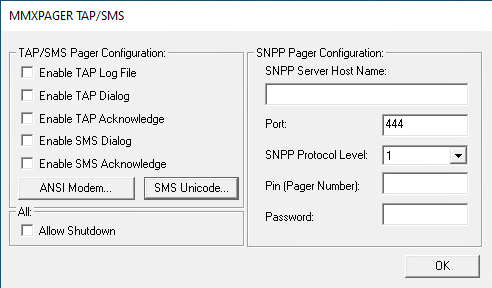
To configure SMS alerts, administrators can use the SMS Unicode button shown in Figure 1 to open the SMS configuration window. Figure 2 shows the parameters in the SMS Unicode Configuration window.
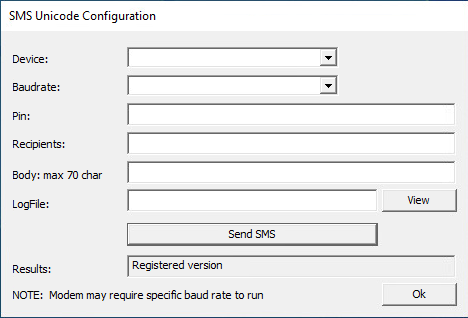
This SMS Unicode Configuration window enables system administrators to select a device, baud rate and recipients, and to compose the alert message body. This configuration window also provides the option to send a test SMS.
In addition to SMS configuration, the PagerCfg.exe enables administrators to define a path for an SMSLogFile, as shown in Figure 2, where logging information will be written. Once an administrator defines the SMSLogFile path, the application will write every log for each SMS operation into this file.
The Critical Configuration File Vulnerability
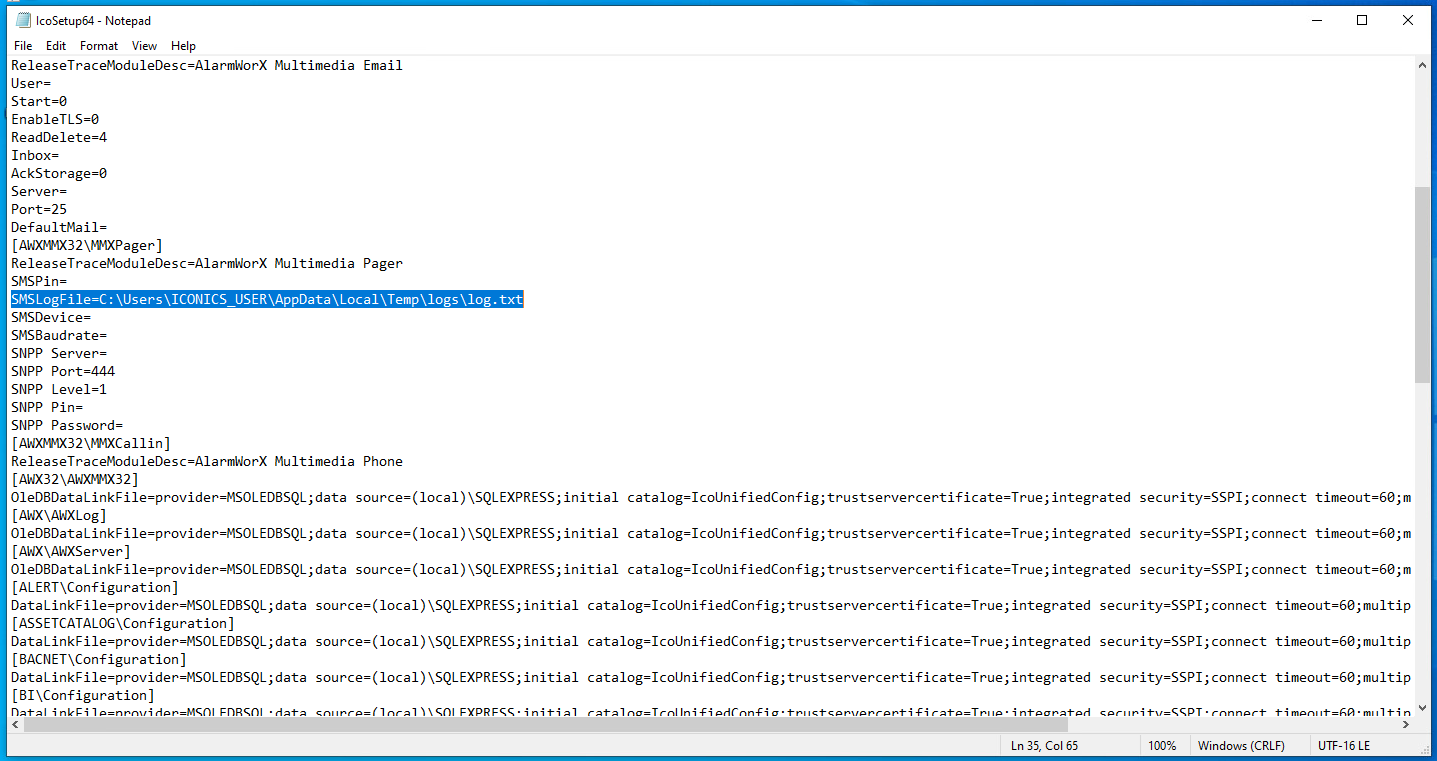
After an administrator configures the Pager Agent using PagerCfg.exe, the path for the SMSLogFile is saved in the C:\ProgramData\ICONICS\IcoSetup64.ini configuration file. In a normal security environment, this configuration file would be protected from modification by unprivileged users. However, when GenBroker32 is installed on the system, CVE-2024-7587 comes into play.
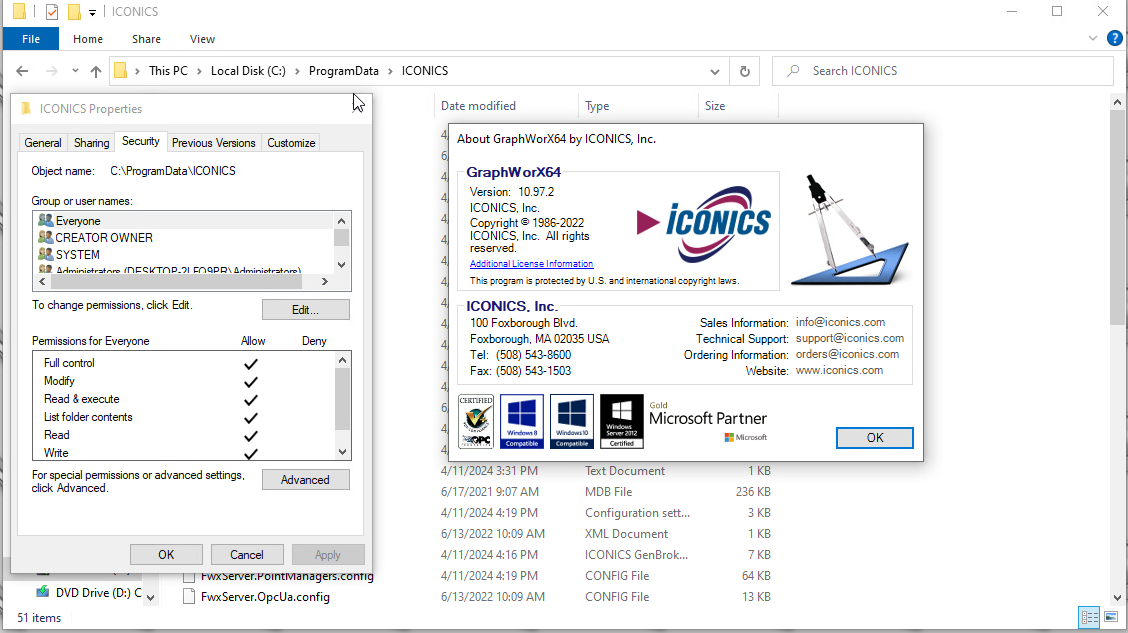
GenBroker32 is a legacy communications utility included in the Iconics software suite that helps older industrial systems connect to newer Iconics software by translating between different communication protocols. The vulnerability in GenBroker32's installer (CVE-2024-7587) grants full read and write access to the C:\ProgramData\ICONICS directory for every user on the system, making the IcoSetup64.ini configuration file writable by any local user.
Figure 3 shows the permissions of GraphWorX64, a central HMI/SCADA visualization component of the Iconics Suite, for C:\ProgramData\ICONICS that the GenBroker32 installer had modified.
Exploiting the Vulnerability
In a scenario where an attacker gains non-administrative access to a system with GenBroker32 installed, the attacker could manipulate any information contained within the configuration file. This is especially true of the SMSLogFile path that controls where the application logs SMS activity.
On a system with GenBroker32 installed, an attacker could perform the following steps to exploit CVE-2025-0921 (leveraging the excessive permissions from CVE-2024-7587) to perform a DoS attack.
Step 1
Logged in as a non-administrative user, an attacker can discover the SMSLogFile path by inspecting the IcoSetup64.ini file located in C:\ProgramData\ICONICS. The path for the SMSLogFile is C:\users\iconics_user\AppData\Local\Temp\logs\log.txt as shown in Figure 4.
Step 2
The attacker creates a specially crafted symbolic link (called symlinks) from the SMSLogFile location to the target binary. The attacker does not require administrator privileges to create this symbolic link. In our security assessment, we selected cng.sys as the target binary. Subsequently, PagerCfg.exe writes or overwrites the contents of this binary, and as a consequence corrupts the target binary.
The cng.sys driver is used for Microsoft Cryptography API: Next Generation (CNG). CNG provides cryptographic services in Windows system components. The cng.sys driver usually resides in the C:\Windows\System32\drivers directory. However, if cng.sys is present in its parent directory C:\Windows\System32, Windows might attempt to load the driver file from C:\Windows\System32 instead of C:\Windows\System32\drivers.
If an attacker successfully creates an invalid driver or corrupts a valid driver at C:\Windows\System32\cng.sys, the operating system would fail to boot. This can be achieved by combining Object Manager symbolic links with NTFS mount points to create file symbolic links without administrator privileges.
Step 3
The attacker would then wait for an administrator to send a test message through the SMS Unicode Configuration window or for AlarmWorx MMX to automatically trigger an alert.
Figure 5 shows an example of the SMS Unicode Configuration parameters we used during our security assessment, including the SMSLogFile path.
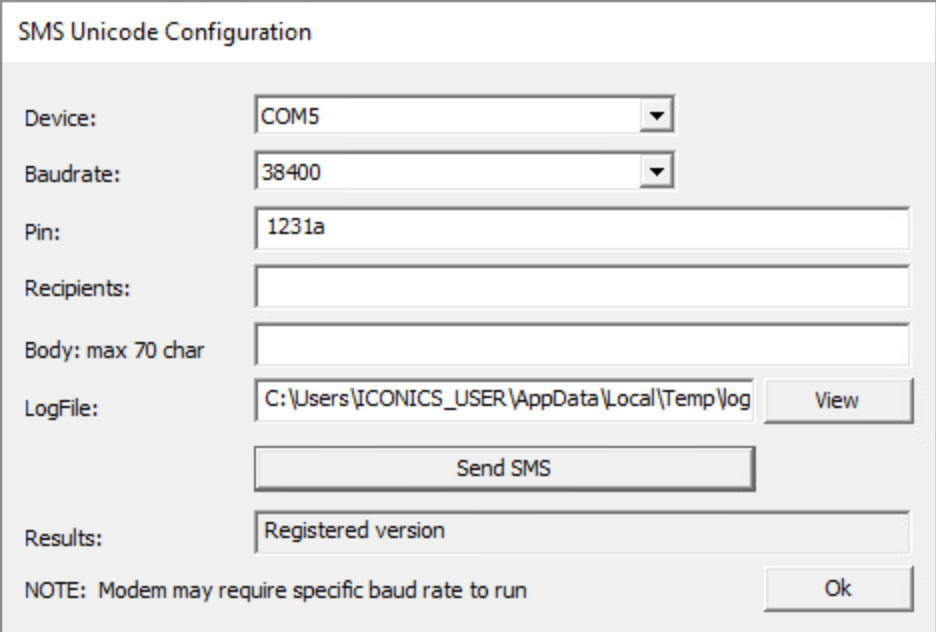
When an SMS is sent, this configuration directs its logging information to follow the symbolic link from C:\ProgramData\ICONICS\LogFiles\log.txt to C:\Windows\System32\cng.sys, effectively redirecting the logging data into C:\Windows\System32\cng.sys.
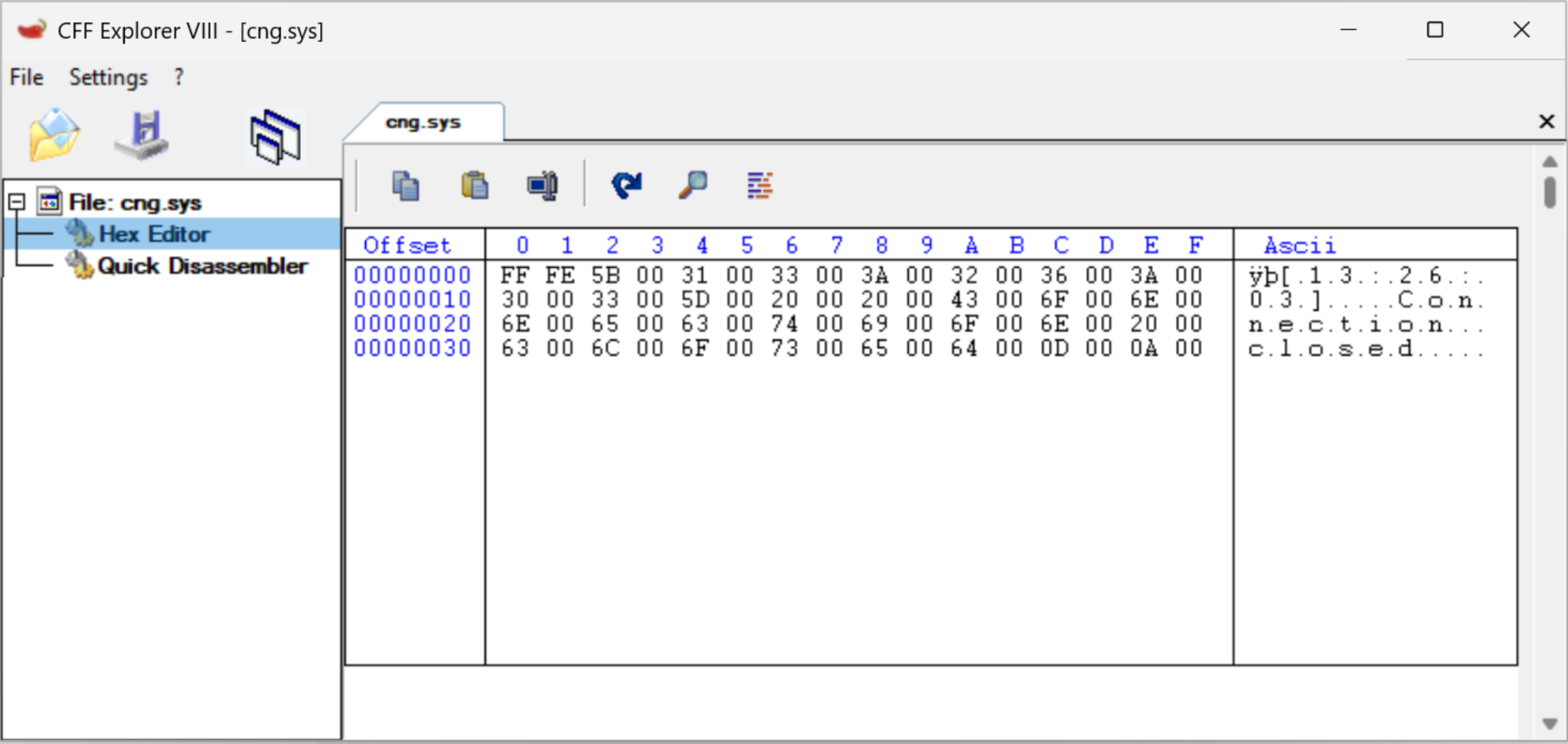
The altered content of cng.sys would now contain the SMS information log data instead of the expected binary. We verified this by inspecting C:\Windows\System32\cng.sys using CFF Explorer as shown in Figure 6.
Step 4
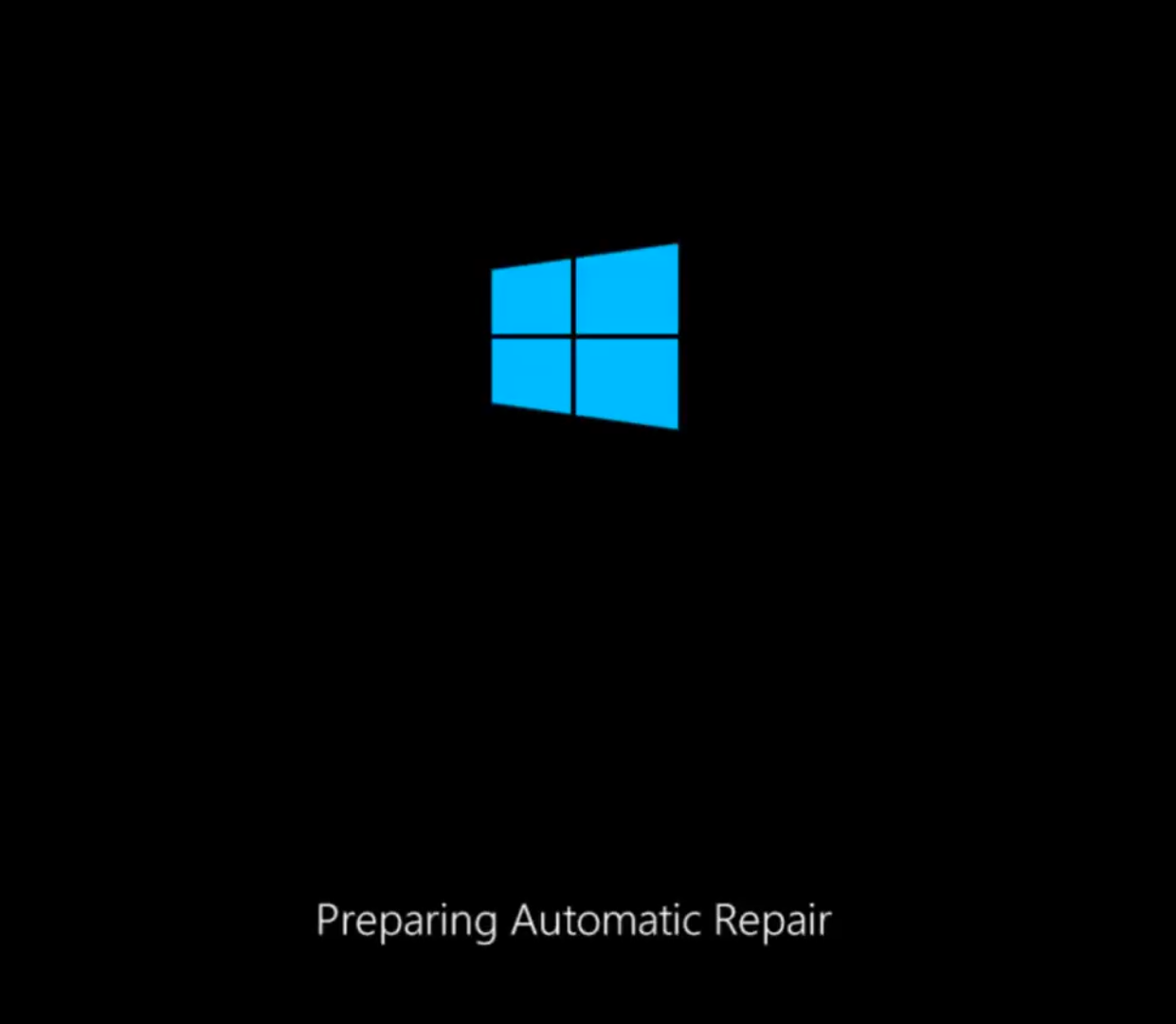
Upon rebooting the machine, the operating system would then attempt to load C:\Windows\System32\cng.sys. However, since the newly altered file is not a valid driver but a log file, the loading process would fail. This failure would cause the operating system to become stuck in failed repair mode, as shown in Figure 7.
To summarize this DoS attack method:
- While logged in as a local user without administrator privileges, the attacker would first identify the SMSLogFile path previously set by the administrator in the IcoSetup64.ini file.
- Then, by creating a symbolic link, the attacker would corrupt a critical binary such as the cng.sys driver.
- The attacker would then wait for the administrator to trigger an SMS, redirecting logging information to the cng.sys file, which would result in a corrupted version of the cng.sys driver.
- Upon reboot, the operating system would unsuccessfully attempt to load the corrupted driver. This would result in a failed boot, leaving the machine in repair mode, causing a DoS in a critical OT engineering workstation.
Even if the vulnerability CVE-2024-7587 described in our previous threat research article were not present, attackers could still exploit CVE-2025-0921 if the log file became writable by unprivileged users through other means. For example, this could include misconfigurations, alternative vulnerabilities or social engineering attacks that modify file permissions.
Conclusion
People often overlook the possibility of attackers misusing privileged file system operations, regardless of the danger they can pose to systems running these processes. This is especially pertinent when these vulnerabilities are found in OT environments.
The discovery of vulnerabilities within the Iconics Suite for Microsoft Windows versions 10.97.2 and earlier highlights the importance of robust security measures. Proactive measures can help mitigate these vulnerabilities and safeguard against potential exploitation.
Palo Alto Networks customers are better protected from the threats discussed above through the following products:
Palo Alto Networks OT Device Security helps organizations gain visibility across industrial environments to assess potential exposure, including systems running SCADA applications such as Iconics Suite. When combined with Next-Generation Firewalls (NGFW), customers can apply segmentation and access controls that reduce the risk associated with local exploitation of vulnerabilities such as CVE-2025-0921.
If you think you might have been compromised or have an urgent matter, get in touch with the Unit 42 Incident Response team or call:
- North America Toll-Free: 866.486.4842 (866.4.UNIT42)
- EMEA: +31.20.299.3130
- APAC: +65.6983.8730
- Japan: +81.50.1790.0200
- Australia: +61.2.4062.7950
- India: 000 800 050 45107
- South Korea: +82.080.467.8774
Palo Alto Networks has shared these findings with our fellow Cyber Threat Alliance (CTA) members. CTA members use this intelligence to rapidly deploy protections to their customers and to systematically disrupt malicious cyber actors. Learn more about the Cyber Threat Alliance.
Additional Resources
- Multiple Vulnerabilities Discovered in a SCADA System – Unit 42
- Information Tampering Vulnerability in Multi-agent Notification Feature of GENESIS64TM and MC Works64 – Mitsubishi Electric Corporation
- A Link to the Past. Abusing Symbolic Links on Windows – James Forshaw, Google Project Zero
- Symbolic-Link-Testing-Suite – James Forshaw, Google Project Zero
Updated Feb. 5, 2026, at 8:43 a.m. PT to correct OT Device Security product name.
Table of Contents
Related Vulnerabilities Resources

 High Profile Threats



 Threat Research





 Get updates from Unit 42