


 Unit 42 Incident Response


"Hi, IT Department Here!"
It's Friday afternoon. The week has been busy, and everyone is wrapping up before the weekend. One of your workers receives a message (Figure 1) through Microsoft Teams from what appears to be the IT Service Provider.
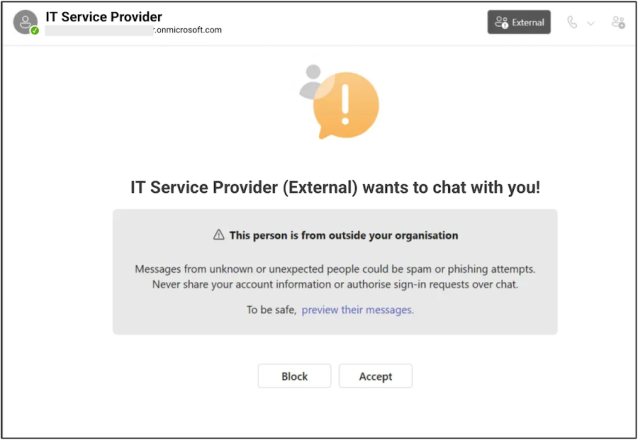
The message is marked as external. The worker previews the message and sees, "Hi, this is the IT Department. We see an issue with your account." The message looks routine and is in MS Teams, not email. The worker accepts the message. The conversation proceeds and the "IT technician" explains that a login anomaly was detected and asks the worker to approve a multi-factor authentication (MFA) prompt to confirm their identity. The conversation continues for a few minutes to maintain credibility, but behind the scenes the compromise is already underway.
This scenario shows how access to trusted internal communications channels allows threat actors to manipulate employees into taking actions that lead to compromise. Recent events utilizing this technique include:
- Cloaked Ursa (aka APT29, Cozy Bear and Midnight Blizzard) has successfully operationalized this approach. We reported in late 2024 how the threat actor leveraged compromised accounts to send MS Teams messages containing malicious links that redirected victims to credential harvesting pages mimicking legitimate Microsoft login portals.
- In December 2025, a threat group tracked by Mandiant as UNC6692 used MS Teams to impersonate IT helpdesk staff. The threat actors convinced targeted employees to accept a Microsoft Teams chat invitation from an account outside their organization.
The Rise of Chat-Based Social Engineering
Threat actors have increasingly moved away from traditional phishing techniques toward trusted collaboration tools. In the first four months of 2026, phishing alerts from collaboration tools represented 42% of all phishing alerts in Cortex, up from 30% of all phishing alerts in the preceding four months. Organizations continue to make progress in the effort to prevent email phishing. Email gateways are more intelligent. Awareness training and regular phishing simulations have conditioned users to be cautious with email, but far less so with collaboration tools. Using collaboration tools for malicious operations helps a threat actor blend in with legitimate operations. Threat actors know this and use collaboration tools for phishing, with Microsoft Teams being one of those tools.
Unit 42 has observed threat actors initiating chats with employees in victim organizations through Microsoft Teams using a range of techniques designed to mask their true identity and appear legitimate. Recent activity includes threat actors leveraging typosquatted domains that closely resemble trusted vendors or internal naming conventions. They also sometimes operate from Microsoft 365 tenants that have no previous affiliation with the target organization. In many cases, these tenants are deliberately named to mimic IT support functions, security teams or managed service providers.
In many organizations, Teams federation is enabled by default, allowing users to communicate with external tenants unless restricted by policy. In more advanced scenarios, threat actors bypass the need for deception altogether by compromising legitimate service provider or partner accounts, and leverage existing trust relationships to initiate chats from domains that are already recognized and allowed.
These chat messages can appear directly in an employee’s feed. Microsoft Teams has an impersonation protection feature that presents additional warnings to the chat recipient, but the onus is still on the user to decide whether to accept the message as legitimate. While Teams provides visual indicators that a sender is external, users may overlook these warnings when the sender appears to represent a known vendor, partner or internal support function. Threat actors count on this combination of visual and domain familiarity to impersonate trusted entities. This lowers user suspicion and increases the likelihood of successful social engineering.
As defenders, we must shift the burden away from the user and prevent as many of these malicious chat requests from reaching the user in the first place.
Hardening Microsoft Teams Against External Abuse
Threat actors like Cloaked Ursa succeed not because MS Teams is insecure, but because external communication settings are often too permissive and users tend to trust internal tools.
Effective defense combines user awareness along with strict configuration and identity-centric controls. We discuss these defenses briefly below. Please refer to Microsoft's Best Practices documentation for a more complete discussion of MS Teams security configuration.
User awareness is important and it needs to evolve beyond typical email phishing training. Workers should be explicitly taught that MS Teams messages can originate from outside the organization and are not inherently trustworthy. Training should involve real-world scenarios such as unsolicited “IT support” messages, requests to approve MFA prompts and instructions to reset credentials. These scenarios should teach users to recognize external indicators in MS Teams, to question unexpected outreach and to verify requests through a separate channel such as a help desk number or internal ticketing system.
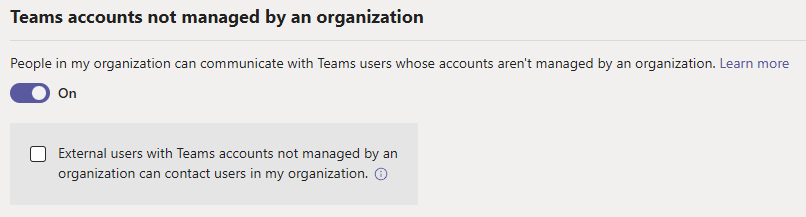
Securing MS Teams communication involves configuring who users can interact with via chat. One set of configuration settings, shown in Figure 2 below, controls unmanaged or personal accounts. The setting "External users with MS Teams accounts not managed by an organization can contact users in my organization" controls communication initiated by unmanaged or personal accounts. When enabled, it permits users outside of an organization to initiate conversations. If business cases allow, this setting should be disabled to prevent external users from initiating MS Teams chats with internal users. The parent control for this setting is stricter and named "People in my organization can communicate with unmanaged MS Teams accounts." Toggling this setting to "off" completely disables communication with unmanaged or personal accounts, and should be considered if business cases allow.
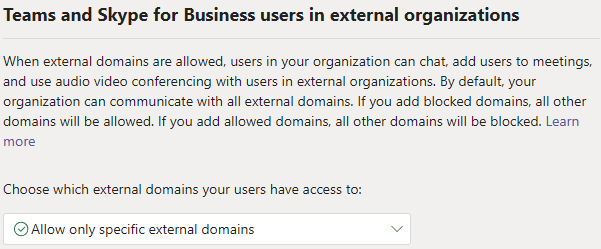
A second and more impactful setting governs federation and is shown in Figure 3. This setting determines whether users from other Microsoft 365 tenants can communicate with your organization. In practice, many companies leave federation open, enabling communication with any external domain. This creates a large and potentially unmonitored attack surface. If business cases allow, a more secure configuration is to choose "Allow only specific external domains" and then add domains with which the organization typically communicates to an Allow list.
Attacks initiated through MS Teams chats ultimately target identity systems. Because of this, MS Teams hardening should include a review of broader identity protections. Conditional Access policies can ensure that even if a user is manipulated, high-risk actions require additional verification or compliant devices. Privileged roles should be governed through just-in-time access models such as Entra Privileged Identity Management, which reduces the impact of any single compromised account. For additional information on cross-tenant intrusions including Teams, please see Microsoft's mitigation and protection guidance on this topic.
Monitoring also plays a critical role here. External chat initiation should be treated as an event worth investigating, particularly when from previously unseen or typosquatted domains, or if followed by authentication anomalies or device registration events. If malicious chats should get through to one or more users, administrators can remove those chats from users' views to prevent future interaction. Organizations with appropriate Microsoft licensing can enable users to report suspicious Teams messages from chats and channels, similar to the "Report Phishing" function in email.
Final Thoughts
The takeaways are simple but important:
- If external chat is open, attackers will use it. Tightening controls around external chat will reduce risk by constraining an entire attack vector. This reduces the chance of phishing chats reaching the user.
- Users are conditioned to identify email phishing. Extending user phishing training to cover Microsoft Teams and other collaboration tools creates better awareness and lessens the likelihood of success of a phishing chat that gets through to a user.
Additional Resources
A New Phishing Frontier: From Email to SaaS Collaboration Apps – Palo Alto Networks
How UNC6692 Employed Social Engineering to Deploy a Custom Malware Suite | Google Cloud Blog – Mandiant
Prevent spam or phishing attempts from external chats in Microsoft Teams – Microsoft
Teams security best practices for safer messaging - Microsoft Teams – Microsoft
IT Admins - Manage external meetings and chat with people and organizations using Microsoft identities – Microsoft
Prevent spam or phishing attempts from external chats in Microsoft Teams – Microsoft
Cross‑tenant helpdesk impersonation to data exfiltration: A human-operated intrusion playbook – Microsoft
Remove an external chat from a user's view in Microsoft Teams (admin) – Microsoft
End user reporting for security - Microsoft Teams – Microsoft
Table of Contents
Related General Resources

 Insights



 High Profile Threats





 Get updates from Unit 42