


 Cortex
 Unit 42 Incident Response


Executive Summary
This article analyzes new attack classes against passwordless authentication, focusing on Google’s synced passkey ecosystem and the Cloud Authenticator used by desktop clients. The attacks demonstrate how malware on a compromised endpoint can misuse onboarding, recovery and device trust workflows to take over passkey-protected accounts. We show how an attacker can authenticate without user interaction, bypass user verification requirements and extract all synced passkey private keys.
After decades of breaches and billions in losses, the attack vectors that defined the era of passwords and shared secrets are finally starting to fade. Passkeys replace passwords and traditional multi-factor authentication (MFA) with public-key cryptography, decreasing entire classes of attacks that have dominated the threat landscape for years.
With no shared secret to steal, reuse or phish, many of an attacker’s most reliable tools are becoming obsolete. This represents a significant disruption for the credential theft market.
Attackers, however, persist. They evolve, and defenders must prepare for a new generation of attacks. As passkeys become widely adopted and scale to billions of accounts, defenders must prepare for new attack surfaces, some of which we disclose in our research.
This article is part 3 in our series examining passkey adoption from a security perspective. If you haven’t read the previous parts, we recommend starting here:
Part 1: The Art of the Invisible Key – Passkey Global Breakthrough
Part 2: Google Authenticator: The Hidden Mechanisms of Passwordless Authentication
Palo Alto Networks customers are better protected from this new attack vector through the following products and services:
- Cortex Cloud Identity Security
- Idira Threat Detection and Response
- Idira Endpoint Privilege Manager
- Idira Privilege Access Management
If you think you might have been compromised or have an urgent matter, contact the Unit 42 Incident Response team.
| Related Unit 42 Topics | Google Authenticator, Cloud, Malware |
Setting the Stage
Google’s synced passkey implementation is particularly instructive due to its scale and how it creates a higher standard for private key protection in two critical ways:
- Private keys are generated and used within a cloud-enclave isolation environment
- Hardware-backed, client-device-bound keys control access to cloud-based cryptographic operations, attesting to the user’s presence on a trusted device
This article builds on the architectural analysis from Part 1 and Part 2 of our previous articles in this series. We now shift from how passkeys are built and deployed to how attackers can misuse them.
We present three novel attacks that enable account takeover of passkey-protected accounts. Each attack challenges a different core assumption of passkey authentication security. When a client authenticates with a passkey, the following is expected:
- Users provide explicit consent on the device to verify user presence
- For MFA, users must also unlock the device to verify biometric (i.e., something you are) or knowledge-based (i.e., something you know) authentication factors
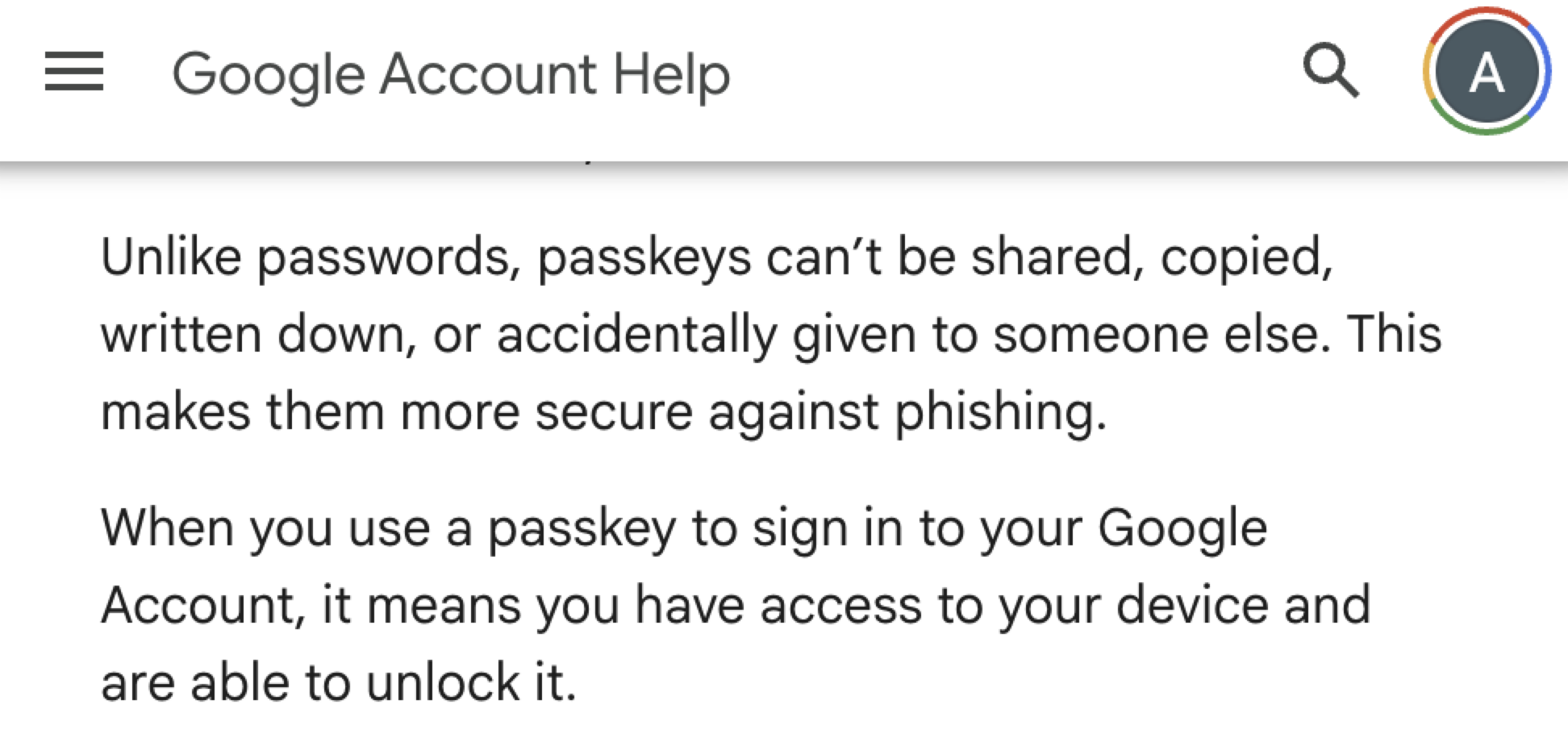
- Passkey private keys cannot be shared or copied
The Google documentation reflects these core assumptions, describing the passkey login process as a secure alternative to passwords (as shown in Figure 1).
Challenging these expectations is a category of attacks we've nicknamed Pass-ta-key. This playful, layered name blends the word passkey and the phrase “pass the key,” with a light nod to the concept of plate of pasta, illustrating how tangled this key implementation can get.
These attacks each expose a different weakness in practice:
- Pass-ta-key attack: An attacker takes over an account protected by a Google-synced passkey using malware running on the victim’s device, without requiring privilege escalation, device unlock or user interaction
- Silver Pass-ta-key attack: An attacker deceives the Google Cloud Authenticator into believing the victim has unlocked the device with biometrics, leading to full account takeover without using the victim’s device during authentication
- Golden Pass-ta-key attack: An attacker can extract all synced passkeys in a form that allows them to be shared or sold on the credential black market
These attacks demonstrate how malware can exploit synced passkeys, even when providers add hardware-backed protections to secure credentials within the cloud authenticator.
Disclaimer: This research involved responsible and ethical security analysis. We responsibly disclosed all presented exploits. The cloud authenticator model is used by various passkey providers across multiple browsers and platforms. This work, however, focuses on Google Password Manager in Chrome on Windows, specifically on devices equipped with a Trusted Platform Module (TPM). All presented attacks rely on malware already existing on the victim’s device during the initial stage.
Stage Zero Reconnaissance
Before attempting any of the attacks, the attacker needs visibility into how passkeys are used within the victim’s account. On a compromised endpoint, this visibility is readily available.
Chrome locally stores synced passkey data as part of its synchronization process. On Windows, Chrome persists this data as proto-encoded WebauthnCredentialSpecifics records, which represent synced WebAuthn credentials, within its sync database:
%LocalAppData%\Google\Chrome\User Data\<Profile>\Sync Data\LevelDB
Accessing these records does not require elevated privileges. The records allow an attacker to enumerate where the victim uses passkeys, along with associated usernames, credential identifiers and the encrypted private key.
After identifying a service where the victim uses passkeys, an attacker can attempt to authenticate as the victim.
The primary challenge for attackers is bypassing the protection of the private key, which is used to sign authentication challenges. This private key is secured by a master key. While an encrypted version of this master key is stored on each client device, only the cloud authenticator can decrypt it.
Despite this security, the architecture remains vulnerable to exploitation. The following sections detail methods attackers could use to exploit system mechanisms, authenticate as the victim, and compromise passkey-secured accounts.
Device Identity Impersonation: The Pass-Ta-Key Attack
Our first attack is the most straightforward approach, which involves taking over a passkey-protected account by mimicking the behavior of Google Password Manager and Chrome during legitimate authentication. In a normal flow, Chrome sends a request to the cloud authenticator, signed using the device’s hardware-backed keys.
Unlike a legitimate user flow that requires user interaction and device unlock, this attack shows how malware can obtain the required signature silently, without user consent, biometrics, device unlock or elevated privileges.
To understand this, we focus on Chrome’s device identity key, which represents client device possession to the cloud authenticator. As previously explained (part 2: Login with Synced Passkey and Device Key Signature), generating the required assertion involves signing data sent to the cloud authenticator using one of the device’s hardware-backed keys. This is the identity key or the user verification key (UV key).
Although both keys are hardware-bound, they are not accessed in the same way. For the identity key, Chrome creates the conditions that allow it to request a signature while running as a user without elevated privileges and without triggering device unlock protections.
On Windows, Chrome calls the NcryptCreatePersistedKey function without assigning a key name, making the TPM-backed key ephemeral and preventing it from being persisted to disk. Instead of storing the private key within the TPM, Chrome calls NcryptExportKey to export the key as an NCRYPT_OPAQUE_KEY_BLOB, which instructs the TPM to encrypt the private key using a TPM-resident key. The resulting blob is stored as wrapped_identity_private_key in the passkey_enclave_state file, making it available for future use on the same physical TPM.
Malware can extract this wrapped_identity_private_key from disk or Chrome’s memory. It can then invoke cryptographic operations using standard Windows Cryptography API: Next Generation (CNG) APIs (NCryptOpenStorageProvider, NCryptImportKey, NCryptSignHash), without elevated privileges, mimicking Chrome’s own actions.
Having established that malware can generate the required signature, we now detail the full Pass-ta-key attack flow (as shown in Figure 2). This flow allows a remote attacker with unprivileged malware on the victim’s device to authenticate as the victim.
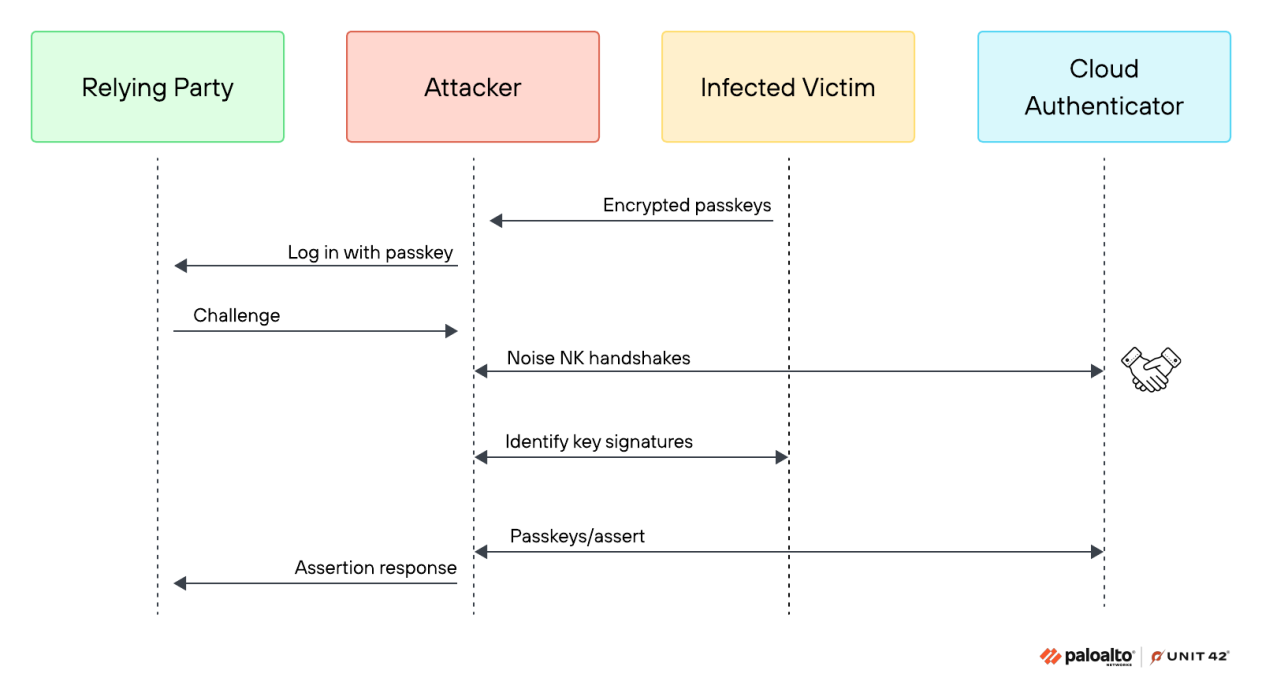
The attack flow consists of the following phases:
- After collecting the victim’s synced passkey records (Stage Zero: Reconnaissance), the attacker selects a targeted account and initiates a passkey login
- The relying party responds with a fresh authentication challenge
- The attacker initiates a WebSocket handshake with the Google Cloud Authenticator
- Using the hash of that handshake, the attacker interacts with the victim’s TPM and uses the extracted identity key to sign the handshake hash together with the assertion request
- The attacker sends an assertion request to the cloud authenticator, including the identity key signature
- From the cloud authenticator’s perspective, the request appears to be a trusted device making a valid request, so it produces a valid assertion response
- This assertion is then forwarded to the relying party, completing authentication and giving the attacker full control of the victim’s account
Video 1 demonstrates the attack as it would unfold in practice. (We have blurred the names of the relying parties to avoid naming.)
Video 1. Example of a successful Pass-ta-key attack.
As the video begins, the screen splits between the attacker's terminal and the victim's desktop. The video first shows the attacker establishing a command-and-control (C2) listener, passively waiting for victims to connect.
On the victim’s machine, the Trojan executes as a standard user, without elevated privileges. Once active, it collects the victim’s encrypted, synced passkeys and sends them back to the attacker’s C2 server. This provides visibility into the victim’s available passkeys.
The attacker selects a target, such as a messaging application account protected by a passkey, navigates to the application and chooses Login with passkey. The relying party then responds with a fresh authentication challenge.
Next, the attacker initiates communication with the Google Cloud Authenticator. After completing the handshake, the attacker triggers the Trojan to use the device’s identity key to sign the required data. Specifically, it uses the hash of the handshake combined with the hash of the serialized assertion request.
The attacker then attaches this signature to the request sent to the cloud authenticator. The cloud authenticator returns the requested assertion. The attacker forwards this valid assertion to the relying party and successfully logs in as the victim.
UV Flag: When MFA Depends on a Single Bit
The Pass-ta-key attack is effective when the relying party does not strictly require user verification. Many relying parties configure WebAuthn’s userVerification parameter as preferred rather than required to support diverse devices and user experiences, making them susceptible to this attack.
When a relying party explicitly requires user verification, one would expect the cloud authenticator to reject requests that are not signed using a key gated by PIN or biometric verification. Surprisingly, this is not the case.
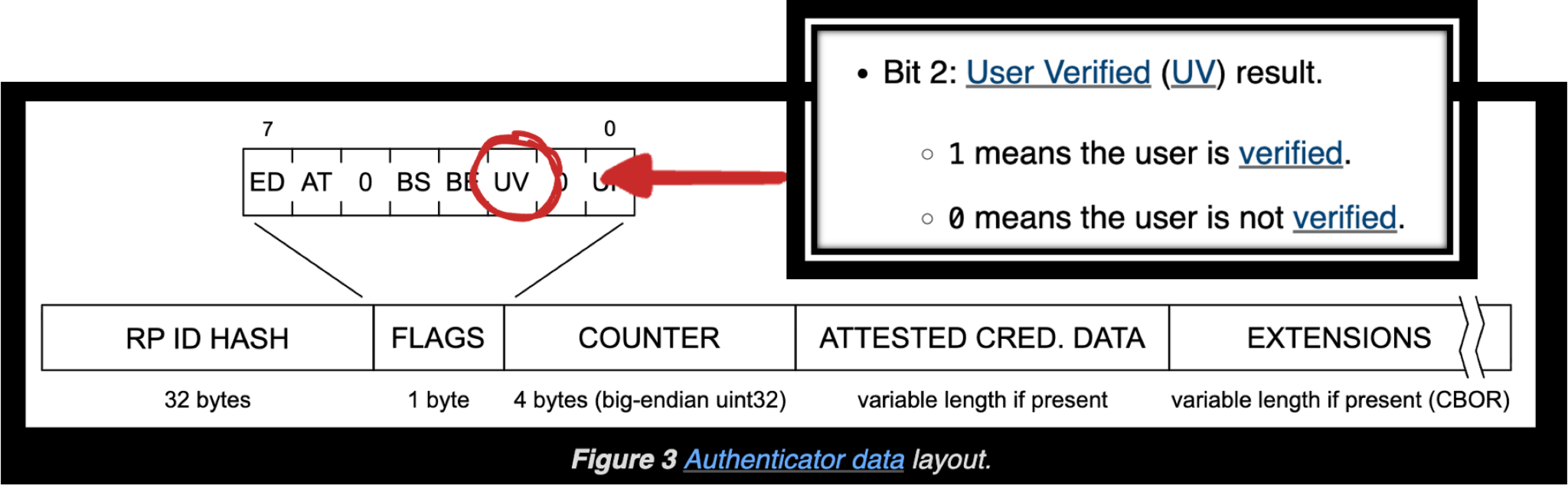
The cloud authenticator returns a valid assertion regardless of whether the request was signed using the identity key or the UV key. The difference comes down to a single bit in the authenticator data, the User Verified (UV) flag.
When the assertion is signed using the UV key, this flag is set to 1. When it is signed using the identity key, the flag remains 0.
While the Pass-ta-key attack produces cryptographically valid assertions matching the relying party’s public key, our testing shows attacks typically fail when user verification is required because the UV flag remains unset. For example, when attempting the attack against a passkey-protected GitHub account, the attacker receives an error message, as shown in Figure 3.
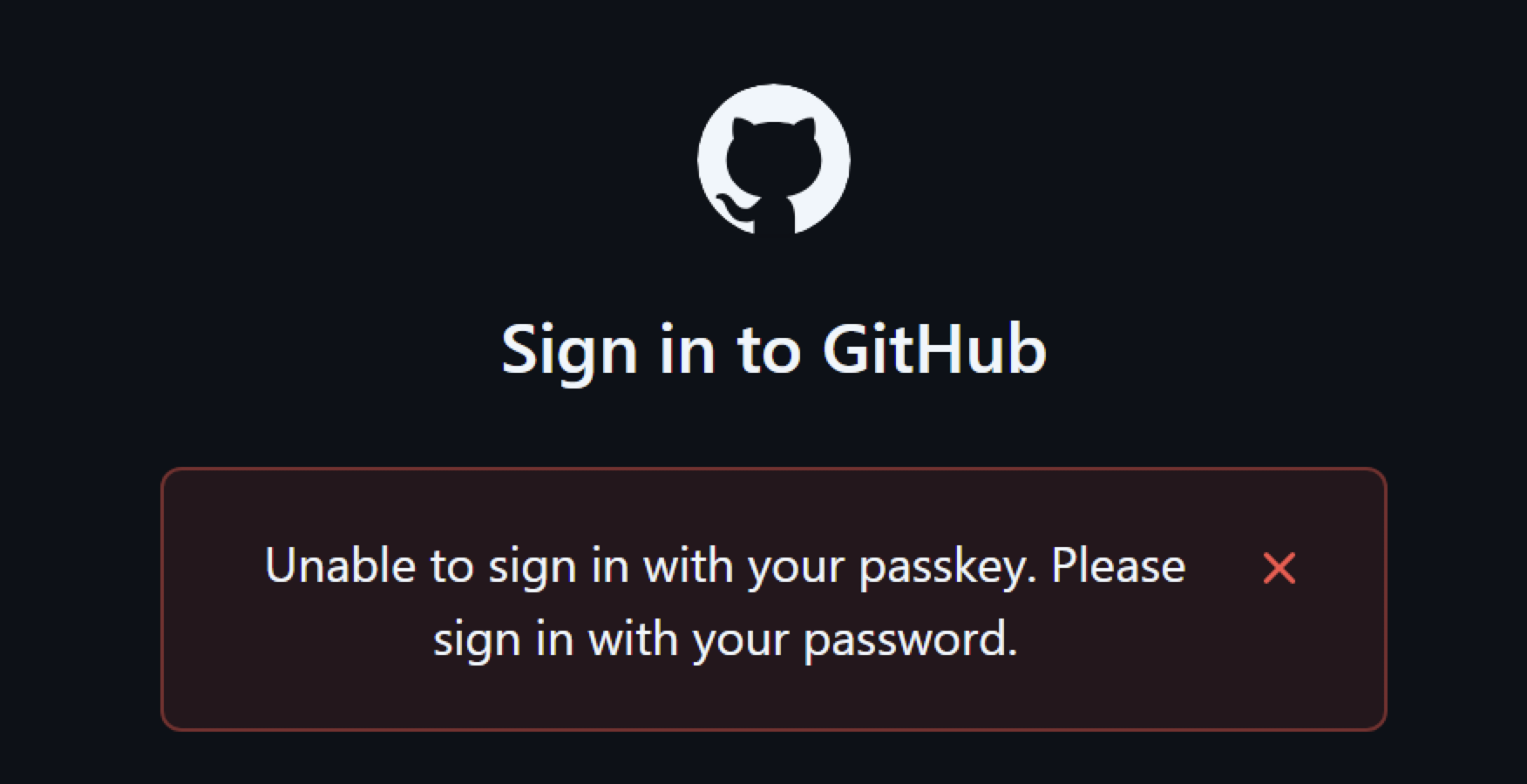
Although authentication is typically rejected when user verification is required, this behavior is not always consistently enforced across relying parties. In our testing, we identified relying parties that accepted authentication because they did not properly validate the UV flag. This allowed the attack to succeed despite the absence of user verification.
The lack of validation effectively reduces the authentication process to a single factor. By compromising only the device identity key, the attacker is able to authenticate successfully and take over the account, even though MFA is required.
We reported this issue to the affected relying parties.
Video 2 demonstrates this behavior in practice on eBay. Although eBay sets the userVerification parameter to required, the demo recording shows a successful passkey login using the described technique, without any user interaction or additional authentication factors.
We captured this recording before eBay fixed the issue. Following our report, eBay addressed this verification gap and now properly validates the UV flag.
Video 2. Pass-ta-key attack succeeds despite the absence of user verification, even when the UV is required.
Pending Attacker: The Silver Pass-Ta-Key Attack
When an account is protected by stronger authentication requirements, such as for financial or federal identity systems, the attacker must also bypass user verification. This initially appears to be a significant challenge.
The cloud authenticator requires a message signed with the UV key to set the UV flag. Client interaction controls access to this key, as the OS validates the user via the same mechanism used for device unlock. Without escalating to system privileges or physical access to the victim device, an attacker has no apparent path to obtain such access.
Attackers can bypass this challenge through the following mechanism:
- Instead of bypassing access to the UV key, the attacker invalidates the existing key registered in the cloud authenticator and registers a newly generated key under their control
- Once the attacker-controlled key is registered, any message signed with it is accepted by the cloud authenticator as if the user had successfully performed device unlock
Figure 4 demonstrates the attacker-side authentication flow in the Silver Pass-ta-key attack, focusing on the authentication phase after the attacker-controlled UV key is registered.
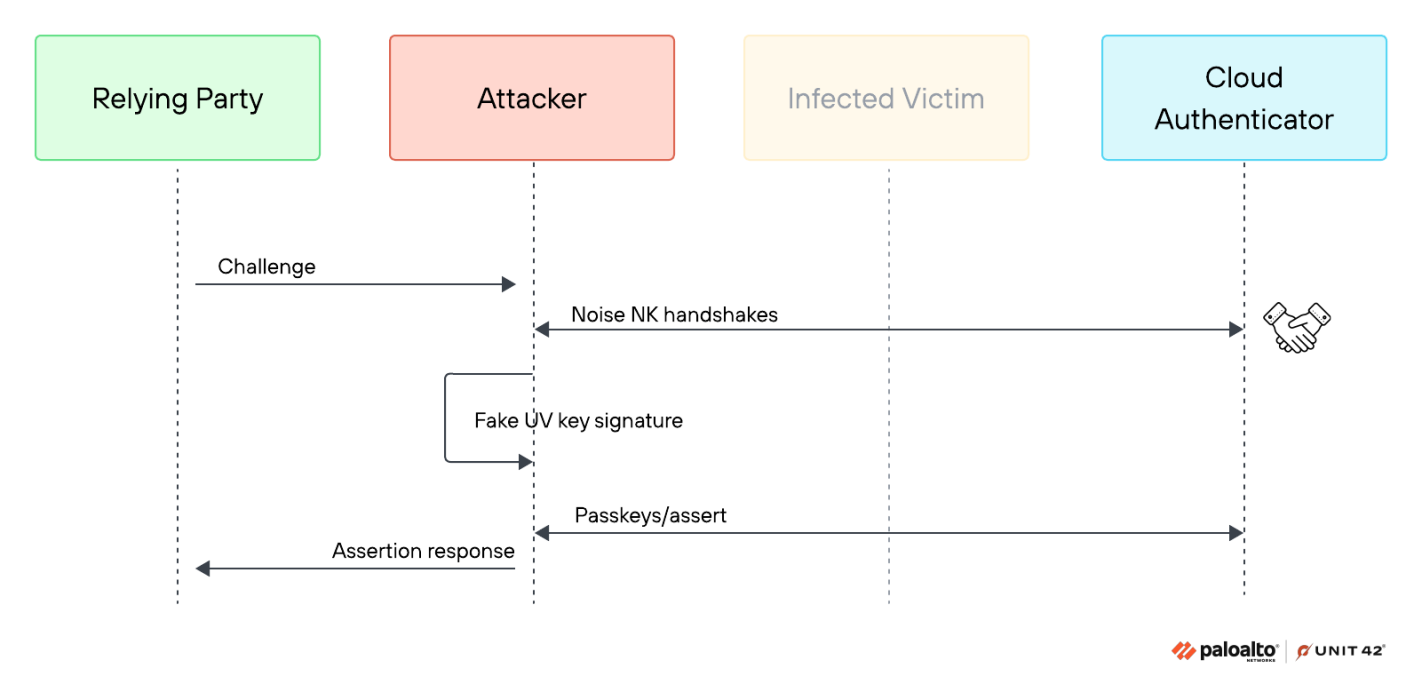
This approach has important implications. It allows the attacker to fully automate authentication across all the victim’s accounts without human interaction, even where user verification is enforced. Furthermore, the attacker no longer needs live access to the victim’s device during authentication.
Unlike the previous attack, which required active malware on the victim’s device for each authentication, the Silver attack provides reusable access. This allows the attacker to access the victim’s passkey-protected accounts from their own environment, without requiring the victim’s device to be online or active. Ultimately, this enables account takeover across all passkeys associated with the victim without requiring elevated privileges.
Invalidating the Existing User Verification Key
To carry out this attack, the first objective is to invalidate the existing UV key associated with the target device. From the previous attack, we learned how an attacker can use unprivileged malware to sign attacker-controlled requests with the device identity key and send them to the cloud authenticator. The attacker can leverage this capability to issue a device/forget command on behalf of the victim. A simpler option is to directly delete the victim’s passkey_enclave_state file, as there are no built-in protections that prevent its removal.
Regardless of the method, the next time the user attempts to use a passkey, Chrome is forced to re-onboard the device. This occurs either because Chrome no longer has access to the device key or because the cloud authenticator no longer recognizes the device as registered.
Exploiting the Onboarding Flow
On Windows, device onboarding is only completed after the second use of a passkey on the same device. During the first use, Chrome begins onboarding with the cloud authenticator in the background while prompting the user to enter the Google Password Manager (GPM) recovery PIN.
If Chrome were to create the UV key at this point, it would also trigger a Windows Hello prompt, requiring the user to authenticate again using biometrics or a PIN. Since both steps may involve a PIN, presenting them back-to-back in the same flow can be confusing and lead to user errors. To avoid this, Chrome defers the creation of the UV key.
Instead, the device is initially registered in a uv_key_pending state. During this first interaction, the GPM recovery PIN satisfies user verification, and the actual UV key is only created and registered during the next passkey use, when the additional prompt is no longer needed.
After forcing the victim into this re-registration state, the attacker can exploit the uv_key_pending condition. In their own environment, the attacker generates an asymmetric key pair. They then send a device/add_uv_key command to the cloud authenticator, providing the attacker-controlled public key as the UV key.
The cloud authenticator does not validate the attestation of newly registered UV keys to verify whether they originate from secure hardware. As a result, the attacker-controlled key is stored alongside the legitimate device identity key:
|
1 2 3 4 5 |
devices[device_id] = { hw: identity_public_key, uv: (Attacker-controlled) uv_public_key } |
From this point on, the attacker can use the forged UV key to request signatures for any passkey associated with the victim and obtain assertions with the UV bit set. This provides access to high-value accounts even when user verification is enforced and validated.
Stealing the Master Key: The Golden Pass-Ta-Key Attack
In this attack, the attacker effectively gains the cloud authenticator’s superpower, the ability to decrypt synced passkeys. This is particularly impactful because it undermines the intended protection mechanism.
The passkey’s private key is protected using a symmetric master key called the security domain secret (SDS). This master key is not directly accessible, it is stored on the device as an encrypted wrapped_secret. Only the cloud authenticator can decrypt this wrapped_secret using its device-specific key (wrapping_key) within its isolated environment, as noted in Figure 5.
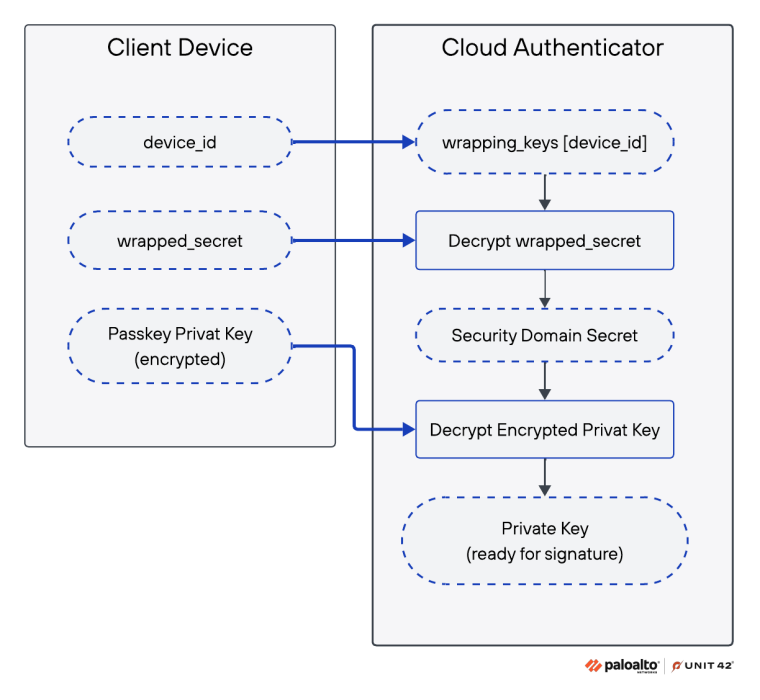
Figure 5. Synced passkey decryption inside the cloud authenticator.
This design aims to protect synced passkeys even if the client device is compromised. As Google noted in response to one of our vulnerability reports:
“The (cloud) enclave authenticator’s primary function is to make it difficult to steal passkey private data, which would be an obvious target for malware if it were locally available.”
The security of this model ultimately hinges on the protection of the 32-byte SDS. If an attacker is able to obtain the SDS, they effectively gain the ability to decrypt all synced passkeys for that account. This allows them to authenticate as a fully verified user and take over every service where the victim relies on passkeys.
Leaking the SDS
This secret should never be exposed to the client device, even during device loss or account recovery. However, we unexpectedly found the SDS present in Chrome’s logs during registration with the cloud authenticator, simply by opening chrome://device-log/FIDO, as noted in Figure 6.

In the current Chrome implementation, every device joining or rejoining an account’s security domain retrieves the SDS from the recovery key store, Google’s Trusted Vault service. The cloud authenticator includes a mechanism that allows Chrome to facilitate the recovery flow where the key cannot be decrypted on the client device, however this mechanism is not used. Instead, Chrome recovers the SDS in an accessible form.
One possible explanation is needing to standardize the device join and recovery process across platforms. Unlike desktop environments, Google Password Manager on iOS and Android does not rely on the cloud authenticator and must obtain the master key to decrypt synced passkeys. As a result, Chrome appears to follow the same recovery model, even though the cloud authenticator could enable a more isolated approach.
Although Google removed this secret from Chrome’s logging output following our report, the SDS is still sent to the client and remains accessible in Chrome’s process memory. If the attacker forces the victim to re-register with the cloud authenticator and knows the pattern to look for, they can extract the SDS directly from memory.
The Golden Pass-ta-key attack allows full account takeover through the following steps:
- The attacker forces Chrome to trigger a fresh onboarding using the same mechanisms as the Silver Pass-ta-key attack
- The attacker monitors the system for the recreation or modification of the passkey_enclave_state
- Once the file is recreated/modified, the attacker dumps Chrome’s process memory and extracts the SDS, which is temporarily present in plaintext
- The attacker reads the WebauthnCredentialSpecifics records from Chrome’s sync database (Stage Zero: Reconnaissance)
- Using the extracted SDS, the attacker decrypts the encrypted fields in each record and recovers the corresponding passkey private keys
- The attacker uses the recovered private keys to sign the relying party’s challenge and successfully authenticates as the victim
Figure 7 shows how an attacker would use the SDS to decrypt passkeys and forge a valid authentication response.
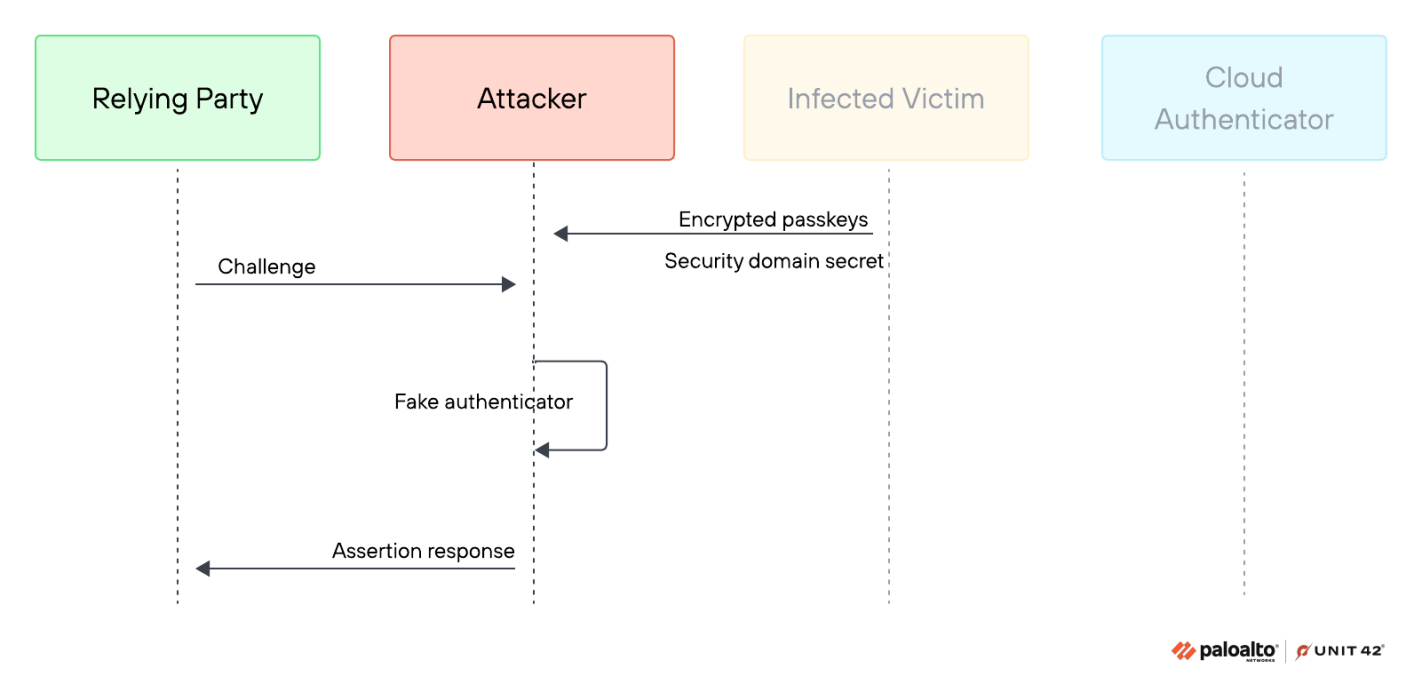
Video 3 shows how an attacker uses the stolen SDS to log in to a high-value account (in this case, a crypto exchange).
Video 3. How an attacker uses the stolen SDS to log in to a high-value account.
The Golden Pass-ta-key attack has a significantly broader impact. Beyond the reusable access from the attacker’s environment, the SDS allows the attacker to decrypt all existing passkeys as well as any future passkeys created for the account.
While the Silver attack is mitigated by unregistering or re-enrolling the device, the Golden attack provides strong persistence. Even if a compromise is detected, remediation is limited. In Google’s current implementation, there is no way to rotate or revoke the SDS, meaning all current and future synced passkeys remain protected by the same master key.
Mitigations
Enforce Strict User Verification (UV) Validation
Relying parties should require userVerification = required and validate the UV flag in all authentication responses. Failure to enforce this check can reduce authentication to a single factor. Figure 8 below shows the authenticator data layout.
Validate Device Key Registration and Attestation
Credential managers should verify the origin and attestation of newly registered device keys, including UV and identity keys. Accepting arbitrary keys without validation allows unauthorized key registration and bypass of user verification requirements.
Harden Recovery and Device Re-Registration Flows
Credential manager recovery PIN prompts are typically associated with onboarding or account recovery, not routine passkey authentication. Unexpected or repeated prompts during normal passkey usage may indicate re-triggering of onboarding or recovery, potentially due to phishing attempts or local manipulation of passkey state.
These flows are security-sensitive because recovery operations can re-establish device trust and restore access to synced credentials. In the scenarios from our research, triggering recovery enabled registration of new verification keys or exposure of key material used to decrypt synced passkeys.
Monitoring agents should detect and restrict unnecessary re-triggering of onboarding and recovery flows, especially after deletion or modification of local passkey state files. Additional verification should be required before re-establishing device trust or recovering synced credentials.
Prevent Exposure of Sensitive Key Material on the Client
Sensitive material such as the master key should not be exposed to the client, including through memory or logs. Instead, credential managers should use designs where cryptographic operations are performed on behalf of the client, without transferring the underlying key material to the client environment.
Restrict Access to Local Passkey Data
Access to passkey-related storage, such as Chrome’s sync database and local state files (e.g., passkey_enclave_state), should be limited to the browser process and protected through platform access controls. This reduces the ability to enumerate credentials, manipulate onboarding state or access device-bound key material from a compromised endpoint.
Improve Detection of Abnormal Passkey Usage
WebAuthn defines a signature counter (signCount) mechanism intended to help relying parties detect cloned or unexpectedly reused credentials. In traditional authenticators, the counter increases with each authentication operation and can provide a signal of abnormal credential usage.
In synchronized passkey systems, authentication assertions commonly contain a constant signCount value. As a result, relying parties and credential providers have limited visibility into unauthorized use of synced credentials, including scenarios where passkeys are extracted or reused from unexpected environments.
Google noted that globally consistent signature counters are difficult to implement in synchronized passkey systems that operate across multiple devices and platforms, particularly when assertions originate from independent clients.
Credential managers that centrally coordinate authentication operations should consider implementing coordinated signature counter mechanisms that account for synchronization and multi-device consistency challenges. Such mechanisms can improve visibility and detection of unexpected credential usage or passkey reuse across environments.
Conclusion
Passkeys represent a meaningful step forward in authentication security. By eliminating shared secrets, they reduce entire classes of attacks that have historically led to widespread account compromise. This changes the economics of credential theft and forces attackers to adopt new techniques.
The attacks presented in this research do not break the underlying cryptography. Instead, they exploit gaps between design assumptions and real-world implementations. These gaps include:
- Trust placed in client devices
- Inconsistencies in relying party validation
- Weaknesses in onboarding and recovery flows
When combined with malware on the endpoint, these gaps enable account takeover scenarios that bypass the guarantees passkeys are expected to provide.
A central takeaway is that endpoint compromise remains a critical part of the threat model. When authentication decisions rely on signals from the user’s device, an attacker with access to that device can manipulate those signals in ways that are difficult to detect. Hardware-backed keys, secure enclaves and cloud isolation significantly raise the bar, but they do not fully eliminate this risk.
Passkey deployments should be treated as one layer in a broader security strategy. Relying parties must enforce strict validation, including proper handling of the user verification signal. Platform providers should continue hardening onboarding and recovery flows, and organizations should invest in protections against malware and memory access on endpoints.
As adoption continues to grow, so will attacker interest in this space. Understanding these emerging attack paths is essential to ensuring passwordless authentication delivers its intended security benefits in real-world conditions.
Palo Alto Networks customers are better protected from the threats discussed above through the following products:
Cortex Cloud Identity Security
Cortex Cloud Identity Security encompasses Cloud Infrastructure Entitlement Management (CIEM), Identity Security Posture Management (ISPM), Data Access Governance (DAG) and Identity Threat Detection and Response (ITDR). It provides clients with the necessary capabilities to improve their identity-related security requirements by providing visibility into identities, and their permissions, within cloud and container environments. This helps accurately detect misconfigurations and unwanted access to sensitive data. It also allows real-time analysis surrounding usage and access patterns.
Idira Threat Detection and Response
Idira Threat Detection and Response (TDR) enables security teams to counter identity-based attacks targeting Idira Next Generation Identity (NGI) Platform and the identities it secures. Using near real-time detection, powered by CORA AI, and leveraging Idira’s visibility across multiple contexts (like PAM, authentication, SSO, cloud, endpoints, browsers, and more), Idira ITP can apply automated, tailored non-disruptive in-session response to contain and minimize potential identity-based threats.
Idira Endpoint Privilege Manager
Idira Endpoint Privilege Manager (EPM) enables enterprises to reduce risk, satisfy compliance, and streamline operations. It helps implement least privilege via policy-driven elevation and removal of standing admin rights, and blocks risky actions, such as execution of unvetted applications and access to memory of other processes, while providing audit-ready evidence and unified identity governance. Automation and consolidation improve efficiency and support Zero Trust strategies, strengthening security without slowing the business.
Idira Privilege Access Management
Idira Privilege Access Management unifies privileged access across human, machine, and agentic identities to secure cloud access across multi-cloud environments. Building on proven PAM, it delivers centralized secrets management alongside modern controls like Just-in-Time access and Zero Standing Privileges. This enforces consistent least-privilege security across on-premises, cloud, and SaaS targets.
If you think you may have been compromised or have an urgent matter, get in touch with the Unit 42 Incident Response team or call:
- North America: Toll Free: +1 (866) 486-4842 (866.4.UNIT42)
- UK: +44.20.3743.3660
- Europe and Middle East: +31.20.299.3130
- Asia: +65.6983.8730
- Japan: +81.50.1790.0200
- Australia: +61.2.4062.7950
- India: 000 800 050 45107
- South Korea: +82.080.467.8774
Palo Alto Networks has shared these findings with our fellow Cyber Threat Alliance (CTA) members. CTA members use this intelligence to rapidly deploy protections to their customers and to systematically disrupt malicious cyber actors. Learn more about the Cyber Threat Alliance.
Additional Resources
- The Art of the Invisible Key: Passkey Global Breakthrough – CyberArk
- Google Cloud Authenticator: The Hidden Mechanisms of Passwordless Authentication – Palo Alto Networks Unit 42
Table of Contents
Related Malware Resources

 Threat Research


 Insights







 Get updates from Unit 42