Parrot TDS: A Persistent and Evolving Malware Campaign

Executive Summary

A traffic direction system (TDS) nicknamed Parrot TDS has been publicly reported as active since October 2021. Websites with Parrot TDS have malicious scripts injected into existing JavaScript code hosted on the server. This TDS is easily identifiable by keywords found in the injected JavaScript that we will explore to show the evolution of this threat.

This injected script consists of two components: an initial landing script that profiles the victim, and a payload script that can direct the victim’s browser to a malicious location or piece of content. To help the reader better understand Parrot TDS, this article provides in-depth analysis of the landing scripts and payload scripts we have collected from this campaign.

Palo Alto Networks customers are better protected from the threats discussed in this article through our Next-Generation Firewall with Cloud-Delivered Security Services, including Advanced WildFire, DNS Security, Advanced Threat Prevention and Advanced URL Filtering. If you think you might have been compromised or have an urgent matter, contact the Unit 42 Incident Response team.

Related Unit 42 Topics Web Threats

Background

In early September 2023, we investigated a notification concerning a compromised website based in Brazil. Our investigation revealed that this website served pages with injected JavaScript identified as Parrot TDS. Further research uncovered many variations of Parrot TDS script from various servers worldwide.

Our research reveals several versions of injected JavaScript associated with this campaign. Before reviewing all variations of this script, we should better understand the basic nature of Parrot TDS.

Parrot TDS Overview

While campaigns involving malicious or injected JavaScript code are fairly common, Parrot TDS is notable due to its wide scope and ability to threaten millions of potential victims. This TDS is easily identifiable by keywords from the injected JavaScript, such as:

  • Ndsj
  • Ndsw
  • Ndsx

The threat operators have consistently used these keywords for Parrot TDS. The presence of these keywords makes it easier for researchers to group samples from this campaign together, making it one of the most investigated campaigns in recent years.

Although its origin remains unclear and public reports indicate Parrot TDS started in 2021, our data indicates it first appeared as early as 2019, with full samples available by August of that year. This relatively high-profile campaign would in that case have been active for more than four years.

Our investigation into Parrot TDS has revealed different versions of injected JavaScript that illustrate its evolution. Throughout its evolution, the chain of events used by Parrot TDS has remained consistent.

Chain of Events for Parrot TDS Payload Distribution

Although we have observed different versions of Parrot TDS, the attack chain follows the same basic pattern as shown below in Figure 1.
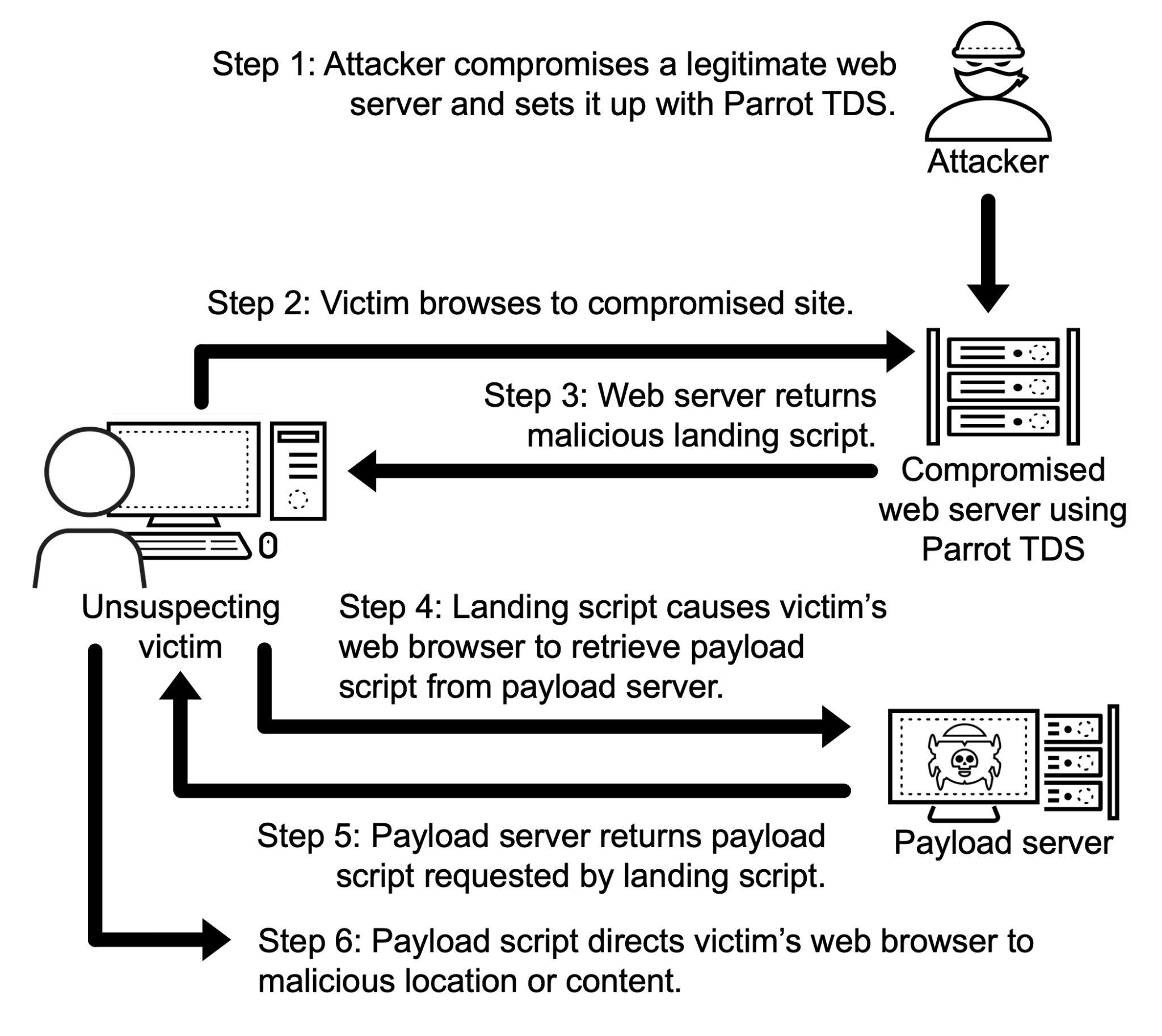
Image 1 is an attack chain diagram of Parrot TDS. Step 1: Attacker compromises a legitimate server and sets it up with Parrot TDS. Icon of attacker with arrow at server. Compromised web server song Parrot TDS. Step 2: Victim browses to compromised site. Icon of unsuspecting victim at computer. Arrow to server. Step 3: Web server returns malicious landing script. Step 4: Landing script causes victim’s web browser to retrieve payload script from payload server. Arrow to payload server. Arrow to victim. Step 5: Payload server returns payload script requested by landing script. Step 6: Payload script directs victim’s web browser to malicious location or content.
Figure 1. Chain of events for payload distribution through Parrot TDS.

In most cases, a web server compromised by Parrot TDS injects a landing JavaScript code snippet into existing JavaScript files. This code usually contains keywords such as ndsj or ndsw.

We call this the Parrot TDS “landing script” as shown above in Steps 3 and 4 from Figure 1. The landing script conducts environment checks as a way to avoid detection.

If conditions set by the landing script are successfully met, the victim’s web browser queries a payload server. This payload server then returns a JavaScript payload containing keywords such as ndsx.

We call this second script the “payload script” as shown in Steps 5 and 6 from Figure 1 above. The Parrot TDS payload script can direct the victim’s browser to a malicious webpage or other potentially harmful content.

Ultimately, the two components we have identified from Parrot TDS traffic are:

  • Landing scripts (usually containing keywords ndsj or ndsw)
  • Payload scripts (containing keywords such as ndsx)

To better understand these two components, we must first examine the landing script.

Parrot TDS Landing Script

We analyzed more than 10,000 Parrot TDS landing scripts from internal and external data sources. The range of this dataset is from August 2019 through October 2023.

These samples reveal four versions of Parrot TDS landing script that represent approximately 95.8% of the collected data as indicated in Figure 2 below. The remaining 4.2% could be the future of this campaign, since the characteristics of these samples do not match the four versions of landing script we have identified so far.
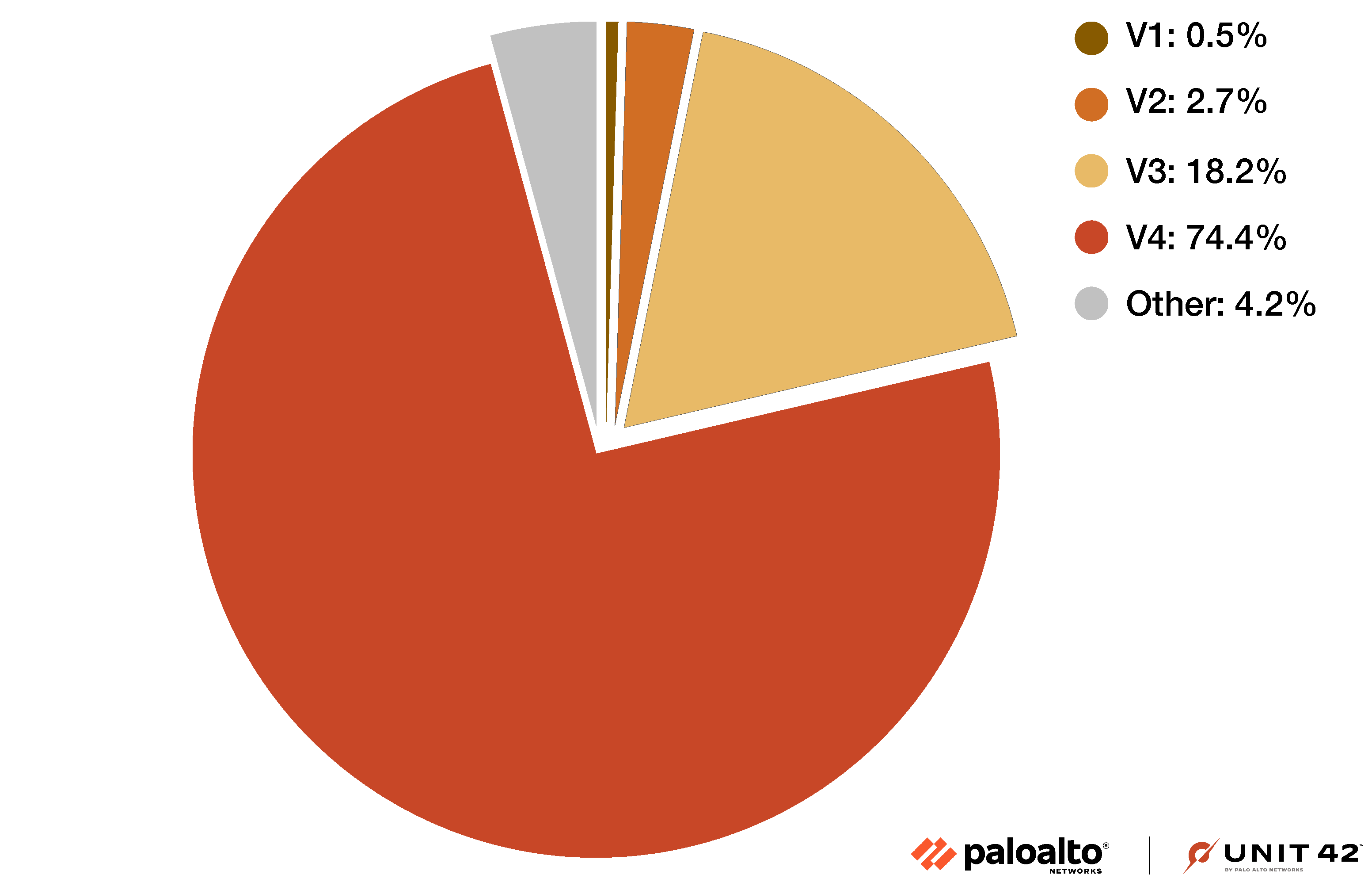
Image 2 is a pie chart of the Parrot TDS landing script distribution. Clockwise from left to right: Other is 4.2%. V1 is 0.5% is 2.7%. V3 is 18.2%. V4 is 74.4%.
Figure 2. Pie chart showing Parrot TDS landing script distribution.

The four versions of Parrot TDS landing script from 95.8% of our samples use either the keyword ndsw or ndsj, while the other 4.2% use the keyword ndsj. Scripts with the keyword ndsj use more obfuscation techniques such as Canvas, decodeURI or WebAssembly.

Most Parrot TDS landing scripts from earlier in the campaign were injected as a single line of code, often appended at the end of JavaScript files served from the compromised website. We identify this as Version 1 (V1), and Figure 3 shows one such example. Note: We will acronymize each version as V paired with its sequential version number for the remainder of the article.
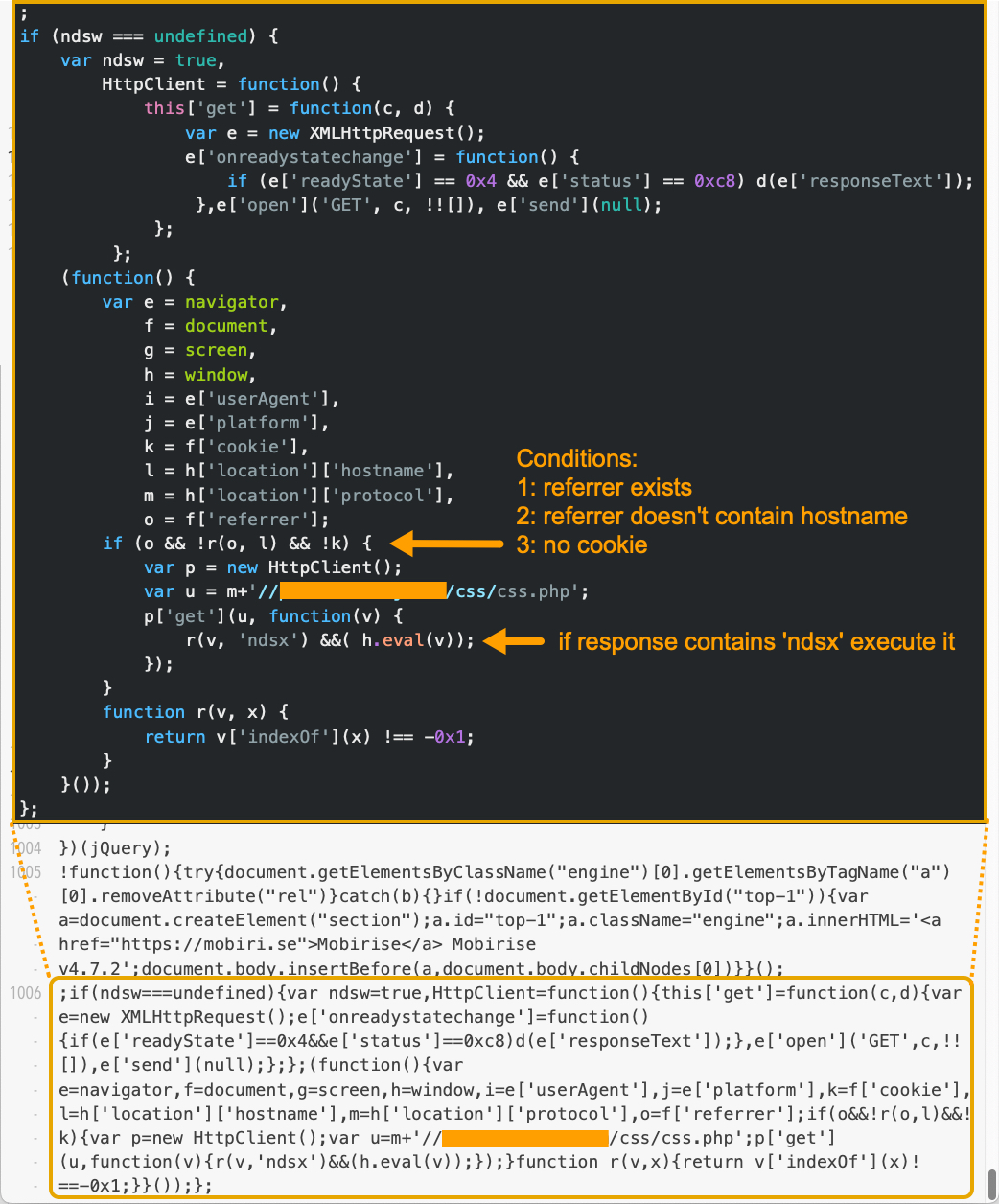
Image 3 is an example of a landing script from version one. Two screenshots are stacked on top of each other. Some of the information is redacted. Highlighted in the top screenshot are the conditions, which are 1: Referrer exists. 2: the referrer doesn't contain a host name. 3: No cookie. An arrow points to the line that executes if the response contains ndsx.
Figure 3. Example of landing script V1. Source of sample: VirusTotal.

The example in Figure 3 indicates a single line of injected code, with the JavaScript normalized and beautified above it.

The different landing script versions have no significant differences in the core function of the injected script. Later versions include more obfuscation. The V1 sample from Figure 3 above shows the core function quite clearly. The sixth line of beautified JavaScript code shows an XMLHTTPRequest that interacts with the payload server and executes the response as a payload.

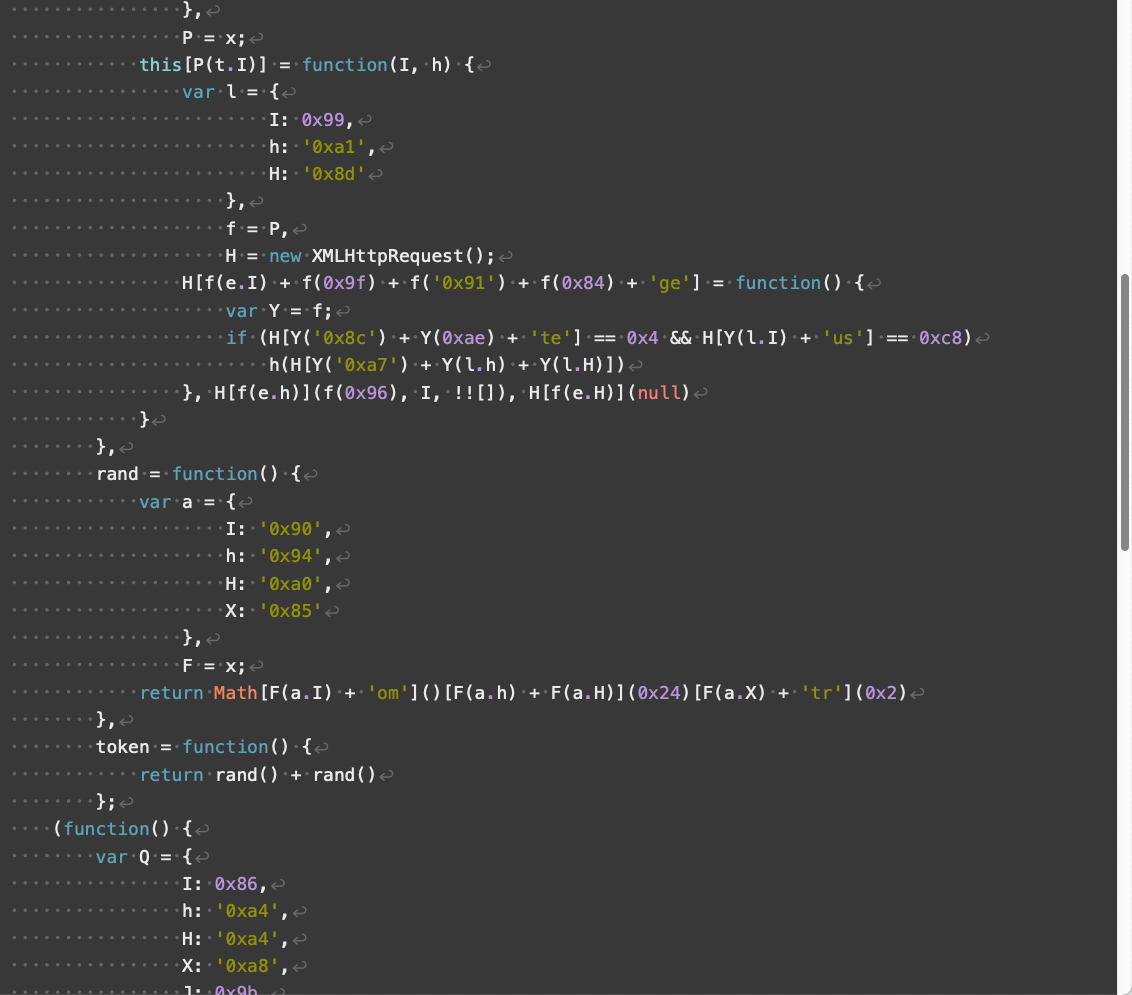
The major function and workflow of the landing script of V2 are almost the same as those of V1. The only difference is that V2 appends a token every time it interacts with the payload server. This token contains two random strings as noted below in Figure 4, and the token is usually 21-22 bytes long.
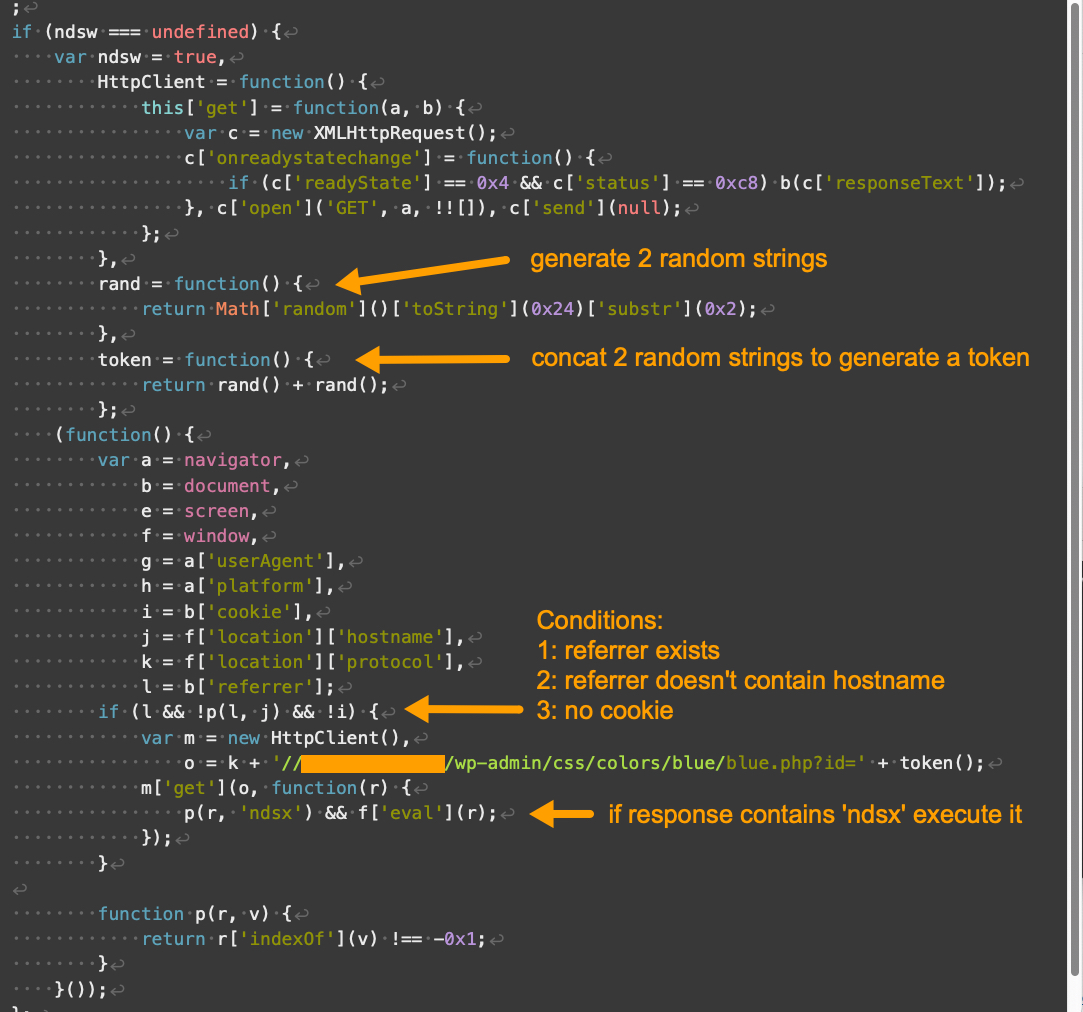
Image 4 is an example of version two of a Parrot TDS landing script. Arrows indicate the following from top to bottom: Generate two random strings. Two random strings to generate a token. Conditions: 1: Referrer exists. 2: the referrer doesn't contain a host name. 3: No cookie. Some of the information is redacted.
Figure 4. Example of Parrot TDS landing script V2. Source of sample: VirusTotal.

Compared to V1 and V2, the landing script for V3 looks very different. V3 includes a new function that primarily serves as storage for strings, noted as “serving strings” in Figure 5 below.
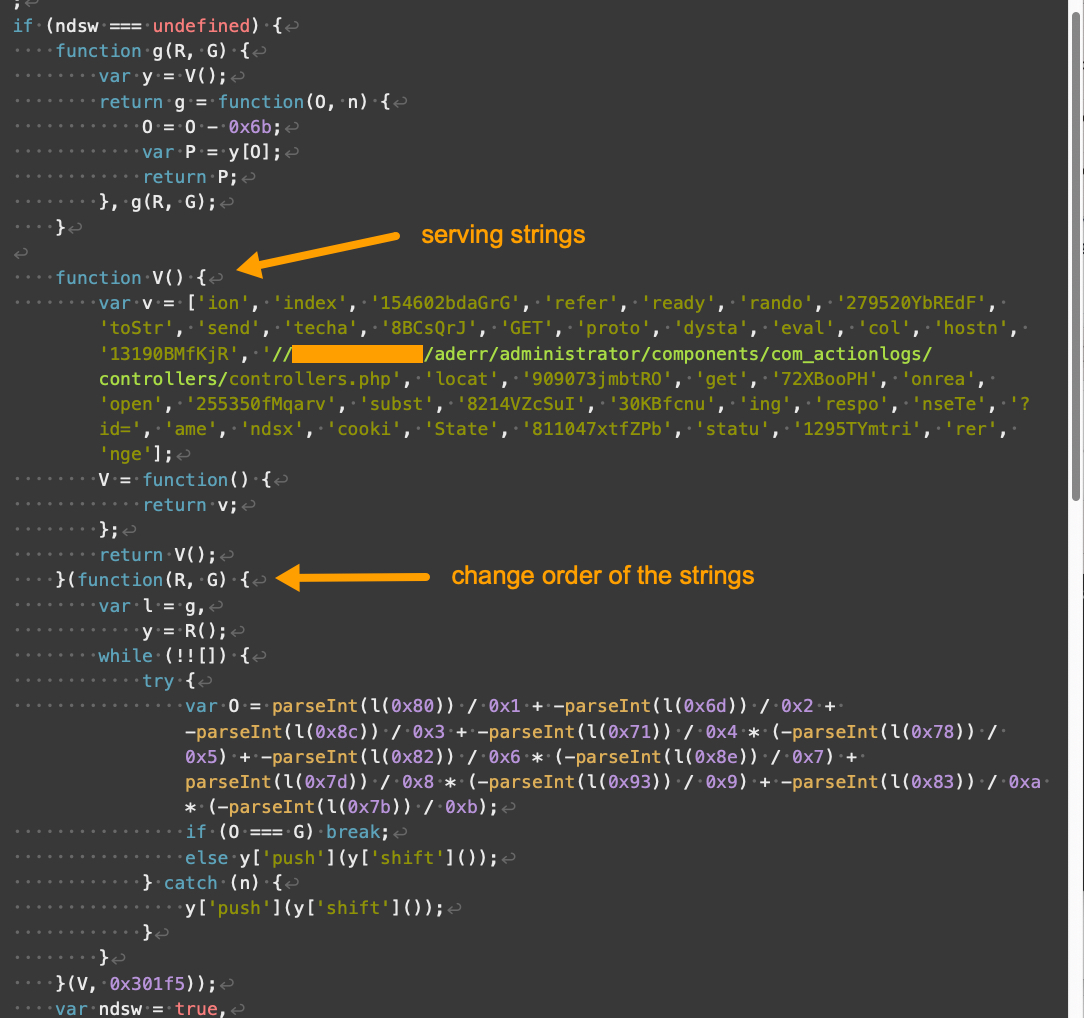
Image 5 is a screenshot of version three of an example Parrot TDS landing script. Some of the information is redacted. Arrows indicate, from top to bottom, the serving strings and the change order of the strings.
Figure 5. Example of Parrot TDS landing script V3, part 1 of 3. Source of sample: VirusTotal.

Parrot TDS landing script V3 hosts a long array of strings. Each string in the array could be a word or part of a word used by other functions to dynamically construct a keyword or string at runtime.

Also shown in Figure 5, another function modifies the string array from the previously-noted function. This makes static deobfuscation for analysis more difficult. Other than that, the core function of V3 is not much different from previous versions.

The remaining portions of our V3 landing script example are shown below in Figures 6 and 7.
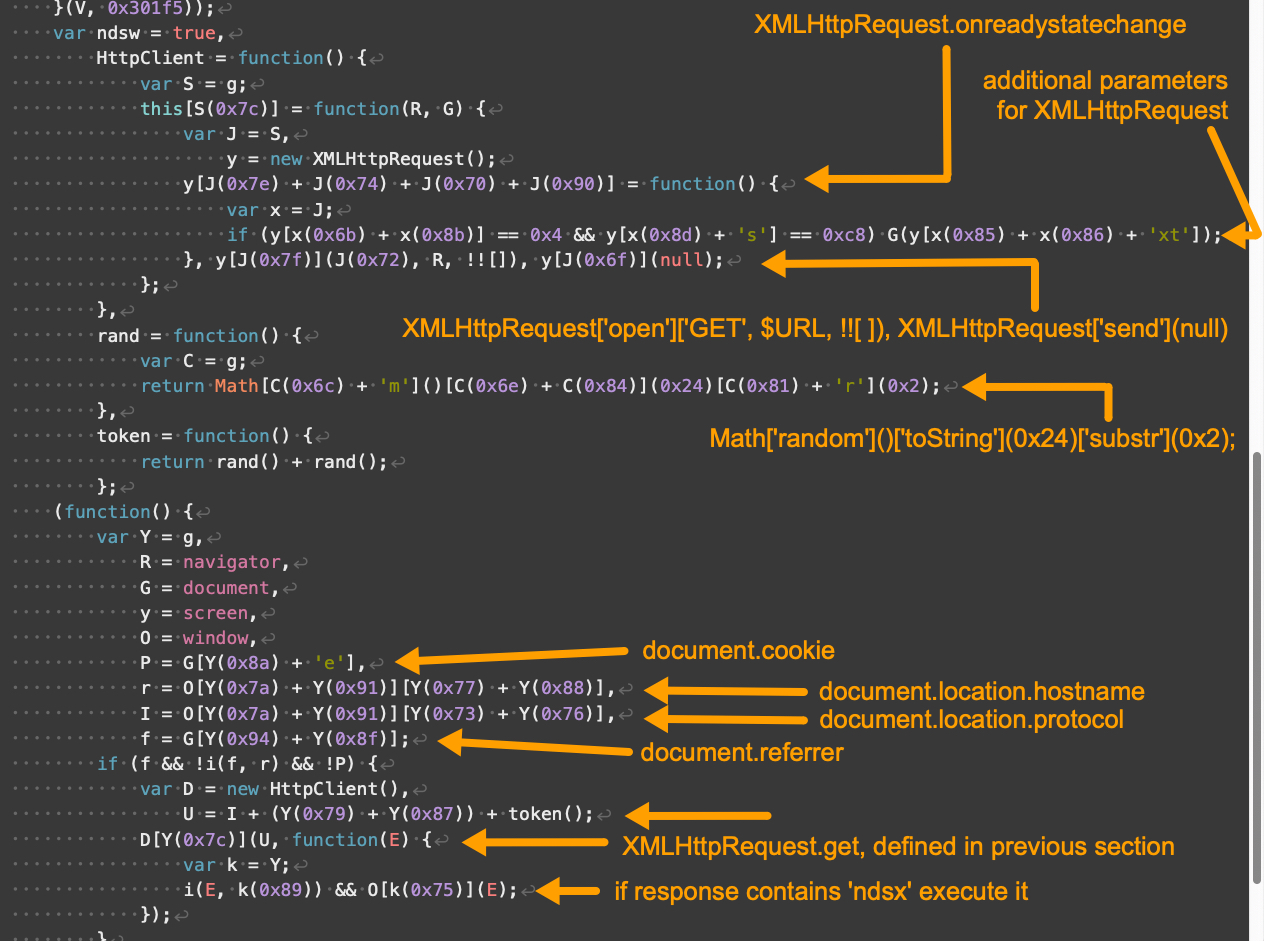
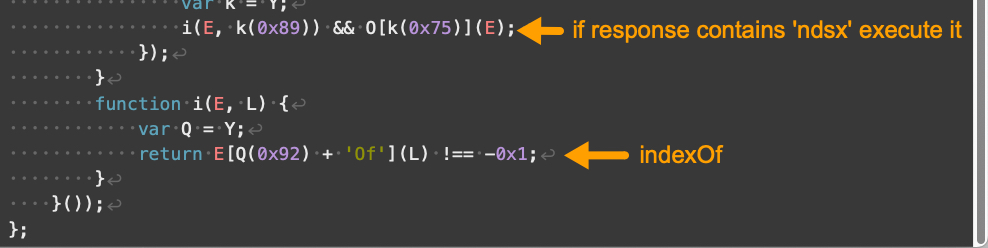
Image 6 is a screenshot of version three of an example Parrot TDS landing script. Some of the information is redacted. Arrows indicate, from top to bottom: XML HTTP request.onreadystatechange. Additional parameters for XMLHttpRequest. More XML HTTP request strings. Document cookie. document.location.host name. document.location.protocol. document.refer. The xnlhttP request.net, defined in the previous section. An arrow points to the line that executes if the response contains ndsx.
Figure 6. Example of Parrot TDS landing script V3, part 2 of 3.
Image 7 is a screenshot of version three of an example Parrot TDS landing script. An arrow points to the line that executes if the response contains ndsx. A second arrow points to indexOf.
Figure 7. Example of Parrot TDS landing script V3, part 3 of 3.

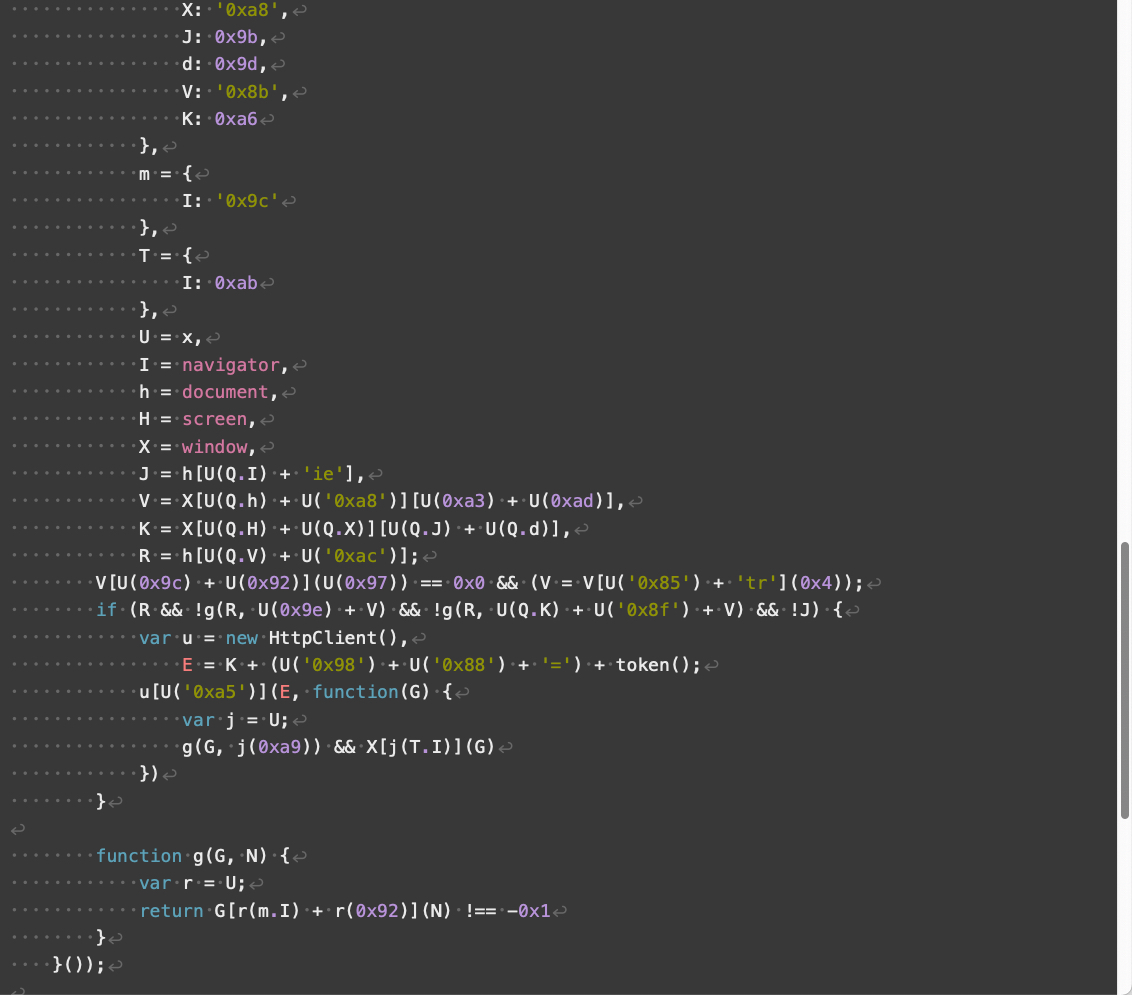
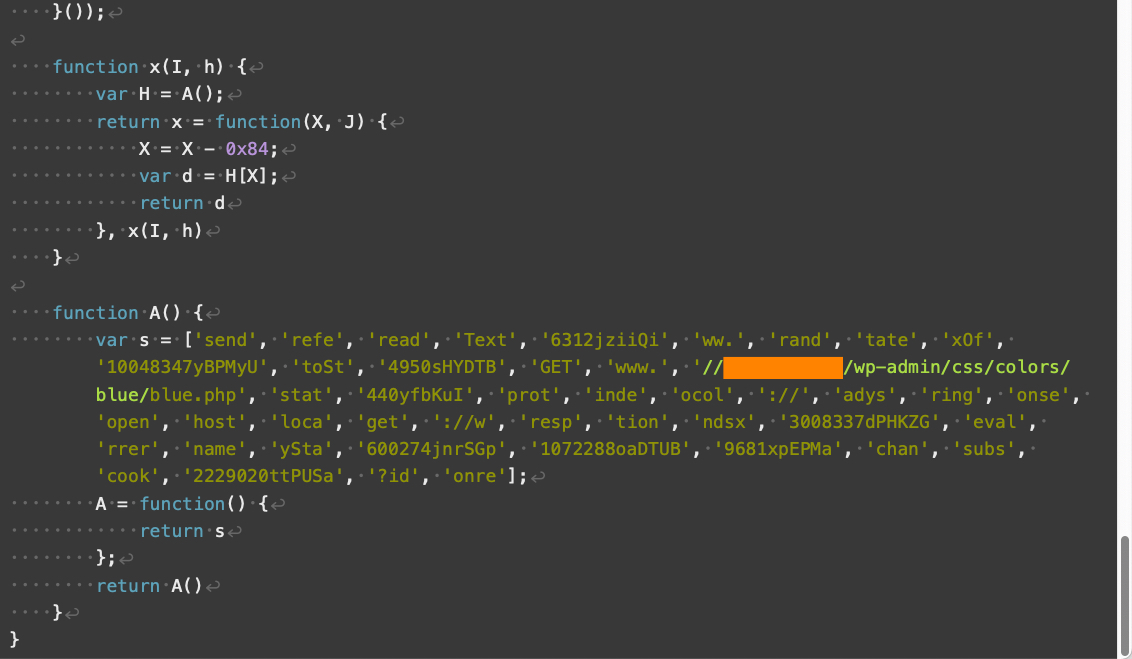
Compared to V3, V4 landing scripts contain additional obfuscation and use somewhat different array indexes. V4 also implements additional changes affecting how its JavaScript handles numbers and strings. Despite these changes, V4 has the same overall functionality as V3 landing scripts.

Figures 8 through 11 below show an example of a V4 landing script.
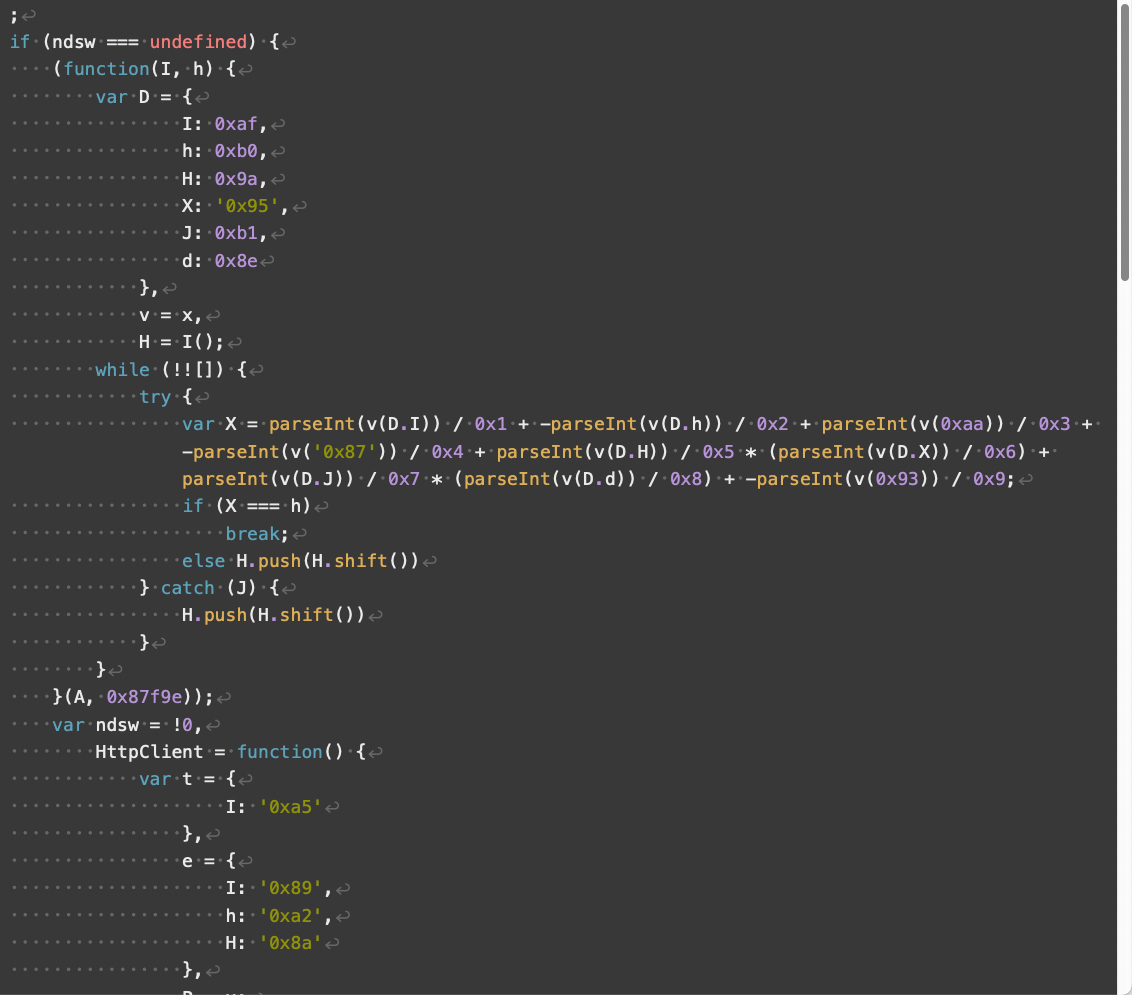
Image 8 is a screenshot of version 4 of the example Parrot TDS landing script. Many lines of code include a functions and other arguments.
Figure 8. Example of Parrot TDS landing script V4, part 1 of 4. Source of sample: VirusTotal.
Image 9 is a screenshot of version 4 of the example Parrot TDS landing script. Many lines of code include a functions and other arguments.
Figure 9. Example of Parrot TDS landing script V4, part 2 of 4.
Image 10 is a screenshot of version 4 of the example Parrot TDS landing script. Many lines of code include a functions and other arguments.
Figure 10. Example of Parrot TDS landing script V4, part 3 of 4.
Image 11 is a screenshot of version 4 of the example Parrot TDS landing script. Many lines of code include a functions and other arguments. Some of the information is redacted.
Figure 11. Example of Parrot TDS landing script V4, part 4 of 4.

Parrot TDS landing script samples using an ndsj keyword are much rarer than ndsw in our collected data. We treat the majority of ndsj landing script samples as minor versions among V3 and V4.

In reviewing our collected landing script samples, we found other versions that do not fully fit V1 through V4 or the ndsj landing scripts. These samples include:

  • A special version that loads its payload with a Canvas object
  • Advanced versions that involve more obfuscation and WebAssembly code such as decodeURIComponent and String.fromCharCode
  • Samples that also contain injected JavaScript code from different campaigns (if a web server remains vulnerable for an extended period of time, its JavaScript files could be injected with many different snippets of malicious code)
  • Several minor versions that apply interchangeable obfuscation, such as using a number value or string value, or using [] or a period to access the property of an object – the numeric or string values can also be represented as decimal or hexadecimal numbers

While earlier samples of the injected landing script consist of a single line of JavaScript code, we observed an increasing number of Parrot TDS samples with multiple lines of injected JavaScript code since August 2022. This is likely an evasion technique, since a single long line of malicious code is easier to spot in a script file than multiple lines of shorter malicious code.

Parrot TDS landing scripts profile the victim’s web browser, and if all conditions are successfully met, they direct the victim’s browser to retrieve a payload script.

Parrot TDS Payload Script

Parrot TDS payload scripts use an ndsx keyword, making them relatively easy to identify.

Compared to the landing scripts, we found fewer unique samples of Parrot TDS payload scripts. We have classified these into nine versions, compared to the four major versions of Parrot TDS landing scripts.

These payload scripts are mostly malicious, but V1 only sets a cookie value for the victim and is basically benign. The other eight major versions of the Parrot TDS payload script are malicious.

V2 is the most common payload script, representing more than 70% of our sample set. Figure 12 shows a column chart revealing the Parrot TDS payload script distribution.
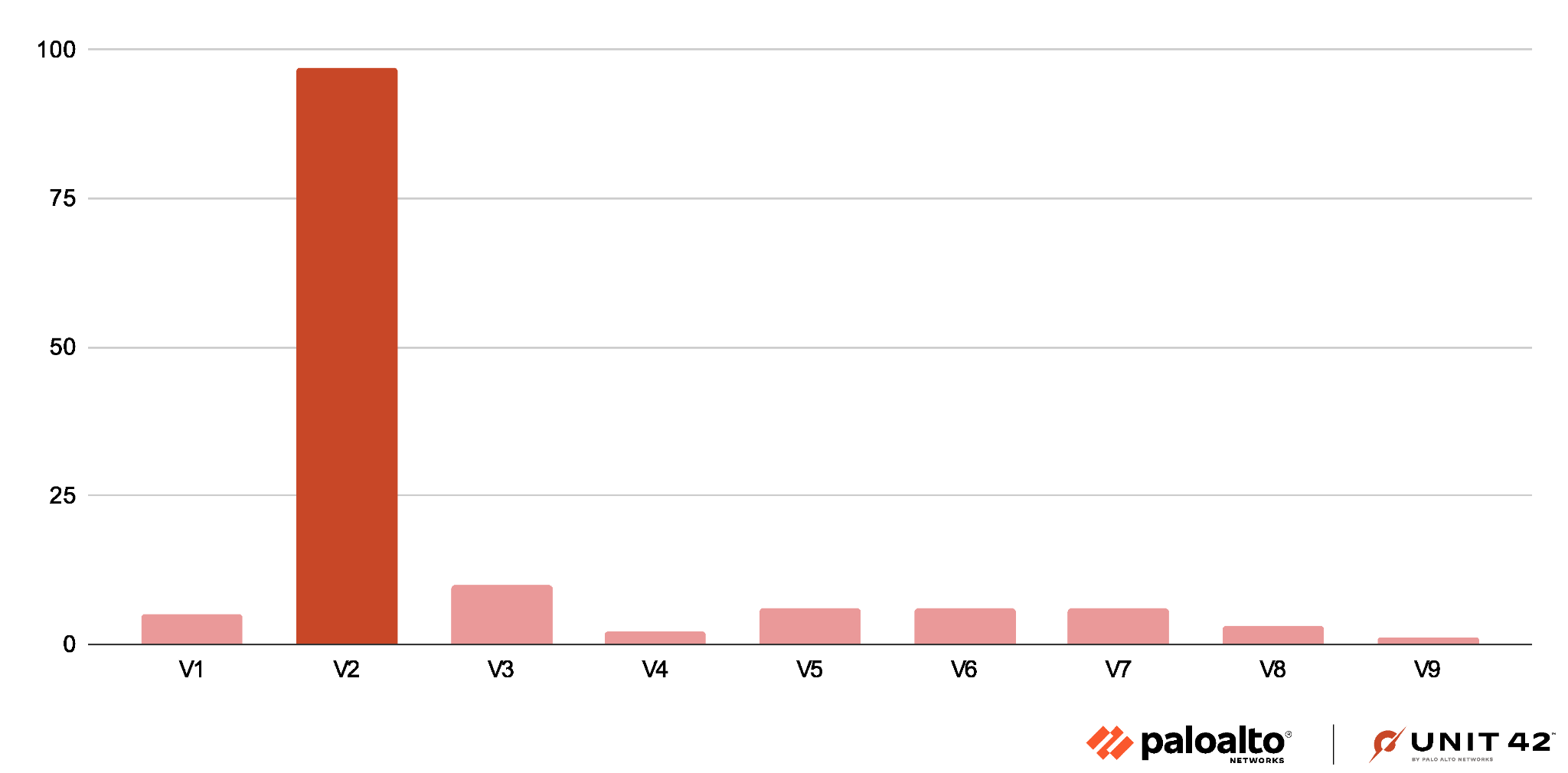
Image 12 as a column chart of the parrot TDS payload script distribution. Version two is the highest at 71.3%.
Figure 12. Column chart showing Parrot TDS payload script distribution.

V1 is the simplest version of the Parrot TDS payload script, and it merely sets a cookie that expires after one year as shown below in Figure 13. This payload script is effectively benign.

A Parrot TDS landing script will only query the payload server if the victim’s browser has no cookie set by a previous payload script. This V1 payload script basically removes the current browser from any follow-up actions for one year.

Image 13 is a screenshot of an example Parrot TDS payload script from version one. It removes the current browser from any follow up actions for one full year.
Figure 13. Example of Parrot TDS payload script V1. Source of sample: VirusTotal.

The V2 payload script is straightforward. Without any obfuscation, it creates a new script tag to load JavaScript from a malicious URL as shown in Figure 14.

This payload script is the most common version we see for Parrot TDS. Around 70% of our collected payload samples are V2.
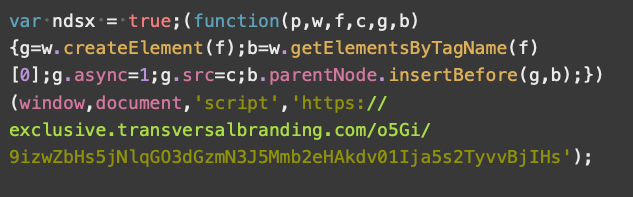
Image 14 is a screenshot of an example Parrot TDS payload script from version one. It removes the current browser from any follow up actions for one full year.
Figure 14. Example of Parrot TDS payload script V2. Source of sample: VirusTotal.

Parrot TDS payload script V3 contains obfuscation and only targets victims running Microsoft Windows. Figure 15 shows an example of a V3 payload script.

In the bottom third of the script, ls represents a decode function that decodes several strings in the script. Our investigation revealed that V3 payload scripts will check for the following conditions:

  • A referrer
  • Acceptable URL format
  • A platform identifier of “windows”
  • That Parrot TDS had not previously set a cookie

After passing all checks, the V3 payload script functions the same as V2, loading an additional script from a malicious URL.
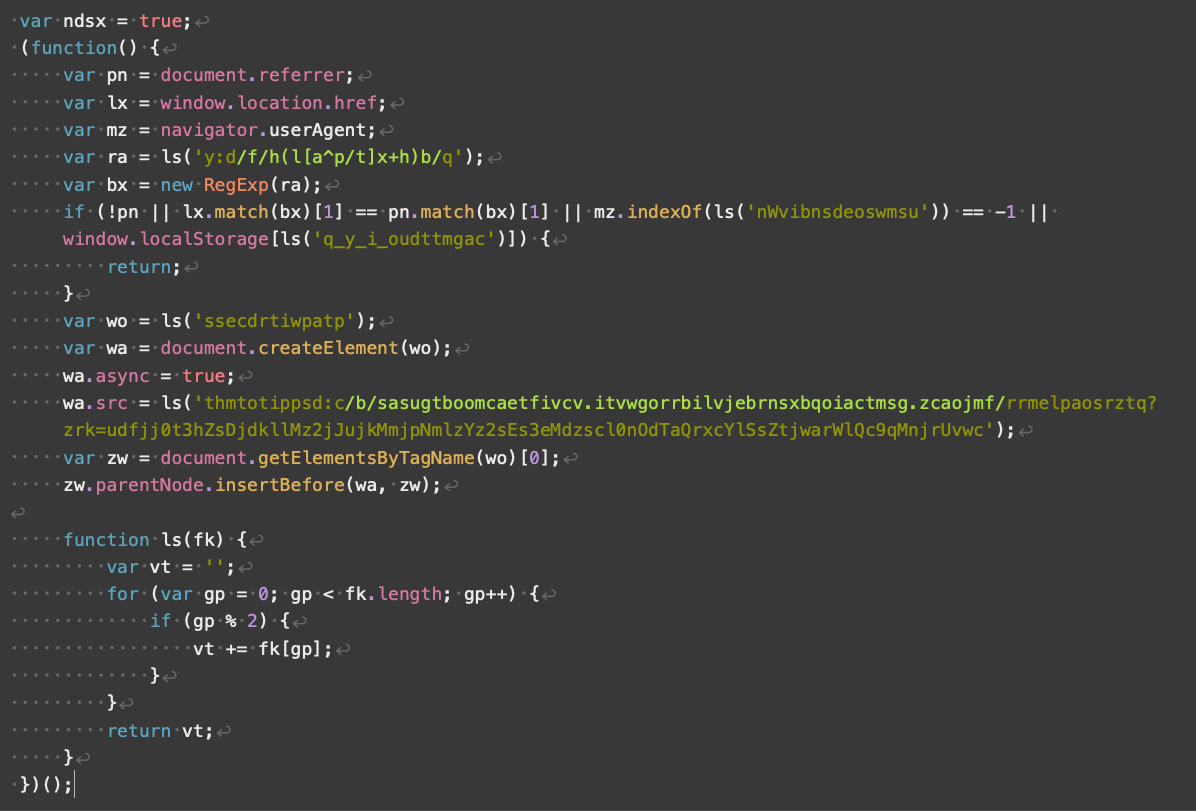
Image 15 is a screenshot of an example Parrot TDS payload script from version two. It creates a new script tag from a malicious URL.
Figure 15. Example of Parrot TDS payload script V2. Source of sample: VirusTotal.

V4 and V5 payload scripts are similar. V4 is effectively a V1 payload script plus additional code as shown in Figure 16.

V5 is effectively a V2 payload script plus additional code (see Figure 17). In both cases, the additional code appears before the original V1 or V2 functions.
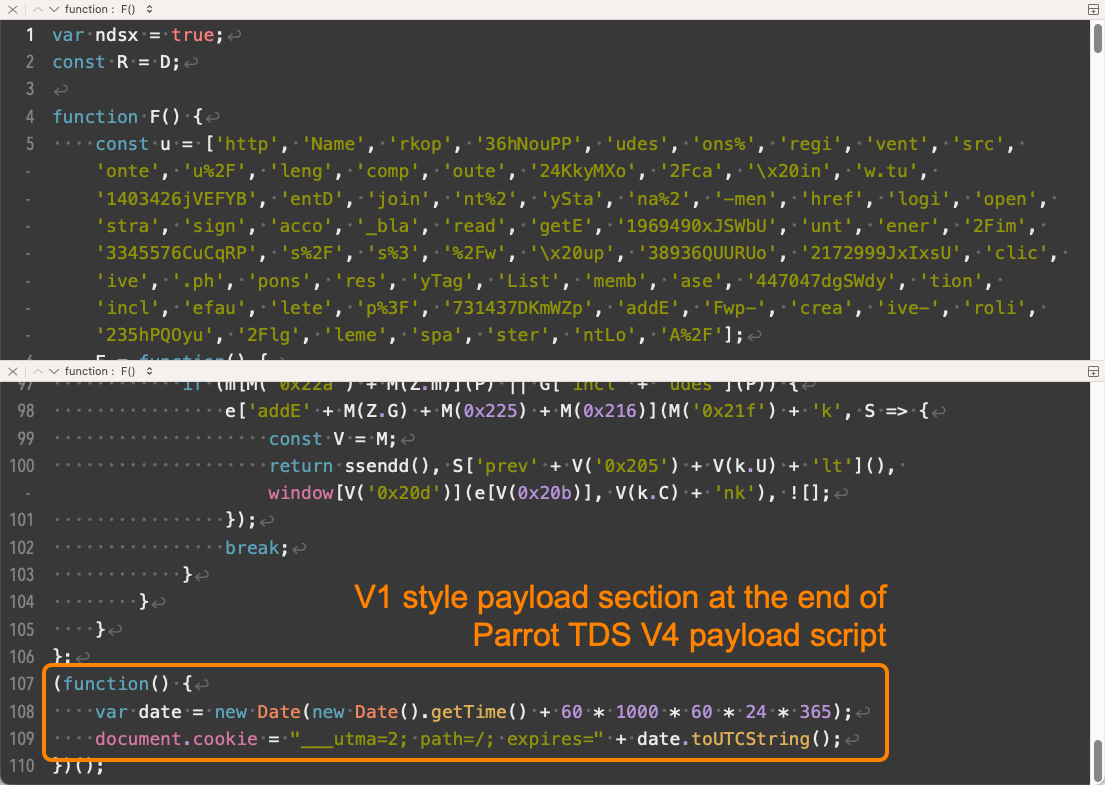
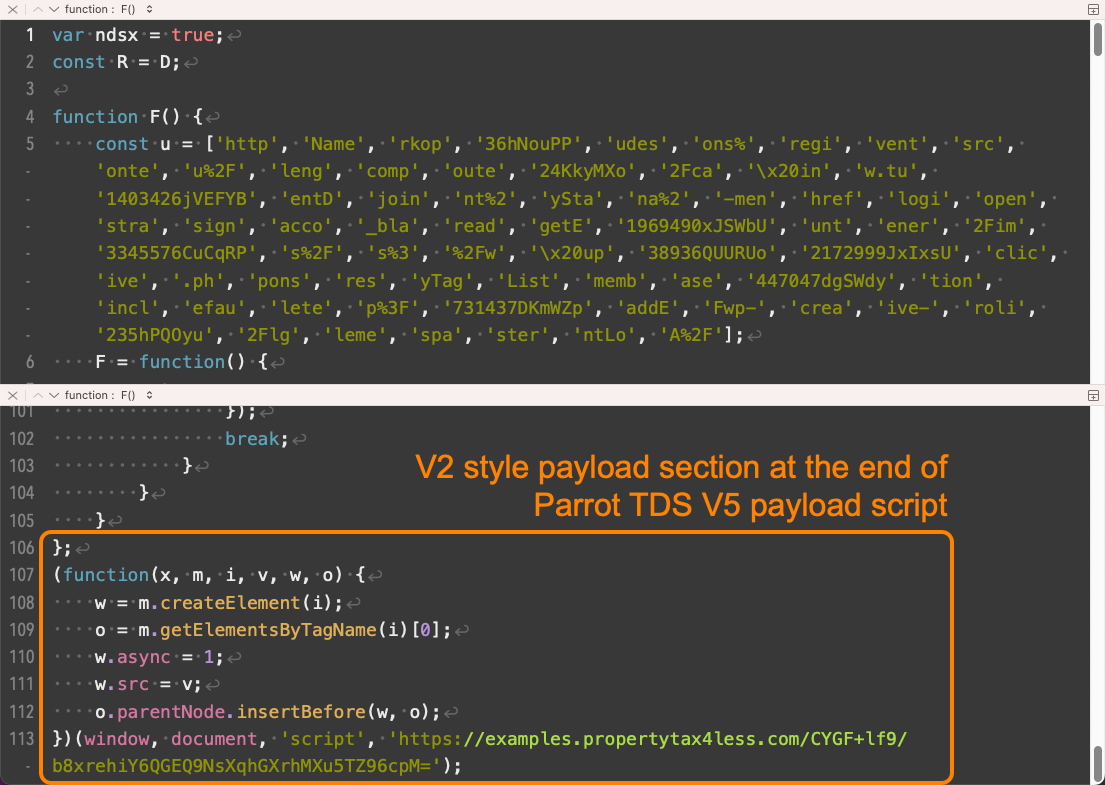
Image 16 is a stack of two screenshots from of an example Parrot TDS payload script from version four. The bottom screenshot highlights within an orange rectangle the version one-style payload section at the end of the Parrot TDS version four payload script.
Figure 16. Example of Parrot TDS payload script V4. Source of sample: VirusTotal.
Image 17 is a stack of two screenshots from of an example Parrot TDS payload script from version five. The bottom screenshot highlights within an orange rectangle the version two-style payload section at the end of the Parrot TDS version five payload script.
Figure 17. Example of Parrot TDS payload script V5. Source of sample: VirusTotal.

With V4 and V5, Parrot TDS payload scripts involve more obfuscation, which is similar to the obfuscation seen in V3 landing scripts. The core function of this extra payload script code is to hook all clickable links in the landing page. Whenever a visitor to the webpage clicks a link, the script will create a new image object and load from a specific URL.

V6 through V9 of the payload script include more obfuscation. These are very rare in our dataset.

Targets of Parrot TDS

Parrot TDS is part of an ongoing campaign targeting victims across the globe. We see landing script or payload script samples daily from a variety of websites compromised through this campaign. While our study began with a tip about a compromised Brazilian website, the variety of compromised websites we found serving Parrot TDS indicates victims are not limited to a single industry, nationality or geographic area.

The attackers likely use automatic tools to exploit known vulnerabilities. The majority of the compromised servers use WordPress, Joomla or other content management systems (CMS) to host a website. Even websites without CMS could be compromised through this campaign, since server-side vulnerabilities are not limited to CMS.

Conclusion

Parrot TDS is a notable part of our threat landscape. This campaign has lasted more than four years, and it keeps evolving with new techniques and obfuscations. Most websites compromised through this campaign use some sort of CMS like WordPress or Joomla.

Website administrators can detect if Parrot TDS has compromised their sites by searching files hosted on the associated web server. For example, they can search server content for the keywords associated with Parrot TDS, like ndsj, ndsw and ndsx. Administrators can also conduct an audit to discover any extra .php files on a web server.

Protections and Mitigations

Palo Alto Networks customers are better protected from the threats discussed above through the following products:

The Next-Generation Firewall with the Advanced Threat Prevention security subscription can help block the Webshell file traffic with best practices via the following Threat Prevention signatures: 94702

  • Advanced WildFire: The Advanced WildFire machine-learning models and analysis techniques have been reviewed and updated in light of the IoCs shared in this research.
  • Advanced URL Filtering identifies all known IoCs related to this campaign as malicious.

If you think you might have been compromised or have an urgent matter, contact the Unit 42 Incident Response team or call:

  • North America Toll-Free: 866.486.4842 (866.4.UNIT42)
  • EMEA: +31.20.299.3130
  • APAC: +65.6983.8730
  • Japan: +81.50.1790.0200

Palo Alto Networks has shared our findings with our fellow Cyber Threat Alliance (CTA) members. CTA members use this intelligence to rapidly deploy protections to their customers and to systematically disrupt malicious cyber actors. Learn more about the Cyber Threat Alliance.

Indicators of Compromise

Landing Script Examples

The following are SHA256 hashes for 100 examples of JavaScript files with injected landing script code for Parrot TDS. These files have been submitted to VirusTotal.

  • 0006060d1efe85b23f68f1b6fc086ab2fd5f2d80ca2e363cd0c000fd5a175ce2
  • 000954817a815dd64b6f061fbc28a8c7919616bb1708abb58754d680772a935c
  • 00163ddc2d61a97f58b06ba35cd8b6062a81b6e2b15a9f3917358efedd40a3c5
  • 001ab3bfd48219fa355adf76006118bfc50e9ea3abaf3ff331159c21bf0c3028
  • 00278f1d3b38242b0c461b98f4ad77ee7d10c85204291c02c6c23a472613c4da
  • 00399f6e2d64aa631f5e9fe60e2da4c189535ff79e5e557b9244662866285872
  • 003bef5d2f093a8dad8cae8635d9986d023f515b799373dec008ba75490a9308
  • 003d2f4ade543f7b35999c51d06f6b3cdb0c25dc18816358f76b59698a77aa5d
  • 0044d4afd6e12e6ede2f5fe59943de23b8a986df1e8e4b2f3445dcc5c3ab8208
  • 0048c341751674cca947df44aa1319e58036ca9192415ed63ab8b5a2413e031c
  • 004be99a81506cc2ed4e94a667bb6771140c84a51f61902a24a55b2fd265af29
  • 004d8253f02277ac50955aa0ef6c1a460ce798d94201959079ecdf35dc2f4c63
  • 004dc3e4f73cef86a5476aeaa41de85a8bebea06a2e7f7f654b33640078ffb0a
  • 0050e225e781ee415fae74108108de3200eb3010e2c77e8d265882d3e9c7399c
  • 0054bc9d7a5fc4d630c79d3641ac32f65ab3e61c9c82ad2edca6dcab5a050c65
  • 0059da8643270d09d5b60ea2bbd0d459d6ce54cd54e27facbd8a9b748643fa4b
  • 006154fbc565b387c800206323d80b61fd4a16525fbfc682ae1d7c458aceab58
  • 006a7ae01c1b1939ada3639e59ce8513aa489cd9f59f80a20205e4474ecf0082
  • 0073932eece5b9817b80d1fe1c219a72f0b8d3764039e3313672d938b14f2d8e
  • 00789e764859a749d79a1927e070e2959473f0cf6e0ca2be5b0f666a4e8926c1
  • 007a56bddc9c2171771bcbb654b85b8039c3342ac83fdb060bc2f24d1c5d8814
  • 0087f64098d10cce64219f8456702611e462ab755c4e5cc2e4d719add810e98c
  • 00a23761ffe9a3cefb79be72155354305116d0f60f41b01b0d2f37cbce61d9a5
  • 00be4cae7ccf629d22c6c9c1842341309eac1eb9e7e83ed1ab28997f3c3d4e96
  • 00bf309f513ee8c46435433bf8f1ec19527d16b4f976da1403f8fb753506571a
  • 00bffe2fabe6a57a21d912f4111bd9451e388adcebb1d023fa2c3fe079aad24d
  • 00c11daf1c18160eba63de3b2d712cc8c0abe457f993cc2f81f8c746fc970c12
  • 00c28bfec1fe8ecd139c06791293298430353e449115ef712fdcaae57e35f46f
  • 00dabc4c7753c6b608a8889f9d1367edca1bc2c3b6e92744e0b50abca33b8a87
  • 00ddbc6dc6b571681fae2c4a2d72cd9a7129ee800f326e33279cb337fafc93ce
  • 00df68a21172ddb20bde5bce4606b814022e4bba5fdc5cac457b7f1643f625ff
  • 00ec04f09b4c045e2b95f0ac4723a58457522e3c39fb6157e8d4213c12be0540
  • 00ee956dd06c3a14962c1ea8c447cc2d3e63a28c486dc0bd50e535674ae63c56
  • 00fb7abeb8464e01fe3043b2544bd71a82a9466c5c3ac6b954e62e87314d585a
  • 010622ece3ec9199668bfd2d1637149ede9c242e9672a7531cdaab86da849f77
  • 010fde6958e0107c2d543b2d6afbe492efbfa5fd44cd0a75185c779f31e16df9
  • 01124a700f6984062f26e34dff117b87b7d269557817a7241fa1d00ad5d780a0
  • 011478985c03b81ed04d6d4ce598baf3f7d48aa6e3a58f24de0e74bfe0cadd3b
  • 01235cf8181552124cbd76232607f1a60e8f82c48e0f013765ad6bda59b34e01
  • 0124566011742f850ed029a1aaa11a08ca00bd7f9775df45b0a9bc8740e89c04
  • 0126c6520a793efe328e9820dcbc9d42732f4cfb4b6fd25919d07e7b6c23c781
  • 012830c380ec979ab925b9bed84e6052e2ff5259409fc0bbc49b544e8030b19c
  • 0128a7881e686a5e291fcbd93644d8e670f98802412a5338701222dc5f9a28ca
  • 012b2cfe603de4ade7370ae7ba585e36c818c4193341b488872a4dbdd07bcc2d
  • 01366391de90229ac2b8a7269a4a42df9bd1709f51aece7164ffa4531f518811
  • 0137d093587fb1f42985ca271c8d2d1d601da410168491b66b154d4d003d332c
  • 013f3f2248ad31ebd52e1cf5c139d13bab6690734248bc2a6c83f06fbe43260c
  • 0141c2fe63d36c43558b67f0b884389366b13da3e9f68897b147a445f3328442
  • 01425b3c993e51d80f4e3b5a8f949b25e4fb30e9e9377507ac8b4fd3b7a69ff9
  • 0143d1989d04d70fc035e7eba21ef46b27f2673fd3a7e9df78a802179c33105d
  • 01585ae455c2bbe6471d718bcf845eca55f80e24963d562d847f81eafc672ec1
  • 0159a56803cebaf1544a44e3cee01df30505afb390b83371fa8cbb1d46353800
  • 01660ed180b9d0e4e19d7da313cd8ca818211ce36948eb31742e3da85a51580f
  • 01663c903d345f4aa71e7141e4bffcc25f244c898bf4eda96d9514322ca6e13c
  • 017ff4946dd00acc0da7ddc48e23c9736f735e2dcf0a83cb5613b433fca1960c
  • 018087b1bac5e86f4b6dce4d8c5fdc77c53b96280fe37342a74585e89b9b9665
  • 018f392c9cbf6640dae7d457b33be7d81a08612c911add177c7c5bb39876efc7
  • 01a482c79849908879a39eeacf77078b531f29e5d86c9e9f578a97b2313c98fe
  • 01af830f79aad912bd8a3438bc9e914e159a112df657a1610f50527304657139
  • 01b8b7cf7a93077119aa5062554bb662be230b2e2655a8e53b44b482f4c73a3a
  • 01be768e7bc9ef499ec5b37e4dffecfaab9346489d27b1d6de3b9a67db584e2d
  • 01dc27a4be3f69ebba64a71afde7a4158436b2a423174c6a2196efe9342a870c
  • 01dd3fed62220c53eb9208ab00d0fcce62cf76841e532a9474da5ed47563b978
  • 01de1c2f03c920ac64e73dfdbca363c1f8888534981c6215365b2514b9192f93
  • 01eb0535321d4d1ef0d5f5b3dbb91c341b75e8dbd129c40801c26abcf650331f
  • 01ec9cf7d9cba1294a8dd4803766c37bf20c4cd57d5ae26d990083076d170ea1
  • 01eed0382a2938c7733fc823ee43b2414116237e5793789dafa274e451d1dd75
  • 0203c29fe1c34417e158624fe4f352513f076302b1179a854a5351613b75b9bf
  • 020e6aa377b6ef4ef45efe0906b3b5dfdfe7381099a8fa080a58a457eaef934e
  • 0214510764fee618b8fe18aeb72f643218dde5252d1d568f0fad735ea861f1a8
  • 021519c6b0c63ccadd416fddbabc28001f1b6e8c09cac93a076a013cb98d3afb
  • 021a5e6f490622bbc79d0d42b444ccc856b4e8cfcb77df3d01bad9c8f1177a3b
  • 021a60787a1d4acdfa44fd27510e6aaa6305807c48e8209c892458e43d360323
  • 021cd5b198f6bbf78aacb3f716a7f3355cdac98d835d493b6cb85ee4b9adc8a0
  • 02216dfca8323263933ff53130796d3a445e44251f02c241d95c6bc0f81721cc
  • 022668b33b118e73d391aaf790bd06bb3bb03dc13b58a28a70dde3dc485ecf5b
  • 022feae2851e7993780e08ea328e36521e91c695f3a5304e0dd1df678d7f6c3b
  • 0237268899c037aaee7bde29e28a08f89230e92bbef33dbf0f17ad58ee53af55
  • 023dcc38a7a55f941818aa307203216c6eaf50f8fed529a4c636a89f70119717
  • 0250e4baf4fbd9aba84b25968a7debd4ce83360e0ebef03d5ccbb24f9e17ecf8
  • 0252b75589fe832eb103d64ed7f5e1dcb6417babd6e290c34c79093ff312092f
  • 0255da103745a213d50a2d86770d5381add6bd84bea41edd93ac746c019565ca
  • 025cf7e1e1f39c001c627cf42be1be14ef52a42f760e03db922246a7b114aec1
  • 026cb95e6b415355767655b9f706e1c1f9bf20b242e65aa47b8e1279068f718f
  • 027079961030e5af9bb7382acb2c6b19221b41255f801be540c07b484cded4d7
  • 0270d194a2d4499468b8461796e1cb3d1af301df6b12c2b7193a8baef8c13ce3
  • 0279bd4320fb5025a9d740bbdd0cf2aafb477d684af4ea1ca0e83bab424527fa
  • 02868c886de5090362c6d503e6549e65fbe975f1fa03ddfb18fb0432f5f6bfb4
  • 028d5b2992d88d52ea9e80625e25c324b665fb784bfa9daec3ebba16d01a8348
  • 029415b96774d15e7e2acd2ed45907f67617217345a6aea1fdf65fdb4353e52b
  • 029c44784556ca319015548c3dbeb92b025ed72f918d1d8245b6a6a321a64b7c
  • 02b2312ce68bc4ac2c59ee905b23f8f9d2dfb3fd0f38b5ef896f59e6d74834f8
  • 02b467d42c7d26cdc480ead7c678c2930dc315882caf5531a3e3d503b118d5ad
  • 02c5ebe4418bad22a508f0d430ca1ec6b3d419011f94041b70ad636c89e98980
  • 02d7c155eef3da89d00ecf3718084c361675f3ccd84162cc00f2d4124b9a2346
  • 02e141ad62fc2f8514cdd8221be61f68a9d13de939fa850c4185154538d7c9fb
  • 02f5e9ff5293fd5855d35337e8bb3e3a03b47afa7e71a06de2f8cfd557f4f0d6
  • 02f7b2f58da74dde5a1f09b2492c8f6fa56bb009900378feaf057e6577de8a2f
  • 02fbcc9f2971840c5381b1e0f5052b1067c82ea353e7d2ec6810d001ce25dfff
  • 02fcddc3c5383b505fa9babc3fce93118abedcb7203b8921933f815eb7c7a879

Payload Script Examples

The following are SHA256 hashes for 100 examples of JavaScript files with injected payload script code for Parrot TDS. These files have been submitted to VirusTotal.

  • 0009fe8aa339fb489abcfd711d5c7b2a70b7d57ae55aae3922669f72cbf5964f
  • 0234918db61115aaa0c3be708084dae30feee8d97a41a011e3fbb06d745c496c
  • 05bcb1f5aa6284333985186f3329f9226d80225fcd25436575aff7735cd4f6e1
  • 0641128e6dba0c69644810e8af88af80ad734af52fe734c655ce26f5a3641097
  • 07f56d3fca2f26e41e9b5a9e3cc6d3bdc6edce18fa12276bc19bab5c3fb19b26
  • 09c4ea62962848f48cfc68d905675bc466574a8011acb79b721b688ec7bfec12
  • 09e06b3fa2194b76a1e73483614ec3f3ab076c55134c3d45e7ac9ea452e51176
  • 0a10157a920b190fb2fba6b6df34e12fd4532e52bc71700b9cefa73f95e60fe6
  • 0cf4f33985dff5e1e7d37d8d5485b3561ffa42d0a31acec10321cdc28c31abdf
  • 0f20659f7cea84ef3b1def6c54555454b1820fd8adf9866b2ea3ed18e341babb
  • 0f334075e5379be32d176048287ea8b787d524e34630509a74ec4cd90fc1b0dd
  • 137bb7784088669d1432243831896cfe5b5fc02d7f207de26d16220b38335c90
  • 174fb6597444ff6d7d59d2981f6aad54c99e763a6123d52319bb2d0ba84bfd29
  • 175a0bb57ec0e0a5728b7f8455a968861dc50c42a1ce8eb437d8b98fd394ea47
  • 1ab04ee02b5359662c26c4c1f10f711d707ac23293193cbcba3cc84d0d070000
  • 1c8bbb02dd1fd46e442caad6fba174b966ea5bd9d27d6315991b904792693d54
  • 1ca06df44cce9aa64294a8e55c41e654ab6b766ab76faa39a34363cce4e83e08
  • 1e01bf738bc665f149b0793af461a43f4330ecf99dd068e2b7abd038c46ef417
  • 1e5ca993bc0afee9eb23436ea2e0bfbede934ce2be850d3122cc429fd73d01c1
  • 1e6d8d031bbb4a4e15f8c15941dc27944e62727116338957306db9610351911a
  • 20f9cd4ef8616afb8a62eabf6ca1c252c54021dc03ba621bab2e00db8fb6bbc1
  • 21114a66a1934b806a8b1b76f924fdb9876047316ba8d26c2ac94c1b0e908cb5
  • 244221e80cbc510ea4e62f49fc1a377dcc5365899c2f92f7807b91cdeb20476d
  • 25786bcc47e97d9e55588b4e2962aeb9760cd546629bb5fd08799ba8c9e8d027
  • 25af4cd7c60671f1af9bbf17441b8951b8751ee1299dd7fa97ba4afd6021642c
  • 25e4bc712d895d8bfce72fab30eef25da18591979c672d1fbd976bac2e0cf1ca
  • 2707ac252eb0abce8dcb9b1eb35b4d306e111e59e09f6acb03180425ee81fd4f
  • 2726854efc42c00d7064abf99ef451d05975e7461c42e7897ba1b0c6336f153e
  • 2c961d64aeefe73c43a96739c52047fd1f39af5af86e388689531cdd83b00045
  • 2c9eafa9914032112c170e3dc12d40c03ee1e873bade8bfed36b6a7759ff1dd5
  • 2dd1db4ff9da32d73ac876e513f20c1da6d83031969f645e3e014e96134a8aac
  • 2f9e5ea05aa8cd81c1c1f0914220557c5dc4a8bc42ee822bd327e3cfc3328f45
  • 2ff953a5d7e760ad4d4a06d2ad68d43c42f388a9c6fb6e9d0c6341dd05c33374
  • 3032a2affd7d9a3dd9418b3fab3c88af2bc0f71e3baaad8e478ec85af569c912
  • 31562bdf22a927837f6fdb333e72bc3cf8da067143cb3d99663ce7224d0f8901
  • 31a15a342e6d65ecf2987d83458f1ff5587662ea794a42b7f54393bd8531025d
  • 34fdb99c3e895a66c814aedf6e29c075ee5fac7aa1190903759ec08766bee28c
  • 36b4a9947b26ee3e86f495fce1a767a773b911b37bad2008215a5488314cf48d
  • 3ce09915fa674481076bac26a985c39a0252cc7452e0ff2ea4c9d62d38b49958
  • 3d1aaafea2a4757f1ccdd4759ec42ca566220fab7717efa2face1998ccc6a8c7
  • 3d99d924a59ef070c2f2df7de660b10704171fa74d68442bf80a076d1d4ae9de
  • 3f8e3f9fb2f2d2c6f5257d7ffd597be6758ca48867bef3aa83a244fcfcc9647b
  • 411f94f34ce1b603867f64689d91dfe7ffd92dd69a2ad5ef518fe3564401f69b
  • 41c4914a2cda7a9c3deb0a85a17c9f964c95dc1e0dbdfd8727d7d7ebaed3c66f
  • 44ba1192916ccc51c0bda43aa9a40d3ebb7f8480ce2554092ec2198e99e2f9ea
  • 474a0fa3ecddd9a7eef503c10a6e09f34384c7a301e6ba92474c8b809aff841a
  • 4f0d9b754402ac02b36b470e93cb712724a2c505c798d3cb8d23662c1303e4f2
  • 539ecf094f122790b157415933bb0122417015fff914a848ff5b83d1c3ce69eb
  • 53ca5aaf4786aa235795c9b4a2648bed523f38d115a5791bd26b3e22e9e6f109
  • 53e703d262af2c91d8be81ca0e32c7f9b3dbc8b6d571ad3a480bff020a8cae04
  • 54774aef9a494e29a072bc729f8482fba6dc530a045d40e4453d61beac8d8355
  • 56514cfce2dd75f2dafeebf385bc827bd1b7392f65bac98ec9791526f724fd66
  • 5666d18866973f608cccf95c7dbf56d56bb3027121af701bd779f9ab794c53b1
  • 56a1123d2c25a9ee7c674aa10ea8be720a23cabe74b68dca017c93944cee15e4
  • 5b0ecde609dc384857508b71851062b6dc158d37d26ad3e6baf4407877ada9de
  • 5b481fc971f724141c54e4fb6eb992056256098cd2284b717912a75714864179
  • 5ca0afa8d1665d8ad314543c5924fc4c8679ffa5360a3ec4bb2e3a79a865b730
  • 5f87cdf1ccd448d8f90b79d80153fbae143ec9dfa1c79a5ba9193609975d0d35
  • 5f9fa969df10a03d38c26050655645c0b8cd00c4ae35b62d9e355815ef722b21
  • 5fd89dab9bcdcd783ae96c0b42f5761d2d24a6192d730040a50ffb4b5c95850a
  • 6168dc254c4c6dd6a5461c56fd1fdb65821f04d9ac23e4d70b62d447ce77971d
  • 61c76044609b8f522546991b2683239bba734ca290981e5ed25099f46312fd04
  • 6323837b455a41f34cfd526c2c2ffb6fb3a826c4f482ccdf66801ece0ca6f1e7
  • 6385e6004a9d11485d076f2b9b79b2ddf468b629aef0f66c22c7bffa3d7ebc3a
  • 638fd2159534b7b180ef2ca0633f6ee5d09af8cddbac758e1cde1ca6aec1ca8c
  • 63f48e94e38c7b5e441c3aeb0c74141bd6d7fc7ab03a345d09d67c8e8b871ca9
  • 6fed7c758e0484b53fd3efaa622b609052dcf5ad34768181d3ff8e22cb6e6e2f
  • 732457475da8c47cf211f5eb3a6529c9aa8976ce26d50f2e90422278c2160d5e
  • 738f775e1031402f228c1246d10d9c13af1d461596319bea87f8b20d085349cd
  • 73e5dc70d286c24265f71de61016404934991d0b41c4962420c1490469111b4e
  • 778f4a8f061efea0efca1669c4eb0f26c7d1cc02e003fc01f43ddba328ebfc92
  • 7ab4fce62ebf632bca176894152a88e38965708bffdae4357a8b6c6defa1724d
  • 7accd14f469d79c4539c5887faf79407e6a06111612d2b63eb9f34c5afe7c74f
  • 7e9feda6e593b6d7e3c15032edb0cd3e2d1ec585d8f5691e951ac70059ce4240
  • 801626f005b40b0ef889f93c64f991e53318393fb0efdd30bb30185a12cb7480
  • 817af2e8193d3a226dad46bef33e55a56b3a56ff035cc0e68067e2eb61975dc5
  • 81d99d01f6909a2ae027e3a0d792b7c517b312fcf2cc03228c2a5348ad796582
  • 865cc44cf024bc083f5bfd3d5d3c9c1334e1c629de1698fcda26feeb26f73dc3
  • 86b84a35d28207783bd79e34f6f2e687e6e38fd9fb78df90b1cc7e6f302e0084
  • 87549ec7913d919dff9678b38b040ea9b77c84f29aa3dea487dc7a80e4a0950d
  • 87768a7c92ebc8419e08209e55eb1f713d5ed7be411ed3b52555f8a29fe4a3f9
  • 87fb8a757f5de0f4cb4f8b4f568068e8c12f376562b1f5d1df118b4dc3076564
  • 8f896f3f0b5f33413217e9350dba6d4958cc9bdf568902a08d739b43db6f993b
  • 92322cc99cc5bd84bd1f06de8412b7f907e03a66489d147a1d3a77b2d3b0aacb
  • 9707f57ca55e1f0cc975488ab10188f885589db427beef7df9adc3bd4e95bd62
  • 98a230f8bed756447d8f8dcfb1485e395068eae511ca7b3a10049848427682af
  • 9bbafb672ee8f9c8eec8ee111962db7aa49e6e91f2fc3a23b0d5f32152f5101b
  • 9be661e3218290ebd4de59037d1360f4bec7e2f521d09a063da994d838160fce
  • a0b928edf0cf8efba7d2b2edcc43419ec7568d70717ba44ffc6c24fb9ebb9464
  • a1dab97450e66028c0f1e62620354cd9d71b99d1517f7cceef59c4c0a5de44f6
  • a226f8878b2c440932c5d9e215384733226d3942efecbb05f84cb34555c99e9f
  • a296db98c85c21b8f4c60a651a56aa745385d769f76c4f35e7f8cef6ee16c841
  • a6b8f4094bf162b6007006b51aad4f1fe4930e1bf458d6d47ebe7047f8895039
  • af84372409235ad5f716b758b24e384f3506d771bad4460676de9ea3c375e9d7
  • b07c3cbacb4d238e209aabc19754852c536ba708ee4b19fd8fbc32580a7e119a
  • b14ba04ffc4b680225cc76912317570c09f06e8c6cec1a4b2092cbbff0668bd4
  • b727b3fe958407787c9929fef59b6735861be12ebcf8c72aa6ed7b9cfa6829c6
  • bc1d29c3ac08b1a4f30b3f4930dc5e07bdeb0ba55cfe7ad684021a63bf72db71
  • bc88f6e79d49242e16cb30b64d1b8948c7d9333785476b4e8d24f82403290454
  • be8bf730a23766f917c1f90e79bbd23c76b7a12572eeda4bc38ff46ce17f9c9a

Additional Resources


Threat Brief: Multiple Ivanti Vulnerabilities (Updated Feb. 29)

Unit 42 stopped monitoring this threat and updating the brief on Feb. 29, 2024.  Please refer to Ivanti's website for the latest information.

Update Feb. 29

The U.S. government, in collaboration with international government allies, has published a Joint Cybersecurity Advisory (CSA) which includes recent findings about exploitation of the Ivanti vulnerabilities. In this report the authoring organizations state that threat actors are able to deceive Ivanti’s internal and external Integrity Checker Tools (ICT) which results in a failure to detect a compromise. They also state that cyber threat actors may be able to maintain root-level persistence despite issuing factory resets. 

This CSA also includes guidance on incident response steps. They recommend defenders reset all credentials that have been exposed, identify Ivanti hosts with Active Directory access, and take action to look for additional malicious activity since removing any malicious administrator accounts may not mitigate the threat as malicious actors have been observed establishing other persistence mechanisms. Additionally, the authoring organizations of this new advisory “strongly urge all organizations to consider the significant risk of adversary access to, and persistence on, Ivanti Connect Secure and Ivanti Policy Secure gateways when determining whether to continue operating these devices in an enterprise environment.”

Update Feb. 8

Ivanti announced a fifth vulnerability, CVE-2024-22024, which affects its Ivanti Connect Secure, Ivanti Policy Secure and ZTA gateways. A patch is available for some of the affected product versions. The workaround Ivanti provided on January 31 is reported to be effective at blocking this new vulnerability.

CVE-2024-22024 is an XML external entity or XXE vulnerability in the SAML component of Ivanti Connect Secure (9.x, 22.x), Ivanti Policy Secure (9.x, 22.x) and ZTA gateways that allows an attacker to access certain restricted resources without authentication.

Ivanti has not seen evidence of this new vulnerability being exploited in the wild. However, per the latest Ivanti advisory, it is critical that you immediately take action to ensure you are fully protected. Because this is an evolving situation, it is important to continue monitoring the Ivanti site for further information.

Update Feb. 2

Ivanti announced two new vulnerabilities, CVE-2024-21888 and CVE-2024-21893, which both affect its Connect Secure (9.x, 22.x) and Policy Secure (9.x, 22.x) products. CVE-2024-21893 also affects Ivanti Neurons for ZTA. In total, Ivanti has announced four High or Critical vulnerabilities since the beginning of January.

On Jan. 31, 2024, the US Cybersecurity and Infrastructure Security Agency (CISA) issued a supplemental direction requiring all U.S. federal agencies to “as soon as possible, and no later than 11:59 PM on Friday, Feb. 2, 2024, disconnect all instances of Ivanti Connect Secure and Ivanti Policy Secure solution products from agency networks.”

Unit 42 continues to monitor the situation and will update this threat brief with additional information as more becomes available.

Ivanti Executive Summary

On Jan. 10, 2024, Ivanti disclosed two new vulnerabilities in Ivanti Connect Secure (ICS) and Ivanti Policy Secure gateways: CVE-2023-46805 and CVE-2024-21887. The first CVE is a High severity authentication bypass vulnerability, and the second CVE is a Critical severity command injection vulnerability. These vulnerabilities impact all supported versions of the gateways.

Ivanti disclosed two additional vulnerabilities on Jan. 31, 2024: CVE-2024-21888 and CVE-2024-21893. CVE-2024-21888 is a High severity privilege escalation vulnerability, and CVE-2024-21893 is a High severity server-side request forgery vulnerability affecting the SAML component of Ivanti Connect Secure. The latter vulnerability can potentially be used to bypass mitigations against CVE-2023-46805 and CVE-2024-21887 exploits.

Ivanti disclosed a fifth vulnerability on Feb. 8, 2024. CVE-2024-22024 is a high severity vulnerability that allows an attacker to access certain restricted resources without authentication.

If CVE-2024-21887 and CVE-2024-21893 are chained together, attackers can exploit them without authentication to run commands on the compromised system. Because proof of concept (PoC) code for both vulnerabilities has been publicly released, there’s an increased risk that these vulnerabilities could be used by threat actors.

Following the disclosure of the two additional CVEs, CISA issued a supplemental direction requiring all U.S. federal agencies to, “as soon as possible and no later than 11:59 PM on Friday, Feb. 2, 2024, disconnect all instances of Ivanti Connect Secure and Ivanti Policy Secure solution products from agency networks.”

Ivanti has begun releasing patches for all five CVEs. For those products that don’t yet have an available patch for these CVEs, Ivanti recommends customers perform a workaround until patches are made available. Ivanti also has a knowledge base article regarding recovery steps related to these vulnerabilities that highlights artifacts to monitor based on scan results from Ivanti’s Integrity Checker Tool. 

We are sharing our observations of device exposure and possible related threat activity to aid in developing security measures as threat actors are actively exploiting these vulnerabilities.

The original vulnerabilities CVE-2023-46805 and CVE-2024-21887 have been actively exploited by a range of threat actors with varying levels of sophistication, from likely nation-state actors to cybercriminals, since at least early December 2023.

At a high level, the tactics, techniques and procedures observed were consistent with past China-nexus APT cases that Unit 42 has investigated, bolstering the attribution of observed activity to a likely Chinese nation-state actor.

For the two new CVEs, we have yet to observe evidence of exploitation of CVE-2024-21888. However, Ivanti has reported that it is aware of a targeted set of customers impacted by CVE-2024-21893. We assess with high confidence that these vulnerabilities will become more widely exploited as more information becomes available.

Use of these two Ivanti products is widespread. Unit 42 observed 28,474 exposed instances of Ivanti Connect Secure and Policy Secure in 145 countries between Jan. 26-30, 2024. We are also engaged in incident response cases that are confirmed to involve these vulnerabilities.

We assess with moderate to high confidence that threat actors, likely at the nation-state level, will continue to target and exploit devices impacted by these vulnerabilities as initial access vectors into target environments for espionage purposes. We assess with moderate confidence that financially motivated, advanced and well-resourced cybercriminals will also attempt to compromise organizations through this vector.

Palo Alto Networks customers are better protected from and can implement mitigations for CVE-2023-46805 and CVE-2024-21887 in the following ways:

  • Cortex Xpanse customers can identify external-facing instances of impacted applications through the “Ivanti Connect Secure” and “Ivanti Policy Secure” attack surface rules.
  • Next-Generation Firewall with the Advanced Threat Prevention security subscription can help block the attacks with best practices via Threat Prevention signatures. Advanced Threat Prevention could proactively detect this vulnerability before the public vulnerability disclosure.
  • Advanced WildFire has added detection for the cryptominers used in these attacks.
  • Advanced URL Filtering and DNS Security categorize as malicious known domains associated with this activity.
  • Advanced URL Filtering categorizes exploit and scanning attempts as Scanning Activity.
  • Cortex XDR and XSIAM help protect against post-exploitation activities using the multi-layer protection approach.
  • The Unit 42 team can also be engaged to help with a compromise or to provide a proactive assessment to lower your risk.

Ivanti also recommends performing an External Integrity Checker scan before and after the patch is applied. If this scan is clean, Ivanti states customers can schedule the factory reset of the appliance during their regular service window. If the scan is positive either before or after the patch is applied, Ivanti states that customers should do a factory reset and follow the instructions in its knowledge base article for these vulnerabilities.

This situation is evolving rapidly, so it’s advisable to check Ivanti’s recommendations frequently.

Vulnerabilities Discussed CVE-2023-46805, CVE-2024-21887, CVE-2024-21888, CVE-2024-21893, CVE-2024-22024

Details of the Ivanti Vulnerabilities

The first vulnerability CVE-2023-46805 is an authentication bypass vulnerability in the web component of all supported versions of Ivanti Connect Secure and Ivanti Policy Secure (versions 9.x and 22.x). This vulnerability allows a remote attacker to access restricted resources by bypassing control checks.

The second vulnerability CVE-2024-21887 is a command injection vulnerability in the web components of Ivanti Connect Secure and Ivanti Policy Secure (versions 9.x and 22.x). This vulnerability allows an authenticated administrator to send specially crafted requests and to execute arbitrary commands on the appliance.

The third vulnerability CVE-2024-21888 is a privilege escalation vulnerability in the web component of Ivanti Connect Secure (9.x, 22.x) and Ivanti Policy Secure (9.x, 22.x) that allows a user to elevate privileges to that of an administrator.

The fourth vulnerability CVE-2024-21893 is a server-side request forgery vulnerability in the SAML component of Ivanti Connect Secure (9.x, 22.x), Ivanti Policy Secure (9.x, 22.x) and Ivanti Neurons for ZTA that allows an attacker to access certain restricted resources without authentication.

The fifth vulnerability CVE-2024-22024 is an XML external entity or XXE vulnerability in the SAML component of Ivanti Connect Secure (9.x, 22.x), Ivanti Policy Secure (9.x, 22.x) and ZTA gateways that allows an attacker to access certain restricted resources without authentication.

Current Scope of the Attack on Ivanti Products

According to Ivanti, its products are used by over 40,000 companies around the world.

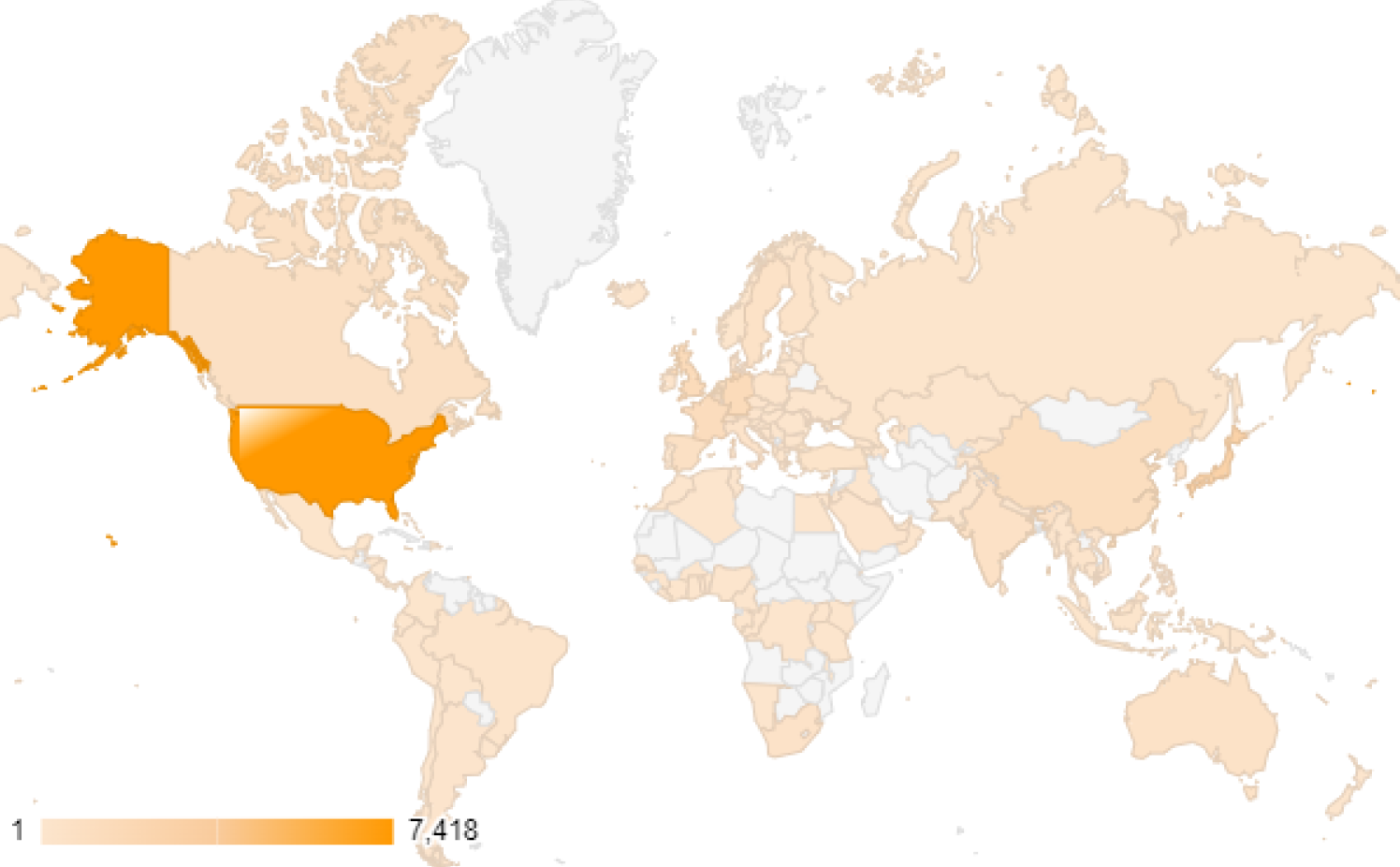
Unit 42 has observed 28,484 exposed instances of Ivanti Connect Secure and Policy Secure in 145 countries between Jan. 26-30, 2024. Figure 1 shows a map of the affected areas. The top 10 exposed countries account for nearly 70% of global exposure, per the observations of Connect Secure and Policy Secure gateways devices.

Image 1 is a heat map of the global distribution of Ivanti Connect Secure Devices. It is current as of January 30th, 2024. The largest distribution is in the United States.
Figure 1. Global distribution of Ivanti Connect Secure and Policy Secure gateways as of Jan. 30, 2024. Powered by Xpanse-Internet Landscape Intelligence.

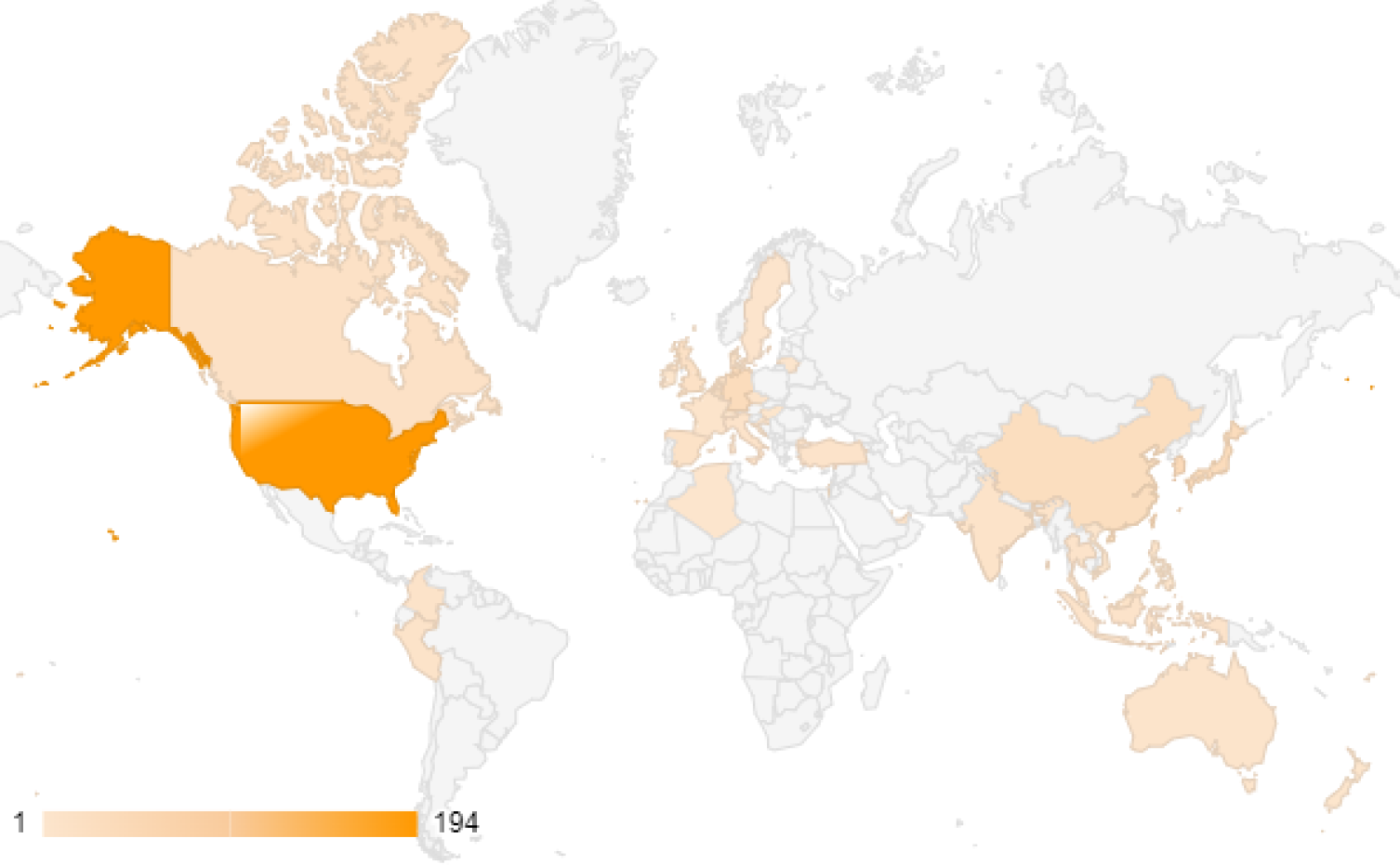
Unit 42 has observed 610 compromised instances of Ivanti Connect Secure and Policy Secure devices in 44 countries as of Jan. 23, 2024. This information covers the first two CVEs, CVE-2023-46805 and CVE-2024-21887. Figure 2 shows a map of the affected areas. The top 10 countries account for over 70% of globally observed compromised devices.

Image 2 is a heat map of the global distribution of Ivanti Connect Secure Devices. It is current as of January 23rd, 2024. The largest distribution is in the United States.
Figure 2. Global distribution of compromised Ivanti gateways as of Jan. 23, 2024. Powered by Xpanse-Internet Landscape Intelligence.

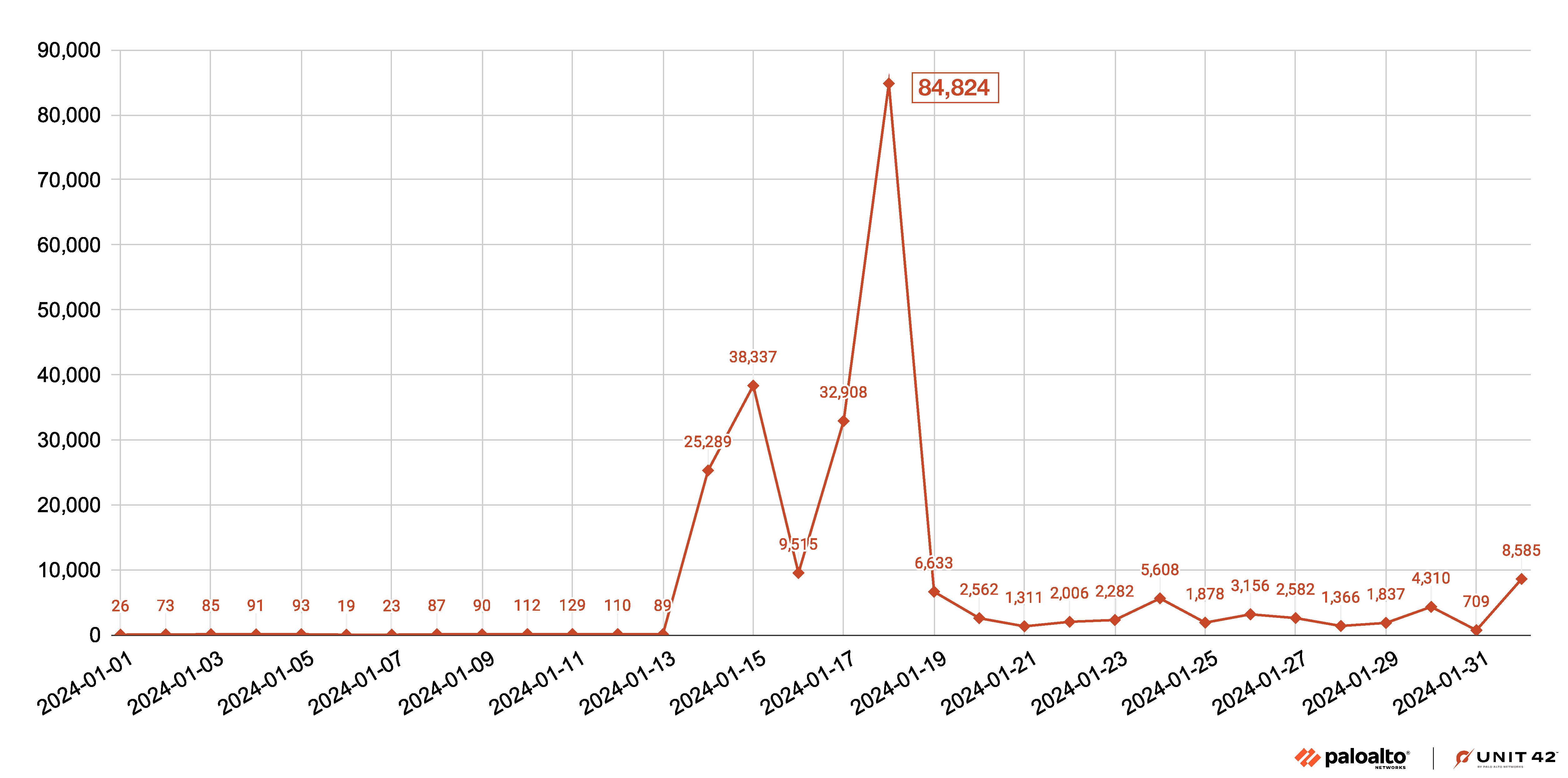
As shown in Figure 3, our telemetry reveals a noticeable increase in scans and probes for the first two Ivanti vulnerabilities started on Jan. 13, 2024, the day after these vulnerabilities were made public. We have confirmed 92 IPv4 addresses involved in these attacks, listed in the Appendix to this threat brief.

Scanning activities targeting CVE-2023-46805 and CVE-2024-21887 from January 1st to January 31st. There is a strong upward trend starting the 17th.
Figure 3. Scanning activities targeting CVE-2023-46805 and CVE-2024-21887. Powered by Xpanse-Internet Landscape Intelligence.

This activity targeted entities across the U.S., the U.K., the European Union, Canada, Australia, Singapore, Japan and other countries. The targets represent various sectors, including healthcare, mining, energy, food and agriculture, technology and government.

We assess with high confidence that most of this activity has consisted of opportunistic, untargeted and automated exploitation attempts. However, a proportion of attempts appear to be targeted toward particular entities.

Unit 42 Incident Response Cases

The exploitation campaigns of the Ivanti vulnerabilities occurred in three distinct waves. 

The first wave lasted from at least early December 2023 to Jan. 10, 2024, when Volexity published their first blog post on the matter. The attacks in this campaign were targeted and featured multiple custom web shells and lateral movement. Unit 42 responded to threat activity that likely corresponded to this wave of campaigns.

Similar to the activity discussed in Volexity’s blog post, we observed the threat actor performing the following activities: 

  • Archiving files including NTDS.dit using 7-Zip before exfiltration
  • Creating a memory dump of the LSASS process using Windows Task Manager (Taskmgr.exe)
  • Moving laterally via remote desktop protocol (RDP)
  • Deleting logs
  • Use of compromised, out-of-support Cyberoam virtual private network (VPN) appliances for command and control (C2) purposes

We also observed the presence of the THINSPOOL installation utility and dropper, first reported by Mandiant following Volexity’s blog post.

The second wave began after Volexity’s first blog post on Jan. 10, 2024. This wave was marked by a shift from targeted attacks to mass exploitation by additional threat actors. 

Unit 42 responded to cases of threat activity that likely corresponded to this wave of campaigns. The threat activity was consistent across these cases. 

The threat actor dumped configuration data containing schema, settings, names and credentials of the various users and accounts within the network. They did not perform any lateral movements like the incidents that occurred in the first wave. 

We believe that the threat actors behind this activity might have shifted focus to wider exploitation to maximize impact before organizations could begin patching and applying mitigation guidance. 

The third wave began as early as Jan. 16, 2024, when PoC exploits became publicly available. The release of these exploits lead to mass exploitation by a range of actors with various motivations and degrees of sophistication, including criminal entities widely deploying cryptominers and various remote monitoring and management (RMM) software.

Unit 42 has responded to threat activity that likely corresponded to this wave, from a threat actor using a publicly available PoC exploit. We are currently supporting our clients investigating those incidents.

To put it in context, we have observed multiple request attempts either for scanning purposes or exploitation. Some examples are:

  • OAST based requests (Details on OAST requests shown below):

  • Dropping and execution of cryptominer (also shown below)

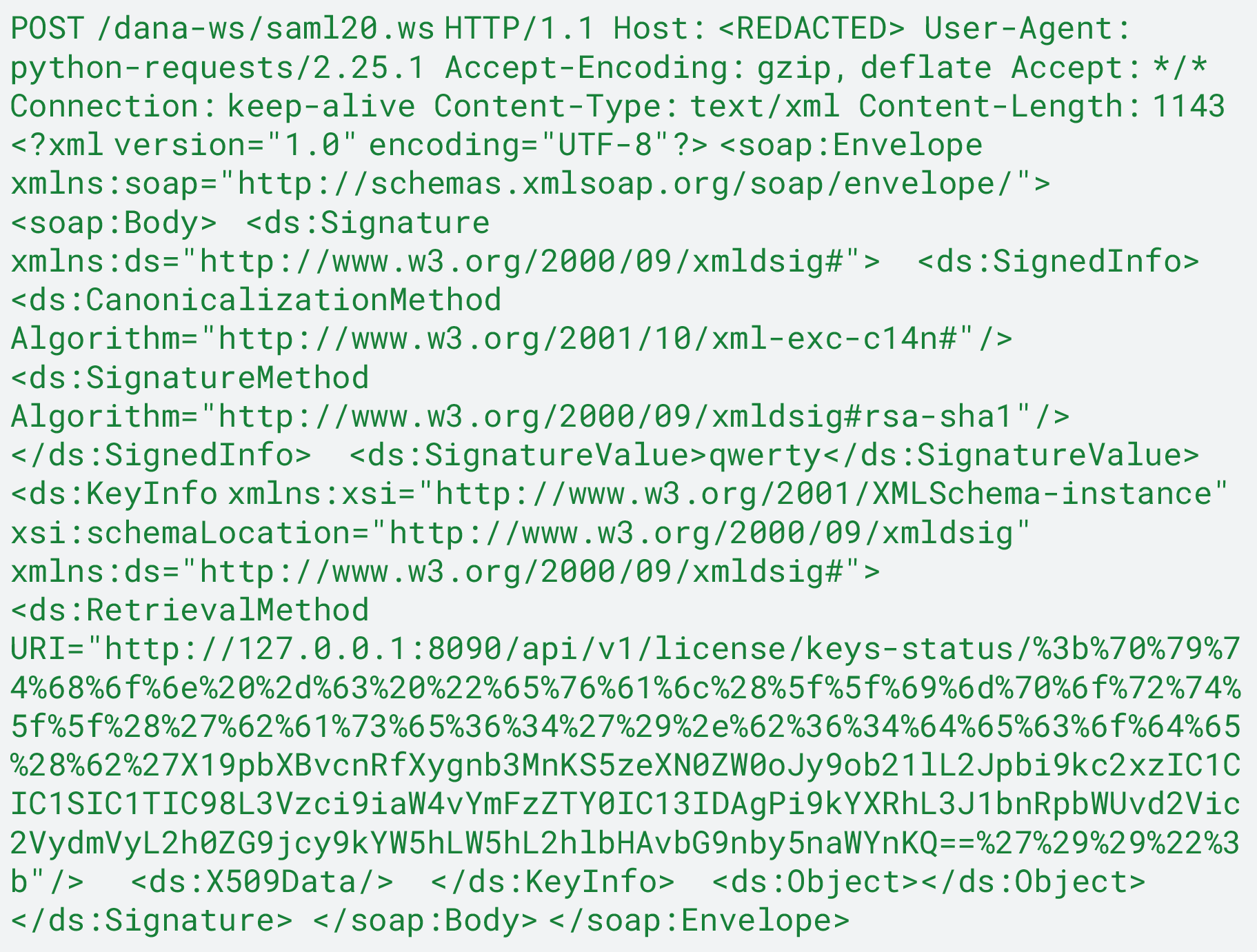
  • There was also an attempt to trigger the CVE-2024-21893 SSRF vulnerability and chain that to CVE-2024-21887 to achieve unauthenticated RCE, through a SOAP based  request to the endpoint /dana-ws/saml20.ws.

As initially described by Rapid7 in their January 16 analysis,

“a command injection vulnerability exists in the /api/v1/license/keys-status endpoint, and is reachable via a single HTTP GET request. We learnt during that analysis that the Python back end that services the /api/v1/license/keys-status endpoint listens on a locally bound port 8090. Therefore, we can exploit this command injection via an HTTP GET request to http://127.0.0.1:8090/api/v1/license/keys-status if the HTTP GET request occurs on the appliance itself, for example via an SSRF vulnerability. As authentication is performed by the front-end web server and not the back-end services, no authentication is needed. This allows us to leverage the SSRF vulnerability to bypass the original mitigation from Ivanti, which imposed filtering restrictions in the front-end web server.”

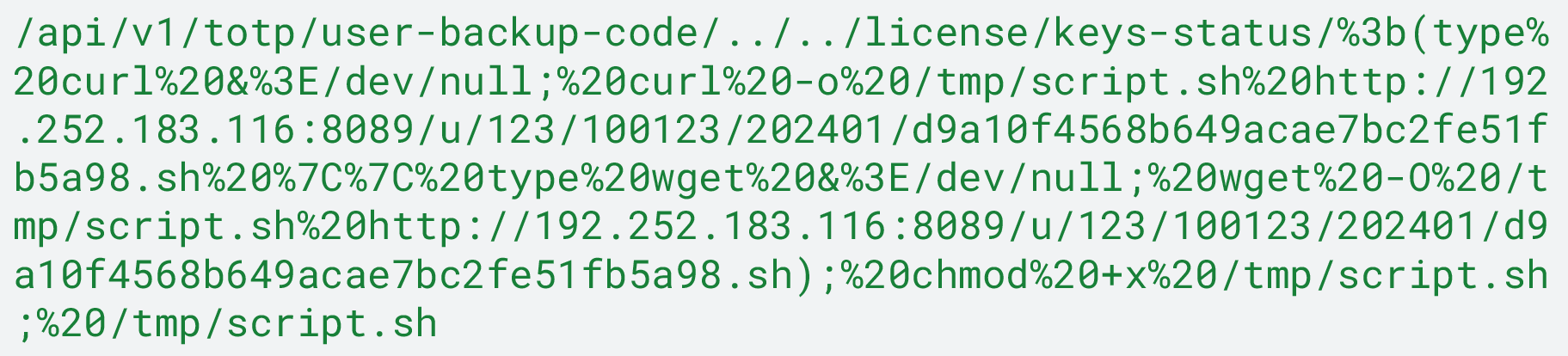
The final command payload after URL decoding and Base64 decoding is as follows

The attempt here was to leverage the exploit chain to execute the dsls command, which is built in Connect Secure appliances. This chain can be used to dump running configuration and cache, and therefore contains highly sensitive data. 

The output would then be Base64 encoded and written to logo.gif in a path that is remotely accessible. This attempt to dump sensitive data has been observed in previous waves of attacks. A report by Mandiant elaborates on this particular technique.

Ivanti Scanning Details

As attackers have scanned for Ivanti devices vulnerable to CVE-2023-46805 and CVE-2024-21887, we observed the top directory paths used for these probes:

  • /api/v1/totp/user-backup-code/../../<any_path>
  • /api/v1/totp/user-backup-code/../../license/keys-status/<exploit code>
  • /api/v1/configuration/users/user-roles/user-role/rest-userrole1/web/web-bookmarks/bookmark
  • /api/v1/cav/client/status/../../<any_path>

Attackers appear to be using Out-of-band Application Security Testing (OAST) tools when probing for CVE-2024-21887. These attackers use cURL to send a specially-crafted HTTP request to a targeted device. This request includes a URL for an OAST server the attacker manages. The device responds to the attacker's OAST server, and the response contains data that indicates whether or not the device is vulnerable.

We observed the following OAST domains used in probing attempts for CVE-2024-21887. 

  • oast[.]me
  • oast[.]today
  • oast[.]live
  • oast[.]site
  • oast[.]pro
  • oast[.]com
  • oast[.]fun
  • oast[.]online
  • oastify[.]com
  • oastfy[.]today
  • interactred[.]net
  • dnslog[.]cn
  • dnslog[.]pw
  • dnslog[.]store
  • dnslog[.]xyz
  • dgrh3[.]cn
  • ipv6.1433.eu[.]org
  • dnslog.vhope[.]top
  • z9z[.]top
  • ko02[.]com
  • rbaskets[.]in
  • burpcollaborator[.]net
  • dns.outbound.watchtowr[.]com
  • g3n[.]in
  • requestrepo[.]com
  • eyes[.]sh

So far, Unit 42 has observed over 200,000 scanning attempts for CVE-2023-46805 and CVE-2024-21887 since the vulnerabilities were publicly announced. A small portion of these requests appear to be internal testing, but the majority of these scans are from attackers scouring the internet for vulnerable devices. These scans generally consist of probes to find vulnerable targets, but they also include exploits that have led to attackers installing cryptominers on compromised hosts. 

An example of the malware used in these attacks:

  • SHA256 hash: bbfba00485901f859cf532925e83a2540adfe01556886837d8648cd92519c68d
  • Location: hxxp://45.130.22[.]219/ivanti.js
  • Description: Shell script used to install cryptominer
  • SHA256 hash: 0c9ada54a8a928a747d29d4132565c4ccecca0a02abe8675914a70e82c5918d2
  • Location: hxxp://45.130.22[.]219/ivanti
  • Description: ELF file for XMRIG Monero Cryptominer

Technique Analysis of Ivanti Vulnerabilities: Unauthorized Command Injection and Webshell Implantation

Attackers could combine CVE-2023-46805 and CVE-2024-21887 to deliver an unauthorized command injection attack and implant a webshell. 

Vulnerable API endpoints:

These API endpoints use the Python module subprocess to execute the command string with the input parameter shell=True. According to the official Python documentation, this powerful but potentially dangerous parameter could allow attackers to set up a reverse shell. According to the documentation:

“If shell is True, the specified command will be executed through the shell. This can be useful if you are using Python primarily for the enhanced control flow it offers over most system shells and still want convenient access to other shell features such as shell pipes, filename wildcards, environment variable expansion, and expansion of ~ to a user’s home directory.”

An attacker must bypass the authentication mechanism to use those API endpoints to execute malicious commands. From disclosed resources, we know the authentication is based on a proxy running in the front end that can allow/deny users’ access.

The authentication mechanism uses a string comparison function to determine if the first 29 bytes in the URI have a prefix equal to /api/v1/totp/user-backup-code. This verification mechanism can be easily defeated using a directory traversal vulnerability, allowing users to access all APIs running on the backend if a match exists. 

After bypassing authentication, the attacker can directly call the vulnerable API to execute a malicious command.

Ivanti Vulnerability Exploit in the Wild

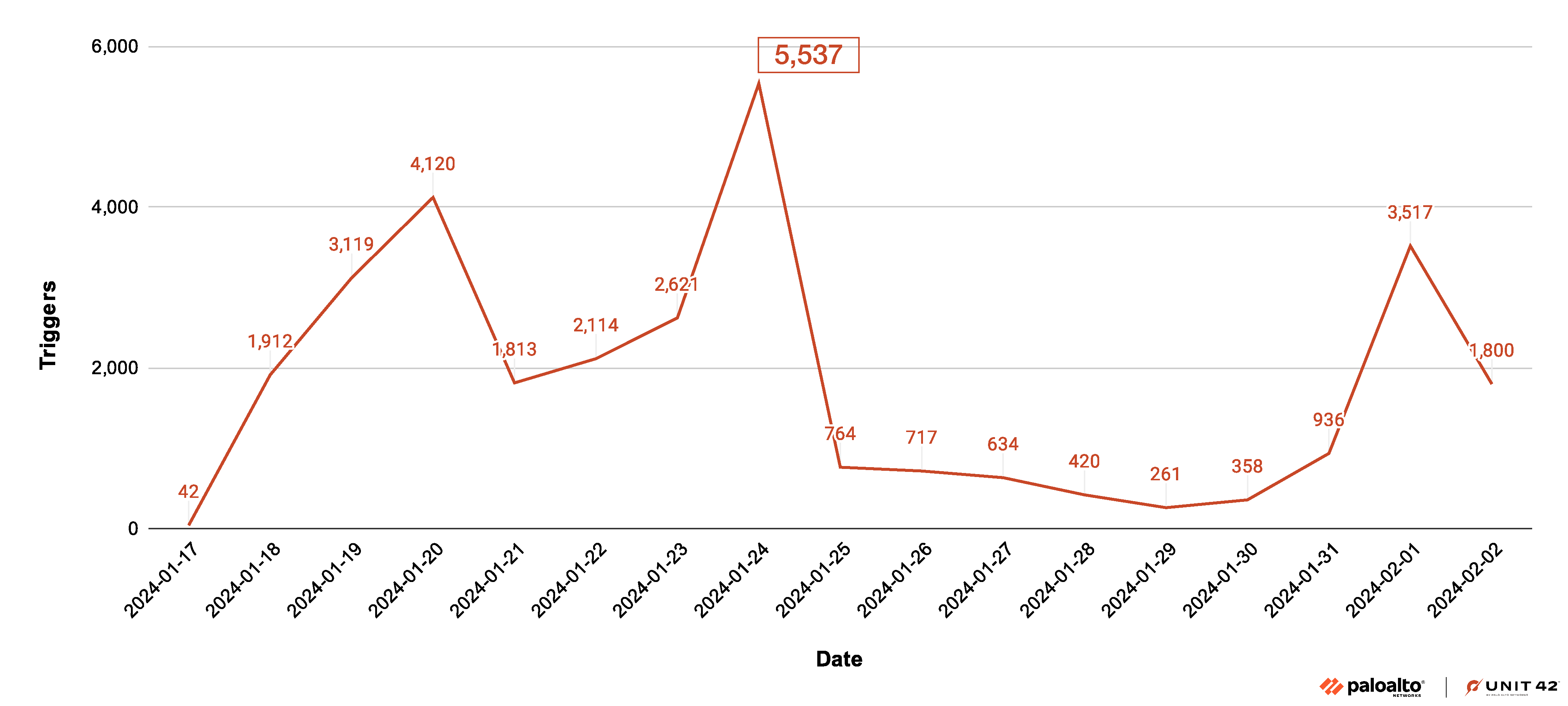
We have insights into attacks in the wild related to the Ivanti vulnerabilities through internal telemetry. Since the release of Threat Prevention signatures, we have prevented 15,714 attacks targeting CVE-2024-21887. On Jan. 20, 2024, we observed 4,120 attacks, a noticeable peak of attacks targeting this vulnerability.

Chart of blocked attacks.
Figure 4. Blocked attacks targeting CVE-2024-21887 between Jan. 17, 2024, and Jan. 23, 2024.

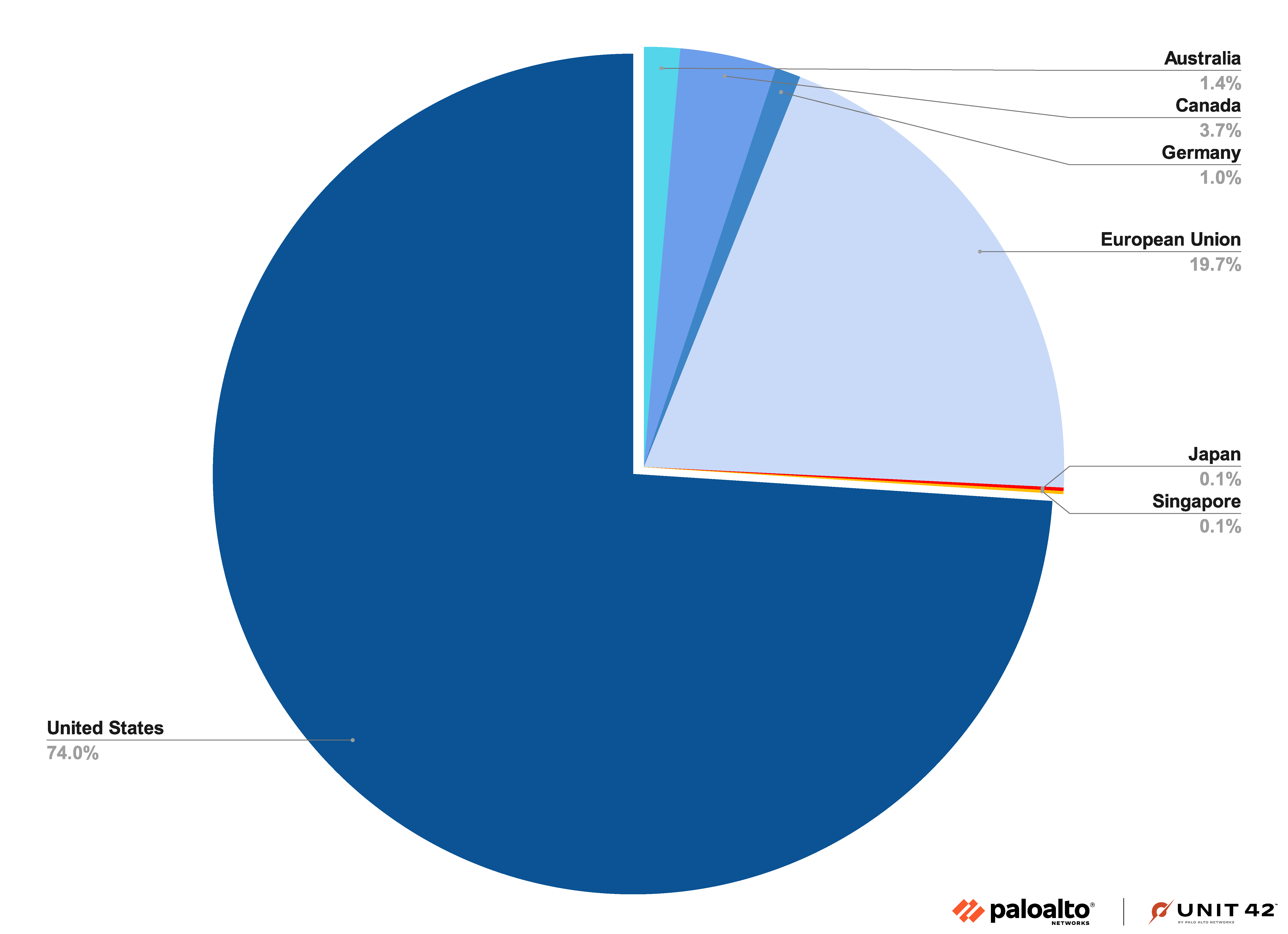
Most observed attacks appeared to come from the U.S. region, accounting for 74% of all attacks, followed by the EU and Canada. However, we recognize that attackers might leverage proxy servers and VPNs located in those countries to hide their actual physical locations.

Pie chart of affected countries with majority United States.
Figure 5. Apparent origination location of attacks seen in the wild against Ivanti vulnerabilities.

Ivanti Interim Guidance

Ivanti has provided a workaround until the company finishes releasing patches for these vulnerabilities. The company has found evidence of attackers attempting to manipulate Ivanti’s internal integrity checker. As such, the company recommends all of its customers run Ivanti’s external integrity checker, which has been updated with additional functionality to address this issue.

This situation is evolving rapidly, so it’s advisable to check Ivanti’s recommendations frequently.

Conclusion

Patches for these CVEs have not been released for all vulnerable products, but proof of concept code for the initial two vulnerabilities has been publicly posted. Attackers are actively exploiting four of these five vulnerabilities. As such we recommend affected readers follow the mitigation steps posted by Ivanti. We will keep this post updated as more information comes to light. 

Palo Alto Networks has shared our findings with our fellow Cyber Threat Alliance (CTA) members. CTA members use this intelligence to rapidly deploy protections to their customers and to systematically disrupt malicious cyber actors. Learn more about the Cyber Threat Alliance.

Palo Alto Networks customers are better protected by our products, as listed below. We will update this threat brief as more relevant information becomes available.

Update: Unit 42 stopped monitoring this threat and updating the brief on Feb. 29, 2024.  Please refer to Ivanti's website for the latest information.

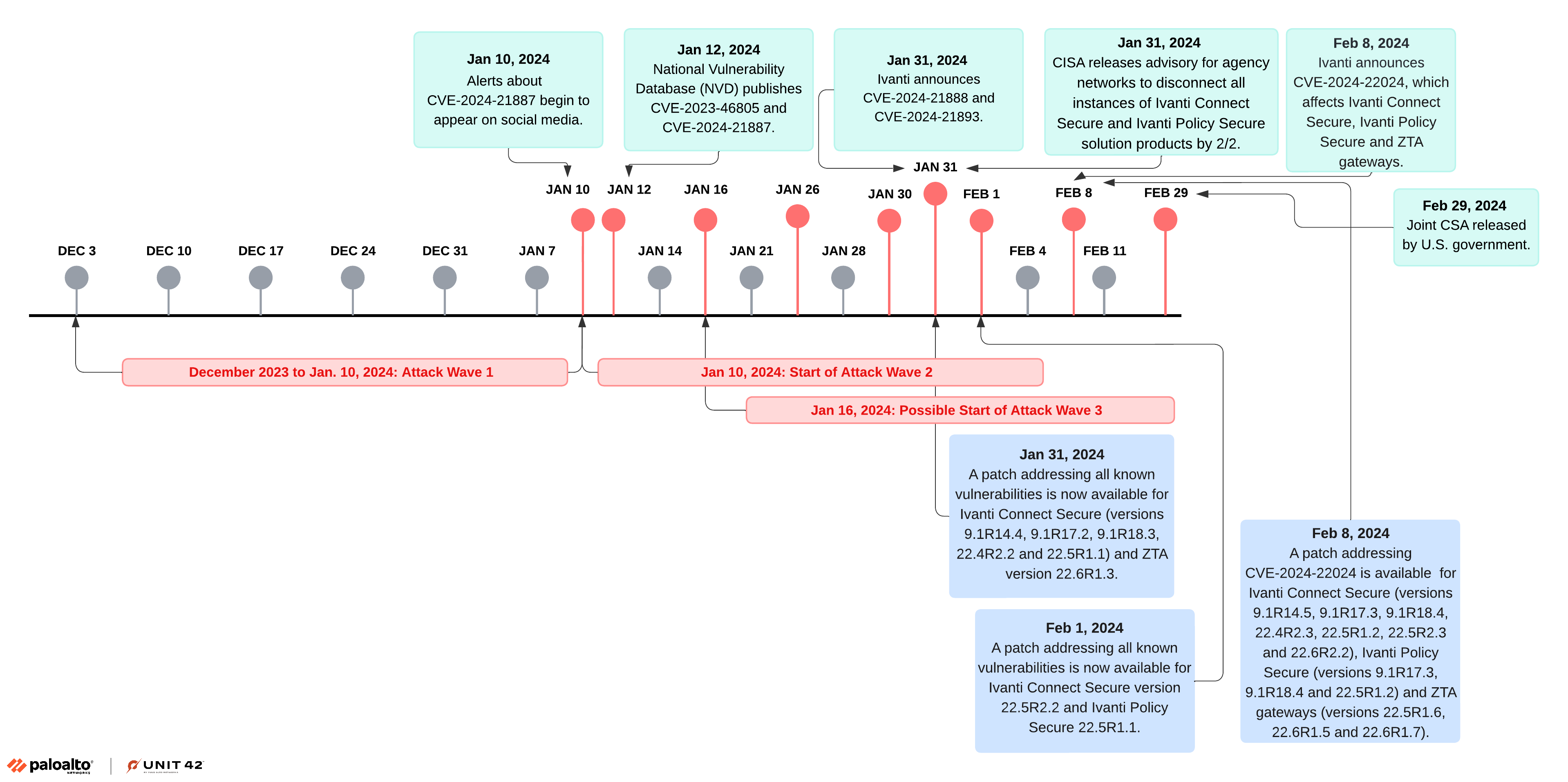
Ivanti Timeline

timeline of Ivanti vulnerabilities
Figure 6. Timeline of recent events related to Ivanti vulnerabilities.

Palo Alto Networks Product Protections for Ivanti Vulnerabilities

Palo Alto Networks customers can leverage a variety of product protections and updates to identify and defend against this threat.

If you think you might have been compromised or have an urgent matter, get in touch with the Unit 42 team or call:

  • North America Toll-Free: 866.486.4842 (866.4.UNIT42)
  • EMEA: +31.20.299.3130
  • APAC: +65.6983.8730
  • Japan: +81.50.1790.0200

Palo Alto Networks is offering a no-cost, no-obligation emergency bundle for organizations to help identify and mitigate any exposure caused by Ivanti vulnerabilities, including an Attack Surface Assessment and a Prisma Access 90-day license.

This offer is promotional and subject to availability. Due to the rapidly changing nature of this vulnerability, Palo Alto Networks reserves the right to update this offer.

Next-Generation Firewalls and Prisma Access With Advanced Threat Prevention

Next-Generation Firewall with the Advanced Threat Prevention security subscription can help block the attacks with best practices via the following Threat Prevention signatures: 81872, 94885, 94886, 94888, 94976 and 95024.

Inline Cloud Analysis included in the Advanced Threat Prevention Vulnerability Prevention can identify remote code execution attack patterns in HTTP traffic. It can also detect malicious payloads in HTTP headers or bodies and uses machine learning models to identify important elements from the code execution syntax for detection. 

Advanced Threat Prevention could proactively detect the Ivanti vulnerabilities before the public vulnerability disclosure.

Stopping Zero-Days With Advanced Threat Prevention

Advanced Threat Prevention (ATP) is an inline cloud-delivered security service that extends the detection capabilities of conventional heuristic intrusion prevention systems (IPS) with the power and flexibility of machine and deep learning models. ATP works with Threat Prevention (TP) to provide robust and layered network defenses that extend the protections offered by TP by leveraging machine learning capabilities. Most notably, ATP’s detection services are trained to detect unknown and net-new attacks, including C2, zero-day vulnerability exploitation attempts, and the use of threat actor hacking tools. ATP inline cloud analysis supports two machine learning services for detecting exploitation attempts: SQL injection and command injection.

Machine Learning for Exploit Command Injection Model

Machine Learning for Exploit, or MLEXP, is part of the ATP detection services that prevent successful network exploitation attacks. One detection service, MLEXP-CMD, is a convolutional neural network (CNN) deep learning model trained to detect and prevent Windows and UNIX-based command injection and remote code execution attacks. The model is continually trained on a large dataset of real-world exploitation attempts, which enables the model to provide a detection prediction on new and previously unknown traffic.

Using Advanced Threat Prevention Best Practices

If your organization is already aligned with our security best practices, you gain automated protection against the multiple steps of this attack with no manual intervention.

IPS

Advanced Threat Protection security subscriptions can automatically block sessions related to CVE-2024-21887. Please go to Device => Dynamic Updates and check Applications and Threats to verify whether the firewall has a content version installed that is equal to or later than 8799-8509.

Figure 7. How to check the ATP content version.

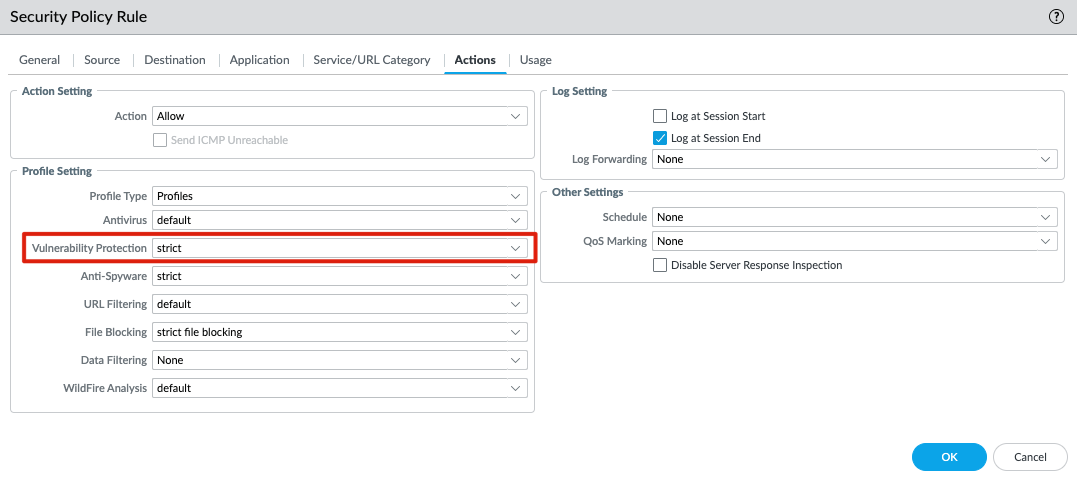
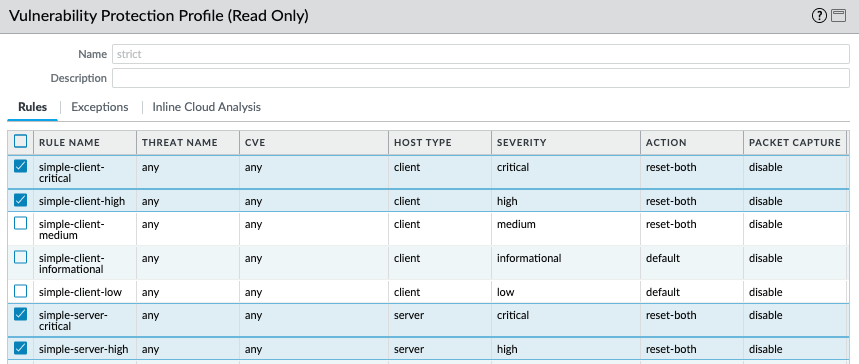
After installing the appropriate content version, check your Security Policy Rules. Make sure you use a strict Vulnerability Protection Profile. The severity of the signatures related to CVE-2024-21887 are all High or Critical, and using the predefined strict Vulnerability Protection Profile will reset the session between both parties.

Figure 8. How to set the Vulnerability Protection Profile to strict.

If you are using a custom Vulnerability Protection Profile, make sure the Action for severity high and critical is reset-both.

Figure 9. How to set a custom Vulnerability Protection Profile.

A successful configuration can help prevent attacks against CVE-2024-21887.

Figure 10. Alerts against Ivanti vulnerabilities, as shown in the ATP interface.

Inline Cloud Analysis

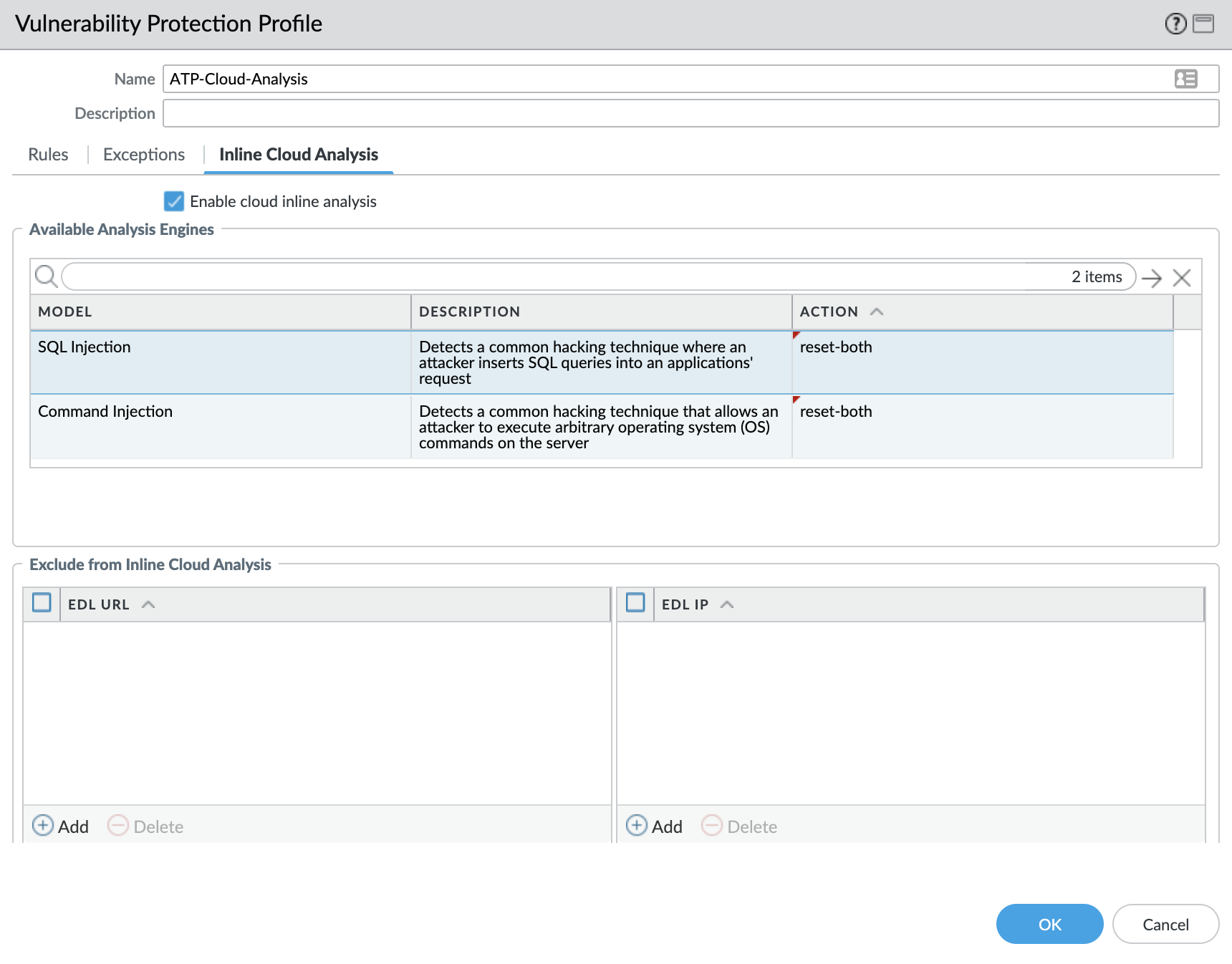
In the Vulnerability Protection Profile, ensure the Enable cloud inline analysis box is checked. In the window shown below, make sure that the action for both SQL Injection and Command Injection models is reset-both.

Figure 11. How to enable cloud inline analysis.

A successful configuration can help prevent attacks against CVE-2024-21887.

Figure 12. Threat detection of CVE-2024-21887 as shown in the ATP interface.

Cloud-Delivered Security Services for the Next-Generation Firewall

Known domains associated with this malicious activity are categorized as malicious by Advanced URL Filtering and DNS Security.

Exploit and scanning attempts are classified as Scanning Activity by Advanced URL Filtering.

Advanced WildFire

Advanced WildFire has added detection for the cryptominers used in these attacks.

Cortex XDR and XSIAM

Cortex XDR and XSIAM help protect against post-exploitation activities using the multi-layer protection approach.

Prisma Cloud

Prisma Cloud monitors Ivanti Cloud Secure products, which are not known to be vulnerable to these vulnerabilities. Prisma Cloud's security research team will continue to monitor the situation and update Prisma Cloud detections should Ivanti Cloud Connect be found vulnerable to these threats.

Cortex Xpanse

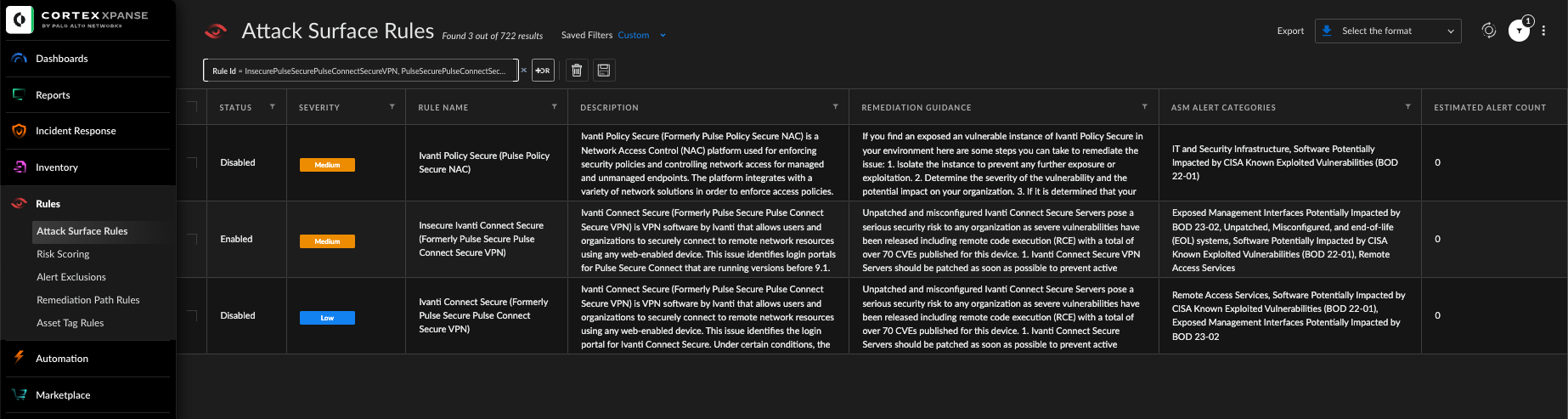
Cortex Xpanse customers can identify external-facing instances of impacted applications through the “Ivanti Connect Secure” and “Ivanti Policy Secure” attack surface rules. Detections of insecure instances of Ivanti Connect Secure are enabled by default for all customers.

Image 2 is a screenshot of the Cortex Xpanse interface. Attack Surface Rules. Columns: Status, Severity, Rule Name, Description, Remediation Guidance, ASM Alert Categories.
Figure 13. Cortex Xpanse interface showing configuration for enabling detections on Ivanti Policy Secure and Connect Secure.

Within the Cortex Xpanse Threat Response Center, organizations can also find curated threat intel summaries, exploit consequences, previous exploit activity and links to other sources for additional information. This allows you to see how risk is distributed across your organization and build a remediation plan based on the guidance provided. Cortex Xpanse identifies service owners automatically, so organizations can easily assign a ticket to the right person.

Ivanti FAQs

Q: How many new vulnerabilities has Ivanti announced recently? 

A: Ivanti has announced five High or Critical vulnerabilities since the beginning of January. These are tracked as CVE-2023-46805, CVE-2024-21887, CVE-2024-21888, CVE-2024-21893 and CVE-2024-22024.

Q: Which Ivanti products are affected by the recently announced vulnerabilities? 

A: The vulnerabilities affect Ivanti's Connect Secure (versions 9.x, 22.x) and Policy Secure (versions 9.x, 22.x) products. Additionally, CVE-2024-21893 and CVE-2024-22024 also impact Ivanti Neurons for ZTA.

Q: What is the potential impact of these vulnerabilities? 

A: If exploited, these vulnerabilities can allow unauthorized authentication bypass, remote command execution, privilege escalation, and server-side request forgery.

Q: How many Ivanti systems are potentially affected by these vulnerabilities? 

A: Unit 42 observed 28,474 exposed instances of Ivanti Connect Secure and Policy Secure in 145 countries between Jan. 26-30, 2024.

Q: Are there any known active exploitations of these vulnerabilities? 

A: Yes, three of these vulnerabilities, CVE-2023-46805, CVE-2024-21887 and CVE-2024-21893 have been actively exploited by a range of threat actors. The first two of these vulnerabilities, CVE-2023-46805 and CVE-2024-21887, have been observed being exploited since at least early December 2023.

Q: What tactics are the attackers using in the wild? 

A: Some attackers are using tactics, techniques and procedures consistent with past China-nexus APT cases. The attacks we’ve observed have come in multiple waves beginning in December 2023. 

The attacks in the first wave were targeted and featured multiple custom web shells and lateral movement. This wave also included attackers using credentials dumped from the memory of the LSASS process to log into workstations and servers in the affected environment and exfiltrating the output of this activity.

The second wave shifted from targeted attacks to mass exploitation by additional threat actors. The threat actor dumped configuration data containing schema, settings, names and credentials of the various users and accounts within the network. They did not perform any lateral movements like the incidents that occurred in the first wave. 

The third wave led to mass exploitation by a range of threat actors with various motivations and degrees of sophistication, including criminal entities deploying cryptominers and various remote monitoring and management software. 

Q: What measures have been recommended by Ivanti to address these vulnerabilities? 

A: Ivanti has begun releasing patches for all five CVEs and recommends customers perform a workaround for products that don’t yet have an available patch. They also suggest running Ivanti’s external integrity checker and following the instructions in its knowledge base article for these vulnerabilities.

Additional Resources

Appendix

IP addresses we have detected scanning or exploiting the Ivanti vulnerabilities: 

  • 1.65.216[.]83
  • 8.220.24[.]104
  • 5.188.34[.]119
  • 5.188.230[.]159
  • 8.210.101[.]116
  • 20.0.28[.]174
  • 23.224.195[.]27
  • 27.199.34[.]232
  • 37.19.207[.]89
  • 38.47.103[.]245
  • 39.144.158[.]6
  • 45.14.244[.]52
  • 45.76.92[.]144
  • 45.133.238[.]41
  • 45.147.51[.]78
  • 50.114.59[.]3
  • 50.114.59[.]5
  • 51.255.62[.]4
  • 51.255.62[.]12
  • 52.172.236[.]151
  • 54.38.214[.]131
  • 64.176.194[.]7
  • 74.48.82[.]246
  • 84.32.131[.]51
  • 84.32.248[.]20
  • 85.106.119[.]0
  • 88.151.32[.]164
  • 89.185.30[.]166
  • 91.203.134[.]122
  • 93.95.228[.]81
  • 94.131.105[.]192
  • 95.164.22[.]41
  • 97.106.38[.]138
  • 101.71.37[.]222
  • 103.119.174[.]37
  • 103.189.234[.]200
  • 103.233.11[.]5
  • 103.235.16[.]57
  • 104.223.91[.]19
  • 104.238.130[.]6
  • 106.52.127[.]12
  • 111.85.176[.]202
  • 111.90.143[.]184
  • 111.253.200[.]166
  • 112.96.226[.]103
  • 113.128.81[.]59
  • 113.137.148[.]49
  • 113.225.152[.]7
  • 114.236.225[.]219
  • 116.204.211[.]132
  • 118.74.246[.]29
  • 118.74.246[.]133
  • 118.74.90[.]191
  • 118.167.12[.]237
  • 122.155.209[.]123
  • 137.175.19[.]209
  • 139.162.21[.]6
  • 139.227.33[.]78
  • 149.104.23[.]171
  • 159.203.33[.]199
  • 161.35.44[.]205
  • 161.35.172[.]122
  • 167.114.113[.]160
  • 167.172.250[.]222
  • 170.64.149[.]53
  • 172.59.193[.]252
  • 171.241.43[.]110
  • 172.232.146[.]231
  • 174.135.110[.]233
  • 178.17.169[.]245
  • 182.239.92[.]100
  • 183.128.182[.]227
  • 185.132.125[.]11
  • 185.152.67[.]168
  • 185.156.72[.]51
  • 185.212.61[.]84
  • 185.217.125[.]210
  • 185.243.41[.]201
  • 185.244.208[.]65
  • 185.248.185[.]93
  • 194.233.93[.]67
  • 195.85.115[.]80
  • 202.55.67[.]195
  • 203.160.86[.]236
  • 210.182.85[.]3
  • 212.71.232[.]212
  • 220.246.88[.]207
  • 221.15.158[.]245
  • 221.216.117[.]171
  • 222.180.198[.]54
  • 223.70.179[.]234
  • 223.104.151[.]181

Malicious payloads exploiting the Ivanti vulnerabilities:

  • 103.233.11[.]5:1999/doc
  • 45.130.22[.]219/ivanti.js
  • 45.130.22[.]219/ivanti
  • 138.68.61[.]82
  • 192.252.183[.]116
  • 137.220.130[.]2/doc
  • 124.156.132[.]142:6999/python
  • 141.98.7[.]6
  • 103.215.77[.]51
  • 45.152.66[.]151
  • raw.githubusercontent[.]com/momika233/test/main/m.sh

Updated Jan. 16, 2024, at 2:00 p.m. PT to provide additional Threat Prevention signatures and more resources. 

Updated Jan. 19, 2024, at 11:00 a.m. PT to expand product protection information as well as other details. 

Updated Feb. 1, 2024, at 7:32 a.m. PT to add further updates from Ivanti including recovery steps as well as confirm details from Volexity's findings. 

Updated Feb. 1, 2024, at 2:48 p.m. PT to add new vulnerabilities announced by Ivanti as well as recommended guidance.  

Updated Feb. 2, 2024, at 1:31 p.m. PT to revise advisory time from CISA. 

Updated Feb. 2, 2024, at 5:23 p.m. PT with substantial updates including expanded recommendations from Ivanti, incident response case information and scanning activity, updated telemetry with charts and more. 

Updated Feb. 3, 2024, at 9:30 a.m. PT with info on the Palo Alto Networks no-cost, no-obligation emergency bundle to help organizations identify and mitigate any exposure caused by Ivanti vulnerabilities.

Updated Feb. 3, 2024, at 11 a.m. PT to correct a typo in the IoCs.

Updated Feb. 6, 2024 at 1:30 p.m. PT to add sections: Timeline, Technique Analysis, and Exploit in the Wild. Expanded Advances Threat Prevention section. Added a Threat Prevention signature. Added Advanced WildFire to product protections. Updated Security in 42 Seconds video. 

Updated Feb. 6, 2024 at 3:21 p.m. PT to add source data to captions for Figures 1-3. 

Updated Feb. 7, 2024 at 2:56 p.m. PT to align terms consistently.

Updated Feb. 8, 2024 at 12:30 p.m. PT to add update on new CVE-2024-22024, announced by Ivanti. Added links to additional resources. Updated timeline. 

Updated Feb. 8, 2024 at 2:10 p.m. PT to add FAQ section. 

Updated Feb. 13, 2024 at 12:25 p.m. PT to add Threat Prevention signature 95024.

Updated Feb. 15, 2024 at 12:14 p.m. PT to amend emergency bundle offer language.

Updated Feb. 20, 2024 at 8:02 a.m. PT to add link to Unit 42 Threat Vector podcast.

Updated Feb. 20, 2024 at 12:32 p.m. PT to add more details to the Scope of Attack and Incident Response Cases sections. Also edited the Technique Analysis section. Corrected CVE number in fourth paragraph of Executive Summary. 

Updated Feb. 29, 2024 at 12:20 p.m. PT to add information from Joint CSA release as well as update the timeline. 

Updated Dec. 13, 2024, to add info on when Unit 42 stopped actively monitoring the threat. 

Financial Fraud APK Campaign

Executive Summary

During our research discovering threats in legitimate network traffic, activity generated by a certain type of Android Package Kit (APK) files kept hitting our radar. This activity led us to conduct an in-depth investigation on the associated APK files. Our research revealed a family of malicious APKs targeting Chinese users that steals victim information and conducts financial fraud.

To do this, the threat actor masquerades as a law enforcement official and says the target's phone number or bank account is suspected of being involved in financial fraud. They then guide the person to download an app that will allow the attacker to investigate their bank transactions. The threat actor then instructs the person to select their bank from the app and fill in their personal information, including payment card details. At this point, the attackers can drain the bank account of whatever funds are available.

Palo Alto Networks customers are better protected from this malicious APK through our Next-Generation Firewall with Cloud-Delivered Security Services, including Advanced WildFire, DNS Security and Advanced URL Filtering. If you think you might have been compromised or have an urgent matter, contact the Unit 42 Incident Response team.

Related Unit 42 Topics APK, Finance, SMS

Campaign Overview

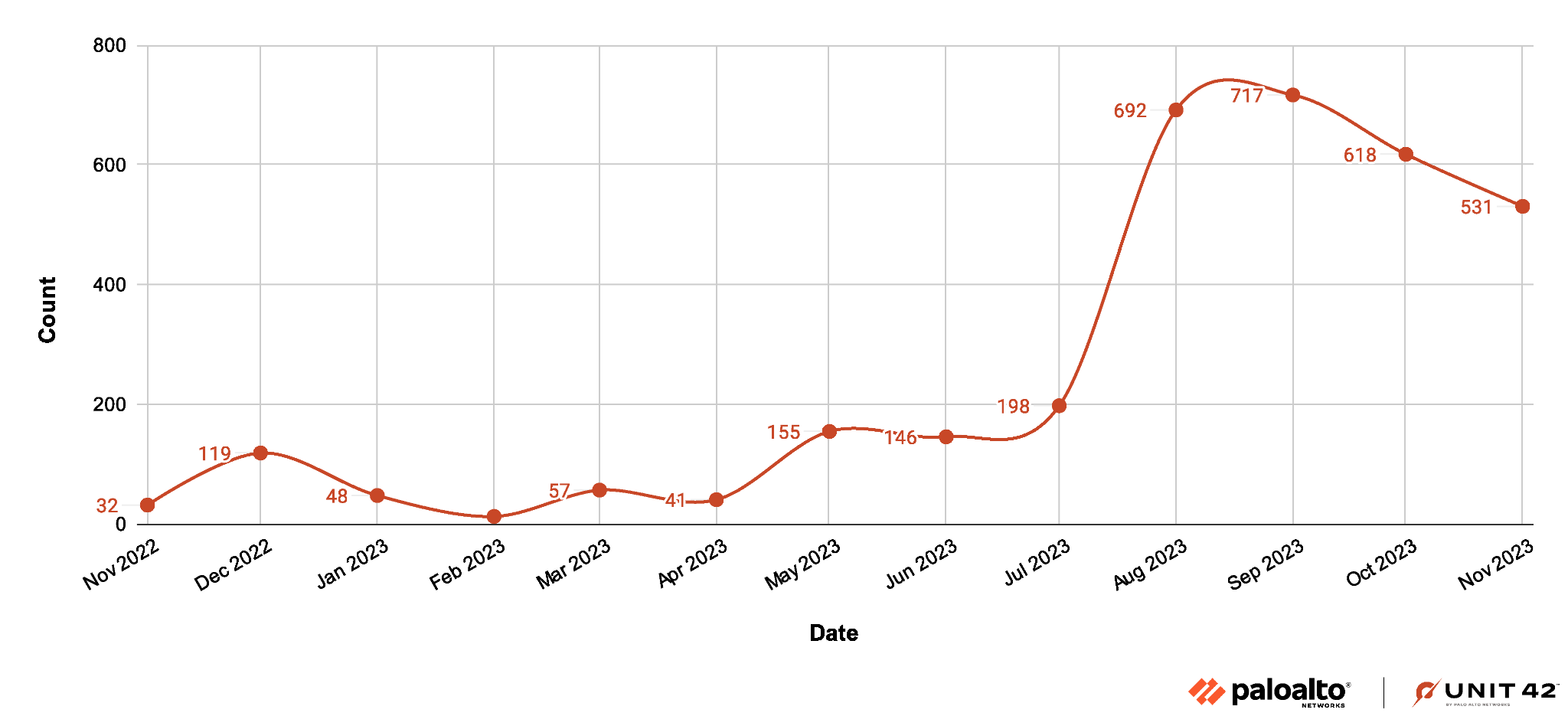
We found indicators of the malicious APK activity we’ll discuss in this post as early as November 2022. Following several months of dormancy, the malware delivery attempts surged with a peak value of 717 in September 2023.

Figure 1 presents the trend of delivery attempts from November 2022 through November 2023.

Image 1 is a graph of APK malware delivery attempts from November 2022 through November 2023. Through November 2022 to July 2023 there are less than 200 attacks. This rises sharply in July and the peak is in September 2023 with 717 attempts.
Figure 1. APK malware delivery attempts from November 2022 through November 2023.

Malware Analysis

Malware Installation

Our analysis of the malicious APK samples reveals victims must have retrieved them from non-official third-party sources, due to the non-compliance of the APK with official Google Play Store submission policies.

We believe threat actors likely delivered these APK samples through social engineering, similar to the methods described by the following sources from China:

The threat actors used this Android application to impersonate law enforcement authorities. They claimed that the victim's bank account was suspected of being involved in money laundering or other financial-related crimes. They then sent the victim a download link to this application package, urging the victim to input their sensitive personal information into the malicious application.

Malware Behavior

The malicious Android application would be installed on the victim's device with the name "安全防护" (translated from Mandarin as "Security Protection"). Upon execution, the application requests the following permissions for the capability to make phone calls and receive SMS text messages:

  • android.permission.CALL_PHONE
  • android.permission_RECEIVE_SMS

The android.permission.CALL_PHONE permission allows the app to disconnect incoming phone calls, and the android.permission_RECEIVE_SMS permission allows the app to block SMS messages received by the Android device.

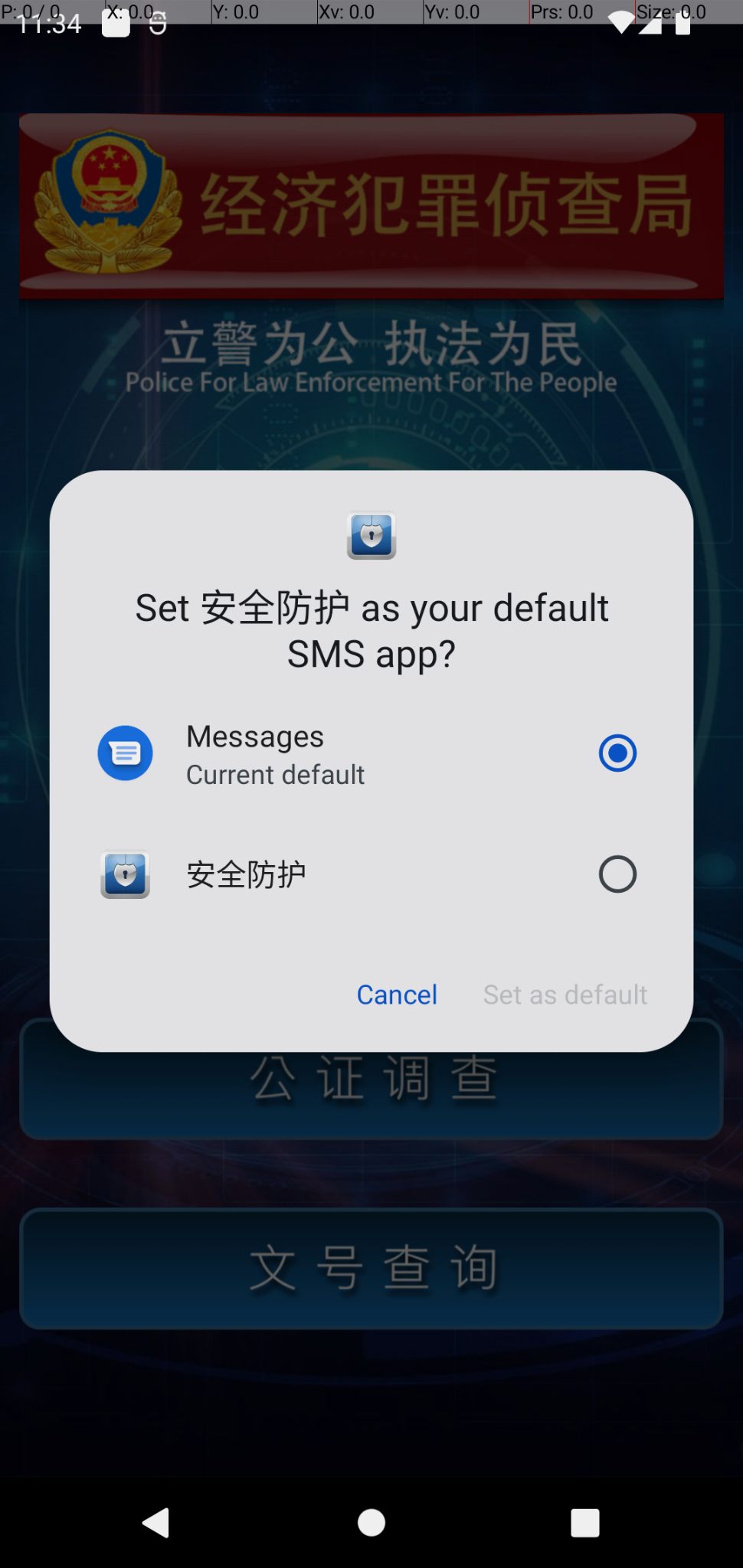
To control or block phone calls and SMS messages, the application would typically need to be set as the device's default phone/SMS application handler. A request to change this setting is depicted in the screenshot in Figure 2 below.

Image 2 is an Android mobile phone screenshot. A popup notification in both English and Chinese characters asks the user to set a malicious application as the default SMS app.
Figure 2. Malware request for the victim to set the malicious app as the default SMS application handler of the Android device.

By blocking incoming phone calls and SMS messages, victims are not able to receive alerts about financial fraud from others or from legitimate law enforcement.

How the Threat Actor Conducts Financial Fraud

First, the threat actor masquerades as an official law enforcement authority and alleges the victim's phone number or bank account is suspected of being involved in financial fraud.

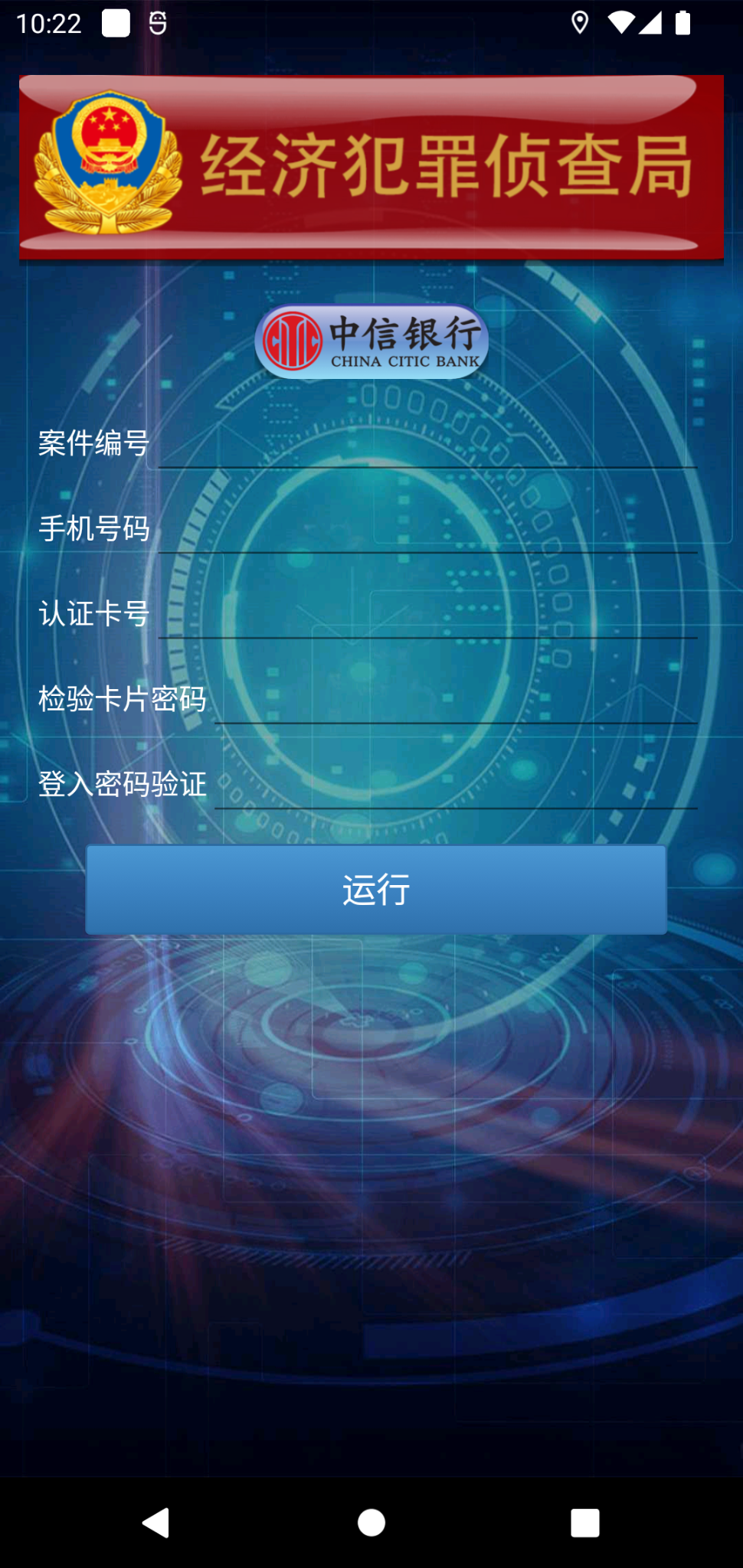
To convince people the app is legitimate, the threat actor provides a legal case number, and they ask the person to search for this case number in the malicious application. The threat actor will also generate a fake legal case document with the intended victim's name on it. As depicted in Figure 3, the malicious application requests the legal case number and the person’s sensitive personal information.

Image 3 is an Android mobile phone screenshot. The malicious application asks for sensitive personal information. The characters are in Chinese.
Figure 3. Malware requests the person's sensitive personal information.

Once a target fully believes the app is from a genuine law enforcement authority, the threat actor guides the person to download the next-stage payload. The app accomplishes this by sending a download link, under the pretext of investigating bank transactions and the source of deposited funds.

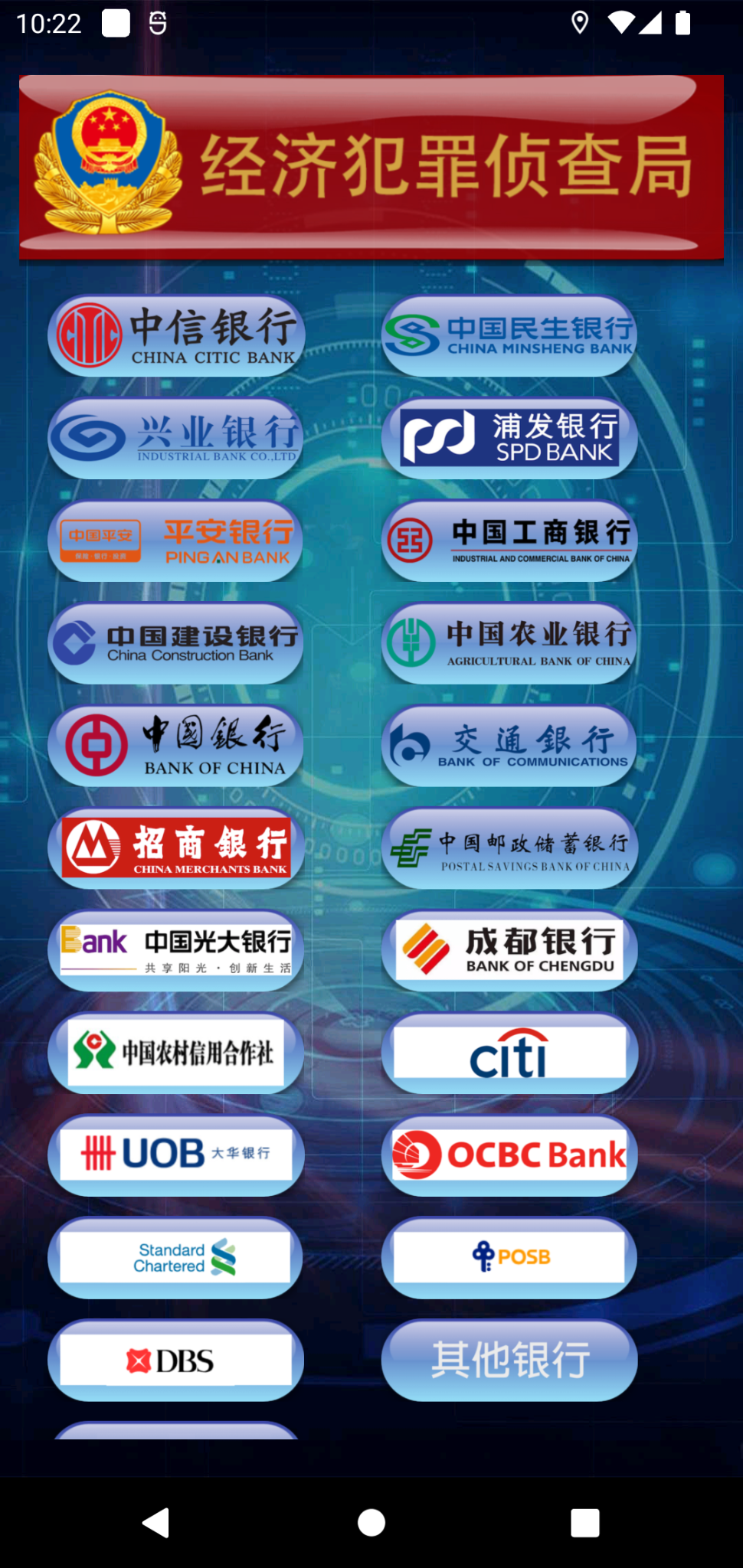
The APK malware sample supports selection from a variety of banking institutions (Figure 4). Once selected, the threat actors instruct victims to fill in their sensitive personal information, including payment card details.

Image 4 is an Android mobile phone screenshot. The malicious application asks for sensitive personal information. The characters are in Chinese.
Figure 4. Malware supports selection from a variety of banking institutions.

Since the application can block incoming phone calls and SMS messages, these financial institutions cannot contact the victims through their Android device, which makes it more likely that victims will be trapped in the scam.

Network Traffic Features

Our WildFire sandbox captures, detects and prevents this specific malware family, better protecting our customers from such a threat. In particular, the dynamic analysis logs contain traces of outgoing HTTP network connections to remote endpoints (namely, log[.]tbs[.]qq[.]com and 52[.]221[.]181[.]208, which were generated by one of the APK samples).

The following are the sample URLs we have logged:

  • hxxp://log[.]tbs[.]qq[.]com/ajax?c=dl&k=27d9e98adf5322f7ed5d3ba399165d4f
  • hxxp://52[.]221[.]181[.]208/api/GetCmd[.]aspx
  • hxxp://52[.]221[.]181[.]208/api/getconfig[.]aspx
  • hxxp://52[.]221[.]181[.]208/resource/260707[.]jpg

Advanced Malware Traffic Detection

Since the domain (log[.]tbs[.]qq[.]com) used by the malicious APK files during their execution is legitimate, definitively identifying isolated connections as malicious becomes challenging. Therefore we propose that multiple connections to such IP addresses and domains within a brief time frame can serve as a possible indicator of command and control (C2) traffic.

This behavior strongly suggests malicious network traffic activity rather than legitimate network traffic. To enhance our detection capabilities, we leverage these attacking network endpoints to generate advanced signatures for detecting malware activities. Our signatures incorporate multiple network entities, enabling us to effectively identify and mitigate malware communication sessions that might otherwise evade detection based solely on single-entity analysis.

Conclusion

Attackers take advantage of an information gap and the victim's fear of being embroiled in legal action, coupled with carefully designed social engineering attacks, to reap significant illegal profits.

To defend against the threat, we highly recommend that people do not download third-party applications from untrusted mobile application stores and do not share sensitive information with unknown sources.

Palo Alto Networks customers are better protected from malware discussed in this article through products like our Next-Generation Firewall with Cloud-Delivered Security Services that include Advanced WildFire, Advanced Threat Prevention and Advanced URL Filtering.

If you think you might have been compromised or have an urgent matter, contact the Unit 42 Incident Response team or call:

  • North America Toll-Free: 866.486.4842 (866.4.UNIT42)
  • EMEA: +31.20.299.3130
  • APAC: +65.6983.8730
  • Japan: +81.50.1790.0200

Palo Alto Networks has shared our findings with our fellow Cyber Threat Alliance (CTA) members. CTA members use this intelligence to rapidly deploy protections to their customers and to systematically disrupt malicious cyber actors. Learn more about the Cyber Threat Alliance.

Indicators of Compromise

Malicious APK Samples

  • 2cf117abf5ced6d37e98068d1961b85f400ecede4c11ebd69cc5cc9629aaaacd
  • 6e43d2d4f14b26a75b9094eb1bd509b0f63e069a3c97867bfb0ac6c2a154dcd6
  • b0ad0de29f9c64e696212121e5e716b99668906d6531804fd6e5a55d95c9bd1f
  • bf4a214782d6a3ce14fb37af919b4803d3013cc5774b2782290e33985bebd01b
  • d342c40f126a150cd93da083c237cda7d9fc739a2050a819573b5fb4a3a67026

Infrastructure

  • 13[.]250[.]172[.]152
  • 18[.]143[.]192[.]34
  • 18[.]166[.]72[.]58
  • 52[.]221[.]181[.]208

References

Medusa Ransomware Turning Your Files into Stone

Executive Summary

Unit 42 Threat Intelligence analysts have noticed an escalation in Medusa ransomware activities and a shift in tactics toward extortion, characterized by the introduction in early 2023 of their dedicated leak site called the Medusa Blog. Medusa threat actors use this site to disclose sensitive data from victims unwilling to comply with their ransom demands.

As part of their multi-extortion strategy, this group will provide victims with multiple options when their data is posted on their leak site, such as time extension, data deletion or download of all the data. All of these options have a price tag depending on the organization impacted by this group.

Besides their strategy of using an onion site for extortion, Medusa threat actors also leverage a public Telegram channel named “information support,” where files of compromised organizations have been shared publicly and are more accessible than traditional onion sites.

The Unit 42 Incident Response team has also responded to a Medusa ransomware incident, which has allowed us to uncover interesting tactics, tools and procedures used by Medusa threat actors.

Palo Alto Networks customers are better protected against ransomware used by the Medusa ransomware group through Cortex XDR, as well as from the WildFire Cloud-Delivered Security Services for the Next-Generation Firewall. In particular, the Cortex XDR agent included out-of-the-box protections that prevented adverse behavior from Medusa ransomware samples we tested without the need for specific detection logic or signatures. Prisma Cloud Defender Agents can monitor Windows virtual machine instances for known Medusa malware. Cortex Xpanse can be used to detect vulnerable services exposed directly to the internet that may be exploitable and infected with Medusa or other ransomware.

The Unit 42 Incident Response team can also be engaged to help with a compromise or to provide a proactive assessment to lower your risk.

Related Unit 42 Topics RaaS, Ransomware

Medusa Ransomware as a Service Overview

Medusa surfaced as a ransomware-as-a-service (RaaS) platform in late 2022 and gained notoriety in early 2023, primarily targeting Windows environments. Medusa should not be confused with a similarly named RaaS, MedusaLocker, which has been available since 2019. Our analysis focuses solely on the Medusa ransomware, publicly known since 2023, which is impacting organizations' Windows environments.

The Medusa ransomware group predominantly propagates its ransomware through the exploitation of vulnerable services (e.g., public-facing assets or applications with known unpatched vulnerabilities) and hijacking of legitimate accounts, often utilizing initial access brokers for infiltration. We will delve into the initial access strategies and more complex techniques they employ later in this article. We also observed that Medusa ransomware implements living-off-the-land techniques by using legitimate software for malicious purposes, which can often blend in with regular traffic and behavior, making it harder to flag such activities.

We have noticed a marked escalation in its activities, characterized by the introduction of the new Medusa Blog accessible through TOR on an .onion site released in early 2023. A screenshot of the Medusa Blog is shown below in Figure 1. This platform is used by the perpetrators to disclose sensitive data of victims unwilling to accede to their ransom demands.

Image 1 is a screenshot of the Medusa ransomware group leaksite. Some information is redacted. Icon of Medusa’s head. Medusa Blog. Links to Twitter and Telegram. Price tag. Countdown. Number of visitors. Description of victims. There is a magnifying glass icon to allow the end user to search.
Figure 1. Medusa Blog dedicated leak site.

As a multi-extortion operation, the Medusa ransomware operator’s announcements include the following points of information to pressure victims into paying the ransom:

  • Price tag: The amount displayed is what the affected organizations need to pay the group for them to delete the data from the site. (Unit 42 has observed Medusa being willing to negotiate with victims, like many ransomware groups. Any payments actually made may not directly match the pricing shown on the site.)
  • Countdown: The amount of time the impacted organizations have before the stolen data is released publicly and available to download.
  • Number of visitors: The number of post visitors, used in the negotiation strategy to pressure victims into paying.
  • Victim name and description: Identifiable information for the compromised organization.

The group's posts also typically revealed evidence of compromise. They also offered various “choices” – arbitrary and at the whim of Medusa – to the affected organization aside from paying the primary ransom, as shown in Figure 2. These choices include the following:

  • A standard fee of $10,000 for a time extension to prevent data from being published on the site
  • A request for data deletion
  • A download option

The price for these second two services can differ from one organization to another.

Image 2 is a screenshot of the Medusa ransomware gang leak site. This blog post highlights a specific victim. Much of the information is redacted. A counter of days, hours, minutes and seconds is at the top. The prices for adding time for one day, deleting all the data or downloading all the data are offered. There is also the option to download the file trees.
Figure 2. Post on the Medusa Blog to a victim.

A recent post on the Medusa Blog shared a video that showed files of a compromised organization. This video features a title caption of “Medusa Media Team,” which we suspect is the branch of this group that handles their public brand (shown in Figure 3). We haven’t seen videos of victims’ files with each post on their site, so we are still unclear if this is going to be a trend. However, ransomware groups like Medusa aim to build a brand and reputation, and creating such videos helps to reinforce their image as a formidable threat and enhance their credibility.

Image 3 is a screenshot of a Medusa Media Team video. Capital text against what looks to be a ship’s wheel.
Figure 3. Screenshot of Medusa Media Team video.

This group does not just host a specialized leak site and videos for extortion purposes. They have also integrated links to Telegram and X (previously known as Twitter) on the Medusa Blog site. The Telegram channel used by Medusa is titled "information support," and it is used to publicize and release data exfiltrated by the group. On the other hand, the link to X simply leads to a search result page for "Medusa ransomware."

The Telegram channel was created in July 2021, and it contains some content from before the emergence of this group that relies on known public breaches. Unexpectedly, the channel is not Medusa ransomware-branded. Still, we observed posts in this channel leaking content related to Medusa's compromises and even claims of meeting with representatives of this threat group. An example of this communication is shown below in Figure 4.

Image 4 is a screenshot of an admin message. November 25, 2022. Hello community! I love looking for hidden information on the Internet. Today I met the guys from the hacker group Medusa. She kindly agreed to provide me with a video overview of her activities on the example of a very cool casino located in the United States of America — Eureka casino. While I was watching the video, I saw how the Eureka casino visitors are deceived, how the slot machines are reprogrammed. After watching the video, you will understand why you don't have to go to this casino for sure! And yes, Medusa has a really cool media team – I was jealous! I reminded you that you can find much more information in my telegram channel, and I also invite you to my Twitter and Facebook. And waiting for your subscription and likes Dash this motivates, you to search for new and new content, as well as publish data in the telegram channel. Links are in the description of the channel. Enjoy watching! 734 views. 02:18 PM. Link to YouTube video. Some of the information is redacted.
Figure 4. Information support admin message.

On Feb. 20, 2023, the Telegram channel announced the release of the official Medusa leak site (or as the admin says, “a new blog of a hacker jellyfish group”). This announcement came with an image featuring the same branding as the official Medusa leak site, shown in Figure 5.

Image 5 is a screenshot of an admin message announcing the Medusa blog. Hello community. I want to introduce you to a new blog of a hacker jellyfish group. I reaccontate to visit and see: [onion link to Medusa site]. The message has one thumbs up snd one heart. February 20. 3.3k views. 06:27 AM. Some of the information is redacted.
Figure 5. Information support admin message announcing Medusa Blog site.

It’s unclear at the time of writing this article if the owner of this channel is part of the ransomware operation per se. We do know that the platform is being leveraged to announce compromises and release exfiltrated information.

Medusa's Prey: Understanding Victimology

For our analysis, we have been focusing on Medusa ransomware samples observed in 2023.

Based on their leak site, Medusa ransomware possibly impacted 74 organizations worldwide in 2023. The sectors most affected include high technology, education and manufacturing. However, the diverse range of impacted sectors highlights this group’s opportunistic nature, which is characteristic of many ransomware operations. Medusa ransomware does not restrict itself to a single industry. Figure 6 highlights the far-ranging impact of their attacks.

Image 6 is a column graph of the industries impacted by Medusa. The highest are High Technology, Education and Manufacturing as well as Healthcare. Mid-level includes hospitality, nonprofit and agriculture. Lowest include telecoms, federal government and real estate.
Figure 6. Industries impacted by Medusa ransomware, based on the leak site.

Medusa ransomware attacks exhibit a substantial international footprint. However, the group’s effects are most pronounced in the United States, where 24 incidents occurred as of the time of writing. A substantial number of targeted organizations were based in Europe. The presence of isolated incidents across Africa, South America and Asia underscore the indiscriminate approach of this ransomware group. Attacks span a global scale even in regions with fewer reported cases. Figure 7 underlines this point.

Image 7 is a column graph of the countries impacted by Medusa. The highest is the United States followed by the United Kingdom, France and Italy.
Figure 7. Countries where impacted organizations were located, based on the leak site.

Medusa's Toolkit: Unraveling the Mythical Trade

This section uncovers some of the tools and techniques used by Medusa ransomware actors that we discovered during an incident response event. The pre-ransomware techniques provide interesting clues to common themes across ransomware groups as well as more unique developments in tradecraft by the Medusa ransomware operators.

Initial Access

Unit 42 researchers observed Medusa ransomware operators uploading a webshell to an exploited Microsoft Exchange Server. This webshell functionality overlaps with the ASPX files previously reported for login.aspx and cmd.aspx. An example of cmd.aspx is shown below in Figure 8.

Image 8 is a screenshot of a web shell for cmd.aspx.
Figure 8. Example of the Cmd.aspx webshell.

Following the webshell activity, threat actors used PowerShell to execute a bitsadmin transfer from a file hosting site called filemail[.]com. The file downloaded from this site was ZIP compressed and titled baby.zip. Upon decompressing and executing, it installed remote monitoring and management (RMM) software ConnectWise.

Defense Evasion

Unit 42 researchers observed Medusa ransomware operators dropping two kernel drivers for targeting different sets of security products. Each kernel driver was guarded using a software protector called Safengine Shielden. The Safengine Shielden protector used on the drivers obfuscates the code flow by randomizing the code through various code mutations and then leverages an embedded virtual machine interpreter to execute the code.

Unit 42 observed each driver paired with its own loader. Each loader was packed using a packer called ASM Guard.

The packed loaders use a fake UPX header and subsequent address next to the fake UPX bytes, as shown in Figure 9. In the resource section, there are numerous references to ASM Guard as well as fake WINAPI imports among other various junk paddings, as shown in Figure 10.

Image 9 is a screenshot of the driver loader packed with ASM Guard, highlighted in yellow on the upper right.
Figure 9. Header of the driver loader is packed with ASM Guard.
Image 10 is a screenshot of the resource section of the driver loader packed with ASM Guard. Two columns side by side, both showing ASM Guard.
Figure 10. The resource section of the driver loader is packed with ASM Guard.

Figure 11 shows what the driver entry point looks like after it has been protected with Safengine Shielden.

Image 11 is a screenshot of code. The driver is protected with Safengine Sheldon v2.0.0.
Figure 11. Static view of driver protected with Safengine Shielden.

The primary objective of both drivers is to contain a list of security endpoint products to target for termination or deletion. The hard-coded list of security product string names shown in Figure 12 is used in a comparison operation against actively running processes on a system.

Image 12 is a screenshot of many lines of code. The first driver is targeting security processes to terminate them. These run through lines 51 to 86.
Figure 12. First driver targeting list of security processes for termination.

If the system has a process name that matches the hard-coded security tool process name, then an undocumented IOCTL code is used (0x222094) for termination of the process as shown in Figure 13. The primary difference between the two drivers is the use of file paths and the IOCTL (0x222184), which will delete the file based on the file path provided.

Image 13 is a screenshot of many lines of code. The second driver is targeting file paths and processes. An arrow points to line 63. Function IOCTL: 0x222184. A second arrow points to ;time 76. Function IOCTL: 0x222094.
Figure 13. Second driver targeting file paths and list of processes.

Discovery and Reconnaissance

Unit 42 researchers observed Medusa ransomware actors using the portable version of Netscan – with a novel twist. An associated netscan.xml file was paired with software that bolstered the overall functionality out of the box. This included various types of remote service discovery and preconfigured mappings for actions such as PsExec as well as the deployment of the ransomware binary.

Many options are available from the custom configuration related to the following:

  • WMI
  • Registry
  • Services
  • Files
  • SNMP
  • Account groups
  • XML
  • SSH
  • PowerShell

The remote scripting features extend the tool’s capabilities with VBScript and JScript.

The remote scripts that are included use Cyrillic script (shown in Figure 14).They are translated into English (shown in Figure 15). This provides a clue to the preferred language of the creator and users of the configuration, and possibly of the background of the Medusa ransomware group using these features.

Image 14 is a screenshot of the Remote Scripting window. Highlighted in a red box are the Item Name and Script columns. The text is in Cyrillic.
Figure 14. Remote scripting feature in original Cyrillic.
Image 15 is a screenshot of the Remote Scripting window. Highlighted in a red box are the Item Name and Script columns. The text has been translated to English. Items include list of files, login time, IP and MAC configuration and more.
Figure 15. Remote scripting feature translated to English.

Figure 16 shows an example of the codebase for the list of files script and the contents related to what the files enumerated under the Windows directory return.

Image 16 is a screenshot of a list of script files. A red arrow points to the script output.
Figure 16. Example for list of script files.

Figure 17 shows the codebase for the login time script related to specific login types found and the fields it returns.

Image 17 is a screenshot of an example login time script. Some information has been redacted.
Figure 17. Example for login time script.

Upon finishing a network scan, the operator of the tool can then right-click on a device listed in the results and will have many custom point-and-click options available on a remote system as shown below in Figure 18. The options in the menu shown in Figure 18 that end with Gaze show a naming convention used by Medusa ransomware related to the ransomware binary, and give insight into a technique for deploying Medusa ransomware.

  • Copy_Gaze (Ctrl+G)
  • Deploy Gaze (Ctrl+T)
  • Copy_Run_Gaze (Ctrl+W)
Image 18 is a screenshot of SoftPerfect Network Scanner. Highlighted in red in the Open Device menu is a secondary menu of options. Some of the text is in Cyrillic.
Figure 18. Medusa ransomware configuration.

In-Depth Look Into Medusa's Gaze

Unit 42 observed a common theme in Medusa’s ransomware binary that aligns with the mythology of Medusa herself: the use and inclusion of the term gaze in the debug path in PEStudio, as shown in Figure 19. This theme continued with the name of the binary and the naming scheme used in the netscan.xml configuration file (mentioned previously). We will refer to the ransomware binary as Gaze in the next section.

Image 19 is a screenshot in pestudio 9.34 of the PDF string in Gaze binary, highlighted in red.
Figure 19. PDB string in Gaze binary.

The Windows variant of Medusa ransomware can be run with 11 possible arguments, as shown below in Table 1.

Argument Purpose
V Check the version of the ransomware binary
n Use network drive (uses a byte flag)
s Exclude system drive (uses a byte flag)
d Do not delete itself
f Exclude system folder
p Do not use preprocess (uses a byte flag)
k Load RSA public key from file
t Load ransom note from file
w PowerShell -execution policy bypass -File %s
v Show console window
i Encrypt a specific folder

Table 1. Medusa ransomware parameters.

When running a Windows executable sample from November 2023 with the -V argument, the sample identifies as version 1.20 as shown below in Figure 20. This versioning system shows that the ransomware has some sort of development cycle, as one of the earliest public sightings of the ransomware binary was uploaded in February 2023 and is version 1.10. It is observed within SHA-256 736de79e0a2d08156bae608b2a3e63336829d59d38d61907642149a566ebd270.

Image 20 is a screenshot of the code that states the version of Medusa ransomware. Some information is redacted. The version is 1.20.
Figure 20. Ransomware sample version.

The Medusa ransomware binary employs string encryption for the following functions:

  • Targeted services
  • Targeted processes
  • File extension allowlist
  • Folder path allowlist

Figure 21 shows one code block example of the many string decryption code blocks within the binary, all of which have a similar control flow. Each string decryption code block has two functions. The first function moves the encrypted string into memory shown as u42_push_string_medusa in Figure 21. The second function is named u42_string_decrypt_7characters and uses an XOR encryption method with the key of 0x2E (also Figure 21).

Image 21 is a screenshot of the string decryption function in Gaze.exe.
Figure 21. String decryption function in the Gaze.exe ransomware sample.

In Figure 22, the hex representation for the string is moved and allocated on the functions stack frame, and then the hex string is moved into a section of memory and retrieved with a dereferenced pointer.

Image 22 is a screenshot of decompiled moving encrypted hex string 0x2E6F7D7B6A6B6300.
Figure 22. Decompiled view of moving encrypted hex string 0x2E6F7D7B6A6B6300.

When the function u42_push_string_medusa is done and returns a pointer to the string, it will initially be located in EAX as shown in Figure 21. EAX will be moved into ESI and then the contents of ESI will be moved into ECX. The register ECX is the parameter passed to the function u42_string_decrypt_7character, which contains the encrypted string pointer.

The pointer to the string contents is used as an array to access each character in the string. XOR decrypts it with the key of 0x2E as shown in Figure 23.

Image 23 is a screenshot of the decompiled string decryption function 0x2E6F7D7B6A6B6300.
Figure 23. Decompiled view of string decryption function used on 0x2E6F7D7B6A6B6300.

Validation of the string decryption method can be seen as shown in Figure 24 with a CyberChef recipe.

Image 24 is a screenshot of CyberChef. The string decryption is being verified. In the left column is the “recipe.” In the right column is the Input and Output which are highlighted in red boxes.
Figure 24. Verification of string decryption using CyberChef.

Medusa ransomware uses RSA asymmetric encryption for protecting the AES256 key used for encrypting a victim’s files. The AES256 key is set up using a 32-byte key and a 16-byte initialization vector. The encrypted files are renamed with the extension .medusa.

During file enumeration and encryption, the sample avoids files with the following extensions:

  • .dll
  • .exe
  • .lnk
  • .medusa

The list of folder paths to skip is as follows:

  • \Windows\
  • \Windows.old\
  • \PerfLogs\
  • \MSOCache\
  • G_skp_dir
  • Program Files
  • Program Files (x86)
  • ProgramData.

The ransom note is dropped as !!read_me_medusa!!.txt and its contents are shown in Figure 25.

Image 25 is a screenshot of a Medusa gang ransom note. It starts with ASCII art of MEDUSA. Then there is a description of what has happened to the network and data, a list of guarantees, who to contact and how, as well as instructions on how to use TOR. Some of the information has been redacted.
Figure 25. Medusa ransomware ransom note.

The ransomware will perform various vssadmin-related operations, and it deletes itself with the following commands to impact recovery and forensic efforts:

  • vssadmin Delete Shadows /all /quiet
  • vssadmin resize shadowstorage /for=C: /on=C: /maxsize=401MB
  • vssadmin resize shadowstorage /for=C: /on=C: /maxsize=unbounded
  • cmd /c ping localhost -n 3 > nul & del

Conclusion

The emergence of the Medusa ransomware in late 2022 and its notoriety in 2023 marks a significant development in the ransomware landscape. This operation showcases complex propagation methods, leveraging both system vulnerabilities and initial access brokers, while adeptly avoiding detection through living-off-the-land techniques.

The Medusa Blog signifies a tactical evolution toward multi-extortion, with the group employing transparent pressure tactics on victims through ransom demands publicized online. With 74 organizations across a spectrum of industries affected to date, Medusa's indiscriminate targeting emphasizes the universal threat posed by such ransomware actors.

Technical analysis by Unit 42 researchers reveals the nuanced exploitation strategies employed by the Medusa ransomware group, from webshell placement on compromised servers to the deployment of encrypted kernel drivers. This culminates in a novel application of netscan tools and Medusa’s gaze leading to file encryption using the ominous .medusa file extension. As such, Medusa ransomware stands as a significant threat to organizations, demanding a more proactive and strong defensive strategy.

Protections and Mitigations

Palo Alto Networks customers are better protected from the threats discussed above through the following products:

  • Advanced WildFire: The Advanced WildFire machine-learning models and analysis techniques have been reviewed and updated in light of the IoCs shared in this research.
  • Cortex XDR: All known Medusa ransomware samples are prevented by the XDR agent out of the box using the following modules:
    • Anti-ransomware module to prevent Medusa encryption behaviors on Windows
    • Local Analysis prevention for Medusa binaries on Windows
    • Behavioral Threat Protection (BTP) rule helps prevent ransomware activity on Windows as well as Linux
    • Additional protection can be added using indicators for Medusa
  • Next-Generation Firewalls (NGFW):
    • DNS signatures detect the known command and control (C2) domains, which are also categorized as malware in URL Filtering.
    • Next-Generation Firewall with the Advanced Threat Prevention security subscription can help block the Webshell file traffic with best practices via the following Threat Prevention signatures: 80744, 86828.
  • Prisma Cloud:
    • While there is currently no known cloud infrastructure being affected by Medusa ransomware, any cloud infrastructure running windows virtual machines should monitor their Windows-based VMs using Cortex XDR Cloud Agents or Prisma Cloud Defender Agents. Both agents will monitor the Windows VM instances for known Medusa malware, using signatures pulled from Palo Alto Networks WildFire.
  • Cortex Xpanse:
    • Cortex Xpanse can be used to detect vulnerable services exposed directly to the internet that may be exploitable and infected with Medusa ransomware.

If you think you might have been compromised or have an urgent matter, get in touch with the Unit 42 Incident Response team or call:

  • North America Toll-Free: 866.486.4842 (866.4.UNIT42)
  • EMEA: +31.20.299.3130
  • APAC: +65.6983.8730
  • Japan: +81.50.1790.0200

Palo Alto Networks has shared these findings with our fellow Cyber Threat Alliance (CTA) members. CTA members use this intelligence to rapidly deploy protections to their customers and to systematically disrupt malicious cyber actors. Learn more about the Cyber Threat Alliance.

Indicators of Compromise

Hashes

4d4df87cf8d8551d836f67fbde4337863bac3ff6b5cb324675054ea023b12ab6 Medusa Ransomware
657c0cce98d6e73e53b4001eeea51ed91fdcf3d47a18712b6ba9c66d59677980 Medusa Ransomware
7d68da8aa78929bb467682ddb080e750ed07cd21b1ee7a9f38cf2810eeb9cb95 Medusa Ransomware
9144a60ac86d4c91f7553768d9bef848acd3bd9fe3e599b7ea2024a8a3115669 Medusa Ransomware
736de79e0a2d08156bae608b2a3e63336829d59d38d61907642149a566ebd270 Medusa Ransomware

Infrastructure

  • Medusakxxtp3uo7vusntvubnytaph4d3amxivbggl3hnhpk2nmus34yd[.]onion
  • medusaxko7jxtrojdkxo66j7ck4q5tgktf7uqsqyfry4ebnxlcbkccyd[.]onion

Appendix

Services stopped by Medusa ransomware

  • net stop "Acronis VSS Provider"
  • net stop "Sophos Agent"
  • net stop "Sophos Clean Service"
  • net stop "Sophos Health Service"
  • net stop "Sophos MCS Agent"
  • net stop "Sophos MCS Client"
  • net stop "Sophos Message Router"
  • net stop "AcronisAgent"
  • net stop "AcrSch2Svc"
  • net stop "Antivirus"
  • net stop "ARSM"
  • net stop "BackupExecJobEngine"
  • net stop "BackupExecRPCService"
  • net stop "BackupExecVSSProvider"
  • net stop "bedbg"
  • net stop "DCAgent"
  • net stop "EPSecurityService"
  • net stop "EPUpdateService"
  • net stop "EraserSvc11710"
  • net stop "EsgShKernel"
  • net stop "FA_Scheduler"
  • net stop "IISAdmin"
  • net stop "IMAP4Svc"
  • net stop "macmnsvc"
  • net stop "masvc"
  • net stop "MBAMService"
  • net stop "MBEndpointAgent"
  • net stop "McAfeeEngineService"
  • net stop "McAfeeFramework"
  • net stop "McShield"
  • net stop "McTaskManager"
  • net stop "mfemms"
  • net stop "mfevtp"
  • net stop "MMS"
  • net stop "mozyprobackup"
  • net stop "MsDtsServer"
  • net stop "MsDtsServer100"
  • net stop "MsDtsServer110"
  • net stop "MSExchangeES"
  • net stop "MSExchangeIS"
  • net stop "MSExchangeMGMT"
  • net stop "MSExchangeMTA"
  • net stop "MSExchangeSA"
  • net stop "MSExchangeSRS"
  • net stop "MSOLAP$SQL_2008"
  • net stop "MSOLAP$SYSTEM_BGC"
  • net stop "MSOLAP$TPS"
  • net stop "MSOLAP$TPSAMA"
  • net stop "MSSQL$BKUPEXEC"
  • net stop "MSSQL$ECWDB2"
  • net stop "MSSQL$PRACTICEMGT"
  • net stop "MSSQL$PRACTTICEBGC"
  • net stop "MSSQL$PROFXENGAGEMENT"
  • net stop "MSSQL$SBSMONITORING"
  • net stop "MSSQL$SHAREPOINT"
  • net stop "MSSQL$SQL_2008"
  • net stop "MSSQL$SYSTEM_BGC"
  • net stop "MSSQL$TPS"
  • net stop "MSSQL$TPSAMA"
  • net stop "MSSQL$VEEAMSQL2008R2"
  • net stop "MSSQL$VEEAMSQL2012"
  • net stop "MSSQLFDLauncher"
  • net stop "MSSQLFDLauncher$TPS"
  • net stop "MSSQLSERVER"
  • net stop "MySQL80"
  • net stop "MySQL57"
  • net stop "ntrtscan"
  • net stop "OracleClientCache80"
  • net stop "PDVFSService"
  • net stop "POP3Svc"
  • net stop "ReportServer"
  • net stop "ReportServer$SQL_2008"
  • net stop "ReportServer$TPS"
  • net stop "ReportServer$TPSAMA"
  • net stop "RESvc"
  • net stop "sacsvr"
  • net stop "SamSs"
  • net stop "SAVAdminService"
  • net stop "SAVService"
  • net stop "SDRSVC"
  • net stop "SepMasterService"
  • net stop "ShMonitor"
  • net stop "Smcinst"
  • net stop "SmcService"
  • net stop "SMTPSvc"
  • net stop "SNAC"
  • net stop "SntpService"
  • net stop "sophossps"
  • net stop "SQLAgent$BKUPEXEC"
  • net stop "SQLAgent$ECWDB2"
  • net stop "SQLAgent$PRACTTICEBGC"
  • net stop "SQLAgent$PRACTTICEMGT"
  • net stop "SQLAgent$SHAREPOINT"
  • net stop "SQLAgent$SQL_2008"
  • net stop "SQLAgent$SYSTEM_BGC"
  • net stop "SQLAgent$TPS"
  • net stop "SQLAgent$TPSAMA"
  • net stop "SQLAgent$VEEAMSQL2012"
  • net stop "SQLBrowser"
  • net stop "SQLSafeOLRService"
  • net stop "SQLSERVERAGENT"
  • net stop "SQLTELEMETRY"
  • net stop "SQLTELEMETRY$ECWDB2"
  • net stop "SQLWriter"
  • net stop "SstpSvc"
  • net stop "svcGenericHost"
  • net stop "swi_filter"
  • net stop "swi_service"
  • net stop "swi_update_64"
  • net stop "TmCCSF"
  • net stop "tmlisten"
  • net stop "TrueKey"
  • net stop "TrueKeyScheduler"
  • net stop "TrueKeyServiceHelper"
  • net stop "UI0Detect"
  • net stop "VeeamBackupSvc"
  • net stop "VeeamBrokerSvc"
  • net stop "VeeamCatalogSvc"
  • net stop "VeeamCloudSvc"
  • net stop "VeeamDeploySvc"
  • net stop "VeeamMountSvc"
  • net stop "VeeamNFSSvc"
  • net stop "VeeamRESTSvc"
  • net stop "VeeamTransportSvc"
  • net stop "W3Svc"
  • net stop "wbengine"
  • net stop "WRSVC"
  • net stop "VeeamHvIntegrationSvc"
  • net stop "swi_update"
  • net stop "SQLAgent$CXDB"
  • net stop "SQL Backups"
  • net stop "MSSQL$PROD"
  • net stop "Zoolz 2 Service"
  • net stop "MSSQLServerADHelper"
  • net stop "SQLAgent$PROD"
  • net stop "msftesql$PROD"
  • net stop "NetMsmqActivator"
  • net stop "EhttpSrv"
  • net stop "ekrn"
  • net stop "ESHASRV"
  • net stop "MSSQL$SOPHOS"
  • net stop "SQLAgent$SOPHOS"
  • net stop "AVP"
  • net stop "klnagent"
  • net stop "MSSQL$SQLEXPRESS"
  • net stop "SQLAgent$SQLEXPRESS"
  • net stop "kavfsslp"
  • net stop "KAVFSGT"
  • net stop "KAVFS"
  • net stop "mfefire"

Processes:

  • taskkill /F /IM zoolz.exe /T
  • taskkill /F /IM agntsvc.exe /T
  • taskkill /F /IM dbeng50.exe /T
  • taskkill /F /IM dbsnmp.exe /T
  • taskkill /F /IM encsvc.exe /T
  • taskkill /F /IM excel.exe /T
  • taskkill /F /IM firefoxconfig.exe /T
  • taskkill /F /IM infopath.exe /T
  • taskkill /F /IM isqlplussvc.exe /T
  • taskkill /F /IM msaccess.exe /T
  • taskkill /F /IM msftesql.exe /T
  • taskkill /F /IM mspub.exe /T
  • taskkill /F /IM mydesktopqos.exe /T
  • taskkill /F /IM mydesktopservice.exe /T
  • taskkill /F /IM mysqld.exe /T
  • taskkill /F /IM mysqld-nt.exe /T
  • taskkill /F /IM mysqld-opt.exe /T
  • taskkill /F /IM ocautoupds.exe /T
  • taskkill /F /IM ocomm.exe /T
  • taskkill /F /IM ocssd.exe /T
  • taskkill /F /IM onenote.exe /T
  • taskkill /F /IM oracle.exe /T
  • taskkill /F /IM outlook.exe /T
  • taskkill /F /IM powerpnt.exe /T
  • taskkill /F /IM sqbcoreservice.exe /T
  • taskkill /F /IM sqlagent.exe /T
  • taskkill /F /IM sqlbrowser.exe /T
  • taskkill /F /IM sqlservr.exe /T
  • taskkill /F /IM sqlwriter.exe /T
  • taskkill /F /IM steam.exe /T
  • taskkill /F /IM synctime.exe /T
  • taskkill /F /IM tbirdconfig.exe /T
  • taskkill /F /IM thebat.exe /T
  • taskkill /F /IM thebat64.exe /T
  • taskkill /F /IM thunderbird.exe /T
  • taskkill /F /IM visio.exe /T
  • taskkill /F /IM winword.exe /T
  • taskkill /F /IM wordpad.exe /T
  • taskkill /F /IM xfssvccon.exe /T
  • taskkill /F /IM tmlisten.exe /T
  • taskkill /F /IM PccNTMon.exe /T
  • taskkill /F /IM CNTAoSMgr.exe /T
  • taskkill /F /IM Ntrtscan.exe /T
  • taskkill /F /IM mbamtray.exe /T

Additional Resources

Tackling Anti-Analysis Techniques of GuLoader and RedLine Stealer

Executive Summary

Malware, like many complex software systems, relies on the concept of software configuration. Configurations establish guidelines for malware behavior and they are a common feature among the various malware families we examine. The configuration data embedded within malware can offer invaluable insights into the intentions of cybercriminals. However, due to its significance, malware authors deliberately make configuration data challenging to parse statically from the file.

Over the past few years, we have developed a system to extract internal malware configurations. We will share code from our extractors for multiple malware families with the research community. These extractors, written in Python, are designed to scan and extract configuration data from memory dumps associated with specific malware samples.

We will also introduce selected configuration protection techniques employed by two malware families: GuLoader and RedLine Stealer. For those interested in more details, please look into the whitepaper, slides or video we presented at Virus Bulletin 2023 in London.

Palo Alto Networks customers are better protected from these threats through our Next-Generation Firewall with cloud-delivered security services including WildFire. If you think you might have been compromised or have an urgent matter, get in touch with the Unit 42 Incident Response team.

Related Unit 42 Topics Memory Detection, RedLine Stealer, GuLoader

Technical Analysis of GuLoader

The GuLoader authors went to great lengths to obfuscate their C2 configuration. Figure 1 provides a timeline illustrating the evolution of GuLoader obfuscation techniques.

Image 1 is a timeline of obfuscation techniques used by GuLoader. 2020: hiding in plain sight. Search for the string HTTP would reveal C2 URL. 2022: C2 URL are encrypted and np longer starts with HTTP. Quarter 4 of 2022: Ciphertext splitting: Ciphertext has to be decoded in blocks from a function before it can be used. Quarter 1 of 2023: Control flow obfuscation: Control flow obfuscation progressively applied to increase the complexity of retrieving the ciphertext.
Figure 1. Timeline showing the evolution of obfuscation techniques used by Guloader.

This evolution has defeated our previous approach to extracting GuLoader malware configuration. The GuLoader authors’ newer techniques include ciphertext splitting and control flow obfuscation.

Ciphertext Splitting

We have labeled GuLoader’s previous method of storing encrypted configuration data (ciphertext) in the top section of Figure 2 as the “old method.” In this old method, the ciphertext was stored as a continuous sequence of bytes.

Image 2 is two screenshots stacked on top of each other. The first is the old method of storing cipher text. The text is highlighted in the first row in the top screenshot. The second screenshot below the first shows the new method. Three snippets of code are displayed and the text is spread across all three.
Figure 2. Comparing old and new methods of storing ciphertext.

In the lower section of Figure 2 above, we have labeled the new approach as GuLoader’s “new method,” where the ciphertext is computed from a function. In this function, the ciphertext is first divided into a 4-byte DWORD. Each DWORD is individually encrypted using randomized mathematical operations.

For example, to retrieve the first DWORD of the ciphertext from GuLoader’s new method, we must perform the mathematical operations illustrated below in Figure 3.

Image 3 is a screenshot of the mathematical operations to retrieve the DWORD of ciphertext.
Figure 3. An example of computing a DWORD of the ciphertext from Guloader’s new method of storing ciphertext.

To acquire the complete ciphertext from this new method, we perform a series of operations similar to the method shown in Figure 3 above for each individual DWORD. Subsequently, we concatenate these DWORD values together, resulting in the complete ciphertext.

Control Flow Obfuscation

In early 2023, we encountered a GuLoader sample that originally had zero VirusTotal (VT) detections. Using Hex-Rays IDA Pro to disassemble and analyze this malware sample, we found instructions that attempted to prevent further analysis. These anti-analysis instructions were designed to cause EXCEPTION_BREAKPOINT, EXCEPTION_ACCESS_VIOLATION and EXCEPTION_SINGLE_STEP violations.

Figure 4 illustrates how GuLoader implemented all these instructions for anti-analysis.

Image 4 is a screenshot of many lines of code in a GuLoader sample. Highlighted in red boxes are the anti-analysis instructions.
Figure 4. Dissembler analysis of the Guloader sample revealing the anti-analysis instructions.

The anti-analysis instructions noted in Figure 4 above rendered our previous solution of writing an IDA processor module extension ineffective. Due to the variable nature of the length of Intel x86 CPU instructions, we could not detect the huge combination of instructions that triggered EXCEPTION_ACCESS_VIOLATION and EXCEPTION_SINGLE_STEP exceptions.

Since our previous solution was no longer effective, we had to manually analyze the code to find these anti-analysis instructions and bypass them to extract the configuration. We explained in detail how we extracted the configuration in our whitepaper for Virus Bulletin.

Technical Analysis of RedLine Stealer

The SHA256 hash for the RedLine Stealer sample used in this analysis is a4cf69f849e9ea0ab4eba1cdc1ef2a973591bc7bb55901fdbceb412fb1147ef9. Using an MSIL decompiler called dnSpy, we quickly identified the configuration data as shown below in Figure 5.

Image 5 is a screenshot of a RedLine Stealer sample containing the encrypted configuration block. Six token arguments are listed in total.
Figure 5. Screenshot taken from dnSpy that contains the RedLine Stealer sample’s encrypted configuration block.

We implemented a decryption routine in Python as shown below in Figure 6. We invite readers to manually grab example ciphertexts and keys to test whether the script from Figure 6 decrypts correctly.

Image 6 is a screenshot of Python code of the decryption routine for RedLine Stealer.
Figure 6. The decryption routine written in Python.

Next, we located the configuration (shown in Figures 7 and 8) and prepared the decrypt function in Python. However, before decrypting the data, we had to manually grab the ciphertext and key from the decompiled result generated by dnSpy.

When writing C code, we directly access system memory, so we sometimes call the executables compiled from C code as native executables. However, in .NET MSIL, everything is managed. A pointer leads to the character array stored somewhere in the binary in native C code, but all we see in the compiled MSIL are the tokens.

When accessing these tokens, the runtime library (CLR) parses where the ciphertext is actually stored, which is one less thing for an analyst to worry about. For example, in Figure 7 comments generated by dnSpy show that the string IP is a token number 0x04000013.

Image 7 is a screenshot of decompiled strings. Highlighted in red is an instance of dnSpy labeling the token number.
Figure 7. DnSpy labeling the token number of the decompiled strings.

Next, we open the RedLine Stealer sample in IDA Pro and navigate to the same function. Figure 8 shows that the ldstr commands push object reference for the metadata strings located at seg000:29F1, seg000:29FB, seg000:2A05 and seg000:2A0F. The object references are enclosed in black boxes in Figure 8.

These metadata strings are set by instructions located at seg000:29F6, seg000:2A00, seg000:2A0A and seg000:2A14 respectively. The stsfld instructions replace the value of a static field with a value from the evaluation stack. The values on the evaluation stack for each field are enclosed in red boxes.

Image 8 is a screenshot of the IDA Pro disassembler view of the configuration setup function. The values in red boxes are the evaluation stack for each field.
Figure 8. IDA Pro disassembler view of the configuration setup function.

The IP field from Figure 7 is not enough to statically extract the configuration. The source of the string that was pushed onto the stack for the IP field has not yet been identified. The operand type of the instruction ldstr shown in Figure 8 is, according to Microsoft, a string token, and string tokens are stored in the #US (User-Stream) table.

To find the string token, we used an open-source library called dnfile, which is like a .NET version of PEfile. Dnfile allows us to easily access the #US tokens by just giving the .NET runtime identifier (RID). Dnfile also provides the interface to access the user streams and a lot more.

The Python implementation shown in Figure 9 is an example of how we accessed user streams by offset. We passed the user string into the decryption routine shown in Figure 9 once we got the user stream by the token. This should return the decrypted configuration.

Image 9 is a screenshot of many lines of code. Here dnfile is getting a resource.
Figure 9. An implementation that uses dnfile to get the resource by a given .NET MSIL token.

Conclusion

By delving into the methods used for GuLoader and RedLine Stealer, we shed light on the process of locating and extracting C2 configurations from various malware families.

Leveraging our insights gained from analyzing these malware configurations, we can enhance our ability to detect, analyze and develop effective countermeasures against malicious software. Through continuous collaboration and knowledge sharing, we can collectively stay ahead of cybercriminals to help safeguard our digital systems and networks.

Palo Alto Networks customers are better protected from the threats discussed in this article through the following products:

If you think you might have been compromised or have an urgent matter, get in touch with the Unit 42 Incident Response team or call:

  • North America Toll-Free: 866.486.4842 (866.4.UNIT42)
  • EMEA: +31.20.299.3130
  • APAC: +65.6983.8730
  • Japan: +81.50.1790.0200

Palo Alto Networks has shared these findings with our fellow Cyber Threat Alliance (CTA) members. CTA members use this intelligence to rapidly deploy protections to their customers and to systematically disrupt malicious cyber actors. Learn more about the Cyber Threat Alliance.

Indicators of Compromise

SHA256 Hash of the GuLoader Sample Analyzed in This Article

  • 32ea41ff050f09d0b92967588a131e0a170cb46baf7ee58d03277d09336f89d9

SHA256 Hash of the RedLine Stealer Sample Analyzed in This Article

  • a4cf69f849e9ea0ab4eba1cdc1ef2a973591bc7bb55901fdbceb412fb1147ef9

Threat Vector Podcast

About Threat Vector

Threat Vector is the Palo Alto Networks podcast hosted by David Moulton, Unit 42's Director of Thought Leadership.
The podcast features in-depth discussions with industry leaders, Palo Alto Networks’ experts, and customers, providing crucial insights for security decision-makers. Whether you’re looking to stay ahead of the curve with innovative solutions or understand the evolving cybersecurity landscape, Threat Vector equips you with the knowledge needed to safeguard your organization.

Where to listen and subscribe

The Threat Vector podcast is available via your favorite podcast apps.

Listen to Threat Vector on Apple Podcast Listen to Threat Vector on Spotify Listen to Threat Vector on Overcast Listen to Threat Vector on YouTube Threat Vector RSS feed

Join the show

Are you interested in appearing on Threat Vector? Reach the show at threatvector@paloaltonetworks.com.

Conclusion

We hope readers will find this podcast informative and useful. Today's organizations face many challenges from cyber security threats, and a key component in an effective defense includes education and awareness. The Threat Vector podcast aims to educate its listeners in a fun and insightful way.

Palo Alto Networks customers are better protected from threats discussed in the Threat Vector podcast through our Network Security solutions, our Prisma Cloud offerings, and our line of Cortex AI-driven security products.

If you think you might have been compromised or have an urgent matter, contact the Unit 42 Incident Response team or call:

  • North America Toll-Free: 866.486.4842 (866.4.UNIT42)
  • Europe and the Middle East: +31.20.299.3130
  • Asia Pacific: +65.6983.8730
  • Japan: +81.50.1790.0200

From DarkGate to AsyncRAT: Malware Detected and Shared As Unit 42 Timely Threat Intelligence

Executive Summary

This article summarizes the malware families (and groups pushing malware) seen by Unit 42 and shared with the broader threat hunting community through our social channels. Some malware – such as IcedID and DarkGate – came up repeatedly. We also included a number of posts about the cybercrime group TA577 – who have distributed multiple malware families but here favor Pikabot. In other cases, we posted about newer malware such as JinxLoader.
By sharing timely threat intelligence via social media channels, we report on malware infections and other threat intelligence of note in an expedited manner. These posts summarize the infection chain, offer helpful screenshots of active traffic and point towards indicators of compromise (IoCs). In 2023, our 93 timely threat intelligence posts in total generated 1.6 million-plus impressions, showing the value of getting IoCs out to the community quickly.

This article reviews all our timely threat intelligence released from October through December 2023. Summarizing these threat intelligence posts provides an opportunity to spot trends that are less visible in single posts. We’ve included a table in the Indicators of Compromise section that lists all the posts in full by date posted, name, links to social media channels and IoCs on GitHub.

Many of these posts contain screenshots of infection traffic filtered in Wireshark, links to the network IoCs and comments linking to packet captures (pcaps) of the associated activity, so this article also provides readers an opportunity to practice and improve their Wireshark skills.

The IoCs shared in the social posts are all considered malicious by Palo Alto Networks products. These verdicts are used, for example, by cloud-delivered security services such as Advanced WildFire and Advanced URL Filtering for the Next-Generation Firewall. If you think you might have been compromised or have an urgent matter, contact the Unit 42 Incident Response team.

To see our timely threat intelligence posts as we publish them, follow Unit 42 on X and LinkedIn.

Related Unit 42 Topics Wireshark, Malware, Trojan
Malware Families Mentioned DarkGate, Pikabot, IcedID, AsyncRAT, JinxLoader

Timely Threat Intelligence

In addition to the in-depth articles published on this site, Unit 42 also shares timely threat intelligence – IoCs, TTPs and other observations about active campaigns – through our social channels.

Unit 42 shared the first public post about JinxLoader. This information led at least one other vendor, ProofPoint’s Emerging Threats (ET) Labs team, to create a new signature triggering on traffic patterns generated by this malware.

Besides recapping all social media posts published from October to December, we’ve included a table at the end of this review that includes links to the original posts as well as to all of the IoCs on our GitHub. These original posts include the images from the threat intelligence shared, which range from screen captures of malware and artifacts to the associated traffic filtered in Wireshark. Here we’ll only include the infection chain (as applicable), but head over to X (formerly Twitter) or LinkedIn to review the rest.

A note: The infection date is not always the same as the date when shared on social channels. The table in the IoCs section includes the posting date. The infection date itself is included in all of the infection chain images. Don’t get confused if you’re comparing the infection date to the posting date and they don’t match up!

Timely Threat Intelligence: October

DarkGate

We reported on two instances of DarkGate in October. The first instance was DarkGate malware distributed through Microsoft Teams. The attacker posed as the target organization's CEO and sent victims a Teams invite. The message sent contains a password-protected .zip archive. See the entire infection chain below in Figure 1.

2023-10-12 (Thursday) DarkGate from Teams message. Diagram of the distribution of the malware. Teams chat invite and message > password-protected zip archive from Teams chat > extracted Windows shortcut > PowerShell commands from shortcut > HTTP traffic > Autolt3.exe runs .au3 file > HTTP traffic for encoded binary > encoded binary converted to DarkGate EXE > DarkGate HTTP C2 traffic
Figure 1. DarkGate infection chain from Microsoft Teams message.

The second instance saw DarkGate malware distributed through fake invoice or billing emails with PDF attachments that spoof DocuSign. Figure 2 illustrates how the process worked. An attentive reader will be able to spot the differences between these two infection chains.

2023-10-25 (Wed) DarkGate from email. billing/invoice-themed email > attached PDF > link from PDF > downloaded .cab > extracted URL from shortcut file > web traffic for zip-ed.msi file > .msi installs Autoit3.exe and .au3 file > .au3 file contains XOR-encoded EXE > infection generates DarkGate HTTP C2 traffic
Figure 2. DarkGate infection chain from email.

Pikabot

We also reported on two instances of Pikabot in October. The first was a Pikabot infection leading to Cobalt Strike HTTPS C2 traffic using zzerxc[.]com on 179.60.149[.]244:443. Figure 3 shows the full series of events.

Pikabot infection with Cobalt Strike. Thread-hijacked email > link from email > password-protected zip archive > extracted Windows shortcut > URL for Pikabot DLL > Pikabot installer DLL > HTTPS C2 traffic from Pikabot > Follow-up activity: Cobalt Strike
Figure 3. Pikabot infection chain.

The second instance saw the cybercrime threat actor TA577 pushing a Pikabot infection with HTTPS Cobalt Strike traffic on 45.155.249[.]171:443 using ponturded[.]com. We’ll definitely see more TA577 activity in this roundup – the infection chain below in Figure 4 will differ from other TA577 activity.
2023.10.17 (Thurs). email --> link for zip download --> downloaded zip --> extracted .js file --> retrieves and runs Pikabot installer DLL --> Pikabot C2 --> Cobalt Strike
Figure 4. Pikabot infection chain.

IcedID (Bokbot)

Our only report in October of banking Trojan IcedID saw a forked variant infection with BackConnect, Anubis VNC, CobaltStrike and ConnectWise ScreenConnect. We also saw "hands on the keyboard" approximately 95 minutes after initial infection! Figure 5 lays out how this variant worked.

2023-10-18 (Wed) IcedID forked variant with BackConnect, Anubis VNC, Cobalt Strike and ScreenConnect. URL and redirects > ZIP > VBS file > DLL > HTTP traffic > persistent DLL > HTTPS C2 traffic from IcedID forked variant > Follow-up activity
Figure 5. IcedID forked variant infection chain.

WS_FTP Server Critical Vulnerability

We observed multiple attempts to exploit the WS_FTP Server Critical Vulnerability, where threat actors attempted to deliver a Meterpreter payload via the URL 103[.]163.187.12:8080/cz3eKnhcaD0Fik7Eexo66A. Figure 6 includes not only the infection chain but the command line used.

"WS_ FTP Exploitation - RCE under the w3wp.exe process > Obfuscated PowerShell Loads shellcode > Certutil Command > Meterpreter Payload - FaNXrikucf.exe. Certutil command line is included. "
Figure 6. Infection chain exploiting WS_FTP.

AsyncRAT

A 404 TDS URL chain led to an infection by an AsyncRAT variant. Figure 7 shows the simple infection chain.

2023-10-23 (Mon): 404 TDS URL chain leads to Async RAT variant. Initial URL > 404 TDS redirect URL > .js file download URL > downloaded .js file > victim double-clicks .js file > Async RAT variant infection
Figure 7. AsyncRAT variant infection chain.

Citrix NetScaler

October 2023 saw several indicators of criminals exploiting the Citrix remote-code execution vulnerability CVE-2023-3519. Monitoring this vulnerability in the wild led to a timely snapshot of associated activity. Figure 8 displays the information in a simple column graph. We saw the most detections of this exploit – over 300 – from jscloud[.]biz.

Column chart of count of in the wild instances of injected domains
Figure 8. Snapshot of data from Oct. 17, 2023 showing instances of Citrix RCE vulnerability CVE-2023-3519 in the wild.

Timely Threat Intelligence: November

IcedID

Our first timely threat intelligence post in November saw an IcedID (aka Bokbot) infection from an .msi file. Along with the regular HTTPS C2 traffic, we saw IcedID BackConnect activity on 159.89.124[.]188:443. Note the activity highlighted in red in Figure 9.

IcedID (BokBot) activity. Unknown source > Microsoft Installer (MSI) package > IcedID installer DLL > HTTP traffic for fake gzip binary > license.dat and persistent IcedID DLL created from fake gzip binary > IcedID HTTP C2 activity and BackConnect traffic.
Figure 9. IcedID infection chain stemming from unknown source.

Cybercrime group TA577 once more distributed an IcedID (aka Bokbot) variant via a disk image downloaded from an emailed link. Figure 10 illustrates this process. As we continue to review TA577 activity, trends will begin to emerge for analysts to be mindful of.
infection chain: email > victim clicks link from email > downloads disk image > victim, double clicks disk image to mount and open it > victim double clicks the windows shortcut, which runs hidden DLL for IcedID variant > HTTPS C2 post-infection traffic
Figure 10. Infection chain where cybercrime group TA577 distributes an IcedID variant.
DarkGate

At least two instances of DarkGate reared their heads in November. In our first sighting, a probable email led the victim to a password-protected .zip file. See it in full with Figure 11.

2023-11-20 (Monday) - DarkGate from Probable Email: link for password-protected .zip file > password-protected .zip file > Windows shortcut file > web traffic for initial DarkGate files > copy of Autoit3 EXE runs DarkGate .au3 file > DarkGate C2 traffic
Figure 11. DarkGate infection chain stemming from probable email.

The second November appearance of DarkGate also came from an unknown source distributing a password-protected .zip. Comparing and contrasting to the DarkGate activity seen elsewhere in this post shows the variations attackers implement.

Unknown source>password-protected zip archive>extracted Windows shortcuts>HTTP traffic for HTA file>host runs HTA file in background>HTTP for Lightspeed EXE and malicious DLL>Lightspeed EXE sideloads malicious DLL>DLL drops, runs EXE and AU3 file>DarkGate
Figure 12. DarkGate infection chain from unknown source. 

Pikabot

A 10-hour infection run led to our list of IoCs from the Pikabot sighting found in November, once more spearheaded by TA577. This infection was from an email and led to a persistent Pikabot DLL. See Figure 13 for the details.

2023-11-02 (Thurs) TA577 PikaBot Actvity. Email>Link from email>Downloaded ZIP>Extracted JS file>URL for PikaBot installer DLL>PikaBot installer DLL is run>Persistent PikaBot DLL>HTTPS C2 traffic from PikaBot
Figure 13. Infection chain of Pikabot distributed by TA577.

JinxLoader

Reportedly named for a League of Legends character, JinxLoader is written in Go. Symantec issued a protection bulletin on JinxLoader just a short while ago. In our post about it (the first public post!) we note that JinxLoader is a relatively new malware service first posted to hackforums[.]net on April 30, 2023. The eight steps of this infection chain are detailed in Figure 14.

Attack chain: email> password protected RAR archive> extracted ZIP archive>JinxLoader EXE> HTTPS traffic for XOR-encoded DLL>IP address checks>JinxLoader check-in traffic starts>Formbook/Xloader C2 traffic starts
Figure 14. Infection chain of JinxLoader distributing Formbook/Xloader.

Timely Threat Intelligence: December

Loader EXE

We started off December by spotting an EXE Loader leading to unidentified malware with C2 using encoded/encrypted TCP traffic on 91.92.120[.]119:62520. See Figure 15.

2023.12.5 Tues Infection Chain: Loader to unidentified malware. Email>attached disk image>extracted EXE>HTTPS traffic for reverse byte order DLL>encrypted or encoded TCP traffic.
Figure 15. Infection chain of loader to unidentified malware.

While one security vendor has identified the loader as “PureLoader” and the unidentified malware as a “PureLogs” stealer, we have seen little else shared publicly on this unidentified malware.

DarkGate

We reported on one example of DarkGate malware in December 2023. This example was distributed though a PDF file found on VirusTotal. The PDF file has a link that downloaded a malicious ZIP archive for DarkGate. Figure 16 shows a screenshot of the PDF file.

Screenshot of Adobe Acrobat. Red open button goes to URL indicated by arrow. Next, file downloads from OneDrive. Arrow points to zip file Passport2021023_90223.pdf.zip.
Figure 16. DarkGate infection from PDF that links to malicious .zip archive.

Astaroth/Guildma

Astaroth and Guildma may sound like characters from a 1970s pulp sci-fi novel with three moons and blue-skinned aliens on the cover, but they’re actually the name of malware we saw in a Portuguese-language email impersonating Brazil’s State Transport Department (Detran) as shown in Figure 17. This Detran-themed malspam tempted the end user with a link for a zip download – which is how the Guildma (aka Astaroth) malware infection would start.

Screenshot of email in Mozilla Thunderbird. The language is Portuguese. The blue CONSULTAR button links to the text in red.
Figure 17. Screenshot of email written in Portuguese that links to malicious download.

Pikabot

Our second-to-last report of TA577 in 2023 sees the group distributing Pikabot from an email link. Figure 18 shows the sequence. How does this differ from the previous entries about TA577?

TA557 Pikabot infection chain: Email>link from email>downloaded .zip>extracted JavaScript file>URLs for Pikabot installer DLL>Pikabot installer DLL is run>Pikabot HTTPS C2 traffic
Figure 18. Infection chain of Pikabot pushed by threat group TA577.

In the last of our threat intelligence shares for the year (barring additional incidents), we see that, once more, TA577 is spreading a Pikabot infection.

In this instance, it led to Cobalt Strike on 207.246.99[.]159:443 using masterunis[.]net as its domain. Figure 19 dissects the traffic.

Wireshark traffic. From top down: Initial zip. Pikabot DLL. Pikabot C2. Cobalt Strike traffic starts.
Figure 19. Pikabot malware traffic shown in Wireshark.

Conclusion

Much of our timely threat intelligence focuses on Windows malware, and we seek to post on malware families of current interest to the community.

If you’re interested in following our updates in real time, follow us on LinkedIn or X (formerly Twitter). If you track hashtags, follow #Unit42ThreatIntel to always catch the latest posts. Another option is to sign up for notifications on our GitHub repo.

As soon as you’re in the know, you’re also welcome to participate: comment, share or ask questions.

Protections and Mitigations

The IoCs shared in the social posts are all considered malicious by Palo Alto Networks products. These verdicts are used, for example, by cloud-delivered security services such as Advanced WildFire and Advanced URL Filtering for the Next-Generation Firewall. If you think you might have been compromised or have an urgent matter, contact the Unit 42 Incident Response team.

Indicators of Compromise

Date Posted Infection Links IoCs
10/03/2023 WS_FTP vulnerability Twitter (X), LinkedIn IoC available in the posts 
10/03/2023 Pikabot Twitter (X), LinkedIn IoCs
10/12/2023 DarkGate Twitter (X), LinkedIn IoCs
10/17/2023 Pikabot Twitter (X), LinkedIn IoCs
10/18/2023 RCE affecting Citrix NetScaler in the wild Twitter (X), LinkedIn IoCs
10/20/2023 IcedID  Twitter (X), LinkedIn IoCs
10/23/2023 AsyncRAT Twitter (X), LinkedIn IoCs
10/25/2023 DarkGate Twitter (X), LinkedIn IoCs
11/01/2023 IcedID Twitter (X), LinkedIn IoCs
11/03/2023 Pikabot Twitter (X), LinkedIn IoCs
11/21/2023 DarkGate Twitter (X), LinkedIn IoCs
11/28/2023 IcedID variant Twitter (X), LinkedIn IoCs
11/30/2023 JinxLoader Twitter (X), LinkedIn IoCs
11/30/2023 DarkGate Twitter (X), LinkedIn IoCs
12/06/2023 Loader EXE leads to unidentified malware Twitter (X), LinkedIn IoCs
12/07/2023 DarkGate Twitter (X), LinkedIn IoCs
12/12/2023 Astaroth/Guildma Twitter (X), LinkedIn IoCs
12/15/2023 Pikabot Twitter (X), LinkedIn IoCs
12/18/2023 Pikabot Twitter (X), LinkedIn IoCs


Additional Resources


Dual Privilege Escalation Chain: Exploiting Monitoring and Service Mesh Configurations and Privileges in GKE to Gain Unauthorized Access in Kubernetes

Executive Summary

This article examines two specific issues in Google Kubernetes Engine (GKE). While each issue might not result in significant damage on its own, when combined they create an opportunity for an attacker who already has access to a Kubernetes cluster to escalate their privileges. This article serves as a crucial resource for Kubernetes users and administrators, offering insights on safeguarding their clusters from potential attacks.

The first issue we’ll discuss is the default configuration of GKE's logging agent FluentBit, which runs by default on all clusters. The second issue is the default privileges for Anthos Service Mesh (ASM), which is an optional add-on that customers can enable. ASM is Google's implementation of the Istio Service Mesh that controls service-to-service communication within a GKE environment.

If an attacker has the ability to execute in the FluentBit container (e.g., by discovering a remotely exploitable vulnerability in that component) and the cluster has ASM installed, they can create a single powerful chain to gain complete control of a Kubernetes cluster. Attackers can use this access to conduct data theft, deploy malicious pods and disrupt the cluster's operations.

Kubernetes is the most widely adopted open-source container platform used for application deployment and management. Due to its complexity, many Kubernetes environments are susceptible to security breaches due to misconfiguration and excessive privileges. In some cases, this can occur without any awareness from the customer, which can leave them exposed to security vulnerabilities.

Google fixed both configuration issues on Dec. 14, 2023, with GCP-2023-047.

Palo Alto Networks customers are better protected from the attacks described in this article in the following ways:

  • Organizations can engage the Unit 42 Incident Response team for specific assistance.
  • Prisma Cloud can help you protect your Kubernetes cluster from a variety of threats, including attacks that target system pods and add-on pods.
  • Cortex XDR enhances the capabilities of SOC teams by providing a comprehensive incident narrative spanning the entire digital environment.
Related Unit 42 Topics Kubernetes, Container Escape, Google Cloud

Kubernetes and Google Kubernetes Engine (GKE)

Before delving into the issues and their exploitable nature, it is imperative to establish a common understanding of several fundamental Kubernetes concepts, as well as a basic overview of GKE capabilities.

Kubernetes Concepts

Kubernetes is a complex platform that is composed of a number of different concepts. These concepts are essential for understanding the attack scenario. For a better understanding of the attack scenario we will explain two of them: DaemonSets and role-based access control (RBAC).

DaemonSets

DaemonSets and Deployments are two Kubernetes controllers that are used to manage the creation and deployment of pods.

However, they have different purposes and use cases. Deployments are used to manage the creation and deployment of multiple instances of a pod across a Kubernetes cluster. This is useful for running stateless applications, such as web servers and database servers.

DaemonSets are used to ensure that a single instance of a pod is running on each node in a Kubernetes cluster. This is useful for running pods that provide essential cluster services, such as logging, monitoring and networking.

Image 1 is a diagram of an example deployment pod. Nodes are green boxes and pods are blue boxes. The first node has one pod inside it. The second node has one pod and a red deployments box inside it. The third node has one pod inside it.
Figure 1. Example of a deployment pod.
Image 2 is an example of a DaemonSet pod. Nodes are green boxes and pods are blue boxes. The first node has a pod and a DaemonsSets inside it. So do the second and third nodes.
Figure 2. Example of a DaemonSet pod.

RBAC Permissions

Role-based access control (RBAC) is a security mechanism that provides a fine-grained access control mechanism for resources in a Kubernetes cluster. RBAC works by assigning users and groups to roles, and then granting those roles permissions to specific resources.

RBAC is an important security feature in Kubernetes because it helps prevent accidental privilege escalation and unauthorized access. By carefully configuring RBAC permissions, it is possible to ensure that users and groups only have the permissions that they need to perform their jobs.

Image 3 is a diagram of the permissions granted to a Kubernetes pod. The role lists the services that create pods. RoleBinding grants the identity to the role. The service account now has the key to create the pod.
Figure 3. Permissions granted to Kubernetes pod.

GKE Features

GKE provides a number of features that are inherent to the platform, as well as some optional features that can be enabled. These features are designed to simplify the deployment and management of Kubernetes clusters. However, it is important to be aware of the potential security implications of these features.

FluentBit

FluentBit is a lightweight and efficient log processor and forwarder. Since Milestone 105 (March 2023), FluentBit has been the default logging agent in all GKE clusters, deployed by default as DaemonSets.

This means FluentBit is installed on each node in the cluster. It is enabled by default from Container-Optimized OS 109, and the legacy agent is disabled by default.

Anthos Service Mesh

Anthos Service Mesh is Google's implementation of the powerful Istio open-source project, allowing users to manage, observe and secure services without having to change application code.

The Next Generation of Second-Stage Cloud Attacks

Second-stage cloud attacks are a type of attack where the attacker has already gained some level of access to the Kubernetes cluster. The attacker will then look to spread into the cluster or escalate their privilege and they will search for misconfigurations or other vulnerabilities to do so.

In these cat and mouse games between attackers and defenders, container escape will continue to be a threat. Attackers will always try to find a way to escape and gain control over cloud environments. Cloud infrastructures and environments should be secure enough that even if an attacker succeeds in entering, they will not be able to do damage (or at least no significant damage).

Sometimes it will be possible to think that a certain misconfiguration is not necessarily a security matter or an issue that can affect your protected cloud environment. However, chaining several misconfigurations can lead to the creation of a strong exploit chain.

The two issues described in this post can be chained as a part of a second-stage attack to gain full control of a Kubernetes cluster.

The Privilege Escalation Finale

Prerequisite Step: FluentBit Exploit or Container to Node Escape

Since this is a second-stage attack, the attacker must first exploit the FluentBit container by discovering a remote code execution or arbitrary file read vulnerability, or otherwise breaking out of another container to gain access to the Node.

First Step: Exploit FluentBit Permissions To Read Projected Service Account Tokens

The first step of this chain exploits a misconfiguration, which is that the FluentBit container mounted the /var/lib/kubelet/pods volume. Below this directory, each pod running on a node has a kube-api-access volume that contains a projected service account token.

Figure 4 shows how this allows the FluentBit container to access any token of any of the pods on the node.

The kube-api-access volume contains the projected service account token for a pod to communicate with the Kubernetes API, which is a sensitive piece of information. If an attacker compromises the FluentBit pod, it would have access to its volume, and they could use any token of any pod on the node.

Using the pod token, the attacker can impersonate a pod with privileged access to the Kubernetes API server and gain unauthorized access to the cluster. In addition, the attacker could map the entire cluster, as they are able to list the running pods (using the get pods command).

Besides gaining unauthorized access to the cluster, an attacker can escalate their privilege or perform harmful actions. In fact, this gives the attacker a huge attack surface, depending on the permissions of the neighboring pods in the node.

The FluentBit container, by default and even generally, does not need direct access to the Kubernetes API server. This container can use either the Kubernetes infrastructure or its sidecar container. This is because the sidecar container’s primary purpose is to collect, parse and forward logs from the main application container. The sidecar container operates within the context of the pod and leverages the Kubernetes infrastructure to access log files and container runtime metadata.
Image 4 is a diagram of FluentBit misconfiguration. FluentBit is giving key access to three separate pods within a node.
Figure 4. FluentBit misconfiguration in which a volume mount includes too much access to the pod directory.
Second Step: Exploit Istio Post-Installation Permissions

The second step of this chain exploits the fact that the ASM's Container Network Interface (CNI) DaemonSet retains excessive permissions post-installation. This allows an attacker to create a new pod with ASM's CNI DaemonSet permissions. When enabling Anthos Service Mesh, Istio-cni-node DaemonSet is installed in the cluster.

The Istio-cni-node DaemonSet is responsible for installing and configuring the Istio CNI plugin on each node in the cluster. As such, it has powerful permissions to perform these tasks. But once it's up and running, it won't need such extensive permissions.

The DaemonSet has two roles:

  • Installing the CNI plugin. It does this by hostPath mounts and writing some files to the host FS (later read by Kubelet). This requires no RBAC, but does use a hostPath mount.
  • A "repair" mode. This detects if pods were started without configuration and handles them. This requires some RBAC privileges to work.

The need for these permissions by ASM's CNI DaemonSet can allow an attacker to exploit the DaemonSet and gain unauthorized access to the cluster, for example, by creating a “powerful pod.”

Chaining the two issues we’ve discussed together allows an attacker to gain complete control over the Kubernetes cluster by escalating privileges to cluster admin.

Image 5 is a diagram of an Anthos Service Mesh misconfiguration. The node is a green box and inside it are the yellow boxes of FluentBit and the Istio installer. FluentBit has given keys to Istio installer and pods (blue boxes). Powerful permissions: Create pod. Create events. Create pods/eviction.
Figure 5. Anthos Service Mesh misconfiguration: Istio installer keeps its powerful permissions after installation.

Full Chain: Gaining Cluster Admin

After understanding the Kubernetes concepts and the issues, let’s see how we can leverage them to gain privileged access to the cluster as a cluster admin.

Prerequisite: Anthos Service Mesh Feature Is Enabled

Once the attacker has gained privileged access to the Kubernetes cluster – a task that can be done by taking control of the FluentBit container – an attacker can exploit the default configuration of a FluentBit container to mount the /var/lib/kubelet/pods volume. which has access to the kube-api-access-<random-suffix> directory. By doing so, the attacker will have all the tokens from all pods with a node.

The fact that FluentBit is a DaemonSet allows the attacker to search for any mounted tokens of any other pods in the cluster by repeating the initial compromise on each node. The attacker can map the entire cluster and find the Istio-Installer-container token.

The attacker will then take advantage of the ASM CNI DaemonSet's powerful permissions after the installation process is complete. The attacker will then create a new pod in the Kube-System namespace.

For this to be a meaningful privilege escalation, the attacker would need to target a powerful service account.

The Kube-System namespace offers a number of preinstalled, extremely powerful service accounts to choose from.

The clusterrole-aggregation-controller (CRAC) service account is probably the leading candidate, as it can add arbitrary permissions to existing cluster roles. The attacker can update the cluster role bound to CRAC to possess all privileges.

Figure 6 shows how the attacker will grant the CRAC’s service account in the pod’s YAML file and they will finally save the token in one of their own volume folders.

The CRAC token is now mounted to the new pod the attacker just created. The attacker can once again exploit the FluentBit misconfiguration and take the CRAC token, which has permissions to operate as a cluster admin by itself.

Image 6 is a screenshot of many lines of code. Here the attacker can grant the CRAC service account in a pod YAML file. This is highlighted in line 21.
Figure 6. Pod YAML file.


Image 7 shows the process where the CRAC token adds admin privileges to itself. The attacker uses a CRAC token (key) to create a CRAC cluster role. Plus: Escalate cluster roles. Plus: All privileges. This is a circular loop that leads back to the attacker’s CRAC token.
Figure 7. The CRAC token can add admin privileges to itself. Source: Container Escape To Shadow Admin: GKE Autopilot Vulnerabilities, Unit 42 article.

Fixes and Mitigations

FluentBit uses a hostPath volume mount of the /var/lib/kubelet/pods directory to let it read certain logs, which it needs to do its job. Before the fix, it was clear that the volume mount configuration included unnecessary access to the pod directory (including the projected service account tokens). The Google Security Team fixed and reduced FluentBit's access to only the logs required.

Regarding Anthos Service Mesh, Google was already aware of the high privileges associated with its CNI DaemonSet from an internal report. They were already in the process of fixing it and reducing its permissions when we reported it to them and this has now been fixed.

Unit 42 researchers were the first to combine the FluentBit vulnerability with ASM's CNI DaemonSet privileges to an attack chain that eventually allows escalating to cluster admin privileges.

Following our advisory and over the course of the last several weeks, Google deployed fixes and mitigations to FluentBit volume mount and Anthos Service Mesh high-privilege permissions. These prevent the reported attack and harden the platform against similar exploits.

Google addressed these issues by doing the following:

  • They removed the /var/lib/kubelet/pod volume mount from the Fluent Bit pod, eliminating its access to the projected service account tokens for other pods.
  • They modified ASM's ClusterRole and re-architected some of its functionality to remove excessive RBAC permissions.

Conclusion

Kubernetes is a powerful container orchestration platform that organizations of all sizes use to run their applications. However, system pods in some circumstances can be an unguarded area of an organization’s security.

Cloud vendors automatically create system pods when your cluster is launched. They are built in your Kubernetes infrastructure, the same as add-on pods that have been created when you enable a feature. This is because cloud or application vendors typically create and manage them, and the user has no control over their configuration or permissions. This can also be extremely risky since these pods run with elevated privileges.

This post demonstrates how an attacker can use two issues in system pods and add-on pods to escalate privileges and gain admin permissions.

Palo Alto Networks Protections and Mitigations

Prisma Cloud

Palo Alto Networks Prisma Cloud is a cloud security platform that are designed to help you protect your Kubernetes cluster from a variety of threats, including attacks that target system pods and add-on pods.

Prisma Cloud provides a variety of features that can help you to:

  • Monitor and detect suspicious activity in your cluster.
  • Identify misconfigurations and excessive privileges in system pods and add-on pods.
  • Prevent attackers from exploiting misconfigurations and vulnerabilities in system pods and add-on pods.

By using Prisma Cloud, you can improve the security of your Kubernetes cluster and protect it from a wide range of threats.

Cortex

Cortex XDR enhances the capabilities of SOC teams by providing a comprehensive incident narrative which may span their entire digital environment. This is achieved through the integration of activity data from Kubernetes Nodes and Kubernetes API Server audit logs, as well as endpoint and network data. Cortex effectively uses this information to identify anomalous Kubernetes actions that align with established TTPs, including Kubernetes credential theft, cryptojacking, container escapes and other security threats.

If you think you may have been compromised or have an urgent matter, get in touch with the Unit 42 Incident Response team or call:

  • North America Toll-Free: 866.486.4842 (866.4.UNIT42)
  • EMEA: +31.20.299.3130
  • APAC: +65.6983.8730
  • Japan: +81.50.1790.0200

Palo Alto Networks has shared these findings with our fellow Cyber Threat Alliance (CTA) members. CTA members use this intelligence to rapidly deploy protections to their customers and to systematically disrupt malicious cyber actors. Learn more about the Cyber Threat Alliance.

Disclosure Timeline

  • Sep. 12, 2023: Palo Alto Networks submitted a report Dual Privilege Escalation Chain to Google
    Cloud Vulnerability Reward Program regarding this issue.
  • Sep. 13, 2023: Google Security Team accepted the report as a security issue.
  • Oct. 24, 2023: Google Security Team accepted the report as a bypass of significant security controls.
  • Nov. 24, 2023: Palo Alto Networks notified Google of the intention to publish an article and offered the opportunity for fixes and input on the article.
  • Dec. 11, 2023: Google Security Team sent inputs on the article.
  • Dec. 14, 2023: Google Security Team fixed the security issues.

Additional Resources


Why Is an Australian Footballer Collecting My Passwords? The Various Ways Malicious JavaScript Can Steal Your Secrets

Executive Summary

Unit 42 researchers have observed threat actors using malicious JavaScript samples to steal sensitive information by abusing popular survey sites, low-quality hosting and web chat APIs. In some campaigns, attackers created chatbots that they registered to someone noteworthy such as an Australian footballer. Other malware campaigns we saw included both web skimmers injected into compromised sites and traditional phishing sites.

In this article, we’ll describe some of the tactics used by malicious JavaScript to steal information through several case studies. The case studies show specific examples of how the malware we observed tries to evade traditional static and dynamic analysis by using obfuscation, unusual Document Object Model (DOM) interactions and selective payload detonation.

We have identified campaigns that collect passwords and credit card information by using our JavaScript malware sandbox. Palo Alto Networks customers receive protection from the threats discussed through several Palo Alto Networks Next-Generation Firewall cloud-delivered security services, including Advanced WildFire and Advanced URL Filtering (AUF). Also, Cortex XDR analytics provides coverage for such threats with network detection and response (NDR) and EDR analytics detectors for instant messaging, exfiltration and C2 techniques.

Related Unit 42 Topics JavaScript Malware, Web Skimmer

How JavaScript Malware Exfiltrates Secrets: Skimmers, Stealers, Phishing Pages

In our research on malicious JavaScript, we’ve noticed attackers using new techniques to collect and aggregate stolen information including passwords or credit card numbers. Attackers use these exfiltration methods both in traditional phishing pages (where the remote host is malicious) and in skimming pages, where a malicious script has compromised the remote host.

Detecting classic phishing cases is already difficult on its own. Detecting pages that skimmers have compromised can be even more difficult, because detection logic cannot use any features of the site or URL to aid detection.

Skimming sites are hosted exactly where they are supposed to be, and therefore detection systems do not notice anything visually different about the hosting site. Phishing pages often hide the exfiltration endpoint to evade detection of the credential collection point, even if the hosting page is detectable.

To help detect such evasive skimmers and phishing exfiltration attacks, we’ve developed new techniques to analyze JavaScript to track the fine-grained information flowing through the program. By identifying information flows that steal data, our analysis can identify when scripts send sensitive information outside of the script to attackers.

The Palo Alto Networks AUF service detected over 216,000 distinct exfiltration attacks in one three-month period. We observed the following activity in those attacks:

  • 83% of these attacks steal password information
  • 2% steal credit card information
  • Less than 1% steal browser cookies
  • Around 15% steal other text information on the page

Our data shows that malicious websites often reuse the same exfiltration endpoint across different domains and URLs. In Figure 1, we see that one endpoint is shared among thousands of different domains and more than 66,000 URLs.

We see that 33% of exfiltration collection points are shared across more than one domain and 56% are shared across more than one URL. In general, we see more sharing across different URLs than domains, such as when attacks use a distinct URL for each victim. However, we still see many cases where multiple separate domains share a common credential collection point.

Image 1 is a line chart comparing URL count in blue to domain count in red by rank. The URL count has a higher count than the domain count.
Figure 1. Exfiltration collection endpoint reuse across multiple attack frontends. Graph in log-log scale.

Attackers Are Using Chat and Survey REST APIs to Steal Data

Using our information flow analysis, we have discovered some examples of exfiltration techniques attackers are using to abuse popular, legitimate cloud APIs for the purpose of exfiltrating credentials.

Figure 2a shows a sample with top-level dynamically generated HTML and Figure 2b shows the same instance obfuscated.

This malware sample uses a chat platform’s REST API to exfiltrate the data after it is stolen.

Image 2a is a screenshot of dynamically generated HTML that is part of a chat platform’s REST API.
Figure 2a. Top level dynamically generated HTML.

Figure 2b shows that the entire page is dynamically generated with one layer of simple escape obfuscation.

Image 2b is a screenshot of many lines of obfuscated code.
Figure 2b. Obfuscated code.

However, the sample shown in Figure 3 uses multiple layers of obfuscation, some using custom unpacking functions (see the highlighted sd5e95e572) that must be dynamically executed to detonate the encoded payload. Attackers often use this type of obfuscation to evade static analysis, but it is possible to analyze the payload in a dynamic execution sandbox.

Image 3 is a screenshot of obfuscated code. Highlighted in red is sd5e95e572.
Figure 3. Obfuscated code using a custom unpacker.

Figure 4 shows multiple public REST APIs used for this purpose. Typically, these are APIs associated with chat programs or surveys.

Image 4 is a screenshot of many lines of code. This is the malicious payload that is part of a public REST API.
Figure 4. Malicious payload.

Next, we analyze the code.

Once we analyze the dynamically generated code (shown above in Figure 4), we observe that this sample collects multiple types of sensitive data:

  • PIN
  • Password
  • Customer number

The sample then sends this data to a specific chatbot that the attacker controls, to harvest the data for further exploitation. This is just one example of attackers abusing cloud APIs to collect exfiltrated credentials. Other examples we see besides chatbot APIs are survey form APIs, low-quality rentable domains and dynamic DNS domains.

We speculate that attackers use the legitimate cloud API domains to evade analysis by using the cloud website’s higher reputation to prevent firewall blocking. Since threat operators use these endpoints for credential collection, it is difficult to tell that the APIs are being abused without having visibility into the malicious sample.

Using cloud APIs can also reveal information about the malware author. For example, chatbot endpoints also contain ways to query for information about specific bots. In this case, the chatbot is registered to someone claiming to be an Australian footballer. While this is likely a fake name, some chat endpoints point to a specific chat room that victims can join, or they contain other information.

Malware Hides Information Theft Using Unusual DOM Elements

Malware samples can also use other techniques to hide exfiltration without being noticed. Figure 5 shows an example of a malware author exfiltrating information by loading a hidden image with query parameters that include the stolen information.

Image 5 is a screenshot of a loaded hidden image that can exfiltrate information.
Figure 5. Exfiltration using image loading.

The hidden img tag causes the browser to send an HTTP request to download the image, but it also sends the stolen data (a credit card number, in this case) to the attacker. We believe this is an attempt to evade detection using atypical exfiltration methods.

The malware author also encodes the exfiltration domain to avoid detection from simple static analysis and signatures. We’ve seen other examples of attackers using unusual DOM elements to exfiltrate information, such as script, object and img elements.

Obfuscation is also a well-known technique that continues to allow information stealers to evade detection. What is surprising is that an increasing number of cases do not use code generation. For example, threat authors will execute code with eval, which is a dynamic code generation function that attackers can use to obfuscate the true payload.

We speculate that when threat authors don’t use dynamic code generation, they are doing so to avoid detection because many detectors monitor dynamically generated code during sandbox analysis. The following is a list of samples (available on VirusTotal) that use exfiltration, which continue to evade many vendors’ detection by using simple obfuscation methods:

  • bf3ab10a5d37fee855a9336669839ce6ad3862ad32f97207d4e959faaba0a3ed
  • 13429eebb74575523b242e16b51eacf287a351c6de04557ec3cc343812aae0cb
  • db346adb1417340e159c45c5e4fdaea039c0edbca6e62ad46aa9aec1cf1273a1

Malware Evades Detection by Refusing to Detonate Its Payload

Obfuscation can prevent detection by most static analysis, but to evade dynamic analysis, malware can selectively detonate its payload. This is not a new phenomenon, but we are seeing specific tactics to evade analysis for JavaScript malware.

By reducing the number of times when the payload detonates, the malware authors reduce the opportunity for pure dynamic analysis to identify their malware. Forcing payload detonation is one of the key techniques that allows our analysis emulator to detect highly evasive JavaScript.

At the same time, refusing to detonate payloads is still effective for evading detection by many other vendors. At the time of writing, the samples with the following SHA256 hashes are currently undetected by all vendors on VT:

  • da416dd6d35e2b779d164f06d4798ca2d9a3d3867e7708b11bf6a863a5e7ffc2
  • bf3ab10a5d37fee855a9336669839ce6ad3862ad32f97207d4e959faaba0a3ed
  • 13429eebb74575523b242e16b51eacf287a351c6de04557ec3cc343812aae0cb
  • db346adb1417340e159c45c5e4fdaea039c0edbca6e62ad46aa9aec1cf1273a1

In the first example, we see the malware only activating on pages that contain keywords. Using the word checkout indicates that the victim might be entering sensitive information.

We also see malware explicitly checking for analysis artifacts in the execution environment, like that shown in the code in Figure 6. Such artifacts would typically only be present during debugging sessions.

Image 6 is a screenshot of code that checks for artifacts.
Figure 6. Checking for artifacts in the execution environment.

Malware samples can also check for crawler artifacts that might tell whether the browser ended up on the page organically (like a potential victim would) or with direct navigation (like a security crawler might). The malware will refuse to detonate if it is under analysis by a security crawler (as shown in Figure 7).

Image 7 is a screenshot of code that checks of the browser is a victim or an automated service. It includes the location, TopLocation and Opener.
Figure 7. Checking if the browser is a victim user or an automated service.

Tracking Information Flows Through JavaScript Code

Our JavaScript malware analysis emulator uses a mixture of static and dynamic code analysis to explore the program's behavior. Static analysis typically looks at code as a static artifact. In contrast, dynamic analysis will run the program and observe the behavior of one specific execution path.

Exploring the complete behavior of a normal, benign JavaScript program is difficult enough due to JavaScript’s dynamic features, which can limit static analysis. Achieving complete dynamic code coverage even on a normal program is often not possible.

When analyzing malware, the malware author often makes programs intentionally more difficult to analyze to evade detection. Malware authors use obfuscation and analysis evasion techniques to avoid detonating the payload when the sample is under analysis. In addition, malware might require specific user input that is difficult to automate, like solving a captcha or entering specially formatted information.

Our analysis technique for this research article aims to detect highly evasive malware that tries to hide from static and dynamic analysis. To detect these highly evasive cases, we use a mixture of both static and dynamic methods to simulate approximate program execution across the entire sample under analysis. This has the benefit of unpacking deobfuscation while also forcing the detonation of dynamic evasions.

After we detonate payloads, our analysis tracks the information flows that occur during program execution. We use a technique called taint tracking, which helps us track the movement of each piece of data in the program. Taint tracking is a general technique that can help identify many different information flow properties of programs.

In our implementation, for each piece of data in the program we track whether it contains sensitive information, such as passwords or credit card data. During execution, our modified JavaScript environment labels each piece of data to include whether the data is tainted. Then we can track the propagation of the trained data from its origin to the destination.

During execution, our analysis monitors for when information that is “tainted” with such sensitive information is sent outside of the browser (e.g., via XMLHttpRequest). When we observe a flow of sensitive information to a suspicious exfiltration path, this is a signal that the JavaScript sample is performing an exfiltration attack.

Conclusion

We’re continuing to see JavaScript information stealers use a variety of techniques to evade detection. In addition to using various obfuscation techniques, they increasingly use ways to evade dynamic analysis by selectively detonating their payload and also use custom loaders to further complicate the detection process.

The end goal of these stealers is to exfiltrate sensitive information from the victims. We identified evasive techniques that are becoming increasingly popular to exfiltrate sensitive information such as the following:

  • Using popular survey sites
  • Low quality hosting
  • Web chat APIs

We recommend that security practitioners continuously monitor exfiltration endpoints to identify such malicious use cases. Furthermore, we believe service providers of such services can take measures to proactively weed out malicious parties abusing their platforms.

Palo Alto Networks customers receive protection from the threats discussed above through our Advanced URL Filtering cloud-delivered security service, which automatically analyzes offline and online information stealing attacks. Also, Cortex XDR analytics provides coverage for such threats with NDR and EDR analytics detectors for instant messaging, exfiltration and C2 techniques using local and global analytics profiles.

The Advanced WildFire machine-learning models and analysis techniques have been reviewed and updated in light of the IoCs shared in this research.

We recommend that website operators continue to keep their software up to date, as this is a common vector for attackers to compromise websites to host malicious JavaScript.

Indicators of Compromise

The malware evasion techniques described in this article are general malware behaviors and not limited to the specific campaigns here. However, here is a list of the samples referenced in this article:

  • bf3ab10a5d37fee855a9336669839ce6ad3862ad32f97207d4e959faaba0a3ed
  • 13429eebb74575523b242e16b51eacf287a351c6de04557ec3cc343812aae0cb
  • db346adb1417340e159c45c5e4fdaea039c0edbca6e62ad46aa9aec1cf1273a1
  • da416dd6d35e2b779d164f06d4798ca2d9a3d3867e7708b11bf6a863a5e7ffc2
  • f82ef9a948b4eaf9b7d8cda13c5fa8170c20b72fde564f7d3a0f271644c73b92
  • acf325dad908534bd97f6df0926f30fc7938a1ac6af1cec00aa45bcf63699e24

Additional Resources


Toward Ending the Domain Wars: Early Detection of Malicious Stockpiled Domains

Executive Summary

Malicious actors often acquire a large number of domain names (called stockpiled domains) at the same time or set up their infrastructure in an automated fashion. They do so, for example, by creating DNS settings and certificates for these domains using scripts.

Automation employed by attackers can leave traces of information about their campaigns in various data sources. Security defenders can find these traces in locations such as certificate transparency logs (e.g., certificate field reputation or timing information) and passive DNS (pDNS) data (e.g., infrastructure reuse or characteristics).

Leveraging these crumbs of information, we built a detector to identify stockpiled domains. The two main advantages of detecting stockpiled domains are expanding coverage of malicious domains and providing patient-zero detections as attackers stock up on domains for future use.

To detect stockpiled domains, we engineered over 300 features to process many terabytes of data and billions of pDNS and certificate records. We used a knowledge base of millions of malicious and benign domains to calculate certificate and pDNS reputation and to train and test a Random Forest machine learning algorithm.

As of July 2023, our detection pipeline has found 1,114,499 unique stockpiled root domain names and identifies tens of thousands of malicious domains weekly. Our model, on average, found stockpiled domains 34.4 days earlier compared to vendors on VirusTotal. The success of our approach emphasizes the need to combine multiple large datasets, such as passive DNS and certificate logs, to detect malicious campaigns.

The stockpiled detector continuously picks up a wide variety of scam, phishing, malware distribution, C2 and other campaigns. Some of these phishing campaigns target the largest software companies, online retail shops, banks, streaming services and more. In this article, we share both large campaigns leveraging thousands of domains and small campaigns involving just a few domains.

Palo Alto Networks customers receive protection against stockpiled domains by leveraging our automated classifier in multiple Palo Alto Networks Next-Generation Firewall cloud-delivered security services, including Advanced Wildfire, DNS Security and Advanced URL Filtering.

Related Unit 42 Topics DNS, Malicious Domains, Cybercrime

Overview of the Domain Wars

In our previous article on fast fluxing, we described how, over time, techniques used by cybercriminals evolved into the domain wars. This ongoing struggle involves criminals registering many domain names to make it harder for law enforcement to take down their botnets.

The domain wars have spread across all types of online crime, including:

  • Phishing
  • Scams
  • Malware and Potentially Unwanted Program (PUP) distribution
  • Adversarial Search Engine Optimization (SEO)
  • Distribution of illicit content (e.g., adult pages, gambling and pirated movies)

In this article, we return to our fictional scenario of an interaction between cybercriminals and law enforcement, namely Chief Emilia and Lisa (who is the sister of Bart from our previous episode).

We’ll also discuss multiple campaigns that we’ve detected with our model, as a way of illustrating how we can use various features to improve protection.

The Misadventures of Lisa and the Puppy Scam Site

In our fictional scenario, Chief Emilia saw that even though stricter registration policy changes that researchers had proposed could be useful, these changes would take a long time. These changes also wouldn’t be enough by themselves to solve the domain wars. Thus, she created a research team to collect data about malicious domain names and to develop detectors to identify them.

In the meantime, our budding cybercriminal Lisa had an evil plan. Lisa hasn’t always been evil. In fact, she was a very good-hearted person. But her parents never let her have a puppy, and slowly, she turned sour.

One day, Lisa decided that if she couldn’t have a puppy as a kid, then no other kids could. She began her descent into evil by launching puppy scam websites. Figure 1 shows a real-life example of a puppy scam site.

Image 1 is a screenshot of the website for the Baronessa Bernese Mountain Dog Puppies. There is an image of a Bernese Mountain dog puppy. There's a button to view available puppies. The menu options include available puppies, about us, puppy care, reviews, and more.
Figure 1. Screenshot of a puppy scam website baronessabernesemountaindogpuppies[.]com.
She started this endeavor by stockpiling a bunch of domain names and cutting together content from real puppy web shops but with fraudulent email addresses, phone numbers and payment sites. (We call these domains registered by the same actor for use in malicious campaigns stockpiled domains.)

Unfortunately for Lisa, Emilia’s team has long been monitoring newly registered domains (NRDs), and they have applied extra scrutiny to these domains. Emilia’s team scraped the sites’ content, analyzed registration behavior and discovered the underlying infrastructure. (This is just as we at Palo Alto Networks pay special attention to NRDs, finding many malicious ones). As a result, Lisa’s scam websites were swiftly found and taken down.

Lisa was determined to succeed. So, before launching the puppy scam campaigns, she started aging domain names used for the websites. As Emilia monitored various scam campaigns, she quickly caught on to the tactic of strategically aging domains (see our research on aged domains) and set her team to watch for when dormant domains get activated.

To evade having her sites scraped by Chief Emilia’s team, Lisa employed a variety of tactics. These included cloaking (showing benign content to suspected crawling bots) and user targeting (showing malicious content only to specific users).

Researchers have shown that cybercriminals use various cloaking and user-targeting techniques, which pose a significant challenge to detect malicious domains. Palo Alto Networks inspects web traffic inline, ensuring we block malicious websites even if they leverage cloaking or user-targeting practices.

Inline detection has its limitations, so Emilia’s team set out to combine a variety of large datasets (including certificate logs and pDNS) to train a machine learning model. This model can find malicious domains leveraging similar automation or infrastructure, or that the same criminal group owns.

Ultimately, it became tough for Lisa to maintain her scam campaigns without getting caught.

One day, while looking at a real web shop that sold puppies, she saw one that looked exactly like the one she wanted as a little girl. She suddenly realized all the evil she had done and decided to give up her life of crime. She adopted the puppy as an adult and joined Emilia’s team to fight cybercrime to undo some of her wrongdoing.

Scam Sites in the Real World

Unfortunately, not all cybercriminals have turned their life around, so we have plenty of similar examples to examine in the real world. Figure 1 shows a real-life puppy scam website (baronessabernesemountaindogpuppies[.]com) and how our detection model gives an advantage in detecting this scam.

Threat actors registered this site on April 21, 2023. Our stockpiled detector first flagged it on April 24, 2023. Two days later, one vendor on VirusTotal marked it as malicious. Then on Aug. 22, 2023, volunteers on a scam-hunting website Artists Against 419 marked it as a scam site.

Early Detection of Malicious/Phishing Domains

Fighting the domain wars is a global community effort where we lean on previous work by academic researchers, law enforcement, cybersecurity professionals, policymakers and volunteers. Researchers in the past have shown that WHOIS and pDNS data are useful for finding malicious domain names registered in bulk.

More recently, researchers looking into certificate datasets discovered they can use these datasets to find stockpiled domains (potentially independent of registration time) where certificates were set up similarly because the criminals likely used automated scripts. Closest to our work is research by AlSabah et al., where the authors looked at both certificate transparency logs and pDNS to identify phishing domains.

Detecting Stockpiled Domain Names

Recognizing that automation can leave us crumbs of information in different datasets, we extracted features from certificate transparency logs, pDNS data and domain name strings that our detector can use to find malicious domain names. Browsers enforce certificate transparency to monitor and audit certificates to make it harder for cybercriminals to use malicious certificates (e.g., when a certificate authority is compromised).

We collect millions of certificates and domains every day from multiple transparency log servers that maintain immutable records of certificates. Similarly, pDNS is a database of DNS request-response pairs passively collected from all over the world (e.g., when users access various web resources or send emails). Our pDNS database consists of billions of DNS records daily.

From these datasets, we collect the following six categories of features as shown in Figure 2.

  • Certificate Features
  • Domain Name Lexical Features
  • Certificate Domain Aggregation Features
  • Certificate Reputation and Aggregation Features
  • pDNS and Certificate Aggregation Features
  • pDNS Reputation and Aggregation Features
Image 2 is an overview diagram of the stockpiled detector’s features extraction pipeline. It starts with the certificates, moves to features and domains, continues to the label domains, and ends at the feature store.
Figure 2. High-level overview of the stockpiled detector’s feature extraction pipeline.

Then we follow a series of steps to gather further information.

Certificate-Specific Features

These features include, for example, the validity length of the certificate or the number of root domain names in the certificate. When cybercrooks automate their processes, they might not think to change these details.

Domain-Specific Certificate Features

These features include, for example, the number of certificates and issuers we see for a domain name, which would signal that their owners treat them similarly.

Certificate Reputation and Aggregation Features for Various Certificate Fields

For example, this category includes the proportion of malicious domain names or the distribution of words for specific fields of certificates. We compute reputation scores for certificate fields (e.g., validity length, seen time, not before field and fingerprint). Certificate reputation features help our classifier understand certain field values commonly set by malicious operations.

Lexical Features for Domains

From the domain name itself, we calculate features like the randomness of the name, the number of words, encoding of the top-level domain (TLD), and whether there is a brand name in the domain name. These features help us capture whether a malicious campaign is targeting a specific set of brands, or if the same algorithm generated the domain names.

pDNS Reputation and Aggregation Features

From pDNS we calculate features like the known malicious and benign proportions of domains and the average domain age or the number of certificates for an IP (or a /24 subnet). PDNS reputation helps us understand more about the shared infrastructure of stockpiled domain names.

Aggregate Features for Certificates and pDNS

These features include, for example, the number of IPs of all the domains in a certificate. Aggregating across multiple data sources (e.g., certificates and pDNS) is essential to understanding the deeper connection between certificate setup and the infrastructure of stockpiled domain names.

After generating features from domain names, certificate logs and pDNS, we train a Random Forest machine learning classifier to predict stockpiled domain names. We leverage our extensive knowledge of millions of malicious and benign domain names as labeled data for training and fine-tuning the classifier for high precision.

Our classifier can achieve 99% precision with 48% recall, even though many of the malicious domains might not be stockpiled or cybercriminals might not leave traces of information in certificate logs and passive DNS data.

Our detection pipeline has found 1,114,499 unique stockpiled root domain names since July 2023, identifying tens of thousands of malicious domains weekly. Other content and behavior analysis-based detectors later identified 45,862 malware, 8,989 phishing and 844 C2 domains among the stockpiled domains.

Our model caught stockpiled domains on average 34.4 days earlier than vendors on VirusTotal. We expect the average delay to grow as other detectors find already identified stockpiled domains.

Our stockpiled detector picked up a variety of campaigns including scams, phishing, malware distribution and C2. Below, we share a few interesting campaigns that our stockpiled detector was able to detect early.

A Malicious Redirection Campaign

Our detector captured more than 9,000 registered domains that were part of a malicious redirection campaign, for example:

  • Whdytdof[.]tk
  • Pbyiyyht[.]gq
  • Rthgjwci[.]cf
  • Cgptvfjz[.]ml

VirusTotal vendors were only able to mark 31.7% of these domains as malicious. Even when they found a domain to be malicious, our detector was capable of finding them 32.3 days earlier on average.

Perpetrators rarely set up such a large campaign without leaving some valuable information for our machine learning model. Even though these domains use Cloudflare, which makes pDNS-based identification challenging, we can follow other trails.

In a recent example, perpetrators randomly generated domains using low-quality TLDs. Also, all the domains had the same validity length for their certificates. And while their activation dates are different, perpetrators activated them all fairly recently.

In this campaign, victims are redirected to different websites before reaching a landing page, which is usually an adware or a scam page. For example, Figure 3 shows a screenshot of the final payload received by our crawler after redirections.

In both cases, our crawler was redirected to a fake notification scam with clickbait. A fake warning message was displayed to trick people into allowing an attacker-controlled website to send browser notifications. Additionally, both pages have a clickbait advertisement at the bottom of the website.

Image 3 is a screenshot of a fake warning message. There's an embedded video player. Warning message: To access the video, press allow. A red arrow points to a notification to subscribe to push notifications. The options are no thanks and allow. There's also a clickbait advertisement to see if Leonardo DiCaprio and Gigi Hadid are really dating with a picture of the pair together.
Figure 3. Fake warning message after an example of malicious redirection from pbyiyyht[.]gq.
Further analysis shows that all these hostnames redirected users to one of two hostnames (i.e., thewinjackpot[.]life and winjackpot[.]life). From the visual analysis of the content of a few detected hostnames, we found that a URL of these two hostnames was assigned to windows.location.href with a timeout (shown in Figure 4). We surmise the campaign owner likely owns both these hostnames, and they later redirect victims to other websites.

Image 4 is a screenshot of JavaScript code that redirects users to a malicious website.
Figure 4. Example of JavaScript snippet (from whdytdof[.]tk) that redirects users to a malicious website.

A European Postal Phishing Campaign

In a postal phishing campaign targeting Italian- and German-speaking users, the phishing page harvested victims’ login credentials. Our detector found a group of related domains.

Vendors on VirusTotal marked only two out of our four example domains as malicious:

  • Abschlussschritte-info[.]com
  • Aksunnatechnologies[.]com
  • 222camo[.]com
  • Rothost[.]best

Abschlussschritte-info[.]com was registered on June 2, 2023, and our detector found it to be malicious ten days later, on June 12, 2023. We only saw VirusTotal vendors detecting it two months later, on Aug. 11, 2023.

Figure 5 shows what the original webpage poste[.]it looks like.

Image 5 is a screenshot of the legitimate website Posteitaliane of the Italian Postal Service page. There’s an image of a blonde woman with her arms resting on a lightbulb. The language of the website is in Italian.
Figure 5. The legitimate Italian postal service page poste[.]it.
Figure 6 is a screenshot of the phishing domain 222camo[.]com that is impersonating the original website.

Image 6 is a screenshot of a phishing domain impersonating the Italian Postal Service page, Posteitaliane. It includes the correct typeface, logos, and other information that could identify it as a legitimate page. The language is in Italian.
Figure 6. A phishing domain 222camo[.]com impersonating poste[.]it.
These four domains clearly had the same content and were part of the same campaign. However, there were a few signals related to automation for our detector to use.

Although these domains had the same validity length, they were registered on vastly different dates and used different IP addresses. Thus, our model mainly relied on certificate field-based and pDNS-based reputation features to identify the domains in this campaign.

A USPS Phishing Campaign

Our detector caught a campaign impersonating the United States Postal Service (USPS) where more than 30 domains (including the following examples) are used to host the same website shown in Figure 7:

  • Delivery-usps[.]vip
  • Delivery-usps[.]wiki
  • Delivery-usps[.]ren

These domains are registered under only four certificates. Our stockpiled domain detector caught all these domains before VirusTotal first detected them. We detected some of these domains days (e.g., usps-redelivery[.]art – 3 days) or weeks (e.g., usps-redelivery[.]live – 2 weeks) ahead of other vendors.

These domains were registered in the time span between June 17, 2023, and Aug. 28, 2023, and the domain certificates were obtained on the same day of registration. The aggregation of domains into a few certificates and the correlation to domain creation time suggests that threat actors created these domains with some level of automation. This automation allowed us to connect the dots and detect all of these malicious stockpiled domains.

Image 7 is a screenshot of a phishing page impersonating the United States Postal Service website. The layout, typeface, and logos all mimic the legitimate site.
Figure 7. A phishing page impersonating USPS using multiple domains (e.g., delivery-usps[.]vip, delivery-usps[.]wiki and delivery-usps[.]ren) registered under different TLDs.

A High-Yield Investment Scam Campaign

One of these campaigns consisted of more than 17 domains focusing on high-yield investment scams. In these campaigns, scammers try to convince users that in return for a small initial investment, they would earn a lot of money.

The following are a few example domains in this campaign:

  • Erinemailbiz[.]com
  • Natashafitts[.]com
  • Makemoneygeorge[.]com
  • Julieyeoman[.]com

While VirusTotal vendors found 12 out of 17 of these domains, on average they found them 34.7 days later than our detector.

When criminals set these domains up for their malicious campaigns, they left crumbs of information. For example, all the domains had the same validity length for their certificates, and they used the same IP address. While their registration dates are different, and they had more than one registrar, they were all newly registered domains.

At first, customers will be presented with a page (shown in Figure 8) that asks for very little. Give us your name and email address in return for earning $500 deposits. What is there to lose, right?

After filling out the information, victims will be redirected to another page to double-check if they’re ready to be tricked.

Image 8 is a screenshot of a scam domain. A popup advertising a $500 deposit per day by sending emails. The end-user can enter their full name and email address to sign up.
Figure 8. Scam domain erinemailbiz[.]com initial page screenshot.
People who fill out the information and click the submission button will be redirected to checkout.mytraffic[.]biz, as shown in Figure 9. On this page, victims are asked if they want a massive discount. But when they click “Yes,” they’re redirected to the final landing page.

Image 9 as a screenshot of a redirection page. A pop-up says Wait… Before you go! Click YES to get a MASSIVE discount on My Traffic Business Program. A green button says Yes get me started now. A red button says NO, I make enough. A blue button on the bottom left says Don't wait! Terry G just purchased! Only 12 left! Behind the pop-up is text saying Warning: You will only see this page one time. Watch this video all the way until the end.
Figure 9. Redirection page from erinemailbiz[.]com to checkout.mytraffic[.]biz.
Finally, the victims are redirected to the landing page on checkout.mytraffic[.]biz (shown in Figure 10). The page checks every checkbox for a phishing page:

  • The offer is too good to be true.
  • There’s a count to hasten people into filling out their information.
  • The page also indicates that other people are waiting to take the offer.
  • The page is packed with big logos signaling that the page is secure and that there’s a 30-day money-back guarantee.

We hope not many people filled in their credit card information at the bottom.

Image 10 is the screenshot of the final landing page of a scam website for My Traffic Business. Wait… Don't leave empty-handed. Claim your $10 discount for the exclusive my traffic business program. Your discount expires in 03 minutes 36 seconds. There are security protection badges on the site that indicate the site is safe, as well as a lengthy form to fill out that includes credit card information and other personal information.
Figure 10. Victims redirected to the final landing page on checkout.mytraffic[.]biz.

Conclusion

As the domain wars unfolded, cybercriminals started to automate their infrastructure setup. However, bulk domain registration and infrastructure automation can leave crumbs of information that allow us to detect stockpiled domains. The success of our approach emphasizes the need for security defenders looking to improve their detection to combine multiple large datasets, such as pDNS and certificate logs, to uncover malicious campaigns.

Our high-precision, machine learning-based detector processes terabytes of certificate and DNS logs to discover thousands of stockpiled domains weekly. Our detection pipeline has uncovered a wide variety of different types of campaigns earlier than VirusTotal vendors, and we also found domains that were not detected by others.

Palo Alto Networks customers receive protection against stockpiled domains by leveraging our automated classifier in multiple Palo Alto Networks Next-Generation Firewall cloud-delivered security services, including DNS Security and Advanced URL Filtering.

The Advanced WildFire machine-learning models and analysis techniques have been reviewed and updated in light of the IoCs shared in this research.

Acknowledgments

We want to thank George Jones, Arun Kumar, Alex Starov, Lysa Myers, Bradley Duncan, Erica Naone and Jun Javier Wang for their invaluable input on this post.

Indicators of Compromise

Puppy Scam Example Domain

  • Baronessabernesemountaindogpuppies[.]com

Malicious Redirection Campaign Domains

  • Whdytdof[.]tk
  • Pbyiyyht[.]gq
  • Rthgjwci[.]cf
  • Cgptvfjz[.]ml
  • Thewinjackpot[.]life

Postal Phishing Campaign Domains

  • Abschlussschritte-info[.]com
  • Aksunnatechnologies[.]com
  • 222camo[.]com
  • Rothost[.]best

A Sample of USPS Phishing Campaign Domains

  • Delivery-usps[.]vip
  • Delivery-usps[.]wiki
  • Delivery-usps[.]ren
  • Usps-redelivery[.]art
  • Usps-redelivery[.]live

USPS Phishing Campaign Certificate SHA-1 Fingerprints

  • 18:FF:07:F3:05:A7:6A:C2:7A:38:89:C5:06:FD:D7:B8:D9:06:88:AB
  • 89:29:97:5E:E9:F7:14:D9:95:16:9B:B3:74:33:0C:7B:D0:8F:98:30
  • B6:74:45:84:0C:FF:81:05:C2:28:0F:EF:91:23:D8:A0:E8:ED:3A:2E
  • 6A:21:31:8B:F4:0A:04:40:FA:37:46:15:A3:CE:1F:0A:C5:0A:93:C3

High Yield Investment Scam Campaign Domains

  • Erinemailbiz[.]com
  • Makemoneygeorge[.]com
  • Natashafitts[.]com
  • Julieyeoman[.]com
  • Checkout.mytraffic[.]biz

Additional Resources

Fighting Ursa Aka APT28: Illuminating a Covert Campaign

Executive Summary

Early this year, Ukrainian cybersecurity researchers found Fighting Ursa leveraging a zero-day exploit in Microsoft Outlook (now known as CVE-2023-23397). This vulnerability is especially concerning since it doesn’t require user interaction to exploit. Unit 42 researchers have observed this group using CVE-2023-23397 over the past 20 months to target at least 30 organizations within 14 nations that are of likely strategic intelligence value to the Russian government and its military.

During this time, Fighting Ursa conducted at least two campaigns with this vulnerability that have been made public. The first occurred between March-December 2022 and the second occurred in March 2023.

Unit 42 researchers discovered a third, recently active campaign in which Fighting Ursa also used this vulnerability. The group conducted this most recent campaign between September-October 2023, targeting at least nine organizations in seven nations.

Of the 14 nations targeted throughout all three campaigns, all are organizations within NATO member countries, except for entities in Ukraine, Jordan and the United Arab Emirates. These organizations included critical infrastructure and entities that provide an information advantage in diplomatic, economic and military affairs.

Target organizations included those related to:

  • Energy production and distribution
  • Pipeline operations
  • Materiel, personnel and air transportation
  • Ministries of Defense
  • Ministries of Foreign Affairs
  • Ministries of Internal Affairs
  • Ministries of the Economy

Fighting Ursa (aka APT28, Fancy Bear, Strontium/Forest Blizzard, Pawn Storm, Sofacy or Sednit) is a group associated with Russia’s military intelligence and they are well known for their focus on targets of Russian interest – especially those of military interest. Fighting Ursa has been attributed to Russia's General Staff Main Intelligence Directorate (GRU) 85th special Service Centre (GTsSS) military intelligence Unit 26165.

We are publishing this research to highlight Fighting Ursa using this vulnerability in multiple campaigns despite their tactics having been publicized by security industry research documenting this activity. High risk organizations and nations using Microsoft Outlook should patch CVE-2023-23397 immediately and ensure appropriate configuration to defend against future attacks.

Palo Alto Networks customers receive protection with the following products against the types of threats discussed in this blog:

Related Unit 42 Topics Russia, Ukraine
Fighting Ursa APT Group AKAs APT28, UAC-0001, Fancy Bear, Strontium / Forest Blizzard, Pawn Storm, Sofacy, Sednit

CVE-2023-23397: A Brief Overview

Prior to the conflict in Ukraine, Fighting Ursa had established a reputation for its hacking in support of Russia’s information warfare operations. This support includes the following efforts:

  • Countering Olympic anti-doping investigation narratives
  • Subverting an investigation into the use of chemical agents in an assassination attempt by the GRU in Great Britain
  • Influencing democratic election processes in the United States, France and Germany

Less internationally well known are Fighting Ursa’s collective hacking campaigns in the lead-up to Russia’s invasion of Ukraine through today.

On Feb. 24, 2022, Russia initiated a full-scale armed invasion of Ukraine. Three weeks later (March 18, 2022), Fighting Ursa emailed the first known instance of an exploit using the CVE-2023-23397 vulnerability (which was then a publicly undiscovered zero-day exploit) to target the State Migration Service of Ukraine.

Fighting Ursa continued to use this vulnerability as part of its targeting strategy even after Ukrainian cybersecurity researchers discovered the exploit and Microsoft publicly attributed its use to “a Russia-based threat actor” on March 14, 2023, when issuing a patch for the vulnerability.

Overall, Unit 42 researchers have observed three distinct Fighting Ursa campaigns associated with this CVE:

  • Zero-day campaign (Initial campaign prior to discovery): March 18-Dec. 29, 2022
  • Second campaign (post-identification of CVE): March 15-29, 2023
  • Third campaign: Aug. 30-Oct. 11, 2023

Figure 1 shows Fighting Ursa’s last observed attempt to use CVE-2023-23397 in a message sent to a Montenegrin Ministry of Defense account on Oct. 11, 2023. This message was sent from an account the actors had created on a public mail service (portugalmail[.]pt).

Image 1 is a screenshot of Microsoft Outlook where the malicious task has been sent to the Montenegrin Ministry of Defense account. The email is from daniel.myers1998@portugalmail.pt. The to line is redacted. The subject is Test Meeting. It was received Wednesday October 11, 2023.
Figure 1. Malicious task request sent to Montenegrin Ministry of Defense account. SHA256 4238c061102400fa27356266c6f677d1d7320f66f955a7f389eb24f10a49b53d.

Successful exploitation of Microsoft Outlook using this vulnerability results in a relay attack using Windows (New Technology) NT LAN Manager (NTLM) as described in our threat brief for CVE-2023-23397.

NTLM is a challenge-response style authentication protocol that is prone to relay attacks, so Kerberos has been the default authentication protocol in Windows systems since Windows 2000. However, many Microsoft applications still use NTLM as a fallback protocol in cases where Kerberos is not feasible. Microsoft Outlook is one such application.

When a vulnerable or misconfigured Outlook application receives a specially crafted email exploiting CVE-2023-23397, Outlook sends an NTLM authentication message to an attacker-controlled remote file share. The NTLM authentication response is an NTLMv2 hash that Fighting Ursa uses to impersonate the victim, accessing and maneuvering within the victim's network. This is commonly known as an NTLM relay attack.

Unit 42 researchers attribute the activities within these campaigns to Fighting Ursa for two primary reasons:

  1. The targeted victims in these campaigns are all of apparent intelligence value to the Russian military.
  2. The campaigns all used co-opted Ubiquiti networking devices to harvest NTLM authentication messages from victim networks, which is consistent with previous Fighting Ursa campaigns.

Victimology: A Study in Russian Targeting Priorities

Delving into more than 50 observed samples in which Fighting Ursa targeted victims with CVE-2023-23397 provides unique and informative insights into Russian military priorities during a time of international conflict for them. Zero-day exploits by their nature are valuable commodities for APTs. Threat actors only use these exploits when the rewards associated with the access and intelligence gained outweigh the risk of public discovery of the exploit.

Using a zero-day exploit against a target indicates it is of significant value. It also suggests that existing access and intelligence for that target were insufficient at the time.

In the second and third campaigns, Fighting Ursa continued to use a publicly known exploit that was already attributed to them, without changing their techniques. This suggests that the access and intelligence generated by these operations outweighed the ramifications of public outing and discovery.

For these reasons, the organizations targeted in all three campaigns were most likely a higher than normal priority for Russian intelligence.

There are a few key takeaways when looking at the targets collectively, as shown in Figure 2:

  1. Other than Ukraine, all of the targeted European nations are current members of the North Atlantic Treaty Organization (NATO)
  2. Attackers targeted at least one NATO Rapid Deployable Corps
  3. Outside of government organizations, attackers focused on targeting critical infrastructure-related organizations within the following sectors:
    1. Energy
    2. Transportation
    3. Telecommunications
    4. Information technology
    5. Military industrial base
Table of organizations targeted including nations, sectors and international organizations.
Figure 2. Observed targets of Fighting Ursa CVE-2023-23397 campaigns.

Conclusion

It is rare to have such a detailed understanding of an APT’s targeting priorities, especially an APT like Fighting Ursa whose mission mandate is to conduct attacks on behalf of Russia’s military.

Governments and critical infrastructure providers across NATO and European nations are encouraged to take the following actions:

  • Take note of these tactics
  • Patch this vulnerability
  • Configure endpoint protections to block these types of malicious campaigns

Protections and Mitigations

If you think you might have been compromised or have an urgent matter, get in touch with the Unit 42 Incident Response team or call:

  • North America Toll-Free: 866.486.4842 (866.4.UNIT42)
  • EMEA: +31.20.299.3130
  • APAC: +65.6983.8730
  • Japan: +81.50.1790.0200

Palo Alto Networks has shared these findings with our fellow Cyber Threat Alliance (CTA) members. CTA members use this intelligence to rapidly deploy protections to their customers and to systematically disrupt malicious cyber actors. Learn more about the Cyber Threat Alliance.

Indicators of Compromise

  • 5.199.162[.]132
  • 101.255.119[.]42
  • 181.209.99[.]204
  • 213.32.252[.]221
  • 168.205.200[.]55
  • 69.162.253[.]21
  • 185.132.17[.]160
  • 69.51.2[.]106
  • 113.160.234[.]229
  • 24.142.165[.]2
  • 85.195.206[.]7
  • 42.98.5[.]225
  • 61.14.68[.]33
  • 50.173.136[.]70

Additional Resources

New Tool Set Found Used Against Organizations in the Middle East, Africa and the US

Executive Summary

Unit 42 researchers observed a series of apparently related attacks against organizations in the Middle East, Africa and the U.S. We will discuss a set of tools used in the course of the attacks that reveal clues about the threat actors’ activity. We are sharing this research to provide detection, prevention and hunting recommendations to help organizations strengthen their overall security posture.


These tools were used to perform the following activities:

  • Establish backdoor capabilities
  • For command and control (C2)
  • Steal user credentials.
  • Exfiltrate confidential information

Unit 42 is sharing these results with the purpose of helping organizations defend against the tools observed here.

We assess with medium confidence that this threat activity cluster aligns to nation-state related threat actors due to the nature of the organizations that were compromised, the TTPs observed and the customization of the tool set. We have not confirmed a particular nation-state or threat group.

Tools that were used in this cluster were the following:

  • A new backdoor we’ve named Agent Racoon
    • This malware family is written using the .NET framework and leverages the domain name service (DNS) protocol to create a covert channel and provide different backdoor functionalities. Threat actors have used this along with the other two tools in multiple attacks targeting organizations across the U.S., Middle East and Africa. Its C2 infrastructure dates back to 2020.
  • A new tool we’ve named Ntospy
    • This malware is a Network Provider DLL module designed to steal user credentials.
  • A customized version of Mimikatz called Mimilite

The compromised organizations belong to the following industries:

  • Education
  • Real estate
  • Retail
  • Non-profit organizations
  • Telecom companies
  • Governments

Based on unique similarities in tools as well as tactics, techniques and procedures (TTPs), we are tracking this threat activity cluster as CL-STA-0002.

What follows is a detailed description of the activity we observed as well as characteristics of the tool set.

Palo Alto Networks customers receive protection from these threats through Cortex XDR as well as Advanced URL Filtering, DNS Security and Advanced Wildfire. Organizations can engage the Unit 42 Incident Response team for specific assistance with this threat and others.

Related Unit 42 Topics DNS, Mimikatz, Backdoor

Activity Summary

The threat actor used temporary directories such as C:\Windows\Temp and C:\Temp to deploy specific components of their tool set across the different affected organizations. They used the following similar filenames for batch and PowerShell scripts:

  • c:\windows\temp\crs.ps1
  • c:\windows\temp\ebat.bat
  • c:\windows\temp\install.bat
  • c:\windows\temp\mslb.ps1
  • c:\windows\temp\pb.ps1
  • c:\windows\temp\pb1.ps1
  • c:\windows\temp\pscan.ps1
  • c:\windows\temp\set_time.bat
  • c:\windows\temp\usr.ps1

While the attackers commonly used Ntospy across the affected organizations, the Mimilite tool and the Agent Racoon malware have only been found in nonprofit and government-related organizations’ environments.

After each attack session, the threat actor leveraged cleanmgr.exe to clean up the environment used during the session.

Gaining Access to Credentials with Ntospy

To perform credential theft, the threat actor used a custom DLL module implementing a Network Provider. A Network Provider module is a DLL component implementing the interface provided by Microsoft to support additional types of network protocols during the authentication process.

This technique is pretty well documented. Sergey Polak demonstrated the technique at BlackHat back in 2004 at his session titled “Capturing Windows Passwords using the Network Provider API.” In 2020, researcher Grzegorz Tworek uploaded his tool NPPSpy to GitHub, which also implements this technique.

Due to the file naming patterns of the DLL module, and as a reference to the previous research and tools, Unit 42 researchers named this malware family Ntospy. The threat actor registers the Ntospy DLL module as a Network Provider module to hijack the authentication process, to get access to the user credentials every time the victim attempts to authenticate to the system.

Figure 1 illustrates the path of the processes the malware used during the authentication process to load the malicious DLL module in an MS Exchange Server environment.

Image 1 is a screenshot of the different paths of the processes loading the DLL module in the Microsoft Exchange Server environment.
Figure 1. Image path of processes loading the malicious DLL component in an MS Exchange environment.

The threat actor’s implementation of this technique has some unique features. They created different versions of the Ntospy malware over the time frame we observed. They all share similarities, such as the following:

  • Using filenames with Microsoft patch patterns.
  • .msu extensions pretending to be Microsoft Update Package files to store the received credentials in cleartext.
  • RichPE header hashes that link different samples to the same compilation environment.

To install the DLL module, the threat actor registers a new Network Provider called credman. They do so by using an installation script found at C:\Windows\Temp\install.bat that installs the Network Provider by using reg.exe. The malware then sets the DLL module path by pointing to the malicious DLL module c:\windows\system32\ntoskrnl.dll.

Many lines of code. Attacker registers as credman.

Figure 2 shows static commonalities across the different DLL modules we identified as belonging to the same malware family. The image also illustrates that there are overlaps on the RichPE header hash as well as the PE sections of the samples.

Image 2 is a diagram of the static features as they relate across samples. Dark grey arrows leading from orange top-level icons point to red mid-level icons in the shape pf a virus. These in turn use light grey arrows to point to icons of files.
Figure 2. Graph of static features relation across samples.

In the group of samples with the same RichPE header hash, we saw that they had been compiled using the same environment. In this case, that was Visual Studio 2019 v16.0.0 build 27508. Other samples of the malware family have been compiled on different environments or even tweaked to avoid overlapping.

The samples that don’t share the same build environment are actually similar in behavior, but they have some differences in implementation. For instance, some of the malware samples contain the file path used to store the credentials hard-coded in plain text. Figures 3 and 4 show how others use an encrypted file path and stack strings.

Image 3 is a screenshot of many lines of code. It is the pseudocode showing the hard-coded file path as indicated by a red arrow.
Figure 3. Pseudocode showing the hard-coded file path in cleartext.
Image 4 is a screenshot of many lines of code. It is the pseudocode showing the encrypted file path as indicated by a red arrow.
Figure 4. Pseudocode showing the file path encrypted with a stream cipher.

Decrypting the file path at runtime shows that the versions using an encrypted file path also use the same file path pattern, as shown in Figure 5.

Image 5 is a screenshot of the file path decrypted at runtime. There are three columns visible: Address, Hex, ASCII.
Figure 5. File path decrypted at runtime.

All the DLL modules we identified use the same file path pattern, abusing the .msu file extension to masquerade as a Microsoft Update Package. The following paths are used by the malware samples:

  • c:/programdata/microsoft/~ntuserdata.msu
  • c:/programdata/package cache/windows10.0-kb5000736-x64.msu
  • c:/programdata/package cache/windows10.0-kb5009543-x64.msu
  • c:/programdata/packag~1/windows 6.1-kb4537803.msu

Also, the DLL files are stored in the following file paths:

  • C:\Windows\System32\ntoskrnl.dll
  • C:\Windows\Temp\ntoskrnl.dll
  • C:\Windows\Temp\ntos.dll

While the first file path is the one used to actually install the Network Provider module, the Temp directory is the working directory used by the threat actor to temporarily store the DLL modules. As shown in the file paths above, the threat actor used Windows binary name patterns (based on the Windows system file named ntoskrnl.exe) in an attempt to trick victims and analysts into overlooking the malicious DLL component.

The first activity is identified with the malware sample with the file hash SHA256 bcd2bdea2bfecd09e258b8777e3825c4a1d98af220e7b045ee7b6c30bf19d6df. This overlaps with another threat activity cluster that we call CL-STA-0043, originally published in June 2023.

Credentials Dumping Through Mimilite

Another tool used for gathering credentials and sensitive information is a customized version of the well-known Mimikatz tool that, according to references within the sample, the threat actor calls Mimilite.

The tool is a reduced version of Mimikatz, which needs to be given a password through the command line to run:

When the binary is executed, it takes the command-line argument as a decryption key to decrypt the actual payload using a stream cipher. Before executing the decrypted payload, the binary verifies that the payload has been successfully decrypted with the right key by performing an integrity check. This check is done by comparing the MD5 hash of the decrypted payload with the hard-coded value b855dfde7f778f99a3724802715a0baa, as shown in the code snippet in Figure 6.

Image 6 is a screenshot of many lines of code. Three red arrows indicate the execution logic.
Figure 6. Execution logic.

When executed properly, the tool dumps the credentials to the file path C:\Windows\Temp\KB200812134.txt. This choice of filename is another attempt by the threat actors to masquerade as a Microsoft update.

The Mimilite sample was found at C:\temp\update.exe with the file hash SHA256 3490ba26a75b6fb295256d077e0dbc13e4e32f9fd4e91fb35692dbf64c923c98. It was first uploaded to VirusTotal on 2020-05-11 05:43:00 UTC and first identified in the wild on 2021-02-12 21:54:35 UTC. What we find interesting is that according to VirusTotal, this sample has been uploaded and discovered in the wild using the following path and filename:

The elements of this path might suggest that the same binary has been involved in some sort of research that the uploader believed was linked with nation-state actors.

Agent Racoon Backdoor

The Agent Racoon malware family is built to provide backdoor capabilities. It is written using the .NET framework, and leverages DNS to establish a covert channel with the C2 server. Unit 42 researchers named the malware family Agent Racoon due to some references found within the code of the identified samples, as shown in Figure 7.

Image 7 is a screenshot of the .NET project details. There are entries for Assembly name, which is raccoon; Default namespace, which is agent; Target framework, which is .NET Framework 4; Output type, which is Console Application; and Startup object, which is agent.Program. Auto-generate binding redirects is not selected.
Figure 7. .NET Project details.

When executed, the threat has some predefined settings such as:

  • The base domain used to create the DNS covert channel
  • A unique key per sample, used as a seed to generate an encryption password to encrypt the DNS communication
  • A fallback DNS server if no DNS server can be read from the compromised system

All the C2 domains identified fulfill the same base pattern, with unique values for the four character identifier across different samples:

[4 characters].telemetry.[domain].com

The value of Program.dns_ip is different for each sample found, which could indicate that the threat actor is building the binary with specific settings gathered from the targeted environment.

Image 8 is a screenshot of many lines of code. Three red arrows indicate the main function of the malware sample.
Figure 8. Main function of the malware sample.

With that pattern, the threat communicates with the C2 server by adding additional subdomains to build the DNS query. It uses Internationalizing Domain Names for Applications’ (IDNA) domain names with Punycode encoding. This encoding type is a representation of Unicode values over the ASCII encoding for internet hostnames.

The domain names follow the pattern below:

[random_val].a.[4 characters].telemetry.[domain].com

The screenshot from Wireshark in Figure 9 illustrates a complete DNS query:

Image 9 is a screenshot of many lines of code. Indicated by a red bracket is the sample DNS query.
Figure 9. Sample DNS query.

To manage the communication with the C2 server, the malware uses a communication loop shown in Figure 10.

Image 10 is a screenshot of many lines of code. Four red arrows indicate the communication loop.
Figure 10. Communication loop.

The following are some main features of the communication loop above:

  • The communication loop finishes when the answer xn--cc is received from the C2 server, or a communication error occurs.
  • The randomized delay between messages can have multiple reasons:
    • To avoid network spikes.
    • To avoid potential network congestion.
    • To provide randomness as an attempt to avoid network beaconing detection.
  • The encryption of all the communication messages through Program.Util.RC.

The encryption routine implements a stream cipher that takes the initial unique key per sample Program.key (this.defaultkey), as shown in Figure 11. It then creates a 1-byte encryption key to later encrypt the message with an XOR.

Image 11 is a screenshot of many lines of code. Two red arrows point to instances of (this.defaultkey) and one red arrow points to the “message” line inside brackets.
Figure 11. Stream cipher routine.

Depending on the length of the message sent to the C2 server, different subdomains are added to the query, as shown in the code snippet in Figure 12.

Image 12 is a screenshot of many lines of code. Indicated by a red bracket is the crafting of a partial request.
Figure 12. Partial request crafting.

The this.Rand() component of the fully qualified domain name (FQDN) build is intended to avoid caching and ensure the request reaches out to the C2 server.

Agent Racoon provides the following backdoor functionality:

  • Command execution
  • File uploading
  • File downloading

Although Agent Racoon does not provide any sort of persistence mechanism by itself, during the activity we observed, the threat was executed by using scheduled tasks.

Unit 42 researchers discovered the following samples using different subdomains of telemetry.geoinfocdn[.]com, as shown in Figure 13. The domain geoinfocdn[.]com was registered on 2022/08/19 UTC for one year.

Image 13 is a hierarchy diagram of the malware samples linked to the file bath and the base command and control domain.
Figure 13. Samples linked with file path and base C2 domain.

Unit 42 researchers were able to track the Agent Racoon malware family back to July 2022. Two samples of the malware family were uploaded to VirusTotal from Egypt and Thailand in September 2022 and July 2022 with the following SHA256 hashes:

  • 3a2d0e5e4bfd6db9c45f094a638d1f1b9d07110b9f6eb8874b75d968401ad69c
  • dee7321085737da53646b1f2d58838ece97c81e3f2319a29f7629d62395dbfd1

These two samples used the same subdomain patterns, but this time the domain used for C2 was telemetry.geostatcdn[.]com. Threat actors performed the following activities regarding this domain on the dates shown:

  • Registered: 2020/08/27 UTC
  • First seen in the wild: 2021/06/17 23:10:58 UTC
  • Renewed: 2021/08/18 UTC
  • Expired: 2022/08/27 UTC

Figure 14 shows that with this information, two groups of malware samples can be identified using different C2 domain names and file paths since 2020.

Image 14 is a hierarchy diagram of the malware samples linked to the file path and the base command and control domain.
Figure 14. Malware samples identified.

The threat actor tried to disguise the Agent Racoon binary as Google Update and MS OneDrive Updater binaries.

The malware developers made small modifications to the source code in an attempt to evade detection. Some samples used a domain hard-coded in plain text to establish the DNS covert channel (as shown in Figure 15), whereas other samples used a Base64 encoded string.

Image 15 is a screenshot of many lines of code. Red arrows indicate the command and control domain string.
Figure 15. Base64 encoded C2 domain.

Aside from the Base64 feature, the differences are in the settings and not in the actual source code, except for the sample with SHA256 hash 354048e6006ec9625e3e5e3056790afe018e70da916c2c1a9cb4499f83888a47.

This sample has a compilation timestamp that was modified and is outside the time frame of activity: 2075/02/23 08:12:59 UTC.

As shown in Figure 16, the threat actor also tried to obfuscate the constant cmd.exe to avoid signature-based detections. They did so by using the equivalent Base64 encoded value with the added constant 399 so the equivalent Base64 encoded string can’t be detected through signatures.

Image 16 is two screenshots side by side. Red arrows point to the obfuscated cmd.exe pattern found in the samples.
Figure 16. Obfuscated cmd.exe pattern.

Data Exfiltration

Unit 42 researchers also identified the collection and successful exfiltration of confidential information, such as emails from MS Exchange environments, using PowerShell snap-ins to dump the emails.

PowerShell snap-in code to dump emails

In the search criteria from the command above, the threat actor used similar commands to search through different folders, mailboxes and dates to dump those emails.

After dumping the emails, the threat actor tried to compress the .pst file with a command-line RAR tool before exfiltrating it:

Command-line RAR tool to compress the .pst file.

However, the threat actor canceled the attempt to compress the .pst file by using the tool taskkill.exe approximately eight minutes later.

PowerShell snap-in code to dump emails

Eventually the threat actor discarded the usage of raren.exe and simply renamed the .pst file, moving it to the IIS root directory and mimicking an error log in a compressed file to download it through the web server.

Command-line RAR tool to compress the .pst file.

And finally, the ai.pst file is removed.

Use of tool taskkill to cancel the compression attempt.

This process is repeated for several mailboxes with different search criteria.

In addition to the email exfiltration, Unit 42 researchers identified exfiltration of the victim’s Roaming Profile. A Roaming Profile is used to serve the same profile to the user when logging in from different computers from the same Active Directory environment.

To exfiltrate this, the threat actor compressed the directory by using the standalone version of the 7-Zip tool (which they dropped into the system using certutil.exe), and split the compressed file into chunks of 100 MB.

Removing the ai dot pst file.

Compressing the directory. Splitting the file into segments of 100 MB.

Later, following the same procedure, the threat actor exfiltrated the content.

Exfiltration of content.

Conclusion

Our hope in sharing the descriptions of this tool set is that readers can use this information to search their networks to identify other possible attacks using these tools. This tool set is not yet associated with a specific threat actor, and not entirely limited to a single cluster or campaign.

As mentioned at the beginning of this article, we found an overlapping Ntospy sample with SHA256 bcd2bdea2bfecd09e258b8777e3825c4a1d98af220e7b045ee7b6c30bf19d6df with a previously identified threat activity cluster CL-STA-0043. However, the overlaps are not limited to that sample.

We have also identified two compromised organizations in common across both activity clusters. Some of the TTPs match on both clusters, such as the MS Exchange PowerShell snap-ins and one of the Network Provider DLL modules.

Unit 42 researchers believe this threat activity cluster aligns with medium confidence to nation-state related threat actors for the following reasons:

  • The detection and defense evasion techniques used
  • The exfiltration activity observed
  • The victimology
  • The customization level of the tools used
  • The TTPs observed

Palo Alto Networks customers receive protections from the threats discussed above through the following products:

  • Cortex XDR includes detections and protections related to the IoCs shared in this research
  • Advanced URL Filtering and DNS Security blocks related C2 domains as malicious
  • The Advanced WildFire machine-learning models and analysis techniques have been reviewed and updated in light of the IoCs shared in this research

If you think you may have been compromised or have an urgent matter, get in touch with the Unit 42 Incident Response team or call:

  • North America Toll-Free: 866.486.4842 (866.4.UNIT42)
  • EMEA: +31.20.299.3130
  • APAC: +65.6983.8730
  • Japan: +81.50.1790.0200

Palo Alto Networks has shared these findings with our fellow Cyber Threat Alliance (CTA) members. CTA members use this intelligence to rapidly deploy protections to their customers and to systematically disrupt malicious cyber actors. Learn more about the Cyber Threat Alliance.

MITRE ATT&CK Mapping

During the research activity related to the tool set uncovered on this blog, Unit 42 researchers identified a set of TTPs, which we’ve mapped to the MITRE ATT&CK matrix in the table below.

ID Name
T1003 OS Credential Dumping
T1018 Remote System Discovery
T1021.006 Remote Services: Windows Remote Management
T1027.009 Obfuscated Files or Information: Embedded Payloads
T1030 Data Transfer Size Limits
T1036.005 Masquerading: Match Legitimate Name or Location
T1036.008 Masquerading: Masquerade File Type
T1041 Exfiltration Over C2 Channel
T1046 Network Service Discovery
T1047 Windows Management Instrumentation
T1053.005 Scheduled Task/Job: Scheduled Task
T1059.001 Command and Scripting Interpreter: PowerShell
T1059.003 Command and Scripting Interpreter: Windows Command Shell
T1070.004 Indicator Removal: File Deletion
T1070.006 Indicator Removal: Timestomp
T1071.004 Application Layer Protocol: DNS
T1074 Data Staged
T1078.002 Valid Accounts: Domain Accounts
T1087.002 Account Discovery: Domain Account
T1112 Modify Registry
T1114 Email Collection
T1132.001 Data Encoding: Standard Encoding
T1136.002 Create Account: Domain Account
T1140 Deobfuscate/Decode Files or Information
T1505.003 Server Software Component: Web Shell
T1556.008 Modify Authentication Process: Network Provider DLL
T1560.001 Archive Collected Data: Archive via Utility
T1564.002 Hide Artifacts: Hidden Users
T1570 Lateral Tool Transfer
T1573.001 Encrypted Channel: Symmetric Cryptography
T1583.001 Acquire Infrastructure: Domains
T1583.002 Acquire Infrastructure: DNS Server
T1587.001 Develop Capabilities: Malware

Indicators of Compromise

IoC Type Description
2632bcd0715a7223bda1779e107087964037039e1576d2175acaf61d3759360f SHA256 C:\Windows\Temp\install.bat
ae989e25a50a6faa3c5c487083cdb250dde5f0ecc0c57b554ab77761bdaed996 SHA256 C:\Windows\Temp\install.bat
C:\Windows\Temp\install.bat File path Script to install the Network Provider module
c:/programdata/microsoft/~ntuserdata.msu  File path File to store the stolen user credentials
c:/programdata/packag~1/windows 6.1-kb4537803.msu File path File to store the stolen user credentials
c:/programdata/package cache/windows10.0-kb5009543-x64.msu  File path File to store stolen user credentials
c:/programdata/package cache/windows10.0-kb5000736-x64.msu  File path File to store stolen user credentials
credman Network provider name Network Provider name
HKLM\SYSTEM\CurrentControlSet\Services\credman Registry key path Registry path of the Network Provider
c:\windows\system32\ntoskrnl.dll File path Network Provider module file path
C:\Windows\Temp\ntos.dll File path File path used to temporarily store the DLL module
C:\Windows\Temp\ntoskrnl.dll File path File path used to temporarily store the DLL module
e30f8596f1beda8254cbe1ac7a75839f5fe6c332f45ebabff88aadbce3938a19 SHA256 Ntospy DLL Module
1a4301019bdf42e7b2df801e04066a738d184deb22afcad9542127b0a31d5cfa SHA256 Ntospy DLL Module
e7682a61b6c5b0487593f880a09d6123f18f8c6da9c13ed43b43866960b7aa8e SHA256 Ntospy DLL Module
58e87c0d9c9b190d1e6e44eae64e9a66de93d8de6cbd005e2562798462d05b45 SHA256 Ntospy DLL Module
7eb901a6dbf41bcb2e0cdcbb67c53ab722604d6c985317cb2b479f4c4de7cf90 SHA256 Ntospy DLL Module
f45ea12579f636026d29009190221864f432dbc3e26e73d8f3ab7835fa595b86 SHA256 Ntospy DLL Module
bcd2bdea2bfecd09e258b8777e3825c4a1d98af220e7b045ee7b6c30bf19d6df SHA256 Ntospy DLL Module
C:\temp\update.exe File path Mimilite
1dsfjlosdf23dsfdfr Encryption key Mimilite decryption key
b855dfde7f778f99a3724802715a0baa MD5 Mimilite payload hash
4351911f266eea8e62da380151a54d5c3fbbc7b08502f28d3224f689f55bffba SHA256 Agent Racoon
e0748ce315037253f278f7f8f2820c7dd8827a93b6d22d37dafc287c934083c4 SHA256 Agent Racoon
baed169ce874f6fe721e0d32128484b3048e9bf58b2c75db88d1a8b7d6bb938d SHA256 Agent Racoon
3a2d0e5e4bfd6db9c45f094a638d1f1b9d07110b9f6eb8874b75d968401ad69c SHA256 Agent Racoon
4351911f266eea8e62da380151a54d5c3fbbc7b08502f28d3224f689f55bffba SHA256 Agent Racoon
354048e6006ec9625e3e5e3056790afe018e70da916c2c1a9cb4499f83888a47 SHA256 Agent Racoon
dee7321085737da53646b1f2d58838ece97c81e3f2319a29f7629d62395dbfd1 SHA256 Agent Racoon
geostatcdn[.]com Domain C2
telemetry.geostatcdn[.]com Domain C2
fdsb.telemetry.geostatcdn[.]com Domain C2
dlbh.telemetry.geostatcdn[.]com Domain C2
lc3w.telemetry.geostatcdn[.]com Domain C2
hfhs.telemetry.geostatcdn[.]com Domain C2
geoinfocdn[.]com Domain C2
telemetry.geoinfocdn[.]com Domain C2
g1sw.telemetry.geoinfocdn[.]com Domain C2
c:/windows/temp/onedriveupdater.exe File path Agent Racoon path
c:/windows/system32/msmdlb.exe File path Agent Racoon path
c:/windows/temp/onedriveupdater.exe File path Agent Racoon path
c:/program files (x86)/google/update/googleupdate.exe File path Agent Racoon path
c:\windows\temp\mslb.ps1 File path Script used to deploy the Agent Racoon
c:\windows\temp\set_time.bat File path Script used to perform timestomping against additional tools
c:\windows\temp\pscan.ps1 File path Script to scan the network
c:\windows\temp\crs.ps1 File path Helper script
c:\windows\temp\usr.ps1 File path Helper script
c:\windows\temp\pb.ps1 File path Helper script
c:\windows\temp\ebat.bat File path Helper script 
c:\windows\temp\pb1.ps1 File path Helper script
c:\windows\temp\raren.exe File path Command line RAR
aabbcc123 Password Password used to create the email archive
086a6618705223a8873448465717e288cf7cc6a3af4d9bf18ddd44df6f400488 SHA256 raren.exe file hash
P@ssw0rd1 Password Password used to compress the user profile directory
Assistance$ Username User created for persistence
Zaqwsx123 Password User created for persistence

Additional Resources

Exploring a Critical Risk in Google Workspace's Domain-Wide Delegation Feature

Executive Summary

Unit 42 researchers discovered a security risk in the Google Workspace (formerly known as G Suite) domain-wide delegation feature. We exposed an unexpected way to gain access to the Google Workspace domain data from Google Cloud Platform (GCP).

We found that a GCP identity with the necessary permission can generate an access token to a delegated user. A malicious insider or an external attacker with stolen credentials can use this access token to impersonate Google Workspace users, granting unauthorized access to their data or to perform operations on their behalf.

In this article, we will highlight the risk of the Google Workspace domain-wide delegation feature. In doing so, we will explore its potential misuse by malicious actors and examine the implications for the security of Google Workspace data.

As organizations increasingly rely on the power of cloud-based services like Google Workspace and Google Cloud Platform GCP, it becomes crucial to delve into the intricacies of their security features and vulnerabilities. We will discuss the link between GCP and Google Workspace and examine how the GCP permission model can impact the security of Google Workspace.

Palo Alto Networks customers receive protection from the issue discussed in this article through Cortex XDR and Prisma Cloud.

Related Unit 42 Topics API, Cloud

Domain-Wide Delegation Misuse Overview

Simulation

A possible attack path shown in Figure 1 could be a malicious insider (e.g., a developer with editor permissions in a GCP project) exploiting their access. They could do so by abusing a service account that is granted domain-wide delegation permissions in Google Workspace. The insider has permission to generate access tokens to service accounts within the same GCP project.

Image 1 is a diagram of the attack scenario. The objects inside the blue box represent the organization. From the World Wide Web, inside the Google workspace cloud is the computer default service account and the service account. A red arrow points to Google Workspace, including Gmail, Calendar, Google Drive. The super admin has access to the grey boxes representing administration, research and development, and finance. A yellow arrow points back from the super admin to the service account.
Figure 1. Second attack scenario.

With the domain-wide delegation permissions enabled, a malicious insider can impersonate users in the Google Workspace domain and use the access tokens to authenticate API requests. By leveraging the appropriate scopes and API access, the insider can access and retrieve sensitive Google Workspace data, potentially compromising emails, documents and other confidential information stored within the domain. Such actions highlight the threats of the domain-wide delegation feature.

A worst case scenario would come about if an attacker has obtained a GCP service account token attached to a compute engine instance (e.g., the compute engine default service account, which has editor permissions by default). From there, the attacker may be able to exploit the domain-wide delegation feature for larger impact. If in the same project, a service account with domain-wide delegation exists, this can lead the attacker to impersonate the delegated service account and move laterally from GCP to gain access to the Google Workspace environment.

Google Workspace

Before we delve into the intricacies of a recent security risk that surfaced within Google Workspace and GCP, it is crucial to establish a solid foundation of understanding about these powerful cloud-based services.

Google Workspace apps are a collection of cloud-based collaboration tools. Organizations use Google Workspace to enhance their productivity and communication through various tools such as the following:

  • Email
  • Calendar
  • File storage and sharing
  • Team communication
  • Workflow automation
  • Security
  • Administration

Google Workspace provides role-based access control (RBAC) capabilities and allows administrators to assign specific roles to users, granting them predefined sets of permissions based on their responsibilities and needs. These roles include the following:

  • Super admin
  • Groups admin
  • User management admin

Each role has specific privileges and controls over different aspects of the organization's Google Workspace environment. The Google Workspace super admin holds elevated permissions and broader domain management responsibilities, including the ability to grant domain-wide delegation permission to service accounts, which we will explore in more detail later.

Google Workspace administrators can also define application-specific permissions and restrict sharing and visibility settings. For example, an administrator can enforce policies that prevent users from publicly sharing files and limit sharing options to ensure files remain within authorized boundaries.

A common use case for a link between GCP and Google Workspace is when an application hosted on GCP needs to interact with one of the Google Workspace services. These services include the following:

  • Gmail
  • Calendar
  • Drive
  • Docs

This integration allows the application to access and manipulate user-specific data, perform actions on behalf of users, or leverage the collaboration and productivity features of Google Workspace.

A delegated GCP service account is required to create an application that interacts with Google services, accesses Google APIs, handles users' data or performs actions on their behalf.

What Is a Service Account?

A service account is a special type of account in GCP that represents nonhuman entities, such as applications or virtual machines. It allows them to authenticate and interact with Google APIs. A service account is associated with the application itself rather than an individual end user.

Service accounts are not members of your Google Workspace domain, unlike user accounts. They aren't subject to domain policies set by Google Workspace administrators and can only access users' data if they are granted domain-wide delegation.

What Is Domain-Wide Delegation?

Domain-wide delegation is a feature in Google Workspace that allows GCP service accounts to access Google Workspace users' data and to act on their behalf within a specific domain.

When using the domain-wide delegation feature, applications can act on behalf of users in a Google Workspace domain without requiring individual users to authenticate and authorize the application.

Only a Google Workspace super admin can authorize an application, acting as the service account, to access data on behalf of users in a domain. This authorization is called “delegating domain-wide authority" to a service account.

How Does Domain-Wide Delegation Work?

To use the domain-wide delegation feature, the following steps (shown in Figure 2) are required:

  1. Enabling Domain-Wide Delegation: The Google Workspace super admin grants domain-wide delegation for a service account, along with a set of OAuth scopes allowed for that access. These scopes detail which specific services and specific actions the service account will have access to. For example, if just the scope /auth/gmail.readonly is granted, the service account will have access to read a user’s Gmail messages when acting on behalf of that user, but not their other Workspace data such as access to files in Drive.
  2. Requesting Google Workspace Access Token: The application sends a request to the Google Workspace token endpoint with the appropriate credentials. This includes the service account's client ID and client secret, as well as the desired scopes for accessing the user data. If the request is valid and the service account has been granted the necessary domain-wide delegation privileges, the token endpoint responds with an access token. The application can use this access token to access user data across the domain within the limits of the scopes requested.
  3. API Access: The application includes the access token in API requests as an authorization header, and it acts as proof of authentication and authorization on behalf of the service account.
Image 2 is a diagram of the domain-wide delegation flow. Inside the cloud is Google Workspace, the Cloud IAM, and the users in the service account. Step one. A yellow arrow points from the Google Workspace to the service account. Enabling domain-wide delegation. The second step. A red arrow points from the service account to the super admin. GWS access token request. The third step. A yellow arrow points from the super admin to the service account. API access.
Figure 2. Domain-wide delegation flow.

When granted domain-wide delegation, a service account in Google Workspace can access user data, act on their behalf and authenticate requests to Google APIs. The specific capabilities and data accessible depend on the defined scopes.

Understanding the Risks and Implications of the Domain-Wide Delegation Feature

Once the domain-wide delegation is granted to a GCP service account, a GCP identity with the necessary permission can generate an access token to a delegated service account in the same project. A malicious insider can then use this access token to impersonate Google Workspace users, granting unauthorized access to the users' data or performing operations on their behalf.

This scenario creates a mismatch between the sensitivity of the domain-wide delegation permission and the permission model managed on the GCP platform.

Google documentation includes a cautionary notice concerning the domain-wide delegation feature, which outlines the significant capabilities of this feature. Google mentions that, “For this reason, only super admins can manage domain-wide delegation, and they must specify each API scope that the app can access.”

Google has an article suggesting not using automatic role grants for Service Accounts, which in the described case would have prevented the creation of a default Google Compute Engine Service Account. To help reduce excess permissions, Google has documentation on GCP role recommendations best practices, which also mentions their "Recommender API" tool.

Using Audit Logs From Both Ends to Identify Potential Misuse

It is impossible to understand the complete picture of the activity and identify any potential misuse of the domain-wide delegation feature without analyzing the audit logs from both platforms, GCP and Google Workspace. The generation of a service account key log will appear in GCP logs while Google key generation and API call execution logs will appear in Google Workspace logs.

In Figure 3, there is an XQL query from the Cortex web interface that is searching for service account key creation in GCP audit logs.

Image 3 is a screenshot of the search for service account key creation. There are three lines of code. Dataset, filter, and fields.
Figure 3. Searching for service account key creation.
Image 4 is a screenshot of a single line of code. This is the equivalent query in Prisma Cloud. A green checkmark precedes the query.
Figure 4. Equivalent query in Prisma Cloud RQL syntax.

Figure 5 shows an XQL query that searches for the service account authorization log.

Image 5 is a screenshot of the search for access token request. There are three lines of code. Dataset, filter, and fields.
Figure 5. Searching for the Google Workspace access token request.
Image 6 is a screenshot of a single line of code. This is the equivalent query of Figure 5 in Prisma Cloud. A green checkmark precedes the query.
Figure 6. Equivalent query in Prisma Cloud RQL syntax.

Figure 7 shows we checked who gave this service account domain-wide delegation permission and when that happened.

Image 7 is a screenshot of the search for the log confirming service account permissions were granted. There are three lines of code: dataset, filter and fields.
Figure 7. Searching for the log that indicates that domain-wide delegation permissions were granted to a service account.
Image 8 is a screenshot of a single line of code. This is the equivalent query of Figure 7 in Prisma Cloud. A green checkmark precedes the query.
Figure 8. Equivalent query in Prisma Cloud RQL syntax.

Figure 9 shows the alert “A Google Workspace admin has enabled domain-wide delegation to a GCP service account and granted him access to a sensitive scope” was triggered in the Cortex web interface.

Image 9 is a screenshot of Alerts in Cortex XDR. The information includes the timestamp, user name, severity, alert source, action, category, alert name and description. Some of the information has been redacted.
Figure 9. Domain-wide delegation alert in the Cortex web interface.

Mitigation

The security risk we have identified lies in the mismatch between the initial permissions necessary for a malicious insider to misuse the domain-wide delegation feature and the potential impact.

Optimal security practices for service accounts with domain delegation permissions are to position them within a higher-level folder in the GCP hierarchy. In the GCP hierarchy model, access control is hierarchical.

Permissions and policies set at a higher level (e.g., organization or folder) do not automatically grant access to lower-level folders or projects. Access control is not inherited downward in the hierarchy, meaning that lower-level folders or projects do not have automatic access to higher-level ones.

Image 10 is the GCP hierarchy tree. At the top is the company in the organization row. The next row, folders, includes departments and shared infrastructure. These flow into teams and products. The third row is projects. The final row is resources.
Figure 10. GCP resource hierarchy tree

This strategy reduces the surface area for security breaches by potential malicious insiders who would normally only have permissions within lower-level folders or projects within the GCP hierarchy shown in Figure 10. You can stop entities in lower-level areas from getting the service account's access tokens by making sure that only entities in the same or higher-level folders or projects can generate access tokens to the delegated service account. This helps prevent the misuse of domain-wide delegation permissions and prevents access to Google Workspace data.

Conclusion

We’ve been discussing this issue with Google through a variety of contact points since June 2023. This issue was also identified by Team Axon, which they have also reported to Google.

There are risks and implications associated with the domain-wide delegation feature that security defenders need to consider when configuring this permission. Depending on the scope that was granted with the domain-wide delegation, an attacker can use the feature to impersonate Google Workspace users, perform actions on their behalf and gain unauthorized access to their data.

It’s important to highlight the mismatch between the initial permissions required for the attacker to misuse this feature, and the possible impact. In worst cases, an attacker or a malicious insider can leak sensitive Google Workspace data, such as emails, documents, and other confidential information stored within the domain.

Palo Alto Networks customers receive protection from the issue discussed in this article through both Cortex XDR and Prisma Cloud.

Cortex XDR capabilities can identify and alert on various abnormal activities such as the granting of domain wide delegation permissions or the creation of GCP service account keys. Cortex XDR is able to learn the behavior of GCP and Google Workspace entities and detect unusual behavior.

Prisma Cloud CIEM can help mitigate risky and over-privileged access by providing:

  • Visibility, alerting, and automated remediation on risky permissions
  • Automatic findings of unused permissions with Least-privilege access remediations

Prisma Cloud Threat Detection capabilities can alert on various identity-related anomalous activities such as unusual usage of credentials from inside or outside of the cloud.

Prisma Cloud can also perform runtime operation monitoring and provide governance, risk and compliance (GRC) requirements for any component associated with their cloud environment.

If you think you may have been compromised or have an urgent matter, get in touch with the Unit 42 Incident Response team or call:

  • North America Toll-Free: 866.486.4842 (866.4.UNIT42)
  • EMEA: +31.20.299.3130
  • APAC: +65.6983.8730
  • Japan: +81.50.1790.0200

Palo Alto Networks has shared these findings with our fellow Cyber Threat Alliance (CTA) members. CTA members use this intelligence to rapidly deploy protections to their customers and to systematically disrupt malicious cyber actors. Learn more about the Cyber Threat Alliance.

Disclosure Timeline

  • June 27, 2023: Palo Alto Networks submitted a report about the domain-wide delegation security risk to the Google Workspace product team.
  • July 10, 2023: Security discussion between Google Workspace product team and Palo Alto Networks cloud research group.
  • July 18, 2023: Palo Alto Networks submitted a report to the Google Vulnerability Reward Program regarding this issue.
  • Aug. 2, 2023: Palo Alto Networks filed a bug with the Google Workspace product team and they replied that they would implement a fix if required.
  • August 2023: Palo Alto Networks notified Google of the intention to publish on the security risk and offered the opportunity for fixes or input.
  • Nov. 8, 2023: Palo Alto Networks invited Google’s input on our article on the domain-wide delegation security risk.

Hacking Employers and Seeking Employment: Two Job-Related Campaigns Bear Hallmarks of North Korean Threat Actors

Executive Summary

Unit 42 researchers recently discovered two separate campaigns targeting job-seeking activities linked to state-sponsored threat actors associated with the Democratic People’s Republic of Korea (DPRK), commonly known as North Korea. We call the first campaign “Contagious Interview,” where threat actors pose as employers (often anonymously or with vague identities) to lure software developers into installing malware through the interview process. This malware creates the potential for various types of theft. We attribute with moderate confidence that Contagious Interview is run by a North Korea state-sponsored threat actor.

We call the second campaign “Wagemole,” where threat actors seek unauthorized employment with organizations based in the US and other parts of the world, with potential for both financial gain and espionage. We attribute with high confidence that Wagemole is a North Korea state-sponsored threat. Activity from both campaigns remains an ongoing active threat.

We nicknamed the first campaign Contagious Interview because the threat actor attempts to infect software developers with malware through a fictitious job interview. We originally discovered Contagious Interview through customer telemetry, and our research indicates it started as early as December 2022. Some of the infrastructure supporting this campaign remains active, and this activity remains a consistent threat. The first campaign's objective is likely cryptocurrency theft and using compromised targets as a staging environment for additional attacks. We track Contagious Interview as CL-STA-0240.

While pivoting on indicators from Contagious Interview, we discovered exposed files on a different threat actor-controlled infrastructure. These files indicate fraudulent job-seeking activity targeting a wide variety of United States (US) companies. This trove of information includes resumes with different technical skill sets and multiple identities impersonating individuals from various nations. It also includes common job interview questions and answers, scripts for interviews and downloaded job postings from US companies. We call this separate campaign "Wagemole" and track it as CL-STA-0241.

While we cannot determine the objective of this campaign, the US Department of Justice and Federal Bureau of Investigation (FBI) have reported that North Korea uses remote workers to funnel wages to its weapons programs.

During our investigation of Contagious Interview, we discovered two new families of malware we named BeaverTail and InvisibleFerret. BeaverTail is JavaScript-based malware hidden inside Node Package Manager (NPM) packages. InvisibleFerret is a simple but powerful Python-based backdoor. Both are cross-platform malware that can run on Windows, Linux and macOS.

This article provides an overview of these two campaigns, and we examine the two new malware families, BeaverTail and InvisibleFerret.

This article also provides insight on how these threat actors are both seeking jobs and targeting job seekers to accomplish their goals. We provide recommendations for both job applicants and employers to consider when interviewing or applying for remote jobs.

For example:

  • Don’t use company-issued computers for personal activities.
  • Be wary of GitHub accounts with few repositories or updates.
  • Confirm the legitimacy of companies you’re applying for.
  • Thoroughly vet the identity of job applicants.

Palo Alto Networks customers receive protection from the malware discussed in this article through our Next-Generation Firewall with Cloud-Delivered Security Services, including Advanced WildFire, DNS Security and Advanced URL Filtering.

Related Unit 42 Topics Contagious Interview, DPRK, North Korea, Wagemole, Invisible Ferret, BeaverTail

CL-STA-0240: Contagious Interview

While investigating our telemetry, we discovered suspicious activity as early as March 2023 related to previously unidentified malware samples. Our investigation revealed two new malware families, and tactics used in this campaign align with previously reported activity by North Korean threat actors, as noted in our Attribution section. We track this campaign as Contagious Interview or CL-STA-0240, and infrastructure for this campaign was established as early as December 2022.

Through advertisements on job search platforms, the threat actor behind CL-STA-0240 targets software developers by posing as a prospective employer. The advertisements we can tie to this campaign are often anonymous or purposefully vague, with no real indicator of the employer they represent. Based on some of the file names of malware associated with this campaign, we believe this threat actor might also impersonate legitimate AI, cryptocurrency and NFT-related companies or recruitment agencies. Like other threat actors, this threat actor could also reach potential victims through email, social media platforms, or chat channels on community forums used by software developers.

After establishing contact, the threat actor invites the victim to participate in an online interview. The threat actor likely uses video conferencing or other online collaboration tools for the interview.

During the interview, the threat actor convinces the victim to download and install an NPM-based package hosted on GitHub. The threat actor likely presents the package to the victim as software to review or analyze, but it actually contains malicious JavaScript designed to infect the victim’s host with backdoor malware.

Below, Figure 1 summarizes the chain of events for CL-STA-0240.

Image 1 is the attack chain for CL-STA-0240. Threat actor poses as prospective employer. Victim conducts online job interview. Victim downloads malicious amp package from GitHub. Victim installs malicious npm package. Npm package retrieves and runs backdoor malware. Backdoor malware establishes access on a victim’s host.
Figure 1. Simplified chain of events for a CL-STA-0240 attack.

To better understand this chain of events, we should first understand how the threat actor abused GitHub for this campaign.

GitHub Abuse for Contagious Interview

Designed as a collaborative space for software developers, GitHub is attractive to many developers because its basic service option is free. This also makes GitHub attractive to criminals. The threat actor behind Contagious Interview is one of many criminals who have used GitHub’s free service plan to host innocent-looking repositories and use them as powerful tools for compromise.

The threat actor behind Contagious Interview created different identities to host a number of GitHub repositories, establishing an infrastructure to inspire trust by its intended victims. However, a closer examination reveals that these GitHub repositories are not as trustworthy as they might initially appear.

The free GitHub accounts used for Contagious Interview have only one repository that is not updated, while many legitimate software developers host multiple repositories with several updates.

Further examination of suspicious repositories found during our investigation confirmed our initial assessment. A GitHub repository’s Issues section often provides clues.

Below, Figure 2 shows comments in the Issues section of a repository used in Contagious Interview. The repository named react-ecommerce was established under a GitHub user account named brainjobs35. This repository and account are no longer active.

Image 2 is a screenshot of GitHub user comment page for brainjobs35 react-ecommerce. Milagro Martinez #1. There is a conversation between user watasm and user 0xpaluco where they discuss Milagro and how to find the code author.
Figure 2. User comments in the Issues section of a suspicious GitHub repository.

GitHub’s Insights feature also provides clues. Below Figure 3 shows GitHub users commenting through the Insights feature about a malicious file named ServiceWorker.js related to the Contagious Interview campaign.

Image 3 is a screenshot of a GitHub user comment page for Virus Alert #1. Toufique-imam comments that the repo is a scam and cautions other users to stay safe. A reply to their comment by Xeth4rth says that the repo was given to them as a job offer and also declares it a scam.
Figure 3. Comments on GitHub Insights related to Contagious Interview.

NPM, Open Source and Supply Chain Attacks

Software developers increasingly rely on third-party packages and libraries to streamline their projects. These provide an avenue for supply chain attacks. Among these packages, NPM is a central hub for countless projects using JavaScript, with 17 million developers worldwide according to the NPM website.

The open-source nature of NPM helps malicious actors find ways to inject harmful code in legitimate NPM packages and distribute these packages through GitHub. Once installed, these compromised NPM packages act as subtle backdoors, granting threat actors unauthorized access into targeted networks. GitHub and Phylum have recently reported similar attacks.

Malicious NPM packages help the threat actor elude most traditional detection techniques, because:

  • Most static and dynamic analysis detection engines cannot execute an NPM package in a Node.js runtime environment because this is not a supported file type.
  • Cloning a repository and running Node.js code is a normal, allowed operation in most software development teams that will not be considered suspicious.

As a result, malicious JavaScript files in these NPM packages have a low or zero detection rate when submitting to a service like VirusTotal.

Furthermore, NPM can be easily installed on multiple operating systems, allowing threat actors to maximize their attack surface when distributing a malicious NPM package.

The Act of Compromise

During the interview process, victims prepare their development environment. In the attacks we investigated, most developers used Visual Studio Code with a set of plugins like Code Helper, along with Git and Node.js extensions. This includes NPM.

After these basic system requirements are met, the threat actor asks the victim to install the malicious NPM package posing as legitimate software on GitHub. This malicious NPM package contains JavaScript for newly discovered malware we have named BeaverTail.

BeaverTail steals information, and it retrieves additional malware as its second-stage payload. This payload is a cross-platform backdoor we have named InvisibleFerret.

The next section provides analysis and insight into the loader, BeaverTail.

BeaverTail Analysis

Distributed as JavaScript inside NPM packages, BeaverTail serves two purposes.

  • Information stealer
  • Loader

As an information stealer, BeaverTail targets cryptocurrency wallets and credit card information stored in the victim’s web browsers. As a loader, BeaverTail retrieves and runs the next stage of malware, InvisibleFerret.

The BeaverTail JavaScript file inside an NPM package is heavily obfuscated to evade detection. The threat actor might upload an entire malicious NPM package to GitHub or they might also inject BeaverTail code into other developer’s legitimate NPM projects. Figure 4 shows an example of this injected script.

Image 4 is a split-image screenshot where the image on top is a Commit page on GitHub. The image on the bottom is the obfuscated JavaScript of BeaverTail.
Figure 4. BeaverTail’s obfuscated JavaScript, injected into the NPM file of a legitimate developer’s project.

In addition to the heavily obfuscated code illustrated in Figure 4, the BeaverTail also requires human interaction to execute due to its dependency on the Node.js environment. These characteristics help the malware to evade detection.

Once the malicious NPM package is successfully installed on a Windows, Linux or macOS host, BeaverTail collects basic system information. This threat also searches the victim’s web browser for extensions associated with cryptocurrency wallets, like Binance and Coinbase. Table 1 shows the full list below.

Browser Extension ID Browser Extension Name Target Browser
fhbohimaelbohpjbbldcngcnapndodjp  Binance Wallet Chrome
aeachknmefphepccionboohckonoeemg Coin98 Wallet Chrome
hnfanknocfeofbddgcijnmhnfnkdnaad  Coinbase Wallet Chrome
hifafgmccdpekplomjjkcfgodnhcellj  Crypto.com Wallet Chrome
nkbihfbeogaeaoehlefnkodbefgpgknn  Metamask Wallet Chrome
ejbalbakoplchlghecdalmeeeajnimhm  MetaMask Wallet Microsoft Edge
bfnaelmomeimhlpmgjnjophhpkkoljpa Phantom Wallet Chrome
fnjhmkhhmkbjkkabndcnnogagogbneec  Ronin Wallet Chrome
ibnejdfjmmkpcnlpebklmnkoeoihofec TRON Wallet Chrome

Table 1. Browser extensions for cryptocurrency wallets BeaverTail searches for.

BeaverTail also checks for a Solana cryptocurrency wallet, searching for ~/.config/solana/id.json.

While performing data exfiltration and loading InvisibleFerret, BeaverTail generates the following web traffic as described below in Table 2.

URL Pattern Description Save Location
hxxp://<c2_server>:1224/keys HTTP POST request sends data collected by BeaverTail  Not applicable
hxxp://<c2_server>:1224/uploads HTTP POST request sends other collected information like Solana cryptocurrency wallet data Not applicable
hxxp://<c2_server>:1224/node/<node_js_runtime_environment_version> HTTP GET request for helper DLL files when decrypting credentials stored in Chrome, if needed %USERPROFILE%\store.node
hxxp://<c2_server>:1224/pdown HTTP GET request for Python executable and associated libraries %TEMP%\p.zi or %HOMEPATH%\.pyp\
hxxp://<c2_server>:1224/client/<campaign_id> HTTP GET request for InvisibleFerret %HOMEPATH%\.npl or ~/.npl

Table 2. Infection traffic generated by BeaverTail malware.

At this stage, the threat actor has been able to successfully drop a silent, simple and cross-platform backdoor on the victim machine.

InvisibleFerret: A Cross-Platform Python Backdoor

InvisibleFerret is newly discovered malware retrieved and executed by BeaverTail NPM packages. Cross-platform malware written in Python, InvisibleFerret consists of various components with the following functions:

  • Fingerprinting
  • Remote control
  • Keylogging
  • Data exfiltration
  • Browser stealing capabilities
  • Downloading the AnyDesk client if required for additional control

Figure 5 presents a diagram that reveals the modular nature of InvisibleFerret, showing an initial script and two additional components that perform different functions.

Image 5 is a diagram of how InvisibleFerret works. From the BeaverTail GitHub the .npl initial script branches into two: one is the .n2/pay with the fingerprint, remote control and information-stealer component. This branch ends with .n2/adc, AnyDesk. The second branch is .n2/bow, or the browser-stealer component.
Figure 5. Diagram revealing the initial script and two components of InvisibleFerret.

Initial Script

BeaverTail downloads the InvisibleFerret script using the URL structure from the final row in Table 2. An example of a URL to download InvisibleFerret follows:

  • hxxp://<c2_server>:1224/client/<campaign_id>

The initial script for InvisibleFerret is saved under the user’s home directory, named .npl and executed using Python. An example of the command line to run this file on a Windows host is:

  • C:\Users\$USER$\.pyp\python.exe C:\Users\$USER$\.npl

The initial script for InvisibleFerret uses obfuscated data. An example is shown below in Figure 6.

Image 6 is a screenshot of many lines of code.
Figure 6. Example of Python script for InvisibleFerret.

The bottom section of Figure 6 shows a decoding routine that is consistent across all script files used for InvisibleFerret and its components:

  • The first eight characters of the temp string represent a key for decoding.
  • The remainder of the temp string is converted from Base64.
  • The result is processed through an XOR loop using the eight character key.

This initial script installs the required Python modules using pip, and it also defines variables, establishing values to identify the command and control (C2) server and port.

The main objective of the initial script is to retrieve and run two different components of InvisibleFerret. These components are downloaded and saved as shown in Table 3.

Request for Component Save Location
hxxp://<c2_server>:1224/payload/<campaign_id> Local file path .n2/pay
http://<c2_server>:1224/bow/<campaign_id> Local file path .n2/bow

Table 3. Infection traffic generated by BeaverTail malware.

Of note, the second component is only downloaded when the operating system is not macOS.

InvisibleFerret Components

The first component for InvisibleFerret collects system data to create a fingerprint, then sends this data to a C2 server. The first component collects:

  • Internal IP address
  • IP geolocation information
  • System information including OS version, release, host and user information

It sends this information to the server in JSON format.

The second component for InvisibleFerret deploys remote control and information stealing capabilities. Once executed, it prepares the environment by installing the following Python packages, if they are not already present on the system:

  • pyWinhook: Python wrapper for out-of-context input hooks in Windows that provides callbacks for global mouse and keyboard events.
  • pyperclip: Cross-platform Python module for copy and paste clipboard functions.
  • psutil: Cross-platform Python library for process and system monitoring.
  • pywin32: Python for 32-bit Windows extensions.

C2 Communications

InvisibleFerret establishes a connection with the C2 server over TCP traffic and periodically checks in and waits for further instructions. This traffic consists of JSON messages.

The infected host checks in using heartbeat messages with JSON content using code and args keys with a code value of 0 as illustrated below in Figure 7. This heartbeat message also contains a campaign identifier (sType) and the victim’s hostname (sHost).

Image 7 is a diagram of the heartbeat command and control message. Victim symbolized by icon of bugged laptop within target. JSON sent over TCP port 1245. Arrow pointing to command and control server symbolized by icon of server and laptop on puppet strings. Below the JSON text is a code snippet.
Figure 7. Diagram for a heartbeat C2 message.

The C2 server returns JSON data instructing the backdoor with the next actions to take. The JSON response contains the same two main keys:

  • code: A value specifying an action or command
  • args: A string or JSON dictionaries with multiple key value pairs containing the required arguments for the specified command

InvisibleFerret implements a total of eight commands described below in Table 4.

Command Description
ssh_cmd Checks if the args value is equal to delete and if so, closes the session. To notify the C2 server, it sends the message string [close].
ssh_obj Command execution. Extracts the command value from args['cmd'] and runs it. JSON results sent to the C2 server with code value 1 and args indicating the results.
ssh_clip Send contents of keylogger buffer and clipboard data. Reports to C2 server with JSON code value 3 and args containing the collected data.
ssh_run Downloads and runs the browser stealer component. Reports to C2 server with JSON code value 4 and args containing the file path for this component.
ssh_upload Upload data to a C2 server. Subcommands include:

  • Upload all contents of a specific directory.
  • Upload specific files.
  • Upload files matching a given pattern looking recursively in a given folder.

Contents are uploaded to an actor-controlled FTP server, provided in the JSON response using the following args:

  • hn: FTP host.
  • un: Username.
  • pw: Password.

The logic contains exclusion lists for specific files and folders as well as a list of paths that are specifically uploaded when found. These paths show focus not only in documents (.xls, .doc, etc.) but also in cryptocurrency specific file paths (metamask, wallet, etc.).

While uploading contents, the backdoor keeps sending requests with JSON data with code value 5 and args value indicating the state of the upload.

ssh_kill Kill Chrome and Brave browser processes. When done, send JSON with code value 6 and args value indicating these processes are terminated.
ssh_any Download and run a malicious binary for AnyDesk. Before downloading AnyDesk, send JSON containing code value 7 and args value to indicate the victim’s OS.
ssh_env Collect content specific folders (“Documents” and “Downloads” for Windows, /home and /Volumes for others) and upload these files to the FTP server.

Table 4. Commands for InvisibleFerret.

When InvisibleFerret finishes its tasks, it reports the results to the C2 server. This report uses the same JSON code and args parameters with specific values outlined above in Table 4.

Keylogger Functionality

InvisibleFerret also starts a keylogger to continually collect keyboard, mouse and clipboard data in a buffer that can be requested at any time from the C2 server using the command ssh_clip described above.

Browser Stealer Functionality

Based on Python, InvisibleFerret targets popular web browsers on Windows, Linux and macOS to steal login credentials and other sensitive data. This functionality includes retrieving a browser’s login data, decrypting the information and stealing the victim’s login credentials. InvisibleFerret can also retrieve credit card information used by the victim through a web browser.

After collecting this information, InvisibleFerret sends the data to a C2 server using the JSON format with various keys representing the content, as shown below in Figure 8.

Image 8 is a screenshot of the JSON format used for sending stolen browser data.
Figure 8. JSON format used for sending stolen browser data.

Follow-Up Malware: AnyDesk

When the ssh_any command is received, InvisibleFerret downloads an additional script using the following URL pattern:

  • http://<c2_server>:1224/adc/<campaign_id>

This script is stored on the C2 server with the following filename:

  • any_<campaign_id>.py

InvisibleFerret stores the file on disk for execution under the following directory.

  • .n2/adc

This file uses the same obfuscation seen in other scripts used for InvisibleFerret.

This script retrieves an AnyDesk binary from the C2 server if it is not already present on the victim’s host. This process updates AnyDesk’s configuration and restarts the program if it was already running.

While pivoting on infrastructure associated with this Contagious Interview campaign, we discovered files used for a separate activity. We have nicknamed this separate campaign “Wagemole” and track it as CL-STA-0241.

CL-STA-0241: Wagemole

While pivoting on GitHub infrastructure associated with Contagious Interview (CL-STA-0240), we discovered files accidentally exposed on a GitHub repository on a different GitHub account. These files include:

  • Resumes with fake identities, impersonating individuals of various nationalities
  • Frequently asked job interview questions and answers
  • Self-introduction scripts including personal information of the impersonated identity
  • Copies of IT job opening posts from US companies
  • Scanned copy of a stolen US Permanent Resident Card
  • A list of unidentified account seller contacts

Timestamps on the files indicate this campaign started as early as August 2022, and the timestamps run through early December 2022. While we have not noticed further updates for this batch of files, this activity remains an ongoing threat.

These files indicate another campaign applying for remote IT jobs using fake identities, which we are calling Wagemole. Information from some of the documents indicate this threat actor is associated with North Korea. Resumes from these files indicate targets include a wide range of US companies and freelance job marketplaces. This activity is likely related to a recent report that North Korea uses remote workers to funnel wages to its weapons programs.

Below, Figure 9 shows one of the resumes.

Image 9 is an example resume with some information redacted including the face of the job seeker. There is a list of skills and a full profile where the seeker indicates they want a blockchain developer role.
Figure 9. Example of a resume from this infrastructure.

Each fake resume has a different US phone number for personal contact, specifically using Voice over Internet Protocol (VoIP) numbers. Some resumes include links to a LinkedIn profile and links to GitHub content. Figure 10 shows a GitHub repository one of the job seekers has maintained.

Image 10 is a screenshot of the GitHub repo maintained by one of the job seekers. They have 1,108 contributions total. Their profile picture is a generic jewel. Some personal info is redacted.
Figure 10. GitHub repository maintained by one of the fraudulent job seekers.

These GitHub accounts appear well maintained and have a lengthy activity history. These accounts indicate frequent code updates and socialization with other developers. As a result, these GitHub accounts are nearly indistinguishable from legitimate accounts.

A portion from one of the phone interview preparation scripts is shown below in Figure 11. This document indicates the target is a job that requires at least some on-site presence. As indicated in Figure 11, the job seeker claims to be based in the US and tells the interviewer they are currently out of the country visiting family overseas due to COVID but can start working remotely.

Image 11 is a screenshot of a document to prepare for an interview. Common Questions. I flied to [redacted] several weeks ago. My parents got Covid and I decide to be with family members for awhile. Now, I am planning to go back to Los Angeles in 3 months. I am thinking that I could start work remotely right now, then I will be on board when I go back to LA.
Figure 11. Part of the interview preparation script.
These documents are not limited to remote IT jobs at US-based companies. Some of the documents indicate this threat actor also seeks freelance jobs in multiple marketplaces, targeting a broader scale of global markets that include Africa.

These fraudulent job seekers have maintained multiple accounts for email, freelance websites, source code repositories and job agency platforms. As a tactic to win job bids and hide their true identity, these job seekers have also sought to purchase or borrow accounts with a high reputation in account seller marketplaces.

Figure 12 shows a message on a freelance job platform from one of the job seekers used in this campaign. Figure 13 shows message activity with an underground marketplace seeking to purchase or rent high reputation accounts on freelance job platforms.

Image 12 is s screenshot of a worker message. Some information has been redacted. Dear client. I have checked your job description and I am really interested in your project. As a senior developer, I have 5+ years of experience of python development. As you can see my profile, I have finished very difficult type of app a few days ago and other developers can't solve this app but I have done. I have already published 10+ apps like you want to so I am sure that I can finish your job perfectly. If you want to hire a reliable developer, please contact me. I am waiting for your contact. I'll do my best for you. Thank you. Best regards. Some of the other language in the screenshot is in Spanish.
Figure 12. Actor seeking work on a freelance job platform.
Image 13 is a screenshot of messages from an underground market that sells accounts. Some information is redacted. They are all posted by Andrew JackSon on February 9, 2023.
Figure 13. Messages from an underground market for freelance platform accounts.

Among the copies of US job postings hosted on this infrastructure, the largest portion is for IT and recruiting. Jobs for IT services and solutions might provide the threat actor behind Wagemole additional opportunities for downstream supply chain attacks. Recruiting jobs could provide more personal identity materials such as job applicant IDs, resumes and other personal data that attackers could further use in the Wagemole campaign.

Attribution

The tactics, techniques and procedures (TTPs) observed in both Contagious Interview (CL-STA-0240) and Wagemole (CL-STA-0241) align with previous activity attributed to North Korea state-sponsored APTs. However, the confidence level of our attribution is different for the two campaigns.

For Wagemole activity, several of the documents we discovered contain information that more definitively points to North Korea. Many of the passwords associated with these documents were made through Korean language typed on a US keyboard, and some passwords include words only used in North Korea. Furthermore, Korean keyboard language settings were found on computers used by threat actors behind these campaigns.

These documents indicate similar activity as reported by numerous media outlets based on US government and FBI announcements.

For these reasons, we assess with high confidence that Wagemole can be attributed to a North Korea-sponsored APT, which we track as CL-STA-0241.

Contagious Interview also bears the hallmarks of a North Korean threat actor. For example, a North Korean group previously posed as job recruiters for Meta using similar tactics to infect job seekers with malware. Operation Dream Job run by the North Korean APT Lazarus Group reportedly used social media to trick victims into installing a trojanized VNC app as part of a fake job interview. North Korea-sponsored APT groups have often posed as job recruiters to infect potential victims with backdoor malware.

In the course of our research into Contagious Interview, we also observed indicators that the developer of BeaverTail and InvisibleFerret corresponded or collaborated with other GitHub accounts, where we found direct association with Wagemole. We track the threat actor behind Contagious Interview as CL-STA-0240, and attribute with moderate confidence that this is also a North Korea state-sponsored threat actor.

In light of this analysis, we attribute with a moderate level of confidence that both campaigns trace to North Korea state-sponsored threat actors.

Conclusion

Unit 42 researchers investigated suspicious activity from our telemetry and discovered these two campaigns, Contagious Interview and Wagemole, which we track as CL-STA-0240 and CL-STA-0241 respectively. In the process, we discovered two new malware families we have named BeaverTail and InvisibleFerret used in the Contagious Interview campaign.

Software developers are often the weakest link for supply chain attacks, and fraudulent job offers are an ongoing concern, so we expect continued activity from Contagious Interview. Furthermore, Wagemole represents an opportunity to embed insiders in targeted companies. We will continue to monitor our telemetry for further activity from these and other campaigns.

Recommendations and Protections

What is an effective strategy against these threats? For Contagious Interview and many other threats, software developers should not use a company-issued computer for personal or non-work related activities like job interviews. Personal activity on a company-issued computer can provide opportunities for threat actors to access a company's network through malware.

Developers should also be suspicious of GitHub accounts containing a single repository with little or no updates. Threat actors frequently abuse free services like GitHub to distribute malware. Also, no one should install unknown files from unverified sources on their work or home computers.

Job applicants should exercise due diligence to confirm the existence and legitimacy of companies offering job interviews, and also confirm that prospective interviewers actually work for the companies they claim to represent. It is also wise to be cautious of downloading and installing unusual types of communications software or of downloading software packages as a prerequisite for obtaining an interview.

For Wagemole, employers should thoroughly vet all job applicants. Fake identities are an increasing concern on job-related social media platforms, and threat actors can easily generate an alias for remote work. If in-person interviews are not an option, use teleconferencing to interview job applicants. Be aware of anyone who applies for an on-site job, states they are currently out of the area and then offers immediate availability for remote work. For remote-only roles, employers should be suspicious of anything that seems unusual with any job applicant during the hiring process.

Palo Alto Networks customers receive protection from malware discussed in this article through products like Cortex XDR and our Next-Generation Firewall with Cloud-Delivered Security Services that include Advanced WildFire, Advanced Threat Prevention and Advanced URL Filtering.

Next-Generation Firewall with the Advanced Threat Prevention security subscription can help block the malware's C2 traffic with best practices via the following Threat Prevention signatures: 86817, 86818, 86819.

If you think you might have been compromised or have an urgent matter, contact the Unit 42 Incident Response team or call:

  • North America Toll-Free: 866.486.4842 (866.4.UNIT42)
  • EMEA: +31.20.299.3130
  • APAC: +65.6983.8730
  • Japan: +81.50.1790.0200

Palo Alto Networks has shared our findings with our fellow Cyber Threat Alliance (CTA) members. CTA members use this intelligence to rapidly deploy protections to their customers and to systematically disrupt malicious cyber actors. Learn more about the Cyber Threat Alliance.

Indicators of Compromise

SHA256 hashes for files associated with BeaverTail:

  • 09a508e99b905330a3ebb7682c0dd5712e8eaa01a154b45a861ca12b6af29f86
  • 0ce264819c7af1c485878ce795fd4727952157af7ffdea5f78bfd5b9d7806db1
  • 104926c2c937b4597ea3493bccb7683ae812ef3c62c93a8fb008cfd64e05df59
  • 1123fea9d3a52989ec34041f791045c216d19db69d71e62aa6b24a22d3278ef9
  • 121ca625f582add0527f888bb84b31920183e78c7476228091ff2199ec5d796b
  • 12c0f44a931b9d0d74a2892565363bedfa13bec8e48ff5cd2352dec968f407ee
  • 1b21556fc8ecb9f8169ba0482de857b1f8a5cb120b2f1ac7729febe76f1eea83
  • 1c905fa3a108f4c9bc0578882ce7af9682760b80af5232f130aa4f6463156b25
  • 1f9169492d18bffacebe951a22495d5dec81f35b0929da7783b5f094efef7b48
  • 2618a067e976f35f65aee95fecc9a8f52abea2fffd01e001f9865850435694cf
  • 40645f9052e03fed3a33a7e0f58bc2c263eeae02cbc855b9308511f5dc134797
  • 41a912d72ba9d5db95094be333f79b60cae943a2bd113e20cc171f86ebcb86cf
  • 4c465e6c8f43f7d13a1b887ff26d9a30f77cf65dd3b6f2e9f7fe36c8b6e83003
  • 4c605c6ef280b4ed5657fe97ba5b6106b10c4de02a40ae8c8907683129156efd
  • 592769457001374fac7a44379282ddf28c2219020c88150e32853f7517896c34
  • 61dff5cbad45b4fe0852ac95b96b62918742b9c90dd47c672cbe0d1dafccb6c5
  • 6465f7ddc9cf8ab6714cbbd49e1fd472e19818a0babbaf3764e96552e179c9af
  • 6b3fce8f2dad7e803418edd8dfc807b0252705c11ec77114498b01766102e849
  • 700a582408cbda7ee79723b3969b8d10d67871ea31bb17c8ca3c0d94b481aa8c
  • 709820850127201a17caab273e01bb36ce185b4c4f68cd1099110bb193c84c42
  • 72ebfe69c69d2dd173bb92013ab44d895a3367f91f09e3f8d18acab44e37b26d
  • 75f9f99295f86de85a8a2e4d73ed569bdb14a56a33d8240c72084f11752b207e
  • 785f65f1853a08b0e86db5638fbd76e8cad5fe1359655716166a76035261c0be
  • 7b718a46ae4de09ed4f2513df6e989afe1fbb1a0f59511a4689fac5e1745547d
  • 7f8bb754f84a06b3e3617dd1138f07a918d11717cc63acaef8eb5c6d10101377
  • 845d7978682fa19161281a35b62f4c447c477082a765d6fedb219877d0c90f31
  • 9867f99a66e64f6bce0cfca18b124194a683b8e4cb0ced44f7cb09386e1b528d
  • 9ae24a1912e4b0bab76ae97484b62ea22bdc27b7ea3e6472f18bf04ca66c87de
  • a2f8de3c5f5f6ecbf29c15afd43a7c13a5bf60023ecb371d39bcca6ceef1d2b7
  • b5f151f0a4288e148fd10e19c78399f5b7bdff2ad66940fadd20d6eae4b7518b
  • b833f40b2f3439f317cf95980b29bddd2245d2acc2d5c11e9690dd2fa4289585
  • c8c11f9b308ea5983eebd8a414684021cc4cc1f67e7398ff967a18ae202fb457
  • ceb59dbaf58a8de02f9d5e9b497321db0a19b7db4affd5b8d1a7e40d62775f96
  • d8f065d264b1112d6ee3cf34979289e89d9dcb30d2a3bd78cc797a81d3d56f56
  • db6e75987cabdbfc21d0fdcb1cdae9887c492cab2b2ff1e529601a34a2abfd99
  • de42155e14a3c9c4d919316d6ba830229533de5063fcd110f53e2395ef3aa77a
  • e2a940c7d19409e960427749519dc02293abe58a1bef78404a8390f818e40d08
  • fc9bb03998a89524ce5a0f859feb45806983aa4feb5f4d436107198ca869ff6f
  • ff620bd560485c13a58a0de941bd3e52943036e6a05306e928f7c626998822fb

SHA256 hashes for DLL files downloaded by BeaverTail:

  • da6d9c837c7c2531f0dbb7ce92bfceba4a9979953b6d49ed0862551d4b465adc
  • 2d8a5b637a95de3b709780898b7c3957f93d72806e87302f50c40fe850471a44
  • c5a73896dc628c23a0b6210f50019445e2b8bfc9770f4c81e1fed097f02dfade

SHA256 hashes for files associated with InvisibleFerret:

  • 35434e903bc3be183fa07b9e99d49c0b0b3d8cf6cbd383518e9a9d753d25b672
  • 305de20b24e2662d47f06f16a5998ef933a5f8e92f9ecadf82129b484769bbac
  • 39e7f94684129efce4d070d89e27508709f95fa55d9721f7b5d52f8b66b95ceb
  • ab198c5a79cd9dedb271bd8a56ab568fbd91984f269f075d8b65173e749a8fde
  • 444f56157dfcf9fc2347911a00fe9f3e3cb7971dccf67e1359d2f99a35aed88e
  • 4f50051ae3cb57f10506c6d69d7c9739c90ef21bfb82b14da6f4b407b6febac0
  • 276863ee7b250419411b39c8539c31857752e54b53b072dffd0d3669f2914216
  • 617c62da1c228ec6d264f89e375e9a594a72a714a9701ed3268aa4742925112b
  • c547b80e1026d562ac851be007792ae98ddc1f3f8776741a72035aca3f18d277
  • 03185038cad7126663550d2290a14a166494fdd7ab0978b98667d64bda6e27cc
  • 2d300410a3edb77b5f1f0ff2aa2d378425d984f15028c35dfad20fc750a6671a
  • 92aeea4c32013b935cd8550a082aff1014d0cd2c2b7d861b43a344de83b68129

Domain and IPs associated with the Contagious Interview campaign:

  • blocktestingto[.]com
  • 144.172.74[.]48
  • 144.172.79[.]23
  • 167.88.168[.]152
  • 167.88.168[.]24
  • 172.86.123[.]35
  • 45.61.129[.]255
  • 45.61.130[.]0
  • 45.61.160[.]14
  • 45.61.169[.]187

Updated Dec. 1, 2023, at 2:40 p.m. PT to expand product protections. 

Updated Aug. 23, 2024, at 12:20 p.m. PT to correct numbering in Attribution section. 

Updated Aug 28, 2024, at 7:43 a.m. PT to correct number in Table 3. 

Stately Taurus Targets the Philippines As Tensions Flare in the South Pacific

Executive Summary

Tensions between China and the Philippines have risen sharply over the past several months. In early August, a Chinese Coast Guard vessel fired its water cannon at a Philippine vessel that was performing a resupply mission to the disputed Second Thomas Shoal in the Spratly Islands. Since then, the Philippines has announced joint patrols with the United States, and naval exercises with Australia. It has been reported that the Philippine Coast Guard has both terminated a hotline established with their Chinese counterparts and acted to remove Chinese barriers placed near the disputed Scarborough Shoal.

Coinciding with these real-world events, Unit 42 researchers observed three Stately Taurus campaigns during the month of August. These campaigns are assessed to have targeted entities in the South Pacific including the Philippines government. The campaigns leveraged legitimate software including Solid PDF Creator and SmadavProtect (an Indonesian-based antivirus solution) to sideload malicious files. Threat actors also creatively configured the malware to impersonate legitimate Microsoft traffic for command and control (C2) connections.

Stately Taurus (aka Mustang Panda, Bronze President, Red Delta, Luminous Moth, Earth Preta and Camaro Dragon) has been operating since at least 2012. It is assessed to be a Chinese advanced persistent threat (APT) group that routinely conducts cyberespionage campaigns. This group has historically targeted government entities and nonprofits, as well as religious and other non-governmental organizations across North America, Europe and Asia.

Palo Alto Networks customers receive protection from the threats described in this article through Cortex XDR and WildFire malware analysis.

Related Unit 42 Topics China, APT, Stately Taurus

Campaigns

Unit 42 observed three Stately Taurus campaigns during the month of August.

Campaign 1

The first campaign was observed on Aug. 1, 2023, when we identified a Stately Taurus malware package that was hosted for download on Google Drive. Threat operators configured this malware package as a ZIP file named 230728 meeting minutes.zip. Upon extracting this archive, unsuspecting victims are presented with the view shown in Figure 1.

Image 1 is a screenshot of zip archive contents for the 230728 meeting minutes. The contents are 20230728 meeting minutes.exe. The name, date modified and type and size information are included.
Figure 1. ZIP archive contents.

By default, victims are presented with a visible application (20230728 meeting minutes.exe) that contains a PDF icon. This file is in fact a legitimate copy of Solid PDF Creator software that has been renamed. However, what victims don’t see is that this folder contains a second hidden file named SolidPDFCreator.dll.

Any attempt to execute the legitimate Solid PDF Creator software will result in the side-loading of the malicious DLL contained in the same folder. Once loaded, the malicious DLL then establishes a connection with 45.121.146[.]113 to facilitate C2.

We assess that an entity associated with the Philippines government saw this first malware package as early as Aug. 1, 2023.

Campaign 2

We subsequently identified a second Stately Taurus malware campaign on Aug. 3, 2023. This malware package was configured as a ZIP file named NUG's Foreign Policy Strategy.zip. In this case, the acronym “NUG” is believed to be a reference to the National Unity Government of Myanmar. Upon extracting this archive, victims are presented with a view that is similar to the first campaign, which is shown in Figure 2.

Image 2 is a screenshot of zip archive contents for NUG’s Foreign Policy Strategy. The file is NUG’s Foreign Policy Strategy.exe. The hidden SolidPDFCreator.dll is also in the contents. The name, date modified and type and size information are included.
Figure 2. ZIP archive contents.

Here we see a legitimate copy of Solid PDF Creator software that has been renamed as NUG’s Foreign Policy Strategy.exe. We also see the hidden SolidPDFCreator.dll file that is side-loaded when the application is launched. However, what is deceiving about this sample is that this ZIP file also contains additional files hidden in the path:

NUG’s Foreign Policy Strategy\#\#\#\#\#\#\#\#\#\#\#\

After traversing 11 folders named #, we identified three additional files, shown in Figure 3.

Image 3 is a screenshot of the contents of the pound sign folder. The information listed includes timestamps, number of files, and folder contents.
Figure 3. Contents of # folder.

In terms of process flow, upon executing the visible NUG’s Foreign Policy Strategy.exe binary, the threat side-loads SolidPDFCreator.dll. This DLL then copies these three files (errordetails, SmadavProtect32.exe and Smadhook32c.dll) to the victim's home directory and establishes a registry key (HKEY_CURRENT_USER\Software\Microsoft\Windows\CurrentVersion\Run\AHealthDB) to call SmadavProtect32.exe when a user logs on.

SmadavProtect32.exe is a legitimate and benign copy of an Indonesian antivirus program called SmadAV. Upon login, SmadavProtect32.exe will load the malicious DLL (SmadHook32c.dll) and then the malware (errordetails) contained in the same folder. Once running, the malware is configured to call home to 45.121.146[.]113 for C2.

Campaign 3

The third campaign is structurally identical to the first campaign, and it was created on Aug. 16, 2023. However, the ZIP and EXE filenames use Labour Statement.zip instead of 230728 meeting minutes from the first example.

Upon extracting the contents of the ZIP file, victims are presented with two files. The first file, called Labour Statement.exe, is a benign copy of Solid PDF Creator software. The second file is a malicious DLL named SolidPDFCreator.dll. Following execution of the application, the malicious DLL is loaded, and it establishes a connection to 45.121.146[.]113 for C2 consistent with the previous two campaigns.

C2 Infrastructure

The IP address 45.121.146[.]113 was first associated with Stately Taurus during a series of campaigns launched in June 2023. We assess that the actors continued to leverage this infrastructure throughout the month of August 2023. However, one interesting aspect of the C2 activity is that the actors attempted to disguise it as legitimate Microsoft traffic, as shown in Figure 4.

Image 4 is a screenshot of the malware POST statement. It includes information such as the host, user agent, connection and connect length, etc.
Figure 4. Malware POST statement.

Specifically, in the POST statements the malware sets the host field to wcpstatic.microsoft[.]com despite the traffic being directed to an IP address in Malaysia that has no relation to any legitimate Microsoft services.

Additionally, in monitoring traffic associated with the C2 server, we identified multiple connections between Aug. 10 and Aug. 15, 2023, originating from Philippines government infrastructure. Given traffic to the known malicious C2 server, we assess a Philippines government entity was likely compromised during these campaigns, at least for the five-day period in August 2023.

Conclusion

During the month of August, Stately Taurus actors launched at least three campaigns targeting entities in the South Pacific. We assess that at least one of these campaigns directly targeted the Philippines government and that the actors were successful in their attempts to compromise a government entity for five days in August.

Stately Taurus continues to demonstrate its ability to conduct persistent cyberespionage operations as one of the most active Chinese APTs. These operations target a variety of entities globally that align with geopolitical topics of interest to the Chinese government. We encourage organizations to leverage our findings to inform the deployment of protective measures to defend against this threat group.

Protection Recommendations

To defend against the threats described in this blog, Palo Alto Networks recommends organizations employ the following capabilities:

  • Network Security: Delivered through a Next-Generation Firewall (NGFW) configured with machine learning-enabled, and best-in-class, cloud-delivered security services. This includes, for example, threat prevention, URL filtering, DNS security and a malware prevention engine capable of identifying and blocking malicious samples and infrastructure.
  • Endpoint Security: Delivered through an XDR solution that can identify malicious code through the use of advanced machine learning and behavioral analytics. This solution should be configured to act on and block threats in real time as they are identified.
  • Security Automation: Delivered through an XSOAR or XSIAM solution capable of providing SOC analysts with a comprehensive understanding of the threat derived by stitching together data obtained from endpoints, network, cloud and identity systems.

Protections and Mitigations

Palo Alto Networks customers receive protection from the threats discussed above through the following products:

  • Advanced WildFire cloud-delivered malware analysis service accurately identifies the malware described in this blog as malicious.
  • Cortex XDR prevents the execution of known malware and also prevents the execution on unknown malware using Behavioral Threat Protection and machine learning based on the Local Analysis module.

If you think you might have been compromised or have an urgent matter, get in touch with the Unit 42 Incident Response team or call:

  • North America Toll-Free: 866.486.4842 (866.4.UNIT42)
  • EMEA: +31.20.299.3130
  • APAC: +65.6983.8730
  • Japan: +81.50.1790.0200

Palo Alto Networks has shared these findings with our fellow Cyber Threat Alliance (CTA) members. CTA members use this intelligence to rapidly deploy protections to their customers and to systematically disrupt malicious cyber actors. Learn more about the Cyber Threat Alliance.

Indicators of Compromise

Stately Taurus Samples

  • bebde82e636e27aa91e2e60c6768f30beb590871ea3a3e8fb6aedbd9f5c154c5
  • 24c6449a9e234b07772db8fdb944457a23eecbd6fbb95bc0b1398399de798584
  • ba7c456f229adc4bd75bfb876814b4deaf6768ffe95a03021aead03e55e92c7c
  • 969b4b9c889fbec39fae365ff4d7e5b1064dad94030a691e5b9c8479fc63289c
  • 3597563aebb80b4bf183947e658768d279a77f24b661b05267c51d02cb32f1c9
  • d57304415240d7c08b2fbada718a5c0597c3ef67c765e1daf4516ee4b4bdc768
  • 54be4a5e76bdca2012db45b1c5a8d1a9345839b91cc2984ca80ae2377ca48f51
  • 2b05a04cd97d7547c8c1ac0c39810d00b18ba3375b8feac78a82a2f9a314a596

Infrastructure

  • 45.121.146[.]113
  • hxxps://drive.google[.]com/uc?id=1QLIQXP-s42TtZsONsKLAAtOr4Pdxljcu

Additional Resources