Palo Alto Networks Unit 42 Vulnerability Research September and October 2017 Disclosures

As part of Unit 42’s ongoing threat research, we can now disclose that Palo Alto Networks Unit 42 researchers have discovered vulnerabilities that have been addressed by Microsoft in their September and October security update releases.

CVE Vulnerability Name Affected Products Researcher
CVE-2017-8567 Microsoft Office Remote Code Execution Microsoft Excel for Mac 2011 Jin Chen
CVE-2017-8749 Internet Explorer Memory Corruption Vulnerability Internet Explorer 10, Internet Explorer 11 Hui Gao
CVE-2017-11793 Scripting Engine Memory Corruption Vulnerability Internet Explorer 9, Internet Explorer 10, Internet Explorer 11 Hui Gao
CVE-2017-11822 Internet Explorer Memory Corruption Vulnerability Internet Explorer 9, Internet Explorer 11 Hui Gao

For current customers with a Threat Prevention subscription, Palo Alto Networks has also released IPS signatures providing proactive protection from these vulnerabilities. Traps, Palo Alto Networks advanced endpoint protection, can block memory corruption based exploits of this nature.

Palo Alto Networks is a regular contributor to vulnerability research in Microsoft, Adobe, Apple, Google Android and other ecosystems. By proactively identifying these vulnerabilities, developing protections for our customers, and sharing the information with the security community, we are removing weapons used by attackers to threaten users, and compromise enterprise, government, and service provider networks.

OilRig Group Steps Up Attacks with New Delivery Documents and New Injector Trojan

Unit 42’s ongoing research into the OilRig campaign shows that the threat actors involved in the original attack campaign continue to add new Trojans to their toolset and continue their persistent attacks in the Middle East. When we first discovered the OilRig attack campaign in May 2016, we believed at the time it was a unique attack campaign likely operated by a known, existing threat group. As we have progressed in our research and uncovered additional attack phases, tooling, and infrastructure as discussed in our recent posting “Striking Oil: A Closer Look at Adversary Infrastructure”, it has become apparent that the threat group responsible for the OilRig attack campaign is likely to be a unique, previously unknown adversary. Additionally, others have been referring to the group responsible for the OilRig campaign itself as the OilRig group as well. To that end, we are elevating the OilRig attack campaign to be known as the OilRig group.

In July 2017, we observed the OilRig group using a tool they developed called ISMAgent in a new set of targeted attacks. The OilRig group developed ISMAgent as a variant of the ISMDoor Trojan. In August 2017, we found this threat group has developed yet another Trojan that  they call ‘Agent Injector’ with the specific purpose of installing the ISMAgent backdoor. We are tracking this tool as ISMInjector. It has a sophisticated architecture and contains anti-analysis techniques that we have not seen in previous tools developed by this threat group. The complex structure and inclusion of new anti-analysis techniques may suggest that this group is increasing their development efforts in order to evade detection and gain higher efficacy in their attacks.

The Attack

On August 23, 2017, we observed OilRig targeting an organization within the United Arab Emirates government. The attack involved a spear-phishing email that had a subject of “Importan Issue” and two Zip archives attached, as seen in Figure 1. Note that “Important” is misspelled in the sample as shown below.

Oilriginjector_1

Figure 1 Delivery email that contains two Zip archives that contain the malicious delivery documents

The message body in the attack email contains an image that is hosted on a remote server. As shown in Figure 2, hovering over the image shows that the URL link is to an image hosted at “www.cdnakamaiplanet[.]com” which we have reason to believe is an adversary owned domain. It is likely that the image was embedded to track if the recipient opened the email or not.

Oilriginjector_2

Figure 2 URL associated with image included in delivery email

Another interesting facet of this attack is that the email addresses in the “To” and “From” fields are from addresses from the same domain. Our initial assumption was that the email address in the “From” field was likely spoofed. Additional analysis of the email headers revealed that it did not contain a list of external email servers used to deliver the message as expected from a spoofed email; instead, we discovered the following string within the email headers:

Client=OWA;Mozilla/5.0 (Windows NT 6.3; rv:36.0) Gecko/20100101 Firefox/36.04;

This string in the header suggests that the OilRig actor is likely to have used the targeted organization’s Outlook Web Access (OWA) to send the phishing email using Firefox 36.

Using information from our research in the Striking Oil blog, we know the OilRig group has conducted credential harvesting campaigns specifically by emulating OWA login sites. Based on that research and this observation, we postulate that the OilRig group gathered credentials to a legitimate user’s OWA account and logged into the user’s account to send phishing attacks to other individuals within the same, targeted organization. Also, Firefox 36 was released in February 2015; since this email was sent August 2017, we believe it suggests the actors are using an outdated version of Firefox to log into the target organization’s OWA.

The Delivery

The August 23, 2017 phishing attack contained two Zip archives to the email, “Issue-doc.zip” and “Issue-doc1.zip”. Each Zip attachment contains one file, with “Issue.doc” within “Issue-doc.zip” and “Issue.dot” within “Issue-doc1.zip”. The “Issue.doc” and “Issue.dot” files are both malicious documents that will attempt to run in Microsoft Word.

Issue.doc is a Word document that contains a malicious macro that the actors attempt to trick the victim into executing by instructing the user to click the Enable Content button as shown in Figure 3. We track this malicious delivery document as ThreeDollars.

Oilriginjector_3

Figure 3 Malicious “ThreeDollars” Microsoft Word Document

Once enabled, the macro reads in the initial document, searches the data for a delimiter of "###$$$" to find the base64 encoded payload then writes the encoded payload to the file %APPDATA%\Base.txt. The following shows a hexdump of the delimiter followed by the encoded payload:

The macro runs a PowerShell command that will decode the contents of the %APPDATA%\Base.txt file and save it to the file %PUBLIC%\Libraries\servicereset.exe, which it will then execute. The “servicereset.exe” file is a new tool in OilRig’s arsenal that we call ISMInjector, which we will discuss in detail in the next section.

Issue.dot is a file that attempts to exploit CVE-2017-0199 Microsoft Word Office/WordPad Remote Code Execution Vulnerability using the following code:

As displayed by the code example above, Index.dot file attempts to load a malicious exploit document hosted at “msoffice-cdn[.]com”, which is the same URL that hosted the exploit document used in an attack that ClearSky published on August 28, 2017. By correlating artifacts found in Index.dot, we discovered another sample attempting to exploit CVE-2017-0199 used in a separate attack, this time using “office365-management[.]com” as the C2 domain.

The resulting payload from this related delivery document is an ISMAgent Trojan that is configured to use “msoffice365update[.]com” as its C2 server. Please reference our previous blog on ISMAgent for more information on this Trojan.

ISMInjector

Ultimately, the payload delivered by ThreeDollars is a new tool that we track as ISMInjector. As its name suggests, ISMInjector is a Trojan that is responsible for injecting a Trojan into another process. The payload embedded within the ISMInjector sample delivered in this attack is a variant of the ISMAgent backdoor that we had discussed in detail in our blog discussing a targeted attack on a Saudi Arabian technology company.

At face value, ISMInjector is obfuscated with the off-the-shelf SmartAssembly .NET obfuscator created by red-gate.com. The first execution of ISMInjector starts by copying itself to %localappdata%\srvBS.txt and enables persistent access to the system. The code achieves persistence by referencing two resources that contain commands the code will execute by running them within a command prompt process, as seen in the following screenshot:

Oilriginjector_4

The two resources that contain commands that ISMInjector uses for persistence are named “Tsk1” and “Tsk2”. The specific commands within each of these resources are within Table 1. At a high level, the“Tsk1” command creates a scheduled task named “ReportHealth” that is meant to run a payload saved to "%localappdata%\srvHealth.exe” every 4 minutes. The “Tsk2” command creates a scheduled task that runs every 2 minutes that is responsible for saving the payload to srvHealth.exe. This task saves the payload to this location using the “certutil” command to decode the original payload saved to “srvBS.txt”.

Resource Name Resource Value
Tsk1 SchTasks /Create /SC MINUTE /MO 4 /TN \"ReportHealth\" /TR \"%localappdata%\\srvHealth.exe\" /f
Tsk2 SchTasks /Create /SC MINUTE /MO 2 /TN \"LocalReportHealth\" /TR \"cmd.exe /c certutil -decode %localappdata%\\srvBS.txt %localappdata%\\srvHealth.exe && schtasks /DELETE /tn LocalReportHealth /f && del %localappdata%\\srvBS.txt\""

Table 1 Resources in ISMInjector containing commands for persistence

Subsequent executions of the ISMInjector sample from srvHealth.exe will execute its functional code. ISMInjector’s functional code is split into two different embedded modules named Inner.dll and Joiner.dll that work in conjunction to inject an embedded ISMAgent payload into another process. The two modules, which we will refer to as Joiner and Inner, have the following debug paths, which suggest the author of these modules refer to this Trojan as “Agent Injector”:

  • C:\Users\J-Win-10\Desktop\Agent Injector\PolicyConverter\Inner\obj\Release\Inner.pdb
  • C:\Users\J-Win-10\Desktop\Agent Injector\PolicyConverter\Joiner\obj\Release\Joiner.pdb

The main function within the ISMInjector assembly uses the Joiner module to construct the final payload and the Inner module to inject the final payload into a process. Figure 4 shows the ISMInjector’s main function that uses the two modules to carry out its injection process before exiting.

Oilriginjector_5

Figure 4 ISMInjector's main function uses methods within the Joiner and Inner modules

The Joiner module contains four resources named P11, P12, P21 and P22, which are all 35840 bytes of binary data. It reads the P11 and P12 resources and saves them to a variable, effectively concatenating them together. The module uses the same logic to concatenate the P21 and P22 resources together, and finally concatenates the P11+P12 variable with the P21+P22 variable, which results in the construction of a binary executable.

The ISMInjector code then calls the "LoadDll" method within the Inner module, providing the string "Run", the payload constructed by the Joiner module, and a path to the "RegAsm.exe" executable as arguments, as seen in Figure 4.

The LoadDLL method constructs an embedded assembly, using the same method as the Joiner module used to construct the final payload. However, the Inner module creates another module that is used to actually perform the code injection. To create this embedded module, the Inner module references two resources named D1 and D2 and concatenates them together. The resulting .NET assembly has a class called "ClsV2" that has a method named "Run", which is called in the LoadDll function call shown in Figure 4. The "Run" method within the “ClsV2” class is invoked to execute the payload.

The "Run" method calls functions that has a state machine that dictates the actions taken. At a high level, these state machines attempt to create a process and inject the constructed payload into the newly created process. The use of state machines complicates analysis efforts because it makes the flow of execution jump around in a non-sequential fashion.

Table 2 contains the path through the state machines that ISMInjector uses to create a remote process, inject its embedded payload then run the payload. Each row of the table contains the current state, a description of the activities performed within that state, as well as the next state that will be set and run. The state values jump around dramatically, which requires an analyst to also jump around the code to determine its functionality. This is an interesting anti-analysis technique we have not seen the OilRig actors use in their other tools.

State Description Next

State

19 Initializes array 10
10 Initializes array 6
6 Initializes array 3
3 Initializes array 14
14 Initializes array 15
15 Initializes array 16
16 Initializes array 12
12 Initializes array 18
18 Initializes array 8
8 Initializes array 25
25 Initializes array 1
1 Initializes array 4
4 Resolves the CreateProcessA function 21
21 Resolves the SetThreadContext function 26
26 Resolves the GetThreadContext function 17
17 Resolves the ReadProcessMemory function 27
27 Resolves the WriteProcessMemory function 24
24 Resolves the NtUnmapViewOfSection function 7
7 Resolves the VirtualAllocEx function 0
0 Resolves the ResumeThread function 23
23 Formats a text string as "{0}", which is the path to the “RegAsm.exe” executable 5
5 Instantiates a STARTUPINFO structure 22
22 Instantiates a PROCESS_INFORMATION structure 11
11 Sets the size (cb field) of the STARTUPINFO structure 20
20 Enters another state machine to handle the execution of a process 29
Enter sub-state machine
7 Concatenates the path to the “RegAsm.exe” with a space and a second string, which in this sample is empty 37
37 Calls the CreateProcessA function using the concatenated string created in previous state. The CREATE_SUSPENDED flag is used in this API function call to create the process in a suspended state. 44
44 Creates a variable to store the process’ ImageBase 19
19 Creates a thread CONTEXT structure 14
14 Sets the first index in the context structure to 65538, which sets the ContextFlags value in the structure to CONTEXT_INTEGER 10
10 Checks the value of IntPtr.Size to determine x86 or x64 process. 27 or 23
27 Calls GetThreadContext to get the context of the suspended thread in the newly created and suspended process. It then stores the EBX register in the suspended thread into a variable 23
23 Calls ReadProcessMemory to read EBX+8 in the suspended process to get the base address of the process. It then creates a variable to store the SizeOfImage from the PE header of the payload it intends to inject into the process 22
22 Creates a variable to store the SizeOfHeaders value from the PE header of the payload it intends to inject into the process 25
25 Calls VirtualAllocEx to create a new buffer in the suspended process at the base address of the process 41
41 It calls WriteProcessMemory to write the PE header of the payload to the buffer created at the base address of the suspended process. 31
31 Enters a loop in the state machine to effectively write the embedded payload section by section to the allocated buffer. Does so by setting a counter to 0 that will be compared to NumberOfSections in each iteration of the loop 45
45 Sets a variable for the VirtualAddress of the PE section 29
29 Sets a variable for the SizeOfRawData of the PE section 28
28 Sets a variable for the PointerToRawData of the PE section 2
2 If SizeOfRawData variable is 0 it moves onto the next section by going to state 30, else it goes to state 20 30 or 20
30 Increments counter to compare to NumberOfSections 38 (same as 45)
20 Creates a byte array with a size of SizeOfRawData for the SectionData 21
21 Copies bytes from the embedded payload to the SectionData buffer 36
36 Writes the SectionData buffer to the correct VirtualAddress within the remote process memory.  If WriteProcessMemory succeeds, it continues in the loop by going to state 30. Otherwise, after all the sections are written to the remote process, state 13 is chosen 30 or 13
13 Sets a variable to store the new base address of the payload copied into the remote process memory. 18
18 Sets the EIP value within the CONTEXT structure to store the AddressOfEntryPoint of the injected payload 0
0 Checks to see if the process is x86 or x64 based on the inPtr size being 4. 16 (x86) or 33 (x64)
16 or 33 Calls SetThreadContext using the CONTEXT structure with the new entrypoint to the injected payload and calls ResumeThead to run the suspended thread. This effectively runs the injected payload in the process space of RegAsm.exe. End of sub-state machine
Resumes initial state machine
29 Ends the function by returning End

 Table 2 State machines used by ISMInjector to inject and execute its payload in another process

The executable injected into the RegAsm.exe process is a variant of the ISMAgent Trojan, which is very similar in behavior to the ISMAgent payload discussed in our previous blog. This ISMAgent payload is configured to use “cdnmsnupdate[.]com” as its C2 server using both HTTP and DNS tunneling channels.

It appears the OilRig group may have simply repurposed the injection code from an open source file called DynamicCallRunPE.cs, which is available on GitHub and Codegists.  The actors did not use this code without modification; instead, they used state machines as an obfuscation technique to disguise the injection code.

The path that ISMInjector takes through the state machine and the activities are almost identical to the activities carried out in the DynamicCallRunPE.cs code. It is also possible that this portion of the ISMInjector was obfuscated by a crypter that the threat actors used to further complicate analysis.

Infrastructure

Beginning with the initial phishing email, we discovered a significant infrastructure for this attack wave that also showed relationships to previous Oilrig attack campaigns both from an infrastructure perspective and shared code.

Much like previous Oilrig attacks, the C2 domains used typo-squatting techniques in order to attempt to evade detection. The image embedded within the phishing email is hosted on cdnakamaiplanet[.]com, which resolves to 82.102.14.216. As with other OilRig attacks, this IP is not reused to resolve to any other domain. However, two other IPs on the same /24 netblock are found to be used as C2s. 82.102.14.222 is found to resolve to Microsoft-publisher[.]com, which we observed as a C2 for our initial ISMAgent finding. 82.102.14.246 resolves to adpolioe[.]com, hich appears to be a typo-squatted domain that also hosts a sample of ISMAgent at hxxp://82.102.14[.]246/webdav/aws.exe. This sample’s C2 is cdnmsnupdate[.]com which turns out to be the C2 server for three other samples, one ISMAgent and two of them being ISMAgentInjector. Reverse resolution of this domain provides us the IP 74.91.19.122, which again is not used for any other domain resolution. Another IP on the same /24 is found at 74.91.19.108 resolving to msoffice365update[.]com which happens to be the C2 domain for the ISMAgent payload delivered by the malicious document exploiting CVE-2017-1099 mentioned earlier in this blog.

As previously discussed, the .dot file attempting to exploit CVE-2017-0199 uses msoffice-cdn[.]com as a C2 to retrieve additional malicious code. Reverse resolution of this domain shows an IP of 185.162.235.121, which shares a /24 netblock with 185.162.235.29. This IP resolves to office365-management[.]com which is the C2 for a secondary .dot file we were able to collect in this attack wave. In figure 5 below you can see the OilRig infrastructure for ISMInjector that our research uncovered.

isminjector copy

Figure 5 OilRig infrastructure for ISMInjector

Conclusion

The OilRig group continues to target organizations in the Middle East, in this instance targeting the government of the United Arab Emirates. They continue to use the ISMAgent Trojan as the final payload in their attacks, this time in conjunction with a custom injector Trojan to assist with delivery and execution. The injector Trojan was obfuscated using a known crypter and used state-machines as an anti-analysis technique to complicate its process to inject the payload into another process. The use of crypters and anti-analysis techniques suggests that the threat actors are increasing their efforts to evade security products to successfully compromise its targets.

As our research continues to expand into the OilRig group, we are continuously discovering new infrastructure which directly overlaps with previously used infrastructure. With the addition of the reuse of tools, similar attack protocols, as well as consistent victimology, we have strong confidence that the original OilRig attack campaign is indeed a single, unique, and previously unknown threat group that will hereby be referred to as the OilRig group.

Palo Alto Networks customers are protected from ISMInjector, ISMAgent and ThreeDollars by the following:

  • All ISMInjector, ISMAgent and ThreeDollars samples are marked with a malicious verdict in WildFire
  • AutoFocus customers can track these malware families via:

Indicators of Compromise

ThreeDollars SHA256

119c64a8b35bd626b3ea5f630d533b2e0e7852a4c59694125ff08f9965b5f9cc

ISMInjector SHA256

33c187cfd9e3b68c3089c27ac64a519ccc951ccb3c74d75179c520f54f11f647

ISMAgent SHA256

74f61b6ff0eb58d76f4cacfb1504cb6b72684d0d0980d42cba364c6ef28223a8

ISMAgent C2

cdnmsnupdate[.]com

Related CVE-2017-0199 SHA256

66358a295b8b551819e053f2ee072678605a5f2419c1c486e454ab476c40ed6a

Related CVE-2017-0199 Domains

msoffice-cdn[.]com

office365-management[.]com

Additional Hashes

f92ab374edd488d85f2e113b40ea8cb8baf993f5c93c12455613ad3265f42b17 (CVE-2017-0199)

fcad263d0fe2b418db05f47d4036f0b42aaf201c9b91281dfdcb3201b298e4f4 (ISMInjector)

0ccb2117c34e3045a4d2c0d193f1963c8c0e8566617ed0a561546c932d1a5c0c (ThreeDollars)

a9f1375da973b229eb649dc3c07484ae7513032b79665efe78c0e55a6e716821 (ISMAgent)

963f93824d87a56fe91283652eab5841e2ec538c207091dbc9606b962e38805d (ISMAgent)

Additional Domains

ntpupdateserver[.]com

cdnakamaiplanet[.]com

msoffice365update[.]com

adpolioe[.]com

Microsoft-publisher[.]com

Threat Brief: Understanding Kernel APC Attacks

In the months since the WanaCrypt0r/WannaCry and the Petya/NotPetya attacks, security researchers have delved into the nuts and bolts these incidents and the malware involved.

One key thing that research into these security incidents shows is that these attacks used a relatively new and unknown technique called kernel APC attacks as part of their toolkit.

Kernel APC attacks occur in a way that increases the “stealth” factor and makes standard detection and prevention very difficult. And kernel APC attacks do this while still maximizing the power and control that the code has on the target system.

While kernel APC attacks aren’t well known and can be hard to understand, their proven success in WanaCrypt0r/WannaCry and the Petya/NotPetya make them an important threat to understand because proven attack techniques are quickly adopted widely. And understanding is a first step to prevention.

To understand what makes kernel APC attacks so dangerous, it’s important to understand what they are.

The kernel is the heart of the operating system. When talking about operating systems with security permissions and controls like Windows or UNIX/Linux, the kernel operates with the highest level of control. Because of this, attacks against the kernel are used to gain complete control over a system, generally as part of an “elevation or privilege” (EoP) or “privilege escalation” attack. Typically, attacks against the kernel are used in conjunction with code execution attacks so that an attacker can target a limited privilege user but ultimately gain full control over the system.

Privilege escalation attacks against the kernel have been around for some time and are well-known and can be well protected against.

Kernel APC attacks however are a different class of attack. These don’t attack the kernel to gain privileges. Instead kernel APC attacks already have kernel privileges and use them to further carry out their attack. In this case by making legitimate programs execute malicious code rather than their own legitimate code.

Kernel APC attacks do this using their control over the kernel to redirect APCs: “Asynchronous Procedure Calls”. APCs can basically be thought of as places in line for the CPU that the kernel gives access to. In a kernel APC attack, the attacker gives a legitimate program’s place in line to the attacker’s code.

The crux of what makes this attack technique so important is how the technique uses this level of control to have legitimate programs run illegitimate commands. It’s easier to detect and prevent illegitimate programs (malware) from executing commands. But when legitimate programs execute illegitimate commands, it’s harder to detect and prevent: it’s not always clear whether a command is legitimate or not, and interfering with commands from legitimate programs can have significant (sometimes catastrophic) unintended consequences. And finally because of ways that kernel APC attacks are carried out, it doesn’t leave the usual fingerprints you find after an attack making detection harder still.

Taken altogether, these make kernel APC attacks an effective and sophisticated technique. And while this technique alone isn’t solely responsible for the damaging power of WanaCrypt0r/WannaCry and Petya/NotPetya it is certainly an important contributing factor.

Perhaps more importantly, it’s a piece of those attacks that has escaped relative notice outside of some specialized parts of the research community.

New effective attack techniques that escape notice are always inviting for other copycat attackers. A good way to defend against this is to understand and be aware of the thread: forewarned is forearmed.

If you want a more detailed understanding of kernel APC attacks as they occurred in WanaCrypt0r/WannaCry, two good resources are Microsoft’s MMPC blog “WannaCrypt ransomware worm targets out-of-date systems” and Countercept’s “DOUBLEPULSAR Usermode Analysis: Generic Reflective DLL Loader”.

2 Minute Threat Brief: FreeMilk Conversation Hijacking Spear Phishing Campaign

Unit 42 released details about a new spear phishing campaign called FreeMilk that uses a relatively new attack technique that can be highly effective. This is the kind of technique that is likely to be aimed at high value targets. Targets of these attacks are likely to be individuals with access to valuable or sensitive information such as members on a Board of Directors, C-level executives, military and political personnel, or those with compromising information such as journalists or activists. Individuals close to those previously mentioned could also be used as part of the attack campaign such as an executive assistant to a CEO or even friends or family.

How it Works

Phishing attacks are broad, leveraging email messages crafted around common, generalized topics in order to trick recipients into opening an email message and its attachments. Attackers will cast a wide net, with no regard to who the victims are, hoping that a decent percentage of attacks are successful.

Spear phishing, like the name implies, is a more targeted form of phishing which incorporates a theme directly related to the target. Using this approach, victims are more inclined to trust the sender, and open the email message and any attachments resulting in the success of the attack.

FreeMilk is an advanced spear phishing attack campaign that, instead of using a theme to lure targets into downloading a malicious attachment, hijacks an in-progress email conversation.

Simply explained:

  • Alice (A) and Bob (B), are having an ongoing email conversation.
  • The attacker, Charlie (C) will carry out an attack, likely using some form of credential theft, in order to gain control to Alice’s email account.
  • Using Alice’s email account, Charlie sends an email containing a malicious attachment that appears to be relevant to the ongoing email conversation between Alice and Bob.
  • Bob receives the email, and thinking it’s from Alice, opens the malicious attachment and the attack is successful.

FreeMilk_featured

Figure 1 Conversation Hijacking to Deliver Malware

How to Defend Against It

Unit 42 observed this specific attack taking advantage of a vulnerability in Microsoft Office, which has a patch available. To protect against FreeMilk and attacks alike, ensure your systems and devices are updated with the latest operating systems and security patches.

Additionally, multiple layers of security for devices and networks create additional layers of protection to prevent against these types of attacks. For example, multi-factor authentication would prevent an attacker from abusing stolen credentials, hindering their ability to access an email account and successfully complete the FreeMilk attack campaign.

Threat Brief: Conversation Hijacking Spear Phishing

Spear Phishing is a specific attack technique that has become widely used in the past few years. In our new research blog “FreeMilk: A Highly Targeted Spear Phishing Campaign”, our Unit 42 research team has discovered an attack campaign that takes spear phishing targeting to the next level by hijacking in-progress email conversations. While these are not broad attacks, they represent an escalation in attacker spear phishing techniques in a way that makes it even more important than ever to have a prevention framework in place.

Standard phishing attacks are broad attacks that use general email messages to carry out the attacks. Standard phishing attacks aren’t personalized: they use very common themes or lures in a generalized way in conjunction with a large enough pool of targets. The idea is that by chance some percentage of the phishing emails will look legitimate enough to the recipient to be successful.

Basically, standard phishing attacks rely on the law of averages for its success. As such, it’s a suitable tactic when an attacker cares less about who falls for it than how many fall for it.

A good example of a generalized phishing campaign is the Blank Slate Campaign we wrote about in March 2017. This attack campaign was so generalized that the attackers didn’t even bother with any theme or lure: they simply sent blank messages with malicious attachments for the recipient to open.

Spear phishing is a more refined and focused version of phishing. Instead of using generalized themes or lures, spear phishing uses themes or lures that are in some way relevant or appropriate for the target recipient. For example, a spear phishing attack could use email messages about military exercises sent to military or government targets like we saw with our recent research into CMSTAR Trojan attacks. Because the malicious email has a context for the target, he or she is more likely to trust it and open the email message and any attachments.

Spear phishing focuses on the quality of the theme and lure where standard phishing focuses on quantity. Spear phishing is a suitable tactic when an attacker cares about who falls for it. Where a phishing attack campaign may send malicious emails out to thousands or tens of thousands of targets, a spear phishing campaign my send out just one malicious email to one target. Sometimes, when that target is a high-value target this attack can also be referred to as ‘Whaling”.

In our new research, our Unit 42 research team has found an attack that takes the refining of spear phishing one step further. Rather than simply using a theme or lure that is relevant to the target, the attackers behind these attacks use an email conversation that’s in progress to carry out their attack.

You can see an image of how this works below in Figure 1.

FreeMilk_1

Figure 1 Conversation Hijacking to Deliver Malware

How this works is that two users, Alice (A) and Bob (B) are carrying on an email conversation. A shown in the top figure, an attacker, Charlie (C), carries out an attack that enables him to gain complete control of Alice’s email account, most likely through some form of credential theft. Once Charlie has access to Alice’s email account, he then finds email conversations between Alice and Bob, his ultimate target. When he finds one that is still in progress, he crafts a malicious attack email that seems to be relevant to the ongoing email conversation and sends it to Bob as shown in the bottom figure. If Charlie was successful in crafting the attack email to seem legitimate enough, Bob will open the email and any attachments and the attack will succeed.

Unlike phishing or even general spear phishing, this is a highly sophisticated, labor intensive, focused attack. Carrying out a successful conversation hijacking spear phishing attack requires knowing someone that the ultimate target is communicating with, compromising that person’s account, identifying an ongoing email conversation with the ultimate target, crafting an email to appear part of that ongoing email conversation and finally sending it. Even then there’s no guarantee of success since the target may somehow recognize the attack or have sufficient prevention controls in place to prevent the attack from succeeding.

Given all those points, this isn’t an attack that many of us need to worry about. But those out there who are in positions that might make them a high value target do need to be concerned about this. Whether you’re on the board of directors for an organization, a CEO/CFO/CSO, entrusted with important military or political information, are a journalist, or an activist/dissident, this is a kind of attack that you could face. And like with all targeted attacks, you don’t have to be the ultimate target of the attack campaign to be a target: this is a tactic that can be used as part of a broader attack campaign. For example, if you are the executive assistant for a CEO, you could be the target of an attack like this (“Bob” in our scenario above) so that you in turn are used to carry out an attack (“Alice” in our scenario above) against your CEO (who then becomes “Bob” in our scenario above).

Because of the nature of the attack, unless you verify each and every email you receive, it’s unlikely that you’ll necessarily be able to spot and thwart an attack. In this case, your best means of protection lies in prevention. And prevention here is really focused on two things.

First, keeping your systems and devices fully up-to-date with the latest software and security updates. The specific attack our Unit 42 research team has seen using this technique relied on an attack against a vulnerability in Microsoft Office for which a patch is available. If an attacker tried to carry this attack out against a target that was patched for this vulnerability, it would fail.

Second, using security on your systems, devices and networks that provides multiple layers of protection can help prevent attacks.

Conversation hijacking spear phishing isn’t a threat everyone faces, but for those who do it represents a significant escalation in terms of sophistication and social engineering of spear phishing attacks. It also takes spear phishing attacks to a level that makes it nearly impossible to distinguish an attack email from a legitimate email. And so technological prevention controls (patching, robust security) are even more for effective prevention.

FreeMilk: A Highly Targeted Spear Phishing Campaign

In May 2017, Palo Alto Networks Unit 42 identified a limited spear phishing campaign targeting various individuals across the world. The threat actor leveraged the CVE-2017-0199 Microsoft Word Office/WordPad Remote Code Execution Vulnerability with carefully crafted decoy content customized for each target recipient. Our research showed that the spear phishing emails came from multiple compromised email accounts tied to a legitimate domain in North East Asia. We believe that the threat actor hijacked an existing, legitimate in-progress conversation and posed as the legitimate senders to send malicious spear phishing emails to the recipients as shown below in Figure 1.

FreeMilk_1

Figure 1 Conversation Hijacking to Deliver Malware

Upon successful exploitation, the malicious document delivered two malware payloads PoohMilk and Freenki.

The targeted victims in this campaign we identified include:

  • a bank based in the Middle East
  • trademark and intellectual property service companies based in Europe
  • an international sporting organisation
  • individuals with indirect ties to a country in North East Asia

In past activity that we believe is linked to this same threat actor, dissidents and others were also likely targeted. We named this campaign “FreeMilk” after the words found in the malwares’ PDB path string.

Malicious Document

The threat actor leveraged Microsoft Word CVE-2017-0199 vulnerability which is popularly used in both targeted and non-targeted attacks at present. The malicious document sends out the following beacon to a compromised website server as shown in Figure 2.

Figure 2. Malicious Word document callback beacon

The C2 server responds with a Base64 encoded PowerShell script which in turn downloads two fake image files that contain embedded PE binaries and a JavaScript file which extracts the embedded PE binaries onto the victim host as shown in Figure 3. The extracted PE payloads are what we label as PoohMilk and Freenki.

Original File SHA256

(Original File Name)

Download URL Extracted Payload SHA256

(Saved File Name)

Description
1893af524edea4541c317df288adbf17ae4fcc3a30d403331eae541281c71a3c

(udel_ok.ipp)

http://old.jrchina[.]com/btob_asiana/udel_ok.ipp - JavaScript to extract and run the payload
64ef80e7639c8c5dddf239883617e6740c6b3589f995d11314d36ab64fcfc54c

(appach01.jpg)

http://old.jrchina[.]com/btob_asiana/appach01.jpg 7f35521cdbaa4e86143656ff9c52cef8d1e5e5f8245860c205364138f82c54df

(Windows-KB275122-x86.exe)

Fake image extracts to Freenki downloader
40572e1fc37f4376fdb2a33a6c376631ff7bc00b1e64538a0385bc1e09a85574

(appach02.jpg)

http://old.jrchina[.]com/btob_asiana/appach02.jpg 35273d6c25665a19ac14d469e1436223202be655ee19b5b247cb1afef626c9f2

(Windows-KB271854-x86.exe)

PoohMilk loader

Figure 3. Downloaded files and extracted payloads

PoohMilk Loader Analysis

Our analysis shows that PoohMilk is the first stage loader. After a successful exploitation, it sets persistence in the registry with the appropriate command line argument to execute the second stage payload, in this case, Freenki. The following registry key-value pair in Figure 4 is used.

FreeMilk_2

Figure 4. Registry key value set for the second stage payload by PoohMilk

In addition to setting up the next stage, PoohMilk attempts to read and parse a file named "wsatra.tmp" in the user’s temp folder. If found, it reads its contents hoping to identify a path which is then searched in order to identify any file with an LNK extension, the same path is then searched for files with a ZIP extension. The exact reason why it looks for *.lnk files is unclear. However, if it finds a *.zip file, it extracts its contents and copies the data to a file under the user's temp folder. Using the following filename format:

"%s\\Rar0tmpExtra%d.rtf"

Where the '%d' is taken from the return value of a call to the Windows API GetTickCount(). It then continues to execute this file with the Windows API ShellExecuteW().

The following PDB paths in Figure 5 were found from PoohMilk loader samples.

Figure 5. PDB paths found from PoohMilk samples

It was observed that the threat actor consistently delivers different malware payloads together with PoohMilk loader. We assume this is an attempt to lower the chance of payload malware getting exposed to the security research community as it can hide its malicious behaviour when being analysed by automated analysis systems without the proper command line argument.

Freenki Downloader Analysis

Freenki has two main purposes. The first is to collect host information and the other is to serve as a second stage downloader. Each of these will be explained in detail in the following section.

Freenki depends on the right command line argument being passed to execute any of its interesting code, if no arguments are passed it simply exits. Freenki accepts three arguments which are described below:

  • console : It sets up persistence in the registry by using the current path of where the sample is being executed from and appending the parameter ‘help’:
    • HKEY_CURRENT_USER\Software\Microsoft\Windows\CurrentVersion\Run\
    • key name: runsample
    • key value: “[CURRENT_EXECUTION_PATH] help”
  • help: This argument allows the malware to execute its main function which beacons to its C2. Further details in the next section.
  • sample: This argument allows the malware to set up persistence and communicate with its C2. Synonymously as if we were to call the malware with the argument console followed by help.

The first thing Freenki does is collect the host’s MAC address. This is converted to a hex-string and is appended to each request to its C2. This value is likely to be used as an ID to identify the victim to the attacker. It is important to note that each request is postfix with an additional identifier followed by the MAC address. The following IDs are used and all request are made with a HTTP POST method, and between each beacon the malware sleeps for 25 seconds.

  • 0x30 = Initial communication made to the C2. The malware loops over sending this initial request until the C2 responds with a HTTP OK (200) status with additional data.
  • 0x31 = This identifier is used to send host information. Below are the details collected.
    • Username
    • ComputerName
    • Retrieves the file version of kernel32.dll
    • Determines whether the process is running in x64, based on the Windows API function IsWow64Process() return value
    • Collects all Ethernet MAC addresses
    • Attempts to perform a WMI query to get: ComputerName, Model and Manufacturer
    • Collects all running processes

Figure 6 shows what the data looks like before encoding, more on this later

FreeMilk_3

Figure 6. Host information collected by Freenki (before encoding)

  • 0x34 = This identifier is used when the malware attempts to take a screenshot of the victim computer. The malware only collects a total of three screenshot before moving on.
  • 0x32 = This identifier is used to retrieve a secondary C2 server. The data is received encoded and then parsed to get the new C2 address. More on this in the secondary payload delivery section.
  • 0x33 = The malware sends this identifier prior to parsing the decoded secondary C2.
  • 0x35 = This identifier is used after it executes the secondary payload. The malware sends back the secondary C2 used to download the payload.

The malware uses the same algorithm to decode and encode most of its data. The initial C2 and hard coded User-Agent string are encoded and can be decoded using the code snippet in Figure 7. It is not a new method, but is worth noting that Freenki uses SSE instructions to decode its data.

Figure 7. Python script to decode Freenki’s encoded data

We mentioned that one of the identifiers the malware uses gives it the capability to retrieve a secondary C2 address.  A somewhat important note is the author uses the Windows API InternetOpenUrl(), therefore the secondary C2 address comes appended with either HTTP, HTTPS or FTP.  Using the secondary C2 address the malware attempts to download another payload. This payload is expected to be greater than 100 bytes and to begin with the ASCII values: ‘PNGF’. This secondary payload has two encoding layers. One is solely used in this part of the code and the second is the same encoding discussed previously which is used throughout the malware’s code. Once decoded, the malware writes the secondary payload to the users %temp% folder with a pseudo-random name. Then using the Windows API ShellExecuteW() and a hard-coded argument ‘abai’, the malware executes the decoded payload (Figure 8).

FreeMilk_4

Figure 8. Secondary payload is executed with argument ‘abai’

Links to Previous Campaigns

Phishing campaign disguised as Hancom update

In multiple occasions, we observed the PoohMilk loader discussed in this blog being used to load another remote administration tool we call N1stAgent (Figure 9, detailed analysis available in Appendix B).

SHA256 Compile Date Original File Name Malware Family
1163da8c37ad9ba98d59b921ba8cf8e54bfc1282712cf754f4ff82b63f8e6027 2017-06-01 05:10:53 Windows-KB276133-x86.exe N1stAgent RAT
ba5905c2fe46bd6734973139e759ba405fd193c2342dfcac396e9d529b57821b 2017-06-01 05:17:06 Windows-KB251952-x86.exe PoohMilk Loader

Figure 9: N1stAgent and PoohMilk loader set

N1stAgent is not widely used and appears to be solely used in targeted attacks. It is well known for its first appearance made in the phishing campaign in January 2016. N1stAgent was delivered via phishing emails disguised as Hancom’s security patch.

Watering hole on anti-government media website

In August 2016, visitors to an anti-government media website operated by defectors in United Kingdom were targeted by watering hole attack with CVE-2016-0189 Microsoft Internet Explorer exploit. The exploit code attempted to deliver Freenki (Figure 10) as payload malware.

SHA256 Download URL
99c1b4887d96cb94f32b280c1039b3a7e39ad996859ffa6dd011cf3cca4f1ba5 http://www.ethanpublishing[.]com/ethanpublishing/phpcms/templates/default/member/pub/jquery_min_2.2.6.js

Figure 10. Freenki downloaded from the watering hole incident

Conclusion

The FreeMilk spear phishing campaign is still ongoing, and is a campaign with a limited but wide range of targets in different regions. The threat actor tried to stay under the radar by making malware that only executes when a proper argument is given, hijacked an existing email conversation and carefully crafted each decoy document based on the hijacked conversation to make it look more legitimate. We were not able to identify the second stage malware delivered via Freenki downloader during the campaign. We did notice some C2 infrastructure overlap with other cases previously mentioned by TALOS and a private researcher. However, we are not conclusive about these connections as the C2 domains were compromised websites and there were several months between the incidents.

  • AutoFocus customers can identify this, and other samples related to it using the BigPooh, Freenki, PoohMilk and N1stAgent tags
  • WildFire and Traps properly classify the samples described in this report as malicious.

Appendix A: Indicators of Compromise

a50543919c52ccaea40155ce35aa791bc86bd634240fb51922827223aca5c88a

201b876bcb97f6c8972cc677bdf1e3e2b2f069ae2ec4653db8af4797884efa30

35273d6c25665a19ac14d469e1436223202be655ee19b5b247cb1afef626c9f2

ba5905c2fe46bd6734973139e759ba405fd193c2342dfcac396e9d529b57821b

0f82ea2f92c7e906ee9ffbbd8212be6a8545b9bb0200eda09cce0ba9d7cb1313

34478d6692f8c28332751b31fd695b799d4ab36a8c12f7b728e2cb99ae2efcd9

7f35521cdbaa4e86143656ff9c52cef8d1e5e5f8245860c205364138f82c54df

99c1b4887d96cb94f32b280c1039b3a7e39ad996859ffa6dd011cf3cca4f1ba5

1893af524edea4541c317df288adbf17ae4fcc3a30d403331eae541281c71a3c

1163da8c37ad9ba98d59b921ba8cf8e54bfc1282712cf754f4ff82b63f8e6027

ef40f7ddff404d1193e025081780e32f88883fa4dd496f4189084d772a435cb2

old.jrchina[.]com

foodforu.heliohost[.]org

www.ethanpublishing[.]com

discgolfglow[.]com

Appendix B: N1stAgent Analysis

Sample properties:

SHA256 1163da8c37ad9ba98d59b921ba8cf8e54bfc1282712cf754f4ff82b63f8e6027
File Name Windows-KB276133-x86.exe
File Size 302,080
Timestamp 2017-06-01 05:10:53
Import Hash 3d3f31627c09d1e68647b2a66491efb3
PDB Path F:\Backup\2nd\Agent\Release\Agent.pdb

N1stAgent requires specific arguments to execute successfully. Some samples check only for one argument and others check for three different arguments where each one is either executing the malware, sets a startup key and runs the malware or installs the malware as a service. Service installation was not working in our found samples because the author seems to be forgotten to install the service with arguments. Here is an example of a sample which supports three arguments:

Argument Description
help Run the malware


333 Add a startup method and run the malware

Key: HKEY_CURRENT_USER\Software\Microsoft\Windows\CurrentVersion\Run\#

Name: Defender Update

Path: <current filename> help

usage Installs itself as a service

- Display name: Windows Normai TCP?IP ICMP Service

- Service Name: icmphosts

- Description: Provides support for the ICMP over TCP/IP service and ARP name resolution for clients on the network, therefore enabling users to Network, print, and log on to the network. If this service is stopped, these functions might be unavailable. If this service is disabled, any services that explicitly depend on it will fail to start.

Figure B-1. N1stAgent supported arguments

Connection to C2

The agent will try to read its configuration from a file in %APPDATA% with the file extension “.DAT”. The file is encoded with simple one byte XOR and will be decoded when read. If these files do not exist on the system it will skip them and continue to connect to a configured IP address which is a web server. It will try to connect to the web server three times and each time it will send a GET request to download a file from the server which contains an additional IP address. The configuration which defines the web server information is encrypted with XOR and contains these three values:

  • Server IP address
  • Hostname
  • File name for the GET request

FreeMilk_5

Figure B-2. N1stAgent C2 connection

If the connection does not work or if the server is down it will try to connect to another predefined IP address which is also stored encrypted in the binary. It will connect to the server, send its network adapter address and wait for commands from the server.

If the server responds back with the command ID 19899003 then it will contain a new IP address where the agent should connect to and then the agent will finally reveal its backdoor functionality.

The backdoor functionality supports basically 3 functions. First feature is remote shell (command “sm”) which emulates cmd.exe on the remote host. This feature is interesting because the code is copy pasted from Wine command program source code.

FreeMilk_6

Figure B-3. “Wine Cmd” in N1stAgent

The second feature is the file manager (command “fm”) which supports the basic file features like list-, move-, delete-, set date time-, upload- and download files.

The third feature (command “gm”) is a function which lets the remote attacker change the configuration. For example, he can create the configuration files in %APPDATA% directory which contain additional IP addresses where the malware should connect to in future.

Threat Actors Target Government of Belarus Using CMSTAR Trojan

Palo Alto Networks Unit 42 has identified a series of phishing emails containing updated versions of the previously discussed CMSTAR malware family targeting various government entities in the country of Belarus.

We first reported on CMSTAR in spear phishing attacks in spring of 2015 and later in 2016.

In this latest campaign, we observed a total of 20 unique emails between June and August of this year that included two new variants of the CMSTAR Downloader. We also discovered two previously unknown payloads. These payloads contained backdoors that we have named BYEBY and PYLOT respectively.

CMSTAR_1

Figure 1 Diagram of the attack sequence

Phishing Emails

Between June and August of this year, we observed a total of 20 unique emails being sent to the following email addresses:

Email Address Description
press@mod.mil[.]by Press Service of the Ministry of Defense of the Republic of Belarus
baranovichi_eu@mod.mil[.]by Baranovichi Operational Management of the Armed Forces
modmail@mod.mil[.]by Ministry of Defense of the Republic of Belarus
admin@mod.mil[.]by Ministry of Defense of the Republic of Belarus
itsc@mod.mil[.]by Unknown. Likely used by Ministry of Defense of the Republic of Belarus
mineuvs@mod.mil[.]by Minsk Operational Administration of the Armed Forces
inform@mod.mil[.]by Unknown. Likely used by Ministry of Defense of the Republic of Belarus
uporov_milcoop@mod.mil[.]by Unknown. Likely used by Ministry of Defense of the Republic of Belarus
video@gpk.gov[.]by State Border Committee of the Republic of Belarus
armscontrol@mfa.gov[.]by International Security and Arms Control Department, Ministry of Foreign Affairs
ablameiko@mia[.]by Unknown. Likely used by the Ministry of Internal Affairs of the Republic of Belarus


These emails contained a series of subject lines, primarily revolving around the topic of Запад-2017 (‘West-2017’), also known in English as Zapad 2017. Zapad 2017 was a series of joint military exercises conducted by the Armed Forces of the Russian Federation and the Republic of Belarus, held from September 14th to 20th in 2017.

The full list of subject lines is as follows:

  • Fwd:Подготовка к Запад-2017 [Translation: Fwd:Preparing for the West-2017]
  • выпуск воспитанников [Translation: graduation]
  • К Запад-2017 [Translation: To West-2017]
  • Запад-2017 [Translation: West-2017]

An example of some of the previously mentioned emails may be seen below.

CMSTAR_2

Figure 2 Phishing email sent to Belarus government (1/2)

CMSTAR_3

Figure 3 Phishing email sent to Belarus government (2/2)

Decoy Documents

We observed that the attachments used in these emails contained a mixture of file types. RTF documents, Microsoft Word documents, and a RAR archive. The RAR archive contained a series of images, a decoy document, and a Microsoft Windows executable within it. The executable has a .scr file extension, and is designed to look like a Windows folder, as seen below:

CMSTAR_4

Figure 4 Payload disguising itself as a Microsoft Windows folder

The rough translation of the folder and file names above are ‘Preparations for large-scale West-2017 exercises in this format are being held for the first time.’ Within the actual folder, there are a series of JPG images, as well as a decoy document with a title that is translated to ‘Thousands of Russian and Belarusian military are involved in the training of the rear services.’

CMSTAR_5

Figure 5 Embedded images and decoy document within RAR

The decoy document contains the following content:

CMSTAR_6

Figure 6 Decoy document within RAR

The other RTF and Word documents used additional decoy documents, which can be seen below.

CMSTAR_7

Figure 7 Decoy document with translation (1/2)

CMSTAR_8

Figure 8 Decoy document with translation (2/2)

While we observed different techniques being used for delivery, all attachments executed a variant of the CMSTAR malware family. We observed minor changes between variants, which we discuss in the CMSTAR Variations and Payloads section of the blog post.

The Word documents, which we track as Werow, employ malicious macros for their delivery. More information about these macros may be found in the Appendix of the blog post. Additionally, we have included a script that extracts these embedded payloads that can also be found in the Appendix.

The RTF documents made use of CVE-2015-1641. This vulnerability, patched in 2015, allows attackers to execute malicious code when these specially crafted documents are opened within vulnerable instances of Microsoft Word. The payload for these samples is embedded within them and obfuscated using a 4-byte XOR key of 0xCAFEBABE. We have included a script that can be used to extract the underlying payload of these RTFs statically that can be found in the Appendix.

The SCR file mentioned previously drops a CMSTAR DLL and runs it via an external call to rundll32.exe.

CMSTAR Variations and Payloads

In total, we observed three variations of CMSTAR in these recent attacks against Belarusian targets. The biggest change observed between them looks to be minor modifications made to the string obfuscation routine. A very simple modification to the digit used in subtraction was modified between the variants, as shown below:

CMSTAR_9

Figure 9 String obfuscation modifications between CMSTAR variants

The older variation, named CMSTAR.A, was discussed in a previous blog post entitled, “Digital Quartermaster Scenario Demonstrated in Attacks Against the Mongolian Government.”

The CMSTAR.B variant was witnessed using both a different mutex from CMSTAR.A, as well as a slightly modified string obfuscation routine. The mutexes used by CMSTAR ensure that only one instance of the malware runs at a time. The CMSTAR.C variant used the same mutex as CMSTAR.B, however, again used another slightly modified string obfuscation routine. We found all CMSTAR variants using the same obfuscation routine when I payload was downloaded from a remote server. We have included a tool to extract mutex and C2 information from all three CMSTAR variants, as well as a tool to decode the downloaded payload: both may be found in the Scripts section.

An example of CMSTAR downloading its payload may be found below:

CMSTAR_10

Figure 10 Example HTTP download by CMSTAR

When expanding the research to identify additional CMSTAR.B and CMSTAR.C variants, we identified a total of 31 samples. Of these 31 samples, we found two unique payloads served from three of the C2 URLS—One of which was downloaded from a sample found in the phishing attacks previously described. Both payloads contained previously unknown malware families. We have named the payload found in the email campaign PYLOT, and the malware downloaded from the additional CMSTAR samples BYEBY.

Both malware families acted as backdoors, allowing the attackers to execute commands on the victim machine, as well as a series of other functions. More information about these individual malware families may be found in the appendix.

Conclusion

During the course of this research, we identified a phishing campaign consisting of 20 unique emails targeting the government of Belarus. The ploys used in these email and decoy documents revolved around a joint strategic military exercise of the Armed Forces of the Russian Federation and the Republic of Belarus, which took place between September 14th and September 20th of this year. While looking at the emails in question, we observed two new variants of the CMSTAR malware family. Between the samples identified and others we found while expanding our research scope, we identified two previously unknown malware families.

Palo Alto customers are protected from this threat in the following ways:

  • Tags have been created in AutoFocus to track CMSTAR, BYEBY, and PYLOT
  • All observed samples are identified as malicious in WildFire
  • Domains observed to act as C2s have been flagged as malicious
  • Traps 4.1 identifies and blocks the CVE-2015-1641 exploit used in these documents
  • Traps 4.1 blocks the macros used in the malicious Word documents

A special thanks to Tom Lancaster for his assistance on this research.

Appendix

Werow Macro Analysis

The attacker used the same macro dropper all of the observed Microsoft Word documents we analyzed for this campaign. It begins by building the following path strings:

  • %APPDATA%\d.doc
  • %APPDATA%\Microsoft\Office\WinCred.acl

The ‘d.doc’ path will be used to store a copy of the Word document, while the ‘WinCred.acl’ will contain the dropped payload, which is expected to be a DLL.

CMSTAR_11

Figure 11 Macro used to drop CMSTAR

Werow uses rudimentary obfuscation to hide and re-assemble the following strings:

  • HKCU\Software\Microsoft\Windows\CurrentVersion\Run\WinCred
  • rundll32 %APPDATA%\Microsof\Office\WinCred.acl ,WinCred

These strings will be used at the end of the macro’s execution to ensure persistence via the Run registry key.

The malware proceeds to read an included overlay within the original Word document from a given offset. This data is decoded using and XOR operation, as well as an addition operation. It can be represented in Python as follows:

Once this overlay is decoded, it is written to the ‘WinCred.acl’ file and loaded with the ‘WinCred’ export. A script has been provided in the Scripts section that, in conjunction with oletools, can statically extract the embedded DLL payload from these documents.

RTF Shellcode Analysis

The RTF documents delivered in this attack campaign appear to be created by the same builder. All of the RTF files attempt to exploit CVE-2015-1641 to execute shellcode on the targeted system. Please reference https://technet.microsoft.com/en-us/library/security/ms15-033.aspx for more information.

The shellcode executed after successful exploitation begins by resolving the API functions it requires by enumerating the API functions within loaded modules in the current process. It then builds the following list of values:

CMSTAR_12

The shellcode then enumerates the API functions, subjects them to a ROR7 hashing routine and XORs the resulting hash with 0x10ADBEEF. It uses the result of this arithmetic to compare with the list of values above to find the API functions it requires to carry out its functionality.

ROR7 ROR7^0x10ADBEEF API Func
1a22f51 110f91be WinExec
741f8dc4 64b2332b WriteFile
94e43293 84498c7c CreateFileA
daa7fe52 ca0a40bd UnmapViewOfFile
dbacbe43 cb0100ac SetFilePointer
ec496a9e fce4d471 GetEnvironmentVariableA
ff0d6657 efa0d8b8 CloseHandle


After resolving the API functions, the shellcode then begins searching for the embedded payload and decoy within the initial RTF file. It does so by searching the RTF file for three delimiters, specifically 0xBABABABABABA, 0xBBBBBBBB and 0xBCBCBCBC, which the shellcode uses to find the encrypted payload and decoy. The shellcode then decrypts the payload by XOR'ing four bytes at at time with the key 0xCAFEBABE, and decrypts the decoy by XOR'ing four bytes at a time using the key 0xBAADF00D. Here is a visual representation of the delimiters and embedded files:

CMSTAR_delimiters

After decrypting the payload, it saves the file to the following location:

%APPDATA%\Microsoft\Office\OutL12.pip

The shellcode then creates the following registry key to automatically run the payload each time the system starts:

Software\Microsoft\Windows\CurrentVersion\Run : Microsoft

The shellcode saves the following command to this autorun key, which will execute the OutL12.pip payload, specifically calling its 'WinCred' exported function:

rundll32.exe
"%APPDATA\Roaming\Microsoft\Office\OutL12.pip",WinCred

The shellcode will then overwrite the original delivery document with the decrypted decoy contents and open the new document.

PYLOT Analysis

This malware family was named via a combination of the DLLs original name of ‘pilot.dll’, along with the fact it downloads files with a Python (.py) file extension.

PYLOT begins by being loaded as a DLL with the ServiceMain export. It proceeds to create the following two folders within the %TEMP% path:

  • KB287640
  • KB887209

PYLOT continues to load and decode an embedded resource file. This file contains configuration information that is used by the malware throughout its execution. The following script, written in Python, may be used to decode this embedded resource object:

Looking at the decoded data, we see the following:

CMSTAR_13

Figure 12 Decoded embedded configuration information

The malware continues to collect the following information from the victim computer:

  • Computer name
  • IP addresses present on the machine
  • MAC addresses
  • Microsoft Windows version information
  • Windows code page identifier information

This information is used to generate a unique hash for the victim machine. PYLOT then begins entering its C2 handler routine, where it will use HTTP for communication with the remote host.

Data sent to the remote C2 server is encrypted using RC4 with the previously shown key of ‘BBidRotnqQpHfpRTi8cR.’ It is then further obfuscated by base64-encoding this encrypted string. An example of this HTTP request containing this data can be seen below.


CMSTAR_14

Figure 13 HTTP request made by PYLOT to remote server

The decrypted data sent in the request above is as follows. Note that all of this custom data format has not been fully identified, however, we’re able to see various strings, including the embedded configuration string of ‘fGAka0001’, as well as the victim hash of ‘100048048.’

CMSTAR_15

Figure 14 Decrypted data sent by PYLOT to remote server

The base64-encoded string at the end of the data contains the collected victim machine information from earlier, separated by a ‘|’ delimiter.

The remote C2 server responds using the same data format. An example response can be seen below.

CMSTAR_16

Figure 15 Response from remote C2 server

The decoded data at the end of the response contains various URIs to be used by the malware to receive commands, as well as other information that has yet to be fully researched.

A number of commands have been identified within PYLOT, including the following:
• Download batch script
• Run batch script
• Delete file
• Rename file
• Execute file
• Download file
• Upload file

BYEBY Analysis

BYEBY was named based on a string within the malware itself. Most strings found within this malware are concatenated to 6 characters. One such example was an instance where a debug string contained ‘BYE BY’, which was likely a concatenated form of the phrase ‘BYE BYE’.

This malware is loaded as a DLL, with an export name of ServiceMain. When the malware is initially loaded, it begins by checking to see if it is running within either of the following paths:

  • [SYSTEM32]\svchost.exe
  • [SYSTEM32]\rundll32.exe

If it finds itself not running in either location, it will immediately exit. This is likely a technique used to bypass various sandboxing systems. Should it find itself running as svchost.exe, it will write the current timestamp and a value of ‘V09SS010’ (Base64 Decoded: ‘WORKMN’) to a file named ‘vmunisvc.cab’ within the user’s local %TEMP% folder. This file acts as a lot file and is written to frequently throughout the malware’s execution.

When the malware runs within the context of svchost.exe, it bypasses the installation routines and immediately enters the C2 handler.

When BYEBY is run within the context of rundll32.exe, it expects itself to be running for the first time. As such, it will register itself as a service with a name of ‘VideoSrv.’ After this service is created, BYEBY proceeds to enter it’s C2 handler function in a new thread.

BYEBY uses TLS for network communication, connecting to the following host on port 443:

  • oeiowidfla22[.]com

After the initial connection is established, BYEBY will collect the following system information and upload it to the remote C2:

  • Hostname
  • IP Address
  • Embedded String of 'WinVideo'
  • Major Windows Version
  • Minor Windows Version
  • Embedded String of '6.1.7603.16000'

The malware is configured to accept a number of commands. These appear to be Base64-encoded strings that, when decoded, provide their true meaning. Only the beginning of the commands are checked. The Base64-decoded strings have been included for the benefit of the reader.

  • aGVsbG8h [Decoded: hello!]
  • R09PREJZ [Decoded: GOODBY]
  • TElTVCBE [Decoded: LIST D]
  • U1RBUlRD [Decoded: STARTC]
  • Q09NTUFO [Decoded: COMMAN]
  • VFJBTlNG [Decoded: TRANSF]
  • RVhFQ1VU [Decoded: EXECUT]

A mapping of commands and their descriptions has been provided:

Command Description
aGVsbG8h Authenticate with the remote C2 server.
R09PREJZ Close socket connection with remote server.
TElTVCBE List drives on the victim machine.
U1RBUlRD Start an interactive shell on the victim machine.
Q09NTUFO Execute a command in the interactive shell
VFJBTlNG Upload or download files to the victim machine.
RVhFQ1VU Execute command in a new process.

Scripts

We created multiple scripts during the course of our research. We are sharing them here to assist other researchers or defenders that encounter this malware.

extract_cmstar_doc.py – Script to extract the embedded CMSTAR payload from Word documents.

extract_cmstar_rtf.py– Script to extract the embedded CMSTAR payload from RTFs.

extract_cmstar_strings.py – Script to identify possible mutex and C2 strings from CMSTAR variants.

decode_cmstar_payload.py – Script to decode a payload downloaded by CMSTAR.

Indicators of Compromise

CMSTAR Variants Identified in Phishing Campaign

65d5ef9aa617e7060779bc217a42372e99d59dc88f8ea2f3b9f45aacf3ba7209

2a0169c72c84e6d3fa49af701fd46ee7aaf1d1d9e107798d93a6ca8df5d25957

4da6ce5921b0dfff9045ada7e775c1755e6ea44eab55da7ccc362f2a70ce26a6

2008ec82cec0b62bdb4d2cea64ff5a159a4327a058dfd867f877536389a72fb6

cecd72851c265f885ff02c60cbc3e6cbf1a40b298274761f623dfa44782a01f8

d8c0f8ecdeceba83396c98370f8f458ea7f7a935aabbcc3d41b80d4e85746357

2c8267192b196bf8a92c8b72d52096e46e307fa4d4dafdc030d3e0f5b4145e9e

2debf12b1cb1291cbd096b24897856948734fa62fd61a1f24d379b4224bda212

79b30634075896084135b9891c42fca8a59db1c0c731e445940671efab9a0b61

b0065fc16ae785834908f024fb3ddd4d9d62b29675859a8e737e3b949e85327a

16697c95db5add6c1c23b2591b9d8eec5ed96074d057b9411f0b57a54af298d5

6843d183b41b6b22976fc8d85e448dcc4d2e0bd2c159e6d966bfd4afa1cd9221

3c3efa89d1dd39e1112558af38ba656e048be842a3bedb7933cdd4210025f791

b2bebb381bc3722304ab1a21a21e082583bf6b88b84e7f65c4fdda48971c20a2

09890dc8898b99647cdc1cceb97e764b6a88d55b5a520c8d0ea3bfd8f75ed83b

fd22973451b88a4d10d9f485baef7f5e7a6f2cb9ce0826953571bd8f5d866c2a

CMSTAR Download Locations in Phishing Campaign

http://45.77.60[.]138/YXza9HkKWzqtXlt.dat
http://45.77.60[.]138/mePVDjnAZsYCw5j.dat
http://45.77.60[.]138/UScHrzGWbXb01gv.dat
http://45.76.80[.]32/tYD7jzfVNZqMfye.dat
http://45.77.60[.]138/liW0ecpxEWCfIgU.dat
http://45.77.60[.]138/ezD19AweVIj5NaH.dat
http://45.77.60[.]138/jVJlw3wp379neaJ.dat
http://108.61.175[.]110/tlhXVFeBvT64LC9.dat
http://45.77.60[.]138/HJDBvnJ7wc4S5qZ.dat
http://45.77.60[.]138/JUmoT4Pbw6U2xcj.dat
http://108.61.175[.]110/oiUfxZfej29MAbF.dat
http://45.77.60[.]138/cw1PlY308OpfVeZ.dat
http://45.77.60[.]138/VFdSKlgCAZD7mmp.dat
http://45.77.60[.]138/c2KoCT5OHcVwGi7.dat
http://45.77.60[.]138/3kK24dXFYRgM6Ac.dat
http://45.77.60[.]138/WsEeRyHEhLO1kUm.dat

PYLOT SHA256

7e2c9e4acd05bc8ca45263b196e80e919ff60890a872bdc0576735a566369c46

PYLOT C2

wait.waisttoomuchmind[.]com

BYEBY SHA256

383a2d8f421ad2f243cbc142e9715c78f867a114b037626c2097cb3e070f67d6

BYEBY C2

oeiowidfla22[.]com

CMSTAR.B SHA256

8609360b43498e296e14237d318c96c58dce3e91b7a1c608cd146496703a7fac

f0f2215457200bb3003eecb277bf7e3888d16edcf132d88203b27966407c7dc3

aecf53a3a52662b441703e56555d06c9d3c61bddf4d3b23d9da02abbe390c609

960a17797738dc0bc5623c74b6f8a5d74375f6d18d20ba18775f26a43898bae6

e37c045418259ecdc07874b85e7b688ba53f5a7dc989db19d7e8c440300bd574

75ea6e8dfaf56fb35f35cb043bd77aef9e2c7d46f3e2a0454dff0952a09c134f

a65e01412610e5ed8fde12cb78e6265a18ef78d2fd3c8c14ed8a3d1cef17c91d

7170b104367530ae837daed466035a8be719fdb17423fc01da9c0ded74ca6ad1

13acddf9b7c2daafd815cbfa75fbb778a7074a6f90277e858040275ae61a252b

625ed818a25c63d8b2c264d0f5bd96ba5ad1c702702d8ffaa4e0e93e5f411fac

a56cd758608034c90e81e4d4f1fe383982247d6aeffd74a1dd98d84e9b56afdf

a4b969b93f7882ed2d15fd10970c4720961e42f3ae3fced501c0a1ffa3896ff5

e833bbb79ca8ea1dbeb408520b97fb5a1b691d5a5f9c4f9deabecb3787b47f73

8e9136d6dc7419469c959241bc8745af7ba51c7b02a12d04fec0bc4d3f7dcdf0

CMSTAR.B Download Locations

http://108.61.175[.]110/tlhXVFeBvT64LC9.dat
http://104.238.188[.]211/gl7xljvn3fqGt3u.dat
http://45.77.60[.]138/c2KoCT5OHcVwGi7.dat
http://108.61.175[.]110/gkMmqVvZ7gGGxpY.dat
http://108.61.175[.]110/z_gaDZyeZXvScQ6.dat
http://108.61.175[.]110/bDtzGVtqgiJU9PI.dat
http://45.77.60[.]138/liW0ecpxEWCfIgU.dat
http://45.77.60[.]138/JUmoT4Pbw6U2xcj.dat
http://108.61.175[.]110/oiUfxZfej29MAbF.dat
http://108.61.103[.]123/jvZfZ0gdTWtr46y.dat
http://108.61.103[.]123/06JcD5jz5dSHVAy.dat
http://108.61.103[.]123/nj3dsMMpyQQDBF3.dat
http://108.61.103[.]123/fHZvWtBGlFvs2Nr.dat
http://45.77.60[.]138/w57E8dktKb9UQyV.dat

CMSTAR.C SHA256

85e06a2beaa4469f13ca58d5d09fec672d3d8962a7adad3c3cb74f3f9ef1fed4

b8ef93227b59e6c8d3a1494b4860d15be819fae17b57fd56bfff9a51b7972ff0

9e6fdbbc2371ac8bc6db3b878475ed0b0af8950d50a4652df688e778beb87397

4e38e627ae21f1a85aa963ca990a66cf75789b450605fdca2f31ee6f0f8ab8f2

f4ff0ca7f2ea2a011a2a4615d9b488b7806ff5dd61577a9e3a9860f2980e7fc0

8de3fa2614b1767cfd12936c5adf4423ef25ea60800fa170752266e0ca063274

38197abde967326568e101b65203c2efa75500e5f3c084b6dd08fd1ba1430726

726df91a395827d11dc433854b3f19b3e28eac4feff329e0bdad93890b03af84

5703565ec64d72eb693b9fafcba5951e937c8ee38829948e9518b7d226f81c10

d0544a3e6d1b34b8b4e976c7fc62d4500f28f617e2f549d9a3e590b71b1f9cc5

2a8e5551b9905e907da7268aba50fcbc526cfd0549ff2e352f9f4d1d71bf32a7

d7cd6f367a84f6d5cf5ffb3c2537dd3f48297bd45a8f5a4c50190f683b7c9e90

8f7294072a470b886791a7a32eedf0f0505aaecec154626c6334d986957086e4

6419255d017b217fe984d3439694eb96806d06c7ea41a422298650969028c08c

CMSTAR.C Download Locations

http://45.77.58[.]49/54xfapkezW64xDE.dat
http://45.77.62[.]181/naIXl13kqeV7Y2j.dat
http://45.77.58[.]160/9EkCWYA3OtDbz1l.dat
http://45.77.58[.]160/8h5NPYB5fAn301E.dat
http://45.77.58[.]160/9EkCWYA3OtDbz1l.dat
http://45.77.60[.]138/3kK24dXFYRgM6Ac.dat
http://45.77.60[.]138/ezD19AweVIj5NaH.dat
http://45.77.60[.]138/VFdSKlgCAZD7mmp.dat
http://45.77.60[.]138/HJDBvnJ7wc4S5qZ.dat
http://45.77.60[.]138/jVJlw3wp379neaJ.dat
http://45.77.60[.]138/YXza9HkKWzqtXlt.dat
http://45.77.60[.]138/UScHrzGWbXb01gv.dat
http://45.77.60[.]138/WsEeRyHEhLO1kUm.dat

Striking Oil: A Closer Look at Adversary Infrastructure

While expanding our research into the TwoFace webshell from this past July, we were able to uncover several IP addresses that logged in and directly interfaced with the shell we discovered and wrote about. Investigating deeper into these potential adversary IPs revealed a much larger infrastructure used to execute the attacks. We found the infrastructure was segregated into different functions for specific malicious objectives. We found some sites that were set up as credential harvesters (likely used in phishing attacks), a compromised system that was used to interact with a TwoFace webshell to hide the actor’s location, and finally systems that interact with TwoFace webshell-compromised systems to provide command and control direction of those compromised systems.

In addition to uncovering the attack infrastructure for this adversary, we were able to determine a significant link between the operators of the set of attacks involving TwoFace and another attack campaign we have published on in detail: OilRig.

Spoofing Sites and Credential Harvesters

We observed the IP address 137.74.131[.]208 interacting with the TwoFace webshell as described in our previous blog. Our investigation of the passive DNS entries for this IP revealed a potential link to a credential harvesting campaign carried out by the threat group behind the TwoFace webshell attacks. Looking into passive DNS entries for the IP gave us the following domain resolutions:

  • owa-insss-org-ill-owa-authen[.]ml
  • webmaiil-tau-ac-il[.]ml
  • mail-macroadvisorypartners[.]ml
  • webmail-tidhar-co-il[.]ml
  • my-mailcoil[.]ml
  • logn-micrsftonine-con[.]ml
  • so-cc-hujii-ac-il[.]ml

These domain names, on initial inspection, appear to be emulating legitimate webmail login portals, indicating that these are likely to be credential harvesters. We confirmed this as seen below:

Strikingoil_1

Figure 1a. Example of a credential harvester

Strikingoil_2

Figure 1 b. Example of a credential harvester

Our further examination revealed that these credential harvesters were crafted to be exact replicas of the legitimate sites they were purporting to be. This is a common tactic deployed by adversaries leveraging credential harvesters to increase the chance that a user will input their credentials and decrease suspicion of nefarious activity.

Breaking down the intended targeting for these credential harvesters reveals interesting target grouping.

  • owa-insss-org-ill-owa-authen[.]ml is likely intended to mimic the INSSS or the Institute of National Security Studies, a thinktank for Israel’s national security agenda.
  • webmaiil-tau-ac-il[.]ml is likely intended to mimic Tel Aviv University, the largest university in Israel.
  • mail-macroadvisorypartners[.]ml is likely intended to mimic Macro Advisory Partners, a prominent strategic consulting firm that has published insights into the Israel region.
  • webmail-tidhar-co-il[.]ml is likely intended to mimic the Tidhar Group, an Israeli based real estate and property management company.
  • my-mailcoil[.]ml is likely intended to mimic Bezeq International’s webmail application. Bezeq International is an Israeli based telecommunications company providing consumer and enterprise services.
  • so-cc-hujii-ac-il[.]ml is likely intended to mimic the Hebrew University of Jerusalem which is the second oldest university in Israel.

Each of these organizations appear to be either Israeli based or have strong Israeli connections and interests. Credential harvesters in general are not uncommon, but it is significant to have a grouping of region and company specific harvesters. This grouping leads us to believe that this adversary is likely to have had a specific mission to accomplish, which involved breaching specific organizations. This is in contrast to more generic credential harvesting by targeting common applications such as Gmail or Facebook.

The relationship between the credential harvesters hosted on 137.74.131[.]208 and the interaction with TwoFace is still unclear at this time. We do know the operator of TwoFace had access to both TwoFace and these spoofing sites. And it is highly unlikely that it is a coincidence that these specifically designed spoofing sites were on the same infrastructure as TwoFace when both target the same geopolitical region.

Additional Webshells

By analyzing additional TwoFace samples, as well as the traffic seen associated with TwoFace, we were able to find additional webshells used by this threat group. The additional webshells show that this threat group does not solely rely on TwoFace when deploying a webshell on a compromised web server.

RunningBee

A second IP of high interest seen interacting with the TwoFace webshell was 192.155.x.x, which is owned by SoftLayer. This IP resolves to a domain owned by the Ministry of Oil of a nation-state in the Middle East. The use of this IP is interesting as there are only two possibilities as to why this specific IP would be directly interfacing with the TwoFace shell: either it is the adversary themselves, or it has been compromised and is being used as part of the adversary infrastructure.

Based upon additional telemetry found in AutoFocus, we believe it is highly likely that this IP was indeed compromised and added to the adversary infrastructure. The telemetry revealed that this IP was not only used to interact directly with the TwoFace shell discussed in our previous blog, but also used to upload post-exploitation tools to another shell hosted on a Middle Eastern educational institution. We have named this second webshell “RunningBee”.

RunningBee is a webshell that requires an actor to enter a password before running commands or uploading files to the webserver much like TwoFace. However, the shell itself is different from a UI and code perspective. The samples of RunningBee that we identified requires the password “NeshaNesha12” for interaction. This is notable because this same password was mentioned in Cylance’s Operation Cleaver report as a password for webshells used by one of the members of that operation.

Strikingoil_3

Figure 2 RunningBee webshell

Investigating RunningBee activity revealed that the 192.155.x.x IP uploaded at least four additional tools to that compromised system with RunningBee on it, as seen in Table 1. Please reference the 'Post-exploitation Tools SHA256' section at the end of this blog for full hashes of the tools mentioned throughout in this blog.

Date Uploaded SHA256 Filenames Tool
10/06/2016, 02/19/2017 3b08535b4add194... PsExec.exe, kb-11.exe PsExec
02/19/2017 28a0db561ff5a52... kb.exe Mimikatz
02/19/2017 450ebd66ba67bb4... Local.exe Local.Exe of Microsoft Windows NT Resource Kit
02/19/2017 5b7eb534a852c18... kbs.exe Mimikatz


Table 1 Post-exploitation tools found on RunningBee

The uploaded files were common examples of tools often found during the post-exploitation phase.

  • Psexec – a lightweight application part of the SysInternals package designed to execute processes on other systems and allow for interactive console access
  • Mimikatz – an open source tool designed to extract and use credential information from Windows systems
  • local.exe – a command line tool part of the NT Resource Kit to view members of local groups on remote servers or domains

Our analysis showed the specific hashes of these tools were placed on multiple other sites also containing TwoFace related webshells, leading us to believe that they are related to one specific adversary.

Based on the post-exploitation tools uploaded to RunningBee and common IP addresses interacting with the shells, we found four other related webshells hosted on webservers belonging to organizations in the Middle East. The tools listed in Table 2 include the same tools that were uploaded to RunningBee such as PsExec, Mimikatz and Local.exe. In addition to these tools, we also discovered the existence of the remote connection tool known as PuTTY Link (plink) and a custom Microsoft IIS (Internet Information Services) web server backdoor that we track as RGDoor. We believe the threat actors may have used plink to connect to additional systems on the compromised network after obtaining legitimate credentials using a tool such as mimikatz. RGDoor is an HTTP module that the threat actors are likely loading into the IIS web server to maintain an additional, backup access point should the compromised organization detect and remediate the installed webshell (e.g. TwoFace, RunningBee) from the server.

SHA256 Filename Tool Shells IP addresses uploading
744e0ce108598aa... S64.exe 1 138.201.209.162
bb9b4e088eb9910... z64.exe 1 89.163.206.0
28a0db561ff5a52... mom64.exe Mimikatz 2 137.74.131.208
6e623311768f1c4... s64.exe 3, 4 51.254.50.153, 212.16.80.102, 37.59.229.231, 91.121.237.227
3b08535b4add194... ps.exe PsExec 3, 4 51.254.50.153
6ae32cd3b5a8a1d... pl.exe PuTTY Link 3, 4 51.254.50.153, 91.121.237.227, 37.59.229.231, 176.9.164.252
450ebd66ba67bb4... Local.exe Local.Exe of Microsoft Windows NT Resource Kit 3 91.121.237.227
d3b03c0da854102... O6.exe Mimikatz 1 92.222.209.48, 94.23.172.49
5ead94f12c30743... O64.exe Mimikatz 1 92.222.209.51
caf5f9791ab3049... i64.exe 1 138.201.209.182, 5.39.59.97, 91.121.237.224
497e6965120a7ca... HTTPParser.dll RGDoor 1 5.39.59.97


Table 2 Post-exploitation tools and associated IPs

Figure 3 Visualization of relationships of webshell and tools

LittleFace

As we reported in our TwoFace blog, the TwoFace shell was unique in that it was actually two webshells, where after initial authentication to a loader webshell, a secondary webshell with additional functionality was unpacked and made accessible to the operator. After gathering additional TwoFace loader shells, we noticed that some of these TwoFace loaders contained an embedded shell that differed from the TwoFace payload we originally found and published in our previous blog. This different shell, which we call LittleFace, contains much less functionality and is relatively simple compared to its TwoFace payload counterpart. LittleFace also differs from the previous TwoFace payloads as once it is saved to the system, it no longer requires authentication.

The LittleFace shell does not display a web-based user interface like most webshells. Instead, it is a webshell that allows the threat actor to pass commands to Windows command prompt by issuing HTTP POST requests with the desired command within the “c” field of the posted data, as seen in the following code block that is the command handler on the webshell. The webshell will receive the commands embedded in the HTTP POST requests and hand them off to another function (“r” function in the following code block) for processing.

The LittleFace shell will execute the command (‘r’ function seen in code block above) by creating a “cmd.exe” process and writing the desired command to the process’ standard input. The result of the command is provided back to the actor directly within the HTTP response to the POST request.

OilRig Link

While examining each of the tools that were found on the compromised sites, one specific sample of Mimikatz showed evidence of a potential relationship with the OilRig campaign.

As detailed in our April 2017 blog "OilRig Actors Provide a Glimpse into Development and Testing Efforts", we were able to track an entity that appeared to be testing and iterating through different variations and versions of tools associated with the OilRig campaign. This same entity was found submitting a specific sample of Mimikatz a day after testing multiple Helminth samples. We observed actors uploading this specific sample of Mimikatz to the TwoFace webshell hosted at the Saudi education institution mentioned earlier in this blog, leading us to believe that there is a likely relationship between the OilRig campaign and the TwoFace campaign. The extent of this relationship is unknown at this time. While we cannot be absolutely certain that this is the same adversary in both attacks, we are able to ascertain that this specific entity does have access to OilRig tools and also has access to a very specific sample of Mimikatz only found in this attack infrastructure.

Expanding on the possible relationship between TwoFace and OilRig, examining the tactical overlap of both attacks may also provide additional data points to link them. Specifically, significant targeting overlap exists with both attacks, with multiple organizations in multiple nation states throughout the Middle East region being targeted either as a final target or added as part of the attack infrastructure. One possible scenario of how TwoFace and OilRig are used in conjunction could be where the adversary uses the ClaySlide documents to deliver Helminth, which is then used as an initial landing point or beachhead into the target’s network. From there, the adversary may use the initial ingress point and its corresponding permissions to install the TwoFace webshell on accessible systems. Additional post-exploitation tools such as the ones we discovered may then have been uploaded to the now compromised systems via the TwoFace file upload function.

Conclusion

As we have continued our research into operations in the Middle East, we are beginning to uncover more and more overlaps between the various adversary groups and campaigns outlined by us and others in the public domain. In this incident, we were able to follow a trail starting from a single webshell to a bevy of compromised sites, credential harvesters, post-exploitation tools, and even an operational overlap with what we originally thought was an unrelated attack campaign. The Middle East region has proven to be a hotbed of threat activity in recent times, with continued acceleration of pacing as well as development in the tactics and techniques used. There is no indication that this type of threat activity will cease, but with continued discovery of the adversary’s playbooks, implementation of strong security policies, and effective deployment of technology, we can make it far less worthwhile for the adversary to execute their attacks.

Post-exploitation Tools SHA256 Hashes

28a0db561ff5a525bc2696cf98d96f443f528afe63c5097c5e0ccad071fcb8c2
744e0ce108598aaa8994f211e00769ac8a3f05324d3f07f7705277b9af7a7497
caf5f9791ab3049811e16971b4673ec6d4baf35ffaadd7486ea4c5e318d10696
6ae32cd3b5a8a1dbb5464372ded370f31802fd1f5031795b43d662c64fc5b301
3b08535b4add194f5661e1131c8e81af373ca322cf669674cf1272095e5cab95
450ebd66ba67bb46bf18d122823ff07ef4a7b11afe63b6f269aec9236a1790cd
5b7eb534a852c187eee7eb729056082eec7a028819191fc2bc3ba4d1127fbd12
6e623311768f1c419b3f755248a3b3d4bf80d26606a74ed4cfd25547a67734c7
497e6965120a7ca6644da9b8291c65901e78d302139d221fcf0a3ec6c5cf9de3
d3b03c0da854102802c21c0fa8736910ea039bbe93a140c09689fc802435ea31
5ead94f12c307438e6475e49f02bedaee0cd09ce6cebb7939f9a2830f913212c
bb9b4e088eb99100156f56bbd35a21ff7e96981ffe78ca9132781e9b3f064f44

Credential Harvesting Domains

owa-insss-org-ill-owa-authen[.]ml
webmaiil-tau-ac-il[.]ml
mail-macroadvisorypartners[.]ml
webmail-tidhar-co-il[.]ml
my-mailcoil[.]ml
logn-micrsftonine-con[.]ml
so-cc-hujii-ac-il[.]ml

Analyzing the Various Layers of AgentTesla’s Packing

AgentTesla is a fairly popular key logger built using the Microsoft .NET Framework and has shown a substantial rise in usage over the past few months.

agenttesla_1


It offers all of the standard features of a keylogger but goes beyond the typical confines of this type of software. One particular feature of interest is the custom packer it uses to hide the primary AgentTesla binary. Packers allow for a binary to essentially be wrapped in another binary to mask the original one from detection.

There are a number of excellent blogs out there covering AgentTesla’s functionality and it’s various obfuscations, but having I recently unpacked a sample and wanted to focus on this particular function and provide some helpful tools to aide in unpacking it.

For this analysis, I’ll be using a PE32 version AgentTesla file seen in the wild on August 29th with hash “ca29bd44fc1c4ec031eadf89fb2894bbe646bc0cafb6242a7631f7404ef7d15c”. You’ll find AgentTesla delivered commonly via phishing documents that usually contain VBA macros to download and run a file – like the one in question.

As it’s a commercial product, you’ll find a lot of variety in the initial carrier files that deliver the AgentTesla binary; however, at some point you’ll find yourself with a PE.

Thus, begins the journey…

I suppose the first layer of obfuscation really begins with the file itself, called “one.jpeg.png.exe” and an icon of a JPG trying to create an illusion of legitimacy.

agenttesla_2

This is a common technique to fool people and they’ve taken it one step further by opening an image when you execute the binary.

agenttesla_3

The first executable is a .NET application, which is no surprise since AgentTesla is very well known for being a .NET key logger. To analyze .NET applications, I prefer to use the application dnSpy and, once loading up this sample, we can see there is only one namespace of interest with a handful of functions and a byte array.

agenttesla_4

The Japanese kanji stands out at first glance but I believe this is less about language and more about being a form of obfuscation – I’ll explain why shortly.

Looking at the Main() function shows a pattern of multiple calls to two other functions.

agenttesla_5

Take for example the below string.

The namespace is “ゆ” and the functions are “く” and “るこ”, with the latter taking a byte array as input and then the resulting output of that function being passed to the former.

Starting with the first function, there are two XOR operations that occur with what looks like two values from the passed in byte array and then a static XOR key.
agenttesla_6

Looking at this function deeper, it uses the last value in the byte array as one of the 3 XOR keys, then adjusts the array in size and begins the decoding loop. Starting at the first byte, it will take this number as the second XOR key and increment it each iteration. The final XOR key is pulled from the GetBytes call on the long string of kanji.

Before going any further though, can you spot the issue with the function above? It works and successfully decodes the byte array but there is a flaw in codes logic that threw me for a loop when trying to implement the code in Python.

If you manually XOR those values together (129 [first byte] ^ 214 [last byte] ^ 12375 [first kanji]), the resulting output isn’t what gets returned within the debugger. In fact, it’s not even close which left me scratching my head for a while.

Instead, what we end up with is 104 (0x68). It’s clearly wrong though and I assumed I was missing something in what appeared to be a relatively straight forward, par for the course, decoding function. If I XOR the know good result with the two values from the byte array, I end up with 63 (0x3F), otherwise known as “?”.

What’s happening is that the GetBytes call is set to use the default system encoding, which in my case is Windows-1252, so the bytes fall outside of the acceptable range and all return as 63 (0x3F), regardless of where the index pointer is in the array. Given this, the only two values I ever need to worry about are within the array itself and I can ignore most of this code.

Below is a small Python script which will decode the strings passed into it.

As the string successfully decodes with using XOR key 0x3F, it implies it was also encoded with this value initially, so the default code page used by the author when encoding it was also most likely Windows-1252.

The reason I believe the kanji is more for obfuscation than anything else is because of this and what the XOR key displays, which is nothing but a jumble of random characters without any coherent message.

This randomness in function and variable names is similar to the techniques they use in later payloads but now with a different character set.

For the second function, “く” it simply returns a string from the byte array of the previous function.

Going back to the previously mentioned byte array, it’s quite large and only has one reference inside this code, highlighted below.
agenttesla_7

After the byte array is passed to the decoding function, the output is used as input into a new function, “うむれぐ”, that is responsible for decompressing the data.

agenttesla_8

Once decompressed, the new data is returned in a byte array.

At this point I copied out the list of integers for the byte array and ran it through the decoding Python function and decompressed the it with the zlib library into the next payload.

Looking at the new file shows that it is a DLL named “rp.dll”.
agenttesla_9

This was also a .NET file and we can load it into dnSpy for further analysis; however, before doing that I’ll go over the final part of the first packer.

I’ve cleaned up the encoded strings so you can see what it’s doing but effectively, it takes the DLL assembly, loads it, and calls the main function, “とむ暮.とむ暮”, within it.

This DLL uses the same byte array string obfuscation as the initial executable.
agenttesla_10

In the above image, you can see it begins by checking whether the file “\\Products\\WinDecode.exe” exists and then will create the “\\Products\\” directory if it does not. After that it will enumerate processes to kill, delete files, establish itself in the registry for persistence and other characteristics typical of this malware.

agenttesla_11

But, eventually during the execution, you’ll end up at the next part of the unpacking code.

The first line calls multiple functions - starting on the far right is “れな”. This function can be seen below and creates an object from a PNG file in the resources section of the DLL.

agenttesla_12

Picture Time

The PNG itself doesn’t visually show anything of note but static.

agenttesla_13

The next function “こなき” is a bit more interesting.

agenttesla_14

This loads the image as a bitmap and then it will read the pixels in a certain order to build an array from the values for Red, Green, and Blue that get returned.

For example, if you look at the bottom left of the image (0,192), you will see a dark green with the hex value 0x1AE2C.

agenttesla_15

The first entries in the array would be 0x2C (Blue), 0xAE (Green), 0x1 (Red)

To unpack this, I once again re-wrote the code in Python and used the Python Imaging Library (PIL) to extract the bytes. This particular image is 192x192 pixels and 24bits per pixel (3 bytes – RGB) and it iterates over each pixel from left to right, bottom to top, for the array of data.

After it returns, the byte array gets passed to the now familiar decode function and then the deflate function.

As you can see, we have the MZ header and the next binary.

Within the DLL are additional functions which handle executing the new payload and I’ve gone ahead and decoded some of the native API’s they use to show how they carry out activity.
AgentTesla21

The final payload

Arrival of the last binary – another .NET application called “RII9DKFR5LC4Y669MLOA2C50SFLPHZBN61CZ160Z.exe”. If you read any of the posts mentioned earlier on the analysis of AgentTesla, then this will look familiar.

agenttesla_16

Function and variable names are encoded with Unicode values in the range of 0x200B-0x200E. Strings are decrypted by, in this sample, function “KMBHFDXSELJYYLVK\u3002”.

agenttesla_17

This function uses a hardcoded password and salt to derive a key from the SHA1 hashing algorithm as implemented by Microsoft (modified PBKDF1). Afterwards, it uses the key and hardcoded IV to decrypt the string with AES-CBC.

agenttesla_18

A quick Google for that IV shows hundreds of results for it, with most revolving around an encryption example that was used as the base for this function – it even copies the examples variable names.

What I found interesting here is that none of these values ever change sample to sample. Even going back to the samples in the write-ups on AgentTesla from over 6 months ago, I was able to decrypt their base64 strings listed in the blog. This confirms the same values are in use and likely hard coded into the builder for AgentTesla.

Given that everything is static then, it’s fairly trivial to extract all of the base64 encoded strings, decrypt them, and look for interesting IoC’s.

What we end up with is a long list of values like the below.

File names, registry keys, and e-mails to start off hunting with. You can also see where the corresponding base64 is within the code and then use dnSpy to obtain further context on how AgentTesla utilizes these values.

For example, below is something that stood out as interesting almost immediately.

Pivoting to these values in dnSpy will land you in a function that seems responsible for sending the stolen data back to the attacker.
agenttesla_19

Pivoting on a hunch

At this point, I’ve accomplished the goal I set out for – covering the packing techniques used by the current version of AgentTesla, offering some code to automate unpacking and decrypt some configuration data.

But why stop when you’re ahead?

I like to Google static values and constants when analyzing malware because you can usually find some interesting stuff – configurations, forums, accounts, panels, etc. When I began searching for the file “one.jpeg.png.exe” I stumbled across a site, “b-f-v[.]info”, which hosts various versions of this keylogger.

agenttesla_20

They all function in the same way but the image that displays is related to the first part of the file name. The images are various sizes so the decoding would be different for each; however, the code shown previously will grab the correct Width and Height for building the array.

Also take note of the dates and when they were modified. The sample covered in this blog was seen on August 29th, just two days before these were created – so the person or group behind these appear to be actively creating new versions to send out. I confirmed in these samples we find the same SMTP credentials.

Conclusion

Hopefully this overview of their packing techniques, along with the scripts to unpack each phase, prove helpful to others when looking at AgentTesla. Given its recent spikes in popularity, it’s likely not going anywhere anytime soon so the more knowledge you have of the threat, the better you can defend yourself.

You can continue to track this threat through the Palo Alto Networks AutoFocus AgentTesla tag and you will find the hashes for all of the files covered in this blog below:

Indicators of Compromise

Initial PE32

one.jpeg.png.exe | ca29bd44fc1c4ec031eadf89fb2894bbe646bc0cafb6242a7631f7404ef7d15c
mypic.jpeg.png.exe | cb0de059cbd5eba8c61c67bedcfa399709e40246039a0457ca6d92697ea516f9
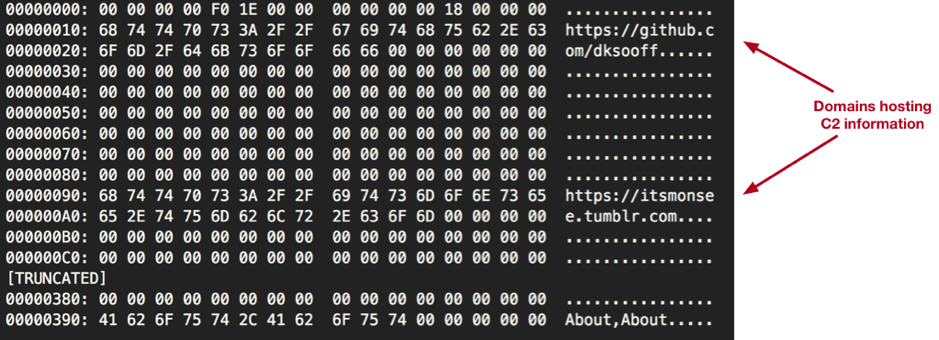
familyhome.jpeg.png.exe / myhome.jpeg.png.exe | 444e9fbf683e2cff9f1c64808d2e6769c13ed6b29899060d7662d1fe56c3121b

gift-certificate.pdf.png.exe | 124bb13ede19e56927fe5afc5baf680522586534727babbe1aa1791d116caeeb

request-for-quotation.pdf.png.exe | dce91ff60c8d843c3e5845061d6f73cfc33e34a5b8347c4d9c468911e29c3ce6

DLL’s

rp.dll | 3c48c7f16749126a06c2aae58ee165dc72df658df057b1ac591a587367eae4ad

rp.dll | a5768f1aa364d69e47351c81b1366cc2bfb1b67a0274a56798c2af82ae3525a8

Second stage encoded images

19.png | e42a0fb66dbf40578484566114e5991cf9cf0aa05b1bd080800a55e1e13bff9e

72.png | cd64f1990d3895cb7bd69481186d5a2b1b614ee6ac453102683dba8586593c03

AgentTesla

RII9DKFR5LC4Y669MLOA2C50SFLPHZBN61CZ160Z.exe  | 3e588ec87759dd7f7d34a8382aad1bc91ce4149b5f200d16ad1e9c1929eec8ec

B92MKZFESR6J7R2PNQ9ZTBA6QN0LIEXTUQEVH3T3.exe  | 8fb72967b67b5a224c0fcfc10ab939999e5dc2e877a511875bd4438bcc2f5494

2 Minute Threat Brief: Android Toast Overlay Attack

Unit 42 released details about a vulnerability that affects Android devices running operating systems older than 8.0 Oreo. The vulnerability leaves Android users at risk of falling victim to an Android Toast Overlay attack. Patches are available that fix this vulnerability, so Android users should get the latest updates as soon as possible.

How it Works

The vulnerability affects the Toast feature on Android devices, an Android feature that allows display messages and notifications of other applications to “pop up,” and allows an attacker to employ an overlay attack.

An overlay attack happens when an attacker places a window over a legitimate application on the device. Users will interact with the window, thinking they are performing their intended function, but they are actually engaging with the attackers overlay window and executing the attacker’s desired function. You can see an example of how this would work in Figure 1.

Eila_toast


Figure 1: Bogus patch installer overlying malware requesting administrative permissions

This interaction can install malware or malicious software on the device, grant malware full administrative privileges or lock the user out and render the device unusable.

In the past successful overlay attacks were typically dependent on two conditions:

  1. The malicious application must be downloaded from Google Play.
  2. The malicious application must explicitly request permissions from the user to enable the “draw on top” functionality, allowing the application to display something on the window even if the application is not in the foreground.

However, with this particular vulnerability, these conditions are no longer required for a successful attack. This means that attackers can use this vulnerability in apps users get from places other than Google Play. And when they install these malicious apps, they don’t have to ask for the “draw on top” permission.

How to Defend Against It

Keeping devices updated is a general security best practice. The Android Toast Overlay attack specifically targets outdated devices using versions prior to 8.0. In order to defend against the Android Toast Overlay attack, update all Android devices to the latest version. Additionally, avoid downloading malicious applications by only downloading from the Google Play store is another best practice you should always follow.

Palo Alto Networks Discovers New QEMU Vulnerability

Palo Alto Networks Unit 42 recently discovered CVE-2017-12809, which is a vulnerability affecting QEMU beginning with version 2.8. We reported this vulnerability and it has been fixed in QEMU version 2.10.0 released on August 30, 2017. The latest version can be obtained from QEMU here.

The vulnerability results from a flaw in the way QEMU’s emulated hard drive controller handles the ATA_CACHE_FLUSH command. The QEMU host process will dereference a NULL pointer if ATA_CACHE_FLUSH is issued to a removable drive with no disk present (the default configuration).  This causes the host OS to terminate QEMU. In Windows, this can be triggered from user mode by an unprivileged process by opening a handle to the emulated CDROM drive using the CreateFile() API, followed by DeviceIoControl() with IOCTL_ATA_PASS_THROUGH. Using this technique on a real physical machine will have no effect.

We found the vulnerability by hooking LLVM’s libFuzzer up to QEMU’s emulated memory and IO ports. Our custom hypervisor undergoes continuous fuzzing with this and other fuzzers to ensure the highest security for our customers.

Many security products use QEMU to sandbox files in the process of determining if they are malicious. By triggering this vulnerability before malicious behavior, an attacker can force security products to classify malicious files as benign.

Palo Alto Networks products are not affected by this vulnerability. The WildFire service detonates malware in a custom hypervisor that does not share any code with QEMU.

LabyREnth CTF 2017: Check Out the Prizes

The LabyREnth Capture the Flag (CTF) challenge may be over, however we’re excited to show off the prizes our players are receiving this year. Prizes will go out this week, so be sure to check your mailboxes in the coming weeks.

Players who were able to finish the first challenge in all five tracks will be receiving both of these challenge coins this year. One commemorating the LabyREnth 2017 CTF and their accomplishment, the other commemorating Szechuan sauce, which is of vital importance.

Labyrenthprize_1

Next, those talented players that were able to complete a full track will be receiving their own, one of a kind Minifig! This regal king symbolizes the final boss that blocked the players’ way if they wished to complete everything.

Labyrenthprize_2

However, for those brave few that were able to pass the final challenge and escape the LabyREnth this year, we’ll be sending you this framed 11”x14” map! Every dark hallway you traversed and challenge you overcame is here for you to remember. Congratulations!

Labyrenthprize_3

Threat Brief: Patch Today and Don’t Get Burned by an Android Toast Overlay

Today, Palo Alto Networks Unit 42 researchers are announcing details on a new high- severity vulnerability affecting the Google Android platform. Patches for this vulnerability are available as part of the September 2017 Android Security Bulletin. This new vulnerability does NOT affect Android 8.0 Oreo, the latest version; but it does affect all prior versions of Android. There is some malware that exploits some vectors outlined in this article, but Palo Alto Networks Unit 42 is not aware of any active attacks against this particular vulnerability at this time. Since Android 8.0 is a relatively recent release, this means that nearly all Android users should take action today and apply updates that are available to address this vulnerability.

What our researchers have found is a vulnerability that can be used to more easily enable an “overlay attack,” a type of attack that is already known on the Android platform. This type of attack is most likely to be used to get malicious software on the user’s Android device. This type of attack can also be used to give malicious software total control over the device. In a worst-case attack scenario, this vulnerability could be used to render the phone unusable (i.e., a “brick”) or to install any kind of malware including (but not limited to) ransomware or information stealers. In simplest terms, this vulnerability could be used to take control of devices, lock devices and steal information after it is attacked.

An “overlay attack” is an attack where an attacker’s app draws a window over (or “overlays”) other windows and apps running on the device. When done successfully, this can enable an attacker to convince the user he or she is clicking one window when, in fact, he or she is actually clicking another window. In Figure 1, you can see an example where an attacker is making it appear that the user is clicking to install a patch when in fact the user is clicking to grant the Porn Droid malware full administrator permissions on the device.

AndroidToast_7

Figure 1: Bogus patch installer overlying malware requesting administrative permissions

You can see how this attack can be used convince users to unwittingly install malware on the device. This can also be used to grant the malware full administrative privileges on the device.

An overlay attack can also be used to create a denial-of-service condition on the device by raising windows on the device that don’t go away. This is precisely the type of approach attackers use with ransomware attacks on mobile devices.

Of course, an overlay attack can be used to accomplish all three of these in a single attack:

  1. Trick a user into installing malware on their device.
  2. Trick a user into giving the malware full administrative privileges on the device
  3. Use the overlay attack to lock up the device and hold it hostage for ransom

Overlay attacks aren’t new; they’ve been discussed before. But until now, based on the latest research in the IEEE Security & Privacy paper, everyone has believed that malicious apps attempting to carry out overlay attacks must overcome two significant hurdles to be successful:

  1. They must explicitly request the “draw on top” permission from the user when installed.
  2. They must be installed from Google Play.

These are significant mitigating factors and so overlay attacks haven’t been reckoned a serious threat.

However, our new Unit 42 research shows that there is a way to carry out overlay attacks where these mitigating factors don’t apply. If a malicious app were to utilize this new vulnerability, our researchers have found it could carry out an overlay attack simply by being installed on the device. In particular, this means that malicious apps from websites and app stores other than Google Play can carry out overlay attacks. It’s important to note that apps from websites and app stores other than Google Play form a significant source of Android malware worldwide.

The particular vulnerability in question affects an Android feature known as “Toast.” “Toast” is a type of notification window that “pops” (like toast) on the screen. “Toast” is typically used to display messages and notifications over other apps.

Unlike other window types in Android, Toast doesn’t require the same permissions, and so the mitigating factors that applied to previous overlay attacks don’t apply here. Additionally, our researchers have outlined how it’s possible to create a Toast window that overlays the entire screen, so it’s possible to use Toast to create the functional equivalent of regular app windows.

In light of this latest research, the risk of overlay attacks takes on a greater significance. Fortunately, the latest version of Android is immune from these attacks “out of the box.” However, most people who run Android run versions that are vulnerable. This means that it’s critical for all Android users on versions before 8.0 to get updates for their devices. You can get information on patch and update availability from your mobile carrier or handset maker.

Of course, one of the best protections against malicious apps is to get your Android apps only from Google Play, as the Android Security Team aggressively screens against malicious apps and keeps them out of the store in the first place.

Android Toast Overlay Attack: “Cloak and Dagger” with No Permissions

Palo Alto Networks Unit 42 researchers have uncovered a high severity vulnerability in the Android overlay system, which allows a new Android overlay attack by using the “Toast type” overlay. All Android devices with OS version < 8.0 are affected by this vulnerability and patches are available as part of the September 2017 Android Security Bulletin. Android 8.0 was just released and is unaffected by this vulnerability. Because Android 8.0 is recent, this vulnerability affects nearly all Android devices currently in the market (see Table 1) and users should apply updates as soon as possible.

Overlay attacks permit an attacker to draw on top of other windows and apps running on the affected device. To launch such an attack, malware normally needs to request the “draw on top” permission. However, this newly discovered overlay attack does not require any specific permissions or conditions to be effective. Malware launching this attack does not need to possess the overlay permission or to be installed from Google Play. With this new overlay attack, malware can entice users to enable the Android Accessibility Service and grant the Device Administrator privilege or perform other dangerous actions. If these privileges are granted, a number of powerful attacks can be launched on the device, including stealing credentials, installing apps silently, and locking the device for the ransom.

The research was inspired by the paper “Cloak and Dagger: From Two Permissions to Complete Control of the UI Feedback Loop” by Yanick Fratantonio of UC Santa Barbara and Chenxiong Qian, Simon P. Chung, Wenke Lee of Georgia Tech (PDF Link). This paper was recently presented at the IEEE Security & Privacy 2017 conference in May 2017. This paper proposed several innovative accessibility attacks but with the assumption that the malicious app must explicitly request two permissions and be installed from Google Play. Our new research shows that the accessibility attacks proposed in the paper can be launched successfully even if the app is not from Google Play and declares only one permission “BIND_ACCESSIBILITY_SERVICE”.

As with Cloak and Dagger, this overlay attack works by modifying regions of the screen to change what the user sees, tricking them into enabling additional permissions or identifying their inputs. A video of the this attack in action is available here:

This vulnerability was assigned CVE-2017-0752 and was disclosed in the Android Security Bulletin September.

Overlay Attack with Zero Conditions

New Overlay Attack using Toast

The “Toast” window (TYPE_TOAST) is one of the supported overlay types on Android. The Toast overlay is typically used to display a quick message over all other apps. For example, a message indicating that an e-mail has been saved as draft when a user navigates away without sending an e-mail. It naturally inherits all configuration options as for other windows types. However, our research has found using the Toast window as an overlay window allows an app to write over the interface of another App without requesting the SYSTEM_ALERT_WINDOW privilege this typically requires.

This discovery allows an installed app to craft an overlay on the screen with a Toast window. In this way, the app can launch an overlay attack without any special permissions. The crafted overlay includes two types of views (Figure 1), both of which are embedded in a Toast window. In the sample below, view1 covers the bottom GUI and monitors user clicks to infer the attack progress while view2 is a clickable view that the attacker tries to lure the victim to click on.

AndroidToast_1

Figure 1: Using a Toast window to craft an overlay

Vulnerability on Android OS version <= 7.0

This vulnerability is caused by a missing permission check. The related code segment in Android AOSP (version <= 7.0) is shown in the Figure 2. Normally, overlaying a window on top of other apps requires both permission check and an operation check. However, in the case of TYPE_TOAST, neither of those checks are in place. The request will be granted automatically. According to the inline comments in Figure 2, the app will be granted complete control over TYPE_TOAST window.

AndroidToast_2

Figure 2: No permission check for the TYPE_TOAST

Vulnerability on Android OS version 7.1

Android 7.1 introduces two layers of mitigations: timeout and the single toast window per UID at a time (See Table 1). The first mitigation forcibly assigns a maximum timeout (3.5s) for each Toast window (Figure 3). Upon timeout, the Toast window will fade away to mimic the normal Toast behavior on Android. Not surprisingly, this can be defeated with deliberately aligned repetitive popup Toast windows. For the second mitigation, Android 7.1 allows only one Toast window per app to be shown at a time (Figure 4). These two defensive mechanisms pose challenges on deceiving victims using a Toast window overlay. However, it does not address the fundamental causes: an app does not need any permission to display a Toast window on top of any other apps.

AndroidToast_3

Figure 3: Timeout for the Toast window in Android 7.1 (mitigation 1)

AndroidToast_4

Figure 4: Only one Toast window is allowed per UID in Android 7.1 (mitigation 2)

For Android 7.1, to achieve the same overlay attack, a malicious app can use a LooperThread to continuously show a Toast window (Figure 5). Since only one overlay can be used at the same time, the malicious app cannot monitor whether the user has clicked on the expected area in the overlay. An alternative approach is to show one overlay to lure users to click on it, sleep for several seconds and then switch to another overlay for future steps. Obviously, the success rate of the overlay attack has been reduced by this mitigation. This alternative approach is also applicable on Android versions ranging from 2.3.7 to 4.3. Because, the Flag “FLAG_WATCH_OUTSIDE_TOUCH” has been removed forcibly in the Toast window ( Figure 6).

Fortunately, we have confirmed that, a proper permission check has been added in Android O (8.0) Beta.

AndroidToast_5

Figure 5: Bypassing the timeout limitation with a loop

AndroidToast_6

Figure 6: FLAG_WATCH_OUTSIDE_TOUCH flag is removed in the version 2.3.7 - 4.3

Version Distribution Without permission Monitor outside touch Timeout Multiple overlays for same UID Verified in real devices
2.3.3

2.3.7

0.7% Yes Yes

(No in 2.3.7)

No Yes No
4.0.3

4.0.4

0.7% Yes No


No Yes Yes
4.1.x 2.7% Yes No No Yes No
4.2.x 3.8% Yes No No Yes No
4.3 1.1% Yes No No Yes No
4.4 16.0% Yes Yes No Yes Yes
5.0 7.4% Yes Yes No Yes Yes
5.1 21.8% Yes Yes No Yes Yes
6.0 32.3% Yes Yes No Yes Yes
7.0 12.3% Yes Yes No Yes Yes
7.1 1.2% Yes Yes Yes (3.5 s) No Yes
8.0 0.0% No _ _ _ Yes

Table 1: Overlay Attack Mitigations in Versions of Android

Possible Follow-ons to an Overlay Attack

With the vulnerability described above, all the accessibility attacks demonstrated in the “Cloak and Dagger” paper can be performed successfully. Furthermore, here we demonstrate several other attacks that are practical using the TYPE_TOAST floating window.

Attacks through the device administrator

Through the overlay attack, an installed malicious app can trick the user into giving the app Device Administrator privileges. With this, it will have the capability to launch destructive attacks, including:

  • Locking the device screen
  • Resetting the device PIN
  • Wiping the device’s data
  • Preventing the user from uninstalling the App

One way to lure the user to grant the device administrator privilege is to launch a clickjacking overlay attack. Malware in the wild has already launched this type of attack. As depicted in Figure 7, the malware presents an “Installation is complete” dialog with a “Continue” button. This dialog, however, is actually a TYPE_SYTEM_OVERLAY window with the device administrator activation dialog sitting underneath. From the Android API documentation, a TYPE_SYSTEM_OVERLAY is “system overlay windows, which need to be displayed on top of everything else” and “These windows must not take input focus”. So, once the user clicks the “Continue” button, the click event is actually sent to the “Activate” button on the real device administrator activation window.

An attack using the TYPE_TOAST window accomplishes this as well, with the view flag set to FLAG_NOT_FOCUSABLE and FLAG_NOT_TOUCHABLE, we can launch a similar attack without any special permissions.

AndroidToast_7

Figure 7 Android malware uses clickjacking overlay to active device administration

Locker and Ransomware Attack

Android Locker and Ransomware has been in the wild for years. Most Android Ransomware achieve screen locking through the following methods:

  • SYSTEM_ALERT_WINDOW: An Android app with this permission can display a floating window on top of any other apps. By setting the proper window types and view flags, for example, TYPE_SYSTEM_ERROR, TYPE_SYSTEM_OVERLAY, and FLAG_FULLSCREEN, this kind of floating window becomes non-removable by users. This technique prevents the user from accessing their device.
  • Device Administrator: An Android app with this privilege can reset the screen password and then locks the device screen. The compromised device becomes a brick for the victim if the screen is locked and PIN reset.

With the TYPE_TOAST type window and the default view flag, we don’t need any extra permissions to achieve the effect of screen locking by displaying a full screen floating window, and this kind of window is not removable by a user. Although there is a time limit to show the TYPE_TOAST window on Android 7.1, we can continuously pop up the Toast window in a loop, as presented earlier. Hence, we can bypass that limitation on Android 7.1.

Remediation

Our team reported this vulnerability to Google on May 30th of 2017 and Google quickly verified the vulnerability existed. Google patched and disclosed this vulnerability on September 5th of 2017.

More information about the patch is available at Android Security Bulletin.

We recommend that all users deploy patches for their Android devices to protect themselves from attackers who may exploit this vulnerability.


Analysing a 10-Year-Old SNOWBALL

Much has been written about the malware toolkit dubbed Animal Farm which is made up of several implants known as Babar, Bunny, NBot, Dino, Casper and Tafacalou. Some of these tools have been used in past attacks against organizations, companies and individuals.

One of the first tools believed to be used by this adversary to target a potential victim is Babar, also known as SNOWBALL. Previous samples of SNOWBALL date back to 2011. However, Palo Alto Networks Unit 42 has identified a much older version. This version of the malware dates back to 2007 according to its compilation time stamp which we believe is valid.

We discovered this sample by coincidence while searching for another unrelated malware in a large malware repository. While looking at the strings and the structure, we could make a connection to previously published documents and decided to do a deeper analysis.

Why analyse malware from the past?

Analysing historical malware samples helps us learn about its set of features and technical capabilities. This helps us compare a tool used by one adversary to that used by similarly adversaries at that time.

This earlier sample of Babar uses many features not present in later versions. The sample also uses a compromised third party website as a C2 server like later versions. We also found a simple bug and a design flaw in the code you wouldn’t expect from malware developed by mature actors.

Detailed technical breakdown

The Loader

The PE sample comes in form of a loader which has a compilation time stamp of 11/09/2007 11:37:36 PM. The loader contains a resource named MYRES (Figure 1) where the payload DLL is stored.

Snowball_1

Figure 1. PE resource named MYRES with main payload DLL

The version info resource language ID is 1036 which stands for French.

The following clear text strings can be found in the loader:

At the beginning, it changes the error mode of the process to handle the following errors:

  • SEM_NOOPENFILEERRORBOX
  • SEM_NOGPFAULTERRORBOX
  • SEM_FAILCRITICALERRORS

For this, it sets up an exception handler with the address to ExitProcess(). Thus, if any of the errors occur the malware just exits.

Next, it tries to gain debug privileges and checks if the major OS version is >= Windows Vista and the platform ID is VER_PLATFORM_WIN32_NT. If so, if tries to create a file named event.log in the %ALLUSERSPROFILE% folder. However, the authors forget to append the character "\" before appending the hardcoded string "event.log". This results in the creation of the following file:

If the call to CreateFile() fails, it tries to delete this file.

Next, it tries to get the local AppData folder path first by querying the %APPDATA% environment variable and if that fails, it looks in the shell folders in the registry. This data is then used to create the following file paths with the hardcoded file names:

The malware also tries to delete any traces it was executed by deleting the corresponding entries in the following registry keys:

After this, the malware checks if its main module is already present on a victim’s system by trying to open the file:

If the file is present, the malware checks if the module file name of the process is as follows and exits otherwise:

If it matches the malware creates a temporary file in the local user’s temp folder and copies the resource named MYRES into it. This file is the payload DLL which then gets moved as wmimgnt.dll to the AppData folder. The file attributes are changed to hidden and the file time is changed to make it look like an old file. The same procedure is done with the initial file which gets copied as wmimngt.exe into the AppData folder.

Thereafter, the malware checks again the major OS version and platform ID like previously and opens the following registry key to get the default internet browser:

The malware authors assumed the browser string always ends with a ".exe" extension and calculate the string in the following manner:

The calculation of the string length in v4 only works if the default browser is for example Internet Explorer or Firefox, as these browsers have an .exe extension in the registry key:

While a browser like Chrome uses the following string:

In this case, the string length gets wrongly calculated and the subsequent call to memcpy() fails with an error so the exception handler kicks in to terminate the process. However, as Chrome was first released in 2008 and the malware was coded earlier, this can't be considered as a bug.

After retrieving the string of the default browser from registry, it builds the following string to get the application path of it:

If this was successful it searches for the string "iexplore.exe" in the path and appends the string " -embedding" to it. If it failed, the malware retrieves the ProgramFiles path via the environment variable "%ProgramFiles%" and appends the string "\Internet Explorer\iexplore.exe -embedding".

The command line argument "-embedding" does the following according to Microsoft:

At last, it creates a suspended process of Internet Explorer and injects the payload DLL via the infamous CreateRemoteThread() method.

The Payload DLL

This sample has a compilation time stamp of 11/09/2007 11:37:46 PM (10 seconds after the loader.) It contains an encrypted resource named XML which contains configuration data. The encryption algorithm RC4 is used with the key +37:*$pK#s. Both the version info and the XML resource language IDs have again the value 1036 (French).

Decrypted configuration data:

As can be seen, a third-party website was compromised as C2 server to host a script named outbase.php. The domain (cpcc-rdc.org) is the official site of Permanent Council of Accounting of the Democratic Republic of the Congo. The script is not online anymore as the attack was most likely carried many years ago.

The following clear text strings can be found in the DLL:

The sample only executes if the reason code why the DLL entry-point function was being called is DLL_PROCESS_ATTACH.

At first, the malware decrypts the XML configuration data to memory, searches for the XML tags <RUN_KEY> and <CONFIG_KEY> and extracts their content. With this data, it checks if the malware's persistency is already present in the registry Run key and creates it if it's not the case:

Thereafter, it decrypts the data of the following XML tags and stores them in memory:

The implementation of this part of the code is somewhat flawed, since the malware contains the encrypted configuration data, but the same data (except for the C2 domain) is also present as clear text strings. If the decryption didn’t work it uses the clear text strings.

Snowball_2

Figure 2. Clear text configuration data

It also creates the following new XML tags based on the old ones:

All the XML tags are then RC4 encrypted with key +37:*$pK#s and stored in the following registry key:

Then, it tries to get system information from the following registry keys:

The malware also retrieves the current system time, encrypts it with RC4 and the same key and stores it in the following registry key:

Then, it creates a string with the previously retrieved system information, the configuration data and the following string template:

Next, the MD5 hash of this string is calculated and encrypted with RC4 and the same key again. This encrypted string gets then stored in the following registry key:

To send victim information to the C2 server, it prepares a URL query string by entering the "INFO" branch. The other query branch named "CMD" is entered to send back the result of a command sent by the C2 server.

Snowball_3

Figure 3. URL query string creation branches

At first, the checks if the <ENCODE> XML tag is set to 0x1 and if so it encrypts the previously created string with the victim’s information with the password contained in the <PASSWORD> XML tag. It does this by bytewise adding 0x80 to the password string and then using an encoded byte to bytewise XOR the information string. The encrypted string gets then Base64 encoded and the characters "+", "/" and "=" URL encoded ("%2B", "%2F", "%3D"). The following string template is then used together with the encrypted data to form the final URL query string:

The first string is the previously calculated MD5 hash, the decimal number is made of a random number between 3000/3600 ( XML tag) and 4000/4800 ( XML tag). The last string is made of the hardcoded "INFO" string along with the Base64 encoded victim data. For example:

To test if the computer is connected to the internet it uses InternetGetConnectedState() API function. Next, it enters either the "main" or the "safe" branch referring to the XML tags. The main branch is the usual execution path, while the safe branch only gets used for a specific malware command. If there is no internet connection it sleeps for a certain time, otherwise it contacts the C2 server present in the <HOST>  XML tag together with the URL query string. The malware has the ability to send data with both HTTP request methods, GET and POST. However, this sample only uses the POST request method along with the following content type field:

After contacting the C2 server, the malware copies the response into memory and scans for the marker =#-+ApAcHe_ToMcAt+-#= taken from the <PREFIX> XML tag. If successful, the response gets Base64 decoded and decrypted with the same algorithm used to encrypt the victim information string. The PHP script outbase.php can respond with one of the commands listed below, which the malware then executes.

To process some commands, the malware creates an anonymous pipe and a hidden instance of cmd.exe or command.com, depending on the platform ID. The command line output gets redirected to the pipe, read into memory and later send back encrypted and encoded via the "CMD" URL query branch.

Possible malware commands:

1. pwd
Get current working directory

2. cd
change directory to delivered string

3. part
Get list and type of partitions

4. reboot
Reboot system

5. shutdown
Shutdown system

6. download
Download file < 512,000 bytes delivered in form of a URL ("500 Ko") to disk

7. big
Download file > 512,000 bytes delivered in form of a URL ("500 Ko") to disk

8. wget
Download file with predefined HTTP query string

9. fetch
Download file via URLDownloadToFile()

10. wput
Download data from internet via download command and sent data back via "data=" query

11. info
Send back victim system information (see above)

12. showconfig
Send back current config data with following string template:

13. timeout
Change current timeout interval variables

14. timeout_main
Change timeout intervals in main XML configuration

15. timeout_safe
Change timeout intervals in safe XML configuration

16. newurl_main
Change host URL in main XML configuration

17. newurl_safe
Change host URL in safe XML configuration

18. movetosite
Change current host URL variable

19. listprocess
Get list of current processes with PID

20. killprocess
Terminate process delivered via string

21. kitkit
Terminate itself

22. uninstall
Delete malware files on disk and registry entries

Conclusion

This malware has a small set of features ranging from retrieving system information, to downloading files or killing processes on a victim’s system. Technically, it is not outstanding and can be considered only average compared to alleged state sponsored malware written at that time (e.g. Careto or Regin). The code and structure is similar to the Casper implant which is most likely based on this implant. The malware contains an obvious design flaw leaving the main part of the configuration data visible in clear text.

  • AutoFocus customers can identify this, and other samples related to it using the Snowball
  • WildFire and Traps properly classify Snowball samples as malicious.

Thanks to Esmid Idrizovic for his assistance in this analysis.

Indicators of Compromise:

Hashes (SHA-256)

Loader: c71b1a31bdf3a08fa99ed1f6a1c5ded61e66f3d41e4ed88a12430d1c14ed10ca
Payload DLL: a9220590d3c35fe22df9d38a066ca8d112b83764b39fea98b38761daa64c77b8