Fighting Ursa Aka APT28: Illuminating a Covert Campaign

Executive Summary

Early this year, Ukrainian cybersecurity researchers found Fighting Ursa leveraging a zero-day exploit in Microsoft Outlook (now known as CVE-2023-23397). This vulnerability is especially concerning since it doesn’t require user interaction to exploit. Unit 42 researchers have observed this group using CVE-2023-23397 over the past 20 months to target at least 30 organizations within 14 nations that are of likely strategic intelligence value to the Russian government and its military.

During this time, Fighting Ursa conducted at least two campaigns with this vulnerability that have been made public. The first occurred between March-December 2022 and the second occurred in March 2023.

Unit 42 researchers discovered a third, recently active campaign in which Fighting Ursa also used this vulnerability. The group conducted this most recent campaign between September-October 2023, targeting at least nine organizations in seven nations.

Of the 14 nations targeted throughout all three campaigns, all are organizations within NATO member countries, except for entities in Ukraine, Jordan and the United Arab Emirates. These organizations included critical infrastructure and entities that provide an information advantage in diplomatic, economic and military affairs.

Target organizations included those related to:

  • Energy production and distribution
  • Pipeline operations
  • Materiel, personnel and air transportation
  • Ministries of Defense
  • Ministries of Foreign Affairs
  • Ministries of Internal Affairs
  • Ministries of the Economy

Fighting Ursa (aka APT28, Fancy Bear, Strontium/Forest Blizzard, Pawn Storm, Sofacy or Sednit) is a group associated with Russia’s military intelligence and they are well known for their focus on targets of Russian interest – especially those of military interest. Fighting Ursa has been attributed to Russia's General Staff Main Intelligence Directorate (GRU) 85th special Service Centre (GTsSS) military intelligence Unit 26165.

We are publishing this research to highlight Fighting Ursa using this vulnerability in multiple campaigns despite their tactics having been publicized by security industry research documenting this activity. High risk organizations and nations using Microsoft Outlook should patch CVE-2023-23397 immediately and ensure appropriate configuration to defend against future attacks.

Palo Alto Networks customers receive protection with the following products against the types of threats discussed in this blog:

Related Unit 42 Topics Russia, Ukraine
Fighting Ursa APT Group AKAs APT28, UAC-0001, Fancy Bear, Strontium / Forest Blizzard, Pawn Storm, Sofacy, Sednit

CVE-2023-23397: A Brief Overview

Prior to the conflict in Ukraine, Fighting Ursa had established a reputation for its hacking in support of Russia’s information warfare operations. This support includes the following efforts:

  • Countering Olympic anti-doping investigation narratives
  • Subverting an investigation into the use of chemical agents in an assassination attempt by the GRU in Great Britain
  • Influencing democratic election processes in the United States, France and Germany

Less internationally well known are Fighting Ursa’s collective hacking campaigns in the lead-up to Russia’s invasion of Ukraine through today.

On Feb. 24, 2022, Russia initiated a full-scale armed invasion of Ukraine. Three weeks later (March 18, 2022), Fighting Ursa emailed the first known instance of an exploit using the CVE-2023-23397 vulnerability (which was then a publicly undiscovered zero-day exploit) to target the State Migration Service of Ukraine.

Fighting Ursa continued to use this vulnerability as part of its targeting strategy even after Ukrainian cybersecurity researchers discovered the exploit and Microsoft publicly attributed its use to “a Russia-based threat actor” on March 14, 2023, when issuing a patch for the vulnerability.

Overall, Unit 42 researchers have observed three distinct Fighting Ursa campaigns associated with this CVE:

  • Zero-day campaign (Initial campaign prior to discovery): March 18-Dec. 29, 2022
  • Second campaign (post-identification of CVE): March 15-29, 2023
  • Third campaign: Aug. 30-Oct. 11, 2023

Figure 1 shows Fighting Ursa’s last observed attempt to use CVE-2023-23397 in a message sent to a Montenegrin Ministry of Defense account on Oct. 11, 2023. This message was sent from an account the actors had created on a public mail service (portugalmail[.]pt).

Image 1 is a screenshot of Microsoft Outlook where the malicious task has been sent to the Montenegrin Ministry of Defense account. The email is from daniel.myers1998@portugalmail.pt. The to line is redacted. The subject is Test Meeting. It was received Wednesday October 11, 2023.
Figure 1. Malicious task request sent to Montenegrin Ministry of Defense account. SHA256 4238c061102400fa27356266c6f677d1d7320f66f955a7f389eb24f10a49b53d.

Successful exploitation of Microsoft Outlook using this vulnerability results in a relay attack using Windows (New Technology) NT LAN Manager (NTLM) as described in our threat brief for CVE-2023-23397.

NTLM is a challenge-response style authentication protocol that is prone to relay attacks, so Kerberos has been the default authentication protocol in Windows systems since Windows 2000. However, many Microsoft applications still use NTLM as a fallback protocol in cases where Kerberos is not feasible. Microsoft Outlook is one such application.

When a vulnerable or misconfigured Outlook application receives a specially crafted email exploiting CVE-2023-23397, Outlook sends an NTLM authentication message to an attacker-controlled remote file share. The NTLM authentication response is an NTLMv2 hash that Fighting Ursa uses to impersonate the victim, accessing and maneuvering within the victim's network. This is commonly known as an NTLM relay attack.

Unit 42 researchers attribute the activities within these campaigns to Fighting Ursa for two primary reasons:

  1. The targeted victims in these campaigns are all of apparent intelligence value to the Russian military.
  2. The campaigns all used co-opted Ubiquiti networking devices to harvest NTLM authentication messages from victim networks, which is consistent with previous Fighting Ursa campaigns.

Victimology: A Study in Russian Targeting Priorities

Delving into more than 50 observed samples in which Fighting Ursa targeted victims with CVE-2023-23397 provides unique and informative insights into Russian military priorities during a time of international conflict for them. Zero-day exploits by their nature are valuable commodities for APTs. Threat actors only use these exploits when the rewards associated with the access and intelligence gained outweigh the risk of public discovery of the exploit.

Using a zero-day exploit against a target indicates it is of significant value. It also suggests that existing access and intelligence for that target were insufficient at the time.

In the second and third campaigns, Fighting Ursa continued to use a publicly known exploit that was already attributed to them, without changing their techniques. This suggests that the access and intelligence generated by these operations outweighed the ramifications of public outing and discovery.

For these reasons, the organizations targeted in all three campaigns were most likely a higher than normal priority for Russian intelligence.

There are a few key takeaways when looking at the targets collectively, as shown in Figure 2:

  1. Other than Ukraine, all of the targeted European nations are current members of the North Atlantic Treaty Organization (NATO)
  2. Attackers targeted at least one NATO Rapid Deployable Corps
  3. Outside of government organizations, attackers focused on targeting critical infrastructure-related organizations within the following sectors:
    1. Energy
    2. Transportation
    3. Telecommunications
    4. Information technology
    5. Military industrial base
Table of organizations targeted including nations, sectors and international organizations.
Figure 2. Observed targets of Fighting Ursa CVE-2023-23397 campaigns.

Conclusion

It is rare to have such a detailed understanding of an APT’s targeting priorities, especially an APT like Fighting Ursa whose mission mandate is to conduct attacks on behalf of Russia’s military.

Governments and critical infrastructure providers across NATO and European nations are encouraged to take the following actions:

  • Take note of these tactics
  • Patch this vulnerability
  • Configure endpoint protections to block these types of malicious campaigns

Protections and Mitigations

If you think you might have been compromised or have an urgent matter, get in touch with the Unit 42 Incident Response team or call:

  • North America Toll-Free: 866.486.4842 (866.4.UNIT42)
  • EMEA: +31.20.299.3130
  • APAC: +65.6983.8730
  • Japan: +81.50.1790.0200

Palo Alto Networks has shared these findings with our fellow Cyber Threat Alliance (CTA) members. CTA members use this intelligence to rapidly deploy protections to their customers and to systematically disrupt malicious cyber actors. Learn more about the Cyber Threat Alliance.

Indicators of Compromise

  • 5.199.162[.]132
  • 101.255.119[.]42
  • 181.209.99[.]204
  • 213.32.252[.]221
  • 168.205.200[.]55
  • 69.162.253[.]21
  • 185.132.17[.]160
  • 69.51.2[.]106
  • 113.160.234[.]229
  • 24.142.165[.]2
  • 85.195.206[.]7
  • 42.98.5[.]225
  • 61.14.68[.]33
  • 50.173.136[.]70

Additional Resources

New Tool Set Found Used Against Organizations in the Middle East, Africa and the US

Executive Summary

Unit 42 researchers observed a series of apparently related attacks against organizations in the Middle East, Africa and the U.S. We will discuss a set of tools used in the course of the attacks that reveal clues about the threat actors’ activity. We are sharing this research to provide detection, prevention and hunting recommendations to help organizations strengthen their overall security posture.


These tools were used to perform the following activities:

  • Establish backdoor capabilities
  • For command and control (C2)
  • Steal user credentials.
  • Exfiltrate confidential information

Unit 42 is sharing these results with the purpose of helping organizations defend against the tools observed here.

We assess with medium confidence that this threat activity cluster aligns to nation-state related threat actors due to the nature of the organizations that were compromised, the TTPs observed and the customization of the tool set. We have not confirmed a particular nation-state or threat group.

Tools that were used in this cluster were the following:

  • A new backdoor we’ve named Agent Racoon
    • This malware family is written using the .NET framework and leverages the domain name service (DNS) protocol to create a covert channel and provide different backdoor functionalities. Threat actors have used this along with the other two tools in multiple attacks targeting organizations across the U.S., Middle East and Africa. Its C2 infrastructure dates back to 2020.
  • A new tool we’ve named Ntospy
    • This malware is a Network Provider DLL module designed to steal user credentials.
  • A customized version of Mimikatz called Mimilite

The compromised organizations belong to the following industries:

  • Education
  • Real estate
  • Retail
  • Non-profit organizations
  • Telecom companies
  • Governments

Based on unique similarities in tools as well as tactics, techniques and procedures (TTPs), we are tracking this threat activity cluster as CL-STA-0002.

What follows is a detailed description of the activity we observed as well as characteristics of the tool set.

Palo Alto Networks customers receive protection from these threats through Cortex XDR as well as Advanced URL Filtering, DNS Security and Advanced Wildfire. Organizations can engage the Unit 42 Incident Response team for specific assistance with this threat and others.

Related Unit 42 Topics DNS, Mimikatz, Backdoor

Activity Summary

The threat actor used temporary directories such as C:\Windows\Temp and C:\Temp to deploy specific components of their tool set across the different affected organizations. They used the following similar filenames for batch and PowerShell scripts:

  • c:\windows\temp\crs.ps1
  • c:\windows\temp\ebat.bat
  • c:\windows\temp\install.bat
  • c:\windows\temp\mslb.ps1
  • c:\windows\temp\pb.ps1
  • c:\windows\temp\pb1.ps1
  • c:\windows\temp\pscan.ps1
  • c:\windows\temp\set_time.bat
  • c:\windows\temp\usr.ps1

While the attackers commonly used Ntospy across the affected organizations, the Mimilite tool and the Agent Racoon malware have only been found in nonprofit and government-related organizations’ environments.

After each attack session, the threat actor leveraged cleanmgr.exe to clean up the environment used during the session.

Gaining Access to Credentials with Ntospy

To perform credential theft, the threat actor used a custom DLL module implementing a Network Provider. A Network Provider module is a DLL component implementing the interface provided by Microsoft to support additional types of network protocols during the authentication process.

This technique is pretty well documented. Sergey Polak demonstrated the technique at BlackHat back in 2004 at his session titled “Capturing Windows Passwords using the Network Provider API.” In 2020, researcher Grzegorz Tworek uploaded his tool NPPSpy to GitHub, which also implements this technique.

Due to the file naming patterns of the DLL module, and as a reference to the previous research and tools, Unit 42 researchers named this malware family Ntospy. The threat actor registers the Ntospy DLL module as a Network Provider module to hijack the authentication process, to get access to the user credentials every time the victim attempts to authenticate to the system.

Figure 1 illustrates the path of the processes the malware used during the authentication process to load the malicious DLL module in an MS Exchange Server environment.

Image 1 is a screenshot of the different paths of the processes loading the DLL module in the Microsoft Exchange Server environment.
Figure 1. Image path of processes loading the malicious DLL component in an MS Exchange environment.

The threat actor’s implementation of this technique has some unique features. They created different versions of the Ntospy malware over the time frame we observed. They all share similarities, such as the following:

  • Using filenames with Microsoft patch patterns.
  • .msu extensions pretending to be Microsoft Update Package files to store the received credentials in cleartext.
  • RichPE header hashes that link different samples to the same compilation environment.

To install the DLL module, the threat actor registers a new Network Provider called credman. They do so by using an installation script found at C:\Windows\Temp\install.bat that installs the Network Provider by using reg.exe. The malware then sets the DLL module path by pointing to the malicious DLL module c:\windows\system32\ntoskrnl.dll.

Many lines of code. Attacker registers as credman.

Figure 2 shows static commonalities across the different DLL modules we identified as belonging to the same malware family. The image also illustrates that there are overlaps on the RichPE header hash as well as the PE sections of the samples.

Image 2 is a diagram of the static features as they relate across samples. Dark grey arrows leading from orange top-level icons point to red mid-level icons in the shape pf a virus. These in turn use light grey arrows to point to icons of files.
Figure 2. Graph of static features relation across samples.

In the group of samples with the same RichPE header hash, we saw that they had been compiled using the same environment. In this case, that was Visual Studio 2019 v16.0.0 build 27508. Other samples of the malware family have been compiled on different environments or even tweaked to avoid overlapping.

The samples that don’t share the same build environment are actually similar in behavior, but they have some differences in implementation. For instance, some of the malware samples contain the file path used to store the credentials hard-coded in plain text. Figures 3 and 4 show how others use an encrypted file path and stack strings.

Image 3 is a screenshot of many lines of code. It is the pseudocode showing the hard-coded file path as indicated by a red arrow.
Figure 3. Pseudocode showing the hard-coded file path in cleartext.
Image 4 is a screenshot of many lines of code. It is the pseudocode showing the encrypted file path as indicated by a red arrow.
Figure 4. Pseudocode showing the file path encrypted with a stream cipher.

Decrypting the file path at runtime shows that the versions using an encrypted file path also use the same file path pattern, as shown in Figure 5.

Image 5 is a screenshot of the file path decrypted at runtime. There are three columns visible: Address, Hex, ASCII.
Figure 5. File path decrypted at runtime.

All the DLL modules we identified use the same file path pattern, abusing the .msu file extension to masquerade as a Microsoft Update Package. The following paths are used by the malware samples:

  • c:/programdata/microsoft/~ntuserdata.msu
  • c:/programdata/package cache/windows10.0-kb5000736-x64.msu
  • c:/programdata/package cache/windows10.0-kb5009543-x64.msu
  • c:/programdata/packag~1/windows 6.1-kb4537803.msu

Also, the DLL files are stored in the following file paths:

  • C:\Windows\System32\ntoskrnl.dll
  • C:\Windows\Temp\ntoskrnl.dll
  • C:\Windows\Temp\ntos.dll

While the first file path is the one used to actually install the Network Provider module, the Temp directory is the working directory used by the threat actor to temporarily store the DLL modules. As shown in the file paths above, the threat actor used Windows binary name patterns (based on the Windows system file named ntoskrnl.exe) in an attempt to trick victims and analysts into overlooking the malicious DLL component.

The first activity is identified with the malware sample with the file hash SHA256 bcd2bdea2bfecd09e258b8777e3825c4a1d98af220e7b045ee7b6c30bf19d6df. This overlaps with another threat activity cluster that we call CL-STA-0043, originally published in June 2023.

Credentials Dumping Through Mimilite

Another tool used for gathering credentials and sensitive information is a customized version of the well-known Mimikatz tool that, according to references within the sample, the threat actor calls Mimilite.

The tool is a reduced version of Mimikatz, which needs to be given a password through the command line to run:

When the binary is executed, it takes the command-line argument as a decryption key to decrypt the actual payload using a stream cipher. Before executing the decrypted payload, the binary verifies that the payload has been successfully decrypted with the right key by performing an integrity check. This check is done by comparing the MD5 hash of the decrypted payload with the hard-coded value b855dfde7f778f99a3724802715a0baa, as shown in the code snippet in Figure 6.

Image 6 is a screenshot of many lines of code. Three red arrows indicate the execution logic.
Figure 6. Execution logic.

When executed properly, the tool dumps the credentials to the file path C:\Windows\Temp\KB200812134.txt. This choice of filename is another attempt by the threat actors to masquerade as a Microsoft update.

The Mimilite sample was found at C:\temp\update.exe with the file hash SHA256 3490ba26a75b6fb295256d077e0dbc13e4e32f9fd4e91fb35692dbf64c923c98. It was first uploaded to VirusTotal on 2020-05-11 05:43:00 UTC and first identified in the wild on 2021-02-12 21:54:35 UTC. What we find interesting is that according to VirusTotal, this sample has been uploaded and discovered in the wild using the following path and filename:

The elements of this path might suggest that the same binary has been involved in some sort of research that the uploader believed was linked with nation-state actors.

Agent Racoon Backdoor

The Agent Racoon malware family is built to provide backdoor capabilities. It is written using the .NET framework, and leverages DNS to establish a covert channel with the C2 server. Unit 42 researchers named the malware family Agent Racoon due to some references found within the code of the identified samples, as shown in Figure 7.

Image 7 is a screenshot of the .NET project details. There are entries for Assembly name, which is raccoon; Default namespace, which is agent; Target framework, which is .NET Framework 4; Output type, which is Console Application; and Startup object, which is agent.Program. Auto-generate binding redirects is not selected.
Figure 7. .NET Project details.

When executed, the threat has some predefined settings such as:

  • The base domain used to create the DNS covert channel
  • A unique key per sample, used as a seed to generate an encryption password to encrypt the DNS communication
  • A fallback DNS server if no DNS server can be read from the compromised system

All the C2 domains identified fulfill the same base pattern, with unique values for the four character identifier across different samples:

[4 characters].telemetry.[domain].com

The value of Program.dns_ip is different for each sample found, which could indicate that the threat actor is building the binary with specific settings gathered from the targeted environment.

Image 8 is a screenshot of many lines of code. Three red arrows indicate the main function of the malware sample.
Figure 8. Main function of the malware sample.

With that pattern, the threat communicates with the C2 server by adding additional subdomains to build the DNS query. It uses Internationalizing Domain Names for Applications’ (IDNA) domain names with Punycode encoding. This encoding type is a representation of Unicode values over the ASCII encoding for internet hostnames.

The domain names follow the pattern below:

[random_val].a.[4 characters].telemetry.[domain].com

The screenshot from Wireshark in Figure 9 illustrates a complete DNS query:

Image 9 is a screenshot of many lines of code. Indicated by a red bracket is the sample DNS query.
Figure 9. Sample DNS query.

To manage the communication with the C2 server, the malware uses a communication loop shown in Figure 10.

Image 10 is a screenshot of many lines of code. Four red arrows indicate the communication loop.
Figure 10. Communication loop.

The following are some main features of the communication loop above:

  • The communication loop finishes when the answer xn--cc is received from the C2 server, or a communication error occurs.
  • The randomized delay between messages can have multiple reasons:
    • To avoid network spikes.
    • To avoid potential network congestion.
    • To provide randomness as an attempt to avoid network beaconing detection.
  • The encryption of all the communication messages through Program.Util.RC.

The encryption routine implements a stream cipher that takes the initial unique key per sample Program.key (this.defaultkey), as shown in Figure 11. It then creates a 1-byte encryption key to later encrypt the message with an XOR.

Image 11 is a screenshot of many lines of code. Two red arrows point to instances of (this.defaultkey) and one red arrow points to the “message” line inside brackets.
Figure 11. Stream cipher routine.

Depending on the length of the message sent to the C2 server, different subdomains are added to the query, as shown in the code snippet in Figure 12.

Image 12 is a screenshot of many lines of code. Indicated by a red bracket is the crafting of a partial request.
Figure 12. Partial request crafting.

The this.Rand() component of the fully qualified domain name (FQDN) build is intended to avoid caching and ensure the request reaches out to the C2 server.

Agent Racoon provides the following backdoor functionality:

  • Command execution
  • File uploading
  • File downloading

Although Agent Racoon does not provide any sort of persistence mechanism by itself, during the activity we observed, the threat was executed by using scheduled tasks.

Unit 42 researchers discovered the following samples using different subdomains of telemetry.geoinfocdn[.]com, as shown in Figure 13. The domain geoinfocdn[.]com was registered on 2022/08/19 UTC for one year.

Image 13 is a hierarchy diagram of the malware samples linked to the file bath and the base command and control domain.
Figure 13. Samples linked with file path and base C2 domain.

Unit 42 researchers were able to track the Agent Racoon malware family back to July 2022. Two samples of the malware family were uploaded to VirusTotal from Egypt and Thailand in September 2022 and July 2022 with the following SHA256 hashes:

  • 3a2d0e5e4bfd6db9c45f094a638d1f1b9d07110b9f6eb8874b75d968401ad69c
  • dee7321085737da53646b1f2d58838ece97c81e3f2319a29f7629d62395dbfd1

These two samples used the same subdomain patterns, but this time the domain used for C2 was telemetry.geostatcdn[.]com. Threat actors performed the following activities regarding this domain on the dates shown:

  • Registered: 2020/08/27 UTC
  • First seen in the wild: 2021/06/17 23:10:58 UTC
  • Renewed: 2021/08/18 UTC
  • Expired: 2022/08/27 UTC

Figure 14 shows that with this information, two groups of malware samples can be identified using different C2 domain names and file paths since 2020.

Image 14 is a hierarchy diagram of the malware samples linked to the file path and the base command and control domain.
Figure 14. Malware samples identified.

The threat actor tried to disguise the Agent Racoon binary as Google Update and MS OneDrive Updater binaries.

The malware developers made small modifications to the source code in an attempt to evade detection. Some samples used a domain hard-coded in plain text to establish the DNS covert channel (as shown in Figure 15), whereas other samples used a Base64 encoded string.

Image 15 is a screenshot of many lines of code. Red arrows indicate the command and control domain string.
Figure 15. Base64 encoded C2 domain.

Aside from the Base64 feature, the differences are in the settings and not in the actual source code, except for the sample with SHA256 hash 354048e6006ec9625e3e5e3056790afe018e70da916c2c1a9cb4499f83888a47.

This sample has a compilation timestamp that was modified and is outside the time frame of activity: 2075/02/23 08:12:59 UTC.

As shown in Figure 16, the threat actor also tried to obfuscate the constant cmd.exe to avoid signature-based detections. They did so by using the equivalent Base64 encoded value with the added constant 399 so the equivalent Base64 encoded string can’t be detected through signatures.

Image 16 is two screenshots side by side. Red arrows point to the obfuscated cmd.exe pattern found in the samples.
Figure 16. Obfuscated cmd.exe pattern.

Data Exfiltration

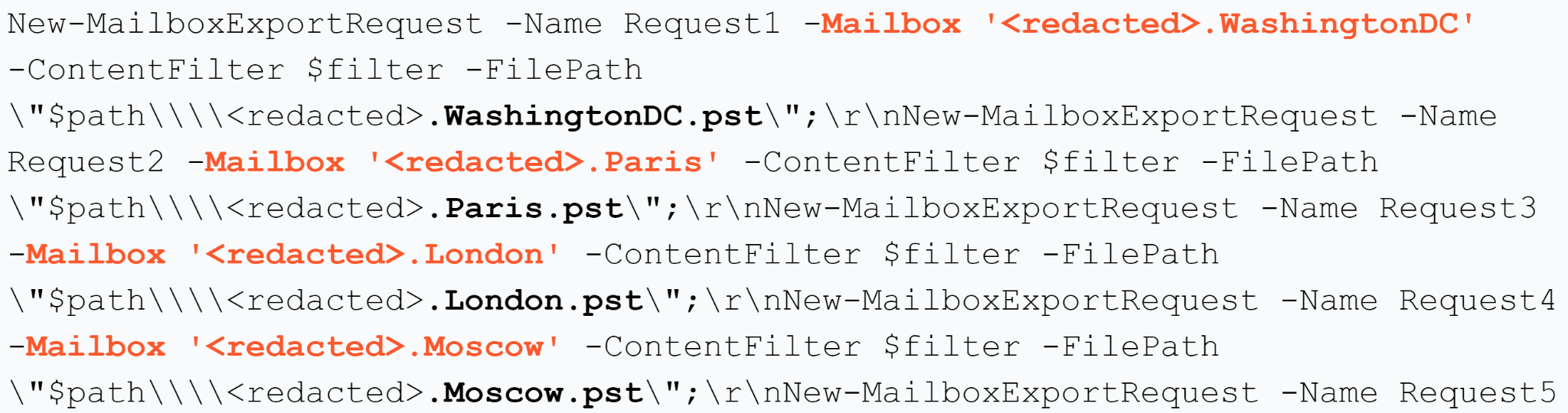
Unit 42 researchers also identified the collection and successful exfiltration of confidential information, such as emails from MS Exchange environments, using PowerShell snap-ins to dump the emails.

PowerShell snap-in code to dump emails

In the search criteria from the command above, the threat actor used similar commands to search through different folders, mailboxes and dates to dump those emails.

After dumping the emails, the threat actor tried to compress the .pst file with a command-line RAR tool before exfiltrating it:

Command-line RAR tool to compress the .pst file.

However, the threat actor canceled the attempt to compress the .pst file by using the tool taskkill.exe approximately eight minutes later.

PowerShell snap-in code to dump emails

Eventually the threat actor discarded the usage of raren.exe and simply renamed the .pst file, moving it to the IIS root directory and mimicking an error log in a compressed file to download it through the web server.

Command-line RAR tool to compress the .pst file.

And finally, the ai.pst file is removed.

Use of tool taskkill to cancel the compression attempt.

This process is repeated for several mailboxes with different search criteria.

In addition to the email exfiltration, Unit 42 researchers identified exfiltration of the victim’s Roaming Profile. A Roaming Profile is used to serve the same profile to the user when logging in from different computers from the same Active Directory environment.

To exfiltrate this, the threat actor compressed the directory by using the standalone version of the 7-Zip tool (which they dropped into the system using certutil.exe), and split the compressed file into chunks of 100 MB.

Removing the ai dot pst file.

Compressing the directory. Splitting the file into segments of 100 MB.

Later, following the same procedure, the threat actor exfiltrated the content.

Exfiltration of content.

Conclusion

Our hope in sharing the descriptions of this tool set is that readers can use this information to search their networks to identify other possible attacks using these tools. This tool set is not yet associated with a specific threat actor, and not entirely limited to a single cluster or campaign.

As mentioned at the beginning of this article, we found an overlapping Ntospy sample with SHA256 bcd2bdea2bfecd09e258b8777e3825c4a1d98af220e7b045ee7b6c30bf19d6df with a previously identified threat activity cluster CL-STA-0043. However, the overlaps are not limited to that sample.

We have also identified two compromised organizations in common across both activity clusters. Some of the TTPs match on both clusters, such as the MS Exchange PowerShell snap-ins and one of the Network Provider DLL modules.

Unit 42 researchers believe this threat activity cluster aligns with medium confidence to nation-state related threat actors for the following reasons:

  • The detection and defense evasion techniques used
  • The exfiltration activity observed
  • The victimology
  • The customization level of the tools used
  • The TTPs observed

Palo Alto Networks customers receive protections from the threats discussed above through the following products:

  • Cortex XDR includes detections and protections related to the IoCs shared in this research
  • Advanced URL Filtering and DNS Security blocks related C2 domains as malicious
  • The Advanced WildFire machine-learning models and analysis techniques have been reviewed and updated in light of the IoCs shared in this research

If you think you may have been compromised or have an urgent matter, get in touch with the Unit 42 Incident Response team or call:

  • North America Toll-Free: 866.486.4842 (866.4.UNIT42)
  • EMEA: +31.20.299.3130
  • APAC: +65.6983.8730
  • Japan: +81.50.1790.0200

Palo Alto Networks has shared these findings with our fellow Cyber Threat Alliance (CTA) members. CTA members use this intelligence to rapidly deploy protections to their customers and to systematically disrupt malicious cyber actors. Learn more about the Cyber Threat Alliance.

MITRE ATT&CK Mapping

During the research activity related to the tool set uncovered on this blog, Unit 42 researchers identified a set of TTPs, which we’ve mapped to the MITRE ATT&CK matrix in the table below.

ID Name
T1003 OS Credential Dumping
T1018 Remote System Discovery
T1021.006 Remote Services: Windows Remote Management
T1027.009 Obfuscated Files or Information: Embedded Payloads
T1030 Data Transfer Size Limits
T1036.005 Masquerading: Match Legitimate Name or Location
T1036.008 Masquerading: Masquerade File Type
T1041 Exfiltration Over C2 Channel
T1046 Network Service Discovery
T1047 Windows Management Instrumentation
T1053.005 Scheduled Task/Job: Scheduled Task
T1059.001 Command and Scripting Interpreter: PowerShell
T1059.003 Command and Scripting Interpreter: Windows Command Shell
T1070.004 Indicator Removal: File Deletion
T1070.006 Indicator Removal: Timestomp
T1071.004 Application Layer Protocol: DNS
T1074 Data Staged
T1078.002 Valid Accounts: Domain Accounts
T1087.002 Account Discovery: Domain Account
T1112 Modify Registry
T1114 Email Collection
T1132.001 Data Encoding: Standard Encoding
T1136.002 Create Account: Domain Account
T1140 Deobfuscate/Decode Files or Information
T1505.003 Server Software Component: Web Shell
T1556.008 Modify Authentication Process: Network Provider DLL
T1560.001 Archive Collected Data: Archive via Utility
T1564.002 Hide Artifacts: Hidden Users
T1570 Lateral Tool Transfer
T1573.001 Encrypted Channel: Symmetric Cryptography
T1583.001 Acquire Infrastructure: Domains
T1583.002 Acquire Infrastructure: DNS Server
T1587.001 Develop Capabilities: Malware

Indicators of Compromise

IoC Type Description
2632bcd0715a7223bda1779e107087964037039e1576d2175acaf61d3759360f SHA256 C:\Windows\Temp\install.bat
ae989e25a50a6faa3c5c487083cdb250dde5f0ecc0c57b554ab77761bdaed996 SHA256 C:\Windows\Temp\install.bat
C:\Windows\Temp\install.bat File path Script to install the Network Provider module
c:/programdata/microsoft/~ntuserdata.msu  File path File to store the stolen user credentials
c:/programdata/packag~1/windows 6.1-kb4537803.msu File path File to store the stolen user credentials
c:/programdata/package cache/windows10.0-kb5009543-x64.msu  File path File to store stolen user credentials
c:/programdata/package cache/windows10.0-kb5000736-x64.msu  File path File to store stolen user credentials
credman Network provider name Network Provider name
HKLM\SYSTEM\CurrentControlSet\Services\credman Registry key path Registry path of the Network Provider
c:\windows\system32\ntoskrnl.dll File path Network Provider module file path
C:\Windows\Temp\ntos.dll File path File path used to temporarily store the DLL module
C:\Windows\Temp\ntoskrnl.dll File path File path used to temporarily store the DLL module
e30f8596f1beda8254cbe1ac7a75839f5fe6c332f45ebabff88aadbce3938a19 SHA256 Ntospy DLL Module
1a4301019bdf42e7b2df801e04066a738d184deb22afcad9542127b0a31d5cfa SHA256 Ntospy DLL Module
e7682a61b6c5b0487593f880a09d6123f18f8c6da9c13ed43b43866960b7aa8e SHA256 Ntospy DLL Module
58e87c0d9c9b190d1e6e44eae64e9a66de93d8de6cbd005e2562798462d05b45 SHA256 Ntospy DLL Module
7eb901a6dbf41bcb2e0cdcbb67c53ab722604d6c985317cb2b479f4c4de7cf90 SHA256 Ntospy DLL Module
f45ea12579f636026d29009190221864f432dbc3e26e73d8f3ab7835fa595b86 SHA256 Ntospy DLL Module
bcd2bdea2bfecd09e258b8777e3825c4a1d98af220e7b045ee7b6c30bf19d6df SHA256 Ntospy DLL Module
C:\temp\update.exe File path Mimilite
1dsfjlosdf23dsfdfr Encryption key Mimilite decryption key
b855dfde7f778f99a3724802715a0baa MD5 Mimilite payload hash
4351911f266eea8e62da380151a54d5c3fbbc7b08502f28d3224f689f55bffba SHA256 Agent Racoon
e0748ce315037253f278f7f8f2820c7dd8827a93b6d22d37dafc287c934083c4 SHA256 Agent Racoon
baed169ce874f6fe721e0d32128484b3048e9bf58b2c75db88d1a8b7d6bb938d SHA256 Agent Racoon
3a2d0e5e4bfd6db9c45f094a638d1f1b9d07110b9f6eb8874b75d968401ad69c SHA256 Agent Racoon
4351911f266eea8e62da380151a54d5c3fbbc7b08502f28d3224f689f55bffba SHA256 Agent Racoon
354048e6006ec9625e3e5e3056790afe018e70da916c2c1a9cb4499f83888a47 SHA256 Agent Racoon
dee7321085737da53646b1f2d58838ece97c81e3f2319a29f7629d62395dbfd1 SHA256 Agent Racoon
geostatcdn[.]com Domain C2
telemetry.geostatcdn[.]com Domain C2
fdsb.telemetry.geostatcdn[.]com Domain C2
dlbh.telemetry.geostatcdn[.]com Domain C2
lc3w.telemetry.geostatcdn[.]com Domain C2
hfhs.telemetry.geostatcdn[.]com Domain C2
geoinfocdn[.]com Domain C2
telemetry.geoinfocdn[.]com Domain C2
g1sw.telemetry.geoinfocdn[.]com Domain C2
c:/windows/temp/onedriveupdater.exe File path Agent Racoon path
c:/windows/system32/msmdlb.exe File path Agent Racoon path
c:/windows/temp/onedriveupdater.exe File path Agent Racoon path
c:/program files (x86)/google/update/googleupdate.exe File path Agent Racoon path
c:\windows\temp\mslb.ps1 File path Script used to deploy the Agent Racoon
c:\windows\temp\set_time.bat File path Script used to perform timestomping against additional tools
c:\windows\temp\pscan.ps1 File path Script to scan the network
c:\windows\temp\crs.ps1 File path Helper script
c:\windows\temp\usr.ps1 File path Helper script
c:\windows\temp\pb.ps1 File path Helper script
c:\windows\temp\ebat.bat File path Helper script 
c:\windows\temp\pb1.ps1 File path Helper script
c:\windows\temp\raren.exe File path Command line RAR
aabbcc123 Password Password used to create the email archive
086a6618705223a8873448465717e288cf7cc6a3af4d9bf18ddd44df6f400488 SHA256 raren.exe file hash
P@ssw0rd1 Password Password used to compress the user profile directory
Assistance$ Username User created for persistence
Zaqwsx123 Password User created for persistence

Additional Resources

Exploring a Critical Risk in Google Workspace's Domain-Wide Delegation Feature

Executive Summary

Unit 42 researchers discovered a security risk in the Google Workspace (formerly known as G Suite) domain-wide delegation feature. We exposed an unexpected way to gain access to the Google Workspace domain data from Google Cloud Platform (GCP).

We found that a GCP identity with the necessary permission can generate an access token to a delegated user. A malicious insider or an external attacker with stolen credentials can use this access token to impersonate Google Workspace users, granting unauthorized access to their data or to perform operations on their behalf.

In this article, we will highlight the risk of the Google Workspace domain-wide delegation feature. In doing so, we will explore its potential misuse by malicious actors and examine the implications for the security of Google Workspace data.

As organizations increasingly rely on the power of cloud-based services like Google Workspace and Google Cloud Platform GCP, it becomes crucial to delve into the intricacies of their security features and vulnerabilities. We will discuss the link between GCP and Google Workspace and examine how the GCP permission model can impact the security of Google Workspace.

Palo Alto Networks customers receive protection from the issue discussed in this article through Cortex XDR and Prisma Cloud.

Related Unit 42 Topics API, Cloud

Domain-Wide Delegation Misuse Overview

Simulation

A possible attack path shown in Figure 1 could be a malicious insider (e.g., a developer with editor permissions in a GCP project) exploiting their access. They could do so by abusing a service account that is granted domain-wide delegation permissions in Google Workspace. The insider has permission to generate access tokens to service accounts within the same GCP project.

Image 1 is a diagram of the attack scenario. The objects inside the blue box represent the organization. From the World Wide Web, inside the Google workspace cloud is the computer default service account and the service account. A red arrow points to Google Workspace, including Gmail, Calendar, Google Drive. The super admin has access to the grey boxes representing administration, research and development, and finance. A yellow arrow points back from the super admin to the service account.
Figure 1. Second attack scenario.

With the domain-wide delegation permissions enabled, a malicious insider can impersonate users in the Google Workspace domain and use the access tokens to authenticate API requests. By leveraging the appropriate scopes and API access, the insider can access and retrieve sensitive Google Workspace data, potentially compromising emails, documents and other confidential information stored within the domain. Such actions highlight the threats of the domain-wide delegation feature.

A worst case scenario would come about if an attacker has obtained a GCP service account token attached to a compute engine instance (e.g., the compute engine default service account, which has editor permissions by default). From there, the attacker may be able to exploit the domain-wide delegation feature for larger impact. If in the same project, a service account with domain-wide delegation exists, this can lead the attacker to impersonate the delegated service account and move laterally from GCP to gain access to the Google Workspace environment.

Google Workspace

Before we delve into the intricacies of a recent security risk that surfaced within Google Workspace and GCP, it is crucial to establish a solid foundation of understanding about these powerful cloud-based services.

Google Workspace apps are a collection of cloud-based collaboration tools. Organizations use Google Workspace to enhance their productivity and communication through various tools such as the following:

  • Email
  • Calendar

  • File storage and sharing
  • Team communication
  • Workflow automation
  • Security
  • Administration

Google Workspace provides role-based access control (RBAC) capabilities and allows administrators to assign specific roles to users, granting them predefined sets of permissions based on their responsibilities and needs. These roles include the following:

  • Super admin
  • Groups admin
  • User management admin

Each role has specific privileges and controls over different aspects of the organization's Google Workspace environment. The Google Workspace super admin holds elevated permissions and broader domain management responsibilities, including the ability to grant domain-wide delegation permission to service accounts, which we will explore in more detail later.

Google Workspace administrators can also define application-specific permissions and restrict sharing and visibility settings. For example, an administrator can enforce policies that prevent users from publicly sharing files and limit sharing options to ensure files remain within authorized boundaries.

A common use case for a link between GCP and Google Workspace is when an application hosted on GCP needs to interact with one of the Google Workspace services. These services include the following:

  • Gmail
  • Calendar
  • Drive
  • Docs

This integration allows the application to access and manipulate user-specific data, perform actions on behalf of users, or leverage the collaboration and productivity features of Google Workspace.
A delegated GCP service account is required to create an application that interacts with Google services, accesses Google APIs, handles users' data or performs actions on their behalf.

What Is a Service Account?

A service account is a special type of account in GCP that represents nonhuman entities, such as applications or virtual machines. It allows them to authenticate and interact with Google APIs. A service account is associated with the application itself rather than an individual end user.

Service accounts are not members of your Google Workspace domain, unlike user accounts. They aren't subject to domain policies set by Google Workspace administrators and can only access users' data if they are granted domain-wide delegation.

What Is Domain-Wide Delegation?

Domain-wide delegation is a feature in Google Workspace that allows GCP service accounts to access Google Workspace users' data and to act on their behalf within a specific domain.

When using the domain-wide delegation feature, applications can act on behalf of users in a Google Workspace domain without requiring individual users to authenticate and authorize the application.

Only a Google Workspace super admin can authorize an application, acting as the service account, to access data on behalf of users in a domain. This authorization is called “delegating domain-wide authority" to a service account.

How Does Domain-Wide Delegation Work?

To use the domain-wide delegation feature, the following steps (shown in Figure 2) are required:

  1. Enabling Domain-Wide Delegation: The Google Workspace super admin grants domain-wide delegation for a service account, along with a set of OAuth scopes allowed for that access. These scopes detail which specific services and specific actions the service account will have access to. For example, if just the scope /auth/gmail.readonly is granted, the service account will have access to read a user’s Gmail messages when acting on behalf of that user, but not their other Workspace data such as access to files in Drive.
  2. Requesting Google Workspace Access Token: The application sends a request to the Google Workspace token endpoint with the appropriate credentials. This includes the service account's client ID and client secret, as well as the desired scopes for accessing the user data. If the request is valid and the service account has been granted the necessary domain-wide delegation privileges, the token endpoint responds with an access token. The application can use this access token to access user data across the domain within the limits of the scopes requested.
  3. API Access: The application includes the access token in API requests as an authorization header, and it acts as proof of authentication and authorization on behalf of the service account.
Image 2 is a diagram of the domain-wide delegation flow. Inside the cloud is Google Workspace, the Cloud IAM, and the users in the service account. Step one. A yellow arrow points from the Google Workspace to the service account. Enabling domain-wide delegation. The second step. A red arrow points from the service account to the super admin. GWS access token request. The third step. A yellow arrow points from the super admin to the service account. API access.
Figure 2. Domain-wide delegation flow.

When granted domain-wide delegation, a service account in Google Workspace can access user data, act on their behalf and authenticate requests to Google APIs. The specific capabilities and data accessible depend on the defined scopes.

Understanding the Risks and Implications of the Domain-Wide Delegation Feature

Once the domain-wide delegation is granted to a GCP service account, a GCP identity with the necessary permission can generate an access token to a delegated service account in the same project. A malicious insider can then use this access token to impersonate Google Workspace users, granting unauthorized access to the users' data or performing operations on their behalf.

This scenario creates a mismatch between the sensitivity of the domain-wide delegation permission and the permission model managed on the GCP platform.

Google documentation includes a cautionary notice concerning the domain-wide delegation feature, which outlines the significant capabilities of this feature. Google mentions that, “For this reason, only super admins can manage domain-wide delegation, and they must specify each API scope that the app can access.”

Google has an article suggesting not using automatic role grants for Service Accounts, which in the described case would have prevented the creation of a default Google Compute Engine Service Account. To help reduce excess permissions, Google has documentation on GCP role recommendations best practices, which also mentions their "Recommender API" tool.

Using Audit Logs From Both Ends to Identify Potential Misuse

It is impossible to understand the complete picture of the activity and identify any potential misuse of the domain-wide delegation feature without analyzing the audit logs from both platforms, GCP and Google Workspace. The generation of a service account key log will appear in GCP logs while Google key generation and API call execution logs will appear in Google Workspace logs.
In Figure 3, there is an XQL query from the Cortex web interface that is searching for service account key creation in GCP audit logs.

Image 3 is a screenshot of the search for service account key creation. There are three lines of code. Dataset, filter, and fields.
Figure 3. Searching for service account key creation.
Image 4 is a screenshot of a single line of code. This is the equivalent query in Prisma Cloud. A green checkmark precedes the query.
Figure 4. Equivalent query in Prisma Cloud RQL syntax.

Figure 5 shows an XQL query that searches for the service account authorization log.

Image 5 is a screenshot of the search for access token request. There are three lines of code. Dataset, filter, and fields.
Figure 5. Searching for the Google Workspace access token request.
Image 6 is a screenshot of a single line of code. This is the equivalent query of Figure 5 in Prisma Cloud. A green checkmark precedes the query.
Figure 6. Equivalent query in Prisma Cloud RQL syntax.

Figure 7 shows we checked who gave this service account domain-wide delegation permission and when that happened.

Image 7 is a screenshot of the search for the log confirming service account permissions were granted. There are three lines of code: dataset, filter and fields.
Figure 7. Searching for the log that indicates that domain-wide delegation permissions were granted to a service account.
Image 8 is a screenshot of a single line of code. This is the equivalent query of Figure 7 in Prisma Cloud. A green checkmark precedes the query.
Figure 8. Equivalent query in Prisma Cloud RQL syntax.

Figure 9 shows the alert “A Google Workspace admin has enabled domain-wide delegation to a GCP service account and granted him access to a sensitive scope” was triggered in the Cortex web interface.

Image 9 is a screenshot of Alerts in Cortex XDR. The information includes the timestamp, user name, severity, alert source, action, category, alert name and description. Some of the information has been redacted.
Figure 9. Domain-wide delegation alert in the Cortex web interface.

Mitigation

The security risk we have identified lies in the mismatch between the initial permissions necessary for a malicious insider to misuse the domain-wide delegation feature and the potential impact.

Optimal security practices for service accounts with domain delegation permissions are to position them within a higher-level folder in the GCP hierarchy. In the GCP hierarchy model, access control is hierarchical.

Permissions and policies set at a higher level (e.g., organization or folder) do not automatically grant access to lower-level folders or projects. Access control is not inherited downward in the hierarchy, meaning that lower-level folders or projects do not have automatic access to higher-level ones.

Image 10 is the GCP hierarchy tree. At the top is the company in the organization row. The next row, folders, includes departments and shared infrastructure. These flow into teams and products. The third row is projects. The final row is resources.
Figure 10. GCP resource hierarchy tree

This strategy reduces the surface area for security breaches by potential malicious insiders who would normally only have permissions within lower-level folders or projects within the GCP hierarchy shown in Figure 10. You can stop entities in lower-level areas from getting the service account's access tokens by making sure that only entities in the same or higher-level folders or projects can generate access tokens to the delegated service account. This helps prevent the misuse of domain-wide delegation permissions and prevents access to Google Workspace data.

Conclusion

We’ve been discussing this issue with Google through a variety of contact points since June 2023. This issue was also identified by Team Axon, which they have also reported to Google.

There are risks and implications associated with the domain-wide delegation feature that security defenders need to consider when configuring this permission. Depending on the scope that was granted with the domain-wide delegation, an attacker can use the feature to impersonate Google Workspace users, perform actions on their behalf and gain unauthorized access to their data.

It’s important to highlight the mismatch between the initial permissions required for the attacker to misuse this feature, and the possible impact. In worst cases, an attacker or a malicious insider can leak sensitive Google Workspace data, such as emails, documents, and other confidential information stored within the domain.

Palo Alto Networks customers receive protection from the issue discussed in this article through both Cortex XDR and Prisma Cloud.

Cortex XDR capabilities can identify and alert on various abnormal activities such as the granting of domain wide delegation permissions or the creation of GCP service account keys. Cortex XDR is able to learn the behavior of GCP and Google Workspace entities and detect unusual behavior.

Prisma Cloud CIEM can help mitigate risky and over-privileged access by providing:

  • Visibility, alerting, and automated remediation on risky permissions
  • Automatic findings of unused permissions with Least-privilege access remediations

Prisma Cloud Threat Detection capabilities can alert on various identity-related anomalous activities such as unusual usage of credentials from inside or outside of the cloud.

Prisma Cloud can also perform runtime operation monitoring and provide governance, risk and compliance (GRC) requirements for any component associated with their cloud environment.

If you think you may have been compromised or have an urgent matter, get in touch with the Unit 42 Incident Response team or call:

  • North America Toll-Free: 866.486.4842 (866.4.UNIT42)
  • EMEA: +31.20.299.3130
  • APAC: +65.6983.8730
  • Japan: +81.50.1790.0200

Palo Alto Networks has shared these findings with our fellow Cyber Threat Alliance (CTA) members. CTA members use this intelligence to rapidly deploy protections to their customers and to systematically disrupt malicious cyber actors. Learn more about the Cyber Threat Alliance.

Disclosure Timeline

  • June 27, 2023: Palo Alto Networks submitted a report about the domain-wide delegation security risk to the Google Workspace product team.
  • July 10, 2023: Security discussion between Google Workspace product team and Palo Alto Networks cloud research group.
  • July 18, 2023: Palo Alto Networks submitted a report to the Google Vulnerability Reward Program regarding this issue.
  • Aug. 2, 2023: Palo Alto Networks filed a bug with the Google Workspace product team and they replied that they would implement a fix if required.
  • August 2023: Palo Alto Networks notified Google of the intention to publish on the security risk and offered the opportunity for fixes or input.
  • Nov. 8, 2023: Palo Alto Networks invited Google’s input on our article on the domain-wide delegation security risk.

Hacking Employers and Seeking Employment: Two Job-Related Campaigns Bear Hallmarks of North Korean Threat Actors

Executive Summary

Unit 42 researchers recently discovered two separate campaigns targeting job-seeking activities linked to state-sponsored threat actors associated with the Democratic People’s Republic of Korea (DPRK), commonly known as North Korea. We call the first campaign “Contagious Interview,” where threat actors pose as employers (often anonymously or with vague identities) to lure software developers into installing malware through the interview process. This malware creates the potential for various types of theft. We attribute with moderate confidence that Contagious Interview is run by a North Korea state-sponsored threat actor.

We call the second campaign “Wagemole,” where threat actors seek unauthorized employment with organizations based in the US and other parts of the world, with potential for both financial gain and espionage. We attribute with high confidence that Wagemole is a North Korea state-sponsored threat. Activity from both campaigns remains an ongoing active threat.

We nicknamed the first campaign Contagious Interview because the threat actor attempts to infect software developers with malware through a fictitious job interview. We originally discovered Contagious Interview through customer telemetry, and our research indicates it started as early as December 2022. Some of the infrastructure supporting this campaign remains active, and this activity remains a consistent threat. The first campaign's objective is likely cryptocurrency theft and using compromised targets as a staging environment for additional attacks. We track Contagious Interview as CL-STA-0240.

While pivoting on indicators from Contagious Interview, we discovered exposed files on a different threat actor-controlled infrastructure. These files indicate fraudulent job-seeking activity targeting a wide variety of United States (US) companies. This trove of information includes resumes with different technical skill sets and multiple identities impersonating individuals from various nations. It also includes common job interview questions and answers, scripts for interviews and downloaded job postings from US companies. We call this separate campaign "Wagemole" and track it as CL-STA-0241.

While we cannot determine the objective of this campaign, the US Department of Justice and Federal Bureau of Investigation (FBI) have reported that North Korea uses remote workers to funnel wages to its weapons programs.

During our investigation of Contagious Interview, we discovered two new families of malware we named BeaverTail and InvisibleFerret. BeaverTail is JavaScript-based malware hidden inside Node Package Manager (NPM) packages. InvisibleFerret is a simple but powerful Python-based backdoor. Both are cross-platform malware that can run on Windows, Linux and macOS.

This article provides an overview of these two campaigns, and we examine the two new malware families, BeaverTail and InvisibleFerret.

This article also provides insight on how these threat actors are both seeking jobs and targeting job seekers to accomplish their goals. We provide recommendations for both job applicants and employers to consider when interviewing or applying for remote jobs.

For example:

  • Don’t use company-issued computers for personal activities.
  • Be wary of GitHub accounts with few repositories or updates.
  • Confirm the legitimacy of companies you’re applying for.
  • Thoroughly vet the identity of job applicants.

Palo Alto Networks customers receive protection from the malware discussed in this article through our Next-Generation Firewall with Cloud-Delivered Security Services, including Advanced WildFire, DNS Security and Advanced URL Filtering.

Related Unit 42 Topics Contagious Interview, DPRKNorth Korea, Wagemole, Invisible Ferret, BeaverTail

CL-STA-0240: Contagious Interview

While investigating our telemetry, we discovered suspicious activity as early as March 2023 related to previously unidentified malware samples. Our investigation revealed two new malware families, and tactics used in this campaign align with previously reported activity by North Korean threat actors, as noted in our Attribution section. We track this campaign as Contagious Interview or CL-STA-0240, and infrastructure for this campaign was established as early as December 2022.

Through advertisements on job search platforms, the threat actor behind CL-STA-0240 targets software developers by posing as a prospective employer. The advertisements we can tie to this campaign are often anonymous or purposefully vague, with no real indicator of the employer they represent. Based on some of the file names of malware associated with this campaign, we believe this threat actor might also impersonate legitimate AI, cryptocurrency and NFT-related companies or recruitment agencies. Like other threat actors, this threat actor could also reach potential victims through email, social media platforms, or chat channels on community forums used by software developers.

After establishing contact, the threat actor invites the victim to participate in an online interview. The threat actor likely uses video conferencing or other online collaboration tools for the interview.

During the interview, the threat actor convinces the victim to download and install an NPM-based package hosted on GitHub. The threat actor likely presents the package to the victim as software to review or analyze, but it actually contains malicious JavaScript designed to infect the victim’s host with backdoor malware.

Below, Figure 1 summarizes the chain of events for CL-STA-0240.

Image 1 is the attack chain for CL-STA-0240. Threat actor poses as prospective employer. Victim conducts online job interview. Victim downloads malicious amp package from GitHub. Victim installs malicious npm package. Npm package retrieves and runs backdoor malware. Backdoor malware establishes access on a victim’s host.
Figure 1. Simplified chain of events for a CL-STA-0240 attack.

To better understand this chain of events, we should first understand how the threat actor abused GitHub for this campaign.

GitHub Abuse for Contagious Interview

Designed as a collaborative space for software developers, GitHub is attractive to many developers because its basic service option is free. This also makes GitHub attractive to criminals. The threat actor behind Contagious Interview is one of many criminals who have used GitHub’s free service plan to host innocent-looking repositories and use them as powerful tools for compromise.

The threat actor behind Contagious Interview created different identities to host a number of GitHub repositories, establishing an infrastructure to inspire trust by its intended victims. However, a closer examination reveals that these GitHub repositories are not as trustworthy as they might initially appear.

The free GitHub accounts used for Contagious Interview have only one repository that is not updated, while many legitimate software developers host multiple repositories with several updates.

Further examination of suspicious repositories found during our investigation confirmed our initial assessment. A GitHub repository’s Issues section often provides clues.

Below, Figure 2 shows comments in the Issues section of a repository used in Contagious Interview. The repository named react-ecommerce was established under a GitHub user account named brainjobs35. This repository and account are no longer active.

Image 2 is a screenshot of GitHub user comment page for brainjobs35 react-ecommerce. Milagro Martinez #1. There is a conversation between user watasm and user 0xpaluco where they discuss Milagro and how to find the code author.
Figure 2. User comments in the Issues section of a suspicious GitHub repository.

GitHub’s Insights feature also provides clues. Below Figure 3 shows GitHub users commenting through the Insights feature about a malicious file named ServiceWorker.js related to the Contagious Interview campaign.

Image 3 is a screenshot of a GitHub user comment page for Virus Alert #1. Toufique-imam comments that the repo is a scam and cautions other users to stay safe. A reply to their comment by Xeth4rth says that the repo was given to them as a job offer and also declares it a scam.
Figure 3. Comments on GitHub Insights related to Contagious Interview.

NPM, Open Source and Supply Chain Attacks

Software developers increasingly rely on third-party packages and libraries to streamline their projects. These provide an avenue for supply chain attacks. Among these packages, NPM is a central hub for countless projects using JavaScript, with 17 million developers worldwide according to the NPM website.

The open-source nature of NPM helps malicious actors find ways to inject harmful code in legitimate NPM packages and distribute these packages through GitHub. Once installed, these compromised NPM packages act as subtle backdoors, granting threat actors unauthorized access into targeted networks. GitHub and Phylum have recently reported similar attacks.

Malicious NPM packages help the threat actor elude most traditional detection techniques, because:

  • Most static and dynamic analysis detection engines cannot execute an NPM package in a Node.js runtime environment because this is not a supported file type.
  • Cloning a repository and running Node.js code is a normal, allowed operation in most software development teams that will not be considered suspicious.

As a result, malicious JavaScript files in these NPM packages have a low or zero detection rate when submitting to a service like VirusTotal.

Furthermore, NPM can be easily installed on multiple operating systems, allowing threat actors to maximize their attack surface when distributing a malicious NPM package.

The Act of Compromise

During the interview process, victims prepare their development environment. In the attacks we investigated, most developers used Visual Studio Code with a set of plugins like Code Helper, along with Git and Node.js extensions. This includes NPM.

After these basic system requirements are met, the threat actor asks the victim to install the malicious NPM package posing as legitimate software on GitHub. This malicious NPM package contains JavaScript for newly discovered malware we have named BeaverTail.

BeaverTail steals information, and it retrieves additional malware as its second-stage payload. This payload is a cross-platform backdoor we have named InvisibleFerret.

The next section provides analysis and insight into the loader, BeaverTail.

BeaverTail Analysis

Distributed as JavaScript inside NPM packages, BeaverTail serves two purposes.

  • Information stealer
  • Loader

As an information stealer, BeaverTail targets cryptocurrency wallets and credit card information stored in the victim’s web browsers. As a loader, BeaverTail retrieves and runs the next stage of malware, InvisibleFerret.

The BeaverTail JavaScript file inside an NPM package is heavily obfuscated to evade detection. The threat actor might upload an entire malicious NPM package to GitHub or they might also inject BeaverTail code into other developer’s legitimate NPM projects. Figure 4 shows an example of this injected script.

Image 4 is a split-image screenshot where the image on top is a Commit page on GitHub. The image on the bottom is the obfuscated JavaScript of BeaverTail.
Figure 4. BeaverTail’s obfuscated JavaScript, injected into the NPM file of a legitimate developer’s project.

In addition to the heavily obfuscated code illustrated in Figure 4, the BeaverTail also requires human interaction to execute due to its dependency on the Node.js environment. These characteristics help the malware to evade detection.

Once the malicious NPM package is successfully installed on a Windows, Linux or macOS host, BeaverTail collects basic system information. This threat also searches the victim’s web browser for extensions associated with cryptocurrency wallets, like Binance and Coinbase. Table 1 shows the full list below.

Browser Extension ID Browser Extension Name Target Browser
fhbohimaelbohpjbbldcngcnapndodjp  Binance Wallet Chrome
aeachknmefphepccionboohckonoeemg Coin98 Wallet Chrome
hnfanknocfeofbddgcijnmhnfnkdnaad  Coinbase Wallet Chrome
hifafgmccdpekplomjjkcfgodnhcellj  Crypto.com Wallet Chrome
nkbihfbeogaeaoehlefnkodbefgpgknn  Metamask Wallet Chrome
ejbalbakoplchlghecdalmeeeajnimhm  MetaMask Wallet Microsoft Edge
bfnaelmomeimhlpmgjnjophhpkkoljpa Phantom Wallet Chrome
fnjhmkhhmkbjkkabndcnnogagogbneec  Ronin Wallet Chrome
ibnejdfjmmkpcnlpebklmnkoeoihofec TRON Wallet Chrome

Table 1. Browser extensions for cryptocurrency wallets BeaverTail searches for.

BeaverTail also checks for a Solana cryptocurrency wallet, searching for ~/.config/solana/id.json.

While performing data exfiltration and loading InvisibleFerret, BeaverTail generates the following web traffic as described below in Table 2.

URL Pattern Description Save Location
hxxp://<c2_server>:1224/keys HTTP POST request sends data collected by BeaverTail  Not applicable
hxxp://<c2_server>:1224/uploads HTTP POST request sends other collected information like Solana cryptocurrency wallet data Not applicable
hxxp://<c2_server>:1224/node/<node_js_runtime_environment_version> HTTP GET request for helper DLL files when decrypting credentials stored in Chrome, if needed %USERPROFILE%\store.node
hxxp://<c2_server>:1224/pdown HTTP GET request for Python executable and associated libraries %TEMP%\p.zi or %HOMEPATH%\.pyp\
hxxp://<c2_server>:1224/client/<campaign_id> HTTP GET request for InvisibleFerret %HOMEPATH%\.npl or ~/.npl

Table 2. Infection traffic generated by BeaverTail malware.

At this stage, the threat actor has been able to successfully drop a silent, simple and cross-platform backdoor on the victim machine.

InvisibleFerret: A Cross-Platform Python Backdoor

InvisibleFerret is newly discovered malware retrieved and executed by BeaverTail NPM packages. Cross-platform malware written in Python, InvisibleFerret consists of various components with the following functions:

  • Fingerprinting
  • Remote control
  • Keylogging
  • Data exfiltration
  • Browser stealing capabilities
  • Downloading the AnyDesk client if required for additional control

Figure 5 presents a diagram that reveals the modular nature of InvisibleFerret, showing an initial script and two additional components that perform different functions.

Image 5 is a diagram of how InvisibleFerret works. From the BeaverTail GitHub the .npl initial script branches into two: one is the .n2/pay with the fingerprint, remote control and information-stealer component. This branch ends with .n2/adc, AnyDesk. The second branch is .n2/bow, or the browser-stealer component.
Figure 5. Diagram revealing the initial script and two components of InvisibleFerret.

Initial Script

BeaverTail downloads the InvisibleFerret script using the URL structure from the final row in Table 2. An example of a URL to download InvisibleFerret follows:

  • hxxp://<c2_server>:1224/client/<campaign_id>

The initial script for InvisibleFerret is saved under the user’s home directory, named .npl and executed using Python. An example of the command line to run this file on a Windows host is:

  • C:\Users\$USER$\.pyp\python.exe C:\Users\$USER$\.npl

The initial script for InvisibleFerret uses obfuscated data. An example is shown below in Figure 6.

Image 6 is a screenshot of many lines of code.
Figure 6. Example of Python script for InvisibleFerret.

The bottom section of Figure 6 shows a decoding routine that is consistent across all script files used for InvisibleFerret and its components:

  • The first eight characters of the temp string represent a key for decoding.
  • The remainder of the temp string is converted from Base64.
  • The result is processed through an XOR loop using the eight character key.

This initial script installs the required Python modules using pip, and it also defines variables, establishing values to identify the command and control (C2) server and port.

The main objective of the initial script is to retrieve and run two different components of InvisibleFerret. These components are downloaded and saved as shown in Table 3.

Request for Component Save Location
hxxp://<c2_server>:1224/payload/<campaign_id> Local file path .n2/pay
http://<c2_server>:1224/bow/<campaign_id> Local file path .n2/bow

Table 3. Infection traffic generated by BeaverTail malware.

Of note, the second component is only downloaded when the operating system is not macOS.

InvisibleFerret Components

The first component for InvisibleFerret collects system data to create a fingerprint, then sends this data to a C2 server. The first component collects:

  • Internal IP address
  • IP geolocation information
  • System information including OS version, release, host and user information

It sends this information to the server in JSON format.

The second component for InvisibleFerret deploys remote control and information stealing capabilities. Once executed, it prepares the environment by installing the following Python packages, if they are not already present on the system:

  • pyWinhook: Python wrapper for out-of-context input hooks in Windows that provides callbacks for global mouse and keyboard events.
  • pyperclip: Cross-platform Python module for copy and paste clipboard functions.
  • psutil: Cross-platform Python library for process and system monitoring.
  • pywin32: Python for 32-bit Windows extensions.

C2 Communications

InvisibleFerret establishes a connection with the C2 server over TCP traffic and periodically checks in and waits for further instructions. This traffic consists of JSON messages.

The infected host checks in using heartbeat messages with JSON content using code and args keys with a code value of 0 as illustrated below in Figure 7. This heartbeat message also contains a campaign identifier (sType) and the victim’s hostname (sHost).

Image 7 is a diagram of the heartbeat command and control message. Victim symbolized by icon of bugged laptop within target. JSON sent over TCP port 1245. Arrow pointing to command and control server symbolized by icon of server and laptop on puppet strings. Below the JSON text is a code snippet.
Figure 7. Diagram for a heartbeat C2 message.

The C2 server returns JSON data instructing the backdoor with the next actions to take. The JSON response contains the same two main keys:

  • code: A value specifying an action or command
  • args: A string or JSON dictionaries with multiple key value pairs containing the required arguments for the specified command

InvisibleFerret implements a total of eight commands described below in Table 4.

Command Description
ssh_cmd Checks if the args value is equal to delete and if so, closes the session. To notify the C2 server, it sends the message string [close].
ssh_obj Command execution. Extracts the command value from args['cmd'] and runs it. JSON results sent to the C2 server with code value 1 and args indicating the results.
ssh_clip Send contents of keylogger buffer and clipboard data. Reports to C2 server with JSON code value 3 and args containing the collected data.
ssh_run Downloads and runs the browser stealer component. Reports to C2 server with JSON code value 4 and args containing the file path for this component.
ssh_upload Upload data to a C2 server. Subcommands include:

  • Upload all contents of a specific directory.
  • Upload specific files.
  • Upload files matching a given pattern looking recursively in a given folder.

Contents are uploaded to an actor-controlled FTP server, provided in the JSON response using the following args:

  • hn: FTP host.
  • un: Username.
  • pw: Password.

The logic contains exclusion lists for specific files and folders as well as a list of paths that are specifically uploaded when found. These paths show focus not only in documents (.xls, .doc, etc.) but also in cryptocurrency specific file paths (metamask, wallet, etc.).

While uploading contents, the backdoor keeps sending requests with JSON data with code value 5 and args value indicating the state of the upload.

ssh_kill Kill Chrome and Brave browser processes. When done, send JSON with code value 6 and args value indicating these processes are terminated.
ssh_any Download and run a malicious binary for AnyDesk. Before downloading AnyDesk, send JSON containing code value 7 and args value to indicate the victim’s OS.
ssh_env Collect content specific folders (“Documents” and “Downloads” for Windows, /home and /Volumes for others) and upload these files to the FTP server.

Table 4. Commands for InvisibleFerret.

When InvisibleFerret finishes its tasks, it reports the results to the C2 server. This report uses the same JSON code and args parameters with specific values outlined above in Table 4.

Keylogger Functionality

InvisibleFerret also starts a keylogger to continually collect keyboard, mouse and clipboard data in a buffer that can be requested at any time from the C2 server using the command ssh_clip described above.

Browser Stealer Functionality

Based on Python, InvisibleFerret targets popular web browsers on Windows, Linux and macOS to steal login credentials and other sensitive data. This functionality includes retrieving a browser’s login data, decrypting the information and stealing the victim’s login credentials. InvisibleFerret can also retrieve credit card information used by the victim through a web browser.

After collecting this information, InvisibleFerret sends the data to a C2 server using the JSON format with various keys representing the content, as shown below in Figure 8.

Image 8 is a screenshot of the JSON format used for sending stolen browser data.
Figure 8. JSON format used for sending stolen browser data.

Follow-Up Malware: AnyDesk

When the ssh_any command is received, InvisibleFerret downloads an additional script using the following URL pattern:

  • http://<c2_server>:1224/adc/<campaign_id>

This script is stored on the C2 server with the following filename:

  • any_<campaign_id>.py

InvisibleFerret stores the file on disk for execution under the following directory.

  • .n2/adc

This file uses the same obfuscation seen in other scripts used for InvisibleFerret.

This script retrieves an AnyDesk binary from the C2 server if it is not already present on the victim’s host. This process updates AnyDesk’s configuration and restarts the program if it was already running.

While pivoting on infrastructure associated with this Contagious Interview campaign, we discovered files used for a separate activity. We have nicknamed this separate campaign “Wagemole” and track it as CL-STA-0241.

CL-STA-0241: Wagemole

While pivoting on GitHub infrastructure associated with Contagious Interview (CL-STA-0240), we discovered files accidentally exposed on a GitHub repository on a different GitHub account. These files include:

  • Resumes with fake identities, impersonating individuals of various nationalities
  • Frequently asked job interview questions and answers
  • Self-introduction scripts including personal information of the impersonated identity
  • Copies of IT job opening posts from US companies
  • Scanned copy of a stolen US Permanent Resident Card
  • A list of unidentified account seller contacts

Timestamps on the files indicate this campaign started as early as August 2022, and the timestamps run through early December 2022. While we have not noticed further updates for this batch of files, this activity remains an ongoing threat.

These files indicate another campaign applying for remote IT jobs using fake identities, which we are calling Wagemole. Information from some of the documents indicate this threat actor is associated with North Korea. Resumes from these files indicate targets include a wide range of US companies and freelance job marketplaces. This activity is likely related to a recent report that North Korea uses remote workers to funnel wages to its weapons programs.

Below, Figure 9 shows one of the resumes.

Image 9 is an example resume with some information redacted including the face of the job seeker. There is a list of skills and a full profile where the seeker indicates they want a blockchain developer role.
Figure 9. Example of a resume from this infrastructure.

Each fake resume has a different US phone number for personal contact, specifically using Voice over Internet Protocol (VoIP) numbers. Some resumes include links to a LinkedIn profile and links to GitHub content. Figure 10 shows a GitHub repository one of the job seekers has maintained.

Image 10 is a screenshot of the GitHub repo maintained by one of the job seekers. They have 1,108 contributions total. Their profile picture is a generic jewel. Some personal info is redacted.
Figure 10. GitHub repository maintained by one of the fraudulent job seekers.

These GitHub accounts appear well maintained and have a lengthy activity history. These accounts indicate frequent code updates and socialization with other developers. As a result, these GitHub accounts are nearly indistinguishable from legitimate accounts.

A portion from one of the phone interview preparation scripts is shown below in Figure 11. This document indicates the target is a job that requires at least some on-site presence. As indicated in Figure 11, the job seeker claims to be based in the US and tells the interviewer they are currently out of the country visiting family overseas due to COVID but can start working remotely.

Image 11 is a screenshot of a document to prepare for an interview. Common Questions. I flied to [redacted] several weeks ago. My parents got Covid and I decide to be with family members for awhile. Now, I am planning to go back to Los Angeles in 3 months. I am thinking that I could start work remotely right now, then I will be on board when I go back to LA.
Figure 11. Part of the interview preparation script.
These documents are not limited to remote IT jobs at US-based companies. Some of the documents indicate this threat actor also seeks freelance jobs in multiple marketplaces, targeting a broader scale of global markets that include Africa.

These fraudulent job seekers have maintained multiple accounts for email, freelance websites, source code repositories and job agency platforms. As a tactic to win job bids and hide their true identity, these job seekers have also sought to purchase or borrow accounts with a high reputation in account seller marketplaces.

Figure 12 shows a message on a freelance job platform from one of the job seekers used in this campaign. Figure 13 shows message activity with an underground marketplace seeking to purchase or rent high reputation accounts on freelance job platforms.

Image 12 is s screenshot of a worker message. Some information has been redacted. Dear client. I have checked your job description and I am really interested in your project. As a senior developer, I have 5+ years of experience of python development. As you can see my profile, I have finished very difficult type of app a few days ago and other developers can't solve this app but I have done. I have already published 10+ apps like you want to so I am sure that I can finish your job perfectly. If you want to hire a reliable developer, please contact me. I am waiting for your contact. I'll do my best for you. Thank you. Best regards. Some of the other language in the screenshot is in Spanish.
Figure 12. Actor seeking work on a freelance job platform.
Image 13 is a screenshot of messages from an underground market that sells accounts. Some information is redacted. They are all posted by Andrew JackSon on February 9, 2023.
Figure 13. Messages from an underground market for freelance platform accounts.

Among the copies of US job postings hosted on this infrastructure, the largest portion is for IT and recruiting. Jobs for IT services and solutions might provide the threat actor behind Wagemole additional opportunities for downstream supply chain attacks. Recruiting jobs could provide more personal identity materials such as job applicant IDs, resumes and other personal data that attackers could further use in the Wagemole campaign.

Attribution

The tactics, techniques and procedures (TTPs) observed in both Contagious Interview (CL-STA-0240) and Wagemole (CL-STA-0241) align with previous activity attributed to North Korea state-sponsored APTs. However, the confidence level of our attribution is different for the two campaigns.

For Wagemole activity, several of the documents we discovered contain information that more definitively points to North Korea. Many of the passwords associated with these documents were made through Korean language typed on a US keyboard, and some passwords include words only used in North Korea. Furthermore, Korean keyboard language settings were found on computers used by threat actors behind these campaigns.

These documents indicate similar activity as reported by numerous media outlets based on US government and FBI announcements.

For these reasons, we assess with high confidence that Wagemole can be attributed to a North Korea-sponsored APT, which we track as CL-STA-0241.

Contagious Interview also bears the hallmarks of a North Korean threat actor. For example, a North Korean group previously posed as job recruiters for Meta using similar tactics to infect job seekers with malware. Operation Dream Job run by the North Korean APT Lazarus Group reportedly used social media to trick victims into installing a trojanized VNC app as part of a fake job interview. North Korea-sponsored APT groups have often posed as job recruiters to infect potential victims with backdoor malware.

In the course of our research into Contagious Interview, we also observed indicators that the developer of BeaverTail and InvisibleFerret corresponded or collaborated with other GitHub accounts, where we found direct association with Wagemole. We track the threat actor behind Contagious Interview as CL-STA-0240, and attribute with moderate confidence that this is also a North Korea state-sponsored threat actor.

In light of this analysis, we attribute with a moderate level of confidence that both campaigns trace to North Korea state-sponsored threat actors.

Conclusion

Unit 42 researchers investigated suspicious activity from our telemetry and discovered these two campaigns, Contagious Interview and Wagemole, which we track as CL-STA-0240 and CL-STA-0241 respectively. In the process, we discovered two new malware families we have named BeaverTail and InvisibleFerret used in the Contagious Interview campaign.

Software developers are often the weakest link for supply chain attacks, and fraudulent job offers are an ongoing concern, so we expect continued activity from Contagious Interview. Furthermore, Wagemole represents an opportunity to embed insiders in targeted companies. We will continue to monitor our telemetry for further activity from these and other campaigns.

Recommendations and Protections

What is an effective strategy against these threats? For Contagious Interview and many other threats, software developers should not use a company-issued computer for personal or non-work related activities like job interviews. Personal activity on a company-issued computer can provide opportunities for threat actors to access a company's network through malware.

Developers should also be suspicious of GitHub accounts containing a single repository with little or no updates. Threat actors frequently abuse free services like GitHub to distribute malware. Also, no one should install unknown files from unverified sources on their work or home computers.

Job applicants should exercise due diligence to confirm the existence and legitimacy of companies offering job interviews, and also confirm that prospective interviewers actually work for the companies they claim to represent. It is also wise to be cautious of downloading and installing unusual types of communications software or of downloading software packages as a prerequisite for obtaining an interview.

For Wagemole, employers should thoroughly vet all job applicants. Fake identities are an increasing concern on job-related social media platforms, and threat actors can easily generate an alias for remote work. If in-person interviews are not an option, use teleconferencing to interview job applicants. Be aware of anyone who applies for an on-site job, states they are currently out of the area and then offers immediate availability for remote work. For remote-only roles, employers should be suspicious of anything that seems unusual with any job applicant during the hiring process.

Palo Alto Networks customers receive protection from malware discussed in this article through products like Cortex XDR and our Next-Generation Firewall with Cloud-Delivered Security Services that include Advanced WildFire, Advanced Threat Prevention and Advanced URL Filtering.

Next-Generation Firewall with the Advanced Threat Prevention security subscription can help block the malware's C2 traffic with best practices via the following Threat Prevention signatures: 86817, 86818, 86819.

If you think you might have been compromised or have an urgent matter, contact the Unit 42 Incident Response team or call:

  • North America Toll-Free: 866.486.4842 (866.4.UNIT42)
  • EMEA: +31.20.299.3130
  • APAC: +65.6983.8730
  • Japan: +81.50.1790.0200

Palo Alto Networks has shared our findings with our fellow Cyber Threat Alliance (CTA) members. CTA members use this intelligence to rapidly deploy protections to their customers and to systematically disrupt malicious cyber actors. Learn more about the Cyber Threat Alliance.

Indicators of Compromise

SHA256 hashes for files associated with BeaverTail:

  • 09a508e99b905330a3ebb7682c0dd5712e8eaa01a154b45a861ca12b6af29f86
  • 0ce264819c7af1c485878ce795fd4727952157af7ffdea5f78bfd5b9d7806db1
  • 104926c2c937b4597ea3493bccb7683ae812ef3c62c93a8fb008cfd64e05df59
  • 1123fea9d3a52989ec34041f791045c216d19db69d71e62aa6b24a22d3278ef9
  • 121ca625f582add0527f888bb84b31920183e78c7476228091ff2199ec5d796b
  • 12c0f44a931b9d0d74a2892565363bedfa13bec8e48ff5cd2352dec968f407ee
  • 1b21556fc8ecb9f8169ba0482de857b1f8a5cb120b2f1ac7729febe76f1eea83
  • 1c905fa3a108f4c9bc0578882ce7af9682760b80af5232f130aa4f6463156b25
  • 1f9169492d18bffacebe951a22495d5dec81f35b0929da7783b5f094efef7b48
  • 2618a067e976f35f65aee95fecc9a8f52abea2fffd01e001f9865850435694cf
  • 40645f9052e03fed3a33a7e0f58bc2c263eeae02cbc855b9308511f5dc134797
  • 41a912d72ba9d5db95094be333f79b60cae943a2bd113e20cc171f86ebcb86cf
  • 4c465e6c8f43f7d13a1b887ff26d9a30f77cf65dd3b6f2e9f7fe36c8b6e83003
  • 4c605c6ef280b4ed5657fe97ba5b6106b10c4de02a40ae8c8907683129156efd
  • 592769457001374fac7a44379282ddf28c2219020c88150e32853f7517896c34
  • 61dff5cbad45b4fe0852ac95b96b62918742b9c90dd47c672cbe0d1dafccb6c5
  • 6465f7ddc9cf8ab6714cbbd49e1fd472e19818a0babbaf3764e96552e179c9af
  • 6b3fce8f2dad7e803418edd8dfc807b0252705c11ec77114498b01766102e849
  • 700a582408cbda7ee79723b3969b8d10d67871ea31bb17c8ca3c0d94b481aa8c
  • 709820850127201a17caab273e01bb36ce185b4c4f68cd1099110bb193c84c42
  • 72ebfe69c69d2dd173bb92013ab44d895a3367f91f09e3f8d18acab44e37b26d
  • 75f9f99295f86de85a8a2e4d73ed569bdb14a56a33d8240c72084f11752b207e
  • 785f65f1853a08b0e86db5638fbd76e8cad5fe1359655716166a76035261c0be
  • 7b718a46ae4de09ed4f2513df6e989afe1fbb1a0f59511a4689fac5e1745547d
  • 7f8bb754f84a06b3e3617dd1138f07a918d11717cc63acaef8eb5c6d10101377
  • 845d7978682fa19161281a35b62f4c447c477082a765d6fedb219877d0c90f31
  • 9867f99a66e64f6bce0cfca18b124194a683b8e4cb0ced44f7cb09386e1b528d
  • 9ae24a1912e4b0bab76ae97484b62ea22bdc27b7ea3e6472f18bf04ca66c87de
  • a2f8de3c5f5f6ecbf29c15afd43a7c13a5bf60023ecb371d39bcca6ceef1d2b7
  • b5f151f0a4288e148fd10e19c78399f5b7bdff2ad66940fadd20d6eae4b7518b
  • b833f40b2f3439f317cf95980b29bddd2245d2acc2d5c11e9690dd2fa4289585
  • c8c11f9b308ea5983eebd8a414684021cc4cc1f67e7398ff967a18ae202fb457
  • ceb59dbaf58a8de02f9d5e9b497321db0a19b7db4affd5b8d1a7e40d62775f96
  • d8f065d264b1112d6ee3cf34979289e89d9dcb30d2a3bd78cc797a81d3d56f56
  • db6e75987cabdbfc21d0fdcb1cdae9887c492cab2b2ff1e529601a34a2abfd99
  • de42155e14a3c9c4d919316d6ba830229533de5063fcd110f53e2395ef3aa77a
  • e2a940c7d19409e960427749519dc02293abe58a1bef78404a8390f818e40d08
  • fc9bb03998a89524ce5a0f859feb45806983aa4feb5f4d436107198ca869ff6f
  • ff620bd560485c13a58a0de941bd3e52943036e6a05306e928f7c626998822fb

SHA256 hashes for DLL files downloaded by BeaverTail:

  • da6d9c837c7c2531f0dbb7ce92bfceba4a9979953b6d49ed0862551d4b465adc
  • 2d8a5b637a95de3b709780898b7c3957f93d72806e87302f50c40fe850471a44
  • c5a73896dc628c23a0b6210f50019445e2b8bfc9770f4c81e1fed097f02dfade

SHA256 hashes for files associated with InvisibleFerret:

  • 35434e903bc3be183fa07b9e99d49c0b0b3d8cf6cbd383518e9a9d753d25b672
  • 305de20b24e2662d47f06f16a5998ef933a5f8e92f9ecadf82129b484769bbac
  • 39e7f94684129efce4d070d89e27508709f95fa55d9721f7b5d52f8b66b95ceb
  • ab198c5a79cd9dedb271bd8a56ab568fbd91984f269f075d8b65173e749a8fde
  • 444f56157dfcf9fc2347911a00fe9f3e3cb7971dccf67e1359d2f99a35aed88e
  • 4f50051ae3cb57f10506c6d69d7c9739c90ef21bfb82b14da6f4b407b6febac0
  • 276863ee7b250419411b39c8539c31857752e54b53b072dffd0d3669f2914216
  • 617c62da1c228ec6d264f89e375e9a594a72a714a9701ed3268aa4742925112b
  • c547b80e1026d562ac851be007792ae98ddc1f3f8776741a72035aca3f18d277
  • 03185038cad7126663550d2290a14a166494fdd7ab0978b98667d64bda6e27cc
  • 2d300410a3edb77b5f1f0ff2aa2d378425d984f15028c35dfad20fc750a6671a
  • 92aeea4c32013b935cd8550a082aff1014d0cd2c2b7d861b43a344de83b68129

Domain and IPs associated with the Contagious Interview campaign:

  • blocktestingto[.]com
  • 144.172.74[.]48
  • 144.172.79[.]23
  • 167.88.168[.]152
  • 167.88.168[.]24
  • 172.86.123[.]35
  • 45.61.129[.]255
  • 45.61.130[.]0
  • 45.61.160[.]14
  • 45.61.169[.]187

Updated Dec. 1, 2023, at 2:40 p.m. PT to expand product protections. 

Updated Aug. 23, 2024, at 12:20 p.m. PT to correct numbering in Attribution section. 

Updated Aug 28, 2024, at 7:43 a.m. PT to correct number in Table 3. 

Stately Taurus Targets the Philippines As Tensions Flare in the South Pacific

Executive Summary

Tensions between China and the Philippines have risen sharply over the past several months. In early August, a Chinese Coast Guard vessel fired its water cannon at a Philippine vessel that was performing a resupply mission to the disputed Second Thomas Shoal in the Spratly Islands. Since then, the Philippines has announced joint patrols with the United States, and naval exercises with Australia. It has been reported that the Philippine Coast Guard has both terminated a hotline established with their Chinese counterparts and acted to remove Chinese barriers placed near the disputed Scarborough Shoal.

Coinciding with these real-world events, Unit 42 researchers observed three Stately Taurus campaigns during the month of August. These campaigns are assessed to have targeted entities in the South Pacific including the Philippines government. The campaigns leveraged legitimate software including Solid PDF Creator and SmadavProtect (an Indonesian-based antivirus solution) to sideload malicious files. Threat actors also creatively configured the malware to impersonate legitimate Microsoft traffic for command and control (C2) connections.

Stately Taurus (aka Mustang Panda, Bronze President, Red Delta, Luminous Moth, Earth Preta and Camaro Dragon) has been operating since at least 2012. It is assessed to be a Chinese advanced persistent threat (APT) group that routinely conducts cyberespionage campaigns. This group has historically targeted government entities and nonprofits, as well as religious and other non-governmental organizations across North America, Europe and Asia.

Palo Alto Networks customers receive protection from the threats described in this article through Cortex XDR and WildFire malware analysis.

Related Unit 42 Topics China, APT, Stately Taurus

Campaigns

Unit 42 observed three Stately Taurus campaigns during the month of August.

Campaign 1

The first campaign was observed on Aug. 1, 2023, when we identified a Stately Taurus malware package that was hosted for download on Google Drive. Threat operators configured this malware package as a ZIP file named 230728 meeting minutes.zip. Upon extracting this archive, unsuspecting victims are presented with the view shown in Figure 1.

Image 1 is a screenshot of zip archive contents for the 230728 meeting minutes. The contents are 20230728 meeting minutes.exe. The name, date modified and type and size information are included.
Figure 1. ZIP archive contents.

By default, victims are presented with a visible application (20230728 meeting minutes.exe) that contains a PDF icon. This file is in fact a legitimate copy of Solid PDF Creator software that has been renamed. However, what victims don’t see is that this folder contains a second hidden file named SolidPDFCreator.dll.

Any attempt to execute the legitimate Solid PDF Creator software will result in the side-loading of the malicious DLL contained in the same folder. Once loaded, the malicious DLL then establishes a connection with 45.121.146[.]113 to facilitate C2.

We assess that an entity associated with the Philippines government saw this first malware package as early as Aug. 1, 2023.

Campaign 2

We subsequently identified a second Stately Taurus malware campaign on Aug. 3, 2023. This malware package was configured as a ZIP file named NUG's Foreign Policy Strategy.zip. In this case, the acronym “NUG” is believed to be a reference to the National Unity Government of Myanmar. Upon extracting this archive, victims are presented with a view that is similar to the first campaign, which is shown in Figure 2.

Image 2 is a screenshot of zip archive contents for NUG’s Foreign Policy Strategy. The file is NUG’s Foreign Policy Strategy.exe. The hidden SolidPDFCreator.dll is also in the contents. The name, date modified and type and size information are included.
Figure 2. ZIP archive contents.

Here we see a legitimate copy of Solid PDF Creator software that has been renamed as NUG’s Foreign Policy Strategy.exe. We also see the hidden SolidPDFCreator.dll file that is side-loaded when the application is launched. However, what is deceiving about this sample is that this ZIP file also contains additional files hidden in the path:

NUG’s Foreign Policy Strategy\#\#\#\#\#\#\#\#\#\#\#\

After traversing 11 folders named #, we identified three additional files, shown in Figure 3.

Image 3 is a screenshot of the contents of the pound sign folder. The information listed includes timestamps, number of files, and folder contents.
Figure 3. Contents of # folder.

In terms of process flow, upon executing the visible NUG’s Foreign Policy Strategy.exe binary, the threat side-loads SolidPDFCreator.dll. This DLL then copies these three files (errordetails, SmadavProtect32.exe and Smadhook32c.dll) to the victim's home directory and establishes a registry key (HKEY_CURRENT_USER\Software\Microsoft\Windows\CurrentVersion\Run\AHealthDB) to call SmadavProtect32.exe when a user logs on.

SmadavProtect32.exe is a legitimate and benign copy of an Indonesian antivirus program called SmadAV. Upon login, SmadavProtect32.exe will load the malicious DLL (SmadHook32c.dll) and then the malware (errordetails) contained in the same folder. Once running, the malware is configured to call home to 45.121.146[.]113 for C2.

Campaign 3

The third campaign is structurally identical to the first campaign, and it was created on Aug. 16, 2023. However, the ZIP and EXE filenames use Labour Statement.zip instead of 230728 meeting minutes from the first example.

Upon extracting the contents of the ZIP file, victims are presented with two files. The first file, called Labour Statement.exe, is a benign copy of Solid PDF Creator software. The second file is a malicious DLL named SolidPDFCreator.dll. Following execution of the application, the malicious DLL is loaded, and it establishes a connection to 45.121.146[.]113 for C2 consistent with the previous two campaigns.

C2 Infrastructure

The IP address 45.121.146[.]113 was first associated with Stately Taurus during a series of campaigns launched in June 2023. We assess that the actors continued to leverage this infrastructure throughout the month of August 2023. However, one interesting aspect of the C2 activity is that the actors attempted to disguise it as legitimate Microsoft traffic, as shown in Figure 4.

Image 4 is a screenshot of the malware POST statement. It includes information such as the host, user agent, connection and connect length, etc.
Figure 4. Malware POST statement.

Specifically, in the POST statements the malware sets the host field to wcpstatic.microsoft[.]com despite the traffic being directed to an IP address in Malaysia that has no relation to any legitimate Microsoft services.

Additionally, in monitoring traffic associated with the C2 server, we identified multiple connections between Aug. 10 and Aug. 15, 2023, originating from Philippines government infrastructure. Given traffic to the known malicious C2 server, we assess a Philippines government entity was likely compromised during these campaigns, at least for the five-day period in August 2023.

Conclusion

During the month of August, Stately Taurus actors launched at least three campaigns targeting entities in the South Pacific. We assess that at least one of these campaigns directly targeted the Philippines government and that the actors were successful in their attempts to compromise a government entity for five days in August.

Stately Taurus continues to demonstrate its ability to conduct persistent cyberespionage operations as one of the most active Chinese APTs. These operations target a variety of entities globally that align with geopolitical topics of interest to the Chinese government. We encourage organizations to leverage our findings to inform the deployment of protective measures to defend against this threat group.

Protection Recommendations

To defend against the threats described in this blog, Palo Alto Networks recommends organizations employ the following capabilities:

  • Network Security: Delivered through a Next-Generation Firewall (NGFW) configured with machine learning-enabled, and best-in-class, cloud-delivered security services. This includes, for example, threat prevention, URL filtering, DNS security and a malware prevention engine capable of identifying and blocking malicious samples and infrastructure.
  • Endpoint Security: Delivered through an XDR solution that can identify malicious code through the use of advanced machine learning and behavioral analytics. This solution should be configured to act on and block threats in real time as they are identified.
  • Security Automation: Delivered through an XSOAR or XSIAM solution capable of providing SOC analysts with a comprehensive understanding of the threat derived by stitching together data obtained from endpoints, network, cloud and identity systems.

Protections and Mitigations

Palo Alto Networks customers receive protection from the threats discussed above through the following products:

  • Advanced WildFire cloud-delivered malware analysis service accurately identifies the malware described in this blog as malicious.
  • Cortex XDR prevents the execution of known malware and also prevents the execution on unknown malware using Behavioral Threat Protection and machine learning based on the Local Analysis module.

If you think you might have been compromised or have an urgent matter, get in touch with the Unit 42 Incident Response team or call:

  • North America Toll-Free: 866.486.4842 (866.4.UNIT42)
  • EMEA: +31.20.299.3130
  • APAC: +65.6983.8730
  • Japan: +81.50.1790.0200

Palo Alto Networks has shared these findings with our fellow Cyber Threat Alliance (CTA) members. CTA members use this intelligence to rapidly deploy protections to their customers and to systematically disrupt malicious cyber actors. Learn more about the Cyber Threat Alliance.

Indicators of Compromise

Stately Taurus Samples

  • bebde82e636e27aa91e2e60c6768f30beb590871ea3a3e8fb6aedbd9f5c154c5
  • 24c6449a9e234b07772db8fdb944457a23eecbd6fbb95bc0b1398399de798584
  • ba7c456f229adc4bd75bfb876814b4deaf6768ffe95a03021aead03e55e92c7c
  • 969b4b9c889fbec39fae365ff4d7e5b1064dad94030a691e5b9c8479fc63289c
  • 3597563aebb80b4bf183947e658768d279a77f24b661b05267c51d02cb32f1c9
  • d57304415240d7c08b2fbada718a5c0597c3ef67c765e1daf4516ee4b4bdc768
  • 54be4a5e76bdca2012db45b1c5a8d1a9345839b91cc2984ca80ae2377ca48f51
  • 2b05a04cd97d7547c8c1ac0c39810d00b18ba3375b8feac78a82a2f9a314a596

Infrastructure

  • 45.121.146[.]113
  • hxxps://drive.google[.]com/uc?id=1QLIQXP-s42TtZsONsKLAAtOr4Pdxljcu

Additional Resources

In-Depth Analysis of July 2023 Exploit Chain Featuring CVE-2023-36884 and CVE-2023-36584

Executive Summary

During our analysis of a July 2023 campaign targeting groups supporting Ukraine's admission into NATO, we discovered a new vulnerability for bypassing Microsoft's Mark-of-the-Web (MotW) security feature. This activity has been attributed by the community to the pro-Russian APT group known as Storm-0978 (also known as the RomCom Group, in reference to their use of the RomCom backdoor). This group used a highly complex and well-developed exploit chain leveraging a remote code execution (RCE) vulnerability in Microsoft Office designated CVE-2023-36884 to infect its targets with malware.

Our investigation revealed a new exploit method related to CVE-2023-36884 that can bypass MotW. Microsoft awarded our team a bug bounty and assigned CVE-2023-36584 (CVSS score 5) to this new vulnerability discovered during our investigation.

The lure for these attacks is a weaponized Microsoft Word document disguised as talking points for attendees of the July 2023 NATO Summit discussing Ukraine’s entry into NATO. This article examines the file and provides technical insight into the attack’s exploit chain that has not yet been publicly discussed.

Palo Alto Networks customers receive protections from and mitigations for the threats discussed in this article. Cortex XDR and Prisma Cloud detect and prevent this exploit chain in its early and post-exploitation stages. Organizations can also engage the Unit 42 Incident Response team for specific assistance with this and other threats.

Related Unit 42 Topics CVE-2023-36884, CVE-2023-36584

Introduction to the Lure

This exploit chain begins with the following lure:

Filename Overview_of_UWCs_UkraineInNATO_campaign.docx
SHA256 hash a61b2eafcf39715031357df6b01e85e0d1ea2e8ee1dfec241b114e18f7a1163f

While monitoring Ukraine's threat landscape, our team observed an interesting Microsoft Word document (.docx file) first submitted to VirusTotal on July 3, 2023, named Overview_of_UWCs_UkraineInNATO_campaign.docx. The filename and content indicate it targeted participants at the July 2023 NATO Summit discussing Ukraine’s entry into NATO.

This activity has been attributed by the community to a pro-Russian APT group known as Storm-0978 (also known as the RomCom Group, in reference to their use of the RomCom backdoor). Below, Figure 1 shows a screenshot of this document.

Image 1 is a screenshot of the malicious word document learn. A yellow warning ribbon warns the reader that the document isn't protected view. Enable editing button. Ukrainian World Congress logo. Text is in English and Ukrainian. Header of document: Talking points for UW sees Ukraine in NATO Campaign. The text talks about what Ukraine is fighting for.
Figure 1. Malicious Word document lure.

VirusTotal indicates this document was hosted at the following URL:

hxxps://www.ukrainianworldcongress[.]info/sites/default/files/document/forms/2023/Overview_of_UWCs_UkraineInNATO_campaign.docx

The above link indicates this document was most likely distributed through email, with the email text containing a link to the .docx file. The document’s creation date and the registration date of domain ukrainianworldcongress[.]info are both June 26, 2023. This timing suggests an email-based campaign with a link to the .docx file targeted organizations or individuals attending the July 2023 NATO Summit.

When the file was initially submitted to VirusTotal, 27 of the 62 AV engines identified it as malicious. While we found no evidence this lure was sent to any of our customers, we conducted in-depth analysis to ensure coverage of any associated vulnerabilities.

Our investigation revealed a new vulnerability for CVE-2023-36584. The next section of this article provides detailed technical analysis and fully explains each step of the full exploit chain.

Technical Analysis Leading to CVE-2023-36584

Our investigation starts with a closer examination of Overview_of_UWCs_UkraineInNATO_campaign.docx, then we review the remaining steps of this exploit chain in further detail.

A Closer Look at the Word Document

Microsoft Office documents have been a common attack method for criminals to distribute malware. In response to this threat, Microsoft implemented its MotW security feature that restricts various functions in Office documents from untrusted locations.

Windows identifies these files as high-risk. A file tagged with MotW generates a SmartScreen prompt indicating it is potentially dangerous.

In our .docx file, successful exploitation occurs when the Word document is not tagged as MotW, which causes Protected View to be disabled. We investigated this document to explore the full exploit chain that includes CVE-2023-36884.

To understand how CVE-2023-36884 was exploited by this specific lure, we should first understand Microsoft Word’s implementation of the Open XML file format, in this case for MS-DOCX (.docx) files.

An MS-DOCX file is a compressed ZIP archive containing multiple specification files used to display the Word document. One of those is an XML file at word/document.xml. This is the core XML component of an MS-DOCX file, and it contains the document’s text and formatting.

When viewing an MS-DOCX file in Microsoft Word, much of the document's content is imported by word/document.xml.

In our .docx lure, word/document.xml imports content using the Anchor for Imported External Content element known as altChunk, shown below in Figure 2.

Image 2 is a screenshot snippet from the word document.XML. The ID is AltChunkId5.
Figure 2. Snippet from word/document.xml.

This altChunk element can import content that uses another format, such as Rich Text Format (RTF). As shown above in Figure 2, word/document.xml from our .docx file has an altChunk element that indicates a relationship (r) to external content using the identifier AltChunkId5. This identifier is defined in a relationship file at word/_rels/document.xml.rels.

Image 3 is a screenshot of the code declaring the relationship between the type target and the identifier of the word XML.rels.
Figure 3. Snippet from word/_rels/document.xml.rels.

The snippet of document.xml.rels shown above in Figure 3 identifies the imported target as a file at word/afchunk.rtf.

The RTF file afchunk.rtf contains two malicious Object Linking and Embedding (OLE) objects. The first OLE object uses type OLE autolink set with the objautlink RTF control word. After the objautlink control word, an objupdate control word forces the objects to update before they are displayed, as noted below in Figure 4.

Image 4 is a screenshot of the code that contains the control word to force objects to update. It is underlined in red.
Figure 4. objautlink snippet from word/afchunk.rtf.

As shown above in Figure 4, the object class is defined as Word.Document.8, and its data contains the LinkedObject structure in its header followed by ASCII text representing hexadecimal characters.

We used Didier Steven’s rtfdump.py tool to further inspect afchunk.rtf. Below, Figure 5 shows hexadecimal (hex) output of the objautlink snippet shown previously in Figure 4. This output more clearly shows the LinkedObject structure.

Image 5 is a screenshot of python code output for the first malicious OLE object. Highlighted in purple is the OLEVersion with the format ID. Highlighted in red is the class name. Highlighted in green is the topic name.
Figure 5. rtfdump.py output for first malicious OLE object.

This hex dump reveals \\104.234.239[.]26\share1\MSHTML_C7\file001.url, a malicious URL that uses the Server Messenger Block (SMB) protocol.

Using rtfdump.py to review afchunk.rtf, we found another malicious OLE object using the xmlfile class, and its header contains the EmbeddedObject structure. The embedded object is a compound document that contains a URLMoniker that loads an XML file from the URL hxxp://74.50.94[.]156/MSHTML_C7/start.xml, noted in blue in Figure 6 below.

Image 6 is a screenshot of the python code output for the second malicious OLE object. Highlighted in red is the embedded object. Highlighted in purple is the compound document magic. Highlighted in green is the URL moniker GUID. Highlighted in blue is the URL.
Figure 6. rtfdump.py output for the second malicious OLE object.

First Stage of the Exploit Chain

Initial research on this exploit chain resulted in a flow chart created by @zcracga and shared by @r00tbsd on July 12, 2023 (Figure 7). This flow chart is helpful to visualize the different stages as we work our way through the exploit chain.

Image 7 is a flow chart of the exploit chain. It starts with a link to the remotely hosted OOXML. It continues through many layers until eventually the downloader VBScript is acquired.
Figure 7. Flow chart of the exploit chain. Source: @r00tbsd post, designed by @zcracga.

Our initial area of concern is two URLs from the malicious OLE objects in afchunk.rtf. As noted previously, these OLE objects request content from the following URLs:

  • \\104.234.239[.]26\share1\MSHTML_C7\file001.url
  • hxxp://74.50.94[.]156/MSHTML_C7/start.xml

When a Windows client connects to an SMB server, that client sends Windows NT LAN Manager (NTLM) credentials for authentication. Because of this, when the victim host accesses the URL at \\104.234.239[.]26\share1\MSHTML_C7\file001.url, it leaks the victim's NTLM credentials along with its hostname and username to the attacker-controlled SMB server. The collected information is later used in the attack chain.

Figure 8 reveals HTML code embedded inside file001.url.

Image 8 is a screenshot of HTML code contained in the file001.url.
Figure 8. Snippet from file001.url.

Examining file001.url, the UName variable contains the victim’s username. This is the username collected by the attacker-controlled SMB server from the victim’s leaked NTLM credentials. If variable d shown above in Figure 8 is not empty, the exploit chain concatenates the username with an attacker-passed value that is used to create a path to the CHM file named 2222.chm contained in a file named file001.zip.

At this stage in the exploit chain, 2222.chm doesn’t exist, or it could be part of some other exploit used by the attackers. Further behaviors of file001.url will be explained later, as it closely relates to 2222.chm.

The second malicious OLE object in afchunk.rtf retrieves a file from hxxp://74.50.94[.]156/MSHTML_C7/start.xml. This start.xml file contains an iframe to load another file named RFile.asp, from the same server and directory path. Below, Figure 9 shows the iframe snippet from start.xml referencing RFile.asp.

Image 9 is a screenshot of a code snippet. It is the begin and end tags of an iframe and includes the RFile.asp.
Figure 9. Snippet from start.xml.

RFile.asp is responsible for loading another file with an attack-specific path on the server defined as:

  • file[:]//104.234.239[.]26/share1/MSHTML_C7/1/<ip>_<id>_file001.htm?d=<ip>_<id>_

This path is assembled from the victim’s public IP address for <ip> and a five-digit identifier for <id>. We refer to this file as file001.htm.

Image 10 is a screenshot of HTML code that includes the iframe beginning and end tags. The iframe includes a source file.
Figure 10. Snippet from RFile.asp.

Abusing the Windows Search Handler

The core behavior of file001.htm is the execution of JavaScript as seen below from the code snippet in Figure 11.

Image 11 is a screenshot of code that includes many functions, as well as the timeout command.
Figure 11. Snippet from file001.htm.

JavaScript from file001.htm uses iframes to load several files. It first loads a saved search file with a filename consisting of the victim’s IP address and five-digit identifier that ends with the string file001.search-ms. We will refer to this file as the last part of its filename, file001.search-ms.

This is followed by three HTTP requests using the string .zip_k* in their URLs. This behavior has no apparent value besides performing a timing or no-op operation.

Finally, MSHTML re-loads file001.search-ms and then loads redir_obj.htm.

The order of these requests stands out, because the intended purpose is not immediately apparent. Based on the timestamps from an example of the associated network traffic, we speculated this order of events achieved a bypass through server-side manipulation, where the requests to the .zip_k* files are used as a delay mechanism. Figure 12 shows a packet capture (pcap) of the traffic filtered in Wireshark, highlighting a two-second delay between one of the HTTP GET requests and its HTTP response.

Image 12 is a screenshot of a table. The columns are titled time, source, destination, protocol, length and information. Highlighted within a red rectangle are the timestamps in rows five and six.
Figure 12. Delay in response to the request with zip_k.asp. Source: VirusTotal.

When examining the file redir_obj.htm, we found a code snippet shown below in Figure 13. This code loads a file from a local path that uses the leaked hostname and username captured during the initial SMB connection as CompName and UName variables, respectively. This is used to open an HTML file named 1111.htm contained in file file001.zip.

Image 13 is a screenshot of a code snippet used to open an HTML file.
Figure 13. Snippet from redir_obj.htm.

Recreating Windows Search Handler File

We used Windows File Explorer to create a blank saved search file with the .search-ms file extension to control where the ZIP file containing 2222.chm is extracted and illustrate how this exploit chain works. We initiated a search in File Explorer and saved the results, which created a .search-ms file. This saved search file is a blank template that can reproduce search handler file behaviors used in this exploit chain.

The Windows system file Windows.Storage.Search.dll processes .search-ms files. In order for the ZIP file to be successfully extracted into the directory specified in the redir_obj.htm file, loaded by the JavaScript iframe shown earlier in Figure 11, several changes need to be made.

First, the include element must contain a local path as its network path and use FILE_ATTRIBUTE_NORMAL, implemented as the variable attributes="128" shown below in Figure 14.

Image 14 is a screenshot of a coat snippet that triggers, the extraction of a zip file.
Figure 14. Basic .search-ms file, altered to trigger ZIP extraction.

Next, the autoListFlags attribute must have its second least significant bit turned on, implemented as shown below in Figure 15. This results in a complete search that also includes the content of any ZIP archives.

Image 15 is a screenshot of code that allows searching within a zip archives.
Figure 15. Sample of .search-ms processing in Windows.Storage.Search.dll.

Processing the .search-ms file at this point would create a directory on the target machine in the following path:

  • C:\Users\[USERNAME]\AppData\Local\Temp\[Temp1_zip_filename]

The contents of the ZIP file are then extracted into this directory.

File .search-ms handles the ZIP file placement and extraction of its contents based on the earlier SMB-leaked host information.

Our results confirmed the two files extracted from the ZIP file: 1111.htm and 2222.chm.

Similar behavior was observed during an exploit for a previous RCE vulnerability in Office, CVE-2021-40444. In that attack, attackers would exploit a Microsoft Compressed Archive (CAB) path traversal extraction bug to achieve a similar objective: extracting an HTML file to a predictable path on the machine.

Before discussing our 1111.htm and 2222.chm files, we first should understand Windows Security Zones.

Windows Security Zones and Other Obstacles

Also known as Internet Explorer Security Zones or URL Security Zones, Windows Security Zones are the mechanism Microsoft uses to determine permissions for files originating from various sources. Typically, files retrieved from the internet are identified as from the “Internet Zone” and tagged with MotW for restricted permissions.

This data is stored in the file’s Alternate Data Stream (ADS) named Zone.Identifier to indicate the file’s security zone. Files from the “Internet Zone” are identified with a ZoneId value of 3 (Security Zone 3).

For the rest of the exploit chain to succeed, the 1111.htm and 2222.chm files must both be identified with a ZoneId value of 1 in their Zone.Identifier ADS (Security Zone 1). However, this presents an obstacle, because ZIP content downloaded from a remote path and extracted by .search-ms has a ZoneId value of 3, and this content is automatically tagged with MotW.

Two other obstacles must also be addressed for successful exploitation:

  • Obstacle 1: When our Windows Search using .search-ms completes, it deletes the [Temp1_zip_filename] directory. This generates a race condition to load files inside the temporary directory.
  • Obstacle 2: By default, Windows will not search the contents of CHM files. Our 2222.chm file is required as part of this exploit chain, but it will not be extracted from the ZIP archive using default settings for Windows Search.

New MotW Bypass - CVE-2023-36584

During our analysis of this exploit chain using CVE-2023-36884, our team discovered a different exploit vector, which Microsoft designated as CVE-2023-36584 and awarded us a bug bounty for.

Windows Search iterates through all files inside a ZIP archive during its search. Windows Search checks the file extension of each file to determine if its contents also need to be searched. If so, Windows Search writes the file to a temporary directory and adds MotW to it.

This implementation generates an inherent race condition. There is a short time window between writing an extracted file to disk and marking it with MotW. If we delay Windows Search during this window, we can solve the race condition and ultimately bypass MotW.

A previous technique exploiting CVE-2022-41049 bypassed MotW by adding a read-only attribute to files inside the ZIP archive. This avoided modifications to the Zone.Identifier ADS and prevented extracted files from receiving MotW. This technique inspired us and led to our discovery to bypass MotW.

Technique #1: Server Side ZIP Swap - Metadata TOCTOU

Server-side manipulation enables us to solve these issues. We found a Time-Of-Check to Time-Of-Use (TOCTOU) vulnerability that is exploitable when the ZIP archive is downloaded from a remote server.

Windows uses the system file zipfldr.dll to extract the content of ZIP archives. This Windows DLL file reads the ZIP file’s header and caches the data in memory while the ZIP archive’s content is extracted and saved to disk. Zipfldr.dll exposes an API, which can be used to extract a file by specifying its index in the ZIP archive.

When using zipfldr.dll to extract contents of a ZIP archive, the extracted file’s header is read from cached memory. This creates a scenario that can prevent extracted files from receiving MotW.

Once the file header is read and before it is decompressed using zipfldr.dll, we can replace the ZIP file on the remote server with a ZIP file that holds files with different names, leading to the MotW not being written.

This technique works because urlmon.dll uses the file path to write the MotW originally read from the ZIP’s header cached in memory. This makes it possible to bypass writing the MotW to the file.

This technique solves the two obstacles mentioned earlier regarding the exploitation of CVE-2023-36884. The .chm file that otherwise would fail to extract is successfully extracted, and the files are not immediately deleted.

Below, Figure 16 shows a Process Monitor (procmon) view illustrating failed attempts to create a substitute file named 2222.txt. This condition allows the previously-saved 2222.chm to avoid MotW.

Image 16 is a screenshot of the MOTW bypass using the TOCTOU vulnerability. Highlighted in an a red rectangle are the WriteFiles, CloseFiles, SetBasicInformationFile rows.
Figure 16. Demonstration of MotW bypass using the TOCTOU vulnerability.

We cannot confirm this is the exact technique threat actors used in the original exploit chain. However, behavioral logs from VirusTotal’s sandbox analysis of the initial .docx lure show the creation of a file named 1111.txt indicating a possible substitute filename mirroring 1111.htm, and this hints at the same method we discuss here for Technique #1.

Technique #2: Server Side Delay - Close Operation

Discovering the first technique opened the door to further research, and we discovered two additional techniques that can significantly delay the writing of the MotW. This scenario prevents the MotW attribute from being written and allows the files to be executed from another thread in Security Zone 1.

After extracting files from the ZIP archive and before the MotW is added to the Zone.Identifier ADS, we can introduce a timing delay from the attacker-controlled SMB server. This is possible due to the SMB2 protocol’s close operation, which consists of a close request and a close response that ends an SMB-based file transfer.

When a client receives all data from the transferred file, it sends an SMB close request back to the server and waits for an SMB close response. The file has been transferred, but the transfer operation is not yet complete until the client receives a close response. This is a synchronic operation, which can be delayed for a significant period of time.

Below, the procmon list in Figure 17 shows a 30 second delay after an SMB server at 111.222.111[.]20 transferred a file named served.zip before the next operation. This indicates a 30-second delay between close request and close response.

During this 30-second window, the 1111.htm file is a Security Zone 1 file without MotW. After a close response is finally sent 30 seconds later, the process continues, and it writes the MotW to 1111.htm.

Image 17 is a screenshot of the MOTW bypass delaying close. Highlighted in an a red rectangle are the CloseFile and CreateFile rows.
Figure 17. Demonstration of MotW bypass using delayed close.

Technique #3: Server Side Delay - Read Operation

When transferring a large file from a ZIP archive, Windows reads portions of the file from the remote share, appends the data to a local file on disk, then reads additional portions from the remote share until the file is fully written to disk. If we append random data at the end of the file (keeping it usable), we can delay writing of the file from the SMB server before Windows adds MotW to the file. The file is usable during this writing process, since it is opened with a read/write dwShareMode.

We tested this theory by introducing ten second delays in the process as shown below in Figure 18.

Image 18 is a screenshot of the MOTW bypass delaying close. Highlighted in an a red rectangle are the ReadFile rows.
Figure 18. Demonstration of MotW bypass using delayed read response.

Microsoft Security Updates Address CVE-2023-36884

The threat actors that developed this exploit chain knew the path for a temporarily-saved local file used during SMB file transfer was predictable. But after Microsoft’s August 2023 security updates, researchers like Will Dorman reported a Universally Unique Identifier (UUID) has been added to the temporarily-saved local filename that makes the path random. We confirmed this, as shown below in Figure 19.

Image 19 is a screenshot of of the temporarily-saved local file path after Microsoft, August 2023 security updates. The rows include create file, query, basic information, query all information, and others.
Figure 19. Temporarily-saved local file path after Microsoft’s August 2023 security updates.

As shown above in Figure 19 during our test run, the temporarily saved file includes the UUID string 90be3adb-6ec5-4f3f-bdd8-1e22ee6c326c in the directory path for the temporarily saved local file.

During the SMB file transfer process for a ZIP archive, zipfldr.dll creates a temporary folder by calling the CTempFileNameArray::GetTempLocation function, which calls CTempFileNameArray::_TryCreatingInPath.

Using BinDiff to find changes in the patched version of zipfldr.dll, we spotted a notable new code block in the CTempFileNameArray::_TryCreatingInPath function, as shown below in Figure 20.

Image 20 is a block of code that calls to UuIDCreate.
Figure 20. Call to UuidCreate.

Microsoft added a call to UuidCreate, and extracting content from a ZIP archive fails if the path is not constructed with the new UUID.

Another interesting update in the patched version of zipfldr.dll is found in the ExtractZipToFile function. New code is added after extracting the file, which will append the MotW immediately after the file is written. If SetFileAttributes fails, the file is deleted, as shown in Figure 21.

Image 21 is a screenshot of two blocks of code. It is the call to DeleteFileW.
Figure 21. Call to DeleteFileW.

Continuing the Exploit Chain

Although Microsoft's August 2023 Security Updates mitigated this exploit chain, other steps of the chain remained unpatched.

ActiveX Attack Surface

Running a file in Security Zone 1 results in a more permissive policy toward ActiveX controls and provides a greater ActiveX attack surface. This allows executing old ActiveX code that could be exploited to execute malicious code.

An increased ActiveX attack surface allows us to trigger the next step in the exploit chain. Below, Figure 22 shows a code snippet from 1111.htm that leads to the next step.

Image 22 is a screenshot of a code snippet where 1111.HDM reloads in a web browser control.
Figure 22. 1111.htm reloading in a WebBrowser control.

This code from 1111.htm creates a hidden popup and runs the ActiveX WebBrowser control within the hidden popup. The WebBrowser control is a wrapper that allows web browsing functionality in Windows-based applications. Developers often use this ActiveX control to embed an HTML viewer in an application.

Elevating Security Zones For Command Execution

While Security Zone 1 allows us to avoid MotW and increase the ActiveX attack surface, we can elevate our files to Security Zone 0 for command execution. Files tagged as Security Zone 0 represent the "Local Machine" zone, which is the most trusted zone and provides maximum allowable permissions.

At this stage, the WebBrowser control redirects the page from a network path in Zone 1 to a local path of the same page. Now that file 1111.htm is loaded from a local path, it executes in Security Zone 0.

Next, 1111.htm loads 2222.chm by invoking ms-its shown below in Figure 23.

Image 23 is a screenshot of the code that loads to 222.CHM by 1111.htm.
Figure 23. 1111.htm loading 2222.chm.

Windows uses this ms-its handler to display Microsoft Compiled HTML Help (CHM) files. This function is implemented in module itss.dll, which loads the extracted 2222.chm file.

Figure 24 below reveals the contents of 2222.chm when viewing the file in HTML Help Workshop.

Image 24 is a screenshot of HTML Help Workshop program. Log1 displays the contents of 2222.CHM. It includes information such as the path, compiled version, and byte size for its components.
Figure 24. Contents of 2222.chm viewed in HTML Help Workshop.

The CHM file contains a file named file1.htm, which redirects to file1.mht (handled by inetcomm.dll, part of Microsoft's internet messaging API). Then file1.mht uses the showHelp method to load fileH.htm. Then FileH.htm redirects to fileH.mht, and finally fileH.mht executes the script shown below in Figure 25.

Image 25 is an HTML code snippet to open up the file contained in the screenshot. It is a URL that executes a script.
Figure 25. Snippet of fileH.mht - code calls open function.

The code snippet from fileH.mht in Figure 25 uses the window.open method to invoke the ShellExecuteExW API to open a file at:

  • file[:]//104.234.239[.]26/share1/MSHTML_C7/ex001.url

Bypassing SmartScreen

The Internet Shortcut (URL) file named ex001.url from Figure 25 points to file[:]//104.234.239[.]26/share1/MSHTML_C7/ex001.zip/file001.vbs.

The downloaded file001.vbs file contains malicious Visual Basic Script (VBS) designed to bypass SmartScreen protection.

When a URL file points to a remote UNC path, the URL file downloads and runs content returned from that path. Executing the content calls the ShellExecuteW API which triggers the CheckSmartScreen function, prompting the user for confirmation, as shown below in Figure 26.

Image 26 is a screenshot of a window security warning. Open file security warning. We can't verify who created this file. Are you sure you want to open this file? A warning icon. This file is in a location outside your local net work. Files from locations you don't recognize can harm your PC. Only open this file if you trust the location. Listed is the name, the type, which is a VBS script file. Where it is from and the options to open or cancel.
Figure 26. SmartScreen warning.

However, our file resides within a ZIP archive, so it triggers a slightly different behavioral flow. File file001.vbs is downloaded during the exploit chain and extracted to the user’s local temp directory with MotW, but it is immediately executed without any popup warnings. This is illustrated below from the procmon list below in Figure 27.

Image 27 as a screenshot of the launch of W Scripps.ex EEXE. It is highlighted in blue among the rows.
Figure 27. Wscript.exe is immediately launched, successfully bypassing SmartScreen.

As shown above in Figure 27, file ex001.zip is retrieved from a remote directory, then file001.vbs is extracted from the ZIP archive. Later in the process event list, we find a Process Create entry for wscript.exe to run the VBS file, as highlighted in blue.

This bypass was also described on Twitter by Will Dormann. This may be a regression, because Microsoft fixed a very similar issue in 2016.

An Initial Workaround

Before patching the CVE-2023-36884 vulnerability, Microsoft announced the following mitigation.

Disabling cross protocol navigation prevents navigation between URI schemes. This mitigation stops the redirection from RFile.asp, discussed earlier with Figure 9 and Figure 10.

Conclusion

Starting with the malicious .docx file, our analysis of the July 2023 campaign targeting groups supporting Ukraine's admission into NATO revealed a more complex exploit than originally reported. Our analysis of this chain revealed a chain of more than 20 steps that not only exploited CVE-2023-36884, but included additional vulnerabilities to bypass protections in Microsoft Office and Windows.

Microsoft awarded our team a bug bounty and assigned CVE-2023-36584 to a new vulnerability discovered in our research.

Palo Alto Networks customers receive protection from and mitigation for these exploits the following ways:

  • Cortex XDR customers received protection from these exploit methods before they were discovered.
  • Prisma Cloud is capable of detecting and preventing cloud application deployment that contains exploits against either CVE-2023-36884 or CVE-2023-36584. Protection from these exploits was available out of the box.

If you think you may have been compromised or have an urgent matter, contact the Unit 42 Incident Response team or call:

  • North America Toll-Free: 866.486.4842 (866.4.UNIT42)
  • EMEA: +31.20.299.3130
  • APAC: +65.6983.8730
  • Japan: +81.50.1790.0200

For additional information about how Palo Alto Networks customers receive protection from this exploit chain, see our previous article about CVE-2023-36884.

Palo Alto Networks has shared our findings with our fellow Cyber Threat Alliance (CTA) members. CTA members use this intelligence to rapidly deploy protections to their customers and to systematically disrupt malicious cyber actors. Learn more about the Cyber Threat Alliance.

Indicators of Compromise

The following files are associated with the July 2023 campaign lure Overview_of_UWCs_UkraineInNATO_campaign.docx and have been posted to VirusTotal. Of note, SHA256 hashes for some of these files are different for each infection.

Read: SHA256 hash - Filename

  • a61b2eafcf39715031357df6b01e85e0d1ea2e8ee1dfec241b114e18f7a1163f - Overview_of_UWCs_UkraineInNATO_campaign.docx
  • 0896e7c5433b2d426a30a43e7f4ef351fa870be8bd336952a0655392f8f8052d - word/document.xml
  • b5731baa7920b4649add429fc4a025142ce6a1e1adacb45850470ca4562d5e37 - word/_rels/document.xml.rels
  • e7cfeb023c3160a7366f209a16a6f6ea5a0bc9a3ddc16c6cba758114dfe6b539 - afchunk.rtf
  • 3d0dae359325e8e96cf46459c38d086279865457379bd6380523727db350de43 - file001.url
  • 48142dc7fe28a5d8a849fff11cb8206912e8382314a2f05e72abad0978b27e90 - start.xml
  • bfe3ebcc92a4a7d294b63ce0d7eba6313980d982709a27b337abe32651b63856 - file001.zip
  • c94e2bfd4e2241fed42113049c84ac333fcff340cc202afe8926f8e885d5fca3 - 2222.chm
  • f08cc922c5dab73f6a2534f8ceec8525604814ae7541688b7f65ac9924ace855 - 1111.htm
  • cdc39ce48f8f587c536450a3bd0feb58bf40b59b310569797c1c9ae8d28b2914 - RFile.asp
  • fd4fd44ff26e84ce6587413271cf7ff3960471a55eb0d51b0a9870b577d66f4a - file001.htm
  • 4fc768476ee92230db5dbc4d8cbca49a71f8433542e62e093c3ad160f699c98d - redir_obj.htm
  • 0adb2734a1ca0ccaf27d8a46c08b2fd1e19cb1fbd3fea6d8307851c691011f0f - file1.htm
  • 7a1494839927c20a4b27be19041f2a2c2845600691aa9a2032518b81463f83be - file1.mht
  • 20f58bd5381509072e46ad79e859fb198335dcd49c2cb738bd76f1d37d24c0a7 - fileH.htm
  • ee46f8c9769858aad6fa02466c867d7341ebe8a59c21e06e9e034048013bf65a - fileH.mht
  • c187aa84f92e4cb5b2d9714b35f5b892fa14fec52f2963f72b83c0b2d259449d - ex001.url

The following network paths referenced in this research are associated with the July 2023 lure:

  • \\104.234.239[.]26\share1\MSHTML_C7\file001.url
  • \\104.234.239[.]26\share1\MSHTML_C7\ex001.url
  • file[:]//104.234.239[.]26/share1/MSHTML_C7/1/
  • file[:]//104.234.239[.]26/share1/MSHTML_C7/ex001.zip/file001.vbs
  • hxxp://74.50.94[.]156/MSHTML_C7/start.xml
  • hxxp://74.50.94[.]156/MSHTML_C7/zip_k.asp?d=
  • hxxp://74.50.94[.]156/MSHTML_C7/zip_k2.asp?d=
  • hxxp://74.50.94[.]156/MSHTML_C7/zip_k3.asp?d=
  • hxxps://www.ukrainianworldcongress[.]info/sites/default/files/document/forms/2023/Overview_of_UWCs_UkraineInNATO_campaign.docx

Additional Resources

High Traffic + High Vulnerability = an Attractive Target for Criminals: The Dangers of Viewing Clickbait Sites

Executive Summary

Since the end of August 2023, we have observed a significant rise in compromised servers specializing in clickbait and ad content. But why are sites like this such an attractive target for criminals? Mainly because these sites are designed to reach a large number of potential victims. Furthermore, clickbait sites often use outdated or unpatched software, making them vulnerable to compromise.

This article educates readers on the dangers of clickbait articles. We discuss how clickbait sites increase traffic for ad revenue. Additionally, we review a strategy to detect vulnerable clickbait sites based on the characteristics of their web traffic. Finally, we reveal trends on the recent jump in compromised clickbait sites based on exploitation of CVE-2023-3169.

Palo Alto Networks customers receive protection from compromised clickbait sites through our Next-Generation Firewall with Cloud-Delivered Security Services, including Advanced WildFire, DNS Security and Advanced URL Filtering.

Related Unit 42 Topics CVE-2023-3169, Vulnerability, Web Threats

Clickbait Sites and Ad Traffic

Clickbait is best described as a link to web content of dubious value, designed to make readers want to click it. Sites specializing in clickbait content exist for the sole purpose of generating advertising (ad) revenue. As a result, webpages from clickbait sites contain a great deal of intrusive ads.

Clickbait requires a significant number of views to generate ad revenue, so these sites often use the following three strategies to increase their traffic.

  • Evergreen topics
  • Content discovery platforms
  • Generative artificial intelligence (AI) tools

Evergreen Topics

One strategy to increase traffic is focusing on evergreen topics. Evergreen describes topics that are not tied to a particular time or place and people continue to find them interesting. For example, finance and health are considered evergreen topics. Figure 1 and Figure 2 show two examples of pages from clickbait sites.

Image 1 is a screenshot of a website publishing a finance-themed clickbait article. How to check how much money is in my 401(k). The site is cluttered with buttons and ads. There's a column for popular articles. There are content categories at the top of the website such as account, cash, contribution, and more. The article publication date is Tuesday, October 24, 2023.
Figure 1. Example of a finance-themed clickbait article.
Image 2 is a screenshot of a website publishing a health-themed clickbait article. Ear infection cause tooth pain. Can a bad tooth cause headache and neck pain. The site has options to click on for searches on health related topics, ads, share buttons, and other content topics to choose from. The publication date of the article is Monday, October 23, 2023.
Figure 2. Example of a health-themed clickbait article.

Content Discovery Platforms

Since clickbait content is itself distributed through ads, many clickbait sites also rely on a second strategy to increase traffic: content discovery platforms.

News organizations and other content providers use content discovery platforms to generate revenue. Clickbait providers often hire these services to drive traffic to their own content.

Content discovery platforms often use techniques to disguise ads. One such method is called native advertising. This method configures ad content to resemble the look and feel of the site on which it appears. As a result, viewers can have difficulty distinguishing between the site’s original content and the ad content.

Figure 3 shows examples of native ads appearing on a news site.

Image 3 is a screenshot of a site with native ads. A red arrow points to an AI generated image of an elderly woman clutching her head. Below is the title of the advertisement: Warning signs of plaque psoriasis that shouldn't be ignored, click here for… Some of the information is redacted.
Figure 3. Example of native ads appearing on a news site.

In Figure 3, we added a red arrow pointing to clickbait content hosted at hxxps://gofindyou[.]com/health/what-causes-plaque-psoriasis-heres-what-doctors-need-you-to-know. A quick check reveals this site was running at least one piece of outdated software. The HTML code from the webpage indicates it uses a WordPress plugin for Yoast SEO shown below in Figure 4.

Image 4 is a screenshot of the source code for one of the clickbait pages. It uses the Yoast SEO plugin. This site is optimized with the Yoast SEO plugin v20.8
Figure 4. HTML code of a clickbait page showing Yoast SEO plugin v20.8.

The HTML showing Yoast SEO plugin version 20.8 was originally released on May 23, 2023. The webpage shown in Figure 4 was served on Oct. 27, 2023, when the most current version of the Yoast SEO plugin was 21.4, making this plugin out-of-date. We routinely discover clickbait sites with outdated software or plugins.

(This specific case does not imply any specific vulnerability, but outdated software can be more vulnerable than fully patched versions.)

Generative AI Tools

The newest strategy for clickbait authors is using generative AI tools like Jasper and AIPRM. These tools provide an easy method to generate SEO-optimized content to increase site traffic.

(Threat actors often abuse, take advantage of or subvert legitimate products for malicious purposes. This does not necessarily imply a flaw or malicious quality to the legitimate product being abused.)

One example is an article written with ChatGPT at hxxps://delhiproduct[.]info/top-24-earn-money-with-paid-online-surveys as demonstrated in a YouTube video. In this example, the website is a WordPress site that runs an outdated version of the MonsterInsights plugin (version 8.1.0) as shown below in Figure 5.

Image 5 is a screenshot of the source code for one of the clickbait pages. It uses the Google Analytics by MonsterInsights SEO plugin. This site is optimized with the Yoast SEO plugin v.8.1.
Figure 5. HTML from delhiproductinfo[.]com reveals outdated MonsterInsights plugin.

As of Oct. 3, 2023, the most current version of the MonsterInsights plugin is 8.20.1. This means the 8.1.0 version is at least two years out-of-date. The 8.1.0 version of this plugin is also vulnerable to a stored XSS attack.

Finding Vulnerable Sites

To compromise any website, attackers must know the web stack used by the site's web server. This data includes the operating system, web content management software (CMS), and any associated plugins and themes.

Threat actors use web stack data to determine if a server is running any out-of-date software or applications. Armed with this information, attackers can easily find publicly known vulnerabilities and exploits to compromise the website.

How can we determine a server's web stack? We can discover this information through a website’s URL patterns, HTML content and functionality. A webpage’s look and feel can also provide clues.

Table 1 provides examples of indicators that can reveal parts of a site’s web stack.

Pattern Description
/wp-content/ or /wp-includes/ Either of these strings in a URL or a webpage’s HTML code indicates the associated site might use WordPress.
wp-content/themes/Newspaper/style.css?ver=11.4.1 Within a webpage’s HTML code, this string indicates the site uses tagDiv’s Newspaper theme for WordPress and the Newspaper version is 11.4.1.
<!-- This site uses the Google Analytics by MonsterInsights plugin v8.1.0 - Using Analytics tracking - https://www.monsterinsights[.]com/ --> This comment in a webpage’s HTML code indicates the site uses the MonsterInsights plugin for WordPress. Comments for plugin information are accurate in most cases.

Table 1. Pattern examples that can reveal parts of a web stack.

The first two techniques described in Table 1 can be helpful when confirming exploitation of CVE-2023-3169.

Attack Trends: CVE-2023-3169

On Sept. 11, 2023, MITRE published CVE-2023-3169 for a vulnerability affecting tagDiv's Newspaper and Newsmag themes when used with its Composer plugin for WordPress. Since then, sources have reported thousands of WordPress sites compromised through this vulnerability.

Unit 42 team members monitor Palo Alto Networks telemetry for malicious activity. This data includes indicators from HTML code in webpages and their associated URLs. From this data, we confirm a compromised website through the presence of malicious script and other indicators.

Previous research revealed a massive campaign using the Balada Injector to compromise thousands of sites vulnerable through CVE-2023-3169. According to this research, websites compromised by this campaign generated pages that loaded malicious content from the following location:

  • hxxps://stay[.]decentralappps[.]com/src/page.js

Our data confirmed this finding. Analyzing our telemetry, we saw a spike in compromised WordPress sites associated with CVE-2023-3169 that began in late August 2023.

We discovered approximately 10,300 compromised WordPress sites during a two-month period. Below, Figure 6 shows a graph illustrating this spike in our detections.

Image 6 is a chart comparing all compromised WordPress sites (blue line) to ad and clickbait sites (red line). The graph starts in late August 2023 and go through September 2023. There is a spike in activity starting in September.
Figure 6. Our data on WordPress sites that were compromised through CVE-2023-3169.

As presented in Figure 6, a significant portion of these compromised sites were clickbait or ad sites. Our investigation found that clickbait and ads accounted for over 30% of the detections. Of that 30%, further investigation revealed at least 80% of the compromised sites used tagDiv’s Newspaper theme and an additional 6% used tagDiv’s Newsmag theme.

Example of Injected Script

Figure 7 shows an example from early October 2023 of the malicious script injected into webpages that was served by one of the compromised sites. The injected script is highlighted in yellow.

Image 7 is a screenshot of mostly highlighted code which is the injected script on a web page from a WordPress site. It looks like triple and double digit numbers separated by commas.
Figure 7. Example of the injected script on a webpage from a WordPress site.

This obfuscated script uses decimal values representing ASCII characters. Converting these numbers to ASCII text reveals the malicious script shown below in Figure 8.

Image 8 is a screenshot of a malicious script decoded from the previous image, the list of triple and double-digit numbers.
Figure 8. Malicious script decoded from highlighted text in Figure 7.

The decoded script in Figure 8 contains the same hxxps://stay[.]decentralappps[.]com/src/page.js URL noted in previous reports about campaigns exploiting CVE-2023-3169 using the Balada Injector.

Trends for Clickbait and Ad Sites

We use Cortex Xpanse and other tools to track vulnerability trends from our telemetry. In addition to CVE-2023-3169, we track websites compromised by other vulnerabilities.

During a case study from Sept. 15-22, 2023, we monitored a dataset of 1,600 randomly selected WordPress sites, detecting attempted visits by our customers to compromised websites.

The results indicate a nearly three to one ratio of compromised clickbait and ad sites compared to other categories. Figure 9 shows the weekly average of detections from our case study.

Image 9 is a graph comparing the number of detections of compromised WordPress or clickbait and ad sites versus other categories of compromised WordPress sites. The first category amount is 344. The second category amount is 131.
Figure 9. From our case study: Detections for compromised WordPress sites.

Whether from CVE-2023-3169 or other vulnerabilities, our telemetry reveals a consistently higher amount of compromised clickbait and ad sites when compared with other categories.

Conclusion

When reviewing compromised website indicators from our telemetry, we continue to see a large volume of compromised clickbait and ad sites when compared with other categories. We explored some of the reasons behind that trend in this article.

With the potential to reach a large number of victims, these sites often use out-of-date or unpatched software, making them an attractive target for threat actors. As a result, clickbait articles are inherently risky. Readers should be aware of this risk and adjust their browsing habits accordingly.

Palo Alto Networks customers receive protection from these threats through products like Cortex XDR and our Next-Generation Firewall with Cloud-Delivered Security Services that include WildFire, Advanced Threat Prevention and Advanced URL Filtering.

Next-Generation Firewall with the Advanced Threat Prevention security subscription can help block the attacks with best practices via the following Threat Prevention signature: 94459.

If you think you might have been compromised or have an urgent matter, contact the Unit 42 Incident Response team or call:

  • North America Toll-Free: 866.486.4842 (866.4.UNIT42)
  • EMEA: +31.20.299.3130
  • APAC: +65.6983.8730
  • Japan: +81.50.1790.0200

Palo Alto Networks has shared these findings with our fellow Cyber Threat Alliance (CTA) members. CTA members use this intelligence to rapidly deploy protections to their customers and to systematically disrupt malicious cyber actors. Learn more about the Cyber Threat Alliance.

Acknowledgments

We’d like to thank the entire Unit 42 team for supporting us with this blog. Special thanks to Shehroze Farooqi, Billy Melicher and Jackson Rolf for helping us with the data and reviewing the blog.

Updated Dec. 1, 2023, at 2:45 p.m. PT to expand product protections. 

Chinese APT Targeting Cambodian Government

Executive Summary

Unit 42 has identified malicious Chinese APT infrastructure masquerading as cloud backup services. Monitoring telemetry associated with two prominent Chinese APT groups, we observed network connections predominately originating from the country of Cambodia, including inbound connections originating from at least 24 Cambodian government organizations.

We assess with high confidence that these Cambodian government entities were targeted and remain compromised by Chinese APT actors. This assessment is due to the malicious nature and ownership of the infrastructure combined with persistent connections over a period of several months.

Cambodia and China maintain strong diplomatic and economic ties. Since Cambodia signed on to China’s Belt and Road Initiative (BRI) in 2013, the relationship between these two countries has grown steadily.

In recent years, China’s most notable investment has been a project to modernize Cambodia's Ream Naval Base. This project generated controversy and drew scrutiny from several Western nations due to initial attempts by both countries to conceal the project.

As the project nears completion this year, the naval base is on track to become China’s first overseas outpost in Southeast Asia. As such, this project demonstrates how significant Cambodia is to China’s ambitions of projecting power and expanding naval operations in the region.

Palo Alto Networks customers receive protection from this malicious infrastructure through our Next-Generation Firewall with Cloud-Delivered Security Services, including DNS Security and Advanced URL Filtering.

Related Unit 42 Topics China, APAC

Infrastructure Overview

Unit 42 identified infrastructure associated with the following known malicious SSL certificate:

Subject Full Name C=US,ST=Some-State,O=Internet Widgits Pty Ltd,CN=10.200.206.100
Issuer Full Name C=US,ST=Some-State,O=Internet Widgits Pty Ltd,CN=COM
Serial Number 15007560845348164646
SHA1 Hash B8CFF709950CFA86665363D9553532DB9922265C
Valid From 2017-11-23
Valid To 2027-11-21

Table 1. SSL Certificate Overview.

Most recently, this certificate was used by servers on six target-facing IP addresses. Each of these servers host several subdomains associated with six domains.

Based on their names, a number of these domains appear to masquerade as cloud storage services. This disguise likely lends a sense of legitimacy to the unusual amount of traffic during times of high activity levels from the actor, such as data exfiltration from the victim network.

Figure 1 provides a visualization of the malicious infrastructure.

Image 1 is a diagram of the target-facing infrastructure of the Cambodian victims. There are six domains in all with one to five websites listed for each. the addresses are 165.232.186.197, 167.71.226.171, 104.248.153.204, 172.105.34.34, 194.195.114.199 and 143.110.189.141.
Figure 1. Infrastructure overview.

Suspected Cambodian Government Targets

We observed a total of 24 Cambodian government organizations regularly communicating with this infrastructure between September and October 2023. A number of these organizations provide critical services in the following industries:

  • National defense
  • Election oversight
  • Human rights
  • National treasury and finance
  • Commerce
  • Politics
  • Natural resources
  • Telecommunications

These targets all hold vast amounts of sensitive data, including the following:

  • Financial data
  • Personally identifiable information of citizens
  • Classified government information

We assess that these organizations are likely the targets of long-term cyberespionage activities that have leveraged this infrastructure for persistent access to government networks of interest.

Command and Control Infrastructure

We assess with high confidence that the target-facing IP addresses are being used as command and control (C2) infrastructure by the threat actor. We believe the infrastructure is running the Cowrie honeypot on port 2222. The attackers are likely using this honeypot as a cover to deceive network defenders and researchers investigating anomalous activity.

We have also observed IP filtering on this infrastructure. Specifically, we have observed the blocking of connections from the following:

  • Known Palo Alto Networks IP ranges
  • Some VPS and cloud hosting providers
  • IP ranges from a number of Big Tech and other cybersecurity companies

We believe this threat actor is filtering connections to the malicious infrastructure to minimize the risk of the C2s being profiled by IP scanners or identified by cybersecurity researchers.

We have also observed C2 ports open during activity times for the threat actor and closed at all other times. Again, this is likely to minimize the risk of the infrastructure being profiled by IP scanners or identified by researchers.

Table 2 outlines the known actor and target-facing ports.

IP Address Target Port Domain(s)
165.232.186[.]197 80, 443, 4433 api.infinitycloud[.]info

connect.infinitycloud[.]info

ns.infinitycloud[.]info

167.71.226[.]171 80, 81, 82, 443, 769, 4433, 8086, 8089 file.wonderbackup[.]com

connect.infinitybackup[.]net

share.infinitybackup[.]net

sync.wonderbackup[.]com

104.248.153[.]204 82, 443 update.wonderbackup[.]com

login.wonderbackup[.]com

ns1.infinitybackup[.]net

143.110.189[.]141 443 mfi.teleryanhart[.]com

ads.teleryanhart[.]com

172.105.34[.]34 8081, 8087, 8443, 8888 jlp.ammopak[.]site

kwe.ammopak[.]site

lxo.ammopak[.]site

dfg.ammopak[.]site

fwg.ammopak[.]site

194.195.114[.]199 8080, 8443, 9200 connect.clinkvl[.]com

Table 2. Target-facing infrastructure details.

Actor Pattern of Life

While investigating the cluster of infrastructure, we were able to determine the actor’s pattern of life. We predominantly observed the actor’s activity between 08:30 and 17:30 UTC +08:00 (China Standard Time) on weekdays (Monday to Friday). This pattern might indicate the actor is attempting to avoid detection by blending into regular Cambodian business hours which are UTC +07:00.

However, we also observed a significant change in actor activity that suggests the actor is based in China and working regular business hours in China.

This change in the actor’s pattern of life occurred between Sep. 29 and Oct. 8, 2023. Actor activity ceased on Sep. 29, with low amounts of activity through the week of Oct. 2-8, including the weekend of Oct. 7-8. We saw actor activity return to regular levels and patterns starting Oct. 9.

The dates of the actor’s activity changes align with China’s Golden Week, held on Sep. 29 to Oct. 6, 2023, and “Special Working Days,” designated as Oct. 7-8, 2023. Special Working Days are Chinese government-mandated working days to compensate for the extended holiday.

Figure 2 shows the regular activity pattern and deviation during Golden Week, before returning to normal.

Image 2 is a graph of the actor pattern of life. The graph demonstrates a change in activity during China’s Golden Week. The graph tracks weeks from September to October 2023 as well as time — Monday through Friday from 8:30 AM to 5:30 PM. Golden Week and Special Working Days are noted.
Figure 2. Actor pattern of life.

Conclusion

Unit 42 identified Chinese APT-associated activity targeting Cambodia, including over 20 Cambodian government organizations across a range of key industries. This activity is believed to be part of a long-term espionage campaign.

The observed activity aligns with geopolitical goals of the Chinese government as it seeks to leverage their strong relations with Cambodia to project their power and expand their naval operations in the region. We encourage all organizations to leverage our findings to inform the deployment of protective measures to defend against this activity.

Protection Recommendations

To defend against the threats described in this blog, Palo Alto Networks recommends organizations employ the following capabilities:

  • Network Security: Delivered through a Next-Generation Firewall (NGFW) configured with machine learning enabled and cloud-delivered security services. This includes threat prevention, URL filtering, DNS security and a malware prevention engine capable of identifying and blocking malicious samples and infrastructure.
  • Security Automation: Delivered through a Cortex XSOAR or XSIAM solution capable of providing SOC analysts with a comprehensive understanding of the threat derived by stitching together data obtained from endpoints, network, cloud and identity systems.
  • Container Security: Delivered through the Palo Alto Networks Prisma Cloud advanced container security features for container runtime environments to ensure detection and prevention of known malicious executables. Advanced URL Filtering blocks malicious IoCs related to this operation. WildFire integration for cloud-delivered malware analysis service accurately identifies known samples as malicious.

Protections and Mitigations

Palo Alto Networks customers receive protection from the threats discussed above through the following products:

If you think you might have been compromised or have an urgent matter, get in touch with the Unit 42 Incident Response team or call:

  • North America Toll-Free: 866.486.4842 (866.4.UNIT42)
  • EMEA: +31.20.299.3130
  • APAC: +65.6983.8730
  • Japan: +81.50.1790.0200

Palo Alto Networks has shared these findings with our fellow Cyber Threat Alliance (CTA) members. CTA members use this intelligence to rapidly deploy protections to their customers and to systematically disrupt malicious cyber actors. Learn more about the Cyber Threat Alliance.

Indicators of Compromise

Domains

  • api.infinitycloud[.]info
  • connect.infinitycloud[.]info
  • ns.infinitycloud[.]info
  • connect.infinitybackup[.]net
  • ns1.infinitybackup[.]net
  • share.infinitybackup[.]net
  • file.wonderbackup[.]com
  • login.wonderbackup[.]com
  • sync.wonderbackup[.]com
  • update.wonderbackup[.]com
  • ads.teleryanhart[.]com
  • mfi.teleryanhart[.]com
  • dfg.ammopak[.]site
  • fwg.ammopak[.]site
  • jlp.ammopak[.]site
  • kwe.ammopak[.]site
  • lxo.ammopak[.]site
  • connect.clinkvl[.]com

Infrastructure IP Addresses

  • 165.232.186[.]197
  • 167.71.226[.]171
  • 104.248.153[.]204
  • 143.110.189[.]141
  • 172.105.34[.]34
  • 194.195.114[.]199

SSL Certificate SHA-1 Fingerprint

  • B8CFF709950CFA86665363D9553532DB9922265C


Agonizing Serpens (Aka Agrius) Targeting the Israeli Higher Education and Tech Sectors

Executive Summary

Unit 42 researchers have investigated a series of destructive cyberattacks beginning in January 2023 and continuing as recently as October 2023, targeting the education and technology sectors in Israel.

The attacks are characterized by attempts to steal sensitive data, such as personally identifiable information (PII) and intellectual property. Once the attackers stole the information, they deployed various wipers intended to cover the attackers’ tracks and to render the infected endpoints unusable.

Our investigation revealed the perpetrators of the attacks have strong connections to an Iranian-backed APT group Unit 42 tracks as Agonizing Serpens (aka Agrius, BlackShadow, Pink Sandstorm, DEV-0022).

Unit 42 researchers were also able to identify novel new wipers and tools that Agonizing Serpens used in their most recent attacks:

  • MultiLayer wiper
  • PartialWasher wiper
  • BFG Agonizer wiper
  • Sqlextractor - a custom tool to extract information from database servers

Based on forensic evidence, it appears that the Agonizing Serpens APT group has recently upgraded their capabilities and they are investing great efforts and resources to attempt to bypass endpoint detection and response (EDR) and other security measures. To do so, they have been rotating between using different known proof of concept (PoC) and pentesting tools as well as custom tools.

For the attacks described below, the attacker was unsuccessful at bypassing Cortex XDR. Cortex XDR and XSIAM detect and prevent the execution flow described. They also build behavioral profiles of user activity over time with machine learning, allowing them to detect anomalous activity indicative of, for example, credential-based attacks.

We are sharing this research to provide detection, prevention and hunting recommendations to help organizations protect against the threats associated with Agonizing Serpens.

Related Unit 42 Topics APT, Education

Who Is the Agonizing Serpens APT Group?

Agonizing Serpens (aka Agrius) is an Iranian-linked APT group that has been active since 2020. The group is known for its destructive wiper and fake-ransomware attacks and mainly targets Israeli organizations across multiple industries and countries.

Though earlier reports of these attacks mentioned ransomware and ransom notes, these turned out to be a ruse (a trend noted in the 2023 Unit 42 Ransomware and Extortion Report). In the most recent attacks, the attackers did not request ransom – rather, the potential result of the attacks was vast data loss and disruptions of business continuity.

Attacks from Agonizing Serpens usually have two main goals, the first being stealing sensitive information that includes PII and intellectual property, which threat actors then publish on social media or Telegram channels. It seems likely that their motivation to publish on social media is to sow fear or inflict reputational damage. The second goal is wreaking havoc and inflicting considerable damage by wiping as many endpoints as possible.

Since its emergence, the group has developed new custom tools and they have also leveraged known hacking tools and techniques to carry out their aggressive operations.

Technical Analysis

The following sections detail the different stages of a recent incident carried out by Agonizing Serpens in October 2023, as analyzed by Unit 42 researchers.

Entry Vector

The attackers gained initial access to the environment by exploiting vulnerable internet facing web servers. Subsequently, they deployed multiple web shells, which granted them a foothold in the network.

The web shells that threat actors used in the described attack (shown in Figure 1) contain the same code as web shells that were observed in previous Agonizing Serpens attacks, with variations to the naming of functions. The web shells appear to be variations of ASPXSpy.

Image 1 is a screenshot of a code snippet that makes up some of the web shell, a variation of ASPXSpy.
Figure 1. Snippet from xcopy.aspx web shell.

Another web shell used in this attack was named Uploader.aspx. Figure 2 shows almost identical code found in two web shells used by Agonizing Serpens, one from a recent attack and the other from a past attack.

Image 2 is a combination of two code snippets. The the snippet is from the Uploader.aspx and the bottom is from a webshell used by the attacker against an Israeli company. The two snippets are separated by a red line.
Figure 2. Top: snippet from Uploader.aspx, Bottom: Snippet from a web shell used in an Agonizing Serpens attack in the past against an Israeli company.

Figure 3 shows how, shortly after the attackers deployed the web shells, they started to execute basic reconnaissance commands via the web shells.

Image 3 is a screenshot from Cortex XDR of their alert system. A tree diagram has four separate branches leading from the initial w3wp.exe alert. Also included are three file paths as well as the net user and net user/domain/.
Figure 3. Basic reconnaissance commands via the web shells shown in Cortex XDR.

Reconnaissance

To map out the network, the attackers used various known and publicly available scanners.

Nbtscan

The attackers used Nbtscan, renamed as systems.txt, to scan the network for existing hosts (shown in Figure 4).

Image 4 is a screenshot from Cortex XDR. A diagram has three alerts. Also included are the file paths. Some information is redacted.
Figure 4. Nbtscan used to scan the network.

WinEggDrop

Figure 5 shows how the attackers used an open-source SYN/TCP port scanner by WinEggDrop to scan particular hosts of interest.

Image 5 is a screenshot from Cortex XDR. A tree diagram has four branches with alerts. Some information is redacted.
Figure 5. WinEggdDrop scanner used for port scanning.

NimScan

NimScan is another publicly available port scanner that the attackers used in the attack, as shown in Figure 6.

Image 6 is a screenshot two separate file paths. Some information is redacted.
Figure 6. NimScan being used for port scanning.

Credential Stealing

A crucial phase of the attack consisted of obtaining credentials of users with administrative privileges. To do so, the attackers tried multiple methods to obtain credentials, which were prevented by the Cortex XDR platform:

  • Mimikatz (filename: Mimi.exe)
  • SMB password spraying
  • SMB password brute force (shown in Figure 7)
Image 7 is a screenshot from Cortex XDR. A tree diagram has three branches. Three of the alerts have red warning symbols. Some information is redacted.
Figure 7. Password brute forcing using SMB.
  • Dumping the SAM file (shown in Figure 8)
Image 8 is a screenshot from Cortex XDR. A diagram has three alerts. Two of the alerts have red warning symbols. Some information is redacted. A file path is included.
Figure 8. Dumping the SAM file.

Lateral Movement

Figure 9 shows that to move laterally in the environment, the attackers mostly used Plink (renamed as systems.exe) to create remote tunneling and establish connections to remote machines.

Image 9 is a screenshot from Cortex XDR. A tree diagram has three branches. Three of the alerts have red warning symbols. Some information is redacted. The file paths leading to the alerts are included.
Figure 9. Plink used to establish remote tunneling.

Stealing and Exfiltrating Data

Attackers attempted to steal information from databases and other critical servers before executing wipers to cover their tracks. They then tried to exfiltrate this information to the attackers’ C2 servers, using different publicly available tools such as WinSCP and Putty.

Extracting Database Information Using Sqlextractor

The attackers used a custom tool they named sqlextractor (binary name sql.net4.exe). Its purpose is to query SQL databases and extract sensitive PII data, such as the following:

  • ID numbers
  • Passport scans
  • Emails
  • Full addresses

The data was saved into CSV files as shown in Figures 10 and 11. The tool writes the data to a hard-coded staging path: C:\windows\temp\s\.

Figure 10 shows the attackers then used 7za.exe to archive the extracted data in preparation for exfiltration.

Image 10 is a screenshot from Cortex XDR. A tree diagram has two branches. One of the alerts has a red warning symbol. Some information is redacted. The file paths leading to the alerts are included.
Figure 10. Sqlextractor and 7za.exe used to extract files and archive them.
Image 11 is a screenshot of a table. The three columns are labeled SRC_PROCESS_NAME, ACTION_TYPE and FILE_PATH. There are five rows in all. Some of the information is redacted.
Figure 11. Sqlextractor writes extracted data to CSV files.

Figure 12 shows the attackers also used 7zG.exe to archive interesting folders in the infected environment.

Image 12 is a screenshot of a table with four rows. These show the .exe used to archive folders. Some of the information is redacted.
Figure 12. 7zG.exe used to archive various folders.

Data Exfiltration Using WinSCP

The attackers attempted to use WinSCP to exfiltrate files from the environment, as shown in Figures 13 and 14.

Image 13 is an alert from Cortex XDR. Included is a table with ACTION_TYPE and FILE_NAME. The action for each row is File Read. Some of the information is redacted.
Figure 13. WinSCP being used to exfiltrate files.
Image 14 is a screenshot of a table from Cortex XDR. The columns are Alert Source, Action, Category, Alert Name, Description and Initiated By. There are two rows total.
Figure 14. Exfiltration alerts by Cortex XDR.

Data Exfiltration Using Pscp.exe (PuTTY Secure Copy Protocol)

Figure 15 shows that another tool the attackers used for exfiltration is pscp.exe (PuTTY Secure Copy Protocol).

The attackers attempted to establish a connection to the C2, then searched for .7z and .ezip files that contain stolen data, as well as .dmp files created by ProcDump.

Image 15 is a screenshot of the pscp.exe used for exfiltration with some information redacted.
Figure 15. pscp.exe used for exfiltration.

Wiper Payloads

During the incident, the attackers attempted to use three separate wipers as part of the destructive attack. While some of the wipers show code similarities to previously reported wipers the Agonizing Serpens group used, others are considered brand new. These have been used for the first time in this attack, as detailed in the following section.

MultiLayer Wiper

The first wiper that the attackers used is .NET malware called MultiLayer. As its name suggests, this wiper contains multiple layers and stages.

Its compilation date is Oct. 14, 2093. As this is set to a future date, it is a clear sign of metadata manipulation.

Figure 16 shows that it contains two more binaries in its resources section, named MultiList and MultiWip.

Image 16 is a screenshot of a file directory. In the Resources filder is the MultiLayer resources including MultiList and MultiWip.
Figure 16. MultiLayer resources.

MultiLayer drops and executes each of the aforementioned binaries, then deletes them right after their execution.

The MultiList Component - Setting the Target Files

MultiList generates a list of all the files and their paths on the fixed drives on the system. It does this by enumerating all files on the infected operating system while excluding specific folders defined in a predefined list (shown in Figure 17). The attackers can define the path to which this tool should store the list via the command line.

Image 17 is a screenshot of the code of the predefined list of folders that are excluded by MultiList.
Figure 17. MultiList exclusion functionality.
MultiWip - the Core Wiper Component

The MultiWip component contains the actual file wiping functionality. It relies on the previous component (MultiList) and reads the output list of files to wipe, which is passed as a command-line argument.

MultiWip’s main function is called DoJob() and is responsible for carrying out the file-wiping activity in the manner shown in Figure 18.

Image 18 is a screenshot of the code that defines MultiWip’s DoJob function.
Figure 18. Snippet from MultiWip’s main DoJob() function.

The malware takes the following steps in the order indicated:

  1. Files located on network drives are deleted immediately.
  2. Locally stored files are corrupted and overwritten with random data to thwart file recovery efforts, as shown in Figure 19.
Image 19 is a screenshot of the code that defines MultiWip’s data destruction function.
Figure 19. Snippet of MultiWip File data destruction function.
  1. The malware changes the original timestamps in the following FileSystemInfo properties: LastAccessTime, LastWriteTime and CreationTime. This is a well-known anti-forensic timestomping technique. The malware timestomps according to the file system. If the file system is NTFS, the malware sets the timestamp to 1601.1.1. Any other file system, the malware sets it to 1980.1.1 (shown in Figure 20).
Image 20 is a screenshot of the code that defines MultiWip’s timestomp function.
Figure 20. MultiWip timestomp function.
  1. The malware changes the original paths of the deleted files, using Path.GetRandomFileName, to make any recovery efforts extremely hard.
  2. Finally, the malware deletes the files.
Covering Tracks and Rendering the System Unusable

MultiLayer is designed to cover its tracks by erasing evidence of its execution. It does so by running various commands to prevent restoration of lost data and to render the disk unusable.

Figure 21 shows that MultiLayer uses the DeleteLogs() function to create a scheduled task that launches a batch script only once. The script then removes all the Windows Event Logs.

Image 21 is a screenshot of the code that defines MultiLayer’s capability to delete event logs.
Figure 21. MultiLayer scheduled task to delete events logs.

To remain stealthy, MultiLayer removes all the files it uses after its execution, including itself. To remove itself, MultiLayer uses SelfDelete().

The removal is implemented by threat actors writing a batch file named remover.bat to %TEMP% and executing it. The batch file deletes the assembly file and the batch itself, and then it clears the file system cache memory, leveraging the ProcessIdleTasks export in advapi32.dll.

To further prevent data restoration, MultiLayer tries to remove all shadow copies on the system as shown in Figure 22, and then remove the Volume Shadow Copy (VSS) service itself.

Image 22 is a screenshot of the code that defines MultilLayer’s ability to delete shadow copies.
Figure 22. MultiLayer deletion of the shadow copies.

Figure 23 shows that, to ensure that the system can no longer boot, MultiLayer opens a handle to \\\\.\\PhysicalDrive0 and wipes the first 512 bytes (aka the boot sector).

Image 23 is a screenshot of the code that defines MultilLayer’s ability to wipe the boot sector.
Figure 23. MultiLayer wiping the boot sector.

Finally, after the boot sector is corrupted, MultiLayer adjusts its privileges to SeShutdownPrivilege and calls the Windows API ExitWindowsEx with the EWX_REBOOT flag, which indicates system reboot. Once the system reboots, it will not be able to boot again.

The attempt to execute MultiLayer was prevented by Cortex XDR, as depicted in Figure 24 below.

Image 24 is a screenshot of an alert in Cortex XDR. The user information is redacted. The alert has a red warning symbol. Also included is the information on Tags, Severity (Medium), Action and description. The module is WildFire.
Figure 24. Blocked execution of the MultiLayer wiper by Cortex XDR platform.
Similarities to Apostle, IPsec Helper, and Fantasy

Throughout our analysis of MultiLayer, we noticed multiple code overlaps with Apostle, IPsec Helper and Fantasy. These are custom tools previously used by Agonizing Serpens. This might be the result of a shared codebase or being written by the same team of developers. When comparing the code of the aforementioned tools, it appears that MultiLayer shares naming conventions and even entire code blocks with them.

Example 1: Self-Deletion Mechanism
The self-deletion mechanism of MultiLayer is implemented in a similar manner to IPsec Helper, Apostle and Fantasy. They share the same name for the function, named SelfDelete(). They also delete themselves by writing a batch file named remover.bat to %TEMP% and executing it, using the above mentioned functions shown in Figures 25 and 26.

Image 25 is a screenshot of the code that defines MultiLayer’s SelfDelete function.
Figure 25. MultiLayer’s SelfDelete() function.
Image 26 is a screenshot of the code snippet of the IPsec helper. Three different sections of the code are highlighted.
Figure 26. Code snippet of the IPsec Helper. Source: Figure 20 of SentinalLABS report From Wiper to Ransomware: The Evolution of Agrius.

Example 2: Directory Listing Implementation

The recursive directory listing mechanism of MultiList is implemented in a similar manner to Fantasy and Apostle. They share the same name for the function, named GetSubDirectoryFileListRecusrive.

They also both call GetSubDirectoryFileListRecusrive() and GetDirectoryFileList(), where GetSubDirectoryFileListRecusrive() is called recursively as shown in the code snippets in Figures 27 and 28.

Image 27 is a screenshot of the code that defines MultilLists’s recursive directory listing.
Figure 27. Recursive directory listing in MultiList.
Image 28 is a screenshot of the code that defines Fantasy’s recursive directory listing.
Figure 28. Recursive directory listing in Fantasy. Source: Figure 6 in ESET blog "Fantasy – a new Agrius wiper deployed through a supply‑chain attack."

PartialWasher Wiper

During the attack, the attackers attempted to use a second wiper, which they call PartialWasher or PW. Figure 29 shows that it was compiled on Oct. 8 and, unlike other .NET wipers mentioned in this article, it is written in C++.

Image 29 is a screenshot of the timestamp for PartialWasher. Compiler-stamp. 0x652218A2. Sun Oct 8 02:29:06 2023 | UTC.
Figure 29. The compilation timestamp of PartialWasher.

PartialWasher defines itself as a crucial process by calling NtSetInformationProcess, and it supports command-line arguments. In case no arguments are provided, the default functionality would be a wiper functionality.

When passing 1 as an argument, the attacker can then use an interactive command-line interface (CLI). There are several typos in the interface’s text, indicating that the authors are likely not native English speakers.

Figure 30 shows an example of the passed arguments S /p. They trigger the malware to gather information about available drives on the infected machine.

Image 30 is a screenshot of PartialWasher code with highlighted typos. Typos include Opration and successfuly.
Figure 30. PartialWasher’s CLI and typos marked in red squares.

The supported commands demonstrate the wiper’s further capabilities to perform individual wiping tasks at the request of its operators. These commands include:

  • S - Scan drives and retrieve information about them, depending on the provided secondary argument
    • /a - Get all drive information and partition details
    • /p - Get only drive information
    • /v - Get only partition details
  • D - Write around 420 MB of binary data to a provided device number, most likely to make a drive unusable
  • F - Wipe files in a specified folder and its subfolders if the files are not empty
  • I - Wipe a specified file if it is not empty
  • W - Change file attributes and wipe files

The attempt to execute PartialWiper was prevented by Cortex XDR, as depicted in Figure 31 below.

Image 31 is a screenshot of an alert in Cortex XDR. The user information is redacted. The alert has a red warning symbol. Also included is the information on Severity (High), Action and description.
Figure 31. PartialWasher detected and prevented by Cortex XDR.

BFG Agonizer Wiper

The BFG Agonizer

A third wiper that the attackers used is called BFG Agonizer (bfg.exe), according to its PDB path (E:\tools2\BFG agonizer\INFECTOR\Dropper\Dropper\Release\Dropper.pdb). The file metadata indicates that it was compiled on Oct. 8, as shown in Figure 32.

Image 32 is a screenshot of the BGF Agonizer compilation timestamp. The two rows are stamp and file-name.
Figure 32. BGF Agonizer’s compilation timestamp.

It is worth noting that there are many code similarities between BFG Agonizer and an open-source project called CRYLINE-v5.0, hosted on GitHub. We assess that BFG’s authors copied, or at the very least, relied heavily on this publicly available code.

Before the wiper commences its wiping activity, it first attempts to circumvent security measures that might exist on the infected endpoint. It does so by implementing several anti-hooking techniques, which have not been reported thus far as part of the group's known techniques. This suggests a possible upgrade of their capabilities.

The following sections list the anti-hooking functions BFG runs before its main payload.

DLL Unhooking

DLL unhooking is an anti-hooking technique that attempts to remove the user mode inline hooks, which various security solutions often implement. The technique works by restoring the bytes of the hooked functions to their original disk values. This technique is well known, and it is likely that the wipers’ authors largely adopted the following publicly available code.

Import Address Table (IAT) Unhooking

IAT unhooking is an anti-hooking technique that attempts to remove the user-mode IAT hooks, which various security solutions often implement. Based on the wiper’s code, it is likely that the authors largely adopted publicly available IAT unhooking code snippets.

Wiping the Boot Sector

To wipe the boot sector, the wiper retrieves a device handle to \\.\PhysicalDrive0 as shown in Figure 33. In turn, it calls DeviceIoControl with the IOCTL_DISK_GET_PARTITION_INFO control code to find the partition style.

Image 33 is a screenshot of the code that allows BFG to retrieve a device handle.
Figure 33. BFG retrieves a device handle to \\.\PhysicalDrive0.

If the partition style is master boot record (MBR) or GUID partition table (GPT) it infects the first 6 sectors as shown in Figure 34.

Image 34 is a screenshot of the code that allows BFG to overwrite the boot sector.
Figure 34. BFG overwrites the boot sector.

Finally, after the sectors are infected, the wiper adjusts its privileges to have the SeShutdownPrivilege and calls the native API NtRaiseHardError, which triggers a blue screen of death (BSOD) in the system with the error code of 0xC0000420. Once the system crashes, it will not be able to boot again (shown in Figure 35).

Image 35 is a screenshot of the code that causes BFG to trigger blue screen of death (BSOD) on a system.
Figure 35. BFG causing a BSOD on the system after corrupting the boot sector.

The attempt to execute BFG Agonizer wiper was prevented by Cortex XDR, as depicted in Figure 36 below.

Image 36 is a screenshot of an alert in Cortex XDR. The user information is redacted. The alert has a red warning symbol. Also included is the information on Tags, Severity (Medium), Action and Description.
Figure 36. Execution of BFG Agonizer wiper blocked by the Cortex XDR platform.

Attempted Anti-EDR Activity

During the attack, the group specifically attempted to bypass EDR solutions to carry out their attack uninterrupted and with greater stealth. These attempts were blocked by the Cortex XDR platform. It is interesting to note that the group tried multiple tools and techniques, and each time they failed with one, they tried to leverage another.

While most of the techniques are known and well-documented, the group has not used them in previous publicly reported attacks. This could suggest that the group is becoming increasingly advanced and aggressive in its approach.

The following sections list some of the EDR bypass tools and techniques in the order they leveraged them.

EDR Service Dependency Bypass

The threat actor attempted their first EDR bypass technique on Oct. 6. The actor tried to manipulate the Cortex XDR service auto-start functionally. By leveraging previously obtained Administrator privileges, the attackers tried to modify the services Cortex XDR depends on, so it would not be able to auto-start upon system startup.

Figure 37 shows these attempts were prevented, and then the attackers shifted into using custom tools that abuse the “bring your own vulnerable driver” (BYOVD) technique.

Image 37 is a screenshot of an alert in Cortex XDR. The user information is redacted. The alert has a red warning symbol. Also included is the information on Tags, Severity (Medium), Action and Description. The file path is also included.
Figure 37. Cortex XDR prevents service registry manipulation.

DrvIX: A Custom BYOVD Loader

The first custom tool the attackers used was a binary named agmt.exe, which was compiled on Oct. 7. According to its PDB path (C:\Users\dude\source\repos\drvix\x64\Release\drvix.pdb), it appears that this tool’s original name is drvIX (shown in Figure 38).

Image 38 is a screenshot of the agmt.exe PDB path and compilation timestamp. The two rows are stamp and file-name.
Figure 38. agmt.exe PDB path and compilation date.

However, according to the binary help function shown in Figure 39, the name is Drvtopia.

Image 39 is a screenshot of the code with the help section that mentions DRVtopia.
Figure 39. DrvIX help section mentions Drvtopia.

Agmt.exe is a custom loader and operator for the GMER driver, gmer64.sys (renamed to AGMT.sys). GMER’s original intended purpose is to detect and remove rootkits; however, threat actors can also leverage it to remove security products. Using agmt.exe, the attackers can specify the PID of the target process they wish to terminate via the command line.

Agmt.exe starts by registering GMER a new kernel driver (agmt.sys) as a service named AGMT and starting it, which in turn causes the operating system to load the driver into the kernel.

To communicate and abuse the GMER functionality of terminating processes, agmt.exe retrieves a device handle to GMER’s device object as shown in Figure 40.

Image 40 is a screenshot of the code that opens a handle to the GMER device object.
Figure 40. Agmt.exe opens a handle to the GMER device object.

Then, agmt.exe uses DeviceIoControl Windows API with the control code 0x9876C094, while specifying the PID in the Input_Buffer parameter of the call (shown in Figure 41).

Image 41 is a screenshot of the code that communicates with the GMER driver in order to terminate processes.
Figure 41. Agmt.exe communicates with the GMER driver for terminating processes.

DeviceIoControl allows user mode processes to directly communicate with kernel drivers, allowing the processes to request the drivers to service certain operations for them.

In the case of agmt.exe, the DeviceIoControl API call triggers a process termination operation for the GMER driver. Figure 44 shows that by inspecting the GMER driver, we can determine that the functionality of the 0x9876C094 control code is to terminate the target process provided by PID.

Image 42 is a screenshot of the code that controls code functionality.
Figure 42. GMER 0x9876C094 control code functionally.

The function opens a handle to the target process PID using ZwOpenProcess and then terminates it by calling ZwTerminateProcess.

The attempt to leverage the GMER driver failed, as shown in Figure 43 below.

Image 43 is a screenshot of information from Cortex XDR. It includes the source which is XDR agent, the category, which is malware, the tags, the module, which is Behavioral Threat Protection, the severity, which is high, the description, and the action.
Figure 43. Loading of the GMER driver being blocked by the Cortex XDR Platform.

Second Vulnerable Driver Attempt (Rentdrv2 Driver)

As the attempt to exploit the GMER driver failed, the attackers tried arming their drvIX tool. They did so using a different vulnerable driver from a new publicly available PoC tool called BadRentdrv2, first published in the beginning of October 2023.

The attacker used the same project and compiled a modified version of the tool a day later, on Oct. 8 as shown in Figure 44. This time, the binary’s original name drvIX.exe was not changed.

Image 44 is a screenshot of the PDB path and compilation for drvIX.exe. it includes the stamp and file-name.
Figure 44. PDB path and compilation for drvIX.exe.

The loading code of the driver looks almost identical to the aforementioned drvIX version. Similarly, drvIX.exe accepts the PID of the target process the attacker wishes to terminate via the command line.

DrvIX retrieves a device handle to its device object and communicates with the Rentdrv2 driver via DeviceIoControl. DrvIX then sends the target PID by specifying it in a structure sent as the Input_Buffer and specifies the control code as 0x22E010 (shown in Figure 45).

Image 45 is the is a screenshot of the code that allows DRVIX to communicate with Rentdrv2.
Figure 45. DrvIX communicates with Rentdrv2.

Similarly to the GMER driver, the 0x220E010 control code terminates the target process provided by its PID, as shown in Figure 46.

Image 46 is the is a screenshot of the code that allows Rentdrv2 control code functionality.
Figure 46. Rentdrv2 0x22E010 control code functionality.

The function opens a handle to the target process PID using ZwOpenProcess and terminates it by calling ZwTerminateProcess.

Figure 47 shows this attempt was blocked and prevented by the Cortex XDR platform.

Image 47 is a screenshot of information from Cortex XDR. It includes the tags, the module, which is Behavioral Threat Protection, the severity, which is high, the description, and the action. Some information is redacted.
Figure 47. Prevention of an attempt to terminate the Cortex XDR service.

Attribution

Based on the Unit 42 attribution model, we assess with a high level of confidence that the attacks described in this article were carried out by the Iranian-linked Agonizing Serpens APT group.

This assessment is based on the following reasons and evidence:

  • Multiple code similarities in wipers: The analysis of the MultiLayer wiper in this article shows multiple code similarities and similar naming convention to previously documented Agonizing Serpens wipers known as Apostle, its successor Fantasy, and the IPsec Helper backdoor.
  • Code similarity in web shells: The attackers used web shells variants that consisted of the same code, except for variable and function names that are replaced for each sample.
  • Destructive nature of the attacks: The final step of the attacks implements a “scorched earth” policy, using custom wipers to render the endpoints unusable and cover the tracks of the attackers. This is congruent with all previous reports about the group’s activity.
  • Targeting Israeli organizations: Our telemetry did not detect non-Israeli organizations affected by the attacks. This APT group seems to specifically target Israeli entities.

Conclusion

In this article we provided a deep dive analysis of a recent destructive wiper attack carried out by the Iranian-linked Agonizing Serpens APT group. This attack is a part of a broader offensive campaign that targets Israeli organizations. Based on our telemetry, the most targeted organizations belong to the education and technology sectors.

Our investigation uncovered new tools in the group’s arsenal that include a set of three previously undocumented wipers, as well as a database extractor tool. Analysis of the new wipers revealed that the group has upgraded their capabilities, putting an emphasis on stealth and evasive techniques designed to bypass security solutions such as EDR technology.

As shown throughout our research, the Cortex XDR platform can detect and prevent the various stages of the attack lifecycle.

Protections and Mitigations

Palo Alto Networks customers receive protection from the different tools that were observed during the recent Agonizing Serpens campaign. The Cortex XDR and XSIAM platforms detect and prevent the execution flow described in the screenshots included in the previous section.

For Palo Alto Networks customers, our products and services provide the following coverage associated with this group.

Cortex XDR and XSIAM detect user and credential-based threats by analyzing user activity from multiple data sources including the following:

  • Endpoints
  • Network firewalls
  • Active Directory
  • Identity and access management solutions
  • Cloud workloads

Cortex XDR and XSIAM build behavioral profiles of user activity over time with machine learning. By comparing new activity to past activity, peer activity and the expected behavior of the entity, Cortex XDR and XSIAM detect anomalous activity indicative of credential-based attacks.

They also offer the following protections related to the attacks discussed in this post:

  • Prevent the execution of known malicious malware and also prevents the execution of unknown malware using Behavioral Threat Protection and machine learning based on the Local Analysis module
  • Protect against credential gathering tools and techniques using the new Credential Gathering Protection available from Cortex XDR 3.4
  • Protect against exploitation of different vulnerabilities including ProxyShell and ProxyLogon using the Anti-Exploitation modules as well as Behavioral Threat Protection

Cortex XDR Pro detects post-exploitation activity, including credential-based attacks, with behavioral analytics.

If you think you might have been impacted or have an urgent matter, get in touch with the Unit 42 Incident Response team or call:

  • North America Toll-Free: 866.486.4842 (866.4.UNIT42)
  • EMEA: +31.20.299.3130
  • APAC: +65.6983.8730
  • Japan: +81.50.1790.0200

Palo Alto Networks has shared these findings with our fellow Cyber Threat Alliance (CTA) members. CTA members use this intelligence to rapidly deploy protections to their customers and to systematically disrupt malicious cyber actors. Learn more about the Cyber Threat Alliance.

Indicators of Compromise

Web shells

  • 1ea4d26a31dad637d697f9fb70b6ed4d75a13d101e02e02bc00200b42353985c
  • 62e36675ed7267536bd980c07570829fe61136e53de3336eebadeca56ab060c2
  • abfde7c29a4a703daa2b8ad2637819147de3a890fdd12da8279de51a3cc0d96d

Nbtscan

  • 63d51bc3e5cf4068ff04bd3d665c101a003f1d6f52de7366f5a2d9ef5cc041a7

WinEggDrop

  • 49c3df62c4b62ce8960558daea4a8cf41b11c8f445e218cd257970cf939a3c25

NimScan

  • dacdb4976fd75ab2fd7bb22f1b2f9d986f5d92c29555ce2b165c020e2816a200
  • e43d66b7a4fa09a0714c573fbe4996770d9d85e31912480e73344124017098f9

Mimikatz

  • 2a6e3b6e42be2f55f7ab9db9d5790b0cc3f52bee9a1272fc4d79c7c0a3b6abda

ProcDump

  • 5d1660a53aaf824739d82f703ed580004980d377bdc2834f1041d512e4305d07
  • f4c8369e4de1f12cc5a71eb5586b38fc78a9d8db2b189b8c25ef17a572d4d6b7

Plink

  • 13d8d4f4fa483111e4372a6925d24e28f3be082a2ea8f44304384982bd692ec9

Sqlextractor

  • a8e63550b56178ae5198c9cc5b704a8be4c8505fea887792b6d911e488592a7c

Pscp.exe

  • a112e78e4f8b99b1ceddae44f34692be20ef971944b98e2def995c87d5ae89ee

MultiLayer wiper

  • 38e406b17715b1b52ed8d8e4defdb5b79a4ddea9a3381a9f2276b00449ec8835
  • f65880ef9fec17da4142850e5e7d40ebfc58671f5d66395809977dd5027a6a3e

PartialWasher Wiper

  • ec7dc5bfadce28b8a8944fb267642c6f713e5b19a9983d7c6f011ebe0f663097

BFG Agonizer Wiper

  • c52525cd7d05bddb3ee17eb1ad6b5d6670254252b28b18a1451f604dfff932a4

GMER Driver Loader - agmt.exe

  • 8967c83411cd96b514252df092d8d3eda3f7f2c01b3eef1394901e27465ff981
  • a2d8704b5073cdc059e746d2016afbaecf8546daad3dbfe4833cd3d41ab63898

GMER Driver

  • 18c909a2b8c5e16821d6ef908f56881aa0ecceeaccb5fa1e54995935fcfd12f7

Rentdrv2 Loader - drvIX.exe

  • 2fb88793f8571209c2fcf1be528ca1d59e7ac62e81e73ebb5a0d77b9d5a09cb8

Rentdrv2 Driver

  • 9165d4f3036919a96b86d24b64d75d692802c7513f2b3054b20be40c212240a5

Infrastructure

  • 185.105.46[.]34
  • 185.105.46[.]19
  • 93.188.207[.]110
  • 109.237.107[.]212
  • 217.29.62[.]166
  • 81.177.22[.]182

Appendix

Filename SHA256
Uploader.aspx 1ea4d26a31dad637d697f9fb70b6ed4d75a13d101e02e02bc00200b42353985c
xcopy.aspx 62e36675ed7267536bd980c07570829fe61136e53de3336eebadeca56ab060c2
css.aspx abfde7c29a4a703daa2b8ad2637819147de3a890fdd12da8279de51a3cc0d96d

Table 1. Web shell hash.

Additional References

Threat Brief: Citrix Bleed CVE-2023-4966

Executive Summary

Unit 42 stopped monitoring this threat and updating the brief on Aug. 14, 2025. Please refer to the Citrix website for the latest information.


On Oct. 10, 2023, Citrix published a patch for their Netscaler ADC and Netscaler Gateway products. One particular vulnerability that this patch is meant to mitigate has come to be known as Citrix Bleed (CVE-2023-4966).

This nickname was given because the vulnerability can leak sensitive information from the device’s memory, which can include session tokens. Attackers can then use these credentials to gain a foothold into systems via session hijacking. At the time of the patch, Citrix was unaware of ongoing attacks using this vulnerability but has since stated that they have observed threat actors using it.

The Unit 42 Incident Response and Managed Threat Hunting teams have observed ransomware groups exploiting Citrix Bleed. The Managed Threat Hunting team has also observed what appeared to be remote executions from Netscaler gateways in association with exploitation of this vulnerability.

Using Cortex Xpanse device signature data, our researchers observed nearly 8,000 IP addresses advertising a vulnerable version of NetScaler Gateway and 6,000 IPs advertising NetScaler ADC devices. The largest number (3,100) of these devices are located in the United States, 800 are in Germany, 450 in China and 400 in the United Kingdom.

Palo Alto Networks customers receive protection from and mitigation for CVE-2023-4966 in the following ways:

  • Organizations can engage the Unit 42 Incident Response team for specific assistance with this threat and others.
  • The Unit 42 Managed Threat Hunting team can be engaged to continuously hunt for this and other threats hiding in your infrastructure.
  • The Next-Generation Firewall with the Advanced Threat Prevention security subscription can help block the attacks with best practices.
  • The Advanced WildFire machine-learning models and analysis techniques have been reviewed and updated in light of Citrix Bleed.
  • Cortex Xpanse has published a new Threat Response Event for CVE-2023-4966 that can help identify generally exposed instances and those with known insecure versions.
  • Cortex XDR and XSIAM help detect and protect against post-exploitation activities.

Palo Alto Networks also recommends patching against this vulnerability as well as CVE-2023-4967, with the software update provided by Citrix.

Vulnerabilities Discussed CVE-2023-4966

Details of the Vulnerability

Citrix Bleed (CVE-2023-4966) is a sensitive information disclosure vulnerability affecting Citrix Netscaler Gateway and Netscaler ADC products with a CVSS score of 9.4. It was patched by Citrix on Oct. 10, 2023.

This vulnerability can allow an unauthenticated attacker to steal session tokens via a specially crafted request and gain access to vulnerable systems. There was also a publication from security firm Assetnote that provides specific details as well as proof of concept (PoC) code to exploit this vulnerability.

Citrix reports that the following products are affected by this vulnerability:

  • NetScaler ADC and NetScaler Gateway 14.1 before 14.1-8.50
  • NetScaler ADC and NetScaler Gateway 13.1 before 13.1-49.15
  • NetScaler ADC and NetScaler Gateway 13.0 before 13.0-92.19
  • NetScaler ADC 13.1-FIPS before 13.1-37.164
  • NetScaler ADC 12.1-FIPS before 12.1-55.300
  • NetScaler ADC 12.1-NDcPP before 12.1-55.300

CVE-2023-4966 has also recently been added to the CISA Known Exploited Vulnerabilities Catalog. This catalog contains vulnerabilities that are known to be frequent vectors of attack.

Current Scope of the Attack

At the time of patch publication for CVE-2023-4966, Citrix stated that the vulnerability had been found internally and that they were unaware of attacks targeting it. However, they have since stated that they have received reports of attacks using this vulnerability for session hijacking. As such, they have advised people to immediately apply the patch to affected devices.

There are also public reports of various attackers using this vulnerability to hijack session tokens and use them to gain access. It’s also been reported that Python scripts have been distributed to ransomware affiliates to exploit and gain access to victim networks. The combination of these sensitive access systems and publicly available PoC code makes the exposure of this vulnerability extremely sensitive.

The Unit 42 Incident Response and Managed Threat Hunting teams have observed ransomware groups exploiting Citrix Bleed. Additional MTH observations are described in the following section.

Unit 42 Managed Threat Hunting Observations

The Unit 42 Managed Threat Hunting team observed multiple compromised users executing reconnaissance commands and dropping additional tooling on VDI hosts. This activity appeared to be remote executions from Netscaler gateways that were potentially exploited by threat actors.

In this incident, we observed remote PowerShell sessions that spawned cmd.exe and executed various reconnaissance commands, such as the following:

  • "C:\Windows\system32\whoami.exe" /all
  • "C:\Windows\System32\Wbem\WMIC.exe" qfc get
  • C:\Windows\system32\cmd.exe /c tasklist /FI "windowtitle eq Telnet
    REDACTED_INTERNAL_IP"|findstr "cmd.exe"
  • cmd.exe /k "echo q|telnet REDACTED_INTERNAL_IP 80&exit"
  • cmd /c "ping -n 1 -w 1 REDACTED_INTERNAL_IP && echo true || echo false"|
  • taskkill /f /im cmd.exe
  • net localgroup administradores
  • net user administrador

In addition, the threat actor downloaded multiple tools into the VDI hosts, using Chrome or Microsoft Edge browsers. Among the tools, we observed the following:

  • A binary called s.exe, which appeared to be XScan, a red teaming tool developed by Xteam that is capable of scanning vulnerabilities:
    • s.exe -h REDACTED_INTERNAL_IP/24 -finger -vulnscan -webtimeout 6 -t 100 -debug
  • An attempt to start a simple HTTP server listening on port 8000:
    • python -m http.server 8000
  • Installation of mRemoteNG, a utility designed for handling remote connections to other systems:
    • "C:\Windows\System32\msiexec.exe" /i
    • "C:\Users\Public\Libraries\mRemoteNG-Installer-1.76.20.24615.msi"

While this activity took place over the course of a week, the threat actor did not manage to move laterally outside of the VDI hosts.

Interim Guidance

Citrix has advised that there is no workaround for this vulnerability and strongly recommends patching the affected software immediately.

Unit 42 recommends prioritizing public-facing Netscaler Gateway and Netscaler ADC instances and applying patches to the affected products immediately.

Conclusion

Due to the ease of exploitation caused by the publicly availability of PoC code and the internet facing posture of these products, Palo Alto Networks recommends following Citrix’s guidance and immediately patching affected Citrix Netscaler products. Prioritize public-facing instances of these products or consider disabling if a patch cannot be immediately applied.

Palo Alto Networks and Unit 42 will continue to monitor the situation for updated information.

Palo Alto Networks customers receive protection from our products, as listed below. We will update this threat brief as more relevant information becomes available.

Palo Alto Networks Product Protections for Citrix Bleed

Palo Alto Networks customers can leverage a variety of product protections and updates to identify and defend against this threat.

If you think you might have been compromised or have an urgent matter, get in touch with the Unit 42 Incident Response team or call:

  • North America Toll-Free: 866.486.4842 (866.4.UNIT42)
  • EMEA: +31.20.299.3130
  • APAC: +65.6983.8730
  • Japan: +81.50.1790.0200

Unit 42 Managed Threat Hunting Recommendations

By installing Cortex XDR agents on Citrix guests, VDI instances and widely throughout the environment, Cortex XDR will be able to provide detection, prevention and telemetry for any activity or attempted lateral movement that occurs after exploitation. The Unit 42 MTH team can be engaged to continuously hunt for threats hiding in your infrastructure, allowing you to take action before damage occurs.

Next-Generation Firewalls and Prisma Access With Advanced Threat Prevention

Next-Generation Firewall with the Advanced Threat Prevention security subscription can help block the attacks with best practices via the following Threat Prevention signature: 94483

Advanced WildFire

The Advanced WildFire machine-learning models and analysis techniques have been reviewed and updated in light of Citrix Bleed.

Cortex Xpanse

Cortex Xpanse has published a new Threat Response Event for CVE-2023-4966 that includes Attack Surface Rules for detecting Citrix Netscaler Gateway and Citrix Netscaler ADC, as shown in Figure 1. This Threat Response Event can identify both generally exposed instances and those with known insecure versions.

Screenshot of Citrix NetScaler ADC and Gateway in Cortex Xpanse. The Incident Response menu is selected. The information includes the Threat Summary, Exploit Consequences, Related CVEs, Remediation and Mitigation Suggestions and Affected Software
Figure 1. Citrix NetScaler ADC and Gateway [CVE-2023-4966] view in Cortex Xpanse.

Cortex XDR and XSIAM

Cortex XDR and XSIAM agents help detect and protect against post-exploitation activities using the agent protection modules such as Behavioral Threat Protection, Anti-Webshell Protection, Credential Gathering Protection, analytics and more. XSIAM customers with the ASM module can also take advantage of the Cortex Xpanse detection capabilities outlined above.

Indicators of Compromise

  • C:\Users\Public\Documents\s.exe - XScan
  • C:\Users\Public\Documents\dsquery.exe - Tool designed to search for an active directory objects
  • C:\Users\Public\Documents\dsget.exe - Tool designed to view active directory objects
  • C:\Users\Public\Libraries\7z2301-x64.exe - 7zipinstall
  • C:\Users\Public\Libraries\mRemoteNG-Installer-1.76.20.24615.msi
  • C:\Users\Public\Libraries\python-3.12.0-amd64.exe - Python installed


Conducting Robust Learning for Empire Command and Control Detection

Executive Summary

PowerShell Empire is a popular post-exploitation framework used by threat actors, and it remains an ongoing threat. Using machine learning (ML) and artificial intelligence (AI) methods, we have developed an extremely effective system to detect Empire's command and control (C2) traffic.

In this article, we review the Empire framework, examine Empire C2 traffic and discuss issues affecting ML-based C2 detection. The primary issue is adversarial attacks, a category of AI attack that threat actors can use to poison or evade ML-based detection. We solved this challenge by developing a learning system using a more robust model with adversarial training. This robust learning system will effectively counter a threat actor’s attempt to evade ML-based C2 detection.

We review the concepts behind our Empire C2 robust learning system, and we discuss the effectiveness of training this model with both real-world traffic and AI-generated data.

Palo Alto Networks customers receive protection from and mitigations for Empire C2-based attacks through our Next-Generation Firewall with an Advanced Threat Prevention subscription, WildFire, Cortex XDR and Prisma Cloud.

Related Unit 42 Topics Malleable C2 Profile, Evasion, C2

The Threat: PowerShell Empire

First seen in 2015 at BSides Las Vegas, PowerShell Empire is a post-exploitation framework designed for red team personnel. This framework is used by penetration testers to emulate adversary behavior. As seen with other red team tools, real-world adversaries have also used the Empire framework. While the original Empire project ceased development in 2019, at least one other organization maintains its own fork of the framework, so Empire remains an ongoing concern.

Why We Focused on the Empire C2 Framework

Empire is powerful, flexible and easy to use, making it one of the most popular C2 frameworks in recent years. Various threat actors have been publicly documented using Empire, and this framework has also been associated with high-profile ransomware cases. Organizations that fail to detect and prevent Empire C2 in their networks face a huge potential impact.

Due to these factors, we tested against the Empire C2 framework when developing our ML-based robust learning system. Furthermore, effective detection of Empire C2 should also work well against similar C2 frameworks.

Characteristics of Empire C2 Traffic

Empire C2 traffic is web-based, and characteristics of this traffic are defined in a Malleable C2 profile. We previously reviewed Malleable C2 profiles used in Cobalt Strike, and the same concept applies for Empire. In this case, “Malleable” means easy to modify to meet different requirements.

Malleable C2 profiles follow an easily customizable template that allows attackers to tailor C2 traffic to their exact specifications. A Malleable C2 profile lends versatility to its associated framework or tool.

Malleable C2 Profile Format

A Malleable C2 profile defines variables used in C2 communications. Figure 1 shows the format of a Malleable C2 profile.

Image 1 is a screenshot of the code making up a malleable command and control profile.
Figure 1. Format of a malleable C2 profile.

Variables associated with the Malleable C2 profile include sleeptime, useragent, uri, and various header lines for web traffic generated by both the client and the server. Figure 2 shows an example of these variables defined in a partial Malleable C2 profile.

Image 2 is a screenshot of the code making up a partial malleable command and control profile. It includes the headers, server and other information.
Figure 2. A partial malleable C2 profile.

The partial profile in Figure 2 defines variables for HTTP GET requests used in the C2 web traffic. The section starting with http-get defines characteristics of traffic between a client and the C2 server.

The set uri function assigns the URI generated by the client sent to the server. The terms netbiosu and uri-append indicate the session key information will be encoded and appended to the URI of an HTTP request. The Cobalt Strike user guide provides more details on the Malleable C2 format also used by Empire.

Example of Empire C2 Traffic

Below, Figure 3 shows the HTTP traffic generated using the Malleable C2 profile from Figure 2.

Image 3 is a screenshot of two separate chunks of code. The first is highlighted in red. The second is highlighted in blue. It is the HTTP traffic generated by an Empire C2 based on the malleable C2 profile. The information includes the servers, user agent, GET, date and more.
Figure 3. HTTP traffic generated by Empire C2 based on the malleable C2 profile.

The first line in Figure 3 is a GET request from the HTTP request headers. This HTTP GET request reveals a session key as an ASCII string embedded in the URI between /CWoNaJLBo/VTNeW11212/ and /UTWOqV132/. This session key has been encoded by netbiosu as defined in the Malleable C2 profile from Figure 2.

The Challenge of ML-Based Empire C2 Traffic Detection

Understanding Empire’s use of Malleable C2 profiles is essential when developing a robust learning system that can detect Empire C2 traffic. Due to the endlessly possible customizations, a signature-based approach is not fully effective, so we developed a ML-based model for Empire C2 detection.

ML-Based Detection

When developing an ML-based detection model for Empire C2 traffic, we reviewed different options. Security defenders are using a growing number of ML and AI techniques for C2 detection.

One possible option is using traditional ML-based approaches. In the traditional approach, ML extracts characteristics of C2 activity from the traffic, a process known as feature engineering.

For example, researchers can extract features from network traffic such as URI parameters, cookie data and various HTTP headers to identify C2 traffic. We could build a model on these features using traditional ML algorithms such as logistic regression or support vector machine (SVM) to differentiate malicious C2 traffic from benign traffic.

Another option for C2 detection is deep learning. Deep learning is a subset of ML that relies on artificial neural networks to enhance performance, and it is effective at analyzing large datasets.

But developing a robust learning system for C2 detection requires countermeasures against adversaries who would exploit any vulnerabilities in the finished product.

Countering ML Through Adversarial Attacks

Adversarial attacks in AI and ML systems are not new. As more AI systems arise, adversaries are starting to target these services using various methods like evasion or poisoning attacks. Various sources have reported evasion as the most common AI attack method.

Evasion attacks target online AI systems by crafting inputs that mislead the AI model into making incorrect predictions. ML-based C2 detectors are particularly vulnerable to evasion attacks, as open-source frameworks with high configurability make it easier for attackers to generate a large number of inputs and identify those that can bypass AI systems.

Attackers can conduct evasion attacks by using Malleable C2 profiles. These profiles allow threat actors to more easily launch large-scale evasion attacks that explore the limits of Empire C2 detectors in a test environment. After discovering a profile that can bypass detection, threat actors can launch their attacks on real targets.

How an Attacker Might Use Empire Framework To Evade Detection

The following is an example of how a Malleable C2 profile can control the HTTP indicator.

In this case, an attacker intends to launch a privilege escalation attack on a victim using the profile shown below in Figure 4.

Image 4 is a diagram of the HTTP header and its corresponding parts to the mal.profile. a rectangle and arrow highlight the /api/v1/user section of code. The user name is highlighted with an arrow to the base64 and uri-append lines in the code.
Figure 4. Mapping between the HTTP header and mal.profile.

Figure 4 shows both the profile configuration and the actual traffic generated during the C2 session. The profile sets the URI for its HTTP request with the value /api/v1/users. The profile also sets Base64 as the encoding algorithm for its session key and appends it to the URI.

During an attack, a threat actor could generate different HTTP requests by periodically updating their Malleable C2 profile. For example, the same attack could also use the profile shown below in Figure 5.

Image 5 is a screenshot of many lines of code. One line is redacted. Some of the information corresponds from the HTTP header to the mal.profile as indicated by black arrows. The redacted information is related to the /ucD line.
Figure 5. Updated mapping between the HTTP header and mal.profile.

Figure 5 shows HTTP traffic that is completely different from the example in Figure 4. As a result, a signature-based approach would miss the second attack if it only relies on a signature based on values seen in Figure 4.

Fortunately, an ML-based approach can train a reliable model to tolerate these variances if we provide enough training datasets. This is the approach we used for our robust learning system.

Empire C2 Robust Learning System

Our Empire C2 robust learning system provides a robust detection model capable of defeating evasion and other potential adversarial attacks. Our Empire C2 detection is built on top of a Convolutional Neural Network (CNN). CNN is a deep learning algorithm that can take in an input, assign importance to various aspects of the input and differentiate one from the other.

Our learning system starts with an Empire C2 fuzzer we developed that generates Empire C2 traffic simulating adversarial attacks. Traffic generated by our fuzzer is reviewed through a data quality monitor.

After traffic passes the quality check, we train our model on the results. Ultimately, we train our model both on collected Empire C2 traffic and internally generated Empire C2 traffic that simulates adversarial attacks.

Figure 6 provides an overview of our Empire C2 Robust Learning System.

Image 6 is a diagram of the Empire C2 robust learning system and how it works. The top panel is the standard training method where the Empire C2 packet captures in the wild are trained and generated, and then create low robustness. The middle panel is the adversarial training method where the adversarial Empire C2 packet captures are trained and create high robustness. Part of this training includes the data quality monitor and the Empire C2 fuzzer.
Figure 6. The overview of our Empire C2 Robust Learning System.

The effectiveness of this system is based on our Empire C2 Fuzzer.

Empire C2 Fuzzer

Fuzzing is an automatic software testing or vulnerability detection approach. It introduces various inputs into a system and identifies those inputs that result in a failure, meaning the tested system did not work as intended. In this case, we leverage fuzzing to generate more C2 profiles of good quality for our robust learning purpose.

We developed an Empire C2 fuzzer using the Empire C2 framework. Our fuzzer takes a known Empire C2 profile as input and executes relevant functions in the Empire C2 framework to generate listeners, stagers and the associated Empire C2 traffic.

To generate more diverse results, the fuzzer applies random mutation and similar techniques to the original profile. Random mutation involves assigning a randomized value to a selected field in the profile. By manipulating the inputs, our fuzzer can generate a large number of examples for Empire C2 traffic, effectively simulating adversarial attacks.

Empire C2 Data Quality Monitoring

The feedback mechanism for our Empire C2 fuzzer provides code coverage for the current C2 profile being analyzed. Code coverage is a metric that measures the number of lines of code executed by our Empire C2 fuzzer with the input of a profile.

If two profiles have different logics, the code coverage should be different, since they trigger different code logics. This means C2 traffic generated by these two profiles should also be different.

We use code coverage to assess the quality of a newly generated profile. A profile that passes our quality check triggers a code coverage change. We define this as an unseen profile, meaning it is totally new to our generated dataset. Our goal is to collect as many unseen profiles as possible to train our Empire C2 detection model.

To meet this goal, we use an Empire C2 data quality monitoring engine. Our monitoring engine determines when to retrain the model by monitoring the number of unseen C2 profiles. Once the number of unseen profiles reaches a certain limit, our quality monitoring engine signals the need for retraining.

Empire C2 Traffic Generation Engine

We built our C2 traffic generation engine on top of the Empire C2 framework. We used this framework to generate C2 traffic for our dataset.

Our traffic generation engine will set up a client environment and mimic C2 communication with a C2 server. At the same time, it will collect C2 traffic samples and save them as packet captures (pcap) files for our model training.

Empire C2 Model Training

Our objective to improve C2 detection capability is twofold. We want to detect real-world cases of Empire activity like default C2 profiles used in red team engagements, and we need to simulate adversarial settings as discussed earlier.

To achieve these goals, we conducted the initial training on the original Empire C2 dataset with default C2 profiles. Subsequently, we harnessed the Empire C2 fuzzer to gather additional Empire C2 traffic that we incorporated into the training dataset for updating the model weights using various optimizers.

We categorize our dataset using three labels: “benign,” “non-adv” and “adv.”

“Benign” is C2 traffic from real-world uses, like penetration testing Empire C2 activity. “Non-adv” stands for non-adversarial attacks, indicating the datasets are from default profiles. Finally, the “adv” datasets are from simulated adversarial attack profiles.

We balanced our model detection on both “non-adv” and “adv” categories, designing our loss function to consider these labels. Our loss function is designed to increase the number of “adv” samples we create, which should increase our detection rate for adversarial attacks.

We employed a periodic training approach, relying on the feedback from our data quality monitoring engine. Whenever our data quality monitoring engine generated a signal, we captured the newly generated C2 traffic for model retraining.

The model is retrained on the new “adv” samples with the original dataset. Since our loss function will pay more attention to “adv” samples, the retrained model is guaranteed to have a good detection rate on adversarial (“adv”) samples.

Conclusion

Empire C2 is a widely used framework used by red team personnel and malicious threat actors. Empire's support for Malleable C2 profiles further enhances configurability and makes detection more difficult. We reviewed how Empire C2 works and discussed why we picked this framework to train our ML-based robust learning system.

Our approach trains the model with both real-world examples and simulated adversarial attacks, improving the robustness of our Empire C2 detection.

Palo Alto Networks customers receive protections from and mitigations for Empire C2 based attacks in the following ways:

If you think you might have been compromised or have an urgent matter, get in touch with the Unit 42 Incident Response team or call:

  • North America Toll-Free: 866.486.4842 (866.4.UNIT42)
  • EMEA: +31.20.299.3130
  • APAC: +65.6983.8730
  • Japan: +81.50.1790.0200

Palo Alto Networks has shared these findings with our fellow Cyber Threat Alliance (CTA) members. CTA members use this intelligence to rapidly deploy protections to their customers and to systematically disrupt malicious cyber actors. Learn more about the Cyber Threat Alliance.

Over the Kazuar’s Nest: Cracking Down on a Freshly Hatched Backdoor Used by Pensive Ursa (Aka Turla)

Executive Summary

While tracking the evolution of Pensive Ursa (aka Turla, Uroburos), Unit 42 researchers came across a new, upgraded variant of Kazuar. Not only is Kazuar another name for the enormous and dangerous cassowary bird, Kazuar is an advanced and stealthy .NET backdoor that Pensive Ursa usually uses as a second stage payload.

Pensive Ursa is a Russian-based threat group operating since at least 2004, which is linked to the Russian Federal Security Service (FSB).

The Ukrainian CERT reported in July 2023 that this version of Kazuar was targeting the Ukrainian defense sector. The threat group behind this variant was going after sensitive assets such as those found in Signal messages, source control and cloud platforms data.

Since Unit 42’s discovery of Kazuar in 2017, we have seen it in the wild only a handful of times, targeting mostly organizations in the European government and military sectors. The Sunburst backdoor has been tied to Kazuar by code resemblance, which demonstrates its complexity level. Since late 2020, we had not seen new Kazuar samples in the wild – yet reports suggested Kazuar was under constant development.

As the code of the upgraded revision of Kazuar reveals, the authors put special emphasis on Kazuar’s ability to operate in stealth, evade detection and thwart analysis efforts. They do so using a variety of advanced anti-analysis techniques and by protecting the malware code with effective encryption and obfuscation practices.

This article provides a deep technical analysis of Kazuar’s capabilities. We are sharing this research to provide detection, prevention and hunting recommendations to help organizations strengthen their overall security posture. An additional list of artifacts will be provided in an appendix linked to our GitHub page.

Palo Alto Networks customers receive protections from and mitigations for the threats mentioned in this article in the following ways:

  • Next-Generation Firewall with the Advanced Threat Prevention security subscription can help block the malware C2 traffic
  • Organizations can engage the Unit 42 Incident Response team for specific assistance with this threat and others
  • The Cortex XDR and XSIAM platform detects and prevents the threats mentioned in this article
  • The Advanced WildFire machine-learning models and analysis techniques have been reviewed and updated in light of this new Kazuar variant.
Related Unit 42 Topics Backdoors, Pensive Ursa

Kazuar Overview

Kazuar is known for being an advanced and stealthy .NET backdoor that Pensive Ursa usually uses as a second stage payload, delivered together with other tools that the threat group commonly uses.

The recent campaign that the Ukrainian CERT reported unveiled the multi-staged delivery mechanism of Kazuar, together with other tools such as the new Capibar first-stage backdoor. Our technical analysis of this recent variant – seen in the wild after years of hiatus – showed significant improvements to its code structure and functionality.

This post will detail previously undocumented features, including:

Since at least 2018, variants of Kazuar changed their obfuscation methods and methodically modified its compilation timestamps. Some variants used the ConfuserEx obfuscator to encrypt strings, and others used a custom method. In the Kazuar variant analyzed in this blog, the authors went a step further, implementing multiple custom methods for string encryption.

Unlike with previous variants, the authors only focused on targeting the Windows operating system.

Clarification note: While analyzing Kazuar’s code, we used dnSpy to export the code into an integrated development environment (IDE) and decrypted the strings using a custom script. This allowed us to edit separate .cs files and edit some of the method names into meaningful ones. We have interpreted the method names that appear in the screenshots.

Latest Kazuar Variant Detailed Technical Analysis

Metadata

Reports from other research organizations have shown that the authors of Kazuar have manipulated their samples’ timestamps since at least 2018. This new variant’s compilation timestamp is Thursday, November 20, 2008 10:11:18 AM GMT. Unlike other publicly available variants, this is the first time the authors went back as far as 2008 when faking the timestamp.

Kazuar also contains hard-coded, hashed identifiers for the Agent version and BuildID as well as an Agent label. These can be used as variant identifiers, as shown in Figure 1.

Image 1 is the configuration information for a Kazuar sample. It includes the agent configuration information in two separate columns. There is the configuration column and the value column. Some of the information has been redacted.
Figure 1. Kazuar’s sample basic configuration information.

Initialization

Executing Assembly Check

When executing Kazuar, it uses the Assembly.Location property to receive its own file path and check its name. Kazuar will continue execution only if the returned value is an empty string, as shown in Figure 2. The Assembly.Location property returns an empty string when loading the file from a byte array.

This check appears to be a simple form of an anti-analysis mechanism, to ensure that the execution of the malware was done by the intended loader and not by other means or software.

Kazuar will execute if its filename matches a specific hard-coded hashed name (using the FNV algorithm). This behavior is probably meant for debugging purposes, letting the authors avoid using the loader each time they debug the malware.

Image 2 is a screenshot of several lines of code whereby the Kazuar variant’s assembly name is checked.
Figure 2. Checking the Kazuar variant’s assembly name.

Operational Root Directory Creation

Kazuar creates a new directory to store its configuration and log data. It uses %localappdata% as the main storage path and determines its root directory from a list of hard-coded paths (See Appendix).

Kazuar chooses which root directory, folder names, filenames and file extensions to use based on the machine globally unique identifier (GUID), as shown in Figure 3. Although these names might seem randomly generated at a first glance, the usage of the GUID means they will keep the same name for each execution of the malware on the same infected machine.

Image 3 is a screenshot of several lines of code. The use of GUID allows Kazuar to choose root directories and the like to use.
Figure 3. The method in charge of returning an index for the paths array.

Like in previous variants, Kazuar uses a structured directory scheme to save its log files and other data such as individual configuration files and keylogger data. Directory naming is pseudorandom and chosen based on hashing. Examples include the custom implementation of the FNV hashing algorithm seen in previous variants, and other manipulations on the GUID value. You can find a list of the directories in their plaintext names in the Appendix.

It is also worth mentioning that there is a currently unreferenced option to create a file called wordlist in the code. This file could give us a clue about a feature not yet implemented, perhaps using a wordlist for directories, filenames or password brute forcing.

Configuration Files

The malware creates a separate main configuration file that includes data including the following:

  • C2 servers
  • Injection mode
  • Other operational configuration data

Figure 4 shows a snippet from this file below. You can find the encryption methods for Kazuar’s configuration files in the Appendix.

Image 4 is the configuration file for the Kazuar sample. Some information has been redacted. The information includes the agent information, last contact, transport information, log information, etc.
Figure 4. Snippet of the configuration file.

Mutex Name Generation

Kazuar is using a mutex to check its injection into another process. Kazuar generates its mutex name by XORing the current process ID with the hard-coded value 0x4ac882d887106b7d and then XORing it with the machine's GUID, as depicted in Figure 5. This means that several Kazuars can operate in tandem on the same device, just not injected into the same process.

Image 5 is a screenshot of the mutex name generator.
Figure 5. Mutex name generation.

Architecture

Setting Kazuar’s Injection Modes

The new version of Kazuar uses what it describes in the configuration as “injection modes” as shown in Table 1. The default mode is inject.

Configuration file mode name Description Inbound traffic Outbound traffic Additional functionality threads
inject
  • Default mode, injects into explorer.exe
  • Creates a pipe communication channel and serves as a proxy for other Kazuar instances
Named pipe Named pipe
  • Event Log Monitor
  • Keylogging
  • Peeps
  • Automated tasks
  • Anti-Dumping
zombify
  • Injects into the user’s default browser or svchost.exe
  • Creates a named pipe communication channel and serves as a proxy for other Kazuar instances
Named pipe HTTP
  • Anti-Dumping
combined In case the default inject method fails, it executes via the same method as zombify N/A N/A N/A
remote Creates a named pipe communication channel and serves as a proxy for other Kazuar instances, no C2 communication Named pipe Named pipe
  • Event Log Monitor
  • Automated tasks
single
  • Creates a named pipe communication channel and serves as a proxy for other Kazuar instances
  • This mode enables C2 communication to receive commands via HTTP
Named pipe or HTTP Named pipe or HTTP
  • Event Log Monitor
  • Keylogging
  • Peeps
  • Automated tasks
Not in User Interactive Mode In case Kazuar’s execution is in a user interactive mode, which could occur when executing Kazuar as a service or on a machine with no GUI such as a server. Named pipe Named pipe
  • Automated tasks
  • WMI consumer
  • Anti-Dumping

Table 1. Kazuar injection modes and descriptions.

In zombify mode, Kazuar is injected into the user’s default browser and has a fallback mechanism to inject itself to svchost.exe in case the query for the default browser fails. Figure 6 shows that the term zombify addresses process injection in general by Kazuar’s authors.

Image 6 is a screenshot of many lines of code. Using zombify mode, Kazuar performs code injection.
Figure 6. A snippet of Kazuars’ code injection in zombify mode.

Multithreading Model

Kazuar operates in a multithreading model, while each of Kazuar’s main functionalities operates as its own thread. In other words, one thread handles receiving commands or tasks from its C2, while a solver thread handles execution of these commands. This multithreading model enables Kazuar’s authors to establish an asynchronous and modular flow control. Figure 7 shows the task solver flow.

Image 7 is a diagram of Kazuar’s task-solving mechanism. Enclosed in the encrypted result file is the delimiter, result identifier, encrypted GUID length, RSA encrypted HMACMD5 hash and IV and AES key and the AES encrypted task BLOB. The results file is read and sent to C2. The send thread writes tasks in the task file and and the task file is read by a task resolver thread.
Figure 7. Kazuar’s task-solving mechanism diagram.

The Task Solver Component - Kazuar’s Puppeteer

Kazuar receives new tasks, solves them and writes the output into result files. A solver thread is handling new tasks received from the C2 servers or another Kazuar node. The task content is then encrypted and written to disk into a task file.

Each task file implements a hybrid encryption scheme:

  1. Using RNGCryptoServiceProvider to generate two byte-arrays containing random numbers, which are 16 and 32 bytes long respectively.
    • Using the first array as an AES (Rijndael) initialization vector (IV).
    • Using the second array as an AES key.
  2. Generating an HMACMD5 hash based on the result’s content from memory, prior to its encryption and writing to disk, using the array described in the first bullet above as the key.
  3. Encrypting the HMACMD5 hash, AES key and IV with the hard-coded RSA key, and writing the encrypted BLOB to the beginning of the file. By using the fast AES algorithm to encrypt larger objects such as the result’s contents, and using the slower RSA encryption to conceal the AES key and IV, Kazuar improves its performance. This also disables the option of recovering infected files only from disk, since the symmetric key is encrypted using an asymmetric key.
  4. Using the AES encryption to encrypt the result file’s contents.

As shown in Figure 8, once a task is complete, the generated result file will be saved to disk.

Image 8 is a screenshot of many lines of mode. Kazuar uses this code to encrypt and then write a result file.
Figure 8. A snippet of Kazuar’s method to encrypt and write a result file.

In addition to the aforementioned encrypted data, Kazuar writes the following fields to the beginning of the result file:

  1. Four zero bytes (we believe this serves as a sort of a delimiter)
  2. Generated result identifier
  3. Length of the encrypted GUID, using the same XOR algorithm as in the initialization part (the encrypted message here is “System info at [datetime] (-07)”)
  4. The encrypted GUID itself
  5. RSA encrypted HMACMD5 hash + IV + AES key
  6. The AES encrypted task content

Figure 9 shows the encrypted result file content from disk.

Image 9 is a screenshot of an encrypted result file. Highlighted in red are the Delimiter, generated result identifier, encrypted UUID length, the encrypted GUID content, the RSA encrypted HMACDM5 hash + IV _ AES key and the AES encrypted task content.
Figure 9. An encrypted result file content from disk.

Strings Encryption

Kazuar’s code includes a high volume of strings that are related to functionality and debugging. When revealed in plain text, they shed light on the inner workings and functionality of Kazuar. To avoid the scenario of researchers creating strings-based indicative YARA and hunting rules, Kazuar’s strings are encrypted. It decrypts each string at runtime.

Kazuar uses a variation of a Caesar Cipher for the string encryption/decryption algorithm. In this algorithm, Kazuar implements a dictionary that simply swaps the key and value of each member. Recent Kazuar variants implemented only one dictionary, while the new variant implements multiple dictionaries, each containing 80 pairs of characters as shown in Figure 10.

Image 10 is a screenshot of many lines of code. It is contains the dictionary information used for the string decryption.
Figure 10. One of the classes containing the dictionary used for string decryption.

Figure 11 shows a loop iterating over a given string, and checking if the ordinal value of a given character is in the dictionary keys of the relevant class. If it is, Kazuar swaps the key and value and appends it to the crafted string. Otherwise, it keeps the original character.

In addition to the string obfuscation, the authors have given unmeaningful names to the classes and methods in the code, to make analysis more difficult.

Image 11 is a screenshot of many lines of code. This loop creates a deobfuscated string.
Figure 11. The loop that creates the deobfuscated string.

One of the strings decoded by Kazuar returns the value “Invalid pong responce” as shown in Figure 12. It seems that one of the malware coders forgot to switch the Russian C for an English S.

Image 12 is a screenshot of a table. The two columns are Name and Value. In the name column are JJ, stringBuilder and i. The corresponding values are listed next to them.
Figure 12. The typo in the “response” string.

Core Functionality

In a fashion typical to Pensive Ursa, to avoid takedowns, Kazuar uses hijacked legitimate websites for its C2 infrastructure. In addition, as mentioned in the Injection Modes section, Kazuar also supports communication over named pipes. It uses both mechanisms to receive remote commands, or tasks (as described in the code).

Supported C2 Commands

Kazuar supports 45 different tasks it can receive from its C2, as shown in Table 2. This is yet another development in Kazuar’s code, as previous research hadn’t documented some of these tasks. By comparison, Kazuar’s first variant analyzed back in 2017 supported only 26 C2 commands.

We have grouped Kazuar’s commands into the following categories:

  • Host data collection
  • Extended forensic data collection
  • File manipulation
  • Arbitrary command execution
  • Interaction with Kazuar’s configuration
  • Registry querying and manipulation
  • Scripts execution (VBS, PowerShell, JavaScript)
  • Custom network requests
  • Credentials and sensitive information stealing
Command Description
sindex Searches for properties of files with the following extensions: .txt, .ini, .config, .vbs, .js, .ps1, .doc, .docx, .xls, .xlsx, .ppt, .pptx under folders in the C:\Users\ path.
scrshot Takes a screenshot of the window of a specified process
move Moves a file from a source path to a destination path
info Gets system information about one or multiple of the fields (described in Appendix)
steal Steals data from various browsers and applications (full list ID in Appendix)
run Executes a specified executable with supplied arguments, save the output to a temporary file, and upload the file to the C2 server.
schlist Gets data about scheduled tasks using the Schedule.Service COM object
config Updates Kazuar’s configuration file
netuse Connects or removes network resources from the machine using the WNetAddConnection2 and WNetCancelConnection2 WinAPIs
log Adds a custom log to the log file
delegate Sends a command to another Kazuar implant on a remote system using a PIPE
eventlog Gets Windows Event log entries
get Uploads files from a specified directory to Kazuar’s C2 servers, choosing which files to upload based on their modified, accessed and created timestamps.
autoruns Checks various possibilities for software to have persistence in the infected machine (checks described in Appendix)
put Writes received data to a specified file on the system.
regwrite Sets a registry key/value.
autoslist Lists the number of files that were created under the Autos functionality 
vbs Executes a VBScript
psh Executes a PowerShell Script
sleep Sets Kazuar to sleep for a specified amount of time
regdelete Deletes a registry key/value
timelimit Sets a time limit for a task from the server
dlllist Gets all loaded modules of a specified process
autosget Sends files created by the Autos functionality to the C2
wmiquery Executes a WMI Query
dotnet Executes a .NET method received from the C2
tasklist Gets a list of running processes 
find Finds a specified directory and lists its files. It appears the actor can specify which files to list based on their modified, accessed and created timestamps as well.
peep Executes a command related to the peeps functionality, which we have described in the peeps section.
forensic Checks the system for multiple forensic artifacts (see Appendix)
kill Kills a process by name or by process identifier (PID)
regquery Queries a registry key
chakra Executes Javascript using ChakraCore 
http Creates a crafted HTTP request
pipelist Gets open pipe list for a specific machine
jsc Executes JavaScript
wmicall Calls a WMI method
autosdel Deletes files created by the Autos functionality 
del Deletes a specified file OR folder. Allows the attacker to supply a flag to securely delete a file by overwriting the file with random data before deleting it.
nbts Crafts a NetBIOS request
copy Copies a specified file to a specified location. The attacker is able to overwrite the destination file if it already exists.
upgrade Downloads an upgrade to the malware
cmd Executes a command via cmd.exe
unattend Steals files related to various windows configuration or cloud applications credentials (full list of files is included in Appendix)
autosclear Clears the Autos log list of files 

Table 2. Kazuar’s supported C2 commands.

Cloud, Source Control and Messaging Apps Credential Theft

Kazuar has the capability to attempt to steal credentials from many artifacts in the infected computer, by receiving the commands steal or unattend from the C2.

These artifacts include multiple well-known cloud applications.

Kazuar can attempt to steal sensitive files that contain credentials for these applications. Artifacts targeted by Kazuar include Git SCM (a source control system that is popular among developers), as shown in Figure 13, and Signal (an encrypted messaging service for private instant messaging). We have included the full description of the artifacts in the Appendix.

Image 13 is a screenshot of many lines of code. This is an example of Git SCM credentials Kazuar could steal.
Figure 13. Code snippet of Git SCM credentials Kazuar may attempt to steal.

Comprehensive System Profiling

When Kazuar is initially spawning a unique solver thread, the first task it automatically executes is the extensive collection and profiling of the targeted system, named by Kazuar’s authors as first_systeminfo_do. As part of this task, Kazuar will collect extensive information about the infected machine and will send it to the C2. This includes information on the operating system, hardware and network. The Appendix includes the entirety of what the attackers collected.

Kazuar saves this data into an info.txt file and saves the execution logs to a logs.txt file. As mentioned in the Task Solver section, we can see the result in memory. In this case, it’s an archive, as depicted in Figure 14.

Image 14 is a screenshot of the result of the first_systeminfo_do archive in memory. Highlighted in red is the zip header 0x50, 0x4B, 0x03, 0x04.
Figure 14. The result of the first_systeminfo_do archive in memory.

Besides the two aforementioned text files, as part of this task, the malware takes a screenshot of the user’s screen. Figure 15 shows the zipping of all of these files into one archive before being encrypted and sent to the C2.

Image 15 is a 7zip folder. The path has been redacted. The contents of the folder are scrshot000.jpg, info.txt and logs.txt. The folder also includes the Size, Packed Size, Attributes, Encrypted and Comment information.
Figure 15. The result of the first_systeminfo_do archive extracted memory, prior to encryption.

Creating Automated Tasks (Autos)

Kazuar has the ability to set up automated tasks that will run at specified intervals to gather information from the infected machines. Figure 16 shows an example of this functionality as documented in Kazuar’s configuration.

These automated tasks include the following:

  • Gathering system information (described in the section on Comprehensive System Profiling)
  • Taking screenshots
  • Stealing credentials (listed in full in the Appendix)
  • Getting forensics data (see Appendix)
  • Getting auto-runs data (see Appendix)
  • Getting files from specified folders.
  • Getting a list of LNK files
  • Stealing emails using MAPI
Image 16 is a screenshot of the configuration of the Autos function by Kazuar. it includes information such as the maximal storage count, result size, collect with system, do deleted files and similar commands.
Figure 16. A snippet of Kazuar’s configuration of the Autos function.

Monitoring Active Windows (Peeps)

Kazuar has the ability to let attackers set up what they called “peep rules” in the configuration. Although Kazuar does not come with these rules set out of the box, according to the malware’s code, it appears that this functionality enables the attacker to monitor the windows of specified processes. This allows the attacker to track user activity of interest on the compromised machine.

Communication With the Command and Control

HTTP

Prior to establishing a communication channel with a C2 server, and in addition to the aforementioned anti-analysis checks, Kazuar checks the configuration data-sending time intervals. This check includes determining whether it should send data over the weekend or not.

Upon first communication, Kazuar sends the collected data (described in the Comprehensive System Profiling section) in an XML format and expects to get an XML structured response back with a new task. Figure 17 shows the HTTP request.

Kazuar uses a hard-coded value 169739e7-2112-9514-6a61-d300c0fef02d casted to a string and Base64 encoded as the cookie.

Image 17 is a screenshot of the HTTP POST command. Highlighted in red are the hardcoded cookie value in base64 and the generated XML tags.
Figure 17. HTTP POST command with an XML in the body sent to the C2.

Kazuar generates key names for the XML and Base64 encrypts the content prior to sending it to the C2. The content of the XML contains:

  • Encrypted content of the result file
  • Result identifier
  • Pseudorandom 4-byte numbers, probably another type of identifier
  • An array with values pseudorandomly generated based on the machine’s GUID
  • The hard-coded GUID connection string 169739e7-2112-9514-6a61-d300c0fef02d
  • The machine’s unique GUID

Communication Using Named Pipes

In addition to direct HTTP communication with the C2, Kazuar has the ability to function as a proxy, to receive and send commands to other Kazuar agents in the infected network. It is doing this proxy communication via named pipes, generating their names based on the machine’s GUID.

Kazuar uses these pipes to establish peer-to-peer communication between different Kazuar instances, configuring each as a server or a client. The named pipe communication supports the remote requests shown in Table 3.

Remote Request Kazuar’s Response Description
PING PONG Return a message with the current instance process information
TASK RESULT Start a received task and return a result
LOGS ERROR Retrieve error logs

Table 3. Kazuar requests and responses using named pipes.

Anti-Analysis Checks

Kazuar uses multiple anti-analysis techniques based on a series of elaborate checks, to ensure it is not being analyzed. The authors programmed Kazuar to either continue if the coast is clear, or to remain idle and cease all C2 communication if it is being debugged or analyzed. We can group these checks into three main categories: honeypot, analysis tools and sandbox.

Anti-Dumping

Because Kazuar is not designed to run as a standalone process but rather lives injected within another process, dumping its code is possible from memory of the injected process. To prevent that from happening, Kazuar uses a powerful feature of .NET, which is the System.Reflection Namespace. This gives Kazuar the ability to gather real-time metadata about its assembly, methods and more.

Kazuar checks if it has set the antidump_methods setting to true, then overrides the pointers to its custom methods, while ignoring generic .NET methods, essentially wiping them from memory (as Kazuar’s logged message states). This ultimately prevents researchers from dumping an intact version of the malware.

Honeypot Check

One of the first things Kazuar specifically searches for is the existence of Kaspersky honeypot artifacts on the machine. It uses a hard-coded list of specific process names and filenames to do this.

If Kazuar finds more than five of these files or processes, it will log that it found a Kaspersky honeypot. Figure 18 shows these filenames.

Image 18 is a screenshot of many lines of code. Using these dictionary items, Kazuar checks the filenames to find the Kaspersky honeypot.
Figure 18. Filenames that Kazuar checks to find Kaspersky honeypot.

Analysis Tools Check

Kazuar has a list of hard-coded names of different popular analysis tools such as the following:

  • Process Monitor
  • X32dbg
  • DnSpy
  • Wireshark

It goes over the list of running processes, and if one of these tools is running, Kazuar will log that it found analysis tools (see Appendix).

Sandbox Check

Kazuar has a list of hard-coded known sandbox libraries. It checks for the presence of certain DLLs that belong to different sandbox services. If the malware finds these files, it determines that it is being executed in a lab (see Appendix).

Event Log Monitor

Kazuar collects and parses events from the Windows event logs. Figure 19 shows Kazuar specifically looking for events from the following antivirus/security vendors:

  • Kaspersky Endpoint Security
  • Symantec Endpoint Protection Client
  • Microsoft Windows Defender
  • Doctor Web

Same as with checking for Kaspersky’s honeypot, a plausible explanation would be that these security products are popular with their victims.

Image 19 is a screenshot of many lines of code. Using these dictionary items, Kazuar collects event logs from specific security products suck as Kaspersky, Symantec, Defender and others.
Figure 19. Event logs that Kazuar collects from specific security products.

Strengthening Kazuar’s Connection to Pensive Ursa

As mentioned above, when composing its initial HTTP POST request to its C2, Kazuar uses the machines GUID or a hard-coded GUID 169739e7-2112-9514-6a61-d300c0fef02d as a cookie, which is then type casted to string and Base64 encoded.

Searching the latter value in its string format (169739e7211295146a61d300c0fef02d) yields a report [PDF] by the Swiss CERT, which analyzes an attack carried out by Pensive Ursa against RUAG. RUAG Holding is a Swiss company from the aerospace and defense sector.

In addition, Kazuar’s tasks and results architecture, including the hybrid AES + RSA encryption scheme and other clear similarities in functionality, are the very image of Carbon’s modus operandi. It is mentioned both in the Swiss’s CERT report and another report by ESET. Carbon is another second stage backdoor that was attributed multiple times to Pensive Ursa, whose code was a fork of Snake, as mentioned by CISA.

These findings, along with the reports by multiple CERTs, further support the previous Unit 42 assumptions proposing that Kazuar might be Carbon’s successor. Most importantly, these findings strengthen the attribution of Kazuar to Pensive Ursa.

Conclusion

We examined the newest Kazuar malware variant that we detected in the wild. Notable features include the following:

  • Robust code and string obfuscation techniques
  • A multithreaded model for enhanced performance
  • A range of encryption schemes implemented to safeguard Kazuar’s code from analysis and to conceal its data whether in memory, during transmission or on disk

All the aforementioned features are designed to provide the Kazuar backdoor a high level of stealth. Other noteworthy characteristics of this malware are:

  • Its anti-analysis functionalities
  • Extensive system profiling capabilities
  • The specific targeting of cloud applications

This version of Kazuar also supports an array of over 40 distinct commands, half of which were previously undocumented.

We encourage security practitioners and defenders to study this report and use the information provided to enhance current detection, prevention and hunting practices to overall strengthen their security posture.

Cortex XDR Detection and Prevention

Figure 20 shows Cortex XDR detected and prevented the execution of Kazuar. As detailed in the technical analysis section, by default Kazuar injects its code into explorer.exe. When configured to operate on detect mode, Cortex XDR detects the malicious activity originating from the injected explorer.exe, as depicted in Figure 20 below.

Image 20 is a screenshot of Cortex XDR’s detection of malicious activity from explorer.exe. The severity is rated high and the description is “Suspicious execution of native code.”
Figure 20. Kazuar’s detection, shown in Cortex XDR in detect mode.

Execution of native code by Kazuar for process injection and WMI execution triggered several alerts, as well as other suspicious and uncharacteristic activity carried out by explorer.exe. We detailed the alerts, including the alert shown in Figure 20, in Figure 21 below.

Image 21 is a screenshot of an alert table from Cortex XDR. Three alerts are listed in total. The descriptions of the alerts are also included. Some information is redacted.
Figure 21. Kazuar’s execution alerts, shown in Cortex XDR in detect mode.

In addition, Figure 22 documents and details the directory and files that the malware created to store its configuration and logs.

Image 22 is a screenshot of an alert table from Cortex XDR. Six alerts are listed in total. Five are file writes and the sixth is Create Directory Event. The file path is also listed, and some information is redacted from each row.
Figure 22. Kazuar’s execution alerts as seen in Cortex XDR on detect mode.

Finally, Figure 23 shows that when in prevent mode, Cortex XDR prevents the Kazuar malware executable and triggers the alert pop-up accordingly.

Image 23 is an alert window in Cortex XDR. Cortex XDR has blocked a malicious activity! Application name: Senatorial.exe. Application publisher: Unknown. Prevention description: Suspicious executable detected.
Figure 23. Kazuar’s execution prevention alert as seen in Cortex XDR on prevent mode.

Protections and Mitigations

The Cortex XDR platform detects and prevents the execution flow described in the screenshots included in the previous section.

In addition to the classic detection, the unique SmartScore engine translates security investigation methods and their associated data into a ML-driven hybrid risk scoring system. Figure 24 shows that the Kazuar variant and its related incident detailed in this blog scored 97 out of 100 by SmartScore.

Image 24 is a screenshot of the SmartScore for Kazuar. The score is 97. There is a list of reasons for the score, as well as a list of insights.
Figure 24. The score given to Kazuar in SmartScore.

For Palo Alto Networks customers, our products and services provide the following coverage associated with this group.

Cortex XDR and XSIAM detect user and credential-based threats by analyzing user activity from multiple data sources including the following:

  • Endpoints
  • Network firewalls
  • Active Directory
  • Identity and access management solutions
  • Cloud workloads

Cortex XDR and XSIAM build behavioral profiles of user activity over time with machine learning. By comparing new activity to past activity, peer activity and the expected behavior of the entity, Cortex XDR and XSIAM detect anomalous activity indicative of credential-based attacks.

It also offers the following protections related to the attacks discussed in this post:

  • Prevents the execution of known malicious malware and also prevents the execution of unknown malware using Behavioral Threat Protection and machine learning based on the Local Analysis module
  • Protects against credential gathering tools and techniques using the new Credential Gathering Protection available from Cortex XDR 3.4
  • Protects against exploitation of different vulnerabilities including ProxyShell and ProxyLogon using the Anti-Exploitation modules as well as Behavioral Threat Protection
  • Cortex XDR Pro and XSIAM detect postexploit activity, including credential-based attacks, with behavioral analytics
  • Next-Generation Firewall with the Advanced Threat Prevention security subscription can help block the malware C2 traffic via the following Threat Prevention signature: 86805.
  • The Advanced WildFire machine-learning models and analysis techniques have been reviewed and updated in light of this new Kazuar variant. Multiple products in the Palo Alto Networks portfolio leverage Advanced WildFire to provide coverage against Kazuar variants and other threats.

If you think you might have been impacted or have an urgent matter, get in touch with the Unit 42 Incident Response team or call:

  • North America Toll-Free: 866.486.4842 (866.4.UNIT42)
  • EMEA: +31.20.299.3130
  • APAC: +65.6983.8730
  • Japan: +81.50.1790.0200

Palo Alto Networks has shared these findings with our fellow Cyber Threat Alliance (CTA) members. CTA members use this intelligence to rapidly deploy protections to their customers and to systematically disrupt malicious cyber actors. Learn more about the Cyber Threat Alliance.

Indicators of Compromise

Kazuar SHA256

  • 91dc8593ee573f3a07e9356e65e06aed58d8e74258313e3414a7de278b3b5233

Command and Control Servers

  • hxxps://www.pierreagencement[.]fr/wp-content/languages/index.php
  • hxxps://sansaispa[.]com/wp-includes/images/gallery/
  • hxxps://octoberoctopus.co[.]za/wp-includes/sitemaps/web/

RSA Keys

  • <RSAKeyValue><Modulus>7ondEZo8ZjYh+FP4h3PgJBU/yTlO+g8ZbCF0wx8eocnqxLS4YWI9hG3SI2hlEBz6J4vvxPCrs/jazekolaZLQnbyOCyH53I+We+x32d2lUlXrtZA/0oJa39tW2t2NsUG/xPqsY3rBCuhi28hl30XH8Arn2/u9Jxl1G9dNxFDdVxk9ePjlHecdAtWCa9vmC4HY0Wlqyhd0+hJfvKCoKLsHuCyl4b/c343VVVTFubYNSFJMQnpIKsYQDRKtRszQuS1Ls+obyOr+0cbAmnKb8twTsq862pA6MzxRr16/4/1nyrNKuDS+OvPfv3tgvssybtGwN8D8Qac7O1FM722Nft16iis9WaoFuXCwP/LCkaetQMjEKN07H6ESHMnUc+JDvINIspAAKK8fRwtTcWKrG2bh/Dwtneq/9L1Pv2cKtpQAUlxVfQX5I/mtATEHIMcPOvNWRUqmSssDHEJiZDFKS45SjoG4qXs536xwbZ4k6lmHUUOVzkmCc71HooxRdSYx1M7Vqvou1Mi39O6vJouL2aTO6ymbGdnerKavDsgBSa2HKRbP2Nym6Ud4WAhiaqnPCWGnJz7l+4Hs++OcG2p+Ct1oXRecLK6Zy/n9moTZeijLdqJwUh90Bht8V8STz/vNtrhz++Do6DsDssENkOHXeUeRCqCmDdS3sqkxQnGAG3tGvc=</Modulus><Exponent>AQAB</Exponent></RSAKeyValue>
  • <RSAKeyValue><Modulus>pyR0/srVS0gOZbNdK3iK+GvekQVkBq8brOVCuN/XcCz4WLJod9GhivDYrDtMXF6ZMGHKa2zAcQ+v2vltYW3X2BYCZ1sblEznfIk+oHs+lesblfHVyPPXDcTLLf5IUuGE/dzeSpLhlWiFT/4MyeMLzU8QexpRkBn0qJkk5xWU0D09DN0SaNzA8E4grU61aaul5iNRYMO+qLXmtIJhrjUrnHNu7ZnZ+AQtc19Dhne1hciH4aj00HRLXsofWGWsELEhZv92cnQ0Rf9n00EGB591zDR8gAt3T5sSTQvjMGWOBHusfGV4ytmchmQWZ8QY7Fp4EPgn8vM48OR2z13qo4YSediAt9Af+YKGoPu2PU3szx08UwBZRz4cyYZB3zcFB8NxCx7Gki2rS5bYx1Z1cG/kU+Ri2gXYoCHgOz8umr+PDB+21V1pnmStxzWAdR7mK0e663LMxxAcZWjEArbt/BcIiZAkFsyoq+NJbuKTR2RYAW+4DXbxFQeGKnFBgle3u9ktcYXWqgJ8/rvs920rGf9k3br3I+2MtzrWglhRi/WkAmTrEIL4i1id0M0askl0YBHlzU9+Bgv2y/VsLH2UKQlp+owxGm1jequxwGpZfwxmWAMATe8L2qctVdXEOfT7Ue67AsVjkP/VmhbhGDO8zt38trylUhWnpUeYdkigg9Nxs1k=</Modulus><Exponent>AQAB</Exponent></RSAKeyValue>

Additional References


CloudKeys in the Air: Tracking Malicious Operations of Exposed IAM Keys

Executive Summary

Unit 42 researchers have identified an active campaign we are calling EleKtra-Leak, which performs automated targeting of exposed identity and access management (IAM) credentials within public GitHub repositories. AWS detects and auto-remediates much of the threat of exposed credentials in popular source code repositories by applying a special quarantine policy — but by manually removing that automatic protection, we were able to develop deeper insights into the activities that the actor would carry out in the case where compromised credentials are obtained in some other way.

In those cases, the threat actor associated with the campaign was able to create multiple AWS Elastic Compute (EC2) instances that they used for wide-ranging and long-lasting cryptojacking operations. We believe these operations have been active for at least two years and are still active today.

We found that the actor was able to detect and use the exposed IAM credentials within five minutes of their initial exposure on GitHub. AWS’s automatically applied quarantine policy limited the actor’s ability to operate, but by removing that policy we gained deep insight into the design and automation behind this campaign.

This finding and our broader research specifically highlights how threat actors can leverage cloud automation techniques to achieve their goals of expanding their cryptojacking operations.

We will discuss the threat actor’s operation and how we architected our Prisma Cloud HoneyCloud project to detect and monitor the operation. The HoneyCloud project is a Prisma Cloud Security team research operation to expose a fully compromisable cloud environment that is designed to monitor and track any malicious operations that occur. Prisma Cloud uses this project to gather intelligence about potential attack path scenarios and threat actor operations in an attempt to provide defensive solutions for our cloud customers.

During our monitoring of the cryptojacking pool used in the EleKtra-Leak operation, Aug. 30-Oct. 6, 2023, we found 474 unique miners that were potentially actor-controlled Amazon EC2 instances. Because the actors mined Monero, a type of cryptocurrency that includes privacy controls, we cannot track the wallet to obtain exact figures of how much the threat actors gained.

The threat actor appears to have used automated tools to continually clone public GitHub repositories and scan for exposed Amazon Web Services (AWS) IAM credentials. The threat actor also appeared to blocklist AWS accounts that routinely expose IAM credentials, in what we believe to be an effort to prevent security researchers from following their operations. The threat actors might have perceived them to be obvious honey traps.

To counter this protective operation, we automated the creation of randomized AWS and user accounts with targeted overly-permissive IAM credentials. This allowed us to track the actor’s movements. We committed this information to a randomly generated GitHub repository that publicly exposed the researcher’s IAM credentials.

According to the Unit 42 Cloud Threat Report Volume 7, 83% of organizations expose hard-coded credentials within the production code repositories. The report offers recommendations that organizations can use to improve security around IAM credentials.

We also close this article with a few general recommendations that can help protect against the threat actor activity described here. Finally, it is critical that all users of cloud resources understand the cloud Shared Responsibility Model. In short, users and organizations are responsible for any configurations, patching, maintenance and security monitoring for their cloud applications, IAM policies and used resources. Build responsibly.

Palo Alto Networks customers receive protection from this type of issue through the features described here in the following ways:

  • The Prisma Cloud Secrets Security module can detect and block secrets prior to and post-exposure in repositories, validating them for AWS IAM credentials to determine if they are privileged and therefore have a higher impact when exposed.
  • The Prisma Cloud continuous integration and continuous delivery (CI/CD) module can detect misconfigurations, vulnerabilities and the exposure of secrets within public and private infrastructure as code (IaC) repositories such as GitHub. This module can also track the malicious actions of compromised GitHub actions and workload runners.
  • By monitoring GitHub audit events such as cloning GitHub repositories, the CI/CD module can detect the events discussed within this article and protect organizations from adversaries taking advantage of exposed IAM credentials.
  • Palo Alto Networks Cortex XDR for cloud leverages data from cloud hosts, cloud traffic and audit logs and combines them with endpoint and network data. This dataset allows XDR to detect unusual cloud activity that correlates with known TTPs such as cloud compute credentials theft, cryptojacking and data exfiltration.
Related Unit 42 Topics Cloud, Cryptojacking

The CloudKeys Operation

As Unit 42 researchers working with Prisma Cloud’s security research team, we initiated a project dedicated to monitoring leaked IAM credentials within public GitHub repositories. We did so in an attempt to find active threats leveraging these exposed and vulnerable IAM credentials.

During the investigation, we found a threat actor monitoring for and using exposed AWS keys for cryptomining operations. We are calling this campaign EleKtra-Leak, in reference to the Greek cloud nymph Electra and the usage of Lek as the first three characters in the passwords used by the threat actors. While this kind of cryptojacking activity is not new, this particular operation and its associated indicators lead us to believe that EleKtra-Leak has been active since at least December 2020.

In research dating back to 2021, Intezer issued a report that we believe to be related to EleKtra-Leak. However, it shows the threat actor using different initial access tactics and techniques for leveraging cloud services. Specifically, the actor compromised exposed Docker services (as opposed to scanning and using exposed IAM credentials within GitHub) as we will discuss in this article. The linking factor between these two campaigns is the threat actor using the same customized mining software.

Background

From a research perspective, one of the challenges of purposefully leaking AWS keys is that once the threat actor identifies them, the keys can be easily attributed to the corresponding AWS account. We found that the actor can likely recognize frequently recurring AWS account IDs, blocking those account IDs from future attacks or automation scripts. Because of this, we designed a novel investigation architecture to dynamically create and leak AWS keys that are non-attributable. We will discuss this more in the second section of this article.

Attackers have increased their usage of GitHub as an initial vector of compromise over the years. One powerful feature of GitHub is that it enables the capability to list all public repositories, which is very helpful for its users to easily track developments in topics of interest. This allows developers – and unfortunately threat actors – to track new repositories in real time.

Given this capability, we selected GitHub as the platform for our experiment in leaking AWS keys. We wrote the plaintext leaked keys to a file in a newly created GitHub repository that we randomly selected and cloned from a list of public GitHub repositories. We leaked the AWS keys to a randomly created file inside of the cloned repository and then deleted them after they were successfully committed.

We immediately deleted the leaked keys once they were committed to the repository, to avoid the innate appearance of trying to lure threat actors. Initially, the IAM keys were encoded in Base64. However, no threat actor found the keys, even though tools like trufflehog can find exposed Base64 IAM keys.

We believe that the identified threat actor is not using tools capable of decoding Base64-encoded credentials at this time. One of the reasons for this is probably because those tools are sometimes noisy and generate many false positives.

We followed up by experimenting with leaking AWS keys in cleartext, which the threat actor did find. These were written in cleartext and hidden behind a past commit in a random file added to the cloned repo.

GitHub Scanning Operations

When we exposed the AWS keys in GitHub, GitHub's secret scanning feature discovered them, and then GitHub programmatically notified AWS about the exposed credentials. This resulted in AWS automatically applying a quarantine policy to the user associated with the keys, called AWSCompromisedKeyQuarantine. This policy prevents a threat actor from performing certain operations, as AWS automatically removes the ability to successfully leverage AWS IAM and EC2 among other API service operations associated with the exposed IAM credential.

Initially, we left the AWS AWSCompromisedKeyQuarantine policy in place, passively monitoring the actor's reconnaissance operations as they tested the exposed keys. Later, as we will discuss in a following section, we intentionally replaced the AWS quarantine policy with the original overly-permissive IAM policy to gain further visibility into the full campaign operation.

It is important to note that the AWS quarantine policy was applied not because the threat actor launched the attack, but because AWS found the keys in GitHub. We believe the threat actor might be able to find exposed AWS keys that aren’t automatically detected by AWS and subsequently control these keys outside of the AWSCompromisedKeyQuarantine policy. According to our evidence, they likely did. In that case, the threat actor could proceed with the attack with no policy interfering with their malicious actions to steal resources from the victims.

Even when GitHub and AWS are coordinated to implement a certain level of protection when AWS keys are leaked, not all cases are covered. We highly recommend that CI/CD security practices, like scanning repos on commit, should be implemented independently.

We also found other potential victims of this campaign who attackers might have targeted in a different manner than what we discuss in this article.

In the case of our experiment with leaked keys, the actor started their operations within four minutes after AWS applied the quarantine policy. Figure 1 shows the timeline of these activities.

Image 1 is a timeline of the attacker’s movements presented as a table. The columns are eventName, userAgent and time. The events begin and end in August 2023 in a very short timespan (minutes).
Figure 1. Attacker’s operation timeline.

The last line in Figure 1 above shows that, starting with the CloudTrail event AttachUserPolicy, AWS applied the quarantine policy at timestamp 13:30:22. Just four minutes later, at 13:34:15, the actors began their reconnaissance operations using the AWS API DescribeRegions. CloudTrail is an auditing tool that records the actions and events that occur within configured cloud resources.

Actor Operation Architecture

Figure 2 shows the overall threat actor automation architecture. GitHub public repositories are scanned in real time and once the keys are found, the attacker’s automation operation starts.

Image 2 is a diagram of the Operation CloudKeys architecture. Three GitHub icons point to a VPN. From the VPN an arrow points to the threat actor. Three nested boxes demonstrate the architecture: AWS cloud > Honey organization management AWS account, Honey AWS account. Inside the Homey AWS account is the IAM and designed policy, as well as three availability zones. From one of the availability zone is the XMR and the Drive encrypted payload.
Figure 2. Operation CloudKeys architecture.

Figure 3 shows that the threat actor starts by performing an AWS account reconnaissance operation.

Image 3 is a table of the AWS account reconnaissance performed by the threat actor. Different actions include DescribeAccountAttributes, DescribeInstanceTypeOfferings, DescribeInstanceTypes and so on.
Figure 3. Actor AWS reconnaissance.

After the reconnaissance operation, the threat actor creates AWS security groups (as shown in Figure 4) before finally launching multiple EC2 instances per region across any accessible AWS region.

Image 4 is a table of the security groups modified by the threat actor.
Figure 4. Modifying security groups and launching the first EC2 Instance.

The data we collected shows indications that the actor’s automation operation is behind a VPN. They repeated the same operations across multiple regions, generating a total of more than 400 API calls and taking only seven minutes, according to CloudTrail logging. This indicates that the actor is successfully able to obscure their identity while launching automated attacks against AWS account environments.

Launch Instances and Configurations

Part of the automation, once the AWS keys were found, included threat actors running instances across different regions. Figure 5 shows statistics about the instance types and their distribution across multiple regions.

The threat actors used large-format cloud virtual machines to perform their operations, specifically c5a.24xlarge AWS instances. It is common practice for cryptomining operations to use large-format cloud instances, as they will facilitate higher processing power, allowing cryptojackers to mine more cryptocurrency in a shorter period of time.

Image 5 is a table of instance type statistics and their distribution. The rows are requestParameters.instanceType, awsRegion and count. The regions include AP Northeast, EU Central, EU West, US East among others.
Figure 5. Instantiated AWS EC2 instance types across regions.

To instantiate Amazon EC2 instances, the threat actor used the RunInstance API. This API has a parameter for accepting AWS Cloud-Init scripts. The Cloud-Init scripts are executed during the instance startup process. The threat actor used this mechanism to automate the EC2 instance configuration and perform the desired actions.

The user data is not logged in CloudTrail logs. To capture the data, we performed a forensic analysis of the EC2 volumes.

As shown in Figure 6, the mining automation operation displayed the user data automatically during the miner's configuration of the EC2 upon start-up.

Image 6 is a screenshot of many lines of code. It is the configurations script for the mining operation.
Figure 6. Miner’s configuration script.

Figure 7 shows the payload was stored in Google Drive. Note that Google Drive URLs are anonymous by design. It is not possible to map this URL to a Google Cloud user account. The downloaded payload was stored encrypted and then decrypted upon download, as shown on line 6.

The payload was a known mining tool, and the hash can be correlated to previous research where we believe the same actor used publicly exposed Docker services to perform cryptojacking operations. We also identified reports of submissions to VirusTotal with the same hash and using the same naming convention for persistence (“appworker”), as shown in Figure 7.

Image 7 is a table of known crypto mining binaries that share the same meta-data. The columns are date, name, source, and country.
Figure 7. Known cryptomining binaries sharing the same metadata.

The type of Amazon Machine Images (AMI) the threat actor used was also distinctive. The identified images were private and they were not listed in the AWS Marketplace. Figure 8 shows the following AMI instances’ IDs were used.

Image 8 is a table of the private AMI image IDs and their count. The table columns are requestParameters.instancesSet.items().imageid. and Count.
Figure 8. Listing of the private AMI image IDs.

Some of those images are Ubuntu 18 versions. We believe that all of these indicators of compromise (IoCs) point to this being a long-running mining operation that dates back to at least 2020.

Mining Operation Tracking

As mentioned above, the EC2 instances received their mining configurations through the EC2 user data. The configuration contained the Monero wallet address each miner used to deliver its mined Monero.

Given the architecture of the operation, it is possible for us to speculate that the wallet address was used uniquely for AWS mining operations. If that is the case, every worker connected to the pool represents an individual Amazon EC2 instance.

The mining pool that the threat actor used for this operation was the SupportXMR mining pool. Mining pools are used in cryptomining operations as workspaces for multiple miners to work together to increase the chances of earning cryptocurrency rewards. When the rewards are granted, the proceeds are evenly distributed among the miners who contributed to the pool.

Given that the SupportXMR service only provides time-limited statistics, we monitored the wallet and pulled mining statistics for multiple weeks. Figure 9 shows the number of unique miners (likely representing resources stolen from targets of this campaign).

Image 9 is a column graph of the unique XMR miners starting August 30, 2023 and continuing to October 6, 2023. The blue trend line shows a slow rise across the three months.
Figure 9. Statistics for the number of XMR miners.

In total, 474 unique miners appeared between Aug. 30, 2023, and Oct. 6, 2023. We can interpret this as 474 unique Amazon EC2 instances that were recorded performing mining operations during this time period. Because the actors mined Monero, a type of cryptocurrency that includes privacy controls, we cannot track the wallet to obtain exact figures of how much the threat actors gained.

Given that the actor was using a virtual private network (VPN) and Google Drive-exported documents to deliver payloads, it is difficult to perform geolocation analysis. We are continuing to monitor this mining campaign. This aligns with a trend that Unit 42 has observed of attackers using trusted business applications to evade detection.

The Research Architecture

To conduct our research, the Prisma Cloud Security Research team created a tool called HoneyCloud, a fully compromisable and reproducible cloud environment that provides researchers with the following capabilities:

  • Tracking malicious operations
  • Following cloud threat actor movements
  • Discovering new cloud attack paths
  • Building better cloud defense solutions.

We created a semi-random AWS infrastructure using IaC templates for Terraform, which is an IaC provisioning tool to manage and maintain cloud infrastructure. This tool allowed us to create and destroy the infrastructure using timed scheduling in combination with human analysis.

Researchers implemented a Terraform design as a direct result of our previous AWS account ID being added to the attacker’s blocklist. The design introduced certain amounts of randomness in the generated AWS accounts and its freshly created infrastructure aided us in avoiding the threat actors’ operations to match or identify previous IAM credential leaks.

We also designed the Terraform automation to use different types of IAM policies (i.e., more or less restrictive IAM permissions) according to the activity the threat actor was executing in the AWS account.

One of the largest obstacles we experienced during this investigation was how fast AWS reacted in applying the quarantine policy to prevent malicious operations. AWS applied the quarantine policy within two minutes of the AWS credentials being leaked on GitHub.

The AWS quarantine policy would have successfully prevented this attack. However, after analyzing the mining operation, we found additional mining instances that appear to be potential victims of this campaign – perhaps because the keys were exposed in a different way or on a different platform.

In the case of our research, we were forced to overwrite the quarantine policy to ensure we could track the threat actor’s operation. To perform this operation, we created a separate monitoring tool to restore the original overly-permissive AWS security policy we intended to be compromised.

Automated AWS Cloud Generation

Figure 10 shows the overall IaC architecture for exposing AWS IAM credentials and subsequently monitoring the actions taken against them.

Image 10 is a diagram of the cloning and monitoring of GitHub repos using AWS. Three GitHub icons in a green field, a randomly selected repro, are cloned with AWS keys. From there an arrow points to the three nested boxes that demonstrate the architecture: AWS cloud > Honey organization management AWS account containing the AWS Lambda, the Simple Storage Service standard and the containers. An arrow points from the containers to inside the Homey AWS account containing the IAM and designed policy, as well as three compute zones.
Figure 10. Cloning and monitoring GitHub repositories using AWS.

The IaC template for the designed architecture was responsible for randomly selecting GitHub repositories, cloning and leaking the AWS IAM keys as past commits in random files. On the AWS side, new AWS accounts were dynamically created for each iteration of the IaC template execution, using the same AWS management organization and centralized CloudTrail log storage.

We also developed and deployed an additional lambda function in the AWS management account that functioned as a monitor to collect infrastructure changes and track IAM user policy changes.

One of the main objectives of the IaC template was to keep the AWS infrastructure components as random as possible to avoid being blocked by the threat actor. Another objective was to allow the infrastructure to be destroyed on a regular and precise basis to start new environments and variables quickly and systematically. In this way, the threat actor could only perceive the AWS IAM keys as part of an entirely new AWS environment and not a research environment.

Conclusion

We discovered a threat actor’s operation that scanned for exposed AWS IAM credentials within public GitHub repositories. We found that the threat actor can detect and launch a full-scale mining operation within five minutes from the time of an AWS IAM credential being exposed in a public GitHub repository.

The operation we found has been in action since at least 2020. Despite successful AWS quarantine policies, the campaign maintains continuous fluctuation in the number and frequency of compromised victim accounts. Several speculations as to why the campaign is still active include that this campaign is not solely focused on exposed GitHub credentials or Amazon EC2 instance targeting.

We developed a semi-automatic IaC Terraform architecture to track the operations of this threat actor group. This included the dynamic creation of AWS accounts designed to be compromised and destroyed.

Palo Alto Networks has shared these findings, including file samples and indicators of compromise, with our fellow Cyber Threat Alliance (CTA) members. CTA members use this intelligence to rapidly deploy protections to their customers and to systematically disrupt malicious cyber actors. Learn more about the Cyber Threat Alliance.

Recommendations

AWS Quarantine Policies

When we initially exposed AWS IAM credentials within our decoy GitHub repositories, AWS successfully quarantined the exposed IAM credential using the AWS policy AWSCompromisedKeyQuarantineV2. This policy denies access to several AWS services, including the following:

  • EC2
  • S3
  • IAM
  • Lambda
  • Lightsail

This quarantining operation was initiated by AWS within minutes of the exposed IAM credential being committed to the GitHub repository. It is critical that this quarantine policy remains in place to ensure that potential attackers do not leverage sensitive cloud data, services and resources.

Organizations that do inadvertently expose AWS IAM credentials should immediately revoke any API connections made using this credential. The organization should also remove the AWS IAM credential from their GitHub repository and new AWS IAM credentials should be generated to fulfill the desired functionality. We highly recommended that organizations use short-lived credentials to perform any dynamic functionality within a production environment.

GitHub Enterprise Repository Clone Monitoring

For threat actors to detect and capture AWS IAM credentials within GitHub repositories, they first need to clone the targeted repository to view its contents. GitHub Enterprise accounts maintain the feature of auditing clone events that occur on associated GitHub repositories.

Using this feature would allow a security team to monitor for potentially malicious operations targeted against their GitHub repositories. For Personal (or free) accounts, the ability to audit actions performed within the repository is limited and auditing clone events is not possible. You can learn more about the various types of GitHub accounts and their capabilities.

GitHub Enterprise accounts are highly recommended for any organization publishing tools, applications or content, as they provide several auditing capabilities that can greatly assist in maintaining the security of your organization’s code repositories.

Prisma Cloud

The Prisma Cloud CI/CD module can alert GitHub repository owners about potentially malicious events, such as the following:

  • Exposed IAM credentials
  • Cloned repository events
  • The presence of misconfigured or vulnerable code
  • Compromised workload runners

This will allow organizations to maintain visibility and security over their public code repositories.

Prisma Cloud Code Security can also scan, detect and automatically mitigate vulnerabilities and misconfigurations, including the exposure of hard-coded credentials in developer IDEs, as pre-commit and pre-receive hooks in repositories, preventing credential exposure at the source.

Prisma Cloud Anomaly Detection can detect anomalous compute provisioning activity through unusual entity behavior analytics (UEBA), traffic from suspicious crypto miner activity and cryptomining DNS request activity. Additionally, Prisma Cloud can trigger suspicious Tor network traffic, a tactic often employed by threat actors.

Prisma Cloud CIEM can help mitigate risky and over-privileged access by providing:

  • Visibility, alerting, and automated remediation on risky permissions
  • Automatic findings of unused permissions with Least-privilege access remediations

Prisma Cloud Threat Detection capabilities can alert on various identity-related anomalous activities such as unusual usage of credentials from inside or outside of the cloud.

Prisma Cloud can also perform runtime operation monitoring and provide governance, risk and compliance (GRC) requirements for any component associated with their cloud environment.

Cortex XDR

Cortex XDR for Cloud provides SOC teams with a full incident story across the entire digital domain by integrating activity from cloud hosts, cloud traffic and audit logs together with endpoint and network data. Cortex leverages all this data to detect unusual cloud activity that correlates with known TTPs such as cloud computing credential theft, cryptojacking and data exfiltration.

Indicators of Compromise

Encrypted Document:

  • Backup.tib
    SHA256: 87366652c83c366b70c4485e60594e7f40fd26bcc221a2db7a06debbebd25845

Miner Hash

  • Appworker
    SHA256: 240fe01d9fcce5aae311e906b8311a1975f8c1431b83618f3d11aeaff10aede3

Script Hashes

  • EC2 User Data
    SHA256: 2f0bd048bb1f4e83b3b214b24cc2b5f2fd04ae51a15aa3e301c8b9e5e187f2bb

Domains

  • XMR Pool Address: pool[.]supportxmr[.]com:443

Monero Wallet Address

  • 82sdgJwuAMTF6w76Q7KrN4jJL72v23gvf9K2favHYHKxCNP4UabmBsJMwAVGWDLYagW5UmykC2D1zaMoQegZLy2bF9ynM1E

Updated Oct. 30, 2023, at 12:20 p.m. PT to add additional Prisma Cloud protections. 

Updated Nov. 6, 2023, at 12:07 p.m. PT to add clarifying language to the executive summary. 

When PAM Goes Rogue: Malware Uses Authentication Modules for Mischief

Executive Summary

In this article, we’ll explore the use of pluggable authentication module (PAM) application programming interfaces (APIs) in malicious software. We’ll also demonstrate why keeping an eye on PAM APIs in a sandboxed environment could be useful.

PAM is a widely used framework for authentication and authorization on Linux systems. Many popular applications and services on Linux systems rely on PAM and use its APIs for authentication, which includes SSH service, GNOME Display Manager (GDM) and system services such as sudo.

The flexible and modular design of PAM makes it an attractive target for attackers, who seek to leverage PAM APIs in malware as a way to intercept or manipulate the authentication process.

Advanced WildFire for Linux monitors and logs PAM API usage for ensuring that potential security threats like credential access are identified and addressed promptly.

Related Unit 42 Topics Sandbox, Linux

Introduction

PAM is a flexible and modular authentication framework for Linux systems, which provides a unified method to manage user access and authorization. The modular design of PAM is based on the concept of pluggable modules, which are shared object libraries that handle specific authentication and authorization tasks. These modules can be developed independently and plugged into the PAM framework to extend its functionality.

One example of a PAM module is pam_unix, which is a shared object library that handles authentication and authorization tasks using traditional Unix-style password files (/etc/passwd and /etc/shadow). This module can be plugged into the PAM framework, allowing applications to authenticate users based on their Unix passwords.

The PAM framework consists of a central library (libpam) that communicates with various PAM modules. Applications that require authentication or authorization, interact with the central library using PAM APIs, which then delegates the tasks to the appropriate modules. In short, libpam is responsible for loading and managing PAM modules (such as pam_unix.so) and facilitating communication between applications and the PAM modules.

Numerous widely-used applications and services within Linux systems depend on PAM, utilizing its APIs for authentication. These encompass the SSH service, GNOME Display Manager (GDM), and system services like sudo. Figure 1 shows the authentication process for SSH utilizing PAM.

Image 1 is a framework of the SSH authentication process with PAM. The SSH client connects to the SSH server and from there flows to the PAM modules that authenticate the user.
Figure 1. SSH authentication process.

Attackers have used the modularity and flexibility of PAM to intercept or manipulate the authentication process. Malware has leveraged PAM APIs to compromise victim systems’ security.

PAM API Usage in Malware

The following are some malware families that have used PAM APIs for logging user credentials and establishing remote access.

Orbit malware

The Orbit malware was discovered in 2022. It hooks various shared object libraries’ APIs, including PAM APIs. The Orbit malware’s payload hooks pam_open_session, pam_authenticate and pam_acct_mgmt() APIs to log the victim’s SSH password in a file.

The pam_open_session() API initiates a new session for the user upon successful authentication. The pam_authenticate() API handles the user authentication process, and the pam_acct_mgmt() API manages user account information, such as checking if the account is expired or if the user is allowed to access the system at a specific time.

Azazel rootkit

Azazel rootkit is an open-source rootkit that targets older Linux kernels. Azazel is based on the LD_PRELOAD technique. Figure 2 shows how the rootkit uses PAM APIs (pam_open_session, pam_authenticate and pam_acct_mgmt()) to allow remote entry into the victim’s machine.

Image 2 is a screenshot of many lines of code. The rootkit of Azazel uses pam_authenticate, highlighted in a red box, to allow remote entry.
Figure 2. Azazel rootkit using pam_authenticate() API.

Derusbi malware

Derusbi is a malware family known for targeting both Linux and Windows systems. Threat operators primarily use Derusbi for gaining and maintaining remote access to targeted systems, allowing attackers to steal sensitive information, conduct reconnaissance and perform other malicious activities. The Derusbi malware also employs the LD_PRELOAD technique to load the malicious shared object library, which exports PAM APIs.

Skidmap malware

Skidmap malware was first seen in 2019 and primarily targets Linux systems for cryptomining. To gain access to the victim machine, Skidmap replaces the legitimate pam_unix.so library with a malicious one. The malicious pam_unix.so file accepts a specific password for any user, thus allowing the attackers to log in as any user in the machine.

Conclusion

PAM is a critical component in the Linux system because it offers a standardized, flexible, modular and secure framework for user authentication. Keeping an eye on PAM APIs in a sandboxed environment is crucial for maintaining a secure authentication system and protecting sensitive data.

In a secure and isolated environment, monitoring the PAM API with other potentially suspicious activities can aid in detecting malicious attempts that try to tamper with the authentication process through PAM APIs. By closely observing usage of the LD_PRELOAD environment variable and other related events, you can pinpoint instances where attackers might be trying to interfere with the authentication process by using PAM APIs.

Advanced WildFire PAM Activity Capture

Palo Alto Networks Advanced WildFire for Linux monitors and logs PAM API usage to ensure that potential security threats like credential access are identified and addressed promptly. The graph in Figure 3 shows the occurrence of malware (over the course of six months) detected by WildFire that use PAM APIs.

Image 3 is a chart of the malware using PAM APIs over six months from May 2023 to October 2023.
Figure 3. Malware using PAM APIs (statistics for six months).

Palo Alto Networks has shared our findings, including file samples and indicators of compromise, with our fellow Cyber Threat Alliance (CTA) members. CTA members use this intelligence to rapidly deploy protections to their customers and to systematically disrupt malicious cyber actors. Learn more about the Cyber Threat Alliance.

Indicators of Compromise

Azazel malware family

  • SHA256 hash: 2ad5993cf4db52ef72e299590d79dd7414bc3b119f5d8be8274ad89bec4cbbae

Threat Brief: Cisco IOS XE Web UI Privilege Escalation Vulnerability (Updated)

Executive Summary

On Oct. 16, 2023, Cisco published a security advisory detailing an actively exploited privilege escalation zero-day vulnerability impacting Cisco IOS XE devices. The vulnerability (CVE-2023-20198) has a criticality score of 10, according to the National Vulnerability Database, and it would allow an attacker to create an account with the highest privileges possible.

According to our attack surface telemetry from Cortex Xpanse, analysts observed 22,074 implanted IOS XE devices on Oct. 18, 2023. Telemetry as of Oct. 19, 2023 shows 18,359 impacted devices, and we expect the number to continue to decrease as the implant is no longer persistent. (Note: Implant is a term commonly used to describe a backdoor or malware.)

Cisco recommends customers disable the HTTP Server feature on all internet-facing systems or untrusted networks.

Palo Alto Networks customers receive protections from and mitigations for the Cisco IOS XE Web UI Privilege Escalation Vulnerability in the following ways:

  • Next-Generation Firewall with Advanced Threat Prevention security subscription should use best practices via the following Threat Prevention signatures:
  • Organizations can engage the Unit 42 Incident Response team for specific assistance with this threat and others.
  • Cortex Xpanse has the ability to identify exposed Cisco IOS XE devices on the public internet and escalate these findings to defenders. These findings are also available for Cortex XSIAM customers who have purchased the Attack Surface Management (ASM) module.

Palo Alto Networks also recommends following Cisco’s guidelines for all IOS XE devices.

Vulnerabilities Discussed CVE-2023-20198

Details of the Vulnerability

Cisco disclosed a privilege escalation zero-day vulnerability on Oct. 16, 2023. This vulnerability impacts the Cisco IOS XE web user interface. If this feature is enabled, an attacker can create a new account with the highest privileges (level 15, full administrative access).

A non-persistent implant based on the Lua programming language has been observed in use alongside this vulnerability. The web server must be restarted for the implant to become active, according to Cisco Threat Intelligence.

Current Scope of the Attack

According to attack surface telemetry from Cortex Xpanse, on Oct. 18, 2023, analysts observed at least 22,074 hosts containing the Lua-language implant. As of Oct. 19, that number had decreased to 18,359 affected devices, and we expect this number to continue to decrease as the implant is no longer persistent. Figure 1 below shows a global heatmap displaying the potential global impact based on the unique IPs, as well as the top 10 affected sectors.

Image 1 is a screenshot of a heat map from Cortex Xpanse. Xpanse Global Observations of Cisco IOS XE. There is a list of IP registrants. Two columns on the right show the affected countries. The top three are the United States, Philippines and India. The top three affected cities are Mandaluyong, Santiago and Mumbai.
Figure 1: Heatmap displaying global impact of CVE-2023-20198.

Interim Guidance

Cisco recommends customers disable the HTTP Server feature on all internet-facing systems or untrusted networks as the primary workaround solution for this vulnerability. Cisco’s Threat Intelligence team has provided checks and recommendations for this vulnerability.

Conclusion

Based on the amount of publicly available information, along with our own analysis, Palo Alto Networks recommends following Cisco’s recommendations immediately. For all potentially impacted organizations, we also recommend reviewing your systems for signs of a backdoor implant installation and new user account creation.

Palo Alto Networks and Unit 42 will continue to monitor the situation for updated information, release of proof of concept code and evidence of additional exploitation.

Palo Alto Networks has shared our findings, including file samples and indicators of compromise, with our fellow Cyber Threat Alliance (CTA) members. CTA members use this intelligence to rapidly deploy protections to their customers and to systematically disrupt malicious cyber actors. Learn more about the Cyber Threat Alliance.

Palo Alto Networks customers receive protection from our products, as listed below. We will update this threat brief as more relevant information becomes available.

Palo Alto Networks Product Protections for Cisco IOS XE Privilege Escalation Vulnerability

Palo Alto Networks customers can leverage a variety of product protections and updates to identify and defend against this threat.

If you think you might have been compromised or have an urgent matter, get in touch with the Unit 42 Incident Response team or call:

  • North America Toll-Free: 866.486.4842 (866.4.UNIT42)
  • EMEA: +31.20.299.3130
  • APAC: +65.6983.8730
  • Japan: +81.50.1790.0200

Next Generation Firewall With Advanced Threat Prevention

Next-Generation Firewall with the Advanced Threat Prevention security subscription can help block the associated attack and implant’s C2 traffic with best practices via the following Threat Prevention signatures: 86807, 94454

Prisma Cloud

The Cisco IOS XE software can be deployed on cloud resources via the Cisco Catalyst 8000V series. The latest version of the Catalyst 8000V (v17.9.4a) addresses CVE-2023-20198, Prisma Cloud recommends that all users of this virtual firewall upgrade immediately.

Prisma Cloud is a SaaS security solution with the capability to detect vulnerabilities and misconfigurations within Cloud Resources. If upgrading to the latest version of Catalyst 8000V is not possible, Prisma Cloud can be used to monitor the cloud instances' cloud service access to ensure secure operation. At a minimum the usage of Prisma Cloud's Anomaly, Config, and Network policies should be employed to alert organizations of suspicious operations.

Cortex Xpanse and XSIAM

Cortex Xpanse has the ability to identify exposed Cisco IOS XE devices on the public internet and escalate these findings to defenders. Customers can enable alerting on this risk by ensuring that the "Cortex IOS XE" Attack Surface Rule is enabled. Identified findings can either be viewed in the Threat Response Center or in the incident view of Expander. These findings are also available for Cortex XSIAM customers who have purchased the ASM module.

Updated October 19, 2023, at 12:25 p.m. PT to update heat map, number of affected devices and telemetry source. 

Updated October 24, 2023, at 8:58 a.m. PT to add Cortex Xpanse product protections. 

Updated October 24, 2023, at 1:38 p.m. PT to revise Prisma Cloud product protections.