Highlights from the Unit 42 Cloud Threat Report, 1H 2021

Introduction

The COVID-19 pandemic triggered the largest shift to remote work in history, and organizations struggled to migrate to the cloud and secure their employees working from home. In the 1H 2021 edition of the biannual Unit 42 Cloud Threat Report, researchers analyzed data from hundreds of cloud accounts around the world between October 2019 and February 2021 to understand the global impact of COVID-19 on the security posture of organizations.

The report explains which types of threats increased the most, which industries were most heavily affected, how cloud security trends varied across different regions and what organizations should be doing to respond to the security threats they face in the COVID-19 era.

Key Findings

COVID-19 Critical Industries Suffer Spike in Security Incidents

Among the industries with the highest increases in security incidents were retail, manufacturing and government, which saw incidents rise 402%, 230% and 205%, respectively. Security incidents are defined as events that caused violations in security policies and put sensitive data at risk.

These same industries were among those facing the greatest pressures to adapt and scale in the face of the pandemic – retailers for basic necessities, and manufacturing and government for COVID-19 supplies and aid.

Cryptojacking in the Cloud Is on the Decline

From December 2020 through February 2021, only 17% of organizations with cloud infrastructure showed signs of cryptojacking activity, compared to 23% from July through September 2020. This is the first recorded drop since Unit 42 began tracking cryptojacking trends in 2018. This is likely because organizations are doing a better job of protecting against cryptojacking attacks.

However, research also shows that cryptomining activity fluctuated, increasing and then decreasing in intensity following key political and economic developments related to the pandemic. This suggests that incentives to mine cryptocurrency were impacted by the pandemic as well.

Sensitive Data in the Cloud Remains Publicly Exposed

Unit 42 found that 30% of organizations host sensitive data in the cloud without proper security controls in place. Due in most cases to a simple lack of effective access-control restrictions, these businesses place personally identifiable information and other critical assets at risk. These risks could be contained by cloud security automation tools that audit for oversights such as improperly configured access controls.

Growing Cloud Security Along With Your Cloud

As the report explains, implementing cloud security automation tools that can perform tasks – such as auditing Infrastructure as Code (IaC) templates for security risks, scanning cloud environments for misconfigured ports and comparing cloud configurations to industry-accepted security benchmarks – go a long way toward keeping cloud workloads secure, even as they grow in size. Hiring security engineers who understand cloud-native development and can help programmers build secure applications is important, too.

In short, as organizations scaled up their cloud environments in response to the pandemic, they did not always scale up their security and governance processes at the same rate. The result has been an explosion in cloud security incidents across a variety of regions and industries. Although certain risks, such as cryptojacking, are on the decline, it’s imperative that organizations take steps to plug the vulnerabilities that continue to lurk within their cloud environments.

Get the full Unit 42 Cloud Threat Report, 1H 2021 for more research and best practices to implement in your organization.

Additional Resources


2020 Phishing Trends With PDF Files

Executive Summary

From 2019-20, we noticed a dramatic 1,160% increase in malicious PDF files – from 411,800 malicious files to 5,224,056. PDF files are an enticing phishing vector as they are cross-platform and allow attackers to engage with users, making their schemes more believable as opposed to a text-based email with just a plain link.

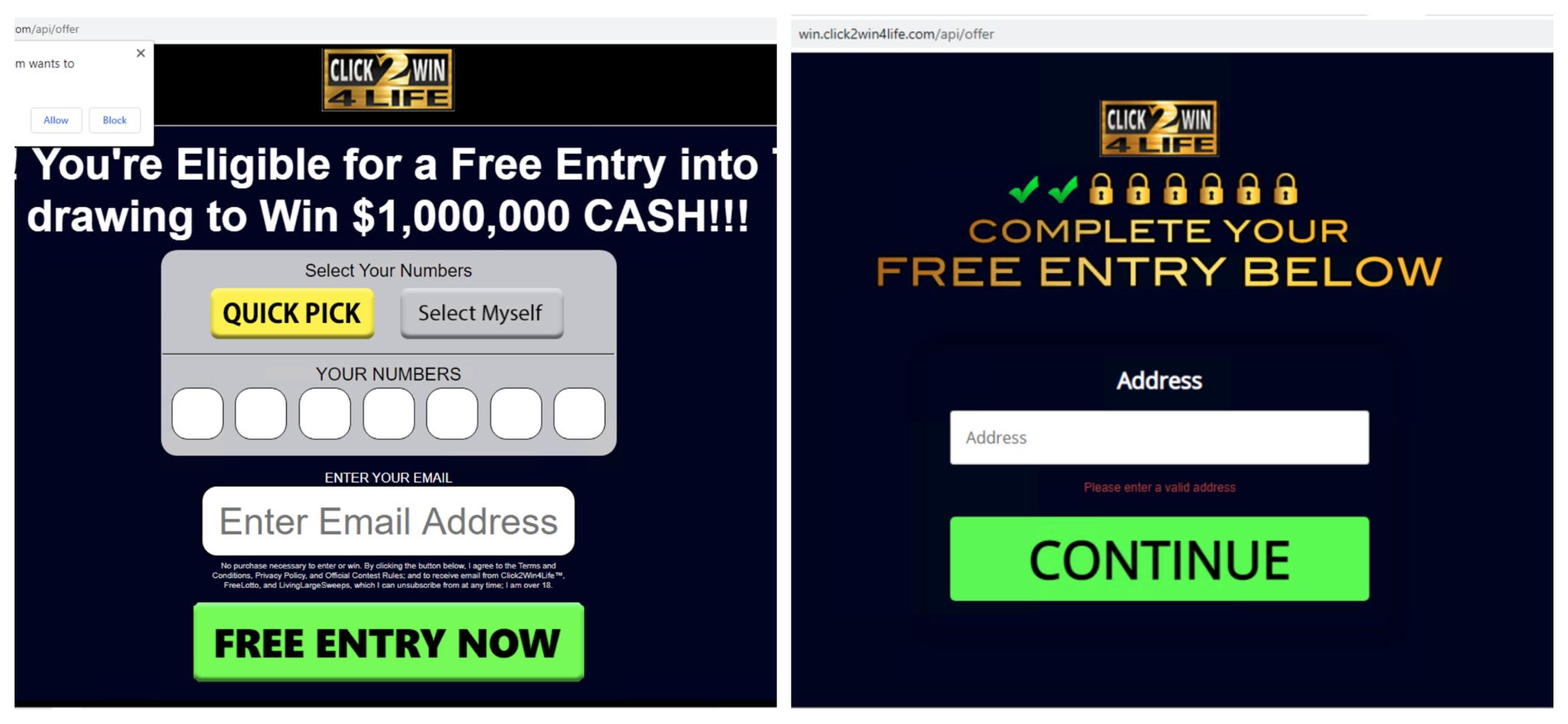
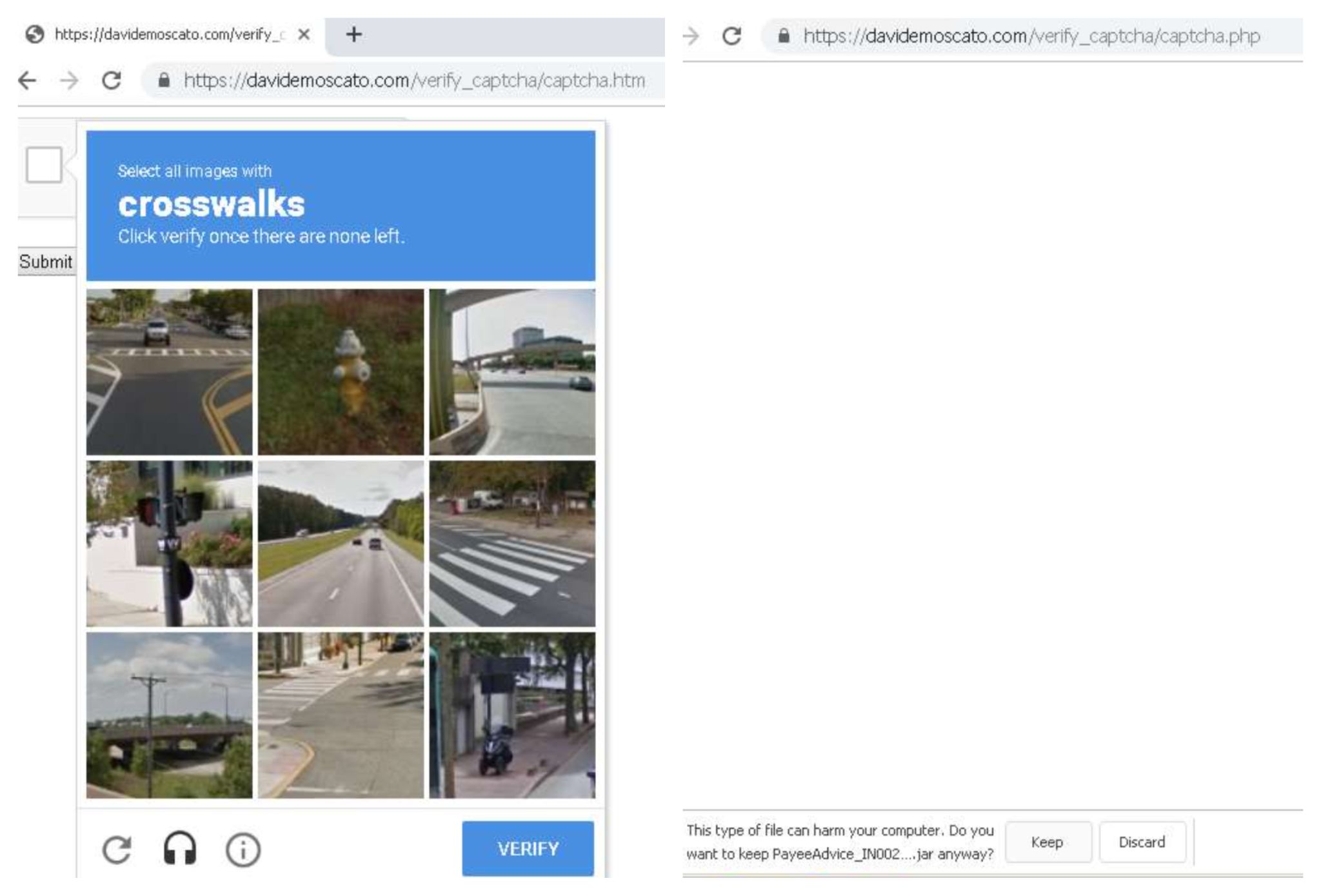
To lure users into clicking on embedded links and buttons in phishing PDF files, we have identified the top five schemes used by attackers in 2020 to carry out phishing attacks, which we have grouped as Fake Captcha, Coupon, Play Button, File Sharing and E-commerce.

Palo Alto Networks customers are protected against attacks from phishing documents through various services, such as Cortex XDR, AutoFocus and Next-Generation Firewalls with security subscriptions including WildFire, Threat Prevention, URL Filtering and DNS Security.

Data Collection

To analyze the trends that we observed in 2020, we leveraged the data collected from the Palo Alto Networks WildFire platform. We collected a subset of phishing PDF samples throughout 2020 on a weekly basis. We then employed various heuristic-based processing and manual analysis to identify top themes in the collected dataset. Once these were identified, we created Yara rules that matched the files in each bucket, and applied the Yara rules across all the malicious PDF files that we observed through WildFire.

Data Overview

In 2020, we observed more than 5 million malicious PDF files. Table 1 shows the increase in the percentage of malicious PDF files we observed in 2020 compared to 2019.

Malware Total PDF Files Seen Percentage of PDF Malware Percentage Increase
2019 411,800 4,558,826,227 0.009% 1,160%
2020 5,224,056 6,707,266,410 0.08%

Table 1. Distribution of malicious PDF samples in 2019 and 2020.

The pie chart in Figure 1 gives an overview of how each of the top trends and schemes were distributed. The largest number of malicious PDF files that we observed through WildFire belonged to the fake “CAPTCHA” category. In the following sections, we will go over each scheme in detail. We do not discuss the ones that fall into the “Other” category, as they include too much variation and do not demonstrate a common theme.

Malicious phishing trends with PDF files in 2020 include the use of fake CAPTCHA, Lukoil-themed PDFs, the inclusion of a play button, file sharing and e-commerce.
Figure 1. Malicious PDF trends in 2020.

Usage of Traffic Redirection

After studying different malicious PDF campaigns, we found a common technique that was used among the majority of them: usage of traffic redirection.

Before we review the different PDF phishing campaigns, we will discuss the importance of traffic redirection in malicious and phishing PDF files. The links embedded in phishing PDF files often take the user to a gating website, from where they are either redirected to a malicious website, or to several of them in a sequential manner. Instead of embedding a final phishing website – which can be subject to frequent takedowns – the attacker can extend the shelf life of the phishing PDF lure and also evade detection. Additionally, the final objective of the lure can be changed as needed (e.g. the attacker could choose to change the final website from a credential stealing site to a credit card fraud site). Not specific to PDF files, the technique of traffic redirection for malware-based websites is heavily discussed in “Analysis of Redirection Caused by Web-based Malware” by Takata et al.

Phishing Trends With PDF Files

We identified the top five phishing schemes from our dataset and will break them down in the order of their distribution. It is important to keep in mind that phishing PDF files often act as a secondary step and work in conjunction with their carrier (e.g., an email or a web post that contains them).

1. Fake CAPTCHA

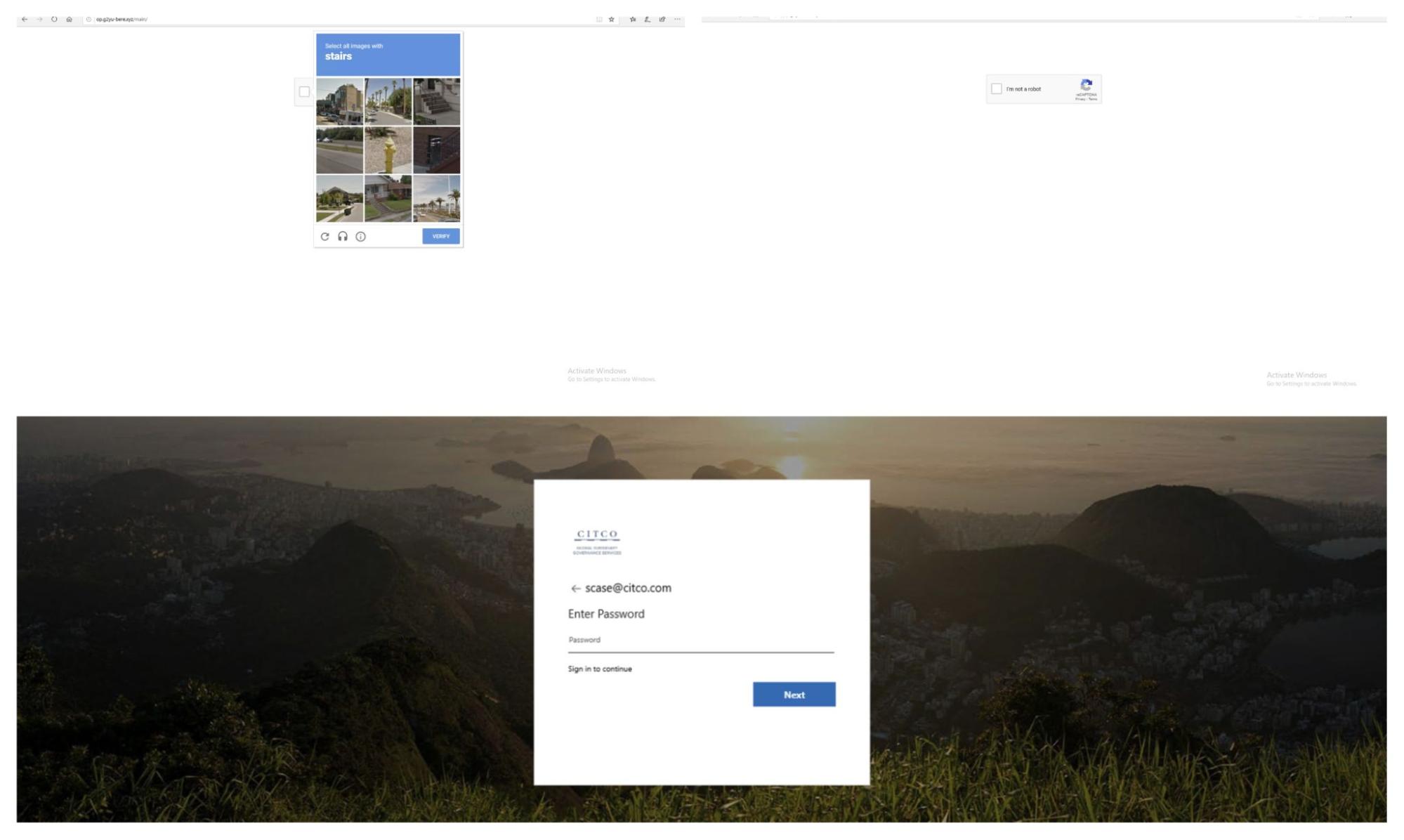
Fake CAPTCHA PDF files, as the name suggests, demands that users verify themselves through a fake CAPTCHA. CAPTCHAs are challenge-response tests that help determine whether or not a user is human. However, the phishing PDF files we observed do not use a real CAPTCHA, but instead an embedded image of a CAPTCHA test. As soon as users try to “verify” themselves by clicking on the continue button, they are taken to an attacker-controlled website. Figure 2 shows an example of a PDF file with an embedded fake CAPTCHA, which is just a clickable image. A detailed analysis of the full attack chain for these files is included in the section Fake CAPTCHA Analysis.

This shows an example of a PDF file with an embedded fake CAPTCHA, which is just a clickable image.
Figure 2. Phishing PDF with a fake CAPTCHA asking users to click on “Continue” to verify themselves.

2. Coupon

The second category that we identified were phishing PDF files that were coupon-themed and often used a logo of a prominent oil company. A considerable amount of these files were in Russian with notes such as “ПОЛУЧИТЬ 50% СКИДКУ” and “ЖМИТЕ НА КАРТИНКУ” which translate to “get 50% discount” and “click on picture” respectively. Figure 3 shows an example of these types of phishing PDF files:

Almost all these files were in Russian with a note such as “ЖМИТЕ НА КАРТИНКУ,” which translates to “click on picture.” The PDF file looks like a coupon with a discount offering, which could lure users into clicking on the picture. Figure 3 shows an example of this type of PDF file
Figure 3. Phishing PDF file with a logo of a prominent oil company asking the user to click on the picture.

Similar to other campaigns we observed, these phishing files also leveraged traffic redirection for reasons mentioned previously. Upon analyzing several of them, we found out that they use two traffic redirectors. Figure 4 shows the chain for a sample (SHA256: 5706746b7e09b743a90e3458e5921367a66a5c3cfbd9417ed082dea586b7986e).

The attack chain for a coupon-themed phishing sample, shown here, flows from a PDF through several redirects until arriving at the attacker's intended destination.
Figure 4. Attack chain for a coupon-themed sample.

The gating website took us to another website (track[.]backtoblack.xyz), which was a redirector itself. Eventually, we were routed to an adult dating website through a GET request with some parameters filled such as click_id, which can be used for monetization as shown in Figure 5. All these redirections happened through HTTP 302 response messages. Our research showed that the offer_id parameter of backtoblack[.]xyz controls what website the user lands on at the end.

The gating website took us to another website (track[.]backtoblack.xyz), which was a redirector itself. Eventually, we were routed to zoomhookups[.]com through a GET request with some parameters filled such as click_id, which can be used for monetization as shown in Figure 5.
Figure 5. Phishing PDF sample lands the user on a registration page of an adult dating website.

3. Static Image With a Play Button

These phishing files do not necessarily carry a specific message, as they are mostly static images with a picture of a play button ingrained in them. Although we observed several categories of images, a significant portion of them either used nudity or followed specific monetary themes such as Bitcoin, stock charts and the like to lure users into clicking the play button. Figure 6 shows a PDF file with a Bitcoin logo and a clickable play button.

This shows a PDF file with a Bitcoin logo and a clickable play button.
Figure 6. Bitcoin logo with a clickable play button.

Upon clicking the play button, we were again, as expected, redirected to another website. In the majority of our tests, we were redirected to https://gerl-s[.]online/?s1=ptt1. From the domain name, one could assume the website is also within the realm of online dating. However, at the time of this writing, this website had been taken down. Unlike the previous campaign, there was only one redirector involved, and we noticed that all the redirectors had the format of: 6-digit-alphanumeric-unique-id[dot]sed followed by a main domain as listed below.

  • http://pn9yozq[.]sed.notifyafriend.com/
  • http://l8cag6n[.]sed.theangeltones.com/
  • http://9ltnsan[.]sed.roxannearian.com/
  • http://wnj0e4l[.]sed.ventasdirectas.com/
  • http://x6pd3rd[.]sed.ojjdp.com/
  • http://ik92b69[.]sed.chingandchang.com/
  • http://of8nso0[.]sed.lickinlesbians.com/

4. File Sharing

This shows an example of another phishing trend with PDF files: file sharing. Here, the PDF includes a Dropbox logo asking a user to click a button to request access.
Figure 7. Phishing PDF with a logo of a popular file sharing platform asking the user to click on the button for access.

This category of phishing PDF files utilizes popular online file sharing services to grab the user’s attention. They often inform the user that someone has shared a document with them. However, due to reasons which can vary from one PDF file to another, the user cannot see the content and apparently needs to click on an embedded button or a link. Figure 7 shows a PDF with a Dropbox logo asking the user to click on the button to request access. Figure 8 similarly shows a picture of a PDF file with a OneDrive logo, asking the user to click on “Access Document” to view the content of the file. As the number of cloud-based file sharing services increases, it would not be surprising to see this theme surge and continue to be among the most popular approaches.

This shows a picture of a PDF file with a OneDrive logo, asking the user to click on “Access Document” to view the content of the file.
Figure 8. Phishing PDF file asking the user to click on “Access Document” to view the shared file.

Clicking on the “Access Document” button took us to a login page with an Atlassian logo, as shown in Figure 9. We were given two options to use for signing in: Microsoft email or other email services.

Clicking on the “Access Document” button shown in the figure above took us to a login page with an Atlassian logo, as shown here.
Figure 9. Phishing website asking the user to log in with one of the provided email options.

Atlassian Stack is geared towards enterprises, so we assume that this campaign was targeting enterprise users. Each of those links were designed to look like a legitimate email sign-on page. For instance, “Continue with Microsoft” took us to a page that looked somewhat similar to what one would encounter upon entering the legitimate https://login.live.com, as shown in Figure 10.

Phishing website looking like Microsoft’s login page. Note the URL, outlined in red, which gives away that the page is not legitimate.
Figure 10. Phishing website looking like Microsoft’s login page. Note the URL, which gives away that the page is not legitimate.

After we entered a fake email address, we proceeded to another page that asked us to enter our password, as shown in Figure 11.

To closely imitate login.live.com, the “Enter password” page comes after the user enters a valid username. Note the URL, outlined in red, which indicates a scam site.
Figure 11. To closely imitate login.live.com, the “Enter password” page comes after the user enters a valid username. Note the URL, which indicates a scam site.

We observed that the stolen credentials were sent on the attacker's server through the parameters in a GET request, as shown in Figure 12.

We observed that the stolen credentials were sent on the attacker's server through the parameters in a GET request, as shown here.
Figure 12. Phished credentials submitted to the attacker's server through a GET request.

After entering the test credentials, we were taken back to the first login page. We would like to note that, at the time that we visited this website, it was already flagged as phishing by major browsers such as Google Chrome and Mozilla Firefox. However, we clicked through the warning page to investigate further.

5. E-commerce

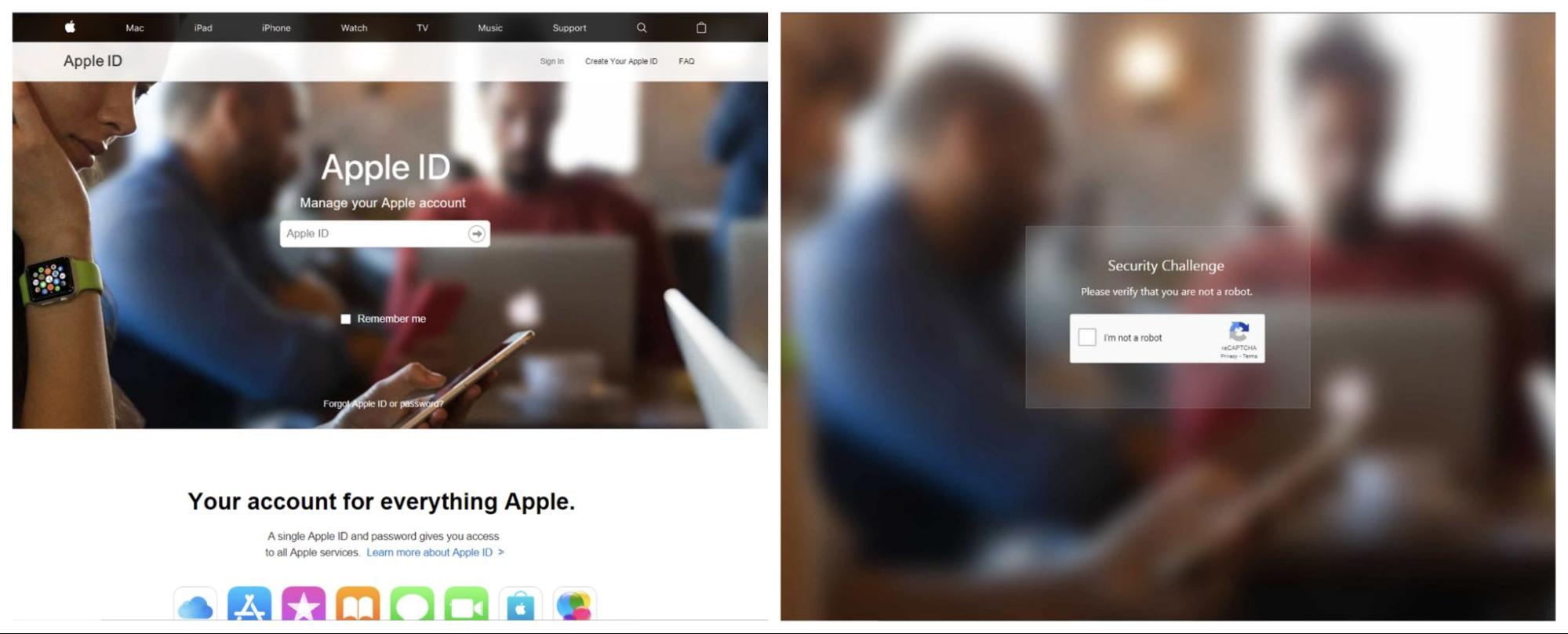
Incorporating e-commerce themes into phishing emails and documents is not a new trend. However, we observed an upward trend in the number of fraudulent PDF files that used common e-commerce brands to trick users into clicking on embedded links. Figure 13 shows an example phishing PDF file notifying the user that their credit card is no longer valid, and they need to “update payment information” to not have their Amazon Prime benefit interrupted. Figure 14, similarly, shows a PDF file telling the user their Apple ID account will be suspended if they do not click on the link to update their information.

A phishing PDF purporting to be from Amazon Prime. It reads: "Dear customer, Your Amazon Prime membership is set to renew on April 7, 2020. However, we've noticed that the card associated with your Prime membership is no longer valid." From there, it tries to entie the user to "update payment information," opening up credential stealing. E-commerce scams such as this one were one of the top phishing trends with PDF files that we observed.
Figure 13. Phishing PDF file claiming the user’s credit card is about to expire on a well-known e-commerce website.
A phishing PDF purporting to be from Apple. It reads: "Dear Customer, Your Apple ID was locked due to security reasons. We have detected a sign-in from an unknown device and an unusual activity from your Account." From there, it tries to entie the user to "verify your account," opening up credential stealing. E-commerce scams such as this one were one of the top phishing trends with PDF files that we observed.
Figure 14. Phishing PDF file claiming the user’s Apple ID is about to be disabled.

At the time of this writing, all the websites for this specific campaign were taken down. It is worth noting that the majority of these e-commerce themed phishing PDF files used https://t.umblr[.]com/ for redirection purposes. Examples include:

https://t.umblr[.]com/redirect?z=https%3A%2F%2Fdulunggakada40.com%2F%3Fgdghrtjykuujttjkg&t=ZDJkNjIzMjY2ZDBlMDkyMDIwNTkwZDFiYTdlNGI5NTE3MTJlOWY0YyxlMDVkM2Y0YjE1NDljMmM5NWMyZmUxMTBlOWYzYzBhMzI3Y2UyZDNh&ts=1605344440

https://t.umblr[.]com/redirect?z=https%3A%2F%2Fdulunggakada40.com%2F%3Fgdghrtjykuujttjkg&t=ZDJkNjIzMjY2ZDBlMDkyMDIwNTkwZDFiYTdlNGI5NTE3MTJlOWY0YyxlMDVkM2Y0YjE1NDljMmM5NWMyZmUxMTBlOWYzYzBhMzI3Y2UyZDNh&ts=1605344440

Fake CAPTCHA Analysis

As previously mentioned, close to 40% of phishing PDF files that we saw in 2020 were part of the fake CAPTCHA category. Figure 15 shows the hex content of a fake CAPTCHA sample (SHA256: 21f225942de6aab545736f5d2cc516376776d3f3080de21fcb06aa71749fc18f). We can see that the PDF file has an embedded Uniform Resource Identifier (URI) that points to https://ggtraff[.]ru/pify?keyword=download+limbo+apk+full+game, which is a traffic redirector. As mentioned earlier, traffic redirection websites do not point to a fixed website, and they often redirect the user to a different website upon each visit.

This shows the hex content of a fake CAPTCHA sample.
Figure 15. Embedded URL in a fake CAPTCHA sample.

Figure 16 is the HTTP response body that we got from the aforementioned URI during one of our tries. The returned response from the redirector was a small JavaScript code stub that again redirects the user, but this time to: https://robotornotcheckonline[.]xyz/?p=miywentfmi5gi3bpgizdqnzv&sub1=wbly&sub3=1h6oih4jofeu&sub4=download+limbo+apk+full+game.

This is the HTTP response body that we got from the aforementioned URI during one of our tries. The returned response from the redirector was a small JavaScript code stub that again redirects the user.
Figure 16. URL redirecting the user to robotornotcheckonline[.]xyz
To understand the whole chain, we followed the link from Figure 16. The response was a multi-function JavaScript code that can be seen in Figure 17.

The multi-function JavaScript code shown here was a part of the attack chain we observed in a malicious PDF implementing a fake CAPTCHA scheme.
Figure 17. JavaScript code that asks the user to subscribe to push notifications.

Essentially, the code listed above registers a browser push notification. Mozilla describes browser push notifications as follows: “Notifications API lets a web page or app send notifications that are displayed outside the page at the system level; this lets web apps send information to a user even if the application is idle or in the background.” Figure 18 shows the permission request when visiting the website in a browser.

This shows the permission request when visiting the website in a browser, which sets a user up to receive push notifications, many of which may involve malvertising.
Figure 18. robotornotcheckonline[.]xyz asking the user to subscribe to their push notifications
By clicking on “Allow”, the user is then redirected to another website that asks them to subscribe to another push notification. When the user agrees and subscribes to the push notification, the function SubS() from Figure 17 is called, which sends a POST request to let the controller know that the user has subscribed to them. Figure 19 shows the specific POST request. We can see that there are a few parameters with unique values such as “key” and “secret” that are sent along to fingerprint the user.

This shows the POST request that lets the controller know that a user has subscribed to push notifications. We can observe a few parameters with unique values such as "key" and "secret" that are sent along to fingerprint the user.
Figure 19. POST request notifying the controller that the user has subscribed to their notifications.

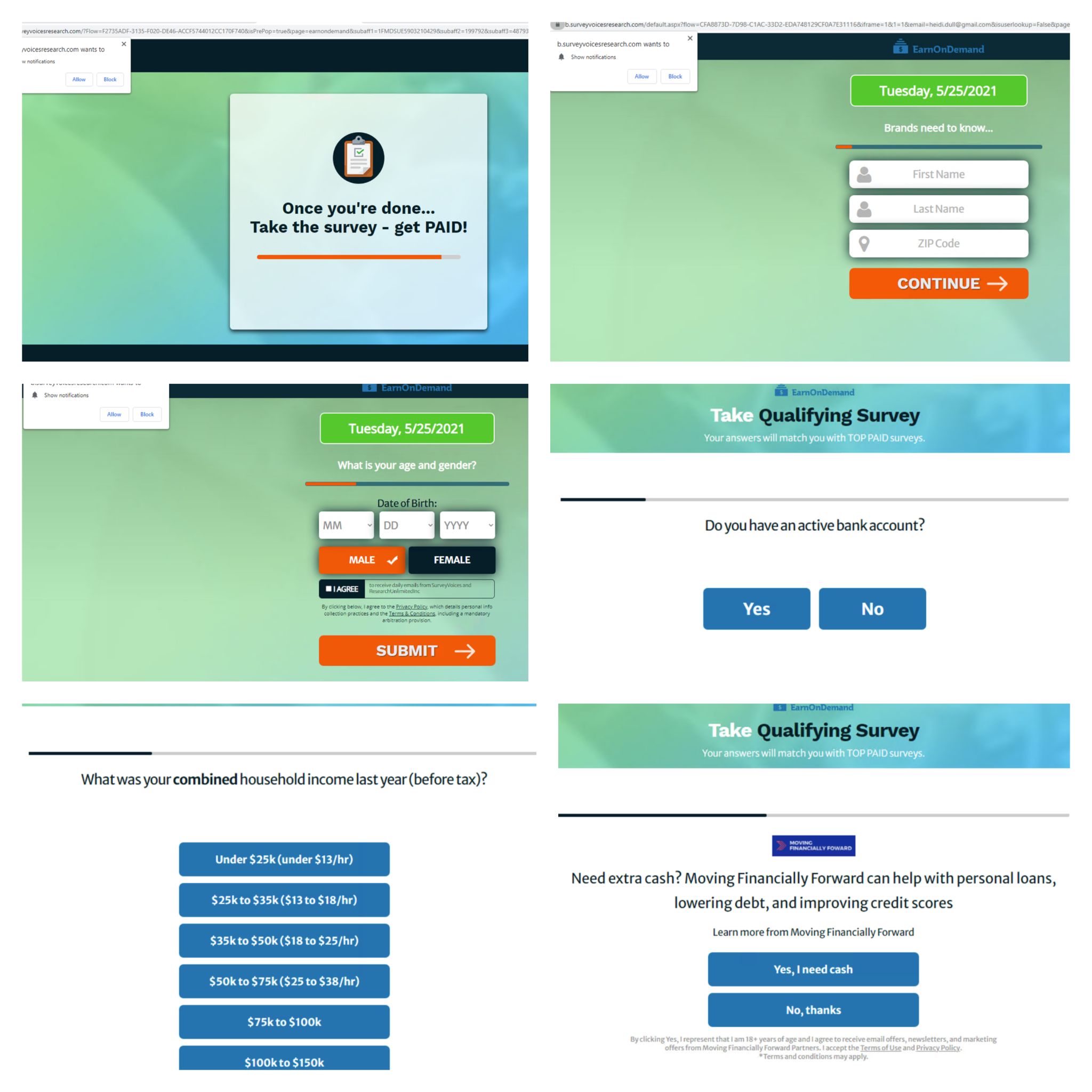
This loop can go on a few times. However, it is important to note that the site does not have to be open in the browser for the notifications to pop. After completing the chain, we noticed two push notifications were registered in our browser, as shown in Figure 20. This now registers our browser as a “target” for these websites to send future popups for additional malvertising websites and extension installations.

After completing the chain, we noticed two push notifications were registered in our browser, as shown here.
Figure 20. Fake CAPTCHA sample resulting in the registration of two push notifications.

At the end, we landed on an online gaming website. Below is the HTTP GET request used:

https://promo[.]???.com/glows-27628/na-en/?pub_id=1374&xid=600889fbf85ac2000110370d&xid_param1=3047954&xid_param_2=&sid=SIDQVeAYOu1UbRxwVV690c-yVM5sWOOfDAb7-h_jd_AIcFGJbFBhqkUXwCszxjNr_9eJ1uoX1OdKr3vILRvqtbg9mcdeMNy5zbavbbqOxtJwEYgn1l5htPFMCsWv3Ft45e5BLHmpA0DQLcy&enctid=c8o8xirbufyh&lpsn=WOWS+TMPLT1+CODE+BOOM+global&foris=1&utm_source=wlap&utm_medium=affiliate&utm_campaign=qmk1qpm1&utm_content=1374

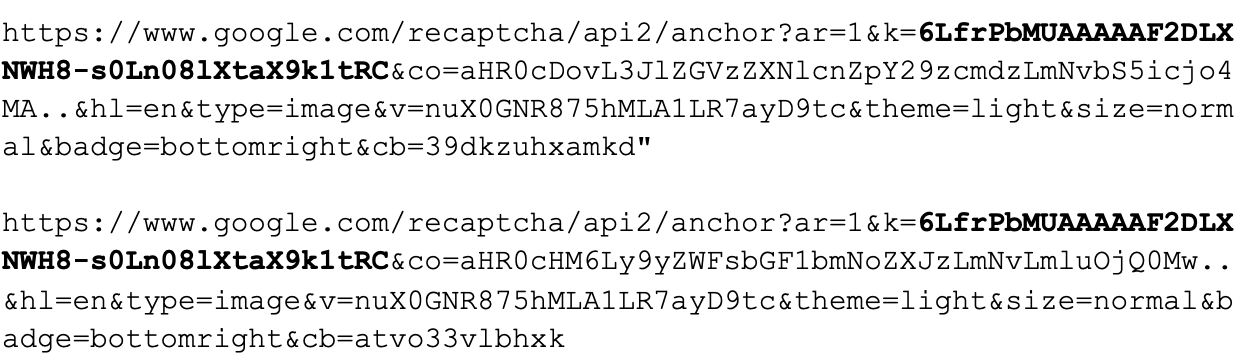
As we can see, there are a lot of parameters involved with the above GET request. It is our assumption that this is how the attackers generate revenue. These identifiers tell the owner of the website how the user got there. If it was through the means that the attacker leveraged, the attacker in return gets a commision of some sort for bringing the users to that website. We also noticed Urchin Tracking Module parameters were also used to evaluate the effectiveness of this “marketing” method. To keep a stream of revenue, instead of a one-time click, it appears to us that attackers are leveraging push notifications. That way they can, once in a while, use the notification mechanism to deceive subscribed users into clicking on more links, and hence generate more revenue. As previously mentioned, our analysis has shown that fake CAPTCHA phishing samples have embedded links that point to traffic redirection websites, which then redirect the user to a different website upon each visit. To better understand where else these phishing files can lead us to, we decided to visit them a few more times. On one of those instances, we were not only presented with a page that asked us to subscribe to their push notifications, we were also asked to download a Google Chrome extension, as shown in Figure 21.

Face CAPTCHA phishing samples, one of the most popular phishing trends with PDF files that we observed, sometimes lead to web pages that seek to establish an ongoing relationship with the user. In the example shown here, the user is taken to a website that asks them to allow push notifications and download a Google Chrome extension.
Figure 21. Traffic redirection website taking us to a website that subscribes users to push notifications and asks them to download a Chrome extension

When “Add to Chrome” was clicked, we were then taken to the Chrome Web Store (“CWS”). CWS is Google's online store that hosts browser extensions. Figure 22 shows the extension on the CWS with more than a thousand downloads.

Note: at the time of the publication the extension was not available on Chrome Web Store anymore.

This screenshot shows a Google Chrome extension from a phishing website with more than a thousand downloads.
Figure 22. HDSportSearch plugin with more than 1,000 downloads on Chrome Web Store.

Upon downloading and analyzing the extension, the manifest.json file bundled in the extension package revealed that the HDSportSearch extension is a search engine hijacker that overrides the search engine default values for the browser, as shown in Figure 23.

Upon downloading and analyzing the extension, the manifest.json file bundled in the extension package revealed that the HDSportSearch extension is a search engine hijacker that overrides the search engine default values for the browser, as shown here.
Figure 23. manifest.json for HDSportSearch plugin overriding Chrome’s settings.

Figure 24 summarizes the paths we were able to explore for the PDF phishing file with a fake CAPTCHA.

Paths and actions that a PDF with a fake CAPTCHA can take include opening a stub website that redirects the user to another website, luring the user to a website that asks them to subscribe to push notifications or download an extension, and other similar actions, as shown in the flowchart here.
Figure 24. Paths and actions that a PDF with a fake CAPTCHA can take.

 Conclusion

We covered the most common PDF-based phishing campaigns that we saw in 2020 along with their distribution. Data from recent years demonstrates that the amount of phishing attacks continues to increase and social engineering is the main vector for attackers to take advantage of users. Prior research has shown that large-scale phishing can have a click-through rate of up to 8%. Thus, it is important to verify and double check the files you receive unexpectedly, even if they are from an entity that you know and trust. For example, why was your account locked out of nowhere, or why did someone share a file with you when you least expected it?

Palo Alto Networks customers are protected against attacks from such phishing documents through various services:

  • Cortex XDR (protects against phishing document delivery and execution).
  • Next-Generation Firewalls with security subscriptions including WildFire and Threat Prevention (protects against phishing document delivery), URL Filtering (protects against redirectors and final phishing URLs) and DNS Security (protects against redirectors and final phishing domains).
  • AutoFocus users can track some of these PDF phishing campaigns under the Autofocus tag GenericPhishingDocs.

Indicators of Compromise

Campaign SHA256
Fake CAPTCHA 7bb3553eea6e049a943bc2077949bc767daab2c3c993ce1001176f81c9dbb565
2df31f2ea1a434a034a1b3031f3e59bae6c6f73dff39e50fd37bd028577e2710
9b2a875169db01332f5fbb59bb3021ad5dd1b241add17750924a85033798f8e7
Coupon 5706746b7e09b743a90e3458e5921367a66a5c3cfbd9417ed082dea586b7986e
0cce9de0ff8e5bc07a8b54a95abbef49db08105b83c233a3c3647c09c06bdffb
0e4d74dacdb72756c49438f81e3267a9e92c3ea9465a84aa5cf4fdaf82a6ed61
Play Button 6835fa030a50b9826612d1e6e3f0c1db2790b3783f62de02972898f79be07265
2c361182748c44364b7e631280ca47fa09cb9736b06208285384d6d7826c67b9
6835fa030a50b9826612d1e6e3f0c1db2790b3783f62de02972898f79be07265
File Sharing 0ce0cfb5c175f57efb02521d69020098d302bc3e37c4d793721351f5a7ee0350
8c602aee3565491864da3b1040696b23b80cee2894c52b5cd982a11ad37977a3
9a79cae2ba1ba1510d5940a1b5559dd1509b7377a6bd125866e65f96c12d8894
E-commerce b330cbd30a2ab86e0f855e9a0d3a87aa7b91829db5c6bc34f4fa69b86d715568
7e7f2726a892ada15a1bdf79bd6f967650c440a64e89d5f1b83e29afdece1f1c
cccee5092d5986d34bfdead009d24d1b0dfb8284f291ed44093904cc9c494d7f

Related Autofocus Tag

GenericPhishingDocs

Redirectors

pn9yozq[.]sed.notifyafriend.com

l8cag6n[.]sed.theangeltones.com

9ltnsan[.]sed.roxannearian.com

wnj0e4l[.]sed.ventasdirectas.com

x6pd3rd[.]sed.ojjdp.com

ik92b69[.]sed.chingandchang.com

of8nso0[.]sed.lickinlesbians.com

t.umblr[.]com/redirect?z=https%3A%2F%2Fdulunggakada40.com%2F%3Fgdghrtjykuujttjkg&t=ZDJkNjIzMjY2ZDBlMDkyMDIwNTkwZDFiYTdlNGI5NTE3MTJlOWY0YyxlMDVkM2Y0YjE1NDljMmM5NWMyZmUxMTBlOWYzYzBhMzI3Y2UyZDNh&ts=1605344440

t.umblr[.]com/redirect?z=https%3A%2F%2Fdulunggakada40.com%2F%3Fgdghrtjykuujttjkg&t=ZDJkNjIzMjY2ZDBlMDkyMDIwNTkwZDFiYTdlNGI5NTE3MTJlOWY0YyxlMDVkM2Y0YjE1NDljMmM5NWMyZmUxMTBlOWYzYzBhMzI3Y2UyZDNh&ts=1605344440

ggtraff[.]ru/pify?keyword=download+limbo+apk+full+gam

Final Hosts

robotornotcheckonline[.]xyz/?p=miywentfmi5gi3bpgizdqnzv&sub1=wbly&sub3=1h6oih4jofeu&sub4=download+limbo+apk+full+game

gerl-s[.]online/?s1=ptt1

creqwcf[.]tk/%23$%25%5e&

get[.]hdsportsearch.com/?pid=58955&clickid=37590634811986352

Yara Rules Used

rule onedrive_category_2

{

meta:

author = "Ashkan Hosseini"

date = "2021-01-08"

description = "Onedrive Category 2 (Red Background)"

hash0 = "af35c35a1b1fa09944c29000923076cc"

hash1 = "5c199d1c59b93fa5b1e322ed7846f146"

hash2 = "e1a267558a6d4fdbfc4502a27239c1b4"

hash3 = "980bba53d02b9e4e53d13621b11ddfb5"

hash4 = "26a670f532d702199c2c3f4b65f9c1e7"

hash5 = "f8162f71caa3581c66a16c894f089320"

hash6 = "0338637ab800cfea336ccf4f00b303f7"

hash7 = "d05742fc803bcd719f1afc156e703910"

sample_filetype = "pdf"

strings:

$string0 = "4 0 obj"

$string1 = "1 0 obj"

$string2 = "endobj"

$string3 = "9 0 obj"

$string4 = "endstream"

$string5 = "startxref"

$string6 = "12 0 obj"

$string7 = "11 0 obj"

$string8 = { 25 50 44 46 2d 31 2e 37 0d }

$string9 = { 65 6e 64 6f 62 6a 0d }

$string10 = { 72 6f 75 70 }

$string11 = { 74 2f 53 75 62 74 79 70 65 2f }

$string12 = { 29 4a a5 28 91 62 }

$string13 = { 99 73 d9 79 }

condition:

all of them

}


rule onedrive_category_1

{

meta:

author = "Ashkan Hosseini"

date = "2021-01-08"

description = "one drive category 1 (blue background)"

hash0 = "4ed8e629b4175427abc3d8a96589d4db"

hash1 = "64d2e35e875fedaa7b206cfea2762910"

hash2 = "098db1edac07219b1a1fc8732b0ff6e3"

hash3 = "0cb9d12551b22109f51feaadbfa4d9a1"

hash4 = "6467377125be7da67a94d8d608d2b927"

hash5 = "90fe53f54331a34b91523d12c65fbffa"

sample_filetype = "pdf"

strings:

$string0 = "W5M0MpCehiHzreSzNTczkc9d"

$string1 = "http://ns.adobe.com/pdf/1.3/"

$string2 = "adobe:ns:meta/"

$string3 = "18 0 obj"

$string4 = "</x:xmpmeta>"

$string5 = "14 0 obj"

$string6 = "endstream"

$string7 = "</rdf:Description>"

$string8 = "http://ns.adobe.com/xap/1.0/mm/"

$string9 = "<xmpMM:VersionID>1</xmpMM:VersionID>"

$string10 = "<xmpMM:RenditionClass>default</xmpMM:RenditionClass>"

$string11 = "xmlns:pdf"

$string12 = "xpacket end"

$string13 = "11 0 obj"

$string14 = "http://ns.adobe.com/xap/1.0/"

$string15 = { 2f 52 65 73 6f 75 72 63 }

$string16 = { 3e 3e 3e 3e 3e 0d 65 6e 64 6f 62 6a 0d 32 20 30 20 6f 62 6a 0d 3c 3c }

$string17 = { 2f 50 20 31 20 30 20 52 2f 41 20 33 20 30 }

$string18 = { 29 3e 3e 0d 65 6e 64 6f 62 6a 0d 34 20 30 20 6f 62 6a 0d 3c 3c 2f 53 }

$string19 = { 3e 3e 0d 65 6e 64 6f 62 6a 0d 35 20 30 20 6f 62 6a 0d 3c 3c }

$string20 = { 39 20 30 20 52 2f }

$string23 = { 31 20 30 20 6f 62 6a 0d 3c 3c 2f 54 79 70 65 2f 50 61 67 65 2f 50 61 72 65 6e 74 }

$uri = { 2f 55 52 49 }

$string24 = { 0d 25 e2 e3 cf d3 0d 0a 31 20 30 20 6f 62 6a 0d 3c }

condition:

all of($string*) and #uri < 20

}

rule filesharing_pdf_scams

{

meta:

author = "Ashkan Hosseini"

date = "2021-01-07"

description = "File Sharing PDF Scams"

hash0 = "170ac152d30f98ca01db808b1dd397d2"

hash1 = "00d9aa947875f80b3a23e7af4267633e"

hash2 = "b797c0905cd784c2d457ac516791a154"

hash3 = "ae5ae57576f4c6ce94e096867011eb65"

sample_filetype = "pdf"

strings:

$string0 = "W5M0MpCehiHzreSzNTczkc9d"

$string1 = "4 0 obj"

$string2 = "1 0 obj"

$string3 = "6 0 obj"

$string4 = "0000000000 65535 f"

$string5 = "xpacket end"

$string6 = "</x:xmpmeta>"

$string7 = "<rdf:RDF xmlns:rdf"

$string8 = "<</Filter/FlateDecode/Length 50>>stream"

$string9 = "startxref"

$string10 = "<</Type/Page/Parent 6 0 R/Contents 5 0 R/MediaBox[0 0 734.88 593.76001]/CropBox[0 0 734.88 593.76001"

$string11 = "%PDF-1.4"

$string12 = "0000000016 00000 n"

$string13 = "http://ns.adobe.com/xap/1.0/"

$string14 = "xmlns:pdf"

$string15 = "<x:xmpmeta xmlns:x"

$string16 = "456789:CDEFGHIJSTUVWXYZcdefghijstuvwxyz"

condition:

16 of them

}


rule ecommerce_pdf_scams

{

meta:

author = "Ashkan Hosseini"

date = "2021-01-07"

description = "Ecommerce PDF Scams"

hash0 = "e7357d268430b36636e4fa1255eabbb4"

hash1 = "d08be5516ffec6f4580f366ad7961d96"

hash2 = "0999539a9900a7657d0d6e5dbc2e4ae0"

hash3 = "7912091795d4ff92abf99a0239856fe1"

hash4 = "87fdc6dfff4094cfb43f4bbd58f833da"

hash5 = "752979a99536edb032d094e36cf556e8"

sample_filetype = "pdf"

strings:

$string0 = "2 0 obj"

$string1 = "stream"

$string2 = "0000000103 00000 n"

$string3 = "8 0 obj"

$string4 = "<</AIS false /BM /Normal /CA 1 /Type /ExtGState /ca 1>>"

$string5 = "3 0 obj"

$string6 = "10 0 obj"

$string7 = "0000000016 00000 n"

$string8 = "5 0 obj"

$string9 = "82<.342"

$string10 = "456789:CDEFGHIJSTUVWXYZcdefghijstuvwxyz"

$string11 = {72 53 70 61 63 65 20 2f 44 65 76 69 63 65 52 47 42 20 2f 46 69 6c 74 65 72 20 2f 44 43 54 44 65 63 6f 64 65 20 2f 48 65 69 67 68 74 20}

$string12 = {3d 38 32 3c 2e 33 34 32 ff db 00 43 01 09 09 09 0c 0b 0c 18 0d 0d 18 32 21 1c 21 32 32 32 32 32 32 32 32 32 32 32 32 32 32 32 32 32 32 32 32 32 32}

$string13 = {72 d1 0a 16 24 34 e1 25 f1 17 18 19 1a 26 27 28 29 2a 35 36 37 38 39 3a 43 44 45 46 47 48 49 4a 53 54 55 56 57 58 59 5a 63 64 65 66 67 68 69 6a 73}

$string14 = {27 29 20 2f 53 75 62 6a 65 63 74 20 28 29 20 2f 54 69 74 6c 65 20 28 29 20 2f 54 72 61 70 70 65 64 20}

$string15 = {27 29 20 2f 50 72 6f 64 75 63 65 72 20 28 29 20 2f 53 6f 75 72 63 65 4d 6f 64 69 66 69 65 64 20 28 44 3a 32 30 32 30}

$string16 = {72 20 28 57 50 53 20 57 72 69 74 65 72 29 20 2f 4b 65 79 77 6f 72 64 73 20 28 29 20 2f 4d 6f 64 44 61 74 65 20 28 44 3a 32 30 32 30}

$string17 = {28 29 20 2f 43 72 65 61 74 69 6f 6e 44 61 74 65 20 28 44 3a 32}

$string18 = {3e 3e 0d 0a 73 74 72 65 61 6d 0d 0a ff d8 ff e0 00 10 4a 46 49 46}

$string19 = { 2F 43 72 65 61 74 69 6F 6E 44 61 74 65 }

$string20 = {2F 52 65 73 6F 75 72 63 65 73 20 3C 3C 2F 45 78 74 47 53 74 61 74 65 20 3C 3C 2F 47 53 39 20 39 20 30 20 52 3E 3E }

$string21 = {41 20 31 31 20 30 20 52 20 2F 42 53 20 3C 3C 2F 57 20 30 3E 3E 20 2F 46 20 34 20 2F 50 20 36 20 30 20 52 20 2F 52 65 63 74 20 5B }

$intro = {31 20 30 20 6F 62 6A 0D 3C 3C 2F 4E 61 6D 65 73 20 3C 3C 2F 44 65 73 74 73 20 34 20 30 20 52 3E 3E 20 2F 4F 75 74 6C 69 6E 65 73 20 35 20 30 20 52 20 2F 50 61 67 65 73 20 32 20 30 20 52 20 2F 54 79 70 65 20 2F 43 61 74 61 6C 6F 67 3E 3E 0D 65 6E 64 6F 62 6A 0D}

$bitspercomp = {42 69 74 73 50 65 72 43 6F 6D 70 6F 6E 65 6E 74 20 38 20 2F 43 6F 6C 6F 72 53 70 61 63 65 20 2F 44 65 76 69 63 65 52 47 42 20 2F 46 69 6C 74 65 72 20 2F 44 43 54 44 65 63 6F 64 65 20 2F 48 65 69 67 68 74 }

condition:

all of them

}


rule coupon_click_image

{

meta:

author = "Ashkan Hosseini"

date = "2021-01-11"

description = "coupon"

hash0 = "4bbdc201e69e5983a6b949eb3424f244"

hash1 = "e02f52639d47f838ad13201602cc7a10"

hash2 = "7638afe039ad5f405a9ef72b6b6437d4"

hash3 = "a4b13e23f175c7da6b9e54357793235c"

hash4 = "b1583913ea7f231bba979de191251f58"

sample_filetype = "pdf"

strings:

$string0 = "/CMapType 2 def"

$string1 = "17 0 obj"

$string2 = "/ca 1.0"

$string3 = "12 dict begin"

$string4 = "CMapName currentdict /CMap defineresource pop"

$string5 = "/Pattern <<"

$string6 = "11 0 obj"

$string7 = "/Resources 13 0 R"

$string8 = "endstream"

$string9 = "begincmap"

$string10 = "startxref"

$string11 = "/Border [0 0 0]"

$string12 = "Qt 4.8." wide

$string13 = "/GSa 3 0 R"

$string14 = "/ColorSpace /DeviceRGB"

$string15 = "/ExtGState <<"

$string16 = "12 0 obj"

$string17 = "13 0 obj"

$intro = { 54 69 74 6C 65 20 28 FE FF 29 0A 2F 43 72 65 61 74 6F 72 20 28 FE FF }

$colorpsace = { 43 6F 6C 6F 72 53 70 61 63 65 20 3C 3C 0A 2F 50 43 53 70 20 34 20 30 20 52 0A 2F 43 53 70 20 2F 44 65 76 69 63 65 52 47 42 0A 2F 43 53 70 67 20 2F 44 65 76 69 63 65 47 72 61 79 0A 3E 3E 0A 2F 45 78 74 47 53 74 61 74 65 20 3C 3C 0A 2F 47 53 61 20 33 20 30 20 52 0A 3E 3E 0A 2F 50 61 74 74 65 72 6E 20 3C 3C 0A 3E 3E 0A 2F }

$cidsysteminfo = {2F 43 49 44 53 79 73 74 65 6D 49 6E 66 6F 20 3C 3C 20 2F 52 65 67 69 73 74 72 79 20 28 41 64 6F 62 65 29 20 2F 4F 72 64 65 72 69 6E 67 20 28 49 64 65 6E 74 69 74 79 29}

$parent_content = {2F 50 61 72 65 6E 74 20 32 20 30 20 52 0A 2F 43 6F 6E 74 65 6E 74 73 20 31 31 20 30 20 52 0A 2F 52 65 73 6F 75 72 63 65 73 20 31 33 20 30 20 52 0A 2F 41 6E 6E 6F 74 73 20 31 34 20 30 20 52 0A 2F 4D 65 64 69 61 42 6F 78 20 5B}

$encoding = {49 64 65 6E 74 69 74 79 2D 48 0A 2F 44 65 73 63 65 6E 64 61 6E 74 46 6F 6E 74 73 20 5B 31 37 20 30 20 52 5D 0A 2F 54 6F 55 6E 69 63 6F 64 65 20 31 38 20 30 20 52}

$pattern_device_rgb = {2F 50 61 74 74 65 72 6E 20 2F 44 65 76 69 63 65 52 47 42}

condition:

all of them

}


rule playbutton

{

meta:

author = "Ashkan Hosseini"

date = "2021-01-11"

description = "pdf image with play button"

hash0 = "58a83df51c3e6324f335760b8088bef4"

hash1 = "2ab112c5b8993429a1d217fd9401d889"

hash2 = "88dcb68d71eaac9a6f95bf8e0fe83df9"

hash3 = "c8e3d34ea4efdefb337875fc1e0b681f"

hash4 = "bcb13edd31d78e15b3d98ccbfc1c5d41"

sample_filetype = "pdf"

strings:

$string0 = "[ 8 0 R 9 0 R 10 0 R ]"

$string1 = "/Contents 12 0 R"

$string2 = "/Filter /DCTDecode"

$string3 = "/Type /Annot"

$string4 = "1 0 obj"

$string5 = "/Size 16"

$string6 = "/ProcSet [/PDF /Text /ImageB /ImageC]"

$string7 = "/SA true"

$string8 = "/Parent 2 0 R"

$string9 = "/Border [0 0 0]"

$string10 = "trailer"

$string11 = "/Pages 2 0 R"

$string12 = "/Type /Pages"

$string13 = "/Pattern <<"

$string14 = "/ExtGState <<"

$string15 = "/ColorSpace /DeviceRGB"

$string16 = "/S /URI"

$string17 = "/XObject <<"

$string18 = { 73 68 61 62 5F 68 74 6D 6C }

$string19 = { 41 6E 6E 6F 74 73 20 31 35 20 30 20 52 0A 2F 4D 65 64 69 61 42 6F 78 20 5B }

$string20 = {33 20 30 20 6F 62 6A 0A 3C 3C 0A 2F 54 79 70 65

20 2F 45 78 74 47 53 74 61 74 65 0A 2F 53 41 20 74 72 75 65 0A 2F 53 4D 20 30 2E 30 32 0A 2F 63 61 20 31 2E 30 0A 2F 43 41 20 31 2E 30 0A 2F 41 49 53 20 66 61 6C 73 65 0A 2F 53 4D 61 73 6B 20 2F 4E 6F 6E 65 3E 3E 0A 65 6E 64 6F 62 6A 0A }

$string21 = {0A 31 35 20 30 20 6F 62 6A 0A 5B 20 38 20 30 20 52 20 39 20 30 20 52 20 31 30 20 30 20 52 20 5D 0A 65 6E 64 6F 62 6A 0A }

condition:

all of them

}

Hancitor’s Use of Cobalt Strike and a Noisy Network Ping Tool

Executive Summary

Hancitor is an information stealer and malware downloader used by a threat actor designated as MAN1, Moskalvzapoe or TA511. In a threat brief from 2018, we noted Hancitor was relatively unsophisticated, but it would remain a threat for years to come. Approximately three years later, Hancitor remains a threat and has evolved to use tools like Cobalt Strike. In recent months, this actor began using a network ping tool to help enumerate the Active Directory (AD) environment of infected hosts. This blog illustrates how the threat actor behind Hancitor uses the network ping tool, so security professionals can better identify and block its use.

As early as October 2020, Hancitor began utilizing Cobalt Strike and some of these infections utilized a network ping tool to enumerate the infected host’s internal network. Normal ping activity is low to nonexistent within a Local Area Network (LAN), but this ping tool generates approximately 1.5 GB of Internet Control Message Protocol (ICMP) traffic as it pings more than 17 million IP addresses of internal, non-routable IPv4 address space.

To understand how this ping tool is used, we must first understand the chain of events for current Hancitor activity. This blog reviews examples of recent Hancitor infections within AD environments. This blog also contains relatively new indicators noted from this threat actor as of February 2021, and it provides five examples of the associated network ping tool seen in December 2020 and January 2021.

Palo Alto Networks Next-Generation Firewall customers are protected from this threat with a Threat Prevention security subscription.

Palo Alto Networks has shared our findings, including file samples and indicators of compromise described in this report, with our fellow Cyber Threat Alliance members. CTA members use this intelligence to rapidly deploy protections to their customers and to systematically disrupt malicious cyber actors.

Chain of Events for Recent Hancitor Infections

Since Nov. 5, 2020, the actor pushing Hancitor has displayed consistent patterns of infection activity. See Figure 1 for a flow chart showing the chain of events.

The Hancitor infection chain of events begins with malspam with a Google Docs link and from there flows to a Google Docs page, a page to download a Word doc, a downloaded Word doc, enabling macros, Hancitor malware, Hancitor C2 traffic, Ficker Stealer, Ficker Stealer data exfiltration, Cobalt Strike (in an AD environment), Cobalt Strike C2 traffic, additional malware and Send-Safe spambot malware.
Figure 1. Hancitor chain of events.

The chain of events for recent Hancitor infections is:

  • Email with link to a malicious page hosted on Google Drive.
  • Link from a Google Drive page to a URL that returns a malicious Word document.
  • Enable macros (per instructions in Word document text).
  • Hancitor DLL is dropped and run using rundll32.exe.
  • Hancitor generates command and control (C2) traffic.
  • Hancitor C2 most often leads to Ficker Stealer malware.
  • Hancitor C2 leads to Cobalt Strike activity in AD environments.
  • Hancitor-related Cobalt Strike activity can send other files, such as a network ping tool or malware based on the NetSupport Manager Remote Access Tool (RAT).
  • In rare cases, we have also seen a Hancitor infection follow-up with Send-Safe spambot malware that turned an infected host into a spambot pushing more Hancitor-based malspam.

After a three-month absence, Hancitor activity resumed on Oct. 20, 2020. By Nov. 5, 2020, this campaign settled into the infection chain of events shown above.

First Stage: Distributing Malicious Word Documents

Hancitor has historically sent emails spoofing different types of organizations that send notices, faxes or invoices. Emails spoofing DocSign have been reported as early as October 2017, but the group behind Hancitor began more frequent use of DocuSign templates starting in October 2019. Currently, most waves of emails pushing Hancitor have used a DocuSign theme, and the average wave of Hancitor malspam looks like this one reported on Jan. 12, 2021.

DocuSign-spoofed emails are not new, nor are they limited to Hancitor. DocuSign is well aware of this activity. The company provides guidance on this issue and a channel to report malicious messages spoofing their brand.

These DocuSign-themed messages have links to malicious Google Drive pages established through fraudulent or possibly compromised Google accounts. Cloud-based collaborative services such as Microsoft’s OneDrive and Google Drive are frequently abused by threat actors to distribute malware.

Google Drive links from emails pushing Hancitor start with https://docs.google.com/document/d/e/2PACX- and end with /pub. This URL pattern has also been noted pushing other families of malware.

To get a better idea of these URLs, examples from a wave of Hancitor emails on February 8th, 2021, are shown below in Table 1. Google was notified of these links, and they have been taken offline.

hxxps://docs.google[.]com/document/d/e/2PACX-1vTetOTfCnHAXiwwNOrfJjR8lPTgu3dVzKEVWld1-HNkRCpwTqpqD4PnGuTjRjI_kxIxR8_azAcQS1US/pub
hxxps://docs.google[.]com/document/d/e/2PACX-1vQeUQCdriz9ZT5dR7Byyfi4r-Y6FsHucjRbzvYLtWNmDGKfcqKyp9l4-EAFFYXHxbAWrAR-CI25e8cZ/pub
hxxps://docs.google[.]com/document/d/e/2PACX-1vSPBGA3_D8dfupT021GG4VGB9a06Nm3viKAia4F2XWrjT7mhPyB0L1rKruj7DsB86Z38-EaxidoXIr8/pub
hxxps://docs.google[.]com/document/d/e/2PACX-1vShVIbeSUL9R_h5qZXdp_2SBm-uFVKFJcwpC4_0T2r436SQr7IPyy2cB6kHqiLC6TNsQQQiwUS_kmdY/pub
hxxps://docs.google[.]com/document/d/e/2PACX-1vQc8XwAxOetaoxILZsGLJgCCF2I39s_vgDHTpTDy4v9Nmh8nlZNhbCjqa8u01xY2ckettVxUsrjlSLf/pub
hxxps://docs.google[.]com/document/d/e/2PACX-1vTC5fAO7oEHK0vOKF93EqsLSkV0kiR4ppTG1tqAPXb4sXjYzYhVBOwlG-9F-6kxbhNeC8C9lRs5YsQD/pub
hxxps://docs.google[.]com/document/d/e/2PACX-1vTxPV1p44-UfCkOfGWWMP3RZk-5LCvmqlOW78f1oiU4TOLOibyGjHUKkWNDLjCnMae4-0vBNwMZ8oKv/pub

Table 1. Seven examples of malicious Google Drive links from DocuSign-themed emails pushing Hancitor on Feb. 8, 2021.

A recent example from an email is shown below in Figure 2.

Google Drive links from emails pushing Hancitor start with https://docs.google.com/document/d/e/2PACX- and end with /pub. See the example here.
Figure 2. Example of a fake DocuSign email pushing Hancitor from Feb. 2, 2021.

Of note, any Google Drive URL that starts with https://docs.google.com/document/d/e/2PACX- and ends with /pub is not inherently malicious. However, they are definitely suspicious when found in unsolicited emails.

These Google Drive URLs display a web page with a link to download a Word document. Figure 3 shows an example of these malicious pages using Google Drive.

This malicious Google Drive URL displays a web page with a link to download a Word document.
Figure 3. Google Drive link from fake DocuSign email on Feb. 2, 2021, shown in a web browser.

These pages link to malicious URLs using Google with various parameters, including the actual destination URL. In Figure 3 above, a link from a Google Drive page, obtained from a fake DocuSign email on Feb. 2, 2021, starts innocently enough with https://www.google.com/. However, after clicking the link, the web browser loads hxxp://ajlbulicidate[.]pt/squriming.php which is actually a malicious URL. Figure 4 shows the page from ajlbulicidate[.]pt as it is initially loaded.

After clicking a link in a fake DocuSign email, the web browser loads a malicious URL, as shown here.
Figure 4. Web browser immediately after clicking link from the Google Drive page.

The page from ajlbulicidate[.]pt contained a script with base64 text to create a malicious Word document. This script causes a browser to offer the malicious Word document for download, then it redirects to a DocuSign page as shown in Figures 5 and 6.

The page shown in Figure 4 contained a script with base64 text to create a malicious Word document. This script causes a browser to offer the malicious Word document for download, then redirects to a DocuSign page, as shown here and in Figure 6.
Figure 5. Base64 text representing malicious Word document in script from web page hosted at ajlbulicidate[.]pt.
Black arrows indicate the name of the Word document to be saved by the web browser and where the web browser redirects to a DocuSign URL.
Figure 6. Script offers to save malicious Word document, then redirects to a DocuSign URL.

The page at hxxp://ajlbulicidate[.]pt/squriming.php briefly appears before offering the Word document for download and redirecting to a DocuSign URL. Potential victims might only notice the DocuSign page and Word document. See Figure 7 for an example. This technique could lead potential victims to believe the Word document is a legitimate file sent by DocuSign.

The page with a malicious URL appears only briefly before redirecting to a DocuSign URL. The technique could lead potential victims to believe that a malicious Word document sent by attackers is a legitimate file sent by DocuSign.
Figure 7. Web browser a few seconds after clicking link in malicious Google Drive page from Figure 3.

Word documents originating from these DocuSign-themed messages use the template shown below in Figure 8.

Word documents originating from DocuSign-themed malspam can include a macro for Hancitor, which the malicious email instructs users to enable with messages such as the one shown here.
Figure 8. Malicious Word document with macro for Hancitor based on DocuSign-themed malspam.

DocuSign is not the only theme and template used to push Hancitor. For example, on Feb. 9, 2021, malspam using a different email and document template pushed Hancitor malware. Except for the different templates, the infection process remained the same.

Appendix A lists 127 samples of SHA256 hashes for Word documents with macros for Hancitor from Nov. 5, 2020, through Feb. 25, 2021.

Second Stage: Hancitor Infects Victim

When macros are enabled for these malicious Word documents, the macro code drops and runs a malicious DLL file for Hancitor. The DLL file is contained within the macro code. In January and February 2021, these Hancitor DLLs were saved to one of two locations, as shown in Table 2.

C:\Users\[username]\AppData\Roaming\Microsoft\Templates\W0rd.dll
C:\Users\[username]\AppData\Roaming\Microsoft\Templates\Static.dll
C:\Users\[username]\AppData\Roaming\Microsoft\Word\STARTUP\W0rd.dll

Table 2. Location of Hancitor DLL files.

Figure 9 shows one of the Hancitor DLL files from an infected host on Feb. 2, 2021.

This shows one of the Hancitor DLL files found in an infected host on Feb. 2, 2021.
Figure 9. Hancitor DLL from an infected Windows host on Feb. 2, 2021.

These Hancitor DLL files are run with rundll32.exe. An example from Feb. 2, 2021, revealed by Process Hacker, is shown below in Figure 10.

These Hancitor DLL files are run with rundll32.exe. An example from Feb. 2, 2021, is shown here.
Figure 10. Process for Hancitor DLL shown in Process Hacker.

Network traffic caused by Hancitor starts with an IP address check by the infected Windows host. This IP address check goes to a legitimate service at api.ipify.org. The IP check is immediately followed by C2 traffic, as shown in a Wireshark column display below in Figure 11.

Network traffic caused by Hancitor starts with an IP address check by the infected Windows host, followed by C2 traffic, as seen in this Wireshark column display.
Figure 11. Wireshark column display showing IP address check and Hancitor C2 URLs.

From November 2020 through February 2021, Hancitor C2 traffic consisted of HTTP POST requests ending with /8/forum.php. Posted data includes the public IP address of the infected Windows host, the host name and user account name. Posted data also includes the version of Windows and domain information if the infected host is part of an AD environment. Finally, posted data also contains a Globally Unique Identifier (GUID) for the infected host and a build number for the Hancitor malware sample. See Figure 12 below for an example of recent Hancitor C2 traffic.

This TCP stream comes from an example of recent Hancitor C2 traffic.
Figure 12. TCP stream from an example of Hancitor C2 traffic.

Appendix B lists 63 SHA256 hashes for samples of Hancitor DLL files from Nov. 5, 2020, through Feb. 25, 2021.

Third Stage: Hancitor Retrieves Follow-Up Malware

After Hancitor establishes C2 traffic, it retrieves follow-up malware. Each day, follow-up malware items for Hancitor are hosted on the same domain. For example, on Feb. 2, 2021, follow-up malware for Hancitor was hosted at bobcvatofredding[.]com. Table 3 shows a few recent examples of URLs for follow-up malware by Hancitor.

Date URL Follow-Up Malware
2021-01-19 hxxp://alumaicelodges[.]com/1901.bin Cobalt Strike
2021-01-19 hxxp://alumaicelodges[.]com/1901s.bin Cobalt Strike
2021-01-19 hxxp://alumaicelodges[.]com/fls.exe Ficker Stealer
2021-01-20 hxxp://ferguslawn[.]com/2001.bin Cobalt Strike
2021-01-20 hxxp://ferguslawn[.]com/2001s.bin Cobalt Strike
2021-01-20 hxxp://ferguslawn[.]com/6fokjewkj.exe Ficker Stealer
2021-01-27 hxxp://onlybamboofabrics[.]com/2701.bin Cobalt Strike
2021-01-27 hxxp://onlybamboofabrics[.]com/27012.bin Cobalt Strike
2021-01-27 hxxp://onlybamboofabrics[.]com/6gdwwv.exe Ficker Stealer
2021-02-02 hxxp://bobcatofredding[.]com/0102.bin Cobalt Strike
2021-02-02 hxxp://bobcatofredding[.]com/0102s.bin Cobalt Strike
2021-02-02 hxxp://bobcatofredding[.]com/6lavfdk.exe Ficker Stealer
2021-02-10 hxxp://backupez[.]com/0902.bin Cobalt Strike
2021-02-10 hxxp://backupez[.]com/0902s.bin Cobalt Strike
2021-02-10 hxxp://backupez[.]com/6yudfgh.exe Ficker Stealer
2021-02-10 hxxp://backupez[.]com/47.exe Send-Safe spambot malware

Table 3. Examples of URLs for follow-up malware seen from recent Hancitor infections.

Hancitor will only send Cobalt Strike when it infects a host in an AD environment. It will not send Cobalt Strike if the computer is a standalone host like a home computer. Hancitor generally sends Ficker Stealer for any host it infects.

Post-infection traffic is the easiest way to identify follow-up malware from a Hancitor infection. Ficker Stealer causes different traffic than Cobalt Strike. Figure 13 shows traffic from an infection on Feb. 2, 2021, and it highlights items related to Ficker Stealer.

Post-infection traffic is the easiest way to identify follow-up malware from a Hancitor infection. Ficker Stealer causes different traffic than Cobalt Strike. Items related to Ficker Stealer are indicated with red arrows.
Figure 13. Traffic from a Hancitor infection, highlighting items related to Ficker Stealer.

Appendix D contains information on the Ficker Stealer malware samples associated with Hancitor from October 2020-March 2021.

Figure 14 below shows the same traffic, but it highlights items related to Cobalt Strike.

Post-infection traffic is the easiest way to identify follow-up malware from a Hancitor infection. Ficker Stealer causes different traffic than Cobalt Strike. Items related to Cobalt Strike are indicated with red arrows.
Figure 14. Same traffic from a Hancitor infection, highlighting items related to Cobalt Strike.

Ficker Stealer and Cobalt Strike do not leave any artifacts saved to disk on an infected host. Ficker Stealer is a "smash and grab" style of malware designed to exfiltrate data, and it does not remain on an infected host. Cobalt Strike is resident in system memory, and it did not survive a reboot in our test environment.

Final Stage: Cobalt Strike Sends Malware

Cobalt Strike is used by the threat actor behind Hancitor to send follow-up malware. A Hancitor infection on Feb. 2, 2021, revealed NetSupport Manager RAT was sent after Cobalt Strike activity started.

Another file that appeared on Hancitor-infected hosts after Cobalt Strike started was a Windows EXE file for a network ping tool.

This EXE file started appearing as early as Dec. 15, 2020, and we noted various file hashes through at least Jan. 25, 2021. The network ping tool was always saved to the same directory as the Hancitor Word document.

Figure 15 shows an example of the tool seen on Jan. 13, 2021, after a Hancitor Word document was saved to the infected user’s Documents folder.

This shows an example of the tool seen on Jan. 13, 2021, after a Hancitor Word document was saved to the infected user’s Documents folder.
Figure 15. An example of the network ping tool from a Hancitor infection with Cobalt Strike on Jan. 13, 2021.

As seen in Figure 15, the EXE file was named xx.exe. A week later on Jan. 20, a new sample of the same tool was named netpingall.exe, as shown in Figure 16.

A week later on Jan. 20, a new sample of the same tool was named netpingall.exe, as shown here.
Figure 16. An example of the network ping tool from a Hancitor with Cobalt Strike infection on Jan. 20, 2021.

Timestamps from the Jan. 20, 2021, infection show the following:

  • 0120_203089882.doc – Word doc with macros for Hancitor – 16:27 UTC
  • netpingall.exe – Network ping tool seen after Cobalt Strike - 17:19 UTC
  • result.txt – Results of the network ping tool scan – 18:18 UTC

An EXE for the network ping tool appeared approximately 52 minutes after the Word document for Hancitor was saved to disk. Approximately 59 minutes after the network ping tool appeared, the results of the scan were saved to a text file named result.txt.

This ping tool is designed to find any other active hosts within an AD environment. The tool generates approximately 1.5 GB of ICMP ping traffic over the network as it pings more than 17 million IP addresses of internal, non-routable IPv4 address space.

Normally, ping traffic to internal, non-routable IPv4 addresses is almost nonexistent in an AD environment. Ping traffic within internal IP address space should be limited to the LAN. For example, a LAN environment for 172.16.1.0/24 consists of 254 internal IP addresses that a host might ping within this network. We would not normally see ping traffic to other non-routable IPv4 space outside of those 254 IP addresses.

We tested samples of this ping tool in various sizes of LAN environments, and it consistently generates 1.5 GB of ICMP ping traffic to more than 17 million non-routable IPv4 addresses.

This is exceedingly noisy traffic. Furthermore, Hancitor has demonstrated a noticeable lack of stealth in deploying and using this ping tool. Such an unusual EXE file is easy to notice, especially when the results of its scan are saved as a text file in the same directory.

For Hancitor infections involving this ping tool, the associated files were never deleted after saving the results to result.txt, so any forensic investigation would quickly find this tool. The 1.5 GB of ICMP traffic should be very noticeable.

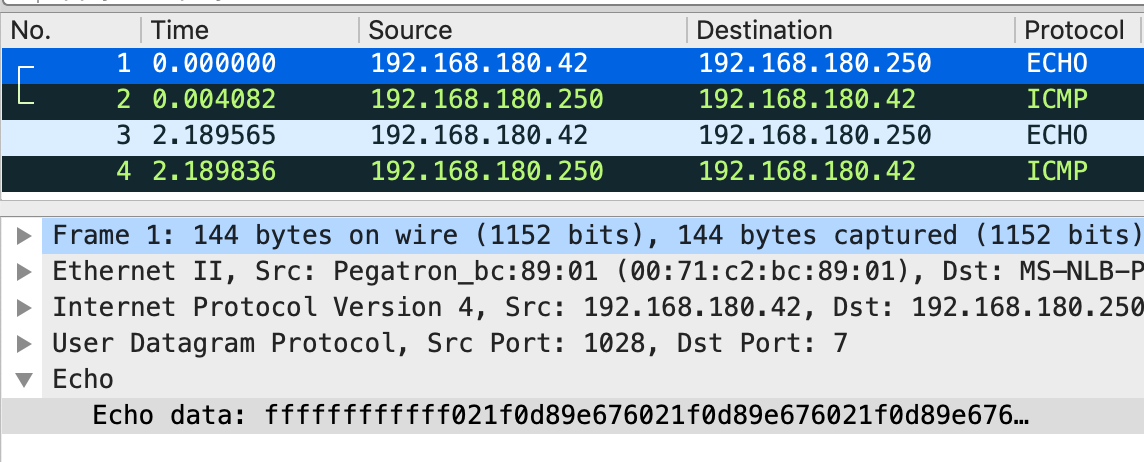
The ping tool generates ICMP ping traffic, first hitting all IP addresses in the 192.168.0.0/16 block. then it does the 172.16.0.0/12 block, and it finishes with the 10.0.0.0/8 block.

The ping tool generates ICMP ping traffic, first hitting all IP addresses in the 192.168.0.0/16 block. then it does the 172.16.0.0/12 block, and it finishes with the 10.0.0.0/8 block. This shows the start of ICMP traffic from one of the network ping tool samples.
Figure 17. An example of the start of ICMP traffic from one of the network ping tool samples.

Since Jan. 25, 2021, we have not discovered any new ping tool samples from Hancitor infections with Cobalt Strike. Why can we no longer find it? Perhaps the threat actor behind Hancitor realized how suspicious this activity is and stopped using it.

Appendix C lists information for five samples of the network ping tool discovered from Hancitor infections with Cobalt Strike that appeared in December 2020 and January 2021.

Conclusion

Post-infection activity from Hancitor malware has settled into noticeable patterns. These patterns include the use of Cobalt Strike for a Hancitor infection within an AD environment. In some cases, follow-up malware sent through Cobalt Strike may include a network ping tool that generates an abnormally large amount of ICMP traffic as it pings over 17 million internal IPv4 addresses.

Organizations with decent spam filtering, proper system administration and up-to-date Windows hosts have a much lower risk of infection from Hancitor and its post-infection activity. Palo Alto Networks Next-Generation Firewall customers are further protected from this threat with a Threat Prevention security subscription.

Palo Alto Networks has shared our findings, including file samples and indicators of compromise described in this report, with our fellow Cyber Threat Alliance members. CTA members use this intelligence to rapidly deploy protections to their customers and to systematically disrupt malicious cyber actors. For more information on the Cyber Threat Alliance, visit www.cyberthreatalliance.org.

Indicators of Compromise

Appendix A
SHA256 hashes for 127 samples of Word documents with macros for Hancitor from Nov. 5, 2020, through Feb. 25, 2021. Information is available in this GitHub repository.

Appendix B
SHA256 hashes for 63 examples of Hancitor DLL files from Nov. 5, 2020, through Feb. 25, 2021. Information is available in this GitHub repository.

Appendix C
Information for five samples of the network ping tool seen from Hancitor infections using Cobalt Strike from December 2020-January 2021. Information is available in this GitHub repository.

Appendix D
Information for three samples of Ficker Stealer malware associated with Hancitor infections from October 2020 through March 2021. Information is available in this GitHub repository.

Appendix E
Information for a sample Send-Safe spambot malware associated with a Hancitor infection from February 2021. Information is available in this GitHub repository.


Wireshark Tutorial: Decrypting RDP Traffic

Executive Summary

In recent years, Remote Desktop Protocol (RDP) has been exploited by attackers to access unsecured servers and enterprise networks. Since 2017, RDP has become a significant vector in malware attacks using ransomware. Security professionals have increasingly focused their attention on this protocol by writing signatures to detect RDP vulnerabilities and prevent attacks.

As a proprietary protocol from Microsoft, RDP supports several operating modes that encrypt network traffic. Unfortunately, this encryption makes writing RDP signatures difficult because RDP content is hidden.

Fortunately, we can establish a test environment that provides a key file, and we can use that key to decrypt a packet capture (pcap) of the RDP traffic in Wireshark.

This blog demonstrates how to prepare the environment, obtain a decryption key and use it to decrypt RDP traffic.

Requirements

The following are necessary to get the most value from this tutorial:

  • A virtual environment to run two Windows hosts like VirtualBox or VMware.
  • An understanding of how to set up and use RDP.
  • An RDP client. We use a host running Windows 10 Professional for this tutorial.
  • An RDP server. This can be another Windows host with RDP enabled, or it can be a non-Windows host running FreeRDP.
  • A way to record the network traffic between these two hosts. This is most easily done within a virtual environment.
  • Wireshark version 3.0 or better.
  • A basic knowledge of network traffic fundamentals.

Overall Process

The overall process follows seven general steps:

Step 1: Set up a virtual environment with two hosts, one acting as an RDP client and one acting as an RDP server.

Step 2: Remove forward secrecy ciphers from the RDP client.

Step 3: Obtain the RDP server's private encryption key.

Step 4: Capture RDP traffic between the RDP server and Windows client.

Step 5: Open the pcap in Wireshark.

Step 6: Load the key in Wireshark.

Step 7: Examine RDP data.

Step 1: Set Up Virtual Environment

The two most common virtual environments for this type of analysis are VirtualBox or VMware Workstation for Windows and Linux. VMWare Fusion is used for macOS. VirtualBox is free, while VMware is a commercial product.

This tutorial does not cover setting up virtual machines (VMs) in a virtual environment. The basic structure of our lab used for this tutorial is shown below in Figure 1.

The lab setup used for this tutorial on decrypting RDP traffic includes a physical host running a virtualization environment, a virtual LAN, a Windows VM acting as an RDP client and a Windows VM acting as an RDP server.
Figure 1. Lab setup used for this tutorial.

Our lab environment contained two Windows 10 hosts. One of the hosts acted as an RDP client, and the other acted as an RDP server. We recorded network traffic from an RDP session between these two hosts from the virtual LAN.

Step 2: Remove Forward Secrecy Ciphers From RDP Client

Some encryption ciphers provide forward secrecy, which is also known as perfect forward secrecy. These types of ciphers create multiple session keys for an SSL/TLS connection. With forward secrecy, we cannot decrypt SSL/TLS traffic using a single private encryption key from the RDP server. Therefore, we had to remove configuration options that support forward secrecy on the RDP client.

For this tutorial, our RDP client was a host running Windows 10 Pro. This host has a built-in RDP client.

Microsoft has published details on removing configuration options that support forward secrecy in the articles, “Manage Transport Layer Security (TLS)” and “Prioritizing Schannel Cipher Suites.” Below is a step-by-step process that we used.

Open the Group Policy Management Console gpedit.msc as an administrator as shown below in Figure 2.

Open the Group Policy Management Console gpedit.msc as an administrator by clicking "Run as administrator," as shown here.
Figure 2. Running the Group Policy Editor in Windows 10 Pro as an administrator.

From the console, use the following menu path:

  • Computer Configuration.
  • Administrative Templates.
  • Network.
  • SSL Configuration Settings.

Below, Figure 3 shows how to find SSL Configuration Settings.

The large black arrow in the screenshot indicates the location of the SSL Configuration Settings in the file system.
Figure 3. Getting to the SSL Configuration Settings.

Under SSL Configuration Settings, double-click the entry for SSL Cipher Suite Order as shown below in Figure 4.

Figure 4. Getting to the SSL Cipher Suite Order.

Under the SSL Cipher Suite Order, click the Enabled option as shown below in Figure 5.

The large black arrow indicates where to click to enable SSL Cipher Suite Order. An explanation in the screenshot states, "This policy setting determines the cipher suites used by the Secure Socket Layer. If you enable this policy setting, SSL cipher suites are prioritized in the order specifiied."
Figure 5. Enabling the SSL Cipher Suite Order.

Next, double-click the list of ciphers and select the entire list as shown below in Figure 6.

The next step is to select the entire list of ciphers as shown in the screenshot.
Figure 6. Selecting the list of ciphers.

Once the list has been selected, copy it as shown below in Figure 7.

Copy the list of ciphers as shown.
Figure 7. Copying the list of ciphers.

Copy this list of ciphers into a text editor such as Notepad. Remove any ciphers that support Elliptic Curve cryptography using Diffie-Hellman Ephemeral (ECDHE) or Digital Signature Algorithm (ECDSA) encryption. These should be any entries with ECDHE and/or ECDSA in the name. In the example shown below in Figure 8, these ciphers were all located sequentially, so they were easy to delete from the text.

Delete ciphers that support Elliptic Curve cryptography by removing any entries with ECDHE and/or ECDHA in the name. In our example, the ciphers were located sequentially and were therefore easy to delete.
Figure 8. Deleting entries for ECDHE and ECDSA.

Our updated list of ciphers from Figure 8 is listed below in Table 1.

TLS_AES_256_GCM_SHA384,TLS_AES_128_GCM_SHA256,TLS_RSA_WITH_AES_256_GCM_SHA384,TLS_RSA_WITH_AES_128_GCM_SHA256,TLS_RSA_WITH_AES_256_CBC_SHA256,TLS_RSA_WITH_AES_128_CBC_SHA256,TLS_RSA_WITH_AES_256_CBC_SHA,TLS_RSA_WITH_AES_128_CBC_SHA,TLS_RSA_WITH_3DES_EDE_CBC_SHA,TLS_RSA_WITH_NULL_SHA256,TLS_RSA_WITH_NULL_SHA,TLS_PSK_WITH_AES_256_GCM_SHA384,TLS_PSK_WITH_AES_128_GCM_SHA256,TLS_PSK_WITH_AES_256_CBC_SHA384,TLS_PSK_WITH_AES_128_CBC_SHA256,TLS_PSK_WITH_NULL_SHA384,TLS_PSK_WITH_NULL_SHA256

Table 1. Updated list after removing forward secrecy ciphers.

Paste the updated cipher list back into the SSL Cipher Suites Field, making sure to overwrite the original list. Click the Apply button, then click OK to close the window. You have now updated the list and can close the Group Policy Editor.

After we accomplished this step, we had to obtain the RDP server’s private key.

Step 3: Obtain RDP Server's Private Key

FreeRDP is one option to use as an RDP server. You can get FreeRDP from this GitHub repository, as well as build instructions. Make sure to set the WITH_SERVER=ON flag when creating the server. Once the server is built, you must provide it with a private key, or use one that comes with FreeRDP.

For our RDP server in this tutorial, we used another host running Windows 10 Pro. Then we extracted the private key from the host’s operating system.

To ensure our second Windows host acted as an RDP server, we enabled RDP. To enable RDP on a host running Windows 10 Pro, go to Windows Settings from the Start Menu, then select the System icon as shown below in Figure 9.

To ensure our second Windows host acted as an RDP server, we enabled RDP by selecting the System icon as shown here.
Figure 9. Getting to the Windows System settings.

Under the system settings, select Remote Desktop and click the switch for Enable Remote Desktop as shown below in Figure 10.

The large black arrows show where to select Remote Desktop and where to click the switch for Enable Remote Desktop.
Figure 10. Enabling RDP in WIndows 10.

After setting up our second Windows host as an RDP server, we extracted the private key from its operating system.

To extract the server key, we could either use either Jailbreak or Mimikatz. We chose Jailbreak.

Jailbreak is a tool by iSECPartners that can export the server's RDP certificate. From the exported certificate, we could extract the private key.

To use Jailbreak, we downloaded the following Jailbreak binaires from this GitHub repository on our newly established RDP server:

  • EasyHook64.dll
  • jailbreak64.exe
  • jailbreakhook64.dll
  • jbstore2_64.exe

Note: The above files were used on a Windows 10 Pro 64-bit host downloaded on March 4, 2021. A screenshot of the GitHub page is shown below in Figure 11.

A screenshot of the Jailbreak GitHub page taken on March 4 shows the Jailbreak binaries we downloaded.
Figure 11. GitHub page for Jailbreak binaries.

After we downloaded the Jailbreak binaries, we opened a Command prompt with administrator privileges as shown below in Figure 12.

The large black arrow indicates how to open a Command prompt with administrator privileges.
Figure 12. Opening a command prompt as an administrator.

In the command prompt, we went to the directory with the downloaded Jailbreak binaries. We ran the following command from this directory:

  • jailbreak64.exe %WINDIR%\system32\mmc.exe %WINDIR%\system32\certlm.msc -64

If we were running a 32-bit version of Windows, we would use:

  • jailbreak32.exe %WINDIR%\system32\mmc.exe %WINDIR%\system32\certlm.msc -32

See Figure 13 below for an example of running the 64-bit command on our Windows host acting as the RDP server.

The screenshot shows an example of running the 64-bit command on our Windows host acting as the RDP server.
Figure 13. Running Jailbreak from the command prompt.

This command opened the certificate manager for our local machine. From the left column, we expanded Remote Desktop and went to the Certificates folder. This showed one certificate. If there had been more than one certificate, we would have selected the one with the most recent expiration date. We right-clicked on the certificate, selected All Tasks then used Export as shown below in Figure 14.

We right-clicked on the certificate, selected All Tasks then used Export as shown.
Figure 14. Exporting the RDP certificate.

When exporting the certificate, we made sure to select the option to export the private key as shown below in Figure 15.

The screenshot reads: "Export Private Key: You can choose to export the private key with the certificate. Private keys are password protected. If you want to export the private key with the certificate, you must type a password on a later page. Do you want to export the private key with the certificate?" The large black arrow shows what to select to ensure the private key is exported with the certificate.
Figure 15. Ensuring the private key is exported with the certificate.

For our host, we could only export the certificate as a PKCS #12 (.PFX) file as shown below in Figure 16.

For the host used in this tutorial on decrypting RDP traffic in Wireshark, we could only export the certificate as a PKCS #12 (.PFX) file, as shown.
Figure 16. Could only export the certificate as a .pfx file.

As shown below in Figure 17, the certificate had to have a password. Fortunately, we had no complexity requirements, so we used a single letter as the password.

As shown, the certificate had to have a password. Because we had not complexity requirements, we used a single letter as the password.
Figure 17. The export process required a password for the certificate.

Finally, we exported our certificate with the private key as shown below in Figure 18.

We exported our certificate with the private key as shown.
Figure 18. Completing our certificate export.

As an alternative, we could have extracted the server’s certificate using Mimikatz instead of Jailbreak. The instructions for using Mimikatz to get the RDP server certificate are listed on GitHub.

Since our certificate was obtained using Jailbreak, we moved it to a Linux host and used OpenSSL to extract the key. First, we used the following OpenSSL command to extract the key in PEM format:

  • openssl pkcs12 -in server_certificate.pfx -nocerts -out server_key.pem -nodes

To remove the passphrase form the key, we also used the following command:

  • openssl rsa -in server_key.pem -out server.key

This provided us with the RDP server’s private key as shown below in Figure 19.

The black arrow and label "private key" indicate where the private server key was extracted from the certificate.
Figure 19. Private server key extracted from the certificate.

Before we could use the private server key, we needed to record an RDP session between our two Windows hosts and save it as a pcap.

Step 4: Capture RDP Traffic

With our two Windows hosts in the same virtual environment, we could use a tool like dumpcap, tcpdump or Wireshark itself to record network traffic in the VLAN using promiscuous mode. Once the recording started, our WIndows client used RDP to log in to the other Windows host acting as an RDP server. The host name of the server was DESKTOP-USER1PC.

The screenshot shows how our Windows client used RDP to log in to the other Windows host acting as an RDP server.
Figure 20. Using the Remote Desktop Connection tool to log into our RDP server.

While the pcap was being recorded, we logged into DESKTOP-USER1PC and performed some basic tasks like opening documents and web browsing.

While the pcap was being recorded, we logged in to DESKTOP-USER1PC and performed some basic tasks, such as opening documents and web browsing.
Figure 21. Performing some common desktop tasks through RDP.

After a minute or so, we logged off RDP and stopped recording network traffic from our VLAN.

Step 5: Open the pcap in Wireshark

We opened the pcap of our RDP session in Wireshark. When filtering on rdp in our Wireshark display filter, we saw no results because the RDP traffic was encrypted. Figure 22 shows the blank column display we saw when filtering for RDP in our pcap.

Because RDP traffic was encrypted, we see a blank column display, as shown, when filtering for RDP in our pcap.
Figure 22. Filtering for RDP information, but no results, due to encrypted RDP traffic.

However, when we used our private server key to decrypt RDP traffic in Wireshark, the results looked much different.

Step 6: Load the Key in Wireshark

In the pcaps we recorded, the RDP server DESKTOP-USER1PC was at IP address 10.3.4.138, and RDP traffic took place over TCP port 3389. We needed this information to properly decrypt RDP traffic in Wireshark.

In Wireshark, we used the Preferences window and expanded the Protocols section as shown below in Figure 23.

For decrypting RDP traffic in Wireshark, we need IP address and port information. In Wireshark, we used the Preferences window and expanded the Protocols section as shown.
Figure 23. Getting to the Protocols section of Wireshark’s preferences menu.

With Wireshark 3.x, use the TLS entry. If you are using Wireshark 2.x, use the SSL entry. For this section, there should be a button to edit the RSA keys list. We clicked the button and added the IP address of the RDP server, the RDP port (3389) and the location of the private key file. Our example is shown below in Figure 24.

We clicked the button and added the IP address of the RDP server, the RDP port (3389) and the location of the private key file.
Figure 24. Go to the TLS section and add the private key to the RSA keys list.

After Wireshark was set up to decrypt RDP traffic, we had much better results when reviewing the pcap.

Step 7: Examine RDP Data

After our key was loaded, our column display was no longer blank when filtering for RDP. We had several results as shown below in Figure 25.

After our key was loaded, decrypting RDP traffic became possible. The screenshot shows that our column display was no longer blank when filtering for RDP.
Figure 25. Viewing the same RDP activity after the private key was loaded in Wireshark.

For security professionals who write signatures to find RDP vulnerabilities and attacks, the type of information revealed above in Figure 25 is critical to their work.

Conclusion

This blog reviewed how to establish an environment to decrypt traffic from an RDP session. This is easiest to do in a virtual LAN with two hosts running Windows 10 Professional. After ensuring the client did not use any forward secrecy ciphers, we extracted the private key from our Windows host acting as the RDP server. Then we easily recorded a pcap of network traffic. After the session finished, we were able to decrypt RDP traffic using the server’s private key.

This type of environment can help security professionals when writing signatures to detect RDP vulnerabilities and attacks.

For more help with Wireshark, see our previous tutorials:

Threat Assessment: Matrix Ransomware

Executive Summary

Matrix is a ransomware family that was first identified publicly in December 2016. Over the years since its inception, it has primarily targeted small- to medium-sized organizations. As of 2019, it had been observed across geographic locations such as the U.S., Belgium, Taiwan, Singapore, Germany, Brazil, Chile, South Africa, Canada and the UK. While initially leveraging tactics such as spam email campaigns, propagation via Windows shortcuts and the RIG exploit kit for distribution, the primary attack vector for the Matrix ransomware family shifted in 2018 to brute forcing weak Remote Desktop Protocol (RDP) credentials. The shift to this attack methodology appears to be a recurring trend in similar targeted ransomware families such as Dharma, Ryuk and BitPaymer.

Matrix Ransomware Overview

This screenshot of a note produced by the Matrix ransomware family begins, "All your valuable data has been encrypted!" A key paragraph of interest reads, "We can prove that we can decrypt all your data. Please just send us 3-5 small encrypted files which are randomly stored on your server. We will decrypt these files and send them to you as proof. Please note that files for free test decryption should not contain valuable information." This paragraph describes a technique that appears relatively unique to Matrix.
Figure 1. Screenshot of Matrix ransom note

When executed, Matrix encrypts user files and network shares, as well as deleting volume shadow copies and disabling recovery options on the affected device. Like with many other ransomware variants, the ransom note delivered by Matrix demands payment in Bitcoin. Instead of spreading through an organization, past Matrix infections appear to have been more targeted in nature.

Matrix is unique in that instead of delivering a more conventional ransom note that demands a fixed ransom amount, the threat actors behind it ask victims to contact them directly and submit a small sample of about three to five files for decryption. This is done so the threat actors can determine a variable ransom based on factors such as the predicted value of the victim’s files or the current dollar value of Bitcoin.

As of 2020, Matrix ransomware has been seen appending the following file extensions on files:
.MTXLOCK, .CORE, .ANN, .FOX, .KOK8, .KOK08, .NEWRAR, .FASTBOB, .FASTB, .EMAN, .THDA, .RAD, .EMAN50, .GMPF, .ATOM, .NOBAD, .TRU8, .FASTA, .JNSS, .FBK, .ITLOCK, .SPCT, .PRCP, .CHRB, .AL8G, .DEUS, .FG69, .JB88, .J91D, .S996, .[barboza40@yahoo.com], .[Linersmik@naver.com][Jinnyg@tutanota.com], .[poluz@tutanota.com], .[Yourencrypt@tutanota.com], .[Files4463@tuta.io], .[RestorFile@tutanota.com], .[RestoreFile@qq.com], .[oken@tutanota.com], .[Vfemacry@mail-on.us], .[d3336666@tutanota.com], and .[Bitmine8@tutanota.com]

In addition, Matrix has other variants, including one dubbed “Fox Ransomware,” which adds the “.FOX” extension to encrypted files.

More information on prominent ransomware families can be found in the 2021 Unit 42 Ransomware Threat Report.

Courses of Action

This section documents relevant tactics, techniques and procedures (TTPs) used with Matrix and maps them directly to Palo Alto Networks product(s) and service(s). It also further instructs customers on how to ensure their devices are configured correctly.

Product / Service Course of Action

Initial Access, Persistence, Lateral Movement

The below courses of action mitigate the following techniques:
Spearphishing Attachment [T1566.001], Valid Accounts [T1078], Replication Through Removable Media [T1091], Remote Desktop Protocol [T1021.001]

NGFW Set up File Blocking
Ensure that security policies restrict User-ID Agent traffic from crossing into untrusted zones
Ensure application security policies exist when allowing traffic from an untrusted zone to a more trusted zone
Ensure 'Service setting of ANY' in a security policy allowing traffic does not exist
Ensure 'Security Policy' denying any/all traffic to/from IP addresses on Trusted Threat Intelligence Sources Exists
Ensure that User-ID is only enabled for internal trusted interfaces
Ensure that 'Include/Exclude Networks' is used if User-ID is enabled
Ensure that the User-ID Agent has minimal permissions if User-ID is enabled
Ensure that the User-ID service account does not have interactive logon rights
Ensure remote access capabilities for the User-ID service account are forbidden
Threat Prevention Ensure that antivirus profiles are set to block on all decoders except 'imap' and 'pop3'
Ensure a secure antivirus profile is applied to all relevant security policies
Ensure that all zones have Zone Protection Profiles with all Reconnaissance Protection settings enabled, tuned and set to appropriate actions
WildFire Ensure that WildFire file size upload limits are maximized
Ensure forwarding is enabled for all applications and file types in WildFire file blocking profiles
Ensure a WildFire Analysis profile is enabled for all security policies
Ensure forwarding of decrypted content to WildFire is enabled
Ensure all WildFire session information settings are enabled
Ensure alerts are enabled for malicious files detected by WildFire
Ensure 'WildFire Update Schedule' is set to download and install updates every minute
Cortex XDR Configure Host Firewall Profile
Configure Malware Security Profile
Enable Device Control
Cortex XSOAR Deploy XSOAR Playbook - Block Account Generic
Deploy XSOAR Playbook - Access Investigation Playbook
Deploy XSOAR Playbook - Impossible Traveler
Deploy XSOAR Playbook - Phishing Investigation - Generic V2
Deploy XSOAR Playbook - Endpoint Malware Investigation
Credential Access
The below courses of action mitigate the following techniques:
Brute Force [T1110]
NGFW Customize the Action and Trigger Conditions for a Brute Force Signature
Cortex XSOAR Deploy XSOAR Playbook - Brute Force Investigation Playbook
Execution, Defense Evasion, Persistence, Privilege Escalation, Impact
The below courses of action mitigate the following techniques:
Windows Command Shell [T1059.003], Match Legitimate Name or Location [T1036.005], Services File Permissions Weakness [T1574.010], Disable or Modify Tools [T1562.001], Service Stop [T1489], Modify Registry [T1112], Data Encrypted for Impact [T1486], Inhibit System Recovery [T1490]
Cortex XDR Enable Anti-Exploit Protection
Enable Anti-Malware Protection
Configure Restrictions Security Profile
Configure Behavioral Threat Protection under the Malware Security Profile
Cortex XSOAR Deploy XSOAR Playbook - Ransomware Manual for incident response.
Deploy XSOAR Playbook - Palo Alto Networks Endpoint Malware Investigation

Table 1. Courses of Action for Matrix ransomware.
†These capabilities are part of the NGFW security subscriptions service.

Conclusion

While targeted ransomware attacks are not new, Matrix is a prime example of how threat actors can enter into the pool of existing ransomware and cash out quickly by targeting low-hanging fruit. The ransom negotiation tactics used by the Matrix threat actors further amplifyies the dangerous impact that such an attack can have on its victims, especially given the volatile state of cryptocurrency value today. Furthermore, this malware family’s shift in tactics to RDP exploitation, following a similar shift seen in other ransomware groups, serves to emphasize the need for businesses to stay vigilant on current ransomware trends.

Palo Alto Networks detects and prevents Matrix in the following ways:

  • WildFire: All known samples are identified as malware.
  • Cortex XDR with:
    • Iindicators for Matrix.
    • Anti-Ransomware Module to detect Matrix encryption behaviors.
    • Local Analysis detection to detect Matrix binaries.
  • Next-Generation Firewalls: DNS Signatures detect the known command and control (C2) domains, which are also categorized as malware in URL Filtering.
  • AutoFocus: Tracking related activity using the MatrixRansomware tag.

Additionally, Indicators of Compromise (IoCs) associated with Matrix are available on GitHub here, and have been published to the Unit 42 TAXII feed.

Additional Resources


20 Million Miners: Finding Malicious Cryptojacking Images in Docker Hub

Executive Summary

As a cybercriminal, there are many ways to make a profit. One of the easiest ways is cryptojacking – the illegal use of someone else’s computing resources to mine cryptocurrencies. Container images are known as a simple way to distribute software, yet malicious cryptojacking images are also a simple way for attackers to distribute their cryptominers.

I decided to take an extensive look into Docker Hub and discovered 30 malicious images with a total number of 20 million pulls (which means the images were downloaded 20 million times), together accounting for cryptojacking operations worth US$200,000. In this post, I will elaborate on my findings and why it is reasonable to assume that there are many other undiscovered malicious images on Docker Hub and other public registries.

Palo Alto Networks Prisma Cloud customers are protected from these threats through the Cryptominers Runtime Detection feature and the Trusted Images feature. In addition, Palo Alto Networks Next-Generation Firewall customers with the Threat Prevention security subscription are protected against the delivery of these images.

Finding Malicious Cryptojacking Images

In the last several years, Unit 42 researchers have been witnessing cloud-based cryptojacking attacks in which miners are deployed using an image in Docker Hub.

The cloud is popular for cryptojacking attacks due to two main reasons:

  • The cloud consists of many instances for each target (e.g. lots of CPUs, lots of containers, lots of virtual machines), which can translate to big mining profits.
  • The cloud is hard to monitor. Miners can run undetected for a long time, and without any detection mechanisms in place, they may run until the user finds an inflated cloud usage bill and realizes that something is wrong.

Modern cloud technology is largely based on containers, and in some environments, Docker Hub is the default container registry. Attackers can take advantage of it to deploy miners on compromised clouds.

Because of all of the facts mentioned above, I wanted to see if I could find malicious cryptojacking images in Docker Hub. In my research, I found 30 images from 10 different Docker Hub accounts that account for over 20 million pulls.

Individuals improve their mining efficiency by using mining pools, and so do adversaries.

It is possible to check how many cryptocurrencies were mined to a mining pool account by inspecting the mining pool. Half of the images I found used a mining pool that shares this information, and by extrapolating from that half I estimated that, in total, in all of the attacks, US$200,000 worth of cryptocurrencies were mined.

In the research discussed here, 30 malicious cryptojacking images were found in Docker Hub, spread across 10 accounts and accounting for 20 million pulls. The estimated mining worth is US$200,000.
Figure 1. Research findings.

In order to better understand the findings, I began classifying the results. With the help of public mining pools, I checked which cryptocurrency is mined, which cryptominer is used and how many coins have been mined.

Coin Distribution

My first discovery, perhaps not surprising to our returning readers, is that the most popular cryptocurrency for attackers to mine is Monero, just as we saw with Pro-Ocean, Cetus and many more.

Attackers favor Monero for three reasons:

  • Monero provides maximum anonymity. One of its features is that, unlike for other coins, Monero transitions are hidden. This privacy is perfect for cybercriminals because it means their activity is hidden. Hence, they won’t get banned from exchanges and it is easier for them to evade attempts to track their funds.
  • The Monero mining algorithm favors CPU mining, unlike many other cryptos that require ASICs or GPU for mining. This is convenient because all computers have CPUs. Thus, the miner can run effectively on any machine. This is even more suitable for containers, of which the vast majority run without a GPU.
  • Monero is a popular coin, and its exchange volume is around US$100 million a day, making it easy for the attackers to sell their coins.

The figure below demonstrates the cryptocurrency distribution of the cryptojacking images found on Docker Hub.

The cryptocurrency distribution of the malicious cryptojacking images discussed in this research is shown here. Monero is 90.3%, represented in blue. Grin is 6.5%, represented in red. Arionum is 3.2%, represented in yellow.
Figure 2. Cryptocurrency distribution.

Cryptominer Distribution

In most attacks that mine Monero, the attackers used XMRig, just as we saw with Hildegard and Graboid. XMRig is a popular Monero miner and is preferred by attackers because it’s easy to use, efficient and, most importantly, open source. Hence, attackers can modify its code.

For example, most Monero cryptominers forcibly donate some percentage of their mining time to the miner’s developers. One common modification attackers make is to change the donation percentage to 0.

90.0% of the attacks studied here use XMRig, represented on the pie chart in blue. The remaining 10.0% use Xmr-stack, represented in red.
Figure 3. Cryptominer distribution.

Image Tags

Container registries allow users to upgrade their images and in that process upload a new tag to the registry. Tags are a way to reference different versions of the same image.

When examining the tags of the images, I found that some images have different tags for different CPU architectures or operating systems. It seems like some attackers are versatile and add these tags in order to fit a broad range of potential victims that includes a number of operating systems (OS) and CPU architectures.

In some images, there are even tags with different types of cryptominers. This way, the attacker can choose the best cryptominer for the victim’s hardware.

The only thing that is common for all the tags in a certain image is the wallet address or the mining pool credentials. With the help of these identifiers, I could classify each campaign. After digging deeper, in some cases, I could see that there are numerous Docker Hub accounts that belong to the same campaign. For example, in previous research, Unit 42 found the malicious account azurenql. Now, we discovered that the campaign is broader and includes the accounts 021982, dockerxmrig, ggcloud1 and ggcloud2.

In my research, I was able to find additional images mining Monero for the same campaign described in recent Unit 42 findings on azurenql, adding over 10 million more pulls under the attacker’s name.

Conclusion

The cloud presents big opportunities for cryptojacking attacks. In my research, I used a cryptomining scanner that only detects simple cryptomining payloads. I also made sure any identified image was malicious by correlating the wallet address to previous attacks. Even with these simple tools, I was able to discover tens of images with millions of pulls. I suspect that this phenomenon may be bigger than what I found, with many instances in which the payload is not easily detectable.

Palo Alto Networks Prisma Cloud customers are protected from these threats through the Cryptominers Runtime Detection feature and the Trusted Images feature. In addition, Palo Alto Networks Next-Generation Firewall customers with the Threat Prevention security subscription are protected against the delivery of these images.

The screenshot shows a Prisma Cloud container incident notification. The text says, "This incident type shows detection of a crypto miner, which is software used to generate new coins in cryptocurrencies such as Bitcoin and Monero. These can be used legitimately by individuals; however, they are often executed by attackers as a means of monetizing compromised systems.
Figure 4. Prisma Cloud container incident notification.

Indicators of Compromise

Docker Images

021982/155_138

021982/66_42_53_57

021982/66_42_93_164

021982/xmrig

021982/xmrig1

021982/xmrig2

021982/xmrig3

021982/xmrig4

021982/xmrig5

021982/xmrig6

021982/xmrig7

avfinder/gmdr

avfinder/mdadmd

docheck/ax

docheck/health

dockerxmrig/proxy1

dockerxmrig/proxy2

ggcloud1/ggcloud

ggcloud2/ggcloud

kblockdkblockd/kblockd

osekugatty/picture124

osekugatty/picture128

tempsbro/tempsbro

tempsbro/tempsbro1

toradmanfrom/toradmanfrom

toradmanfrom/toradmanfrom1

xmrigdocker/docker2

xmrigdocker/docker3

xmrigdocker/xmrig

xmrigdocker/xmrig

zenidine/nizadam


Fake Websites Used in COVID-19 Themed Phishing Attacks, Impersonating Brands Like Pfizer and BioNTech

Executive Summary

In April 2020, we reported on a large influx of COVID-19 themed phishing attacks starting in February 2020. With March 2021 marking the one-year anniversary that the World Health Organization declared COVID-19 a pandemic, we revisited the phishing trends we observed in the past year to gain deeper insight into the various COVID-related topics that attackers might try to exploit.

Starting with the set of all phishing URLs detected globally between January 2020 and February 2021, we generated sets of specific keywords (or phrases) that served as indicators for each COVID-related topic, and applied keyword matching to determine which phishing URLs were related to each topic. (To ensure that the matched URLs were indeed COVID-related, we iteratively spot-checked the resulting URLs and refined these keywords/phrases to minimize the incidence of false positives.)

We found that at each step along the way, attackers have continued to change their chosen tactics to adapt to the latest pandemic trends, in hopes that maintaining a timely sense of urgency will make it more likely for victims to give up their credentials.

We found phishing attacks largely centered around Personal Protective Equipment (PPE) and testing kits in March 2020, government stimulus programs from April through the summer 2020 (including a fake U.S. Trading Commission website that posed as the U.S. Federal Trade Commission in order to steal user credentials) and vaccines from late fall 2020 onward (including a fake Pfizer and BioNTech website also stealing user credentials). Of note, we found that vaccine-related phishing attacks rose by 530% from December 2020 to February 2021, and that phishing attacks relating to and/or targeting pharmacies and hospitals rose by 189% during that same timeframe.

We found no evidence that any of these efforts were successful, but are highlighting these cases to make healthcare organizations around the globe aware of this heightened activity targeting their sector, so they can alert employees to be on guard for malicious credential-phishing sites.

We predict that as the vaccine rollout continues, phishing attacks related to vaccine distribution – including attacks targeting the healthcare and life sciences industries – will continue to rise worldwide.

Palo Alto Networks Next-Generation Firewall customers are protected from phishing attacks with a variety of security services, including URL Filtering, DNS Security, Threat Prevention and GlobalProtect.

In addition to these security services, best practices to protect yourself and your organization from phishing attacks include:

For individuals:

  • Exercising caution when clicking on any links or attachments contained in suspicious emails, especially those relating to one’s account settings or personal information, or otherwise trying to convey a sense of urgency.
  • Verifying the sender address for any suspicious emails in your inbox.
  • Double-checking the URL and security certificate of each website before inputting your login credentials.
  • Reporting suspected phishing attempts.

For organizations:

  • Implementing security awareness training to improve employees’ ability to identify fraudulent emails
  • Regularly backing up your organization’s data as a defense against ransomware attacks initiated via phishing emails.
  • Enforcing multi-factor authentication on all business-related logins as an added layer of security.

Phishing Trends

Since January 2020, we have observed 69,950 phishing URLs linked to COVID-related topics, of which 33,447 are directly linked to COVID-19 itself. In Figure 1, we plot the relative popularity of these different topics over time, normalized so that each topic has a peak popularity of 100%. Looking at how the heights of each colored section differs over time, we can see that certain topics have remained steady targets of phishing attacks, while others have experienced more noticeable spikes at various points in time. Pharmaceutical drugs and gathering virtually (e.g. Zoom), for example, have been a relatively steady target of phishing attacks since the start of the pandemic; vaccines and testing, on the other hand, have experienced more defined peaks in popularity.

Covering topics observed in COVID-19 themed phishing attacks. Colored lines represent topics such as gathering remotely, economy and government programs, PPE, pharmacies and hospitals, vaccines, drugs, testing and COVID-19. The graph charts URLs observed from January 2020-February 2021. The y-axis represents the number of new phishing URLs, normalized.
Figure 1. Trends in COVID-themed phishing attacks from January 2020-February 2021 (global).

For the COVID-19 themed phishing pages that were found to be targeting known brands, we determined that the majority of these pages were attempting to steal users’ business credentials: e.g. Microsoft, Webmail, Outlook, etc. Each bar in Figure 2 represents the percentage of phishing URLs that were attempting to steal users’ login credentials for that particular website. (For example, about 23% of COVID-themed phishing URLs were fake Microsoft login pages.) With the pandemic forcing many employees to shift to remote work, these business-related phishing attempts have become an increasingly important attack vector for cybercriminals.

Covering popular targets in COVID-19 themed phishing attacks. The chart orders targets by popularity. Top targets include Microsoft, Yahoo, Webmail, Outlook, PayPal, Google Accounts, LinkedIn, Facebook, USAA, DHL, WeTransfer, SFExpress, Chase, OneDrive, Wells Fargo, Netflix, Excel, AOL, Apple ID and Square.
Figure 2. Top phishing targets in COVID-related URLs (global). Each bar represents the percentage of phishing URLs attempting to steal users’ login credentials for that particular website. (Note that in this figure, we only include URLs that target identifiable brands.)

Furthermore, we notice that with these COVID-19 themed phishing attacks, attackers are constantly creating new websites to host their phishing campaigns. In Figure 3, which shows the age for each website that we found to host a COVID-related phishing page, we can see that many COVID-related phishing pages are hosted on newly created sites (we define this as sites that were first observed fewer than 32 days ago), suggesting that attackers purposefully set up these sites just days before their intended attacks. This gives the attackers the opportunity to craft the message surrounding the attack – as well as the website URL itself – to fit the latest pandemic trends.

Website age (at detection time) for URLs targeted in COVID-19 themed phishing attacks. the x-axis tracks website age at detection time in days, while the y-axis tracks the relative frequency that age was observed.
Figure 3. Age of websites that host COVID-related phishing pages at time of detection (global).

January-March 2020: Initial Surge, Testing Kits and PPE

Between January and February 2020, as COVID-19 began its spread throughout the world, cybercriminals had already begun trying to use the soon-to-be pandemic to their advantage. During this timeframe, we observed a 313% increase in phishing attacks directly related to COVID-19.

In Figure 4, we see an example of a COVID-19 themed phishing attack. The fake Google Form first asks the user to input his or her email address and password in order to participate in a supposed company COVID-19 screening program. In the subsequent pages, the form asks a series of legitimate-sounding health-related questions, e.g. “Since your last day of work, have you had two or more of the following? Chills, Repeated shaking with chills, Headache, Muscle pain, Sore throat, New loss of taste or smell,” to give the impression that the form itself is legitimate. The final question before submission asks the employee to “digitally sign” the form by entering his or her full name.

This fake Google Form first asks the user to input his or her email address and password in order to participate in a fabricated company COVID-19 screening program. The form combines legitimate-sounding health-related questions with questions aimed at stealing the user's credentials.
Figure 4. https://docs[.]google[.]com/forms/d/e/1FAIpQLSdiQL-IcnGqRIKzTVmpeQSBVRrD06c4NolWvgWcdRH-NgBx-A/viewform?vc=0&c=0&w=1&flr=0 (Credential stealing form related to COVID-19 screening.)
From February-March 2020, concern about COVID-19 spreading to the U.S. quickly became prominent. In response to people’s desire to protect themselves and their families, interest in testing kits, PPE such as hand sanitizer and N95 masks, and even essential goods like toilet paper began to rise rapidly.

This chart tracks COVID test kit online interest vs. phishing prevalence. The x-axis represents year and month and ranges from 4/1/2020 to 1/1/2021. The y-axis tracks normalized popularity. The blue line represents COVID test kit interest according to Google Trends, and the red line indicates testing-related phishing.
Figure 5. Online interest in “COVID Test Kit” vs. COVID testing-related phishing prevalence (global data via Google Trends).

These trends are observable in our historical phishing data as well. In February 2020, we observed a 136% increase in PPE-related phishing attacks worldwide, many of which took the form of online shopping scams (see Figure 6 for an example). During the month of March, we observed a 750% increase in phishing attacks related to testing kits, just as The New York Times reported on a shortage of COVID tests across the U.S.

This is an example of a scam website, translated from German to English. The website purportedly offers PPE.
Figure 6. https://atemmaske-kn95-de[.]com (Scam website, translated from German to English).
In addition to these scam sites, we also observed seemingly legitimate testing kit vendors whose websites had become compromised for credential stealing purposes. In Figure 8, we see a fake Microsoft Sharepoint login page that a user would be taken to via a link in a phishing email. The phishing page would ask for the user’s email and Microsoft password in order to view a time-sensitive invoice that had been “shared” with him or her.

This website belonging to a UK-based wholesaler of COVID-19 test kits presents an example of the type of legitimate website that could be compromised for credential stealing purposes in COVID-19 themed phishing attacks.
Figure 7. covid-testkit[.]co[.]uk (A UK-based wholesaler of COVID-19 test kits)
A fake Microsoft Sharepoint login page that a user would reach via a link in a phishing email.
Figure 8. covid-testkit[.]co[.]uk/wp-includes/images/i/Newfilesviewc7c782c3b7c54f958e7eb2efff3a49b28866b4fc22dd46cfbad9e6ac9d0cd18cca873584897b48c88d82ecf5cd62783dServices (Credential stealing page on a compromised COVID-related website)

April-July 2020: Government Stimulus and Relief Programs

In April 2020, the IRS began distributing $1,200 stimulus checks to individuals as a part of the CARES Act. Around the same time, the Paycheck Protection Program (PPP) was put into action, promising to provide relief to small businesses across the U.S. Many business owners scrambled to get a piece of the funds, causing online interest in COVID stimulus and relief programs to surge, and funds to quickly run out.

This chart tracks COVID relief/stimulus online interest vs. phishing prevalence. The x-axis represents year and month and ranges from 4/1/2020 to 1/1/2021. The y-axis tracks normalized popularity. The blue line represents COVID relief interest according to Google Trends, the green line tracks "COVID stimulus" interest, and the red line indicates phishing related to these government programs.
Figure 9. Stimulus programs online interest vs. COVID government stimulus and relief-related phishing prevalence (global data via Google Trends).

Subsequently, we noticed that phishing attacks related to government relief programs increased by 600% in April 2020. In Figures 10-11, we show an example of a phishing page pretending to represent the “U.S. Trading Commission,” a fake branch of the U.S. federal government that the FTC warned about. The website promises up to $5,800 in “Temporary Relief Fund” grants for each individual. Fake statistics are displayed on the right-hand side of the page, giving the user the illusion that there are still billions of dollars left to distribute.

The "U.S. Trading Commission" is a fake branch of the U.S. federal government that the FTC warned about. Pictured here is a screenshot of the website supposedly belonging to the fake government agency.
Figure 10. ungodsirealnighchis[.]gq/us/protecting-americas-consumers-covid/ (Fake website pretending to represent the “U.S. Trading Commission.”)
Upon clicking a button saying “Start Verification Procedure,” the user is redirected to a form asking for their Social Security Number (SSN) and driver’s license number in order to receive these emergency COVID relief funds.

This shows the "data validation form" used for credential stealing in a COVID-19 themed phishing attack related to the fake government agency, the "U.S. Trading Commission."
Figure 11. ungodsirealnighchis[.]gq/us/protecting-americas-consumers-covid/verification.php (Credential stealing form related to COVID government aid.)
After completing the form, the confirmation page simply states: “Your response has been recorded. We will contact you as soon as possible. You may always contact us directly at 213-746-7272 for faster service.” (Note that this phone number is likely fake, since once the user has filled out the form, the attacker would already have the credentials they wanted.)

After the legitimate stimulus and relief programs were put in place, these economic relief-related phishing attacks stayed relatively popular for the months to come (see Figure 9), as many people were still in need of financial support. In Figure 12, we see another credential stealing page asking the user to input personal and corporate information, driver’s license photo and bank account details in order to receive additional relief funds from a “COVID-19 giveaway.” We see a similar example in Figure 13, which promises to send the user a free lockdown fund package of 3000 Indian rupees after inputting their bank account information.

Credential stealing page related to a supposed COVID relief giveaway.
Figure 12. covid-19-benefit[.]cabanova[.]com (Credential stealing page related to a supposed COVID relief giveaway.)
COVID-19 themed phishing attacks occurred globally. This screenshot shows a scam website that promises to send the user a free lockdown fund package of 3000 Indian rupees after inputting their bank account information.
Figure 13. fund4-covid19[.]com (Credential stealing site asking the user to input his or her bank account information in order to receive a limited-time “lockdown fund package.”)

November 2020-February 2021: Vaccine Approval and Rollout

For the next several months, various states settled into a state of on-and-off lockdowns, while people awaited news of a potential vaccine.

In November 2020, after months of anticipation, Pfizer and BioNTech released a promising set of initial results, showing over 90% vaccine effectiveness based on a subset of 94 participants in their real-world trial. In December, the U.S. Food and Drug Administration (FDA) granted emergency use authorization for Pfizer’s mRNA vaccine, after which the vaccine rollout began.

With many Americans now looking for a way to sign themselves and their family members up for immunization, it should be no surprise that cybercriminals would try to use this trend to their advantage. From December 2020 to February 2021, we observed a 530% increase in vaccine-related phishing attacks (see Figure 14).

This chart tracks COVID vaccine online interest vs. phishing prevalence. The x-axis represents year and month and ranges from 4/1/2020 to 1/1/2021. The y-axis tracks normalized popularity. The blue line represents COVID vaccine interest according to Google Trends and the red line indicates phishing related to the vaccines.
Figure 14. “COVID Vaccine” online interest vs. COVID vaccine-related phishing prevalence (global data via Google Trends).

In Figures 15-16, we show an example of a fake website that claims to represent Pfizer and BioNTech, the makers of the mRNA vaccine. The phishing page asks the user to log in with his or her Office 365 credentials, supposedly in order to sign up for the vaccine.

Also note that this phishing website employs an increasingly common technique known as “client-side cloaking.” Rather than revealing the credential stealing form immediately, the website first asks the user to click the “Login” button, in an effort to evade automated, crawler-based phishing detectors.

This is an example of a fake website that claims to represent Pfizer and BioNTech, the makers of the mRNA vaccine. The phishing page asks the user to log in with his or her Office 365 credentials, supposedly in order to sign up for the vaccine.
Figure 15. pfizer-vaccine[.]online (Fake Pfizer website with client-side phishing cloaking.)
Rather than revealing the credential stealing form immediately, the website first asks the user to click the “Login” button, in an effort to evade automated, crawler-based phishing detectors.
Figure 16. pfizer-vaccine[.]online (Credential stealing form revealed after user clicks the “Login” button.)
At the same time as attackers have started to capitalize on the vaccine registration process, they have also increased their targeting of hospitals and pharmacies – organizations that play a significant role in distributing the vaccine. According to a national survey conducted by the American Medical Association (AMA), 83% of physician practices have already been affected by cyberattacks at some point in the past. Now more than ever, we suspect that organizations involved in the production and distribution of the vaccine — a process involving high amounts of time-sensitive and confidential data that could be held for ransom — may be viewed as high-value targets for cybercrime.

From December 2020 to February 2021, we observed a 189% increase in attacks related to pharmacies and hospitals. Many of these attacks are part of larger clusters of phishing campaigns, where several different URLs are sent to different employees of the same organization, in the hopes that at least one of the employees will mistakenly input his or her credentials into the fake login page.

Perhaps unsurprisingly, given the global nature of COVID-19, these phishing campaigns targeting pharmaceutical and healthcare companies seem to be prevalent worldwide, not just in the U.S.

In certain cases, we also observe legitimate pharmaceutical companies whose websites have been compromised and used for phishing purposes. In Figure 17, we can see that a website belonging to a global life sciences technology marketplace company which had been compromised and used to host a phishing page for stealing users’ business credentials. These sorts of attacks can be particularly dangerous, as the legitimacy of the original website may trick users into incorrectly thinking that the phishing page is also legitimate.


pharmalicensing[.]com, a website belonging to a company that helps connect businesses across the life sciences industry, had been compromised and used to host a phishing page for stealing users’ business credentials.
Figure 17. A compromised website from a global life sciences technology marketplace being used for credential stealing.
With the global vaccine rollout still very much in-progress, we expect that attacks related to the vaccine – and attacks targeting corresponding industries – will continue to rise as vaccine production and distribution continue to scale up over the coming months.

Conclusion

At various points during the COVID-19 pandemic, we have seen attackers shift their focus from one topic to another depending on the current state of events. In the early stages of the pandemic, testing kits and PPE were a significant area of focus for attackers. The focus then shifted to government stimulus and relief programs, before pivoting again to the vaccine rollout. As we have seen, attackers continually adapt to the newest trends. As a result, cybersecurity defenses must adapt as well.

Individuals should continue to exercise caution when viewing any emails or websites claiming to sell any goods or services or provide any benefits related to COVID-19. If it seems too good to be true, it most likely is. Employees in the healthcare industry in particular should view links contained in any incoming emails with suspicion, especially from emails trying to convey a sense of urgency.

General best practices to protect yourself and your organization from phishing attacks include:

For individuals:

  • Exercising caution when clicking on any links or attachments contained in suspicious emails, especially those relating to one’s account settings or personal information, or otherwise trying to convey a sense of urgency.
  • Verifying the sender address for any suspicious emails in your inbox.
  • Double-checking the URL and security certificate of each website before inputting your login credentials.
  • Reporting suspected phishing attempts.

For organizations:

  • Implementing security awareness training to improve employees’ ability to identify fraudulent emails
  • Regularly backing up your organization’s data as a defense against ransomware attacks initiated via phishing emails.
  • Enforcing multi-factor authentication on all business-related logins as an added layer of security.

For more specific suggestions that individuals and organizations can use to protect themselves, see “COVID-19: The Cybercrime Gold Rush of 2020.”

In addition to these general best practices, Palo Alto Networks Next-Generation Firewall customers are protected from these threats in multiple ways:

To learn more about how Palo Alto Networks can help protect your organization during the pandemic, please see our response to COVID-19.

Acknowledgements

The author would like to thank Wei Wang, Wayne Xin, Jingwei Fan, Yu Zhang, and Seokkyung Chung for providing several data sources that were used in the analyses, and Jun Javier Wang, Kelvin Kwan, Vicky Ray, Laura Novak, Jen Miller-Osborn, Eddy Rivera and Erica Naone for their help with improving the blog.

Indicators of Compromise

COVID-19

covid-19-benefit[.]cabanova[.]com
abccoronavirus[.]online
cpvqapyxmr[.]covid19coronaca[.]net
sign-amazonsnews-alert[.]peduli-covid19.com

Vaccines

vaccine-sarscov2[.]online
sarscov2vaccine[.]online
universalvirusvaccine[.]com
pittsburgh-coronavirus-vaccine[.]online
nhs-vaccination.com
pfizersupply.eu
covid-19vaccine[.]uscis-gov[.]online

Testing

covid-testkit[.]co[.]uk/wp-includes/images/i/Newfilesviewc7c782c3b7c54f958e7eb2efff3a49b28866b4fc22dd46cfbad9e6ac9d0cd18cca873584897b48c88d82ecf5cd62783dServices
sarscov2-test[.]online
y2down[.]xyz/unreadmessages/testkits

PPE

maskacoronavirus[.]online
maskakoronawirus[.]online
malibumasks[.]com/.offce365/?
cloroxus[.]com
www[.]lysolmz9[.]top
atemmaske-kn95-de[.]com

Drugs and Pharmaceuticals

veklury-covid19[.]online
covid19-veklury[.]top
remdesivir-covid19[.]online
covid19-veklury[.]online
covispharmac[.]com

Pharmacies and Hospitals

jyhhospitaljp[.]com
neelkantcollegeofpharmacy[.]com/images/icon/invntce/shoffpro/sharepoint/verification.php
www[.]afbiohavenpharma.com.dailyoffercode.com
www[.]afamagpharma.com.dulcerialamejor.com
www[.]afbiohavenpharma.com[.]diasahabatku[.]com
www[.]afbiohavenpharma.com[.]besttodaymart[.]com

Economy and Government Programs

disvey[.]ir/authcovid-19reliefgov
covid-stimulus-payment[.]gov[.]free-inhabitant[.]com

hellos[.]tcp4[.]me/Standard-Bank-Online-Relief-Funds-UCount-onlinebanking.standardbank.co.za-direct-login/Standard%20Bank%20Online%20Banking.htm
hmrc[.]covid[.]19-support-grant[.]com
fund4-covid19[.]com
furlough-grant[.]com
covid19emergencyfinancialrelief[.]com

Gathering Remotely

zoominceinvite[.]s3[.]amazonaws[.]com/invitezoom08.html
bit[.]ly/zoomtroubleshoot
us02web[.]zoom[.]us[].]coremailxt5mainjsp[.]com
incoming[.]zoomcallrequest[.]org
zoom-free1[.]com
zoommeetinactivation[.]web[.]app


Unit 42 Discovers 15 New Vulnerabilities Across Microsoft, Adobe and Apple Products

Executive Summary

Unit 42 researchers have been credited with discovering 15 new vulnerabilities addressed by the Microsoft Security Response Center (MSRC), Adobe Security Bulletin and Apple Security Updates, as part of the last quarter of security update releases.

Vulnerabilities

Of the 15 new vulnerabilities credited to Unit 42 researchers, 10 come from Microsoft with severity ratings from low to important. The four Adobe Reader DC vulnerabilities are all critical bugs that allow remote code execution (RCE). Lastly, there is an Apple cross site scripting (XSS) vulnerability that could also lead to arbitrary RCE in the context of the currently logged in user.

The Unit 42 researchers credited are Tao Yan, Zhibin Zhang, Bo Qu, Ronen Haber and Ken Hsu.

The recently discovered vulnerabilities are listed in Table 1 below:

Vendor CVE Description Type Researcher(s)
Microsoft CVE-2020-16876 Windows Application Compatibility Client Library Elevation of Privilege Vulnerability Privilege Escalation Tao Yan
Microsoft CVE-2020-16895 Windows Error Reporting Manager Elevation of Privilege Vulnerability Privilege Escalation Tao Yan
Microsoft CVE-2020-16924 Jet Database Engine Remote Code Execution Vulnerability Remote Code Execution Zhibin Zhang
Microsoft CVE-2020-17007 Windows Error Reporting Elevation of Privilege Vulnerability Privilege Escalation Tao Yan
Microsoft CVE-2020-17046 Windows Error Reporting Denial of Service Vulnerability Denial of Service Tao Yan
Microsoft CVE-2020-17062 Microsoft Office Access Connectivity Engine Remote Code Execution Vulnerability Remote Code Execution Zhibin Zhang
Microsoft CVE-2020-17094 Windows Error Reporting Information Disclosure Vulnerability Information Disclosure Tao Yan, Bo Qu
Microsoft CVE-2020-17138 Windows Error Reporting Information Disclosure Vulnerability Information Disclosure Tao Yan
Apple CVE-2020-10012 Quick Look Cross Site Scripting Vulnerability Cross Site Script Bo Qu
Microsoft CVE-2021-1703 Windows Event Logging Service Elevation of Privilege Vulnerability Privilege Escalation Ronen Haber
Microsoft CVE-2021-1711 Microsoft Office Remote Code Execution Vulnerability Remote Code Execution Tao Yan, Bo Qu
Adobe CVE-2021-21058 Adobe Reader DC Memory Corruption Vulnerability Remote Code Execution Ken Hsu
Adobe CVE-2021-21059 Adobe Reader DC Memory Corruption Vulnerability Remote Code Execution Ken Hsu
Adobe CVE-2021-21062 Adobe Reader DC Memory Corruption Vulnerability Remote Code Execution Ken Hsu, Bo Qu
Adobe CVE-2021-21063 Adobe Reader DC Memory Corruption Vulnerability Remote Code Execution Ken Hsu, Zhibin Zhang

Table 1. List of vulnerabilities.

Specifically, the patch of CVE-2021-1711 addresses a new type of security issue that Unit 42 researchers discovered. Tao Yan, Qi Deng and Bo Qu will share more technical details at Black Hat Asia 2021.

Conclusion

Palo Alto Networks Next-Generation Firewall customers deploying a Threat Prevention security subscription, which includes capabilities such as vulnerability protection with an intrusion prevention system (IPS), are protected from zero-day vulnerabilities such as these. The WildFire security subscription provides our customers with comprehensive protection and automatic updates against previously unknown threats.

Weaponized exploits for these vulnerabilities are prevented by Cortex XDR’s multi-layered exploit prevention capabilities.

Palo Alto Networks is a regular contributor to vulnerability research in Microsoft, Adobe, Apple, Google Android and other ecosystems, with more than 300 critical vulnerabilities discovered. Our researchers give regular talks at security conferences such as Black Hat, Blue Hat and REcon.

By proactively identifying these vulnerabilities, developing protections for our customers and sharing the information with the security community, we are removing weapons used by attackers to threaten users and compromise enterprise, government and service provider networks.


Satori: Mirai Botnet Variant Targeting Vantage Velocity Field Unit RCE Vulnerability

Executive Summary

On Feb. 20, 2021, Unit 42 researchers observed attempts to exploit CVE-2020-9020, which is a Remote Command Execution (RCE) vulnerability in Iteris’ Vantage Velocity field unit version 2.3.1, 2.4.2 and 3.0. As a travel data measurement system, Vantage Velocity captures travel data with a large number of vehicles. If a device is compromised, it will be under control of attackers, who can then leak sensitive data or conduct further attacks, such as Distributed Denial-of-Service (DDoS) attacks. The vulnerability has a critical rating (i.e., CVSS 3.1 score of 9.8) due to its low attack complexity, but critical security impact. The exploit captured by Unit 42 researchers utilized the vulnerability to spread Satori, a Mirai botnet variant.

Palo Alto Networks Next-Generation Firewall customers with security subscriptions such as Threat Prevention, WildFire, URL Filtering and IoT Security are able to detect and prevent the exploit traffic and the malware.

Vulnerability Analysis

The vulnerable devices lack a check on the htmlNtpServer parameter of /cgi-bin/timeconfig.py, allowing attackers to inject commands via crafted HTTP requests and have them executed on victim’s devices. This vulnerability was disclosed in early 2020, but the National Vulnerability Database (NVD) published it recently, not long before the exploit attempts.

Exploit in the Wild

On Feb. 20, 2021, Palo Alto Networks Next-Generation Firewall caught the first exploit attempt. As shown in Figure 1, the exploit attempted to download the file arm7 from the server 198[.]23[.]238[.]203 with the system command wget and then change the access permissions of the downloaded file to ensure it can be executed with the current user privileges.

Figure 1. Exploit request in the wild.

The server 198[.]23[.]238[.]203 was first noticed (serving a malicious shell script) by the security community on Feb. 17, 2021, according to VirusTotal. At the time of this writing, the server is still accessible. It provides an HTTP service on port 80, based on Apache2 HTTP server, that provides a malware downloading service. It also has port 5684 opened, which is believed to serve as the command and control (C2).

According to our investigation, nine samples with similar functions but different platform compatibility were found on the server. They are able to run and compromise devices across multiple mainstream architectures. Thus, these malware can be easily utilized again when the attacker changes the exploit against other target systems.

The information for all nine samples are listed in the Indicators of Compromise (IoCs) section.

Mirai Botnet Variant (Satori)

Based on our in-depth investigation into the behaviors and patterns, we believe that the malware samples hosted on the server 198[.]23[.]238[.]203 are highly likely to be a variant of the Mirai botnet, Satori.

When executed, it prints the message “hello friend :)” to the console. Then, four child processes are spawned and detached from the main process.

The malware was observed to scan port 23 of random hosts (as shown in Figure 2) and tries to login with its embedded password dictionary when port 23 is open.

Satori Port Scanning
Figure 2. Satori port scanning.
Figure 3. Passwords encrypted with XOR algorithm and key 0x07.

The passwords are encrypted using the XOR algorithm with a single byte key of 0x07, as shown in Figure 3.

The encrypted C2 traffic over SSL was also observed between the victim and 198[.]23[.]238[.]203:5684, as shown in Figure 4.

Figure 4. Traffic to C2 server.

The malware also contains multiple predefined operating system (OS) commands, as shown in Figure 5. Those commands are used to download and execute malicious payload from remote C2 servers to deploy bots on new victim devices.

Figure 5. Predefined OS commands.

Conclusion

CVE-2020-9020 is easy to exploit and can lead to RCE. After gaining control, attackers can take advantage and include the compromised devices in their botnet. Therefore, we strongly advise to apply patches and upgrade when possible.

Palo Alto Networks customers are protected from the vulnerability by the following products and services:

  • Next-Generation Firewalls with a Threat Prevention security subscription can block the attacks with Best Practices via Threat Prevention signature 90769.
  • WildFire can stop the malware with static signature detections.
  • URL Filtering can block malicious malware domains.
  • IoT Security can provide coverage on legacy IoT sensors.

Indicators of Compromise (IoCs)

51[.]81[.]24[.]157
198[.]23[.]238[.]203

Filename URL SHA256
arm http://198[.]23[.]238[.]203/arm 0d74227dbc3bdd74a3854d81e47cf6048da2d95c3010b953de407e5989beb066
arm7 http://198[.]23[.]238[.]203/arm7 fe8e5e7041dfda470f9e2ad9abe9e0da3e43ddb5b24209e42ce0e3ebee1a7bfe
mips http://198[.]23[.]238[.]203/mips 320d7067d60f9ed7e7f3e9408a5d3b0a6fdccddde494c0a2a4f4e77aecb80814
mips http://198[.]23[.]238[.]203/mipsel fbe314dc3b284ce2db1f37478338fdba8130bf44e484f5028ca92eb9326417e4
powerpc  http://198[.]23[.]238[.]203/powerpc 3c62d16451db32f72464a854d6aceb7c7ba2f07c38850f6a247a5243c0f473cb
sh4 http://198[.]23[.]238[.]203/sh4 13ce782d393f2b4ce797747d12f377afad9d6e56c10f52948034a234654a9d30
sparc http://198[.]23[.]238[.]203/sparc 985127ed1610cfca49f6dba273bb0783f20adf763e1d553c38e5a0f9f89328c3
m68k http://198[.]23[.]238[.]203/m68k e458dca7ddceae3412e815e5c70e365f6cc918be2d512e69b5746ed885e80268
x86_64  http://198[.]23[.]238[.]203/x86_64 989e49f9aaff3645c40a2c40b8959e28e4ff0a645e169bb81907055a34f84dfb
x86_32 http://198[.]23[.]238[.]203/x86_32 22818ae75823ee5807d5d220500eb9d5829927d57e10ce87312d1c22843fb407

Ransomware Threat Assessments: A Companion to the 2021 Unit 42 Ransomware Threat Report

To evaluate the scope of ransomware attacks and provide actionable steps to mitigate risk, the Unit 42 threat intelligence team and the Crypsis incident response team collaborated to analyze the ransomware threat landscape in 2020. With global data from Unit 42 as well as data from the U.S., Canada and Europe from Crypsis, the 2021 Unit 42 Ransomware Threat Report details key ransomware trends, variants and predictions, including:

  • 2020 ransomware landscape observations, including how ransomware has tried to take advantage of the COVID-19 pandemic, shifts in threat actor approach and information on targeted platforms.
  • Average ransomware payments from organizations across the U.S., Canada and Europe.
  • Predictions for the future of ransomware, including our ideas of how the use of variants could increase and ransom demands could get higher. We also detail how we expect threat actors to leverage the ransomware-as-a-service model.
  • Actionable guidance on how to minimize risk and keep your organization safe from attacks.

To learn more about the current state of ransomware and how to keep your organization safe, download the 2021 Unit 42 Ransomware Threat Report and join our webinar on April 27.

To learn more specifics about major ransomware families, please see our previously published ransomware threat assessments on Maze, Ryuk, WastedLocker and Egregor.

On the pages that follow, you’ll find detailed ransomware threat assessments for several ransomware families covered in the report, including:

Continue Reading: NetWalker

Back to Top

Highlights from the 2021 Unit 42 Ransomware Threat Report

Introduction

Ransomware is one of the top threats in cybersecurity and a focus area for Palo Alto Networks. The global threat intelligence team (Unit 42) and incident response team (The Crypsis Group) have partnered to create the 2021 Unit 42 Ransomware Threat Report to provide the latest insights on the top ransomware variants, ransomware payment trends and security best practices so we can understand and manage the threat.

To evaluate the current state of the ransomware threat landscape, the Unit 42 threat intelligence team and the Crypsis incident response team collaborated to analyze the ransomware threat landscape in 2020, with global data from Unit 42 as well as data from the U.S., Canada and Europe from Crypsis.

Key Findings

Cybercriminals Are Making, and Demanding, More Money Than Ever

Note: The following data is from the U.S., Canada and Europe.

The average ransom paid for organizations increased from US$115,123 in 2019 to $312,493 in 2020, a 171% year-over-year increase. Additionally, the highest ransom paid by an organization doubled from 2019 to 2020, from $5 million to $10 million. Meanwhile, cybercriminals are getting greedy. From 2015 to 2019, the highest ransomware demand was $15 million. In 2020, the highest ransomware demand grew to $30 million.

Of note, Maze ransom demands in 2020 averaged $4.8 million, a significant increase compared to the average of $847,344 across all ransomware families in 2020. Cybercriminals know they can make money with ransomware and are continuing to get bolder with their demands.

Healthcare Organizations in the Crosshairs

The world changed with COVID-19, and ransomware operators took advantage of the pandemic to prey on organizations – particularly the healthcare sector, which was the most targeted vertical for ransomware in 2020. Ransomware operators were brazen in their attacks in an attempt to make as much money as possible, knowing that healthcare organizations – which needed to continue operating to treat COVID-19 patients and help save lives – couldn't afford to have their systems locked out and would be more likely to pay a ransom.

Ryuk ransomware stood out from the pack. In October 2020, a joint cybersecurity advisory was issued by the Cybersecurity and Infrastructure Security Agency (CISA), the Federal Bureau of Investigation (FBI) and the Department of Health and Human Services (HHS), warning healthcare organizations against Ryuk attacks.

The Rise of Double Extortion

A common ransomware attack consists of the ransomware operator encrypting data and forcing the victim to pay a ransom to unlock it. In a case of double extortion, ransomware operators encrypt and steal data to further coerce a victim into paying a ransom. If the victim doesn’t pay the ransom, the ransomware operators then leak the data on a leak site or dark web domain, with the majority of leak sites hosted on the dark web. These hosting locations are created and managed by the ransomware operators. At least 16 different ransomware variants are now threatening to expose data or utilizing leak sites, and more variants will likely continue this trend.

The ransomware family that leveraged this tactic the most was NetWalker. From January 2020 to January 2021, NetWalker leaked data from 113 victim organizations globally, far surpassing other ransomware families. RagnarLocker was second, leaking data from 26 victims globally. It’s worth noting that the US Department of Justice announced in January 2021 that it had coordinated international law enforcement action to disrupt the NetWalker ransomware gang. The dark web domain managed by the NetWalker operators, which hosted leaked data, is no longer accessible.

Steps to Reduce Ransomware Exposure

Defending against ransomware attacks is similar to protecting against other malware. However, it represents a much higher risk to the organization.

Initial Access

Initial access is relatively consistent across all ransomware variants. Organizations should maintain user awareness and training for email security as well as consider ways to identify and remediate malicious email as soon as it enters an employee’s mailbox. Organizations should also ensure they conduct proper patch management and review which services may be exposed to the internet. Remote desktop services should be correctly configured and secured, using the principle of least privilege wherever possible, with a policy in place to detect patterns associated with brute-force attacks.

Backup and Recovery Process

Organizations should continue to back up their data and keep an appropriate recovery process in place. Ransomware operators will target on-site backups for encryption, so organizations should ensure that all backups are maintained securely offline. Recovery processes must be implemented and rehearsed with critical stakeholders to minimize downtime and cost to the organization in the event of a ransomware attack.

Security Controls

The most effective forms of protection from ransomware are endpoint security, URL filtering or web protection, advanced threat prevention (unknown threats/sandboxing) and anti-phishing solutions deployed to all enterprise environments and devices. While these will not outright guarantee prevention, they will drastically reduce the risk of infection from common variants and provide stopgap measures, allowing one technology to offer a line of enforcement when another may not be effective.

Get the full 2021 Unit 42 Ransomware Threat Report for more research and best practices to implement in your organization.

Additional Resources


New Mirai Variant Targeting Network Security Devices

Executive Summary

On Feb. 16, 2021, Unit 42 researchers discovered attacks leveraging a number of vulnerabilities, including:

  • VisualDoor (a SonicWall SSL-VPN exploit).
  • CVE-2020-25506 (a D-Link DNS-320 firewall exploit).
  • CVE-2020-26919 (a Netgear ProSAFE Plus exploit).
  • Possibly CVE-2019-19356 (a Netis WF2419 wireless router exploit).
  • Three other IoT vulnerabilities yet to be identified.

On Feb. 23, 2021, one of the IPs involved in the attack was updated to serve a Mirai variant leveraging CVE-2021-27561 and CVE-2021-27562, mere hours after vulnerability details were published. On March 3, 2021, the same samples were served from a third IP address, with the addition of an exploit leveraging CVE-2021-22502. Furthermore, on March 13, an exploit targeting CVE-2020-26919 was also incorporated into the samples.

The attacks are still ongoing at the time of this writing. Upon successful exploitation, the attackers try to download a malicious shell script, which contains further infection behaviors such as downloading and executing Mirai variants and brute-forcers.

Palo Alto Networks Next-Generation Firewall customers with Threat Prevention, WildFire and URL Filtering security subscriptions, as well as AutoFocus can detect and block all the exploit attempts from this kind of malware family.

Vulnerabilities Being Exploited

Five known vulnerabilities and three unknown vulnerabilities were exploited in this attack. Upon successful exploitation, the wget utility is invoked to download a shell script from the malware infrastructure. The shell script then downloads several Mirai binaries compiled for different architectures and executes these downloaded binaries one by one. Vulnerability information is shown in Table 1, below.

ID Vulnerability Description Severity
1 VisualDoor SonicWall SSL-VPN Remote Command Injection Vulnerability Critical
2 CVE-2020-25506 D-Link DNS-320 Firewall Remote Command Execution Vulnerability Critical
3 CVE-2021-27561 and CVE-2021-27562 Yealink Device Management Pre-Auth ‘root’ Level Remote Code Execution Vulnerability Critical
4 CVE-2021-22502 Remote Code Execution Vulnerability in Micro Focus Operation Bridge Reporter (OBR), affecting version 10.40 Critical
5 CVE-2019-19356 Resembles the Netis WF2419 Wireless Router Remote Code Execution Vulnerability High
6 CVE-2020-26919 Netgear ProSAFE Plus Unauthenticated Remote Code Execution Vulnerability Critical
7 Unidentified Remote Command Execution Vulnerability Against an Unknown Target Unknown
8 Unidentified Remote Command Execution Vulnerability Against an Unknown Target Unknown
9 Unknown Vulnerability Vulnerability Used by Moobot in the Past, Although the Exact Target is Still Unknown Unknown

Table 1. List of vulnerabilities.

Exploit Payloads

1. VisualDoor: SonicWall SSL-VPN Remote Command Injection Vulnerability

VisualDoor SonicWall SSL-VPN exploit payload.
Figure 1. VisualDoor SonicWall SSL-VPN exploit payload.

The exploit of SonicWall SSL-VPN targets an old version of Bash, which is vulnerable to ShellShock. An attacker can send a crafted Common Gateway Interface (CGI) request to a particular shell script leading to an unauthenticated remote code execution (RCE) vulnerability.

2. CVE-2020-25506: D-Link DNS-320 Firewall Remote Command Execution Vulnerability

D-Link DNS-320 exploit payload.
Figure 2. D-Link DNS-320 exploit payload.

The exploit targets a command injection vulnerability in a system_mgr.cgi component. The component does not successfully sanitize the value of the HTTP parameters f_ntp_server, which in turn leads to arbitrary command execution.

3. CVE-2021-27561 and CVE-2021-27562: Yealink Device Management Pre-Auth ‘root’ Level Remote Code Execution Vulnerability

Yealink Device exploit payload - we observed one of the IPs involved in the attack leveraging CVE-2021-27561 and CVE-2021-27562 to serve a Mirai variant
Figure 3. Yealink Device exploit payload

The exploit works by chaining a pre-auth Server-Side Request Forgery (SSRF) vulnerability and a command injection vulnerability, making it possible to execute commands as root without authentication, simply by sending an HTTPS request to the remote target.

4. CVE-2021-22502: Micro Focus Operation Bridge Reporter (OBR) Remote Code Execution

"Micro Focus Operation Bridge Reporter exploit payload. "
Figure 4. Micro Focus Operation Bridge Reporter exploit payload.

The exploit works due to the unsanitized use of the “username” and “password” parameters in requests made to the LogonResource API. The vulnerability can be exploited to allow unauthenticated RCE as root on the OBR server.

5. CVE-2019-19356: Netis WF2419 Wireless Router Remote Code Execution Vulnerability

Netis WF2419 exploit payload.
Figure 5. Netis WF2419 exploit payload.

The exploit targets an RCE vulnerability in a diagnostic tool utility. An authenticated attacker can perform command execution via multiple vulnerable parameters such as IP address or domain name.

6. CVE-2020-26919: Netgear ProSAFE Plus Unauthenticated Remote Code Execution Vulnerability

Netgear ProSAFE exploit payload.
Figure 6. Netgear ProSAFE exploit payload.

The exploit targets debug web sections and an attacker can execute system commands through it. This is due to lack of proper checks on access controls leading to RCE with administrator privileges.

7. Unidentified vulnerability (lang parameter command injection)

Unidentified vulnerability exploit payload, found in connection with our observations around the delivery of a new Mirai variant.
Figure 7. Unidentified vulnerability exploit payload.

The exploit of an unidentified vulnerability targets a command injection vulnerability in certain components. The component does not successfully sanitize the value of the HTTP parameter lang, which in turn leads to arbitrary command execution.

8. Unidentified vulnerability (key parameter command injection)

Unidentified vulnerability exploit payload, found in connection with our observations around the delivery of a new Mirai variant.
Figure 8. Unidentified vulnerability exploit payload.

The unknown exploit targets the login CGI script, where a key parameter is not properly sanitized leading to a command injection.
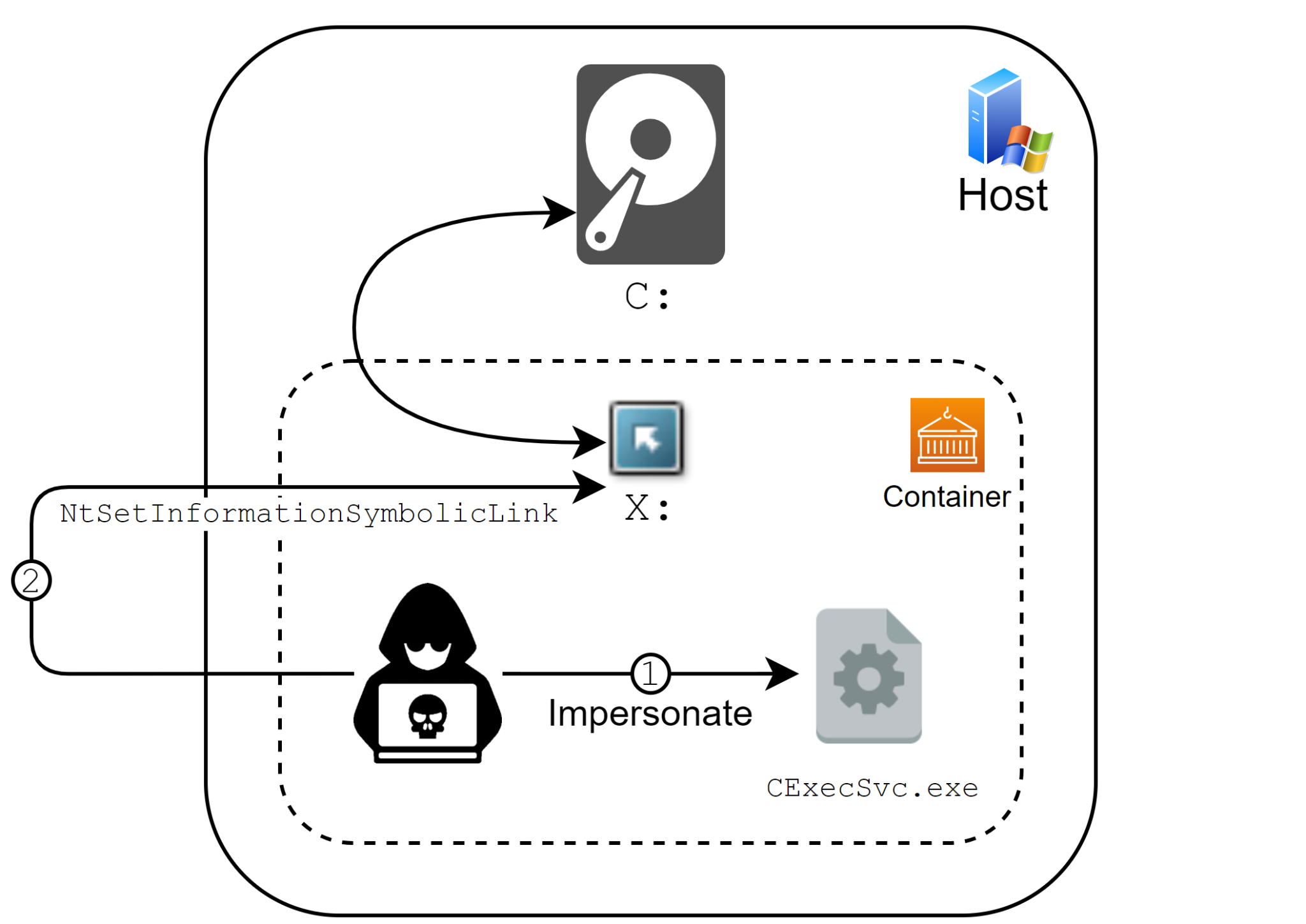
9. Unknown vulnerability (op_type parameter command injection)

Unidentified vulnerability exploit payload, found in connection with our observations around the delivery of a new Mirai variant.
Figure 9. Unidentified vulnerability exploit payload.

This exploit targets the op_type parameter, which is not properly sanitized leading to a command injection. It has been observed in the past being used by Moobot, however the exact target is unknown.

Malware Behaviors

Binary Functionality
lolol.sh After deleting some key folders from the target machine (such as ones containing the existing scheduled jobs, as well as startup scripts), this script downloads the “dark” binaries explained below, saves them to a misleadingly named file “nginx” and tries to run each one. Since the “dark” binaries downloaded are each compiled for a different architecture, only the one compatible with the target machine would actually execute.

Following that, it schedules a job that would (supposedly) run every hour to rerun the lolol.sh script. However, the cron configuration is incorrect. This would have been an attempt to ensure the process is re-launched in case it crashes or is killed for some other reason.

Finally, several packet filter rules are created to block incoming traffic directed at commonly used ports like the standard SSH, HTTP and telnet ports, among others. This is probably to make maintenance of and remote access to the affected system more challenging for an administrator.

In one of the two observed versions of the script, it also downloads and runs the “install.sh” script described below.
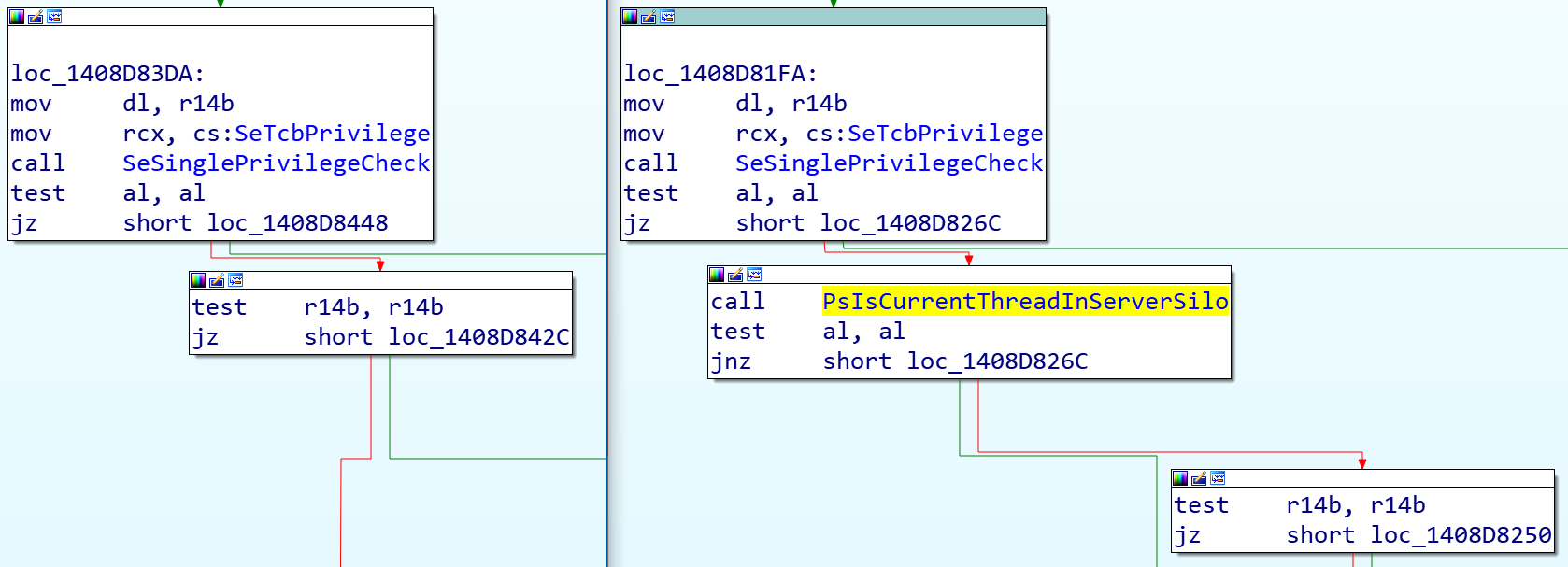
install.sh This script downloads GoLang v1.9.4 onto the target system and adds it to the system path. In addition, it also installs the GoLang standard SSH package and zmap (a common network-scanning package).

It also downloads the “nbrute” binaries and the “combo.txt” file described below. As was the case for the previous script, the “nbrute” binaries downloaded are each compiled for a different architecture, increasing the probability of compatibility with the target machine.
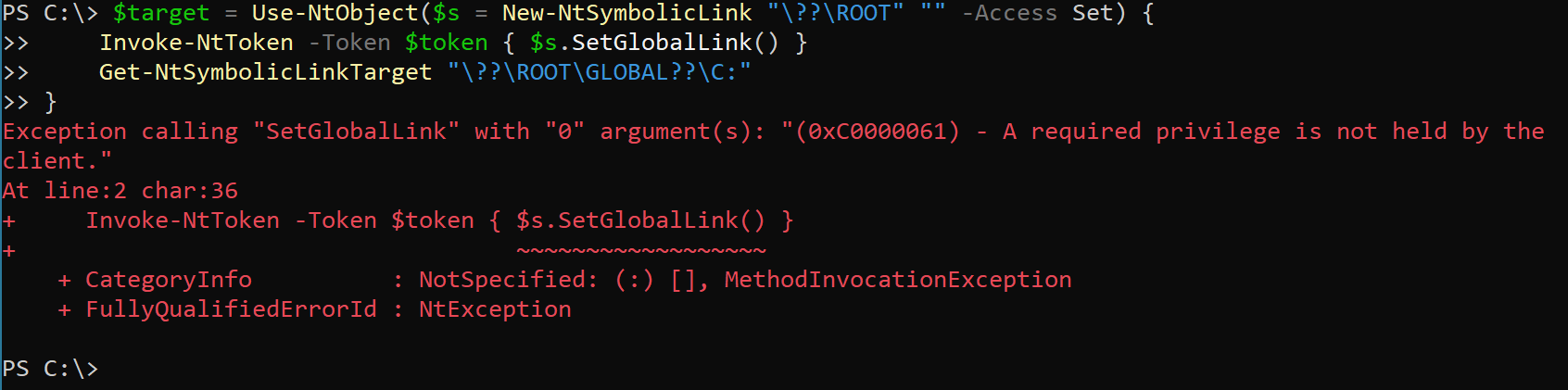
Finally, zmap is run to scan port 22, and IPs found with port 22 open are sent as input to the nbrute binary.

nbrute.[arch] These binaries are written in GoLang and mainly serve the purpose of brute-forcing the various credentials found in “combo.txt” while initiating an SSH connection with a certain IP.
combo.txt Plain text file containing numerous combinations of credentials (often default credentials on devices).
dark.[arch] These binaries are based on the Mirai codebase, and mainly serve the purpose of propagation – either using the exploits described in the section above, or by brute-forcing SSH connections using some hard-coded credentials in the binary.

The key used for the standard Mirai byte-wise XOR encryption routine is 0xbaadf00d.

Table 2. Malware behaviors.

Conclusion

The IoT realm remains an easily accessible target for attackers. Many vulnerabilities are very easy to exploit and could, in some cases, have catastrophic consequences. We strongly advise customers to apply patches whenever possible.

Palo Alto Networks customers are protected from the aforementioned vulnerabilities by the following products and services:

Indicators of Compromise

Samples

First Seen URL SHA256
Mar 13, 2021 02:43 UTC 203[.]159.80.241/bins/dark.arm5 60135a7817a0a1734c2e211a8613873548f4611fddc8666890f6a69860c43e61
Mar 13, 2021 02:43 UTC 203[.]159.80.241/bins/dark.arm6 087fc3206ddb94e80118e7e7f0215c88409a0071b657d21071e15b7917f7cc4e
Mar 13, 2021 02:43 UTC 203[.]159.80.241/bins/dark.arm7 33f75999a3b4c354b6281399e541b97fd6463c5cd2ab13a538522d72a8870f30
Mar 13, 2021 02:43 UTC 203[.]159.80.241/bins/dark.m68k 02d48570f1089e2e7f4f9256bb033136c773834af31054e477e094e48cba110e
Mar 13, 2021 02:43 UTC 203[.]159.80.241/bins/dark.mips 45ff08b1de872379f965d423a0f4e1f2e82f0ea8d101220b83d3aed3b2e7f1c9
Mar 13, 2021 02:43 UTC 203[.]159.80.241/bins/dark.mpsl 85acead88180809d47524aac87d6f76799e7c0a1729d9614446be73aa8e7d871
Mar 13, 2021 02:43 UTC 203[.]159.80.241/bins/dark.ppc 0bbdb062ecfae7e1b59084a5e5fe052908ecfdea7db0777a9c318e9e55fdb5ff
Mar 13, 2021 02:43 UTC 203[.]159.80.241/bins/dark.sh4 77a1f62dc76cc9ee2d924008a0fdcc329396021f027ebe1cfa468f9625c2455b
Mar 13, 2021 02:43 UTC 203[.]159.80.241/bins/dark.x86 8d11635019b077d36ce7de2a3ca9261f126e0ff5808f722fcb967e7cd000be23
Mar 11, 2021 19:22 UTC 203[.]159.80.241/bins/dark.arm7 519b2d04e80c2cb7c000a3c00cb30098df363bd825281b2b7384d964b832df3b
Mar 11, 2021 19:22 UTC 203[.]159.80.241/bins/dark.arm6 7a571f666c8f272cce1ee7ad75520a013bbed800e7d0c80a17804500a3474a13
Mar 11, 2021 19:22 UTC 203[.]159.80.241/bins/dark.arm5 5d7487a5d6febb015a21a98eddffc617cfc06453fe2a7dacac6e1719f56c56fb
Mar 11, 2021 19:22 UTC 203[.]159.80.241/bins/dark.mpsl e9d056afe12210ddf98967e3291127ef9d0d24cbd36862ebc8b0726a565eefb8
Mar 11, 2021 19:22 UTC 203[.]159.80.241/bins/dark.mips 73aaf3ce3e5ea7a598f01d727e8278ff64ff0067fc2f2b22387b09de64c2ff4f
Mar 11, 2021 13:12 UTC 203[.]159.80.241/bins/dark.x86 64f9bc6e925fd2f538c89fd8a8c25d11521b9fcc51c8c5308e9850c990bea04b
Mar 11, 2021 12:59 UTC 203[.]159.80.241/bins/dark.ppc 0c4ec06f32d5f15846239d224d68086cbeaf513b63f0fcafa4eddd8e18a3d372
Mar 11, 2021 12:30 UTC 203[.]159.80.241/bins/dark.sh4 2f590f5af68dd30cdd51de85cb55dd16160ffce16dd326b2ac4c85e0007fca51
Mar 11, 2021 12:30 UTC 203[.]159.80.241/bins/dark.m68k cd59c912b9af910db1880d6fb86cd6cb656477552cf2c2fc82e372bafbe004b8
Mar 5, 2021 14:13 UTC 45[.]133.1.133/bins/dark.ppc 63e66d6f0ddf5fea5b1f71643bdb30f3fff4531c364b6fd1b0e0e0cfe5da833f
Mar 4, 2021 10:19 UTC 45[.]133.1.133/bins/dark.m68k 0a664a74fcc00910170edcd5f548569b40c2c5d58fc5ced1f475dbe938684e17
Mar 4, 2021 10:19 UTC 45[.]133.1.133/bins/dark.mips 05102e5abb23c761426c2c0f19f70f650938ea9e9295ccbb92349513c1d26c63
Mar 4, 2021 10:19 UTC 45[.]133.1.133/bins/dark.mpsl cc996d19c3e9b732b5f61fb7a2ad20a4f9e1fd7e62f484f15c7cc984a32dec01
Mar 4, 2021 10:19 UTC 45[.]133.1.133/bins/dark.sh4 f05225fec1fda7c6405e6961207ee12e198272d352144f516e970829a74093e2
Mar 4, 2021 10:19 UTC 45[.]133.1.133/bins/dark.x86 9aa0ded21b8c21075a6ad24180befc47dbfeb3985a433f1baa6181ec945a19b9
Mar 3, 2021 14:24 UTC 45[.]133.1.133/lolol.sh ecae298b18493bf2366f6081e8215a474cce4554e07a7b2380a7f8e8a3a9a37d
Mar 3, 2021 14:24 UTC 45[.]133.1.133/bins/dark.arm5 fb940b1049e0e95c03adb7a2750347108cadf6b19ef4149a5103f7625c07c8ec
Mar 3, 2021 14:24 UTC 45[.]133.1.133/bins/dark.arm6 515dc2fd8819c7fc82395acc4c7fb5b2903982a5f48bc26bc8d0235bc0664d1f
Mar 3, 2021 14:24 UTC 45[.]133.1.133/bins/dark.arm7 a9c4ea40b08ce4281c2dc9776355186dfc5649f9ec2b36c32fa5540f8d2aef2d
Mar 3, 2021 14:24 UTC 45[.]133.1.133/bins/dark.m68k ac75cb71c2f052141a238b8f7215d5a0956f7034cf90f231d228ce58254d23ba
Mar 3, 2021 14:24 UTC 45[.]133.1.133/bins/dark.mips 1e56f8ca44f84eff212805fa061ecb0f6fb8bc9499ff2e541ad3c43fb2f4420a
Mar 3, 2021 14:24 UTC 45[.]133.1.133/bins/dark.mpsl 1d9496814d35d9e302d7e99339e9730fc81c022bc085c0711b73ebad962cbc2b
Mar 3, 2021 14:24 UTC 45[.]133.1.133/bins/dark.ppc 971b5a96d84ca0d7dd906b639cd97a04835013be32356d09037cff64516c73bf
Mar 3, 2021 14:24 UTC 45[.]133.1.133/bins/dark.sh4 e2a6ac516ec8b5dcc76becc26cf992434882d490d8f2c9d7071298dba7a641a2
Mar 3, 2021 14:24 UTC 45[.]133.1.133/bins/dark.x86 a5ca43106a713c4a8e978575b8685889c244501288b9fa7c7dc7f1e8c5ef1291
Feb 26, 2021 13:14 UTC iotlmao[.]xyz/bins/dark.m68k a6cb6356432ca83467f6da2168be2aabbabe5d2f2dd4c01d6c4a93d01a57df53
Feb 26, 2021 13:14 UTC iotlmao[.]xyz/bins/dark.sh4 c686712f9be64e3d2957754ce181e5b4680b205cb6773b85b35df57983ed31cf
Feb 24, 2021 15:59 UTC 185[.]239.242.63/bins/dark.arm5 8cc6375f2eabe865e8400f27381a513a69e4100748458c3d2c706f3d4002bf1e
Feb 24, 2021 15:59 UTC 185[.]239.242.63/bins/dark.arm6 4414bf4f41663a6458372bcc4743d6e50bbb2d40c26d71bcb945926c98cd5537
Feb 24, 2021 15:59 UTC 185[.]239.242.63/bins/dark.arm7 8d0beb4b143dc4a9543b4bc5d7f44a6771a973709aaf8c3a4754d120b99d0afd
Feb 24, 2021 15:59 UTC 185[.]239.242.63/bins/dark.m68k f9770197d2254e6d5d4cb872b07dc25feb2994d4d5f0b3c854a98f9dfa3c6854
Feb 24, 2021 15:59 UTC 185[.]239.242.63/bins/dark.mips 74ab77e1069c6fb32925e89563c57f09c842cad0de6ab6b7c9ec2fa44d2641b1
Feb 24, 2021 15:59 UTC 185[.]239.242.63/bins/dark.mpsl 0039231b2fd5e5a3d86ae3b626d35b8fed7f2887a58e32b480ac82cd82150f7c
Feb 24, 2021 15:59 UTC 185[.]239.242.63/bins/dark.ppc 9d55aa1d9841be74cdc0c9d0a9fe2f20e0704ea30c721a7b2dcae02675416629
Feb 24, 2021 15:59 UTC 185[.]239.242.63/bins/dark.sh4 7aa437a562f3a956cf60fce652e6a0fb2d3c7cda0e5312c1a7fa62e177c45906
Feb 24, 2021 15:59 UTC 185[.]239.242.63/bins/dark.x86 8e65d7b16939834e1cd86b36b495924d34f10a8c477b53c9c8e648c804b97c2d
Feb 24, 2021 15:59 UTC 185[.]239.242.63/lolol.sh 5715d9c632c646c856f2775de8e98c00cade29f7bfb6fbe33a5741b01e897521
Feb 23, 2021 09:03 UTC 185[.]239.242.63/bins/dark.arm 5525b282df49206e76e884ca0f86806ddc97ec08343bab1d9a98f029a2697b08
Feb 23, 2021 09:03 UTC 185[.]239.242.63/bins/dark.arm5 b82b8957a4397eae1061a74fb7a8014cbbcbe7064d4edf2e0b15233fd2ce8cca
Feb 23, 2021 09:03 UTC 185[.]239.242.63/bins/dark.arm6 ec9dc19758ba74fb254c69d2b60ae1012b1bd65390e936990e4bd8573bcb83aa
Feb 23, 2021 09:03 UTC 185[.]239.242.63/bins/dark.arm7 38d8f2d17b3b676f5258a28b6b4093a1c3cdfa0d34d97c80d86686a3cff7ed55
Feb 23, 2021 09:03 UTC 185[.]239.242.63/bins/dark.m68k b066b1c1d019fc97e3649b99ad10294783b13a12b67d34b9c8500e762c37b7e7
Feb 23, 2021 09:03 UTC 185[.]239.242.63/bins/dark.mips 904b086dbf3e8f4dd1711d758d54675ce2d6002ff607a72d72d7e3aea612ba7d
Feb 23, 2021 09:03 UTC 185[.]239.242.63/bins/dark.mpsl 4f6a9d2c775e0ba38189390aa7975973209f8e703d6f974c2ab67c97ad263204
Feb 23, 2021 09:03 UTC 185[.]239.242.63/bins/dark.ppc c26401490ab9343b023f1f89b39d8d32835a795117ef7d7a129871bc05010dd6
Feb 23, 2021 09:03 UTC 185[.]239.242.63/bins/dark.sh4 73b35ddbf9784a6f6ebad7f5a1f4965daedc2f92cbb45a9cb76e61c0104bf553
Feb 23, 2021 09:03 UTC 185[.]239.242.63/bins/dark.x86 a925f0486b33f3f05d610d33c5a4b6bb2d5531c89e804e001ec01c4f5c25975e
Feb 23, 2021 09:03 UTC 185[.]239.242.63/lolol.sh 4fe20e73217d0bde39616ebf6f50f0f27882f939537561849f7b17968c5b8e30
Feb 22, 2021 16:30 UTC 37[.]46.150.102/bins/dark.mpsl 6b1bea5f17eb2c16815b8cb87d6e24e707248e5384fc4dd33c86c189657c73ff
Feb 22, 2021 16:30 UTC 37[.]46.150.102/bins/dark.ppc 918395bac079ab747736246b9d84e66921774d3eb95bb47045704624646b1287
Feb 22, 2021 16:30 UTC 37[.]46.150.102/bins/dark.sh4 528179f34ed9a6e69f582c23b3cbb50343164bf0e5995624a8d16f8b0df202e8
Feb 22, 2021 16:30 UTC 37[.]46.150.102/bins/dark.x86 f05d21a5b4b72a761c1540f1400dff7e39f10ac1c8b843ec8986d2e780a7807a
Feb 22, 2021 16:30 UTC 37[.]46.150.102/lolol.sh b3a20c8dfa5adaa8247c4d2097f3cc8423b4e270c9735f616628bf9bde583cbe
Feb 22, 2021, 12:32 UTC 185[.]239.242.63/bins/dark.arm5 2102b6a9f4b6745b0963ac3040945fb351c3d7df5b8e75dbc4ebf587c921998f
Feb 22, 2021, 12:32 UTC 185[.]239.242.63/bins/dark.arm6 bfd14a2f5c26501efb5d4010839b7d0bbc9a639d86ab5d12af663de598f15427
Feb 22, 2021, 12:32 UTC 185[.]239.242.63/bins/dark.arm7 d9f7504b3fe81f5264da5f23bdb7529f6d1dd713e28a92828180787729872a8d
Feb 22, 2021, 12:32 UTC 185[.]239.242.63/bins/dark.m68k 40808fb06796aeb740368b9bc322c12193d1bebb8e5eeddc420a98db6ac82689
Feb 22, 2021, 12:32 UTC 185[.]239.242.63/bins/dark.mips 3c47dceb9b8fbb0d40c3f1efa8ebc8d7dcf82aa0af46c4486ec3fc8ca29a83b2
Feb 22, 2021, 12:32 UTC 185[.]239.242.63/bins/dark.mpsl d31f1fecde01cc37950dc5b5330cd72e8ab1943f251bdfa5990f0d9d3a0a8e8f
Feb 22, 2021, 12:32 UTC 185[.]239.242.63/bins/dark.ppc 5446350c771766589e6d79e8185e10fcc0a6681eb76723b7f26dfef03c9080a5
Feb 22, 2021, 12:32 UTC 185[.]239.242.63/bins/dark.sh4 02f08ccc4a4136c89276135664267e08f1bb6795842a84c06c15478d3c3101e6
Feb 22, 2021, 12:32 UTC 185[.]239.242.63/bins/dark.x86 f467e6335a4a0250a17d61b3d138b31998f3e6669e1fcd1c3648db1b44b55ffa
Feb 22, 2021, 12:32 UTC 185[.]239.242.63/lolol.sh 4fe20e73217d0bde39616ebf6f50f0f27882f939537561849f7b17968c5b8e30
Feb 16, 2021, 11:01 UTC 37[.]46.150.102/brute/combo.txt 6a68acd757fab908b2455c9b5882c25ab4a550121c2badb960b0a514a04a8d3d
Feb 16, 2021, 11:01 UTC 37[.]46.150.102/brute/nbrute.386 baedd59eba62c289dcb722588895eb165f4a1570b3c012efc3dcc60d3bdea521
Feb 16, 2021, 11:01 UTC 37[.]46.150.102/brute/nbrute.amd64 8524826a687491c6bfd161df3e4fb2f537f50ea32834d7710dcf3b788a5ddfc2
Feb 16, 2021, 11:01 UTC 37[.]46.150.102/brute/nbrute.arm 4f69555ab71b49c2c1067f0907eb73b185327b57c566a8311ba9f9e58f4e85a5
Feb 16, 2021, 11:01 UTC 37[.]46.150.102/brute/nbrute.mips a5c2b758da21d7895c7945de8684c9b27370af6c5bf48ce3d94626261982659f
Feb 16, 2021, 11:01 UTC 37[.]46.150.102/brute/nbrute.mipsle b37da8e6afa2b3223b1f8f73e6801cf3fed3c0f114cfb9c134b5f06322a337ca
Feb 16, 2021, 11:01 UTC 37[.]46.150.102/bins/dark.arm5 a447bb67be310702807ff148f53f2b4c64ddba0c37f92caf6acabdfaa9ad6603
Feb 16, 2021, 11:01 UTC 37[.]46.150.102/bins/dark.arm6 b2122c5a9c738d964fa770760db40d6708de377e2e671feccb836054ceda2f47
Feb 16, 2021, 11:01 UTC 37[.]46.150.102/bins/dark.arm7 80cd13bfcc2fc29096abf18525d17766700a6d25a9806e55c7b7de776cba0302
Feb 16, 2021, 11:01 UTC 37[.]46.150.102/bins/dark.m68k 66ea76a427b69f153486f962baff29d4a68393e985c7d88c94d773b25ad4964a
Feb 16, 2021, 11:01 UTC 37[.]46.150.102/bins/dark.mips def1959fae2d8a3dfe606126ceb9d5403deae97a4b4e216dc8e60354980eeac4
Feb 16, 2021, 11:01 UTC 37[.]46.150.102/bins/dark.mpsl 667640d293e4ce2287546fc2e0056ee14f414868bf5b77f72078096c516a9fb0
Feb 16, 2021, 11:01 UTC 37[.]46.150.102/bins/dark.ppc beb0b7178b242f2dba21c3d91abf80e8738847b8086d2a42e9352738c83542b5
Feb 16, 2021, 11:01 UTC 37[.]46.150.102/bins/dark.sh4 554bee9f896a7a013804485894875348ff760b08ff7b0ae14c210e2b37da75f6
Feb 16, 2021, 11:01 UTC 37[.]46.150.102/bins/dark.x86 2a09719254934fe8ee8f200a0a7537d35a293fe1f8d0e396e23374e9b209f273


Threat Assessment: DearCry Ransomware

Executive Summary

Last week, Microsoft reported that attackers compromised Exchange Mail Servers with the use of four zero-day vulnerabilities. While patches have been released by Microsoft, adversaries are still attacking vulnerable versions of Microsoft Exchange Servers with malicious tools, malware and data exfiltration. Further, Microsoft has confirmed the existence of a ransomware variant leveraging these vulnerabilities, which has been dubbed “DearCry.” It is reasonable to suspect that the ransomware authors were paying homage to an unrelated yet infamous ransomware family, “WannaCry,” which was used as a payload within an orchestrated attack campaign leveraging known Microsoft vulnerabilities to infect victims en masse.

Due to the surge of this malicious activity, we’ve created this threat assessment for overall threat awareness. Full visualization of the techniques observed and their relevant Courses of Action (CoA) can be viewed in the Unit 42 ATOM Viewer.

If you think you may have been impacted, please email crypsis-investigations@paloaltonetworks.com or call (855) 875-4631 to get in touch with the Crypsis Incident Response team.

DearCry Ransomware Overview

DearCry is a new ransomware variant that has been observed exploiting Microsoft Exchange Servers’ ProxyLogon vulnerabilities for initial access. Early reports of the appearance of DearCry ransom notes in tandem with associated Microsoft Exchange Server compromises via ProxyLogon vulnerabilities began to surface on March 9, 2021, and victims in the U.S., Canada and Australia are suspected, according to security researcher Michael Gillespie.

When executed, DearCry ransomware uses AES-256 and RSA-2048 to encrypt victim files, while also modifying file headers to include the string ‘DEARCRY!’ (see Figure 1).

When executed, DearCry ransomware uses AES-256 and RSA-2048 to encrypt victime files, while also modifying file headers to include the string "DearCry!" as shown here.
Figure 1. DearCry file header.

As with a majority of ransomware variants, DearCry deploys a ransom note to the victim’s desktop. However, instead of demanding a fixed ransom amount and including a Bitcoin wallet address, DearCry’s note includes two email addresses that the victim is asked to contact, as well as a request for a provided hash to be sent (see Figure 2).

DearCry ransom note: "Your file has been encrypted! If you want to decrypt, please contact us." What follows are two email addresses and a request for a provided hash.
Figure 2. DearCry ransom note.

During its execution, DearCry also runs a service named “msupdate” that is not native to the Windows operating system. This service is later removed when the ransomware finishes its encryption process. Furthermore, all logical drives on the Windows operating system, except for CD-ROM drives, are enumerated on the victim’s system so that the ransomware can begin to encrypt files using an RSA public key.

As of March 2021, DearCry ransomware has been seen targeting files with the following file extensions:
.TIF, .TIFF, .PDF, .XLS, .XLSX, .XLTM, .PS, .PPS, .PPT, .PPTX, .DOC, .DOCX, .LOG, .MSG, .RTF, .TEX, .TXT, .CAD, .WPS, .EML, .INI, .CSS, .HTM, .HTML, .XHTML, .JS, .JSP, .PHP, .KEYCHAIN, .PEM, .SQL, .APK, .APP, .BAT, .CGI, .ASPX, .CER, .CFM, .C, .CPP, .GO, .CONFIG, .PL, .PY, .DWG, .XML, .JPG, .BMP, .PNG, .EXE, .DLL, .CAD, .AVI, .H, .CSV, .DAT, .ISO, .PST, .PGD, .7Z, .RAR, .ZIP, .ZIPX, .TAR, .PDB, .BIN, .DB, .MDB, .MDF, .BAK, .LOG, .EDB, .STM, .DBF, .ORA, .GPG, .EDB, .MFS

At the time of this writing, all attributed samples leverage the .CRYPT extension for infected files.

DearCry encrypted files leverage the .CRYPT extension, as shown in this screenshot.
Figure 3. DearCry encrypted files.

Courses of Action

This section documents the relevant tactics, techniques and procedures ( TTPs) used by DearCry and maps them directly to Palo Alto Networks product(s) and service(s). It also further instructs customers how to ensure their devices are configured correctly.

Product / Service Course of Action

Initial Access

Exploit Public-Facing Application [T1190]

NGFW Ensure application security policies exist when allowing traffic from an untrusted zone to a more trusted zone
Ensure 'Service setting of ANY' in a security policy allowing traffic does not exist
Ensure 'Security Policy' denying any/all traffic to/from IP addresses on Trusted Threat Intelligence Sources Exists
Threat Prevention Ensure a Vulnerability Protection Profile is set to block attacks against critical and high vulnerabilities, and set to default on medium, low and informational vulnerabilities
Ensure a secure Vulnerability Protection Profile is applied to all security rules allowing traffic
Deploy Content Pack 8380, which detects the four Microsoft Exchange zero-day vulnerabilities
WildFire Ensure that WildFire file size upload limits are maximized
Ensure forwarding is enabled for all applications and file types in WildFire file blocking profiles
Ensure a WildFire Analysis profile is enabled for all security policies
Ensure forwarding of decrypted content to WildFire is enabled
Ensure all WildFire session information settings are enabled
Ensure alerts are enabled for malicious files detected by WildFire
Ensure 'WildFire Update Schedule' is set to download and install updates every minute
Cortex XSOAR Deploy XSOAR Playbook - Isolate Endpoint

Defense Evasion, Discovery, Impact

Disable or Modify Tools [T1562.001], File and Directory Discovery [T1083], Data Encrypted for Impact [T1486], Service Stop [T1489]

Cortex XDR Enable Anti-Exploit Protection
Enable Anti-Malware Protection
Look for the following BIOCs alerts to detect activity*:

Cortex XDR Agent - Behavioral Threat Detected

Cortex XDR Analytics - Multiple Discovery Commands

Cortex XSOAR Deploy XSOAR Playbook - Ransomware Manual

Table 1. Courses of Action for DearCry.
†These capabilities are part of the NGFW security subscriptions service.
* These analytic detectors will trigger automatically for Cortex XDR Pro customers.

Conclusion

DearCry is a new ransomware leveraging ProxyLogon vulnerabilities from Microsoft Exchange Servers. Furthermore, it is a perfect example of how threat actors can impact the threat landscape by taking advantage of newly disclosed vulnerabilities to make a quick profit. We strongly advise immediately updating all Microsoft Exchange Servers to the latest available patched versions released by Microsoft.

Palo Alto Networks customers are protected across our product ecosystem, with protections deployed in the following products and subscriptions:

It is imperative for customers to employ best practices in order to ensure Palo Alto Networks products are configured in a manner best suited for your protection.

Indicators associated with this Threat Assessment are available on GitHub, have been published to the Unit 42 TAXII feed and are viewable via the ATOM Viewer.

In addition to the above courses of action, AutoFocus customers can review additional activity by using the tag: DearCry.

Additional Resources

Palo Alto Networks has shared our findings, including file samples and indicators of compromise, in this report with our fellow Cyber Threat Alliance members. CTA members use this intelligence to rapidly deploy protections to their customers and to systematically disrupt malicious cyber actors. For more information on the Cyber Threat Alliance, visit www.cyberthreatalliance.org.

Microsoft Exchange Server Attack Timeline

Executive Summary

On March 2, the world was introduced to four critical zero-day vulnerabilities impacting multiple versions of Microsoft Exchange Server (CVE-2021-26855, CVE-2021-26857, CVE-2021-26858 and CVE-2021-27065). Alongside revealing these vulnerabilities, Microsoft published security updates and technical guidance that stressed the importance of patching immediately, while concurrently noting active and ongoing exploitation by an Advanced Persistent Threat (APT) they call HAFNIUM. Since the initial attacks, Unit 42 and a number of other threat intelligence teams have seen multiple threat groups now exploiting these zero-day vulnerabilities in the wild. Both the vulnerabilities themselves and the access that can be achieved by exploiting them are significant. It is therefore unsurprising that multiple attackers sought and continue to seek to compromise vulnerable systems before they are patched by network administrators. This has been going on at an unprecedented scale – as of March 8, based on telemetry collected from the Palo Alto Networks Expanse platform, we estimated there remained over 125,000 unpatched Exchange Servers in the world.

Based on the reconstructed timeline, it’s now clear that there were at least 58 days between the first known exploitation of this vulnerability on Jan. 3 and when Microsoft released the patch on March 2. Applying the patch is a necessary first step, but insufficient given the amount of time the exploit was in the wild. The act of patching will not remediate any access that attackers may have already gained to vulnerable systems. Organizations can look to our remediation guide for steps they can take to ensure they have properly secured their Exchange Servers.

As we enter the second week since the vulnerabilities became public, initial estimates place the number of compromised organizations in the tens of thousands, thereby dwarfing the impact of the recent SolarStorm supply chain attack in terms of victims and estimated remediation costs globally. Given the importance of this event, we are publishing a timeline of the attack based on our extensive research into the information currently available to us and our direct experience defending against these attacks. As the situation continues to unfold, we urge others to also share what they uncover so that we as a cybersecurity community get a complete picture as quickly as possible.

Microsoft Exchange Server Attack Timeline Summary

This story begins over six months ago when DevCore, a Taiwan-based security consulting firm, first initiated a project to explore the security of Microsoft Exchange Server products. In the two-month window between October and December 2020, DevCore researchers made considerable progress that ultimately led to the discovery of a pre-authentication proxy vulnerability on Dec. 10, 2020. This vulnerability was given the name ProxyLogon by DevCore and is now known publicly as CVE-2021-26855.

Following this initial discovery, on Dec. 27, 2020, DevCore researchers demonstrated that this vulnerability could be leveraged to perform authentication bypass, thereby granting its users administrator-level permissions on vulnerable Exchange Servers. Shortly after this discovery, on Dec. 30, 2020, DevCore also discovered a second post-authentication file write bug that could be chained together with the first vulnerability to gain privileged access to Exchange Servers and write files of an attacker’s choosing to any directory. This second vulnerability is now known publicly as CVE-2021-27065.

Given the time of year and the existence of a long New Year’s holiday weekend, DevCore reached out and notified Microsoft of the vulnerabilities on the following Tuesday (Jan. 5, 2021). At the time, the researcher credited with the discovery of the vulnerabilities tweeted publicly.

The Microsoft Exchange Server attack timeline kicks off with a Twitter post from user Orange Tsai (@orange_8361): Just report a pre-auth RCE chain to the vendor. This might be the most serious RCE I have ever reported! Hope there is no bug collision or duplicate XD

At that point, attacks were already appearing in the wild. Volexity, a US-based security firm, reported attacks involving the ProxyLogon vulnerability as early as Jan. 3. On Feb. 2, the firm also reported to Microsoft information about attacks that occurred on Jan. 6.

Concurrently, it is now believed that Dubex, a Denmark-based security firm, first noted active exploitation of the Microsoft Exchange UMWorkerProcess on Jan. 18, 2021. This vulnerability is now known as CVE-2021-26857. It was used by an adversary to install webshells on vulnerable servers consistent with the attacks noted by Volexity. It has been reported that Dubex notified Microsoft of its findings on Jan. 27, less than 10 days after initial discovery.

Twitter post from User Dubex (@Dubex): In January 2021 the #Dubex Incident Response Team discovered a vulnerability on the Microsoft Exchange servers caused by the Chinese group Hafnium. Today @Microsoft has released patches for these vulnerabilities. The post is followed by a link and two hashtags: #HAFNIUM, #incidentresponse

With two cybersecurity vendors providing evidence of active exploitation, DevCore followed up with Microsoft on Feb. 18, 2021. During the exchange, DevCore provided a draft advisory notice and requested details concerning the patch release timeline. At the time, Microsoft shared that they planned to release the patches on March 9.

On Feb. 27, 2021 Microsoft notified DevCore that they were almost ready to release the security patches. That same day, the cybersecurity community observed an uptick in unusual webshell activity, and over the following two days, evidence suggests multiple threat groups began active exploitation activities. ESET reported three separate groups (Tick, LuckyMouse and Calypso) and our own analysis of webshells deployed in this window has identified six unique passwords and clusters of activity that further support the claim of multiple threat groups. It is also worth noting that one of the passwords observed on Feb. 28, 2021 was the name “orange,” which may serve as a reference to the researcher who originally discovered the vulnerability.

On March 2, 2021, a week earlier than initially planned, Microsoft published security updates for the four vulnerabilities. In doing so, they also warned of active exploitation of these vulnerabilities by a group they named HAFNIUM and further described as a state-sponsored APT operating out of China.

In the days following the publication of the CVEs, the cybersecurity community has witnessed a surge of attacks as malicious actors seek to capitalize on the vulnerabilities before network defenders deploy patches. Over the past week, we have also identified the emergence of several new webshell passwords and clusters of activity that have overlapping victim populations. Thus, we currently assess that several additional threat actors with varying motives have launched efforts to exploit these vulnerabilities as well.

Finally, in terms of the timeline, it is important to consider that while the Microsoft security updates were released on March 2, 2021, applying these updates only protects organizations from continued or future exploitation of these vulnerabilities. The security updates do not provide any protection from previous exploitation that may have resulted in compromise prior to the publication of the updates.

As documented above, there is definitive evidence that these exploits were in active use as far back as early January, thus resulting in at least a two-month window of vulnerability. However, a lack of evidence of exploitation prior to January should not be misinterpreted as a lack of adversary activity.

Key events in the Microsoft Exchange Server attack timeline are represented here. This tracks incidents beginning Dec. 10, 2020 (DevCore's discovery of a pre-authentication proxy vulnerability known as ProxyLogon) up through the current ongoing exploitation of the vulnerabilities.
Figure 1. High-level timeline of activity

Conclusion

Ongoing research illustrates that these vulnerabilities are being used by multiple threat groups. While it is not new for highly skilled attackers to leverage new vulnerabilities across varying product ecosystems, the ways in which these attacks are conducted to bypass authentication -- thereby providing unauthorized access to emails and enabling remote code execution (RCE) -- is particularly nefarious.

Unit 42 fully expects attacks leveraging these vulnerabilities to not only continue, but to increase in scope, likely including more varied attacks with different motivations, such as ransomware infection and/or distribution. Due to the fact that active attacks from various threat groups leveraging these vulnerabilities is ongoing, it’s imperative to not only patch affected systems, but also follow the guidance outlined from Unit 42’s previous remediation blog.

Additional Resources


Remediation Steps for the Microsoft Exchange Server Vulnerabilities

Background

On March 2, the security community became aware of four critical zero-day Microsoft Exchange Server vulnerabilities (CVE-2021-26855, CVE-2021-26857, CVE-2021-26858 and CVE-2021-27065).

These vulnerabilities let adversaries access Exchange Servers and potentially gain long-term access to victims’ environments. While the Microsoft Threat Intelligence Center (MSTIC) attributes the initial campaign with high confidence to HAFNIUM, a group they assess to be state-sponsored and operating out of China, multiple threat intelligence teams, including MSTIC and Unit 42, are also seeing multiple threat actors now exploiting these zero-day vulnerabilities in the wild. Estimated number of potentially compromised organizations is in the tens of thousands globally – and very importantly, these vulnerabilities were being actively exploited for at least two months before the security patches were available. As a result, even if you patched immediately, your Exchange Servers could still be compromised. Further, based on telemetry collected from the Palo Alto Networks Expanse platform, we estimate there remain over 125,000 unpatched Exchange Servers in the world.

Below you will find a concise playbook that enterprises can follow to respond to this potential threat in their environments.

1) Locate all Exchange Servers and determine whether they need to be patched.

Exchange Online is not affected.

Vulnerable Exchange Server versions include 2013, 2016, and 2019. While Exchange 2010 is not vulnerable to the same attack chain as Exchange 2013/2016/2019, Microsoft has released a patch for CVE-2021-26857 for this version of the software. Microsoft has recently released additional guidance for older, unsupported versions of Exchange.

Microsoft is recommending to install updates on all Exchange Servers, prioritising those that are externally/internet facing. Even if Exchange Servers are not internet facing, the vulnerabilities can still be exploited if access to the network has been achieved through other methods.

Microsoft has published information about the updates for the following specific versions of Exchange Server:

Exchange Server 2019 (update requires Cumulative Update (CU) 8 or CU 7).

Exchange Server 2016 (update requires CU 19 or CU 18).

Exchange Server 2013 (update requires CU 23).

Exchange Server 2010 (update requires SP 3 or any SP 3 RU – this is a Defense in Depth update).

2) Patch and secure all Exchange Servers.

Install the out-of-band security updates for your version of Exchange Server.

If you cannot update and/or patch an Exchange Server immediately, there are some mitigations and workarounds that may reduce the chances of an attacker exploiting an Exchange Server; these mitigations should only be temporary until patching can be completed. Palo Alto Networks Next-Generation Firewalls (NGFWs) updated to Threat Prevention Content Pack 8380 or later protect against these vulnerabilities if SSL decryption is enabled for inbound traffic to the Exchange Server. Cortex XDR running on your Exchange Server will detect and prevent webshell activity commonly used in these attacks.

The initial attack requires the ability to make an untrusted connection to Exchange Server port 443. You can protect against this by restricting access to the system from untrusted users. This can be achieved by only allowing access to the system from users who have already authenticated through a VPN, or by using a firewall to limit access to specific hosts or IP ranges. Using this mitigation will only protect against the initial portion of the attack. Other portions of the chain can still be triggered if an attacker already has access to the network or can convince an administrator to open a malicious file.

More information about using Palo Alto Networks products, including firewalls with security subscriptions, Cortex XSOAR for automation and Cortex XDR for endpoint protection, can be found in our Threat Assessment.

3) Determine whether an Exchange Server has already been compromised.

These vulnerabilities have been in the wild and actively exploited for over a month, with the earliest indications of exploitation leading back to Jan. 3. Any organization running the vulnerable software must evaluate if their server has been compromised. Patching the system will not remove any malware already deployed on the system. It would be prudent to assume Exchange Servers that exposed Outlook Web Access or Exchange Web Services to the internet are compromised until proven otherwise.

Check for suspicious process and system behavior, especially in the context of Internet Information Service (IIS) and Exchange application processes, such as PowerShell, Command shells (cmd.exe) and other programs executed in the applications’ address space. We describe how to use Palo Alto Networks Cortex XDR Pro endpoint protection to hunt for this attack in your environment in “Hunting for the Recent Attacks Targeting Microsoft Exchange.”

Microsoft has released PowerShell and Nmap scripts for checking your Exchange Server for indicators of compromise of these exploits. They have also released another script, available at the same link, that highlights differences in files from the virtual directories of your Exchange Server against those expected for your specific Exchange version. The Cybersecurity and Infrastructure Security Agency (CISA) has also published a list of tactics, techniques and procedures (TTPs).
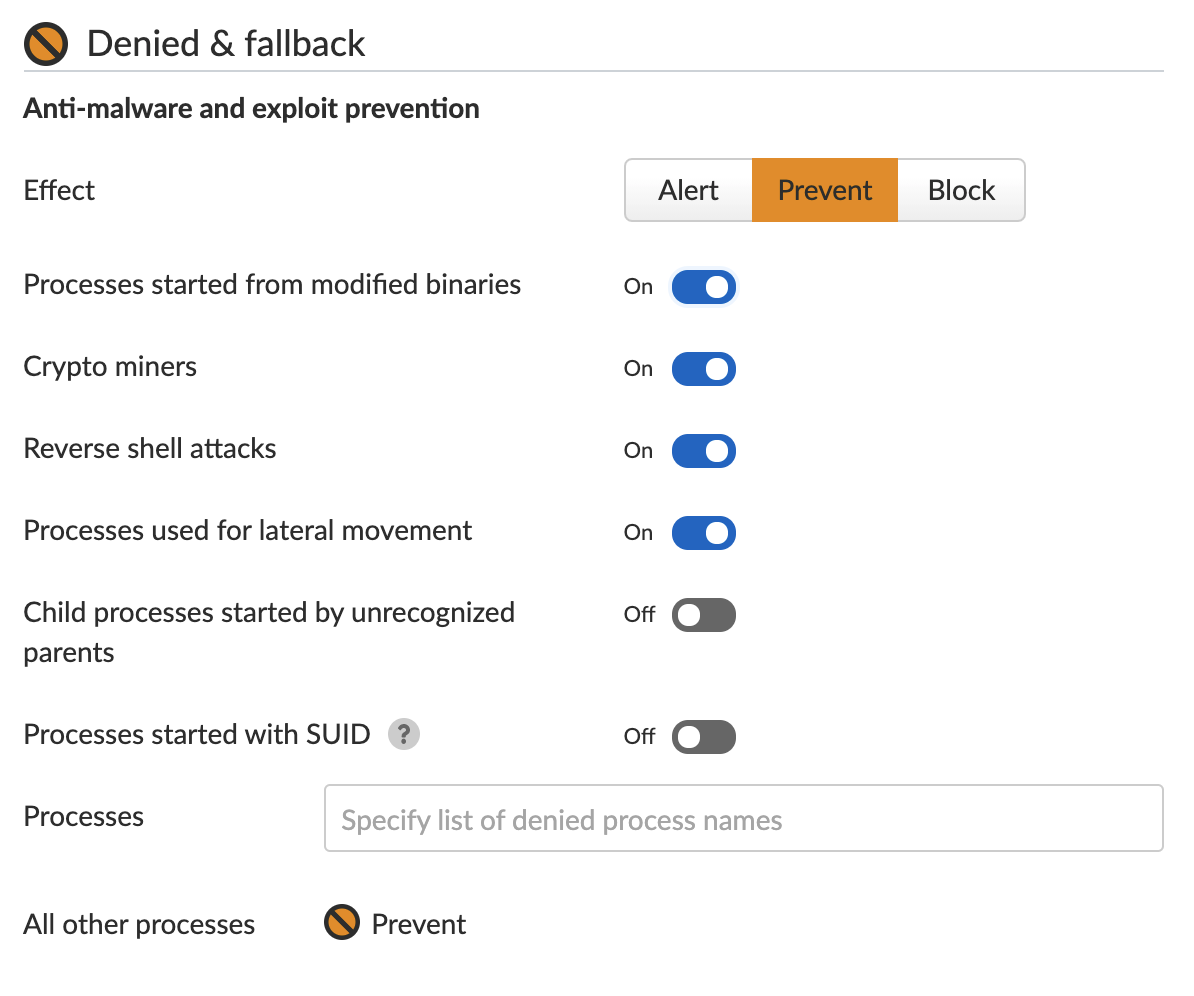
As documented in the Unit 42 Threat Assessment Courses of Action table, the post-intrusion TTPs used by the initial actors conducting the Exchange attacks included the following:

  • Using Procdump to dump the LSASS process memory.
  • Using 7-Zip to compress stolen data into ZIP files for exfiltration.
  • Adding and using Exchange PowerShell snap-ins to export mailbox data.
  • Using the Nishang Invoke-PowerShellTcpOneLine reverse shell.
  • Downloading PowerCat from GitHub, then using it to open a connection to a remote server.

Since the initial attacks, we believe that other actors are trying to capitalize on the Exchange vulnerabilities, but their motivations and objectives may differ vastly, and so could their TTPs.

4) Engage an Incident Response team if you think you have been compromised.

If, at any point, you think your Exchange Server has been compromised, you should still take action to secure it against the vulnerabilities as described above. This will prevent additional adversaries from further compromising the system. Installing the out-of-band security updates for your version of Exchange Server is very important, but this will not remove any malware already installed on systems and will not evict any threat actors present in the network.

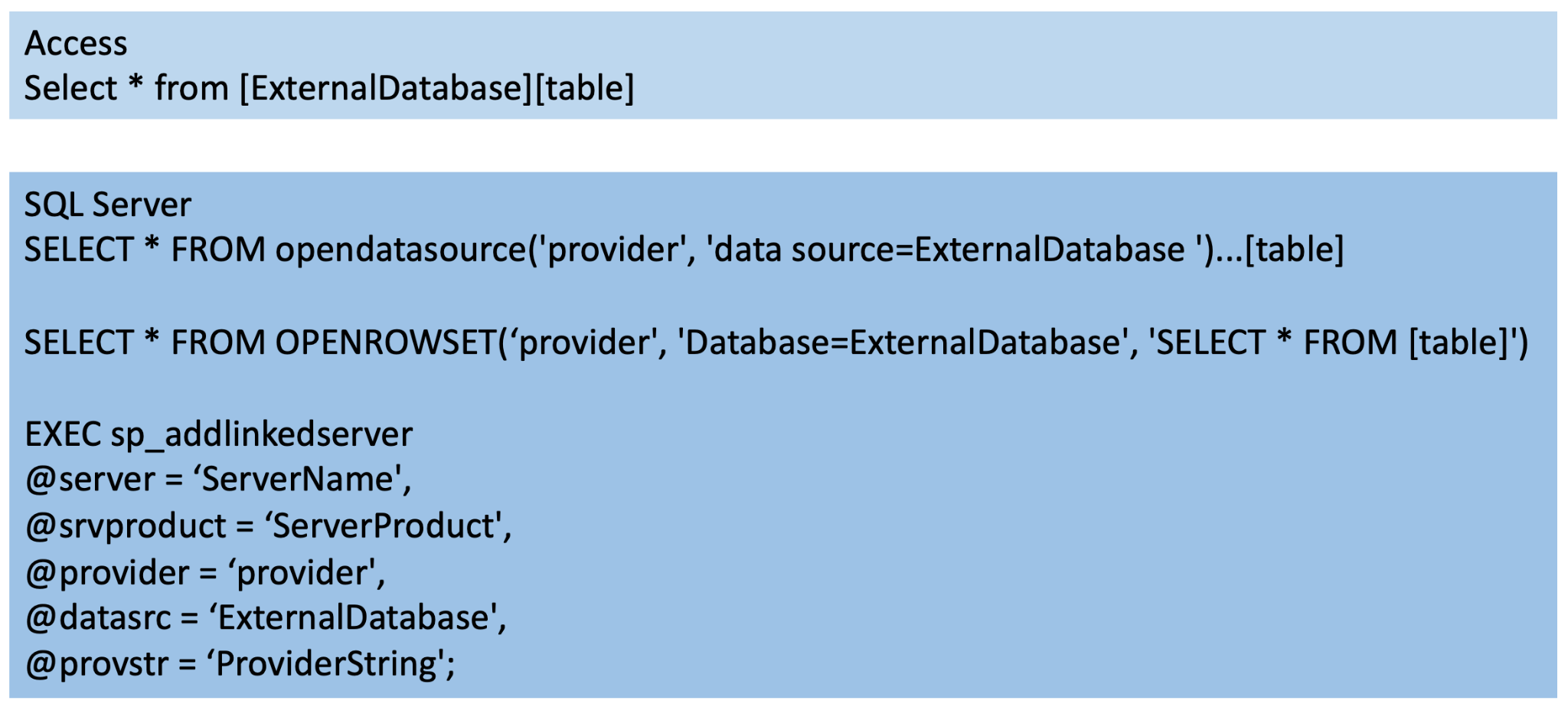
The potential impact of this situation is critical due to the ongoing activity described, the vulnerabilities exploited to deliver the attack and the adversaries who could be behind compromises. While exploits of these vulnerabilities may not halt business operations, access to sensitive information and systems is certainly possible, and should be assumed to have occurred. Access to corporate emails could also lead to followup phishing attacks.

If you believe you have been compromised, you should enact your incident response plan. If you need such services, our Palo Alto Networks Crypsis incident response team is available to help: crypsis-investigations@paloaltonetworks.com.

Additional Resources:

  1. Analyzing Attacks Against Microsoft Exchange Server With China Chopper Webshells
  2. Threat Assessment: Active Exploitation of Four Zero-Day Vulnerabilities in Microsoft Exchange Server
  3. Hunting for the Recent Attacks Targeting Microsoft Exchange
  4. HAFNIUM targeting Exchange Servers with 0-day exploits
  5. Operation Exchange Marauder: Active Exploitation of Multiple Zero-Day Microsoft Exchange Vulnerabilities
  6. Mass Exploitation of Exchange Server Zero-Day CVEs: What You Need to Know
  7. Multiple Security Updates Released for Exchange Server